Cloud Migration Strategy
Sutedjo Tjahjadi
Managing Director,
Datacomm Cloud Business
1
Cloud Computing Introduction
What is Cloud Computing
3
The practice of using a network of
remote servers hosted on the internet
to store, manage, and process data;
rather than a local server or a
personal computer (PC).
Cloud Migration Stragegy
Hype Cycle Cloud Computing 2012
4Source: Cloud Adoption Model for Governments and Large Enterprises, Hrishikesh (Rishi) Trivedi -
Massachusetts Institute of Technology – May 2013
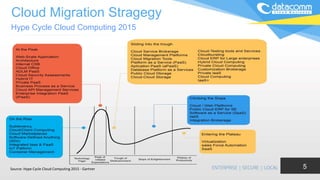
Cloud Migration Stragegy
5
Hype Cycle Cloud Computing 2015
Source: Hype Cycle Cloud Computing 2015 - Gartner
The Future of Cloud – Forbes
55% of Enterprises Predict Cloud Computing Will Enable New Business Models In Three Years
6
• Top-line growth, collaboration among employees, and supply
chain are the three areas enterprises expect cloud computing to
impact most in three years.
• Developing new products and services, new lines of business
and entering new markets are three key areas in which cloud
computing is transforming enterprises.
• 58% of enterprises predict their use of cloud computing will
increase top-line revenue growth in three years.
• 67% of enterprises say that marketing, purchasing, and supply
chain are somewhat and mostly cloud- based as of today.
Cloud Deployment Model
7
Hybrid Cloud Private Cloud Public Cloud
Cloud Migration Framework
Datacomm Cloud Migration
Framework
9
Establishing Common
Understanding to
Move to Cloud
Computing Platform
Identifying Critical IT
Application but NOT
Strategic yet Requiring
Intensive People
Resources
Current Situation
Assessment: People
Resources, Infrastructure,
Licensing & Major IT
Challenges
Identifying Competitive
Advantage and
Differentiation for
Business by Leveraging
Cloud Computing
Understanding
Challenges & Risks in
Moving to Cloud
Developing Migration Plan
1 2 3
456
Datacomm Cloud Migration
Framework
10
Identifying Critical IT
Application but NOT
Strategic yet Requiring
Intensive People
Resources
Current Situation
Assessment: People
Resources, Infrastructure,
Licensing & Major IT
Challenges
Identifying Competitive
Advantage and
Differentiation for
Business by Leveraging
Cloud Computing
Understanding
Challenges & Risks in
Moving to Cloud
Developing Migration Plan
1
Establishing
Common
Understanding to
Move to Cloud
Computing Platform
Trend in IT Cloud Computing Spending
11
• Cloud computing will become the bulk of new it spend
by 2016, According to Gartner (25 Oct 2013)
• Cloud Spending by Companies Outpaces Predictions,
Forrester Says, Acording to Bloomberg (April 24,
2014)
• Worldwide Cloud IT Infrastructure Spending Forecast
to Grow 26% Year Over Year in 2015, Driven by Public
Cloud Datacenter Expansion, According to IDC (06 Jul
2015)
• 2016 IT Budget Predictions - A Cloud on the Horizon,
According to CIO (Sep 2015)
Cloud Services Model
12https://blogs.msdn.microsoft.com/dachou/2011/03/16/rise-of-the-cloud-ecosystems/
Cloud Characteristic
13
Agility
API to Open interface
Cost model: OPEX
Device & location
independence
Maintenance
Multitenancy
Productivities
Reliability
Security
Monitored
Performance
Elasticity & Scalabiity
Opportunities & Challenges
14
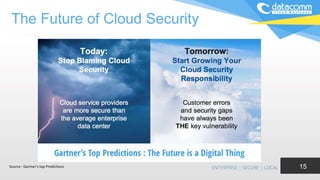
The Future of Cloud Security
15Source : Gartner’s top Predictions
Datacomm Cloud Migration
Framework
16
Identifying Critical IT
Application but NOT
Strategic yet Requiring
Intensive People
Resources
Identifying Competitive
Advantage and
Differentiation for
Business by Leveraging
Cloud Computing
Understanding
Challenges & Risks in
Moving to Cloud
Developing Migration Plan
2
Current Situation Assessment:
People Resources,
Infrastructure, Licensing &
Major IT Challenges
Establishing Common
Understanding to
Move to Cloud
Computing Platform
Current Situation Assesment
17
On IT Infrastructures
• Infrastructure - Where are you near end
of life on existing hardware, leases,
warranty, or support agreements?
• Software Licensing - Is it time to renew
software enterprise agreements? Can
you take advantage of more flexible
subscription or service provider licensing
models?
• Where the automation and management
of the cloud free up IT staff?
• Major IT Challenges
Datacomm Cloud Migration
Framework
18
Identifying Competitive
Advantage and
Differentiation for
Business by Leveraging
Cloud Computing
Understanding
Challenges & Risks in
Moving to Cloud
Developing Migration Plan
3
Establishing Common
Understanding to
Move to Cloud
Computing Platform
Current Situation
Assessment: People
Resources, Infrastructure,
Licensing & Major IT
Challenges
Identifying Critical IT
Application but NOT Strategic
yet Requiring Intensive People
Resources
Identifying Critical IT Application but NOT Strategic
yet Requiring Intensive People Resources
19
• Look at apps that require fault-tolerance such as
CRM and ERP to tap into built-in DR
• Inherently distributed apps like mail have
inherent cloud capabilities; Look at full Exchange
environment or hosted exchange based on your
needs to customize (full Exchange in the cloud is
customizable)
• Easily migrate terminal server or browser based
apps— SharePoint, Drupal, Joomla
E-mail as a Service
20
• One benefit of hosted Exchange is that all associated
overhead -- servers, software, configuration, monitoring,
maintenance, upgrades, backups and disaster planning
• No competitive differentiation for an organization in
owning your own email system. Better off investing in
technology that's going to help you make money, make
your customers happy and make your workers more
productive
• Offer bundles of related services like malware
protection, compliance and archiving, and mobile
device access as well as other value-added services
that complement email.
Back Up as a Service
21
• Backup Performance. How much time require
to complete the backup and restore process?
Does the current backup system uses
compression, incremental & deduplication
technology?
• Simplification and Automation of Backup
Management. Unified backup location, single
management platform for management, restore
to any servers
• Backup Target Location. Have the company
implement 3-2-1 rule of backup?
Mobile Management as a Service
22
• Remote Worker Policy
• Protecting Company Intellectual Property
• Managing the BYOD
• Agility to Deploy the System
Disaster Recovery as a Service
23
• Business Continuity
• Always-On’ Access and Uptime
• Cost vs. Probable of Catastrophic Failure
• Complexity in Managing the Disaster
Recovery Systems
• Managing Recovery Process
Datacomm Cloud Migration
Framework
24
Understanding
Challenges & Risks in
Moving to Cloud
Developing Migration Plan
4
Establishing Common
Understanding to
Move to Cloud
Computing Platform
Current Situation
Assessment: People
Resources, Infrastructure,
Licensing & Major IT
Challenges
Identifying Competitive
Advantage and
Differentiation for Business
by Leveraging Cloud
Computing
Identifying Critical IT
Application but NOT
Strategic yet Requiring
Intensive People
Resources
Identifying Competitive Advantage and
Differentiation for Business by Leveraging Cloud
Computing
25
• Where can you reduce
cost of sales, cost of
support or create new
markets with legacy
apps?
• Which customer facing
apps could you serve
online (SaaS) to reach
new customers or serve
internal customers
better?
• Can you leverage the
cloud as a fast path to
multi- tenancy? Single
tenant c/s app can be
served multi- tenant in
the cloud without costly
re-architecting.
• Increase Revenue
• Increase Profit
• Reduce Cost
• Increase Efficiency
• Increase Customer
Satisfaction
• Expand Market
Coverage
• Create New Market
Porter’s Generic Strategies
Business Motivational Context
26
Motivation Influences Domain Focus
Business
Drivers
$ savings vs. Agility
Project
Control
IT Dept. vs. Business
Technology
Adoption
Early vs. Mainstream
Business
Model for IT
As Support vs. As Business
Mapping Journey to Cloud
27
Source: Overview of the AWS Cloud Adoption Framework
Datacomm Cloud Migration
Framework
28
Developing Migration Plan
5
Establishing Common
Understanding to
Move to Cloud
Computing Platform
Current Situation
Assessment: People
Resources, Infrastructure,
Licensing & Major IT
Challenges
Understanding Challenges
& Risks in Moving to Cloud
Identifying Critical IT
Application but NOT
Strategic yet Requiring
Intensive People
Resources
Identifying Competitive
Advantage and
Differentiation for
Business by Leveraging
Cloud Computing
Understanding Challenges & Risk
29
• Security
• Secure Data Transfer
• Secure Software Interface
• Secure Store Data
• User Access Control
• Data Separation
• Service Quality
• Loss of control
• Integration
• Availability and
reliability of cloud
applications
• Service provider lock-in
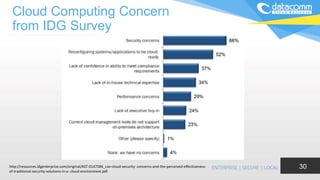
Cloud Computing Concern
from IDG Survey
30http://resources.idgenterprise.com/original/AST-0147586_cso-cloud-security- concerns-and-the-perceived-effectiveness-
of-traditional-security-solutions-in-a- cloud-environment.pdf
Leverage Risk Management
Methodology
31
Value
can be
arranged
if measured
Clear
Visible
Measurable
Can be addressed
Possibility
Expected
Highly Likely
Likely
Not Likely
Slight
Certainly occur,
or appear in the last 6 months
Likely to appear
More often appear than not
May appear
Unlikely appear
Source: Microsoft
Leverage Risk Management
Methodology
32
Definition of Impact
Score Rating Definition
Description of Impact
Duration
Organizational and
Operational Scope
Reputational Impact
on Stakeholders (i.e.,
citizen, civil servants)
Legal/ Compliance/
Environmental Impact
1 Catastrophic
Severe damage to assets or reputation, impact on
department operation or customer credibility. Cancellation of
business commitments or financial support
Significant
Recovery
Period
Entire organization,
operations stop globally
Permanent loss of trust,
generate lawsuit,
interruption of the
operation entirety
entire department
banned
2 Severe
Serious damage to assets or reputation but not totally
damage, impact on department operation or customer
credibility. Cancellation of business commitments or financial
support
Recoverable in
the Long Term (i.
e., 12-24
months)
2 or more department
seriously disrupted
reduction in ongoing
operation, services may
not achieve the SLA
certain departments
banned
3 Serious
Moderate damage, eg impact on internal operations,
increase operating costs or reduced SLA performance. The
impact on support costs, productivity seen. A few impact on
business.
Recoverable in
the Short Term
(i. e., 6-12
months)
1 or more department
seriously disrupted
moderate loss on 1 or
more groups of
stakeholders
restrictions or penalties
in certain departments
4 Mild
Minor damage which affects the internal operation. A few
impact on the cost of support or infrastructure
Temporary
(i.e., less than
6 months)
1 department disrupted minor or brief loss on 1
group of stakeholders
limited actions with
limited impact on
operations
5 Low
Minor impacts or changes in assets. the impact is absorbed
by business operations normally. no impact on support
costs, productivity, or business commitments.
Minimal impact
Source: Microsoft
Leverage Risk Management
Methodology
33
Identification, Risk Analytic & Compensation Control
Compliance Risk
•Governance & Enterprise Risk
management
•Legal issues : Contracts and Electronic
Discovery
•Incident Response
•Storage of data in multiple jurisdictions
and lack of transparency
•Compliance and Audit Management
•Data Protection Risks
•Sensitive Media Sanitization
•Audit or certification unavailable
•Compliance Degradation
•Governance Degradation
Strategic Risks
•Information Management and Data
Security
•Interoperability and Portability
•Poor Provider Selection
•Organizational Readiness
•Lack of Supplier Redundancy
•Lock-In
•Data classification of DoCE side
•Data Migration From on-premise into the
cloud (whether public, private or hybrid)
Market & Finance Risks
•Loss of reputation
•Service Termination or Failure
•Isolation Failure
•Capacity Management
•Environment Agility / Time to Market
•Incident Response
Operational Risks
•Data Center Operations
•Log & Tracing Failure
•Backup Failure
•Information Management and Data
Security
•Impact on current internal operational
procedures
•Inaccurate Modeling of resource usage /
resource exhaustion
•Integration into existing business
solutions
•Malicious activities from an insider
•Sensitive information leakage
•Operations management
•Subpoena and e-discovery
•Unauthorized access to premises
•Theft of computer equipment
•Security of endpoint (laptop, pc, etc)
from which the cloud service is consumed
•Human resource constraints
•Natural Disasters
Source: Microsoft
Leverage Risk Management
Methodology
34
Risk Handling
Eliminate or reduce the risk -
follow the mitigation strategy
and enterprise risk
management (EMM) to
reduce the likelihood and
impact of risks. Plan a
failover approach
Accept or retention risk -
if the risk is tolerable
Avoid the risk - Do not
adoption kind of solutions
Move risk - Consider
Insurance, Warranty or
Guarantee SLA
1
2
3
4
Source: Microsoft
Datacomm Cloud Migration
Framework
35
6
Establishing Common
Understanding to
Move to Cloud
Computing Platform
Current Situation
Assessment: People
Resources, Infrastructure,
Licensing & Major IT
Challenges
Identifying Critical IT
Application but NOT
Strategic yet Requiring
Intensive People
Resources
Identifying Competitive
Advantage and
Differentiation for
Business by Leveraging
Cloud Computing
Understanding
Challenges & Risks in
Moving to Cloud
Developing Migration Plan
Cloud Adoption
36
Key Consideration
Business & Strategy
 Business & IT Drivers
 Costs & Benefits
 Key Measures
 Cloud Roadmap
Infrastructure
 Scalability
 Security Infrastructure
 Service & Resource Monitoring
 Policy Enforcement
 Model Packaging
Architecture
 Reference Architecture
 Security Architecture
 Manageability/ Reliability/ Availability
 Standards
Organization
 Executive Sponsorship
 Education & Training
 Roles & Responsibilities
 Organization Change Management
Operations/Admin/Mgmt
 Operational Metrics
 Capacity Management
 Operational Processes & Tools
Information
 Model/Config Mgmt. (templates)
 Cloud Information Model
 Data Durability
Projects/Portfolios/Services
 Cloud Service Portfolio Management
 Cloud Candidate Selection Approach
 Cloud Engineering Approach
Governance
 Risk Management
 Data Protection & Privacy Management
 Cloud Infrastructure Change Management
Copyright © 2013, Oracle and/or its affiliates. All rights reserved.
Cloud Computing Adoption
37
Source: Cloud Adoption Model for Governments and Large Enterprises, Hrishikesh (Rishi) Trivedi -
Massachusetts Institute of Technology – May 2013
IaaS
38
Re-Host Decision Filters – Rehost Filter
Source : Gartner - Five Options for Migrating Applications to the Cloud: Rehost, Refactor, Revise, Rebuild or Replace
SaaS
39
Replace Decision Filter - Refactor or
Revised Filter
Source : Gartner - Five Options for Migrating Applications to the Cloud: Rehost, Refactor, Revise, Rebuild or Replace
Rebuild
40
Rebuild Decision Filters – Rebuild Filter
Source : Gartner - Five Options for Migrating Applications to the Cloud: Rehost, Refactor, Revise, Rebuild or Replace
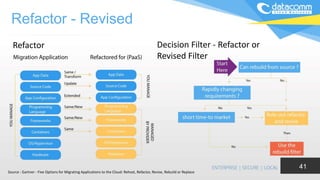
Refactor - Revised
41
Decision Filter - Refactor or
Revised Filter
Refactor
Source : Gartner - Five Options for Migrating Applications to the Cloud: Rehost, Refactor, Revise, Rebuild or Replace
Thank You
Cloud Adoption Model
43
Source: Cloud Adoption Model for Governments and Large Enterprises, Hrishikesh (Rishi) Trivedi -
Massachusetts Institute of Technology – May 2013
Stage 1 : Acclimation
• Get comfrotable with it as a concept and a tool
• Deploy for test / dev
• Deploy for non-business-critical DR
• Some production deployments – but tactical
• No change to poerations processes
• Limited virtualization tool deployments
Stage 2 : Strategic consolidation
• Comfortable with concept, use, maturity, stability
• Shift mindset from server to virtual server
• Spread production deployments widely
• Begin deployment for some business – critical
DR
• Painfully transition from server sprawl to virtual
servier life-cycle management
• Experiment with Vmotion and Distributed
Resource Scheduler (DRS)
Stage 3 : Process Improvement
• Using Vmotion, starting to trust DRS
• Can utilization rates be increased ?
• Deploy for business-critical DR
• Begin bifurcating applications between priority and
nonpriority
• Developing new operational efficiencies
• Process improvement spreading/butting up agains
network, storage, security, development.
Stage 4 : Private Cloud
• Make DRS part of standard procedures
• Implenenting production policies for automation
• Most mission-critical DR deployments
• Pooling and internal cloud deployment
• Chargeback / utility tracking
• SLA and QoS focus
Figure 6 : The Four Stages of Maturity for Private Cloud (Alvarez, Staten and McKee)
Cloud Migration Stragegy
Customer Qualifying Questions
44
• What is the size of the company?
• Micro SME < 50
• SME >51 and <500
• Medium Enterprise >501 and < 1000
• Large Enterprise >1000
• Budget IT
• What is the primary business of the
company?
• IT as Production Infrastructure
• IT as Supporting Infrastructure
• Why Company use Information Technology?
• Sales Marketing
• Finance Accounting
• Purchasing Logistics
• Communication Manufacturing
• What Typical Information Technology System
Installed?
• Server Networking
• Firewall Security ERP
• CRM Call Center
• Email Unify Communication
• Mobile BackUp
• Internet WebServer
• Company Culture Toward Adoption of New
Technology and Change?
• Innovators
• Early Adopter
• Early Majority
• Late Majority
• Laggard
Cloud Migration Stragegy
Hype Cycle and Technology Adoption Lifecycle
45Source: Hype Cycle by Gartner , Technology Adoption Lifecycle by Everett Rogers & Geoffrey Moore
IT Infrastructure Components
46
• IT infrastructure refers to the composite hardware, software, network
resources and services required for the existence, operation and
management of an enterprise IT environment. It allows an organization
to deliver IT solutions and services to its employees, partners and/or
customers and is usually internal to an organization and deployed
within owned facilities
• Typically, a standard IT infrastructure consists of the following
components:
• Hardware: Servers, computers, data centers, switches, hubs and
routers, etc.
• Software: Enterprise resource planning (ERP), customer relationship
management (CRM), productivity applications and more.
• Network: Network enablement, Internet connectivity, firewall and
security.
• Meatware: Human users, such as network administrators (NA),
developers, designers and generic end users with access to any IT
appliance or service are also part of an IT infrastructure, specifically
with the advent of user-centric IT service development.
Infrastructure Lifecycle
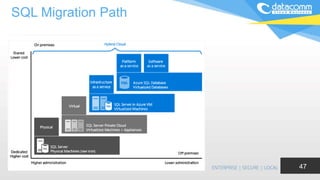
SQL Migration Path
47

Cloud Migration Strategy Framework

  • 1.
    Cloud Migration Strategy SutedjoTjahjadi Managing Director, Datacomm Cloud Business 1
  • 2.
  • 3.
    What is CloudComputing 3 The practice of using a network of remote servers hosted on the internet to store, manage, and process data; rather than a local server or a personal computer (PC).
  • 4.
    Cloud Migration Stragegy HypeCycle Cloud Computing 2012 4Source: Cloud Adoption Model for Governments and Large Enterprises, Hrishikesh (Rishi) Trivedi - Massachusetts Institute of Technology – May 2013
  • 5.
    Cloud Migration Stragegy 5 HypeCycle Cloud Computing 2015 Source: Hype Cycle Cloud Computing 2015 - Gartner
  • 6.
    The Future ofCloud – Forbes 55% of Enterprises Predict Cloud Computing Will Enable New Business Models In Three Years 6 • Top-line growth, collaboration among employees, and supply chain are the three areas enterprises expect cloud computing to impact most in three years. • Developing new products and services, new lines of business and entering new markets are three key areas in which cloud computing is transforming enterprises. • 58% of enterprises predict their use of cloud computing will increase top-line revenue growth in three years. • 67% of enterprises say that marketing, purchasing, and supply chain are somewhat and mostly cloud- based as of today.
  • 7.
    Cloud Deployment Model 7 HybridCloud Private Cloud Public Cloud
  • 8.
  • 9.
    Datacomm Cloud Migration Framework 9 EstablishingCommon Understanding to Move to Cloud Computing Platform Identifying Critical IT Application but NOT Strategic yet Requiring Intensive People Resources Current Situation Assessment: People Resources, Infrastructure, Licensing & Major IT Challenges Identifying Competitive Advantage and Differentiation for Business by Leveraging Cloud Computing Understanding Challenges & Risks in Moving to Cloud Developing Migration Plan 1 2 3 456
  • 10.
    Datacomm Cloud Migration Framework 10 IdentifyingCritical IT Application but NOT Strategic yet Requiring Intensive People Resources Current Situation Assessment: People Resources, Infrastructure, Licensing & Major IT Challenges Identifying Competitive Advantage and Differentiation for Business by Leveraging Cloud Computing Understanding Challenges & Risks in Moving to Cloud Developing Migration Plan 1 Establishing Common Understanding to Move to Cloud Computing Platform
  • 11.
    Trend in ITCloud Computing Spending 11 • Cloud computing will become the bulk of new it spend by 2016, According to Gartner (25 Oct 2013) • Cloud Spending by Companies Outpaces Predictions, Forrester Says, Acording to Bloomberg (April 24, 2014) • Worldwide Cloud IT Infrastructure Spending Forecast to Grow 26% Year Over Year in 2015, Driven by Public Cloud Datacenter Expansion, According to IDC (06 Jul 2015) • 2016 IT Budget Predictions - A Cloud on the Horizon, According to CIO (Sep 2015)
  • 12.
  • 13.
    Cloud Characteristic 13 Agility API toOpen interface Cost model: OPEX Device & location independence Maintenance Multitenancy Productivities Reliability Security Monitored Performance Elasticity & Scalabiity
  • 14.
  • 15.
    The Future ofCloud Security 15Source : Gartner’s top Predictions
  • 16.
    Datacomm Cloud Migration Framework 16 IdentifyingCritical IT Application but NOT Strategic yet Requiring Intensive People Resources Identifying Competitive Advantage and Differentiation for Business by Leveraging Cloud Computing Understanding Challenges & Risks in Moving to Cloud Developing Migration Plan 2 Current Situation Assessment: People Resources, Infrastructure, Licensing & Major IT Challenges Establishing Common Understanding to Move to Cloud Computing Platform
  • 17.
    Current Situation Assesment 17 OnIT Infrastructures • Infrastructure - Where are you near end of life on existing hardware, leases, warranty, or support agreements? • Software Licensing - Is it time to renew software enterprise agreements? Can you take advantage of more flexible subscription or service provider licensing models? • Where the automation and management of the cloud free up IT staff? • Major IT Challenges
  • 18.
    Datacomm Cloud Migration Framework 18 IdentifyingCompetitive Advantage and Differentiation for Business by Leveraging Cloud Computing Understanding Challenges & Risks in Moving to Cloud Developing Migration Plan 3 Establishing Common Understanding to Move to Cloud Computing Platform Current Situation Assessment: People Resources, Infrastructure, Licensing & Major IT Challenges Identifying Critical IT Application but NOT Strategic yet Requiring Intensive People Resources
  • 19.
    Identifying Critical ITApplication but NOT Strategic yet Requiring Intensive People Resources 19 • Look at apps that require fault-tolerance such as CRM and ERP to tap into built-in DR • Inherently distributed apps like mail have inherent cloud capabilities; Look at full Exchange environment or hosted exchange based on your needs to customize (full Exchange in the cloud is customizable) • Easily migrate terminal server or browser based apps— SharePoint, Drupal, Joomla
  • 20.
    E-mail as aService 20 • One benefit of hosted Exchange is that all associated overhead -- servers, software, configuration, monitoring, maintenance, upgrades, backups and disaster planning • No competitive differentiation for an organization in owning your own email system. Better off investing in technology that's going to help you make money, make your customers happy and make your workers more productive • Offer bundles of related services like malware protection, compliance and archiving, and mobile device access as well as other value-added services that complement email.
  • 21.
    Back Up asa Service 21 • Backup Performance. How much time require to complete the backup and restore process? Does the current backup system uses compression, incremental & deduplication technology? • Simplification and Automation of Backup Management. Unified backup location, single management platform for management, restore to any servers • Backup Target Location. Have the company implement 3-2-1 rule of backup?
  • 22.
    Mobile Management asa Service 22 • Remote Worker Policy • Protecting Company Intellectual Property • Managing the BYOD • Agility to Deploy the System
  • 23.
    Disaster Recovery asa Service 23 • Business Continuity • Always-On’ Access and Uptime • Cost vs. Probable of Catastrophic Failure • Complexity in Managing the Disaster Recovery Systems • Managing Recovery Process
  • 24.
    Datacomm Cloud Migration Framework 24 Understanding Challenges& Risks in Moving to Cloud Developing Migration Plan 4 Establishing Common Understanding to Move to Cloud Computing Platform Current Situation Assessment: People Resources, Infrastructure, Licensing & Major IT Challenges Identifying Competitive Advantage and Differentiation for Business by Leveraging Cloud Computing Identifying Critical IT Application but NOT Strategic yet Requiring Intensive People Resources
  • 25.
    Identifying Competitive Advantageand Differentiation for Business by Leveraging Cloud Computing 25 • Where can you reduce cost of sales, cost of support or create new markets with legacy apps? • Which customer facing apps could you serve online (SaaS) to reach new customers or serve internal customers better? • Can you leverage the cloud as a fast path to multi- tenancy? Single tenant c/s app can be served multi- tenant in the cloud without costly re-architecting. • Increase Revenue • Increase Profit • Reduce Cost • Increase Efficiency • Increase Customer Satisfaction • Expand Market Coverage • Create New Market Porter’s Generic Strategies
  • 26.
    Business Motivational Context 26 MotivationInfluences Domain Focus Business Drivers $ savings vs. Agility Project Control IT Dept. vs. Business Technology Adoption Early vs. Mainstream Business Model for IT As Support vs. As Business
  • 27.
    Mapping Journey toCloud 27 Source: Overview of the AWS Cloud Adoption Framework
  • 28.
    Datacomm Cloud Migration Framework 28 DevelopingMigration Plan 5 Establishing Common Understanding to Move to Cloud Computing Platform Current Situation Assessment: People Resources, Infrastructure, Licensing & Major IT Challenges Understanding Challenges & Risks in Moving to Cloud Identifying Critical IT Application but NOT Strategic yet Requiring Intensive People Resources Identifying Competitive Advantage and Differentiation for Business by Leveraging Cloud Computing
  • 29.
    Understanding Challenges &Risk 29 • Security • Secure Data Transfer • Secure Software Interface • Secure Store Data • User Access Control • Data Separation • Service Quality • Loss of control • Integration • Availability and reliability of cloud applications • Service provider lock-in
  • 30.
    Cloud Computing Concern fromIDG Survey 30http://resources.idgenterprise.com/original/AST-0147586_cso-cloud-security- concerns-and-the-perceived-effectiveness- of-traditional-security-solutions-in-a- cloud-environment.pdf
  • 31.
    Leverage Risk Management Methodology 31 Value canbe arranged if measured Clear Visible Measurable Can be addressed Possibility Expected Highly Likely Likely Not Likely Slight Certainly occur, or appear in the last 6 months Likely to appear More often appear than not May appear Unlikely appear Source: Microsoft
  • 32.
    Leverage Risk Management Methodology 32 Definitionof Impact Score Rating Definition Description of Impact Duration Organizational and Operational Scope Reputational Impact on Stakeholders (i.e., citizen, civil servants) Legal/ Compliance/ Environmental Impact 1 Catastrophic Severe damage to assets or reputation, impact on department operation or customer credibility. Cancellation of business commitments or financial support Significant Recovery Period Entire organization, operations stop globally Permanent loss of trust, generate lawsuit, interruption of the operation entirety entire department banned 2 Severe Serious damage to assets or reputation but not totally damage, impact on department operation or customer credibility. Cancellation of business commitments or financial support Recoverable in the Long Term (i. e., 12-24 months) 2 or more department seriously disrupted reduction in ongoing operation, services may not achieve the SLA certain departments banned 3 Serious Moderate damage, eg impact on internal operations, increase operating costs or reduced SLA performance. The impact on support costs, productivity seen. A few impact on business. Recoverable in the Short Term (i. e., 6-12 months) 1 or more department seriously disrupted moderate loss on 1 or more groups of stakeholders restrictions or penalties in certain departments 4 Mild Minor damage which affects the internal operation. A few impact on the cost of support or infrastructure Temporary (i.e., less than 6 months) 1 department disrupted minor or brief loss on 1 group of stakeholders limited actions with limited impact on operations 5 Low Minor impacts or changes in assets. the impact is absorbed by business operations normally. no impact on support costs, productivity, or business commitments. Minimal impact Source: Microsoft
  • 33.
    Leverage Risk Management Methodology 33 Identification,Risk Analytic & Compensation Control Compliance Risk •Governance & Enterprise Risk management •Legal issues : Contracts and Electronic Discovery •Incident Response •Storage of data in multiple jurisdictions and lack of transparency •Compliance and Audit Management •Data Protection Risks •Sensitive Media Sanitization •Audit or certification unavailable •Compliance Degradation •Governance Degradation Strategic Risks •Information Management and Data Security •Interoperability and Portability •Poor Provider Selection •Organizational Readiness •Lack of Supplier Redundancy •Lock-In •Data classification of DoCE side •Data Migration From on-premise into the cloud (whether public, private or hybrid) Market & Finance Risks •Loss of reputation •Service Termination or Failure •Isolation Failure •Capacity Management •Environment Agility / Time to Market •Incident Response Operational Risks •Data Center Operations •Log & Tracing Failure •Backup Failure •Information Management and Data Security •Impact on current internal operational procedures •Inaccurate Modeling of resource usage / resource exhaustion •Integration into existing business solutions •Malicious activities from an insider •Sensitive information leakage •Operations management •Subpoena and e-discovery •Unauthorized access to premises •Theft of computer equipment •Security of endpoint (laptop, pc, etc) from which the cloud service is consumed •Human resource constraints •Natural Disasters Source: Microsoft
  • 34.
    Leverage Risk Management Methodology 34 RiskHandling Eliminate or reduce the risk - follow the mitigation strategy and enterprise risk management (EMM) to reduce the likelihood and impact of risks. Plan a failover approach Accept or retention risk - if the risk is tolerable Avoid the risk - Do not adoption kind of solutions Move risk - Consider Insurance, Warranty or Guarantee SLA 1 2 3 4 Source: Microsoft
  • 35.
    Datacomm Cloud Migration Framework 35 6 EstablishingCommon Understanding to Move to Cloud Computing Platform Current Situation Assessment: People Resources, Infrastructure, Licensing & Major IT Challenges Identifying Critical IT Application but NOT Strategic yet Requiring Intensive People Resources Identifying Competitive Advantage and Differentiation for Business by Leveraging Cloud Computing Understanding Challenges & Risks in Moving to Cloud Developing Migration Plan
  • 36.
    Cloud Adoption 36 Key Consideration Business& Strategy  Business & IT Drivers  Costs & Benefits  Key Measures  Cloud Roadmap Infrastructure  Scalability  Security Infrastructure  Service & Resource Monitoring  Policy Enforcement  Model Packaging Architecture  Reference Architecture  Security Architecture  Manageability/ Reliability/ Availability  Standards Organization  Executive Sponsorship  Education & Training  Roles & Responsibilities  Organization Change Management Operations/Admin/Mgmt  Operational Metrics  Capacity Management  Operational Processes & Tools Information  Model/Config Mgmt. (templates)  Cloud Information Model  Data Durability Projects/Portfolios/Services  Cloud Service Portfolio Management  Cloud Candidate Selection Approach  Cloud Engineering Approach Governance  Risk Management  Data Protection & Privacy Management  Cloud Infrastructure Change Management Copyright © 2013, Oracle and/or its affiliates. All rights reserved.
  • 37.
    Cloud Computing Adoption 37 Source:Cloud Adoption Model for Governments and Large Enterprises, Hrishikesh (Rishi) Trivedi - Massachusetts Institute of Technology – May 2013
  • 38.
    IaaS 38 Re-Host Decision Filters– Rehost Filter Source : Gartner - Five Options for Migrating Applications to the Cloud: Rehost, Refactor, Revise, Rebuild or Replace
  • 39.
    SaaS 39 Replace Decision Filter- Refactor or Revised Filter Source : Gartner - Five Options for Migrating Applications to the Cloud: Rehost, Refactor, Revise, Rebuild or Replace
  • 40.
    Rebuild 40 Rebuild Decision Filters– Rebuild Filter Source : Gartner - Five Options for Migrating Applications to the Cloud: Rehost, Refactor, Revise, Rebuild or Replace
  • 41.
    Refactor - Revised 41 DecisionFilter - Refactor or Revised Filter Refactor Source : Gartner - Five Options for Migrating Applications to the Cloud: Rehost, Refactor, Revise, Rebuild or Replace
  • 42.
  • 43.
    Cloud Adoption Model 43 Source:Cloud Adoption Model for Governments and Large Enterprises, Hrishikesh (Rishi) Trivedi - Massachusetts Institute of Technology – May 2013 Stage 1 : Acclimation • Get comfrotable with it as a concept and a tool • Deploy for test / dev • Deploy for non-business-critical DR • Some production deployments – but tactical • No change to poerations processes • Limited virtualization tool deployments Stage 2 : Strategic consolidation • Comfortable with concept, use, maturity, stability • Shift mindset from server to virtual server • Spread production deployments widely • Begin deployment for some business – critical DR • Painfully transition from server sprawl to virtual servier life-cycle management • Experiment with Vmotion and Distributed Resource Scheduler (DRS) Stage 3 : Process Improvement • Using Vmotion, starting to trust DRS • Can utilization rates be increased ? • Deploy for business-critical DR • Begin bifurcating applications between priority and nonpriority • Developing new operational efficiencies • Process improvement spreading/butting up agains network, storage, security, development. Stage 4 : Private Cloud • Make DRS part of standard procedures • Implenenting production policies for automation • Most mission-critical DR deployments • Pooling and internal cloud deployment • Chargeback / utility tracking • SLA and QoS focus Figure 6 : The Four Stages of Maturity for Private Cloud (Alvarez, Staten and McKee)
  • 44.
    Cloud Migration Stragegy CustomerQualifying Questions 44 • What is the size of the company? • Micro SME < 50 • SME >51 and <500 • Medium Enterprise >501 and < 1000 • Large Enterprise >1000 • Budget IT • What is the primary business of the company? • IT as Production Infrastructure • IT as Supporting Infrastructure • Why Company use Information Technology? • Sales Marketing • Finance Accounting • Purchasing Logistics • Communication Manufacturing • What Typical Information Technology System Installed? • Server Networking • Firewall Security ERP • CRM Call Center • Email Unify Communication • Mobile BackUp • Internet WebServer • Company Culture Toward Adoption of New Technology and Change? • Innovators • Early Adopter • Early Majority • Late Majority • Laggard
  • 45.
    Cloud Migration Stragegy HypeCycle and Technology Adoption Lifecycle 45Source: Hype Cycle by Gartner , Technology Adoption Lifecycle by Everett Rogers & Geoffrey Moore
  • 46.
    IT Infrastructure Components 46 •IT infrastructure refers to the composite hardware, software, network resources and services required for the existence, operation and management of an enterprise IT environment. It allows an organization to deliver IT solutions and services to its employees, partners and/or customers and is usually internal to an organization and deployed within owned facilities • Typically, a standard IT infrastructure consists of the following components: • Hardware: Servers, computers, data centers, switches, hubs and routers, etc. • Software: Enterprise resource planning (ERP), customer relationship management (CRM), productivity applications and more. • Network: Network enablement, Internet connectivity, firewall and security. • Meatware: Human users, such as network administrators (NA), developers, designers and generic end users with access to any IT appliance or service are also part of an IT infrastructure, specifically with the advent of user-centric IT service development. Infrastructure Lifecycle
  • 47.

Editor's Notes

  • #2 This is the first page. You can change the text into anything that suit your need.