
Azure IaaS
Server Life Cycle
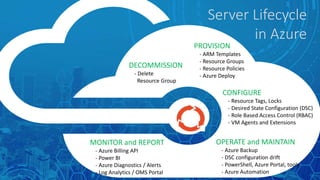
PROVISION
- ARM Templates
- Resource Groups
- Resource Policies
- Azure Deploy
CONFIGURE
- Resource Tags, Locks
- Desired State Configuration (DSC)
- Role Based Access Control (RBAC)
- VM Agents and Extensions
OPERATE and MAINTAIN
- Azure Backup
- DSC configuration drift
- PowerShell, Azure Portal, tools
- Azure Automation
MONITOR and REPORT
- Azure Billing API
- Power BI
- Azure Diagnostics / Alerts
- Log Analytics / OMS Portal
DECOMMISSION
- Delete
Resource Group
Server Lifecycle
in Azure
Asperia-HR-Prod
10.20.0.0/24vNet
Peering
10.10.0.0/24
10.10.1.0/24
10.0.0.0/16
Power BI
Storage
Backup Agent
TagsPiP
Nic
Asperia-IT-Prod
vmSPW1
vmSPW2
vmADP1
vmFS1
vmSPA1
vmDMA2
FE-NSG BE-NSG
BE-NSG
Azure VPN
Gateway
10.10.0.0/16
Virtual Network
Azure
Automation
Power BI
CSV files / SQL
10.20.0.0/16
Virtual Network
Azure
Support
RBAC &
Privileged
Identity
Management
Resource Group
Azure
Security
Centre
ARM Templates
GitHub
Resource
Locks
DSC
Azure
Diagnostics
MFA
Azure
Key Vault
Agents
VM
VM VM VM
Recovery
Vault
Resource
Policies
Management
GUI / Scripts
Power BI Dashboard
MS OMS Dashboard
ASR for lift & shift
MS Assessment Planning
Azure Billing
API
Subscription Hierarchy
• EA > Dept(s) > Account(s)
• Standard – Account
Naming Standards
• Subscriptions – 3rd party access
e.g. Contoso-HR-Production
• Global unique names
• Server – prefix dependant resources
Network
• WAN address space
• Virtual networks – vNet peering
• Subnets – usage, addressing
• Security boundaries - NSGs
Resource Groups
• Lifecycle, functional
• Security boundary
Tags
• Basis for management & reporting
• Start with dashboard view – KPIs,
usage, billing
PowerShell
& Automation
• GUI – Windows Forms
• Reporting via Power BI
Diagnostics
& Analytics
• OMS Portal - Alerts
• SCOM integration
Access
• RBAC – security groups
• Just In Time administration
• Auditing
Licensing
• Hybrid Use Benefit
• Computer pre-purchase
• Compute Option
Some Design Considerations
Resource Template
Repository
• File Server
• GitHub
Copy template folder1
Staging Area
• Local
Workstation
Edit Parameter File
and Build
2
ARM Template
• Validated
3 Azure Storage
• Nested
Templates
Upload template folder
to Azure Storage
If using nested resources
Deploy Template
4
Azure
Make it so!
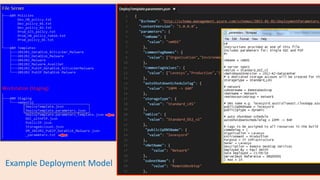
Example Deployment Model
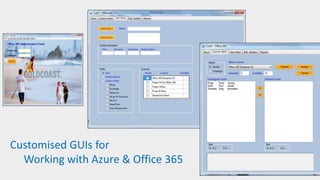
Customised GUIs for
Working with Azure & Office 365
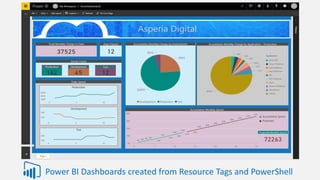
Power BI Dashboards created from Resource Tags and PowerShell
References
Azure subscription and service limits, quotas, and constraints
- https://docs.microsoft.com/en-us/azure/azure-subscription-service-limits
Azure Billing API
- https://docs.microsoft.com/en-au/azure/billing-usage-rate-card-overview
Azure Subscriptions – Enterprise Agreements
- http://searchcloudcomputing.techtarget.com/tip/How-to-set-up-and-manage-Azure-subscriptions
Azure Support Plans and Forums

Azure IaaS Server Lifecycle Presentation

  • 1.
  • 2.
    PROVISION - ARM Templates -Resource Groups - Resource Policies - Azure Deploy CONFIGURE - Resource Tags, Locks - Desired State Configuration (DSC) - Role Based Access Control (RBAC) - VM Agents and Extensions OPERATE and MAINTAIN - Azure Backup - DSC configuration drift - PowerShell, Azure Portal, tools - Azure Automation MONITOR and REPORT - Azure Billing API - Power BI - Azure Diagnostics / Alerts - Log Analytics / OMS Portal DECOMMISSION - Delete Resource Group Server Lifecycle in Azure
  • 3.
    Asperia-HR-Prod 10.20.0.0/24vNet Peering 10.10.0.0/24 10.10.1.0/24 10.0.0.0/16 Power BI Storage Backup Agent TagsPiP Nic Asperia-IT-Prod vmSPW1 vmSPW2 vmADP1 vmFS1 vmSPA1 vmDMA2 FE-NSGBE-NSG BE-NSG Azure VPN Gateway 10.10.0.0/16 Virtual Network Azure Automation Power BI CSV files / SQL 10.20.0.0/16 Virtual Network Azure Support RBAC & Privileged Identity Management Resource Group Azure Security Centre ARM Templates GitHub Resource Locks DSC Azure Diagnostics MFA Azure Key Vault Agents VM VM VM VM Recovery Vault Resource Policies Management GUI / Scripts Power BI Dashboard MS OMS Dashboard ASR for lift & shift MS Assessment Planning Azure Billing API
  • 4.
    Subscription Hierarchy • EA> Dept(s) > Account(s) • Standard – Account Naming Standards • Subscriptions – 3rd party access e.g. Contoso-HR-Production • Global unique names • Server – prefix dependant resources Network • WAN address space • Virtual networks – vNet peering • Subnets – usage, addressing • Security boundaries - NSGs Resource Groups • Lifecycle, functional • Security boundary Tags • Basis for management & reporting • Start with dashboard view – KPIs, usage, billing PowerShell & Automation • GUI – Windows Forms • Reporting via Power BI Diagnostics & Analytics • OMS Portal - Alerts • SCOM integration Access • RBAC – security groups • Just In Time administration • Auditing Licensing • Hybrid Use Benefit • Computer pre-purchase • Compute Option Some Design Considerations
  • 5.
    Resource Template Repository • FileServer • GitHub Copy template folder1 Staging Area • Local Workstation Edit Parameter File and Build 2 ARM Template • Validated 3 Azure Storage • Nested Templates Upload template folder to Azure Storage If using nested resources Deploy Template 4 Azure Make it so!
  • 6.
  • 8.
    Customised GUIs for Workingwith Azure & Office 365
  • 9.
    Power BI Dashboardscreated from Resource Tags and PowerShell
  • 10.
    References Azure subscription andservice limits, quotas, and constraints - https://docs.microsoft.com/en-us/azure/azure-subscription-service-limits Azure Billing API - https://docs.microsoft.com/en-au/azure/billing-usage-rate-card-overview Azure Subscriptions – Enterprise Agreements - http://searchcloudcomputing.techtarget.com/tip/How-to-set-up-and-manage-Azure-subscriptions Azure Support Plans and Forums

Editor's Notes

  • #2 This is a talk about managing virtual machines in Azure and an overview of some of the architecture and design considerations needed to support the server lifecycle in the cloud. Also I will be demonstrating an example of a PowerShell GUI that I use to deploy virtual machines using ARM templates and ‘plain English’ parameter and policy files.
  • #3 Provision ARM Templates are a great way to deploy VMs. They differ from PowerShell scripts in that they describe the resource rather than the ordered steps to create it. A benefit of ARM is that Azure takes care of the steps in the back-end and is able to parallelise and skip steps that are already completed making it quicker and less prone to error. Resource groups are security or functional containers for resources. For example they can be used to contain all the resources for a VM e.g. storage account, nic, PIP. One of the benefits of this approach is that it enables a server to be decommissioned easily by deleting the resource group. Resource Policies control the creation of resources e.g. only allow storage accounts to be created in AustraliaEast and VMs of a certain size. They can be applied at subscription, resource group or resource scope and are applied whenever a resource is deployed. Azure Deploy is the backend Azure service that manages resource deployments via service providers REST API. Configure Resource Tags are optional metadata that can be associated with a resource or resource group. They organise resources to enable management and reporting with up to 15 tags per resource. Resource Locks prevent resource from being deleted or modified either accidently or maliciously. They can be applied at the subscription, resource group or resource level with inheritance / most restrictive. They are applied regardless of RBAC. DSC is an extension of PowerShell and a model for automating the configuration of VMs both during deployment and on-going via Azure DSC automation to ensure a given configuration is maintained (configuration drift). RBAC has three roles; owner, contributor and reader and typically a user is added to a security group in Azure AD and that group is assigned a role on a subscription, resource group or resource with top-down inheritance e.g. assign the ‘IT-Prod-VMMgmt’ group contributor access to a VM to enable members of this group to manage production VMs. VM Agents and Extensions provide additional features such as Azure diagnostics, Windows Malware, VM-level backup (extension), file-level backup (agent), DSC, Bginfo, VM Access and custom script extension. Operate and Maintain Azure Backup provides VM-level application-consistent snapshot backups using the VM Backup extension and file-level backups via the Backup agent installed on the OS. DSC configuration drift ensures the VM’s given configuration is maintained by periodically checking for any changes and correcting where needed. DSC is run from Azure Automation. PowerShell, Azure Portal, tools provide management access to Azure. There are many third party tools and applications available. Azure Automation is a service in Azure that enable scripts, runbooks, DSC to be scheduled and run directly in Azure. Monitor and Report Azure Billing API provides resource usage and subscription specific unit costs necessary to predict and manage opex costs. The API supports resource tags and there are PowerShell cmdlets for querying the REST API. https://blogs.technet.microsoft.com/keithmayer/2015/06/30/export-azure-subscription-usage-to-csv-with-new-billing-api-and-powershell/ Power BI is a cloud service that enables dashbord views of data sourced from various locations including Azure storage accounts. In the Azure context dashboards can be used for summarising VM statistics such as fleet breakdown and Azure costs by resource tags. Azure Diagnostics / Alerts enables collection, graphing and alerting of various data sources including Windows performance counters, Windows event logs, crash dumps and metrics – logs persisted to Azure storage – noted as ‘IaaSDiagnostics’ agent in VM Extensions. https://docs.microsoft.com/en-us/azure/virtual-machines/virtual-machines-windows-extensions-diagnostics-template?toc=%2fazure%2fvirtual-machines%2fwindows%2ftoc.json Log Analytics collects data from sources both on premise and in the cloud. Currently there are three types of sources; Windows/Unix agent, SCOM and logs on Azure Storage. Also there are three tiers including a free tier with the other tiers costed per GB ingested. The OMS portal is a standalone portal linked to a log analytic workspace that provides dashboard insights of collected data and can be extended with third-party solutions that also utilise the Log Analytics platform to provide insights such as a ‘backup status’ and ‘network performance’. Decommission Delete Resource Group will remove the RM and associated dedicated resources.
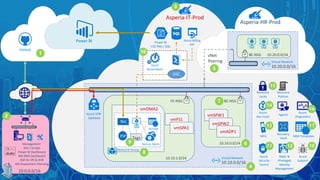
  • #4 This diagram provides an architectural view of some of the Azure components related to the server lifecycle; 1. ARM template repository – library of server templates, version control – file server, GitHub. 2. Local workstation - PowerShell/Azure SDK, Storage Explorer - management GUI and scripts, Power BI dashboards. ASR for lift and shift (MS VM Converter retiring) - MS Assessment and Planning Toolkit is an agentless tool that will discovery existing on premise workloads and assess cloud readiness and recommend VM sizing for Azure. 3. Subscriptions - billing container - multiple per account - use a service account setup as a DL for the account - EA multiple accounts - subscriptions connected via vnet peering - naming convention - default limitations - 20 cores per region, 20 VMs per region, 200 storage accounts/40 standard disks per storage account @ 500 IOPS per disk (16 disks limit on backup per VM) 4. Virtual networks - address space - corporate address (on premise, remote offices), subscriptions 5. vNet peering - connect networks in same region - works across subscriptions - non-transitive - no performance loss - azure dsn wont work between vnets - network design, address space 6. Subnets - functional grouping defined by NSGs - e.g. front-end: internet facing, application ABC - network design to utilise address space effectively 7. NSG - access rules for subnets 8. Resource groups - lifecycle grouping - all resources should be deleted at the same time e.g. server - storage, nic, agents, PIP e.g. application - servers, SQL, storage - alternatively, security boundary assigning RBAC to provide server granularity access 9. Tags - basis for resource management and reporting including billing - 15 per resource limit 10. Automation - DSC for provisioning and config drift maintenance - billing data extract for Power BI 11. Azure Security Center - centralise security view of your Azure infrastructure with MS analytics providing threat detection and recommendations. 12. RBAC (role based access control) - granular, custom roles, assign via security groups - Privilege Identity Management (AAD Premium Plan 2 with MFA) - just in time admin, auditing and governance 13. MFA - for administrators - use work/organisational accounts 14. Azure Key Vault - VM disk bitlocker encryption - server admin passwords for provisioning (consistency, non-admin provisioning) - Premium HSM compliance 15. Azure Resource Policies - provide governance and control over resource creation Azure resource locks - provide control over resource deletion / modifcations 16. Azure diagnostics / log analytics - MS OMS 17. ARM templates storage - nested templates need to be provisioned 18. Azure Support - understand this as there is a lot that is not in your control Standard support plan - production workloads, 24x7, <2hrs response, Azure Forums - MSDN, Stackflow, ServerFlow, twitter@azuresupport
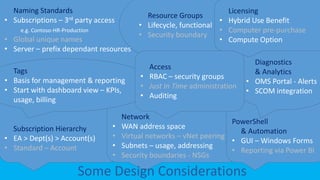
  • #5 Subscription Hierarchy - account and service administrator http://searchcloudcomputing.techtarget.com/tip/How-to-set-up-and-manage-Azure-subscriptions 2. Naming Standards - subscriptions, resource groups, servers, global unique names, third party access tenant differentiation 3. Network - WAN address space - subnet usage functional - subnet addressing 4. Resource Groups - lifecycle, security boundary 5. Diagnostics and Analytics - OMS, SCCM, security 6. Access - groups, just in time administration, auditing 7. Tags - start with dashboard view of world .e.g KPIs, usage, billing 8. Licensing - Hybrid Use Benefit Windows Server Standard with SA can be transferred to Azure use for a VM up to 16 cores Windows Server Datacenter with SA may continue being used on-premise for unlimted VMs plus addition 1 VM in Azure up to 16 cores or 2 VMs up to 8 cores each. Gallery images prefixed with [HUB] Alternatively sysprep an image on-premise, upload and set ‘licencetype’ to Windows-Server Costed at Azure base rate i.e. linux vm Compute pre-purchase - EA customers only - large discount (up to 63%) for pre-paid 12 month credit for a nominated instance type (family, size, region and os) Compute Option - enroll in a Server or Cloud Enrollment with the CIS component - This means that all Windows Server deployments on-premises will be covered with a CIS license (an annuity license including Windows Server and Microsoft System Centre). - The Microsoft Azure Compute Option applies to both IaaS virtual machines and PaaS Cloud Services instances. After your initial add-on purchase, you can deploy whatever compute instances you need, receiving significant discounts on all usage up to your entitlement (which is determined by the number of add-ons you purchase). Contact your Microsoft sales team for more information. https://azure.microsoft.com/en-in/overview/azure-for-microsoft-software/faq/ https://kenstervibes.wordpress.com/2016/02/13/azure-hybrid-use-benefits-hub/ http://www.interlink.com/blog/entry/the-azure-hybrid-use-benefit-don-t-purchase-windows-server-twice 9. PowerShell and Automation – customised GUI for management and reporting – automate data collection for Power BI dashboards
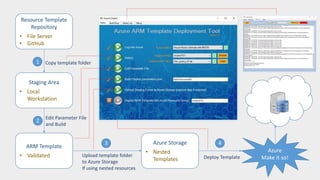
  • #6 Example of a deployment tool for VMs Aim Maintain a library of VM templates and provision a new VM from a template e.g. 2012R2 with public IP and two data disks. Process Copy a template to a staging folder on the local workstation Customise the template via the parameters Validate the parameters via a policy Upload the staging folder to Azure if required i.e. nested templates Run the deployment Features Uses ‘plain English’ parameter and policy files. The ‘Build’ step builds a JSON parameter file from the ‘plain English’ parameter file and validates it against the policy file. This will avoid the deployment failing due to a Azure Resource Policy error. Also can be a simpler alternative to ARPs which are written in JSON and can be complex due to scoping and difficult to maintain.