


Accelerate Sitecore DevOps
on Microsoft Azure
Perficient Webinar – March 1, 2017
2
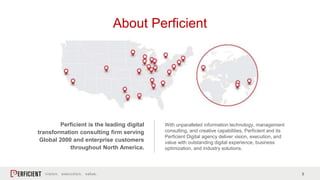
About Perficient
Perficient is the leading digital
transformation consulting firm serving
Global 2000 and enterprise customers
throughout North America.
With unparalleled information technology, management
consulting, and creative capabilities, Perficient and its
Perficient Digital agency deliver vision, execution, and
value with outstanding digital experience, business
optimization, and industry solutions.
Perficient Profile
• Founded in 1997
• Public, NASDAQ: PRFT
• 2015 revenue $473.6 million
• Major market locations:
Allentown, Atlanta, Ann Arbor, Boston, Charlotte,
Chattanooga, Chicago, Cincinnati, Columbus, Dallas, Denver,
Detroit, Fairfax, Houston, Indianapolis, Lafayette, Milwaukee,
Minneapolis, New York City, Northern California, Oxford (UK),
Southern California, St. Louis, Toronto
• Global delivery centers in China and India
• 3,000+ colleagues
• Dedicated solution practices
• ~95% repeat business rate
• Alliance partnerships with major technology vendors
• Multiple vendor/industry technology and growth
awards
4
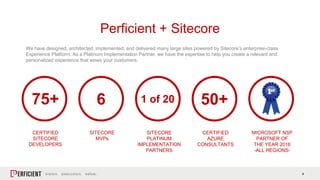
We have designed, architected, implemented, and delivered many large sites powered by Sitecore’s enterprise-class
Experience Platform. As a Platinum Implementation Partner, we have the expertise to help you create a relevant and
personalized experience that wows your customers.
Perficient + Sitecore
75+
CERTIFIED
SITECORE
DEVELOPERS
6
SITECORE
MVPs
1 of 20
SITECORE
PLATINUM
IMPLEMENTATION
PARTNERS
50+
CERTIFIED
AZURE
CONSULTANTS
MICROSOFT NSP
PARTNER OF
THE YEAR 2016
-ALL REGIONS-
5
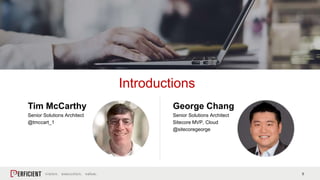
Tim McCarthy
Senior Solutions Architect
@tmccart_1
Introductions
George Chang
Senior Solutions Architect
Sitecore MVP, Cloud
@sitecoregeorge
6
• What is DevOps?
• Infrastructure-as-Code on
Microsoft Azure
• Using Visual Studio Team
Services (VSTS) to enable
Continuous Integration /
Continuous Delivery
Agenda
7
DevOps is the union of
people, process, and
products to enable
continuous delivery of
value to our end users.
― Donovan Brown, “DevOps on the Microsoft Stack”
What is DevOps?
8
• Azure is a developer’s best friend
• Building the Azure environments with
Azure ARM Templates and PowerShell
• DSC – make sure IIS is there!
• Custom Extension – configure
Sitecore!
• Provisioning the Sitecore databases
into SQL Azure
Infrastructure-as-Code
9
Do you currently use or plan to use Microsoft Azure for your Sitecore environments?
Yes, we currently use Azure for our Sitecore environments.
No, we do not and have no plans to.
We don’t currently, but we plan to in the future.
We’re not sure yet.
Poll #1 Placeholder
Demo
Building out a Sitecore Environment on Microsoft Azure via Code
11
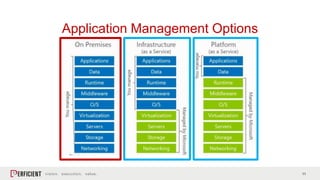
Application Management Options
12
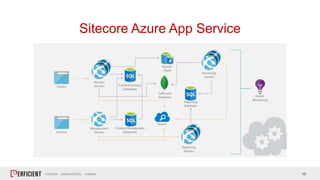
Sample Sitecore Azure App Service Configuration:
• Azure App Service (content management)
• Azure App Service (content delivery)
• Azure App Service (processing)
• Azure App Service (reporting)
• Azure SQL Server (core, master, reporting)
• Azure SQL Server (web)
• Azure Search
• Azure Redis Cache
• Application Insights
Note: You’ll need to bring your own xDB provider – that can be
xDB Cloud, a VM, or a hosted MongoDB service.
• New in Sitecore 8.2 update 1
• Uses native Azure Platform-as-a-Service
(PaaS) technologies
• Deployable with ARM templates
• Easily scale up or scale out through the
Azure portal
• Scale server roles independently
• Add more/remove instances automatically
based on conditions to save on costs
• Uses Application Insights for logging and
other insights into site metrics
• Best used with consumption-based Sitecore
licensing
Sitecore Azure App Service
13
Sitecore Azure App Service
14
There should be two tasks for a
human being to perform to deploy
software into a development, test,
or production environment: to pick
the version and environment and
to press the ‘deploy’ button.
― David Farley, “Continuous Delivery: Reliable
Software Releases through Build, Test, and Deployment
Automation”
Continuous Integration
and Delivery
15
What?
Frequent automated builds to a integration
environment for the development team
Why?
Visibility to the development team
Instant feedback loop
Regular unit and integration testing
Minimize issues before deployment
Continuous Integration
How?
Centralized Code Repository
Code Reviews
Automated Builds
Unit Testing
Integration Testing
16
What?
Frequent automated deployments to a production
environment
Why?
Minimize overhead and staff
Ensure quality and consistency
Provide value to users quickly
Mitigate risk with automation
Continuous Delivery
How?
Build Selection
Environment Transforms
Automated Deployment
Deployment Validation
17
The key test is that a business sponsor could
request the current development version of the
software to be deployed into production at a
moment’s notice – and no one would bat an eyelid,
let alone panic.
– Martin Fowler
Continuous Delivery
Amazon, 2011
• Mean time between deployments: 11.6
• Max deployments per hour: 1,079
• Mean number of hosts simultaneously receiving a
deployment: 10,000
Results
• Reduction of outages: 75%
• Reduction of outage minutes due to deployment: 90%
• Percentage of software deployments causing an
outage: 0.001%
18
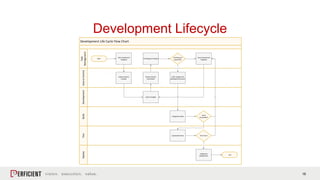
Development Lifecycle
Development Life Cycle Flow Chart
Development
Task
Management
BuildTestDeploySourceControl
Start
Task Created and
Assigned
Feature Branch
Created
Integration Build
End
Code Complete
Pull Request Created
Code merged into
development branch
Automated Tests
Integration
Deployment
Tests Pass?
Yes
Issue Created and
Assigned
No
Yes
Approved
Pull Request
Approved? Denied
Feature Branch
Committed
Build
Succeeded?
19
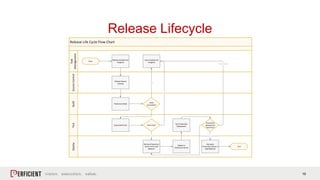
Release Lifecycle
Release Life Cycle Flow Chart
Task
Management
BuildTestDeploySourceControl
Start
Release Created and
Assigned
Release Branch
Created
Production Build
End
Automated Tests
Remove Production
Server from Load
Balancer
Tests Pass?
Yes
Yes
Build
Succeeded?
Issue Created and
Assigned
No
No
Deploy to
Production Server
Test Production
Deployment
Production
Deployment
Tests Pass?
Deployment Completed
Tests Passed
Reinstate
Production Server in
Load Balancer
Tests Failed
20
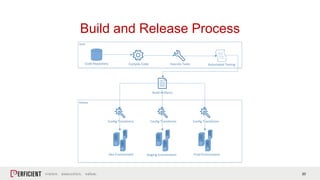
Build and Release Process
Build
Release
Compile Code Execute Tasks
Config Transforms
Build Artifacts
Automated Testing
Dev Environment Staging Environment Prod Environment
Code Repository
Config Transforms Config Transforms
21
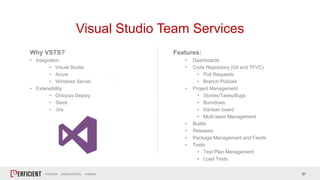
Features:
• Dashboards
• Code Repository (Git and TFVC)
• Pull Requests
• Branch Policies
• Project Management
• Stories/Tasks/Bugs
• Burndown
• Kanban board
• Multi-team Management
• Builds
• Releases
• Package Management and Feeds
• Tests
• Test Plan Management
• Load Tests
Why VSTS?
• Integration
• Visual Studio
• Azure
• Windows Server
• Extensibility
• Octopus Deploy
• Slack
• Jira
Visual Studio Team Services
22
Do you currently use or plan to use Microsoft Visual Studio Team Services (VSTS)?
Yes, we currently use Microsoft Visual Studio Team Services (VSTS).
No, we do not and have no plans to.
We don’t currently, but we plan to in the future.
We’re not sure yet.
Poll #2 Placeholder
23
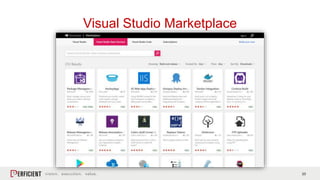
Visual Studio Marketplace
24
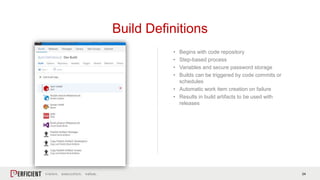
• Begins with code repository
• Step-based process
• Variables and secure password storage
• Builds can be triggered by code commits or
schedules
• Automatic work item creation on failure
• Results in build artifacts to be used with
releases
Build Definitions
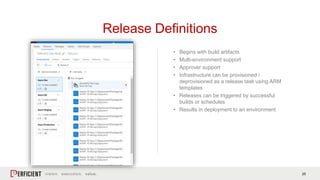
25
• Begins with build artifacts
• Multi-environment support
• Approver support
• Infrastructure can be provisioned /
deprovisioned as a release task using ARM
templates
• Releases can be triggered by successful
builds or schedules
• Results in deployment to an environment
Release Definitions
26
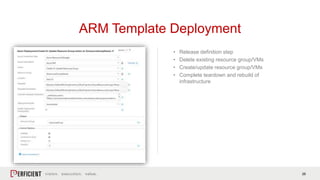
• Release definition step
• Delete existing resource group/VMs
• Create/update resource group/VMs
• Complete teardown and rebuild of
infrastructure
ARM Template Deployment
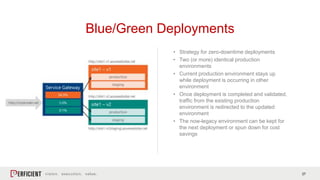
27
• Strategy for zero-downtime deployments
• Two (or more) identical production
environments
• Current production environment stays up
while deployment is occurring in other
environment
• Once deployment is completed and validated,
traffic from the existing production
environment is redirected to the updated
environment
• The now-legacy environment can be kept for
the next deployment or spun down for cost
savings
Blue/Green Deployments
28
Tim McCarthy: @tmccart_1
George Chang: @sitecoregeorge
Questions?
29
FOLLOW US ONLINE
Connect with us:
• Blogs.perficient.com/Microsoft
• Facebook.com/Perficient
• Twitter.com/Perficient_MSFT
Next up:
Drive Digital Transformation with Innovation
March 15, 2017
1:00pm - 2:00pm CST
Perficient.com/insights/webinars
THANK YOU

Accelerate Sitecore DevOps on Microsoft Azure

  • 1.
    Accelerate Sitecore DevOps onMicrosoft Azure Perficient Webinar – March 1, 2017
  • 2.
    2 About Perficient Perficient isthe leading digital transformation consulting firm serving Global 2000 and enterprise customers throughout North America. With unparalleled information technology, management consulting, and creative capabilities, Perficient and its Perficient Digital agency deliver vision, execution, and value with outstanding digital experience, business optimization, and industry solutions.
  • 3.
    Perficient Profile • Foundedin 1997 • Public, NASDAQ: PRFT • 2015 revenue $473.6 million • Major market locations: Allentown, Atlanta, Ann Arbor, Boston, Charlotte, Chattanooga, Chicago, Cincinnati, Columbus, Dallas, Denver, Detroit, Fairfax, Houston, Indianapolis, Lafayette, Milwaukee, Minneapolis, New York City, Northern California, Oxford (UK), Southern California, St. Louis, Toronto • Global delivery centers in China and India • 3,000+ colleagues • Dedicated solution practices • ~95% repeat business rate • Alliance partnerships with major technology vendors • Multiple vendor/industry technology and growth awards
  • 4.
    4 We have designed,architected, implemented, and delivered many large sites powered by Sitecore’s enterprise-class Experience Platform. As a Platinum Implementation Partner, we have the expertise to help you create a relevant and personalized experience that wows your customers. Perficient + Sitecore 75+ CERTIFIED SITECORE DEVELOPERS 6 SITECORE MVPs 1 of 20 SITECORE PLATINUM IMPLEMENTATION PARTNERS 50+ CERTIFIED AZURE CONSULTANTS MICROSOFT NSP PARTNER OF THE YEAR 2016 -ALL REGIONS-
  • 5.
    5 Tim McCarthy Senior SolutionsArchitect @tmccart_1 Introductions George Chang Senior Solutions Architect Sitecore MVP, Cloud @sitecoregeorge
  • 6.
    6 • What isDevOps? • Infrastructure-as-Code on Microsoft Azure • Using Visual Studio Team Services (VSTS) to enable Continuous Integration / Continuous Delivery Agenda
  • 7.
    7 DevOps is theunion of people, process, and products to enable continuous delivery of value to our end users. ― Donovan Brown, “DevOps on the Microsoft Stack” What is DevOps?
  • 8.
    8 • Azure isa developer’s best friend • Building the Azure environments with Azure ARM Templates and PowerShell • DSC – make sure IIS is there! • Custom Extension – configure Sitecore! • Provisioning the Sitecore databases into SQL Azure Infrastructure-as-Code
  • 9.
    9 Do you currentlyuse or plan to use Microsoft Azure for your Sitecore environments? Yes, we currently use Azure for our Sitecore environments. No, we do not and have no plans to. We don’t currently, but we plan to in the future. We’re not sure yet. Poll #1 Placeholder
  • 10.
    Demo Building out aSitecore Environment on Microsoft Azure via Code
  • 11.
  • 12.
    12 Sample Sitecore AzureApp Service Configuration: • Azure App Service (content management) • Azure App Service (content delivery) • Azure App Service (processing) • Azure App Service (reporting) • Azure SQL Server (core, master, reporting) • Azure SQL Server (web) • Azure Search • Azure Redis Cache • Application Insights Note: You’ll need to bring your own xDB provider – that can be xDB Cloud, a VM, or a hosted MongoDB service. • New in Sitecore 8.2 update 1 • Uses native Azure Platform-as-a-Service (PaaS) technologies • Deployable with ARM templates • Easily scale up or scale out through the Azure portal • Scale server roles independently • Add more/remove instances automatically based on conditions to save on costs • Uses Application Insights for logging and other insights into site metrics • Best used with consumption-based Sitecore licensing Sitecore Azure App Service
  • 13.
  • 14.
    14 There should betwo tasks for a human being to perform to deploy software into a development, test, or production environment: to pick the version and environment and to press the ‘deploy’ button. ― David Farley, “Continuous Delivery: Reliable Software Releases through Build, Test, and Deployment Automation” Continuous Integration and Delivery
  • 15.
    15 What? Frequent automated buildsto a integration environment for the development team Why? Visibility to the development team Instant feedback loop Regular unit and integration testing Minimize issues before deployment Continuous Integration How? Centralized Code Repository Code Reviews Automated Builds Unit Testing Integration Testing
  • 16.
    16 What? Frequent automated deploymentsto a production environment Why? Minimize overhead and staff Ensure quality and consistency Provide value to users quickly Mitigate risk with automation Continuous Delivery How? Build Selection Environment Transforms Automated Deployment Deployment Validation
  • 17.
    17 The key testis that a business sponsor could request the current development version of the software to be deployed into production at a moment’s notice – and no one would bat an eyelid, let alone panic. – Martin Fowler Continuous Delivery Amazon, 2011 • Mean time between deployments: 11.6 • Max deployments per hour: 1,079 • Mean number of hosts simultaneously receiving a deployment: 10,000 Results • Reduction of outages: 75% • Reduction of outage minutes due to deployment: 90% • Percentage of software deployments causing an outage: 0.001%
  • 18.
    18 Development Lifecycle Development LifeCycle Flow Chart Development Task Management BuildTestDeploySourceControl Start Task Created and Assigned Feature Branch Created Integration Build End Code Complete Pull Request Created Code merged into development branch Automated Tests Integration Deployment Tests Pass? Yes Issue Created and Assigned No Yes Approved Pull Request Approved? Denied Feature Branch Committed Build Succeeded?
  • 19.
    19 Release Lifecycle Release LifeCycle Flow Chart Task Management BuildTestDeploySourceControl Start Release Created and Assigned Release Branch Created Production Build End Automated Tests Remove Production Server from Load Balancer Tests Pass? Yes Yes Build Succeeded? Issue Created and Assigned No No Deploy to Production Server Test Production Deployment Production Deployment Tests Pass? Deployment Completed Tests Passed Reinstate Production Server in Load Balancer Tests Failed
  • 20.
    20 Build and ReleaseProcess Build Release Compile Code Execute Tasks Config Transforms Build Artifacts Automated Testing Dev Environment Staging Environment Prod Environment Code Repository Config Transforms Config Transforms
  • 21.
    21 Features: • Dashboards • CodeRepository (Git and TFVC) • Pull Requests • Branch Policies • Project Management • Stories/Tasks/Bugs • Burndown • Kanban board • Multi-team Management • Builds • Releases • Package Management and Feeds • Tests • Test Plan Management • Load Tests Why VSTS? • Integration • Visual Studio • Azure • Windows Server • Extensibility • Octopus Deploy • Slack • Jira Visual Studio Team Services
  • 22.
    22 Do you currentlyuse or plan to use Microsoft Visual Studio Team Services (VSTS)? Yes, we currently use Microsoft Visual Studio Team Services (VSTS). No, we do not and have no plans to. We don’t currently, but we plan to in the future. We’re not sure yet. Poll #2 Placeholder
  • 23.
  • 24.
    24 • Begins withcode repository • Step-based process • Variables and secure password storage • Builds can be triggered by code commits or schedules • Automatic work item creation on failure • Results in build artifacts to be used with releases Build Definitions
  • 25.
    25 • Begins withbuild artifacts • Multi-environment support • Approver support • Infrastructure can be provisioned / deprovisioned as a release task using ARM templates • Releases can be triggered by successful builds or schedules • Results in deployment to an environment Release Definitions
  • 26.
    26 • Release definitionstep • Delete existing resource group/VMs • Create/update resource group/VMs • Complete teardown and rebuild of infrastructure ARM Template Deployment
  • 27.
    27 • Strategy forzero-downtime deployments • Two (or more) identical production environments • Current production environment stays up while deployment is occurring in other environment • Once deployment is completed and validated, traffic from the existing production environment is redirected to the updated environment • The now-legacy environment can be kept for the next deployment or spun down for cost savings Blue/Green Deployments
  • 28.
    28 Tim McCarthy: @tmccart_1 GeorgeChang: @sitecoregeorge Questions?
  • 29.
    29 FOLLOW US ONLINE Connectwith us: • Blogs.perficient.com/Microsoft • Facebook.com/Perficient • Twitter.com/Perficient_MSFT Next up: Drive Digital Transformation with Innovation March 15, 2017 1:00pm - 2:00pm CST Perficient.com/insights/webinars
  • 30.