

Azure Databricks
Chitra Singh
Lack of etiquette and manners is a huge turn off.
KnolX Etiquettes
 Punctuality
Join the session 5 minutes prior to the session start time. We start on
time and conclude on time!
 Feedback
Make sure to submit a constructive feedback for all sessions as it is very
helpful for the presenter.
 Silent Mode
Keep your mobile devices in silent mode, feel free to move out of session
in case you need to attend an urgent call.
 Avoid Disturbance
Avoid unwanted chit chat during the session.
1. What is Azure Databricks ?
2. Why we need Azure Databricks ?
3. How does Azure Databricks Works ?
4. Various Databricks.
5. Integrate Azure Databricks with Azure Blob
storage.
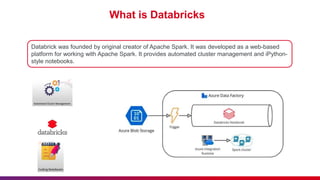
What is Databricks
Databrick was founded by original creator of Apache Spark. It was developed as a web-based
platform for working with Apache Spark. It provides automated cluster management and iPython-
style notebooks.
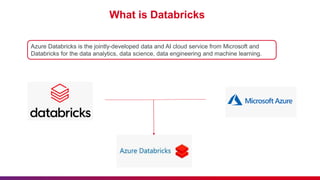
What is Databricks
Azure Databricks is the jointly-developed data and AI cloud service from Microsoft and
Databricks for the data analytics, data science, data engineering and machine learning.
What is Databricks
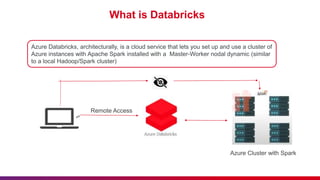
Azure Databricks, architecturally, is a cloud service that lets you set up and use a cluster of
Azure instances with Apache Spark installed with a Master-Worker nodal dynamic (similar
to a local Hadoop/Spark cluster)
Azure Cluster with Spark
Remote Access
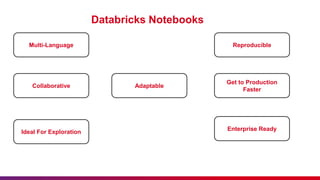
Databricks Notebooks
Multi-Language
Collaborative
Ideal For Exploration
Reproducible
Get to Production
Faster
Enterprise Ready
Adaptable
What is Databricks
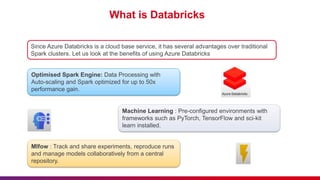
Since Azure Databricks is a cloud base service, it has several advantages over traditional
Spark clusters. Let us look at the benefits of using Azure Databricks
Optimised Spark Engine: Data Processing with
Auto-scaling and Spark optimized for up to 50x
performance gain.
Mlfow : Track and share experiments, reproduce runs
and manage models collaboratively from a central
repository.
Machine Learning : Pre-configured environments with
frameworks such as PyTorch, TensorFlow and sci-kit
learn installed.
What is Databricks
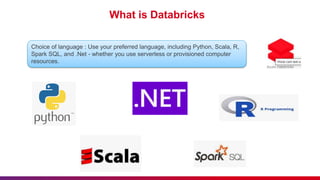
Choice of language : Use your preferred language, including Python, Scala, R,
Spark SQL, and .Net - whether you use serverless or provisioned computer
resources.
What is Databricks
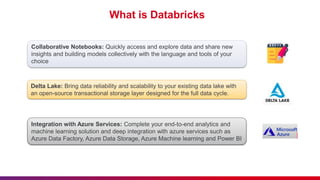
Collaborative Notebooks: Quickly access and explore data and share new
insights and building models collectively with the language and tools of your
choice
Delta Lake: Bring data reliability and scalability to your existing data lake with
an open-source transactional storage layer designed for the full data cycle.
Integration with Azure Services: Complete your end-to-end analytics and
machine learning solution and deep integration with azure services such as
Azure Data Factory, Azure Data Storage, Azure Machine learning and Power BI
What is Databricks
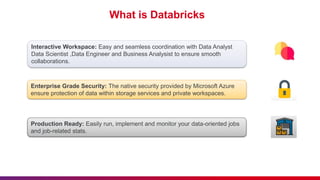
Interactive Workspace: Easy and seamless coordination with Data Analyst
Data Scientist ,Data Engineer and Business Analysist to ensure smooth
collaborations.
Enterprise Grade Security: The native security provided by Microsoft Azure
ensure protection of data within storage services and private workspaces.
Production Ready: Easily run, implement and monitor your data-oriented jobs
and job-related stats.
How does Azure Databricks Works
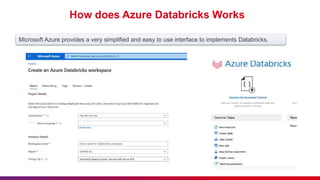
Microsoft Azure provides a very simplified and easy to use interface to implements Databricks.
Databricks Utilites
Databricks Utilities
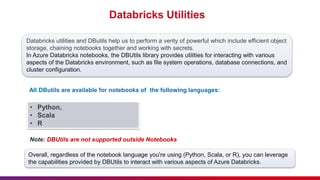
Databricks utilities and DButils help us to perform a verity of powerful which include efficient object
storage, chaining notebooks together and working with secrets.
In Azure Databricks notebooks, the DBUtils library provides utilities for interacting with various
aspects of the Databricks environment, such as file system operations, database connections, and
cluster configuration.
All DButils are available for notebooks of the following languages:
• Python,
• Scala
• R
Note: DBUtils are not supported outside Notebooks
Overall, regardless of the notebook language you're using (Python, Scala, or R), you can leverage
the capabilities provided by DBUtils to interact with various aspects of Azure Databricks.
Integrating Azure Databricks with Azure Blob
Storage
Integrating Azure Databricks with Azure Blob Storage
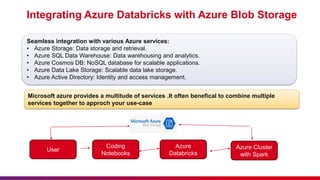
Seamless integration with various Azure services:
• Azure Storage: Data storage and retrieval.
• Azure SQL Data Warehouse: Data warehousing and analytics.
• Azure Cosmos DB: NoSQL database for scalable applications.
• Azure Data Lake Storage: Scalable data lake storage.
• Azure Active Directory: Identity and access management.
Microsoft azure provides a multitude of services .It often benefical to combine multiple
services together to approch your use-case
User
Coding
Notebooks
Azure
Databricks
Azure Cluster
with Spark
Hands on- integrating azure databricks with
azure blob storage
Hands on- integrating azure databricks with azure
blob storage
Step 1: Set up Azure Databricks
• Log in to the Azure portal (https://portal.azure.com).
• Search for "Databricks" in the search bar.
• Create a new Azure Databricks workspace by providing necessary details like subscription,
resource group, workspace name, and pricing tier.
• Once the workspace is provisioned, navigate to it from the Azure portal.
Hands on- integrating azure databricks with azure
blob storage
Step 2: Create a Cluster
• Inside the Azure Databricks workspace, go to the Clusters tab.
• Click on "Create Cluster" and configure the cluster settings such as cluster mode, instance type,
and number of workers.
• Click "Create Cluster" to provision the cluster.
Hands on- integrating azure databricks with azure
blob storage
Step 3: Create a Notebook
• Go to the Notebooks tab in the workspace.
• Click on "Create" and choose the language you want to use (Python, Scala, SQL, or R).
• Name your notebook and click "Create."
Hands on- integrating azure databricks with azure
blob storage
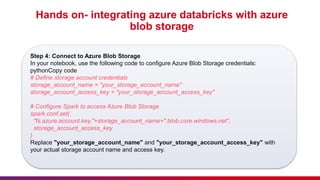
Step 4: Connect to Azure Blob Storage
In your notebook, use the following code to configure Azure Blob Storage credentials:
pythonCopy code
# Define storage account credentials
storage_account_name = "your_storage_account_name"
storage_account_access_key = "your_storage_account_access_key"
# Configure Spark to access Azure Blob Storage
spark.conf.set(
"fs.azure.account.key."+storage_account_name+".blob.core.windows.net",
storage_account_access_key
)
Replace "your_storage_account_name" and "your_storage_account_access_key" with
your actual storage account name and access key.
Hands on- integrating azure databricks with azure
blob storage
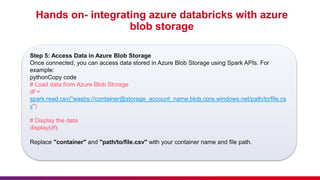
Step 5: Access Data in Azure Blob Storage
Once connected, you can access data stored in Azure Blob Storage using Spark APIs. For
example:
pythonCopy code
# Load data from Azure Blob Storage
df =
spark.read.csv("wasbs://container@storage_account_name.blob.core.windows.net/path/to/file.cs
v")
# Display the data
display(df)
Replace "container" and "path/to/file.csv" with your container name and file path.
Hands on- integrating azure databricks with azure
blob storage
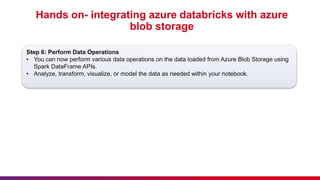
Step 6: Perform Data Operations
• You can now perform various data operations on the data loaded from Azure Blob Storage using
Spark DataFrame APIs.
• Analyze, transform, visualize, or model the data as needed within your notebook.
Hands on- integrating azure databricks with azure
blob storage
Step 7: Cleanup (Optional)
• Once you're done with your analysis, you can terminate the cluster to avoid incurring
unnecessary costs.
• Go to the Clusters tab, select your cluster, and click "Terminate."
That's it! You've successfully integrated Azure Databricks with Azure Blob Storage and performed
data operations within a notebook.
Conclusion
• Here we have learned about Azure Databricks
• Feature of Azure Databricks
• And, implementation with Blob Storage
• We can explore further and leverage Azure Databricks and Azure Blob Storage for data
analytics needs.
Azure Databricks (For Data Analytics).pptx

Azure Databricks (For Data Analytics).pptx

  • 1.
  • 2.
    Lack of etiquetteand manners is a huge turn off. KnolX Etiquettes  Punctuality Join the session 5 minutes prior to the session start time. We start on time and conclude on time!  Feedback Make sure to submit a constructive feedback for all sessions as it is very helpful for the presenter.  Silent Mode Keep your mobile devices in silent mode, feel free to move out of session in case you need to attend an urgent call.  Avoid Disturbance Avoid unwanted chit chat during the session.
  • 3.
    1. What isAzure Databricks ? 2. Why we need Azure Databricks ? 3. How does Azure Databricks Works ? 4. Various Databricks. 5. Integrate Azure Databricks with Azure Blob storage.
  • 5.
    What is Databricks Databrickwas founded by original creator of Apache Spark. It was developed as a web-based platform for working with Apache Spark. It provides automated cluster management and iPython- style notebooks.
  • 6.
    What is Databricks AzureDatabricks is the jointly-developed data and AI cloud service from Microsoft and Databricks for the data analytics, data science, data engineering and machine learning.
  • 7.
    What is Databricks AzureDatabricks, architecturally, is a cloud service that lets you set up and use a cluster of Azure instances with Apache Spark installed with a Master-Worker nodal dynamic (similar to a local Hadoop/Spark cluster) Azure Cluster with Spark Remote Access
  • 8.
    Databricks Notebooks Multi-Language Collaborative Ideal ForExploration Reproducible Get to Production Faster Enterprise Ready Adaptable
  • 9.
    What is Databricks SinceAzure Databricks is a cloud base service, it has several advantages over traditional Spark clusters. Let us look at the benefits of using Azure Databricks Optimised Spark Engine: Data Processing with Auto-scaling and Spark optimized for up to 50x performance gain. Mlfow : Track and share experiments, reproduce runs and manage models collaboratively from a central repository. Machine Learning : Pre-configured environments with frameworks such as PyTorch, TensorFlow and sci-kit learn installed.
  • 10.
    What is Databricks Choiceof language : Use your preferred language, including Python, Scala, R, Spark SQL, and .Net - whether you use serverless or provisioned computer resources.
  • 11.
    What is Databricks CollaborativeNotebooks: Quickly access and explore data and share new insights and building models collectively with the language and tools of your choice Delta Lake: Bring data reliability and scalability to your existing data lake with an open-source transactional storage layer designed for the full data cycle. Integration with Azure Services: Complete your end-to-end analytics and machine learning solution and deep integration with azure services such as Azure Data Factory, Azure Data Storage, Azure Machine learning and Power BI
  • 12.
    What is Databricks InteractiveWorkspace: Easy and seamless coordination with Data Analyst Data Scientist ,Data Engineer and Business Analysist to ensure smooth collaborations. Enterprise Grade Security: The native security provided by Microsoft Azure ensure protection of data within storage services and private workspaces. Production Ready: Easily run, implement and monitor your data-oriented jobs and job-related stats.
  • 13.
    How does AzureDatabricks Works
  • 14.
    How does AzureDatabricks Works Microsoft Azure provides a very simplified and easy to use interface to implements Databricks.
  • 15.
  • 16.
    Databricks Utilities Databricks utilitiesand DButils help us to perform a verity of powerful which include efficient object storage, chaining notebooks together and working with secrets. In Azure Databricks notebooks, the DBUtils library provides utilities for interacting with various aspects of the Databricks environment, such as file system operations, database connections, and cluster configuration. All DButils are available for notebooks of the following languages: • Python, • Scala • R Note: DBUtils are not supported outside Notebooks Overall, regardless of the notebook language you're using (Python, Scala, or R), you can leverage the capabilities provided by DBUtils to interact with various aspects of Azure Databricks.
  • 17.
    Integrating Azure Databrickswith Azure Blob Storage
  • 18.
    Integrating Azure Databrickswith Azure Blob Storage Seamless integration with various Azure services: • Azure Storage: Data storage and retrieval. • Azure SQL Data Warehouse: Data warehousing and analytics. • Azure Cosmos DB: NoSQL database for scalable applications. • Azure Data Lake Storage: Scalable data lake storage. • Azure Active Directory: Identity and access management. Microsoft azure provides a multitude of services .It often benefical to combine multiple services together to approch your use-case User Coding Notebooks Azure Databricks Azure Cluster with Spark
  • 19.
    Hands on- integratingazure databricks with azure blob storage
  • 20.
    Hands on- integratingazure databricks with azure blob storage Step 1: Set up Azure Databricks • Log in to the Azure portal (https://portal.azure.com). • Search for "Databricks" in the search bar. • Create a new Azure Databricks workspace by providing necessary details like subscription, resource group, workspace name, and pricing tier. • Once the workspace is provisioned, navigate to it from the Azure portal.
  • 21.
    Hands on- integratingazure databricks with azure blob storage Step 2: Create a Cluster • Inside the Azure Databricks workspace, go to the Clusters tab. • Click on "Create Cluster" and configure the cluster settings such as cluster mode, instance type, and number of workers. • Click "Create Cluster" to provision the cluster.
  • 22.
    Hands on- integratingazure databricks with azure blob storage Step 3: Create a Notebook • Go to the Notebooks tab in the workspace. • Click on "Create" and choose the language you want to use (Python, Scala, SQL, or R). • Name your notebook and click "Create."
  • 23.
    Hands on- integratingazure databricks with azure blob storage Step 4: Connect to Azure Blob Storage In your notebook, use the following code to configure Azure Blob Storage credentials: pythonCopy code # Define storage account credentials storage_account_name = "your_storage_account_name" storage_account_access_key = "your_storage_account_access_key" # Configure Spark to access Azure Blob Storage spark.conf.set( "fs.azure.account.key."+storage_account_name+".blob.core.windows.net", storage_account_access_key ) Replace "your_storage_account_name" and "your_storage_account_access_key" with your actual storage account name and access key.
  • 24.
    Hands on- integratingazure databricks with azure blob storage Step 5: Access Data in Azure Blob Storage Once connected, you can access data stored in Azure Blob Storage using Spark APIs. For example: pythonCopy code # Load data from Azure Blob Storage df = spark.read.csv("wasbs://container@storage_account_name.blob.core.windows.net/path/to/file.cs v") # Display the data display(df) Replace "container" and "path/to/file.csv" with your container name and file path.
  • 25.
    Hands on- integratingazure databricks with azure blob storage Step 6: Perform Data Operations • You can now perform various data operations on the data loaded from Azure Blob Storage using Spark DataFrame APIs. • Analyze, transform, visualize, or model the data as needed within your notebook.
  • 26.
    Hands on- integratingazure databricks with azure blob storage Step 7: Cleanup (Optional) • Once you're done with your analysis, you can terminate the cluster to avoid incurring unnecessary costs. • Go to the Clusters tab, select your cluster, and click "Terminate." That's it! You've successfully integrated Azure Databricks with Azure Blob Storage and performed data operations within a notebook.
  • 27.
    Conclusion • Here wehave learned about Azure Databricks • Feature of Azure Databricks • And, implementation with Blob Storage • We can explore further and leverage Azure Databricks and Azure Blob Storage for data analytics needs.