https://academy.microsoft.com/en-us/professional-program/
https://channel9.msdn.com/
https://www.wintellectnow.com/Home/Instructor?instructorId=Mark_Tabladillo
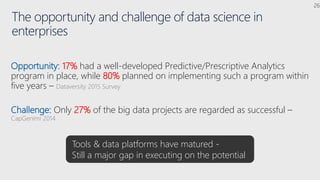
The opportunity and challenge of data science in
enterprises
Opportunity: 17% had a well-developed Predictive/Prescriptive Analytics
program in place, while 80% planned on implementing such a program within
five years – Dataversity 2015 Survey
Challenge: Only 27% of the big data projects are regarded as successful –
CapGenimi 2014
Tools & data platforms have matured -
Still a major gap in executing on the potential
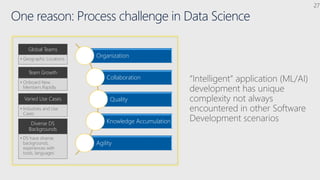
One reason: Process challenge in Data Science
Organization
Collaboration
Quality
Knowledge Accumulation
Agility
Global Teams
• Geographic Locations
Team Growth
• Onboard New
Members Rapidly
Varied Use Cases
• Industries and Use
Cases
Diverse DS
Backgrounds
• DS have diverse
backgrounds,
experiences with
tools, languages
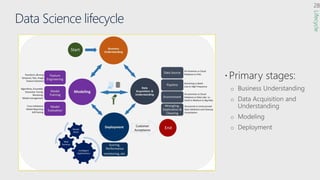
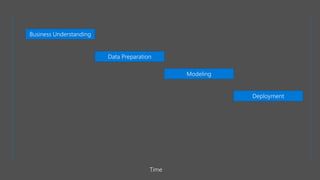
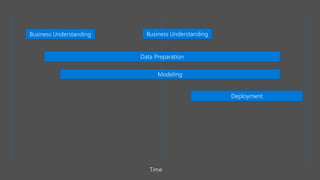
Data Science lifecycle
 Primary stages:
Lifecycle
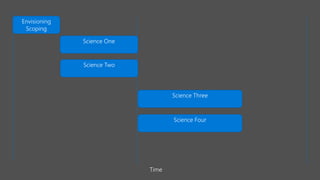
Time
Science One
Envisioning
Scoping
Science Two
Science Three
Science Four
Business Understanding
Data Preparation
Modeling
Deployment
Time
Business Understanding
Data Preparation
Modeling
Deployment
Time
Business Understanding
Form 10-K 2016
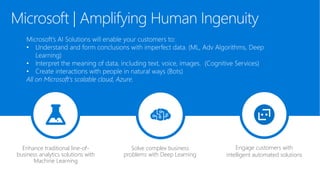
Microsoft | Amplifying Human Ingenuity
Enhance traditional line-of-
business analytics solutions with
Machine Learning
Solve complex business
problems with Deep Learning
Engage customers with
intelligent automated solutions
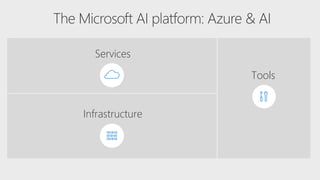
Services
Infrastructure
Tools
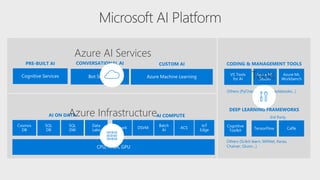
Azure AI Services
Azure Infrastructure
Tools
© Microsoft Corporation
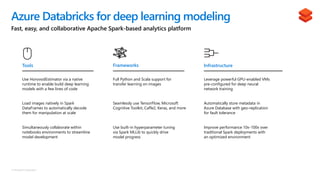
Fast, easy, and collaborative Apache Spark-based analytics platform
Azure Databricks for deep learning modeling
Tools InfrastructureFrameworks
Leverage powerful GPU-enabled VMs
pre-configured for deep neural
network training
Use HorovodEstimator via a native
runtime to enable build deep learning
models with a few lines of code
Full Python and Scala support for
transfer learning on images
Automatically store metadata in
Azure Database with geo-replication
for fault tolerance
Use built-in hyperparameter tuning
via Spark MLLib to quickly drive
model progress
Simultaneously collaborate within
notebooks environments to streamline
model development
Load images natively in Spark
DataFrames to automatically decode
them for manipulation at scale
Improve performance 10x-100x over
traditional Spark deployments with
an optimized environment
Seamlessly use TensorFlow, Microsoft
Cognitive Toolkit, Caffe2, Keras, and more
© Microsoft Corporation
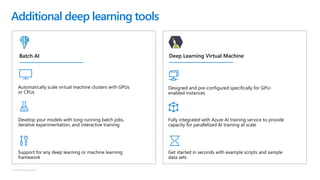
Additional deep learning tools
Automatically scale virtual machine clusters with GPUs
or CPUs
Develop your models with long-running batch jobs,
iterative experimentation, and interactive training
Support for any deep learning or machine learning
framework
Designed and pre-configured specifically for GPU-
enabled instances
Fully integrated with Azure AI training service to provide
capacity for parallelized AI training at scale
Get started in seconds with example scripts and sample
data sets
Batch AI Deep Learning Virtual Machine
© Microsoft Corporation
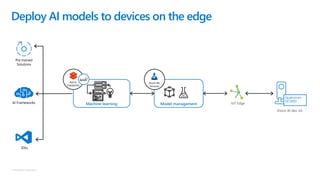
Deploy AI models to devices on the edge
IoT EdgeModel managementMachine learning
Azure
Databricks
Azure ML
Services
Qualcomm
QCS603
Vision AI dev. kit
Pre trained
Solutions
IDEs
AI Frameworks
© Microsoft Corporation
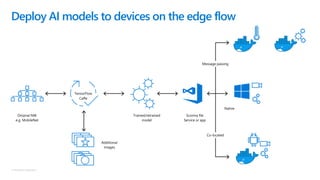
Native
TensorFlow
Caffe
Deploy AI models to devices on the edge flow
Message passing
Co-located
Scoring file
Service or app
Trained/retrained
model
Additional
images
Original NW
e.g. MobileNet
© Microsoft Corporation
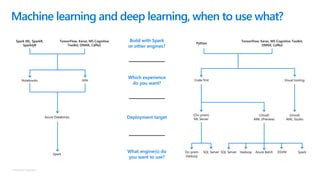
Machine learning and deep learning, when to use what?
Code first
(On-prem)
ML Server
On-prem
Hadoop
SQL Server
(cloud)
AML (Preview)
SQL Server Hadoop Azure Batch DSVM Spark
Visual tooling
(cloud)
AML Studio
Notebooks Jobs
Azure Databricks
Spark
What engine(s) do
you want to use?
Deployment target
Which experience
do you want?
Build with Spark
or other engines?
Python
TensorFlow, Keras, MS Cognitive
Toolkit, ONNX, Caffe2
Spark ML, SparkR,
SparklyR
TensorFlow, Keras, MS Cognitive Toolkit,
ONNX, Caffe2
https://azure.microsoft.com/en-us/global-
infrastructure/services/
https://portal.azure.com
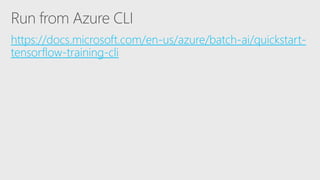
https://docs.microsoft.com/en-us/azure/batch-ai/quickstart-
tensorflow-training-cli
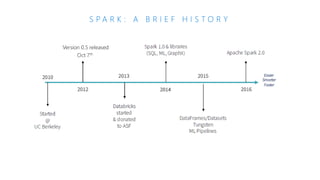
S P A R K : A B R I E F H I S T O R Y
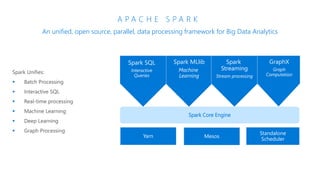
A P A C H E S P A R K
An unified, open source, parallel, data processing framework for Big Data Analytics
Spark Core Engine
Spark SQL
Interactive
Queries
Spark Structured
Streaming
Stream processing
Spark MLlib
Machine
Learning
Yarn Mesos
Standalone
Scheduler
Spark MLlib
Machine
Learning
Spark
Streaming
Stream processing
GraphX
Graph
Computation
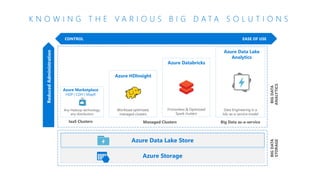
Azure Databricks
Databricks Spark as a managed service on Azure
CONTROL EASE OF USE
Azure Data Lake
Analytics
Azure Data Lake Store
Azure Storage
Any Hadoop technology,
any distribution
Workload optimized,
managed clusters
Data Engineering in a
Job-as-a-service model
Azure Marketplace
HDP | CDH | MapR
Azure Data Lake
Analytics
IaaS Clusters Managed Clusters Big Data as-a-service
Azure HDInsight
Frictionless & Optimized
Spark clusters
Azure Databricks
BIGDATA
STORAGE
BIGDATA
ANALYTICS
ReducedAdministration
K N O W I N G T H E V A R I O U S B I G D A T A S O L U T I O N S
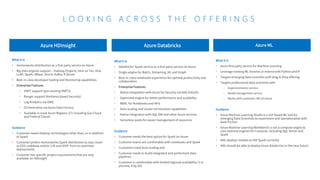
Azure HDInsight
What It Is
• Hortonworks distribution as a first party service on Azure
• Big Data engines support – Hadoop Projects, Hive on Tez, Hive
LLAP, Spark, HBase, Storm, Kafka, R Server
• Best-in-class developer tooling and Monitoring capabilities
• Enterprise Features
• VNET support (join existing VNETs)
• Ranger support (Kerberos based Security)
• Log Analytics via OMS
• Orchestration via Azure Data Factory
• Available in most Azure Regions (27) including Gov Cloud
and Federal Clouds
Guidance
• Customer needs Hadoop technologies other than, or in addition
to Spark
• Customer prefers Hortonworks Spark distribution to stay closer
to OSS codebase and/or ‘Lift and Shift’ from on-premises
deployments
• Customer has specific project requirements that are only
available on HDInsight
Azure Databricks
What It Is
• Databricks’ Spark service as a first party service on Azure
• Single engine for Batch, Streaming, ML and Graph
• Best-in-class notebooks experience for optimal productivity and
collaboration
• Enterprise Features
• Native Integration with Azure for Security via AAD (OAuth)
• Optimized engine for better performance and scalability
• RBAC for Notebooks and APIs
• Auto-scaling and cluster termination capabilities
• Native integration with SQL DW and other Azure services
• Serverless pools for easier management of resources
Guidance
• Customer needs the best option for Spark on Azure
• Customer teams are comfortable with notebooks and Spark
• Customers need Auto-scaling and
• Customer needs to build integrated and performant data
pipelines
• Customer is comfortable with limited regional availability (3 in
preview, 8 by GA)
Azure ML
What It Is
• Azure first party service for Machine Learning
• Leverage existing ML libraries or extend with Python and R
• Targets emerging data scientists with drag & drop offering
• Targets professional data scientists with
– Experimentation service
– Model management service
– Works with customers IDE of choice
Guidance
• Azure Machine Learning Studio is a GUI based ML tool for
emerging Data Scientists to experiment and operationalize with
least friction
• Azure Machine Learning Workbench is not a compute engine &
uses external engines for Compute, including SQL Server and
Spark
• AML deploys models to HDI Spark currently
• AML should be able to deploy Azure Databricks in the near future
L O O K I N G A C R O S S T H E O F F E R I N G S
Azure Databricks
Core Concepts
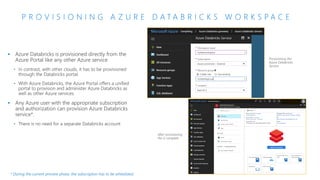
P R O V I S I O N I N G A Z U R E D A T A B R I C K S W O R K S P A C E
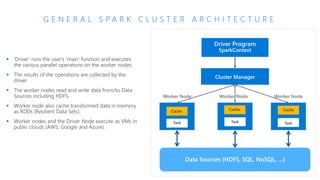
G E N E R A L S P A R K C L U S T E R A R C H I T E C T U R E
Data Sources (HDFS, SQL, NoSQL, …)
Cluster Manager
Worker Node Worker Node Worker Node
Driver Program
SparkContext
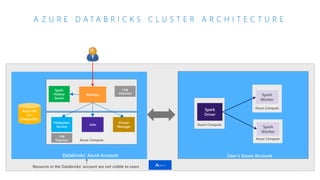
A Z U R E D A T A B R I C K S C L U S T E R A R C H I T E C T U R E
Azure DB
for
PostgreSQL
Webapp
Azure Compute
Cluster
Manager
Databricks’ Azure Account User’s Azure Account
Azure Compute
Spark
Driver
Azure Compute
Spark
Worker
Azure Compute
Spark
Worker
Jobs
FileSystem
Service
Spark
History
Server
Log
Daemon
Log
Daemon
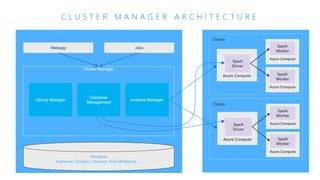
C L U S T E R M A N A G E R A R C H I T E C T U R E
JobsWebapp
Cluster Manager
Cluster
Azure Compute
Spark
Driver
Azure Compute
Spark
Worker
Azure Compute
Spark
Worker
Database
Instances, Clusters, Libraries, Hive Metastore, …
Cluster
Azure Compute
Spark
Driver
Azure Compute
Spark
Worker
Azure Compute
Spark
Worker
Instance Manager
Container
Management
Library Manager
Secure Collaboration
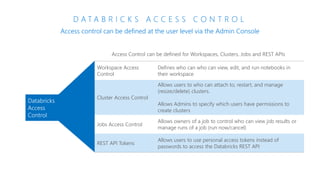
D A T A B R I C K S A C C E S S C O N T R O L
Access control can be defined at the user level via the Admin Console
Workspace Access
Control
Defines who can who can view, edit, and run notebooks in
their workspace
Cluster Access Control
Allows users to who can attach to, restart, and manage
(resize/delete) clusters.
Allows Admins to specify which users have permissions to
create clusters
Jobs Access Control
Allows owners of a job to control who can view job results or
manage runs of a job (run now/cancel)
REST API Tokens
Allows users to use personal access tokens instead of
passwords to access the Databricks REST API
Databricks
Access
Control
Clusters
C L U S T E R S
▪ Azure Databricks clusters are the set of Azure Linux VMs that
host the Spark Worker and Driver Nodes
▪ Your Spark application code (i.e. Jobs) runs on the provisioned
clusters.
▪ Azure Databricks clusters are launched in your subscription—but
are managed through the Azure Databricks portal.
▪ Azure Databricks provides a comprehensive set of graphical
wizards to manage the complete lifecycle of clusters—from
creation to termination.
A Z U R E D A T A B R I C K S N O T E B O O K S O V E R V I E W
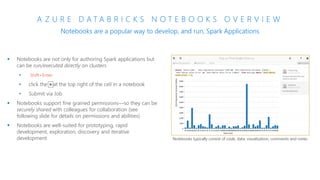
Notebooks are a popular way to develop, and run, Spark Applications
▪ Notebooks are not only for authoring Spark applications but
can be run/executed directly on clusters
• Shift+Enter
•
•
▪ Notebooks support fine grained permissions—so they can be
securely shared with colleagues for collaboration (see
following slide for details on permissions and abilities)
▪ Notebooks are well-suited for prototyping, rapid
development, exploration, discovery and iterative
development Notebooks typically consist of code, data, visualization, comments and notes
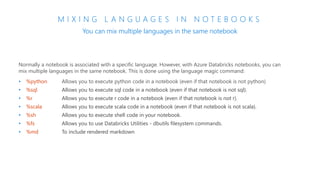
M I X I N G L A N G U A G E S I N N O T E B O O K S
You can mix multiple languages in the same notebook
Normally a notebook is associated with a specific language. However, with Azure Databricks notebooks, you can
mix multiple languages in the same notebook. This is done using the language magic command:
• %python Allows you to execute python code in a notebook (even if that notebook is not python)
• %sql Allows you to execute sql code in a notebook (even if that notebook is not sql).
• %r Allows you to execute r code in a notebook (even if that notebook is not r).
• %scala Allows you to execute scala code in a notebook (even if that notebook is not scala).
• %sh Allows you to execute shell code in your notebook.
• %fs Allows you to use Databricks Utilities - dbutils filesystem commands.
• %md To include rendered markdown
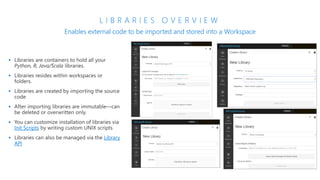
L I B R A R I E S O V E R V I E W
Enables external code to be imported and stored into a Workspace
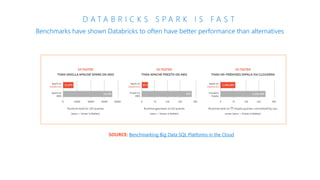
D A T A B R I C K S S P A R K I S F A S T
Benchmarks have shown Databricks to often have better performance than alternatives
SOURCE: Benchmarking Big Data SQL Platforms in the Cloud
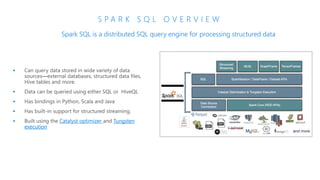
S P A R K S Q L O V E R V I E W
Spark SQL is a distributed SQL query engine for processing structured data
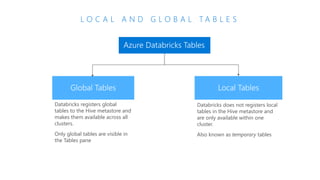
L O C A L A N D G L O B A L T A B L E S
Databricks registers global
tables to the Hive metastore and
makes them available across all
clusters.
Only global tables are visible in
the Tables pane
Azure Databricks Tables
Databricks does not registers local
tables in the Hive metastore and
are only available within one
cluster.
Also known as temporary tables
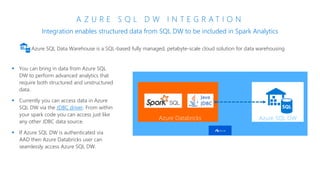
A Z U R E S Q L D W I N T E G R A T I O N
Integration enables structured data from SQL DW to be included in Spark Analytics
Azure SQL Data Warehouse is a SQL-based fully managed, petabyte-scale cloud solution for data warehousing
Azure Databricks Azure SQL DW
▪ You can bring in data from Azure SQL
DW to perform advanced analytics that
require both structured and unstructured
data.
▪ Currently you can access data in Azure
SQL DW via the JDBC driver. From within
your spark code you can access just like
any other JDBC data source.
▪ If Azure SQL DW is authenticated via
AAD then Azure Databricks user can
seamlessly access Azure SQL DW.
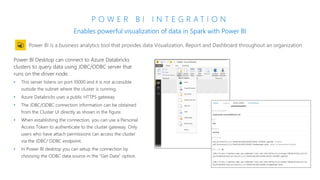
P O W E R B I I N T E G R A T I O N
Enables powerful visualization of data in Spark with Power BI
Power BI Desktop can connect to Azure Databricks
clusters to query data using JDBC/ODBC server that
runs on the driver node.
• This server listens on port 10000 and it is not accessible
outside the subnet where the cluster is running.
• Azure Databricks uses a public HTTPS gateway
• The JDBC/ODBC connection information can be obtained
from the Cluster UI directly as shown in the figure.
• When establishing the connection, you can use a Personal
Access Token to authenticate to the cluster gateway. Only
users who have attach permissions can access the cluster
via the JDBC/ ODBC endpoint.
• In Power BI desktop you can setup the connection by
choosing the ODBC data source in the “Get Data” option.
C O S M O S D B I N T E G R A T I O N
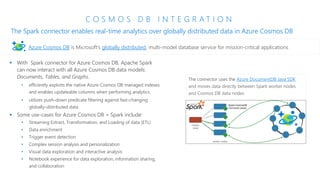
The Spark connector enables real-time analytics over globally distributed data in Azure Cosmos DB
▪ With Spark connector for Azure Cosmos DB, Apache Spark
can now interact with all Azure Cosmos DB data models:
Documents, Tables, and Graphs.
• efficiently exploits the native Azure Cosmos DB managed indexes
and enables updateable columns when performing analytics.
• utilizes push-down predicate filtering against fast-changing
globally-distributed data
▪ Some use-cases for Azure Cosmos DB + Spark include:
• Streaming Extract, Transformation, and Loading of data (ETL)
• Data enrichment
• Trigger event detection
• Complex session analysis and personalization
• Visual data exploration and interactive analysis
• Notebook experience for data exploration, information sharing,
and collaboration
Azure Cosmos DB is Microsoft's globally distributed, multi-model database service for mission-critical applications
The connector uses the Azure DocumentDB Java SDK
and moves data directly between Spark worker nodes
and Cosmos DB data nodes
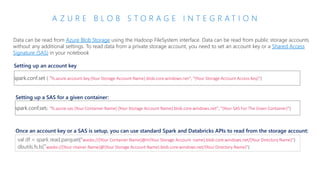
A Z U R E B L O B S T O R A G E I N T E G R A T I O N
Data can be read from Azure Blob Storage using the Hadoop FileSystem interface. Data can be read from public storage accounts
without any additional settings. To read data from a private storage account, you need to set an account key or a Shared Access
Signature (SAS) in your notebook
spark.conf.set ( "fs.azure.account.key.{Your Storage Account Name}.blob.core.windows.net", "{Your Storage Account Access Key}")
Setting up an account key
Setting up a SAS for a given container:
spark.conf.set( "fs.azure.sas.{Your Container Name}.{Your Storage Account Name}.blob.core.windows.net", "{Your SAS For The Given Container}")
Once an account key or a SAS is setup, you can use standard Spark and Databricks APIs to read from the storage account:
val df = spark.read.parquet("wasbs://{Your Container Name}@m{Your Storage Account name}.blob.core.windows.net/{Your Directory Name}")
dbutils.fs.ls("wasbs://{Your ntainer Name}@{Your Storage Account Name}.blob.core.windows.net/{Your Directory Name}")
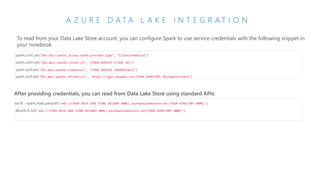
A Z U R E D A T A L A K E I N T E G R A T I O N
To read from your Data Lake Store account, you can configure Spark to use service credentials with the following snippet in
your notebook
spark.conf.set("dfs.adls.oauth2.access.token.provider.type", "ClientCredential")
spark.conf.set("dfs.adls.oauth2.client.id", "{YOUR SERVICE CLIENT ID}")
spark.conf.set("dfs.adls.oauth2.credential", "{YOUR SERVICE CREDENTIALS}")
spark.conf.set("dfs.adls.oauth2.refresh.url", "https://login.windows.net/{YOUR DIRECTORY ID}/oauth2/token")
After providing credentials, you can read from Data Lake Store using standard APIs:
val df = spark.read.parquet("adl://{YOUR DATA LAKE STORE ACCOUNT NAME}.azuredatalakestore.net/{YOUR DIRECTORY NAME}")
dbutils.fs.list("adl://{YOUR DATA LAKE STORE ACCOUNT NAME}.azuredatalakestore.net/{YOUR DIRECTORY NAME}")
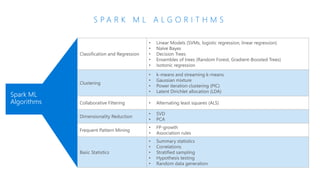
S P A R K M L A L G O R I T H M S
Spark ML
Algorithms
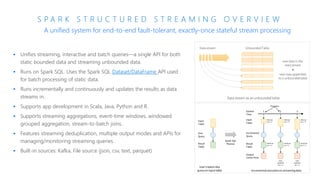
S P A R K S T R U C T U R E D S T R E A M I N G O V E R V I E W
▪ Unifies streaming, interactive and batch queries—a single API for both
static bounded data and streaming unbounded data.
▪ Runs on Spark SQL. Uses the Spark SQL Dataset/DataFrame API used
for batch processing of static data.
▪ Runs incrementally and continuously and updates the results as data
streams in.
▪ Supports app development in Scala, Java, Python and R.
▪ Supports streaming aggregations, event-time windows, windowed
grouped aggregation, stream-to-batch joins.
▪ Features streaming deduplication, multiple output modes and APIs for
managing/monitoring streaming queries.
▪ Built-in sources: Kafka, File source (json, csv, text, parquet)
A unified system for end-to-end fault-tolerant, exactly-once stateful stream processing
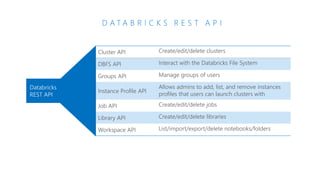
D A T A B R I C K S R E S T A P I
Cluster API Create/edit/delete clusters
DBFS API Interact with the Databricks File System
Groups API Manage groups of users
Instance Profile API
Allows admins to add, list, and remove instances
profiles that users can launch clusters with
Job API Create/edit/delete jobs
Library API Create/edit/delete libraries
Workspace API List/import/export/delete notebooks/folders
Databricks
REST API
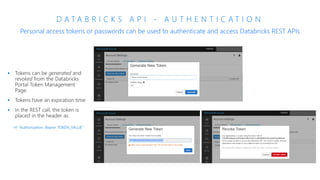
D A T A B R I C K S A P I - A U T H E N T I C A T I O N
Personal access tokens or passwords can be used to authenticate and access Databricks REST APIs
-H "Authorization: Bearer TOKEN_VALUE"
© Microsoft Corporation
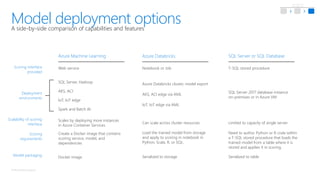
A side-by-side comparison of capabilities and features
Model deployment options
Scoring interface
provided
Deployment
environments
Scalability of scoring
interface
Scoring
requirements
Model packaging
SQL Server or SQL Database
T-SQL stored procedure
SQL Server 2017 database instance
on-premises or in Azure VM
Need to author Python or R code within
a T-SQL stored procedure that loads the
trained model from a table where it is
stored and applies it in scoring.
Serialized to table
Limited to capacity of single server
Azure Databricks
Notebook or Job
Load the trained model from storage
and apply to scoring in notebook in
Python, Scala, R, or SQL.
Serialized to storage
Azure Databricks cluster, model export
Can scale across cluster resources
Web service
Create a Docker image that contains
scoring service, model, and
dependencies
Docker image
SQL Server, Hadoop
Scales by deploying more instances
in Azure Container Services
Azure Machine Learning
AKS, ACI edge via AML
IoT, IoT edge via AML
AKS, ACI
IoT, IoT edge
Spark and Batch AI
https://portal.azure.com
Big Data Adavnced Analytics on Microsoft Azure

Big Data Adavnced Analytics on Microsoft Azure

  • 3.
  • 8.
    The opportunity andchallenge of data science in enterprises Opportunity: 17% had a well-developed Predictive/Prescriptive Analytics program in place, while 80% planned on implementing such a program within five years – Dataversity 2015 Survey Challenge: Only 27% of the big data projects are regarded as successful – CapGenimi 2014 Tools & data platforms have matured - Still a major gap in executing on the potential
  • 9.
    One reason: Processchallenge in Data Science Organization Collaboration Quality Knowledge Accumulation Agility Global Teams • Geographic Locations Team Growth • Onboard New Members Rapidly Varied Use Cases • Industries and Use Cases Diverse DS Backgrounds • DS have diverse backgrounds, experiences with tools, languages
  • 10.
    Data Science lifecycle Primary stages: Lifecycle
  • 13.
  • 14.
  • 15.
  • 19.
  • 20.
    Microsoft | AmplifyingHuman Ingenuity Enhance traditional line-of- business analytics solutions with Machine Learning Solve complex business problems with Deep Learning Engage customers with intelligent automated solutions
  • 22.
  • 23.
    Azure AI Services AzureInfrastructure Tools
  • 24.
    © Microsoft Corporation Fast,easy, and collaborative Apache Spark-based analytics platform Azure Databricks for deep learning modeling Tools InfrastructureFrameworks Leverage powerful GPU-enabled VMs pre-configured for deep neural network training Use HorovodEstimator via a native runtime to enable build deep learning models with a few lines of code Full Python and Scala support for transfer learning on images Automatically store metadata in Azure Database with geo-replication for fault tolerance Use built-in hyperparameter tuning via Spark MLLib to quickly drive model progress Simultaneously collaborate within notebooks environments to streamline model development Load images natively in Spark DataFrames to automatically decode them for manipulation at scale Improve performance 10x-100x over traditional Spark deployments with an optimized environment Seamlessly use TensorFlow, Microsoft Cognitive Toolkit, Caffe2, Keras, and more
  • 25.
    © Microsoft Corporation Additionaldeep learning tools Automatically scale virtual machine clusters with GPUs or CPUs Develop your models with long-running batch jobs, iterative experimentation, and interactive training Support for any deep learning or machine learning framework Designed and pre-configured specifically for GPU- enabled instances Fully integrated with Azure AI training service to provide capacity for parallelized AI training at scale Get started in seconds with example scripts and sample data sets Batch AI Deep Learning Virtual Machine
  • 26.
    © Microsoft Corporation DeployAI models to devices on the edge IoT EdgeModel managementMachine learning Azure Databricks Azure ML Services Qualcomm QCS603 Vision AI dev. kit Pre trained Solutions IDEs AI Frameworks
  • 27.
    © Microsoft Corporation Native TensorFlow Caffe DeployAI models to devices on the edge flow Message passing Co-located Scoring file Service or app Trained/retrained model Additional images Original NW e.g. MobileNet
  • 28.
    © Microsoft Corporation Machinelearning and deep learning, when to use what? Code first (On-prem) ML Server On-prem Hadoop SQL Server (cloud) AML (Preview) SQL Server Hadoop Azure Batch DSVM Spark Visual tooling (cloud) AML Studio Notebooks Jobs Azure Databricks Spark What engine(s) do you want to use? Deployment target Which experience do you want? Build with Spark or other engines? Python TensorFlow, Keras, MS Cognitive Toolkit, ONNX, Caffe2 Spark ML, SparkR, SparklyR TensorFlow, Keras, MS Cognitive Toolkit, ONNX, Caffe2
  • 30.
  • 31.
  • 33.
  • 34.
    S P AR K : A B R I E F H I S T O R Y
  • 35.
    A P AC H E S P A R K An unified, open source, parallel, data processing framework for Big Data Analytics Spark Core Engine Spark SQL Interactive Queries Spark Structured Streaming Stream processing Spark MLlib Machine Learning Yarn Mesos Standalone Scheduler Spark MLlib Machine Learning Spark Streaming Stream processing GraphX Graph Computation
  • 36.
    Azure Databricks Databricks Sparkas a managed service on Azure
  • 37.
    CONTROL EASE OFUSE Azure Data Lake Analytics Azure Data Lake Store Azure Storage Any Hadoop technology, any distribution Workload optimized, managed clusters Data Engineering in a Job-as-a-service model Azure Marketplace HDP | CDH | MapR Azure Data Lake Analytics IaaS Clusters Managed Clusters Big Data as-a-service Azure HDInsight Frictionless & Optimized Spark clusters Azure Databricks BIGDATA STORAGE BIGDATA ANALYTICS ReducedAdministration K N O W I N G T H E V A R I O U S B I G D A T A S O L U T I O N S
  • 38.
    Azure HDInsight What ItIs • Hortonworks distribution as a first party service on Azure • Big Data engines support – Hadoop Projects, Hive on Tez, Hive LLAP, Spark, HBase, Storm, Kafka, R Server • Best-in-class developer tooling and Monitoring capabilities • Enterprise Features • VNET support (join existing VNETs) • Ranger support (Kerberos based Security) • Log Analytics via OMS • Orchestration via Azure Data Factory • Available in most Azure Regions (27) including Gov Cloud and Federal Clouds Guidance • Customer needs Hadoop technologies other than, or in addition to Spark • Customer prefers Hortonworks Spark distribution to stay closer to OSS codebase and/or ‘Lift and Shift’ from on-premises deployments • Customer has specific project requirements that are only available on HDInsight Azure Databricks What It Is • Databricks’ Spark service as a first party service on Azure • Single engine for Batch, Streaming, ML and Graph • Best-in-class notebooks experience for optimal productivity and collaboration • Enterprise Features • Native Integration with Azure for Security via AAD (OAuth) • Optimized engine for better performance and scalability • RBAC for Notebooks and APIs • Auto-scaling and cluster termination capabilities • Native integration with SQL DW and other Azure services • Serverless pools for easier management of resources Guidance • Customer needs the best option for Spark on Azure • Customer teams are comfortable with notebooks and Spark • Customers need Auto-scaling and • Customer needs to build integrated and performant data pipelines • Customer is comfortable with limited regional availability (3 in preview, 8 by GA) Azure ML What It Is • Azure first party service for Machine Learning • Leverage existing ML libraries or extend with Python and R • Targets emerging data scientists with drag & drop offering • Targets professional data scientists with – Experimentation service – Model management service – Works with customers IDE of choice Guidance • Azure Machine Learning Studio is a GUI based ML tool for emerging Data Scientists to experiment and operationalize with least friction • Azure Machine Learning Workbench is not a compute engine & uses external engines for Compute, including SQL Server and Spark • AML deploys models to HDI Spark currently • AML should be able to deploy Azure Databricks in the near future L O O K I N G A C R O S S T H E O F F E R I N G S
  • 39.
  • 40.
    P R OV I S I O N I N G A Z U R E D A T A B R I C K S W O R K S P A C E
  • 41.
    G E NE R A L S P A R K C L U S T E R A R C H I T E C T U R E Data Sources (HDFS, SQL, NoSQL, …) Cluster Manager Worker Node Worker Node Worker Node Driver Program SparkContext
  • 42.
    A Z UR E D A T A B R I C K S C L U S T E R A R C H I T E C T U R E Azure DB for PostgreSQL Webapp Azure Compute Cluster Manager Databricks’ Azure Account User’s Azure Account Azure Compute Spark Driver Azure Compute Spark Worker Azure Compute Spark Worker Jobs FileSystem Service Spark History Server Log Daemon Log Daemon
  • 43.
    C L US T E R M A N A G E R A R C H I T E C T U R E JobsWebapp Cluster Manager Cluster Azure Compute Spark Driver Azure Compute Spark Worker Azure Compute Spark Worker Database Instances, Clusters, Libraries, Hive Metastore, … Cluster Azure Compute Spark Driver Azure Compute Spark Worker Azure Compute Spark Worker Instance Manager Container Management Library Manager
  • 44.
  • 45.
    D A TA B R I C K S A C C E S S C O N T R O L Access control can be defined at the user level via the Admin Console Workspace Access Control Defines who can who can view, edit, and run notebooks in their workspace Cluster Access Control Allows users to who can attach to, restart, and manage (resize/delete) clusters. Allows Admins to specify which users have permissions to create clusters Jobs Access Control Allows owners of a job to control who can view job results or manage runs of a job (run now/cancel) REST API Tokens Allows users to use personal access tokens instead of passwords to access the Databricks REST API Databricks Access Control
  • 46.
  • 47.
    C L US T E R S ▪ Azure Databricks clusters are the set of Azure Linux VMs that host the Spark Worker and Driver Nodes ▪ Your Spark application code (i.e. Jobs) runs on the provisioned clusters. ▪ Azure Databricks clusters are launched in your subscription—but are managed through the Azure Databricks portal. ▪ Azure Databricks provides a comprehensive set of graphical wizards to manage the complete lifecycle of clusters—from creation to termination.
  • 51.
    A Z UR E D A T A B R I C K S N O T E B O O K S O V E R V I E W Notebooks are a popular way to develop, and run, Spark Applications ▪ Notebooks are not only for authoring Spark applications but can be run/executed directly on clusters • Shift+Enter • • ▪ Notebooks support fine grained permissions—so they can be securely shared with colleagues for collaboration (see following slide for details on permissions and abilities) ▪ Notebooks are well-suited for prototyping, rapid development, exploration, discovery and iterative development Notebooks typically consist of code, data, visualization, comments and notes
  • 52.
    M I XI N G L A N G U A G E S I N N O T E B O O K S You can mix multiple languages in the same notebook Normally a notebook is associated with a specific language. However, with Azure Databricks notebooks, you can mix multiple languages in the same notebook. This is done using the language magic command: • %python Allows you to execute python code in a notebook (even if that notebook is not python) • %sql Allows you to execute sql code in a notebook (even if that notebook is not sql). • %r Allows you to execute r code in a notebook (even if that notebook is not r). • %scala Allows you to execute scala code in a notebook (even if that notebook is not scala). • %sh Allows you to execute shell code in your notebook. • %fs Allows you to use Databricks Utilities - dbutils filesystem commands. • %md To include rendered markdown
  • 53.
    L I BR A R I E S O V E R V I E W Enables external code to be imported and stored into a Workspace
  • 55.
    D A TA B R I C K S S P A R K I S F A S T Benchmarks have shown Databricks to often have better performance than alternatives SOURCE: Benchmarking Big Data SQL Platforms in the Cloud
  • 57.
    S P AR K S Q L O V E R V I E W Spark SQL is a distributed SQL query engine for processing structured data
  • 58.
    L O CA L A N D G L O B A L T A B L E S Databricks registers global tables to the Hive metastore and makes them available across all clusters. Only global tables are visible in the Tables pane Azure Databricks Tables Databricks does not registers local tables in the Hive metastore and are only available within one cluster. Also known as temporary tables
  • 59.
    A Z UR E S Q L D W I N T E G R A T I O N Integration enables structured data from SQL DW to be included in Spark Analytics Azure SQL Data Warehouse is a SQL-based fully managed, petabyte-scale cloud solution for data warehousing Azure Databricks Azure SQL DW ▪ You can bring in data from Azure SQL DW to perform advanced analytics that require both structured and unstructured data. ▪ Currently you can access data in Azure SQL DW via the JDBC driver. From within your spark code you can access just like any other JDBC data source. ▪ If Azure SQL DW is authenticated via AAD then Azure Databricks user can seamlessly access Azure SQL DW.
  • 60.
    P O WE R B I I N T E G R A T I O N Enables powerful visualization of data in Spark with Power BI Power BI Desktop can connect to Azure Databricks clusters to query data using JDBC/ODBC server that runs on the driver node. • This server listens on port 10000 and it is not accessible outside the subnet where the cluster is running. • Azure Databricks uses a public HTTPS gateway • The JDBC/ODBC connection information can be obtained from the Cluster UI directly as shown in the figure. • When establishing the connection, you can use a Personal Access Token to authenticate to the cluster gateway. Only users who have attach permissions can access the cluster via the JDBC/ ODBC endpoint. • In Power BI desktop you can setup the connection by choosing the ODBC data source in the “Get Data” option.
  • 61.
    C O SM O S D B I N T E G R A T I O N The Spark connector enables real-time analytics over globally distributed data in Azure Cosmos DB ▪ With Spark connector for Azure Cosmos DB, Apache Spark can now interact with all Azure Cosmos DB data models: Documents, Tables, and Graphs. • efficiently exploits the native Azure Cosmos DB managed indexes and enables updateable columns when performing analytics. • utilizes push-down predicate filtering against fast-changing globally-distributed data ▪ Some use-cases for Azure Cosmos DB + Spark include: • Streaming Extract, Transformation, and Loading of data (ETL) • Data enrichment • Trigger event detection • Complex session analysis and personalization • Visual data exploration and interactive analysis • Notebook experience for data exploration, information sharing, and collaboration Azure Cosmos DB is Microsoft's globally distributed, multi-model database service for mission-critical applications The connector uses the Azure DocumentDB Java SDK and moves data directly between Spark worker nodes and Cosmos DB data nodes
  • 62.
    A Z UR E B L O B S T O R A G E I N T E G R A T I O N Data can be read from Azure Blob Storage using the Hadoop FileSystem interface. Data can be read from public storage accounts without any additional settings. To read data from a private storage account, you need to set an account key or a Shared Access Signature (SAS) in your notebook spark.conf.set ( "fs.azure.account.key.{Your Storage Account Name}.blob.core.windows.net", "{Your Storage Account Access Key}") Setting up an account key Setting up a SAS for a given container: spark.conf.set( "fs.azure.sas.{Your Container Name}.{Your Storage Account Name}.blob.core.windows.net", "{Your SAS For The Given Container}") Once an account key or a SAS is setup, you can use standard Spark and Databricks APIs to read from the storage account: val df = spark.read.parquet("wasbs://{Your Container Name}@m{Your Storage Account name}.blob.core.windows.net/{Your Directory Name}") dbutils.fs.ls("wasbs://{Your ntainer Name}@{Your Storage Account Name}.blob.core.windows.net/{Your Directory Name}")
  • 63.
    A Z UR E D A T A L A K E I N T E G R A T I O N To read from your Data Lake Store account, you can configure Spark to use service credentials with the following snippet in your notebook spark.conf.set("dfs.adls.oauth2.access.token.provider.type", "ClientCredential") spark.conf.set("dfs.adls.oauth2.client.id", "{YOUR SERVICE CLIENT ID}") spark.conf.set("dfs.adls.oauth2.credential", "{YOUR SERVICE CREDENTIALS}") spark.conf.set("dfs.adls.oauth2.refresh.url", "https://login.windows.net/{YOUR DIRECTORY ID}/oauth2/token") After providing credentials, you can read from Data Lake Store using standard APIs: val df = spark.read.parquet("adl://{YOUR DATA LAKE STORE ACCOUNT NAME}.azuredatalakestore.net/{YOUR DIRECTORY NAME}") dbutils.fs.list("adl://{YOUR DATA LAKE STORE ACCOUNT NAME}.azuredatalakestore.net/{YOUR DIRECTORY NAME}")
  • 65.
    S P AR K M L A L G O R I T H M S Spark ML Algorithms
  • 67.
    S P AR K S T R U C T U R E D S T R E A M I N G O V E R V I E W ▪ Unifies streaming, interactive and batch queries—a single API for both static bounded data and streaming unbounded data. ▪ Runs on Spark SQL. Uses the Spark SQL Dataset/DataFrame API used for batch processing of static data. ▪ Runs incrementally and continuously and updates the results as data streams in. ▪ Supports app development in Scala, Java, Python and R. ▪ Supports streaming aggregations, event-time windows, windowed grouped aggregation, stream-to-batch joins. ▪ Features streaming deduplication, multiple output modes and APIs for managing/monitoring streaming queries. ▪ Built-in sources: Kafka, File source (json, csv, text, parquet) A unified system for end-to-end fault-tolerant, exactly-once stateful stream processing
  • 69.
    D A TA B R I C K S R E S T A P I Cluster API Create/edit/delete clusters DBFS API Interact with the Databricks File System Groups API Manage groups of users Instance Profile API Allows admins to add, list, and remove instances profiles that users can launch clusters with Job API Create/edit/delete jobs Library API Create/edit/delete libraries Workspace API List/import/export/delete notebooks/folders Databricks REST API
  • 70.
    D A TA B R I C K S A P I - A U T H E N T I C A T I O N Personal access tokens or passwords can be used to authenticate and access Databricks REST APIs -H "Authorization: Bearer TOKEN_VALUE"
  • 71.
    © Microsoft Corporation Aside-by-side comparison of capabilities and features Model deployment options Scoring interface provided Deployment environments Scalability of scoring interface Scoring requirements Model packaging SQL Server or SQL Database T-SQL stored procedure SQL Server 2017 database instance on-premises or in Azure VM Need to author Python or R code within a T-SQL stored procedure that loads the trained model from a table where it is stored and applies it in scoring. Serialized to table Limited to capacity of single server Azure Databricks Notebook or Job Load the trained model from storage and apply to scoring in notebook in Python, Scala, R, or SQL. Serialized to storage Azure Databricks cluster, model export Can scale across cluster resources Web service Create a Docker image that contains scoring service, model, and dependencies Docker image SQL Server, Hadoop Scales by deploying more instances in Azure Container Services Azure Machine Learning AKS, ACI edge via AML IoT, IoT edge via AML AKS, ACI IoT, IoT edge Spark and Batch AI
  • 72.