Mahesh TR
Identity & Access Management( IAM)
Mahesh TR
User
Group
Role
Policy Doc
Permanent operator Temporary Operator
Authentication
Authorization
Understanding how permissions works in AWS?
Mahesh TR
IAM Essentials
✓IAM is where we manage users, groups and roles and their access to AWS services.
✓IAM provides access and access permissions to AWS resources.
✓IAM is global to all AWS regions, creating a user account will apply to all the regions.
✓IAM policies allow for granular API level permissions for granting users and groups access to
specific AWS resources.
Mahesh TR
IAM Essentials
• Groups
✓Assign permission policies to more than one user at a time.
✓Collection of users.
• Users
✓Best practice to work as an IAM user NOT as the root user (user@email.com)
✓Receive unique access credentials and do not share with others.
✓User credentials should never be stored or "passed" to an EC2 instance.
✓Users can have group and regular user policies apply to them.
✓By default an explicit deny always overrides an allow.
✓By default a user has a non explicit "deny" on all AWS services and does not have access to use
them until a policy granting allow access has been to user account or to the group the user
belongs to
Mahesh TR
IAM Policies
We can assign policies to users/groups in three ways.
> Using default AWS built in policy templates.
> Policy Generator
> Create your own policy using JSON code.
Key components
> Action
> Resources
> Condition (Optional)
Mahesh TR
IAM BENEFITS
✓Central control of AWS resources.
✓Consolidated AWS bill for your users.
✓Ensure users access only from specified networks.
✓Easily manage security credentials.
✓Provide temporary user access when needed.
✓Federate with SAML providers such as active directory for temporary and single sign on access.
✓Provide roles that other AWS resources can assume.
Mahesh TR
IAM Roles
An IAM role is an IAM entity that defines a set of permissions for making AWS service
requests. IAM roles are not associated with a specific user or group. Instead, trusted entities
assume roles, services such as EC2.
✓Instances should be granted a role from IAM with proper required permissions.
✓Instances can perform actions based on the role it assumes.
✓Other users can assume a "role" for temporary access.
✓Can create "cross account" access where a user from one account can assume a role with
permissions in another account.
Mahesh TR
Cross Account Access
Crete Role – select Another
Account – Give QA Account
Number 111111111111 as
Trusted Entity
Attach policy – Ex :
EC2 Full access
Provide Role Name
“AccessRoleToQA”
PROD Account
9999999999999
Step 2
Step 3
Step 3
Create User in this account “Test” – Don’t add any
permission
Attach inline policy – and save as “AccessPolicyToPROD”
{
"Version": "2012-10-17",
"Statement": { "Effect": "Allow",
"Action": "sts:AssumeRole",
"Resource": "arn:aws:iam:: 9999999999999:role/ AccessRoleToQA " }
}
QA Account
111111111111
Login with Test user and “Switch
user” to PROD account
Step 1
Step 4
Step
www.cloudclass.in
Mahesh TR
IAM Password
policy
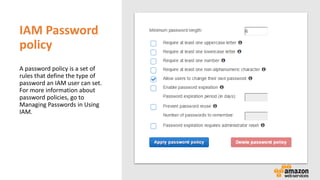
A password policy is a set of
rules that define the type of
password an IAM user can set.
For more information about
password policies, go to
Managing Passwords in Using
IAM.
Mahesh TR
IAM Identity Providers
If you already manage user identities outside of AWS, you can use IAM identity providers instead
of creating IAM users in your AWS account. With an identity provider (IdP), you can manage your
user identities outside of AWS and give these external user identities permissions to use AWS
resources in your account. This is useful if your organization already has its own identity system,
such as a corporate user directory.
Mahesh TR
Security Token Service
Grant users limited access to AWS resources. Users can come from three source.
✓ Federation (Typically active directory)
user security assertion markup language (SAML)
Grant Temporary access based on the user AD credentials. Does not need to be an IAM user
Single sign on allows user to sign in to AWS console with our IAM credentials.
✓ Federation with Mobile Apps
Use Facebook/Google or OpenID providers to login.
✓ Cross accounts
Let’s users from one account to another aws account.
Mahesh TR
Understanding Key Terms
✓ Federation
Combining or joining a list of user in one domain (Such as IAM) with a list of users in another
domain (Such as AD, Facebook etc..)
✓ Identity Broker
A service that allows you to take an identity from point A and join it to point B
✓ Identity Store
Service like Active Directory, Facebook and Google etc..
✓ Identities
A user of a service like Facebooketc..
Mahesh TR
Access key
Secret Key
A token
Duration
Mahesh TR
Links
• Tolls for API
• https://aws.amazon.com/tools/
• Quick Start for Python.
• https://github.com/boto/boto3
• Creating SAML (Security Assertion Markup Language 2.0)
• http://docs.aws.amazon.com/IAM/latest/UserGuide/id_roles_providers_create_saml.html#samlstep1
• Integrating Third-Party SAML Solution Providers with AWS
• http://docs.aws.amazon.com/IAM/latest/UserGuide/id_roles_providers_saml_3rd-party.html
Mahesh TR
THANK YOU!

AWS Identity and access Managment

  • 1.
    Mahesh TR Identity &Access Management( IAM)
  • 2.
    Mahesh TR User Group Role Policy Doc Permanentoperator Temporary Operator Authentication Authorization Understanding how permissions works in AWS?
  • 3.
    Mahesh TR IAM Essentials ✓IAMis where we manage users, groups and roles and their access to AWS services. ✓IAM provides access and access permissions to AWS resources. ✓IAM is global to all AWS regions, creating a user account will apply to all the regions. ✓IAM policies allow for granular API level permissions for granting users and groups access to specific AWS resources.
  • 4.
    Mahesh TR IAM Essentials •Groups ✓Assign permission policies to more than one user at a time. ✓Collection of users. • Users ✓Best practice to work as an IAM user NOT as the root user (user@email.com) ✓Receive unique access credentials and do not share with others. ✓User credentials should never be stored or "passed" to an EC2 instance. ✓Users can have group and regular user policies apply to them. ✓By default an explicit deny always overrides an allow. ✓By default a user has a non explicit "deny" on all AWS services and does not have access to use them until a policy granting allow access has been to user account or to the group the user belongs to
  • 5.
    Mahesh TR IAM Policies Wecan assign policies to users/groups in three ways. > Using default AWS built in policy templates. > Policy Generator > Create your own policy using JSON code. Key components > Action > Resources > Condition (Optional)
  • 6.
    Mahesh TR IAM BENEFITS ✓Centralcontrol of AWS resources. ✓Consolidated AWS bill for your users. ✓Ensure users access only from specified networks. ✓Easily manage security credentials. ✓Provide temporary user access when needed. ✓Federate with SAML providers such as active directory for temporary and single sign on access. ✓Provide roles that other AWS resources can assume.
  • 7.
    Mahesh TR IAM Roles AnIAM role is an IAM entity that defines a set of permissions for making AWS service requests. IAM roles are not associated with a specific user or group. Instead, trusted entities assume roles, services such as EC2. ✓Instances should be granted a role from IAM with proper required permissions. ✓Instances can perform actions based on the role it assumes. ✓Other users can assume a "role" for temporary access. ✓Can create "cross account" access where a user from one account can assume a role with permissions in another account.
  • 8.
    Mahesh TR Cross AccountAccess Crete Role – select Another Account – Give QA Account Number 111111111111 as Trusted Entity Attach policy – Ex : EC2 Full access Provide Role Name “AccessRoleToQA” PROD Account 9999999999999 Step 2 Step 3 Step 3 Create User in this account “Test” – Don’t add any permission Attach inline policy – and save as “AccessPolicyToPROD” { "Version": "2012-10-17", "Statement": { "Effect": "Allow", "Action": "sts:AssumeRole", "Resource": "arn:aws:iam:: 9999999999999:role/ AccessRoleToQA " } } QA Account 111111111111 Login with Test user and “Switch user” to PROD account Step 1 Step 4 Step www.cloudclass.in
  • 9.
    Mahesh TR IAM Password policy Apassword policy is a set of rules that define the type of password an IAM user can set. For more information about password policies, go to Managing Passwords in Using IAM.
  • 10.
    Mahesh TR IAM IdentityProviders If you already manage user identities outside of AWS, you can use IAM identity providers instead of creating IAM users in your AWS account. With an identity provider (IdP), you can manage your user identities outside of AWS and give these external user identities permissions to use AWS resources in your account. This is useful if your organization already has its own identity system, such as a corporate user directory.
  • 11.
    Mahesh TR Security TokenService Grant users limited access to AWS resources. Users can come from three source. ✓ Federation (Typically active directory) user security assertion markup language (SAML) Grant Temporary access based on the user AD credentials. Does not need to be an IAM user Single sign on allows user to sign in to AWS console with our IAM credentials. ✓ Federation with Mobile Apps Use Facebook/Google or OpenID providers to login. ✓ Cross accounts Let’s users from one account to another aws account.
  • 12.
    Mahesh TR Understanding KeyTerms ✓ Federation Combining or joining a list of user in one domain (Such as IAM) with a list of users in another domain (Such as AD, Facebook etc..) ✓ Identity Broker A service that allows you to take an identity from point A and join it to point B ✓ Identity Store Service like Active Directory, Facebook and Google etc.. ✓ Identities A user of a service like Facebooketc..
  • 13.
    Mahesh TR Access key SecretKey A token Duration
  • 14.
    Mahesh TR Links • Tollsfor API • https://aws.amazon.com/tools/ • Quick Start for Python. • https://github.com/boto/boto3 • Creating SAML (Security Assertion Markup Language 2.0) • http://docs.aws.amazon.com/IAM/latest/UserGuide/id_roles_providers_create_saml.html#samlstep1 • Integrating Third-Party SAML Solution Providers with AWS • http://docs.aws.amazon.com/IAM/latest/UserGuide/id_roles_providers_saml_3rd-party.html
  • 15.