© 2019, Amazon Web Services, Inc. or its affiliates. All rights reserved.
AWS 클라우드 핵심 서비스로
클라우드 기반 아키텍처 빠르게 구성하기
문종민 솔루션즈 아키텍트, AWS
© 2019, Amazon Web Services, Inc. or its affiliates. All rights reserved.
목표 시스템
AWS Global Infrastructure
EC2 선택하기
스토리지 선택하기
VPC로 네트워크 구성하기
Database 빠르게 구성하기
AWS 상에서의 목표 시스템
AWS를 사용하는 방법
How to Quick Start
목차
© 2019, Amazon Web Services, Inc. or its affiliates. All rights reserved.
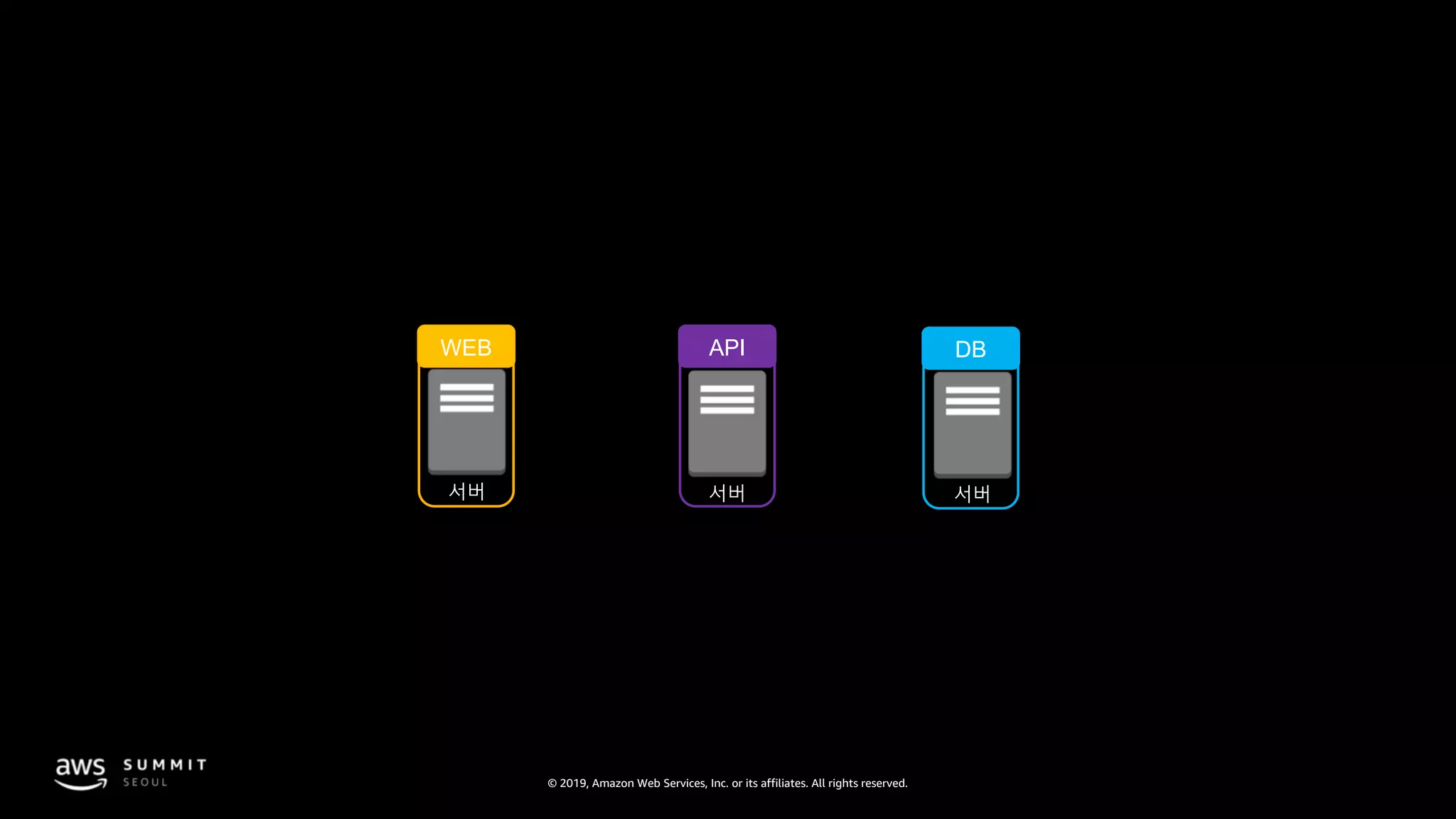
서버 서버서버
WEB API DB
© 2019, Amazon Web Services, Inc. or its affiliates. All rights reserved.
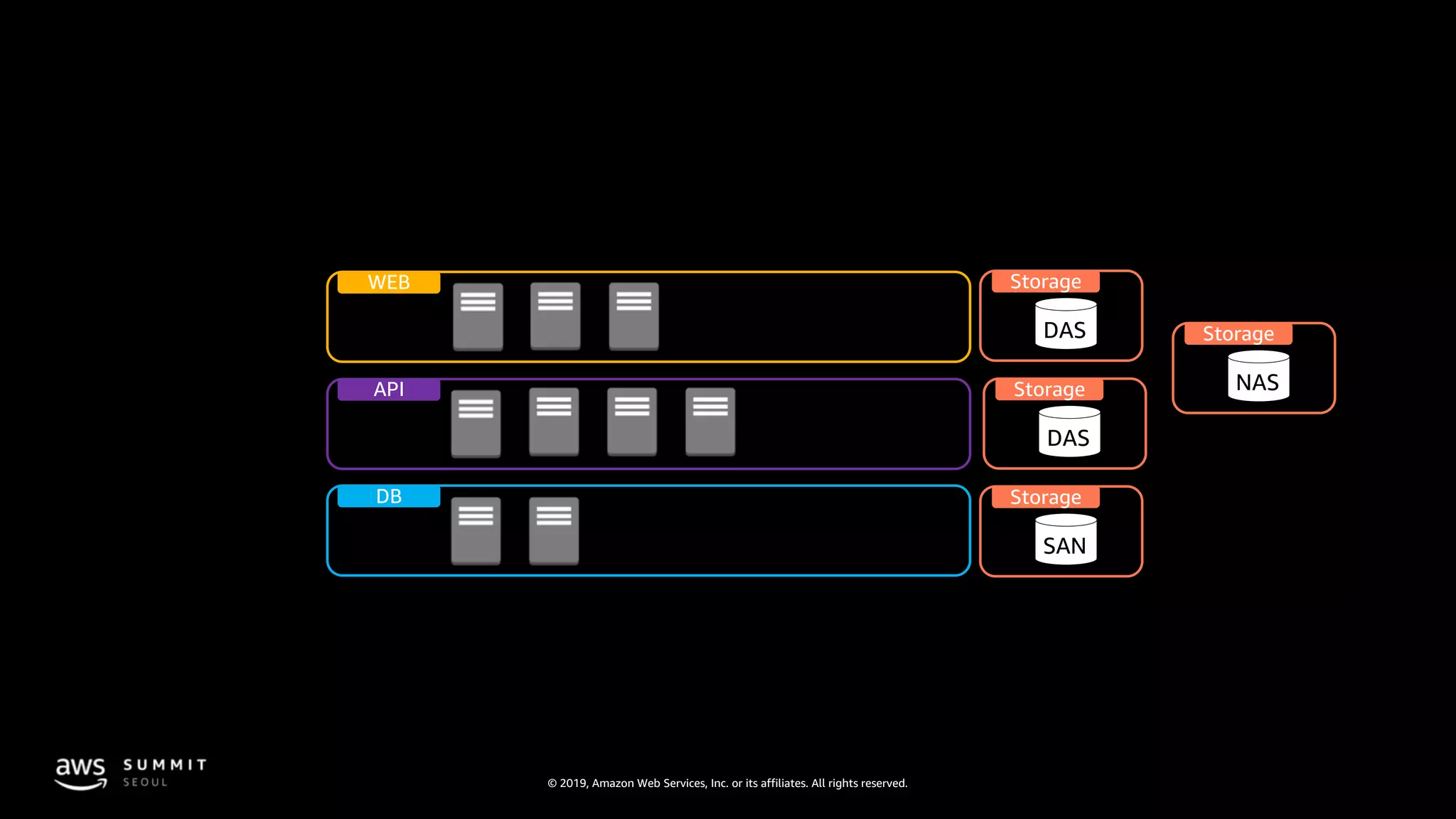
API
DB
WEB
Storage
SAN
Storage
DAS
Storage
NAS
Storage
DAS
© 2019, Amazon Web Services, Inc. or its affiliates. All rights reserved.
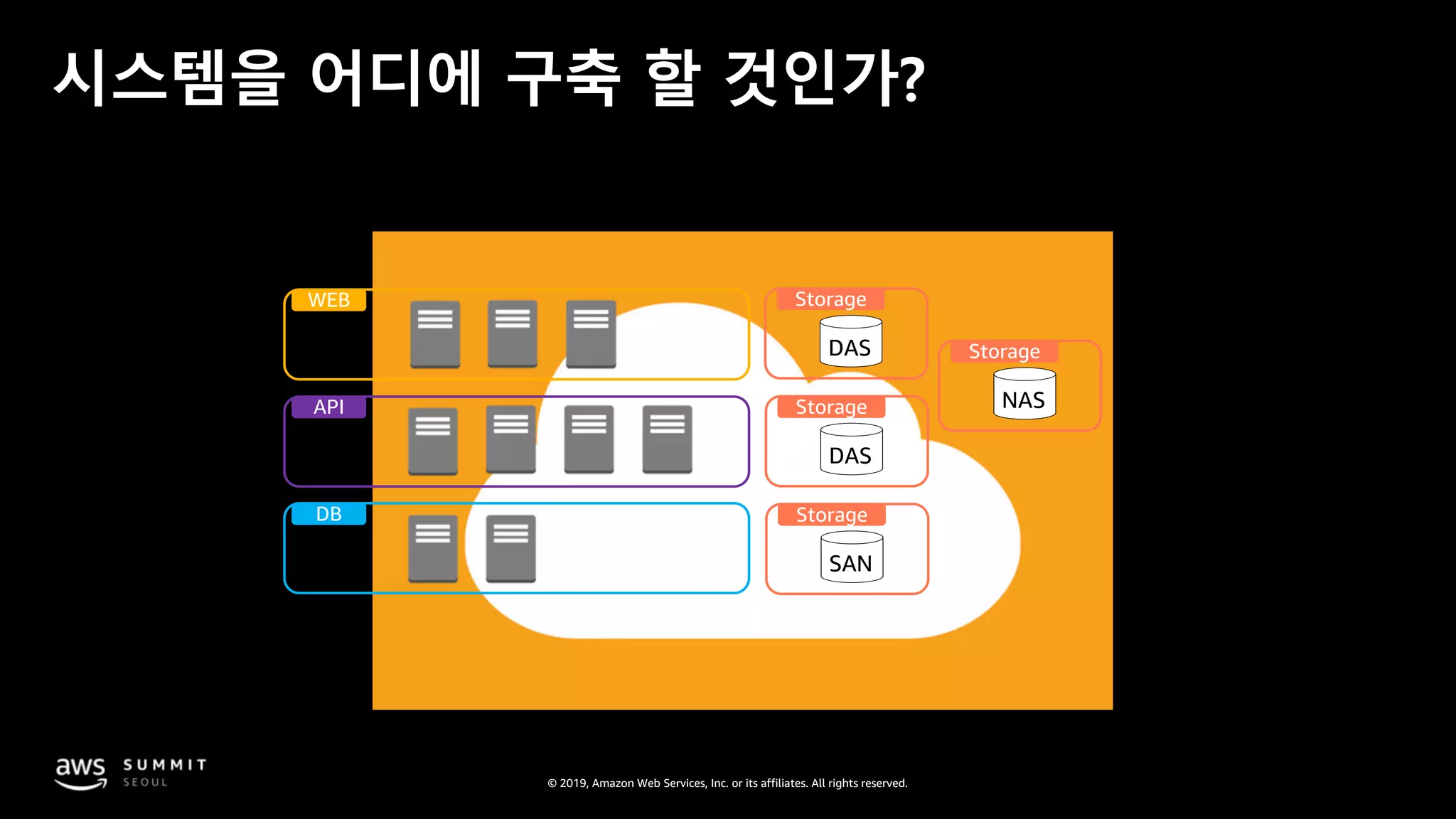
시스템을 어디에 구축 할 것인가?
API
DB
WEB
Storage
SAN
Storage
DAS
Storage
NAS
Storage
DAS
© 2019, Amazon Web Services, Inc. or its affiliates. All rights reserved.
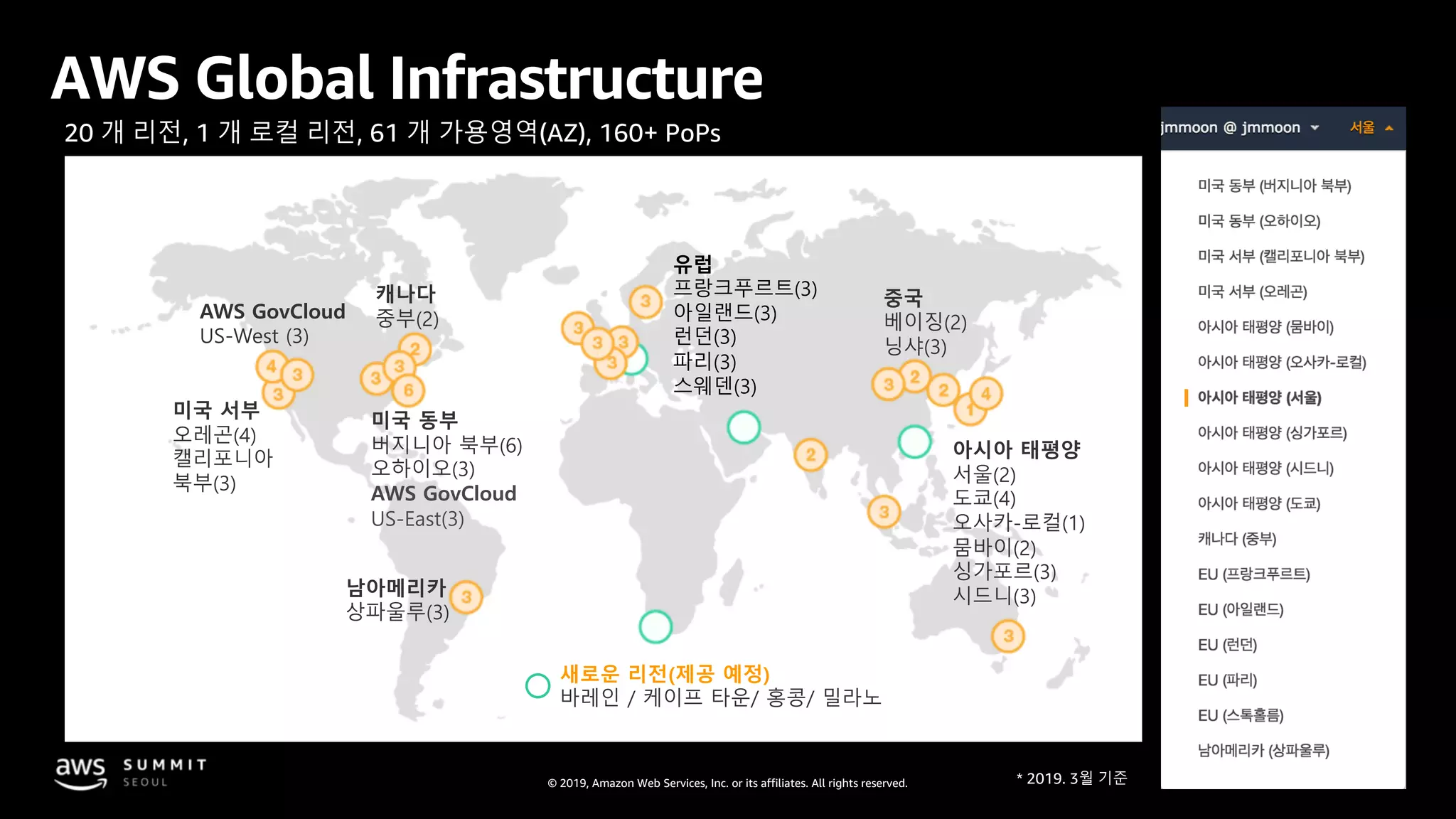
AWS Global Infrastructure
20 개 리전, 1 개 로컬 리전, 61 개 가용영역(AZ), 160+ PoPs
미국 동부
버지니아 북부(6)
오하이오(3)
AWS GovCloud
US-East(3)
캐나다
중부(2)
미국 서부
오레곤(4)
캘리포니아
북부(3)
아시아 태평양
서울(2)
도쿄(4)
오사카-로컬(1)
뭄바이(2)
싱가포르(3)
시드니(3)
유럽
프랑크푸르트(3)
아일랜드(3)
런던(3)
파리(3)
스웨덴(3)
AWS GovCloud
US-West (3)
중국
베이징(2)
닝샤(3)
새로운 리전(제공 예정)
바레인 / 케이프 타운/ 홍콩/ 밀라노
남아메리카
상파울루(3)
© 2019, Amazon Web Services, Inc. or its affiliates. All rights reserved.
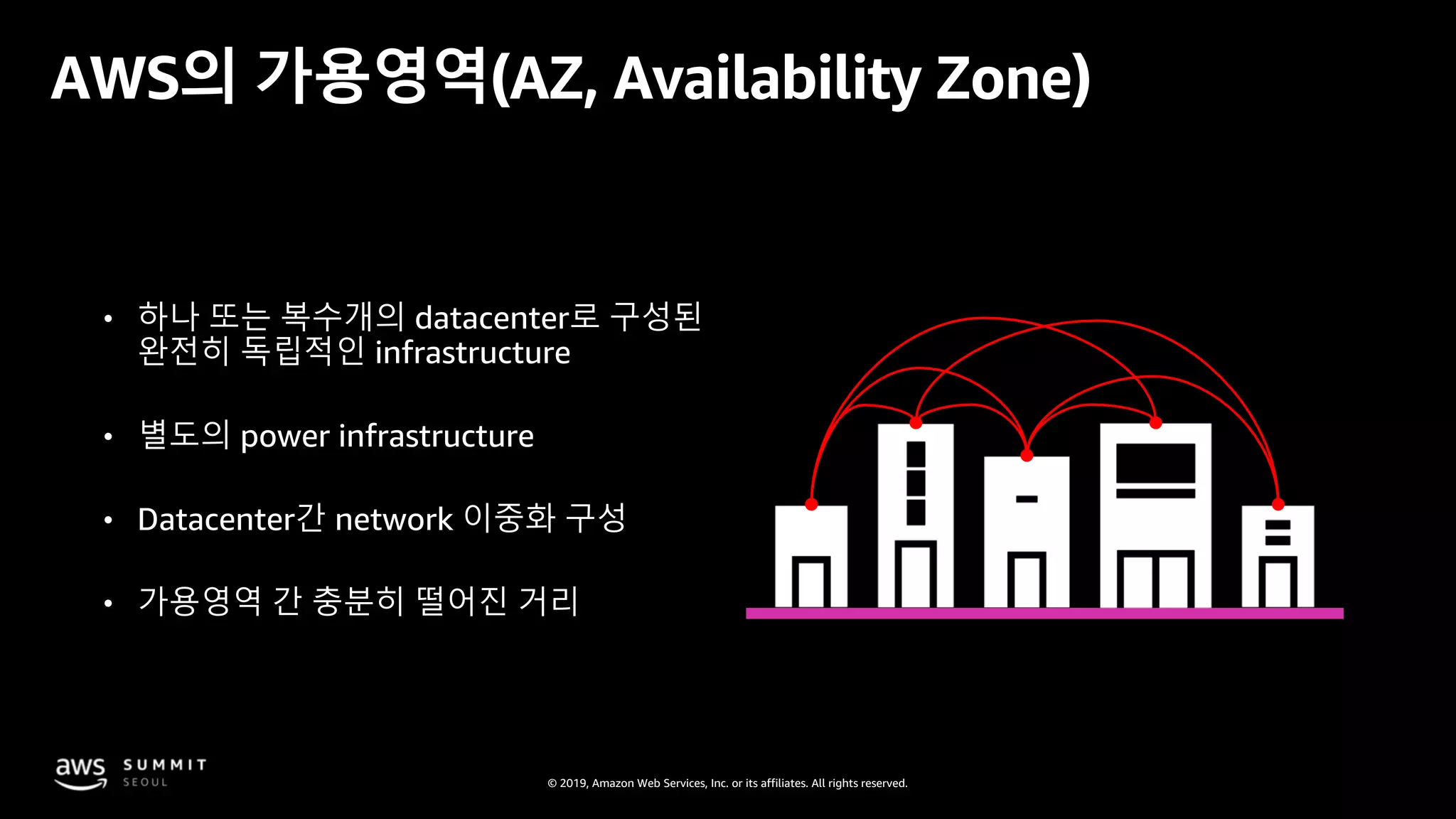
• 하나 또는 복수개의 datacenter로 구성된
완전히 독립적인 infrastructure
• 별도의 power infrastructure
• Datacenter간 network 이중화 구성
• 가용영역 간 충분히 떨어진 거리
AWS의 가용영역(AZ, Availability Zone)
© 2019, Amazon Web Services, Inc. or its affiliates. All rights reserved.
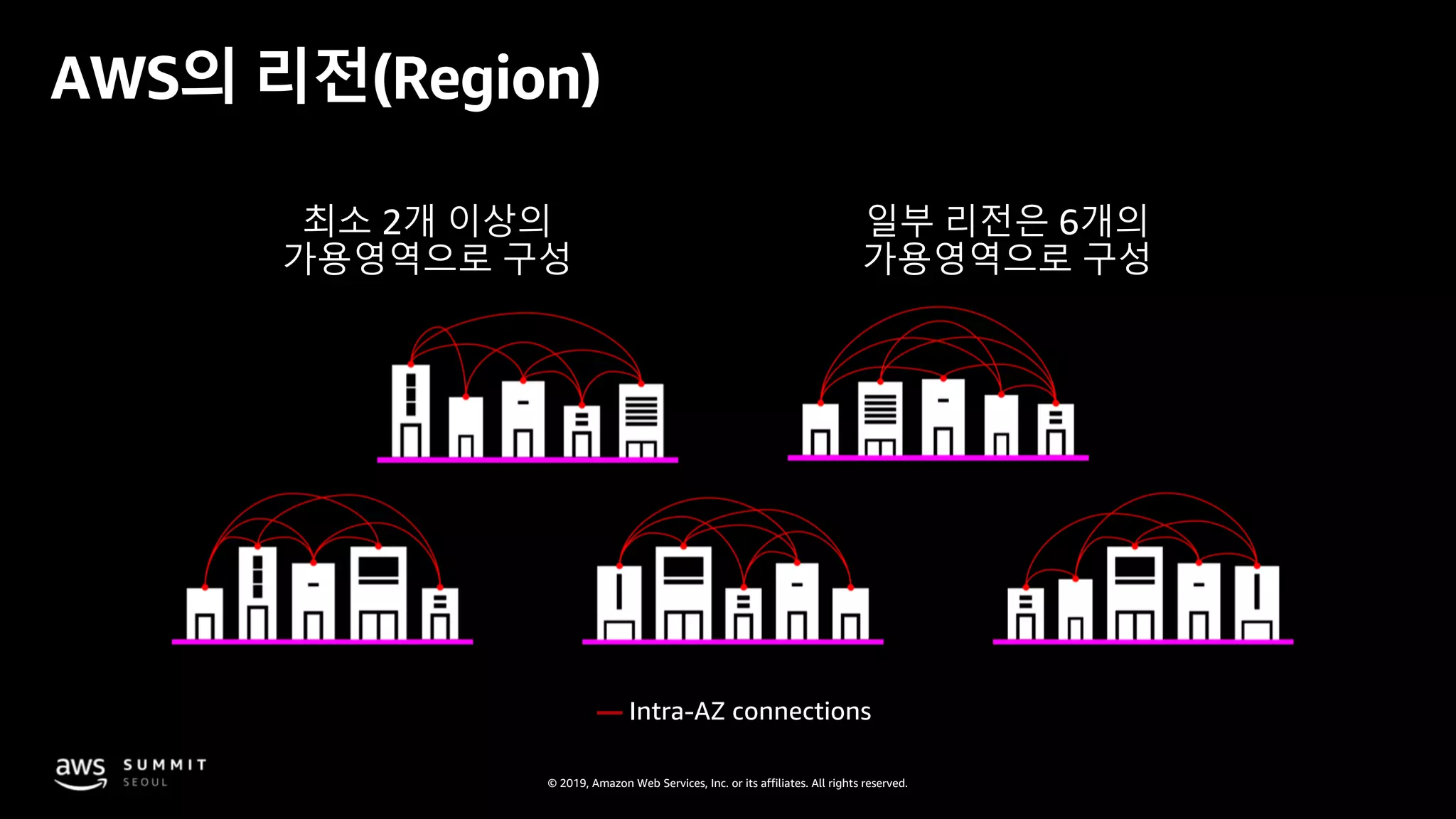
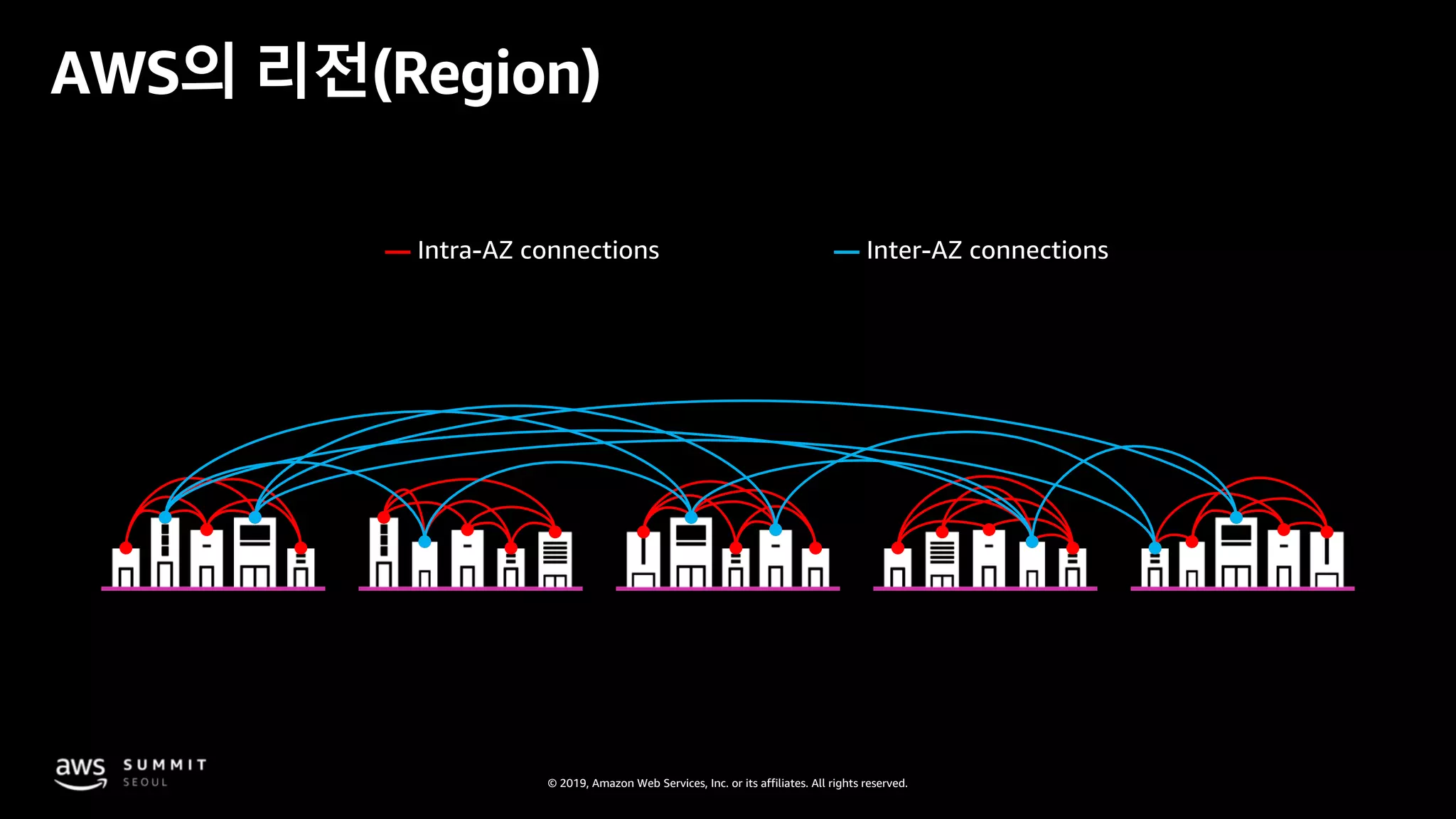
최소 2개 이상의
가용영역으로 구성
일부 리전은 6개의
가용영역으로 구성
— Intra-AZ connections
AWS의 리전(Region)
© 2019, Amazon Web Services, Inc. or its affiliates. All rights reserved.
— —
AWS의 리전(Region)
© 2019, Amazon Web Services, Inc. or its affiliates. All rights reserved.
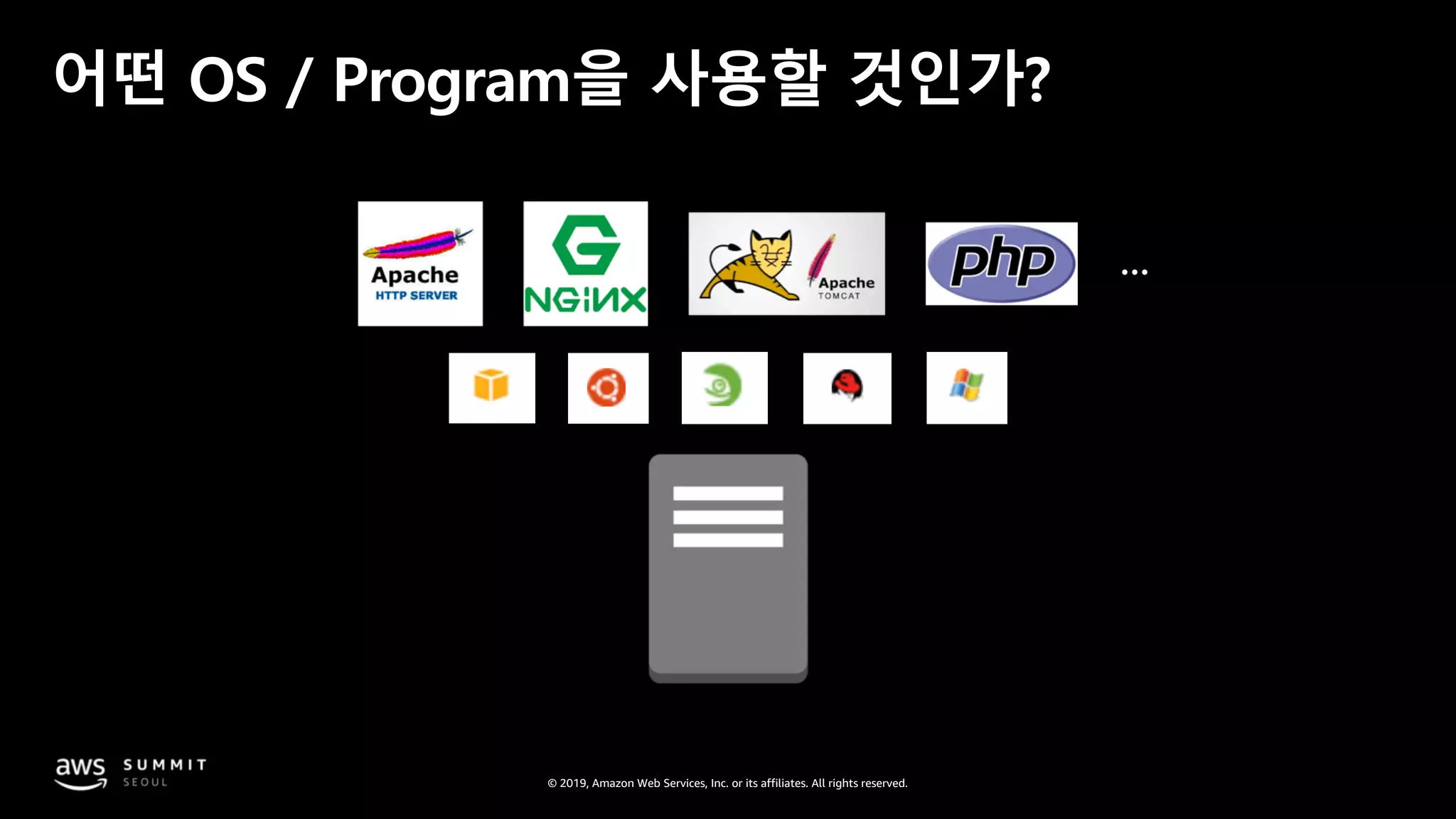
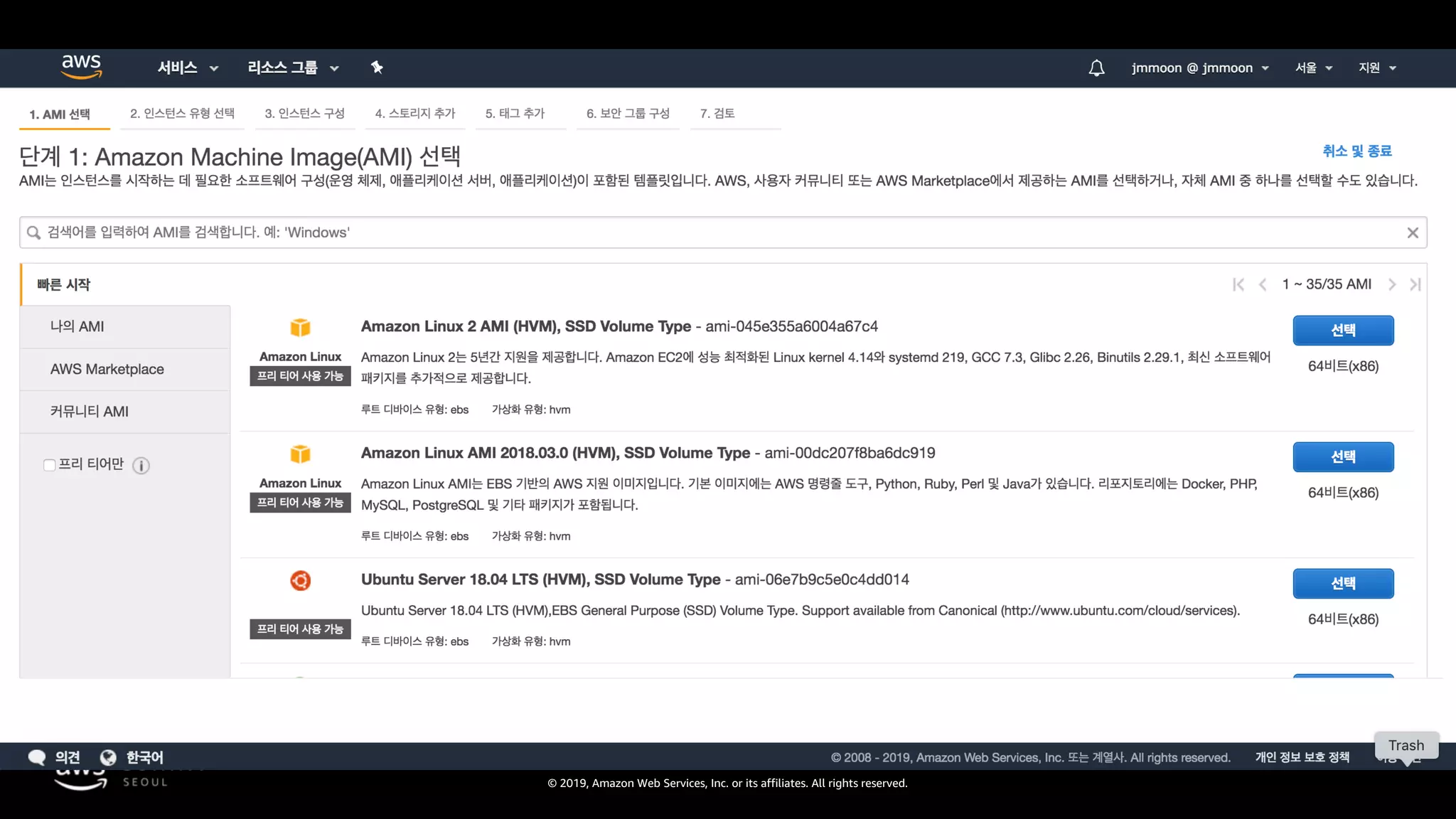
어떤 OS / Program을 사용할 것인가?
© 2019, Amazon Web Services, Inc. or its affiliates. All rights reserved.
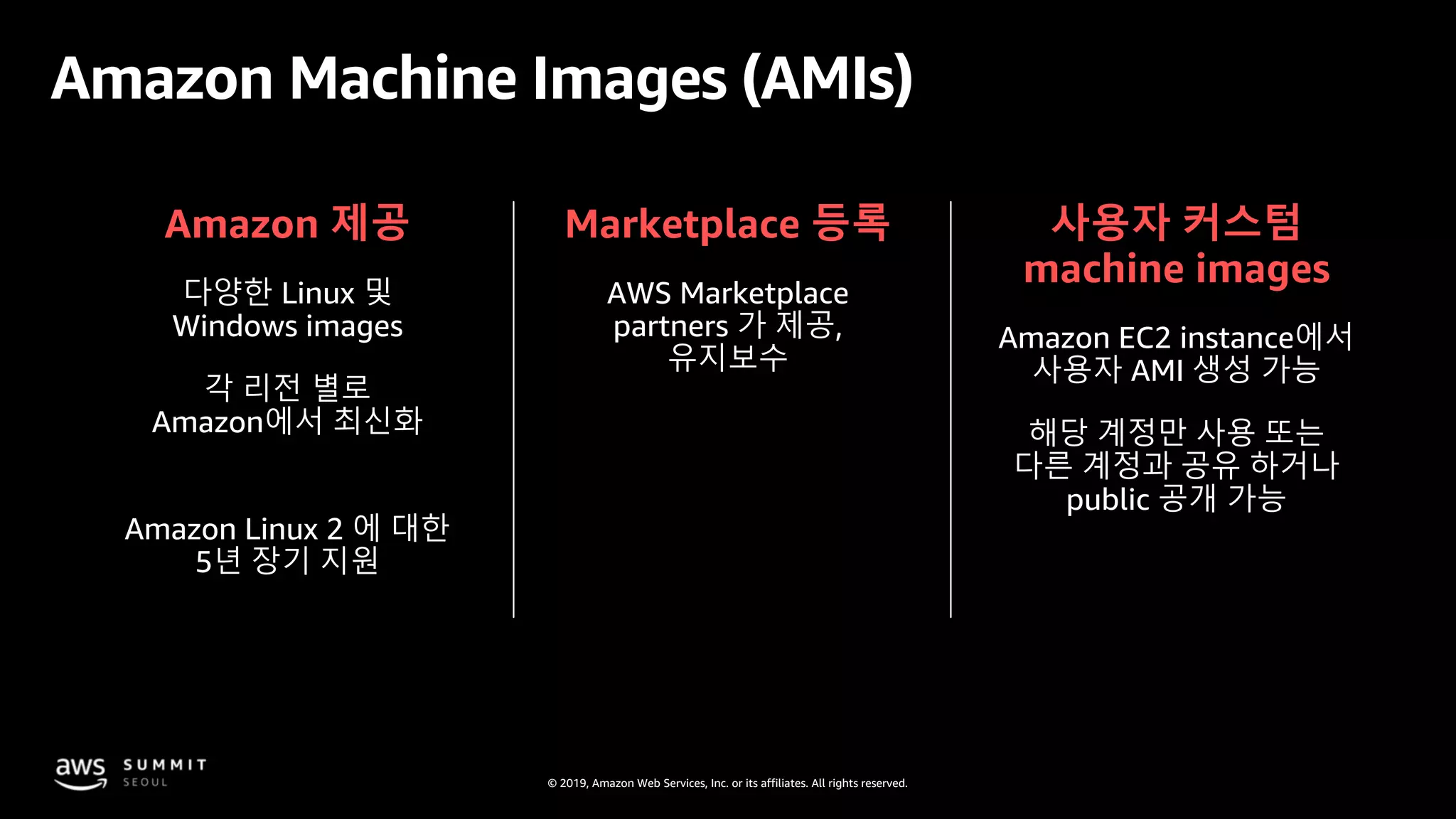
Amazon 제공
다양한 Linux 및
Windows images
각 리전 별로
Amazon에서 최신화
Marketplace 등록
AWS Marketplace
partners 가 제공,
유지보수
사용자 커스텀
machine images
Amazon EC2 instance에서
사용자 AMI 생성 가능
해당 계정만 사용 또는
다른 계정과 공유 하거나
public 공개 가능
Amazon Machine Images (AMIs)
Amazon Linux 2 에 대한
5년 장기 지원
© 2019, Amazon Web Services, Inc. or its affiliates. All rights reserved.
어느 정도 사양의 서버가 필요한가?
© 2019, Amazon Web Services, Inc. or its affiliates. All rights reserved.
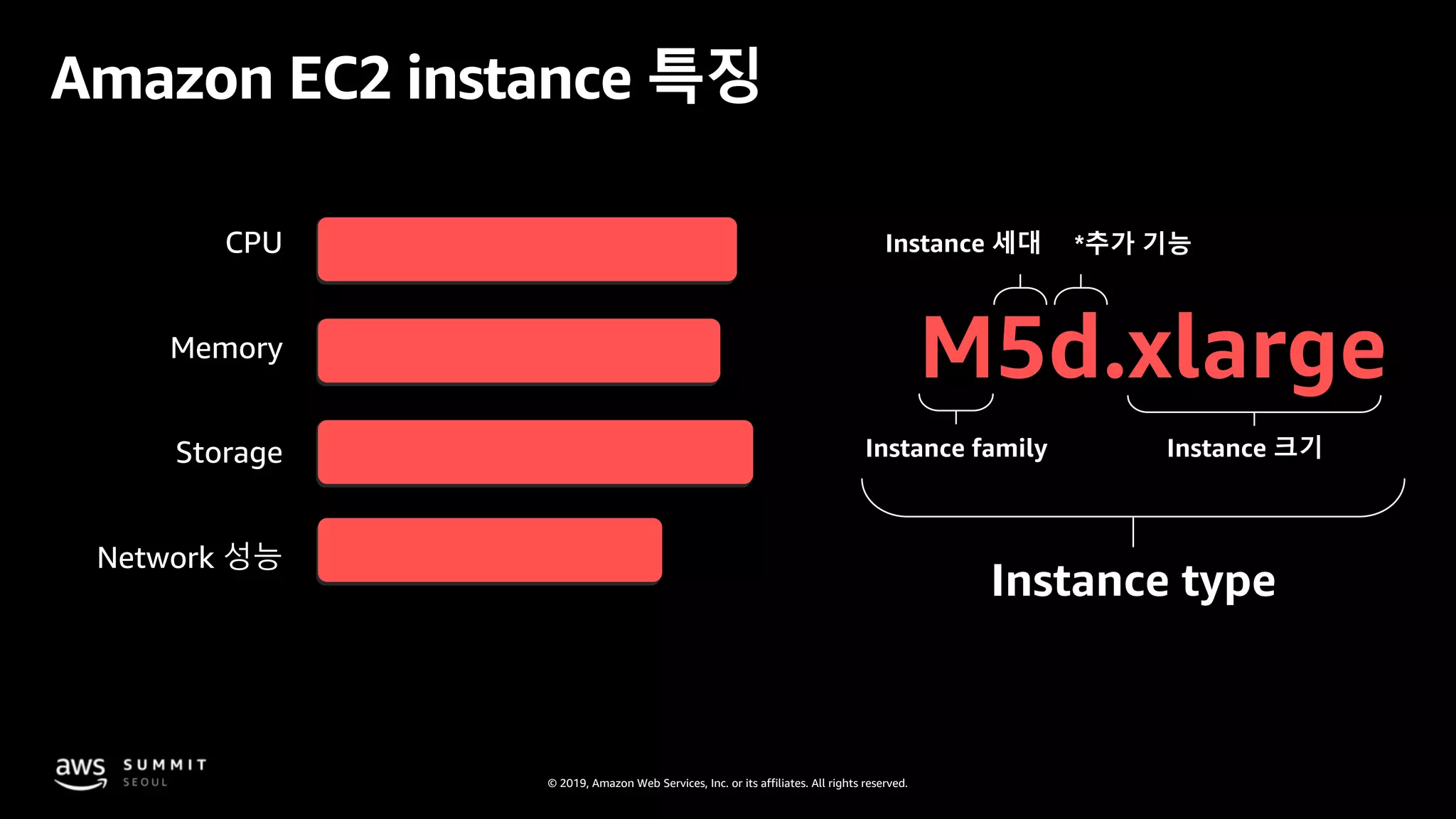
Amazon EC2 instance 특징
M5d.xlarge
Instance family
Instance 세대
Instance 크기
Instance type
CPU
Memory
Storage
Network 성능
*추가 기능
© 2019, Amazon Web Services, Inc. or its affiliates. All rights reserved.
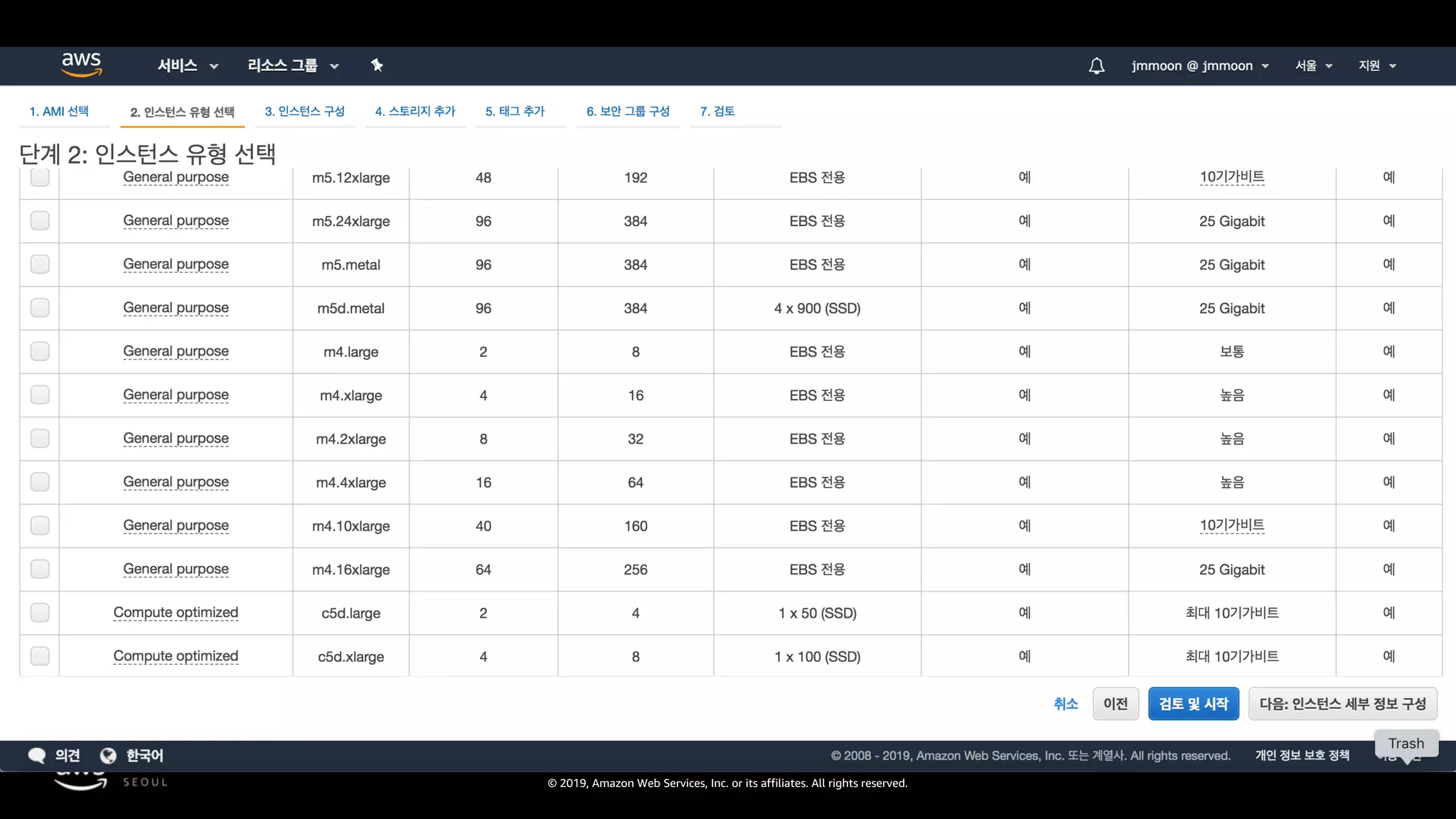
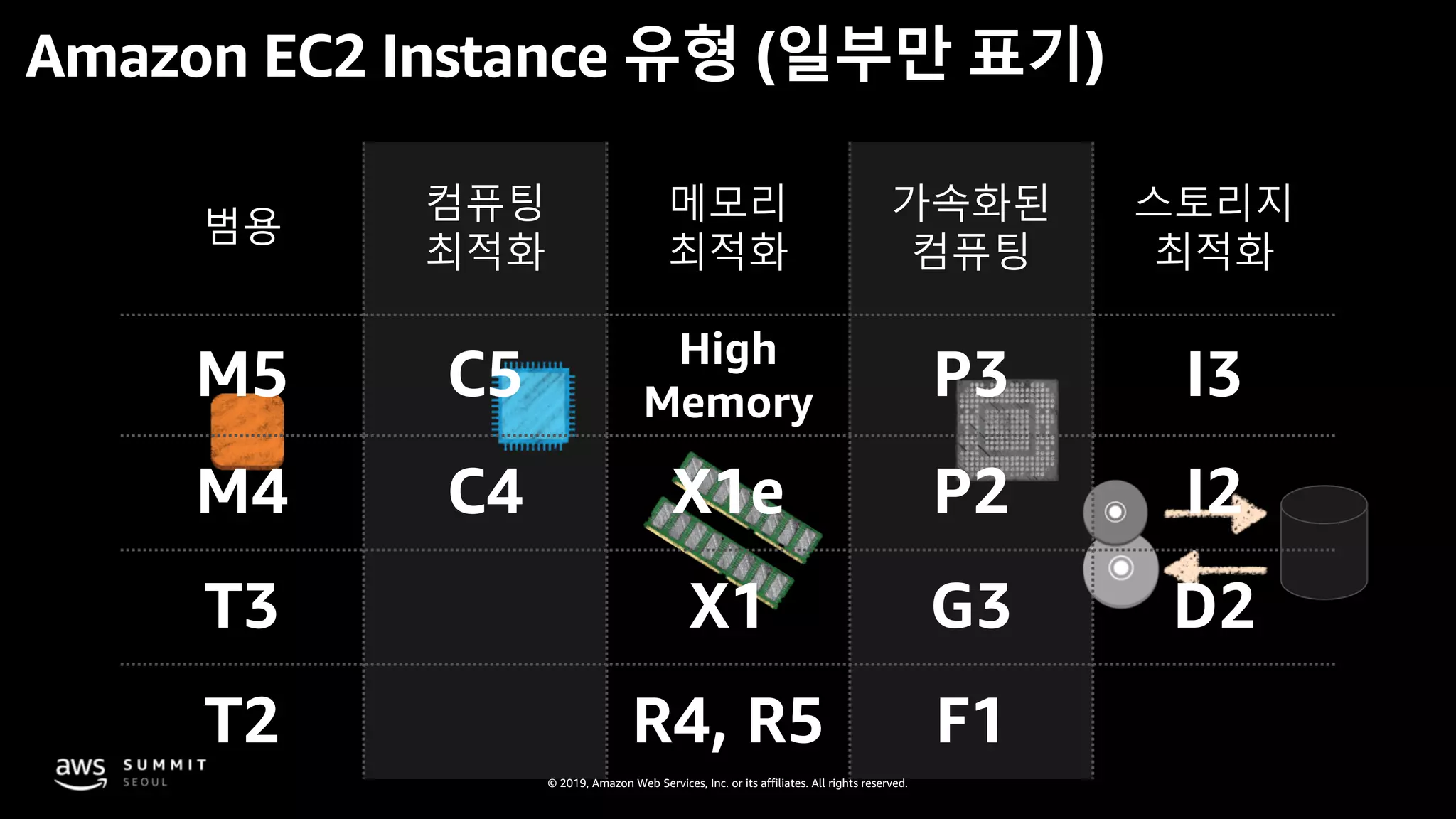
범용
컴퓨팅
최적화
메모리
최적화
가속화된
컴퓨팅
스토리지
최적화
M5 C5 High
Memory P3 I3
M4 C4 X1e P2 I2
T3 X1 G3 D2
T2 R4, R5 F1
Amazon EC2 Instance 유형 (일부만 표기)
© 2019, Amazon Web Services, Inc. or its affiliates. All rights reserved.
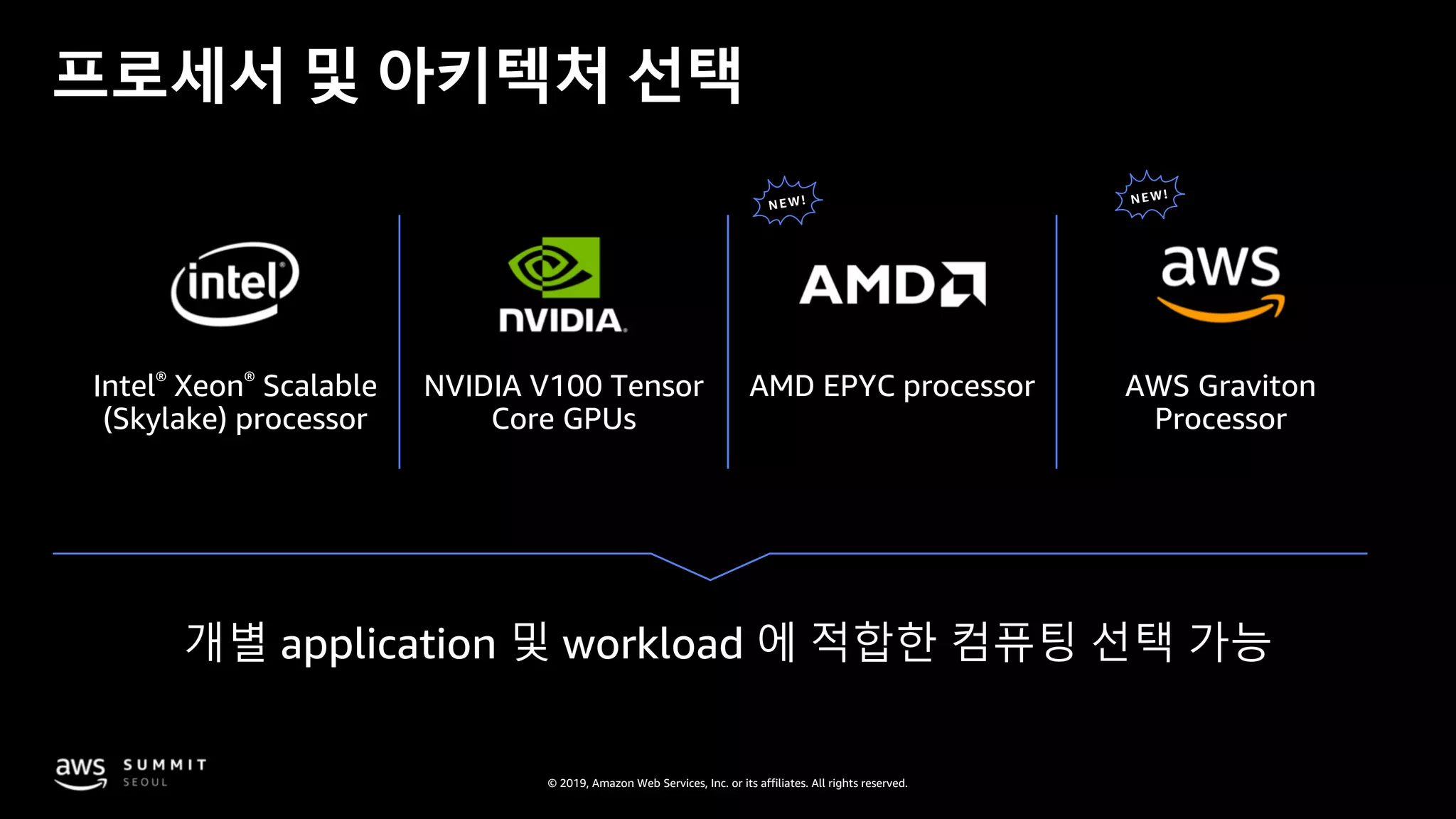
Intel® Xeon® Scalable
(Skylake) processor
AMD EPYC processorNVIDIA V100 Tensor
Core GPUs
AWS Graviton
Processor
프로세서 및 아키텍처 선택
© 2019, Amazon Web Services, Inc. or its affiliates. All rights reserved.
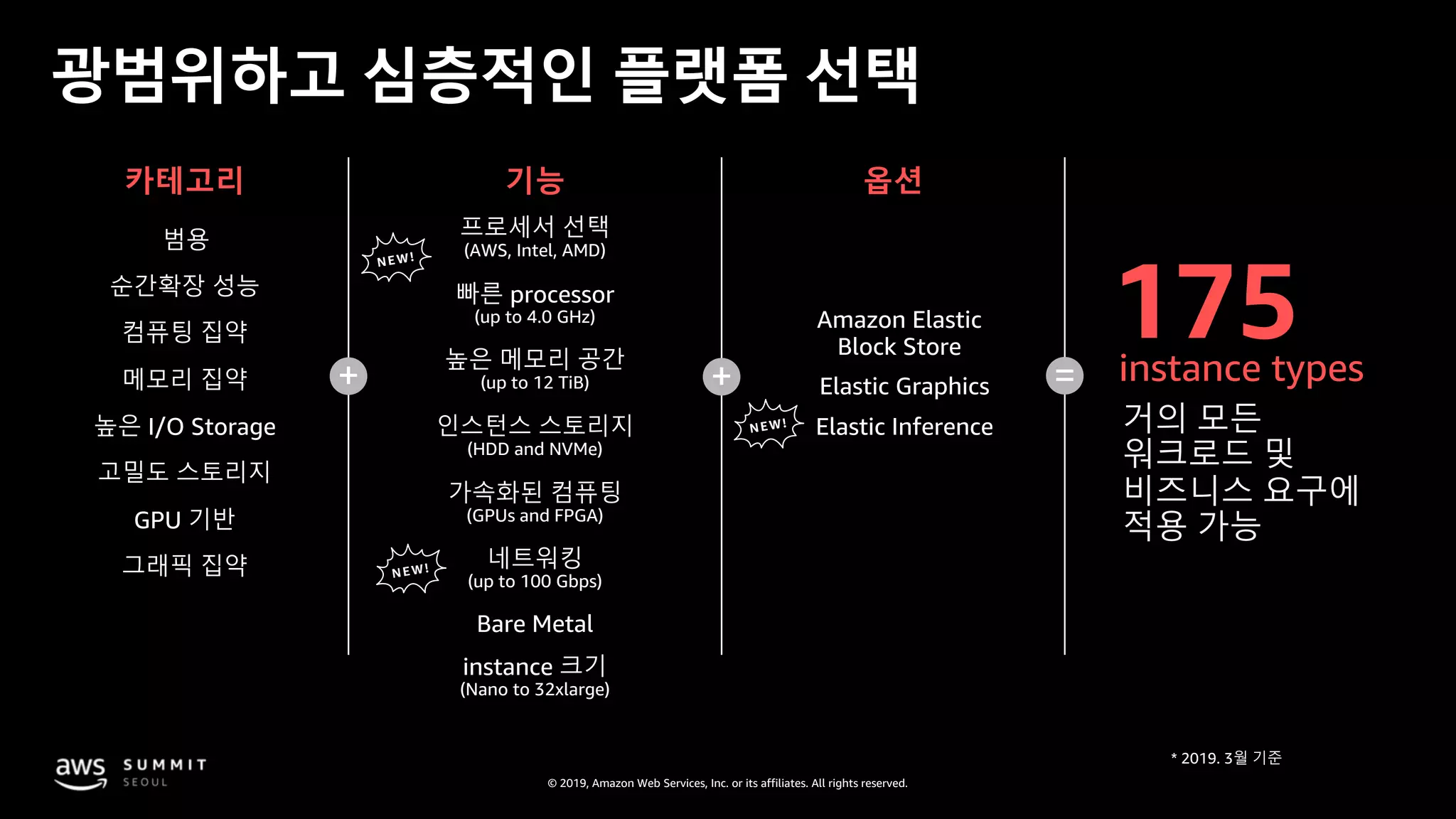
광범위하고 심층적인 플랫폼 선택
카테고리 기능 옵션
프로세서 선택
(AWS, Intel, AMD)
빠른 processor
(up to 4.0 GHz)
높은 메모리 공간
(up to 12 TiB)
인스턴스 스토리지
(HDD and NVMe)
네트워킹
(up to 100 Gbps)
가속화된 컴퓨팅
(GPUs and FPGA)
Bare Metal
instance 크기
(Nano to 32xlarge)
Amazon Elastic
Block Store
Elastic Inference
Elastic Graphics+ + =
컴퓨팅 집약
메모리 집약
순간확장 성능
높은 I/O Storage
고밀도 스토리지
GPU 기반
그래픽 집약
범용
175instance types
거의 모든
워크로드 및
비즈니스 요구에
적용 가능
NEW
NEW!
NEW!
© 2019, Amazon Web Services, Inc. or its affiliates. All rights reserved.
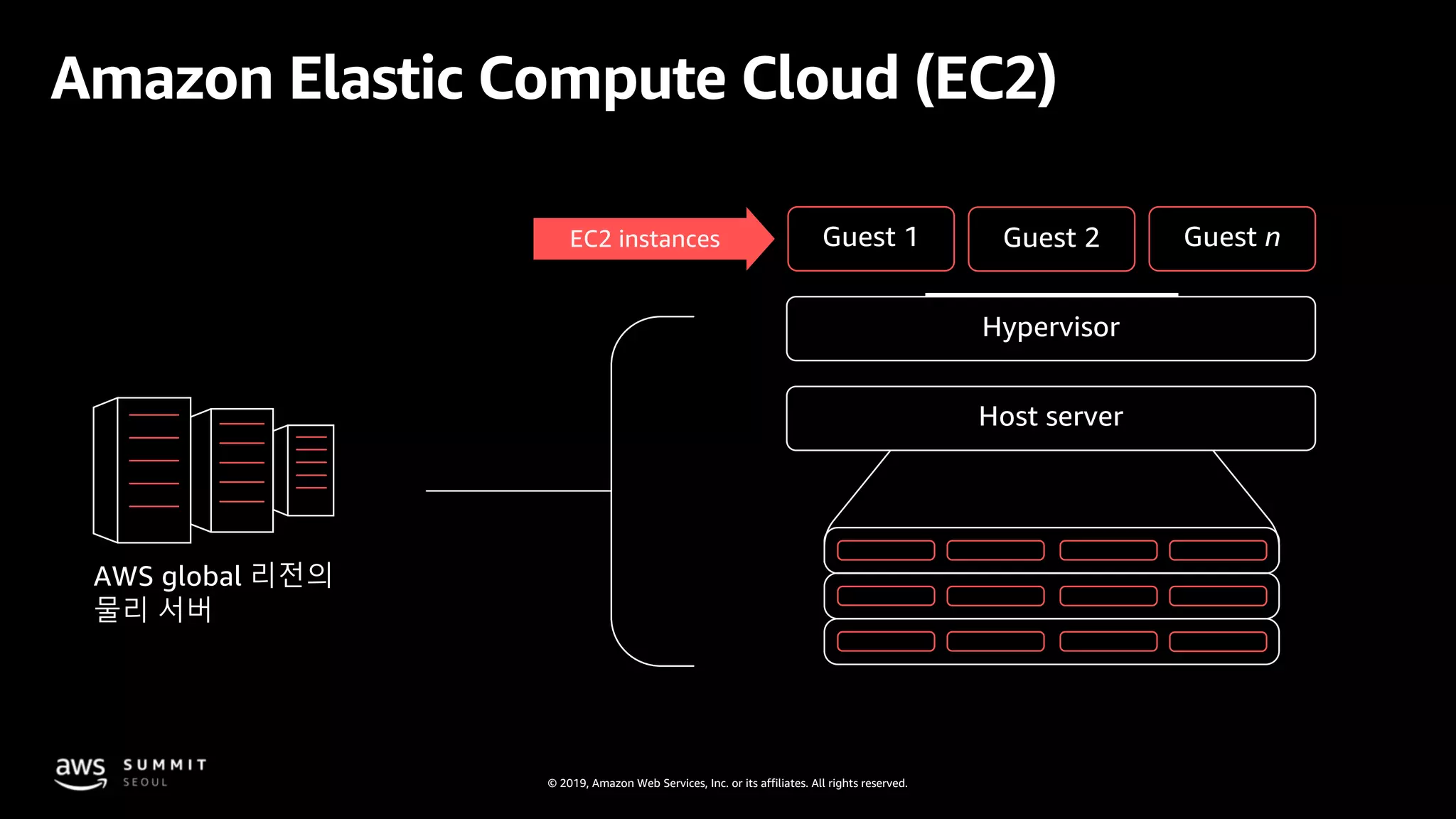
Amazon Elastic Compute Cloud (EC2)
AWS global 리전의
물리 서버
Guest 2
Guest 1 Guest 2 Guest n
Hypervisor
Host server
EC2 instances
© 2019, Amazon Web Services, Inc. or its affiliates. All rights reserved.
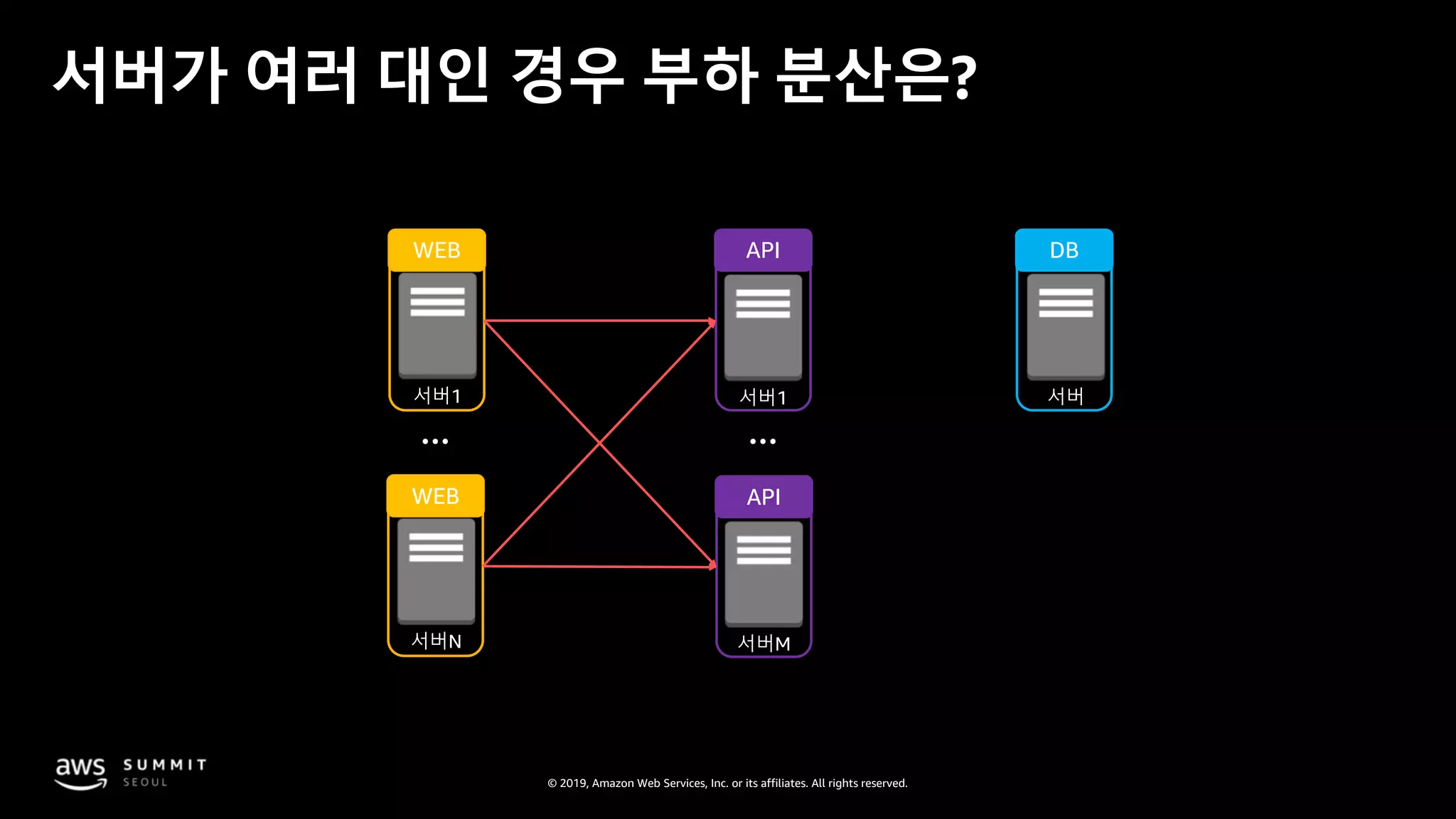
서버가 여러 대인 경우 부하 분산은?
서버1
WEB
서버1
API
서버
DB
서버N
WEB
서버M
API
© 2019, Amazon Web Services, Inc. or its affiliates. All rights reserved.
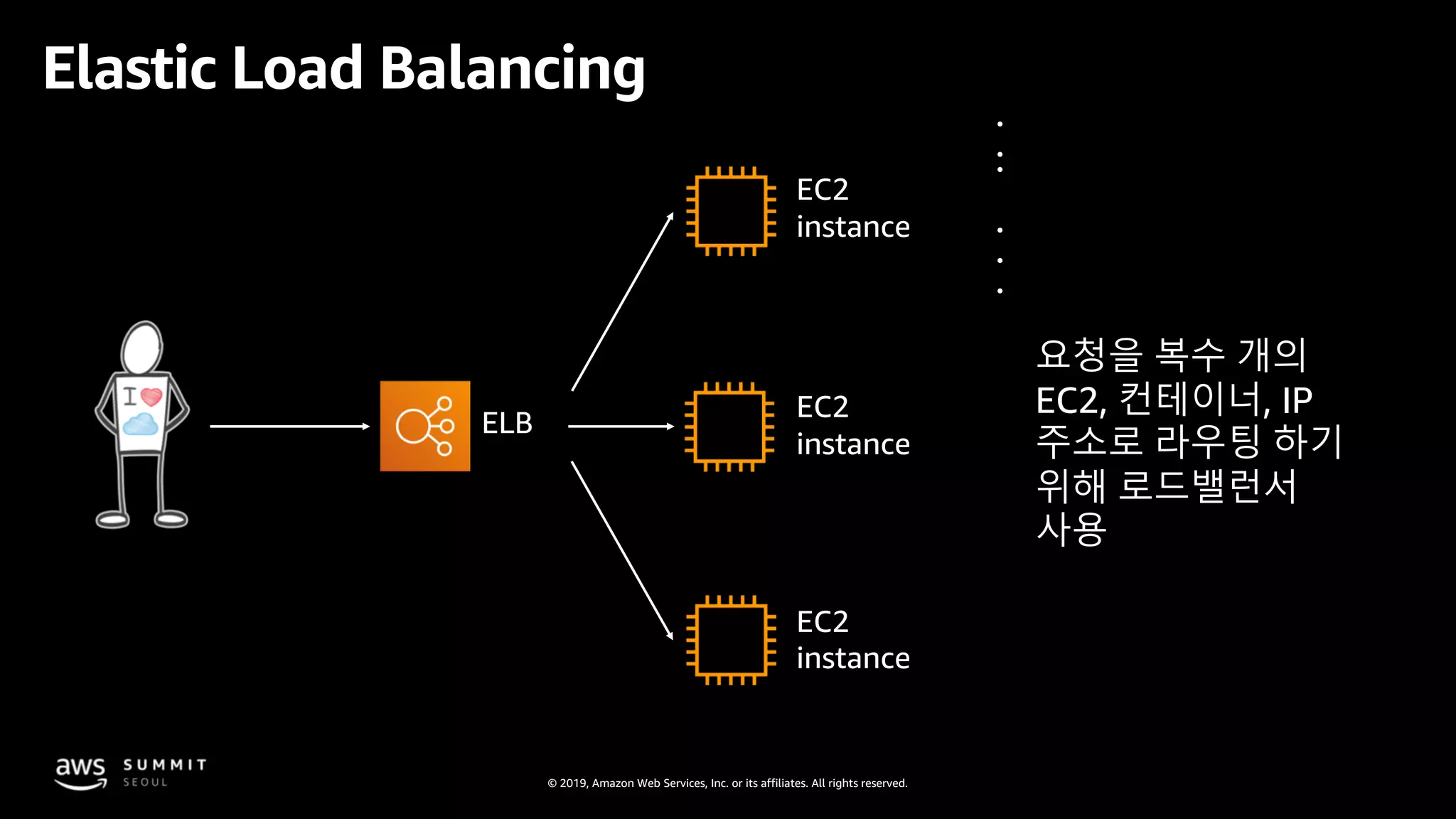
요청을 복수 개의
EC2, 컨테이너, IP
주소로 라우팅 하기
위해 로드밸런서
사용
ELB
EC2
instance
EC2
instance
EC2
instance
Elastic Load Balancing
© 2019, Amazon Web Services, Inc. or its affiliates. All rights reserved.
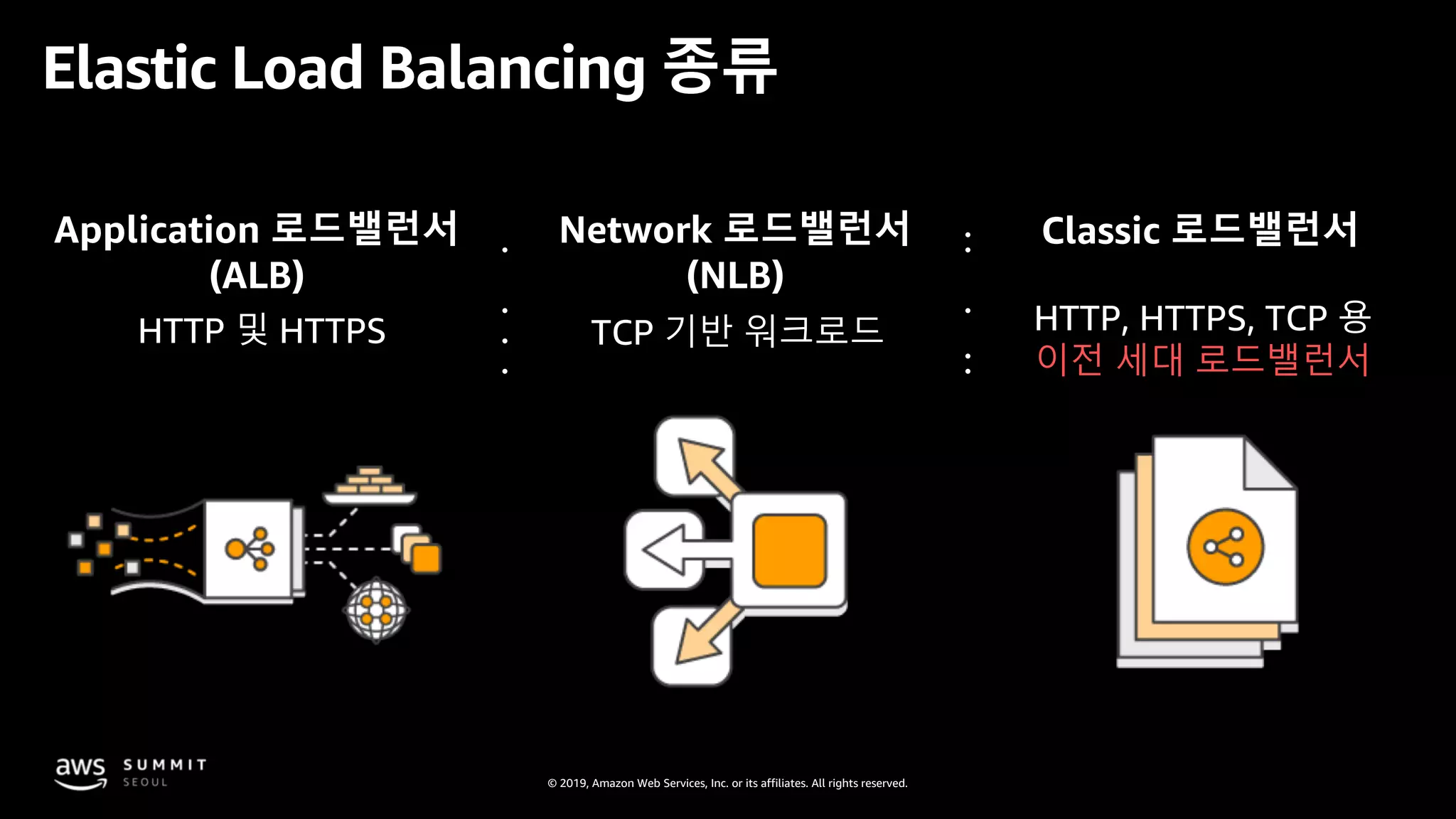
Application 로드밸런서
(ALB)
Network 로드밸런서
(NLB)
Classic 로드밸런서
TCP 기반 워크로드 HTTP, HTTPS, TCP 용
이전 세대 로드밸런서
HTTP 및 HTTPS
Elastic Load Balancing 종류
© 2019, Amazon Web Services, Inc. or its affiliates. All rights reserved.
서버에 어떤 종류의 disk를 얼마나 할당할 것인가?
© 2019, Amazon Web Services, Inc. or its affiliates. All rights reserved.
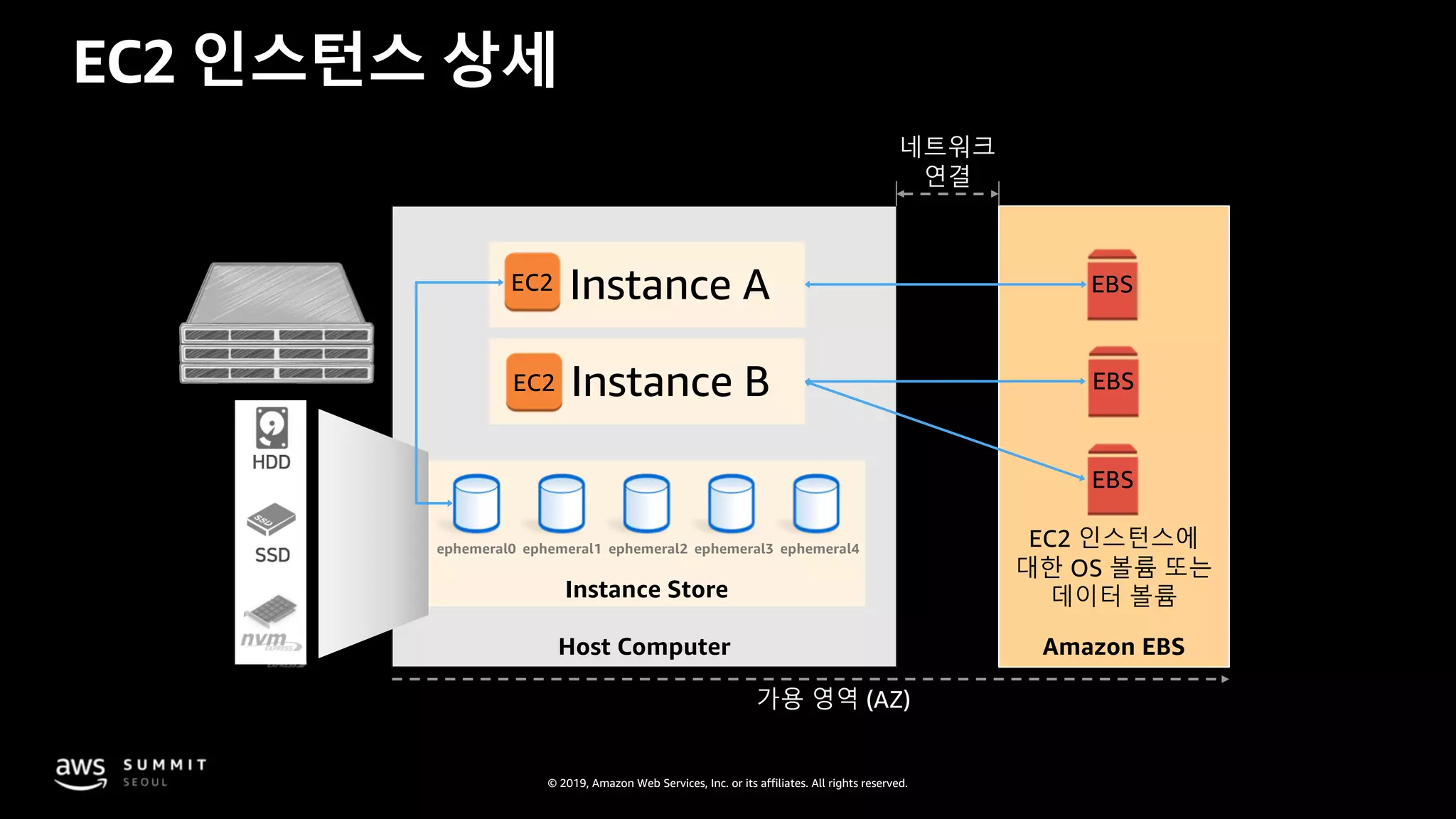
EC2 인스턴스 상세
Instance A
Instance B
ephemeral0 ephemeral1 ephemeral2 ephemeral3 ephemeral4
Instance Store
Host Computer Amazon EBS
가용 영역 (AZ)
HDD
SSD
EBS
EBS
EBS
EC2
EC2
EC2 인스턴스에
대한 OS 볼륨 또는
데이터 볼륨
네트워크
연결
© 2019, Amazon Web Services, Inc. or its affiliates. All rights reserved.
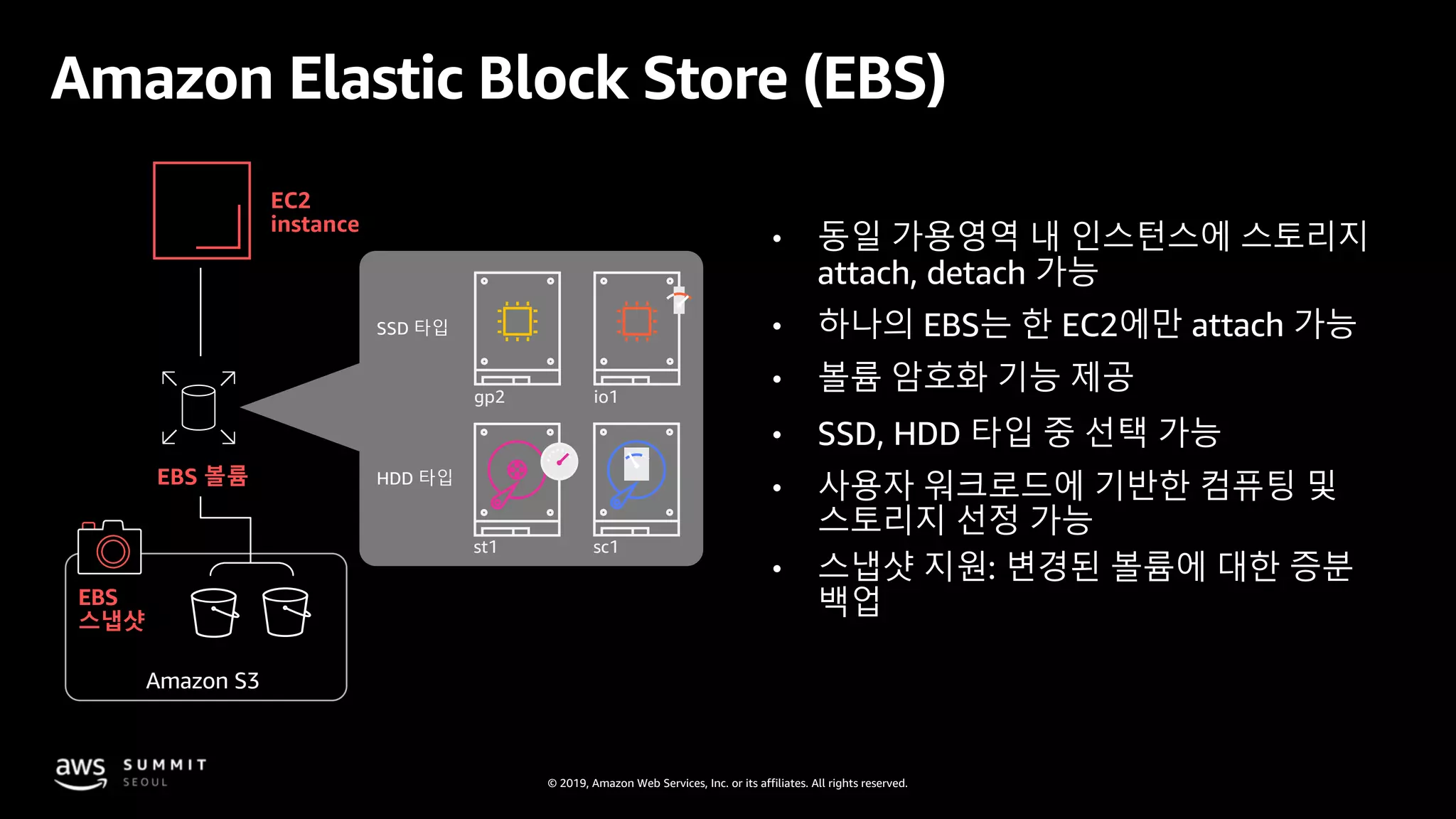
Amazon Elastic Block Store (EBS)
EC2
instance
EBS 볼륨
EBS
스냅샷
gp2 io1
st1 sc1
SSD 타입
HDD 타입
Amazon S3
• 동일 가용영역 내 인스턴스에 스토리지
attach, detach 가능
• 하나의 EBS는 한 EC2에만 attach 가능
• 볼륨 암호화 기능 제공
• SSD, HDD 타입 중 선택 가능
• 사용자 워크로드에 기반한 컴퓨팅 및
스토리지 선정 가능
• 스냅샷 지원: 변경된 볼륨에 대한 증분
백업
© 2019, Amazon Web Services, Inc. or its affiliates. All rights reserved.
다른 스토리지 유형은?
© 2019, Amazon Web Services, Inc. or its affiliates. All rights reserved.
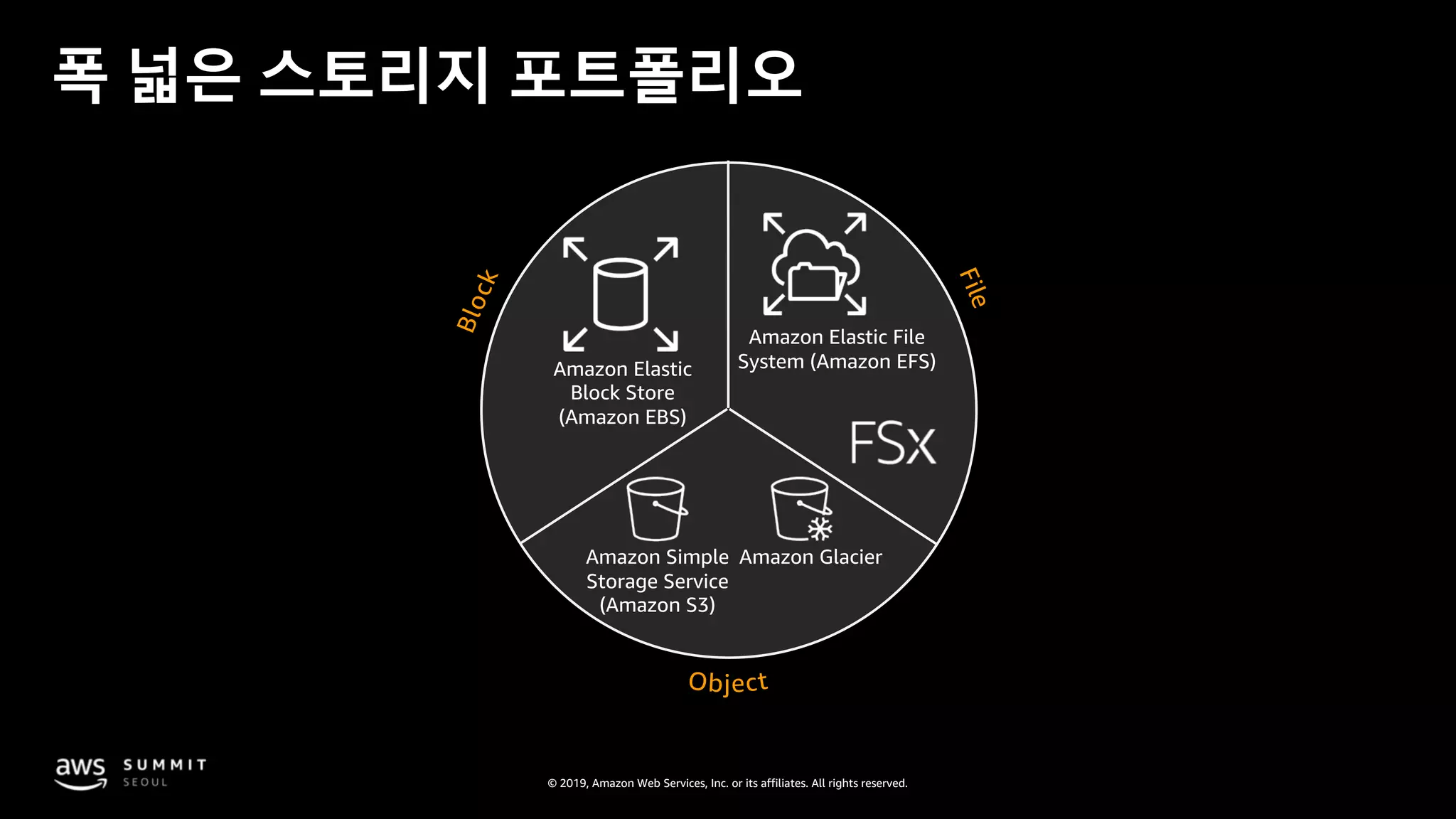
폭 넓은 스토리지 포트폴리오
Amazon Elastic
Block Store
(Amazon EBS)
Amazon Simple
Storage Service
(Amazon S3)
Amazon Glacier
Amazon Elastic File
System (Amazon EFS)
© 2019, Amazon Web Services, Inc. or its affiliates. All rights reserved.
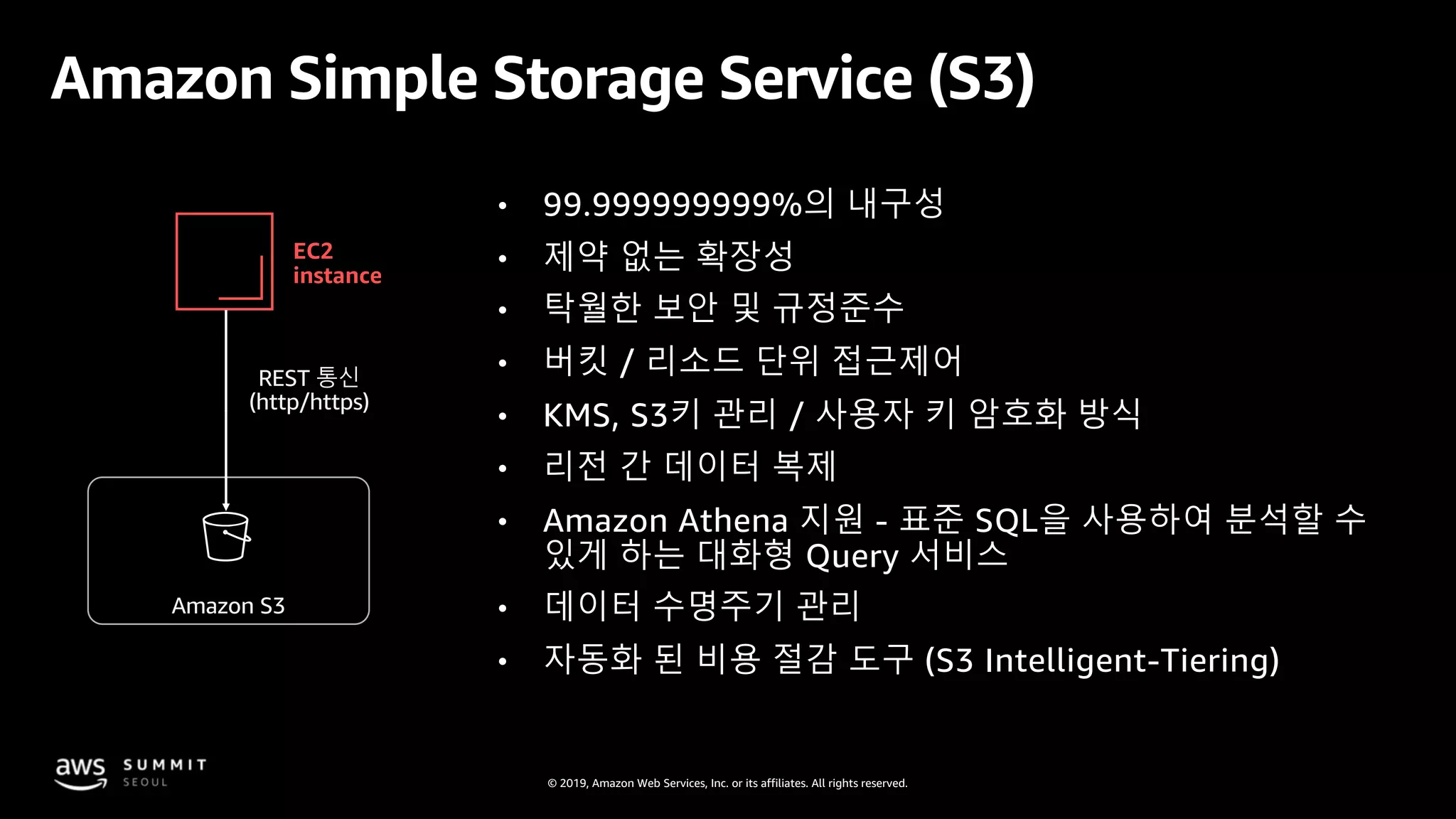
Amazon Simple Storage Service (S3)
EC2
instance
Amazon S3
• 99.999999999%의 내구성
• 제약 없는 확장성
• 탁월한 보안 및 규정준수
• 버킷 / 리소드 단위 접근제어
• KMS, S3키 관리 / 사용자 키 암호화 방식
• 리전 간 데이터 복제
• Amazon Athena 지원 - 표준 SQL을 사용하여 분석할 수
있게 하는 대화형 Query 서비스
• 데이터 수명주기 관리
• 자동화 된 비용 절감 도구 (S3 Intelligent-Tiering)
REST 통신
(http/https)
© 2019, Amazon Web Services, Inc. or its affiliates. All rights reserved.
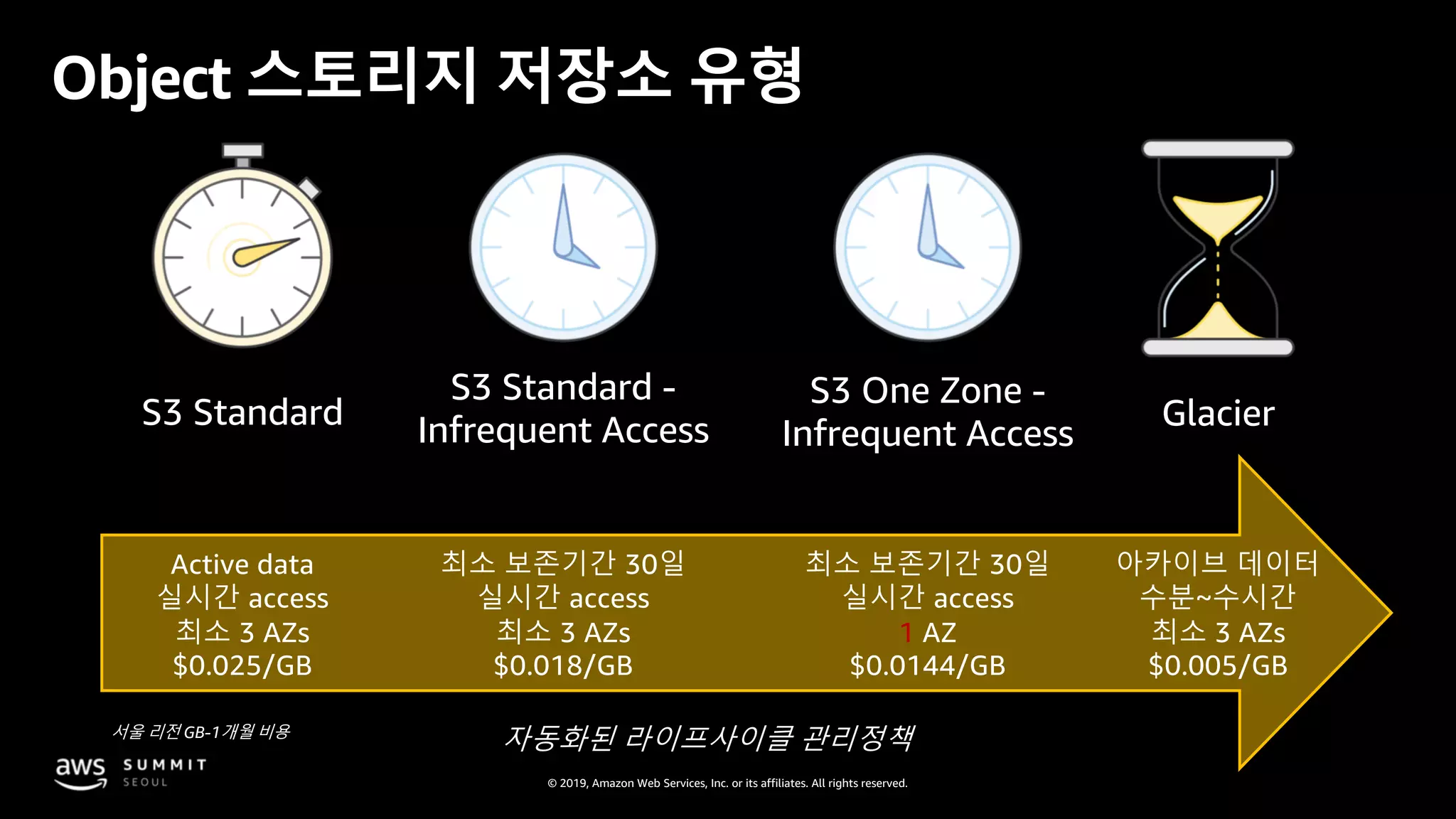
Object 스토리지 저장소 유형
GlacierS3 Standard
S3 Standard -
Infrequent Access
자동화된 라이프사이클 관리정책
S3 One Zone -
Infrequent Access
Active data
실시간 access
최소 3 AZs
$0.025/GB
아카이브 데이터
수분~수시간
최소 3 AZs
$0.005/GB
최소 보존기간 30일
실시간 access
최소 3 AZs
$0.018/GB
최소 보존기간 30일
실시간 access
1 AZ
$0.0144/GB
서울 리전 GB-1개월 비용
© 2019, Amazon Web Services, Inc. or its affiliates. All rights reserved.
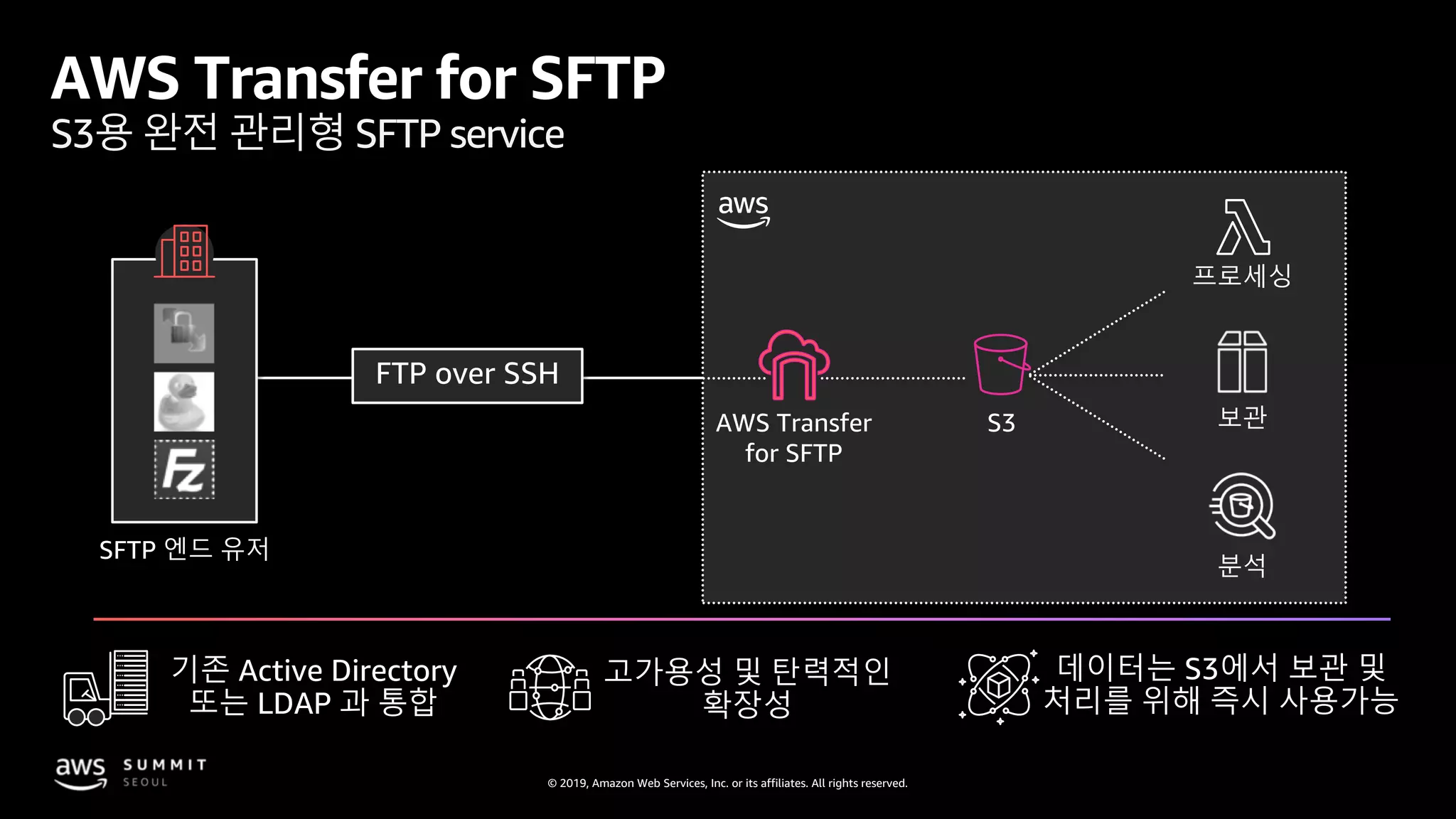
SFTP 엔드 유저
보관
분석
프로세싱
S3AWS Transfer
for SFTP
AWS Transfer for SFTP
S3용 완전 관리형 SFTP service
기존 Active Directory
또는 LDAP 과 통합
데이터는 S3에서 보관 및
처리를 위해 즉시 사용가능
고가용성 및 탄력적인
확장성
© 2019, Amazon Web Services, Inc. or its affiliates. All rights reserved.
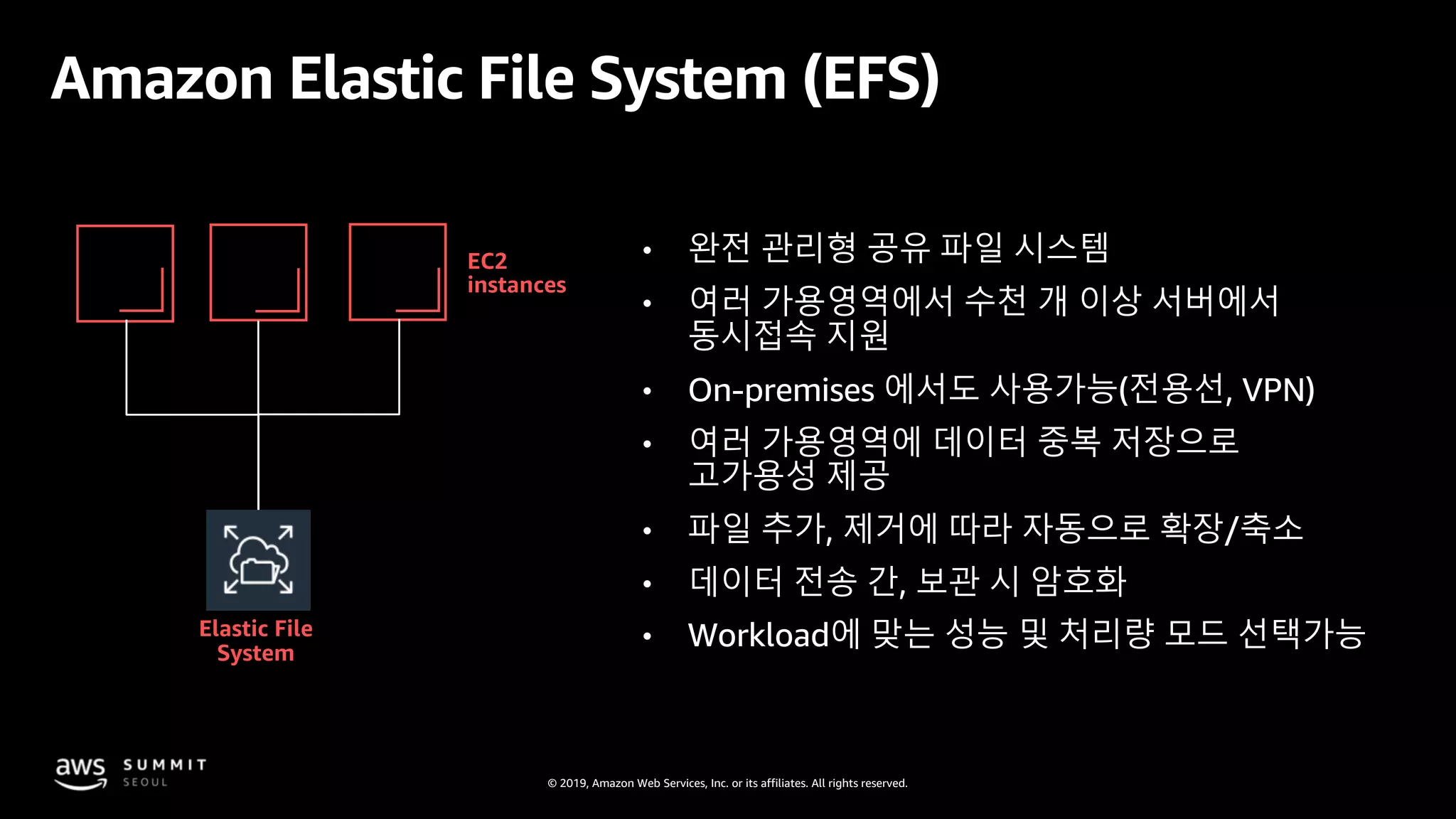
Amazon Elastic File System (EFS)
EC2
instances
Elastic File
System
• 완전 관리형 공유 파일 시스템
• 여러 가용영역에서 수천 개 이상 서버에서
동시접속 지원
• On-premises 에서도 사용가능(전용선, VPN)
• 여러 가용영역에 데이터 중복 저장으로
고가용성 제공
• 파일 추가, 제거에 따라 자동으로 확장/축소
• 데이터 전송 간, 보관 시 암호화
• Workload에 맞는 성능 및 처리량 모드 선택가능
© 2019, Amazon Web Services, Inc. or its affiliates. All rights reserved.
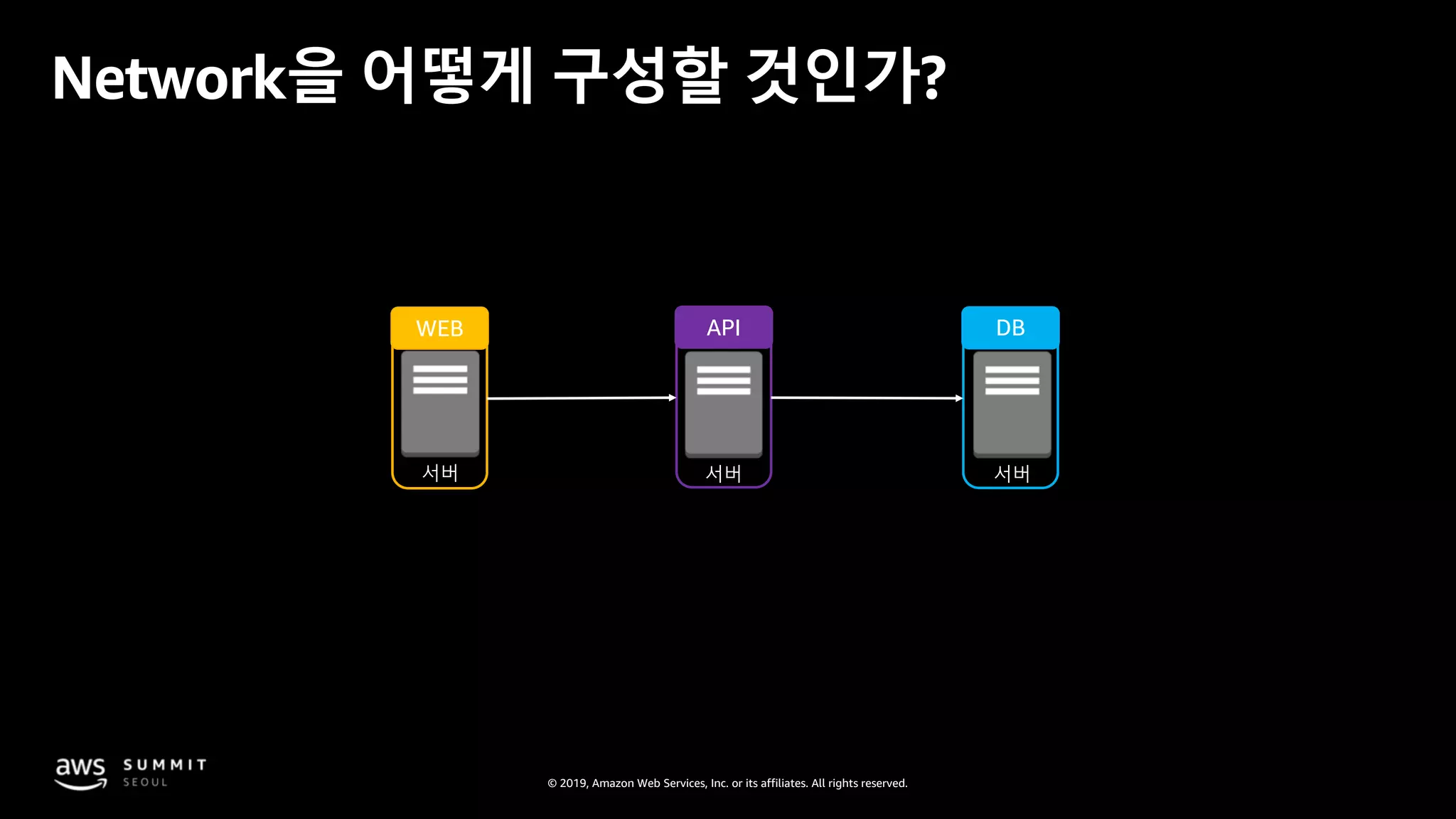
서버 서버서버
WEB API DB
Network을 어떻게 구성할 것인가?
© 2019, Amazon Web Services, Inc. or its affiliates. All rights reserved.
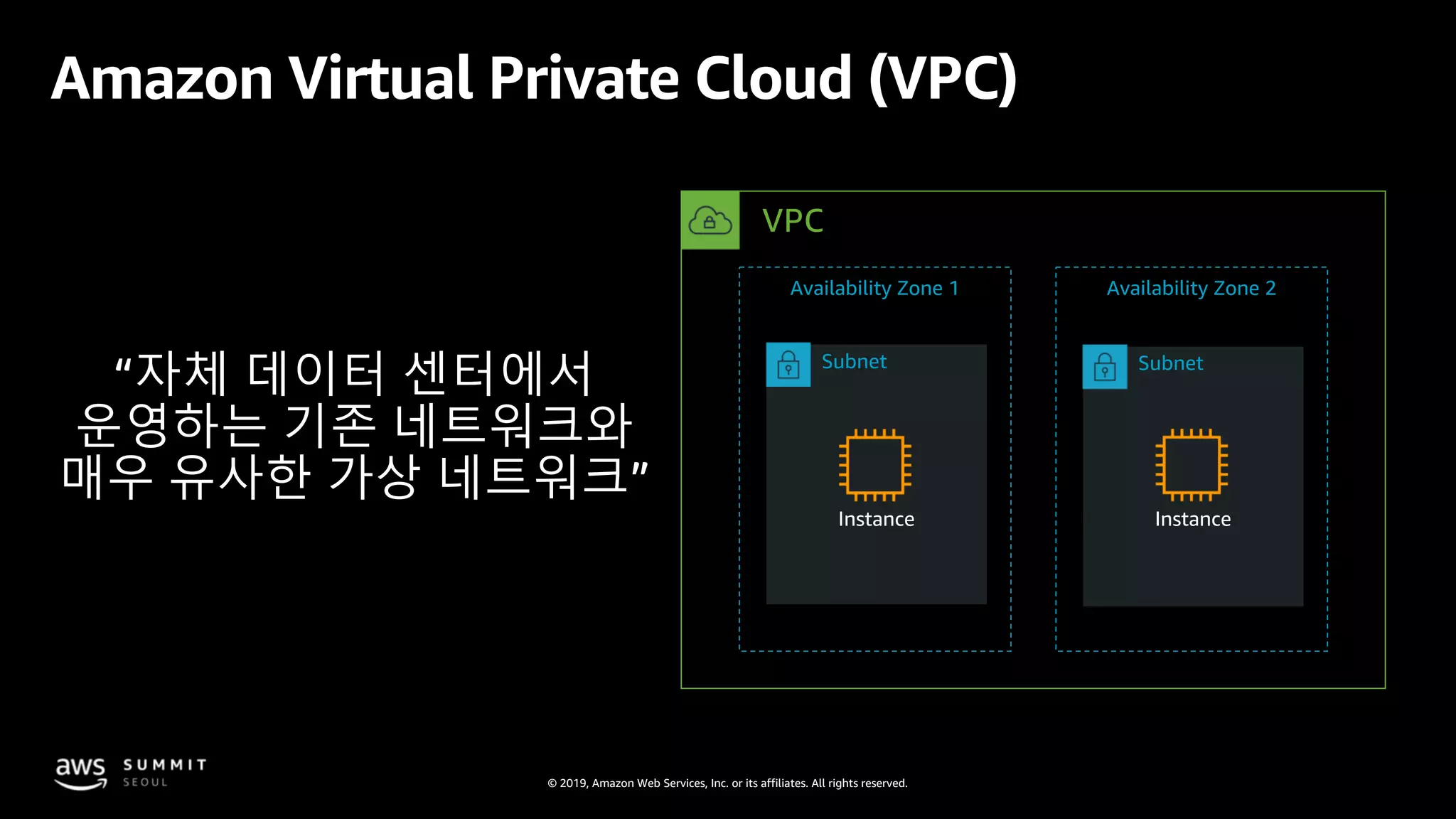
Amazon Virtual Private Cloud (VPC)
“자체 데이터 센터에서
운영하는 기존 네트워크와
매우 유사한 가상 네트워크”
VPC
Availability Zone 1 Availability Zone 2
Subnet Subnet
Instance Instance
© 2019, Amazon Web Services, Inc. or its affiliates. All rights reserved.
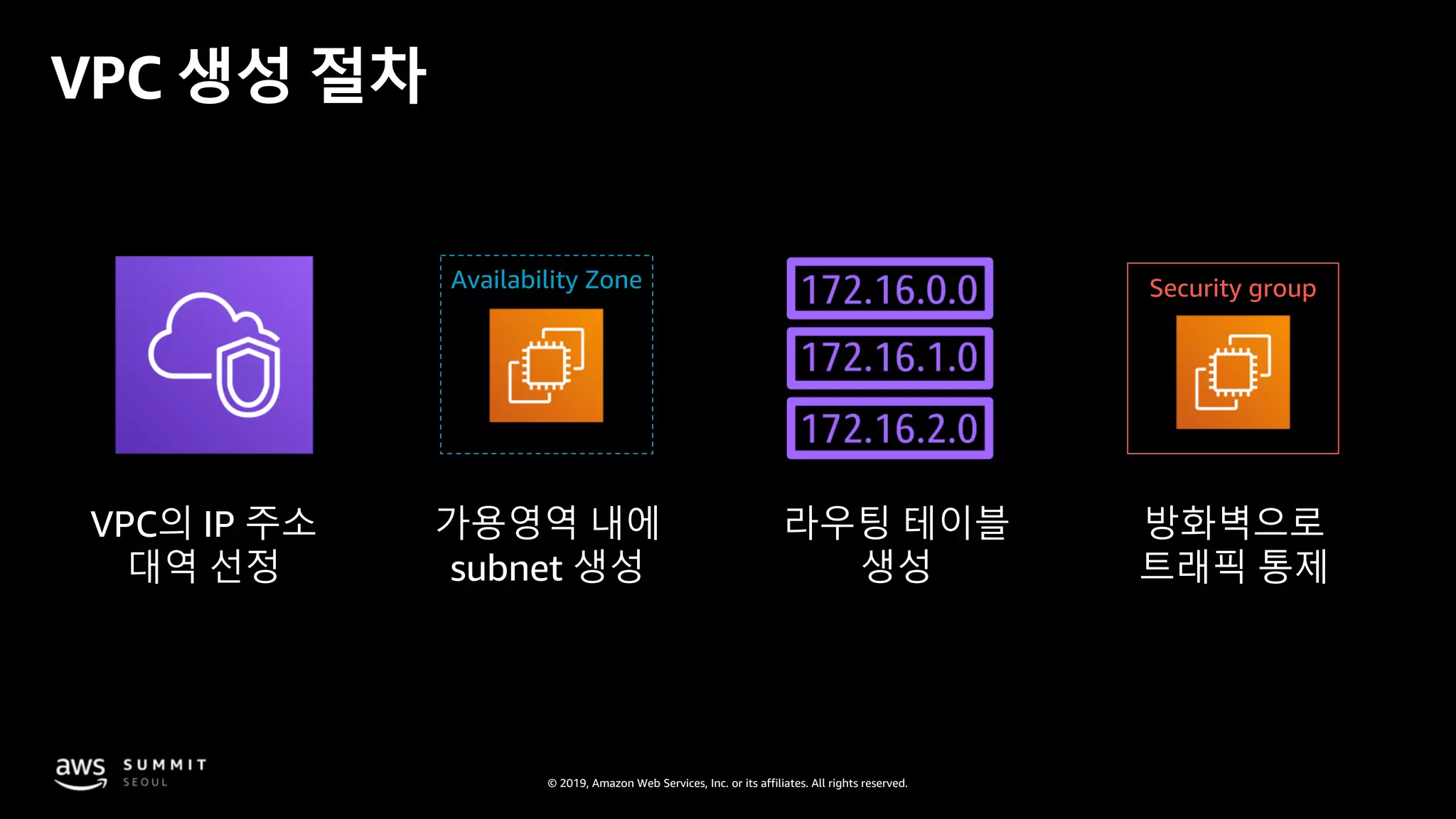
VPC 생성 절차
VPC의 IP 주소
대역 선정
가용영역 내에
subnet 생성
라우팅 테이블
생성
방화벽으로
트래픽 통제
Availability Zone Security group
© 2019, Amazon Web Services, Inc. or its affiliates. All rights reserved.
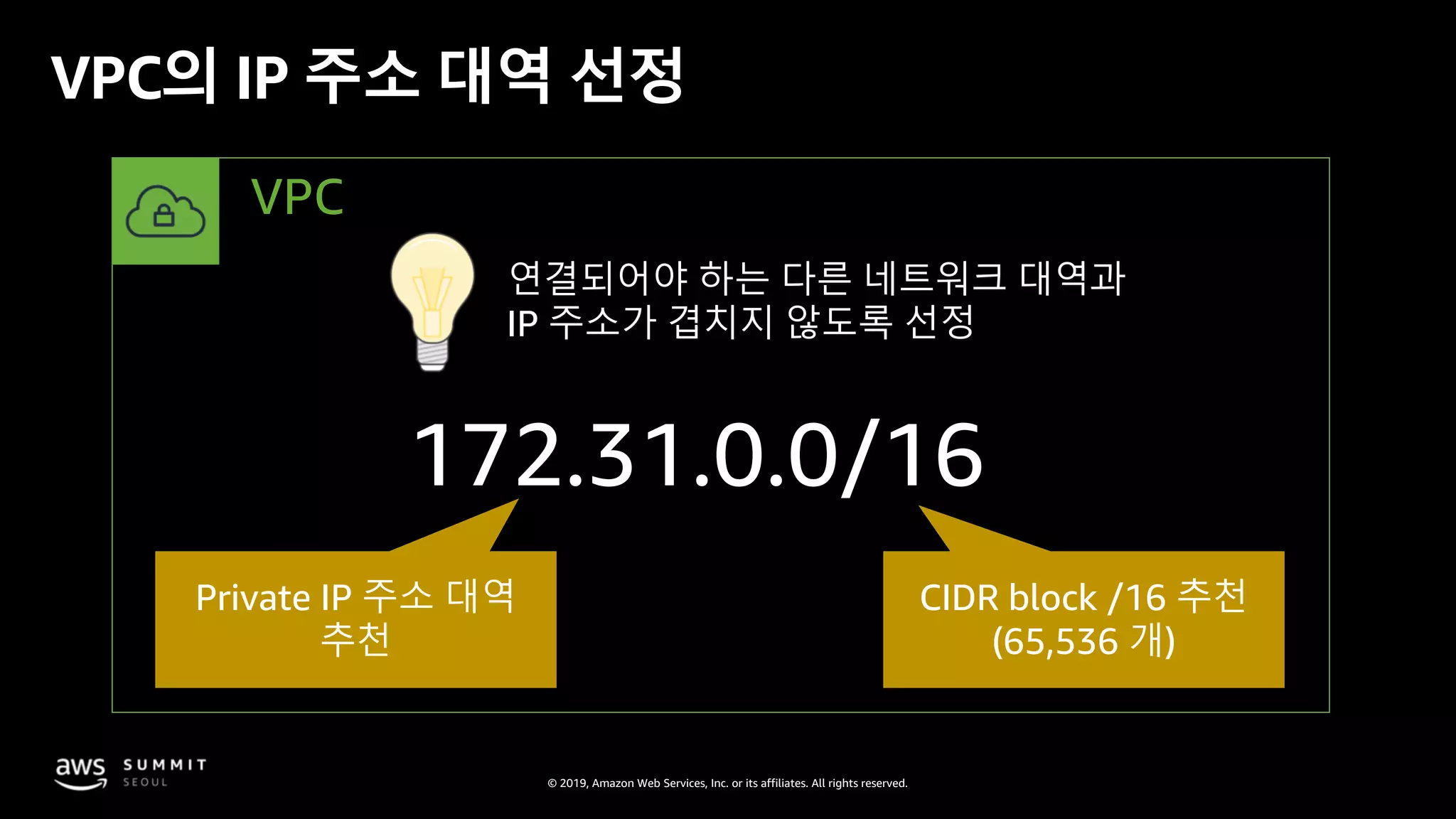
VPC의 IP 주소 대역 선정
172.31.0.0/16
Private IP 주소 대역
추천
CIDR block /16 추천
(65,536 개)
연결되어야 하는 다른 네트워크 대역과
IP 주소가 겹치지 않도록 선정
VPC
© 2019, Amazon Web Services, Inc. or its affiliates. All rights reserved.
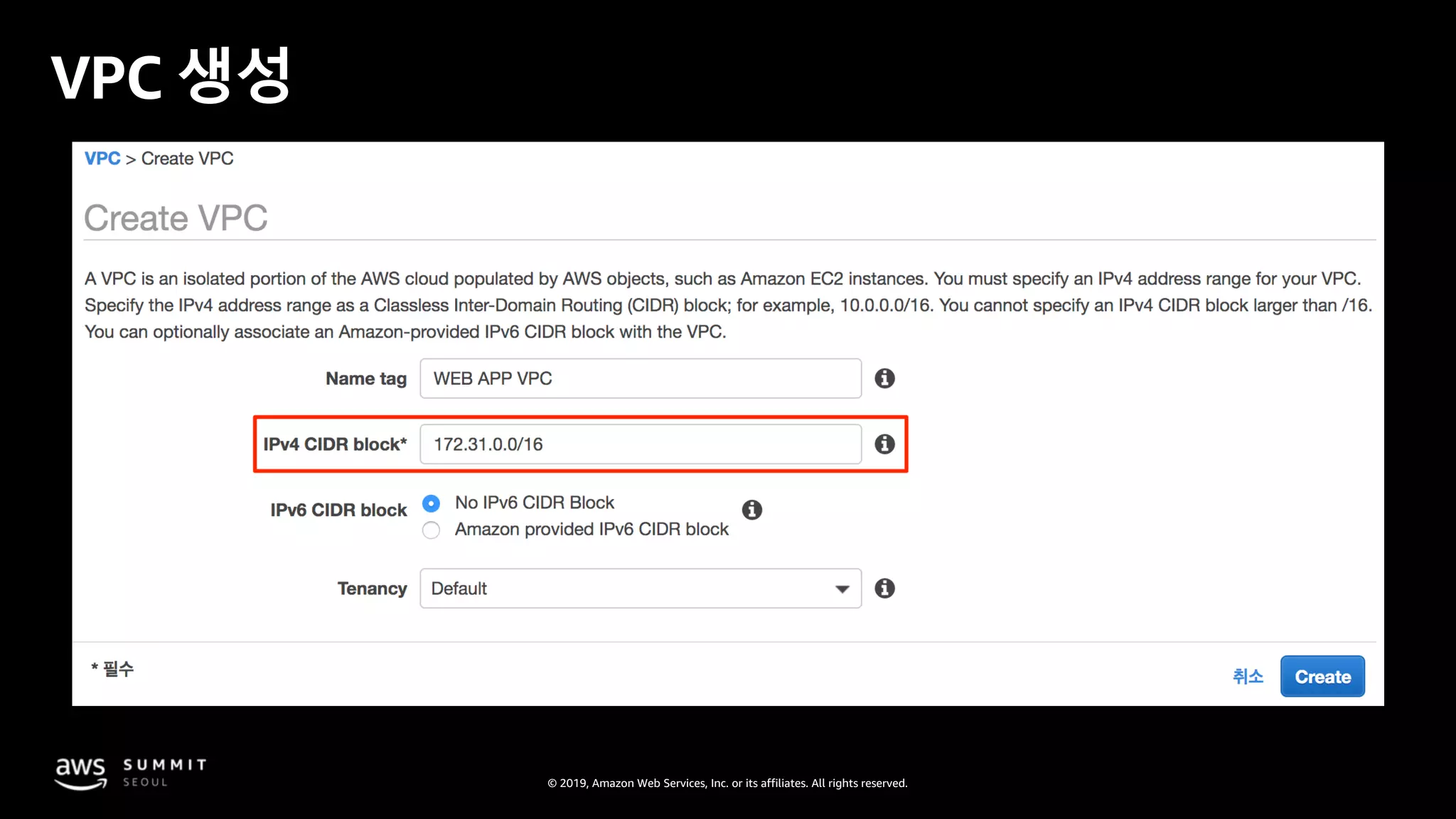
VPC 생성
© 2019, Amazon Web Services, Inc. or its affiliates. All rights reserved.
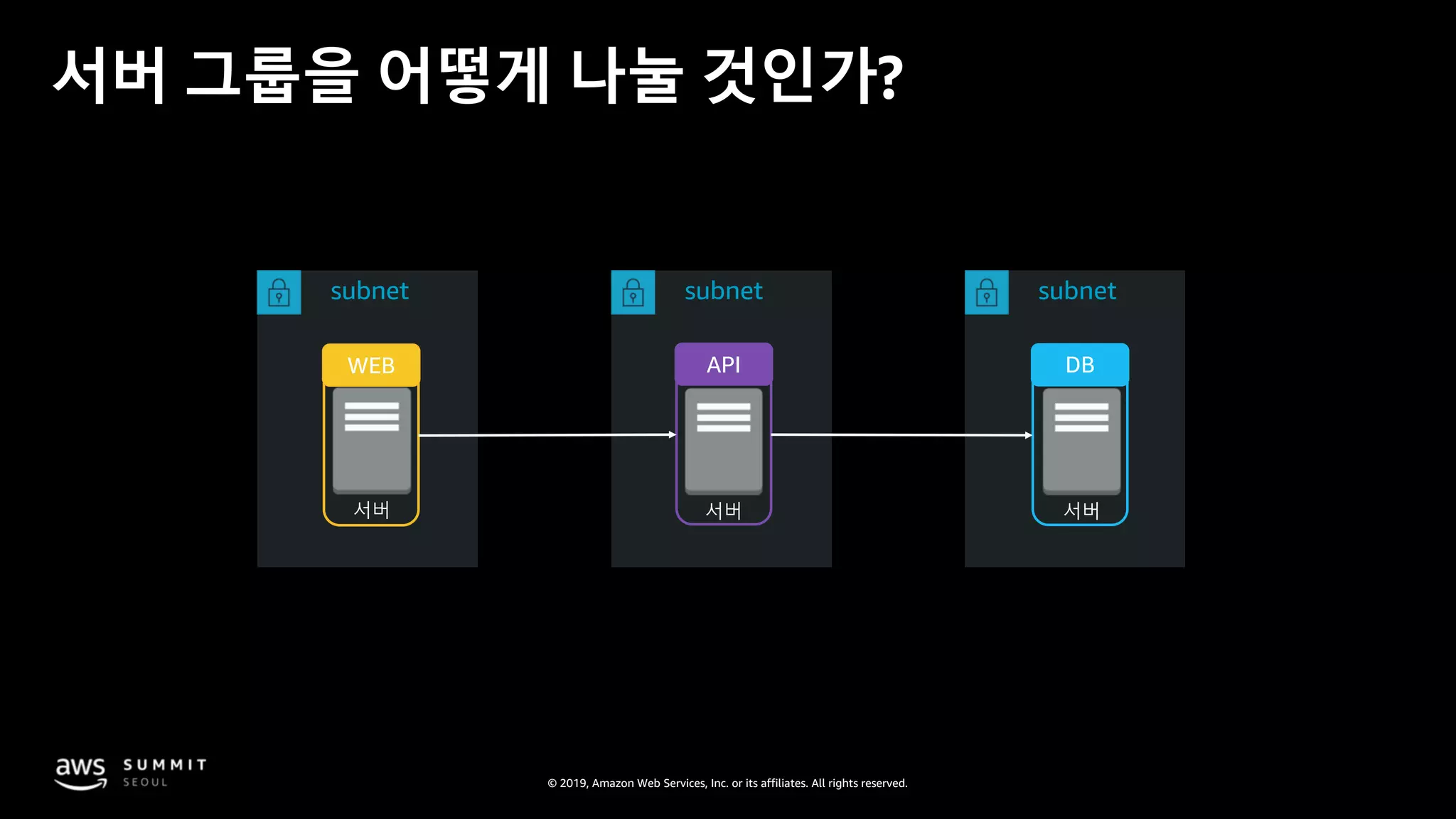
서버 서버서버
WEB API DB
서버 그룹을 어떻게 나눌 것인가?
subnet subnet subnet
© 2019, Amazon Web Services, Inc. or its affiliates. All rights reserved.
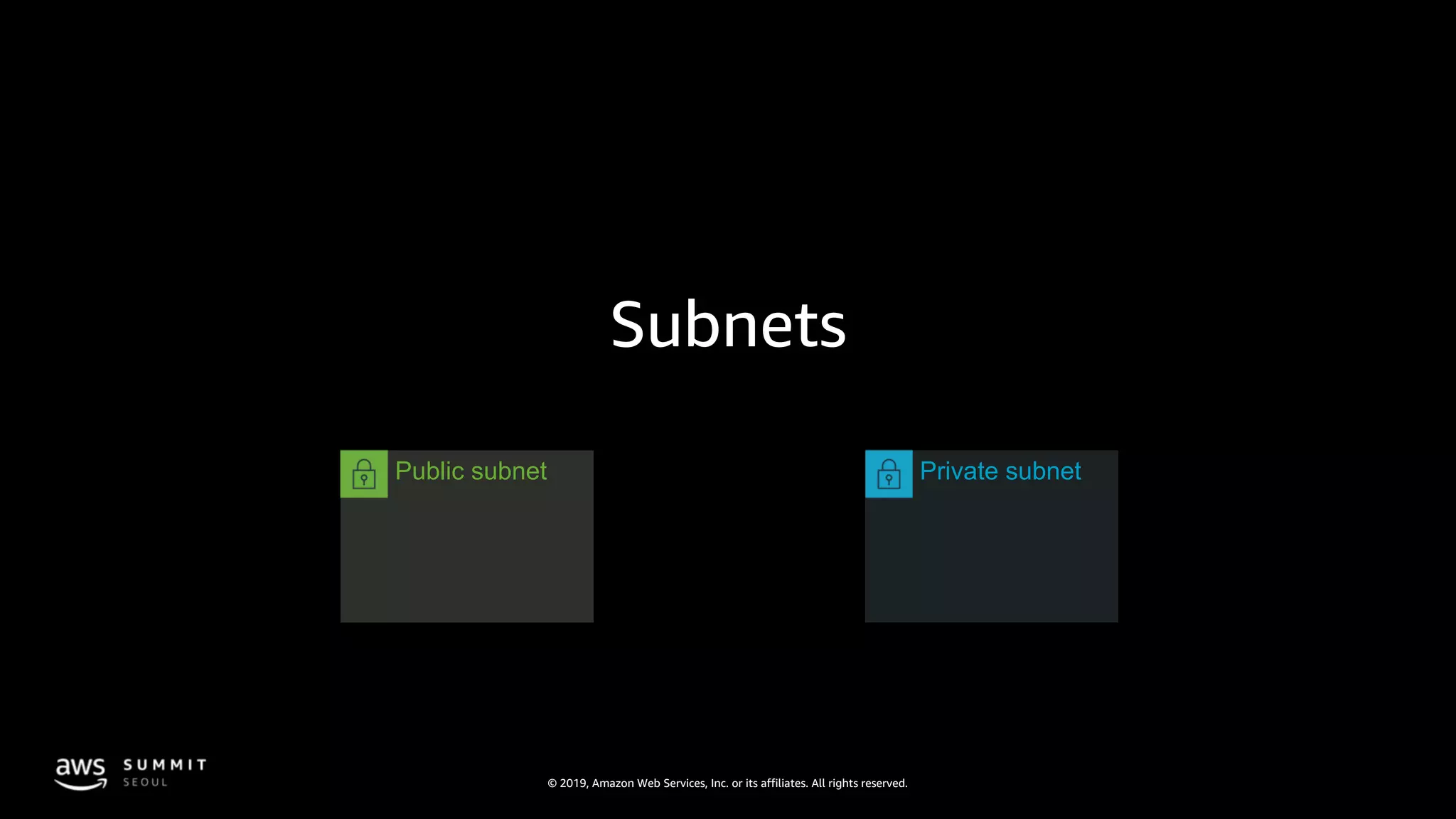
Subnets
Private subnetPublic subnet
© 2019, Amazon Web Services, Inc. or its affiliates. All rights reserved.
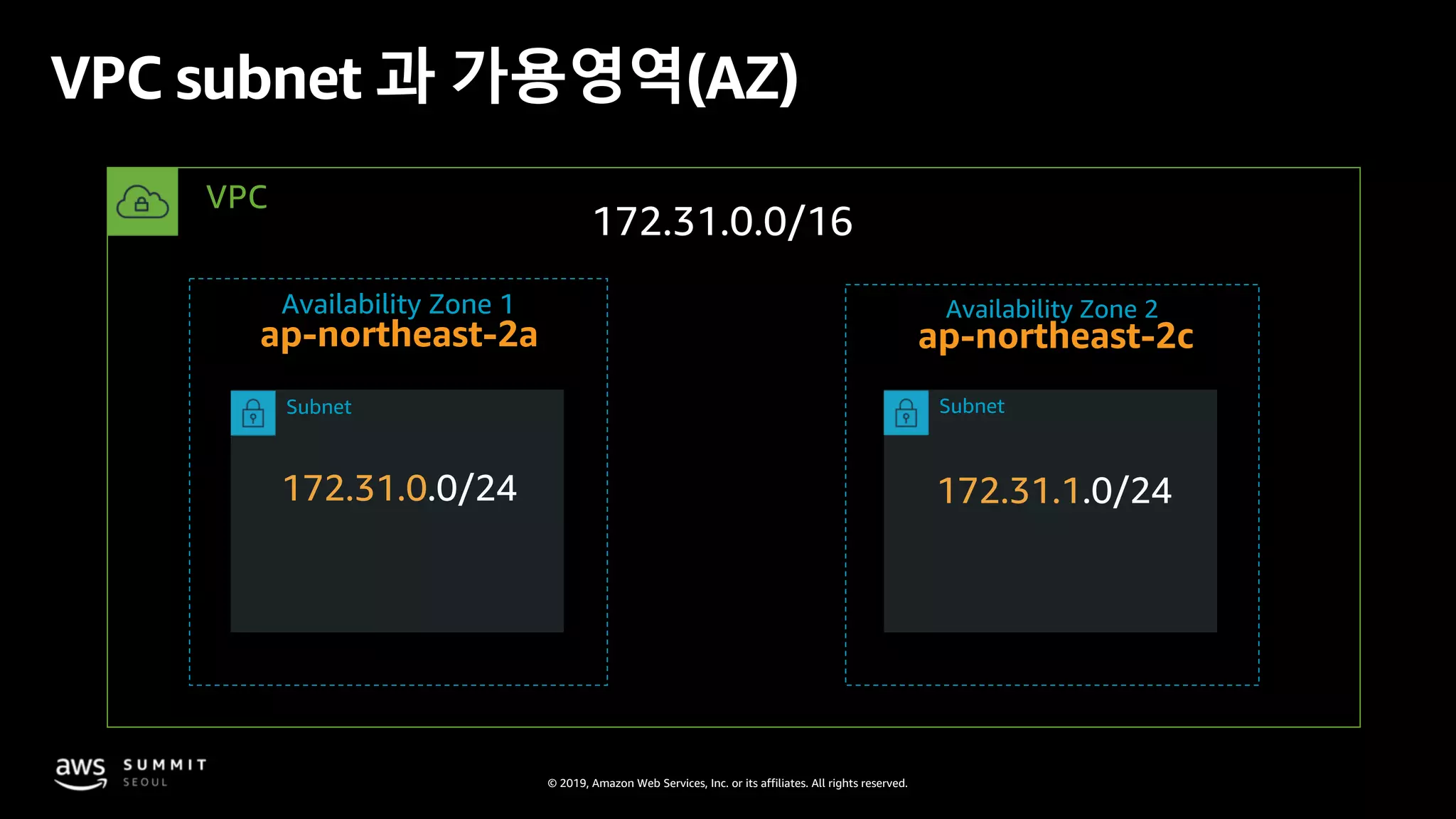
VPC subnet 과 가용영역(AZ)
172.31.0.0/16
172.31.0.0/24 172.31.1.0/24
ap-northeast-2a ap-northeast-2c
VPC
Availability Zone 1 Availability Zone 2
Subnet Subnet
© 2019, Amazon Web Services, Inc. or its affiliates. All rights reserved.
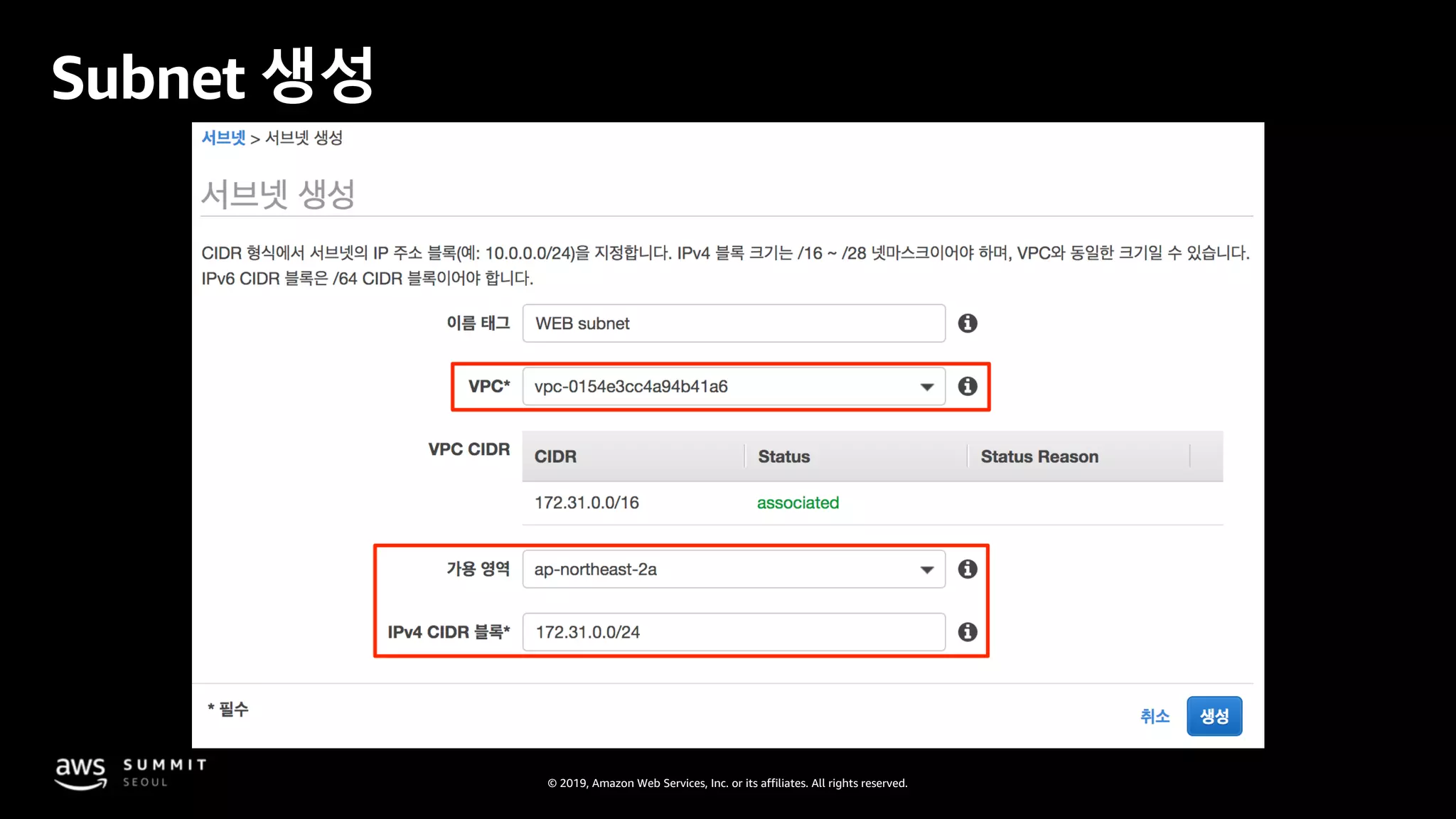
Subnet 생성
© 2019, Amazon Web Services, Inc. or its affiliates. All rights reserved.
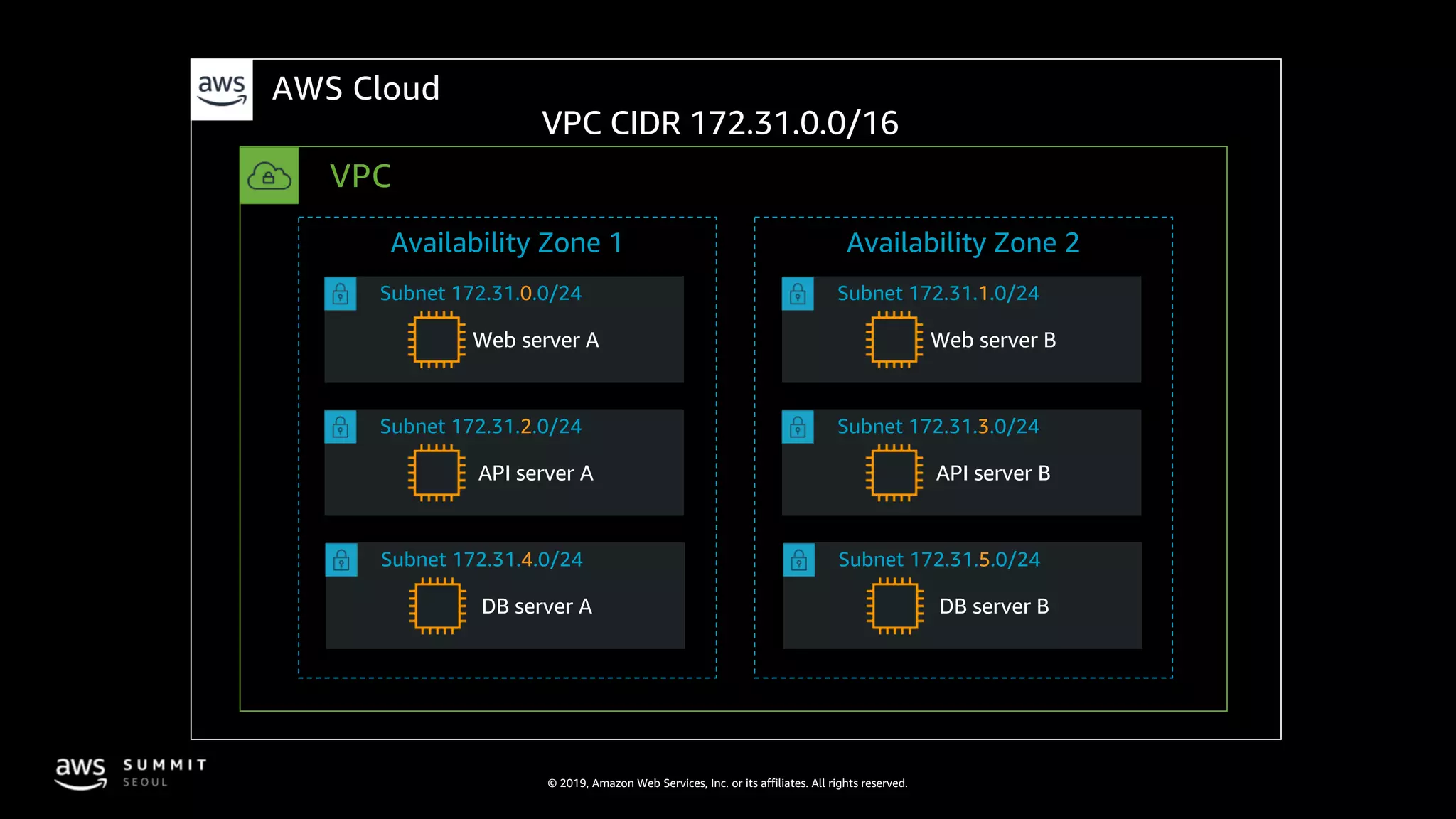
Subnet 172.31.4.0/24
Subnet 172.31.2.0/24
Subnet 172.31.0.0/24
Subnet 172.31.5.0/24
Subnet 172.31.3.0/24
Subnet 172.31.1.0/24
VPC CIDR 172.31.0.0/16
Web server A
VPC
AWS Cloud
Availability Zone 1 Availability Zone 2
API server A
DB server A
Web server B
API server B
DB server B
© 2019, Amazon Web Services, Inc. or its affiliates. All rights reserved.
서버 서버서버
WEB API DB
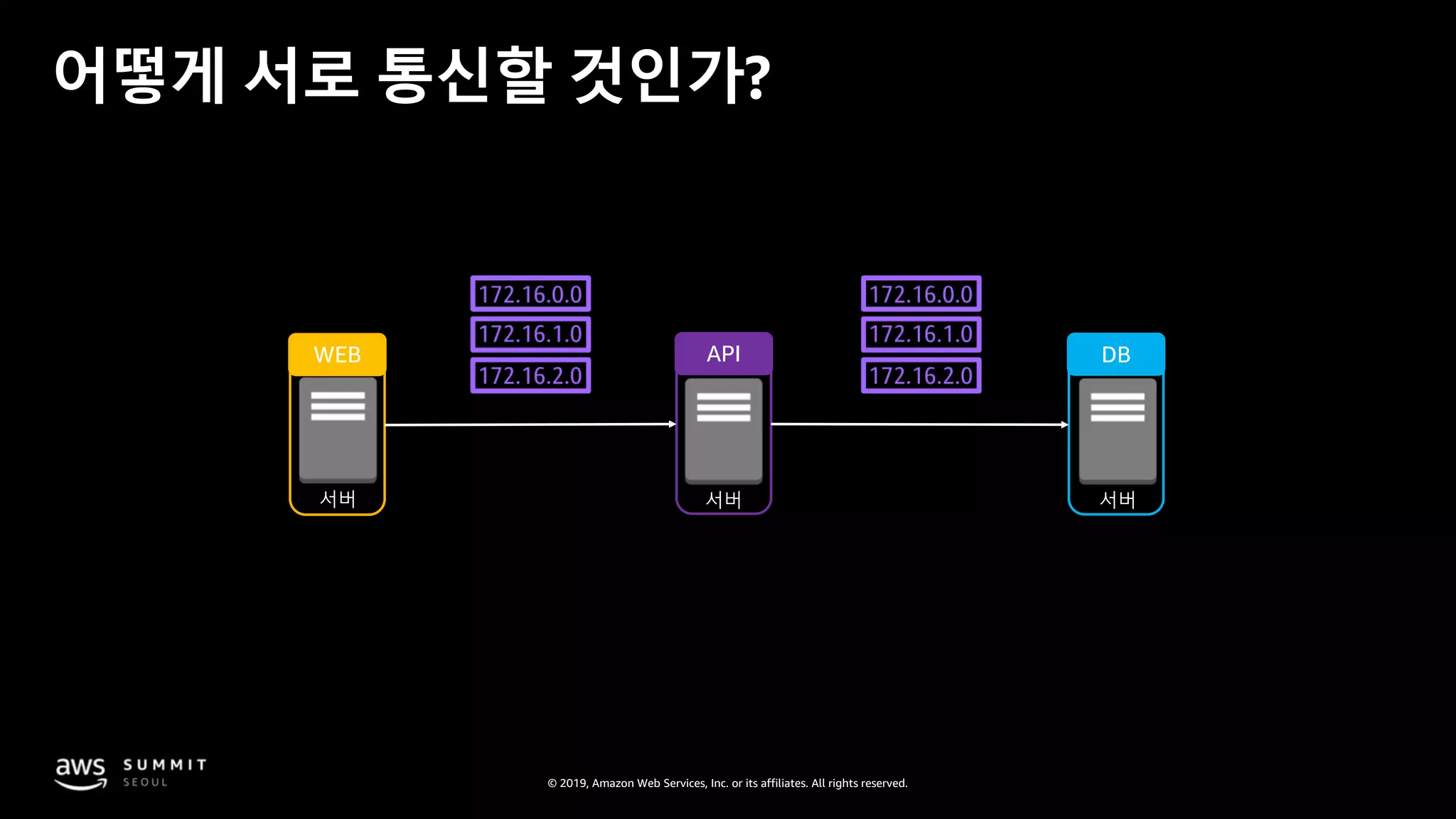
어떻게 서로 통신할 것인가?
© 2019, Amazon Web Services, Inc. or its affiliates. All rights reserved.
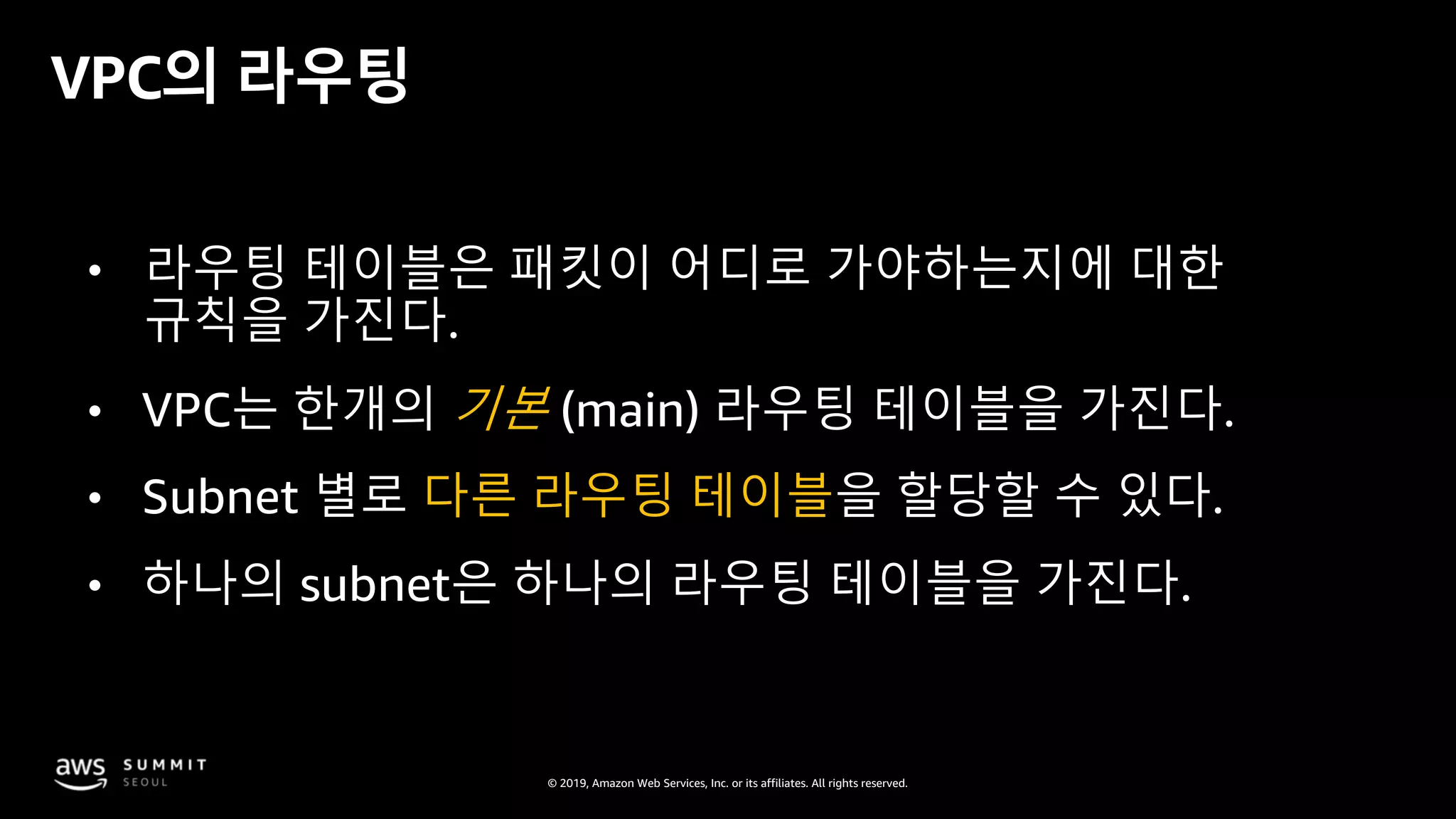
VPC의 라우팅
• 라우팅 테이블은 패킷이 어디로 가야하는지에 대한
규칙을 가진다.
• VPC는 한개의 기본 (main) 라우팅 테이블을 가진다.
• Subnet 별로 다른 라우팅 테이블을 할당할 수 있다.
• 하나의 subnet은 하나의 라우팅 테이블을 가진다.
© 2019, Amazon Web Services, Inc. or its affiliates. All rights reserved.
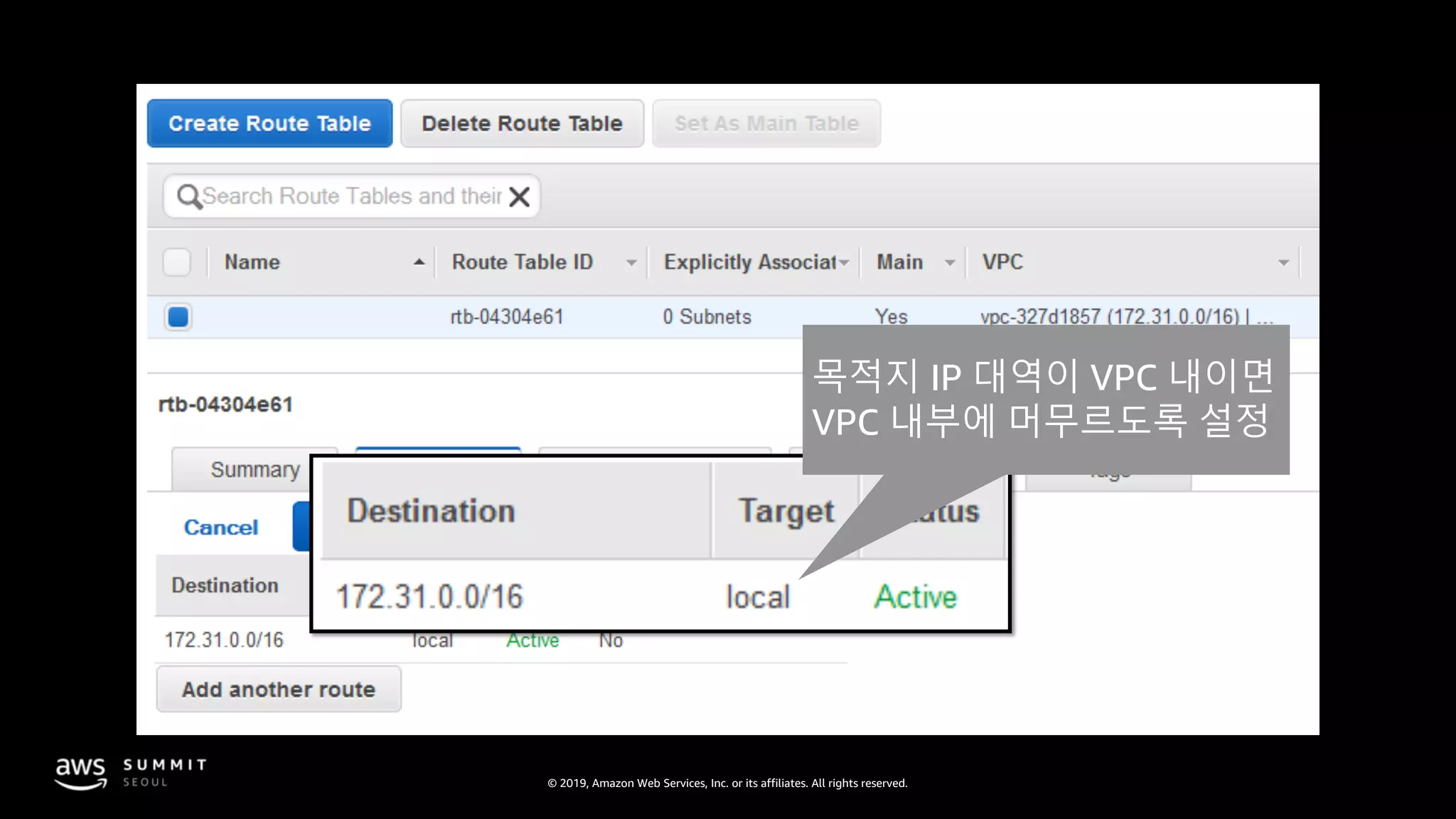
목적지 IP 대역이 VPC 내이면
VPC 내부에 머무르도록 설정
© 2019, Amazon Web Services, Inc. or its affiliates. All rights reserved.
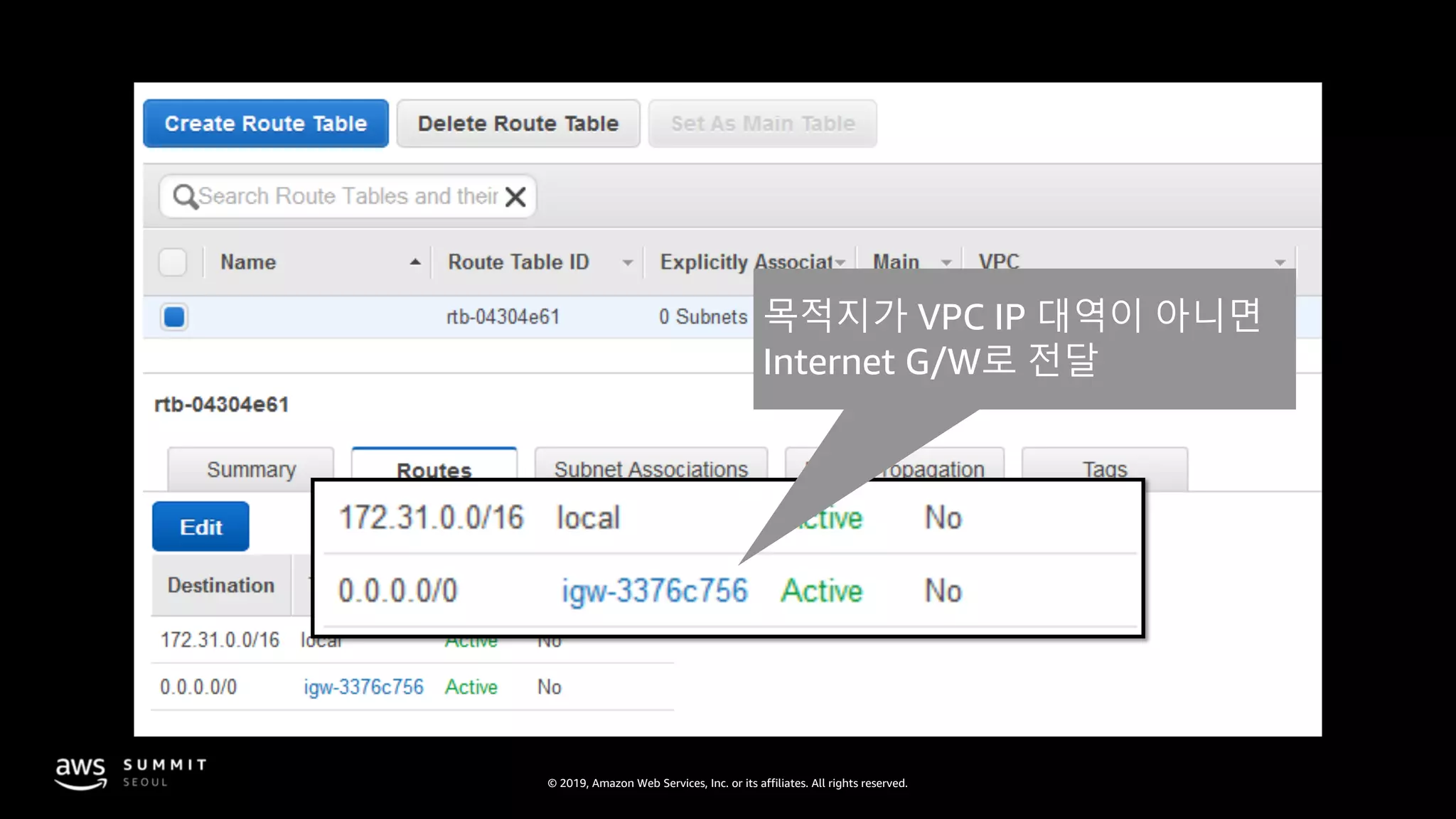
목적지가 VPC IP 대역이 아니면
Internet G/W로 전달
© 2019, Amazon Web Services, Inc. or its affiliates. All rights reserved.
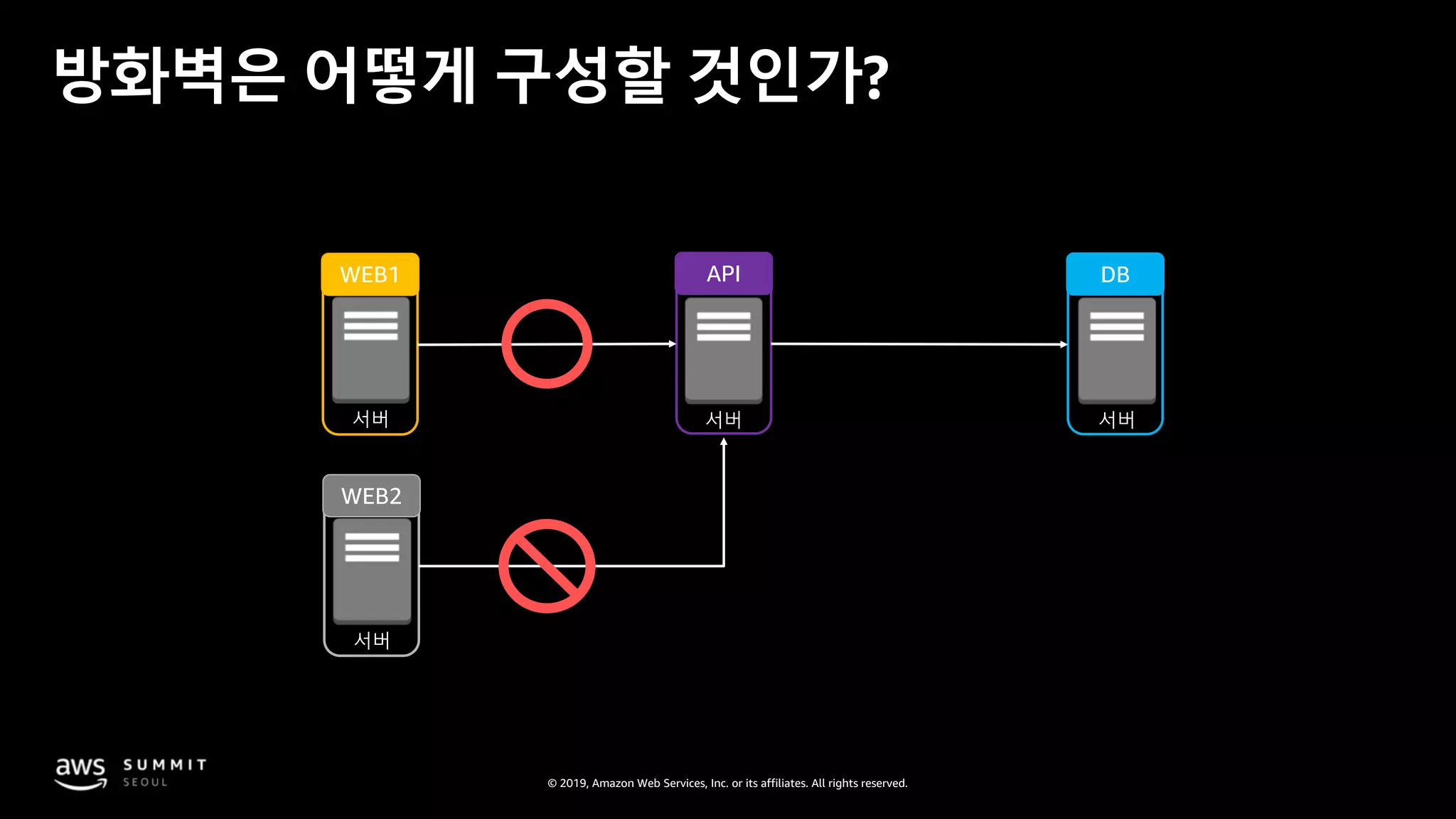
서버 서버서버
WEB1 API DB
방화벽은 어떻게 구성할 것인가?
서버
WEB2
© 2019, Amazon Web Services, Inc. or its affiliates. All rights reserved.
VPC 내 네트워크 보안:
Security groups
Security group
© 2019, Amazon Web Services, Inc. or its affiliates. All rights reserved.
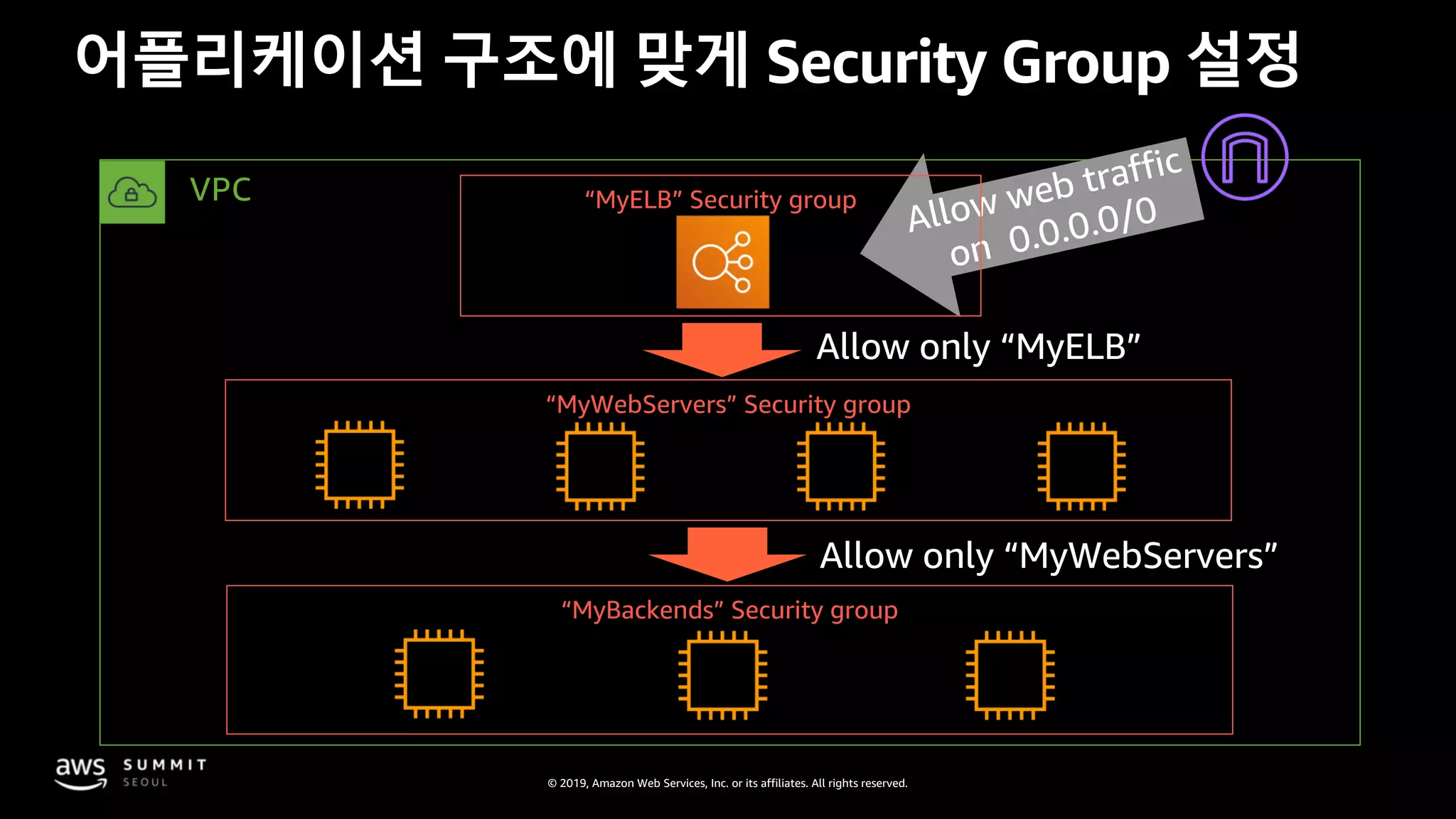
Allow only “MyWebServers”
어플리케이션 구조에 맞게 Security Group 설정
VPC
“MyWebServers” Security group
Allow web traffic
on 0.0.0.0/0
“MyBackends” Security group
“MyELB” Security group
Allow only “MyELB”
© 2019, Amazon Web Services, Inc. or its affiliates. All rights reserved.
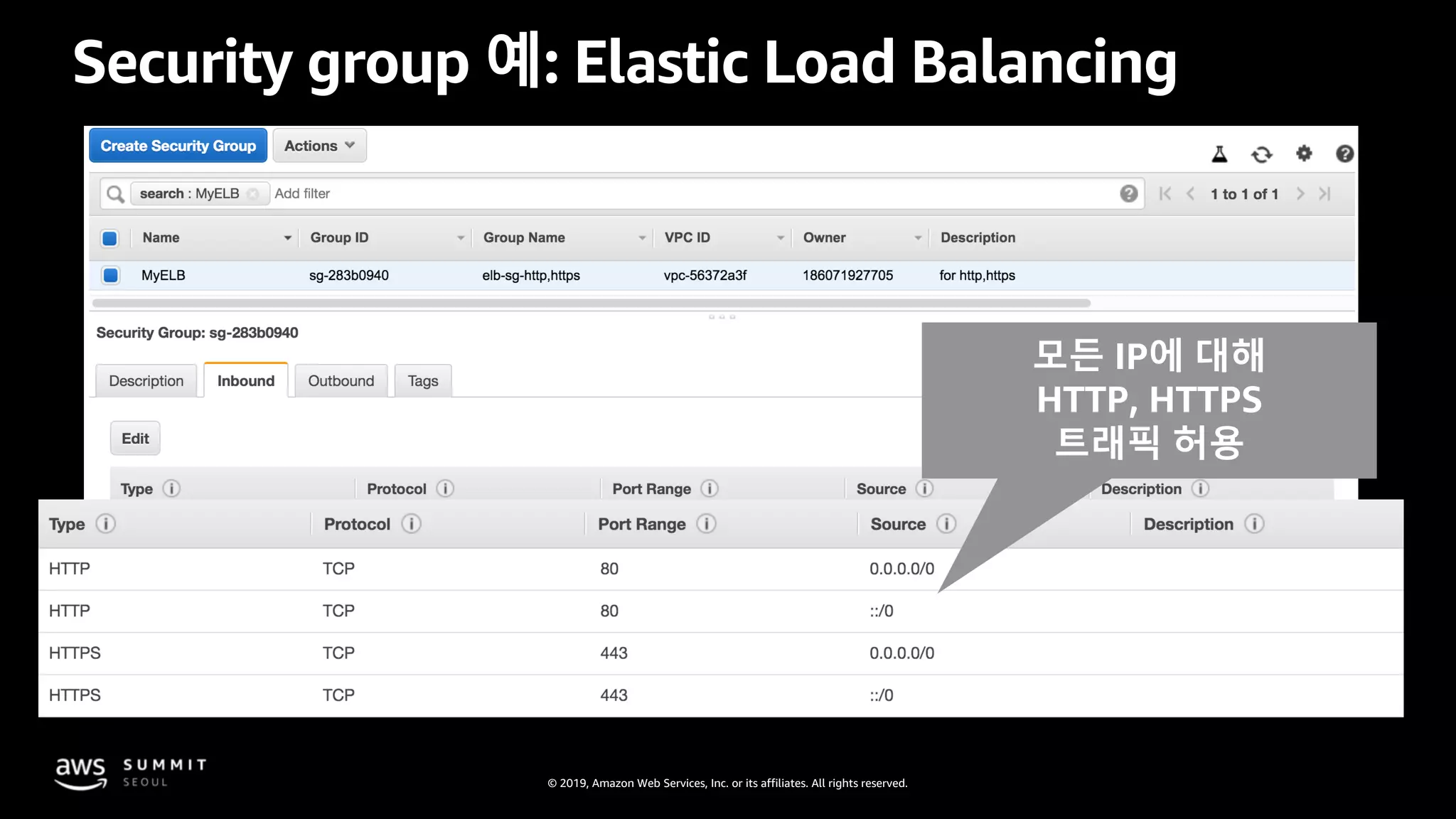
Security group 예: Elastic Load Balancing
모든 IP에 대해
HTTP, HTTPS
트래픽 허용
© 2019, Amazon Web Services, Inc. or its affiliates. All rights reserved.
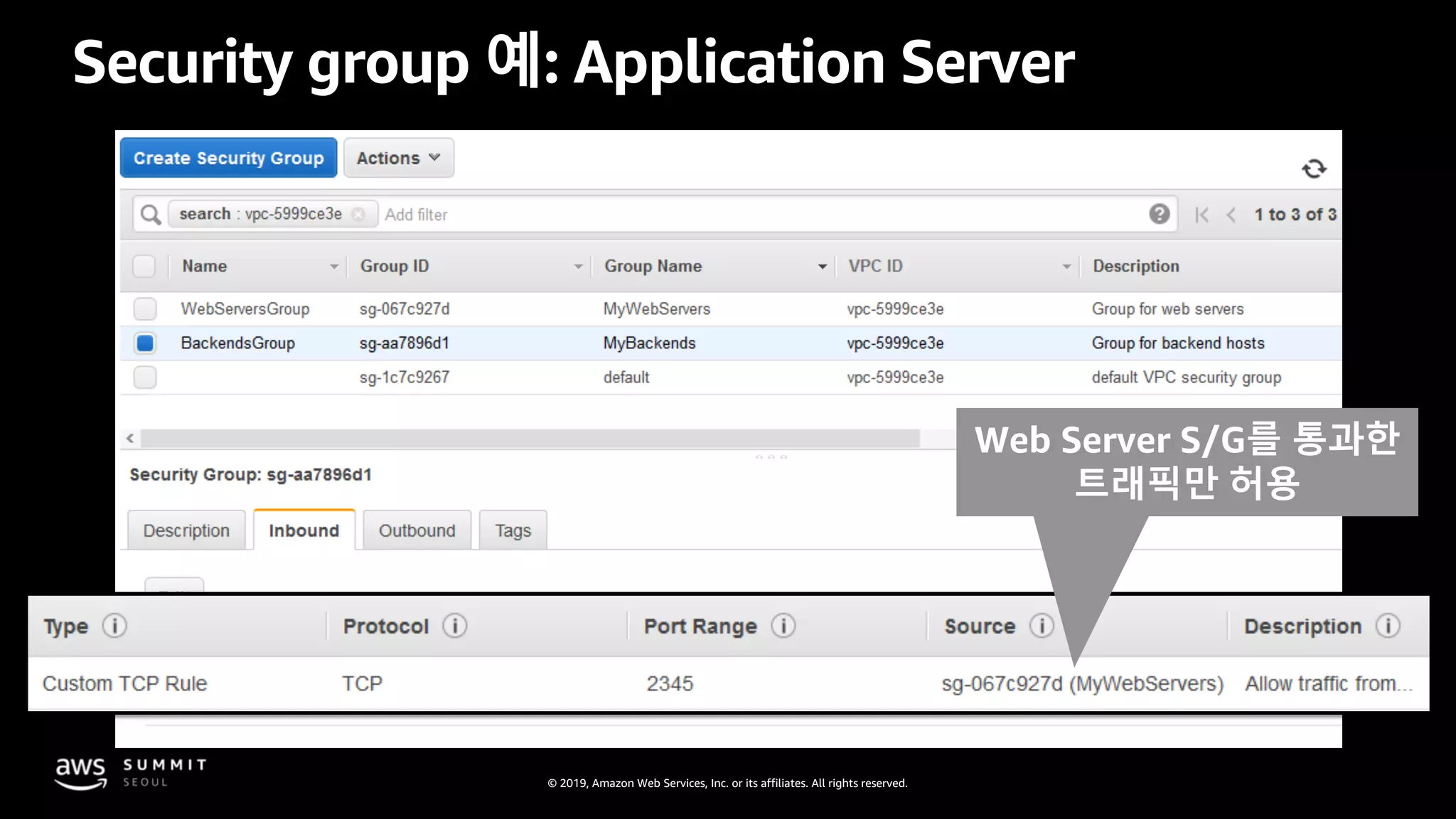
Security group 예: Application Server
Web Server S/G를 통과한
트래픽만 허용
© 2019, Amazon Web Services, Inc. or its affiliates. All rights reserved.
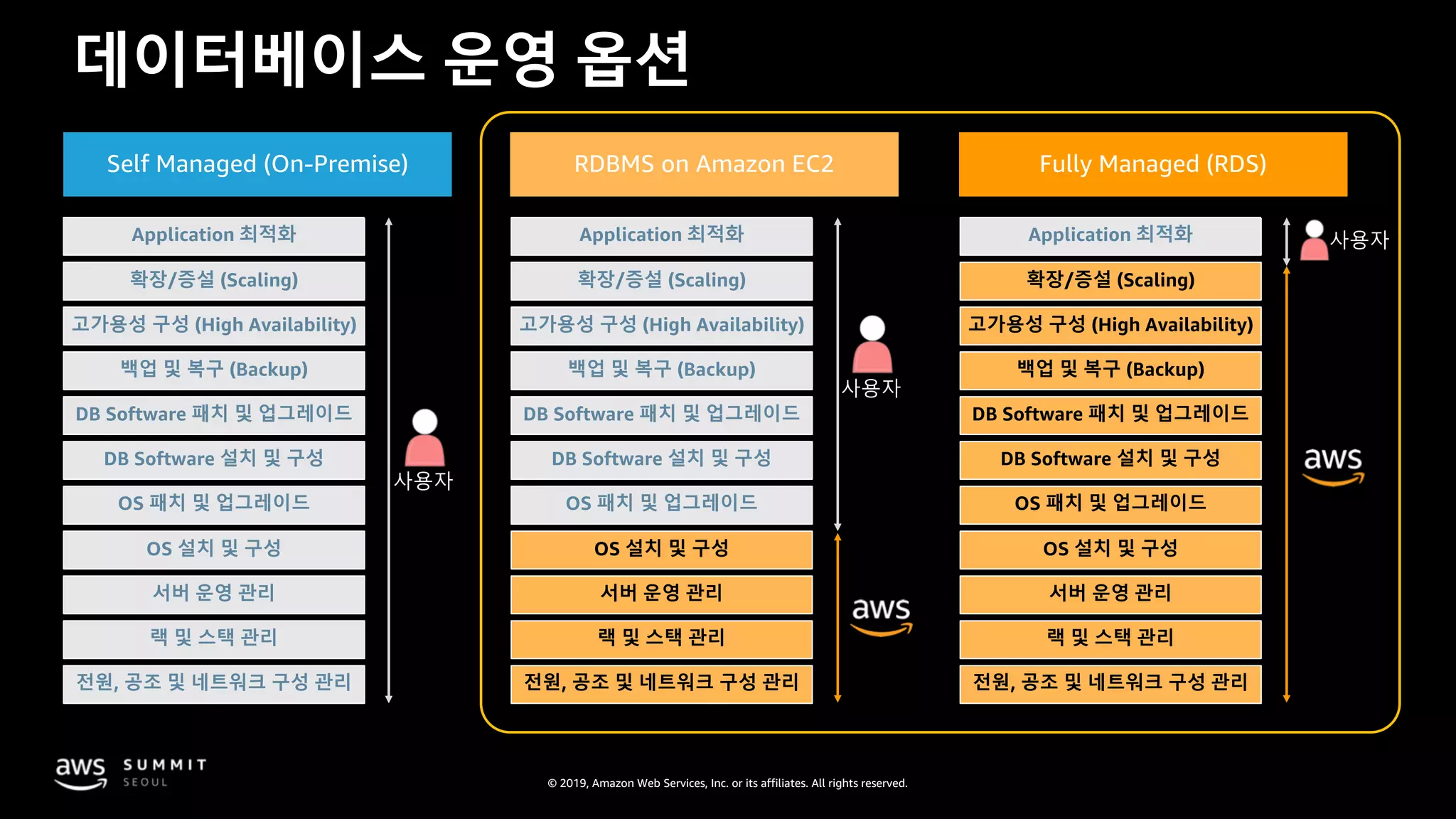
데이터베이스 운영 옵션
Self Managed (On-Premise) RDBMS on Amazon EC2 Fully Managed (RDS)
Application 최적화
확장/증설 (Scaling)
고가용성 구성 (High Availability)
백업 및 복구 (Backup)
DB Software 패치 및 업그레이드
DB Software 설치 및 구성
OS 패치 및 업그레이드
OS 설치 및 구성
서버 운영 관리
랙 및 스택 관리
전원, 공조 및 네트워크 구성 관리
사용자
Application 최적화
확장/증설 (Scaling)
고가용성 구성 (High Availability)
백업 및 복구 (Backup)
DB Software 패치 및 업그레이드
DB Software 설치 및 구성
OS 패치 및 업그레이드
OS 설치 및 구성
서버 운영 관리
랙 및 스택 관리
전원, 공조 및 네트워크 구성 관리
사용자
Application 최적화
확장/증설 (Scaling)
고가용성 구성 (High Availability)
백업 및 복구 (Backup)
DB Software 패치 및 업그레이드
DB Software 설치 및 구성
OS 패치 및 업그레이드
OS 설치 및 구성
서버 운영 관리
랙 및 스택 관리
전원, 공조 및 네트워크 구성 관리
사용자
© 2019, Amazon Web Services, Inc. or its affiliates. All rights reserved.
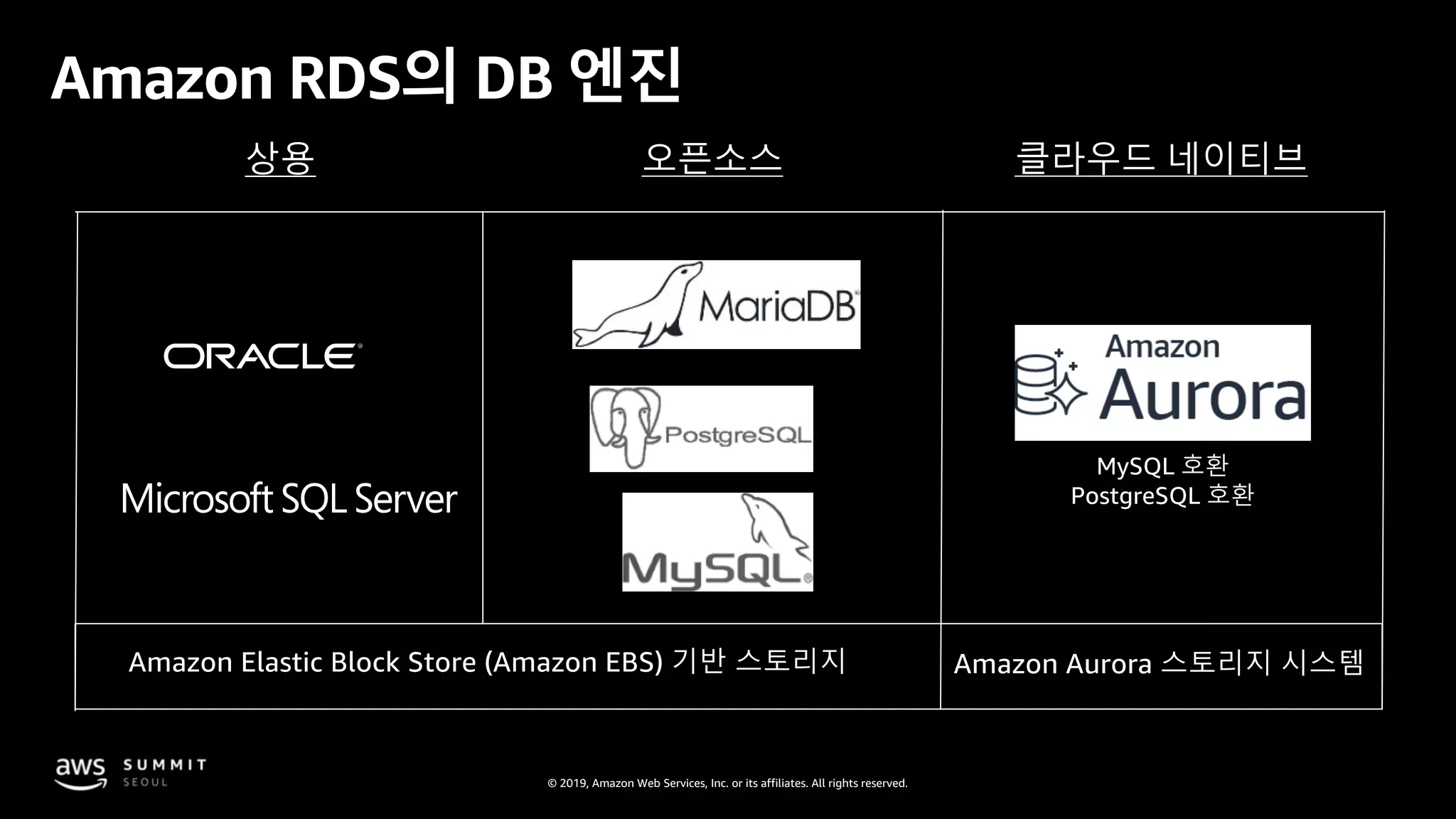
Amazon RDS의 DB 엔진
상용 오픈소스 클라우드 네이티브
Amazon Elastic Block Store (Amazon EBS) 기반 스토리지 Amazon Aurora 스토리지 시스템
MySQL 호환
PostgreSQL 호환
© 2019, Amazon Web Services, Inc. or its affiliates. All rights reserved.
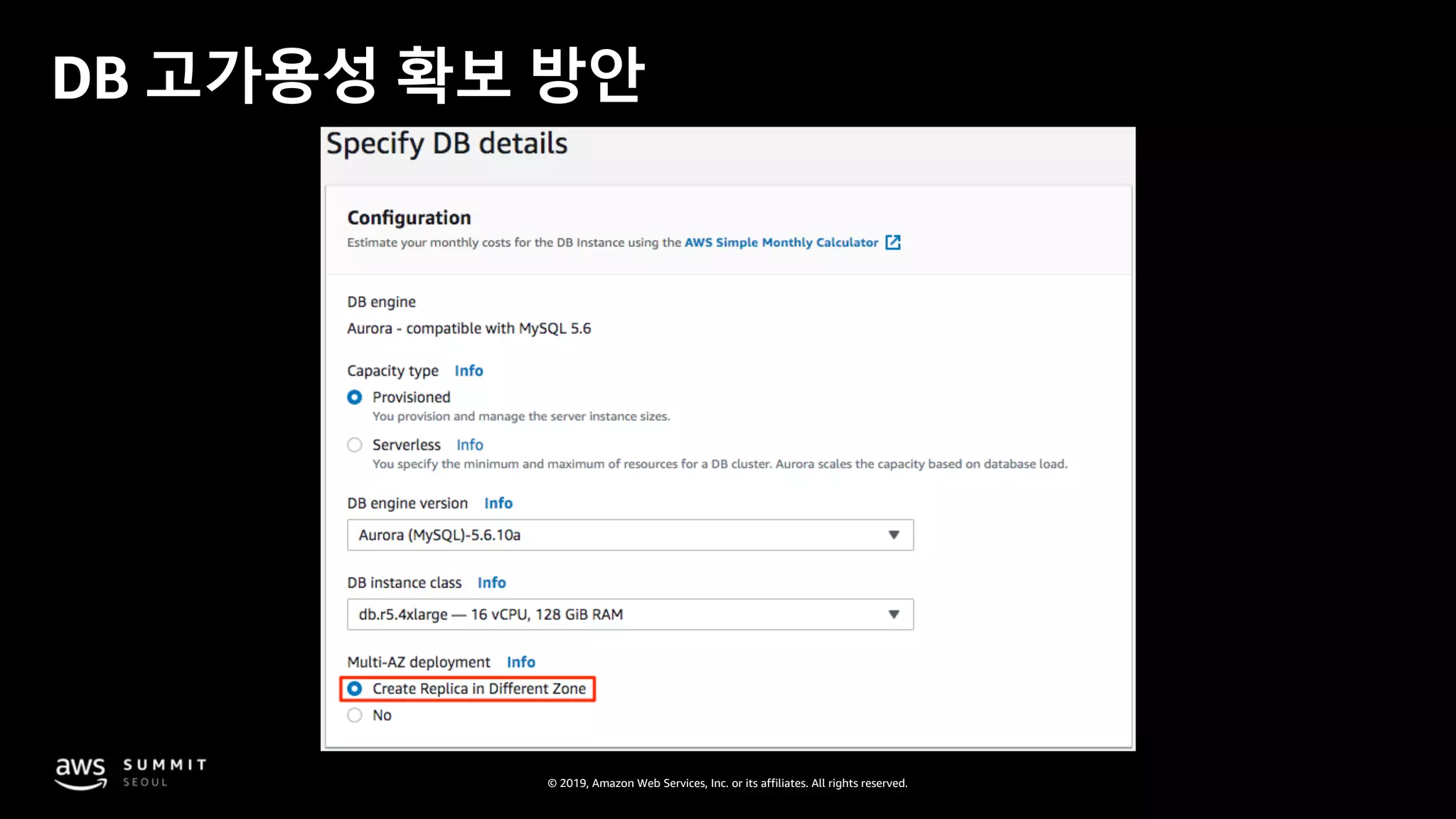
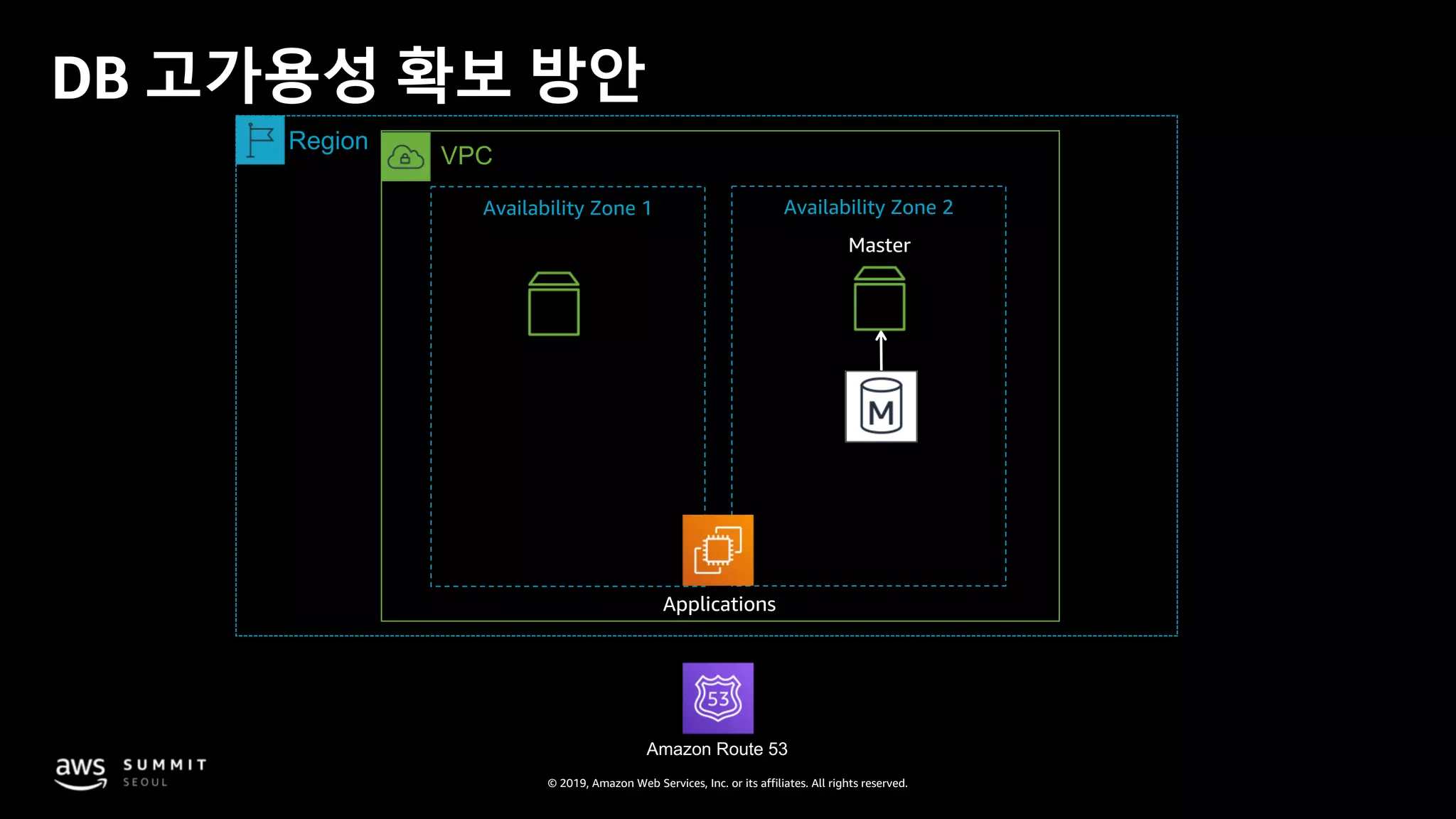
DB 고가용성 확보 방안
© 2019, Amazon Web Services, Inc. or its affiliates. All rights reserved.
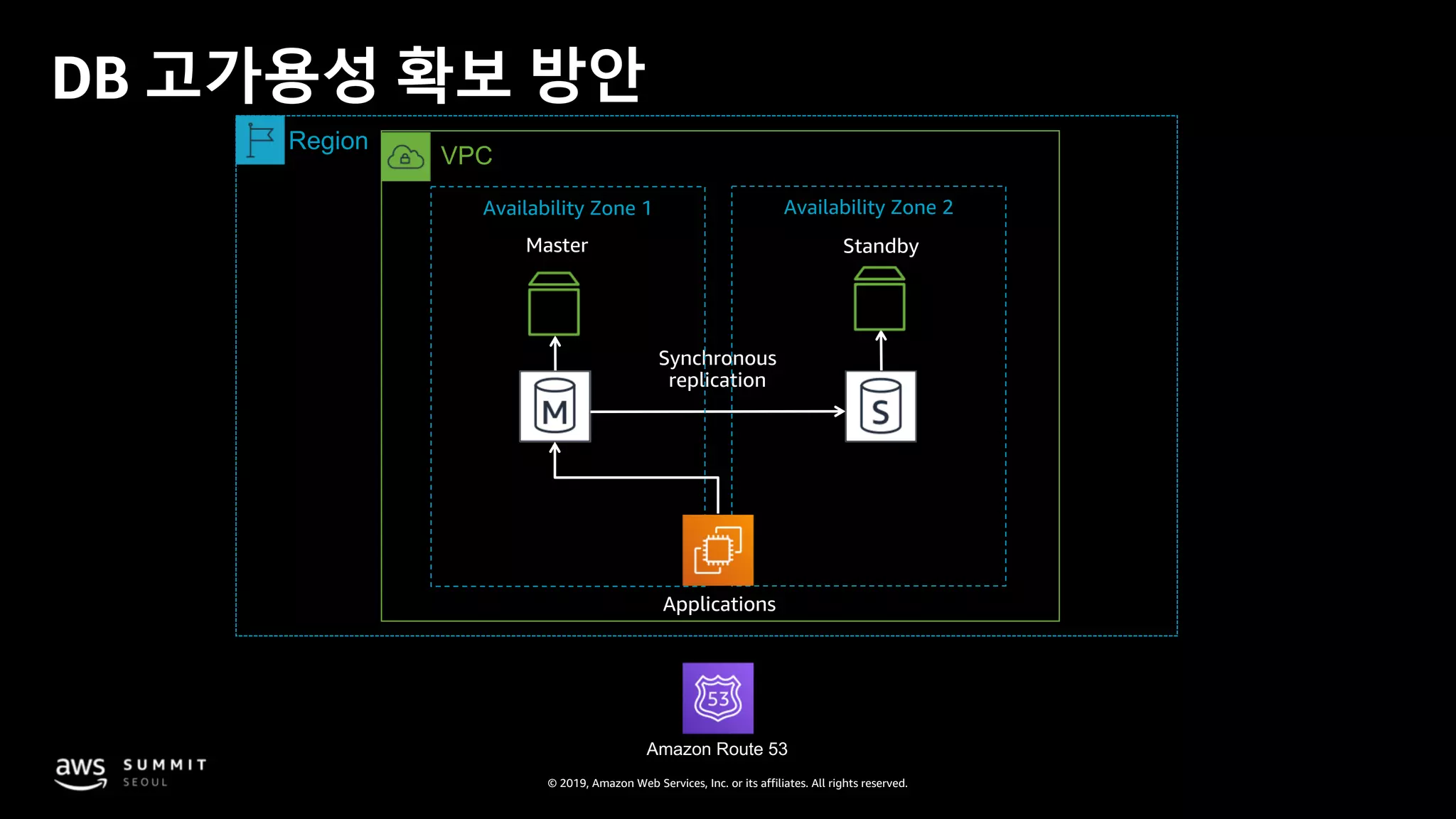
Master
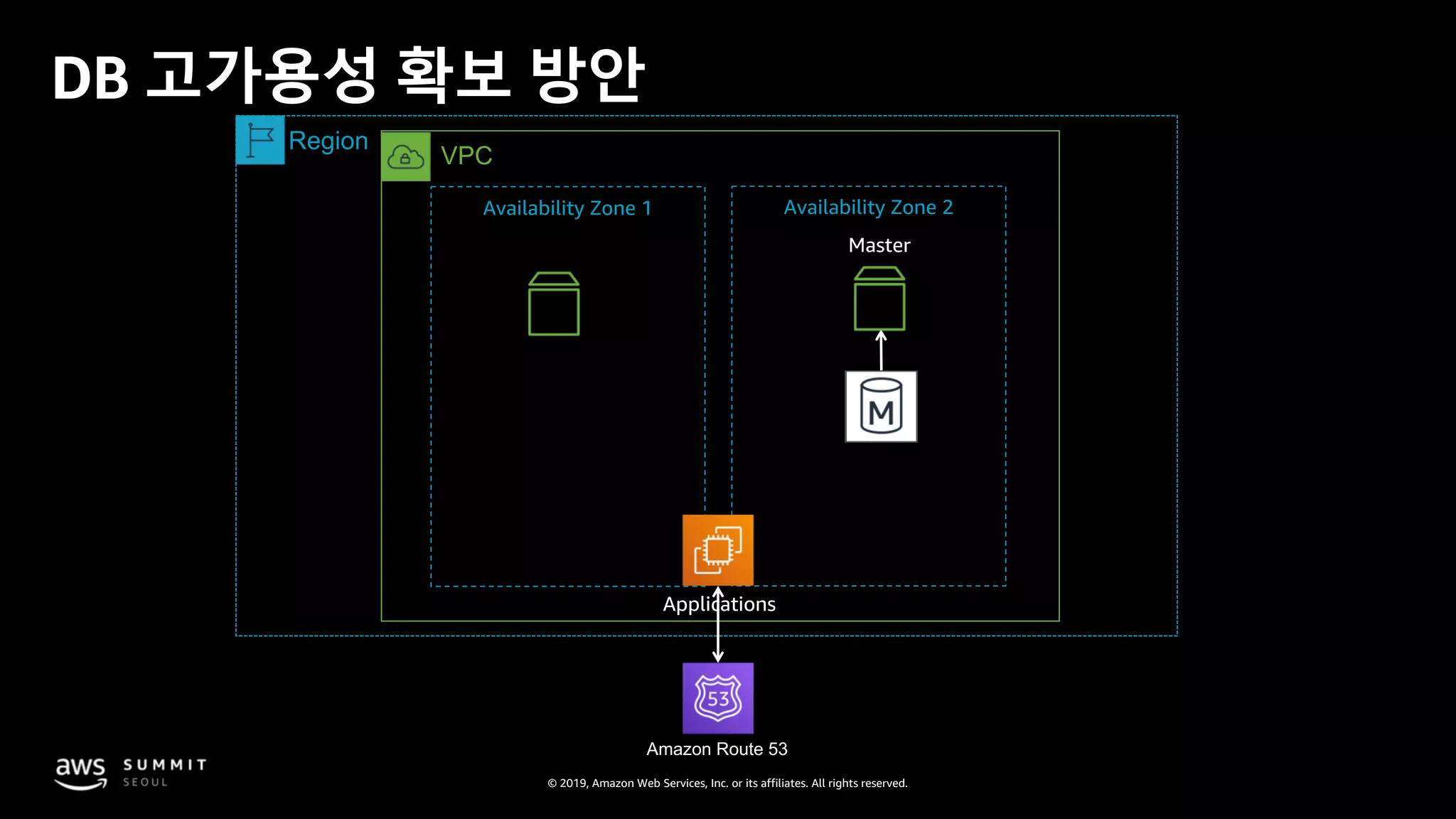
DB 고가용성 확보 방안
Applications
Synchronous
replication
VPC
Region
Amazon Route 53
Availability Zone 1 Availability Zone 2
Standby
© 2019, Amazon Web Services, Inc. or its affiliates. All rights reserved.
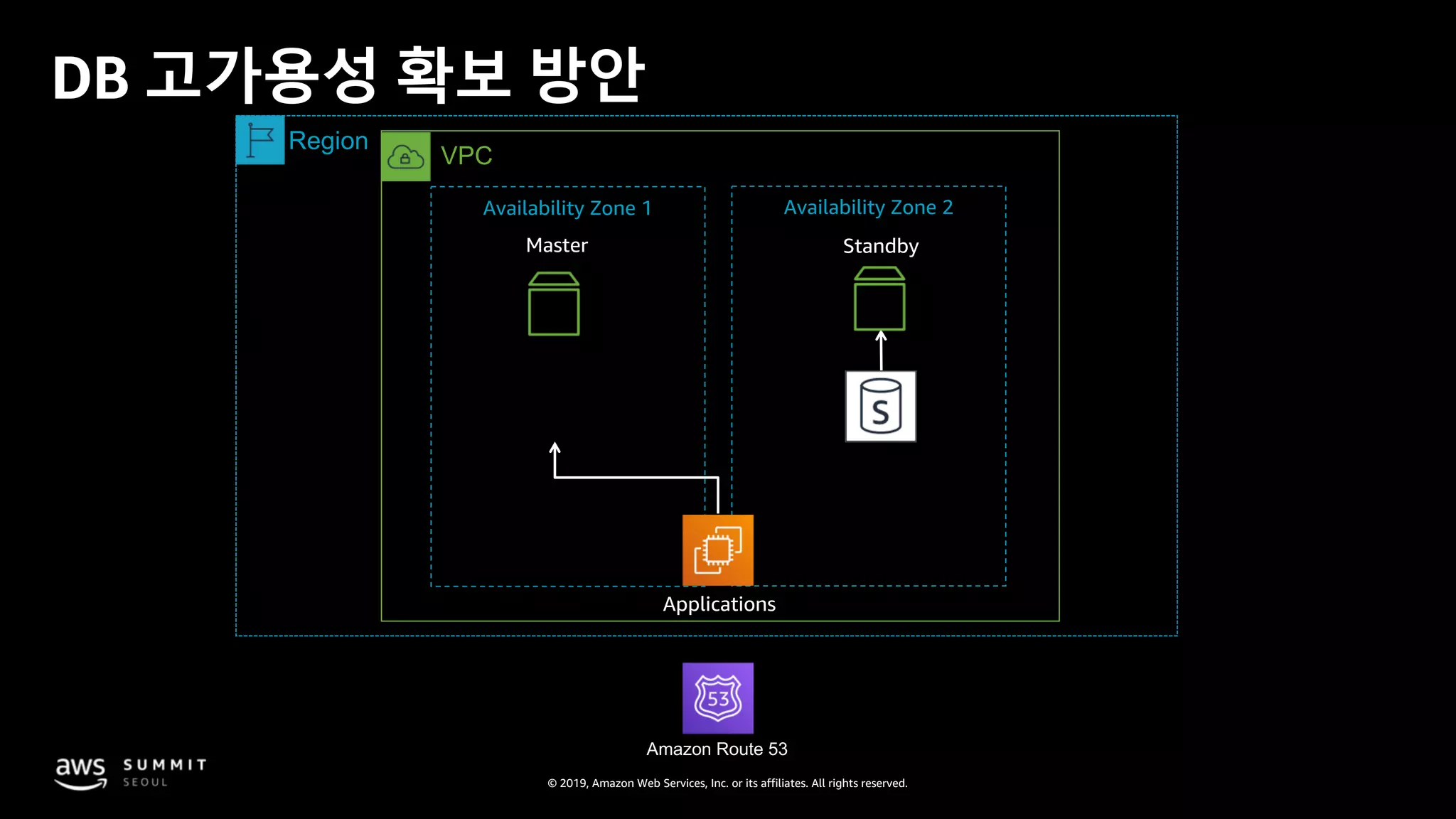
Master
DB 고가용성 확보 방안
Applications
VPC
Region
Amazon Route 53
Availability Zone 1 Availability Zone 2
Standby
© 2019, Amazon Web Services, Inc. or its affiliates. All rights reserved.
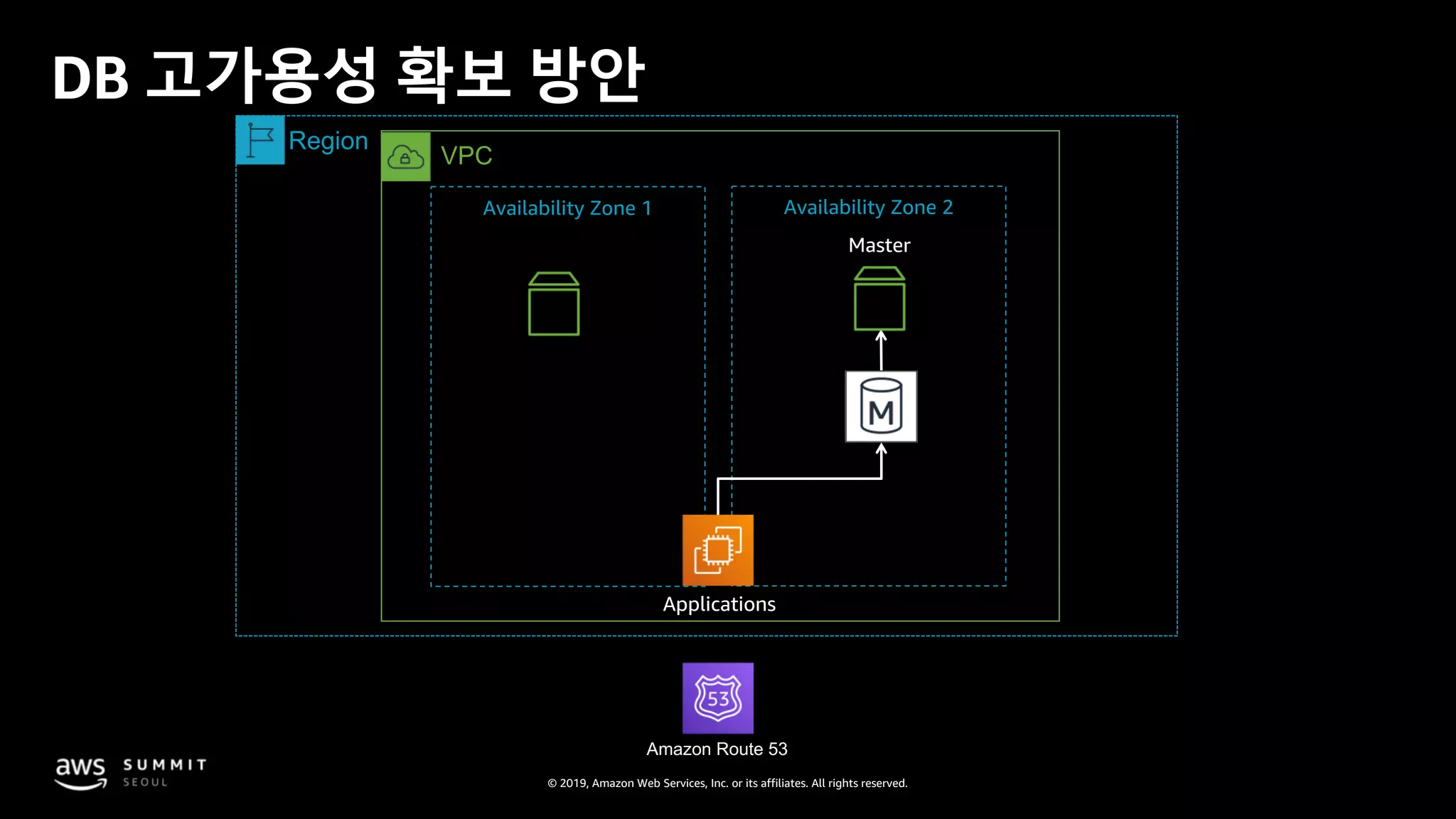
DB 고가용성 확보 방안
Master
Applications
VPC
Region
Amazon Route 53
Availability Zone 1 Availability Zone 2
© 2019, Amazon Web Services, Inc. or its affiliates. All rights reserved.
DB 고가용성 확보 방안
Master
Applications
VPC
Region
Amazon Route 53
Availability Zone 1 Availability Zone 2
© 2019, Amazon Web Services, Inc. or its affiliates. All rights reserved.
DB 고가용성 확보 방안
Master
Applications
VPC
Region
Amazon Route 53
Availability Zone 1 Availability Zone 2
© 2019, Amazon Web Services, Inc. or its affiliates. All rights reserved.
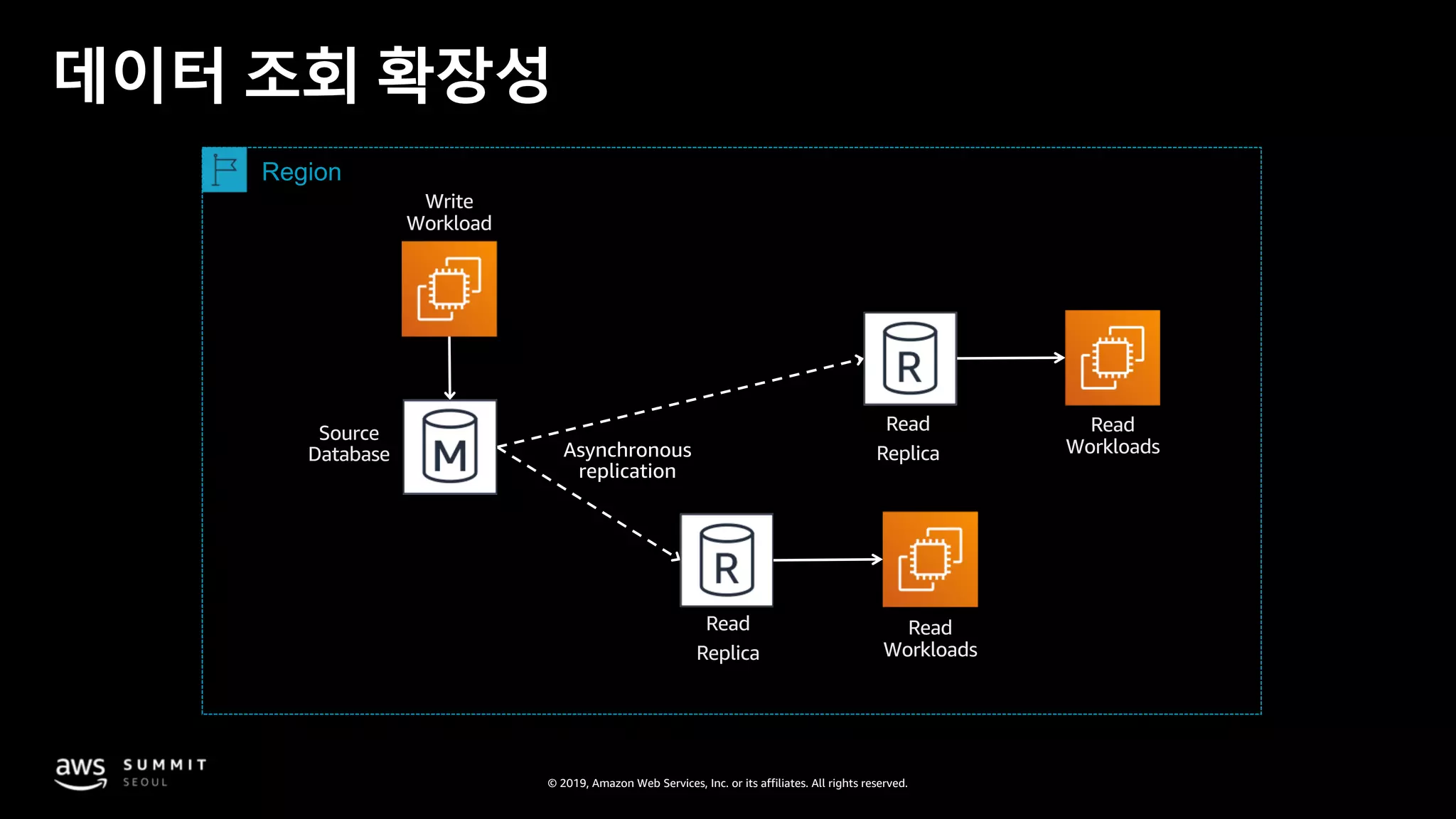
데이터 조회 확장성
Source
Database
Read
ReplicaAsynchronous
replication
Read
Replica
Write
Workload
Read
Workloads
Read
Workloads
Region
© 2019, Amazon Web Services, Inc. or its affiliates. All rights reserved.
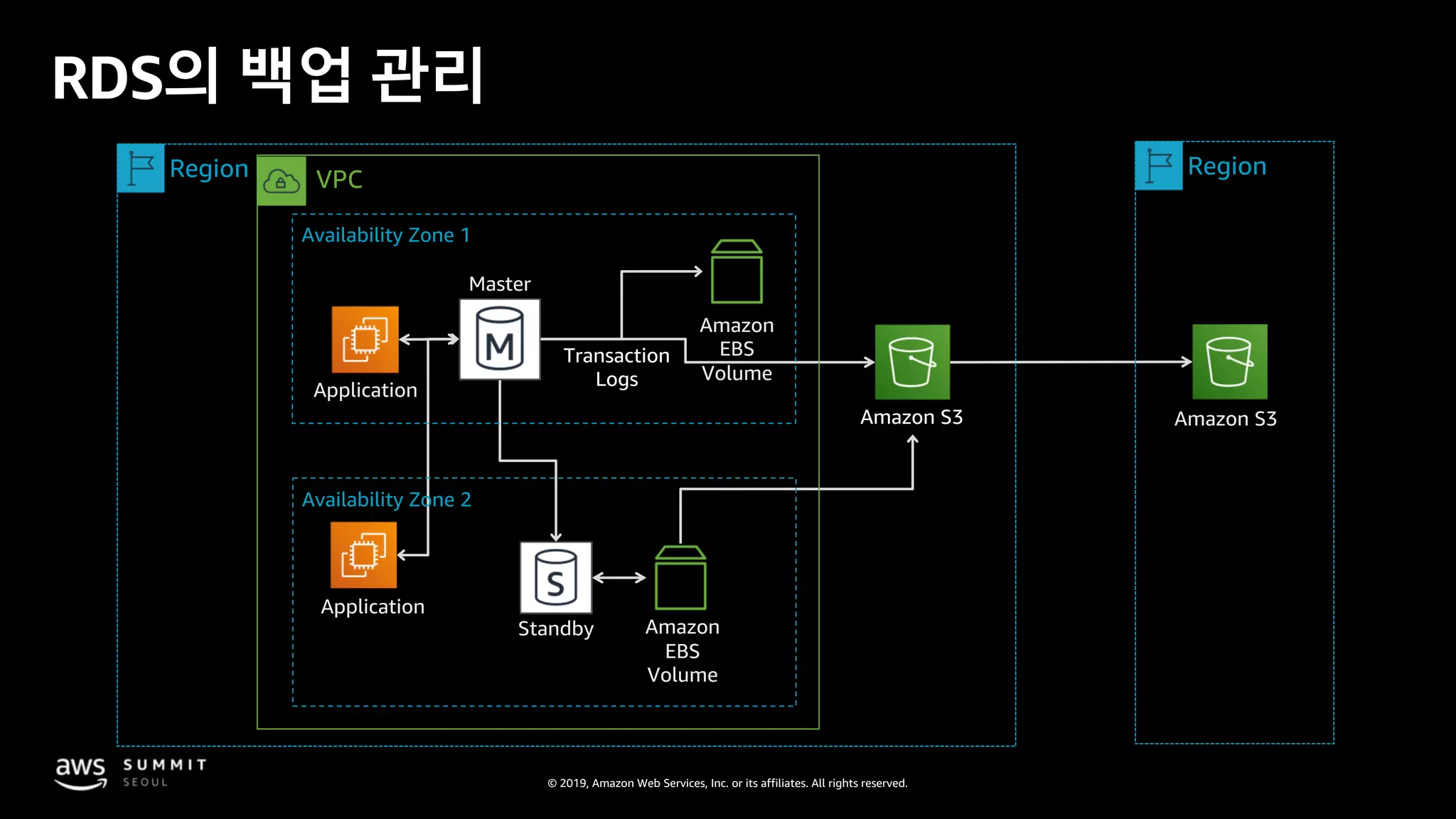
RDS의 백업 관리
Transaction
Logs
RDS
Host
Amazon S3
Application
Amazon
EBS
Volume
Standby
Amazon S3
Master
Amazon
EBS
Volume
Application
RegionRegion VPC
Availability Zone 2
Availability Zone 1
© 2019, Amazon Web Services, Inc. or its affiliates. All rights reserved.
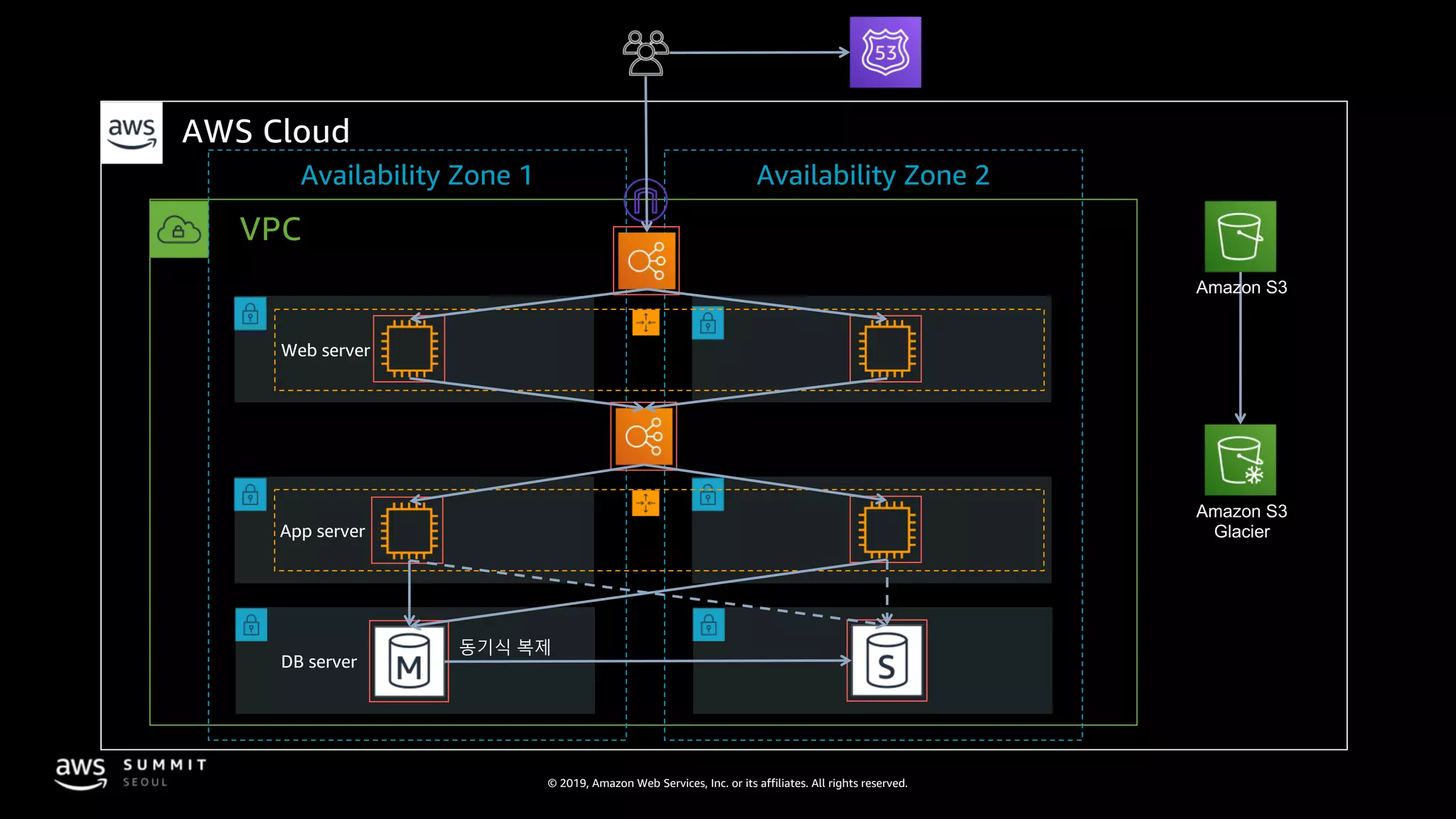
VPC
AWS Cloud
Availability Zone 1 Availability Zone 2
Amazon S3
Amazon S3
Glacier
© 2019, Amazon Web Services, Inc. or its affiliates. All rights reserved.
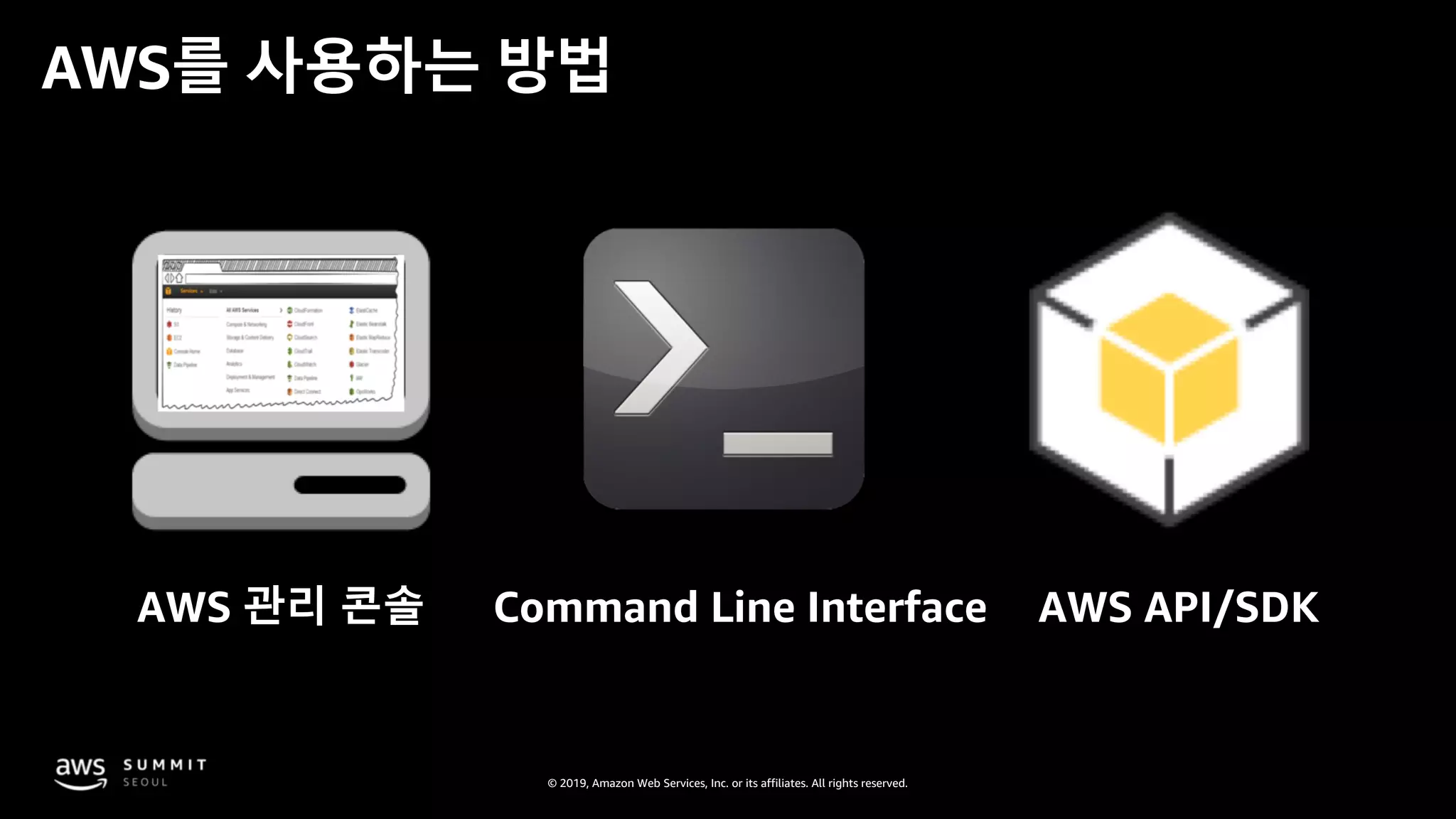
Command Line Interface AWS API/SDKAWS 관리 콘솔
AWS를 사용하는 방법
© 2019, Amazon Web Services, Inc. or its affiliates. All rights reserved.
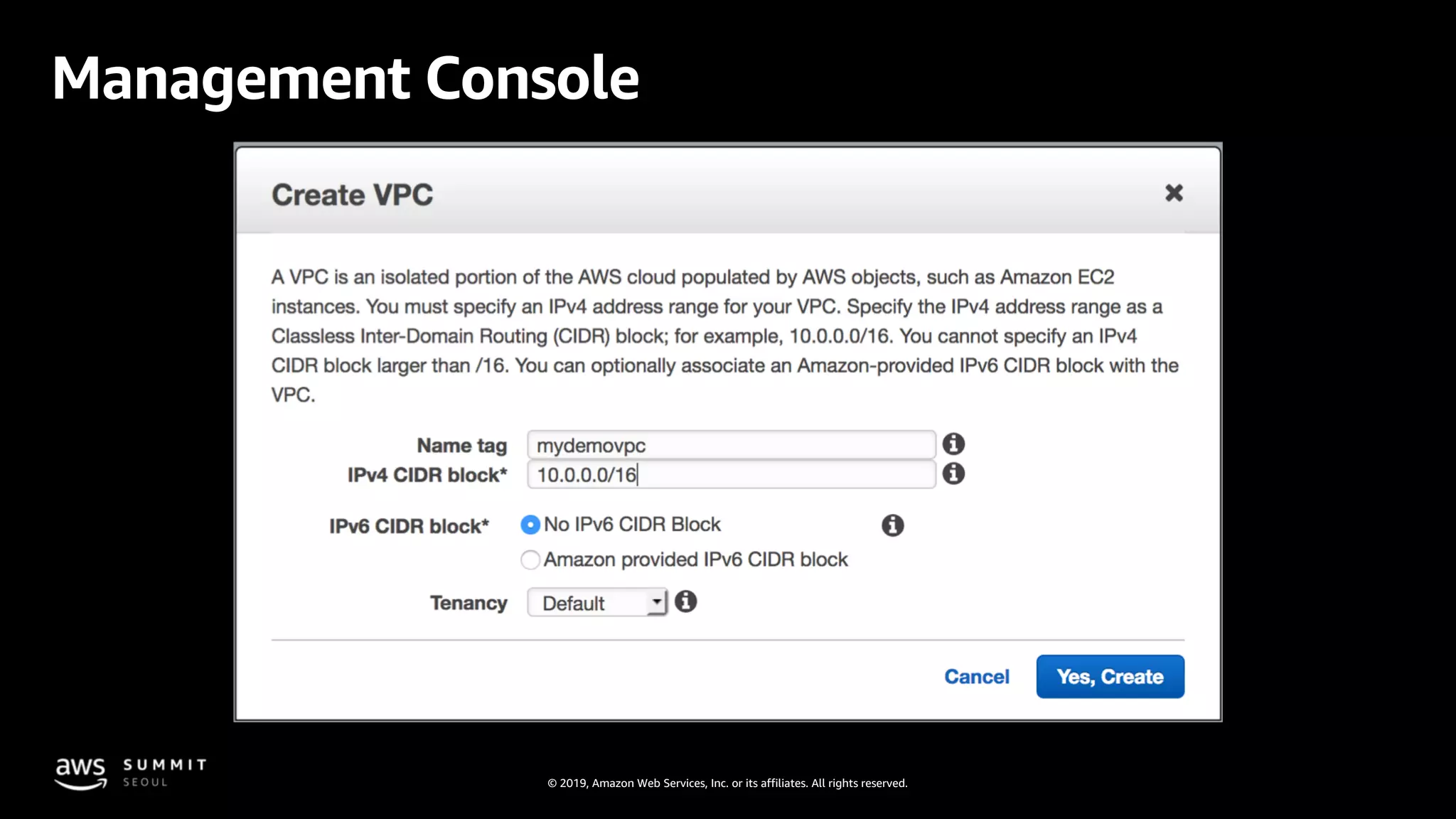
Management Console
© 2019, Amazon Web Services, Inc. or its affiliates. All rights reserved.
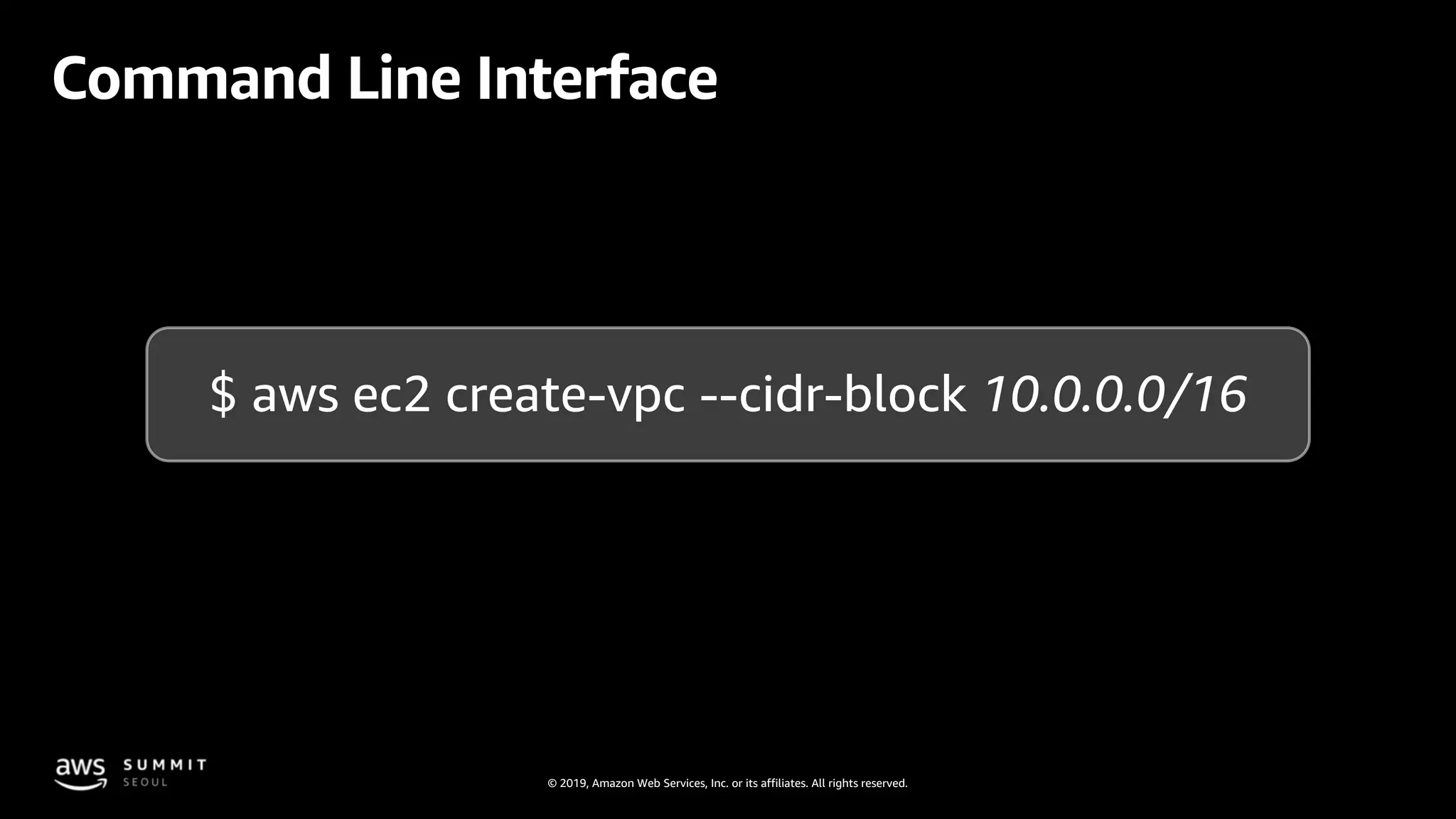
Command Line Interface
$ aws ec2 create-vpc --cidr-block 10.0.0.0/16
© 2019, Amazon Web Services, Inc. or its affiliates. All rights reserved.
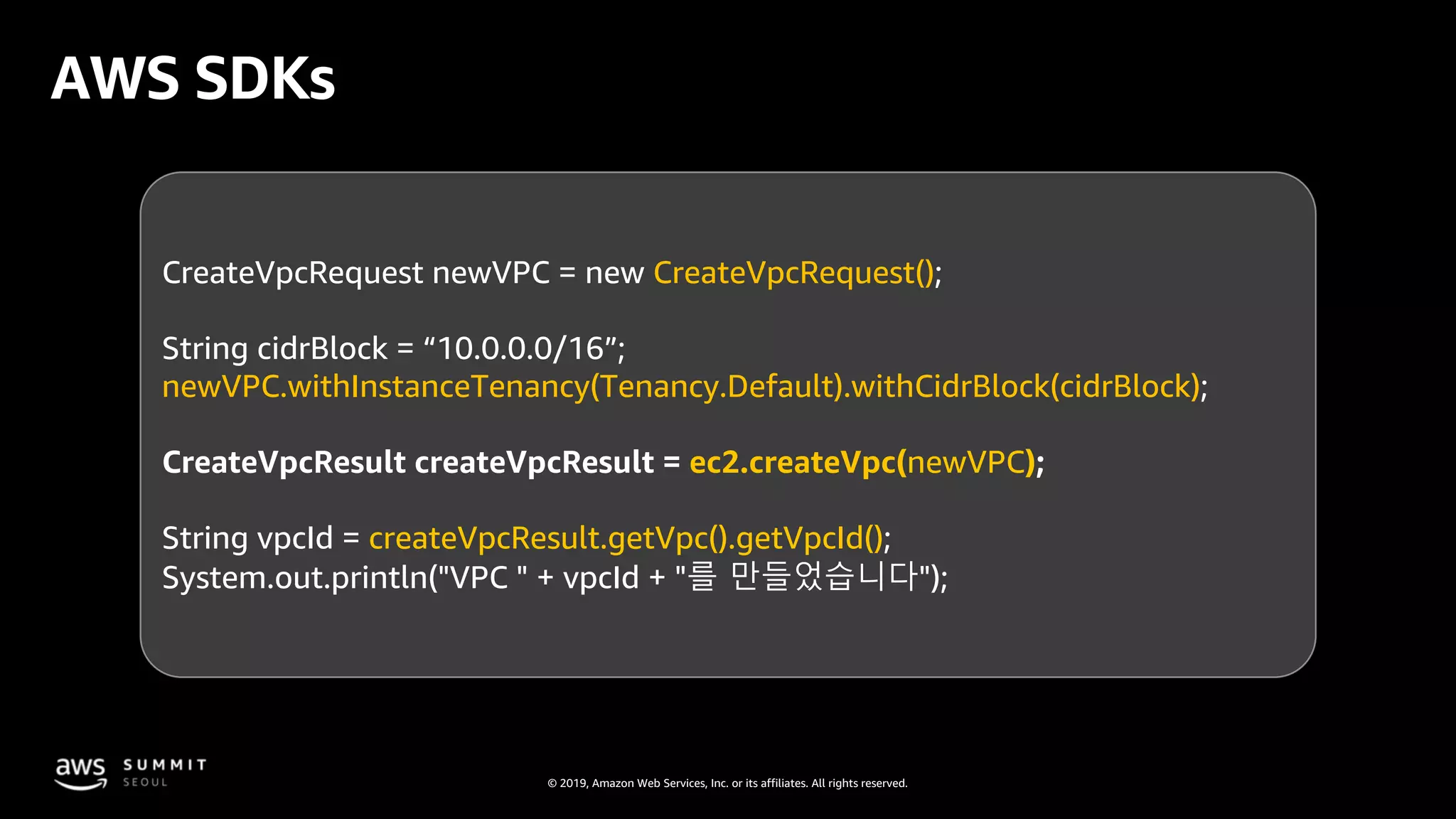
AWS SDKs
CreateVpcRequest newVPC = new CreateVpcRequest();
String cidrBlock = “10.0.0.0/16”;
newVPC.withInstanceTenancy(Tenancy.Default).withCidrBlock(cidrBlock);
CreateVpcResult createVpcResult = ec2.createVpc(newVPC);
String vpcId = createVpcResult.getVpc().getVpcId();
System.out.println("VPC " + vpcId + "를 만들었습니다");
© 2019, Amazon Web Services, Inc. or its affiliates. All rights reserved.
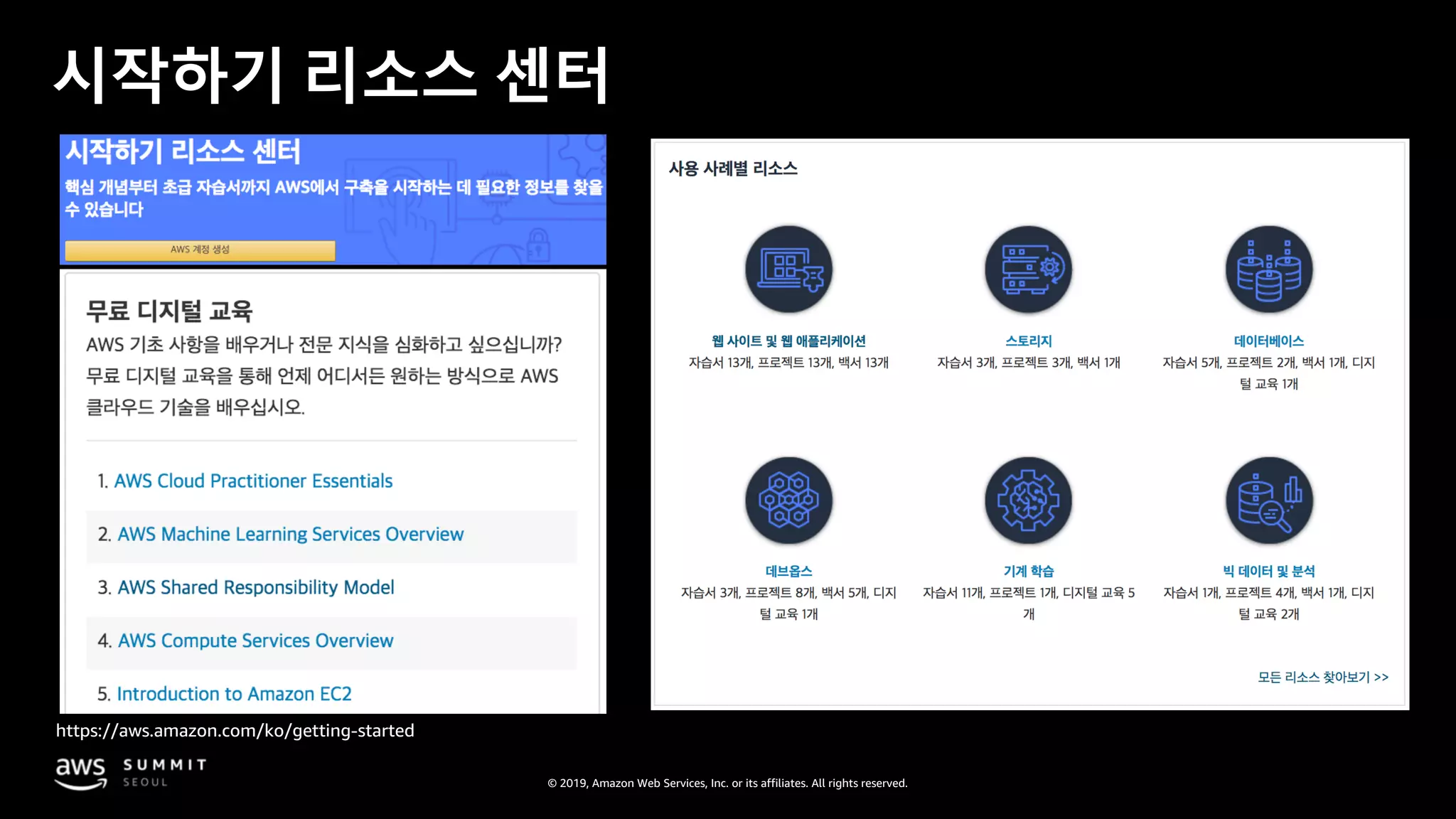
시작하기 리소스 센터
https://aws.amazon.com/ko/getting-started
© 2019, Amazon Web Services, Inc. or its affiliates. All rights reserved.
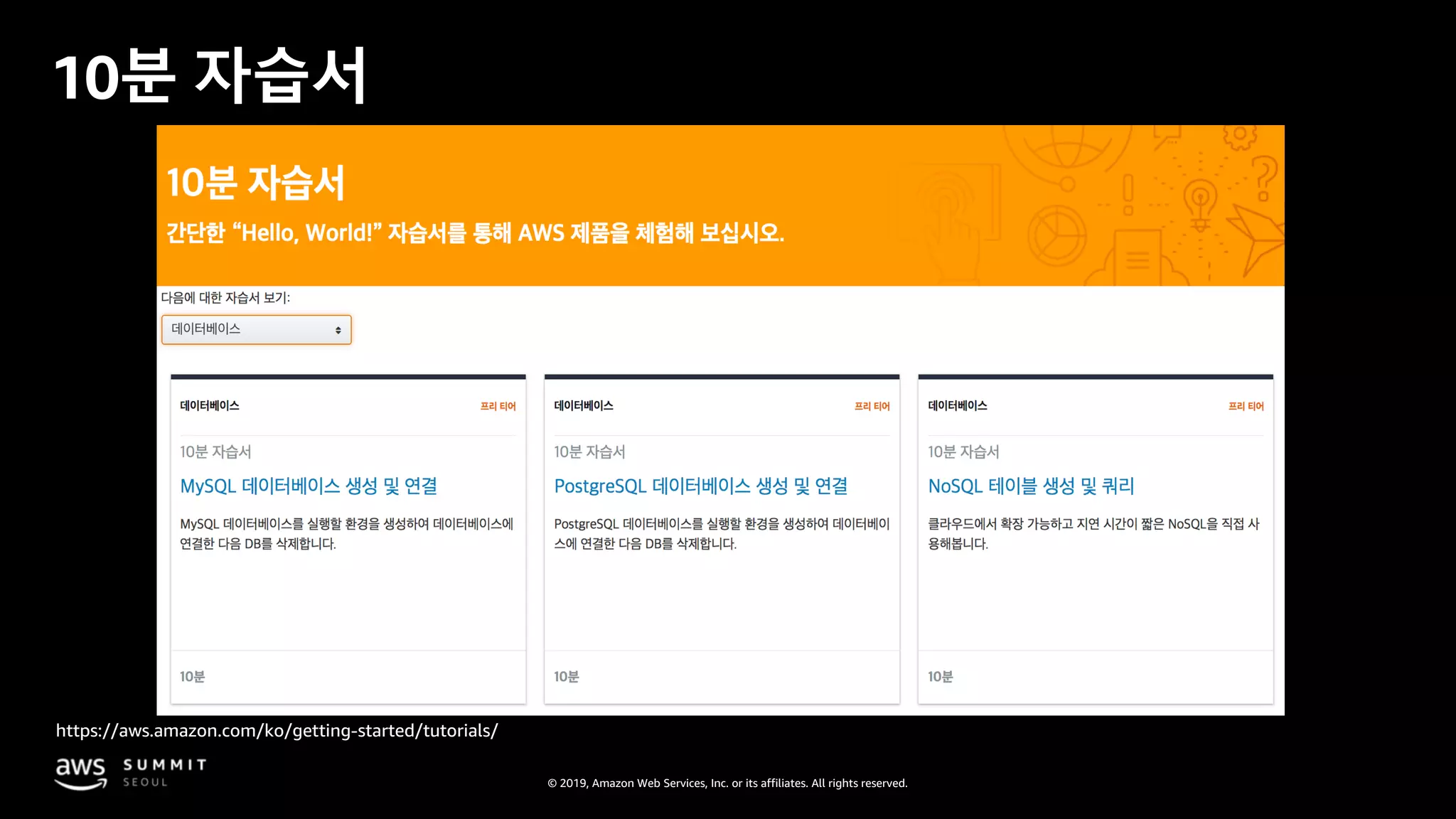
10분 자습서
https://aws.amazon.com/ko/getting-started/tutorials/
© 2019, Amazon Web Services, Inc. or its affiliates. All rights reserved.
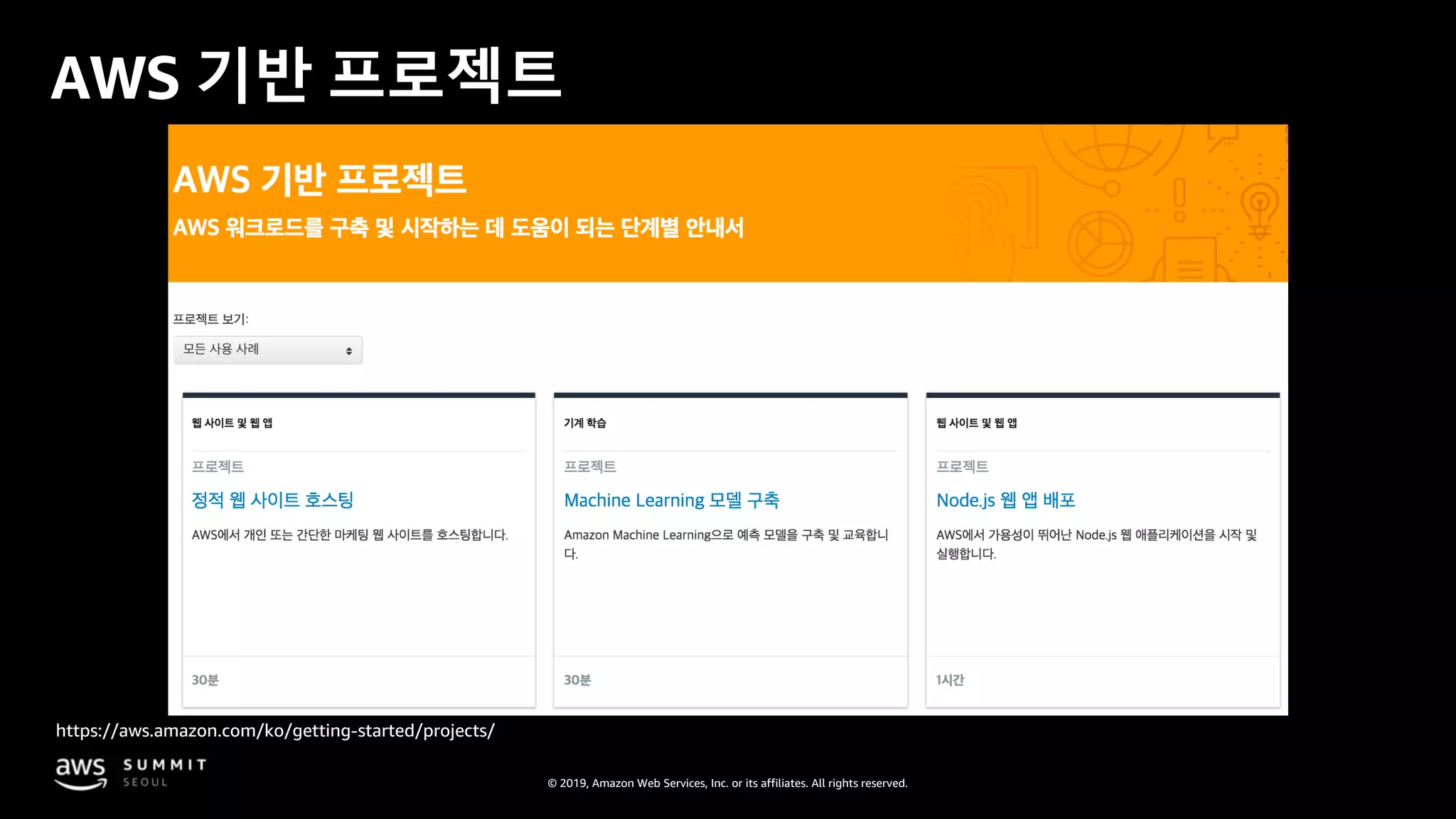
AWS 기반 프로젝트
https://aws.amazon.com/ko/getting-started/projects/
© 2019, Amazon Web Services, Inc. or its affiliates. All rights reserved.
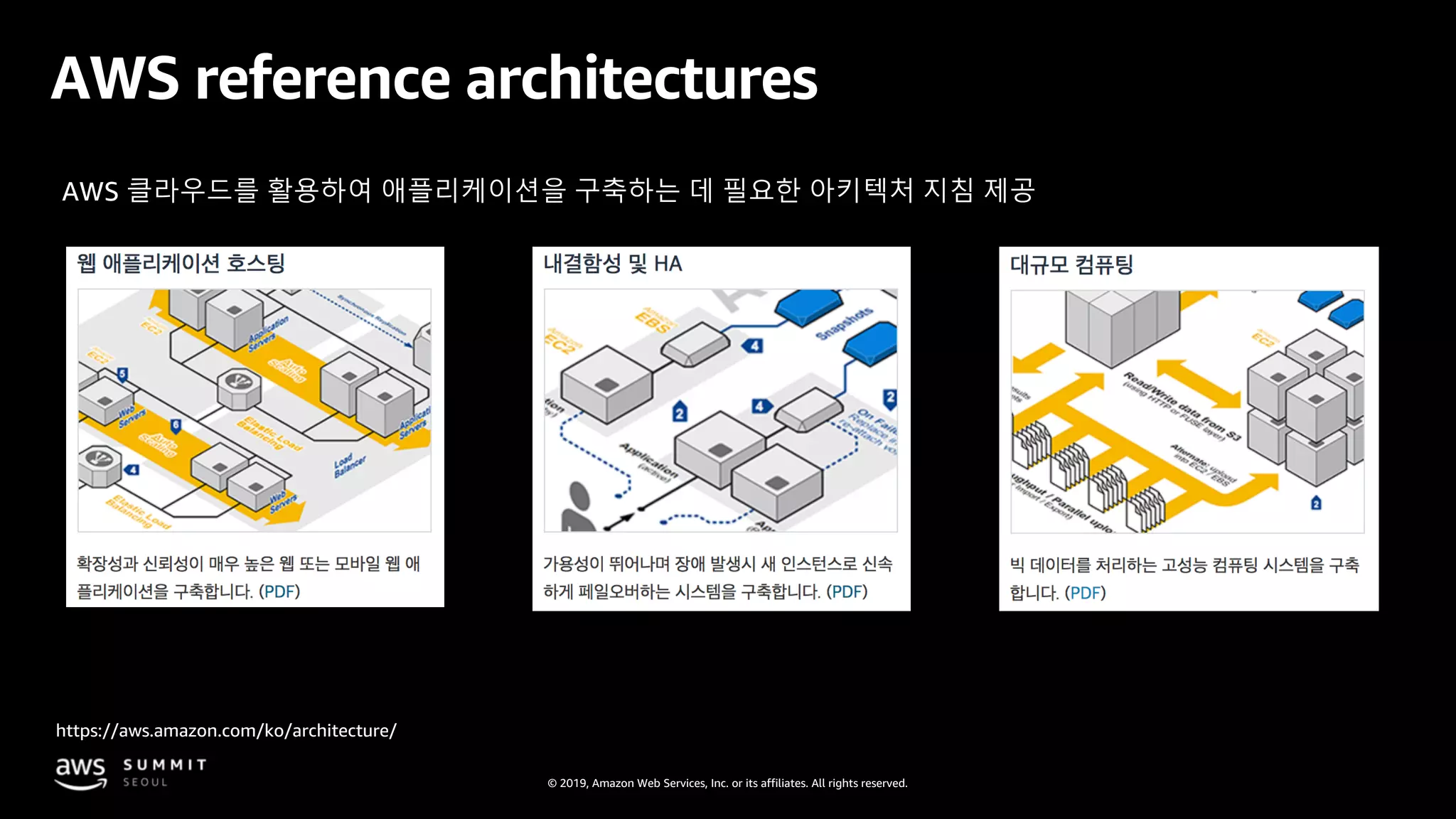
AWS reference architectures
https://aws.amazon.com/ko/architecture/
AWS 클라우드를 활용하여 애플리케이션을 구축하는 데 필요한 아키텍처 지침 제공
© 2019, Amazon Web Services, Inc. or its affiliates. All rights reserved.
Next Step
• AWS 아키텍처 세션 : 클라우드 네이티브 환경에 맞는 IT 운영 원칙과 모범사례
• AWS 아키텍처 세션 : 나만의 애플리케이션에 딱 맞는 클라우드 데이터베이스를 선택하는 방법
• AWS 아키텍처 세션 : AWS 기반 클라우드 아키텍처 모범사례
• CI/CD on AWS
• Amazon Elastic Container Services
• Amazon Elastic Container Service for Kubernetes
• AWS Serverless computing

AWS 클라우드 핵심 서비스로 클라우드 기반 아키텍처 빠르게 구성하기 - 문종민 솔루션즈 아키텍트, AWS :: AWS Summit Seoul 2019

  • 1.
    © 2019, AmazonWeb Services, Inc. or its affiliates. All rights reserved. AWS 클라우드 핵심 서비스로 클라우드 기반 아키텍처 빠르게 구성하기 문종민 솔루션즈 아키텍트, AWS
  • 2.
    © 2019, AmazonWeb Services, Inc. or its affiliates. All rights reserved. 목표 시스템 AWS Global Infrastructure EC2 선택하기 스토리지 선택하기 VPC로 네트워크 구성하기 Database 빠르게 구성하기 AWS 상에서의 목표 시스템 AWS를 사용하는 방법 How to Quick Start 목차
  • 3.
    © 2019, AmazonWeb Services, Inc. or its affiliates. All rights reserved.
  • 4.
    © 2019, AmazonWeb Services, Inc. or its affiliates. All rights reserved. 서버 서버서버 WEB API DB
  • 5.
    © 2019, AmazonWeb Services, Inc. or its affiliates. All rights reserved. API DB WEB Storage SAN Storage DAS Storage NAS Storage DAS
  • 6.
    © 2019, AmazonWeb Services, Inc. or its affiliates. All rights reserved. 시스템을 어디에 구축 할 것인가? API DB WEB Storage SAN Storage DAS Storage NAS Storage DAS
  • 7.
    © 2019, AmazonWeb Services, Inc. or its affiliates. All rights reserved.
  • 8.
    © 2019, AmazonWeb Services, Inc. or its affiliates. All rights reserved. AWS Global Infrastructure 20 개 리전, 1 개 로컬 리전, 61 개 가용영역(AZ), 160+ PoPs 미국 동부 버지니아 북부(6) 오하이오(3) AWS GovCloud US-East(3) 캐나다 중부(2) 미국 서부 오레곤(4) 캘리포니아 북부(3) 아시아 태평양 서울(2) 도쿄(4) 오사카-로컬(1) 뭄바이(2) 싱가포르(3) 시드니(3) 유럽 프랑크푸르트(3) 아일랜드(3) 런던(3) 파리(3) 스웨덴(3) AWS GovCloud US-West (3) 중국 베이징(2) 닝샤(3) 새로운 리전(제공 예정) 바레인 / 케이프 타운/ 홍콩/ 밀라노 남아메리카 상파울루(3)
  • 9.
    © 2019, AmazonWeb Services, Inc. or its affiliates. All rights reserved. • 하나 또는 복수개의 datacenter로 구성된 완전히 독립적인 infrastructure • 별도의 power infrastructure • Datacenter간 network 이중화 구성 • 가용영역 간 충분히 떨어진 거리 AWS의 가용영역(AZ, Availability Zone)
  • 10.
    © 2019, AmazonWeb Services, Inc. or its affiliates. All rights reserved. 최소 2개 이상의 가용영역으로 구성 일부 리전은 6개의 가용영역으로 구성 — Intra-AZ connections AWS의 리전(Region)
  • 11.
    © 2019, AmazonWeb Services, Inc. or its affiliates. All rights reserved. — — AWS의 리전(Region)
  • 12.
    © 2019, AmazonWeb Services, Inc. or its affiliates. All rights reserved.
  • 13.
    © 2019, AmazonWeb Services, Inc. or its affiliates. All rights reserved. 어떤 OS / Program을 사용할 것인가?
  • 14.
    © 2019, AmazonWeb Services, Inc. or its affiliates. All rights reserved. Amazon 제공 다양한 Linux 및 Windows images 각 리전 별로 Amazon에서 최신화 Marketplace 등록 AWS Marketplace partners 가 제공, 유지보수 사용자 커스텀 machine images Amazon EC2 instance에서 사용자 AMI 생성 가능 해당 계정만 사용 또는 다른 계정과 공유 하거나 public 공개 가능 Amazon Machine Images (AMIs) Amazon Linux 2 에 대한 5년 장기 지원
  • 15.
    © 2019, AmazonWeb Services, Inc. or its affiliates. All rights reserved.
  • 16.
    © 2019, AmazonWeb Services, Inc. or its affiliates. All rights reserved. 어느 정도 사양의 서버가 필요한가?
  • 17.
    © 2019, AmazonWeb Services, Inc. or its affiliates. All rights reserved. Amazon EC2 instance 특징 M5d.xlarge Instance family Instance 세대 Instance 크기 Instance type CPU Memory Storage Network 성능 *추가 기능
  • 18.
    © 2019, AmazonWeb Services, Inc. or its affiliates. All rights reserved.
  • 19.
    © 2019, AmazonWeb Services, Inc. or its affiliates. All rights reserved. 범용 컴퓨팅 최적화 메모리 최적화 가속화된 컴퓨팅 스토리지 최적화 M5 C5 High Memory P3 I3 M4 C4 X1e P2 I2 T3 X1 G3 D2 T2 R4, R5 F1 Amazon EC2 Instance 유형 (일부만 표기)
  • 20.
    © 2019, AmazonWeb Services, Inc. or its affiliates. All rights reserved. Intel® Xeon® Scalable (Skylake) processor AMD EPYC processorNVIDIA V100 Tensor Core GPUs AWS Graviton Processor 프로세서 및 아키텍처 선택
  • 21.
    © 2019, AmazonWeb Services, Inc. or its affiliates. All rights reserved. 광범위하고 심층적인 플랫폼 선택 카테고리 기능 옵션 프로세서 선택 (AWS, Intel, AMD) 빠른 processor (up to 4.0 GHz) 높은 메모리 공간 (up to 12 TiB) 인스턴스 스토리지 (HDD and NVMe) 네트워킹 (up to 100 Gbps) 가속화된 컴퓨팅 (GPUs and FPGA) Bare Metal instance 크기 (Nano to 32xlarge) Amazon Elastic Block Store Elastic Inference Elastic Graphics+ + = 컴퓨팅 집약 메모리 집약 순간확장 성능 높은 I/O Storage 고밀도 스토리지 GPU 기반 그래픽 집약 범용 175instance types 거의 모든 워크로드 및 비즈니스 요구에 적용 가능 NEW NEW! NEW!
  • 22.
    © 2019, AmazonWeb Services, Inc. or its affiliates. All rights reserved. Amazon Elastic Compute Cloud (EC2) AWS global 리전의 물리 서버 Guest 2 Guest 1 Guest 2 Guest n Hypervisor Host server EC2 instances
  • 23.
    © 2019, AmazonWeb Services, Inc. or its affiliates. All rights reserved. 서버가 여러 대인 경우 부하 분산은? 서버1 WEB 서버1 API 서버 DB 서버N WEB 서버M API
  • 24.
    © 2019, AmazonWeb Services, Inc. or its affiliates. All rights reserved. 요청을 복수 개의 EC2, 컨테이너, IP 주소로 라우팅 하기 위해 로드밸런서 사용 ELB EC2 instance EC2 instance EC2 instance Elastic Load Balancing
  • 25.
    © 2019, AmazonWeb Services, Inc. or its affiliates. All rights reserved. Application 로드밸런서 (ALB) Network 로드밸런서 (NLB) Classic 로드밸런서 TCP 기반 워크로드 HTTP, HTTPS, TCP 용 이전 세대 로드밸런서 HTTP 및 HTTPS Elastic Load Balancing 종류
  • 26.
    © 2019, AmazonWeb Services, Inc. or its affiliates. All rights reserved.
  • 27.
    © 2019, AmazonWeb Services, Inc. or its affiliates. All rights reserved. 서버에 어떤 종류의 disk를 얼마나 할당할 것인가?
  • 28.
    © 2019, AmazonWeb Services, Inc. or its affiliates. All rights reserved. EC2 인스턴스 상세 Instance A Instance B ephemeral0 ephemeral1 ephemeral2 ephemeral3 ephemeral4 Instance Store Host Computer Amazon EBS 가용 영역 (AZ) HDD SSD EBS EBS EBS EC2 EC2 EC2 인스턴스에 대한 OS 볼륨 또는 데이터 볼륨 네트워크 연결
  • 29.
    © 2019, AmazonWeb Services, Inc. or its affiliates. All rights reserved. Amazon Elastic Block Store (EBS) EC2 instance EBS 볼륨 EBS 스냅샷 gp2 io1 st1 sc1 SSD 타입 HDD 타입 Amazon S3 • 동일 가용영역 내 인스턴스에 스토리지 attach, detach 가능 • 하나의 EBS는 한 EC2에만 attach 가능 • 볼륨 암호화 기능 제공 • SSD, HDD 타입 중 선택 가능 • 사용자 워크로드에 기반한 컴퓨팅 및 스토리지 선정 가능 • 스냅샷 지원: 변경된 볼륨에 대한 증분 백업
  • 30.
    © 2019, AmazonWeb Services, Inc. or its affiliates. All rights reserved.
  • 31.
    © 2019, AmazonWeb Services, Inc. or its affiliates. All rights reserved. 다른 스토리지 유형은?
  • 32.
    © 2019, AmazonWeb Services, Inc. or its affiliates. All rights reserved. 폭 넓은 스토리지 포트폴리오 Amazon Elastic Block Store (Amazon EBS) Amazon Simple Storage Service (Amazon S3) Amazon Glacier Amazon Elastic File System (Amazon EFS)
  • 33.
    © 2019, AmazonWeb Services, Inc. or its affiliates. All rights reserved. Amazon Simple Storage Service (S3) EC2 instance Amazon S3 • 99.999999999%의 내구성 • 제약 없는 확장성 • 탁월한 보안 및 규정준수 • 버킷 / 리소드 단위 접근제어 • KMS, S3키 관리 / 사용자 키 암호화 방식 • 리전 간 데이터 복제 • Amazon Athena 지원 - 표준 SQL을 사용하여 분석할 수 있게 하는 대화형 Query 서비스 • 데이터 수명주기 관리 • 자동화 된 비용 절감 도구 (S3 Intelligent-Tiering) REST 통신 (http/https)
  • 34.
    © 2019, AmazonWeb Services, Inc. or its affiliates. All rights reserved. Object 스토리지 저장소 유형 GlacierS3 Standard S3 Standard - Infrequent Access 자동화된 라이프사이클 관리정책 S3 One Zone - Infrequent Access Active data 실시간 access 최소 3 AZs $0.025/GB 아카이브 데이터 수분~수시간 최소 3 AZs $0.005/GB 최소 보존기간 30일 실시간 access 최소 3 AZs $0.018/GB 최소 보존기간 30일 실시간 access 1 AZ $0.0144/GB 서울 리전 GB-1개월 비용
  • 35.
    © 2019, AmazonWeb Services, Inc. or its affiliates. All rights reserved. SFTP 엔드 유저 보관 분석 프로세싱 S3AWS Transfer for SFTP AWS Transfer for SFTP S3용 완전 관리형 SFTP service 기존 Active Directory 또는 LDAP 과 통합 데이터는 S3에서 보관 및 처리를 위해 즉시 사용가능 고가용성 및 탄력적인 확장성
  • 36.
    © 2019, AmazonWeb Services, Inc. or its affiliates. All rights reserved. Amazon Elastic File System (EFS) EC2 instances Elastic File System • 완전 관리형 공유 파일 시스템 • 여러 가용영역에서 수천 개 이상 서버에서 동시접속 지원 • On-premises 에서도 사용가능(전용선, VPN) • 여러 가용영역에 데이터 중복 저장으로 고가용성 제공 • 파일 추가, 제거에 따라 자동으로 확장/축소 • 데이터 전송 간, 보관 시 암호화 • Workload에 맞는 성능 및 처리량 모드 선택가능
  • 37.
    © 2019, AmazonWeb Services, Inc. or its affiliates. All rights reserved.
  • 38.
    © 2019, AmazonWeb Services, Inc. or its affiliates. All rights reserved. 서버 서버서버 WEB API DB Network을 어떻게 구성할 것인가?
  • 39.
    © 2019, AmazonWeb Services, Inc. or its affiliates. All rights reserved. Amazon Virtual Private Cloud (VPC) “자체 데이터 센터에서 운영하는 기존 네트워크와 매우 유사한 가상 네트워크” VPC Availability Zone 1 Availability Zone 2 Subnet Subnet Instance Instance
  • 40.
    © 2019, AmazonWeb Services, Inc. or its affiliates. All rights reserved. VPC 생성 절차 VPC의 IP 주소 대역 선정 가용영역 내에 subnet 생성 라우팅 테이블 생성 방화벽으로 트래픽 통제 Availability Zone Security group
  • 41.
    © 2019, AmazonWeb Services, Inc. or its affiliates. All rights reserved. VPC의 IP 주소 대역 선정 172.31.0.0/16 Private IP 주소 대역 추천 CIDR block /16 추천 (65,536 개) 연결되어야 하는 다른 네트워크 대역과 IP 주소가 겹치지 않도록 선정 VPC
  • 42.
    © 2019, AmazonWeb Services, Inc. or its affiliates. All rights reserved. VPC 생성
  • 43.
    © 2019, AmazonWeb Services, Inc. or its affiliates. All rights reserved. 서버 서버서버 WEB API DB 서버 그룹을 어떻게 나눌 것인가? subnet subnet subnet
  • 44.
    © 2019, AmazonWeb Services, Inc. or its affiliates. All rights reserved. Subnets Private subnetPublic subnet
  • 45.
    © 2019, AmazonWeb Services, Inc. or its affiliates. All rights reserved. VPC subnet 과 가용영역(AZ) 172.31.0.0/16 172.31.0.0/24 172.31.1.0/24 ap-northeast-2a ap-northeast-2c VPC Availability Zone 1 Availability Zone 2 Subnet Subnet
  • 46.
    © 2019, AmazonWeb Services, Inc. or its affiliates. All rights reserved. Subnet 생성
  • 47.
    © 2019, AmazonWeb Services, Inc. or its affiliates. All rights reserved. Subnet 172.31.4.0/24 Subnet 172.31.2.0/24 Subnet 172.31.0.0/24 Subnet 172.31.5.0/24 Subnet 172.31.3.0/24 Subnet 172.31.1.0/24 VPC CIDR 172.31.0.0/16 Web server A VPC AWS Cloud Availability Zone 1 Availability Zone 2 API server A DB server A Web server B API server B DB server B
  • 48.
    © 2019, AmazonWeb Services, Inc. or its affiliates. All rights reserved. 서버 서버서버 WEB API DB 어떻게 서로 통신할 것인가?
  • 49.
    © 2019, AmazonWeb Services, Inc. or its affiliates. All rights reserved. VPC의 라우팅 • 라우팅 테이블은 패킷이 어디로 가야하는지에 대한 규칙을 가진다. • VPC는 한개의 기본 (main) 라우팅 테이블을 가진다. • Subnet 별로 다른 라우팅 테이블을 할당할 수 있다. • 하나의 subnet은 하나의 라우팅 테이블을 가진다.
  • 50.
    © 2019, AmazonWeb Services, Inc. or its affiliates. All rights reserved. 목적지 IP 대역이 VPC 내이면 VPC 내부에 머무르도록 설정
  • 51.
    © 2019, AmazonWeb Services, Inc. or its affiliates. All rights reserved. 목적지가 VPC IP 대역이 아니면 Internet G/W로 전달
  • 52.
    © 2019, AmazonWeb Services, Inc. or its affiliates. All rights reserved. 서버 서버서버 WEB1 API DB 방화벽은 어떻게 구성할 것인가? 서버 WEB2
  • 53.
    © 2019, AmazonWeb Services, Inc. or its affiliates. All rights reserved. VPC 내 네트워크 보안: Security groups Security group
  • 54.
    © 2019, AmazonWeb Services, Inc. or its affiliates. All rights reserved. Allow only “MyWebServers” 어플리케이션 구조에 맞게 Security Group 설정 VPC “MyWebServers” Security group Allow web traffic on 0.0.0.0/0 “MyBackends” Security group “MyELB” Security group Allow only “MyELB”
  • 55.
    © 2019, AmazonWeb Services, Inc. or its affiliates. All rights reserved. Security group 예: Elastic Load Balancing 모든 IP에 대해 HTTP, HTTPS 트래픽 허용
  • 56.
    © 2019, AmazonWeb Services, Inc. or its affiliates. All rights reserved. Security group 예: Application Server Web Server S/G를 통과한 트래픽만 허용
  • 57.
    © 2019, AmazonWeb Services, Inc. or its affiliates. All rights reserved.
  • 58.
    © 2019, AmazonWeb Services, Inc. or its affiliates. All rights reserved. 데이터베이스 운영 옵션 Self Managed (On-Premise) RDBMS on Amazon EC2 Fully Managed (RDS) Application 최적화 확장/증설 (Scaling) 고가용성 구성 (High Availability) 백업 및 복구 (Backup) DB Software 패치 및 업그레이드 DB Software 설치 및 구성 OS 패치 및 업그레이드 OS 설치 및 구성 서버 운영 관리 랙 및 스택 관리 전원, 공조 및 네트워크 구성 관리 사용자 Application 최적화 확장/증설 (Scaling) 고가용성 구성 (High Availability) 백업 및 복구 (Backup) DB Software 패치 및 업그레이드 DB Software 설치 및 구성 OS 패치 및 업그레이드 OS 설치 및 구성 서버 운영 관리 랙 및 스택 관리 전원, 공조 및 네트워크 구성 관리 사용자 Application 최적화 확장/증설 (Scaling) 고가용성 구성 (High Availability) 백업 및 복구 (Backup) DB Software 패치 및 업그레이드 DB Software 설치 및 구성 OS 패치 및 업그레이드 OS 설치 및 구성 서버 운영 관리 랙 및 스택 관리 전원, 공조 및 네트워크 구성 관리 사용자
  • 59.
    © 2019, AmazonWeb Services, Inc. or its affiliates. All rights reserved. Amazon RDS의 DB 엔진 상용 오픈소스 클라우드 네이티브 Amazon Elastic Block Store (Amazon EBS) 기반 스토리지 Amazon Aurora 스토리지 시스템 MySQL 호환 PostgreSQL 호환
  • 60.
    © 2019, AmazonWeb Services, Inc. or its affiliates. All rights reserved. DB 고가용성 확보 방안
  • 61.
    © 2019, AmazonWeb Services, Inc. or its affiliates. All rights reserved. Master DB 고가용성 확보 방안 Applications Synchronous replication VPC Region Amazon Route 53 Availability Zone 1 Availability Zone 2 Standby
  • 62.
    © 2019, AmazonWeb Services, Inc. or its affiliates. All rights reserved. Master DB 고가용성 확보 방안 Applications VPC Region Amazon Route 53 Availability Zone 1 Availability Zone 2 Standby
  • 63.
    © 2019, AmazonWeb Services, Inc. or its affiliates. All rights reserved. DB 고가용성 확보 방안 Master Applications VPC Region Amazon Route 53 Availability Zone 1 Availability Zone 2
  • 64.
    © 2019, AmazonWeb Services, Inc. or its affiliates. All rights reserved. DB 고가용성 확보 방안 Master Applications VPC Region Amazon Route 53 Availability Zone 1 Availability Zone 2
  • 65.
    © 2019, AmazonWeb Services, Inc. or its affiliates. All rights reserved. DB 고가용성 확보 방안 Master Applications VPC Region Amazon Route 53 Availability Zone 1 Availability Zone 2
  • 66.
    © 2019, AmazonWeb Services, Inc. or its affiliates. All rights reserved. 데이터 조회 확장성 Source Database Read ReplicaAsynchronous replication Read Replica Write Workload Read Workloads Read Workloads Region
  • 67.
    © 2019, AmazonWeb Services, Inc. or its affiliates. All rights reserved. RDS의 백업 관리 Transaction Logs RDS Host Amazon S3 Application Amazon EBS Volume Standby Amazon S3 Master Amazon EBS Volume Application RegionRegion VPC Availability Zone 2 Availability Zone 1
  • 68.
    © 2019, AmazonWeb Services, Inc. or its affiliates. All rights reserved.
  • 69.
    © 2019, AmazonWeb Services, Inc. or its affiliates. All rights reserved. VPC AWS Cloud Availability Zone 1 Availability Zone 2 Amazon S3 Amazon S3 Glacier
  • 70.
    © 2019, AmazonWeb Services, Inc. or its affiliates. All rights reserved.
  • 71.
    © 2019, AmazonWeb Services, Inc. or its affiliates. All rights reserved. Command Line Interface AWS API/SDKAWS 관리 콘솔 AWS를 사용하는 방법
  • 72.
    © 2019, AmazonWeb Services, Inc. or its affiliates. All rights reserved. Management Console
  • 73.
    © 2019, AmazonWeb Services, Inc. or its affiliates. All rights reserved. Command Line Interface $ aws ec2 create-vpc --cidr-block 10.0.0.0/16
  • 74.
    © 2019, AmazonWeb Services, Inc. or its affiliates. All rights reserved. AWS SDKs CreateVpcRequest newVPC = new CreateVpcRequest(); String cidrBlock = “10.0.0.0/16”; newVPC.withInstanceTenancy(Tenancy.Default).withCidrBlock(cidrBlock); CreateVpcResult createVpcResult = ec2.createVpc(newVPC); String vpcId = createVpcResult.getVpc().getVpcId(); System.out.println("VPC " + vpcId + "를 만들었습니다");
  • 75.
    © 2019, AmazonWeb Services, Inc. or its affiliates. All rights reserved.
  • 76.
    © 2019, AmazonWeb Services, Inc. or its affiliates. All rights reserved. 시작하기 리소스 센터 https://aws.amazon.com/ko/getting-started
  • 77.
    © 2019, AmazonWeb Services, Inc. or its affiliates. All rights reserved. 10분 자습서 https://aws.amazon.com/ko/getting-started/tutorials/
  • 78.
    © 2019, AmazonWeb Services, Inc. or its affiliates. All rights reserved. AWS 기반 프로젝트 https://aws.amazon.com/ko/getting-started/projects/
  • 79.
    © 2019, AmazonWeb Services, Inc. or its affiliates. All rights reserved. AWS reference architectures https://aws.amazon.com/ko/architecture/ AWS 클라우드를 활용하여 애플리케이션을 구축하는 데 필요한 아키텍처 지침 제공
  • 80.
    © 2019, AmazonWeb Services, Inc. or its affiliates. All rights reserved. Next Step • AWS 아키텍처 세션 : 클라우드 네이티브 환경에 맞는 IT 운영 원칙과 모범사례 • AWS 아키텍처 세션 : 나만의 애플리케이션에 딱 맞는 클라우드 데이터베이스를 선택하는 방법 • AWS 아키텍처 세션 : AWS 기반 클라우드 아키텍처 모범사례 • CI/CD on AWS • Amazon Elastic Container Services • Amazon Elastic Container Service for Kubernetes • AWS Serverless computing