Identity Access Management
Agenda
● Introduction to IAM
● IAM Concepts
● Key IAM Features
● IAM Best Practices
Introduction
AWS Identity and Access Management (IAM) is a web service that helps you
securely control access to AWS resources. With IAM, you can centrally manage
permissions that control which AWS resources users can access. You use IAM to
control who is authenticated (signed in) and authorized (has permissions) to use
resources.
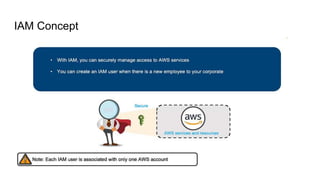
IAM Concept
Key IAM Features
● Users
● Groups
● Policies
● Roles
Users
● An IAM user is an identity with an associated credential and permissions attached
to it.
● This could be an actual person who is a user, or it could be an application that is a
user.
● With IAM, you can securely manage access to AWS services by creating an IAM
user name for each employee in your organization.
● Each IAM user is associated with only one AWS account.
● By default, a newly created user is not authorized to perform any action in AWS.
● The advantage of having one-to-one user specification is that you can individually
assign permissions to each user.
Group
● A collection of IAM users is an IAM group.
● You can use IAM groups to specify permissions for multiple users so that any
permissions applied to the group are applied to the individual users in that
group as well.
● You set permissions for the group, and those permissions are automatically
applied to all the users in the group.
● If you add another user to the group, the new user will automatically inherit all
the policies and the permissions already assigned to that group.
Policies
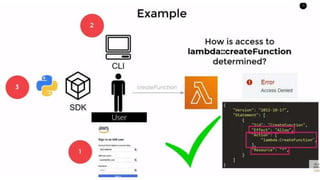
● An IAM policy sets permission and controls access to AWS resources.
● Policies are stored in AWS as JSON documents.
● Permissions specify who has access to the resources and what actions they
can perform.
Policy: AmazonS3ReadOnlyAccess
{
"Version": "2012-10-17", == This indicates the version of the policy language being used
"Statement": [ == This is an array of statements that define the permissions granted by the policy.
{
"Effect": "Allow", == This is the effect of the statement, which is set to "Allow." It means that this policy allows the
specified actions on the specified resources.
"Action": [ This is an array of actions that this policy allows.
"s3:Get*",
"s3:List*",
"s3:Describe*",
"s3-object-lambda:Get*",
"s3-object-lambda:List*"
],
"Resource": "*" == The asterisk (*) is a wildcard, meaning that this policy allows the specified actions on all S3
}
]
}
Roles
● An IAM role is a set of permissions that define what actions are allowed and
denied by an entity in the AWS console.
● It is similar to a user in that it can be accessed by any type of entity (an
individual or AWS service). Role permissions are temporary credentials.
IAM Best Practices
● Monitor and log IAM activity.
● Use IAM Access Analyzer.
● Implement strong password policies.
● Follow the principle of separation of duties.
● Establish a strong naming convention.
● Leverage IAM policy summaries.
● Stay informed about AWS security features and updates.

Identity Access Management presented by Techserverglobal

  • 1.
  • 2.
    Agenda ● Introduction toIAM ● IAM Concepts ● Key IAM Features ● IAM Best Practices
  • 3.
    Introduction AWS Identity andAccess Management (IAM) is a web service that helps you securely control access to AWS resources. With IAM, you can centrally manage permissions that control which AWS resources users can access. You use IAM to control who is authenticated (signed in) and authorized (has permissions) to use resources.
  • 4.
  • 5.
    Key IAM Features ●Users ● Groups ● Policies ● Roles
  • 6.
    Users ● An IAMuser is an identity with an associated credential and permissions attached to it. ● This could be an actual person who is a user, or it could be an application that is a user. ● With IAM, you can securely manage access to AWS services by creating an IAM user name for each employee in your organization. ● Each IAM user is associated with only one AWS account. ● By default, a newly created user is not authorized to perform any action in AWS. ● The advantage of having one-to-one user specification is that you can individually assign permissions to each user.
  • 7.
    Group ● A collectionof IAM users is an IAM group. ● You can use IAM groups to specify permissions for multiple users so that any permissions applied to the group are applied to the individual users in that group as well. ● You set permissions for the group, and those permissions are automatically applied to all the users in the group. ● If you add another user to the group, the new user will automatically inherit all the policies and the permissions already assigned to that group.
  • 8.
    Policies ● An IAMpolicy sets permission and controls access to AWS resources. ● Policies are stored in AWS as JSON documents. ● Permissions specify who has access to the resources and what actions they can perform.
  • 10.
    Policy: AmazonS3ReadOnlyAccess { "Version": "2012-10-17",== This indicates the version of the policy language being used "Statement": [ == This is an array of statements that define the permissions granted by the policy. { "Effect": "Allow", == This is the effect of the statement, which is set to "Allow." It means that this policy allows the specified actions on the specified resources. "Action": [ This is an array of actions that this policy allows. "s3:Get*", "s3:List*", "s3:Describe*", "s3-object-lambda:Get*", "s3-object-lambda:List*" ], "Resource": "*" == The asterisk (*) is a wildcard, meaning that this policy allows the specified actions on all S3 } ] }
  • 11.
    Roles ● An IAMrole is a set of permissions that define what actions are allowed and denied by an entity in the AWS console. ● It is similar to a user in that it can be accessed by any type of entity (an individual or AWS service). Role permissions are temporary credentials.
  • 13.
    IAM Best Practices ●Monitor and log IAM activity. ● Use IAM Access Analyzer. ● Implement strong password policies. ● Follow the principle of separation of duties. ● Establish a strong naming convention. ● Leverage IAM policy summaries. ● Stay informed about AWS security features and updates.