Automating AWS - Security &
Compliance
Satish Jipster | 13 Sep 2019
● Overview
○ AWS Cloud Security Threats
● AWS Cloud - Security & Compliance - Why Automate?
● AWS Cloud Security - Shared Responsibility Model
● AWS Security Compliance Programs & Artifacts
● AWS Security & Compliance - Service EcoSystem
○ AWS Security Hub
○ AWS Guard Duty
○ AWS Control Tower
○ AWS Macie
○ AWS Config
○ AWS WAF
● AWS Well Architected Framework
● Resources (RE:Inforce 2019)
Agenda
Cloud Security Alliance have identified the following 12 critical issues to cloud security (ranked in order
of severity per survey results) referred to as the “Treacherous 12”
1. Data breaches
2. Insufficient identity, credential, and access management
3. Insecure interfaces and application programming interfaces (APIs)
4. System vulnerabilities
5. Account hijacking
6. Malicious insiders
7. Advanced persistent threats (APTs)
8. Data loss
9. Insufficient due diligence
10. Abuse and nefarious use of cloud services
11. Denial of service (DoS)
12. Shared technology vulnerabilities
13. Bonus cloud threat: Spectre and Meltdown
Top Cloud Security Threats
● Lack of end-end Security Visibility
● 73% of Companies have Critical AWS Security Misconfigurations
● Continuous Compliance & Remediation
● Not Implementing Data Protection Mechanism
● Failure to Enable Logging on All S3 buckets. S3 Bucket Permissions.
● IAM Users Granted Direct Permissions
● Disabled, Not Enabled, or Improperly Configured CloudTrail
● Broad IP Range Access for DB Security Groups
● VPC security groups allow inbound traffic from any IP address
● Network ACLs allow All Inbound Traffic
● Unintentional exposure of Public AMIs with proprietary information
AWS Security - Top 10 Challenges
● Automated Incident Response / Remediation in real-time
● Improves Operational Efficiencies
● Shortage of Cloud Security professionals
● Automation is Faster, Effective, Reliable & Scalable
● Numerous compliance requirements (CIS benchmarks, PCI,
HIPAA).Continuous assessment
WHY Automate Security & Compliance?
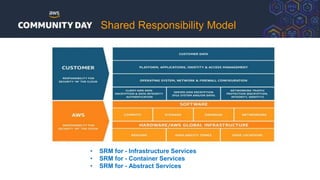
Shared Responsibility Model
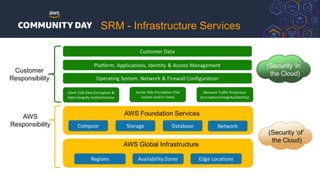
• SRM for - Infrastructure Services
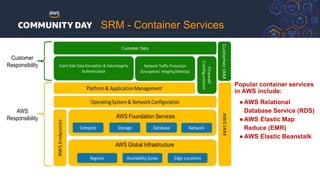
• SRM for - Container Services
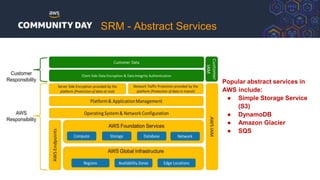
• SRM for - Abstract Services
SRM - Infrastructure Services
Popular container services
in AWS include:
●AWS Relational
Database Service (RDS)
●AWS Elastic Map
Reduce (EMR)
●AWS Elastic Beanstalk
SRM - Container Services
Popular abstract services in
AWS include:
● Simple Storage Service
(S3)
● DynamoDB
● Amazon Glacier
● SQS
SRM - Abstract Services
AWS Security & Compliance
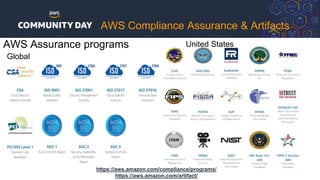
AWS Assurance programs
Global
United States
https://aws.amazon.com/compliance/programs/
https://aws.amazon.com/artifact/
AWS Compliance Assurance & Artifacts
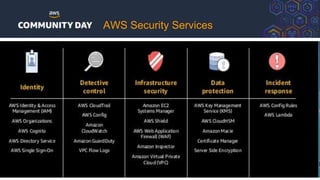
AWS Security Services
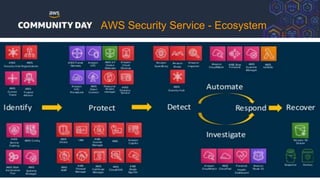
AWS Security Service - Ecosystem
AWS Security Services
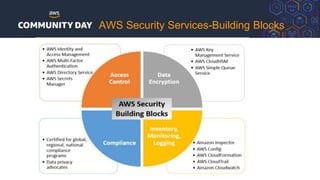
AWS Security Services-Building Blocks
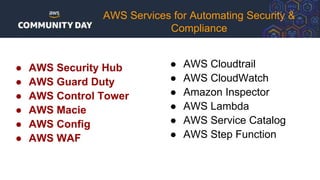
● AWS Security Hub
● AWS Guard Duty
● AWS Control Tower
● AWS Macie
● AWS Config
● AWS WAF
AWS Services for Automating Security &
Compliance
● AWS Cloudtrail
● AWS CloudWatch
● Amazon Inspector
● AWS Lambda
● AWS Service Catalog
● AWS Step Function
AWS Security Hub
AWS Security Hub - How it works
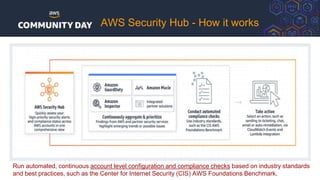
Run automated, continuous account level configuration and compliance checks based on industry standards
and best practices, such as the Center for Internet Security (CIS) AWS Foundations Benchmark.
AWS Security Hub
● Automatically evaluate your compliance against key standards
● Centralize all of your findings via the AWS Security Findings Format
● Prioritize findings using insights for efficient response and remediation.
● Take action on findings automatically or semi-automatically using CloudWatch Events.
● Visibility into security and compliance state in one place across all of your accounts.
● Engineering and security teams are accountable for maintaining compliance.
● CIS AWS foundations standards package included.
● Centralized view across all accounts.
● Provide insight about account security posture to account owners.
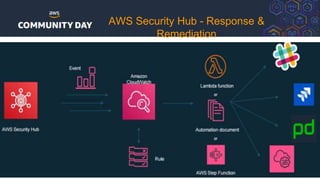
AWS Security Hub - Response &
Remediation
AWS Guard Duty
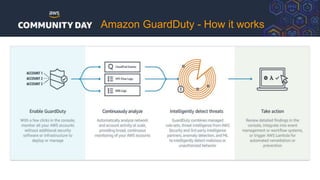
Amazon GuardDuty - How it works
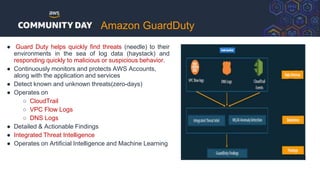
Amazon GuardDuty
● Guard Duty helps quickly find threats (needle) to their
environments in the sea of log data (haystack) and
responding quickly to malicious or suspicious behavior.
● Continuously monitors and protects AWS Accounts,
along with the application and services
● Detect known and unknown threats(zero-days)
● Operates on
○ CloudTrail
○ VPC Flow Logs
○ DNS Logs
● Detailed & Actionable Findings
● Integrated Threat Intelligence
● Operates on Artificial Intelligence and Machine Learning
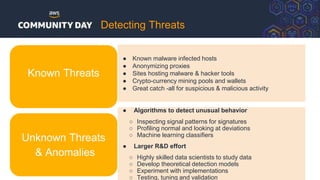
● Known malware infected hosts
● Anonymizing proxies
● Sites hosting malware & hacker tools
● Crypto-currency mining pools and wallets
● Great catch -all for suspicious & malicious activity
● Algorithms to detect unusual behavior
○ Inspecting signal patterns for signatures
○ Profiling normal and looking at deviations
○ Machine learning classifiers
● Larger R&D effort
○ Highly skilled data scientists to study data
○ Develop theoretical detection models
○ Experiment with implementations
○ Testing, tuning and validation
Unknown Threats
& Anomalies
Known Threats
Detecting Threats
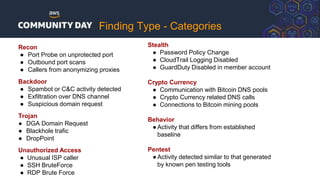
Recon
● Port Probe on unprotected port
● Outbound port scans
● Callers from anonymizing proxies
Backdoor
● Spambot or C&C activity detected
● Exfiltration over DNS channel
● Suspicious domain request
Trojan
● DGA Domain Request
● Blackhole trafic
● DropPoint
Unauthorized Access
● Unusual ISP caller
● SSH BruteForce
● RDP Brute Force
Stealth
● Password Policy Change
● CloudTrail Logging Disabled
● GuardDuty Disabled in member account
Crypto Currency
● Communication with Bitcoin DNS pools
● Crypto Currency related DNS calls
● Connections to Bitcoin mining pools
Behavior
●Activity that differs from established
baseline
Pentest
●Activity detected similar to that generated
by known pen testing tools
Finding Type - Categories
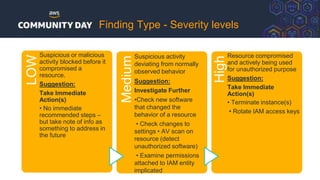
LOW
Suspicious or malicious
activity blocked before it
compromised a
resource.
Suggestion:
Take Immediate
Action(s)
• No immediate
recommended steps –
but take note of info as
something to address in
the future
Medium
Suspicious activity
deviating from normally
observed behavior
Suggestion:
Investigate Further
•Check new software
that changed the
behavior of a resource
• Check changes to
settings • AV scan on
resource (detect
unauthorized software)
• Examine permissions
attached to IAM entity
implicated
High
Resource compromised
and actively being used
for unauthorized purpose
Suggestion:
Take Immediate
Action(s)
• Terminate instance(s)
• Rotate IAM access keys
Finding Type - Severity levels
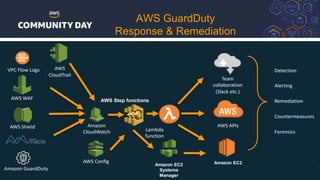
AWS GuardDuty
Response & Remediation
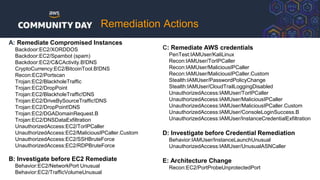
A: Remediate Compromised Instances
Backdoor:EC2/XORDDOS
Backdoor:EC2/Spambot (spam)
Backdoor:EC2/C&CActivity.B!DNS
CryptoCurrency:EC2/BitcoinTool.B!DNS
Recon:EC2/Portscan
Trojan:EC2/BlackholeTraffic
Trojan:EC2/DropPoint
Trojan:EC2/BlackholeTraffic!DNS
Trojan:EC2/DriveBySourceTraffic!DNS
Trojan:EC2/DropPoint!DNS
Trojan:EC2/DGADomainRequest.B
Trojan:EC2/DNSDataExfiltration
UnauthorizedAccess:EC2/TorIPCaller
UnauthorizedAccess:EC2/MaliciousIPCaller.Custom
UnauthorizedAccess:EC2/SSHBruteForce
UnauthorizedAccess:EC2/RDPBruteForce
B: Investigate before EC2 Remediate
Behavior:EC2/NetworkPort Unusual
Behavior:EC2/TrafficVolumeUnusual
C: Remediate AWS credentials
PenTest:IAMUser/KaliLinux
Recon:IAMUser/TorIPCaller
Recon:IAMUser/MaliciousIPCaller
Recon:IAMUser/MaliciousIPCaller.Custom
Stealth:IAMUser/PasswordPolicyChange
Stealth:IAMUser/CloudTrailLoggingDisabled
UnauthorizedAccess:IAMUser/TorIPCaller
UnauthorizedAccess:IAMUser/MaliciousIPCaller
UnauthorizedAccess:IAMUser/MaliciousIPCaller.Custom
UnauthorizedAccess:IAMUser/ConsoleLoginSuccess.B
UnauthorizedAccess:IAMUser/InstanceCredentialExfiltration
D: Investigate before Credential Remediation
Behavior:IAMUser/InstanceLaunchUnusual
UnauthorizedAccess:IAMUser/UnusualASNCaller
E: Architecture Change
Recon:EC2/PortProbeUnprotectedPort
Remediation Actions
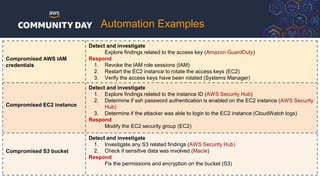
Automation Examples
Compromised AWS IAM
credentials
Detect and investigate
Explore findings related to the access key (Amazon GuardDuty)
Respond
1. Revoke the IAM role sessions (IAM)
2. Restart the EC2 instance to rotate the access keys (EC2)
3. Verify the access keys have been rotated (Systems Manager)
Compromised EC2 instance
Detect and investigate
1. Explore findings related to the instance ID (AWS Security Hub)
2. Determine if ssh password authentication is enabled on the EC2 instance (AWS Security
Hub)
3. Determine if the attacker was able to login to the EC2 instance (CloudWatch logs)
Respond
Modify the EC2 security group (EC2)
Compromised S3 bucket
Detect and investigate
1. Investigate any S3 related findings (AWS Security Hub)
2. Check if sensitive data was involved (Macie)
Respond
Fix the permissions and encryption on the bucket (S3)
AWS Control Tower
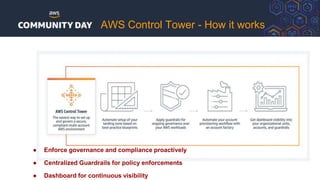
AWS Control Tower - How it works
● Enforce governance and compliance proactively
● Centralized Guardrails for policy enforcements
● Dashboard for continuous visibility
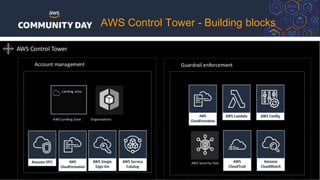
AWS Control Tower - Building blocks
Amazon Macie
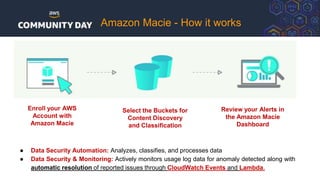
Enroll your AWS
Account with
Amazon Macie
Select the Buckets for
Content Discovery
and Classification
Review your Alerts in
the Amazon Macie
Dashboard
Amazon Macie - How it works
● Data Security Automation: Analyzes, classifies, and processes data
● Data Security & Monitoring: Actively monitors usage log data for anomaly detected along with
automatic resolution of reported issues through CloudWatch Events and Lambda.
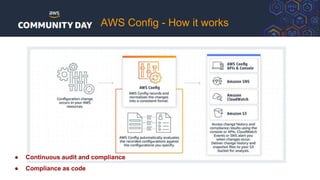
AWS Config
AWS Config - How it works
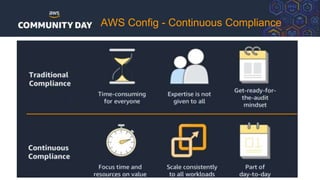
● Continuous audit and compliance
● Compliance as code
AWS Config - Continuous Compliance
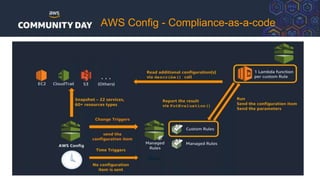
AWS Config - Compliance-as-a-code
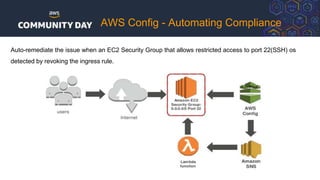
AWS Config - Automating Compliance
Auto-remediate the issue when an EC2 Security Group that allows restricted access to port 22(SSH) os
detected by revoking the ingress rule.
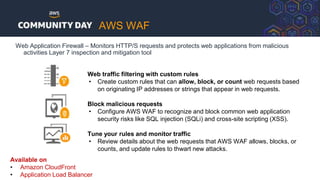
AWS WAF
Web Application Firewall – Monitors HTTP/S requests and protects web applications from malicious
activities Layer 7 inspection and mitigation tool
Web traffic filtering with custom rules
• Create custom rules that can allow, block, or count web requests based
on originating IP addresses or strings that appear in web requests.
Block malicious requests
• Configure AWS WAF to recognize and block common web application
security risks like SQL injection (SQLi) and cross-site scripting (XSS).
Tune your rules and monitor traffic
• Review details about the web requests that AWS WAF allows, blocks, or
counts, and update rules to thwart new attacks.
Available on
• Amazon CloudFront
• Application Load Balancer
AWS WAF
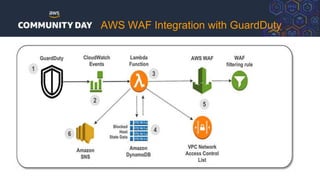
AWS WAF Integration with GuardDuty
AWS Well Architected
Framework & Tool
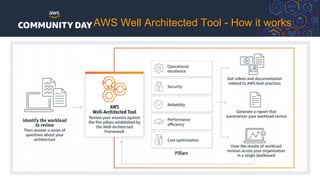
AWS Well Architected Tool - How it works
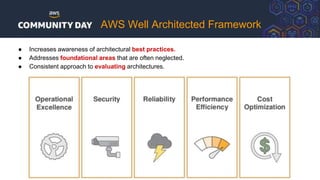
● Increases awareness of architectural best practices.
● Addresses foundational areas that are often neglected.
● Consistent approach to evaluating architectures.
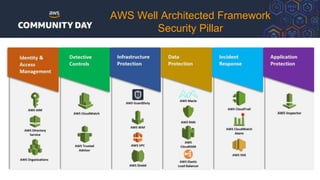
AWS Well Architected Framework
Security Pillar
Resources
AWS Security - Resources
Documentation/
Whitepapers
● AWS Security Documentation
● AWS Cloud Security
● AWS Security and Compliance Quick Reference Guide
● AWS Overview of Security -May 2017
● AWS Security Best Practices – August 2016
● AWS Cloud Adoption Framework – Feb 2017
● AWS Compliance
● AWS Well Architected Framework – July 2019
● Security Pillar - AWS Well Architected Framework – July 2018
Blog/Articles ● AWS Security Blog
● AWS Blog-Security and Compliance
SlideShare/Webinars ● Fundamentals of AWS Security
● AWS Security Deep Dive
● Security Best Practices the Well-Architected Way
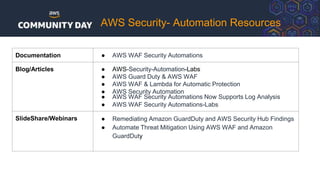
AWS Security- Automation Resources
Documentation ● AWS WAF Security Automations
Blog/Articles ● AWS-Security-Automation-Labs
● AWS Guard Duty & AWS WAF
● AWS WAF & Lambda for Automatic Protection
● AWS Security Automation
● AWS WAF Security Automations Now Supports Log Analysis
● AWS WAF Security Automations-Labs
SlideShare/Webinars ● Remediating Amazon GuardDuty and AWS Security Hub Findings
● Automate Threat Mitigation Using AWS WAF and Amazon
GuardDuty
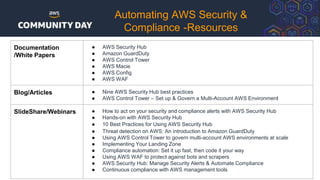
Documentation
/White Papers
● AWS Security Hub
● Amazon GuardDuty
● AWS Control Tower
● AWS Macie
● AWS Config
● AWS WAF
Blog/Articles ● Nine AWS Security Hub best practices
● AWS Control Tower – Set up & Govern a Multi-Account AWS Environment
SlideShare/Webinars ● How to act on your security and compliance alerts with AWS Security Hub
● Hands-on with AWS Security Hub
● 10 Best Practices for Using AWS Security Hub
● Threat detection on AWS: An introduction to Amazon GuardDuty
● Using AWS Control Tower to govern multi-account AWS environments at scale
● Implementing Your Landing Zone
● Compliance automation: Set it up fast, then code it your way
● Using AWS WAF to protect against bots and scrapers
● AWS Security Hub: Manage Security Alerts & Automate Compliance
● Continuous compliance with AWS management tools
Automating AWS Security &
Compliance -Resources
Checkpoint - Dome 9
- Automation & Remediation
Use Cases
DivvyCloud
- Automation & Remediation
Use Cases
BAY AREA
THANK YOU
Q & A

Automating AWS security and compliance

  • 1.
    Automating AWS -Security & Compliance Satish Jipster | 13 Sep 2019
  • 2.
    ● Overview ○ AWSCloud Security Threats ● AWS Cloud - Security & Compliance - Why Automate? ● AWS Cloud Security - Shared Responsibility Model ● AWS Security Compliance Programs & Artifacts ● AWS Security & Compliance - Service EcoSystem ○ AWS Security Hub ○ AWS Guard Duty ○ AWS Control Tower ○ AWS Macie ○ AWS Config ○ AWS WAF ● AWS Well Architected Framework ● Resources (RE:Inforce 2019) Agenda
  • 3.
    Cloud Security Alliancehave identified the following 12 critical issues to cloud security (ranked in order of severity per survey results) referred to as the “Treacherous 12” 1. Data breaches 2. Insufficient identity, credential, and access management 3. Insecure interfaces and application programming interfaces (APIs) 4. System vulnerabilities 5. Account hijacking 6. Malicious insiders 7. Advanced persistent threats (APTs) 8. Data loss 9. Insufficient due diligence 10. Abuse and nefarious use of cloud services 11. Denial of service (DoS) 12. Shared technology vulnerabilities 13. Bonus cloud threat: Spectre and Meltdown Top Cloud Security Threats
  • 4.
    ● Lack ofend-end Security Visibility ● 73% of Companies have Critical AWS Security Misconfigurations ● Continuous Compliance & Remediation ● Not Implementing Data Protection Mechanism ● Failure to Enable Logging on All S3 buckets. S3 Bucket Permissions. ● IAM Users Granted Direct Permissions ● Disabled, Not Enabled, or Improperly Configured CloudTrail ● Broad IP Range Access for DB Security Groups ● VPC security groups allow inbound traffic from any IP address ● Network ACLs allow All Inbound Traffic ● Unintentional exposure of Public AMIs with proprietary information AWS Security - Top 10 Challenges
  • 5.
    ● Automated IncidentResponse / Remediation in real-time ● Improves Operational Efficiencies ● Shortage of Cloud Security professionals ● Automation is Faster, Effective, Reliable & Scalable ● Numerous compliance requirements (CIS benchmarks, PCI, HIPAA).Continuous assessment WHY Automate Security & Compliance?
  • 6.
    Shared Responsibility Model •SRM for - Infrastructure Services • SRM for - Container Services • SRM for - Abstract Services
  • 7.
  • 8.
    Popular container services inAWS include: ●AWS Relational Database Service (RDS) ●AWS Elastic Map Reduce (EMR) ●AWS Elastic Beanstalk SRM - Container Services
  • 9.
    Popular abstract servicesin AWS include: ● Simple Storage Service (S3) ● DynamoDB ● Amazon Glacier ● SQS SRM - Abstract Services
  • 10.
    AWS Security &Compliance
  • 11.
    AWS Assurance programs Global UnitedStates https://aws.amazon.com/compliance/programs/ https://aws.amazon.com/artifact/ AWS Compliance Assurance & Artifacts
  • 12.
  • 13.
  • 14.
  • 15.
  • 16.
    ● AWS SecurityHub ● AWS Guard Duty ● AWS Control Tower ● AWS Macie ● AWS Config ● AWS WAF AWS Services for Automating Security & Compliance ● AWS Cloudtrail ● AWS CloudWatch ● Amazon Inspector ● AWS Lambda ● AWS Service Catalog ● AWS Step Function
  • 17.
  • 18.
    AWS Security Hub- How it works Run automated, continuous account level configuration and compliance checks based on industry standards and best practices, such as the Center for Internet Security (CIS) AWS Foundations Benchmark.
  • 19.
    AWS Security Hub ●Automatically evaluate your compliance against key standards ● Centralize all of your findings via the AWS Security Findings Format ● Prioritize findings using insights for efficient response and remediation. ● Take action on findings automatically or semi-automatically using CloudWatch Events. ● Visibility into security and compliance state in one place across all of your accounts. ● Engineering and security teams are accountable for maintaining compliance. ● CIS AWS foundations standards package included. ● Centralized view across all accounts. ● Provide insight about account security posture to account owners.
  • 20.
    AWS Security Hub- Response & Remediation
  • 21.
  • 22.
    Amazon GuardDuty -How it works
  • 23.
    Amazon GuardDuty ● GuardDuty helps quickly find threats (needle) to their environments in the sea of log data (haystack) and responding quickly to malicious or suspicious behavior. ● Continuously monitors and protects AWS Accounts, along with the application and services ● Detect known and unknown threats(zero-days) ● Operates on ○ CloudTrail ○ VPC Flow Logs ○ DNS Logs ● Detailed & Actionable Findings ● Integrated Threat Intelligence ● Operates on Artificial Intelligence and Machine Learning
  • 24.
    ● Known malwareinfected hosts ● Anonymizing proxies ● Sites hosting malware & hacker tools ● Crypto-currency mining pools and wallets ● Great catch -all for suspicious & malicious activity ● Algorithms to detect unusual behavior ○ Inspecting signal patterns for signatures ○ Profiling normal and looking at deviations ○ Machine learning classifiers ● Larger R&D effort ○ Highly skilled data scientists to study data ○ Develop theoretical detection models ○ Experiment with implementations ○ Testing, tuning and validation Unknown Threats & Anomalies Known Threats Detecting Threats
  • 25.
    Recon ● Port Probeon unprotected port ● Outbound port scans ● Callers from anonymizing proxies Backdoor ● Spambot or C&C activity detected ● Exfiltration over DNS channel ● Suspicious domain request Trojan ● DGA Domain Request ● Blackhole trafic ● DropPoint Unauthorized Access ● Unusual ISP caller ● SSH BruteForce ● RDP Brute Force Stealth ● Password Policy Change ● CloudTrail Logging Disabled ● GuardDuty Disabled in member account Crypto Currency ● Communication with Bitcoin DNS pools ● Crypto Currency related DNS calls ● Connections to Bitcoin mining pools Behavior ●Activity that differs from established baseline Pentest ●Activity detected similar to that generated by known pen testing tools Finding Type - Categories
  • 26.
    LOW Suspicious or malicious activityblocked before it compromised a resource. Suggestion: Take Immediate Action(s) • No immediate recommended steps – but take note of info as something to address in the future Medium Suspicious activity deviating from normally observed behavior Suggestion: Investigate Further •Check new software that changed the behavior of a resource • Check changes to settings • AV scan on resource (detect unauthorized software) • Examine permissions attached to IAM entity implicated High Resource compromised and actively being used for unauthorized purpose Suggestion: Take Immediate Action(s) • Terminate instance(s) • Rotate IAM access keys Finding Type - Severity levels
  • 27.
  • 28.
    A: Remediate CompromisedInstances Backdoor:EC2/XORDDOS Backdoor:EC2/Spambot (spam) Backdoor:EC2/C&CActivity.B!DNS CryptoCurrency:EC2/BitcoinTool.B!DNS Recon:EC2/Portscan Trojan:EC2/BlackholeTraffic Trojan:EC2/DropPoint Trojan:EC2/BlackholeTraffic!DNS Trojan:EC2/DriveBySourceTraffic!DNS Trojan:EC2/DropPoint!DNS Trojan:EC2/DGADomainRequest.B Trojan:EC2/DNSDataExfiltration UnauthorizedAccess:EC2/TorIPCaller UnauthorizedAccess:EC2/MaliciousIPCaller.Custom UnauthorizedAccess:EC2/SSHBruteForce UnauthorizedAccess:EC2/RDPBruteForce B: Investigate before EC2 Remediate Behavior:EC2/NetworkPort Unusual Behavior:EC2/TrafficVolumeUnusual C: Remediate AWS credentials PenTest:IAMUser/KaliLinux Recon:IAMUser/TorIPCaller Recon:IAMUser/MaliciousIPCaller Recon:IAMUser/MaliciousIPCaller.Custom Stealth:IAMUser/PasswordPolicyChange Stealth:IAMUser/CloudTrailLoggingDisabled UnauthorizedAccess:IAMUser/TorIPCaller UnauthorizedAccess:IAMUser/MaliciousIPCaller UnauthorizedAccess:IAMUser/MaliciousIPCaller.Custom UnauthorizedAccess:IAMUser/ConsoleLoginSuccess.B UnauthorizedAccess:IAMUser/InstanceCredentialExfiltration D: Investigate before Credential Remediation Behavior:IAMUser/InstanceLaunchUnusual UnauthorizedAccess:IAMUser/UnusualASNCaller E: Architecture Change Recon:EC2/PortProbeUnprotectedPort Remediation Actions
  • 29.
    Automation Examples Compromised AWSIAM credentials Detect and investigate Explore findings related to the access key (Amazon GuardDuty) Respond 1. Revoke the IAM role sessions (IAM) 2. Restart the EC2 instance to rotate the access keys (EC2) 3. Verify the access keys have been rotated (Systems Manager) Compromised EC2 instance Detect and investigate 1. Explore findings related to the instance ID (AWS Security Hub) 2. Determine if ssh password authentication is enabled on the EC2 instance (AWS Security Hub) 3. Determine if the attacker was able to login to the EC2 instance (CloudWatch logs) Respond Modify the EC2 security group (EC2) Compromised S3 bucket Detect and investigate 1. Investigate any S3 related findings (AWS Security Hub) 2. Check if sensitive data was involved (Macie) Respond Fix the permissions and encryption on the bucket (S3)
  • 30.
  • 31.
    AWS Control Tower- How it works ● Enforce governance and compliance proactively ● Centralized Guardrails for policy enforcements ● Dashboard for continuous visibility
  • 32.
    AWS Control Tower- Building blocks
  • 33.
  • 34.
    Enroll your AWS Accountwith Amazon Macie Select the Buckets for Content Discovery and Classification Review your Alerts in the Amazon Macie Dashboard Amazon Macie - How it works ● Data Security Automation: Analyzes, classifies, and processes data ● Data Security & Monitoring: Actively monitors usage log data for anomaly detected along with automatic resolution of reported issues through CloudWatch Events and Lambda.
  • 35.
  • 36.
    AWS Config -How it works ● Continuous audit and compliance ● Compliance as code
  • 37.
    AWS Config -Continuous Compliance
  • 38.
    AWS Config -Compliance-as-a-code
  • 39.
    AWS Config -Automating Compliance Auto-remediate the issue when an EC2 Security Group that allows restricted access to port 22(SSH) os detected by revoking the ingress rule.
  • 40.
  • 41.
    Web Application Firewall– Monitors HTTP/S requests and protects web applications from malicious activities Layer 7 inspection and mitigation tool Web traffic filtering with custom rules • Create custom rules that can allow, block, or count web requests based on originating IP addresses or strings that appear in web requests. Block malicious requests • Configure AWS WAF to recognize and block common web application security risks like SQL injection (SQLi) and cross-site scripting (XSS). Tune your rules and monitor traffic • Review details about the web requests that AWS WAF allows, blocks, or counts, and update rules to thwart new attacks. Available on • Amazon CloudFront • Application Load Balancer AWS WAF
  • 42.
    AWS WAF Integrationwith GuardDuty
  • 43.
  • 44.
    AWS Well ArchitectedTool - How it works
  • 45.
    ● Increases awarenessof architectural best practices. ● Addresses foundational areas that are often neglected. ● Consistent approach to evaluating architectures. AWS Well Architected Framework
  • 46.
    AWS Well ArchitectedFramework Security Pillar
  • 47.
  • 48.
    AWS Security -Resources Documentation/ Whitepapers ● AWS Security Documentation ● AWS Cloud Security ● AWS Security and Compliance Quick Reference Guide ● AWS Overview of Security -May 2017 ● AWS Security Best Practices – August 2016 ● AWS Cloud Adoption Framework – Feb 2017 ● AWS Compliance ● AWS Well Architected Framework – July 2019 ● Security Pillar - AWS Well Architected Framework – July 2018 Blog/Articles ● AWS Security Blog ● AWS Blog-Security and Compliance SlideShare/Webinars ● Fundamentals of AWS Security ● AWS Security Deep Dive ● Security Best Practices the Well-Architected Way
  • 49.
    AWS Security- AutomationResources Documentation ● AWS WAF Security Automations Blog/Articles ● AWS-Security-Automation-Labs ● AWS Guard Duty & AWS WAF ● AWS WAF & Lambda for Automatic Protection ● AWS Security Automation ● AWS WAF Security Automations Now Supports Log Analysis ● AWS WAF Security Automations-Labs SlideShare/Webinars ● Remediating Amazon GuardDuty and AWS Security Hub Findings ● Automate Threat Mitigation Using AWS WAF and Amazon GuardDuty
  • 50.
    Documentation /White Papers ● AWSSecurity Hub ● Amazon GuardDuty ● AWS Control Tower ● AWS Macie ● AWS Config ● AWS WAF Blog/Articles ● Nine AWS Security Hub best practices ● AWS Control Tower – Set up & Govern a Multi-Account AWS Environment SlideShare/Webinars ● How to act on your security and compliance alerts with AWS Security Hub ● Hands-on with AWS Security Hub ● 10 Best Practices for Using AWS Security Hub ● Threat detection on AWS: An introduction to Amazon GuardDuty ● Using AWS Control Tower to govern multi-account AWS environments at scale ● Implementing Your Landing Zone ● Compliance automation: Set it up fast, then code it your way ● Using AWS WAF to protect against bots and scrapers ● AWS Security Hub: Manage Security Alerts & Automate Compliance ● Continuous compliance with AWS management tools Automating AWS Security & Compliance -Resources
  • 51.
    Checkpoint - Dome9 - Automation & Remediation Use Cases
  • 52.
    DivvyCloud - Automation &Remediation Use Cases
  • 53.