AWS Elastic Beanstalk
Deploy, Scale and Modernize Web Applications
1. AWS Elastic Beanstalk 101
2. Elastic Beanstalk using CDK (Github source code)
3. Gateway to Modernization: Shared ALB to ECS/EKS
🎯 BUILDING MODERN APPLICATIONS
q AWS Elastic Beanstalk 101
q Elastic Beanstalk using CDK
vInfrastructure Provisioning and Configuration
vDeployment, Load Balancing, Auto Scaling
vAutomate Deployment CI/CD
q Gateway to Modernization: Shared Load Balancing
Agenda
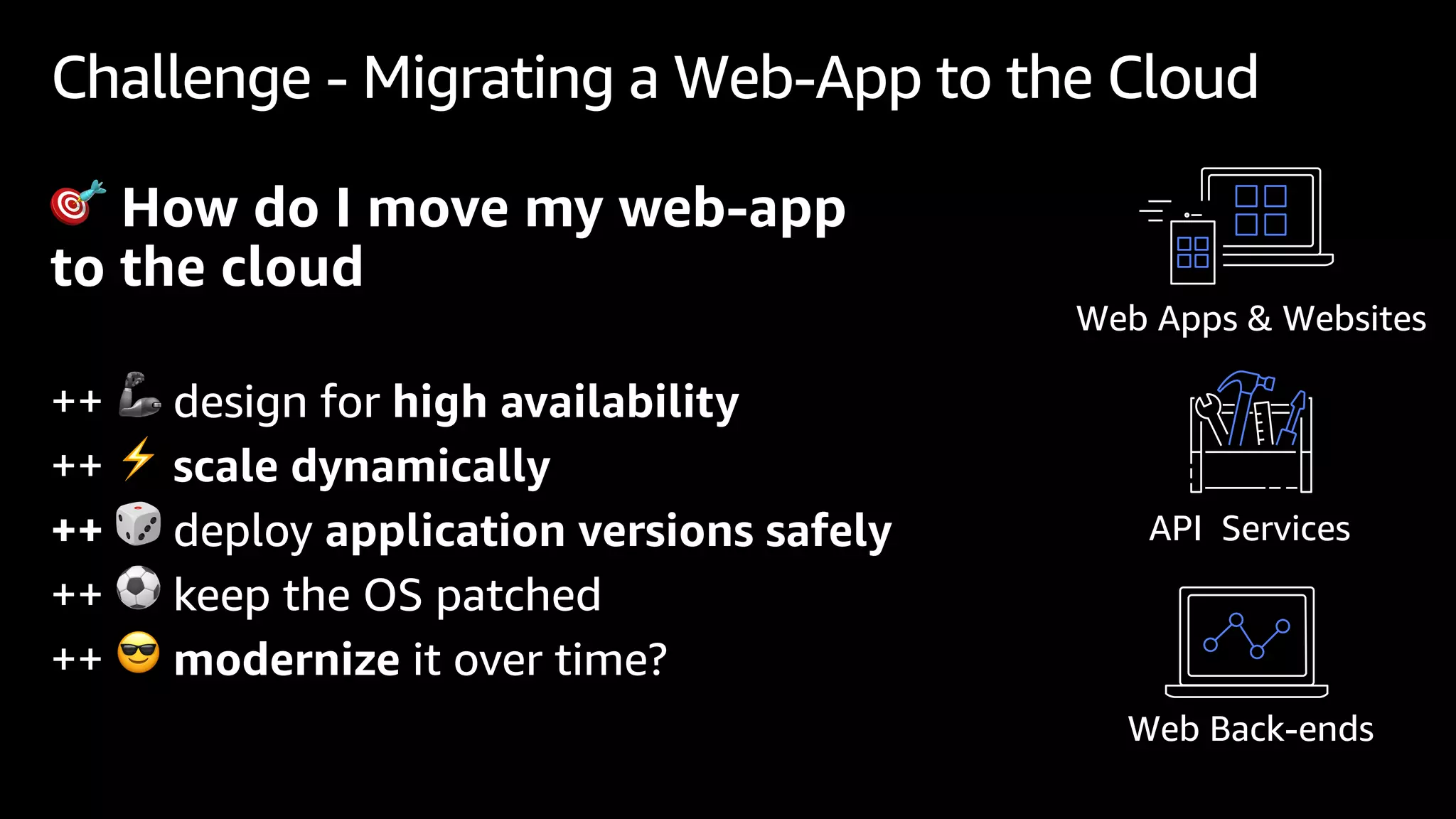
Challenge - Migrating a Web-App to the Cloud
🎯 How do I move my web-app
to the cloud
++ 🦾 design for high availability
++ ⚡ scale dynamically
++ 🎲 deploy application versions safely
++ ⚽ keep the OS patched
++ 😎 modernize it over time?
Web Back-ends
Web Apps & Websites
API Services
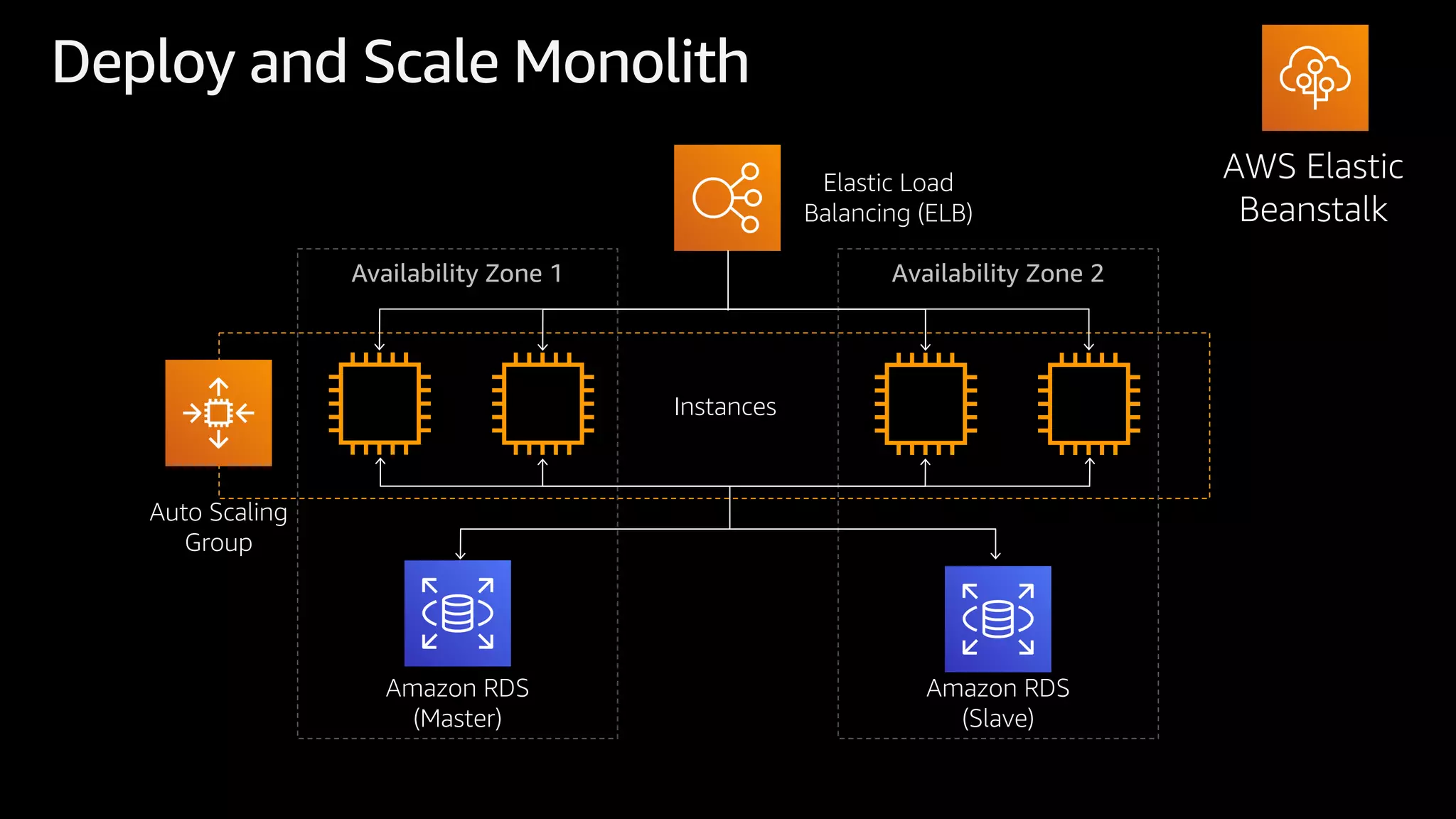
Deploy and Scale Monolith
AWS Elastic
Beanstalk
Availability Zone 1 Availability Zone 2
Auto Scaling
Group
Amazon RDS
(Master)
Instances
Amazon RDS
(Slave)
Elastic Load
Balancing (ELB)
Elastic Beanstalk
A fully Managed Service for
hosting Web Applications
Low management
overhead
Easy to get
started
Gateway to
modernization
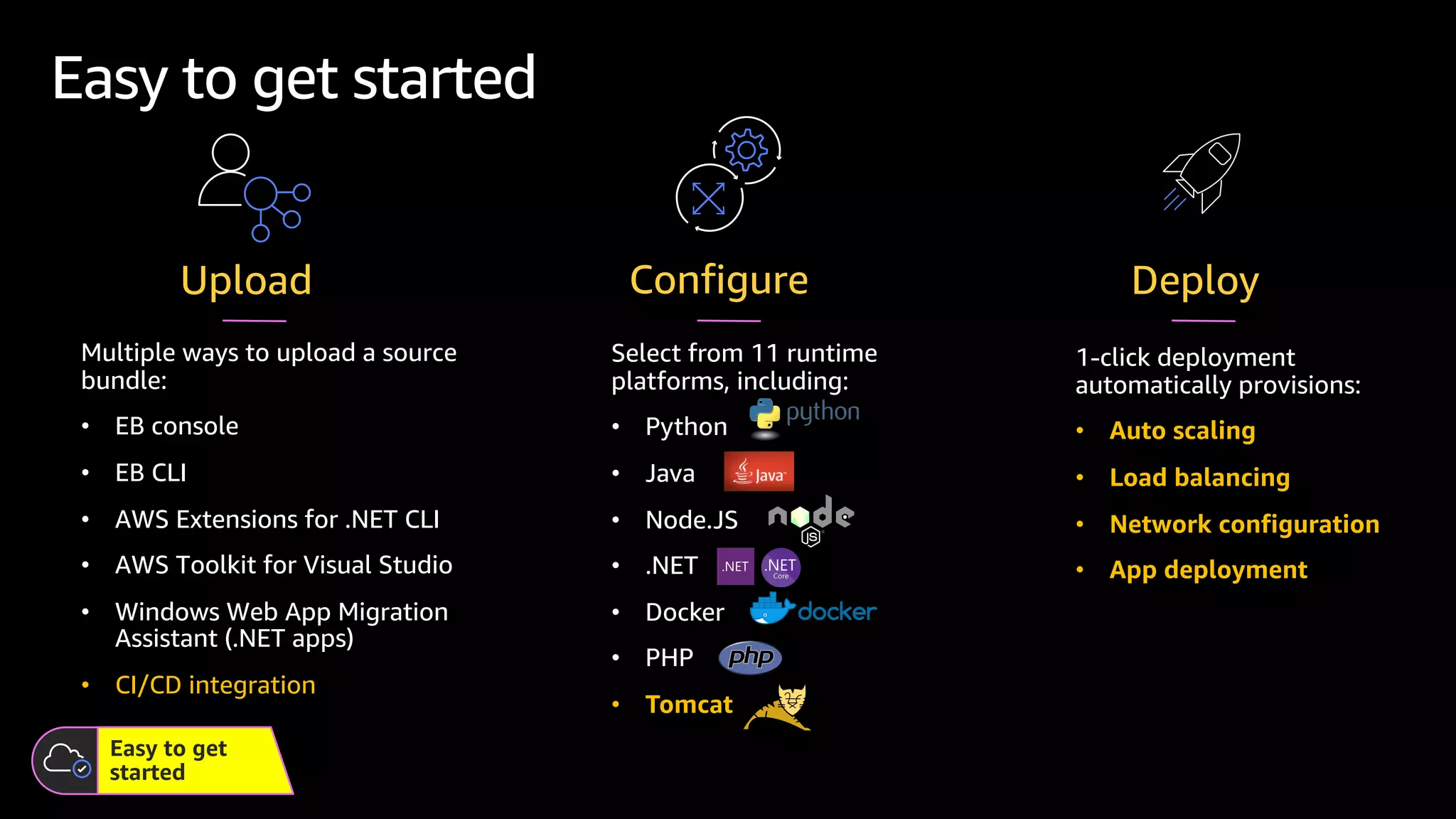
Multiple ways to upload a source
bundle:
• EB console
• EB CLI
• AWS Extensions for .NET CLI
• AWS Toolkit for Visual Studio
• Windows Web App Migration
Assistant (.NET apps)
• CI/CD integration
Easy to get started
Upload
Easy to get
started
1-click deployment
automatically provisions:
• Auto scaling
• Load balancing
• Network configuration
• App deployment
Deploy
Configure
Select from 11 runtime
platforms, including:
• Python
• Java
• Node.JS
• .NET
• Docker
• PHP
• Tomcat
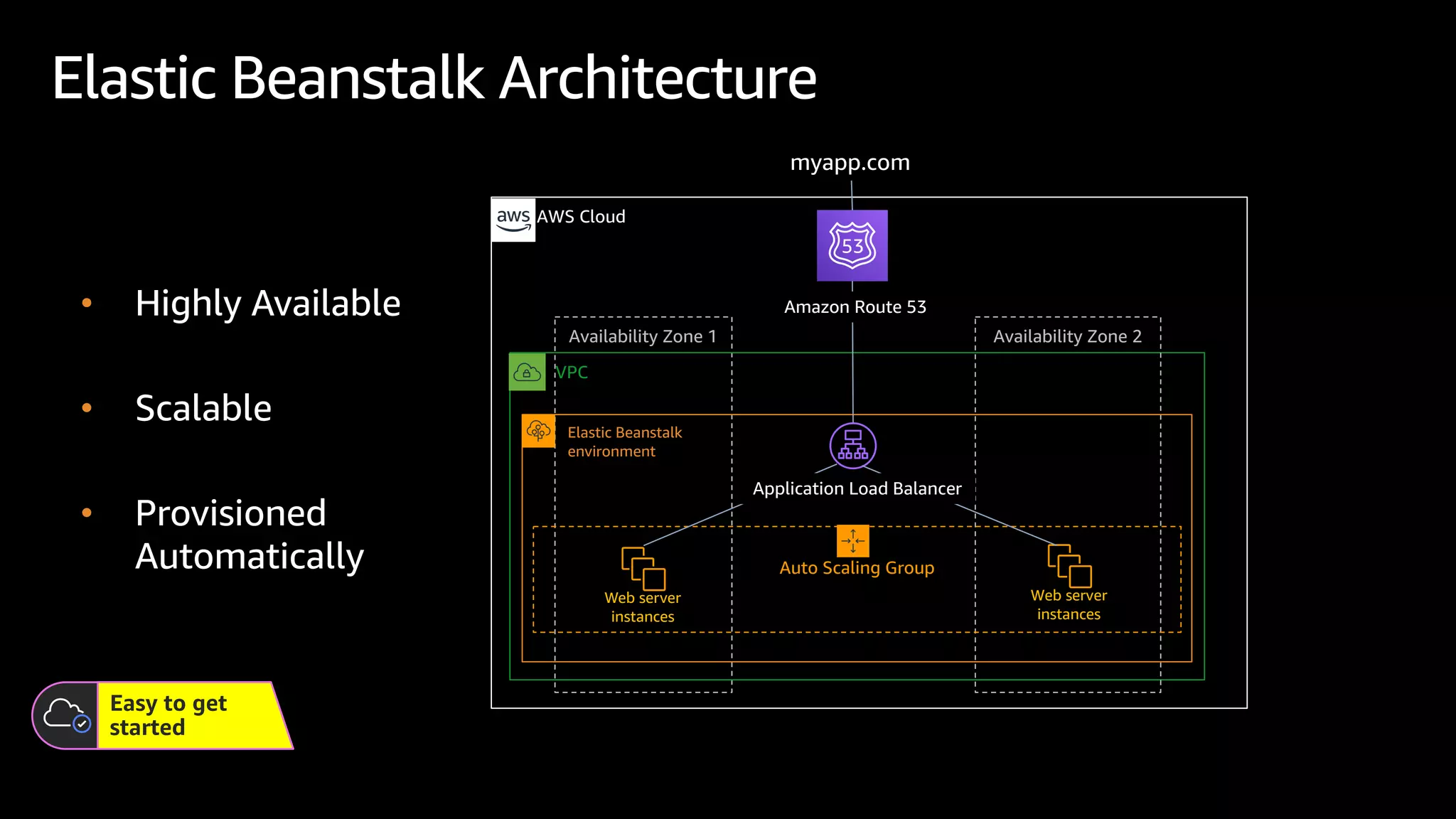
Availability Zone 1
Elastic Beanstalk Architecture
VPC
AWS Cloud
Availability Zone 2
Auto Scaling Group
Elastic Beanstalk
environment
Web server
instances
Web server
instances
myapp.com
Application Load Balancer
Amazon Route 53
Easy to get
started
• Highly Available
• Scalable
• Provisioned
Automatically
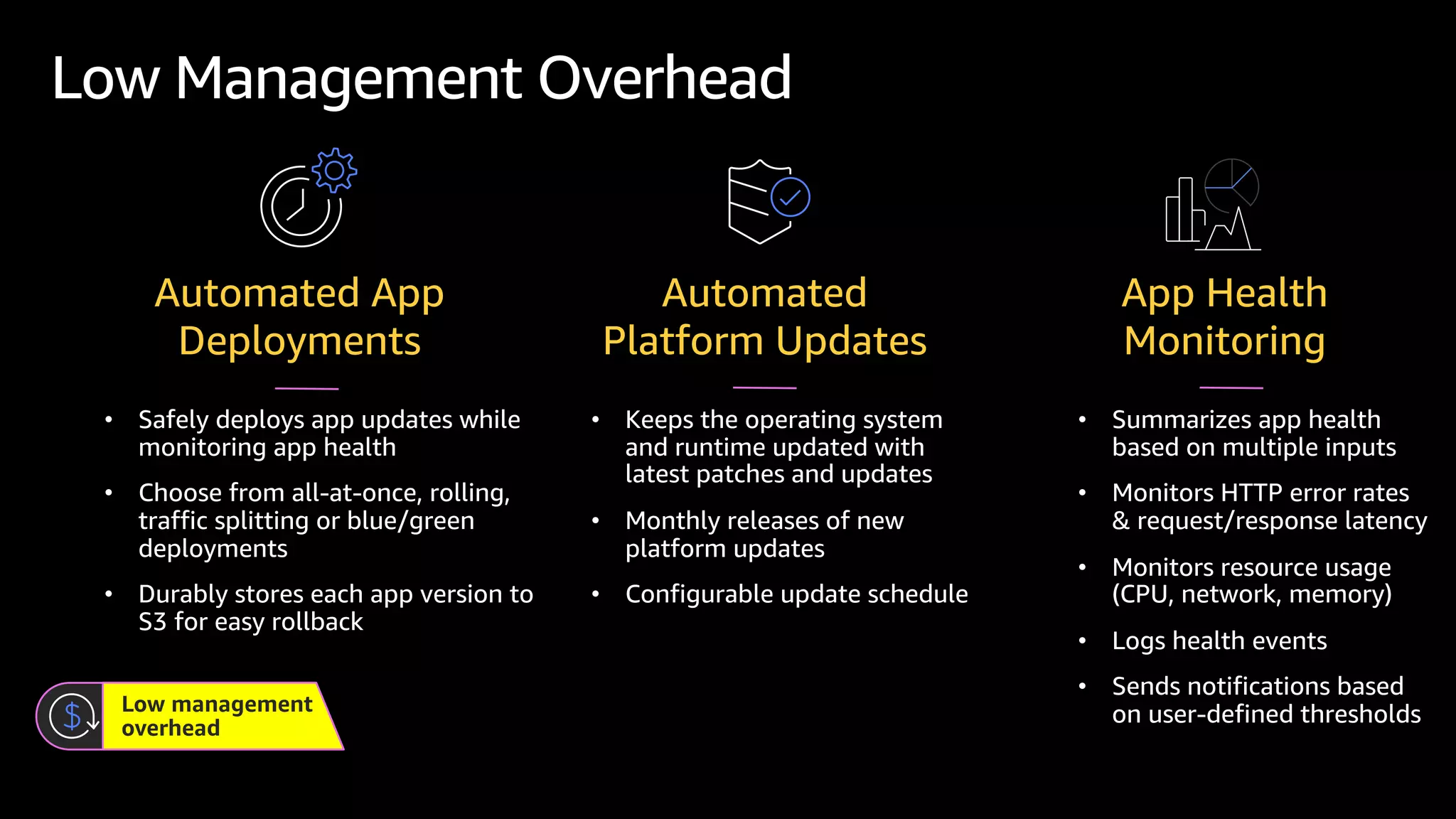
• Safely deploys app updates while
monitoring app health
• Choose from all-at-once, rolling,
traffic splitting or blue/green
deployments
• Durably stores each app version to
S3 for easy rollback
Low management
overhead
Low Management Overhead
Automated App
Deployments
• Keeps the operating system
and runtime updated with
latest patches and updates
• Monthly releases of new
platform updates
• Configurable update schedule
Automated
Platform Updates
• Summarizes app health
based on multiple inputs
• Monitors HTTP error rates
& request/response latency
• Monitors resource usage
(CPU, network, memory)
• Logs health events
• Sends notifications based
on user-defined thresholds
App Health
Monitoring
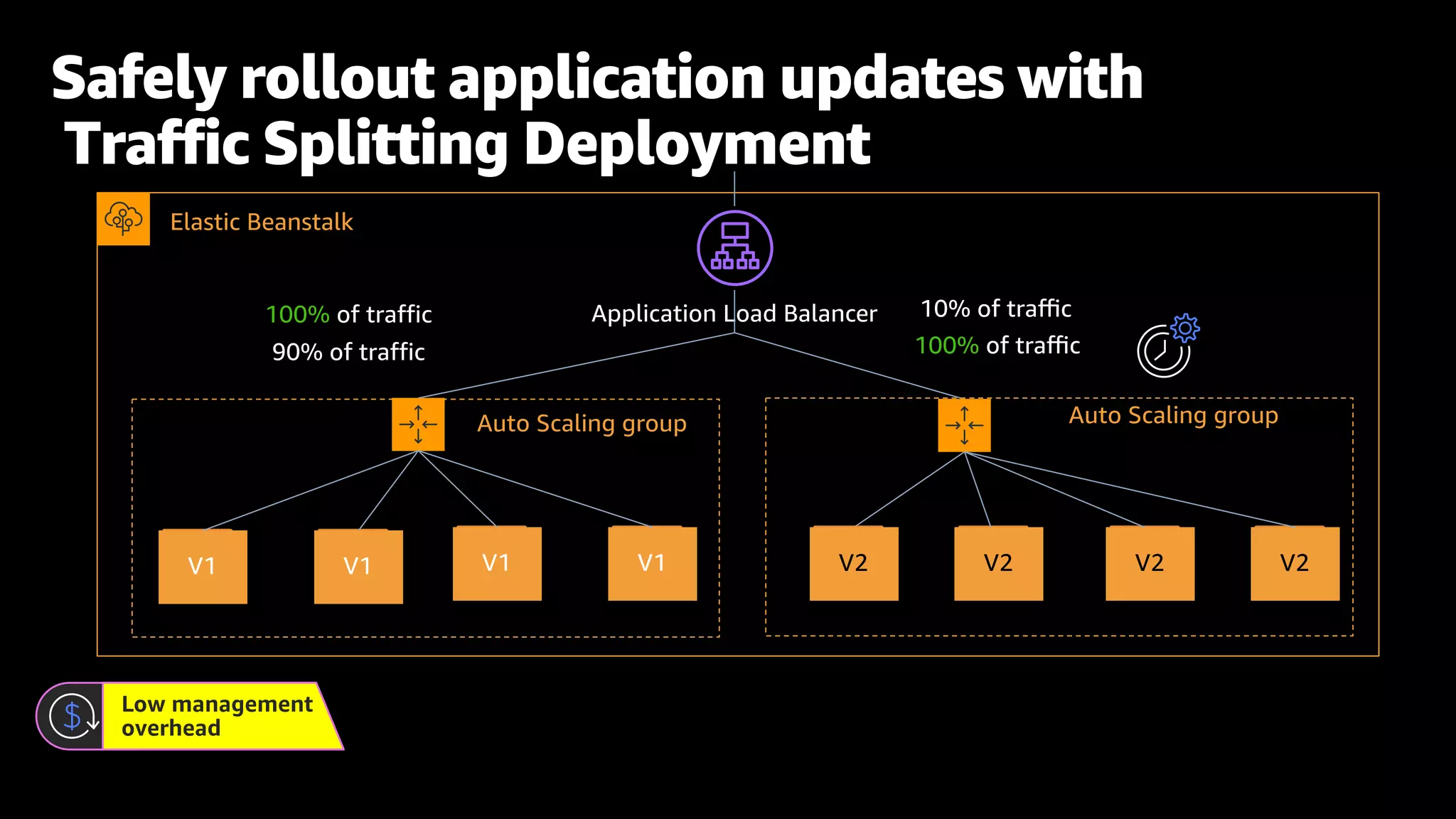
Elastic Beanstalk
Auto Scaling group
Application Load Balancer
V2 V2 V2
V2
Auto Scaling group
90% of traffic
10% of traffic
100% of traffic
100% of traffic
Safely rollout application updates with
Traffic Splitting Deployment
Low management
overhead
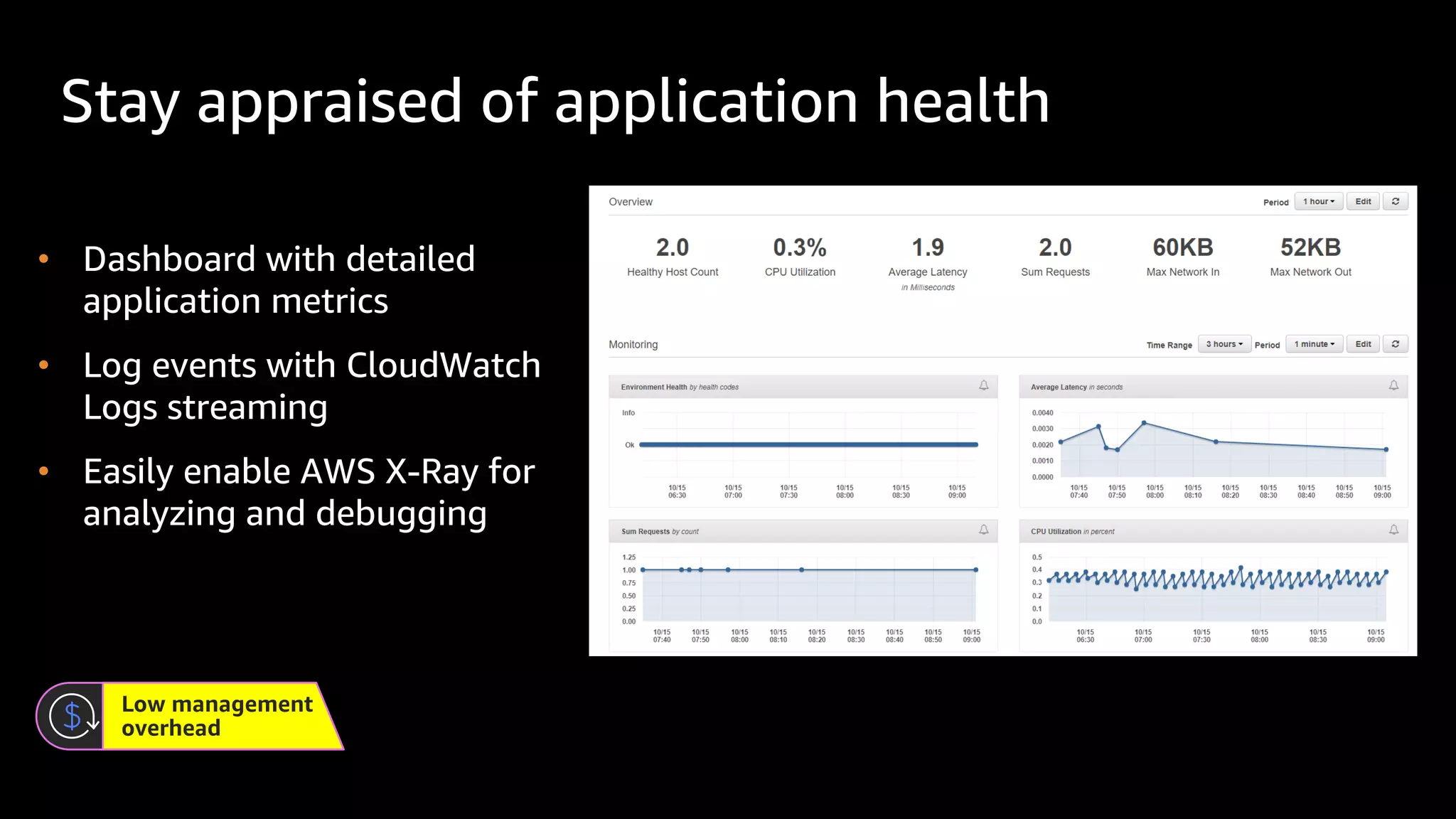
Stay appraised of application health
Low management
overhead
• Dashboard with detailed
application metrics
• Log events with CloudWatch
Logs streaming
• Easily enable AWS X-Ray for
analyzing and debugging
• Automatically deploy to Elastic
Beanstalk with each Code Commit.
• Create a CI/CD pipeline using the
CodePipeline/Elastic Beanstalk
integration.
• Integrate Elastic Beanstalk into an
existing CI/CD pipeline
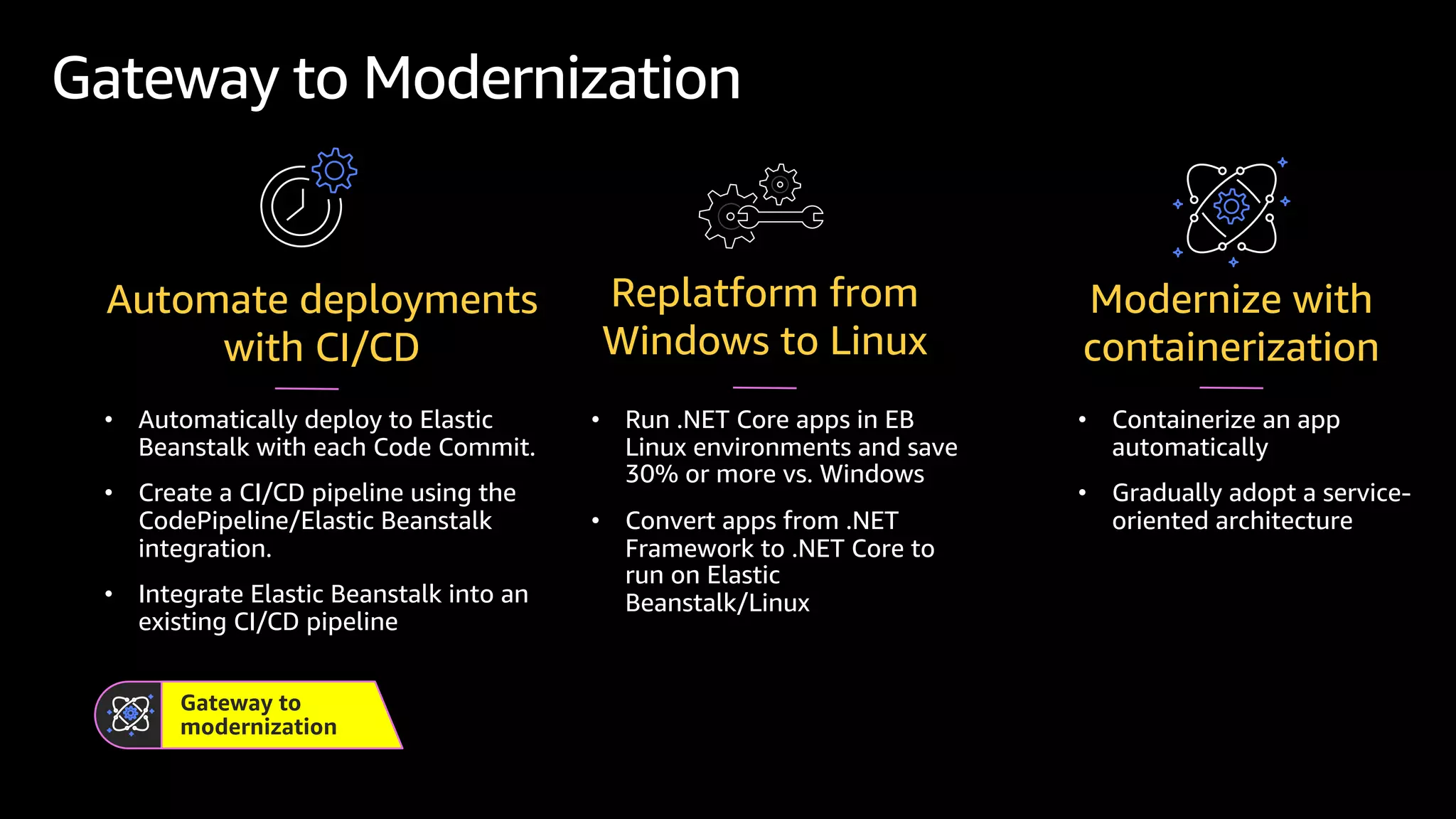
Gateway to Modernization
Automate deployments
with CI/CD
Gateway to
modernization
• Containerize an app
automatically
• Gradually adopt a service-
oriented architecture
Modernize with
containerization
• Run .NET Core apps in EB
Linux environments and save
30% or more vs. Windows
• Convert apps from .NET
Framework to .NET Core to
run on Elastic
Beanstalk/Linux
Replatform from
Windows to Linux
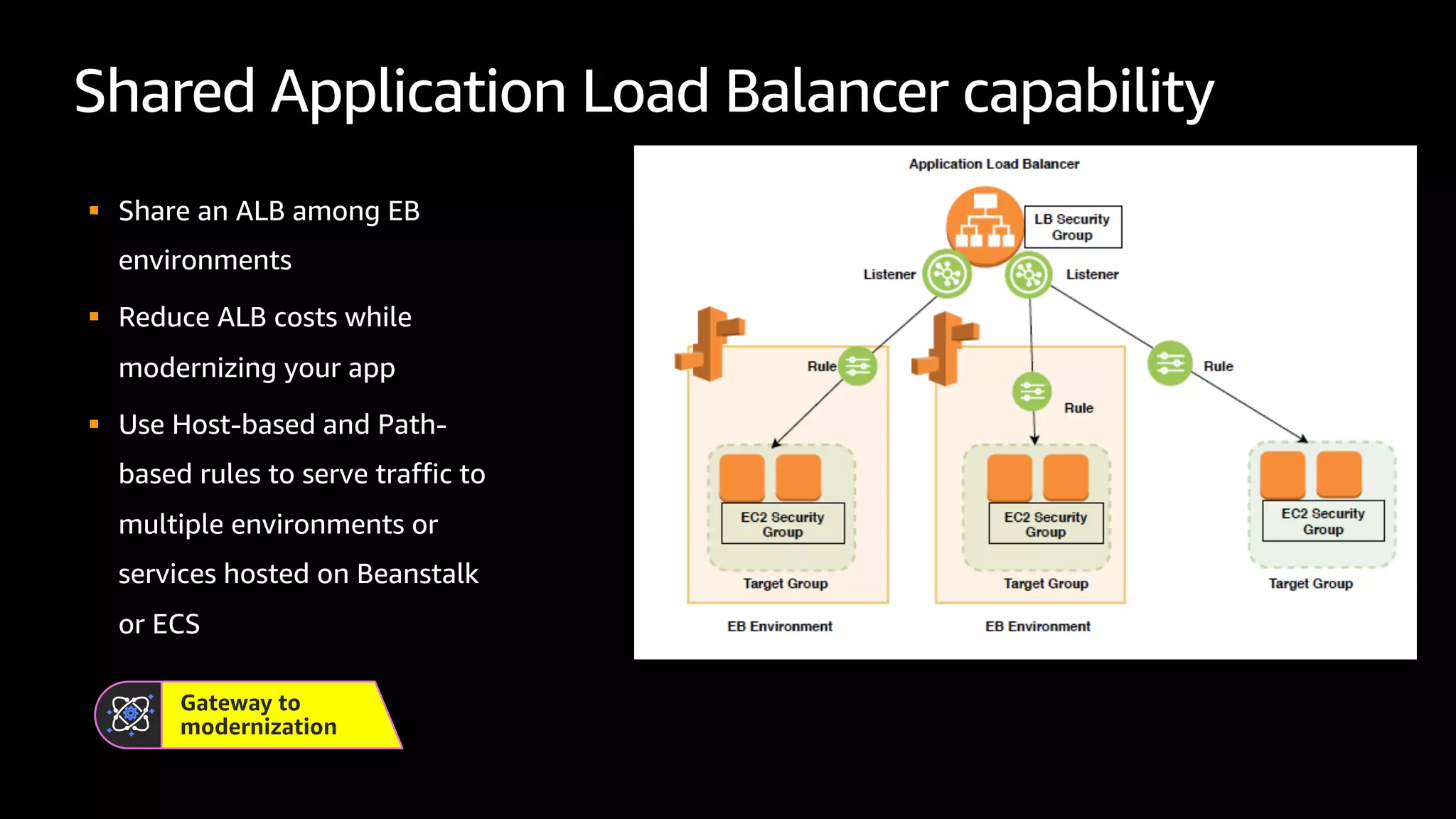
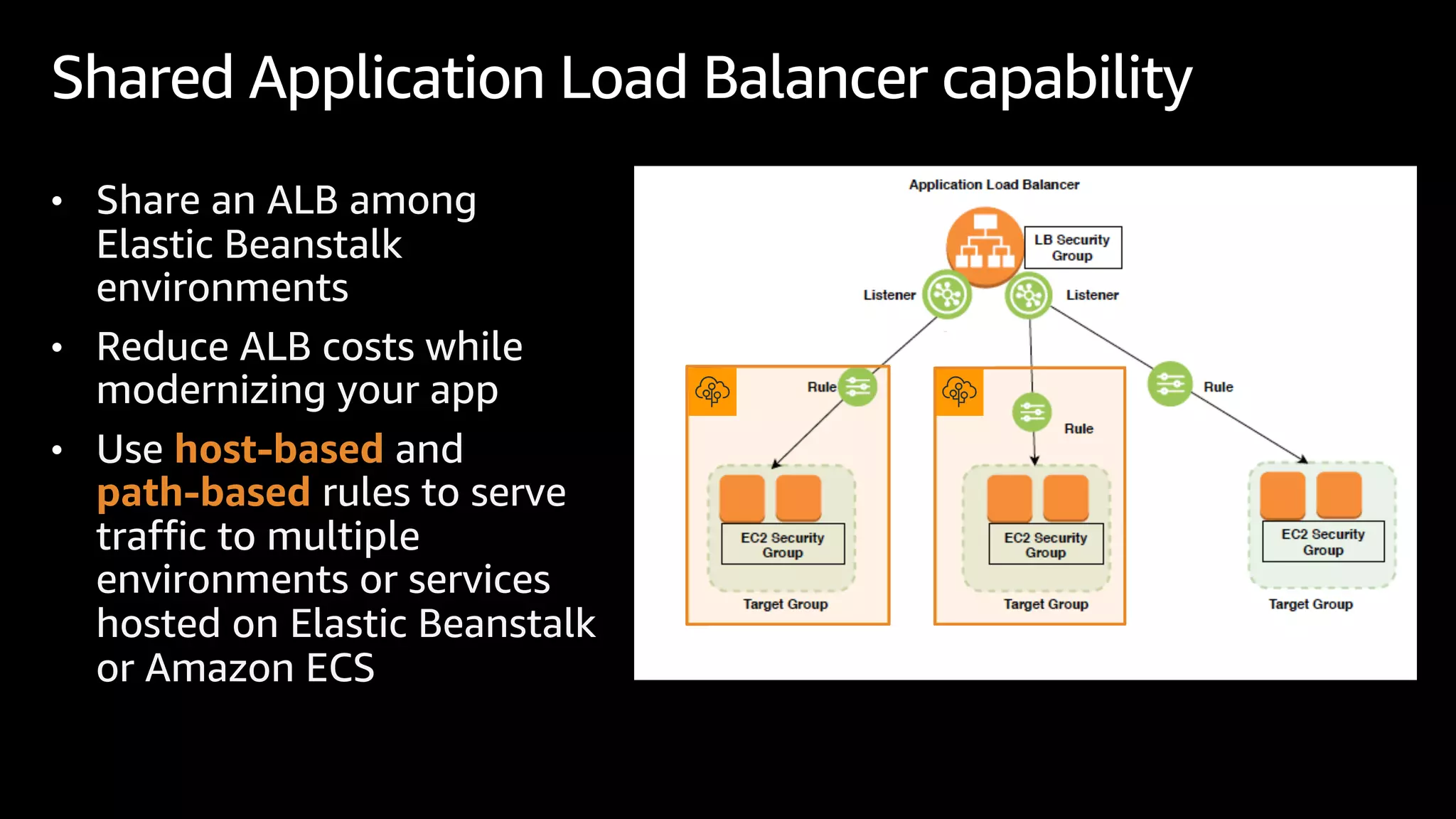
Shared Application Load Balancer capability
§ Share an ALB among EB
environments
§ Reduce ALB costs while
modernizing your app
§ Use Host-based and Path-
based rules to serve traffic to
multiple environments or
services hosted on Beanstalk
or ECS
Gateway to
modernization
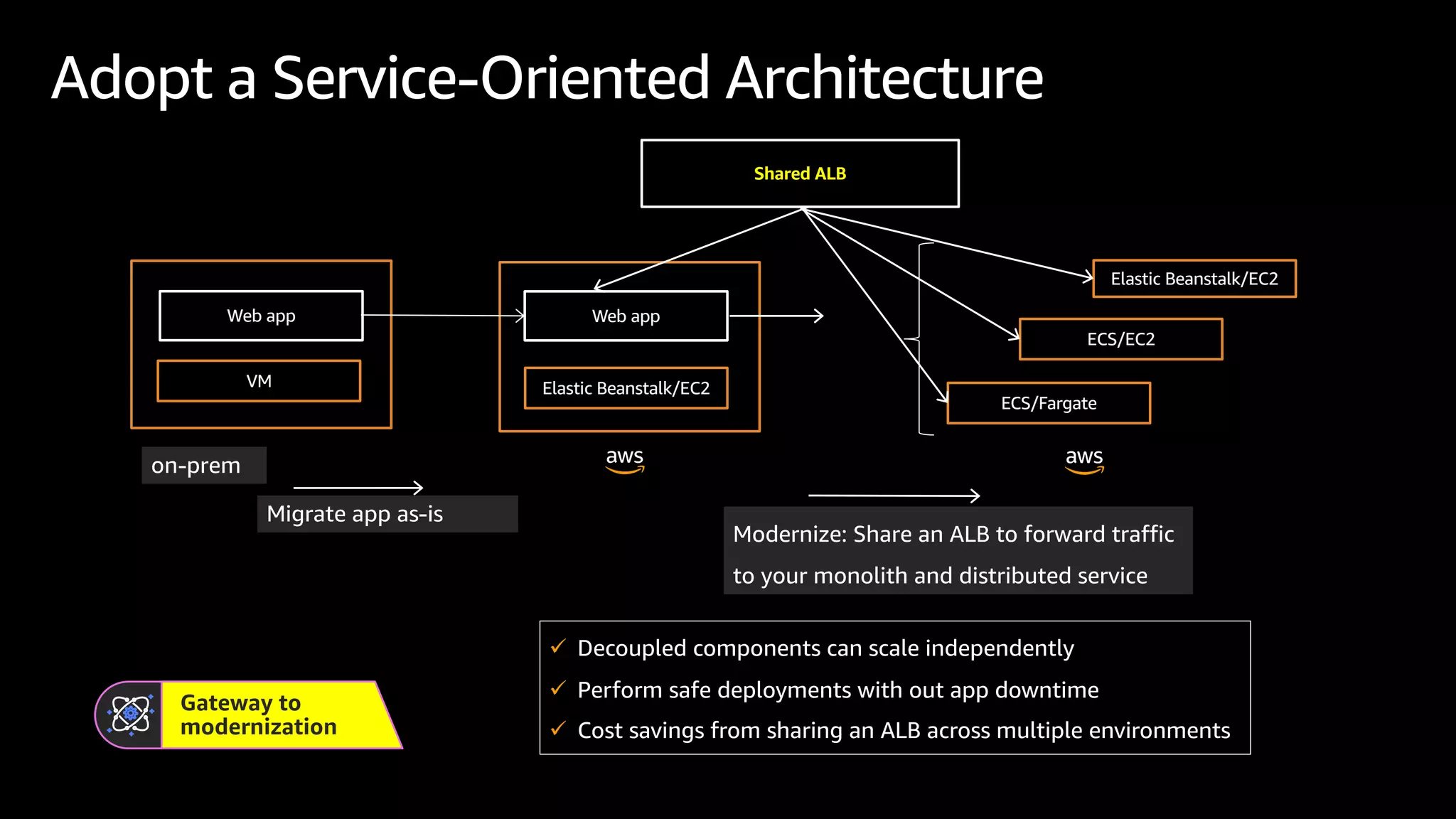
Adopt a Service-Oriented Architecture
Gateway to
modernization
Migrate app as-is
VM
Web app
Elastic Beanstalk/EC2
Web app
Elastic Beanstalk/EC2
Shared ALB
on-prem
ECS/EC2
ECS/Fargate
Modernize: Share an ALB to forward traffic
to your monolith and distributed service
ü Decoupled components can scale independently
ü Perform safe deployments with out app downtime
ü Cost savings from sharing an ALB across multiple environments
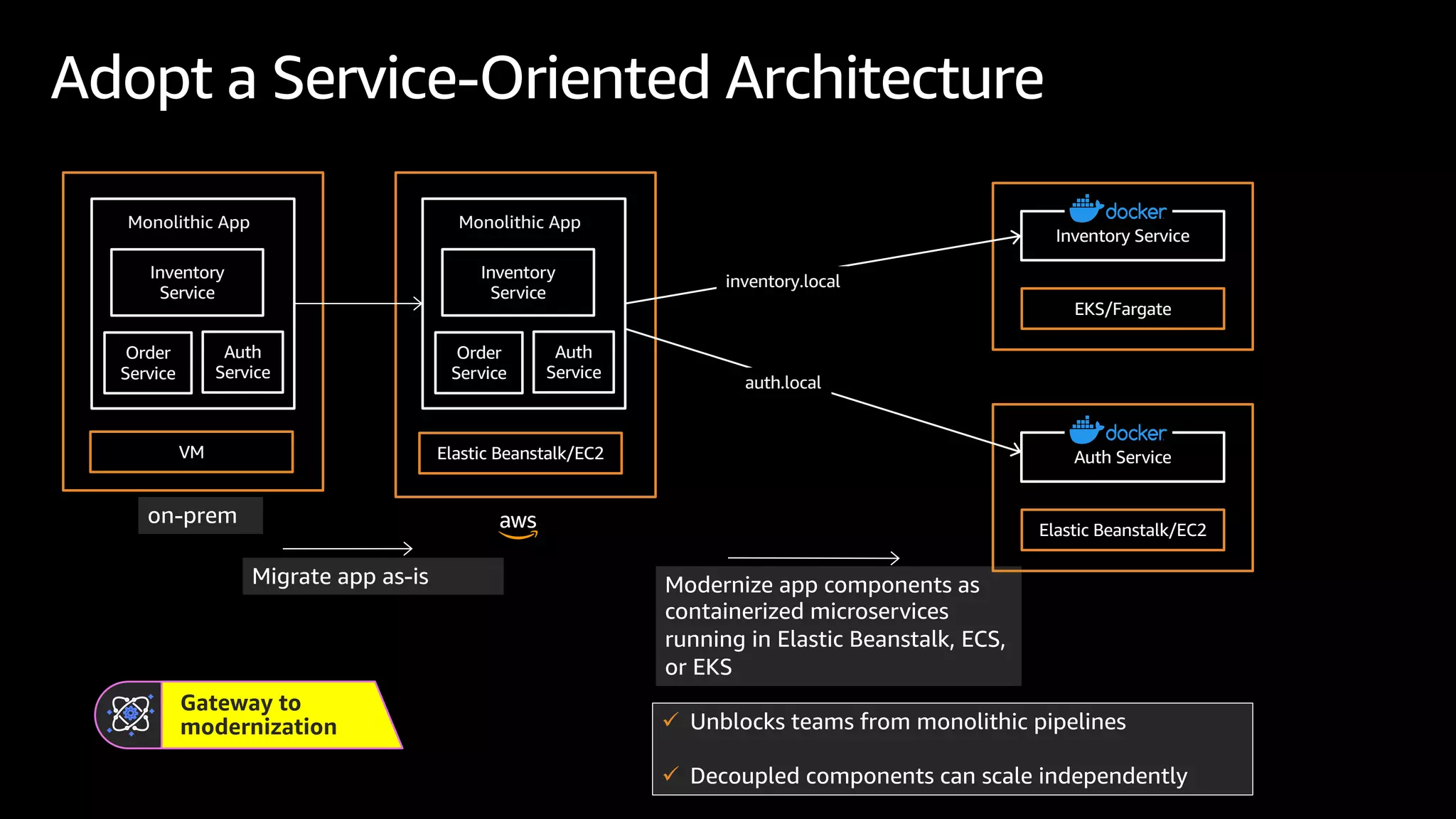
Adopt a Service-Oriented Architecture
Gateway to
modernization
Migrate app as-is
VM Elastic Beanstalk/EC2
on-prem
Modernize app components as
containerized microservices
running in Elastic Beanstalk, ECS,
or EKS
Monolithic App
Inventory
Service
Auth
Service
Order
Service
Monolithic App
Inventory
Service
Auth
Service
Order
Service
EKS/Fargate
Inventory Service
Elastic Beanstalk/EC2
Auth Service
inventory.local
auth.local
ü Unblocks teams from monolithic pipelines
ü Decoupled components can scale independently
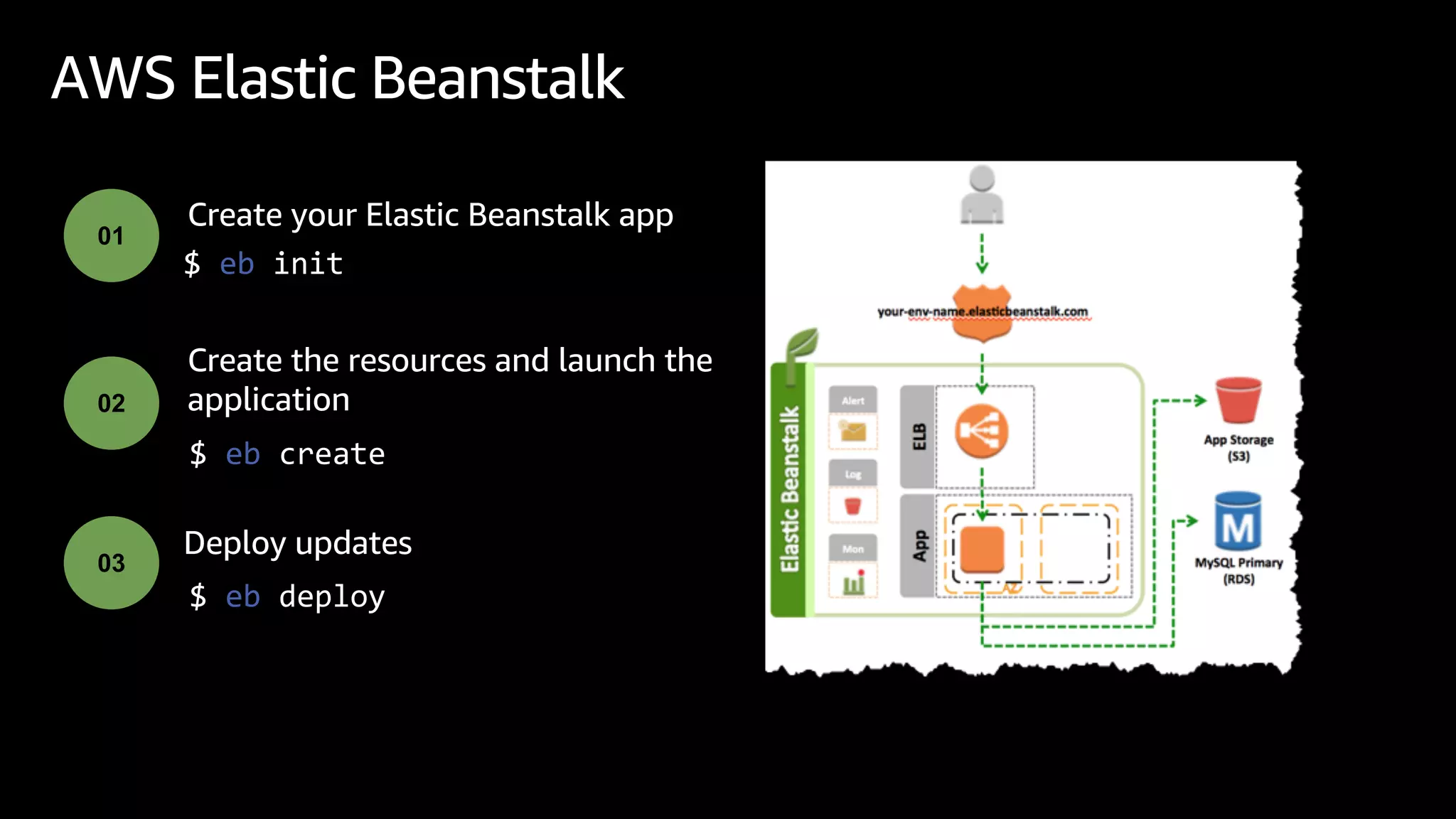
AWS Elastic Beanstalk
$ eb init
Create your Elastic Beanstalk app
01
02
Create the resources and launch the
application
03
$ eb create
Deploy updates
$ eb deploy
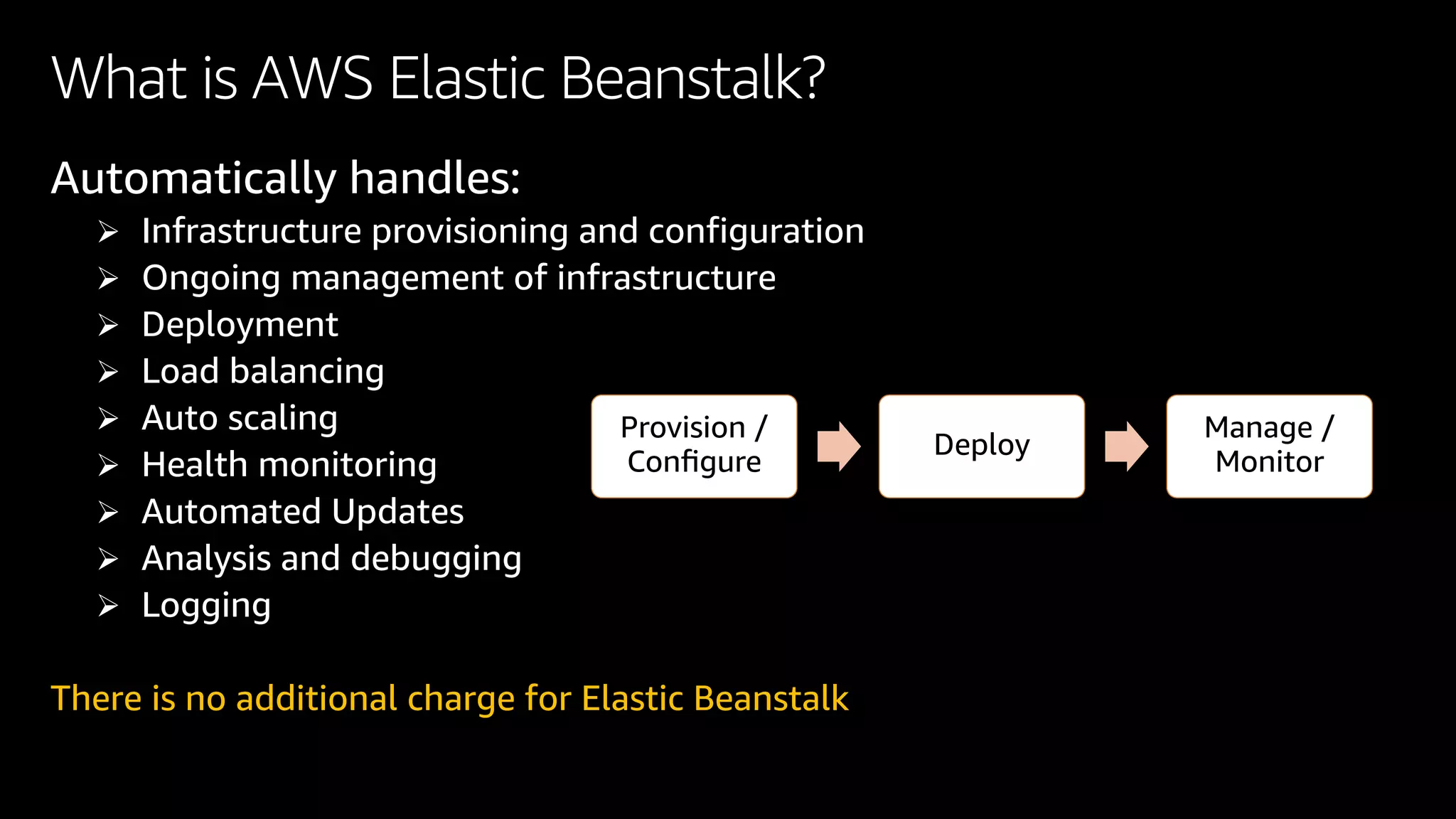
What is AWS Elastic Beanstalk?
Automatically handles:
Ø Infrastructure provisioning and configuration
Ø Ongoing management of infrastructure
Ø Deployment
Ø Load balancing
Ø Auto scaling
Ø Health monitoring
Ø Automated Updates
Ø Analysis and debugging
Ø Logging
There is no additional charge for Elastic Beanstalk
Provision /
Configure
Deploy
Manage /
Monitor
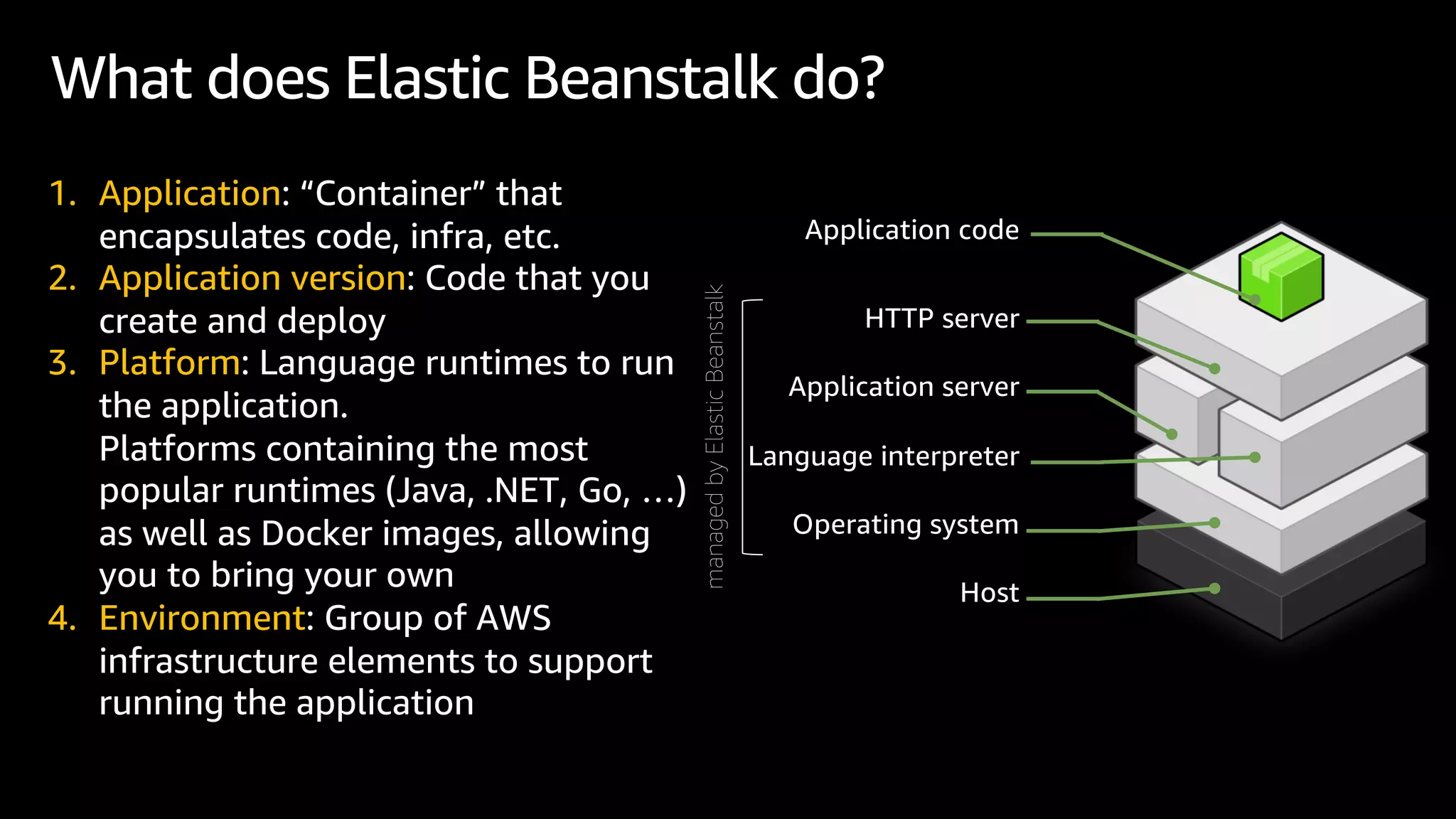
Application code
HTTP server
Application server
Language interpreter
Operating system
Host
1. Application: “Container” that
encapsulates code, infra, etc.
2. Application version: Code that you
create and deploy
3. Platform: Language runtimes to run
the application.
Platforms containing the most
popular runtimes (Java, .NET, Go, …)
as well as Docker images, allowing
you to bring your own
4. Environment: Group of AWS
infrastructure elements to support
running the application
What does Elastic Beanstalk do?
managed
by
Elastic
Beanstalk
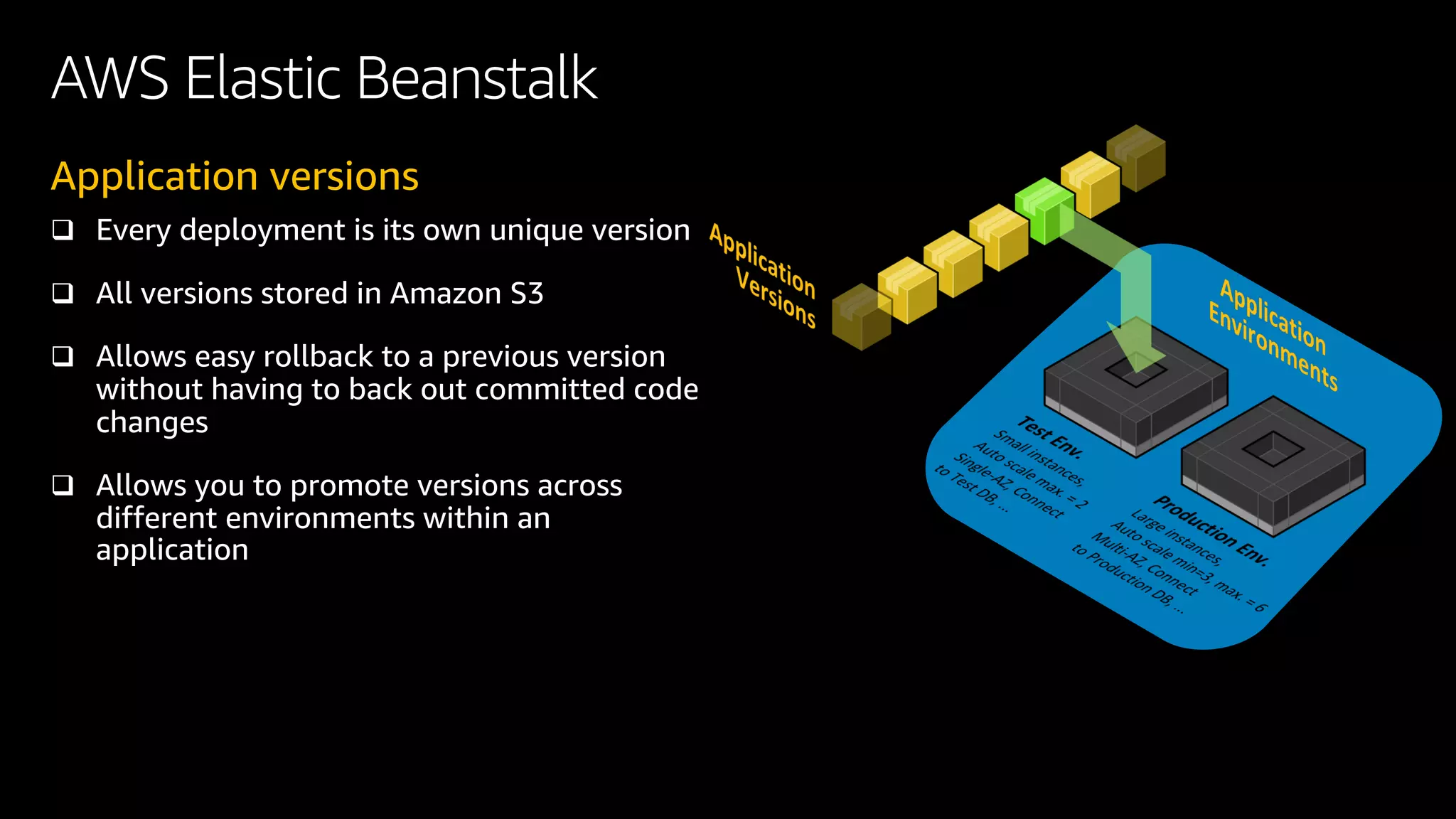
Application versions
q Every deployment is its own unique version
q All versions stored in Amazon S3
q Allows easy rollback to a previous version
without having to back out committed code
changes
q Allows you to promote versions across
different environments within an
application
AWS Elastic Beanstalk
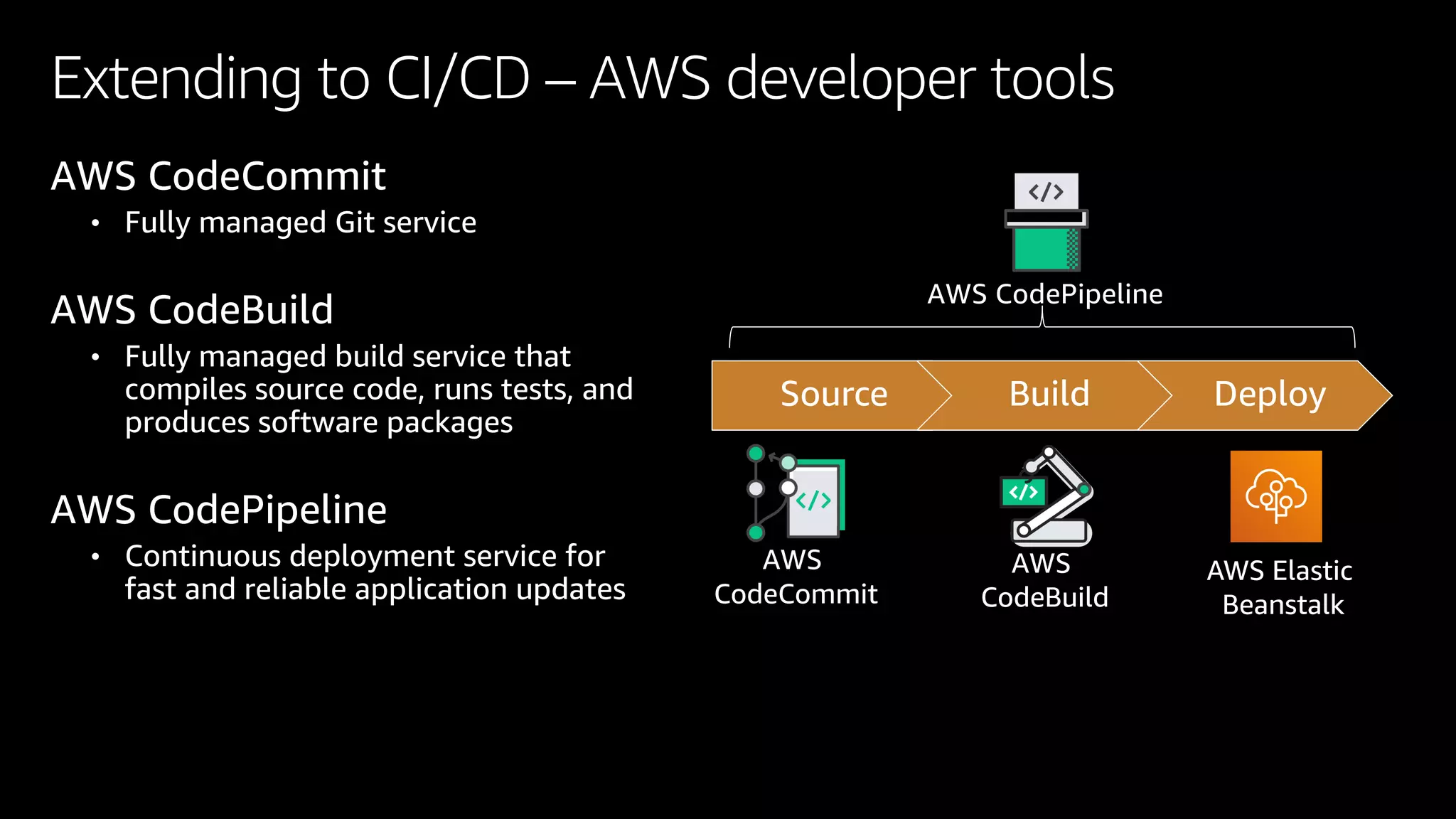
Extending to CI/CD – AWS developer tools
Source Build Deploy
AWS
CodeCommit
AWS
CodeBuild
AWS CodePipeline
AWS CodeCommit
• Fully managed Git service
AWS CodeBuild
• Fully managed build service that
compiles source code, runs tests, and
produces software packages
AWS CodePipeline
• Continuous deployment service for
fast and reliable application updates
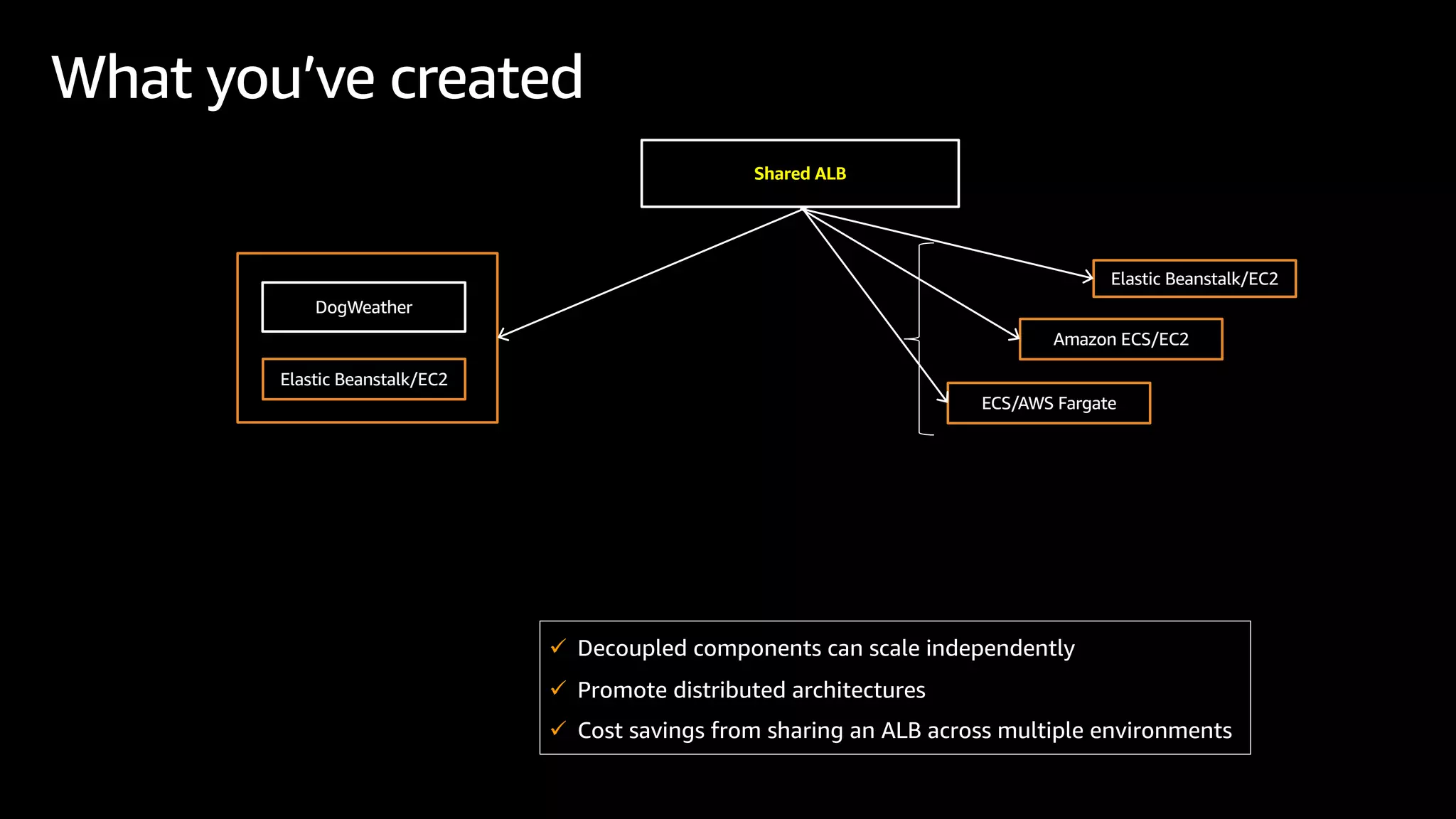
What you’ve created
Elastic Beanstalk/EC2
Shared ALB
Elastic Beanstalk/EC2
DogWeather
Amazon ECS/EC2
ECS/AWS Fargate
ü Decoupled components can scale independently
ü Promote distributed architectures
ü Cost savings from sharing an ALB across multiple environments
• Share an ALB among
Elastic Beanstalk
environments
• Reduce ALB costs while
modernizing your app
• Use host-based and
path-based rules to serve
traffic to multiple
environments or services
hosted on Elastic Beanstalk
or Amazon ECS
Shared Application Load Balancer capability
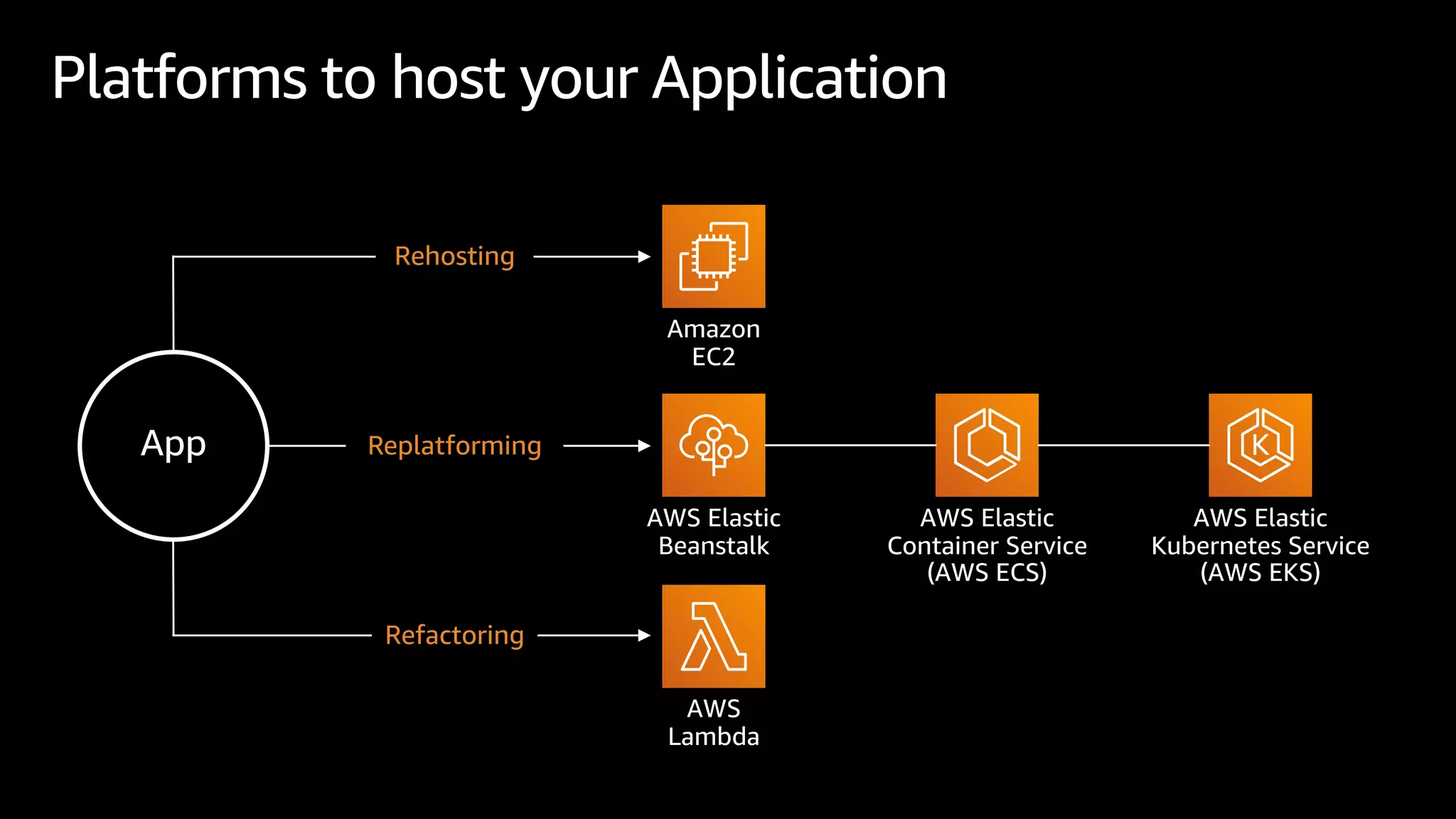
Platforms to host your Application
Amazon
EC2
App
Rehosting
Replatforming
Refactoring
AWS Elastic
Beanstalk
AWS
Lambda
AWS Elastic
Container Service
(AWS ECS)
AWS Elastic
Kubernetes Service
(AWS EKS)
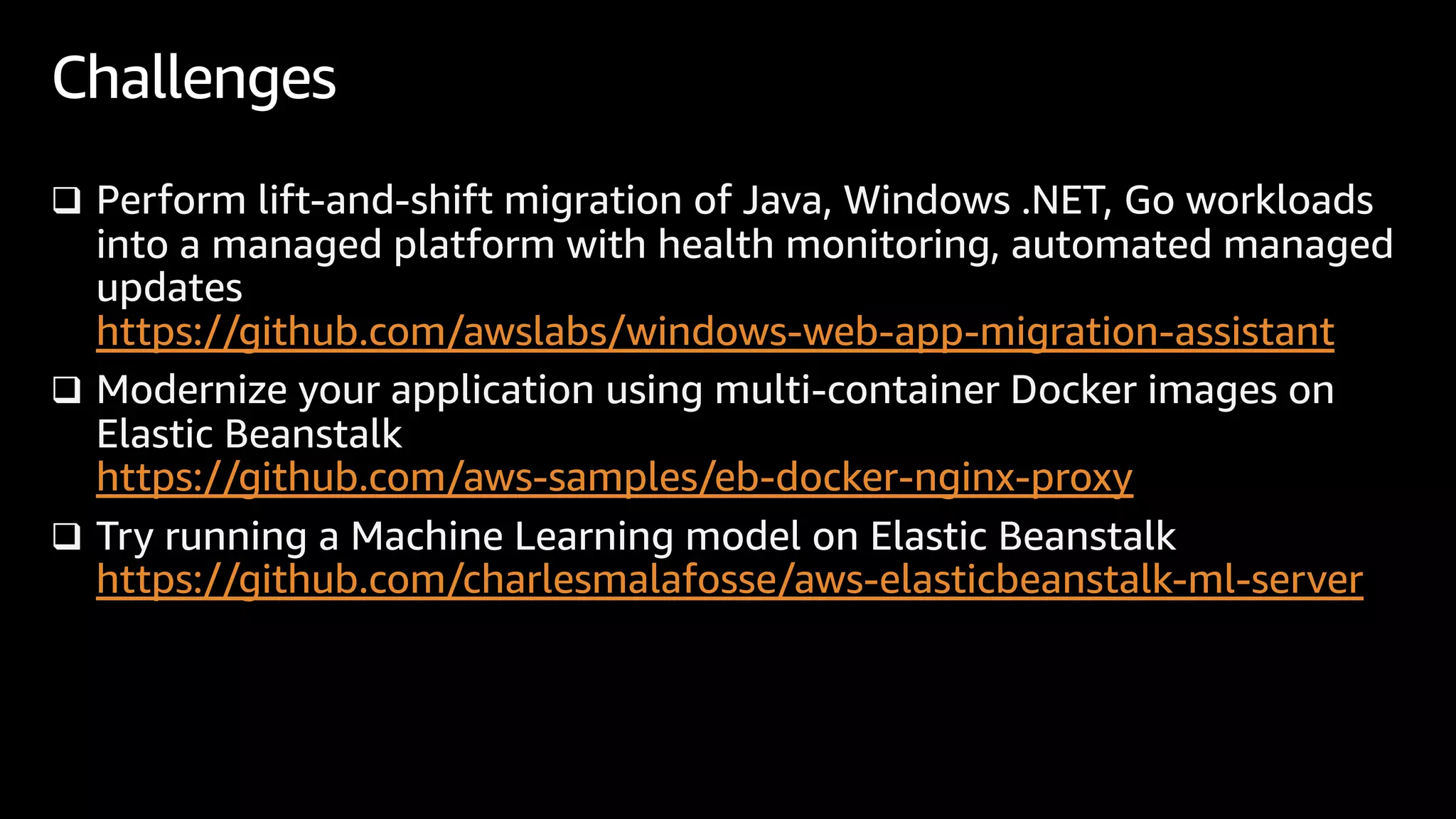
q Perform lift-and-shift migration of Java, Windows .NET, Go workloads
into a managed platform with health monitoring, automated managed
updates
https://github.com/awslabs/windows-web-app-migration-assistant
q Modernize your application using multi-container Docker images on
Elastic Beanstalk
https://github.com/aws-samples/eb-docker-nginx-proxy
q Try running a Machine Learning model on Elastic Beanstalk
https://github.com/charlesmalafosse/aws-elasticbeanstalk-ml-server
Challenges
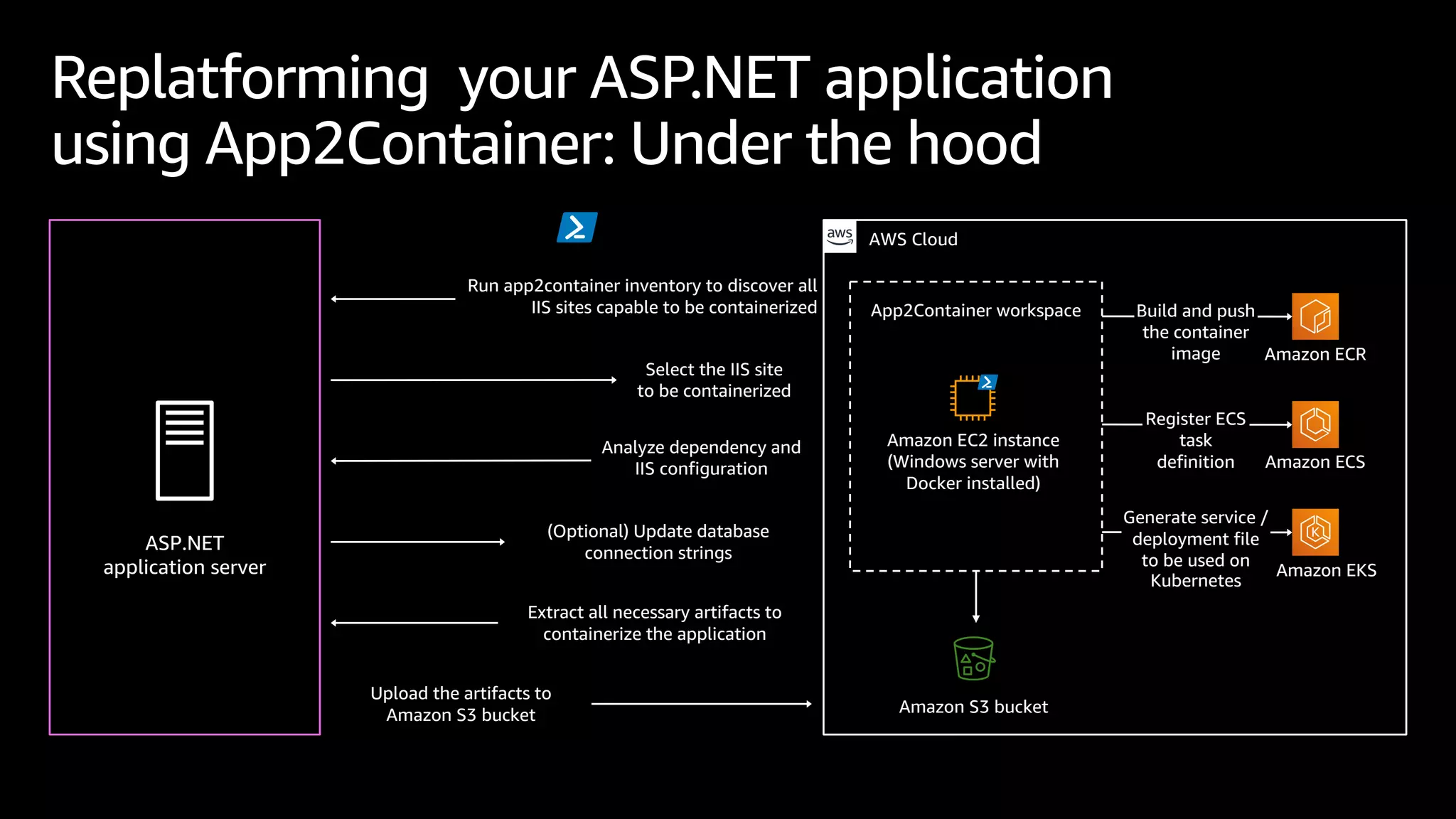
Replatforming your ASP.NET application
using App2Container: Under the hood
ASP.NET
application server
Upload the artifacts to
Amazon S3 bucket
Extract all necessary artifacts to
containerize the application
(Optional) Update database
connection strings
Analyze dependency and
IIS configuration
Select the IIS site
to be containerized
Run app2container inventory to discover all
IIS sites capable to be containerized Build and push
the container
image Amazon ECR
Amazon S3 bucket
AWS Cloud
App2Container workspace
Amazon EC2 instance
(Windows server with
Docker installed)
Amazon ECS
Register ECS
task
definition
Amazon EKS
Generate service /
deployment file
to be used on
Kubernetes
Thank you!
@nnthanh101
https://www.linkedin.com/in/nnthanh
v Facebook Group:
https://www.facebook.com/groups/modernapps/permalink/796401030955458/
v Source Code:
https://github.com/nnthanh101/modernapps/tree/main/elastic-beanstalk

E301 Elastic Beanstalk PaaS

  • 1.
    AWS Elastic Beanstalk Deploy,Scale and Modernize Web Applications 1. AWS Elastic Beanstalk 101 2. Elastic Beanstalk using CDK (Github source code) 3. Gateway to Modernization: Shared ALB to ECS/EKS 🎯 BUILDING MODERN APPLICATIONS
  • 2.
    q AWS ElasticBeanstalk 101 q Elastic Beanstalk using CDK vInfrastructure Provisioning and Configuration vDeployment, Load Balancing, Auto Scaling vAutomate Deployment CI/CD q Gateway to Modernization: Shared Load Balancing Agenda
  • 3.
    Challenge - Migratinga Web-App to the Cloud 🎯 How do I move my web-app to the cloud ++ 🦾 design for high availability ++ ⚡ scale dynamically ++ 🎲 deploy application versions safely ++ ⚽ keep the OS patched ++ 😎 modernize it over time? Web Back-ends Web Apps & Websites API Services
  • 4.
    Deploy and ScaleMonolith AWS Elastic Beanstalk Availability Zone 1 Availability Zone 2 Auto Scaling Group Amazon RDS (Master) Instances Amazon RDS (Slave) Elastic Load Balancing (ELB)
  • 5.
    Elastic Beanstalk A fullyManaged Service for hosting Web Applications Low management overhead Easy to get started Gateway to modernization
  • 6.
    Multiple ways toupload a source bundle: • EB console • EB CLI • AWS Extensions for .NET CLI • AWS Toolkit for Visual Studio • Windows Web App Migration Assistant (.NET apps) • CI/CD integration Easy to get started Upload Easy to get started 1-click deployment automatically provisions: • Auto scaling • Load balancing • Network configuration • App deployment Deploy Configure Select from 11 runtime platforms, including: • Python • Java • Node.JS • .NET • Docker • PHP • Tomcat
  • 7.
    Availability Zone 1 ElasticBeanstalk Architecture VPC AWS Cloud Availability Zone 2 Auto Scaling Group Elastic Beanstalk environment Web server instances Web server instances myapp.com Application Load Balancer Amazon Route 53 Easy to get started • Highly Available • Scalable • Provisioned Automatically
  • 8.
    • Safely deploysapp updates while monitoring app health • Choose from all-at-once, rolling, traffic splitting or blue/green deployments • Durably stores each app version to S3 for easy rollback Low management overhead Low Management Overhead Automated App Deployments • Keeps the operating system and runtime updated with latest patches and updates • Monthly releases of new platform updates • Configurable update schedule Automated Platform Updates • Summarizes app health based on multiple inputs • Monitors HTTP error rates & request/response latency • Monitors resource usage (CPU, network, memory) • Logs health events • Sends notifications based on user-defined thresholds App Health Monitoring
  • 9.
    Elastic Beanstalk Auto Scalinggroup Application Load Balancer V2 V2 V2 V2 Auto Scaling group 90% of traffic 10% of traffic 100% of traffic 100% of traffic Safely rollout application updates with Traffic Splitting Deployment Low management overhead
  • 10.
    Stay appraised ofapplication health Low management overhead • Dashboard with detailed application metrics • Log events with CloudWatch Logs streaming • Easily enable AWS X-Ray for analyzing and debugging
  • 11.
    • Automatically deployto Elastic Beanstalk with each Code Commit. • Create a CI/CD pipeline using the CodePipeline/Elastic Beanstalk integration. • Integrate Elastic Beanstalk into an existing CI/CD pipeline Gateway to Modernization Automate deployments with CI/CD Gateway to modernization • Containerize an app automatically • Gradually adopt a service- oriented architecture Modernize with containerization • Run .NET Core apps in EB Linux environments and save 30% or more vs. Windows • Convert apps from .NET Framework to .NET Core to run on Elastic Beanstalk/Linux Replatform from Windows to Linux
  • 12.
    Shared Application LoadBalancer capability § Share an ALB among EB environments § Reduce ALB costs while modernizing your app § Use Host-based and Path- based rules to serve traffic to multiple environments or services hosted on Beanstalk or ECS Gateway to modernization
  • 13.
    Adopt a Service-OrientedArchitecture Gateway to modernization Migrate app as-is VM Web app Elastic Beanstalk/EC2 Web app Elastic Beanstalk/EC2 Shared ALB on-prem ECS/EC2 ECS/Fargate Modernize: Share an ALB to forward traffic to your monolith and distributed service ü Decoupled components can scale independently ü Perform safe deployments with out app downtime ü Cost savings from sharing an ALB across multiple environments
  • 14.
    Adopt a Service-OrientedArchitecture Gateway to modernization Migrate app as-is VM Elastic Beanstalk/EC2 on-prem Modernize app components as containerized microservices running in Elastic Beanstalk, ECS, or EKS Monolithic App Inventory Service Auth Service Order Service Monolithic App Inventory Service Auth Service Order Service EKS/Fargate Inventory Service Elastic Beanstalk/EC2 Auth Service inventory.local auth.local ü Unblocks teams from monolithic pipelines ü Decoupled components can scale independently
  • 15.
    AWS Elastic Beanstalk $eb init Create your Elastic Beanstalk app 01 02 Create the resources and launch the application 03 $ eb create Deploy updates $ eb deploy
  • 16.
    What is AWSElastic Beanstalk? Automatically handles: Ø Infrastructure provisioning and configuration Ø Ongoing management of infrastructure Ø Deployment Ø Load balancing Ø Auto scaling Ø Health monitoring Ø Automated Updates Ø Analysis and debugging Ø Logging There is no additional charge for Elastic Beanstalk Provision / Configure Deploy Manage / Monitor
  • 17.
    Application code HTTP server Applicationserver Language interpreter Operating system Host 1. Application: “Container” that encapsulates code, infra, etc. 2. Application version: Code that you create and deploy 3. Platform: Language runtimes to run the application. Platforms containing the most popular runtimes (Java, .NET, Go, …) as well as Docker images, allowing you to bring your own 4. Environment: Group of AWS infrastructure elements to support running the application What does Elastic Beanstalk do? managed by Elastic Beanstalk
  • 18.
    Application versions q Everydeployment is its own unique version q All versions stored in Amazon S3 q Allows easy rollback to a previous version without having to back out committed code changes q Allows you to promote versions across different environments within an application AWS Elastic Beanstalk
  • 19.
    Extending to CI/CD– AWS developer tools Source Build Deploy AWS CodeCommit AWS CodeBuild AWS CodePipeline AWS CodeCommit • Fully managed Git service AWS CodeBuild • Fully managed build service that compiles source code, runs tests, and produces software packages AWS CodePipeline • Continuous deployment service for fast and reliable application updates
  • 20.
    What you’ve created ElasticBeanstalk/EC2 Shared ALB Elastic Beanstalk/EC2 DogWeather Amazon ECS/EC2 ECS/AWS Fargate ü Decoupled components can scale independently ü Promote distributed architectures ü Cost savings from sharing an ALB across multiple environments
  • 21.
    • Share anALB among Elastic Beanstalk environments • Reduce ALB costs while modernizing your app • Use host-based and path-based rules to serve traffic to multiple environments or services hosted on Elastic Beanstalk or Amazon ECS Shared Application Load Balancer capability
  • 22.
    Platforms to hostyour Application Amazon EC2 App Rehosting Replatforming Refactoring AWS Elastic Beanstalk AWS Lambda AWS Elastic Container Service (AWS ECS) AWS Elastic Kubernetes Service (AWS EKS)
  • 23.
    q Perform lift-and-shiftmigration of Java, Windows .NET, Go workloads into a managed platform with health monitoring, automated managed updates https://github.com/awslabs/windows-web-app-migration-assistant q Modernize your application using multi-container Docker images on Elastic Beanstalk https://github.com/aws-samples/eb-docker-nginx-proxy q Try running a Machine Learning model on Elastic Beanstalk https://github.com/charlesmalafosse/aws-elasticbeanstalk-ml-server Challenges
  • 24.
    Replatforming your ASP.NETapplication using App2Container: Under the hood ASP.NET application server Upload the artifacts to Amazon S3 bucket Extract all necessary artifacts to containerize the application (Optional) Update database connection strings Analyze dependency and IIS configuration Select the IIS site to be containerized Run app2container inventory to discover all IIS sites capable to be containerized Build and push the container image Amazon ECR Amazon S3 bucket AWS Cloud App2Container workspace Amazon EC2 instance (Windows server with Docker installed) Amazon ECS Register ECS task definition Amazon EKS Generate service / deployment file to be used on Kubernetes
  • 25.
    Thank you! @nnthanh101 https://www.linkedin.com/in/nnthanh v FacebookGroup: https://www.facebook.com/groups/modernapps/permalink/796401030955458/ v Source Code: https://github.com/nnthanh101/modernapps/tree/main/elastic-beanstalk