3D Studio Max (3dsmax) is a 3D modeling, animation, and rendering tool.
It is owned by Autodesk, an United States (San Rafael, California) based company.
More information about 3D Studio Max can be found at: http://www.autodesk.com/3dsmax/
Note: A free 30 days trial version can be downloaded from the Autodesk site.
damaroyWorkshop is an online portal for Autodesk 3ds Max users, lovers
and enthusiast who would like to pick up tips, techniques, skills or new tips from the
myriad of video tutorials from the shelve.
damaroyWorkshop is an arm of damaroyStudios; a creativity/multimedia agency.
created 2011
+234 8098 666 194
mails@damaroyworkshop.com
www.damaroyworkshop.com
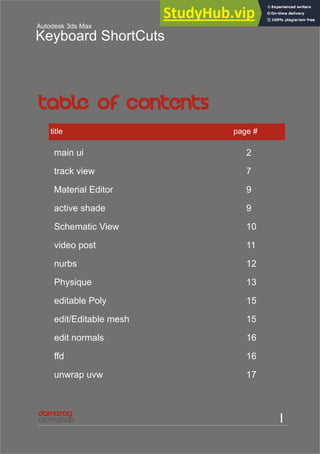
I
Autodesk 3ds Max
Keyboard ShortCuts
title page #
main ui 2
track view 7
Material Editor 9
active shade 9
Schematic View 10
video post 11
nurbs 12
Physique 13
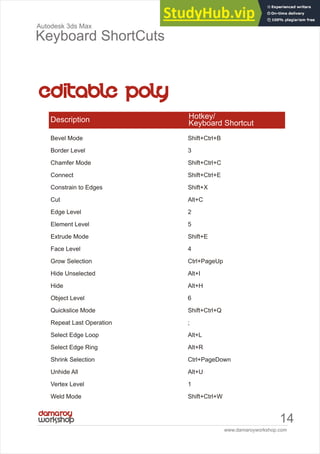
editable Poly 15
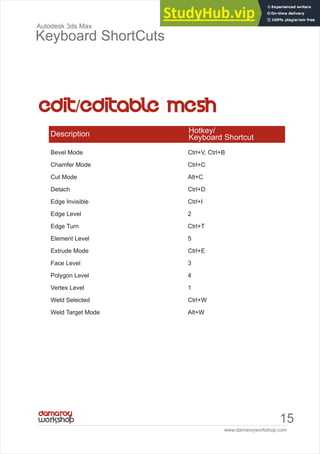
edit/Editable mesh 15
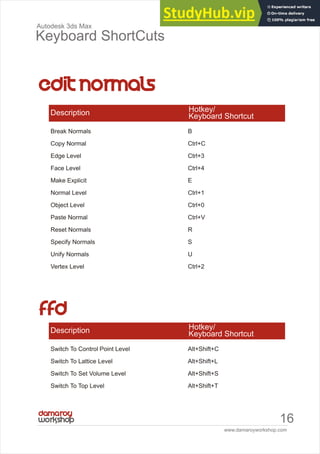
edit normals 16
ffd 16
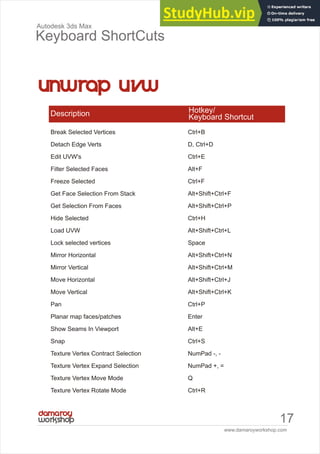
unwrap uvw 17
www.damaroyworkshop.com
ii
Autodesk 3ds Max
Keyboard ShortCuts
title page #
biped 19
reaction manager 20
Tone Operator And Radiosity Action Table 20
particle flow 20
walkthrough 21
macroscripts 22
quad menu sets 23
Snaps Action Table 24
www.damaroyworkshop.com
1
Autodesk 3ds Max
Keyboard ShortCuts
www.damaroyworkshop.com
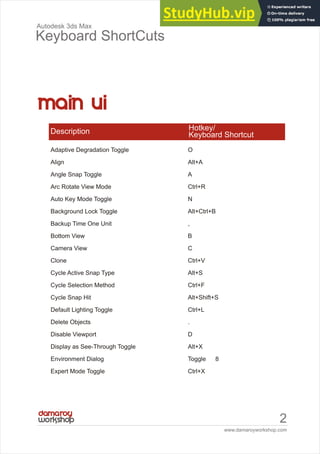
2
Autodesk 3ds Max
Keyboard ShortCuts
Adaptive Degradation Toggle O
Align Alt+A
Angle Snap Toggle A
Arc Rotate View Mode Ctrl+R
Auto Key Mode Toggle N
Background Lock Toggle Alt+Ctrl+B
Backup Time One Unit ,
Bottom View B
Camera View C
Clone Ctrl+V
Cycle Active Snap Type Alt+S
Cycle Selection Method Ctrl+F
Cycle Snap Hit Alt+Shift+S
Default Lighting Toggle Ctrl+L
Delete Objects .
Disable Viewport D
Display as See-Through Toggle Alt+X
Environment Dialog Toggle 8
Expert Mode Toggle Ctrl+X
Description Hotkey/
Keyboard Shortcut
www.damaroyworkshop.com
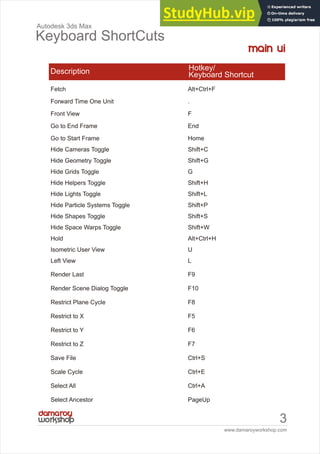
3
Autodesk 3ds Max
Keyboard ShortCuts
Fetch Alt+Ctrl+F
Forward Time One Unit .
Front View F
Go to End Frame End
Go to Start Frame Home
Hide Cameras Toggle Shift+C
Hide Geometry Toggle Shift+G
Hide Grids Toggle G
Hide Helpers Toggle Shift+H
Hide Lights Toggle Shift+L
Hide Particle Systems Toggle Shift+P
Hide Shapes Toggle Shift+S
Hide Space Warps Toggle Shift+W
Hold Alt+Ctrl+H
Isometric User View U
Left View L
Render Last F9
Render Scene Dialog Toggle F10
Restrict Plane Cycle F8
Restrict to X F5
Restrict to Y F6
Restrict to Z F7
Save File Ctrl+S
Scale Cycle Ctrl+E
Select All Ctrl+A
Select Ancestor PageUp
Description Hotkey/
Keyboard Shortcut
www.damaroyworkshop.com
4
Autodesk 3ds Max
Keyboard ShortCuts
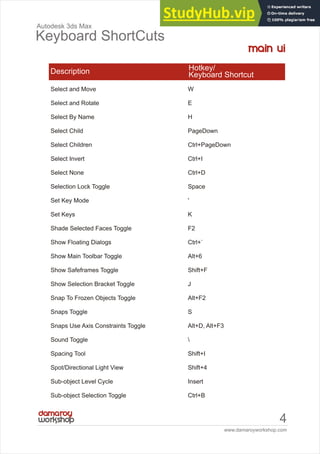
Select and Move W
Select and Rotate E
Select By Name H
Select Child PageDown
Select Children Ctrl+PageDown
Select Invert Ctrl+I
Select None Ctrl+D
Selection Lock Toggle Space
Set Key Mode '
Set Keys K
Shade Selected Faces Toggle F2
Show Floating Dialogs Ctrl+`
Show Main Toolbar Toggle Alt+6
Show Safeframes Toggle Shift+F
Show Selection Bracket Toggle J
Snap To Frozen Objects Toggle Alt+F2
Snaps Toggle S
Snaps Use Axis Constraints Toggle Alt+D, Alt+F3
Sound Toggle 
Spacing Tool Shift+I
Spot/Directional Light View Shift+4
Sub-object Level Cycle Insert
Sub-object Selection Toggle Ctrl+B
Description Hotkey/
Keyboard Shortcut
www.damaroyworkshop.com
5
Autodesk 3ds Max
Keyboard ShortCuts
Top View T
Transform Gizmo Size Down -
Transform Gizmo Size Up =
Transform Gizmo Toggle X
Transform Type-In Dialog Toggle F12
Undo Scene Operation Ctrl+Z
Undo Viewport Operation Shift+Z
Update Background Image Alt+Shift+Ctrl+B
View Edged Faces Toggle F4
Viewport Background Alt+B
Virtual Viewport Pan Down NumPad 2
Virtual Viewport Pan Left NumPad 4
Virtual Viewport Pan Right NumPad 6
Virtual Viewport Pan Up NumPad 8
Virtual Viewport Toggle NumPad /
Virtual Viewport Zoom In NumPad +
Virtual Viewport Zoom Out NumPad -
Wireframe / Smooth+Highlights Toggle F3
Zoom Extents All Selected Z
Zoom Extents All Shift+Ctrl+Z
Description Hotkey/
Keyboard Shortcut
www.damaroyworkshop.com
6
Autodesk 3ds Max
Keyboard ShortCuts
Zoom Extents Alt+Ctrl+Z
Zoom In 2X Alt+Shift+Ctrl+Z
Description Hotkey/
Keyboard Shortcut
Zoom Mode Alt+Z
Zoom Out 2X Alt+Shift+Z
Zoom Region Mode Ctrl+W
Zoom Viewport In [, Ctrl+=
Zoom Viewport Out ], Ctrl+-
Lock User Interface Toggle Alt+0
Material Editor Toggle M
Maximize Viewport Toggle Alt+W
MAXScript Listener F11
New Scene Ctrl+N
Normal Align Alt+N
Open File Ctrl+O
Pan View Ctrl+P
Pan Viewport I
Percent Snap Toggle Shift+Ctrl+P
Perspective User View P
Place Highlight Ctrl+H
Play Animation /
Quick Align Shift+A
Quick Render Shift+Q
Redo Scene Operation Ctrl+Y
Redo Viewport Operation Shift+Y
Redraw All Views `
www.damaroyworkshop.com
7
Autodesk 3ds Max
Keyboard ShortCuts
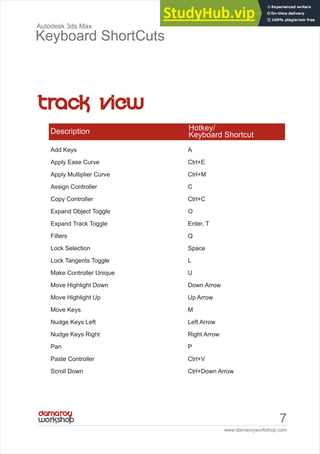
Add Keys A
Apply Ease Curve Ctrl+E
Apply Multiplier Curve Ctrl+M
Assign Controller C
Copy Controller Ctrl+C
Expand Object Toggle O
Expand Track Toggle Enter, T
Filters Q
Lock Selection Space
Lock Tangents Toggle L
Make Controller Unique U
Move Highlight Down Down Arrow
Move Highlight Up Up Arrow
Move Keys M
Nudge Keys Left Left Arrow
Nudge Keys Right Right Arrow
Pan P
Paste Controller Ctrl+V
Scroll Down Ctrl+Down Arrow
Description Hotkey/
Keyboard Shortcut
www.damaroyworkshop.com
8
Autodesk 3ds Max
Keyboard ShortCuts
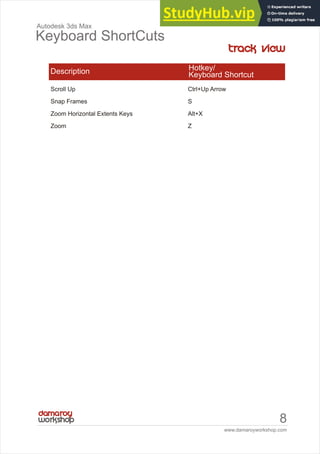
Scroll Up Ctrl+Up Arrow
Snap Frames S
Zoom Horizontal Extents Keys Alt+X
Zoom Z
Description Hotkey/
Keyboard Shortcut
www.damaroyworkshop.com
9
Autodesk 3ds Max
Keyboard ShortCuts
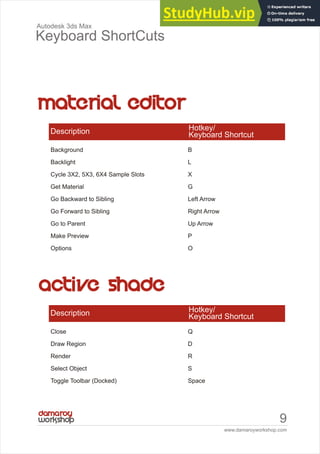
Background B
Backlight L
Cycle 3X2, 5X3, 6X4 Sample Slots X
Get Material G
Go Backward to Sibling Left Arrow
Go Forward to Sibling Right Arrow
Go to Parent Up Arrow
Make Preview P
Options O
Description Hotkey/
Keyboard Shortcut
Close Q
Draw Region D
Render R
Select Object S
Toggle Toolbar (Docked) Space
Description Hotkey/
Keyboard Shortcut
www.damaroyworkshop.com
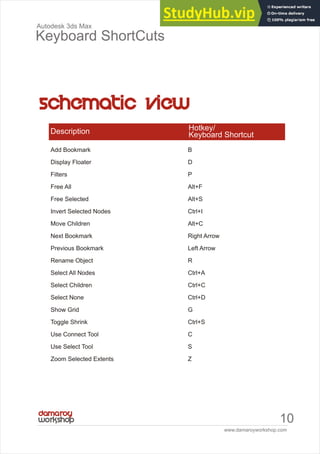
10
Autodesk 3ds Max
Keyboard ShortCuts
Add Bookmark B
Display Floater D
Filters P
Free All Alt+F
Free Selected Alt+S
Invert Selected Nodes Ctrl+I
Move Children Alt+C
Next Bookmark Right Arrow
Previous Bookmark Left Arrow
Rename Object R
Select All Nodes Ctrl+A
Select Children Ctrl+C
Select None Ctrl+D
Show Grid G
Toggle Shrink Ctrl+S
Use Connect Tool C
Use Select Tool S
Zoom Selected Extents Z
Description Hotkey/
Keyboard Shortcut
www.damaroyworkshop.com
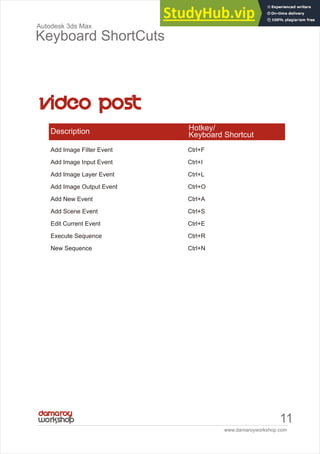
11
Autodesk 3ds Max
Keyboard ShortCuts
Add Image Filter Event Ctrl+F
Add Image Input Event Ctrl+I
Add Image Layer Event Ctrl+L
Add Image Output Event Ctrl+O
Add New Event Ctrl+A
Add Scene Event Ctrl+S
Edit Current Event Ctrl+E
Execute Sequence Ctrl+R
New Sequence Ctrl+N
Description Hotkey/
Keyboard Shortcut
www.damaroyworkshop.com
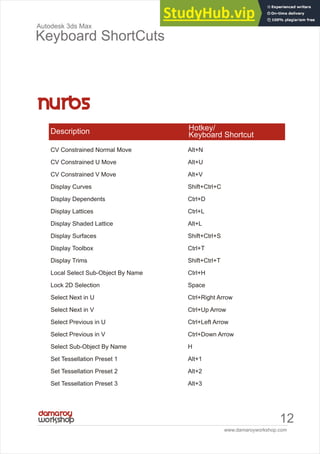
12
Autodesk 3ds Max
Keyboard ShortCuts
CV Constrained Normal Move Alt+N
CV Constrained U Move Alt+U
CV Constrained V Move Alt+V
Display Curves Shift+Ctrl+C
Display Dependents Ctrl+D
Display Lattices Ctrl+L
Display Shaded Lattice Alt+L
Display Surfaces Shift+Ctrl+S
Display Toolbox Ctrl+T
Display Trims Shift+Ctrl+T
Local Select Sub-Object By Name Ctrl+H
Lock 2D Selection Space
Select Next in U Ctrl+Right Arrow
Select Next in V Ctrl+Up Arrow
Select Previous in U Ctrl+Left Arrow
Select Previous in V Ctrl+Down Arrow
Select Sub-Object By Name H
Set Tessellation Preset 1 Alt+1
Set Tessellation Preset 2 Alt+2
Set Tessellation Preset 3 Alt+3
Description Hotkey/
Keyboard Shortcut
www.damaroyworkshop.com
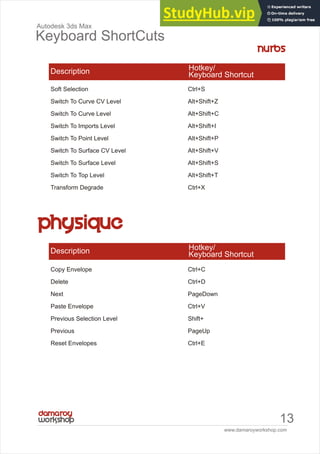
13
Autodesk 3ds Max
Keyboard ShortCuts
Soft Selection Ctrl+S
Switch To Curve CV Level Alt+Shift+Z
Switch To Curve Level Alt+Shift+C
Switch To Imports Level Alt+Shift+I
Switch To Point Level Alt+Shift+P
Switch To Surface CV Level Alt+Shift+V
Switch To Surface Level Alt+Shift+S
Switch To Top Level Alt+Shift+T
Transform Degrade Ctrl+X
Description Hotkey/
Keyboard Shortcut
Copy Envelope Ctrl+C
Delete Ctrl+D
Next PageDown
Paste Envelope Ctrl+V
Previous Selection Level Shift+
Previous PageUp
Reset Envelopes Ctrl+E
Description Hotkey/
Keyboard Shortcut
www.damaroyworkshop.com
14
Autodesk 3ds Max
Keyboard ShortCuts
Bevel Mode Shift+Ctrl+B
Border Level 3
Chamfer Mode Shift+Ctrl+C
Connect Shift+Ctrl+E
Constrain to Edges Shift+X
Cut Alt+C
Edge Level 2
Element Level 5
Extrude Mode Shift+E
Face Level 4
Grow Selection Ctrl+PageUp
Hide Unselected Alt+I
Hide Alt+H
Object Level 6
Quickslice Mode Shift+Ctrl+Q
Repeat Last Operation ;
Select Edge Loop Alt+L
Select Edge Ring Alt+R
Shrink Selection Ctrl+PageDown
Unhide All Alt+U
Vertex Level 1
Weld Mode Shift+Ctrl+W
Description Hotkey/
Keyboard Shortcut
www.damaroyworkshop.com
15
Autodesk 3ds Max
Keyboard ShortCuts
Bevel Mode Ctrl+V, Ctrl+B
Chamfer Mode Ctrl+C
Cut Mode Alt+C
Detach Ctrl+D
Edge Invisible Ctrl+I
Edge Level 2
Edge Turn Ctrl+T
Element Level 5
Extrude Mode Ctrl+E
Face Level 3
Polygon Level 4
Vertex Level 1
Weld Selected Ctrl+W
Weld Target Mode Alt+W
Description Hotkey/
Keyboard Shortcut
www.damaroyworkshop.com
16
Autodesk 3ds Max
Keyboard ShortCuts
Break Normals B
Copy Normal Ctrl+C
Edge Level Ctrl+3
Face Level Ctrl+4
Make Explicit E
Normal Level Ctrl+1
Object Level Ctrl+0
Paste Normal Ctrl+V
Reset Normals R
Specify Normals S
Unify Normals U
Vertex Level Ctrl+2
Description Hotkey/
Keyboard Shortcut
Switch To Control Point Level Alt+Shift+C
Switch To Lattice Level Alt+Shift+L
Switch To Set Volume Level Alt+Shift+S
Switch To Top Level Alt+Shift+T
Description Hotkey/
Keyboard Shortcut
www.damaroyworkshop.com
17
Autodesk 3ds Max
Keyboard ShortCuts
Break Selected Vertices Ctrl+B
Detach Edge Verts D, Ctrl+D
Edit UVW's Ctrl+E
Filter Selected Faces Alt+F
Freeze Selected Ctrl+F
Get Face Selection From Stack Alt+Shift+Ctrl+F
Get Selection From Faces Alt+Shift+Ctrl+P
Hide Selected Ctrl+H
Load UVW Alt+Shift+Ctrl+L
Lock selected vertices Space
Mirror Horizontal Alt+Shift+Ctrl+N
Mirror Vertical Alt+Shift+Ctrl+M
Move Horizontal Alt+Shift+Ctrl+J
Move Vertical Alt+Shift+Ctrl+K
Pan Ctrl+P
Planar map faces/patches Enter
Show Seams In Viewport Alt+E
Snap Ctrl+S
Texture Vertex Contract Selection NumPad -, -
Texture Vertex Expand Selection NumPad +, =
Texture Vertex Move Mode Q
Texture Vertex Rotate Mode Ctrl+R
Description Hotkey/
Keyboard Shortcut
www.damaroyworkshop.com
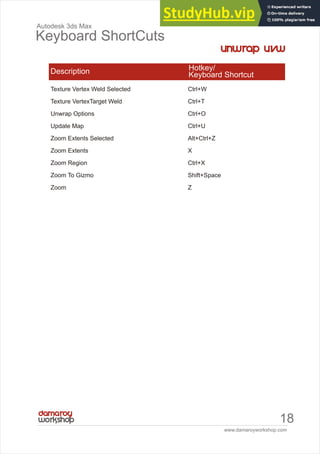
18
Autodesk 3ds Max
Keyboard ShortCuts
Texture Vertex Weld Selected Ctrl+W
Texture VertexTarget Weld Ctrl+T
Unwrap Options Ctrl+O
Update Map Ctrl+U
Zoom Extents Selected Alt+Ctrl+Z
Zoom Extents X
Zoom Region Ctrl+X
Zoom To Gizmo Shift+Space
Zoom Z
Description Hotkey/
Keyboard Shortcut
w or kshop
www.damaroyworkshop.com
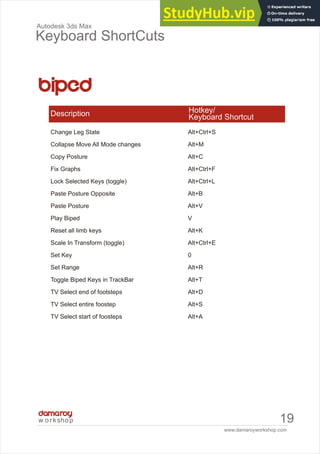
19
Autodesk 3ds Max
Keyboard ShortCuts
Change Leg State Alt+Ctrl+S
Collapse Move All Mode changes Alt+M
Copy Posture Alt+C
Fix Graphs Alt+Ctrl+F
Lock Selected Keys (toggle) Alt+Ctrl+L
Paste Posture Opposite Alt+B
Paste Posture Alt+V
Play Biped V
Reset all limb keys Alt+K
Scale In Transform (toggle) Alt+Ctrl+E
Set Key 0
Set Range Alt+R
Toggle Biped Keys in TrackBar Alt+T
TV Select end of footsteps Alt+D
TV Select entire foostep Alt+S
TV Select start of foosteps Alt+A
Description Hotkey/
Keyboard Shortcut
www.damaroyworkshop.com
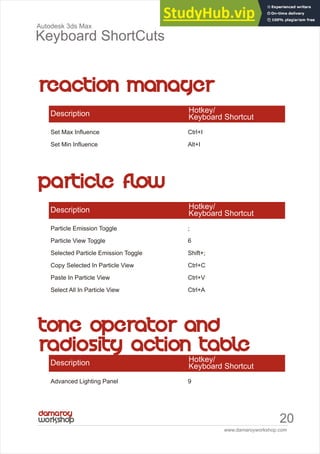
20
Autodesk 3ds Max
Keyboard ShortCuts
Set Max Influence Ctrl+I
Set Min Influence Alt+I
Description Hotkey/
Keyboard Shortcut
Particle Emission Toggle ;
Particle View Toggle 6
Selected Particle Emission Toggle Shift+;
Copy Selected In Particle View Ctrl+C
Paste In Particle View Ctrl+V
Select All In Particle View Ctrl+A
Description Hotkey/
Keyboard Shortcut
Advanced Lighting Panel 9
Description Hotkey/
Keyboard Shortcut
www.damaroyworkshop.com
21
Autodesk 3ds Max
Keyboard ShortCuts
Accelerate Toggle Q
Back S, Down Arrow
Decelerate Toggle Z
Decrease Step Size [
Down C, Shift+Down Arrow
Forward W, Up Arrow
Increase Step Size ]
Left A, Left Arrow
Level Shift+Space
Lock Vertical Rotation Space
Reset Step Size Alt+[
Right D, Right Arrow
Up E, Shift+Up Arrow
Description Hotkey/
Keyboard Shortcut
www.damaroyworkshop.com
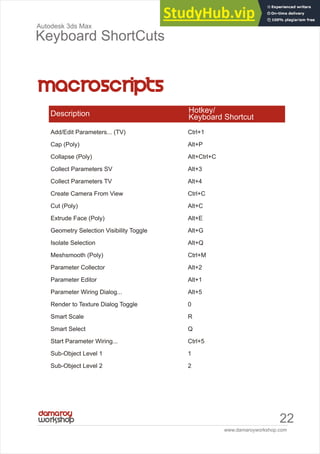
22
Autodesk 3ds Max
Keyboard ShortCuts
Add/Edit Parameters... (TV) Ctrl+1
Cap (Poly) Alt+P
Collapse (Poly) Alt+Ctrl+C
Collect Parameters SV Alt+3
Collect Parameters TV Alt+4
Create Camera From View Ctrl+C
Cut (Poly) Alt+C
Extrude Face (Poly) Alt+E
Geometry Selection Visibility Toggle Alt+G
Isolate Selection Alt+Q
Meshsmooth (Poly) Ctrl+M
Parameter Collector Alt+2
Parameter Editor Alt+1
Parameter Wiring Dialog... Alt+5
Render to Texture Dialog Toggle 0
Smart Scale R
Smart Select Q
Start Parameter Wiring... Ctrl+5
Sub-Object Level 1 1
Sub-Object Level 2 2
Description Hotkey/
Keyboard Shortcut
www.damaroyworkshop.com
23
Autodesk 3ds Max
Keyboard ShortCuts
Sub-Object Level 3 3
Sub-Object Level 4 4
Sub-object Level 5 5
WalkThrough View Mode Up Arrow
Description Hotkey/
Keyboard Shortcut
Animation [Alt+RMB]
Custom [Shift+Ctrl+Alt+RMB]
Custom [Shift+Ctrl+RMB]
Lighting | Render [Ctrl+Alt+RMB]
Modeling [Ctrl+RMB]
reactor [Shift+Alt+RMB]
Snap [Shift+RMB]
Viewports V
Description Hotkey/
Keyboard Shortcut
www.damaroyworkshop.com
24
Autodesk 3ds Max
Keyboard ShortCuts
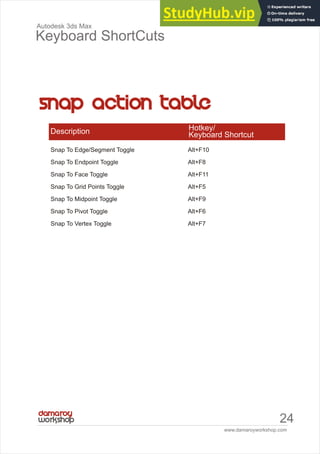
Snap To Edge/Segment Toggle Alt+F10
Snap To Endpoint Toggle Alt+F8
Snap To Face Toggle Alt+F11
Snap To Grid Points Toggle Alt+F5
Snap To Midpoint Toggle Alt+F9
Snap To Pivot Toggle Alt+F6
Snap To Vertex Toggle Alt+F7
Description Hotkey/
Keyboard Shortcut
Copyright © 2011 by damaroyWorkshop

Autodesk 3Ds Max Keyboard ShortCuts

  • 2.
    3D Studio Max(3dsmax) is a 3D modeling, animation, and rendering tool. It is owned by Autodesk, an United States (San Rafael, California) based company. More information about 3D Studio Max can be found at: http://www.autodesk.com/3dsmax/ Note: A free 30 days trial version can be downloaded from the Autodesk site. damaroyWorkshop is an online portal for Autodesk 3ds Max users, lovers and enthusiast who would like to pick up tips, techniques, skills or new tips from the myriad of video tutorials from the shelve. damaroyWorkshop is an arm of damaroyStudios; a creativity/multimedia agency. created 2011 +234 8098 666 194 mails@damaroyworkshop.com
  • 3.
    www.damaroyworkshop.com I Autodesk 3ds Max KeyboardShortCuts title page # main ui 2 track view 7 Material Editor 9 active shade 9 Schematic View 10 video post 11 nurbs 12 Physique 13 editable Poly 15 edit/Editable mesh 15 edit normals 16 ffd 16 unwrap uvw 17
  • 4.
    www.damaroyworkshop.com ii Autodesk 3ds Max KeyboardShortCuts title page # biped 19 reaction manager 20 Tone Operator And Radiosity Action Table 20 particle flow 20 walkthrough 21 macroscripts 22 quad menu sets 23 Snaps Action Table 24
  • 5.
  • 6.
    www.damaroyworkshop.com 2 Autodesk 3ds Max KeyboardShortCuts Adaptive Degradation Toggle O Align Alt+A Angle Snap Toggle A Arc Rotate View Mode Ctrl+R Auto Key Mode Toggle N Background Lock Toggle Alt+Ctrl+B Backup Time One Unit , Bottom View B Camera View C Clone Ctrl+V Cycle Active Snap Type Alt+S Cycle Selection Method Ctrl+F Cycle Snap Hit Alt+Shift+S Default Lighting Toggle Ctrl+L Delete Objects . Disable Viewport D Display as See-Through Toggle Alt+X Environment Dialog Toggle 8 Expert Mode Toggle Ctrl+X Description Hotkey/ Keyboard Shortcut
  • 7.
    www.damaroyworkshop.com 3 Autodesk 3ds Max KeyboardShortCuts Fetch Alt+Ctrl+F Forward Time One Unit . Front View F Go to End Frame End Go to Start Frame Home Hide Cameras Toggle Shift+C Hide Geometry Toggle Shift+G Hide Grids Toggle G Hide Helpers Toggle Shift+H Hide Lights Toggle Shift+L Hide Particle Systems Toggle Shift+P Hide Shapes Toggle Shift+S Hide Space Warps Toggle Shift+W Hold Alt+Ctrl+H Isometric User View U Left View L Render Last F9 Render Scene Dialog Toggle F10 Restrict Plane Cycle F8 Restrict to X F5 Restrict to Y F6 Restrict to Z F7 Save File Ctrl+S Scale Cycle Ctrl+E Select All Ctrl+A Select Ancestor PageUp Description Hotkey/ Keyboard Shortcut
  • 8.
    www.damaroyworkshop.com 4 Autodesk 3ds Max KeyboardShortCuts Select and Move W Select and Rotate E Select By Name H Select Child PageDown Select Children Ctrl+PageDown Select Invert Ctrl+I Select None Ctrl+D Selection Lock Toggle Space Set Key Mode ' Set Keys K Shade Selected Faces Toggle F2 Show Floating Dialogs Ctrl+` Show Main Toolbar Toggle Alt+6 Show Safeframes Toggle Shift+F Show Selection Bracket Toggle J Snap To Frozen Objects Toggle Alt+F2 Snaps Toggle S Snaps Use Axis Constraints Toggle Alt+D, Alt+F3 Sound Toggle Spacing Tool Shift+I Spot/Directional Light View Shift+4 Sub-object Level Cycle Insert Sub-object Selection Toggle Ctrl+B Description Hotkey/ Keyboard Shortcut
  • 9.
    www.damaroyworkshop.com 5 Autodesk 3ds Max KeyboardShortCuts Top View T Transform Gizmo Size Down - Transform Gizmo Size Up = Transform Gizmo Toggle X Transform Type-In Dialog Toggle F12 Undo Scene Operation Ctrl+Z Undo Viewport Operation Shift+Z Update Background Image Alt+Shift+Ctrl+B View Edged Faces Toggle F4 Viewport Background Alt+B Virtual Viewport Pan Down NumPad 2 Virtual Viewport Pan Left NumPad 4 Virtual Viewport Pan Right NumPad 6 Virtual Viewport Pan Up NumPad 8 Virtual Viewport Toggle NumPad / Virtual Viewport Zoom In NumPad + Virtual Viewport Zoom Out NumPad - Wireframe / Smooth+Highlights Toggle F3 Zoom Extents All Selected Z Zoom Extents All Shift+Ctrl+Z Description Hotkey/ Keyboard Shortcut
  • 10.
    www.damaroyworkshop.com 6 Autodesk 3ds Max KeyboardShortCuts Zoom Extents Alt+Ctrl+Z Zoom In 2X Alt+Shift+Ctrl+Z Description Hotkey/ Keyboard Shortcut Zoom Mode Alt+Z Zoom Out 2X Alt+Shift+Z Zoom Region Mode Ctrl+W Zoom Viewport In [, Ctrl+= Zoom Viewport Out ], Ctrl+- Lock User Interface Toggle Alt+0 Material Editor Toggle M Maximize Viewport Toggle Alt+W MAXScript Listener F11 New Scene Ctrl+N Normal Align Alt+N Open File Ctrl+O Pan View Ctrl+P Pan Viewport I Percent Snap Toggle Shift+Ctrl+P Perspective User View P Place Highlight Ctrl+H Play Animation / Quick Align Shift+A Quick Render Shift+Q Redo Scene Operation Ctrl+Y Redo Viewport Operation Shift+Y Redraw All Views `
  • 11.
    www.damaroyworkshop.com 7 Autodesk 3ds Max KeyboardShortCuts Add Keys A Apply Ease Curve Ctrl+E Apply Multiplier Curve Ctrl+M Assign Controller C Copy Controller Ctrl+C Expand Object Toggle O Expand Track Toggle Enter, T Filters Q Lock Selection Space Lock Tangents Toggle L Make Controller Unique U Move Highlight Down Down Arrow Move Highlight Up Up Arrow Move Keys M Nudge Keys Left Left Arrow Nudge Keys Right Right Arrow Pan P Paste Controller Ctrl+V Scroll Down Ctrl+Down Arrow Description Hotkey/ Keyboard Shortcut
  • 12.
    www.damaroyworkshop.com 8 Autodesk 3ds Max KeyboardShortCuts Scroll Up Ctrl+Up Arrow Snap Frames S Zoom Horizontal Extents Keys Alt+X Zoom Z Description Hotkey/ Keyboard Shortcut
  • 13.
    www.damaroyworkshop.com 9 Autodesk 3ds Max KeyboardShortCuts Background B Backlight L Cycle 3X2, 5X3, 6X4 Sample Slots X Get Material G Go Backward to Sibling Left Arrow Go Forward to Sibling Right Arrow Go to Parent Up Arrow Make Preview P Options O Description Hotkey/ Keyboard Shortcut Close Q Draw Region D Render R Select Object S Toggle Toolbar (Docked) Space Description Hotkey/ Keyboard Shortcut
  • 14.
    www.damaroyworkshop.com 10 Autodesk 3ds Max KeyboardShortCuts Add Bookmark B Display Floater D Filters P Free All Alt+F Free Selected Alt+S Invert Selected Nodes Ctrl+I Move Children Alt+C Next Bookmark Right Arrow Previous Bookmark Left Arrow Rename Object R Select All Nodes Ctrl+A Select Children Ctrl+C Select None Ctrl+D Show Grid G Toggle Shrink Ctrl+S Use Connect Tool C Use Select Tool S Zoom Selected Extents Z Description Hotkey/ Keyboard Shortcut
  • 15.
    www.damaroyworkshop.com 11 Autodesk 3ds Max KeyboardShortCuts Add Image Filter Event Ctrl+F Add Image Input Event Ctrl+I Add Image Layer Event Ctrl+L Add Image Output Event Ctrl+O Add New Event Ctrl+A Add Scene Event Ctrl+S Edit Current Event Ctrl+E Execute Sequence Ctrl+R New Sequence Ctrl+N Description Hotkey/ Keyboard Shortcut
  • 16.
    www.damaroyworkshop.com 12 Autodesk 3ds Max KeyboardShortCuts CV Constrained Normal Move Alt+N CV Constrained U Move Alt+U CV Constrained V Move Alt+V Display Curves Shift+Ctrl+C Display Dependents Ctrl+D Display Lattices Ctrl+L Display Shaded Lattice Alt+L Display Surfaces Shift+Ctrl+S Display Toolbox Ctrl+T Display Trims Shift+Ctrl+T Local Select Sub-Object By Name Ctrl+H Lock 2D Selection Space Select Next in U Ctrl+Right Arrow Select Next in V Ctrl+Up Arrow Select Previous in U Ctrl+Left Arrow Select Previous in V Ctrl+Down Arrow Select Sub-Object By Name H Set Tessellation Preset 1 Alt+1 Set Tessellation Preset 2 Alt+2 Set Tessellation Preset 3 Alt+3 Description Hotkey/ Keyboard Shortcut
  • 17.
    www.damaroyworkshop.com 13 Autodesk 3ds Max KeyboardShortCuts Soft Selection Ctrl+S Switch To Curve CV Level Alt+Shift+Z Switch To Curve Level Alt+Shift+C Switch To Imports Level Alt+Shift+I Switch To Point Level Alt+Shift+P Switch To Surface CV Level Alt+Shift+V Switch To Surface Level Alt+Shift+S Switch To Top Level Alt+Shift+T Transform Degrade Ctrl+X Description Hotkey/ Keyboard Shortcut Copy Envelope Ctrl+C Delete Ctrl+D Next PageDown Paste Envelope Ctrl+V Previous Selection Level Shift+ Previous PageUp Reset Envelopes Ctrl+E Description Hotkey/ Keyboard Shortcut
  • 18.
    www.damaroyworkshop.com 14 Autodesk 3ds Max KeyboardShortCuts Bevel Mode Shift+Ctrl+B Border Level 3 Chamfer Mode Shift+Ctrl+C Connect Shift+Ctrl+E Constrain to Edges Shift+X Cut Alt+C Edge Level 2 Element Level 5 Extrude Mode Shift+E Face Level 4 Grow Selection Ctrl+PageUp Hide Unselected Alt+I Hide Alt+H Object Level 6 Quickslice Mode Shift+Ctrl+Q Repeat Last Operation ; Select Edge Loop Alt+L Select Edge Ring Alt+R Shrink Selection Ctrl+PageDown Unhide All Alt+U Vertex Level 1 Weld Mode Shift+Ctrl+W Description Hotkey/ Keyboard Shortcut
  • 19.
    www.damaroyworkshop.com 15 Autodesk 3ds Max KeyboardShortCuts Bevel Mode Ctrl+V, Ctrl+B Chamfer Mode Ctrl+C Cut Mode Alt+C Detach Ctrl+D Edge Invisible Ctrl+I Edge Level 2 Edge Turn Ctrl+T Element Level 5 Extrude Mode Ctrl+E Face Level 3 Polygon Level 4 Vertex Level 1 Weld Selected Ctrl+W Weld Target Mode Alt+W Description Hotkey/ Keyboard Shortcut
  • 20.
    www.damaroyworkshop.com 16 Autodesk 3ds Max KeyboardShortCuts Break Normals B Copy Normal Ctrl+C Edge Level Ctrl+3 Face Level Ctrl+4 Make Explicit E Normal Level Ctrl+1 Object Level Ctrl+0 Paste Normal Ctrl+V Reset Normals R Specify Normals S Unify Normals U Vertex Level Ctrl+2 Description Hotkey/ Keyboard Shortcut Switch To Control Point Level Alt+Shift+C Switch To Lattice Level Alt+Shift+L Switch To Set Volume Level Alt+Shift+S Switch To Top Level Alt+Shift+T Description Hotkey/ Keyboard Shortcut
  • 21.
    www.damaroyworkshop.com 17 Autodesk 3ds Max KeyboardShortCuts Break Selected Vertices Ctrl+B Detach Edge Verts D, Ctrl+D Edit UVW's Ctrl+E Filter Selected Faces Alt+F Freeze Selected Ctrl+F Get Face Selection From Stack Alt+Shift+Ctrl+F Get Selection From Faces Alt+Shift+Ctrl+P Hide Selected Ctrl+H Load UVW Alt+Shift+Ctrl+L Lock selected vertices Space Mirror Horizontal Alt+Shift+Ctrl+N Mirror Vertical Alt+Shift+Ctrl+M Move Horizontal Alt+Shift+Ctrl+J Move Vertical Alt+Shift+Ctrl+K Pan Ctrl+P Planar map faces/patches Enter Show Seams In Viewport Alt+E Snap Ctrl+S Texture Vertex Contract Selection NumPad -, - Texture Vertex Expand Selection NumPad +, = Texture Vertex Move Mode Q Texture Vertex Rotate Mode Ctrl+R Description Hotkey/ Keyboard Shortcut
  • 22.
    www.damaroyworkshop.com 18 Autodesk 3ds Max KeyboardShortCuts Texture Vertex Weld Selected Ctrl+W Texture VertexTarget Weld Ctrl+T Unwrap Options Ctrl+O Update Map Ctrl+U Zoom Extents Selected Alt+Ctrl+Z Zoom Extents X Zoom Region Ctrl+X Zoom To Gizmo Shift+Space Zoom Z Description Hotkey/ Keyboard Shortcut
  • 23.
    w or kshop www.damaroyworkshop.com 19 Autodesk3ds Max Keyboard ShortCuts Change Leg State Alt+Ctrl+S Collapse Move All Mode changes Alt+M Copy Posture Alt+C Fix Graphs Alt+Ctrl+F Lock Selected Keys (toggle) Alt+Ctrl+L Paste Posture Opposite Alt+B Paste Posture Alt+V Play Biped V Reset all limb keys Alt+K Scale In Transform (toggle) Alt+Ctrl+E Set Key 0 Set Range Alt+R Toggle Biped Keys in TrackBar Alt+T TV Select end of footsteps Alt+D TV Select entire foostep Alt+S TV Select start of foosteps Alt+A Description Hotkey/ Keyboard Shortcut
  • 24.
    www.damaroyworkshop.com 20 Autodesk 3ds Max KeyboardShortCuts Set Max Influence Ctrl+I Set Min Influence Alt+I Description Hotkey/ Keyboard Shortcut Particle Emission Toggle ; Particle View Toggle 6 Selected Particle Emission Toggle Shift+; Copy Selected In Particle View Ctrl+C Paste In Particle View Ctrl+V Select All In Particle View Ctrl+A Description Hotkey/ Keyboard Shortcut Advanced Lighting Panel 9 Description Hotkey/ Keyboard Shortcut
  • 25.
    www.damaroyworkshop.com 21 Autodesk 3ds Max KeyboardShortCuts Accelerate Toggle Q Back S, Down Arrow Decelerate Toggle Z Decrease Step Size [ Down C, Shift+Down Arrow Forward W, Up Arrow Increase Step Size ] Left A, Left Arrow Level Shift+Space Lock Vertical Rotation Space Reset Step Size Alt+[ Right D, Right Arrow Up E, Shift+Up Arrow Description Hotkey/ Keyboard Shortcut
  • 26.
    www.damaroyworkshop.com 22 Autodesk 3ds Max KeyboardShortCuts Add/Edit Parameters... (TV) Ctrl+1 Cap (Poly) Alt+P Collapse (Poly) Alt+Ctrl+C Collect Parameters SV Alt+3 Collect Parameters TV Alt+4 Create Camera From View Ctrl+C Cut (Poly) Alt+C Extrude Face (Poly) Alt+E Geometry Selection Visibility Toggle Alt+G Isolate Selection Alt+Q Meshsmooth (Poly) Ctrl+M Parameter Collector Alt+2 Parameter Editor Alt+1 Parameter Wiring Dialog... Alt+5 Render to Texture Dialog Toggle 0 Smart Scale R Smart Select Q Start Parameter Wiring... Ctrl+5 Sub-Object Level 1 1 Sub-Object Level 2 2 Description Hotkey/ Keyboard Shortcut
  • 27.
    www.damaroyworkshop.com 23 Autodesk 3ds Max KeyboardShortCuts Sub-Object Level 3 3 Sub-Object Level 4 4 Sub-object Level 5 5 WalkThrough View Mode Up Arrow Description Hotkey/ Keyboard Shortcut Animation [Alt+RMB] Custom [Shift+Ctrl+Alt+RMB] Custom [Shift+Ctrl+RMB] Lighting | Render [Ctrl+Alt+RMB] Modeling [Ctrl+RMB] reactor [Shift+Alt+RMB] Snap [Shift+RMB] Viewports V Description Hotkey/ Keyboard Shortcut
  • 28.
    www.damaroyworkshop.com 24 Autodesk 3ds Max KeyboardShortCuts Snap To Edge/Segment Toggle Alt+F10 Snap To Endpoint Toggle Alt+F8 Snap To Face Toggle Alt+F11 Snap To Grid Points Toggle Alt+F5 Snap To Midpoint Toggle Alt+F9 Snap To Pivot Toggle Alt+F6 Snap To Vertex Toggle Alt+F7 Description Hotkey/ Keyboard Shortcut
  • 29.
    Copyright © 2011by damaroyWorkshop