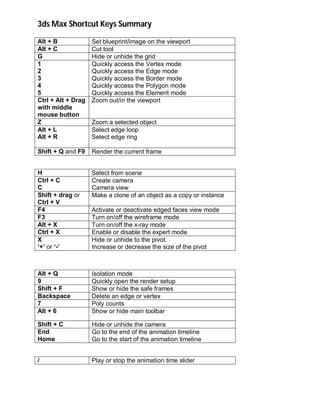
Alt + B sets a blueprint/image on the viewport. The 1-5 keys quickly access different modeling modes: Vertex, Edge, Border, Polygon, and Element. Ctrl + Alt + drag with middle mouse button zooms the viewport in/out. Z zooms a selected object. Alt + L and Alt + R select edge loops and rings. Shift + Q and F9 render the current frame. Ctrl + C creates a camera. Shift + drag or Ctrl + V makes a clone copy or instance. F3 turns wireframe mode on/off. '+'/-' hides or shows the pivot and increases/decreases its size. Alt + Q enables isolation mode. Shift + F shows or hides safe