AUTO CAD 
2012 
09/12/14 1
INTRODUCTION 
•Auto cad is a Cad software of Autodesk. 
•It is invented in 1982 in US. 
•Auto cad LT and Auto cad Mastering. 
•Previously used in DOS, now a day used in 
windows. 
•Used in every field Mechanical, Civil, Arch, 
Electrical, Interior Design, Automobile etc.. 
09/12/14 2
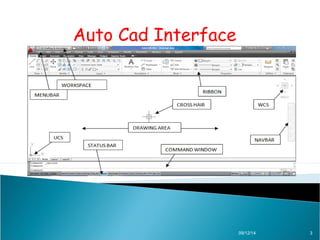
Auto Cad Interface 
09/12/14 3
Types of Co-ordinates 
1. Absolute Co-ordinate. 
2.Relative Co-ordinates. 
3.Polar Co-ordinates. 
AND 
DDE (Direct Distance Entry ) Method 
09/12/14 4
Absolute Co-ordinate 
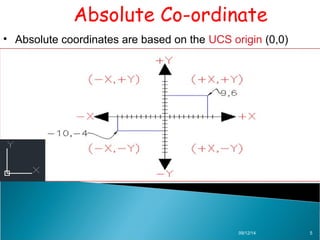
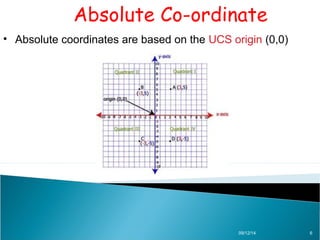
• Absolute coordinates are based on the UCS origin (0,0) 
09/12/14 5
Absolute Co-ordinate 
• Absolute coordinates are based on the UCS origin (0,0) 
09/12/14 6
Absolute Co-ordinate 
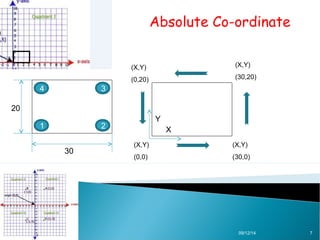
(X,Y) 
(0,0) 
(X,Y) 
(30,20) 
(X,Y) 
(30,0) 
(X,Y) 
(0,20) 
09/12/14 7 
4 3 
30 
20 
Y 
1 2 X
Relative Co-ordinates 
• Relative coordinates are based on the 
last point entered. 
• When you know the location of a point 
in relation to the previous point. 
• Use @ sign. For example, entering 
@3,4 
09/12/14 8
Relative Co-ordinate 
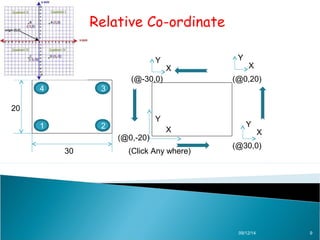
Y X 
X 
(@-30,0) (@0,20) 
(Click Any where) (@30,0) 
09/12/14 9 
4 3 
30 
20 
Y 
X 
Y 
X 
Y 
(@0,-20) 
1 2
Polar Co-ordinates 
09/12/14 10 
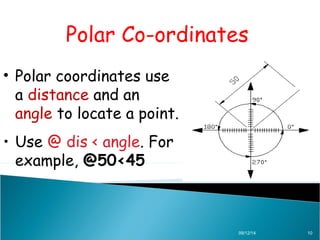
• Polar coordinates use 
a distance and an 
angle to locate a point. 
• Use @ dis < angle. For 
example, @50<45
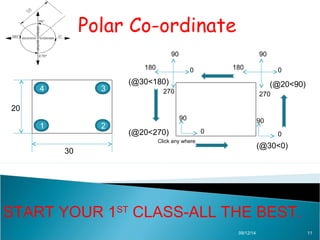
Polar Co-ordinate 
90 
180 0 
90 
180 0 
(@30<180) (@20<90) 
270 
90 
0 
(@30<0) 
270 
(@20<270) 
09/12/14 11 
4 3 
1 2 
30 
20 
90 
0 
Click any where 
START YOUR 1ST CLASS-ALL THE BEST.
09/12/14 12

Autocad training

  • 1.
    AUTO CAD 2012 09/12/14 1
  • 2.
    INTRODUCTION •Auto cadis a Cad software of Autodesk. •It is invented in 1982 in US. •Auto cad LT and Auto cad Mastering. •Previously used in DOS, now a day used in windows. •Used in every field Mechanical, Civil, Arch, Electrical, Interior Design, Automobile etc.. 09/12/14 2
  • 3.
    Auto Cad Interface 09/12/14 3
  • 4.
    Types of Co-ordinates 1. Absolute Co-ordinate. 2.Relative Co-ordinates. 3.Polar Co-ordinates. AND DDE (Direct Distance Entry ) Method 09/12/14 4
  • 5.
    Absolute Co-ordinate •Absolute coordinates are based on the UCS origin (0,0) 09/12/14 5
  • 6.
    Absolute Co-ordinate •Absolute coordinates are based on the UCS origin (0,0) 09/12/14 6
  • 7.
    Absolute Co-ordinate (X,Y) (0,0) (X,Y) (30,20) (X,Y) (30,0) (X,Y) (0,20) 09/12/14 7 4 3 30 20 Y 1 2 X
  • 8.
    Relative Co-ordinates •Relative coordinates are based on the last point entered. • When you know the location of a point in relation to the previous point. • Use @ sign. For example, entering @3,4 09/12/14 8
  • 9.
    Relative Co-ordinate YX X (@-30,0) (@0,20) (Click Any where) (@30,0) 09/12/14 9 4 3 30 20 Y X Y X Y (@0,-20) 1 2
  • 10.
    Polar Co-ordinates 09/12/1410 • Polar coordinates use a distance and an angle to locate a point. • Use @ dis < angle. For example, @50<45
  • 11.
    Polar Co-ordinate 90 180 0 90 180 0 (@30<180) (@20<90) 270 90 0 (@30<0) 270 (@20<270) 09/12/14 11 4 3 1 2 30 20 90 0 Click any where START YOUR 1ST CLASS-ALL THE BEST.
  • 12.