PRESENTATION AUTOCAD
• KESAVA PRASAD (00011008080)
• LEVEL 3
CONTENTS
Introduction
AutoCAD screen
Co–ordinate system
Some 2D command
Toolbars and Modify
3D Modeling
Isometric view
Conclusion
INTRODUCTION
• The Word AutoCAD is made up of two Words “Auto (logo of company)” and
“CAD (Computer Aided Design)”.
• AutoCAD is 2D and 3D modelling software.
• Autodesk is an U.S.A based company.
• It is mostly use in industry area.
• AutoCAD is designing course, which performed by help of computer.
• AutoCAD software was firstly launched by Autodesk company in Dec 1982.
AutoCAD screen
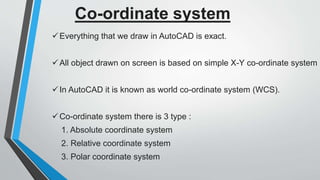
Everything that we draw in AutoCAD is exact.
All object drawn on screen is based on simple X-Y co-ordinate system
In AutoCAD it is known as world co-ordinate system (WCS).
Co-ordinate system there is 3 type :
1. Absolute coordinate system
2. Relative coordinate system
3. Polar coordinate system
Co-ordinate system
Absolute co-ordinate
system
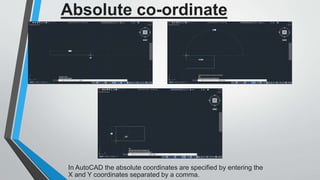
In AutoCAD the absolute coordinates are specified by entering the
X and Y coordinates separated by a comma.
Relative co-ordinate system
In the relative coordinate system, the displacements Dx and Dy
along x and y-axis are measured with reference to the previous
point.
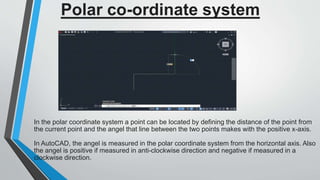
Polar co-ordinate system
In the polar coordinate system a point can be located by defining the distance of the point from
the current point and the angel that line between the two points makes with the positive x-axis.
In AutoCAD, the angel is measured in the polar coordinate system from the horizontal axis. Also
the angel is positive if measured in anti-clockwise direction and negative if measured in a
clockwise direction.
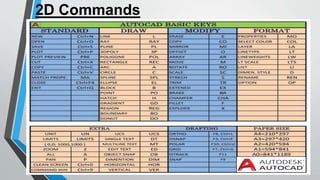
2D Commands
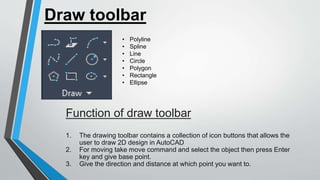
Draw toolbar
Function of draw toolbar
1. The drawing toolbar contains a collection of icon buttons that allows the
user to draw 2D design in AutoCAD
2. For moving take move command and select the object then press Enter
key and give base point.
3. Give the direction and distance at which point you want to.
• Polyline
• Spline
• Line
• Circle
• Polygon
• Rectangle
• Ellipse
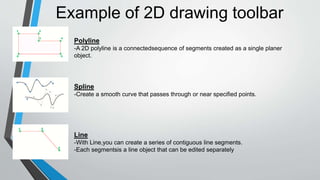
Example of 2D drawing toolbar
Polyline
-A 2D polyline is a connectedsequence of segments created as a single planer
object.
Spline
-Create a smooth curve that passes through or near specified points.
Line
-With Line,you can create a series of contiguous line segments.
-Each segmentsis a line object that can be edited separately
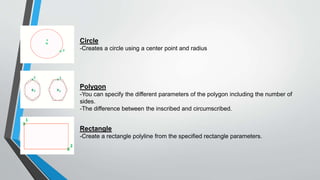
Circle
-Creates a circle using a center point and radius
Polygon
-You can specify the different parameters of the polygon including the number of
sides.
-The difference between the inscribed and circumscribed.
Rectangle
-Create a rectangle polyline from the specified rectangle parameters.
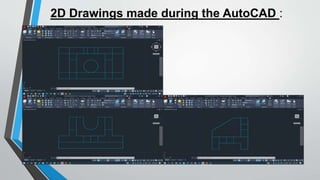
2D Drawings made during the AutoCAD :
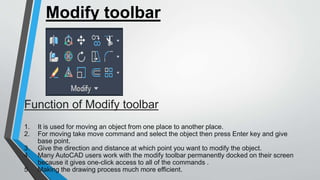
Function of Modify toolbar
1. It is used for moving an object from one place to another place.
2. For moving take move command and select the object then press Enter key and give
base point.
3. Give the direction and distance at which point you want to modify the object.
4. Many AutoCAD users work with the modify toolbar permanently docked on their screen
because it gives one-click access to all of the commands .
5. Making the drawing process much more efficient.
Modify toolbar
Example of modify toolbar
Move
-Moves objects a specifieddistance in aspecified direction.
-Use coordinates, grid snaps, object snaps, and other tools to move objects with
precision.
Copy
-Copy objects a specified distance in a specified direction.
-With the COPYMODE system variable,you can control whether multiples copies are
created automatically.
Trim
-To trim objects, select the boundaries, Then press enter select the objects that you
want to trim.
-To use all objects as boundaries,press enter at the first select objects prompt
Stretch
-Streches objects crossed by a selection window or polygon
Fillet
-an arc is created that is tangent to both of the selected lines.
-The lines are trimmed to the ends of the arc.
Array
-Distributes object copies into any combination of rows, columns, and levels.
-Creates an array of rows and columnsof copies of the selected object.
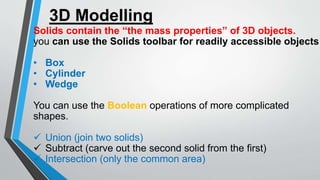
3D Modelling
Solids contain the “the mass properties” of 3D objects.
you can use the Solids toolbar for readily accessible objects
• Box
• Cylinder
• Wedge
You can use the Boolean operations of more complicated
shapes.
 Union (join two solids)
 Subtract (carve out the second solid from the first)
 Intersection (only the common area)
Isometric view
Conclusion
All said and done, AutoCAD really appears to
be a very useful software application at present,
across industries. In addition, it has great
potential to become the tool for depiction of the
most complex designs, irrespective of industry.
Therefore, the day is not far when AutoCAD will
become a subject at the school level. We
should use this Software for industrial And need
additional more advanced features in the future

Presentation on AutoCAD.pptx

  • 1.
    PRESENTATION AUTOCAD • KESAVAPRASAD (00011008080) • LEVEL 3
  • 2.
    CONTENTS Introduction AutoCAD screen Co–ordinate system Some2D command Toolbars and Modify 3D Modeling Isometric view Conclusion
  • 3.
    INTRODUCTION • The WordAutoCAD is made up of two Words “Auto (logo of company)” and “CAD (Computer Aided Design)”. • AutoCAD is 2D and 3D modelling software. • Autodesk is an U.S.A based company. • It is mostly use in industry area. • AutoCAD is designing course, which performed by help of computer. • AutoCAD software was firstly launched by Autodesk company in Dec 1982.
  • 4.
  • 5.
    Everything that wedraw in AutoCAD is exact. All object drawn on screen is based on simple X-Y co-ordinate system In AutoCAD it is known as world co-ordinate system (WCS). Co-ordinate system there is 3 type : 1. Absolute coordinate system 2. Relative coordinate system 3. Polar coordinate system Co-ordinate system
  • 6.
    Absolute co-ordinate system In AutoCADthe absolute coordinates are specified by entering the X and Y coordinates separated by a comma.
  • 7.
    Relative co-ordinate system Inthe relative coordinate system, the displacements Dx and Dy along x and y-axis are measured with reference to the previous point.
  • 8.
    Polar co-ordinate system Inthe polar coordinate system a point can be located by defining the distance of the point from the current point and the angel that line between the two points makes with the positive x-axis. In AutoCAD, the angel is measured in the polar coordinate system from the horizontal axis. Also the angel is positive if measured in anti-clockwise direction and negative if measured in a clockwise direction.
  • 9.
  • 10.
    Draw toolbar Function ofdraw toolbar 1. The drawing toolbar contains a collection of icon buttons that allows the user to draw 2D design in AutoCAD 2. For moving take move command and select the object then press Enter key and give base point. 3. Give the direction and distance at which point you want to. • Polyline • Spline • Line • Circle • Polygon • Rectangle • Ellipse
  • 11.
    Example of 2Ddrawing toolbar Polyline -A 2D polyline is a connectedsequence of segments created as a single planer object. Spline -Create a smooth curve that passes through or near specified points. Line -With Line,you can create a series of contiguous line segments. -Each segmentsis a line object that can be edited separately
  • 12.
    Circle -Creates a circleusing a center point and radius Polygon -You can specify the different parameters of the polygon including the number of sides. -The difference between the inscribed and circumscribed. Rectangle -Create a rectangle polyline from the specified rectangle parameters.
  • 13.
    2D Drawings madeduring the AutoCAD :
  • 14.
    Function of Modifytoolbar 1. It is used for moving an object from one place to another place. 2. For moving take move command and select the object then press Enter key and give base point. 3. Give the direction and distance at which point you want to modify the object. 4. Many AutoCAD users work with the modify toolbar permanently docked on their screen because it gives one-click access to all of the commands . 5. Making the drawing process much more efficient. Modify toolbar
  • 15.
    Example of modifytoolbar Move -Moves objects a specifieddistance in aspecified direction. -Use coordinates, grid snaps, object snaps, and other tools to move objects with precision. Copy -Copy objects a specified distance in a specified direction. -With the COPYMODE system variable,you can control whether multiples copies are created automatically. Trim -To trim objects, select the boundaries, Then press enter select the objects that you want to trim. -To use all objects as boundaries,press enter at the first select objects prompt
  • 16.
    Stretch -Streches objects crossedby a selection window or polygon Fillet -an arc is created that is tangent to both of the selected lines. -The lines are trimmed to the ends of the arc. Array -Distributes object copies into any combination of rows, columns, and levels. -Creates an array of rows and columnsof copies of the selected object.
  • 17.
    3D Modelling Solids containthe “the mass properties” of 3D objects. you can use the Solids toolbar for readily accessible objects • Box • Cylinder • Wedge You can use the Boolean operations of more complicated shapes.  Union (join two solids)  Subtract (carve out the second solid from the first)  Intersection (only the common area)
  • 18.
  • 19.
    Conclusion All said anddone, AutoCAD really appears to be a very useful software application at present, across industries. In addition, it has great potential to become the tool for depiction of the most complex designs, irrespective of industry. Therefore, the day is not far when AutoCAD will become a subject at the school level. We should use this Software for industrial And need additional more advanced features in the future