AutoCAD
B.Tech 3rd Sem
Mechanical Engineering
ME03
Name
INDEX
 What is AutoCAD ?
 Advantages of AutoCAD
 Introduction to AutoCAD Interface
 Basic 2D commands
WHAT IS AUTOCAD ?
• AutoCAD was first released in December 1982 as a desktop app .
• AutoCAD is a computer-aided design software developed by the
company Autodesk (hence the name AutoCAD).
• It allows you to draw and edit digital 2D and 3D designs more quickly
and easily than you could by hand.
• You can only draw something so small by hand, but AutoCAD
allows you to design down to fractions.
• The files can also be easily saved and stored in the cloud, so they be
accessed anywhere at anytime.
ADVANTAGES OF
AUTOCAD
DRAW TO SCALE
One of the main benefits of autocad is that it allows you to draw to scale.
you start by choosing the appropriate units of measurement. then, you can
draw your model at 1:1 scale.
EASY LAYOUT AND VIEWING
when you’re using autocad, it’s easy to zoom in and out and pan to other
areas of the drawing. this is particularly useful when you’re working on large
or complicated designs.
MAKE CHANGES EASILY AND REDUCE RISK OF ERROR
In autoCAD , you don’t have to go through a long process just to
adjust your drawing.
you can create designs quickly and easily, using the software’s easy
tools to complete tasks in a fraction of the time it would take via manual
drafting.
DRAW ACCURATELY
AutoCAD makes it easy to draw objects accurately, with various options to
set the exact size and alignment that you need.
On your screen, there’s a rectangular grid. you can click on any interval on
the grid to locate the point that you need. you can use your keyboard to
enter the exact coordinates of the location at which you want to start
drawing.
SAVE TIME AND MONEY
One of the main benefits of computer-aided design is that it’s incredibly
efficient.
All of the above factors contribute to a much quicky and easier design
process. this allows you to finish a project as quickly as possible, saving
you time and money.
9
INTRODUCTION TO
AUTOCAD INTERFACE
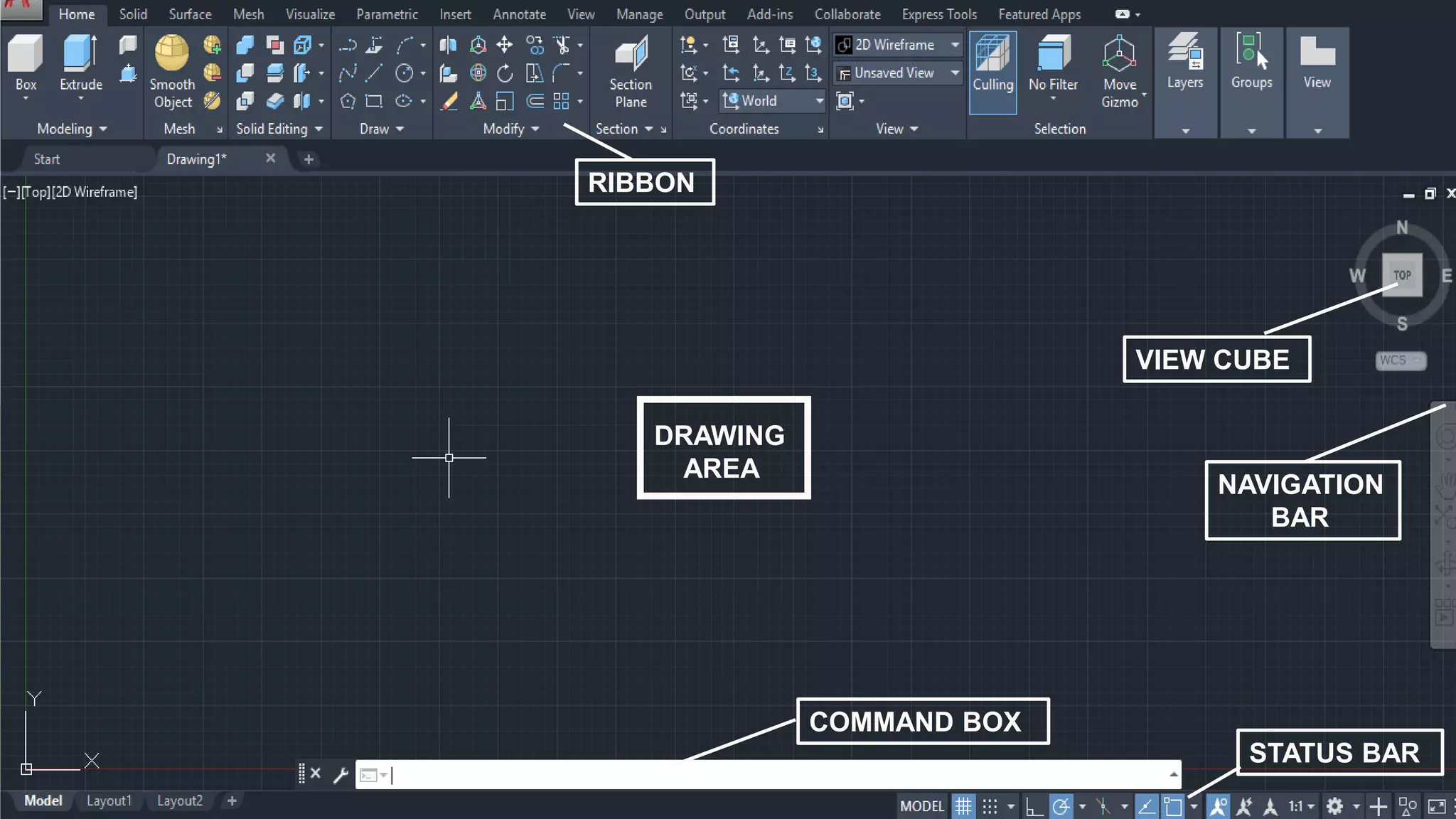
RIBBON
VIEW CUBE
COMMAND BOX
DRAWING
AREA
STATUS BAR
NAVIGATION
BAR
AutoCAD RIBBON
the ribbon is made of several tabs. ribbon arranges and organizes all the controls and tools in
different panels, palettes and tabs. these controls and tools are very useful for creating and
modifying the autocad drawings
VIEW CUBE
When acting as an orientation indicator, the View Cube turns to reflect the current view direction
as the user re-orients the scene using other tools.
NAVIGATION BAR
Provides access to navigation and orientation tools from a single interface.
STATUS BAR
the status bar displays information about the selected command or tool. It also displays the
current cursor coordinates, the name of the current layer, mode settings, and other information
about current settings.
COMMAND BAR
The command line is where you will see instructions and options when using commands.
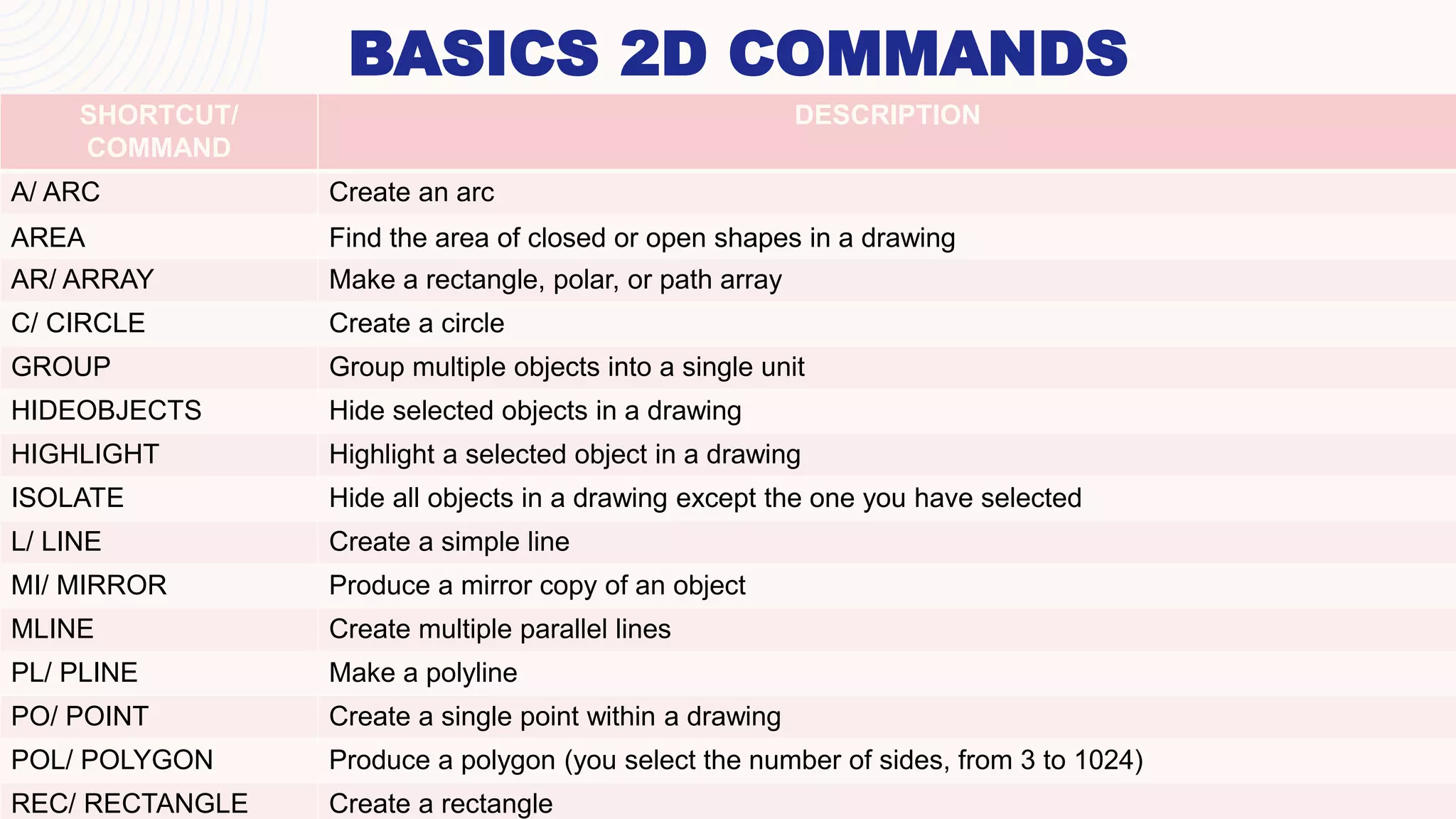
BASICS 2D COMMANDS
SHORTCUT/
COMMAND
DESCRIPTION
A/ ARC Create an arc
AREA Find the area of closed or open shapes in a drawing
AR/ ARRAY Make a rectangle, polar, or path array
C/ CIRCLE Create a circle
GROUP Group multiple objects into a single unit
HIDEOBJECTS Hide selected objects in a drawing
HIGHLIGHT Highlight a selected object in a drawing
ISOLATE Hide all objects in a drawing except the one you have selected
L/ LINE Create a simple line
MI/ MIRROR Produce a mirror copy of an object
MLINE Create multiple parallel lines
PL/ PLINE Make a polyline
PO/ POINT Create a single point within a drawing
POL/ POLYGON Produce a polygon (you select the number of sides, from 3 to 1024)
REC/ RECTANGLE Create a rectangle
THANK YOU
Name

autoCAD presentation.pdf

  • 1.
    AutoCAD B.Tech 3rd Sem MechanicalEngineering ME03 Name
  • 2.
    INDEX  What isAutoCAD ?  Advantages of AutoCAD  Introduction to AutoCAD Interface  Basic 2D commands
  • 3.
    WHAT IS AUTOCAD? • AutoCAD was first released in December 1982 as a desktop app . • AutoCAD is a computer-aided design software developed by the company Autodesk (hence the name AutoCAD). • It allows you to draw and edit digital 2D and 3D designs more quickly and easily than you could by hand. • You can only draw something so small by hand, but AutoCAD allows you to design down to fractions. • The files can also be easily saved and stored in the cloud, so they be accessed anywhere at anytime.
  • 4.
  • 5.
    DRAW TO SCALE Oneof the main benefits of autocad is that it allows you to draw to scale. you start by choosing the appropriate units of measurement. then, you can draw your model at 1:1 scale. EASY LAYOUT AND VIEWING when you’re using autocad, it’s easy to zoom in and out and pan to other areas of the drawing. this is particularly useful when you’re working on large or complicated designs. MAKE CHANGES EASILY AND REDUCE RISK OF ERROR In autoCAD , you don’t have to go through a long process just to adjust your drawing. you can create designs quickly and easily, using the software’s easy tools to complete tasks in a fraction of the time it would take via manual drafting.
  • 6.
    DRAW ACCURATELY AutoCAD makesit easy to draw objects accurately, with various options to set the exact size and alignment that you need. On your screen, there’s a rectangular grid. you can click on any interval on the grid to locate the point that you need. you can use your keyboard to enter the exact coordinates of the location at which you want to start drawing. SAVE TIME AND MONEY One of the main benefits of computer-aided design is that it’s incredibly efficient. All of the above factors contribute to a much quicky and easier design process. this allows you to finish a project as quickly as possible, saving you time and money.
  • 7.
  • 8.
  • 9.
    AutoCAD RIBBON the ribbonis made of several tabs. ribbon arranges and organizes all the controls and tools in different panels, palettes and tabs. these controls and tools are very useful for creating and modifying the autocad drawings VIEW CUBE When acting as an orientation indicator, the View Cube turns to reflect the current view direction as the user re-orients the scene using other tools. NAVIGATION BAR Provides access to navigation and orientation tools from a single interface. STATUS BAR the status bar displays information about the selected command or tool. It also displays the current cursor coordinates, the name of the current layer, mode settings, and other information about current settings. COMMAND BAR The command line is where you will see instructions and options when using commands.
  • 10.
    BASICS 2D COMMANDS SHORTCUT/ COMMAND DESCRIPTION A/ARC Create an arc AREA Find the area of closed or open shapes in a drawing AR/ ARRAY Make a rectangle, polar, or path array C/ CIRCLE Create a circle GROUP Group multiple objects into a single unit HIDEOBJECTS Hide selected objects in a drawing HIGHLIGHT Highlight a selected object in a drawing ISOLATE Hide all objects in a drawing except the one you have selected L/ LINE Create a simple line MI/ MIRROR Produce a mirror copy of an object MLINE Create multiple parallel lines PL/ PLINE Make a polyline PO/ POINT Create a single point within a drawing POL/ POLYGON Produce a polygon (you select the number of sides, from 3 to 1024) REC/ RECTANGLE Create a rectangle
  • 11.