1
PRESENTATION
On
AutoCAD
Presented by
Aditya Soni
B.Tech. (Mechanical Engineering)
Mechanical Engineering Department
Shambhunath Institute of Engineering & Technology, Jhalwa, Prayagraj, Uttar Pradesh
CONTENT
• Autodesk
• Auto Cad
• 2D Designing
 Tools used in 2D
 Applications of 2D
• 3D Modeling
 Tools used in 3D
 Applications of 3D
• Applications
2
AUTODESK
• Autodesk was initially released in 1982.
• Autodesk is an American multinational software corporation that makes
software for architecture, engineering, construction, manufacturing,
media, and entertainment industries.
• Autodesk headquarters are in San Rafael in California.
• The company was founded by JOHN WALKER.
Fig. 1 3
AUTOCAD
• Auto Cad is commercial software for 2D and 3D computer aided design.
• Auto Cad was first released in 1982.
• Auto Cad isused across wide range of industries by architects,
project managers, engineers, graphic designers and other professionals.
• The first version of Auto Cad was released in 1982 and released that 27
December.
• Auto Cad 2014 are available in English, German, French, Italian,
Spanish, Japanese, Korean an many more.
4
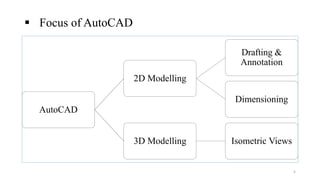
 Focus of AutoCAD
AutoCAD
2D Modelling
Drafting &
Annotation
Dimensioning
3D Modelling Isometric Views
5
2D DESIGNING
• Draft designs more quickly without using stencils and technical drawing
instruments.
• Develop site plans, refine concepts, sketch technical drawings and
share your ideas.
• Customize templates and more precisely.
• Collaborate with colleagues and clients using other compatible data files
when using genuine DWG. file format to collaborate with clients and
associates.
6
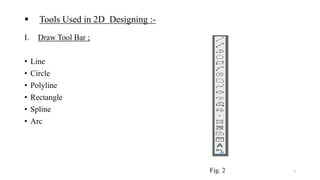
 Tools Used in 2D Designing :-
I. Draw Tool Bar ;
• Line
• Circle
• Polyline
• Rectangle
• Spline
• Arc
Fig. 2 7
II. Modify Tool Bar;
• Erase
• Copy
• Offset
• Move
• Mirror
Fig. 3
8
III. Status Tool Bar;
• GRID
• ORTHO
• POLAR
• OSNAP
• OTRACK Fig. 4
9
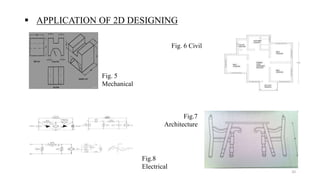
 APPLICATION OF 2D DESIGNING
Fig. 5
Mechanical
Fig. 6 Civil
Fig.8
Electrical
Fig.7
Architecture
10
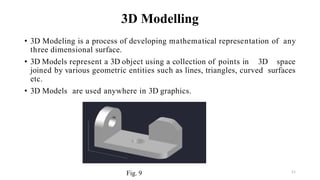
3D Modelling
• 3D Modeling is a process of developing mathematical representation of any
three dimensional surface.
• 3D Models represent a 3D object using a collection of points in 3D space
joined by various geometric entities such as lines, triangles, curved surfaces
etc.
• 3D Models are used anywhere in 3D graphics.
Fig. 9 11
 Tools Used in 3D Modelling
• Box
• Extrude
• Extrude Cut
• Presspull
• Polysolid
Fig. 10
12
 Applications of 3D Modelling;
• Medical Industry
• Movie Industry
• Automobiles Industry
• Architect Industry
Fig. 11
13
APPLICATIONS
• Automobiles Industries
• Power Plant Industries
• Piping Industries
• Mass Production Industries
• Aerospace Industries
14
Thank You
15

Auto cad ppt

  • 1.
    1 PRESENTATION On AutoCAD Presented by Aditya Soni B.Tech.(Mechanical Engineering) Mechanical Engineering Department Shambhunath Institute of Engineering & Technology, Jhalwa, Prayagraj, Uttar Pradesh
  • 2.
    CONTENT • Autodesk • AutoCad • 2D Designing  Tools used in 2D  Applications of 2D • 3D Modeling  Tools used in 3D  Applications of 3D • Applications 2
  • 3.
    AUTODESK • Autodesk wasinitially released in 1982. • Autodesk is an American multinational software corporation that makes software for architecture, engineering, construction, manufacturing, media, and entertainment industries. • Autodesk headquarters are in San Rafael in California. • The company was founded by JOHN WALKER. Fig. 1 3
  • 4.
    AUTOCAD • Auto Cadis commercial software for 2D and 3D computer aided design. • Auto Cad was first released in 1982. • Auto Cad isused across wide range of industries by architects, project managers, engineers, graphic designers and other professionals. • The first version of Auto Cad was released in 1982 and released that 27 December. • Auto Cad 2014 are available in English, German, French, Italian, Spanish, Japanese, Korean an many more. 4
  • 5.
     Focus ofAutoCAD AutoCAD 2D Modelling Drafting & Annotation Dimensioning 3D Modelling Isometric Views 5
  • 6.
    2D DESIGNING • Draftdesigns more quickly without using stencils and technical drawing instruments. • Develop site plans, refine concepts, sketch technical drawings and share your ideas. • Customize templates and more precisely. • Collaborate with colleagues and clients using other compatible data files when using genuine DWG. file format to collaborate with clients and associates. 6
  • 7.
     Tools Usedin 2D Designing :- I. Draw Tool Bar ; • Line • Circle • Polyline • Rectangle • Spline • Arc Fig. 2 7
  • 8.
    II. Modify ToolBar; • Erase • Copy • Offset • Move • Mirror Fig. 3 8
  • 9.
    III. Status ToolBar; • GRID • ORTHO • POLAR • OSNAP • OTRACK Fig. 4 9
  • 10.
     APPLICATION OF2D DESIGNING Fig. 5 Mechanical Fig. 6 Civil Fig.8 Electrical Fig.7 Architecture 10
  • 11.
    3D Modelling • 3DModeling is a process of developing mathematical representation of any three dimensional surface. • 3D Models represent a 3D object using a collection of points in 3D space joined by various geometric entities such as lines, triangles, curved surfaces etc. • 3D Models are used anywhere in 3D graphics. Fig. 9 11
  • 12.
     Tools Usedin 3D Modelling • Box • Extrude • Extrude Cut • Presspull • Polysolid Fig. 10 12
  • 13.
     Applications of3D Modelling; • Medical Industry • Movie Industry • Automobiles Industry • Architect Industry Fig. 11 13
  • 14.
    APPLICATIONS • Automobiles Industries •Power Plant Industries • Piping Industries • Mass Production Industries • Aerospace Industries 14
  • 15.