FIELD AUDIO RECORDING
NORHED LINGUISTIC CAPACITYBUILDING
Dr. FedaNegesse
LanguageTechnologyGroup
Department ofLinguistics
AddisAbabaUniversity
May 21-23,2018
1. DECISIONS
 What do I want to do?
 What equipment do I need?
 How can I deal with odds in the field?
 How much money do I need ?
5/24/2018
2
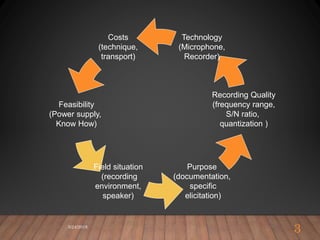
Costs
(technique,
transport)
Feasibility
(Power supply,
Know How)
Purpose
(documentation,
specific
elicitation)
Recording Quality
(frequency range,
S/N ratio,
quantization )
Technology
(Microphone,
Recorder)
Field situation
(recording
environment,
speaker)
5/24/2018
3
2. RELEVANT TIPS
 Purposes
 Recorders
 Microphones
 Field situations
5/24/2018
4
2.1. PURPOSES
5/24/2018
5
 Language documentation
 e.g. endangered language project
 Corpus building
 e.g. spoken corpus
 Research
 e.g. conversational analysis , acoustic analysis
2.2. AUDIO RECORDERS
 Analog/digital (costs, formats, media)
 Digital formats (wav, mp3, wma, amr, )
 Quality (signal-to-noise ratio)
 Power supply (accumulator / battery)
 Sound meter (intensity levels)
 Storage media (costs, durability, quality)
5/24/2018
6
AUDIO RECORDERS…
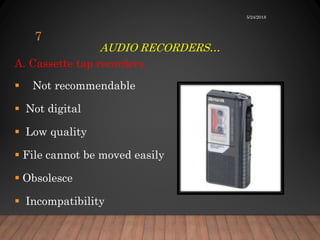
A. Cassette tap recorders
 Not recommendable
 Not digital
 Low quality
 File cannot be moved easily
 Obsolesce
 Incompatibility
5/24/2018
7
AUDIO RECORDERS…
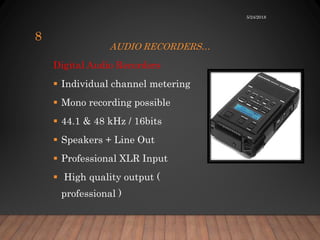
Digital Audio Recorders
 Individual channel metering
 Mono recording possible
 44.1 & 48 kHz / 16bits
 Speakers + Line Out
 Professional XLR Input
 High quality output (
professional )
5/24/2018
8
AUDIO RECORDERS …
 Equipped with all accessories
 Very expensive
 Fragile
 Not usually portable
 Assumes advanced technical skills
5/24/2018
9
AUDIO RECORDERS…
Optimality (Use Zoom Digital Audio Recorder)
 Audio formats
 Two external mikes
 Options for sampling frequency
 Sample size
 Sound meter
 Good audio output
 Noise reduction system
5/24/2018
10
2.3 MICROPHONES
Useful parameters
 Sensitivity
 Directionality
 Powering
 Affordability
5/24/2018
11
MIKES…
1. Microphone types
1.1. built-in mikes
 Bad quality
 Machine noise
 Omni directional
 Only in case of emergency
5/24/2018
12
MIKES…
1.2. Dynamic
 Very cheap
 Incompatible with new computer
soundcards
 Requires no power
 Less accurate
 Too small signal for small cards
5/24/2018
13
MIKES…
1.3. Condenser
 More accurate
 More senstive and responsive
 More expensive
 Fragile
 Needs power
 Equiped with noise reduction system
5/24/2018
14
MIKES…
1.3. Wireless mikes
 Unconnected, signal via radio frequency
 Wireless mikes can have dropouts
 Signal obstruction
 Allows freedom of movement and
 Good choice with e.g. children
5/24/2018
15
MIKES …
1.4. Wired mikes
 Stationary relatively
 Good quality
 May not need its own power
 Preferable for field work
5/24/2018
16
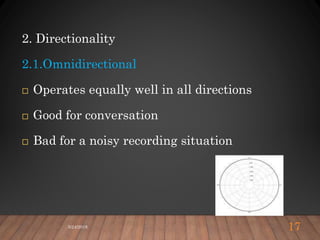
2. Directionality
2.1.Omnidirectional
 Operates equally well in all directions
 Good for conversation
 Bad for a noisy recording situation
5/24/2018 17
2.2. Unidirectional
 Receives signal efficiently
 From a specific direction
 Not from all directions
 Good for interview
 Reduces background noise from the back
5/24/2018
18
MIKES…
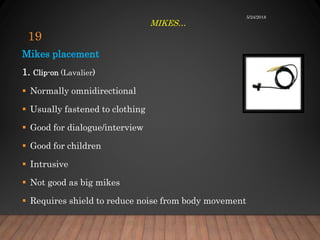
Mikes placement
1. Clip-on (Lavalier)
 Normally omnidirectional
 Usually fastened to clothing
 Good for dialogue/interview
 Good for children
 Intrusive
 Not good as big mikes
 Requires shield to reduce noise from body movement
5/24/2018
19
MIKES…
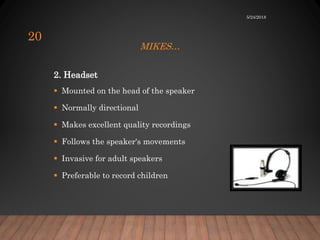
2. Headset
 Mounted on the head of the speaker
 Normally directional
 Makes excellent quality recordings
 Follows the speaker's movements
 Invasive for adult speakers
 Preferable to record children
5/24/2018
20
Windshield
 Most effective cover for mikes
 Protects against extreme wind.
 Provides 10-12db attenuation
 Protects against sunlight and dust
 Reduces pop sounds of stop release
 Attenuates high frequencies as well
5/24/2018 21
MIKES…
3. Useful Tips for Video Recording
3.1. Getting started
 Mount on a tripod with a screw
 Plug the power cable to a power source
 Clear the background if needed
 Select a good view or angle
 Point at the event to be recorded
 Place it at a close distance to pick up the sound as well
5/24/2018
22
3.2. Recording
 Remove the lens cover
 Open the LCD screen
 Press the movie button
 Start recording
 Monitor while recording
5/24/2018
23
3.3. Saving files
 Files are automatically saved in the default format
 Playback to see the quality of the recordings
 Learn from your mistakes
 Move files if the memory card is full
5/24/2018
24
FIELD
CONDITIONS
Some useful tips
PROTECT YOUR DIGITAL
DEVICES
The Seven enemies
 Dust
 Heat
 Humidity / Water
 Cold
 Hard shaking/sudden motion/vibration
 Thieves
 Yourself
Solutions
 Insolate your devices!
 Watch the cables!
 Keep the equipment dry!
 Protect your devices!!!
 Watch or let watch!
 Take save backups with you!!!
5/24/2018
26
TIME MANAGEMENT
 Have a time buffer
 Expect that the recording (setup) takes twice
as long as in the lab.
 Practice the record setup (microphone
settings, cable ports/jacks, recorder settings)
 Check “Recording Onset Time” (especially for
recorders of all types)
5/24/2018
27
FAMILIARITY WITH EQUIPMENT
 Know your equipment
 Don’t play with settings in a real situation
 Stressful situation
 Focus divided among monitoring, asking questions, making
notes.
 Get well organized and skilled
5/24/2018
28
SUPPLY
 Make sure that you never run out of Power (Batteries)!
 Accumulators (Marantz professional )
 Solar panel for recharging?
 Dry cells ( rechargeable such as alkaline )
 Electricity
5/24/2018
29
SUPPLY…
Make sure that you never run out of storage media
 Cards
 External HD
 Flash discs
 Computer with good memory capacity
5/24/2018
30
RECORDING SESSION
Choose a possibly quiet location
Close doors and windows
Cover large reverberant surfaces
Ask for turning off lights, refrigerators, fans, air conditioning etc.
Remove anything that ticks, buzzes, bangs, rattles, squeaks, hisses,
or otherwise makes itself heard
5/24/2018
31
AFTER RECORDING
 Check your data again – listen through your recordings
 Make notes (on settings, solutions, etc.)
 Don’t lower the quality requirements for digitization
 Move the files to other storage media
5/24/2018
32
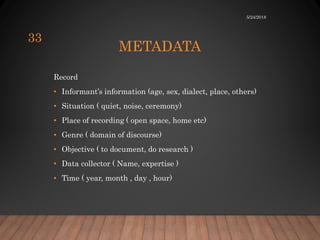
METADATA
Record
• Informant’s information (age, sex, dialect, place, others)
• Situation ( quiet, noise, ceremony)
• Place of recording ( open space, home etc)
• Genre ( domain of discourse)
• Objective ( to document, do research )
• Data collector ( Name, expertise )
• Time ( year, month , day , hour)
5/24/2018
33
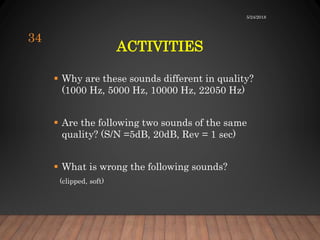
ACTIVITIES
 Why are these sounds different in quality?
(1000 Hz, 5000 Hz, 10000 Hz, 22050 Hz)
 Are the following two sounds of the same
quality? (S/N =5dB, 20dB, Rev = 1 sec)
 What is wrong the following sounds?
(clipped, soft)
5/24/2018
34
ENJOY YOUR
RECORDING !
5/24/2018
35

Audio recordings

  • 1.
    FIELD AUDIO RECORDING NORHEDLINGUISTIC CAPACITYBUILDING Dr. FedaNegesse LanguageTechnologyGroup Department ofLinguistics AddisAbabaUniversity May 21-23,2018
  • 2.
    1. DECISIONS  Whatdo I want to do?  What equipment do I need?  How can I deal with odds in the field?  How much money do I need ? 5/24/2018 2
  • 3.
    Costs (technique, transport) Feasibility (Power supply, Know How) Purpose (documentation, specific elicitation) RecordingQuality (frequency range, S/N ratio, quantization ) Technology (Microphone, Recorder) Field situation (recording environment, speaker) 5/24/2018 3
  • 4.
    2. RELEVANT TIPS Purposes  Recorders  Microphones  Field situations 5/24/2018 4
  • 5.
    2.1. PURPOSES 5/24/2018 5  Languagedocumentation  e.g. endangered language project  Corpus building  e.g. spoken corpus  Research  e.g. conversational analysis , acoustic analysis
  • 6.
    2.2. AUDIO RECORDERS Analog/digital (costs, formats, media)  Digital formats (wav, mp3, wma, amr, )  Quality (signal-to-noise ratio)  Power supply (accumulator / battery)  Sound meter (intensity levels)  Storage media (costs, durability, quality) 5/24/2018 6
  • 7.
    AUDIO RECORDERS… A. Cassettetap recorders  Not recommendable  Not digital  Low quality  File cannot be moved easily  Obsolesce  Incompatibility 5/24/2018 7
  • 8.
    AUDIO RECORDERS… Digital AudioRecorders  Individual channel metering  Mono recording possible  44.1 & 48 kHz / 16bits  Speakers + Line Out  Professional XLR Input  High quality output ( professional ) 5/24/2018 8
  • 9.
    AUDIO RECORDERS … Equipped with all accessories  Very expensive  Fragile  Not usually portable  Assumes advanced technical skills 5/24/2018 9
  • 10.
    AUDIO RECORDERS… Optimality (UseZoom Digital Audio Recorder)  Audio formats  Two external mikes  Options for sampling frequency  Sample size  Sound meter  Good audio output  Noise reduction system 5/24/2018 10
  • 11.
    2.3 MICROPHONES Useful parameters Sensitivity  Directionality  Powering  Affordability 5/24/2018 11
  • 12.
    MIKES… 1. Microphone types 1.1.built-in mikes  Bad quality  Machine noise  Omni directional  Only in case of emergency 5/24/2018 12
  • 13.
    MIKES… 1.2. Dynamic  Verycheap  Incompatible with new computer soundcards  Requires no power  Less accurate  Too small signal for small cards 5/24/2018 13
  • 14.
    MIKES… 1.3. Condenser  Moreaccurate  More senstive and responsive  More expensive  Fragile  Needs power  Equiped with noise reduction system 5/24/2018 14
  • 15.
    MIKES… 1.3. Wireless mikes Unconnected, signal via radio frequency  Wireless mikes can have dropouts  Signal obstruction  Allows freedom of movement and  Good choice with e.g. children 5/24/2018 15
  • 16.
    MIKES … 1.4. Wiredmikes  Stationary relatively  Good quality  May not need its own power  Preferable for field work 5/24/2018 16
  • 17.
    2. Directionality 2.1.Omnidirectional  Operatesequally well in all directions  Good for conversation  Bad for a noisy recording situation 5/24/2018 17
  • 18.
    2.2. Unidirectional  Receivessignal efficiently  From a specific direction  Not from all directions  Good for interview  Reduces background noise from the back 5/24/2018 18
  • 19.
    MIKES… Mikes placement 1. Clip-on(Lavalier)  Normally omnidirectional  Usually fastened to clothing  Good for dialogue/interview  Good for children  Intrusive  Not good as big mikes  Requires shield to reduce noise from body movement 5/24/2018 19
  • 20.
    MIKES… 2. Headset  Mountedon the head of the speaker  Normally directional  Makes excellent quality recordings  Follows the speaker's movements  Invasive for adult speakers  Preferable to record children 5/24/2018 20
  • 21.
    Windshield  Most effectivecover for mikes  Protects against extreme wind.  Provides 10-12db attenuation  Protects against sunlight and dust  Reduces pop sounds of stop release  Attenuates high frequencies as well 5/24/2018 21 MIKES…
  • 22.
    3. Useful Tipsfor Video Recording 3.1. Getting started  Mount on a tripod with a screw  Plug the power cable to a power source  Clear the background if needed  Select a good view or angle  Point at the event to be recorded  Place it at a close distance to pick up the sound as well 5/24/2018 22
  • 23.
    3.2. Recording  Removethe lens cover  Open the LCD screen  Press the movie button  Start recording  Monitor while recording 5/24/2018 23
  • 24.
    3.3. Saving files Files are automatically saved in the default format  Playback to see the quality of the recordings  Learn from your mistakes  Move files if the memory card is full 5/24/2018 24
  • 25.
  • 26.
    PROTECT YOUR DIGITAL DEVICES TheSeven enemies  Dust  Heat  Humidity / Water  Cold  Hard shaking/sudden motion/vibration  Thieves  Yourself Solutions  Insolate your devices!  Watch the cables!  Keep the equipment dry!  Protect your devices!!!  Watch or let watch!  Take save backups with you!!! 5/24/2018 26
  • 27.
    TIME MANAGEMENT  Havea time buffer  Expect that the recording (setup) takes twice as long as in the lab.  Practice the record setup (microphone settings, cable ports/jacks, recorder settings)  Check “Recording Onset Time” (especially for recorders of all types) 5/24/2018 27
  • 28.
    FAMILIARITY WITH EQUIPMENT Know your equipment  Don’t play with settings in a real situation  Stressful situation  Focus divided among monitoring, asking questions, making notes.  Get well organized and skilled 5/24/2018 28
  • 29.
    SUPPLY  Make surethat you never run out of Power (Batteries)!  Accumulators (Marantz professional )  Solar panel for recharging?  Dry cells ( rechargeable such as alkaline )  Electricity 5/24/2018 29
  • 30.
    SUPPLY… Make sure thatyou never run out of storage media  Cards  External HD  Flash discs  Computer with good memory capacity 5/24/2018 30
  • 31.
    RECORDING SESSION Choose apossibly quiet location Close doors and windows Cover large reverberant surfaces Ask for turning off lights, refrigerators, fans, air conditioning etc. Remove anything that ticks, buzzes, bangs, rattles, squeaks, hisses, or otherwise makes itself heard 5/24/2018 31
  • 32.
    AFTER RECORDING  Checkyour data again – listen through your recordings  Make notes (on settings, solutions, etc.)  Don’t lower the quality requirements for digitization  Move the files to other storage media 5/24/2018 32
  • 33.
    METADATA Record • Informant’s information(age, sex, dialect, place, others) • Situation ( quiet, noise, ceremony) • Place of recording ( open space, home etc) • Genre ( domain of discourse) • Objective ( to document, do research ) • Data collector ( Name, expertise ) • Time ( year, month , day , hour) 5/24/2018 33
  • 34.
    ACTIVITIES  Why arethese sounds different in quality? (1000 Hz, 5000 Hz, 10000 Hz, 22050 Hz)  Are the following two sounds of the same quality? (S/N =5dB, 20dB, Rev = 1 sec)  What is wrong the following sounds? (clipped, soft) 5/24/2018 34
  • 35.