IS THAT A MOBILE
TEMPLATE OR
RESPONSIVE DESIGN?
IDENTIFY WHICH MOBILE
STRATEGY IS RIGHT FOR YOU
                      #AUDC13
OUR TIME TOGETHER TODAY

•   The Mobile Landscape and Outlook
•   The Four Flavors of Mobile Experiences
•   Developing the Right Mobile Strategy
•   How netFORUM is Adapting


                                             #AUDC13
ABOUT
.ORGSOURCE

.orgSource is an experienced digital
communications and technology
consulting firm that serves only the
association marketplace. All of our
consultants are seasoned association
professionals, with the knowledge and   For more information please visit your
                                        website:
experience to guide your organization
                                        www.ORGSOURCE.com
through every step of its digital
strategy.


                                                                                 #AUDC13
THE MOBILE LANDSCAPE
AND OUTLOOK
                       #AUDC13
THE MOBILE OUTLOOK
• 72% of the planet’s 6.9 billion inhabitants will
  be mobile by 2016 *
• As of September 2012, Android accounted for
  1.3 Million activations per day **
   – This is just one platform!


* via Forrester Research (April 2012)
** via Smashing Magazine Mobile Book (Dec. 2012)


                                                   #AUDC13
If you don’t have a mobile strategy,
you don’t have a future strategy.
  - Eric Schmidt, Google, Executive Chairman


                                        #AUDC13
BUT ASSOCIATIONS ARE
          DIFFERENT
• Members aren’t coming to your site to
  “browse” while they are bored.
• Your members come with a specific task.
• Your strategy needs to be prepared to make
  those tasks as easy as possible.


                                       #AUDC13
WHAT IS A MOBILE STRATEGY?
• Mobile strategy is not a technology or a
  project, but a practice. It is the constant
  alignment of user needs, business goals, and
  evolving mobile technologies.


                                        #AUDC13
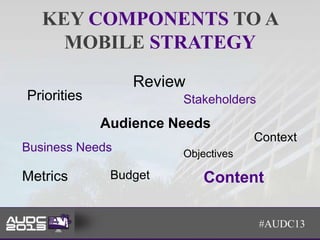
KEY COMPONENTS TO A
     MOBILE STRATEGY
                 Review
Priorities             Stakeholders
             Audience Needs
                                    Context
Business Needs         Objectives

Metrics       Budget       Content

                                      #AUDC13
HOW MANY OF YOU HAVE A
     MOBILE STRATEGY?
A. We don’t have a strategy yet
B. We have a defined mobile strategy for less
   than a year
C. Early Stage – we are just beginning to define
   a mobile strategy
D. We have a defined mobile strategy for more
   than a year


                                          #AUDC13
WHICH OF THE FOLLOWING BEST
  DESCRIBES YOUR MOBILE
     STRATEGY TODAY?
         11%                  We do nothave a mobile
                              strategy yet
                     11%
  38%
                              We have a defined mobile
                              stratetgy for less than one
                              year
                              Early stage -- we are just
                              beginning to work on a
                              strategy
               40%            We have a defined mobile
                              strategy for a year or more
                           Source: Forrester Research


                                           #AUDC13
THE FOUR FLAVORS OF
MOBILE WEB
                      #AUDC13
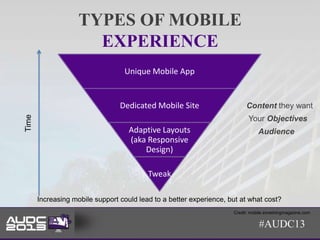
TYPES OF MOBILE
                      EXPERIENCE
                                  Unique Mobile App


                                 Dedicated Mobile Site                    Content they want
Time


                                                                           Your Objectives
                                    Adaptive Layouts                            Audience
                                    (aka Responsive
                                        Design)

                                          Tweak

       Increasing mobile support could lead to a better experience, but at what cost?
                                                                     Credit: mobile.smashingmagazine.com

                                                                                #AUDC13
TWEAKING – AKA DO NOTHING
• Your current site as it exists today renders on a
  smart phone or tablet.
• Visitors have to pinch, double tap, and scroll
  to read content effectively.
• Depending on technology you use (i.e.
  Flash), some content may or may not render.


                                           #AUDC13
TWEAKING
• Pros                         • Cons
  – Lowest barrier to entry      – Often a poor user
    into mobile                    experience leads to less
  – Lowest investment - zero       return visits
                                 – Some content may not
                                   render on mobile
                                   devices
                                 – Visitors often turned off
                                   by lack of optimization


                                                   #AUDC13
RESPONSIVE DESIGN
• Your entire site is available on a mobile
  devices
• Layouts and presentation adjusts and
  reconfigures depending on the screen size
• Break points are often for
  desktop/laptop, tablets, mobile phones


                                        #AUDC13
RESPONSIVE DESIGN
• Pros                           • Cons
  – One set of code and            – Possible redesign
    content to maintain and          needed
    manage                         – Less differentiation of
  – Easier and cheaper to            mobile content
    maintain                       – Lower mobile focused
  – No need for redirects            user experience
  – One URL for better SEO
  – Access to all site content


                                                     #AUDC13
SEE HOW YOUR SITE LOOKS

Not sure how your site looks on a mobile
device? Check it out on our responsive
design tool.

http://www.orgsource.com/responsive/i
ndex.html

                                  #AUDC13
RESPONSIVE DESIGN
           “GOTCHAS”
• Advertising
• Content layout on different screen sizes
  – Long Form vs. Short Form
  – Tables and Analytical Data
  – Downloads / PDFs
  – Images


                                         #AUDC13
WHEN RESPONSIVE DESIGN
        WON’T WORK
• Your site content doesn’t lend well to mobile
  devices
• Your users don’t need your entire site in a
  mobile environment
• Some user experiences do not work well in
  responsive design
  – myOrganization portals
  – eLearning centers

                                         #AUDC13
SOME LESSONS LEARNED
• Personalized portals
• User experience
   – Touch vs. click
• Truncating content


                         #AUDC13
MOBILE SITE
• A separate site optimized for mobile devices
  – Often has a separate URL like
    http://m.mywebsite.org
  – Allows you to display a subset of your website, not
    the full experience


                                              #AUDC13
MOBILE SITE
   • Pros                                    • Cons
        – Easier implementation                – Content duplication risk
        – Capacity to differentiate              (SEO hit)*
          mobile content                       – You have to maintain
        – Better mobile user                     and update separate
          experience                             templates and code
                                               – Higher cost of
                                                 maintenance


* There are methods to reduce any SEO risk


                                                                #AUDC13
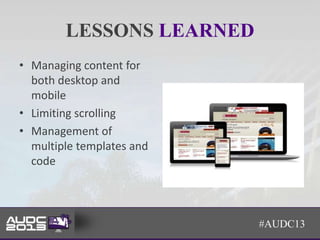
LESSONS LEARNED
• Managing content for
  both desktop and
  mobile
• Limiting scrolling
• Management of
  multiple templates and
  code


                           #AUDC13
MOBILE APPS
• A separate application that is developed using
  specific platforms (iOS, Android, WP, BB)
• Offers ability to take advantage of mobile
  devices capabilities where mobile sites and
  responsive design cannot
• Custom development
• Hybrid approaches


                                         #AUDC13
MOBILE APPS
• Pros                              • Cons
  – Avoid delays of buffering         – Apps are specific to an
    video, audio or slow                operating
    connections                       – Not as easy to modify as a
  – Can perform lots of complex         Web site
    tasks quickly                     – Mobile options for Web
  – Monetization: People will pay       becoming more robust (HTML
    for apps                            5)
  – Can take advantage of mobile      – Can be expensive to develop
    device functionality (access        and maintain/update
    contacts, calendars, other
    apps)


                                                        #AUDC13
APP DEVELOPMENT
• Use a vendor or do it yourself?
  – Do you have the staff to code and maintain?
  – Does your staff know all the programming
    languages for every type of mobile platform?


                                             #AUDC13
DEVELOPING THE RIGHT
MOBILE STRATEGY
                       #AUDC13
IT’S ALL ABOUT THE USER
             EXPERIENCE
•   Give the user what they need
•   Thinking about thumbs & fingers, not mice
•   Devices, devices, devices
•   Content accessibility
•   Pre-existing custom functionality &
    development


                                         #AUDC13
DECIDING ON THE RIGHT
            STRATEGY
•   One approach or multiple
•   Look at your web statistics
•   Conduct a member survey
•   Develop and validate specific use cases
•   Review other industry leaders


                                              #AUDC13
OTHER IMPLICATIONS
• Regardless of the strategy, now you are
  mobile, which means you will need to:
  – Think of content in multiple dimensions when
    publishing
  – Think of user experiences from multiple view
    points
  – Site improvements need to consider all
    environments


                                            #AUDC13
EXAMPLE STRATEGY
• Use Case: Conferences & Large Meetings
  – Mobile specific app
     • Access information in real-time at event
     • Engage event attendees
     • Alerts and notifications
• Use Case: Content Access by Mobile Visitors
  – Mobile site
     • Limited content needs in mobile setting
     • Can tailor content to audience needs

                                                  #AUDC13
START NOW
• What problems are you trying to solve?
• Review web analytics
• Member needs assessments – previous
  research
• Conduct new research


                                           #AUDC13
HOW NETFORUM IS
ADAPTING
                  #AUDC13
How netFORUM is Adapting
• netFORUM 2013 is Adapting to Mobile Needs
• New Features / Functionality Include:
  – Responsive Design Framework (Bootstrap)
  – Removal of Fixed Positioning in Forms
  – Mobile Web Access to Profile Pages
  – HTML5 Adoption
  – Introduction of RESTful Web Services API


                                               #AUDC13
QUESTIONS


            #AUDC13
GET IN TOUCH
CONTACT US

Interested in mobile, website       Sign Up to Receive Our
redesigns, AMS, LMS, CMS            Newsletter! Visit our
selections? Let’s talk about your   Website today!
projects to see how we can help.
                                    Phone:
   www.orgsource.com                +1 847.275.1840
   twitter.com/orgsource
   www.linkedin.com/company/14      Email:
   48229                            info@orgsource.com


                                                         #AUDC13
THANK YOU


            #AUDC13

Is That a Mobile Template or Responsive Design? Identify Which Mobile Strategy is Right For You.

  • 1.
    IS THAT AMOBILE TEMPLATE OR RESPONSIVE DESIGN? IDENTIFY WHICH MOBILE STRATEGY IS RIGHT FOR YOU #AUDC13
  • 2.
    OUR TIME TOGETHERTODAY • The Mobile Landscape and Outlook • The Four Flavors of Mobile Experiences • Developing the Right Mobile Strategy • How netFORUM is Adapting #AUDC13
  • 3.
    ABOUT .ORGSOURCE .orgSource is anexperienced digital communications and technology consulting firm that serves only the association marketplace. All of our consultants are seasoned association professionals, with the knowledge and For more information please visit your website: experience to guide your organization www.ORGSOURCE.com through every step of its digital strategy. #AUDC13
  • 4.
    THE MOBILE LANDSCAPE ANDOUTLOOK #AUDC13
  • 5.
    THE MOBILE OUTLOOK •72% of the planet’s 6.9 billion inhabitants will be mobile by 2016 * • As of September 2012, Android accounted for 1.3 Million activations per day ** – This is just one platform! * via Forrester Research (April 2012) ** via Smashing Magazine Mobile Book (Dec. 2012) #AUDC13
  • 6.
    If you don’thave a mobile strategy, you don’t have a future strategy. - Eric Schmidt, Google, Executive Chairman #AUDC13
  • 7.
    BUT ASSOCIATIONS ARE DIFFERENT • Members aren’t coming to your site to “browse” while they are bored. • Your members come with a specific task. • Your strategy needs to be prepared to make those tasks as easy as possible. #AUDC13
  • 8.
    WHAT IS AMOBILE STRATEGY? • Mobile strategy is not a technology or a project, but a practice. It is the constant alignment of user needs, business goals, and evolving mobile technologies. #AUDC13
  • 9.
    KEY COMPONENTS TOA MOBILE STRATEGY Review Priorities Stakeholders Audience Needs Context Business Needs Objectives Metrics Budget Content #AUDC13
  • 10.
    HOW MANY OFYOU HAVE A MOBILE STRATEGY? A. We don’t have a strategy yet B. We have a defined mobile strategy for less than a year C. Early Stage – we are just beginning to define a mobile strategy D. We have a defined mobile strategy for more than a year #AUDC13
  • 11.
    WHICH OF THEFOLLOWING BEST DESCRIBES YOUR MOBILE STRATEGY TODAY? 11% We do nothave a mobile strategy yet 11% 38% We have a defined mobile stratetgy for less than one year Early stage -- we are just beginning to work on a strategy 40% We have a defined mobile strategy for a year or more Source: Forrester Research #AUDC13
  • 12.
    THE FOUR FLAVORSOF MOBILE WEB #AUDC13
  • 13.
    TYPES OF MOBILE EXPERIENCE Unique Mobile App Dedicated Mobile Site Content they want Time Your Objectives Adaptive Layouts Audience (aka Responsive Design) Tweak Increasing mobile support could lead to a better experience, but at what cost? Credit: mobile.smashingmagazine.com #AUDC13
  • 14.
    TWEAKING – AKADO NOTHING • Your current site as it exists today renders on a smart phone or tablet. • Visitors have to pinch, double tap, and scroll to read content effectively. • Depending on technology you use (i.e. Flash), some content may or may not render. #AUDC13
  • 15.
    TWEAKING • Pros • Cons – Lowest barrier to entry – Often a poor user into mobile experience leads to less – Lowest investment - zero return visits – Some content may not render on mobile devices – Visitors often turned off by lack of optimization #AUDC13
  • 16.
    RESPONSIVE DESIGN • Yourentire site is available on a mobile devices • Layouts and presentation adjusts and reconfigures depending on the screen size • Break points are often for desktop/laptop, tablets, mobile phones #AUDC13
  • 17.
    RESPONSIVE DESIGN • Pros • Cons – One set of code and – Possible redesign content to maintain and needed manage – Less differentiation of – Easier and cheaper to mobile content maintain – Lower mobile focused – No need for redirects user experience – One URL for better SEO – Access to all site content #AUDC13
  • 18.
    SEE HOW YOURSITE LOOKS Not sure how your site looks on a mobile device? Check it out on our responsive design tool. http://www.orgsource.com/responsive/i ndex.html #AUDC13
  • 19.
    RESPONSIVE DESIGN “GOTCHAS” • Advertising • Content layout on different screen sizes – Long Form vs. Short Form – Tables and Analytical Data – Downloads / PDFs – Images #AUDC13
  • 20.
    WHEN RESPONSIVE DESIGN WON’T WORK • Your site content doesn’t lend well to mobile devices • Your users don’t need your entire site in a mobile environment • Some user experiences do not work well in responsive design – myOrganization portals – eLearning centers #AUDC13
  • 21.
    SOME LESSONS LEARNED •Personalized portals • User experience – Touch vs. click • Truncating content #AUDC13
  • 22.
    MOBILE SITE • Aseparate site optimized for mobile devices – Often has a separate URL like http://m.mywebsite.org – Allows you to display a subset of your website, not the full experience #AUDC13
  • 23.
    MOBILE SITE • Pros • Cons – Easier implementation – Content duplication risk – Capacity to differentiate (SEO hit)* mobile content – You have to maintain – Better mobile user and update separate experience templates and code – Higher cost of maintenance * There are methods to reduce any SEO risk #AUDC13
  • 24.
    LESSONS LEARNED • Managingcontent for both desktop and mobile • Limiting scrolling • Management of multiple templates and code #AUDC13
  • 25.
    MOBILE APPS • Aseparate application that is developed using specific platforms (iOS, Android, WP, BB) • Offers ability to take advantage of mobile devices capabilities where mobile sites and responsive design cannot • Custom development • Hybrid approaches #AUDC13
  • 26.
    MOBILE APPS • Pros • Cons – Avoid delays of buffering – Apps are specific to an video, audio or slow operating connections – Not as easy to modify as a – Can perform lots of complex Web site tasks quickly – Mobile options for Web – Monetization: People will pay becoming more robust (HTML for apps 5) – Can take advantage of mobile – Can be expensive to develop device functionality (access and maintain/update contacts, calendars, other apps) #AUDC13
  • 27.
    APP DEVELOPMENT • Usea vendor or do it yourself? – Do you have the staff to code and maintain? – Does your staff know all the programming languages for every type of mobile platform? #AUDC13
  • 28.
  • 29.
    IT’S ALL ABOUTTHE USER EXPERIENCE • Give the user what they need • Thinking about thumbs & fingers, not mice • Devices, devices, devices • Content accessibility • Pre-existing custom functionality & development #AUDC13
  • 30.
    DECIDING ON THERIGHT STRATEGY • One approach or multiple • Look at your web statistics • Conduct a member survey • Develop and validate specific use cases • Review other industry leaders #AUDC13
  • 31.
    OTHER IMPLICATIONS • Regardlessof the strategy, now you are mobile, which means you will need to: – Think of content in multiple dimensions when publishing – Think of user experiences from multiple view points – Site improvements need to consider all environments #AUDC13
  • 32.
    EXAMPLE STRATEGY • UseCase: Conferences & Large Meetings – Mobile specific app • Access information in real-time at event • Engage event attendees • Alerts and notifications • Use Case: Content Access by Mobile Visitors – Mobile site • Limited content needs in mobile setting • Can tailor content to audience needs #AUDC13
  • 33.
    START NOW • Whatproblems are you trying to solve? • Review web analytics • Member needs assessments – previous research • Conduct new research #AUDC13
  • 34.
  • 35.
    How netFORUM isAdapting • netFORUM 2013 is Adapting to Mobile Needs • New Features / Functionality Include: – Responsive Design Framework (Bootstrap) – Removal of Fixed Positioning in Forms – Mobile Web Access to Profile Pages – HTML5 Adoption – Introduction of RESTful Web Services API #AUDC13
  • 36.
    QUESTIONS #AUDC13
  • 37.
    GET IN TOUCH CONTACTUS Interested in mobile, website Sign Up to Receive Our redesigns, AMS, LMS, CMS Newsletter! Visit our selections? Let’s talk about your Website today! projects to see how we can help. Phone: www.orgsource.com +1 847.275.1840 twitter.com/orgsource www.linkedin.com/company/14 Email: 48229 info@orgsource.com #AUDC13
  • 38.
    THANK YOU #AUDC13