System Support for Rapid Recovery and Attack Resistance A Friday ATC-NY Talk by   Todd Deshane
Overview Motivation Goals Background Architecture Evaluation Plan of Work
Motivation Computers on the Internet are vulnerable Even with latest updates and virus definitions Zero day exploits Malware effects User data compromised System controlled by attacker Restoration of system and user data Time-consuming Difficult for users Not always possible (i.e. digital photos)‏
"New methods are being invented, new tricks, and every year it gets worse... We are losing the battle... Most companies don't know they have been attacked."  - Bruce Schneier "The average top executive doesn't understand security, but we have to change that... Security is an imperative. It's no longer just a good idea."  - Allen Kerr "Virus incidences had surged between 2003, when they detected just over 10,000, and 2006, when they found 80,000. Criminal activity accounted for most of that increase."  - Kaspersky Labs Motivation
"Very sophisticated tools are commercially available in black markets... This has made [the Internet] more attractive for organized crime: [criminals] no longer have to be geeks."  - James Lewis "Although security awareness continues to improve, hackers and malicious code authors are releasing threats faster than ever before, with approximately 200 per cent more malicious threats per day than two years ago."  - Stuart McClure (2006)‏ "Over one third [of IT Companies] were hit by a denial-of-service attack while over 44 percent had experienced either a pharming or cache poisoning attack."  - 2007 Secure64 Survey Motivation
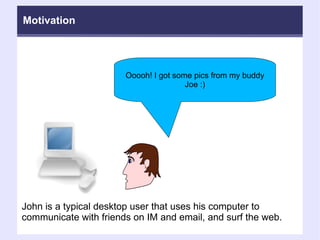
Ooooh! I got some pics from my buddy Joe :)‏ John is a typical desktop user that uses his computer to communicate with friends on IM and email, and surf the web. Motivation
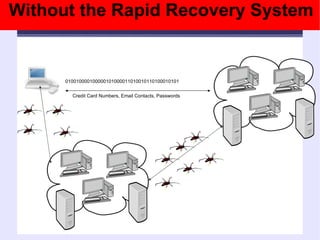
Without the Rapid Recovery System 010010000100000101000011010010110100010101 Credit Card Numbers, Email Contacts, Passwords
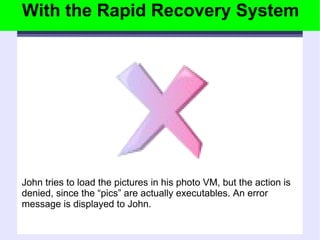
With the Rapid Recovery System John tries to load the pictures in his photo VM, but the action is denied, since the “pics” are actually executables. An error message is displayed to John.
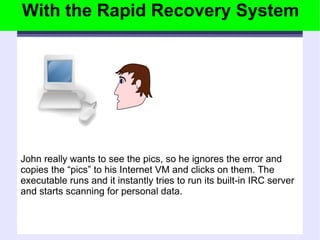
With the Rapid Recovery System John really wants to see the pics, so he ignores the error and copies the “pics” to his Internet VM and clicks on them. The executable runs and it instantly tries to run its built-in IRC server and starts scanning for personal data.
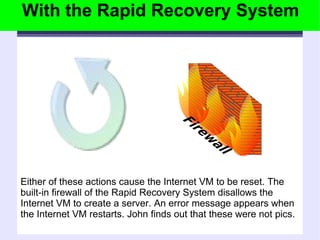
Either of these actions cause the Internet VM to be reset. The built-in firewall of the Rapid Recovery System disallows the Internet VM to create a server. An error message appears when the Internet VM restarts. John finds out that these were not pics. With the Rapid Recovery System
Notice a slow down of the machine, unsure of cause. Reboot machine, still slow. Look in process list, attempt to kill suspicious process, regenerates itself. Call tech support, make an appointment to take the computer to be fixed. Newest backup is 1 month old, some recent reports and pictures lost. 3 weeks later get the machine back with the OS re-installed. THE MINEFIELD OF PERSONAL COMPUTER USE Scenario: Open an attachment containing a mass emailing virus Without the Rapid Recovery System
The attachment is written into the email log. The NET-VM flags a violation of the network contract and pauses the VM. The system asks the user if they want to rollback to the last known good image. Rollback and remount personal data store. Some system data (logs, etc.) in VM appliance is lost, but no personal data is lost. The machine is back in working order in less than 1 hour. With the Rapid Recovery System Scenario: Open an attachment containing a mass emailing virus THE MINEFIELD OF PERSONAL COMPUTER USE
A malicious program scans the hard drive for credit card numbers. The user does not notice any sign of trouble. The program sends out a small amount of data containing the information discovered. The program installs a backdoor for later use by the attacker. Scenario: Surf to the wrong website Without the Rapid Recovery System THE MINEFIELD OF PERSONAL COMPUTER USE
The malicious programs begins to read the hard drive for credit card numbers. The FS-VM triggers a violation of the data access contract and pauses the VM. The system asks the user if they want to rollback to the last known good image. Rollback and remount personal data store. The scan is not completed, the information is not sent, the backdoor is prevented. With the Rapid Recovery System Scenario: Surf to the wrong website THE MINEFIELD OF PERSONAL COMPUTER USE
After the update, several applications cannot find some required components. The user calls tech support and they confirm the problems with the patch. The best recommendation is to completely uninstall and re-install the applications. It takes a few hours to assemble the installation media, to find the product keys, and to follow the instructions. Scenario: Install a required software update Without the Rapid Recovery System THE MINEFIELD OF PERSONAL COMPUTER USE
After the update, several applications cannot find some required components. The user calls tech support and they confirm the problems with the patch. The user decides to rollback to the last known good image. The machine is back up in running in minutes. With the Rapid Recovery System Scenario: Install a required software update THE MINEFIELD OF PERSONAL COMPUTER USE
Goals Provide attack resistance and rapid recovery Isolate and protect user data from attacks Provide automatic and user-triggered checkpoints Safe testing of system and application updates Facilitate forensic analysis
Background: Security Early Internet based on openness/trust First documented Internet worm – 1988 Malware: large scale problem – late 1990s Criminal malware networks (botnets)‏ DDOS, digital blackmail, account/credit info Attack defenses Antivirus software Firewalls Intrusion detection systems
Background: Virtualization Virtual Machine Monitor  Pioneered by IBM Software/hardware co-evolution Intel VT and AMD-V Software/hardware co-evolution (again)‏ Next generation virtualization hardware Xen hypervisor (VMM)‏ Paravirtual guests (i.e. Linux, *BSD)‏ HVM guests (i.e. Microsoft Windows)‏
Background: Virtualization+Security VMs used as sandboxes  VMs can be monitored from below  System security and fault tolerance Replicate system state to a backup VM Secure logging and replay Backtracking intrusions Safe testing/integration of untrusted code Protection against root kits
Background: System Reset Facilities DeepFreeze Restore to trusted checkpoint on each boot Windows System Restore Keep checkpoints of system state for rollback Both of these lack: User data protection/rollback Attack prevention/detection
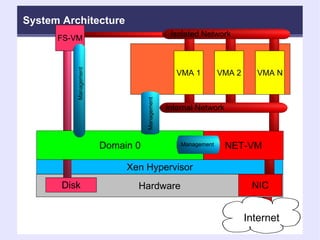
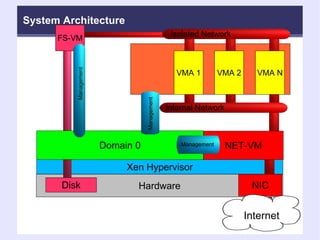
Internet Hardware Xen Hypervisor NIC NET-VM Internal Network  VMA 1 VMA 2 VMA N Isolated Network  FS-VM Disk Domain 0 Management Management System Architecture Management
Benefits Intrusion detection and attack prevention Protection of user data Checkpoint and restart of virtual machine appliances Rapid first time installation Model for software distribution Complement and enhance backups
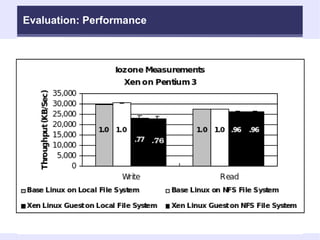
Evaluation Resistance/protection against attacks Categorize attacks Defense strategies against attacks Performance overhead Overhead of virtualization technology Overhead of file system virtual machine
Evaluation: Attacks Backdoor attacks  Initiate/listen for connections Send and receive data Malicious attacks Copy infected executables to shared folders Attempt to destroy data Spyware attacks Harvest email addresses and other personal data Vulnerability attacks Exploit vulnerability in specific server software
Evaluation: Defenses Block unused ports Backdoor attacks can't access the Internet Vulnerable services are not running Restrictions on read, write, and/or append access Malicious attacks can't write/delete user data Spyware attacks can't read user data Detect unexpected behavior and rollback Anomalies raise errors/warnings Prompt user or automatic rollback
Evaluation: Performance
Plan of Work Construction and integration of a separate NET-VM component Tight integration of NET-VM and FS-VM into virtual machine support layer of Xen A comprehensive virtual machine appliance contract system Evaluation of system  Performance Functionality
Internet Hardware Xen Hypervisor NIC NET-VM Internal Network  VMA 1 VMA 2 VMA N Isolated Network  FS-VM Disk Domain 0 Management Management System Architecture Management
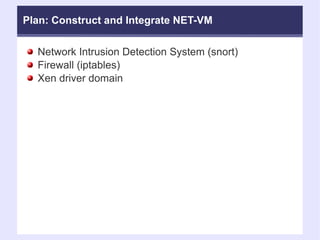
Plan: Construct and Integrate NET-VM Network Intrusion Detection System (snort)‏ Firewall (iptables)‏ Xen driver domain
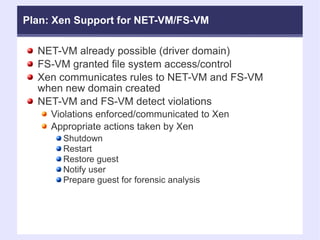
NET-VM already possible (driver domain)‏ FS-VM granted file system access/control Xen communicates rules to NET-VM and FS-VM when new domain created NET-VM and FS-VM detect violations Violations enforced/communicated to Xen Appropriate actions taken by Xen Shutdown Restart Restore guest Notify user Prepare guest for forensic analysis Plan: Xen Support for NET-VM/FS-VM
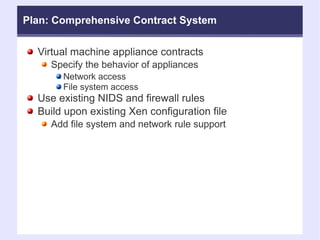
Plan: Comprehensive Contract System Virtual machine appliance contracts Specify the behavior of appliances Network access  File system access Use existing NIDS and firewall rules Build upon existing Xen configuration file Add file system and network rule support
Plan: Evaluation of Modified System Performance  I/O: read, write Network: send, receive CPU overhead Functionality Resistance to attack Recovery from attack Construct virtual machine appliances
Related/Proposed Projects at Clarkson Log-Structured File System (LFS) for FS-VM Enable rollback of writes with LFS Isolation testing of virtualization systems Performance isolation testing methodology and results Power testing of virtualization systems Recommend/improve power-friendly VMMs Tools for forensic analysis Capture/export compromised VM Recommend defense strategies Tools for contract inspection Visualize access granted by contract
Questions/Comments?
 
Backup Slides This won't fit in the presentation, but if there are questions, some of these slides might help
Virtualization Motivation Backup Slides More virtualization basics and why to use virtualization
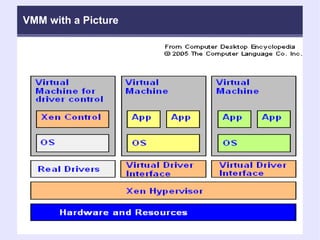
Terminology Virtual Machine Monitor (VMM)‏ Also know as: hypervisor Thin software layer between the hardware and “guest” operating system First to the hardware Examples of VMMs: VMware, Xen, Parallels, Z/vm, MS Viridian, Qemu, KVM, ...
VMM with a Picture
Virtualization Predictions 9 of 10 enterprises will have virtualization by 2007 - Yankee Group  (August 2007)‏ Physical servers growth near zero within 2012 - Bernstein (August 2007)‏ Over 50% physical servers will be virtualized in 2011 - IDC  (July 2007)‏ Virtualization services market to reach $11.7 billion by 2011 - IDC (July 2007)‏ Server market to hardly grow over 2% annually through 2011 because of virtualization - IDC (July 2007)‏
Virtualization Predictions 25% of enterprise data center servers to be virtual by 2010 - Intel (July 2007)‏ A Microsoft hypervisor for Vista expected in mid-2009 - Gartner (July 2007)‏ Virtualization will be part of nearly every aspect of IT by 2015 – Gartner (May 2007)‏ 3 million virtual machines expected in 2009 - Gartner (May 2007)‏
Virtualization Predictions Virtualization and multicore will cost $2.4 billion in customer spending between 2006 and 2010 - IDC (March 2007)‏ OS Virtualization to become mainstream by 2010 - Gartner (December 2006)‏ Virtualization market to grow to $15 billion worldwide by 2009 - IDC (October 2006)‏
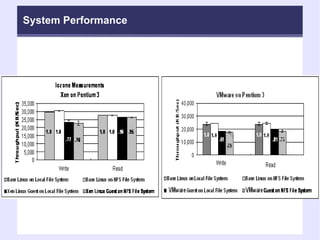
Performance Backup Slides Xen vs. VMware performance
System Performance
Guest Configuration File Backup Slides More details of the syntax
Plan: File System Rule Language # Example file system rule set for an email client. fs_rule = [ 'id=1, read, 1024, 5' ]  # read at most 1024 bytes of data in 5 seconds  fs_rule = [ 'id=2, append, 1024, 3' ]  # append at most 1024 bytes of data in 3 seconds. fs_rule = [ 'id=3, write, 320, 3' ]  # write at most 320 bytes in 3 seconds  # The email mount point is accessible to the email client, and fs_rules  # with id=1 and id=2 are applied disk = [ 'fsvm:/mnt/email, /home/user/mail,fs_rule=1:2' ] # The email mount point is accessible to the email client, and fs_rules  # with id=1 and id=3 are applied. disk = [ 'fsvm:/mnt/email, /home/user/attachments,fs_rule=1:3' ]
Plan: Network Rule Language #Email client example continued network_rule = ['id=1, iptables, file=/etc/iptables/email_client'] network_rule = ['id=2, snort, file=/etc/snort/rules/email_client'] vif = [ 'rate=2Mb/s, network_rule=1:2' ]
Attacks Backup Slides More details/example attacks looked at
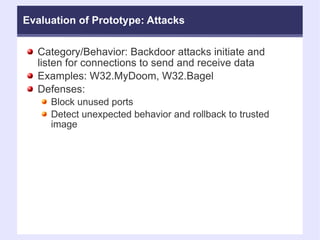
Evaluation of Prototype: Attacks Category/Behavior: Backdoor attacks initiate and listen for connections to send and receive data Examples: W32.MyDoom, W32.Bagel Defenses:  Block unused ports  Detect unexpected behavior and rollback to trusted image
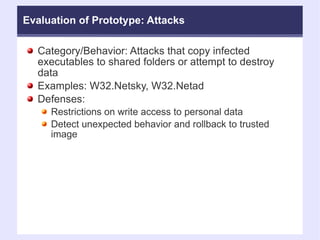
Evaluation of Prototype: Attacks Category/Behavior: Attacks that copy infected executables to shared folders or attempt to destroy data Examples: W32.Netsky, W32.Netad Defenses:  Restrictions on write access to personal data Detect unexpected behavior and rollback to trusted image
Evaluation of Prototype: Attacks Category/Behavior: Attacks that harvest email addresses and other personal data Examples: W32.Zafi.D, PWSteal.Ldpinch.E Defenses:  Restrictions on read access to personal data Detect unexpected behavior and rollback to trusted image
Evaluation of Prototype: Attacks Category/Behavior: Attacks that exploit vulnerability in specific server software Examples: MySQL UDF, Blaster, Slammer Defenses:  Block unused ports (if not running the server software)‏ Detect unexpected behavior and rollback to trusted image (if running the server software)‏
 

Atc ny friday-talk_20080808

  • 1.
    System Support forRapid Recovery and Attack Resistance A Friday ATC-NY Talk by Todd Deshane
  • 2.
    Overview Motivation GoalsBackground Architecture Evaluation Plan of Work
  • 3.
    Motivation Computers onthe Internet are vulnerable Even with latest updates and virus definitions Zero day exploits Malware effects User data compromised System controlled by attacker Restoration of system and user data Time-consuming Difficult for users Not always possible (i.e. digital photos)‏
  • 4.
    "New methods arebeing invented, new tricks, and every year it gets worse... We are losing the battle... Most companies don't know they have been attacked." - Bruce Schneier "The average top executive doesn't understand security, but we have to change that... Security is an imperative. It's no longer just a good idea." - Allen Kerr "Virus incidences had surged between 2003, when they detected just over 10,000, and 2006, when they found 80,000. Criminal activity accounted for most of that increase." - Kaspersky Labs Motivation
  • 5.
    "Very sophisticated toolsare commercially available in black markets... This has made [the Internet] more attractive for organized crime: [criminals] no longer have to be geeks." - James Lewis "Although security awareness continues to improve, hackers and malicious code authors are releasing threats faster than ever before, with approximately 200 per cent more malicious threats per day than two years ago." - Stuart McClure (2006)‏ "Over one third [of IT Companies] were hit by a denial-of-service attack while over 44 percent had experienced either a pharming or cache poisoning attack." - 2007 Secure64 Survey Motivation
  • 6.
    Ooooh! I gotsome pics from my buddy Joe :)‏ John is a typical desktop user that uses his computer to communicate with friends on IM and email, and surf the web. Motivation
  • 7.
    Without the RapidRecovery System 010010000100000101000011010010110100010101 Credit Card Numbers, Email Contacts, Passwords
  • 8.
    With the RapidRecovery System John tries to load the pictures in his photo VM, but the action is denied, since the “pics” are actually executables. An error message is displayed to John.
  • 9.
    With the RapidRecovery System John really wants to see the pics, so he ignores the error and copies the “pics” to his Internet VM and clicks on them. The executable runs and it instantly tries to run its built-in IRC server and starts scanning for personal data.
  • 10.
    Either of theseactions cause the Internet VM to be reset. The built-in firewall of the Rapid Recovery System disallows the Internet VM to create a server. An error message appears when the Internet VM restarts. John finds out that these were not pics. With the Rapid Recovery System
  • 11.
    Notice a slowdown of the machine, unsure of cause. Reboot machine, still slow. Look in process list, attempt to kill suspicious process, regenerates itself. Call tech support, make an appointment to take the computer to be fixed. Newest backup is 1 month old, some recent reports and pictures lost. 3 weeks later get the machine back with the OS re-installed. THE MINEFIELD OF PERSONAL COMPUTER USE Scenario: Open an attachment containing a mass emailing virus Without the Rapid Recovery System
  • 12.
    The attachment iswritten into the email log. The NET-VM flags a violation of the network contract and pauses the VM. The system asks the user if they want to rollback to the last known good image. Rollback and remount personal data store. Some system data (logs, etc.) in VM appliance is lost, but no personal data is lost. The machine is back in working order in less than 1 hour. With the Rapid Recovery System Scenario: Open an attachment containing a mass emailing virus THE MINEFIELD OF PERSONAL COMPUTER USE
  • 13.
    A malicious programscans the hard drive for credit card numbers. The user does not notice any sign of trouble. The program sends out a small amount of data containing the information discovered. The program installs a backdoor for later use by the attacker. Scenario: Surf to the wrong website Without the Rapid Recovery System THE MINEFIELD OF PERSONAL COMPUTER USE
  • 14.
    The malicious programsbegins to read the hard drive for credit card numbers. The FS-VM triggers a violation of the data access contract and pauses the VM. The system asks the user if they want to rollback to the last known good image. Rollback and remount personal data store. The scan is not completed, the information is not sent, the backdoor is prevented. With the Rapid Recovery System Scenario: Surf to the wrong website THE MINEFIELD OF PERSONAL COMPUTER USE
  • 15.
    After the update,several applications cannot find some required components. The user calls tech support and they confirm the problems with the patch. The best recommendation is to completely uninstall and re-install the applications. It takes a few hours to assemble the installation media, to find the product keys, and to follow the instructions. Scenario: Install a required software update Without the Rapid Recovery System THE MINEFIELD OF PERSONAL COMPUTER USE
  • 16.
    After the update,several applications cannot find some required components. The user calls tech support and they confirm the problems with the patch. The user decides to rollback to the last known good image. The machine is back up in running in minutes. With the Rapid Recovery System Scenario: Install a required software update THE MINEFIELD OF PERSONAL COMPUTER USE
  • 17.
    Goals Provide attackresistance and rapid recovery Isolate and protect user data from attacks Provide automatic and user-triggered checkpoints Safe testing of system and application updates Facilitate forensic analysis
  • 18.
    Background: Security EarlyInternet based on openness/trust First documented Internet worm – 1988 Malware: large scale problem – late 1990s Criminal malware networks (botnets)‏ DDOS, digital blackmail, account/credit info Attack defenses Antivirus software Firewalls Intrusion detection systems
  • 19.
    Background: Virtualization VirtualMachine Monitor Pioneered by IBM Software/hardware co-evolution Intel VT and AMD-V Software/hardware co-evolution (again)‏ Next generation virtualization hardware Xen hypervisor (VMM)‏ Paravirtual guests (i.e. Linux, *BSD)‏ HVM guests (i.e. Microsoft Windows)‏
  • 20.
    Background: Virtualization+Security VMsused as sandboxes VMs can be monitored from below System security and fault tolerance Replicate system state to a backup VM Secure logging and replay Backtracking intrusions Safe testing/integration of untrusted code Protection against root kits
  • 21.
    Background: System ResetFacilities DeepFreeze Restore to trusted checkpoint on each boot Windows System Restore Keep checkpoints of system state for rollback Both of these lack: User data protection/rollback Attack prevention/detection
  • 22.
    Internet Hardware XenHypervisor NIC NET-VM Internal Network VMA 1 VMA 2 VMA N Isolated Network FS-VM Disk Domain 0 Management Management System Architecture Management
  • 23.
    Benefits Intrusion detectionand attack prevention Protection of user data Checkpoint and restart of virtual machine appliances Rapid first time installation Model for software distribution Complement and enhance backups
  • 24.
    Evaluation Resistance/protection againstattacks Categorize attacks Defense strategies against attacks Performance overhead Overhead of virtualization technology Overhead of file system virtual machine
  • 25.
    Evaluation: Attacks Backdoorattacks Initiate/listen for connections Send and receive data Malicious attacks Copy infected executables to shared folders Attempt to destroy data Spyware attacks Harvest email addresses and other personal data Vulnerability attacks Exploit vulnerability in specific server software
  • 26.
    Evaluation: Defenses Blockunused ports Backdoor attacks can't access the Internet Vulnerable services are not running Restrictions on read, write, and/or append access Malicious attacks can't write/delete user data Spyware attacks can't read user data Detect unexpected behavior and rollback Anomalies raise errors/warnings Prompt user or automatic rollback
  • 27.
  • 28.
    Plan of WorkConstruction and integration of a separate NET-VM component Tight integration of NET-VM and FS-VM into virtual machine support layer of Xen A comprehensive virtual machine appliance contract system Evaluation of system Performance Functionality
  • 29.
    Internet Hardware XenHypervisor NIC NET-VM Internal Network VMA 1 VMA 2 VMA N Isolated Network FS-VM Disk Domain 0 Management Management System Architecture Management
  • 30.
    Plan: Construct andIntegrate NET-VM Network Intrusion Detection System (snort)‏ Firewall (iptables)‏ Xen driver domain
  • 31.
    NET-VM already possible(driver domain)‏ FS-VM granted file system access/control Xen communicates rules to NET-VM and FS-VM when new domain created NET-VM and FS-VM detect violations Violations enforced/communicated to Xen Appropriate actions taken by Xen Shutdown Restart Restore guest Notify user Prepare guest for forensic analysis Plan: Xen Support for NET-VM/FS-VM
  • 32.
    Plan: Comprehensive ContractSystem Virtual machine appliance contracts Specify the behavior of appliances Network access File system access Use existing NIDS and firewall rules Build upon existing Xen configuration file Add file system and network rule support
  • 33.
    Plan: Evaluation ofModified System Performance I/O: read, write Network: send, receive CPU overhead Functionality Resistance to attack Recovery from attack Construct virtual machine appliances
  • 34.
    Related/Proposed Projects atClarkson Log-Structured File System (LFS) for FS-VM Enable rollback of writes with LFS Isolation testing of virtualization systems Performance isolation testing methodology and results Power testing of virtualization systems Recommend/improve power-friendly VMMs Tools for forensic analysis Capture/export compromised VM Recommend defense strategies Tools for contract inspection Visualize access granted by contract
  • 35.
  • 36.
  • 37.
    Backup Slides Thiswon't fit in the presentation, but if there are questions, some of these slides might help
  • 38.
    Virtualization Motivation BackupSlides More virtualization basics and why to use virtualization
  • 39.
    Terminology Virtual MachineMonitor (VMM)‏ Also know as: hypervisor Thin software layer between the hardware and “guest” operating system First to the hardware Examples of VMMs: VMware, Xen, Parallels, Z/vm, MS Viridian, Qemu, KVM, ...
  • 40.
    VMM with aPicture
  • 41.
    Virtualization Predictions 9of 10 enterprises will have virtualization by 2007 - Yankee Group (August 2007)‏ Physical servers growth near zero within 2012 - Bernstein (August 2007)‏ Over 50% physical servers will be virtualized in 2011 - IDC (July 2007)‏ Virtualization services market to reach $11.7 billion by 2011 - IDC (July 2007)‏ Server market to hardly grow over 2% annually through 2011 because of virtualization - IDC (July 2007)‏
  • 42.
    Virtualization Predictions 25%of enterprise data center servers to be virtual by 2010 - Intel (July 2007)‏ A Microsoft hypervisor for Vista expected in mid-2009 - Gartner (July 2007)‏ Virtualization will be part of nearly every aspect of IT by 2015 – Gartner (May 2007)‏ 3 million virtual machines expected in 2009 - Gartner (May 2007)‏
  • 43.
    Virtualization Predictions Virtualizationand multicore will cost $2.4 billion in customer spending between 2006 and 2010 - IDC (March 2007)‏ OS Virtualization to become mainstream by 2010 - Gartner (December 2006)‏ Virtualization market to grow to $15 billion worldwide by 2009 - IDC (October 2006)‏
  • 44.
    Performance Backup SlidesXen vs. VMware performance
  • 45.
  • 46.
    Guest Configuration FileBackup Slides More details of the syntax
  • 47.
    Plan: File SystemRule Language # Example file system rule set for an email client. fs_rule = [ 'id=1, read, 1024, 5' ] # read at most 1024 bytes of data in 5 seconds fs_rule = [ 'id=2, append, 1024, 3' ] # append at most 1024 bytes of data in 3 seconds. fs_rule = [ 'id=3, write, 320, 3' ] # write at most 320 bytes in 3 seconds # The email mount point is accessible to the email client, and fs_rules # with id=1 and id=2 are applied disk = [ 'fsvm:/mnt/email, /home/user/mail,fs_rule=1:2' ] # The email mount point is accessible to the email client, and fs_rules # with id=1 and id=3 are applied. disk = [ 'fsvm:/mnt/email, /home/user/attachments,fs_rule=1:3' ]
  • 48.
    Plan: Network RuleLanguage #Email client example continued network_rule = ['id=1, iptables, file=/etc/iptables/email_client'] network_rule = ['id=2, snort, file=/etc/snort/rules/email_client'] vif = [ 'rate=2Mb/s, network_rule=1:2' ]
  • 49.
    Attacks Backup SlidesMore details/example attacks looked at
  • 50.
    Evaluation of Prototype:Attacks Category/Behavior: Backdoor attacks initiate and listen for connections to send and receive data Examples: W32.MyDoom, W32.Bagel Defenses: Block unused ports Detect unexpected behavior and rollback to trusted image
  • 51.
    Evaluation of Prototype:Attacks Category/Behavior: Attacks that copy infected executables to shared folders or attempt to destroy data Examples: W32.Netsky, W32.Netad Defenses: Restrictions on write access to personal data Detect unexpected behavior and rollback to trusted image
  • 52.
    Evaluation of Prototype:Attacks Category/Behavior: Attacks that harvest email addresses and other personal data Examples: W32.Zafi.D, PWSteal.Ldpinch.E Defenses: Restrictions on read access to personal data Detect unexpected behavior and rollback to trusted image
  • 53.
    Evaluation of Prototype:Attacks Category/Behavior: Attacks that exploit vulnerability in specific server software Examples: MySQL UDF, Blaster, Slammer Defenses: Block unused ports (if not running the server software)‏ Detect unexpected behavior and rollback to trusted image (if running the server software)‏
  • 54.

Editor's Notes

  • #12 The seemingly innocent things you can do to render your PC unusable