Using technology to make 
learning easier for everyone! 
By: Vivian McGowan
What is an IEP? 
• We hear this term all the time, but what is it really? 
• Students who are exceptional and need some 
special services qualify for a list of resources that 
are individualized to them and their needs. These 
resources are free to families, and in order to make 
sure exceptional students are receiving proper 
attention, teachers and families create the 
Individualized Education Program for the student. 
• This is a wonderful video about how Assistive 
technology can help individuals with Autism. 
• http://www.youtube.com/watch?v=JU6AC8UVNnY&list=PLvzOwE5lWqhRYvTn2kI 
ygOTdXBE8AyHFR&index=4
How can technology help these 
students? 
• Assistive technology is technology that is 
meant to help these individuals function 
and perform daily tasks. Many times 
forms of assistive technology can be used 
as communication for exceptional students 
who cannot perform this on their own. 
• Assistive technology promotes 
independence in our students, and should 
be utilized.
What are some examples of how 
AT can help these students? 
• Students with exceptionalities might 
have issues with organization, note-taking, 
and writing. These are some 
programs and devices that we can use 
to make learning easier and more fun 
for everyone!
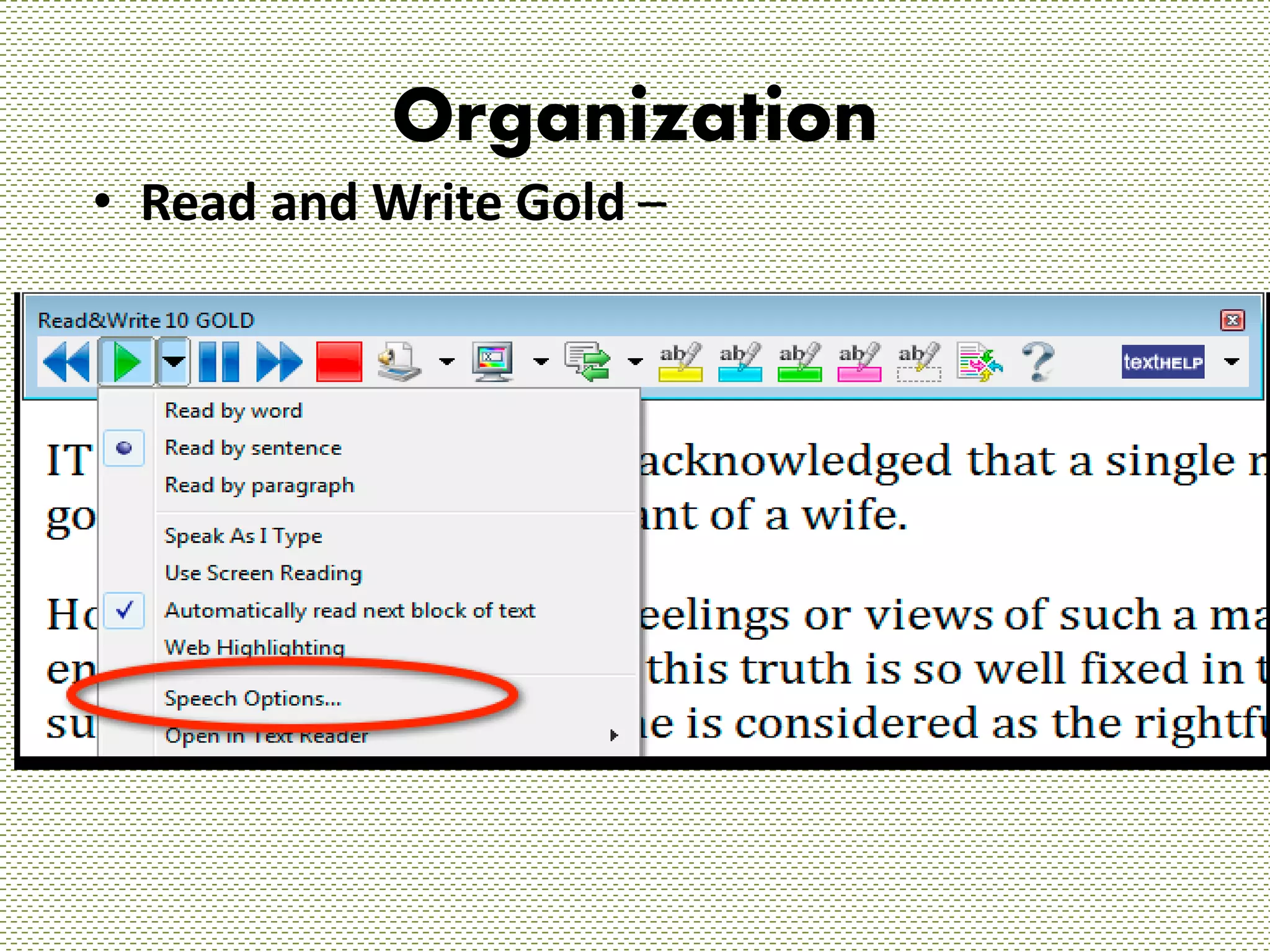
Organization 
• Read and Write Gold –
Reviews of Read and Write Gold 
• "As a school we are delighted with Read&Write Gold. Students of all 
abilities are using the software for different reasons: to aid research 
when using the Internet by using the reading feature, to proof read 
their work, to hear individual words as they type and to colour change 
the background of the screen. It has also been used, to great effect, for 
students to access the reading part of the English GCSE paper for some 
of our Year 10 students." 
Christing Armstrong, Walton Le Dale High School 
• "This is one of the most useful tools for all our dyslexic students. 
Wherever possible I encourage students to get to grips with it!" 
Margaret Browning, Dyslexia Specialist Tutor (Language Therapist) at 
Bangor's Miles Dyslexia Centre 
• "I have heard such good things about Read&Write Gold, and unless 
you have a child with a SPLD you can not imagine what hope it gives 
to us. My son and I are looking forward to working with the package 
and all at Texthelp in the future. " 
Tina Goodall, Parent
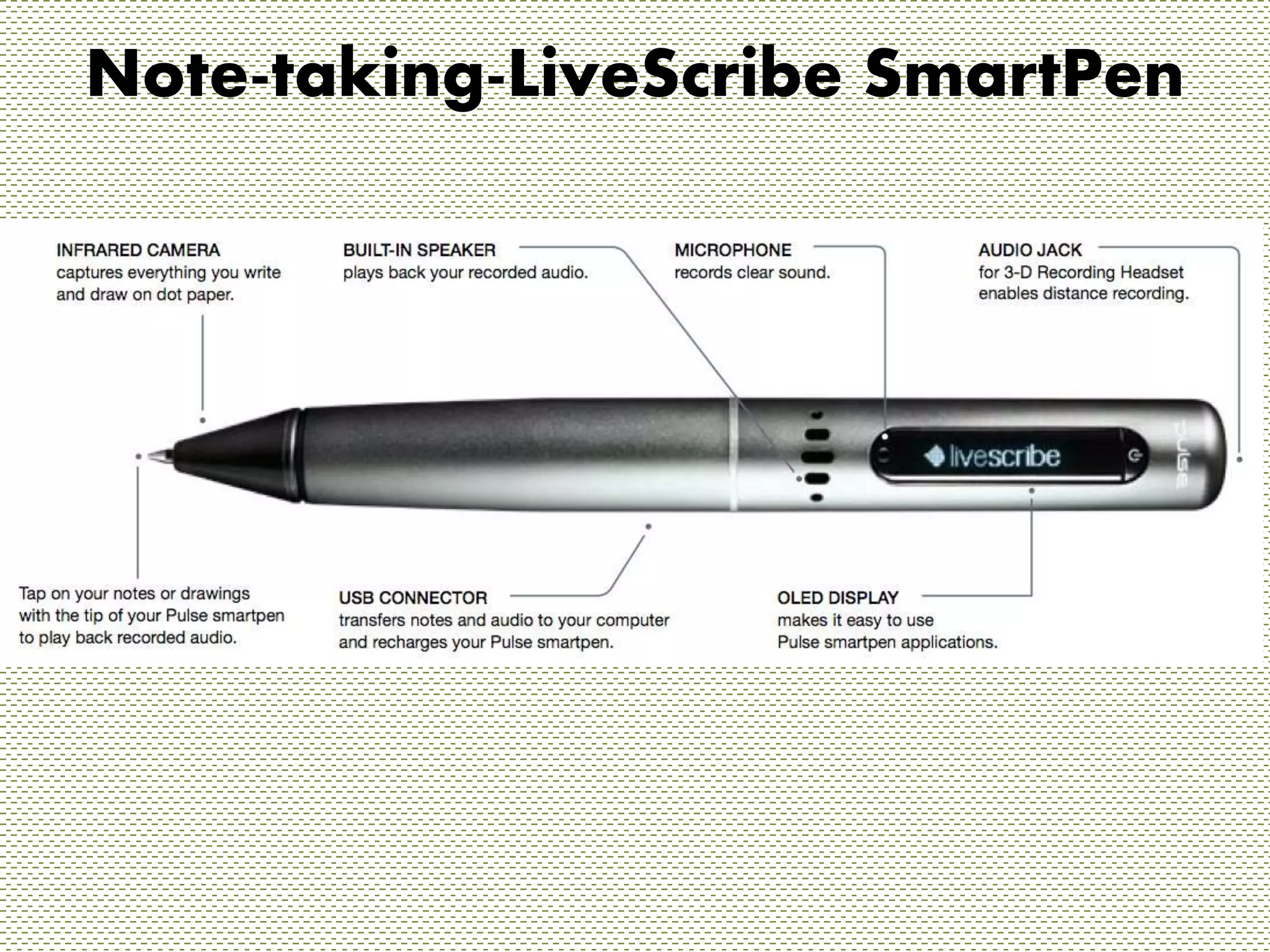
Note-taking-LiveScribe SmartPen
Reviews Live-Scribe Smartpen 
• The Livescribe smartpen is an assistive 
technology aid that facilitates the note-taking 
and learning process. Recording 
classroom discussions and taking fewer 
notes allows the dyslexic student to spend 
more time listening and learning. When 
returning to the material for homework or 
review, students have an opportunity to 
listen to important information a second 
time, add notes that may be of 
significance, and review what has already 
been written. 
• Caryl Frankenberger, Ed.M
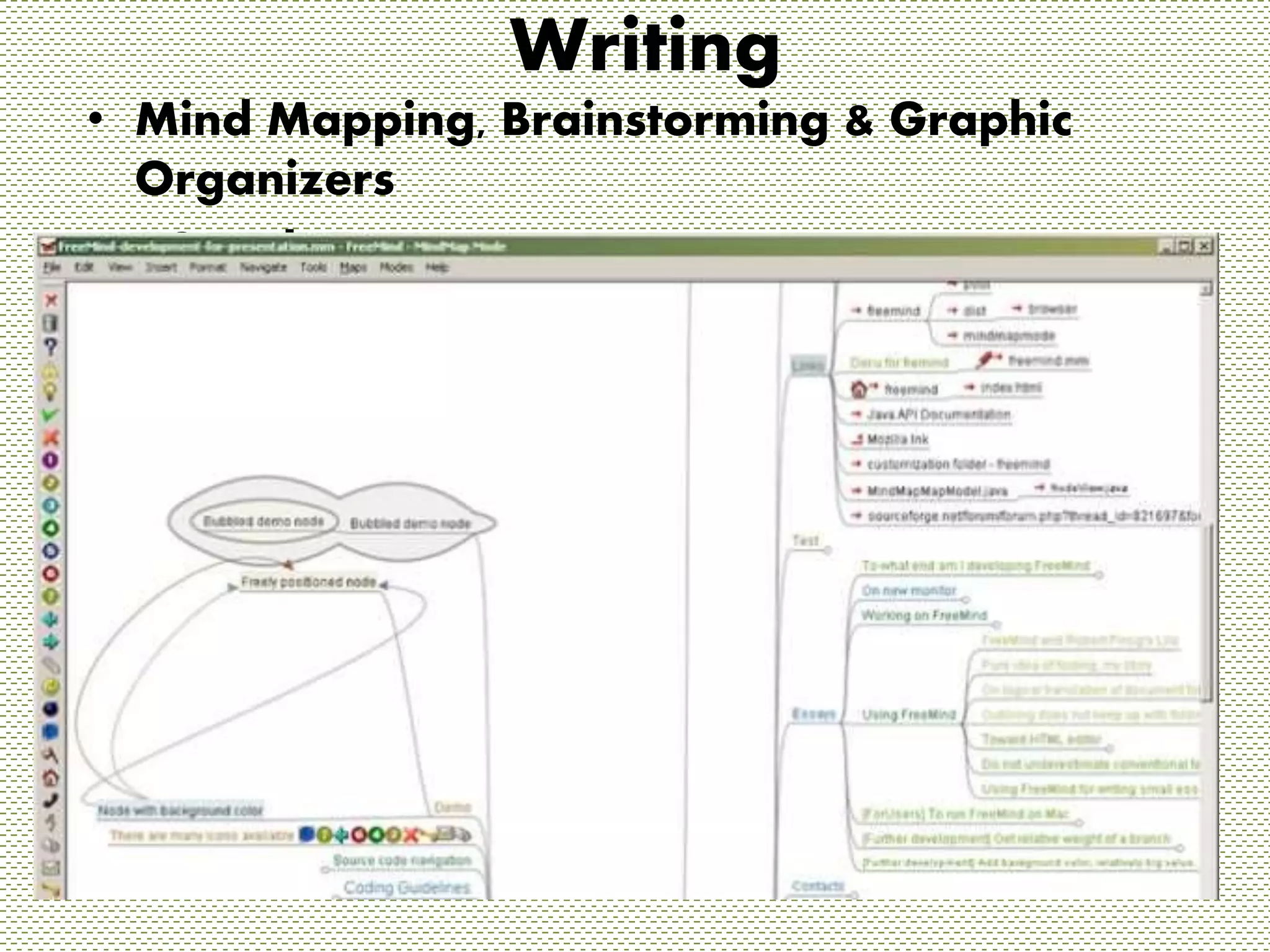
Writing 
• Mind Mapping, Brainstorming & Graphic 
Organizers 
• “Coggle”
Reviews of Coggle 
• I have tried this tool on my iPhone, iPad, 
and my computer, and the user interface is 
amazing. A simple click can create or 
delete a node, or adjust color. A click and 
drag can move your item anywhere in the 
map always keeping it connected to your 
previous thought. The options are there, 
but not inundating the screen. Coggle 
really is simple and intuitive. 
• Edutechmag.org
Conclusion 
• These are just a few examples of 
devices and programs students can use. 
There are so many more out there. 
Assistive technology enables dreams. 
• Assistive technology gives students a 
hand when they cannot perform alone. 
Why would an educator not love that?
Works Cited 
"Just Coggle.it!." Education Technology Magazine. N.p., n.d. Web. 27 Sept. 2014. 
<http://www.edutechmag.org/2013/04/03/just-coggle-it/>. 
"Livescribe 3 Smartpen review." TechRadar. N.p., n.d. Web. 27 Sept. 2014. 
<http://www.techradar.com/reviews/gadgets/livescribe-3-smartpen-1205777/review>. 
"Livescribe Smartpen * The Yale Center for Dyslexia & Creativity." Livescribe Smartpen * The 
Yale Center for Dyslexia & Creativity. N.p., n.d. Web. 27 Sept. 2014. 
<http://dyslexia.yale.edu/TECH_livescribe.html>. 
"Robot Check." Robot Check. N.p., n.d. Web. 26 Sept. 2014. 
<http://www.amazon.com/Livescribe-4GB-Sky-Wi-Fi-Smartpen/product-reviews/B009FU2AW2>. 
"Texthelp." - Literacy software to help all readers and writers succeed. N.p., n.d. Web. 27 
Sept. 2014. <http://www.texthelp.com/UK>.

Assistive Technology Presentation

  • 1.
    Using technology tomake learning easier for everyone! By: Vivian McGowan
  • 2.
    What is anIEP? • We hear this term all the time, but what is it really? • Students who are exceptional and need some special services qualify for a list of resources that are individualized to them and their needs. These resources are free to families, and in order to make sure exceptional students are receiving proper attention, teachers and families create the Individualized Education Program for the student. • This is a wonderful video about how Assistive technology can help individuals with Autism. • http://www.youtube.com/watch?v=JU6AC8UVNnY&list=PLvzOwE5lWqhRYvTn2kI ygOTdXBE8AyHFR&index=4
  • 3.
    How can technologyhelp these students? • Assistive technology is technology that is meant to help these individuals function and perform daily tasks. Many times forms of assistive technology can be used as communication for exceptional students who cannot perform this on their own. • Assistive technology promotes independence in our students, and should be utilized.
  • 4.
    What are someexamples of how AT can help these students? • Students with exceptionalities might have issues with organization, note-taking, and writing. These are some programs and devices that we can use to make learning easier and more fun for everyone!
  • 5.
    Organization • Readand Write Gold –
  • 6.
    Reviews of Readand Write Gold • "As a school we are delighted with Read&Write Gold. Students of all abilities are using the software for different reasons: to aid research when using the Internet by using the reading feature, to proof read their work, to hear individual words as they type and to colour change the background of the screen. It has also been used, to great effect, for students to access the reading part of the English GCSE paper for some of our Year 10 students." Christing Armstrong, Walton Le Dale High School • "This is one of the most useful tools for all our dyslexic students. Wherever possible I encourage students to get to grips with it!" Margaret Browning, Dyslexia Specialist Tutor (Language Therapist) at Bangor's Miles Dyslexia Centre • "I have heard such good things about Read&Write Gold, and unless you have a child with a SPLD you can not imagine what hope it gives to us. My son and I are looking forward to working with the package and all at Texthelp in the future. " Tina Goodall, Parent
  • 7.
  • 8.
    Reviews Live-Scribe Smartpen • The Livescribe smartpen is an assistive technology aid that facilitates the note-taking and learning process. Recording classroom discussions and taking fewer notes allows the dyslexic student to spend more time listening and learning. When returning to the material for homework or review, students have an opportunity to listen to important information a second time, add notes that may be of significance, and review what has already been written. • Caryl Frankenberger, Ed.M
  • 9.
    Writing • MindMapping, Brainstorming & Graphic Organizers • “Coggle”
  • 10.
    Reviews of Coggle • I have tried this tool on my iPhone, iPad, and my computer, and the user interface is amazing. A simple click can create or delete a node, or adjust color. A click and drag can move your item anywhere in the map always keeping it connected to your previous thought. The options are there, but not inundating the screen. Coggle really is simple and intuitive. • Edutechmag.org
  • 11.
    Conclusion • Theseare just a few examples of devices and programs students can use. There are so many more out there. Assistive technology enables dreams. • Assistive technology gives students a hand when they cannot perform alone. Why would an educator not love that?
  • 12.
    Works Cited "JustCoggle.it!." Education Technology Magazine. N.p., n.d. Web. 27 Sept. 2014. <http://www.edutechmag.org/2013/04/03/just-coggle-it/>. "Livescribe 3 Smartpen review." TechRadar. N.p., n.d. Web. 27 Sept. 2014. <http://www.techradar.com/reviews/gadgets/livescribe-3-smartpen-1205777/review>. "Livescribe Smartpen * The Yale Center for Dyslexia & Creativity." Livescribe Smartpen * The Yale Center for Dyslexia & Creativity. N.p., n.d. Web. 27 Sept. 2014. <http://dyslexia.yale.edu/TECH_livescribe.html>. "Robot Check." Robot Check. N.p., n.d. Web. 26 Sept. 2014. <http://www.amazon.com/Livescribe-4GB-Sky-Wi-Fi-Smartpen/product-reviews/B009FU2AW2>. "Texthelp." - Literacy software to help all readers and writers succeed. N.p., n.d. Web. 27 Sept. 2014. <http://www.texthelp.com/UK>.