Customizing Student Learningwith Assistive TechnologyBy: Rachel McNeely
IDEA and IEPsWith the re-authorization of the IDEA (Individuals with Disabilities Education Act) in 1997, IEP (Individualized Education Program) teams are required to consider assistive technology devices and services when developing, reviewing, and revising IEPs for students with disabilities.Georgia Department of Education website
IDEA guidelines mandate that school districts must:Ensure that AT devices and services are made available to a child with a disability if required as part of the child’s special education and related services as stated in the child’s IEP.Describe in a child’s IEP any AT devices or services that will be provided in connection with the child’s placement in regular education.http://www.sedl.org/Empowering Rural Students with Disabilities Through Assistive Technology
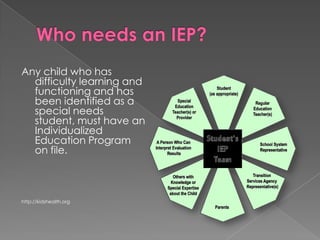
Who needs an IEP?Any child who has difficulty learning and functioning and has been identified as a special needs student, must have an Individualized Education Program on file.http://kidshealth.org
Possible reasons for IEPsLearning disabilitiesAttention deficit hyperactivity disorder (ADHD)Emotional disordersCognitive challengesAutismHearing impairmentSpeech or language 	impairmentDevelopmental delayhttp://kidshealth.org
What is an AT device?The Georgia Project for Assistive Technology defines an Assistive Technology device as:Any item, piece of equipment or product system, whether acquired commercially off the shelf, modified, or customized, that is used to increase, maintain, or improve the functional capabilities of a child with a disability.Georgia Department of EducationDivision for Special Education SupportsGeorgia Project for Assistive Technology
The term does not include a medical device that is surgically implanted, or the replacement of such device.(Authority 20 U.S.C. 1401(1)Georgia Department of EducationDivision for Special Education SupportsGeorgia Project for Assistive Technology
An AT device:Gives IEP teams the flexibility to provide a range of solutions from low technology to high technology depending on need.May include modifications, accommodations, and instructional technology as required by the student.May include tools and strategies that are components of universal design for learning (UDL).Georgia Department of EducationDivision for Special Education SupportsGeorgia Project for Assistive Technology
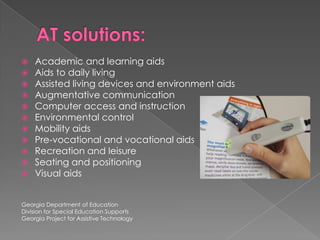
AT solutions:Academic and learning aidsAids to daily livingAssisted living devices and environment aidsAugmentative communicationComputer access and instructionEnvironmental controlMobility aidsPre-vocational and vocational aidsRecreation and leisureSeating and positioningVisual aidsGeorgia Department of EducationDivision for Special Education SupportsGeorgia Project for Assistive Technology
What can AT do?SWLDs (students with learning disabilities) can be more successful in school, at home, at work, and in social/recreational activities.AT can support both remedial and compensatory approaches for a student.AT should focus on what the device does for a student not on the device or technology itself.Jendron, Janet. “Assistive Technology and Learning Disabilities.” www.sc.edu/scatp/ld.htm
Considerations in selecting AT for the classroomStudents’ abilities and needsGoals of the curriculum based on standards of performanceEffective instructional practices (Ex: defining purposes and providing authentic opportunities for self-expression, drafting, peer review, etc.)Ways to assess or monitor student progress.CITEd Research Center  www.cited.orgUsing Assistive Technology to Support Writing
Use a general technology toolTo serve a particular  purpose for students with certain mild disabilities, i.e. illegible handwriting, difficulty in transferring thoughts to paperExamples:  Standard text production toolsSpeech-to-text toolsRelevant formatting features in Microsoft Office Using Assistive Technology to Support Writingwww.cited.org
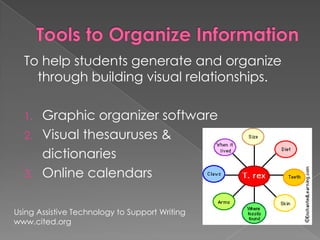
Tools to Organize InformationTo help students generate and organize through building visual relationships.Graphic organizer softwareVisual thesauruses & dictionariesOnline calendarsUsing Assistive Technology to Support Writingwww.cited.org
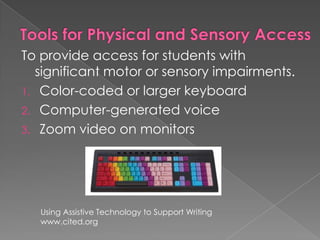
Tools for Physical and Sensory AccessTo provide access for students with significant motor or sensory impairments.Color-coded or larger keyboardComputer-generated voiceZoom video on monitors Using Assistive Technology to Support Writingwww.cited.org
AT Tools for WRITINGMicrosoft Word options – Students can set preferences for text color, size of font, and type of font.IntelliKeys – A programmable alternative keyboardWrite:OutLouds – Software that provides auditory output to allows students to hear what they are writing.Kidspiration – Helps students organize and develop ideas in a graphic format.
AT Tools for MATHCoin-u-Later – A hand-held device that makes counting money easy.Show Me Math – Software that includes basic math computation with on-screen manipulatives.Time Scales – Software that allows students to match times, choose times, or set a clock using auditory steps.
AT Tools for ReadingAudio textbooks – Provides textbooks in audio format for the hearing impairedBooks on tape – Supplemental recreational reading resourceLarge-print books Text Reading Systems – Translates printed text to voice
AT Tools for ORGANIZATIONAlphaSmart 3000 – Portable word processor that allows the student to complete and organize written work in up to 8 different folders.PicSyms – Line drawn graphic symbols for student use.  Includes sign language symbols.
AT Tools for COMMUNICATIONFlip & Talk – System that consists of a spiral bound set of 15 vinyl strips with picture tabs.  PECS – Picture Exchange Communication System – Students approach and give a picsym of a desired item to a communicative partner in exchange for that item.Step-by-Step Communicator – A voice-output, one button sequential messaging communication device.
AT Tools for COMPUTER ACCESSTouchWindow – A touch screen that attaches over a computer monitor for direct selection.Microsoft Word Processing optionsZoom View – Software to enlarge screen view for visually impaired persons.Standard TehnologyTools Checklist for Elementaryhttp://assistivetech.sf.k12.sd.us/elementary.htmSlides 15- 20
Who is teaching students with disabilities?“96% of general educators report that they currently teach students with disabilities or have done so in the past.”			-- Westat (www.spense.org)“Only 1/3 of general educators feel well-prepared to teach students with disabilities.”  --U.S. Department of Education
It is our responsibility to be prepared!Let’s work together to find solutions to help our students succeed.

Assistive Technology Presentation

  • 1.
    Customizing Student LearningwithAssistive TechnologyBy: Rachel McNeely
  • 2.
    IDEA and IEPsWiththe re-authorization of the IDEA (Individuals with Disabilities Education Act) in 1997, IEP (Individualized Education Program) teams are required to consider assistive technology devices and services when developing, reviewing, and revising IEPs for students with disabilities.Georgia Department of Education website
  • 3.
    IDEA guidelines mandatethat school districts must:Ensure that AT devices and services are made available to a child with a disability if required as part of the child’s special education and related services as stated in the child’s IEP.Describe in a child’s IEP any AT devices or services that will be provided in connection with the child’s placement in regular education.http://www.sedl.org/Empowering Rural Students with Disabilities Through Assistive Technology
  • 4.
    Who needs anIEP?Any child who has difficulty learning and functioning and has been identified as a special needs student, must have an Individualized Education Program on file.http://kidshealth.org
  • 5.
    Possible reasons forIEPsLearning disabilitiesAttention deficit hyperactivity disorder (ADHD)Emotional disordersCognitive challengesAutismHearing impairmentSpeech or language impairmentDevelopmental delayhttp://kidshealth.org
  • 6.
    What is anAT device?The Georgia Project for Assistive Technology defines an Assistive Technology device as:Any item, piece of equipment or product system, whether acquired commercially off the shelf, modified, or customized, that is used to increase, maintain, or improve the functional capabilities of a child with a disability.Georgia Department of EducationDivision for Special Education SupportsGeorgia Project for Assistive Technology
  • 7.
    The term doesnot include a medical device that is surgically implanted, or the replacement of such device.(Authority 20 U.S.C. 1401(1)Georgia Department of EducationDivision for Special Education SupportsGeorgia Project for Assistive Technology
  • 8.
    An AT device:GivesIEP teams the flexibility to provide a range of solutions from low technology to high technology depending on need.May include modifications, accommodations, and instructional technology as required by the student.May include tools and strategies that are components of universal design for learning (UDL).Georgia Department of EducationDivision for Special Education SupportsGeorgia Project for Assistive Technology
  • 9.
    AT solutions:Academic andlearning aidsAids to daily livingAssisted living devices and environment aidsAugmentative communicationComputer access and instructionEnvironmental controlMobility aidsPre-vocational and vocational aidsRecreation and leisureSeating and positioningVisual aidsGeorgia Department of EducationDivision for Special Education SupportsGeorgia Project for Assistive Technology
  • 10.
    What can ATdo?SWLDs (students with learning disabilities) can be more successful in school, at home, at work, and in social/recreational activities.AT can support both remedial and compensatory approaches for a student.AT should focus on what the device does for a student not on the device or technology itself.Jendron, Janet. “Assistive Technology and Learning Disabilities.” www.sc.edu/scatp/ld.htm
  • 11.
    Considerations in selectingAT for the classroomStudents’ abilities and needsGoals of the curriculum based on standards of performanceEffective instructional practices (Ex: defining purposes and providing authentic opportunities for self-expression, drafting, peer review, etc.)Ways to assess or monitor student progress.CITEd Research Center www.cited.orgUsing Assistive Technology to Support Writing
  • 12.
    Use a generaltechnology toolTo serve a particular purpose for students with certain mild disabilities, i.e. illegible handwriting, difficulty in transferring thoughts to paperExamples: Standard text production toolsSpeech-to-text toolsRelevant formatting features in Microsoft Office Using Assistive Technology to Support Writingwww.cited.org
  • 13.
    Tools to OrganizeInformationTo help students generate and organize through building visual relationships.Graphic organizer softwareVisual thesauruses & dictionariesOnline calendarsUsing Assistive Technology to Support Writingwww.cited.org
  • 14.
    Tools for Physicaland Sensory AccessTo provide access for students with significant motor or sensory impairments.Color-coded or larger keyboardComputer-generated voiceZoom video on monitors Using Assistive Technology to Support Writingwww.cited.org
  • 15.
    AT Tools forWRITINGMicrosoft Word options – Students can set preferences for text color, size of font, and type of font.IntelliKeys – A programmable alternative keyboardWrite:OutLouds – Software that provides auditory output to allows students to hear what they are writing.Kidspiration – Helps students organize and develop ideas in a graphic format.
  • 16.
    AT Tools forMATHCoin-u-Later – A hand-held device that makes counting money easy.Show Me Math – Software that includes basic math computation with on-screen manipulatives.Time Scales – Software that allows students to match times, choose times, or set a clock using auditory steps.
  • 17.
    AT Tools forReadingAudio textbooks – Provides textbooks in audio format for the hearing impairedBooks on tape – Supplemental recreational reading resourceLarge-print books Text Reading Systems – Translates printed text to voice
  • 18.
    AT Tools forORGANIZATIONAlphaSmart 3000 – Portable word processor that allows the student to complete and organize written work in up to 8 different folders.PicSyms – Line drawn graphic symbols for student use. Includes sign language symbols.
  • 19.
    AT Tools forCOMMUNICATIONFlip & Talk – System that consists of a spiral bound set of 15 vinyl strips with picture tabs. PECS – Picture Exchange Communication System – Students approach and give a picsym of a desired item to a communicative partner in exchange for that item.Step-by-Step Communicator – A voice-output, one button sequential messaging communication device.
  • 20.
    AT Tools forCOMPUTER ACCESSTouchWindow – A touch screen that attaches over a computer monitor for direct selection.Microsoft Word Processing optionsZoom View – Software to enlarge screen view for visually impaired persons.Standard TehnologyTools Checklist for Elementaryhttp://assistivetech.sf.k12.sd.us/elementary.htmSlides 15- 20
  • 21.
    Who is teachingstudents with disabilities?“96% of general educators report that they currently teach students with disabilities or have done so in the past.” -- Westat (www.spense.org)“Only 1/3 of general educators feel well-prepared to teach students with disabilities.” --U.S. Department of Education
  • 22.
    It is ourresponsibility to be prepared!Let’s work together to find solutions to help our students succeed.