Assembly Language Programming
Unit 4
Introduction
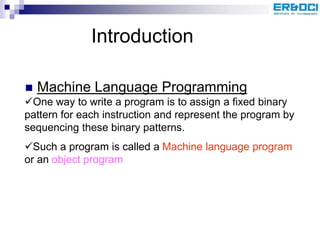
 Machine Language Programming
One way to write a program is to assign a fixed binary
pattern for each instruction and represent the program by
sequencing these binary patterns.
Such a program is called a Machine language program
or an object program
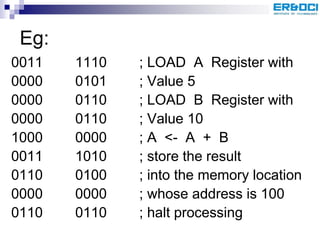
Eg:
0011 1110 ; LOAD A Register with
0000 0101 ; Value 5
0000 0110 ; LOAD B Register with
0000 0110 ; Value 10
1000 0000 ; A <- A + B
0011 1010 ; store the result
0110 0100 ; into the memory location
0000 0000 ; whose address is 100
0110 0110 ; halt processing
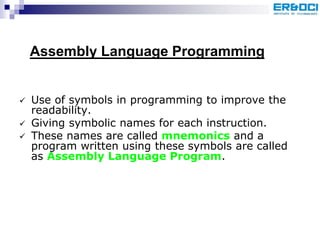
 Use of symbols in programming to improve the
readability.
 Giving symbolic names for each instruction.
 These names are called mnemonics and a
program written using these symbols are called
as Assembly Language Program.
Assembly Language Programming
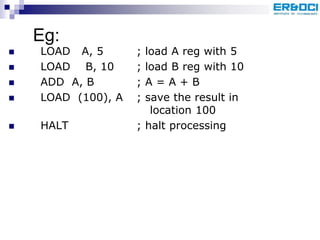
Eg:
 LOAD A, 5 ; load A reg with 5
 LOAD B, 10 ; load B reg with 10
 ADD A, B ; A = A + B
 LOAD (100), A ; save the result in
location 100
 HALT ; halt processing
Features of ALP
 For using Assembly language, the
programmer needs to know the internal
Architecture of the Microprocessor.
 The Assembly language written for one
processor will not usually run on other
processors.
 An assembly language program cannot be
executed by a machine directly, as it not in
a binary form.
 An Assembler is needed in order to
translate an assembly language (source
pgm) into the object code executable by
the machine.
 Unlike the other programming languages,
assembly language is not a single
language, but rather a group of
languages.
 Each processor family (and sometimes
individual processors within a processor
family) has its own assembly language.
Comparison of Assembly language with High
level languages
 Assembly languages are close to a one to one
correspondence between symbolic instructions and
executable machine codes.
 Assembly languages also include directives to the
assembler, directives to the linker, directives for
organizing data space, and macros.
 Assembly language is much harder to program than
high level languages. The programmer must pay
attention to far more detail and must have an intimate
knowledge of the processor in use.
 High level languages are abstract. Typically a
single high level instruction is translated into
several (sometimes dozens or in rare cases
even hundreds) executable machine
language instructions.
 Modern object oriented programming
languages are highly abstract
 But high quality assembly language programs can
run much faster and use much less memory and
other resources than a similar program written in a
high level language.
 Speed increases of 2 to 20 times faster are fairly
common, and increases of hundreds of times faster
are occasionally possible.
 Assembly language programming also gives direct
access to key machine features essential for
implementing certain kinds of low level routines, such
as an operating system kernel or microkernel, device
drivers, and machine control.
 High level programming languages are much easier
for less skilled programmers to work in and for semi-
technical managers to supervise.
 High level languages allow faster development times
than work in assembly language, even with highly
skilled programmers.
 Development time increases of 10 to 100 times
faster are fairly common.
 Programs written in high level languages (especially
object oriented programming languages) are much
easier and less expensive to maintain than similar
programs written in assembly language (and for a
successful software project, the vast majority of the
work and expense is in maintenance, not initial
development).
Advantages:-
1. Performance: An expert Assembly language
programmer can often produce code that is much
smaller and much faster than a high level language
programmer can. For some applications speed and
size are critical. Eg:- code on a smart card, code in a
cellular telephone, device drivers, BIOS routines etc.
2. Access to the Machine: Procedures can have
complete access to the Hardware (Not possible in High
level language)
eg: low level interrupt and trap handlers in OS
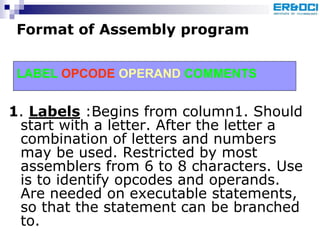
1. Labels :Begins from column1. Should
start with a letter. After the letter a
combination of letters and numbers
may be used. Restricted by most
assemblers from 6 to 8 characters. Use
is to identify opcodes and operands.
Are needed on executable statements,
so that the statement can be branched
to.
Format of Assembly program
LABEL OPCODE OPERAND COMMENTS
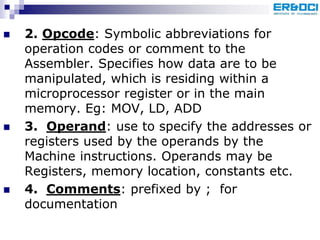
 2. Opcode: Symbolic abbreviations for
operation codes or comment to the
Assembler. Specifies how data are to be
manipulated, which is residing within a
microprocessor register or in the main
memory. Eg: MOV, LD, ADD
 3. Operand: use to specify the addresses or
registers used by the operands by the
Machine instructions. Operands may be
Registers, memory location, constants etc.
 4. Comments: prefixed by ; for
documentation
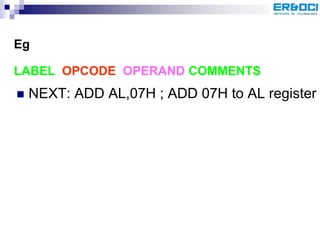
 NEXT: ADD AL,07H ; ADD 07H to AL register
LABEL OPCODE OPERAND COMMENTS
Eg
MASM: The Microsoft Macro Assembler
 The Microsoft Macro Assembler (abbreviated
MASM) is an assembler for the X86 family of
microprocessors.
 It was originally produced by Microsoft for
development work on their MS-DOS, and was
for some time the most popular assembler
available for that operating system.
 It supported a wide variety of macro facilities
and structured programming idioms, including
high-level constructions for looping, procedure
calls and alternation (therefore, MASM is an
example of a high-level Assembler).
 Later versions added the capability of
producing programs for the Windows operating
systems that were released to follow on from
MS-DOS.
 MASM is one of the few Microsoft development
tools for which there was no separate 16-bit
and 32-bit versions
MACROS
 If we need to use a group of instructions
several times throughout a program,
there are 2 ways which avoid having to
write the group of instructions each time
we want to use it.
Use separate procedure
Use Macro
 When the repeated group of instructions is too
short or not appropriate to be written as a
procedure , we use macro.
 A MACRO is a group of instructions we bracket
and give a name to the start of the our
program.
 Each time we call the macro in our program,
the assembler will insert the defined group of
instructions in place of the call.
 Ie, The assembler generates machine codes for
the group of instructions each time the macro
is called.
 Replacing the macro with the instructions it
represents is called macro expansion.
 Here the generated codes are right in-line
with the rest of the program.
 Therefore, using macro avoids the overhead
time involved in calling and returning from a
procedure.
 One drawback of macro is each time generating
in-line code causes more memory consumption.
Mainly 3 parts:
 MACRO header (MACRO)
 Text or Body
 Pseudoinstructions marking the end of
the instruction (e.g.:- ENDM)
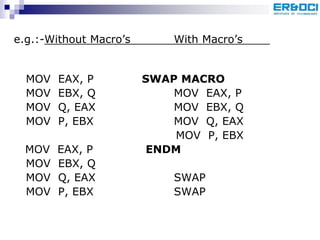
e.g.:-Without Macro’s With Macro’s
MOV EAX, P SWAP MACRO
MOV EBX, Q MOV EAX, P
MOV Q, EAX MOV EBX, Q
MOV P, EBX MOV Q, EAX
MOV P, EBX
MOV EAX, P ENDM
MOV EBX, Q
MOV Q, EAX SWAP
MOV P, EBX SWAP
 When an assembler encounters a macro
definition, it saves it in a Macro definition
Table for subsequent use.
 From that point, whenever the name of macro
appears on opcode, the assembler replaces it
by the macro body.
 The use of a macro name as an opcode is
called a macro call and replacement by macro
body is called macro expansion
 Macro expansion occurs during the Assembly
process and not during execution of the
program.
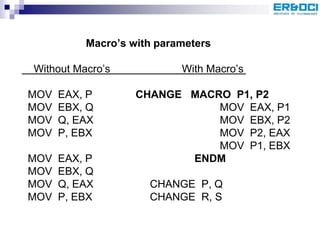
Macro’s with parameters
Without Macro’s With Macro’s
MOV EAX, P CHANGE MACRO P1, P2
MOV EBX, Q MOV EAX, P1
MOV Q, EAX MOV EBX, P2
MOV P, EBX MOV P2, EAX
MOV P1, EBX
MOV EAX, P ENDM
MOV EBX, Q
MOV Q, EAX CHANGE P, Q
MOV P, EBX CHANGE R, S

Assembly

  • 1.
  • 2.
    Introduction  Machine LanguageProgramming One way to write a program is to assign a fixed binary pattern for each instruction and represent the program by sequencing these binary patterns. Such a program is called a Machine language program or an object program
  • 3.
    Eg: 0011 1110 ;LOAD A Register with 0000 0101 ; Value 5 0000 0110 ; LOAD B Register with 0000 0110 ; Value 10 1000 0000 ; A <- A + B 0011 1010 ; store the result 0110 0100 ; into the memory location 0000 0000 ; whose address is 100 0110 0110 ; halt processing
  • 4.
     Use ofsymbols in programming to improve the readability.  Giving symbolic names for each instruction.  These names are called mnemonics and a program written using these symbols are called as Assembly Language Program. Assembly Language Programming
  • 5.
    Eg:  LOAD A,5 ; load A reg with 5  LOAD B, 10 ; load B reg with 10  ADD A, B ; A = A + B  LOAD (100), A ; save the result in location 100  HALT ; halt processing
  • 6.
    Features of ALP For using Assembly language, the programmer needs to know the internal Architecture of the Microprocessor.  The Assembly language written for one processor will not usually run on other processors.  An assembly language program cannot be executed by a machine directly, as it not in a binary form.
  • 7.
     An Assembleris needed in order to translate an assembly language (source pgm) into the object code executable by the machine.  Unlike the other programming languages, assembly language is not a single language, but rather a group of languages.  Each processor family (and sometimes individual processors within a processor family) has its own assembly language.
  • 8.
    Comparison of Assemblylanguage with High level languages  Assembly languages are close to a one to one correspondence between symbolic instructions and executable machine codes.  Assembly languages also include directives to the assembler, directives to the linker, directives for organizing data space, and macros.  Assembly language is much harder to program than high level languages. The programmer must pay attention to far more detail and must have an intimate knowledge of the processor in use.
  • 9.
     High levellanguages are abstract. Typically a single high level instruction is translated into several (sometimes dozens or in rare cases even hundreds) executable machine language instructions.  Modern object oriented programming languages are highly abstract
  • 10.
     But highquality assembly language programs can run much faster and use much less memory and other resources than a similar program written in a high level language.  Speed increases of 2 to 20 times faster are fairly common, and increases of hundreds of times faster are occasionally possible.  Assembly language programming also gives direct access to key machine features essential for implementing certain kinds of low level routines, such as an operating system kernel or microkernel, device drivers, and machine control.
  • 11.
     High levelprogramming languages are much easier for less skilled programmers to work in and for semi- technical managers to supervise.  High level languages allow faster development times than work in assembly language, even with highly skilled programmers.  Development time increases of 10 to 100 times faster are fairly common.  Programs written in high level languages (especially object oriented programming languages) are much easier and less expensive to maintain than similar programs written in assembly language (and for a successful software project, the vast majority of the work and expense is in maintenance, not initial development).
  • 12.
    Advantages:- 1. Performance: Anexpert Assembly language programmer can often produce code that is much smaller and much faster than a high level language programmer can. For some applications speed and size are critical. Eg:- code on a smart card, code in a cellular telephone, device drivers, BIOS routines etc. 2. Access to the Machine: Procedures can have complete access to the Hardware (Not possible in High level language) eg: low level interrupt and trap handlers in OS
  • 13.
    1. Labels :Beginsfrom column1. Should start with a letter. After the letter a combination of letters and numbers may be used. Restricted by most assemblers from 6 to 8 characters. Use is to identify opcodes and operands. Are needed on executable statements, so that the statement can be branched to. Format of Assembly program LABEL OPCODE OPERAND COMMENTS
  • 14.
     2. Opcode:Symbolic abbreviations for operation codes or comment to the Assembler. Specifies how data are to be manipulated, which is residing within a microprocessor register or in the main memory. Eg: MOV, LD, ADD  3. Operand: use to specify the addresses or registers used by the operands by the Machine instructions. Operands may be Registers, memory location, constants etc.  4. Comments: prefixed by ; for documentation
  • 15.
     NEXT: ADDAL,07H ; ADD 07H to AL register LABEL OPCODE OPERAND COMMENTS Eg
  • 16.
    MASM: The MicrosoftMacro Assembler  The Microsoft Macro Assembler (abbreviated MASM) is an assembler for the X86 family of microprocessors.  It was originally produced by Microsoft for development work on their MS-DOS, and was for some time the most popular assembler available for that operating system.  It supported a wide variety of macro facilities and structured programming idioms, including high-level constructions for looping, procedure calls and alternation (therefore, MASM is an example of a high-level Assembler).
  • 17.
     Later versionsadded the capability of producing programs for the Windows operating systems that were released to follow on from MS-DOS.  MASM is one of the few Microsoft development tools for which there was no separate 16-bit and 32-bit versions
  • 18.
    MACROS  If weneed to use a group of instructions several times throughout a program, there are 2 ways which avoid having to write the group of instructions each time we want to use it. Use separate procedure Use Macro
  • 19.
     When therepeated group of instructions is too short or not appropriate to be written as a procedure , we use macro.  A MACRO is a group of instructions we bracket and give a name to the start of the our program.  Each time we call the macro in our program, the assembler will insert the defined group of instructions in place of the call.  Ie, The assembler generates machine codes for the group of instructions each time the macro is called.
  • 20.
     Replacing themacro with the instructions it represents is called macro expansion.  Here the generated codes are right in-line with the rest of the program.  Therefore, using macro avoids the overhead time involved in calling and returning from a procedure.  One drawback of macro is each time generating in-line code causes more memory consumption.
  • 21.
    Mainly 3 parts: MACRO header (MACRO)  Text or Body  Pseudoinstructions marking the end of the instruction (e.g.:- ENDM)
  • 22.
    e.g.:-Without Macro’s WithMacro’s MOV EAX, P SWAP MACRO MOV EBX, Q MOV EAX, P MOV Q, EAX MOV EBX, Q MOV P, EBX MOV Q, EAX MOV P, EBX MOV EAX, P ENDM MOV EBX, Q MOV Q, EAX SWAP MOV P, EBX SWAP
  • 23.
     When anassembler encounters a macro definition, it saves it in a Macro definition Table for subsequent use.  From that point, whenever the name of macro appears on opcode, the assembler replaces it by the macro body.  The use of a macro name as an opcode is called a macro call and replacement by macro body is called macro expansion  Macro expansion occurs during the Assembly process and not during execution of the program.
  • 24.
    Macro’s with parameters WithoutMacro’s With Macro’s MOV EAX, P CHANGE MACRO P1, P2 MOV EBX, Q MOV EAX, P1 MOV Q, EAX MOV EBX, P2 MOV P, EBX MOV P2, EAX MOV P1, EBX MOV EAX, P ENDM MOV EBX, Q MOV Q, EAX CHANGE P, Q MOV P, EBX CHANGE R, S