
(Assignment)


               1
Computer
Language
Translators
              2
3
.


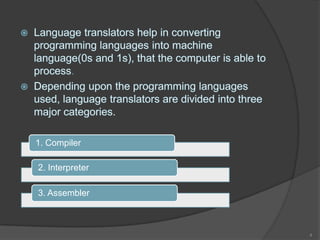
1. Compiler

2. Interpreter

3. Assembler


                 4
(i) Compiler:
   A Compiler is a computer program that translates
    code written in a high level language to a lower
    level language, object/machine code.
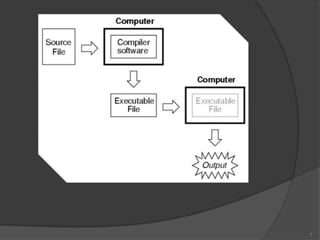
   The most common reason for translating source
    code is to create an executable program
    (converting from a high level language into
    machine language).
   A compiler is a special program that processes
    statements written in a particular programming
    language and turns them into machine language
    or "code" that a computer's processor uses.


                                                       5
   Typically, a programmer writes language
    statements in a language such as Pascal or C one
    line at a time using an editor.
   The file that is created contains what are called
    the source statements .
   The programmer then runs the appropriate
    language compiler, specifying the name of the file
    that contains the source statements.


                                                         6
7
(ii) Interpreter:
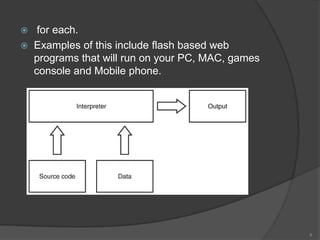
   An interpreter program executes other programs
    directly, running through program code and
    executing it line-by-line.
   As it analyses every line, an interpreter is slower
    than running compiled code but it can take less
    time to interpret program code than to compile and
    then run it — this is very useful when prototyping
    and testing code.
   Interpreters are written for multiple platforms, this
    means code written once can be run immediately
    on different systems without having to recompile


                                                            8
    for each.
   Examples of this include flash based web
    programs that will run on your PC, MAC, games
    console and Mobile phone.


                                                    9
(iii) Assembler:
 An assembler translates assembly
  language into machine code.
 Assembly language consists of
  mnemonics for machine opcodes so
  assemblers perform a 1:1 translation
  from mnemonic to a direct instruction.
 For example: LDA #4 converts to
  0001001000100100
 Conversely, one instruction in a high
  level language will translate to one or
  more instructions at machine level.

                                            10
   Advantages of using an Assembler:
   Very fast in translating assembly language to
    machine code as 1 to 1 relationship
   Assembly code is often very efficient (and therefore
    fast) because it is a low level language
   Assembly code is fairly easy to understand due to
    the use of English-like mnemonics

   Disadvantages of using Assembler:
    Assembly language is written for a certain
    instruction set and/or processor
    Assembly tends to be optimised for the hardware it's
    designed for, meaning it is often incompatible with
    different hardware
    Lots of assembly code is needed to do relatively
    simple tasks, and complex programs require lots of
    programming time


                                                            11
Compilers vs. Interpreters:
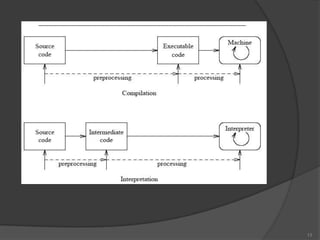
   Compiler:                 Interpreter:
   Translate once, then      Read-check-execute
    run the result.            loop.
   Stand-alone code,         Good for
    faster execution.          learning/debugging,
   e.g. translate C++         (slower, not stand-
    into 80x86 machine         alone).
    language.                 e.g. CAML or Prolog
                               environment.


                                                     12
13
14

Cf&oa

  • 1.
  • 2.
  • 3.
  • 4.
  • 5.
    (i) Compiler:  A Compiler is a computer program that translates code written in a high level language to a lower level language, object/machine code.  The most common reason for translating source code is to create an executable program (converting from a high level language into machine language).  A compiler is a special program that processes statements written in a particular programming language and turns them into machine language or "code" that a computer's processor uses. 5
  • 6.
    Typically, a programmer writes language statements in a language such as Pascal or C one line at a time using an editor.  The file that is created contains what are called the source statements .  The programmer then runs the appropriate language compiler, specifying the name of the file that contains the source statements. 6
  • 7.
  • 8.
    (ii) Interpreter:  An interpreter program executes other programs directly, running through program code and executing it line-by-line.  As it analyses every line, an interpreter is slower than running compiled code but it can take less time to interpret program code than to compile and then run it — this is very useful when prototyping and testing code.  Interpreters are written for multiple platforms, this means code written once can be run immediately on different systems without having to recompile 8
  • 9.
    for each.  Examples of this include flash based web programs that will run on your PC, MAC, games console and Mobile phone. 9
  • 10.
    (iii) Assembler:  Anassembler translates assembly language into machine code.  Assembly language consists of mnemonics for machine opcodes so assemblers perform a 1:1 translation from mnemonic to a direct instruction.  For example: LDA #4 converts to 0001001000100100  Conversely, one instruction in a high level language will translate to one or more instructions at machine level. 10
  • 11.
    Advantages of using an Assembler:  Very fast in translating assembly language to machine code as 1 to 1 relationship  Assembly code is often very efficient (and therefore fast) because it is a low level language  Assembly code is fairly easy to understand due to the use of English-like mnemonics  Disadvantages of using Assembler:  Assembly language is written for a certain instruction set and/or processor  Assembly tends to be optimised for the hardware it's designed for, meaning it is often incompatible with different hardware  Lots of assembly code is needed to do relatively simple tasks, and complex programs require lots of programming time 11
  • 12.
    Compilers vs. Interpreters:  Compiler:  Interpreter:  Translate once, then  Read-check-execute run the result. loop.  Stand-alone code,  Good for faster execution. learning/debugging,  e.g. translate C++ (slower, not stand- into 80x86 machine alone). language.  e.g. CAML or Prolog environment. 12
  • 13.
  • 14.