.Net AssembliesBy: Muhammad Kamran RafiKami_khan0597@yahoo.com
Fundamental unit of deployment, version control, reuse, security permission for a .net based application.Logical unit of distributionTake form of .dll or .exe file Building block of .Net based ApplicationCan consist of Single File or Multiple Files called modulesA module may be generated from different languages..Net Assembly
 Assemblies are self-describing. Version dependencies are recorded inside assembly manifest. Assemblies can be loaded side-by-side. Installation can be as easy as copying the files that belong to an assembly.Assemblies can be private or shared.Features of Assemblies
Assembly MetadataType MetadataCIL CodeResourcesAssembly Structure
Assembly NameVersion InformationCultureStrong Name InformationList of files that make up an assemblyType Reference InformationReferenced Assembly InformationAssembly Metadata/Manifest
Contains information about the types declared and used in assembly.Classes, interfaces, structs, events , indexers that are used.All information about types i.e. methods, attributes, propertied.Type Metadata
JIT complier gets everything it needs from compilerUsed in garbage collection Process.Net provides classes to read metadata     (Reflection API)Features of Metadata
Assembly Contents pictorial view
Code emitted by an appropriate .net language compiler e.g. csc (C# Compiler).MSIL is shipped in portable executable (PE) units.Later JIT compiled to Native Code.Full IL code can be compiled to Native Code using NGEN.exeCIL/MSIL Code
Non-executable data that is part of application e.g. images, sounds, videos etc.Resources
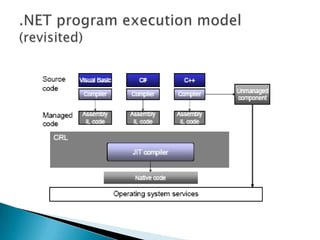
.NET program execution model (revisited)
Private Assembly (placed in application’s execution directory)Shared Assembly (placed in GAC)Types of Assembly
Particular location on system that contains all global assemblies
Located in OS directory
In Windows XP located atC:\Windows\assemblyIt is location where .Net installs its FCL
Shared by all .Net apps on that machine
Multiple versions of an assembly can live side by sideGAC

.Net Assemblies

  • 1.
    .Net AssembliesBy: MuhammadKamran RafiKami_khan0597@yahoo.com
  • 2.
    Fundamental unit ofdeployment, version control, reuse, security permission for a .net based application.Logical unit of distributionTake form of .dll or .exe file Building block of .Net based ApplicationCan consist of Single File or Multiple Files called modulesA module may be generated from different languages..Net Assembly
  • 3.
    Assemblies areself-describing. Version dependencies are recorded inside assembly manifest. Assemblies can be loaded side-by-side. Installation can be as easy as copying the files that belong to an assembly.Assemblies can be private or shared.Features of Assemblies
  • 4.
    Assembly MetadataType MetadataCILCodeResourcesAssembly Structure
  • 5.
    Assembly NameVersion InformationCultureStrongName InformationList of files that make up an assemblyType Reference InformationReferenced Assembly InformationAssembly Metadata/Manifest
  • 6.
    Contains information aboutthe types declared and used in assembly.Classes, interfaces, structs, events , indexers that are used.All information about types i.e. methods, attributes, propertied.Type Metadata
  • 7.
    JIT complier getseverything it needs from compilerUsed in garbage collection Process.Net provides classes to read metadata (Reflection API)Features of Metadata
  • 8.
  • 9.
    Code emitted byan appropriate .net language compiler e.g. csc (C# Compiler).MSIL is shipped in portable executable (PE) units.Later JIT compiled to Native Code.Full IL code can be compiled to Native Code using NGEN.exeCIL/MSIL Code
  • 10.
    Non-executable data thatis part of application e.g. images, sounds, videos etc.Resources
  • 11.
    .NET program executionmodel (revisited)
  • 12.
    Private Assembly (placedin application’s execution directory)Shared Assembly (placed in GAC)Types of Assembly
  • 13.
    Particular location onsystem that contains all global assemblies
  • 14.
    Located in OSdirectory
  • 15.
    In Windows XPlocated atC:\Windows\assemblyIt is location where .Net installs its FCL
  • 16.
    Shared by all.Net apps on that machine
  • 17.
    Multiple versions ofan assembly can live side by sideGAC

Editor's Notes

  • #17 Go to File > Open > Select your Assembly File and Open