Aspen Polymers 
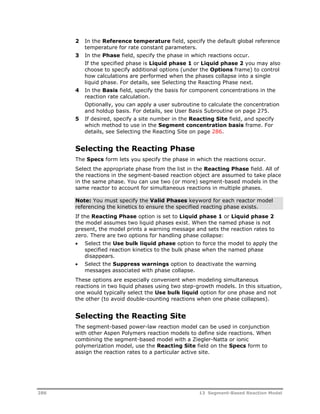
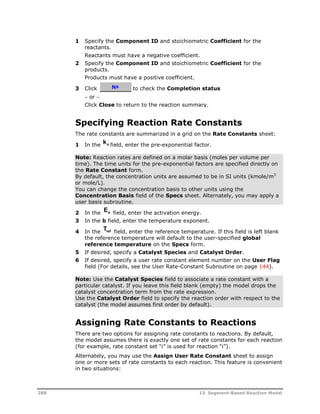
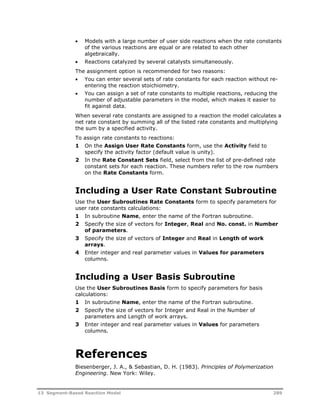
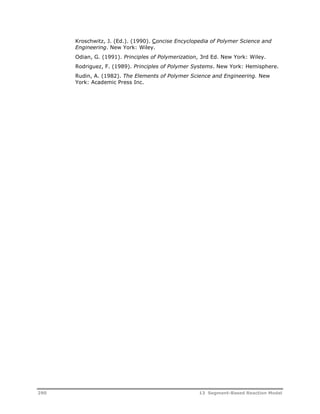
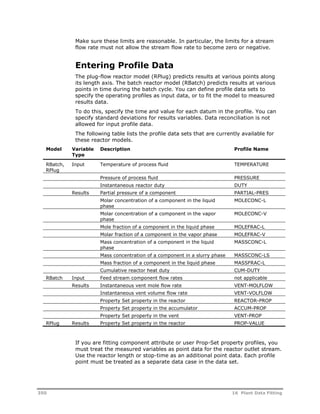
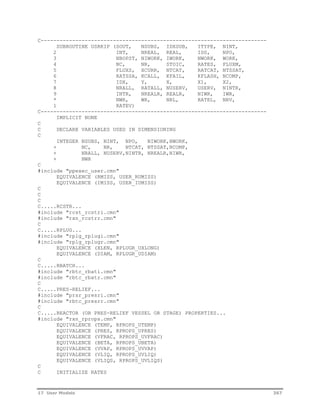
Unit Operations and Reaction Models
Version Number: V8.2 
May 2013 
Copyright (c) 1981-2013 by Aspen Technology, Inc. All rights reserved. 
Aspen Polymers™, Aspen Custom Modeler®, Aspen Dynamics®, Aspen Plus®, Aspen Properties®, aspenONE, the 
aspen leaf logo and Plantelligence and Enterprise Optimization are trademarks or registered trademarks of Aspen 
Technology, Inc., Burlington, MA. 
All other brand and product names are trademarks or registered trademarks of their respective companies. 
This software includes NIST Standard Reference Database 103b: NIST Thermodata Engine Version 7.1 
This document is intended as a guide to using AspenTech's software. This documentation contains AspenTech 
proprietary and confidential information and may not be disclosed, used, or copied without the prior consent of 
AspenTech or as set forth in the applicable license agreement. Users are solely responsible for the proper use of 
the software and the application of the results obtained. 
Although AspenTech has tested the software and reviewed the documentation, the sole warranty for the software 
may be found in the applicable license agreement between AspenTech and the user. ASPENTECH MAKES NO 
WARRANTY OR REPRESENTATION, EITHER EXPRESSED OR IMPLIED, WITH RESPECT TO THIS DOCUMENTATION, 
ITS QUALITY, PERFORMANCE, MERCHANTABILITY, OR FITNESS FOR A PARTICULAR PURPOSE. 
Aspen Technology, Inc. 
200 Wheeler Road 
Burlington, MA 01803-5501 
USA 
Phone: (1) (781) 221-6400 
Toll Free: (1) (888) 996-7100 
URL: http://www.aspentech.com
Contents 
Introducing Aspen Polymers ...................................................................................1 
About This Documentation Set ...........................................................................1 
Related Documentation.....................................................................................2 
Technical Support ............................................................................................3 
1 Polymer Manufacturing Process Overview...........................................................5 
About Aspen Polymers ......................................................................................5 
Overview of Polymerization Processes.................................................................6 
Polymer Manufacturing Process Steps .......................................................6 
Issues of Concern in Polymer Process Modeling....................................................7 
Monomer Synthesis and Purification .........................................................8 
Polymerization .......................................................................................8 
Recovery / Separation ............................................................................9 
Polymer Processing ................................................................................9 
Summary ..............................................................................................9 
Aspen Polymers Tools .......................................................................................9 
Component Characterization.................................................................. 10 
Polymer Physical Properties ................................................................... 10 
Polymerization Kinetics ......................................................................... 10 
Modeling Data...................................................................................... 11 
Process Flowsheeting............................................................................ 11 
Defining a Model in Aspen Polymers ................................................................. 12 
References .................................................................................................... 14 
2 Polymer Structural Characterization .................................................................15 
Polymer Structure .......................................................................................... 15 
Polymer Structural Properties .......................................................................... 19 
Characterization Approach............................................................................... 19 
Component Attributes........................................................................... 20 
References .................................................................................................... 20 
3 Component Classification ..................................................................................21 
Component Categories.................................................................................... 21 
Conventional Components ..................................................................... 22 
Polymers............................................................................................. 22 
Oligomers ........................................................................................... 23 
Segments............................................................................................ 24 
Site-Based .......................................................................................... 24 
Component Databanks.................................................................................... 25 
Pure Component Databank.................................................................... 25 
PC-SAFT Databank ............................................................................... 26 
POLYPCSF Databank ............................................................................. 26 
Contents iii
INITIATO Databank .............................................................................. 26 
Segment Databank............................................................................... 26 
Polymer Databank................................................................................ 27 
Segment Methodology .................................................................................... 27 
Specifying Components................................................................................... 28 
Selecting Databanks ............................................................................. 28 
Defining Component Names and Types ................................................... 28 
Specifying Segments ............................................................................ 29 
Specifying Polymers ............................................................................. 29 
Specifying Oligomers ............................................................................ 30 
Specifying Site-Based Components......................................................... 30 
References .................................................................................................... 31 
4 Polymer Structural Properties ...........................................................................33 
Structural Properties as Component Attributes................................................... 33 
Component Attribute Classes ........................................................................... 34 
Component Attribute Categories ...................................................................... 35 
Polymer Component Attributes............................................................... 35 
Site-Based Species Attributes ................................................................ 44 
User Attributes .................................................................................... 45 
Component Attribute Initialization .................................................................... 46 
Attribute Initialization Scheme ............................................................... 47 
Component Attribute Scale Factors................................................................... 50 
Specifying Component Attributes ..................................................................... 51 
Specifying Polymer Component Attributes ............................................... 51 
Specifying Site-Based Component Attributes ........................................... 51 
Specifying Conventional Component Attributes ........................................ 52 
Initializing Component Attributes in Streams or Blocks.............................. 52 
Specifying Component Attribute Scaling Factors....................................... 53 
References .................................................................................................... 53 
5 Structural Property Distributions ......................................................................55 
Property Distribution Types ............................................................................. 55 
Distribution Functions ..................................................................................... 56 
Schulz-Flory Most Probable Distribution................................................... 56 
Stockmayer Bivariate Distribution .......................................................... 58 
Distributions in Process Models ........................................................................ 58 
Average Properties and Moments ........................................................... 58 
Method of Instantaneous Properties........................................................ 60 
Copolymerization ................................................................................. 64 
Mechanism for Tracking Distributions................................................................ 65 
Distributions in Kinetic Reactors ............................................................. 65 
Distributions in Process Streams ............................................................ 67 
Verifying the Accuracy of Distribution Calculations.................................... 68 
Requesting Distribution Calculations ................................................................. 69 
Selecting Distribution Characteristics ...................................................... 69 
Displaying Distribution Data for a Reactor ............................................... 70 
Displaying Distribution Data for Streams ................................................. 70 
References .................................................................................................... 71 
iv Contents
6 End-Use Properties............................................................................................73 
Polymer Properties ......................................................................................... 73 
Prop-Set Properties ........................................................................................ 73 
End-Use Properties......................................................................................... 74 
Relationship to Molecular Structure ........................................................ 75 
Method for Calculating End-Use Properties ........................................................ 76 
Intrinsic Viscosity ................................................................................. 77 
Zero-Shear Viscosity ............................................................................ 77 
Density of Copolymer ........................................................................... 78 
Melt Index........................................................................................... 78 
Melt Index Ratio................................................................................... 79 
Calculating End-Use Properties ........................................................................ 79 
Selecting an End-Use Property............................................................... 79 
Adding an End-Use Property Prop-Set ..................................................... 79 
References .................................................................................................... 79 
7 Polymerization Reactions ..................................................................................81 
Polymerization Reaction Categories .................................................................. 81 
Step-Growth Polymerization .................................................................. 83 
Chain-Growth Polymerization................................................................. 83 
Polymerization Process Types .......................................................................... 84 
Aspen Polymers Reaction Models...................................................................... 85 
Built-in Models..................................................................................... 85 
User Models......................................................................................... 86 
References .................................................................................................... 86 
8 Step-Growth Polymerization Model ...................................................................89 
Summary of Applications................................................................................. 89 
Step-Growth Processes ................................................................................... 90 
Polyesters ........................................................................................... 90 
Nylon-6............................................................................................... 96 
Nylon-6,6............................................................................................ 98 
Polycarbonate.................................................................................... 100 
Reaction Kinetic Scheme ............................................................................... 101 
Nucleophilic Reactions ........................................................................ 101 
Polyester Reaction Kinetics.................................................................. 105 
Nylon-6 Reaction Kinetics.................................................................... 111 
Nylon-6,6 Reaction Kinetics ................................................................. 115 
Melt Polycarbonate Reaction Kinetics .................................................... 122 
Model Features and Assumptions ................................................................... 124 
Model Predictions ............................................................................... 124 
Phase Equilibria ................................................................................. 126 
Reaction Mechanism........................................................................... 126 
Model Structure ........................................................................................... 127 
Reacting Groups and Species............................................................... 127 
Reaction Stoichiometry Generation....................................................... 132 
Model-Generated Reactions ................................................................. 133 
User Reactions................................................................................... 138 
User Subroutines ............................................................................... 140 
Specifying Step-Growth Polymerization Kinetics ............................................... 155 
Accessing the Step-Growth Model......................................................... 155 
Contents v
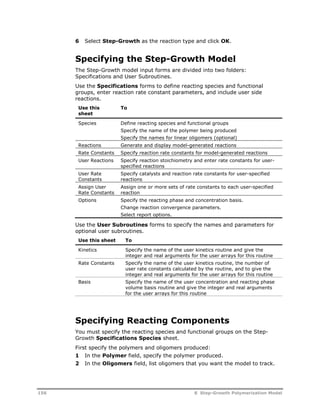
Specifying the Step-Growth Model........................................................ 156 
Specifying Reacting Components.......................................................... 156 
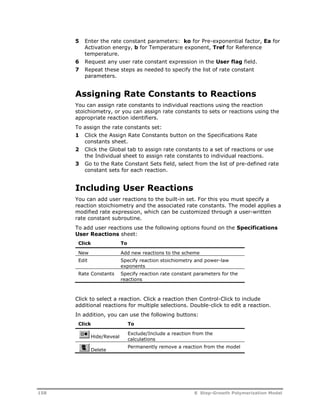
Listing Built-In Reactions..................................................................... 157 
Specifying Built-In Reaction Rate Constants........................................... 157 
Assigning Rate Constants to Reactions.................................................. 158 
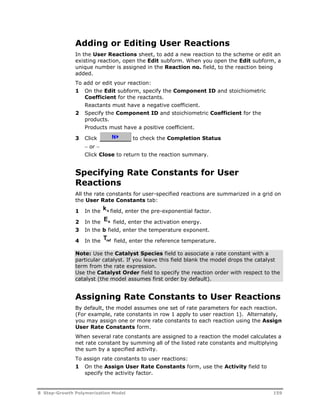
Including User Reactions ..................................................................... 158 
Adding or Editing User Reactions.......................................................... 159 
Specifying Rate Constants for User Reactions ........................................ 159 
Assigning Rate Constants to User Reactions........................................... 159 
Selecting Report Options..................................................................... 160 
Selecting the Reacting Phase ............................................................... 160 
Specifying Units of Measurement for Pre-Exponential Factors................... 160 
Including a User Kinetic Subroutine ...................................................... 161 
Including a User Rate Constant Subroutine............................................ 161 
Including a User Basis Subroutine ........................................................ 161 
References .................................................................................................. 161 
9 Free-Radical Bulk Polymerization Model..........................................................163 
Summary of Applications............................................................................... 163 
Free-Radical Bulk/Solution Processes.............................................................. 164 
Reaction Kinetic Scheme ............................................................................... 165 
Initiation ........................................................................................... 171 
Propagation....................................................................................... 176 
Chain Transfer to Small Molecules ........................................................ 178 
Termination....................................................................................... 179 
Long Chain Branching ......................................................................... 181 
Short Chain Branching ........................................................................ 182 
Beta-Scission..................................................................................... 183 
Reactions Involving Diene Monomers.................................................... 183 
Model Features and Assumptions ................................................................... 185 
Calculation Method ............................................................................. 185 
Quasi-Steady-State Approximation (QSSA) ........................................... 188 
Phase Equilibrium............................................................................... 188 
Gel Effect .......................................................................................... 188 
Polymer Properties Calculated........................................................................ 190 
Specifying Free-Radical Polymerization Kinetics................................................ 193 
Accessing the Free-Radical Model ......................................................... 193 
Specifying the Free-Radical Model ........................................................ 193 
Specifying Reacting Species................................................................. 194 
Listing Reactions ................................................................................ 194 
Adding Reactions ............................................................................... 194 
Editing Reactions ............................................................................... 195 
Assigning Rate Constants to Reactions.................................................. 195 
Adding Gel-Effect ............................................................................... 196 
Selecting Calculation Options............................................................... 196 
Specifying User Profiles....................................................................... 197 
References .................................................................................................. 197 
10 Emulsion Polymerization Model .....................................................................199 
Summary of Applications............................................................................... 199 
Emulsion Polymerization Processes................................................................. 200 
Reaction Kinetic Scheme ............................................................................... 200 
vi Contents
Micellar Nucleation ............................................................................. 201 
Homogeneous Nucleation .................................................................... 204 
Particle Growth .................................................................................. 206 
Radical Balance.................................................................................. 207 
Kinetics of Emulsion Polymerization...................................................... 211 
Model Features and Assumptions ................................................................... 215 
Model Assumptions............................................................................. 215 
Thermodynamics of Monomer Partitioning ............................................. 215 
Polymer Particle Size Distribution ......................................................... 216 
Polymer Particle Properties Calculated ............................................................ 218 
User Profiles ...................................................................................... 218 
Specifying Emulsion Polymerization Kinetics .................................................... 219 
Accessing the Emulsion Model.............................................................. 219 
Specifying the Emulsion Model ............................................................. 219 
Specifying Reacting Species................................................................. 220 
Listing Reactions ................................................................................ 220 
Adding Reactions ............................................................................... 221 
Editing Reactions ............................................................................... 221 
Assigning Rate Constants to Reactions.................................................. 221 
Selecting Calculation Options............................................................... 222 
Adding Gel-Effect ............................................................................... 222 
Specifying Phase Partitioning ............................................................... 222 
Specifying Particle Growth Parameters .................................................. 223 
References .................................................................................................. 223 
11 Ziegler-Natta Polymerization Model ..............................................................225 
Summary of Applications............................................................................... 225 
Ziegler-Natta Processes ................................................................................ 226 
Catalyst Types ................................................................................... 226 
Ethylene Process Types....................................................................... 227 
Propylene Process Types ..................................................................... 228 
Reaction Kinetic Scheme ............................................................................... 230 
Catalyst Pre-Activation........................................................................ 237 
Catalyst Site Activation ....................................................................... 237 
Chain Initiation .................................................................................. 237 
Propagation....................................................................................... 238 
Chain Transfer to Small Molecules ........................................................ 239 
Site Deactivation................................................................................ 239 
Site Inhibition.................................................................................... 240 
Cocatalyst Poisoning........................................................................... 240 
Terminal Double Bond Polymerization ................................................... 240 
Model Features and Assumptions ................................................................... 243 
Phase Equilibria ................................................................................. 243 
Rate Calculations ............................................................................... 243 
Polymer Properties Calculated........................................................................ 243 
Specifying Ziegler-Natta Polymerization Kinetics .............................................. 244 
Accessing the Ziegler-Natta Model ........................................................ 244 
Specifying the Ziegler-Natta Model ....................................................... 244 
Specifying Reacting Species................................................................. 245 
Listing Reactions ................................................................................ 245 
Adding Reactions ............................................................................... 246 
Editing Reactions ............................................................................... 246 
Contents vii
Assigning Rate Constants to Reactions.................................................. 246 
References .................................................................................................. 247 
12 Ionic Polymerization Model ...........................................................................249 
Summary of Applications............................................................................... 249 
Ionic Processes ............................................................................................ 250 
Reaction Kinetic Scheme ............................................................................... 250 
Formation of Active Species................................................................. 254 
Chain Initiation .................................................................................. 255 
Propagation....................................................................................... 255 
Association or Aggregation .................................................................. 256 
Exchange .......................................................................................... 256 
Equilibrium with Counter-Ion ............................................................... 256 
Chain Transfer ................................................................................... 257 
Chain Termination.............................................................................. 257 
Coupling ........................................................................................... 258 
Model Features and Assumptions ................................................................... 258 
Phase Equilibria ................................................................................. 258 
Rate Calculations ............................................................................... 258 
Polymer Properties Calculated........................................................................ 259 
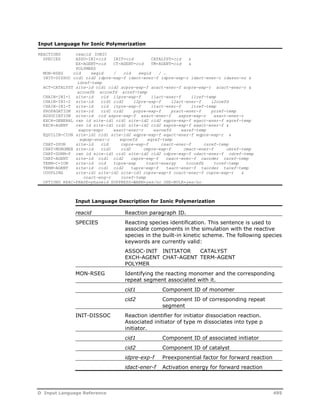
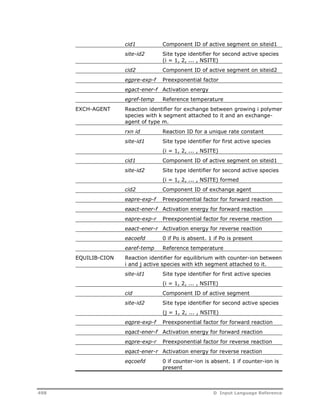
Specifying Ionic Polymerization Kinetics .......................................................... 260 
Accessing the Ionic Model ................................................................... 260 
Specifying the Ionic Model................................................................... 260 
Specifying Reacting Species................................................................. 260 
Listing Reactions ................................................................................ 261 
Adding Reactions ............................................................................... 261 
Editing Reactions ............................................................................... 261 
Assigning Rate Constants to Reactions.................................................. 262 
References .................................................................................................. 262 
13 Segment-Based Reaction Model ....................................................................265 
Summary of Applications............................................................................... 265 
Step-Growth Addition Processes........................................................... 266 
Polymer Modification Processes ............................................................ 266 
Segment-Based Model Allowed Reactions ........................................................ 267 
Conventional Species.......................................................................... 268 
Side Group or Backbone Modifications................................................... 269 
Chain Scission ................................................................................... 269 
Depolymerization ............................................................................... 269 
Propagation....................................................................................... 270 
Combination ...................................................................................... 270 
Branch Formation............................................................................... 270 
Cross Linking..................................................................................... 270 
Kinetic Rate Expression....................................................................... 270 
Model Features and Assumptions ................................................................... 272 
Polymer Properties Calculated........................................................................ 273 
User Subroutines ............................................................................... 274 
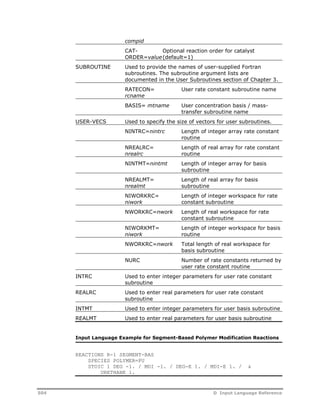
Specifying Segment-Based Kinetics ................................................................ 285 
Accessing the Segment-Based Model .................................................... 285 
Specifying the Segment-Based Model ................................................... 285 
Specifying Reaction Settings................................................................ 285 
Building A Reaction Scheme ................................................................ 287 
viii Contents
Adding or Editing Reactions ................................................................. 287 
Specifying Reaction Rate Constants ...................................................... 288 
Assigning Rate Constants to Reactions.................................................. 288 
Including a User Rate Constant Subroutine............................................ 289 
Including a User Basis Subroutine ........................................................ 289 
References .................................................................................................. 289 
14 Steady-State Flowsheeting............................................................................291 
Polymer Manufacturing Flowsheets ................................................................. 291 
Monomer Synthesis ............................................................................ 292 
Polymerization ................................................................................... 293 
Recovery / Separations ....................................................................... 293 
Polymer Processing ............................................................................ 293 
Modeling Polymer Process Flowsheets ............................................................. 293 
Steady-State Modeling Features..................................................................... 294 
Unit Operations Modeling Features ....................................................... 294 
Plant Data Fitting Features .................................................................. 294 
Process Model Application Tools ........................................................... 294 
References .................................................................................................. 294 
15 Steady-State Unit Operation Models..............................................................295 
Summary of Aspen Plus Unit Operation Models ................................................ 295 
Dupl ................................................................................................. 296 
Flash2............................................................................................... 298 
Flash3............................................................................................... 298 
FSplit................................................................................................ 299 
Heater .............................................................................................. 299 
Mixer ................................................................................................ 299 
Mult.................................................................................................. 299 
Pump................................................................................................ 300 
Pipe.................................................................................................. 300 
Sep .................................................................................................. 301 
Sep2 ................................................................................................ 301 
Distillation Models ........................................................................................ 301 
RadFrac ............................................................................................ 301 
Reactor Models ............................................................................................ 302 
Mass-Balance Reactor Models ........................................................................ 302 
RStoic............................................................................................... 302 
RYield............................................................................................... 303 
Equilibrium Reactor Models............................................................................ 304 
REquil ............................................................................................... 304 
RGibbs.............................................................................................. 304 
Kinetic Reactor Models.................................................................................. 304 
RCSTR .............................................................................................. 304 
RPlug................................................................................................ 317 
RBatch.............................................................................................. 327 
Treatment of Component Attributes in Unit Operation Models ............................ 335 
References .................................................................................................. 338 
16 Plant Data Fitting ..........................................................................................339 
Data Fitting Applications ............................................................................... 339 
Contents ix
Data Fitting For Polymer Models..................................................................... 340 
Data Collection and Verification............................................................ 341 
Literature Review............................................................................... 341 
Preliminary Parameter Fitting............................................................... 342 
Preliminary Model Development ........................................................... 343 
Trend Analysis ................................................................................... 343 
Model Refinement .............................................................................. 344 
Steps for Using the Data Regression Tool ........................................................ 345 
Identifying Flowsheet Variables............................................................ 346 
Manipulating Variables Indirectly.......................................................... 347 
Entering Point Data ............................................................................ 349 
Entering Profile Data........................................................................... 350 
Entering Standard Deviations .............................................................. 351 
Defining Data Regression Cases ........................................................... 352 
Sequencing Data Regression Cases ...................................................... 352 
Interpreting Data Regression Results.................................................... 352 
Troubleshooting Convergence Problems ................................................ 353 
17 User Models...................................................................................................359 
User Unit Operation Models ........................................................................... 359 
User Unit Operation Models Structure ................................................... 359 
User Unit Operation Model Calculations ................................................. 360 
User Unit Operation Report Writing....................................................... 365 
User Kinetic Models ...................................................................................... 365 
User Physical Property Models........................................................................ 370 
References .................................................................................................. 373 
18 Application Tools...........................................................................................375 
Example Applications for a Simulation Model ................................................... 375 
Application Tools Available in Aspen Polymers.................................................. 376 
CALCULATOR..................................................................................... 376 
DESIGN-SPEC.................................................................................... 377 
SENSITIVITY ..................................................................................... 377 
OPTIMIZATION .................................................................................. 377 
Model Variable Accessing .............................................................................. 378 
References .................................................................................................. 380 
19 Run-Time Environment..................................................................................381 
Aspen Polymers Architecture ......................................................................... 381 
Installation Issues ........................................................................................ 382 
Hardware Requirements...................................................................... 382 
Installation Procedure ......................................................................... 382 
Configuration Tips ........................................................................................ 382 
Startup Files...................................................................................... 382 
Simulation Templates ......................................................................... 382 
User Fortran ................................................................................................ 383 
User Fortran Templates....................................................................... 383 
User Fortran Linking ........................................................................... 383 
Troubleshooting Guide .................................................................................. 383 
User Interface Problems...................................................................... 383 
Simulation Engine Run-Time Problems ................................................. 385 
x Contents
References .................................................................................................. 386 
A Component Databanks ....................................................................................387 
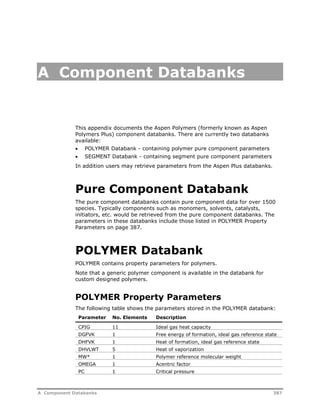
Pure Component Databank............................................................................ 387 
POLYMER Databank ...................................................................................... 387 
POLYMER Property Parameters............................................................. 387 
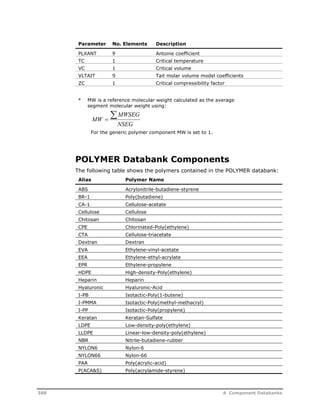
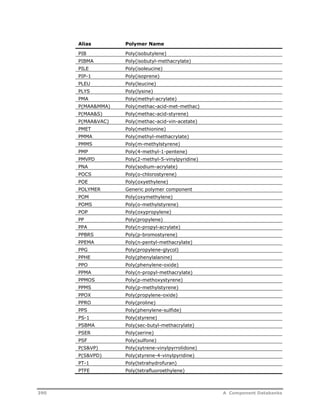
POLYMER Databank Components.......................................................... 388 
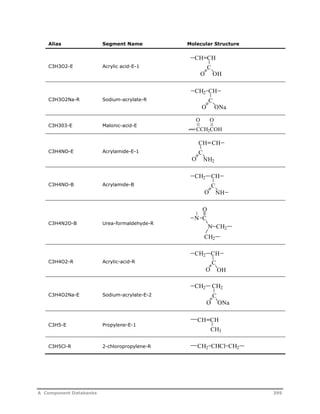
SEGMENT Databank ..................................................................................... 391 
SEGMENT Property Parameters ............................................................ 391 
SEGMENT Databank Components ......................................................... 392 
B Kinetic Rate Constant Parameters...................................................................431 
Initiator Decomposition Rate Parameters......................................................... 431 
Solvent Dependency........................................................................... 431 
Concentration Dependency.................................................................. 432 
Temperature Dependency ................................................................... 432 
Pressure Dependency ......................................................................... 433 
References .................................................................................................. 444 
C Fortran Utilities ...............................................................................................445 
D Input Language Reference..............................................................................447 
Specifying Components................................................................................. 447 
Naming Components .......................................................................... 447 
Specifying Component Characterization Inputs........................................ 448 
Specifying Component Attributes ................................................................... 451 
Specifying Characterization Attributes................................................... 451 
Specifying Conventional Component Attributes ...................................... 451 
Initializing Attributes in Streams .......................................................... 451 
Specifying Attribute Scaling Factors................................................................ 453 
Specifying Component Attribute Scale Factors ....................................... 453 
Requesting Distribution Calculations ............................................................... 454 
Calculating End Use Properties....................................................................... 454 
Specifying Physical Property Inputs ................................................................ 456 
Specifying Property Methods................................................................ 456 
Specifying Property Data..................................................................... 458 
Estimating Property Parameters ........................................................... 459 
Specifying Step-Growth Polymerization Kinetics ............................................... 460 
Specifying Free-Radical Polymerization Kinetics................................................ 467 
Specifying Emulsion Polymerization Kinetics .................................................... 477 
Specifying Ziegler-Natta Polymerization Kinetics .............................................. 484 
Specifying Ionic Polymerization Kinetics .......................................................... 494 
Specifying Segment-Based Polymer Modification Reactions................................ 501 
References .................................................................................................. 505 
Index ..................................................................................................................507 
Contents xi
xii Contents
Introducing Aspen Polymers 
Aspen Polymers (formerly known as Aspen Polymers Plus) is a general-purpose 
process modeling system for the simulation of polymer 
manufacturing processes. The modeling system includes modules for the 
estimation of thermophysical properties, and for performing polymerization 
kinetic calculations and associated mass and energy balances. 
Also included in Aspen Polymers are modules for: 
 Characterizing polymer molecular structure 
 Calculating rheological and mechanical properties 
 Tracking these properties throughout a flowsheet 
There are also many additional features that permit the simulation of the 
entire manufacturing processes. 
About This Documentation Set 
The Aspen Polymers User Guide is divided into two volumes. Each volume 
documents features unique to Aspen Polymers. This User Guide assumes prior 
knowledge of basic Aspen Plus capabilities or user access to the Aspen Plus 
documentation set. If you are using Aspen Polymers with Aspen Dynamics, 
please refer to the Aspen Dynamics documentation set. 
Volume 1 provides an introduction to the use of modeling for polymer 
processes and discusses specific Aspen Polymers capabilities. Topics include: 
 Polymer manufacturing process overview - describes the basics of 
polymer process modeling and the steps involved in defining a model in 
Aspen Polymers. 
 Polymer structural characterization - describes the methods used for 
characterizing components. Included are the methodologies for calculating 
distributions and features for tracking end-use properties. 
 Polymerization reactions - describes the polymerization kinetic models, 
including: step-growth, free-radical, emulsion, Ziegler-Natta, ionic, and 
segment based. An overview of the various categories of polymerization 
kinetic schemes is given. 
 Steady-state flowsheeting - provides an overview of capabilities used 
in constructing a polymer process flowsheet model. For example, the unit 
Introducing Aspen Polymers 1
operation models, data fitting tools, and analysis tools, such as sensitivity 
studies. 
 Run-time environment - covers issues concerning the run-time 
environment including configuration and troubleshooting tips. 
Volume 2 describes methodologies for tracking chemical component 
properties, physical properties, and phase equilibria. It covers the physical 
property methods and models available in Aspen Polymers. Topics include: 
 Thermodynamic properties of polymer systems – describes polymer 
thermodynamic properties, their importance to process modeling, and 
available property methods and models. 
 Equation-of-state (EOS) models – provides an overview of the 
properties calculated from EOS models and describes available models, 
including: Sanchez-Lacombe, polymer SRK, SAFT, and PC-SAFT. 
 Activity coefficient models – provides an overview of the properties 
calculated from activity coefficient models and describes available models, 
including: Flory-Huggins, polymer NRTL, electrolyte-polymer NRTL, 
polymer UNIFAC. 
 Thermophysical properties of polymers – provides and overview of 
the thermophysical properties exhibited by polymers and describes 
available models, including: Aspen ideal gas, Tait liquid molar volume, 
pure component liquid enthalpy, and Van Krevelen liquid and solid, melt 
and glass transition temperature correlations, and group contribution 
methods. 
 Polymer viscosity models – describes polymer viscosity model 
implementation and available models, including: modified Mark- 
Houwink/van Krevelen, Aspen polymer mixture, and van Krevelen polymer 
solution. 
 Polymer thermal conductivity models - describes thermal conductivity 
model implementation and available models, including: modified van 
Krevelen and Aspen polymer mixture. 
Related Documentation 
A volume devoted to simulation and application examples for Aspen Polymers 
is provided as a complement to this User Guide. These examples are designed 
to give you an overall understanding of the steps involved in using Aspen 
Polymers to model specific systems. In addition to this document, a number 
of other documents are provided to help you learn and use Aspen Polymers, 
Aspen Plus, and Aspen Dynamics applications. The documentation set consists 
of the following: 
Installation Guides 
Aspen Engineering Suite Installation Guide 
Aspen Polymers Guides 
Aspen Polymers User Guide, Volume 1 
2 Introducing Aspen Polymers
Aspen Polymers User Guide, Volume 2 
(Physical Property Methods & Models) 
Aspen Polymers Examples & Applications Case Book 
Aspen Plus Guides 
Aspen Plus User Guide 
Aspen Plus Getting Started Guides 
Aspen Physical Property System Guides 
Aspen Physical Property System Physical Property Methods and Models 
Aspen Physical Property System Physical Property Data 
Aspen Dynamics Guides 
Aspen Dynamics Examples 
Aspen Dynamics User Guide 
Aspen Dynamics Reference Guide 
Help 
Aspen Polymers has a complete system of online help and context-sensitive 
prompts. The help system contains both context-sensitive help and reference 
information. For more information about using Aspen Polymers help, see the 
Aspen Plus User Guide. 
Third-Party 
More detailed examples are available in Step-Growth Polymerization Process 
Modeling and Product Design by Kevin Seavey and Y. A. Liu, ISBN: 978-0- 
470-23823-3, Wiley, 2008. 
Technical Support 
AspenTech customers with a valid license and software maintenance 
agreement can register to access the online AspenTech Support Center at: 
http://support.aspentech.com 
This Web support site allows you to: 
 Access current product documentation 
 Search for tech tips, solutions and frequently asked questions (FAQs) 
 Search for and download application examples 
 Search for and download service packs and product updates 
 Submit and track technical issues 
 Send suggestions 
 Report product defects 
Introducing Aspen Polymers 3
 Review lists of known deficiencies and defects 
Registered users can also subscribe to our Technical Support e-Bulletins. 
These e-Bulletins are used to alert users to important technical support 
information such as: 
 Technical advisories 
 Product updates and releases 
Customer support is also available by phone, fax, and email. The most up-to-date 
contact information is available at the AspenTech Support Center at 
http://support.aspentech.com. 
4 Introducing Aspen Polymers
1 Polymer Manufacturing 
Process Overview 
This chapter provides an overview of the issues related to polymer 
manufacturing process modeling and their handling in Aspen Polymers 
(formerly known as Aspen Polymers Plus). 
Topics covered include: 
 About Aspen Polymers, 5 
 Overview of Polymerization Processes, 6 
 Issues of Concern in Polymer Process Modeling, 7 
 Aspen Polymers Tools, 9 
 Defining a Model in Aspen Polymers, 12 
About Aspen Polymers 
Aspen Polymers is a general-purpose process modeling system for the 
simulation of polymer manufacturing processes. The modeling system 
includes modules for the estimation of thermophysical properties, and for 
performing polymerization kinetic calculations and associated mass and 
energy balances. 
Also included in Aspen Polymers are modules for: 
 Characterizing polymer molecular structure 
 Calculating rheological and mechanical properties 
 Tracking these properties throughout a flowsheet 
There are also many additional features that permit the simulation of the 
entire manufacturing processes. 
1 Polymer Manufacturing Process Overview 5
Overview of Polymerization 
Processes 
Polymer Definition 
A polymer is a macromolecule made up of many smaller repeating units 
providing linear and branched chain structures. Although a wide variety of 
polymers are produced naturally, synthetic or man-made polymers can be 
tailored to satisfy specific needs in the market place, and affect our daily lives 
at an ever-increasing rate. The worldwide production of synthetic polymers, 
estimated at approximately 100 million tons annually, provides products such 
as plastics, rubber, fibers, paints, and adhesives used in the manufacture of 
construction and packaging materials, tires, clothing, and decorative and 
protective products. 
Polymer Molecular 
Bonds 
Polymer molecules involve the same chemical bonds and intermolecular 
forces as other smaller chemical species. However, the interactions are 
magnified due to the molecular size of the polymers. Also important in 
polymer production are production rate optimization, waste minimization and 
compliance to environmental constraints, yield increases and product quality. 
In addition to these considerations, end-product processing characteristics 
and properties must be taken into account in the production of polymers 
(Dotson, 1996). 
Polymer Manufacturing Process Steps 
Polymer manufacturing processes are usually divided into the following major 
steps: 
1 Monomer Synthesis and Purification 
2 Polymerization 
3 Recovery / Separation 
4 Polymer Processing 
The four steps may be carried out by the same manufacturer within a single 
integrated plant, or specific companies may focus on one or more of these 
steps (Grulke, 1994). 
The four steps may be carried out by the same manufacturer within a single 
integrated plant, or specific companies may focus on one or more of these 
steps (Grulke, 1994). 
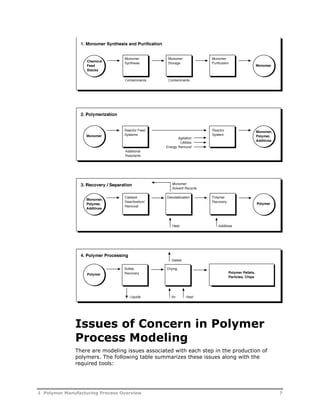
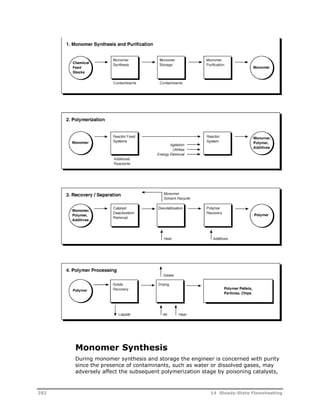
The following figure illustrates the important stages for each of the four 
polymer production steps. The main issues of concern for each of these steps 
are described next. 
6 1 Polymer Manufacturing Process Overview
Issues of Concern in Polymer 
Process Modeling 
There are modeling issues associated with each step in the production of 
polymers. The following table summarizes these issues along with the 
required tools: 
1 Polymer Manufacturing Process Overview 
7
Step Modeling Issues/Concerns Tools Required 
Monomer synthesis 
and purification 
Feedstock purity 
Monomer degradation 
Emissions 
Waste disposal 
Unit operations: separators 
Reaction kinetics 
Phase equilibria 
Polymerization Temperature control 
Molecular weight control, polymer 
specifications 
Conversion yield 
Reaction medium viscosity 
Residence time 
Reactor stability 
Waste minimization 
Characterization 
Reaction kinetics 
Phase equilibria 
Heat transfer 
Unit operations: reactors 
Transport phenomena 
Process dynamics 
Process control 
Recovery / Separation Solvent removal 
Monomer recovery 
Unit operations: separators 
Phase equilibria 
Heat and mass transfer 
Polymer processing Solvent removal 
Solids handling 
Heat and mass transfer 
Unit operations: separators 
Monomer Synthesis and Purification 
During monomer synthesis and purification, the engineer is concerned with 
purity. This is because the presence of contaminants, such as water or 
dissolved gases for example, may adversely affect the subsequent 
polymerization stage by: 
 Poisoning catalysts 
 Depleting initiators 
 Causing undesirable chain transfer or branching reactions 
Another concern of this step is the prevention of monomer degradation 
through proper handling or the addition of stabilizers. Control of emissions, 
and waste disposal are also important factors in this step. 
Polymerization 
The polymerization step is usually the most important step in terms of the 
economic viability of the manufacturing process. The desired outcome for this 
step is a polymer product with specified properties such as: 
 Molecular weight distribution 
 Melt index 
 Composition 
 Crystallinity/density 
 Viscosity 
8 1 Polymer Manufacturing Process Overview
The obstacles that must be overcome to reach this goal depend on both the 
mechanism of polymer synthesis (chain growth or step growth), and on the 
polymerization process used. 
Polymerization processes may be batch, semi-batch or continuous. In 
addition, they may be carried out in bulk, solution, slurry, gas-phase, 
suspension or emulsion. Batch and semi-batch processes are preferred for 
specialty grade polymers. Continuous processes are usually used to 
manufacture large volume commodity polymers. Productivity depends on heat 
removal rates and monomer conversion levels achieved. Viscosity of polymer 
solutions, and polymer particle suspensions and mixing are important 
considerations. These factors influence the choice of, for example, bulk versus 
solution versus slurry polymerization. Another example is the choice of 
emulsion polymerization that is often dictated by the form of the end-use 
product, water-based coating or adhesive. Other important considerations 
may include health, safety and environmental impact. 
Most polymerizations are highly exothermic, some involve monomers that are 
known carcinogens and others may have to deal with contaminated water. 
In summary, for the polymerization step, the reactions which occur usually 
cause dramatic changes in the reaction medium (e.g. significant viscosity 
increases may occur), which in turn make high conversion kinetics, residence-time 
distribution, agitation and heat transfer the most important issues for 
the majority of process types. 
Recovery / Separation 
The recovery/separation step can be considered the step where the desired 
polymer produced is further purified or isolated from by-products or residual 
reactants. In this step, monomers and solvents are separated and purified for 
recycle or resale. The important concerns for this step are heat and mass 
transfer. 
Polymer Processing 
The last step, polymer processing, can also be considered a recovery step. In 
this step, the polymer slurry is turned into solid pellets or chips. Heat of 
vaporization is an important factor in this step (Grulke, 1994). 
Summary 
In summary, production rate optimization, waste minimization and 
compliance to environmental constraints, yield increase, and product quality 
are also important issues in the production of polymers. In addition, process 
dynamics and stability constitute important factors primarily for reactors. 
Aspen Polymers Tools 
Aspen Polymers provides the tools that allow polymer manufacturers to 
capture the benefits of process modeling. 
1 Polymer Manufacturing Process Overview 9
Aspen Polymers can be used to build models for representing processes in 
two modes: with Aspen Plus for steady-state models, and with Aspen 
Dynamics or Aspen Custom Modeler™ for dynamic models. In both cases, the 
tools used specifically for representing polymer systems fall into four 
categories: 
 Polymer characterization 
 Physical properties 
 Reaction kinetics 
 Data 
Through Aspen Plus, Aspen Dynamics and Aspen Custom Modeler, Aspen 
Polymers provides robust and efficient algorithms for handling: 
 Flowsheet convergence and optimization 
 Complex separation and reaction problems 
 User customization through an open architecture 
Component Characterization 
Characterization of a polymer component poses some unique challenges. For 
example, the polymer component is not a single species but a mixture of 
many species. Properties such as molecular weight and copolymer 
composition are not necessarily constant and may vary throughout the 
flowsheet and with time. Aspen Polymers provides a flexible methodology for 
characterizing polymer components (U.S. Patent No. 5,687,090). 
Each polymer is considered to be made up of a series of segments. Segments 
have a fixed structure. The changing nature of the polymer is accounted for 
by the specification of the number and type of segments it contains at a given 
processing step. 
Each polymer component has associated attributes used to store information 
on molecular structure and distributions, product properties, and particle size 
when necessary. The polymer attributes are solved/integrated together with 
the material and energy balances in the unit operation models. 
Polymer Physical Properties 
Correlative and predictive models are available in Aspen Polymers for 
representing the thermophysical properties of a polymer system, the phase 
equilibrium, and the transport phenomena. Several physical property methods 
combining these models are available. In addition to the built-in 
thermodynamic models, the open architecture design allows users to override 
the existing models with their own in-house models. 
Polymerization Kinetics 
The polymerization step represents the most important stage in polymer 
processes. In this step, kinetics play a crucial role. Aspen Polymers provides 
built-in kinetic mechanisms for several chain-growth and step-growth type 
polymerization processes. The mechanisms are based on well-established 
sources from the open literature, and have been extensively used and 
10 1 Polymer Manufacturing Process Overview
validated against data during modeling projects of industrial polymerization 
reactors. 
There are also models for representing polymer modification reactions, and 
for modeling standard chemical kinetics. In addition to the built-in kinetic 
mechanisms, the open-architecture design allows users to specify additional 
reactions, or to override the built-in mechanisms. 
Modeling Data 
A key factor in the development of a successful simulation model is the use of 
accurate thermodynamic data for representing the physical properties of the 
system, and of kinetic rate constant data which provide a good match against 
observed trends. 
In order to provide the physical property models with the parameters 
necessary for property calculations, Aspen Polymers has property parameter 
databanks available. These include: 
 Polymer databank containing parameters independent of chain length 
 Segment databank containing parameters to which composition and chain 
length are applied for polymer property calculations 
 Functional group databank containing parameters for models using a 
group contribution approach is also included 
This User Guide contains several tabulated parameters which may be used as 
starting values for specific property models. Property data packages are also 
being compiled for some polymerization processes and will be made available 
in future versions. 
In addition to physical property data, Aspen Polymers provides users with 
ways of estimating missing reaction rate constant data. For example, the data 
regression tool can be used to fit rate constants against molecular weight 
data. 
Process Flowsheeting 
Aspen Polymers provides unit operation models, flowsheeting options, and 
analysis tools for a complete representation of a process. 
Models for batch, semi-batch and continuous reactors with mixing extremes 
of plug flow to backmix are available. In addition, other unit operation models 
essential for flowsheet modeling are available such as: 
 Mixers 
 Flow splitters 
 Flash tanks 
 Devolatilization units 
Flowsheet connectivity and sequencing is handled in a straightforward 
manner. 
Several analysis tools are available for applying the simulation models 
developed. These include tools for: 
 Process optimization 
1 Polymer Manufacturing Process Overview 11
 Examining process alternatives 
 Analyzing the sensitivities of key process variables on polymer product 
properties 
 Fitting process variables to meet design specifications 
Defining a Model in Aspen 
Polymers 
In order to build a model of a polymer process you must already be familiar 
with Aspen Plus. Therefore, only the steps specific to polymer systems will be 
described in detail later in this User Guide. The steps for defining a model in 
Aspen Polymers are as follows: 
Step 1. Specifying Global Simulation Options 
The first step in defining the model is the specification of: 
 Global simulation options, i.e. simulation type 
 Units to be used for simulation inputs and results 
 Basis for flowrates 
 Maximum simulation times 
 Diagnostic options 
Step 2. Defining the Flowsheet 
For a full flowsheet model, the next step is the flowsheet definition. Here you 
would specify the unit operation models contained in the flowsheet and define 
their connectivity. 
Chapter 4 describes the unit operation models available for building a 
flowsheet. 
Step 3. Defining Components 
Most simulation types require a definition of the component system. You must 
correctly identify polymers, polymer segments, and oligomers as such. All 
other components are considered conventional by default. 
Chapter 2 provides information on defining components. 
Step 4. Characterizing Components 
Conventional components in the system are categorized by type. Additional 
characterization information is required for other than conventional 
components. You must specify the: 
 Component attributes to be tracked for polymers 
 Type of segments present 
 Structure of oligomers 
 Type and activity of catalysts 
In addition, you may wish to request tracking of molecular weight 
distribution. 
Component characterization is discussed in Chapter 2. 
12 1 Polymer Manufacturing Process Overview
Step 5. Specifying Property Models 
You must select the models to be used to represent the physical properties of 
your system. 
The Aspen Polymers User Guide, Volume 2, Aspen Polymers Physical Property 
Methods and Models, describes the options available for specifying physical 
property models. 
Step 6. Defining Polymerization Kinetics 
Once you have made selections out of the built-in polymerization kinetic 
models to represent your reaction system, you need to choose specific 
reactions from the sets available and enter rate constant parameters for these 
reactions. 
Chapter 3 describes the models available and provides descriptions of the 
input options. 
Step 7. Defining Feed Streams 
For flowsheet simulations, you must enter the conditions of the process feed 
streams. If the feed streams contain polymers, you must initialize the 
polymer attributes. 
Polymer attribute definition in streams is discussed in a separate section of 
Chapter 2. 
Step 8. Specifying UOS Model Operating Conditions 
You must specify the configuration and operating condition for unit operation 
models contained in the flowsheet. In the case of reactors, you have the 
option of assigning kinetic models defined in step 6 to specific reactors. 
Chapter 4 provides some general information regarding the use of unit 
operation models. 
Step 9. Specifying Additional Simulation Options 
For a basic simulation the input information you are required to enter in steps 
1-8 is sufficient. However, there are many more advanced simulation options 
you may wish to add in order to refine or apply your model. These include 
setting up the model for plant data fitting, sensitivity analyses, etc. 
Many of these options are described in a separate section of Chapter 4. 
Information for building dynamic models is given in the Aspen Dynamics and 
Aspen Custom Modeler documentation sets. Note that for building dynamic 
models, users must first build a steady-state model containing: 
 Definition of the polymer system in terms of components present 
 Physical property models 
 Polymerization kinetic models 
Note: Aspen Polymers setup and configuration instructions are given in 
Chapter 5. 
1 Polymer Manufacturing Process Overview 13
References 
Dotson, N. A., Galván, R., Laurence, R. L., & Tirrell, M. (1996). Polymerization 
Process Modeling. New York: VCH Publishers. 
Grulke, E. A. (1994). Polymer Process Engineering. Englewood Cliffs, NJ: 
Prentice Hall. 
Odian, George. (1991). Principles of Polymerization (3rd Ed.). New York: John 
Wiley and Sons. 
14 1 Polymer Manufacturing Process Overview
2 Polymer Structural 
Characterization 
One of the fundamental aspects of modeling polymer systems is the handling 
of the molecular structure information of polymers. This chapter discusses the 
approaches used to address this issue in Aspen Polymers (formerly known as 
Aspen Polymers Plus). 
Topics covered include: 
 Polymer Structure, 15 
 Polymer Structural Properties, 19 
 Characterization Approach, 19 
Included in this manual are several sections devoted to the specification of 
polymer structural characterization information. 
 3 Component Classification, 21 
 Polymer Structural Properties, 33 
 Structural Property Distributions, 55 
 End-Use Properties, 73 
Polymer Structure 
Polymers can be defined as large molecules or macromolecules where a 
smaller constituting structure repeats itself along a chain. For this reason, 
polymers tend to exhibit different physical behavior than small molecules also 
called monomers. Synthetic polymers are produced when monomers bond 
together through polymerization and become the repeating structure or 
segment within a chain. When two or more monomers bond together, a 
polymer is formed. Small polymer chains containing 20 or less repeating units 
are usually called oligomers. 
The fact that identifiable segments are found repeatedly along a polymer 
chain, provides convenient ways to categorize polymers. Polymers can be 
classified based on segment composition or sequence: 
 Homopolymers - containing one type of repeating unit which can be 
mapped into one segment 
2 Polymer Structural Characterization 15
 Copolymers - which have two or more repeating units. Copolymers can be 
in a random, alternating, block, or graft configuration 
If we consider the arrangement of a given chain, another classification arises. 
Polymers may be: 
 Linear 
 Branched (with short or long chains) 
 Star 
 Ladder 
 Network 
Another classification that results from polymer structure has to do with 
physical state. A solid polymer may be: 
 Amorphous - when the chains are not arranged in a particular pattern 
 Crystalline - when the chains are arranged in a regular pattern 
A related classification divides polymers by thermal and mechanical properties 
into: 
 Thermoplastics (may go from solid to melt and vice versa) 
 Thermosets (remain solid through heating) 
 Elastomers (which have elastic properties) 
Finally, polymers can be categorized based on the form they are 
manufactured into: plastics, fibers, film, coatings, adhesives, foams, and 
composites. 
Polymer Types by Physical Structure 
The following figure illustrates the various polymer types based on chain 
structure: 
16 2 Polymer Structural Characterization
2 Polymer Structural Characterization 17
Polymer Types by Property 
The following table illustrates the various polymer types based on properties: 
Classification Type Physical Property 
Thermal / 
Mechanical 
properties 
Thermoplastics 
Thermosets 
Elastomers 
Can melt and solidify again 
Remain solid through heating 
Have elastic properties 
Fabrication Plastics 
Fibers 
Coatings 
Adhesives 
Foams 
Composites 
Elastomers 
Very versatile in terms of application 
Most commonly used as textiles 
Used for both decorative and protective 
purposes 
Used for their bonding properties 
Used as packaging, upholstery, insulation, 
etc. 
Can be tailored to many applications 
Used for their elastic properties 
In addition to these classifications, polymers can be categorized based on the 
type of constituting atoms on the chains. 
Homochains produced through chain-growth polymerization have only carbon 
atoms on the polymer backbone. 
Heterochains produced through step-growth polymerization have other types 
of atom incorporated into the polymer backbone. 
Polymer Categories by Chemical Structure 
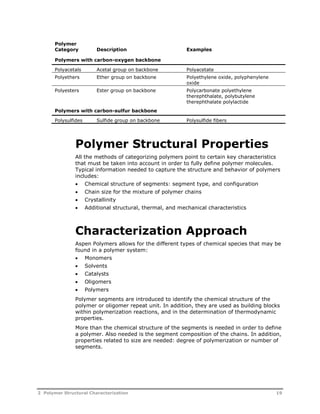
The following table lists various homochain and heterochain polymers based 
on the type of atoms on the polymer backbone or the substituted side 
groups: 
Polymer 
Category Description Examples 
Polymers with carbon-carbon backbone 
Polyacrylics Ethylene backbone with one acrylic 
acid (or derivative) as side group 
per ethylene 
Polyacrylic acid, polymethyl 
methacrylate, polyacrylonitrile, 
polyacrylamide 
Polydienes One double bond per repeat unit Polybutadiene 
Polyhalogen 
Fluorine or chlorine side group per 
hydrocarbons 
ethylene 
Polyvinyl fluoride, polyvinylidene 
fluoride, polyvinylchloride, 
Polyolefins Alphatic or aromatic substituents Polyethylene, polypropylene, 
polyisobutylene, polystyrene 
Polyvinyls From vinyl monomers Polyvinyl acetate, polyvinyl alcohol 
Polymers with carbon-nitrogen backbone 
Polyamides Amide group on backbone Nylon 6, nylon 6,6 
Polyurethanes Urethane group on backbone Polyurethane foams 
Polyureas Urea group on backbone Polyurea resins 
18 2 Polymer Structural Characterization
Polymer 
Category Description Examples 
Polymers with carbon-oxygen backbone 
Polyacetals Acetal group on backbone Polyacetate 
Polyethers Ether group on backbone Polyethylene oxide, polyphenylene 
oxide 
Polyesters Ester group on backbone Polycarbonate polyethylene 
therephthalate, polybutylene 
therephthalate polylactide 
Polymers with carbon-sulfur backbone 
Polysulfides Sulfide group on backbone Polysulfide fibers 
Polymer Structural Properties 
All the methods of categorizing polymers point to certain key characteristics 
that must be taken into account in order to fully define polymer molecules. 
Typical information needed to capture the structure and behavior of polymers 
includes: 
 Chemical structure of segments: segment type, and configuration 
 Chain size for the mixture of polymer chains 
 Crystallinity 
 Additional structural, thermal, and mechanical characteristics 
Characterization Approach 
Aspen Polymers allows for the different types of chemical species that may be 
found in a polymer system: 
 Monomers 
 Solvents 
 Catalysts 
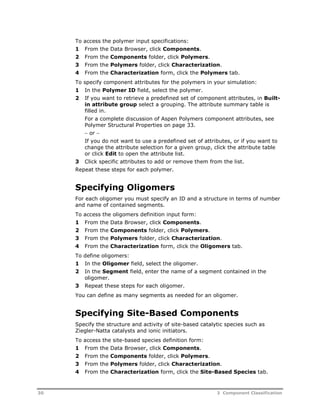
 Oligomers 
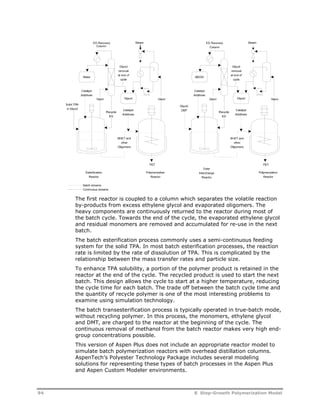
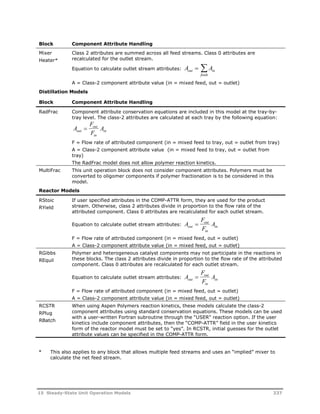
 Polymers 
Polymer segments are introduced to identify the chemical structure of the 
polymer or oligomer repeat unit. In addition, they are used as building blocks 
within polymerization reactions, and in the determination of thermodynamic 
properties. 
More than the chemical structure of the segments is needed in order to define 
a polymer. Also needed is the segment composition of the chains. In addition, 
properties related to size are needed: degree of polymerization or number of 
segments. 
2 Polymer Structural Characterization 19
Component Attributes 
Within Aspen Polymers, component attributes are used to define these 
structural characteristics. Component attributes are available to track 
segment composition, degree of polymerization, molecular weight, etc. 
Because the polymer is a mixture of chains, there is normally a distribution of 
these structural characteristics. The component attributes are used to track 
the averages. 
There are additional attributes used to track information about the 
distribution of chain sizes. These are the moments of chain length 
distribution. For detailed information about component attributes, see 
Polymer Structural Properties on page 33. 
In addition to the component attributes, users have the option within Aspen 
Polymers to examine polymer molecular weight distribution. This feature is 
based on a method of instantaneous properties. For more information, see 
Method of Instantaneous Properties on page 60. 
References 
Grulke, E. A. (1994). Polymer Process Engineering. Englewood Cliffs, NJ: 
Prentice Hall. 
Munk, P. (1989). Introduction to Macromolecular Science. New York: John 
Wiley and Sons. 
Odian, G. (1991). Principles of Polymerization (3rd Ed.). New York: John 
Wiley and Sons. 
Rudin, A. (1982). The Elements of Polymer Science and Engineering. Orlando: 
Academic Press. 
20 2 Polymer Structural Characterization
3 Component Classification 
This section discusses the specification of components in a simulation model. 
Topics covered include: 
 Component Categories, 21 
 Component Databanks, 25 
 Segment Methodology, 27 
 Specifying Components, 28 
Component Categories 
When developing a simulation model in Aspen Polymers (formerly known as 
Aspen Polymers Plus), users must assign components present in process flow 
streams to one of the following categories: 
 Conventional 
 Polymer 
 Oligomer 
 Segment 
 Site-based 
The following figure illustrates the different categories of components and 
their input requirements: 
3 Component Classification 21
22 
Conventional Components 
Standard conventional components are molecular components such as water. 
These components have a fixed molecular structure and participate in phase 
equilibrium. Components falling into this category include: 
 Monomers 
 Initiators 
 Chain transfer agents 
 Solvents 
 Catalysts 
In order to fully specify conventional c 
component data required for the phase equilibrium calculations. This data 
may be entered or retrieved from component databanks. 
Note: Ziegler-Natta catalysts and ionic initiators require additional 
characterization inf 
Polymers 
In Aspen Polymers, polymer components represent a distribution of polymeric 
species. The average size and composition of the molecules in this distribution 
3 Component Classification 
quilibrium. components, you need only specify pure 
information. 
omponents,
can change throughout the simulation. Each polymer molecule is considered 
to be made up of repeating units or segments. Typically, the segments 
correspond to the monomers that are used to grow the polymer. 
The structure of polymers depends on the number and type of segments they 
contain and the arrangement of segments in linear, branched, or cross-linked 
forms. 
Component attributes are used to track polymer structural properties (U.S. 
Patent No. 5,687,090) such as: 
 Segment composition 
 Copolymer composition and average sequence length 
 Degree of polymerization 
 Molecular weight 
 Branching 
 Moments of molecular weight distribution 
 Molecular architecture (physical arrangement of segments within the 
polymer molecule) 
Segments are specified independently from polymers. For each polymer, you 
must select the types of component attributes to be included in the simulation 
model. If the polymer is present in the process feed streams, you must 
provide its properties by initializing the component attributes while specifying 
input data for these feed streams. 
For more information on component attribute specification, see Polymer 
Structural Properties on page 33. 
Oligomers 
By convention, oligomers are defined as components with two or more 
segments and a fixed molecular structure. They can be defined as volatile or 
non-volatile. Typically, the oligomer feature is used to allow users to track the 
loss of volatile short-chain polymers. 
In order to specify oligomers, you must specify their composition in terms of 
the number and type of segments they contain. Oligomers do not require 
component attributes. For this reason, you may treat a polymer as an 
oligomer in cases where you want to process the polymer within a unit 
operation model which cannot handle polymer component attribute data. 
When using oligomer components, you may specify addition properties 
through the following unary property parameters: 
Parameter Definition Default 
POLDP Number-average chain 
length 
Calculated * 
POLPDI Polydispersity index 1 ** 
POLCRY Mass fraction crystallinity 
* Calculated from the number of segments in the oligomer as specified in the 
Polymers form Oligomers subform. 
** Used to calculate DPW and MWW. 
3 Component Classification 23
Note: Not all kinetic models track oligomers as separate components. If a 
model does not provide fields for specifying oligomers on its input forms, then 
these components are not tracked. 
Segments 
Segments are the structural units of a polymer or oligomer and are specified 
independently from these components. Their structure is fixed throughout a 
simulation. Segments typically correspond to the monomers used to grow the 
polymer. They are divided into types depending on their location on the 
polymer chain: 
 Repeat units 
 End groups 
 Branch point (attached to three or four branches) 
Site-Based 
Site-based components pertain to multisite reaction kinetic models (Ziegler- 
Natta and Ionic). Site-based components include Ziegler-Natta catalysts and 
ionic initiators. 
Ziegler-Natta Catalysts 
Ziegler-Natta catalysts are often used to initiate polymer chain formation in 
chain-growth polymerization reactions. Catalysts can be treated as standard 
conventional components. Ziegler-Natta catalysts or metallocene catalysts 
involve one or more polymerization site types which may be in an activated or 
deactivated state. 
In order to use Ziegler-Natta catalysts, you must specify the number of site 
types and the catalyst properties to be tracked, that is, the site activity. 
Catalyst properties are defined as component attributes. You must initialize 
the catalyst properties while specifying input data for the streams containing 
the catalysts. 
For more information on component attribute specification, see Polymer 
Structural Properties on page 33. 
Ionic Initiators 
Ionic initiators are used in anionic and cationic polymerization. The ionic 
initiators can be treated as standard conventional components. The 
propagating species in ionic polymerization can be: 
 Free-ions 
 Ion-pairs 
 Dormant esters 
24 3 Component Classification
In Aspen Polymers, these different species are modeled as different sites of 
an ionic initiator. Three different site-based attributes are tracked for an ionic 
initiator. For more information, see Ionic Initiator Attributes on page 45. 
Component Databanks 
The thermodynamic and transport property models needed to perform the 
physical property and phase equilibrium calculations during a simulation 
require pure component property data. These include: 
 Molecular weight 
 Heat capacity 
 Heat of formation 
 Heat of vaporization 
 Vapor pressure 
 Density 
Enter that information while selecting and specifying physical property 
models. Normally, you would make use of the pure component databanks and 
retrieve data from them for each of the components present in the simulation 
model: 
 Data for conventional components are retrieved from the Pure Component 
databank 
 Data for free-radical initiators are retrieved from the INITIATOR databank 
 Data for polymers are retrieved from the POLYMER databank 
 Data for oligomers are retrieved either from the pure component databank 
or from the POLYMER databank 
 Data for segments are retrieved from the SEGMENT databank 
 Data for PC-SAFT are retrieved from the PC-SAFT databank 
 Data for POLYPCSF are retrieved from the POLYPCSF databank 
Descriptions of the databanks, and the parameters they contain are given in 
Appendix A. 
Pure Component Databank 
In the Pure Component databank, components are named using a 
nomenclature developed for Aspen Plus. Each component is given an alias 
summarizing the number of each type of atom: C, H, O, N, P, S, CL, F, etc. 
(e.g. C2H4 for ethylene). For cases where the same alias matches several 
components, a counter is added to make the distinction (e.g. C2H4O2-1 for 
acetic acid). 
Note: Catalysts are often solid components and may not be found in the 
PURE11 databank. Normally, you do not need a rigorous representation of 
these components. 
3 Component Classification 25
An acceptable approach is to assign a monomer alias to the catalyst and then 
provide the correct molecular weight and certain parameters which will 
prevent the catalyst from vaporizing. If an activity coefficient model is being 
used for phase equilibrium representation, the catalysts can be assumed to be 
non-volatile by specifying -40 as the first Antoine parameter (PLXANT(1) = - 
40). 
PC-SAFT Databank 
The PC-SAFT databank contains pure and binary parameters used with the 
PC-SAFT property method. The parameters are taken from the literature, 
including many normal compounds, polar compounds and associating 
compounds. 
POLYPCSF Databank 
The POLYPCSF databank contains pure and binary parameters used with the 
POLYPCSF property method. The parameters are taken from the literature, 
including many normal compounds, but excluding polar compounds and 
associating compounds. 
INITIATO Databank 
The INITIATO databank contains data for initiator components. Rate 
constants in this databank are derived from half-life data in vendor 
datasheets published on public web sites. These datasheets generally contain 
data at several temperatures, allowing the activation energy and prefactor to 
be determined. These rate constants depend on the reaction environment, 
and may vary between polar and non-polar solvents. Where multiple sets of 
data were available, the data from monomer or organic solvents were used in 
preference to data from aqueous solutions. 
Molecular weight and other parameters are calculated from structure using 
estimation methods from Aspen Plus, except in those few cases where vapor 
pressure data was provided in the datasheets. 
In the INITIATO databank, components are named using industry-standard 
acronyms. Each component is given an alias summarizing the number of each 
type of atom: C, H, O, N, P, S, CL, F, etc. For cases where the same alias 
matches several components, a counter is added to make the distinction (e.g. 
–1,-2, etc). 
Segment Databank 
In the Segment Databank, a segment name comes from the name of the 
monomer from which it originates. Therefore, in this databank component 
names and aliases follow the same conventions as those for the Pure 
Component Databank. 
A label is added to the monomer name to identify the segment as either a 
repeat unit,-R, an end group,-E, or a branch point, -B (e.g. for butadiene 
segments: C4H6R1or BUTADIENER1 corresponding to the repeat unit – 
26 3 Component Classification
CH2–CH=CH–CH2, C4H5E1 or BUTADIENEE1 corresponding to the end 
group –CH=CH–CH=CH2 and C4H5B or BUTADIENEB corresponding to the 
branch segment CH2 CH CH CH ). 
Polymer Databank 
The Polymer Databank does not follow the conventional nomenclature. The 
polymer aliases are the typical acronyms used in industry or academia, and 
the polymer names consist of the repeat unit name enclosed in parentheses 
and preceded by the prefix Poly (e.g. PS or POLY(STYRENE) for polystyrene). 
Note: The MW property parameter used to store molecular weights in the 
component databanks is the true molecular weight for all component types 
except polymers. For polymers, the true polymer molecular weight is normally 
tracked as a component attribute only. The molecular weight stored in the 
databank is the apparent molecular weight calculated as the average segment 
molecular weight (See Appendix A). 
Segment Methodology 
The segment approach to characterizing components is a fundamental 
methodology which affects almost every functionality within Aspen Polymers. 
Segments are used as the building blocks for polymers. Once you have 
specified the types of segments in the polymer, the segment composition and 
degree of polymerization defined as component attributes may be used to 
define the size and composition of the polymer. 
For oligomers, although component attributes are not used, the number of 
each segment must be specified directly. 
Most of the Aspen Polymers physical property models calculate polymer and 
oligomer properties from segment properties. This is done by taking into 
account the degree of polymerization and the segment composition. The 
calculated properties should be the same for both oligomers and polymers, 
assuming that the oligomer structure and molecular weight were specified 
correctly. Note that this is true for mass-based properties only. Mole-based 
properties will be different between polymer and oligomer if their apparent 
molecular weights are different. 
Within the polymerization reaction models, segments also play a key role. As 
polymerization progresses, the models map the reacting monomers into the 
corresponding segments and return rates of change for the segment 
composition. 
3 Component Classification 27
Specifying Components 
To specify components within your model you need to know the following: 
Item For 
Component types All the species in your system 
Property parameter databank 
The species in the system 
selections 
IUPAC names All conventional components or you need their 
physical properties (molecular weight, boiling point, 
Antoine constants, etc.) 
Segment structure All polymers and oligomers (define whether you want 
to include any end groups or branch points) 
Polymer properties to be 
tracked 
All polymers, that is, degree of polymerization, 
segment composition 
Additional characteristics All additional characteristics for catalysts, or ionic 
initiators 
Selecting Databanks 
For an Aspen Polymers simulation, you generally retrieve physical property 
data from the following databanks: 
 Pure component databank (PURE12) 
 Polymer databank (POLYMER) 
 Polymer segment databank (SEGMENT) 
 Initiator databank (INITIATOR) 
You can also use other Aspen Plus databanks, user databanks, or in-house 
databanks. Appendix A provides descriptions of the polymer and segment 
databanks and the parameters they contain. 
If you selected a polymer template to start your simulation, the correct 
databanks are already specified. 
If you did not select a polymer template, or if you want to modify the 
databank selection: 
1 From the Data Browser, click Components. 
2 From the Components folder, click Specifications. 
3 On the Selection sheet, click the Databanks tab to open the databank 
selection form. 
Defining Component Names and Types 
You must specify a: 
 Name and a type for each component in the simulation 
 Component name or identifier 
 Databank name or alias that sets the pure component properties for the 
component 
28 3 Component Classification
 Component type that sets the category to which the component belongs 
and determines the treatment of that component 
To access the components specifications input sheet: 
1 From the Data Browser, click Components. 
2 From the Components folder, click Specifications. 
3 On the Selection sheet, click the Databanks tab to set the databanks to 
be searched for pure component properties. 
To define component names and types: 
1 On the Selection sheet, in the Component ID field, specify an ID for 
each component. 
This ID is used to refer to the component in all subsequent input, and is 
also used to identify the component in the simulation report. 
2 For polymers, oligomers, and segments, specify the component type in 
the Type field. 
By default, all components are assumed to be standard conventional 
components. For Aspen Polymers simulation you must correctly identify 
the component types: 
Use For 
Conventional Standard conventional components 
Polymer Homo and copolymers 
Oligomer Short chain polymer molecules 
Segment Polymer or oligomer repeat units 
3 If component property data is being retrieved from databanks, you must 
also supply either the databank alias in the Alias field, or the databank 
name in the Component name field. 
Specifying Segments 
The Type of each polymer or oligomer segment must be specified on the 
Polymer Characterization Segments sheet. Segments can be repeat units, 
end groups or branch points attached to three or four branches. 
To access the segments definition input form: 
1 From the Data Browser, click Components. 
2 From the Components folder, click Polymers. 
3 From the Polymers folder, click Characterization. 
To define segments: 
 On the Segments sheet, assign a type to the segments from the Type 
field. 
Specifying Polymers 
For each polymer you must define the component attributes to be tracked. All 
components specified Polymer in the Components Specifications folder 
require component attributes. 
3 Component Classification 29
To access the polymer input specifications: 
1 From the Data Browser, click Components. 
2 From the Components folder, click Polymers. 
3 From the Polymers folder, click Characterization. 
4 From the Characterization form, click the Polymers tab. 
To specify component attributes for the polymers in your simulation: 
1 In the Polymer ID field, select the polymer. 
2 If you want to retrieve a predefined set of component attributes, in Built-in 
attribute group select a grouping. The attribute summary table is 
filled in. 
For a complete discussion of Aspen Polymers component attributes, see 
Polymer Structural Properties on page 33. 
 or  
If you do not want to use a predefined set of attributes, or if you want to 
change the attribute selection for a given group, click the attribute table 
or click Edit to open the attribute list. 
3 Click specific attributes to add or remove them from the list. 
Repeat these steps for each polymer. 
Specifying Oligomers 
For each oligomer you must specify an ID and a structure in terms of number 
and name of contained segments. 
To access the oligomers definition input form: 
1 From the Data Browser, click Components. 
2 From the Components folder, click Polymers. 
3 From the Polymers folder, click Characterization. 
4 From the Characterization form, click the Oligomers tab. 
To define oligomers: 
1 In the Oligomer field, select the oligomer. 
2 In the Segment field, enter the name of a segment contained in the 
oligomer. 
3 Repeat these steps for each oligomer. 
You can define as many segments as needed for an oligomer. 
Specifying Site-Based Components 
Specify the structure and activity of site-based catalytic species such as 
Ziegler-Natta catalysts and ionic initiators. 
To access the site-based species definition form: 
1 From the Data Browser, click Components. 
2 From the Components folder, click Polymers. 
3 From the Polymers folder, click Characterization. 
4 From the Characterization form, click the Site-Based Species tab. 
30 3 Component Classification
To specify site-based species characteristics: 
1 Select the component type: Ziegler-Natta catalyst, ionic initiator, etc. 
2 In the Comp ID field, specify the component name. 
3 Specify the number of site types in Number of sites for the component. 
For Ziegler-Natta catalysts, you must also specify the moles of sites per 
gram of catalyst. 
4 Select the list of properties or component attributes to be tracked for that 
component. Click the attribute list table or Edit to open the attribute list. 
5 Click specific attributes to add or remove them from the list for the 
component. 
References 
Bailey, J., & Ollis, D. F. (1986) Biochemical Engineering Fundamentals (2nd 
Ed.). New York: McGraw-Hill. 
Brandrup, J., & Immergut, E. H. (Eds.). (1989). Polymer Handbook (3rd Ed.). 
New York: John Wiley & Sons. 
Danner R. P., & High, M. S. (1992). Handbook of Polymer Solution 
Thermodynamics. New York: American Institute of Chemical Engineers. 
Kroschwitz, J. (Ed.). (1990). Concise Encyclopedia of Polymer Science and 
Engineering. New York: John Wiley and Sons. 
3 Component Classification 31
32 3 Component Classification
4 Polymer Structural 
Properties 
This section discusses the use of component attributes for tracking polymer 
structural properties in a simulation model. 
Topics covered include: 
 Structural Properties as Component Attributes, 33 
 Component Attribute Classes, 34 
 Component Attribute Categories, 35 
 Component Attribute Initialization, 46 
 Component Attribute Scale Factors, 50 
 Specifying Component Attributes, 51 
Structural Properties as 
Component Attributes 
Component attributes provide a convenient framework to associate structural 
characterization data to components in a flow stream. They are carried 
throughout the flowsheet along with state and composition information, and 
effectively extend the stream structure. 
Aspen Polymers (formerly known as Aspen Polymers Plus) uses component 
attributes as a vehicle for tracking important modeling information for 
polymers, ionic initiators and Ziegler-Natta catalysts (U.S. Patent No. 
5,687,090). For example, there are component attributes to store: 
 Segment composition (segment fraction or segment flow) 
 Copolymer composition and average sequence length 
 Degree of polymerization (number, weight, and z-average) 
 Molecular weight (number, weight, and z-average) 
 Degree of branching (long and short) 
 Degree of cross-linking (cross-link density) 
 Molecular architecture (physical arrangement of segments within the 
polymer molecule) 
4 Polymer Structural Properties 33
 Live polymer properties 
 Aggregate polymer properties 
In the case of multi-site-type Ziegler-Natta catalyst polymerization, the 
attributes provide the structure to store the properties by site. Examples of 
catalyst attributes include the fraction of dead and potential sites. The 
catalyst attributes are used to track catalyst activity. There are also 
component attributes available to track user defined data. 
The complete list of available attributes is given in the Polymer Component 
Attributes, Site-Based Species Attributes, and User Attributes sections of this 
chapter (pages 35 through 45). 
Component Attribute Classes 
Component attributes are divided into classes to reflect the nature of various 
structural properties carried in process streams: 
 Class 0 component attributes are derived quantities from other attributes. 
They are therefore recalculated from these attributes after they are 
updated. For example, number average degree of polymerization is a 
Class 0 component attribute. It is computed from the zeroth and the first 
moments of chain length distribution. 
 Class 1 component attributes are structural properties per unit mass. They 
are not used for polymers. 
 Class 2 component attributes are structural properties per unit time. 
Examples are zeroth and first moments of chain length distribution 
The following table lists the differences between the Aspen Polymers 
component attribute classes: 
Class Conserved 
Quantity 
Convergence 
Treatment 
Unit of Measurement Examples 
0 N/A Recalculated Varies Degree of 
polymerization 
1 Attribute  
component mass 
Direct substitution Attribute / component 
mass 
None for polymers 
2 Attribute Accelerated 
convergence 
Attribute / time Segment flows, 
moments of chain 
length distribution 
For a typical polymer process simulation, Class 0 and Class 2 component 
attributes are used. Since Class 0 component attributes are calculated from 
Class 2 attributes, users have the option of entering either of the two types 
for simulation models where polymer is present in the process feed streams. 
For this reason, an attribute initialization scheme has been designed. For 
more information, see Component Attribute Initialization on page 46. 
34 4 Polymer Structural Properties
Component Attribute 
Categories 
The main categories of component attributes available are: 
 Polymer attributes 
 Ziegler-Natta catalyst attributes 
 Ionic initiator attributes 
 User attributes 
Polymer Component Attributes 
The polymer properties tracked as component attributes include: 
 Segment fraction 
 Segment flow 
 Flow and fraction of segment dyads (pairs) 
 Number-average degree of polymerization and molecular weight 
 Weight-average degree of polymerization and molecular weight 
 Z-average degree of polymerization and molecular weight 
 Zeroth through third moment of chain length distribution 
 Number of long and short chain branches 
 Long and short chain branching frequency 
 Number and frequency of cross-links 
 Number-average block length (sequence length) 
 Several aspects of molecular architecture, including tacticity, head-to-head 
insertions (orienticity) 
 Flow and fraction of terminal double bonds 
 Flow and fraction of cis-, trans-, and vinyl- isomers associated with diene 
segments (internal and pendent double bonds) 
There are component attributes available to track most of these properties for 
dead polymer, live polymer, and aggregate polymer. You may want to track 
information for live polymers for cases of free-radical polymerization where 
the quasi-steady-state approximation (QSSA) is not used. Site based 
component attributes are also available to accommodate multi-site type 
Ziegler-Natta catalyst polymerization. Composite attributes are summed over 
all site types. They represent the average properties of the polymer. 
Polymer Attribute Sets 
In summary, there are six sets of polymer component attributes. 
 Composite Polymer Set contains the basic attributes that may be used for 
any type of polymerization, including the minimum required set for all 
simulation models. 
 Composite Live Polymer Set contains the attributes required to track the 
characteristics of live polymer chains in chain growth polymerization. 
4 Polymer Structural Properties 35
 Composite Aggregate Polymer Set contains the attributes required to track 
the characteristics of aggregate polymer chain in ionic polymerization. 
 Site-Based Polymer Set contains attributes corresponding to the 
composite set, but structured to track information for each catalyst site 
type. 
 Site-Based Live Polymer Set contains attributes corresponding to the 
composite live polymer set, structured to track information by catalyst site 
type. 
 Site-Based Aggregate Polymer Set contains attributes corresponding to 
the composite aggregate polymer set, structured to track information by 
ionic site type. 
The tables that follow list the component attributes available in each set. 
Attributes must be associated from these sets to each of your polymer 
components when building a simulation model. To simplify this, the attributes 
in the tables were grouped by model usage, or polymerization reaction type 
(for example, physical property simulation model, free-radical polymerization 
model). Select a grouping and all the attributes needed are retrieved 
automatically. A table of the minimum required attributes by model usage is 
also provided. 
Attribute Definitions – Composite Polymer Attribute Set 
Name Symbol† Description Equation‡ Class Dimension Units 
DPN D Pn Number-average 
degree of 
polymerization 
DPn    1 0 / 0 1 Unitless 
DPW DPw 
Weight-average degree 
of polymerization 
DPw    2 1 / 0 1 Unitless 
DPZ DPz 
Z-average degree of 
polymerization 
DPz    3 2 / 0 1 Unitless 
PDI PDI Polydispersity index PDI = DPw /D Pn 0 1 Unitless 
MWN Mn 
Number-average 
molecular weight M DP M n  n seg 0 1 Unitless 
MWW Mw 
Weight-average 
molecular weight M DP M w  w seg 0 1 Unitless 
MWZ Mz 
Z-average molecular 
weight M DP M z  z seg 0 1 Unitless 
MWSEG Mseg 
Average segment 
molecular weight 
Mseg Fp (i)Mi 0 1 Unitless 
ZMOM 0 Zeroth moment of chain 
length distribution 
---- 2 1 Mole 
flow 
length distribution 1 1   (i) 0 1 Mole 
flow 
FMOM 1 First moment of chain 
SMOM 2 Second moment of 
chain length distribution 
---- 2 1 Mole 
flow 
TMOM 3 Third moment of chain 
length distribution 
---- 2 1 Mole 
flow 
SFLOW 1(i) Mole flow of segments 
of type i 
---- 2 NSEG Mole 
flow 
36 4 Polymer Structural Properties
Attribute Definitions - Composite Polymer Attribute Set (continued) 
Name Symbol† Description Equation‡ Class Dimension Units 
SFRAC Fp (i) Mole fraction of 
segments of type i 
F i i p ( )   ( ) /  1 1 
0 NSEG Unitless 
EFRAC F i e ( ) Fraction of chain end 
( )   ( ) / ( ) 1 1 
segments of type i F i i i e 
ends 
0 NEND Unitless 
DYADFLOW 
i, j  Molar flow rate of 
dyads composed of 
type I and j segments 
---- 2   
2 
seg seg N  N Mole 
2 
flow 
DYADFRAC 
i, j  Fraction of dyads 
composed of type I 
and j segments 
, , 1  / i j i j   0   
2 
seg seg N  N Unitless 
2 
BLOCKN 
i Bn Number-average block 
length for segment i 
 0 NSEG Unitless 
ii 
i 
i 
Bni 
1 
  
 
 
1 
Attributes Related to Branching and Terminal Double Bonds 
LCB LCB Number of long chain 
branches 
---- 2 1 Mole 
flow 
SCB SCB Number of short chain 
branches 
---- 2 1 Mole 
flow 
FLCB FLCB Long chain branching 
frequency FLCB 
LCB 
 
103 
1  
0 1 Unitless 
FSCB FSCB Short chain branching 
frequency FSLB 
SCB 
 
103 
1  
0 1 Unitless 
TBDFLOW   i 0 
 Mole flow of terminal 
double bond segments 
of type i 
---- 2 NSEG Mole 
flow 
TBDFRAC Mole fraction of 
terminal double bond 
segments of type i 
0 NSEG Unitless 
 
F (i) p 
   
0 1 F (i)  (i) / p 
Attributes Related to Molecular Architecture (Tacticity and Orienticity) 
ATACFLOW atactic 
1  
Apparent mole flow of 
atactic polymer 
---- 2 1 Mole 
flow 
ATACFRAC Fatactic Mass fraction of 
atactic polymer 1 1 Fatactic  atactic / 0 1 Unitless 
HTHFLOW HTH 
ii  Mole flow rate of i-I 
dyads with head-to-head 
orientation 
---- 2 NSEG Mole 
flow 
HTHFRAC HTH 
ii  Fraction of i-I dyads 
with head-to-head 
orientation 
 HTH 
  HTH 
/ 0 NSEG Unitless 
ii ii 
ii 
4 Polymer Structural Properties 37
Attribute Definitions - Composite Polymer Attribute Set (continued) 
Name Symbol† Description Equation‡ Class Dimension Units 
Attributes Related to Reactions with Diene Monomers 
XFLOW XFLOW Number of cross links ---- 2 NSEG* Mole 
flow 
XDENSITY 
XL  Cross-linking density 
 XLFLOW 0 NSEG* Kmol/kg 
0  
 
n 
XL M 
CIS-FLOW i,cis 
1  
Flow rate of diene 
segment i in cis 
configuration 
---- 2 NSEG* Mole 
flow 
TRANSFLO i,trans 
1  
Flow rate of diene 
segment i in trans 
configuration 
---- 2 NSEG* Mole 
flow 
VINYLFLO i,vinyl 
1  
Flow rate of diene 
segment i in vinyl 
configuration 
---- 2 NSEG* Mole 
flow 
CIS-FRAC cis 
i f Fraction of diene 
segment i in cis 
configuration 
, 
1   / 0 NSEG* Unitless 
cis i cis i 
i f 1 
TRANSFRA Fraction of diene 
trans 
i f trans i trans i 
i f 1 
segment i in trans 
configuration 
0 NSEG* Unitless 
VINYLFRA Fraction of diene 
vinyl 
i f vinyl i vinyl i 
i f 1 
segment i in vinyl 
configuration 
0 NSEG* Unitless 
, 
1   / 
, 
1   / 
Attributes Related to Particle Size (Emulsion Polymerization) 
PDV PDv 
Polydispersity for PSD 
(volume) PD V 
 0 1 Unitless 
n 
v 
v V 
PSDZMOM 0 
Zeroth moment of the 
particle size 
distribution (volume) 
---- 2 1 # /s 
PSDFMOM 1 
First moment of the 
PSD (volume) 
  1  Mass / 0 1 m3/s 
PSDSMOM 2 
Second moment of the 
PSD (volume) 
---- 2 1 m6 /s 
PSDTMOM 3 
Third moment of the 
PSD (volume) 
---- 2 1 m9 /s 
VOLN Vn 
Number average 
volume of the 
particles 
Vn  
 
 
1 
0 
0 1 m3 
VOLV Vv 
Volume average 
volume of the 
particles 
Vv  
 
 
2 
1 
0 1 m3 
VOLZ Vz 
Z-average volume of 
the particles Vz  
 
 
3 
2 
0 1 m3 
DIAV Dv 
Volume average 
diameter Dv  3 6 1 
 
 
0  
0 1 m 
38 4 Polymer Structural Properties
† i = Segment index 
Moments of the chain length distribution are defined as   n m 
Q 
m n 
Where: 
m = 0-3 
n = Chain length 
Qn 
= Number of moles of polymer of length n. 
‡ Equation for recalculating class 0 attributes only. Class 2 attributes are integrated. 
* Although the dimension is NSEG, these attributes only apply to diene segments, other elements 
will be set to zero. 
Attribute Definitions – Composite Live Polymer Attribute Set 
Name Symbol† Description Equation‡ Class Dimension Units 
LDPN DPL Number average DP 
n 
L    1 0 / 0 1 Unitless 
of live polymer DPn 
LDPW DPw 
L Weight average DP of 
L    2 1 / 0 1 Unitless 
live polymer DPw 
LPDI PDI L Polydispersity index 
 / L 0 1 Unitless 
PDI L DP L 
DP 
of live polymer w 
n 
LMWN Mn 
L Number average MW 
L 
 L 
L 0 1 Unitless 
M DP M of live polymer n 
n 
seg 
LMWW Mw 
L Weight average MW 
L 
 L 
L 0 1 Unitless 
M DP M of live polymer w 
w 
seg 
LMWSEG Mseg 
L Average segment 
molecular weight of 
live polymer 
L 
p i   ( ) 0 1 Unitless 
M LF i M seg 
LZMOM 0 
Zeroth moment of 
live polymer 
  0 0  (i) 0 1 Mole flow 
LFMOM 1 
First moment of live 
polymer 
  1 1  (i) 0 1 Mole flow 
LSMOM 2 
Second moment of 
live polymer 
---- 2 1 Mole flow 
LSFLOW 1(i) Segment flow rates in 
live polymer 
---- 2 NSEG Mole flow 
LSFRAC LF i p ( ) Segment mole 
fraction in live 
polymer 
LFp (i)   (i) /  1 1 
0 NSEG Unitless 
LEFLOW 0 (i) End segment flow 
rates in live polymer 
---- 2 NSEG Mole flow 
LEFRAC LF i e ( ) End segment mole 
fractions in live 
polymer 
LFe (i)   (i) /  0 0 
0 NSEG Unitless 
LPFRAC Flp 
Fraction of polymer 
that is live Flp  
 
 
0 
0 
0 1 Mole 
fraction 
† i = Segment index 
‡ Equation for recalculating class 0 attributes only. Class 2 attributes are integrated. 
4 Polymer Structural Properties 39
Attribute Definitions – Composite Aggregate Polymer Attribute Set 
Name Symbol† Description Equation‡ Class Dimension Units 
ADPN DPA Number average DP of 
n 
A    1 0 / 0 1 Unitless 
aggregate polymer DPn 
ADPW DPw 
A Weight average DP of 
A    2 1 / 0 1 Unitless 
aggregate polymer DPw 
APDI PDI A Polydispersity index of 
 / A 0 1 Unitless 
PDI A DP A 
DP 
aggregate polymer w 
n 
AMWN Mn 
A Number average MW of 
A 
 A 
A 0 1 Unitless 
M DP M aggregate polymer n 
n 
seg 
AMWW Mw 
A Weight average MW of 
A 
 A 
A 0 1 Unitless 
M DP M aggregate polymer w 
w 
seg 
AMWSEG Mseg 
A Average segment 
molecular weight of 
aggregate polymer 
A 
p i   ( ) 0 1 Unitless 
M AF i M seg 
AZMOM 0 
Zeroth moment of 
aggregate polymer   0 0  (i) 0 1 Mole 
flow 
AFMOM 1 
First moment of 
aggregate polymer   1 1  (i) 0 1 Mole 
flow 
ASMOM 2 
Second moment of 
aggregate polymer   2 2  (i) 0 1 Mole 
flow 
aggregate polymer   1 1 (i)  (i, j) 0 NSEG Mole 
flow 
ASFLOW 1(i) Segment flow rates in 
ASFRAC AF i p ( ) Segment mole fraction in 
aggregate polymer 
AF i i p ( )   ( ) /  1 1 
0 NSEG Unitless 
in aggregate polymer   0 0 (i)  (i, j) 0 NSEG Mole 
flow 
AEFLOW 0(i) End segment flow rates 
AF i e ( ) 
AEFRAC End segment mole 
fractions in aggregate 
polymer 
AF i i e( )   ( ) /  0 0 
0 NSEG Unitless 
Fap 
APFRAC Fraction of polymer that 
is aggregate Fap  
 
 
0 
0 
0 1 Mole 
fraction 
† i = Segment index 
‡ Equation for recalculating class 0 attributes only. Class 2 attributes are integrated. 
Attribute Definitions – Site-Based Polymer Attribute Set 
Name Symbol† Description Equation‡ Class Dimension Units 
SDPN DP j n ( ) Number average degree 
of polymerization at site 
j 
DP j j j n ( )   ( ) /  ( ) 1 0 
0 NSITE Unitless 
SDPW DP j w ( ) Weight average degree 
of polymerization at site 
j 
DP j j j w( )   ( ) /  ( ) 2 1 
0 NSITE Unitless 
SDPZ DP j z ( ) Z-average degree of 
polymerization at site j 
DP j j j z ( )   ( ) /  ( ) 3 2 
0 NSITE Unitless 
40 4 Polymer Structural Properties
Name Symbol† Description Equation‡ Class Dimension Units 
SPDI PDI( j) Polydispersity index at 
site j 
PDI j DP j DP j w n ( )  ( ) / ( )0 NSITE Unitless 
SMWN M j n ( ) Number-average 
molecular weight at site 
j 
M j DP j M j n n seg ( )  ( ) ( ) 0 NSITE Unitless 
SMWW M j w ( ) Weight-average 
molecular weight at site 
j 
M j DP j M j w w seg ( )  ( ) ( ) 0 NSITE Unitless 
SMWZ M j z ( ) Z-average molecular 
weight at site j M j DP j M j z z seg ( )  ( ) ( ) 0 NSITE Unitless 
SMWSEG M j seg ( ) Average segment 
molecular weight at site 
j 
Mseg ( j) Fp (i, j)Mi 0 NSITE Unitless 
SZMOM 0( j) Zeroth moment of chain 
length distribution at 
site j 
---- 2 NSITE Mole 
flow 
SFMOM 1( j) First moment of chain 
length distribution at 
site j 
  1( j)  1(i, j) 0 NSITE Mole 
flow 
SSMOM 2( j) Second moment of chain 
length distribution at 
site j 
---- 2 NSITE Mole 
flow 
STMOM 3( j) Third moment of chain 
length distribution at 
site j 
---- 2 NSITE Mole 
flow 
SSFLOW 1(i, j) Mole flow of segments 
of type I at site j 
---- 2 NSEG, 
NSITE 
Mole 
flow 
SSFRAC F i j p ( , ) Mole fraction of 
segments of type I at 
site j 
Fp (i, j)   (i, j) /  ( j) 1 1 
0 NSEG; 
NSITE 
Unitless 
SEFRAC F i j e ( , ) Fraction of chain end 
segments of type i at 
site j 
( , )   ( , ) / ( , 1 1 
F i j i j i j e 
ends 
0 NEND, 
NSITE 
Unitless 
SLCB LCB( j) Number of long chain 
branches at site j 
---- 2 NSITE Mole 
flow 
SCB( j) 
FLCB( j) 
SSCB Number of short chain 
branches at site j 
---- 2 NSITE Mole 
flow 
SFLCB Long chain branching 
frequency at site j 
0 NSITE Unitless 
FSCB( j) 
SFSCB Short chain branching 
frequency at site j 
0 NSITE Unitless 
FSP( j) 
SPFRAC Mass fraction of 
composite polymers at 
that site 
0 NSITE Unitless 
† i = Segment index 
j = Site number 
 103 
FLCB j LCB j 
( ) ( ) 
j 
( ) 
1 
 103 
FSLB j SCB j 
( ) ( ) 
j 
( ) 
1 
‡ Equation for recalculating class 0 attributes only. Class 2 attributes are integrated. 
4 Polymer Structural Properties 41
Attribute Definitions – Site-Based Live Polymer Attribute Set 
Name Symbol† Description Equation‡ Class Dimension Units 
LSDPN DP L ( j ) Number average 
n 
DP of live 
polymer 
L ( )   ( ) /  1 0( ) 0 NSITE Unitless 
DP j j j n 
LSDPW DP j w 
L ( ) Weight average 
DP of live 
polymer 
L ( )   ( ) /  2 1( ) 0 NSITE Unitless 
DP j j j w 
LSPDI PDI L( j) Polydispersity 
index of live 
polymer 
( )  ( ) / L( ) 0 NSITE Unitless 
PDI L j DP L 
j DP j 
w 
n 
LSMWN M j n 
L ( ) Number average 
MW of live 
polymer 
L 
( )  L 
( ) L ( ) 0 NSITE Unitless 
M j DP j M j n 
n 
seg 
LSMWW M j w 
L ( ) Weight average 
MW of live 
polymer 
L 
( )  L 
( ) L ( ) 0 NSITE Unitless 
M j DP j M j w 
w 
seg 
LSMWSEG M j seg 
L ( ) Average segment 
molecular weight 
of live polymer 
L 
p i ( )  ( , ) 0 NSITE Unitless 
M j LF i j M seg 
LSZMOM 0 ( j) Zeroth moment 
of live polymer 
  0 ( j)  0 (i, j) 0 NSITE Mole 
flow 
LSFMOM 1( j) First moment of 
live polymer 
  1( j)  1(i, j) 0 NSITE Mole 
flow 
LSSMOM 2 ( j) Second moment 
of live polymer 
---- 2 NSITE Mole 
flow 
LSSFLOW 1(i, j) Segment flow 
rates in live 
polymer 
---- 2 NSEG, 
NSITE 
Mole 
flow 
LSSFRAC LF i p ( ) Segment mole 
fraction in live 
polymer 
LFp (i, j)   (i, j) /  ( j) 1 1 
0 NSEG, 
NSITE 
Unitless 
LSEFLOW 0 (i, j) End segment flow 
rates in live 
polymer 
---- 2 NSEG, 
NSITE 
Mole 
flow 
LSEFRAC LF i j e ( , ) End segment 
mole fractions in 
live polymer 
LFe (i, j)   (i, j) /  ( j) 0 0 
0 NSEG, 
NSITE 
Unitless 
LSPFRAC F j lp ( ) Fraction of 
polymer that is 
live 
F j  
( )  
( j 
) 
lp  
( j ) 
0 
0 
0 NSITE Mole 
fraction 
† i = Segment index 
j = Site number 
‡ Equation for recalculating class 0 attributes only. Class 2 attributes are integrated. 
42 4 Polymer Structural Properties
Attribute Definitions – Site-Based Aggregate Polymer Attribute Set 
Name Symbol† Description Equation‡ Class Dimension Units 
ASDPN DP A( j ) Number average DP 
n 
A( )   ( ) /  1 0( ) 0 NSITE Unitless 
of aggregate polymer DP j j j n 
ASDPW DP j w 
A( ) Weight average DP of 
A( )   ( ) /  2 1( ) 0 NSITE Unitless 
aggregate polymer DP j j j w 
ASPDI PDI A( j) Polydispersity index 
( )  ( ) / A( ) 0 NSITE Unitless 
PDI A j DP A 
j DP j 
of aggregate polymer w 
n 
ASMWN M j n 
A( ) Number average MW 
A 
( )  A 
( ) A ( ) 0 NSITE Unitless 
M j DP j M j of aggregate polymer n 
n 
seg 
ASMWW M j w 
A( ) Weight average MW 
A 
( )  A 
( ) A ( ) 0 NSITE Unitless 
M j DP j M j of aggregate polymer w 
w 
seg 
ASMWSEG M j seg 
A ( ) Average segment 
molecular weight of 
aggregate polymer 
A 
p i ( )  ( , ) 0 NSITE Unitless 
M j AF i j M seg 
aggregate polymer   0 0 ( j)  (i, j) 0 NSITE Mole 
flow 
ASZMOM 0( j) Zeroth moment of 
aggregate polymer   1 1 ( j)  (i, j) 0 NSITE Mole 
flow 
ASFMOM 1( j) First moment of 
ASSMOM 2( j) Second moment of 
aggregate polymer 
---- 2 NSITE Mole 
flow 
ASSFLOW 1(i, j) Segment flow rates 
in aggregate polymer 
---- 2 NSEG, 
NSITE 
Mole 
flow 
ASSFRAC AF i p ( ) Segment mole 
fraction in aggregate 
polymer 
AF i j i j j p ( , )   ( , ) /  ( ) 1 1 
0 NSEG, 
NSITE 
Unitless 
ASEFLOW 0(i, j) End segment flow 
rates in aggregate 
polymer 
---- 2 NSEG, 
NSITE 
Mole 
flow 
ASEFRAC AF i j e ( , ) End segment mole 
fractions in aggregate 
polymer 
AF i j i j j e( , )   ( , ) /  ( ) 0 0 
0 NSEG, 
NSITE 
Unitless 
ASPFRAC F j ap ( ) Fraction of polymer 
that is aggregate F j 
j 
( ) 
( ) 
 
 
0 
0 
( ) 
 
ap j 0 NSITE Mole 
fraction 
DSEFLOW 0 (i, j) End segment flow 
rates in dissociated 
(from aggregate) 
polymer 
---- 2 NSEG, 
NSITE 
--- 
DSSFLOW 1(i, j) Segment polymer 
flow rates in 
dissociated (from 
aggregate) polymer 
---- 2 NSEG, 
NSITE 
--- 
DSSMOM 2 ( j) Second moment of 
dissociated (from 
aggregate) polymer 
---- 2 NSITE --- 
† i = Segment index 
j = Site number 
‡ Equation for recalculating class 0 attributes only. Class 2 attributes are integrated. 
4 Polymer Structural Properties 43
The following table lists the minimum required component attributes by 
model: 
Model Attributes 
Property 
Models 
MWN, DPN or both ZMOM and FMOM 
SFRAC or SFLOW 
Emulsion MWN, DPN or both ZMOM and FMOM 
SFRAC or SFLOW 
DIAV or both PSDZMOM and PSDFMOM 
Other polymer particle attributes (optional) 
Free-Radical MWN, DPN or both ZMOM and FMOM 
SFRAC or SFLOW 
Other composite attributes (optional) 
Composite live attributes (optional) 
Step-Growth MWN, DPN or both ZMOM and FMOM 
SFRAC or SFLOW 
Ziegler-Natta MWN, DPN or both ZMOM and FMOM 
SFRAC or SFLOW 
Other composite attributes (optional) 
Composite live attributes (optional) 
Site based component attributes (optional) 
Site based live component attributes (optional) 
Ionic SZMOM, LSEFLOW 
ASEFLOW, DSEFLOW (if association reaction 
present) 
LSSFLOW, SSFLOW 
ASSFLOW, DSSFLOW (if association reaction 
present) 
Site-Based Species Attributes 
There are two types of site-based species attributes: 
 Zielger-Natta catalyst attributes 
 Ionic initiator attributes 
Zielger-Natta Catalyst attributes 
Component attributes are used to track multi-site Ziegler-Natta catalyst site 
activity, in terms of mole flow and fraction of potential, inhibited, vacant, and 
dead sites. The occupied sites are not tracked since that information may be 
obtained from the live polymer zeroth moment of chain length distribution. 
The site types are defined as follows: 
 Potential Sites - these are sites not yet activated. 
 Vacant Site - these are activated sites without a growing polymer 
attached. 
44 4 Polymer Structural Properties
 Inhibited Sites - these are activated sites temporarily in an inactive state. 
 Dead Sites - these are sites having permanently lost their catalytic 
activity. 
 Occupied Sites - these are activated sites with a growing polymer 
attached. 
The following table lists the catalyst component attributes: 
Attribute Description Class Dimension 
CPSFLOW Mole flow of potential sites 2 NSITE 
CPSFRAC Mole fraction of potential sites 0 NSITE 
CVSFLOW Mole flow of vacant sites of type k 2 NSITE 
CVSFRAC Mole fraction of vacant sites of type 
k 
0 NSITE 
CISFLOW Mole flow of inhibited sites of type k 2 NSITE 
CISFRAC Mole fraction of inhibited sites of 
type k 
0 NSITE 
CDSFLOW Mole flow of dead sites 2 NSITE 
CDSFRAC Mole fraction of dead sites 0 NSITE 
CMSFLOW Mole flow of metal hydride 2 NSITE 
CMSFRAC Mole fraction of metal hydride 0 NSITE 
Ionic Initiator Attributes 
The component attributes are used to track various states of ionic initiator 
(free ions, ion pairs, dormant esters) using a multi-site model. 
The following table lists the three ionic component attributes: 
Attribute Description Class Dimension 
P0FLOW Mole flow of P2 NSITE 
0 
PT0FLOW Mole flow of PT 0 
2 NSITE 
CIONFLOW Mole flow of counter-ion 
CI 
2 NSITE 
For more information on ionic attributes, see Ionic Polymerization Model in 
Chapter 3. 
User Attributes 
Generic component attributes are available for tracking user-specified data. 
These may be used to track additional properties not available through the 
pre-defined attributes. 
User component attributes are available as Class 0 through Class 2 attributes. 
You must supply a Fortran subroutine to return rates of change for Class 2 
attributes and recalculate Class 0 attributes. This would typically be a user 
kinetic routine. 
4 Polymer Structural Properties 45
User attributes DPSDN and DPSDW are designed to hold data related to 
particle size distributions of solid polymers or monomers. The number flow 
rates (DPSDN) have units of inverse time. Since particle flow rates are often 
very high the user may wish to apply appropriate scaling to define this 
attribute on a relative basis (for example use this attribute to track flow rates 
in trillions of particles/sec). The DPSDW attribute tracks the mass flow rate of 
each element of the distribution. User subroutines are required to use this 
advanced feature. 
The following table lists the available user component attributes: 
Attribute Description Unit Type Dimension 
CACLASS0 Class 0 user attribute Unitless 10 
CAUSR1…5 Class 1 user attributes Unitless 10 
CAUSRA…E Class 2 user attributes Mole flow 10 
DPSDN Discrete particle size 
distribution, particle number 
flow rates. Class 2. 
Inverse time 50 
DPSDW Discrete particle size 
distribution, particle mass flow 
rates. Class 2. 
Mass flow 50 
Component Attribute 
Initialization 
In cases where polymer is present in the process feed streams, values for the 
polymer component attributes must be specified. Enter this information while 
specifying the feed stream conditions. 
Within Aspen Polymers, material streams are made up of substreams that 
carry the flow of material of different types: 
 Conventional vapor/liquid flow goes into the “Mixed” substream type 
 Solid polymer and other solid components which do not participate in 
phase equilibrium go into the “Cisolid” substream type 
Most simulations only make use of the “Mixed” substream. In this substream, 
you would enter the conditions, such as temperature and pressure, the 
number of phases (2 if both vapor and liquid are present), and the 
composition in terms of component flows or fractions (along with the total 
stream flow). 
If one of the components for which you enter composition data is a polymer 
or a catalyst, you must specify its component attributes. Because users are 
allowed to specify either Class 0 or Class 2 component attributes, an 
initialization mechanism had to be defined to calculate the corresponding 
Class 2. Remember that the Class 2 attributes are the ones which are 
converged upon during simulation. 
46 4 Polymer Structural Properties
Attribute Initialization Scheme 
The attribute initialization scheme performs several important functions. In 
addition to calculating the needed Class 2 attributes, it automatically 
calculates an expanded component attribute set from the minimum required 
and specified by the user. The minimum required attributes are: 
 Segment flow rates (SFLOW), or segment fractions (SFRAC) 
 Number average degree of polymerization (DPN), or both 
 Zeroth and first moment of chain length distribution (ZMOM and FMOM) 
From this set, several other attributes can be calculated using the definitions 
given in the attribute definition tables provided earlier in this chapter. The 
scheme uses priority rules to decide how to calculate each attribute. 
The following table describes the calculation methods and order of priority. 
The initialization scheme is also used for recalculating Class 0 attributes 
during flowsheet convergence. Finally, it can be considered as a method of 
ensuring consistency between interrelated attributes. 
The Aspen Polymers component attribute initialization methodology is: 
Attribute Calculated from† Priority 
Composite Bulk Polymer Attribute Set 
SFRAC SFRAC 
SFLOW / SUM (SFLOW) 
1 / NSEG 
1 
2 
3 
ZMOM ZMOM 
FMOM / DPN 
FMOM*MWSEG / MWN 
PDI*FMOM*FMOM / SMOM 
1 
2 
3 
4 
FMOM SUM (SFLOW) 
PMASS / MWSEG 
1 
2 
SMOM SMOM 
FMOM*DPW 
FMOM*MWW / MWSEG 
FMOM*FMOM*PDI / ZMOM 
ZMOM 
1 
2 
3 
4 
5 
TMOM TMOM 
SMOM*DPZ 
SMOM*MWZ / MWSEG 
1 
2 
3 
LCB LCB 
FMOM*FLCB / 1.E3 
1 
2 
SCB SCB 
FMOM*FSCB / 1.E3 
1 
2 
PSDZMOM PSDZMOM 1 
PSDFMOM PSDFMOM 
PMASS / PDENS 
1 
2 
PSDSMOM PSDSMOM 1 
PSDTMOM PSDTMOM 1 
4 Polymer Structural Properties 47
Attribute Calculated from† Priority 
VOLN VOLN 
PSDFMOM / PSDZMOM 
0.0 
1 
2 
3 
VOLV VOLV 
PSDSMOM / PSDSMOM / PSDFMOM 
0.0 
1 
2 
3 
VOLZ VOLZ 
PSDTMOM / PSDSMOM 
0.0 
1 
2 
3 
DIAV DIAV 
(6.0*PSDFMOM /  / PSDZMOM) 
0.0 
1 
2 
3 
PDV PDV 
(PSDZMOM*PSDSMOM) / (PSDFMOM) 
0.0 
1 
2 
3 
Attribute Calculated from† Priority 
Composite Live Polymer Attribute Set 
LSFRAC LSFRAC 
LSFLOW / SUM (LSFLOW) 
1 / NSEG 
1 
2 
3 
LZMOM LZMOM 
LPFRA*ZMOM 
LFMOM / LDPN 
LFMOM*LMWSEG / LMWN 
LPDI*LFMOM*LFMOM / LSMOM 
1 
2 
3 
4 
5 
LFMOM SUM (LSFLOW) 
LZMOM*LDPN 
LZMOM*LMWN / LMWSEG 
LZMOM*LSMOM / LPDI 
1 
2 
3 
4 
LSMOM LSMOM 
LFMOM*LDPW 
LFMOM*LMWW / LMWSEG 
LFMOM*LFMOM*LPDI / LZMOM 
1 
2 
3 
4 
Composite Aggregate Polymer Attribute Set 
ASFRAC ASFRAC 
ASFLOW / SUM (ASFLOW) 
1 / NSEG 
1 
2 
3 
48 4 Polymer Structural Properties
AZMOM AZMOM 
APFRA*ZMOM 
AFMOM / ADPN 
AFMOM*AMWSEG / AMWN 
APDI*AFMOM*AFMOM / ASMOM 
1 
2 
3 
4 
5 
AFMOM SUM (ASFLOW) 
AZMOM*ADPN 
AZMOM*AMWN / AMWSEG 
AZMOM*ASMOM / APDI 
1 
2 
3 
4 
ASMOM ASMOM 
AFMOM*ADPW 
AFMOM*AMWW / AMWSEG 
AFMOM*AFMOM*APDI / AZMOM 
1 
2 
3 
4 
Attribute Calculated from† Priority 
Site Based Bulk Polymer Attribute Set 
SSFRAC SSFRAC 
SSFLOW / SUM (SSFLOW) 
1 / NSEG 
1 
2 
3 
SZMOM SZMOM 
SFMOM / SDPN 
SFMOM*SMWSEG / SMWN 
SPDI*SFMOM*SFMOM / SSMOM 
1 
2 
3 
4 
SFMOM SUM(SSFLOW) 
SPFRAC*PMASS / SMWSEG 
1 
2 
SSMOM SSMOM 
SFMOM*SDPW 
SFMOM*SMWW / SMWSEG 
SFMOM*SFMOM*SPDI / SZMOM 
SZMOM 
1 
2 
3 
4 
5 
STMOM STMOM 
SSMOM*SDPZ 
SSMOM*SMWZ / SMWSEG 
1 
2 
3 
SLCB SLCB 
SFMOM*SFLCB / 1.E3 
1 
2 
SSCB SSCB 
SFMOM*SFLCB / 1.E3 
1 
2 
Site Based Live Polymer Attribute Set 
LSSFRAC LSSFRAC 
LSSFLOW / SUM (LSSFLOW) 
1 / NSEG 
1 
2 
3 
4 Polymer Structural Properties 49
Attribute Calculated from† Priority 
LSZMOM LSZMOM 
LSPFRA*SZMOM 
LFSMOM / SLDPN 
LSFMOM*LSMWSEG / SLMWN 
LSPDI*LSFMOM*LSFMOM / LSSMOM 
1 
2 
3 
4 
5 
LSFMOM SUM (LSSFLOW) 
LSZMOM*LSDPN 
LSZMOM*LSMWN / LSMWSEG 
DSQRT (LSZMOM*LSSMOM / LSPDI) 
1 
2 
3 
4 
LSSMOM LSSMOM 
LSFMOM*LSDPW 
LSFMOM*LSMWW / LSMWSEG 
LSFMOM*LSFMOM*LSPDI / LSZMOM 
1 
2 
3 
4 
Site Based Aggregate Polymer Attribute Set 
ASSFRAC ASSFRAC 
ASSFLOW / SUM (ASSFLOW) 
1 / NSEG 
1 
2 
3 
ASZMOM ASZMOM 
ASPFRA*SZMOM 
AFSMOM / SADPN 
ASFMOM*ASMWSEG / SAMWN 
ASPDI*ASFMOM*ASFMOM / ASSMOM 
1 
2 
3 
4 
5 
ASFMOM SUM (ASSFLOW) 
ASZMOM*ASDPN 
ASZMOM*ASMWN / ASMWSEG 
DSQRT (ASZMOM*ASSMOM / ASPDI) 
1 
2 
3 
4 
ASSMOM ASSMOM 
ASFMOM*ASDPW 
ASFMOM*ASMWW / ASMWSEG 
ASFMOM*ASFMOM*ASPDI / ASZMOM 
1 
2 
3 
4 
† PMASS is polymer mass, PDENS is polymer density 
Component Attribute Scale 
Factors 
Aspen Plus uses numerical solvers to resolve flowsheet recycle streams and to 
solve the conservation equations in each of the kinetic reactor models 
(RCSTR, RPLUG, and RBATCH). The solver algorithms use scaled variables. 
Typically, the ideal scale factors for each type of variable should be on the 
same order of magnitude as the variable itself. In other words, the solvers 
work best when the scaled variables are all close to unity. 
50 4 Polymer Structural Properties
In Aspen Polymers, default scaling factors are defined for each type of 
component attribute variable. These defaults are designed to address a wide 
range of problems, however they may not be ideal for any particular problem. 
The Scaling form lets you view and change the default scaling factors for each 
type of component attribute. 
Under some circumstances, you may be able to improve the reactor and/or 
flowsheet recycle stream convergence by optimizing the attribute scaling 
factors. For example, in a Ziegler-Natta polymerization process the live end 
flow rate (LEFLOW) and the related attributes LZMOM and LSZMOM are 
sensitive to the catalyst activity. Highly active catalysts result in very low live 
end flow rates. Further, the number of vacant and potential sites (CVSFLOW 
and CPSFLOW) may be very low for the catalyst. 
The Scaling form can be used to specify more accurate scaling factors for the 
component attributes for polymers, catalysts, and other types of attributed 
components. 
Reducing the scaling factors on this form tightens the tolerance on the 
selected variables. If the scaling factors are set too low, the tolerance will be 
unreasonably tight, leading to convergence problems or excessive CPU time. 
If the scaling factors are set too high, the problem may be loosely converged 
and the simulation accuracy may suffer. 
The reactor models and flowsheet recycle convergence algorithms currently 
ignore the attribute upper bound limits that appear on this form. 
Specifying Component 
Attributes 
There are several categories of components for which you can specify 
component attributes: 
 Polymers 
 Site-based components 
 Conventional components 
Specifying Polymer Component Attributes 
See Specifying Polymers on page 29. 
Specifying Site-Based Component 
Attributes 
See Specifying Site-Based Components on page 30. 
4 Polymer Structural Properties 51
Specifying Conventional Component 
Attributes 
You can associate attributes to conventional components by selecting user 
attributes. Typically, you do this if you have a user subroutine to return 
values for these attributes. 
To access the user component attribute selection form: 
1 From the Data Browser, click Components. 
2 From the Components folder, click Component Attributes. 
To associate user attributes to conventional components: 
1 On the Selection sheet, specify the component name in the Component 
field. 
2 In the Attribute field, specify the attribute name. 
3 Continue adding as many attributes as needed. 
Initializing Component Attributes in 
Streams or Blocks 
If you have an attributed component present in a feed stream, you must 
specify component attribute values for that component. 
To access the component attribute input form for a stream: 
1 From the Process Flowsheet window, use the right mouse button to click 
the feed stream. 
2 Click Input. 
3 From the stream input specifications sheet, click the Component Attr. 
tab. 
4 On the Component Attr. sheet, select the Component ID. 
5 For each attribute, select the Attribute ID and enter the values for the 
attributes. 
If you have an attributed component produced within a reactor, you can 
specify attribute values (product values or product value estimates) for that 
component. This is not available for all reactors. 
For a description of the treatment of component attributes in reactors, see 
Steady-State Unit Operation Models in Chapter 4. 
To access the component attribute input form for a reactor: 
1 From the Process Flowsheet window, use the right mouse button to click 
the reactor. 
2 Click Input. 
3 From the reactor input specifications sheet, click the Component Attr. 
tab. 
4 On the Component Attr. sheet, select the Component ID. 
5 For each attribute, select the Attribute ID and enter the values for the 
attributes. 
52 4 Polymer Structural Properties
Specifying Component Attribute Scaling 
Factors 
You can override default component attribute convergence parameters for 
polymer or catalyst components. Adjusting the scaling factor helps you 
improve flowsheet convergence and internal convergence in reactor models. 
Typically, the scaling factor should be the same order as the expected value 
of the variable. 
To access the component attribute scaling form: 
1 From the Data Browser, click Components. 
2 From the Components folder, click Scaling. 
To adjust the default scaling factor and upper bound of defined attributes: 
1 On the Input tab, specify the component name in the Component ID 
field. 
2 In the Attribute field, specify the attribute name. 
3 Continue adding as many attributes as needed. 
4 Adjust the Scaling factor and/or Upper bound as needed. 
References 
Aspen Plus User Guide. Burlington, MA: Aspen Technology, Inc. 
4 Polymer Structural Properties 53
54 4 Polymer Structural Properties
5 Structural Property 
Distributions 
This section discusses the mechanism available in Aspen Polymers (formerly 
known as Aspen Polymers Plus) for tracking structural property distributions, 
in particular chain size distribution, for chain-growth polymerization processes 
(U.S. Patent No. 6,093,211). 
Topics covered include: 
 Property Distribution Types, 55 
 Distribution Functions, 56 
 Distributions in Process Models, 58 
 Mechanism for Tracking Distributions, 65 
 Requesting Distribution Calculations, 69 
Property Distribution Types 
The common polymer structural properties for which distributions are typically 
considered include: 
 Chain size - molecular weight or chain length 
 Copolymer composition 
 Degree of branching 
 Polymer particle size 
In order to accurately characterize a polymer component, and maintain 
control of polymer product properties, engineers must concern themselves 
with these distributions. 
From a modeling standpoint, many theoretical and empirical functions have 
been developed to represent distributions. These functions tend to fall into 
categories derived from their formulation, or from their graphical 
representation. 
For example, distributions that consider two dependent parameters 
simultaneously (for example, chain size and copolymer composition) are 
termed bivariate distributions. 
5 Structural Property Distributions 55
Distributions that mimic the normal bell-shaped graphical representation are 
called unimodal distributions. 
This is in contrast with distributions that reveal several peaks and are called 
bimodal or multimodal distributions. The following figure shows examples of 
unimodal and bimodal distributions: 
Distribution Functions 
In the majority of cases, the distribution functions proposed in the literature 
are based on a statistical approach and use one of three types of 
mathematical functions: binomial, Poisson or Gaussian. 
The parameters in these distribution functions can easily be calculated from 
the polymer average properties (degree of polymerization, polydispersity 
index, etc.). The following are the common distribution functions that have 
been applied to the calculation of polymer property distributions: 
 Schulz-Flory Most Probable (Flory, 1936, 1953; Schulz, 1935, 1939) 
 Schulz (Schulz, 1935, 1939) 
 Weibull-Tung Generalized Exponential (Tung, 1956; Weibull, 1951) 
 Normal (Biesenberger & Sebastian, 1983) 
 Wesslau Logarithmic Normal (Wesslau, 1956) 
 Lansing Logarithmic Normal (Lansing, 1935) 
 Poisson (Biesenberger & Sebastian, 1983) 
 Zimm (Zimm, 1948) 
 Stockmayer Bivariate (Stockmayer, 1945) 
In addition to these distribution functions, a method using the moments of 
distributions is also available (Tompa, 1976). Of these functions, two have 
greater importance for Aspen Polymers. 
Schulz-Flory Most Probable Distribution 
Schulz and Flory developed a one-parameter equation to represent the 
distribution of polymers falling into one of the following categories: 
56 5 Structural Property Distributions
 Addition polymers - formed by a constant rate of initiation, with invariant 
monomer concentration, with termination by disproportionation only, and 
with no chain transfer to monomer 
 Linear condensation polymers - obeying the assumption of equal 
reactivities of chain ends or linear condensation polymers formed by 
random interchange of units 
 Low molecular weight polymer - formed from a high molecular weight 
polymer by random scission 
The Schulz-Flory distribution is also known as the Most-Probable distribution 
since it is dictated by the probability of random events, such as the location of 
a scission reaction on a long-chain molecule. The number or mole-fraction 
distribution and the weight fraction distribution are given by: 
Mole-Fraction Distribution 
F(r)  pr1(1 p) (number distribution) 
Weight-Fraction Distribution 
W(r)  rpr1(1 p)2 (weight distribution) 
Where: 
p = Extent of reaction 
r = Size of the molecule or number of segments 
For addition polymerizations p is the probability that a growing live polymer 
molecule will propagate. For step-growth reactions, p is the fractional 
conversion of monomer end groups. 
From these distributions, the number, weight, and z-average degree of 
polymerization are: 
DP 
1 
(1 ) 
n  
 
p DP p 
( 1 
 
) 
( 1 
 
) 
w p  
F(r)  pr1(1 p) 
PDI  1 p 
To generate the distribution, p can be calculated from degree of 
polymerization as: 
p 
 1 1 
DPn 
Note that the polydispersity approaches two as p  unity. 
5 Structural Property Distributions 57
Stockmayer Bivariate Distribution 
There are cases where two polymer property distributions must be considered 
simultaneously, which are called bivariate. Stockmayer developed a 
distribution function to consider both chain size and composition distribution 
for example (Stockmayer, 1945). 
This model may be extended to other combinations of polymer properties 
such as chain size and long chain branching distribution for the case of 
copolymers. 
Distributions in Process Models 
There is a great demand to know the full molecular weight distribution, 
particularly for complex distributions that may have a shoulder, or are even 
bimodal. This information is needed for optimization of rheological and 
mechanical properties of the final polymer product. 
Within Aspen Polymers a dual approach for determining polymer properties is 
used: 
 Method of moments continues to be the preferred approach for calculating 
average properties. 
 Method of instantaneous properties is used to calculate distributions. This 
method addresses the issue of data storage and computational complexity 
in tracking distributions. 
Under special circumstances, the most general form of the instantaneous 
distribution function reduces to Flory’s most probable distribution. The 
instantaneous distribution functions are unimodal. However, the distribution 
functions for polymer accumulated in a multi-reactor system may be 
multimodal. 
Average Properties and Moments 
It is convenient to examine polymer molecular properties in terms of 
averages instead of considering the complete distribution. Average properties 
must be determined from the actual distributions either through distribution 
moments or through instantaneous properties. 
The average properties tracked for polymers were described in the Polymer 
Component Attributes section on page 35. These properties are calculated 
using the method of moments within kinetic models. 
For a given property s, the property distribution may be described by a 
frequency function f when the property is a discrete variable, and by a 
s density function f (s) 
when the property s is continuous. 
Therefore, f and f (s) represent the portion (for example, number, weight, 
s volume, fraction) of the population whose property is exactly s (discrete) or 
whose property lies between s and s + ds. 
The frequency and density distribution functions are respectively: 
58 5 Structural Property Distributions
Frequency Function 
F f S s 
S 
  
s 
0 
and 
Density Function 
F S S 
f s ds 
( )   ( ) s 
0 
Where: 
s= Initial value of s 
0 S = Arbitrary higher value (Biesenberger & Sebastian, 
1983) 
Distribution moments may be defined from the origin of the average property, 
i.e. property is equal to 0, or from the mean value of that property. The 
moments employed in Aspen Polymers use the first approach. 
In this case, the generalized form of the relationship between distribution 
moment and distribution function is shown below: 
 
 
s f 
s 
s f  s  
ds 
k 
k 
all s 
k 
all s 
 
 
  
  
for the frequency function 
for the density function 
Where: 
 = Moment 
k = Moment order (e.g. 0-3 for zeroth through third 
moment) 
s = Property value (e.g. chain length, molecular weight, 
particle size, etc.) 
f s = Frequency function 
f (s) = Density function 
Average Properties 
The average properties can be calculated as ratios of the moments. Number 
average is the ratio of first to zeroth moment,   1 0 / . Weight or Volume 
average is the ratio of second to first moment,   2 1 / . Z-average is the ratio 
of third to second moment,   3 2 / . 
For the case of chain length distribution the moment frequency distribution is 
given by: 
m 
n m 
Q 
n 5 Structural Property Distributions 59
Where: 
 = Moment 
m = Moment order 
n = Chain length or degree of polymerization 
Q= Number of moles of polymer of length n 
n The average chain length properties are then: 
DPn   / 
 1 0 DPw   / 
 2 1 DPz   / 
 3 2 PDI    /  2 
2 0 1 
A similar definition of moments for the frequency distribution can be applied 
to molecular weight. Typically, in Aspen Polymers it is applied to chain length. 
Then the average molecular weight values are determined using the average 
degree of polymerization and average segment molecular weight. 
Method of Instantaneous Properties 
Applying the method of moments for the calculation of property distributions 
has several drawbacks. In addition to CPU requirements and computational 
complexity, a larger number of moments than currently calculated would be 
required. Knowledge of leading moments of a distribution does not permit one 
to unambiguously construct a complex distribution. One must therefore look 
beyond the method of moments for a more powerful method to predict these 
complex distributions. 
A better approach for generating molecular weight distributions consists of 
storing reaction rate data throughout the kinetic calculations, and later using 
them to construct the full distribution of polymer accumulated in the reactor 
system. Such an approach was developed by Hamielec (Hamielec, 1992). 
Note: The method of instantaneous properties assumes that polymer 
molecules grow and deactivate quickly as the growing center terminates or 
moves to another molecule of monomer, solvent, or chain transfer agent. The 
method assumes that the polymer molecules are conserved once they are 
formed. These assumptions limit the method of instantaneous properties to 
addition polymerization (ionic polymerization and step-growth condensation 
reactions are specifically excluded because these reaction schemes are 
reversible). 
60 5 Structural Property Distributions
Further, the assumption that polymer molecules are conserved once they are 
formed can be invalid in the presence of certain side reactions, including 
random (thermal) scission, which destroys polymer molecules, and chain 
transfer to polymer, which causes inactive polymer molecules to become 
active again, leading to long-chain branch formation and significantly 
increasing the weight-average molecular weight and PDI. The molecular 
weight distribution charts display the MWW and PDI calculated by the method 
of moments and the method of instantaneous properties. If the predicted 
values for the PDI are not in reasonable agreement with each other, it is most 
likely due to these types of side reactions. 
In the simplest case, linear polymerization in a single CSTR reactor, the ratios 
of termination and chain transfer reaction rates to propagation reaction rates 
are stored. The instantaneous chain length distribution is expressed as a 
function of these ratios and chain length. 
For the case of two CSTRs in series, at steady-state, the outlet polymer 
distribution function is the weighted average of the distribution function in 
each CSTR taken separately. The case of a plug flow reactor can be 
approximated using multiple CSTRs, and similarly for a batch reactor. 
By looking at the treatment of such reactor configurations, it can be deduced 
that the final polymer distribution is a result of the entire system of reactors. 
For this reason, the MWD implementation in Aspen Polymers needs to 
consider the proper data structure to track distribution parameters at every 
point in the flowsheet. Users should be able to request MWD from any point in 
the flowsheet, and from this point the Aspen Plus flowsheet connectivity 
information can be used to track polymerization history. 
The calculation of chain length distribution for a batch reactor from reaction 
rate parameters for linear addition polymerization was described by Hamielec 
(Hamielec, 1992). 
Consider the equations for the generation and consumption of free radicals. A 
similar approach may be used for other active centers (Ziegler-Natta, 
metallocene, etc.): 
Radical Generation and Consumption Rates 
  R  K [ M ][ R o 
]  
K [ T ][ R 
o 
] 
I fm 
fT 
K [ M ]  K [ M ]  K [ T ]   K  
K [ R 
o 
] 
p fm fT tc td 
l 
o 
R 
 
o 
K M R 
[ ][ 1] 
   p 
r 
 
K [ M ]  K [ M ]  K [ T ]   K  
K [ R 
o 
] 
p fm fT tc td 
r 
o 
R 
Where: 
R  K f I I d  2 [ ] = Initiation rate 
Instantaneous Distribution Parameters 
Introducing two dimensionless parameters  and . 
5 Structural Property Distributions 61
  
o 
R  
R   
 
R 
K R K M K T 
[ ] [ ] [ ] 
fm fT 
p 
K M 
td f 
p 
td 
[ ] 
R 
R 
tc 
p 
   
o 
K R 
tc 
K M 
p 
[ ] 
[ ] 
Where: 
R K R M p p 
 [ o ][ ] = Propagation rate 
R K R td td 
 [ o ]2 = Rate of termination by disproportionation 
R  K [ R o ]2 = Rate of termination by combination 
tc tc 
R K R M K R T f fm 
 [ o 
][ ] [ o ][ ] = Total rate of chain transfer to 
fT 
small molecules (not 
polymers) 
If we assume that the stationary-state hypothesis holds, then the initiation 
rate is equal to the sum of the termination rates, RI  Rtd  Rtc . 
The equations for the rate of generation and consumption of radicals can be 
written as follows: 
Ro  R  
l 
  
 
1    
 
 o 
1 
Ro   R o 
 
r 
r 
1     
 
1 Therefore: 
Ro r 
 R   
 o    r 
Where: 
  
1 
1    
 
The rate of production of polymer molecules of chain length r , RFp (r) is 
given by: 
1      1 
r 
 
1 
R ( r )  r 
 K  M   K  T   K R o  R o 
  K   R o 
 s 
R  
FP 
r  s 
V 
d V P 
dt 
fm fT td 
r tc 
2 s 
1 
o 
 
Substituting [ ] Rf o 
gives: 
 
 
  
2 
R r K R M   r  FP p 
 
( )  o     
   1  
r 
62 5 Structural Property Distributions
Instantaneous Weight Chain Length Distribution 
Therefore, the instantaneous weight chain length distribution can be 
calculated from production rate of polymer molecules as follows: 
  
  
 
  
     
     
rR r 
rR r 
 
r r 
r 
1 
 
  
 
2 1 
 
   
W r      
 
( )   r 
FP r r 
FP 
 
1 
r 
   
1   
2 
     
 
 
1 
  
 
In other words, W(r) is the weight chain length distribution of dead polymer 
chains produced in a small time interval t to t+dt, in a batch reactor. W(r) is 
also the weight chain length distribution of dead polymer chains produced in a 
CSTR operating at steady-state. 
If    , which is the case when the polymer chains are formed by chain 
transfer or by termination by disproportionation, this equation reduces to: 
W r r r r 
r 
2  
1 
( )   
1 
1 2 1  
1 
  
  
 
 
 
  
  
 
 
 
 
Where: 
1/ (1 ) = Probability of growth for a polymer radical 
 /1  = Probability that a polymer radical stops growing 
Chain Length distribution equation 
Since r is usually large, W(r) in the original equation on page 63 can be 
approximated as a continuous function with small error: 
W(r)        r   r.exp  r 
 
 
    
2 
 
1 
     
For most free-radical polymerizations    1 and is of the order 
106 102 . 
The weight-average chain length for polymer produced instantaneously is 
given by: 
    
 2       3    
 2 3 
  
 
  
 
P  rW ( r ) 
 
w 
r 
    2 2 
   
 
 
 
1 
The instantaneous number-average chain length distribution is given by: 
  
1 1 
Pn W r 
 
( ) 
r r 
 
  
   
  
    
  
 
1 
2 
   
  
1 
 
2 
The polydispersity index for polymer produced instantaneously is given by: 
5 Structural Property Distributions 63
    
    
  
P 
P 
w 
n 
2 3 2 
PDI 
  
    
  
 
2 
Copolymerization 
The chain length distribution equation on page 63 applies to both homo- and 
co-polymerization with two or more monomer types. When chain growth 
polymerizations are done with active center types other than radicals 
(Ziegler-Natta, metallocene, etc.)  = 0 in the equation, and the 
instantaneous chain length distribution becomes a single parameter  
distribution, which is Flory’s most probable distribution with a polydispersity 
index of 2.0. 
This equation is the main expression used in Aspen Polymers to generate 
chain length distribution. Within the context of a polymerization reactor, this 
expression is valid for the case of linear chains of a homopolymer produced in 
a single CSTR at steady-state. 
CSTR in Series 
For the case of two CSTRs in series, the end product polymer distribution is a 
composite that is a weighted average of the distributions of polymer produced 
in the first and the second reactor: 
W r 
m 
m 
( )  1 * W ( r 
)  * W ( r ) 
out 1 
m 
m 
2 
2 
Where: 
m  m  m 1 2 = Total mass of polymer produced in the first and second reactor 
per unit time 
The distribution function in each reactor is given by the chain length 
distribution equation on page 63 with the  and , varying from reactor 1 to 
reactor 2, and independent of time under steady-state operation. 
Plug Flow & Batch Reactors 
A plug flow reactor can be divided into several volume elements and treated 
as a series of CSTRs. The , , and polymer mass values are stored for each 
volume element and later used for the calculation of the composite chain 
length distribution function. A batch reactor is handled using a similar 
approach. In this case, the , , and polymer mass values are stored for each 
time element. 
For linear chains of a copolymer, the difference from the homopolymer case 
can be factored into the calculation of the reaction rates for propagation, 
termination, and transfer reactions, Rp , Rtc , Rtd , and Rfm . 
64 5 Structural Property Distributions
Mechanism for Tracking 
Distributions 
The method of instantaneous properties is used to generate chain length 
distributions in Aspen Polymers. This method is applied at two levels: 
 Reactor level for determining the distribution of polymer newly produced 
within the vessel (local distribution), and 
 Flowstream level for determining the distribution of polymer produced up 
to that point in the flowsheet (cumulative distribution) 
Distributions in Kinetic Reactors 
Within kinetic reactors, the method of instantaneous properties is used to 
determine the distribution of newly produced polymer. The reaction models 
calculate the instantaneous properties  and  using the respective equations 
on page 62. In addition, the polymer mass corresponding to these values is 
saved. 
Calculating Distribution Increments 
The distribution increments are spaced in logarithmic steps between unity and 
the specified upper limit (Upper) using the following formula: 
  
 
  
 
 
r max i ,alog i log10 
upper i 
  
 
 
  
 
  
  
 
 
point 
N 
Where i varies between one and the specified number of points Npoint, and 
upper is the user-specified upper bound of the distribution. This spacing 
provides good resolution over the entire spectrum of molecular weights, with 
emphasis on the low molecular weight species that are more likely to be lost 
in fractionation steps. To ensure accuracy, the upper bound should be set at 
least five times higher than the observed weight-average degree of 
polymerization. 
Calculating Local Distributions 
For CSTR reactors, the values of  and  are stored during simulation. For 
multi-site kinetics (such as Ziegler-Natta kinetics), values of  and  and 
polymer mass generation are stored for each site j. These parameters are 
used to calculate the local distribution for the CSTR reactor. 
For single-site kinetics (free radical and emulsion): 
 
Wlocal  r      r   
r 
          
r 1 exp 
       
 
2 
For multi-site kinetics (Ziegler-Natta): 
5 Structural Property Distributions 65
 
 
 
  j 
      j j j j 
W local 
 r       r 1 exp 
r   
r j        
 
j j j 
, 2 
  
 
m W 
local j r j 
r m 
W , 
 
j j 
j 
local 
For plug-flow reactors, the values of  and  are calculated at each axial step 
during the numerical integration. The local distribution for the reactor is 
calculated by summing the instantaneous distributions (from either equations 
for local 
r W given previously) at each step over all the steps from the reactor 
inlet (z = 0) to the reactor outlet (z = L). 
For single-site kinetics: 
 
      1  
exp 
        z z z z 
r z z z z W r   r r   
 
   z 
    
2 , 
L 
m W 
 L 
z r z 
 
 
 
 
 
z 
z 
z 
local 
r 
m 
W 
0 
0 
, 
For multi-site kinetics: 
 
 
 
  j , 
z 
      j z j z j z j z 
W  r     r  
1 exp 
r r , j , z j , z j , z j , z , , , , 
 
     2 
     
 
L 
m W 
j z r j z 
 L 
, , , 
 
 
 
 
 
z 
j z 
z 
local 
r j 
m 
W 
0 
, 
0 
, 
The local composite distribution is calculated using the equation given 
previously for local 
r W for multi-site kinetics. 
The local site-based and composite distributions are stored in the reactor 
results form and can be viewed from the Reactor folder Results subfolder, 
Distributions sheet and plotted using the Aspen Plot Wizard. 
Calculating Cumulative Distributions 
For a reactor with multiple feeds, the feed distribution is calculated as shown 
below: 
m W 
k r k 
feeds 
feeds 
1 
N 
 
N 
 
1 
 
 
 
 
k 
m 
k 
k 
feed 
r 
W 
, 
66 5 Structural Property Distributions
The cumulative composite distribution is calculated by adding the feed 
distribution to the local composite distribution: 
feed local 
r 
m  W  m  
W 
composite 
r m m 
feed local 
local 
r 
feed 
W 
 
 
The composite cumulative distribution is stored in the outlet stream of the 
reactor and can be viewed through the stream results form. 
GPC Distributions 
If the user selects the GPC Distribution format, the distribution is calculated 
as r rW . 
Distributions in Process Streams 
The polymer distribution calculated within kinetic reactors is transferred into 
the outlet stream. This allows flowsheeting of the cumulative distribution 
data, i.e. the data follows the polymer component throughout the flowsheet. 
The cumulative distribution is stored within the stream. 
Aspen Plus provides several different vehicles for associating data with 
process streams. These include: 
 Basic stream vector, which contains composition and state information 
 Component attributes, which are a fundamental tool in Aspen Polymers 
 Prop-Sets, which allow users to request additional properties for streams 
 Other non-accessible storage space 
The first two categories are processed during convergence calculations while 
the last two are not. 
The information used for calculating the distributions is derived from 
converged quantities. There is no need for applying convergence calculations 
to the distribution data itself. Therefore, the polymer distribution data is 
carried in non-accessible storage space. 
The following figure illustrates the procedure followed to generate the 
distribution: 
5 Structural Property Distributions 67
68 
Verifying the Accuracy of Distribution 
Calculations 
The molecular weight distributions calculations involve round 
associated with the discretization into a finite number of elements and 
truncation error due to the upper bound imposed on the distribution. distribution 
The 
following expressions can be used to verify the accuracy of the distribution. 
These expressions calculate the area under the distribution curve and the 
number- and weight 
weight-average molecular weight of the polymer in the 
distribution. 
For non-GPC curve 
w r r W 
    
 1 
 
i 
i i i 
  2 
For GPC curves (distribution stores 
  
  
w r 1 r W 
  
 
i i i 
 
 
i r 
i 
2 
Where: 
 
W 
i 
r 
1 
i W = Y-axis value of distribution element 
i r = X-axis value of distribution element 
round-off error 
i w = Mass-fraction of polymer in the size range between 
i1 r 
The total mass fraction of all elements in the distribution should sum to unity: 
1.0 
Npoints 
 
w 
 i i 
1 
5 Structural Property Distributions 
curves: 
 
1 i W 
i rW ): 
  
 
 
i 
1 
i 
i 
i r and
If the calculated area is below unity, the specified upper bound of the 
distribution may be too low. If the calculated area is greater than one, the 
number of points in the distribution may need to be increased to improve the 
accuracy of the distribution calculations. 
For chain-length distributions, the value r refers to the molecular size. The 
number average and weight average degree of polymerization can be 
calculated as: 
N 1 
Npoints 
 
points 
P w i 
  
  n 1 
r r 
 i 
1 2 1 
 
  
 
  
 
 
  
 
 
i i 
P  1 
w r  
r 
w i i  i 2 1 
1 
i 
For molecular-weight distributions, the term r refers to the molecular weight 
of each increment. The number and weight average molecular weights of the 
distributions are calculated as: 
N 1 
Npoints 
 
points 
M w i 
  
  n 1 
r r 
 i 
1 2 1 
 
  
 
  
 
 
  
 
 
i i 
M  1 
w r  
r 
w i i  i 2 1 
1 
i 
The area under the distribution curve and the number- and weight-average 
properties of the distribution can be generated by the plot wizard and 
displayed on the distribution plots. 
For unit operation blocks, the number- and weight-average properties of the 
distribution may be verified against the local polymer results, displayed on 
the Polymer Results sheet for each reactor. 
For streams, the number- and weight-average properties of the distribution 
may be verified against the polymer component attributes shown in the 
stream table. 
Requesting Distribution 
Calculations 
In order to track distributions in your simulation, you must select the 
distribution characteristics. After the simulation is complete you must retrieve 
the distribution data for plotting. You can display and plot the distribution 
data for the polymerization reactor, or you can display a distribution table for 
a stream or for the entire flowsheet. 
Selecting Distribution Characteristics 
To access the polymer distribution specifications: 
1 From the Data Browser, click Components. 
2 From the Components folder, click Polymers. 
3 From the Polymers folder, click Distributions. 
The Selection sheet appears. 
To request tracking of distributions, from the Selection sheet: 
5 Structural Property Distributions 69
1 In the Polymer ID field, select the polymer for which you would like 
distributions tracked. 
2 In the Distribution type frame, select the type of distribution. 
3 Select the distribution plot characteristics: number of points for plot 
resolution, maximum for x-axis. 
4 For a GPC distribution, select Perform GPC Distribution Calculations. 
The distribution is calculated as rW(r) vs. r where r is number-average 
degree of polymerization. 
Displaying Distribution Data for a Reactor 
Once simulation calculations are complete, you can display and plot the 
distribution data for the polymerization reactor (RCSTR, RPLUG, or RBATCH) . 
To display the distribution data for a polymerization reactor: 
1 From the Process Flowsheet window, use the right mouse button to click 
the reactor. 
2 Click Results. 
3 From the reactor Results form, click the Distributions tab. 
4 On the Distributions sheet, select the distribution to view. 
To plot the distribution data: 
1 From the Plot menu, select Plot Wizard. 
2 Click Next. 
3 Click a distribution plot sample, then click Next. 
4 Change the plot settings as needed, then click Next or Finish to display 
the plot. 
5 Click the plot graphics to change the plot configuration: reconfigure axes, 
legends, or change titles. If you requested the GPC distribution format, 
you must set the x-axis to a log scale for the plot to display properly. 
Displaying Distribution Data for Streams 
To display a distribution data table for a stream: 
1 From the Process Flowsheet window, use the right mouse button to click 
the feed stream. 
2 Click Results. 
3 From the Results form, click the Poly. Curves tab. 
4 On the Poly. Curves sheet, select the distribution to view. 
To display a distribution data table for the flowsheet: 
1 From the Data Browser, click Results Summary. 
2 From the Results Summary folder, click Streams. 
3 From the Streams form, click the Poly. Curves tab. 
4 On the Poly. Curves sheet, select the distribution to view. 
To plot the distribution data: 
1 From the Plot menu, select Plot Wizard. 
70 5 Structural Property Distributions
2 Click Next. 
3 Click a distribution plot sample, then click Next. 
4 Change the plot settings as needed, then click Next or Finish to display 
the plot. 
5 Click the plot graphics to change the plot configuration: reconfigure axes, 
legends, or change titles. 
References 
Biesenberger, J. A., & Sebastian, D. H. (1983). Principles of Polymerization 
Engineering. New York: Wiley-Interscience. 
Billmeyer, F. W. (1971). Textbook of Polymer Science. New York: Wiley- 
Interscience. 
Flory, P. J. (1936). Molecular Size Distribution in Linear Condensation 
Polymers. J. Am. Chem. Soc., 58, 1877. 
Flory, P. J. (1953). Principles of Polymer Chemistry. Ithaca, NY: Cornell 
University Press. 
Hamielec, A. E. (1992). Polymerization Processes. In B. Elvers, S. Hawkins, & 
G. Schulz (Eds.), Ullmann’s Encyclopedia of Industrial Chemistry (5th Ed.) 
A21, (pp. 324-330). New York: VCH. 
Lansing, W. D., & Kramer, E.O. (1935). Molecular Weight Analysis of Mixtures 
by Sedimentation Equilibrium in the Svedberg Ultracentrifuge. J. Am. Chem. 
Soc., 57, 1369. 
Peebles, L. H., Jr. (1971). Molecular Weight Distribution in Polymers. New 
York: Wiley-Interscience. 
Rodriguez, F. (1989). Principles of Polymer Systems. New York: Hemisphere 
Publishing. 
Schulz, G. V. (1935). Uber die Beziehung zwischen Reaktionsgeschwindigkeit 
und Zusammensetzung des Reaktionsproduktes bei 
Makropolymerisationsvorgängen., Z. Physik. Chem., B30, 379. 
Schulz, G. V. (1939). Uber die Kinetik der kettenpolymerisationen. V. Der 
Einfluss verschiedener Reaktionsarten auf die Polymolekularität. Z. Physik. 
Chem., B43, 25. 
Stockmayer, W. H. (1945). J. Chem. Phys., 13, 199. 
Tompa, H. (1976). The Calculation of Mole-Weight Distributions from Kinetic 
Schemes. In C.H. Bamford & C.F.H. Tipper (Eds.), Comprehensive Chemical 
Kinetics, 14A. New York: American Elsevier. 
Tung, L. H. (1956). Fractionation of Polyethylene. J. Polymer Sci., 20, 495. 
Weibull, W. (1951). A Statistical Distribution Function of Wide Applicability. J. 
Appl. Mech., 18, 293. 
Wesslau, H. (1956). Die Molekulargewichtsverteilung einiger 
Niederdruckpolyäthelene. Makromol. Chem., 20, 111. 
5 Structural Property Distributions 71
Zimm, B. H. (1948). Apparatus and Methods for Measurement and 
Interpretation of the Angular Variation of Light Scattering; Preliminary Results 
on Polystyrene Solutions. J. Chem. Phys., 16, 1099. 
72 5 Structural Property Distributions
6 End-Use Properties 
This section describes polymer end-use properties. First, an overview of the 
properties of interest for polymers is given, followed by methods available in 
Aspen Polymers (formerly known as Aspen Polymers Plus) for calculating 
these properties. 
Topics covered include: 
 Polymer Properties, 73 
 Prop-Set Properties, 73 
 End-Use Properties, 74 
 Method for Calculating End-Use Properties, 76 
 Calculating End-Use Properties, 79 
Polymer Properties 
Polymer properties fall into many categories: 
 Structural properties 
 Thermophysical properties - which provide an indication of the 
thermodynamic behavior of polymers 
 Thermochemical properties - which provide information on thermal 
stability 
 Transport properties 
 Processing and end-use properties - which provide information about 
processability and performance during end-use 
Polymer structural properties do not provide a direct measure of the 
performance of the polymer product during processing or during its end use. 
However, there is a relationship between polymer structural properties and 
the end use properties. For this reason, it is important to account for such 
properties within polymer process simulation models. 
Prop-Set Properties 
A property set is a collection of thermodynamic, transport, and other 
properties that you can use in: 
6 End-Use Properties 73
 Stream reports 
 Physical property tables and Analysis 
 Unit operation model heating/cooling curve reports 
 Distillation column stage property reports and performance specifications 
 Reactor profiles 
 Design specifications and constraints 
 Calculator and sensitivity blocks 
 Optimization and Data-Fit blocks 
Aspen Plus has several built-in property sets that are sufficient for many 
applications. The list of built-in property sets is determined by the Template 
you choose when creating a new run. 
You can use a built-in property set and modify it to fit your needs, or you can 
create your own property sets. To see the built-in sets available or to select 
one, use the drop-down list on any property set list box. The list prompts 
describe the contents of each built-in property set. 
For information on defining a property set, see the Aspen Plus User Guide. 
The following table summarizes key property sets for the major 
thermophysical and transport properties of interest in polymer process 
simulations: 
Property 
Set Name Description 
Valid Qualifiers 
Phase Comps. Temp. Pres. 
CP Pure component heat capacity X X X X 
CPMX Mixture heat capacity X X X 
K Pure component thermal 
conductivity 
X X X X 
KMX Mixture thermal conductivity X X X 
KINVISC Mixture kinematic viscosity X X X 
MU Pure component viscosity (zero 
shear) 
X X X X 
MUMX Mixture viscosity (at zero shear) X X X 
RHO Pure component density X X X X 
RHOMX Mixture density X X X 
TG Component glass transition 
temp. 
X X 
TM Component melt transition temp. X X 
TRUEFLOW Component true mole flow rate X X 
TRUEFRAC Component true mole fraction X X 
TRUEMW Component true molecular 
weight 
X 
End-Use Properties 
The end-use or processing properties of interest for polymers include 
properties that describe their performance in the last stage of the polymer 
74 6 End-Use Properties
manufacturing process. Also of interest are properties relating to their 
performance when they reach the consumer. 
The following table summarizes some end-use properties: 
Category Property Availability in 
Aspen Polymers 
Processing Melt index 
Melt index ratio (I10/I2) 
Moldability index 
Zero-shear viscosity 
Density of copolymer 
Yes 
No 
No 
Yes 
Yes 
Polymer 
product 
Deformation 
Toughness/hardness 
Flammability 
No 
No 
No 
Relationship to Molecular Structure 
The end-use properties such as rheological and mechanical properties are 
functions of the polymer structural properties and processing history. For 
example, long chain branching raises low shear viscosity, increases shear 
thinning, delays melt fracture, and increases extrudate swell. 
For example, one could relate end-use properties of polyethylene to density, 
molecular weight, or melt index (Foster, 1993). See the following table: 
Properties Molecular 
Weight  
Melt 
Index  
Density  
Molecular weight   --- 
Melt Index   --- 
Impact strength    
Stress crack resistance    
Elongation   --- 
Tensile strength    
Melt strength   --- 
Orientation   --- 
Elasticity   --- 
Parision sag resistance   --- 
Distortion resistance   --- 
Weatherability    
Stiffness --- ---  
Heat Resistance --- ---  
Hardness --- ---  
Permeation resistance --- --  
Shrinkage --- ---  
Creep resistance --- ---  
Transparency --- ---  
6 End-Use Properties 75
Properties Molecular 
Weight  
Melt 
Index  
Density  
Flexibility --- ---  
The basic structure-property relationship has attracted much research activity 
as the relationship is critical for product performance control. We 
recommended you follow the recent developments in structure-property 
relationship (Bicerano, 1996; Foster, 1993). 
Method for Calculating End-Use 
Properties 
Few end-use properties of interest for polymers are currently available in 
Aspen Polymers. However, the method used for implementing the ones 
available is a good mechanism for users to incorporate additional ones if they 
have the necessary correlations to molecular structure and/or thermophysical 
properties. 
Within Aspen Polymers, end-use properties are available as property sets 
(Prop-Set). A Prop-Set provides a method for calculating properties for 
components within process flowstreams or vessel contents. 
A number of built-in Prop-Sets are available (See your Aspen Plus User Guide 
documentation). In addition, Prop-Sets allow the specification of a property 
set with add-on user correlations. When doing this, a Fortran subroutine is 
required to perform the calculations. 
End-use polymer properties are available as user property sets. This is 
because the correlations available to calculate these properties are highly 
empirical and are often dependent on the type of polymer for which they are 
used. 
User property sets can easily be modified. Users can directly change the 
property correlation in the associated Fortran subroutine. 
User Property Sets 
The following table summarizes the Prop-Set name and Fortran subroutine 
name for the built-in user property sets: 
Property Prop-Set Name Fortran Subroutine 
Melt index MI-KAR, MI-SIN USRPRP 
Intrinsic viscosity IV USRPRP 
Zero-shear viscosity ZVIS USRPRP 
Density of copolymer DENS USRPRP 
76 6 End-Use Properties
Intrinsic Viscosity 
The intrinsic viscosity is given as: 
  K M  JM w w 
Where: 
 = Intrinsic viscosity 
Mw = Weight-average molecular weight 
J and K = Correlation constants 
Zero-Shear Viscosity 
For some ethyl branched paraffinic monodisperse polymers, Arnett and 
Thomas reported an empirical correlation for zero-shear viscosity as a 
function of molecular weight, number of branched sites per 1000 carbon 
atoms, and temperature (Arnett & Thomas, 1980): 
  
d 1  
cn 
3   
bn 
a M  
e B n w 
ln  ln ( ) 0 
T 
Where: 
0 =Zero shear viscosity in Poise 
Mw =Molecular weight 
n =Number of branched sites per 1000 carbon 
atoms 
a =3.41 
d =3523 
c =0.832 
b =2.368 
B(n) =Function of number of branches with: 
B(0) =-35.78 
B(0.02) =-37.04 
B(0.069) =-38.11 
B(0.13) =-40.88 
B(0.183) =-43.54 
6 End-Use Properties 77
Density of Copolymer 
Randall and Ruff presented an empirical correlation for semicrystalline 
copolymer density (Randall & Ruff, 1988): 
    
  
n 
  
a b 1 i 2 
  
 
 
   
a 
c a 
i 
i 
1 
Where: 
 = Actual density 
c = Crystalline density 
a = Amorphous density 
a and b = Correlation constants 
n = Minimum crystallization run length of monomer 
 = Reaction probability that monomer is followed by 
similar monomer 
Melt Index 
Karol and colleagues suggested a Quackenbos equation for high density 
polyethylene prepared with chromocene-based catalysts (Karol et al., 1973; 
Quackenbos, 1969): 
MI  abM  
cM  d w n 
Where: 
MI = Melt index 
a = 1.0 1018 
b = 0.2 
c = 0.8 
d = -3.9 
Mw = Weight-average molecular weight 
Mn = Number-average molecular weight 
Sinclair suggested a simpler correlation (Sinclair, 1983): 
MI 
a 
Mw 
1 
b 
 
 
  
 
  
Where: 
a = 111,525 
b = 0.288 
78 6 End-Use Properties
Melt Index Ratio 
The Quackenbos equation can also be used to correlate melt index ratio. 
Calculating End-Use Properties 
End-use properties are calculated as Prop-Sets. You must first select which 
end-use property to include in the simulation, then you must define this 
property as a Prop-Set. 
Selecting an End-Use Property 
To access end-use property Prop-Sets: 
1 From the Data Browser, click Properties. 
2 From the Properties folder, click Advanced. 
3 From the Advanced folder, click User Properties. 
4 From the User Properties object manager, click New. 
5 If necessary, change the default ID for the user-property and click OK. 
6 From the User Properties Specifications sheet, choose the standard 
property as the type (default), then provide the subroutine name. 
Create one User-Property for each end-use property. 
Adding an End-Use Property Prop-Set 
To access Prop-Sets: 
1 From the Data Browser, click Properties. 
2 From the Properties folder, click Prop-Sets. 
3 From the Prop-Sets object manager, click New. 
4 If necessary, change the default ID for the Prop-set and click OK. 
5 From the Prop-Set Properties sheet, in the Physical Properties field, 
select the ID for the end-use property User-Property. 
You can have as many User-Properties as needed. 
References 
Arnett, R. L. & Thomas, C. P. (1980). Zero-Shear Viscosity of Some Ethyl 
Branched Paraffinic Model Polymers. J. Phys. Chem., 84, 649-652. 
Aspen Plus User Guide. Burlington, MA: Aspen Technology, Inc. 
Bicerano, J. (1996). Prediction of Polymer Properties. New York: Marcel 
Dekker. 
Foster, G.N. (1993). Short Course: Polymer Reaction Engineering. Ontario, 
Canada: McMaster Institute for Polymer Production Technology. 
6 End-Use Properties 79
Grulke, E. A. (1994). Polymer Process Engineering. Englewood Cliffs, NJ: 
Prentice Hall. 
Hamielec, A. E. (1996), Polymer Reactor Modeling Technology (Course 
Notes). Cambridge, MA: Aspen Technology, Inc. 
Karol, F. J., Brown, G. L., & Davison, J. M. (1973) Chromocene-Based 
Catalysts for Ethylene Polymerization: Kinetic Parameters. J. of Polymer 
Science: Polymer Chemistry Edition, 11, 413-424. 
Quackenbos, H. M. (1969). Practical Use of Intrinsic Viscosity for 
Polyethylenes. J. of Applied Polymer Science, 13, 341-351. 
Randall, J. C. & Ruff, C. J. (1988). A New Look at the 'Run Number' Concept 
in Copolymer Characterization. Macromolecules, 21, 3446-3454. 
Rudin, A. (1982). The Elements of Polymer Science and Engineering. New 
York: Academic Press Inc., Harcourt Brace Jovanovich. 
Sinclair, K. B. (1983). Characteristics of Linear LPPE and Description of UCC 
Gas Phase Process, Process Economics Report. Menlo Park, CA: SRI 
International. 
80 6 End-Use Properties
7 Polymerization Reactions 
This chapter discusses polymerization mechanisms and kinetics. Topics 
discussed in the introductory section include: 
 Polymerization Reaction Categories, 81 
 Polymerization Process Types, 84 
 Aspen Polymers Reaction Models, 85 
Following an introduction that provides background information of the 
subject, a separate section is devoted to each of the polymerization kinetic 
models available in Aspen Polymers (formerly known as Aspen Polymers 
Plus). 
 Step-Growth Polymerization Model, 89 
 Free-Radical Bulk Polymerization Model, 
 Emulsion Polymerization Model, 
 Ziegler-Natta Polymerization Model, 
 Ionic Polymerization Model, 
 Segment-Based Reaction Model, 
Polymerization Reaction 
Categories 
Over the years, many classifications have been developed for polymerization 
reactions. One classification divides them into condensation and addition 
polymerization. 
Condensation Polymerization 
Condensation polymerization results in the elimination of a smaller molecule, 
water for example, through the reaction of bi- or polyfunctional monomers. 
Addition Polymerization 
Addition polymerization, on the other hand, does not produce small molecule 
byproducts. The repeating units within the polymer have the same structure 
as the monomers from which they originated. 
7 Polymerization Reactions 81
The problem with this classification is that while it describes differences in the 
molecular structure of the resulting polymer, it does not fully capture the 
differences in the reaction mechanism. Furthermore, a given polymer can be 
made by more then one pathway, one which would result in an addition 
polymer, and one which would result in a condensation polymer, by this 
classification. 
For example, Nylon-6 can be made through a caprolactam, and therefore be 
labeled an addition polymer, or through an -aminohexanoic acid, and in this 
case be labeled a condensation polymer. 
Step Growth and Chain Growth Polymerization 
A classification that is more useful for capturing the difference in the 
mechanisms through which polymers are produced divides polymerization 
reactions into step-growth and chain-growth polymerization. The differences 
between step-growth and chain-growth polymerization are summarized in the 
following tables: 
Step Growth 
Polymerization 
Chain Growth 
Polymerization 
Monomer type Bi-, polyfunctional No functionality 
Reaction 
Single intermolecular 
categories 
reaction 
Several consecutive reactions 
for initiation, growth, and 
termination 
Reacting species Any combination of 
monomers, oligomers, 
polymer chains 
Monomers and active centers 
(free-radical, ion, polymer, 
catalyst end) 
Elimination 
product 
Small molecule elimination 
product for condensation 
polymerization only 
None 
Polymer growth 
rate 
Slow, chain lifetime of the 
order of hours 
Rapid, chain lifetime of the 
order of seconds 
Polymer size High molecular weight at 
high conversion 
High molecular weight at all 
conversion levels 
Reaction Type Active Center Initiation Growth Reaction 
Step Growth 
Condensation Bi-, polyfunctional 
end groups 
None Nucleophilic substitution 
Pseudo 
condensation 
Bi-, polyfunctional 
end groups 
None Nucleophilic addition 
Ring Scission Bi-, polyfunctional 
end groups 
Yes for ring 
opening 
Nucleophilic addition or 
substitution 
Chain Growth 
Free-radical Free radical Chemical, 
thermal, radiative 
Monomers add on to radical 
Coordination Metal complex Catalyst activation Monomers insert into metal 
complex carbon bond 
Ionic Anion or cation Dissociation Monomers add on at ion pair 
82 7 Polymerization Reactions
Step-Growth Polymerization 
Step-growth polymerization retains the definition given for condensation 
polymers for the majority of cases. That is, monomers react with each other 
to eliminate small molecules. Step-growth polymers are formed through the 
same reaction type occurring between functional groups located on any 
combination of monomers, oligomers, or polymer chains. The polymer chains 
continue to grow from both ends as polymerization progresses. The reactions 
occur at a relatively slow rate and chains grow slowly. 
Some examples of step-growth polymers include polyamides, polyesters, 
polycarbonates, and polyurethanes (See Polymer Structure in Chapter 2 for a 
discussion of polymer types based on molecular structure). 
Step Growth Polymer Categories 
Step-growth polymerization can be sub-categorized as condensation, 
pseudocondensation, and ring-opening or ring-scission depending on the 
chemical pathways through which the reactions occur. The following table lists 
typical commercial step-growth polymers: 
Polymer 
(Trade 
Name) 
Monomers Repeat Unit Reaction 
Type 
Applications 
(Similar 
Polymers) 
Polyamide 
(Nylon 6,6) 
Adipic acid 
Hexamethylene 
diamine NH (CH2)6NHC(CH2)4C 
O O Dicarboxylic 
acid + 
diamines 
Fiber, plastics 
(Lycra, Nylon 
6) 
Polyester 
(PET) 
Terephthalic acid 
Ethylene glycol C 
O 
O Dicarboxylic 
C O CH2 CH2 O 
onhydride + 
glycols 
Fiber (PBT, 
Dacron, Nylon) 
Polycarbonate 
(Lexan) 
Bisphenol-A 
Phosgene O C 
CH3 
CH3 
O Dihydroxy 
O C 
reactant + 
Phosgene 
Lenses, 
packaging 
(Merlon) 
Polyurethane Toluene 
diisoyamate 
polyether diol 
R NH CO O R1 
Diisocyanate 
+ dialcohol 
Foam, 
packaging 
Chain-Growth Polymerization 
Chain growth polymers are formed through the addition of monomers to an 
active center (free-radical, ion, or polymer-catalyst bond), in a “chain” 
reaction, at a very fast rate. Furthermore, several different types of reaction 
occur to initiate, propagate, and terminate polymer growth. Examples of 
chain growth polymers include various polyolefins, polyvinyls, and several 
copolymers (styrenic copolymers, for example). 
7 Polymerization Reactions 83
Chain Growth Polymer Categories 
Chain-growth polymerization can be categorized as free-radical, coordination 
complex, or ionic, depending on the type and method of formation of the 
active center. The following table lists typical commercial chain-growth 
polymers: 
Polymer Monomers Repeat Unit Reaction Types Applications 
Polyethylene Ethylene Bulk/solution (free-radical) 
Coordination complex 
(Ziegler-Natta) 
Film, 
packaging 
CH2 CH2 
Polystyrene Styrene Bulk/solution/ 
suspension (free-radical) 
Containers, 
packaging, 
insulation 
CH2 CH 
Polypropylene Propylene Coordination complex 
(Ziegler-Natta) 
Films, 
packaging, 
autoparts, 
sealants 
CH CH2 
CH3 
Polyisobutylene Isobutylene Ionic Films, plastic 
tubing 
Polyvinyl chloride Vinyl 
chloride 
Bulk/solution/ 
suspension (free-radical) 
Floor 
coverings, 
pipes 
Polymethalmethacryl 
ate 
Methyl 
Methacrylat 
e 
Bulk/solution (free-radical) 
Lenses, 
plastics 
Styrene butadiene 
rubber 
Styrene 
Butadiene 
Emulsion (free-radical) Tires, belting, 
shoe soles 
CH3 
C CH2 
CH3 
CH2 CH 
Cl 
CH3 
CH2 C 
COOCH3 
CH2 CH CH2 CH CH CH2 
Polymerization Process Types 
Step Growth Reaction Sub-classes 
In addition to chemical pathways, the environment or process conditions in 
which the polymerization reactions occur introduce more sub-classes of 
polymers. For example, step-growth reactions may take place as melt phase, 
solid-state, solution, or interfacial polymerization: 
 Melt-phase processes are carried out above the melting point of the 
polymer 
 Solid-state processes are carried out below the melting point of the 
polymer 
 Solution processes are carried out in the presence of an inert solvent 
 Interfacial processes are carried out in the interface between an organic 
phase and an aqueous phase 
84 7 Polymerization Reactions
Chain Growth Reaction Sub-classes 
Chain-growth polymerization may take place in bulk phase, solution, 
precipitation, suspension, or emulsion: 
 Bulk polymerization is carried out in the bulk monomer phase without a 
solvent 
 Solution polymerization is carried out in the presence of an inert solvent in 
which monomers and polymer are dissolved 
 Precipitation polymerization is carried out using a solvent to precipitate 
out the polymer 
 Suspension polymerization involves monomers suspended as droplets in a 
continuous phase (usually water) to which an oil-soluble initiator is added 
 Emulsion polymerization involves monomers and micelles dispersed in a 
continuous water phase using surfactants. Initiator is added to the 
emulsion of partially water soluble monomers in the surfactant solution 
There are additional process related classifications that have to do with 
reactor geometry. These are discussed in sections covering unit operation 
modeling later in this User Guide. 
Aspen Polymers Reaction 
Models 
There are two types of reaction models available in Aspen Polymers: 
 Built-in models 
 User models 
Built-in Models 
The polymerization reaction models available in Aspen Polymers are 
summarized in the following table: 
Model Name Chemistry Processes Polymers 
Step-growth 
STEP-GROWTH Step-growth condensation Melt phase, 
solution, 
interfacial 
PC, PBT, PET, Nylons 
SEGMENT-BAS Step-growth addition Melt phase, 
solution, 
interfacial 
Polyurethanes, 
polyimides, PPO, 
engineering plastics 
Chain-growth 
FREE-RAD Free-radical Bulk, solution PS, PVAC, SAN, PMMA 
EMULSION Free-radical Emulsion SBR, SBA 
ZIEGLER-NAT Ziegler-Natta / metallocene 
coordination complex 
Bulk, solution HDPE, PP, LLDPE 
IONIC Anionic/Cationic group 
transfer 
Solution PIB, SBR, PEO 
7 Polymerization Reactions 85
Model Name Chemistry Processes Polymers 
Generic 
SEGMENT-BAS Segment-based power-law 
reaction model 
N/A PVA from PVAC 
In addition to models for the chemistries and process types listed, there is 
one model available for generic polymer modification reactions. This model 
follows a standard power-law scheme and is used to represent reactions 
involving modifications to segments of polymers made through one of the 
conventional reaction schemes. One of the standard Aspen Plus reaction 
models can also be used in conjunction with the polymerization reaction 
models. The standard Aspen Plus reaction models are: 
Model Name Description 
LHHW Langmuir-Hinshelwood-Hougen-Watson reaction rate expressions 
POWERLAW Power-law reaction rate expressions 
USER Kinetic rate expressions supplied by user, kinetic rate computed in 
user supplied subroutine 
For more information about these models, consult the Aspen Plus User Guide 
and Aspen Plus User Models. 
User Models 
There are cases where the built-in models do not provide the features 
necessary to model specific polymerization kinetics. Some of the 
polymerization reaction models provide capabilities to incorporate user 
reactions. In addition, the USER reaction model provides the capabilities for 
defining user kinetic schemes. 
The USER reaction model is structured to allow the specification of the 
reaction stoichiometry. In addition, there are vectors for entering user real 
and integer parameters. This input information along with the reaction vessel 
contents, in the form of the stream structure, is made available to a user 
supplied Fortran subroutine during calculations. 
Note that component attributes are part of the stream structure. There is an 
update and initialization scheme to automatically process these attributes. 
The user supplied Fortran subroutine can return rates for components and 
component attributes. 
From the subroutine, Aspen Plus utilities including physical property routines, 
math utilities, and stream handling utilities can be accessed. Some of these 
utilities are documented in Chapter 4 of Aspen Plus User Models. 
References 
Aspen Plus User Models. Burlington, MA: Aspen Technology, Inc. 
86 7 Polymerization Reactions
Aspen Plus User Guide. Burlington, MA: Aspen Technology, Inc. 
Dotson, N. A, Galván, R., Laurence, R. L., & Tirrell, M. (1996). Polymerization 
Process Modeling. New York: VCH Publishers. 
Grulke, E. A. (1994). Polymer Process Engineering. Englewood Cliffs, NJ: 
Prentice Hall. 
Hamielec, A. E. (1992). Polymerization Processes. In B. Elvers, S. Hawkins, & 
G. Schulz (Eds.), Ullmann’s Encyclopedia of Industrial Chemistry (5th Ed.) 
A21, (pp. 324-330). New York: VCH. 
Odian, G. (1991). Principles of Polymerization, 3rd Ed. New York: John Wiley 
& Sons. 
Rudin, A. P. (1982). The Elements of Polymer Science and Engineering. 
Orlando, FL: Academic Press. 
Sun, S. F. (1994). Physical Chemistry of Macromolecules. New York: John 
Wiley & Sons. 
7 Polymerization Reactions 87
88 7 Polymerization Reactions
8 Step-Growth 
Polymerization Model 
This section covers the step-growth polymerization model available in Aspen 
Polymers (formerly known as Aspen Polymers Plus). It begins with general 
background information on step-growth polymerization and covers some of 
the terms associated with these kinetics. Several industrial polymerization 
processes are examined in detail. A discussion of the model features and 
usage is also included. 
Topics covered include: 
 Summary of Applications, 89 
 Step-Growth Processes, 90 
 Reaction Kinetic Scheme, 101 
 Model Features and Assumptions, 124 
 Model Structure, 127 
 Specifying Step-Growth Polymerization Kinetics, 155 
The Aspen Polymers Examples & Applications Case Book illustrates how to use 
the step-growth model to simulate nylon-6 polymerization from caprolactam. 
More detailed examples are available in Step-Growth Polymerization Process 
Modeling and Product Design by Kevin Seavey and Y. A. Liu, ISBN: 978-0- 
470-23823-3, Wiley, 2008. 
Summary of Applications 
Step-growth polymerization can be used to model various polycondensation 
and specialty plastic processes. Some of the applicable polymers are 
described below: 
 Aliphatic polycarbonates - Transesterification of diols with lower dialkyl 
carbonates, dioxolanones, or diphenyl carbonate in the presence of 
catalysts such as alkali metal, tin, and titanium compounds. 
 Aromatic polycarbonates - Reaction product of bisphenols with carbonic 
acid derivatives. May be prepared by transesterification, solution 
polymerization, and, most often by interfacial polymerization. 
8 Step-Growth Polymerization Model 89
 Polyesters - Produced commercially in two steps: monomer formation by 
ester interchange of diesters with diols or esterification of diacids with 
diols, followed by polycondensation by removing excess diols to promote 
chain extension. This is accomplished commercially on a simple two-vessel 
batch process or on large-scale multi-vessel continuous-polymerization 
process. 
 Polyamides - Produced via direct amidation, reaction of acid chlorides with 
amines, ring-opening polymerization, reaction of diacids and 
diisocyanates, etc. Commercially prepared by melt polycondensation, ring-opening 
polymerization, and low temperature solution polymerization. 
 Polyurethanes - Polyurethane isocyanates are usually produced 
commercially by the phosgenation of amines. Polyester polyols are 
prepared by step-growth polymerization. 
Step-Growth Processes 
Several commodity polymers, including polyesters, nylons, and 
polycarbonate, are manufactured through step-growth polymerization 
processes. This section examines some of the major processes that can be 
represented using the step-growth polymerization kinetics model. 
Polyesters 
Continuous Polyethylene-Terephthalate Processes 
Polyethylene-terephthalate (PET) is produced by the step-growth 
polymerization of ethylene glycol, a diol, and either terephthalic acid, a diacid, 
or dimethyl terephthalate, a diester. Most processes are continuous although 
many older process lines operate in batch or semi-batch mode. 
Direct Esterification 
The direct esterification process involves the reaction of ethylene glycol with 
terephthalic acid. The terephthalic acid is mixed with excess ethylene glycol to 
form a solid-liquid paste. In the continuous process, the monomer paste is 
typically fed to a well-mixed reactor, the primary esterifier, which operates at 
temperatures of 250-290 C and pressures ranging from one to several 
atmospheres. Typical residence times range from one to four hours in this 
stage of the process. 
A solid at room temperature, terephthalic acid has limited solubility in the 
polymer solution, even at the relatively high process temperatures. Further, 
the dissolution rate of TPA may be limited by the solid-liquid mass transfer 
rate, especially if the average particle size is large, or when the reactor 
operates at high temperatures and pressures. 
The following figure illustrates a continuous direct esterification process for 
PET: 
90 8 Step-Growth Polymerization Model
Secondary Esterification 
In most continuous plants, the primary esterifier is followed by secondary 
and, occasionally, a tertiary esterifier. These reactors range from single-tank 
CSTRs to a variety of multiple-stage CSTRs composed of vertical or horizontal 
vessels divided into two or more chambers by partitions. Secondary 
esterification reactors typically have residence times on the order of an hour, 
with temperatures similar to or slightly higher than the primary esterifier. The 
secondary esterification reactor is often run under atmospheric conditions, 
although slight positive pressure or vacuum pressures are also used in some 
processes. 
Vapor from the esterification reactors flows to one or more distillation 
columns which separate ethylene glycol from the reaction by-products which 
include water and acetaldehyde. In some processes, spray-condenser loops 
are used to “wash” entrained TPA and vaporized low-molecular weight 
oligomers from the vapor stream to prevent oligomer build-up in the 
distillation columns. 
Glycol Recovery 
The ethylene glycol from the esterification distillation columns can be recycled 
directly to the esterification reactors, to the paste mixing tank, or, in the case 
of high-quality products, it can be collected for further processing to remove 
contaminants. The companies which license PET technology use a wide 
variety of glycol recovery and recycling schemes. All of these recycling 
schemes can be simulated using conventional distillation, flash, and heat 
exchanger models available in Aspen Plus. 
Esterification Results 
The product of the esterification reactors is composed of short-chain 
oligomers with some residual monomers. The main oligomer in the product is 
8 Step-Growth Polymerization Model 91
bis-hydroxyethyl-terephthalate (BHET), which is slightly volatile under typical 
operating conditions. The step-growth model includes an “oligomer” feature 
which can be used to account for evaporative loss of linear oligomers such as 
BHET. 
Transesterification Process 
In the transesterification process, dimethyl terephthalate (DMT) is used 
instead of terephthalic acid (TPA). One advantage of this process is the 
relatively high solubility of DMT, which eliminates the solid-liquid mass 
transfer problem in the first stage of the process. A second advantage is the 
low acidity of DMT, which reduces several of the side reaction rates and 
results in a higher quality polymer. The limitations of the transesterification 
process include increased monomer cost, production of methanol as a by-product 
(instead of water), and reduced reactivity in the finishing stages. 
The transesterification process produces methanol as a reaction by-product. 
The methanol is distilled from ethylene glycol through distillation columns. 
Recovered glycol may be recycled to the reactor, the paste mixing tank, or 
accumulated for additional processing. 
It is desirable to minimize the concentration of methylester ends in the feed 
to the polymerization section. Obtaining high conversions is very important in 
the DMT process because the reverse reaction of methanol with PET is more 
highly favored than the reaction of water and PET. A wide variety of 
proprietary reactors are used to effect high end-group conversion during the 
transesterification process. 
Continuous Polymerization 
The continuous polymerization process is the same for the direct esterification 
and transesterification processes. Typically, the polymerization section 
consists of one or more CSTR reactors (pre-polymerization reactors) followed 
by one or more horizontal “finishing reactors” (polymerization reactors). 
These reactors consist of a series of rotating blades or disks which lift polymer 
from a pool at the bottom of the reactor into a vapor space over the pool. The 
design criteria of these reactors are to maximize surface area generation 
while minimizing back-mixing. In polyester processes, the finishing reactors 
are almost always limited by the liquid-vapor mass transfer rates. In some 
cases, the pre-polymerization reactors are also limited by mass transfer. 
The reactors in the polymerization section operate at increasingly higher 
temperatures and lower pressures to enhance the devolatilization of excess 
glycol and reaction byproducts such as water, methanol, and acetaldehyde. 
Reactor residence times range from thirty minutes to four hours depending on 
the number and type of reactors in the polymerization section. 
Vapor from the polymerization section is scrubbed by spray-condenser loops 
composed of a contacting vessel, accumulation tank, pump, and heat 
exchanger. In most plants, vacuum is generated through venturi jets 
operated by steam or vaporized glycol. In some process configurations, the 
condensed glycol and water mixture is recycled to the esterification columns. 
Otherwise, the condensate is accumulated and processed to recover glycol. 
92 8 Step-Growth Polymerization Model
Operating Conditions 
The esterification and transesterification sections of PET processes frequently 
operate below the melting point of the polymer. Under these operating 
conditions, the process can be considered solution polymerization. The 
polymerization reactors operate above the melting point of the polymer in a 
true melt-phase polymerization. The step-growth reaction model may be used 
for both modes of operation. In most cases, the same reaction kinetics apply 
to both solution- and melt-phase reaction processes. 
Final Products 
The continuous melt-phase PET processes generally produce polymer with an 
average intrinsic viscosity of approximately 0.6 dl/g, which corresponds to a 
number-average degree of polymerization near 100 units. This product may 
be directly spun as clothing fiber, partially oriented yarn (POY), film, or it may 
be cooled and chipped for on- or off-site use. 
Recent increases in consumer recycling programs and consumer preference 
for unbreakable bottles has created a very large market for polyester bottles. 
These bottles are molded from a higher molecular weight polyester chip which 
is produced by a solid state process. Fundamentally, the step-growth model 
can apply to solid-state polymerization. However, at this time, Aspen 
Polymers does not include a solid-state polymerization (SSP) reactor model. 
Semi-rigorous SSP models can be developed using a series of CSTR reactors. 
Solid phase polymer solutions can be treated as a liquid phase in Aspen 
Polymers. The property system switches between liquid-phase property 
models and solid-phase property models when the temperature drops below 
the melting point of the polymer component. 
Batch Polyethylene-Terephthalate Processes 
Polyethylene Terephthalate is also produced in batch and semi-batch 
processes, as shown in the following figure. Usually, the process consists of 
two batch reactors in series. The role of the first reactor is to reach high 
conversions of the terephthalate monomer while minimizing undesirable side 
reactions. The role of the second reactor is to raise the molecular weight of 
the polymer to appropriate levels. 
8 Step-Growth Polymerization Model 93
The first reactor is coupled to a column which separates the volatile reaction 
by-products from excess ethylene glycol and evaporated oligomers. The 
heavy components are continuously returned to the reactor during most of 
the batch cycle. Towards the end of the cycle, the evaporated ethylene glycol 
and residual monomers are removed and accumulated for re-use in the next 
batch. 
The batch esterification process commonly uses a semi-continuous feeding 
system for the solid TPA. In most batch esterification processes, the reaction 
rate is limited by the rate of dissolution of TPA. This is complicated by the 
relationship between the mass transfer rates and particle size. 
To enhance TPA solubility, a portion of the polymer product is retained in the 
reactor at the end of the cycle. The recycled product is used to start the next 
batch. This design allows the cycle to start at a higher temperature, reducing 
the cycle time for each batch. The trade off between the batch cycle time and 
the quantity of recycle polymer is one of the most interesting problems to 
examine using simulation technology. 
The batch transesterification process is typically operated in true-batch mode, 
without recycling polymer. In this process, the monomers, ethylene glycol 
and DMT, are charged to the reactor at the beginning of the cycle. The 
continuous removal of methanol from the batch reactor makes very high end-group 
concentrations possible. 
This version of Aspen Plus does not include an appropriate reactor model to 
simulate batch polymerization reactors with overhead distillation columns. 
AspenTech’s Polyester Technology Package includes several modeling 
solutions for representing these types of batch processes in the Aspen Plus 
and Aspen Custom Modeler environments. 
94 8 Step-Growth Polymerization Model
Second Batch Stage 
The liquid product from the batch esterification or transesterification is 
charged to a second batch stage. In this stage, the reactor is evacuated as 
the temperature is increased. These operating profiles enhance the removal 
of excess ethylene glycol from the reaction mixture, allowing these highly 
reversible reactions to proceed. 
As the polymer viscosity increases, the reactions become limited by the rate 
of mass transfer from the liquid phase to the vapor phase due to decreased 
surface renewal rates and reduced agitator speeds. 
Other Polyester Processes 
Polybutylene-terephthalate (PBT) is an engineering plastic frequently used for 
machine parts, car body panels, and other applications. Polybutylene 
terephthalate is analogous to PET, except butylene glycol is used in place of 
ethylene glycol. Most PBT is manufactured from DMT through continuous 
transesterification processes, although batch processes and direct 
esterification processes are also found in industry. 
In the PBT process, tetrahydrofurane, THF, is formed from butylene glycol 
end groups as an undesirable reaction by-product. The transesterification 
process is favored over direct esterification because the acid end groups in 
TPA catalyze the formation of THF. 
Polypropylene-terephthalate (PPT) is used for carpet fiber and other 
applications. Like PET and PBT, PPT can be manufactured from terephthalic 
acid or dimethyl terephthalate. In the PPT process, propylene glycol is used as 
the diol monomer. 
Polyethylene-naphthalate (PEN) manufacturing processes are under 
development by several polyester producers. This new product has a higher 
melting point than PET, and is aimed at specific demands, such as hot-fill 
bottles, which are not well satisfied by other polyesters. The dimethyl ester 
naphthalate monomer is much more expensive than TPA or DMT, so PEN is 
frequently produced as a copolymer with PET. 
At this time, most PEN is produced in batch processes which are analogous to 
the batch PET process. Copolymers of PEN and PET are being used for some 
bottling applications already. The similarities in the chemical mechanism for 
PET and PEN make them relatively easy to copolymerize in various ratios, 
resulting in several product grades with properties intermediate between pure 
PET and pure PEN. 
Polyester Technology Package 
Aspen Technology offers several solutions for polyester processes. The 
AspenTech Polyester Technology Package provides steady-state simulation of 
melt-phase continuous processes and also includes process models for batch 
polyester processes. The Polyester Technology Package is designed for PET 
and PBT, but can be easily modified for analogous polyesters such as PEN, 
PTT, etc. 
8 Step-Growth Polymerization Model 95
Aspen PolyQuestSM, jointly developed with Hosokawa Bepex corporation, is a 
simulation package covering all varieties of solid-state PET processes. Aspen 
PolyQuest includes detailed and rigorous models for reaction kinetics, 
diffusion, heat transfer, and crystallization, as well as a library of detailed unit 
operation models for solid-state processing equipment. Aspen PolyQuest runs 
on the Aspen Custom Modeler platform. The underlying equation-based 
models can be used for dynamic or steady-state process simulation. 
The models in these packages account for all the major side reactions in the 
process, such as thermal scission, aldehyde formation, DEG formation, and 
cyclic trimer formation. The reaction kinetic models consider the influence of 
several common catalysts and additives as well as acid catalysis and 
uncatalyzed side reactions. The package includes reactor models which 
consider solid-liquid mass transfer for the direct esterification process, and 
liquid-vapor mass transfer limited kinetics for the polymerization reactors. 
The Polyester Technology Package includes models of several common 
process configurations, including both batch and continuous processes. The 
models predict various quality parameters such as the acid end group 
concentration (acid value), intrinsic viscosity, vinyl end content, DEG content, 
conversion, etc. 
Contact your Aspen Technology sales representative for more information 
about the Polyester Technology Package, Aspen PolyQuest, and advanced 
consulting services. 
Nylon-6 
Nylon-6 is produced by ring-opening polymerization of -caprolactam. Water 
and caprolactam are fed to a primary reactor where the ring-opening reaction 
takes place. The primary reactor may be a single (liquid) phase tubular 
reactor, CSTR, or one of a variety of proprietary reactors. 
The following figure illustrates a continuous melt-phase nylon-6 process: 
96 8 Step-Growth Polymerization Model
VK Column 
One of the most well known of these proprietary designs is the Vereinfacht 
Kontinuierliches (or VK) column. The VK column is a reactor with a high 
aspect ratio which is filled to relatively high liquid levels. The reacting mixture 
boils vigorously near the top of the VK column, resulting in considerable radial 
and axial mixing. Below this well-mixed zone is a plug-flow zone in which the 
hydrostatic pressure is sufficient to suppress boiling. Reactors of this type can 
be simulated using one or more two-phase CSTR reactors (model RCSTR) in 
series with a single liquid-phase plug flow reactor (model RPlug). 
The top of the VK column typically operates near atmospheric pressure. Heat 
exchangers inside the upper section of the reactor bring the reactants to 
temperatures of 220-270C. Typical residence times are in the order of three 
to five hours. A reflux condenser or distillation column over the reactor 
returns the monomer and most of the water back to the VK column. 
Although the initial stages of Nylon-6,6 polymerization are catalyzed by 
water, the water must be removed in later stages to allow the condensation 
reactions to proceed to high conversion. Water removal is accomplished by 
carrying out the reaction in a series of stages at successively lower pressures. 
Secondary stages typically involve one or more CSTR reactors followed by 
vertical wiped-film evaporators. Inert gas may be used to strip water from the 
polymer melt. 
For some products, chain terminators are used to control the molecular 
weight of the product. Acetic acid is commonly used, but any monofunctional 
acid or alcohol can be used to control molecular weight build-up. 
Horizontal finishing reactors may be used to increase the polymer molecular 
weight and reduce the residual monomer and cyclic oligomer concentrations. 
In these devolatilization stages, the evaporation of water, excess 
8 Step-Growth Polymerization Model 97
caprolactam, aminocaproic acid, and cyclic oligomers is limited by the rate of 
mass transfer from the liquid phase to the vapor phase. 
Nylon-6,6 
Nylon-6,6 is manufactured by two types of processes. In the most common 
process, dyadic nylon salt is first produced by mixing adipic acid (ADA) in an 
aqueous solution of hexamethylene diamine (HMDA). A newer process 
involves the direct melt polymerization of the two monomers. 
Salt Preparation 
In the traditional salting process, the formation of nylon salt ensures 
stoichiometric ratios of the two monomers, allowing the production of high 
molecular weight polymers. In the salt solution process, solid adipic acid is 
dissolved in an aqueous solution of HMDA. The resulting aqueous salt solution 
is concentrated by further addition of the monomers and/or by partial 
evaporation. 
An alternative salting process uses methanol as the primary solvent. Solutions 
of adipic acid and HMDA in methanol are prepared separately in continuously 
stirred heated tanks. These solutions are mixed in a reactor where the nylon 
salt is generated. Most of the nylon salt precipitates out of solution due to the 
low solubility of the nylon salt in methanol. A small amount of the salt, 
however, remains dissolved in the reactor, resulting in the generation of some 
short-chain oligomers. The salt slurry is centrifuged to remove the solid salt. 
Methanol is used as a washing solution in the centrifuge to further purify the 
salt. The methanol is purified in a distillation column and recycled. The solid 
nylon salt is dried and collected for use on- or off-site. 
Polymerization from Aqueous Salt Solutions 
Most nylon-6,6 is produced in continuous processes made up of several 
stages. The primary stage operates at high pressures and temperatures to 
control the loss of volatile monomers and to accelerate the reactions. In the 
intermediate reactors, the operating pressure is reduced substantially and 
much of the excess water is evaporated. The finishing stages of the process 
are made up of one or more wiped-film evaporators which help to remove the 
remaining residuals. 
A typical nylon-6,6 continuous process is shown here: 
98 8 Step-Growth Polymerization Model
First Stage 
In the first stage, aqueous salt solutions are fed to a reactor which operates 
at high temperatures (230-290C) and pressures (> 250 psig). High 
temperatures are required to dissolve the salt and to accelerate the reaction 
rates. The high pressure is required to avoid excess loss of HMDA, which is 
generated by polymerization reactions. In the first reactor, the nylon salt 
dissolves and condensation reactions take place between molecules of the 
dissolved salt and between the dissolved salt and polymer end groups. Much 
of the water which enters with the salt and is generated by the condensation 
reactions is boiled off in the first stage due to the high operating temperature. 
In some processes, the salt solution is fed to a column over the first reactor. 
As the solution flows down the column, excess water is driven off. 
Condensation reactions take place in the reactor at the bottom of the column 
as well as in the trays of the column. The column also condenses evaporated 
HMDA, returning it to the reactor vessel. Additives, such as titanium dioxide, 
are fed to the primary reactor vessel. 
The reactor vessel is made up of two parts: a separation vessel and a heat 
exchanger tube-bank. The separator vessel is located at the bottom of the 
column, where it receives the reflux from the column. The liquid at the 
bottom of the separator is pumped through the tube-bank heat exchanger, 
which acts as the reboiler for the column. The high circulation rates through 
the heat exchanger section of the reactor keep the reactor contents well 
mixed. 
8 Step-Growth Polymerization Model 99
Intermediate Stage 
Liquid from the primary reactor must be throttled to lower pressures to 
remove water, which allows the reversible condensation reaction to proceed 
to higher conversions. The depressurization and devolatilization of the 
intermediate are carried out by several different techniques involving a series 
of degassing vessels connected by throttle valves. In some processes, a loop-type 
reactor is used to reduce the pressure. 
Excess HMDA or adipic acid or monofunctional chain stoppers, such as acetic 
acid, may be added in the intermediate stages of the process to control the 
molecular weight build-up. Catalysts and thermal stabilizers are also added to 
the oligomer. 
Final Stage 
In the final stages of polymerization, wiped-wall evaporators are used to 
finish the reaction at high temperatures (up to 300C) and medium vacuum 
pressures (760-200 torr). Typical finishing reactor residence times range from 
20-60 minutes. The removal of water and excess monomers from the liquid 
phase may be limited by the mass transfer rate. 
Melt-Phase Polymerization 
Recent developments in nylon-6,6 polymerization have led to the 
development of continuous melt-phase polymerization processes. Adipic acid 
and hexamethylene diamine solutions are fed to a tubular primary reactor, 
which operates at very high pressures (approximately 1000 psig), 
temperatures around 275C, and residence times of 15-30 minutes. Under 
these conditions, boiling does not occur in the reactor. 
The pressure is throttled down to 250-350 psig through a series of valves or 
tubes of successively larger diameter. The pressure profile must be adjusted 
to minimize cooling caused by the rapid evaporation of steam, which can 
cause the polymer solution to freeze. 
In the final stage, the polymer is brought close to chemical equilibrium (with 
dissolved water and excess monomers) in a wiped film evaporator. 
Polycarbonate 
Polycarbonate is a relatively strong polymer with good optical and mechanical 
properties. It is used in several applications including car body parts 
(frequently blended with PBT), specialty films, and laser disc media. 
Historically, most polycarbonate was produced by interfacial polymerization of 
bisphenol-A (BPA) with phosgene. In the interfacial process, the reactions are 
relatively fast, but the reaction rate is limited by the mass transfer rates of 
the reactants from the bulk liquid phases into the swollen polymer phase. 
A limited amount of polycarbonate is produced from BPA and phosgene in a 
solution polymerization process. The reaction is carried out by solution 
polymerization in pyridine. The pyridine solvent captures chlorine from the 
phosgene groups, resulting in pyridine chloride as a reaction by-product. 
100 8 Step-Growth Polymerization Model
Recently, the melt-phase polymerization of bisphenol-A with diphenyl 
carbonate (DPC) has become an important industrial process. The melt 
polymerization process has a significant safety advantage over the interfacial 
process because phosgene is highly volatile and extremely toxic. A typical 
melt-phase polycarbonate process is shown here: 
The monomers, BPA and DPC, are fed in a carefully controlled ratio to a series 
of CSTRs. Phenol, which is generated as a reaction by-product, is vaporized in 
the reactors and must be condensed and recycled. Distillation columns are 
used to recover residual monomers from phenol. 
The CSTRs are followed by a series of wiped film evaporators and horizontal 
finishing reactors which operate at successively lower pressures to enhance 
the removal of residual monomers and phenol. These reactors are limited by 
the mass transfer rate of phenol from the melt. 
Reaction Kinetic Scheme 
This section gives a general overview of nucleophilic reactions and reaction 
nomenclature, as well as specific information on polyester, nylon-6, nylon- 
6,6, and melt polycarbonate reaction kinetics. 
Nucleophilic Reactions 
Step-growth polymerization involves reactions between monomers containing 
nucleophilic and electrophilic functional groups. Nucleophilic groups are 
electron-strong groups, typically alcohols (~OH), amines (~NH2 ), or water. 
8 Step-Growth Polymerization Model 101
Electrophilic groups are electron-weak groups such as acids (~COOH), esters 
(~COO~), amides (~CONH~), and isocyanates (~NCO). When two chemical 
species react, the species with the strongest nucleophilic group is called the 
nucleophile; the other reactant bearing the strongest electrophilic group is 
called the electrophile. 
Nucleophiles and electrophiles participate in bimolecular reactions. Depending 
on the types of functional groups in each reactant, the reaction mechanism 
may be nucleophilic substitution or nucleophilic addition. 
Nucleophilic Substitution 
In nucleophilic substitution reactions, a nucleophilic group from one reactant 
(the nucleophile) displace a nucleophilic group in the other reactant (the 
electrophile), resulting in two new products. (Note: Electrophilic groups are 
highlighted in each of the following figures.) Nucleophilic substitution 
reactions tend to be highly reversible. 
O 
CH3OH + HO C 
O 
HOH + CH C 3O 
Nucleophilic 
Species 
Electrophilic 
Species 
Electrophilic 
Species 
Nucleophilic 
Species 
Forward Reaction Reverse Reaction 
Nucleophilic Addition 
In nucleophilic addition reactions, the electrophile and nucleophile combine to 
form a new functional group. These reactions are typically irreversible. 
O 
CH3OH + CH3O C NH 
O C N 
Electrophilic 
Species 
Nucleophilic 
Species 
Currently, the step-growth reaction generation algorithm is limited to 
condensation reactions. Pseudocondensation reactions must be defined 
through the user reaction feature or through the segment-based power-law 
reaction model. 
In some reverse reactions and re-arrangement reactions, the electrophile 
may be a polymer or oligomer. These reactions occur at the bonds which link 
two segments together. To fully describe these reactions, the two segments in 
the electrophile must be identified. In this case, we refer to the electrophile as 
the “victim” reactant and the nucleophile as the “attacking” reactant. The 
victim reactant includes a nucleophilic segment and an electrophilic segment. 
Attacking 
Nucleophilic 
Species 
Victim 
Nucleophilic 
Species 
Victim 
Electrophilic 
Species 
CH3OH + C O 
O 
O(CH2)2O C 
O O 
O(CH2)2OH + CH3O 
C C 
The following table lists the role of electrophiles and nucleophiles in several 
step-growth polymerization processes, as well as the typical reacting 
102 8 Step-Growth Polymerization Model
functional groups, the characteristic repeat unit, and the by-product related to 
each polymerization process: 
Polymer Class Nucleophile Electrophile Repeat Unit Condensate 
By-product 
Polyester ~OH 
~OH 
~COOH 
~COOCH3 
~COOH 
~(C=O)O~ 
~(C=O)O~ 
~(C=O)O~ 
~O(C=O)CH3 
Polyamide ~COOH ~(C=O)NH~ 
Polyacetal 
(Polycarbonate) 
~NH2 H2O 
~OH 
~OH 
~O(C=O)Cl 
~O(C=O)Oph 
~O(C=O)O~ 
~O(C=O)O~ 
H2O 
CH3OH 
CH3COOH 
HCl 
PhOH 
Polyurethanes 
~NH2 
~OH 
~(C=O)Cl 
~N=C=O 
~NH(C=O)O~ 
~NH(C=O)O~ 
HCl 
none 
Polyurea ~N=C=O ~NH(C=O)NH 
~ 
none 
~NH2 
Polyether ~OH none 
O 
CH CH2 
~OCH2C(OH)H~ 
Reaction Nomenclature 
Polymerization reactions are classified by chemical mechanism, by the 
number of reacting components, and by the influence a reaction has on the 
chain length distribution. This section describes the basic types of reactions 
found in step-growth polymerization and serves as a glossary of reaction 
nomenclature. 
Intermolecular reactions involve two or more molecules. 
Intramolecular reactions involve two sites on the same molecule. 
Condensation reactions are polymerization reactions which produce a small 
molecule as a by-product. Typically, the condensate is a volatile compound 
such as water, methanol, acetic acid, or phenol. Step-growth reactions 
involving chlorine end groups result in hydrochloric acid or chlorinated 
hydrocarbon condensate products. 
Reverse condensation reactions are where condensate molecules cleave an 
existing polymer chain, producing two smaller chains. Reverse condensation 
reactions near the end of a polymer molecule can generate free monomers. 
Pseudocondensation reactions are nucleophilic addition reactions. These 
reactions involve rearrangement of atoms in two different functional groups, 
resulting in a new functional group. No by-products are produced by 
pseudocondensation reactions. Pseudocondensation reactions can involve two 
monomers, a monomer and a polymer end group, or two polymer end 
groups. 
Addition reactions are reactions in which small molecules, including free 
monomers, dyadic salts, and cyclic monomers and dimers react with the end 
8 Step-Growth Polymerization Model 103
of a growing polymer molecule. These reactions are responsible for the 
conversion of the monomers and most of the conversion of functional end 
groups. 
Combination reactions involve reactions between the end groups of two 
polymer molecules. In most systems, combination reactions play an 
important role in molecular weight growth. 
Rearrangement reactions occur between two polymer molecules, resulting in 
two new polymer molecules with different molecular weights. These reactions 
may involve the end group of one molecule and an internal site on another 
molecule, or they may involve internal sites on both molecules. 
Ring opening reactions are intermolecular reactions between condensate or 
monomer molecules and cyclic monomers or oligomers. Condensate 
molecules or monomers react with cyclic compounds, opening the ring 
structure to produce linear oligomers or cyclic monomers. 
Ring closing reactions are intramolecular reactions which occur between the 
two end groups of a linear molecule. Ring-closing reactions which occur 
between two end groups of a branched or network molecule are referred to 
here as intramolecular cyclization to differentiate them from reactions which 
form ring-shaped molecules. 
Ring addition reactions are intermolecular reactions between polymer end 
groups and cyclic monomers or oligomers. The end group of the polymer links 
to the cyclic compound, opening the ring and lengthening the chain of the 
linear molecule. 
Cyclodepolymerization reactions are intramolecular reactions in which a 
polymer end group reacts with a segment in the same molecule, forming a 
ring. The ring-shaped molecule is lost from the linear parent molecule, 
reducing the molecular weight of the parent. 
Terminal monomer loss involves the loss of a monomer unit at the end of a 
polymer chain due to thermal degradation mechanisms. 
Random scission involves the spontaneous cleavage of a polymer chain due to 
thermal degradation. 
End group reformation reactions are those reactions which convert one type 
of end group into another without influencing the chain length. 
The following table summarizes the reactions for step-growth polymerization: 
104 8 Step-Growth Polymerization Model
Reaction 
Class Reaction Mechanism Reaction Type Reaction Scheme Included 
Inter-molecular 
Nucleophilic 
Substitution 
Condensation - 
Monomer Addition 
M  M  P W 2 
P M P W n n    1 
Yes 
Yes 
Condensation - Polymer 
Addition 
P P P W n m n m     
Yes 
Reverse Condensation - 
Terminal Monomer Loss 
W  P  M  M 2 
W P P M n n    1 
Yes 
Yes 
Reverse Condensation - 
Scission 
W P P P n n m m     
Yes 
Forward 
Polycondensation 
P P P M n m n m     1 
Yes 
Reverse 
Polycondensation 
M P P P n n m m     1 
Yes 
Re-arrangement P P P P n m n m q q      
Yes 
Ring Opening W  C  P No 
n n Ring Addition P  C  P No 
n m n  
m Nucleophilic Addition 
(Pseudo-condensation) 
Monomer Addition M  M  P2 
P M P n n   1 
No 
No 
Polymer Addition P P P n m n m    
No 
Intra-molecular 
Pseudo-condensation 
or Thermal 
mechanisms 
Terminal Monomer Loss P M M 2   
P P M n n   1 
No 
No 
Scission P P P n n m m    
No 
Nucleophilic 
Substitution 
Ring-Closing P  C  W No 
n n Cyclodepolymerization P  P  C No 
n n  
m m Nucleophilic Addition Ring-Closing P C n n  No 
Pn = Linear polymer with n segments 
Cn = Cyclic polymer with n segments (C1 = cyclic monomer, such as caprolactam) 
M = Monomer 
W = Condensate 
Polyester Reaction Kinetics 
In the direct esterification process, polyesters are produced by the reaction of 
diols, such as ethylene glycol, with diacids, such as terephthalic acid. The 
esterification reactions generate one mole of water for each mole of ester 
groups formed. The reactions are catalyzed by acid end groups in the polymer 
and diacid monomer. 
8 Step-Growth Polymerization Model 105
Side Reactions 
Several of the key side reactions are also acid-catalyzed. In the PET process, 
these reactions include the formation of diethylene glycol, or DEG, from 
ethylene glycol. The transesterification process does not involve acids, and 
substantially less DEG is produced. 
An analogous reaction generates tetrahydrofurane (THF) in the PBT process. 
Like DEG formation, THF formation is accelerated by acid end groups. Since 
THF poses environmental concerns, the generation of THF should be 
minimized. For this reason, PBT is usually produced by the transesterification 
route. 
Metal acetate catalysts are used to accelerate the reaction rates in the later 
stages of the direct esterification process and throughout the 
transesterification process. These catalysts accelerate the main reactions and 
several side reactions including thermal scission and aldehyde formation. 
In the transesterification process, acid end groups may be formed by thermal 
degradation reactions or by exchange reactions with water, which may be 
formed as a reaction by-product. These acid end groups participate in the 
reaction scheme, making transesterification kinetics a superset of 
esterification kinetics. 
Polymerization Stage 
The polymerization stage involves chain building reactions. There are two 
main growth mechanisms. Condensation reactions occur between two 
polymer end groups, releasing water or methanol. Polymerization reactions 
occur between diol end groups in different polymer molecules, generating a 
molecule of free glycol. 
The polymer end group distribution and molecular weight distribution are 
randomized by redistribution reactions. 
Polyester Production Final Stages 
In the final stages of polyester production, high temperatures lead to thermal 
degradation reactions. In the PET process, these reactions degrade glycol end 
groups, producing acid ends and free acetaldehyde. Thermal scission 
reactions generate acid end groups and oxyvinyl end groups. Analogous 
reactions in the PBT process yield butenol and 1,4-butadiene. Additional side 
reactions involving these vinyl groups are the main source of color bodies in 
polyesters. 
Cyclic compounds are formed by ring-closing and cyclodepolymerization 
reactions. Cyclic monomers, and some cyclic dimers do not form in 
terephthalic polyesters because of steric limitations. Trace amounts of larger 
cyclic oligomers, including trimers, tetramers, and pentamers, are commonly 
observed in terephthalate polyesters. These cyclic compounds reduce the 
quality of the polyester. Cyclic oligomers evaporate from the finishing reactors 
and condense in vapor vent lines, causing maintenance problems. 
The reaction kinetics of terephthalate polyesters are summarized in the tables 
that follow. 
The components involved in the reactions are: 
106 8 Step-Growth Polymerization Model
Component 
ID 
Databank 
ID 
Component 
Structure Component Name 
TPA C8H6O4-D3 Terephthalic acid 
O O 
HO C C 
OH 
T-TPA C8H5O3-E Terephthalic acid end group 
O O 
C C 
OH 
B-TPA C8H4O2-R Terephthalate repeat unit 
DMT C10H10O4- 
D2 
Dimethyl terephthalate 
O O 
C C 
O O 
CH3O C C 
OCH3 
T-DMT C9H7O3-E Dimethyl terephthalate end 
group 
O O 
C C 
OCH3 
MMT none Monomethyl terephthalate 
O O 
HO C C 
OCH3 
H2O 
CH3OH 
H2O H2O Water 
MEOH CH4O Methanol 
Components In Polyethylene Terephthalate Processes 
EG C2H6O2 Ethylene glycol 
HO(CH2)2OH 
~O(CH2)2OH 
~O(CH2)2O~ 
HO(CH2)2O(CH2)2OH 
~O(CH2)2O(CH2)2OH 
~O(CH2)2O(CH2)2O~ 
~OCH=CH2 
T-EG C2H5O2-E Ethylene glycol end group 
B-EG C2H4O2-R Ethylene glycol repeat unit 
DEG C4H10O3 Diethylene glycol 
T-DEG C4H9O3-E Diethylene glycol end group 
B-DEG C4H8O3-R Diethylene glycol repeat 
unit 
T-VINYL C2H3O-E Oxyvinyl end group 
C3 none Cyclic trimer 
G T 
T 
G T 
G 
O O 
T = C C 
G = O(CH2)2O 
Components In Polybutylene Terephthalate Processes 
BD C4H10O2 1,4 Butane diol 
HO(CH2)4OH 
~O(CH2)4OH 
~O(CH2)4O~ 
~O(CH2)2CH=CH2 
o 
T-BD C4H9O2-E 1,4 Butane diol end group 
B-BD C4H8O2-R 1,4 Butane diol repeat unit 
T-BUTENOL C4H11O2-E Butenol end group 
THF C4H8O-4 Tetrahydrofurane 
8 Step-Growth Polymerization Model 107
The following table summarizes the step-growth reactions associated with 
terephthalate polyesters. For brevity, the table shows a subset of the 
reactions which actually occur - an analogous set of reactions involving DEG 
are also generated by the step-growth model. 
Reaction Type Stoichiometric Reactions - Direct Esterification Route† 
Condensation 
Polymerization 
Rearrangement 
O O 
O O 
1 
2 
3 
4 
5 
6 
HO(CH2)xOH + HO C C 
OH C C 
HO(CH2)xO OH + H2O 
O O 
O O 
HO OH + H2O 
O(CH2)xOH + C C O(CH2)xO C C 
OH 
O O 
O O 
HO(CH2)xO + H2O 
HO(CH2)xOH + HO C C 
C C 
O O 
O O 
O(CH2)xO + H2O 
78 
O(CH2)xOH + HO C C 
C C 
O O 
O O 
9 
10 
11 
12 
O(CH2)xOH + C C O(CH2)xO C C 
OH + HO(CH2)xOH 
HO(CH2)xO OH 
O O 
O O 
O(CH2)xOH + C C O(CH2)xO C C 
+ HO(CH2)xOH 
HO(CH2)xO 
O O 
O O 
13 
14 
O(CH2)xOH + C C O(CH2)xO C C 
+ HO(CH2)xO 
O(CH2)xO 
Reaction Type Additional Reactions - Transesterification Route 
Condensation 
Polymerization 
End-group 
Exchange 
O O 
O O 
HO(CH2)xOH + CH3O C C 
OCH3 C C 
O O 
CH3O OCH3 + CH3OH 
O(CH2)xOH + C C O(CH2)xO OCH3 
O O 
O O 
HO(CH2)xO + CH3OH 
HO(CH2)xOH + CH3O C C 
C C 
O O 
O O 
O(CH2)xOH + CH3O C C 
C C 
O O 
O(CH2)xOH + C C O(CH2)xO OCH3 + HO(CH2)xOH 
HO(CH2)xO OCH3 
O O 
O O 
CH3O C C + CH3OH 
H2O HO 
+ C C 26 
† x = 2 for polyethylene-terephthalate 
x = 3 for polypropylene-terephthalate 
x = 4 for polybutylene-terephthalate 
15 
16 
17 
18 
19 
20 
21 
22 
HO(CH2)xO OCH3 + CH3OH 
O O 
C C 
O(CH2)xO + CH3OH 
23 
24 
O O 
C C 
25 
108 8 Step-Growth Polymerization Model
The following table describes how to assign rate constants to each of the 
reactions listed in the previous table: 
Reaction 
No. 
Attacking 
Nucleophilic 
Species 
Victim 
Electrophilic 
Species 
Victim 
Nucleophilic 
Species 
1 EG TPA none 
2 H2O T-TPA T-EG 
3 T-EG TPA none 
4 H2O T-TPA B-EG 
5 EG T-TPA none 
6 H2O B-TPA T-EG 
7 T-EG T-TPA none 
8 H2O B-TPA B-EG 
9 T-EG T-TPA T-EG 
10 EG T-TPA B-EG 
11 T-EG B-TPA T-EG 
12 EG B-TPA B-EG 
13 T-EG B-TPA B-EG 
14 T-EG B-TPA B-EG 
15 EG DMT none 
16 MEOH T-DMT T-EG 
17 T-EG DMT none 
18 MEOH T-DMT B-EG 
19 EG T-DMT none 
20 MEOH B-TPA T-EG 
21 T-EG T-DMT none 
22 MEOH B-TPA B-EG 
23 T-EG T-DMT T-EG 
24 EG T-DMT B-EG 
25 H2O T-DMT none 
26 MEOH T-TPA none 
Many of the side reactions in the polyester process are not included in the 
reaction generation scheme, and must be added to the model as “user 
reactions”. These reactions are: 
Reaction 
Type Reaction Stoichiometry 
DEG Formation 
Thermal 
Scission 
HO(CH U1 2)2OH + HO(CH2)2OH HO(CH2)2O(CH2)2OH + H2O 
HO(CH2)2OH + HO(CH2)2O U2 HO(CH2)2O(CH2)2O + H2O 
O(CH U3 2)2OH + HO(CH2)2O O(CH2)2O(CH2)2O + H2O 
O O 
C C 
O O 
U4 
O(CH2)2O C C 
OH + 
H2C CHO 
8 Step-Growth Polymerization Model 109
Reaction 
Type Reaction Stoichiometry 
Acetaldehyde 
Formation 
Cyclic Trimer 
Formation 
O O 
C C 
O O 
U5 
O(CH2)2OH C C 
O 
OH + HCCH3 
O 
HCCH3 
O O 
O O 
U6 
O(CH2)2OH + OCH CH2 C C 
C C + 
O(CH2)2O 
U7 
U8 
G T 
HOT G T G T GH + H2O 
T 
G T 
G 
U9 
U10 
G T 
HG T G T G T GH + HO(CH2)2OH 
T 
G T 
G 
U11 
U12 
G T 
T 
G T 
G 
G T G T G T GH O(CH2)2OH + 
The recommended power-law exponents for the reactants in the side 
reactions are: 
Reaction 
No. Power-Law Exponents; Modeling Notes 
U1 EG = 2 (Multiply group-based pre-exponential factor by 4.0) 
U2 EG = 1, T-EG = 1 (Multiply group-based pre-exponential factor by 
2.0) 
U3 T-EG = 2 (Multiply group-based pre-exponential factor by 1.0) 
U4 Reaction is first order with respect to polyester repeat units, assume 
concentration of repeat units is approximately equal to the 
concentration of B-TPA, set power-law exponents B-TPA = 1.0 B-EG = 
1x10⁻⁸ 
U5 T-EG = 1 
U6 T-EG = 1, T-VINYL = 1 
U7 Reaction is first order with respect to linear molecule with the 
following segment sequence: 
T-TPA: B-EG : B-TPA : B-EG : B-TPA : T-EG 
option 1: assume this concentration = TPA concentration and use 
power-law constant TPA = 1* 
option 2: use the following equation, based on the most-probable 
distribution, to estimate the concentration of this linear oligomer. This 
equation can be implemented as a user-rate constant correlation 
P  
[ ] [ ] [ ] [ ] [ ] [ ] *[ ] *[ 
T EG 
NUCL 
B TPA 
ELEC 
2 2 
B EG 
NUCL 
T TPA 
ELEC 
NUCL T EG T DEG B EG 
2 2 
2 
 
  
  
 
  
  
  
 
  
  
  
 
  
  
  
 
  
       
 
2 0 
ELEC T TPA B TPA 
[ ] *[ ] 
    
U8 H2O = 1, C3 = 1 (Multiply group-based pre-exponential factor by 6.0) 
110 8 Step-Growth Polymerization Model
Reaction 
No. Power-Law Exponents; Modeling Notes 
U9 Reaction is first order with respect to linear molecule with the 
following segment sequence: 
T-EG : B-TPA : B-EG : B-TPA : B-EG : B-TPA : T-EG 
option 1: assume this concentration = TPA concentration and use 
power-law constant TPA = 1* 
option 2: use the following equation, based on the most-probable 
distribution, to estimate the concentration of this linear oligomer. This 
equation can be implemented as a user-rate constant correlation 
P  
[ ] [ ] [ ] [ ] [ ] *[ ] *[ ] 
T EG 
NUCL 
2 3 2 
B TPA 
ELEC 
B EG 
NUCL 
NUCL T EG T DEG B EG B DEG 
2 2 
2 
 
  
  
 
  
  
  
 
  
  
  
 
  
        
 
2 0 
ELEC T TPA B TPA 
[ ] *[ ] 
    
U10 EG = 1, C3 = 1 (Multiply group-based pre-exponential factor by 12.0) 
U11 Reaction is first order with respect to linear molecule with the 
following segment sequence: 
~B-EG : B-TPA : B-EG : B-TPA : B-EG : B-TPA : T-EG 
option 1: assume this concentration = T-EG concentration and use 
power-law constant T-EG = 1* 
option 2: use the following equation, based on the most-probable 
distribution, to estimate the concentration of this linear oligomer. This 
equation can be implemented as a user-rate constant correlation 
P  
[ ] [ ] [ ] [ ] [ ] *[ ] *[ ] 
T EG 
NUCL 
B TPA 
ELEC 
3 3 
B EG 
NUCL 
NUCL T EG T DEG B EG B DEG 
2 2 
2 
 
  
  
 
  
  
  
 
  
  
  
 
  
        
 
2 0 
ELEC T TPA B TPA 
[ ] *[ ] 
    
U12 T-EG = 1, C3 = 1 (Multiply group-based pre-exponential factor by 
6.0) 
* To avoid numerical problems, set power-law exponents to 1108 for reactants 
which do not appear in the rate expression 
0  = Concentration zeroth moment, mol/L (approximately=0.5*([T-TPA]+[T-EG]+[ 
T-DEG]+[T-VINYL]) 
Nylon-6 Reaction Kinetics 
Nylon-6 melt-phase polymerization reactions are initialized by the hydrolytic 
scission of caprolactam rings. The reaction between water and caprolactam 
generates aminocaproic acid. The reaction kinetics in the primary reactor are 
sensitive to the initial water concentration. 
The carboxylic and amine end groups of the aminocaproic acid molecules 
participate in condensation reactions, releasing water and forming polymer 
molecules. The resulting acid and amine end groups in the polymer react with 
each other and with aminocaproic acid, releasing more water. 
The amine end of aminocaproic acid and amine ends in polymer react with 
caprolactam through ring addition. This reaction is the primary growth 
mechanism in the nylon-6 process. 
8 Step-Growth Polymerization Model 111
Cyclic Oligomers 
As the reactions proceed, intramolecular reactions involving linear polymer 
molecules generate cyclic oligomers. Cyclic oligomers ranging from the dimer 
through rings ten units long are reported in the literature. The concentration 
of each successive cyclic oligomer (dimer, trimer, etc.) falls off sharply, in 
accordance with the most probable distribution. 
Reactions involving cyclic compounds are not considered in the reaction 
generation algorithm in the step-growth model. These reactions, including 
ring opening, ring closing, ring addition, and cyclodepolymerization, must be 
specified as user reactions. 
The following table summarizes key components in the nylon-6 melt 
polymerization process. The component names in this table are used in the 
tables that follow. 
Component ID Databank ID 
Component 
Structure Component Name 
CL C6H11NO -Caprolactam 
O 
NH 
ACA none Aminocaproic acid 
O 
OH 
H2N (CH2)5 C 
T-NH2 C6H12NO-E-1 Amine end group 
segment 
O 
H2N (CH2)5 C 
T-COOH C6H12NO2-E-1 Acid end group 
segment 
O 
OH 
NH (CH2)5 C 
R-NY6 C6H11NO-R-1 Nylon-6 repeat segment 
O 
NH (CH2)5 C 
CD none Cyclic dimer 
NH (CH2)5 C 
O C (CH2)5 NH 
O 
H2O H2O Water 
H2O 
Major Reactions 
The major reactions in the nylon-6 melt polymerization process are shown 
here: 
Reaction Type User-Specified Reactions (Forward and Reverse 
Reactions Defined Separately)† 
Ring Opening / 
Ring Closing 
Ring Addition / 
Cyclodepolymerization 
U1 H2O + CL ACA 
U2 H2O + CD T-COOH : T-NH2 (=P2) 
U3 ACA + CL T-COOH : T-NH2 (=P2) 
U4 T-NH2 + CL R-NY6 : T-NH2 
U5 ACA + CD T-COOH : R-NY6 : T-NH2 (=P3) 
U6 T-NH2 + CD R-NY6 : R-NY6 : T-NH2 
112 8 Step-Growth Polymerization Model
Reaction Type Model-Generated Step-Growth Reactions (Define 
Nylon-6 Repeat Unit as EN-GRP) 
Condensation 
Re-Arrangement 
1. ACA + ACA T-COOH : T-NH2 + H2O 
2. ACA + T-COOH T-COOH : R-NY6 + H2O 
3. T-NH2 + ACA R-NY66 : T-NH2 + H2O 
4. T-NH2 + T-COOH R-NY66 : R-NY6 + H2O 
5. T-NH2 + T-NH2 : T-COOH T-NH2 : R-NY6 + ACA 
6. T-NH2 + R-NY6 : T-COOH R-NY6 : R-NY6 + ACA 
7. T-NH2 + R-NY6 : R-NY6 R-NY6 : R-NY6 + T-NH2 
† In the reaction stoichiometry equations above, the colon (:) indicates 
connections between segments. Literature sources report re-arrangement 
reactions are insignificant, these reaction rates can be 
set to zero 
The reactions U1-U6, which involve cyclic monomer and dimer, are not 
generated by the current version of the Step-Growth model. These reactions 
must be defined as user reactions. However, the stoichiometry of each of 
these reactions is shown. 
Reactions 1-7 are considered in the reaction generation algorithm in the Step- 
Growth kinetics model. The rate constants for these reactions can be assigned 
according to the identifiers summarized here: 
Reaction 
Attacking 
Victim Electrophilic 
No. 
Nucleophilic Species 
Species 
Victim Nucleophilic 
Species 
1 forward ACA T-ACA none 
2 forward ACA T-COOH none 
3 forward T-NH2 ACA none 
4 forward T-NH2 T-COOH none 
5 forward T-NH2 T-NH2 T-COOH 
6 forward T-NH2 T-NH2 R-NY6 
7 forward T-NH2 R-NY6 R-NY6 
1 reverse H2O T-NH2 T-COOH 
2 reverse H2O R-NY6 T-COOH 
3 reverse H2O T-NH2 R-NY6 
4 reverse H2O R-NY6 R-NY6 
5 reverse ACA T-NH2 R-NY6 
6 reverse ACA R-NY6 R-NY6 
7 reverse T-NH2 R-NY6 R-NY6 
The suggested power-law exponents are shown here: 
Reaction 
No. Power-Law Exponents; Modeling Notes 
U1 forward H2O = 1, CL = 1 
U1 reverse ACA = 1 
U2 forward H2O = 1, CD = 1 (Multiply group-based pre-exponential factor by 2.0) 
8 Step-Growth Polymerization Model 113
Reaction 
No. Power-Law Exponents; Modeling Notes 
U2 reverse Reaction is first order with respect to linear dimer P2 with the following segment 
sequence: 
T-NH2 :T-COOH 
option 1: assume P2 concentration = ACA concentration and use power-law constant 
ACA = 1* 
option 2: use the following equation, based on the most-probable distribution, to 
estimate concentration of P2 The denominator in this equation can be implemented 
as a user rate constant, with first-order power-law constants for T-NH2 and T-COOH. 
P  
 
[ T  
NH 
2 
] 
 
  
 
  
[  
] 
 
  
 
  
 
2 T NH R NY 
T COOH R NY 0 
T COOH 
[ ] [ ] 
2 6 6 
   
[  ]  [  
] 
U3 forward ACA = 1, CL = 1 
U3 reverse See U2 reverse reaction 
U4 forward T-NH2 = 1, CL = 1 
U4 reverse T-NH2 = 1 (this approximation assumes most T-NH2 end groups are attached to 
repeat units)* 
U5 forward ACA = 1, CD = 1 
U5 reverse Reaction is first order with respect to linear trimer P3 with the following segment 
sequence: 
T-NH2 : R-NY6 : T-COOH 
option 1: assume P3 concentration = ACA concentration and use power-law constant 
ACA = 1* 
option 2: use the following equation, based on the most-probable distribution, to 
estimate concentration of P3 The denominator in this equation can be implemented 
as a user rate constant, with first-order power-law constants for T-NH2, R-NY6, and 
T-COOH. 
 
 
[ T  
NH 
2 
] 
[ 6 
] 
P  
  
 
  
 
 
  
 
  
[  
] 
 
  
 
  
 
2 T NH R NY 
T COOH R NY 0 
R NY 
T COOH R NY 
T COOH 
[ 2 ] [ 6 
] 
[ ] [ ] 
6 6 
   
   
[  ]  [  
] 
U6 forward T-NH2 = 1, CD = 1 
U6 reverse T-NH2 = 1 (this approximation assumes most T-NH2 end groups are attached to 
repeat units)* 
* 
To avoid numerical problems, set power-law exponents to 1108 for reactants which do not 
appear in the rate expression 
0  = Concentration zeroth moment, mol/L (approximately = 0.5 * ([T-COOH] + [T-NH2]) 
The side reactions are thought to be catalyzed by acid end groups in 
aminocaproic acid and the polymer. A first-order power-law coefficient can be 
used to account for the influence of the acid groups in these components. 
Alternately, a user rate-constant subroutine can be developed to account for 
the influence of the acid end groups. 
Note that the forward and reverse terms of the reversible side reactions must 
be defined as two separate user reactions in the model. 
114 8 Step-Growth Polymerization Model
Nylon-6,6 Reaction Kinetics 
The salt process involves a preliminary reaction to form the salt, which 
precipitates from solution. During the salt formation, some of the salt remains 
in solution, leading to higher polymers. For a rigorous model, it is a good idea 
to consider these oligomerization reactions, even in the salt precipitation 
reactor. Accounting for these reactions is important when using the model to 
optimize the temperature, pressure, and water content of the nylon salt 
crystallizer. 
The model needs to consider three phase equilibrium (solid salt, liquid, and 
vapor). Three phase equilibrium can be considered in Aspen Plus using the 
electrolyte chemistry feature. In version 10.0, however, the CSTR model does 
not allow a component to appear simultaneously in chemistry reactions and 
kinetic reactions. Another way to represent the solid-liquid equilibrium is to 
define an equilibrium reaction between the components representing the 
dissolved and solid salt. Chemical equilibrium equations can be defined using 
the Power-Law reaction kinetics model in Aspen Plus. Apply the “mole-gamma” 
option to force the equilibrium equation to use the ratio of the molar 
activities as the basis of the equilibrium constant. By using this assumption, 
the equilibrium constant is the same as the solubility constant of the solid 
salt. 
To model the reaction kinetics of the salt process, the dissolved salt should be 
considered as a component in the reaction model. The models described in 
the open literature do this by considering the salt as an “AB” type monomer. 
This treatment, however, fails to consider some of the reverse reactions 
which can occur during polymerization. This approach assumes that reverse 
condensation reactions and re-arrangement reactions always generate 
products with an equal number of adipic acid and HMDA units. In reality, 
polymer chains with an unequal number of units can be formed because the 
reactions can occur inside the repeat units which originally came from the 
reacting salts. Further, the reverse reactions can generate free adipic acid or 
HMDA when the reaction occurs at the end of a polymer chain. 
Reverse Rate Constant 
The models in the literature use a reverse rate constant which is twice the 
reverse rate constant experienced by an individual amine group. This factor of 
two accounts for the fact that each repeat unit has two amine groups. In the 
approach described here, the reverse rate constants used in the model should 
be the rate constant between two functional groups, for example between 
water and a single amine group. 
Considering salt as a component, there are several reversible reactions which 
must be considered in the model. A number of condensation reactions occur 
including those between molecules of dissolved salt, dissolved monomers, and 
polymer end groups. These reactions can be implemented in the step-growth 
model through the user reaction feature. The step-growth model will generate 
the reactions which do not involve the salt component. 
The molecular weight distribution of nylon-6,6 is known to re-equilibrate 
when the polymer is exposed to HMDA under pressure. Further, as vacuum is 
applied, free HMDA appears to be generated. These facts indicate that 
rearrangement reactions are important in this process. 
8 Step-Growth Polymerization Model 115
Modeling Approaches 
There are two modeling approaches: 
 Simplified 
 Detailed 
The component definitions for both modeling approaches are: 
Component ID Databank ID Component Structure Component Name 
Components Common to Simplified and Detailed Approach 
ADA C6H10O4-D1 Adipic acid 
O 
O 
HO C OH 
C (CH2)4 
HMDA C6H16N2 H2N (CH2)6 NH2 
Hexamethylene diamine 
DIS-SALT none Dissolved nylon-6,6 salt 
O 
O 
NH (CH2)6 NH2 
HO C 
C (CH2)4 
SOL-SALT none Solid nylon-6,6 salt 
O 
HO C O-O 
C (CH2)4 
+H3N (CH2)6 NH2 
MEOH CH4O Methanol 
CH3OH 
H2O 
H2O H2O Water 
Segments In Simplified Salt Process Model 
T-COOH none Acid end group 
segment 
O 
O 
NH (CH2)6 NH 
HO C 
C (CH2)4 
T-NH2 none Amine end group 
segment 
O 
C (CH2)4 
O 
C 
NH (CH2)6 NH2 
R-NY66 none Repeat unit segment 
O 
C (CH2)4 
O 
C 
NH (CH2)6 NH 
Segments In Detailed Salt Process Model and Melt-Process Model 
T-ADA C6H9O3-E Adipic acid end group 
B-ADA C6H8O2-R 
O 
C (CH2)4 
O 
C OH 
O O Adipic acid repeat unit 
C (CH2)4 C 
T-HMDA C6H15N2-E HMDA end group 
B-HMDA C6H14N2-R HMDA repeat unit 
HN (CH2)6 NH2 
HN (CH2)6 NH 
Note: The component names used in this table are used in the successive 
tables to document the reactions. 
In the simplified approach, the dissolved salt is treated as an “AB” monomer 
(a monomer with two different types of functional groups). This is 
accomplished by defining the repeat unit as an “EN-GRP” reactive group. The 
simplified approach is consistent with the modeling approach described in the 
open literature. 
Using this approach, the Step-Growth model will generate all of the main 
reactions. The solid-liquid phase equilibrium can be represented as a chemical 
116 8 Step-Growth Polymerization Model
equilibrium reaction using the Power-Law model or as two side reactions in 
the step-growth model. The equilibrium constant of this reaction corresponds 
to the solubility constant of the salt. 
The reactions for a simplified Nylon-6,6 salt process model are shown here: 
Reaction Type 
Phase Equilibrium Reactions (Use Power-Law 
Reaction Kinetics Model) 
Solid/Liquid 
Equilibrium 
Reaction Type 
C1 DIS-SALT + H2O SOL-SALT 
User-Specified Reactions (Forward and Reverse 
Reactions Defined Separately) 
Salt formation 
Reaction Type 
U1 HMDA + ADA DIS-SALT + H2O 
Model-Generated Step-Growth Reactions (Define 
Nylon-6,6 Repeat Unit as EN-GRP)† 
Condensation 
Re-Arrangement 
1. DIS-SALT + DIS-SALT T-COOH : T-NH2 + H2O 
2. DIS-SALT + T-COOH T-COOH : R-NY66 + H2O 
3. T-NH2 + DIS-SALT R-NY66 : T-NH2 + H2O 
4. T-NH2 + T-COOH R-NY66 : T-NY66 + H2O 
5. T-NH2 + T-COOH : T-NH2 R-NY66 : T-NH2 + DIS-SALT 
6. T-NH2 + T-COOH : R-NY66 R-NY66 : R-NY66 + DIS-SALT 
7. T-NH2 + R-NY66 : R-NY66 R-NY66 : R-NY66 + T-NH2 
† In the reaction stoichiometry equations above, the colon (:) indicates 
connections between segments 
The detailed modeling approach treats the HMDA and ADA segments as 
discreet molecular units. Using this assumption, the dissolved salt is a dimer 
made up of one hexamethylene diamine end group and one adipic acid end 
group. This approach is more rigorous because it considers every possible 
reverse reaction, including terminal monomer loss. To use this approach, 
define the HMDA repeat group as a bifunctional nucleophile (NN-GRP), and 
the ADA repeat group as a bifunctional electrophile (EE-GRP). 
The solid-liquid phase equilibrium (reaction C1) is represented as previously 
described. The reactions involving the dissolved salt, U1-U6, must be defined 
as user reactions. Reactions 1-7, which do not involve the salt, are generated 
by the model automatically. 
The reactions for a detailed Nylon-6,6 salt process model are shown here: 
Reaction Type 
Phase Equilibrium Reactions (Use Power-Law 
Reaction Kinetics Model) 
Solid/Liquid 
Equilibrium 
C1 DIS-SALT + H2O SOL-SALT 
8 Step-Growth Polymerization Model 117
Reaction Type 
User-Specified Reactions (Forward and Reverse 
Reactions Defined Separately)† 
Salt formation 
Condensation 
Reaction Type 
U1 HMDA + ADA DIS-SALT + H2O 
U2 DIS-SALT + DIS-SALT T-HMDA : B-ADA : B-HMDA : T-ADA + H2O 
U3 DIS-SALT + ADA T-ADA : B-HMDA : T-ADA + H2O 
U4 HMDA + DIS-SALT T-HMDA : B-ADA : T-HMDA + H2O 
U5 DIS-SALT + T-ADA T-ADA : B:HMDA : B-ADA + H2O 
U6 T-HMDA + DIS-SALT B-HMDA : B-ADA : T-HMDA + H2O 
Model-Generated Step-Growth Reactions (Define B-HMDA 
as NN-GRP, 
B-ADA as EE-GRP) 
Condensation 
Re-Arrangement 
1. HMDA + ADA T-HMDA : T-ADA + H2O 
2. HMDA + T-ADA T-HMDA : B-ADA + H2O 
3. T-HMDA + ADA B-HMDA : B-ADA + H2O 
4. T-HMDA + T-ADA B-HMDA + B-ADA + H2O 
5. T-HMDA + T-ADA : T-HMDA T-ADA : B-HMDA + HMDA 
6. T-HMDA + B-ADA : T-HMDA B-ADA : B-HMDA + HMDA 
7. T-HMDA + B-ADA : B-HMDA B-ADA : B-HMDA + T-HMDA 
† In the reaction stoichiometry equations above, the colon (:) indicates connections 
between segments 
Rate Constant Identifiers 
The rate constants can be assigned to model-generated reactions in the 
simplified model using the identifiers summarized here: 
Reaction 
No. 
Attacking 
Nucleophilic 
Species 
Victim 
Electrophilic 
Species 
Victim 
Nucleophilic 
Species 
1 forward DIS-SALT DIS-SALT none 
2 forward DIS-SALT T-COOH none 
3 forward T-NH2 DIS-SALT none 
4 forward T-NH2 T-COOH none 
5 forward T-NH2 T-COOH T-NH2 
6 forward T-NH2 T-COOH R-NY66 
7 forward T-NH2 R-NY66 R-NY66 
1 reverse H2O T-COOH T-NH2 
2 reverse H2O T-COOH R-NY66 
3 reverse H2O R-NY66 T-NH2 
4 reverse H2O R-NY66 R-NY66 
5 reverse DIS-SALT T-NH2 R-NY66 
6 reverse DIS-SALT R-NY66 R-NY66 
7 reverse T-NH2 R-NY66 R-NY66 
118 8 Step-Growth Polymerization Model
A subset of these identifiers can be used to assign the same rate constant to 
several different reactions. For example, reactions 3-7 can be lumped 
together by specifying “T-NH2” as the attacking nucleophilic species and by 
leaving the victim species identifiers blank (unspecified). 
Rate constants can be assigned to reactions 1-7 in the detailed model using 
the identifiers summarized here: 
Reaction No. Attacking 
Nucleophilic 
Species 
Victim 
Electrophilic 
Species 
Victim 
Nucleophilic 
Species 
1 forward HMDA ADA none 
2 forward HMDA T-ADA none 
3 forward T-HMDA ADA none 
4 forward T-HMDA T-ADA none 
5 forward T-HMDA T-ADA T-HMDA 
6 forward T-HMDA B-ADA T-HMDA 
7 forward T-HMDA B-ADA B-HMDA 
1 reverse H2O T-ADA T-HMDA 
2 reverse H2O B-ADA T-HMDA 
3 reverse H2O T-ADA B-HMDA 
4 reverse H2O B-ADA B-HMDA 
5 reverse HMDA T-ADA B-HMDA 
6 reverse HMDA B-ADA B-HMDA 
7 reverse T-HMDA B-ADA B-HMDA 
A subset of these identifiers can be used to assign the same rate constant to 
several different reactions. For example, reactions 3-7 can be lumped 
together by specifying “T-HMDA” as the attacking nucleophilic species and by 
leaving the victim species identifiers blank (unspecified). 
Each reaction involving the dissolved salt must be defined as a user-reaction 
in the Step-Growth model. The forward and reverse reactions are treated as 
two separate reactions. The stoichiometry of each reaction was shown 
previously in the reactions table for the detailed modeling approach. The 
power-law exponents are in the following table. 
Several of the reverse reactions require a particular sequence of segments in 
order to occur. The concentration of molecules with these particular 
sequences can be assumed (for example, assume the linear trimer 
concentration is the same as the dissolved salt concentration) or they can be 
estimated from statistical arguments. The following table shows both 
techniques. The statistical approach is more rigorous, but it requires writing a 
user rate-constant or user kinetic subroutine to perform the calculations as 
shown. 
The power-law exponents for user-specified reactions in the detailed model 
are: 
8 Step-Growth Polymerization Model 119
Reaction 
No. Power-Law Exponents; Modeling Notes 
U1 forward HMDA = 1, ADA = 1 Multiply group-based pre-exponential factor by 4.0 
U1 reverse H2O = 1, DIS-SALT = 1 
U2 forward DIS-SALT = 2 
U2 reverse Reaction is first order with respect to water and polymer molecule P4 with the 
following segment sequence: 
T-HMDA : B-ADA : B-HMDA : T-ADA 
option 1: assume P4 concentration = DIS-SALT concentration and use DIS-SALT = 
1, H2O = 1* 
option 2: set power-law exponent for H2O = 1 and use the following equation, based 
on the most-probable distribution, to estimate concentration of P4 (this equation can 
be implemented as a user rate constant). 
  
 
  
 
   
0 
P T ADA 
4 
B HMDA 
2[  
] 
T HMDA B HMDA 
[  ]  2[  
] 
T HMDA 
[  
] 
 
 
  
  
T HMDA B HMDA 
[ ] 2[ ] 
[  
] 
T ADA B ADA 
[  ]  2[  
] 
B ADA 
2[  
] 
 
  
T ADA B ADA 
[ ] 2[ ] 
 
 
  
  
   
 
  
   
 
U3 forward DIS-SALT = 1, ADA = 1, multiply group rate constant by 2.0 
U3 reverse Reaction is first order with respect to water and polymer molecule P 3,aa with the 
following segment sequence: 
T-ADA : B-HMDA : T-ADA 
option 1: assume P 3,aa concentration = ADA concentration and use power-law 
constants ADA = 1, H2O = 1* 
option 2: set power-law exponent for H2O = 1 and use the following equation, based 
on the most-probable distribution, to estimate concentration of P 3,aa (this equation 
can be implemented as a user rate constant). 
 
 
[ T  
ADA 
] 
2 
2 
[ ] 
P  
  
 
  
 
 
  
3 aa T ADA B ADA 
T HMDA B HMDA 
B HMDA 
, 2 
 
  
 
2 0 
[ ] [ ] 
[ ] [ ] 
   
   
U4 forward DIS-SALT = 1, HMDA = 1; multiply group rate constant by 2.0 
U4 reverse Reaction is first order with respect to water and polymer molecule P 3,BB with the 
following segment sequence: 
T-HMDA : B-ADA : T-HMDA 
option 1: assume P 3,BB concentration=HMDA concentration and use power-law 
constants HMDA=1, H2O=1* 
option 2: set power-law exponent for H2O = 1 and use the following equation, based 
on the most-probable distribution, to estimate concentration of P 3,BB (this equation 
can be implemented as a user rate constant). 
 
 
[ T  
HMDA 
] 
2 
2 
[ ] 
P  
  
 
  
 
 
  
3 aa T HMDA B HMDA 
T ADA B ADA 
B ADA 
, 2 
 
  
 
2 0 
[ ] [ ] 
[ ] [ ] 
   
   
U5 forward DIS-SALT = 1, T-ADA = 1 
U5 reverse H2O = 1, T-ADA = 1, set power law constants for B-ADA, B-HMDA to 1E-10 to avoid 
numerical problems 
U6 forward DIS-SALT = 1, T-HMDA = 1 
120 8 Step-Growth Polymerization Model
Reaction 
No. Power-Law Exponents; Modeling Notes 
U6 reverse H2O = 1, T-ADA = 1, set power law constants for B-ADA, B-HMDA to 1E-10 to avoid 
numerical problems 
* 
To avoid numerical problems, set power-law exponents to 1108 for reactants 
which do not appear in the rate expression 
0  = Concentration zeroth moment, mol/L (approximately = 0.5 * ([T-ADA] + [T-HMDA]) 
8 Step-Growth Polymerization Model 121
Melt-Phase Polymerization 
The best way to model the melt-phase polymerization of nylon-6,6 is to treat 
the HMDA and ADA segments as discreet molecular as shown in the 
components table on page 116. 
The following table shows the main reactions in the melt-phase 
polymerization of nylon-6,6: 
Reaction 
Model-Generated Step-Growth Reactions (Define B-HMDA as 
Type 
NN-GRP, B-ADA as EE-GRP)† 
Condensation 
Re- 
Arrangement 
1. HMDA + ADA T-HMDA : T-ADA + H2O 
2. HMDA + T-ADA T-HMDA : B-ADA + H2O 
3. T-HMDA + ADA B-HMDA : B-ADA + H2O 
4. T-HMDA + T-ADA B-HMDA + B-ADA + H2O 
5. T-HMDA + T-ADA : T-HMDA T-ADA : B-HMDA + HMDA 
6. T-HMDA + B-ADA : T-HMDA B-ADA : B-HMDA + HMDA 
7. T-HMDA + B-ADA : B-HMDA B-ADA : B-HMDA + T-HMDA 
† In the reaction stoichiometry equations above, the colon (:) indicates 
connections between segments 
These reactions are generated by the Step-Growth model if the HMDA repeat 
group is defined as a bifunctional nucleophile (NN-GRP), and the ADA repeat 
group as a bifunctional electrophile (EE-GRP). 
Side reactions that are not shown may be included in the model as “user 
reactions”. 
Rate constants can be assigned to reactions 1-7 using the identifiers for the 
detailed model summarized on page 119. 
A subset of these identifiers can be used to assign the same rate constant to 
several different reactions. For example, reactions 3-7 can be lumped 
together by specifying “T-HMDA” as the attacking nucleophilic species and by 
leaving the victim species identifiers blank (unspecified). 
Melt Polycarbonate Reaction Kinetics 
There is little information regarding melt-phase polymerization of 
polycarbonate available in the public domain. From what is available, it is 
clear that the chemistry of the melt-polycarbonate process follows the typical 
pattern for step-growth condensation involving two dissimilar monomers. The 
bisphenol-A monomer behaves as a bifunctional nucleophile, and the diphenyl 
carbonate monomer behaves as a bifunctional electrophile. The reactions 
generate phenol as a by-product. In later stages of the process, 
rearrangement reactions regenerate small amounts of bisphenol-A monomer. 
The following table summarizes the most convenient method for 
characterizing the components involved in the melt polycarbonate process: 
122 8 Step-Growth Polymerization Model
Component 
ID 
Databank 
ID Component Structure Component Name 
Components Common to Simplified and Detailed Approach 
DPC none Diphenyl Carbonate 
O 
O C 
O 
T-DPC C7H5O2-E Phenyl carbonate end 
group 
O 
C 
O 
B-DPC CO-R Carbonate repeat unit 
O 
C 
BPA C15H16O2 Bisphenol-A 
HO OH 
T-BPA C15H15O2-E Bisphenol-A end group 
O OH 
B-BPA C15H14O2-R Bisphenol-A repeat unit 
O O 
PHOH C6H6O Phenol 
OH 
The following table shows the main reactions in this process. These reactions 
are generated by the model if the carbonate group is defined as a bifunctional 
electrophile (EE-GRP) and the BPA group as a bifunctional nucleophile 
(NN-GRP) . 
Reaction 
Model-Generated Step-Growth Reactions (Define B-BPA as 
Type 
NN-GRP, B-DPC as EE-GRP)† 
Condensation 
Re- 
Arrangement 
1. BPA + DPC T-BPA : T-DPC + PHOH 
2. BPA + T-DPC T-BPA : B-DPC + PHOH 
3. T-BPA + DPC B-BPA : B-DPC + PHOH 
4. T-BPA + T-DPC B-BPA + B-DPC + PHOH 
5. T-BPA + T-DPC : T-BPA T-DPC : B-BPA + BPA 
6. T-BPA + B-DPC : T-BPA B-DPC : B-BPA + BPA 
7. T-BPA + B-DPC : B-BPA B-DPC : B-BPA + T-BPA 
† In the reaction stoichiometry equations above, the colon (:) indicates 
connections between segments 
The following table shows how to assign rate constants to each of the 
reactions shown in the previous table: 
Reaction No. Attacking 
Nucleophilic 
Species 
Victim 
Electrophilic 
Species 
Victim 
Nucleophilic 
Species 
1 forward BPA DPC none 
2 forward BPA T-DPC none 
3 forward T-BPA DPC none 
8 Step-Growth Polymerization Model 123
Reaction No. Attacking 
Nucleophilic 
Species 
Victim 
Electrophilic 
Species 
Victim 
Nucleophilic 
Species 
4 forward T-BPA T-DPC none 
5 forward T-BPA T-DPC T-BPA 
6 forward T-BPA B-DPC T-BPA 
7 forward T-BPA B-DPC B-BPA 
1 reverse PHOH T-DPC T-BPA 
2 reverse PHOH B-DPC T-BPA 
3 reverse PHOH T-DPC B-BPA 
4 reverse PHOH B-DPC B-BPA 
5 reverse BPA T-DPC B-BPA 
6 reverse BPA B-DPC B-BPA 
7 reverse T-BPA B-DPC B-BPA 
Rate constants can be assigned to several by leaving some of the reaction 
identifiers unspecified. For example, the reverse reactions involving phenol 
can be lumped together by assigning phenol as the attacking nucleophilic 
species and by leaving the names of the victim species unspecified. 
The open literature does not describe the side reactions involved in this 
process, although side reactions are certainly known to exist. These side 
reactions can be added to the model as “user reactions”. 
Model Features and 
Assumptions 
Model Predictions 
The step-growth model calculates the component reaction rates and the rate 
of change of the zeroth and first polymer moments ( , i ) 0 1 
of the polymer 
chain length distribution. The number average polymer properties (Pn, Mn) 
are calculated from the moments. These component attributes can be used 
to calculate secondary properties, such as polymer viscosity, melting point, 
end group concentrations, intrinsic viscosity, melt flow index, etc. Correlations 
relating secondary properties to the polymer moments can be implemented 
using a User Prop-Set Property subroutine, as described in the Aspen Plus 
User Guide. 
The rate of change of polymer mass is calculated as follows: 
R 
 , * 
1 
R Mw 
s i i 
Nseg 
 
p Mw 
p 
This is the sum of the rates of change of segment masses. 
124 8 Step-Growth Polymerization Model
Each segment type is assigned a value , which indicates the number of 
“points of attachment” connecting the segment to other segments in the 
polymer chain: 
Segment Type  
End 1 
Repeat 2 
Branch-3 3 
Branch-4 4 
The rate of change of the zeroth moment ( 0 ) is calculated from the rate of 
change of the first moment ( 1 ) and the segment type (): 
 
0 1 1   
 
 
 
2 
t  
t t 
 
 
The factor of ½ accounts for the fact that each “connection” links two 
segments (without this correction the points of connection are counted twice). 
This method is best illustrated through these examples: 
Valid Reaction Type† Stoichiometry† 
Δλ1 ½ Δλ0 
Yes Initiation MMP2 M + M  E + E +2 +1 +1 
No Initiation M P1 M  R +1 +1 0 
Yes Propagation 
(addition) n n 1 P M P  E + M  R + E +1 +1 0 
Yes Propagation 
(insertion) 
Pn * 
MP * 
M  R +1 +1 0 
n  1 
Yes Combination 
Pn  Pm Pnm E + E  R + R 0 +1 -1 
Yes Combination 
Pn  Pm Pnm E + E  R -1 +0 -1 
Yes Branching 
Pn M Pn1 R + M  B3 + E +1 +1 0 
Yes Branching 
Pn  Pm Pnm R + E  B3 + R 0 +1 -1 
Yes Cross linking 
Pn  Pm Pnm R + R  B4 -1 +0 -1 
† M = Monomer; E = End group segment; B3 = Branch-3 segment; B4 = Branch-4 
segment 
This method lets you specify most classes of reactions. However, special care 
must be taken to ensure that the reaction is defined in a manner that is 
consistent with the previous equation. 
By default, the model solves the zeroth moment (ZMOM) and segment flow 
rates (SFLOW attributes) as independent variables. This can cause a 
discrepancy between these variables, especially in flowsheets with high 
polymer recycle flow rates. This discrepancy, in turn, can lead to convergence 
problems in downstream reactors. 
8 Step-Growth Polymerization Model 125
To avoid this problem, you can force the model to calculate the zeroth 
moment directly from the segment flow rates by checking the “explicitly solve 
zeroth moment” option on the step-growth Options form. When this option is 
selected, the model calculates the zeroth moment as: 
   
 1 
 0 1 2 
This option cannot be invoked if two or more reaction models are referenced 
from a single reactor block. 
Phase Equilibria 
The step-growth model can be used to simulate reactions in single-phase 
(vapor or liquid), two-phase (VL), or three-phase (VLL) systems. Each step-growth 
reaction model is associated with a particular reaction phase, specified 
on the Options sheet. The user can consider simultaneous reactions in 
multiple phases by referring to two or more reaction models in a reactor. 
Typical applications of this model include melt-phase polymerization and 
solution polymerization. Slurry, suspension, and emulsion processes involving 
step-growth kinetics can also be simulated with this model. 
Interfacial polymerization involves a solvent phase, an organic monomer 
phase, and a polymer phase. The reaction rate is usually limited by the rate 
of mass transfer of monomers from the organic phase to the reacting polymer 
phase. The mass-transfer limits across the liquid-liquid interface are not taken 
into account by the standard model. These systems can be simulated by 
developing a custom reactor model in Aspen Custom Modeler or Aspen Plus, 
or by writing an appropriate concentration basis subroutine for the step-growth 
model. 
Solid-state polymerization involves crystalline and amorphous solid polymer 
phases and a vapor phase. The reaction kinetics may be limited by the rate of 
mass transfer of volatile reaction by-products from the amorphous solid phase 
to the polymer phase. None of the standard reactor models in Aspen Polymers 
are designed for solid-state polymerization. Solid-state polymerization models 
can be developed in Aspen Custom Modeler and interfaced to the step-growth 
polymerization model through the Aspen Custom Modeler / Aspen Polymers 
Interface. 
Mass transfer limitations in thin-film or horizontal finishing reactors can be 
considered by customizing the Step-Growth model using the available 
concentration basis subroutine or by developing an appropriate user reactor 
model in Aspen Plus or Aspen Custom Modeler. 
Reaction Mechanism 
The Step-Growth reaction model applies to condensation polymerization. In 
the future the model will be extended to cover pseudocondensation and ring-addition 
polymerization. The model accounts for any combination of 
monofunctional and bifunctional monomers. Cyclic monomers and 
multifunctional monomers, however, are not included in the standard reaction 
scheme. 
126 8 Step-Growth Polymerization Model
User-defined stoichiometric reactions can be added to the model to account 
for reactions which are not included in the standard reaction scheme. These 
reactions use a power-law rate expression which can be extended to more 
complex rate expressions through the application of a user-written Fortran 
subroutine. 
Model Structure 
This section outlines the structure of the Step-Growth kinetics model. It 
examines the theoretical framework in detail. The assumptions and limits of 
the algorithms are documented. 
Reacting Groups and Species 
The first step in the development of any process simulation model is to 
determine the list of components. In Aspen Polymers it is also important to 
decide how to characterize the polymer components. A polymer can be 
broken down into segments any number of ways. For example, the nylon-6 
repeat unit can be treated as a segment, or it can be divided into two 
segments corresponding to the portions of the repeat unit which came from 
the diacid and diamine monomers. 
Segments 
The preferred method of segmenting the polymer component is to define 
segments corresponding to the monomers which are used to produce the 
polymer. This technique has two distinct advantages. First, the property 
models in Aspen Polymers use the monomer as a reference point for 
molecular size. Second, the reaction kinetics usually involve adding 
monomers to the end of growing polymer chains. Defining segments 
corresponding to the monomers makes it easy to write reactions 
corresponding to monomers and segments, for example monomer “A”  
segment “A”. 
The Step-Growth model assumes that the polymer is segmented in this 
manner. For monadic polymers such as nylon-6, this technique is 
straightforward. This method of segmenting the polymer is a bit unusual for 
dyadic polymers, such as PET, because it treats them as alternating 
copolymers. Thus, a molecule of PET with 100 PET units is defined as having a 
degree of polymerization of 200 in this model (100 terephthalate units and 
100 glycol units). 
Monofunctional monomers, such as benzoic acid, always correspond to an 
end-group segment in the model. Bifunctional monomers can end up inside a 
linear polymer chain as a repeat unit, or may be located at the end of the 
chain as an end group. Each symmetric bifunctional monomer (diacids, diols, 
diamines, etc.) corresponds to one repeat segment and one end-group 
segment. Asymmetric bifunctional monomers (monomers with two different 
types of end groups) correspond to one repeat unit and two end-group 
segments. Multifunctional monomers can correspond to several segments, as 
shown: 
8 Step-Growth Polymerization Model 127
Monomer 
Type 
Monomer 
Formula 
Corresponding Segment Formulas 
End-Groups Repeat Unit Branch-3 Branch-4 
Acid --- --- --- 
O 
R C 
OH C 
O 
R 
Ester --- --- --- 
O 
R C 
OR' C 
O 
R 
Amine R NH2 R NH 
--- --- --- 
Alcohol R OH R O 
--- --- --- 
Diacid --- --- 
C O 
HO R C 
OH C 
O 
O 
OH R C O 
C 
O 
R C O 
Diester --- --- 
C O 
R'O R C 
OR' C 
O 
O 
OR' R C O 
C 
O 
R C O 
Carbonate --- --- 
O 
O 
OR C 
RO C 
OR C 
O 
Diamine H2N R NH2 HN R NH2 HN R NH 
--- --- 
Diol HO R OH O R OH O R O 
--- --- 
Amino acid --- --- 
O 
O 
H2N R C 
OH C 
H2N R 
O 
HN R C 
OH 
O 
C 
HN R 
Lactic acid --- --- 
O 
O 
HO R C 
OH HO R 
C 
O 
O R C 
OH 
O 
C 
O R 
Branch agent --- 
Branch agent 
O 
R(OH)3 ~O-R(OH)2 ~O-R(OH)O~ O R O 
O 
OH 
R(OH)4 ~O-R(OH)3 ~O-R(OH)2O~ O R O 
O 
O 
O R O 
Reacting Functional Groups 
The Step-Growth reaction model generates reactions based on the types of 
functional groups found in the reactants. The model includes a list of pre-defined 
group types, as shown: 
Description Type Examples† 
Nucleophilic repeat units have 
NN-GRP 
two electron-strong sites. 
Electrophilic repeat units have 
two electron-weak sites. 
EE-GRP 
Mixed repeat units have one 
electrophilic site and one 
nucleophilic site. 
EN-GRP 
HO(CH2)XOH HO OH 
O 
HO C 
O 
(CH2) C OH 
O 
X Cl C Cl 
O 
HO C 
O 
(CH2) OH X HO COH 
128 8 Step-Growth Polymerization Model
Description Type Examples† 
Nucleophilic leaving groups are 
N-GRP 
electron-strong end groups. 
Electrophilic leaving groups are 
electron-weak end groups. 
E-GRP 
Nucleophilic modifiers are 
groups with a single nucleophilic 
site. 
NX-GRP 
Electrophilic modifiers are 
groups with a single electrophilic 
site. 
EX-GRP 
O 
(CH2) C OH 
HO C X 
O 
O 
Cl C Cl 
XOH HO(CH2) HO OH 
OH OH 
O 
COH 
O 
COH 
† Highlighted portion of component is the named reacting functional group. 
Each functional group in the model is assigned a name and type. The names 
are used to distinguish between different groups with the same chemical 
functionality. 
The following table shows the types of functional groups found in common 
monomers and the condensate products: 
Monomer 
Type 
Monomer 
Formula 
Reacting Functional Groups 
Leaving Groups Segment Groups 
Structure Type Structure Type Structure Type 
Acid ~OH N-GRP --- --- EX-GRP 
O 
R C 
OH C 
O 
R 
Ester ~OR’ N-GRP --- --- EX-GRP 
O 
R C 
OR' C 
O 
R 
Amine R NH2 ~H E-GRP --- --- R NH 
NX-GRP 
Alcohol R OH ~H E-GRP --- --- R O 
NX-GRP 
Diacid ~OH N-GRP --- --- EE-GRP 
C O 
HO R C 
OH C 
O 
O 
R C O 
Diester ~OR’ N-GRP --- --- EE-GRP 
C O 
R'O R C 
OR' C 
O 
O 
R C O 
Carbonate ~OR N-GRP --- --- EE-GRP 
O 
O 
RO C 
OR C 
Diamine H2N R NH2 ~H E-GRP --- --- HN R NH 
NN-GRP 
Diol HO R OH ~H E-GRP --- --- O R O 
NN-GRP 
Amino acid ~H (amine) E-GRP ~OH (acid) N-GRP EN-GRP 
O 
O 
H2N R C 
OH HN R 
C 
Lactic acid ~H (alcohol) E-GRP ~OH (acid) N-GRP EN-GRP 
O 
O 
HO R C 
OH O R 
C 
8 Step-Growth Polymerization Model 129
Monomer 
Type 
Monomer 
Formula 
Reacting Functional Groups 
Leaving Groups Segment Groups 
Structure Type Structure Type Structure Type 
Reacting Functional Groups In Common Types of Condensate Products 
Water ~H E-GRP ~OH N-GRP 
H2O 
Alcohol RO-H ~H E-GRP ~OR N-GRP 
Reacting Species 
Since polymer components do not have a fixed structure, polymerization 
reactions must be written in terms of the polymer segments. The segments 
and standard components that make up the step-growth reaction network are 
referred to as reacting species. Each of these reacting species is made up of 
one or more reacting functional groups. 
Once the reacting groups are defined, the structure of each reacting species is 
specified by defining the number of each reacting group in each reacting 
species. It is not necessary to specify a zero when a particular group is not in 
the species being defined. 
Species Structure Validity 
The model checks the species structures to verify they are valid and to see if 
there are any missing species. Species structures are considered valid if they 
follow these rules: 
 Species may not be oligomer or polymer components. 
 Species may include one EE-GRP, NN-GRP, or EN-GRP, but no species may 
have more than one of these three group types. Species may not contain 
more than one of any of these three groups. 
 Species which are end group segments must include one E-GRP or one N-GRP. 
 Species which are repeat segments may not include an E-GRP or N-GRP. 
 Species which are monomers must have a balanced number of 
electrophilic groups and nucleophilic groups. 
 Structures are unique - no two species may have the same structure. 
The model determines every valid combination of the specified functional 
groups. Any combination which is not represented by a species structure is 
assumed to be a missing component. The model reports a warning message 
describing the structure of the species which was not specified and drops all 
reactions which would have involved this component. You can choose to 
ignore this warning if the missing component is unimportant in the process 
being simulated. 
130 8 Step-Growth Polymerization Model
Oligomer Fractionation 
You can choose to include one or more oligomer components in the model. 
When this feature is used, the model will fractionate the polymer distribution 
between the polymer component and the various oligomer components. The 
fractionation algorithm assumes that the polymer follows the most probable 
distribution. These assumptions are valid when the reactions are reversible 
and when the rate of rearrangement reactions is faster than the rate of the 
condensation reactions. 
The oligomer feature can be used to track the loss of volatile short-chain 
oligomers from the polymer solution or melt. It can also be used to estimate 
oligomer concentrations to calculate reaction rates for ring closing reactions 
or other reactions that require a particular sequence of segments. Tracking 
oligomers, however, does require more simulation time and may make the 
model more difficult to converge. 
The Options form lets you adjust the tolerance for the oligomer fractionation 
calculations. When several oligomers are tracked simultaneously it may be 
necessary to reduce the tolerance to improve reactor convergence. 
The logic of the step-growth oligomer fractionation algorithm is summarized 
here: 
Assumptions 
Polymer molecules consist of alternating nucleophilic and electrophilic segments 
Repeat segments in AB polymers, which are made up of EN-GRP groups, act as both 
a nucleophile and an electrophile. The end groups act as either electrophilic or 
nucleophilic segments, depending on which leaving group is attached to the end. 
The probability of a particular segment being in a given point in the segment 
sequence is determined by the concentration of that segment and the concentration 
of all other segments of that type (note: this assumption is equivalent to assuming 
the most-probable distribution). 
Equation 
Definition of probability factors used to determine probability of a given sequence of 
segments: 
P 
f N 
f N 
P 
f E 
a a 
b b 
  a  b 
 
f E 
i i i 
j j j 
Pa = Probability that nucleophilic segment a occupies the next nucleophilic position 
in the chain 
Pb = Probability that electrophilic segment b occupies the next electrophilic 
position in the chain 
fa = Number of similar points of attachment in nucleophilic segment a (= 2 for 
repeat segments which are composed of an NN-GRP) 
fb = Number of similar points of attachment in electrophilic segment b (= 2 for 
repeat segments which are composed of an EE-GRP) 
Na = Concentration of nucleophilic segment “a” 
Eb = Concentration of electrophilic segment “b” 
i = Index corresponding to list of all nucleophilic segments 
8 Step-Growth Polymerization Model 131
j = Index corresponding to list of all electrophilic segments 
Example 1: calculation of expected concentration of oligomer with a sequence “ab” 
C =P P ab a b0 
Cab = Expected oligomer concentration 
0 = Concentration zeroth moment of polymer (concentration of all polymer 
molecules) 
Example 2: calculation of expected concentration of oligomer with a sequence 
“aBABa” 
C =P 2 P 2 
P  
aBABa a B A 
0 Reaction Stoichiometry Generation 
The model predicts the stoichiometry of each step-growth reaction based on 
the structure of each of the reactants. The step-growth reaction generation 
algorithm is summarized here: 
Reaction Type Reaction Scheme Reaction Generation Algorithm 
Condensation - 
Monomer Addition 
M M P W xa yb xy ab    2, 
Pn,xa Myb Pn ,xy Wab    1 
M P P W xa n yb n yx ab    , 1, 
Find every combination by which 
nucleophilic monomers, Mxa , or end 
segments Pxa , can react with 
electrophilic monomers, Myb , or end 
segments, Pyb , to give a condensate 
molecule, Wab 
Condensation - 
Polymer Addition 
P P P W n,xa m, yb n m,xy ab     
Find every combination by which 
nucleophilic end segments, Pxa , can 
react with end segments, Pyb , to give a 
condensate molecule, Wab 
Reverse Condensation 
- Terminal Monomer 
Loss 
W P M M 
W P P M 
   
    
ab 2 
, 
xy xa yb 
ab n , xy n 1 
, 
xa yb 
Find every combination by which a 
condensate molecule, Wab , can react 
with a polymer molecule at the 
boundary between a nucleophilic repeat 
segment, x, and an electrophilic end 
group segment, y 
Reverse Condensation 
- Scission 
W P P P ab n xy n m xa m yb    ,  , , 
Find every combination by which a 
condensate molecule, Wab , can react 
with a polymer molecule at the 
boundary between a nucleophilic repeat 
segment, x, and an electrophilic repeat 
segment, y 
132 8 Step-Growth Polymerization Model
Reaction Type Reaction Scheme Reaction Generation Algorithm 
Forward 
Pn, Pm,   MPolycondensation 
za yx Pn  m 1 
, yz xa Find every combination by which a 
nucleophilic end group segment, Pza , 
can react with a polymer molecule at 
the boundary between a nucleophilic 
repeat segment, x, and an electrophilic 
end segment, y 
Reverse 
Polycondensation 
M P P P za n yx n m yz m xa    ,  , 1, 
Find every combination by which a 
nucleophilic monomer, Mxa , can react 
with a polymer molecule at the 
boundary between a nucleophilic repeat 
segment, x, and an electrophilic end 
segment, y 
Re-arrangement P P P P n,za m,xy n m q, yz q,xa      
Find every combination by which a 
nucleophilic end group segment, Pza , 
can react with a polymer molecule at 
the boundary between a nucleophilic 
repeat segment, x, and an electrophilic 
repeat segment, y 
By default, the step-growth model generates all types of step-growth 
reactions described above. You may “turn off” the reaction generation for a 
particular class of reactions by clearing the reaction from the Reaction Options 
section of the Options form. 
Model-Generated Reactions 
There are two steps required to assign rate constants to model generated 
reactions. First, the rate constant values are specified in the Step-Growth 
Rate Constant form (SG-RATE-CON sentence). Then each set of rate 
constants is assigned a number for identification. Once the rate constants sets 
are defined, they can be assigned to the generated reactions. 
Rate Expression for Model Generated Reactions 
The Step-Growth reactions model uses a modified power law rate expression, 
shown here: 
Equation 
T 
T 
 
Ea 
RT T T 
b 
i 
i 
 
 
 
1 1 
 
  
 
  
Tref specified rate NuclElec f f P C k e   
  
  
 
U flag n e i o i 
ref 
i 
i 
ref 
 
Ea 
RT b 
  
Tunspecified rate  NuclElec f f P C k e T i 
U  ref n e i o flag i 
i 
i 
i 
Nomenclature 
8 Step-Growth Polymerization Model 133
Symbol Description 
[Nucl] Concentration of the attacking nucleophilic species, mol/L* 
[Elec] Concentration of the attacking electrophilic species, mol/L* 
fn 
Number of electrophilic leaving groups in the attacking nucleophilic species. 
This factor is 2 for diol and diamine monomers. 
fe In reactions involving two victim species, fe is the number of electrophilic 
groups in the electrophilic species. This factor is 2 for repeat units which 
contain EE-GRP groups. 
In reactions involving one victim species, fe is the number of nucleophilic 
leaving groups in the electrophilic species. This factor is 2 for diacid, diester, 
and carbonate monomers. 
P In reactions involving two victim species, P is the probability of the victim 
nucleophilic species being adjacent to the victim electrophilic species. This 
probability factor is calculated by the model assuming the most probable 
distribution: 
P 
f N 
f N 
vns vns 
i i i 
  
where: 
fvns = Number of similar points of attachment in victim nucleophilic segment 
(= 2 for NN-GRP repeat segments, 1 for all others) 
Nvns = Concentration of victim nucleophilic segment 
i = Index corresponding to list of all nucleophilic segments 
i Index corresponding to the rate constant set number. The summation is 
performed over the specified list of rate constant set numbers. 
Symbol Description 
Ci 
Catalyst concentration for rate constant set i. If the catalyst species is 
specified, this is the concentration of the species. If the catalyst group is 
specified, this the group concentration. If both species and group are specified, 
this is the concentration of the species times the number of the specified group 
in the specified species. If the catalyst is not specified, this factor is set to one. 
ko 
Pre-exponential factor in user-specified inverse-time units* 
Ea Activation energy in user-specified mole-enthalpy units (default =0) 
b Temperature exponent (default = 0) 
R Universal gas constant in units consistent with the specified activation energy 
T Temperature, K 
Tref 
Optional reference temperature. Units may be specified, and they are 
converted to K inside the model. 
flag User flag for rate constant set i. This flag points to an element of the user rate 
constant array. 
U User rate constant vector calculated by the optional user rate constant 
subroutine. The user flag indicates the element number in this array which is 
used in a given rate expression. When the user flag is not specified, or when 
the user rate constant routine is not present, this parameter is set to 1.0. 
* The concentration basis may be changed to other units using the Concentration 
basis field on the Options sheet or using the optional concentration basis 
subroutine. 
134 8 Step-Growth Polymerization Model
The reactions follow second order kinetics: one order with respect to the 
nucleophilic reactant and one order with respect to the electrophilic reactant. 
Catalysts may make the reaction third order (one order with respect to 
catalyst). 
The rate constants for the model-generated reactions are assumed to be on a 
functional group basis. The model applies correction factors to account for the 
number of like functional groups in each of the reactants. For example, in a 
reaction between a diol monomer and a diacid monomer, the specified rate 
constant is multiplied by four to account for the two acid groups in the diacid 
and the two alcohol groups in the diol. 
Some reactions occur inside polymer chains at the intersection of two 
segments. The model applies a probability factor to estimate the 
concentration of the given segment pair. This probability is based on the most 
probable distribution. It assumes that the segments in the polymer alternate 
between nucleophilic segments and electrophilic segments. Repeat segments 
composed of an EN-GRP functional group behave as both nucleophiles and 
electrophiles, so these segments can alternate with themselves. 
The standard rate expression is modified using the optional user rate constant 
feature. The rate constant form includes a parameter called the “user flag” 
which identifies an element in an array of user rate constants. This array is 
calculated by a user-written Fortran subroutine. The standard rate expression 
is multiplied by the user rate constants. 
Assignment of Rate Constants to Model- 
Generated Reactions 
Six qualifiers are used to assign each set of rate constants to internally-generated 
step-growth reactions, the: 
 Attacking nucleophilic reactant name (A-NUCL-SPEC) 
 Attacking electrophilic leaving group name (A-ELEC-GRP) 
 Victim electrophilic reactant name (V-ELEC-SPEC) 
 Victim nucleophilic group name (V-NUCL-GRP) 
 Victim electrophilic species name (V-ELEC-SPEC) 
 Victim electrophilic group name (V-ELEC-GRP) 
The following table contains an example illustrating how these identifiers are 
used to distinguish between reactions. Note that the victim electrophilic 
species is only used for reactions which occur at the intersection of two 
segments in a polymer molecule. 
8 Step-Growth Polymerization Model 135
O O 
O O 
HO(CH2)2O + H2O 
HO(CH2)2OH + HOC COH 
C COH 
O O 
1 
2 
3 
4 
O(CH2)2OH + HOC COH O(CH2)2O 
O O 
5 HO(CH2)2O + H2O 
6 
HO(CH2)2OH + C C 
O O 
O O 
HOC C 
78 
O(CH2)2OH + C C 
O O 
HO(CH2)2OH + C COCH3 
O O 
HO(CH2)2O + CH3OH 
HO(CH2)2OH + C COH 
Reaction 
O O 
C COH 
+ H2O 
O O 
HOC C 
O(CH2)2O + H2O 
9 
10 
O O 
HOC COCH3 
HO(CH2)2O + H2O 
11 
12 
O O 
HOC COCH3 
Reaction Identifiers 
Attacking Species Victim Species 
A-Nucl- 
Spec A-Elec-Grp V-Elec-Spec V-Elec-Grp V-Nucl-Spec V-Nucl-Grp 
1 ~H in 
O O 
HO(CH2)2OH HOC COH 
alcohol 
none ~OH in acid 
2 ~H 
O O 
H2O C COH 
3 ~H in 
O O 
~O(CH2)2OH HOC COH 
alcohol 
O O ~O(CH2)2OH ~O(CH2)2O~ 
none ~OH in acid 
4 ~H 
O O 
H2O C COH 
5 ~H in 
O O 
HO(CH2)2OH C COH 
alcohol 
O O ~O(CH2)2O~ ~O(CH2)2O~ 
none ~OH in acid 
6 ~H 
O O 
H2O C C 
7 ~H in 
O O 
~O(CH2)2OH C COH 
alcohol 
O O ~O(CH2)2OH ~O(CH2)2O~ 
none ~OH in acid 
8 ~H 
O O 
H2O C C 
9 ~H in 
O O 
HO(CH2)2OH HOC COCH3 
alcohol 
O O ~O(CH2)2O~ ~O(CH2)2O~ 
none ~OH in acid 
10 ~H 
O O 
H2O C COCH3 
11 ~H in 
O O 
HO(CH2)2OH HOC COCH3 
alcohol 
O O ~O(CH2)2OH ~O(CH2)2O~ 
none 
12 ~H 
O O 
C C 
C C 
O O 
C C 
C C 
O O 
C C 
C C 
O O 
C C 
C C 
O O 
C C 
C C 
O O ~OCH3 
C C 
O O 
CH3OH C COCH3 
O O ~O(CH2)2OH ~O(CH2)2O~ 
C C 
It is not necessary to specify all of the reaction identifiers. For example, the 
only time it is necessary to specify the attacking nucleophilic species and the 
attacking electrophilic group is when this species contains more than one type 
of group and the two groups are not equally reactive. 
136 8 Step-Growth Polymerization Model
Sets of reactions may be grouped together by making more general 
specifications. For example, if the attacking electrophilic group and victim 
nucleophilic group are the only two identifiers specified, then the rate 
constants are assigned to all reactions involving the named groups. 
When more than one reaction set is specified, the sets are processed in 
reaction set number order, for example, reaction set one is processed before 
reaction set two, three, etc. When a match is found for a given reaction, the 
rate constant assignment algorithm moves to the next reaction, ignoring the 
remaining reaction sets. The algorithm is designed to find the “special cases” 
first, and then move on to the general cases. 
Several examples illustrating the concept of rate constant assignment follow. 
These examples are based on the set of reactions provided previously. 
Rxn- 
Sets 
Reaction Identifiers 
RC-Sets 
A-Nucl- 
Spec 
A-Elec- 
Grp 
V-Elec- 
Spec 
V-Elec- 
Grp 
V-Nucl- 
Spec 
V-Nucl- 
Grp 
Case 1 Assign rate constant sets 1 and 2 to all of the model-generated reactions 
1 1, 2 unspecified unspecified unspecified unspecified unspecified unspecified 
Case 2 Assign rate constant sets 1 and 2 to reactions between alcohol groups in ethylene glycol 
and any acid groups 
Assign rate constant sets 3 and 4 to reactions between alcohol groups in the polymer 
and any acid groups 
Assign rate constant set 5 to reverse reactions involving methanol 
Assign rate constant set 6 to reverse reactions involving water 
1 1, 2 unspecified unspecified unspecified unspecified ~OH in 
acid 
HO(CH2)2OH 
~O(CH2)2OH 
2 3, 4 unspecified unspecified unspecified unspecified ~OH in 
acid 
3 5 H2O unspecified unspecified unspecified unspecified unspecified 
4 6 CH3OH unspecified unspecified unspecified unspecified unspecified 
Case 3 Assign rate constant sets 1 and 2 to reactions between alcohol groups in ethylene glycol 
and terephthalic acid 
Assign rate constant sets 3 and 4 to all other reactions involving acid groups 
Assign rate constant set 5 to reactions between water and glycol end groups 
Assign rate constant set 6 to all other reverse reactions involving water 
Assign rate constant set 7 to reactions between ethylene glycol and the methylester end 
groups in the polymer 
Assign rate constant 8 to all other reactions 
O O 
1 1, 2 unspecified unspecified unspecified unspecified 
HO(CH2)2OH HOC COH 
2 3, 4 unspecified unspecified unspecified unspecified unspecified ~OH in 
acid 
3 5 H2O unspecified unspecified unspecified unspecified 
~O(CH2)2OH 
4 6 H2O unspecified unspecified unspecified unspecified unspecified 
5 7 unspecified unspecified unspecified 
O O ~OCH3 
HO(CH2)2OH C COCH3 
6 8 unspecified unspecified unspecified unspecified unspecified unspecified 
8 Step-Growth Polymerization Model 137
User Reactions 
The model cannot predict all types of reactions based on the specified 
structures. Reactions which are not predicted by the model can be included as 
user-specified reactions. These can include thermal scission reactions, 
monomer or segment reformation, end-group modification, etc. 
The user-specified reactions apply a modified power-law rate expression, as 
shown here: 
Equation 
b 
Ea 
 
 
 1 1 
   
i 
 
  
k Catalyst k e T 
i 
 
 
Tref specified   i 
  
  
net i i o i U flag 
T 
ref 
R T T 
ref 
 
 
 
 
, [ ] 
Ea 
 i 
Tref unspecified   i 
k  [ Catalyst ] k e RT b 
iU flag 
net , 
i i o i T Assign User Rate Constants is used: rate  activity  C a 
mj k 
m m j j i net , 
i 
rate   a 
Assign User Rate Constants is not used:  C mj k (m  i) m j j 
net , 
i 
Nomenclature 
Symbol Description 
m User reaction number 
i Rate constant set number 
j Component number 
 Product operator 
Cj 
Concentration* of component j, mol/L 
i  
Catalyst order term for catalyst i (default = 1) 
mj  Power-law exponent for component j in reaction m 
ko 
Pre-exponential factor in user-specified inverse-time and concentration units* 
net ,i k Net rate constant for set i 
Ea Activation energy in user-specified mole-enthalpy units (default =0) 
b Temperature exponent (default = 0) 
R Universal gas constant in units consistent with the specified activation energy 
T Temperature, K 
Tref 
Optional reference temperature. Units may be specified, they are converted to K in the 
model. 
flag User flag for rate constant set i. This flag points to an element of the user rate constant 
array. 
U User rate constant vector calculated by the optional user rate constant subroutine. The 
user flag indicates the element number in this array which is used in a given rate 
expression. When the user flag is not specified, or when the user rate constant routine 
is not present, this parameter is set to 1.0. 
138 8 Step-Growth Polymerization Model
* The concentration basis may be changed to other units using the Concentration 
basis field on the Options sheet or using the optional concentration basis 
subroutine. 
You can modify the standard rate expression using the optional user rate 
constant feature. The rate constant form includes a parameter called the 
“user flag” which identifies an element in an array of user rate constants. This 
array is calculated by a user-written Fortran subroutine. The standard rate 
expression is multiplied by the user rate constants as shown. 
Assignment of Rate Constants to User Specified 
Reactions 
 There are two options for assigning rate constants to user-specified 
reactions. By default, the model assumes there is exactly one set of rate 
constants for each reaction (for example, rate constant set “i” is used for 
reaction “i”). 
Alternately, you may use the Assign User Rate Constant sheet to assign one 
or more sets of rate constants to each reaction. This feature is convenient in 
two situations: 
 Models with a large number of user side reactions when the rate constants 
of the various reactions are equal or are related to each other 
algebraically. 
 Reactions catalyzed by several catalysts simultaneously. 
Conventional and Power-Law Components 
Conventional components and segments can appear as reactants or products 
in the reaction stoichiometry. Each reaction must be mass balanced (the mass 
of the products must be equal to the mass of the reactants). 
The power-law components can include conventional components, segments, 
or oligomers. Power-law coefficients can be specified for components which 
do not appear in the reaction stoichiometry, such as catalysts or inhibitors. 
The model allows the reactants to have power-law constants of zero, but this 
is not recommended because it can lead to numerical problems in the reactor 
models. For example, if a reaction “AB” is zeroth order with respect to 
component “A”, the reaction could have a positive rate even when component 
“A” is not present. This causes “non-negativity violation” integrator errors in 
RPlug and RBatch and causes convergence errors in RCSTR. To avoid these 
problems, specify a very small power-law coefficient, such as 110-8 . 
A user-specified reaction can be accelerated by several different catalysts. In 
this situation, use the Assign User Rate Constants form to link multiple sets of 
rate constants to each reaction. Each set of rate constants may be associated 
with a particular catalyst. 
When the side reaction kinetics are complicated, it can be easier to write the 
kinetics in the context of the available user kinetic subroutine. This subroutine 
is called from the Step-Growth reaction model. The argument list for this 
user-written Fortran subroutine includes the step-growth rate constants, user 
8 Step-Growth Polymerization Model 139
rate constants, species concentrations, group concentrations, species 
structures (number of each group in each species), and others. 
User Subroutines 
The Step-Growth model can be customized by applying user-written 
subroutines. There are three types of subroutines available. The concentration 
basis for the model can be changed through a user basis subroutine. This 
subroutine can also be used to calculate the volume (RCSTR and RBatch) or 
area (RPlug) of the reacting phase. A user rate-constant subroutine can be 
used to extend the standard rate expression for model-generated or user-specified 
reactions. A user kinetics routine can be used to add reactions to the 
model which are too difficult to represent using the power-law approach, or to 
calculate user attributes for polymer characteristics which are not tracked by 
Aspen Polymers. These routines can be used together in any combination. 
User Basis Subroutine 
The user basis subroutine can be used to calculate the component 
concentrations and the reacting-phase volume (area) basis used in the 
component and attribute conservation equations. Use this subroutine when 
rate constants are available in unusual concentration units not found in Aspen 
Polymers, or when the reacting phase volume or area calculated by the 
reactor model is not consistent with the real reactor (for example, in plug flow 
reactors with fixed liquid level). 
This subroutine can also be used in conjunction with Fortran blocks and user 
component attributes to calculate mass-transfer rates and to account for the 
influence of mass-transfer limitations on the component concentrations in the 
reacting phase. 
The argument list for the user basis routine is provided here. This argument 
list is prepared in a Fortran template called USRMTS.F, which is delivered with 
Aspen Polymers. 
User Subroutine Arguments 
SUBROUTINE USRMTS 
1 SOUT, NSUBS, IDXSUB, ITYPE, XMW, 
2 IDSCC, NPO, NBOPST, NIDS, IDS, 
3 NINTB, INTB, NREALB, REALB, NINTM, 
4 INTM, NREALM, REALM, NIWORK, IWORK, 
5 NWORK, WORK, NCPM, IDXM, X, 
6 X1, X2, Y, DUM1, FLOWL, 
7 FLOWL1, FLOWL2, FLOWV, FLOWS, VLQ, 
8 VL1, VL2, VV, VSALT, VLIQRX, 
9 VL1RX, VL2RX, VVAPRX, VSLTRX, RFLRTN, 
* IFLRTN, CRATES, NTCAT, RATCAT, CSS, 
1 VBASIS, IPOLY, NSEG, IDXSEG, AXPOS, 
2 TIME ) 
140 8 Step-Growth Polymerization Model
Argument Descriptions 
Variable Usage Type Dimension Description 
SOUT Input REAL*8 (1) Stream vector 
NSUBS Input INTEGER Number of substreams in stream vector 
IDXSUB Input INTEGER NSUBS Location of substreams in stream vector 
ITYPE Input INTEGER NSUBS Substream type vector 
1=MIXED 
2=CISOLID 
3=NC 
XMW Input REAL*8 NCC Conventional component molecular 
weights 
IDSCC Input HOLLERITH 2,NCC Conventional component ID array 
NPO Input INTEGER Number of property methods 
NBOPST Input INTEGER 6, NPO Property method array 
NIDS Input INTEGER Number of reaction model IDs 
NINTB Input INTEGER User-specified length of INTB array 
INTB Retention INTEGER NINTB Reactor block integer parameters (See 
Integer and Real Parameters, page 154) 
NREALB Input INTEGER User-specified length of REALB array 
REALB Retention REAL*8 NREALB Reactor block real parameters (See 
Integer and Real Parameters, page 154) 
NINTM Input INTEGER User-specified length of INTM array 
INTM Retention INTEGER NINTM User subroutine integer parameters (See 
Integer and Real Parameters, page 154) 
NREALM Input INTEGER User-specified length of REALM array 
REALM Retention REAL*8 NREALM User subroutine real parameters (See 
Integer and Real Parameters, page 154) 
NIWORK Input INTEGER Length of user subroutine integer work 
vector 
IWORK Work INTEGER NIWORK User subroutine integer work vector (See 
Local Work Arrays, page 155) 
NWORK Input INTEGER Length of user subroutine real work 
vector 
WORK Work REAL*8 NWORK User subroutine integer work vector (See 
Local Work Arrays, page 155) 
NCPM Input INTEGER Number of components present in the 
mixed substream (See Packed Vectors, 
page 155) 
IDXM Input REAL*8 NCPM Component sequence numbers (See 
Packed Vectors, page 155) 
X Input REAL*8 NCPM Overall liquid mole fractions 
X1 Input REAL*8 NCPM First liquid mole fractions 
X2 Input REAL*8 NCPM Second liquid mole fractions 
Y Input REAL*8 NCPM Vapor phase mole fractions 
Dum1 Dummy REAL*8 (1) Argument reserved for future application 
8 Step-Growth Polymerization Model 141
Variable Usage Type Dimension Description 
FLOWL Input REAL*8 Total liquid flow rate, kmol/sec 
FLOWL1 Input REAL*8 First liquid flow rate, kmol/sec 
FLOWL2 Input REAL*8 Second liquid flow rate, kmol/sec 
FLOWV Input REAL*8 Vapor flow rate, kmol/sec 
FLOWS Input REAL*8 Salt flow rate, kmol/sec 
VL Input REAL*8 Total liquid molar volume, m3/ kmol 
VL1 Input REAL*8 First liquid molar volume, m3/ kmol 
VL2 Input REAL*8 Second liquid molar volume, m3/ kmol 
VV Input REAL*8 Vapor molar volume, m3/ kmol 
VSALT Input REAL*8 Salt molar volume, m3/ kmol 
VLIQRX Input REAL*8 Volume* of liquid in reactor, m3 
VL1RX Input REAL*8 Volume* of first liquid in reactor, m3 
VL2RX Input REAL*8 Volume* of second liquid in reactor, m3 
VVAPRX Input REAL*8 Volume* of vapor in reactor, m3 
VSLTRX Input REAL*8 Volume* of salt in reactor, m3 
RFLRTN Retention REAL*8 (3, 1) Real retention for FLASH 
IFLRTN Retention INTEGER (3, 1) Integer retention for FLASH 
CRATES Output REAL*8 NCC Component rates of change, kmol/m3-sec 
NTCAT Input INTEGER Number of component attributes 
RATCAT Output REAL*8 NTCAT Component attribute rates of change, 
cat/m3-sec 
CSS Output REAL*8 NCC Concentration vector for the active phase 
VBASIS Output REAL*8 Holdup basis used to calculate reaction 
rates* 
IPOLY Input INTEGER Reacting polymer component index 
NSEG Input INTEGER Number of segment components 
IDXSEG Input INTEGER NSEG Segment component index vector 
AXPOS Input REAL*8 RPlug only: axial position, m 
TIME Input REAL*8 RBatch only: time, sec 
* When using molar concentrations, this parameter is volume of the reacting phase 
in m3 in RCSTR and RBatch or the cross-sectional area of the reacting phase in m3 
in RPlug. 
Example 1 illustrates how to use the user basis routine to convert the 
concentration basis from the standard molar concentration basis (mol/L) to a 
mass concentration basis (mol/kg). (Note: the current version of Aspen 
Polymers supports several concentration basis through the CONC-BASIS 
keyword located on the Options form, we retain this example as a 
demonstration). Using these units, the reaction rates are calculated in units of 
mol/kg-sec. These rates are multiplied by the holdup basis (VBASIS) for the 
reactor in the Step-Growth model. For this reason, the holdup basis must be 
consistent with the concentration basis, e.g., it must be in kg. The holdup 
basis pertains to the reacting phase, it does not include the phases which do 
not react. 
142 8 Step-Growth Polymerization Model
Example 1: A User Basis Routine For the Mass-Concentration Basis 
X 
C 
 
i M 
i 
Liquid 
Ci = Mass-concentration of component i 
Xi = Mole fraction of component i 
MLiquid 
= Average molecular weight of components in the 
liquid phase 
CALL PPMON_VOLL( TEMP, PRES, X, NCPMX, IDXM, 
1 NBOPST, GLOBAL_LDIAG, 1, VLQ, DVS, KER) 
C-unpack the mole fraction vector into the molar concentrations... 
CALL SHS_UNPACK ( X , NCPMX, IDXM, CSS ) 
C --------------------------------------------------------------- 
C 
C concentration (mole/kg)=(mole I / mole liquid )*( mole liquid/kg) 
C 
C --------------------------------------------------------------- 
DO 10 I = 1, NCOMP_NCC 
CSS(I) = CSS(I) * 1.D3 / STWORK_XMWL 
10 CONTINUE 
C --------------------------------------------------------------- 
C 
C reacting phase basis must be consistent with concentration basis (kg) 
C liquid mass inventory = liquid volume * density 
C 
C --------------------------------------------------------------- 
VBASIS = VLIQRX * STWORK_XMWL * 1.D-3 / VLQ 
RETURN 
Note: This excerpt does not include the argument list and declarations 
section of the user basis routine. 
The plug flow reactor model in Aspen Plus assumes that the vapor and liquid 
move at the same velocity through the reactor (e.g., no-slip conditions). This 
assumption is not consistent with the physical reality of polymer finishing 
reactors or wiped-film evaporators. The subroutine in Example 2 gets around 
the no-slip assumption in RPlug, allowing you to specify the volume occupied 
by the liquid phase. In this example, the user specifies the first integer 
argument in the RPlug block as “1” and specifies the first real argument as 
the volume fraction of the reactor occupied by the liquid phase. 
Example 2: A User Basis Routine to Specify Liquid Volume in RPlug 
UFRAC = 1.D0 
IF ( REALB(1) .NE. RGLOB_RMISS ) UFRAC = 
REALB(1) 
IF ( INTB(1).EQ.1 ) THEN 
8 Step-Growth Polymerization Model 143
C - unpack the mole fraction vector into the 
molar concentrations... 
CALL SHS_UNPACK ( X , NCPMX, IDXM, CSS ) 
C - concentration = mole fraction divided by molar 
volume of phase 
DO 20 I = 1, NCOMP_NCC 
CSS(I) = CSS(I) / VLQ 
20 CONTINUE 
C - multiply total reactor volume by user-specified 
volume fraction - 
VBASIS = ( VLIQRX + VVAPRX ) * UFRAC 
C - this line makes RPlug calculate liquid residence 
time (not L+V) 
SOUT(NCOMP_NCC+8)=(SOUT(NCOMP_NCC+9)/ 
SOUT(NCOMP_NCC+6)) / VLQ 
RETURN 
END IF 
Note: This excerpt does not include the argument list and declarations 
section of the user basis routine. 
User Rate-Constant Subroutine 
The user rate constant subroutine can be used to modify rate constant 
parameters for model-generated and user-specified reactions. Use this 
routine to modify the standard power-law rate expression for non-ideal 
reaction kinetics. 
The user rate constant feature can be used to modify the standard power-law 
rate expression. This subroutine returns a list of real values which are stored 
in an array “RCUSER”. The length of this array is defined by the keyword 
NURC (number of user rate constants) in the user rate constant subroutine 
form (USER-VECS secondary keyword). Each of the elements in the user rate 
constant array can store a different user rate constant. The USER-FLAG 
keyword in the SG-RATE-CON and RATE-CON forms is used to specify which 
user rate constant is used with a particular set of rate constants. 
Elements 1-NURC of RCUSER are calculated by a user rate-constant 
subroutine. The standard rate expression is multiplied by the USER-FLAGth 
element of the user rate constant vector RCUSER. By default, the USER-FLAG 
keyword is set to zero. The zeroth element of the RCUSER array is set to a 
value of 1.0, so the rate expression remains unmodified unless the USER-FLAG 
keyword is specified. 
The argument list for the subroutine is provided here. This argument list is 
prepared in a Fortran template called USRRCS.F, which is delivered with 
Aspen Polymers. 
144 8 Step-Growth Polymerization Model
User Subroutine Arguments 
SUBROUTINE USRRCS 
1 SOUT, NSUBS, IDXSUB, ITYPE, XMW, 
2 IDSCC, NPO, NBOPST, NIDS, IDS, 
3 NINTB, INTB, NREALB, REALB, NINTR, 
4 INTR, NREALR, REALR, NIWORK, IWORK, 
5 NWORK, WORK, NCPM, IDXM, X, 
6 X1, X2, Y, DUM1, VL, 
7 VL1, VL2, VV, VSALT, IPOLY, 
8 NSEG, IDXSEG, NOLIG, IDXOLI, NSGOLG, 
9 NGROUP, IDGRP, NSPEC, IDXSPC, NFGSPC, 
* CSS, CGROUP, TEMP, PRES, NURC, 
1 RCUSER, CATWT ) 
Argument Descriptions 
Variable Usage Type Dimension Description 
SOUT Input REAL*8 (1) Stream vector 
NSUBS Input INTEGER Number of substreams in stream vector 
IDXSUB Input INTEGER NSUBS Location of substreams in stream vector 
ITYPE Input INTEGER NSUBS Substream type vector 
1=MIXED 
2=CISOLID 
3=NC 
XMW Input REAL*8 NCC Conventional component molecular 
weights 
IDSCC Input HOLLERITH 2, NCC Conventional component ID array 
NPO Input INTEGER Number of property methods 
NBOPST Input INTEGER 6, NPO Property method array (used by FLASH) 
NIDS Input INTEGER Number of reaction model IDs 
IDS Input HOLLERITH 2,NIDS Reaction model ID list: 
i,1 reactor block ID 
i,2 reactor block type 
i,3 reaction block ID 
i,4 reaction block type 
i,5 user subroutine ID 
NINTB Input INTEGER User-specified length of INTB array 
INTB Retention INTEGER NINTB Reactor block integer parameters (See 
Integer and Real Parameters, page 154) 
NREALB Input INTEGER User-specified length of REALB array 
REALB Retention REAL*8 NREALB Reactor block real parameters (See 
Integer and Real Parameters, page 154) 
NINTR Input INTEGER User-specified length of INTM array 
INTR Retention INTEGER NINTR User subroutine integer parameters (See 
Integer and Real Parameters, page 154) 
NREALR Input INTEGER User-specified length of REALM array 
REALR Retention REAL*8 NREALR User subroutine real parameters (See 
Integer and Real Parameters, page 154) 
8 Step-Growth Polymerization Model 145
Variable Usage Type Dimension Description 
NIWORK Input INTEGER Length of user subroutine integer work 
vector 
IWORK Work INTEGER NIWORK User subroutine integer work vector 
(See Local Work Arrays, page 155) 
NWORK Input INTEGER Length of user subroutine real work 
vector 
WORK Work REAL*8 NWORK User subroutine integer work vector 
(See Local Work Arrays, page 155) 
NCPM Input INTEGER Number of components present in the 
mixed substream (See Packed Vectors, 
page 155) 
IDXM Input REAL*8 NCPM Component sequence numbers (See 
Packed Vectors, page 155) 
X Input REAL*8 NCPM Overall liquid mole fractions 
X1 Input REAL*8 NCPM First liquid mole fractions 
X2 Input REAL*8 NCPM Second liquid mole fractions 
Y Input REAL*8 NCPM Vapor phase mole fractions 
Dum1 Dummy REAL*8 (1) Argument reserved for future application 
VL Input REAL*8 Total liquid molar volume, m3/kmol 
VL1 Input REAL*8 First liquid molar volume, m3/kmol 
VL2 Input REAL*8 Second liquid molar volume, m3/kmol 
VV Input REAL*8 Vapor molar volume, m3/kmol 
VSALT Input REAL*8 Salt molar volume, m3/kmol 
IPOLY Input INTEGER Reacting polymer component index 
NSEG Input INTEGER Number of segment components 
IDXSEG Input INTEGER NSEG Segment component index vector 
NOLIG Input INTEGER Number of oligomer components 
IDXOLI Input INTEGER NOLIG Oligomer component index vector 
NSGOLG Input INTEGER NSEG, 
NOLIG 
Segment frequency vector: contains 
number of each segment in each 
oligomer 
NGROUP Input INTEGER Number of functional groups 
IDGRP Input HOLLERITH NGROUP Functional group ID vector 
NSPEC Input INTEGER Number of reacting species 
IDXSPC Input INTEGER NSPEC Reacting species component index 
vector 
NFGSPC Input INTEGER NSPEC, 
NGROUP 
Group frequency vector: contains 
number of each functional group in each 
species 
CSS Input REAL*8 NCC Concentration vector for reacting species 
CGROUP Input REAL*8 NGROUP Concentration vector for reacting groups 
TEMP Input REAL*8 Temperature, K 
PRES Input REAL*8 Pressure, Pa 
NURC Input INTEGER Number of user rate constants (See User 
Rate-Constant Subroutine, page 144) 
146 8 Step-Growth Polymerization Model
Variable Usage Type Dimension Description 
RCUSER Output REAL*8 NURC User rate constant vector (See User 
Rate-Constant Subroutine, page 144) 
CATWT Input REAL*8 Catalyst weight, kg (in RPLUG, 
weight/length) 
Example 3 illustrates how to use this subroutine to implement complex rate 
expressions in the Step-Growth model. 
Example 3: Implementing a Non-Ideal Rate Expression 
Suppose a side reaction QZ is first order with respect to component Q and 
first order with respect to a catalyst C. The effectiveness of the catalyst is 
reduced by inhibitor I according to the following equation: 
   C 
 
 actual 
1 (  ) 
C   
eff a bT I 
Where: 
[C ] eff = Effective catalyst concentration, mol/L 
[C ] actual = Actual catalyst concentration, mol/L 
[I] = Inhibitor concentration, mol/L 
T = Temperature, K 
a,b = Equation parameters 
The net rate expression can thus be written as: 
  
C 
a bT I 
 
1 1 
 
 
  
* 
 R T Tref 
actual k e 
rate Q   
o 
E 
( ) 
  
 
  
[ ] 
1 
Where: 
ko = Pre-exponential factor, (L/mol)/sec 
E* = Activation energy 
R = Gas law constant 
Tref = Reference temperature for ko 
[Q] = Concentration of component Q, mol/L 
The standard rate expression for side reactions is: 
 
E 
R T T 
 
 
 
1 1 
 
  
 
  
 
* 
 
rate  k e ref C i 
U j o 
i 
i 
  
  
* ( ) 
Where: 
 = Product operator 
Ci = Concentration of component i 
8 Step-Growth Polymerization Model 147
i = Power-law exponent for component i 
U = User rate constant 
j = User rate-constant flag 
Suppose the rate constant for the uninhibited reaction is 3 103 (L/mol)/min 
at 150C, with an activation energy of 20 kcal/mol, and the inhibition rate 
constants are A=0.20 L/mol, B=0.001 L/mol-K. The stoichiometric coefficients 
and power-law exponents are specified directly in the Stoic and PowLaw-Exp 
keywords. The Arrehnius rate parameters and reference temperature are also 
specified directly in the model. 
The parameters for the user rate constant equation can be specified using the 
optional REALRC list. Including the parameters in the REALRC list allows the 
model user to adjust these parameters using the standard variable accessing 
tools, such as Sensitivity, Design-Specification, and Data-Regression. 
The resulting model input is summarized below: 
USER-VECS NREALRC=2 NUSERRC=1 
REALRC VALUE-LIST=0.2D0 0.001D0 
STOIC 1 Q -1.0 / Z 1.0 
POWLAW-EXP 1 Q 1.0 / C 1.0 
RATE-CON 1 3D-3<1/MIN> 20.000<kcal/mol> 
TREF=150.0<C> URATECON=1 
The power-law term from this equation is: 
E 
 
* 1 1 
 
 
  
 
  
rate  k e R T Tref 
CQ o 
Where: 
[Q] = Concentration of component Q, mol/L 
[C] = Catalyst concentration, mol/L 
k= Pre-exponential factor 
o Thus, the required user rate constant is: 
1 
U j 
a bT I 
( ) 
( ( )[ ] 
1 
  
  
1 
Where: 
[I] = Inhibitor concentration, mol/L 
T = Temperature, K 
a, b = Equation parameters 
An excerpt from the user rate constant subroutine for this equation is shown 
below: 
C - Component Name - 
INTEGER ID_IN(2) 
DATA ID_IN /'INHI','BITO'/ 
148 8 Step-Growth Polymerization Model
C ====================================================================== 
C EXECUTABLE CODE 
C ====================================================================== 
C - find location of inhibitor in the list of components - 
DO 10 I = 1, NCOMP_NCC 
IF ( IDSCC(1,I).EQ.ID_IN(1).AND.IDSCC(2,I).EQ.ID_IN(2) ) I_IN=I 
10 CONTINUE 
C - get the concentration of the inhibitor - 
C_IN = 0.0D0 
IF ( I_IN .GT.0 ) C_IN = CSS( I_IN ) 
C ---------------------------------------------------------------------- 
C Parameters: each REALR element defaults to zero if not specified 
C ---------------------------------------------------------------------- 
A = 0.0D0 
IF ( NREALR .GT. 0 ) A = REALR( 1 ) 
B = 0.0D0 
IF ( NREALR .GT. 1 ) B = REALR( 2 ) 
C ---------------------------------------------------------------------- 
C User rate constant #1 U(1) = 1 / ( 1 + (A+BT)[I] ) 
C ---------------------------------------------------------------------- 
IF ( NURC.LT.1 ) GO TO 999 
RCUSER(1) = 1.0D0 / ( 1.0D0 + ( A + B*TEMP ) * C_IN ) 
END IF 
999 RETURN 
User Kinetics Subroutine 
The user kinetics subroutine is used to supplement the built-in kinetic 
calculations. Use this subroutine when the side reaction kinetics are too 
complicated to represent through the user rate constant routine, or when 
previously written Fortran routines are to be interfaced to the Step-Growth 
model. 
The argument list for this subroutine is provided here. The argument list and 
declarations are set up in a Fortran template called USRKIS.F, which is 
delivered with Aspen Polymers. 
User Subroutine Arguments 
SUBROUTINE USRKIS( 
1 SOUT, NSUBS, IDXSUB, ITYPE, XMW, 
2 IDSCC, NPO, NBOPST, NIDS, IDS, 
3 NINTB, INTB, NREALB, REALB, 
4 NINTK, INTK, NREALK, REALK, NIWRK, 
5 IWRK, NWRK, WRK, NCPMX, IDXM, 
6 X, X1, X2, Y, DUMXS, 
7 FLOWL, FLOWL1, FLOWL2, FLOWV, DUMFS, 
8 VLQ, VLQ1, VLQ2, VVP, VOLSLT, 
9 VLIQRX, VL1RX, VL2RX, VVAPRX, VSLTRX, 
* IPOLY, NSEG, IDXSEG, NOLIG, IDXOLI, 
1 NSGOLG, NGROUP, IDGRP, NSPEC, IDXSPC, 
2 NFGSPC, CSS, CGROUP, TEMP, PRES, 
3 RFLRTN, IFLRTN, CRATES, NTCAT, RATCAT, 
4 NRC, PREEXP, ACTNRG, TEXP, TREF, 
5 IUFLAG, NURC, RCUSER ) 
8 Step-Growth Polymerization Model 149
Argument Descriptions 
Variable Usage Type Dimension Description 
SOUT Input REAL*8 (1) Stream vector 
NSUBS Input INTEGER Number of substreams in stream vector 
IDXSUB Input INTEGER NSUBS Location of substreams in stream vector 
ITYPE Input INTEGER NSUBS Substream type vector 
1=MIXED 
2=CISOLID 
3=NC 
XMW Input REAL*8 NCC Conventional component molecular 
weights 
IDSCC Input HOLLERITH 2, NCC Conventional component ID array 
NPO Input INTEGER Number of property methods 
NBOPST Input INTEGER 6, NPO Property method array (used by FLASH) 
NIDS Input INTEGER Number of reaction model IDs 
IDS Input HOLLERITH 2,NIDS Reaction model ID list: 
i,1 reactor block ID 
i,2 reactor block type 
i,3 reaction block ID 
i,4 reaction block type 
i,5 user subroutine ID 
NINTB Input INTEGER User-specified length of INTB array 
INTB Retention INTEGER NINTB Reactor block integer parameters (See 
Integer and Real Parameters, page 154) 
NREALB Input INTEGER User-specified length of REALB array 
REALB Retention REAL*8 NREALB Reactor block real parameters (See 
Integer and Real Parameters, page 154) 
NINTK Input INTEGER User-specified length of INTM array 
INTK Retention INTEGER NINTK User subroutine integer parameters (See 
Integer and Real Parameters, page 154) 
NREALK Input INTEGER User-specified length of REALM array 
REALK Retention REAL*8 NREALK User subroutine real parameters (See 
Integer and Real Parameters, page 154) 
NIWORK Input INTEGER Length of user subroutine integer work 
vector 
IWORK Work INTEGER NIWORK User subroutine integer work vector 
(See Local Work Arrays, page 155) 
NWORK Input INTEGER Length of user subroutine real work 
vector 
WORK Work REAL*8 NWORK User subroutine integer work vector 
(See Local Work Arrays, page 155) 
NCPM Input INTEGER Number of components present in the 
mixed substream (See Packed Vectors, 
page 155) 
IDXM Input REAL*8 NCPM Component sequence numbers (See 
Packed Vectors, page 155) 
X Input REAL*8 NCPM Overall liquid mole fractions 
150 8 Step-Growth Polymerization Model
Variable Usage Type Dimension Description 
X1 Input REAL*8 NCPM First liquid mole fractions 
X2 Input REAL*8 NCPM Second liquid mole fractions 
Y Input REAL*8 NCPM Vapor phase mole fractions 
Dum1 Dummy REAL*8 (1) Argument reserved for future application 
FLOWL Input REAL*8 Total liquid flow rate, kmol / sec 
FLOWL1 Input REAL*8 First liquid flow rate, kmol / sec 
FLOWL2 Input REAL*8 Second liquid flow rate, kmol / sec 
FLOWV Input REAL*8 Vapor flow rate, kmol / sec 
FLOWS Input REAL*8 Salt flow rate, kmol / sec 
VL Input REAL*8 Total liquid molar volume, m3/kmol 
VL1 Input REAL*8 First liquid molar volume, m3/kmol 
VL2 Input REAL*8 Second liquid molar volume, m3/kmol 
VV Input REAL*8 Vapor molar volume, m3/kmol 
VSALT Input REAL*8 Salt molar volume, m3/kmol 
VLIQRX Input REAL*8 Volume* of liquid in reactor, m3 
VL1RX Input REAL*8 Volume* of first liquid in reactor, m3 
VL2RX Input REAL*8 Volume* of second liquid in reactor, m3 
VVAPRX Input REAL*8 Volume* of vapor in reactor, m3 
VSLTRX Input REAL*8 Volume* of salt in reactor, m3 
IPOLY Input INTEGER Reacting polymer component index 
NSEG Input INTEGER Number of segment components 
IDXSEG Input INTEGER NSEG Segment component index vector 
NOLIG Input INTEGER Number of oligomer components 
IDXOLI Input INTEGER NOLIG Oligomer component index vector 
NSGOLG Input INTEGER NSEG, 
NOLIG 
Segment frequency vector: contains 
number of each segment in each 
oligomer 
NGROUP Input INTEGER Number of functional groups 
IDGRP Input HOLLERITH 2,NGROUP Functional group ID vector 
NSPEC Input INTEGER Number of reacting species 
IDXSPC Input INTEGER NSPEC Reacting species component index 
vector 
NFGSPC Input INTEGER NSPEC, 
NGROUP 
Group frequency vector: contains 
number of each functional group in each 
species 
CSS Input REAL*8 NCC Concentration vector for reacting species 
CGROUP Input REAL*8 NGROUP Concentration vector for reacting groups 
TEMP Input REAL*8 Temperature, K 
PRES Input REAL* Pressure, Pa 
RFLRTN Retention REAL*8 3,(1) Real retention for FLASH 
IFLRTN Retention INTEGER 3,(1) Integer retention for FLASH 
CRATES Output REAL*8 NCC Component rates of change, kmol / m3 - 
sec 
NTCAT Input INTEGER Total number of component attributes 
8 Step-Growth Polymerization Model 151
Variable Usage Type Dimension Description 
RATCAT Output REAL*8 NTCAT Component attribute rates of change, 
cat / m3 - sec 
NSGRC Input INTEGER Number of sets of step-growth rate 
constants 
PREEXP Input REAL*8 NSGRC Pre-exponential factors, 1/sec (See 
Step-Growth Rate Constants, page 153) 
ACTNRG Input REAL*8 NSGRC Activation energies, J/kmol-K 
TEXP Input REAL*8 NSGRC Temperature exponents, unitless 
TREF Input REAL*8 NSGRC Reference temperatures, K 
IUFLAG Input Integer*8 NSGRC User rate constant flags (See User Rate- 
Constant Subroutine, page 144) 
Variable Usage Type Dimension Description 
NURC Input INTEGER Number of user rate constants 
RCUSER Output REAL*8 NURC User rate constant vector (See User 
Rate-Constant Subroutine, page 144) 
* Area in RPlug 
The user kinetic subroutine returns the rate of change of the reacting species 
and the Class 2 component attributes (zeroth moment and segment flow 
rates). The subroutine may be applied to calculate user component attributes 
(CAUSRA etc.) to track color or other polymer properties which are related to 
the thermal history of the polymer. 
Example 4 illustrates how the concentration of a color body can be tracked 
through user kinetics routine. The example assumes that the polymer color is 
proportional to the amount of unknown color bodies which are generated by 
side reactions. These unknown side reactions are sensitive to the thermal 
history of the polymer, according to an Arrehnius rate expression. The 
activation energy and pre-exponential factors of this expression are stored as 
the first and second REAL parameters for the user kinetics model. 
Example 4: Tracking Polymer Color Using User Attributes in a Step- 
Growth User Kinetics Model 
INTEGER IDUSRA(2) 
DATA IDUSRA /'CAUS','RA '/ 
C.....GAS CONSTANT IN KCAL/MOL-K... 
RGASKC = 1.987D-3 
C.....locate CAUSRA attribute: LUSRA points to location in SOUT... 
LUSRA = SHS_LCATT( 1, IPOLY, IDUSRA ) 
C.....LURAT points to this attribute in the RATCAT vector... 
LURAT = LUSRA - NCOMP_NVCP 
C ---------------------------------------------------------------------- 
C Get the rate constants from the list of REAL parameters in the 
C user-kinetics section of the Step-Growth Subroutine form 
C REAL(1) A_CF Color Formation pre-exponential, 1/min 
C REAL(2) E_CF Color Formation activation energy, kcal/mol-K 
152 8 Step-Growth Polymerization Model
C ---------------------------------------------------------------------- 
A_CF = 0.D0 
E_CF = 0.D0 
IF ( NREALK .GT. 1 ) THEN 
IF ( REALK( 1 ) .GE. RGLOB_RMISS ) REALK( 1 ) = 0.D0 
IF ( REALK( 2 ) .GE. RGLOB_RMISS ) REALK( 2 ) = 0.D0 
A_CF = REALK( 1 ) / 60.D0 
E_CF = REALK( 2 ) 
END IF 
C Calculate color formation rate in color-units/cubic-meter/second 
RATCAT( LURAT ) = A_CF * DEXP( -E_CF / ( RGASKC*TEMP ) ) 
RETURN 
Step-Growth Rate Constants 
The step-growth reaction rate constants can be applied in the user kinetics 
subroutine. The rate constants are passed to this model as a set of arrays 
which are stored in rate constant set number order (the element number of 
the array corresponds to the reaction set number). These parameters are 
stored in SI units. The concentration basis for the pre-exponential factors are 
in molar concentration (mol/L) units. When a user concentration basis 
subroutine is used, the pre-exponential factors are assumed to be in units 
which are consistent with the user-calculated concentrations. 
The user rate constants are also passed to the user kinetic subroutine. These 
parameters can be used “as is”, or they can be used with the step-growth 
rate constants to build rate expressions consistent with those used by the 
standard model. The array “UFLAG” is used to designate which user rate 
constant (if any) is assigned to a given set of step-growth rate constants. For 
example, if IUFLAG(2) = 1, then user rate constant 1 is assigned to step-growth 
rate constant set 2, and the pre-exponential factor can be adjusted 
accordingly. Example 5 illustrates how to apply user rate constants and step-growth 
rate constants in a user kinetics model. 
Example 5: How to Apply User Rate Constants and Step-Growth Rate 
Constant in a Step-Growth User Kinetics Model 
C set work space to calculate net rate constants 
LPREEX = 0 
LNETRC = LPREEX + NSGRC 
C ---------------------------------------------------------------------- 
C Multiply step-growth pre-exponential factors by user rate constants 
C and store the results in the work array. 
C ---------------------------------------------------------------------- 
DO 10 IR = 1, NSGRC 
IRCU = IUFLAG( IR ) 
IF ( IRCU .EQ. 0 ) THEN 
WORK( LPREEX + IR ) = PREEXP( IR ) 
ELSE 
WORK( LPREEX + IR ) = PREEXP( IR ) * RCUSER( IRCU ) 
END IF 
10 CONTINUE 
C ---------------------------------------------------------------------- 
8 Step-Growth Polymerization Model 153
C Calculate the net rate constants 
C ---------------------------------------------------------------------- 
DO 20 IR = 1, NSGRC 
IF ( TREF(IR) .EQ. 0 ) THEN 
TTERM1 = 1/TEMP 
TTERM2 = TEMP**TEXP(IR) 
ELSE 
TTERM1 = 1/TEMP - 1/TREF(IR) 
TTERM2 = ( TEMP / TREF )**TEXP(IR) 
END IF 
ETERM = DEXP( -ACTNRG(IR) * TTERM1 / PPGLOB_RGAS ) 
WORK( LNETRC+ IR ) = WORK( LPREEX+ IR ) * ETERM * TTERM2 
20 CONTINUE 
Note: The work array is used to store intermediate results in the calculations. 
The size of the work array must be specified in the subroutine form and must 
be large enough to avoid overwriting the end of the array. 
INCL-COMPS List 
The reactor models in Aspen Polymers use mass-balance equations for each 
reacting component. In order to make the reactor models fast, components 
which do not appear in the reactions are excluded from these calculations. 
The list of reacting components is automatically generated by the Step- 
Growth model. This list includes the polymer component, listed oligomers, 
components which appear in the list of reacting species, components which 
appear as products or reactants in the user-specified reactions, and 
components in the INCL-COMPS component list. 
When user concentration basis or user kinetics subroutines are applied in a 
model, these subroutines can include reactions involving components which 
do not otherwise appear in the list of reacting components. These 
components should be added to the INCL-COMPS list to ensure they appear in 
the mass-balance equations. 
Integer and Real Parameters 
Each user model has two sets of integer and real parameters. The first set 
comes from the subroutine form of the reactor block. The second set comes 
from the subroutine form of the step-growth reactions model. Each of these 
parameters are retained from one call to the next, thus these parameters can 
be used as model inputs, outputs, or retention. 
The reactor block integer and real parameters can be used to specify data 
which are specific to a particular unit operation, such as reactor geometry, 
mass transfer coefficients, etc. The integer and real parameters in the 
subroutine forms can be used to specify global parameters, such as rate 
constants or physical property parameters. 
154 8 Step-Growth Polymerization Model
Local Work Arrays 
You can use local work arrays by specifying the model workspace array length 
on the STEP-GROWTH Subroutine form. These work areas are not saved from 
one call to the next. All three user subroutines share a common work area, so 
you must zero out the work space at the start of each subroutine. 
Packed Vectors 
Aspen Plus frequently uses a technique called “packing” to minimize 
simulation time. The user models previously described use packed vectors to 
track the mole fractions of each phase (vectors X, X1, X2, and Y). These 
vectors contain NCPM elements (Number of Components Present in the Mixed 
substream). The component index associated with each element is listed in 
the vector “IDXM”. All other vectors used by the model, including the rates 
vectors and the component concentration vectors, are unpacked. 
Example 6: Calculating Unpacked Component Concentrations 
Calculate unpacked component concentrations of the first liquid phase given 
the packed mole fractions of the first liquid phase and the molar volume of 
the first liquid phase. 
IF ( VL1 .GT. 0.D0 .AND. FLOWL1.GT.0.D0 ) THEN 
DO 10 I = 1, NCPM 
CSS(I) = X1( IDXM( I ) ) / VL1 
10 CONTINUE 
END IF 
Note: NCPM steps were required to load the concentration vector. Since 
NCPM is always less than or equal to NCC (total number of conventional 
components), there is a reduction in the required number of steps to perform 
the operation. 
Specifying Step-Growth 
Polymerization Kinetics 
Accessing the Step-Growth Model 
To access the Step-Growth polymerization kinetic model: 
1 From the Data Browser, click Reactions. 
2 From the Reactions folder, click Reactions. 
3 The Reactions object manager appears. 
4 If the kinetic model already exists, double-click the desired Reaction ID in 
the object manager or click Edit to get to the input forms. 
5 To add a new model, from the Reactions object manager, click New. If 
necessary, change the default ID for the reaction. 
8 Step-Growth Polymerization Model 155
6 Select Step-Growth as the reaction type and click OK. 
Specifying the Step-Growth Model 
The Step-Growth model input forms are divided into two folders: 
Specifications and User Subroutines. 
Use the Specifications forms to define reacting species and functional 
groups, enter reaction rate constant parameters, and include user side 
reactions. 
Use this 
To 
sheet 
Species Define reacting species and functional groups 
Specify the name of the polymer being produced 
Specify the names for linear oligomers (optional) 
Reactions Generate and display model-generated reactions 
Rate Constants Specify reaction rate constants for model-generated reactions 
User Reactions Specify reaction stoichiometry and enter rate constants for user-specified 
reactions 
User Rate 
Constants 
Specify catalysts and reaction rate constants for user-specified 
reactions 
Assign User 
Rate Constants 
Assign one or more sets of rate constants to each user-specified 
reaction 
Options Specify the reacting phase and concentration basis. 
Change reaction convergence parameters. 
Select report options. 
Use the User Subroutines forms to specify the names and parameters for 
optional user subroutines. 
Use this sheet To 
Kinetics Specify the name of the user kinetics routine and give the 
integer and real arguments for the user arrays for this routine 
Rate Constants Specify the name of the user kinetics routine, the number of 
user rate constants calculated by the routine, and to give the 
integer and real arguments for the user arrays for this routine 
Basis Specify the name of the user concentration and reacting phase 
volume basis routine and give the integer and real arguments 
for the user arrays for this routine 
Specifying Reacting Components 
You must specify the reacting species and functional groups on the Step- 
Growth Specifications Species sheet. 
First specify the polymers and oligomers produced: 
1 In the Polymer field, specify the polymer produced. 
2 In the Oligomers field, list oligomers that you want the model to track. 
156 8 Step-Growth Polymerization Model
3 In the species definition table, specify the functional groups contained in 
each reacting species and define each group type. 
The structure of reacting species in terms of the reactive functional groups 
they contain must be defined. To do this: 
1 In the Group field specify an ID name for each functional group type 
present in the reacting species. 
2 For each group, select a type from the group type field. 
3 List the species in the Species field. 
These species can be monomers, condensates, or segments. 
The resulting form is a spreadsheet, with each column representing a 
functional group and each row representing a reacting species. The cells in 
the spreadsheet correspond to the number of each functional group in 
each species. 
4 In the number field for each species, specify the number of each defined 
functional group contained in that species. 
Unspecified fields are interpreted as zeros. 
Listing Built-In Reactions 
The step-growth model generates reactions based on the functional group 
definition of reacting species. You can view the system-generated reactions, 
by clicking the Generate Reactions button on the Specifications 
Reactions sheet. 
In the Reaction summary listing for each reaction, the first column indicates 
the reaction type. The second column lists the reactants, and the last column 
lists the products. The Data Browser window can be resized to better view the 
reaction listing. 
Specifying Built-In Reaction Rate Constants 
You can define the catalysts and rate constants for system-generated 
reactions. The model applies a modified power-law rate expression, which can 
be customized through a user-written rate constant subroutine. By default, 
the model assumes concentrations are in mol/liter. Another concentration 
basis can be applied through a user-written basis subroutine. 
To specify rate constants: 
1 Go to the Rate constants sheet. 
2 In the reaction No. field, assign a unique integer identifier for a set of rate 
constant parameters. 
3 In the Catalyst Species field, specify the name of a catalyst species 
associated with the rate constant set. 
You can leave this field unspecified if the reaction is uncatalyzed, or if the 
catalyst is defined as a functional group. 
4 In the Catalyst Group field, specify the name of a catalyst functional 
group associated with the rate constant set. 
You can leave this field unspecified if the reaction is uncatalyzed, or if the 
catalyst is defined as a species. 
8 Step-Growth Polymerization Model 157
5 Enter the rate constant parameters: ko for Pre-exponential factor, Ea for 
Activation energy, b for Temperature exponent, Tref for Reference 
temperature. 
6 Request any user rate constant expression in the User flag field. 
7 Repeat these steps as needed to specify the list of rate constant 
parameters. 
Assigning Rate Constants to Reactions 
You can assign rate constants to individual reactions using the reaction 
stoichiometry, or you can assign rate constants to sets or reactions using the 
appropriate reaction identifiers. 
To assign the rate constants set: 
1 Click the Assign Rate Constants button on the Specifications Rate 
constants sheet. 
2 Click the Global tab to assign rate constants to a set of reactions or use 
the Individual sheet to assign rate constants to individual reactions. 
3 Go to the Rate Constant Sets field, select from the list of pre-defined rate 
constant sets for each reaction. 
Including User Reactions 
You can add user reactions to the built-in set. For this you must specify a 
reaction stoichiometry and the associated rate constants. The model applies a 
modified rate expression, which can be customized through a user-written 
rate constant subroutine. 
To add user reactions use the following options found on the Specifications 
User Reactions sheet: 
Click To 
New Add new reactions to the scheme 
Edit Specify reaction stoichiometry and power-law 
exponents 
Rate Constants Specify reaction rate constant parameters for the 
reactions 
Click to select a reaction. Click a reaction then Control-Click to include 
additional reactions for multiple selections. Double-click to edit a reaction. 
In addition, you can use the following buttons: 
Click To 
Hide/Reveal 
Exclude/Include a reaction from the 
calculations 
Delete 
Permanently remove a reaction from the model 
158 8 Step-Growth Polymerization Model
Adding or Editing User Reactions 
In the User Reactions sheet, to add a new reaction to the scheme or edit an 
existing reaction, open the Edit subform. When you open the Edit subform, a 
unique number is assigned in the Reaction no. field, to the reaction being 
added. 
To add or edit your reaction: 
1 On the Edit subform, specify the Component ID and stoichiometric 
Coefficient for the reactants. 
Reactants must have a negative coefficient. 
2 Specify the Component ID and stoichiometric Coefficient for the 
products. 
Products must have a positive coefficient. 
3 Click to check the Completion Status 
 or  
Click Close to return to the reaction summary. 
Specifying Rate Constants for User 
Reactions 
All the rate constants for user-specified reactions are summarized in a grid on 
the User Rate Constants tab: 
1 In the ko field, enter the pre-exponential factor. 
2 In the Ea 
field, enter the activation energy. 
3 In the b field, enter the temperature exponent. 
4 In the Tref field, enter the reference temperature. 
Note: Use the Catalyst Species field to associate a rate constant with a 
particular catalyst. If you leave this field blank the model drops the catalyst 
term from the rate expression. 
Use the Catalyst Order field to specify the reaction order with respect to the 
catalyst (the model assumes first order by default). 
Assigning Rate Constants to User Reactions 
By default, the model assumes one set of rate parameters for each reaction. 
(For example, rate constants in row 1 apply to user reaction 1). Alternately, 
you may assign one or more rate constants to each reaction using the Assign 
User Rate Constants form. 
When several rate constants are assigned to a reaction the model calculates a 
net rate constant by summing all of the listed rate constants and multiplying 
the sum by a specified activity. 
To assign rate constants to user reactions: 
1 On the Assign User Rate Constants form, use the Activity field to 
specify the activity factor. 
8 Step-Growth Polymerization Model 159
2 In the Rate Constant Sets field, select from the list of pre-defined rate 
constant sets for each reaction. 
Selecting Report Options 
You can select which format to use for the step-growth reactions in the report 
file. On the Options sheet, go to the Report frame to request a reaction 
report. Then, select a Summary or Detailed format. 
Selecting the Reacting Phase 
The Options form lets you specify the phase in which the reactions occur. 
Select the appropriate phase from the list in the Reacting Phase field. All of 
the reactions in a particular step-growth object are assumed to take place in 
the same phase. 
Note: You must specify the Valid Phases keyword for each reactor model 
referencing the kinetics to ensure the specified reacting phase exists. 
If the Reacting Phase option is set to Liquid-1 or Liquid-2 the model 
assumes two liquid phases exist. When the named phase is not present, the 
model prints a warning message and sets the reaction rates to zero. There 
are two options for handling phase collapse: 
 Select the Use bulk liquid phase option to force the model to apply the 
specified reaction kinetics to the bulk phase when the named phase 
disappears. 
 Select the Suppress warnings option to deactivate the warning 
messages associated with phase collapse. 
These options are especially convenient when modeling simultaneous 
reactions in two liquid phases using two step-growth models. In this situation, 
you would typically select the Use bulk liquid option for one phase and not 
the other (to avoid double-counting reactions when one phase collapses). 
Specifying Units of Measurement for Pre- 
Exponential Factors 
Reaction rates are defined on a molar basis (moles per volume per time) . 
The time units for the pre-exponential factors are specified directly on the 
Rate Constant forms. 
By default, the concentration units are presumed to be in SI units (kmole/m3 
or mole/L). 
You change the concentration basis to other units using the Concentration 
Basis field of the Options sheet. Alternately, you may apply a user basis 
subroutine. 
160 8 Step-Growth Polymerization Model
Including a User Kinetic Subroutine 
Use the User Subroutines Kinetics form to specify parameters for user 
kinetics calculations: 
1 In subroutine Name, enter the name of the Fortran subroutine. 
2 Specify the size of vectors for Integer, Real in Number of parameters, 
and Length of work arrays. 
3 Enter integer and real parameter values in Values for parameters 
columns. 
4 Click Include Comps to specify components to be included in material 
balance convergence. 
Including a User Rate Constant Subroutine 
Use the User Subroutines Rate Constants form to specify parameters for 
user rate constants calculations: 
1 In subroutine Name, enter the name of the Fortran subroutine. 
2 Specify the size of vectors for Integer, Real and No. const. in Number 
of parameters. 
3 Specify the size of vectors of Integer and Real in Length of work 
arrays. 
4 Enter integer and real parameter values in Values for parameters 
columns. 
Including a User Basis Subroutine 
Use the User Subroutines Basis form to specify parameters for basis 
calculations: 
1 In subroutine Name, enter the name of the Fortran subroutine. 
2 Specify the size of vectors for Integer and Real in the Number of 
parameters and Length of work arrays. 
3 Enter integer and real parameter values in Values for parameters 
columns. 
References 
Billmeyer, F. W. (1971). Textbook of Polymer Science. New York: Wiley. 
Gupta, S. K, & Kumar, A. (1987). Reaction Engineering of Step-Growth 
Polymerization. New York: Plenum. 
Jacobsen, L. L., & Ray, W. H. (1992). Unified Modeling for Polycondensation 
Kinetics. J. Macromol. Sci.-Rev. Macromol. Chem. Phys. 
Kaufman, H. S., & Falcetta, J. J. (Eds). (1977). Introduction to Polymer 
Science and Technology: An SPE Textbook. New York: Wiley. 
McKetta, J. J. (Ed.). (1992). Encyclopedia of Chemical Processing and Design, 
39 & 40. New York: Marcel Dekker. 
8 Step-Growth Polymerization Model 161
Rodriguez, F. (1989). Principles of Polymer Systems. New York: Hemisphere. 
162 8 Step-Growth Polymerization Model
9 Free-Radical Bulk 
Polymerization Model 
This section covers the free-radical bulk/solution polymerization model 
available in Aspen Polymers (formerly known as Aspen Polymers Plus). 
Topics covered include: 
 Summary of Applications, 163 
 Free-Radical Bulk/Solution Processes, 164 
 Reaction Kinetic Scheme, 165 
 Model Features and Assumptions, 183 
 Polymer Properties Calculated, 190 
 Specifying Free-Radical Polymerization Kinetics, 193 
Several example applications of the free-radical bulk/solution polymerization 
model are given in the Aspen Polymers Examples & Applications Case Book. 
The Examples & Applications Case Book provide process details and the 
kinetics of polymerization for specific monomer-polymer systems. 
Summary of Applications 
The free-radical bulk/solution polymerization model is applicable to bulk and 
solution polymerization processes. Some examples of applicable polymers 
are: 
 General purpose polystyrene - Made by polymerization of styrene 
monomer with or without solvent fed continuously to reactor. 
 High impact polystyrene - Made by polymerization of an unsaturated 
rubber dissolved in styrene in a solution process. Also produced in mass-suspension 
processes. 
 Poly(vinyl chloride) - Produced in bulk polymerization using monomer-soluble 
free radical initiators. Most of the homopolymers and copolymers 
of vinyl chloride, however, are produced by suspension polymerization. 
 Poly(vinyl acetate) - Produced industrially by the polymerization of vinyl 
acetate in bulk or solution processes. Also produced in suspension and 
emulsion processes. Both batch and continuous processes are used. 
9 Free-Radical Bulk Polymerization Model 163
 Poly(vinyl alcohol) - Poly(vinyl acetate) is converted into the 
corresponding poly(vinyl alcohol) by direct hydrolysis or catalyzed 
alcoholysis. The reaction can be catalyzed by strong acids or strong bases. 
 Poly(methyl methacrylate) - The vast majority of commercially prepared 
acrylic polymers and methacrylic polymers are copolymers. Commercially 
they are prepared by solution polymerization. They are also produced by 
emulsion polymerization and suspension polymerization. 
 Low density polyethylene - Made by high pressure, free radical processes 
in either a tubular reactor or a stirred autoclave. Typical commercial 
processes include staged compression, initiator injection, partial 
conversion of ethylene to polymer, separation of ethylene from polymer, 
extrusion of molten polymer, and cooling of ethylene. 
 The Free-Radical model may also be used to simulate suspension 
polymerization processes in which the polymer is completely soluble in the 
organic (monomer) phase. Two reaction models can be applied together 
to represent reactions in each liquid phase. An example of this process is: 
 Poly(styrene) - Poly(styrene) may be produced in a continuous suspension 
process in a series of CSTR type reactors. 
Free-Radical Bulk/Solution 
Processes 
Free-radical polymerization accounts for a large proportion (more than 40% 
by weight) of the commodity grade polymers. It is employed in the synthesis 
of countless homo- and copolymers using monomers that are either 
monosubstituted ethylenes RHC  CH  2 or 1,1-disubstituted ethylenes 
R1R2C CH2   . 
Free-radical polymerization usually takes place with the monomer in the liquid 
phase. Several types of processes are used. A solvent or suspending medium 
may be used, and the polymer formed may be soluble, insoluble, or swelled 
by the monomer and solvent. Commercially important processes for free-radical 
polymerization include bulk, solution, suspension, and emulsion 
polymerization. 
Bulk and Solution Polymerization 
Bulk and solution polymerization processes are characterized by the fact that 
the reactions proceed in a single phase. Typically the monomers are fed to a 
reactor with or without a solvent. A small amount of initiator is also fed. At 
the reaction temperature, the initiator decomposes to form radicals that 
initiate the polymerization reactions. The polymer formed is usually soluble in 
the monomer/solvent mixture. However, in some systems, such as PVC, the 
polymer is insoluble and forms a separate phase. 
The most commonly used reactor types include batch, semi-batch, continuous 
stirred-tank and tubular reactors. Flowsheets consisting of several reactors in 
series are common. The main technical challenges with bulk/solution 
polymerization processes are heat removal, handling of the highly viscous 
164 9 Free-Radical Bulk Polymerization Model
liquid, and recovery of residual monomer/solvent. Several modes of heat 
removal can be employed, including jacket cooling, internal cooling 
coils/baffles, external heat exchangers and reflux condensors. 
Reaction Kinetic Scheme 
Most free-radical polymerizations have at least four basic reaction steps: 
 Initiation 
 Propagation 
 Chain transfer to a small molecule (i.e. monomer, solvent or transfer 
agent) 
 Termination 
These reactions occur simultaneously during the polymerization. For branched 
polymers additional reactions for long and short chain branching can also be 
present. A comprehensive kinetic scheme for the free-radical homo- and 
copolymerization of up to Nm monomers has been built into Aspen Polymers. 
The scheme includes most of the reactions commonly used for modeling free-radical 
polymerization. The model also includes several optional reactions: 
 Terminal double bond polymerization 
 Pendent double bond polymerization (for diene monomers) 
 Head-to-head propagation (for asymmetric monomers) 
 Cis- and trans- propagation (for diene monomers) 
 Primary and secondary decomposition of bifunctional initiators 
Reactions such as depropagation and random chain scission are not included 
in the current model. These reactions may be added to the built-in scheme in 
the future. 
The main reactions in the current built-in free-radical kinetic scheme is shown 
here : 
9 Free-Radical Bulk Polymerization Model 165
166 
Built-in Free-Radical 
The nomenclature used in the free 
Polymerization Kinetic Scheme 
free-radical kinetic scheme is shown here 
here: 
9 Free-Radical Bulk Polymerization Model
Symbol Description 
Symbols Used in the Population Balance Equations 
Ak 
Chain transfer agent of type k 
B , B Reaction by-products (optional for some reactions) 
1 2 Ck 
Coinitiator or catalyst of type k 
Dn Dead polymer chain of length n ( n1, n2, ...nm ) 
jk 
n D Polymer chain of length n containing an undecomposed bifunctional 
initiator fragment of type k attached to penultimate segment of type j 
D Polymer chain of length n containing a terminal double bond of type i 
 in 
D Polymer chain of length n reacting at an internal double bond of type i 
) (vinyl in 
(e.g., a diene segment of type i in the vinyl configuration) 
ij 
TDB f Fraction of reactions between species i and j resulting in the formation of 
a terminal double bond of type i 
Ik 
Standard initiator of type k 
I B 
Bifunctional initiator of type k 
k Mj 
Monomer of type j 
i Live polymer chain of length n having an active segment of type i 
Pn 
i(cis) 
n P Live polymer chain of length n having an active diene segment of type i 
in the cis configuration. 
i(trans ) 
n P Live polymer chain of length n having an active diene segment of type i 
in the trans configuration. 
R Primary radicals 
Sk 
Solvent of type k (for solution polymerization) 
Xk 
Inhibitor of type k 
1 2  , Stoichiometric coefficients for reaction by-products B1, B2 
 Initiator efficiency factor for initiator k 
k Ak 
Chain transfer agent of type k 
B , B Reaction by-products (optional for some reactions) 
1 2 Ck 
Coinitiator or catalyst of type k 
Dn Dead polymer chain of length n ( n1, n2, ...nm ) 
Symbol Description 
Symbols Used in Reaction Rate and Moment Balance Equations 
a, b, c Coefficients for the induced (thermal, radiation) initiation rate 
C Concentration of a reacting non-polymeric species. The following 
subscripts are used to identify the component: 
9 Free-Radical Bulk Polymerization Model 167
Symbol Description 
Ak Chain transfer agent k 
Ck Catalyst or coinitiator k 
Ik Initiator or bifunctional initiator k 
Mi Monomer i 
Sk Solvent k 
Xk Inhibitor k 
k Net rate constant (see Equation 3.1 on page 170 ). The following 
subscripts are used to identify the reaction types: 
bs Beta scission 
bid Bifunctional initiator primary decomposition 
cis Cis-propagation 
ic Catalyzed initiation 
id Standard initiator decomposition 
hth Head-to-head propagation 
p Propagation (polymerization) 
pdb Pendent double bond polymerization 
pi Primary chain initiation 
scb Short chain branching 
si Special initiation (induced initiation) 
sid Secondary decomposition of bifunctional initiator 
tc Termination by combination 
td Termination by disproportionation 
tdbp Terminal double bond polymerization 
tra Chain transfer to agent 
trans Trans-propagation 
trm Chain transfer to monomer 
trp Chain transfer to polymer (long chain branching) 
trs Chain transfer to solvent 
x Inhibition 
N Number of (A=agents, BI=bifunctional initiators, C=catalysts, 
CI=coinitiators, I=standard initiators, M=monomers, S=solvents, 
X=inhibitors) 
k 
r N Number of radicals (1 or 2) formed from the decomposition of initiator of 
type k 
1 2  , Stoichiometric coefficients for reaction by-products B1, B2 
k  Initiator efficiency factor for initiator k 
ij 
TDB f Fraction of reactions between species i and j resulting in the formation of 
a terminal double bond of type i 
 Zeroth moment of live polymer with respect to active segment of type i 
i0 
 j 
First moment of live polymer with respect to segment j 
1 Zeroth moment of bulk polymer (live + dead) 
0 
168 9 Free-Radical Bulk Polymerization Model
Symbol Description 
j 
1  
First moment of bulk polymer (live + dead) with respect to segment j 
2 
Second moment of bulk polymer (live + dead) 
 Moment a (a=0, 1, 2, etc) of polymer molecules with terminal double 
 ja 
bond of type j 
i, j  Flow rate of dyads consisting of i and j segments (these values are 
stored in the DYADFLOW attribute) 
 i Molar fraction of diene segment i in the vinyl configuration (zero for non-diene 
segments) (related to VINYLFRA attribute) 
k  Concentration of undecomposed initiator fragment k in the bulk polymer 
(live + dead) (related to FRAGFLOW attribute) 
In the discussion that follows, a polymer chain is considered to be made up of 
monomer units or segments derived from the propagating monomers. 
Typically there will be one segment type associated with each monomer. 
However, it is possible to define several segment types associated with a 
single monomer. This may be necessary, for example, for modeling the 
tacticity of a polymer, or head-to-head versus head-to-tail incorporation of an 
asymmetric monomer RHC  CH2 . 
Polymer Chain Terms 
The term live polymer chain (Pn ) 
i refers to growing polymer chains containing 
n segments, with a radical attached to a segment of type i, i.e., segment 
formed from monomer i. The term dead polymer chain (Dn ) refers to 
terminated polymer chains that do not have an attached radical. The term 
bulk polymer chain is used to refer to the sum of the live and dead polymer 
chains. The subscript n refers to the chain length in terms of the number of 
segments or monomer units incorporated in the polymer chain. Live chains 
are reactive and can participate in the polymerization reactions while dead 
chains are usually considered inert, except when long chain branching 
reactions are important. 
The radical attached to one end of a live polymer chain is considered to be 
mobile and moves away from the initiator fragment with every addition of a 
monomer molecule. It is believed that after a few monomer additions the 
chemistry of the initiator fragment and developing chain microstructure will 
not have a strong influence on the mode of monomer addition. 
The free-radical kinetic model assumes that the reactivity of a live polymer 
chain depends only on the active segment containing the radical, and is 
independent of the polymer chain length and other structural properties. This 
assumption was used in writing the rate expressions for the reactions shown 
in the Built-in Free-Radical Polymerization Kinetic Scheme figure on page 166. 
For example, in the propagation reaction, the rate of propagation ( ) Rp ij is 
independent of the polymer chain length. It depends only on the 
concentration of monomer j and the concentration of live polymer chains with 
active segments of type i. Models using this assumption are referred to as 
terminal models in the polymerization literature. 
9 Free-Radical Bulk Polymerization Model 169
For copolymerization, the built-in kinetics routine allows the user to specify 
the number of monomers used. Similarly, the user has the flexibility to 
specify the number of each type of reactive species used in the 
polymerization, e.g. initiators, chain transfer agents, solvents and inhibitors. 
The user can easily setup the built-in kinetics to model a specific free-radical 
polymerization by selecting a subset of the reactions shown in the Built-in 
Free-Radical Polymerization Kinetic Scheme figure on page 166. It is 
necessary that the subset include a chain initiation and a propagation 
reaction. Frequently, at least one termination, chain transfer, or inhibition 
reaction to produce dead polymer is also selected. 
The rate constants for each reaction in the built-in kinetics is calculated at the 
reaction temperature and pressure using the modified Arrhenius equation 
shown below with user specified parameters: pre-exponential (or frequency) 
factor, activation energy, activation volume, and reference temperature: 
Rate Constant 
 exp 1 1 (3.1) 
g 
VP 
 
k k Ea 
 
 
  
 
 
  
  
 
o f 
  
R T T 
ref 
R 
  
  
 
 
 
 
Where: 
ko = Pre-exponential factor in l/sec for first order reactions, 
and m3 / kmol  s for second order reactions 
Ea = Activation energy in mole-enthalpy units 
V = Activation volume in volume/mole units 
P = Reaction pressure 
R = Universal gas constant 
ref T = Reference temperature 
g f = Gel effect factor from optional built-in or user-defined gel 
effect correlation 
The second term in the exponential function contains an activation volume 
that is important for high pressure polymerization systems. For low to 
moderate pressures, the activation volume is typically set to default value of 
zero. This term is used to account for the pressure dependence of the 
reaction rate constant. 
The free-radical model allows the rate expression to be modified by a gel 
effect term, g f . The gel effect term can be calculated using one of several 
built-in correlations or it can be calculated by an optional user-defined gel 
effect subroutine. 
The model allows any number of bifunctional initiators, however the 
maximum number of unique bifunctional initiators (used throughout the 
flowsheet) must be specified on the Polymers, Options subform. This 
parameter is used to dimension the FRAGFLOW polymer component attribute, 
which is used to track the flow rate of undecomposed initiator fragments. The 
FRAGFLOW attribute must be included in the attribute list in the Polymers, 
170 9 Free-Radical Bulk Polymerization Model
Polymers subform. Bifunctional and standard initiators can be used in the 
same model. 
Initiation 
The initiation step involves the generation of reactive free-radicals followed by 
the addition of a monomer molecule (chain initiation) to form chain radicals of 
unit length (Pi ) 
1 . The non-chain or primary radicals (R )  may be generated by 
the thermal decomposition of a chemical initiator, a catalyzed initiation 
reaction involving electron transfer from ions, or by thermal/radiation induced 
mechanisms. Three types of standard initiation reactions are included in the 
built-in kinetics: 
 Initiator decomposition reaction 
 Induced initiation reaction 
 Catalyzed initiation reaction 
The initiator decomposition reaction accounts for primary radical generation 
from the thermal decomposition of chemical initiators. 
The induced initiation reaction can be configured to account for the generation 
of radicals by thermal and radiation induced mechanisms from the monomers 
themselves, with or without the use of a coinitiator or promoter. 
The catalyzed initiation reaction can be used to account for redox initiation, 
which has found wide application in aqueous emulsion polymerization 
systems. 
The most commonly used radical generation method is the thermal 
decomposition of chemical initiators (usually peroxide or azo compounds) 
which decompose to form radicals when heated to an appropriate 
temperature. Only small amounts of the chemical initiator (less than 1 wt. % 
based on monomer) are needed. However, due to their high activation 
energies chemical initiators have a relatively narrow useful temperature range 
(approx. 30C) over which the decomposition rates are neither too fast nor 
too slow. 
Some processes, notably bulk polystyrene polymerization, use initiators with 
two active sites. These bifunctional initiators decompose in two stages, 
providing greater control over the molecular weight distribution of the 
product. 
The free-radical model includes two reactions associated with bifunctional 
initiators: 
 Bifunctional initiator decomposition (primary decomposition) 
 Secondary initiator decomposition (primary decomposition) 
 The primary decomposition reaction generates a pair of radicals, an 
undecomposed initiator fragment, and optional by-products. The 
undecomposed fragment is tracked using the FRAGFLOW polymer 
component attribute. 
 The initiator fragment decomposes in the secondary decomposition 
reaction, generating a free radical and a polymeric radical. 
9 Free-Radical Bulk Polymerization Model 171
Initiator Decomposition Reaction 
The initiator decomposition reaction is modeled as a first order thermal 
decomposition reaction: 
Ik 
k 
id 
k 
k k rk k k id I  N R  B  B R  k C 
1, 1 2, 2    
This rate expression ( k ) 
id R describes the rate for the thermal decomposition of 
standard initiator k. The symbols 1 B and 2 B represent optional user-specified 
reaction by-products. This feature lets you track the formation of low-molecular 
weight decomposition by-products, such as carbon dioxide, which 
may be generated as the initiators decompose. The byproduct formation rates 
are determined by: 
Ik 
k 
R  k C R  
k C B 1 , k 1, k id Ik B 2 , k 2, 
k id 
k 
For mass balance purposes, the polymer mass generation rate is incremented 
by the initiator mass consumption rate, less the mass formation rate of by-products. 
The rate expression for the formation of primary radicals from the thermal 
decomposition of standard initiators is given by: 
NI 
 
R rad 
 
N k C 
id k 
Ik 
k 
 
k id 
k 
r 
1 
There are a number of user specifiable parameters associated with this 
reaction. The user can specify more than one initiator to model systems 
where multiple initiators with different half-lives are used to control the 
initiation rate over the course of the polymerization. Depending on the 
initiator, either one or two primary radicals may be formed, hence the 
parameter Nrk should be set to 1 or 2. Bifunctional initiators, which can 
produce up to four radicals, are handled explicitly using another set of 
reactions described below. A fraction of the radicals generated by 
decomposition undergo radical recombination in the radical-cage, leading to 
stable byproducts. The initiator efficiency factor, k  , is used to specify the 
fraction of radicals which are not destroyed by the cage effect. The efficiency 
factor can be adjusted using an efficiency gel effect correlation as described 
later in the text. 
The rate constant k 
id k is calculated using a modified Arrhenius equation 
(Equation 3.1 on page 170) with three parameters: pre-exponential factor, 
activation energy and activation volume. As noted previously, the activation 
volume accounts for the pressure dependence of the rate constant. This 
parameter is typically non-zero only at high pressures. Appendix B lists 
initiator decomposition rate constant parameters (pre-exponential factor and 
activation energies) for many commonly used initiators. These rate 
parameters are included in the INITIATOR databank and are automatically 
loaded into the model each time the reaction network is generated. 
The standard rate expression can be modified using an optional built-in or 
user-defined gel effect correlation as described later in the text. 
172 9 Free-Radical Bulk Polymerization Model
M 
Induced Initiation jReaction 
Free-radicals can also be generated from some monomers by thermal, 
radiative (UV, electron beam or gamma rays) or induced mechanisms. For 
example, styrene at temperatures above 120C has a significant thermal 
initiation rate. The thermal initiation mechanism for styrene is believed to be 
3rd-order in monomer (Hui & Hamielec, 1972). This reaction results in the 
formation of significant amounts of cyclic dimers and trimers which have to be 
removed during devolatilization. Hence, thermal initiation is not favored 
commercially. 
Radiation initiation has been used mainly for polymer modification to induce 
branching, crosslinking or grafting reactions. The induced initiation reaction, 
shown below, can be configured to model both these initiation mechanisms: 
M j + C k  P  kjB  kjB kj = kj aj 
b 
cj 1 1 2 2 R si k si C Ck 
C (h )j j1 
For thermal initiation, the rate should be bj 
R j 
 k j 
C si si 
Mj 
(set a j , c j to zero). 
For radiation initiation, the rate should be bj cj 
R j 
 k j 
C (h ) si si 
Mj 
(set a j to zero) 
The induced initiation reaction can also account for the effects of using an 
initiator or promoter ( ) k C to increase the rate of radical generation. 
The parameters 1  and 2  are optional stoichiometric coefficients related to 
by-products 1 B and 2 B . The byproduct formation rates are determined by: 
R kj  kj 
k j 
C aj 
C bj (h  ) cj 
R kj  kj 
k j 
C aj 
C bj (h  
) cj 
B 1 1 si 
Ck 
Mj 
B 
2 2 si 
Ck 
Mj 
The molar consumption rate of the monomer is equal to kj 
si R . If a promoter is 
specified in the reaction, its molar consumption rate is also set to kj 
si R . The 
mass generation rate of the polymer is set equal to the mass consumption 
rate of the monomer ( j M ) and promoter ( k C ). 
The special initiation reactions generate live polymer directly, thus this 
reaction does not contribute to radical generation. 
Catalyzed Initiation Reaction 
The catalyzed initiation reaction is similar to the initiator decomposition 
reaction except that a catalyst concentration term is included in the reaction 
rate expression: 
k j kj rk j kj kj ci I C  N R C  B  B R  k C C 
1, 1 2, 2    
Ik Cj 
kj 
ci 
kj 
This rate 
expression ( kj ) 
ci R describes the rate of consumption of initiator k. The catalyst 
rate is set to zero, assuming that the catalyst is not consumed by this 
reaction. The corresponding rate expression for the formation of primary 
radicals is given by: 
NI N 
CI 
 
  
R rad 
 
N k C C 
ic k 
j 
Ik Cj 
kj 
ic 
kj 
 
kj r 
1 1 
9 Free-Radical Bulk Polymerization Model 173
The parameters 1  and 2  are optional stoichiometric coefficients related to 
by-products 1 B and 2 B . The byproduct formation rates are determined by: 
R kj  kj 
k kj 
C C R kj  kj 
k kj 
C C B 1 1 ic 
Ik Cj B 
2 2 ic 
Ik Cj 
For mass balance purposes, the 
polymer mass generation rate is incremented by the initiator mass 
consumption rate, less the mass formation rate of by-products. 
Primary Chain Initiation 
To complete the initiation process, the reactive primary radicals (R ) react 
with monomer by the primary chain initiation reaction to form polymer chain 
radicals of unit length. The chain initiation reaction is shown below: 
R M P j 
R j 
k C R j 
     1 
pi 
The chain radicals grow by successive addition of monomer molecules to form 
long chain polymer molecules. It is common practice to set the chain initiation 
rate constants equal to the propagation rate constant each monomer. 
The primary chain initiation reaction consumes primary radicals: 
j 
pi 
Mj 
NM 
 
 
R rad 
  
k C R 
pi i 
Mi 
i 
pi 
1 
Bifunctional Initiator Primary Decomposition Reaction 
The bifunctional initiator decomposition reaction is modeled as a first order 
thermal decomposition reaction: 
Ik 
I B 
  R   R   B   
B R k 
 k k 
C 
k k k k 1, k 1 2, k 2 bid 
bid 
This rate expression ( k ) 
bid R describes the rate for the primary decomposition 
of bifunctional initiator k. Each primary decomposition reaction generates an 
undecomposed fragment. The generation rate of undecomposed fragments is 
equal to the initiator decomposition rate: 
R  k C F ( k ) 
bidIk 
The symbols B B 1 and 2 represent optional user-specified reaction by-products. 
k 
This feature allows you to track the formation of low-molecular 
weight decomposition by-products, such as carbon dioxide, which may be 
generated as the initiators decompose. The byproduct formation rates are 
determined by: 
Ik 
k 
R  k C R  
k C B 1 , k 1, k bid Ik B 2 , k 2, 
k bid 
k 
For mass balance purposes, the polymer mass generation rate is incremented 
by the bi-initiator mass consumption rate, less the mass formation rate of by-products. 
The rate expression for the formation of primary radicals from the primary 
thermal decomposition of bifunctional initiators is given by: 
174 9 Free-Radical Bulk Polymerization Model
NBI 
 
R rad 
 
N k C 
bid k 
Ik 
k 
 
k bid 
k 
r 
1 
The user can specify more than one bifunctional initiator to model systems 
where multiple initiators with different half-lives are used to control the 
initiation rate over the course of the polymerization. 
The model assumes that the each site in the bifunctional initiator generates 
two radicals. A fraction of the radicals generated by decomposition undergo 
radical recombination in the radical-cage, leading to stable byproducts. The 
initiator efficiency factor, k  , is used to specify the fraction of radicals which 
are not destroyed by the cage effect. This factor can be adjusted using a 
built-in or user-defined efficiency gel effect correlation. 
The rate constant k 
bid k is calculated using a modified Arrhenius equation 
(Equation 3.1 on page 170) with three parameters: pre-exponential factor, 
activation energy and activation volume. As noted previously, the activation 
volume accounts for the pressure dependence of the rate constant. This 
parameter is typically non-zero only at high pressures. 
The rate expression can be modified using an optional built-in or user-defined 
gel effect correlation as described later in the text. 
To complete the initiation process, the reactive primary radicals (  ,  ) 
k R R 
react with monomer by the chain initiation reaction to form polymer chain 
radicals of unit length. Note that the undecomposed initiator fragment k is 
conserved in the polymer chain ( , ) 
P j k . This fragment is eventually destroyed 
1 
by the secondary decomposition reaction described in the next sub-section. 
The chain initiation reactions are shown below: 
R   M  P j 
R j 
 k j 
C R  j 
1 
pi 
pi 
Mj 
     
R M P , R k C R 
k j 1 
Mj k 
The chain radicals grow by successive addition of monomer molecules to form 
long chain polymer molecules. 
j 
pi 
jp 
i 
j k 
Bifunctional Initiator Secondary Decomposition Reaction 
The secondary bifunctional initiator decomposition reaction is modeled as a 
first order thermal decomposition reaction: 
j k 
n D  R  P  B  B R  k  
1, 1 2, 2 ( ) 
k 
k 
k k F k sid 
j 
k k n 
, 
This rate expression ( ) F (k ) R describes the rate for the decomposition of 
bifunctional initiator fragment k. In this equation   k  is the concentration of 
undecomposed fragments of type k, which is calculated from the FRAGFLOW 
polymer attribute. 
The model assumes that the secondary decomposition reaction generates a 
primary radical and a live end group (polymer radical). A fraction of the 
radical pairs generated by decomposition recombine in the radical-cage, 
9 Free-Radical Bulk Polymerization Model 175
leading to stable byproducts. The initiator efficiency factor, k  , is used to 
specify the fraction of radicals which are not destroyed by the cage effect. 
This factor can be adjusted using a built-in or user-defined efficiency gel 
effect correlation. 
The generation rate of primary radicals from this reaction can be written as: 
NBI 
 
R rad 
 
k 
sid k 
  
k 
k 
k sid 
1 
Each fragment decomposition event generates a new live end. The model 
assumes that the fragments are randomly distributed across the bulk polymer 
molecules and that the penultimate segment attached to the fragment 
becomes a live end. The generation rate of live ends of type i from the 
decomposition of initiator fragment k can be written as: 
  
j 
1 
 
1 
 
k k 
 
0 
d ( j ) 
0  
k sid k 
 
dt 
The byproduct formation rates are determined by: 
B k k sid R  k  R  k  1 , 1, 2 , 2, 
k 
k 
  
k B k k sid 
k 
The mass generation rate of polymer is adjusted to account for mass lost in 
the form of reaction by-products. 
The user can specify more than one bifunctional initiator to model systems 
where multiple initiators with different half-lives are used to control the 
initiation rate over the course of the polymerization. 
The rate constant k 
sid k is calculated using a modified Arrhenius equation 
(Equation 3.1 on page 170) with three parameters: pre-exponential factor, 
activation energy and activation volume. As noted previously, the activation 
volume accounts for the pressure dependence of the rate constant. This 
parameter is typically non-zero only at high pressures. 
The rate expression can be modified using an optional built-in or user-defined 
gel effect correlation as described later in the text. 
Propagation 
The chain radicals grow or propagate by the addition of monomer molecules 
to form long polymer chains (Pn ) 
i . The propagation reaction is represented by: 
i 
  j 
 i 1 
p i 
j 
pij 
P M P R k C P n 
j n 
Mj n 
where monomer j is being added to a polymer chain of length n, with an 
active segment of type i. The resulting polymer chain will be of length n+1 
and the active segment will be of type j. The active segment type usually 
represents the last monomer incorporated into the polymer chain. 
For copolymerization, there will be Nm *Nm propagation reactions having 
different reactivities. For example, with two monomers, the monomer being 
added could be monomer 1 or monomer 2 while the active segment type 
176 9 Free-Radical Bulk Polymerization Model
could be segments from monomer 1 or monomer 2. Hence there will be four 
rate constants (k11, k12 , k21, k22 ) where the first subscript refers to the active 
segment type while the second subscript refers to the propagating monomer 
type. For the terminal model the rate of propagation is dependent only on the 
active segment and propagating monomer concentrations. 
This copolymerization scheme can be adapted for modeling the 
stereoregularity (isotactic, syndyotactic or atactic) of monomer addition in 
homopolymerization. 
Head-to-Head Propagation 
When reactions occur between substituted vinyl monomers or 1,3 dienes, the 
repeat units usually join the chain in a head-to-tail configuration, as shown 
below (here HTT = head-to-tail). A portion of the monomers may join the 
chain in the head-to-head configuration, as shown in the second reaction 
below. Head-to-head unions can also result from termination by combination 
as described later. 
R 
HC 
CH2* 
R 
+ 
head-to-tail dyad 
HTT Propagation HC 
H2 
C 
R 
HC 
CH2* 
R 
head-to-head dyad 
R R 
R R 
CH 
2 
CH* + 
HTH Propagation 
CH 
2 
HC 
HC 
CH2* 
The head-to-head dyads disturb the normal regularity of the chain. As a 
result, the head-to-head fraction of the polymer can have a strong influence 
on the crystallinity of the polymer, and thus influence the mechanical 
properties of the final product. 
The model can track head-to-head additions using the optional HTH 
Propagation reaction. The polymer attributes HTHFLOW and HTHFRAC 
(head-to-head flow and fraction) must be included in the list of attributes on 
the Polymers, Polymers subform. 
The model does not explicitly track normal head-to-tail additions. Instead, the 
standard propagation reaction is used to track the total (head-to-head and 
head-to-tail) propagation rate. The head-to-head propagation reaction 
explicitly tracks the head-to-head propagations. This design allows the user to 
fit the overall propagation rate first, and then refine the model by adding 
head-to-head additions. 
The HTHFLOW attribute is a scalar value. The overall rate of change of the 
head-to-head flow hth R is calculated by summing the head-to-head additions 
across all pairs of monomers. Termination by combination also generates 
head-to-head pairs as discussed later. The net rate expression for head-to-head 
dyads can be written as: 
Nmon 
 Nmon 
 j 
ij 
i 
ji 
  
hth 
hth 
R  C k  C k  
k 
hth Mi j 
1 1 
  
i 
ij 
0 0     
i j tc 
Mj 
9 Free-Radical Bulk Polymerization Model 177
Chain Transfer to Small Molecules 
Chain transfer to small molecules such as monomer, solvent or chain transfer 
agent usually involves the abstraction of hydrogen from the small molecule by 
the chain radical and leads to the termination of the live chain. At the same 
time, a new primary transfer radical is formed which can start chain 
polymerization. The effect of chain transfer on the polymerization kinetics 
depends on the reactivity of the transfer radical. When the transfer radical is 
very reactive, as is the case when the chain initiation rate constant is greater 
than the propagation rate constant, chain transfer will not lower the 
polymerization rate or conversion, but will reduce the molecular weight of the 
polymer. However, if the transfer radical is less reactive than the monomer-based 
propagating radical, as in the case of low chain initiation rate constant, 
both the conversion and molecular weight of the polymer will be lowered. 
Chain Transfer to Solvent or Agent 
Chain transfer to solvent and chain transfer to a transfer agent have the 
following rate expressions: 
P i 
A D R R ij 
k C P n 
     
k n tra 
P S D R R k C P n 
ij 
tra 
i 
A n 
k 
i 
ij 
     
k n trs 
ij 
trs 
i 
S n 
k 
For transfer to agent or solvent the transfer radicals are assumed to have the 
same reactivity as the primary radicals formed by initiation. The case where 
the transfer radical has a different reactivity than the primary radical may be 
added in a future version. 
Chain Transfer to Monomer – Generation of Terminal 
Double Bonds 
In the chain transfer to monomer reaction, the live polymer end ( ) n P 
abstracts a hydrogen from a monomer molecule, resulting in a dead polymer 
chain ( ) n D . The monomer, which loses a hydrogen, becomes a live polymer 
end group with an unreacted double bond ( ) 1 P . Subsequent propagation 
reactions generate long-chain polymer radicals with a terminal double-bond 
segment at the opposite end of the chain   n P . These initial reaction steps 
are shown below: 
· 
Chain Transfer Terminal 
· 
to Monomer segment 
Pn + M Dn + P1= 
P1= 
· 
Propagation 
+ n-1 M 
Pn= 
double bond 
Terminal 
double bond 
segment 
· 
178 9 Free-Radical Bulk Polymerization Model
The terminal double bond segments can react with live end groups through 
terminal double bond polymerization reactions as described later in this 
section. These reactions lead to the formation of a molecule with a long chain 
branch. 
The model optionally tracks terminal double bonds using the polymer 
component attribute TDBFLOW, which contains one element for each type of 
segment. 
The chain transfer to monomer reaction does not always generate a terminal 
double bond. The terminal segment may undergo a re-arrangement reaction, 
which destroys the double bond site. The model parameter “TDB fraction”  ij  
TDB f can be used to specify the fraction of chain transfer to monomer 
reactions that generate a terminal double bond. 
The reaction rate of the chain transfer to monomer reaction is defined as:   i 
i 
n P M D  f P   1 f P R  k C P 1 1 
Where  ij  
Mj n 
ij 
trm 
ij 
trm 
ij j 
TDB 
ij j 
j n TDB 
trm R is the rate of consumption of monomer j and live polymer end 
groups of type i and the generation rate of live ends of type j. The generation 
rate of terminal double bonds of type j  j  
trm R is defined by: 
i 
j 
trm R   f k C P 
Mj n 
ij 
trm 
ij 
TDB 
Chain transfer to polymer, which is also included in the kinetic scheme, is 
discussed in the section that follows on Termination. 
Termination 
Bimolecular termination of radicals may involve primary radicals (R ) and 
chain radicals (Pn ) 
j . However, the concentration of primary radicals is usually 
much lower than the concentration of chain radicals. Hence, only bimolecular 
termination involving chain radicals is included in the built-in kinetic scheme. 
In termination, the chain radicals are destroyed and live chains are converted 
to dead polymer chains. 
Intermolecular termination occurs by one of two mechanisms, combination 
(coupling) or disproportionation. Many monomers (e.g. MMA) show both types 
of termination while other monomers (e.g. styrene) terminate predominantly 
by combination. The mode of termination has a strong influence on the 
average polymer chain length and chain length distribution, especially when 
chain transfer is not significant. When the combination reaction is dominant, 
the polydispersity (in a single CSTR) will approach 1.5. The polydispersity 
approaches 2.0 when disproportionation is dominant. 
Termination by Combination 
In termination by combination, two live polymer end groups react with each 
other, forming a single dead chain with a head-to-head segment pair. Each of 
these reactions, on average, doubles the molecular weight of the polymer. 
9 Free-Radical Bulk Polymerization Model 179
The figure below shows an example for poly(styrene). 
Pn 
CH 
2 
Pm 
CH + CH 
HC CH 
2 
2 
HC 
CH 
2 
HC 
Dn+m 
The reaction rate depends on the concentration of the live end groups: 
P i 
 P j 
 D R ij 
 k ij 
P j 
P i n 
m 
n  
m tc 
tc 
n 
n 
The formation of head-to-head segment dyads can be tracked by including 
the optional HTHFLOW and HTHFRAC (head-to-head flow and head-to-head 
fraction) attributes in the attribute list on the Polymers, Polymers subform. 
Head-to-head sequences can contribute to thermal instability and may cause 
degradation during storage or subsequent processing. 
Termination by Disproportionation 
In disproportionation reactions, the radical at the end of one chain attacks a 
hydrogen atom at the second-to-last carbon atom in the second chain, 
forming two dead polymer molecules with no net change in molecular weight. 
Disproportionation results in one of the dead chains having a saturated end-group 
while the other will have an end-group with a terminal double bond. For 
example: 
Pn Pm Dn= Dm 
CH3 
H 
CH C 
CH3 
+ C CH2 
C O 
OCH3 
C 
OCH3 
O 
CH 
CH3 
C 
CH3 
+ HC CH2 
C O 
OCH3 
C 
OCH3 
O 
The reaction rate depends on the concentration of the live end groups: 
  i 
P i 
 P  f D   1 f ij 
D  D R ij 
 k ij 
P j 
P 
n TDB 
n m td 
td 
n 
n 
The formation of terminal double bonds can be tracked by including the 
TDBFLOW and TDBFRAC (terminal double bond flow and fraction) in the list 
of attributes on the Polymers, Polymers subform. Terminal double bonds 
can contribute to thermal instability and may cause degradation, branching 
and gelation during storage or subsequent processing. 
The chain transfer to monomer reaction does not always generate a terminal 
double bond. The terminal segment may undergo a re-arrangement reaction, 
which  ij  
destroys the double bond site. The model parameter “TDB fraction” in 
ij 
TDB 
j 
m 
TDB f can be used to specify the fraction of chain transfer to monomer 
reactions that generate a terminal double bond. The generation rate of 
terminal double bonds of type i by disproportionation  i  
td R is defined by: 
i 
td R   f k P P 
j 
n 
i 
n 
ij 
td 
ij 
TDB 
180 9 Free-Radical Bulk Polymerization Model
Inhibition 
Inhibition is included as an additional termination mechanism. This involves 
reaction between a chain radical and a small molecule (inhibitor or impurities) 
to form a dead chain: 
P i 
 X  D R ik 
 k ik 
C P 
i 
n k n x 
x 
Xk n 
The model assumes that the inhibitor is consumed by the reaction; the 
polymer mass generation rate is adjusted accordingly. 
Gel effect in Termination 
Bimolecular termination reactions between chain radicals become diffusion 
controlled at high polymer concentration or high conversion. This leads to an 
increase in the polymerization rate and molecular weight. This condition is 
known as the gel effect or Trommsdorff effect. At high conversions the 
increased viscosity of the reaction medium imposes a diffusional limitation on 
the polymer chains, leading to lower effective termination rates. Eventually at 
high enough conversions, even the propagation, initiation, and chain transfer 
rates may be affected by the diffusional limitation. 
The diffusional limitation is modeled by multiplying the low conversion 
reaction rate coefficients by a gel-effect factor that will lower their effective 
value with increasing conversion. The free-radical model includes an option to 
modify the reaction rate expressions using a built-in or user-defined gel-effect 
correlation, as described later in this chapter. 
Long Chain Branching 
Chain Transfer to Polymer 
The polymer radical in one chain can transfer to a repeat unit in a second 
chain. This chain transfer to polymer reaction always generates a long chain 
branch, since subsequent propagation from the live site causes the backbone 
molecule to grow a new branch. 
The chain transfer to polymer reaction can be written as: 
P i 
 D  D  P j 
R ij 
 k ij 
m D P i 
n 
m n m 
trp 
trp 
j m n 
Each transfer reaction generates one long chain branch. The optional polymer 
component attributes LCB and FLCB are used to track the molar flow rate of 
long chain branches and the long chain branching frequency (branch point per 
thousand repeat units). 
Terminal Double Bond Polymerization 
Polymer chains with terminal double bonds are formed by several reactions, 
including chain transfer to monomer, termination by disproportionation, beta-scission 
and beta-hydride elimination. 
These terminal double bond groups can participate in propagation reactions in 
much the same manner as a monomer molecule. The resulting terminal 
double bond propagation reactions generate a long chain branch since the 
9 Free-Radical Bulk Polymerization Model 181
propagation reaction goes “through” the terminal double bond, leaving the 
polymer molecule attached to the TDB group attached to the backbone of the 
growing live polymer molecule. 
Pn+m Pm 
Dn= 
· 
+ 
Terminal Double Bond 
Polymerization · 
· Propagation + Termination 
Molecule with 
long-chain branch 
Each terminal double bond propagation reaction generates one long chain 
branch. This reaction can also transfer the live end from one type of segment 
to another (e.g., from segment i to segment j). 
The optional polymer component attributes LCB and FLCB are used to track 
the molar flow rate of long chain branches and the long chain branching 
frequency (branch point per thousand repeat units). 
The rate of terminal double bond polymerization, ij 
tdbp R between live end i and 
terminal double bond segment j can be written as: 
i  
jm 
P i 
 D   P j 
R ij 
 k ij 
P i 
D 
 
n n  
m 
tdbp 
tdbp 
n 
The concentration of terminal double bond segments is calculated from the 
optional polymer component attribute TDBFLOW. 
Short Chain Branching 
The radical in a live end group can undergo a “backbiting” reaction in which 
the radical in live end segment i is transferred to a hydrogen atom in segment 
j in the same chain, forming a short chain branch. Short chain branches, 
typically five or six carbon atoms in length, are quite morphologically different 
than long chain branches, which are formed by a number of reactions. 
The backbiting reaction leads to short chain branches if the backbone radicals 
are stable and can continue propagation. The total rate of short chain 
branching, R SCB , depends on the live end group concentrations, jm 
, and the 
rate constants for the short chain branching reaction, i scb k : 
 i i 
i 
n P P R k  
Short chain branching is tracked by the optional polymer component attribute 
SCB. The short chain branching frequency (short chain branches per 
thousand repeat units) is reported in the optional polymer attribute FSCB. 
For some polymers (e.g. polypropylene) the backbone radical can be highly 
unstable and will result in the scission of the chain into a dead polymer chain 
with a terminal double bond and a short live chain one to six carbon atoms 
is 
SCB cb 
j 
n 
182 9 Free-Radical Bulk Polymerization Model
long. Use the beta scission reaction (see below) to track these types of 
reactions. 
Beta-Scission 
A simplified beta-scission reaction is included in the built-in kinetics. It is 
limited to reactions where a live chain undergoes scission to form a dead 
chain of the same length and a primary radical: 
P i 
 f D   (1 f )D  R R  k P 
i 
n n 
This reaction can be used to simulate backbiting reactions which form short-chain 
ib 
s 
ib 
n s 
i 
TDB 
in 
i 
TDB 
polymer radicals (see Short Chain Branching). 
The beta scission reaction usually generates a terminal double bond 
corresponding to the live end i. In some special cases, the double bond may 
not form or may be unstable. The “terminal double bond fraction” parameter, 
i 
TDB f , can be used to specify the fraction of beta-scission reactions which 
generate a terminal double bond (by default, this parameter is unity). Thus, 
the rate of generation of terminal double bonds from the beta-scission 
reaction, i 
td R , can be defined as: 
R i 
  f ij 
k ij 
P i 
P 
j 
td TDB 
td 
n 
n 
Reactions Involving Diene Monomers 
Cis and Trans Propagation 
Propagation reactions involving 1,3-diene monomers, such as butadiene or 
isoprene, can generate three types of repeat segments as shown below. 
* + 
CH2 
* + 
* + 
CH* Vinyl Configuration 
CH2 
C C 
CH2* 
H 
H 
CH2 
C C 
H 
CH2* 
H 
Normal Propagation 
Cis Propagation 
Trans Propagation 
Cis Configuration 
Trans Configuration 
Although these segments may exhibit different physical properties, it is 
convenient to lump them together as a single repeat segment, and track the 
various segment configurations using the optional polymer component 
attributes CIS-FLOW and TRANSFLO. Likewise, the three types of 
propagation reactions are lumped together under the standard propagation 
reaction. Optional Cis-Propagation and Trans-Propagation reactions are used 
to specify the rate parameters for reactions that generate segments with the 
cis- or trans- configurations. 
9 Free-Radical Bulk Polymerization Model 183
This design is intended to keep the model development process as simple as 
possible. The user can add cis/trans/vinyl accounting a working model without 
changing any of the existing rate parameters. 
The new CIS-FLOW and TRANSFLO attributes are dimensioned NSEG and 
correspond to the bulk polymer. The flow rate of each diene segment in the 
vinyl configuration can be calculated by taking a mole balance across the 
various configurations taken by diene segments. The optional polymer 
attributes CIS-FRAC, TRANSFRA, and VINYLFRA report the molar fraction 
of each type of diene segment in each of the three configurations (an 
additional cross link configuration is also tracked as discussed later). 
The rate of formation of segments of type j with cis configuration, j 
cis R , is 
calculated by summing over all types of live end groups i: 
    i 
P i 
M P j ( cis 
) 
R j 
k ij 
C  
i 
n j n 
1 cis 
cis 
Mj 
0 
Likewise, the rate of formation of segments of type j with trans configuration, 
j 
trans R , is calculated by summing over all types of live end groups i: 
    i 
P i 
M P j ( trans 
) 
R j 
k ij 
C  
i 
n j n 
1 trans 
trans 
Mj 
0 
In the equations above, ij 
cis k and ij 
trans k are, respectively, the net rate 
constants for cis and trans propagation of monomer j onto a chain with a live 
end i. The standard reaction scheme does not include any reactions which 
consume the cis and trans end groups. Further, the model does not constrain 
the cis and trans reaction rates in any manner; the model user must ensure 
that the cis and trans propagation rates are lower than the net propagation 
rate. 
Pendent Double Bond Polymerization 
Diene segments in the vinyl configuration contain a pendent double bond that 
“hangs” off the main polymer chain. Live chains can react with these double 
bonds in a “pendent double bond polymerization” reaction, analogous to 
normal propagation. These reactions generate a short cross-link between two 
long linear chains, as shown below. 
* + 
Reaction Pathway 
Propagation CH2 
* 
PDB Polymerization 
Pendent double bond 
Cross-linked molecule 
* 
CH* 
184 9 Free-Radical Bulk Polymerization Model
The pendent double bond polymerization rate ( ij 
PDB R ) depends on the 
concentration of live ends of type i ( i0 
 ) and the concentration of pendent 
 j vinyl ): 
(vinyl) double bonds of type j in the bulk polymer phase ( ( ) 
1 
P i 
 D ( vinyl ) P j 
R ij 
 k ij  i  j ( vinyl 
) 
n n  
m 
PDB 
pdb 
0 1 
The model assumes the reaction generates a new live segment of type j. The 
reaction model does not distinguish between subsequent propagation from 
this new live site from normal propagation reactions involving live end 
groups. 
Each pendent double bond polymerization reaction involving diene segment j 
generates a new cross-link of type j. The flow rate of cross-links is tracked by 
the optional polymer component attribute XLFLOW. The cross-linking density 
is (moles of links per mass of polymer) is tracked by polymer attribute 
XDENSITY. 
The concentration of vinyl groups (pendent double bonds) is determined by a 
mole balance. The flow of pendent double bonds of type i ( PDB(i) ) is 
calculated by subtracting the concentration of other possible configurations 
(cis, trans, or cross-link): 
PDB(i)  SFLOW (i)  (CIS _ FLOW(i)  TRANSFLO(i)  XFLOW (i)) 
This flow rate is used to determine the concentration of pendent groups. 
When the degree of cross-linking is extensive, the polymer can form a gel 
phase. The current version of the Free-Radical kinetics model does not 
account for gelation. This limits the model to situations with a low degree of 
cross-linking. 
Model Features and 
Assumptions 
Following are the model features and assumptions used in the free-radical 
polymerization model available in Aspen Polymers. 
Calculation Method 
In the Aspen Polymers free-radical bulk/solution polymerization model, the 
polymer chain length distribution averages and molecular structure properties 
are calculated using the population balance and method of moments 
approach, based on the built-in kinetics shown in the Built-in Free-Radical 
Polymerization Kinetic Scheme figure on page 166. 
Population balance equations are used to account for the concentration of 
live polymer chains and combined polymer chains of length n. The f-th live 
and combined polymer chain length distribution moments are defined as 
jm 
follows: 
9 Free-Radical Bulk Polymerization Model 185
f j 
f 
0 
 n P 
n 
j 
n 
 
 f 
   
m 
f 
0 1 
 
  
n P D 
  
n 
j 
n 
N 
j 
n 
 
  
  
For homopolymerization the index f is a scalar variable and the active 
segment superscript j may be dropped for the live polymer moment definition 
as there is only one segment type. Hence, for homopolymerization there will 
be one zeroth moment, one first moment, one second moment and so on for 
the live and combined polymer. However, for copolymerization, the index f 
will be a vector whose elements denote the monomer with respect to which 
the moment is defined. For copolymerization with respect to every active 
segment, there will be one zeroth moment, Nm first moments, 
N  N m ( N m - 1) 
m 
2 
second moments and so on. 
For example, for copolymerization with three monomers, the vector index f 
can have the following values for the first moment: 
1 
0 
0 
0 
1 
0 
 
 
 
 
 
 
 
 
f = , , 
0 
0 
1 
 
 
 
 
 
 
 
 
 
 
representing the first moment with respect to segment one, two and three 
respectively. The application of the moment definitions to the live and bulk 
polymer population balance equations yields the live and bulk polymer chain 
length distribution moment equations. The general moment equations are 
listed in the following figures. The various zeroth, first, second, etc. moment 
equations can be generated from these by substituting the appropriate values 
for the index f. 
The live polymer chain length distribution moment equation is shown here: 
 
i 
 
N 
M N 
f n j k C R k C k C C h 
dt 
  
   CI 
     
  
0    (  ) 
k 
i 
Mj 
ij 
Mj trm 
1 1 
  
 
b c 
Mj 
a 
Ck 
jk jk jk 
jk 
si 
i 
jp 
i 
f 
d 
 
NBI 
 
 
k 
i k 
  
f 
k 
k sid k 
 
 
 
1 
 
0 
1 1 
0 
N 
  j 
 
 
   
 
C k          
f 
j j 
f 
N 
i 
f 
M M 
i 
Mi 
ji 
p 
f 
  
Mj j 
a 
ia 
f a 
ij 
p 
k C 
a 
 1  0  
1 
N 
 M NM 
k ij 
i 
 
k 
trp   
   
0      
i 
j 
f 
ji i 
trp 
i 
f j 
1 
1 
1 
M NM 
N 
  
  
k ij 
i 
k 
scb f 
1 1 
  
  
i 
j 
f 
ji 
scb 
i 
186 9 Free-Radical Bulk Polymerization Model
NM 
 
 k ij 
k 
 td   
i 
j 
f 
ij i 
tc 
1 
0  
f 
M NM 
 
 
N 
f 
   
ij 
tdb k 
    
1 
 
 
a 
k 
1 0 
  
i 
f a 
ja 
 
    
  
 
i 
j 
f 
ji i 
tdb 
i 
a 
0 
f 
M NM 
 
 
N 
f 
   
   
ij j 
i 
k 
pdb     
  
 
      
i 
j 
f 
ji i 
pdb 
i 
a 
a f a 
a 
k 
1 
1 
1 0 
where  j contains some terms for reactions leading to the formation of dead 
polymer 
 
  
 
      
  
M M A S NX 
j k k C k k C k C k C 
k 
N 
k 
Sk 
jk 
trs 
N 
k 
Ak 
jk 
tra 
N 
  
i 
ji i 
trp 
N 
Mi 
ji 
trm 
1 
1 1 1 1 
1 
     
Xk 
jk 
x 
i 
j 
bs 
The moments with respect to terminal double bonds are approximated: 
 
 
1 0 i i i i etc 
... 
2 
 
0 
         
 
2 0 
1 
 
0 
In the final term of the equation, the symbol  i represents the molar fraction 
of diene segment i in the vinyl configuration (attribute VINYLFRA). This term 
is zero for all segments that are not dienes. 
The term k 
0  represents the concentration of polymer molecules containing 
an undecomposed initiator fragment associated with bifunctional initiator k. 
The bulk polymer chain length distribution moment equation is shown here: 
 
NM N 
M 
      
  
d 
 
f n j f k C R  
k C k C C h 
dt 
 
  
  
i 
ij 
jp 
    
j 
    
Mj trm 
0 i 
bj cj 
Mj 
aj 
C 
j 
si 
Mj 
i 
1 1 
f 
M NM 
 
 
N 
f 
    f a 
  
   
    
ij 
p j k C 
  
 
k C 
1 0 1 
   
i 
j 
Mi f 
ji 
p 
j 
a 
ia 
Mj 
a 
NM M N 
M 
f 
N 
  1   
  
   
j 
f  
a 
f 
ij 
i 
j 
k 
tc f 
k 
  
0 
1 2 
1  
1 0 
 
  
 
  
i 
i 
a 
ia 
ij 
tc 
j 
a 
f 
M M M M NM M 
 
   
N 
N 
N 
N 
N 
f 
    
ji 
tdb k k 
      
j 
1 1 
  
 
i j 
f 
ij 
tdb 
i 
a 
j 
f a 
    1 j 
 
 
 1 
 
j 
a 
k 
1 1 0 
   
 
 
i 
j 
f 
ij i 
tdb 
i 
i 
a 
0 
0 
f 
M M M M NM M 
 
 
N 
N 
N 
N 
N 
f 
    
ji 
pdb k k 
1          
j 
1 1 
  
0 1 
 
i j 
f 
ij 
pdb 
i 
j 
f a 
      
  
i 
j 
j 
a 
a 
a 
k 
1 1 
1 1 0 
     
 
i 
j 
f 
ij i 
pdb 
i 
1 
For copolymers, segment-segment dyad rate equation is: 
  tc i j 
 
i j k C k C k 
dt 
,      
  
Mi i j 
ji j 
Mj p 
ij i 
p 
d 
0 0 , 0 0 
9 Free-Radical Bulk Polymerization Model 187
Quasi-Steady-State Approximation (QSSA) 
Users may invoke the Quasi-Steady-State Approximation (QSSA) for the live 
moment equations. Invoking QSSA converts the live moment differential 
equations (ODE) to algebraic equations, which are solved internally in the 
kinetics routine. Assuming QSSA is equivalent to assuming that the live 
moments attain their steady-state values instantaneously. This approximation 
makes the system of ODEs much easier to integrate by reducing stiffness. 
Comparison of the results with and without QSSA for most free-radical 
polymerization systems, where the chain lifetimes are short compared to the 
residence time, show negligible differences. Therefore it is usually reasonable 
to use the QSSA. However, users should check the validity of this 
approximation by running cases with the QSSA switch set to YES and NO for 
their particular system. By default the QSSA is turned off (QSSA switch is set 
to NO). Users have the option of invoking the QSSA for all the live polymer 
moment equations, or selectively for only the zeroth, first, or second moment 
of live polymer. 
Phase Equilibrium 
The polymerization model currently considers a single-phase system (vapor or 
liquid), two-phase system (vapor and liquid), or three-phase (VLL) system 
when calculating concentrations for the reaction kinetics. For single-phase 
systems, the reacting phase may be either vapor or liquid. In multi-phase 
systems, reactions can occur in one or more phases simultaneously. Each 
reaction object is associated with a single reacting phase, identified on the 
options form. 
By default the reacting phase is assumed to be the liquid phase (for VLL 
systems, the reacting phase must be specified). Several reaction models can 
be referenced from a single reactor block to account for reactions in each 
phase. 
Gel Effect 
Bimolecular termination reactions between chain radicals become diffusion 
controlled at high polymer concentrations or high conversion leading to an 
initial increase in the polymerization rate and molecular weight. This condition 
is known as the gel effect or Trommsdorff effect. At high polymer 
concentrations, the increased viscosity of the reaction medium imposes a 
diffusional limitation on the polymer chains, which leads to lower effective 
termination rates. Typically the termination rate coefficients are affected first 
by the gel effect because they involve diffusion of two bulky polymer radicals. 
Eventually at high enough conversions, even the propagation, initiation, chain 
transfer reactions, and the initiator efficiency are lowered by the gel effect. 
Hence, in general it may be necessary to allow gel/glass effects for all the 
polymerization reactions in the built-in kinetic scheme. 
188 9 Free-Radical Bulk Polymerization Model
Diffusional Limitation 
The diffusional limitation is usually modeled by multiplying the low conversion 
reaction rate coefficients, ko , by a gel effect factor, GF, that decreases with 
increasing conversion. Hence the effective rate coefficient for a reaction is 
given by: 
keff  koGF 
Several empirical and semi-empirical correlations relating the gel effect factor 
to conversion and operating conditions are available in the literature. 
Currently two of these have been implemented as built-in correlations. Users 
will be able to use these gel effect correlations simply by specifying the 
correlation number and the parameters. The built-in correlations are: 
Correlation Number 1: 
GF a 
1 
a  
a Xp 
1  
3 
2 Where: 
X p = Weight fraction of polymer 
This correlation has three user specified parameters, a1, a2 , and a3 . 
Correlation Number 2: 
 
 
GF A    
a X 
2 3 
BX CX DX 
p 
   
p p p 
a 
 
1  
9 
  
  
10 
exp 
With: 
A  a  a T 1 2 
B  a  a T 3 4 
C  a  a T 5 6 
D  a  a T 7 8 
Where: 
X p = Weight fraction of polymer 
T = Temperature in Kelvin 
This correlation has ten user specified parameters, a1 to a10 . 
Users may also include their own gel effect correlation by specifying a 
correlation number greater than the number of built-in gel effect correlations 
(currently two) . In this case, users must provide the correlation for the gel 
effect factor in the form of a Fortran subroutine. The user gel effect 
subroutine argument list is documented here: 
User Gel Effect Subroutine Arguments 
9 Free-Radical Bulk Polymerization Model 189
Subroutine USRGEL ( ICORR, MAXGP , GPAR ,WFTFRP , GF, 
+ SOUT ,NSUBS ,IDXSUB,ITYPE , 
+ NINTK ,INTK ,NREALK,REALK , 
+ NPO ,NBOPST,IDS ,NCK , 
+ NITG ,ITG ,NREA ,REA ) 
Argument Descriptions 
Variable I/O Type-Spec Dimension Description 
ICORR I I Gel effect correlation number 
MAXGP I I Maximum number of gel effect 
parameters 
GPAR I R MAXGP Gel effect parameters 
WTFRP I R Weight fraction of polymer 
GF O R Gel effect factor 
SOUT I R Outlet stream 
NSUBS I I Number of substreams 
IDXSUB I I NSUBS Location of substreams in stream 
vector 
ITYPE I I NSUBS Substream type vector 
1 = MIXED 
2 = CISOLID 
3 = NC 
NINTK I I Number of integers for model 
INTK I/O I NINT Integer array for model 
NREALK I I Number of reals for model 
REALK I/O R NREAL Real array for model 
NPO I I Number of property methods 
NBOPST I I 6, NPO Property method array 
IDS I I 2, 13 Block IDs 
i, 1 Block ID 
i, 2 to i, 4 used by system 
i, 5 kinetic subroutine name 
NCK I I Total number of components 
NITG I I Length of integer array for kinetics 
ITG I I NITG Integer array for kinetics 
NREA I I Length of real array for kinetics 
REA I R NREA Real array for kinetics 
Polymer Properties Calculated 
The following variables can be calculated by the built-in kinetics routine based 
on the polymer attributes and the subset of the built-in kinetics used for a 
specific simulation: 
 Zeroth, first and second moments for the combined polymer 
190 9 Free-Radical Bulk Polymerization Model
 Zeroth and first moments for the live polymer 
 Number, weight and z-average degree of polymerization and 
polydispersity index for the combined polymer (DPN, DPW, DPZ, PDI) 
 Number, weight and z-average molecular weight for the combined 
polymer (MWN, MWW, MWZ) 
 Average molecular weight of segments in combined polymer (MWSEG) 
 Copolymer segment composition for combined polymer (SFLOW, SFRAC) 
 Mole fraction of combined polymer chains that are live (LDFRAC) 
 Number average degree of polymerization for live polymer (LDPN) 
 Live polymer active segment composition (LEFLOW, LEFRAC) 
 Copolymer segment composition for live polymer (LSFLOW, LSFRAC) 
 Copolymer dyad flow rates (DYADFLOW), fractions (DYADFRAC), and the 
number-average block length with respect to each type of monomer 
(BLOCKN). 
 Total number of short and long chain branches (SCB, LCB) 
 Short and long chain branching frequencies (FSCB, FLCB) 
 Flow rate and fraction of head-to-head dyads (HTHFLOW, HTHFRAC) 
 Flow rate of cis-, trans-, and cross-link segments configurations 
corresponding to each type of diene monomer (CIS-FLOW, TRANSFLO, 
XLFLOW) 
 Fraction of diene segments in the cis-, trans-, and vinyl configuration 
(CIS-FRAC, TRANSFRA, VINYLFRA) 
These parameters are stored as component attributes defined in Chapter 2. 
These variables, except for the branching frequencies, are related to the 
moments by the relationship shown here: 
DPN 
i 
Nm 
  i 
 
 
 
1 
1 
0 
( ) 
LDPN 
i 
( ) 
j 
N 
 
i 
1 
 
  
N 
i 
m 
m 
1 
 
 
 
1 
0 
( ) 
SFRAC I i 
( ) ( ) 
i 
 
 
Nm 
  
i 
( ) 
 
1 
1 
1 
LSFRAC I i 
( ) ( ) 
i 
 
 
Nm 
  
i 
( ) 
 
1 
1 
1 
PDI 
  
2 0 
  
i 
Nm 
  
i 
 
 
  
 
1 
2 
(1) 
LPFRAC 
j 
Nm 
  j 
 
 
 
0 
1 
0 
( ) 
LEFRAC I j 
( ) ( ) 
j 
 
 
Nm 
  
j 
( ) 
 
0 
0 
1 
9 Free-Radical Bulk Polymerization Model 191
The branching frequencies are calculated from the rate of chain transfer to 
polymer and the rate of backbiting reactions. The branching frequencies are 
reported in terms of number of branches per thousand segments in the 
polymer. 
Structural Properties 
Frequently some of the polymer properties are reported in terms of other 
properties that are related to these structural properties. These include 
properties such as melt flow rate or melt index, viscosity numbers, or K-values, 
etc. User-property subroutines can be set up for calculating some of 
these polymer properties from the polymer moments and structural 
properties. 
User Profile Properties 
In addition to the polymer properties reported through the component 
attributes, additional results are reported through User Profile variables. The 
following user profile variables are currently available in the built-in free-radical 
kinetics routine: 
Profile 
Number 
Profile Type Units 
1 Conversion of monomer to polymer Fraction 
2 Rate of polymerization (propagation) KMOL/S/CUM 
3 Heat of polymerization KCAL/S/CUM 
4 Reacting phase volume 
(or volume flow) 
CUM or CUM/S 
5 Reacting phase total moles 
(or mole flow) 
KMOL or 
KMOL/S 
6 Reacting phase average molecular 
weight 
KG/KMOL 
7 Rate of chain termination by 
combination 
KMOL/S/CUM 
8 Rate of chain termination by 
disproportionation 
KMOL/S/CUM 
9 Rate of chain termination by inhibition KMOL/S/CUM 
10 Rate of initiation of radicals KMOL/S/CUM 
11 Rate of induced initiation KMOL/S/CUM 
12 Rate of chain transfer to monomers KMOL/S/CUM 
13 Rate of chain transfer to polymer KMOL/S/CUM 
14 Rate of chain transfer to agents KMOL/S/CUM 
15 Rate of chain transfer to solvents KMOL/S/CUM 
16 Rate of beta scission KMOL/S/CUM 
17 Rate of short chain branching KMOL/S/CUM 
18 Concentration of initiators KMOL/CUM 
19 Concentration of catalysts KMOL/CUM 
20 Concentration of coinitiators KMOL/CUM 
21 Concentration of monomers KMOL/CUM 
22 Concentration of transfer agents KMOL/CUM 
192 9 Free-Radical Bulk Polymerization Model
Profile 
Number 
Profile Type Units 
23 Concentration of solvents KMOL/CUM 
24 Concentration of inhibitors KMOL/CUM 
25 Concentration of polymer KMOL/CUM 
For more information, see Adding Gel-Effect on page 196. 
Rates and Concentrations 
The rates and concentrations reported via the user profiles can be used to 
calculate additional information, such as the kinetic chain length and fraction 
of dead chains with terminal double bond segments. These user profile 
variables can only be accessed if you are calling the free-radical kinetics from 
a batch reactor (RBatch) or a plug flow reactor (RPlug). 
Specifying Free-Radical 
Polymerization Kinetics 
Accessing the Free-Radical Model 
To access the Free-Radical polymerization kinetic model: 
1 From the Data Browser, click Reactions. 
2 From the Reactions folder, click Reactions. 
The Reactions object manager appears. 
3 If the kinetic model already exists, double-click the desired Reaction ID in 
the object manager or click Edit to get to the input forms. 
4 To add a new model, from the Reactions object manager, click New. If 
necessary, change the default ID for the reaction. 
5 Select Free-Rad as the reaction type and click OK. 
Specifying the Free-Radical Model 
The Free-Radical model input forms are listed below: 
Use this sheet To 
Species Define reacting species 
Reactions Specify reactions and rate constant parameters 
Rate Constants Summarize rate constant parameters 
Options Specify reacting phase and select additional 
options 
Gel Effect Supply gel-effect correlation parameters 
9 Free-Radical Bulk Polymerization Model 193
Specifying Reacting Species 
You must specify the reacting species in the Species sheet: 
1 In the Polymer field, specify the polymer produced. 
2 In the Monomers field, list the reacting monomers. For each monomer, in 
the goes to  field, specify the polymer segment that the monomer 
converts to. 
3 Continue listing other types of reacting species, e.g. solvents, transfer 
agents, etc. 
4 Select the Generate Reactions option if you want the reactions to be 
generated automatically. 
After going through the reaction generation once, it is recommended that 
you turn off this feature. Otherwise, the reaction generation is performed 
repeatedly. 
Listing Reactions 
The Free-Radical model generates reactions based on the list of reacting 
species. You can view the system-generated reactions, then assign rate 
constant parameters to these reactions. 
You can view a list of the system-generated reactions on the Reactions 
sheet. In the Reaction summary listing for each reaction, the first column 
indicates the reaction type. The second column lists the reactants, and the 
last column lists the products. The Data Browser window can be resized to 
better view the reaction listing. Use the following options: 
Click To 
New Add new reactions to the scheme 
Edit Edit the current reaction indicated by the row 
selector 
Rate Constants Specify reaction rate constant parameters for the 
reactions 
Click to select a reaction. Click a reaction then Control-Click to include 
additional reactions for multiple selections. Double-click to edit a reaction. 
In addition, you can use the following buttons: 
Click To 
Hide/Reveal 
Exclude/Include a reaction from the 
calculations 
Delete 
Permanently remove a reaction from the model 
Adding Reactions 
To add a new reaction to the scheme click New to open the Add Reaction 
subform: 
194 9 Free-Radical Bulk Polymerization Model
1 In Reaction type, select a type for the new reaction. The Reaction 
scheme for that type is displayed. 
2 In the reactant fields (for example, Initiator, Catalyst) enter the 
reactants of the categories allowed for that reaction type. 
3 Where applicable, specify reaction by-products and stoichiometric 
coefficients. 
4 Click Cancel to discard the new reaction 
 or  
Click New to add a new reaction 
 or  
Click to check the Completion status 
 or  
Click Done to return to the reaction summary. 
Editing Reactions 
To edit a reaction, click Edit to open the Edit Reaction subform: 
1 Modify the Reaction type as needed. 
The Reaction scheme for that type is displayed. 
2 Modify reactants as needed. 
3 Click to check the Completion status 
 or  
Click Done to return to the reaction summary. 
Assigning Rate Constants to Reactions 
To assign rate constants to user reactions, click Rate Constants to open the 
Rate Constant Parameters subform. Alternately, move to the Rate 
Constants summary form for a grid-style form displaying rate constants for 
all reactions. For each reaction, enter: 
1 In the ko field, enter the pre-exponential factor. 
2 In the Ea field, enter the activation energy. 
3 In the V field, enter activation volume. 
4 In the Tref field, enter reference temperature. 
5 In the Efficiency field, enter initiator efficiency for initiation reactions. 
6 In the No. radicals field, enter the number of primary radicals formed in 
initiation reactions. 
7 In the TDB frac field, enter the fraction of reactions that generate a 
terminal double bond. 
8 In the Gel Effect field, specify the number of the gel-effect sentence 
number associated with the specified reaction rate. 
9 In the Efficiency Gel Effect field, specify the number of the gel-effect 
sentence associated with initiator efficiency. 
9 Free-Radical Bulk Polymerization Model 195
10 Click the stoichiometry list and select a new reaction. Enter rate constants 
for the new reaction. You can use the Prev and Next buttons to select the 
previous or next reaction in the list (or move to another row when using 
the Rate Constants summary form). 
11 Click to check the Completion status 
 or  
Click Close to return to the reaction summary. 
Adding Gel-Effect 
Use the Gel-Effect sheet to add gel effect to reactions: 
1 To activate the form, click Use Gel Effect. 
2 In Sentence ID, enter a unique integer identifier. 
3 In the Corr. No. field, specify a gel effect correlation number (use a 
number greater than 100 for user-defined gel effect correlations). 
4 In Parameters, list the parameters for the gel effect correlation. 
When the specified correlation number is larger than the number of built-in 
correlations, you must also enter the gel-effect subroutine name in the 
Subroutine box. 
5 To repeat steps 1-4 for additional gel-effect correlations, in the Sentence 
ID field, click New. 
Selecting Calculation Options 
You can select additional simulation options for the model such as QSSA, 
special initiation options, and gel-effect on the Options sheet. 
Option Field Description 
QSSA Apply the quasi-steady-state approximation. 
This activates additional options in the Apply QSSA to frame 
on the right side of the form. Inside this frame, select the 
moments for which you would like to apply the QSSA 
approximation. 
Special 
Initiation 
Activate the Special Initiation Parameters frame at the 
bottom of the form. 
In this frame, list the monomers affected, and enter the 
special initiation coefficients and radiation intensity. 
Reacting Phase Specify the phase in which reactions occur. 
All of the reactions in the free-radical reaction object are 
assumed to take place in the same phase. You can use two 
(or more) free-radical models in the same reactor to account 
for simultaneous reactions in multiple phases (see the 
SuspensionEPS example). 
If the Reacting Phase option is set to Liquid phase 1 or Liquid phase 2 
the model assumes two liquid phases exist. When the named phase is not 
present, the model prints a warning message and sets the reaction rates to 
zero. There are two options for handling phase collapse: 
196 9 Free-Radical Bulk Polymerization Model
 Select the Use bulk liquid phase option to force the model to apply the 
specified reaction kinetics to the bulk phase when the named phase 
disappears. 
 Select the Suppress warnings option to deactivate the warning 
messages associated with phase collapse. 
Note: You must specify the Valid Phases keyword for each reactor model 
referencing the kinetics to ensure the reactor models are consistent with the 
reaction models. 
Specifying User Profiles 
User profiles may be tabulated in RBatch and RPlug reactors. To specify user 
profiles, go the reactor’s User Subroutine form User Variables sheet: 
1 In the Number of user variables field, enter the number of user variable 
profiles to be tabulated. 
For a list of user profiles available in the free-radical model, see Polymer 
Properties Calculated on page 192. 
2 In the Variable No. field, list the profile numbers in order. 
You must enter the profiles sequentially, without omissions. 
3 For each profile, enter a profile Label and a Units Label. 
Although these labels are displayed, the reactor model does not perform 
unit conversions on the user profiles. The user profile variables are totals. 
For example, the reported propagation rate is summed over all 
propagation reactions. 
4 To view user profile results, go to the User Variables sheet of the 
reactor’s Profiles form. 
References 
Arriola, D. J. (1989). Modeling of Addition Polymerization Systems, Ph.D. 
Thesis. University of Wisconsin-Madison, WI. 
Biesenberger, J. A., & Sebastian, D. H. (1983). Principles of Polymerization 
Engineering. New York: Wiley. 
Billmeyer, F. W. (1971). Textbook of Polymer Science. New York: Wiley- 
Interscience. 
Choi, K.Y. & Kim, K.J. (1987). Steady State Behavior of a Continuous Stirred 
Tank Reactor for Styrene Polymerization with Bifunctional Initiators. Chemical 
Engineering Science. 
Choi, K.Y., Liang, W.R., and G.D. Lei (1988). Kinetics of Bulk Styrene 
Polymerization Catalyzed by Symmetrical Bifunctional Initiators. Journal of 
Applied Polymer Science Vol. 35, 1547-1562. 
Choi, K.Y., & Lei, G.D. (1987). Modeling of Free-Radical Polymerization of 
Bifunctional Initiators. AICHE Journal Vol. 33 No. 12, 2067-2076. 
Friis, N., & Hamielec, A. E. (1976). Gel-Effect in Emulsion Polymerization of 
Vinyl Monomers. ACS Symp. Ser., 24. 
9 Free-Radical Bulk Polymerization Model 197
Ham, G. E. (Ed.). (1967). Vinyl Polymerization Volume 1. New York: Marcel 
Dekker. 
Hui, A. E., & Hamielec, A. E. (1972). Thermal Polymerization of Styrene at 
High Conversion and Temperatures. An Experimental Study. J. of Applied 
Polym. Sci., 16, pp. 749-769. 
Kim, K.J., and Choi, K.Y. (1989). Modeling of Free Radical Polymerization of 
Styrene by Unsymmetrical Bifunctional Initiators. Chemical Engineering 
Science, Vol. 44 No. 2, pp. 297-312. 
Lenz, R. W. (1968). Organic Chemistry of Synthetic High Polymers. New York: 
Wiley-Interscience. 
Marten, F. L., & Hamielec, A. E. (1979). High Conversion Diffusion Controlled 
Polymerization. ACS Symp. Ser., 104. 
Ray, W. H., & Laurence, R. L. (1977). Polymerization Reaction Engineering. In 
Chemical Reactor Theory. New Jersey: Prentice-Hall. 
Villalobos, M.A., Hamielec, A.E., and P.E. Wood (1991). Kinetic Model for 
Short-Cycle Bulk Styrene Polymerization through Bifunctional Initiators. 
Journal of Applied Polymer Sciene V 42, 629-641. 
198 9 Free-Radical Bulk Polymerization Model
10 Emulsion Polymerization 
Model 
This section covers the emulsion polymerization model available in Aspen 
Polymers (formerly known as Aspen Polymers Plus). 
Topics covered include: 
 Summary of Applications, 199 
 Emulsion Polymerization Processes, 200 
 Reaction Kinetic Scheme, 200 
 Model Features and Assumptions, 215 
 Polymer Particle Properties Calculated, 218 
 Specifying Emulsion Polymerization Kinetics, 219 
The Aspen Polymers Examples & Applications Case Book illustrates how to use 
the emulsion model to simulate styrene butadiene copolymerization. 
Summary of Applications 
The emulsion polymerization model is applicable to emulsion polymerization 
processes where nucleation occurs by both the micellar and homogeneous 
mechanisms or to seeded polymerization. Some of the applicable polymers 
are described below: 
 Styrene - A component of synthetic rubber and paper coating 
 Butadiene - Synthetic rubber, impact modifier in ABS and HIPS 
 Tetrafluroethylene - Polytetrafluroethylene (PTFE), fluoropolymers Viton 
 Vinylacetate - Polyvinylacetate (PVA) adhesives, paint formulation 
 Methylmethacrylate - Surface coating applications. 
 Acrylic Acid - Minor component in paints 
 2-chloro-1,3-butadiene (chloroprene) - Neoprene rubber 
 Butyl Acrylate - Surface coatings 
 Butyl Methacrylate - Comonomer in surface coatings 
 Vinyl Chloride - PVC used in floor covering and coatings 
10 Emulsion Polymerization Model 199
A wide variety of processes are used in emulsion polymerization. The 
processes that can be modeled using the Aspen Polymers emulsion 
polymerization model are those that follow micellar, homogeneous, or seeded 
polymerization. 
An example of a process that follows micellar nucleation and subsequent 
growth is the production of SBR latex in semi-batch reactors for paper coating 
applications. The following lists polymeric products made by emulsion 
polymerization: 
 Emulsion paints, made from a number of monomers (styrene, butadiene, 
acrylates, etc.) and a variety of other ingredients 
 Adhesives, from slightly plasticized poly(vinyl acetate) and poly(ethylene-co- 
vinyl acetate) - a pressure sensitive adhesive 
 SBR, for carpet backing and for coating paper and card board along with 
china clay, thus facilitating printing on surfaces 
 Non-woven fabrics, which have their fabrics pre-coated with polymer and 
then heat pressed (these are termed “thermoformable” felts) 
 ABS (Acrylonitrile-Butadiene-Styrene), used in high impact strength 
material made by swelling of a polybutadiene latex with a mixture of 
styrene and acrylonitrile and polymerizing further. HIPS (High-Impact 
PolyStyrene) made from bulk polymerized polystyrene in the presence of 
polybutadiene 
Emulsion Polymerization 
Processes 
Emulsion polymerization is an industrially important process for the 
production of polymers used as synthetic rubber, adhesives, paints, inks, 
coatings, etc. The polymerization is usually carried out using water as the 
dispersion medium. This makes emulsion polymerization less detrimental to 
the environment than other processes in which volatile organic liquids are 
used as a medium. 
In addition, emulsion polymerization offers distinct processing advantages for 
the production of polymers. Unlike in bulk or solution polymerization, the 
viscosity of the reaction mixture does not increase as dramatically as 
polymerization progresses. For this reason, the emulsion polymerization 
process offers excellent heat transfer and good temperature throughout the 
course of polymer synthesis. This process is always chosen when the polymer 
product is used in latex form. 
Reaction Kinetic Scheme 
In emulsion polymerization, free-radical propagation reactions take place in 
particles isolated from each other by the intervening dispersion medium. This 
reduces termination rates, giving high polymerization rates, and 
simultaneously makes it possible to produce high molecular weight polymers. 
200 10 Emulsion Polymerization Model
One can increase the rate of polymerization without reducing the molecular 
weight of the polymer. Emulsion polymerization has more recently become 
important for the production of a wide variety of specialty polymers. 
Particle Formation 
To appreciate the complexities of emulsion polymerization, a basic 
understanding of the fundamentals of particle formation and of the kinetics of 
the subsequent particle growth stage is required. A number of mechanisms 
have been proposed for particle formation. It is generally accepted that any 
one of the mechanisms could be responsible for particle formation depending 
on the nature of the monomer and the amount of emulsifier used in the 
recipe. 
The two common mechanisms for particle formation are: 
 Micellar nucleation 
 Homogeneous nucleation 
With micellar nucleation, micelles, which are aggregates of emulsifier 
molecules, act as the site of nucleation. 
With homogeneous nucleation, the radicals produced in the aqueous phase 
polymerize with dissolved monomer and precipitate out to form precursor 
particles. The precipitated precursor particles coagulate with each other until 
a stable particle is formed. 
Micellar Nucleation 
Micellar nucleation is considered to be the primary mechanism for particle 
formation (Harkins, 1945; Smith & Ewart, 1948) in those emulsion 
polymerization systems for which the monomer is very sparingly soluble in 
water, and where the concentration of emulsifier is above the critical micelle 
concentration (CMC). As the name implies, the micelles, which are formed 
when the emulsifier concentration is above the CMC, act as the site for 
particle nucleation. 
The reaction mixture consists of water, monomer, emulsifier and a water-soluble 
initiator. The monomer is dispersed in the form of droplets in the 
water by agitation. The droplets formed are stabilized by the emulsifier 
molecules which are adsorbed on the droplet surface. In addition to the 
droplets, monomer is also found dissolved in the aqueous medium and 
solubilized inside the micelles. 
Similarly, the emulsifier is found in three locations: in the micelles, dissolved 
in the aqueous medium, and adsorbed on the monomer droplets. Since a 
water soluble initiator is used, the initiator molecules will be mainly found 
dissolved in the water medium. 
When a typical emulsion polymerization recipe is heated, the initiator 
dissociates in the aqueous medium and produces initiator radicals. Upon 
propagating with monomer in the water phase the initiator radicals form 
oligomeric radicals and enter the micelles, which are aggregates of emulsifier 
molecules inside which a small amount of monomer is entrapped. The 
capturing of a radical by micelle and reaction with the entrapped monomer 
signifies the formation of a particle from a micelle. As the propagation takes 
10 Emulsion Polymerization Model 201
place in the newly created particle, a thermodynamic potential difference is 
created for the diffusion of the monomer from the monomer droplets into the 
growing particles. 
As the particles grow, some of the micelles disintegrate and cover the 
growing particles to stabilize them. Therefore, the micelles are not only 
consumed in the formation of polymer particles, but also in the stabilization of 
growing polymeric particles. In fact, approximately one percent of the 
micelles are used in the formation of particles. When no micelles remain in 
the reaction mixture, micellar nucleation ceases. 
Stage I 
The time required for particle nucleation to be complete is also called the 
nucleation time or the nucleation period, and usually lasts 10-15 minutes in 
conventional polymerization systems. This is commonly referred to as the 
seed stage, or Stage I, in the emulsion polymerization industry. After the 
nucleation or seed stage, the number of particles in the reaction mixture 
remains constant if particles do not agglomerate. 
Stage II 
The stage following the seed stage is called the growth stage or Stage II of 
the emulsion polymerization. In Stage II, the polymer particles grow through 
a steady diffusion of monomer from the monomer droplets to the particles. 
Since the number of particles remains constant and the particles are 
saturated with monomer, this stage is marked by a constant rate of 
polymerization and could easily be observed on a conversion vs. time plot. 
Stage II is considered complete when the monomer droplets are totally 
depleted. 
Stage III 
In Stage III, the monomer finishing stage, the reaction mixture consists of 
the monomer swollen polymer particles and the aqueous medium. Further 
polymerization of the monomer in the particles takes place. This results in a 
decrease of the particle size due to higher density of the polymer compared to 
the monomer. During Stage III, the concentration of monomer dissolved in 
the aqueous phase falls rapidly, as does the concentration in the polymer 
particles. The final product obtained at the end of Stage III is called latex. 
The following figure illustrates the stages in a micellar nucleation emulsion 
polymerization reaction: 
202 10 Emulsion Polymerization Model
Particle Number and Nucleation Time 
The number mber of particles, usually in the range of 
1016 to 1018 per liter of latex 
is an important parameter in emulsion polymerization. Smith and Ewart have 
derived mathematical 
following assumptions (Smith & Ewart, 1948): 
 Particles as well as micelles are equally effective in capturing radicals from 
the aqueous phase 
 Temperature of the reaction is constant 
 Volumetric growth rate 
With these assumptions, the particle number 
the following equatio 
10 Emulsion Polymerization Model 
latex, 
expressions for the number of particles under the 
of polymer particles is constant 
and nucleation time 
equations: 
are given by 
203
 
 
N 0.37 R N A E s 
 0.6 
0.4 
I  
 a 
p v 
 
s   
 
(3.2) 
t 
1 0 . 4 A E 
0 . 
6 
s 
I a 
 
  
  
 
  
0 . 
65 
nuc R N 
 
  
v 
 
(3.3) 
R N I a is the rate of generation of radicals in the water phase, and vs is the 
volumetric growth rate of swollen polymer particles. They are determined 
from the following equations: 
R fk I I d  2 (3.4) 
vs  
k M n 
N 
MW 
d 
p p 
a 
1 
 
m 
p p 
(3.5) 
Where: 
f = Initiator efficiency 
kd = Rate constant for initiator dissociation 
I = Initiator concentration 
Na = Avogadro's number 
kp = Propagation constant 
Mp = Monomer concentration inside the particles 
n = Average number of radicals per particle 
MWm = Molecular weight of the monomer 
dp = Density of polymer 
 p = Volume fraction of polymer in the particle phase 
Homogeneous Nucleation 
Homogeneous nucleation is the mechanism for particle formation when 
monomers are more water soluble and level of emulsifier is not high enough 
for the formation of micelles in the recipe. 
The following figure shows a detailed picture of kinetic events that take place 
during particle formation by homogeneous nucleation: 
204 10 Emulsion Polymerization Model
When the reaction mixture is heated the initiator molecules dissolved in the 
water medium dissociate and produce the initiator radicals. These initiator 
radicals react with the dissolved mono 
oligomeric radical in the water phase. 
As the size of the oligomeric radical increases it becomes insoluble in water 
and precipitates out of the water phase. This event signifies the formation of 
a primary polymer particle 
phase. However, these primary particles are not stable, and, hence, coagulate 
with each other until enough surface charge is developed to stabilize the 
particles. These surface charges are provided by the i 
molecules. In addition, the coagulated particles are also stabilized by ionic 
and non-ionic emulsifier added to the emulsion recipe. 
Once a stabilized particle is formed, it grows by getting a steady supply of 
monomer from monomer 
10 Emulsion Polymerization Model 
monomer and quickly propagate into an 
from the growing oligomeric radical in the water 
ionic end of the initiator 
droplets by diffusion. As the particles grow and 
205 
mer onic
become large, the oligomeric radicals that are formed in the water phase are 
directly absorbed by the particles. After sufficient number of particles are 
formed that are able to absorb all of the radicals in the water phase, no new 
particles are formed in the water phase and the number of particles becomes 
constant. Also in homogeneous nucleation the particle number reaches a 
constant value, as in micellar nucleation. The subsequent growth stage is 
similar to the growth stage in the micellar nucleation. 
Particle Formation Rate 
The rate of particle formation by homogeneous nucleation can be derived by 
considering the water phase kinetics and rate of precipitation of the polymers 
at an assumed critical chain length (jcr). Assuming the aggregation number 
(N ) agg for the formation of stable particles from the precipitated precursor 
particles, the rate of particle formation by homogeneous nucleation is given 
by: 
  
R 
dN 
dt 
  / 1 
N  
k nN N 
a i de a 
N 
k M 
pw w 
 
k M k R k A k A 
agg 
   
pw w tw w ap p am m 
jcr 
homo   
 
  
 
  
In the above equation Rw  
refers to the concentration of live radicals in the 
water phase and is given by: 
  
R 
k nN N 
/ 1 
 
   
  
i de a 
 
 
w k M k R  
k A k A 
pw w tw w ap p am m 
jcr 
1 
 
 
 
 
  
 
  
 
1 
Where: 
  
k M 
pw w 
    
k M k R k A k A 
pw w tw w ap p am m 
Refer to the table of page 208 for the explanation of the symbols in the above 
equations. 
Particle Growth 
Stage II, the growth stage, starts after the completion of the seed stage in 
the in situ seed process . In the in situ seed process, the micelles are used for 
the generation of the seeds. In the case of an external seed process, a well 
characterized seed is used as the starting material for emulsion production. If 
quality control tests indicate that the particle number and particle size 
distribution of the seed particles will not result in the desired end-product 
specifications, the batch is normally terminated. Therefore, in the growth 
stage it can be assumed that the desired number of particles, with the desired 
particle size distribution has already been formed. 
It is generally agreed that the growth process is a well understood process 
and amenable to control. The growth reaction is responsible for developing 
molecular properties (molecular weights, composition, etc.) and morphology 
(core-shell, particle size distribution). Since the growth reaction lasts about 
206 10 Emulsion Polymerization Model
10-12 hours, there is great potential for optimizing the reaction time by 
increasing temperature or by keeping the particles saturated with monomer. 
Once inside a particle, radicals induce the usual free 
steps such as propagation, termination, chain transfer, etc. A growing radical 
can escape from a particle and return to the aqueous medium to participate in 
an aqueous phase termination react 
Stage II, monomer continuously diffuses from the monomer droplets into the 
particle phase, providing a steady monomer supply for the growing polymer 
particle. 
As the particles grow, the emulsifier molecules are co 
onto or desorbed from the particles to maintain thermodynamic equilibrium. 
This dynamic exchange between various phases when added to the regular 
polymerization kinetics makes emulsion polymerization a more complex 
process than bulk or 
illustrates the transport processes and reactions in a latex particle 
Radical Balance 
The radical balance 
that are responsible for the radical generation and the radic 
10 Emulsion Polymerization Model 
free-radical polymerization 
reaction or enter into another particle. During 
continuously adsorbed 
solution polymerization processes. The following figure 
in the aqueous phase is controlled by the kinetic events 
radical consumption in 
207 
ion ntinuously particle: 
al
that phase. Radicals are generated in the dispersant phase by two kinetic 
events: 
 Initiator decomposition in the aqueous phase 
 Desorption of radicals from the particle phase into the aqueous phase 
Radicals are depleted from the aqueous phase by two kinetic events: 
 Termination of a live radical with another live radical in the aqueous phase 
 Diffusion of a radical from the aqueous phase into a particle or a micelle 
Aqueous Phase Rate 
The rate of production of radicals in the aqueous phase is considered equal to 
the rate of depletion of the radicals from the aqueous phase. This is an 
application of the stationary state hypothesis or quasi-steady-state 
approximation (QSSA): 
k N n R N k R N k R N de p I a a w a tw w a     2 2 (3.6) 
The previous equation can also be written as: 
    mn  Y2 (3.7) 
With: 
 
v N 2 k R  
N 
2v 
   
 
s a k R 
  a w a 
a w 
N k 
p tp 
N k 
p tp 
(3.8) 
  
v 2 
R N 
N k 
I s a 
p tp 
(3.9) 
m 
k v 
N 
k 
de s a 
tp 
 
(3.10) 
Y 
N k k 
k N 
2 
2v 2 
p tp tw 
a s a 
 
(3.11) 
The emulsion polymerization model nomenclature is shown here: 
Symbol Description 
aArea of a single micelle (m3) 
m 
ap 
Area of a single particle (m3) 
Am 
Area of micelles (m2/m3 of aqueous phase) 
Ap 
Area of particles (m2/m3 of aqueous phase) 
As Area coverage by emulsifier (m2/kmol) 
dp 
Density of polymer (kg/m3) 
E Emulsifier concentration (kmol/m3) 
F(v,t) Volume density function for particle size distribution (m-3) 
208 10 Emulsion Polymerization Model
Symbol Description 
f Initiator efficiency 
[I] Initiator concentration in the aqueous phase (kmol/m3) 
ka 
Absorption constant for particles (s-1) 
jcr Critical chain length 
 p 
Volume fraction of polymer in polymer particle 
kd 
Initiator dissociation constant (s-1) 
kde 
Rate constant for the desorption of radicals from the 
particles (m3/s) 
kam 
Rate constant for the absorption of radicals by micelles 
(m/s) 
kap 
Rate constant for the absorption of radical by the particles 
(m/s) 
kp 
Rate constant for propagation in particle phase (m3/kmol-s) 
kpw 
Rate constant for propagation in the aqueous phase 
(m3/kmol-s) 
kij Rate constant for activated initiation (m3/kmol-s) 
act 
kox 
ij Rate constant for oxidation (m3/kmol-s) 
kre 
ij Rate constant for reduction (m3/kmol-s) 
ktw 
Rate constant for the termination in the aqueous phase 
(m3/kmol-s) 
pm Partition coefficient for the i-th component between polymer 
Ki 
particles and monomer droplets 
Mp 
Concentration of monomer in the polymer phase (kmol/m3) 
Mwm 
Molecular weight of monomer (kg/kmol) 
Mw 
Monomer concentration in aqueous phase (kmol/m3) 
n Average number of radicals per particle 
Np 
Number of particles per unit volume of aqueous phase 
(no./m3) 
Na 
Avogadro number 
Nagg 
Aggregation number 
Nn 
Number of particles containing n radicals per unit volume 
(no./m3-s) 
Rhomo 
Rate of particle generation by homogeneous nucleation 
(no./m3-s) 
Rw  
Radical concentration in the aqueous phase (kmol/m3) 
RI 
Rate of initiator dissociation (kmol/m3-s) 
tnuc 
Nucleation time(s) 
v Volume of a single unswollen particle (m3) 
10 Emulsion Polymerization Model 209
Symbol Description 
vm 
Volume of a single micelle (m3) 
vh 
Volume of a single particle formed by homogeneous 
nucleation (m3) 
v Volumetric growth rate of a single particle (m3/s) 
vVolume of a swollen particle (m3) 
s 
vs Volumetric growth rate of a swollen particle (m3/s) 
 Rate of radical absorption by Np particles (Kmol/s) 
Total rate of radical generation (Kmol/s- m3) 
i 
0 
Zeroth moment of the particle size distribution (no./m3 of 
aqueous phase) 
1 
First moment of the particle size distribution (m3/m3 of 
aqueous phase) 
2 
Second moment of the particle size distribution (m6/m3 of 
aqueous phase) 
3 
Third moment of the particle size distribution (m9/m3 of 
aqueous phase) 
Particles containing n radicals are produced by three kinetic events: 
 Absorption of a radical from the aqueous phase by a particle containing 
(n-1) radical. The total rate of this event is given as: 
N   1 
p 
nN 
 Radical desorption from a particle containing (n+1) radicals. The total rate 
of this event is given as: 
Nn+1 kde (n+1) 
 Termination in a particle containing (n+2) radicals. The total rate of this 
reaction is given as: 
[( 2)( 1)] 2    N k n n n tp 
v 
Particle Phase 
Particles containing n free-radicals are depleted in the particle phase in three 
analogous ways. By equating the rate of formation to the rate of depletion of 
particles containing n free-radicals the recurrence formula is obtained: 
  
   
/ ( 1) 
N  N N N k n N k n n  
/ 1 ( 2)( 1) 1 1 2 
           
 
  n a p n de n tp N 
210 10 Emulsion Polymerization Model 
 
  
 
  
       v 
v 
a 
n a p de tp 
a 
N N N k n k n n 
N 
(3.12) 
This recurrence formula was first developed by Smith and Ewart, in a slightly 
modified form (Smith & Ewart, 1948). Equation 3.12 can be solved for the
average number of radicals per particle, n . The general solution as given by 
O'Toole is as follows (O'Toole, 1965): 
n aI ( a 
) 
m 
m 
I a 
 
4   
1( ) 
(3.13) 
In Equation 3.13, Im(a) and Im1(a) are modified Bessel functions of the first 
kind with parameters m and a. Equation 3.10 gives the definition of m. a is 
calculated as a function of , defined in Equation 3.8, according to: 
a  8 (3.14) 
The simultaneous solution for n (Equation 3.13) and the stationary steady 
state equation for the radical balance in the aqueous phase (Equation 3.6) 
completely define the kinetics of the emulsion polymerization. 
Kinetics of Emulsion Polymerization 
A general emulsion polymerization kinetics scheme involves simultaneous 
free-radical polymerization taking place in the dispersant phase, particle 
phase and the monomer droplet phase. However, in general the monomer 
droplet phase is regarded as an inert phase supplying monomer to the 
particle phase during reaction. In conventional emulsion polymerization, 
initiator decomposition takes place in the dispersant phase and the initiator 
radicals enter the polymer particle phase. 
The polymer particle phase is considered to be the site for all the 
polymerization reactions. There is a dynamic exchange of radicals between 
the particle phase and the dispersion phase. The average number of radicals 
per particle is dependent on the steady state that is reached as a result of this 
exchange. The free-radical kinetics scheme used in the model is that used in 
the free-radical polymerization model. 
Emulsion polymerization can handle activated initiation, redox initiation, 
absorption and desorption, and much of the kinetics described in the free 
free-radical Reaction Kinetic Scheme section on page 165, but not short chain 
branching or beta scission. 
Activated Initiation 
The mechanism for activated initiation is given as: 
I  A k 
kj act 
 n R   x * 
k j 
kj 
Where: 
Ik = Initiator molecule 
Aj = Activator molecules which promote the dissociation of 
the initiator molecules 
R = Primary radical produced in the initiation reaction 
x * = Waste products that do not participate in the 
polymerization reactions 
10 Emulsion Polymerization Model 211
In emulsion polymerization water soluble persulfate initiators are normally 
employed as initiators. In addition, water soluble sodium bisulfite is used as 
an activator in many emulsion polymerization reactions for accomplishing 
activated initiation of persulfates. 
For the above given mechanism, Rkj act 
, the radical generation rate for 
activated initiation, is given by the following equation: 
R 
dR 
dt 
kj 
kj 
 
n f k C C act 
kj kj act 
Ik Aj 
  
Where: 
kact 
kj = Rate constant for activated initiation 
CIk 
= Concentration of initiator in the aqueous phase 
CAj 
= Concentration of activator in the aqueous phase 
nkj = Number of radicals produced per initiator molecules 
fkj = Efficiency factor 
Redox Initiation 
The mechanism for redox initiation is given as: 
I Fe k 
n R Fe Y * k 
  ox     k 
(oxidation—slow) 
Fe  RekreFe  x* (reduction—fast) 
Similar to activated initiation, redox initiation is used in emulsion 
polymerization reactions to promote decomposition of initiators at a much 
lower temperature. For example, redox initiation is employed in cold rubber 
production. It is also used in emulsion polymerization reactions where high 
radical flux is needed. 
k 
R I k (the initiator, oxidant, or sometimes catalyst) decomposes in the presence 
of the reduced (ferrous) ions, Fe++, to form one free radical, , and the 
 
oxidized (ferric) ion, Fe+++. The reductant, Re, reacts with the ferric Fe+++ ion 
reducing it to ferrous Fe++. x* and Y* are inactive byproducts of the reactions. 
The activator system (or redox couple), a Ferrous salt (e.g. ferrous sulfate 
heptahydrate) plus a reductant (e.g. SFS, Sodium Formaldehyde 
Sulphoxylate), activates the initiator and regenerates the ferrous ion as 
previously shown. 
Multiple initiators are common: for example, KPS (Potassium persulfate) and 
tBHP (tert -butyl hydroperoxide). KPS is used initially. At high conversion, the 
monomer concentration in the polymer phase is low and the  
2 4 S O radicals 
cannot diffuse into the polymer phase because they are hydrophyllic. tBHP, 
212 10 Emulsion Polymerization Model
on the other hand, partitions into both the aqueous and the polymer phases 
and is, therefore, used for finishing in redox systems. 
In the case of two initiators, two oxidation reactions and one reduction 
reaction should be specified. 
As the ferrous and ferric ions get regenerated in the redox reaction, it is 
assumed that the total iron concentration remains constant in the reaction. As 
the rate of reduction is much faster than the rate of oxidation, a stationary 
state hypothesis is assumed for the ferrous and ferric ions. 
Assuming stationary state hypothesis for the ferric and ferrous ion 
concentration in the redox initiation mechanism, one can derive an equation 
for the rate of generation of the radicals by the redox initiation as follows: 
k 
  
k C C n f k C 
red Fe k k ox 
k I 
t k 
Re 
Re 
k C k C 
dR 
dt 
k 
ox 
 
k I k 
red 
  
Where: 
CFet 
= Total concentration of the iron in the aqueous phase 
k 
ox k = Rate constant for oxidation step of initiator k 
red k = Rate constant for reduction step 
CIk 
= Concentration of initiator k in the aqueous phase 
Re C = Concentration of reductant in the aqueous phase 
k n = Number of radicals produced per initiator molecule, k 
(default=1) 
k f = Efficiency factor for initiator k (default=1) 
In thermal decomposition, typically each initiator molecule produces two 
radicals. The cage effect is when the radicals annihilate each other before 
they are able to diffuse out of the cage into the aqueous phase. This effect is 
captured by the radical efficiency term for thermal decomposition. 
In redox initiation, only one radical is generated from the initiator. 
Consequently, there is no cage effect because there is only one radical in the 
cage. Therefore, in redox initiation, there is typically no need for the two 
parameters: k n (number of radicals per initiator molecule) and k f (radical 
efficiency). However, these parameters are provided and defaulted to a value 
of 1 to provide additional handles for the user to fit their model to plant data. 
Absorption and Desorption 
In addition, there is an exchange of radicals between the aqueous phase and 
the polymer phase. Radicals generated in the aqueous phase are absorbed by 
the micelles during micellar nucleation and by the particle during nucleation 
and subsequent growth. Radicals in the polymer phase can desorb from the 
10 Emulsion Polymerization Model 213
particle and enter the aqueous phase. The kinetics of absorption and 
desorption are described as follows: 
Absorption by particles: 
R N k 
N j i 
  R k a C C i 
 1 ap ap p Ni Rj 
 ap 
  
Absorption by micelles: 
R N N j m 
  kam 1 R k a C C am am m Nm Rj 
  
Desorption: 
N k 
N R i 
1 R k iC de de Ni 
de   
i 
 
 
Where: 
am = Area of a single micelle 
ap = Area of a single particle 
Nm = Number of micelles with i radicals per cubic meter of 
aqueous phase 
Ni = Number of particles with i radicals per cubic meter of 
aqueous phase 
Reaction Rate Constant 
The rate constant for each reaction in the built-in kinetics is calculated at the 
reaction temperature and pressure using the modified Arrhenius equation 
with user specified parameters for frequency factor, activation energy, 
activation volume, and reference temperature: 
 
  
 
 
k k exp Ea  
1 1 
  
  
VP 
o R T T 
 
  
 
 
 
 
ref 
R 
Where: 
ko = Pre-exponential factor in l/sec for first order reactions, 
and m3 / kmol  s for second order reactions 
Ea = Activation energy in mole-enthalpy units 
V = Activation volume in volume/mole units 
P = Reaction pressure 
R = Universal gas constant 
T = Reaction temperature 
ref T = Reference temperature 
The second term in the exponential function contains the activation volume 
and is important for high pressure polymerization systems. For detailed 
214 10 Emulsion Polymerization Model
information of the reactions, see the free-radical Reaction Kinetic Scheme 
section on page 165. 
Rate constants related to absorption by particles, absorption by micelles and 
desorption from particles are given by the Arrhenius expression as: 
Ea 
k k 
   
exp 
o RT  
  
assuming zero activation volume. 
Model Features and 
Assumptions 
Following are the model features and assumptions used in the emulsion 
polymerization model available in Aspen Polymers. 
Model Assumptions 
The emulsion polymerization process is extremely complex and involves 
phenomena for which a complete theoretical understanding has not been 
reached. Important assumptions are made in the emulsion polymerization 
model: 
 The reaction mixture is perfectly mixed 
 Particles are formed by the micellar or the homogeneous mechanism 
 No agglomeration or breakage of particles occurs 
 No secondary nucleation occurs 
 All particles have the same average number of radicals and hence the 
same volumetric growth rate 
 The particle size distribution is unimodal, with moments of PSD sufficient 
to describe the PSD 
 There are no mass transfer limitations on the polymerization reactions 
 Molecular weight is controlled by chain transfer reactions 
Thermodynamics of Monomer Partitioning 
Modeling of the kinetics involved in emulsion polymerization is complicated by 
the fact that the reaction mixture is multiphase. It is important to account for 
partitioning of the components among various phases. Up to four coexisting 
phases may be present in the reaction mixture. After the consumption of the 
monomer droplets, only three phases will remain in the system. 
A short-cut partition coefficient methodology was used to handle the four 
phases. One benefit of using this approach is that NRTL parameters are not 
required for the polymer or its segments. The method assumes the polymer 
solubility is zero in the monomer, aqueous, and vapor phases and performs a 
rigorous 3-phase flash calculation to yield: 
 Vapor phase - if present, contains water and monomers 
10 Emulsion Polymerization Model 215
 Dispersion phase - contains water, initiators, emulsifiers, activators and 
some dissolved monomer 
 Monomer phase - contains monomer and some dissolved water 
The user provides a partition coefficient for each component that may be 
present in the polymer phase. Following the rigorous 3-phase flash, an 
iterative algorithm calculates the amount of each component to transfer from 
the monomer phase, if present, and the aqueous phase to the polymer phase 
in order to satisfy the partition coefficient constraints. As monomer is 
transferred to the polymer phase, water is transferred from the monomer 
phase to the aqueous phase so that its concentration in the monomer phase 
is the saturation concentration calculated by the rigorous flash. 
The user-supplied partition coefficients are provided as either: 
 Monomer (L1) basis 
 1  
pi i i x k x1 
 Aqueous (L2) basis 
 2  
pi i i x k x2 
In either case, the partition coefficients are on a mass basis. 
This scheme works equally well for monomer starved or monomer saturated 
situations. When the monomer phase collapses, the algorithm transfers 
monomer from the aqueous phase to the polymer phase. If the user provided 
partition coefficients on a monomer basis, the partition coefficient with 
respect to the aqueous phase is calculated as: 
LL 
i i i k 2  k1 / k 
LL 
i k values are only available when there is sufficient monomer present in the 
swollen polymer particles to form a separate monomer phase if polymer were 
removed. If the 3-phase flash does not detect a separate monomer phase, 
LL 
i k values will not be available, and the algorithm will transfer all monomer 
from the aqueous phase to the polymer phase. 
In addition, there are two rigorous phase equilibrium approaches to handle 
the thermodynamics of monomer partitioning. The first rigorous approach 
assumes the presence of two liquid phases. The distribution of water, 
monomers, and polymers is determined by isofugacity relationships, and the 
fugacities of various species are computed by the physical property option set 
chosen for the system. The second approach performs rigorous four phase 
(vapor-liquid-liquid-polymer) flash calculations based on a newly available 
flash algorithm. 
Polymer Particle Size Distribution 
Polymer particle size and size distribution, among other factors, determine 
the rheological properties of the latex . Although actual particle size 
distribution is important, it is often measured in terms of certain averages 
such as number average and weight average diameters. Further, rigorous 
tracking of the particle size distribution by discrete methods is 
computationally expensive. 
216 10 Emulsion Polymerization Model
In conventional emulsion polymerization where unimodal distributions are 
normally encountered, the moments of the particle size distribution give 
sufficient information about the nature of the particle size distribution. The 
particle size distribution can be described in terms of different independent 
variables such as diameter or volume of the particle. Since volumetric growth 
rate of the particle in emulsion polymerization remains almost constant in 
Stage I and Stage II of the process, the population balance equation is 
formulated in terms of the volume of the particles. 
General Population Balance Equation 
The general population balance equation for the emulsion polymerization is 
given as follows: 
  v ,   v  F  v 
, 
t 
       
F t 
   
t 
 
      
 
k A N R R am m a w m h 
v 
v v v v 
homo (3.15) 
In Equation 3.15 the right-hand side represents the nucleation of particles 
from miceller and homogeneous nucleation. Refer to the table on page 208 
for an explanation of the variables used. The volumetric growth rate is v for 
a single unswollen particle (Equation 3.5): 
v  
k M n 
N 
MW 
d 
p p 
a 
m 
p 
(3.16) 
The general population balance equation can be converted to the equivalent 
moment equations. The j-th moment of the particle size distribution is given 
as: 
 
 ( , ) 
0 
 jF j d 
    j 
(3.17) 
Applying moment definition in Equation 3.17 to the general population 
balance equation in Equation 3.15, the first four moments of the particle size 
distribution are given as: 
d 
dt 
0  k A N [ R  ]  R am m a w 
homo (3.18) 
d 
dt 
 v  v k A N [ R  ]  v R (3.19) 
0 m am m a w h 
homo  
1  
d 
dt 
 2v  v2 k A N [ R  ]  v2 R m am m a w h 
homo (3.20) 
 
2  
1 
d 
dt 
 3v  v3 k A N [ R  ]  v3 R m am m a w h 
homo (3.21) 
 
3  
2 
Where: 
kam = Kinetic constant for the absorption of the oligomeric 
radicals into the micelles 
Am = Area of the micelles 
10 Emulsion Polymerization Model 217
Rhomo = Rate of particle formation by homogeneous 
nucleation 
Polymer Particle Properties 
Calculated 
The emulsion model is designed to generate the following results that are of 
interest for the emulsion polymerization process: 
 Copolymer composition 
 Number average molecular weight 
 Particle size distribution averages for unswollen particles 
The results are available as component attributes under the names listed 
here: 
Name Symbol Description Class Units 
PSDZMOM 0 
Zeroth moment of the 
particle size 
distribution (volume) 
2 no./s 
PSDFMOM 1 
First moment of the 
PSD (volume) 
0 m3/s 
PSDSMOM 2 
Second moment of the 
PSD (volume) 
2 m6/s 
PSDTMOM 3 
Third moment of the 
PSD (volume) 
2 m9/s 
VOLN Vn 
Number average 
volume of the particles 
0 m3 
VOLV Vv 
Volume average 
volume of the particles 
0 m3 
VOLZ Vz 
Z-average volume of 
the particles 
0 m3 
DIAV Dv 
Volume average 
diameter 
0 m 
PDV PDv 
Polydispersity for PSD 
(Volume) 
0 --- 
SFRAC --- Copolymer 
composition 
0 --- 
MWN --- Number average 
molecular weight 
0 kg/kmol 
User Profiles 
In addition to the polymer properties reported through the component 
attributes, other model calculations are reported through User Profile 
variables. The following user profile variables may be requested from the 
model: 
218 10 Emulsion Polymerization Model
 Glass transition temperature of the polymer (C) 
 Average number of radicals per particle 
 % Soap coverage of the polymer particles 
 Volume of the monomer droplet phase (m3) 
 Concentration of monomers in the monomer droplets (kmol/m3)† 
 Volume of the aqueous phase (m3) 
 Monomer concentration in the aqueous phase (kmol/m3)† 
 Volume of the polymer particle phase (m3) 
 Monomer concentration in the polymer particles (kmol/m3)† 
 Monomer conversion 
† One profile is reported for each monomer. 
User profiles are only accessible if the reaction model is called from a batch 
reactor (RBatch) or a plug flow reactor (RPlug). The user profiles are returned 
in the order shown. A label must be provided to differentiate the profile 
variables. For the monomer concentrations in the aqueous, monomer, and 
polymer phases one profile is returned for each monomer. 
Specifying Emulsion 
Polymerization Kinetics 
Accessing the Emulsion Model 
To access the Emulsion polymerization kinetic model: 
1 From the Data Browser, click Reactions. 
2 From the Reactions folder, click Reactions. 
The Reactions object manager appears. 
3 If the kinetic model already exists, double-click the desired Reaction ID in 
the object manager or click Edit to get to the input forms. 
4 To add a new model, from the Reactions object manager, click New. If 
necessary, change the default ID for the reaction. 
5 Select Emulsion as the reaction type and click OK. 
Specifying the Emulsion Model 
The Emulsion model input forms are divided into two folders: Specifications 
and Phases. 
Use the Specifications forms to define reacting species and enter reaction 
rate constant parameters. Use the following options: 
Use this sheet To 
Species Define reacting species 
Reactions Specify reactions and rate constant parameters 
Rate Constants Summarize rate constant parameters 
10 Emulsion Polymerization Model 219
Options Select additional options 
Gel Effect Gel-effect correlation parameters 
Use the Phases forms to enter information related to phase partitioning and 
particle growth. Use the following options: 
Use this sheet To 
Phase Equilibria Specify component phase split 
Particles Specify emulsifiers and define particle radical 
exchange information 
Specifying Reacting Species 
You must specify the reacting species in the Specifications Species sheet: 
1 In the Polymer field, specify the polymer produced. Also specify 
Dispersant and the Redox couple (ferrous salt and reductant) if redox 
initiation is used. 
2 In the Monomers field list the reacting monomers. For each monomer, in 
the goes to  field, specify the polymer segment that the monomer 
converts to. 
3 Continue listing other types of reacting species, e.g. initiators, transfer 
agents, etc. 
4 Select the Generate Reactions option if you want the reactions to be 
generated automatically. 
After going through the reaction generation once, it is recommended that 
you turn off this feature. Otherwise, the reaction generation is performed 
repeatedly. 
Listing Reactions 
The Emulsion model generates reactions based on the list of reacting species. 
You can view the system-generated reactions, then assign rate constant 
parameters to these reactions. 
You can view a list of the system-generated reactions on the Specifications 
Reactions sheet. In the Reaction summary listing for each reaction, the first 
column indicates the reaction type. The second column lists the reactants, 
and the last column lists the products. The Data Browser window can be 
resized to better view the reaction listing. Use the following options: 
Click To 
New Add new reactions to the scheme 
Edit Edit the current reaction indicated by the row 
selector 
Rate Constants Specify reaction rate constant parameters for the 
reactions 
Click to select a reaction. Click a reaction then Control-Click to include 
additional reactions for multiple selections. Double-click to edit a reaction. 
220 10 Emulsion Polymerization Model
In addition, you can use the following buttons: 
Click To 
Hide/Reveal 
Exclude/Include a reaction from the 
calculations 
Delete 
Permanently remove a reaction from the model 
Adding Reactions 
To add a new reaction to the scheme, click New to open the Add Reaction 
subform: 
1 In Reaction type, select a type for the new reaction. 
The Reaction scheme for that type is displayed. 
2 In other reactant (for example, Initiator, Catalyst) fields, enter the 
reactants of the categories allowed for that reaction type. 
3 Click Cancel to discard the new reaction 
 or  
Click New to add a new reaction 
 or  
Click to check the Completion status 
 or  
Click Done to return to the reaction summary. 
Editing Reactions 
To edit a reaction, click Edit to open the Edit Reaction subform: 
1 Modify the Reaction type as needed. 
The Reaction scheme for that type is displayed. 
2 Modify reactants as needed. 
3 Click to check the Completion status 
 or  
Click Done to return to the reaction summary. 
Assigning Rate Constants to Reactions 
To assign rate constants to user reactions, click Rate Constants to open the 
Rate Constant Parameters subform: 
1 In the Pre-Exp (k_ref) field, enter the pre-exponential factor. 
2 In the Act-Energy (Ea) field, enter the activation energy. 
3 In the Act-Volume (V) field, enter activation volume. 
4 In the Ref. Temp. (Tref) field, enter reference temperature. 
5 In the Efficiency field, enter initiator efficiency for initiation reactions. 
10 Emulsion Polymerization Model 221
6 In the No. radicals field, enter the number of primary radicals formed in 
initiation reactions. 
7 Click the stoichiometry list and select a new reaction. Enter rate constants 
for the new reaction. You can use the Prev and Next buttons to select the 
previous or next reaction in the list. 
8 Click the Summary tab to see a listing of all the rate constant 
parameters. 
9 Click to check the Completion status 
 or  
Click Close to return to the reaction summary. 
Selecting Calculation Options 
You can select additional simulation options for the model, such as gel-effect, 
on the Options sheet. 
For Gel effect, you need to specify parameters on the Gel Effect sheet. 
Adding Gel-Effect 
Use the Gel-Effect sheet to add gel effect to reactions: 
1 Enter a unique integer identifier in No. 
2 In the Reaction field, specify the reaction to which you would like to 
apply gel effect. 
3 In the Corr. No. field, specify a gel effect correlation number. 
4 In Parameters, list the parameters for the gel effect correlation. 
Specifying Phase Partitioning 
Use the Phases Phase Equilibria sheet to specify phase partitioning for the 
components in the emulsion system: 
1 If you select a Rigorous approach, specify a Method. 
2 If you select the Partition Coefficients approach, in the Basis field 
select the phase partitioning basis, for example, MONOMER or AQUEOUS 
3 For each component present in the polymer phase (except the polymer), 
specify the split fraction using the Component and Coefficient fields. 
222 10 Emulsion Polymerization Model
Specifying Particle Growth Parameters 
Use the Phases Particles sheet to specify data for particle generation and 
particle related events: 
1 Define Emulsifier, and specify critical micelle concentration, CMC, and 
surfactant Area. 
2 For homogeneous nucleation, specify Aggregation number and Critical 
length. 
You must specify radical absorption and desorption rate constant parameters 
for micelles and particles. 
References 
Barton, J., & Capek, I. (1994). Radical Polymerization in Disperse Systems. 
New York: Ellis Harwood. 
Blackley, D. C. (1975). Emulsion Polymerization: Theory and Practice. 
London: Applied Science Publishers Ltd. 
Gilbert, R. G. (1995). Emulsion Polymerization: A Mechanistic Approach. 
Boston: Academic Press. 
Hamielec, A. E., & Tobita, H. (1992). Polymerization Processes. In Ullmans 
Encyclopedia of Industrial Chemistry, A21, 305. New York: VCH Publishers. 
Harkins, W. D. (1945). J. Chem. Phys., 13, 301. 
Odian, G. (1991). Principles of Polymerization, 3rd. Ed. New York: John Wiley 
& Sons. 
O’Toole, J. T. (1965). Kinetics of Emulsion Polymerization. J. Appl. Polym. 
Sci., 9, 1291. 
Poehlein, G. W. (1986). Emulsion Polymerization. In H.F. Mark, N. M. Bikales, 
C. G. Overberger, and G. Menges, (Eds.). Encyclopedia of Polymer Science & 
Technology, 6, 1. New York: Wiley-Interscience. 
Ponnuswamy, S. R., & Hamielec, A. E. (1997). Emulsion Polymerization: 
Theory and Practice. Lecture notes for intensive short course on polymer 
reaction engineering held at Burlington, ON, Canada, April 28-30. 
Smith, W. V., & Ewart, R. H. (1948). J. Chem. Phys., 16, 592. 
10 Emulsion Polymerization Model 223
224 10 Emulsion Polymerization Model
11 Ziegler-Natta 
Polymerization Model 
This section covers the Ziegler-Natta polymerization kinetic model available in 
Aspen Polymers (formerly known as Aspen Polymers Plus). The term Ziegler- 
Natta polymerization is used here to describe a variety of stereospecific multi-site 
and single site catalyzed addition polymerization systems including the 
traditional Ziegler-Natta catalyzed systems, chromium based catalyzed 
systems (Phillips type) and the more recent metallocene based catalyzed 
systems. 
Topics covered include: 
 Summary of Applications, 225 
 Ziegler-Natta Processes, 226 
 Reaction Kinetic Scheme, 230 
 Model Features and Assumptions, 243 
 Polymer Properties Calculated, 243 
 Specifying Ziegler-Natta Polymerization Kinetics, 244 
Several example applications of the Ziegler-Natta polymerization model are 
given in the Aspen Polymers Examples & Applications Case Book. Additionally, 
the Examples & Applications Case Book provides process details and the 
kinetics of polymerization for specific monomer-polymer systems. 
Summary of Applications 
The Ziegler-Natta polymerization model is applicable to processes utilizing 
coordination catalysts for the production of stereospecific polymers. 
Some examples of applicable polymers are: 
 Linear low density polyethylene - Ethylene is copolymerized with an alpha-olefin, 
such as 1-butene, 1-hexene, or 1-octene. Commercial processes 
include low pressure, slurry-phase processes, solution-phase processes, 
low pressure, gas phase processes. 
 High density polyethylene - Ethylene homopolymers or copolymers with 
high alpha olefins with density 0.940 g / cm3 and higher. Commercial 
11 Ziegler-Natta Polymerization Model 225
processes include solution, slurry or suspension, and gas phase 
polymerization. 
 Ethylene-propylene elastomers - Polymerization proceeds by solution or 
slurry processes. Both are operated continuously in liquid-phase back-mixed 
reactors. 
 Polypropylene - Commercial processes include liquid pool, diluent slurry, 
and gas phase polymerization. 
Ziegler-Natta Processes 
Ziegler-Natta polymerization accounts for a significant fraction of the 
polyethylene polymers and all the polypropylene homopolymers and 
copolymers produced commercially. The commercial production of these 
polyolefins is done exclusively by continuous processes using several different 
processes and reactor types operating over a wide range of conditions. 
High density polyethylene (HDPE) and linear low density polyethylene (LLDPE) 
are produced via catalyzed polymerization processes. The operating 
conditions for the catalyzed processes are relatively less severe compared to 
the high pressure processes for LDPE production. The pressure generally 
ranges from 10-80 atm while the temperatures range from 80-110C. The 
pressure and temperature may be as high as 200 atm and 250C in some of 
the solution polymerization processes. 
Catalyst Types 
There is a variety of catalysts used for ethylene polymerization including 
supported and unsupported heterogeneous catalyst systems and 
homogeneous catalyst systems. The Ziegler-Natta transition metal (Ti) based 
catalysts are the most widely used. 
However, there are numerous variations of these catalysts. Some vanadium 
based catalysts are also used. Chromic oxide on silica catalysts are used in 
the Phillips loop reactor process, while the Union Carbide Unipol process may 
use either Ziegler-Natta (Ti) or chromium compounds on silica catalysts. 
More recently, several manufacturers have been developing commercial 
processes using metallocene based catalysts, mainly zirconium and titanium. 
These catalysts are believed to be single site catalysts that are capable of 
producing high yields, combined with narrow molecular weight and copolymer 
composition distributions. 
All commercial isotactic polypropylene homopolymer (PP) is manufactured 
using heterogeneous Ziegler-Natta catalyst systems. The catalyst consists of 
a solid transition metal halide, usually TiCl3 , with an organoaluminum 
compound cocatalysts, such as diethylaluminum chloride (DEAC), or a MgCl2 
supported TiCl4.AlEt3 catalyst. 
226 11 Ziegler-Natta Polymerization Model
Ethylene Process Types 
There are three types of catalyzed ethylene polymerization processes in 
commercial use today: 
 Liquid slurry 
 Solution 
 Gas-phase 
A partial list of HDPE and LLDPE processes, along with a summary of their 
characteristics is shown here: 
Process Reactor Diluent / 
Solvent 
Catalyst Temp. 
(C) 
Press. 
(atm) 
Residence 
Time 
(hr) 
Company 
Liquid 
slurry 
Loop i-butane 
n-hexane 
Supported 
Ti or Cr 
80-100 30-35 1.5-2.5 Phillips Solvay 
CSTR n-hexane Supported 
Ti 
80-90 8-35 2.0-2.7 Dow 
Hoechst 
Nissan 
Mitsubishi 
Montedison 
Solution CSTR n-hexane 
cyclohexane 
Ti/V 130- 
250 
30-200 0.08-0.17 Dow 
Dupont 
Stamicarbon 
Gas Stirred 
bed 
--- Supported 
Ti or Cr 
70-110 20-35 3-5 AMOCO 
BASF 
Fluidized 
bed 
--- Supported 
Ti or Cr 
85-100 20-30 3-5 BP 
Union Carbide 
In the slurry process, a hydrocarbon diluent is used, typically a C4 C7  
paraffin, isoparaffin or cycloparaffin. Under the conditions used the 
polyethylene is essentially insoluble in the diluent. As a result a slurry is 
formed. 
In the solution process, the conditions used are such that the polyethylene is 
completely dissolved in the solvent. 
In gas-phase processes, gaseous ethylene and comonomers are contacted 
with a polymer-catalyst powder. Polymerization occurs in the monomer-swollen 
polymer particles which contain embedded catalyst fragments with 
active sites. 
Ethylene polymerization processes have been reviewed extensively. More 
detailed descriptions of these processes are available in the open literature 
(Albright, 1985; Choi & Ray, 1985a; Nowlin, 1985; Short, 1983). 
11 Ziegler-Natta Polymerization Model 227
Propylene Process Types 
There are three types of catalyzed polypropylene homopolymerization 
processes in commercial use today: 
 Liquid slurry 
 Liquid pool (bulk) 
 Gas-phase 
A partial listing of propylene homopolymerizatio processes, along with a 
summary of their characteristics is shown here: 
Process Reactor Diluent / 
Solvent 
Catalyst Tacticit 
y 
(%) 
Temp. 
(C) 
Press. 
(atm) 
Residenc 
e 
Time (hr) 
Company 
Bulk 
(Liquid 
Pool) 
Loop Liquid 
monomer 
Supported Ti Up to 99 60-80 30-40 1-2 Himont 
Mitsui 
CSTR Liquid 
monomer 
Unsupported 
or supported 
Ti 
Up to 98 60-75 30-40 2 Dart 
El Paso 
Montedison 
Sumitomo 
Diluent 
Slurry 
CSTR n-hexane, 
n-heptane 
Unsupported 
or supported 
Ti 
Up to 98 60-80 15-20 3-4 Montedison 
Gas Fluidized bed N2 Supported Ti Up to 98 60-80 20 3-5 Sumitomo 
Union 
Carbide 
Vertical stirred 
bed 
--- Unsupported 
or supported 
Ti 
Up to 98 70-90 20 4 BASF 
ICI 
USI 
Horizontal 
compartment-ed 
stirred bed 
--- Unsupported 
or supported 
Ti 
Up to 98 70-90 20 4 AMOCO 
In the slurry process, a hydrocarbon diluent, typically butane, hexane or 
heptane, is used at operating temperatures of 70-90C. Under these 
conditions the isotactic polypropylene is essentially insoluble in the diluent. As 
a result a slurry is formed. 
In the liquid pool process, liquid propylene is used in place of the diluent. In 
this process also, the polypropylene is insoluble in the liquid propylene and a 
slurry is formed. The higher monomer concentrations in this process allow for 
smaller reactors and lower operating temperatures compared to the slurry 
process. 
In the gas-phase processes, gaseous propylene is contacted with a polymer-catalyst 
powder. Polymerization occurs in the monomer-swollen particles 
which contain embedded catalyst fragments with active sites. 
228 11 Ziegler-Natta Polymerization Model
Propylene polymerization processes have been reviewed extensively in the 
literature. More detailed descriptions of these processes are available in the 
open literature (Albright, 1985; Brockmeier, 1983; Choi & Ray, 1985b). 
Besides polypropylene homopolymer (PP), high impact polypropylene (HIPP) 
and some ethylene-propylene (EP) copolymers are produced by including an 
additional reaction stage to the polypropylene homopolymerization process. A 
summary of catalyst processes for propylene copolymerization is shown here: 
Process Reactor 
Diluent / 
Solvent Catalyst 
Temp. 
(C) 
Press. (atm) Resi-dence 
Time 
(hr) 
Co-monomers 
Company 
Stage 
1 
Stage 
2 
11 Ziegler-Natta Polymerization Model 229 
Bulk 
(Liquid 
Pool) 
+ 
Second 
Stage 
Loop - fluid 
bed 
--- Supported Ti 60-80 30-40 20 1-2 Ethylene & 
others 
Himont 
Mitsui 
CSTR - 
CSTR 
--- Supported Ti 60-75 30-40 30-40 2 Ethylene Sumitomo 
CSTR - 
stirred 
horizontal 
bed 
--- Unsupported 
or supported 
Ti 
40-75 30-40 20 2-5 Ethylene Dart 
El Paso 
Diluent 
Slurry 
CSTR Liquid 
monomers 
& diluents 
Ti/V 0-20 5-20 --- 1 Ethylene, 
Butene, 
dienes 
Montedison 
Dutral 
Multistage 
Gas 
Fluid bed - 
fluid bed 
--- Supported Ti 60-80 20 20 3-5 Ethylene & 
others 
Sumitomo 
Union 
Carbide 
Vertical 
stirred bed 
- stirred 
bed 
--- Unsupported 
of supported 
Ti 
70-90 20 20 4 Ethylene & 
others 
BASF 
ICI 
USI 
Horizontal 
stirred bed 
- 
horizontal 
stirred bed 
--- Supported Ti 70-90 20 20 4 Ethylene & 
others 
AMOCO 
Chisso 
In the EP process, last reaction stage is designed to introduce the desired 
amount of EP copolymer into the PP product. For example, the Himont 
spheripol process uses liquid pool loop reactors followed by a gas-phase 
fluidized bed reactor for the copolymerization stage. The residence time 
distribution of the polymer particles leaving each stage should be as narrow 
as practical to ensure that the weight ratio of EP to PP for particles leaving the 
second stage is as uniform as possible. The Amoco/Chisso process has largely 
met this requirement.
Reaction Kinetic Scheme 
The built-in catalyst/polymerization kinetic scheme represents the typical 
scheme described in the open literature (Xie et al., 1994). Although a number 
of reaction mechanisms have been proposed to describe stereospecific 
Ziegler-Natta polymerization, there is still no definitive reaction mechanism to 
completely describe the kinetic behavior of these complex 
catalyst/polymerization systems. 
Most of the proposed mechanisms include a detailed set of reactions. 
However, not all of these reactions apply to every catalyst system nor can 
they be verified. The kinetic scheme for chromium and metallocene catalyzed 
systems can be considered to be a subset of a comprehensive Ziegler-Natta 
kinetic scheme. 
Reaction Steps 
There are a few key elementary reactions that apply to almost all catalyzed 
addition polymerization systems. These include the three basic reaction steps: 
 Chain initiation 
 Propagation 
 Chain transfer (spontaneous and to small molecules such as monomer, 
solvent and chain transfer agents) 
For chromium and metallocene catalyst systems, additional reactions for long 
chain branching via terminal double bond polymerization must also be 
included. 
In addition to the polymerization reactions, there are reactions affecting the 
catalyst active sites on which the polymerization reactions take place. These 
include catalyst site activation, inhibition and deactivation. The catalyst 
reactions and the polymerization reactions occur simultaneously during the 
polymerization. 
A comprehensive kinetic scheme for the catalyzed multi-site homo- and 
copolymerization of any number of monomers has been built into Aspen 
Polymers. 
Catalyst States 
The multi-site catalyst states and the types of reactions affecting them are 
shown here: 
230 11 Ziegler-Natta Polymerization Model
In setting up a si 
simulation, the user specifies the catalyst flow rate for the 
feed streams, and a catalyst parameter, the moles of sites per unit mass of 
catalyst. This parameter together with the catalysts flow rate is used to 
compute the total moles of sites. 
The total moles les of sites are made up of potential sites, active sites of different 
reactivities, and dead sites. Site activation reactions convert potential sites to 
active sites, while site deactivation reactions convert active sites to dead 
sites. There are several 
into the kinetic scheme and these are discussed later in this section. 
Site Types 
In the figure, potential sites and dead sites are considered to be independent 
of site type. The user specifies the number of site types to be included for a 
particular simulation. 
 A vacant site 
molecule attached to it. 
 A propagation site 
 Inhibited sites 
attached, temporarily blocking it from becoming propagation sites. The 
small molecule may dissociate from an inhibited sited, which then 
becomes a vacant site once again. Therefore, the site inhibition reaction is 
considered reversible. 
11 Ziegler-Natta Polymerization Model 
different site activation/deactivation reactions built 
. is an active site that does not have a polymer or othe 
has a growing polymer molecule attached to it. 
have small molecules such as hydrogen or poisons 
231 
mulation, other 
ogen
232 
When a vacant site is involved in a chain initiation reaction it is converted to a 
propagation site. When a propagation site is involved in a chain transfer 
reaction, a vacant site and a dead polymer molecule are formed. 
The built-in scheme includes most of t 
he modeling Ziegler-internal 
double-bond polymerization with diene comonomers, and site 
transformation reactions (Debling et al., 1994; Xie et al., 1994) have not 
been included in the current model. These reactions may be added to the 
built-in scheme in the future. The current built 
polymerization kinetic scheme is shown here 
Built-In Ziegler-Natta Catalysts and Polymerization Kinetic Scheme 
(continued) 
11 Ziegler-Natta Polymerization Model 
n the reactions commonly used for 
-Natta polymerization. Reactions such as depropagation, 
ded built-in Ziegler-Natta catalyst and 
here:
Built-In Ziegler-Natta Catalysts and Polymerization Kinetic Scheme 
(continued) 
continued 
11 Ziegler-Natta Polymerization Model 
233
234 
Built-In Ziegler-Natta Catalysts and Polymerization Kinetic Scheme 
(continued) 
Kinetic Scheme Nomenclature 
The nomenclature used in the Ziegler 
given here: 
Symbol Description 
Am 
Cocatalysts m 
Em 
Electron donor m 
Ziegler-Natta polymerization kinetic scheme is 
11 Ziegler-Natta Polymerization Model
Symbol Description 
Cds 
Dead catalyst sites 
Cps 
Potential catalyst sites 
k Inhibited catalyst sites of type k 
Dn 
Cis 
k Dead polymer chain of length n ( n1, n2, ..., nm ) for 
copolymerization produced from a catalyst site of type k 
H2 
Hydrogen 
Mj 
Monomer j 
Nm 
Number of monomers 
Nsites 
Number of active site types 
Ok Reaction order for the non-polymer component at site 
type k 
Pk 
0 
Vacant catalyst sites of type k 
k 
, 
Pn i 
Live polymer chain of length n having an active segment 
of type i attached to a active site of type k 
Sm 
Solvent m (for solution or slurry polymerization) 
Tm 
Chain transfer agent m 
Xn 
Inhibitor n 
k Zeroth moment of live polymer with respect to active 
0,i 
segment of type i and active site of type k 
In the following discussion: 
 A polymer chain is considered to be made up of monomer units or 
segments derived from the propagating monomers 
k refers to growing polymer chains containing n segments 
 Live chain (Pn,i ) 
or monomer units, with an active segment of type i attached to a catalyst 
active site of type k 
k refers to a terminated polymer chain 
 Dead chain (Dn ) 
 The superscript k refers to the active site type from which the dead 
polymer chain was formed 
 The subscript n refers to the chain length in terms of the number of 
segments or monomer units incorporated in the polymer chain 
Live chains are reactive and can participate in the polymerization reactions 
while dead chains are usually considered inert, except in cases where long 
chain branching reactions are important. 
Polymerization Mechanism 
The catalyst active site is attached to one end of a live polymer chain via a 
metal-carbon bond. It is generally accepted that polymerization proceeds via 
11 Ziegler-Natta Polymerization Model 235
a two-step mechanism. In the first step, monomer is complexed to the 
transition metal site. The second step is the coordinated insertion of the 
monomer into the metal-carbon bond. As a result, the polymer chain and the 
previously added segments grow away from the active site with every 
addition of a monomer molecule. 
It is believed that the chain microstructure will not have a strong influence on 
the mode of monomer addition. For this reason, the built-in kinetic model 
assumes that the reactivity of a live polymer chain depends only on the active 
segment and the active site type, and is independent of the polymer chain 
length and other structural properties. Meaning in the propagation reaction, 
the rate of propagation Rp k 
, ij 
is independent of the polymer chain length. It 
depends only on the concentration of monomer j, and the concentration of 
live polymer chains with active segments of type i attached to an active site 
of type k. Models using this assumption are referred to as terminal models in 
the polymerization literature. 
Copolymerization Mechanism 
For copolymerization, the built-in kinetic scheme allows the user to specify 
the number of monomer types used. Similarly the user has the flexibility to 
specify the number of each type of reactive species present in the 
polymerization: catalysts, cocatalysts, chain transfer agents, solvents, etc. 
The user is able to tailor the built-in kinetics to model a specific catalyzed 
polymerization system by selecting a subset of the reactions shown in the 
Built-In Ziegler-Natta Catalysts and Polymerization Kinetic Scheme figure on 
page 232. However, it is important that the subset include a chain initiation, 
propagation, and at least one chain transfer or active site deactivation 
reaction to produce dead polymer. 
Rate Expressions 
The rate expression for each reaction is generally written as a product of the 
rate constant and the concentrations of the reacting species. In many of the 
reactions, one of the reacting species is a polymer chain while the other is a 
small molecule such as monomer, chain transfer agent, cocatalyst, etc. A 
reaction order with respect to the small reacting molecule is included for 
some of the reactions. This reaction order has a default value of one. 
The rate constants for each reaction at sites of type k are calculated at the 
reaction temperature using the Arrhenius equation shown below. The user 
specified rate constant parameters are pre-exponential factor (ko ) 
k , activation 
energy (Eak ) at sites of type k, and the reference temperature. 
Rate Constant 
 
  
 
k = k exp - E a 
  
 
  
 
 
  
1 1 
R T T 
 
 
ref 
k 
ko 
k 
Where: 
236 11 Ziegler-Natta Polymerization Model
ko = Pre-exponential factor in 1/sec for first order reactions 
and m3 / kmol  sec for second order reactions 
Ea = Activation energy in mole enthalpy units 
R = Universal gas constant 
ref T = Reference temperature in Kelvin 
Catalyst Pre-Activation 
Some of the chromium catalysts used in these processes exhibit slow 
activation with induction period. This slow activation can be modeled by 
catalyst preactivation reaction. The precatalyst goes to catalyst that further 
undergoes site activation, initiation and propagation. 
Catalyst Site Activation 
The catalyst site activation step involves the generation of reactive vacant 
active sites from potential sites. Depending on the catalysts system, the 
activation may be done before the catalyst is fed to the reactor or within the 
reactor. 
There are several different site activation reactions included in the built-in 
kinetic scheme. They include site activation by cocatalyst, by electron donors, 
by hydrogen, by monomer, and spontaneous site activation. Different catalyst 
systems tend to be activated by a different subset of the reactions in this 
scheme. For example, TiCl3 catalyst systems are usually activated with an 
organoaluminum cocatalyst such as diethylaluminum chloride (DEAC), in the 
reactor. Chromic oxide catalysts are calcined by heating with air for several 
hours at temperatures of 400C to 975C and cooled in dry air. Some of these 
catalysts may be activated with a reducing agent before introduction into the 
reactor, while others are activated within the reactor. 
Site Activation Reactions 
Some of the site activation reactions (activation by monomer, electron donor, 
hydrogen) have been proposed to explain the observed rate enhancement 
behavior in different catalyst systems. For example, the activation of 
additional sites by comonomer has been proposed to explain the rate 
enhancement observed with the addition of a comonomer to ethylene and 
propylene homopolymerization reactors. 
Chain Initiation 
Chain initiation involves the reaction of a monomer molecule at a vacant 
active site to form a live polymer molecule of unit length at that site. This 
reaction converts a vacant active site to a propagation site. The chain 
initiation reaction is shown below: 
11 Ziegler-Natta Polymerization Model 237
Po k 
 M i 
 P i 
R k 
 
k k 
P k 
 
1 ci 
ci 
o 
C Mi 
k 
OMi 
k is dependent on the 
The rate of chain initiation at site type k (Rci ) 
concentration of vacant sites of type k and the concentration of monomer i. 
The user can also specify the reaction order with respect to the monomer 
concentration. The live polymer chains grow by successive addition of 
monomer molecules to form long polymer molecules. 
Propagation 
The live polymer at each active site type grow or propagate through the 
addition of monomer molecules to form long polymer chains. The propagation 
reaction is represented by: 
P k 
 M  P k 
R k 
 k k 
C P k 
n , i j n  1, j 
p , ij 
p , ij 
Mj n , i 
(main propagation) 
Where monomer j is being added to a polymer chain of length n, with an 
active segment of type i at an active site of type k. The resulting polymer 
chain will be of length n+1 and the active segment will be of type j. The 
active segment type usually represents the last monomer type incorporated 
into the polymer chain. 
For copolymerization, there will be Nm *Nm *Nsite propagation reactions that 
may have different reactivities. For example, with two monomers and three 
site types, the monomer being added could be monomer 1 or monomer 2 
while the active segment type could be segments from monomer 1 or 
monomer 2 at each site type. 
As a result, there will be twelve rate constants (kp,k ij ) 
, where the subscript i 
refers to the active segment type while the second subscript j refers to the 
propagating monomer type. The superscript k refers to active site type. For 
the terminal model the rate of propagation is dependent only on the 
concentration of live polymer with active segment i at active site k and the 
concentration of the propagating monomer j. 
In Aspen Polymers Version 3.0 and higher, another propagation reaction has 
been added to account for formation of atactic polymer. This reaction has the 
same form as the main propagation reaction: 
  k 
OpaMi 
P k 
 M  P R  k  k 
C n , i   , 0, j 
Mi 
(atactic propagation) 
k paij 
k paij 
k 
j n i i 
k . When the atactic propagation 
but uses a different rate constant (k ) paij 
reaction is included in the simulation, the main propagation reaction should 
be considered to account for the formation of all polymer whether it is 
isotactic or atactic. Hence the main propagation reaction is also termed the 
total propagation. The atactic propagation reaction only accounts for the 
formation of atactic polymer. The atactic content of the polymer is then 
calculated from the ratio of atactic to total polymer. 
238 11 Ziegler-Natta Polymerization Model
Chain Transfer to Small Molecules 
Chain transfer to small molecules such as monomer, solvent or chain transfer 
agent usually involves the extraction of hydrogen from the small molecule by 
the active site and leads to the termination of the live chain. At the same 
time, a new vacant site is formed which can undergo chain initiation to start 
polymerization. The effect of chain transfer on the polymerization kinetics 
depends on the reactivity of the transfer sites. 
When the transfer site is very reactive, as is the case when the chain initiation 
rate constant is greater than the propagation rate constant, chain transfer will 
not lower the polymerization rate or conversion, but will reduce the molecular 
weight of the polymer. However, if the transfer site is less reactive, as in the 
case of low chain initiation rate constant, both the conversion and molecular 
weight of the polymer will be lowered. 
In the built-in kinetics, chain transfer to hydrogen, cocatalysts, solvent, 
transfer agent, electron donor, monomer and spontaneous chain transfer are 
included as shown in the Built-In Ziegler-Natta Catalysts and Polymerization 
Kinetic Scheme figure on page 232. 
Chain Transfer to Monomer 
For chain transfer to monomer a new polymer chain of unit length is 
generated while for the other transfer reactions a vacant site of that type is 
generated. The dead polymer chain formed by some of the chain transfer 
reactions will have an end-group with a terminal double bond. In addition to 
the rate constant parameters and the reaction order, the user may also 
specify a parameter to track the fraction of dead polymer chains with terminal 
double bonds that are generated from the chain transfer reactions. The 
default value for this parameter is zero. 
Site Deactivation 
The catalyst site deactivation step involves the deactivation of active sites, 
vacant and propagation, to form dead sites. Depending on the catalyst 
system and operating conditions, the deactivation rate may be high or low. 
There are several different site deactivations reactions included in the built-in 
kinetic scheme. They include site deactivation by cocatalyst, by electron 
donors, by hydrogen, by monomer, by poisons, and spontaneous site 
deactivation. Different catalyst systems tend to be deactivated by a different 
subset of the reactions. 
The deactivation rate constants are assumed to be dependent only on the site 
type and not on the polymer segment attached to a site. Therefore, the same 
rate constant is applied to both vacant and propagation sites of the same 
type. Note that deactivation rates shown in the Built-In Ziegler-Natta 
Catalysts and Polymerization Kinetic Scheme figure on page 232 are per unit 
of active (vacant and propagation) site concentration. 
11 Ziegler-Natta Polymerization Model 239
Site Inhibition 
Inhibited sites have small molecules such as hydrogen or poisons attached. 
As a result, inhibited sites are temporarily blocked from becoming 
propagation sites. The site inhibition reaction is considered reversible. 
Therefore, the small molecule may dissociate from an inhibited site which 
then becomes a vacant site once again. The user must specify rate constant 
parameters for both the forward (inhibition) and reverse (dissociation) 
reactions. 
Cocatalyst Poisoning 
For some catalyst systems, additional amounts of cocatalysts are fed to the 
reactor to counteract the effect of any poisons present . This is modeled as a 
cocatalyst poisoning reaction in the built-in kinetics. The product of this 
reaction is designated as a byproduct in the list of reactive species. The 
byproduct is considered to be inert and does not participate in any reaction. 
Terminal Double Bond Polymerization 
For some catalyst systems, primarily metallocene, polymer chains with long 
chain branches are formed. However, the long chain branching frequency is 
usually small. The long chain branches are believed to be due to propagation 
reactions involving a live chain and a terminal double bond on a dead polymer 
chain. Polymer chains with terminal double bonds are formed by some of the 
chain transfer reactions. To form long chain branches, the metal center must 
be open to provide a favorable reactivity ratio for the macromonomer. 
The concentration of terminal double bond (TDB) end-groups on the dead 
polymer chains are tracked through an additional segment called the TDB-Segment. 
TDB-Segments are generated through the chain transfer reactions 
and are consumed through the TDB polymerization reaction. When the TDB 
reaction is used, one additional segment needs to be defined in the 
Components form for the TDB-Segment. Typically, for a copolymerization 
system with N monomers, N repeat segments would be defined in the 
Components form. However, with the TDB polymerization reaction, N repeat 
segments and one end segment should be defined in the Component form. 
The end segment must be specified as the TDB-Seg species in the Species 
folder of the Ziegler-Natta kinetics. 
Example for Terminal Double Bond Polymerization 
This example starts with the delivered example file Polymerspp.bkp. 
1 Include a segment to represent the terminal double bond. The segment 
database includes several preconfigured TDB segments (each containing 
one less hydrogen than the corresponding monomer). Be sure to select 
Type Segment. 
240 11 Ziegler-Natta Polymerization Model
2 Declare the TDB segment an END segment on the Components | 
Polymers | Characterization | Segments sheet. 
3 Specify the segment in the T.D.B. segment field on the Ziegler-Natta 
Reactions | Species sheet. 
4 Reactions are not generated automatically for TDB polymerization 
reactions. On the Reactions sheet, click New and add as many reactions 
of type TDB-POLY as you need to account for multiple sites and active 
segments. 
11 Ziegler-Natta Polymerization Model 241
5 In addition, you need reactions to generate the TDB segment. On the 
Rate Constants sheet, set Tdb Frac to a value greater than 0 to cause 
the TDB segment to form. Tdb Frac is the fraction of reaction events that 
lead to terminal double bond formation. Also on this sheet specify the pre-exponential 
factor and activation energy for the TDB-POLY reactions. 
242 11 Ziegler-Natta Polymerization Model
Model Features and 
Assumptions 
Following are the model features and assumptions used in the Ziegler-Natta 
polymerization model available in Aspen Polymers. 
Phase Equilibria 
The polymerization model currently considers a single-phase system (vapor or 
liquid), two-phase system (vapor and liquid), or three-phase (VLL) system 
when calculating concentrations for the reaction kinetics. For single-phase 
systems, the reacting phase may be either vapor or liquid. In multi-phase 
systems, reactions can occur in one or more phases simultaneously. Each 
reaction object is associated with a single reacting phase, identified on the 
options form. 
By default the reacting phase is assumed to be the liquid phase (for VLL 
systems, the reacting phase must be specified). Several reaction models can 
be referenced from a single reactor block to account for reactions in each 
phase. 
Rate Calculations 
The Ziegler-Natta polymerization kinetic model supplies to the reactor models 
the reaction rates for the components and the rate of change of polymer 
attributes (e.g. the chain length distribution moments) . The component 
reaction rates are computed from the kinetic scheme by summing over all 
reactions that involve the component. The site based moment rates are 
derived from a population balance and method of moments approach similar 
to that described in the Calculation Method section on page 185. 
Polymer Properties Calculated 
The following variables can be calculated by the built-in kinetics routine based 
on the polymer attributes selected, and the subset of the built-in kinetics used 
for a specific simulation: 
 Zeroth, first and second moments for the composite and site based 
combined polymer 
 Zeroth and first moments for the composite and site based live polymer 
 Number and weight degree of polymerization and polydispersity index for 
the composite and site based bulk polymer (DPN, DPW, PDI and SDPN, 
SDPW, SPDI) 
 Number and weight average molecular weight for the composite and site 
based bulk polymer (MWN, MWW and SMWN, SMWW) 
 Copolymer segment composition for composite and site based bulk 
polymer (SFRAC and SSFRAC segment mole fractions) 
 Total number long chain branches (LCB) 
11 Ziegler-Natta Polymerization Model 243
 Long chain branching frequencies (FLCB) 
 Mole fraction of live bulk polymer chains (LPFRAC and LSPFRAC) 
 Number average degree of polymerization for live polymer (LDPN and 
LSDPN) 
 Copolymer segment composition for live polymer (LSFRAC and LSSFRAC) 
 Live polymer active segment composition (LEFRAC and LSEFRAC) 
These variables are stored as component attributes (See Chapter 2). It is 
assumed that attributes needed for the kinetic scheme are selected. The 
specification of the Ziegler-Natta Model is described later in this section. 
In many cases, users may need to know polymer product properties related 
to the above structural properties. For example, users may be interested in 
melt flow rate or melt index, viscosity, density, etc. These properties can be 
calculated in user-supplied Fortran subroutines which take the polymer 
moments and structural information and return the desired property. An 
example use of a user supplied subroutine to return melt index is shown in 
the HDPE section of the Aspen Polymers Examples & Applications Case Book. 
Specifying Ziegler-Natta 
Polymerization Kinetics 
Accessing the Ziegler-Natta Model 
To access the Ziegler-Natta polymerization kinetic model: 
1 From the Data Browser, click Reactions. 
2 From the Reactions folder, click Reactions. 
The Reactions object manager appears. 
3 If the kinetic model already exists, double-click the desired Reaction ID in 
the object manager or click Edit to get to the input forms. 
4 To add a new model, from the Reactions object manager, click New. If 
necessary, change the default ID for the reaction. 
5 Select Ziegler-Nat as the reaction type and click OK. 
Specifying the Ziegler-Natta Model 
The Ziegler-Natta model input forms are as listed below. Use these forms to 
define reacting species and enter reaction rate constant parameters. 
Use this sheet To 
Species Define reacting species 
Reactions Specify reactions and rate constant parameters 
Rate Constants Summarize rate constant parameters 
Options Specify the reacting phase 
244 11 Ziegler-Natta Polymerization Model
Specifying Reacting Species 
You must specify the reacting species on the Species sheet: 
1 In the Polymer field, specify the polymer produced. 
2 In the Monomers field list the reacting monomers. For each monomer, in 
the goes to  field, specify the polymer segment that the monomer 
converts to. 
3 If you select the terminal double bond polymerization reaction, in the 
T.D.B.-Seg field, list TDB segment that is formed by the chain transfer 
reactions and is consumed by the terminal double bond polymerization 
reaction. Otherwise, go to step 4. 
Note: The TDB segment should be of type end segment and should not be 
used as a repeat segment for a particular monomer (see Step 2). 
4 Continue listing other types of reacting species, for example, solvents, 
transfer agents, etc. 
5 Select the Generate Reactions option if you want the reactions to be 
generated automatically. 
After going through the reaction generation once, it is recommended that 
you turn off this feature. Otherwise, the reaction generation is performed 
repeatedly. 
Listing Reactions 
The Ziegler-Natta model generates reactions based on the list of reacting 
species. You can view the system-generated reactions, then assign rate 
constant parameters to these reactions. 
You can view a list of the system-generated reactions on the Reactions 
sheet. In the Reaction summary listing for each reaction, the first column 
indicates the reaction type. The second column lists the reactants, and the 
last column lists the products. The Data Browser window can be resized to 
better view the reaction listing. Use the following options: 
Click To 
New Add new reactions to the scheme 
Edit Edit the current reaction indicated by the row 
selector 
Rate Constants Specify reaction rate constant parameters for the 
reactions 
Click to select a reaction. Click a reaction then Control-Click to include 
additional reactions for multiple selections. Double-click to edit a reaction. 
In addition, you can use the following buttons: 
Click To 
Hide/Reveal 
Exclude/Include a reaction from the 
calculations 
Delete 
Permanently remove a reaction from the 
model 
11 Ziegler-Natta Polymerization Model 245
Adding Reactions 
To add a new reaction to the scheme, click New to open the Add Reaction 
subform: 
1 In Reaction type, select a type for the new reaction. 
The Reaction scheme for that type is displayed. 
2 In other reactant (for example, Initiator, Catalyst) fields, enter the 
reactants of the categories allowed for that reaction type. 
3 Click Cancel to discard the new reaction 
 or  
Click New to add a new reaction 
 or  
Click to check the Completion status 
 or  
Click Done to return to the reaction summary. 
Editing Reactions 
To edit a reaction, click Edit to open the Edit Reaction subform: 
1 Modify the Reaction type as needed. 
The Reaction scheme for that type is displayed. 
2 Modify reactants as needed. 
3 Click to check the Completion status 
 or  
Click Done to return to the reaction summary. 
Assigning Rate Constants to Reactions 
To assign rate constants to user reactions, click Rate Constants to open the 
Rate Constant Parameters subform: 
1 In the Site No. field, enter the site number. 
2 In the ko field, enter the pre-exponential factor. 
3 In the Ea field, enter the activation energy. 
4 In the Order field, enter the order for component in reaction. 
5 In the Fraction field, enter terminal double bond fraction. 
6 In the Tref field, enter reference temperature. 
7 Click the stoichiometry list and select a new reaction. Enter rate constants 
for the new reaction. You can use the Prev and Next buttons to select the 
previous or next reaction in the list. 
8 Click the Summary tab to see a listing of all the rate constant 
parameters. 
246 11 Ziegler-Natta Polymerization Model
9 Click to check the Completion status 
 or  
Click Close to return to the reaction summary. 
References 
Albright L. F. (1985). Processes for Major Addition-Type Plastics and Their 
Monomers, 2nd Ed. Florida: Krieger Pub. 
Brockmeier, N. F. (1983). Latest Commercial Technology for Propylene 
Polymerization. In R.P. Quirk (Ed.), Transition Metal Catalyzed 
Polymerizations - Alkenes and Dienes. New York: Academic Pub. 
Choi, K-Y, & Ray, W. H. (1985a). Recent Developments in Transition Metal 
Catalyzed Olefin Polymerization - A Survey. I. Ethylene Polymerization. J. 
Macromol. Sci. Rev. Macromol. Chem. Phys., C25 (1), 1. 
Choi, K-Y, & Ray, W. H. (1985b). Recent Developments in Transition Metal 
Catalyzed Olefin Polymerization - A Survey. II. Propylene Polymerization. J. 
Macromol. Sci. Rev. Macromol. Chem. Phys., C25 (1), 57. 
Debling, J. A., Han, G. C., Kuijpers, F., Verburg, J., Zacca, J., & Ray, W. H. 
(1994). Dynamic Modeling of Product Grade Transition for Olefin 
Polymerization Processes. AIChE J., 40, No. 3, 506. 
Nowlin, T. E. (1985). Low Pressure Manufacture of Polyethylene. Prog. Polym. 
Sci., 11, 29. 
Short, J. N. (1983). Low Pressure Ethylene Polymerization Processes. In R.P. 
Quirk (Ed.), Transition Metal Catalyzed Polymerizations - Alkenes and Dienes. 
New York: Academic Pub. 
Xie, T., McAuley, K.B., Hsu, J. C. C., & Bacon, D. W. (1994). Gas Phase 
Ethylene Polymerization: Production Processes, Polymer Properties, and 
Reactor Modeling. Ind. Eng. Chem. Res., 33, 449. 
11 Ziegler-Natta Polymerization Model 247
248 11 Ziegler-Natta Polymerization Model
12 Ionic Polymerization 
Model 
This section covers the ionic polymerization kinetic model available in Aspen 
Polymers (formerly known as Aspen Polymers Plus). The cationic, anionic and 
group transfer addition polymerization kinetics can be modeled using this 
model. 
Topics covered include: 
 Summary of Applications, 249 
 Ionic Processes, 250 
 Reaction Kinetic Scheme, 250 
 Model Features and Assumptions, 258 
 Polymer Properties Calculated, 259 
 Specifying Ionic Polymerization Kinetics, 260 
Summary of Applications 
Some examples of applicable polymers are given in below: 
 Polystyrene - Anionic polymerization is used to produce narrow molecular 
weight distribution polystyrenes in small quantities. Cationic 
polymerization is used to produce low molecular weight polystyrenes for 
coatings and glues. Block copolymers of styrene and butadiene are 
produced commercially with anionic polymerization. 
 Polyisobutylene - Low-to-medium molecular weight poly isobutylene is 
produced commercially by polymerization of high purity isobutylene in 
isobutane or hexane diluent using aluminum chloride or hexane trifluoride 
as a catalyst. 
 Polybutene - Polybutenes are produced in solution by copolymerizing 
isobutylene and n-butene using aluminum chloride or hexane trifluoride as 
a catalyst. 
 Polybutadiene - Block copolymers of styrene and butadiene are produced 
commercially with anionic polymerization. 
 Polyoxides - Examples are poly ethylene oxide (PEO) and poly propylene 
oxide (PPO). Continuous tubular or column reactors or semibatch 
12 Ionic Polymerization Model 249
autoclaves are used. The polymerization can be carried out with different 
mechanisms: anionic (base catalysis), cationic (acid catalysis), or 
coordinate. 
Ionic Processes 
Many specialty polymers are manufactured by ionic polymerization processes. 
For the description of a specific ionic process, refer to the References section. 
Ionic polymers fall in the category of addition polymers, i.e., the reactive 
species grow in length by continuous addition of monomer units. However, 
there are several features that distinguish the ionic polymerization processes 
from other addition polymerization processes like free-radical and Ziegler- 
Natta: 
 Different propagating species are often present in ionic processes. These 
species may be free ions, tight ion pairs, loose ion pairs, dormant esters, 
etc. Moreover the propagating species are often in equilibrium. 
 Association or aggregation phenomena is common in BuLi type of 
initiators for anionic polymerization. The associated initiator is not reactive 
and is in equilibrium with its dissociated form. The association phenomena 
also takes place with growing polymer chains, which reduces the actual 
number of chains growing at any given time. This phenomena affects both 
the conversion and polymer properties. 
 Exchange reaction takes place between live and dormant polymer. The 
active species transfer from one polymer to another. This reaction controls 
the molecular weight distribution of the final polymer. If the exchange 
reaction rate constant >> propagation rate constant, then for increasing 
monomer conversion the polydispersity approaches a limiting value of 1.0. 
 Ionic reactions are a strong function of solvent, initiator and operating 
conditions and are susceptible to poisons. 
 Chain transfer and termination reactions may be negligible or absent in 
certain polymerization processes thus leading to formation of living 
polymers. 
Reaction Kinetic Scheme 
In the following sections, the general chemistry of ionic polymerization and 
the built-in initiator / polymerization kinetic scheme are described. The kinetic 
scheme is based on literature survey of ionic polymerization mechanisms. 
Ionic kinetic scheme can model either cationic, anionic or group-transfer 
polymerization. The ionic kinetic scheme in Aspen Polymers is a super-set of 
all the above mentioned reactions. 
Reaction Steps 
There are a few key elementary reactions that apply to all ionic 
polymerization systems. These include the three basic reaction steps: 
 Formation of active species 
 Chain initiation 
250 12 Ionic Polymerization Model
 Propagation 
There is almost no chain transfer in living polymerization. There are additional 
reactions for each chemistry which will be discussed later. There can be 
different forms of propagating species, e.g., free-ions, ion-pairs, and dormant 
esters. A given ionic polymerization system can have different combinations 
of these propagating species. 
To account for different propagating species, the same framework is used as 
the Ziegler-Natta multi-site kinetics model. In the ionic model, each site 
refers to a unique type of active species. To model three propagating species 
for an initiator, the model will have three sites with each site corresponding to 
the unique propagating active species type. In this framework, the polymer 
produced by dormant esters will be stored in live polymer attributes for the 
selected dormant ester site. 
Polymer Molecules Tracked 
There are three different types of polymer molecules tracked by ionic kinetic 
scheme: 
 Pn,k 
i - live polymer molecule chains of length n with active segment k 
attached to the active center of type i. 
For example, free-ions can be site 1, ion-pairs as site 2 and dormant 
esters as site 3. The propagation rate constant for dormant esters ( k p for 
site 3) may be zero. 
 in 
Q - associated (or aggregate) polymer molecule chains of length n 
formed by association of propagating species of type i. 
The site based aggregate polymer attributes contain the information about 
polymer formed by association of different propagating species. For 
example, only the ion pairs propagating species may associate in case of 
BuLi type of initiators. 
 in 
D - dead polymer molecule chains of length n formed by active 
propagating species of type i. 
The site based bulk polymer attributes contain information about the bulk 
polymer which is a sum of live, aggregate and dead polymer. 
Initiator Attributes 
The initiator in ionic model has three attributes which are solved along with 
moment equations: 
Pi Pt i C 
i 
 P0FLOW; ,  PT0FLOW;  CIONFLOW 
0 0 I 
These variables are provided as attributes so that they can be used in user 
kinetics to add side reactions. For example, a transfer species (Pt, i ) 
0 may 
undergo a side reaction with other components; addition of a salt with same 
counter ion (C i ) I 
may tilt the polymerization in one direction by allowing 
counter-ion to be in equilibrium with ion concentrations from other salts. The 
initiator decomposition reactions (involving Pi 
0 or Im ) can also be modeled in 
12 Ionic Polymerization Model 251
252 
Aspen Plus as user reactions which can be solved simultaneously with built 
ionic kinetics in Aspen Polymers. 
The built-in initiator and polymerization kinetic scheme 
Built-In Ionic Polymerization Kinetic Scheme 
built-in 
is shown in here 
: 
12 Ionic Polymerization Model
The nomenclature used in the ionic polymerization kinetic scheme is shown 
here: 
Symbol Description 
AChain transfer agent, m 
m 
AIm 
Associated initiator, m 
bFC 
Coefficient (= 0 when catalyst does not participate in the 
reaction) 
bTCI 
Coefficient (= 0 when C-ion does not participate in the 
reaction) 
i Counter ion (C-ion) corresponding to active species of 
CI 
type i 
Cn 
Catalyst, n 
Dn i 
Dead polymer chain length of n produced by active 
species of type i 
dEQL 
Coefficient (= 0 when C-ion does not participate in the 
reaction) 
dEXA 
Coefficient (= 0 when Po does not participate in the 
reaction) 
dFC 
Coefficient (= 0 when C-ion does not participate in the 
reaction) 
dI 2 
Coefficient (= 0 when C-ion is not formed in the reaction) 
I p 
Initiator, p 
Mj 
Monomer, j 
nm,p Association number for initiator dissociation reaction 
Pi 
Active species of type i (chain length 0) 
0 
Pt,i 
0 
Transfer active species of type i (chain length 0) 
i 
 
P 
j,j 
Active species of type i with active segment j (chain length 
1) 
i Growing species chain of length n of type i with active 
Pn,k 
segment k 
i Associated polymeric species of chain length n with active 
Qn, k 
segment k 
Tm 
Terminating agent, m 
Xm 
Exchange agent, m 
The ionic model is a terminal model, implying that the rate constants are 
functions of only terminal segment of the polymer chain. 
12 Ionic Polymerization Model 253
o Copolymerization 
For i 
copolymerization, the built-in kinetic scheme allows the user to specify 
the number of monomer types used. Similarly the user has the flexibility to 
specify the number of each type of reactive species present in the 
polymerization: 
 Associated initiators 
 Initiators 
 Catalysts 
 Exchange agents 
 Chain transfer agents 
 Termination agents 
The user is able to tailor the built-in kinetics to model a specific 
polymerization system by selecting a subset of the reactions shown in the 
Built-in Ionic Polymerization Kinetic Scheme figure on page 252. 
The rate constants for each reaction for active species of type i are calculated 
at the reaction temperature using the Arrhenius equation shown below. The 
user specified rate constant parameters are pre-exponential factor (k ) and 
the activation energy (Eai ) at active species of type i: 
Rate Constant 
 
  
k i 
k i 
- 
 
  
exp 
1 1 
  
o 
i 
Ea 
R T T 
ref 
 
  
 
  
Where: 
ko = Pre-exponential factor in 1/sec for first order reactions 
and m3/kmol-sec for second order reactions 
Ea = Activation energy in mole enthalpy units 
R = Universal constant 
T = Reaction temperature in Kelvin 
Tref = Reference reaction temperature in Kelvin (default is 
1E38) 
Formation of Active Species 
The active species are the initiator in dissociated form: 
AI  
n m,p 
I m 
p The association and dissociation of initiator is observed in alkyl-Lithium type 
of initiators in nonpolar solvents for anionic polymerization. n-butyl-Li exists 
as hexamer whereas s-BuLi and t-BuLi exist as tetramers for styrene 
polymerization. The dissociated initiator further reacts with monomer to form 
growing polymer with unit chain length in chain initiation step. This reaction 
can also be used to represent self-ionization of some strong acids 
254 12 Ionic Polymerization Model
(AlCl , AlBr , TiCl ) in cationic polymerization, with nm,p being the degree of 
3 3 3 ionization: 
I + b C  P i 
+ d C i m FC n 
0 
FC I 
The active species Pi 
0 is formed by this reaction. Several initiators 
(KNH , NaNH 2 2 ) decompose to form an active species (or dissociate into 
ions) in anionic polymerization (b , d ) FC FC  0  1 . Polystyrene is 
manufactured using KNH2 initiator. 
With no reverse reaction, the electron transfer initiation with light 
(electrochemical initiation) is also a special case of the above scheme for 
anionic polymerization. Initiator and catalyst are used in cationic 
polymerization with no counter-ion (d ) FC  0 . In case of anionic 
polymerization, a starter may be used to generate an active species. 
For polyether polyols (polypropylene oxide), initiator is ROH and catalyst is 
KOH (weak base) and the reaction is only in forward direction. 
The above scheme can also represent donar-accepter equilibria and self 
dissociation of acids in cationic initiation (A+B A-+B+ ) . 
Chain Initiation 
The active species incorporate monomer to form propagating species with 
unit chain length: 
Pi M P 
i 
0   
j  
j,j 
I The initiator i 
(in dissociated form) directly reacts with monomer to form 
propagating species with unit chain length. A counter-ion may be formed 
(d  1 ) : 
I 2 I + M  P i 
+ d C m j  j,j 
I 2 
The transfer active species incorporate monomer to form propagating species 
with unit chain length: 
Pt,i M P 
i 
0   
j  
j,j 
Propagation 
The growing polymer with an active species at the end of the chain may grow 
or propagate through the addition of monomer molecules to form long 
polymer chains. The propagation reaction is represented by: 
P i 
 M  P i n,k 
j n+  
j , j 
where monomer j is being added to a polymer chain of length n, with an 
active segment of type k and active species of type i. The resulting polymer 
chain will be of length n+1 and the active segment will be of type j. The 
12 Ionic Polymerization Model 255
active segment type usually represents the last monomer type incorporated 
into the polymer chain. 
Copolymerization 
For copolymerization, there will be N * N * N propagation reactions that 
m m site may have different reactivities. For example, with two monomers and three 
site types, the monomer being added could be monomer 1 or monomer 2 
while the active segment type could be segments from monomer 1 or 
monomer 2 at each site type. As a result, there will be twelve rate constants 
( ki ) p , kj 
, where the subscript k refers to the active segment type while the 
second subscript j refers to the propagating monomer type. The superscript i 
refers to active species type. 
For the terminal model the rate of propagation is dependent only on the 
concentration of live polymer with active segment k on active species i and 
the concentration of the propagating monomer j. 
Association or Aggregation 
The propagating species initiated by alkyl-Lithium type of initiators in anionic 
polymerization also exhibit the association phenomena like the initiator. The 
association of live polymeric species is usually dimeric in nature. The 
associated polymer Qi 
n  m, k 
is tracked as a separate polymer and does not 
participate in any other reactions: 
P i 
+P i 
 Q i n, k 
m, k 
n  
m, k 
Exchange 
Exchange reactions exchange the growing active species between two 
different growing polymers. If both free ions and ion pairs are growing, then 
the counter-ion can exchange between the two polymeric species. There can 
be exchange reaction between dormant polymer (with ester as growing 
species which does not propagate) and ion pairs/free ions. The exchange 
reaction can also take place between an exchange agent (e.g., alcohol end 
group in solvent or starter) and a growing polymer. If exchange reaction with 
a small molecule does not produce a Pspecies, then d 0. The exchange 
0 EXA between growing species and dormant species takes place in polyether 
polyols (propylene oxide). The dormant species can be an alcohol: 
P i 
+ P j 
 P j 
+ P i 
n,k 
m,p 
n,k 
m,p 
i 
  j 
 i 0 
P X P d P n,k 
m n,k 
EXA 
Equilibrium with Counter-Ion 
The following reaction represents the equilibrium between free ions and ion 
pairs, hence the name equilibrium with counter-ion (d ) EQL  1 . The 
256 12 Ionic Polymerization Model
spontaneous ionization reaction can also be represented by this reaction when 
d 0 EQL : 
P i 
 P j 
 d C j 
n,k 
n,k 
EQL I 
Chain Transfer 
There are four types of chain transfer reactions: 
 Spontaneous 
 Monomer 
 Dormant polymer formation 
 Chain transfer agent 
Spontaneous chain transfer can lead to formation of a dead polymer molecule 
and an active species caused by proton loss, e.g., cationic polymerization of 
poly isobutylene: 
Spontaneous P i 
 D + P i n,k 
0 
n i 
n Chain transfer i 
to monomer can take place with hydride abstraction from an 
olefin, for example, cationic polymerization of polyisobutylene and butyl 
rubber: 
Monomer P i 
+ M  D + P i n,k 
j  
j, j 
Chain transfer to monomer in polyethers (propylene oxide) can form dormant 
species (alcohol) . The dormant species is modeled as a live polymer with a 
different site type but it does not have the usual chain initiation and 
propagation reactions. This dormant polymer can participate in exchange 
reactions: 
Form dormant polymer P i 
+ M  P j 
+ P i n,k 
p n,k 
 
p, p 
n The growing i 
polymer chain can also be transferred to a chain transfer agent, 
A, leading to formation of a transfer active species of the same type, i. The 
reaction rate order wrt. to chain transfer agent can be specified by the user: 
Chain transfer agent P i 
+ A  D + P t,i n,k 
m 0 
Chain Termination 
The growing polymer chain with ion pairs as active species can be 
spontaneously terminated by combination with counter ion (b  0 ) , e.g., 
TCI cationic polymerization of polystyrene, tetrahydrofuran, polyisobutylene. A 
growing free ion active species can terminate by reacting with its own counter 
ion (b  1 ) : 
TCI Counter-ion P i 
+ b C i 
D n,k 
TCI I 
n i 
 
The chain can terminate after reacting with a chain terminating agent to form 
a dead polymer. Any small molecule can act as a chain terminating agent. 
12 Ionic Polymerization Model 257
n i 
The reaction rate order wrt. to terminating agent can be specified by the 
user: 
Terminating agent P i 
+T  
D n,k 
m Coupling 
Coupling reactions are encountered in thermo-plastic elastomer production. 
For example, to make styrene-butadiene-styrene (SBS) TPE, styrene is added 
first, and then half of the butadiene is added. Introducing a coupling agent to 
this reaction system will form SBS polymer. In this example i=j=1 and k=2. 
P i 
 P j 
 
P k 
n m 
n  m 
Another mechanism represented by this reaction is higher order association of 
polymeric chain. Dimeric association can be modeled by the association 
reaction, but the coupling reaction should be used to model higher order 
association of polymer chains. In a given simulation, the coupling and 
association reactions are mutually exclusive. 
Model Features and 
Assumptions 
Following are the model features and assumptions used in the ionic 
polymerization model available in Aspen Polymers. 
Phase Equilibria 
The polymerization model currently considers a single-phase system (vapor or 
liquid), two-phase system (vapor and liquid), or three-phase (VLL) system 
when calculating concentrations for the reaction kinetics. For single-phase 
systems, the reacting phase may be either vapor or liquid. In multi-phase 
systems, reactions can occur in one or more phases simultaneously. Each 
reaction object is associated with a single reacting phase, identified on the 
options form. 
By default the reacting phase is assumed to be the liquid phase (for VLL 
systems, the reacting phase must be specified). Several reaction models can 
be referenced from a single reactor block to account for reactions in each 
phase. 
Rate Calculations 
The ionic polymerization kinetic model supplies to the reactor models the 
reaction rates for the components and the rate of change of polymer 
attributes (e.g. the chain length distribution moments) : 
 The component reaction rates are computed from the kinetic scheme by 
summing over all reactions that involve the component. 
258 12 Ionic Polymerization Model
 The site based moment rates are derived from a population balance and 
method of moments approach similar to that described in the Calculation 
Method section on page 185. 
Additionally, the moment definitions are modified to include the aggregate 
polymer as separate and as a part of bulk polymer. The attributes calculate 
and report up to third moments of live, aggregate and bulk polymer. The 
moment definitions are: 
Polymer Moment Definition 
i 
Live Polymer, Pn,k 
 
i f 
n P , ,  
 f k 
i 
n k 
n 
i 
Aggregate Polymer, Qn,k 
 
i f 
n Q , ,  
 f k 
i 
n k 
n 
Dissociated Aggregate 
Polymer, Qi 
n  m , 
k 
    
i f 
n Q , ,   
 f k 
i 
n m k 
n m 
Bulk Polymer  
   
  
   
i f 
 
n i f k 
   
     
k 
 
f 
i 
n P Q D 
n k 
i 
n k 
Nseg 
k 
i 
Nseg 
k 
i 
, ,  
f k 
  
Nseg 
k 
, , 
f 
n i 
 
n 
n D 
 
Polymer Properties Calculated 
The following variables can be calculated by the built-in kinetics routine based 
on the polymer attributes selected, and the subset of the built-in kinetics used 
for a specific simulation: 
 Zeroth, first and second moments for the composite and site based bulk 
polymer 
 Zeroth and first moments for the composite and site based live polymer 
and aggregate polymer 
 Number and weight degree of polymerization and polydispersity index for 
the composite and site based bulk polymer (DPN, DPW, PDI and SDPN, 
SDPW, SPDI) 
 Number and weight average molecular weight for the composite and site 
based bulk polymer (MWN, MWW and SMWN, SMWW) 
 Copolymer segment composition for composite and site based bulk 
polymer (SFRAC and SSFRAC segment mole fractions) 
 Mole fraction of bulk polymer chains that are live (LPFRAC and LSPFRAC) 
 Mole fraction of bulk polymer chains that are aggregated (APFRAC and 
ASPFRAC) 
 Number average degree of polymerization for live polymer (LDPN and 
LSDPN) 
 Number and weight average degree of polymerization for aggregate 
polymer (ADPN, ADPW, ASDPN and ASDPW) 
12 Ionic Polymerization Model 259
 Copolymer segment composition for live and aggregate polymer (LSFRAC, 
ASFRAC, LSSFRAC and ASSFRAC) 
 Live polymer active segment composition (LEFRAC and LSEFRAC) 
These variables are stored as component attributes. See Chapter 2 for a 
description of these component attributes. It is assumed here that attributes 
needed for the kinetic scheme are selected. For each live polymer attribute, 
there is also a corresponding aggregate polymer attribute. 
Specifying Ionic Polymerization 
Kinetics 
Accessing the Ionic Model 
To access the Ionic polymerization kinetic model: 
1 From the Data Browser, click Reactions. 
2 From the Reactions folder, click Reactions. 
The Reactions object manager appears. 
3 If the kinetic model already exists, double-click the desired Reaction ID in 
the object manager or click Edit to get to the input forms. 
4 To add a new model, from the Reactions object manager, click New. If 
necessary, change the default ID for the reaction. 
5 Select Ionic as the reaction type and click OK. 
Specifying the Ionic Model 
The Ionic model input forms are as listed below. Use these forms to define 
reacting species and enter reaction rate constant parameters: 
Use this sheet To 
Species Define reacting species 
Reactions Specify reactions and rate constant parameters 
Rate Constants Summarize rate constant parameters 
Options Specify the reacting phase 
Specifying Reacting Species 
You must specify the reacting species on the Species sheet: 
1 In the Polymer field, specify the polymer produced. 
2 In the Monomers field, list the reacting monomers. 
For each monomer, in the goes to  field, specify the polymer segment 
that the monomer converts to. 
3 Continue listing other types of reacting species, for example, solvents, 
transfer agents, etc. 
260 12 Ionic Polymerization Model
Listing Reactions 
You can build a list of reactions on the Reactions sheet. In the Reaction 
summary listing for each reaction, the first column indicates the reaction 
type. The second column lists the reactants, and the last column lists the 
products. The Data Browser window can be resized to better view the reaction 
listing. Use the following options: 
Click To 
New Add new reactions to the scheme 
Edit Edit the current reaction indicated by the row 
selector 
Rate Constants Specify reaction rate constant parameters for the 
reactions 
Click to select a reaction. Click a reaction then Control-Click to include 
additional reactions for multiple selections. Double-click to edit a reaction. 
In addition, you can use the following buttons: 
Click To 
Hide/Reveal 
Exclude/Include a reaction from the 
calculations 
Delete 
Permanently remove a reaction from the model 
Adding Reactions 
To add a new reaction to the scheme, click New to open the Add Reaction 
subform: 
1 In Reaction type, select a type for the new reaction. 
The Reaction scheme for that type is displayed. 
2 In other reactant (for example, Initiator, Catalyst) fields enter the 
reactants of the categories allowed for that reaction type. 
3 Click Cancel to discard the new reaction 
 or  
Click New to add a new reaction 
 or  
Click to check the Completion status 
 or  
Click Done to return to the reaction summary. 
Editing Reactions 
To add or edit a reaction, click Edit to open the Edit Reaction subform: 
1 Modify the Reaction type as needed. 
The Reaction scheme for that type is displayed. 
2 Modify reactants as needed. 
12 Ionic Polymerization Model 261
3 Click to check the Completion status 
 or  
Click Done to return to the reaction summary. 
Assigning Rate Constants to Reactions 
To assign rate constants to user reactions, click Rate Constants to open the 
Rate Constant Parameters subform: 
1 In the ko(fwd) or (rev) field, enter the pre-exponential factor for 
forward or reverse reaction. 
2 In the Ea(fwd) or (rev) field, enter the activation energy for forward or 
reverse reaction. 
3 In the Tref field, enter reference temperature. 
4 In the Order field, enter the order. 
5 In the Asso. No. field, enter the polymer association number. 
6 In the Coeff. b and Coeff. d fields, enter coefficients b and d. 
7 Click the stoichiometry list and select a new reaction. Enter rate constants 
for the new reaction. You can use the Prev and Next buttons to select the 
previous or next reaction in the list. 
8 Click the Summary tab to see a listing of all the rate constant 
parameters. 
9 Click to check the Completion status 
 or  
Click Close to return to the reaction summary. 
References 
Biesenberger, J. A., & Sebastian, D. H. (1983). Principles of Polymerization 
Engineering. New York: Wiley. 
Bikales, M., Overberger, & Menges. (1985). Encyclopedia of Polymer Science 
and Engineering, 2nd Ed. New York: Wiley Interscience. 
Chang, C. C., Miller, J. W., & Schorr, G. R. (1990). Fundamental Modeling in 
Anionic Polymerization Processes. J. of Appl. Pol. Sci., 39, 2395-2417. 
Chang, C. C., Halasa, A. F., & Miller, J. W. (1993). The Reaction Engineering 
of the Anionic Polymerization of Isoprene. J. of Appl. Pol. Sci., 47, 1589-1599. 
Compton, R. G. (Ed.). (1992). Mechanism and Kinetics of Addition 
Polymerizations. Comprehensive Chemical Kinetics, 31. 
Fathi, H., Hamielec, A. E., & Davison, E. J. (1996). Modelling of Anionic 
Solution Polymerization of Butadiene - The Effects of Chain Termination and 
Long Chain Branching on Molecular Weight Distribution Development. Polymer 
Reaction Eng., 4, No. 4. 
262 12 Ionic Polymerization Model
Kennedy, J. P., & Squires, R. G. (1967). Contributions to the Mechanism of 
Isobutene Polymerization I. Theory of Allylic Termination and Kinetic 
Considerations. J. Macromol. Sci., A1(5), 805-829. 
Kirk-Othmer. (1991). Encyclopedia of Chemical Technology, 4th Ed. New 
York: Wiley Interscience. 
Moore, J. G., West, M. R., & Brooks, J. R. (1979). The Anionic Solution 
Polymerization of Butadiene in a Stirred-Tank Reactor. ACS Symp. Ser., 104. 
Muller, et. al. (1995). Kinetic-analysis of Living Polymerization Processes 
exhibiting slow equilibria. Application to group transfer and cationic 
polymerizations. 5th International Workshop on Polymer Reaction 
Engineering, 131, 9-11 October, Berlin: DECHEMA. 
Odian, G. (1981). Principles of Polymerization, 3rd Ed. New York: Wiley 
Interscience. 
Pepper, G. C. (1957). Cationic Polymerization. Proc. of the Intl. Symp. on 
Macromol. Chemistry. Prague. 
Szwarc, M. (1996). Ionic Polymerization Fundamentals. New York: Hanser. 
Treybig, M. N., & Anthony, R. G. (1979). Anionic Styrene Polymerization in a 
Continuous Stirred-Tank Reactor. ACS Symp. Ser., 104. 
12 Ionic Polymerization Model 263
264 12 Ionic Polymerization Model
13 Segment-Based Reaction 
Model 
This section describes the segment-based power-law reaction model available 
in Aspen Polymers (formerly known as Aspen Polymers Plus). 
Topics covered include: 
 Summary of Applications, 265 
 Segment-Based Model Allowed Reactions, 267 
 Model Features and Assumptions, 272 
 Polymer Properties Calculated, 273 
 Specifying , 285 
Summary of Applications 
The segment-based power-law reaction model can be used to simulate 
polymerization reactions using a simple power-law type rate expression. This 
may be useful when simulating new processes that do not fit well into the 
other built-in models in Aspen Polymers, or when a very detailed mechanistic 
reaction model is not necessary. 
The segment-based power-law model is the best choice for simulating step-growth 
addition processes—for example, the production of polyurethane. 
This model may also be used to represent processes involving changes to 
polymer segments. The underlying kinetics are basic power law reactions in 
which segments and monomeric components may participate. Some 
examples of applicable polymers are: 
 Polyvinyl alcohol (PVA) - Alcoholysis of polyvinylacetate 
 Chlorinated polyethylene (CPE) - Chlorination of polyethylene 
 Polymethylmethacrylate (PMMA) - Recovery of methylmethacrylate from 
PMMA 
 Polyisobutylene - Chain scission of polyisobutylene 
13 Segment-Based Reaction Model 265
Step-Growth Addition Processes 
Step-growth addition processes involve reactions between two functional 
groups to produce a new functional group without the loss of low molecular 
weight condensates. For example, in the production of polyurethane polymers 
a diol is reacted with a diisocyanate to produce an alternating copolymer with 
urethane linkages between the monomer units: 
O 
HO R OH + O=C=N X N=C=O R OCNH 
O 
X NHCO 
diol diisocyanate polyurethane 
These reactions are usually irreversible. The individual reaction steps can be 
simulated using the segment-based power-law model. 
Polymer Modification Processes 
The conventional route for synthesizing commercial polymers is through the 
polymerization of a monomeric compound. These polymerization reactions fall 
under different categories depending on the nature of the monomer and its 
growth mechanism. 
However, once synthesized, polymers may undergo further reactions. In 
some instances, these reactions may be undesirable side reactions, in which 
case they may be considered as degradation reactions. In other cases, the 
only mechanism for producing certain polymers may be through the 
modification of a starting polymer. Typically, this situation occurs if a 
monomer is not readily available for that polymer. For example, polyvinyl 
alcohol is produced by alcoholysis of polyvinyl acetate. 
Modification reactions are often used to improve polymer properties such as 
oil resistance (chlorosulfonation of polyethylene), heat resistance (chlorination 
of polyethylene), solubility ("-cellulose), and flammability (natural rubber). 
There are also a few cases where it is economically desirable to react scrap 
polymer for monomer recovery (methyl methacrylate from polymethyl 
methacrylate) (Rodriguez, 1989). 
Reaction Categories 
Regardless of the end effect of the polymer modification reaction, the events 
taking place fall into one of two categories based on the site where they occur 
on the polymer chain. The reactions may take place on: 
 Side groups 
 Polymer backbone: scission, depolymerization, cross-linking, or bond 
changes 
There are some fundamental issues that distinguish reacting polymers from 
their low molecular weight counterparts. One obvious characteristic of 
reacting polymers is the potential for steric hindrance. A reacting side group 
may be too close to the polymer chain, for example. There may also be 
changes in solubility as reaction progresses. 
Furthermore, crystallinity has an effect on the polymer reactivity; in general, 
for a semicrystalline polymer, only the amorphous region is able to react. 
266 13 Segment-Based Reaction Model
Finally, an important difference that characterizes polymers is the fact that a 
higher local concentration of reacting functional groups is observed than that 
indicated by the overall polymer concentration (Odian, 1991). 
Segment-Based Model Allowed 
Reactions 
The reaction categories allowed in the segment-based reaction model, along 
with a brief summary of the conditions where each of these reactions may 
occur, is shown here: 
13 Segment-Based Reaction Model 267
Segment Based Model Reaction Categories 
Conventional Species 
Reactions involving all non polymeric species fall under this category. 
Monomeric components may react among themselves to produce 
intermediate species. These reactions are represented as Category I in the 
Segment Based Model Reaction Categories figure on page 268. 
268 13 Segment-Based Reaction Model
Side Group or Backbone Modifications 
Polymer modification reactions aimed at altering end properties involve in 
most cases side group or backbone modifications. In such reactions, groups 
attached to the polymer chain are substituted. One example is that of the 
alcoholysis of polyvinyl acetate to produce polyvinyl alcohol: 
CH3 
C 
O 
O 
OH 
CH + CH3OH + CH3CO2CH3 
CH2 CH CH2 
Another example is the chlorination of polyethylene to produce chlorinated 
polyethylene (CPE): 
CH2 + Cl2 CHCl + HCl 
Side group and backbone reactions are illustrated as reaction Category II in 
the Segment Based Model Reaction Categories figure on page 268. 
Chain Scission 
A common polymer degradation reaction is chain scission. In this case, bonds 
are broken along the polymer chain resulting in shorter polymer molecules 
with lower molecular weight. Chain scission may be induced by several 
factors. One example is the scission of polyisobutylene upon oxidation: 
CH3 
CH2 C CH2 
CH2 
CH3 
CH2 C 
+ CH2 
CH2 
Some scission reactions may involve a monomeric component, such as an 
acid or base: 
CH2 – CH2 + HCl CH2Cl + CH3 
Chain scission reactions are represented as Category III reactions in the 
Segment Based Model Reaction Categories figure on page 268. 
Depolymerization 
Depolymerization is the reverse of the propagation step of a polymerization 
reaction. In such reactions, monomer molecules are lost from the polymer 
chain. Depolymerization is often considered a degradation reaction. There 
are, however, cases where it is brought on by design to recover monomer 
from scrap polymer. An example depolymerization reaction is that of 
polymethyl methacrylate to regenerate methyl methacrylate: 
13 Segment-Based Reaction Model 269
CH3 CH3 
C O 
O 
CH3 
CH2 C CH2 C 
C O 
O 
CH3 
CH3 
CH2 C 
C O 
O 
CH3 
CH3 
C O 
O 
CH3 
+ CH2 C 
Depolymerization is illustrated as Category IV in the Segment Based Model 
Reaction Categories figure on page 268. 
Propagation 
Propagation reactions involve the addition of monomers to the end of a 
growing polymer chain. Propagation is illustrated as Category V in the 
Segment Based Model Reaction Categories figure on page 268. 
Combination 
There are other mechanisms through which polymer segments react with 
each other. Some of these reactions, grouped as combination reactions, 
include kinetic events where two polymer molecules combine into one. These 
reactions are represented as Category VI in the Segment Based Model 
Reaction Categories figure on page 268. 
Branch Formation 
Branch formation occurs when a polymer molecule attaches to another 
polymer chain, converting a repeat unit to a branch point. Monomers can also 
react with repeat units to initiate branch formation. Branch formation is 
illustrated as Category VII in the Segment Based Model Reaction Categories 
figure on page 268. 
Cross Linking 
Cross linking occurs when a repeat unit in one chain reacts with a repeat unit 
in another chain, forming a cross link (branch 4) segment. Cross linking is 
illustrated as Category VIII in the Segment Based Model Reaction Categories 
figure on page 268. 
Kinetic Rate Expression 
The segment-based reaction model uses a modified power-law rate 
expression where the rate of reaction is calculated as the product of the 
reacting species concentrations with a rate constant representing the specific 
reactivity of the reaction. The kinetic rate expression in the segment-based 
model is described below: 
270 13 Segment-Based Reaction Model
Equation 
b 
Ea 
 
 
 1 1 
   
i 
 
  
k Catalyst k e T 
i 
 
 
Tref specified   i 
i   
  
, [ ] 
net i i o i U flag 
T 
ref 
R T T 
ref 
 
 
 
 
Ea 
i 
 
Tunspecified *  [ ]   ref , 
i 
k Catalyst i 
e RT b 
iU flag 
net i i k o i T Assign User Rate Constants is used:     
  
ratem  
activitym C mj 
k , 
aj 
j i net i 
  
ratem C k mj 
,   
aj 
  
Assign User Rate Constants is not used: net m j 
Nomenclature 
Symbol Description 
m User reaction number 
i Rate constant set number 
j Component number 
 Product operator 
Cj 
Concentration* of component j, mol/L 
i  
Catalyst order term for catalyst i (default = 1) 
mj  Power-law exponent for component j in reaction m 
ko 
Pre-exponential factor in user-specified inverse-time and concentration units** 
net ,i k Net rate constant for set i assigned to reaction m 
knet,m Net rate constant for reaction m 
Ea Activation energy in user-specified mole-enthalpy units (default =0) 
b Temperature exponent (default = 0) 
R Universal gas constant in units consistent with the specified activation energy 
T Temperature, K 
Tref 
Optional reference temperature. Units may be specified, they are converted to K in the 
model. Defaults to global reference temperature (Global Tref) specified on the Specs sheet. 
flag User flag for rate constant set i. This flag points to an element of the user rate constant 
array. 
U User rate constant vector calculated by the optional user rate constant subroutine. The user 
flag indicates the element number in this array which is used in a given rate expression. 
When the user flag is not specified, or when the user rate constant routine is not present, 
this parameter is set to 1.0. 
* The concentration basis may be changed to other units using the Concentration basis field on the 
Specs sheet or using the optional concentration basis subroutine. 
** The reference temperature may be specified globally on the Specs sheet or locally for each rate 
constant set on the Rate-Constants sheet. If global and local reference temperatures are both 
unspecified then this form of the equation is applied. 
13 Segment-Based Reaction Model 271
Customizing the Rate Expression; User Rate Constant 
Subroutine 
You can modify the standard rate expression using the optional user rate 
constant feature. The rate constant form includes a parameter called the 
“user flag” that identifies an element in an array of user rate constants. This 
array is calculated by a user-written Fortran subroutine. The standard rate 
expression is multiplied by the user rate constants as shown above. See 
Program FilesAspen Plus <version>engineuserUSBRCN.f for a 
template for this routine. 
Concentration Basis for Rate Calculations 
Component concentrations depend on the calculation basis: molarity, mole 
fraction, mass fraction, mass concentration, etc. The polymer mole fraction is 
converted into its segment mole fractions according to the following equation: 
Mw 
Frac Frac SFRAC i 
p 
avg 
,  * ( )* 
s i p Mwseg 
Where: 
Fracs,= Segment mole fraction 
i SFRAC(i) = Polymer segment fraction (component attribute) 
Mwp = Polymer molecular weight 
Mwsegavg = 
Nseg 
1  
Average segment molecular weight = SFRAC i Mw 
( )* i 
User Concentration Basis Subroutine 
Alternately, a user basis subroutine can be used to calculate the component 
concentrations and the reacting-phase holdup basis used in the component 
and attribute conservation equations. Use this subroutine when rate constants 
are available in unusual concentration units not found in Aspen Polymers, or 
when the reacting phase volume or area calculated by the reactor model is 
not consistent with the real reactor (for example, in plug flow reactors with 
fixed liquid level). The segment-based model and step-growth model can use 
the same basis routine. See Program FilesAspen Plus 
<version>engineuserUSRMTS.f for a template for this routine. 
Model Features and 
Assumptions 
The following assumptions are built into the segment-based reaction model: 
 All reactions between two segments are intermolecular; ring formation 
reactions are specifically excluded unless the ring molecules are tracked 
as separate oligomer components 
272 13 Segment-Based Reaction Model
 Reactions may occur anywhere in the polymer chain 
 Mass balance holds for components involved in the reactions on segment 
basis 
 Moment of chain length distribution calculations cover up to the first 
moment (ZMOM, SFLOW, FMOM). Higher moments (SMOM, TMOM) are 
not predicted by the current version of the model 
 Since higher moments not covered, segment-based model should be last 
in reaction block sequencing 
Polymer Properties Calculated 
The segment-based reaction model calculates and returns the following 
information: 
 Rate of change for all components involved in reaction scheme, and rate 
of change for all segments 
 Polymer segment composition (SFLOW, SFRAC, EFRAC) 
 Zeroth moment of chain length distribution (ZMOM) 
 First moment of chain length distribution (FMOM) 
 Number average degree of polymerization (DPN) 
 Number average molecular weight (MWN) 
 When the Reacting Site is specified on the Specifications form, the 
model will calculate rates for the zeroth moment, first moment, and 
segment flow rates at the specified site (attributes SZMOM, SFMOM, and 
SSFLOW for the specified site number). These attributes are used to 
calculate the composite attributes listed above. 
This information is returned through the stream compositions for the 
component rate of change, and through the polymer component attributes for 
the segment rate of change and moment calculations. 
The rate of change of polymer mass is calculated as follows: 
R 
 , * 
1 
R Mw 
s i i 
Nseg 
 
p Mw 
p 
This is the sum of the rates of change of segment masses. 
Each segment type is assigned a value , which indicates the number of 
“points of attachment” connecting the segment to other segments in the 
polymer chain: 
Segment Type  
End 1 
Repeat 2 
Branch-3 3 
Branch-4 4 
13 Segment-Based Reaction Model 273
The rate of change of the zeroth moment ( 0 ) is calculated from the rate of 
change of the first moment ( 1 ) and the segment type (): 
 
0 1 1   
 
 
 
2 
t  
t t 
 
 
The factor of ½ accounts for the fact that each “connection” links two 
segments (without this correction the points of connection are counted twice). 
This method is best illustrated through these examples: 
Valid Reaction Type† Stoichiometry† 
Δλ1 ½ Δλ0 
Yes Initiation MMP2 M + M  E + E +2 +1 +1 
No Initiation M P1 M  R +1 +1 0 
Yes Propagation 
(addition) n n 1 P M P  E + M  R + E +1 +1 0 
Yes Propagation 
(insertion) 
Pn * 
MP * 
M  R +1 +1 0 
n  1 
Yes Combination 
Pn  Pm Pnm E + E  R + R 0 +1 -1 
Yes Combination 
Pn  Pm Pnm E + E  R -1 +0 -1 
Yes Branching 
Pn M Pn1 R + M  B3 + E +1 +1 0 
Yes Branching 
Pn  Pm Pnm R + E  B3 + R 0 +1 -1 
Yes Cross linking 
Pn  Pm Pnm R + R  B4 -1 +0 -1 
† M = Monomer; E = End group segment; B3 = Branch-3 segment; B4 = Branch-4 segment 
This method lets you specify most classes of reactions, however special care 
must be taken to ensure that the reaction is defined in a manner that is 
consistent with the previous equation. In particular, the segment-based 
model does not allow initiation reactions of the type 1 MP since the 
equation does not account for the initial formation of polymer molecules 
through this mechanism. Note, however, that this mechanism is valid since 
the same reaction can represent an insertion type propagation step in which 
the active polymer end group is conserved. 
User Subroutines 
The segment-based power-law model can be customized by applying user-written 
subroutines. There are two types of subroutines available. The 
concentration and holdup basis for the model can be changed through a user 
basis subroutine. A user rate-constant subroutine can be used to extend the 
standard reaction rate expression. These routines can be used together in any 
combination. 
274 13 Segment-Based Reaction Model
User Basis Subroutine 
The user basis subroutine can be used to calculate the component 
concentrations and the reacting-phase holdup (typically volume in a CSTR or 
batch reactor or active area in a PFR). This routine can also be used to 
calculate rates of change of components and component attributes. Use this 
subroutine when rate constants are available in unusual concentration units 
not found in Aspen Polymers, or when the reacting phase volume or area 
calculated by the reactor model is not consistent with the real reactor (for 
example, in plug flow reactors with fixed liquid level). 
This subroutine can be used in conjunction with Fortran blocks and user 
component attributes to calculate mass-transfer rates and to account for the 
influence of mass-transfer limitations on the component concentrations in the 
reacting phase. 
The argument list for the user basis routine is provided here. This argument 
list is prepared in a Fortran template called USBBAS.F, which is delivered with 
Aspen Polymers. 
User Subroutine Arguments 
SUBROUTINE USBBAS 
1 SOUT, NSUBS, IDXSUB, ITYPE, XMW, 
2 IDSCC, NPO, NBOPST, NIDS, IDS, 
3 NINTB, INTB, NREALB, REALB, NINTM, 
4 INTM, NREALM, REALM, NIWORK, IWORK, 
5 NWORK, WORK, NCPM, IDXM, X, 
6 X1, X2, Y, DUM1, FLOWL, 
7 FLOWL1, FLOWL2, FLOWV, FLOWS, VLQ, 
8 VL1, VL2, VV, VSALT, VLIQRX, 
9 VL1RX, VL2RX, VVAPRX, VSLTRX, RFLRTN, 
* IFLRTN, CRATES, NTCAT, RATCAT, CSS, 
1 VBASIS, IPOLY, NSEG, IDXSEG, AXPOS, 
2 TIME ) 
Argument Descriptions 
Variable Usage Type Dimension Description 
SOUT Input REAL*8 (1) Stream vector 
NSUBS Input INTEGER Number of substreams in stream 
vector 
IDXSUB Input INTEGER NSUBS Location of substreams in stream 
vector 
ITYPE Input INTEGER NSUBS Substream type vector 
1=MIXED 
2=CISOLID 
3=NC 
XMW Input REAL*8 NCC Conventional component molecular 
weights 
IDSCC Input HOLLERITH 2,NCC Conventional component ID array 
NPO Input INTEGER Number of property methods 
NBOPST Input INTEGER 6, NPO Property method array 
13 Segment-Based Reaction Model 275
Variable Usage Type Dimension Description 
NIDS Input INTEGER Number of reaction model IDs 
NINTB Input INTEGER User-specified length of INTB array 
INTB Retention INTEGER NINTB Reactor block integer parameters (See 
Integer and Real Parameters, page 
154) 
NREALB Input INTEGER User-specified length of REALB array 
REALB Retention REAL*8 NREALB Reactor block real parameters (See 
Integer and Real Parameters, page 
154) 
NINTM Input INTEGER User-specified length of INTM array 
INTM Retention INTEGER NINTM User subroutine integer parameters 
(See Integer and Real Parameters, 
page 154) 
NREALM Input INTEGER User-specified length of REALM array 
REALM Retention REAL*8 NREALM User subroutine real parameters (See 
Integer and Real Parameters, page 
154) 
NIWORK Input INTEGER Length of user subroutine integer work 
vector 
IWORK Work INTEGER NIWORK User subroutine integer work vector 
(See Local Work Arrays, page 155) 
NWORK Input INTEGER Length of user subroutine real work 
vector 
WORK Work REAL*8 NWORK User subroutine integer work vector 
(See Local Work Arrays, page 155) 
NCPM Input INTEGER Number of components present in the 
mixed substream (See Packed Vectors, 
page 155) 
IDXM Input REAL*8 NCPM Component sequence numbers (See 
Packed Vectors, page 155) 
X Input REAL*8 NCPM Overall liquid mole fractions 
X1 Input REAL*8 NCPM First liquid mole fractions 
X2 Input REAL*8 NCPM Second liquid mole fractions 
Y Input REAL*8 NCPM Vapor phase mole fractions 
Dum1 Dummy REAL*8 (1) Argument reserved for future 
application 
FLOWL Input REAL*8 Total liquid flow rate, kmol/sec 
FLOWL1 Input REAL*8 First liquid flow rate, kmol/sec 
FLOWL2 Input REAL*8 Second liquid flow rate, kmol/sec 
FLOWV Input REAL*8 Vapor flow rate, kmol/sec 
FLOWS Input REAL*8 Salt flow rate, kmol/sec 
VL Input REAL*8 Total liquid molar volume, m3/ kmol 
VL1 Input REAL*8 First liquid molar volume, m3/ kmol 
VL2 Input REAL*8 Second liquid molar volume, m3/ kmol 
VV Input REAL*8 Vapor molar volume, m3/ kmol 
VSALT Input REAL*8 Salt molar volume, m3/ kmol 
276 13 Segment-Based Reaction Model
Variable Usage Type Dimension Description 
VLIQRX Input REAL*8 Volume* of liquid in reactor, m3 
VL1RX Input REAL*8 Volume* of first liquid in reactor, m3 
VL2RX Input REAL*8 Volume* of second liquid in reactor, m3 
VVAPRX Input REAL*8 Volume* of vapor in reactor, m3 
VSLTRX Input REAL*8 Volume* of salt in reactor, m3 
RFLRTN Retention REAL*8 (1) Real retention for FLASH 
IFLRTN Retention INTEGER (1) Integer retention for FLASH 
CRATES Output REAL*8 NCC Component rates of change, kmol/m3- 
sec 
NTCAT Input INTEGER Number of component attributes 
RATCAT Output REAL*8 NTCAT Component attribute rates of change, 
cat/m3-sec 
CSS Output REAL*8 NCC Concentration vector for the active 
phase 
VBASIS Output REAL*8 Holdup basis used to calculate reaction 
rates* 
IPOLY Input INTEGER Reacting polymer component index 
NSEG Input INTEGER Number of segment components 
IDXSEG Input INTEGER NSEG Segment component index vector 
AXPOS Input REAL*8 RPlug only: axial position, m 
TIME Input REAL*8 RBatch only: time, sec 
* When using molar concentrations, this parameter is volume of the reacting phase in m3 
in RCSTR and RBatch or the cross-sectional area of the reacting phase in m2 in RPlug. 
Note: The argument lists for the segment-based user basis routine and step-growth 
user basis routine are identical. Both types of models can reference 
the same basis routines. 
Example 1 illustrates how to use the user basis routine to convert the 
concentration basis from the standard molar concentration basis (mol/L) to a 
mass concentration basis (mol/kg). (Note: the current version of Aspen 
Polymers supports several concentration basis through the BASIS keyword 
located on the Specs sheet. This example is a demonstration). Using these 
units, the reaction rates are calculated in units of mol/kg-sec. These rates are 
multiplied by the holdup basis (VBASIS) for the reactor in the segment-based 
power-law model. The holdup basis must be consistent with the concentration 
basis, e.g., in this case it must be in kg. The holdup basis pertains to the 
reacting phase, it does not include the phases that do not react. 
Example 1: A User Basis Routine For the Mass-Concentration Basis 
X 
C 
 
i M 
i 
Liquid 
Ci = Mass-concentration of component i 
13 Segment-Based Reaction Model 277
Xi = Mole fraction of component i 
MLiquid 
= Average molecular weight of components in the 
liquid phase 
CALL PPMON_VOLL( TEMP, PRES, X, NCPMX, IDXM, 
1 NBOPST, GLOBAL_LDIAG, 1, VLQ, DVS, KER) 
C-unpack the mole fraction vector into the molar concentrations... 
CALL SHS_UNPACK ( X , NCPMX, IDXM, CSS ) 
C --------------------------------------------------------------- 
C 
C concentration (mole/kg)=(mole I / mole liquid )*( mole liquid/kg) 
C 
C --------------------------------------------------------------- 
DO 10 I = 1, NCOMP_NCC 
CSS(I) = CSS(I) * 1.D3 / STWORK_XMWL 
10 CONTINUE 
C --------------------------------------------------------------- 
C 
C reacting phase basis must be consistent with concentration basis (kg) 
C liquid mass inventory = liquid volume * density 
C 
C --------------------------------------------------------------- 
VBASIS = VLIQRX * STWORK_XMWL * 1.D-3 / VLQ 
RETURN 
Note: This excerpt does not include the argument list and declarations 
section of the user basis routine. 
The plug flow reactor model in Aspen Plus assumes that the vapor and liquid 
move at the same velocity through the reactor (e.g., no-slip conditions). This 
assumption is not consistent with the physical reality of polymer finishing 
reactors or wiped-film evaporators. The subroutine in Example 2 circumvents 
the no-slip assumption in RPlug, allowing you to specify the volume occupied 
by the liquid phase. In this example, you specifiy the first integer argument in 
the RPlug block as “1” and the first real argument as the volume fraction of 
the reactor occupied by the liquid phase. 
Example 2: A User Basis Routine to Specify Liquid Volume in RPlug 
UFRAC = 1.D0 
IF ( REALB(1) .NE. RGLOB_RMISS ) UFRAC = 
REALB(1) 
IF ( INTB(1).EQ.1 ) THEN 
C - unpack the mole fraction vector into the 
molar concentrations... 
CALL SHS_UNPACK ( X , NCPMX, IDXM, CSS ) 
C - concentration = mole fraction divided by molar 
volume of phase 
DO 20 I = 1, NCOMP_NCC 
CSS(I) = CSS(I) / VLQ 
20 CONTINUE 
C - multiply total reactor volume by user-specified 
volume fraction - 
VBASIS = ( VLIQRX + VVAPRX ) * UFRAC 
278 13 Segment-Based Reaction Model
C - this line makes RPlug calculate liquid residence 
time (not L+V) 
SOUT(NCOMP_NCC+8)=(SOUT(NCOMP_NCC+9)/ 
SOUT(NCOMP_NCC+6)) / VLQ 
RETURN 
END IF 
Note: This excerpt does not include the argument list and declarations 
section of the user basis routine. 
User Rate-Constant Subroutine 
The user rate constant subroutine can be used to modify rate constant 
parameters for model-generated and user-specified reactions. Use this 
routine to modify the standard power-law rate expression for non-ideal 
reaction kinetics. 
The user rate constant feature can be used to modify the standard power-law 
rate expression. This subroutine returns a list of real values, which are stored 
in an array “RCUSER”. The length of this array is defined by the keyword 
NURC (number of user rate constants) in the user rate constant subroutine 
form (USER-VECS secondary keyword). Each of the elements in the user rate 
constant array can store a different user rate constant. The USER-FLAG 
keyword in the Rate Constants form is used to specify which user rate 
constant is used with a particular set of rate constants. 
Elements 1 through “NURC” of RCUSER are calculated by a user rate-constant 
subroutine. The standard rate expression is multiplied by the USER-FLAGth 
element of the user rate constant vector RCUSER. For example, if the 
USER-FLAG field contains the number “4”, the power-law rate term will be 
multiplied by the fourth element of array RCUSER. By default, the USER-FLAG 
keyword is set to zero. The zeroth element of the RCUSER array is set to a 
value of 1.0, so the rate expression remains unmodified unless the USER-FLAG 
keyword is specified. 
The argument list for the subroutine is provided here. This argument list is 
prepared in a Fortran template called USBRCN.F, which is delivered with 
Aspen Polymers. 
User Subroutine Arguments 
SUBROUTINE USBRCN 
1 SOUT, NSUBS, IDXSUB, ITYPE, XMW, 
2 IDSCC, NPO, NBOPST, NIDS, IDS, 
3 NINTB, INTB, NREALB, REALB, NINTR, 
4 INTR, NREALR, REALR, NIWORK, IWORK, 
5 NWORK, WORK, NCPM, IDXM, X, 
6 X1, X2, Y, DUM1, VL, 
7 VL1, VL2, VV, VSALT, IPOLY, 
8 NSEG, IDXSEG, NCC, CSS, TEMP, 
9 PRES, NURC, 1 RCUSER, CATWT ) 
Argument Descriptions 
Variable Usage Type Dimension Description 
13 Segment-Based Reaction Model 279
Variable Usage Type Dimension Description 
SOUT Input REAL*8 (1) Stream vector 
NSUBS Input INTEGER Number of substreams in stream 
vector 
IDXSUB Input INTEGER NSUBS Location of substreams in stream 
vector 
ITYPE Input INTEGER NSUBS Substream type vector 
1=MIXED 
2=CISOLID 
3=NC 
XMW Input REAL*8 NCC Conventional component molecular 
weights 
IDSCC Input HOLLERITH 2, NCC Conventional component ID array 
NPO Input INTEGER Number of property methods 
NBOPST Input INTEGER 6, NPO Property method array (used by 
FLASH) 
NIDS Input INTEGER Number of reaction model IDs 
IDS Input HOLLERITH 2,NIDS Reaction model ID list: 
i,1 reactor block ID 
i,2 reactor block type 
i,3 reaction block ID 
i,4 reaction block type 
NINTB Input INTEGER User-specified length of INTB array 
INTB Retention INTEGER NINTB Reactor block integer parameters 
(See Integer and Real Parameters, 
page 154) 
NREALB Input INTEGER User-specified length of REALB 
array 
REALB Retention REAL*8 NREALB Reactor block real parameters (See 
Integer and Real Parameters, page 
154) 
NINTR Input INTEGER User-specified length of INTM array 
INTR Retention INTEGER NINTR User subroutine integer parameters 
(See Integer and Real Parameters, 
page 154) 
NREALR Input INTEGER User-specified length of REALM 
array 
REALR Retention REAL*8 NREALR User subroutine real parameters 
(See Integer and Real Parameters, 
page 154) 
NIWORK Input INTEGER Length of user subroutine integer 
work vector 
IWORK Work INTEGER NIWORK User subroutine integer work vector 
(See Local Work Arrays, page 155) 
NWORK Input INTEGER Length of user subroutine real work 
vector 
WORK Work REAL*8 NWORK User subroutine integer work vector 
(See Local Work Arrays, page 155) 
280 13 Segment-Based Reaction Model
Variable Usage Type Dimension Description 
NCPM Input INTEGER Number of components present in 
the mixed substream (See Packed 
Vectors, page 155) 
IDXM Input REAL*8 NCPM Component sequence numbers 
(See Packed Vectors, page 155) 
X Input REAL*8 NCPM Overall liquid mole fractions 
X1 Input REAL*8 NCPM First liquid mole fractions 
X2 Input REAL*8 NCPM Second liquid mole fractions 
Y Input REAL*8 NCPM Vapor phase mole fractions 
Dum1 Dummy REAL*8 (1) Argument reserved for future 
application 
VL Input REAL*8 Total liquid molar volume, m3/kmol 
VL1 Input REAL*8 First liquid molar volume, m3/kmol 
VL2 Input REAL*8 Second liquid molar volume, 
m3/kmol 
VV Input REAL*8 Vapor molar volume, m3/kmol 
VSALT Input REAL*8 Salt molar volume, m3/kmol 
IPOLY Input INTEGER Reacting polymer component index 
NSEG Input INTEGER Number of segment components 
IDXSEG Input INTEGER NSEG Segment component index vector 
NCC Input INTEGER Number of components (unpacked) 
CSS Input REAL*8 NCC Concentration vector for reacting 
species 
TEMP Input REAL*8 Temperature, K 
PRES Input REAL*8 Pressure, Pa 
NURC Input INTEGER Number of user rate constants (See 
User Rate-Constant Subroutine, 
page 144) 
RCUSER Output REAL*8 NURC User rate constant vector (See User 
Rate-Constant Subroutine, page 
144) 
CATWT Input REAL*8 Catalyst weight, kg (in RPLUG, 
weight/length) 
Example 3 illustrates how to use this subroutine to implement complex rate 
expressions in the segment-based power-law model. 
Example 3: Implementing a Non-Ideal Rate Expression 
Suppose a side reaction QZ is first order with respect to component Q and 
first order with respect to a catalyst C. The effectiveness of the catalyst is 
reduced by inhibitor I according to the following equation: 
   C 
 
 actual 
1 (  ) 
C   
eff a bT I 
Where: 
13 Segment-Based Reaction Model 281
[C ] eff = Effective catalyst concentration, mol/L 
[C ] actual = Actual catalyst concentration, mol/L 
[I] = Inhibitor concentration, mol/L 
T = Temperature, K 
a,b = Equation parameters 
The net rate expression can thus be written as: 
  
C 
a bT I 
 
1 1 
 
 
  
* 
 R T Tref 
actual k e 
rate Q   
o 
E 
( ) 
  
 
  
[ ] 
1 
Where: 
ko = Pre-exponential factor, (L/mol)/sec 
E* = Activation energy 
R = Gas law constant 
Tref = Reference temperature for ko 
[Q] = Concentration of component Q, mol/L 
The standard rate expression for side reactions is: 
 
E 
R T T 
 
 
 
1 1 
 
  
 
  
 
* 
 
rate  k e ref C i 
U j o 
i 
i 
  
  
* ( ) 
Where: 
 = Product operator 
Ci = Concentration of component i 
i = Power-law exponent for component i 
U = User rate constant 
j = User rate-constant flag 
Suppose the rate constant for the uninhibited reaction is 3 103 (L/mol)/min 
at 150C, with an activation energy of 20 kcal/mol, and the inhibition rate 
constants are A=0.20 L/mol, B=0.001 L/mol-K. The stoichiometric coefficients 
and power-law exponents are specified directly in the Stoic and PowLaw-Exp 
keywords. The Arrehnius rate parameters and reference temperature are also 
specified directly in the model. 
The parameters for the user rate constant equation can be specified using the 
optional REALRC list. Including the parameters in the REALRC list allows the 
model user to adjust these parameters using the standard variable accessing 
tools, such as Sensitivity, Design-Specification, and Data-Regression. 
The resulting model input is summarized below: 
USER-VECS NREALRC=2 NUSERRC=1 
282 13 Segment-Based Reaction Model
REALRC VALUE-LIST=0.2D0 0.001D0 
STOIC 1 Q -1.0 / Z 1.0 
POWLAW-EXP 1 Q 1.0 / C 1.0 
RATE-CON 1 3D-3<1/MIN> 20.000<kcal/mol> 
TREF=150.0<C> URATECON=1 
The power-law term from this equation is: 
E 
 
* 1 1 
 
 
  
 
  
rate  k e R T Tref 
CQ o 
Where: 
[Q] = Concentration of component Q, mol/L 
[C] = Catalyst concentration, mol/L 
k= Pre-exponential factor 
o Thus, the required user rate constant is: 
1 
U j 
a bT I 
( ) 
( ( )[ ] 
1 
  
  
1 
Where: 
[I] = Inhibitor concentration, mol/L 
T = Temperature, K 
a, b = Equation parameters 
An excerpt from the user rate constant subroutine for this equation is shown 
below: 
C - Component Name - 
INTEGER ID_IN(2) 
DATA ID_IN /'INHI','BITO'/ 
C ====================================================================== 
C EXECUTABLE CODE 
C ====================================================================== 
C - find location of inhibitor in the list of components - 
DO 10 I = 1, NCOMP_NCC 
IF ( IDSCC(1,I).EQ.ID_IN(1).AND.IDSCC(2,I).EQ.ID_IN(2) ) I_IN=I 
10 CONTINUE 
C - get the concentration of the inhibitor - 
C_IN = 0.0D0 
IF ( I_IN .GT.0 ) C_IN = CSS( I_IN ) 
C ---------------------------------------------------------------------- 
C Parameters: each REALR element defaults to zero if not specified 
C ---------------------------------------------------------------------- 
A = 0.0D0 
IF ( NREALR .GT. 0 ) A = REALR( 1 ) 
B = 0.0D0 
IF ( NREALR .GT. 1 ) B = REALR( 2 ) 
C ---------------------------------------------------------------------- 
C User rate constant #1 U(1) = 1 / ( 1 + (A+BT)[I] ) 
C ---------------------------------------------------------------------- 
IF ( NURC.LT.1 ) GO TO 999 
RCUSER(1) = 1.0D0 / ( 1.0D0 + ( A + B*TEMP ) * C_IN ) 
13 Segment-Based Reaction Model 283
END IF 
999 RETURN 
Integer and Real Parameters 
Each user model has two sets of integer and real parameters. The first set 
comes from the subroutine form of the reactor block. The second set comes 
from the subroutine form of the step-growth reactions model. Each of these 
parameters are retained from one call to the next, thus these parameters can 
be used as model inputs, outputs, or retention. 
The reactor block integer and real parameters can be used to specify data 
which are specific to a particular unit operation, such as reactor geometry, 
mass transfer coefficients, etc. The integer and real parameters in the 
subroutine forms can be used to specify global parameters, such as rate 
constants or physical property parameters. 
Local Work Arrays 
You can use local work arrays by specifying the model workspace array length 
on the Subroutine forms. These work areas are not saved from one call to the 
next. Both user subroutines share a common work area. User subroutines are 
responsible for initializing the work space at the start of each subroutine. 
Packed Vectors 
Aspen Plus frequently uses a technique called “packing” to minimize 
simulation time. The user models previously described use packed vectors to 
track the mole fractions of each phase (vectors X, X1, X2, and Y). These 
vectors contain NCPM elements (Number of Components Present in the Mixed 
substream). The component index associated with each element is listed in 
the vector “IDXM”. All other vectors used by the model, including the rates 
vectors and the component concentration vectors, are unpacked. 
Calculating Unpacked Component Concentrations 
Calculate unpacked component concentrations of the first liquid phase given 
the packed mole fractions of the first liquid phase and the molar volume of 
the first liquid phase. 
IF ( VL1 .GT. 0.D0 .AND. FLOWL1.GT.0.D0 ) THEN 
DO 10 I = 1, NCPM 
CSS(I) = X1( IDXM( I ) ) / VL1 
10 CONTINUE 
END IF 
Note: NCPM steps were required to load the concentration vector. Since 
NCPM is always less than or equal to NCC (total number of conventional 
components), there is a reduction in the required number of steps to perform 
the operation. Using packed arrays for calculations reduces overhead by 
eliminating the need to check for zero values when carrying out mathematical 
operations. 
284 13 Segment-Based Reaction Model
Specifying Segment-Based 
Kinetics 
Accessing the Segment-Based Model 
To access the Segment-based power-law kinetic model: 
1 From the Data Browser, click Reactions. 
2 From the Reactions folder, click Reactions. 
The Reactions object manager appears. 
3 If the kinetic model already exists, double-click the desired Reaction ID in 
the object manager or click Edit to get to the input forms. 
4 To add a new model, from the Reactions object manager, click New. If 
necessary, change the default ID for the reaction. 
5 Select Segment-Bas as the reaction type and click OK. 
Specifying the Segment-Based Model 
The Segment-Based model input forms are as listed below. Use these forms 
to specify reaction conditions and build a reaction scheme. 
Use the Specifications forms to define reaction stoichiometry, enter reaction 
rate constant parameters, assign rate constants to reactions, and to specify 
the concentration, reacting phase, reacting site, and other model options. 
Use this sheet To 
Specs Define reacting phase, concentration basis, and reacting 
polymer 
Reactions Define reaction stoichiomerty and enter reaction rate constant 
parameters 
Rate Constants Specify reaction rate parameters and catalysts 
Assign Rate 
Constants 
Associate each reaction with one or more sets of rate constants 
Use the User Subroutines forms to specify the names and parameters for 
optional user basis and rate constant subroutines. 
Use this sheet To 
Rate Constants Specify the name of the user kinetics routine, the number of 
user rate constants calculated by the routine, and to give the 
integer and real arguments for the user arrays for this routine 
Basis Specify the name of the user concentration and holdup basis 
routine and give the integer and real arguments for the user 
arrays for this routine 
Specifying Reaction Settings 
Use the Specs sheet to define the reaction model settings: 
1 In the Reacting polymer field, specify the reacting polymer. 
13 Segment-Based Reaction Model 285
2 In the Reference temperature field, specify the default global reference 
temperature for rate constant parameters. 
3 In the Phase field, specify the phase in which reactions occur. 
If the specified phase is Liquid phase 1 or Liquid phase 2 you may also 
choose to specify additional options (under the Options frame) to control 
how calculations are performed when the phases collapse into a single 
liquid phase. For details, see Selecting the Reacting Phase next. 
4 In the Basis field, specify the basis for component concentrations in the 
reaction rate calculation. 
Optionally, you can apply a user subroutine to calculate the concentration 
and holdup basis. For details, see User Basis Subroutine on page 275. 
5 If desired, specify a site number in the Reacting Site field, and specify 
which method to use in the Segment concentration basis frame. For 
details, see Selecting the Reacting Site on page 286. 
Selecting the Reacting Phase 
The Specs form lets you specify the phase in which the reactions occur. 
Select the appropriate phase from the list in the Reacting Phase field. All of 
the reactions in the segment-based reaction object are assumed to take place 
in the same phase. You can use two (or more) segment-based models in the 
same reactor to account for simultaneous reactions in multiple phases. 
Note: You must specify the Valid Phases keyword for each reactor model 
referencing the kinetics to ensure the specified reacting phase exists. 
If the Reacting Phase option is set to Liquid phase 1 or Liquid phase 2 
the model assumes two liquid phases exist. When the named phase is not 
present, the model prints a warning message and sets the reaction rates to 
zero. There are two options for handling phase collapse: 
 Select the Use bulk liquid phase option to force the model to apply the 
specified reaction kinetics to the bulk phase when the named phase 
disappears. 
 Select the Suppress warnings option to deactivate the warning 
messages associated with phase collapse. 
These options are especially convenient when modeling simultaneous 
reactions in two liquid phases using two step-growth models. In this situation, 
one would typically select the Use bulk liquid option for one phase and not 
the other (to avoid double-counting reactions when one phase collapses). 
Selecting the Reacting Site 
The segment-based power-law reaction model can be used in conjunction 
with other Aspen Polymers reaction models to define side reactions. When 
combining the segment-based model with a Ziegler-Natta or ionic 
polymerization model, use the Reacting Site field on the Specs form to 
assign the reaction rates to a particular active site. 
286 13 Segment-Based Reaction Model
Note: The Segment Concentration Basis field lets you select the 
calculation method for the concentrations used within the reaction model. 
 When you select Use composite segment concentration the segment 
mole fractions used to calculate the reaction rates are calculated from the 
following equation: 
Mw 
Frac Frac SFRAC i 
p 
avg 
,  * ( )* 
s i p Mwseg 
 When you select Use segment concentration at specified site the 
following equation is applied: 
avg 
p 
Mw 
Frac Frac * SSFRAC(i, j)* ,  
s i p Mwseg 
Where j refers the specified reacting site number. 
In both cases the attribute rates of change are mapped to the component 
attributes associated with the user-specified reacting site number (e.g., 
SSFLOW(i,j), SZMOM(i,j), etc.) 
Building A Reaction Scheme 
You can build a list of reactions on the Reactions sheet. To do this you must 
specify a reaction stoichiometry. The Data Browser window can be resized to 
better view the reaction listing. Use the following options: 
Click To 
New Add new reactions to the scheme 
Edit Edit the current reaction indicated by the row 
selector 
Rate Constants Specify reaction rate constant parameters for the 
reactions 
Click to select a reaction. Click a reaction then Control-Click to include 
additional reactions for multiple selections. Double-click to edit a reaction. 
In addition, you can use the following buttons: 
Click To 
Hide/Reveal 
Activate or de-activate a set of reactions. 
Inactive reactions are highlighted with a gray 
background. 
Delete 
Permanently remove a reaction from the model 
Adding or Editing Reactions 
To add a new reaction to the scheme or to edit an existing reaction, click 
New or Edit to open the Edit Stoichiometry subform: 
Note that in the Reaction no. field, a unique number is assigned to the 
reaction being added. 
13 Segment-Based Reaction Model 287
1 Specify the Component ID and stoichiometric Coefficient for the 
reactants. 
Reactants must have a negative coefficient. 
2 Specify the Component ID and stoichiometric Coefficient for the 
products. 
Products must have a positive coefficient. 
3 Click to check the Completion status 
 or  
Click Close to return to the reaction summary. 
Specifying Reaction Rate Constants 
The rate constants are summarized in a grid on the Rate Constants sheet: 
1 In the ko field, enter the pre-exponential factor. 
Note: Reaction rates are defined on a molar basis (moles per volume per 
time). The time units for the pre-exponential factors are specified directly on 
the Rate Constant form. 
By default, the concentration units are assumed to be in SI units (kmole/m3 
or mole/L). 
You can change the concentration basis to other units using the 
Concentration Basis field of the Specs sheet. Alternately, you may apply a 
user basis subroutine. 
2 In the Ea 
field, enter the activation energy. 
3 In the b field, enter the temperature exponent. 
4 In the Tref field, enter the reference temperature. If this field is left blank 
the reference temperature will default to the user-specified global 
reference temperature on the Specs form. 
5 If desired, specify a Catalyst Species and Catalyst Order. 
6 If desired, specify a user rate constant element number on the User Flag 
field (For details, see the User Rate-Constant Subroutine on page 144). 
Note: Use the Catalyst Species field to associate a rate constant with a 
particular catalyst. If you leave this field blank (empty) the model drops the 
catalyst concentration term from the rate expression. 
Use the Catalyst Order field to specify the reaction order with respect to the 
catalyst (the model assumes first order by default). 
Assigning Rate Constants to Reactions 
There are two options for assigning rate constants to reactions. By default, 
the model assumes there is exactly one set of rate constants for each reaction 
(for example, rate constant set “i” is used for reaction “i”). 
Alternately, you may use the Assign User Rate Constant sheet to assign 
one or more sets of rate constants to each reaction. This feature is convenient 
in two situations: 
288 13 Segment-Based Reaction Model
 Models with a large number of user side reactions when the rate constants 
of the various reactions are equal or are related to each other 
algebraically. 
 Reactions catalyzed by several catalysts simultaneously. 
The assignment option is recommended for two reasons: 
 You can enter several sets of rate constants for each reaction without re-entering 
the reaction stoichiometry. 
 You can assign a set of rate constants to multiple reactions, reducing the 
number of adjustable parameters in the model, which makes it easier to 
fit against data. 
When several rate constants are assigned to a reaction the model calculates a 
net rate constant by summing all of the listed rate constants and multiplying 
the sum by a specified activity. 
To assign rate constants to reactions: 
1 On the Assign User Rate Constants form, use the Activity field to 
specify the activity factor (default value is unity). 
2 In the Rate Constant Sets field, select from the list of pre-defined rate 
constant sets for each reaction. These numbers refer to the row numbers 
on the Rate Constants form. 
Including a User Rate Constant Subroutine 
Use the User Subroutines Rate Constants form to specify parameters for 
user rate constants calculations: 
1 In subroutine Name, enter the name of the Fortran subroutine. 
2 Specify the size of vectors for Integer, Real and No. const. in Number 
of parameters. 
3 Specify the size of vectors of Integer and Real in Length of work 
arrays. 
4 Enter integer and real parameter values in Values for parameters 
columns. 
Including a User Basis Subroutine 
Use the User Subroutines Basis form to specify parameters for basis 
calculations: 
1 In subroutine Name, enter the name of the Fortran subroutine. 
2 Specify the size of vectors for Integer and Real in the Number of 
parameters and Length of work arrays. 
3 Enter integer and real parameter values in Values for parameters 
columns. 
References 
Biesenberger, J. A., & Sebastian, D. H. (1983). Principles of Polymerization 
Engineering. New York: Wiley. 
13 Segment-Based Reaction Model 289
Kroschwitz, J. (Ed.). (1990). Concise Encyclopedia of Polymer Science and 
Engineering. New York: Wiley. 
Odian, G. (1991). Principles of Polymerization, 3rd Ed. New York: Wiley. 
Rodriguez, F. (1989). Principles of Polymer Systems. New York: Hemisphere. 
Rudin, A. (1982). The Elements of Polymer Science and Engineering. New 
York: Academic Press Inc. 
290 13 Segment-Based Reaction Model
14 Steady-State 
Flowsheeting 
Aspen Polymers (formerly known as Aspen Polymers Plus) allows you to 
model polymerization processes in both steady-state and dynamic mode. In 
this chapter, flowsheeting capabilities for modeling processes in steady-state 
mode are described. 
Topics covered include: 
 Polymer Manufacturing Flowsheets, 291 
 Modeling Polymer Process Flowsheets, 293 
 Steady-State Modeling Features, 294 
Following this introduction, Aspen Polymers flowsheeting capabilities for 
modeling steady state processes are discussed in several sections. 
 Steady-State Unit Operation Models, 295 
 Plant Data Fitting, 339 
 User Models, 359 
 Application Tools, 375 
Polymer Manufacturing 
Flowsheets 
Polymer production processes are usually divided into the following major 
steps: 
 Monomer synthesis and purification 
 Polymerization 
 Recovery/separation 
 Polymer processing 
The modeling issues of interest in each of these steps were discussed in 
Chapter 1, and are summarized in the following figure. The focus here is on 
the various unit operations required in these processing steps. 
14 Steady-State Flowsheeting 291
292 
Monomer Synthesis 
During monomer synthesis 
since the presence of contaminants, such as water or dissolved gases, may 
adversely affect the subsequent polymerization stage by poisoning catalysts, 
and storage the engineer is concerned with purity 
14 Steady-State Flowsheeting
depleting initiators, causing undesirable chain transfer or branching reactions 
which would cause less effective heat removal. Another concern is the 
prevention of monomer degradation through proper handling or the addition 
of stabilizers. Control of emissions, and waste disposal are also important 
factors. 
Polymerization 
The polymerization step is the most important step in terms of capital and 
operating costs. The desired outcome for this step is a polymer product with 
specified properties (e.g. molecular weight distribution, melt index, viscosity, 
crystallinity) for given operating conditions. The obstacles that must be 
overcome to reach this goal depend on the type of polymerization process. 
Polymerization processes may be batch, semi-batch, or continuous. In 
addition, they may be carried out in bulk, solution, suspension, or emulsion. 
Bulk continuous systems provide better temperature and molecular weight 
control at the expense of conversion; batch systems offer less control over 
molecular weight. In addition, they may result in a high viscosity product and 
require high temperatures and pressures. Solution systems also provide good 
temperature control but have associated with them the cost of solvent 
removal from the polymer. 
In summary, for the polymerization step, the mechanisms that take place 
during the reaction introduce changes in the reaction media which in turn 
make kinetics and conversion, residence time, agitation, and heat transfer the 
most important issues for the majority of process types. 
Recovery / Separations 
The recovery/separation step is the step where the desired polymer produced 
is further purified or isolated from by-products or residual reactants. In this 
step, monomers and solvents are separated and purified for recycle or resale. 
The important issues for this step are phase equilibrium, heat and mass 
transfer. 
Polymer Processing 
The last step, polymer processing, can also be considered a recovery step. In 
this step, the polymer slurry is turned into solid pellets or chips. Heat of 
vaporization is an important issue in this step (Grulke, 1994). 
Modeling Polymer Process 
Flowsheets 
The obvious requirement for the simulation of process flowsheets is the 
availability of unit operation models. Once these unit operation models are 
configured, they must be adjusted to match the actual process data. Finally, 
tools must be available to apply the fitted model to gain better process 
14 Steady-State Flowsheeting 293
understanding and perform needed process studies. As a result of the 
application of the process models, engineers are able to achieve goals such as 
production rate optimization, waste minimization and compliance to 
environmental constraints. Yield increase and product purity are also 
important issues in the production of polymers. 
Steady-State Modeling Features 
Aspen Polymers has tools available for addressing the three polymer process 
modeling aspects. 
Unit Operations Modeling Features 
A comprehensive suite of unit operations for modeling polymer processes is 
available in Aspen Polymers. These include mixers, splitters, heaters, heat 
exchangers, single and multistage separation models, reactors, etc. For more 
information on available unit operation models, see Steady-State Unit 
Operation Models on page 295. 
Plant Data Fitting Features 
Several tools are available for fitting process models to actual plant data. 
Property parameters may be adjusted to accurately represent separation and 
phase equilibrium behavior. This can be done through the Data Regression 
System (DRS). See the Aspen Plus User Guide for information about DRS. 
Another important aspect of fitting models to plant data has to do with the 
development of an accurate kinetic model within the polymerization reactors. 
The powerful plant data fitting feature (Data-Fit) can be used for fitting 
kinetic rate constant parameters. For more information, see Plant Data Fitting 
on page 339. 
Process Model Application Tools 
The tools available for applying polymer process models include capabilities 
for performing sensitivity, for performing optimizations, and for applying 
design specifications. For more information, see Application Tools on page 
375. 
References 
Dotson, N. A, Galván, R., Laurence, R. L., & Tirrell, M. (1996). Polymerization 
Process Modeling. New York: VCH Publishers. 
Grulke, E. A. (1994). Polymer Process Engineering. Englewood Cliffs, NJ: 
Prentice Hall. 
294 14 Steady-State Flowsheeting
15 Steady-State Unit 
Operation Models 
This section summarizes some typical usage of the Aspen Plus unit operation 
models to represent actual unit operations found in industrial polymerization 
processes. 
Topics covered include: 
 Summary of Aspen Plus Unit Operation Models, 295 
 Distillation Models, 301 
 Reactor Models, 302 
 Mass-Balance Reactor Models, 302 
 Equilibrium Reactor Models, 304 
 Kinetic Reactor Models, 304 
 Treatment of Component Attributes in Unit Operation Models, 335 
Summary of Aspen Plus Unit 
Operation Models 
Aspen Plus includes a number of basic unit operation models that are typically 
used to represent one or more unit operations found in real processes. These 
models may be used alone to represent equipment such as pumps, heaters, 
valves, mixers, etc., or they may be used as generic “tools” to build models of 
more complex unit operations. 
The following table summarizes the available unit operation models: 
Basic Unit Operation Models and Stream Manipulators 
Dupl Copies inlet stream to any number of outlet streams 
Flash2 Performs two-phase (vapor-liquid) or three-phase (vapor-liquid-solid) 
phase equilibrium calculations 
Flash3 Performs three-phase (vapor-liquid-liquid) phase equilibrium 
calculations 
FSplit Splits inlet stream to any number of outlet streams 
15 Steady-State Unit Operation Models 295
Basic Unit Operation Models and Stream Manipulators 
Heater Represents heaters, coolers, or mixers with known heat duty or 
specified temperature 
Mixer Adiabatic mixing of any number of feed streams 
Mult Multiplies stream flow rates by a constant 
Pipe Calculates pressure drop through pipelines 
Pump Represents pumps or liquid standpipes (pressure must be specified) 
Distillation and Fractionation Models 
Sep Mass-balance model for separation operations with any number of 
product streams 
Sep2 Mass-balance model for separation operations with two product 
streams 
RadFrac Predictive multistage distillation model 
MultiFrac Predictive model for complex distillation operations with multiple 
columns 
Reactor Models 
RStoic Mass-balance model based on specified conversion for any number of 
stoichiometric reactions 
RYield Mass-balance model based on specified product yield for any number of 
stoichiometric reactions 
REquil Chemical equilibrium calculated from user-specified equilibrium 
constants 
RGibbs Chemical equilibrium calculated by Gibbs free-energy minimization 
RCSTR Predictive, reaction rate-based model to simulate continuous stirred 
tank reactors 
RPlug Predictive, reaction rate-based model to simulate continuous plug-flow 
reactors 
RBatch Predictive, reaction rate-based model to simulate batch and semi-batch 
stirred tank reactors 
Dupl 
The Dupl block copies one inlet stream to two or more outlet streams. By 
design, the mass flow rate and attribute rates out of this block will be greater 
than the flow rates into the block, violating mass and attribute conservation 
principles. 
Frequently, the Dupl block is used as a shortcut to reduce the simulation time 
required to model a process consisting of two or more parallel process lines. 
For example, consider the process shown here: 
Operating Conditions 
R1A R1B R2A R2B R3A R3B 
Temperature, 
C 
250 250 260 260 270 265 
Pressure, torr 760 760 1200 1200 1500 1700 
Volume, liter 2000 2000 1500 1500 1000 1200 
296 15 Steady-State Unit Operation Models
The second unit (“R2A” and “R2B”) in the “A” and “B” lines consist of identical 
unit operations operating at the same conditions. The third unit (“R3A” and 
“R3B”) operates differently in the two lines. Since the process lines are 
identical up to the third unit, there is no need to include both process lines in 
the model. Instead, we can consider one line, such as “A” and duplicate the 
outlet stream at the point where the process conditions diverge from each 
other. 
Another application of the Dupl model is to carry out simple case studies. For 
example, assume there are two proposed scenarios for carrying out a given 
reaction. In the first scenario, the reaction is carried out at a high 
temperature in a small reactor with a short residence time. In the second 
scenario, the reaction is carried out at a low temperature in a large reactor 
15 Steady-State Unit Operation Models 297
with high residence times. The two reactors can be placed in a single flow 
sheet model. The duplicator block is used to copy one feed stream to both 
reactors. The two “cases” can be compared by examining the stream 
summary. 
Flash2 
The Flash2 block carries out a phase-equilibrium calculation for a vapor-liquid 
split. The “chemistry” feature of this block can be used to extend the phase 
equilibrium to vapor-liquid-solid systems. The free-water option can be used 
to extend the phase equilibrium calculations to include a free water phase in 
addition to the organic liquid phase. 
The Flash2 model can be used to simulate simple flash drums with any 
number of feed streams. The model is also a good tool for representing spray 
condensers, single-stage distillations, knock-back condensers, decanters, and 
other types of equipment which effectively operate as one ideal stage. 
The Flash2 model assumes a perfect phase split, but an entrainment factor 
can be specified to account for liquid carryover in the vapor stream. The 
entrainment factor is specified by the user, it is not calculated by the model. 
If a correlation between the vapor flow rate and the entrainment rate is 
available, this correlation can be applied to the model using a Fortran block 
which reads the vapor flow rate calculated by the Flash block, calculates the 
entrainment rate, and writes the resulting prediction back to the Flash block. 
Note that this approach creates an information loop in the model which must 
be converged. 
The Flash2 block does not fractionate the polymer molecular weight 
distribution. Instead, the molecular weight distribution of the polymer in each 
product stream is assumed to be the same as the feed stream. 
Flash3 
The Flash3 block carries out phase-equilibrium calculations for a vapor-liquid-liquid 
splits. The liquid phases may be organic-organic (including polymer-monomer) 
or aqueous-organic. For aqueous-organic systems, the Flash3 
model is more rigorous than the Flash2/free water approach described above. 
The key difference is that the Flash3 model considers dissolved organic 
compounds in the aqueous phase while the free water approach assumes a 
pure water phase. 
Generally, three-phase flashes are more difficult to converge than two-phase 
flashes. Three-phase flash failures may indicate bad binary interaction 
parameters between the components. The problem may also stem from 
bogus vapor pressures or heats of formation. In general, it is a good idea to 
study two-phase splits for the system in question before attempting to model 
a three-phase decanter or reactor. 
As with the two-phase flash, the three-phase flash is more stable if 
temperature and pressure are specified. Other options, such as duty and 
vapor fraction, are more difficult to converge. Temperature estimates may aid 
convergence in duty-specified reactors. 
298 15 Steady-State Unit Operation Models
The Flash3 block does not fractionate the polymer molecular weight 
distribution. Instead, the molecular weight distribution of the polymer in each 
product stream is assumed to be the same as the feed stream. 
FSplit 
The flow splitter block, FSplit, is used to represent valves or tanks with 
several outlets. The outlet flow rates can be specified on a mass, mole, or 
volume basis, or they can be specified as a fraction of the feed stream. In 
general, the fraction specifications are best because they are independent of 
the feed stream flow rates. This makes the model more flexible and reliable 
when using tools like SENSITIVITY or DESIGN-SPEC which might directly or 
indirectly manipulate the stream which is being split. The FSplit block can also 
be used with reactor models to account for back-mixing. 
The FSplit block assumes that the class 2 polymer attributes split according to 
mass mixing rules. For example, if the outlet stream is split 60:40, then the 
class 2 attributes, such as the segment flow rates, are also split 60:40. This 
approach is identical to assuming that the properties of the polymer in each 
outlet stream are the same as the properties of the polymer in the inlet 
stream. 
Heater 
Heater can be used to represent heaters, coolers, mixers, valves, or tanks. 
The Heater block allows you to specify the temperature or heat duty of the 
unit, but does not carry out rigorous heat exchange equations. Any number of 
feed streams can be specified for the Heater block. This block follows the 
same mixing rules as the Mixer model. 
Mixer 
The mixer block, Mixer, is used to mix two or more streams to form a single 
mixed outlet. The mixer block can be used to represent mixing tanks, static 
mixers, or simply the union of two pipes in a tee. The Mixer model assumes 
ideal, adiabatic mixing. The pressure of the mixer can be specified as an 
absolute value or as a drop relative to the lowest feed stream pressure. 
The Mixer model is functionally equal to the Heater model, except it only 
allows adiabatic mixing. For this reason, the Heater model may be a better 
choice for modeling mixing tanks. 
The Mixer block assumes that the class 2 polymer attributes are additive. For 
example if stream “A” and “B” are mixed to form stream “C”, and the zeroth 
moments of a polymer in stream “A” and “B” are 12 kmol/sec and 15 
kmol/sec, then the polymer in the product stream has a zeroth moment of 
12+15=27 kmol/sec. 
Mult 
The Mult block is used to multiply the flow rate of a stream. A common 
application of this block is to collapse two parallel process line models into a 
15 Steady-State Unit Operation Models 299
single line to avoid unnecessary duplicate calculations. For example, consider 
the process shown here: 
In this process, the “A” and “B” lines consist of identical equipment with the 
same operating conditions. The Mult blocks “HALF” and “TWICE” are used to 
divide the feed stream flow rate by two after R1, representing the split 
between lines, and to double the product flow rate, representing the junction 
of the parallel lines into a single line at R3. This technique avoids the 
duplicate calculations for R2 “A” and “B” reactors, which should give the same 
results. This technique can save a great deal of simulation time. 
Pump 
The Pump block changes the pressure of a stream. This block can be used to 
represent an actual pump, or it can be used to represent pressure increases 
due to liquid head in standpipes. 
Pipe 
The Pipe model is used to calculate pressure drops in pipelines. The 
algorithms in this model are not designed for non-ideal fluids such as 
polymers, so the pipe model should be used with caution in polymer process 
models. A better option to calculate pressure drops in polymer pipelines is to 
use RPlug with a user-written pressure-drop subroutine. 
300 15 Steady-State Unit Operation Models
Sep 
The Sep block is a generic separation model that allows component 
fractionation between two or more product streams. The products can be split 
according to flow rate or fractional specifications. The Sep block is commonly 
used to represent distillation columns or other separation equipment when 
the product stream purity is well known and the details of the separation 
process are not important. 
The Sep block does not fractionate the polymer molecular weight distribution. 
Instead, the molecular weight distribution of the polymer in each product 
stream is assumed to be the same as the feed stream. 
Sep2 
The Sep2 block is a generic separation model that allows component 
fractionation between two product streams. The products can be split 
according to flow rate or fractional specifications. The Sep2 block is commonly 
used to represent distillation columns or other separation equipment when 
the product stream purity is well known and the details of the separation 
process are not important. Compared to the Sep block, the Sep2 block has 
more flexible input options, but it only allows two outlet streams. 
The Sep2 block does not fractionate the polymer molecular weight 
distribution. Instead, the molecular weight distribution of the polymer in each 
product stream is assumed to be the same as the feed stream. 
Distillation Models 
Aspen Plus includes several shortcut distillation models (DISTL, SFRAC, etc.) 
which can be used to represent distillation columns. These blocks do not 
fractionate the polymer molecular weight distribution. Instead, the molecular 
weight distribution of the polymer in each product stream is assumed to be 
the same as the feed stream. The class-2 component attributes in each 
product stream are set proportional to the mass flow rate of the attributed 
component in each product stream. 
With the exception of the RadFrac model, the rigorous distillation models in 
Aspen Plus do not account for component attributes. 
RadFrac 
The RadFrac block is a rigorous multistage distillation model for two- and 
three-phase systems. RadFrac allows polymer feed streams at any tray, but it 
does not account for polymerization reaction kinetics. The molecular weight 
distribution and other polymer properties are not fractionated between the 
phases. Instead, the class-2 component attributes of the polymer components 
are split at each stage in proportion to the polymer component mass 
fractions. For example, if 90% of the polymer fed to a given tray goes to the 
liquid phase leaving that tray, then 90% of the zeroth moment and other 
class-2 attributes are assigned to the liquid phase on that tray. 
15 Steady-State Unit Operation Models 301
Reactor Models 
Aspen Plus includes three classes of reactor models which include various 
levels of rigor and predictive capability. These classes are: (1) mass-balance 
models; (2) equilibrium models; and (3) rigorous kinetic models. 
The least predictive models, RStoic and RYield, calculate output flow rates 
based on user-specified input flow rates. If polymer components are involved 
in the reactions, then the component attributes associated with the polymer 
components must be specified for the product stream. These models calculate 
the mass and energy balances, but they do not perform rigorous kinetic 
calculations. 
The RGibbs and REquil models assume chemical and phase equilibrium. When 
polymer components are involved in the reactions, then the specified 
stoichiometry must be consistent with the reference molecular weight of the 
polymer component. In addition, the component attribute values for the 
polymer product must be specified by the user. Since the solution algorithms 
for these models do not consider the influence of the segmental composition 
of polymer components, they cannot be applied to copolymers. 
Rigorous kinetic models include RCSTR (continuous stirred tank reactor), 
RPlug (plug-flow reactor model), and RBatch (batch stirred tank reactor). 
Each of these models can consider one, two, or three reacting phases. These 
reactor models are with the reaction kinetic models to predict product stream 
composition and flow rates based on calculated reaction rates. 
Mass-Balance Reactor Models 
RStoic 
The RStoic reactor model is used to represent reaction equipment when 
reaction kinetics are unknown or are unimportant, for example when 
reactions are very fast and proceed until the limiting reagent is exhausted. 
RStoic requires knowledge of the net reaction stoichiometry, and the extent of 
reaction or conversion of a key component. 
RStoic calculates the product stream flow rates based on user-specified 
reaction stoichiometries and extent of reaction or conversion of a key 
component. The reaction stoichiometry statements may include monomers, 
oligomers, or polymers, but may not include segments. Instead, the segment 
information (SFLOW or SFRAC) must be specified as component attributes in 
the COMP-ATTR sentence. 
Reactions Involving Polymers 
If polymer components are involved in any of the reactions, use the COMP-ATTR 
form to specify molecular weight values (MWN, MWW or PDI) or degree 
of polymerization (DPN, DPW or PDI ) for the polymer products. Specify the 
SFRAC attribute for homopolymers or copolymers with a known product 
polymer composition. For copolymers with product compositions which 
302 15 Steady-State Unit Operation Models
depend on the feed flow rates of monomers or polymer segments, specify 
dummy values for the SFLOW attribute and use a user-written Fortran block 
to predict product segment flow rates which are consistent with the calculated 
product flow rates. Write the calculated results into the product stream of the 
RStoic block. 
When some of the specified reactions involve polymers, the reaction 
stoichiometry must be written in a manner consistent with the reference 
molecular weight of the polymer component. Otherwise, the mass and energy 
balance calculations will not be consistent. 
Simulating Polymer Phase Change 
The RStoic model may be used with the substream feature to simulate phase 
changes in polymers. For example, the user may define a reaction to convert 
polymer from the liquid or amorphous state (in the MIXED substream) to 
crystalline polymer (in the CISOLID) substream. Conversely, melting can be 
simulated as a reaction that converts polymer in the CISOLID substream to 
polymer in the MIXED substream. 
When RStoic is used in this manner, the model automatically fractionates the 
component attributes between the product substreams. If the user does not 
specify the product component attributes, the model sets the values of the 
class-2 attributes in each substream proportional to the flow rate of the 
attributed component in the substream. In effect, the model assumes that 
there is no selectivity of properties between the product phases. The polymer 
in each product phase will have the same characteristics (segment 
composition, mole weight, etc) as the polymer in the feed stream. 
RYield 
The RYield reactor model is used to represent reaction equipment when 
reaction kinetics are unknown or are unimportant, and the reactions result in 
a product distribution with a known yield. 
RYield calculates the product stream flow rates based on user-specified 
reaction stoichiometries and yield distributions. The reaction stoichiometry 
statements may include monomers, oligomers, or polymers, but may not 
include segments. Instead, the segment information (SFLOW or SFRAC) must 
be specified as component attributes in the COMP-ATTR sentence. 
If polymer components are involved in any of the reactions, use the COMP-ATTR 
form to specify molecular weight values (MWN, MWW or PDI) or degree 
of polymerization (DPN, DPW or PDI ) for the polymer products. Specify the 
SFRAC attribute for homopolymers or copolymers with a known product 
polymer composition. For copolymers with product compositions which 
depend on the feed flow rates of monomers or polymer segments, specify 
dummy values for the SFLOW attribute and use a user-written Fortran block 
to predict product segment flow rates which are consistent with the calculated 
yield. Write the calculated results into the product stream of the RYield block. 
When some of the specified reactions involve polymers, the reaction 
stoichiometry must be written in a manner consistent with the reference 
15 Steady-State Unit Operation Models 303
molecular weight of the polymer component. Otherwise, the mass and energy 
balance calculations will not be consistent. 
Equilibrium Reactor Models 
REquil 
The REquil model calculates product stream flow rates using equilibrium 
constants determined from Gibbs free energy. The equilibrium constants are 
based on user-specified reaction stoichiometries and yield distributions. The 
reaction stoichiometry statements may include monomers or oligomers, but 
may not include polymers or segments. If the feed stream includes polymer 
components, the attributes of the polymer components will be copied to the 
outlet stream. 
RGibbs 
The RGibbs model uses the Gibbs free energy minimization technique to 
determine the composition of each phase. This algorithm cannot predict the 
product of equilibrium polymerization reactions. Polymer phase equilibrium, 
however, can be predicted by the model. The RGibbs phase equilibrium 
algorithm assumes that the composition and molecular weight distribution of 
a polymer component is equal in each of the product phases. The class-2 
component attributes of the polymer component are set in proportion to the 
mass flow of the polymer component in each of the product phases. The mass 
flow rates in the product phases are set by the Gibbs free energy 
minimization algorithm. 
To properly split component attributes among the RGibbs solution phases, use 
the "Phase equilibrium only" option. With this the model can predict multiple 
liquid phases such as three liquid phases. Surface tension effects are not 
considered. If you are certain that there will be no vapor phase, uncheck the 
"Include vapor phase" box to speed up calculations. Use one outlet stream for 
each predicted phase, to separate out the component attributes of that 
phase. 
Kinetic Reactor Models 
RCSTR 
The RCSTR model represents a continuous stirred tank reactor with one or 
more phases. 
The model assumes perfect mixing within and between the phases, phase 
equilibrium, and isothermal, isobaric operation. Non-ideal mixing can be 
represented using a network of RCSTR models. 
304 15 Steady-State Unit Operation Models
Temperature 
The CSTR model allows you to specify duty or temperature. If duty is 
specified, it is a good idea to provide a temperature estimate, T-EST, to 
improve the convergence of the model. The maximum temperature step size, 
T-STEP, may also influence the CSTR convergence. This parameter defaults to 
50C, which results in substantial changes in reaction rates for reactions with 
typical activation energies. The temperature/duty iteration loop is referred to 
as the “Energy Balance” or “EB-LOOP” in the CSTR diagnostics. 
Pressure 
Pressure can be specified as an absolute value or as a pressure drop relative 
to the feed stream with the lowest pressure. In Aspen Plus, pressure drops 
are expressed as non-positive pressure specifications given in absolute 
pressure units. 
Residence Time 
The RCSTR model allows you to specify the effective hold-up in several 
different ways. For single-phase reactors, you can specify the total reactor 
volume or the total residence time. If the residence time is specified, then the 
estimated reactor volume should be specified to improve the residence-time/ 
volume loop convergence (RT-LOOP). 
When two or more condensed phases are present, the RCSTR model assumes 
that each condensed phase has the same residence time. This “no-slip” 
assumption implies that the volume ratios of the condensed phases in the 
reactor are equal to the volume flow ratios of the condensed phases exiting 
the reactor. 
For multiphase reactors, specify the condensed phase volume or residence 
time in addition to the total reactor volume. Do not specify the total residence 
time, as this residence time is the average of the vapor and liquid phases. If 
the reacting phase residence time is specified, provide an estimate for the 
reacting phase volume. This will improve the reactor convergence. If 
residence time convergence is troublesome, try adjusting the volume step 
size. 
Multiphase Reactors 
The RCSTR model can be used to simulate single- or multiple-phase reactors. 
The valid-phases keyword is used to define the number and type of fluid 
phases present in the reactor. 
Amorphous solid polymers are treated as a “liquid” phase in Aspen Polymers 
(formerly known as Aspen Polymers Plus). Crystalline solids can be addressed 
by defining a “CISOLID” substream to track the flow rate of each inert 
crystalline solid. 
Dissolving or crystallizing solids can be captured using the Chemistry feature 
to define chemical equilibrium reactions between the solid and fluid phases. 
Note, however, that the current version of RCSTR does not allow components 
to appear in both kinetic reactions and in chemistry equilibrium reactions. 
15 Steady-State Unit Operation Models 305
The user may attach multiple outlet streams directly to the reactor model. 
The phase or phases flowing to these streams are identified on the streams 
form. When solids are present the solid phases will be added to the liquid 
outlet. 
In older releases of Aspen Plus, the RCSTR model had one process fluid outlet 
stream containing all of the phases exiting the reactor. This option is still 
supported in the current release for upward compatibility. As shown in the 
following figure, a Flash2 or Flash3 block can be used to split the mixed outlet 
stream of the reactor: 
Reactors with Non-Ideal Mixing 
Networks of RCSTR and RPlug blocks can be used to account for non-ideal 
mixing found in industrial reactors. For example, many industrial reactors are 
divided into zones by vertical or horizontal baffles. In addition, some reactors 
have poor mixing characteristics which result in dead zones. The figures that 
follow demonstrate ways to model some types of real reactors. 
Since many of the “network” models involve recycle loops, they may require 
substantially more simulation time than a single RCSTR block. In addition, the 
recycle loop convergence may make the model more difficult to converge. For 
these reasons, the simplest model that agrees with process data is always the 
best choice. 
This figure shows a two-phase CSTR with horizontal partitions: 
306 15 Steady-State Unit Operation Models
This figure shows a two-phase CSTR with vertical partitions: 
This figure shows a two-phase CSTR with an external heat exchanger: 
15 Steady-State Unit Operation Models 307
This figure shows a two-phase CSTR with a dead-zone: 
RCSTR Algorithm 
The RCSTR model uses a trial-and-error technique to solve the mass and 
energy balance equations. Trial-and-error solutions are difficult to reach when 
the reaction rates are high, the variables cover several orders of magnitude, 
when many equations must be solved simultaneously, and when the variables 
are strongly related to each other. All of these conditions are found in 
polymerization reaction kinetics, making reactor convergence especially 
challenging. 
A good understanding of the design of the RCSTR model is required in order 
to troubleshoot convergence problems. Otherwise, it may be difficult to 
308 15 Steady-State Unit Operation Models
understand how to apply the various convergence parameters to improve the 
reliability of the model. 
The RCSTR algorithm consists of a series of nested loops, as shown in the 
following figure. The loops are solved from the inside to the outside using 
various trial-and-error solver algorithms. Some convergence parameters are 
associated with each of these loops. 
The outer-most loop involves the volume and residence time of the CSTR. 
There are many options for specifying the characteristic volume of a 
multiphase CSTR. The following table shows the various calculations for 
volume and residence times in RCSTR: 
15 Steady-State Unit Operation Models 309
Specifications: Total reactor volume (Vol) 
R 
V 
F v f 
R 
j j 
j 
  V 
f v 
j j 
f v 
V j 
   R j 
k k 
k 
V 
Ff v 
j 
j j 
 
Specifications: Total residence time (Res-time) 
V F v f R R j j 
   ** V 
j 
f v 
j j 
f v 
V j 
   R j 
k k 
k 
V 
Ff v 
j 
j j 
 
Specifications: Total reactor volume (Vol), key phase volume 
(Ph-vol) 
R 
V 
F v f 
R 
j j 
j 
  V specifed j  *  j 
V 
Ff v 
j 
j j 
 
Specifications: Total reactor volume (Vol), key phase volume fraction (Ph-vol- 
frac) 
R 
V 
F v f 
R 
j j 
j 
  V rV j j R   j 
V 
Ff v 
j 
j j 
 
Specifications: Total reactor volume (Vol), key phase residence time (Ph-res- 
time) 
R 
V 
F v f 
R 
j j 
j 
  V Ff v j j j j   **  j  specified 
Specifications: Total residence time (Res-Time), key phase volume fraction 
(Ph-vol-frac) 
V F v f R R j j 
   ** V rV j j R   j 
j 
V 
Ff v 
j 
j j 
 
R V = Total reactor volume; 
j V = Volume of phase “j”; 
j v = Molar volume of 
phase “j” 
j r = Volume fraction of phase “j”; R  = Total residence time; 
j  = Residence 
time of phase “j” 
F = Total molar flow rate at reactor outlet; 
j f = Molar fraction of phase “j” 
* If more than one condensed phase is present, and the key phase is liquid, then 
the specified volume applies to the sum of the condensed phase volumes. 
** This equation is solved by trial-and-error technique. 
310 15 Steady-State Unit Operation Models
When residence time is specified instead of volume, the RCSTR model adjusts 
the volume to satisfy the residence time specification. 
Convergence problems in the residence time loop can be alleviated by 
providing initial volume estimates in the ESTIMATES form. If convergence 
problems persist, then the maximum volume step size (Max-Vstep) should be 
reduced. If the key phase residence time is specified, then the RCSTR model 
uses the specified reactor volume as an upper limit for the key phase volume. 
EB LOOP 
The second loop is the energy balance conservation equation (EB-LOOP). In 
this loop, the reactor temperature is adjusted to match the specified reactor 
duty. If the temperature is specified instead of the duty, this loop is by-passed. 
Since the reaction rates are very sensitive to temperature, large changes in 
the reactor temperature between energy-balance iterations (EB-ITER) may 
cause the mass-balance loop (MB-LOOP) to diverge. This problem can be 
solved by providing a good temperature estimate (T-EST) in the ESTIMATES 
form. If the problem persists, the maximum temperature step size (Max- 
Tstep) should be reduced (the default, 50C, is rather large). 
MB-LOOP 
The next loop is the mass-balance loop (MB-LOOP). This loop uses a 
multivariable solver to converge the conservation equations for component 
mole flow and for the class two component attributes. 
Two solvers are available: Broyden and Newton. The Broyden algorithm tends 
to be relatively fast, but it may be unstable if the number of components and 
attributes is large and the reaction rates are high. The Newton algorithm 
tends to be slower, but more stable for many classes of problems. The 
Newton algorithm calculates the response of each variable to each other 
variable by perturbing the variables one at a time by a very small amount. 
These perturbation steps require lots of simulation time, which makes each 
iteration of the Newton algorithm slow. 
The number of mass-balance iterations (MB-Maxit) is defined on the 
convergence form. By default, the model allows 50 mass-balance iterations. 
This default is sufficient for the Newton algorithm, but is usually too small for 
the Broyden algorithm. For polymer reaction kinetics, the number of required 
mass-balance iterations may be as high as 500. 
Using a Damping Factor 
The stability of the Broyden algorithm can be adjusted using a damping factor 
(DAMP-FAC) defined on the “Convergence” form. Decreasing the damping 
factor decreases the step-size, resulting in a larger number of smaller, more 
stable steps. Thus, the maximum number of iterations should be increased as 
the damping factor is decreased. 
The damping factor is sensitive on a log scale. If the Broyden algorithm 
appears unstable, try setting the damping factor to 0.5, 0.3, 0.1, 0.05 etc. 
Optimum damping factors for polymerization kinetics typically fall between 
0.1 and 0.001. 
15 Steady-State Unit Operation Models 311
The conservation equations have the form: 
accumulation input   output  Generation 
For the component mole balance equations: 
R 
S 
in 
F 
S 
out 
F 
S 
 , 
G V 
S 
i 
i 
i 
   
i 
i 
i 
j i j j 
i 
For the class-2 component attributes equations: 
R 
S 
in 
A 
S 
out 
A 
S 
 ' , 
G V 
S 
i 
i 
i 
   
i 
i 
i 
j i j j 
i 
Where: 
Ri = Residual value for equation i, kmol/sec 
Fi 
in = Molar flow rate of component i into the reactor, kmol/sec 
Fi 
out = Molar flow rate of component i out of the reactor, kmol/sec 
Gi, j = Molar generation rate of component i in phase j, kmol/m3 
sec 
in = Flow rate of attribute i into the reactor, kmol/sec or 
Ai 
particle/sec 
out = Flow rate of attribute i out of the reactor, kmol/sec or 
Ai 
particle/sec 
Gi, j 
= Generation rate of attribute i in phase j, kmol/m3 sec or 
particle/m3 sec 
Vj = Volume of phase j in the reactor 
Si = Scaling factor for equation i 
The mass-balance loop is converged when the maximum scaled residual of 
the conservation equations falls below the specified tolerance (MB-TOL): 
R 
S 
i 
i 
 
 
Maximum error = MAX MB TOL i 
  
  
  
A secondary criteria is the root-mean-square scaled error, or RMS error: 
RMS Error = 
1  
2 
N 
R 
S i 
i 
  
 
i i 
 
  
The CSTR mass-balance algorithm iterates until the maximum error falls 
below the specified mass-balance tolerance or the maximum number of mass-balance 
iterations is reached. If the maximum error criteria is reached, and 
the RMS error is decreasing by a factor of ten on each iteration, the CSTR 
model continues to iterate until the RMS error reaches the specified function 
tolerance (FUNC-TOL). This allows the model to reach very tight convergence 
tolerances when the convergence behavior is good. 
312 15 Steady-State Unit Operation Models
Scaling Factors 
The scaling factors play an important role in the convergence behavior of the 
model. If the scaling factors are large, and the variables are small, then the 
model will be loosely converged. If the scaling factors are small, and the 
variables are large, the convergence criteria will be unacceptably tight, and 
the model will not converge. There are two scaling options in the RCSTR 
model, as shown here: 
Variable Type Component Scaling Substream Scaling 
Enthalpy Estimated outlet stream enthalpy 105 
Component Mole Flows The larger of: 
Estimated component mole flow in outlet 
stream (or retention value if available) 
(Trace) x (Substream flow rate) 
Total estimated outlet 
stream mole flow rate 
Class 2 Attributes The larger of: 
Estimated attribute value in outlet stream 
(or retention value if available) 
(Attribute scaling factor from the TBS table) 
x (Estimated mole flow rate of the attributed 
component) 
(Trace) x (Total estimated outlet mole flow 
rate) x (Attribute scaling factor from the TBS 
table) 
1011 
Note: If the estimated component flow or 
attribute value is zero or missing, the 
default scaling factor is applied. 
(Attribute scaling factor 
from the TBS table) x 
(Substream flow rate) 
By default, the component scaling option is used. With this option, the 
minimum scaling factors depend on the value of the “TRACE” parameter. The 
trace scaling factor is effectively a minimum mole fraction. For components 
with concentrations below the trace level, the scaling factors are set to a 
minimum value. 
The default scaling factors for component attributes are defined as constants 
in an Aspen Plus Table Building System (TBS) data file, “COMPATTR.DAT”. 
Although the default scaling factors are set to appropriate values for most 
classes of reaction kinetics, the optimal values for a particular type of kinetics 
may be different than the defaults. The default attribute scaling factors can be 
adjusted using the Components Scaling form. 
The scaling factors should make the scaled values as close to unity as 
possible. For this reason, the scale factors are set to the predicted values 
from previously converged passes through the RCSTR block. On the first pass 
through the flowsheet, the scaling factors will be set to the estimated value 
for the variable. Thus, component flow and component attribute estimates 
can be used to set the initial scale factors. 
The scaling factors for component attribute values are normalized with the 
total mole flow rate of the outlet stream. This keeps the scaling factors 
reasonable for models of any type of process, from bench scale to production 
scale units. 
15 Steady-State Unit Operation Models 313
The inner-most loop is the phase equilibrium loop, or flash equations. For this 
reason, it is essential to have accurate physical properties over the entire 
range of temperatures and pressures found in the process. 
The flash calculations start from retention values once the mass-balance error 
falls below the retention threshold (Ret-Thresh) specified in the convergence 
form. If the retention threshold is set very high, then the flash may fail, 
resulting in step-size cuts in the mass balance loop. If the retention threshold 
is reduced, the reactor calculations may require more time. For most 
simulation problems, setting the retention threshold to 11010 results in fast 
flash convergence without errors. If errors occur, try using the default value, 
1105 . If errors persist, the most likely cause is a physical property problem. 
Initialization Options 
The convergence behavior of the RCSTR model depends on how the model is 
initialized. There are three initialization options for the RCSTR model. 
 Solver Initialization—Do not use integration 
By default, the solver algorithm initializes itself using previously saved 
simulation results (retention). This saves time if the RCSTR block is inside 
a flowsheet recycle loop, where the block will be run several times in 
succession. It also saves time if the block is inside a sensitivity, 
optimization, design-spec, or data-fit study. 
Alternately, the user can force the model to restart from estimates every 
time by checking the restart flag on the block-options form. 
When retention is not available, or when the restart option is active, the 
model uses user-specified estimates to initialize the solver algorithm. 
Estimates can be provided for the reactor volume, phase volume, reactor 
temperature, component flow rates, and component attribute values. The 
component attribute estimates can be specified using class-2 or class-0 
attribute values. 
If estimates are not provided, the model initializes the variables using the 
mixed feed stream (for example, the initial value of a component flow rate 
may be set to the total flow rate of that component in all feed streams to 
the reactor). 
 Integration Initialization—Always use integration 
In the integration algorithm, the RCSTR is treated as a dynamic stirred-tank 
reactor. The conservation equations are numerically integrated from 
an initial condition to the steady-state condition. The initial compositions 
in the reactor are set equal to those in the feed stream. 
If temperature is specified in the reactor, then the temperature profile 
during initialization can be ramped from the feed stream temperature to 
the specified temperature over the interval of several residence times. If 
duty is specified, then the duty can be ramped from adiabatic conditions 
to the specified duty. Ramping allows the reactor to “cold-start” for 
improved integration performance. 
The numerical integration carries forward until the residual terms 
(accumulation terms) drop below the specified mass-balance tolerance. At 
this point, the model enters the solver and continues until the model 
converges. 
314 15 Steady-State Unit Operation Models
Note that initial guesses for component flow rates and component 
attributes should not be provided when using the integration initialization 
option unless the reactor exhibits multiple steady-state solutions. In this 
case, initial estimates may be used to force the reactor towards a 
particular solution. 
 Hybrid Initialization—Initialize using integration 
The hybrid option takes advantage of the robust integration algorithm to 
initialize the reactor during the first pass. On subsequent passes, when a 
previously converged solution is available, the solution algorithm bypasses 
integration and jumps directly into the trial-and-error solver. Since the 
solver algorithm is much faster than the integration algorithm, the hybrid 
option offers improved performance for most problems. 
Note: By default, the RCSTR model does not use integration (e.g., the trial 
and error solution algorithm starts directly from the user-specified initial 
guesses or from retention values). Optionally, the RCSTR model can be 
initialized using an integration approach or a hybrid approach that uses 
integration only when retention values are not available. 
Troubleshooting Convergence Problems 
To diagnose RCSTR convergence problems, set the terminal reporting level to 
“7” in the Block-Options form. This causes the RCSTR model to report the 
residence time iterations (RT-ITER), energy balance iterations (EB-ITER), and 
mass-balance iterations (MB-ITER) to the control panel. In addition, the 
model reports the maximum and root-mean-square errors for each loop. 
The Simulation diagnostic reporting level controls the diagnostic messages 
written to the history file (.HIS file). The maximum mass-balance error is 
reported at level 5. At level 6, the model reports the value of each reacting 
component flow rate and each component attribute. At level 7, the model 
reports values and rates of change (reaction rates) for components and 
attributes. At level 8, the model reports the values, rates, and residuals 
(error) of each solved variable. 
When troubleshooting convergence problems, simplify the problem by 
specifying temperature and volume instead of duty and residence time. If 
convergence problems persist, they must be related to the mass-balance 
loop, the reaction kinetic model or rate constants, or the underlying physical 
property calculations. 
Numerical integration is much more reliable than trial-and-error solvers. If 
the RCSTR mass-balance fails to converge, try running the same kinetics in 
an RPlug model. If possible, set the phase criteria “liquid-only” to eliminate 
physical property problems from the list of possible sources of error. If the 
RPlug model cannot converge with the specified kinetics, then the problem is 
almost certainly related to reaction kinetics. 
Possible sources of error in the reaction kinetics include: 
 Errors in the molecular weight of a product or reactant 
 Errors in the specified stoichiometry of a reaction (mass balance is 
violated) 
15 Steady-State Unit Operation Models 315
 Unreasonable rate constants, especially activation energies (verify the 
units) 
 Reactions with zeroth-order reactants which are not present 
 Unreasonable concentrations of catalysts or inhibitors (put the feed 
stream in a flash block and verify that the concentrations in the reacting 
phase make sense). 
 Errors in user-written Fortran subroutines. 
If these sources of error are eliminated, and convergence problems persist, 
try simplifying the model by removing unnecessary side reactions or trace 
components from the model. Convergence is much easier if the number of 
equations is reduced, the speed of most convergence algorithms varies with 
the cube of the number of equations (the number of equations equals the 
number of reacting components plus the number of class-2 component 
attribute elements). 
Common Problems 
The following table summarizes solutions for some common problems 
encountered when using RCSTR: 
Problem Solution 
Initial flash failure This is usually a physical property problem. 
Check the heat of formation (DHFORM) and 
ideal gas heat capacity parameters (CPIG) of 
the polymer and oligomer components. 
If supercritical components are present, 
consider treating them as Henry’s law 
components 
Verify that the property method you are using 
is appropriate for the specified temperature and 
pressure 
Verify the specified phases are consistent with 
the specified temperature and pressure 
Verify the specified local and global flash 
tolerance 
Mass balance not converged in maximum 
number of iterations, but the error is decreasing 
from one iteration to the next. 
Increase the maximum number of iterations. If 
more than 500 iterations are required for the 
Broyden algorithm, try adjusting the damping 
factor. Provide better initial guesses. 
Mass balance not converged in maximum 
number of iterations, the maximum error is 
varying erratically between iterations, and the 
history file shows reasonable rates. 
If using the Broyden algorithm, try decreasing 
the damping factor by logarithmic steps (0.5, 
0.3, 0.1…0.0001) until the problem converges. 
If the problem persists, try using the Newton 
algorithm. Provide better initial guesses. 
Mass balance is not converging, the maximum 
error appears to oscillate between values or 
gets “stuck” and does not change. 
If using Newton algorithm, change the 
stabilization strategy from “dogleg” to “line 
search.” This works especially well for ionic and 
Ziegler-Natta kinetics. 
316 15 Steady-State Unit Operation Models
Problem Solution 
Mass balance not converged in maximum 
number of iterations, the maximum error is 
varying erratically between iterations, and the 
history file shows some reaction rates or 
attribute rates are much larger than others (or 
are erratic between iterations). 
Check the specified rate constants in the kinetic 
models, especially activation energies. Verify 
the units of the activation energies. Verify flow 
rates of catalysts and initiators in the feed 
streams to the reactor. If using user kinetics, 
check your subroutine for errors. Verify the 
reactor volume (residence time). 
Mass balance not converged in maximum 
number of iterations. Reaction rates are very 
high, as expected. 
Try using the Newton algorithm with good initial 
guesses. If this fails, delete the initial guesses 
and try using the integration initialization. 
Mass balance not converged in maximum 
number of iterations. Some reacting 
components (catalysts, initiators) are present in 
very small quantities. 
Try adjusting the “trace” parameter in order-of-magnitude 
steps from the default (1103 ) 
down to the concentration of the trace 
components. If this fails, reset trace to the 
default value and try integration initialization. 
Energy balance loop does not converge, or 
mass-balance loop does not converge after the 
second energy balance loop iteration, or 
temperature step-size cutting (T-CUT) iterations 
appear in the diagnostic messages 
Verify that the reactor converges with the 
temperature specified. If not, see items listed 
above, otherwise, 
provide a better temperature estimate (T-Est). 
If the problem persists, try adjusting the 
maximum temperature step-size (Max-Tstep) 
from 50C to 10C or even 5C. 
Residence time loop does not converge, or 
mass-balance loop does not converge after the 
second residence-time loop. 
Verify that the reactor converges with the 
residence time specified. If not, see items listed 
above, otherwise, provide better volume 
estimates. If the problem persists, try adjusting 
the maximum volume step-size (Max-Vstep). 
Verify that the correct residence time is 
specified (condensed-phase residence time for 
two-phase reactors). 
Verify two phases exist if the reactor valid 
phases=vapor-liquid. 
Flash failures appear during the mass-balance 
loop; the step-size cutting (X-CUT) diagnostic 
message appears. 
This may be a physical property problem; it 
may reflect overly-tight flash tolerances; or the 
flash may be unstable when starting from 
retention values Loosen the local and global 
flash tolerance levels or increase the maximum 
number of flash iterations. 
Reactor converges but an error message says 
that the mass-balance does not close 
Check the molecular weights of each reactant 
and product. Verify that reaction stoichiometry 
is correct. 
RPlug 
The RPlug model represents an ideal plug-flow reactor with one or more 
phases. The model assumes perfect radial mixing within and between the 
phases, phase equilibrium, and no-slip conditions between the phases (e.g., 
the phases all have the same residence time). Dead zones, back-mixing, and 
other types of non-ideal plug-flow behavior can be represented using RPlug in 
combination with other blocks. The RPlug model does not allow multiple feed 
15 Steady-State Unit Operation Models 317
streams. A mixer block must be used in conjunction with the RPlug block to 
account for multiple feed streams. 
Temperature 
RPlug allows many options for specifying the reactor duty or temperature: 
Type Specifications Calculations 
ADIABATIC None Temperature is calculated at each 
axial position based on the 
enthalpy balance. 
T-SPEC Process stream temperature as a 
function of axial position (linear 
interpolation between the points) 
Duty is integrated along the length 
of the reactor. The model reports 
the net duty across the reactor 
T-COOL-SPEC 
Heat transfer routine 
optional 
Heat media stream temperature 
(assumed constant along length 
of reactor). Overall heat-transfer 
coefficient. Area is determined 
from length, diameter , and 
number of tubes: A=NDL 
Duty is integrated along the length 
of the reactor. The temperature of 
the process stream is determined 
from the energy balance. The 
model reports the net duty across 
the reactor 
CO-COOL 
Thernal fluid stream 
required 
Heat transfer routine 
optional 
Thermal fluid stream 
temperature, composition, and 
flow rate. 
Overall heat-transfer coefficient. 
Area is determined from length, 
diameter, and number of tubes: 
A=NDL. 
Duty is integrated along the length 
of the reactor and is reported as a 
net value. The temperature of the 
process and thermal fluid streams 
are determined from the energy 
balance. 
COUNTER-COOL 
Thermal fluid stream 
required 
Heat transfer routine 
optional 
Thermal fluid composition, flow 
rate and effluent temperature. 
Overall heat-transfer coefficient. 
Area is determined from length, 
diameter, and number of tubes: 
A=NDL. 
Duty is integrated along the length 
of the reactor and is reported as a 
net value. The temperature of the 
process and thermal fluid streams 
are determined from the energy 
balance. A design specification 
may be used to fit thermal fluid 
feed temperature by adjusting 
thermal fluid outlet temperature. 
RPlug allows one process stream and one heat media stream. Reactions can 
occur only in the process stream. Heat transfer calculations are carried out 
between the process stream and the heat media stream. The heat media 
stream represents a thermal fluid stream or a heating stream and the heat 
media stream flows co- or counter-current to the process stream. 
If a heat media stream is not specified, the model assumes a constant heat 
media temperature and solve for the process fluid temperature. 
The heat transfer rate or heat transfer coefficient value is calculated as a 
function of axial position, stream conditions, etc., by a user-written Fortran 
subroutine. This feature is used to develop rigorous models non-reactive heat 
exchangers. 
318 15 Steady-State Unit Operation Models
Pressure 
The pressure at the reactor entry can be specified as an absolute value or as 
a pressure drop relative to the feed stream. In Aspen Plus, pressure drops are 
expressed as non-positive pressure specifications given in absolute pressure 
units. 
The pressure drop across the reactor can be specified as a constant or 
calculated in a user-written Fortran subroutine. If the pressure drop is 
specified, the model assumes it is linear along the length of the reactor. 
Residence Time 
The RPlug model assumes a cylindrical geometry. The length, diameter, and 
number of tubes are specified. The process fluid is assumed to move through 
the tubes, and the thermal fluid is assumed to flow on the outside of the 
tubes. 
The total reactor volume cannot be specified, but the aspect ratio 
(length/diameter) has no influence on the model predictions. Thus, the 
diameter can be set to 1.12838 units, which corresponds to an area of 1.0000 
units2 . With this area, the length in units and volume in units3 have the same 
numerical value, thus the specified length is equal to the volume. 
The phase volumes cannot be specified independently. Instead, the RPlug 
model assumes that the phases move through the reactor without slipping 
past each other. This assumption is valid for situations where one phase is 
dispersed as droplets or bubbles in a second, continuous phase, such as dew 
in a vapor phase or small gas bubbles in a liquid phase. This assumption is 
not valid for multiphase plug flow reactors with controlled levels. 
With this assumption in place, the reactor residence time is equal to the 
residence time of each phase present in the reactor. The residence time is 
calculated by numerical integration. 
One work-around for the no-slip assumption is to write a user kinetic 
subroutine (or a step-growth mass-transfer routine) which calls the flash 
model directly. Then, specify the reactor as liquid-only and set the diameter 
to the hydraulic diameter of the reactor. 
Calculating Residence Time 
Equation to Calculate Residence Time in RPlug: 
 
2 z L 
 D N dz 
 
   
0 4 , , 
F f v z z j j z j z 
Where: 
 = Reactor residence time 
D = Tube diameter 
N = Number of tubes 
Z = Axial position in reactor of length L 
Fz = Total molar flow rate of process stream at axial location z 
15 Steady-State Unit Operation Models 319
f j,z = Molar fraction of phase j at axial location z 
v j,z = Molar volume of phase j at axial location z 
Multiphase Reactors 
The RPlug models have one process fluid outlet stream that contains all of the 
phases exiting the reactor. As shown here, a flash block is used in conjunction 
with these blocks to split the liquid and vapor phases from the mixed outlet 
stream of the reactor: 
In this application, it is good practice to specify PRES=0 (no pressure drop) 
and DUTY=0 in the flash block to ensure that the phase split occurs at 
conditions which are consistent with the reactor outlet. Another option is to 
specify temperature and to use a transfer block to copy the RPlug outlet 
stream temperature to the flash specifications. 
Reactors with Non-Ideal Mixing 
Back-mixed plug flow reactors can be modeled using a recycle stream or by 
breaking the reactor down into a series of RCSTR blocks. For example: 
320 15 Steady-State Unit Operation Models
The recycle-stream approach has the advantage of RPlug’s profile-based input 
and output plotting, but it requires a flowsheet convergence loop that may be 
difficult to converge, especially if the circulation ratio is large. The series-of- 
CSTRs approach does not require recycle loop convergence, but the results 
are not as easily interpreted as the RPlug model. 
Reactors with dead zones can be represented using parallel plug-flow 
reactors, as shown here: 
15 Steady-State Unit Operation Models 321
The dead zone is represented by a plug-flow reactor with a large residence 
time. The active zone is represented as a plug-flow reactor with a shorter 
residence time. The volumes of the two reactors sum to the total volume of 
the real reactor. This approach assumes the dead zone reaches steady state. 
As always, the simplest model which agrees with process data is the best 
choice. 
The following figure shows a reactor with injection ports: 
322 15 Steady-State Unit Operation Models
Troubleshooting Convergence Problems 
To diagnose numerical problems in RPlug, set the terminal reporting level to 
“7” in the Block-Options form. With this setting, the RPlug block will report 
the normalized axial location, residence time (in seconds), pressure (in 
Pascal), temperature (in K), and vapor molar fraction at each converged step. 
The Simulation diagnostic reporting level controls the diagnostic messages 
written to the history file (.HIS file). The maximum mass-balance error is 
reported at level 5. At level 6, the model reports reacting component flow 
rates and component attribute values. At level 7, the model also reports the 
rates of change of these variables. At level 8, the model also reports initial 
scale factors for all variables. 
First, simplify the problem by specifying temperature instead of duty or heat-transfer 
parameters (thermal fluid temperature, U, or thermal fluid stream). 
Specify the reactor as “liquid-only”. This will eliminate many possible sources 
of error and help focus the problem on kinetics and integration parameters. 
Scaling Factors 
RPlug uses Gear’s variable-step-size algorithm to numerically integrate the 
mass, energy, and attribute conservation equations along the axial dimension 
of the reactor. At each axial step, the conservation equations are solved by a 
trial-and-error technique. 
Like RCSTR, RPlug solves the conservation equations using scaling factors to 
normalize the variables. The values of these scaling factors can have a strong 
influence on the speed and reliability of the integration. 
The Gear integrator in Aspen Plus offers three error scaling options (ERR-METHOD 
in RPlug): 
 Static scaling 
 Dynamic scaling 
 Hybrid scaling 
The RPlug static and dynamic scaling options are summarized in the following 
table: 
Variable Type Static Scaling Dynamic Scaling 
Enthalpy 105 (SI units) x total mass flow The larger of: 
Enthalpy at 2 
Cutoff 
Component Mole 
Flows 
The scaling factor at z = 0 to 1.0 is set to 
0.1 x total mass flow 
The scaling factor at z = z + z is 
set to the larger of: 
Component mass flow at z 
Cutoff 
Scaling factors are updated at 
each step 
15 Steady-State Unit Operation Models 323
Variable Type Static Scaling Dynamic Scaling 
Class 2 Attributes The scaling factor at z = 0 to 1.0 is set to 
the larger of: 
Attribute value in inlet stream 
(Attribute scaling factor from the TBS 
table) x (mole flow rate of the attributed 
component in the inlet) 
(Cutoff) x (total mole flow rate at the 
inlet) x (Attribute scaling factor from the 
TBS table) 
Scaling factors are held constant 
The scaling factor at z = z + z is 
set to the larger of: 
Attribute value at z 
Cutoff 
Scaling factors are updated at 
each step 
The static scaling method uses a constant set of scaling factors throughout 
the reactor. The dynamic scaling method updates the scaling factors based on 
the previously converged step. The scaling factors are never set lower than 
the specified minimum scale factor. 
The static scaling method may result in faster integration for many types of 
problems, but there are potential numerical problems when using this 
method. Consider an irreversible reaction “A B” in a plug-flow reactor in 
which component “B” is not present in the feed. The scaling factor for 
component “A” will be set very large and the scaling factor for “B” will be set 
to the minimum scaling factor. This will result in relatively loose tolerance for 
the mass balance in “A” and tight tolerance for the mass balance in “B”. 
Further, as the reaction approaches completion the component “B” will have a 
large flow rate but a small scaling factor. This makes the conservation 
equation for “B” difficult to solve, which will result in small integration steps. 
Consider the same situation with dynamic scaling. The initial scaling factors 
are the same as the static case. With each new step, however, the scaling 
factors are updated to the variable values from the previous step. This keeps 
the scaled variables close to one throughout the integration. For example: 
One pitfall of dynamic scaling, however, occurs when a variable value 
decreases and approaches zero. As the value and the scaling factor get 
324 15 Steady-State Unit Operation Models
progressively smaller, small absolute errors become large scaled errors. This 
also makes the solution difficult, and leads to small steps in the integrator. 
This problem can be controlled by setting the minimum scaling factor to a 
reasonable value. The default value, 10-10 is much too small for most 
problems. A value of 10-5 is reasonable for most situations, and will result in 
better model performance. 
The hybrid option uses static scaling for all variables except enthalpy, which is 
scaled dynamically. This option may be the best choice when the stream 
enthalpy is far from the default scale factor, 105 . 
In general, the dynamic scaling method results in tighter convergence, but it 
requires more simulation time than the static scaling method. This does not 
apply to every case, however, and it may also depend on the solver 
algorithm. It is a good idea to experiment with these parameters to find the 
most reliable convergence strategy for each reactor in each model. When 
component attributes are present, as in polymerization kinetics, dynamic 
scaling is used by default. 
Solver Method 
At each step during the integration, the energy, mass, and attribute 
conservation equations are solved by trial-and-error. One of the two 
“corrector” algorithms, direct substitution or Newton’s method, can be 
selected. The Newton algorithm perturbs each variable to determine the 
slope, resulting in a smaller number or larger steps compared to the Direct 
algorithm. Since the perturbation passes require some time, it is difficult to 
predict if the Newton’s method or the Direct method is best for a given 
problem. In general, the Newton’s method appears to give the best 
performance with polymerization kinetics, but it is a good idea to try using 
each algorithm with both dynamic and static scaling to determine the best 
combination of convergence parameters for a particular problem. 
The corrector tolerance is set as a ratio from the integration tolerance (Corr- 
Tol-Ratio). By default, the corrector tolerance is ten times tighter than the 
integration tolerance (the corrector tolerance ratio is 0.1). For some 
problems, especially those involving reactors with heat transfer calculations, 
the optimal corrector tolerance ratio may be higher than 0.1, but this ratio 
should not be set larger than 1.0. The flash tolerance should be tighter than 
the corrector tolerance. Otherwise, round-off errors in the flash calculations 
make the corrector tolerance difficult to achieve. The model always uses the 
smaller of the specified RPlug flash tolerance (in the convergence form) or the 
global flash tolerance. 
Other Integration Parameters 
By default, the initial step size in RPlug is set to one percent of the reactor 
length (Hinit=0.01). If the solver cannot converge the equations with this 
step size, it will cut the step size by a factor of ten. This process will repeat up 
to six times. If the solver still cannot converge, the reactor calculation fails 
with an error message “solver cannot converge with minimum step size”. 
Frequently, reaction rates or heat transfer rates are much faster near the 
entrance of the reactor than at the exit of a reactor due to step changes in 
temperature or pressure or due to the high concentrations of reactants at the 
inlet of the reactor. For these types of problems, the minimum step size may 
15 Steady-State Unit Operation Models 325
need to be reduced. For step-growth kinetics, try using an initial step size of 
110-4 . Smaller initial step-sizes may be required for addition kinetics, 
especially if quasi-steady-state approximations are not applied. 
The maximum number of integration steps defaults to 1000. For very “stiff” 
kinetics, e.g., kinetics with fast reaction rates involving trace components, the 
maximum number of steps may need to be increased, especially if the 
corrector is using direct substitution. If more than 5000 steps are required, 
try changing the corrector method, scaling method, or increase the cutoff 
level. 
RPlug stores many types of results at regular intervals (printing points). The 
number of intervals defaults to ten, but the number of print points can be 
increased to get smoother plots. Since the integration steps do not 
necessarily correspond to the print points, the model uses polynomial 
interpolation to determine the results for a print point based on the steps 
before and after this point. If the integration step sizes are very large, the 
interpolation algorithm may give strange results, such as sine waves. This 
problem can be fixed by reducing the maximum step size (Max-StepSize) to a 
value smaller than the increments between print points (this forces the model 
to use linear interpolation). By default, the maximum step size is much larger 
than the reactor length. 
When hybrid scaling is used, the tolerance of the energy balance is controlled 
by the energy balance tolerance ratio. 
Common Problems 
The following table summarizes common problems encountered when using 
the RPlug unit operation block: 
Problem Solution 
Solver cannot converge 
for initial step 
Try reducing the initial step size by orders of magnitude from the 
default (10-2 ) to 10-8 . If the problem persists, try increasing the cutoff 
parameter from 10-10 to 10-5 . If the problem still persists, verify the 
values and units of the rate constants in the kinetic model. Verify the 
heat-transfer coefficient if applicable. Verify the temperature, 
composition, and flow rates of the feed streams. Check the history file 
diagnostics for unusually high reaction rates. 
Integration error: non-negativity 
violation. 
This problem is usually related to infeasible reaction kinetics. If using a 
user kinetic routine, verify the code, otherwise, a zeroth-order reactant 
may be completely consumed. Check the history file diagnostics; look 
for the component flow rate or attribute element which has a value of 
zero and a negative rate of change. 
Integration error: 
maximum number of 
steps is reached 
Try increasing the cutoff parameter from 10-10 to 10-5 . If the problem 
persists, try different combinations of scaling method and corrector 
method. As a last resort, try increasing the number of steps to 5000. If 
the problem still continues, search for errors in the kinetics; check the 
diagnostics for unreasonable reaction rates. 
Integration error: 
corrector tolerance 
cannot be achieved 
Tighten the flash tolerance to a value below the corrector tolerance. 
Loosen the integration tolerance to 110-3 . Increase the corrector 
tolerance ratio to 0.2, 0.3, 0.5. If the problem continues, verify the 
kinetics and heat-transfer parameters. Check history diagnostics. 
Flash failures appear 
during the integration 
This may be a physical property problem; it may reflect overly-tight 
flash tolerances, loosen the local and/or global flash tolerance levels or 
increase the maximum number of flash iterations. 
326 15 Steady-State Unit Operation Models
Reactor converges but 
an error message says 
that the mass-balance 
does not close 
Check the molecular weights of each reactant and product. Verify that 
reaction stoichiometry is correct. 
RBatch 
RBatch is a rigorous model for batch and semi-batch reactors. Any number of 
continuous feed streams can be specified in addition to a batch charge 
stream. Optionally, a vapor vent may be considered. The RBatch model does 
not have a vent condenser option; Aspen Custom Modeler is required to 
rigorously model batch polymerization reactors with vent condensers or 
overhead columns. 
The RBatch model assumes feed and product accumulator holding tanks with 
continuous outlets. The accumulator concept provides a bridge between the 
continuous steady-state modeling environment in Aspen Plus and the 
inherently dynamic nature of batch reactors. The conversion between 
continuous streams and discreet charges and dynamic product accumulations 
is controlled by specified cycle times and continuous feed stream profiles 
specified in the reactor. 
Temperature 
RBatch allows many options for specifying the reactor duty or temperature, as 
summarized here: 
Type Specifications Calculations 
T-SPEC Reactor temperature The model reports the temperature profile, and 
the instantaneous and cumulative duty profiles. 
T-PROFILE Reactor temperature as a 
function of time. Linear 
interpolation is used to determine 
temperatures between specified 
points. 
The model reports the temperature profile, and 
the instantaneous and cumulative duty profiles. 
T-COOL-SPEC 
Heat media stream temperature. 
Overall heat-transfer coefficient. 
Heat exchange surface area. 
The temperature of the reactor is determined 
from the energy balance at each time step. The 
model reports the temperature profile, and the 
instantaneous and cumulative duty profiles. 
DUTY-SPEC 
Instantaneous heat duty 
(assumed constant for entire 
cycle). Set the duty to zero to 
model an adiabatic reactor. 
The temperature of the reactor is determined 
from the energy balance at each time step. The 
model reports the temperature profile. 
DUTY-PROFILE 
Instantaneous heat duty as 
function of time. Linear 
interpolation is used to determine 
duty between specified points. 
The temperature of the reactor is determined 
from the energy balance at each time step. The 
model reports the temperature profile, and the 
instantaneous and cumulative duty profiles. 
USER-DUTY 
Heat transfer subroutine name The user routine returns the instantaneous heat 
duty at each time step. The temperature of the 
reactor is determined from the energy. The 
model reports the temperature profile, and the 
instantaneous and cumulative duty profiles. 
15 Steady-State Unit Operation Models 327
The temperature or duty can be specified as a time-varying function. Heat 
transfer can be accounted for by assuming a constant thermal fluid 
temperature, heat transfer area, and heat transfer coefficient, or by writing a 
Fortran routine that returns the instantaneous duty at each time step. 
If the temperature or temperature profile is specified, RBatch assumes a 
temperature controller. If the reactor is single-phase, or if the reactor volume 
is specified, the model assumes perfect temperature control, otherwise, the 
model uses a proportional-integral-derivative (PID) controller equation to 
represent a temperature controller: 
      
reactor 
  
Q M K T T 
K 
I 
t s 
s t t 
T T dt KD 
d T T 
s 
0 
     
  
t t t t 
t t 
dt 
 
  
Where: 
Qt = Instantaneous heat duty (J/sec) 
Mt 
reactor = Mass in reactor at time t (kg) 
Tt = Temperature in reactor at time t (K) 
Tt 
s = Temperature setpoint at time t (K) 
t = Time (sec) 
K = Proportional gain (J/kg-K) 
I = Integral time (sec) 
D = Derivative time (sec) 
By default, the proportional gain is 2500 J/kg-K, which results in very tight 
control at the expense of excessive simulation time. The speed of the model 
can be increased by reducing the gain (try a value of 25 J/kg-K). 
Pressure 
If the reactor volume is not specified, the RBatch model assumes the reactor 
operates as a closed system with a variable volume. The pressure at the 
reactor is specified as constant value or as a time-varying profile. 
If the reactor volume is specified, and there is a vent stream attached to the 
reactor, the flow rate of the vent stream is determined from the specified 
pressure or pressure profile. The vent flow is positive when the calculated 
reactor pressure exceeds the specified reactor pressure. 
If the reactor volume is specified, there is no vent stream attached to the 
reactor, and the pressure profile is not specified, then the pressure is 
determined by the temperature and molar volume of the material inside the 
reactor. 
If the reactor volume is controlled, a pressure controller model can be linked 
to a continuous feed stream. The flow rate of the feed stream is adjusted to 
maintain a constant pressure inside the vessel. The continuous feed stream 
flow rate can decrease to zero, but it cannot reverse direction if the pressure 
328 15 Steady-State Unit Operation Models
exceeds the specified setpoint. The model uses a proportional-integral-derivative 
(PID) controller equation to represent the pressure controller: 
      
  
F K P P 
K 
I 
s 
P P dt KD 
d P P 
s 
t 
t t 
  
0 
     
t t t t t 
dt 
s 
 
  
Where: 
Ft = Instantaneous flow rate (kmol/sec) 
Pt 
= Pressure in reactor at time t (Pa) 
s = Pressure setpoint at time t (Pa) 
t = Time (sec) 
K = Proportional gain (kmol/sec)/Pa 
I = Integral time (sec) 
D = Derivative time (sec) 
Pt 
Reactor Volume 
If the reactor pressure is not specified, then RBatch will predict the reactor 
pressure based on a specified reactor volume. The pressure will be 
manipulated by a trial-and-error algorithm to satisfy the specified volume. 
If pressure and volume are both specified, you must either attach a vent 
stream to the reactor or attach a continuous make-up stream and pressure 
controller to the reactor. 
Residence Time 
The residence time of the reactor is controlled by user-specified stop criteria. 
You can specify whether RBatch should halt the reaction when the stop 
criterion variable is approached from above or below. If several stop criteria 
are specified, RBatch stops at the first stop criteria it reaches. 
In addition to stop criteria, you must specify a maximum time for the reactor. 
This prevents runaway calculations in the event that none of the stop criteria 
are feasible. 
The stop criteria may include one or more of the following: 
 A maximum reaction time 
 A maximum or minimum component mole or mass fraction in the reactor 
 The amount of material (mass, moles, or volume) in the reactor or vent 
accumulator 
 A maximum vent flow rate 
 A maximum or minimum reactor temperature, pressure, or vapor fraction 
 The value of a Prop-Set property (includes user Prop-Set properties or 
system properties such as viscosity, etc.) 
15 Steady-State Unit Operation Models 329
Batch Operations 
RBatch can represent batch or semi-batch reactors, depending on what 
streams are connected to it in the flowsheet. If a vent stream or time-varying 
continuous feed stream is connected to the RBatch block, then the model 
operates in semi-batch mode. 
The batch reactor model is interfaced into the Aspen Plus continuous flow, 
steady-state modeling environment through the concept of holding tanks, as 
shown here: 
The holding tanks convert the: 
 Continuous batch charge stream to a discreet batch charge 
 Final vent accumulator inventory to a continuous, time-averaged vent 
stream 
 Final reactor inventory to a continuous, time-averaged reactor product 
stream 
Four types of streams are associated with RBatch: 
 Continuous Batch Charge 
 Time-Varying Continuous Feed 
 Time-averaged Continuous Reactor Product 
 Time-averaged Continuous Vent Product 
Continuous Batch Charge: The material transferred to the reactor at the 
start of the cycle. The mass of the batch charge equals the flow rate of the 
batch charge stream, multiplied by the batch cycle time. The mass of the 
batch charge is equivalent to accumulating the batch charge stream in a 
holding tank during a reactor cycle. The contents of the batch charge holding 
tank are instantaneously transferred to the reactor at the start of each batch 
cycle. 
Time-Varying Continuous Feed: Streams that are fed to the reactor over 
some discreet interval during the batch cycle. The composition, temperature, 
pressure, component attribute values, and time-averaged flow rate of the 
330 15 Steady-State Unit Operation Models
stream are specified in the flowsheet. The flow rate of the continuous feed 
streams can be specified as a constant value, a time-varying profile, or 
manipulated by the pressure controller model to meet a time-varying 
pressure setpoint. 
Time-averaged Continuous Reactor Product: This stream is determined 
by dividing the final reactor inventory by the cycle time. This is analogous to 
instantaneously dumping the reactor contents to a large holding tank at the 
end of the cycle, and continuously draining the tank throughout each cycle. 
Time-averaged Continuous Vent Product: This stream is determined by 
dividing the final vent accumulator inventory by the cycle time. During the 
batch cycle, the time-varying continuous vent stream is accumulated in the 
vent accumulator. The model assumes the vent accumulator contents are 
instantly drained to a large holding tank at the end of the cycle, and the 
holding tank contents are continuously removed throughout the cycle. 
Cycle Time 
RBatch is a dynamic batch reactor model that is interfaced into the Aspen Plus 
continuous steady-state modeling environment. The interface requires 
converting batch charges and accumulator inventories into continuous stream 
flow rates. The cycle time is used to convert the batch charge flow rate into 
the initial reactor inventory. The cycle time is also used to convert the vent 
accumulator inventory and the reactor inventory into vent and reactor 
product streams. 
For example, assuming a reactor has a cycle time of two hours and that no 
continuous feed streams are specified, then: 
 If the batch charge stream is set to 50 kg/hour, the initial reactor 
inventory is 100 kg. 
 If at the end of the reaction cycle, the vent accumulator contains 30 kg of 
material, the time-averaged continuous vent stream flow rate is 15 kg/hr. 
The composition of the time-averaged vent stream will be the same as the 
final composition in the vent accumulator. 
 The final reactor inventory will be 70 kg, and the time-averaged reactor 
product flow rate will be 35 kg/hr. 
RBatch allows you to specify a feed time and down time instead of the cycle 
time. In this case, the time-averaged batch charge stream is divided by the 
feed time to calculate the initial batch inventory. The time-averaged product 
flow rates are based on the cycle time, which is calculated from the sum of 
the feed time, the down time, and the reaction time. This option is not 
recommended unless it is used to correct the mass balance for the influence 
of time-varying continuous feed streams. 
Troubleshooting Convergence Problems 
To diagnose numerical problems in RBatch, set the terminal reporting level to 
“7” in the Block-Options form. With this setting, RBatch reports the time (in 
seconds), pressure (in Pascal), temperature (in K), and vapor mole fraction at 
each converged integration step. 
15 Steady-State Unit Operation Models 331
The Simulation diagnostic reporting level controls the diagnostic messages 
written to the history file (.HIS file). The maximum mass-balance error is 
reported at level 5. At level 6, the model reports reacting component flow 
rates and component attribute values. At level 7, the model also reports the 
rates of change of these variables. At level 8, the model reports initial scale 
factors for all integrated variables. 
First, simplify the problem by specifying temperature instead of duty or heat-transfer 
parameters (thermal fluid temperature, U, or heat transfer 
subroutine). Specify the reactor as “liquid-only”. Specify the reactor pressure, 
but not the reactor volume. This will eliminate many possible sources of error 
and help focus the problem on kinetics and integration parameters. Once the 
model works with these settings, then revert the settings to duty, volume, 
and so on, making sure the model converges with each new specification. 
Scaling Factors 
RBatch uses Gear’s variable-step-size algorithm to numerically integrate the 
mass, energy, and attribute conservation equations for the reactor and the 
mass-balance equations for the vent condenser (if applicable). At each time 
step, the conservation equations are solved by a trial-and-error technique. 
RBatch solves the conservation equations using scaling factors to normalize 
the variables. The values of these scaling factors have a strong influence on 
the speed and reliability of the integration. 
The Gear integrator in Aspen Plus offers three error scaling options (ERR-METHOD): 
 Static scaling 
 Dynamic scaling 
 Hybrid scaling 
The RBatch static and dynamic scaling factors are summarized here: 
Variable Type Static Scaling Dynamic Scaling 
Enthalpy 105 (SI units) x mass holdup Enthalpy at previous time step 
Component Mass 
Inventory In 
Reactor and Vent 
Accumulator 
The scaling factor for each component 
inventory equation is set to: 
0.1 * (mass of batch charge stream) 
Scaling factors are held constant 
The scaling factor at t = t + t is set to the 
larger of: 
Component mass flow at t 
Cutoff 
Scaling factors are updated at each step 
Class 2 Attribute 
Inventory in 
Reactor and Vent 
Accumulator 
The scaling factor of each component 
attribute is set to: 
(Attribute scaling factor from the TBS 
table) x (cycle time) (this is the attribute 
inventory at time = 0) 
Scaling factors are held constant 
The scaling factor at t = t + t is set to the 
larger of: 
Attribute inventory at time = t 
Cutoff 
Scaling factors are updated at each step 
The static scaling method uses a constant set of scaling factors throughout 
the reactor. The dynamic scaling method updates the scaling factors based on 
the previously converged step. The “cutoff” parameter is the minimum scaling 
factor used in dynamic scaling. 
332 15 Steady-State Unit Operation Models
The static scaling method may result in faster integration for many types of 
problems, but there are potential numerical problems when using this 
method. Consider an irreversible reaction “A B” in a plug-flow reactor in 
which component “B” is not present in the feed. The scaling factor for 
component “A” will be set very large and the scaling factor for “B” will be set 
to the minimum scaling factor. This will result in relatively loose tolerance for 
the mass balance in “A” and tight tolerance for the mass balance in “B”. 
Further, as the reaction approaches completion the component “B” has a 
large flow rate but a small scaling factor. This makes the conservation 
equation for “B” difficult to solve, which will result in small integration steps. 
The hybrid option uses static scaling for all variables except enthalpy, which is 
scaled dynamically. This option may be the best choice when the stream 
enthalpy is far from the default scale factor, 105 . 
Consider the same situation with dynamic scaling. The initial scaling factors 
are the same as the static case. With each new step, however, the scaling 
factors are updated to the variable values from the previous step. This keeps 
the scaled variables close to unity throughout the integration. For example: 
One pitfall of dynamic scaling, however, occurs when a variable value 
decreases and approaches zero. As the value and the scaling factor get 
progressively smaller, small absolute errors become large scaled errors. This 
also makes the solution difficult, and leads to small steps in the integrator. 
This problem can be controlled by setting the minimum scaling factor (cutoff 
in the convergence form) to a reasonable value. The default value, 10-10 is 
much too small for most problems. A value of 10-5 is reasonable for most 
situations, and results in better model performance. 
In general, the dynamic scaling method results in tighter convergence, but it 
requires more simulation time than the static scaling method. This does not 
apply to every case, however, and it may also depend on the solver 
algorithm. It is a good idea to experiment with these parameters to find the 
most reliable convergence strategy for each reactor in each model. When 
component attributes are present, as in polymerization kinetics, dynamic 
scaling is used by default. 
Solver Method 
15 Steady-State Unit Operation Models 333
At each step during the integration, the energy, mass, and attribute 
conservation equations are solved by trial-and-error. Two “corrector” 
algorithms, direct substitution and Newton’s method, can be selected. The 
Newton algorithm perturbs each variable to determine the slope, resulting in 
a smaller number or larger steps compared to the Direct algorithm. Since the 
perturbation passes require some time, it is difficult to predict if Newton’s 
method or the Direct method is best for a given problem. In general, 
Newton’s method appears to give the best performance with polymerization 
kinetics, but it is a good idea to try using each algorithm with both dynamic 
and static scaling to determine the best combination of convergence 
parameters for a particular problem. 
The corrector tolerance is set as a ratio from the integration tolerance (Corr- 
Tol-Ratio). By default, the corrector tolerance is ten times tighter than the 
integration tolerance (the corrector tolerance ratio is 0.1). For some 
problems, especially those involving reactors with heat transfer calculations, 
the optimal corrector tolerance ratio may be higher than 0.1, but this ratio 
should not be set larger than 1.0. The flash tolerance should be tighter than 
the corrector tolerance. Otherwise, round-off errors in the flash calculations 
make the corrector tolerance difficult to achieve. The model always uses the 
smaller of the specified RPlug flash tolerance (in the convergence form) or the 
global flash tolerance. 
Other Integration Parameters 
By default, the initial step size in RBatch is set to one tenth of a second 
(Hinit=0.1). If the solver cannot converge the equations with this step size, it 
will cut the step size by a factor of ten. This process will repeat up to six 
times. If the solver still cannot converge, the reactor fails with an error 
message “solver cannot converge with minimum step size”. 
Frequently, initial reaction rates or heat transfer rates are very fast, so the 
minimum step size may need to be reduced. For step-growth kinetics, the 
default value should be sufficient. Smaller initial step-sizes may be required 
for addition kinetics, especially if quasi-steady-state approximations are not 
applied. 
The maximum number of integration steps defaults to 1000. For very “stiff” 
kinetics, e.g., kinetics with fast reaction rates involving trace components, the 
maximum number of steps may need to be increased, especially if the 
corrector is using direct substitution. If more than 5000 steps are required, 
try changing the corrector method, scaling method, or increase the cutoff 
level. 
RBatch stores many types of results at regular intervals (printing points). The 
number of intervals depends on the reaction time. Since the integration steps 
do not necessarily correspond to the print points, the model uses polynomial 
interpolation to determine the results for a print point based on the steps 
before and after this point. If the integration step sizes are very large, the 
interpolation algorithm may give strange results, such as sine waves. This 
problem can be fixed by reducing the maximum step size (Max-StepSize) to a 
value smaller than the increments between print points (this forces the model 
to use linear interpolation). By default, no maximum step size is enforced. 
RBatch has the option to stop exactly at print points and vent accumulator 
points instead of interpolating these points. When the “exact” option is set to 
334 15 Steady-State Unit Operation Models
“yes”, the model adjusts the integration steps to exactly match these points. 
This requires extra steps in the integrator that may slow down the model, but 
it results in more accurate simulations. 
When hybrid scaling is used, the tolerance of the energy balance is controlled 
by the energy balance tolerance ratio. 
Common Problems 
The following table summarizes common problems encountered when using 
RBatch: 
Problem Solution 
Solver cannot converge for 
initial step 
Try reducing the initial step size by orders of magnitude from the 
default (10-1 ) to 10-8 . If the problem persists, try increasing the cutoff 
parameter from 10-10 to 10-5 . If the problem still persists, verify the 
values and units of the rate constants in the kinetic model. Verify the 
heat-transfer coefficient if applicable. Verify the temperature, 
composition, and flow rates of the feed streams. Check the history 
file diagnostics for unusually high reaction rates. 
Integration error: non-negativity 
violation. 
This problem is usually related to infeasible reaction kinetics. If using 
a user kinetic routine, verify the code, otherwise, a zeroth-order 
reactant may be completely consumed. Check the history file 
diagnostics; look for the component flow rate or attribute element 
that has a value of zero and a negative rate of change. 
Integration error: maximum 
number of steps is reached 
Try increasing the cutoff parameter from 10-10 to 10-5 . If the problem 
persists, try different combinations of scaling method and corrector 
method. As a last resort, try increasing the number of steps to 5000. 
If the problem still continues, search for errors in the kinetics; check 
the diagnostics for unreasonable reaction rates. 
Integration error: corrector 
tolerance cannot be 
achieved 
Tighten the flash tolerance to a value below the corrector tolerance. 
Loosen the integration tolerance to 110-3 . Increase the corrector 
tolerance ratio to 0.2, 0.3, 0.5. If the problem continues, verify the 
kinetics and heat-transfer parameters. Check history diagnostics. 
Flash failures appear during 
the integration 
This may be a physical property problem; it may reflect overly-tight 
flash tolerances, loosen the local and/or global flash tolerance levels 
or increase the maximum number of flash iterations. 
Reactor converges but an 
error message says that the 
mass-balance does not close 
Set the cycle time instead of the feed time. 
Check the molecular weights of each reactant and product. 
Verify that reaction stoichiometry is correct. 
Treatment of Component 
Attributes in Unit Operation 
Models 
As described in previous chapters, Aspen Polymers includes two classes of 
component attributes. Class-2 attributes are “primary conserved quantities” 
and always have flow-type units (attribute value / unit time). These attributes 
include the zeroth moment of the polymer (polymer molecule flow rate), the 
15 Steady-State Unit Operation Models 335
segment flow rates, etc. Class-0 attributes are secondary quantities that can 
be derived from the primary quantities. 
The class-2 attributes follow flow-based mixing rules. In other words, if two 
streams are mixed, the product stream class-2 attributes are equal to the 
sum of the feed stream class-2 attributes. These mixing rules apply to each 
unit operation that allows multiple feeds of the same type (for example, 
multiple process fluid feeds). In the distillation models, these mixing rules 
apply on a tray-by-tray basis (e.g., if two or more feed streams enter the 
same tray). 
The blocks with more than one outlet (Flash2, Flash3, Sep, etc.) assume that 
the class 2 polymer attributes split according to mass mixing rules. For 
example, if 90% of the mass of the polymer flows to the liquid phase, then 
90% of the polymer molecules also flow with the liquid phase. This approach 
is identical to assuming that the properties of the polymer, such as the 
molecular weight distribution, are not fractionated in any way; instead, the 
molecular weight distribution of each polymer component in each of the 
product phases is identical to that of the polymer in the feed stream. 
The following table summarizes the attribute handling for the different 
models: 
Block Component Attribute Handling 
Basic Unit Operation Models 
Dupl All attributes in feed stream are copied to each outlet stream. 
FSplit 
SSplit 
Sep 
Sep2 
Class 2 attributes divide in proportion to flow rate of attributed component. Class 0 
attributes are recalculated for each outlet stream. 
Equation to calculate outlet stream attributes: A 
F 
F 
out 
in 
A out 
in  
F = Flow rate of attributed component (in = mixed feed, out = outlet) 
A = Class-2 component attribute value (in = mixed feed, out = outlet) 
Flash2 
Flash3 
Class 2 attributes divide in proportion to flow rate of attributed component. Class 0 
attributes are recalculated for each outlet stream. 
Polymer components are not fractionated by the phase equilibrium models used by 
these blocks. 
Equation to calculate outlet stream attributes: A 
F 
F 
out 
in 
A out 
in  
F = Flow rate of attributed component (in = mixed feed, out = outlet) 
A = Class-2 component attribute value (in = mixed feed, out = outlet) 
When multiple substreams exist, the model distributes polymer attributes between 
substreams using the same rule. 
Mult Class 2 attributes multiply in proportion to flow rate of attributed component. Class 0 
attributes are recalculated for each outlet stream. 
Equation to calculate outlet stream attributes: A 
F 
F 
out 
in 
A out 
in  
F = Flow rate of attributed component (in = mixed feed, out = outlet) 
A = Class-2 component attribute value (in = mixed feed, out = outlet) 
336 15 Steady-State Unit Operation Models
Block Component Attribute Handling 
Mixer 
Heater* 
Class 2 attributes are summed across all feed streams. Class 0 attributes are 
recalculated for the outlet stream. 
Equation to calculate outlet stream attributes: A A out in 
  
feeds 
A = Class-2 component attribute value (in = mixed feed, out = outlet) 
Distillation Models 
Block Component Attribute Handling 
RadFrac Component attribute conservation equations are included in this model at the tray-by-tray 
level. The class-2 attributes are calculated at each tray by the following equation: 
A 
F 
F 
out 
in 
A out 
in  
F = Flow rate of attributed component (in = mixed feed to tray, out = outlet from tray) 
A = Class-2 component attribute value (in = mixed feed to tray, out = outlet from 
tray) 
The RadFrac model does not allow polymer reaction kinetics. 
MultiFrac This unit operation block does not consider component attributes. Polymers must be 
converted to oligomer components if polymer fractionation is to be considered in this 
model. 
Reactor Models 
RStoic 
RYield 
If user specified attributes in the COMP-ATTR form, they are used for the product 
stream. Otherwise, class 2 attributes divide in proportion to the flow rate of the 
attributed component. Class 0 attributes are recalculated for each outlet stream. 
Equation to calculate outlet stream attributes: A 
F 
F 
out 
in 
A out 
in  
F = Flow rate of attributed component (in = mixed feed, out = outlet) 
A = Class-2 component attribute value (in = mixed feed, out = outlet) 
RGibbs 
REquil 
Polymer and heterogeneous catalyst components may not participate in the reactions in 
these blocks. The class 2 attributes divide in proportion to the flow rate of the attributed 
component. Class 0 attributes are recalculated for each outlet stream. 
Equation to calculate outlet stream attributes: A 
F 
F 
out 
in 
A out 
in  
F = Flow rate of attributed component (in = mixed feed, out = outlet) 
A = Class-2 component attribute value (in = mixed feed, out = outlet) 
RCSTR 
RPlug 
RBatch 
When using Aspen Polymers reaction kinetics, these models calculate the class-2 
component attributes using standard conservation equations. These models can be used 
with a user-written Fortran subroutine through the “USER” reaction option. If the user 
kinetics include component attributes, then the “COMP-ATTR” field in the user kinetics 
form of the reactor model must be set to “yes”. In RCSTR, initial guesses for the outlet 
attribute values can be specified in the COMP-ATTR form. 
* This also applies to any block that allows multiple feed streams and uses an “implied” mixer to 
calculate the net feed stream. 
15 Steady-State Unit Operation Models 337
References 
Chan, W.-M., Gloor, P. E., & Hamielec, A. E. (1993). A Kinetic Model for Olefin 
Polymerization in High-Pressure Autoclave Reactors. AIChE J., 39, No. 1. 
Chaudhari, R. V., & Shah, Y. T. (1986). Recent Advances in Slurry Reactors, 
Concepts and Design of Chemical Reactors. S.A. Whitaker & A. Cassano 
(Eds.). Switzerland: Gordon and Breach Science Publishers. 
Henderson, J. N., & Bouton, T. C. (Eds.). (1979). Polymerization Reactors and 
Processes. ACS Symp. Ser. 
Rodriguez, F. (1996). Principles of Polymer Systems. New York: Taylor & 
Francis. 
Trambouze, P., van Landeghem, H., & Wauquier, J. P. (1988). Chemical 
Reactors: Design/Engineering/Operation. Paris: Editions Technips. 
Walas, S. M. (1988). Chemical Process Equipment Selection and Design. 
Boston: Butterworths. 
338 15 Steady-State Unit Operation Models
16 Plant Data Fitting 
Aspen Polymers (formerly known as Aspen Polymers Plus) simulation models 
can be fit to plant or laboratory data using Data-Fit. One or more sets of 
measured data are provided which may include model inputs or results. Data- 
Fit adjusts or estimates input parameters to find the best match between the 
model predictions and data. Data-Fit can also reconcile measured data 
against the model. 
Data-Fit minimizes the weighted sum of square errors, where each error is 
the difference between a reconciled input or calculated output and the data. 
In statistical terms, Data-Fit performs either ordinary least squares or 
maximum likelihood (errors-in-variables) estimation. 
Topics covered include: 
 Data Fitting Applications, 339 
 Data Fitting For Polymer Models, 340 
 Steps for Using the Data Regression Tool, 345 
(including troubleshooting tips) 
This section emphasizes using the Data-Fit tool to fit process reaction kinetic 
parameters. A more general description of this tool is available in the Aspen 
Plus User Guide. 
Data Fitting Applications 
The data regression tool in Aspen Plus can be used to fit model parameters 
and reconcile process data. These applications may be carried out 
simultaneously. 
Parameter regression usually involves adjusting model parameters to improve 
the agreement between model predictions and process data. For example, 
reaction rate constants may be manipulated to match the measured polymer 
molecular weight and monomer conversion. Manipulated parameters may 
include reaction rate or equilibrium constants, physical property constants, or 
equipment specifications. Fitted parameters may include model predictions 
such as reactant conversion, product yield, by-product content, polymer 
component attributes, stream compositions or flow rates, or equipment heat 
duty, temperature, pressure, or holdup. 
16 Plant Data Fitting 339
Data reconciliation runs involve manipulating one or more sets of model 
inputs to match model predictions to process data. For example, the average 
feed rate of a makeup stream can be estimated based on the flow rate and 
composition of the feed and product streams. Manipulated data typically 
includes feed stream flow rates and compositions, equipment operating 
conditions, heat transfer coefficients, etc. 
The Data-Fit model can be used to reconcile input data and fit model 
parameters simultaneously. Simultaneous regression and reconciliation is 
typically used to fine-tune models which already match process data and 
trends relatively well. 
Data Fitting For Polymer 
Models 
Polymer process models frequently include non-ideal phase equilibrium, 
reaction kinetics, and complicated unit operations. Fitting these complex 
models against process and laboratory data is not a trivial task. A great deal 
of consideration must be given to the way this problem is approached. 
A detailed example describing how to fit a free-radical reaction kinetics 
problem is included in the Aspen Polymers Examples & Applications Case 
Book. 
A general procedure for fitting complex models is given below. 
Step 1. Process Data Review 
Collect data for the process. Sources of data include process information 
management system (PIMS), process design documents (PDDs), process flow 
diagrams (PFDs). Verify reproducibility / standard deviations of data by 
collecting multiple data sets for each case. Verify steady state by collecting 
data at regular intervals over several plant residence times. Verify data 
feasibility against mass and energy balance calculations. 
Step 2. Literature Search 
Collect information about the process. Sources of data include in-house lab 
data, databanks, trade journals, conference notes, polymer handbooks, on-line 
electronic databases, experimental designs, etc. 
Step 3. Preliminary Model Fitting 
Carry out physical property data regression, property constant parameter 
estimation runs. Test the parameters against all pertinent data from steps 1 
and 2. To the extent possible, verify pure component physical properties and 
phase equilibrium predictions using Property Analysis tools. 
Step 4. Preliminary Model Development 
Develop a basic model of the process, ignoring details such as non-ideal 
mixing, heat transfer, etc. Specify temperature instead of duty, volume 
instead of residence time. Use parameters from steps 1-3. 
340 16 Plant Data Fitting
Step 5. Trend Analysis 
Use the sensitivity feature to evaluate trends between model outputs 
(conversion, polymer attributes, etc.) and model inputs (rate constants, 
operating conditions, etc.) Compare the predicted trends against available 
process or lab data. If the trends are not well matched, adjust specific model 
parameters to improve the predicted trend. Model fitting may be carried out 
using Sensitivity, Design-Specification, Data-Fit, or by trial and error. 
Step 6. Model Refinement 
Use the Data-Fit tool to carry out simultaneous parameter estimation and 
data reconciliation. Relax model assumptions, such as perfect mixing, as 
needed. Bring model up to the appropriate level of detail, fitting key 
parameters at each development step. 
Data Collection and Verification 
The first step in fitting a model is to collect and review data. Sources of data 
may include process information management system (PIMS), process design 
documents (PDDs), and process flow diagrams (PFDs), shift log sheets, and 
laboratory analysis reports. It is important to verify the reproducibility of the 
data by collecting several duplicate sets of each datum. Duplicate data are 
especially important for analytical measurements such as melt flow index and 
intrinsic viscosity. 
For continuous processes, it is a good idea to verify that the process operates 
under steady-state conditions by collecting data at regular intervals. The data 
should be collected at regular intervals over a period that exceeds the 
cumulative residence time of the key unit operations in the process. 
Verify data feasibility against mass and energy balance calculations. It is 
impossible to force a rigorous model to match data that violates the 
fundamental conservation equations. 
When possible, obtain calibration data for unit operating conditions, especially 
level calibration data for reactors and flow rate calibration data for flow 
meters. The method and assumptions used to calibrate these instruments 
must be taken into consideration for data reconciliation runs. 
Literature Review 
Before you regress process data, it is a good idea to collect information about 
the process. Sources of data include in-house lab data, databanks, trade 
journals, conference notes, polymer handbooks, on-line electronic databases, 
experimental designs, and so on. 
The open and in-house process literature may contain a wealth of information 
about key model parameters. Further, these sources may provide additional 
sources of fundamental data which can be used to independently evaluate 
model parameters. 
Simulation studies described in trade journals are an excellent source of 
insight and know-how related to model development. These studies 
frequently point out which assumptions are valid and which parameters are 
16 Plant Data Fitting 341
important. In addition, these papers may elucidate reaction mechanisms or 
physical phenomena that should be considered in a rigorous process model. 
The physical property and rate constant data reported in the open literature 
are never perfect, but they do serve as a good starting point for fitting the 
model. 
Preliminary Parameter Fitting 
It is important to determine as many of the model parameters as possible 
early in the model development process. Try to decouple the parameters from 
each other whenever possible. For example, find ways to establish phase 
equilibrium parameters independently of reaction equilibrium constants. Make 
simplifying assumptions to reduce the number of unknown parameters. 
Physical property parameters should be firmly established before fitting rate 
constants. When data are available, use the physical property data regression 
system (DRS) to fit the density, enthalpy, heat capacity, and vapor pressure 
of pure components. If phase equilibrium data are available, use DRS to 
regress phase equilibrium parameters. 
When property data are unavailable for a component, the property constant 
estimation system (PCES) can be used to estimate property parameters from 
molecular structure. These estimations, however, should be checked against 
process data. If data are available for components with similar structures, 
they can be used to estimate the properties of components that are not found 
in the databank. 
The following table lists some of the key physical property parameters in 
Aspen Polymers and describes how they influence polymerization kinetics: 
Property Parameters Influence on Polymerization Reaction 
Kinetics 
Density DNLRKT, 
DNLVK 
Concentration is proportional to density. Reaction 
kinetics depend on component concentrations. 
Vapor 
pressure 
PLXANT, 
HENRY 
The vapor pressure controls phase equilibrium of 
volatile components in vapor-liquid systems. The 
phase equilibrium strongly influences 
concentrations, which controls kinetics. 
Enthalpy DHFORM, 
DHFVK, 
DHFVKM, 
DHSUB, 
DHCON, 
DHFMDP 
The component enthalpies influence the predicted 
heat duties and temperatures in the model. 
Heat capacity CPIG, CPL, 
CPLVK, 
CPCVK 
The heat capacity controls the influence of 
temperature on enthalpy. 
Transition 
temperatures 
TMVK, TGVK Phase transitions occur at the melting point and 
glass point. Predicted enthalpy, density, and heat 
capacity for polymer and oligomer components 
depend on the phase regime. 
Phase 
equilibrium 
In multiphase reactors the phase equilibrium 
determines the component concentrations in each 
phase, which influences the reaction rates. 
342 16 Plant Data Fitting
Property Parameters Influence on Polymerization Reaction 
Kinetics 
Solubility (of 
a solid) 
K-SALT The solubility parameter influences the 
concentration of partially soluble solids in the 
liquid phase. When catalysts, inhibitors, or 
monomers are fed as solids, this parameter 
controls their concentration, which in turn controls 
their reaction rate. 
If reaction kinetic parameters are unavailable from in-house or open 
literature, it may be necessary to carry out experiments to determine the 
magnitude of the rate constants. Carry out the reactions under controlled 
conditions to isolate the influence of reaction kinetics from phase equilibrium, 
mass transfer, heat transfer, etc. For example, carry out the experiments in 
sealed tubes so the liquid phase concentrations are unaffected by phase 
equilibrium. 
Reaction experiments should be performed over a range of temperatures to 
allow determination of the activation energies. 
Preliminary Model Development 
Once the preliminary parameter fitting is complete, these parameters can be 
used to develop a preliminary model. At this stage of the model development 
process, it may be best to use simplified models for some of the ancillary 
operations that are not directly involved in the polymerization reactors. For 
example, it may be more convenient to represent distillation columns using 
the non-predictive Sep or Sep2 models instead of the RadFrac or MultiFrac 
rigorous distillation models. 
The most important rule for model development is to “keep it simple”. Model 
development must be carried out in several stages. Add detail to the model 
one step at a time. Each generation of the model can yield valuable insights 
into the process and can provide substantial benefit to the model developer. 
At each stage in the process, fit the appropriate model parameters and 
validate the model against all sources of available data. Verify the predicted 
trends against process data, operator experience, and engineering know-how. 
Over time, the level of detail and power of the model can be increased. 
During the preliminary development, use the most basic specifications 
possible. For example, in the RCSTR model specify temperature and reacting 
phase volume instead of duty and residence time. This approach will make 
the model run faster and will help to isolate the influence of property 
parameters from reaction kinetic parameters. 
Once the preliminary model is complete, it can be tested against process 
data. Major discrepancies between the data and the model predictions should 
be addressed during this step. 
Trend Analysis 
Use the preliminary model to carry out trend evaluation studies. The 
sensitivity feature can be used to examine the influence of process variables 
on the model predictions. Compare these trends against process data. If the 
16 Plant Data Fitting 343
predicted trends are not consistent, adjust the appropriate model parameters 
to improve the match. For example, if the predicted slope of the monomer 
conversion versus temperature curve is less than the measured slope, the 
activation energy of the polymerization reaction may be too low. 
Use the sensitivity tool to examine the influence of the model parameters on 
the model predictions and to determine which parameters are important in 
the model. Parametric studies can be carried out by manipulating two or more 
variables in a sensitivity study. 
It is good practice to include as many model predictions as possible in each 
sensitivity study. The simulation runs take the same amount of time 
regardless of the number of defined variables. It is much easier to understand 
the predicted trends when the sensitivity results are detailed. 
Once you know which parameters are critical to the model predictions, the 
data regression tool can be used to adjust these parameters to match specific 
trends. Keep the number of manipulated parameters to a minimum until all of 
the key parameters are established independently. 
Model Refinement 
The Data-Fit tool is the best choice for refining the fit between the model 
predictions and the process data, especially when several sets of data are 
available. Data-Fit can adjust several model parameters simultaneously, 
capturing subtle interactions among the parameters to get the best overall 
match between the process data and model predictions. 
When the model predictions cannot match the process data, the assumptions 
in the model may be too broad. Perhaps the process is limited by heat- or 
mass-transfer, or a reactor is not ideally mixed. Maybe there are additional 
side reactions that should be considered in the model, or the rate expression 
needs to be modified to account for some unusual aspect of reaction kinetics. 
These issues can be addressed during the model refinement process by 
adding new layers of detail to the model. Avoid adding more detail than 
necessary, however, because model fitting is a process of diminishing returns. 
Model refinement is an open-ended process. The model parameters can be 
tuned more accurately as more data become available from the process. Bad 
data points are easier to spot when there are more sets of data to compare. 
It is impossible for a simulation model to match process data perfectly. There 
are several sources of error that lead to differences between the model 
results and process data, including: 
 Variations in process operating conditions due to disturbances, excursions 
from steady state, control system actions, etc. 
 Imperfect calibration of flow meters, level controllers, etc. 
 Analytical error in lab measurements 
 Simplifications and assumptions in the model, such as ideal mixing, 
isothermal and isobaric vessels, phase equilibrium, etc. 
 Errors in the model parameters. 
344 16 Plant Data Fitting
Steps for Using the Data 
Regression Tool 
There are three steps involved in using the data regression tool: 
 Creating a base-case model 
 Entering lab or process data and operating conditions into data sets 
 Defining regression cases 
Step 1. Creating a base-case model 
If the regression tool is being used to fit reaction kinetic parameters from lab 
batch reactor data, use the RBatch model with an appropriate reaction kinetic 
model. 
If the model parameters are being regressed from process data, develop a 
model of the process. Before setting up the data fit run, make sure the model 
predictions are reasonable and that the model is robust (converges without 
errors) over the ranges of each manipulated parameter. You can use 
sensitivity blocks to screen the model for accuracy and to test how robust the 
model is. 
The rate constants and property parameters entered into the base case model 
become the initial estimates for the regression. 
Step 2. Entering lab or process data and operating conditions into 
data sets 
There are two types of data sets used with the regression tool, “Point-Data” 
and “Profile-Data”: 
Use To specify 
Point-Data Operating conditions for steady-state unit operation models. 
Feed streams for continuous processes or batch charge streams. 
Analytical data, measured flow rates, or composition data for product 
streams. 
Polymer or catalyst component attribute data for product streams. 
Profile-Data Operating profiles for batch reactors or plug-flow reactors, including 
temperature, pressure, and duty profiles, continuous feed stream 
profiles, etc. 
Time-series measured data for a batch reactor or data along the axial 
profile of a plug-flow reactor. 
Note: Component attribute profiles and user variable profiles are not 
available as profile data in this release of Aspen Polymers. To fit 
profile data for these types of variables, treat each data point in the 
profile as a point datum, and specify the coinciding stop-time 
(RBatch) or length (RPlug) of the reactor as another point datum in 
the same data set. 
Step 3. Defining regression cases 
For each case, specify the parameters to be adjusted and the data sets to be 
fitted. Several regression cases can be included in the same simulation run. 
The cases are run sequentially; a prompt will appear on the screen that lets 
16 Plant Data Fitting 345
you specify which cases to include in the run, and the sequence order of the 
cases. Each successive case uses the fitted parameters and reconciled data 
from the previous case. If the data regression is run again, the previously fit 
values are used as initial estimates unless the simulation is reinitialized. 
Identifying Flowsheet Variables 
You must identify each measured and manipulated variable considered in the 
regression. Most types of variables, such as stream flow rates, equipment 
operating conditions, and component attribute values can be accessed directly 
using the variable accessing system. 
In the data regression and data set forms, you cannot access vector data, 
such as the stream vector and component attribute vector. You must access 
each stream variable or component attribute element as a separate scalar 
variable. 
When specifying feed stream data, avoid using mole, mass, or volume 
fractions as variables in the data set. If the composition of the feed stream 
changes from one validation case to another, specify the flow rates of the 
components in the stream. If the composition is constant but the flow rate 
changes, specify the composition and base-case flow rate in the model, and 
specify the total stream flow rate as a point-data variable. This avoids 
problems with normalizing fractions and reduces the number of variables 
handled by the data-fit algorithm. 
Some unit operation models have both input and results variables for the 
same operating condition. For example, in the RCSTR model you can access 
the specified heat duty (DUTY), or the calculated reactor duty (QCALC). If a 
variable is an INPUT variable in the regression it must be specified in the unit 
operation model. 
For example, if the reactor duty is a manipulated INPUT variable in the 
regression, it must be specified as an input variable (DUTY), and the reactor 
duty must be specified in the reactor model. If the reactor duty is a measured 
RESULTS variable, it must be specified as a results variable (QCALC), and is 
usually not specified in the model (the temperature is specified instead). 
The following table provides a cross-reference of commonly-used INPUT and 
RESULTS variables for key specifications related to several unit operation 
models: 
Model Operating Condition Input Variable Results Variable 
RBatch Cumulative reactor duty DUTY QCALC 
RCSTR with one 
phase 
Duty 
Pressure 
Temperature 
Reactor volume 
Reactor residence time 
DUTY 
PRES* 
TEMP 
VOL 
RES-TIME 
QCALC 
use outlet stream pressure 
TCALC 
VOL-CALC 
RT-CALC 
RCSTR with 
multiple phases 
Reacting phase volume REACT-VOL VOLL-CALC for liquid volume 
VOLV-CALC for vapor volume 
VOLLS-CALC for total liquid+solid 
volume 
346 16 Plant Data Fitting
Model Operating Condition Input Variable Results Variable 
Reacting phase 
residence time 
PH-RES-TIME VOLL-CALC for liquid residence 
time 
RTV-CALC for vapor residence 
time 
RTLS-CALC for liquid or solid 
residence time 
RPlug Duty 
Pressure (process fluid) 
Temperature (process 
fluid) 
Residence time (process 
fluid) 
DUTY 
PRES* (feed) 
SPEC-TEMP** 
RES-TIME 
QCALC 
REAC-PRES** 
REAC-TEMP** 
RT-CALC (entire reactor) 
REAC-RESTIM** (residence time 
at a profile point) 
Flash2 and 
Flash3 
Duty 
Pressure 
Temperature 
DUTY 
PRES* 
TEMP 
QCALC 
use outlet stream pressure 
use outlet stream temperature 
RadFrac and 
MultiFrac 
Condenser duty 
Reboiler duty 
Reflux ratio 
Boilup ratio 
Stage temperature 
Stage pressure 
Design specification 
setpoint 
Q1 
QN 
basis-RR*** 
basis-BR*** 
STAGE-TEMP 
STAGE-PRES 
VALUE 
COND-DUTY 
REB-DUTY 
RR 
BR 
TEMP 
PRES 
various - it depends on the 
specification 
* The pressure variable is treated as a pressure drop if the specified value is non-positive. 
** Specify location (RPlug) or stage number (RadFrac / MulitFrac) 
*** Basis can be MOLE, MASS, or STDVOL - the variable specified in the data set 
must match the variable specified in the column . 
Some measured data, such as polymer melt index and intrinsic viscosity, are 
not predicted by the standard property sets in Aspen Polymers. The best way 
to include these properties in a data regression is to write a user Prop-Set 
property subroutine. Each user property can be linked to a property set. 
Property sets can be accessed as stream-property variables. 
Manipulating Variables Indirectly 
In-line Fortran blocks can be used to enforce assumptions in the model or to 
manipulate variables indirectly. Using these techniques to reduce the number 
of manipulated variables can greatly enhance the speed and reliability of the 
regression. 
Example 1: Using Fortran Blocks to Enforce Modeling Assumptions 
Suppose: 
 Your process involves a catalyst and an initiator. 
16 Plant Data Fitting 347
 The key variables involved in the regression cases are the process 
operating conditions and the monomer feed rate. The catalyst and initiator 
flow rates are always proportional to the monomer feed rate. 
Create a Fortran block and define the monomer, catalyst, and initiator flow 
rates as flowsheet variables. Specify the monomer flow rate as a “read 
variables” and the catalyst and initiator flow rates as “write variables” as 
shown below: 
FORTRAN SETCAT 
DEFINE FLOMON MASS-FLOW STREAM=FEED COMPONENT=MONOMER 
DEFINE FLOINI MASS-FLOW STREAM=ADDITIVE COMPONENT=PEROXIDE 
DEFINE FLOCAT MASS-FLOW STREAM=CATALYST COMPONENT=METAL 
READ-VARS FLOMON 
WRITE-VARS FLOINI FLOCAT 
C Specify the base-case flow rates in kg/hr below 
F BCMON = 1200.0 
F BCCAT = 20.0 
F BCINI = 5.0 
C Calculate the flow rates of initiator and catalyst 
F FLOINI = FLOMON * BCINI / BCMON 
F FLOCAT = FLOMON * BCCAT / BCMON 
Define the monomer flow rate as a variable in a point-data set. During the 
data regression run, the regression model will write the monomer flow rate 
for each case. The Fortran block will be executed each time the regression 
block manipulates the monomer flow rate. The Fortran block will read the new 
monomer flow rate, calculate the initiator and catalyst flow rates, and write 
their values. 
Using this technique to indirectly manipulate the additive flow rates reduces 
the number of variables in the regression, making the regression faster and 
more reliable. The cost of this approach is that the indirectly manipulated 
variables (catalyst and initiator flow rates) cannot be reconciled (the model 
has no information regarding the standard deviations of these variables). 
Example 2: Using Parameters and Fortran Blocks to Indirectly 
Manipulate Process Variables 
Suppose: 
 Your polymerization process uses two monomers. 
 The key variables involved in the regression cases are the monomer ratio 
and the polymer production rate. You want to vary these parameters in 
the data regression. 
In the base-case model, define the monomer ratio and production rate as 
“parameter” variables in a Fortran block. Specify the base-case monomer 
ratio and production rate in the same Fortran block. Specify this block to 
sequence “first”, as shown below: 
FORTRAN INITIAL 
DEFINE RATIO PARAMETER 1 
DEFINE PRODRT PARAMETER 2 
SEQUENCE FIRST 
C specify monomer mole ratio 
F RATIO = 1.05 
C specify polymer production rate, kg/hr 
F PRODRT = 2000.0 
348 16 Plant Data Fitting
Create a second Fortran block. Define the monomer flow rates as flowsheet 
variables. Access the monomer mole ratio and production rate parameters. 
Specify the parameter variables as “read variables” and the monomer flow 
rate variables as “write variables”. After solving the algebra, the Fortran block 
can be defined as shown below: 
FORTRAN ADJUST 
DEFINE RATIO PARAMETER 1 
DEFINE PRODRT PARAMETER 2 
DEFINE FLOM1 MOLE-FLOW STREAM=FEED COMPONENT=MONO-1 
DEFINE FLOM2 MOLE-FLOW STREAM=FEED COMPONENT=MONO-2 
READ-VARS RATIO PRODRT 
WRITE-VARS RATEM1 RATEM2 
C w = mole weight of each monomer 
F WM1 = 150.23 
F WM2 = 230.30 
C calculate average molecular weight of monomers 
F RATINV = 1.0 / RATIO 
F WMAVG = ( 1.0 + RATINV ) * ( WM1 + WM2*RATINV ) 
C calculate monomer flow rates in kmol/hr 
F FLONET = PRODRT / WMAVG 
F FLOM1 = FLONET / ( 1.0 + RATINV ) 
F FLOM2 = FLONET - RATEM1 
The production rate and mole ratio parameters can be accessed as parameter 
variables in the data-set. The standard deviation for the production rate and 
mole ratio variables may be specified; the units of the standard deviations are 
the same as the units of the parameters. 
Entering Point Data 
There are two types of point data: input variables and result variables. Input 
variables include feed stream flow rates, equipment operating conditions, and 
other parameters that are inputs to the simulation model. Result variables 
include product stream flow rates or composition, polymer or catalyst 
component attributes, stream properties, or any other simulation calculation 
that can be compared to measured process data. 
If some results data are missing from one or more sets of data, they can be 
left blank on the input forms. The model will estimate the values of these 
results and tabulate them after the regression run. 
Unknown input data may also be estimated. Leave the input field blank and 
specify large standard deviations (for example, 50%) for each missing datum. 
Supply a realistic initial guess and make sure the standard deviation results in 
reasonable bounds for each missing variable. 
The upper and lower bounds for reconciled unknown input variables are 
determined from the specified standard deviation and the “bound factor”, 
which defaults to ten: 
 Lower bound = Measured value - (Bound Factor)*(Standard Deviation) 
 Upper bound = Measured value + (Bound Factor)*(Standard Deviation) 
16 Plant Data Fitting 349
Make sure these limits are reasonable. In particular, the limits for a stream 
flow rate must not allow the stream flow rate to become zero or negative. 
Entering Profile Data 
The plug-flow reactor model (RPlug) predicts results at various points along 
its length axis. The batch reactor model (RBatch) predicts results at various 
points in time during the batch cycle. You can define profile data sets to 
specify the operating profiles as input data, or to fit the model to measured 
results data. 
To do this, specify the time and value for each datum in the profile. You can 
specify standard deviations for results variables. Data reconciliation is not 
allowed for input profile data. 
The following table lists the profile data sets that are currently available for 
these reactor models. 
Model Variable 
Type 
Description Profile Name 
RBatch, 
RPlug 
Input Temperature of process fluid TEMPERATURE 
Pressure of process fluid PRESSURE 
Instantaneous reactor duty DUTY 
Results Partial pressure of a component PARTIAL-PRES 
Molar concentration of a component in the liquid 
phase 
MOLECONC-L 
Molar concentration of a component in the vapor 
phase 
MOLECONC-V 
Mole fraction of a component in the liquid phase MOLEFRAC-L 
Molar fraction of a component in the vapor phase MOLEFRAC-V 
Mass concentration of a component in the liquid 
phase 
MASSCONC-L 
Mass concentration of a component in a slurry phase MASSCONC-LS 
Mass fraction of a component in the liquid phase MASSFRAC-L 
Cumulative reactor heat duty CUM-DUTY 
RBatch Input Feed stream component flow rates not applicable 
Results Instantaneous vent mole flow rate VENT-MOLFLOW 
Instantaneous vent volume flow rate VENT-VOLFLOW 
Property Set property in the reactor REACTOR-PROP 
Property Set property in the accumulator ACCUM-PROP 
Property Set property in the vent VENT-PROP 
RPlug Results Property Set property in the reactor PROP-VALUE 
If you are fitting component attribute or user Prop-Set property profiles, you 
must treat the measured variables as point data for the reactor outlet stream. 
Use the reactor length or stop-time as an additional point data. Each profile 
point must be treated as a separate data case in the data set. 
350 16 Plant Data Fitting
If some results data are missing from one or more sets of profile data, they 
can be left blank on the input forms. The model will estimate the values of 
these results and tabulate them after the regression run. 
Entering Standard Deviations 
Standard deviations may be specified for input and result variables. The 
standard deviation is the level of uncertainty in the measurement. You can 
enter the value as an absolute or percent error (append a percentage sign, 
%, to the value). Statistically determined standard deviations may be 
available from an on-line process information management system (PIMS), 
from lab databases, or from other information resources. When the standard 
deviations are not available, you can enter your best estimate of the expected 
error based on your experience or the specifications of the instrument. 
The objective function of the data regression is to minimize the sum of 
weighted square errors. For results variables, each error is defined as the 
difference between the reconciled or specified datum and the value calculated 
by the model. Each error is scaled against the square of the standard 
deviation: 
Objective function = 
Measurement Prediction 
i (Standard deviation) 
2   
i i 
i 
If the specified standard deviation of a variable is too small, the model over-emphasizes 
the importance of the variable during the fitting process. This 
may cause the model to make unreasonable adjustments in some parameters 
to force good fits to variables with small standard deviations. 
You must be careful to consider both the precision and accuracy of each 
variable. For example, a variable may have a low standard deviation because 
it is very precise (it reproduces well in successive trials), but the 
measurement may be inaccurate (it may not reflect the true value of the 
measured parameter). Consider the case where a level controller may show 
little deviation in the liquid volume in a reactor, but the calibration of the level 
transducer may not be accurate to within ten percent of the real liquid 
volume. In this case, the standard deviation of the specified liquid volume 
should be large enough to reflect the accuracy of the volume, not the 
deviation of the liquid level. 
If standard deviations are specified for input variables, the model reconciles 
these variables. If you do not specify the standard deviation of an input 
variable, the model assumes the specified values are exact. Reconciling input 
variables accounts for measurement errors in the operating conditions and 
can lead to better models, but it can substantially increase how long the run 
takes to complete. 
Standard deviations must be specified for each of the result variables. Specify 
reasonable standard deviations to keep the model from forcing a match by 
making wild adjustments to the parameters. The specified standard deviations 
are probably too small (or the data quality is poor) if several of the 
parameters reach their upper or lower bounds. 
16 Plant Data Fitting 351
Defining Data Regression Cases 
You can fit any number of data sets in the same regression case. Point-Data 
and Profile-Data may both be included. Each regression case must involve at 
least one estimated parameter and at least one reconciled input variable. 
There are no upper limits to the number of estimated parameters and 
reconciled inputs, however the required simulation time is very sensitive to 
the number of variables included in each regression case. 
Each input variable with a non-zero standard deviation is reconciled 
(adjusted). The reconciled inputs are tabulated in the regression results. 
Each estimated parameter must be defined in the base case, or have a default 
value (such as a physical property parameter). The specified values for the 
base case run are used as the initial guesses for the regression. If the base-case 
value lies outside the specified bounds, the boundary condition closest to 
the base case value is used. 
Sequencing Data Regression Cases 
For data fit problems, Aspen Plus will: 
 Run the base-case simulation 
 Execute the data regression 
 Replace the base-case parameter values with the estimated parameter 
values and rerun the base-case simulation 
If Sensitivity blocks are present, Aspen Plus runs them after the regression is 
complete. The estimated parameter values are used to calculate the results 
for these blocks. 
Flowsheet convergence loops and Design-Specification loops are used in the 
preliminary and final base-case simulations and they are sequenced inside the 
data regression loop. The sequencing of Fortran blocks and Transfer blocks 
depends on which variables are accessed. 
If more than one regression is included in a simulation, the regressions can 
be affected sequentially. Each successive regression uses the estimated 
parameters from the previous regression. 
Regression blocks can be manually sequenced if the automatic sequence does 
not meet the needs of a particular run, however automatic sequencing is 
usually the best choice. 
Interpreting Data Regression Results 
The key results of the data regression tool are: 
 The Chi-square statistic and critical Chi-square value for the fit. 
 Estimates and standard deviations for each estimated parameter. 
 A table of the measured values, estimated values, and normalized 
residuals for each data set. 
The Chi-square value is an indicator of the quality of the fit. A model is 
considered well fit if the Chi-square value falls below the critical Chi-square 
value. The reliability of different fits or different modeling approaches can be 
352 16 Plant Data Fitting
tested by comparing the Chi-square values of the fits. For example, suppose a 
reactor is thought to have non-ideal mixing. This assumption can be 
evaluated by developing two models, one which assumes ideal mixing (one 
CSTR stage) and one which assumes non-ideal mixing (a series of CSTR 
stages). The two models can be fit against the same data using the same 
parameters. The model with the lower Chi-square statistic represents the data 
more accurately, and can be considered the most realistic. 
Ideally, the standard deviations of the estimated parameters are small, and 
the confidence interval of each parameter is narrow. In practice, however, the 
standard deviation of the parameters may be relatively large. This does not 
necessarily indicate a poor fit. For example, if the activation energy and pre-exponential 
factor for a reaction are both included as estimated parameters in 
the data regression, then the standard deviation of the estimated pre-exponential 
factor will be large. In this example, small differences in one 
parameter (the activation energy) requires large differences in another 
parameter (the pre-exponential factor) to keep the model predictions 
relatively constant. 
The residual values are indicative of the difference between the measured 
data and model predictions. For fitted data, the residuals are defined as: 
Residual = (Measured value - Predicted value ) 2 
/ (Standard deviation ) 
i i i 
i For reconciled data, the residuals are defined as: 
Residual = (Measured value - Estimated value ) 2 
(Standard deviation i i i 
i / ) 
Review the residual values to verify they are sensible. Large residual values 
may indicate a major problem with the model or data, or may reflect an 
unreasonably tight standard deviation. Never specify extremely tight standard 
deviations. This causes the data regression algorithm to waste time 
attempting to obtain tight fits on some variables. If some data are considered 
extremely accurate, they should be assigned standard deviations of zero. 
The regression results may be plotted against the initial estimates and 
measured data. Plots of this type include a 45 dotted line that indicates a 
“perfect fit”, e.g., each prediction is exactly equal to the measured data. 
Points which fall far from this line are the least well fit. Verify these outliers to 
make sure the data is correctly entered into the model and that the units of 
measurement are consistent. 
Troubleshooting Convergence Problems 
If the data regression tool fails to converge, check the objective function. A 
large objective function value indicates a poor fit between the model 
predictions and measured data. If the objective function is large, review the 
residual values for each type of measured data. Large residual values may 
indicate a very basic error in the data entry. For example, the data may be 
entered in the wrong units or there may be typing errors in the specified 
values. Always review the model thoroughly to eliminate these types of 
problems before adjusting convergence parameters or making other major 
changes to the regression. 
16 Plant Data Fitting 353
Convergence errors can occur for a number of reasons. When a problem 
occurs, ask: 
 Does the base case model converge well and give reasonable results? 
 Is the base case model formulated to handle data that may be out of 
mass or energy balance? 
 Are the initial estimates of the parameters good enough? 
 Are the specified standard deviations reasonable? 
 Do the model inputs completely determine the measured results? 
 Do the specified bounds allow the regression to take the model into 
infeasible regions, causing the unit operation blocks or flowsheet 
convergence to fail? 
 Are the assumptions and simplifications in the model reasonable? 
Regression runs with many variables and runs for highly non-linear models 
may still be difficult to converge. In some cases, the convergence criteria may 
be unnecessarily tight. 
The following table summarizes several convergence parameters that can be 
used to tune a regression run. It is not necessary to adjust the convergence 
parameters for most regressions. 
Parameter Description 
ALG-ITERATION Maximum number of algorithm iterations. The default value is 
sufficient for nearly all problems 
MAX-PASSES Maximum number of flowsheet passes. This parameter may need 
to be increased for regressions involving a large number of 
variables. 
SSQTOL Convergence tolerance for sum of weighted square errors 
(Absolute objective function tolerance) 
This is the absolute tolerance for the objective function. The 
default tolerance is very tight, so regressions that converge to this 
tolerance should be reviewed thoroughly. Verify that the specified 
standard deviations are sensible. Change the default value of this 
parameter if you which to fit the model to achieve a particular 
objective function value. 
RFCTOL Relative objective function tolerance. The problem is considered 
converged if the model predicts that the maximum possible 
objective function is less than the product of the relative function 
tolerance and the current value of the objective function. For 
example, if RFCTOL is 0.1, then the model is converged when the 
predicted change in the objective function is less than ten percent 
of the objective function value for the current iteration. 
XCTOL Minimum variable step-size tolerance. The problem is converged if 
the relative step size in the variables falls below XCTOL and the 
objective function is decreasing slowly (less than 50% per 
iteration). 
XFTOL Minimum objective step-size tolerance 
INIT-STEP Factor used to determine initial step sizes. This factor can 
profoundly affect the performance of the algorithm. If the initial 
steps are too large or too small, the model must adjust the step 
size until appropriate step sizes are determined. 
PERT-FACTOR During the regression, the model determines the response of each 
variable to each other variable by making small adjustments, or 
354 16 Plant Data Fitting
Parameter Description 
pertubations, to the variables. The size of these adjustments is 
determined by the algorithm, this parameter is used to determine 
the maximum pertubation step sizes for each variable. You may 
need to increase this value when the fitted data are not very 
sensitive to the manipulated parameters, or decrease this value 
when the sensitivity is very strong. 
BOUND-FACTOR 
Factor used to determine lower and upper bounds for reconciled 
inputs. If the value is too large, the model may enter an infeasible 
region, for example a stream flow rate may go to zero. If the 
value is too small, the parameter ranges may be too narrow to fit 
the data. 
INIT-METHOD Method used to initialize the regression. Specify BASE-CASE to use 
the base case values to initialize the reconciled input parameters. 
Specify MEASUREMENTS to use the measured data to initialize the 
reconciled inputs. 
Ensuring Well-Formulated Regressions 
Poorly formulated regressions may result in large residual values and a large 
objective function. Before starting a regression run, use sensitivity studies to 
test the model. Verify that the manipulated parameters have a strong 
influence on the measured data. Don’t try to fit parameters which have only a 
weak impact on the model predictions. 
Make sure the parameter ranges are sensible. It is a waste of time to fit a 
parameter within a narrow range (less than 5%). On the other hand, if the 
range is too large, the regression algorithm may push the model into an 
infeasible region. For example, if the distillate to feed ratio in a column is 
allowed to decrease to zero, the column model will fail. 
The way the data regression is formulated has a major influence on how 
quickly and easily the problem converges. De-couple the manipulated 
variables as much as possible. For example, don’t fit the rate constants and 
phase equilibrium parameters at the same time if the two sets of parameters 
can be fit independently in two smaller data regression runs. 
Use the weighing factors if some sets of data are more reliable than others. A 
larger weight may be assigned to a set of data that are based on long-term 
averages from the process information management system, lower weights 
might be assigned to data based on poorly kept records from the distant past. 
Make sure the manipulated parameters can be determined from the available 
data. For example, the activation energy of a reaction cannot be determined 
from isothermal data. 
The base-case file needs to be formulated in a robust manner. If the base 
case model does not converge reliably away from the base case condition, 
then it is likely that the regression run will fail. Use the sensitivity tool to 
verify that the model is stable over the entire range of each manipulated 
parameter and to verify that the model is sensitive to each parameter. 
Where possible, use relative or normalized inputs instead of absolute inputs. 
For example, in column models use the distillate to feed ratio (D:F) instead of 
16 Plant Data Fitting 355
distillate flow rate. Use pressure drop specifications instead of pressure. 
These specifications make the model more reliable and help to avoid problems 
that occur if the measured data are inconsistent. 
Fitting Activation Energy 
It is tempting to try to fit activation energies and pre-exponential factors in 
the same regression run. This can lead to significant headaches if the problem 
is not approached right. Consider, for example, the standard Arrehnius rate 
expression: 
 
E 
act 
k  
k exp 
RT 
net o 
Using this expression, the net rate constant, knet , is sensitive to the activation 
energy, Eact . If the activation energy is adjusted a little bit, a large 
adjustment must be made to the pre-exponential factor to offset this 
difference. In other words, the activation energy controls the magnitude of 
the reaction rate as well as the temperature sensitivity of the reaction rate. 
A better approach is to use the modified Arrehnius expression: 
k k net o 
 
E 
act 
R T T 
 
1 1 
 
  
exp 
 ref 
 
  
The parameter Tref is a reference temperature that typically represents the 
middle of the temperature range used to estimate the activation energy. 
Using this formula, the net rate constant, knet , remains constant at the 
reference temperature regardless of the value of the activation energy. With 
this approach, the pre-exponential factor, ko , controls the magnitude of the 
reaction rate at the reference temperature. The activation energy, Eact , 
controls the temperature sensitivity of the rate constant. This makes it much 
easier to fit the model. 
Scaling the Fitted Parameters 
When several types of parameters are adjusted in the same run, the 
magnitude of the manipulated parameters may influence how well the data 
regression converges. Ideally, the manipulated parameters should be within 
several orders of magnitude of each other. 
Suppose, for example, the manipulated parameters include rate constants for 
several different types of reactions. These expected values of the rate 
constants may differ by several orders of magnitude. In this situation, the 
regression procedure may over-emphasize the manipulated variables with the 
smallest magnitude. 
You can get around this problem using two CALCULATOR blocks as shown in 
Example 3. Use one CALCULATOR block to define a PARAMETER variable for 
each manipulated variable in the regression. Initialize each parameter to one. 
Use a second CALCULATOR block to READ these parameter values, to multiply 
them by base case values, and then WRITE the results to the manipulated 
variables. In the data regression block, manipulate the PARAMETER variables. 
356 16 Plant Data Fitting
This technique allows the data regression to operate on normalized variables 
instead of absolute variables which makes it much easier for the regression 
algorithm to choose appropriate step sizes and ensures that the variables are 
given equal weighting by the algorithm. 
Example 3: Using Fortran Blocks to Scale Manipulated Parameters 
Problem Description: Suppose two pre-exponential factors are adjusted to 
match conversion and intrinsic viscosity, which are defined as user Prop-Set 
properties. The pre-exponential factors have very different magnitudes, so 
scaling is required to get a good fit. 
Instead of manipulating the rate constants directly, use PARAMETER variables 
to define and manipulate correction factors for the rate constants. Use a 
CALCULATOR block to initialize these correction factors to unity. Manipulate 
these PARAMETER variables in the regression. Use a second CALCULATOR 
block to adjust the pre-exponential factors using the correction factors 
manipulated by the data regression model. 
USER-PROPERTY INT-VISC SUBROUTINE=USRPSP FLASH=YES 
USER-PROPERTY CONVERSN SUBROUTINE=USRPSP FLASH=YES 
PROP-SET INT-VISC INT-VISC 
PROP-SET CONVERSN CONVERSN 
DATA-SET DS-1 
DEFINE CAT MASS-FLOW STREAM=CATALYST SUBSTREAM=MIXED COMPONENT=CAT 
DEFINE TEMP BLOCK-VAR BLOCK=CSTR1 SENTENCE=PARAM VARIABLE=TEMP 
DEFINE VISC STREAM-PROP STREAM=PRODUCT PROPERTY=INT-VISC 
DEFINE CONV STREAM-PROP STREAM=PRODUCT PROPERTY=CONVERSN 
USE STD-DEV 0.001 0.1 0.002 0.0050 / 
DATA 0.025 290.0 0.844 0.8550 / 
DATA 0.023 295.0 0.842 0.8700 / 
DATA 0.055 280.0 0.850 0.9050 / 
DATA 0.033 292.0 0.835 0.9000 
STEP-GROWTH MYMODEL 
RATE-CON 1 PRE-EXP=9.67D14 ACT-ENERGY=41.0 
RATE-CON 2 PRE-EXP=3.25D0 ACT-ENERGY=0.0 
etc… 
CALCULATOR INITIAL 
DEFINE P1 PARAMETER 1 
DEFINE P2 PARAMETER 2 
P1 = 1.0D0 
P2 = 1.0D0 
EXECUTE FIRST 
CALCULATOR ADJUST 
DEFINE P1 PARAMETER 1 
DEFINE P2 PARAMETER 2 
DEFINE EXP1 REACT-VAR REACTION=MYMODEL VAR=PRE-EXP SENT=RATE-CON ID1=1 
DEFINE EXP2 REACT-VAR REACTION=MYMODEL VAR=PRE-EXP SENT=RATE-CON ID2=2 
C specify base case pre-exponential factors for side rxn 1 and 2 
F BASE1 = 9.67D14 
F BASE2 = 3.25D0 
C calculate pre-exponential factors using correction factors 
16 Plant Data Fitting 357
C manipulated by the data regression block 
F EXP1 = BASE1 * P1 
F EXP2 = BASE2 * P2 
READ-VARS P1 P2 
WRITE-VARS EXP1 EXP2 
REGRESSION FIT-1 
DATA DS-1 
VARY PARAMETER 1 LABEL=”CORRECT” “FACTOR” “RXN #1” 
LIMITS 0.1 10.0 
VARY PARAMETER 2 LABEL=”CORRECT” “FACTOR” “RXN #2” 
LIMITS 0.1 10.0 
358 16 Plant Data Fitting
17 User Models 
This section discusses the features available in Aspen Polymers (formerly 
known as Aspen Polymers Plus) for incorporating user modules into a 
simulation model. 
Topics covered include: 
 User Unit Operation Models, 359 
 User Kinetic Models, 365 
 User Physical Property Models, 370 
Note: For more information on user models, see your Aspen Plus User Models 
documentation. 
User Unit Operation Models 
There are cases where users may need to create special models to represent 
a process. Usually these models can be configured by combining several of 
the standard unit operation building blocks. For more complex reactor 
geometries or in order to represent highly non-ideal systems users may need 
to provide their own model as a Fortran subroutine. 
There are two user unit operation blocks available: USER and USER2. The first 
allows a limited number of inlet and outlet streams. The second allows 
multiple inlet and outlet streams. Both unit operations take full advantage of 
the Aspen Plus flowsheeting capabilities. The required Fortran subroutine 
must process the feed streams and return the condition and composition of 
the outlet streams. 
User Unit Operation Models Structure 
There are three stages to the execution of Aspen Plus unit operation models: 
input processing, simulation calculations, and report writing. Normally, the 
implementation of a new model requires that all three stages be accounted 
for. However, in the case of USER2 models, a generic framework handles the 
input setup and processing stage. A Fortran subroutine must be written to 
perform the simulation calculations and for writing the report. If no report 
17 User Models 359
writer is provided Aspen Plus automatically echoes the input data in the 
report. 
The following figure summarizes the simulation sequence of a unit operation 
model: 
User Unit Operation Model Calculations 
A user unit operation model can be programmed to represent any unit 
operation. Most applications would include combinations of the following: 
separations, reactions, heat transfer, mass transfer, mixing and splitting. 
There are some common steps that are found in the simulation calculations 
within unit operation models, including user models. These steps include: 
 Feed processing 
 Physical properties and phase equilibrium calculations 
 Unit operation calculations (kinetics, heat transfer, mass transfer, etc) 
 Results storage and outlet stream initialization 
Utilities are available to facilitate each of these steps. The available Fortran 
utilities and monitors are: 
Stream Handling 
NPHASE Determines number of substreams 
LPHASE Finds the location of a substream within a stream 
SSCOPY Copies a substream from one stream to another 
NSVAR Determines the size of the stream vector 
360 17 User Models
Component Attribute Handling 
GETDPN Find the number average degree of polymerization 
GETMWN Find the number average molecular weight 
GETPDI Find the polydispersity 
GETSMF Find the segment mole fractions 
GETSWF Find the segment weight fractions 
CAUPT Load attributes into physical property system 
LCATT Finds the location of a component attribute in the 
stream vector 
Component Handling (See Aspen Plus User Models) 
CPACK Packs out trace components 
ISPOLY Determines if a component is a polymer 
ISSEG Determines if a component is a segment 
ISOLIG Determines if a component is an oligomer 
ISCAT Determines if a component is a catalyst 
ISINI Determines if a component is an ionic initiator 
KCCID Finds the component index (position in stream vector) 
Property Monitors (See Aspen Plus User Models) 
KVL Calculates vapor-liquid equilibrium ratio (K-value) 
KLL Calculates liquid-liquid equilibrium ratio 
ENTHL Calculates liquid mixture enthalpy 
VOLV Calculates liquid mixture molar volume 
FUGLY Calculates liquid mixture fugacity coefficient 
IDLGAS Performs ideal gas calculations 
VISCL Calculates liquid mixture viscosity 
Flash Routine (See Aspen Plus User Models) 
FLASH Flash monitor 
Error Handling (See Aspen Plus User Models) 
IRRCHK Function to check diagnostic level 
ERRPRT Error printing routine 
WRTTRM Writer to terminal file or control panel 
Report Writer (See Aspen Plus User Models) 
RPTHDR Report pagination /header writer 
Stream Processing 
In order to perform its calculations the user model must be able to read and 
process the Aspen Plus stream structure. The stream structure is documented 
in Aspen Plus User Models. Example 1 shows a USER2 model routine. 
Note: The data in the streams coming in and out of the model are stored in 
SI units. 
17 User Models 361
There are several utilities available for stream processing. These perform 
functions such as finding the number of stream variables, i.e. the size of the 
stream vector, copying one stream to another, finding the total number of 
substreams, and finding specific substreams within a stream. Several stream 
handling utilities are documented in Chapter 4 of Aspen Plus User Models. 
In addition to the standard composition and state information found in the 
stream structure, there are also component attributes. If the user model 
processes polymers, then component attributes must be processed and their 
outlet stream values must be calculated and stored. The attributes available 
include polymer properties such as degree of polymerization, molecular 
weight, polydispersity, and copolymer composition. These are documented in 
the Polymer Structural Properties section of Chapter 2. In order to process 
attributes, there are Fortran utilities available that perform functions such as 
copying attributes from one stream to another, retrieving number average 
molecular weight and degree of polymerization, retrieving copolymer 
composition, locating specific component attributes within the stream vector, 
and determining the size of a vector component attribute. The component 
attribute handling utilities are documented in Chapter 4 of Aspen Plus User 
Models . 
There are also utilities for processing components: for excluding trace 
components, for determining component type (polymer, oligomer, segment, 
catalyst), etc. These can be found with the component attribute processing 
utilities. 
Example 1: USER2 Model Routine 
C---------------------------------------------------------------------- 
SUBROUTINE USRMOD (NMATI, SIN, NINFI, SINFI, NMATO, 
2 SOUT, NINFO, SINFO, IDSMI, IDSII, 
3 IDSMO, IDSIO, NTOT, NSUBS, IDXSUB, 
4 ITYPE, NINT, INT, NREAL, REAL, 
5 IDS, NPO, NBOPST, NIWORK, IWORK, 
6 NWORK, WORK, NSIZE, SIZE, INTSIZ, LD) 
C---------------------------------------------------------------------- 
C 
IMPLICIT NONE 
C 
C DECLARE VARIABLES USED IN DIMENSIONING 
C 
INTEGER NMATI, NINFI, NMATO, NINFO, NTOT, 
+ NSUBS, NINT, NPO, NIWORK,NWORK, 
+ NSIZE 
C 
#include "ppexec_user.cmn" 
EQUIVALENCE (RMISS, USER_RUMISS) 
EQUIVALENCE (IMISS, USER_IUMISS) 
C 
#include "dms_plex.cmn" 
EQUIVALENCE (IB(1), B(1)) 
REAL*8 B(1) 
C 
#include "dms_rglob.cmn" 
C 
#include "dms_global.cmn" 
C 
362 17 User Models
#include "dms_ipoff1.cmn" 
C 
#include "dms_ncomp.cmn" 
C 
C DECLARE FUNCTIONS 
C 
INTEGER SHS_LCATT, DMS_KCCIDC 
INTEGER XMW, LMW 
C 
C DECLARE ARGUMENTS 
C 
INTEGER IDSMI(2,NMATI), IDSII(2,NINFI), 
+ IDSMO(2,NMATO), IDSIO(2,NINFO), 
+ IDXSUB(NSUBS),ITYPE(NSUBS), INT(NINT), 
+ IDS(2,3), NBOPST(6,NPO), 
+ IWORK(NIWORK),INTSIZ(NSIZE),NREAL, LD, I 
INTEGER KH2O 
REAL*8 SIN(NTOT,NMATI), SINFI(NINFI), 
+ SOUT(NTOT,NMATO), SINFO(NINFO), 
+ WORK(NWORK), SIZE(NSIZE) 
C 
C DECLARE LOCAL VARIABLES 
C 
INTEGER IMISS 
REAL*8 REAL(NREAL), RMISS, WATER 
C 
INTEGER IDXP, LZMOM, LMWN, IMWN(2), IZMOM(2) 
REAL*8 AMWP, ZMOM 
C INITIALIZE ARRAY OF ATTRIBUTE NAMES 
DATA IZMOM / "ZMOM"," " / 
DATA IMWN / "MWN "," " / 
C 
C---------------------------------------------------------------------- 
C 
C BEGIN EXECUTABLE CODE 
C 
C---------------------------------------------------------------------- 
C OFFSETS TO COMPONENT MOLECULAR WEIGHTS 
XMW(I) = DMS_IFCMNC('MW') + I 
C 
C FIRST COPY FIRST INLET TO FIRST OUTLET 
C 
DO 100 I = 1, NTOT 
SOUT(I,1) = SIN(I,1) 
100 CONTINUE 
C 
C INITIALIZE THE SECOND OUTLET 
C 
DO 200 I = 1, NCOMP_NCC+1 
SOUT(I,2) = 0D0 
200 CONTINUE 
C 
DO 300 I = NCOMP_NCC+2, NCOMP_NCC+9 
SOUT(I,2) = RMISS 
300 CONTINUE 
C 
C FIND LOCATION OF COMPONENT ATTRIBUTES 
17 User Models 363
C IDXP is position of polymer component in component list. 
C Can be obtained with ispoly function 
C find location of attributes in stream 
LZMOM = SHS_LCATT( 1, IDXP, IZMOM ) 
LMWN = SHS_LCATT( 1, IDXP, IMWN ) 
IF (LZMOM .NE. 0) ZMOM = SOUT(LZMOM+1,1) 
C 
C EXAMPLE OF FINDING A COMPONENT POSITION BY NAME 
C 
KH2O = DMS_KCCIDC ( 'H2O' ) 
C 
C CAN ALSO PASS POSITION AS PARAMETER IN INT VECTOR 
C E.G. KH2O = INT(2) 
IF ( KH2O .EQ. 0 ) GO TO 999 
C 
C PUT COMPONENT (WATER) IN THE SECOND OUTLET 
C 
WATER = SIN(KH2O,1) 
SOUT(KH2O,1) = 0D0 
SOUT(NCOMP_NCC+1,1) = SIN(NCOMP_NCC+1,1) - WATER 
SOUT(KH2O,2) = WATER 
SOUT(NCOMP_NCC+1,2) = WATER 
C 
999 RETURN 
END 
Physical Property Calculations 
Physical properties and phase equilibrium calculations can be performed 
within a user model. Property methods, models, and parameters specified in 
the input either through a built-in or a user-defined property method, can be 
used for the user model calculations. This can be done through property 
monitors. The user model requests the property of interest by calling a 
specific monitor, sets the state information and calculation codes in the call to 
the monitors, and in turn obtains thermodynamic properties such as fugacity 
coefficients, enthalpies, entropies, molar volumes, etc. A flash calculation 
routine is also available. See the table on page 360 for a listing of frequently 
used property monitors. The FLASH routine and the property monitors are 
documented in Aspen Plus User Models. See also User Physical Property 
Models on page 370. 
Unit Operation Calculations 
The purpose of a user unit operation block is to allow the flexibility to 
program user correlations or algorithms to represent a process. 
Independently from the physical property calculations for which monitors are 
provided, users can take advantage of the Fortran subroutine structure to 
incorporate the calculations needed to represent their process. Aspen Plus 
System Management documents programming guidelines to be followed when 
defining the model calculations. The calculations performed within a user unit 
operator model for a polymer system are similar to those that could be 
performed within a kinetic model. See User Kinetic Models on page 365. 
364 17 User Models
Diagnostics 
Throughout the simulation calculations, a user model may call the Aspen Plus 
error handler to issue diagnostic messages ranging from fatal errors to 
warnings and information. The error handler is documented in Aspen Plus 
User Models. These diagnostics can be written to the terminal or the control 
panel. The USER labeled commons contains output file numbers through 
which the terminal, control panel and simulation files can be accessed. See 
Aspen Plus User Models for a description of the USER labeled common. 
User Unit Operation Report Writing 
A report section can be included for a user model in the Aspen Plus simulation 
report. This requires a Fortran report writer subroutine. To write the report a 
report pagination utility is available. This utility is documented in Aspen Plus 
User Models. Note that in the user interface the integer and real arrays for the 
user model are displayed on the results screen of the user model. 
User Kinetic Models 
User kinetic models are primarily intended for situations where the 
polymerization phenomena taking place are highly complex and cannot be 
represented by the built=in models. Users can write their own equations for 
the rate of change of components and the attributes of the polymer that they 
are intending to track. This is done through a USER reaction block. The USER 
block can be used in conjunction with built-in models. The user model gives 
the basic framework for specifying the reaction stoichiometry and the rate 
constant parameters. The user kinetic model requires a Fortran subroutine 
which performs all the computations that are required for computing the rates 
of change for components in the reactive phase and rates of change for 
polymer attributes. The structure of this subroutine is documented in Aspen 
Plus User Models. For polymerization kinetics user model, there are specific 
calculations that are typically performed. These include: 
 Locating the polymer component attributes within the stream vector. This 
is done through the utility routine SHS_LCATT. Users need to determine 
and provide IDXP which is the component index for the polymer. 
LDPN = SHS_LCATT( 1, IDXP, ICATYP( 1, IDPN ) ) 
LZMOM = SHS_LCATT( 1, IDXP,ICATYP( 1, IZMOM ) ) 
 Retrieving the polymer attribute values from the stream vector SOUT. The 
following code shows how to retrieve DPN from SOUT. Other attributes 
can be similarly obtained. 
IF( LDPN .GT. 0 .AND. SOUT(LDPN+1) .GT. 0D0) DPN = SOUT(LDPN+1) 
 Calculating the specific volume of the reacting phase from the stream 
vector SOUT. From the stream vector, calculate the total number of moles 
and volume of the reacting phase. This example assumes that the reacting 
phase is a single liquid phase. 
CALL SHS_CPACK (SOUT, NCK, IDXX, XX, TOTFLO) 
CALL PPMON_VOLL ( 
17 User Models 365
+ TEMP, PRES, XX, NCK, IDXX, NBOPST, 4, 1, 
+ SVOL, DV, KER) 
VFLOW1 = SLIQRX 
VFLOW = SVOL * SOUT(NCK+1) 
 Calculating molar concentration of each component and class 2 attributes 
in the reacting phase. This is obtained by dividing the mole fraction of the 
component in the reacting phase by the molar volume of the reacting 
phase. It is also shown how to compute concentration of ZMOM, a class 2 
attribute for the polymer. 
DO 50 I = 1, NC 
CONC(I) = XX(I)/SVOL 
50 CONTINUE 
IF(LZMOM .GT. 0 .AND. VFLOW .GT. RGLOM_RMIN) 
ZMOM=SOUT(LZMOM+1)/VFLOW 
 Loading the rate constants for each reaction in the reacting phase. The 
vector REALR will hold the values of the kinetic constants. 
DO 200 I = 1, NR 
AK(I) = REALR(I) 
200 CONTINUE 
 Calculating the rate of reaction for each component and returning that 
information to the reactor. The rate equations are user derived. For 
example assume that the following user reactions are to be included in the 
user kinetics: 
A1  A2k1 A3 Waste1 k1 
A3 k 2Waste2 
The rate constants for user reactions are obtained as: 
AK(1) = k1 
AK(2) = k2 
The reaction rate for the components ( 1=A1, 2=A2, 3=A3 ) are 
calculated as: 
RATES(1) = -AK(1)*CONC(1)*CONC(2)*VFLOW 
RATES(2) = -AK(1)*CONC(1)*CONC(2)*VFLOW 
RATES(3) = (AK(1)*CONC(1)*CONC(2) - AK(2)*CONC(3))*VFLOW 
 Calculating rate of change for Class 2 attributes for the polymer. The user 
is responsible for deriving the expression for the rate of change of 
attribute values. 
DO 400 I = 1, NTCAT 
RATCAT(I) = 0D0 
400 CONTINUE 
C 
The following example code explains the above steps in greater detail. 
Note: The data coming in and out of the model are stored in SI units. 
Example 2: User Kinetic Subroutine 
366 17 User Models
C------------------------------------------------------------------------ 
SUBROUTINE USRKIP (SOUT, NSUBS, IDXSUB, ITYPE, NINT, 
2 INT, NREAL, REAL, IDS, NPO, 
3 NBOPST, NIWORK, IWORK, NWORK, WORK, 
4 NC, NR, STOIC, RATES, FLUXM, 
5 FLUXS, XCURR, NTCAT, RATCAT, NTSSAT, 
6 RATSSA, KCALL, KFAIL, KFLASH, NCOMP, 
7 IDX, Y, X, X1, X2, 
8 NRALL, RATALL, NUSERV, USERV, NINTR, 
9 INTR, NREALR, REALR, NIWR, IWR, 
* NWR, WR, NRL, RATEL, NRV, 
1 RATEV) 
C------------------------------------------------------------------------ 
IMPLICIT NONE 
C 
C DECLARE VARIABLES USED IN DIMENSIONING 
C 
INTEGER NSUBS, NINT, NPO, NIWORK,NWORK, 
+ NC, NR, NTCAT, NTSSAT,NCOMP, 
+ NRALL, NUSERV,NINTR, NREALR,NIWR, 
+ NWR 
C 
#include "ppexec_user.cmn" 
EQUIVALENCE (RMISS, USER_RUMISS) 
EQUIVALENCE (IMISS, USER_IUMISS) 
C 
C 
C 
C.....RCSTR... 
#include "rcst_rcstri.cmn" 
#include "rxn_rcstrr.cmn" 
C 
C.....RPLUG... 
#include "rplg_rplugi.cmn" 
#include "rplg_rplugr.cmn" 
EQUIVALENCE (XLEN, RPLUGR_UXLONG) 
EQUIVALENCE (DIAM, RPLUGR_UDIAM) 
C 
C.....RBATCH... 
#include "rbtc_rbati.cmn" 
#include "rbtc_rbatr.cmn" 
C 
C.....PRES-RELIEF... 
#include "prsr_presri.cmn" 
#include "rbtc_presrr.cmn" 
C 
C.....REACTOR (OR PRES-RELIEF VESSEL OR STAGE) PROPERTIES... 
#include "rxn_rprops.cmn" 
EQUIVALENCE (TEMP, RPROPS_UTEMP) 
EQUIVALENCE (PRES, RPROPS_UPRES) 
EQUIVALENCE (VFRAC, RPROPS_UVFRAC) 
EQUIVALENCE (BETA, RPROPS_UBETA) 
EQUIVALENCE (VVAP, RPROPS_UVVAP) 
EQUIVALENCE (VLIQ, RPROPS_UVLIQ) 
EQUIVALENCE (VLIQS, RPROPS_UVLIQS) 
C 
C INITIALIZE RATES 
17 User Models 367
C 
C 
C DECLARE ARGUMENTS 
C 
INTEGER IDXSUB(NSUBS),ITYPE(NSUBS), INT(NINT), 
+ IDS(2),NBOPST(6,NPO),IWORK(NIWORK), 
+ IDX(NCOMP), INTR(NINTR), IWR(NIWR), 
+ NREAL, KCALL, KFAIL, KFLASH,NRL, 
+ NRV, I 
REAL*8 SOUT(1), WORK(NWORK), 
+ STOIC(NC,NSUBS,NR), RATES(1), 
+ FLUXM(1), FLUXS(1), RATCAT(NTCAT), 
+ RATSSA(NTSSAT), Y(NCOMP), 
+ X(NCOMP), X1(NCOMP), X2(NCOMP) 
REAL*8 RATALL(NRALL),USERV(NUSERV), 
+ REALR(NREALR),WR(NWR), RATEL(1), 
+ RATEV(1), XCURR 
C 
C DECLARE LOCAL VARIABLES 
C 
INTEGER IMISS, IDPN(2), IZMOM(2), XMW 
REAL*8 REAL(NREAL), RMISS, XLEN, DIAM, TEMP, 
+ PRES, VFRAC, BETA, VVAP, VLIQ, 
+ VLIQS 
DATA IDPN / "DPN ", " " / 
DATA IZMOM / "ZMOM", " " / 
C BEGIN EXECUTABLE CODE 
C ASSUME WE ARE USING A BATCH REACTOR. FOR OTHER REACTORS THE 
C PROCEDURE IS SIMILAR 
C OFFSETS TO COMPONENT MOLECULAR WEIGHTS 
XMW(I)=DMS_IFCMNC('MW')+I 
C 
C FIND INDEX OF SPECIES BY NAME 
IDXP=DMS_KCCIDC('POLY') 
C 
C 
C DETERMINE POINTERS TO POLYMER ATTRIBUTES 
LDPN = SHS_LCATT( 1, IDXP, IDPN ) 
LZMOM = SHS_LCATT( 1, IDXP, IZMOM ) 
C 
C GET POLYMER ATTRIBUTES VALUES FROM SOUT 
C 
IF( LDPN .GT. 0 .AND. SOUT(LDPN+1) .GT. 0D0) DPN = SOUT(LDPN+1) 
C------------------------------------------------------------------ 
C GET REACTING PHASE SPECIFIC MOLAR VOLUME, SVOL ASSUMING IT IS 
C LIQUID 
C 
CALL SHS_CPACK (SOUT, NCK, IDX, X, TOTFLO) 
CALL PPMON_VOLL ( 
+ TEMP, PRES, X, NCK, IDX, NBOPST, 4, 1, SVOL, DV, KER) 
VFLOW1 = SLIQRX 
C 
C 
C GET VOLUME OF REACTING PHASE, VFLOW 
368 17 User Models
C 
VFLOW = SVOL * SOUT(NCK+1) 
C 
C----------------------------------------------------------------- 
C 
C.....CALCULATE MOLAR CONCENTRATIONS OF COMPONENTS AND CLASS 2 
C ATTRIBUTES 
DO 50 I = 1, NC 
CONC(I) = XX(I)/SVOL 
50 CONTINUE 
IF(LZMOM .GT. 0 .AND. VFLOW .GT. RGLOM_RMIN) 
ZMOM=SOUT(LZMOM+1)/VFLOW 
C------------------------------------------------------------------ 
C INITIALIZE THE RATES FOR COMPONENTS TO ZERO 
C 
DO 100 I = 1, NC 
RATES(I) = 0D0 
100 CONTINUE 
C 
C------------------------------------------------------------------ 
C LOAD REACTION RATE CONSTANTS FROM THE REALR 
DO 200 I = 1, NR 
AK(I) = REALR(I) 
200 CONTINUE 
C 
C------------------------------------------------------------------ 
C CALCULATE REACTION RATES FOR COMPONENTS 
C 
DO 300 I = 1, NC 
DO 310 J = 1, NC 
M = COMPUTE CORRECT INDEX 
RATES(I) = RATES(I) - AK(M) * CONC(I)*CONC(J)*VFLOW 
300 CONTINUE 
C 
C 
C CALCULATE RATES FOR CLASS-2 ATTRIBUTE EXAMPLE 
C------------------------------------------------------------------ 
DO 400 I = 1, NTCAT 
RATCAT(I) = 0D0 
400 CONTINUE 
C 
C INITIALIZE ATTRIBUTES OF INTEREST IN THIS WAY 
C FOR ARRAY ATTRIBUTES THIS GIVES FIRST LOCATION IN ARRAY 
C RACAT(LZMOM - (NC+9) + 1) = 0 
RETURN 
END 
17 User Models 369
User Physical Property Models 
There is often a need among industrial users to calculate one or more physical 
properties based on in-house or literature correlations and expressions that 
are not available in Aspen Polymers. In such cases, users can take advantage 
of physical property user models. 
A user subroutine needs to be supplied for each user model that will calculate 
the desired property. For each physical property, a fixed subroutine name and 
argument list exists; these can be found in Aspen Plus User Models. An 
example of a simple user subroutine that calculates and returns the liquid 
molar enthalpy of a mixture (HLMX) is provided below. For instructions on 
how to use user physical property models from the graphical user interface, 
see Volume 2 of this User Guide, Aspen Polymers Physical Property Methods 
and Models. 
User model development in polymer simulation is very similar to that in the 
simulation of standard components. In case some polymer attributes are 
needed for the calculation of a user property, these can be retrieved by 
calling the appropriate utility routine (see the table on page 360 for a 
summary of the utilities available). The following can be helpful while 
developing a physical property user model in Aspen Polymers: 
 The index vector, IDX, contains the indexes of the components present in 
the current calculation run. For example, if the first component present 
currently is listed third in the component list, then: IDX(1) = 3. 
 Parameter values are retrieved using the utility DMS_IFCMNC. For 
example, suppose you want to pick up the molecular weight of a 
component. You need to define an integer array with elements the 
locations of the molecular weights of all the components in the component 
list on the plex vector, B: 
XMW(I) = DMS_IFCMNC('MW') + I 
Then, the molecular weight of the component listed third in the 
component list is B(XMW(3)). 
 In polymer user models, it is often necessary to identify whether a 
particular component is polymer, oligomer, or segment. This is done by 
the utility logical functions SHS_ISPOLY, SHS_ISOLIG, and PPUTL_ISSEG. 
For instance, suppose you want to perform a certain manipulation on the 
polymer components present in your run: 
IF (SHS_ISPOLY(I)) GO TO 10 
Which will send the calculation to line number 10 if the component with 
index I is a polymer component. 
 The mole fraction vector X (or Z) is based on the apparent molecular 
weight of the polymer components. If you need to perform calculations for 
a polymer run where the mole fractions are needed, then you must use 
the true mole fractions (which are based on the true molecular weight of 
the polymer) rather than the apparent mole fractions X. This is done by a 
conversion utility routine called POLY_XATOXT: 
CALL POLY_XATOXT( N, IDX, XMW, X, XTRUE) 
Where: XMW is the vector of the apparent molecular weights, IDX is the 
index vector, X is the stream apparent mole fraction vector, and XTRUE is 
370 17 User Models
the vector that contains the mole fractions based on the true molecular 
weight of the polymer. 
 Polymer attributes needed for calculations in user physical property 
models are retrieved using utility subroutines. For a list of available 
utilities see the table on page 360. As an example, to get the number 
average degree of polymerization, DPn, for a particular component you 
must give: 
CALL POLY_GETDPN( 1, 1, I, DPN ) 
Where I is the component index. For a detailed description of all the 
polymer utilities available see Chapter 4 of Aspen Plus User Models. 
 Users can call several Aspen Plus subroutines to perform specific tasks. 
For example, routine IDLGAS will return the ideal-gas properties of the 
components and their mixture, while PL001 will return the vapor pressure 
of the desired components (see Aspen Plus User Models). 
 After calculating a molar property, the appropriate conversion must be 
made so that the returned property is based on the apparent mole basis. 
For instance, after the calculation of the liquid enthalpy of a polymer 
component based on the true molecular weight, the following conversion 
should be made: 
HL_app = HL_true * MW_app / MW_true 
A sample user subroutine that calculates and returns the mixture liquid 
enthalpy is given in the Example 3. 
Note: The data coming in and out of the model are stored in SI units. 
Example 3: User subroutine for mixture liquid enthalpy calculation 
C---------------------------------------------------------------------- 
SUBROUTINE HL2U (T ,P ,Z ,N ,IDX , 
1 IRW ,IIW ,KCALC ,KOP ,NDS , 
2 KDIAG ,QMX ,DQMX ,KER ) 
C 
C---------------------------------------------------------------------- 
C HV2U IS A USER MIXTURE ENTHALPY SUBROUTINE 
C 
C THIS USER SUBROUTINE CALCULATES THE LIQUID ENTHALPY OF A BINARY 
C MIXTURE CONTAINING ONE POLYMER AND ONE SOLVENT. 
C 
C 
C NAME OF MODULE: HL2U 
C 
C 
IMPLICIT NONE 
C 
DIMENSION Z(N), IDX(N), KOP(10) 
DIMENSION D(15) 
C... USER DIMENSION 
DIMENSION XTRUE(10) 
C 
C 
17 User Models 371
#include "dms_ncomp.cmn" 
#include "ppexec_user.cmn" 
#include "dms_plex.cmn" 
C 
EQUIVALENCE (IB(1), B(1)) 
INTEGER XMW, DHFORM, CPIG, II, DMS_IFCMNC 
INTEGER IMON, IPOL, IIMON, IIPOL, I, N, J, ISEG 
REAL*8 DELT1, DELT2, DELT3, DELT4, H_MON, H,POL, 
* HM_MIX, AVG_MW, T, TREF, QMX 
C 
C---------------------------------------------------------------------- 
C 
C STATEMENT FUNCTIONS FOLLOW 
C 
XMW(I) = DMS_IFCMNC('MW') + I 
DHFORM(I) = DMS_IFCMNC('DHFORM') + I 
CPIG(I,J) = DMS_IFCMNC('CPIG') + 11*(J - 1) + I 
C 
C *** NOTE ******************************************* 
C 
C PARAMETERS ARE LOCATED USING THE UTILITY DMS_IFCMNC 
C AND THE NAME OF THE PARAMETER. FOR EXAMPLE, 
C DMS_IFCMNC('MW') RETRIEVES THE LOCATIONS WHERE THE 
C COMPONENT MOLECULAR WEIGHTS ARE STORED. 
C 
C **************************************************** 
C 
DO 100 I=1,10 
XSEG(I) = 0.D0 
100 CONTINUE 
C 
TREF = 298.15 
C 
C---------------------------------------------------------------------- 
C 
C *** NOTE ******************************************* 
C COMPONENT ID FOR MONOMER *HARD-WIRED* AT POSITION 2 
C COMPONENT ID FOR POLYMER *HARD-WIRED* AT POSITION 3 
C **************************************************** 
C 
IMON = 2 
IPOL = 3 
ISEG = 4 
C 
C 
C## BOTH Z AND XSEG ARE PACKED: XSEG(IPOL) CONTAINS MOLE FRAC OF SEGMENT 
C 
CALL XATOXT(N, IDX, B(XMW(1)), Z, XTRUE) 
C 
C POLYMERIC SPECIES PROP-SET PROPERTIES 
C 
DELT1 = T - TREF 
DELT2 = (T**2 - TREF**2)/2.D0 
DELT3 = (T**3 - TREF**3)/3.D0 
DELT4 = (T**4 - TREF**4)/4.D0 
H_MON = B(DHFORM(IMON)) + B(CPIG(1,IMON))*DELT1 + 
+ B(CPIG(2,IMON))*DELT2 + B(CPIG(3,IMON))*DELT3 + B(CPIG(4,IMON)) 
372 17 User Models
+*DELT4 
H_POL = B(DHFORM(IPOL)) + B(CPIG(1,IPOL))*DELT1 + 
+ B(CPIG(2,IPOL))*DELT2 + B(CPIG(3,IPOL))*DELT3 + B(CPIG(4,IPOL)) 
+*DELT4 
C 
C *** NOTE ******************************************* 
C IN CASE A COMPONENT ATTRIBUTE WAS NEEDED FOR THE 
C CALCULATION OF THE POLYMER ENTHALPY, THE APPROPRIATE 
C UTILITY ROUTINE SHOULD BE CALLED. 
C 
C FOR EXAMPLE, SUPPOSE THE NUMBER-AVERAGE DEGREE OF 
C POLYMERIZATION (DPn) OF THE POLYMER WAS NECESSARY. 
C THE UTILITY ROUTINE GETDPN CAN BE USED TO RETURN 
C THE DESIRED ATTRIBUTE: 
C 
C CALL POLY_GETDPN (1, 1, IPOL, DPN) 
C 
C THE ARGUMENTS HAVE THE FOLLOWING MEANING: 
C 
C 1 = CONVENTIONAL SUBSTREAM 
C 1 = DPN FOR 1 COMPONENT IS REQUESTED (NCP=1) 
C IPOL = POLYMER COMPONENT INDEX 
C DPN = RETURNED VALUE OF THE NUMBER AVERAGE 
C DEGREE OF POLYMERIZATION 
C 
C **************************************************** 
C 
IIMON = 0 
IIPOL = 0 
DO 10 I=1,N 
II = IDX(I) 
IF (II.EQ.IMON) IIMON = I 
IF (II.EQ.IPOL) IIPOL = I 
10 CONTINUE 
C 
HM_MIX = H_MON*XTRUE(IIMON) + H_POL*XTRUE(IIPOL) 
AVG_MW = B(XMW(IMON))*Z(IIMON) + B(XMW(IPOL))*Z(IIPOL) 
C 
C 
C CONVERT FROM TRUE TO APPARENT MOLE BASIS 
QMX = HM_MIX * AVG_MW / B(XMW(ISEG)) 
C 
C 
999 CONTINUE 
RETURN 
END 
References 
Aspen Plus User Models. Burlington, MA: Aspen Technology, Inc. 
Aspen Plus System Management. Burlington, MA: Aspen Technology, Inc. 
17 User Models 373
374 17 User Models
18 Application Tools 
This section discusses the tools available for applying Aspen Polymers 
(formerly known as Aspen Polymers Plus) features to solve real-life problems. 
The topics covered include: 
 Example Applications for a Simulation Model, 375 
 Application Tools Available in Aspen Polymers, 376 
 Model Variable Accessing, 378 
Example Applications for a 
Simulation Model 
The main purpose of a simulation model is to provide the engineer with a 
deeper understanding of the molecular and macroscopic processes which are 
vital to a polymer manufacturing process. This understanding will eventually 
lead to improvements in various aspects of the process related to safety, 
productivity, and polymer product quality. These are some typical scenarios in 
which a simulation model is used to meet this objective. 
A model may be used to: 
 Identify superior grade transition policies and better plant startup and 
shutdown procedures which minimize offspec polymer product 
 Reduce the number of lengthy and costly experiments on bench, pilot, and 
plant scale for polymer product and polymerization process development 
 Train process engineers, chemists, plant operators 
 Identify sources of variance in polymer product quality 
 Provide data for the design of rupture discs and vent lines 
 Find optimal temperature profiles for a continuous reactor train which 
minimize reaction medium viscosity while meeting product specifications 
 Investigate monomer feed policies for a semi-batch copolymerization 
process for keeping the chemical composition distribution narrow 
 Design a free-radical initiator mix to maximize productivity under the 
constraints of safe reactor operations 
18 Application Tools 375
Application Tools Available in 
Aspen Polymers 
Several analysis and flowsheeting tools are available in Aspen Polymers to 
configure a model for performing analyses and studies of a process. These 
include: 
 CALCULATOR - used to incorporate Fortran or Microsoft Excel calculations 
in the simulation 
 DESIGN-SPEC - used to apply specifications on process variables 
 SENSITIVITY - used to examine the effect of varying one or more process 
variables 
 OPTIMIZATION - used to perform optimization calculations 
For each of these tools, with the exception of CALCULATOR, Aspen Plus sets a 
loop around a model, flowsheet section, or entire flowsheet. Within this loop, 
selected operating variables are manipulated and key process variables are 
sampled. 
The calculation procedure for analysis and flowsheeting tools is illustrated 
here: 
The categories of accessible flowsheet variables are described in Model 
Variable Accessing on page 378. 
Note that in most cases Aspen Plus automatically generates the calculation 
sequence. You can also specify a sequence manually. For details on how use 
these tools in your simulations, see the Aspen Plus User Guide. Example uses 
of these features are given in the Aspen Polymers Examples and Applications 
Case Book. 
CALCULATOR 
Calculator blocks provide a mechanism for you to incorporate Fortran 
statements or Microsoft Excel spreadsheets into the flowsheet calculations. 
This can be used to calculate and set input variables based on special user 
inputs. For this reason, calculator blocks can be used as feed-forward 
376 18 Application Tools
controllers. You can also use calculator blocks to calculate and write results to 
the Aspen Plus report, control panel, or external file. 
Calculator blocks can be used to display charts, tables, or graphs through 
Excel. 
To use this block you must specify which model variables to sample or 
manipulate, enter the Fortran statements or create the Excel sheet, and set 
the sequence in which the block must be executed during the flowsheet 
calculations. 
An example use of a calculator block as a feed-forward controller would be to 
hold the flowrate of a catalyst proportional to a monomer flow for a situation 
where that monomer flow varies. 
DESIGN-SPEC 
Design-Spec blocks allow you to set a process variable that is normally 
calculated during the simulation. For each specification, you must identify 
which process variable can be adjusted to meet that specification. For this 
reason, Design-Spec blocks can be used as feedback controllers. 
To use this block you must specify which model variables must be fixed, what 
values they must be fixed at, and which model input variables can be 
manipulated. You can include Fortran statements in Design-Spec blocks. 
An example use of a Design-Spec block would be to set a maximum amount 
for impurities in a product stream. 
SENSITIVITY 
Sensitivity blocks provide a mechanism for you to analyze the effect of 
operating variables, which you select on the process. This block generates a 
matrix of manipulated variables versus sampled variables. If there is more 
than one manipulated variable, the sensitivity analysis is performed for each 
combination of manipulated variables. It is recommended that you use 
multiple Sensitivity blocks if you do not want to combine the manipulated 
variables. 
To use this block you must specify which are the manipulated variables, which 
are the sampled variables, and how they must be tabulated. You can include 
Fortran statements in Sensitivity blocks. 
An example use of a Sensitivity block would be to determine the effect of 
reactor temperature or pressure on the polymer product properties. 
OPTIMIZATION 
Optimization blocks provide a mechanism for you to minimize or maximize an 
objective function calculated using key process variables. To define the 
objective function you would use Fortran statements. 
To use this block you must define the objective function, specify manipulated 
variables, and define constraints, if any. 
18 Application Tools 377
An example use of Optimization would be to find the optimal reactor 
temperature to meet polymer product property specifications while 
minimizing reaction medium viscosity. 
Model Variable Accessing 
When using the various model analysis tools to perform sensitivity studies, 
optimization studies, or data fitting, or when applying design specifications, or 
adding calculator blocks to a simulation model, users must access many 
different flowsheet variables. These flowsheet variables are grouped by type: 
 Unit operation block variable 
 Stream variable (including polymer component attributes) 
 Reaction variable 
 Physical property variable 
A partial list of accessible variables is given here: 
Variable 
Identifier Description 
Type 
Block BLOCK-VAR Unit operation block variable 
Unit operation block vector 
Stream STREAM-VAR Non component dependent stream variable 
MOLE-FLOW Component mole flow 
MOLE-FRAC Component mole fraction 
MASS-FLOW Component mass flow 
MASS-FRAC Component mass fraction 
STDVOL-FLOW Component standard volume flow 
STDVOL-FRAC Component standard volume fraction 
STREAM-PROP Stream Prop-Set property 
STREAM-VEC Entire stream vector 
SUBSTRM-VEC Entire substream vector 
Stream COMPATTR-VAR Component attribute element (Notes 1-4) 
COMPATTR-VEC Component attribute (Notes 1-4) 
SUBSATTR-VAR Substream attribute element 
SUBSATTR-VEC Substream attribute 
Reaction REACT-VAR Reaction variable (Note 5) 
Physical UNARY-PARAM Unary physical property parameter 
Properties BI-PARAM Binary physical property parameter 
Notes: 
1. Component attributes may be accessed in several ways. They may be 
accessed through STREAM-VEC or through SUBSTRM-VEC. In this case, 
users are responsible for locating the desired attribute and attribute 
element within the stream or substream vector. See the table that follows 
for the MIXED substream vector structure. 
2. Component attributes may also be accessed with COMPATTR-VAR. With 
COMPATTR-VAR, users must provide the element number for attributes 
378 18 Application Tools
having more than one element. See the Polymer Structural Properties 
section of Chapter 2 to find out the dimensions of polymer component 
attributes. If the attribute is dimensioned by number of polymer segments, 
NSEGS, (e.g. SFLOW, or SFRAC polymer attributes), the ordering of 
elements follows the order in which the list of polymer segments was 
specified (See the Component Classification section of Chapter 2). For 
component attributes dimensioned by number of catalytic sites, each 
element represents a site number, i.e. site no. 1, no. 2, etc. For two-dimensional 
component attributes dimensioned by number of segments 
and number of catalytic sites (NSEGS*NSITES), the first dimension is 
NSEG, therefore, the ordering of elements is as follows: the list of specified 
segments is repeated for each site beginning with site no. 1. 
3. Component attributes may also be accessed with COMPATTR-VEC. In this 
case, users are not required to provide an element number since the whole 
component attribute is returned as a vector having one or more elements. 
The ordering of elements within the attribute vector follows the description 
given in Note 2. 
4. COMPATTR-VAR and COMPATTR-VEC are equivalent for component 
attributes having only one element. 
5. REACT-VAR may be used to access kinetic constant parameters for reaction 
kinetic models, including free-radical, step-growth and Ziegler-Natta. The 
type of information required to access these parameters is model 
dependent. For free-radical, the reaction type (INIT-DEC, for example), 
and the reacting species are required, in addition to the name of the 
parameter to be accessed. The same is true for Ziegler-Natta which also 
requires a catalyst site type number. For step-growth, a reaction number is 
required. For the standard Aspen Plus reaction models, a reaction number, 
and/or substream identifier may be needed to locate the parameters. 
18 Application Tools 379
The MIXED substream structure is summarized here: 
Array Index Description 
1, ..., NCC Component mole flows (kgmole/sec) 
NCC + 1 Total mole flow (kgmole/sec) 
NCC + 2 Temperature (K) 
NCC + 3 Pressure (N/m2) 
NCC + 4 Mass enthalpy (J/kg) 
NCC + 5 Molar vapor fraction 
NCC + 6 Molar liquid fraction 
NCC + 7 Mass entropy (J/kg-K) 
NCC + 8 Mass density (kg/m3) 
NCC + 9 Molecular weight (kg/kgmole) 
NCC + 10 
 
 
 
value 
1 
ncat1 
value 
Values for component attribute 1 of component 1 
(polymer or other attributed component) 
 
 
 
value 
1 
ncat1 
value 
Values for component attribute 2 of component 1 
(polymer or other attributed component) 
 
 
 
value 
1 
ncat1 
value 
Values for component attribute 1 of component 2 
(polymer or other attributed component) 
Note: NCC is the number of conventional components (including polymers, 
segments and oligomers) entered on the Components Specifications Selection 
sheet. This parameter is stored as NCOMP_NCC in labeled common 
DMS_NCOMP (See Aspen Plus User Models, Appendix A). 
References 
Aspen Plus User Guide. Burlington, MA: Aspen Technology, Inc. 
Convergence and Optimization in Aspen Plus, Course notes. Burlington, MA: 
Aspen Technology, Inc. 
380 18 Application Tools
19 Run-Time Environment 
This chapter discusses various topics related to working in the Aspen 
Polymers (formerly known as Aspen Polymers Plus) environment. 
The topics covered include: 
 Aspen Polymers Architecture, 381 
 Installation Issues, 382 
 Configuration Tips, 382 
 User Fortran, 383 
 Troubleshooting Guide, 383 
Aspen Polymers Architecture 
Aspen Polymers is a layered product. In other words, this product works in 
conjunction with a main program. This main program is Aspen Plus for 
steady-state simulation and Aspen Dynamics or Aspen Custom Modeler for 
dynamic simulation. Aspen Polymers brings to these simulators the polymer 
process technology in the form of component characterization, physical 
property models and databanks, kinetic models, and the associated input 
forms. 
As a result of this layered architecture the installation and configuration of 
Aspen Polymers is closely tied to that of Aspen Plus for steady-state 
simulation and that of Aspen Dynamics and Aspen Custom Modeler for 
dynamic simulation. In this chapter we will focus on topics related to the 
Aspen Plus environment. 
The overall Aspen Polymers architecture is shown here: 
19 Run-Time Environment 381
Installation Issues 
Hardware Requirements 
Aspen Polymers is available on all the hardware platforms supported by Aspen 
Plus. For the user interface and engine, these are Windows 2000 with Service 
Pack 1 and Windows XP. Consult the Aspen Engineering Suite Installation 
Guide for the hardware requirements. 
Installation Procedure 
Refer to the Aspen Engineering Suite Installation Guide, Aspen Polymers 
chapter for information on how to install Aspen Polymers on your system. 
Configuration Tips 
Startup Files 
The information needed to launch the main Aspen Plus application window is 
recorded in startup files. These files define the type of simulation, default 
settings for the user interface, hosts for the simulation engine, run settings, 
etc. One type of startup file is used to define defaults for the type of 
simulation. This is the simulation template. 
Simulation Templates 
Simulation templates are available to help you get started setting up your 
model. These templates typically contain options such as unit sets, physical 
property method selection, and Table File Format (TFF) selection for stream 
result tables. Polymer simulation templates are available. You can create your 
own personal template to allow faster definition of a new simulation model. 
382 19 Run-Time Environment
To use a simulation template, after starting Aspen Plus, on the startup box 
select the template startup option. Then choose one of the polymer simulation 
templates. This will automatically setup a global unit set, an appropriate 
polymer property method, and a polymer TFF for the stream tables. 
To learn more about TFF files see the Aspen Plus System Management. 
User Fortran 
User Fortran Templates 
There are several ways for you to customize your models by adding 
calculations in Fortran. The End-Use Properties section of Chapter 2 described 
how to setup a user Prop-Set for calculating end-use properties. Chapter 4 
described how to setup user unit operation models, user kinetic models, and 
user property models. Templates are available for your use in creating the 
Fortran files used in these features. You will find these templates in the 
following location: 
Version Location 
Windows %asptop%user 
User Fortran Linking 
User Fortran calculations in the form of user routines are linked dynamically 
to Aspen Polymers during a simulation. Within user Fortran, you will often 
access utilities located within Aspen Polymers. In order to access these 
utilities, you will need to know the name of the object libraries where they are 
located. This applies to the utilities described in Chapter 4 of Aspen Plus User 
Models. The name of the utility as shown in the example call sequence 
includes the name of the object library where it is located. 
You can also create your own dynamic link libraries to hold your user Fortran 
files. The Aspen Plus System Management guide describes how to work with 
Fortran code modifications. 
Troubleshooting Guide 
Following are tips to help you diagnose and resolve problems you may run 
into while setting up or running Aspen Polymers. 
User Interface Problems 
A list of symptoms relating to problems you may encounter when using the 
user interface is provided below. Possible causes and solutions are given for 
each symptom. 
19 Run-Time Environment 383
Symptom Cause Solution 
The polymer input forms 
The installation was not 
cannot be found on the 
complete. 
GUI. 
You must locate your installation CD and do an 
incremental installation of Aspen Polymers. 
Select Aspen Polymers from the product list and 
chose the subcomponents button to select the 
Aspen Polymers steady state installation option. 
Aspen Polymers is installed but 
not enabled. 
Enable Aspen Polymers. From the Tools menu, 
select Options. On the Startup tab there is a 
box entitled Enable forms for layered 
products. Make sure you select Aspen 
Polymers 
A file created without 
using polymer features 
appears incomplete in 
the components record. 
You visited the polymer record 
while creating the file, then 
later switched off Aspen 
Polymers. 
You must enable Aspen Polymers (From the 
Tools menu, Select Options, click on the Startup 
tab). In the Data Browser, select Polymers 
(Polymers will appear as incomplete), right 
mouse click, select Delete. 
Windows crashes during 
input specifications. 
An invalid operation was 
performed either by the Aspen 
Plus program or by another 
program running 
simultaneously. 
Usually, when you crash, a backup file is 
created. Startup Aspen Plus again, then you 
should be able to recover your file. If the invalid 
operation was caused by Aspen Plus, repeat the 
input steps that lead to the crash, verify that it 
is reproducible, and submit the problem to 
Technical Support. 
Windows crashes during 
simulation calculations. 
The simulation engine 
encountered an error that could 
not be transferred to the GUI. 
Export an input summary. Run the input 
summary alone, then examine the run history 
for simulation errors. Change the input 
specifications associated with the error and 
rerun. 
Aspen Plus ran out of resources 
to create run files. This can 
happen especially for large 
simulations. You may see error 
messages referring to the 
amount of virtual memory 
available. 
Free-up some disk space and run again. Also, 
consult the Aspen Plus System Management 
reference manual. An entire section is devoted 
to managing virtual memory on Win95/98 and 
WinNT. 
Aspen Plus ran out of memory 
to load dynamic link libraries. 
Make some disk space available or increase the 
amount of memory available to the application, 
then run again. 
Windows crashes after 
simulation is complete. 
Aspen Plus could not load the 
simulation results. 
If you are running on a remote hosts, there 
may have been a communication failure at the 
end of the simulation calculations. You can 
submit the run again or you can manually load 
the results file (.SUM) from the remote host. 
If you are running on a local PC host, Aspen 
Plus may have run out of memory to load the 
results. Make some disk space available or 
increase the amount of memory available to the 
application and run again. 
If the load failure was not due to any of the 
above, there may be some information 
recorded in the results file (.SUM) that is 
causing the problem. Contact Technical Support 
and be prepared to supply the results file 
and/or your saved simulation file. 
384 19 Run-Time Environment
Simulation Engine Run-Time Problems 
A list of symptoms relating to problems you may encounter with the 
simulation engine at run-time are provided below. Possible causes and 
solutions are given for each symptom. 
Symptom Cause Solution 
During simulation 
The application could not find 
calculations an error 
a valid free license to complete 
message occurs for a 
the simulation. 
license failure. 
If the license error message refers to "Feature 10". 
This means that you do not have a license for Aspen 
Plus itself. If you are using a licensed installation, 
then this could be a temporary license failure. This 
can happen for multi-user sites, or if you are using a 
license manager located on a network. In that case, 
you simply need to try again later. 
If you are using an installation with a single 
activator, then your license key file may be 
corrupted, the port where the activator is plugged in 
could be damaged, or the activator could be 
damaged. To correct your license key files, perform 
a license key installation again. If the problem is 
your activator, contact Technical Support to have it 
replaced. 
If the license error message refers to another 
feature number, you may still have run into a 
temporary license failure (see above). In that case, 
try again. If this was not a temporary license failure, 
then you created a simulation file which uses 
features for which you are not licensed. If the 
message refers to "Feature 15", then you are trying 
to use Aspen Polymers without a valid license. Other 
feature numbers refer to specific add-on products. 
You must contact AspenTech to obtain a valid Aspen 
Polymers license. 
A message box 
comes up stating 
that an error 
occurred in the 
Aspen Plus engine. 
See "Windows crashes during 
simulation calculations" under 
User Interface Problems. See 
also "After one run a 
subsequent run following an 
input change crashes" later in 
this section. 
See "Windows crashes during simulation 
calculations" under User Interface Problems. See 
also "After one run a subsequent run following an 
input change crashes" later in this section. 
A run history 
message appears 
referring to a 
dynamic load module 
error. 
Aspen Plus ran out of 
resources to load dynamic link 
libraries. 
See "Windows crashes during simulation 
calculations" under User Interface Problems. 
19 Run-Time Environment 385
Symptom Cause Solution 
You are referencing user 
Fortran and do not have the 
compiled object file in your 
working directory. The working 
directory is the location from 
which you opened an existing 
file. If you created a file from a 
template or opened an existing 
file from a floppy or a write 
protected area (e.g. xmp or 
app) the working directory is 
as specified in Tools Options 
Startup. 
Compile the user Fortran and place it in your run 
directory. 
A run history 
message appears 
which refers to 
"Virtual Memory 
Exhausted". 
You ran out of virtual memory 
space to load the run files. 
See the Aspen Plus System Management, which 
discusses virtual memory management. 
After one run a 
subsequent run 
following an input 
change crashes. 
The problem size has changed 
as a result of the input or for 
other reasons Aspen Plus 
unsuccessfully tried to reuse 
the previous run data space. 
Usually an error message 
appears which states that a 
"Fatal error has been 
encountered". 
Usually after the crash you should be able to recover 
your file and run with the input change. To prevent 
this from happening for the same run, reinitialize the 
simulation before making repeated runs. This is still 
a problem that should be reported to Technical 
Support. 
References 
Aspen Engineering Suite Installation Guide for Windows. Burlington, MA: 
Aspen Technology, Inc. 
Aspen Plus System Management. Burlington, MA: Aspen Technology, Inc. 
Aspen Plus User Guide. Burlington, MA: Aspen Technology, Inc. 
386 19 Run-Time Environment
A Component Databanks 
This appendix documents the Aspen Polymers (formerly known as Aspen 
Polymers Plus) component databanks. There are currently two databanks 
available: 
 POLYMER Databank - containing polymer pure component parameters 
 SEGMENT Databank - containing segment pure component parameters 
In addition users may retrieve parameters from the Aspen Plus databanks. 
Pure Component Databank 
The pure component databanks contain pure component data for over 1500 
species. Typically components such as monomers, solvents, catalysts, 
initiators, etc. would be retrieved from the pure component databanks. The 
parameters in these databanks include those listed in POLYMER Property 
Parameters on page 387. 
POLYMER Databank 
POLYMER contains property parameters for polymers. 
Note that a generic polymer component is available in the databank for 
custom designed polymers. 
POLYMER Property Parameters 
The following table shows the parameters stored in the POLYMER databank: 
Parameter No. Elements Description 
CPIG 11 Ideal gas heat capacity 
DGFVK 1 Free energy of formation, ideal gas reference state 
DHFVK 1 Heat of formation, ideal gas reference state 
DHVLWT 5 Heat of vaporization 
MW* 1 Polymer reference molecular weight 
OMEGA 1 Acentric factor 
PC 1 Critical pressure 
A Component Databanks 387
Parameter No. Elements Description 
PLXANT 9 Antoine coefficient 
TC 1 Critical temperature 
VC 1 Critical volume 
VLTAIT 9 Tait molar volume model coefficients 
ZC 1 Critical compressibility factor 
* MW is a reference molecular weight calculated as the average 
segment molecular weight using: 
MWSEG 
NSEG 
MW   
For the generic polymer component MW is set to 1. 
POLYMER Databank Components 
The following table shows the polymers contained in the POLYMER databank: 
Alias Polymer Name 
ABS Acrylonitrile-butadiene-styrene 
BR-1 Poly(butadiene) 
CA-1 Cellulose-acetate 
Cellulose Cellulose 
Chitosan Chitosan 
CPE Chlorinated-Poly(ethylene) 
CTA Cellulose-triacetate 
Dextran Dextran 
EVA Ethylene-vinyl-acetate 
EEA Ethylene-ethyl-acrylate 
EPR Ethylene-propylene 
HDPE High-density-Poly(ethylene) 
Heparin Heparin 
Hyaluronic Hyaluronic-Acid 
I-PB Isotactic-Poly(1-butene) 
I-PMMA Isotactic-Poly(methyl-methacryl) 
I-PP Isotactic-Poly(propylene) 
Keratan Keratan-Sulfate 
LDPE Low-density-poly(ethylene) 
LLDPE Linear-low-density-poly(ethylene) 
NBR Nitrile-butadiene-rubber 
NYLON6 Nylon-6 
NYLON66 Nylon-66 
PAA Poly(acrylic-acid) 
P(ACA&S) Poly(acrylamide-styrene) 
388 A Component Databanks
Alias Polymer Name 
PALA Poly(alanine) 
PAMIDE Poly(amide) 
PAMS Poly(alpha-methylstyrene) 
P(AMS&AN) Poly(a-methylstyrene-AN) 
PAN Poly(acrylonitrile) 
PARA Poly(acrylamide) 
PARG Poly(arginine) 
PASN Poly(asparagine) 
PASP Poly(aspartic-acid) 
PB-1 Poly(1-butene) 
PBA Poly(n-butyl-acrylate) 
PBMA Poly(n-butyl-methacrylate) 
P(BMA&S) Poly(n-butyl-methac-styrene) 
PBS-1 Poly(butadiene-styrene) 
PBT Poly(butylene-terephthalate) 
PC-1 Poly(carbonate) 
P(C&DMS) Poly(carbonate-dimet-siloxane) 
PCHMA Poly(cyclohexyl-methacrylate) 
PCYS Poly(cysteine) 
PD-1 Poly(decene-1) 
PDMA Poly(decyl-methacrylate) 
PDMS Poly(dimethylsiloxane) 
P(DMS&S) Poly(dimethylsiloxane-styrene) 
PE Poly(ethylene) 
PEA Poly(ethyl-acrylate) 
PEEK Poly(ether-ether-ketone) 
PEG Poly(ethylene-glycol) 
P(EG&PG) Poly(eth-glycol-prop-glycol) 
PEMA Poly(ethyl-methacrylate) 
PEO Poly(ethylene-oxide) 
P(EO&POX) Poly(eth-oxide-prop-oxide) 
P(E&P) Poly(ethylene-propylene) 
PET Poly(ethylene-terephthalate) 
P(E&VAC) Poly(ethylene-vinyl-acetate) 
PGLN Poly(glutamine) 
PGLU Poly(glutamic-acid) 
PGLY Poly(glycine) 
PH Poly(heptene-1) 
PHA Poly(n-hexyl-acrylate) 
PHENOXY Phenoxy 
PHIS Poly(histidine) 
PHMA Poly(n-hexyl-methacrylate) 
PI Poly(imide) 
A Component Databanks 389
Alias Polymer Name 
PIB Poly(isobutylene) 
PIBMA Poly(isobutyl-methacrylate) 
PILE Poly(isoleucine) 
PIP-1 Poly(isoprene) 
PLEU Poly(leucine) 
PLYS Poly(lysine) 
PMA Poly(methyl-acrylate) 
P(MAA&MMA) Poly(methac-acid-met-methac) 
P(MAA&S) Poly(methac-acid-styrene) 
P(MAA&VAC) Poly(methac-acid-vin-acetate) 
PMET Poly(methionine) 
PMMA Poly(methyl-methacrylate) 
PMMS Poly(m-methylstyrene) 
PMP Poly(4-methyl-1-pentene) 
PMVPD Poly(2-methyl-5-vinylpyridine) 
PNA Poly(sodium-acrylate) 
POCS Poly(o-chlorostyrene) 
POE Poly(oxyethylene) 
POLYMER Generic polymer component 
POM Poly(oxymethylene) 
POMS Poly(o-methylstyrene) 
POP Poly(oxypropylene) 
PP Poly(propylene) 
PPA Poly(n-propyl-acrylate) 
PPBRS Poly(p-bromostyrene) 
PPEMA Poly(n-pentyl-methacrylate) 
PPG Poly(propylene-glycol) 
PPHE Poly(phenylalanine) 
PPO Poly(phenylene-oxide) 
PPMA Poly(n-propyl-methacrylate) 
PPMOS Poly(p-methoxystyrene) 
PPMS Poly(p-methylstyrene) 
PPOX Poly(propylene-oxide) 
PPRO Poly(proline) 
PPS Poly(phenylene-sulfide) 
PS-1 Poly(styrene) 
PSBMA Poly(sec-butyl-methacrylate) 
PSER Poly(serine) 
PSF Poly(sulfone) 
P(S&VP) Poly(sytrene-vinylpyrrolidone) 
P(S&VPD) Poly(styrene-4-vinylpyridine) 
PT-1 Poly(tetrahydrofuran) 
PTFE Poly(tetrafluoroethylene) 
390 A Component Databanks
Alias Polymer Name 
PTHR Poly(threonine) 
PTRP Poly(tryptophan) 
PTYR Poly(tyrosine) 
PU-1 Poly(urethane-fiber) 
PVA Poly(vinyl-alcohol) 
PVAC Poly(vinyl-acetate) 
P(VAC&VAL) Poly(vin-acetate-vin-alcohol) 
PVAL Poly(valine) 
PVAM Poly(vinyl-amine) 
PVC Poly(vinyl-chloride) 
PVCAC Poly(vin-chloride-vin-acetate) 
PVDC Poly(vinylidene-chloride) 
PVDF Poly(vinylidene-fluoride) 
PVF Poly(vinyl-fluoride) 
PVI Poly(vinyl-isobutyl-ether) 
PVME Poly(vinyl-methyl-ether) 
PVO Poly(vinylpropionate) 
PVP Poly(vinylpyrrolidone) 
PVPD Poly(4-vinyl-pyridine) 
SAN Styrene-acrylonitrile 
SBR Styrene-butadiene-rubber 
UF Urea-formaldehyde 
SEGMENT Databank 
SEGMENT contains property parameters for polymer segments. 
Note that a special nomenclature was devised to identify polymer segments. 
The segment name consists of the name of the monomer from which it 
originates, followed by a label to identify it as a repeat unit (-R) or an end 
group (-E). In cases where several molecular structures are possible, a 
numeric subscript is used to differentiate the isomers. A similar convention is 
used for assigning component aliases. 
SEGMENT Property Parameters 
The following table shows the parameters stored in the SEGMENT databank: 
Parameter No. Elements Description 
ATOMNO 10 Vector of atomic number of chemical elements in 
segment (used with NOATOM) 
CPCVK 6 Crystalline heat capacity 
CPIG 11 Ideal gas heat capacity* 
A Component Databanks 391
CPLVK 6 Liquid heat capacity 
DGFVK 1 Free energy of formation, ideal gas reference state 
DHCON 1 Enthalpy of condensation 
DHFVK 1 Enthalpy of formation, ideal gas reference state 
DHSUB 1 Enthalpy of sublimation 
DNCVK 4 Crystalline density 
DNGVK 5 Glass density 
DNLVK 4 Liquid density 
MW 1 Molecular weight 
NOATOM 10 Vector of number of each type of chemical 
element in segment (used with ATOMNO) 
TGVK 1 Glass transition temperature 
TMVK 1 Melt transition temperature 
VKGRP 24 Van Krevelen functional groups 
VOLVW 1 Van der Waals volume 
UFGRP 24 UNIFAC functional groups 
* Estimated from Joback functional group. 
SEGMENT Databank Components 
The following table shows the SEGMENT databank components: 
Alias Segment Name Molecular Structure 
CF2-R Methylene-fluoride-R 
CO-R Carbonyl-R 
CHF2-E Methylene-fluoride-E 
CH2O-R Oxymethylene-R 
C2O2-R Oxalic-acid-R 
CF2 
O 
C 
CHF2 
OCH2 
O O 
C C 
C2HO3-E Oxalic-acid-E 
C2H2-R-1 cis-Vinylene-R 
C2H2-R-2 trans-Vinylene-R 
C2H2-R Vinylidene-R 
O O 
C COH 
C CH2 
392 A Component Databanks
Alias Segment Name Molecular Structure 
C2H2CL-E Vinyl-chloride-E 
C2H2F-E Vinyl-fluoride-E 
C2H2CL2-R Vinylidene-chloride-R 
C2H2F2-R Vinylidene-fluoride-R 
C2H3-E Vinyl-E 
C2H3CL-R Vinyl-chloride-R 
C2H3F-R Vinyl-fluoride-R 
C2H3NO-R Glycine-R 
CH CHCl 
CH CHF 
CH2 CCl2 
CH2 CF2 
CH CH2 
CH2 CHCl 
CH2 CHF 
NH CH2 
C2H3O-E Acetate-E ~COCH3 
C2H3O-E-1 Oxyvinyl-E 
C2H3O-E-2 Vinyl-alcohol-E 
C2H4-R Ethylene-R 
C2H4N-E Vinylamine-E-1 
C2H4NO-E Glycine-E-1 
C2H4NO2-E Glycine-E-2 
C2H4O-R-1 Ethylene-oxide-R 
C2H4O-R-2 Oxyethylene-R 
C2H4O-R-3 Vinyl-alcohol-R 
C2H4O2-R Ethylene-glycol-R 
O 
C 
O CH CH2 
CH CH 
OH 
CH2 CH2 
CH CH 
NH2 
NH2 CH2 C 
O 
CH2 C 
O 
NH 
OH 
CH2 CH2 O 
O CH2 CH2 
CH2 CH 
OH 
O CH2 CH2 O 
A Component Databanks 393
Alias Segment Name Molecular Structure 
C2H5-E Ethylene-E 
C2H5N-R Vinylamine-R 
C2H5O-E-1 Ethylene-oxide-E-1 
C2H5O-E-2 Ethylene-oxide-E-2 
C2H5O2-E Ethylene-glycol-E 
C2H6N-E Ethyleneamine-E 
C2H6OSi-R Dimethyl siloxane-R 
C2H7OSi-E Dimethyl siloxane-E 
C3H2O2-R Malonic -acid-R 
C3H2O2Na-E Sodium acrylate-E-1 
C3H3N-R Acrylonitrile-R 
C3H3NO-R Acrylamide-R-1 
CH2 CH3 
CH2 CH 
NH2 
CH2 CH2 
OH 
CH3 CH2 O 
O CH2 CH2 OH 
CH2 CH2 
NH2 
CH3 
Si O 
CH3 
CH3 
Si OH 
CH3 
O O 
CCH2C 
CH CH 
C 
O ONa 
CH2 CH 
C N 
CH CH 
C 
O NH 
394 A Component Databanks
Alias Segment Name Molecular Structure 
C3H3O2-E Acrylic acid-E-1 
C3H3O2Na-R Sodium-acrylate-R 
C3H303-E Malonic-acid-E 
C3H4NO-E Acrylamide-E-1 
C3H4NO-B Acrylamide-B 
C3H4N2O-B Urea-formaldehyde-R 
C3H4O2-R Acrylic-acid-R 
C3H4O2Na-E Sodium-acrylate-E-2 
C3H5-E Propylene-E-1 
C3H5Cl-R 2-chloropropylene-R 
CH CH 
C 
O OH 
CH2 CH 
C 
O 
ONa 
O O 
CCH2COH 
CH CH 
NH2 
C 
O 
CH2 CH 
C 
O 
NH 
CH2 
O 
N C 
N 
CH2 
CH2 
O 
CH 
C 
OH 
CH2 
O 
CH2 
C 
ONa 
CH CH 
CH3 
CH2 CHCl CH2 
A Component Databanks 395
Alias Segment Name Molecular Structure 
C3H5NO-R-1 Acrylamide-R-2 
C3H5NO-R-2 Acrylamide-R-3 
C3H5NO-R-3 Alanine-R 
C3H5NOS-R Cysteine-R 
C3H5NO2-R Serine-R 
C3H5O2-E Acrylic-acid-E-2 
C3H6-R Propylene-R 
C3H6NO-E-1 Acrylamide-E-2 
C3H6NO-E-2 Alanine-E-1 
CH2 
O 
CH2 
C 
NH 
CH2 CH 
O 
C 
NH2 
O 
NH CH C 
CH3 
O 
NH CH C 
CH2 
SH 
O 
NH CH C 
CH2 
OH 
CH2 CH2 
C 
O OH 
CH2 CH 
CH3 
CH2 CH2 
C 
O NH2 
NH2 CH C 
O 
CH3 
396 A Component Databanks
Alias Segment Name Molecular Structure 
C3H6NOS-E Cysteine-E-1 
C3H6NO2-E-1 Alanine-E-2 
C3H6NO2-E-2 Serine-E-1 
C3H6NO2S-E Cysteine-E-2 
C3H6NO3-E Serine-E-2 
C3H6O-R-1 Oxypropylene-R 
C3H6O-R-2 Propylene-oxide-R 
C3H6O-R-3 Vinyl-methyl-ether-R 
C3H6O2-R Propylene-glycol-R 
NH2 CH C 
O 
CH2 
SH 
O 
NH CH C 
CH3 OH 
O 
NH2 CH C 
CH2 
OH 
O 
NH CH C 
CH2 OH 
SH 
O 
NH CH C 
CH2 OH 
OH 
O CH2 CH 
CH3 
CH2 CH O 
CH3 
CH2 CH 
O 
CH3 
O CH2 CH O 
CH3 
A Component Databanks 397
Alias Segment Name Molecular Structure 
C3H6O2-R-1 1,3-Propanediol-R ~O(CH2)3O~ 
C3H6O2-R-2 1,2-Propanediol-R 
C3H7-E Propylene-E-2 
C3H7O-E-1 Oxypropylene-E 
C3H7O-E-2 Propylene-oxide-E 
OCHCH2O 
CH3 
CH2 CH2 
CH3 
CH2 CH 
CH3 
HO 
CH2 CH 
CH3 
C3H7O-E-i i-Propanol-E ~OCH(CH3)2 
C3H7O-E-n n-Propanol-E ~O(CH2)2CH3 
C3H7O2-E Propylene-glycol-E 
O OH 
CH2 CH 
CH3 
C3H7O2-E-1 1,3-Propanediol-E ~O(CH2)3OH 
C3H7O2-E-P 1,2-Propanediol-E-P 
C3H7O2-E-S 1,2-Propanediol-E-S 
C4H2O2-R-cis Maleic-acid-R 
C4H2O2-R-tra Fumaric-acid-R 
C4H3O3-E-cis Maleic-acid-E 
C4H3O3-E-tra Fumaric-acid-E 
OH 
OCHCH2OH 
CH3 
OCH2CHCH3 
OH 
O 
C 
C 
O 
C 
C 
H H 
O 
H C 
C 
C 
O 
C 
H 
O 
C 
C 
O 
C 
COH 
H H 
O 
H COH 
C 
C 
O 
C 
H 
398 A Component Databanks
Alias Segment Name Molecular Structure 
C4H4O2-R Succinic-acid-R 
C4H5-B Butadiene-B 
C4H5-E-1 Butadiene-E-1 
C4H5-E-2 Butadiene-E-2 
C4H5NO3-R Aspartic-acid-R 
C4H5O2-E-1 Methyl-acrylate-E-1 
C4H5O2-E-2 Methyl-acrylic-acid-E-1 
C4H5O2-E-3 Vinyl-acetate-E-1 
C4H5O3-E Succinic-acid-E 
C4H6-R-1 Butadiene-R-1 
C4H6-R-2 Butadiene-R-2 
C4H6NO3-E Aspartic-acid-E-1 
O O 
C(CH2)2C 
CH2 CH CH CH 
CH CH CH CH2 
CH2 CH C CH2 
NH CH C 
O 
CH2 
C 
O OH 
C CH2 
C 
O OCH3 
CH3 
C 
CH 
C 
O OH 
CH CH 
O 
CH3 
C 
O 
O O 
C(CH2)2COH 
CH2 CH CH CH2 
CH2 CH 
CH CH2 
NH2 
CH 
CH2 
C 
O OH 
C 
O 
A Component Databanks 399
Alias Segment Name Molecular Structure 
C4H6NO4-E Aspartic-acid-E-2 
C4H6N2O2-R Asparagine-R 
C4H6O2-R-1 Methyl-acrylate-R 
C4H6O2-R-2 Methyl acrylic-acid-R 
C4H6O2-R-3 Vinyl-acetate-R 
C4H7-E-1 1-Butene-E 
C4H7-E-2 Isobutylene-E 
C4H7-E-3 Butadiene-E-3 
C4H7-E-4 Butadiene-E-4 
NH 
CH 
CH2 
C 
O OH 
C 
O 
OH 
NH 
CH 
CH2 
C 
O 
C 
O 
NH2 
CH 
C 
O 
CH2 
O CH3 
CH2 
O 
CH3 
C 
C 
OH 
CH2 CH 
O 
C CH3 
O 
CH CH 
C2H5 
CH C 
CH3 
CH3 
CH2 CH2 CH CH2 
CH2 CH CH CH3 
400 A Component Databanks
Alias Segment Name Molecular Structure 
C4H7NO2-R Threonine-R 
C4H7N2O2-E Asparagine-E-1 
C4H7N2O3-E Asparagine-E-2 
C4H7O2-E-1 Methyl-acrylate-E-2 
C4H7O2-E-2 Methyl-acrylic-acid-E-2 
C4H7O2-E-3 Methyl-acrylic-acid-E-3 
C4H7O2-E-4 Vinyl-acetate-E-2 
C4H8-R-1 1-Butene-R 
NH CH C 
O 
CHOH 
CH3 
NH2 CH C 
CH2 
C 
O 
O 
NH2 
NH CH 
CH2 
C 
O 
C 
O 
NH2 
OH 
CH2 CH2 
C 
O O CH3 
CH3 
CH2 CH 
C 
O OH 
CH3 
C CH3 
C 
O OH 
CH2 CH2 
C 
O O CH3 
CH2 CH 
C2H5 
A Component Databanks 401
Alias Segment Name Molecular Structure 
C4H8-R-2 Isobutylene-R 
C4H8NO2-E Threonine-E-1 
C4H8NO3-E Threonine-E-2 
C4H8O-R Tetrahydrofuran-R 
C4H8O2-R Butylene-glycol-R 
C4H8O3-R Diethylene-glycol-R 
C4H9O-E-1 Tetrahydrofuran-E-1 
C4H9O-E-2 Tetrahydrofuran-E-2 
C4H9O2-E Butylene-glycol-E 
C4H9O3-E Diethylene-glycol-E 
C5H6O2-R Glutaric-acid-R 
C5H7NO-R Proline-R 
C5H7NO3-R Glutamic-acid-R 
CH3 
CH2 C 
CH3 
NH2 CH C 
O 
CHOH 
CH3 
CH C O 
CHOH 
CH3 
NH 
OH 
CH2 CH2 CH2 CH2 O 
O C4H8 O 
O C2H4 O C2H4 O 
C4H8 OH 
C4H9 O 
O C4H8 OH 
O C2H4 O C2H4 OH 
O O 
C(CH2)3C 
N 
O 
C 
NH CH C 
O 
C2H4 
C 
O OH 
402 A Component Databanks
Alias Segment Name Molecular Structure 
C5H7O2-E-1 Methyl-methacrylate-E-1 
C5H7O2-E-2 Ethyl-acrylate-E-1 
C5H7O2-E-3 Vinyl-propionate-E-1 
C5H7O3-E Glutaric-acid-E 
C5H8-R Isoprene-R 
C5H8NO-E Proline-E-1 
C5H8NO2-E Proline-E-2 
C5H8NO3-E Glutamic-acid-E-1 
CH3 
CH C 
C 
O O CH3 
CH CH 
C 
O O C2H5 
CH CH 
O 
C C2H5 
O 
O O 
C(CH2)3COH 
CH2 C CH CH2 
CH3 
HN 
O 
C 
O 
N 
C OH 
NH2 CH C 
O 
C2H4 
C 
O OH 
A Component Databanks 403
Alias Segment Name Molecular Structure 
C5H8NO4-E Glutamic-acid-E-2 
C5H8N2O2-R-1 Glutamine-R 
C5H8N2O2-R-2 Trimethylene-diisocyanate-R 
C5H8O2-R-1 Methyl-methacrylate-R 
C5H8O2-R-2 Ethyl-acrylate-R 
C5H8O2-R-3 Vinyl-propionate-R 
C5H9-E 1-Pentene-E-1 
C5H9NO-R Valine-R 
NH 
O 
CH C 
C2H4 
C 
O OH 
OH 
NH 
O 
CH C 
C2H4 
C 
O 
NH2 
O 
NH C3H6 NH 
O 
C C 
CH3 
C 
CH2 
C 
O OCH3 
CH2 CH 
C 
O O C2H5 
CH2 CH 
O 
C2H5 
C 
O 
CH CH 
C3H7 
NH CH C 
O 
CH 
CH3 CH3 
404 A Component Databanks
Alias Segment Name Molecular Structure 
C5H9NOS-R Methionine-R 
C5H9N2O2-E Glutamine-E-1 
C5H9N2O3-E Glutamine-E-2 
C5H9O2-E-1 Methyl-methacrylate-E-2 
C5H9O2-E-2 Methyl-methacrylate-E-3 
C5H9O2-E-3 Ethyl-acrylate-E-2 
C5H9O2-E-4 Vinyl-propionate-E-2 
C5H10-R 1-Pentene-R 
NH CH C 
O 
C2H4 
S 
CH3 
O 
NH2 CH C 
C2H4 
C 
O NH2 
CH3 
CH2 CH 
O CH3 
C 
O 
CH3 
OCH3 
CH2 CH2 
O 
CH3 
C 
C 
C 
O O C2H5 
CH2 CH2 
O 
O 
C C2H5 
CH2 CH 
C3H7 
A Component Databanks 405
Alias Segment Name Molecular Structure 
C5H10NO-E Valine-E-1 
C5H10NOS-E Methionine-E-1 
C5H10NO2-E Valine-E-2 
C5H10NO2S-E Methionine-E-2 
C6H4S-R Phenylene-sulfide-R 
C6H5O-E Phenol-E 
C6H5S-E-1 Phenylene-sulfide-E-1 
C6H5S-E-2 Phenylene-sulfide-E-2 
C6H6N2-R-M m-Phenylene-diamine-R 
C6H6N2-R-O o-Phenylene-diamine-R 
C6H6N2-R-P p-Phenylene-diamine-R 
O 
NH2 CH C 
C2H4 
S 
CH3 
NH CH C 
O 
OH 
CH 
CH3 CH3 
NH CH C 
O 
OH 
C2H4 
S 
CH3 
S 
O 
S 
SH 
NH NH 
NH NH 
NH NH 
406 A Component Databanks
Alias Segment Name Molecular Structure 
C6H7N2-E-M m-Phenylene-diamine-E 
C6H7N2-E-O o-Phenylene-diamine-E 
C6H7N2-E-P p-Phenylene-diamine-E 
C6H7N3O-R Histidine-R 
C6H8NO-E Vinylpyrrolidnone-E-1 
C6H8N3O-E Histidine-E-1 
C6H8N3O2-E Histidine-E-2 
C6H8O2-R Adipic-acid-R 
C6H9NO-R Vinylpyrrolidnone-R 
C6H9O2-E-1 Ethyl-methacrylate-E-3 
NH NH2 
NH NH2 
NH NH2 
O 
CH CH 
N C 
O O 
C (CH2)4 C 
CH2 CH 
N C 
O 
CH C CH3 
C 
O O C2H5 
A Component Databanks 407
Alias Segment Name Molecular Structure 
C6H9O2-E-2 n-Propyl-acrylate-E-1 
C6H9O3-E Adipic-acid-E 
C6H10-R 1,4-Hexadiene-R 
C6H10NO-E Vinylpyrrolidnone-E-3 
C6H10O2-R-1 Ethyl-methacrylate-R-1 
C6H10O2-R-2 n-Propyl-acrylate-R 
C6H10O3-R Amylose-R 
C6H10O5-R-1 Cellulose-R 
CH CH 
C 
O O C3H7 
O O 
C (CH2)4 C OH 
CH2 CH 
CH2 
CH 
CH 
CH3 
CH2 CH2 
N C 
O 
CH3 
CH2 C 
C 
O O C2H5 
CH2 CH 
C 
O O C3H7 
CH2OH 
O 
O 
CH2OH 
O 
O 
OH OH 
408 A Component Databanks
Alias Segment Name Molecular Structure 
C6H10O5-R-2 Dextran-R 
C6H11-E-1 4-Methyl-1-pentene-E-1 
C6H11-E-2 1-Hexane-E-1 
C6H11NO-R-1 Caprolactam-R 
C6H11NO-R-2 Isoleucine-R 
C6H11NO-R-3 Leucine-R 
C6H11O-E Vinyl-isobutyl-ether-E-1 
C6H11O2-E-1 Ethyl-methacrylate-E-1 
O CH2 
O 
OH OH 
HO 
CH CH 
CH2 CH 
CH3 
CH3 
CH CH 
C4H9 
NH (CH2)5 C 
O 
NH CH 
O 
C 
CH C2H5 
CH3 
O 
C 
CH3 
CH 
CH2 
NH 
CH 
CH3 
CH3 
CH3 
CH CH 
O 
CH2 CH 
CH3 
CH2 CH 
C 
O O C2H5 
A Component Databanks 409
Alias Segment Name Molecular Structure 
C6H11O2-E-2 Ethyl-methacrylate-E-2 
C6H11O2-E-3 n-Propyl-acrylate-E-2 
C6H11O3-E Amylose-E 
C6H11O5-E Cellulose-E-1 
C6H11O6-E-1 Cellulose-E-2 
C6H11O6-E-2 Dextran-E-2 
C6H12-R-1 1-Hexane-R 
C6H12-R-2 4-Methyl-1-pentene-R 
C6H12NO-E-1 Caprolactam-E-1 
CH3 
CH3 C 
C 
O O C2H5 
CH2 CH2 
C 
O O C3H7 
CH2OH 
C O 
HO 
CH2OH 
O 
HO 
OH OH 
CH2OH 
O 
OH 
OH OH 
O 
CH2 O 
O 
OH 
OH OH 
HO 
CH2 CH 
C4H9 
CH2 CH 
CH2 CH 
CH3 
CH3 
O 
NH2 (CH2)5 C 
410 A Component Databanks
Alias Segment Name Molecular Structure 
C6H12NO-E-2 Isoleucine-E-1 
C6H12NO-E-3 Leucine-E-1 
C6H12NO2-E-1 Caprolactam-E-2 
C6H12NO2-E-2 Isoleucine-E-2 
C6H12NO2-E-3 Leucine-E-2 
C6H12N2O-R Lysine-R 
C6H12N4O-R Arginine-R 
C6H12O-R Vinyl-isobutyl-ether-R 
NH2 CH C 
CH 
O 
CH3 C2H5 
NH2 CH C 
O 
CH3 
CH3 
CH2 CH 
O 
C 
OH 
NH (CH2)5 
O 
C 
OH 
NH CH 
CH 
CH3 C2H5 
O 
C 
OH 
NH CH 
CH2 
CH CH3 
CH3 
O 
NH CH C 
C4H8 NH2 
NH CH C 
O 
CH2 
CH2 
CH2 
NH 
C NH 
NH2 
CH2 CH 
O CH2 CH 
CH3 
CH3 
A Component Databanks 411
Alias Segment Name Molecular Structure 
C6H12O2-R Hexamethylene-diol-R 
C6H13-E-1 4-Methyl-1-pentene-E-2 
C6H13-E-2 4-Methyl-1-pentene-E-3 
C6H13-E-3 1-Hexane-E-2 
C6H13N2O-E Lysine-E-1 
C6H13N2O2-E Lysine-E-2 
C6H13N4O-E Arginine-E-1 
C6H13N4O2-E Arginine-E-2 
O (CH2)6 O 
CH2 CH2 
CH2 CH 
CH3 
CH3 
CH3 
CH3 
CH3 CH 
CH2 CH 
CH3 CH 
C4H9 
NH2 CH C 
O 
C4H8 NH2 
O 
NH CH C 
OH 
C4H8 NH2 
O 
CH C 
CH2 
CH2 
CH2 
NH 
C NH 
NH2 
NH2 
O 
OH 
CH C 
CH2 
CH2 
CH2 
NH 
C NH 
NH2 
NH 
412 A Component Databanks
Alias Segment Name Molecular Structure 
C6H13O-E Vinyl-isobutyl-ether-E-2 
C6H13O2-E Hexamethylene-diol-E 
C6H14N2-R Hexamethylene-diamine-R 
C6H15N2-E Hexamethylene-diamine-E 
C7H5O-E Benzoic-acid-E 
C7H5O2-E Phenylcarbonate-E 
C7H6N-E 4-Vinyl-pyridine-E-1 
C7H7N-R 4-Vinyl-pyridine-R 
C7H8N-E 4-Vinyl-pyridine-E-2 
C7H10O2-R Pimelic-acid-R 
C7H11O2-E-1 n-Butyl-acrylate-E-1 
CH2 CH2 
O 
CH2 CH 
CH3 
CH3 
O (CH2)6 OH 
NH (CH2)6 NH 
NH (CH2)6 NH2 
O 
C 
C 
O 
O 
CH CH 
N 
CH2 CH 
N 
CH2 CH2 
N 
O O 
C(CH2)5C 
CH CH 
C 
O O C4H9 
A Component Databanks 413
Alias Segment Name Molecular Structure 
C7H11O2-E-2 n-Propyl-methacrylate-E-1 
C7H11O3-E Pimelic-acid-E 
C7H12O2-R-1 n-Butyl-acrylate-R 
C7H12O2-R-2 n-Propyl-methacrylate-R 
C7H13-E 1-Heptene-E-1 
C7H13O2-E-1 n-Butyl-acrylate-E-2 
C7H13O2-E-2 n-Propyl-methacrylate-E-2 
C7H13O2-E-3 n-Propyl-methacrylate-E-3 
C7H14-R 1-Heptene-R 
C7H15-E-1 1-Heptene-E-2 
CH C 
CH3 
C 
O O C3H7 
O O 
C(CH2)5COH 
CH 
C 
CH2 
O O C4H9 
CH3 
CH2 C 
C 
O O C3H7 
CH CH 
C5H11 
CH2 CH2 
C 
O O C4H9 
CH3 
CH2 CH 
C 
O O C3H7 
CH3 
CH3 C 
C 
O O C3H7 
CH2 CH 
C5H11 
CH2 CH2 
C5H11 
414 A Component Databanks
Alias Segment Name Molecular Structure 
C7H15-E-2 1-Heptene-E-3 
C8H4O2-R Terephthalate-R 
C8H4O2-R-1 Phthalate-R 
C8H4O2-R-2 Isophthalate-R 
C8H5O3-E Terephthalic-acid-E 
C8H5O3-E-1 Phthalic-acid-E 
C8H5O3-E-2 Isophthalic acid-E 
C8H6Br-E p-Bromostyrene-E-1 
C8H6Cl-E-1 o-Chlorostyrene-E-1 
CH3 CH 
C5H11 
O O 
C C 
C 
C 
O 
O 
C 
O O 
C 
O O 
C C 
OH 
C 
C OH 
O 
O 
C 
O O 
C 
OH 
CH CH 
Br 
CH CH 
Cl 
A Component Databanks 415
Alias Segment Name Molecular Structure 
C8H6Cl-E-2 p-Chlorostyrene-E-1 
C8H7-E Styrene-E-1 
C8H7Br-R p-Bromostyrene-R 
C8H7Cl-R-1 o-Chlorostyrene-R 
C8H7Cl-R-2 p-Chlorostyrene-R 
C8H8-R Styrene-R 
C8H8Br-E p-Bromostyrene-E-2 
C8H8Cl-E-1 o-Chlorostyrene-E-2 
CH CH 
Cl 
CH CH 
CH 
Br 
CH2 
CH 
Cl 
CH2 
CH 
Cl 
CH2 
CH2 CH 
CH2 CH2 
Br 
CH2 CH2 
Cl 
416 A Component Databanks
Alias Segment Name Molecular Structure 
C8H8Cl-E-2 p-Chlorostyrene-E-2 
C8H8N-E 2-Methyl-5-vinylpyridine-E-1 
C8H8O-R Phenylene-oxide-R 
C8H9-E Styrene-E-2 
C8H9N-R 2-Methyl-5-vinylpyridine-R 
C8H10N-E 2-Methyl-5-vinylpyridine-E-2 
C8H12O2-R Suberic-acid-R 
C8H12O6-R Cellulose-acetate-R 
CH2 CH2 
Cl 
CH CH 
N 
CH3 
CH3 
O 
CH3 
CH2 CH2 
CH2 CH 
N 
CH3 
CH2 CH2 
CH3 
N 
O O 
C(CH2)6C 
O 
CH2 O C CH3 
O 
OH OH 
O 
A Component Databanks 417
Alias Segment Name Molecular Structure 
C8H13O2-E-1 n-Butyl-methacrylate-E-1 
C8H13O2-E-2 Isobutyl-methacrylate-E-1 
C8H13O2-E-3 sec-Butyl-methacrylate-E-1 
C8H13O3-E Suberic-acid-E 
C8H13O6-E Cellulose-acetate-E 
C8H14N2O2-R Hexamethylene-diisocyanate-R 
C8H14O2-R-1 n-Butyl-methacrylate-R 
C8H14O2-R-2 Isobutyl-methacrylate-R 
C8H14O2-R-3 sec-Butyl-methacrylate-R 
CH3 
C 
O O C4H9 
CH C 
CH3 
C 
O O CH2 CH CH3 
CH C 
CH3 
CH3 
C 
O O CH 
CH C 
CH3 
C2H5 
O O 
C(CH2)6COH 
O 
CH2 O C CH3 
O 
OH OH 
OH 
O O 
C NH (CH2)6 NH C 
CH3 
CH2 C 
C 
O O C4H9 
CH2 C C 
H3 
CH3 
C 
O O CH2 CH CH3 
CH3 
CH2 C 
CH3 
C 
O O CH 
C2H5 
418 A Component Databanks
Alias Segment Name Molecular Structure 
C8H15-E 1-Octene-E-1 
C8H15O2-E-1 n-Butyl-methacrylate-E-2 
C8H15O2-E-2 n-Butyl-methacrylate-E-3 
C8H15O2-E-3 Isobutyl-methacrylate-E-2 
C8H15O2-E-4 Isobutyl-methacrylate-E-3 
C8H15O2-E-5 sec-Butyl-methacrylate-E-2 
C8H15O2-E-6 sec-Butyl-methacrylate-E-3 
C8H16-R 1-Octene-R 
C8H17-E-1 1-Octene-E-2 
CH CH 
C6H13 
CH2 CH 
CH3 
C 
O O C4H9 
CH3 
CH3 C 
C 
O O C4H9 
CH3 CH2 CH 
C 
O O CH2 CH 
CH3 
CH3 
CH3 
CH3 C 
C 
O O CH2 CH 
CH3 
CH3 
CH3 
CH2 CH 
C 
CH3 
O O CH C2H5 
CH3 
CH3 C 
C 
CH3 
O O CH 
C2H5 
CH2 CH 
C6H13 
CH2 CH2 
C6H13 
A Component Databanks 419
Alias Segment Name Molecular Structure 
C8H17-E-2 1-Octene-E-3 
C9H7O3-E Dimethyl-terephthalate-E 
C9H9-E-1 Alpha-Methylstyrene-E-1 
C9H9-E-2 m-Methylstyrene-E-1 
C9H9-E-3 o-Methylstyrene-E-1 
C9H9-E-4 p-Methylstyrene-E-1 
C9H9NO-R Phenylalanine-R 
C9H9NO2-R Tyrosine-R 
CH3 CH 
C6H13 
O O 
C C 
O CH3 
CH3 
CH C 
CH3 
CH CH 
CH CH 
CH3 
CH CH 
CH3 
NH CH C 
CH2 
O 
CH C 
CH2 
OH 
NH 
O 
420 A Component Databanks
Alias Segment Name Molecular Structure 
C9H9O-E p-Methoxystyrene-E-1 
C9H10-R-1 alpha-Methylstyrene-R 
C9H10-R-2 m-Methylstyrene-R 
C9H10-R-3 o-Methylstyrene-R 
C9H10-R-4 p-Methylstyrene-R 
C9H10NO-E Phenylalanine-E-1 
C9H10NO2-E-1 Phenylalanine-E-2 
CH CH 
OCH3 
CH3 
CH2 C 
CH3 
CH2 CH 
CH 
CH3 
CH2 
CH 
CH3 
CH2 
NH2 CH C 
CH2 
O 
NH CH C 
CH2 
O 
OH 
A Component Databanks 421
Alias Segment Name Molecular Structure 
C9H10NO2-E-2 Tyrosine-E-1 
C9H10NO3-E Tyrosine-E-2 
C9H10O-R p-Methoxystyrene-R 
C9H11-E-1 alpha-Methylstyrene-E-2 
C9H11-E-2 alpha-Methylstyrene-E-3 
C9H11-E-3 m-Methylstyrene-E-2 
NH2 CH C 
CH2 
OH 
O 
CH C 
CH2 
OH 
NH 
O 
OH 
CH 
OCH3 
CH2 
CH3 
CH 
CH2 
CH3 
CH3 C 
CH3 
CH2 CH2 
422 A Component Databanks
Alias Segment Name Molecular Structure 
C9H11-E-4 o-Methylstyrene-E-2 
C9H11-E-5 p-Methylstyrene-E-2 
C9H11O-E p-Methoxystyrene-E-2 
C9H12-R Ethylidene-norbornene-R 
C9H14O2-R Azelaic-acid-R 
C9H15O2-E-1 n-Hexyl-acrylate-E-1 
C9H15O2-E-2 n-Pentyl-methacrylate-E-1 
C9H15O3-E Azelaic-acid-E 
C9H16O2-R-1 n-Hexyl-acrylate-R 
CH3 
CH2 CH2 
CH2 CH2 
CH3 
CH2 CH2 
OCH3 
CH2 
CH 
CH 
CH 
CH 
CH2 C 
CH 
CH3 
O O 
C(CH2)7C 
CH CH 
C 
O O C6H13 
CH3 
CH C 
C 
O O C5H11 
O O 
C(CH2)7COH 
CH 
C 
CH2 
O O C6H13 
A Component Databanks 423
Alias Segment Name Molecular Structure 
C9H16O2-R-2 n-Pentyl-methacrylate-R 
C9H17-E 1-Nonene-E-1 
C9H17O2-E-1 n-Hexyl-acrylate-E-2 
C9H17O2-E-2 n-Pentyl-methacrylate-E-2 
C9H17O2-E-3 n-Pentyl-methacrylate-E-3 
C9H18-R 1-Nonene-R 
C9H19-E-1 1-Nonene-E-2 
C9H19-E-2 1-Nonene-E-3 
C10H12-R Dicyclopentadiene-R 
CH CH 
C7H15 
CH2 CH2 
C 
O O C6H13 
CH3 
CH2 CH 
C 
O O C5H11 
CH3 
CH3 C 
C 
O O C5H11 
CH2 CH 
C7H15 
CH2 CH2 
C7H15 
CH 
C7H15 
CH3 
CH2 
CH 
CH 
CH 
CH2 
CH 
CH 
CH 
CH 
CH 
424 A Component Databanks
Alias Segment Name Molecular Structure 
C10H15O2-E Cyclohexyl-methacrylate-E-1 
C10H16O2-R Cyclohexyl-methacrylate-R 
C10H16O2-R-1 Sebacic-acid-R 
C10H17O2-E-1 Cyclohexyl-methacrylate-E-2 
C10H17O2-E-2 Cyclohexyl-methacrylate-E-3 
C10H17O2-E-3 n-Hexyl-methacrylate-E-1 
C10H17O3-E Sebacic-acid-E 
C10H18O2-R n-Hexyl-methacrylate-R 
C10H19-E 1-Decene-E-1 
CH3 
CH C 
C 
O O 
CH3 
CH2 C 
C 
O O 
O O 
C(CH2)8C 
CH3 
CH2 CH 
C 
O O 
CH3 
CH3 C 
C 
O O 
CH3 
CH C 
C 
O O 
C6H13 
O O 
C(CH2)8COH 
CH3 
CH2 C 
C 
O O 
C6H13 
CH CH 
C8H17 
A Component Databanks 425
Alias Segment Name Molecular Structure 
C10H19O2-E-1 n-Hexyl-methacrylate-E-2 
C10H19O2-E-2 n-Hexyl-methacrylate-E-3 
C10H20-R 1-Decene-R 
C10H21-E-1 1-Decene-E-2 
C10H21-E-2 1-Decene-E-3 
C11H10N2O-R Tryptophan-R 
C11H11N2O-E Tryptophan-E-1 
C11H11N2O2-E Tryptophan-E-2 
CH3 
CH2 CH 
C 
O O 
C6H13 
CH3 
CH3 C 
C 
O O 
C6H13 
CH 
C8H17 
CH2 
CH2 CH2 
C8H17 
CH3 CH 
C8H17 
NH CH C 
CH2 
N 
O 
NH2 CH C 
CH2 
N 
O 
NH CH C 
CH2 
N 
O 
OH 
426 A Component Databanks
Alias Segment Name Molecular Structure 
C11H21-E 1-Undecene-E-1 
C11H22-R 1-Undecene-R 
C11H23-E-1 1-Undecene-E-2 
C11H23-E-2 1-Undecene-E-3 
C12H6O2-R 2,6-Napthalene-diacid-R 
C12H7O3-E 2,6-Napthalene-diacid-E 
C12H16O8-R Cellulose-triacetate-R 
C12H17O8-E Cellulose-triacetate-E 
C12H22N2O8-R Chitosan-R 
C12H23-E 1-Dodecene-E-1 
CH CH 
C9H19 
CH 
C9H19 
CH2 
CH2 CH2 
C9H19 
CH3 CH 
C9H19 
CH2 
O 
O 
O C CH3 
O O 
CH3 C O O 
C CH3 
O 
CH2 
O 
O 
O C CH3 
HO 
O O 
CH3 C O O C CH3 
CH2OH 
O 
O 
OH NH2 
OH NH2 
O 
CH2OH 
O 
CH CH 
C10H21 
A Component Databanks 427
Alias Segment Name Molecular Structure 
C12H23N2O8-E Chitosan-E-1 
C12H23N2O9-E Chitosan-E-2 
C12H24-R 1-Dodecene-R 
C12H25-E-1 1-Dodecene-E-2 
C12H25-E-2 1-Dodecene-E-3 
C13H9O3-E 2,6-Napthalene-dimethylester-E 
C14H23NO10-R Heparin-R 
C14H24NO10-E Heparin-E-1 
C14H24NO11-E Heparin-E-2 
CH2OH 
O 
O 
OH NH2 
OH NH2 
O 
CH2OH 
OH 
CH2OH 
O 
O 
OH NH2 
HO 
OH NH2 
O 
CH2OH 
O 
CH2 CH 
C10H21 
CH2 CH2 
C10H21 
CH3 CH 
C10H21 
CH2OH 
O 
O 
O OH 
HO 
CH2OH 
O 
O 
OH NH C CH3 
CH2OH 
O 
O 
OH 
HO 
OH 
CH2OH 
O 
O 
OH NH C CH3 
CH2OH 
O 
O 
OH 
HO 
O 
CH2OH 
O 
OH NH 
OH 
O 
C CH3 
428 A Component Databanks
Alias Segment Name Molecular Structure 
C14H25O2-E Decyl-methacrylate-E-1 
C14H26O2-R Decyl-methacrylate-R 
C14H27O2-E-1 Decyl-methacrylate-E-2 
C14H27O2-E-2 Decylmethacrylate-E-3 
C15H14O2-R Bisphenol-A-R 
C15H15O2-E Bisphenol-A-E 
CH3 
CH C 
C 
O C10H21 O 
CH3 
C 
C 
CH2 
O O C10H21 
CH3 
CH 
O C10H21 
C 
CH2 
O 
CH3 
O C10H21 
CH3 C 
O 
C 
CH3 
O C 
CH3 
O 
CH3 
O C 
CH3 
OH 
A Component Databanks 429
430 A Component Databanks
B Kinetic Rate Constant 
Parameters 
This appendix provides decomposition rate parameters for commonly used 
initiators. Within each group the initiators are arranged by increasing total 
number of carbon atoms. 
The parameters are grouped as follows: 
 Water Soluble Azo-nitriles 
 Solvent Soluble Azo-Nitriles 
 Diacyl Peroxides 
 Peroxycarbonates 
 Alkyl Peroxides 
 Hydroperoxides 
 Peroxyesters 
 C-C Initiators 
 Sulfonyl Peroxides 
Initiator Decomposition Rate 
Parameters 
The table at the end of this section shows the decomposition rate parameters 
for monofunctional free-radical initiators. These parameters assume first-order 
decomposition kinetics. These data are all included in the INITIATOR 
database in Aspen Polymers (formerly known as Aspen Polymers Plus). 
Initiator decomposition rates depend on several factors including 
temperature, pressure, solvent type, and initiator concentration. 
Solvent Dependency 
Decomposition rates are lowest in solvents that act as radical scavengers, 
such as poly chlorinated organic compounds (e.g., TCE). Initiators used for 
bulk-phase vinyl chloride polymerizations are typically in these types of 
compounds since they closely mimic the solvent environment during 
B Kinetic Rate Constant Parameters 431
polymerization. Decomposition rates may be increased by a factor of 2-3 in 
polar solvents such as chlorobenzene compared to reactions in non-polar 
solvents such as benzene. Decomposition rates of water-soluble initiators are 
typically measured in water. The table that follows lists the solvents in which 
the rate parameters are measured. The user may wish to apply correction 
factors to the rate parameters when the polymerization solvent environment 
is different than the measurement basis. 
Concentration Dependency 
At high initiator concentrations there is an induced initiation effect. Primary 
radicals attack and split un-decomposed initiator molecules. This reduces the 
measured half-life time and efficiency of the initiator. All of the data reported 
in the following table are based on measurements at relatively low initiator 
concentrations (0.2 molar or less). Although the standard decomposition rate 
expressions do not account for induced initiator, the user may modify the rate 
expression using a gel effect term. 
Temperature Dependency 
Initiator decomposition rates are reported in several formats including rate 
constants, half-life times at specified temperatures, and half-life temperatures 
at specified times. These data are all related to each other through the 
following equations: 
 
 
 
 
 
k k E ref 
 
exp 1 1 
k A E ref exp   
  
 
  
  
T RT 
 
  
ref 
 
  
T T R T T 
 
  
 
  
 
 
  
ref 
 ln(0.5) 
 
T 
k 
T t 
1 
, 2 
 
 
T  
E 
 
ln  ln(0.5) 
 
 
A 
R 
3600 
60 
Where: 
A = Pre-exponential factor (1/sec) 
Tref k = Decomposition rate at reference temperature (1/sec) 
= Decomposition rate at temperature T, K 
kT 
E = Activation energy (J/kmol-K) 
R = Universal gas constant 
Tref 
f 
= Reference temperature, K 
T = Temperature, K 
T t 2 , 
1 = Half life at temperature T, sec 
These equations were applied to the published raw data to allow the rate 
constants to be published in a concise format here. 
432 B Kinetic Rate Constant Parameters
Pressure Dependency 
Most sources do not publish activation volume, which describe the pressure 
dependency of the reaction rates. Initiator decomposition reactions are known 
to exhibit pressure dependence over very wide ranges of pressure. For 
example, the half-life of organic peroxides double with a 3000 bar pressure 
increase (Degussa, 2004), which implies an activation volume of 1.9x10⁻⁵ 
m3 / kmol . This term can be ignored for processes that operate at reasonably 
low pressures. 
The following table shows the decomposition rate parameters for 
monofunctional free-radical initiators at a reference temperature of 60C 
(Tref(K)=333.15). These data are all included in the INITIATOR database in 
Aspen Polymers. 
B Kinetic Rate Constant Parameters 433
Decomposition Rate 
Parameters 
Decomposition 
Activation Energy 
Half Life 
Temperature, C 
ID Long Name Trade Name(s) Formula / Molecular Structure MW CAS No kref (1/s) A (1/sec) kcal/mol GJ/kmol 1 min 1 hr 10 hr Solvent Source 
Water Soluble Azo-Nitriles 
ABAH 2,2’-azo-bis(2- 
amidinopropane) 
dihydrochloride 
Vazo 56 (DuPont) 
V-50 (Wako Chem) 
C8H20N6Cl2 271.19264 2997-92-4 3.3436E-05 6.44E+14 29.4 0.12300 110.5 73.7 55.9 Water DuPont 
VAZO68 4,4’-azo-bis 
(4-cyanovaleric acid) 
HCl NH HCl 
HN 
N N 
H2N NH2 
Vazo 68 (DuPont) C12H22N2O4 258.31776 2638-94-0 7.3642E-06 5.12E+12 27.2 0.11380 132.7 88.7 68.0 Water DuPont 
VA61 2,2’-azo-bis[2-(2- 
imidazolin-2-yl)propane] 
N N 
COOH 
HOOC 
VA-061 (Wako Chem) C12H22N6 250.34712 20858-12-2 1.3404E-03 1.00E+15 27.2 0.11400 78.4 45.0 28.9 Acidic water Wako 
VA86 2,2’-Azobis[2-methyl-N-(2- 
hydroxyethyl)propionamide] 
N N 
N 
NH 
N 
HN 
VA-086 C12H24N4O4 288.34712 61551-69-7 6.7869E-06 7.95E+14 30.6 0.12800 123.9 86.0 67.7 Water Wako 
VAZO44 2,2’-azo-bis(N,N’- 
dimethylene 
isobutyramidine) 
dihydrochloride 
Vazo 44 (DuPont) 
VA-44 (WakoChem) 
O O 
N N 
HOH2CH2C NH HN CH2CH2OH 
C12H24Cl2N6 323.26840 27776-21-2 1.3564E-04 8.10E+12 25.6 0.10700 103.3 63.0 44.0 Water DuPont 
VA46B 2,2’-azo-bis[2-(2- 
imidazolin-2-yl)propane 
disulfate dihydrate 
N N 
N 
NH 
N 
HN 
2HCl 
VA-046B (Wako Chem) C12H30N6O10S2 482.53664 20858-12-2 1.4388E-03 1.18E+17 30.4 0.12700 75.9 46.0 31.4 Water Wako 
VA41 2,2’-azo-bis[2-(5-methyl- 
2-imidazolin-2-yl)propane] 
dihydrochloride 
N N 
N 
NH 
N H2SO4 
HN 
H2O 
VA-041 (WakoChem) C14H26Cl2N6 349.30628 n/a 2.7035E-04 2.53E+15 28.9 0.12100 91.3 57.4 41.0 Water Wako 
VA58 2,2’-azobis[2-(3,4,5,6- 
tetrahydropyrimidin-2- 
yl)propane] dihydrochloride 
N N 
N 
NH 
N 
NH 
HCl HCl 
VA-058 (WakoChem) C14H28Cl2N6 351.32216 102834-39-0 2.5342E-05 1.44E+15 30.1 0.12600 111.8 75.5 58.0 Water Wako 
VA57 2,2’-azobis[N-(2- 
carboxyethyl)-2- 
methylpropionamidine] 
tetrahydrate 
N N 
NH 
N N 2HCl 
HN 
VA-057 (WakoChem) C14H34N6O8 414.45960 n/a 2.8824E-05 5.56E+14 29.4 0.12300 112.0 74.9 57.0 Water Wako 
HN 
HN NH 
HOOC COOH 4 H2O 
N N 
NH 
434 B Kinetic Rate Constant Parameters
Decomposition Rate 
Parameters 
Decomposition 
Activation Energy 
Half Life 
Temperature, C 
ID Long Name Trade Name(s) Formula / Molecular Structure MW CAS No kref (1/s) A (1/sec) kcal/mol GJ/kmol 1 min 1 hr 10 hr Solvent Source 
VA85 2,2’-Azobis{2-methyl-N-[2- 
(1-hydroxybuthyl)] 
propionamide} 
VA-085 (Wako Chem) C16H32N4O4 344.45464 n/a 7.8450E-07 6.41E+13 30.4 0.12700 148.2 105.4 85.0 Water Wako 
VA60 2,2’-azo-bis{2-[1-(2- 
hydroxyethyl)-2-imidazolin- 
2-yl]propane} 
dihydrochloride 
O O 
N N 
NH HN 
CH2CH3 
H3CH2C 
HOH2C CH2OH 
VA-060 (Wako Chem) C16H32Cl2N6O2 411.37472 11858-13-0 1.9254E-05 9.56E+15 31.5 0.13200 111.7 76.9 60.0 Water Wako 
Solvent Soluble Azo-Nitriles 
N 
N N 
N N 
N 
2HCl 
CH2CH2OH CH2CH2OH 
V30 1-cyano-1-methyl-ethylazofomamide 
V-30 (Wako Chem) C5H8N4O 140.14488 10288-28-5 4.4161E-08 1.86E+15 34.5 0.14430 164.9 123.9 104.0 Toluene Wako 
AIBN 2,2'-azo-bis-isobutyronitrile Vazo 64 (DuPont) 
Perkadox AIBN 
(AkzoNobel) 
CN 
N N CONH2 
C8H12N4 164.21024 78-67-1 1.0464E-05 2.74E+15 31.1 0.13023 118.3 82.0 64.4 Chlorobenzene AkzoNobel 
AMBN 2,2'-azo-bis(2- 
methylbutyronitrile) 
Vazo 67 (DuPont) 
Perkadox AMBN 
(AkzoNobel) 
V-59 (Wako Chem) 
NC N N CN 
C10H16N4 192.26400 13472-08-7 8.4357E-06 1.38E+15 30.8 0.12893 121.2 84.0 66.0 Chlorobenzene AkzoNobel 
V601 dimethyl 2,2'-azobis (2- 
methylpropionate) 
C2H5 
CN 
N N 
CN 
C2H5 
V-601 (Wako Chem) C10H18N2O4 230.26400 2589-57-3 8.5556E-06 6.99E+14 30.4 0.12700 122.1 84.3 66.0 Toluene Wako 
ACCN 1,1-azo-di-(hexa 
hydrobenzenenonitrile) 
Vazo 88 (DuPont) 
Perkadox ACCN 
(AkzoNobel) 
V-40 (Wako Chem) 
O O 
H3CO N N 
OCH3 
C14H20N4 244.33976 2094-98-6 5.4449E-07 1.07E+16 34.0 0.14219 140.2 103.0 84.9 Chlorobenzene AkzoNobel 
AMVN 2,2'-azo-bis(2,4-dimethyl 
valeronitrile) 
Vazo 52 (DuPont) 
V-65 (Wako Chem) 
NC 
N N 
CN 
C14H24N4 248.37152 4419-11-8 1.0349E-04 1.78E+14 27.8 0.11630 102.1 65.0 47.2 Toluene DuPont 
VF096 2,2'-azo-bis[N-(2- 
propenyl)-2- 
methylpropionamide] 
VF-096 (Wako Chem) C14H24N4O2 280.37032 129136-92-1 1.5480E-07 4.67E+14 32.7 0.13700 157.8 116.1 96.0 Toluene Wako 
O O 
N N 
NH HN 
B Kinetic Rate Constant Parameters 435
Decomposition Rate 
Parameters 
Decomposition 
Activation Energy 
Half Life 
Temperature, C 
ID Long Name Trade Name(s) Formula / Molecular Structure MW CAS No kref (1/s) A (1/sec) kcal/mol GJ/kmol 1 min 1 hr 10 hr Solvent Source 
AMOMVN 2,2'-azo-bis(4-methoxy- 
2,4-dimethyl valeronitrile) 
V-70 (Wako Chem) C16H28N4O2 308.42408 15545-97-8 1.1718E-03 1.26E+15 27.5 0.11500 79.4 46.1 30.0 Toluene Wako 
VAM110 2,2'-azo-bis(N-butyl-2- 
methylpropionamide) 
H3CO H2C 
CH2 OCH3 
CN 
N N 
CN 
Vam-100 (Wako Chem) C16H32N4O2 312.45584 n/a 2.3941E-08 4.40E+14 33.9 0.14200 174.2 130.9 110.0 Toluene Wako 
VAM111 2,2'-azo-bis(N-cyclohexyl- 
2-methylpropionamide) 
O O 
N N 
C4H9 NH HN C4H9 
Vam-110 (Wako Chem) C20H36N4O2 364.53160 n/a 3.4427E-08 1.71E+13 31.5 0.13200 181.3 133.7 111.0 Toluene Wako 
Diacyl Peroxides 
O O 
N N 
NH HN 
PP dipropionyl peroxide C6H10O4 146.14300 3248-28-0 4.3006E-05 1.14E+15 30.5 0.12760 119.1 81.9 63.9 Benzene Polymer 
O 
O 
O 
O 
O 
O 
O 
O 
OH 
HO 
O 
O 
O 
O 
O 
O 
O 
O 
O 
O 
O 
O 
Cl Cl 
436 B Kinetic Rate Constant Parameters 
Handbook 
SAP succinic acid peroxide Luperox SAP (Atofina) 
SUCP-70-W (Degussa) 
C8H10O8 234.16260 123-23-9 8.7924E-06 4.89E+10 24.0 0.10043 142.3 91.0 67.4 Acetone Atofina 
IBP diisobutyryl peroxide Trigonox 187-C30 
(AkzoNobel) 
C8H14O2 142.19796 3437-84-1 2.7220E-03 3.42E+14 26.1 0.10906 72.7 39.0 22.8 Chlorobenzene AkzoNobel 
BP dibenzoyl peroxide Luperox AFR40 (Atofina) C14H10O4 242.23100 94-36-0 3.8607E-06 3.40E+14 30.4 0.12721 130.3 91.0 72.1 Benzene Atofina 
DCLBP bis(2,4-dichlorobenzoyl) 
peroxide 
DCLBP (Degussa) C16H6Cl2O4 333.12664 133-14-2 4.2163E-05 3.95E+14 28.9 0.12100 109.1 72.0 54.1 Benzene Degussa 
O 
O 
Cl Cl
Decomposition Rate 
Parameters 
Decomposition 
Activation Energy 
Half Life 
Temperature, C 
ID Long Name Trade Name(s) Formula / Molecular Structure MW CAS No kref (1/s) A (1/sec) kcal/mol GJ/kmol 1 min 1 hr 10 hr Solvent Source 
OMBP bis(ortho-methylbenzoyl) 
peroxide 
Perkadox 20 (Akzo 
Nobel) 
OMBP (Degussa) 
C16H14O4 270.28476 3034-79-5 1.5072E-05 6.85E+13 28.4 0.11900 120.9 81.0 61.9 Benzene Degussa 
PMBP bis(para-methylbenzoyl) 
peroxide 
O 
O 
O 
O 
PMBP (Degussa) C16H14O4 270.28476 895-95-2 5.1895E-06 2.06E+14 29.9 0.12500 128.6 89.0 70.0 Benzene Degussa 
OP dioctanoyl peroxide Trigonox SE-8 
(AkzoNobel) 
O 
O 
O 
O 
C16H30O4 286.41180 762-16-3 1.3761E-05 2.36E+15 30.8 0.12905 116.3 80.0 62.4 Chlorobenzene AkzoNobel 
INP bis(3,5,5- 
trimethylhexanoyl) peroxide 
Trigonox 36 
(AkzoNobel) 
Luperox 219 (AtoFina) 
O 
H3C(CH2)6 O 
O (CH2)6CH3 
O 
C18H34O4 314.46556 3851-87-4 2.0300E-05 2.70E+15 30.7 0.12835 112.8 77.0 59.6 Chlorobenzene AkzoNobel 
DP didecanoyl peroxide Luperox DEC (Atofina) 
Perkadox SE-10 
(AkzoNobel) 
O 
O 
O 
O 
C20H38O4 342.51932 762-12-9 1.4646E-05 8.34E+14 30.1 0.12600 117.2 80.0 62.0 Benzene Degussa 
LP dilauroyl peroxide Luperox LP (Atofina) 
Laurox (AkzoNobel) 
O 
C9H C 9H19 
O 
19 O 
O 
C24H46O4 398.62684 105-74-8 1.7414E-05 3.84E+14 29.5 0.12337 116.9 79.0 60.8 Chlorobenzene AkzoNobel 
Peroxycarbonates 
BPIC tert-butylperoxy isopropyl 
carbonate 
O 
C11H23 C11H23 
O 
O 
O 
Trigonox BPIC C8H16O4 176.21264 2372-21-6 7.0005E-08 2.44E+16 35.9 0.15015 154.9 117.0 98.5 Chlorobenzene AkzoNobel 
O O 
O 
O 
B Kinetic Rate Constant Parameters 437
Decomposition Rate 
Parameters 
Decomposition 
Activation Energy 
Half Life 
Temperature, C 
ID Long Name Trade Name(s) Formula / Molecular Structure MW CAS No kref (1/s) A (1/sec) kcal/mol GJ/kmol 1 min 1 hr 10 hr Solvent Source 
IPPC diisopropyl 
peroxydicarbonate 
IPPC (Degussa) C8H16O6 208.21144 105-64-6 1.6931E-04 7.70E+14 28.4 0.11900 96.3 61.0 44.0 Benzene Degussa 
NPPC di-n-propyl 
peroxydicarbonate 
Luperox 221 (AtoFina) 
Trigonox NPP-CK85 
(AkzoNobel) 
O 
O 
O 
O 
O 
O 
C8H16O6 208.21144 16066-38-9 1.4752E-04 3.56E+15 29.5 0.12362 96.1 62.0 45.5 Chlorobenzene AkzoNobel 
SBPC di-secbutyl 
peroxydicarbonate 
Luperox 225 (AtoFina) 
Trigonox SBP 
(AkzoNobel) 
O 
O 
O 
O 
O 
O 
C10H16O6 232.23344 19910-65-7 1.2919E-04 3.38E+15 29.6 0.12385 97.2 63.0 46.4 Chlorobenzene AkzoNobel 
TBPIC tert-butylperoxy-isopropylcarbonate 
Trigonox BPIC (Akzo) 
Luperox TBIC (AtoFina) 
TBPIC (Degussa) 
O 
O 
O 
O 
O 
O 
C11H20O6 248.27620 2372-21-6 7.0005E-08 2.44E+16 35.9 0.15015 154.9 117.0 98.5 Chlorobenzene AkzoNobel 
TBPEHC tert-butylperoxy 2- 
ethylhexyl carbonate 
Trigonox 117 
(AkzoNobel) 
Luperox TBEC (AtoFina) 
O 
O 
O 
O 
C13H26O4 246.34704 12/4/3443 6.4441E-08 3.95E+16 36.3 0.15172 154.4 117.0 98.7 Chlorobenzene AkzoNobel 
CHPC dicyclohexyl 
peroxydicarbonate 
O 
O 
O 
O 
C4H9 
C2H5 
CHPC (Degussa) C14H22O6 286.32508 1561-49-5 1.9626E-04 3.30E+16 30.8 0.12900 91.9 59.9 44.2 Chlorobenzene AkzoNobel 
O 
O 
O 
O 
O 
O 
O 
O O 
C2H5 
O 
C2H5 
C4H9 
438 B Kinetic Rate Constant Parameters 
(Polymer 
Handbook) 
TAPEHC tert-amylperoxy 2- 
ethylhexyl carbonate 
Trigonox 131 
(AkzoNobel) 
Luperox TAEC (AtoFina) 
C14H28O4 260.37392 70833-40-8 1.2326E-07 2.29E+16 35.5 0.14841 150.5 113.0 94.7 Chlorobenzene AkzoNobel 
EHPC di(2-ethylhexyl) 
peroxydicarbonate 
Luperox 223 (AtoFina) 
Trigonox EHP 
(AkzoNobel) 
C18H34O6 346.46436 16111-62-9 1.1396E-04 1.80E+15 29.3 0.12245 98.9 64.0 47.1 Chlorobenzene AkzoNobel 
O 
O 
O 
O 
O 
O
Decomposition Rate 
Parameters 
Decomposition 
Activation Energy 
Half Life 
Temperature, C 
ID Long Name Trade Name(s) Formula / Molecular Structure MW CAS No kref (1/s) A (1/sec) kcal/mol GJ/kmol 1 min 1 hr 10 hr Solvent Source 
BCHPC Di(4-tert-butylcyclohexyl) 
peroxydicarbonate 
Perkadox 16 
(AkzoNobel) 
C22H38O6 398.54012 15520-11-3 1.1205E-04 7.34E+15 30.2 0.12639 97.7 64.0 47.6 Chlorobenzene AkzoNobel 
MYPC Dimyristyl 
peroxydicarbonate 
Perkadox 26 
(AkzoNobel) 
C30H58O6 514.78692 53220-22-7 9.9164E-05 3.06E+15 29.7 0.12430 99.5 65.0 48.3 Chlorobenzene AkzoNobel 
CEPC dicetyl peroxydicarbonate Perkadox 24 
(AkzoNobel) 
C34H66O6 570.89444 26322-14-5 9.9270E-05 2.85E+15 29.7 0.12410 99.6 65.0 48.2 Chlorobenzene AkzoNobel 
Alkyl Peroxides 
DTBP di-tert-butyl peroxide Trigonox B (AkzoNobel) 
Luperox DI (AtoFina) 
C8H18O2 146.22972 110-05-4 3.7905E-09 4.36E+15 36.7 0.15346 182.9 141.0 120.7 Chlorobenzene AkzoNobel 
DTAP di-tert-amyl peroxide Trigonox 201 
(AkzoNobel) 
Luperox DTA (AtoFina) 
C10H22O2 174.28348 10508-09-5 2.1965E-08 3.99E+15 35.5 0.14835 168.7 128.0 108.3 Chlorobenzene AkzoNobel 
BCUP tert-butylcumyl peroxide Trigonox T (AkzoNobel) 
BCUP (Degussa) 
C13H20O2 208.30060 3457-61-2 1.0091E-08 1.12E+15 35.1 0.14698 178.8 136.0 115.3 Chlorobenzene AkzoNobel 
DCUP dicumyl peroxide Perkadox BC 
(AkzoNobel) 
Luperox 500 (AtoFina) 
C18H22O2 270.37148 80-43-3 1.0731E-08 9.28E+15 36.5 0.15267 172.2 132.0 112.4 Chlorobenzene AkzoNobel 
DTBCP di-tert-butyl cumyl peroxide C26H38O2 382.58652 3.6200E-09 3.05E+15 36.5 0.15260 184.4 142.0 121.4 Toluene Warson 
B Kinetic Rate Constant Parameters 439 
(1980) 
Hydroperoxides 
O 
O 
O 
O 
O 
O 
O 
O 
O 
O 
O 
O C14H29 
C14H29 
O 
O 
O 
O 
O 
O C16H33 
C16H33 
O O 
O O 
O O 
O O 
O O
Decomposition Rate 
Parameters 
Decomposition 
Activation Energy 
Half Life 
Temperature, C 
ID Long Name Trade Name(s) Formula / Molecular Structure MW CAS No kref (1/s) A (1/sec) kcal/mol GJ/kmol 1 min 1 hr 10 hr Solvent Source 
TBHP tert-butyl hydroperoxide Trigonox A (AkzoNobel) 
Luperox TBH (AtoFina) 
TBHP (Degussa) 
C4H10O2 90.12220 75-91-2 2.1276E-12 3.09E+17 44.5 0.18600 226.9 185.0 164.4 Chlorobenzene AkzoNobel 
TAHP tert-amyl hydroperoxide Trigonox TAHP (Akzo) 
TAHP (AtoFina) 
O OH 
C5H12O2 104.14908 3425-61-4 6.2470E-09 6.14E+07 24.4 0.10200 234.1 190.0 153.0 Chlorobenzene AkzoNobel 
TMBHP 1,1,3,3-tetramethylbutyl 
hydroperoxide 
Trigonox TMBH 
(AkzoNobel) 
C2H5 O OH 
C8H18O2 146.22972 5809-08-5 9.0052E-11 9.13E+18 44.2 0.18500 172.7 153.0 135.0 Chlorobenzene AkzoNobel 
CUHP cumene hydroperoxide Trigonox K (AkzoNobel) 
Luperox CU (AtoFina) 
CUHP (Degussa) 
O OH 
C9H12O2 152.19308 80-15-9 1.8527E-09 1.13E+12 31.7 0.13256 221.8 166.0 139.8 Chlorobenzene AkzoNobel 
IPCHP isopropylcumyl 
hydroperoxide 
O OH 
Trigonox M (AkzoNobel) C12H18O2 194.27372 26762-93-6 5.6157E-09 2.28E+12 31.4 0.13144 207.1 154.0 129.0 Chlorobenzene AkzoNobel 
Peroxyesters 
TBPA tert-butyl peroxyacetate Trigonox F (AkzoNobel) 
Luperox 7 (AtoFina) 
O OH 
C6H12O3 132.15948 107-71-1 5.7708E-08 1.51E+16 35.7 0.14936 157.5 119.0 100.2 Chlorobenzene AkzoNobel 
TAPA tert-amyl peroxyacetate Trigonox 133 
(AkzoNobel) 
Luperox 555 (AtoFina) 
O 
O 
O 
C7H14O3 146.18636 690-83-5 2.5042E-07 1.53E+17 36.3 0.15171 141.3 106.0 88.7 Chlorobenzene AkzoNobel 
TBPIB tert-butyl peroxyisobutyrate Trigonox 41 
(AkzoNobel) 
C2H5 O O 
O 
C8H16O3 160.21324 109-13-7 1.3027E-06 2.02E+15 32.3 0.13516 136.3 98.0 79.5 Chlorobenzene AkzoNobel 
O 
O 
O 
440 B Kinetic Rate Constant Parameters
Decomposition Rate 
Parameters 
Decomposition 
Activation Energy 
Half Life 
Temperature, C 
ID Long Name Trade Name(s) Formula / Molecular Structure MW CAS No kref (1/s) A (1/sec) kcal/mol GJ/kmol 1 min 1 hr 10 hr Solvent Source 
TBPPI tert-butyl peroxypivalate Trigonox 25 
(AkzoNobel) 
Luperox 11 (AtoFina) 
TBPPI (Degussa) 
C9H18O3 174.24012 927-07-1 2.8161E-05 6.72E+14 29.5 0.12359 111.9 75.0 57.2 Chlorobenzene AkzoNobel 
TBPEA tert-butyl 
peroxydiethylacetate 
Trigonox 27 
(AkzoNobel) 
O O 
O 
C10H20O3 188.26700 2550-33-6 2.4603E-06 2.52E+15 32.0 0.13400 130.6 93.0 74.8 Chlorobenzene AkzoNobel 
TAPPI tert-amyl peroxypivalate Trigonox 125 
(AkzoNobel) 
Luperox 554 (AtoFina) 
TAPPI (Degussa) 
O O 
O 
C10H20O3 188.26700 29240-17-3 3.8733E-05 4.16E+15 30.5 0.12776 107.0 72.0 55.0 Chlorobenzene AkzoNobel 
TBPB tert-butyl peroxybenzoate Triganox C (AkzoNobel) 
Luperox P (AtoFina) 
TBPB (Degussa) 
O O 
O 
C2H5 
C11H14O3 194.23036 614-45-9 3.5920E-08 2.10E+16 36.2 0.15159 160.5 122.0 103.2 Chlorobenzene AkzoNobel 
TBPN7 tert-butyl 
peroxyneoheptanoate 
Trigonox 257 
(AkzoNobel) 
O 
O 
O 
C11H22O3 202.29388 110-05-4 8.0391E-05 2.17E+14 28.1 0.11756 104.2 67.0 49.1 Chlorobenzene AkzoNobel 
TAPB tert-amyl peroxybenzoate Trigonox 127 
(AkzoNobel) 
Luperox TAP (AtoFina) 
TAPB (Degussa) 
O O 
O 
C3H7 
C12H16O3 208.25724 4511-39-1 7.3536E-08 8.27E+15 35.1 0.14702 157.0 118.0 99.0 Chlorobenzene AkzoNobel 
TBPEH tert-butylperoxy-2- 
ethylhexanoate 
Trigonox 21 
(AkzoNobel) 
Luperox 26 (AtoFina) 
O 
O 
C2H5 
O 
C12H24O3 216.32076 3006-82-4 4.1442E-06 1.59E+14 29.8 0.12490 131.1 91.0 71.7 Chlorobenzene AkzoNobel 
TMBPPI 1,1,3,3-tetramethylbutyl 
peroxypivalate 
Trigonox 425 
(AkzoNobel) 
O 
O 
O 
C4H9 
C2H5 
C13H26O3 230.34764 22288-41-1 9.0908E-05 2.41E+14 28.1 0.11750 103.0 66.0 48.2 Chlorobenzene AkzoNobel 
O 
O 
O 
B Kinetic Rate Constant Parameters 441
Decomposition Rate 
Parameters 
Decomposition 
Activation Energy 
Half Life 
Temperature, C 
ID Long Name Trade Name(s) Formula / Molecular Structure MW CAS No kref (1/s) A (1/sec) kcal/mol GJ/kmol 1 min 1 hr 10 hr Solvent Source 
TAPEH tert-amyl peroxy-2- 
ethylhexanoate 
Trigonox 
121(AkzoNobel) 
Luperox 575 (AtoFina) 
TAPEH (Degussa) 
C13H26O3 230.34764 686-31-7 3.3205E-06 1.72E+15 31.6 0.13211 128.7 91.0 72.7 Chlorobenzene AkzoNobel 
TBPIN tert-butylperoxy-3,5,5- 
trimethyl-hexanoate 
Trigonox 42S 
(AkzoNobel) 
O 
O 
C2H5 
O 
C4H9 
C2H5 
C13H26O3 230.34764 13122-18-4 1.6062E-07 1.90E+15 33.6 0.14078 154.0 114.0 94.6 Chlorobenzene AkzoNobel 
TBPND tert-butyl 
peroxyneodecanoate 
Trigonox 23 
(AkzoNobel) 
Luperox 10 (AtoFina) 
TBPND (Degussa) 
O 
O 
O 
C14H28O3 244.37452 26748-41-4 1.1742E-04 1.49E+14 27.6 0.11547 101.2 64.0 46.2 Chlorobenzene AkzoNobel 
DMHBPEH 1,1-dimethyl-3- 
hydroxybutyl peroxy-2- 
ethylhexanoate 
O O 
O 
C2H5 
C4H9 
C2H5 
Luperox 665 (AtoFina) C14H28O4 260.37392 95732-35-7 1.0997E-05 3.49E+13 28.2 0.11800 125.0 84.0 64.4 TCE AtoFina 
TAPND tert-amyl 
peroxyneodecanoate 
Trigonox 123 
(AkzoNobel) 
Luperox 546 (AtoFina) 
O 
O 
C4H9 
C2H5 
O 
OH 
C15H30O3 258.40140 68299-16-1 1.7016E-04 1.46E+14 27.3 0.11438 97.9 61.0 43.3 Chlorobenzene AkzoNobel 
CUPN7 cumyl peroxyneoheptanoate Trigonox 197 
(AkzoNobel) 
Luperox 288 (AtoFina) 
O 
C2H5 O O 
C4H9 
C2H5 
C2H5 
C16H24O3 264.36476 130097-36-8 2.4772E-04 3.27E+14 27.6 0.11557 93.8 58.0 40.8 Chlorobenzene AkzoNobel 
TMBPEH 1,1,3,3-tetramethylbutyl 
peroxy-2-ethylhexanoate 
Trigonox 421 
(AkzoNobel) 
C2H5 
C2H5 
O 
O C 
O 
C16H32O3 272.42828 22288-43-3 6.0205E-06 1.55E+14 29.6 0.12380 127.8 88.0 68.9 Chlorobenzene AkzoNobel 
DMHBPND 1,1-dimethyl-3- 
hydroxybutyl 
peroxyneodecanoate 
O 
O 
O 
C4H9 
C2H5 
Luperox 610 (AtoFina) C16H32O4 288.42768 95718-78-8 4.0233E-04 1.14E+14 26.6 0.11131 90.4 54.0 36.6 a-methylstyrene 
AtoFina 
O 
C C2H5 4H9 
O 
C2H5 
O 
OH 
442 B Kinetic Rate Constant Parameters
Decomposition Rate 
Parameters 
Decomposition 
Activation Energy 
Half Life 
Temperature, C 
ID Long Name Trade Name(s) Formula / Molecular Structure MW CAS No kref (1/s) A (1/sec) kcal/mol GJ/kmol 1 min 1 hr 10 hr Solvent Source 
TMBPND 1,1,3,3,-tetramethylbutyl 
peroxyneodecanoate 
Triganox 423 
(AkzoNobel) 
C18H36O3 300.48204 51240-95-0 2.8151E-04 4.02E+14 27.7 0.11579 92.5 57.0 39.9 Chlorobenzene AkzoNobel 
CUPND cumyl peroxyneodecanoate Trigonox 99 
(AkzoNobel) 
Luperox 188 (AtoFina) 
CUPND (Degussa) 
C C2H5 4H9 
C19H30O3 306.44540 26748-47-0 3.1832E-04 2.95E+14 27.4 0.11459 91.7 56.0 38.8 Chlorobenzene AkzoNobel 
C-C Initiators 
DMDPB 2,3-dimethyl-2,3- 
diphenylbutane 
Perkadox 30 
(AkzoNobel) 
C4H9 
C18H22O2 270.37148 1889-67-4 6.1389E-18 7.57E+18 55.0 0.23019 304.5 259.0 236.4 Chlorobenzene AkzoNobel 
Sulfonyl Peroxides 
ACHSP acetyl 
cyclohexanesulphonyl 
peroxide 
Lupersol 228Z (AtoFina) C8H14O5S 222.26216 3179-56-4 7.3692E-04 7.27E+17 32.0 0.13390 80.1 51.0 36.6 Toluene Warson 
O 
B Kinetic Rate Constant Parameters 443 
(1980) 
O 
O 
C2H5 
O 
O O 
C2H5 
C2H5 
O 
S 
O 
O O 
O
References 
Note: Anonymous data sources from the internet are documented by the 
vendor name and the year in which the data were collected. 
AkzoNobel (2004). Initiators for Polymer Production, Product Catalog. 
AtoFina (2004). Organic Peroxides, General Catalog. 
AtoFina (2004). Organic Peroxides, Product Bulletin, Diacyl Peroxides. 
AtoFina (2004). Organic Peroxides, Product Bulletin, Dialkyl Peroxides. 
AtoFina (2004). Organic Peroxides, Product Bulletin, Peroxydicarbonates. 
AtoFina (2004). Organic Peroxides, Product Bulletin, Tertiary Alkyl 
Hydroperoxides. 
AtoFina (2004). Fine Chemicals Technical Data. 
Degussa (2004). Technical Information. Half-Life Times of Organic Peroxides. 
Dupont (2004). Vazo Free radical initiators. 
(http://www.dupont.com/vazo/grades.html) 
Masson, J.C. (1989). Decomposition Rates of Organic Free Radical Initiators. 
Polymer Handbook, 3rd Edition. New York. 
Wako Chemical (2004). Water Soluble Azo-Initiator. 
(http://www.wako-chem.co.jp/specialty/waterazo/main.htm) 
Wako Chemical (2004). Solvent Soluble Azo-Initiator. 
(http://www.wako-chem.co.jp/specialty/oilazo/main.htm) 
Warson, H. (1980). Per-Compounds and Per-Salts in Polymer Processes. 
England: Solihull Chemical Services, 5-17. 
444 B Kinetic Rate Constant Parameters
C Fortran Utilities 
For descriptions of Fortran utilities useful in writing user kinetic subroutines, 
see Chapter 4 of Aspen Plus User Models. 
C Fortran Utilities 445
446 C Fortran Utilities
D Input Language Reference 
This section describes the input language for: 
 Specifying Components, 447 
 Specifying Component Attributes, 451 
 Specifying Attribute Scaling Factors, 453 
 Requesting Distribution Calculations, 454 
 Calculating End Use Properties, 454 
 Specifying Physical Property Inputs, 456 
 Specifying Step-Growth Polymerization Kinetics, 460 
 Specifying Free-Radical Polymerization Kinetics, 467 
 Specifying Emulsion Polymerization Kinetics, 477 
 Specifying Ziegler-Natta Polymerization Kinetics, 484 
 Specifying Ionic Polymerization Kinetics, 494 
 Specifying Segment-Based Polymer Modification Reactions, 501 
Specifying Components 
This section describes the input language for specifying components. 
Naming Components 
Following is the input language used to name components. 
Input Language for Components 
COMPONENTS cid [cname] [outid] / ... 
Input Language Description for Components 
COMPONENTS cid Component ID. Used to refer to the component in 
all subsequent input and is also used to identify the 
component in the simulation report. Aspen Plus 
input language conventions and naming guidelines 
apply to this keyword. 
D Input Language Reference 447
cname The databank name or alias used for that 
component. Refer to the documentation for the 
desired databank to find out the correct databank 
name or alias for the desired component. Place an 
asterisk (*) in the cname position if you do not 
wish to retrieve the component from the databank. 
Note that in this case you are required to provide 
all necessary physical property parameters. 
outid Eight-character name used for the component in 
reports. (Default=cid) 
Input Language Example for Components 
DATABANKS PURE13 / POLYMER / SEGMENT / INITIATOR 
COMPONENTS 
INI1 LP INIT / ; INITIATOR 
STY STYRENE STYRENE / ; MONOMER 
CAN ACRYLONITRILE CAN / ; MONOMER 
XYLENE P-XYLENE XYLENE / ; SOLVENT 
STYSEG STYRENE-R STY-SEG / ; STYRENE SEGMENT 
ACNSEG ACRYLONITRILE-R ACN-SEG / ; ACN SEGMENT 
SAN SAN SAN ; COPOLYMER 
Specifying Component Characterization 
Inputs 
A POLYMERS paragraph is used to define polymers, their segments, 
oligomers, and heterogeneous catalysts, if any, involved in the 
polymerization. This paragraph is also used to define the polymer and catalyst 
component attributes desired in the simulation. Only the names of the 
attributes need to be specified in the POLYMERS paragraph. Initial values for 
the component attributes may be entered for the polymer and catalyst 
components in each stream via the STREAM paragraph. Following is the input 
language for the POLYMERS paragraph. 
448 D Input Language Reference
Input Language for Polymers, Oligomers, and Catalysts 
POLYMERS 
PARAM kwd=value 
SEGMENTS seg-id seg-type / … 
OLIGOMERS olig-id seg-id number / … 
POLYMERS poly-id / … 
CATALYSTS cat-id mol-site / … 
INITIATORS ini-id/ … 
ATTRIBUTES comp-id attr-list / … 
DISTRIBUTION polyid disttype NPOINTS=value 
FUNCLOG=YES/NO 
UPPER=value 
Input Language Description for Polymers, Oligomers, and Catalysts 
PARAM Used to enter special parameters. Keywords are as follows. 
NSITE Number of catalyst site types 
N-BIFUN-INIT 
Number of bifunctional initiators 
SEGMENTS Used to specify all the segments used in the simulation. The 
information entered through this keyword is used by the 
system to pass segment property information. 
seg-id Name of the segment (must be a valid 
component ID) 
seg-type Segment type. This information is used to 
differentiate segment types. The options are 
END, REPEAT, BRANCH3, or BRANCH4. The 
default value is REPEAT 
POLYMERS Used to identify all polymers present in the simulation. 
poly-id Name of the polymer (must be a valid component 
ID) 
OLIGOMERS Used to specify the structure of oligomers present in the 
simulation. 
olig-id Oligomer component ID 
seg-id ID for segment contained in that oligomer. All the 
segment names must be valid component IDs 
(Optional) 
number Number of this segment in the oligomer 
(Default=1) 
POLYMERS Used to identify all polymers present in the simulation. 
poly-id Name of the polymer (must be a valid component 
ID) 
D Input Language Reference 449
CATALYSTS Used to identify all the heterogeneous polymerization 
catalysts present in the simulation and to specify the moles of 
catalytic sites per mole of catalyst. 
cat-id Catalyst component ID 
mol-site Moles of catalytic sites per unit mass of that 
catalyst 
INITIATORS Used to identify all the ionic polymerization initiators present 
in the simulation. 
ini-id Initiator component ID 
ATTRIBUTES Used to specify all the polymer/catalyst component attributes 
desired for each polymer/catalyst in the simulation. Only the 
attribute names need to be specified here. Values for the 
component attributes are entered in the COMP-ATTR sentence 
of the STREAM paragraph. 
comp-id Polymer or catalyst component ID 
attr-list List of component attributes. The component 
attributes specific to polymers are listed in 
Polymer Component Attributes in Chapter 2, 
while those for catalysts are listed in Site-Based 
Species Attributes in Chapter 2. 
DISTRIBUTION Used to request polymer property distribution plots. 
polyid Polymer ID 
disttype Distribution type 
NPOINTS Number of points 
FUNCLOG Calculate distribution as rW(r) vs. r on a log scale. 
Default is NO 
upper Upper limit 
Since component attributes represent a significant feature in Aspen Polymers 
(formerly known as Aspen Polymers Plus), a complete subsection has been 
devoted to their use in the simulator. For more detailed information regarding 
component attributes, see the Polymer Structural Properties section of 
Chapter 2. 
450 D Input Language Reference
Input Language Example for Polymers, Oligomers and Catalysts 
POLYMERS 
POLYMERS SAN ; DEFINE SEGMENTS IN 
POLYSTYRENE 
SEGMENTS STYSEG REPEAT/ 
ACNSEG REPEAT ; DEFINE TYPE OF SEGMENTS 
PRESENT 
; DEFINE ATTRIBUTES FOR POLYMERS 
ATTRIBUTES SAN DPN DPW PDI MWN MWW ZMOM FMOM SMOM SFLOW SFRAC 
& 
LDPN LZMOM LFMOM LSFLOW LSFRAC LEFLOW LEFRAC 
LPFRAC 
DISTRIBUTION PS CHAIN-SIZE NPOINTS=100 UPPER=9999 
Specifying Component 
Attributes 
This section describes the input language for specifying component 
attributes.. 
Specifying Characterization Attributes 
See Specifying Component Characterization Inputs on page 448. 
Specifying Conventional Component 
Attributes 
To assign user component attributes to a conventional component use the 
ATTR-COMPS paragraph as follows: 
Input Language for Catalyst Component Attributes 
ATTR-COMPS comp-id attr-list CLASS=CV / ... 
Input Language Description for Catalyst Component Attributes 
comp-id Standard component ID. 
attr-list List of attributes. Valid attributes were given in User Attributes in 
Chapter 2. 
Initializing Attributes in Streams 
Following is the input language used to enter attribute values in streams. 
D Input Language Reference 451
Input Language for Material Streams 
STREAM sid 
SUBSTREAM ssid keyword=value 
basis-FLOW cid flow / . . . 
basis-FRAC cid frac / . . . 
COMP-ATTR cname cattrname (value-list) / . . . 
Keywords: TEMP PRES basis-FLOW 
Optional Keywords: NPHASE PHASE 
Input Language Description for Material Streams 
SUBSTREAM Used to enter state and flash specifications for substreams. 
Ssid Substream ID 
TEMP Temperature 
PRES Pressure 
basis- 
FLOW 
Flow rate on a MOLE, MASS, or VOLUME basis 
NPHASE Number of phases 
PHASE Used to specify the phase when NPHASE=1 
PHASE=V (vapor), L (liquid), or S (solid) 
basis-FLOW Used to enter component flows. 
cid Component ID 
flow Component mole or mass flow 
basis-FRAC Used to enter component fractions. 
cid Component ID 
frac Component mole or mass fraction 
COMP-ATTR Used to enter component attribute values. 
Cname Component name 
cattrname Component attribute name. For polymer 
attributes, values must be entered for at least 
SFRAC or SFLOW, and DPN or both ZMOM and 
FMOM 
value-list List of values for each element in the attribute. 
Use “*” to skip entries 
Input Language Example for Material Streams 
452 D Input Language Reference
STREAM FEED 
SUBSTREAM MIXED TEMP=70 PRES=1 
MASS-FLOW STY 13.5 /ACN 7.27 /XYLENE 79 /SAN 0.1E-5/INI1 0.23 
COMP-ATTR SAN DPN (3000) / 
DPW (6000) / 
PDI (2) / 
MWN (312450) / 
MWW (624900) / 
ZMOM (0.39E-10) / 
FMOM (1.17E-7) / 
SMOM (7.02E-4) / 
SFLOW (0.55E-7 0.55E-7) / 
SFRAC (0.5 0.5) / 
LSFLOW (0. 0.) / 
LEFLOW (0. 0.) 
Specifying Attribute Scaling 
Factors 
This section describes the input language used to change the default scaling 
factors for component attributes. 
Specifying Component Attribute Scale 
Factors 
The ATTR-SCALING paragraph is used to override the default scaling factors 
and upper bounds for component attributes. The standard values for these 
parameters are defined in the Aspen Plus system definition file through the 
TBS data table PPCMATTR.DAT. 
The component attribute scaling factors are used in flowsheet tear-stream 
convergence and in reactor model convergence as described in Component 
Attribute Scale Factors in Chapter 2. 
The model uses one set of scaling parameters for all elements of each 
component attribute. If one component attribute is used by more than one 
component, different scaling factors can be applied for each instance of the 
attribute. 
Input Language for Attribute Scaling Factors 
ATTR-SCALING 
SCALING COMP=comp-id ATTR=attr-id 
SCALE-FACTOR=scale UPPER-BOUND=upper 
D Input Language Reference 453
Input Language Description for Attribute Scaling Factors 
SCALING Used to enter special parameters. Keywords are as follows. 
comp-id Attributed component ID 
attr-id Attribute ID 
scale Number of catalyst site types 
upper Upper limit 
Input Language Example for Component Attribute Scaling 
ATTR-SCALING 
SCALING PP LSEFLOW SCALE=1E-008 UPPER=1.E35 
SCALING PP LZMOM SCALE=1E-008 UPPER=1.E35 
SCALING PP LSZMOM SCALE=1E-008 UPPER=1.E35 
SCALING TICL4 CVSFLOW SCALE=1E-008 UPPER=1.E35 
SCALING TICL4 CPSFLOW SCALE=1E-008 UPPER=1.E35 
Requesting Distribution 
Calculations 
See Specifying Component Characterization Inputs on page 448. 
Calculating End Use Properties 
This section describes the input language for calculating end use properties. 
Input Language for Prop-Set 
PROP-SET propsetid propname-list keyword=value 
Optional Keywords: 
COMPS PHASE UNITS TEMP PRES 
Input Language Description for Prop-Set 
Use the Prop-Set paragraph to define a property set. A property set is a 
collection of thermodynamic, transport, and other properties. Each property 
set you define is identified by an ID you supply. 
Propsetid Property set ID. 
Propname-list List of property names. (See Aspen Physical Property System 
Physical Property Data documentation.) 
454 D Input Language Reference
COMPS List of component Ids (applies to all properties listed in Aspen 
Physical Property System Physical Property Data 
documentation). (Default=all components actually present 
when the property is calculated.) 
PHASE PHASE=V Vapor 
PHASE=L Total liquid 
PHASE=L1 First-liquid 
PHASE=L2 Second-liquid 
PHASE=T Total mixture 
PHASE=S Solid 
Phase compositions are determined at stream conditions. 
(Default=T, if listed as a valid phase for the property in Aspen 
Physical Property System Physical Property Data 
documentation; otherwise no default.) 
UNITS Units options selected for the units keywords that are listed 
for the property in Aspen Physical Property System Physical 
Property Data documentation. (Default=IN-UNITS if Prop-Set 
is specified for design specifications, Fortran blocks, 
optimization paragraphs and constraint paragraphs. 
Default=OUT-UNITS if Prop-Set is specified for reports. If a 
property has mole, mass, or flow units, the default will be 
mole units.) 
TEMP Temperatures for property calculations. (Default=stream 
temperature. For VVSTD and VVSTDMX, Default=25C.) 
PRES Pressures for property calculations. (Default=stream 
pressure. For VVSTD and VVSTDMX, Default=1 atm.) 
Input Language for USER-PROPERTY 
USER-PROPERTY userpropid propname-list keyword=value 
Keyword: SUBROUTINE 
Optional Keywords: FLASH UNIT-TYPE UNIT-LABEL COMP-DEP LVPCT-DEP 
CURVE-PROP DEFAULT-PROP BLEND-METHOD BLEND-OPT 
EXTRAPOLATE 
Input Language Description for USER-PROPERTY 
Use the USER-PROPERTY paragraph to define the property. This property can 
be referenced in the Prop-Set paragraph in the same way as built-in 
properties. You must supply a Fortran subroutine to calculate the value of the 
user Prop-Set properties. 
D Input Language Reference 455
userpropid User property set ID. This property must be different from 
built-in properties. (See Aspen Physical Property System 
Physical Property Data documentation.) 
SUBROUTINE Name of user-supplied subroutine for calculating the 
property. For details on writing the user-supplied subroutine, 
see Aspen Plus User Models reference manual. 
FLASH FLASH=NO Does not flash the stream before the 
user-supplied subroutine is called 
(Default) 
FLASH= 
NOCOMPOSITE 
Does not flash the stream for total 
stream properties (When PHASE=T in the 
Prop-Set paragraph), but flashes for any 
other phase specification 
FLASH=YES Always flashes stream before the user-supplied 
subroutine is called 
UNIT-TYPE Units keyword for the property. If not entered, unit 
conversion is not performed on property values returned from 
the user-supplied subroutine. 
UNIT-LABEL Unit label for the property printed in the report. A unit label is 
used only when unit conversion is performed by the user-supplied 
subroutine (that is, when UNIT-TYPE is not given). 
COMP-DEP COMP-DEP=YES Property is component property 
COMP-DEP=NO Property is a mixture property (Default) 
Specifying Physical Property 
Inputs 
This section describes the input language for specifying physical property 
inputs. More information on physical property methods and models is given in 
Volume 2 of this User Guide. 
Specifying Property Methods 
Following is the input language used to specify property methods. 
Input Language for Property Methods 
PROPERTIES opsetname keyword=value / 
opsetname [sectionid-list] keyword=value /... 
Optional keywords: 
FREE-WATER SOLU-WATER HENRY-COMPS 
HENRY-COMPS henryid cid-list 
456 D Input Language Reference
Input Language Description for Property Methods 
The PROPERTIES paragraph is used to specify the property method(s) to be 
used in your simulation. In this paragraph properties may be specified for the 
entire flowsheet, for a flowsheet section, or for an individual unit operation 
block. Depending on the component system used, additional information may 
be required such as Henry's law information, water solubility correlation, free-water 
phase properties. The input language for specifying property methods 
is as follows. 
opsetname Primary property method name 
(See the Aspen Polymers User Guide, Volume 2). 
sectionid-list List of flowsheet section IDs. 
FREE-WATER Free water phase property method name (Default=STEAM-TA). 
SOLU-WATER Method for calculating the K-value of water in the organic 
phase. 
SOLU-WATER=0 Water solubility correlation is used, 
vapor phase fugacity for water 
calculated by free water phase property 
method 
SOLU-WATER=1 Water solubility correlation is used, 
vapor phase fugacity for water 
calculated by primary property method 
SOLU-WATER=2 Water solubility correlation is used with 
a correction for unsaturated systems, 
vapor phase fugacity for water 
calculated by primary property method 
SOLU-WATER=3 Primary property method is used. This 
method is not recommended for water-hydrocarbon 
systems unless water-hydrocarbon 
interaction parameters are 
available. (Default) 
HENRY-COMPS Henry's constant component list ID. 
The HENRY-COMPS paragraph identifies lists of components for which Henry's 
law and infinite dilution normalization are used. There may be any number of 
HENRY-COMPS paragraphs since different lists may apply to different blocks 
or sections of the flowsheet. 
henryid Henry's constant component list ID 
cid-list List of component IDs 
Input Language Example for Property Methods 
D Input Language Reference 457
HENRY-COMPS HC INI1 
PROPERTIES POLYNRTL HENRY-COMPS=HC 
Specifying Property Data 
Following is the input language used to specify property data. 
Input Language for Property Data 
PROP-DATA 
PROP-LIST paramname [setno] / . . . 
PVAL cid value-list / value-list / . . . 
PROP-LIST paramname [setno] / . . . 
BPVAL cid1 cid2 value-list / value-list / . . . 
COMP-LIST cid-list 
CVAL paramname setno 1 value-list 
COMP-LIST cid2-list 
BCVAL paramname setno 1 cid1 value-list / 
1 cid1 value-list / . . . 
Physical property models require data in order to calculate property values. 
Once you have selected the property method(s) to be used in your simulation, 
you must determine the parameter requirements for the models contained in 
the property method(s), and ensure that they are available in the databanks. 
If the model parameters are not available from the databanks, you may 
estimate them using the Property Constant Estimation System, or enter them 
using the PROP-DATA or TAB-POLY paragraphs. The input language for the 
PROP-DATA paragraphs is as follows. Note that only the general structure is 
given, for information on the format for the input parameters required by 
polymer specific models see the relevant chapter in Volume 2 of this User 
Guide. 
Input Language Description for Property Data 
PROP-LIST Used to enter parameter names and data set numbers. 
PVAL Used to enter the PROP-LIST parameter values. 
BPVAL Used to enter the PROP-LIST binary parameter values. 
COMP-LIST Used to enter component IDs. 
CVAL Used to enter the COMP-LIST parameter values. 
BCVAL Used to enter the COMP-LIST binary parameter values. 
paramname Parameter name 
458 D Input Language Reference
setno Data set number. For CVAL and BCVAL the 
data set number must be entered. For setno > 
1, the data set number must also be specified 
in a new property method defined using the 
PROP-REPLACE paragraph. (For PROP-LIST, 
Default=1) 
cid Component ID 
cid1 Component ID of first component of binary 
pair 
cid2 Component ID of second component of binary 
pair 
value-list List of parameter values. For PROP-LIST, enter 
one value for each element of the property; 
for COMP-LIST, enter one value for each 
component in the cid-list. 
cid-list List of component ID 
Input Language Example for Property Data 
PROP-DATA 
IN-UNITS SI 
PROP-LIST PLXANT / TB 
PVAL HOPOLY -40.0 0 0 0 0 0 0 0 1D3 / 2000.0 
PVAL COPOLY -40.0 0 0 0 0 0 0 0 1D3 / 2000.0 
PROP-DATA 
IN-UNITS SI 
PROP-LIST MW 
PVAL HOPOLY 1.0 
PVAL COPOLY 1.0 
PVAL ABSEG 192.17 
PVAL ASEG 76.09 
PVAL BSEG 116.08 
PROP-DATA 
IN-UNITS SI 
PROP-LIST DHCONM / DHSUB / TMVK / TGVK 
PVAL HOPOLY -3.64261D4 / 8.84633D4 / 1.0 / 0.0 
PVAL COPOLY -3.64261D4 / 8.84633D4 / 1.0 / 0.0 
PROP-DATA 
IN-UNITS SI 
PROP-LIST GMRENB / GMRENC 
BPVAL MCH ASEG -92.0 / 0.2 
BPVAL ASEG MCH 430.0 / 0.2 
Estimating Property Parameters 
Following is the input language used to estimate property parameters. 
D Input Language Reference 459
Input Language for Property Parameter Estimation 
ESTIMATE [option] 
STRUCTURES 
method SEG-id groupno nooccur / groupno nooccur /... 
Input Language Description for Property Parameter Estimation 
The main keywords for specifying property parameter estimation inputs are 
the ESTIMATE and the STRUCTURES paragraphs. A brief description of the 
input language for these paragraphs follows. For more detailed information 
please refer to the Aspen Physical Property System Physical Property Data 
documentation. 
option Option=ALL Estimate all missing parameters (default) 
method Polymer property estimation method name 
SEG-id Segment ID defined in the component list 
groupno Functional group number (group IDs listed in Appendix B of 
Volume 2 of this User Guide) 
nooccur Number of occurrences of the group 
Input Language Example for Property Parameter Estimation 
ESTIMATE ALL 
STRUCTURES 
VANKREV ABSEG 115 1 ;-(C6H4)- 
VANKREV BSEG 151 2 / 100 2 ; -COO-CH2-CH2-COO-VANKREV 
ABSEG 115 1 / 151 2 / 100 2 ;-(C6H4)-COO-CH2-CH2-COO-Specifying 
Step-Growth 
Polymerization Kinetics 
Following is the input language for the STEP-GROWTH REACTIONS paragraph. 
Input Language for Step-Growth Polymerization 
REACTIONS rxnid STEP-GROWTH 
DESCRIPTION '...' 
REPORT REPORT=yes/no RXN-SUMMARY=yes/no RXN-DETAILS=yes/noI 
STOIC reactionno compid coeff / ... 
RATE-CON setno pre-exp act-energy [T-exp] [T-ref] [USER-RC=number] 
[CATALYST=compid] [CAT-ORDER=value] 
POWLAW-EXP reactionno compid exponent / 
[ASSIGN reactionno [ACTIVITY=value] RC-SETS=setno-list] 
SPECIES POLYMER=polymerid OLIGOMER=oligomer-list 
REAC-GRP groupid type /... 
SPEC-GROUP compid groupid number / groupid number / ... 
460 D Input Language Reference
RXN-SET rxn-setno 
[A-NUCL-SPEC=compid] [A-ELEC-GRP=groupid] & 
[V-ELEC-SPEC=compid] [V-NUCL-GRP=groupid] & 
[V-NUCL-SPEC=compid] [V-ELEC-GRP=groupid] & 
RC-SETS=rc-setno-list 
SG-RATE-CON rc-setno 
[CAT-SPEC=compid] [CAT-GRP=groupid] & 
sgpre-exp [sgact-energy] [sgt-exp] [sgt-ref] [USER-RC=number] 
SUBROUTINE KINETICS=kinname RATECON=rcname MASSTRANS=mtname 
USER-VECS NINTK=nintk NREALK=nrealk NINTRC=nintrc & 
NREALRC=nrealc NINTMT=nintmt NREALMT=nrealmt & 
NIWORK=niwork NWORK=nwork NURC=nurc 
INTK value-list 
REALK value-list 
INTRC value-list 
REALRC value-list 
INTMT value-list 
REALMT value-list 
INCL-COMPS compid-list 
REAC-TYPE FOR-CON=yes/no REV-CON=yes/no REARRANGE=yes/no 
EXCHANGE=yes/no 
CONVERGENCE SOLVE-ZMOM=yes/no OLIG-TOL=tolerance 
OPTIONS REAC-PHASE=phaseid CONC-BASIS=basis SUPPRESS-WARN=yes/no 
USE-BULK=yes/no 
The keywords for specifying rate constant parameters for the built-in 
reactions, and for specifying user reactions are described here. 
Input Language Description for Step-Growth Polymerization 
rxnid Unique paragraph ID. 
DESCRIPTION Up to 64 characters between double quotes. 
REPORT Reaction report options- controls writing of reaction report 
in .REP file. 
REPORT=YES Print reaction report 
REPORT=NO Do not print reaction report 
RXN-SUMMARY= 
YES 
Print stoichiometry for each model-generated 
and user-specified reaction. 
(Default). 
RXN-SUMMARY= 
NO 
Do not print this summary. 
RXN-DETAILS=YES Print stoichiometry, rate constants, and 
probability factors for each model-generated 
and user-specified reaction. 
RXN-DETAILS=NO Do not print this detailed summary. 
STOIC Used to specify stoichiometry for user reactions. 
Reactionno Reaction number 
compid Component ID 
D Input Language Reference 461
coeff Stoichiometric coefficient (positive for 
products, negative for reactants) 
RATE-CON Used to specify rate constants for user reactions. 
SetNo Rate constant set number 
pre-exp Pre-exponential factor in inverse-time 
units 
act-energy Activation energy in mole enthalpy units 
T-exp Temperature exponent 
T-ref Reference temperature 
number User rate constant flag 
CATALYST= 
Optional catalyst component ID 
compid 
CAT-ORDER=value Optional reaction order for catalyst 
(default=1) 
POWLAW-EXP Used to specify power-law exponents for user reactions. 
reactionno Reaction number 
compid Component ID 
exponent Power law exponent 
ASSIGN Used to assign rate constant(s) to user reactions. 
reactionno Reaction number 
ACTIVITY= 
value 
Multiplying factor used to calculate net rate 
constant 
RC-SETS = 
setno-list 
List of rate constants (from RATE-CON) 
which apply to this user reaction 
SPECIES Used to specify key components involved in the reactions. 
polymerid Component ID for polymer product 
oligomer-list List of oligomers to be tracked 
REAC-GRP Used to identify the names and types of reacting functional 
groups participating in the reaction network. 
groupid Functional group ID 
type Functional group type 
EE-GRP Electrophilic repeat unit 
NN-GRP Nucleophilic repeat unit 
EN-GRP Mixed electrophilic/nucleophilic repeat unit 
E-GRP Electrophilic leaving group 
N-GRP Nucleophilic leaving group 
EX-GRP Electrophilic modifier (end cap) 
462 D Input Language Reference
NX-GRP Nucleophilic modifier (end cap) 
SPEC-GROUP Used to characterize the reacting functional group 
composition of the components (segments and monomers) 
participating in the step-growth reaction network. 
compid Component ID 
groupid Reactive functional group ID 
number Number of occurrences of group in species 
SG-RATE-CON Used to specify rate constants for model-generated step-growth 
reactions and to specify which catalyst they apply to 
(if any). 
setno Rate constant set number 
CAT-SPEC= 
compid 
Component ID of catalyst species 
CAT-GRP= 
groupid 
Group ID of catalyst group 
USER-RC= 
number 
User rate expression flag 
sgpre-exp Pre-exponential factor in inverse-time units 
sgact-energy Activation energy in mole-enthalpy units 
sgt-exp Temperature exponent 
sgt-ref Reference temperature in temperature units 
RXN-SET Used to assign sets of rate constants to model-generated 
reactions. 
A-NUCL-SPEC= 
compid 
Component ID of reactant which acts as 
the attacking nucleophile 
A-ELEC-GRP= 
groupid 
Group ID of electrophilic leaving group in 
attacking nucleophilic reactant 
V-ELEC-SPEC= 
compid 
Component ID of reactant which acts as 
the nucleophile. When reactions occur 
inside polymer molecules, this may be a 
segment. 
V-ELEC-GRP= 
groupid 
Group ID of electrophilic group in victim 
species (attached to V-NUCL-GRP) 
V-NUCL-SPEC= 
compid 
Component ID of nucleophilic reactant 
attached to the victim electrophilic 
reactant at the reacting site 
V-NUCL-GRP= 
groupid 
Group ID of nucleophilic group in victim 
species (attached to V-ELEC-GRP) 
RC-SETS = 
rcsetno-list 
List of rate constants (from SG-RATE-CON) 
which apply to the set of reactions 
identified by the previous keywords 
D Input Language Reference 463
SUBROUTINE Used to provide the names of user-supplied Fortran 
subroutines. The subroutine argument lists are documented 
in the User Subroutines section of Chapter 3. 
KINETICS= 
User kinetic subroutine name 
kinname 
RATECON= 
rcname 
User rate constant subroutine name 
MASSTRAN= 
mtname 
User concentration basis / mass-transfer 
subroutine name 
USER-VECS Used to specify the size of vectors for user subroutines. 
NINTK=nintk Length of integer array for kinetics 
NREALK=nrealk Length of real array for kinetics 
NINTRC=nintrc Length of integer array for rate constants 
NREALRC= 
Length of real array for rate constants 
nrealrc 
NINTMT=nintmt Length of integer array for user basis 
routine 
NREALMT= 
nrealmt 
Length of real array for user basis routine 
NIWORK= 
niwork 
Total length of integer workspace 
NWORK=nwork Total length of real workspace 
NURC=nurc Number of rate constants calculated by 
user subroutine 
INTK Used to enter integer parameter for kinetics. 
REALK Used to enter real parameters for kinetics. 
INTRC Used to enter integer parameters for rate constants. 
REALRC Used to enter real parameters for rate constants. 
INTMT Used to enter integer parameters for mass transfer. 
REALMT Used to enter real parameters for mass transfer. 
INCL-COMPS Used to list components which participate in reactions in the 
user kinetics model, but which do not appear in model-generated 
or user-specified reactions. 
Compid-list List of additional components to include 
in the mass-balance calculations 
REAC-TYPE Used to specify which classes of reactions will be generated 
by the step-growth model (default is “YES” for all types of 
reactions. 
FOR-CON= 
yes/no 
Generate forward condensation reactions 
464 D Input Language Reference
REV-CON= 
yes/no 
Generate reverse condensation reactions 
REARRANGE= 
yes/no 
Generate re-arrangement reactions 
EXCHANGE= 
yes/no 
Generate end-group exchange reactions 
CONVERGENCE Used to specify convergence parameters. 
SOLVE-ZMOM= 
yes/no 
Explicitly solve zeroth moment (default = 
no) 
OLIG-TOL= 
tolerance 
Specify tolerance for oligomer 
fractionation calculations (default is 
1x10⁻⁴) 
OPTIONS Used to specify reaction model options. 
REAC-PHASE= 
phaseID 
Specify the reacting phase as L, L1, L2, 
or V (default is L) 
CONC-BASIS= 
basis 
Specify concentration units for rate 
constants as MOL/L (default), MMOL/L, 
MOL/KG, or MMOL/KG 
SUPRESS-WARN= 
yes/no 
YES: do not print warnings when the 
specified phase is not present 
NO: always print warnings when the 
specified phase is not present (default) 
USE-BULK= 
yes/no 
YES: force the model to apply the 
specified reaction kinetics to the bulk 
phase when the specified phase is not 
present (default) 
NO: rates are set to zero when the 
specified phase is not present 
Input Language Example for Step-Growth Polymerization 
REACTIONS NYLON STEP-GROWTH 
DESCRIPTION “NYLON-6 KINETICS: SIMPLE MODEL WITHOUT CYCLICS” 
REPORT RXN-DETAILS=YES 
SPECIES POLYMER=NYLON6 
REAC-GROUP TNH2 E-GRP / TCOOH N-GRP / BCAP EN-GRP 
SPECIES-GRP T-NH2 TNH2 1 / T-NH2 BCAP 1 / T-COOH TCOOH 1 / & 
T-COOH BCAP 1 / ACA TNH2 1 / ACA TCOOH 1 / & 
ACA BCAP 1 / B-ACA BCAP 1 / H2O TNH2 1 / H2O TCOOH 1 
SG-RATE-CON 1 TREF=260 PRE-EXP= 5.461 ACT-ENERGY=23.271 
SG-RATE-CON 2 CAT-SPEC=ACA TREF=260 PRE-EXP=40.678 ACT-ENERGY=20.670 
SG-RATE-CON 3 CAT-SPEC=T-COOH TREF=260 PRE-EXP=40.678 ACT-ENERGY=20.670 
SG-RATE-CON 4 TREF=260 PRE-EXP=0.0124 ACT-ENERGY=29.217 
SG-RATE-CON 5 CAT-SPEC=ACA TREF=260 PRE-EXP=0.0924 ACT-ENERGY=26.616 
SG-RATE-CON 6 CAT-SPEC=T-COOH TREF=260 PRE-EXP=0.0924 ACT-ENERGY=26.616 
RXN-SET 1 ELECTRO-GRP=TNH2 NUCLEO-GRP=TCOOH RC-SETS= 1 2 3 
D Input Language Reference 465
Input Language Example for Step-Growth Polymerization 
RXN-SET 2 NUCLEOPHILE=H2O RC-SETS= 4 5 6 
STOIC 1 CL -1.0 / H2O -1.0 / ACA 1.0 
STOIC 2 CL -1.0 / H2O -1.0 / ACA 1.0 
STOIC 3 CL -1.0 / H2O -1.0 / ACA 1.0 
STOIC 4 ACA -1.0 / CL 1.0 / H2O 1.0 
STOIC 5 ACA -1.0 / CL 1.0 / H2O 1.0 
STOIC 6 ACA -1.0 / CL 1.0 / H2O 1.0 
STOIC 7 CL -1.0 / B-ACA 1.0 
STOIC 8 CL -1.0 / B-ACA 1.0 
STOIC 9 CL -1.0 / B-ACA 1.0 
STOIC 10 B-ACA -1.0 / CL 1.0 
STOIC 11 B-ACA -1.0 / CL 1.0 
STOIC 12 B-ACA -1.0 / CL 1.0 
STOIC 13 CL -1.0 / ACA -1.0 / T-NH2 1.0 / T-COOH 1.0 
STOIC 14 CL -1.0 / ACA -1.0 / T-NH2 1.0 / T-COOH 1.0 
STOIC 15 CL -1.0 / ACA -1.0 / T-NH2 1.0 / T-COOH 1.0 
STOIC 16 T-NH2 -1.0 / T-COOH -1.0 / ACA 1.0 / CL 1.0 
STOIC 17 T-NH2 -1.0 / T-COOH -1.0 / ACA 1.0 / CL 1.0 
STOIC 18 T-NH2 -1.0 / T-COOH -1.0 / ACA 1.0 / CL 1.0 
STOIC 19 CL -1.0 / B-ACA 1.0 
STOIC 20 CL -1.0 / B-ACA 1.0 
STOIC 21 CL -1.0 / B-ACA 1.0 
RATE-CON 1 PRE-EXP=0.00424 ACT-ENERGY=19.880 TREF=260 
RATE-CON 2 PRE-EXP=0.840712 ACT-ENERGY=18.806 TREF=260 
RATE-CON 3 PRE-EXP=0.840712 ACT-ENERGY=18.806 TREF=260 
RATE-CON 4 PRE-EXP=1.370519 ACT-ENERGY=17.962 TREF=260 
RATE-CON 5 PRE-EXP=271.7817 ACT-ENERGY=16.888 TREF=260 
RATE-CON 6 PRE-EXP=271.7817 ACT-ENERGY=16.888 TREF=260 
RATE-CON 7 PRE-EXP=1.23117 ACT-ENERGY=22.845 TREF=260 
RATE-CON 8 PRE-EXP=93.61226 ACT-ENERGY=20.107 TREF=260 
RATE-CON 9 PRE-EXP=93.61226 ACT-ENERGY=20.107 TREF=260 
RATE-CON 10 PRE-EXP=0.893159 ACT-ENERGY=26.888 TREF=260 
RATE-CON 11 PRE-EXP=67.83767 ACT-ENERGY=24.151 TREF=260 
RATE-CON 12 PRE-EXP=67.83767 ACT-ENERGY=24.151 TREF=260 
RATE-CON 13 PRE-EXP=1.23117 ACT-ENERGY=22.845 TREF=260 
RATE-CON 14 PRE-EXP=93.61226 ACT-ENERGY=20.107 TREF=260 
RATE-CON 15 PRE-EXP=93.61226 ACT-ENERGY=20.107 TREF=260 
RATE-CON 16 PRE-EXP=0.893159 ACT-ENERGY=26.888 TREF=260 
RATE-CON 17 PRE-EXP=67.83767 ACT-ENERGY=24.151 TREF=260 
RATE-CON 18 PRE-EXP=67.83767 ACT-ENERGY=24.151 TREF=260 
RATE-CON 19 PRE-EXP=0.893159 ACT-ENERGY=26.888 TREF=260 
RATE-CON 20 PRE-EXP=67.83767 ACT-ENERGY=24.151 TREF=260 
RATE-CON 21 PRE-EXP=67.83767 ACT-ENERGY=24.151 TREF=260 
POWLAW-EXP 1 CL 1.0 / H2O 1.0 
POWLAW-EXP 2 CL 1.0 / H2O 1.0 / T-COOH 1.0 
POWLAW-EXP 3 CL 1.0 / H2O 1.0 / ACA 1.0 
POWLAW-EXP 4 ACA 1.0 
POWLAW-EXP 5 ACA 1.0 / T-COOH 1.0 
POWLAW-EXP 6 ACA 2.0 
POWLAW-EXP 7 CL 1.0 / T-NH2 1.0 
POWLAW-EXP 8 CL 1.0 / T-NH2 1.0 / T-COOH 1.0 
POWLAW-EXP 9 CL 1.0 / T-NH2 1.0 / ACA 1.0 
POWLAW-EXP 10 T-NH2 1.0 
POWLAW-EXP 11 T-NH2 1.0 / T-COOH 1.0 
POWLAW-EXP 12 T-NH2 1.0 / ACA 1.0 
466 D Input Language Reference
Input Language Example for Step-Growth Polymerization 
POWLAW-EXP 13 CL 1.0 / ACA 1.0 
POWLAW-EXP 14 CL 1.0 / ACA 1.0 / T-COOH 1.0 
POWLAW-EXP 15 CL 1.0 / ACA 2.0 
POWLAW-EXP 16 ACA 1.0 
POWLAW-EXP 17 T-COOH 1.0 / ACA 1.0 
POWLAW-EXP 18 ACA 2.0 
POWLAW-EXP 19 ACA 1.0 
POWLAW-EXP 20 ACA 1.0 / T-COOH 1.0 
POWLAW-EXP 21 ACA 2.0 
CONVERGENCE SOLVE-ZMOM=YES 
OPTIONS REAC-PHASE=L CONC-BASIS=’MOL/KG’ 
Specifying Free-Radical 
Polymerization Kinetics 
Following is the input language for the FREE-RAD REACTIONS paragraph. The 
reaction keywords and rate coefficient parameters for free-radical 
polymerization are given. Users may select a subset of the built-in reactions 
for a given simulation. 
D Input Language Reference 467
Input Language for Free-Radical Polymerization 
REACTIONS reacid FREE-RAD 
PARAM QSSA=yes/no QSSAZ=yes/no QSSAF=yes/no RAD-INTENS=value 
SPECIES POLYMER=cid INITIATOR=cid-list MONOMER=cid-list INHIBITOR=cid-list & 
SOLVENT=cid-list BI-INITIATOR=cid-list COINITIATOR=cid-list CHAINTAG=cid-list & 
CATALYST=cid-list INIT-DEC cid idpre-exp idact-energy idact-volume ideffic & 
idnrad ref-temp [GEL-EFFECT=gelid] [EFF-GEFF=gelid] [COEF1=value BYPROD1=cid] & 
[COEF2=value BYPROD2=cid] 
INIT-CAT cid1 cid2 icpre-exp icact-energy icact-volume iceffic 
icnrad ref-temp [GEL-EFFECT=gelid] [EFF-GEFF=gelid] & 
[COEF1=value BYPROD1=cid] [COEF2=value BYPROD2=cid] 
INIT-SP cid1 cid2 ispre-exp isact-energy isact-volume ref-temp & 
[GEL-EFFECT=gelid] [COEF1=value BYPROD1=cid] [COEF2=value BYPROD2=cid] 
INIT-SP-EFF cid coeffa coeffb coeffc 
BI-INIT-DEC cid bdpre-exp bdact-energy bdact-volume bdeffic 
ref-temp [GEL-EFFECT=gelid] [EFF-GEFF=gelid] & 
[COEF1=value BYPROD1=cid] [COEF2=value BYPROD2=cid] 
SEC-INIT-DEC cid sdpre-exp sdact-energy sdact-volume sdeffic 
ref-temp [GEL-EFFECT=gelid] [EFF-GEFF=gelid] & 
[COEF1=value BYPROD1=cid] [COEF2=value BYPROD2=cid] 
CHAIN-INI cid cipre-exp ciact-energy ciact-volume ref-temp [GEL-EFFECT=gelid] 
PROPAGATION cid1 cid2 prpre-exp pract-energy pract-volume ref-temp [GEL-EFFECT=gelid] 
CHAT-MON cid1 cid2 cmpre-exp cmact-energy cmact-volume ref-temp [GEL-EFFECT=gelid] 
CHAT-POL cid1 cid2 cppre-exp cpact-energy cpact-volume ref-temp [GEL-EFFECT=gelid] 
CHAT-AGENT cid1 cid2 capre-exp caact-energy caact-volume ref-temp [GEL-EFFECT=gelid] 
CHAT-SOL cid1 cid2 cspre-exp csact-energy csact-volume ref-temp [GEL-EFFECT=gelid] 
B-SCISSION cid bspre-exp bsact-energy bsact-volume ref-temp [GEL-EFFECT=gelid] 
TERM-DIS cid1 cid2 tdpre-exp tdact-energy tdact-volume ref-temp [GEL-EFFECT=gelid] 
TERM-COMB cid1 cid2 tcpre-exp tcact-energy tcact-volume ref-temp [GEL-EFFECT=gelid] 
INHIBITION cid1 cid2 inpre-exp inact-energy inact-volume ref-temp [GEL-EFFECT=gelid] 
SC-BRANCH cid1 cid2 scpre-exp scact-energy scact-volume ref-temp [GEL-EFFECT=gelid] 
HTH-PROP cid1 cid2 hppre-exp hpact-energy hpact-volume ref-temp [GEL-EFFECT=gelid] 
CIS-PROP cid1 cid2 pcpre-exp pcact-energy pcact-volume ref-temp [GEL-EFFECT=gelid] 
TRANS-PROP cid1 cid2 ptpre-exp ptact-energy pcact-volume ref-temp [GEL-EFFECT=gelid] 
TDB-POLY cid1 cid2 tdpre-exp tdact-energy tdact-volume ref-temp [GEL-EFFECT=gelid] 
PDB-POLY cid1 cid2 pbpre-exp pbact-energy pbact-volume ref-temp [GEL-EFFECT=gelid] 
GEL-EFFECT gelid CORR-NO=corrno & 
MAX-PARAMS=maxparams GE-PARAMS=paramlist / ... 
SUBROUTINE GEL-EFFECT=subname 
OPTIONS REAC-PHASE=phaseid SUPRESS-WARN=yes/no USE-BULK=yes/no 
Input Language Description for Free-Radical Polymerization 
reacid Paragraph ID. 
PARAM Used to specify polymerization mechanism, radiation 
intensity, and request the Quasi-Steady-State 
Approximation (QSSA). 
RAD-INTENS= 
value 
Used to specify a value for the radiation 
intensity to be used for the induced 
initiation reaction (default is 1.0) 
QSSA= 
YES/NO 
Used to request QSSA for all moments 
(default is NO) 
468 D Input Language Reference
QSSAZ= 
YES/NO 
Used to request QSSA for the zeroth 
moment only (default is NO) 
QSSAF= 
YES/NO 
Used to request QSSA for the first moment 
only (default is NO) 
QSSAS= 
YES/NO 
Used to request QSSA for the second 
moment only (default is NO) 
SPECIES Reacting species identification. This sentence is used to 
associate components in the simulation with reactive 
species in the built-in free-radical kinetic scheme. The 
following species keywords are currently valid 
INITIATOR List of standard initiators 
BI-INITIATOR List of bifunctional initiators 
CATALYST List of catalysts 
COINITIATOR List of coinitiators 
MONOMER List of monomers 
POLYMER Reacting polymer ID 
CHAINTAG Chain transfer agends 
SOLVENT List of solvents which act as chain transfer 
agents 
INHIBITOR List of inhibitors 
MON-RSEG Specifies the pairing between monomers and their 
corresponding repeat segments in a polymer. 
monomer Monomer ID 
r-seg Corresponding repeat segment ID 
INIT-DEC Identifier for initiator decomposition reaction. 
cid1 Initiator ID 
idpre-exp Preexponential factor 
idact-energy Activation energy 
idact-volume Activation volume (default is 0.0) 
ideffic Initiator efficiency (default is 1.0) 
idnrad Number of radicals from one initiator 
molecule (default is 2.0) 
ref-temp Reference temperature 
GEL-EFF=gelid Gel effect sentence ID 
EFF-GEFF= 
gelid 
Efficiency factor gel effect sentence ID 
COEF1=value Stoichiometric coefficient of first by-product 
(default=1.0) 
D Input Language Reference 469
BYPROD1=cid Byproduct 1 component ID 
COEF2=value Stoichiometric coefficient of 2nd by-product 
(default=1.0) 
BYPROD2=cid Byproduct 2 component ID 
INIT-CAT Identifier for catalyzed initiator decomposition reaction. 
cid1 Initiator ID 
cid2 Catalyst ID 
icpre-exp Preexponential factor 
icact-energy Activation energy 
icact-volume Activation volume (default=0.0) 
iceffic Initiator efficiency (default=1.0) 
icnrad Number of radicals from one initiator 
molecule (default=2.0) 
ref-temp Reference temperature 
GEL-EFF=gelid Gel effect sentence ID 
EFF-GEFF= 
gelid 
Efficiency factor gel effect sentence ID 
COEF1=value Stoichiometric coefficient of first by-product 
(default=1.0) 
BYPROD1=cid Byproduct 1 component ID 
COEF2=value Stoichiometric coefficient of 2nd by-product 
(default=1.0) 
BYPROD2=cid Byproduct 2 component ID 
INIT-SP Identifier for thermal and radiation induced initiation 
reaction. 
cid1 Monomer ID 
cid2 Co-initiator ID 
ispre-exp Preexponential factor 
isact-energy Activation energy 
isact-volume Activation volume (default is 0.0) 
ref-temp Reference temperature 
INIT-SP-EFF Parameters for thermal and radiation induced initiation 
reaction. 
cid Monomer ID 
coeffa Exponent for coinitiator concentration 
(default is 0.0) 
470 D Input Language Reference
coeffb Exponent for monomer concentration 
(default is 0.0) 
coeffc Exponent for radiation intensity (default is 
0.0) 
ref-temp Reference temperature 
BI-INIT-DEC Bifunctional initiator primary decomposition 
cid1 Bi-initiator ID 
bdpre-exp Preexponential factor 
bdact-energy Activation energy 
bdact-volume Activation volume (default is 0.0) 
bdeffic Initiator efficiency (default is 1.0) 
ref-temp Reference temperature 
GEL-EFF=gelid Gel effect sentence ID 
EFF-GEFF= 
gelid 
Efficiency factor gel effect sentence ID 
COEF1=value Stoichiometric coefficient of first by-product 
(default=1.0) 
BYPROD1=cid Byproduct 1 component ID 
COEF2=value Stoichiometric coefficient of 2nd by-product 
(default=1.0) 
BYPROD2=cid Byproduct 2 component ID 
SEC-INIT-DEC Bifunctional initiator secondary decomposition 
cid1 Bi-initiator ID 
sdpre-exp Preexponential factor 
sdact-energy Activation energy 
sdact-volume Activation volume (default is 0.0) 
sdeffic Initiator efficiency (default is 1.0) 
ref-temp Reference temperature 
GEL-EFF=gelid Gel effect sentence ID 
EFF-GEFF= 
gelid 
Efficiency factor gel effect sentence ID 
COEF1=value Stoichiometric coefficient of first by-product 
(default=1.0) 
BYPROD1=cid Byproduct 1 component ID 
COEF2=value Stoichiometric coefficient of 2nd by-product 
(default=1.0) 
BYPROD2=cid Byproduct 2 component ID 
D Input Language Reference 471
CHAIN-INI Identifier for chain initiation reaction. 
cid1 Monomer ID 
cipre-exp Preexponential factor 
ciact-energy Activation energy 
ciact-volume Activation volume (default is 0.0) 
ref-temp Reference temperature 
GEL-EFF=gelid Gel effect sentence ID 
PROPAGATION Identifier for chain propagation reaction. 
cid1 Active segment ID 
cid2 Monomer ID 
prpre-exp Preexponential factor 
pract-energy Activation energy 
pract-volume Activation volume (default is 0.0) 
ref-temp Reference temperature 
GEL-EFF=gelid Gel effect sentence ID 
CHAT-MON Identifier for chain transfer to monomer reaction. 
cid1 Monomer corresponding to polymer active 
segment ID 
cid2 Monomer ID 
cmpre-exp Preexponential factor 
cmact-energy Activation energy 
cmact-volume Activation volume (default is 0.0) 
ref-temp Reference temperature 
GEL-EFF=gelid Gel effect sentence ID 
CHAT-POL Identifier for chain transfer to polymer reaction. 
cid1 Active segment ID 
cid2 Segment ID on dead chain 
cppre-exp Preexponential factor 
cpact-energy Activation energy 
cpact-volume Activation volume (default is 0.0) 
ref-temp Reference temperature 
GEL-EFF=gelid Gel effect sentence ID 
CHAT-AGENT Identifier for chain transfer to transfer agent reaction. 
cid1 Active segment ID 
cid2 Transfer agent ID 
472 D Input Language Reference
capre-exp Preexponential factor 
caact-energy Activation energy 
caact-volume Activation volume (default is 0.0) 
ref-temp Reference temperature 
GEL-EFF=gelid Gel effect sentence ID 
CHAT-SOL Identifier for chain transfer to solvent reaction. 
cid1 Active segment ID 
cid2 Solvent ID 
cspre-exp Preexponential factor 
csact-energy Activation energy 
csact-volume Activation volume (default is 0.0) 
ref-temp Reference temperature 
GEL-EFF=gelid Gel effect sentence ID 
B-SCISSION Identifier for beta-scission reaction. 
cid1 Active segment ID 
bspre-exp Preexponential factor 
bsact-energy Activation energy 
bsact-volume Activation volume (default is 0.0) 
ref-temp Reference temperature 
GEL-EFF=gelid Gel effect sentence ID 
TERM-DIS Identifier for chain termination by disproportionation 
reaction. 
cid1 First polymer active segment ID 
cid2 Second polymer active segment ID 
tdpre-exp Preexponential factor 
tdact-energy Activation energy 
tdact-volume Activation volume (default is 0.0) 
ref-temp Reference temperature 
GEL-EFF=gelid Gel effect sentence ID 
TERM-COMB Identifier for chain termination by combination reaction. 
cid1 Monomer corresponding to first polymer 
active segment ID 
cid2 Monomer corresponding to second polymer 
active segment ID 
tcpre-exp Preexponential factor 
D Input Language Reference 473
tcact-energy Activation energy 
tcact-volume Activation volume (default is 0.0) 
ref-temp Reference temperature 
GEL-EFF=gelid Gel effect sentence ID 
INHIBITION Identifier for chain inhibition reaction. 
cid1 Polymer active segment ID 
cid2 Inhibitor ID 
inpre-exp Preexponential factor 
inact-energy Activation energy 
inact-volume Activation volume (default is 0.0) 
ref-temp Reference temperature 
GEL-EFF=gelid Gel effect sentence ID 
SC-BRANCH Identifier for short chain branching reaction. 
cid1 Reactant polymer active segment ID 
cid2 Product active segment ID 
scpre-exp Preexponential factor 
scact-energy Activation energy 
scact-volume Activation volume (default is 0.0) 
ref-temp Reference temperature 
GEL-EFF=gelid Gel effect sentence ID 
HTH-PROP Head-to-head propagation reaction 
cid1 Active segment ID 
cid2 Monomer ID 
hppre-exp Preexponential factor 
hpact-energy Activation energy 
hpact-volume Activation volume (default is 0.0) 
ref-temp Reference temperature 
GEL-EFF=gelid Gel effect sentence ID 
CIS-PROP Cis-propagation for diene monomers 
cid1 Active segment ID 
cid2 Diene monomer ID 
pcpre-exp Preexponential factor 
pcact-energy Activation energy 
pcact-volume Activation volume (default is 0.0) 
474 D Input Language Reference
ref-temp Reference temperature 
GEL-EFF=gelid Gel effect sentence ID 
TRANS-PROP Trans-propagation for diene monomers 
cid1 Active segment ID 
cid2 Diene monomer ID 
prpre-exp Preexponential factor 
pract-energy Activation energy 
pract-volume Activation volume (default is 0.0) 
ref-temp Reference temperature 
GEL-EFF=gelid Gel effect sentence ID 
TDB-POLY Terminal double bond polymerization 
cid1 Reactant polymer active segment ID 
cid2 Terminal double bond segment ID 
tbpre-exp Preexponential factor 
tbact-energy Activation energy 
tbact-volume Activation volume (default is 0.0) 
ref-temp Reference temperature 
GEL-EFF=gelid Gel effect sentence ID 
PDB-POLY Pendent double bond polymerization 
cid1 Reactant polymer active segment ID 
cid2 Pendent double bond segment ID 
pbpre-exp Preexponential factor 
pbact-energy Activation energy 
pbact-volume Activation volume (default is 0.0) 
ref-temp Reference temperature 
GEL-EFF=gelid Gel effect sentence ID 
GEL-EFFECT Gel effect switch and correlation selection. This sentence is 
used to: 
Modify the reaction rate expression or initiator efficiency 
factor, typically to account for the gel effect at high 
conversion. 
Select a gel effect correlation from a list of built-in and 
user specified gel effect correlations 
Specify the maximum number of parameters 
Specify the parameter values for the selected correlation 
The default action is to not include a gel effect. 
D Input Language Reference 475
gelid Gel effect sentence ID 
GETYPE= 
reactiontype 
Used to identify the type of reaction to 
apply gel effect to. A list of valid 
reaction types follows 
CORR-NO= 
corrno 
Used to select a correlation number. If a 
correlation number greater than the 
number of built-in correlations (currently 
2) is specified then the user should 
supply a Fortran subroutine containing 
the user gel effect correlation. 
MAX-PARAMS= 
maxparams 
Used to enter the maximum number of 
gel effect parameters for the correlation 
selected. 
GE-PARAMS= 
paramlist 
Used to enter a list of parameters for 
the correlation selected. 
SUBROUTINE User subroutines sentence. 
GEL-EFFECT= 
subname 
Used to specify the name of the 
subroutine containing user gel effect 
correlations. The user gel-effect 
subroutine argument list was shown in 
the Gel Effect section in Chapter 3. A 
Fortran template called USRGEL.F is 
available for your use. 
OPTIONS Used to specify reaction model options. 
REAC-PHASE= 
phaseID 
Specify the reacting phase as L, L1, L2, 
or V 
(default is L) 
SUPRESS-WARN= 
yes/no 
YES: do not print warnings when the 
specified phase is not present 
NO: always print warnings when the 
specified phase is not present (default) 
USE-BULK= 
yes/no 
YES: force the model to apply the 
specified reaction kinetics to the bulk 
phase when the specified phase is not 
present (default) 
NO: rates are set to zero when the 
specified phase is not present 
Input Language Example for Free-Radical Polymerization 
REACTIONS SBD FREE-RAD 
DESCRIPTION "test file" 
PARAM QSSA=yes 
SPECIES INITIATOR=APS MONOMER=STY BD & 
SOLVENT=EB POLYMER=SBD CHAINTAG=DDM COINITIATOR=CINI 
476 D Input Language Reference
INIT-DEC APS 1.6220E+11 1.1530E+08 0.0 EFFIC=.80 NRADS=2 & 
BYPROD1=CO2 COEF1=0.1 BYPROD2=CO COEF2=0.2 
INIT-SP STY CINI 438000.0 1.1480E+08 0.0 
CHAIN-INI STY 2.2E7 3.2E7 
CHAIN-INI BD 1.2E8 3.88E7 
PROPAGATION STY STY 2.2E7 3.2E7 
PROPAGATION STY BD 4.4E7 3.2E7 
PROPAGATION BD BD 1.2E8 3.88E7 
PROPAGATION BD STY 8.5E7 3.88E7 
HTH-PROP STY STY 2.2E5 3.2E7 
HTH-PROP BD BD 1.2E6 3.88E7 
CIS-PROP BD BD 1.2E6 3.88E7 
CIS-PROP STY BD 4.4E5 3.2E7 
TRANS-PROP BD BD 1.2E6 3.88E7 
TRANS-PROP STY BD 4.4E5 3.2E7 
CHAT-MON STY STY 2200. 3.2E7 
CHAT-MON STY BD 4400. 3.2E7 
CHAT-MON BD BD 12000. 3.88E7 
CHAT-MON BD STY 8500. 3.88E7 
CHAT-AGENT STY DDM 1051.0 2.9590E+07 0.0 
CHAT-AGENT BD DDM 900.0 2.9590E+07 0.0 
CHAT-SOL STY EB 1051.0 2.9590E+07 0.0 
CHAT-SOL BD EB 900.0 2.9590E+07 0.0 
B-SCISSION STY 1.00E6 4.5E7 TDB-FRAC=1 
B-SCISSION BD 1.00E6 4.5E7 TDB-FRAC=1 
TERM-COMB STY STY 1.30E7 9.90E6 GEL-EFFECT=1 
TERM-COMB STY BD 1.30E7 9.90E6 GEL-EFFECT=1 
TERM-COMB BD BD 1.30E7 9.90E6 GEL-EFFECT=1 
TERM-COMB BD STY 1.30E7 9.90E6 GEL-EFFECT=1 
TERM-DIS STY STY 1.30E6 9.90E6 GEL-EFFECT=1 
TERM-DIS STY BD 1.30E6 9.90E6 GEL-EFFECT=1 
TERM-DIS BD BD 1.30E6 9.90E6 GEL-EFFECT=1 
TERM-DIS BD STY 1.30E6 9.90E6 GEL-EFFECT=1 
TDB-POLY STY STY 2.2E5 3.2E7 
TDB-POLY STY BD 4.4E5 3.2E7 
TDB-POLY BD BD 1.2E6 3.88E7 
TDB-POLY BD STY 8.5E5 3.88E7 
PDB-POLY STY BD 4.4E3 3.2E7 
PDB-POLY BD BD 1.2E2 3.88E7 
INIT-SP-EFF STY COEFFA=0.0 COEFFB=3.0 COEFFC=0.0 
GEL-EFFECT 1 CORR-NO=2 MAX-PARAMS=10 & 
GE-PARAMS=1 0 2.57 -5.05E-3 9.56 -1.76E-2 & 
-3.03 7.85E-3 0.0 2 
Specifying Emulsion 
Polymerization Kinetics 
Following is the input language for the EMULSION REACTIONS paragraph. 
Users are able to select the phases in which the reactions are occurring and 
also define the kinetics of particle absorption, desorption, and termination. 
D Input Language Reference 477
Input Language for Emulsion Polymerization 
REACTIONS reacid EMULSION 
PARAM KBASIS=monomer/aqueous 
SPLIT-PM spm-cid kll 
SPECIES INITIATOR=cid MONOMER=cid INHIBITOR=cid & 
DISPERSANT=cid . . . 
INIT-DEC phasid cid idpre-exp idact-energy [idact-volume] ideffic & 
idnrad ref-temp 
INIT-CAT phased cid1 cid2 icpre-exp icact-energy [icact-volume] iceffic & 
icnrad ref-temp 
INIT-ACT phasid cid1 cid2 iapre-exp iaact-energy [iaact-volume] iaeffic & 
ianrad ref-temp 
PROPAGATION phasid cid1 cid2 prpre-exp pract-energy [pract-volume] ref-temp 
CHAT-MON phasid cid1 cid2 cmpre-exp cmact-energy [cmact-volume] ref-temp 
CHAT-POL phasid cid1 cid2 cppre-exp cpact-energy [cpact-volume] ref-temp 
CHAT-AGENT phasid cid1 cid2 capre-exp caact-energy [caact-volume] ref-temp 
TERM-DIS phasid cid1 cid2 tdpre-exp tdact-energy [tdact-volume] ref-temp 
TERM-COMB phasid cid1 cid2 tcpre-exp tcact-energy [tcact-volume] ref-temp 
INHIBITION phasid cid1 cid2 inpre-exp inact-energy [inact-volume] ref-temp 
REDUCTION phasid cid1 cid2 rdpre-exp rdact-energy [rdact-volume] rdeffic & 
rdnrad ref-temp 
OXIDATION phasid cid1 cid2 oxpre-exp oxact-energy [oxact-volume] ref-temp 
GEL-EFFECT GETYPE=reactiontype CORR-NO=corrno & 
MAX-PARAMS=maxparams GE-PARAMS=paramlist / ... 
SUBROUTINE GEL-EFFECT=subname 
ABS-MIC ampre-exp amact-energy 
ABS-PART appre-exp apact-energy 
DES-PART dppre-exp dpact-energy 
EMUL-PARAMS emulid cmc-conc area 
Input Language Description for Emulsion Polymerization 
reacid Paragraph ID. 
PARAM Use to enter basis parameters. 
KBASIS= 
monomer/ 
aqueous 
Basis for phase split ratios 
SPLIT-PM Used to enter homosaturation solubility of species in the 
polymer phase. 
spm-cid Component ID of the species 
partitioning into the polymer phase 
kll Ratio of mass fraction of species in 
polymer phase to mass fraction in 
reference phase. KBASIS determines 
whether the reference phase is the 
monomer of aqueous phase 
SPECIES Reacting species identification. This sentence is used to 
associate components in the simulation with species in the 
built-in free-radical kinetic scheme. The following species 
keywords are currently valid 
INITIATOR CATALYST MONOMER 
CHAINTAG DISPERSANT INHIBITOR 
POLYMER EMULSIFIER ACTIVATOR 
REDOX-AGENT REDUCTANT 
478 D Input Language Reference
INIT-DEC Identifier for initiator decomposition reaction. 
phasid Reaction phase (DISPERSANT) 
cid Initiator ID 
idpre-exp Preexponential factor 
idact-energy Activation energy 
idact-volume Activation volume (optional) 
ideffic Initiator efficiency 
idnrad Number of radicals from one initiator 
molecule 
ref-temp Reference temperature 
INIT-CAT Identifier for catalyzed initiator decomposition reaction. 
phasid Reaction phase (DISPERSANT) 
cid1 Initiator ID 
cid2 Catalyst ID 
icpre-exp Preexponential factor 
icact-energy Activation energy 
icact-volume Activation volume (optional) 
iceffic Initiator efficiency 
icnrad Number of radicals from one initiator 
molecule 
ref-temp Reference temperature 
INIT-ACT Identifier for initiation by activator and initiator. 
phasid Reaction phase (DISPERSANT) 
cid1 Initiator ID 
cid2 Activator ID 
iapre-exp Preexponential factor 
iaact-energy Activation energy 
iaact-volume Activation volume (optional) 
iaeffic Initiator activation efficiency 
ianrad Initiator activation number of radicals 
ref-temp Reference temperature 
PROPAGATION Identifier for chain propagation reaction. 
phasid Reaction phase (POLYMER or 
DISPERSANT) 
cid1 Monomer corresponding to active 
polymer segment ID 
D Input Language Reference 479
cid2 Monomer ID 
prpre-exp Preexponential factor 
pract-energy Activation energy 
pract-volume Activation volume (optional) 
ref-temp Reference temperature 
CHAT-MON Identifier for chain transfer to monomer reaction. 
phasid Reaction phase (POLYMER) 
cid1 Monomer corresponding to active 
polymer segment ID 
cid2 Monomer ID 
cmpre-exp Preexponential factor 
cmact-energy Activation energy 
cmact-volume Activation volume (optional) 
ref-temp Reference temperature 
CHAT-POL Identifier for chain transfer to polymer reaction. 
phasid Reaction phase (POLYMER) 
cid1 Monomer corresponding to active 
polymer segment ID 
cid2 Monomer corresponding to reacting 
polymer segment ID or dead chain 
cppre-exp Preexponential factor 
cpact-energy Activation energy 
cpact-volume Activation volume (optional) 
ref-temp Reference temperature 
CHAT-AGENT Identifier for chain transfer to transfer agent reaction. 
phasid Reaction phase (POLYMER) 
cid1 Monomer corresponding to active 
polymer segment ID 
cid2 Transfer agent ID 
capre-exp Preexponential factor 
caact-energy Activation energy 
caact-volume Activation volume (optional) 
ref-temp Reference temperature 
TERM-DIS Identifier for chain termination by disproportionation 
reaction. 
480 D Input Language Reference
phasid Reaction phase (POLYMER or 
DISPERSANT) 
cid1 First active polymer segment ID 
cid2 Second active polymer segment ID 
tdpre-exp Preexponential factor 
tdact-energy Activation energy 
tdact-volume Activation volume (optional) 
ref-temp Reference temperature 
TERM-COMB Identifier for chain termination by combination reaction. 
phasid Reaction phase (POLYMER or 
DISPERSANT) 
cid1 First active polymer segment ID 
cid2 Second active polymer segment ID 
tcpre-exp Preexponential factor 
tcact-energy Activation energy 
tcact-volume Activation volume (optional) 
ref-temp Reference temperature 
INHIBITION Identifier for chain inhibition reaction. 
phasid Reaction phase (POLYMER) 
cid1 Active polymer segment ID 
cid2 Inhibitor ID 
inpre-exp Preexponential factor 
inact-energy Activation energy 
inact-volume Activation volume (optional) 
ref-temp Reference temperature 
REDUCTION Identifier for reduction step of redox initiation. 
phasid Reaction phase (DISPERSANT) 
cid1 Reductant ID 
cid2 Redox agent (catalyst) ID 
rdpre-exp Preexponential factor 
rdact-energy Activation energy 
rdact-volume Activation volume (optional) 
rdeffic Reduction activation efficiency 
rdnrad Reduction activation number of radicals 
ref-temp Reference temperature 
D Input Language Reference 481
OXIDATION Identifier for oxidation step of redox initiation. 
phasid Reaction phase (DISPERSANT) 
cid1 Initiator ID 
cid2 Redox agent (catalyst) ID 
oxpre-exp Preexponential factor 
oxact-energy Activation energy 
oxact-volume Activation volume (optional) 
ref-temp Reference temperature 
GEL-EFFECT Gel effect switch and correlation selection. This sentence is 
used to 
Include a gel effect for any reactions in the built-in kinetic 
scheme and for the initiator efficiency 
Select a gel effect correlation from a list of built-in and 
user specified gel effect correlations 
Specify the maximum number of parameters 
Specify the parameter values for the selected correlation 
The default action is to not include a gel effect. 
GETYPE= 
reactiontype 
Used to identify the type of reaction to 
apply gel effect to. A list of valid 
reaction types follows 
INITIATION Initiator decomposition 
INIT-EFF Initiator efficiency 
PROPAGATION Propagation, chain initiation and induced 
initiation reactions 
CHAT-MON Chain transfer to monomer 
CHAT-POL Chain transfer to polymer 
CHAT-AGENT Chain transfer to agent 
TERMINATION Termination 
CORR-NO= 
corrno 
Used to select a correlation number. If a 
correlation number greater than the 
number of built-in correlations (currently 
2) is specified then the user should 
supply a Fortran subroutine containing 
the user gel effect correlation. 
MAX-PARAMS= 
maxparams 
Used to enter the maximum number of 
gel effect parameters for the correlation 
selected. 
GE-PARAMS= 
paramlist 
Used to enter a list of parameters for 
the correlation selected. 
482 D Input Language Reference
SUBROUTINE User subroutines sentence. 
GEL-EFFECT= 
subname 
Used to specify the name of the 
subroutine containing user gel effect 
correlations. The user gel-effect 
subroutine argument list was shown in 
the Gel Effect section in Chapter 3. A 
Fortran template called USRGEL.F is 
available for your use. 
ABS-MIC Used to specify rate of radical absorption by micelles. 
ampre-exp Preexponential factor 
amact-energy Activation energy 
ABS-PART Used to specify rate of radical absorption by particles. 
appre-exp Preexponential factor 
apact-energy Activation energy 
DES-PART Identifier for radical desorption. 
dppre-exp Preexponential factor 
dpact-energy Activation energy 
EMUL-PARAMS Used to specify emulsion parameters for micellar 
nucleation. 
emulid Emulsifier ID 
cmc-conc Critical micelle concentration 
area Surface coverage or area per unit mole 
of emulsifier 
Input Language Example for Emulsion Polymerization 
D Input Language Reference 483
REACTIONS EMLRXN EMULSION 
DESCRIPTION "EXAMPLE EMULSION INPUT" 
PARAM KBASIS=MONOMER 
SPECIES INITIATOR=APS MONOMER=STY NBA EMULSIFIER=EMUL & 
DISPERSANT=H2O POLYMER=POLYMER 
INIT-DEC DISPERSANT APS 1.0000E+16 1.4020E+08 & 
0.0 EFFIC=.80 NRADS=2 
PROPAGATION POLYMER STY STY 2341450.0 2.6000E+07 
PROPAGATION POLYMER STY NBA 3265600.0 2.6000E+07 
PROPAGATION POLYMER NBA NBA 1909530.0 2.2400E+07 
PROPAGATION POLYMER NBA STY 1.4918E+07 2.2400E+07 
CHAT-MON POLYMER STY STY 3310000.0 5.3020E+07 
CHAT-MON POLYMER STY NBA 3310000.0 5.3020E+07 
CHAT-MON POLYMER NBA NBA 438.90 2.7600E+07 
CHAT-MON POLYMER NBA STY 438.90 2.7600E+07 
TERM-COMB POLYMER STY STY 1.6125E+09 7000000.0 
TERM-COMB POLYMER STY NBA 7.3204E+09 1.4600E+07 
TERM-COMB POLYMER NBA NBA 3.3217E+10 2.2200E+07 
TERM-COMB POLYMER NBA STY 7.3204E+09 1.4600E+07 
ABS-MIC 1.0000E-07 0.0 
ABS-PART 1.0000E-07 0.0 
DES-PART 0.0 0.0 
EMUL-PARAMS EMUL 0.0 5.0000E+08 
SPLIT-PM STY .40 
SPLIT-PM NBA .40 
Specifying Ziegler-Natta 
Polymerization Kinetics 
Following is the input language for the part of the polymerization REACTIONS 
paragraph specific to Ziegler-Natta kinetics. Ziegler-Natta inputs may be used 
to define the reaction kinetics for a wide variety of homo- and co-polymers 
produced by catalyzed polymerization, including HDPE. A subset of the built-in 
kinetics can be defined for a simulation by including the reaction keywords for 
the desired reactions and specifying the rate coefficient parameters for these 
reactions. The reaction keywords and rate coefficient parameters for Ziegler- 
Natta polymerization are also provided. Currently for two phase systems the 
polymerization reactions are applied to the liquid phase in the reactor. For gas 
phase polymerization systems the solid polymer, or the amorphous part of 
the polymer, is modeled as a liquid. 
Input Language for Ziegler-Natta Polymerization 
REACTIONS reacid ZIEGLER-NAT 
SPECIES PRECAT=cid CATALYST=cid COCATALYST=cid MONOMER=cid CHAINTAG=cid & 
SOLVENT=cid POISON=cid BYPRODUCT=cid HYDROGEN=cid POLYMER=cid & 
ELECDONOR=cid TDBSEGMENT=cid 
ACT-SPON site-id cid1 aspre-exp asact-energy asorder ref-temp 
ACT-COCAT site-id cid1 cid2 acpre-exp acact-energy acorder ref-temp 
ACT-EDONOR site-id cid1 cid2 aepre-exp aeact-energy aeorder ref-temp 
ACT-H2 site-id cid1 cid2 ahpre-exp ahact-energy ahorder ref-temp 
ACT-MON site-id cid1 cid2 ampre-exp amact-energy amorder ref-temp 
CHAIN-INI site-id cid1 cipre-exp ciact-energy ciorder ref-temp 
484 D Input Language Reference
PROPAGATION site-id cid1 cid2 prpre-exp pract-energy prorder ref-temp 
CHAT-MON site-id cid1 cid2 cmpre-exp cmact-energy cmorder cmtdb-frac ref-temp 
CHAT-AGENT site-id cid1 cid2 capre-exp caact-energy caorder catdb-frac ref-temp 
CHAT-SOL site-id cid1 cid2 cspre-exp csact-energy csorder cstdb-frac ref-temp 
CHAT-COCAT site-id cid1 cid2 ccpre-exp ccact-energy ccorder cctdb-frac ref-temp 
CHAT-H2 site-id cid1 cid2 chpre-exp chact-energy chorder chtdb-frac ref-temp 
CHAT-EDONOR site-id cid1 cid2 cepre-exp ceact-energy ceorder cetdb-frac ref-temp 
CHAT-SPON site-id cid1 cid2 cnpre-exp cnact-energy cnorder cntdb-frac ref-temp 
DEACT-POISON site-id cid1 dppre-exp dpact-energy dporder ref-temp 
DEACT-COCAT site-id cid1 dcpre-exp dcact-energy dcorder ref-temp 
DEACT-MON site-id cid1 dmpre-exp dmact-energy dmorder ref-temp 
DEACT-EDONOR site-id cid1 depre-exp deact-energy deorder ref-temp 
DEACT-H2 site-id cid1 dhpre-exp dhact-energy dhorder ref-temp 
DEACT-SPON site-id dspre-exp dsact-energy dsorder ref-temp 
COCAT-POISON cid1 cid2 copre-exp coact-energy coorder ref-temp 
FSINH-H2 site-id cid1 fhpre-exp fhact-energy fhorder ref-temp 
RSINH-H2 site-id cid1 rhpre-exp rhact-energy rhorder ref-temp 
FSINH-POISON site-id cid1 fppre-exp fpact-energy fporder ref-temp 
RSINH-POISON site-id cid1 rppre-exp rpact-energy rporder ref-temp 
TDB-POLY site-id cid1 cid2 tdpre-exp tdact-energy tdorder ref-temp 
ATACT-PROP site-id cid1 cid2 atpre-exp atact-energy atorder ref-temp 
CAT-ACTIVATE cid1 cid2 avpre-exp avact-energy avorder ref-temp 
OPTIONS REAC-PHASE=phaseid SUPPRESS-WARN=yes/no USE-BULK=yes/no 
Input Language Description for Ziegler-Natta Polymerization 
reacid Reaction paragraph ID. 
SPECIES Reacting species identification. This sentence is used to 
associate components in the simulation with the reactive 
species in the built-in kinetic scheme. The following species 
keywords are currently valid 
PRECAT CATALYST COCATALYST 
MONOMER CHAINTAG SOLVENT 
POISON BYPRODUCT 
HYDROGEN POLYMER 
ELECDONOR TDBSEGMENT 
MON-RSEG Specifies the pairing between monomers and their 
corresponding repeat segments in a polymer. 
monomer Monomer ID 
r-seg Corresponding repeat segment ID 
ACT-SPON Reaction identifier for spontaneous site activation of a 
catalyst potential site to a vacant active site of type k. 
site-id Site type identifier for active site formed 
(k = 1, 2, ... , NSITE) 
cid1 Component ID of catalyst 
aspre-exp Preexponential factor (default is 0.0) 
asact-energy Activation energy (default is 0.0) 
asorder Reaction order for potential site 
concentration (default is 0.0) 
ref-temp Reference temperature 
D Input Language Reference 485
ACT-COCAT Reaction identifier for site activation by cocatalyst of a 
catalyst potential site to a vacant active site of type k. 
site-id Site type identifier for active site 
(k = 1, 2, ... , NSITE) 
cid1 Component ID of catalyst 
cid2 Component ID of cocatalyst 
acpre-exp Preexponential factor (default is 0.0) 
acact-energy Activation energy (default is 0.0) 
acorder Reaction order for cocatalyst concentration 
(default is 0.0) 
ref-temp Reference temperature 
ACT-EDONOR Reaction identifier for site activation by electron donor of a 
catalyst potential site to a vacant active site of type k. 
site-id Site type identifier for active site formed 
(k = 1, 2, ... , NSITE) 
cid1 Component ID of catalyst 
cid2 Component ID of electron donor 
aepre-exp Preexponential factor (default is 0.0) 
aeact-energy Activation energy (default is 0.0) 
aeorder Reaction order for electron donor 
concentration (default is 0.0) 
ref-temp Reference temperature 
ACT-H2 Reaction identifier for site activation by hydrogen of a 
catalyst potential site to a vacant active site of type k. 
site-id Site type identifier for active site formed 
(k = 1, 2, ... , NSITE) 
cid1 Component ID of catalyst 
cid2 Component ID of hydrogen 
ahpre-exp Preexponential factor (default is 0.0) 
ahact-energy Activation energy (default is 0.0) 
ahorder Reaction order for hydrogen concentration 
(default is 0.0) 
ref-temp Reference temperature 
ACT-MON Reaction identifier for site activation by monomer of a 
catalyst potential site to a vacant active site of type k. 
site-id Site type identifier for active site formed 
(k = 1, 2, ... , NSITE) 
486 D Input Language Reference
cid1 Component ID of catalyst 
cid2 Component ID of monomer 
ampre-exp Preexponential factor (default is 0.0) 
amact-energy Activation energy (default is 0.0) 
amorder Reaction order for monomer concentration 
(default is 0.0) 
ref-temp Reference temperature 
CHAIN-INI Reaction identifier for polymer chain initiation on a vacant 
active site of type k. The vacant site becomes a 
propagation site of type k. 
site-id Site type identifier (k = 1, 2, ... , NSITE) 
cid1 Component ID of monomer 
cipre-exp Preexponential factor (default is 0.0) 
ciact-energy Activation energy (default is 0.0) 
ciorder Reaction order for monomer concentration 
(default is 0.0) 
ref-temp Reference temperature 
PROPAGATION Reaction identifier for polymer chain propagation on an 
active site of type k. 
site-id Site type identifier (k = 1, 2, ... , NSITE) 
cid1 Component ID of active segment (specified 
in terms of the corresponding monomer ID) 
cid2 Component ID of monomer 
prpre-exp Preexponential factor (default is 0.0) 
pract-energy Activation energy (default is 0.0) 
prorder Reaction order for monomer concentration 
(default is 0.0) 
ref-temp Reference temperature 
CHAT-MON Reaction identifier for chain transfer to monomer on active 
site of type k. 
site-id Site type identifier (k = 1, 2, ... , NSITE) 
cid1 Component ID of active segment (specified 
in terms of the corresponding monomer ID) 
cid2 Component ID of monomer 
cmpre-exp Preexponential factor (default is 0.0) 
cmact-energy 
Activation energy (default is 0.0) 
D Input Language Reference 487
cmorder Reaction order for monomer concentration 
(default is 0.0) 
cmtdb-frac Fraction of generated dead polymer chains 
with terminal double bonds (default is 0.0) 
ref-temp Reference temperature 
CHAT-AGENT Reaction identifier for chain transfer to agent on active site 
of type k. 
site-id Site type identifier (k = 1, 2, ... , NSITE) 
cid1 Component ID of active segment (specified 
in terms of the corresponding monomer ID) 
cid2 Component ID of chain transfer agent 
capre-exp Preexponential factor (default is 0.0) 
caact-energy Activation energy (default is 0.0) 
caorder Reaction order for agent concentration 
(default is 0.0) 
catdb-frac Fraction of generated dead polymer chains 
with terminal double bonds (default is 0.0) 
ref-temp Reference temperature 
CHAT-SOL Reaction identifier for chain transfer to solvent on active 
site of type k. 
site-id Site type identifier (k = 1, 2, ... , NSITE) 
cid1 Component ID of active segment (specified 
in terms of the corresponding monomer ID) 
cid2 Component ID of solvent 
cspre-exp Preexponential factor (default is 0.0) 
csact-energy Activation energy (default is 0.0) 
csorder Reaction order for solvent concentration 
(default is 0.0) 
cstdb-frac Fraction of generated dead polymer chains 
with terminal double bonds (default is 0.0) 
ref-temp Reference temperature 
CHAT-COCAT Reaction identifier for chain transfer to cocatalyst on active 
site of type k. 
site-id Site type identifier (k = 1, 2, ... , NSITE) 
cid1 Component ID of active segment (specified 
in terms of the corresponding monomer ID) 
cid2 Component ID of cocatalyst 
ccpre-exp Preexponential factor (default is 0.0) 
488 D Input Language Reference
ccact-energy Activation energy (default is 0.0) 
ccorder Reaction order for cocatalyst concentration 
(default is 0.0) 
cctdb-frac Fraction of generated dead polymer chains 
with terminal double bonds (default is 0.0) 
ref-temp Reference temperature 
CHAT-H2 Reaction identifier for chain transfer to hydrogen on active 
site of type k. 
site-id Site type identifier (k = 1, 2, ... , NSITE) 
cid1 Component ID of active segment (specified 
in terms of the corresponding monomer ID) 
cid2 Component ID of hydrogen 
chpre-exp Preexponential factor (default is 0.0) 
chact-energy Activation energy (default is 0.0) 
chorder Reaction order for hydrogen concentration 
(default is 0.0) 
chtdb-frac Fraction of generated dead polymer chains 
with terminal double bonds (default is 0.0) 
ref-temp Reference temperature 
CHAT-EDONOR Reaction identifier for chain transfer to electron donor on 
active site of type k. 
site-id Site type identifier (k = 1, 2, ... , NSITE) 
cid1 Component ID of active segment (specified 
in terms of the corresponding monomer ID) 
cid2 Component ID of electron donor 
cepre-exp Preexponential factor (default is 0.0) 
ceact-energy Activation energy (default is 0.0) 
ceorder Reaction order for electron donor 
concentration (default is 0.0) 
cetdb-frac Fraction of generated dead polymer chains 
with terminal double bonds (default is 0.0) 
ref-temp Reference temperature 
CHAT-SPON Reaction identifier for spontaneous chain transfer on active 
site of type k. 
site-id Site type identifier (k = 1, 2, ... , NSITE) 
cid1 Component ID of active segment (specified 
in terms of the corresponding monomer ID) 
cnpre-exp Preexponential factor (default is 0.0) 
D Input Language Reference 489
cnact-energy Activation energy (default is 0.0) 
cnorder Reaction order (not used) 
cntdb-frac Fraction of generated dead polymer chains 
with terminal double bonds (default is 0.0) 
ref-temp Reference temperature 
DEACT-POISON Reaction identifier for site deactivation by poison of a 
catalyst active site of type k to a dead site. 
site-id Site type identifier (k = 1, 2, ... , NSITE) 
cid1 Component ID of poison 
dppre-exp Preexponential factor (default is 0.0) 
dpact-energy Activation energy (default is 0.0) 
dporder Reaction order for poison concentration 
(default is 0.0) 
ref-temp Reference temperature 
DEACT-COCAT Reaction identifier for site deactivation by cocatalyst of a 
catalyst active site of type k to a dead site. 
site-id Site type identifier (k = 1, 2, ... , NSITE) 
cid1 Component ID of cocatalyst 
dcpre-exp Preexponential factor (default is 0.0) 
dcact-energy Activation energy (default is 0.0) 
dcorder Reaction order for cocatalyst concentration 
(default is 0.0) 
ref-temp Reference temperature 
DEACT-MON Reaction identifier for site deactivation by monomer of a 
catalyst active site of type k to a dead site. 
site-id Site type identifier (k = 1, 2, ... , NSITE) 
cid1 Component ID of monomer 
dmpre-exp Preexponential factor (default is 0.0) 
dmact-energy Activation energy (default is 0.0) 
dmorder Reaction order for monomer concentration 
(default is 0.0) 
ref-temp Reference temperature 
DEACT- EDONOR Reaction identifier for site deactivation by electron donor of 
a catalyst active site of type k to a dead site. 
site-id Site type identifier (k = 1, 2, ... , NSITE) 
cid1 Component ID of electron donor 
depre-exp Preexponential factor (default is 0.0) 
490 D Input Language Reference
deact-energy Activation energy (default is 0.0) 
deorder Reaction order for electron donor 
concentration (default is 0.0) 
ref-temp Reference temperature 
DEACT-H2 Reaction identifier for site deactivation by hydrogen of a 
catalyst active site of type k to a dead site. 
site-id Site type identifier (k = 1, 2, ... , NSITE) 
cid1 Component ID of hydrogen 
dhpre-exp Preexponential factor (default is 0.0) 
dhact-energy Activation energy (default is 0.0) 
dhorder Reaction order for hydrogen concentration 
(default is 0.0) 
ref-temp Reference temperature 
DEACT-SPON Reaction identifier for spontaneous site deactivation of a 
catalyst active site of type k to a dead site. 
site-id Site type identifier (k = 1, 2, ... , NSITE) 
dspre-exp Preexponential factor (default is 0.0) 
dsact-energy Activation energy (default is 0.0) 
dsorder Reaction order (not used) 
ref-temp Reference temperature 
COCAT-POISON 
Reaction identifier for cocatalyst poisoning reaction. 
cid1 Component ID of cocatalyst 
cid2 Component ID of poison 
copre-exp Preexponential factor (default is 0.0) 
coact-energy Activation energy (default is 0.0) 
coorder Reaction order (not used) 
ref-temp Reference temperature 
FSINH-H2 Reaction identifier for site inhibition by hydrogen-forward 
reaction. 
site-id Site type identifier (k = 1, 2, ... , NSITE) 
cid1 Component ID of hydrogen 
fhpre-exp Preexponential factor (default is 0.0) 
fhact-energy Activation energy (default is 0.0) 
fhorder Reaction order for hydrogen concentration 
(default is 0.0) 
ref-temp Reference temperature 
D Input Language Reference 491
RSINH-H2 Reaction identifier for site inhibition by hydrogen-reverse 
reaction. 
site-id Site type identifier (k = 1, 2, ... , NSITE) 
cid1 Component ID of hydrogen 
rhpre-exp Preexponential factor (default is 0.0) 
rhact-energy Activation energy (default is 0.0) 
rhorder Reaction order for inhibited site 
concentration (default is 0.0) 
ref-temp Reference temperature 
FSINH-POISON Reaction identifier for site inhibition by poison-forward 
reaction. 
site-id Site type identifier (k = 1, 2, ... , NSITE) 
cid1 Component ID of poison 
fppre-exp Preexponential factor (default is 0.0) 
fpact-energy Activation energy (default is 0.0) 
fporder Reaction order for poison concentration 
(default is 0.0) 
ref-temp Reference temperature 
RSINH-POISON Reaction identifier for site inhibition by poison-reverse 
reaction. 
site-id Site type identifier (k = 1, 2, ... , NSITE) 
cid1 Component ID of poison 
rppre-exp Preexponential factor (default is 0.0) 
rpact-energy Activation energy (default is 0.0) 
rporder Reaction order for inhibited site 
concentration (default is 0.0) 
ref-temp Reference temperature 
TDB-POLY Reaction identifier for terminal double bond propagation 
reaction. 
site-id Site type identifier (k = 1, 2, ... , NSITE) 
cid1 Component ID of active segment (specified 
in terms of the corresponding monomer) 
cid2 Component ID of TDB segment 
tdpre-exp Preexponential factor (default is 0.0) 
tdact-energy Activation energy (default is 0.0) 
tdorder Reaction order (not used) 
ref-temp Reference temperature 
492 D Input Language Reference
ATACT-PROP Reaction identifier for atactic propagation reaction. 
site-id Site type identifier (k = 1, 2, ... , NSITE) 
cid1 Component ID of active segment (specified 
in terms of the corresponding monomer) 
cid2 Component ID of monomer 
atpre-exp Preexponential factor (default is 0.0) 
atact-energy Activation energy (default is 0.0) 
atorder Reaction order for monomer concentration 
(default is 0.0) 
ref-temp Reference temperature 
CAT-ACTIVATE Reaction identifier for catalyst activation reaction. 
cid1 Component ID for pre-catalyst 
cid2 Component ID of catalyst 
avpre-exp Preexponential factor (default is 0.0) 
avact-energy Activation energy (default is 0.0) 
avorder Reaction order for catalyst 
ref-temp Reference temperature 
OPTIONS Used to specify reaction model options. 
REAC-PHASE= 
phaseID 
Specify the reacting phase as L, L1, L2, or V 
(default is L) 
SUPRESS-WARN= 
yes/no 
YES: do not print warnings when the 
specified phase is not present 
NO: always print warnings when the 
specified phase is not present (default) 
USE-BULK= 
yes/no 
YES: force the model to apply the specified 
reaction kinetics to the bulk phase when the 
specified phase is not present (default) 
NO: rates are set to zero when the specified 
phase is not present 
Input Language Example for Zielger-Natta Polymerization 
REACTIONS ZN-R2 ZIEGLER-NAT 
DESCRIPTION "ZIEGLER-NATTA KINETIC SCHEME" 
SPECIES CATALYST=CAT COCATALYST=CCAT MONOMER=E2 & 
SOLVENT=HEXANE HYDROGEN=H2 POLYMER=HDPE 
ACT-SPON 1 CAT .080 0.0 1.0 
ACT-SPON 2 CAT .080 0.0 1.0 
ACT-SPON 3 CAT .080 0.0 1.0 
ACT-SPON 4 CAT .080 0.0 1.0 
D Input Language Reference 493
ACT-COCAT 1 CAT CCAT .150 0.0 1.0 
ACT-COCAT 2 CAT CCAT .150 0.0 1.0 
ACT-COCAT 3 CAT CCAT .150 0.0 1.0 
ACT-COCAT 4 CAT CCAT .150 0.0 1.0 
CHAIN-INI 1 E2 255.0 0.0 1.0 
CHAIN-INI 2 E2 90.0 0.0 1.0 
CHAIN-INI 3 E2 255.0 0.0 1.0 
CHAIN-INI 4 E2 90.0 0.0 1.0 
PROPAGATION 1 E2 E2 255.0 0.0 1.0 
PROPAGATION 2 E2 E2 90.0 0.0 1.0 
PROPAGATION 3 E2 E2 255.0 0.0 1.0 
PROPAGATION 4 E2 E2 90.0 0.0 1.0 
CHAT-MON 1 E2 E2 .090 0.0 1.0 
CHAT-MON 2 E2 E2 .240 0.0 1.0 
CHAT-MON 3 E2 E2 .090 0.0 1.0 
CHAT-MON 4 E2 E2 .240 0.0 1.0 
CHAT-H2 1 E2 H2 5.550 0.0 1.0 
CHAT-H2 2 E2 H2 18.50 0.0 1.0 
CHAT-H2 3 E2 H2 5.550 0.0 1.0 
CHAT-H2 4 E2 H2 18.50 0.0 1.0 
CHAT-SPON 1 E2 .0040 0.0 1.0 
CHAT-SPON 2 E2 .0120 0.0 1.0 
CHAT-SPON 3 E2 .0040 0.0 1.0 
CHAT-SPON 4 E2 .0120 0.0 1.0 
DEACT-SPON 1 .00010 0.0 1.0 
DEACT-SPON 2 .00060 0.0 1.0 
DEACT-SPON 3 .00010 0.0 1.0 
DEACT-SPON 4 .00060 0.0 1.0 
OPTIONS REAC-PHASE=L 
Specifying Ionic Polymerization 
Kinetics 
Following is the input language for the IONIC REACTIONS paragraph. 
494 D Input Language Reference
Input Language for Ionic Polymerization 
REACTIONS reacid IONIC 
SPECIES ASSO-INI=cid INIT=cid CATALYST=cid & 
EX-AGENT=cid CT-AGENT=cid TM-AGENT=cid & 
POLYMERS 
MON-RSEG cid segid / cid segid / … 
INIT-DISSOC cid1 cid2 idpre-exp-f idact-ener-f idpre-exp-r idact-ener-r idasso-no & 
idref-temp 
ACT-CATALYST site-id cid1 cid2 acpre-exp-f acact-ener-f acpre-exp-r acact-ener-r & 
accoefb accoefd acref-temp 
CHAIN-INI-1 site-id cid i1pre-exp-f i1act-ener-f i1ref-temp 
CHAIN-INI-2 site-id cid1 cid2 i2pre-exp-f i2act-ener-f i2coefd 
CHAIN-INI-T site-id cid itpre-exp-f itact-ener-f itref-temp 
PROPAGATION site-id cid1 cid2 prpre-exp-f pract-ener-f prref-temp 
ASSOCIATION site-id cid aspre-exp-f asact-ener-f aspre-exp-r asact-ener-r 
EXCH-GENERAL rxn id site-id1 cid1 site-id2 cid2 egpre-exp-f egact-ener-f egref-temp 
EXCH-AGENT rxn id site-id1 cid1 site-id2 cid2 eapre-exp-f eaact-ener-f & 
eapre-expr eaact-ener-r eacoefd earef-temp 
EQUILIB-CION site-id1 cid1 site-id2 eqpre-exp-f eqact-ener-f eqpre-exp-r & 
eqexp-ener-r eqcoefd eqref-temp 
CHAT-SPON site-id cid cspre-exp-f csact-ener-f csref-temp 
CHAT-MONOMER site-id cid1 cid2 cmpre-exp-f cmact-ener-f cmref-temp 
CHAT-DORM-P rxn id site-id1 cid1 site-id2 cid2 cdpre-exp-f cdact-ener-f cdref-temp 
CHAT-AGENT site-id cid1 cid2 capre-exp-f caact-ener-f caorder caref-temp 
TERM-C-ION site-id cid tcpre-exp tcact-energy tccoefb tcref-temp 
TERM-AGENT site-id cid1 cid2 tapre-exp-f taact-ener-f taorder taref-temp 
COUPLING site-id1 site-id2 site-id3 copre-exp-f coact-ener-f copre-exp-r & 
coact-eng-r coref-temp 
OPTIONS REAC-PHASE=phaseid SUPPRESS-WARN=yes/no USE-BULK=yes/no 
Input Language Description for Ionic Polymerization 
reacid Reaction paragraph ID. 
SPECIES Reacting species identification. This sentence is used to 
associate components in the simulation with the reactive 
species in the built-in kinetic scheme. The following species 
keywords are currently valid: 
ASSOC-INIT INITIATOR CATALYST 
EXCH-AGENT CHAT-AGENT TERM-AGENT 
POLYMER 
MON-RSEG Identifying the reacting monomer and the corresponding 
repeat segment associated with it. 
cid1 Component ID of monomer 
cid2 Component ID of corresponding repeat 
segment 
INIT-DISSOC Reaction identifier for initiator dissociation reaction. 
Associated initiator of type m dissociates into type p 
initiator. 
cid1 Component ID of associated initiator 
cid2 Component ID of catalyst 
idpre-exp-f Preexponential factor for forward reaction 
idact-ener-f Activation energy for forward reaction 
D Input Language Reference 495
idpre-exp-r Preexponential factor for reverse reaction 
idact-ener-r Activation energy for reverse reaction 
idasso-no Initiator Association number 
idref-temp Reference temperature 
ACT-CATALYST Reaction identifier for active species activation by catalyst 
of type n of an initiator of type m to form active species 
and/or counter-ion of type i. 
site-id Site type identifier for active species formed 
(i = 1, 2, ..., NSITE) 
cid1 Component ID of initiator 
cid2 Component ID of catalyst 
acpre-exp-f Preexponential factor for forward reaction 
acact-ener-f Activation energy for forward reaction 
acpre-exp-r Preexponential factor for reverse reaction 
acact-ener-r Activation energy for reverse reaction 
accoefb 0 if cid2 does not participate in the reaction. 
1 if cid2 participates in the reaction 
accoefd 0 if counter-ion is absent. 1 if counter-ion is 
present 
acref-temp Reference temperature 
CHAIN-INI-1 Reaction identifier for chain initiation of active species of 
type i by monomer of type j. 
site-id Site type identifier for active species formed 
(i = 1, 2, ..., NSITE) 
cid Component ID of monomer 
i1pre-exp-f Preexponential factor 
i1act-ener-f Activation energy 
i1ref-temp Reference temperature 
CHAIN-INI-2 Reaction identifier for chain initiation of active species of 
type i by monomer of type j reacting with initiator of type 
m. 
site-id Site type identifier for active species formed 
(i = 1, 2, ..., NSITE) 
cid1 Component ID of initiator 
cid2 Component ID of monomer 
i2pre-exp-f Preexponential factor 
i2act-ener-f Activation energy 
496 D Input Language Reference
i2coefd 1 if counter-ion is formed. 0 otherwise 
tref Reference temperature 
CHAIN-INI-T Reaction identifier for chain initiation of transfer active 
species of type i by monomer of type j. 
site-id Site type identifier for active species formed 
(i = 1, 2, ..., NSITE) 
cid Component ID of monomer 
itpre-exp-f Preexponential factor 
itact-ener-f Activation energy 
itref-temp Reference temperature 
PROPAGATION Reaction identifier for polymer chain propagation on an 
active species of type i. 
site-id Site type identifier for active species formed 
(i = 1, 2, ..., NSITE) 
cid1 Component ID of active segment 
cid2 Component ID of monomer 
prpre-exp-f Preexponential factor 
pract-ener-f Activation energy 
prref-temp Reference temperature 
ASSOCIATION Reaction identifier for polymer association with active 
species of type i. 
site-id Site type identifier for active species formed 
(i = 1, 2, ..., NSITE) 
cid Component ID of active segment 
aspre-exp-f Preexponential factor for forward reaction 
(forming aggregate polymer) 
asact-ener-f Activation energy for forward reaction 
aspre-exp-r Preexponential factor for reverse reaction 
asact-ener-r Activation energy for reverse reaction 
asasso-no Polymer association 
asref-temp Reference temperature 
EXCH-GENERAL Reaction identifier for general exchange reaction between 
two growing polymer chains with unique active species and 
end segments attached to them. 
rxn id Reaction ID for a unique rate constant 
site-id1 Site type identifier for first active species 
(i = 1, 2, ... , NSITE) 
D Input Language Reference 497
cid1 Component ID of active segment on siteid1 
site-id2 Site type identifier for second active species 
(i = 1, 2, ... , NSITE) 
cid2 Component ID of active segment on siteid2 
egpre-exp-f Preexponential factor 
egact-ener-f Activation energy 
egref-temp Reference temperature 
EXCH-AGENT Reaction identifier for exchange between growing i polymer 
species with k segment attached to it and an exchange-agent 
of type m. 
rxn id Reaction ID for a unique rate constant 
site-id1 Site type identifier for first active species 
(i = 1, 2, ... , NSITE) 
cid1 Component ID of active segment on siteid1 
site-id2 Site type identifier for second active species 
(i = 1, 2, ... , NSITE) formed 
cid2 Component ID of exchange agent 
eapre-exp-f Preexponential factor for forward reaction 
eaact-ener-f Activation energy for forward reaction 
eapre-exp-r Preexponential factor for reverse reaction 
eaact-ener-r Activation energy for reverse reaction 
eacoefd 0 if Po is absent. 1 if Po is present 
earef-temp Reference temperature 
EQUILIB-CION Reaction identifier for equilibrium with counter-ion between 
i and j active species with kth segment attached to it. 
site-id1 Site type identifier for first active species 
(i = 1, 2, ... , NSITE) 
cid Component ID of active segment 
site-id2 Site type identifier for second active species 
(j = 1, 2, ... , NSITE) 
eqpre-exp-f Preexponential factor for forward reaction 
eqact-ener-f Activation energy for forward reaction 
eqpre-exp-r Preexponential factor for reverse reaction 
eqact-ener-r Activation energy for reverse reaction 
eqcoefd 0 if counter-ion is absent. 1 if counter-ion is 
present 
498 D Input Language Reference
eqref-temp Reference temperature 
CHAT-SPON Reaction identifier for spontaneous chain transfer on active 
species of type i. 
site-id Site type identifier for active species 
(i=1, 2, ... , NSITE) 
cid Component ID of active segment 
cspre-exp-f Preexponential factor 
csact-ener-f Activation energy 
csref-temp Reference temperature 
CHAT-MONOMER Reaction identifier for chain transfer to monomer of type j 
on active species of type i. 
site-id Site type identifier for active species 
(i=1, 2, ... , NSITE) 
cid1 Component ID of active segment 
cid2 Component ID of monomer 
cmpre-exp-f Preexponential factor 
cmact-ener-f Activation energy 
cmref-temp Reference temperature 
CHAT-DORM-P Reaction identifier for chain transfer on active species of 
type i to form dormant polymer of type j. 
rxn id Reaction ID for a unique rate constant 
site-id1 Site type identifier for growing active species 
(i = 1, 2, ... , NSITE) 
cid1 Component ID of active segment on siteid1 
site-id2 Site type identifier for product active species 
(j = 1, 2, ... , NSITE) formed 
cid2 Component ID of monomer 
cdpre-exp-f Preexponential factor 
cdact-ener-f Activation energy 
cdref-temp Reference temperature 
CHAT-AGENT Reaction identifier for chain transfer to chain transfer agent 
on active species of type i. 
site-id Site type identifier for active species 
(i=1, 2, ... , NSITE) 
cid1 Component ID of active segment 
cid2 Component ID of chain transfer agent 
D Input Language Reference 499
capre-exp-f Preexponential factor 
caact-ener-f Activation energy 
caorder Reaction order for chain transfer agent 
concentration 
caref-temp Reference temperature 
TERM-C-ION Reaction identifier for chain termination with counter-ion. 
site-id Site type identifier for active species 
(i=1, 2, ... , NSITE) 
cid Component ID of active segment 
tcpre-exp Preexponential factor 
tcact-energy Activation energy 
tcoefb 0 if counter-ion does not participate in the 
reaction. 1 if it does 
tcref-temp Reference temperature 
TERM-AGENT Reaction identifier for termination with terminating agent. 
site-id Site type identifier (i = 1, 2, ... , NSITE) 
cid1 Component ID of active agent 
cid2 Component ID of terminating agent 
tapre-exp-f Preexponential factor 
taact-ener-f Activation energy 
taorder Reaction order for terminating agent 
concentration 
taref-temp Reference temperature 
COUPLING Reaction identifier for coupling reaction between active 
species of type i and type j to form active species of type 
k. 
site-id1 Site identifier for active species of type i 
participating in the reaction 
site-id2 Site identifier for active species of type j 
participating in the reaction 
site-id3 Site identifier for active species of type k 
formed by coupling reaction 
copre-exp-f Preexponential factor 
coact-ener-f Activation energy 
copre-exp-r Preexponential factor 
coact-ener-r Activation energy 
coref-temp Reference temperature 
500 D Input Language Reference
OPTIONS Specify reaction model options. 
REAC-PHASE= 
phaseid 
Specify the reacting phase as L, L1, L2, or V 
(default is L) 
SUPRESS-WARN= 
yes/no 
YES: do not print warnings when the 
specified phase is not present 
NO: always print warnings when the 
specified phase is not present (default) 
USE-BULK= 
yes/no 
YES: force the model to apply the specified 
reaction kinetics to the bulk phase when the 
specified phase is not present (default) 
NO: rates are set to zero when the specified 
phase is not present 
Input Language Example for Ionic Polymerization 
REACTIONS rxnid SEGMENT-BAS 
DESCRIPTION '...' 
PARAM TREF=value PHASE=V/L/L1/L2 SOLVE-ZMOM=YES/NO & 
[SUPRESS-WARN=yes/no] [USE-BULK=yes/no] CBASIS=basis & 
[REAC-SITE=siteno S-BASIS=basis] 
SPECIES POLYMER=polymerid 
STOIC reactionno compid coef / ... 
RATE-CON reactionno pre-exp act-energy [t-exp] [TREF=ref-temp] & 
[CATALYST=cid CAT-ORDER=value] [USER-RC=userid] / ... 
POWLAW-EXP reactionno compid exponent / 
[ASSIGN reactionno [ACTIVITY=value] RC-SETS=setno-list] 
SUBROUTINE RATECON=rcname MASSTRANS=mtname 
USER-VECS NINTRC=nintrc NREALRC=nrealc NINTMT=nintmt NREALMT=nrealmt & 
NIWORKRC=niwork NWORKRC=nwork NIWORKMT=niwork NWORKMT=nwork & 
NURC=nurc 
INTRC value-list 
REALRC value-list 
INTMT value-list 
REALMT value-list 
Specifying Segment-Based 
Polymer Modification Reactions 
The input language for the SEGMENT-BAS REACTIONS paragraph is described 
here. 
Input Language for Segment-Based Polymer Modification Reactions 
D Input Language Reference 501
REACTIONS rxnid SEGMENT-BAS 
DESCRIPTION '...' 
PARAM T-REFERENCE=value PHASE=V/L/L1/L2 CBASIS=basis & 
SOLVE-ZMOM=YES/NO SPECIES POLYMER=polymerid 
STOIC reactionno compid coef / ... 
RATE-CON reactionno pre-exp act-energy [t-exp] / ... 
POWLAW-EXP reactionno compid exponent / 
The keywords for specifying rate constant parameters, reaction stoichiometry, 
and reacting polymer are described here. 
Input Language Description for Segment-Based Polymer Modification 
Reactions 
reacid Unique paragraph ID. 
DESCRIPTION Up to 64 characters between double quotes. 
PARAM Used to enter reaction specifications. 
T-REF= 
value 
Reference temperature. If no reference 
temperature is given, the term 1/Tref is 
dropped from the rate expression: 
rate  C k e j j oi 
Ea 
i 
 
1 1 
 
 
  
  ij R T T 
ref 
 
  
 
For more information, see the Segment- 
Based Reaction Model section in Chapter 3. 
PHASE=V/L/L1 
/L2 
Reacting phase 
CBASIS Basis for power law rate expression. Choices 
are: 
MOLARITY 
MOLALITY 
MOLEFRAC 
MASSFRAC 
MASSCONC 
SUPRESS-WARN= 
yes/no 
YES: do not print warnings when the 
specified phase is not present 
NO: always print warnings when the 
specified phase is not present (default) 
USE-BULK= 
yes/no 
YES: force the model to apply the specified 
reaction kinetics to the bulk phase when the 
specified phase is not present (default) 
NO: rates are set to zero when the specified 
phase is not present 
SOLVE-ZMOM= 
Option to explicitly solve for zeroth moment 
based on segment types (default=no) 
502 D Input Language Reference
YES/NO 
REAC-SITE= 
siteno 
Site number associated with all reactions in 
this model 
S-BASIS= 
basis 
For multi-site kinetics there are two options 
for calculating the segment concentrations 
used by the reactor model: 
COMPOSITE: use the composite segment 
concentrations (from SFLOW) 
SITE: use the site-based segment 
concentrations (from SSFLOW) 
SPECIES Used to specify reacting polymer. 
POLYMER= 
polymerid 
Polymer component ID (for reacting 
polymer) 
STOIC Used to specify stoichiometry for user reactions. 
Reactionno Reaction number 
compid Component ID 
coef Stoichiometric coefficient (negative for 
reactants and positive for products) 
POWLAW-EXP Used to specify power-law exponents. 
Reactionno Reaction number 
compid Component ID 
exponent Power law exponent 
ASSIGN Used to assign rate constant(s) to user reactions. 
reactionno Reaction number 
ACTIVITY= 
value 
Multiplying factor used to calculate net rate 
constant 
RC-SETS = 
setno-list 
List of rate constants (from RATE-CON) 
which apply to this user reaction 
RATE-CON Used to specify rate constant parameters. 
SetNo Rate constant set number 
pre-exp Pre-exponential factor in inverse time units 
act-energy Activation energy in mole enthalpy units 
t-exp Temperature exponent 
T-ref Reference temperature (default is global 
reference temperature in PARAM sentence) 
USER-RC= 
number 
Used to specify an element number in the 
user rate constant array (default=do not 
apply user rate constant) 
CATALYST= Optional catalyst ID 
D Input Language Reference 503
compid 
CAT-ORDER= 
value 
Optional reaction order for catalyst 
(default=1) 
SUBROUTINE Used to provide the names of user-supplied Fortran 
subroutines. The subroutine argument lists are 
documented in the User Subroutines section of Chapter 3. 
RATECON= 
User rate constant subroutine name 
rcname 
BASIS= mtname User concentration basis / mass-transfer 
subroutine name 
USER-VECS Used to specify the size of vectors for user subroutines. 
NINTRC=nintrc Length of integer array rate constant 
routine 
NREALRC= 
nrealrc 
Length of real array for rate constant 
routine 
NINTMT=nintmt Length of integer array for basis 
subroutine 
NREALMT= 
nrealmt 
Length of real array for basis 
subroutine 
NIWORKRC= 
niwork 
Length of integer workspace for rate 
constant subroutine 
NWORKRC=nwork Length of real workspace for rate 
constant subroutine 
NIWORKMT= 
niwork 
Length of integer workspace for basis 
routine 
NWORKRC=nwork Total length of real workspace for 
basis subroutine 
NURC Number of rate constants returned by 
user rate constant routine 
INTRC Used to enter integer parameters for user rate constant 
subroutine 
REALRC Used to enter real parameters for user rate constant 
subroutine 
INTMT Used to enter integer parameters for user basis subroutine 
REALMT Used to enter real parameters for user basis subroutine 
Input Language Example for Segment-Based Polymer Modification Reactions 
REACTIONS R-1 SEGMENT-BAS 
SPECIES POLYMER=PU 
STOIC 1 DEG -1. / MDI -1. / DEG-E 1. / MDI-E 1. / & 
URETHANE 1. 
504 D Input Language Reference
STOIC 2 DEG -1. / MDI-E -1. / DEG-E 1. / MDI-R 1. / & 
URETHANE 1. 
STOIC 3 DEG-E -1. / MDI -1. / DEG-R 1. / MDI-E 1. / & 
URETHANE 1. 
STOIC 4 DEG-E -1. / MDI-E -1. / DEG-R 1. / MDI-R 1. / & 
URETHANE 1. 
STOIC 5 MDI-E -1. / H2O -1. / MDA-E 1. / CO2 1. 
STOIC 6 MDA-E -1. / MDI -1. / MDI-R 1. / MDI-E 1. / & 
UREA-R 1. 
STOIC 7 MDA-E -1. / MDI-E -1. / MDI-R 2. / UREA-R 1. 
STOIC 8 MDI -1. / URETHANE -1. / MDI-E 1. / ALLOPHAN 1. 
STOIC 9 MDI-E -1. / URETHANE -1. / MDI-R 1. / ALLOPHAN 1. 
STOIC 10 MDI -1. / UREA-R -1. / MDI-E 1. / BIURET 1. 
STOIC 11 MDI-E -1. / UREA-R -1. / MDI-R 1. / BIURET 1 
RATE-CON 1 2500. <1/sec> 10. 
RATE-CON 2 1000. <1/sec> 10. 
RATE-CON 3 5000. <1/sec> 10. 
RATE-CON 4 10. <1/sec> 10. 
RATE-CON 5 100. <1/sec> 10. 
ASSIGN-URC 1 ACTIVITY=4. RC-SETS=1 
ASSIGN-URC 2 ACTIVITY=2. RC-SETS=1 
ASSIGN-URC 3 ACTIVITY=2. RC-SETS=1 
ASSIGN-URC 4 RC-SETS=1 
ASSIGN-URC 5 RC-SETS=2 
ASSIGN-URC 6 ACTIVITY=2. RC-SETS=3 
ASSIGN-URC 7 RC-SETS=3 
ASSIGN-URC 8 ACTIVITY=2. RC-SETS=4 
ASSIGN-URC 9 RC-SETS=4 
ASSIGN-URC 10 ACTIVITY=2. RC-SETS=5 
ASSIGN-URC 11 RC-SETS=5 
POWLAW-EXP 1 DEG 1. / MDI 1. 
POWLAW-EXP 2 DEG 1. / MDI-E 1. 
POWLAW-EXP 3 DEG-E 1. / MDI 1. 
POWLAW-EXP 4 DEG-E 1. / MDI-E 1. 
POWLAW-EXP 5 MDI-E 1. / H2O 1. 
POWLAW-EXP 6 MDA-E 1. / MDI 1. 
POWLAW-EXP 7 MDA-E 1. / MDI-E 1. 
POWLAW-EXP 8 MDI 1. / URETHANE 1. 
POWLAW-EXP 9 MDI-E 1. / URETHANE 1. 
POWLAW-EXP 10 MDI 1. / UREA-R 1. 
POWLAW-EXP 11 MDI-E 1. / UREA-R 1. 
References 
Aspen Physical Property System Physical Property Data. Burlington, MA: 
Aspen Technology, Inc. 
Aspen Plus User Models. Burlington, MA: Aspen Technology, Inc. 
D Input Language Reference 505
506 D Input Language Reference
Index 
A 
Absorption 213 
Acrylic acid 199 
Activated initiation 211 
Activation energy 
fitting 356 
Active species formation 254 
Adding 
emulsion reactions 221 
free-radical reactions 194 
gel-effect 196, 222 
ionic reactions 261 
segment-based reactions 287 
user basis subroutine 161, 289 
user kinetic subroutine 161 
user rate constant subroutine 
161, 289 
user step-growth reactions 159 
Ziegler-Natta reactions 246 
Addition polymerization 
about 81 
ionic process differences 250 
step-growth processes 266 
Addition polymers 57 
Addition reactions 103 
Aggregate polymer 34, 35 
Aggregation reactions 256 
Aliphatic polycarbonates 89 
Amorphous polymers 16 
Analysis tools 
available 11, 375–80 
calculation procedure 376 
optimization 377 
sensitivity 377 
Application tools 294 
Applications 
data fitting 339 
example uses 375 
tools 375–80 
Architecture 
Aspen Polymers 381 
Aromatic polycarbonates 89 
Aspen Plus 
distillation models 296, 301 
Dupl 296–98 
equilibrium reactor models 304 
Flash2 298 
Flash3 298 
fractionation models 296 
FSplit 299 
Heater 299 
kinetic reactor models 304–35 
mass-balance reactor models 
302–4 
Mixer 299 
Mult 299 
Pipe 300 
Pump 300 
RadFrac 301 
RBatch 327–35 
RCSTR 304–17 
reaction models 86 
reactor models 296, 302 
REquil 304 
RGibbs 304 
RPlug 317–27 
RStoic 302 
RYield 303 
Sep 301 
Sep2 301 
stream manipulators 295 
unit operation models 359–65 
Aspen Polymers 
application tools 294, 375–80 
architecture 381 
built-in models 85 
Index 507
component attribute treatment in 
unit operations 335–37 
component databanks 387–429 
configuring 381–82 
data fitting 294, 339–40 
decomposition rate parameters 
431–33 
emulsion model 199–223 
end-use properties 75 
features 5, 9–13 
files 382 
flowsheets 293 
fortran utilities 445 
free-radical polymerization 
model 163–98 
input language 447–504 
installation 382 
ionic model 249–63 
key parameters 342 
kinetic rate constant parameters 
431–44 
model definition 12 
polyester technology package 95 
property approach 58 
reaction models 85 
segment approach 27 
segment-based reaction model 
265–90 
steady-state features 294 
steady-state modeling 291–94 
step-growth polymerization 
model 89–162 
templates 382 
troubleshooting 383–86 
unit operation models 295–338 
unit operations 294 
user models 86, 359–73 
user subroutines 140–55, 274– 
84 
Ziegler-Natta model 225–47 
Aspen PolyQuest 96 
AspenTech support 3 
AspenTech Support Center 3 
Association reactions 256 
Attributes See also Component 
attributes 
aggregate polymers 40, 48 
bulk polymers 47 
calculation methods 47 
catalyst 45 
handling in unit operations 336 
initialization scheme 47–50 
initializing in streams 451 
input language 451–53 
live polymers 39, 48 
polymers 36–37 
required 44, 47 
scale factors 50 
scaling 453 
site-based aggregate polymers 
43, 50 
site-based bulk polymers 49 
site-based live polymers 42, 49 
site-based polymers 40 
specifying conventional 
component 451 
user 45, 46 
variables for data regression 346 
Ziegler-Natta 44 
Average properties 58–59 
B 
Backbone modifications 269 
Batch reactors 330 
Beta-scission 183 
Bifunctional initiator decomposition 
171 
Bifunctional initiators 174, 175 
Bimodal distributions 56 
Bivariate distributions 55 
Block length 35 
Branch formation 270 
Branching 
degree of 33 
free-radical polymerization 192 
frequency 35 
number of chains 35 
reactions 240 
Broyden solver 311 
Bulk 
free-radical polymerization 163– 
98 
polymer chain 169 
polymer chain length moment 
equation 187 
polymerization 164 
Bulk polymerization 85 
Butadiene 199 
Butyl acrylate 199 
508 Index
Butyl methacrylate 199 
C 
Calculator block 376 
Catalyst sites 
inhibited 231 
propagation 231 
types 231 
vacant 231 
Catalysts 
poisoning 240 
preactivation 237 
site activation 237 
types 226–29 
Ziegler-Natta 24, 226 
Ziegler-Natta reactions 230 
Catalyzed initiation reaction 173 
Categorizing polymers 19 
Chain 
initiation for ionic 255 
initiation for Ziegler-Natta 237 
scission 269 
termination 257 
Chain length 
average properties 59 
distribution 20, 35, 59–61, 65 
first moment 47 
instantaneous weight distribution 
63 
instanteous number-average 63 
weight-average 63 
zeroth moment 47 
Chain size 55 
Chain transfer 
dormant polymer formation 257 
ionic reactions 257 
spontaneous 239, 257 
to agent 239, 257 
to cocatalysts 239 
to electron donor 239 
to hydrogen 239 
to monomer 179, 239, 257 
to polymer 181 
to small molecules 178, 239 
to solvent 178, 239 
to transfer agent 178 
Chain-growth polymerization 
bulk 85 
commercial polymers 84 
comparison to step-growth 82 
emulsion 85 
overview 83 
precipitation 85 
solution 85 
suspension 85 
Characterizing 
approach 19 
components 10, 12, 27 
Chlorinated polyethylene 265 
Chloroprene 199 
Class 0 component attributes 34, 
45, 335 
Class 1 component attributes 34 
Class 2 component attributes 34, 
45–46, 313, 335 
CMC See Critical micelle 
concentration 
Cocatalysts 
poisoning 240 
Combination reactions 104, 270 
Component attributes 
about 20 
aggregate polymer 34 
available 36–44 
calculation methods 47 
categories 35 
class 0 34, 45 
class 0 treatment in unit 
operations 335 
class 1 34 
class 2 34, 45–46, 313 
class 2 treatment in unit 
operations 335 
classes 34 
composite 35 
copolymer composition 33 
degree of branching 33 
degree of cross-linking 33 
degree of polymerization 23, 33 
emulsion polymerization 218 
for aggregate polymers 40, 48 
for blocks 52 
for bulk polymers 47 
for catalysts 34, 44, 45 
for composite aggregate 
polymers 36 
for composite live polymers 35 
for composite polymers 35 
for ionic initiators 33, 45 
for live polymers 39, 48 
for polymer properties 33 
for polymers 35–36, 36–37 
for site-based aggregate 
polymers 36, 43, 50 
for site-based bulk polymers 49 
Index 509
for site-based live polymers 36, 
42, 49 
for site-based polymers 36, 40– 
43 
for site-based species 44 
for streams 52 
for structural properties 33 
for Ziegler-Natta catalysts 33 
free-radical polymerization 191 
initialization 46, 52 
initialization scheme 47 
input language 451–53 
ionic polymerization 260 
live polymer 34 
molecular architecture 33 
molecular weight 33 
required 44, 47 
scale factors 50 
segment composition 33 
segment-based reaction model 
273 
sequence length 33 
specifying 51–53 
specifying conventional 52 
specifying conventional 
attributes 451 
specifying scale factors 53 
specifying scaling factors 453 
step-growth polymerization 124 
structural properties tracked 23 
types 35 
unit operation model treatment 
335–37 
user-specified 45 
Ziegler-Natta 44 
Ziegler-Natta polymerization 244 
Component databanks 
about 25 
for initiators 26 
for PC-SAFT 26 
for polymers 11, 27 
for POLYPCSF 26 
for pure components 25 
for segments 11, 26 
selecting 28 
Components 
adding reacting 154 
catalysts 24 
categories 21–25 
characterizing 12 
conventional 22 
databanks 387–429 
defining 12 
defining types 29 
fortran utilities 360 
input language 447–51 
ionic initiators 24 
naming 29, 447 
oligomers 23 
POLYMER databank 387–91, 
388–91 
polymers 22 
pure component databank 387 
segment approach 27 
SEGMENT databank 392–429 
segments 24 
site-based 24 
specifying 28 
specifying catalysts 448–51 
specifying oligomers 448–51 
specifying polymers 448–51 
specifying step-growth 156 
Composition 8 
Condensation polymerization 81, 
126 
Condensation reactions 103 
Configuring 
Aspen Polymers 381–82 
Consumption of radicals 61–62 
Continuous polymerization 92 
Conventional components 22 
Conventional species 268 
Convergence 
for RCSTR 308 
improving 51 
initialization options (RCSTR) 
314 
parameter tuning 354 
RBatch troubleshooting 331–35 
RCSTR troubleshooting 315–17 
RPlug troubleshooting 323–27 
scaling factors (RBatch) 332 
scaling factors (RCSTR) 313 
scaling factors (RPlug) 323 
solver method (RBatch) 334 
solver method (RPlug) 325 
step size (RBatch) 334 
step size (RPlug) 325 
troubleshooting data regression 
353–55 
510 Index
Conversion 
energy balance 311 
Copolymer 
density 78 
Copolymerization 64 
free-radical 163–98 
ionic 249–63 
ionic propagation 256 
user input for ionic model 254 
user input for Ziegler-Natta 
model 236 
Ziegler-Natta 225–47 
Copolymers 16 
Coupling reactions 258 
CPE See Chlorinated polyethylene 
Critical micelle concentration 201 
Cross linking 270 
Cross-link formation 184 
Cross-linking 33, 35 
Crystalline polymers 16 
Crystallinity 8 
Custom 
prop-sets 76 
Custom models See User models, 
See User models 
customer support 3 
Cycle time 331 
Cyclodepolymerization reactions 
104 
D 
DAMP-FAC 311 
Damping factor 311 
Data 
collection 341 
defining regression cases 351 
fitting 339–40 
interpreting regression results 
352 
literature search 340, 341 
point 345 
profile 345 
regression 339–40 
review 340 
sequencing regression cases 352 
trend analysis 341, 343 
verification 341 
Data fitting See also Data 
regression 
applications 339 
data collection 341 
data review 340 
data verification 341 
features 294 
literature search 340, 341 
model development 340, 343 
model refinement 341, 344 
parameters 342–43 
preliminary fit 340, 342–43 
procedure 340–44 
trend analysis 341, 343 
Data regression See also Data 
fitting 
activation energy 356 
base-case model 345 
choosing parameters 355 
convergence problems 353–55 
data sets 345 
defining cases 345, 351 
entering data 345 
entering operating conditions 
345 
flowsheet variables 378–80 
fortran blocks 347 
interpreting results 352–53 
manipulating variables 347 
point data 349 
procedure 340–44, 345–58, 
345–58 
profile data 350 
Prop-Sets 347 
scaling fitted parameters 356 
sensitivity studies 355 
sequencing cases 352 
standard deviation 351 
troubleshooting 353–55 
tuning 354 
Databanks 
component 25, 387–429 
functional group 11 
INITIATOR 26 
PC-SAFT 26 
polymer 11 
POLYMER 27, 387–91 
POLYPCSF 26 
pure component 25, 387 
segment 11 
SEGMENT 26, 391–429 
selecting 28 
Dead polymer 35 
Dead polymer chain 169 
Dead sites 45 
Dead zones 308, 321 
Defining 
additional simulation options 13 
Index 511
components 12 
feed streams 13 
flowsheet options 12 
global simulation options 12 
polymerization kinetics 13 
property models 13 
regression cases 351 
UOS model operating conditions 
13 
Degree of 
branching 33, 55 
cross-linking 33 
polymerization 33, 57 
Density 
as polymer property 8 
function 58–59 
of copolymer 78 
Depolymerization 269 
Design-spec block 377 
Desorption 213 
Developing 
models 12 
Direct esterification 90 
Displaying 
distribution data for reactors 70 
distribution data for streams 70 
distribution data tables 70 
Disproportionation 180 
Distillation models 
about 301 
available 296 
RadFrac 301 
Distribution 
average properties and moments 
58–59 
calcuations 454 
chain length 65 
copolymerization 64 
displaying data table 70 
displaying for reactors 70 
displaying for streams 70 
functions 56, 58 
GPC 67, 68 
in process models 58 
kinetic reactors 65 
method of instantaneous 
properties 60–64 
moment equation 187 
moments 58–59 
particle size 216–18 
plotting data 70 
plug flow reactors 66 
polymer 65 
procedure 67 
specifying calculations 69–71 
specifying characteristics 69 
streams 67 
structural property 55–72 
tracking 65 
verification 68 
Distribution calculations 
specifying input language 454 
Dupl 
about 296–98 
attribute handling 336 
Duty 
in RBatch 327 
in RCSTR 305 
in RPlug 318 
Dyads 35 
free-radical rate equation 187 
Dynamic models 10, 13 
E 
EB-LOOP 311 
e-bulletins 3 
Editing 
emulsion reactions 221 
free-radical reactions 195 
ionic reactions 261 
segment-based reactions 287 
user step-growth reactions 159 
Ziegler-Natta reactions 246 
Elastomers 16 
Electrophilic reactions 101 
Emulsion polymerization 
absorption 213 
accessing model 219 
activated initiation 211 
adding reactions 221 
applications 199 
aqueous phase 208 
assigning rate constants 221 
attributes 218 
built-in reaction listing 220 
chain growth 85 
desorption 213 
editing reactions 221 
homogeneous nucleation 204–6 
512 Index
industrial processes 200 
input language 477–84 
kinetics 200–215, 211 
kinetics scheme (figure) 204 
latex 202 
latex reactions 207 
micellar nucleation 201–4 
model 199–223 
model assumptions 215 
model features 215–18 
monomer partitioning 215–16 
nomenclature 208 
nucleation time 203 
particle growth 201, 206 
particle number 203 
particle phase 210 
particle size distribution 216–18 
population balance equation 217 
products produced 200 
properties calculated 218 
radical balance 207–11 
rate constant 214 
rate of particle formation 206 
reactions 204 
redox initiation 212 
seed process 206 
Smith-Ewart theory 211 
specifying calculation options 
222 
specifying gel-effect 222 
specifying model 219 
specifying particle growth 
parameters 223 
specifying phase partitioning 222 
specifying reacting species 220 
stage I (seed) 202 
stage II (growth) 202, 206 
stage III (finishing) 202 
user profiles 218 
End group reformation reactions 
104 
End-use properties 
about 73–79 
adding a Prop-Set 79 
calculating 76, 79 
density of copolymer 78 
input language 454–56 
intrinsic viscosity 77 
melt index 78 
melt index ratio 79 
relationship to structure 75 
selecting 79 
zero-shear viscosity 77 
Energy balance conversion 311 
Entering 
point data 349 
profile data 350 
standard deviations 351 
Equilibrium 
for ionic polymerization 258 
for Ziegler-Natta polymerization 
243 
phase 188 
reactions with counter-ion 256 
reactor models 304 
Equilibrium models 
RGibbs 304 
RYield 304 
Esterification 
batch process 94 
direct 90 
operating conditions 93 
results 91 
secondary 91 
Estimating 
property parameters 459 
Ethylene 
process types 227 
Ethylene-propylene 226, 229 
Exchange reactions 256 
F 
Features 5, 9–13 
Feed streams 
defining 13 
with polymers 23, 46 
Files 
startup 382 
Fitting 
activation energy 356 
choosing parameters 355 
Flash2 
about 298 
attribute handling 336 
input variables 347 
results variables 347 
Flash3 
about 298 
attribute handling 336 
input variables 347 
results variables 347 
Flowsheeting options 11 
Flowsheets 
basic unit operation models 295 
calculation procedure 376 
Index 513
calculator block 376 
design-spec block 377 
distillation models 296, 301 
Dupl block 296–98 
equilibrium reactor models 304 
Flash2 block 298 
Flash3 block 298 
fractionation models 296 
FSplit block 299 
Heater block 299 
incorporating spreadsheets 376 
kinetic reactor models 304–35 
mass-balance reactor models 
302–4 
Mixer block 299 
model configuration tools 376– 
78 
Mult block 299 
optimization 377 
Pipe block 300 
polymer process 293 
process studies 376–78 
Pump block 300 
RadFrac block 301 
RBatch block 327–35 
RCSTR block 304–17 
reactor models 296, 302 
REquil block 304 
RGibbs block 304 
RPlug block 317–27 
RStoic block 302 
RYield block 303 
sensitivity study 377 
Sep block 301 
Sep2 block 301 
setting fixed variables 377 
steady-state 291–94 
stream manipulators 295 
unit operation models 295–338 
variables 378–80 
variables for data regression 
378–80 
Fortran 
arguments 445 
linking 383 
monitors 360 
templates 383 
utilities 360, 445 
Fortran blocks 
in data regression 347 
to enforce assumptions 347 
to manipulate process variables 
348 
to scale paramters 357 
Fortran utilities 
component handling 360 
stream handling 360 
Fractionation models 296 
Free-radical iniators 
decomposition rate parameters 
431–33 
Free-radical polymerization 
accessing model 193 
adding reactions 194 
applications 163 
beta-scission reactions 183 
bifunctonal initiator 
decomposition reaction 174, 
175 
branching 192 
built-in reaction listing 194 
bulk 164 
bulk polymer chain length 
moment equation 187 
calculation method 185 
catalyzed initiation reaction 173 
chain transfer reactions 178 
dyads 187 
editing reactions 195 
gel effect 170 
gel effect 188–89 
induced initiation reaction 173 
industrial processes 164 
initiation reactions 171 
initiator decomposition reaction 
172 
input language 467–77 
kinetics 165–83 
kinetics nomenclature 166 
kinetics scheme (figure) 165 
live polymer chain length 
moment equation 186 
model 163–98 
model assumptions 185–90 
model features 185–90 
modifying the rate expression 
170 
moment-property relationship 
equation 191 
parameters 190–93 
514 Index
pendent double bond 
polymerization 184 
phase equilibrium 188 
propagation reactions 176 
properties calculated 190–93 
quasi-steady-state 
approximation 188 
rate constant 170 
reactions 165 
solution 164 
specifying calculation options 
196 
specifying gel-effect 196 
specifying model 193 
specifying reacting species 194 
specifying reactions 195 
specifying user profiles 197 
structural properties 192 
termination reactions 178–79 
user profile properties 192 
Frequency function 58–59 
FSplit 
about 299 
attribute handling 336 
Functional group databank 11 
G 
Gas-phase process 227 
Gear integrator 323, 332 
Gel effect 
built-in correlations 189 
free-radical 170 
free-radical polymerization 188– 
89 
specifying 196, 222 
user specified correlations 189 
user subroutine arguments 189 
Gel effect subroutine 
free-radical 170 
Gel permeation chromatography 67 
Generation of radicals 61 
Glycol recovery 91 
GPC 67 
H 
HDPE See High density 
polyethylene 
Heat exchangers 307 
Heater 
about 299 
attribute handling 337 
help desk 3 
Heterogeneous catalysts 226 
High density polyethylene 
about 225 
processes 227 
High impact polypropylene 229 
HIPP See High impact 
polypropylene 
Hold-up 
in RCSTR 305 
Homogeneous catalysts 226 
Homogeneous nucleation 
particle formation 201 
process 204–6 
rate of particle formation 206 
Homopolymers 15 
I 
INCL-COMPS 154 
Induced initiation reaction 173 
Industrial applications 
polymer production steps 291– 
93 
polymer production steps 
(figure) 291 
Industrial processes 
emulsion polymerization 200 
free-radical polymerization 164 
ionic polymerization 250 
model uses 375 
segment-based reaction model 
266 
step-growth polymerization 90 
Ziegler-Natta polymerization 226 
Inhibited sites 231 
Inhibition 
catalyst sites 45, 240 
Initators 
for ionic polymerization 254 
Initialization 
hybrid option 315 
integration option 314 
options for RCSTR 314 
solver option 314 
Initiation 
activated 211 
catalyzed 171 
decomposition rate 171 
free-radical 172, 174, 175 
free-radical polymerization 171 
induced 171 
ionic 45, 251 
Index 515
reaction for catalyzed 173 
reaction for decomposition 172 
reaction for induced 173 
redox 212 
INITIATOR databank 
about 26 
Initiators 
databank 26 
free-radical 431–33 
ionic 24 
Injection ports 322 
Input language 
attribute scaling factors 453 
catalysts 448–51 
component attributes 451–53 
components 447–51 
conventional component 
attributes 451 
distribution calculations 454 
emulsion 477–84 
end-use properties 454–56 
for Aspen Polymers 447–504 
free-radical 467–77 
ionic 494–501 
oligomers 448–51 
physical properties 456–60 
polymers 448–51 
property data 458 
property methods 456 
property parameter estimation 
459 
prop-set 454–56 
segment-based reactions 501–5 
step-growth 460–67 
streams 451 
Ziegler-Natta 484–93 
Input variables 
Flash2 347 
Flash3 347 
MultiFrac 347 
RadFrac 347 
RBatch 346 
RCSTR 346 
RPlug 347 
standard deviations 351 
Installing 
Aspen Polymers 382 
Instantaneous 
number-average 63 
properties 58, 60–64, 65 
weight chain length 63–64 
Interfacial processes 84 
Intermolecular reactions 103 
Intramolecular reactions 103 
Intrinsic viscosity 77 
Ionic initiator 24 
Ionic initiators 
component attributes 33 
properties tracked 45 
Ionic polymerization 
accessing model 260 
active species formation 254 
adding reactions 261 
aggregation 256 
applications 249 
assigning rate constants 262 
association 256 
built-in reaction listing 261 
chain initiation 255 
chain termination 257 
chain transfer 257 
comparison to other addition 
processes 250 
copolymerization steps 254, 256 
coupling 258 
editing reactions 261 
equilibrium with counter-ion 256 
exchange 256 
industrial processes 250 
initiator attributes 251 
initiator types 254 
input language 494–501 
kinetics scheme 250–58 
kinetics scheme (figure) 252 
model 249–63 
model assumptions 258–59 
model features 258–59 
nomenclature 253 
phase equilibria 258 
polymers tracked 251 
propagation 255 
properties calculated 259–60 
rate calculations 258 
rate constants 254 
reactions 252 
specifying model 260 
specifying reacting species 260 
516 Index
K 
Kinetic models 
RBatch 327–35 
RCSTR 304–17 
RPlug 317–27 
Kinetics 
data fitting 339–40 
decomposition rate parameters 
431–33 
defining polymerization 13 
emulsion (input language) 477– 
84 
emulsion polymerization 200– 
215, 211 
free-radical (input language) 
467–77 
free-radical polymerization 165– 
83 
ionic (input language) 494–501 
ionic polymerization 250–58 
mechanisms 10 
melt polycarbonate 122–24 
multi-site 65, 66 
nylon reactions 111–22 
parameter influence on 342 
polyester reactions 105–11 
polymerization 81 
rate constant parameters 431– 
44 
reactor models 304–35 
segment-based reaction model 
270 
single-site 65, 66 
specifying emulsion 219–23 
specifying free-radical 193–97 
specifying ionic 260–62 
specifying step-growth 51–53 
specifying step-growth (input 
language) 460–67 
specifying Ziegler-Natta 244–47 
step-growth polymerization 101– 
24 
user fortran arguments 445 
user models 365–69 
user subroutine (example) 366 
user subroutines 149 
Ziegler-Natta (input language) 
484–93 
Ziegler-Natta polymerization 
230–42 
L 
Latex 
definition 202 
number of particles per liter 203 
reactions 207 
Linear condensation polymers 57 
Linear low density polyethylene 
about 225 
processes 227, 228 
Linking 
fortran 383 
Liquid enthalpy 
user subroutine (example) 371 
Liquid process 228 
Live 
polymer chain 169 
polymer chain length moment 
equation 186 
Live polymer 34, 35 
LLDPE See Linear low density 
polyethylene 
Local work arrays 155, 284 
Low density polyethylene 164 
Low molecular weight polymer 57 
M 
Mass balance 311 
Mass-balance models 
RStoic 302 
RYield 303 
Material streams 46 
MB-LOOP 311 
Melt index 8, 78 
Melt index ratio 79 
Melt polycarbonate 
rate constants 123 
reaction components 122 
reaction kinetics 122–24 
step-growth reactions 123 
Melt-phase 
nylon-6,6 processes 122 
polymerization 100 
processes 84 
Metallocene catalysts 226 
Method of instantaneous properties 
58, 60–64, 65 
Method of moments 58, 185 
Methylmethacrylate 199 
Micellar nucleation 201–4 
MIXED 
substream variables 380 
Mixer 
Index 517
about 299 
attribute handling 337 
Mixing 
non-ideal in RCSTR 306 
non-ideal in RPlug 320 
Modeling 
applications 89, 163, 199, 225, 
249, 265 
data fitting 294, 339–40 
enforcing assumptions 347 
features 294 
nylon 96–100 
nylon-6,6 116 
polycarbonates 100–101 
polyesters 90–96 
polymer phase change 303 
polymer processes 293 
steady-state 291–94 
tools 294 
unit operations 294, 295–338 
Models 
accessing variables 378–80 
analysis tools 376–78 
application tools 375–80 
base case 345 
calculations for user models 
360–65 
defining 12 
developing 340, 343 
parameter fitting 342–43 
possible uses 375 
process studies 376–78 
refining 341, 344 
structure for user models 359 
trend analysis 341, 343 
unit operation 11 
user 359–73 
USER2 routine 362 
Molecular structure 
SEGMENT databank 392–429 
Molecular weight 
as component attribute 33 
distribution 8, 58 
number-average 78 
weight-average 35, 78 
Moment equations 
bulk polymer 187 
general 186 
live polymer 186 
relationship to properties 191 
Moments of chain length 
distribution 
first 39, 47 
Monomers 
corresponding segment formulas 
127 
definition 15 
functional groups 129 
partitioning 215–16 
purification 292 
synthesis 292–93, 292 
Most-probable distribution 57, 114, 
120, 131 
Mult 
about 299 
attribute handling 336 
MultiFrac 
attribute handling 337 
input variables 347 
results variables 347 
Multimodal distributions 56 
N 
Newton solver 311 
Nomenclature 
for emulsion model 208 
for free-radical model 166 
for ionic model 253 
for segment-based reaction 
model 271 
for step-growth model 103 
for Ziegler-Natta model 234 
POLYMER databank 388–91 
SEGMENT databank 391 
Nucleation 
homogeneous 201, 204–6 
micellar 201–4 
period 202 
time 202 
time (equation) 203 
Nucleophilic reactions 
about 101 
nomenclature 103 
Number average 
chain length distribution 63 
degree of polymerization 57 
Number-average 
degree of polymerization 35 
Nylon 
518 Index
aqueous salt solutions 98 
melt-phase polymerization 100 
production process 96–100 
salt preparation 98 
Nylon-6 
production process 96 
rate constants 113 
reaction components 112 
reaction kinetics 111 
step-growth reactions 112 
user-specified reactions 113 
Nylon-6,6 
melt-phase polymerization 122 
modeling approaches 116 
production process 98 
rate constants 118, 119 
reaction components 116 
reaction kinetics 115 
step-growth reactions 117 
user-specified reactions 119 
O 
Occupied sites 45 
Oligomers 
as components 23 
definition 15 
fractionation 131 
segments 24 
specifying 30 
Optimization 377 
Orienticity 35 
P 
Packed vectors 155, 284 
Parameters 
data fitting 339–40 
decomposition rate 431–33 
estimating property 459 
fitting 340, 342–43 
for free-radical polymerization 
190–93 
influence of kinetics 342 
integer 154, 284 
kinetic rate constant 431–44 
POLYMER property 387 
real 154, 284 
scaling 356 
SEGMENT property 391 
to manipulate process variables 
348 
tuning for data regression 354 
Particle growth 
in emulsion polymerization 206 
specifying parameters 223 
PBT See Polybutylene 
terephthalate 
PC-SAFT 
databank 26 
PC-SAFT databank 
about 26 
PEN See Polyethylene naphthalate 
Pendent double bond 
polymerization 184 
PET See Polyethylene terephthalate 
Phase equilibria 
ionic polymerization 258 
step-growth polymerization 126 
Ziegler-Natta polymerization 243 
Phase equilibrium 
free-radical polymerization 188 
Phase partitioning 
specifying 222 
Physical properties 
calculations in user models 364 
fitting parameters 342–43 
input language 456–60 
user models 370–73 
user subroutine (example) 371 
Pipe 300 
Plant data fitting 339–40 
Plot 
distribution data 70 
PMMA See Polymethyl 
methacrylate 
Point data 
about 345 
entering 349 
Polyamides 90 
Polybutadiene 249 
Polybutene 249 
Polybutylene terephthalate 95 
Polycarbonates 
aliphatic 89 
aromatic 89 
production process 100–101 
reaction kinetics 122–24 
Polydispersity 
index 63 
Polyesters 
assigning rate constants 109 
polyester technology package 95 
production process 90–96 
reaction components 106 
reaction kinetics 105–11 
Index 519
side reactions 109 
step-growth reactions 108 
user-specified reactions 110 
Polyethylene 
chlorinated 265 
low density 164 
Polyethylene naphthalate 95 
Polyethylene terephthalate 
batch processes 93–95 
continuous step-growth 
polymerization 90–93 
solid-state models 96 
Polyisobutylene 249, 265 
Polymer chain 
bulk 169 
dead 169 
definition 169 
live 169 
POLYMER databank 
about 11, 27, 387 
components 388–91 
nomenclature 388–91 
Polymerization 
addition 81 
bulk 85 
chain-growth 82, 83 
condensation 81 
condensation polymerization 126 
continuous 92 
degree of 33 
emulsion 85, 199–223 
free-radical 163–98 
interfacial 84 
ionic 249–63 
kinetics 10, 13, 81 
manufacturing step 293 
melt phase 84 
precipitation 85 
process overview 6–7 
process types 84 
reaction types 81 
reactions 81 
solid-state 84 
solution 84, 85 
step-growth 82, 83, 89–162 
suspension 85 
Ziegler-Natta 225–47 
Polymers 
acrylic acid 199 
addition 57 
aggregate 34, 35 
aliphatic polycarbonates 89 
amorphous 16 
aromatic polycarbonates 89 
as components 23 
average properties and moments 
58–59 
branched 16 
bulk polymer chain length 
moment equation 187 
butadiene 199 
butyl acrylate 199 
butyl methacrylate 199 
by chemical structure 18 
by physical structure 16 
by property 18 
chain-growth 84 
characterizing 19 
chlorinated polyethylene 265 
chloroprene 199 
component attribute sets 35–36 
component attributes 33, 35 
component characterization 10 
crystalline 16 
data fitting procedure 340–44 
data regression procedure 345– 
58 
dead 35 
definition 6 
elastomers 16 
emulsion properties calculated 
218 
end-use properties 73–79 
ethylene-propylene 226 
free-radical properties calculated 
190–93 
high density polyethylene 225 
high-impact polystyrene 163 
ionic properties calculated 259– 
60 
ladder 16 
linear 16 
linear condensation 57 
linear low density polyethylene 
225 
live 34, 35 
live polymer chain length 
moment equation 186 
low density polyethylene 164 
low molecular weight 57 
520 Index
mass 124, 273 
method of instantaneous 
properties 58, 60, 65 
method of moments 58 
methylmethacrylate 199 
mole fraction 272 
monomer purification 292 
monomer synthesis 292–93, 292 
network 16 
nomenclature 388–91 
phase change 303 
polyamides 90 
polybutadiene 249 
polybutene 249 
polyesters 90 
polyisobutylene 249, 265 
polymerization step 293 
polymethyl methacrylate 164, 
265 
polyoxides 249 
polypropylene 226 
polystyrene 163, 164, 249 
polyurethanes 90 
polyvinyl acetate 163 
polyvinyl alcohol 164, 265 
polyvinyl chloride 163 
processing 6–7 
processing step 293 
production rate 63 
production steps 291–93 
properties 19 
properties tracked 35 
property distributions 55–72 
property parameters 387 
prop-sets 74 
purification 292–93 
reacting 266 
recovery 9, 293 
segment-based properties 
calculated 273 
segments 24, 391 
separation 9, 293 
specifying 29 
star 16 
step-growth 83 
structural properties 23 
structure 15 
structure of 15–19 
styrene 199 
synthesis 293 
tetrafluroethylene 199 
thermoplastics 16 
thermosets 16 
tracking structural properties 33 
vinyl chloride 199 
vinylacetate 199 
Ziegler-Natta properties 
calculated 243 
Polymethyl methacrylate 164, 265 
Polyoxides 249 
POLYPCSF 
databank 26 
POLYPCSF databank 
about 26 
Polypropylene 
about 226 
process types 228 
Polypropylene terephthalate 95 
Polystyrene 163, 164, 249 
Polyurethanes 90 
Polyvinyl acetate 163 
Polyvinyl alcohol 164, 265 
Polyvinyl chloride 163 
Population balance 
equation for emulsion 
polymerization 217 
equation for free-radical 
polymerization 185 
Potential sites 44 
Power-law reaction model See 
Segment-based reaction 
model:about 
PPT See Polyproylene terephthalate 
Precipitation polymerization 85 
Pressure 
drop 305, 319 
in RBatch 328 
in RCSTR 305 
in RPlug 319 
Process modeling 
data fitting 294 
dynamic 10, 13 
features 294 
flowsheets for polymer processes 
293 
issues for polymers 7–9 
steady-state 10, 13, 291–94 
tools 294 
unit operations 294 
Processing 
polymers 293 
Profile data 
about 345 
data sets 350 
entering 350 
RBatch 350 
Index 521
RPlug 350 
Propagation 
depolymerization 269 
free-radical polymerization 176 
ionic polymerization 255 
segment-based reaction model 
270 
sites 231 
Ziegler-Natta polymerization 238 
Properties 
average polymer 58–59 
branching 23 
chain size 55 
composition 8 
copolymer composition 23, 55 
copolymerization 64 
crystallinity/density 8 
degree of branching 55 
degree of polymerization 23 
density of copolymer 78 
end-use 73–79 
estimating parameters 459 
for polymers 58 
input language 456–60 
intrinsic viscosity 77 
melt index 8, 78 
melt index ratio 79 
method of instantaneous 60 
molecular structure 23 
molecular weight 23 
molecular weight 8 
moments of molecular weight 
distribution 23 
particle size 55 
polymer structural 33, 55 
prop-set 73 
segment composition 23 
specifying data 458 
viscosity 8 
zero-shear viscosity 77 
Property distributions 
bimodal 56 
bivariate 55 
most-probable 57 
multimodal 56 
Schulz-Flory 56 
Stockmayer bivariate 58 
structural 55–72 
types 55 
unimodal 56 
Property methods 
input language 456 
Property parameter databanks 11 
Property set See also Prop-Sets 
Prop-Sets 
adding 79 
custom 76 
defining 74 
for data regression 347 
for polymers 74 
properties 73 
uses 73 
Propylene 
processes 228, 229 
Pseudocondensation reactions 103 
Pump 300 
Pure components 
databank 25, 387 
Purification 
monomer 292 
process step 292–93 
PVA See Polyvinyl alcohol 
Q 
QSSA See Quasi-steady-state 
approximation 
Quasi-steady-state approximation 
188 
R 
RadFrac 
about 301 
attribute handling 337 
input variables 347 
results variables 347 
Radiation initiation reaction 173 
Radicals 
absorption 210 
balance 207–11 
consumption of 61–62 
depletion 208 
desorption 210 
generation 208 
generation of 61 
rate of production 208 
termination 210 
Random scission 104 
Rate constant parameters 
data-fitting 294 
522 Index
Rate constants 
assigning to emulsion reactions 
221 
assigning to ionic reactions 262 
assigning to step-growth 
reactions 158, 159 
assigning to Ziegler-Natta 
reactions 246 
data fitting 339 
emulsion 214 
for melt polycarbonate 123 
for model generated reactions 
135 
for nylon-6 113 
for nylon-6,6 118, 119 
for polyesters 109 
for user-specified reactions 139, 
288 
free-radical 170 
ionic 254 
kinetic parameters 431–44 
segment-based 270 
specifying for segment-based 
power-law reactions 288 
specifying for step-growth user 
reactions 159 
step-growth 153 
user subroutines 144, 279 
Ziegler-Natta 236 
Rate expression 
step-growth 133, 138 
RBatch 
about 327–35 
attribute handling 337 
batch reactors 330 
common problems 335 
cycle time 331 
duty 327 
dynamic scaling 332 
hybrid scaling options 333 
input variables 346 
pressure 328 
profile data 350 
residence time 329 
results variables 346 
scaling options 332 
semi-batch reactors 330 
solver method 334 
specifying user profiles 197 
static scaling options 332 
step size 334 
streams 330 
temperature 327 
troubleshooting convergence 
331–35 
volume 329 
RCSTR 
about 304–17 
algorithm 308 
attribute handling 337 
calculation loops 309 
calculation table 309 
common problems 316 
component scaling 313 
condensed phases 305 
convergence 308 
duty 305 
effective hold-up 305 
external heat exchanger 307 
horizontal partition 306 
hybrid initialization 315 
initialization options 314 
input variables 346 
integration initialization 314 
multiphase 305 
non-ideal mixing 306 
pressure 305 
residence time 305 
results variables 346 
scaling options 313 
single-phases 305 
solver initialization 314 
substream scaling 313 
temperature 305 
troubleshooting convergence 
315–17 
vertical partition 307 
with dead zone 308 
Reacting phase 
specifying for segment-based 
power-law model 286 
specifying for step-growth 160 
Reacting polymers 266 
Reaction models 
Aspen Plus 86, 359–65 
available 359–65 
basic unit operation 295 
built-in 85 
custom 86 
distillation 296, 301 
Dupl 296–98 
equilibrium 304 
Flash2 298 
Flash3 298 
fractionation 296 
FSplit 299 
Index 523
generic 86 
Heater 299 
kinetic 304–35 
mass-balance 302–4 
Mixer 299 
Mult 299 
Pipe 300 
Pump 300 
RadFrac 301 
RBatch 327–35 
RCSTR 304–17 
reactor 296, 302 
REquil 304 
RGibbs 304 
RPlug 317–27 
RStoic 302 
RYield 303 
Sep 301 
Sep2 301 
stream manipulators 295 
treatment of component 
attributes 335–37 
Reactions 
active species 254 
adding emulsion 221 
adding free-radical 194 
adding ionic 261 
adding segment-based 287 
adding user 159 
adding Ziegler-Natta 246 
addition 103 
aggregation 256 
assigning emulsion rate 
constants 221 
assigning ionic rate constants 
262 
assigning step-growth rate 
constants 158 
assigning user rate constants 
159 
assigning Ziegler-Natta rate 
constants 246 
association 256 
backbone 269 
beta-scission 183 
bifunctional initiator 
decomposition 174, 175 
branching (segment-based) 270 
branching (Ziegler-Natta) 240 
catalyst preactivation 237 
catalyst site activation 237 
catalyzed initiation 171, 173 
chain initiation (free-radical 171 
chain initiation (ionic) 255 
chain initiation (Ziegler-Natta) 
237 
chain scission 269 
chain termination (free-radical) 
178–79 
chain termination (ionic) 257 
chain transfer (free-radical) 178 
chain transfer (ionic) 257 
chain transfer (Ziegler-Natta) 
239 
chain-growth 83 
classifying 81 
cocatalyst poisoning 240 
combination 104, 270 
condensation 103 
conventional species 268 
coupling 258 
cross linking 270 
cyclodepolymerization 104 
depolymerization 269 
editing emulsion 221 
editing free-radical 195 
editing ionic 261 
editing segment-based 287 
editing user 159 
editing Ziegler-Natta 246 
electrophilic 101 
emulsion polymerization 204 
end group reformation 104 
equilibrium with counter-ion 256 
exchange 256 
for step-growth polymerization 
126 
free-radical polymerization 165 
homogeneous nucleation 204 
including user 158 
induced initiation 171, 173 
Inhibition 181 
initiator decomposition 171, 172 
intermolecular 103 
intramolecular 103 
ionic polymerization 252 
latex 207 
melt polycarbonate kinetics 122– 
24 
micellar nucleation 201 
524 Index
micellar nucleation (figure) 202 
modification See Segment-based 
reaction model 
nucleophilic 101 
nylon-6 kinetics 111 
nylon-6,6 kinetics 115 
particle growth 206 
polyester kinetics 105–11 
polymerization 81 
propagation (free-radical) 176 
propagation (ionic) 255 
propagation (segment-based) 
270 
propagation (Ziegler-Natta) 238 
pseudocondensation 103 
radiation initiation 173 
radical balance 207 
rearrangement 104 
reverse condensation 103 
ring addition 104 
ring closing 104 
ring opening 104 
side group 269 
site deactivation 239 
site inhibition 240 
specifying segment-based 285– 
89 
specifying user rate constants 
159 
spontaneous initiation 173 
step-growth 83 
step-growth functional groups 
128 
step-growth polymerization 104 
step-growth rate constants 157– 
58 
supplied by emulsion model 215– 
18 
supplied by free-radical model 
185–90 
supplied by ionic model 258 
supplied by segment-based 
model 273 
supplied by step-growth model 
133–37 
supplied by Ziegler-Natta model 
243 
terminal double bond 240 
termination (free-radical) 178– 
79 
termination (ionic) 257 
thermal initiation 173 
types affecting catalyst states 
230 
user-specified step-growth 138– 
40 
viewing emulsion 220 
viewing free-radical 194 
viewing ionic 261 
viewing segment-based 287 
viewing step-growth 157 
viewing Ziegler-Natta 245 
Ziegler-Natta polymerization 232 
Reactor models 
about 302 
available 296 
data sets 350 
equilibrium 304 
input variables 346 
kinetic 304–35 
mass-balance 302–4 
results variables 346 
Reactors 
condensed phase RCSTR 305 
convergence problems for 
RBatch 331–35 
convergence problems for RCSTR 
315–17 
convergence problems for RPlug 
323–27 
displaying distribution data 70 
distribution 65 
horizontal partition 306 
multiphase RCSTR 305 
multiphase RPlug 320 
RCSTR algorithm 308 
single-phase RCSTR 305 
vertical partition 307 
with dead zones 308, 321 
with external heat exchanger 
307 
with injection ports 322 
Rearrangement reactions 104 
Recovery/separation 9, 293 
Redox initiation 212 
Regression See Data regression 
Reports 
for user models 365 
step-growth options 160 
REquil 
about 304 
attribute handling 337 
Residence time 
RBatch 329 
RCSTR 305 
Index 525
RPlug 319 
Results variables 
Flash2 347 
Flash3 347 
MultiFrac 347 
RadFrac 347 
RBatch 346 
RCSTR 346 
RPlug 347 
standard deviations 351 
Reverse condensation reactions 
103 
Rgibbs 
about 304 
RGibbs 
attribute handling 337 
Ring addition reactions 104 
Ring closing reactions 104 
Ring opening reactions 104 
Routines 
USER2 362 
RPlug 
about 317–27 
attribute handling 337 
common problems 326 
duty 318 
dynamic scaling 323 
hybrid scaling 325 
input variables 347 
multiphase 320 
non-ideal mixing 320 
pressure 319 
profile data 350 
residence time 319 
results variables 347 
scaling options 323 
solver method 325 
specifying user profiles 197 
static scaling options 323 
step size 325 
temperature 318 
troubleshooting convergence 
323–27 
with dead zone 321 
with injection ports 322 
Rstoic 
about 302 
RStoic 
attribute handling 337 
Ryield 
about 303 
RYield 
attribute handling 337 
S 
Salt 
aqueous solutions 98 
preparation 98 
Scale factors 
about 50 
specifying 53 
Scaling 
factors 453 
Scaling factors 
component (RCSTR) 313 
dynamic (RBatch) 332 
dynamic (RPlug) 323 
hybrid (RBatch) 333 
hybrid (RPlug) 325 
RBatch 332 
RCSTR 313 
RPlug 323 
static (RBatch) 332 
static (RPlug) 323 
substream (RCSTR) 313 
Schulz-Flory distribution 56 
Scission 104, 269 
Secondary esterification 91 
Seed process 206 
Segment approach 27 
SEGMENT databank 
about 11, 26, 391 
components 392–429 
nomenclature 391 
Segment flow 35 
Segment fraction 35 
Segment-based model 
assigning rate constants 288 
including user rate constant 
subroutine 289 
Segment-based power-law model 
specifying reacting phase 286 
user subroutines 274–84 
Segment-based reaction model 
about 265–90 
accessing 285 
adding reaction schemes 287 
adding reactions 287 
applications 265 
526 Index
assumptions 272 
backbone modifications 269 
branch formation 270 
chain scission 269 
combination 270 
conventional species 268 
cross linking 270 
depolymerization 269 
editing reactions 287 
features 272 
including user basis subroutine 
289 
industrial processes 266 
input language 501–5 
kinetics 270 
mole fraction conversion 272 
nomenclature 271 
propagation 270 
properties calculated 273 
rate calculations 273 
rate constants 270 
reaction categories 267–72 
reactions allowed 267–72 
side group modifications 269 
specifying model 285 
specifying pre-exponential units 
288 
specifying rate constants 288 
specifying reaction settings 285 
Segments 
composition 15, 33 
copolymers 16 
definition 24 
homopolymers 15 
methodology in Aspen Polymers 
27 
mole fraction 272 
molecular structure 392–429 
nomenclature 391 
property parameters 391 
sequence 15 
specifying 29 
structure 15 
types 24 
Semi-batch reactors 330 
Semi-crystalline copolymer density 
78 
Sensitivity blocks 377 
Sep 
about 301 
attribute handling 336 
Sep2 
about 301 
attribute handling 336 
Separation/recovery 9, 293 
Side group modifications 269 
Simulations 
dynamic 10 
templates 382 
Site activation 237 
Site deactivation 239 
Site inhibition 240 
Site-based components 
about 24 
attributes 44 
specifying 30 
Slurry process 227, 228 
Smith-Ewart theory 211 
Solid-state models 96 
Solid-state processes 84 
Solution polymerization 85, 164 
Solution process 227 
Solution processes 84 
Solver methods 
RBatch 334 
RPlug 325 
Specifying 
additional simulation options 13 
Aspen Polymers options 381–82 
attribute scaling factors (input 
language) 453 
catalysts 448–51 
component attributes 51–53 
component attributes (input 
language) 451–53 
component attributes in blocks 
52 
component attributes in streams 
52 
component names 447 
components 12, 28 
components (input language) 
447–51 
conventional component 
attributes 52, 451 
data fit 340–44 
data regression 345–58 
databanks 28 
distribution calculations 69–71 
distribution calculations (input 
language) 454 
distribution characteristics 69 
emulsion calculation options 222 
emulsion kinetics 219–23 
emulsion kinetics (input 
language) 477–84 
Index 527
emulsion model 219 
emulsion rate constants 221 
emulsion reacting species 220 
end-use properties 79 
end-use properties (input 
language) 454–56 
feed streams 13 
fixed process variables 377 
flowsheet options 12 
free-radical calculation options 
196 
free-radical kinetics 193–97 
free-radical kinetics (input 
language) 467–77 
free-radical model 193 
free-radical reacting species 194 
gel-effect 196, 222 
global simulation options 12 
ionic kinetics 260–62 
ionic kinetics (input language) 
494–501 
ionic model 260 
ionic rate constants 262 
ionic reacting species 260 
oligomers 30, 448–51 
particle growth parameters 223 
phase partitioning 222 
physical properties (input 
language) 456–60 
point data 349 
polymerization kinetics 13 
polymers 29, 448–51 
pre-exponential units 160, 288 
profile data 350 
property data 458 
property models 13 
reacting phase 286 
regression cases 351 
scale factors 53 
segment-based reaction model 
285 
segment-based reaction rate 
constants 288 
segment-based reaction scheme 
287 
segment-based reaction settings 
285 
segment-based reactions 285–89 
segment-based reactions (input 
language) 501–5 
segments 29 
site-based components 30 
standard deviations 351 
step-growth components 156 
step-growth kinetics 51–53 
step-growth kinetics (input 
language) 460–67 
step-growth model 156 
step-growth rate constants 157– 
58, 158, 159 
step-growth reacting phase 160 
step-growth report options 160 
stream attributes 451 
UOS model operating conditions 
13 
user models 359–73 
user profiles 197 
user step-growth reactions 158 
Ziegler-Natta kinetics 244–47 
Ziegler-Natta kinetics (input 
language) 484–93 
Ziegler-Natta model 244 
Ziegler-Natta rate constants 246 
Ziegler-Natta reacting species 
245 
Spontaneous initiation reaction 173 
Spreadsheets 
incorporating in flowsheets 376 
SSplit 
attribute handling 336 
Standard deviations 351 
Starting 
Aspen Polymers 381–82 
Startup files 382 
Steady-state models 
data fitting 294 
features 294 
flowsheeting 291–94 
tools 294 
unit operation 295–338 
unit operations 294 
Step-growth polymerization 
accessing model 155 
adding user reactions 159 
addition processes 266 
applications 89 
Aspen PolyQuest 96 
assigning rate constants 135, 
139, 158, 159 
batch PET 93–95 
528 Index
built-in reaction listing 157 
commercial polymers 83 
comparison to chain-growth 82 
continuous PET 90–93 
editing user reactions 159 
electrophilic reactions 101 
functional groups 128, 129 
including user basis subroutine 
161 
including user kinetic subroutine 
161 
including user rate constant 
subroutine 161 
including user reactions 158 
industrial processes 90 
input language 460–67 
interfacial 84 
kinetics 101–24 
melt phase 84 
melt polycarbonate reaction 
kinetics 122–24 
model 89–162 
model features 124–27 
model predictions 124 
model structure 127–55 
model-generated reactions 133– 
37 
nomenclature 103 
nucleophilic reactions 101 
nylon 96–100 
nylon-6 reaction kinetics 111 
nylon-6,6 reaction kinetics 115 
oligomer fractionation 131 
overview 83 
PBT 95 
PEN 95 
phase equilibria 126 
polycarbonates 100–101 
polyester reaction kinetics 105– 
11 
polyester technology package 95 
polyesters 90–96 
PPT 95 
rate constants 122, 133, 153 
rate constants example 153 
rate expression 133, 138 
reacting groups 127 
reacting species 127, 130 
reaction mechanism 126 
reaction stoichiometry 132 
reactions 104 
solid-state 84 
solid-state models 96 
solution 84 
specifying components 156 
specifying model 156 
specifying pre-exponential units 
160 
specifying rate constants 157– 
58, 159 
specifying reacting phase 160 
specifying report options 160 
specifying subroutines 161 
user reactions 138 
user subroutines 140–55 
Stockmayer bivariate distribution 
58 
Stoichiometry 
step-growth 132 
Streams 
continuous batch charge 330 
defining feed 13 
displaying distribution data 70 
distributions 67 
initializing attributes 451 
manipulating 295 
MIXED variables 380 
processing in user models 361 
RBatch 330 
time-averaged continuous 
reactor product 331 
time-averaged continuous vent 
product 331 
time-varying continuous feed 
330 
variables for data regression 346 
Structure 
of components 22 
of monomers 15 
of oligomers 15, 23 
of polymers 15–19, 19, 23 
of segments 15, 24 
property–end-use relationship 75 
Styrene 199 
Subroutines 
fortran arguments 445 
including user basis 161, 289 
including user kinetic 161 
including user rate constant 161, 
289 
local work arrays 155, 284 
updating component list 154 
user 140–55, 274–84 
user basis 140, 272, 275 
user forms 156 
user gel effect 189 
Index 529
user kinetic (example) 366 
user kinetics 149 
user property (example) 371 
user rate constant 144, 279 
support, technical 3 
Suspension polymerization 85 
Synthesis 
monomer 292 
polymer 293 
T 
tacticity 35 
TDB See Terminal double bond 
technical support 3 
Temperature 
in RBatch 327 
in RCSTR 305 
in RPlug 318 
Templates 
custom 382 
fortran 383 
simulation 382 
Terminal double bond reactions 
240 
terminal double bonds 35 
Terminal models 
free-radical 169 
Ziegler-Natta 236 
Terminal monomer loss 104 
Termination 
between chain radicals 181 
bimolecular 181 
by combination 180 
disproportionation 180 
free-radical polymerization 178– 
79 
inhibition 181 
Tetrafluroethylene 199 
Thermal initiation reaction 173 
Thermoplastics 16 
Thermosets 16 
Tips 
configuration 382 
data regression 353–55 
Transesterification 92 
Trommsdorff effect 188 
Troubleshooting 
Aspen Polymers 383–86 
convergence (RBatch) 331–35 
convergence (RCSTR) 315–17 
convergence (RPlug) 323–27 
data regression convergence 
353–55 
diagnostic messages 365 
RBatch common problems 335 
RCSTR common problems 316 
RPlug common problems 326 
simulation engine 385 
user interface 383 
U 
Unimodal distributions 56 
Unit operation models 11 
Unit operations 
Aspen Plus models 359–65 
available models 359–65 
basic models 295 
calculations 364 
diagnostics 365 
distillation models 296, 301 
Dupl 296–98 
equilibrium reactor models 304 
features 294 
Flash2 298 
Flash3 298 
fractionation models 296 
FSplit 299 
Heater 299 
input variables 346 
kinetic reactor models 304–35 
mass-balance reactor models 
302–4 
Mixer 299 
Mult 299 
Pipe 300 
property calculations 364 
Pump 300 
RadFrac 301 
RBatch 327–35 
RCSTR 304–17 
reactor models 296, 302 
reports 365 
REquil 304 
results variables 346 
RGibbs 304 
RPlug 317–27 
RStoic 302 
RYield 303 
530 Index
Sep 301 
Sep2 301 
steady-state models 295–338 
stream processing 361 
treatment of component 
attributes 335–37 
user model calculations 360–65 
user model structure 359 
user models 359–65 
variables for data regression 346 
USER 359, 365 
User attributes 
properties tracked 45 
User fortran 
arguments 445 
linking 383 
templates 383 
User models 
about 359–73 
calculations 360–65 
component list 154 
diagnostics calculations 365 
integer parameters 154, 284 
kinetic 365–69 
packed vectors 155, 284 
physical property 370–73 
property calculations 364 
real parameters 154, 284 
reports 365 
stream processing 361 
structure 359 
unit operation 359–65 
unit operation calculations 364 
USER block 359 
USER2 block 359 
User profiles 
for emulsion polymerization 218 
specifying 197 
User prop-sets 76 
User reactions 
adding step-growth 159 
assigning rate constants for 
step-growth 159 
editing step-growth 159 
for polyesters 110 
nylon-6 113 
nylon-6,6 119 
specifying rate constants for 
step-growth 159 
specifying step-growth 158 
step-growth polymerization 138– 
40 
User routines 
fortran linking 383 
User subroutines 
segment-based power-law model 
274–84 
step-growth polymerization 140– 
55 
USER2 
about 359 
model routine 362 
V 
Vacant sites 44, 231 
Variables 
accessing flowsheet 378–80 
indirect manipulation 347 
input 346, 349, 350 
results 346, 349, 350 
standard deviations 351 
Vectors 
packed 155, 284 
Viewing 
emulsion reactions 220 
flowsheet variables 378–80 
free-radical reactions 194 
ionic reactions 261 
segment-based reactions 287 
step-growth reactions 157 
Ziegler-Natta reactions 245 
Vinyl chloride 199 
Vinylacetate 199 
Viscosity 
as polymer property 8 
intrinsic 77 
zero-shear 77 
Volume 
in RBatch 329 
W 
web site, technical support 3 
Weight average 
chain length 63 
degree of polymerization 57 
Z 
Z-average 
degree of polymerization 57 
Z-average degree of 
polymerization 35 
Zero-shear viscosity 77 
Ziegler-Natta 
component attributes 44 
Index 531
Ziegler-Natta catalysts 
about 24 
attributes 44 
component attributes 33 
dead sites 45 
inhibited sites 45 
occupied sites 45 
potential sites 44 
properties tracked 44 
specifying 24 
vacant sites 44 
Ziegler-Natta polymerization 
accessing model 244 
adding reactions 246 
applications 225 
assigning rate constants 246 
built-in reaction listing 245 
catalyst preactivation 237 
catalyst reactions 230 
catalyst site activation 237 
catalyst states 230 
catalyst types 226 
chain initiation 237 
chain transfer to small molecules 
239 
cocatalyst poisoning 240 
copolymerization steps 236 
editing reactions 246 
ethylene processes 227 
gas-phase process 227, 228 
industrial processes 226 
input language 484–93 
kinetics scheme 230–42 
kinetics scheme (figure) 232 
liquid process 228 
model 225–47 
model assumptions 243 
model features 243 
nomenclature 234 
phase equilibria 243 
polyethylene processes 227 
polypropylene process types 228 
propagation 238 
properties calculated 243 
propylene processes 228, 229 
rate calculations 243 
rate constants 236 
rate expressions 236 
reactions 232 
site deactivation 239 
site inhibition 240 
site types 231 
slurry process 227, 228 
solution process 227 
specifying model 244 
specifying reacting species 245 
steps 235 
terminal double bond 240 
532 Index

Aspen polymersunitopsv8 2-usr

  • 1.
    Aspen Polymers UnitOperations and Reaction Models
  • 2.
    Version Number: V8.2 May 2013 Copyright (c) 1981-2013 by Aspen Technology, Inc. All rights reserved. Aspen Polymers™, Aspen Custom Modeler®, Aspen Dynamics®, Aspen Plus®, Aspen Properties®, aspenONE, the aspen leaf logo and Plantelligence and Enterprise Optimization are trademarks or registered trademarks of Aspen Technology, Inc., Burlington, MA. All other brand and product names are trademarks or registered trademarks of their respective companies. This software includes NIST Standard Reference Database 103b: NIST Thermodata Engine Version 7.1 This document is intended as a guide to using AspenTech's software. This documentation contains AspenTech proprietary and confidential information and may not be disclosed, used, or copied without the prior consent of AspenTech or as set forth in the applicable license agreement. Users are solely responsible for the proper use of the software and the application of the results obtained. Although AspenTech has tested the software and reviewed the documentation, the sole warranty for the software may be found in the applicable license agreement between AspenTech and the user. ASPENTECH MAKES NO WARRANTY OR REPRESENTATION, EITHER EXPRESSED OR IMPLIED, WITH RESPECT TO THIS DOCUMENTATION, ITS QUALITY, PERFORMANCE, MERCHANTABILITY, OR FITNESS FOR A PARTICULAR PURPOSE. Aspen Technology, Inc. 200 Wheeler Road Burlington, MA 01803-5501 USA Phone: (1) (781) 221-6400 Toll Free: (1) (888) 996-7100 URL: http://www.aspentech.com
  • 3.
    Contents Introducing AspenPolymers ...................................................................................1 About This Documentation Set ...........................................................................1 Related Documentation.....................................................................................2 Technical Support ............................................................................................3 1 Polymer Manufacturing Process Overview...........................................................5 About Aspen Polymers ......................................................................................5 Overview of Polymerization Processes.................................................................6 Polymer Manufacturing Process Steps .......................................................6 Issues of Concern in Polymer Process Modeling....................................................7 Monomer Synthesis and Purification .........................................................8 Polymerization .......................................................................................8 Recovery / Separation ............................................................................9 Polymer Processing ................................................................................9 Summary ..............................................................................................9 Aspen Polymers Tools .......................................................................................9 Component Characterization.................................................................. 10 Polymer Physical Properties ................................................................... 10 Polymerization Kinetics ......................................................................... 10 Modeling Data...................................................................................... 11 Process Flowsheeting............................................................................ 11 Defining a Model in Aspen Polymers ................................................................. 12 References .................................................................................................... 14 2 Polymer Structural Characterization .................................................................15 Polymer Structure .......................................................................................... 15 Polymer Structural Properties .......................................................................... 19 Characterization Approach............................................................................... 19 Component Attributes........................................................................... 20 References .................................................................................................... 20 3 Component Classification ..................................................................................21 Component Categories.................................................................................... 21 Conventional Components ..................................................................... 22 Polymers............................................................................................. 22 Oligomers ........................................................................................... 23 Segments............................................................................................ 24 Site-Based .......................................................................................... 24 Component Databanks.................................................................................... 25 Pure Component Databank.................................................................... 25 PC-SAFT Databank ............................................................................... 26 POLYPCSF Databank ............................................................................. 26 Contents iii
  • 4.
    INITIATO Databank ..............................................................................26 Segment Databank............................................................................... 26 Polymer Databank................................................................................ 27 Segment Methodology .................................................................................... 27 Specifying Components................................................................................... 28 Selecting Databanks ............................................................................. 28 Defining Component Names and Types ................................................... 28 Specifying Segments ............................................................................ 29 Specifying Polymers ............................................................................. 29 Specifying Oligomers ............................................................................ 30 Specifying Site-Based Components......................................................... 30 References .................................................................................................... 31 4 Polymer Structural Properties ...........................................................................33 Structural Properties as Component Attributes................................................... 33 Component Attribute Classes ........................................................................... 34 Component Attribute Categories ...................................................................... 35 Polymer Component Attributes............................................................... 35 Site-Based Species Attributes ................................................................ 44 User Attributes .................................................................................... 45 Component Attribute Initialization .................................................................... 46 Attribute Initialization Scheme ............................................................... 47 Component Attribute Scale Factors................................................................... 50 Specifying Component Attributes ..................................................................... 51 Specifying Polymer Component Attributes ............................................... 51 Specifying Site-Based Component Attributes ........................................... 51 Specifying Conventional Component Attributes ........................................ 52 Initializing Component Attributes in Streams or Blocks.............................. 52 Specifying Component Attribute Scaling Factors....................................... 53 References .................................................................................................... 53 5 Structural Property Distributions ......................................................................55 Property Distribution Types ............................................................................. 55 Distribution Functions ..................................................................................... 56 Schulz-Flory Most Probable Distribution................................................... 56 Stockmayer Bivariate Distribution .......................................................... 58 Distributions in Process Models ........................................................................ 58 Average Properties and Moments ........................................................... 58 Method of Instantaneous Properties........................................................ 60 Copolymerization ................................................................................. 64 Mechanism for Tracking Distributions................................................................ 65 Distributions in Kinetic Reactors ............................................................. 65 Distributions in Process Streams ............................................................ 67 Verifying the Accuracy of Distribution Calculations.................................... 68 Requesting Distribution Calculations ................................................................. 69 Selecting Distribution Characteristics ...................................................... 69 Displaying Distribution Data for a Reactor ............................................... 70 Displaying Distribution Data for Streams ................................................. 70 References .................................................................................................... 71 iv Contents
  • 5.
    6 End-Use Properties............................................................................................73 Polymer Properties ......................................................................................... 73 Prop-Set Properties ........................................................................................ 73 End-Use Properties......................................................................................... 74 Relationship to Molecular Structure ........................................................ 75 Method for Calculating End-Use Properties ........................................................ 76 Intrinsic Viscosity ................................................................................. 77 Zero-Shear Viscosity ............................................................................ 77 Density of Copolymer ........................................................................... 78 Melt Index........................................................................................... 78 Melt Index Ratio................................................................................... 79 Calculating End-Use Properties ........................................................................ 79 Selecting an End-Use Property............................................................... 79 Adding an End-Use Property Prop-Set ..................................................... 79 References .................................................................................................... 79 7 Polymerization Reactions ..................................................................................81 Polymerization Reaction Categories .................................................................. 81 Step-Growth Polymerization .................................................................. 83 Chain-Growth Polymerization................................................................. 83 Polymerization Process Types .......................................................................... 84 Aspen Polymers Reaction Models...................................................................... 85 Built-in Models..................................................................................... 85 User Models......................................................................................... 86 References .................................................................................................... 86 8 Step-Growth Polymerization Model ...................................................................89 Summary of Applications................................................................................. 89 Step-Growth Processes ................................................................................... 90 Polyesters ........................................................................................... 90 Nylon-6............................................................................................... 96 Nylon-6,6............................................................................................ 98 Polycarbonate.................................................................................... 100 Reaction Kinetic Scheme ............................................................................... 101 Nucleophilic Reactions ........................................................................ 101 Polyester Reaction Kinetics.................................................................. 105 Nylon-6 Reaction Kinetics.................................................................... 111 Nylon-6,6 Reaction Kinetics ................................................................. 115 Melt Polycarbonate Reaction Kinetics .................................................... 122 Model Features and Assumptions ................................................................... 124 Model Predictions ............................................................................... 124 Phase Equilibria ................................................................................. 126 Reaction Mechanism........................................................................... 126 Model Structure ........................................................................................... 127 Reacting Groups and Species............................................................... 127 Reaction Stoichiometry Generation....................................................... 132 Model-Generated Reactions ................................................................. 133 User Reactions................................................................................... 138 User Subroutines ............................................................................... 140 Specifying Step-Growth Polymerization Kinetics ............................................... 155 Accessing the Step-Growth Model......................................................... 155 Contents v
  • 6.
    Specifying the Step-GrowthModel........................................................ 156 Specifying Reacting Components.......................................................... 156 Listing Built-In Reactions..................................................................... 157 Specifying Built-In Reaction Rate Constants........................................... 157 Assigning Rate Constants to Reactions.................................................. 158 Including User Reactions ..................................................................... 158 Adding or Editing User Reactions.......................................................... 159 Specifying Rate Constants for User Reactions ........................................ 159 Assigning Rate Constants to User Reactions........................................... 159 Selecting Report Options..................................................................... 160 Selecting the Reacting Phase ............................................................... 160 Specifying Units of Measurement for Pre-Exponential Factors................... 160 Including a User Kinetic Subroutine ...................................................... 161 Including a User Rate Constant Subroutine............................................ 161 Including a User Basis Subroutine ........................................................ 161 References .................................................................................................. 161 9 Free-Radical Bulk Polymerization Model..........................................................163 Summary of Applications............................................................................... 163 Free-Radical Bulk/Solution Processes.............................................................. 164 Reaction Kinetic Scheme ............................................................................... 165 Initiation ........................................................................................... 171 Propagation....................................................................................... 176 Chain Transfer to Small Molecules ........................................................ 178 Termination....................................................................................... 179 Long Chain Branching ......................................................................... 181 Short Chain Branching ........................................................................ 182 Beta-Scission..................................................................................... 183 Reactions Involving Diene Monomers.................................................... 183 Model Features and Assumptions ................................................................... 185 Calculation Method ............................................................................. 185 Quasi-Steady-State Approximation (QSSA) ........................................... 188 Phase Equilibrium............................................................................... 188 Gel Effect .......................................................................................... 188 Polymer Properties Calculated........................................................................ 190 Specifying Free-Radical Polymerization Kinetics................................................ 193 Accessing the Free-Radical Model ......................................................... 193 Specifying the Free-Radical Model ........................................................ 193 Specifying Reacting Species................................................................. 194 Listing Reactions ................................................................................ 194 Adding Reactions ............................................................................... 194 Editing Reactions ............................................................................... 195 Assigning Rate Constants to Reactions.................................................. 195 Adding Gel-Effect ............................................................................... 196 Selecting Calculation Options............................................................... 196 Specifying User Profiles....................................................................... 197 References .................................................................................................. 197 10 Emulsion Polymerization Model .....................................................................199 Summary of Applications............................................................................... 199 Emulsion Polymerization Processes................................................................. 200 Reaction Kinetic Scheme ............................................................................... 200 vi Contents
  • 7.
    Micellar Nucleation .............................................................................201 Homogeneous Nucleation .................................................................... 204 Particle Growth .................................................................................. 206 Radical Balance.................................................................................. 207 Kinetics of Emulsion Polymerization...................................................... 211 Model Features and Assumptions ................................................................... 215 Model Assumptions............................................................................. 215 Thermodynamics of Monomer Partitioning ............................................. 215 Polymer Particle Size Distribution ......................................................... 216 Polymer Particle Properties Calculated ............................................................ 218 User Profiles ...................................................................................... 218 Specifying Emulsion Polymerization Kinetics .................................................... 219 Accessing the Emulsion Model.............................................................. 219 Specifying the Emulsion Model ............................................................. 219 Specifying Reacting Species................................................................. 220 Listing Reactions ................................................................................ 220 Adding Reactions ............................................................................... 221 Editing Reactions ............................................................................... 221 Assigning Rate Constants to Reactions.................................................. 221 Selecting Calculation Options............................................................... 222 Adding Gel-Effect ............................................................................... 222 Specifying Phase Partitioning ............................................................... 222 Specifying Particle Growth Parameters .................................................. 223 References .................................................................................................. 223 11 Ziegler-Natta Polymerization Model ..............................................................225 Summary of Applications............................................................................... 225 Ziegler-Natta Processes ................................................................................ 226 Catalyst Types ................................................................................... 226 Ethylene Process Types....................................................................... 227 Propylene Process Types ..................................................................... 228 Reaction Kinetic Scheme ............................................................................... 230 Catalyst Pre-Activation........................................................................ 237 Catalyst Site Activation ....................................................................... 237 Chain Initiation .................................................................................. 237 Propagation....................................................................................... 238 Chain Transfer to Small Molecules ........................................................ 239 Site Deactivation................................................................................ 239 Site Inhibition.................................................................................... 240 Cocatalyst Poisoning........................................................................... 240 Terminal Double Bond Polymerization ................................................... 240 Model Features and Assumptions ................................................................... 243 Phase Equilibria ................................................................................. 243 Rate Calculations ............................................................................... 243 Polymer Properties Calculated........................................................................ 243 Specifying Ziegler-Natta Polymerization Kinetics .............................................. 244 Accessing the Ziegler-Natta Model ........................................................ 244 Specifying the Ziegler-Natta Model ....................................................... 244 Specifying Reacting Species................................................................. 245 Listing Reactions ................................................................................ 245 Adding Reactions ............................................................................... 246 Editing Reactions ............................................................................... 246 Contents vii
  • 8.
    Assigning Rate Constantsto Reactions.................................................. 246 References .................................................................................................. 247 12 Ionic Polymerization Model ...........................................................................249 Summary of Applications............................................................................... 249 Ionic Processes ............................................................................................ 250 Reaction Kinetic Scheme ............................................................................... 250 Formation of Active Species................................................................. 254 Chain Initiation .................................................................................. 255 Propagation....................................................................................... 255 Association or Aggregation .................................................................. 256 Exchange .......................................................................................... 256 Equilibrium with Counter-Ion ............................................................... 256 Chain Transfer ................................................................................... 257 Chain Termination.............................................................................. 257 Coupling ........................................................................................... 258 Model Features and Assumptions ................................................................... 258 Phase Equilibria ................................................................................. 258 Rate Calculations ............................................................................... 258 Polymer Properties Calculated........................................................................ 259 Specifying Ionic Polymerization Kinetics .......................................................... 260 Accessing the Ionic Model ................................................................... 260 Specifying the Ionic Model................................................................... 260 Specifying Reacting Species................................................................. 260 Listing Reactions ................................................................................ 261 Adding Reactions ............................................................................... 261 Editing Reactions ............................................................................... 261 Assigning Rate Constants to Reactions.................................................. 262 References .................................................................................................. 262 13 Segment-Based Reaction Model ....................................................................265 Summary of Applications............................................................................... 265 Step-Growth Addition Processes........................................................... 266 Polymer Modification Processes ............................................................ 266 Segment-Based Model Allowed Reactions ........................................................ 267 Conventional Species.......................................................................... 268 Side Group or Backbone Modifications................................................... 269 Chain Scission ................................................................................... 269 Depolymerization ............................................................................... 269 Propagation....................................................................................... 270 Combination ...................................................................................... 270 Branch Formation............................................................................... 270 Cross Linking..................................................................................... 270 Kinetic Rate Expression....................................................................... 270 Model Features and Assumptions ................................................................... 272 Polymer Properties Calculated........................................................................ 273 User Subroutines ............................................................................... 274 Specifying Segment-Based Kinetics ................................................................ 285 Accessing the Segment-Based Model .................................................... 285 Specifying the Segment-Based Model ................................................... 285 Specifying Reaction Settings................................................................ 285 Building A Reaction Scheme ................................................................ 287 viii Contents
  • 9.
    Adding or EditingReactions ................................................................. 287 Specifying Reaction Rate Constants ...................................................... 288 Assigning Rate Constants to Reactions.................................................. 288 Including a User Rate Constant Subroutine............................................ 289 Including a User Basis Subroutine ........................................................ 289 References .................................................................................................. 289 14 Steady-State Flowsheeting............................................................................291 Polymer Manufacturing Flowsheets ................................................................. 291 Monomer Synthesis ............................................................................ 292 Polymerization ................................................................................... 293 Recovery / Separations ....................................................................... 293 Polymer Processing ............................................................................ 293 Modeling Polymer Process Flowsheets ............................................................. 293 Steady-State Modeling Features..................................................................... 294 Unit Operations Modeling Features ....................................................... 294 Plant Data Fitting Features .................................................................. 294 Process Model Application Tools ........................................................... 294 References .................................................................................................. 294 15 Steady-State Unit Operation Models..............................................................295 Summary of Aspen Plus Unit Operation Models ................................................ 295 Dupl ................................................................................................. 296 Flash2............................................................................................... 298 Flash3............................................................................................... 298 FSplit................................................................................................ 299 Heater .............................................................................................. 299 Mixer ................................................................................................ 299 Mult.................................................................................................. 299 Pump................................................................................................ 300 Pipe.................................................................................................. 300 Sep .................................................................................................. 301 Sep2 ................................................................................................ 301 Distillation Models ........................................................................................ 301 RadFrac ............................................................................................ 301 Reactor Models ............................................................................................ 302 Mass-Balance Reactor Models ........................................................................ 302 RStoic............................................................................................... 302 RYield............................................................................................... 303 Equilibrium Reactor Models............................................................................ 304 REquil ............................................................................................... 304 RGibbs.............................................................................................. 304 Kinetic Reactor Models.................................................................................. 304 RCSTR .............................................................................................. 304 RPlug................................................................................................ 317 RBatch.............................................................................................. 327 Treatment of Component Attributes in Unit Operation Models ............................ 335 References .................................................................................................. 338 16 Plant Data Fitting ..........................................................................................339 Data Fitting Applications ............................................................................... 339 Contents ix
  • 10.
    Data Fitting ForPolymer Models..................................................................... 340 Data Collection and Verification............................................................ 341 Literature Review............................................................................... 341 Preliminary Parameter Fitting............................................................... 342 Preliminary Model Development ........................................................... 343 Trend Analysis ................................................................................... 343 Model Refinement .............................................................................. 344 Steps for Using the Data Regression Tool ........................................................ 345 Identifying Flowsheet Variables............................................................ 346 Manipulating Variables Indirectly.......................................................... 347 Entering Point Data ............................................................................ 349 Entering Profile Data........................................................................... 350 Entering Standard Deviations .............................................................. 351 Defining Data Regression Cases ........................................................... 352 Sequencing Data Regression Cases ...................................................... 352 Interpreting Data Regression Results.................................................... 352 Troubleshooting Convergence Problems ................................................ 353 17 User Models...................................................................................................359 User Unit Operation Models ........................................................................... 359 User Unit Operation Models Structure ................................................... 359 User Unit Operation Model Calculations ................................................. 360 User Unit Operation Report Writing....................................................... 365 User Kinetic Models ...................................................................................... 365 User Physical Property Models........................................................................ 370 References .................................................................................................. 373 18 Application Tools...........................................................................................375 Example Applications for a Simulation Model ................................................... 375 Application Tools Available in Aspen Polymers.................................................. 376 CALCULATOR..................................................................................... 376 DESIGN-SPEC.................................................................................... 377 SENSITIVITY ..................................................................................... 377 OPTIMIZATION .................................................................................. 377 Model Variable Accessing .............................................................................. 378 References .................................................................................................. 380 19 Run-Time Environment..................................................................................381 Aspen Polymers Architecture ......................................................................... 381 Installation Issues ........................................................................................ 382 Hardware Requirements...................................................................... 382 Installation Procedure ......................................................................... 382 Configuration Tips ........................................................................................ 382 Startup Files...................................................................................... 382 Simulation Templates ......................................................................... 382 User Fortran ................................................................................................ 383 User Fortran Templates....................................................................... 383 User Fortran Linking ........................................................................... 383 Troubleshooting Guide .................................................................................. 383 User Interface Problems...................................................................... 383 Simulation Engine Run-Time Problems ................................................. 385 x Contents
  • 11.
    References .................................................................................................. 386 A Component Databanks ....................................................................................387 Pure Component Databank............................................................................ 387 POLYMER Databank ...................................................................................... 387 POLYMER Property Parameters............................................................. 387 POLYMER Databank Components.......................................................... 388 SEGMENT Databank ..................................................................................... 391 SEGMENT Property Parameters ............................................................ 391 SEGMENT Databank Components ......................................................... 392 B Kinetic Rate Constant Parameters...................................................................431 Initiator Decomposition Rate Parameters......................................................... 431 Solvent Dependency........................................................................... 431 Concentration Dependency.................................................................. 432 Temperature Dependency ................................................................... 432 Pressure Dependency ......................................................................... 433 References .................................................................................................. 444 C Fortran Utilities ...............................................................................................445 D Input Language Reference..............................................................................447 Specifying Components................................................................................. 447 Naming Components .......................................................................... 447 Specifying Component Characterization Inputs........................................ 448 Specifying Component Attributes ................................................................... 451 Specifying Characterization Attributes................................................... 451 Specifying Conventional Component Attributes ...................................... 451 Initializing Attributes in Streams .......................................................... 451 Specifying Attribute Scaling Factors................................................................ 453 Specifying Component Attribute Scale Factors ....................................... 453 Requesting Distribution Calculations ............................................................... 454 Calculating End Use Properties....................................................................... 454 Specifying Physical Property Inputs ................................................................ 456 Specifying Property Methods................................................................ 456 Specifying Property Data..................................................................... 458 Estimating Property Parameters ........................................................... 459 Specifying Step-Growth Polymerization Kinetics ............................................... 460 Specifying Free-Radical Polymerization Kinetics................................................ 467 Specifying Emulsion Polymerization Kinetics .................................................... 477 Specifying Ziegler-Natta Polymerization Kinetics .............................................. 484 Specifying Ionic Polymerization Kinetics .......................................................... 494 Specifying Segment-Based Polymer Modification Reactions................................ 501 References .................................................................................................. 505 Index ..................................................................................................................507 Contents xi
  • 12.
  • 13.
    Introducing Aspen Polymers Aspen Polymers (formerly known as Aspen Polymers Plus) is a general-purpose process modeling system for the simulation of polymer manufacturing processes. The modeling system includes modules for the estimation of thermophysical properties, and for performing polymerization kinetic calculations and associated mass and energy balances. Also included in Aspen Polymers are modules for:  Characterizing polymer molecular structure  Calculating rheological and mechanical properties  Tracking these properties throughout a flowsheet There are also many additional features that permit the simulation of the entire manufacturing processes. About This Documentation Set The Aspen Polymers User Guide is divided into two volumes. Each volume documents features unique to Aspen Polymers. This User Guide assumes prior knowledge of basic Aspen Plus capabilities or user access to the Aspen Plus documentation set. If you are using Aspen Polymers with Aspen Dynamics, please refer to the Aspen Dynamics documentation set. Volume 1 provides an introduction to the use of modeling for polymer processes and discusses specific Aspen Polymers capabilities. Topics include:  Polymer manufacturing process overview - describes the basics of polymer process modeling and the steps involved in defining a model in Aspen Polymers.  Polymer structural characterization - describes the methods used for characterizing components. Included are the methodologies for calculating distributions and features for tracking end-use properties.  Polymerization reactions - describes the polymerization kinetic models, including: step-growth, free-radical, emulsion, Ziegler-Natta, ionic, and segment based. An overview of the various categories of polymerization kinetic schemes is given.  Steady-state flowsheeting - provides an overview of capabilities used in constructing a polymer process flowsheet model. For example, the unit Introducing Aspen Polymers 1
  • 14.
    operation models, datafitting tools, and analysis tools, such as sensitivity studies.  Run-time environment - covers issues concerning the run-time environment including configuration and troubleshooting tips. Volume 2 describes methodologies for tracking chemical component properties, physical properties, and phase equilibria. It covers the physical property methods and models available in Aspen Polymers. Topics include:  Thermodynamic properties of polymer systems – describes polymer thermodynamic properties, their importance to process modeling, and available property methods and models.  Equation-of-state (EOS) models – provides an overview of the properties calculated from EOS models and describes available models, including: Sanchez-Lacombe, polymer SRK, SAFT, and PC-SAFT.  Activity coefficient models – provides an overview of the properties calculated from activity coefficient models and describes available models, including: Flory-Huggins, polymer NRTL, electrolyte-polymer NRTL, polymer UNIFAC.  Thermophysical properties of polymers – provides and overview of the thermophysical properties exhibited by polymers and describes available models, including: Aspen ideal gas, Tait liquid molar volume, pure component liquid enthalpy, and Van Krevelen liquid and solid, melt and glass transition temperature correlations, and group contribution methods.  Polymer viscosity models – describes polymer viscosity model implementation and available models, including: modified Mark- Houwink/van Krevelen, Aspen polymer mixture, and van Krevelen polymer solution.  Polymer thermal conductivity models - describes thermal conductivity model implementation and available models, including: modified van Krevelen and Aspen polymer mixture. Related Documentation A volume devoted to simulation and application examples for Aspen Polymers is provided as a complement to this User Guide. These examples are designed to give you an overall understanding of the steps involved in using Aspen Polymers to model specific systems. In addition to this document, a number of other documents are provided to help you learn and use Aspen Polymers, Aspen Plus, and Aspen Dynamics applications. The documentation set consists of the following: Installation Guides Aspen Engineering Suite Installation Guide Aspen Polymers Guides Aspen Polymers User Guide, Volume 1 2 Introducing Aspen Polymers
  • 15.
    Aspen Polymers UserGuide, Volume 2 (Physical Property Methods & Models) Aspen Polymers Examples & Applications Case Book Aspen Plus Guides Aspen Plus User Guide Aspen Plus Getting Started Guides Aspen Physical Property System Guides Aspen Physical Property System Physical Property Methods and Models Aspen Physical Property System Physical Property Data Aspen Dynamics Guides Aspen Dynamics Examples Aspen Dynamics User Guide Aspen Dynamics Reference Guide Help Aspen Polymers has a complete system of online help and context-sensitive prompts. The help system contains both context-sensitive help and reference information. For more information about using Aspen Polymers help, see the Aspen Plus User Guide. Third-Party More detailed examples are available in Step-Growth Polymerization Process Modeling and Product Design by Kevin Seavey and Y. A. Liu, ISBN: 978-0- 470-23823-3, Wiley, 2008. Technical Support AspenTech customers with a valid license and software maintenance agreement can register to access the online AspenTech Support Center at: http://support.aspentech.com This Web support site allows you to:  Access current product documentation  Search for tech tips, solutions and frequently asked questions (FAQs)  Search for and download application examples  Search for and download service packs and product updates  Submit and track technical issues  Send suggestions  Report product defects Introducing Aspen Polymers 3
  • 16.
     Review listsof known deficiencies and defects Registered users can also subscribe to our Technical Support e-Bulletins. These e-Bulletins are used to alert users to important technical support information such as:  Technical advisories  Product updates and releases Customer support is also available by phone, fax, and email. The most up-to-date contact information is available at the AspenTech Support Center at http://support.aspentech.com. 4 Introducing Aspen Polymers
  • 17.
    1 Polymer Manufacturing Process Overview This chapter provides an overview of the issues related to polymer manufacturing process modeling and their handling in Aspen Polymers (formerly known as Aspen Polymers Plus). Topics covered include:  About Aspen Polymers, 5  Overview of Polymerization Processes, 6  Issues of Concern in Polymer Process Modeling, 7  Aspen Polymers Tools, 9  Defining a Model in Aspen Polymers, 12 About Aspen Polymers Aspen Polymers is a general-purpose process modeling system for the simulation of polymer manufacturing processes. The modeling system includes modules for the estimation of thermophysical properties, and for performing polymerization kinetic calculations and associated mass and energy balances. Also included in Aspen Polymers are modules for:  Characterizing polymer molecular structure  Calculating rheological and mechanical properties  Tracking these properties throughout a flowsheet There are also many additional features that permit the simulation of the entire manufacturing processes. 1 Polymer Manufacturing Process Overview 5
  • 18.
    Overview of Polymerization Processes Polymer Definition A polymer is a macromolecule made up of many smaller repeating units providing linear and branched chain structures. Although a wide variety of polymers are produced naturally, synthetic or man-made polymers can be tailored to satisfy specific needs in the market place, and affect our daily lives at an ever-increasing rate. The worldwide production of synthetic polymers, estimated at approximately 100 million tons annually, provides products such as plastics, rubber, fibers, paints, and adhesives used in the manufacture of construction and packaging materials, tires, clothing, and decorative and protective products. Polymer Molecular Bonds Polymer molecules involve the same chemical bonds and intermolecular forces as other smaller chemical species. However, the interactions are magnified due to the molecular size of the polymers. Also important in polymer production are production rate optimization, waste minimization and compliance to environmental constraints, yield increases and product quality. In addition to these considerations, end-product processing characteristics and properties must be taken into account in the production of polymers (Dotson, 1996). Polymer Manufacturing Process Steps Polymer manufacturing processes are usually divided into the following major steps: 1 Monomer Synthesis and Purification 2 Polymerization 3 Recovery / Separation 4 Polymer Processing The four steps may be carried out by the same manufacturer within a single integrated plant, or specific companies may focus on one or more of these steps (Grulke, 1994). The four steps may be carried out by the same manufacturer within a single integrated plant, or specific companies may focus on one or more of these steps (Grulke, 1994). The following figure illustrates the important stages for each of the four polymer production steps. The main issues of concern for each of these steps are described next. 6 1 Polymer Manufacturing Process Overview
  • 19.
    Issues of Concernin Polymer Process Modeling There are modeling issues associated with each step in the production of polymers. The following table summarizes these issues along with the required tools: 1 Polymer Manufacturing Process Overview 7
  • 20.
    Step Modeling Issues/ConcernsTools Required Monomer synthesis and purification Feedstock purity Monomer degradation Emissions Waste disposal Unit operations: separators Reaction kinetics Phase equilibria Polymerization Temperature control Molecular weight control, polymer specifications Conversion yield Reaction medium viscosity Residence time Reactor stability Waste minimization Characterization Reaction kinetics Phase equilibria Heat transfer Unit operations: reactors Transport phenomena Process dynamics Process control Recovery / Separation Solvent removal Monomer recovery Unit operations: separators Phase equilibria Heat and mass transfer Polymer processing Solvent removal Solids handling Heat and mass transfer Unit operations: separators Monomer Synthesis and Purification During monomer synthesis and purification, the engineer is concerned with purity. This is because the presence of contaminants, such as water or dissolved gases for example, may adversely affect the subsequent polymerization stage by:  Poisoning catalysts  Depleting initiators  Causing undesirable chain transfer or branching reactions Another concern of this step is the prevention of monomer degradation through proper handling or the addition of stabilizers. Control of emissions, and waste disposal are also important factors in this step. Polymerization The polymerization step is usually the most important step in terms of the economic viability of the manufacturing process. The desired outcome for this step is a polymer product with specified properties such as:  Molecular weight distribution  Melt index  Composition  Crystallinity/density  Viscosity 8 1 Polymer Manufacturing Process Overview
  • 21.
    The obstacles thatmust be overcome to reach this goal depend on both the mechanism of polymer synthesis (chain growth or step growth), and on the polymerization process used. Polymerization processes may be batch, semi-batch or continuous. In addition, they may be carried out in bulk, solution, slurry, gas-phase, suspension or emulsion. Batch and semi-batch processes are preferred for specialty grade polymers. Continuous processes are usually used to manufacture large volume commodity polymers. Productivity depends on heat removal rates and monomer conversion levels achieved. Viscosity of polymer solutions, and polymer particle suspensions and mixing are important considerations. These factors influence the choice of, for example, bulk versus solution versus slurry polymerization. Another example is the choice of emulsion polymerization that is often dictated by the form of the end-use product, water-based coating or adhesive. Other important considerations may include health, safety and environmental impact. Most polymerizations are highly exothermic, some involve monomers that are known carcinogens and others may have to deal with contaminated water. In summary, for the polymerization step, the reactions which occur usually cause dramatic changes in the reaction medium (e.g. significant viscosity increases may occur), which in turn make high conversion kinetics, residence-time distribution, agitation and heat transfer the most important issues for the majority of process types. Recovery / Separation The recovery/separation step can be considered the step where the desired polymer produced is further purified or isolated from by-products or residual reactants. In this step, monomers and solvents are separated and purified for recycle or resale. The important concerns for this step are heat and mass transfer. Polymer Processing The last step, polymer processing, can also be considered a recovery step. In this step, the polymer slurry is turned into solid pellets or chips. Heat of vaporization is an important factor in this step (Grulke, 1994). Summary In summary, production rate optimization, waste minimization and compliance to environmental constraints, yield increase, and product quality are also important issues in the production of polymers. In addition, process dynamics and stability constitute important factors primarily for reactors. Aspen Polymers Tools Aspen Polymers provides the tools that allow polymer manufacturers to capture the benefits of process modeling. 1 Polymer Manufacturing Process Overview 9
  • 22.
    Aspen Polymers canbe used to build models for representing processes in two modes: with Aspen Plus for steady-state models, and with Aspen Dynamics or Aspen Custom Modeler™ for dynamic models. In both cases, the tools used specifically for representing polymer systems fall into four categories:  Polymer characterization  Physical properties  Reaction kinetics  Data Through Aspen Plus, Aspen Dynamics and Aspen Custom Modeler, Aspen Polymers provides robust and efficient algorithms for handling:  Flowsheet convergence and optimization  Complex separation and reaction problems  User customization through an open architecture Component Characterization Characterization of a polymer component poses some unique challenges. For example, the polymer component is not a single species but a mixture of many species. Properties such as molecular weight and copolymer composition are not necessarily constant and may vary throughout the flowsheet and with time. Aspen Polymers provides a flexible methodology for characterizing polymer components (U.S. Patent No. 5,687,090). Each polymer is considered to be made up of a series of segments. Segments have a fixed structure. The changing nature of the polymer is accounted for by the specification of the number and type of segments it contains at a given processing step. Each polymer component has associated attributes used to store information on molecular structure and distributions, product properties, and particle size when necessary. The polymer attributes are solved/integrated together with the material and energy balances in the unit operation models. Polymer Physical Properties Correlative and predictive models are available in Aspen Polymers for representing the thermophysical properties of a polymer system, the phase equilibrium, and the transport phenomena. Several physical property methods combining these models are available. In addition to the built-in thermodynamic models, the open architecture design allows users to override the existing models with their own in-house models. Polymerization Kinetics The polymerization step represents the most important stage in polymer processes. In this step, kinetics play a crucial role. Aspen Polymers provides built-in kinetic mechanisms for several chain-growth and step-growth type polymerization processes. The mechanisms are based on well-established sources from the open literature, and have been extensively used and 10 1 Polymer Manufacturing Process Overview
  • 23.
    validated against dataduring modeling projects of industrial polymerization reactors. There are also models for representing polymer modification reactions, and for modeling standard chemical kinetics. In addition to the built-in kinetic mechanisms, the open-architecture design allows users to specify additional reactions, or to override the built-in mechanisms. Modeling Data A key factor in the development of a successful simulation model is the use of accurate thermodynamic data for representing the physical properties of the system, and of kinetic rate constant data which provide a good match against observed trends. In order to provide the physical property models with the parameters necessary for property calculations, Aspen Polymers has property parameter databanks available. These include:  Polymer databank containing parameters independent of chain length  Segment databank containing parameters to which composition and chain length are applied for polymer property calculations  Functional group databank containing parameters for models using a group contribution approach is also included This User Guide contains several tabulated parameters which may be used as starting values for specific property models. Property data packages are also being compiled for some polymerization processes and will be made available in future versions. In addition to physical property data, Aspen Polymers provides users with ways of estimating missing reaction rate constant data. For example, the data regression tool can be used to fit rate constants against molecular weight data. Process Flowsheeting Aspen Polymers provides unit operation models, flowsheeting options, and analysis tools for a complete representation of a process. Models for batch, semi-batch and continuous reactors with mixing extremes of plug flow to backmix are available. In addition, other unit operation models essential for flowsheet modeling are available such as:  Mixers  Flow splitters  Flash tanks  Devolatilization units Flowsheet connectivity and sequencing is handled in a straightforward manner. Several analysis tools are available for applying the simulation models developed. These include tools for:  Process optimization 1 Polymer Manufacturing Process Overview 11
  • 24.
     Examining processalternatives  Analyzing the sensitivities of key process variables on polymer product properties  Fitting process variables to meet design specifications Defining a Model in Aspen Polymers In order to build a model of a polymer process you must already be familiar with Aspen Plus. Therefore, only the steps specific to polymer systems will be described in detail later in this User Guide. The steps for defining a model in Aspen Polymers are as follows: Step 1. Specifying Global Simulation Options The first step in defining the model is the specification of:  Global simulation options, i.e. simulation type  Units to be used for simulation inputs and results  Basis for flowrates  Maximum simulation times  Diagnostic options Step 2. Defining the Flowsheet For a full flowsheet model, the next step is the flowsheet definition. Here you would specify the unit operation models contained in the flowsheet and define their connectivity. Chapter 4 describes the unit operation models available for building a flowsheet. Step 3. Defining Components Most simulation types require a definition of the component system. You must correctly identify polymers, polymer segments, and oligomers as such. All other components are considered conventional by default. Chapter 2 provides information on defining components. Step 4. Characterizing Components Conventional components in the system are categorized by type. Additional characterization information is required for other than conventional components. You must specify the:  Component attributes to be tracked for polymers  Type of segments present  Structure of oligomers  Type and activity of catalysts In addition, you may wish to request tracking of molecular weight distribution. Component characterization is discussed in Chapter 2. 12 1 Polymer Manufacturing Process Overview
  • 25.
    Step 5. SpecifyingProperty Models You must select the models to be used to represent the physical properties of your system. The Aspen Polymers User Guide, Volume 2, Aspen Polymers Physical Property Methods and Models, describes the options available for specifying physical property models. Step 6. Defining Polymerization Kinetics Once you have made selections out of the built-in polymerization kinetic models to represent your reaction system, you need to choose specific reactions from the sets available and enter rate constant parameters for these reactions. Chapter 3 describes the models available and provides descriptions of the input options. Step 7. Defining Feed Streams For flowsheet simulations, you must enter the conditions of the process feed streams. If the feed streams contain polymers, you must initialize the polymer attributes. Polymer attribute definition in streams is discussed in a separate section of Chapter 2. Step 8. Specifying UOS Model Operating Conditions You must specify the configuration and operating condition for unit operation models contained in the flowsheet. In the case of reactors, you have the option of assigning kinetic models defined in step 6 to specific reactors. Chapter 4 provides some general information regarding the use of unit operation models. Step 9. Specifying Additional Simulation Options For a basic simulation the input information you are required to enter in steps 1-8 is sufficient. However, there are many more advanced simulation options you may wish to add in order to refine or apply your model. These include setting up the model for plant data fitting, sensitivity analyses, etc. Many of these options are described in a separate section of Chapter 4. Information for building dynamic models is given in the Aspen Dynamics and Aspen Custom Modeler documentation sets. Note that for building dynamic models, users must first build a steady-state model containing:  Definition of the polymer system in terms of components present  Physical property models  Polymerization kinetic models Note: Aspen Polymers setup and configuration instructions are given in Chapter 5. 1 Polymer Manufacturing Process Overview 13
  • 26.
    References Dotson, N.A., Galván, R., Laurence, R. L., & Tirrell, M. (1996). Polymerization Process Modeling. New York: VCH Publishers. Grulke, E. A. (1994). Polymer Process Engineering. Englewood Cliffs, NJ: Prentice Hall. Odian, George. (1991). Principles of Polymerization (3rd Ed.). New York: John Wiley and Sons. 14 1 Polymer Manufacturing Process Overview
  • 27.
    2 Polymer Structural Characterization One of the fundamental aspects of modeling polymer systems is the handling of the molecular structure information of polymers. This chapter discusses the approaches used to address this issue in Aspen Polymers (formerly known as Aspen Polymers Plus). Topics covered include:  Polymer Structure, 15  Polymer Structural Properties, 19  Characterization Approach, 19 Included in this manual are several sections devoted to the specification of polymer structural characterization information.  3 Component Classification, 21  Polymer Structural Properties, 33  Structural Property Distributions, 55  End-Use Properties, 73 Polymer Structure Polymers can be defined as large molecules or macromolecules where a smaller constituting structure repeats itself along a chain. For this reason, polymers tend to exhibit different physical behavior than small molecules also called monomers. Synthetic polymers are produced when monomers bond together through polymerization and become the repeating structure or segment within a chain. When two or more monomers bond together, a polymer is formed. Small polymer chains containing 20 or less repeating units are usually called oligomers. The fact that identifiable segments are found repeatedly along a polymer chain, provides convenient ways to categorize polymers. Polymers can be classified based on segment composition or sequence:  Homopolymers - containing one type of repeating unit which can be mapped into one segment 2 Polymer Structural Characterization 15
  • 28.
     Copolymers -which have two or more repeating units. Copolymers can be in a random, alternating, block, or graft configuration If we consider the arrangement of a given chain, another classification arises. Polymers may be:  Linear  Branched (with short or long chains)  Star  Ladder  Network Another classification that results from polymer structure has to do with physical state. A solid polymer may be:  Amorphous - when the chains are not arranged in a particular pattern  Crystalline - when the chains are arranged in a regular pattern A related classification divides polymers by thermal and mechanical properties into:  Thermoplastics (may go from solid to melt and vice versa)  Thermosets (remain solid through heating)  Elastomers (which have elastic properties) Finally, polymers can be categorized based on the form they are manufactured into: plastics, fibers, film, coatings, adhesives, foams, and composites. Polymer Types by Physical Structure The following figure illustrates the various polymer types based on chain structure: 16 2 Polymer Structural Characterization
  • 29.
    2 Polymer StructuralCharacterization 17
  • 30.
    Polymer Types byProperty The following table illustrates the various polymer types based on properties: Classification Type Physical Property Thermal / Mechanical properties Thermoplastics Thermosets Elastomers Can melt and solidify again Remain solid through heating Have elastic properties Fabrication Plastics Fibers Coatings Adhesives Foams Composites Elastomers Very versatile in terms of application Most commonly used as textiles Used for both decorative and protective purposes Used for their bonding properties Used as packaging, upholstery, insulation, etc. Can be tailored to many applications Used for their elastic properties In addition to these classifications, polymers can be categorized based on the type of constituting atoms on the chains. Homochains produced through chain-growth polymerization have only carbon atoms on the polymer backbone. Heterochains produced through step-growth polymerization have other types of atom incorporated into the polymer backbone. Polymer Categories by Chemical Structure The following table lists various homochain and heterochain polymers based on the type of atoms on the polymer backbone or the substituted side groups: Polymer Category Description Examples Polymers with carbon-carbon backbone Polyacrylics Ethylene backbone with one acrylic acid (or derivative) as side group per ethylene Polyacrylic acid, polymethyl methacrylate, polyacrylonitrile, polyacrylamide Polydienes One double bond per repeat unit Polybutadiene Polyhalogen Fluorine or chlorine side group per hydrocarbons ethylene Polyvinyl fluoride, polyvinylidene fluoride, polyvinylchloride, Polyolefins Alphatic or aromatic substituents Polyethylene, polypropylene, polyisobutylene, polystyrene Polyvinyls From vinyl monomers Polyvinyl acetate, polyvinyl alcohol Polymers with carbon-nitrogen backbone Polyamides Amide group on backbone Nylon 6, nylon 6,6 Polyurethanes Urethane group on backbone Polyurethane foams Polyureas Urea group on backbone Polyurea resins 18 2 Polymer Structural Characterization
  • 31.
    Polymer Category DescriptionExamples Polymers with carbon-oxygen backbone Polyacetals Acetal group on backbone Polyacetate Polyethers Ether group on backbone Polyethylene oxide, polyphenylene oxide Polyesters Ester group on backbone Polycarbonate polyethylene therephthalate, polybutylene therephthalate polylactide Polymers with carbon-sulfur backbone Polysulfides Sulfide group on backbone Polysulfide fibers Polymer Structural Properties All the methods of categorizing polymers point to certain key characteristics that must be taken into account in order to fully define polymer molecules. Typical information needed to capture the structure and behavior of polymers includes:  Chemical structure of segments: segment type, and configuration  Chain size for the mixture of polymer chains  Crystallinity  Additional structural, thermal, and mechanical characteristics Characterization Approach Aspen Polymers allows for the different types of chemical species that may be found in a polymer system:  Monomers  Solvents  Catalysts  Oligomers  Polymers Polymer segments are introduced to identify the chemical structure of the polymer or oligomer repeat unit. In addition, they are used as building blocks within polymerization reactions, and in the determination of thermodynamic properties. More than the chemical structure of the segments is needed in order to define a polymer. Also needed is the segment composition of the chains. In addition, properties related to size are needed: degree of polymerization or number of segments. 2 Polymer Structural Characterization 19
  • 32.
    Component Attributes WithinAspen Polymers, component attributes are used to define these structural characteristics. Component attributes are available to track segment composition, degree of polymerization, molecular weight, etc. Because the polymer is a mixture of chains, there is normally a distribution of these structural characteristics. The component attributes are used to track the averages. There are additional attributes used to track information about the distribution of chain sizes. These are the moments of chain length distribution. For detailed information about component attributes, see Polymer Structural Properties on page 33. In addition to the component attributes, users have the option within Aspen Polymers to examine polymer molecular weight distribution. This feature is based on a method of instantaneous properties. For more information, see Method of Instantaneous Properties on page 60. References Grulke, E. A. (1994). Polymer Process Engineering. Englewood Cliffs, NJ: Prentice Hall. Munk, P. (1989). Introduction to Macromolecular Science. New York: John Wiley and Sons. Odian, G. (1991). Principles of Polymerization (3rd Ed.). New York: John Wiley and Sons. Rudin, A. (1982). The Elements of Polymer Science and Engineering. Orlando: Academic Press. 20 2 Polymer Structural Characterization
  • 33.
    3 Component Classification This section discusses the specification of components in a simulation model. Topics covered include:  Component Categories, 21  Component Databanks, 25  Segment Methodology, 27  Specifying Components, 28 Component Categories When developing a simulation model in Aspen Polymers (formerly known as Aspen Polymers Plus), users must assign components present in process flow streams to one of the following categories:  Conventional  Polymer  Oligomer  Segment  Site-based The following figure illustrates the different categories of components and their input requirements: 3 Component Classification 21
  • 34.
    22 Conventional Components Standard conventional components are molecular components such as water. These components have a fixed molecular structure and participate in phase equilibrium. Components falling into this category include:  Monomers  Initiators  Chain transfer agents  Solvents  Catalysts In order to fully specify conventional c component data required for the phase equilibrium calculations. This data may be entered or retrieved from component databanks. Note: Ziegler-Natta catalysts and ionic initiators require additional characterization inf Polymers In Aspen Polymers, polymer components represent a distribution of polymeric species. The average size and composition of the molecules in this distribution 3 Component Classification quilibrium. components, you need only specify pure information. omponents,
  • 35.
    can change throughoutthe simulation. Each polymer molecule is considered to be made up of repeating units or segments. Typically, the segments correspond to the monomers that are used to grow the polymer. The structure of polymers depends on the number and type of segments they contain and the arrangement of segments in linear, branched, or cross-linked forms. Component attributes are used to track polymer structural properties (U.S. Patent No. 5,687,090) such as:  Segment composition  Copolymer composition and average sequence length  Degree of polymerization  Molecular weight  Branching  Moments of molecular weight distribution  Molecular architecture (physical arrangement of segments within the polymer molecule) Segments are specified independently from polymers. For each polymer, you must select the types of component attributes to be included in the simulation model. If the polymer is present in the process feed streams, you must provide its properties by initializing the component attributes while specifying input data for these feed streams. For more information on component attribute specification, see Polymer Structural Properties on page 33. Oligomers By convention, oligomers are defined as components with two or more segments and a fixed molecular structure. They can be defined as volatile or non-volatile. Typically, the oligomer feature is used to allow users to track the loss of volatile short-chain polymers. In order to specify oligomers, you must specify their composition in terms of the number and type of segments they contain. Oligomers do not require component attributes. For this reason, you may treat a polymer as an oligomer in cases where you want to process the polymer within a unit operation model which cannot handle polymer component attribute data. When using oligomer components, you may specify addition properties through the following unary property parameters: Parameter Definition Default POLDP Number-average chain length Calculated * POLPDI Polydispersity index 1 ** POLCRY Mass fraction crystallinity * Calculated from the number of segments in the oligomer as specified in the Polymers form Oligomers subform. ** Used to calculate DPW and MWW. 3 Component Classification 23
  • 36.
    Note: Not allkinetic models track oligomers as separate components. If a model does not provide fields for specifying oligomers on its input forms, then these components are not tracked. Segments Segments are the structural units of a polymer or oligomer and are specified independently from these components. Their structure is fixed throughout a simulation. Segments typically correspond to the monomers used to grow the polymer. They are divided into types depending on their location on the polymer chain:  Repeat units  End groups  Branch point (attached to three or four branches) Site-Based Site-based components pertain to multisite reaction kinetic models (Ziegler- Natta and Ionic). Site-based components include Ziegler-Natta catalysts and ionic initiators. Ziegler-Natta Catalysts Ziegler-Natta catalysts are often used to initiate polymer chain formation in chain-growth polymerization reactions. Catalysts can be treated as standard conventional components. Ziegler-Natta catalysts or metallocene catalysts involve one or more polymerization site types which may be in an activated or deactivated state. In order to use Ziegler-Natta catalysts, you must specify the number of site types and the catalyst properties to be tracked, that is, the site activity. Catalyst properties are defined as component attributes. You must initialize the catalyst properties while specifying input data for the streams containing the catalysts. For more information on component attribute specification, see Polymer Structural Properties on page 33. Ionic Initiators Ionic initiators are used in anionic and cationic polymerization. The ionic initiators can be treated as standard conventional components. The propagating species in ionic polymerization can be:  Free-ions  Ion-pairs  Dormant esters 24 3 Component Classification
  • 37.
    In Aspen Polymers,these different species are modeled as different sites of an ionic initiator. Three different site-based attributes are tracked for an ionic initiator. For more information, see Ionic Initiator Attributes on page 45. Component Databanks The thermodynamic and transport property models needed to perform the physical property and phase equilibrium calculations during a simulation require pure component property data. These include:  Molecular weight  Heat capacity  Heat of formation  Heat of vaporization  Vapor pressure  Density Enter that information while selecting and specifying physical property models. Normally, you would make use of the pure component databanks and retrieve data from them for each of the components present in the simulation model:  Data for conventional components are retrieved from the Pure Component databank  Data for free-radical initiators are retrieved from the INITIATOR databank  Data for polymers are retrieved from the POLYMER databank  Data for oligomers are retrieved either from the pure component databank or from the POLYMER databank  Data for segments are retrieved from the SEGMENT databank  Data for PC-SAFT are retrieved from the PC-SAFT databank  Data for POLYPCSF are retrieved from the POLYPCSF databank Descriptions of the databanks, and the parameters they contain are given in Appendix A. Pure Component Databank In the Pure Component databank, components are named using a nomenclature developed for Aspen Plus. Each component is given an alias summarizing the number of each type of atom: C, H, O, N, P, S, CL, F, etc. (e.g. C2H4 for ethylene). For cases where the same alias matches several components, a counter is added to make the distinction (e.g. C2H4O2-1 for acetic acid). Note: Catalysts are often solid components and may not be found in the PURE11 databank. Normally, you do not need a rigorous representation of these components. 3 Component Classification 25
  • 38.
    An acceptable approachis to assign a monomer alias to the catalyst and then provide the correct molecular weight and certain parameters which will prevent the catalyst from vaporizing. If an activity coefficient model is being used for phase equilibrium representation, the catalysts can be assumed to be non-volatile by specifying -40 as the first Antoine parameter (PLXANT(1) = - 40). PC-SAFT Databank The PC-SAFT databank contains pure and binary parameters used with the PC-SAFT property method. The parameters are taken from the literature, including many normal compounds, polar compounds and associating compounds. POLYPCSF Databank The POLYPCSF databank contains pure and binary parameters used with the POLYPCSF property method. The parameters are taken from the literature, including many normal compounds, but excluding polar compounds and associating compounds. INITIATO Databank The INITIATO databank contains data for initiator components. Rate constants in this databank are derived from half-life data in vendor datasheets published on public web sites. These datasheets generally contain data at several temperatures, allowing the activation energy and prefactor to be determined. These rate constants depend on the reaction environment, and may vary between polar and non-polar solvents. Where multiple sets of data were available, the data from monomer or organic solvents were used in preference to data from aqueous solutions. Molecular weight and other parameters are calculated from structure using estimation methods from Aspen Plus, except in those few cases where vapor pressure data was provided in the datasheets. In the INITIATO databank, components are named using industry-standard acronyms. Each component is given an alias summarizing the number of each type of atom: C, H, O, N, P, S, CL, F, etc. For cases where the same alias matches several components, a counter is added to make the distinction (e.g. –1,-2, etc). Segment Databank In the Segment Databank, a segment name comes from the name of the monomer from which it originates. Therefore, in this databank component names and aliases follow the same conventions as those for the Pure Component Databank. A label is added to the monomer name to identify the segment as either a repeat unit,-R, an end group,-E, or a branch point, -B (e.g. for butadiene segments: C4H6R1or BUTADIENER1 corresponding to the repeat unit – 26 3 Component Classification
  • 39.
    CH2–CH=CH–CH2, C4H5E1 orBUTADIENEE1 corresponding to the end group –CH=CH–CH=CH2 and C4H5B or BUTADIENEB corresponding to the branch segment CH2 CH CH CH ). Polymer Databank The Polymer Databank does not follow the conventional nomenclature. The polymer aliases are the typical acronyms used in industry or academia, and the polymer names consist of the repeat unit name enclosed in parentheses and preceded by the prefix Poly (e.g. PS or POLY(STYRENE) for polystyrene). Note: The MW property parameter used to store molecular weights in the component databanks is the true molecular weight for all component types except polymers. For polymers, the true polymer molecular weight is normally tracked as a component attribute only. The molecular weight stored in the databank is the apparent molecular weight calculated as the average segment molecular weight (See Appendix A). Segment Methodology The segment approach to characterizing components is a fundamental methodology which affects almost every functionality within Aspen Polymers. Segments are used as the building blocks for polymers. Once you have specified the types of segments in the polymer, the segment composition and degree of polymerization defined as component attributes may be used to define the size and composition of the polymer. For oligomers, although component attributes are not used, the number of each segment must be specified directly. Most of the Aspen Polymers physical property models calculate polymer and oligomer properties from segment properties. This is done by taking into account the degree of polymerization and the segment composition. The calculated properties should be the same for both oligomers and polymers, assuming that the oligomer structure and molecular weight were specified correctly. Note that this is true for mass-based properties only. Mole-based properties will be different between polymer and oligomer if their apparent molecular weights are different. Within the polymerization reaction models, segments also play a key role. As polymerization progresses, the models map the reacting monomers into the corresponding segments and return rates of change for the segment composition. 3 Component Classification 27
  • 40.
    Specifying Components Tospecify components within your model you need to know the following: Item For Component types All the species in your system Property parameter databank The species in the system selections IUPAC names All conventional components or you need their physical properties (molecular weight, boiling point, Antoine constants, etc.) Segment structure All polymers and oligomers (define whether you want to include any end groups or branch points) Polymer properties to be tracked All polymers, that is, degree of polymerization, segment composition Additional characteristics All additional characteristics for catalysts, or ionic initiators Selecting Databanks For an Aspen Polymers simulation, you generally retrieve physical property data from the following databanks:  Pure component databank (PURE12)  Polymer databank (POLYMER)  Polymer segment databank (SEGMENT)  Initiator databank (INITIATOR) You can also use other Aspen Plus databanks, user databanks, or in-house databanks. Appendix A provides descriptions of the polymer and segment databanks and the parameters they contain. If you selected a polymer template to start your simulation, the correct databanks are already specified. If you did not select a polymer template, or if you want to modify the databank selection: 1 From the Data Browser, click Components. 2 From the Components folder, click Specifications. 3 On the Selection sheet, click the Databanks tab to open the databank selection form. Defining Component Names and Types You must specify a:  Name and a type for each component in the simulation  Component name or identifier  Databank name or alias that sets the pure component properties for the component 28 3 Component Classification
  • 41.
     Component typethat sets the category to which the component belongs and determines the treatment of that component To access the components specifications input sheet: 1 From the Data Browser, click Components. 2 From the Components folder, click Specifications. 3 On the Selection sheet, click the Databanks tab to set the databanks to be searched for pure component properties. To define component names and types: 1 On the Selection sheet, in the Component ID field, specify an ID for each component. This ID is used to refer to the component in all subsequent input, and is also used to identify the component in the simulation report. 2 For polymers, oligomers, and segments, specify the component type in the Type field. By default, all components are assumed to be standard conventional components. For Aspen Polymers simulation you must correctly identify the component types: Use For Conventional Standard conventional components Polymer Homo and copolymers Oligomer Short chain polymer molecules Segment Polymer or oligomer repeat units 3 If component property data is being retrieved from databanks, you must also supply either the databank alias in the Alias field, or the databank name in the Component name field. Specifying Segments The Type of each polymer or oligomer segment must be specified on the Polymer Characterization Segments sheet. Segments can be repeat units, end groups or branch points attached to three or four branches. To access the segments definition input form: 1 From the Data Browser, click Components. 2 From the Components folder, click Polymers. 3 From the Polymers folder, click Characterization. To define segments:  On the Segments sheet, assign a type to the segments from the Type field. Specifying Polymers For each polymer you must define the component attributes to be tracked. All components specified Polymer in the Components Specifications folder require component attributes. 3 Component Classification 29
  • 42.
    To access thepolymer input specifications: 1 From the Data Browser, click Components. 2 From the Components folder, click Polymers. 3 From the Polymers folder, click Characterization. 4 From the Characterization form, click the Polymers tab. To specify component attributes for the polymers in your simulation: 1 In the Polymer ID field, select the polymer. 2 If you want to retrieve a predefined set of component attributes, in Built-in attribute group select a grouping. The attribute summary table is filled in. For a complete discussion of Aspen Polymers component attributes, see Polymer Structural Properties on page 33.  or  If you do not want to use a predefined set of attributes, or if you want to change the attribute selection for a given group, click the attribute table or click Edit to open the attribute list. 3 Click specific attributes to add or remove them from the list. Repeat these steps for each polymer. Specifying Oligomers For each oligomer you must specify an ID and a structure in terms of number and name of contained segments. To access the oligomers definition input form: 1 From the Data Browser, click Components. 2 From the Components folder, click Polymers. 3 From the Polymers folder, click Characterization. 4 From the Characterization form, click the Oligomers tab. To define oligomers: 1 In the Oligomer field, select the oligomer. 2 In the Segment field, enter the name of a segment contained in the oligomer. 3 Repeat these steps for each oligomer. You can define as many segments as needed for an oligomer. Specifying Site-Based Components Specify the structure and activity of site-based catalytic species such as Ziegler-Natta catalysts and ionic initiators. To access the site-based species definition form: 1 From the Data Browser, click Components. 2 From the Components folder, click Polymers. 3 From the Polymers folder, click Characterization. 4 From the Characterization form, click the Site-Based Species tab. 30 3 Component Classification
  • 43.
    To specify site-basedspecies characteristics: 1 Select the component type: Ziegler-Natta catalyst, ionic initiator, etc. 2 In the Comp ID field, specify the component name. 3 Specify the number of site types in Number of sites for the component. For Ziegler-Natta catalysts, you must also specify the moles of sites per gram of catalyst. 4 Select the list of properties or component attributes to be tracked for that component. Click the attribute list table or Edit to open the attribute list. 5 Click specific attributes to add or remove them from the list for the component. References Bailey, J., & Ollis, D. F. (1986) Biochemical Engineering Fundamentals (2nd Ed.). New York: McGraw-Hill. Brandrup, J., & Immergut, E. H. (Eds.). (1989). Polymer Handbook (3rd Ed.). New York: John Wiley & Sons. Danner R. P., & High, M. S. (1992). Handbook of Polymer Solution Thermodynamics. New York: American Institute of Chemical Engineers. Kroschwitz, J. (Ed.). (1990). Concise Encyclopedia of Polymer Science and Engineering. New York: John Wiley and Sons. 3 Component Classification 31
  • 44.
    32 3 ComponentClassification
  • 45.
    4 Polymer Structural Properties This section discusses the use of component attributes for tracking polymer structural properties in a simulation model. Topics covered include:  Structural Properties as Component Attributes, 33  Component Attribute Classes, 34  Component Attribute Categories, 35  Component Attribute Initialization, 46  Component Attribute Scale Factors, 50  Specifying Component Attributes, 51 Structural Properties as Component Attributes Component attributes provide a convenient framework to associate structural characterization data to components in a flow stream. They are carried throughout the flowsheet along with state and composition information, and effectively extend the stream structure. Aspen Polymers (formerly known as Aspen Polymers Plus) uses component attributes as a vehicle for tracking important modeling information for polymers, ionic initiators and Ziegler-Natta catalysts (U.S. Patent No. 5,687,090). For example, there are component attributes to store:  Segment composition (segment fraction or segment flow)  Copolymer composition and average sequence length  Degree of polymerization (number, weight, and z-average)  Molecular weight (number, weight, and z-average)  Degree of branching (long and short)  Degree of cross-linking (cross-link density)  Molecular architecture (physical arrangement of segments within the polymer molecule) 4 Polymer Structural Properties 33
  • 46.
     Live polymerproperties  Aggregate polymer properties In the case of multi-site-type Ziegler-Natta catalyst polymerization, the attributes provide the structure to store the properties by site. Examples of catalyst attributes include the fraction of dead and potential sites. The catalyst attributes are used to track catalyst activity. There are also component attributes available to track user defined data. The complete list of available attributes is given in the Polymer Component Attributes, Site-Based Species Attributes, and User Attributes sections of this chapter (pages 35 through 45). Component Attribute Classes Component attributes are divided into classes to reflect the nature of various structural properties carried in process streams:  Class 0 component attributes are derived quantities from other attributes. They are therefore recalculated from these attributes after they are updated. For example, number average degree of polymerization is a Class 0 component attribute. It is computed from the zeroth and the first moments of chain length distribution.  Class 1 component attributes are structural properties per unit mass. They are not used for polymers.  Class 2 component attributes are structural properties per unit time. Examples are zeroth and first moments of chain length distribution The following table lists the differences between the Aspen Polymers component attribute classes: Class Conserved Quantity Convergence Treatment Unit of Measurement Examples 0 N/A Recalculated Varies Degree of polymerization 1 Attribute  component mass Direct substitution Attribute / component mass None for polymers 2 Attribute Accelerated convergence Attribute / time Segment flows, moments of chain length distribution For a typical polymer process simulation, Class 0 and Class 2 component attributes are used. Since Class 0 component attributes are calculated from Class 2 attributes, users have the option of entering either of the two types for simulation models where polymer is present in the process feed streams. For this reason, an attribute initialization scheme has been designed. For more information, see Component Attribute Initialization on page 46. 34 4 Polymer Structural Properties
  • 47.
    Component Attribute Categories The main categories of component attributes available are:  Polymer attributes  Ziegler-Natta catalyst attributes  Ionic initiator attributes  User attributes Polymer Component Attributes The polymer properties tracked as component attributes include:  Segment fraction  Segment flow  Flow and fraction of segment dyads (pairs)  Number-average degree of polymerization and molecular weight  Weight-average degree of polymerization and molecular weight  Z-average degree of polymerization and molecular weight  Zeroth through third moment of chain length distribution  Number of long and short chain branches  Long and short chain branching frequency  Number and frequency of cross-links  Number-average block length (sequence length)  Several aspects of molecular architecture, including tacticity, head-to-head insertions (orienticity)  Flow and fraction of terminal double bonds  Flow and fraction of cis-, trans-, and vinyl- isomers associated with diene segments (internal and pendent double bonds) There are component attributes available to track most of these properties for dead polymer, live polymer, and aggregate polymer. You may want to track information for live polymers for cases of free-radical polymerization where the quasi-steady-state approximation (QSSA) is not used. Site based component attributes are also available to accommodate multi-site type Ziegler-Natta catalyst polymerization. Composite attributes are summed over all site types. They represent the average properties of the polymer. Polymer Attribute Sets In summary, there are six sets of polymer component attributes.  Composite Polymer Set contains the basic attributes that may be used for any type of polymerization, including the minimum required set for all simulation models.  Composite Live Polymer Set contains the attributes required to track the characteristics of live polymer chains in chain growth polymerization. 4 Polymer Structural Properties 35
  • 48.
     Composite AggregatePolymer Set contains the attributes required to track the characteristics of aggregate polymer chain in ionic polymerization.  Site-Based Polymer Set contains attributes corresponding to the composite set, but structured to track information for each catalyst site type.  Site-Based Live Polymer Set contains attributes corresponding to the composite live polymer set, structured to track information by catalyst site type.  Site-Based Aggregate Polymer Set contains attributes corresponding to the composite aggregate polymer set, structured to track information by ionic site type. The tables that follow list the component attributes available in each set. Attributes must be associated from these sets to each of your polymer components when building a simulation model. To simplify this, the attributes in the tables were grouped by model usage, or polymerization reaction type (for example, physical property simulation model, free-radical polymerization model). Select a grouping and all the attributes needed are retrieved automatically. A table of the minimum required attributes by model usage is also provided. Attribute Definitions – Composite Polymer Attribute Set Name Symbol† Description Equation‡ Class Dimension Units DPN D Pn Number-average degree of polymerization DPn    1 0 / 0 1 Unitless DPW DPw Weight-average degree of polymerization DPw    2 1 / 0 1 Unitless DPZ DPz Z-average degree of polymerization DPz    3 2 / 0 1 Unitless PDI PDI Polydispersity index PDI = DPw /D Pn 0 1 Unitless MWN Mn Number-average molecular weight M DP M n  n seg 0 1 Unitless MWW Mw Weight-average molecular weight M DP M w  w seg 0 1 Unitless MWZ Mz Z-average molecular weight M DP M z  z seg 0 1 Unitless MWSEG Mseg Average segment molecular weight Mseg Fp (i)Mi 0 1 Unitless ZMOM 0 Zeroth moment of chain length distribution ---- 2 1 Mole flow length distribution 1 1   (i) 0 1 Mole flow FMOM 1 First moment of chain SMOM 2 Second moment of chain length distribution ---- 2 1 Mole flow TMOM 3 Third moment of chain length distribution ---- 2 1 Mole flow SFLOW 1(i) Mole flow of segments of type i ---- 2 NSEG Mole flow 36 4 Polymer Structural Properties
  • 49.
    Attribute Definitions -Composite Polymer Attribute Set (continued) Name Symbol† Description Equation‡ Class Dimension Units SFRAC Fp (i) Mole fraction of segments of type i F i i p ( )   ( ) /  1 1 0 NSEG Unitless EFRAC F i e ( ) Fraction of chain end ( )   ( ) / ( ) 1 1 segments of type i F i i i e ends 0 NEND Unitless DYADFLOW i, j  Molar flow rate of dyads composed of type I and j segments ---- 2   2 seg seg N  N Mole 2 flow DYADFRAC i, j  Fraction of dyads composed of type I and j segments , , 1  / i j i j   0   2 seg seg N  N Unitless 2 BLOCKN i Bn Number-average block length for segment i  0 NSEG Unitless ii i i Bni 1     1 Attributes Related to Branching and Terminal Double Bonds LCB LCB Number of long chain branches ---- 2 1 Mole flow SCB SCB Number of short chain branches ---- 2 1 Mole flow FLCB FLCB Long chain branching frequency FLCB LCB  103 1  0 1 Unitless FSCB FSCB Short chain branching frequency FSLB SCB  103 1  0 1 Unitless TBDFLOW   i 0  Mole flow of terminal double bond segments of type i ---- 2 NSEG Mole flow TBDFRAC Mole fraction of terminal double bond segments of type i 0 NSEG Unitless  F (i) p    0 1 F (i)  (i) / p Attributes Related to Molecular Architecture (Tacticity and Orienticity) ATACFLOW atactic 1  Apparent mole flow of atactic polymer ---- 2 1 Mole flow ATACFRAC Fatactic Mass fraction of atactic polymer 1 1 Fatactic  atactic / 0 1 Unitless HTHFLOW HTH ii  Mole flow rate of i-I dyads with head-to-head orientation ---- 2 NSEG Mole flow HTHFRAC HTH ii  Fraction of i-I dyads with head-to-head orientation  HTH   HTH / 0 NSEG Unitless ii ii ii 4 Polymer Structural Properties 37
  • 50.
    Attribute Definitions -Composite Polymer Attribute Set (continued) Name Symbol† Description Equation‡ Class Dimension Units Attributes Related to Reactions with Diene Monomers XFLOW XFLOW Number of cross links ---- 2 NSEG* Mole flow XDENSITY XL  Cross-linking density  XLFLOW 0 NSEG* Kmol/kg 0   n XL M CIS-FLOW i,cis 1  Flow rate of diene segment i in cis configuration ---- 2 NSEG* Mole flow TRANSFLO i,trans 1  Flow rate of diene segment i in trans configuration ---- 2 NSEG* Mole flow VINYLFLO i,vinyl 1  Flow rate of diene segment i in vinyl configuration ---- 2 NSEG* Mole flow CIS-FRAC cis i f Fraction of diene segment i in cis configuration , 1   / 0 NSEG* Unitless cis i cis i i f 1 TRANSFRA Fraction of diene trans i f trans i trans i i f 1 segment i in trans configuration 0 NSEG* Unitless VINYLFRA Fraction of diene vinyl i f vinyl i vinyl i i f 1 segment i in vinyl configuration 0 NSEG* Unitless , 1   / , 1   / Attributes Related to Particle Size (Emulsion Polymerization) PDV PDv Polydispersity for PSD (volume) PD V  0 1 Unitless n v v V PSDZMOM 0 Zeroth moment of the particle size distribution (volume) ---- 2 1 # /s PSDFMOM 1 First moment of the PSD (volume)   1  Mass / 0 1 m3/s PSDSMOM 2 Second moment of the PSD (volume) ---- 2 1 m6 /s PSDTMOM 3 Third moment of the PSD (volume) ---- 2 1 m9 /s VOLN Vn Number average volume of the particles Vn    1 0 0 1 m3 VOLV Vv Volume average volume of the particles Vv    2 1 0 1 m3 VOLZ Vz Z-average volume of the particles Vz    3 2 0 1 m3 DIAV Dv Volume average diameter Dv  3 6 1   0  0 1 m 38 4 Polymer Structural Properties
  • 51.
    † i =Segment index Moments of the chain length distribution are defined as   n m Q m n Where: m = 0-3 n = Chain length Qn = Number of moles of polymer of length n. ‡ Equation for recalculating class 0 attributes only. Class 2 attributes are integrated. * Although the dimension is NSEG, these attributes only apply to diene segments, other elements will be set to zero. Attribute Definitions – Composite Live Polymer Attribute Set Name Symbol† Description Equation‡ Class Dimension Units LDPN DPL Number average DP n L    1 0 / 0 1 Unitless of live polymer DPn LDPW DPw L Weight average DP of L    2 1 / 0 1 Unitless live polymer DPw LPDI PDI L Polydispersity index  / L 0 1 Unitless PDI L DP L DP of live polymer w n LMWN Mn L Number average MW L  L L 0 1 Unitless M DP M of live polymer n n seg LMWW Mw L Weight average MW L  L L 0 1 Unitless M DP M of live polymer w w seg LMWSEG Mseg L Average segment molecular weight of live polymer L p i   ( ) 0 1 Unitless M LF i M seg LZMOM 0 Zeroth moment of live polymer   0 0  (i) 0 1 Mole flow LFMOM 1 First moment of live polymer   1 1  (i) 0 1 Mole flow LSMOM 2 Second moment of live polymer ---- 2 1 Mole flow LSFLOW 1(i) Segment flow rates in live polymer ---- 2 NSEG Mole flow LSFRAC LF i p ( ) Segment mole fraction in live polymer LFp (i)   (i) /  1 1 0 NSEG Unitless LEFLOW 0 (i) End segment flow rates in live polymer ---- 2 NSEG Mole flow LEFRAC LF i e ( ) End segment mole fractions in live polymer LFe (i)   (i) /  0 0 0 NSEG Unitless LPFRAC Flp Fraction of polymer that is live Flp    0 0 0 1 Mole fraction † i = Segment index ‡ Equation for recalculating class 0 attributes only. Class 2 attributes are integrated. 4 Polymer Structural Properties 39
  • 52.
    Attribute Definitions –Composite Aggregate Polymer Attribute Set Name Symbol† Description Equation‡ Class Dimension Units ADPN DPA Number average DP of n A    1 0 / 0 1 Unitless aggregate polymer DPn ADPW DPw A Weight average DP of A    2 1 / 0 1 Unitless aggregate polymer DPw APDI PDI A Polydispersity index of  / A 0 1 Unitless PDI A DP A DP aggregate polymer w n AMWN Mn A Number average MW of A  A A 0 1 Unitless M DP M aggregate polymer n n seg AMWW Mw A Weight average MW of A  A A 0 1 Unitless M DP M aggregate polymer w w seg AMWSEG Mseg A Average segment molecular weight of aggregate polymer A p i   ( ) 0 1 Unitless M AF i M seg AZMOM 0 Zeroth moment of aggregate polymer   0 0  (i) 0 1 Mole flow AFMOM 1 First moment of aggregate polymer   1 1  (i) 0 1 Mole flow ASMOM 2 Second moment of aggregate polymer   2 2  (i) 0 1 Mole flow aggregate polymer   1 1 (i)  (i, j) 0 NSEG Mole flow ASFLOW 1(i) Segment flow rates in ASFRAC AF i p ( ) Segment mole fraction in aggregate polymer AF i i p ( )   ( ) /  1 1 0 NSEG Unitless in aggregate polymer   0 0 (i)  (i, j) 0 NSEG Mole flow AEFLOW 0(i) End segment flow rates AF i e ( ) AEFRAC End segment mole fractions in aggregate polymer AF i i e( )   ( ) /  0 0 0 NSEG Unitless Fap APFRAC Fraction of polymer that is aggregate Fap    0 0 0 1 Mole fraction † i = Segment index ‡ Equation for recalculating class 0 attributes only. Class 2 attributes are integrated. Attribute Definitions – Site-Based Polymer Attribute Set Name Symbol† Description Equation‡ Class Dimension Units SDPN DP j n ( ) Number average degree of polymerization at site j DP j j j n ( )   ( ) /  ( ) 1 0 0 NSITE Unitless SDPW DP j w ( ) Weight average degree of polymerization at site j DP j j j w( )   ( ) /  ( ) 2 1 0 NSITE Unitless SDPZ DP j z ( ) Z-average degree of polymerization at site j DP j j j z ( )   ( ) /  ( ) 3 2 0 NSITE Unitless 40 4 Polymer Structural Properties
  • 53.
    Name Symbol† DescriptionEquation‡ Class Dimension Units SPDI PDI( j) Polydispersity index at site j PDI j DP j DP j w n ( )  ( ) / ( )0 NSITE Unitless SMWN M j n ( ) Number-average molecular weight at site j M j DP j M j n n seg ( )  ( ) ( ) 0 NSITE Unitless SMWW M j w ( ) Weight-average molecular weight at site j M j DP j M j w w seg ( )  ( ) ( ) 0 NSITE Unitless SMWZ M j z ( ) Z-average molecular weight at site j M j DP j M j z z seg ( )  ( ) ( ) 0 NSITE Unitless SMWSEG M j seg ( ) Average segment molecular weight at site j Mseg ( j) Fp (i, j)Mi 0 NSITE Unitless SZMOM 0( j) Zeroth moment of chain length distribution at site j ---- 2 NSITE Mole flow SFMOM 1( j) First moment of chain length distribution at site j   1( j)  1(i, j) 0 NSITE Mole flow SSMOM 2( j) Second moment of chain length distribution at site j ---- 2 NSITE Mole flow STMOM 3( j) Third moment of chain length distribution at site j ---- 2 NSITE Mole flow SSFLOW 1(i, j) Mole flow of segments of type I at site j ---- 2 NSEG, NSITE Mole flow SSFRAC F i j p ( , ) Mole fraction of segments of type I at site j Fp (i, j)   (i, j) /  ( j) 1 1 0 NSEG; NSITE Unitless SEFRAC F i j e ( , ) Fraction of chain end segments of type i at site j ( , )   ( , ) / ( , 1 1 F i j i j i j e ends 0 NEND, NSITE Unitless SLCB LCB( j) Number of long chain branches at site j ---- 2 NSITE Mole flow SCB( j) FLCB( j) SSCB Number of short chain branches at site j ---- 2 NSITE Mole flow SFLCB Long chain branching frequency at site j 0 NSITE Unitless FSCB( j) SFSCB Short chain branching frequency at site j 0 NSITE Unitless FSP( j) SPFRAC Mass fraction of composite polymers at that site 0 NSITE Unitless † i = Segment index j = Site number  103 FLCB j LCB j ( ) ( ) j ( ) 1  103 FSLB j SCB j ( ) ( ) j ( ) 1 ‡ Equation for recalculating class 0 attributes only. Class 2 attributes are integrated. 4 Polymer Structural Properties 41
  • 54.
    Attribute Definitions –Site-Based Live Polymer Attribute Set Name Symbol† Description Equation‡ Class Dimension Units LSDPN DP L ( j ) Number average n DP of live polymer L ( )   ( ) /  1 0( ) 0 NSITE Unitless DP j j j n LSDPW DP j w L ( ) Weight average DP of live polymer L ( )   ( ) /  2 1( ) 0 NSITE Unitless DP j j j w LSPDI PDI L( j) Polydispersity index of live polymer ( )  ( ) / L( ) 0 NSITE Unitless PDI L j DP L j DP j w n LSMWN M j n L ( ) Number average MW of live polymer L ( )  L ( ) L ( ) 0 NSITE Unitless M j DP j M j n n seg LSMWW M j w L ( ) Weight average MW of live polymer L ( )  L ( ) L ( ) 0 NSITE Unitless M j DP j M j w w seg LSMWSEG M j seg L ( ) Average segment molecular weight of live polymer L p i ( )  ( , ) 0 NSITE Unitless M j LF i j M seg LSZMOM 0 ( j) Zeroth moment of live polymer   0 ( j)  0 (i, j) 0 NSITE Mole flow LSFMOM 1( j) First moment of live polymer   1( j)  1(i, j) 0 NSITE Mole flow LSSMOM 2 ( j) Second moment of live polymer ---- 2 NSITE Mole flow LSSFLOW 1(i, j) Segment flow rates in live polymer ---- 2 NSEG, NSITE Mole flow LSSFRAC LF i p ( ) Segment mole fraction in live polymer LFp (i, j)   (i, j) /  ( j) 1 1 0 NSEG, NSITE Unitless LSEFLOW 0 (i, j) End segment flow rates in live polymer ---- 2 NSEG, NSITE Mole flow LSEFRAC LF i j e ( , ) End segment mole fractions in live polymer LFe (i, j)   (i, j) /  ( j) 0 0 0 NSEG, NSITE Unitless LSPFRAC F j lp ( ) Fraction of polymer that is live F j  ( )  ( j ) lp  ( j ) 0 0 0 NSITE Mole fraction † i = Segment index j = Site number ‡ Equation for recalculating class 0 attributes only. Class 2 attributes are integrated. 42 4 Polymer Structural Properties
  • 55.
    Attribute Definitions –Site-Based Aggregate Polymer Attribute Set Name Symbol† Description Equation‡ Class Dimension Units ASDPN DP A( j ) Number average DP n A( )   ( ) /  1 0( ) 0 NSITE Unitless of aggregate polymer DP j j j n ASDPW DP j w A( ) Weight average DP of A( )   ( ) /  2 1( ) 0 NSITE Unitless aggregate polymer DP j j j w ASPDI PDI A( j) Polydispersity index ( )  ( ) / A( ) 0 NSITE Unitless PDI A j DP A j DP j of aggregate polymer w n ASMWN M j n A( ) Number average MW A ( )  A ( ) A ( ) 0 NSITE Unitless M j DP j M j of aggregate polymer n n seg ASMWW M j w A( ) Weight average MW A ( )  A ( ) A ( ) 0 NSITE Unitless M j DP j M j of aggregate polymer w w seg ASMWSEG M j seg A ( ) Average segment molecular weight of aggregate polymer A p i ( )  ( , ) 0 NSITE Unitless M j AF i j M seg aggregate polymer   0 0 ( j)  (i, j) 0 NSITE Mole flow ASZMOM 0( j) Zeroth moment of aggregate polymer   1 1 ( j)  (i, j) 0 NSITE Mole flow ASFMOM 1( j) First moment of ASSMOM 2( j) Second moment of aggregate polymer ---- 2 NSITE Mole flow ASSFLOW 1(i, j) Segment flow rates in aggregate polymer ---- 2 NSEG, NSITE Mole flow ASSFRAC AF i p ( ) Segment mole fraction in aggregate polymer AF i j i j j p ( , )   ( , ) /  ( ) 1 1 0 NSEG, NSITE Unitless ASEFLOW 0(i, j) End segment flow rates in aggregate polymer ---- 2 NSEG, NSITE Mole flow ASEFRAC AF i j e ( , ) End segment mole fractions in aggregate polymer AF i j i j j e( , )   ( , ) /  ( ) 0 0 0 NSEG, NSITE Unitless ASPFRAC F j ap ( ) Fraction of polymer that is aggregate F j j ( ) ( )   0 0 ( )  ap j 0 NSITE Mole fraction DSEFLOW 0 (i, j) End segment flow rates in dissociated (from aggregate) polymer ---- 2 NSEG, NSITE --- DSSFLOW 1(i, j) Segment polymer flow rates in dissociated (from aggregate) polymer ---- 2 NSEG, NSITE --- DSSMOM 2 ( j) Second moment of dissociated (from aggregate) polymer ---- 2 NSITE --- † i = Segment index j = Site number ‡ Equation for recalculating class 0 attributes only. Class 2 attributes are integrated. 4 Polymer Structural Properties 43
  • 56.
    The following tablelists the minimum required component attributes by model: Model Attributes Property Models MWN, DPN or both ZMOM and FMOM SFRAC or SFLOW Emulsion MWN, DPN or both ZMOM and FMOM SFRAC or SFLOW DIAV or both PSDZMOM and PSDFMOM Other polymer particle attributes (optional) Free-Radical MWN, DPN or both ZMOM and FMOM SFRAC or SFLOW Other composite attributes (optional) Composite live attributes (optional) Step-Growth MWN, DPN or both ZMOM and FMOM SFRAC or SFLOW Ziegler-Natta MWN, DPN or both ZMOM and FMOM SFRAC or SFLOW Other composite attributes (optional) Composite live attributes (optional) Site based component attributes (optional) Site based live component attributes (optional) Ionic SZMOM, LSEFLOW ASEFLOW, DSEFLOW (if association reaction present) LSSFLOW, SSFLOW ASSFLOW, DSSFLOW (if association reaction present) Site-Based Species Attributes There are two types of site-based species attributes:  Zielger-Natta catalyst attributes  Ionic initiator attributes Zielger-Natta Catalyst attributes Component attributes are used to track multi-site Ziegler-Natta catalyst site activity, in terms of mole flow and fraction of potential, inhibited, vacant, and dead sites. The occupied sites are not tracked since that information may be obtained from the live polymer zeroth moment of chain length distribution. The site types are defined as follows:  Potential Sites - these are sites not yet activated.  Vacant Site - these are activated sites without a growing polymer attached. 44 4 Polymer Structural Properties
  • 57.
     Inhibited Sites- these are activated sites temporarily in an inactive state.  Dead Sites - these are sites having permanently lost their catalytic activity.  Occupied Sites - these are activated sites with a growing polymer attached. The following table lists the catalyst component attributes: Attribute Description Class Dimension CPSFLOW Mole flow of potential sites 2 NSITE CPSFRAC Mole fraction of potential sites 0 NSITE CVSFLOW Mole flow of vacant sites of type k 2 NSITE CVSFRAC Mole fraction of vacant sites of type k 0 NSITE CISFLOW Mole flow of inhibited sites of type k 2 NSITE CISFRAC Mole fraction of inhibited sites of type k 0 NSITE CDSFLOW Mole flow of dead sites 2 NSITE CDSFRAC Mole fraction of dead sites 0 NSITE CMSFLOW Mole flow of metal hydride 2 NSITE CMSFRAC Mole fraction of metal hydride 0 NSITE Ionic Initiator Attributes The component attributes are used to track various states of ionic initiator (free ions, ion pairs, dormant esters) using a multi-site model. The following table lists the three ionic component attributes: Attribute Description Class Dimension P0FLOW Mole flow of P2 NSITE 0 PT0FLOW Mole flow of PT 0 2 NSITE CIONFLOW Mole flow of counter-ion CI 2 NSITE For more information on ionic attributes, see Ionic Polymerization Model in Chapter 3. User Attributes Generic component attributes are available for tracking user-specified data. These may be used to track additional properties not available through the pre-defined attributes. User component attributes are available as Class 0 through Class 2 attributes. You must supply a Fortran subroutine to return rates of change for Class 2 attributes and recalculate Class 0 attributes. This would typically be a user kinetic routine. 4 Polymer Structural Properties 45
  • 58.
    User attributes DPSDNand DPSDW are designed to hold data related to particle size distributions of solid polymers or monomers. The number flow rates (DPSDN) have units of inverse time. Since particle flow rates are often very high the user may wish to apply appropriate scaling to define this attribute on a relative basis (for example use this attribute to track flow rates in trillions of particles/sec). The DPSDW attribute tracks the mass flow rate of each element of the distribution. User subroutines are required to use this advanced feature. The following table lists the available user component attributes: Attribute Description Unit Type Dimension CACLASS0 Class 0 user attribute Unitless 10 CAUSR1…5 Class 1 user attributes Unitless 10 CAUSRA…E Class 2 user attributes Mole flow 10 DPSDN Discrete particle size distribution, particle number flow rates. Class 2. Inverse time 50 DPSDW Discrete particle size distribution, particle mass flow rates. Class 2. Mass flow 50 Component Attribute Initialization In cases where polymer is present in the process feed streams, values for the polymer component attributes must be specified. Enter this information while specifying the feed stream conditions. Within Aspen Polymers, material streams are made up of substreams that carry the flow of material of different types:  Conventional vapor/liquid flow goes into the “Mixed” substream type  Solid polymer and other solid components which do not participate in phase equilibrium go into the “Cisolid” substream type Most simulations only make use of the “Mixed” substream. In this substream, you would enter the conditions, such as temperature and pressure, the number of phases (2 if both vapor and liquid are present), and the composition in terms of component flows or fractions (along with the total stream flow). If one of the components for which you enter composition data is a polymer or a catalyst, you must specify its component attributes. Because users are allowed to specify either Class 0 or Class 2 component attributes, an initialization mechanism had to be defined to calculate the corresponding Class 2. Remember that the Class 2 attributes are the ones which are converged upon during simulation. 46 4 Polymer Structural Properties
  • 59.
    Attribute Initialization Scheme The attribute initialization scheme performs several important functions. In addition to calculating the needed Class 2 attributes, it automatically calculates an expanded component attribute set from the minimum required and specified by the user. The minimum required attributes are:  Segment flow rates (SFLOW), or segment fractions (SFRAC)  Number average degree of polymerization (DPN), or both  Zeroth and first moment of chain length distribution (ZMOM and FMOM) From this set, several other attributes can be calculated using the definitions given in the attribute definition tables provided earlier in this chapter. The scheme uses priority rules to decide how to calculate each attribute. The following table describes the calculation methods and order of priority. The initialization scheme is also used for recalculating Class 0 attributes during flowsheet convergence. Finally, it can be considered as a method of ensuring consistency between interrelated attributes. The Aspen Polymers component attribute initialization methodology is: Attribute Calculated from† Priority Composite Bulk Polymer Attribute Set SFRAC SFRAC SFLOW / SUM (SFLOW) 1 / NSEG 1 2 3 ZMOM ZMOM FMOM / DPN FMOM*MWSEG / MWN PDI*FMOM*FMOM / SMOM 1 2 3 4 FMOM SUM (SFLOW) PMASS / MWSEG 1 2 SMOM SMOM FMOM*DPW FMOM*MWW / MWSEG FMOM*FMOM*PDI / ZMOM ZMOM 1 2 3 4 5 TMOM TMOM SMOM*DPZ SMOM*MWZ / MWSEG 1 2 3 LCB LCB FMOM*FLCB / 1.E3 1 2 SCB SCB FMOM*FSCB / 1.E3 1 2 PSDZMOM PSDZMOM 1 PSDFMOM PSDFMOM PMASS / PDENS 1 2 PSDSMOM PSDSMOM 1 PSDTMOM PSDTMOM 1 4 Polymer Structural Properties 47
  • 60.
    Attribute Calculated from†Priority VOLN VOLN PSDFMOM / PSDZMOM 0.0 1 2 3 VOLV VOLV PSDSMOM / PSDSMOM / PSDFMOM 0.0 1 2 3 VOLZ VOLZ PSDTMOM / PSDSMOM 0.0 1 2 3 DIAV DIAV (6.0*PSDFMOM /  / PSDZMOM) 0.0 1 2 3 PDV PDV (PSDZMOM*PSDSMOM) / (PSDFMOM) 0.0 1 2 3 Attribute Calculated from† Priority Composite Live Polymer Attribute Set LSFRAC LSFRAC LSFLOW / SUM (LSFLOW) 1 / NSEG 1 2 3 LZMOM LZMOM LPFRA*ZMOM LFMOM / LDPN LFMOM*LMWSEG / LMWN LPDI*LFMOM*LFMOM / LSMOM 1 2 3 4 5 LFMOM SUM (LSFLOW) LZMOM*LDPN LZMOM*LMWN / LMWSEG LZMOM*LSMOM / LPDI 1 2 3 4 LSMOM LSMOM LFMOM*LDPW LFMOM*LMWW / LMWSEG LFMOM*LFMOM*LPDI / LZMOM 1 2 3 4 Composite Aggregate Polymer Attribute Set ASFRAC ASFRAC ASFLOW / SUM (ASFLOW) 1 / NSEG 1 2 3 48 4 Polymer Structural Properties
  • 61.
    AZMOM AZMOM APFRA*ZMOM AFMOM / ADPN AFMOM*AMWSEG / AMWN APDI*AFMOM*AFMOM / ASMOM 1 2 3 4 5 AFMOM SUM (ASFLOW) AZMOM*ADPN AZMOM*AMWN / AMWSEG AZMOM*ASMOM / APDI 1 2 3 4 ASMOM ASMOM AFMOM*ADPW AFMOM*AMWW / AMWSEG AFMOM*AFMOM*APDI / AZMOM 1 2 3 4 Attribute Calculated from† Priority Site Based Bulk Polymer Attribute Set SSFRAC SSFRAC SSFLOW / SUM (SSFLOW) 1 / NSEG 1 2 3 SZMOM SZMOM SFMOM / SDPN SFMOM*SMWSEG / SMWN SPDI*SFMOM*SFMOM / SSMOM 1 2 3 4 SFMOM SUM(SSFLOW) SPFRAC*PMASS / SMWSEG 1 2 SSMOM SSMOM SFMOM*SDPW SFMOM*SMWW / SMWSEG SFMOM*SFMOM*SPDI / SZMOM SZMOM 1 2 3 4 5 STMOM STMOM SSMOM*SDPZ SSMOM*SMWZ / SMWSEG 1 2 3 SLCB SLCB SFMOM*SFLCB / 1.E3 1 2 SSCB SSCB SFMOM*SFLCB / 1.E3 1 2 Site Based Live Polymer Attribute Set LSSFRAC LSSFRAC LSSFLOW / SUM (LSSFLOW) 1 / NSEG 1 2 3 4 Polymer Structural Properties 49
  • 62.
    Attribute Calculated from†Priority LSZMOM LSZMOM LSPFRA*SZMOM LFSMOM / SLDPN LSFMOM*LSMWSEG / SLMWN LSPDI*LSFMOM*LSFMOM / LSSMOM 1 2 3 4 5 LSFMOM SUM (LSSFLOW) LSZMOM*LSDPN LSZMOM*LSMWN / LSMWSEG DSQRT (LSZMOM*LSSMOM / LSPDI) 1 2 3 4 LSSMOM LSSMOM LSFMOM*LSDPW LSFMOM*LSMWW / LSMWSEG LSFMOM*LSFMOM*LSPDI / LSZMOM 1 2 3 4 Site Based Aggregate Polymer Attribute Set ASSFRAC ASSFRAC ASSFLOW / SUM (ASSFLOW) 1 / NSEG 1 2 3 ASZMOM ASZMOM ASPFRA*SZMOM AFSMOM / SADPN ASFMOM*ASMWSEG / SAMWN ASPDI*ASFMOM*ASFMOM / ASSMOM 1 2 3 4 5 ASFMOM SUM (ASSFLOW) ASZMOM*ASDPN ASZMOM*ASMWN / ASMWSEG DSQRT (ASZMOM*ASSMOM / ASPDI) 1 2 3 4 ASSMOM ASSMOM ASFMOM*ASDPW ASFMOM*ASMWW / ASMWSEG ASFMOM*ASFMOM*ASPDI / ASZMOM 1 2 3 4 † PMASS is polymer mass, PDENS is polymer density Component Attribute Scale Factors Aspen Plus uses numerical solvers to resolve flowsheet recycle streams and to solve the conservation equations in each of the kinetic reactor models (RCSTR, RPLUG, and RBATCH). The solver algorithms use scaled variables. Typically, the ideal scale factors for each type of variable should be on the same order of magnitude as the variable itself. In other words, the solvers work best when the scaled variables are all close to unity. 50 4 Polymer Structural Properties
  • 63.
    In Aspen Polymers,default scaling factors are defined for each type of component attribute variable. These defaults are designed to address a wide range of problems, however they may not be ideal for any particular problem. The Scaling form lets you view and change the default scaling factors for each type of component attribute. Under some circumstances, you may be able to improve the reactor and/or flowsheet recycle stream convergence by optimizing the attribute scaling factors. For example, in a Ziegler-Natta polymerization process the live end flow rate (LEFLOW) and the related attributes LZMOM and LSZMOM are sensitive to the catalyst activity. Highly active catalysts result in very low live end flow rates. Further, the number of vacant and potential sites (CVSFLOW and CPSFLOW) may be very low for the catalyst. The Scaling form can be used to specify more accurate scaling factors for the component attributes for polymers, catalysts, and other types of attributed components. Reducing the scaling factors on this form tightens the tolerance on the selected variables. If the scaling factors are set too low, the tolerance will be unreasonably tight, leading to convergence problems or excessive CPU time. If the scaling factors are set too high, the problem may be loosely converged and the simulation accuracy may suffer. The reactor models and flowsheet recycle convergence algorithms currently ignore the attribute upper bound limits that appear on this form. Specifying Component Attributes There are several categories of components for which you can specify component attributes:  Polymers  Site-based components  Conventional components Specifying Polymer Component Attributes See Specifying Polymers on page 29. Specifying Site-Based Component Attributes See Specifying Site-Based Components on page 30. 4 Polymer Structural Properties 51
  • 64.
    Specifying Conventional Component Attributes You can associate attributes to conventional components by selecting user attributes. Typically, you do this if you have a user subroutine to return values for these attributes. To access the user component attribute selection form: 1 From the Data Browser, click Components. 2 From the Components folder, click Component Attributes. To associate user attributes to conventional components: 1 On the Selection sheet, specify the component name in the Component field. 2 In the Attribute field, specify the attribute name. 3 Continue adding as many attributes as needed. Initializing Component Attributes in Streams or Blocks If you have an attributed component present in a feed stream, you must specify component attribute values for that component. To access the component attribute input form for a stream: 1 From the Process Flowsheet window, use the right mouse button to click the feed stream. 2 Click Input. 3 From the stream input specifications sheet, click the Component Attr. tab. 4 On the Component Attr. sheet, select the Component ID. 5 For each attribute, select the Attribute ID and enter the values for the attributes. If you have an attributed component produced within a reactor, you can specify attribute values (product values or product value estimates) for that component. This is not available for all reactors. For a description of the treatment of component attributes in reactors, see Steady-State Unit Operation Models in Chapter 4. To access the component attribute input form for a reactor: 1 From the Process Flowsheet window, use the right mouse button to click the reactor. 2 Click Input. 3 From the reactor input specifications sheet, click the Component Attr. tab. 4 On the Component Attr. sheet, select the Component ID. 5 For each attribute, select the Attribute ID and enter the values for the attributes. 52 4 Polymer Structural Properties
  • 65.
    Specifying Component AttributeScaling Factors You can override default component attribute convergence parameters for polymer or catalyst components. Adjusting the scaling factor helps you improve flowsheet convergence and internal convergence in reactor models. Typically, the scaling factor should be the same order as the expected value of the variable. To access the component attribute scaling form: 1 From the Data Browser, click Components. 2 From the Components folder, click Scaling. To adjust the default scaling factor and upper bound of defined attributes: 1 On the Input tab, specify the component name in the Component ID field. 2 In the Attribute field, specify the attribute name. 3 Continue adding as many attributes as needed. 4 Adjust the Scaling factor and/or Upper bound as needed. References Aspen Plus User Guide. Burlington, MA: Aspen Technology, Inc. 4 Polymer Structural Properties 53
  • 66.
    54 4 PolymerStructural Properties
  • 67.
    5 Structural Property Distributions This section discusses the mechanism available in Aspen Polymers (formerly known as Aspen Polymers Plus) for tracking structural property distributions, in particular chain size distribution, for chain-growth polymerization processes (U.S. Patent No. 6,093,211). Topics covered include:  Property Distribution Types, 55  Distribution Functions, 56  Distributions in Process Models, 58  Mechanism for Tracking Distributions, 65  Requesting Distribution Calculations, 69 Property Distribution Types The common polymer structural properties for which distributions are typically considered include:  Chain size - molecular weight or chain length  Copolymer composition  Degree of branching  Polymer particle size In order to accurately characterize a polymer component, and maintain control of polymer product properties, engineers must concern themselves with these distributions. From a modeling standpoint, many theoretical and empirical functions have been developed to represent distributions. These functions tend to fall into categories derived from their formulation, or from their graphical representation. For example, distributions that consider two dependent parameters simultaneously (for example, chain size and copolymer composition) are termed bivariate distributions. 5 Structural Property Distributions 55
  • 68.
    Distributions that mimicthe normal bell-shaped graphical representation are called unimodal distributions. This is in contrast with distributions that reveal several peaks and are called bimodal or multimodal distributions. The following figure shows examples of unimodal and bimodal distributions: Distribution Functions In the majority of cases, the distribution functions proposed in the literature are based on a statistical approach and use one of three types of mathematical functions: binomial, Poisson or Gaussian. The parameters in these distribution functions can easily be calculated from the polymer average properties (degree of polymerization, polydispersity index, etc.). The following are the common distribution functions that have been applied to the calculation of polymer property distributions:  Schulz-Flory Most Probable (Flory, 1936, 1953; Schulz, 1935, 1939)  Schulz (Schulz, 1935, 1939)  Weibull-Tung Generalized Exponential (Tung, 1956; Weibull, 1951)  Normal (Biesenberger & Sebastian, 1983)  Wesslau Logarithmic Normal (Wesslau, 1956)  Lansing Logarithmic Normal (Lansing, 1935)  Poisson (Biesenberger & Sebastian, 1983)  Zimm (Zimm, 1948)  Stockmayer Bivariate (Stockmayer, 1945) In addition to these distribution functions, a method using the moments of distributions is also available (Tompa, 1976). Of these functions, two have greater importance for Aspen Polymers. Schulz-Flory Most Probable Distribution Schulz and Flory developed a one-parameter equation to represent the distribution of polymers falling into one of the following categories: 56 5 Structural Property Distributions
  • 69.
     Addition polymers- formed by a constant rate of initiation, with invariant monomer concentration, with termination by disproportionation only, and with no chain transfer to monomer  Linear condensation polymers - obeying the assumption of equal reactivities of chain ends or linear condensation polymers formed by random interchange of units  Low molecular weight polymer - formed from a high molecular weight polymer by random scission The Schulz-Flory distribution is also known as the Most-Probable distribution since it is dictated by the probability of random events, such as the location of a scission reaction on a long-chain molecule. The number or mole-fraction distribution and the weight fraction distribution are given by: Mole-Fraction Distribution F(r)  pr1(1 p) (number distribution) Weight-Fraction Distribution W(r)  rpr1(1 p)2 (weight distribution) Where: p = Extent of reaction r = Size of the molecule or number of segments For addition polymerizations p is the probability that a growing live polymer molecule will propagate. For step-growth reactions, p is the fractional conversion of monomer end groups. From these distributions, the number, weight, and z-average degree of polymerization are: DP 1 (1 ) n   p DP p ( 1  ) ( 1  ) w p  F(r)  pr1(1 p) PDI  1 p To generate the distribution, p can be calculated from degree of polymerization as: p  1 1 DPn Note that the polydispersity approaches two as p  unity. 5 Structural Property Distributions 57
  • 70.
    Stockmayer Bivariate Distribution There are cases where two polymer property distributions must be considered simultaneously, which are called bivariate. Stockmayer developed a distribution function to consider both chain size and composition distribution for example (Stockmayer, 1945). This model may be extended to other combinations of polymer properties such as chain size and long chain branching distribution for the case of copolymers. Distributions in Process Models There is a great demand to know the full molecular weight distribution, particularly for complex distributions that may have a shoulder, or are even bimodal. This information is needed for optimization of rheological and mechanical properties of the final polymer product. Within Aspen Polymers a dual approach for determining polymer properties is used:  Method of moments continues to be the preferred approach for calculating average properties.  Method of instantaneous properties is used to calculate distributions. This method addresses the issue of data storage and computational complexity in tracking distributions. Under special circumstances, the most general form of the instantaneous distribution function reduces to Flory’s most probable distribution. The instantaneous distribution functions are unimodal. However, the distribution functions for polymer accumulated in a multi-reactor system may be multimodal. Average Properties and Moments It is convenient to examine polymer molecular properties in terms of averages instead of considering the complete distribution. Average properties must be determined from the actual distributions either through distribution moments or through instantaneous properties. The average properties tracked for polymers were described in the Polymer Component Attributes section on page 35. These properties are calculated using the method of moments within kinetic models. For a given property s, the property distribution may be described by a frequency function f when the property is a discrete variable, and by a s density function f (s) when the property s is continuous. Therefore, f and f (s) represent the portion (for example, number, weight, s volume, fraction) of the population whose property is exactly s (discrete) or whose property lies between s and s + ds. The frequency and density distribution functions are respectively: 58 5 Structural Property Distributions
  • 71.
    Frequency Function Ff S s S   s 0 and Density Function F S S f s ds ( )   ( ) s 0 Where: s= Initial value of s 0 S = Arbitrary higher value (Biesenberger & Sebastian, 1983) Distribution moments may be defined from the origin of the average property, i.e. property is equal to 0, or from the mean value of that property. The moments employed in Aspen Polymers use the first approach. In this case, the generalized form of the relationship between distribution moment and distribution function is shown below:   s f s s f  s  ds k k all s k all s       for the frequency function for the density function Where:  = Moment k = Moment order (e.g. 0-3 for zeroth through third moment) s = Property value (e.g. chain length, molecular weight, particle size, etc.) f s = Frequency function f (s) = Density function Average Properties The average properties can be calculated as ratios of the moments. Number average is the ratio of first to zeroth moment,   1 0 / . Weight or Volume average is the ratio of second to first moment,   2 1 / . Z-average is the ratio of third to second moment,   3 2 / . For the case of chain length distribution the moment frequency distribution is given by: m n m Q n 5 Structural Property Distributions 59
  • 72.
    Where:  =Moment m = Moment order n = Chain length or degree of polymerization Q= Number of moles of polymer of length n n The average chain length properties are then: DPn   /  1 0 DPw   /  2 1 DPz   /  3 2 PDI    /  2 2 0 1 A similar definition of moments for the frequency distribution can be applied to molecular weight. Typically, in Aspen Polymers it is applied to chain length. Then the average molecular weight values are determined using the average degree of polymerization and average segment molecular weight. Method of Instantaneous Properties Applying the method of moments for the calculation of property distributions has several drawbacks. In addition to CPU requirements and computational complexity, a larger number of moments than currently calculated would be required. Knowledge of leading moments of a distribution does not permit one to unambiguously construct a complex distribution. One must therefore look beyond the method of moments for a more powerful method to predict these complex distributions. A better approach for generating molecular weight distributions consists of storing reaction rate data throughout the kinetic calculations, and later using them to construct the full distribution of polymer accumulated in the reactor system. Such an approach was developed by Hamielec (Hamielec, 1992). Note: The method of instantaneous properties assumes that polymer molecules grow and deactivate quickly as the growing center terminates or moves to another molecule of monomer, solvent, or chain transfer agent. The method assumes that the polymer molecules are conserved once they are formed. These assumptions limit the method of instantaneous properties to addition polymerization (ionic polymerization and step-growth condensation reactions are specifically excluded because these reaction schemes are reversible). 60 5 Structural Property Distributions
  • 73.
    Further, the assumptionthat polymer molecules are conserved once they are formed can be invalid in the presence of certain side reactions, including random (thermal) scission, which destroys polymer molecules, and chain transfer to polymer, which causes inactive polymer molecules to become active again, leading to long-chain branch formation and significantly increasing the weight-average molecular weight and PDI. The molecular weight distribution charts display the MWW and PDI calculated by the method of moments and the method of instantaneous properties. If the predicted values for the PDI are not in reasonable agreement with each other, it is most likely due to these types of side reactions. In the simplest case, linear polymerization in a single CSTR reactor, the ratios of termination and chain transfer reaction rates to propagation reaction rates are stored. The instantaneous chain length distribution is expressed as a function of these ratios and chain length. For the case of two CSTRs in series, at steady-state, the outlet polymer distribution function is the weighted average of the distribution function in each CSTR taken separately. The case of a plug flow reactor can be approximated using multiple CSTRs, and similarly for a batch reactor. By looking at the treatment of such reactor configurations, it can be deduced that the final polymer distribution is a result of the entire system of reactors. For this reason, the MWD implementation in Aspen Polymers needs to consider the proper data structure to track distribution parameters at every point in the flowsheet. Users should be able to request MWD from any point in the flowsheet, and from this point the Aspen Plus flowsheet connectivity information can be used to track polymerization history. The calculation of chain length distribution for a batch reactor from reaction rate parameters for linear addition polymerization was described by Hamielec (Hamielec, 1992). Consider the equations for the generation and consumption of free radicals. A similar approach may be used for other active centers (Ziegler-Natta, metallocene, etc.): Radical Generation and Consumption Rates   R  K [ M ][ R o ]  K [ T ][ R o ] I fm fT K [ M ]  K [ M ]  K [ T ]   K  K [ R o ] p fm fT tc td l o R  o K M R [ ][ 1]    p r  K [ M ]  K [ M ]  K [ T ]   K  K [ R o ] p fm fT tc td r o R Where: R  K f I I d  2 [ ] = Initiation rate Instantaneous Distribution Parameters Introducing two dimensionless parameters  and . 5 Structural Property Distributions 61
  • 74.
      o R  R    R K R K M K T [ ] [ ] [ ] fm fT p K M td f p td [ ] R R tc p    o K R tc K M p [ ] [ ] Where: R K R M p p  [ o ][ ] = Propagation rate R K R td td  [ o ]2 = Rate of termination by disproportionation R  K [ R o ]2 = Rate of termination by combination tc tc R K R M K R T f fm  [ o ][ ] [ o ][ ] = Total rate of chain transfer to fT small molecules (not polymers) If we assume that the stationary-state hypothesis holds, then the initiation rate is equal to the sum of the termination rates, RI  Rtd  Rtc . The equations for the rate of generation and consumption of radicals can be written as follows: Ro  R  l    1      o 1 Ro   R o  r r 1      1 Therefore: Ro r  R    o    r Where:   1 1     The rate of production of polymer molecules of chain length r , RFp (r) is given by: 1      1 r  1 R ( r )  r  K  M   K  T   K R o  R o   K   R o  s R  FP r  s V d V P dt fm fT td r tc 2 s 1 o  Substituting [ ] Rf o gives:     2 R r K R M   r  FP p  ( )  o        1  r 62 5 Structural Property Distributions
  • 75.
    Instantaneous Weight ChainLength Distribution Therefore, the instantaneous weight chain length distribution can be calculated from production rate of polymer molecules as follows:                  rR r rR r  r r r 1     2 1     W r       ( )   r FP r r FP  1 r    1   2        1    In other words, W(r) is the weight chain length distribution of dead polymer chains produced in a small time interval t to t+dt, in a batch reactor. W(r) is also the weight chain length distribution of dead polymer chains produced in a CSTR operating at steady-state. If    , which is the case when the polymer chains are formed by chain transfer or by termination by disproportionation, this equation reduces to: W r r r r r 2  1 ( )   1 1 2 1  1                Where: 1/ (1 ) = Probability of growth for a polymer radical  /1  = Probability that a polymer radical stops growing Chain Length distribution equation Since r is usually large, W(r) in the original equation on page 63 can be approximated as a continuous function with small error: W(r)        r   r.exp  r       2  1      For most free-radical polymerizations    1 and is of the order 106 102 . The weight-average chain length for polymer produced instantaneously is given by:      2       3     2 3       P  rW ( r )  w r     2 2       1 The instantaneous number-average chain length distribution is given by:   1 1 Pn W r  ( ) r r                1 2      1  2 The polydispersity index for polymer produced instantaneously is given by: 5 Structural Property Distributions 63
  • 76.
             P P w n 2 3 2 PDI          2 Copolymerization The chain length distribution equation on page 63 applies to both homo- and co-polymerization with two or more monomer types. When chain growth polymerizations are done with active center types other than radicals (Ziegler-Natta, metallocene, etc.)  = 0 in the equation, and the instantaneous chain length distribution becomes a single parameter  distribution, which is Flory’s most probable distribution with a polydispersity index of 2.0. This equation is the main expression used in Aspen Polymers to generate chain length distribution. Within the context of a polymerization reactor, this expression is valid for the case of linear chains of a homopolymer produced in a single CSTR at steady-state. CSTR in Series For the case of two CSTRs in series, the end product polymer distribution is a composite that is a weighted average of the distributions of polymer produced in the first and the second reactor: W r m m ( )  1 * W ( r )  * W ( r ) out 1 m m 2 2 Where: m  m  m 1 2 = Total mass of polymer produced in the first and second reactor per unit time The distribution function in each reactor is given by the chain length distribution equation on page 63 with the  and , varying from reactor 1 to reactor 2, and independent of time under steady-state operation. Plug Flow & Batch Reactors A plug flow reactor can be divided into several volume elements and treated as a series of CSTRs. The , , and polymer mass values are stored for each volume element and later used for the calculation of the composite chain length distribution function. A batch reactor is handled using a similar approach. In this case, the , , and polymer mass values are stored for each time element. For linear chains of a copolymer, the difference from the homopolymer case can be factored into the calculation of the reaction rates for propagation, termination, and transfer reactions, Rp , Rtc , Rtd , and Rfm . 64 5 Structural Property Distributions
  • 77.
    Mechanism for Tracking Distributions The method of instantaneous properties is used to generate chain length distributions in Aspen Polymers. This method is applied at two levels:  Reactor level for determining the distribution of polymer newly produced within the vessel (local distribution), and  Flowstream level for determining the distribution of polymer produced up to that point in the flowsheet (cumulative distribution) Distributions in Kinetic Reactors Within kinetic reactors, the method of instantaneous properties is used to determine the distribution of newly produced polymer. The reaction models calculate the instantaneous properties  and  using the respective equations on page 62. In addition, the polymer mass corresponding to these values is saved. Calculating Distribution Increments The distribution increments are spaced in logarithmic steps between unity and the specified upper limit (Upper) using the following formula:        r max i ,alog i log10 upper i              point N Where i varies between one and the specified number of points Npoint, and upper is the user-specified upper bound of the distribution. This spacing provides good resolution over the entire spectrum of molecular weights, with emphasis on the low molecular weight species that are more likely to be lost in fractionation steps. To ensure accuracy, the upper bound should be set at least five times higher than the observed weight-average degree of polymerization. Calculating Local Distributions For CSTR reactors, the values of  and  are stored during simulation. For multi-site kinetics (such as Ziegler-Natta kinetics), values of  and  and polymer mass generation are stored for each site j. These parameters are used to calculate the local distribution for the CSTR reactor. For single-site kinetics (free radical and emulsion):  Wlocal  r      r   r           r 1 exp         2 For multi-site kinetics (Ziegler-Natta): 5 Structural Property Distributions 65
  • 78.
         j       j j j j W local  r       r 1 exp r   r j         j j j , 2    m W local j r j r m W ,  j j j local For plug-flow reactors, the values of  and  are calculated at each axial step during the numerical integration. The local distribution for the reactor is calculated by summing the instantaneous distributions (from either equations for local r W given previously) at each step over all the steps from the reactor inlet (z = 0) to the reactor outlet (z = L). For single-site kinetics:        1  exp         z z z z r z z z z W r   r r       z     2 , L m W  L z r z      z z z local r m W 0 0 , For multi-site kinetics:      j , z       j z j z j z j z W  r     r  1 exp r r , j , z j , z j , z j , z , , , ,       2       L m W j z r j z  L , , ,      z j z z local r j m W 0 , 0 , The local composite distribution is calculated using the equation given previously for local r W for multi-site kinetics. The local site-based and composite distributions are stored in the reactor results form and can be viewed from the Reactor folder Results subfolder, Distributions sheet and plotted using the Aspen Plot Wizard. Calculating Cumulative Distributions For a reactor with multiple feeds, the feed distribution is calculated as shown below: m W k r k feeds feeds 1 N  N  1     k m k k feed r W , 66 5 Structural Property Distributions
  • 79.
    The cumulative compositedistribution is calculated by adding the feed distribution to the local composite distribution: feed local r m  W  m  W composite r m m feed local local r feed W   The composite cumulative distribution is stored in the outlet stream of the reactor and can be viewed through the stream results form. GPC Distributions If the user selects the GPC Distribution format, the distribution is calculated as r rW . Distributions in Process Streams The polymer distribution calculated within kinetic reactors is transferred into the outlet stream. This allows flowsheeting of the cumulative distribution data, i.e. the data follows the polymer component throughout the flowsheet. The cumulative distribution is stored within the stream. Aspen Plus provides several different vehicles for associating data with process streams. These include:  Basic stream vector, which contains composition and state information  Component attributes, which are a fundamental tool in Aspen Polymers  Prop-Sets, which allow users to request additional properties for streams  Other non-accessible storage space The first two categories are processed during convergence calculations while the last two are not. The information used for calculating the distributions is derived from converged quantities. There is no need for applying convergence calculations to the distribution data itself. Therefore, the polymer distribution data is carried in non-accessible storage space. The following figure illustrates the procedure followed to generate the distribution: 5 Structural Property Distributions 67
  • 80.
    68 Verifying theAccuracy of Distribution Calculations The molecular weight distributions calculations involve round associated with the discretization into a finite number of elements and truncation error due to the upper bound imposed on the distribution. distribution The following expressions can be used to verify the accuracy of the distribution. These expressions calculate the area under the distribution curve and the number- and weight weight-average molecular weight of the polymer in the distribution. For non-GPC curve w r r W      1  i i i i   2 For GPC curves (distribution stores     w r 1 r W    i i i   i r i 2 Where:  W i r 1 i W = Y-axis value of distribution element i r = X-axis value of distribution element round-off error i w = Mass-fraction of polymer in the size range between i1 r The total mass fraction of all elements in the distribution should sum to unity: 1.0 Npoints  w  i i 1 5 Structural Property Distributions curves:  1 i W i rW ):     i 1 i i i r and
  • 81.
    If the calculatedarea is below unity, the specified upper bound of the distribution may be too low. If the calculated area is greater than one, the number of points in the distribution may need to be increased to improve the accuracy of the distribution calculations. For chain-length distributions, the value r refers to the molecular size. The number average and weight average degree of polymerization can be calculated as: N 1 Npoints  points P w i     n 1 r r  i 1 2 1             i i P  1 w r  r w i i  i 2 1 1 i For molecular-weight distributions, the term r refers to the molecular weight of each increment. The number and weight average molecular weights of the distributions are calculated as: N 1 Npoints  points M w i     n 1 r r  i 1 2 1             i i M  1 w r  r w i i  i 2 1 1 i The area under the distribution curve and the number- and weight-average properties of the distribution can be generated by the plot wizard and displayed on the distribution plots. For unit operation blocks, the number- and weight-average properties of the distribution may be verified against the local polymer results, displayed on the Polymer Results sheet for each reactor. For streams, the number- and weight-average properties of the distribution may be verified against the polymer component attributes shown in the stream table. Requesting Distribution Calculations In order to track distributions in your simulation, you must select the distribution characteristics. After the simulation is complete you must retrieve the distribution data for plotting. You can display and plot the distribution data for the polymerization reactor, or you can display a distribution table for a stream or for the entire flowsheet. Selecting Distribution Characteristics To access the polymer distribution specifications: 1 From the Data Browser, click Components. 2 From the Components folder, click Polymers. 3 From the Polymers folder, click Distributions. The Selection sheet appears. To request tracking of distributions, from the Selection sheet: 5 Structural Property Distributions 69
  • 82.
    1 In thePolymer ID field, select the polymer for which you would like distributions tracked. 2 In the Distribution type frame, select the type of distribution. 3 Select the distribution plot characteristics: number of points for plot resolution, maximum for x-axis. 4 For a GPC distribution, select Perform GPC Distribution Calculations. The distribution is calculated as rW(r) vs. r where r is number-average degree of polymerization. Displaying Distribution Data for a Reactor Once simulation calculations are complete, you can display and plot the distribution data for the polymerization reactor (RCSTR, RPLUG, or RBATCH) . To display the distribution data for a polymerization reactor: 1 From the Process Flowsheet window, use the right mouse button to click the reactor. 2 Click Results. 3 From the reactor Results form, click the Distributions tab. 4 On the Distributions sheet, select the distribution to view. To plot the distribution data: 1 From the Plot menu, select Plot Wizard. 2 Click Next. 3 Click a distribution plot sample, then click Next. 4 Change the plot settings as needed, then click Next or Finish to display the plot. 5 Click the plot graphics to change the plot configuration: reconfigure axes, legends, or change titles. If you requested the GPC distribution format, you must set the x-axis to a log scale for the plot to display properly. Displaying Distribution Data for Streams To display a distribution data table for a stream: 1 From the Process Flowsheet window, use the right mouse button to click the feed stream. 2 Click Results. 3 From the Results form, click the Poly. Curves tab. 4 On the Poly. Curves sheet, select the distribution to view. To display a distribution data table for the flowsheet: 1 From the Data Browser, click Results Summary. 2 From the Results Summary folder, click Streams. 3 From the Streams form, click the Poly. Curves tab. 4 On the Poly. Curves sheet, select the distribution to view. To plot the distribution data: 1 From the Plot menu, select Plot Wizard. 70 5 Structural Property Distributions
  • 83.
    2 Click Next. 3 Click a distribution plot sample, then click Next. 4 Change the plot settings as needed, then click Next or Finish to display the plot. 5 Click the plot graphics to change the plot configuration: reconfigure axes, legends, or change titles. References Biesenberger, J. A., & Sebastian, D. H. (1983). Principles of Polymerization Engineering. New York: Wiley-Interscience. Billmeyer, F. W. (1971). Textbook of Polymer Science. New York: Wiley- Interscience. Flory, P. J. (1936). Molecular Size Distribution in Linear Condensation Polymers. J. Am. Chem. Soc., 58, 1877. Flory, P. J. (1953). Principles of Polymer Chemistry. Ithaca, NY: Cornell University Press. Hamielec, A. E. (1992). Polymerization Processes. In B. Elvers, S. Hawkins, & G. Schulz (Eds.), Ullmann’s Encyclopedia of Industrial Chemistry (5th Ed.) A21, (pp. 324-330). New York: VCH. Lansing, W. D., & Kramer, E.O. (1935). Molecular Weight Analysis of Mixtures by Sedimentation Equilibrium in the Svedberg Ultracentrifuge. J. Am. Chem. Soc., 57, 1369. Peebles, L. H., Jr. (1971). Molecular Weight Distribution in Polymers. New York: Wiley-Interscience. Rodriguez, F. (1989). Principles of Polymer Systems. New York: Hemisphere Publishing. Schulz, G. V. (1935). Uber die Beziehung zwischen Reaktionsgeschwindigkeit und Zusammensetzung des Reaktionsproduktes bei Makropolymerisationsvorgängen., Z. Physik. Chem., B30, 379. Schulz, G. V. (1939). Uber die Kinetik der kettenpolymerisationen. V. Der Einfluss verschiedener Reaktionsarten auf die Polymolekularität. Z. Physik. Chem., B43, 25. Stockmayer, W. H. (1945). J. Chem. Phys., 13, 199. Tompa, H. (1976). The Calculation of Mole-Weight Distributions from Kinetic Schemes. In C.H. Bamford & C.F.H. Tipper (Eds.), Comprehensive Chemical Kinetics, 14A. New York: American Elsevier. Tung, L. H. (1956). Fractionation of Polyethylene. J. Polymer Sci., 20, 495. Weibull, W. (1951). A Statistical Distribution Function of Wide Applicability. J. Appl. Mech., 18, 293. Wesslau, H. (1956). Die Molekulargewichtsverteilung einiger Niederdruckpolyäthelene. Makromol. Chem., 20, 111. 5 Structural Property Distributions 71
  • 84.
    Zimm, B. H.(1948). Apparatus and Methods for Measurement and Interpretation of the Angular Variation of Light Scattering; Preliminary Results on Polystyrene Solutions. J. Chem. Phys., 16, 1099. 72 5 Structural Property Distributions
  • 85.
    6 End-Use Properties This section describes polymer end-use properties. First, an overview of the properties of interest for polymers is given, followed by methods available in Aspen Polymers (formerly known as Aspen Polymers Plus) for calculating these properties. Topics covered include:  Polymer Properties, 73  Prop-Set Properties, 73  End-Use Properties, 74  Method for Calculating End-Use Properties, 76  Calculating End-Use Properties, 79 Polymer Properties Polymer properties fall into many categories:  Structural properties  Thermophysical properties - which provide an indication of the thermodynamic behavior of polymers  Thermochemical properties - which provide information on thermal stability  Transport properties  Processing and end-use properties - which provide information about processability and performance during end-use Polymer structural properties do not provide a direct measure of the performance of the polymer product during processing or during its end use. However, there is a relationship between polymer structural properties and the end use properties. For this reason, it is important to account for such properties within polymer process simulation models. Prop-Set Properties A property set is a collection of thermodynamic, transport, and other properties that you can use in: 6 End-Use Properties 73
  • 86.
     Stream reports  Physical property tables and Analysis  Unit operation model heating/cooling curve reports  Distillation column stage property reports and performance specifications  Reactor profiles  Design specifications and constraints  Calculator and sensitivity blocks  Optimization and Data-Fit blocks Aspen Plus has several built-in property sets that are sufficient for many applications. The list of built-in property sets is determined by the Template you choose when creating a new run. You can use a built-in property set and modify it to fit your needs, or you can create your own property sets. To see the built-in sets available or to select one, use the drop-down list on any property set list box. The list prompts describe the contents of each built-in property set. For information on defining a property set, see the Aspen Plus User Guide. The following table summarizes key property sets for the major thermophysical and transport properties of interest in polymer process simulations: Property Set Name Description Valid Qualifiers Phase Comps. Temp. Pres. CP Pure component heat capacity X X X X CPMX Mixture heat capacity X X X K Pure component thermal conductivity X X X X KMX Mixture thermal conductivity X X X KINVISC Mixture kinematic viscosity X X X MU Pure component viscosity (zero shear) X X X X MUMX Mixture viscosity (at zero shear) X X X RHO Pure component density X X X X RHOMX Mixture density X X X TG Component glass transition temp. X X TM Component melt transition temp. X X TRUEFLOW Component true mole flow rate X X TRUEFRAC Component true mole fraction X X TRUEMW Component true molecular weight X End-Use Properties The end-use or processing properties of interest for polymers include properties that describe their performance in the last stage of the polymer 74 6 End-Use Properties
  • 87.
    manufacturing process. Alsoof interest are properties relating to their performance when they reach the consumer. The following table summarizes some end-use properties: Category Property Availability in Aspen Polymers Processing Melt index Melt index ratio (I10/I2) Moldability index Zero-shear viscosity Density of copolymer Yes No No Yes Yes Polymer product Deformation Toughness/hardness Flammability No No No Relationship to Molecular Structure The end-use properties such as rheological and mechanical properties are functions of the polymer structural properties and processing history. For example, long chain branching raises low shear viscosity, increases shear thinning, delays melt fracture, and increases extrudate swell. For example, one could relate end-use properties of polyethylene to density, molecular weight, or melt index (Foster, 1993). See the following table: Properties Molecular Weight  Melt Index  Density  Molecular weight   --- Melt Index   --- Impact strength    Stress crack resistance    Elongation   --- Tensile strength    Melt strength   --- Orientation   --- Elasticity   --- Parision sag resistance   --- Distortion resistance   --- Weatherability    Stiffness --- ---  Heat Resistance --- ---  Hardness --- ---  Permeation resistance --- --  Shrinkage --- ---  Creep resistance --- ---  Transparency --- ---  6 End-Use Properties 75
  • 88.
    Properties Molecular Weight Melt Index  Density  Flexibility --- ---  The basic structure-property relationship has attracted much research activity as the relationship is critical for product performance control. We recommended you follow the recent developments in structure-property relationship (Bicerano, 1996; Foster, 1993). Method for Calculating End-Use Properties Few end-use properties of interest for polymers are currently available in Aspen Polymers. However, the method used for implementing the ones available is a good mechanism for users to incorporate additional ones if they have the necessary correlations to molecular structure and/or thermophysical properties. Within Aspen Polymers, end-use properties are available as property sets (Prop-Set). A Prop-Set provides a method for calculating properties for components within process flowstreams or vessel contents. A number of built-in Prop-Sets are available (See your Aspen Plus User Guide documentation). In addition, Prop-Sets allow the specification of a property set with add-on user correlations. When doing this, a Fortran subroutine is required to perform the calculations. End-use polymer properties are available as user property sets. This is because the correlations available to calculate these properties are highly empirical and are often dependent on the type of polymer for which they are used. User property sets can easily be modified. Users can directly change the property correlation in the associated Fortran subroutine. User Property Sets The following table summarizes the Prop-Set name and Fortran subroutine name for the built-in user property sets: Property Prop-Set Name Fortran Subroutine Melt index MI-KAR, MI-SIN USRPRP Intrinsic viscosity IV USRPRP Zero-shear viscosity ZVIS USRPRP Density of copolymer DENS USRPRP 76 6 End-Use Properties
  • 89.
    Intrinsic Viscosity Theintrinsic viscosity is given as:   K M  JM w w Where:  = Intrinsic viscosity Mw = Weight-average molecular weight J and K = Correlation constants Zero-Shear Viscosity For some ethyl branched paraffinic monodisperse polymers, Arnett and Thomas reported an empirical correlation for zero-shear viscosity as a function of molecular weight, number of branched sites per 1000 carbon atoms, and temperature (Arnett & Thomas, 1980):   d 1  cn 3   bn a M  e B n w ln  ln ( ) 0 T Where: 0 =Zero shear viscosity in Poise Mw =Molecular weight n =Number of branched sites per 1000 carbon atoms a =3.41 d =3523 c =0.832 b =2.368 B(n) =Function of number of branches with: B(0) =-35.78 B(0.02) =-37.04 B(0.069) =-38.11 B(0.13) =-40.88 B(0.183) =-43.54 6 End-Use Properties 77
  • 90.
    Density of Copolymer Randall and Ruff presented an empirical correlation for semicrystalline copolymer density (Randall & Ruff, 1988):       n   a b 1 i 2        a c a i i 1 Where:  = Actual density c = Crystalline density a = Amorphous density a and b = Correlation constants n = Minimum crystallization run length of monomer  = Reaction probability that monomer is followed by similar monomer Melt Index Karol and colleagues suggested a Quackenbos equation for high density polyethylene prepared with chromocene-based catalysts (Karol et al., 1973; Quackenbos, 1969): MI  abM  cM  d w n Where: MI = Melt index a = 1.0 1018 b = 0.2 c = 0.8 d = -3.9 Mw = Weight-average molecular weight Mn = Number-average molecular weight Sinclair suggested a simpler correlation (Sinclair, 1983): MI a Mw 1 b        Where: a = 111,525 b = 0.288 78 6 End-Use Properties
  • 91.
    Melt Index Ratio The Quackenbos equation can also be used to correlate melt index ratio. Calculating End-Use Properties End-use properties are calculated as Prop-Sets. You must first select which end-use property to include in the simulation, then you must define this property as a Prop-Set. Selecting an End-Use Property To access end-use property Prop-Sets: 1 From the Data Browser, click Properties. 2 From the Properties folder, click Advanced. 3 From the Advanced folder, click User Properties. 4 From the User Properties object manager, click New. 5 If necessary, change the default ID for the user-property and click OK. 6 From the User Properties Specifications sheet, choose the standard property as the type (default), then provide the subroutine name. Create one User-Property for each end-use property. Adding an End-Use Property Prop-Set To access Prop-Sets: 1 From the Data Browser, click Properties. 2 From the Properties folder, click Prop-Sets. 3 From the Prop-Sets object manager, click New. 4 If necessary, change the default ID for the Prop-set and click OK. 5 From the Prop-Set Properties sheet, in the Physical Properties field, select the ID for the end-use property User-Property. You can have as many User-Properties as needed. References Arnett, R. L. & Thomas, C. P. (1980). Zero-Shear Viscosity of Some Ethyl Branched Paraffinic Model Polymers. J. Phys. Chem., 84, 649-652. Aspen Plus User Guide. Burlington, MA: Aspen Technology, Inc. Bicerano, J. (1996). Prediction of Polymer Properties. New York: Marcel Dekker. Foster, G.N. (1993). Short Course: Polymer Reaction Engineering. Ontario, Canada: McMaster Institute for Polymer Production Technology. 6 End-Use Properties 79
  • 92.
    Grulke, E. A.(1994). Polymer Process Engineering. Englewood Cliffs, NJ: Prentice Hall. Hamielec, A. E. (1996), Polymer Reactor Modeling Technology (Course Notes). Cambridge, MA: Aspen Technology, Inc. Karol, F. J., Brown, G. L., & Davison, J. M. (1973) Chromocene-Based Catalysts for Ethylene Polymerization: Kinetic Parameters. J. of Polymer Science: Polymer Chemistry Edition, 11, 413-424. Quackenbos, H. M. (1969). Practical Use of Intrinsic Viscosity for Polyethylenes. J. of Applied Polymer Science, 13, 341-351. Randall, J. C. & Ruff, C. J. (1988). A New Look at the 'Run Number' Concept in Copolymer Characterization. Macromolecules, 21, 3446-3454. Rudin, A. (1982). The Elements of Polymer Science and Engineering. New York: Academic Press Inc., Harcourt Brace Jovanovich. Sinclair, K. B. (1983). Characteristics of Linear LPPE and Description of UCC Gas Phase Process, Process Economics Report. Menlo Park, CA: SRI International. 80 6 End-Use Properties
  • 93.
    7 Polymerization Reactions This chapter discusses polymerization mechanisms and kinetics. Topics discussed in the introductory section include:  Polymerization Reaction Categories, 81  Polymerization Process Types, 84  Aspen Polymers Reaction Models, 85 Following an introduction that provides background information of the subject, a separate section is devoted to each of the polymerization kinetic models available in Aspen Polymers (formerly known as Aspen Polymers Plus).  Step-Growth Polymerization Model, 89  Free-Radical Bulk Polymerization Model,  Emulsion Polymerization Model,  Ziegler-Natta Polymerization Model,  Ionic Polymerization Model,  Segment-Based Reaction Model, Polymerization Reaction Categories Over the years, many classifications have been developed for polymerization reactions. One classification divides them into condensation and addition polymerization. Condensation Polymerization Condensation polymerization results in the elimination of a smaller molecule, water for example, through the reaction of bi- or polyfunctional monomers. Addition Polymerization Addition polymerization, on the other hand, does not produce small molecule byproducts. The repeating units within the polymer have the same structure as the monomers from which they originated. 7 Polymerization Reactions 81
  • 94.
    The problem withthis classification is that while it describes differences in the molecular structure of the resulting polymer, it does not fully capture the differences in the reaction mechanism. Furthermore, a given polymer can be made by more then one pathway, one which would result in an addition polymer, and one which would result in a condensation polymer, by this classification. For example, Nylon-6 can be made through a caprolactam, and therefore be labeled an addition polymer, or through an -aminohexanoic acid, and in this case be labeled a condensation polymer. Step Growth and Chain Growth Polymerization A classification that is more useful for capturing the difference in the mechanisms through which polymers are produced divides polymerization reactions into step-growth and chain-growth polymerization. The differences between step-growth and chain-growth polymerization are summarized in the following tables: Step Growth Polymerization Chain Growth Polymerization Monomer type Bi-, polyfunctional No functionality Reaction Single intermolecular categories reaction Several consecutive reactions for initiation, growth, and termination Reacting species Any combination of monomers, oligomers, polymer chains Monomers and active centers (free-radical, ion, polymer, catalyst end) Elimination product Small molecule elimination product for condensation polymerization only None Polymer growth rate Slow, chain lifetime of the order of hours Rapid, chain lifetime of the order of seconds Polymer size High molecular weight at high conversion High molecular weight at all conversion levels Reaction Type Active Center Initiation Growth Reaction Step Growth Condensation Bi-, polyfunctional end groups None Nucleophilic substitution Pseudo condensation Bi-, polyfunctional end groups None Nucleophilic addition Ring Scission Bi-, polyfunctional end groups Yes for ring opening Nucleophilic addition or substitution Chain Growth Free-radical Free radical Chemical, thermal, radiative Monomers add on to radical Coordination Metal complex Catalyst activation Monomers insert into metal complex carbon bond Ionic Anion or cation Dissociation Monomers add on at ion pair 82 7 Polymerization Reactions
  • 95.
    Step-Growth Polymerization Step-growthpolymerization retains the definition given for condensation polymers for the majority of cases. That is, monomers react with each other to eliminate small molecules. Step-growth polymers are formed through the same reaction type occurring between functional groups located on any combination of monomers, oligomers, or polymer chains. The polymer chains continue to grow from both ends as polymerization progresses. The reactions occur at a relatively slow rate and chains grow slowly. Some examples of step-growth polymers include polyamides, polyesters, polycarbonates, and polyurethanes (See Polymer Structure in Chapter 2 for a discussion of polymer types based on molecular structure). Step Growth Polymer Categories Step-growth polymerization can be sub-categorized as condensation, pseudocondensation, and ring-opening or ring-scission depending on the chemical pathways through which the reactions occur. The following table lists typical commercial step-growth polymers: Polymer (Trade Name) Monomers Repeat Unit Reaction Type Applications (Similar Polymers) Polyamide (Nylon 6,6) Adipic acid Hexamethylene diamine NH (CH2)6NHC(CH2)4C O O Dicarboxylic acid + diamines Fiber, plastics (Lycra, Nylon 6) Polyester (PET) Terephthalic acid Ethylene glycol C O O Dicarboxylic C O CH2 CH2 O onhydride + glycols Fiber (PBT, Dacron, Nylon) Polycarbonate (Lexan) Bisphenol-A Phosgene O C CH3 CH3 O Dihydroxy O C reactant + Phosgene Lenses, packaging (Merlon) Polyurethane Toluene diisoyamate polyether diol R NH CO O R1 Diisocyanate + dialcohol Foam, packaging Chain-Growth Polymerization Chain growth polymers are formed through the addition of monomers to an active center (free-radical, ion, or polymer-catalyst bond), in a “chain” reaction, at a very fast rate. Furthermore, several different types of reaction occur to initiate, propagate, and terminate polymer growth. Examples of chain growth polymers include various polyolefins, polyvinyls, and several copolymers (styrenic copolymers, for example). 7 Polymerization Reactions 83
  • 96.
    Chain Growth PolymerCategories Chain-growth polymerization can be categorized as free-radical, coordination complex, or ionic, depending on the type and method of formation of the active center. The following table lists typical commercial chain-growth polymers: Polymer Monomers Repeat Unit Reaction Types Applications Polyethylene Ethylene Bulk/solution (free-radical) Coordination complex (Ziegler-Natta) Film, packaging CH2 CH2 Polystyrene Styrene Bulk/solution/ suspension (free-radical) Containers, packaging, insulation CH2 CH Polypropylene Propylene Coordination complex (Ziegler-Natta) Films, packaging, autoparts, sealants CH CH2 CH3 Polyisobutylene Isobutylene Ionic Films, plastic tubing Polyvinyl chloride Vinyl chloride Bulk/solution/ suspension (free-radical) Floor coverings, pipes Polymethalmethacryl ate Methyl Methacrylat e Bulk/solution (free-radical) Lenses, plastics Styrene butadiene rubber Styrene Butadiene Emulsion (free-radical) Tires, belting, shoe soles CH3 C CH2 CH3 CH2 CH Cl CH3 CH2 C COOCH3 CH2 CH CH2 CH CH CH2 Polymerization Process Types Step Growth Reaction Sub-classes In addition to chemical pathways, the environment or process conditions in which the polymerization reactions occur introduce more sub-classes of polymers. For example, step-growth reactions may take place as melt phase, solid-state, solution, or interfacial polymerization:  Melt-phase processes are carried out above the melting point of the polymer  Solid-state processes are carried out below the melting point of the polymer  Solution processes are carried out in the presence of an inert solvent  Interfacial processes are carried out in the interface between an organic phase and an aqueous phase 84 7 Polymerization Reactions
  • 97.
    Chain Growth ReactionSub-classes Chain-growth polymerization may take place in bulk phase, solution, precipitation, suspension, or emulsion:  Bulk polymerization is carried out in the bulk monomer phase without a solvent  Solution polymerization is carried out in the presence of an inert solvent in which monomers and polymer are dissolved  Precipitation polymerization is carried out using a solvent to precipitate out the polymer  Suspension polymerization involves monomers suspended as droplets in a continuous phase (usually water) to which an oil-soluble initiator is added  Emulsion polymerization involves monomers and micelles dispersed in a continuous water phase using surfactants. Initiator is added to the emulsion of partially water soluble monomers in the surfactant solution There are additional process related classifications that have to do with reactor geometry. These are discussed in sections covering unit operation modeling later in this User Guide. Aspen Polymers Reaction Models There are two types of reaction models available in Aspen Polymers:  Built-in models  User models Built-in Models The polymerization reaction models available in Aspen Polymers are summarized in the following table: Model Name Chemistry Processes Polymers Step-growth STEP-GROWTH Step-growth condensation Melt phase, solution, interfacial PC, PBT, PET, Nylons SEGMENT-BAS Step-growth addition Melt phase, solution, interfacial Polyurethanes, polyimides, PPO, engineering plastics Chain-growth FREE-RAD Free-radical Bulk, solution PS, PVAC, SAN, PMMA EMULSION Free-radical Emulsion SBR, SBA ZIEGLER-NAT Ziegler-Natta / metallocene coordination complex Bulk, solution HDPE, PP, LLDPE IONIC Anionic/Cationic group transfer Solution PIB, SBR, PEO 7 Polymerization Reactions 85
  • 98.
    Model Name ChemistryProcesses Polymers Generic SEGMENT-BAS Segment-based power-law reaction model N/A PVA from PVAC In addition to models for the chemistries and process types listed, there is one model available for generic polymer modification reactions. This model follows a standard power-law scheme and is used to represent reactions involving modifications to segments of polymers made through one of the conventional reaction schemes. One of the standard Aspen Plus reaction models can also be used in conjunction with the polymerization reaction models. The standard Aspen Plus reaction models are: Model Name Description LHHW Langmuir-Hinshelwood-Hougen-Watson reaction rate expressions POWERLAW Power-law reaction rate expressions USER Kinetic rate expressions supplied by user, kinetic rate computed in user supplied subroutine For more information about these models, consult the Aspen Plus User Guide and Aspen Plus User Models. User Models There are cases where the built-in models do not provide the features necessary to model specific polymerization kinetics. Some of the polymerization reaction models provide capabilities to incorporate user reactions. In addition, the USER reaction model provides the capabilities for defining user kinetic schemes. The USER reaction model is structured to allow the specification of the reaction stoichiometry. In addition, there are vectors for entering user real and integer parameters. This input information along with the reaction vessel contents, in the form of the stream structure, is made available to a user supplied Fortran subroutine during calculations. Note that component attributes are part of the stream structure. There is an update and initialization scheme to automatically process these attributes. The user supplied Fortran subroutine can return rates for components and component attributes. From the subroutine, Aspen Plus utilities including physical property routines, math utilities, and stream handling utilities can be accessed. Some of these utilities are documented in Chapter 4 of Aspen Plus User Models. References Aspen Plus User Models. Burlington, MA: Aspen Technology, Inc. 86 7 Polymerization Reactions
  • 99.
    Aspen Plus UserGuide. Burlington, MA: Aspen Technology, Inc. Dotson, N. A, Galván, R., Laurence, R. L., & Tirrell, M. (1996). Polymerization Process Modeling. New York: VCH Publishers. Grulke, E. A. (1994). Polymer Process Engineering. Englewood Cliffs, NJ: Prentice Hall. Hamielec, A. E. (1992). Polymerization Processes. In B. Elvers, S. Hawkins, & G. Schulz (Eds.), Ullmann’s Encyclopedia of Industrial Chemistry (5th Ed.) A21, (pp. 324-330). New York: VCH. Odian, G. (1991). Principles of Polymerization, 3rd Ed. New York: John Wiley & Sons. Rudin, A. P. (1982). The Elements of Polymer Science and Engineering. Orlando, FL: Academic Press. Sun, S. F. (1994). Physical Chemistry of Macromolecules. New York: John Wiley & Sons. 7 Polymerization Reactions 87
  • 100.
  • 101.
    8 Step-Growth PolymerizationModel This section covers the step-growth polymerization model available in Aspen Polymers (formerly known as Aspen Polymers Plus). It begins with general background information on step-growth polymerization and covers some of the terms associated with these kinetics. Several industrial polymerization processes are examined in detail. A discussion of the model features and usage is also included. Topics covered include:  Summary of Applications, 89  Step-Growth Processes, 90  Reaction Kinetic Scheme, 101  Model Features and Assumptions, 124  Model Structure, 127  Specifying Step-Growth Polymerization Kinetics, 155 The Aspen Polymers Examples & Applications Case Book illustrates how to use the step-growth model to simulate nylon-6 polymerization from caprolactam. More detailed examples are available in Step-Growth Polymerization Process Modeling and Product Design by Kevin Seavey and Y. A. Liu, ISBN: 978-0- 470-23823-3, Wiley, 2008. Summary of Applications Step-growth polymerization can be used to model various polycondensation and specialty plastic processes. Some of the applicable polymers are described below:  Aliphatic polycarbonates - Transesterification of diols with lower dialkyl carbonates, dioxolanones, or diphenyl carbonate in the presence of catalysts such as alkali metal, tin, and titanium compounds.  Aromatic polycarbonates - Reaction product of bisphenols with carbonic acid derivatives. May be prepared by transesterification, solution polymerization, and, most often by interfacial polymerization. 8 Step-Growth Polymerization Model 89
  • 102.
     Polyesters -Produced commercially in two steps: monomer formation by ester interchange of diesters with diols or esterification of diacids with diols, followed by polycondensation by removing excess diols to promote chain extension. This is accomplished commercially on a simple two-vessel batch process or on large-scale multi-vessel continuous-polymerization process.  Polyamides - Produced via direct amidation, reaction of acid chlorides with amines, ring-opening polymerization, reaction of diacids and diisocyanates, etc. Commercially prepared by melt polycondensation, ring-opening polymerization, and low temperature solution polymerization.  Polyurethanes - Polyurethane isocyanates are usually produced commercially by the phosgenation of amines. Polyester polyols are prepared by step-growth polymerization. Step-Growth Processes Several commodity polymers, including polyesters, nylons, and polycarbonate, are manufactured through step-growth polymerization processes. This section examines some of the major processes that can be represented using the step-growth polymerization kinetics model. Polyesters Continuous Polyethylene-Terephthalate Processes Polyethylene-terephthalate (PET) is produced by the step-growth polymerization of ethylene glycol, a diol, and either terephthalic acid, a diacid, or dimethyl terephthalate, a diester. Most processes are continuous although many older process lines operate in batch or semi-batch mode. Direct Esterification The direct esterification process involves the reaction of ethylene glycol with terephthalic acid. The terephthalic acid is mixed with excess ethylene glycol to form a solid-liquid paste. In the continuous process, the monomer paste is typically fed to a well-mixed reactor, the primary esterifier, which operates at temperatures of 250-290 C and pressures ranging from one to several atmospheres. Typical residence times range from one to four hours in this stage of the process. A solid at room temperature, terephthalic acid has limited solubility in the polymer solution, even at the relatively high process temperatures. Further, the dissolution rate of TPA may be limited by the solid-liquid mass transfer rate, especially if the average particle size is large, or when the reactor operates at high temperatures and pressures. The following figure illustrates a continuous direct esterification process for PET: 90 8 Step-Growth Polymerization Model
  • 103.
    Secondary Esterification Inmost continuous plants, the primary esterifier is followed by secondary and, occasionally, a tertiary esterifier. These reactors range from single-tank CSTRs to a variety of multiple-stage CSTRs composed of vertical or horizontal vessels divided into two or more chambers by partitions. Secondary esterification reactors typically have residence times on the order of an hour, with temperatures similar to or slightly higher than the primary esterifier. The secondary esterification reactor is often run under atmospheric conditions, although slight positive pressure or vacuum pressures are also used in some processes. Vapor from the esterification reactors flows to one or more distillation columns which separate ethylene glycol from the reaction by-products which include water and acetaldehyde. In some processes, spray-condenser loops are used to “wash” entrained TPA and vaporized low-molecular weight oligomers from the vapor stream to prevent oligomer build-up in the distillation columns. Glycol Recovery The ethylene glycol from the esterification distillation columns can be recycled directly to the esterification reactors, to the paste mixing tank, or, in the case of high-quality products, it can be collected for further processing to remove contaminants. The companies which license PET technology use a wide variety of glycol recovery and recycling schemes. All of these recycling schemes can be simulated using conventional distillation, flash, and heat exchanger models available in Aspen Plus. Esterification Results The product of the esterification reactors is composed of short-chain oligomers with some residual monomers. The main oligomer in the product is 8 Step-Growth Polymerization Model 91
  • 104.
    bis-hydroxyethyl-terephthalate (BHET), whichis slightly volatile under typical operating conditions. The step-growth model includes an “oligomer” feature which can be used to account for evaporative loss of linear oligomers such as BHET. Transesterification Process In the transesterification process, dimethyl terephthalate (DMT) is used instead of terephthalic acid (TPA). One advantage of this process is the relatively high solubility of DMT, which eliminates the solid-liquid mass transfer problem in the first stage of the process. A second advantage is the low acidity of DMT, which reduces several of the side reaction rates and results in a higher quality polymer. The limitations of the transesterification process include increased monomer cost, production of methanol as a by-product (instead of water), and reduced reactivity in the finishing stages. The transesterification process produces methanol as a reaction by-product. The methanol is distilled from ethylene glycol through distillation columns. Recovered glycol may be recycled to the reactor, the paste mixing tank, or accumulated for additional processing. It is desirable to minimize the concentration of methylester ends in the feed to the polymerization section. Obtaining high conversions is very important in the DMT process because the reverse reaction of methanol with PET is more highly favored than the reaction of water and PET. A wide variety of proprietary reactors are used to effect high end-group conversion during the transesterification process. Continuous Polymerization The continuous polymerization process is the same for the direct esterification and transesterification processes. Typically, the polymerization section consists of one or more CSTR reactors (pre-polymerization reactors) followed by one or more horizontal “finishing reactors” (polymerization reactors). These reactors consist of a series of rotating blades or disks which lift polymer from a pool at the bottom of the reactor into a vapor space over the pool. The design criteria of these reactors are to maximize surface area generation while minimizing back-mixing. In polyester processes, the finishing reactors are almost always limited by the liquid-vapor mass transfer rates. In some cases, the pre-polymerization reactors are also limited by mass transfer. The reactors in the polymerization section operate at increasingly higher temperatures and lower pressures to enhance the devolatilization of excess glycol and reaction byproducts such as water, methanol, and acetaldehyde. Reactor residence times range from thirty minutes to four hours depending on the number and type of reactors in the polymerization section. Vapor from the polymerization section is scrubbed by spray-condenser loops composed of a contacting vessel, accumulation tank, pump, and heat exchanger. In most plants, vacuum is generated through venturi jets operated by steam or vaporized glycol. In some process configurations, the condensed glycol and water mixture is recycled to the esterification columns. Otherwise, the condensate is accumulated and processed to recover glycol. 92 8 Step-Growth Polymerization Model
  • 105.
    Operating Conditions Theesterification and transesterification sections of PET processes frequently operate below the melting point of the polymer. Under these operating conditions, the process can be considered solution polymerization. The polymerization reactors operate above the melting point of the polymer in a true melt-phase polymerization. The step-growth reaction model may be used for both modes of operation. In most cases, the same reaction kinetics apply to both solution- and melt-phase reaction processes. Final Products The continuous melt-phase PET processes generally produce polymer with an average intrinsic viscosity of approximately 0.6 dl/g, which corresponds to a number-average degree of polymerization near 100 units. This product may be directly spun as clothing fiber, partially oriented yarn (POY), film, or it may be cooled and chipped for on- or off-site use. Recent increases in consumer recycling programs and consumer preference for unbreakable bottles has created a very large market for polyester bottles. These bottles are molded from a higher molecular weight polyester chip which is produced by a solid state process. Fundamentally, the step-growth model can apply to solid-state polymerization. However, at this time, Aspen Polymers does not include a solid-state polymerization (SSP) reactor model. Semi-rigorous SSP models can be developed using a series of CSTR reactors. Solid phase polymer solutions can be treated as a liquid phase in Aspen Polymers. The property system switches between liquid-phase property models and solid-phase property models when the temperature drops below the melting point of the polymer component. Batch Polyethylene-Terephthalate Processes Polyethylene Terephthalate is also produced in batch and semi-batch processes, as shown in the following figure. Usually, the process consists of two batch reactors in series. The role of the first reactor is to reach high conversions of the terephthalate monomer while minimizing undesirable side reactions. The role of the second reactor is to raise the molecular weight of the polymer to appropriate levels. 8 Step-Growth Polymerization Model 93
  • 106.
    The first reactoris coupled to a column which separates the volatile reaction by-products from excess ethylene glycol and evaporated oligomers. The heavy components are continuously returned to the reactor during most of the batch cycle. Towards the end of the cycle, the evaporated ethylene glycol and residual monomers are removed and accumulated for re-use in the next batch. The batch esterification process commonly uses a semi-continuous feeding system for the solid TPA. In most batch esterification processes, the reaction rate is limited by the rate of dissolution of TPA. This is complicated by the relationship between the mass transfer rates and particle size. To enhance TPA solubility, a portion of the polymer product is retained in the reactor at the end of the cycle. The recycled product is used to start the next batch. This design allows the cycle to start at a higher temperature, reducing the cycle time for each batch. The trade off between the batch cycle time and the quantity of recycle polymer is one of the most interesting problems to examine using simulation technology. The batch transesterification process is typically operated in true-batch mode, without recycling polymer. In this process, the monomers, ethylene glycol and DMT, are charged to the reactor at the beginning of the cycle. The continuous removal of methanol from the batch reactor makes very high end-group concentrations possible. This version of Aspen Plus does not include an appropriate reactor model to simulate batch polymerization reactors with overhead distillation columns. AspenTech’s Polyester Technology Package includes several modeling solutions for representing these types of batch processes in the Aspen Plus and Aspen Custom Modeler environments. 94 8 Step-Growth Polymerization Model
  • 107.
    Second Batch Stage The liquid product from the batch esterification or transesterification is charged to a second batch stage. In this stage, the reactor is evacuated as the temperature is increased. These operating profiles enhance the removal of excess ethylene glycol from the reaction mixture, allowing these highly reversible reactions to proceed. As the polymer viscosity increases, the reactions become limited by the rate of mass transfer from the liquid phase to the vapor phase due to decreased surface renewal rates and reduced agitator speeds. Other Polyester Processes Polybutylene-terephthalate (PBT) is an engineering plastic frequently used for machine parts, car body panels, and other applications. Polybutylene terephthalate is analogous to PET, except butylene glycol is used in place of ethylene glycol. Most PBT is manufactured from DMT through continuous transesterification processes, although batch processes and direct esterification processes are also found in industry. In the PBT process, tetrahydrofurane, THF, is formed from butylene glycol end groups as an undesirable reaction by-product. The transesterification process is favored over direct esterification because the acid end groups in TPA catalyze the formation of THF. Polypropylene-terephthalate (PPT) is used for carpet fiber and other applications. Like PET and PBT, PPT can be manufactured from terephthalic acid or dimethyl terephthalate. In the PPT process, propylene glycol is used as the diol monomer. Polyethylene-naphthalate (PEN) manufacturing processes are under development by several polyester producers. This new product has a higher melting point than PET, and is aimed at specific demands, such as hot-fill bottles, which are not well satisfied by other polyesters. The dimethyl ester naphthalate monomer is much more expensive than TPA or DMT, so PEN is frequently produced as a copolymer with PET. At this time, most PEN is produced in batch processes which are analogous to the batch PET process. Copolymers of PEN and PET are being used for some bottling applications already. The similarities in the chemical mechanism for PET and PEN make them relatively easy to copolymerize in various ratios, resulting in several product grades with properties intermediate between pure PET and pure PEN. Polyester Technology Package Aspen Technology offers several solutions for polyester processes. The AspenTech Polyester Technology Package provides steady-state simulation of melt-phase continuous processes and also includes process models for batch polyester processes. The Polyester Technology Package is designed for PET and PBT, but can be easily modified for analogous polyesters such as PEN, PTT, etc. 8 Step-Growth Polymerization Model 95
  • 108.
    Aspen PolyQuestSM, jointlydeveloped with Hosokawa Bepex corporation, is a simulation package covering all varieties of solid-state PET processes. Aspen PolyQuest includes detailed and rigorous models for reaction kinetics, diffusion, heat transfer, and crystallization, as well as a library of detailed unit operation models for solid-state processing equipment. Aspen PolyQuest runs on the Aspen Custom Modeler platform. The underlying equation-based models can be used for dynamic or steady-state process simulation. The models in these packages account for all the major side reactions in the process, such as thermal scission, aldehyde formation, DEG formation, and cyclic trimer formation. The reaction kinetic models consider the influence of several common catalysts and additives as well as acid catalysis and uncatalyzed side reactions. The package includes reactor models which consider solid-liquid mass transfer for the direct esterification process, and liquid-vapor mass transfer limited kinetics for the polymerization reactors. The Polyester Technology Package includes models of several common process configurations, including both batch and continuous processes. The models predict various quality parameters such as the acid end group concentration (acid value), intrinsic viscosity, vinyl end content, DEG content, conversion, etc. Contact your Aspen Technology sales representative for more information about the Polyester Technology Package, Aspen PolyQuest, and advanced consulting services. Nylon-6 Nylon-6 is produced by ring-opening polymerization of -caprolactam. Water and caprolactam are fed to a primary reactor where the ring-opening reaction takes place. The primary reactor may be a single (liquid) phase tubular reactor, CSTR, or one of a variety of proprietary reactors. The following figure illustrates a continuous melt-phase nylon-6 process: 96 8 Step-Growth Polymerization Model
  • 109.
    VK Column Oneof the most well known of these proprietary designs is the Vereinfacht Kontinuierliches (or VK) column. The VK column is a reactor with a high aspect ratio which is filled to relatively high liquid levels. The reacting mixture boils vigorously near the top of the VK column, resulting in considerable radial and axial mixing. Below this well-mixed zone is a plug-flow zone in which the hydrostatic pressure is sufficient to suppress boiling. Reactors of this type can be simulated using one or more two-phase CSTR reactors (model RCSTR) in series with a single liquid-phase plug flow reactor (model RPlug). The top of the VK column typically operates near atmospheric pressure. Heat exchangers inside the upper section of the reactor bring the reactants to temperatures of 220-270C. Typical residence times are in the order of three to five hours. A reflux condenser or distillation column over the reactor returns the monomer and most of the water back to the VK column. Although the initial stages of Nylon-6,6 polymerization are catalyzed by water, the water must be removed in later stages to allow the condensation reactions to proceed to high conversion. Water removal is accomplished by carrying out the reaction in a series of stages at successively lower pressures. Secondary stages typically involve one or more CSTR reactors followed by vertical wiped-film evaporators. Inert gas may be used to strip water from the polymer melt. For some products, chain terminators are used to control the molecular weight of the product. Acetic acid is commonly used, but any monofunctional acid or alcohol can be used to control molecular weight build-up. Horizontal finishing reactors may be used to increase the polymer molecular weight and reduce the residual monomer and cyclic oligomer concentrations. In these devolatilization stages, the evaporation of water, excess 8 Step-Growth Polymerization Model 97
  • 110.
    caprolactam, aminocaproic acid,and cyclic oligomers is limited by the rate of mass transfer from the liquid phase to the vapor phase. Nylon-6,6 Nylon-6,6 is manufactured by two types of processes. In the most common process, dyadic nylon salt is first produced by mixing adipic acid (ADA) in an aqueous solution of hexamethylene diamine (HMDA). A newer process involves the direct melt polymerization of the two monomers. Salt Preparation In the traditional salting process, the formation of nylon salt ensures stoichiometric ratios of the two monomers, allowing the production of high molecular weight polymers. In the salt solution process, solid adipic acid is dissolved in an aqueous solution of HMDA. The resulting aqueous salt solution is concentrated by further addition of the monomers and/or by partial evaporation. An alternative salting process uses methanol as the primary solvent. Solutions of adipic acid and HMDA in methanol are prepared separately in continuously stirred heated tanks. These solutions are mixed in a reactor where the nylon salt is generated. Most of the nylon salt precipitates out of solution due to the low solubility of the nylon salt in methanol. A small amount of the salt, however, remains dissolved in the reactor, resulting in the generation of some short-chain oligomers. The salt slurry is centrifuged to remove the solid salt. Methanol is used as a washing solution in the centrifuge to further purify the salt. The methanol is purified in a distillation column and recycled. The solid nylon salt is dried and collected for use on- or off-site. Polymerization from Aqueous Salt Solutions Most nylon-6,6 is produced in continuous processes made up of several stages. The primary stage operates at high pressures and temperatures to control the loss of volatile monomers and to accelerate the reactions. In the intermediate reactors, the operating pressure is reduced substantially and much of the excess water is evaporated. The finishing stages of the process are made up of one or more wiped-film evaporators which help to remove the remaining residuals. A typical nylon-6,6 continuous process is shown here: 98 8 Step-Growth Polymerization Model
  • 111.
    First Stage Inthe first stage, aqueous salt solutions are fed to a reactor which operates at high temperatures (230-290C) and pressures (> 250 psig). High temperatures are required to dissolve the salt and to accelerate the reaction rates. The high pressure is required to avoid excess loss of HMDA, which is generated by polymerization reactions. In the first reactor, the nylon salt dissolves and condensation reactions take place between molecules of the dissolved salt and between the dissolved salt and polymer end groups. Much of the water which enters with the salt and is generated by the condensation reactions is boiled off in the first stage due to the high operating temperature. In some processes, the salt solution is fed to a column over the first reactor. As the solution flows down the column, excess water is driven off. Condensation reactions take place in the reactor at the bottom of the column as well as in the trays of the column. The column also condenses evaporated HMDA, returning it to the reactor vessel. Additives, such as titanium dioxide, are fed to the primary reactor vessel. The reactor vessel is made up of two parts: a separation vessel and a heat exchanger tube-bank. The separator vessel is located at the bottom of the column, where it receives the reflux from the column. The liquid at the bottom of the separator is pumped through the tube-bank heat exchanger, which acts as the reboiler for the column. The high circulation rates through the heat exchanger section of the reactor keep the reactor contents well mixed. 8 Step-Growth Polymerization Model 99
  • 112.
    Intermediate Stage Liquidfrom the primary reactor must be throttled to lower pressures to remove water, which allows the reversible condensation reaction to proceed to higher conversions. The depressurization and devolatilization of the intermediate are carried out by several different techniques involving a series of degassing vessels connected by throttle valves. In some processes, a loop-type reactor is used to reduce the pressure. Excess HMDA or adipic acid or monofunctional chain stoppers, such as acetic acid, may be added in the intermediate stages of the process to control the molecular weight build-up. Catalysts and thermal stabilizers are also added to the oligomer. Final Stage In the final stages of polymerization, wiped-wall evaporators are used to finish the reaction at high temperatures (up to 300C) and medium vacuum pressures (760-200 torr). Typical finishing reactor residence times range from 20-60 minutes. The removal of water and excess monomers from the liquid phase may be limited by the mass transfer rate. Melt-Phase Polymerization Recent developments in nylon-6,6 polymerization have led to the development of continuous melt-phase polymerization processes. Adipic acid and hexamethylene diamine solutions are fed to a tubular primary reactor, which operates at very high pressures (approximately 1000 psig), temperatures around 275C, and residence times of 15-30 minutes. Under these conditions, boiling does not occur in the reactor. The pressure is throttled down to 250-350 psig through a series of valves or tubes of successively larger diameter. The pressure profile must be adjusted to minimize cooling caused by the rapid evaporation of steam, which can cause the polymer solution to freeze. In the final stage, the polymer is brought close to chemical equilibrium (with dissolved water and excess monomers) in a wiped film evaporator. Polycarbonate Polycarbonate is a relatively strong polymer with good optical and mechanical properties. It is used in several applications including car body parts (frequently blended with PBT), specialty films, and laser disc media. Historically, most polycarbonate was produced by interfacial polymerization of bisphenol-A (BPA) with phosgene. In the interfacial process, the reactions are relatively fast, but the reaction rate is limited by the mass transfer rates of the reactants from the bulk liquid phases into the swollen polymer phase. A limited amount of polycarbonate is produced from BPA and phosgene in a solution polymerization process. The reaction is carried out by solution polymerization in pyridine. The pyridine solvent captures chlorine from the phosgene groups, resulting in pyridine chloride as a reaction by-product. 100 8 Step-Growth Polymerization Model
  • 113.
    Recently, the melt-phasepolymerization of bisphenol-A with diphenyl carbonate (DPC) has become an important industrial process. The melt polymerization process has a significant safety advantage over the interfacial process because phosgene is highly volatile and extremely toxic. A typical melt-phase polycarbonate process is shown here: The monomers, BPA and DPC, are fed in a carefully controlled ratio to a series of CSTRs. Phenol, which is generated as a reaction by-product, is vaporized in the reactors and must be condensed and recycled. Distillation columns are used to recover residual monomers from phenol. The CSTRs are followed by a series of wiped film evaporators and horizontal finishing reactors which operate at successively lower pressures to enhance the removal of residual monomers and phenol. These reactors are limited by the mass transfer rate of phenol from the melt. Reaction Kinetic Scheme This section gives a general overview of nucleophilic reactions and reaction nomenclature, as well as specific information on polyester, nylon-6, nylon- 6,6, and melt polycarbonate reaction kinetics. Nucleophilic Reactions Step-growth polymerization involves reactions between monomers containing nucleophilic and electrophilic functional groups. Nucleophilic groups are electron-strong groups, typically alcohols (~OH), amines (~NH2 ), or water. 8 Step-Growth Polymerization Model 101
  • 114.
    Electrophilic groups areelectron-weak groups such as acids (~COOH), esters (~COO~), amides (~CONH~), and isocyanates (~NCO). When two chemical species react, the species with the strongest nucleophilic group is called the nucleophile; the other reactant bearing the strongest electrophilic group is called the electrophile. Nucleophiles and electrophiles participate in bimolecular reactions. Depending on the types of functional groups in each reactant, the reaction mechanism may be nucleophilic substitution or nucleophilic addition. Nucleophilic Substitution In nucleophilic substitution reactions, a nucleophilic group from one reactant (the nucleophile) displace a nucleophilic group in the other reactant (the electrophile), resulting in two new products. (Note: Electrophilic groups are highlighted in each of the following figures.) Nucleophilic substitution reactions tend to be highly reversible. O CH3OH + HO C O HOH + CH C 3O Nucleophilic Species Electrophilic Species Electrophilic Species Nucleophilic Species Forward Reaction Reverse Reaction Nucleophilic Addition In nucleophilic addition reactions, the electrophile and nucleophile combine to form a new functional group. These reactions are typically irreversible. O CH3OH + CH3O C NH O C N Electrophilic Species Nucleophilic Species Currently, the step-growth reaction generation algorithm is limited to condensation reactions. Pseudocondensation reactions must be defined through the user reaction feature or through the segment-based power-law reaction model. In some reverse reactions and re-arrangement reactions, the electrophile may be a polymer or oligomer. These reactions occur at the bonds which link two segments together. To fully describe these reactions, the two segments in the electrophile must be identified. In this case, we refer to the electrophile as the “victim” reactant and the nucleophile as the “attacking” reactant. The victim reactant includes a nucleophilic segment and an electrophilic segment. Attacking Nucleophilic Species Victim Nucleophilic Species Victim Electrophilic Species CH3OH + C O O O(CH2)2O C O O O(CH2)2OH + CH3O C C The following table lists the role of electrophiles and nucleophiles in several step-growth polymerization processes, as well as the typical reacting 102 8 Step-Growth Polymerization Model
  • 115.
    functional groups, thecharacteristic repeat unit, and the by-product related to each polymerization process: Polymer Class Nucleophile Electrophile Repeat Unit Condensate By-product Polyester ~OH ~OH ~COOH ~COOCH3 ~COOH ~(C=O)O~ ~(C=O)O~ ~(C=O)O~ ~O(C=O)CH3 Polyamide ~COOH ~(C=O)NH~ Polyacetal (Polycarbonate) ~NH2 H2O ~OH ~OH ~O(C=O)Cl ~O(C=O)Oph ~O(C=O)O~ ~O(C=O)O~ H2O CH3OH CH3COOH HCl PhOH Polyurethanes ~NH2 ~OH ~(C=O)Cl ~N=C=O ~NH(C=O)O~ ~NH(C=O)O~ HCl none Polyurea ~N=C=O ~NH(C=O)NH ~ none ~NH2 Polyether ~OH none O CH CH2 ~OCH2C(OH)H~ Reaction Nomenclature Polymerization reactions are classified by chemical mechanism, by the number of reacting components, and by the influence a reaction has on the chain length distribution. This section describes the basic types of reactions found in step-growth polymerization and serves as a glossary of reaction nomenclature. Intermolecular reactions involve two or more molecules. Intramolecular reactions involve two sites on the same molecule. Condensation reactions are polymerization reactions which produce a small molecule as a by-product. Typically, the condensate is a volatile compound such as water, methanol, acetic acid, or phenol. Step-growth reactions involving chlorine end groups result in hydrochloric acid or chlorinated hydrocarbon condensate products. Reverse condensation reactions are where condensate molecules cleave an existing polymer chain, producing two smaller chains. Reverse condensation reactions near the end of a polymer molecule can generate free monomers. Pseudocondensation reactions are nucleophilic addition reactions. These reactions involve rearrangement of atoms in two different functional groups, resulting in a new functional group. No by-products are produced by pseudocondensation reactions. Pseudocondensation reactions can involve two monomers, a monomer and a polymer end group, or two polymer end groups. Addition reactions are reactions in which small molecules, including free monomers, dyadic salts, and cyclic monomers and dimers react with the end 8 Step-Growth Polymerization Model 103
  • 116.
    of a growingpolymer molecule. These reactions are responsible for the conversion of the monomers and most of the conversion of functional end groups. Combination reactions involve reactions between the end groups of two polymer molecules. In most systems, combination reactions play an important role in molecular weight growth. Rearrangement reactions occur between two polymer molecules, resulting in two new polymer molecules with different molecular weights. These reactions may involve the end group of one molecule and an internal site on another molecule, or they may involve internal sites on both molecules. Ring opening reactions are intermolecular reactions between condensate or monomer molecules and cyclic monomers or oligomers. Condensate molecules or monomers react with cyclic compounds, opening the ring structure to produce linear oligomers or cyclic monomers. Ring closing reactions are intramolecular reactions which occur between the two end groups of a linear molecule. Ring-closing reactions which occur between two end groups of a branched or network molecule are referred to here as intramolecular cyclization to differentiate them from reactions which form ring-shaped molecules. Ring addition reactions are intermolecular reactions between polymer end groups and cyclic monomers or oligomers. The end group of the polymer links to the cyclic compound, opening the ring and lengthening the chain of the linear molecule. Cyclodepolymerization reactions are intramolecular reactions in which a polymer end group reacts with a segment in the same molecule, forming a ring. The ring-shaped molecule is lost from the linear parent molecule, reducing the molecular weight of the parent. Terminal monomer loss involves the loss of a monomer unit at the end of a polymer chain due to thermal degradation mechanisms. Random scission involves the spontaneous cleavage of a polymer chain due to thermal degradation. End group reformation reactions are those reactions which convert one type of end group into another without influencing the chain length. The following table summarizes the reactions for step-growth polymerization: 104 8 Step-Growth Polymerization Model
  • 117.
    Reaction Class ReactionMechanism Reaction Type Reaction Scheme Included Inter-molecular Nucleophilic Substitution Condensation - Monomer Addition M  M  P W 2 P M P W n n    1 Yes Yes Condensation - Polymer Addition P P P W n m n m     Yes Reverse Condensation - Terminal Monomer Loss W  P  M  M 2 W P P M n n    1 Yes Yes Reverse Condensation - Scission W P P P n n m m     Yes Forward Polycondensation P P P M n m n m     1 Yes Reverse Polycondensation M P P P n n m m     1 Yes Re-arrangement P P P P n m n m q q      Yes Ring Opening W  C  P No n n Ring Addition P  C  P No n m n  m Nucleophilic Addition (Pseudo-condensation) Monomer Addition M  M  P2 P M P n n   1 No No Polymer Addition P P P n m n m    No Intra-molecular Pseudo-condensation or Thermal mechanisms Terminal Monomer Loss P M M 2   P P M n n   1 No No Scission P P P n n m m    No Nucleophilic Substitution Ring-Closing P  C  W No n n Cyclodepolymerization P  P  C No n n  m m Nucleophilic Addition Ring-Closing P C n n  No Pn = Linear polymer with n segments Cn = Cyclic polymer with n segments (C1 = cyclic monomer, such as caprolactam) M = Monomer W = Condensate Polyester Reaction Kinetics In the direct esterification process, polyesters are produced by the reaction of diols, such as ethylene glycol, with diacids, such as terephthalic acid. The esterification reactions generate one mole of water for each mole of ester groups formed. The reactions are catalyzed by acid end groups in the polymer and diacid monomer. 8 Step-Growth Polymerization Model 105
  • 118.
    Side Reactions Severalof the key side reactions are also acid-catalyzed. In the PET process, these reactions include the formation of diethylene glycol, or DEG, from ethylene glycol. The transesterification process does not involve acids, and substantially less DEG is produced. An analogous reaction generates tetrahydrofurane (THF) in the PBT process. Like DEG formation, THF formation is accelerated by acid end groups. Since THF poses environmental concerns, the generation of THF should be minimized. For this reason, PBT is usually produced by the transesterification route. Metal acetate catalysts are used to accelerate the reaction rates in the later stages of the direct esterification process and throughout the transesterification process. These catalysts accelerate the main reactions and several side reactions including thermal scission and aldehyde formation. In the transesterification process, acid end groups may be formed by thermal degradation reactions or by exchange reactions with water, which may be formed as a reaction by-product. These acid end groups participate in the reaction scheme, making transesterification kinetics a superset of esterification kinetics. Polymerization Stage The polymerization stage involves chain building reactions. There are two main growth mechanisms. Condensation reactions occur between two polymer end groups, releasing water or methanol. Polymerization reactions occur between diol end groups in different polymer molecules, generating a molecule of free glycol. The polymer end group distribution and molecular weight distribution are randomized by redistribution reactions. Polyester Production Final Stages In the final stages of polyester production, high temperatures lead to thermal degradation reactions. In the PET process, these reactions degrade glycol end groups, producing acid ends and free acetaldehyde. Thermal scission reactions generate acid end groups and oxyvinyl end groups. Analogous reactions in the PBT process yield butenol and 1,4-butadiene. Additional side reactions involving these vinyl groups are the main source of color bodies in polyesters. Cyclic compounds are formed by ring-closing and cyclodepolymerization reactions. Cyclic monomers, and some cyclic dimers do not form in terephthalic polyesters because of steric limitations. Trace amounts of larger cyclic oligomers, including trimers, tetramers, and pentamers, are commonly observed in terephthalate polyesters. These cyclic compounds reduce the quality of the polyester. Cyclic oligomers evaporate from the finishing reactors and condense in vapor vent lines, causing maintenance problems. The reaction kinetics of terephthalate polyesters are summarized in the tables that follow. The components involved in the reactions are: 106 8 Step-Growth Polymerization Model
  • 119.
    Component ID Databank ID Component Structure Component Name TPA C8H6O4-D3 Terephthalic acid O O HO C C OH T-TPA C8H5O3-E Terephthalic acid end group O O C C OH B-TPA C8H4O2-R Terephthalate repeat unit DMT C10H10O4- D2 Dimethyl terephthalate O O C C O O CH3O C C OCH3 T-DMT C9H7O3-E Dimethyl terephthalate end group O O C C OCH3 MMT none Monomethyl terephthalate O O HO C C OCH3 H2O CH3OH H2O H2O Water MEOH CH4O Methanol Components In Polyethylene Terephthalate Processes EG C2H6O2 Ethylene glycol HO(CH2)2OH ~O(CH2)2OH ~O(CH2)2O~ HO(CH2)2O(CH2)2OH ~O(CH2)2O(CH2)2OH ~O(CH2)2O(CH2)2O~ ~OCH=CH2 T-EG C2H5O2-E Ethylene glycol end group B-EG C2H4O2-R Ethylene glycol repeat unit DEG C4H10O3 Diethylene glycol T-DEG C4H9O3-E Diethylene glycol end group B-DEG C4H8O3-R Diethylene glycol repeat unit T-VINYL C2H3O-E Oxyvinyl end group C3 none Cyclic trimer G T T G T G O O T = C C G = O(CH2)2O Components In Polybutylene Terephthalate Processes BD C4H10O2 1,4 Butane diol HO(CH2)4OH ~O(CH2)4OH ~O(CH2)4O~ ~O(CH2)2CH=CH2 o T-BD C4H9O2-E 1,4 Butane diol end group B-BD C4H8O2-R 1,4 Butane diol repeat unit T-BUTENOL C4H11O2-E Butenol end group THF C4H8O-4 Tetrahydrofurane 8 Step-Growth Polymerization Model 107
  • 120.
    The following tablesummarizes the step-growth reactions associated with terephthalate polyesters. For brevity, the table shows a subset of the reactions which actually occur - an analogous set of reactions involving DEG are also generated by the step-growth model. Reaction Type Stoichiometric Reactions - Direct Esterification Route† Condensation Polymerization Rearrangement O O O O 1 2 3 4 5 6 HO(CH2)xOH + HO C C OH C C HO(CH2)xO OH + H2O O O O O HO OH + H2O O(CH2)xOH + C C O(CH2)xO C C OH O O O O HO(CH2)xO + H2O HO(CH2)xOH + HO C C C C O O O O O(CH2)xO + H2O 78 O(CH2)xOH + HO C C C C O O O O 9 10 11 12 O(CH2)xOH + C C O(CH2)xO C C OH + HO(CH2)xOH HO(CH2)xO OH O O O O O(CH2)xOH + C C O(CH2)xO C C + HO(CH2)xOH HO(CH2)xO O O O O 13 14 O(CH2)xOH + C C O(CH2)xO C C + HO(CH2)xO O(CH2)xO Reaction Type Additional Reactions - Transesterification Route Condensation Polymerization End-group Exchange O O O O HO(CH2)xOH + CH3O C C OCH3 C C O O CH3O OCH3 + CH3OH O(CH2)xOH + C C O(CH2)xO OCH3 O O O O HO(CH2)xO + CH3OH HO(CH2)xOH + CH3O C C C C O O O O O(CH2)xOH + CH3O C C C C O O O(CH2)xOH + C C O(CH2)xO OCH3 + HO(CH2)xOH HO(CH2)xO OCH3 O O O O CH3O C C + CH3OH H2O HO + C C 26 † x = 2 for polyethylene-terephthalate x = 3 for polypropylene-terephthalate x = 4 for polybutylene-terephthalate 15 16 17 18 19 20 21 22 HO(CH2)xO OCH3 + CH3OH O O C C O(CH2)xO + CH3OH 23 24 O O C C 25 108 8 Step-Growth Polymerization Model
  • 121.
    The following tabledescribes how to assign rate constants to each of the reactions listed in the previous table: Reaction No. Attacking Nucleophilic Species Victim Electrophilic Species Victim Nucleophilic Species 1 EG TPA none 2 H2O T-TPA T-EG 3 T-EG TPA none 4 H2O T-TPA B-EG 5 EG T-TPA none 6 H2O B-TPA T-EG 7 T-EG T-TPA none 8 H2O B-TPA B-EG 9 T-EG T-TPA T-EG 10 EG T-TPA B-EG 11 T-EG B-TPA T-EG 12 EG B-TPA B-EG 13 T-EG B-TPA B-EG 14 T-EG B-TPA B-EG 15 EG DMT none 16 MEOH T-DMT T-EG 17 T-EG DMT none 18 MEOH T-DMT B-EG 19 EG T-DMT none 20 MEOH B-TPA T-EG 21 T-EG T-DMT none 22 MEOH B-TPA B-EG 23 T-EG T-DMT T-EG 24 EG T-DMT B-EG 25 H2O T-DMT none 26 MEOH T-TPA none Many of the side reactions in the polyester process are not included in the reaction generation scheme, and must be added to the model as “user reactions”. These reactions are: Reaction Type Reaction Stoichiometry DEG Formation Thermal Scission HO(CH U1 2)2OH + HO(CH2)2OH HO(CH2)2O(CH2)2OH + H2O HO(CH2)2OH + HO(CH2)2O U2 HO(CH2)2O(CH2)2O + H2O O(CH U3 2)2OH + HO(CH2)2O O(CH2)2O(CH2)2O + H2O O O C C O O U4 O(CH2)2O C C OH + H2C CHO 8 Step-Growth Polymerization Model 109
  • 122.
    Reaction Type ReactionStoichiometry Acetaldehyde Formation Cyclic Trimer Formation O O C C O O U5 O(CH2)2OH C C O OH + HCCH3 O HCCH3 O O O O U6 O(CH2)2OH + OCH CH2 C C C C + O(CH2)2O U7 U8 G T HOT G T G T GH + H2O T G T G U9 U10 G T HG T G T G T GH + HO(CH2)2OH T G T G U11 U12 G T T G T G G T G T G T GH O(CH2)2OH + The recommended power-law exponents for the reactants in the side reactions are: Reaction No. Power-Law Exponents; Modeling Notes U1 EG = 2 (Multiply group-based pre-exponential factor by 4.0) U2 EG = 1, T-EG = 1 (Multiply group-based pre-exponential factor by 2.0) U3 T-EG = 2 (Multiply group-based pre-exponential factor by 1.0) U4 Reaction is first order with respect to polyester repeat units, assume concentration of repeat units is approximately equal to the concentration of B-TPA, set power-law exponents B-TPA = 1.0 B-EG = 1x10⁻⁸ U5 T-EG = 1 U6 T-EG = 1, T-VINYL = 1 U7 Reaction is first order with respect to linear molecule with the following segment sequence: T-TPA: B-EG : B-TPA : B-EG : B-TPA : T-EG option 1: assume this concentration = TPA concentration and use power-law constant TPA = 1* option 2: use the following equation, based on the most-probable distribution, to estimate the concentration of this linear oligomer. This equation can be implemented as a user-rate constant correlation P  [ ] [ ] [ ] [ ] [ ] [ ] *[ ] *[ T EG NUCL B TPA ELEC 2 2 B EG NUCL T TPA ELEC NUCL T EG T DEG B EG 2 2 2                                      2 0 ELEC T TPA B TPA [ ] *[ ]     U8 H2O = 1, C3 = 1 (Multiply group-based pre-exponential factor by 6.0) 110 8 Step-Growth Polymerization Model
  • 123.
    Reaction No. Power-LawExponents; Modeling Notes U9 Reaction is first order with respect to linear molecule with the following segment sequence: T-EG : B-TPA : B-EG : B-TPA : B-EG : B-TPA : T-EG option 1: assume this concentration = TPA concentration and use power-law constant TPA = 1* option 2: use the following equation, based on the most-probable distribution, to estimate the concentration of this linear oligomer. This equation can be implemented as a user-rate constant correlation P  [ ] [ ] [ ] [ ] [ ] *[ ] *[ ] T EG NUCL 2 3 2 B TPA ELEC B EG NUCL NUCL T EG T DEG B EG B DEG 2 2 2                                2 0 ELEC T TPA B TPA [ ] *[ ]     U10 EG = 1, C3 = 1 (Multiply group-based pre-exponential factor by 12.0) U11 Reaction is first order with respect to linear molecule with the following segment sequence: ~B-EG : B-TPA : B-EG : B-TPA : B-EG : B-TPA : T-EG option 1: assume this concentration = T-EG concentration and use power-law constant T-EG = 1* option 2: use the following equation, based on the most-probable distribution, to estimate the concentration of this linear oligomer. This equation can be implemented as a user-rate constant correlation P  [ ] [ ] [ ] [ ] [ ] *[ ] *[ ] T EG NUCL B TPA ELEC 3 3 B EG NUCL NUCL T EG T DEG B EG B DEG 2 2 2                                2 0 ELEC T TPA B TPA [ ] *[ ]     U12 T-EG = 1, C3 = 1 (Multiply group-based pre-exponential factor by 6.0) * To avoid numerical problems, set power-law exponents to 1108 for reactants which do not appear in the rate expression 0  = Concentration zeroth moment, mol/L (approximately=0.5*([T-TPA]+[T-EG]+[ T-DEG]+[T-VINYL]) Nylon-6 Reaction Kinetics Nylon-6 melt-phase polymerization reactions are initialized by the hydrolytic scission of caprolactam rings. The reaction between water and caprolactam generates aminocaproic acid. The reaction kinetics in the primary reactor are sensitive to the initial water concentration. The carboxylic and amine end groups of the aminocaproic acid molecules participate in condensation reactions, releasing water and forming polymer molecules. The resulting acid and amine end groups in the polymer react with each other and with aminocaproic acid, releasing more water. The amine end of aminocaproic acid and amine ends in polymer react with caprolactam through ring addition. This reaction is the primary growth mechanism in the nylon-6 process. 8 Step-Growth Polymerization Model 111
  • 124.
    Cyclic Oligomers Asthe reactions proceed, intramolecular reactions involving linear polymer molecules generate cyclic oligomers. Cyclic oligomers ranging from the dimer through rings ten units long are reported in the literature. The concentration of each successive cyclic oligomer (dimer, trimer, etc.) falls off sharply, in accordance with the most probable distribution. Reactions involving cyclic compounds are not considered in the reaction generation algorithm in the step-growth model. These reactions, including ring opening, ring closing, ring addition, and cyclodepolymerization, must be specified as user reactions. The following table summarizes key components in the nylon-6 melt polymerization process. The component names in this table are used in the tables that follow. Component ID Databank ID Component Structure Component Name CL C6H11NO -Caprolactam O NH ACA none Aminocaproic acid O OH H2N (CH2)5 C T-NH2 C6H12NO-E-1 Amine end group segment O H2N (CH2)5 C T-COOH C6H12NO2-E-1 Acid end group segment O OH NH (CH2)5 C R-NY6 C6H11NO-R-1 Nylon-6 repeat segment O NH (CH2)5 C CD none Cyclic dimer NH (CH2)5 C O C (CH2)5 NH O H2O H2O Water H2O Major Reactions The major reactions in the nylon-6 melt polymerization process are shown here: Reaction Type User-Specified Reactions (Forward and Reverse Reactions Defined Separately)† Ring Opening / Ring Closing Ring Addition / Cyclodepolymerization U1 H2O + CL ACA U2 H2O + CD T-COOH : T-NH2 (=P2) U3 ACA + CL T-COOH : T-NH2 (=P2) U4 T-NH2 + CL R-NY6 : T-NH2 U5 ACA + CD T-COOH : R-NY6 : T-NH2 (=P3) U6 T-NH2 + CD R-NY6 : R-NY6 : T-NH2 112 8 Step-Growth Polymerization Model
  • 125.
    Reaction Type Model-GeneratedStep-Growth Reactions (Define Nylon-6 Repeat Unit as EN-GRP) Condensation Re-Arrangement 1. ACA + ACA T-COOH : T-NH2 + H2O 2. ACA + T-COOH T-COOH : R-NY6 + H2O 3. T-NH2 + ACA R-NY66 : T-NH2 + H2O 4. T-NH2 + T-COOH R-NY66 : R-NY6 + H2O 5. T-NH2 + T-NH2 : T-COOH T-NH2 : R-NY6 + ACA 6. T-NH2 + R-NY6 : T-COOH R-NY6 : R-NY6 + ACA 7. T-NH2 + R-NY6 : R-NY6 R-NY6 : R-NY6 + T-NH2 † In the reaction stoichiometry equations above, the colon (:) indicates connections between segments. Literature sources report re-arrangement reactions are insignificant, these reaction rates can be set to zero The reactions U1-U6, which involve cyclic monomer and dimer, are not generated by the current version of the Step-Growth model. These reactions must be defined as user reactions. However, the stoichiometry of each of these reactions is shown. Reactions 1-7 are considered in the reaction generation algorithm in the Step- Growth kinetics model. The rate constants for these reactions can be assigned according to the identifiers summarized here: Reaction Attacking Victim Electrophilic No. Nucleophilic Species Species Victim Nucleophilic Species 1 forward ACA T-ACA none 2 forward ACA T-COOH none 3 forward T-NH2 ACA none 4 forward T-NH2 T-COOH none 5 forward T-NH2 T-NH2 T-COOH 6 forward T-NH2 T-NH2 R-NY6 7 forward T-NH2 R-NY6 R-NY6 1 reverse H2O T-NH2 T-COOH 2 reverse H2O R-NY6 T-COOH 3 reverse H2O T-NH2 R-NY6 4 reverse H2O R-NY6 R-NY6 5 reverse ACA T-NH2 R-NY6 6 reverse ACA R-NY6 R-NY6 7 reverse T-NH2 R-NY6 R-NY6 The suggested power-law exponents are shown here: Reaction No. Power-Law Exponents; Modeling Notes U1 forward H2O = 1, CL = 1 U1 reverse ACA = 1 U2 forward H2O = 1, CD = 1 (Multiply group-based pre-exponential factor by 2.0) 8 Step-Growth Polymerization Model 113
  • 126.
    Reaction No. Power-LawExponents; Modeling Notes U2 reverse Reaction is first order with respect to linear dimer P2 with the following segment sequence: T-NH2 :T-COOH option 1: assume P2 concentration = ACA concentration and use power-law constant ACA = 1* option 2: use the following equation, based on the most-probable distribution, to estimate concentration of P2 The denominator in this equation can be implemented as a user rate constant, with first-order power-law constants for T-NH2 and T-COOH. P   [ T  NH 2 ]       [  ]        2 T NH R NY T COOH R NY 0 T COOH [ ] [ ] 2 6 6    [  ]  [  ] U3 forward ACA = 1, CL = 1 U3 reverse See U2 reverse reaction U4 forward T-NH2 = 1, CL = 1 U4 reverse T-NH2 = 1 (this approximation assumes most T-NH2 end groups are attached to repeat units)* U5 forward ACA = 1, CD = 1 U5 reverse Reaction is first order with respect to linear trimer P3 with the following segment sequence: T-NH2 : R-NY6 : T-COOH option 1: assume P3 concentration = ACA concentration and use power-law constant ACA = 1* option 2: use the following equation, based on the most-probable distribution, to estimate concentration of P3 The denominator in this equation can be implemented as a user rate constant, with first-order power-law constants for T-NH2, R-NY6, and T-COOH.   [ T  NH 2 ] [ 6 ] P              [  ]        2 T NH R NY T COOH R NY 0 R NY T COOH R NY T COOH [ 2 ] [ 6 ] [ ] [ ] 6 6       [  ]  [  ] U6 forward T-NH2 = 1, CD = 1 U6 reverse T-NH2 = 1 (this approximation assumes most T-NH2 end groups are attached to repeat units)* * To avoid numerical problems, set power-law exponents to 1108 for reactants which do not appear in the rate expression 0  = Concentration zeroth moment, mol/L (approximately = 0.5 * ([T-COOH] + [T-NH2]) The side reactions are thought to be catalyzed by acid end groups in aminocaproic acid and the polymer. A first-order power-law coefficient can be used to account for the influence of the acid groups in these components. Alternately, a user rate-constant subroutine can be developed to account for the influence of the acid end groups. Note that the forward and reverse terms of the reversible side reactions must be defined as two separate user reactions in the model. 114 8 Step-Growth Polymerization Model
  • 127.
    Nylon-6,6 Reaction Kinetics The salt process involves a preliminary reaction to form the salt, which precipitates from solution. During the salt formation, some of the salt remains in solution, leading to higher polymers. For a rigorous model, it is a good idea to consider these oligomerization reactions, even in the salt precipitation reactor. Accounting for these reactions is important when using the model to optimize the temperature, pressure, and water content of the nylon salt crystallizer. The model needs to consider three phase equilibrium (solid salt, liquid, and vapor). Three phase equilibrium can be considered in Aspen Plus using the electrolyte chemistry feature. In version 10.0, however, the CSTR model does not allow a component to appear simultaneously in chemistry reactions and kinetic reactions. Another way to represent the solid-liquid equilibrium is to define an equilibrium reaction between the components representing the dissolved and solid salt. Chemical equilibrium equations can be defined using the Power-Law reaction kinetics model in Aspen Plus. Apply the “mole-gamma” option to force the equilibrium equation to use the ratio of the molar activities as the basis of the equilibrium constant. By using this assumption, the equilibrium constant is the same as the solubility constant of the solid salt. To model the reaction kinetics of the salt process, the dissolved salt should be considered as a component in the reaction model. The models described in the open literature do this by considering the salt as an “AB” type monomer. This treatment, however, fails to consider some of the reverse reactions which can occur during polymerization. This approach assumes that reverse condensation reactions and re-arrangement reactions always generate products with an equal number of adipic acid and HMDA units. In reality, polymer chains with an unequal number of units can be formed because the reactions can occur inside the repeat units which originally came from the reacting salts. Further, the reverse reactions can generate free adipic acid or HMDA when the reaction occurs at the end of a polymer chain. Reverse Rate Constant The models in the literature use a reverse rate constant which is twice the reverse rate constant experienced by an individual amine group. This factor of two accounts for the fact that each repeat unit has two amine groups. In the approach described here, the reverse rate constants used in the model should be the rate constant between two functional groups, for example between water and a single amine group. Considering salt as a component, there are several reversible reactions which must be considered in the model. A number of condensation reactions occur including those between molecules of dissolved salt, dissolved monomers, and polymer end groups. These reactions can be implemented in the step-growth model through the user reaction feature. The step-growth model will generate the reactions which do not involve the salt component. The molecular weight distribution of nylon-6,6 is known to re-equilibrate when the polymer is exposed to HMDA under pressure. Further, as vacuum is applied, free HMDA appears to be generated. These facts indicate that rearrangement reactions are important in this process. 8 Step-Growth Polymerization Model 115
  • 128.
    Modeling Approaches Thereare two modeling approaches:  Simplified  Detailed The component definitions for both modeling approaches are: Component ID Databank ID Component Structure Component Name Components Common to Simplified and Detailed Approach ADA C6H10O4-D1 Adipic acid O O HO C OH C (CH2)4 HMDA C6H16N2 H2N (CH2)6 NH2 Hexamethylene diamine DIS-SALT none Dissolved nylon-6,6 salt O O NH (CH2)6 NH2 HO C C (CH2)4 SOL-SALT none Solid nylon-6,6 salt O HO C O-O C (CH2)4 +H3N (CH2)6 NH2 MEOH CH4O Methanol CH3OH H2O H2O H2O Water Segments In Simplified Salt Process Model T-COOH none Acid end group segment O O NH (CH2)6 NH HO C C (CH2)4 T-NH2 none Amine end group segment O C (CH2)4 O C NH (CH2)6 NH2 R-NY66 none Repeat unit segment O C (CH2)4 O C NH (CH2)6 NH Segments In Detailed Salt Process Model and Melt-Process Model T-ADA C6H9O3-E Adipic acid end group B-ADA C6H8O2-R O C (CH2)4 O C OH O O Adipic acid repeat unit C (CH2)4 C T-HMDA C6H15N2-E HMDA end group B-HMDA C6H14N2-R HMDA repeat unit HN (CH2)6 NH2 HN (CH2)6 NH Note: The component names used in this table are used in the successive tables to document the reactions. In the simplified approach, the dissolved salt is treated as an “AB” monomer (a monomer with two different types of functional groups). This is accomplished by defining the repeat unit as an “EN-GRP” reactive group. The simplified approach is consistent with the modeling approach described in the open literature. Using this approach, the Step-Growth model will generate all of the main reactions. The solid-liquid phase equilibrium can be represented as a chemical 116 8 Step-Growth Polymerization Model
  • 129.
    equilibrium reaction usingthe Power-Law model or as two side reactions in the step-growth model. The equilibrium constant of this reaction corresponds to the solubility constant of the salt. The reactions for a simplified Nylon-6,6 salt process model are shown here: Reaction Type Phase Equilibrium Reactions (Use Power-Law Reaction Kinetics Model) Solid/Liquid Equilibrium Reaction Type C1 DIS-SALT + H2O SOL-SALT User-Specified Reactions (Forward and Reverse Reactions Defined Separately) Salt formation Reaction Type U1 HMDA + ADA DIS-SALT + H2O Model-Generated Step-Growth Reactions (Define Nylon-6,6 Repeat Unit as EN-GRP)† Condensation Re-Arrangement 1. DIS-SALT + DIS-SALT T-COOH : T-NH2 + H2O 2. DIS-SALT + T-COOH T-COOH : R-NY66 + H2O 3. T-NH2 + DIS-SALT R-NY66 : T-NH2 + H2O 4. T-NH2 + T-COOH R-NY66 : T-NY66 + H2O 5. T-NH2 + T-COOH : T-NH2 R-NY66 : T-NH2 + DIS-SALT 6. T-NH2 + T-COOH : R-NY66 R-NY66 : R-NY66 + DIS-SALT 7. T-NH2 + R-NY66 : R-NY66 R-NY66 : R-NY66 + T-NH2 † In the reaction stoichiometry equations above, the colon (:) indicates connections between segments The detailed modeling approach treats the HMDA and ADA segments as discreet molecular units. Using this assumption, the dissolved salt is a dimer made up of one hexamethylene diamine end group and one adipic acid end group. This approach is more rigorous because it considers every possible reverse reaction, including terminal monomer loss. To use this approach, define the HMDA repeat group as a bifunctional nucleophile (NN-GRP), and the ADA repeat group as a bifunctional electrophile (EE-GRP). The solid-liquid phase equilibrium (reaction C1) is represented as previously described. The reactions involving the dissolved salt, U1-U6, must be defined as user reactions. Reactions 1-7, which do not involve the salt, are generated by the model automatically. The reactions for a detailed Nylon-6,6 salt process model are shown here: Reaction Type Phase Equilibrium Reactions (Use Power-Law Reaction Kinetics Model) Solid/Liquid Equilibrium C1 DIS-SALT + H2O SOL-SALT 8 Step-Growth Polymerization Model 117
  • 130.
    Reaction Type User-SpecifiedReactions (Forward and Reverse Reactions Defined Separately)† Salt formation Condensation Reaction Type U1 HMDA + ADA DIS-SALT + H2O U2 DIS-SALT + DIS-SALT T-HMDA : B-ADA : B-HMDA : T-ADA + H2O U3 DIS-SALT + ADA T-ADA : B-HMDA : T-ADA + H2O U4 HMDA + DIS-SALT T-HMDA : B-ADA : T-HMDA + H2O U5 DIS-SALT + T-ADA T-ADA : B:HMDA : B-ADA + H2O U6 T-HMDA + DIS-SALT B-HMDA : B-ADA : T-HMDA + H2O Model-Generated Step-Growth Reactions (Define B-HMDA as NN-GRP, B-ADA as EE-GRP) Condensation Re-Arrangement 1. HMDA + ADA T-HMDA : T-ADA + H2O 2. HMDA + T-ADA T-HMDA : B-ADA + H2O 3. T-HMDA + ADA B-HMDA : B-ADA + H2O 4. T-HMDA + T-ADA B-HMDA + B-ADA + H2O 5. T-HMDA + T-ADA : T-HMDA T-ADA : B-HMDA + HMDA 6. T-HMDA + B-ADA : T-HMDA B-ADA : B-HMDA + HMDA 7. T-HMDA + B-ADA : B-HMDA B-ADA : B-HMDA + T-HMDA † In the reaction stoichiometry equations above, the colon (:) indicates connections between segments Rate Constant Identifiers The rate constants can be assigned to model-generated reactions in the simplified model using the identifiers summarized here: Reaction No. Attacking Nucleophilic Species Victim Electrophilic Species Victim Nucleophilic Species 1 forward DIS-SALT DIS-SALT none 2 forward DIS-SALT T-COOH none 3 forward T-NH2 DIS-SALT none 4 forward T-NH2 T-COOH none 5 forward T-NH2 T-COOH T-NH2 6 forward T-NH2 T-COOH R-NY66 7 forward T-NH2 R-NY66 R-NY66 1 reverse H2O T-COOH T-NH2 2 reverse H2O T-COOH R-NY66 3 reverse H2O R-NY66 T-NH2 4 reverse H2O R-NY66 R-NY66 5 reverse DIS-SALT T-NH2 R-NY66 6 reverse DIS-SALT R-NY66 R-NY66 7 reverse T-NH2 R-NY66 R-NY66 118 8 Step-Growth Polymerization Model
  • 131.
    A subset ofthese identifiers can be used to assign the same rate constant to several different reactions. For example, reactions 3-7 can be lumped together by specifying “T-NH2” as the attacking nucleophilic species and by leaving the victim species identifiers blank (unspecified). Rate constants can be assigned to reactions 1-7 in the detailed model using the identifiers summarized here: Reaction No. Attacking Nucleophilic Species Victim Electrophilic Species Victim Nucleophilic Species 1 forward HMDA ADA none 2 forward HMDA T-ADA none 3 forward T-HMDA ADA none 4 forward T-HMDA T-ADA none 5 forward T-HMDA T-ADA T-HMDA 6 forward T-HMDA B-ADA T-HMDA 7 forward T-HMDA B-ADA B-HMDA 1 reverse H2O T-ADA T-HMDA 2 reverse H2O B-ADA T-HMDA 3 reverse H2O T-ADA B-HMDA 4 reverse H2O B-ADA B-HMDA 5 reverse HMDA T-ADA B-HMDA 6 reverse HMDA B-ADA B-HMDA 7 reverse T-HMDA B-ADA B-HMDA A subset of these identifiers can be used to assign the same rate constant to several different reactions. For example, reactions 3-7 can be lumped together by specifying “T-HMDA” as the attacking nucleophilic species and by leaving the victim species identifiers blank (unspecified). Each reaction involving the dissolved salt must be defined as a user-reaction in the Step-Growth model. The forward and reverse reactions are treated as two separate reactions. The stoichiometry of each reaction was shown previously in the reactions table for the detailed modeling approach. The power-law exponents are in the following table. Several of the reverse reactions require a particular sequence of segments in order to occur. The concentration of molecules with these particular sequences can be assumed (for example, assume the linear trimer concentration is the same as the dissolved salt concentration) or they can be estimated from statistical arguments. The following table shows both techniques. The statistical approach is more rigorous, but it requires writing a user rate-constant or user kinetic subroutine to perform the calculations as shown. The power-law exponents for user-specified reactions in the detailed model are: 8 Step-Growth Polymerization Model 119
  • 132.
    Reaction No. Power-LawExponents; Modeling Notes U1 forward HMDA = 1, ADA = 1 Multiply group-based pre-exponential factor by 4.0 U1 reverse H2O = 1, DIS-SALT = 1 U2 forward DIS-SALT = 2 U2 reverse Reaction is first order with respect to water and polymer molecule P4 with the following segment sequence: T-HMDA : B-ADA : B-HMDA : T-ADA option 1: assume P4 concentration = DIS-SALT concentration and use DIS-SALT = 1, H2O = 1* option 2: set power-law exponent for H2O = 1 and use the following equation, based on the most-probable distribution, to estimate concentration of P4 (this equation can be implemented as a user rate constant).          0 P T ADA 4 B HMDA 2[  ] T HMDA B HMDA [  ]  2[  ] T HMDA [  ]       T HMDA B HMDA [ ] 2[ ] [  ] T ADA B ADA [  ]  2[  ] B ADA 2[  ]    T ADA B ADA [ ] 2[ ]                 U3 forward DIS-SALT = 1, ADA = 1, multiply group rate constant by 2.0 U3 reverse Reaction is first order with respect to water and polymer molecule P 3,aa with the following segment sequence: T-ADA : B-HMDA : T-ADA option 1: assume P 3,aa concentration = ADA concentration and use power-law constants ADA = 1, H2O = 1* option 2: set power-law exponent for H2O = 1 and use the following equation, based on the most-probable distribution, to estimate concentration of P 3,aa (this equation can be implemented as a user rate constant).   [ T  ADA ] 2 2 [ ] P           3 aa T ADA B ADA T HMDA B HMDA B HMDA , 2     2 0 [ ] [ ] [ ] [ ]       U4 forward DIS-SALT = 1, HMDA = 1; multiply group rate constant by 2.0 U4 reverse Reaction is first order with respect to water and polymer molecule P 3,BB with the following segment sequence: T-HMDA : B-ADA : T-HMDA option 1: assume P 3,BB concentration=HMDA concentration and use power-law constants HMDA=1, H2O=1* option 2: set power-law exponent for H2O = 1 and use the following equation, based on the most-probable distribution, to estimate concentration of P 3,BB (this equation can be implemented as a user rate constant).   [ T  HMDA ] 2 2 [ ] P           3 aa T HMDA B HMDA T ADA B ADA B ADA , 2     2 0 [ ] [ ] [ ] [ ]       U5 forward DIS-SALT = 1, T-ADA = 1 U5 reverse H2O = 1, T-ADA = 1, set power law constants for B-ADA, B-HMDA to 1E-10 to avoid numerical problems U6 forward DIS-SALT = 1, T-HMDA = 1 120 8 Step-Growth Polymerization Model
  • 133.
    Reaction No. Power-LawExponents; Modeling Notes U6 reverse H2O = 1, T-ADA = 1, set power law constants for B-ADA, B-HMDA to 1E-10 to avoid numerical problems * To avoid numerical problems, set power-law exponents to 1108 for reactants which do not appear in the rate expression 0  = Concentration zeroth moment, mol/L (approximately = 0.5 * ([T-ADA] + [T-HMDA]) 8 Step-Growth Polymerization Model 121
  • 134.
    Melt-Phase Polymerization Thebest way to model the melt-phase polymerization of nylon-6,6 is to treat the HMDA and ADA segments as discreet molecular as shown in the components table on page 116. The following table shows the main reactions in the melt-phase polymerization of nylon-6,6: Reaction Model-Generated Step-Growth Reactions (Define B-HMDA as Type NN-GRP, B-ADA as EE-GRP)† Condensation Re- Arrangement 1. HMDA + ADA T-HMDA : T-ADA + H2O 2. HMDA + T-ADA T-HMDA : B-ADA + H2O 3. T-HMDA + ADA B-HMDA : B-ADA + H2O 4. T-HMDA + T-ADA B-HMDA + B-ADA + H2O 5. T-HMDA + T-ADA : T-HMDA T-ADA : B-HMDA + HMDA 6. T-HMDA + B-ADA : T-HMDA B-ADA : B-HMDA + HMDA 7. T-HMDA + B-ADA : B-HMDA B-ADA : B-HMDA + T-HMDA † In the reaction stoichiometry equations above, the colon (:) indicates connections between segments These reactions are generated by the Step-Growth model if the HMDA repeat group is defined as a bifunctional nucleophile (NN-GRP), and the ADA repeat group as a bifunctional electrophile (EE-GRP). Side reactions that are not shown may be included in the model as “user reactions”. Rate constants can be assigned to reactions 1-7 using the identifiers for the detailed model summarized on page 119. A subset of these identifiers can be used to assign the same rate constant to several different reactions. For example, reactions 3-7 can be lumped together by specifying “T-HMDA” as the attacking nucleophilic species and by leaving the victim species identifiers blank (unspecified). Melt Polycarbonate Reaction Kinetics There is little information regarding melt-phase polymerization of polycarbonate available in the public domain. From what is available, it is clear that the chemistry of the melt-polycarbonate process follows the typical pattern for step-growth condensation involving two dissimilar monomers. The bisphenol-A monomer behaves as a bifunctional nucleophile, and the diphenyl carbonate monomer behaves as a bifunctional electrophile. The reactions generate phenol as a by-product. In later stages of the process, rearrangement reactions regenerate small amounts of bisphenol-A monomer. The following table summarizes the most convenient method for characterizing the components involved in the melt polycarbonate process: 122 8 Step-Growth Polymerization Model
  • 135.
    Component ID Databank ID Component Structure Component Name Components Common to Simplified and Detailed Approach DPC none Diphenyl Carbonate O O C O T-DPC C7H5O2-E Phenyl carbonate end group O C O B-DPC CO-R Carbonate repeat unit O C BPA C15H16O2 Bisphenol-A HO OH T-BPA C15H15O2-E Bisphenol-A end group O OH B-BPA C15H14O2-R Bisphenol-A repeat unit O O PHOH C6H6O Phenol OH The following table shows the main reactions in this process. These reactions are generated by the model if the carbonate group is defined as a bifunctional electrophile (EE-GRP) and the BPA group as a bifunctional nucleophile (NN-GRP) . Reaction Model-Generated Step-Growth Reactions (Define B-BPA as Type NN-GRP, B-DPC as EE-GRP)† Condensation Re- Arrangement 1. BPA + DPC T-BPA : T-DPC + PHOH 2. BPA + T-DPC T-BPA : B-DPC + PHOH 3. T-BPA + DPC B-BPA : B-DPC + PHOH 4. T-BPA + T-DPC B-BPA + B-DPC + PHOH 5. T-BPA + T-DPC : T-BPA T-DPC : B-BPA + BPA 6. T-BPA + B-DPC : T-BPA B-DPC : B-BPA + BPA 7. T-BPA + B-DPC : B-BPA B-DPC : B-BPA + T-BPA † In the reaction stoichiometry equations above, the colon (:) indicates connections between segments The following table shows how to assign rate constants to each of the reactions shown in the previous table: Reaction No. Attacking Nucleophilic Species Victim Electrophilic Species Victim Nucleophilic Species 1 forward BPA DPC none 2 forward BPA T-DPC none 3 forward T-BPA DPC none 8 Step-Growth Polymerization Model 123
  • 136.
    Reaction No. Attacking Nucleophilic Species Victim Electrophilic Species Victim Nucleophilic Species 4 forward T-BPA T-DPC none 5 forward T-BPA T-DPC T-BPA 6 forward T-BPA B-DPC T-BPA 7 forward T-BPA B-DPC B-BPA 1 reverse PHOH T-DPC T-BPA 2 reverse PHOH B-DPC T-BPA 3 reverse PHOH T-DPC B-BPA 4 reverse PHOH B-DPC B-BPA 5 reverse BPA T-DPC B-BPA 6 reverse BPA B-DPC B-BPA 7 reverse T-BPA B-DPC B-BPA Rate constants can be assigned to several by leaving some of the reaction identifiers unspecified. For example, the reverse reactions involving phenol can be lumped together by assigning phenol as the attacking nucleophilic species and by leaving the names of the victim species unspecified. The open literature does not describe the side reactions involved in this process, although side reactions are certainly known to exist. These side reactions can be added to the model as “user reactions”. Model Features and Assumptions Model Predictions The step-growth model calculates the component reaction rates and the rate of change of the zeroth and first polymer moments ( , i ) 0 1 of the polymer chain length distribution. The number average polymer properties (Pn, Mn) are calculated from the moments. These component attributes can be used to calculate secondary properties, such as polymer viscosity, melting point, end group concentrations, intrinsic viscosity, melt flow index, etc. Correlations relating secondary properties to the polymer moments can be implemented using a User Prop-Set Property subroutine, as described in the Aspen Plus User Guide. The rate of change of polymer mass is calculated as follows: R  , * 1 R Mw s i i Nseg  p Mw p This is the sum of the rates of change of segment masses. 124 8 Step-Growth Polymerization Model
  • 137.
    Each segment typeis assigned a value , which indicates the number of “points of attachment” connecting the segment to other segments in the polymer chain: Segment Type  End 1 Repeat 2 Branch-3 3 Branch-4 4 The rate of change of the zeroth moment ( 0 ) is calculated from the rate of change of the first moment ( 1 ) and the segment type ():  0 1 1      2 t  t t   The factor of ½ accounts for the fact that each “connection” links two segments (without this correction the points of connection are counted twice). This method is best illustrated through these examples: Valid Reaction Type† Stoichiometry† Δλ1 ½ Δλ0 Yes Initiation MMP2 M + M  E + E +2 +1 +1 No Initiation M P1 M  R +1 +1 0 Yes Propagation (addition) n n 1 P M P  E + M  R + E +1 +1 0 Yes Propagation (insertion) Pn * MP * M  R +1 +1 0 n  1 Yes Combination Pn  Pm Pnm E + E  R + R 0 +1 -1 Yes Combination Pn  Pm Pnm E + E  R -1 +0 -1 Yes Branching Pn M Pn1 R + M  B3 + E +1 +1 0 Yes Branching Pn  Pm Pnm R + E  B3 + R 0 +1 -1 Yes Cross linking Pn  Pm Pnm R + R  B4 -1 +0 -1 † M = Monomer; E = End group segment; B3 = Branch-3 segment; B4 = Branch-4 segment This method lets you specify most classes of reactions. However, special care must be taken to ensure that the reaction is defined in a manner that is consistent with the previous equation. By default, the model solves the zeroth moment (ZMOM) and segment flow rates (SFLOW attributes) as independent variables. This can cause a discrepancy between these variables, especially in flowsheets with high polymer recycle flow rates. This discrepancy, in turn, can lead to convergence problems in downstream reactors. 8 Step-Growth Polymerization Model 125
  • 138.
    To avoid thisproblem, you can force the model to calculate the zeroth moment directly from the segment flow rates by checking the “explicitly solve zeroth moment” option on the step-growth Options form. When this option is selected, the model calculates the zeroth moment as:     1  0 1 2 This option cannot be invoked if two or more reaction models are referenced from a single reactor block. Phase Equilibria The step-growth model can be used to simulate reactions in single-phase (vapor or liquid), two-phase (VL), or three-phase (VLL) systems. Each step-growth reaction model is associated with a particular reaction phase, specified on the Options sheet. The user can consider simultaneous reactions in multiple phases by referring to two or more reaction models in a reactor. Typical applications of this model include melt-phase polymerization and solution polymerization. Slurry, suspension, and emulsion processes involving step-growth kinetics can also be simulated with this model. Interfacial polymerization involves a solvent phase, an organic monomer phase, and a polymer phase. The reaction rate is usually limited by the rate of mass transfer of monomers from the organic phase to the reacting polymer phase. The mass-transfer limits across the liquid-liquid interface are not taken into account by the standard model. These systems can be simulated by developing a custom reactor model in Aspen Custom Modeler or Aspen Plus, or by writing an appropriate concentration basis subroutine for the step-growth model. Solid-state polymerization involves crystalline and amorphous solid polymer phases and a vapor phase. The reaction kinetics may be limited by the rate of mass transfer of volatile reaction by-products from the amorphous solid phase to the polymer phase. None of the standard reactor models in Aspen Polymers are designed for solid-state polymerization. Solid-state polymerization models can be developed in Aspen Custom Modeler and interfaced to the step-growth polymerization model through the Aspen Custom Modeler / Aspen Polymers Interface. Mass transfer limitations in thin-film or horizontal finishing reactors can be considered by customizing the Step-Growth model using the available concentration basis subroutine or by developing an appropriate user reactor model in Aspen Plus or Aspen Custom Modeler. Reaction Mechanism The Step-Growth reaction model applies to condensation polymerization. In the future the model will be extended to cover pseudocondensation and ring-addition polymerization. The model accounts for any combination of monofunctional and bifunctional monomers. Cyclic monomers and multifunctional monomers, however, are not included in the standard reaction scheme. 126 8 Step-Growth Polymerization Model
  • 139.
    User-defined stoichiometric reactionscan be added to the model to account for reactions which are not included in the standard reaction scheme. These reactions use a power-law rate expression which can be extended to more complex rate expressions through the application of a user-written Fortran subroutine. Model Structure This section outlines the structure of the Step-Growth kinetics model. It examines the theoretical framework in detail. The assumptions and limits of the algorithms are documented. Reacting Groups and Species The first step in the development of any process simulation model is to determine the list of components. In Aspen Polymers it is also important to decide how to characterize the polymer components. A polymer can be broken down into segments any number of ways. For example, the nylon-6 repeat unit can be treated as a segment, or it can be divided into two segments corresponding to the portions of the repeat unit which came from the diacid and diamine monomers. Segments The preferred method of segmenting the polymer component is to define segments corresponding to the monomers which are used to produce the polymer. This technique has two distinct advantages. First, the property models in Aspen Polymers use the monomer as a reference point for molecular size. Second, the reaction kinetics usually involve adding monomers to the end of growing polymer chains. Defining segments corresponding to the monomers makes it easy to write reactions corresponding to monomers and segments, for example monomer “A”  segment “A”. The Step-Growth model assumes that the polymer is segmented in this manner. For monadic polymers such as nylon-6, this technique is straightforward. This method of segmenting the polymer is a bit unusual for dyadic polymers, such as PET, because it treats them as alternating copolymers. Thus, a molecule of PET with 100 PET units is defined as having a degree of polymerization of 200 in this model (100 terephthalate units and 100 glycol units). Monofunctional monomers, such as benzoic acid, always correspond to an end-group segment in the model. Bifunctional monomers can end up inside a linear polymer chain as a repeat unit, or may be located at the end of the chain as an end group. Each symmetric bifunctional monomer (diacids, diols, diamines, etc.) corresponds to one repeat segment and one end-group segment. Asymmetric bifunctional monomers (monomers with two different types of end groups) correspond to one repeat unit and two end-group segments. Multifunctional monomers can correspond to several segments, as shown: 8 Step-Growth Polymerization Model 127
  • 140.
    Monomer Type Monomer Formula Corresponding Segment Formulas End-Groups Repeat Unit Branch-3 Branch-4 Acid --- --- --- O R C OH C O R Ester --- --- --- O R C OR' C O R Amine R NH2 R NH --- --- --- Alcohol R OH R O --- --- --- Diacid --- --- C O HO R C OH C O O OH R C O C O R C O Diester --- --- C O R'O R C OR' C O O OR' R C O C O R C O Carbonate --- --- O O OR C RO C OR C O Diamine H2N R NH2 HN R NH2 HN R NH --- --- Diol HO R OH O R OH O R O --- --- Amino acid --- --- O O H2N R C OH C H2N R O HN R C OH O C HN R Lactic acid --- --- O O HO R C OH HO R C O O R C OH O C O R Branch agent --- Branch agent O R(OH)3 ~O-R(OH)2 ~O-R(OH)O~ O R O O OH R(OH)4 ~O-R(OH)3 ~O-R(OH)2O~ O R O O O O R O Reacting Functional Groups The Step-Growth reaction model generates reactions based on the types of functional groups found in the reactants. The model includes a list of pre-defined group types, as shown: Description Type Examples† Nucleophilic repeat units have NN-GRP two electron-strong sites. Electrophilic repeat units have two electron-weak sites. EE-GRP Mixed repeat units have one electrophilic site and one nucleophilic site. EN-GRP HO(CH2)XOH HO OH O HO C O (CH2) C OH O X Cl C Cl O HO C O (CH2) OH X HO COH 128 8 Step-Growth Polymerization Model
  • 141.
    Description Type Examples† Nucleophilic leaving groups are N-GRP electron-strong end groups. Electrophilic leaving groups are electron-weak end groups. E-GRP Nucleophilic modifiers are groups with a single nucleophilic site. NX-GRP Electrophilic modifiers are groups with a single electrophilic site. EX-GRP O (CH2) C OH HO C X O O Cl C Cl XOH HO(CH2) HO OH OH OH O COH O COH † Highlighted portion of component is the named reacting functional group. Each functional group in the model is assigned a name and type. The names are used to distinguish between different groups with the same chemical functionality. The following table shows the types of functional groups found in common monomers and the condensate products: Monomer Type Monomer Formula Reacting Functional Groups Leaving Groups Segment Groups Structure Type Structure Type Structure Type Acid ~OH N-GRP --- --- EX-GRP O R C OH C O R Ester ~OR’ N-GRP --- --- EX-GRP O R C OR' C O R Amine R NH2 ~H E-GRP --- --- R NH NX-GRP Alcohol R OH ~H E-GRP --- --- R O NX-GRP Diacid ~OH N-GRP --- --- EE-GRP C O HO R C OH C O O R C O Diester ~OR’ N-GRP --- --- EE-GRP C O R'O R C OR' C O O R C O Carbonate ~OR N-GRP --- --- EE-GRP O O RO C OR C Diamine H2N R NH2 ~H E-GRP --- --- HN R NH NN-GRP Diol HO R OH ~H E-GRP --- --- O R O NN-GRP Amino acid ~H (amine) E-GRP ~OH (acid) N-GRP EN-GRP O O H2N R C OH HN R C Lactic acid ~H (alcohol) E-GRP ~OH (acid) N-GRP EN-GRP O O HO R C OH O R C 8 Step-Growth Polymerization Model 129
  • 142.
    Monomer Type Monomer Formula Reacting Functional Groups Leaving Groups Segment Groups Structure Type Structure Type Structure Type Reacting Functional Groups In Common Types of Condensate Products Water ~H E-GRP ~OH N-GRP H2O Alcohol RO-H ~H E-GRP ~OR N-GRP Reacting Species Since polymer components do not have a fixed structure, polymerization reactions must be written in terms of the polymer segments. The segments and standard components that make up the step-growth reaction network are referred to as reacting species. Each of these reacting species is made up of one or more reacting functional groups. Once the reacting groups are defined, the structure of each reacting species is specified by defining the number of each reacting group in each reacting species. It is not necessary to specify a zero when a particular group is not in the species being defined. Species Structure Validity The model checks the species structures to verify they are valid and to see if there are any missing species. Species structures are considered valid if they follow these rules:  Species may not be oligomer or polymer components.  Species may include one EE-GRP, NN-GRP, or EN-GRP, but no species may have more than one of these three group types. Species may not contain more than one of any of these three groups.  Species which are end group segments must include one E-GRP or one N-GRP.  Species which are repeat segments may not include an E-GRP or N-GRP.  Species which are monomers must have a balanced number of electrophilic groups and nucleophilic groups.  Structures are unique - no two species may have the same structure. The model determines every valid combination of the specified functional groups. Any combination which is not represented by a species structure is assumed to be a missing component. The model reports a warning message describing the structure of the species which was not specified and drops all reactions which would have involved this component. You can choose to ignore this warning if the missing component is unimportant in the process being simulated. 130 8 Step-Growth Polymerization Model
  • 143.
    Oligomer Fractionation Youcan choose to include one or more oligomer components in the model. When this feature is used, the model will fractionate the polymer distribution between the polymer component and the various oligomer components. The fractionation algorithm assumes that the polymer follows the most probable distribution. These assumptions are valid when the reactions are reversible and when the rate of rearrangement reactions is faster than the rate of the condensation reactions. The oligomer feature can be used to track the loss of volatile short-chain oligomers from the polymer solution or melt. It can also be used to estimate oligomer concentrations to calculate reaction rates for ring closing reactions or other reactions that require a particular sequence of segments. Tracking oligomers, however, does require more simulation time and may make the model more difficult to converge. The Options form lets you adjust the tolerance for the oligomer fractionation calculations. When several oligomers are tracked simultaneously it may be necessary to reduce the tolerance to improve reactor convergence. The logic of the step-growth oligomer fractionation algorithm is summarized here: Assumptions Polymer molecules consist of alternating nucleophilic and electrophilic segments Repeat segments in AB polymers, which are made up of EN-GRP groups, act as both a nucleophile and an electrophile. The end groups act as either electrophilic or nucleophilic segments, depending on which leaving group is attached to the end. The probability of a particular segment being in a given point in the segment sequence is determined by the concentration of that segment and the concentration of all other segments of that type (note: this assumption is equivalent to assuming the most-probable distribution). Equation Definition of probability factors used to determine probability of a given sequence of segments: P f N f N P f E a a b b   a  b  f E i i i j j j Pa = Probability that nucleophilic segment a occupies the next nucleophilic position in the chain Pb = Probability that electrophilic segment b occupies the next electrophilic position in the chain fa = Number of similar points of attachment in nucleophilic segment a (= 2 for repeat segments which are composed of an NN-GRP) fb = Number of similar points of attachment in electrophilic segment b (= 2 for repeat segments which are composed of an EE-GRP) Na = Concentration of nucleophilic segment “a” Eb = Concentration of electrophilic segment “b” i = Index corresponding to list of all nucleophilic segments 8 Step-Growth Polymerization Model 131
  • 144.
    j = Indexcorresponding to list of all electrophilic segments Example 1: calculation of expected concentration of oligomer with a sequence “ab” C =P P ab a b0 Cab = Expected oligomer concentration 0 = Concentration zeroth moment of polymer (concentration of all polymer molecules) Example 2: calculation of expected concentration of oligomer with a sequence “aBABa” C =P 2 P 2 P  aBABa a B A 0 Reaction Stoichiometry Generation The model predicts the stoichiometry of each step-growth reaction based on the structure of each of the reactants. The step-growth reaction generation algorithm is summarized here: Reaction Type Reaction Scheme Reaction Generation Algorithm Condensation - Monomer Addition M M P W xa yb xy ab    2, Pn,xa Myb Pn ,xy Wab    1 M P P W xa n yb n yx ab    , 1, Find every combination by which nucleophilic monomers, Mxa , or end segments Pxa , can react with electrophilic monomers, Myb , or end segments, Pyb , to give a condensate molecule, Wab Condensation - Polymer Addition P P P W n,xa m, yb n m,xy ab     Find every combination by which nucleophilic end segments, Pxa , can react with end segments, Pyb , to give a condensate molecule, Wab Reverse Condensation - Terminal Monomer Loss W P M M W P P M        ab 2 , xy xa yb ab n , xy n 1 , xa yb Find every combination by which a condensate molecule, Wab , can react with a polymer molecule at the boundary between a nucleophilic repeat segment, x, and an electrophilic end group segment, y Reverse Condensation - Scission W P P P ab n xy n m xa m yb    ,  , , Find every combination by which a condensate molecule, Wab , can react with a polymer molecule at the boundary between a nucleophilic repeat segment, x, and an electrophilic repeat segment, y 132 8 Step-Growth Polymerization Model
  • 145.
    Reaction Type ReactionScheme Reaction Generation Algorithm Forward Pn, Pm,   MPolycondensation za yx Pn  m 1 , yz xa Find every combination by which a nucleophilic end group segment, Pza , can react with a polymer molecule at the boundary between a nucleophilic repeat segment, x, and an electrophilic end segment, y Reverse Polycondensation M P P P za n yx n m yz m xa    ,  , 1, Find every combination by which a nucleophilic monomer, Mxa , can react with a polymer molecule at the boundary between a nucleophilic repeat segment, x, and an electrophilic end segment, y Re-arrangement P P P P n,za m,xy n m q, yz q,xa      Find every combination by which a nucleophilic end group segment, Pza , can react with a polymer molecule at the boundary between a nucleophilic repeat segment, x, and an electrophilic repeat segment, y By default, the step-growth model generates all types of step-growth reactions described above. You may “turn off” the reaction generation for a particular class of reactions by clearing the reaction from the Reaction Options section of the Options form. Model-Generated Reactions There are two steps required to assign rate constants to model generated reactions. First, the rate constant values are specified in the Step-Growth Rate Constant form (SG-RATE-CON sentence). Then each set of rate constants is assigned a number for identification. Once the rate constants sets are defined, they can be assigned to the generated reactions. Rate Expression for Model Generated Reactions The Step-Growth reactions model uses a modified power law rate expression, shown here: Equation T T  Ea RT T T b i i    1 1       Tref specified rate NuclElec f f P C k e        U flag n e i o i ref i i ref  Ea RT b   Tunspecified rate  NuclElec f f P C k e T i U  ref n e i o flag i i i i Nomenclature 8 Step-Growth Polymerization Model 133
  • 146.
    Symbol Description [Nucl]Concentration of the attacking nucleophilic species, mol/L* [Elec] Concentration of the attacking electrophilic species, mol/L* fn Number of electrophilic leaving groups in the attacking nucleophilic species. This factor is 2 for diol and diamine monomers. fe In reactions involving two victim species, fe is the number of electrophilic groups in the electrophilic species. This factor is 2 for repeat units which contain EE-GRP groups. In reactions involving one victim species, fe is the number of nucleophilic leaving groups in the electrophilic species. This factor is 2 for diacid, diester, and carbonate monomers. P In reactions involving two victim species, P is the probability of the victim nucleophilic species being adjacent to the victim electrophilic species. This probability factor is calculated by the model assuming the most probable distribution: P f N f N vns vns i i i   where: fvns = Number of similar points of attachment in victim nucleophilic segment (= 2 for NN-GRP repeat segments, 1 for all others) Nvns = Concentration of victim nucleophilic segment i = Index corresponding to list of all nucleophilic segments i Index corresponding to the rate constant set number. The summation is performed over the specified list of rate constant set numbers. Symbol Description Ci Catalyst concentration for rate constant set i. If the catalyst species is specified, this is the concentration of the species. If the catalyst group is specified, this the group concentration. If both species and group are specified, this is the concentration of the species times the number of the specified group in the specified species. If the catalyst is not specified, this factor is set to one. ko Pre-exponential factor in user-specified inverse-time units* Ea Activation energy in user-specified mole-enthalpy units (default =0) b Temperature exponent (default = 0) R Universal gas constant in units consistent with the specified activation energy T Temperature, K Tref Optional reference temperature. Units may be specified, and they are converted to K inside the model. flag User flag for rate constant set i. This flag points to an element of the user rate constant array. U User rate constant vector calculated by the optional user rate constant subroutine. The user flag indicates the element number in this array which is used in a given rate expression. When the user flag is not specified, or when the user rate constant routine is not present, this parameter is set to 1.0. * The concentration basis may be changed to other units using the Concentration basis field on the Options sheet or using the optional concentration basis subroutine. 134 8 Step-Growth Polymerization Model
  • 147.
    The reactions followsecond order kinetics: one order with respect to the nucleophilic reactant and one order with respect to the electrophilic reactant. Catalysts may make the reaction third order (one order with respect to catalyst). The rate constants for the model-generated reactions are assumed to be on a functional group basis. The model applies correction factors to account for the number of like functional groups in each of the reactants. For example, in a reaction between a diol monomer and a diacid monomer, the specified rate constant is multiplied by four to account for the two acid groups in the diacid and the two alcohol groups in the diol. Some reactions occur inside polymer chains at the intersection of two segments. The model applies a probability factor to estimate the concentration of the given segment pair. This probability is based on the most probable distribution. It assumes that the segments in the polymer alternate between nucleophilic segments and electrophilic segments. Repeat segments composed of an EN-GRP functional group behave as both nucleophiles and electrophiles, so these segments can alternate with themselves. The standard rate expression is modified using the optional user rate constant feature. The rate constant form includes a parameter called the “user flag” which identifies an element in an array of user rate constants. This array is calculated by a user-written Fortran subroutine. The standard rate expression is multiplied by the user rate constants. Assignment of Rate Constants to Model- Generated Reactions Six qualifiers are used to assign each set of rate constants to internally-generated step-growth reactions, the:  Attacking nucleophilic reactant name (A-NUCL-SPEC)  Attacking electrophilic leaving group name (A-ELEC-GRP)  Victim electrophilic reactant name (V-ELEC-SPEC)  Victim nucleophilic group name (V-NUCL-GRP)  Victim electrophilic species name (V-ELEC-SPEC)  Victim electrophilic group name (V-ELEC-GRP) The following table contains an example illustrating how these identifiers are used to distinguish between reactions. Note that the victim electrophilic species is only used for reactions which occur at the intersection of two segments in a polymer molecule. 8 Step-Growth Polymerization Model 135
  • 148.
    O O OO HO(CH2)2O + H2O HO(CH2)2OH + HOC COH C COH O O 1 2 3 4 O(CH2)2OH + HOC COH O(CH2)2O O O 5 HO(CH2)2O + H2O 6 HO(CH2)2OH + C C O O O O HOC C 78 O(CH2)2OH + C C O O HO(CH2)2OH + C COCH3 O O HO(CH2)2O + CH3OH HO(CH2)2OH + C COH Reaction O O C COH + H2O O O HOC C O(CH2)2O + H2O 9 10 O O HOC COCH3 HO(CH2)2O + H2O 11 12 O O HOC COCH3 Reaction Identifiers Attacking Species Victim Species A-Nucl- Spec A-Elec-Grp V-Elec-Spec V-Elec-Grp V-Nucl-Spec V-Nucl-Grp 1 ~H in O O HO(CH2)2OH HOC COH alcohol none ~OH in acid 2 ~H O O H2O C COH 3 ~H in O O ~O(CH2)2OH HOC COH alcohol O O ~O(CH2)2OH ~O(CH2)2O~ none ~OH in acid 4 ~H O O H2O C COH 5 ~H in O O HO(CH2)2OH C COH alcohol O O ~O(CH2)2O~ ~O(CH2)2O~ none ~OH in acid 6 ~H O O H2O C C 7 ~H in O O ~O(CH2)2OH C COH alcohol O O ~O(CH2)2OH ~O(CH2)2O~ none ~OH in acid 8 ~H O O H2O C C 9 ~H in O O HO(CH2)2OH HOC COCH3 alcohol O O ~O(CH2)2O~ ~O(CH2)2O~ none ~OH in acid 10 ~H O O H2O C COCH3 11 ~H in O O HO(CH2)2OH HOC COCH3 alcohol O O ~O(CH2)2OH ~O(CH2)2O~ none 12 ~H O O C C C C O O C C C C O O C C C C O O C C C C O O C C C C O O ~OCH3 C C O O CH3OH C COCH3 O O ~O(CH2)2OH ~O(CH2)2O~ C C It is not necessary to specify all of the reaction identifiers. For example, the only time it is necessary to specify the attacking nucleophilic species and the attacking electrophilic group is when this species contains more than one type of group and the two groups are not equally reactive. 136 8 Step-Growth Polymerization Model
  • 149.
    Sets of reactionsmay be grouped together by making more general specifications. For example, if the attacking electrophilic group and victim nucleophilic group are the only two identifiers specified, then the rate constants are assigned to all reactions involving the named groups. When more than one reaction set is specified, the sets are processed in reaction set number order, for example, reaction set one is processed before reaction set two, three, etc. When a match is found for a given reaction, the rate constant assignment algorithm moves to the next reaction, ignoring the remaining reaction sets. The algorithm is designed to find the “special cases” first, and then move on to the general cases. Several examples illustrating the concept of rate constant assignment follow. These examples are based on the set of reactions provided previously. Rxn- Sets Reaction Identifiers RC-Sets A-Nucl- Spec A-Elec- Grp V-Elec- Spec V-Elec- Grp V-Nucl- Spec V-Nucl- Grp Case 1 Assign rate constant sets 1 and 2 to all of the model-generated reactions 1 1, 2 unspecified unspecified unspecified unspecified unspecified unspecified Case 2 Assign rate constant sets 1 and 2 to reactions between alcohol groups in ethylene glycol and any acid groups Assign rate constant sets 3 and 4 to reactions between alcohol groups in the polymer and any acid groups Assign rate constant set 5 to reverse reactions involving methanol Assign rate constant set 6 to reverse reactions involving water 1 1, 2 unspecified unspecified unspecified unspecified ~OH in acid HO(CH2)2OH ~O(CH2)2OH 2 3, 4 unspecified unspecified unspecified unspecified ~OH in acid 3 5 H2O unspecified unspecified unspecified unspecified unspecified 4 6 CH3OH unspecified unspecified unspecified unspecified unspecified Case 3 Assign rate constant sets 1 and 2 to reactions between alcohol groups in ethylene glycol and terephthalic acid Assign rate constant sets 3 and 4 to all other reactions involving acid groups Assign rate constant set 5 to reactions between water and glycol end groups Assign rate constant set 6 to all other reverse reactions involving water Assign rate constant set 7 to reactions between ethylene glycol and the methylester end groups in the polymer Assign rate constant 8 to all other reactions O O 1 1, 2 unspecified unspecified unspecified unspecified HO(CH2)2OH HOC COH 2 3, 4 unspecified unspecified unspecified unspecified unspecified ~OH in acid 3 5 H2O unspecified unspecified unspecified unspecified ~O(CH2)2OH 4 6 H2O unspecified unspecified unspecified unspecified unspecified 5 7 unspecified unspecified unspecified O O ~OCH3 HO(CH2)2OH C COCH3 6 8 unspecified unspecified unspecified unspecified unspecified unspecified 8 Step-Growth Polymerization Model 137
  • 150.
    User Reactions Themodel cannot predict all types of reactions based on the specified structures. Reactions which are not predicted by the model can be included as user-specified reactions. These can include thermal scission reactions, monomer or segment reformation, end-group modification, etc. The user-specified reactions apply a modified power-law rate expression, as shown here: Equation b Ea    1 1    i    k Catalyst k e T i   Tref specified   i     net i i o i U flag T ref R T T ref     , [ ] Ea  i Tref unspecified   i k  [ Catalyst ] k e RT b iU flag net , i i o i T Assign User Rate Constants is used: rate  activity  C a mj k m m j j i net , i rate   a Assign User Rate Constants is not used:  C mj k (m  i) m j j net , i Nomenclature Symbol Description m User reaction number i Rate constant set number j Component number  Product operator Cj Concentration* of component j, mol/L i  Catalyst order term for catalyst i (default = 1) mj  Power-law exponent for component j in reaction m ko Pre-exponential factor in user-specified inverse-time and concentration units* net ,i k Net rate constant for set i Ea Activation energy in user-specified mole-enthalpy units (default =0) b Temperature exponent (default = 0) R Universal gas constant in units consistent with the specified activation energy T Temperature, K Tref Optional reference temperature. Units may be specified, they are converted to K in the model. flag User flag for rate constant set i. This flag points to an element of the user rate constant array. U User rate constant vector calculated by the optional user rate constant subroutine. The user flag indicates the element number in this array which is used in a given rate expression. When the user flag is not specified, or when the user rate constant routine is not present, this parameter is set to 1.0. 138 8 Step-Growth Polymerization Model
  • 151.
    * The concentrationbasis may be changed to other units using the Concentration basis field on the Options sheet or using the optional concentration basis subroutine. You can modify the standard rate expression using the optional user rate constant feature. The rate constant form includes a parameter called the “user flag” which identifies an element in an array of user rate constants. This array is calculated by a user-written Fortran subroutine. The standard rate expression is multiplied by the user rate constants as shown. Assignment of Rate Constants to User Specified Reactions  There are two options for assigning rate constants to user-specified reactions. By default, the model assumes there is exactly one set of rate constants for each reaction (for example, rate constant set “i” is used for reaction “i”). Alternately, you may use the Assign User Rate Constant sheet to assign one or more sets of rate constants to each reaction. This feature is convenient in two situations:  Models with a large number of user side reactions when the rate constants of the various reactions are equal or are related to each other algebraically.  Reactions catalyzed by several catalysts simultaneously. Conventional and Power-Law Components Conventional components and segments can appear as reactants or products in the reaction stoichiometry. Each reaction must be mass balanced (the mass of the products must be equal to the mass of the reactants). The power-law components can include conventional components, segments, or oligomers. Power-law coefficients can be specified for components which do not appear in the reaction stoichiometry, such as catalysts or inhibitors. The model allows the reactants to have power-law constants of zero, but this is not recommended because it can lead to numerical problems in the reactor models. For example, if a reaction “AB” is zeroth order with respect to component “A”, the reaction could have a positive rate even when component “A” is not present. This causes “non-negativity violation” integrator errors in RPlug and RBatch and causes convergence errors in RCSTR. To avoid these problems, specify a very small power-law coefficient, such as 110-8 . A user-specified reaction can be accelerated by several different catalysts. In this situation, use the Assign User Rate Constants form to link multiple sets of rate constants to each reaction. Each set of rate constants may be associated with a particular catalyst. When the side reaction kinetics are complicated, it can be easier to write the kinetics in the context of the available user kinetic subroutine. This subroutine is called from the Step-Growth reaction model. The argument list for this user-written Fortran subroutine includes the step-growth rate constants, user 8 Step-Growth Polymerization Model 139
  • 152.
    rate constants, speciesconcentrations, group concentrations, species structures (number of each group in each species), and others. User Subroutines The Step-Growth model can be customized by applying user-written subroutines. There are three types of subroutines available. The concentration basis for the model can be changed through a user basis subroutine. This subroutine can also be used to calculate the volume (RCSTR and RBatch) or area (RPlug) of the reacting phase. A user rate-constant subroutine can be used to extend the standard rate expression for model-generated or user-specified reactions. A user kinetics routine can be used to add reactions to the model which are too difficult to represent using the power-law approach, or to calculate user attributes for polymer characteristics which are not tracked by Aspen Polymers. These routines can be used together in any combination. User Basis Subroutine The user basis subroutine can be used to calculate the component concentrations and the reacting-phase volume (area) basis used in the component and attribute conservation equations. Use this subroutine when rate constants are available in unusual concentration units not found in Aspen Polymers, or when the reacting phase volume or area calculated by the reactor model is not consistent with the real reactor (for example, in plug flow reactors with fixed liquid level). This subroutine can also be used in conjunction with Fortran blocks and user component attributes to calculate mass-transfer rates and to account for the influence of mass-transfer limitations on the component concentrations in the reacting phase. The argument list for the user basis routine is provided here. This argument list is prepared in a Fortran template called USRMTS.F, which is delivered with Aspen Polymers. User Subroutine Arguments SUBROUTINE USRMTS 1 SOUT, NSUBS, IDXSUB, ITYPE, XMW, 2 IDSCC, NPO, NBOPST, NIDS, IDS, 3 NINTB, INTB, NREALB, REALB, NINTM, 4 INTM, NREALM, REALM, NIWORK, IWORK, 5 NWORK, WORK, NCPM, IDXM, X, 6 X1, X2, Y, DUM1, FLOWL, 7 FLOWL1, FLOWL2, FLOWV, FLOWS, VLQ, 8 VL1, VL2, VV, VSALT, VLIQRX, 9 VL1RX, VL2RX, VVAPRX, VSLTRX, RFLRTN, * IFLRTN, CRATES, NTCAT, RATCAT, CSS, 1 VBASIS, IPOLY, NSEG, IDXSEG, AXPOS, 2 TIME ) 140 8 Step-Growth Polymerization Model
  • 153.
    Argument Descriptions VariableUsage Type Dimension Description SOUT Input REAL*8 (1) Stream vector NSUBS Input INTEGER Number of substreams in stream vector IDXSUB Input INTEGER NSUBS Location of substreams in stream vector ITYPE Input INTEGER NSUBS Substream type vector 1=MIXED 2=CISOLID 3=NC XMW Input REAL*8 NCC Conventional component molecular weights IDSCC Input HOLLERITH 2,NCC Conventional component ID array NPO Input INTEGER Number of property methods NBOPST Input INTEGER 6, NPO Property method array NIDS Input INTEGER Number of reaction model IDs NINTB Input INTEGER User-specified length of INTB array INTB Retention INTEGER NINTB Reactor block integer parameters (See Integer and Real Parameters, page 154) NREALB Input INTEGER User-specified length of REALB array REALB Retention REAL*8 NREALB Reactor block real parameters (See Integer and Real Parameters, page 154) NINTM Input INTEGER User-specified length of INTM array INTM Retention INTEGER NINTM User subroutine integer parameters (See Integer and Real Parameters, page 154) NREALM Input INTEGER User-specified length of REALM array REALM Retention REAL*8 NREALM User subroutine real parameters (See Integer and Real Parameters, page 154) NIWORK Input INTEGER Length of user subroutine integer work vector IWORK Work INTEGER NIWORK User subroutine integer work vector (See Local Work Arrays, page 155) NWORK Input INTEGER Length of user subroutine real work vector WORK Work REAL*8 NWORK User subroutine integer work vector (See Local Work Arrays, page 155) NCPM Input INTEGER Number of components present in the mixed substream (See Packed Vectors, page 155) IDXM Input REAL*8 NCPM Component sequence numbers (See Packed Vectors, page 155) X Input REAL*8 NCPM Overall liquid mole fractions X1 Input REAL*8 NCPM First liquid mole fractions X2 Input REAL*8 NCPM Second liquid mole fractions Y Input REAL*8 NCPM Vapor phase mole fractions Dum1 Dummy REAL*8 (1) Argument reserved for future application 8 Step-Growth Polymerization Model 141
  • 154.
    Variable Usage TypeDimension Description FLOWL Input REAL*8 Total liquid flow rate, kmol/sec FLOWL1 Input REAL*8 First liquid flow rate, kmol/sec FLOWL2 Input REAL*8 Second liquid flow rate, kmol/sec FLOWV Input REAL*8 Vapor flow rate, kmol/sec FLOWS Input REAL*8 Salt flow rate, kmol/sec VL Input REAL*8 Total liquid molar volume, m3/ kmol VL1 Input REAL*8 First liquid molar volume, m3/ kmol VL2 Input REAL*8 Second liquid molar volume, m3/ kmol VV Input REAL*8 Vapor molar volume, m3/ kmol VSALT Input REAL*8 Salt molar volume, m3/ kmol VLIQRX Input REAL*8 Volume* of liquid in reactor, m3 VL1RX Input REAL*8 Volume* of first liquid in reactor, m3 VL2RX Input REAL*8 Volume* of second liquid in reactor, m3 VVAPRX Input REAL*8 Volume* of vapor in reactor, m3 VSLTRX Input REAL*8 Volume* of salt in reactor, m3 RFLRTN Retention REAL*8 (3, 1) Real retention for FLASH IFLRTN Retention INTEGER (3, 1) Integer retention for FLASH CRATES Output REAL*8 NCC Component rates of change, kmol/m3-sec NTCAT Input INTEGER Number of component attributes RATCAT Output REAL*8 NTCAT Component attribute rates of change, cat/m3-sec CSS Output REAL*8 NCC Concentration vector for the active phase VBASIS Output REAL*8 Holdup basis used to calculate reaction rates* IPOLY Input INTEGER Reacting polymer component index NSEG Input INTEGER Number of segment components IDXSEG Input INTEGER NSEG Segment component index vector AXPOS Input REAL*8 RPlug only: axial position, m TIME Input REAL*8 RBatch only: time, sec * When using molar concentrations, this parameter is volume of the reacting phase in m3 in RCSTR and RBatch or the cross-sectional area of the reacting phase in m3 in RPlug. Example 1 illustrates how to use the user basis routine to convert the concentration basis from the standard molar concentration basis (mol/L) to a mass concentration basis (mol/kg). (Note: the current version of Aspen Polymers supports several concentration basis through the CONC-BASIS keyword located on the Options form, we retain this example as a demonstration). Using these units, the reaction rates are calculated in units of mol/kg-sec. These rates are multiplied by the holdup basis (VBASIS) for the reactor in the Step-Growth model. For this reason, the holdup basis must be consistent with the concentration basis, e.g., it must be in kg. The holdup basis pertains to the reacting phase, it does not include the phases which do not react. 142 8 Step-Growth Polymerization Model
  • 155.
    Example 1: AUser Basis Routine For the Mass-Concentration Basis X C  i M i Liquid Ci = Mass-concentration of component i Xi = Mole fraction of component i MLiquid = Average molecular weight of components in the liquid phase CALL PPMON_VOLL( TEMP, PRES, X, NCPMX, IDXM, 1 NBOPST, GLOBAL_LDIAG, 1, VLQ, DVS, KER) C-unpack the mole fraction vector into the molar concentrations... CALL SHS_UNPACK ( X , NCPMX, IDXM, CSS ) C --------------------------------------------------------------- C C concentration (mole/kg)=(mole I / mole liquid )*( mole liquid/kg) C C --------------------------------------------------------------- DO 10 I = 1, NCOMP_NCC CSS(I) = CSS(I) * 1.D3 / STWORK_XMWL 10 CONTINUE C --------------------------------------------------------------- C C reacting phase basis must be consistent with concentration basis (kg) C liquid mass inventory = liquid volume * density C C --------------------------------------------------------------- VBASIS = VLIQRX * STWORK_XMWL * 1.D-3 / VLQ RETURN Note: This excerpt does not include the argument list and declarations section of the user basis routine. The plug flow reactor model in Aspen Plus assumes that the vapor and liquid move at the same velocity through the reactor (e.g., no-slip conditions). This assumption is not consistent with the physical reality of polymer finishing reactors or wiped-film evaporators. The subroutine in Example 2 gets around the no-slip assumption in RPlug, allowing you to specify the volume occupied by the liquid phase. In this example, the user specifies the first integer argument in the RPlug block as “1” and specifies the first real argument as the volume fraction of the reactor occupied by the liquid phase. Example 2: A User Basis Routine to Specify Liquid Volume in RPlug UFRAC = 1.D0 IF ( REALB(1) .NE. RGLOB_RMISS ) UFRAC = REALB(1) IF ( INTB(1).EQ.1 ) THEN 8 Step-Growth Polymerization Model 143
  • 156.
    C - unpackthe mole fraction vector into the molar concentrations... CALL SHS_UNPACK ( X , NCPMX, IDXM, CSS ) C - concentration = mole fraction divided by molar volume of phase DO 20 I = 1, NCOMP_NCC CSS(I) = CSS(I) / VLQ 20 CONTINUE C - multiply total reactor volume by user-specified volume fraction - VBASIS = ( VLIQRX + VVAPRX ) * UFRAC C - this line makes RPlug calculate liquid residence time (not L+V) SOUT(NCOMP_NCC+8)=(SOUT(NCOMP_NCC+9)/ SOUT(NCOMP_NCC+6)) / VLQ RETURN END IF Note: This excerpt does not include the argument list and declarations section of the user basis routine. User Rate-Constant Subroutine The user rate constant subroutine can be used to modify rate constant parameters for model-generated and user-specified reactions. Use this routine to modify the standard power-law rate expression for non-ideal reaction kinetics. The user rate constant feature can be used to modify the standard power-law rate expression. This subroutine returns a list of real values which are stored in an array “RCUSER”. The length of this array is defined by the keyword NURC (number of user rate constants) in the user rate constant subroutine form (USER-VECS secondary keyword). Each of the elements in the user rate constant array can store a different user rate constant. The USER-FLAG keyword in the SG-RATE-CON and RATE-CON forms is used to specify which user rate constant is used with a particular set of rate constants. Elements 1-NURC of RCUSER are calculated by a user rate-constant subroutine. The standard rate expression is multiplied by the USER-FLAGth element of the user rate constant vector RCUSER. By default, the USER-FLAG keyword is set to zero. The zeroth element of the RCUSER array is set to a value of 1.0, so the rate expression remains unmodified unless the USER-FLAG keyword is specified. The argument list for the subroutine is provided here. This argument list is prepared in a Fortran template called USRRCS.F, which is delivered with Aspen Polymers. 144 8 Step-Growth Polymerization Model
  • 157.
    User Subroutine Arguments SUBROUTINE USRRCS 1 SOUT, NSUBS, IDXSUB, ITYPE, XMW, 2 IDSCC, NPO, NBOPST, NIDS, IDS, 3 NINTB, INTB, NREALB, REALB, NINTR, 4 INTR, NREALR, REALR, NIWORK, IWORK, 5 NWORK, WORK, NCPM, IDXM, X, 6 X1, X2, Y, DUM1, VL, 7 VL1, VL2, VV, VSALT, IPOLY, 8 NSEG, IDXSEG, NOLIG, IDXOLI, NSGOLG, 9 NGROUP, IDGRP, NSPEC, IDXSPC, NFGSPC, * CSS, CGROUP, TEMP, PRES, NURC, 1 RCUSER, CATWT ) Argument Descriptions Variable Usage Type Dimension Description SOUT Input REAL*8 (1) Stream vector NSUBS Input INTEGER Number of substreams in stream vector IDXSUB Input INTEGER NSUBS Location of substreams in stream vector ITYPE Input INTEGER NSUBS Substream type vector 1=MIXED 2=CISOLID 3=NC XMW Input REAL*8 NCC Conventional component molecular weights IDSCC Input HOLLERITH 2, NCC Conventional component ID array NPO Input INTEGER Number of property methods NBOPST Input INTEGER 6, NPO Property method array (used by FLASH) NIDS Input INTEGER Number of reaction model IDs IDS Input HOLLERITH 2,NIDS Reaction model ID list: i,1 reactor block ID i,2 reactor block type i,3 reaction block ID i,4 reaction block type i,5 user subroutine ID NINTB Input INTEGER User-specified length of INTB array INTB Retention INTEGER NINTB Reactor block integer parameters (See Integer and Real Parameters, page 154) NREALB Input INTEGER User-specified length of REALB array REALB Retention REAL*8 NREALB Reactor block real parameters (See Integer and Real Parameters, page 154) NINTR Input INTEGER User-specified length of INTM array INTR Retention INTEGER NINTR User subroutine integer parameters (See Integer and Real Parameters, page 154) NREALR Input INTEGER User-specified length of REALM array REALR Retention REAL*8 NREALR User subroutine real parameters (See Integer and Real Parameters, page 154) 8 Step-Growth Polymerization Model 145
  • 158.
    Variable Usage TypeDimension Description NIWORK Input INTEGER Length of user subroutine integer work vector IWORK Work INTEGER NIWORK User subroutine integer work vector (See Local Work Arrays, page 155) NWORK Input INTEGER Length of user subroutine real work vector WORK Work REAL*8 NWORK User subroutine integer work vector (See Local Work Arrays, page 155) NCPM Input INTEGER Number of components present in the mixed substream (See Packed Vectors, page 155) IDXM Input REAL*8 NCPM Component sequence numbers (See Packed Vectors, page 155) X Input REAL*8 NCPM Overall liquid mole fractions X1 Input REAL*8 NCPM First liquid mole fractions X2 Input REAL*8 NCPM Second liquid mole fractions Y Input REAL*8 NCPM Vapor phase mole fractions Dum1 Dummy REAL*8 (1) Argument reserved for future application VL Input REAL*8 Total liquid molar volume, m3/kmol VL1 Input REAL*8 First liquid molar volume, m3/kmol VL2 Input REAL*8 Second liquid molar volume, m3/kmol VV Input REAL*8 Vapor molar volume, m3/kmol VSALT Input REAL*8 Salt molar volume, m3/kmol IPOLY Input INTEGER Reacting polymer component index NSEG Input INTEGER Number of segment components IDXSEG Input INTEGER NSEG Segment component index vector NOLIG Input INTEGER Number of oligomer components IDXOLI Input INTEGER NOLIG Oligomer component index vector NSGOLG Input INTEGER NSEG, NOLIG Segment frequency vector: contains number of each segment in each oligomer NGROUP Input INTEGER Number of functional groups IDGRP Input HOLLERITH NGROUP Functional group ID vector NSPEC Input INTEGER Number of reacting species IDXSPC Input INTEGER NSPEC Reacting species component index vector NFGSPC Input INTEGER NSPEC, NGROUP Group frequency vector: contains number of each functional group in each species CSS Input REAL*8 NCC Concentration vector for reacting species CGROUP Input REAL*8 NGROUP Concentration vector for reacting groups TEMP Input REAL*8 Temperature, K PRES Input REAL*8 Pressure, Pa NURC Input INTEGER Number of user rate constants (See User Rate-Constant Subroutine, page 144) 146 8 Step-Growth Polymerization Model
  • 159.
    Variable Usage TypeDimension Description RCUSER Output REAL*8 NURC User rate constant vector (See User Rate-Constant Subroutine, page 144) CATWT Input REAL*8 Catalyst weight, kg (in RPLUG, weight/length) Example 3 illustrates how to use this subroutine to implement complex rate expressions in the Step-Growth model. Example 3: Implementing a Non-Ideal Rate Expression Suppose a side reaction QZ is first order with respect to component Q and first order with respect to a catalyst C. The effectiveness of the catalyst is reduced by inhibitor I according to the following equation:    C   actual 1 (  ) C   eff a bT I Where: [C ] eff = Effective catalyst concentration, mol/L [C ] actual = Actual catalyst concentration, mol/L [I] = Inhibitor concentration, mol/L T = Temperature, K a,b = Equation parameters The net rate expression can thus be written as:   C a bT I  1 1     *  R T Tref actual k e rate Q   o E ( )      [ ] 1 Where: ko = Pre-exponential factor, (L/mol)/sec E* = Activation energy R = Gas law constant Tref = Reference temperature for ko [Q] = Concentration of component Q, mol/L The standard rate expression for side reactions is:  E R T T    1 1        *  rate  k e ref C i U j o i i     * ( ) Where:  = Product operator Ci = Concentration of component i 8 Step-Growth Polymerization Model 147
  • 160.
    i = Power-lawexponent for component i U = User rate constant j = User rate-constant flag Suppose the rate constant for the uninhibited reaction is 3 103 (L/mol)/min at 150C, with an activation energy of 20 kcal/mol, and the inhibition rate constants are A=0.20 L/mol, B=0.001 L/mol-K. The stoichiometric coefficients and power-law exponents are specified directly in the Stoic and PowLaw-Exp keywords. The Arrehnius rate parameters and reference temperature are also specified directly in the model. The parameters for the user rate constant equation can be specified using the optional REALRC list. Including the parameters in the REALRC list allows the model user to adjust these parameters using the standard variable accessing tools, such as Sensitivity, Design-Specification, and Data-Regression. The resulting model input is summarized below: USER-VECS NREALRC=2 NUSERRC=1 REALRC VALUE-LIST=0.2D0 0.001D0 STOIC 1 Q -1.0 / Z 1.0 POWLAW-EXP 1 Q 1.0 / C 1.0 RATE-CON 1 3D-3<1/MIN> 20.000<kcal/mol> TREF=150.0<C> URATECON=1 The power-law term from this equation is: E  * 1 1        rate  k e R T Tref CQ o Where: [Q] = Concentration of component Q, mol/L [C] = Catalyst concentration, mol/L k= Pre-exponential factor o Thus, the required user rate constant is: 1 U j a bT I ( ) ( ( )[ ] 1     1 Where: [I] = Inhibitor concentration, mol/L T = Temperature, K a, b = Equation parameters An excerpt from the user rate constant subroutine for this equation is shown below: C - Component Name - INTEGER ID_IN(2) DATA ID_IN /'INHI','BITO'/ 148 8 Step-Growth Polymerization Model
  • 161.
    C ====================================================================== CEXECUTABLE CODE C ====================================================================== C - find location of inhibitor in the list of components - DO 10 I = 1, NCOMP_NCC IF ( IDSCC(1,I).EQ.ID_IN(1).AND.IDSCC(2,I).EQ.ID_IN(2) ) I_IN=I 10 CONTINUE C - get the concentration of the inhibitor - C_IN = 0.0D0 IF ( I_IN .GT.0 ) C_IN = CSS( I_IN ) C ---------------------------------------------------------------------- C Parameters: each REALR element defaults to zero if not specified C ---------------------------------------------------------------------- A = 0.0D0 IF ( NREALR .GT. 0 ) A = REALR( 1 ) B = 0.0D0 IF ( NREALR .GT. 1 ) B = REALR( 2 ) C ---------------------------------------------------------------------- C User rate constant #1 U(1) = 1 / ( 1 + (A+BT)[I] ) C ---------------------------------------------------------------------- IF ( NURC.LT.1 ) GO TO 999 RCUSER(1) = 1.0D0 / ( 1.0D0 + ( A + B*TEMP ) * C_IN ) END IF 999 RETURN User Kinetics Subroutine The user kinetics subroutine is used to supplement the built-in kinetic calculations. Use this subroutine when the side reaction kinetics are too complicated to represent through the user rate constant routine, or when previously written Fortran routines are to be interfaced to the Step-Growth model. The argument list for this subroutine is provided here. The argument list and declarations are set up in a Fortran template called USRKIS.F, which is delivered with Aspen Polymers. User Subroutine Arguments SUBROUTINE USRKIS( 1 SOUT, NSUBS, IDXSUB, ITYPE, XMW, 2 IDSCC, NPO, NBOPST, NIDS, IDS, 3 NINTB, INTB, NREALB, REALB, 4 NINTK, INTK, NREALK, REALK, NIWRK, 5 IWRK, NWRK, WRK, NCPMX, IDXM, 6 X, X1, X2, Y, DUMXS, 7 FLOWL, FLOWL1, FLOWL2, FLOWV, DUMFS, 8 VLQ, VLQ1, VLQ2, VVP, VOLSLT, 9 VLIQRX, VL1RX, VL2RX, VVAPRX, VSLTRX, * IPOLY, NSEG, IDXSEG, NOLIG, IDXOLI, 1 NSGOLG, NGROUP, IDGRP, NSPEC, IDXSPC, 2 NFGSPC, CSS, CGROUP, TEMP, PRES, 3 RFLRTN, IFLRTN, CRATES, NTCAT, RATCAT, 4 NRC, PREEXP, ACTNRG, TEXP, TREF, 5 IUFLAG, NURC, RCUSER ) 8 Step-Growth Polymerization Model 149
  • 162.
    Argument Descriptions VariableUsage Type Dimension Description SOUT Input REAL*8 (1) Stream vector NSUBS Input INTEGER Number of substreams in stream vector IDXSUB Input INTEGER NSUBS Location of substreams in stream vector ITYPE Input INTEGER NSUBS Substream type vector 1=MIXED 2=CISOLID 3=NC XMW Input REAL*8 NCC Conventional component molecular weights IDSCC Input HOLLERITH 2, NCC Conventional component ID array NPO Input INTEGER Number of property methods NBOPST Input INTEGER 6, NPO Property method array (used by FLASH) NIDS Input INTEGER Number of reaction model IDs IDS Input HOLLERITH 2,NIDS Reaction model ID list: i,1 reactor block ID i,2 reactor block type i,3 reaction block ID i,4 reaction block type i,5 user subroutine ID NINTB Input INTEGER User-specified length of INTB array INTB Retention INTEGER NINTB Reactor block integer parameters (See Integer and Real Parameters, page 154) NREALB Input INTEGER User-specified length of REALB array REALB Retention REAL*8 NREALB Reactor block real parameters (See Integer and Real Parameters, page 154) NINTK Input INTEGER User-specified length of INTM array INTK Retention INTEGER NINTK User subroutine integer parameters (See Integer and Real Parameters, page 154) NREALK Input INTEGER User-specified length of REALM array REALK Retention REAL*8 NREALK User subroutine real parameters (See Integer and Real Parameters, page 154) NIWORK Input INTEGER Length of user subroutine integer work vector IWORK Work INTEGER NIWORK User subroutine integer work vector (See Local Work Arrays, page 155) NWORK Input INTEGER Length of user subroutine real work vector WORK Work REAL*8 NWORK User subroutine integer work vector (See Local Work Arrays, page 155) NCPM Input INTEGER Number of components present in the mixed substream (See Packed Vectors, page 155) IDXM Input REAL*8 NCPM Component sequence numbers (See Packed Vectors, page 155) X Input REAL*8 NCPM Overall liquid mole fractions 150 8 Step-Growth Polymerization Model
  • 163.
    Variable Usage TypeDimension Description X1 Input REAL*8 NCPM First liquid mole fractions X2 Input REAL*8 NCPM Second liquid mole fractions Y Input REAL*8 NCPM Vapor phase mole fractions Dum1 Dummy REAL*8 (1) Argument reserved for future application FLOWL Input REAL*8 Total liquid flow rate, kmol / sec FLOWL1 Input REAL*8 First liquid flow rate, kmol / sec FLOWL2 Input REAL*8 Second liquid flow rate, kmol / sec FLOWV Input REAL*8 Vapor flow rate, kmol / sec FLOWS Input REAL*8 Salt flow rate, kmol / sec VL Input REAL*8 Total liquid molar volume, m3/kmol VL1 Input REAL*8 First liquid molar volume, m3/kmol VL2 Input REAL*8 Second liquid molar volume, m3/kmol VV Input REAL*8 Vapor molar volume, m3/kmol VSALT Input REAL*8 Salt molar volume, m3/kmol VLIQRX Input REAL*8 Volume* of liquid in reactor, m3 VL1RX Input REAL*8 Volume* of first liquid in reactor, m3 VL2RX Input REAL*8 Volume* of second liquid in reactor, m3 VVAPRX Input REAL*8 Volume* of vapor in reactor, m3 VSLTRX Input REAL*8 Volume* of salt in reactor, m3 IPOLY Input INTEGER Reacting polymer component index NSEG Input INTEGER Number of segment components IDXSEG Input INTEGER NSEG Segment component index vector NOLIG Input INTEGER Number of oligomer components IDXOLI Input INTEGER NOLIG Oligomer component index vector NSGOLG Input INTEGER NSEG, NOLIG Segment frequency vector: contains number of each segment in each oligomer NGROUP Input INTEGER Number of functional groups IDGRP Input HOLLERITH 2,NGROUP Functional group ID vector NSPEC Input INTEGER Number of reacting species IDXSPC Input INTEGER NSPEC Reacting species component index vector NFGSPC Input INTEGER NSPEC, NGROUP Group frequency vector: contains number of each functional group in each species CSS Input REAL*8 NCC Concentration vector for reacting species CGROUP Input REAL*8 NGROUP Concentration vector for reacting groups TEMP Input REAL*8 Temperature, K PRES Input REAL* Pressure, Pa RFLRTN Retention REAL*8 3,(1) Real retention for FLASH IFLRTN Retention INTEGER 3,(1) Integer retention for FLASH CRATES Output REAL*8 NCC Component rates of change, kmol / m3 - sec NTCAT Input INTEGER Total number of component attributes 8 Step-Growth Polymerization Model 151
  • 164.
    Variable Usage TypeDimension Description RATCAT Output REAL*8 NTCAT Component attribute rates of change, cat / m3 - sec NSGRC Input INTEGER Number of sets of step-growth rate constants PREEXP Input REAL*8 NSGRC Pre-exponential factors, 1/sec (See Step-Growth Rate Constants, page 153) ACTNRG Input REAL*8 NSGRC Activation energies, J/kmol-K TEXP Input REAL*8 NSGRC Temperature exponents, unitless TREF Input REAL*8 NSGRC Reference temperatures, K IUFLAG Input Integer*8 NSGRC User rate constant flags (See User Rate- Constant Subroutine, page 144) Variable Usage Type Dimension Description NURC Input INTEGER Number of user rate constants RCUSER Output REAL*8 NURC User rate constant vector (See User Rate-Constant Subroutine, page 144) * Area in RPlug The user kinetic subroutine returns the rate of change of the reacting species and the Class 2 component attributes (zeroth moment and segment flow rates). The subroutine may be applied to calculate user component attributes (CAUSRA etc.) to track color or other polymer properties which are related to the thermal history of the polymer. Example 4 illustrates how the concentration of a color body can be tracked through user kinetics routine. The example assumes that the polymer color is proportional to the amount of unknown color bodies which are generated by side reactions. These unknown side reactions are sensitive to the thermal history of the polymer, according to an Arrehnius rate expression. The activation energy and pre-exponential factors of this expression are stored as the first and second REAL parameters for the user kinetics model. Example 4: Tracking Polymer Color Using User Attributes in a Step- Growth User Kinetics Model INTEGER IDUSRA(2) DATA IDUSRA /'CAUS','RA '/ C.....GAS CONSTANT IN KCAL/MOL-K... RGASKC = 1.987D-3 C.....locate CAUSRA attribute: LUSRA points to location in SOUT... LUSRA = SHS_LCATT( 1, IPOLY, IDUSRA ) C.....LURAT points to this attribute in the RATCAT vector... LURAT = LUSRA - NCOMP_NVCP C ---------------------------------------------------------------------- C Get the rate constants from the list of REAL parameters in the C user-kinetics section of the Step-Growth Subroutine form C REAL(1) A_CF Color Formation pre-exponential, 1/min C REAL(2) E_CF Color Formation activation energy, kcal/mol-K 152 8 Step-Growth Polymerization Model
  • 165.
    C ---------------------------------------------------------------------- A_CF= 0.D0 E_CF = 0.D0 IF ( NREALK .GT. 1 ) THEN IF ( REALK( 1 ) .GE. RGLOB_RMISS ) REALK( 1 ) = 0.D0 IF ( REALK( 2 ) .GE. RGLOB_RMISS ) REALK( 2 ) = 0.D0 A_CF = REALK( 1 ) / 60.D0 E_CF = REALK( 2 ) END IF C Calculate color formation rate in color-units/cubic-meter/second RATCAT( LURAT ) = A_CF * DEXP( -E_CF / ( RGASKC*TEMP ) ) RETURN Step-Growth Rate Constants The step-growth reaction rate constants can be applied in the user kinetics subroutine. The rate constants are passed to this model as a set of arrays which are stored in rate constant set number order (the element number of the array corresponds to the reaction set number). These parameters are stored in SI units. The concentration basis for the pre-exponential factors are in molar concentration (mol/L) units. When a user concentration basis subroutine is used, the pre-exponential factors are assumed to be in units which are consistent with the user-calculated concentrations. The user rate constants are also passed to the user kinetic subroutine. These parameters can be used “as is”, or they can be used with the step-growth rate constants to build rate expressions consistent with those used by the standard model. The array “UFLAG” is used to designate which user rate constant (if any) is assigned to a given set of step-growth rate constants. For example, if IUFLAG(2) = 1, then user rate constant 1 is assigned to step-growth rate constant set 2, and the pre-exponential factor can be adjusted accordingly. Example 5 illustrates how to apply user rate constants and step-growth rate constants in a user kinetics model. Example 5: How to Apply User Rate Constants and Step-Growth Rate Constant in a Step-Growth User Kinetics Model C set work space to calculate net rate constants LPREEX = 0 LNETRC = LPREEX + NSGRC C ---------------------------------------------------------------------- C Multiply step-growth pre-exponential factors by user rate constants C and store the results in the work array. C ---------------------------------------------------------------------- DO 10 IR = 1, NSGRC IRCU = IUFLAG( IR ) IF ( IRCU .EQ. 0 ) THEN WORK( LPREEX + IR ) = PREEXP( IR ) ELSE WORK( LPREEX + IR ) = PREEXP( IR ) * RCUSER( IRCU ) END IF 10 CONTINUE C ---------------------------------------------------------------------- 8 Step-Growth Polymerization Model 153
  • 166.
    C Calculate thenet rate constants C ---------------------------------------------------------------------- DO 20 IR = 1, NSGRC IF ( TREF(IR) .EQ. 0 ) THEN TTERM1 = 1/TEMP TTERM2 = TEMP**TEXP(IR) ELSE TTERM1 = 1/TEMP - 1/TREF(IR) TTERM2 = ( TEMP / TREF )**TEXP(IR) END IF ETERM = DEXP( -ACTNRG(IR) * TTERM1 / PPGLOB_RGAS ) WORK( LNETRC+ IR ) = WORK( LPREEX+ IR ) * ETERM * TTERM2 20 CONTINUE Note: The work array is used to store intermediate results in the calculations. The size of the work array must be specified in the subroutine form and must be large enough to avoid overwriting the end of the array. INCL-COMPS List The reactor models in Aspen Polymers use mass-balance equations for each reacting component. In order to make the reactor models fast, components which do not appear in the reactions are excluded from these calculations. The list of reacting components is automatically generated by the Step- Growth model. This list includes the polymer component, listed oligomers, components which appear in the list of reacting species, components which appear as products or reactants in the user-specified reactions, and components in the INCL-COMPS component list. When user concentration basis or user kinetics subroutines are applied in a model, these subroutines can include reactions involving components which do not otherwise appear in the list of reacting components. These components should be added to the INCL-COMPS list to ensure they appear in the mass-balance equations. Integer and Real Parameters Each user model has two sets of integer and real parameters. The first set comes from the subroutine form of the reactor block. The second set comes from the subroutine form of the step-growth reactions model. Each of these parameters are retained from one call to the next, thus these parameters can be used as model inputs, outputs, or retention. The reactor block integer and real parameters can be used to specify data which are specific to a particular unit operation, such as reactor geometry, mass transfer coefficients, etc. The integer and real parameters in the subroutine forms can be used to specify global parameters, such as rate constants or physical property parameters. 154 8 Step-Growth Polymerization Model
  • 167.
    Local Work Arrays You can use local work arrays by specifying the model workspace array length on the STEP-GROWTH Subroutine form. These work areas are not saved from one call to the next. All three user subroutines share a common work area, so you must zero out the work space at the start of each subroutine. Packed Vectors Aspen Plus frequently uses a technique called “packing” to minimize simulation time. The user models previously described use packed vectors to track the mole fractions of each phase (vectors X, X1, X2, and Y). These vectors contain NCPM elements (Number of Components Present in the Mixed substream). The component index associated with each element is listed in the vector “IDXM”. All other vectors used by the model, including the rates vectors and the component concentration vectors, are unpacked. Example 6: Calculating Unpacked Component Concentrations Calculate unpacked component concentrations of the first liquid phase given the packed mole fractions of the first liquid phase and the molar volume of the first liquid phase. IF ( VL1 .GT. 0.D0 .AND. FLOWL1.GT.0.D0 ) THEN DO 10 I = 1, NCPM CSS(I) = X1( IDXM( I ) ) / VL1 10 CONTINUE END IF Note: NCPM steps were required to load the concentration vector. Since NCPM is always less than or equal to NCC (total number of conventional components), there is a reduction in the required number of steps to perform the operation. Specifying Step-Growth Polymerization Kinetics Accessing the Step-Growth Model To access the Step-Growth polymerization kinetic model: 1 From the Data Browser, click Reactions. 2 From the Reactions folder, click Reactions. 3 The Reactions object manager appears. 4 If the kinetic model already exists, double-click the desired Reaction ID in the object manager or click Edit to get to the input forms. 5 To add a new model, from the Reactions object manager, click New. If necessary, change the default ID for the reaction. 8 Step-Growth Polymerization Model 155
  • 168.
    6 Select Step-Growthas the reaction type and click OK. Specifying the Step-Growth Model The Step-Growth model input forms are divided into two folders: Specifications and User Subroutines. Use the Specifications forms to define reacting species and functional groups, enter reaction rate constant parameters, and include user side reactions. Use this To sheet Species Define reacting species and functional groups Specify the name of the polymer being produced Specify the names for linear oligomers (optional) Reactions Generate and display model-generated reactions Rate Constants Specify reaction rate constants for model-generated reactions User Reactions Specify reaction stoichiometry and enter rate constants for user-specified reactions User Rate Constants Specify catalysts and reaction rate constants for user-specified reactions Assign User Rate Constants Assign one or more sets of rate constants to each user-specified reaction Options Specify the reacting phase and concentration basis. Change reaction convergence parameters. Select report options. Use the User Subroutines forms to specify the names and parameters for optional user subroutines. Use this sheet To Kinetics Specify the name of the user kinetics routine and give the integer and real arguments for the user arrays for this routine Rate Constants Specify the name of the user kinetics routine, the number of user rate constants calculated by the routine, and to give the integer and real arguments for the user arrays for this routine Basis Specify the name of the user concentration and reacting phase volume basis routine and give the integer and real arguments for the user arrays for this routine Specifying Reacting Components You must specify the reacting species and functional groups on the Step- Growth Specifications Species sheet. First specify the polymers and oligomers produced: 1 In the Polymer field, specify the polymer produced. 2 In the Oligomers field, list oligomers that you want the model to track. 156 8 Step-Growth Polymerization Model
  • 169.
    3 In thespecies definition table, specify the functional groups contained in each reacting species and define each group type. The structure of reacting species in terms of the reactive functional groups they contain must be defined. To do this: 1 In the Group field specify an ID name for each functional group type present in the reacting species. 2 For each group, select a type from the group type field. 3 List the species in the Species field. These species can be monomers, condensates, or segments. The resulting form is a spreadsheet, with each column representing a functional group and each row representing a reacting species. The cells in the spreadsheet correspond to the number of each functional group in each species. 4 In the number field for each species, specify the number of each defined functional group contained in that species. Unspecified fields are interpreted as zeros. Listing Built-In Reactions The step-growth model generates reactions based on the functional group definition of reacting species. You can view the system-generated reactions, by clicking the Generate Reactions button on the Specifications Reactions sheet. In the Reaction summary listing for each reaction, the first column indicates the reaction type. The second column lists the reactants, and the last column lists the products. The Data Browser window can be resized to better view the reaction listing. Specifying Built-In Reaction Rate Constants You can define the catalysts and rate constants for system-generated reactions. The model applies a modified power-law rate expression, which can be customized through a user-written rate constant subroutine. By default, the model assumes concentrations are in mol/liter. Another concentration basis can be applied through a user-written basis subroutine. To specify rate constants: 1 Go to the Rate constants sheet. 2 In the reaction No. field, assign a unique integer identifier for a set of rate constant parameters. 3 In the Catalyst Species field, specify the name of a catalyst species associated with the rate constant set. You can leave this field unspecified if the reaction is uncatalyzed, or if the catalyst is defined as a functional group. 4 In the Catalyst Group field, specify the name of a catalyst functional group associated with the rate constant set. You can leave this field unspecified if the reaction is uncatalyzed, or if the catalyst is defined as a species. 8 Step-Growth Polymerization Model 157
  • 170.
    5 Enter therate constant parameters: ko for Pre-exponential factor, Ea for Activation energy, b for Temperature exponent, Tref for Reference temperature. 6 Request any user rate constant expression in the User flag field. 7 Repeat these steps as needed to specify the list of rate constant parameters. Assigning Rate Constants to Reactions You can assign rate constants to individual reactions using the reaction stoichiometry, or you can assign rate constants to sets or reactions using the appropriate reaction identifiers. To assign the rate constants set: 1 Click the Assign Rate Constants button on the Specifications Rate constants sheet. 2 Click the Global tab to assign rate constants to a set of reactions or use the Individual sheet to assign rate constants to individual reactions. 3 Go to the Rate Constant Sets field, select from the list of pre-defined rate constant sets for each reaction. Including User Reactions You can add user reactions to the built-in set. For this you must specify a reaction stoichiometry and the associated rate constants. The model applies a modified rate expression, which can be customized through a user-written rate constant subroutine. To add user reactions use the following options found on the Specifications User Reactions sheet: Click To New Add new reactions to the scheme Edit Specify reaction stoichiometry and power-law exponents Rate Constants Specify reaction rate constant parameters for the reactions Click to select a reaction. Click a reaction then Control-Click to include additional reactions for multiple selections. Double-click to edit a reaction. In addition, you can use the following buttons: Click To Hide/Reveal Exclude/Include a reaction from the calculations Delete Permanently remove a reaction from the model 158 8 Step-Growth Polymerization Model
  • 171.
    Adding or EditingUser Reactions In the User Reactions sheet, to add a new reaction to the scheme or edit an existing reaction, open the Edit subform. When you open the Edit subform, a unique number is assigned in the Reaction no. field, to the reaction being added. To add or edit your reaction: 1 On the Edit subform, specify the Component ID and stoichiometric Coefficient for the reactants. Reactants must have a negative coefficient. 2 Specify the Component ID and stoichiometric Coefficient for the products. Products must have a positive coefficient. 3 Click to check the Completion Status  or  Click Close to return to the reaction summary. Specifying Rate Constants for User Reactions All the rate constants for user-specified reactions are summarized in a grid on the User Rate Constants tab: 1 In the ko field, enter the pre-exponential factor. 2 In the Ea field, enter the activation energy. 3 In the b field, enter the temperature exponent. 4 In the Tref field, enter the reference temperature. Note: Use the Catalyst Species field to associate a rate constant with a particular catalyst. If you leave this field blank the model drops the catalyst term from the rate expression. Use the Catalyst Order field to specify the reaction order with respect to the catalyst (the model assumes first order by default). Assigning Rate Constants to User Reactions By default, the model assumes one set of rate parameters for each reaction. (For example, rate constants in row 1 apply to user reaction 1). Alternately, you may assign one or more rate constants to each reaction using the Assign User Rate Constants form. When several rate constants are assigned to a reaction the model calculates a net rate constant by summing all of the listed rate constants and multiplying the sum by a specified activity. To assign rate constants to user reactions: 1 On the Assign User Rate Constants form, use the Activity field to specify the activity factor. 8 Step-Growth Polymerization Model 159
  • 172.
    2 In theRate Constant Sets field, select from the list of pre-defined rate constant sets for each reaction. Selecting Report Options You can select which format to use for the step-growth reactions in the report file. On the Options sheet, go to the Report frame to request a reaction report. Then, select a Summary or Detailed format. Selecting the Reacting Phase The Options form lets you specify the phase in which the reactions occur. Select the appropriate phase from the list in the Reacting Phase field. All of the reactions in a particular step-growth object are assumed to take place in the same phase. Note: You must specify the Valid Phases keyword for each reactor model referencing the kinetics to ensure the specified reacting phase exists. If the Reacting Phase option is set to Liquid-1 or Liquid-2 the model assumes two liquid phases exist. When the named phase is not present, the model prints a warning message and sets the reaction rates to zero. There are two options for handling phase collapse:  Select the Use bulk liquid phase option to force the model to apply the specified reaction kinetics to the bulk phase when the named phase disappears.  Select the Suppress warnings option to deactivate the warning messages associated with phase collapse. These options are especially convenient when modeling simultaneous reactions in two liquid phases using two step-growth models. In this situation, you would typically select the Use bulk liquid option for one phase and not the other (to avoid double-counting reactions when one phase collapses). Specifying Units of Measurement for Pre- Exponential Factors Reaction rates are defined on a molar basis (moles per volume per time) . The time units for the pre-exponential factors are specified directly on the Rate Constant forms. By default, the concentration units are presumed to be in SI units (kmole/m3 or mole/L). You change the concentration basis to other units using the Concentration Basis field of the Options sheet. Alternately, you may apply a user basis subroutine. 160 8 Step-Growth Polymerization Model
  • 173.
    Including a UserKinetic Subroutine Use the User Subroutines Kinetics form to specify parameters for user kinetics calculations: 1 In subroutine Name, enter the name of the Fortran subroutine. 2 Specify the size of vectors for Integer, Real in Number of parameters, and Length of work arrays. 3 Enter integer and real parameter values in Values for parameters columns. 4 Click Include Comps to specify components to be included in material balance convergence. Including a User Rate Constant Subroutine Use the User Subroutines Rate Constants form to specify parameters for user rate constants calculations: 1 In subroutine Name, enter the name of the Fortran subroutine. 2 Specify the size of vectors for Integer, Real and No. const. in Number of parameters. 3 Specify the size of vectors of Integer and Real in Length of work arrays. 4 Enter integer and real parameter values in Values for parameters columns. Including a User Basis Subroutine Use the User Subroutines Basis form to specify parameters for basis calculations: 1 In subroutine Name, enter the name of the Fortran subroutine. 2 Specify the size of vectors for Integer and Real in the Number of parameters and Length of work arrays. 3 Enter integer and real parameter values in Values for parameters columns. References Billmeyer, F. W. (1971). Textbook of Polymer Science. New York: Wiley. Gupta, S. K, & Kumar, A. (1987). Reaction Engineering of Step-Growth Polymerization. New York: Plenum. Jacobsen, L. L., & Ray, W. H. (1992). Unified Modeling for Polycondensation Kinetics. J. Macromol. Sci.-Rev. Macromol. Chem. Phys. Kaufman, H. S., & Falcetta, J. J. (Eds). (1977). Introduction to Polymer Science and Technology: An SPE Textbook. New York: Wiley. McKetta, J. J. (Ed.). (1992). Encyclopedia of Chemical Processing and Design, 39 & 40. New York: Marcel Dekker. 8 Step-Growth Polymerization Model 161
  • 174.
    Rodriguez, F. (1989).Principles of Polymer Systems. New York: Hemisphere. 162 8 Step-Growth Polymerization Model
  • 175.
    9 Free-Radical Bulk Polymerization Model This section covers the free-radical bulk/solution polymerization model available in Aspen Polymers (formerly known as Aspen Polymers Plus). Topics covered include:  Summary of Applications, 163  Free-Radical Bulk/Solution Processes, 164  Reaction Kinetic Scheme, 165  Model Features and Assumptions, 183  Polymer Properties Calculated, 190  Specifying Free-Radical Polymerization Kinetics, 193 Several example applications of the free-radical bulk/solution polymerization model are given in the Aspen Polymers Examples & Applications Case Book. The Examples & Applications Case Book provide process details and the kinetics of polymerization for specific monomer-polymer systems. Summary of Applications The free-radical bulk/solution polymerization model is applicable to bulk and solution polymerization processes. Some examples of applicable polymers are:  General purpose polystyrene - Made by polymerization of styrene monomer with or without solvent fed continuously to reactor.  High impact polystyrene - Made by polymerization of an unsaturated rubber dissolved in styrene in a solution process. Also produced in mass-suspension processes.  Poly(vinyl chloride) - Produced in bulk polymerization using monomer-soluble free radical initiators. Most of the homopolymers and copolymers of vinyl chloride, however, are produced by suspension polymerization.  Poly(vinyl acetate) - Produced industrially by the polymerization of vinyl acetate in bulk or solution processes. Also produced in suspension and emulsion processes. Both batch and continuous processes are used. 9 Free-Radical Bulk Polymerization Model 163
  • 176.
     Poly(vinyl alcohol)- Poly(vinyl acetate) is converted into the corresponding poly(vinyl alcohol) by direct hydrolysis or catalyzed alcoholysis. The reaction can be catalyzed by strong acids or strong bases.  Poly(methyl methacrylate) - The vast majority of commercially prepared acrylic polymers and methacrylic polymers are copolymers. Commercially they are prepared by solution polymerization. They are also produced by emulsion polymerization and suspension polymerization.  Low density polyethylene - Made by high pressure, free radical processes in either a tubular reactor or a stirred autoclave. Typical commercial processes include staged compression, initiator injection, partial conversion of ethylene to polymer, separation of ethylene from polymer, extrusion of molten polymer, and cooling of ethylene.  The Free-Radical model may also be used to simulate suspension polymerization processes in which the polymer is completely soluble in the organic (monomer) phase. Two reaction models can be applied together to represent reactions in each liquid phase. An example of this process is:  Poly(styrene) - Poly(styrene) may be produced in a continuous suspension process in a series of CSTR type reactors. Free-Radical Bulk/Solution Processes Free-radical polymerization accounts for a large proportion (more than 40% by weight) of the commodity grade polymers. It is employed in the synthesis of countless homo- and copolymers using monomers that are either monosubstituted ethylenes RHC  CH  2 or 1,1-disubstituted ethylenes R1R2C CH2   . Free-radical polymerization usually takes place with the monomer in the liquid phase. Several types of processes are used. A solvent or suspending medium may be used, and the polymer formed may be soluble, insoluble, or swelled by the monomer and solvent. Commercially important processes for free-radical polymerization include bulk, solution, suspension, and emulsion polymerization. Bulk and Solution Polymerization Bulk and solution polymerization processes are characterized by the fact that the reactions proceed in a single phase. Typically the monomers are fed to a reactor with or without a solvent. A small amount of initiator is also fed. At the reaction temperature, the initiator decomposes to form radicals that initiate the polymerization reactions. The polymer formed is usually soluble in the monomer/solvent mixture. However, in some systems, such as PVC, the polymer is insoluble and forms a separate phase. The most commonly used reactor types include batch, semi-batch, continuous stirred-tank and tubular reactors. Flowsheets consisting of several reactors in series are common. The main technical challenges with bulk/solution polymerization processes are heat removal, handling of the highly viscous 164 9 Free-Radical Bulk Polymerization Model
  • 177.
    liquid, and recoveryof residual monomer/solvent. Several modes of heat removal can be employed, including jacket cooling, internal cooling coils/baffles, external heat exchangers and reflux condensors. Reaction Kinetic Scheme Most free-radical polymerizations have at least four basic reaction steps:  Initiation  Propagation  Chain transfer to a small molecule (i.e. monomer, solvent or transfer agent)  Termination These reactions occur simultaneously during the polymerization. For branched polymers additional reactions for long and short chain branching can also be present. A comprehensive kinetic scheme for the free-radical homo- and copolymerization of up to Nm monomers has been built into Aspen Polymers. The scheme includes most of the reactions commonly used for modeling free-radical polymerization. The model also includes several optional reactions:  Terminal double bond polymerization  Pendent double bond polymerization (for diene monomers)  Head-to-head propagation (for asymmetric monomers)  Cis- and trans- propagation (for diene monomers)  Primary and secondary decomposition of bifunctional initiators Reactions such as depropagation and random chain scission are not included in the current model. These reactions may be added to the built-in scheme in the future. The main reactions in the current built-in free-radical kinetic scheme is shown here : 9 Free-Radical Bulk Polymerization Model 165
  • 178.
    166 Built-in Free-Radical The nomenclature used in the free Polymerization Kinetic Scheme free-radical kinetic scheme is shown here here: 9 Free-Radical Bulk Polymerization Model
  • 179.
    Symbol Description SymbolsUsed in the Population Balance Equations Ak Chain transfer agent of type k B , B Reaction by-products (optional for some reactions) 1 2 Ck Coinitiator or catalyst of type k Dn Dead polymer chain of length n ( n1, n2, ...nm ) jk n D Polymer chain of length n containing an undecomposed bifunctional initiator fragment of type k attached to penultimate segment of type j D Polymer chain of length n containing a terminal double bond of type i  in D Polymer chain of length n reacting at an internal double bond of type i ) (vinyl in (e.g., a diene segment of type i in the vinyl configuration) ij TDB f Fraction of reactions between species i and j resulting in the formation of a terminal double bond of type i Ik Standard initiator of type k I B Bifunctional initiator of type k k Mj Monomer of type j i Live polymer chain of length n having an active segment of type i Pn i(cis) n P Live polymer chain of length n having an active diene segment of type i in the cis configuration. i(trans ) n P Live polymer chain of length n having an active diene segment of type i in the trans configuration. R Primary radicals Sk Solvent of type k (for solution polymerization) Xk Inhibitor of type k 1 2  , Stoichiometric coefficients for reaction by-products B1, B2  Initiator efficiency factor for initiator k k Ak Chain transfer agent of type k B , B Reaction by-products (optional for some reactions) 1 2 Ck Coinitiator or catalyst of type k Dn Dead polymer chain of length n ( n1, n2, ...nm ) Symbol Description Symbols Used in Reaction Rate and Moment Balance Equations a, b, c Coefficients for the induced (thermal, radiation) initiation rate C Concentration of a reacting non-polymeric species. The following subscripts are used to identify the component: 9 Free-Radical Bulk Polymerization Model 167
  • 180.
    Symbol Description AkChain transfer agent k Ck Catalyst or coinitiator k Ik Initiator or bifunctional initiator k Mi Monomer i Sk Solvent k Xk Inhibitor k k Net rate constant (see Equation 3.1 on page 170 ). The following subscripts are used to identify the reaction types: bs Beta scission bid Bifunctional initiator primary decomposition cis Cis-propagation ic Catalyzed initiation id Standard initiator decomposition hth Head-to-head propagation p Propagation (polymerization) pdb Pendent double bond polymerization pi Primary chain initiation scb Short chain branching si Special initiation (induced initiation) sid Secondary decomposition of bifunctional initiator tc Termination by combination td Termination by disproportionation tdbp Terminal double bond polymerization tra Chain transfer to agent trans Trans-propagation trm Chain transfer to monomer trp Chain transfer to polymer (long chain branching) trs Chain transfer to solvent x Inhibition N Number of (A=agents, BI=bifunctional initiators, C=catalysts, CI=coinitiators, I=standard initiators, M=monomers, S=solvents, X=inhibitors) k r N Number of radicals (1 or 2) formed from the decomposition of initiator of type k 1 2  , Stoichiometric coefficients for reaction by-products B1, B2 k  Initiator efficiency factor for initiator k ij TDB f Fraction of reactions between species i and j resulting in the formation of a terminal double bond of type i  Zeroth moment of live polymer with respect to active segment of type i i0  j First moment of live polymer with respect to segment j 1 Zeroth moment of bulk polymer (live + dead) 0 168 9 Free-Radical Bulk Polymerization Model
  • 181.
    Symbol Description j 1  First moment of bulk polymer (live + dead) with respect to segment j 2 Second moment of bulk polymer (live + dead)  Moment a (a=0, 1, 2, etc) of polymer molecules with terminal double  ja bond of type j i, j  Flow rate of dyads consisting of i and j segments (these values are stored in the DYADFLOW attribute)  i Molar fraction of diene segment i in the vinyl configuration (zero for non-diene segments) (related to VINYLFRA attribute) k  Concentration of undecomposed initiator fragment k in the bulk polymer (live + dead) (related to FRAGFLOW attribute) In the discussion that follows, a polymer chain is considered to be made up of monomer units or segments derived from the propagating monomers. Typically there will be one segment type associated with each monomer. However, it is possible to define several segment types associated with a single monomer. This may be necessary, for example, for modeling the tacticity of a polymer, or head-to-head versus head-to-tail incorporation of an asymmetric monomer RHC  CH2 . Polymer Chain Terms The term live polymer chain (Pn ) i refers to growing polymer chains containing n segments, with a radical attached to a segment of type i, i.e., segment formed from monomer i. The term dead polymer chain (Dn ) refers to terminated polymer chains that do not have an attached radical. The term bulk polymer chain is used to refer to the sum of the live and dead polymer chains. The subscript n refers to the chain length in terms of the number of segments or monomer units incorporated in the polymer chain. Live chains are reactive and can participate in the polymerization reactions while dead chains are usually considered inert, except when long chain branching reactions are important. The radical attached to one end of a live polymer chain is considered to be mobile and moves away from the initiator fragment with every addition of a monomer molecule. It is believed that after a few monomer additions the chemistry of the initiator fragment and developing chain microstructure will not have a strong influence on the mode of monomer addition. The free-radical kinetic model assumes that the reactivity of a live polymer chain depends only on the active segment containing the radical, and is independent of the polymer chain length and other structural properties. This assumption was used in writing the rate expressions for the reactions shown in the Built-in Free-Radical Polymerization Kinetic Scheme figure on page 166. For example, in the propagation reaction, the rate of propagation ( ) Rp ij is independent of the polymer chain length. It depends only on the concentration of monomer j and the concentration of live polymer chains with active segments of type i. Models using this assumption are referred to as terminal models in the polymerization literature. 9 Free-Radical Bulk Polymerization Model 169
  • 182.
    For copolymerization, thebuilt-in kinetics routine allows the user to specify the number of monomers used. Similarly, the user has the flexibility to specify the number of each type of reactive species used in the polymerization, e.g. initiators, chain transfer agents, solvents and inhibitors. The user can easily setup the built-in kinetics to model a specific free-radical polymerization by selecting a subset of the reactions shown in the Built-in Free-Radical Polymerization Kinetic Scheme figure on page 166. It is necessary that the subset include a chain initiation and a propagation reaction. Frequently, at least one termination, chain transfer, or inhibition reaction to produce dead polymer is also selected. The rate constants for each reaction in the built-in kinetics is calculated at the reaction temperature and pressure using the modified Arrhenius equation shown below with user specified parameters: pre-exponential (or frequency) factor, activation energy, activation volume, and reference temperature: Rate Constant  exp 1 1 (3.1) g VP  k k Ea            o f   R T T ref R         Where: ko = Pre-exponential factor in l/sec for first order reactions, and m3 / kmol  s for second order reactions Ea = Activation energy in mole-enthalpy units V = Activation volume in volume/mole units P = Reaction pressure R = Universal gas constant ref T = Reference temperature g f = Gel effect factor from optional built-in or user-defined gel effect correlation The second term in the exponential function contains an activation volume that is important for high pressure polymerization systems. For low to moderate pressures, the activation volume is typically set to default value of zero. This term is used to account for the pressure dependence of the reaction rate constant. The free-radical model allows the rate expression to be modified by a gel effect term, g f . The gel effect term can be calculated using one of several built-in correlations or it can be calculated by an optional user-defined gel effect subroutine. The model allows any number of bifunctional initiators, however the maximum number of unique bifunctional initiators (used throughout the flowsheet) must be specified on the Polymers, Options subform. This parameter is used to dimension the FRAGFLOW polymer component attribute, which is used to track the flow rate of undecomposed initiator fragments. The FRAGFLOW attribute must be included in the attribute list in the Polymers, 170 9 Free-Radical Bulk Polymerization Model
  • 183.
    Polymers subform. Bifunctionaland standard initiators can be used in the same model. Initiation The initiation step involves the generation of reactive free-radicals followed by the addition of a monomer molecule (chain initiation) to form chain radicals of unit length (Pi ) 1 . The non-chain or primary radicals (R )  may be generated by the thermal decomposition of a chemical initiator, a catalyzed initiation reaction involving electron transfer from ions, or by thermal/radiation induced mechanisms. Three types of standard initiation reactions are included in the built-in kinetics:  Initiator decomposition reaction  Induced initiation reaction  Catalyzed initiation reaction The initiator decomposition reaction accounts for primary radical generation from the thermal decomposition of chemical initiators. The induced initiation reaction can be configured to account for the generation of radicals by thermal and radiation induced mechanisms from the monomers themselves, with or without the use of a coinitiator or promoter. The catalyzed initiation reaction can be used to account for redox initiation, which has found wide application in aqueous emulsion polymerization systems. The most commonly used radical generation method is the thermal decomposition of chemical initiators (usually peroxide or azo compounds) which decompose to form radicals when heated to an appropriate temperature. Only small amounts of the chemical initiator (less than 1 wt. % based on monomer) are needed. However, due to their high activation energies chemical initiators have a relatively narrow useful temperature range (approx. 30C) over which the decomposition rates are neither too fast nor too slow. Some processes, notably bulk polystyrene polymerization, use initiators with two active sites. These bifunctional initiators decompose in two stages, providing greater control over the molecular weight distribution of the product. The free-radical model includes two reactions associated with bifunctional initiators:  Bifunctional initiator decomposition (primary decomposition)  Secondary initiator decomposition (primary decomposition)  The primary decomposition reaction generates a pair of radicals, an undecomposed initiator fragment, and optional by-products. The undecomposed fragment is tracked using the FRAGFLOW polymer component attribute.  The initiator fragment decomposes in the secondary decomposition reaction, generating a free radical and a polymeric radical. 9 Free-Radical Bulk Polymerization Model 171
  • 184.
    Initiator Decomposition Reaction The initiator decomposition reaction is modeled as a first order thermal decomposition reaction: Ik k id k k k rk k k id I  N R  B  B R  k C 1, 1 2, 2    This rate expression ( k ) id R describes the rate for the thermal decomposition of standard initiator k. The symbols 1 B and 2 B represent optional user-specified reaction by-products. This feature lets you track the formation of low-molecular weight decomposition by-products, such as carbon dioxide, which may be generated as the initiators decompose. The byproduct formation rates are determined by: Ik k R  k C R  k C B 1 , k 1, k id Ik B 2 , k 2, k id k For mass balance purposes, the polymer mass generation rate is incremented by the initiator mass consumption rate, less the mass formation rate of by-products. The rate expression for the formation of primary radicals from the thermal decomposition of standard initiators is given by: NI  R rad  N k C id k Ik k  k id k r 1 There are a number of user specifiable parameters associated with this reaction. The user can specify more than one initiator to model systems where multiple initiators with different half-lives are used to control the initiation rate over the course of the polymerization. Depending on the initiator, either one or two primary radicals may be formed, hence the parameter Nrk should be set to 1 or 2. Bifunctional initiators, which can produce up to four radicals, are handled explicitly using another set of reactions described below. A fraction of the radicals generated by decomposition undergo radical recombination in the radical-cage, leading to stable byproducts. The initiator efficiency factor, k  , is used to specify the fraction of radicals which are not destroyed by the cage effect. The efficiency factor can be adjusted using an efficiency gel effect correlation as described later in the text. The rate constant k id k is calculated using a modified Arrhenius equation (Equation 3.1 on page 170) with three parameters: pre-exponential factor, activation energy and activation volume. As noted previously, the activation volume accounts for the pressure dependence of the rate constant. This parameter is typically non-zero only at high pressures. Appendix B lists initiator decomposition rate constant parameters (pre-exponential factor and activation energies) for many commonly used initiators. These rate parameters are included in the INITIATOR databank and are automatically loaded into the model each time the reaction network is generated. The standard rate expression can be modified using an optional built-in or user-defined gel effect correlation as described later in the text. 172 9 Free-Radical Bulk Polymerization Model
  • 185.
    M Induced InitiationjReaction Free-radicals can also be generated from some monomers by thermal, radiative (UV, electron beam or gamma rays) or induced mechanisms. For example, styrene at temperatures above 120C has a significant thermal initiation rate. The thermal initiation mechanism for styrene is believed to be 3rd-order in monomer (Hui & Hamielec, 1972). This reaction results in the formation of significant amounts of cyclic dimers and trimers which have to be removed during devolatilization. Hence, thermal initiation is not favored commercially. Radiation initiation has been used mainly for polymer modification to induce branching, crosslinking or grafting reactions. The induced initiation reaction, shown below, can be configured to model both these initiation mechanisms: M j + C k  P  kjB  kjB kj = kj aj b cj 1 1 2 2 R si k si C Ck C (h )j j1 For thermal initiation, the rate should be bj R j  k j C si si Mj (set a j , c j to zero). For radiation initiation, the rate should be bj cj R j  k j C (h ) si si Mj (set a j to zero) The induced initiation reaction can also account for the effects of using an initiator or promoter ( ) k C to increase the rate of radical generation. The parameters 1  and 2  are optional stoichiometric coefficients related to by-products 1 B and 2 B . The byproduct formation rates are determined by: R kj  kj k j C aj C bj (h  ) cj R kj  kj k j C aj C bj (h  ) cj B 1 1 si Ck Mj B 2 2 si Ck Mj The molar consumption rate of the monomer is equal to kj si R . If a promoter is specified in the reaction, its molar consumption rate is also set to kj si R . The mass generation rate of the polymer is set equal to the mass consumption rate of the monomer ( j M ) and promoter ( k C ). The special initiation reactions generate live polymer directly, thus this reaction does not contribute to radical generation. Catalyzed Initiation Reaction The catalyzed initiation reaction is similar to the initiator decomposition reaction except that a catalyst concentration term is included in the reaction rate expression: k j kj rk j kj kj ci I C  N R C  B  B R  k C C 1, 1 2, 2    Ik Cj kj ci kj This rate expression ( kj ) ci R describes the rate of consumption of initiator k. The catalyst rate is set to zero, assuming that the catalyst is not consumed by this reaction. The corresponding rate expression for the formation of primary radicals is given by: NI N CI    R rad  N k C C ic k j Ik Cj kj ic kj  kj r 1 1 9 Free-Radical Bulk Polymerization Model 173
  • 186.
    The parameters 1 and 2  are optional stoichiometric coefficients related to by-products 1 B and 2 B . The byproduct formation rates are determined by: R kj  kj k kj C C R kj  kj k kj C C B 1 1 ic Ik Cj B 2 2 ic Ik Cj For mass balance purposes, the polymer mass generation rate is incremented by the initiator mass consumption rate, less the mass formation rate of by-products. Primary Chain Initiation To complete the initiation process, the reactive primary radicals (R ) react with monomer by the primary chain initiation reaction to form polymer chain radicals of unit length. The chain initiation reaction is shown below: R M P j R j k C R j      1 pi The chain radicals grow by successive addition of monomer molecules to form long chain polymer molecules. It is common practice to set the chain initiation rate constants equal to the propagation rate constant each monomer. The primary chain initiation reaction consumes primary radicals: j pi Mj NM   R rad   k C R pi i Mi i pi 1 Bifunctional Initiator Primary Decomposition Reaction The bifunctional initiator decomposition reaction is modeled as a first order thermal decomposition reaction: Ik I B   R   R   B   B R k  k k C k k k k 1, k 1 2, k 2 bid bid This rate expression ( k ) bid R describes the rate for the primary decomposition of bifunctional initiator k. Each primary decomposition reaction generates an undecomposed fragment. The generation rate of undecomposed fragments is equal to the initiator decomposition rate: R  k C F ( k ) bidIk The symbols B B 1 and 2 represent optional user-specified reaction by-products. k This feature allows you to track the formation of low-molecular weight decomposition by-products, such as carbon dioxide, which may be generated as the initiators decompose. The byproduct formation rates are determined by: Ik k R  k C R  k C B 1 , k 1, k bid Ik B 2 , k 2, k bid k For mass balance purposes, the polymer mass generation rate is incremented by the bi-initiator mass consumption rate, less the mass formation rate of by-products. The rate expression for the formation of primary radicals from the primary thermal decomposition of bifunctional initiators is given by: 174 9 Free-Radical Bulk Polymerization Model
  • 187.
    NBI  Rrad  N k C bid k Ik k  k bid k r 1 The user can specify more than one bifunctional initiator to model systems where multiple initiators with different half-lives are used to control the initiation rate over the course of the polymerization. The model assumes that the each site in the bifunctional initiator generates two radicals. A fraction of the radicals generated by decomposition undergo radical recombination in the radical-cage, leading to stable byproducts. The initiator efficiency factor, k  , is used to specify the fraction of radicals which are not destroyed by the cage effect. This factor can be adjusted using a built-in or user-defined efficiency gel effect correlation. The rate constant k bid k is calculated using a modified Arrhenius equation (Equation 3.1 on page 170) with three parameters: pre-exponential factor, activation energy and activation volume. As noted previously, the activation volume accounts for the pressure dependence of the rate constant. This parameter is typically non-zero only at high pressures. The rate expression can be modified using an optional built-in or user-defined gel effect correlation as described later in the text. To complete the initiation process, the reactive primary radicals (  ,  ) k R R react with monomer by the chain initiation reaction to form polymer chain radicals of unit length. Note that the undecomposed initiator fragment k is conserved in the polymer chain ( , ) P j k . This fragment is eventually destroyed 1 by the secondary decomposition reaction described in the next sub-section. The chain initiation reactions are shown below: R   M  P j R j  k j C R  j 1 pi pi Mj      R M P , R k C R k j 1 Mj k The chain radicals grow by successive addition of monomer molecules to form long chain polymer molecules. j pi jp i j k Bifunctional Initiator Secondary Decomposition Reaction The secondary bifunctional initiator decomposition reaction is modeled as a first order thermal decomposition reaction: j k n D  R  P  B  B R  k  1, 1 2, 2 ( ) k k k k F k sid j k k n , This rate expression ( ) F (k ) R describes the rate for the decomposition of bifunctional initiator fragment k. In this equation   k  is the concentration of undecomposed fragments of type k, which is calculated from the FRAGFLOW polymer attribute. The model assumes that the secondary decomposition reaction generates a primary radical and a live end group (polymer radical). A fraction of the radical pairs generated by decomposition recombine in the radical-cage, 9 Free-Radical Bulk Polymerization Model 175
  • 188.
    leading to stablebyproducts. The initiator efficiency factor, k  , is used to specify the fraction of radicals which are not destroyed by the cage effect. This factor can be adjusted using a built-in or user-defined efficiency gel effect correlation. The generation rate of primary radicals from this reaction can be written as: NBI  R rad  k sid k   k k k sid 1 Each fragment decomposition event generates a new live end. The model assumes that the fragments are randomly distributed across the bulk polymer molecules and that the penultimate segment attached to the fragment becomes a live end. The generation rate of live ends of type i from the decomposition of initiator fragment k can be written as:   j 1  1  k k  0 d ( j ) 0  k sid k  dt The byproduct formation rates are determined by: B k k sid R  k  R  k  1 , 1, 2 , 2, k k   k B k k sid k The mass generation rate of polymer is adjusted to account for mass lost in the form of reaction by-products. The user can specify more than one bifunctional initiator to model systems where multiple initiators with different half-lives are used to control the initiation rate over the course of the polymerization. The rate constant k sid k is calculated using a modified Arrhenius equation (Equation 3.1 on page 170) with three parameters: pre-exponential factor, activation energy and activation volume. As noted previously, the activation volume accounts for the pressure dependence of the rate constant. This parameter is typically non-zero only at high pressures. The rate expression can be modified using an optional built-in or user-defined gel effect correlation as described later in the text. Propagation The chain radicals grow or propagate by the addition of monomer molecules to form long polymer chains (Pn ) i . The propagation reaction is represented by: i   j  i 1 p i j pij P M P R k C P n j n Mj n where monomer j is being added to a polymer chain of length n, with an active segment of type i. The resulting polymer chain will be of length n+1 and the active segment will be of type j. The active segment type usually represents the last monomer incorporated into the polymer chain. For copolymerization, there will be Nm *Nm propagation reactions having different reactivities. For example, with two monomers, the monomer being added could be monomer 1 or monomer 2 while the active segment type 176 9 Free-Radical Bulk Polymerization Model
  • 189.
    could be segmentsfrom monomer 1 or monomer 2. Hence there will be four rate constants (k11, k12 , k21, k22 ) where the first subscript refers to the active segment type while the second subscript refers to the propagating monomer type. For the terminal model the rate of propagation is dependent only on the active segment and propagating monomer concentrations. This copolymerization scheme can be adapted for modeling the stereoregularity (isotactic, syndyotactic or atactic) of monomer addition in homopolymerization. Head-to-Head Propagation When reactions occur between substituted vinyl monomers or 1,3 dienes, the repeat units usually join the chain in a head-to-tail configuration, as shown below (here HTT = head-to-tail). A portion of the monomers may join the chain in the head-to-head configuration, as shown in the second reaction below. Head-to-head unions can also result from termination by combination as described later. R HC CH2* R + head-to-tail dyad HTT Propagation HC H2 C R HC CH2* R head-to-head dyad R R R R CH 2 CH* + HTH Propagation CH 2 HC HC CH2* The head-to-head dyads disturb the normal regularity of the chain. As a result, the head-to-head fraction of the polymer can have a strong influence on the crystallinity of the polymer, and thus influence the mechanical properties of the final product. The model can track head-to-head additions using the optional HTH Propagation reaction. The polymer attributes HTHFLOW and HTHFRAC (head-to-head flow and fraction) must be included in the list of attributes on the Polymers, Polymers subform. The model does not explicitly track normal head-to-tail additions. Instead, the standard propagation reaction is used to track the total (head-to-head and head-to-tail) propagation rate. The head-to-head propagation reaction explicitly tracks the head-to-head propagations. This design allows the user to fit the overall propagation rate first, and then refine the model by adding head-to-head additions. The HTHFLOW attribute is a scalar value. The overall rate of change of the head-to-head flow hth R is calculated by summing the head-to-head additions across all pairs of monomers. Termination by combination also generates head-to-head pairs as discussed later. The net rate expression for head-to-head dyads can be written as: Nmon  Nmon  j ij i ji   hth hth R  C k  C k  k hth Mi j 1 1   i ij 0 0     i j tc Mj 9 Free-Radical Bulk Polymerization Model 177
  • 190.
    Chain Transfer toSmall Molecules Chain transfer to small molecules such as monomer, solvent or chain transfer agent usually involves the abstraction of hydrogen from the small molecule by the chain radical and leads to the termination of the live chain. At the same time, a new primary transfer radical is formed which can start chain polymerization. The effect of chain transfer on the polymerization kinetics depends on the reactivity of the transfer radical. When the transfer radical is very reactive, as is the case when the chain initiation rate constant is greater than the propagation rate constant, chain transfer will not lower the polymerization rate or conversion, but will reduce the molecular weight of the polymer. However, if the transfer radical is less reactive than the monomer-based propagating radical, as in the case of low chain initiation rate constant, both the conversion and molecular weight of the polymer will be lowered. Chain Transfer to Solvent or Agent Chain transfer to solvent and chain transfer to a transfer agent have the following rate expressions: P i A D R R ij k C P n      k n tra P S D R R k C P n ij tra i A n k i ij      k n trs ij trs i S n k For transfer to agent or solvent the transfer radicals are assumed to have the same reactivity as the primary radicals formed by initiation. The case where the transfer radical has a different reactivity than the primary radical may be added in a future version. Chain Transfer to Monomer – Generation of Terminal Double Bonds In the chain transfer to monomer reaction, the live polymer end ( ) n P abstracts a hydrogen from a monomer molecule, resulting in a dead polymer chain ( ) n D . The monomer, which loses a hydrogen, becomes a live polymer end group with an unreacted double bond ( ) 1 P . Subsequent propagation reactions generate long-chain polymer radicals with a terminal double-bond segment at the opposite end of the chain   n P . These initial reaction steps are shown below: · Chain Transfer Terminal · to Monomer segment Pn + M Dn + P1= P1= · Propagation + n-1 M Pn= double bond Terminal double bond segment · 178 9 Free-Radical Bulk Polymerization Model
  • 191.
    The terminal doublebond segments can react with live end groups through terminal double bond polymerization reactions as described later in this section. These reactions lead to the formation of a molecule with a long chain branch. The model optionally tracks terminal double bonds using the polymer component attribute TDBFLOW, which contains one element for each type of segment. The chain transfer to monomer reaction does not always generate a terminal double bond. The terminal segment may undergo a re-arrangement reaction, which destroys the double bond site. The model parameter “TDB fraction”  ij  TDB f can be used to specify the fraction of chain transfer to monomer reactions that generate a terminal double bond. The reaction rate of the chain transfer to monomer reaction is defined as:   i i n P M D  f P   1 f P R  k C P 1 1 Where  ij  Mj n ij trm ij trm ij j TDB ij j j n TDB trm R is the rate of consumption of monomer j and live polymer end groups of type i and the generation rate of live ends of type j. The generation rate of terminal double bonds of type j  j  trm R is defined by: i j trm R   f k C P Mj n ij trm ij TDB Chain transfer to polymer, which is also included in the kinetic scheme, is discussed in the section that follows on Termination. Termination Bimolecular termination of radicals may involve primary radicals (R ) and chain radicals (Pn ) j . However, the concentration of primary radicals is usually much lower than the concentration of chain radicals. Hence, only bimolecular termination involving chain radicals is included in the built-in kinetic scheme. In termination, the chain radicals are destroyed and live chains are converted to dead polymer chains. Intermolecular termination occurs by one of two mechanisms, combination (coupling) or disproportionation. Many monomers (e.g. MMA) show both types of termination while other monomers (e.g. styrene) terminate predominantly by combination. The mode of termination has a strong influence on the average polymer chain length and chain length distribution, especially when chain transfer is not significant. When the combination reaction is dominant, the polydispersity (in a single CSTR) will approach 1.5. The polydispersity approaches 2.0 when disproportionation is dominant. Termination by Combination In termination by combination, two live polymer end groups react with each other, forming a single dead chain with a head-to-head segment pair. Each of these reactions, on average, doubles the molecular weight of the polymer. 9 Free-Radical Bulk Polymerization Model 179
  • 192.
    The figure belowshows an example for poly(styrene). Pn CH 2 Pm CH + CH HC CH 2 2 HC CH 2 HC Dn+m The reaction rate depends on the concentration of the live end groups: P i  P j  D R ij  k ij P j P i n m n  m tc tc n n The formation of head-to-head segment dyads can be tracked by including the optional HTHFLOW and HTHFRAC (head-to-head flow and head-to-head fraction) attributes in the attribute list on the Polymers, Polymers subform. Head-to-head sequences can contribute to thermal instability and may cause degradation during storage or subsequent processing. Termination by Disproportionation In disproportionation reactions, the radical at the end of one chain attacks a hydrogen atom at the second-to-last carbon atom in the second chain, forming two dead polymer molecules with no net change in molecular weight. Disproportionation results in one of the dead chains having a saturated end-group while the other will have an end-group with a terminal double bond. For example: Pn Pm Dn= Dm CH3 H CH C CH3 + C CH2 C O OCH3 C OCH3 O CH CH3 C CH3 + HC CH2 C O OCH3 C OCH3 O The reaction rate depends on the concentration of the live end groups:   i P i  P  f D   1 f ij D  D R ij  k ij P j P n TDB n m td td n n The formation of terminal double bonds can be tracked by including the TDBFLOW and TDBFRAC (terminal double bond flow and fraction) in the list of attributes on the Polymers, Polymers subform. Terminal double bonds can contribute to thermal instability and may cause degradation, branching and gelation during storage or subsequent processing. The chain transfer to monomer reaction does not always generate a terminal double bond. The terminal segment may undergo a re-arrangement reaction, which  ij  destroys the double bond site. The model parameter “TDB fraction” in ij TDB j m TDB f can be used to specify the fraction of chain transfer to monomer reactions that generate a terminal double bond. The generation rate of terminal double bonds of type i by disproportionation  i  td R is defined by: i td R   f k P P j n i n ij td ij TDB 180 9 Free-Radical Bulk Polymerization Model
  • 193.
    Inhibition Inhibition isincluded as an additional termination mechanism. This involves reaction between a chain radical and a small molecule (inhibitor or impurities) to form a dead chain: P i  X  D R ik  k ik C P i n k n x x Xk n The model assumes that the inhibitor is consumed by the reaction; the polymer mass generation rate is adjusted accordingly. Gel effect in Termination Bimolecular termination reactions between chain radicals become diffusion controlled at high polymer concentration or high conversion. This leads to an increase in the polymerization rate and molecular weight. This condition is known as the gel effect or Trommsdorff effect. At high conversions the increased viscosity of the reaction medium imposes a diffusional limitation on the polymer chains, leading to lower effective termination rates. Eventually at high enough conversions, even the propagation, initiation, and chain transfer rates may be affected by the diffusional limitation. The diffusional limitation is modeled by multiplying the low conversion reaction rate coefficients by a gel-effect factor that will lower their effective value with increasing conversion. The free-radical model includes an option to modify the reaction rate expressions using a built-in or user-defined gel-effect correlation, as described later in this chapter. Long Chain Branching Chain Transfer to Polymer The polymer radical in one chain can transfer to a repeat unit in a second chain. This chain transfer to polymer reaction always generates a long chain branch, since subsequent propagation from the live site causes the backbone molecule to grow a new branch. The chain transfer to polymer reaction can be written as: P i  D  D  P j R ij  k ij m D P i n m n m trp trp j m n Each transfer reaction generates one long chain branch. The optional polymer component attributes LCB and FLCB are used to track the molar flow rate of long chain branches and the long chain branching frequency (branch point per thousand repeat units). Terminal Double Bond Polymerization Polymer chains with terminal double bonds are formed by several reactions, including chain transfer to monomer, termination by disproportionation, beta-scission and beta-hydride elimination. These terminal double bond groups can participate in propagation reactions in much the same manner as a monomer molecule. The resulting terminal double bond propagation reactions generate a long chain branch since the 9 Free-Radical Bulk Polymerization Model 181
  • 194.
    propagation reaction goes“through” the terminal double bond, leaving the polymer molecule attached to the TDB group attached to the backbone of the growing live polymer molecule. Pn+m Pm Dn= · + Terminal Double Bond Polymerization · · Propagation + Termination Molecule with long-chain branch Each terminal double bond propagation reaction generates one long chain branch. This reaction can also transfer the live end from one type of segment to another (e.g., from segment i to segment j). The optional polymer component attributes LCB and FLCB are used to track the molar flow rate of long chain branches and the long chain branching frequency (branch point per thousand repeat units). The rate of terminal double bond polymerization, ij tdbp R between live end i and terminal double bond segment j can be written as: i  jm P i  D   P j R ij  k ij P i D  n n  m tdbp tdbp n The concentration of terminal double bond segments is calculated from the optional polymer component attribute TDBFLOW. Short Chain Branching The radical in a live end group can undergo a “backbiting” reaction in which the radical in live end segment i is transferred to a hydrogen atom in segment j in the same chain, forming a short chain branch. Short chain branches, typically five or six carbon atoms in length, are quite morphologically different than long chain branches, which are formed by a number of reactions. The backbiting reaction leads to short chain branches if the backbone radicals are stable and can continue propagation. The total rate of short chain branching, R SCB , depends on the live end group concentrations, jm , and the rate constants for the short chain branching reaction, i scb k :  i i i n P P R k  Short chain branching is tracked by the optional polymer component attribute SCB. The short chain branching frequency (short chain branches per thousand repeat units) is reported in the optional polymer attribute FSCB. For some polymers (e.g. polypropylene) the backbone radical can be highly unstable and will result in the scission of the chain into a dead polymer chain with a terminal double bond and a short live chain one to six carbon atoms is SCB cb j n 182 9 Free-Radical Bulk Polymerization Model
  • 195.
    long. Use thebeta scission reaction (see below) to track these types of reactions. Beta-Scission A simplified beta-scission reaction is included in the built-in kinetics. It is limited to reactions where a live chain undergoes scission to form a dead chain of the same length and a primary radical: P i  f D   (1 f )D  R R  k P i n n This reaction can be used to simulate backbiting reactions which form short-chain ib s ib n s i TDB in i TDB polymer radicals (see Short Chain Branching). The beta scission reaction usually generates a terminal double bond corresponding to the live end i. In some special cases, the double bond may not form or may be unstable. The “terminal double bond fraction” parameter, i TDB f , can be used to specify the fraction of beta-scission reactions which generate a terminal double bond (by default, this parameter is unity). Thus, the rate of generation of terminal double bonds from the beta-scission reaction, i td R , can be defined as: R i   f ij k ij P i P j td TDB td n n Reactions Involving Diene Monomers Cis and Trans Propagation Propagation reactions involving 1,3-diene monomers, such as butadiene or isoprene, can generate three types of repeat segments as shown below. * + CH2 * + * + CH* Vinyl Configuration CH2 C C CH2* H H CH2 C C H CH2* H Normal Propagation Cis Propagation Trans Propagation Cis Configuration Trans Configuration Although these segments may exhibit different physical properties, it is convenient to lump them together as a single repeat segment, and track the various segment configurations using the optional polymer component attributes CIS-FLOW and TRANSFLO. Likewise, the three types of propagation reactions are lumped together under the standard propagation reaction. Optional Cis-Propagation and Trans-Propagation reactions are used to specify the rate parameters for reactions that generate segments with the cis- or trans- configurations. 9 Free-Radical Bulk Polymerization Model 183
  • 196.
    This design isintended to keep the model development process as simple as possible. The user can add cis/trans/vinyl accounting a working model without changing any of the existing rate parameters. The new CIS-FLOW and TRANSFLO attributes are dimensioned NSEG and correspond to the bulk polymer. The flow rate of each diene segment in the vinyl configuration can be calculated by taking a mole balance across the various configurations taken by diene segments. The optional polymer attributes CIS-FRAC, TRANSFRA, and VINYLFRA report the molar fraction of each type of diene segment in each of the three configurations (an additional cross link configuration is also tracked as discussed later). The rate of formation of segments of type j with cis configuration, j cis R , is calculated by summing over all types of live end groups i:     i P i M P j ( cis ) R j k ij C  i n j n 1 cis cis Mj 0 Likewise, the rate of formation of segments of type j with trans configuration, j trans R , is calculated by summing over all types of live end groups i:     i P i M P j ( trans ) R j k ij C  i n j n 1 trans trans Mj 0 In the equations above, ij cis k and ij trans k are, respectively, the net rate constants for cis and trans propagation of monomer j onto a chain with a live end i. The standard reaction scheme does not include any reactions which consume the cis and trans end groups. Further, the model does not constrain the cis and trans reaction rates in any manner; the model user must ensure that the cis and trans propagation rates are lower than the net propagation rate. Pendent Double Bond Polymerization Diene segments in the vinyl configuration contain a pendent double bond that “hangs” off the main polymer chain. Live chains can react with these double bonds in a “pendent double bond polymerization” reaction, analogous to normal propagation. These reactions generate a short cross-link between two long linear chains, as shown below. * + Reaction Pathway Propagation CH2 * PDB Polymerization Pendent double bond Cross-linked molecule * CH* 184 9 Free-Radical Bulk Polymerization Model
  • 197.
    The pendent doublebond polymerization rate ( ij PDB R ) depends on the concentration of live ends of type i ( i0  ) and the concentration of pendent  j vinyl ): (vinyl) double bonds of type j in the bulk polymer phase ( ( ) 1 P i  D ( vinyl ) P j R ij  k ij  i  j ( vinyl ) n n  m PDB pdb 0 1 The model assumes the reaction generates a new live segment of type j. The reaction model does not distinguish between subsequent propagation from this new live site from normal propagation reactions involving live end groups. Each pendent double bond polymerization reaction involving diene segment j generates a new cross-link of type j. The flow rate of cross-links is tracked by the optional polymer component attribute XLFLOW. The cross-linking density is (moles of links per mass of polymer) is tracked by polymer attribute XDENSITY. The concentration of vinyl groups (pendent double bonds) is determined by a mole balance. The flow of pendent double bonds of type i ( PDB(i) ) is calculated by subtracting the concentration of other possible configurations (cis, trans, or cross-link): PDB(i)  SFLOW (i)  (CIS _ FLOW(i)  TRANSFLO(i)  XFLOW (i)) This flow rate is used to determine the concentration of pendent groups. When the degree of cross-linking is extensive, the polymer can form a gel phase. The current version of the Free-Radical kinetics model does not account for gelation. This limits the model to situations with a low degree of cross-linking. Model Features and Assumptions Following are the model features and assumptions used in the free-radical polymerization model available in Aspen Polymers. Calculation Method In the Aspen Polymers free-radical bulk/solution polymerization model, the polymer chain length distribution averages and molecular structure properties are calculated using the population balance and method of moments approach, based on the built-in kinetics shown in the Built-in Free-Radical Polymerization Kinetic Scheme figure on page 166. Population balance equations are used to account for the concentration of live polymer chains and combined polymer chains of length n. The f-th live and combined polymer chain length distribution moments are defined as jm follows: 9 Free-Radical Bulk Polymerization Model 185
  • 198.
    f j f 0  n P n j n   f    m f 0 1    n P D   n j n N j n      For homopolymerization the index f is a scalar variable and the active segment superscript j may be dropped for the live polymer moment definition as there is only one segment type. Hence, for homopolymerization there will be one zeroth moment, one first moment, one second moment and so on for the live and combined polymer. However, for copolymerization, the index f will be a vector whose elements denote the monomer with respect to which the moment is defined. For copolymerization with respect to every active segment, there will be one zeroth moment, Nm first moments, N  N m ( N m - 1) m 2 second moments and so on. For example, for copolymerization with three monomers, the vector index f can have the following values for the first moment: 1 0 0 0 1 0         f = , , 0 0 1           representing the first moment with respect to segment one, two and three respectively. The application of the moment definitions to the live and bulk polymer population balance equations yields the live and bulk polymer chain length distribution moment equations. The general moment equations are listed in the following figures. The various zeroth, first, second, etc. moment equations can be generated from these by substituting the appropriate values for the index f. The live polymer chain length distribution moment equation is shown here:  i  N M N f n j k C R k C k C C h dt      CI        0    (  ) k i Mj ij Mj trm 1 1    b c Mj a Ck jk jk jk jk si i jp i f d  NBI   k i k   f k k sid k    1  0 1 1 0 N   j       C k          f j j f N i f M M i Mi ji p f   Mj j a ia f a ij p k C a  1  0  1 N  M NM k ij i  k trp      0      i j f ji i trp i f j 1 1 1 M NM N     k ij i k scb f 1 1     i j f ji scb i 186 9 Free-Radical Bulk Polymerization Model
  • 199.
    NM  k ij k  td   i j f ij i tc 1 0  f M NM   N f    ij tdb k     1   a k 1 0   i f a ja         i j f ji i tdb i a 0 f M NM   N f       ij j i k pdb              i j f ji i pdb i a a f a a k 1 1 1 0 where  j contains some terms for reactions leading to the formation of dead polymer             M M A S NX j k k C k k C k C k C k N k Sk jk trs N k Ak jk tra N   i ji i trp N Mi ji trm 1 1 1 1 1 1      Xk jk x i j bs The moments with respect to terminal double bonds are approximated:   1 0 i i i i etc ... 2  0           2 0 1  0 In the final term of the equation, the symbol  i represents the molar fraction of diene segment i in the vinyl configuration (attribute VINYLFRA). This term is zero for all segments that are not dienes. The term k 0  represents the concentration of polymer molecules containing an undecomposed initiator fragment associated with bifunctional initiator k. The bulk polymer chain length distribution moment equation is shown here:  NM N M         d  f n j f k C R  k C k C C h dt      i ij jp     j     Mj trm 0 i bj cj Mj aj C j si Mj i 1 1 f M NM   N f     f a          ij p j k C    k C 1 0 1    i j Mi f ji p j a ia Mj a NM M N M f N   1        j f  a f ij i j k tc f k   0 1 2 1  1 0       i i a ia ij tc j a f M M M M NM M     N N N N N f     ji tdb k k       j 1 1    i j f ij tdb i a j f a     1 j    1  j a k 1 1 0      i j f ij i tdb i i a 0 0 f M M M M NM M   N N N N N f     ji pdb k k 1          j 1 1   0 1  i j f ij pdb i j f a         i j j a a a k 1 1 1 1 0       i j f ij i pdb i 1 For copolymers, segment-segment dyad rate equation is:   tc i j  i j k C k C k dt ,        Mi i j ji j Mj p ij i p d 0 0 , 0 0 9 Free-Radical Bulk Polymerization Model 187
  • 200.
    Quasi-Steady-State Approximation (QSSA) Users may invoke the Quasi-Steady-State Approximation (QSSA) for the live moment equations. Invoking QSSA converts the live moment differential equations (ODE) to algebraic equations, which are solved internally in the kinetics routine. Assuming QSSA is equivalent to assuming that the live moments attain their steady-state values instantaneously. This approximation makes the system of ODEs much easier to integrate by reducing stiffness. Comparison of the results with and without QSSA for most free-radical polymerization systems, where the chain lifetimes are short compared to the residence time, show negligible differences. Therefore it is usually reasonable to use the QSSA. However, users should check the validity of this approximation by running cases with the QSSA switch set to YES and NO for their particular system. By default the QSSA is turned off (QSSA switch is set to NO). Users have the option of invoking the QSSA for all the live polymer moment equations, or selectively for only the zeroth, first, or second moment of live polymer. Phase Equilibrium The polymerization model currently considers a single-phase system (vapor or liquid), two-phase system (vapor and liquid), or three-phase (VLL) system when calculating concentrations for the reaction kinetics. For single-phase systems, the reacting phase may be either vapor or liquid. In multi-phase systems, reactions can occur in one or more phases simultaneously. Each reaction object is associated with a single reacting phase, identified on the options form. By default the reacting phase is assumed to be the liquid phase (for VLL systems, the reacting phase must be specified). Several reaction models can be referenced from a single reactor block to account for reactions in each phase. Gel Effect Bimolecular termination reactions between chain radicals become diffusion controlled at high polymer concentrations or high conversion leading to an initial increase in the polymerization rate and molecular weight. This condition is known as the gel effect or Trommsdorff effect. At high polymer concentrations, the increased viscosity of the reaction medium imposes a diffusional limitation on the polymer chains, which leads to lower effective termination rates. Typically the termination rate coefficients are affected first by the gel effect because they involve diffusion of two bulky polymer radicals. Eventually at high enough conversions, even the propagation, initiation, chain transfer reactions, and the initiator efficiency are lowered by the gel effect. Hence, in general it may be necessary to allow gel/glass effects for all the polymerization reactions in the built-in kinetic scheme. 188 9 Free-Radical Bulk Polymerization Model
  • 201.
    Diffusional Limitation Thediffusional limitation is usually modeled by multiplying the low conversion reaction rate coefficients, ko , by a gel effect factor, GF, that decreases with increasing conversion. Hence the effective rate coefficient for a reaction is given by: keff  koGF Several empirical and semi-empirical correlations relating the gel effect factor to conversion and operating conditions are available in the literature. Currently two of these have been implemented as built-in correlations. Users will be able to use these gel effect correlations simply by specifying the correlation number and the parameters. The built-in correlations are: Correlation Number 1: GF a 1 a  a Xp 1  3 2 Where: X p = Weight fraction of polymer This correlation has three user specified parameters, a1, a2 , and a3 . Correlation Number 2:   GF A    a X 2 3 BX CX DX p    p p p a  1  9     10 exp With: A  a  a T 1 2 B  a  a T 3 4 C  a  a T 5 6 D  a  a T 7 8 Where: X p = Weight fraction of polymer T = Temperature in Kelvin This correlation has ten user specified parameters, a1 to a10 . Users may also include their own gel effect correlation by specifying a correlation number greater than the number of built-in gel effect correlations (currently two) . In this case, users must provide the correlation for the gel effect factor in the form of a Fortran subroutine. The user gel effect subroutine argument list is documented here: User Gel Effect Subroutine Arguments 9 Free-Radical Bulk Polymerization Model 189
  • 202.
    Subroutine USRGEL (ICORR, MAXGP , GPAR ,WFTFRP , GF, + SOUT ,NSUBS ,IDXSUB,ITYPE , + NINTK ,INTK ,NREALK,REALK , + NPO ,NBOPST,IDS ,NCK , + NITG ,ITG ,NREA ,REA ) Argument Descriptions Variable I/O Type-Spec Dimension Description ICORR I I Gel effect correlation number MAXGP I I Maximum number of gel effect parameters GPAR I R MAXGP Gel effect parameters WTFRP I R Weight fraction of polymer GF O R Gel effect factor SOUT I R Outlet stream NSUBS I I Number of substreams IDXSUB I I NSUBS Location of substreams in stream vector ITYPE I I NSUBS Substream type vector 1 = MIXED 2 = CISOLID 3 = NC NINTK I I Number of integers for model INTK I/O I NINT Integer array for model NREALK I I Number of reals for model REALK I/O R NREAL Real array for model NPO I I Number of property methods NBOPST I I 6, NPO Property method array IDS I I 2, 13 Block IDs i, 1 Block ID i, 2 to i, 4 used by system i, 5 kinetic subroutine name NCK I I Total number of components NITG I I Length of integer array for kinetics ITG I I NITG Integer array for kinetics NREA I I Length of real array for kinetics REA I R NREA Real array for kinetics Polymer Properties Calculated The following variables can be calculated by the built-in kinetics routine based on the polymer attributes and the subset of the built-in kinetics used for a specific simulation:  Zeroth, first and second moments for the combined polymer 190 9 Free-Radical Bulk Polymerization Model
  • 203.
     Zeroth andfirst moments for the live polymer  Number, weight and z-average degree of polymerization and polydispersity index for the combined polymer (DPN, DPW, DPZ, PDI)  Number, weight and z-average molecular weight for the combined polymer (MWN, MWW, MWZ)  Average molecular weight of segments in combined polymer (MWSEG)  Copolymer segment composition for combined polymer (SFLOW, SFRAC)  Mole fraction of combined polymer chains that are live (LDFRAC)  Number average degree of polymerization for live polymer (LDPN)  Live polymer active segment composition (LEFLOW, LEFRAC)  Copolymer segment composition for live polymer (LSFLOW, LSFRAC)  Copolymer dyad flow rates (DYADFLOW), fractions (DYADFRAC), and the number-average block length with respect to each type of monomer (BLOCKN).  Total number of short and long chain branches (SCB, LCB)  Short and long chain branching frequencies (FSCB, FLCB)  Flow rate and fraction of head-to-head dyads (HTHFLOW, HTHFRAC)  Flow rate of cis-, trans-, and cross-link segments configurations corresponding to each type of diene monomer (CIS-FLOW, TRANSFLO, XLFLOW)  Fraction of diene segments in the cis-, trans-, and vinyl configuration (CIS-FRAC, TRANSFRA, VINYLFRA) These parameters are stored as component attributes defined in Chapter 2. These variables, except for the branching frequencies, are related to the moments by the relationship shown here: DPN i Nm   i    1 1 0 ( ) LDPN i ( ) j N  i 1    N i m m 1    1 0 ( ) SFRAC I i ( ) ( ) i   Nm   i ( )  1 1 1 LSFRAC I i ( ) ( ) i   Nm   i ( )  1 1 1 PDI   2 0   i Nm   i      1 2 (1) LPFRAC j Nm   j    0 1 0 ( ) LEFRAC I j ( ) ( ) j   Nm   j ( )  0 0 1 9 Free-Radical Bulk Polymerization Model 191
  • 204.
    The branching frequenciesare calculated from the rate of chain transfer to polymer and the rate of backbiting reactions. The branching frequencies are reported in terms of number of branches per thousand segments in the polymer. Structural Properties Frequently some of the polymer properties are reported in terms of other properties that are related to these structural properties. These include properties such as melt flow rate or melt index, viscosity numbers, or K-values, etc. User-property subroutines can be set up for calculating some of these polymer properties from the polymer moments and structural properties. User Profile Properties In addition to the polymer properties reported through the component attributes, additional results are reported through User Profile variables. The following user profile variables are currently available in the built-in free-radical kinetics routine: Profile Number Profile Type Units 1 Conversion of monomer to polymer Fraction 2 Rate of polymerization (propagation) KMOL/S/CUM 3 Heat of polymerization KCAL/S/CUM 4 Reacting phase volume (or volume flow) CUM or CUM/S 5 Reacting phase total moles (or mole flow) KMOL or KMOL/S 6 Reacting phase average molecular weight KG/KMOL 7 Rate of chain termination by combination KMOL/S/CUM 8 Rate of chain termination by disproportionation KMOL/S/CUM 9 Rate of chain termination by inhibition KMOL/S/CUM 10 Rate of initiation of radicals KMOL/S/CUM 11 Rate of induced initiation KMOL/S/CUM 12 Rate of chain transfer to monomers KMOL/S/CUM 13 Rate of chain transfer to polymer KMOL/S/CUM 14 Rate of chain transfer to agents KMOL/S/CUM 15 Rate of chain transfer to solvents KMOL/S/CUM 16 Rate of beta scission KMOL/S/CUM 17 Rate of short chain branching KMOL/S/CUM 18 Concentration of initiators KMOL/CUM 19 Concentration of catalysts KMOL/CUM 20 Concentration of coinitiators KMOL/CUM 21 Concentration of monomers KMOL/CUM 22 Concentration of transfer agents KMOL/CUM 192 9 Free-Radical Bulk Polymerization Model
  • 205.
    Profile Number ProfileType Units 23 Concentration of solvents KMOL/CUM 24 Concentration of inhibitors KMOL/CUM 25 Concentration of polymer KMOL/CUM For more information, see Adding Gel-Effect on page 196. Rates and Concentrations The rates and concentrations reported via the user profiles can be used to calculate additional information, such as the kinetic chain length and fraction of dead chains with terminal double bond segments. These user profile variables can only be accessed if you are calling the free-radical kinetics from a batch reactor (RBatch) or a plug flow reactor (RPlug). Specifying Free-Radical Polymerization Kinetics Accessing the Free-Radical Model To access the Free-Radical polymerization kinetic model: 1 From the Data Browser, click Reactions. 2 From the Reactions folder, click Reactions. The Reactions object manager appears. 3 If the kinetic model already exists, double-click the desired Reaction ID in the object manager or click Edit to get to the input forms. 4 To add a new model, from the Reactions object manager, click New. If necessary, change the default ID for the reaction. 5 Select Free-Rad as the reaction type and click OK. Specifying the Free-Radical Model The Free-Radical model input forms are listed below: Use this sheet To Species Define reacting species Reactions Specify reactions and rate constant parameters Rate Constants Summarize rate constant parameters Options Specify reacting phase and select additional options Gel Effect Supply gel-effect correlation parameters 9 Free-Radical Bulk Polymerization Model 193
  • 206.
    Specifying Reacting Species You must specify the reacting species in the Species sheet: 1 In the Polymer field, specify the polymer produced. 2 In the Monomers field, list the reacting monomers. For each monomer, in the goes to  field, specify the polymer segment that the monomer converts to. 3 Continue listing other types of reacting species, e.g. solvents, transfer agents, etc. 4 Select the Generate Reactions option if you want the reactions to be generated automatically. After going through the reaction generation once, it is recommended that you turn off this feature. Otherwise, the reaction generation is performed repeatedly. Listing Reactions The Free-Radical model generates reactions based on the list of reacting species. You can view the system-generated reactions, then assign rate constant parameters to these reactions. You can view a list of the system-generated reactions on the Reactions sheet. In the Reaction summary listing for each reaction, the first column indicates the reaction type. The second column lists the reactants, and the last column lists the products. The Data Browser window can be resized to better view the reaction listing. Use the following options: Click To New Add new reactions to the scheme Edit Edit the current reaction indicated by the row selector Rate Constants Specify reaction rate constant parameters for the reactions Click to select a reaction. Click a reaction then Control-Click to include additional reactions for multiple selections. Double-click to edit a reaction. In addition, you can use the following buttons: Click To Hide/Reveal Exclude/Include a reaction from the calculations Delete Permanently remove a reaction from the model Adding Reactions To add a new reaction to the scheme click New to open the Add Reaction subform: 194 9 Free-Radical Bulk Polymerization Model
  • 207.
    1 In Reactiontype, select a type for the new reaction. The Reaction scheme for that type is displayed. 2 In the reactant fields (for example, Initiator, Catalyst) enter the reactants of the categories allowed for that reaction type. 3 Where applicable, specify reaction by-products and stoichiometric coefficients. 4 Click Cancel to discard the new reaction  or  Click New to add a new reaction  or  Click to check the Completion status  or  Click Done to return to the reaction summary. Editing Reactions To edit a reaction, click Edit to open the Edit Reaction subform: 1 Modify the Reaction type as needed. The Reaction scheme for that type is displayed. 2 Modify reactants as needed. 3 Click to check the Completion status  or  Click Done to return to the reaction summary. Assigning Rate Constants to Reactions To assign rate constants to user reactions, click Rate Constants to open the Rate Constant Parameters subform. Alternately, move to the Rate Constants summary form for a grid-style form displaying rate constants for all reactions. For each reaction, enter: 1 In the ko field, enter the pre-exponential factor. 2 In the Ea field, enter the activation energy. 3 In the V field, enter activation volume. 4 In the Tref field, enter reference temperature. 5 In the Efficiency field, enter initiator efficiency for initiation reactions. 6 In the No. radicals field, enter the number of primary radicals formed in initiation reactions. 7 In the TDB frac field, enter the fraction of reactions that generate a terminal double bond. 8 In the Gel Effect field, specify the number of the gel-effect sentence number associated with the specified reaction rate. 9 In the Efficiency Gel Effect field, specify the number of the gel-effect sentence associated with initiator efficiency. 9 Free-Radical Bulk Polymerization Model 195
  • 208.
    10 Click thestoichiometry list and select a new reaction. Enter rate constants for the new reaction. You can use the Prev and Next buttons to select the previous or next reaction in the list (or move to another row when using the Rate Constants summary form). 11 Click to check the Completion status  or  Click Close to return to the reaction summary. Adding Gel-Effect Use the Gel-Effect sheet to add gel effect to reactions: 1 To activate the form, click Use Gel Effect. 2 In Sentence ID, enter a unique integer identifier. 3 In the Corr. No. field, specify a gel effect correlation number (use a number greater than 100 for user-defined gel effect correlations). 4 In Parameters, list the parameters for the gel effect correlation. When the specified correlation number is larger than the number of built-in correlations, you must also enter the gel-effect subroutine name in the Subroutine box. 5 To repeat steps 1-4 for additional gel-effect correlations, in the Sentence ID field, click New. Selecting Calculation Options You can select additional simulation options for the model such as QSSA, special initiation options, and gel-effect on the Options sheet. Option Field Description QSSA Apply the quasi-steady-state approximation. This activates additional options in the Apply QSSA to frame on the right side of the form. Inside this frame, select the moments for which you would like to apply the QSSA approximation. Special Initiation Activate the Special Initiation Parameters frame at the bottom of the form. In this frame, list the monomers affected, and enter the special initiation coefficients and radiation intensity. Reacting Phase Specify the phase in which reactions occur. All of the reactions in the free-radical reaction object are assumed to take place in the same phase. You can use two (or more) free-radical models in the same reactor to account for simultaneous reactions in multiple phases (see the SuspensionEPS example). If the Reacting Phase option is set to Liquid phase 1 or Liquid phase 2 the model assumes two liquid phases exist. When the named phase is not present, the model prints a warning message and sets the reaction rates to zero. There are two options for handling phase collapse: 196 9 Free-Radical Bulk Polymerization Model
  • 209.
     Select theUse bulk liquid phase option to force the model to apply the specified reaction kinetics to the bulk phase when the named phase disappears.  Select the Suppress warnings option to deactivate the warning messages associated with phase collapse. Note: You must specify the Valid Phases keyword for each reactor model referencing the kinetics to ensure the reactor models are consistent with the reaction models. Specifying User Profiles User profiles may be tabulated in RBatch and RPlug reactors. To specify user profiles, go the reactor’s User Subroutine form User Variables sheet: 1 In the Number of user variables field, enter the number of user variable profiles to be tabulated. For a list of user profiles available in the free-radical model, see Polymer Properties Calculated on page 192. 2 In the Variable No. field, list the profile numbers in order. You must enter the profiles sequentially, without omissions. 3 For each profile, enter a profile Label and a Units Label. Although these labels are displayed, the reactor model does not perform unit conversions on the user profiles. The user profile variables are totals. For example, the reported propagation rate is summed over all propagation reactions. 4 To view user profile results, go to the User Variables sheet of the reactor’s Profiles form. References Arriola, D. J. (1989). Modeling of Addition Polymerization Systems, Ph.D. Thesis. University of Wisconsin-Madison, WI. Biesenberger, J. A., & Sebastian, D. H. (1983). Principles of Polymerization Engineering. New York: Wiley. Billmeyer, F. W. (1971). Textbook of Polymer Science. New York: Wiley- Interscience. Choi, K.Y. & Kim, K.J. (1987). Steady State Behavior of a Continuous Stirred Tank Reactor for Styrene Polymerization with Bifunctional Initiators. Chemical Engineering Science. Choi, K.Y., Liang, W.R., and G.D. Lei (1988). Kinetics of Bulk Styrene Polymerization Catalyzed by Symmetrical Bifunctional Initiators. Journal of Applied Polymer Science Vol. 35, 1547-1562. Choi, K.Y., & Lei, G.D. (1987). Modeling of Free-Radical Polymerization of Bifunctional Initiators. AICHE Journal Vol. 33 No. 12, 2067-2076. Friis, N., & Hamielec, A. E. (1976). Gel-Effect in Emulsion Polymerization of Vinyl Monomers. ACS Symp. Ser., 24. 9 Free-Radical Bulk Polymerization Model 197
  • 210.
    Ham, G. E.(Ed.). (1967). Vinyl Polymerization Volume 1. New York: Marcel Dekker. Hui, A. E., & Hamielec, A. E. (1972). Thermal Polymerization of Styrene at High Conversion and Temperatures. An Experimental Study. J. of Applied Polym. Sci., 16, pp. 749-769. Kim, K.J., and Choi, K.Y. (1989). Modeling of Free Radical Polymerization of Styrene by Unsymmetrical Bifunctional Initiators. Chemical Engineering Science, Vol. 44 No. 2, pp. 297-312. Lenz, R. W. (1968). Organic Chemistry of Synthetic High Polymers. New York: Wiley-Interscience. Marten, F. L., & Hamielec, A. E. (1979). High Conversion Diffusion Controlled Polymerization. ACS Symp. Ser., 104. Ray, W. H., & Laurence, R. L. (1977). Polymerization Reaction Engineering. In Chemical Reactor Theory. New Jersey: Prentice-Hall. Villalobos, M.A., Hamielec, A.E., and P.E. Wood (1991). Kinetic Model for Short-Cycle Bulk Styrene Polymerization through Bifunctional Initiators. Journal of Applied Polymer Sciene V 42, 629-641. 198 9 Free-Radical Bulk Polymerization Model
  • 211.
    10 Emulsion Polymerization Model This section covers the emulsion polymerization model available in Aspen Polymers (formerly known as Aspen Polymers Plus). Topics covered include:  Summary of Applications, 199  Emulsion Polymerization Processes, 200  Reaction Kinetic Scheme, 200  Model Features and Assumptions, 215  Polymer Particle Properties Calculated, 218  Specifying Emulsion Polymerization Kinetics, 219 The Aspen Polymers Examples & Applications Case Book illustrates how to use the emulsion model to simulate styrene butadiene copolymerization. Summary of Applications The emulsion polymerization model is applicable to emulsion polymerization processes where nucleation occurs by both the micellar and homogeneous mechanisms or to seeded polymerization. Some of the applicable polymers are described below:  Styrene - A component of synthetic rubber and paper coating  Butadiene - Synthetic rubber, impact modifier in ABS and HIPS  Tetrafluroethylene - Polytetrafluroethylene (PTFE), fluoropolymers Viton  Vinylacetate - Polyvinylacetate (PVA) adhesives, paint formulation  Methylmethacrylate - Surface coating applications.  Acrylic Acid - Minor component in paints  2-chloro-1,3-butadiene (chloroprene) - Neoprene rubber  Butyl Acrylate - Surface coatings  Butyl Methacrylate - Comonomer in surface coatings  Vinyl Chloride - PVC used in floor covering and coatings 10 Emulsion Polymerization Model 199
  • 212.
    A wide varietyof processes are used in emulsion polymerization. The processes that can be modeled using the Aspen Polymers emulsion polymerization model are those that follow micellar, homogeneous, or seeded polymerization. An example of a process that follows micellar nucleation and subsequent growth is the production of SBR latex in semi-batch reactors for paper coating applications. The following lists polymeric products made by emulsion polymerization:  Emulsion paints, made from a number of monomers (styrene, butadiene, acrylates, etc.) and a variety of other ingredients  Adhesives, from slightly plasticized poly(vinyl acetate) and poly(ethylene-co- vinyl acetate) - a pressure sensitive adhesive  SBR, for carpet backing and for coating paper and card board along with china clay, thus facilitating printing on surfaces  Non-woven fabrics, which have their fabrics pre-coated with polymer and then heat pressed (these are termed “thermoformable” felts)  ABS (Acrylonitrile-Butadiene-Styrene), used in high impact strength material made by swelling of a polybutadiene latex with a mixture of styrene and acrylonitrile and polymerizing further. HIPS (High-Impact PolyStyrene) made from bulk polymerized polystyrene in the presence of polybutadiene Emulsion Polymerization Processes Emulsion polymerization is an industrially important process for the production of polymers used as synthetic rubber, adhesives, paints, inks, coatings, etc. The polymerization is usually carried out using water as the dispersion medium. This makes emulsion polymerization less detrimental to the environment than other processes in which volatile organic liquids are used as a medium. In addition, emulsion polymerization offers distinct processing advantages for the production of polymers. Unlike in bulk or solution polymerization, the viscosity of the reaction mixture does not increase as dramatically as polymerization progresses. For this reason, the emulsion polymerization process offers excellent heat transfer and good temperature throughout the course of polymer synthesis. This process is always chosen when the polymer product is used in latex form. Reaction Kinetic Scheme In emulsion polymerization, free-radical propagation reactions take place in particles isolated from each other by the intervening dispersion medium. This reduces termination rates, giving high polymerization rates, and simultaneously makes it possible to produce high molecular weight polymers. 200 10 Emulsion Polymerization Model
  • 213.
    One can increasethe rate of polymerization without reducing the molecular weight of the polymer. Emulsion polymerization has more recently become important for the production of a wide variety of specialty polymers. Particle Formation To appreciate the complexities of emulsion polymerization, a basic understanding of the fundamentals of particle formation and of the kinetics of the subsequent particle growth stage is required. A number of mechanisms have been proposed for particle formation. It is generally accepted that any one of the mechanisms could be responsible for particle formation depending on the nature of the monomer and the amount of emulsifier used in the recipe. The two common mechanisms for particle formation are:  Micellar nucleation  Homogeneous nucleation With micellar nucleation, micelles, which are aggregates of emulsifier molecules, act as the site of nucleation. With homogeneous nucleation, the radicals produced in the aqueous phase polymerize with dissolved monomer and precipitate out to form precursor particles. The precipitated precursor particles coagulate with each other until a stable particle is formed. Micellar Nucleation Micellar nucleation is considered to be the primary mechanism for particle formation (Harkins, 1945; Smith & Ewart, 1948) in those emulsion polymerization systems for which the monomer is very sparingly soluble in water, and where the concentration of emulsifier is above the critical micelle concentration (CMC). As the name implies, the micelles, which are formed when the emulsifier concentration is above the CMC, act as the site for particle nucleation. The reaction mixture consists of water, monomer, emulsifier and a water-soluble initiator. The monomer is dispersed in the form of droplets in the water by agitation. The droplets formed are stabilized by the emulsifier molecules which are adsorbed on the droplet surface. In addition to the droplets, monomer is also found dissolved in the aqueous medium and solubilized inside the micelles. Similarly, the emulsifier is found in three locations: in the micelles, dissolved in the aqueous medium, and adsorbed on the monomer droplets. Since a water soluble initiator is used, the initiator molecules will be mainly found dissolved in the water medium. When a typical emulsion polymerization recipe is heated, the initiator dissociates in the aqueous medium and produces initiator radicals. Upon propagating with monomer in the water phase the initiator radicals form oligomeric radicals and enter the micelles, which are aggregates of emulsifier molecules inside which a small amount of monomer is entrapped. The capturing of a radical by micelle and reaction with the entrapped monomer signifies the formation of a particle from a micelle. As the propagation takes 10 Emulsion Polymerization Model 201
  • 214.
    place in thenewly created particle, a thermodynamic potential difference is created for the diffusion of the monomer from the monomer droplets into the growing particles. As the particles grow, some of the micelles disintegrate and cover the growing particles to stabilize them. Therefore, the micelles are not only consumed in the formation of polymer particles, but also in the stabilization of growing polymeric particles. In fact, approximately one percent of the micelles are used in the formation of particles. When no micelles remain in the reaction mixture, micellar nucleation ceases. Stage I The time required for particle nucleation to be complete is also called the nucleation time or the nucleation period, and usually lasts 10-15 minutes in conventional polymerization systems. This is commonly referred to as the seed stage, or Stage I, in the emulsion polymerization industry. After the nucleation or seed stage, the number of particles in the reaction mixture remains constant if particles do not agglomerate. Stage II The stage following the seed stage is called the growth stage or Stage II of the emulsion polymerization. In Stage II, the polymer particles grow through a steady diffusion of monomer from the monomer droplets to the particles. Since the number of particles remains constant and the particles are saturated with monomer, this stage is marked by a constant rate of polymerization and could easily be observed on a conversion vs. time plot. Stage II is considered complete when the monomer droplets are totally depleted. Stage III In Stage III, the monomer finishing stage, the reaction mixture consists of the monomer swollen polymer particles and the aqueous medium. Further polymerization of the monomer in the particles takes place. This results in a decrease of the particle size due to higher density of the polymer compared to the monomer. During Stage III, the concentration of monomer dissolved in the aqueous phase falls rapidly, as does the concentration in the polymer particles. The final product obtained at the end of Stage III is called latex. The following figure illustrates the stages in a micellar nucleation emulsion polymerization reaction: 202 10 Emulsion Polymerization Model
  • 215.
    Particle Number andNucleation Time The number mber of particles, usually in the range of 1016 to 1018 per liter of latex is an important parameter in emulsion polymerization. Smith and Ewart have derived mathematical following assumptions (Smith & Ewart, 1948):  Particles as well as micelles are equally effective in capturing radicals from the aqueous phase  Temperature of the reaction is constant  Volumetric growth rate With these assumptions, the particle number the following equatio 10 Emulsion Polymerization Model latex, expressions for the number of particles under the of polymer particles is constant and nucleation time equations: are given by 203
  • 216.
      N0.37 R N A E s  0.6 0.4 I   a p v  s    (3.2) t 1 0 . 4 A E 0 . 6 s I a         0 . 65 nuc R N    v  (3.3) R N I a is the rate of generation of radicals in the water phase, and vs is the volumetric growth rate of swollen polymer particles. They are determined from the following equations: R fk I I d  2 (3.4) vs  k M n N MW d p p a 1  m p p (3.5) Where: f = Initiator efficiency kd = Rate constant for initiator dissociation I = Initiator concentration Na = Avogadro's number kp = Propagation constant Mp = Monomer concentration inside the particles n = Average number of radicals per particle MWm = Molecular weight of the monomer dp = Density of polymer  p = Volume fraction of polymer in the particle phase Homogeneous Nucleation Homogeneous nucleation is the mechanism for particle formation when monomers are more water soluble and level of emulsifier is not high enough for the formation of micelles in the recipe. The following figure shows a detailed picture of kinetic events that take place during particle formation by homogeneous nucleation: 204 10 Emulsion Polymerization Model
  • 217.
    When the reactionmixture is heated the initiator molecules dissolved in the water medium dissociate and produce the initiator radicals. These initiator radicals react with the dissolved mono oligomeric radical in the water phase. As the size of the oligomeric radical increases it becomes insoluble in water and precipitates out of the water phase. This event signifies the formation of a primary polymer particle phase. However, these primary particles are not stable, and, hence, coagulate with each other until enough surface charge is developed to stabilize the particles. These surface charges are provided by the i molecules. In addition, the coagulated particles are also stabilized by ionic and non-ionic emulsifier added to the emulsion recipe. Once a stabilized particle is formed, it grows by getting a steady supply of monomer from monomer 10 Emulsion Polymerization Model monomer and quickly propagate into an from the growing oligomeric radical in the water ionic end of the initiator droplets by diffusion. As the particles grow and 205 mer onic
  • 218.
    become large, theoligomeric radicals that are formed in the water phase are directly absorbed by the particles. After sufficient number of particles are formed that are able to absorb all of the radicals in the water phase, no new particles are formed in the water phase and the number of particles becomes constant. Also in homogeneous nucleation the particle number reaches a constant value, as in micellar nucleation. The subsequent growth stage is similar to the growth stage in the micellar nucleation. Particle Formation Rate The rate of particle formation by homogeneous nucleation can be derived by considering the water phase kinetics and rate of precipitation of the polymers at an assumed critical chain length (jcr). Assuming the aggregation number (N ) agg for the formation of stable particles from the precipitated precursor particles, the rate of particle formation by homogeneous nucleation is given by:   R dN dt   / 1 N  k nN N a i de a N k M pw w  k M k R k A k A agg    pw w tw w ap p am m jcr homo         In the above equation Rw  refers to the concentration of live radicals in the water phase and is given by:   R k nN N / 1       i de a   w k M k R  k A k A pw w tw w ap p am m jcr 1           1 Where:   k M pw w     k M k R k A k A pw w tw w ap p am m Refer to the table of page 208 for the explanation of the symbols in the above equations. Particle Growth Stage II, the growth stage, starts after the completion of the seed stage in the in situ seed process . In the in situ seed process, the micelles are used for the generation of the seeds. In the case of an external seed process, a well characterized seed is used as the starting material for emulsion production. If quality control tests indicate that the particle number and particle size distribution of the seed particles will not result in the desired end-product specifications, the batch is normally terminated. Therefore, in the growth stage it can be assumed that the desired number of particles, with the desired particle size distribution has already been formed. It is generally agreed that the growth process is a well understood process and amenable to control. The growth reaction is responsible for developing molecular properties (molecular weights, composition, etc.) and morphology (core-shell, particle size distribution). Since the growth reaction lasts about 206 10 Emulsion Polymerization Model
  • 219.
    10-12 hours, thereis great potential for optimizing the reaction time by increasing temperature or by keeping the particles saturated with monomer. Once inside a particle, radicals induce the usual free steps such as propagation, termination, chain transfer, etc. A growing radical can escape from a particle and return to the aqueous medium to participate in an aqueous phase termination react Stage II, monomer continuously diffuses from the monomer droplets into the particle phase, providing a steady monomer supply for the growing polymer particle. As the particles grow, the emulsifier molecules are co onto or desorbed from the particles to maintain thermodynamic equilibrium. This dynamic exchange between various phases when added to the regular polymerization kinetics makes emulsion polymerization a more complex process than bulk or illustrates the transport processes and reactions in a latex particle Radical Balance The radical balance that are responsible for the radical generation and the radic 10 Emulsion Polymerization Model free-radical polymerization reaction or enter into another particle. During continuously adsorbed solution polymerization processes. The following figure in the aqueous phase is controlled by the kinetic events radical consumption in 207 ion ntinuously particle: al
  • 220.
    that phase. Radicalsare generated in the dispersant phase by two kinetic events:  Initiator decomposition in the aqueous phase  Desorption of radicals from the particle phase into the aqueous phase Radicals are depleted from the aqueous phase by two kinetic events:  Termination of a live radical with another live radical in the aqueous phase  Diffusion of a radical from the aqueous phase into a particle or a micelle Aqueous Phase Rate The rate of production of radicals in the aqueous phase is considered equal to the rate of depletion of the radicals from the aqueous phase. This is an application of the stationary state hypothesis or quasi-steady-state approximation (QSSA): k N n R N k R N k R N de p I a a w a tw w a     2 2 (3.6) The previous equation can also be written as:     mn  Y2 (3.7) With:  v N 2 k R  N 2v     s a k R   a w a a w N k p tp N k p tp (3.8)   v 2 R N N k I s a p tp (3.9) m k v N k de s a tp  (3.10) Y N k k k N 2 2v 2 p tp tw a s a  (3.11) The emulsion polymerization model nomenclature is shown here: Symbol Description aArea of a single micelle (m3) m ap Area of a single particle (m3) Am Area of micelles (m2/m3 of aqueous phase) Ap Area of particles (m2/m3 of aqueous phase) As Area coverage by emulsifier (m2/kmol) dp Density of polymer (kg/m3) E Emulsifier concentration (kmol/m3) F(v,t) Volume density function for particle size distribution (m-3) 208 10 Emulsion Polymerization Model
  • 221.
    Symbol Description fInitiator efficiency [I] Initiator concentration in the aqueous phase (kmol/m3) ka Absorption constant for particles (s-1) jcr Critical chain length  p Volume fraction of polymer in polymer particle kd Initiator dissociation constant (s-1) kde Rate constant for the desorption of radicals from the particles (m3/s) kam Rate constant for the absorption of radicals by micelles (m/s) kap Rate constant for the absorption of radical by the particles (m/s) kp Rate constant for propagation in particle phase (m3/kmol-s) kpw Rate constant for propagation in the aqueous phase (m3/kmol-s) kij Rate constant for activated initiation (m3/kmol-s) act kox ij Rate constant for oxidation (m3/kmol-s) kre ij Rate constant for reduction (m3/kmol-s) ktw Rate constant for the termination in the aqueous phase (m3/kmol-s) pm Partition coefficient for the i-th component between polymer Ki particles and monomer droplets Mp Concentration of monomer in the polymer phase (kmol/m3) Mwm Molecular weight of monomer (kg/kmol) Mw Monomer concentration in aqueous phase (kmol/m3) n Average number of radicals per particle Np Number of particles per unit volume of aqueous phase (no./m3) Na Avogadro number Nagg Aggregation number Nn Number of particles containing n radicals per unit volume (no./m3-s) Rhomo Rate of particle generation by homogeneous nucleation (no./m3-s) Rw  Radical concentration in the aqueous phase (kmol/m3) RI Rate of initiator dissociation (kmol/m3-s) tnuc Nucleation time(s) v Volume of a single unswollen particle (m3) 10 Emulsion Polymerization Model 209
  • 222.
    Symbol Description vm Volume of a single micelle (m3) vh Volume of a single particle formed by homogeneous nucleation (m3) v Volumetric growth rate of a single particle (m3/s) vVolume of a swollen particle (m3) s vs Volumetric growth rate of a swollen particle (m3/s)  Rate of radical absorption by Np particles (Kmol/s) Total rate of radical generation (Kmol/s- m3) i 0 Zeroth moment of the particle size distribution (no./m3 of aqueous phase) 1 First moment of the particle size distribution (m3/m3 of aqueous phase) 2 Second moment of the particle size distribution (m6/m3 of aqueous phase) 3 Third moment of the particle size distribution (m9/m3 of aqueous phase) Particles containing n radicals are produced by three kinetic events:  Absorption of a radical from the aqueous phase by a particle containing (n-1) radical. The total rate of this event is given as: N   1 p nN  Radical desorption from a particle containing (n+1) radicals. The total rate of this event is given as: Nn+1 kde (n+1)  Termination in a particle containing (n+2) radicals. The total rate of this reaction is given as: [( 2)( 1)] 2    N k n n n tp v Particle Phase Particles containing n free-radicals are depleted in the particle phase in three analogous ways. By equating the rate of formation to the rate of depletion of particles containing n free-radicals the recurrence formula is obtained:      / ( 1) N  N N N k n N k n n  / 1 ( 2)( 1) 1 1 2               n a p n de n tp N 210 10 Emulsion Polymerization Model              v v a n a p de tp a N N N k n k n n N (3.12) This recurrence formula was first developed by Smith and Ewart, in a slightly modified form (Smith & Ewart, 1948). Equation 3.12 can be solved for the
  • 223.
    average number ofradicals per particle, n . The general solution as given by O'Toole is as follows (O'Toole, 1965): n aI ( a ) m m I a  4   1( ) (3.13) In Equation 3.13, Im(a) and Im1(a) are modified Bessel functions of the first kind with parameters m and a. Equation 3.10 gives the definition of m. a is calculated as a function of , defined in Equation 3.8, according to: a  8 (3.14) The simultaneous solution for n (Equation 3.13) and the stationary steady state equation for the radical balance in the aqueous phase (Equation 3.6) completely define the kinetics of the emulsion polymerization. Kinetics of Emulsion Polymerization A general emulsion polymerization kinetics scheme involves simultaneous free-radical polymerization taking place in the dispersant phase, particle phase and the monomer droplet phase. However, in general the monomer droplet phase is regarded as an inert phase supplying monomer to the particle phase during reaction. In conventional emulsion polymerization, initiator decomposition takes place in the dispersant phase and the initiator radicals enter the polymer particle phase. The polymer particle phase is considered to be the site for all the polymerization reactions. There is a dynamic exchange of radicals between the particle phase and the dispersion phase. The average number of radicals per particle is dependent on the steady state that is reached as a result of this exchange. The free-radical kinetics scheme used in the model is that used in the free-radical polymerization model. Emulsion polymerization can handle activated initiation, redox initiation, absorption and desorption, and much of the kinetics described in the free free-radical Reaction Kinetic Scheme section on page 165, but not short chain branching or beta scission. Activated Initiation The mechanism for activated initiation is given as: I  A k kj act  n R   x * k j kj Where: Ik = Initiator molecule Aj = Activator molecules which promote the dissociation of the initiator molecules R = Primary radical produced in the initiation reaction x * = Waste products that do not participate in the polymerization reactions 10 Emulsion Polymerization Model 211
  • 224.
    In emulsion polymerizationwater soluble persulfate initiators are normally employed as initiators. In addition, water soluble sodium bisulfite is used as an activator in many emulsion polymerization reactions for accomplishing activated initiation of persulfates. For the above given mechanism, Rkj act , the radical generation rate for activated initiation, is given by the following equation: R dR dt kj kj  n f k C C act kj kj act Ik Aj   Where: kact kj = Rate constant for activated initiation CIk = Concentration of initiator in the aqueous phase CAj = Concentration of activator in the aqueous phase nkj = Number of radicals produced per initiator molecules fkj = Efficiency factor Redox Initiation The mechanism for redox initiation is given as: I Fe k n R Fe Y * k   ox     k (oxidation—slow) Fe  RekreFe  x* (reduction—fast) Similar to activated initiation, redox initiation is used in emulsion polymerization reactions to promote decomposition of initiators at a much lower temperature. For example, redox initiation is employed in cold rubber production. It is also used in emulsion polymerization reactions where high radical flux is needed. k R I k (the initiator, oxidant, or sometimes catalyst) decomposes in the presence of the reduced (ferrous) ions, Fe++, to form one free radical, , and the  oxidized (ferric) ion, Fe+++. The reductant, Re, reacts with the ferric Fe+++ ion reducing it to ferrous Fe++. x* and Y* are inactive byproducts of the reactions. The activator system (or redox couple), a Ferrous salt (e.g. ferrous sulfate heptahydrate) plus a reductant (e.g. SFS, Sodium Formaldehyde Sulphoxylate), activates the initiator and regenerates the ferrous ion as previously shown. Multiple initiators are common: for example, KPS (Potassium persulfate) and tBHP (tert -butyl hydroperoxide). KPS is used initially. At high conversion, the monomer concentration in the polymer phase is low and the  2 4 S O radicals cannot diffuse into the polymer phase because they are hydrophyllic. tBHP, 212 10 Emulsion Polymerization Model
  • 225.
    on the otherhand, partitions into both the aqueous and the polymer phases and is, therefore, used for finishing in redox systems. In the case of two initiators, two oxidation reactions and one reduction reaction should be specified. As the ferrous and ferric ions get regenerated in the redox reaction, it is assumed that the total iron concentration remains constant in the reaction. As the rate of reduction is much faster than the rate of oxidation, a stationary state hypothesis is assumed for the ferrous and ferric ions. Assuming stationary state hypothesis for the ferric and ferrous ion concentration in the redox initiation mechanism, one can derive an equation for the rate of generation of the radicals by the redox initiation as follows: k   k C C n f k C red Fe k k ox k I t k Re Re k C k C dR dt k ox  k I k red   Where: CFet = Total concentration of the iron in the aqueous phase k ox k = Rate constant for oxidation step of initiator k red k = Rate constant for reduction step CIk = Concentration of initiator k in the aqueous phase Re C = Concentration of reductant in the aqueous phase k n = Number of radicals produced per initiator molecule, k (default=1) k f = Efficiency factor for initiator k (default=1) In thermal decomposition, typically each initiator molecule produces two radicals. The cage effect is when the radicals annihilate each other before they are able to diffuse out of the cage into the aqueous phase. This effect is captured by the radical efficiency term for thermal decomposition. In redox initiation, only one radical is generated from the initiator. Consequently, there is no cage effect because there is only one radical in the cage. Therefore, in redox initiation, there is typically no need for the two parameters: k n (number of radicals per initiator molecule) and k f (radical efficiency). However, these parameters are provided and defaulted to a value of 1 to provide additional handles for the user to fit their model to plant data. Absorption and Desorption In addition, there is an exchange of radicals between the aqueous phase and the polymer phase. Radicals generated in the aqueous phase are absorbed by the micelles during micellar nucleation and by the particle during nucleation and subsequent growth. Radicals in the polymer phase can desorb from the 10 Emulsion Polymerization Model 213
  • 226.
    particle and enterthe aqueous phase. The kinetics of absorption and desorption are described as follows: Absorption by particles: R N k N j i   R k a C C i  1 ap ap p Ni Rj  ap   Absorption by micelles: R N N j m   kam 1 R k a C C am am m Nm Rj   Desorption: N k N R i 1 R k iC de de Ni de   i   Where: am = Area of a single micelle ap = Area of a single particle Nm = Number of micelles with i radicals per cubic meter of aqueous phase Ni = Number of particles with i radicals per cubic meter of aqueous phase Reaction Rate Constant The rate constant for each reaction in the built-in kinetics is calculated at the reaction temperature and pressure using the modified Arrhenius equation with user specified parameters for frequency factor, activation energy, activation volume, and reference temperature:      k k exp Ea  1 1     VP o R T T        ref R Where: ko = Pre-exponential factor in l/sec for first order reactions, and m3 / kmol  s for second order reactions Ea = Activation energy in mole-enthalpy units V = Activation volume in volume/mole units P = Reaction pressure R = Universal gas constant T = Reaction temperature ref T = Reference temperature The second term in the exponential function contains the activation volume and is important for high pressure polymerization systems. For detailed 214 10 Emulsion Polymerization Model
  • 227.
    information of thereactions, see the free-radical Reaction Kinetic Scheme section on page 165. Rate constants related to absorption by particles, absorption by micelles and desorption from particles are given by the Arrhenius expression as: Ea k k    exp o RT    assuming zero activation volume. Model Features and Assumptions Following are the model features and assumptions used in the emulsion polymerization model available in Aspen Polymers. Model Assumptions The emulsion polymerization process is extremely complex and involves phenomena for which a complete theoretical understanding has not been reached. Important assumptions are made in the emulsion polymerization model:  The reaction mixture is perfectly mixed  Particles are formed by the micellar or the homogeneous mechanism  No agglomeration or breakage of particles occurs  No secondary nucleation occurs  All particles have the same average number of radicals and hence the same volumetric growth rate  The particle size distribution is unimodal, with moments of PSD sufficient to describe the PSD  There are no mass transfer limitations on the polymerization reactions  Molecular weight is controlled by chain transfer reactions Thermodynamics of Monomer Partitioning Modeling of the kinetics involved in emulsion polymerization is complicated by the fact that the reaction mixture is multiphase. It is important to account for partitioning of the components among various phases. Up to four coexisting phases may be present in the reaction mixture. After the consumption of the monomer droplets, only three phases will remain in the system. A short-cut partition coefficient methodology was used to handle the four phases. One benefit of using this approach is that NRTL parameters are not required for the polymer or its segments. The method assumes the polymer solubility is zero in the monomer, aqueous, and vapor phases and performs a rigorous 3-phase flash calculation to yield:  Vapor phase - if present, contains water and monomers 10 Emulsion Polymerization Model 215
  • 228.
     Dispersion phase- contains water, initiators, emulsifiers, activators and some dissolved monomer  Monomer phase - contains monomer and some dissolved water The user provides a partition coefficient for each component that may be present in the polymer phase. Following the rigorous 3-phase flash, an iterative algorithm calculates the amount of each component to transfer from the monomer phase, if present, and the aqueous phase to the polymer phase in order to satisfy the partition coefficient constraints. As monomer is transferred to the polymer phase, water is transferred from the monomer phase to the aqueous phase so that its concentration in the monomer phase is the saturation concentration calculated by the rigorous flash. The user-supplied partition coefficients are provided as either:  Monomer (L1) basis  1  pi i i x k x1  Aqueous (L2) basis  2  pi i i x k x2 In either case, the partition coefficients are on a mass basis. This scheme works equally well for monomer starved or monomer saturated situations. When the monomer phase collapses, the algorithm transfers monomer from the aqueous phase to the polymer phase. If the user provided partition coefficients on a monomer basis, the partition coefficient with respect to the aqueous phase is calculated as: LL i i i k 2  k1 / k LL i k values are only available when there is sufficient monomer present in the swollen polymer particles to form a separate monomer phase if polymer were removed. If the 3-phase flash does not detect a separate monomer phase, LL i k values will not be available, and the algorithm will transfer all monomer from the aqueous phase to the polymer phase. In addition, there are two rigorous phase equilibrium approaches to handle the thermodynamics of monomer partitioning. The first rigorous approach assumes the presence of two liquid phases. The distribution of water, monomers, and polymers is determined by isofugacity relationships, and the fugacities of various species are computed by the physical property option set chosen for the system. The second approach performs rigorous four phase (vapor-liquid-liquid-polymer) flash calculations based on a newly available flash algorithm. Polymer Particle Size Distribution Polymer particle size and size distribution, among other factors, determine the rheological properties of the latex . Although actual particle size distribution is important, it is often measured in terms of certain averages such as number average and weight average diameters. Further, rigorous tracking of the particle size distribution by discrete methods is computationally expensive. 216 10 Emulsion Polymerization Model
  • 229.
    In conventional emulsionpolymerization where unimodal distributions are normally encountered, the moments of the particle size distribution give sufficient information about the nature of the particle size distribution. The particle size distribution can be described in terms of different independent variables such as diameter or volume of the particle. Since volumetric growth rate of the particle in emulsion polymerization remains almost constant in Stage I and Stage II of the process, the population balance equation is formulated in terms of the volume of the particles. General Population Balance Equation The general population balance equation for the emulsion polymerization is given as follows:   v ,   v  F  v , t        F t    t         k A N R R am m a w m h v v v v v homo (3.15) In Equation 3.15 the right-hand side represents the nucleation of particles from miceller and homogeneous nucleation. Refer to the table on page 208 for an explanation of the variables used. The volumetric growth rate is v for a single unswollen particle (Equation 3.5): v  k M n N MW d p p a m p (3.16) The general population balance equation can be converted to the equivalent moment equations. The j-th moment of the particle size distribution is given as:   ( , ) 0  jF j d     j (3.17) Applying moment definition in Equation 3.17 to the general population balance equation in Equation 3.15, the first four moments of the particle size distribution are given as: d dt 0  k A N [ R  ]  R am m a w homo (3.18) d dt  v  v k A N [ R  ]  v R (3.19) 0 m am m a w h homo  1  d dt  2v  v2 k A N [ R  ]  v2 R m am m a w h homo (3.20)  2  1 d dt  3v  v3 k A N [ R  ]  v3 R m am m a w h homo (3.21)  3  2 Where: kam = Kinetic constant for the absorption of the oligomeric radicals into the micelles Am = Area of the micelles 10 Emulsion Polymerization Model 217
  • 230.
    Rhomo = Rateof particle formation by homogeneous nucleation Polymer Particle Properties Calculated The emulsion model is designed to generate the following results that are of interest for the emulsion polymerization process:  Copolymer composition  Number average molecular weight  Particle size distribution averages for unswollen particles The results are available as component attributes under the names listed here: Name Symbol Description Class Units PSDZMOM 0 Zeroth moment of the particle size distribution (volume) 2 no./s PSDFMOM 1 First moment of the PSD (volume) 0 m3/s PSDSMOM 2 Second moment of the PSD (volume) 2 m6/s PSDTMOM 3 Third moment of the PSD (volume) 2 m9/s VOLN Vn Number average volume of the particles 0 m3 VOLV Vv Volume average volume of the particles 0 m3 VOLZ Vz Z-average volume of the particles 0 m3 DIAV Dv Volume average diameter 0 m PDV PDv Polydispersity for PSD (Volume) 0 --- SFRAC --- Copolymer composition 0 --- MWN --- Number average molecular weight 0 kg/kmol User Profiles In addition to the polymer properties reported through the component attributes, other model calculations are reported through User Profile variables. The following user profile variables may be requested from the model: 218 10 Emulsion Polymerization Model
  • 231.
     Glass transitiontemperature of the polymer (C)  Average number of radicals per particle  % Soap coverage of the polymer particles  Volume of the monomer droplet phase (m3)  Concentration of monomers in the monomer droplets (kmol/m3)†  Volume of the aqueous phase (m3)  Monomer concentration in the aqueous phase (kmol/m3)†  Volume of the polymer particle phase (m3)  Monomer concentration in the polymer particles (kmol/m3)†  Monomer conversion † One profile is reported for each monomer. User profiles are only accessible if the reaction model is called from a batch reactor (RBatch) or a plug flow reactor (RPlug). The user profiles are returned in the order shown. A label must be provided to differentiate the profile variables. For the monomer concentrations in the aqueous, monomer, and polymer phases one profile is returned for each monomer. Specifying Emulsion Polymerization Kinetics Accessing the Emulsion Model To access the Emulsion polymerization kinetic model: 1 From the Data Browser, click Reactions. 2 From the Reactions folder, click Reactions. The Reactions object manager appears. 3 If the kinetic model already exists, double-click the desired Reaction ID in the object manager or click Edit to get to the input forms. 4 To add a new model, from the Reactions object manager, click New. If necessary, change the default ID for the reaction. 5 Select Emulsion as the reaction type and click OK. Specifying the Emulsion Model The Emulsion model input forms are divided into two folders: Specifications and Phases. Use the Specifications forms to define reacting species and enter reaction rate constant parameters. Use the following options: Use this sheet To Species Define reacting species Reactions Specify reactions and rate constant parameters Rate Constants Summarize rate constant parameters 10 Emulsion Polymerization Model 219
  • 232.
    Options Select additionaloptions Gel Effect Gel-effect correlation parameters Use the Phases forms to enter information related to phase partitioning and particle growth. Use the following options: Use this sheet To Phase Equilibria Specify component phase split Particles Specify emulsifiers and define particle radical exchange information Specifying Reacting Species You must specify the reacting species in the Specifications Species sheet: 1 In the Polymer field, specify the polymer produced. Also specify Dispersant and the Redox couple (ferrous salt and reductant) if redox initiation is used. 2 In the Monomers field list the reacting monomers. For each monomer, in the goes to  field, specify the polymer segment that the monomer converts to. 3 Continue listing other types of reacting species, e.g. initiators, transfer agents, etc. 4 Select the Generate Reactions option if you want the reactions to be generated automatically. After going through the reaction generation once, it is recommended that you turn off this feature. Otherwise, the reaction generation is performed repeatedly. Listing Reactions The Emulsion model generates reactions based on the list of reacting species. You can view the system-generated reactions, then assign rate constant parameters to these reactions. You can view a list of the system-generated reactions on the Specifications Reactions sheet. In the Reaction summary listing for each reaction, the first column indicates the reaction type. The second column lists the reactants, and the last column lists the products. The Data Browser window can be resized to better view the reaction listing. Use the following options: Click To New Add new reactions to the scheme Edit Edit the current reaction indicated by the row selector Rate Constants Specify reaction rate constant parameters for the reactions Click to select a reaction. Click a reaction then Control-Click to include additional reactions for multiple selections. Double-click to edit a reaction. 220 10 Emulsion Polymerization Model
  • 233.
    In addition, youcan use the following buttons: Click To Hide/Reveal Exclude/Include a reaction from the calculations Delete Permanently remove a reaction from the model Adding Reactions To add a new reaction to the scheme, click New to open the Add Reaction subform: 1 In Reaction type, select a type for the new reaction. The Reaction scheme for that type is displayed. 2 In other reactant (for example, Initiator, Catalyst) fields, enter the reactants of the categories allowed for that reaction type. 3 Click Cancel to discard the new reaction  or  Click New to add a new reaction  or  Click to check the Completion status  or  Click Done to return to the reaction summary. Editing Reactions To edit a reaction, click Edit to open the Edit Reaction subform: 1 Modify the Reaction type as needed. The Reaction scheme for that type is displayed. 2 Modify reactants as needed. 3 Click to check the Completion status  or  Click Done to return to the reaction summary. Assigning Rate Constants to Reactions To assign rate constants to user reactions, click Rate Constants to open the Rate Constant Parameters subform: 1 In the Pre-Exp (k_ref) field, enter the pre-exponential factor. 2 In the Act-Energy (Ea) field, enter the activation energy. 3 In the Act-Volume (V) field, enter activation volume. 4 In the Ref. Temp. (Tref) field, enter reference temperature. 5 In the Efficiency field, enter initiator efficiency for initiation reactions. 10 Emulsion Polymerization Model 221
  • 234.
    6 In theNo. radicals field, enter the number of primary radicals formed in initiation reactions. 7 Click the stoichiometry list and select a new reaction. Enter rate constants for the new reaction. You can use the Prev and Next buttons to select the previous or next reaction in the list. 8 Click the Summary tab to see a listing of all the rate constant parameters. 9 Click to check the Completion status  or  Click Close to return to the reaction summary. Selecting Calculation Options You can select additional simulation options for the model, such as gel-effect, on the Options sheet. For Gel effect, you need to specify parameters on the Gel Effect sheet. Adding Gel-Effect Use the Gel-Effect sheet to add gel effect to reactions: 1 Enter a unique integer identifier in No. 2 In the Reaction field, specify the reaction to which you would like to apply gel effect. 3 In the Corr. No. field, specify a gel effect correlation number. 4 In Parameters, list the parameters for the gel effect correlation. Specifying Phase Partitioning Use the Phases Phase Equilibria sheet to specify phase partitioning for the components in the emulsion system: 1 If you select a Rigorous approach, specify a Method. 2 If you select the Partition Coefficients approach, in the Basis field select the phase partitioning basis, for example, MONOMER or AQUEOUS 3 For each component present in the polymer phase (except the polymer), specify the split fraction using the Component and Coefficient fields. 222 10 Emulsion Polymerization Model
  • 235.
    Specifying Particle GrowthParameters Use the Phases Particles sheet to specify data for particle generation and particle related events: 1 Define Emulsifier, and specify critical micelle concentration, CMC, and surfactant Area. 2 For homogeneous nucleation, specify Aggregation number and Critical length. You must specify radical absorption and desorption rate constant parameters for micelles and particles. References Barton, J., & Capek, I. (1994). Radical Polymerization in Disperse Systems. New York: Ellis Harwood. Blackley, D. C. (1975). Emulsion Polymerization: Theory and Practice. London: Applied Science Publishers Ltd. Gilbert, R. G. (1995). Emulsion Polymerization: A Mechanistic Approach. Boston: Academic Press. Hamielec, A. E., & Tobita, H. (1992). Polymerization Processes. In Ullmans Encyclopedia of Industrial Chemistry, A21, 305. New York: VCH Publishers. Harkins, W. D. (1945). J. Chem. Phys., 13, 301. Odian, G. (1991). Principles of Polymerization, 3rd. Ed. New York: John Wiley & Sons. O’Toole, J. T. (1965). Kinetics of Emulsion Polymerization. J. Appl. Polym. Sci., 9, 1291. Poehlein, G. W. (1986). Emulsion Polymerization. In H.F. Mark, N. M. Bikales, C. G. Overberger, and G. Menges, (Eds.). Encyclopedia of Polymer Science & Technology, 6, 1. New York: Wiley-Interscience. Ponnuswamy, S. R., & Hamielec, A. E. (1997). Emulsion Polymerization: Theory and Practice. Lecture notes for intensive short course on polymer reaction engineering held at Burlington, ON, Canada, April 28-30. Smith, W. V., & Ewart, R. H. (1948). J. Chem. Phys., 16, 592. 10 Emulsion Polymerization Model 223
  • 236.
    224 10 EmulsionPolymerization Model
  • 237.
    11 Ziegler-Natta PolymerizationModel This section covers the Ziegler-Natta polymerization kinetic model available in Aspen Polymers (formerly known as Aspen Polymers Plus). The term Ziegler- Natta polymerization is used here to describe a variety of stereospecific multi-site and single site catalyzed addition polymerization systems including the traditional Ziegler-Natta catalyzed systems, chromium based catalyzed systems (Phillips type) and the more recent metallocene based catalyzed systems. Topics covered include:  Summary of Applications, 225  Ziegler-Natta Processes, 226  Reaction Kinetic Scheme, 230  Model Features and Assumptions, 243  Polymer Properties Calculated, 243  Specifying Ziegler-Natta Polymerization Kinetics, 244 Several example applications of the Ziegler-Natta polymerization model are given in the Aspen Polymers Examples & Applications Case Book. Additionally, the Examples & Applications Case Book provides process details and the kinetics of polymerization for specific monomer-polymer systems. Summary of Applications The Ziegler-Natta polymerization model is applicable to processes utilizing coordination catalysts for the production of stereospecific polymers. Some examples of applicable polymers are:  Linear low density polyethylene - Ethylene is copolymerized with an alpha-olefin, such as 1-butene, 1-hexene, or 1-octene. Commercial processes include low pressure, slurry-phase processes, solution-phase processes, low pressure, gas phase processes.  High density polyethylene - Ethylene homopolymers or copolymers with high alpha olefins with density 0.940 g / cm3 and higher. Commercial 11 Ziegler-Natta Polymerization Model 225
  • 238.
    processes include solution,slurry or suspension, and gas phase polymerization.  Ethylene-propylene elastomers - Polymerization proceeds by solution or slurry processes. Both are operated continuously in liquid-phase back-mixed reactors.  Polypropylene - Commercial processes include liquid pool, diluent slurry, and gas phase polymerization. Ziegler-Natta Processes Ziegler-Natta polymerization accounts for a significant fraction of the polyethylene polymers and all the polypropylene homopolymers and copolymers produced commercially. The commercial production of these polyolefins is done exclusively by continuous processes using several different processes and reactor types operating over a wide range of conditions. High density polyethylene (HDPE) and linear low density polyethylene (LLDPE) are produced via catalyzed polymerization processes. The operating conditions for the catalyzed processes are relatively less severe compared to the high pressure processes for LDPE production. The pressure generally ranges from 10-80 atm while the temperatures range from 80-110C. The pressure and temperature may be as high as 200 atm and 250C in some of the solution polymerization processes. Catalyst Types There is a variety of catalysts used for ethylene polymerization including supported and unsupported heterogeneous catalyst systems and homogeneous catalyst systems. The Ziegler-Natta transition metal (Ti) based catalysts are the most widely used. However, there are numerous variations of these catalysts. Some vanadium based catalysts are also used. Chromic oxide on silica catalysts are used in the Phillips loop reactor process, while the Union Carbide Unipol process may use either Ziegler-Natta (Ti) or chromium compounds on silica catalysts. More recently, several manufacturers have been developing commercial processes using metallocene based catalysts, mainly zirconium and titanium. These catalysts are believed to be single site catalysts that are capable of producing high yields, combined with narrow molecular weight and copolymer composition distributions. All commercial isotactic polypropylene homopolymer (PP) is manufactured using heterogeneous Ziegler-Natta catalyst systems. The catalyst consists of a solid transition metal halide, usually TiCl3 , with an organoaluminum compound cocatalysts, such as diethylaluminum chloride (DEAC), or a MgCl2 supported TiCl4.AlEt3 catalyst. 226 11 Ziegler-Natta Polymerization Model
  • 239.
    Ethylene Process Types There are three types of catalyzed ethylene polymerization processes in commercial use today:  Liquid slurry  Solution  Gas-phase A partial list of HDPE and LLDPE processes, along with a summary of their characteristics is shown here: Process Reactor Diluent / Solvent Catalyst Temp. (C) Press. (atm) Residence Time (hr) Company Liquid slurry Loop i-butane n-hexane Supported Ti or Cr 80-100 30-35 1.5-2.5 Phillips Solvay CSTR n-hexane Supported Ti 80-90 8-35 2.0-2.7 Dow Hoechst Nissan Mitsubishi Montedison Solution CSTR n-hexane cyclohexane Ti/V 130- 250 30-200 0.08-0.17 Dow Dupont Stamicarbon Gas Stirred bed --- Supported Ti or Cr 70-110 20-35 3-5 AMOCO BASF Fluidized bed --- Supported Ti or Cr 85-100 20-30 3-5 BP Union Carbide In the slurry process, a hydrocarbon diluent is used, typically a C4 C7  paraffin, isoparaffin or cycloparaffin. Under the conditions used the polyethylene is essentially insoluble in the diluent. As a result a slurry is formed. In the solution process, the conditions used are such that the polyethylene is completely dissolved in the solvent. In gas-phase processes, gaseous ethylene and comonomers are contacted with a polymer-catalyst powder. Polymerization occurs in the monomer-swollen polymer particles which contain embedded catalyst fragments with active sites. Ethylene polymerization processes have been reviewed extensively. More detailed descriptions of these processes are available in the open literature (Albright, 1985; Choi & Ray, 1985a; Nowlin, 1985; Short, 1983). 11 Ziegler-Natta Polymerization Model 227
  • 240.
    Propylene Process Types There are three types of catalyzed polypropylene homopolymerization processes in commercial use today:  Liquid slurry  Liquid pool (bulk)  Gas-phase A partial listing of propylene homopolymerizatio processes, along with a summary of their characteristics is shown here: Process Reactor Diluent / Solvent Catalyst Tacticit y (%) Temp. (C) Press. (atm) Residenc e Time (hr) Company Bulk (Liquid Pool) Loop Liquid monomer Supported Ti Up to 99 60-80 30-40 1-2 Himont Mitsui CSTR Liquid monomer Unsupported or supported Ti Up to 98 60-75 30-40 2 Dart El Paso Montedison Sumitomo Diluent Slurry CSTR n-hexane, n-heptane Unsupported or supported Ti Up to 98 60-80 15-20 3-4 Montedison Gas Fluidized bed N2 Supported Ti Up to 98 60-80 20 3-5 Sumitomo Union Carbide Vertical stirred bed --- Unsupported or supported Ti Up to 98 70-90 20 4 BASF ICI USI Horizontal compartment-ed stirred bed --- Unsupported or supported Ti Up to 98 70-90 20 4 AMOCO In the slurry process, a hydrocarbon diluent, typically butane, hexane or heptane, is used at operating temperatures of 70-90C. Under these conditions the isotactic polypropylene is essentially insoluble in the diluent. As a result a slurry is formed. In the liquid pool process, liquid propylene is used in place of the diluent. In this process also, the polypropylene is insoluble in the liquid propylene and a slurry is formed. The higher monomer concentrations in this process allow for smaller reactors and lower operating temperatures compared to the slurry process. In the gas-phase processes, gaseous propylene is contacted with a polymer-catalyst powder. Polymerization occurs in the monomer-swollen particles which contain embedded catalyst fragments with active sites. 228 11 Ziegler-Natta Polymerization Model
  • 241.
    Propylene polymerization processeshave been reviewed extensively in the literature. More detailed descriptions of these processes are available in the open literature (Albright, 1985; Brockmeier, 1983; Choi & Ray, 1985b). Besides polypropylene homopolymer (PP), high impact polypropylene (HIPP) and some ethylene-propylene (EP) copolymers are produced by including an additional reaction stage to the polypropylene homopolymerization process. A summary of catalyst processes for propylene copolymerization is shown here: Process Reactor Diluent / Solvent Catalyst Temp. (C) Press. (atm) Resi-dence Time (hr) Co-monomers Company Stage 1 Stage 2 11 Ziegler-Natta Polymerization Model 229 Bulk (Liquid Pool) + Second Stage Loop - fluid bed --- Supported Ti 60-80 30-40 20 1-2 Ethylene & others Himont Mitsui CSTR - CSTR --- Supported Ti 60-75 30-40 30-40 2 Ethylene Sumitomo CSTR - stirred horizontal bed --- Unsupported or supported Ti 40-75 30-40 20 2-5 Ethylene Dart El Paso Diluent Slurry CSTR Liquid monomers & diluents Ti/V 0-20 5-20 --- 1 Ethylene, Butene, dienes Montedison Dutral Multistage Gas Fluid bed - fluid bed --- Supported Ti 60-80 20 20 3-5 Ethylene & others Sumitomo Union Carbide Vertical stirred bed - stirred bed --- Unsupported of supported Ti 70-90 20 20 4 Ethylene & others BASF ICI USI Horizontal stirred bed - horizontal stirred bed --- Supported Ti 70-90 20 20 4 Ethylene & others AMOCO Chisso In the EP process, last reaction stage is designed to introduce the desired amount of EP copolymer into the PP product. For example, the Himont spheripol process uses liquid pool loop reactors followed by a gas-phase fluidized bed reactor for the copolymerization stage. The residence time distribution of the polymer particles leaving each stage should be as narrow as practical to ensure that the weight ratio of EP to PP for particles leaving the second stage is as uniform as possible. The Amoco/Chisso process has largely met this requirement.
  • 242.
    Reaction Kinetic Scheme The built-in catalyst/polymerization kinetic scheme represents the typical scheme described in the open literature (Xie et al., 1994). Although a number of reaction mechanisms have been proposed to describe stereospecific Ziegler-Natta polymerization, there is still no definitive reaction mechanism to completely describe the kinetic behavior of these complex catalyst/polymerization systems. Most of the proposed mechanisms include a detailed set of reactions. However, not all of these reactions apply to every catalyst system nor can they be verified. The kinetic scheme for chromium and metallocene catalyzed systems can be considered to be a subset of a comprehensive Ziegler-Natta kinetic scheme. Reaction Steps There are a few key elementary reactions that apply to almost all catalyzed addition polymerization systems. These include the three basic reaction steps:  Chain initiation  Propagation  Chain transfer (spontaneous and to small molecules such as monomer, solvent and chain transfer agents) For chromium and metallocene catalyst systems, additional reactions for long chain branching via terminal double bond polymerization must also be included. In addition to the polymerization reactions, there are reactions affecting the catalyst active sites on which the polymerization reactions take place. These include catalyst site activation, inhibition and deactivation. The catalyst reactions and the polymerization reactions occur simultaneously during the polymerization. A comprehensive kinetic scheme for the catalyzed multi-site homo- and copolymerization of any number of monomers has been built into Aspen Polymers. Catalyst States The multi-site catalyst states and the types of reactions affecting them are shown here: 230 11 Ziegler-Natta Polymerization Model
  • 243.
    In setting upa si simulation, the user specifies the catalyst flow rate for the feed streams, and a catalyst parameter, the moles of sites per unit mass of catalyst. This parameter together with the catalysts flow rate is used to compute the total moles of sites. The total moles les of sites are made up of potential sites, active sites of different reactivities, and dead sites. Site activation reactions convert potential sites to active sites, while site deactivation reactions convert active sites to dead sites. There are several into the kinetic scheme and these are discussed later in this section. Site Types In the figure, potential sites and dead sites are considered to be independent of site type. The user specifies the number of site types to be included for a particular simulation.  A vacant site molecule attached to it.  A propagation site  Inhibited sites attached, temporarily blocking it from becoming propagation sites. The small molecule may dissociate from an inhibited sited, which then becomes a vacant site once again. Therefore, the site inhibition reaction is considered reversible. 11 Ziegler-Natta Polymerization Model different site activation/deactivation reactions built . is an active site that does not have a polymer or othe has a growing polymer molecule attached to it. have small molecules such as hydrogen or poisons 231 mulation, other ogen
  • 244.
    232 When avacant site is involved in a chain initiation reaction it is converted to a propagation site. When a propagation site is involved in a chain transfer reaction, a vacant site and a dead polymer molecule are formed. The built-in scheme includes most of t he modeling Ziegler-internal double-bond polymerization with diene comonomers, and site transformation reactions (Debling et al., 1994; Xie et al., 1994) have not been included in the current model. These reactions may be added to the built-in scheme in the future. The current built polymerization kinetic scheme is shown here Built-In Ziegler-Natta Catalysts and Polymerization Kinetic Scheme (continued) 11 Ziegler-Natta Polymerization Model n the reactions commonly used for -Natta polymerization. Reactions such as depropagation, ded built-in Ziegler-Natta catalyst and here:
  • 245.
    Built-In Ziegler-Natta Catalystsand Polymerization Kinetic Scheme (continued) continued 11 Ziegler-Natta Polymerization Model 233
  • 246.
    234 Built-In Ziegler-NattaCatalysts and Polymerization Kinetic Scheme (continued) Kinetic Scheme Nomenclature The nomenclature used in the Ziegler given here: Symbol Description Am Cocatalysts m Em Electron donor m Ziegler-Natta polymerization kinetic scheme is 11 Ziegler-Natta Polymerization Model
  • 247.
    Symbol Description Cds Dead catalyst sites Cps Potential catalyst sites k Inhibited catalyst sites of type k Dn Cis k Dead polymer chain of length n ( n1, n2, ..., nm ) for copolymerization produced from a catalyst site of type k H2 Hydrogen Mj Monomer j Nm Number of monomers Nsites Number of active site types Ok Reaction order for the non-polymer component at site type k Pk 0 Vacant catalyst sites of type k k , Pn i Live polymer chain of length n having an active segment of type i attached to a active site of type k Sm Solvent m (for solution or slurry polymerization) Tm Chain transfer agent m Xn Inhibitor n k Zeroth moment of live polymer with respect to active 0,i segment of type i and active site of type k In the following discussion:  A polymer chain is considered to be made up of monomer units or segments derived from the propagating monomers k refers to growing polymer chains containing n segments  Live chain (Pn,i ) or monomer units, with an active segment of type i attached to a catalyst active site of type k k refers to a terminated polymer chain  Dead chain (Dn )  The superscript k refers to the active site type from which the dead polymer chain was formed  The subscript n refers to the chain length in terms of the number of segments or monomer units incorporated in the polymer chain Live chains are reactive and can participate in the polymerization reactions while dead chains are usually considered inert, except in cases where long chain branching reactions are important. Polymerization Mechanism The catalyst active site is attached to one end of a live polymer chain via a metal-carbon bond. It is generally accepted that polymerization proceeds via 11 Ziegler-Natta Polymerization Model 235
  • 248.
    a two-step mechanism.In the first step, monomer is complexed to the transition metal site. The second step is the coordinated insertion of the monomer into the metal-carbon bond. As a result, the polymer chain and the previously added segments grow away from the active site with every addition of a monomer molecule. It is believed that the chain microstructure will not have a strong influence on the mode of monomer addition. For this reason, the built-in kinetic model assumes that the reactivity of a live polymer chain depends only on the active segment and the active site type, and is independent of the polymer chain length and other structural properties. Meaning in the propagation reaction, the rate of propagation Rp k , ij is independent of the polymer chain length. It depends only on the concentration of monomer j, and the concentration of live polymer chains with active segments of type i attached to an active site of type k. Models using this assumption are referred to as terminal models in the polymerization literature. Copolymerization Mechanism For copolymerization, the built-in kinetic scheme allows the user to specify the number of monomer types used. Similarly the user has the flexibility to specify the number of each type of reactive species present in the polymerization: catalysts, cocatalysts, chain transfer agents, solvents, etc. The user is able to tailor the built-in kinetics to model a specific catalyzed polymerization system by selecting a subset of the reactions shown in the Built-In Ziegler-Natta Catalysts and Polymerization Kinetic Scheme figure on page 232. However, it is important that the subset include a chain initiation, propagation, and at least one chain transfer or active site deactivation reaction to produce dead polymer. Rate Expressions The rate expression for each reaction is generally written as a product of the rate constant and the concentrations of the reacting species. In many of the reactions, one of the reacting species is a polymer chain while the other is a small molecule such as monomer, chain transfer agent, cocatalyst, etc. A reaction order with respect to the small reacting molecule is included for some of the reactions. This reaction order has a default value of one. The rate constants for each reaction at sites of type k are calculated at the reaction temperature using the Arrhenius equation shown below. The user specified rate constant parameters are pre-exponential factor (ko ) k , activation energy (Eak ) at sites of type k, and the reference temperature. Rate Constant     k = k exp - E a          1 1 R T T   ref k ko k Where: 236 11 Ziegler-Natta Polymerization Model
  • 249.
    ko = Pre-exponentialfactor in 1/sec for first order reactions and m3 / kmol  sec for second order reactions Ea = Activation energy in mole enthalpy units R = Universal gas constant ref T = Reference temperature in Kelvin Catalyst Pre-Activation Some of the chromium catalysts used in these processes exhibit slow activation with induction period. This slow activation can be modeled by catalyst preactivation reaction. The precatalyst goes to catalyst that further undergoes site activation, initiation and propagation. Catalyst Site Activation The catalyst site activation step involves the generation of reactive vacant active sites from potential sites. Depending on the catalysts system, the activation may be done before the catalyst is fed to the reactor or within the reactor. There are several different site activation reactions included in the built-in kinetic scheme. They include site activation by cocatalyst, by electron donors, by hydrogen, by monomer, and spontaneous site activation. Different catalyst systems tend to be activated by a different subset of the reactions in this scheme. For example, TiCl3 catalyst systems are usually activated with an organoaluminum cocatalyst such as diethylaluminum chloride (DEAC), in the reactor. Chromic oxide catalysts are calcined by heating with air for several hours at temperatures of 400C to 975C and cooled in dry air. Some of these catalysts may be activated with a reducing agent before introduction into the reactor, while others are activated within the reactor. Site Activation Reactions Some of the site activation reactions (activation by monomer, electron donor, hydrogen) have been proposed to explain the observed rate enhancement behavior in different catalyst systems. For example, the activation of additional sites by comonomer has been proposed to explain the rate enhancement observed with the addition of a comonomer to ethylene and propylene homopolymerization reactors. Chain Initiation Chain initiation involves the reaction of a monomer molecule at a vacant active site to form a live polymer molecule of unit length at that site. This reaction converts a vacant active site to a propagation site. The chain initiation reaction is shown below: 11 Ziegler-Natta Polymerization Model 237
  • 250.
    Po k M i  P i R k  k k P k  1 ci ci o C Mi k OMi k is dependent on the The rate of chain initiation at site type k (Rci ) concentration of vacant sites of type k and the concentration of monomer i. The user can also specify the reaction order with respect to the monomer concentration. The live polymer chains grow by successive addition of monomer molecules to form long polymer molecules. Propagation The live polymer at each active site type grow or propagate through the addition of monomer molecules to form long polymer chains. The propagation reaction is represented by: P k  M  P k R k  k k C P k n , i j n  1, j p , ij p , ij Mj n , i (main propagation) Where monomer j is being added to a polymer chain of length n, with an active segment of type i at an active site of type k. The resulting polymer chain will be of length n+1 and the active segment will be of type j. The active segment type usually represents the last monomer type incorporated into the polymer chain. For copolymerization, there will be Nm *Nm *Nsite propagation reactions that may have different reactivities. For example, with two monomers and three site types, the monomer being added could be monomer 1 or monomer 2 while the active segment type could be segments from monomer 1 or monomer 2 at each site type. As a result, there will be twelve rate constants (kp,k ij ) , where the subscript i refers to the active segment type while the second subscript j refers to the propagating monomer type. The superscript k refers to active site type. For the terminal model the rate of propagation is dependent only on the concentration of live polymer with active segment i at active site k and the concentration of the propagating monomer j. In Aspen Polymers Version 3.0 and higher, another propagation reaction has been added to account for formation of atactic polymer. This reaction has the same form as the main propagation reaction:   k OpaMi P k  M  P R  k  k C n , i   , 0, j Mi (atactic propagation) k paij k paij k j n i i k . When the atactic propagation but uses a different rate constant (k ) paij reaction is included in the simulation, the main propagation reaction should be considered to account for the formation of all polymer whether it is isotactic or atactic. Hence the main propagation reaction is also termed the total propagation. The atactic propagation reaction only accounts for the formation of atactic polymer. The atactic content of the polymer is then calculated from the ratio of atactic to total polymer. 238 11 Ziegler-Natta Polymerization Model
  • 251.
    Chain Transfer toSmall Molecules Chain transfer to small molecules such as monomer, solvent or chain transfer agent usually involves the extraction of hydrogen from the small molecule by the active site and leads to the termination of the live chain. At the same time, a new vacant site is formed which can undergo chain initiation to start polymerization. The effect of chain transfer on the polymerization kinetics depends on the reactivity of the transfer sites. When the transfer site is very reactive, as is the case when the chain initiation rate constant is greater than the propagation rate constant, chain transfer will not lower the polymerization rate or conversion, but will reduce the molecular weight of the polymer. However, if the transfer site is less reactive, as in the case of low chain initiation rate constant, both the conversion and molecular weight of the polymer will be lowered. In the built-in kinetics, chain transfer to hydrogen, cocatalysts, solvent, transfer agent, electron donor, monomer and spontaneous chain transfer are included as shown in the Built-In Ziegler-Natta Catalysts and Polymerization Kinetic Scheme figure on page 232. Chain Transfer to Monomer For chain transfer to monomer a new polymer chain of unit length is generated while for the other transfer reactions a vacant site of that type is generated. The dead polymer chain formed by some of the chain transfer reactions will have an end-group with a terminal double bond. In addition to the rate constant parameters and the reaction order, the user may also specify a parameter to track the fraction of dead polymer chains with terminal double bonds that are generated from the chain transfer reactions. The default value for this parameter is zero. Site Deactivation The catalyst site deactivation step involves the deactivation of active sites, vacant and propagation, to form dead sites. Depending on the catalyst system and operating conditions, the deactivation rate may be high or low. There are several different site deactivations reactions included in the built-in kinetic scheme. They include site deactivation by cocatalyst, by electron donors, by hydrogen, by monomer, by poisons, and spontaneous site deactivation. Different catalyst systems tend to be deactivated by a different subset of the reactions. The deactivation rate constants are assumed to be dependent only on the site type and not on the polymer segment attached to a site. Therefore, the same rate constant is applied to both vacant and propagation sites of the same type. Note that deactivation rates shown in the Built-In Ziegler-Natta Catalysts and Polymerization Kinetic Scheme figure on page 232 are per unit of active (vacant and propagation) site concentration. 11 Ziegler-Natta Polymerization Model 239
  • 252.
    Site Inhibition Inhibitedsites have small molecules such as hydrogen or poisons attached. As a result, inhibited sites are temporarily blocked from becoming propagation sites. The site inhibition reaction is considered reversible. Therefore, the small molecule may dissociate from an inhibited site which then becomes a vacant site once again. The user must specify rate constant parameters for both the forward (inhibition) and reverse (dissociation) reactions. Cocatalyst Poisoning For some catalyst systems, additional amounts of cocatalysts are fed to the reactor to counteract the effect of any poisons present . This is modeled as a cocatalyst poisoning reaction in the built-in kinetics. The product of this reaction is designated as a byproduct in the list of reactive species. The byproduct is considered to be inert and does not participate in any reaction. Terminal Double Bond Polymerization For some catalyst systems, primarily metallocene, polymer chains with long chain branches are formed. However, the long chain branching frequency is usually small. The long chain branches are believed to be due to propagation reactions involving a live chain and a terminal double bond on a dead polymer chain. Polymer chains with terminal double bonds are formed by some of the chain transfer reactions. To form long chain branches, the metal center must be open to provide a favorable reactivity ratio for the macromonomer. The concentration of terminal double bond (TDB) end-groups on the dead polymer chains are tracked through an additional segment called the TDB-Segment. TDB-Segments are generated through the chain transfer reactions and are consumed through the TDB polymerization reaction. When the TDB reaction is used, one additional segment needs to be defined in the Components form for the TDB-Segment. Typically, for a copolymerization system with N monomers, N repeat segments would be defined in the Components form. However, with the TDB polymerization reaction, N repeat segments and one end segment should be defined in the Component form. The end segment must be specified as the TDB-Seg species in the Species folder of the Ziegler-Natta kinetics. Example for Terminal Double Bond Polymerization This example starts with the delivered example file Polymerspp.bkp. 1 Include a segment to represent the terminal double bond. The segment database includes several preconfigured TDB segments (each containing one less hydrogen than the corresponding monomer). Be sure to select Type Segment. 240 11 Ziegler-Natta Polymerization Model
  • 253.
    2 Declare theTDB segment an END segment on the Components | Polymers | Characterization | Segments sheet. 3 Specify the segment in the T.D.B. segment field on the Ziegler-Natta Reactions | Species sheet. 4 Reactions are not generated automatically for TDB polymerization reactions. On the Reactions sheet, click New and add as many reactions of type TDB-POLY as you need to account for multiple sites and active segments. 11 Ziegler-Natta Polymerization Model 241
  • 254.
    5 In addition,you need reactions to generate the TDB segment. On the Rate Constants sheet, set Tdb Frac to a value greater than 0 to cause the TDB segment to form. Tdb Frac is the fraction of reaction events that lead to terminal double bond formation. Also on this sheet specify the pre-exponential factor and activation energy for the TDB-POLY reactions. 242 11 Ziegler-Natta Polymerization Model
  • 255.
    Model Features and Assumptions Following are the model features and assumptions used in the Ziegler-Natta polymerization model available in Aspen Polymers. Phase Equilibria The polymerization model currently considers a single-phase system (vapor or liquid), two-phase system (vapor and liquid), or three-phase (VLL) system when calculating concentrations for the reaction kinetics. For single-phase systems, the reacting phase may be either vapor or liquid. In multi-phase systems, reactions can occur in one or more phases simultaneously. Each reaction object is associated with a single reacting phase, identified on the options form. By default the reacting phase is assumed to be the liquid phase (for VLL systems, the reacting phase must be specified). Several reaction models can be referenced from a single reactor block to account for reactions in each phase. Rate Calculations The Ziegler-Natta polymerization kinetic model supplies to the reactor models the reaction rates for the components and the rate of change of polymer attributes (e.g. the chain length distribution moments) . The component reaction rates are computed from the kinetic scheme by summing over all reactions that involve the component. The site based moment rates are derived from a population balance and method of moments approach similar to that described in the Calculation Method section on page 185. Polymer Properties Calculated The following variables can be calculated by the built-in kinetics routine based on the polymer attributes selected, and the subset of the built-in kinetics used for a specific simulation:  Zeroth, first and second moments for the composite and site based combined polymer  Zeroth and first moments for the composite and site based live polymer  Number and weight degree of polymerization and polydispersity index for the composite and site based bulk polymer (DPN, DPW, PDI and SDPN, SDPW, SPDI)  Number and weight average molecular weight for the composite and site based bulk polymer (MWN, MWW and SMWN, SMWW)  Copolymer segment composition for composite and site based bulk polymer (SFRAC and SSFRAC segment mole fractions)  Total number long chain branches (LCB) 11 Ziegler-Natta Polymerization Model 243
  • 256.
     Long chainbranching frequencies (FLCB)  Mole fraction of live bulk polymer chains (LPFRAC and LSPFRAC)  Number average degree of polymerization for live polymer (LDPN and LSDPN)  Copolymer segment composition for live polymer (LSFRAC and LSSFRAC)  Live polymer active segment composition (LEFRAC and LSEFRAC) These variables are stored as component attributes (See Chapter 2). It is assumed that attributes needed for the kinetic scheme are selected. The specification of the Ziegler-Natta Model is described later in this section. In many cases, users may need to know polymer product properties related to the above structural properties. For example, users may be interested in melt flow rate or melt index, viscosity, density, etc. These properties can be calculated in user-supplied Fortran subroutines which take the polymer moments and structural information and return the desired property. An example use of a user supplied subroutine to return melt index is shown in the HDPE section of the Aspen Polymers Examples & Applications Case Book. Specifying Ziegler-Natta Polymerization Kinetics Accessing the Ziegler-Natta Model To access the Ziegler-Natta polymerization kinetic model: 1 From the Data Browser, click Reactions. 2 From the Reactions folder, click Reactions. The Reactions object manager appears. 3 If the kinetic model already exists, double-click the desired Reaction ID in the object manager or click Edit to get to the input forms. 4 To add a new model, from the Reactions object manager, click New. If necessary, change the default ID for the reaction. 5 Select Ziegler-Nat as the reaction type and click OK. Specifying the Ziegler-Natta Model The Ziegler-Natta model input forms are as listed below. Use these forms to define reacting species and enter reaction rate constant parameters. Use this sheet To Species Define reacting species Reactions Specify reactions and rate constant parameters Rate Constants Summarize rate constant parameters Options Specify the reacting phase 244 11 Ziegler-Natta Polymerization Model
  • 257.
    Specifying Reacting Species You must specify the reacting species on the Species sheet: 1 In the Polymer field, specify the polymer produced. 2 In the Monomers field list the reacting monomers. For each monomer, in the goes to  field, specify the polymer segment that the monomer converts to. 3 If you select the terminal double bond polymerization reaction, in the T.D.B.-Seg field, list TDB segment that is formed by the chain transfer reactions and is consumed by the terminal double bond polymerization reaction. Otherwise, go to step 4. Note: The TDB segment should be of type end segment and should not be used as a repeat segment for a particular monomer (see Step 2). 4 Continue listing other types of reacting species, for example, solvents, transfer agents, etc. 5 Select the Generate Reactions option if you want the reactions to be generated automatically. After going through the reaction generation once, it is recommended that you turn off this feature. Otherwise, the reaction generation is performed repeatedly. Listing Reactions The Ziegler-Natta model generates reactions based on the list of reacting species. You can view the system-generated reactions, then assign rate constant parameters to these reactions. You can view a list of the system-generated reactions on the Reactions sheet. In the Reaction summary listing for each reaction, the first column indicates the reaction type. The second column lists the reactants, and the last column lists the products. The Data Browser window can be resized to better view the reaction listing. Use the following options: Click To New Add new reactions to the scheme Edit Edit the current reaction indicated by the row selector Rate Constants Specify reaction rate constant parameters for the reactions Click to select a reaction. Click a reaction then Control-Click to include additional reactions for multiple selections. Double-click to edit a reaction. In addition, you can use the following buttons: Click To Hide/Reveal Exclude/Include a reaction from the calculations Delete Permanently remove a reaction from the model 11 Ziegler-Natta Polymerization Model 245
  • 258.
    Adding Reactions Toadd a new reaction to the scheme, click New to open the Add Reaction subform: 1 In Reaction type, select a type for the new reaction. The Reaction scheme for that type is displayed. 2 In other reactant (for example, Initiator, Catalyst) fields, enter the reactants of the categories allowed for that reaction type. 3 Click Cancel to discard the new reaction  or  Click New to add a new reaction  or  Click to check the Completion status  or  Click Done to return to the reaction summary. Editing Reactions To edit a reaction, click Edit to open the Edit Reaction subform: 1 Modify the Reaction type as needed. The Reaction scheme for that type is displayed. 2 Modify reactants as needed. 3 Click to check the Completion status  or  Click Done to return to the reaction summary. Assigning Rate Constants to Reactions To assign rate constants to user reactions, click Rate Constants to open the Rate Constant Parameters subform: 1 In the Site No. field, enter the site number. 2 In the ko field, enter the pre-exponential factor. 3 In the Ea field, enter the activation energy. 4 In the Order field, enter the order for component in reaction. 5 In the Fraction field, enter terminal double bond fraction. 6 In the Tref field, enter reference temperature. 7 Click the stoichiometry list and select a new reaction. Enter rate constants for the new reaction. You can use the Prev and Next buttons to select the previous or next reaction in the list. 8 Click the Summary tab to see a listing of all the rate constant parameters. 246 11 Ziegler-Natta Polymerization Model
  • 259.
    9 Click tocheck the Completion status  or  Click Close to return to the reaction summary. References Albright L. F. (1985). Processes for Major Addition-Type Plastics and Their Monomers, 2nd Ed. Florida: Krieger Pub. Brockmeier, N. F. (1983). Latest Commercial Technology for Propylene Polymerization. In R.P. Quirk (Ed.), Transition Metal Catalyzed Polymerizations - Alkenes and Dienes. New York: Academic Pub. Choi, K-Y, & Ray, W. H. (1985a). Recent Developments in Transition Metal Catalyzed Olefin Polymerization - A Survey. I. Ethylene Polymerization. J. Macromol. Sci. Rev. Macromol. Chem. Phys., C25 (1), 1. Choi, K-Y, & Ray, W. H. (1985b). Recent Developments in Transition Metal Catalyzed Olefin Polymerization - A Survey. II. Propylene Polymerization. J. Macromol. Sci. Rev. Macromol. Chem. Phys., C25 (1), 57. Debling, J. A., Han, G. C., Kuijpers, F., Verburg, J., Zacca, J., & Ray, W. H. (1994). Dynamic Modeling of Product Grade Transition for Olefin Polymerization Processes. AIChE J., 40, No. 3, 506. Nowlin, T. E. (1985). Low Pressure Manufacture of Polyethylene. Prog. Polym. Sci., 11, 29. Short, J. N. (1983). Low Pressure Ethylene Polymerization Processes. In R.P. Quirk (Ed.), Transition Metal Catalyzed Polymerizations - Alkenes and Dienes. New York: Academic Pub. Xie, T., McAuley, K.B., Hsu, J. C. C., & Bacon, D. W. (1994). Gas Phase Ethylene Polymerization: Production Processes, Polymer Properties, and Reactor Modeling. Ind. Eng. Chem. Res., 33, 449. 11 Ziegler-Natta Polymerization Model 247
  • 260.
    248 11 Ziegler-NattaPolymerization Model
  • 261.
    12 Ionic Polymerization Model This section covers the ionic polymerization kinetic model available in Aspen Polymers (formerly known as Aspen Polymers Plus). The cationic, anionic and group transfer addition polymerization kinetics can be modeled using this model. Topics covered include:  Summary of Applications, 249  Ionic Processes, 250  Reaction Kinetic Scheme, 250  Model Features and Assumptions, 258  Polymer Properties Calculated, 259  Specifying Ionic Polymerization Kinetics, 260 Summary of Applications Some examples of applicable polymers are given in below:  Polystyrene - Anionic polymerization is used to produce narrow molecular weight distribution polystyrenes in small quantities. Cationic polymerization is used to produce low molecular weight polystyrenes for coatings and glues. Block copolymers of styrene and butadiene are produced commercially with anionic polymerization.  Polyisobutylene - Low-to-medium molecular weight poly isobutylene is produced commercially by polymerization of high purity isobutylene in isobutane or hexane diluent using aluminum chloride or hexane trifluoride as a catalyst.  Polybutene - Polybutenes are produced in solution by copolymerizing isobutylene and n-butene using aluminum chloride or hexane trifluoride as a catalyst.  Polybutadiene - Block copolymers of styrene and butadiene are produced commercially with anionic polymerization.  Polyoxides - Examples are poly ethylene oxide (PEO) and poly propylene oxide (PPO). Continuous tubular or column reactors or semibatch 12 Ionic Polymerization Model 249
  • 262.
    autoclaves are used.The polymerization can be carried out with different mechanisms: anionic (base catalysis), cationic (acid catalysis), or coordinate. Ionic Processes Many specialty polymers are manufactured by ionic polymerization processes. For the description of a specific ionic process, refer to the References section. Ionic polymers fall in the category of addition polymers, i.e., the reactive species grow in length by continuous addition of monomer units. However, there are several features that distinguish the ionic polymerization processes from other addition polymerization processes like free-radical and Ziegler- Natta:  Different propagating species are often present in ionic processes. These species may be free ions, tight ion pairs, loose ion pairs, dormant esters, etc. Moreover the propagating species are often in equilibrium.  Association or aggregation phenomena is common in BuLi type of initiators for anionic polymerization. The associated initiator is not reactive and is in equilibrium with its dissociated form. The association phenomena also takes place with growing polymer chains, which reduces the actual number of chains growing at any given time. This phenomena affects both the conversion and polymer properties.  Exchange reaction takes place between live and dormant polymer. The active species transfer from one polymer to another. This reaction controls the molecular weight distribution of the final polymer. If the exchange reaction rate constant >> propagation rate constant, then for increasing monomer conversion the polydispersity approaches a limiting value of 1.0.  Ionic reactions are a strong function of solvent, initiator and operating conditions and are susceptible to poisons.  Chain transfer and termination reactions may be negligible or absent in certain polymerization processes thus leading to formation of living polymers. Reaction Kinetic Scheme In the following sections, the general chemistry of ionic polymerization and the built-in initiator / polymerization kinetic scheme are described. The kinetic scheme is based on literature survey of ionic polymerization mechanisms. Ionic kinetic scheme can model either cationic, anionic or group-transfer polymerization. The ionic kinetic scheme in Aspen Polymers is a super-set of all the above mentioned reactions. Reaction Steps There are a few key elementary reactions that apply to all ionic polymerization systems. These include the three basic reaction steps:  Formation of active species  Chain initiation 250 12 Ionic Polymerization Model
  • 263.
     Propagation Thereis almost no chain transfer in living polymerization. There are additional reactions for each chemistry which will be discussed later. There can be different forms of propagating species, e.g., free-ions, ion-pairs, and dormant esters. A given ionic polymerization system can have different combinations of these propagating species. To account for different propagating species, the same framework is used as the Ziegler-Natta multi-site kinetics model. In the ionic model, each site refers to a unique type of active species. To model three propagating species for an initiator, the model will have three sites with each site corresponding to the unique propagating active species type. In this framework, the polymer produced by dormant esters will be stored in live polymer attributes for the selected dormant ester site. Polymer Molecules Tracked There are three different types of polymer molecules tracked by ionic kinetic scheme:  Pn,k i - live polymer molecule chains of length n with active segment k attached to the active center of type i. For example, free-ions can be site 1, ion-pairs as site 2 and dormant esters as site 3. The propagation rate constant for dormant esters ( k p for site 3) may be zero.  in Q - associated (or aggregate) polymer molecule chains of length n formed by association of propagating species of type i. The site based aggregate polymer attributes contain the information about polymer formed by association of different propagating species. For example, only the ion pairs propagating species may associate in case of BuLi type of initiators.  in D - dead polymer molecule chains of length n formed by active propagating species of type i. The site based bulk polymer attributes contain information about the bulk polymer which is a sum of live, aggregate and dead polymer. Initiator Attributes The initiator in ionic model has three attributes which are solved along with moment equations: Pi Pt i C i  P0FLOW; ,  PT0FLOW;  CIONFLOW 0 0 I These variables are provided as attributes so that they can be used in user kinetics to add side reactions. For example, a transfer species (Pt, i ) 0 may undergo a side reaction with other components; addition of a salt with same counter ion (C i ) I may tilt the polymerization in one direction by allowing counter-ion to be in equilibrium with ion concentrations from other salts. The initiator decomposition reactions (involving Pi 0 or Im ) can also be modeled in 12 Ionic Polymerization Model 251
  • 264.
    252 Aspen Plusas user reactions which can be solved simultaneously with built ionic kinetics in Aspen Polymers. The built-in initiator and polymerization kinetic scheme Built-In Ionic Polymerization Kinetic Scheme built-in is shown in here : 12 Ionic Polymerization Model
  • 265.
    The nomenclature usedin the ionic polymerization kinetic scheme is shown here: Symbol Description AChain transfer agent, m m AIm Associated initiator, m bFC Coefficient (= 0 when catalyst does not participate in the reaction) bTCI Coefficient (= 0 when C-ion does not participate in the reaction) i Counter ion (C-ion) corresponding to active species of CI type i Cn Catalyst, n Dn i Dead polymer chain length of n produced by active species of type i dEQL Coefficient (= 0 when C-ion does not participate in the reaction) dEXA Coefficient (= 0 when Po does not participate in the reaction) dFC Coefficient (= 0 when C-ion does not participate in the reaction) dI 2 Coefficient (= 0 when C-ion is not formed in the reaction) I p Initiator, p Mj Monomer, j nm,p Association number for initiator dissociation reaction Pi Active species of type i (chain length 0) 0 Pt,i 0 Transfer active species of type i (chain length 0) i  P j,j Active species of type i with active segment j (chain length 1) i Growing species chain of length n of type i with active Pn,k segment k i Associated polymeric species of chain length n with active Qn, k segment k Tm Terminating agent, m Xm Exchange agent, m The ionic model is a terminal model, implying that the rate constants are functions of only terminal segment of the polymer chain. 12 Ionic Polymerization Model 253
  • 266.
    o Copolymerization Fori copolymerization, the built-in kinetic scheme allows the user to specify the number of monomer types used. Similarly the user has the flexibility to specify the number of each type of reactive species present in the polymerization:  Associated initiators  Initiators  Catalysts  Exchange agents  Chain transfer agents  Termination agents The user is able to tailor the built-in kinetics to model a specific polymerization system by selecting a subset of the reactions shown in the Built-in Ionic Polymerization Kinetic Scheme figure on page 252. The rate constants for each reaction for active species of type i are calculated at the reaction temperature using the Arrhenius equation shown below. The user specified rate constant parameters are pre-exponential factor (k ) and the activation energy (Eai ) at active species of type i: Rate Constant    k i k i -    exp 1 1   o i Ea R T T ref       Where: ko = Pre-exponential factor in 1/sec for first order reactions and m3/kmol-sec for second order reactions Ea = Activation energy in mole enthalpy units R = Universal constant T = Reaction temperature in Kelvin Tref = Reference reaction temperature in Kelvin (default is 1E38) Formation of Active Species The active species are the initiator in dissociated form: AI  n m,p I m p The association and dissociation of initiator is observed in alkyl-Lithium type of initiators in nonpolar solvents for anionic polymerization. n-butyl-Li exists as hexamer whereas s-BuLi and t-BuLi exist as tetramers for styrene polymerization. The dissociated initiator further reacts with monomer to form growing polymer with unit chain length in chain initiation step. This reaction can also be used to represent self-ionization of some strong acids 254 12 Ionic Polymerization Model
  • 267.
    (AlCl , AlBr, TiCl ) in cationic polymerization, with nm,p being the degree of 3 3 3 ionization: I + b C  P i + d C i m FC n 0 FC I The active species Pi 0 is formed by this reaction. Several initiators (KNH , NaNH 2 2 ) decompose to form an active species (or dissociate into ions) in anionic polymerization (b , d ) FC FC  0  1 . Polystyrene is manufactured using KNH2 initiator. With no reverse reaction, the electron transfer initiation with light (electrochemical initiation) is also a special case of the above scheme for anionic polymerization. Initiator and catalyst are used in cationic polymerization with no counter-ion (d ) FC  0 . In case of anionic polymerization, a starter may be used to generate an active species. For polyether polyols (polypropylene oxide), initiator is ROH and catalyst is KOH (weak base) and the reaction is only in forward direction. The above scheme can also represent donar-accepter equilibria and self dissociation of acids in cationic initiation (A+B A-+B+ ) . Chain Initiation The active species incorporate monomer to form propagating species with unit chain length: Pi M P i 0   j  j,j I The initiator i (in dissociated form) directly reacts with monomer to form propagating species with unit chain length. A counter-ion may be formed (d  1 ) : I 2 I + M  P i + d C m j  j,j I 2 The transfer active species incorporate monomer to form propagating species with unit chain length: Pt,i M P i 0   j  j,j Propagation The growing polymer with an active species at the end of the chain may grow or propagate through the addition of monomer molecules to form long polymer chains. The propagation reaction is represented by: P i  M  P i n,k j n+  j , j where monomer j is being added to a polymer chain of length n, with an active segment of type k and active species of type i. The resulting polymer chain will be of length n+1 and the active segment will be of type j. The 12 Ionic Polymerization Model 255
  • 268.
    active segment typeusually represents the last monomer type incorporated into the polymer chain. Copolymerization For copolymerization, there will be N * N * N propagation reactions that m m site may have different reactivities. For example, with two monomers and three site types, the monomer being added could be monomer 1 or monomer 2 while the active segment type could be segments from monomer 1 or monomer 2 at each site type. As a result, there will be twelve rate constants ( ki ) p , kj , where the subscript k refers to the active segment type while the second subscript j refers to the propagating monomer type. The superscript i refers to active species type. For the terminal model the rate of propagation is dependent only on the concentration of live polymer with active segment k on active species i and the concentration of the propagating monomer j. Association or Aggregation The propagating species initiated by alkyl-Lithium type of initiators in anionic polymerization also exhibit the association phenomena like the initiator. The association of live polymeric species is usually dimeric in nature. The associated polymer Qi n  m, k is tracked as a separate polymer and does not participate in any other reactions: P i +P i  Q i n, k m, k n  m, k Exchange Exchange reactions exchange the growing active species between two different growing polymers. If both free ions and ion pairs are growing, then the counter-ion can exchange between the two polymeric species. There can be exchange reaction between dormant polymer (with ester as growing species which does not propagate) and ion pairs/free ions. The exchange reaction can also take place between an exchange agent (e.g., alcohol end group in solvent or starter) and a growing polymer. If exchange reaction with a small molecule does not produce a Pspecies, then d 0. The exchange 0 EXA between growing species and dormant species takes place in polyether polyols (propylene oxide). The dormant species can be an alcohol: P i + P j  P j + P i n,k m,p n,k m,p i   j  i 0 P X P d P n,k m n,k EXA Equilibrium with Counter-Ion The following reaction represents the equilibrium between free ions and ion pairs, hence the name equilibrium with counter-ion (d ) EQL  1 . The 256 12 Ionic Polymerization Model
  • 269.
    spontaneous ionization reactioncan also be represented by this reaction when d 0 EQL : P i  P j  d C j n,k n,k EQL I Chain Transfer There are four types of chain transfer reactions:  Spontaneous  Monomer  Dormant polymer formation  Chain transfer agent Spontaneous chain transfer can lead to formation of a dead polymer molecule and an active species caused by proton loss, e.g., cationic polymerization of poly isobutylene: Spontaneous P i  D + P i n,k 0 n i n Chain transfer i to monomer can take place with hydride abstraction from an olefin, for example, cationic polymerization of polyisobutylene and butyl rubber: Monomer P i + M  D + P i n,k j  j, j Chain transfer to monomer in polyethers (propylene oxide) can form dormant species (alcohol) . The dormant species is modeled as a live polymer with a different site type but it does not have the usual chain initiation and propagation reactions. This dormant polymer can participate in exchange reactions: Form dormant polymer P i + M  P j + P i n,k p n,k  p, p n The growing i polymer chain can also be transferred to a chain transfer agent, A, leading to formation of a transfer active species of the same type, i. The reaction rate order wrt. to chain transfer agent can be specified by the user: Chain transfer agent P i + A  D + P t,i n,k m 0 Chain Termination The growing polymer chain with ion pairs as active species can be spontaneously terminated by combination with counter ion (b  0 ) , e.g., TCI cationic polymerization of polystyrene, tetrahydrofuran, polyisobutylene. A growing free ion active species can terminate by reacting with its own counter ion (b  1 ) : TCI Counter-ion P i + b C i D n,k TCI I n i  The chain can terminate after reacting with a chain terminating agent to form a dead polymer. Any small molecule can act as a chain terminating agent. 12 Ionic Polymerization Model 257
  • 270.
    n i Thereaction rate order wrt. to terminating agent can be specified by the user: Terminating agent P i +T  D n,k m Coupling Coupling reactions are encountered in thermo-plastic elastomer production. For example, to make styrene-butadiene-styrene (SBS) TPE, styrene is added first, and then half of the butadiene is added. Introducing a coupling agent to this reaction system will form SBS polymer. In this example i=j=1 and k=2. P i  P j  P k n m n  m Another mechanism represented by this reaction is higher order association of polymeric chain. Dimeric association can be modeled by the association reaction, but the coupling reaction should be used to model higher order association of polymer chains. In a given simulation, the coupling and association reactions are mutually exclusive. Model Features and Assumptions Following are the model features and assumptions used in the ionic polymerization model available in Aspen Polymers. Phase Equilibria The polymerization model currently considers a single-phase system (vapor or liquid), two-phase system (vapor and liquid), or three-phase (VLL) system when calculating concentrations for the reaction kinetics. For single-phase systems, the reacting phase may be either vapor or liquid. In multi-phase systems, reactions can occur in one or more phases simultaneously. Each reaction object is associated with a single reacting phase, identified on the options form. By default the reacting phase is assumed to be the liquid phase (for VLL systems, the reacting phase must be specified). Several reaction models can be referenced from a single reactor block to account for reactions in each phase. Rate Calculations The ionic polymerization kinetic model supplies to the reactor models the reaction rates for the components and the rate of change of polymer attributes (e.g. the chain length distribution moments) :  The component reaction rates are computed from the kinetic scheme by summing over all reactions that involve the component. 258 12 Ionic Polymerization Model
  • 271.
     The sitebased moment rates are derived from a population balance and method of moments approach similar to that described in the Calculation Method section on page 185. Additionally, the moment definitions are modified to include the aggregate polymer as separate and as a part of bulk polymer. The attributes calculate and report up to third moments of live, aggregate and bulk polymer. The moment definitions are: Polymer Moment Definition i Live Polymer, Pn,k  i f n P , ,   f k i n k n i Aggregate Polymer, Qn,k  i f n Q , ,   f k i n k n Dissociated Aggregate Polymer, Qi n  m , k     i f n Q , ,    f k i n m k n m Bulk Polymer          i f  n i f k         k  f i n P Q D n k i n k Nseg k i Nseg k i , ,  f k   Nseg k , , f n i  n n D  Polymer Properties Calculated The following variables can be calculated by the built-in kinetics routine based on the polymer attributes selected, and the subset of the built-in kinetics used for a specific simulation:  Zeroth, first and second moments for the composite and site based bulk polymer  Zeroth and first moments for the composite and site based live polymer and aggregate polymer  Number and weight degree of polymerization and polydispersity index for the composite and site based bulk polymer (DPN, DPW, PDI and SDPN, SDPW, SPDI)  Number and weight average molecular weight for the composite and site based bulk polymer (MWN, MWW and SMWN, SMWW)  Copolymer segment composition for composite and site based bulk polymer (SFRAC and SSFRAC segment mole fractions)  Mole fraction of bulk polymer chains that are live (LPFRAC and LSPFRAC)  Mole fraction of bulk polymer chains that are aggregated (APFRAC and ASPFRAC)  Number average degree of polymerization for live polymer (LDPN and LSDPN)  Number and weight average degree of polymerization for aggregate polymer (ADPN, ADPW, ASDPN and ASDPW) 12 Ionic Polymerization Model 259
  • 272.
     Copolymer segmentcomposition for live and aggregate polymer (LSFRAC, ASFRAC, LSSFRAC and ASSFRAC)  Live polymer active segment composition (LEFRAC and LSEFRAC) These variables are stored as component attributes. See Chapter 2 for a description of these component attributes. It is assumed here that attributes needed for the kinetic scheme are selected. For each live polymer attribute, there is also a corresponding aggregate polymer attribute. Specifying Ionic Polymerization Kinetics Accessing the Ionic Model To access the Ionic polymerization kinetic model: 1 From the Data Browser, click Reactions. 2 From the Reactions folder, click Reactions. The Reactions object manager appears. 3 If the kinetic model already exists, double-click the desired Reaction ID in the object manager or click Edit to get to the input forms. 4 To add a new model, from the Reactions object manager, click New. If necessary, change the default ID for the reaction. 5 Select Ionic as the reaction type and click OK. Specifying the Ionic Model The Ionic model input forms are as listed below. Use these forms to define reacting species and enter reaction rate constant parameters: Use this sheet To Species Define reacting species Reactions Specify reactions and rate constant parameters Rate Constants Summarize rate constant parameters Options Specify the reacting phase Specifying Reacting Species You must specify the reacting species on the Species sheet: 1 In the Polymer field, specify the polymer produced. 2 In the Monomers field, list the reacting monomers. For each monomer, in the goes to  field, specify the polymer segment that the monomer converts to. 3 Continue listing other types of reacting species, for example, solvents, transfer agents, etc. 260 12 Ionic Polymerization Model
  • 273.
    Listing Reactions Youcan build a list of reactions on the Reactions sheet. In the Reaction summary listing for each reaction, the first column indicates the reaction type. The second column lists the reactants, and the last column lists the products. The Data Browser window can be resized to better view the reaction listing. Use the following options: Click To New Add new reactions to the scheme Edit Edit the current reaction indicated by the row selector Rate Constants Specify reaction rate constant parameters for the reactions Click to select a reaction. Click a reaction then Control-Click to include additional reactions for multiple selections. Double-click to edit a reaction. In addition, you can use the following buttons: Click To Hide/Reveal Exclude/Include a reaction from the calculations Delete Permanently remove a reaction from the model Adding Reactions To add a new reaction to the scheme, click New to open the Add Reaction subform: 1 In Reaction type, select a type for the new reaction. The Reaction scheme for that type is displayed. 2 In other reactant (for example, Initiator, Catalyst) fields enter the reactants of the categories allowed for that reaction type. 3 Click Cancel to discard the new reaction  or  Click New to add a new reaction  or  Click to check the Completion status  or  Click Done to return to the reaction summary. Editing Reactions To add or edit a reaction, click Edit to open the Edit Reaction subform: 1 Modify the Reaction type as needed. The Reaction scheme for that type is displayed. 2 Modify reactants as needed. 12 Ionic Polymerization Model 261
  • 274.
    3 Click tocheck the Completion status  or  Click Done to return to the reaction summary. Assigning Rate Constants to Reactions To assign rate constants to user reactions, click Rate Constants to open the Rate Constant Parameters subform: 1 In the ko(fwd) or (rev) field, enter the pre-exponential factor for forward or reverse reaction. 2 In the Ea(fwd) or (rev) field, enter the activation energy for forward or reverse reaction. 3 In the Tref field, enter reference temperature. 4 In the Order field, enter the order. 5 In the Asso. No. field, enter the polymer association number. 6 In the Coeff. b and Coeff. d fields, enter coefficients b and d. 7 Click the stoichiometry list and select a new reaction. Enter rate constants for the new reaction. You can use the Prev and Next buttons to select the previous or next reaction in the list. 8 Click the Summary tab to see a listing of all the rate constant parameters. 9 Click to check the Completion status  or  Click Close to return to the reaction summary. References Biesenberger, J. A., & Sebastian, D. H. (1983). Principles of Polymerization Engineering. New York: Wiley. Bikales, M., Overberger, & Menges. (1985). Encyclopedia of Polymer Science and Engineering, 2nd Ed. New York: Wiley Interscience. Chang, C. C., Miller, J. W., & Schorr, G. R. (1990). Fundamental Modeling in Anionic Polymerization Processes. J. of Appl. Pol. Sci., 39, 2395-2417. Chang, C. C., Halasa, A. F., & Miller, J. W. (1993). The Reaction Engineering of the Anionic Polymerization of Isoprene. J. of Appl. Pol. Sci., 47, 1589-1599. Compton, R. G. (Ed.). (1992). Mechanism and Kinetics of Addition Polymerizations. Comprehensive Chemical Kinetics, 31. Fathi, H., Hamielec, A. E., & Davison, E. J. (1996). Modelling of Anionic Solution Polymerization of Butadiene - The Effects of Chain Termination and Long Chain Branching on Molecular Weight Distribution Development. Polymer Reaction Eng., 4, No. 4. 262 12 Ionic Polymerization Model
  • 275.
    Kennedy, J. P.,& Squires, R. G. (1967). Contributions to the Mechanism of Isobutene Polymerization I. Theory of Allylic Termination and Kinetic Considerations. J. Macromol. Sci., A1(5), 805-829. Kirk-Othmer. (1991). Encyclopedia of Chemical Technology, 4th Ed. New York: Wiley Interscience. Moore, J. G., West, M. R., & Brooks, J. R. (1979). The Anionic Solution Polymerization of Butadiene in a Stirred-Tank Reactor. ACS Symp. Ser., 104. Muller, et. al. (1995). Kinetic-analysis of Living Polymerization Processes exhibiting slow equilibria. Application to group transfer and cationic polymerizations. 5th International Workshop on Polymer Reaction Engineering, 131, 9-11 October, Berlin: DECHEMA. Odian, G. (1981). Principles of Polymerization, 3rd Ed. New York: Wiley Interscience. Pepper, G. C. (1957). Cationic Polymerization. Proc. of the Intl. Symp. on Macromol. Chemistry. Prague. Szwarc, M. (1996). Ionic Polymerization Fundamentals. New York: Hanser. Treybig, M. N., & Anthony, R. G. (1979). Anionic Styrene Polymerization in a Continuous Stirred-Tank Reactor. ACS Symp. Ser., 104. 12 Ionic Polymerization Model 263
  • 276.
    264 12 IonicPolymerization Model
  • 277.
    13 Segment-Based Reaction Model This section describes the segment-based power-law reaction model available in Aspen Polymers (formerly known as Aspen Polymers Plus). Topics covered include:  Summary of Applications, 265  Segment-Based Model Allowed Reactions, 267  Model Features and Assumptions, 272  Polymer Properties Calculated, 273  Specifying , 285 Summary of Applications The segment-based power-law reaction model can be used to simulate polymerization reactions using a simple power-law type rate expression. This may be useful when simulating new processes that do not fit well into the other built-in models in Aspen Polymers, or when a very detailed mechanistic reaction model is not necessary. The segment-based power-law model is the best choice for simulating step-growth addition processes—for example, the production of polyurethane. This model may also be used to represent processes involving changes to polymer segments. The underlying kinetics are basic power law reactions in which segments and monomeric components may participate. Some examples of applicable polymers are:  Polyvinyl alcohol (PVA) - Alcoholysis of polyvinylacetate  Chlorinated polyethylene (CPE) - Chlorination of polyethylene  Polymethylmethacrylate (PMMA) - Recovery of methylmethacrylate from PMMA  Polyisobutylene - Chain scission of polyisobutylene 13 Segment-Based Reaction Model 265
  • 278.
    Step-Growth Addition Processes Step-growth addition processes involve reactions between two functional groups to produce a new functional group without the loss of low molecular weight condensates. For example, in the production of polyurethane polymers a diol is reacted with a diisocyanate to produce an alternating copolymer with urethane linkages between the monomer units: O HO R OH + O=C=N X N=C=O R OCNH O X NHCO diol diisocyanate polyurethane These reactions are usually irreversible. The individual reaction steps can be simulated using the segment-based power-law model. Polymer Modification Processes The conventional route for synthesizing commercial polymers is through the polymerization of a monomeric compound. These polymerization reactions fall under different categories depending on the nature of the monomer and its growth mechanism. However, once synthesized, polymers may undergo further reactions. In some instances, these reactions may be undesirable side reactions, in which case they may be considered as degradation reactions. In other cases, the only mechanism for producing certain polymers may be through the modification of a starting polymer. Typically, this situation occurs if a monomer is not readily available for that polymer. For example, polyvinyl alcohol is produced by alcoholysis of polyvinyl acetate. Modification reactions are often used to improve polymer properties such as oil resistance (chlorosulfonation of polyethylene), heat resistance (chlorination of polyethylene), solubility ("-cellulose), and flammability (natural rubber). There are also a few cases where it is economically desirable to react scrap polymer for monomer recovery (methyl methacrylate from polymethyl methacrylate) (Rodriguez, 1989). Reaction Categories Regardless of the end effect of the polymer modification reaction, the events taking place fall into one of two categories based on the site where they occur on the polymer chain. The reactions may take place on:  Side groups  Polymer backbone: scission, depolymerization, cross-linking, or bond changes There are some fundamental issues that distinguish reacting polymers from their low molecular weight counterparts. One obvious characteristic of reacting polymers is the potential for steric hindrance. A reacting side group may be too close to the polymer chain, for example. There may also be changes in solubility as reaction progresses. Furthermore, crystallinity has an effect on the polymer reactivity; in general, for a semicrystalline polymer, only the amorphous region is able to react. 266 13 Segment-Based Reaction Model
  • 279.
    Finally, an importantdifference that characterizes polymers is the fact that a higher local concentration of reacting functional groups is observed than that indicated by the overall polymer concentration (Odian, 1991). Segment-Based Model Allowed Reactions The reaction categories allowed in the segment-based reaction model, along with a brief summary of the conditions where each of these reactions may occur, is shown here: 13 Segment-Based Reaction Model 267
  • 280.
    Segment Based ModelReaction Categories Conventional Species Reactions involving all non polymeric species fall under this category. Monomeric components may react among themselves to produce intermediate species. These reactions are represented as Category I in the Segment Based Model Reaction Categories figure on page 268. 268 13 Segment-Based Reaction Model
  • 281.
    Side Group orBackbone Modifications Polymer modification reactions aimed at altering end properties involve in most cases side group or backbone modifications. In such reactions, groups attached to the polymer chain are substituted. One example is that of the alcoholysis of polyvinyl acetate to produce polyvinyl alcohol: CH3 C O O OH CH + CH3OH + CH3CO2CH3 CH2 CH CH2 Another example is the chlorination of polyethylene to produce chlorinated polyethylene (CPE): CH2 + Cl2 CHCl + HCl Side group and backbone reactions are illustrated as reaction Category II in the Segment Based Model Reaction Categories figure on page 268. Chain Scission A common polymer degradation reaction is chain scission. In this case, bonds are broken along the polymer chain resulting in shorter polymer molecules with lower molecular weight. Chain scission may be induced by several factors. One example is the scission of polyisobutylene upon oxidation: CH3 CH2 C CH2 CH2 CH3 CH2 C + CH2 CH2 Some scission reactions may involve a monomeric component, such as an acid or base: CH2 – CH2 + HCl CH2Cl + CH3 Chain scission reactions are represented as Category III reactions in the Segment Based Model Reaction Categories figure on page 268. Depolymerization Depolymerization is the reverse of the propagation step of a polymerization reaction. In such reactions, monomer molecules are lost from the polymer chain. Depolymerization is often considered a degradation reaction. There are, however, cases where it is brought on by design to recover monomer from scrap polymer. An example depolymerization reaction is that of polymethyl methacrylate to regenerate methyl methacrylate: 13 Segment-Based Reaction Model 269
  • 282.
    CH3 CH3 CO O CH3 CH2 C CH2 C C O O CH3 CH3 CH2 C C O O CH3 CH3 C O O CH3 + CH2 C Depolymerization is illustrated as Category IV in the Segment Based Model Reaction Categories figure on page 268. Propagation Propagation reactions involve the addition of monomers to the end of a growing polymer chain. Propagation is illustrated as Category V in the Segment Based Model Reaction Categories figure on page 268. Combination There are other mechanisms through which polymer segments react with each other. Some of these reactions, grouped as combination reactions, include kinetic events where two polymer molecules combine into one. These reactions are represented as Category VI in the Segment Based Model Reaction Categories figure on page 268. Branch Formation Branch formation occurs when a polymer molecule attaches to another polymer chain, converting a repeat unit to a branch point. Monomers can also react with repeat units to initiate branch formation. Branch formation is illustrated as Category VII in the Segment Based Model Reaction Categories figure on page 268. Cross Linking Cross linking occurs when a repeat unit in one chain reacts with a repeat unit in another chain, forming a cross link (branch 4) segment. Cross linking is illustrated as Category VIII in the Segment Based Model Reaction Categories figure on page 268. Kinetic Rate Expression The segment-based reaction model uses a modified power-law rate expression where the rate of reaction is calculated as the product of the reacting species concentrations with a rate constant representing the specific reactivity of the reaction. The kinetic rate expression in the segment-based model is described below: 270 13 Segment-Based Reaction Model
  • 283.
    Equation b Ea    1 1    i    k Catalyst k e T i   Tref specified   i i     , [ ] net i i o i U flag T ref R T T ref     Ea i  Tunspecified *  [ ]   ref , i k Catalyst i e RT b iU flag net i i k o i T Assign User Rate Constants is used:       ratem  activitym C mj k , aj j i net i   ratem C k mj ,   aj   Assign User Rate Constants is not used: net m j Nomenclature Symbol Description m User reaction number i Rate constant set number j Component number  Product operator Cj Concentration* of component j, mol/L i  Catalyst order term for catalyst i (default = 1) mj  Power-law exponent for component j in reaction m ko Pre-exponential factor in user-specified inverse-time and concentration units** net ,i k Net rate constant for set i assigned to reaction m knet,m Net rate constant for reaction m Ea Activation energy in user-specified mole-enthalpy units (default =0) b Temperature exponent (default = 0) R Universal gas constant in units consistent with the specified activation energy T Temperature, K Tref Optional reference temperature. Units may be specified, they are converted to K in the model. Defaults to global reference temperature (Global Tref) specified on the Specs sheet. flag User flag for rate constant set i. This flag points to an element of the user rate constant array. U User rate constant vector calculated by the optional user rate constant subroutine. The user flag indicates the element number in this array which is used in a given rate expression. When the user flag is not specified, or when the user rate constant routine is not present, this parameter is set to 1.0. * The concentration basis may be changed to other units using the Concentration basis field on the Specs sheet or using the optional concentration basis subroutine. ** The reference temperature may be specified globally on the Specs sheet or locally for each rate constant set on the Rate-Constants sheet. If global and local reference temperatures are both unspecified then this form of the equation is applied. 13 Segment-Based Reaction Model 271
  • 284.
    Customizing the RateExpression; User Rate Constant Subroutine You can modify the standard rate expression using the optional user rate constant feature. The rate constant form includes a parameter called the “user flag” that identifies an element in an array of user rate constants. This array is calculated by a user-written Fortran subroutine. The standard rate expression is multiplied by the user rate constants as shown above. See Program FilesAspen Plus <version>engineuserUSBRCN.f for a template for this routine. Concentration Basis for Rate Calculations Component concentrations depend on the calculation basis: molarity, mole fraction, mass fraction, mass concentration, etc. The polymer mole fraction is converted into its segment mole fractions according to the following equation: Mw Frac Frac SFRAC i p avg ,  * ( )* s i p Mwseg Where: Fracs,= Segment mole fraction i SFRAC(i) = Polymer segment fraction (component attribute) Mwp = Polymer molecular weight Mwsegavg = Nseg 1  Average segment molecular weight = SFRAC i Mw ( )* i User Concentration Basis Subroutine Alternately, a user basis subroutine can be used to calculate the component concentrations and the reacting-phase holdup basis used in the component and attribute conservation equations. Use this subroutine when rate constants are available in unusual concentration units not found in Aspen Polymers, or when the reacting phase volume or area calculated by the reactor model is not consistent with the real reactor (for example, in plug flow reactors with fixed liquid level). The segment-based model and step-growth model can use the same basis routine. See Program FilesAspen Plus <version>engineuserUSRMTS.f for a template for this routine. Model Features and Assumptions The following assumptions are built into the segment-based reaction model:  All reactions between two segments are intermolecular; ring formation reactions are specifically excluded unless the ring molecules are tracked as separate oligomer components 272 13 Segment-Based Reaction Model
  • 285.
     Reactions mayoccur anywhere in the polymer chain  Mass balance holds for components involved in the reactions on segment basis  Moment of chain length distribution calculations cover up to the first moment (ZMOM, SFLOW, FMOM). Higher moments (SMOM, TMOM) are not predicted by the current version of the model  Since higher moments not covered, segment-based model should be last in reaction block sequencing Polymer Properties Calculated The segment-based reaction model calculates and returns the following information:  Rate of change for all components involved in reaction scheme, and rate of change for all segments  Polymer segment composition (SFLOW, SFRAC, EFRAC)  Zeroth moment of chain length distribution (ZMOM)  First moment of chain length distribution (FMOM)  Number average degree of polymerization (DPN)  Number average molecular weight (MWN)  When the Reacting Site is specified on the Specifications form, the model will calculate rates for the zeroth moment, first moment, and segment flow rates at the specified site (attributes SZMOM, SFMOM, and SSFLOW for the specified site number). These attributes are used to calculate the composite attributes listed above. This information is returned through the stream compositions for the component rate of change, and through the polymer component attributes for the segment rate of change and moment calculations. The rate of change of polymer mass is calculated as follows: R  , * 1 R Mw s i i Nseg  p Mw p This is the sum of the rates of change of segment masses. Each segment type is assigned a value , which indicates the number of “points of attachment” connecting the segment to other segments in the polymer chain: Segment Type  End 1 Repeat 2 Branch-3 3 Branch-4 4 13 Segment-Based Reaction Model 273
  • 286.
    The rate ofchange of the zeroth moment ( 0 ) is calculated from the rate of change of the first moment ( 1 ) and the segment type ():  0 1 1      2 t  t t   The factor of ½ accounts for the fact that each “connection” links two segments (without this correction the points of connection are counted twice). This method is best illustrated through these examples: Valid Reaction Type† Stoichiometry† Δλ1 ½ Δλ0 Yes Initiation MMP2 M + M  E + E +2 +1 +1 No Initiation M P1 M  R +1 +1 0 Yes Propagation (addition) n n 1 P M P  E + M  R + E +1 +1 0 Yes Propagation (insertion) Pn * MP * M  R +1 +1 0 n  1 Yes Combination Pn  Pm Pnm E + E  R + R 0 +1 -1 Yes Combination Pn  Pm Pnm E + E  R -1 +0 -1 Yes Branching Pn M Pn1 R + M  B3 + E +1 +1 0 Yes Branching Pn  Pm Pnm R + E  B3 + R 0 +1 -1 Yes Cross linking Pn  Pm Pnm R + R  B4 -1 +0 -1 † M = Monomer; E = End group segment; B3 = Branch-3 segment; B4 = Branch-4 segment This method lets you specify most classes of reactions, however special care must be taken to ensure that the reaction is defined in a manner that is consistent with the previous equation. In particular, the segment-based model does not allow initiation reactions of the type 1 MP since the equation does not account for the initial formation of polymer molecules through this mechanism. Note, however, that this mechanism is valid since the same reaction can represent an insertion type propagation step in which the active polymer end group is conserved. User Subroutines The segment-based power-law model can be customized by applying user-written subroutines. There are two types of subroutines available. The concentration and holdup basis for the model can be changed through a user basis subroutine. A user rate-constant subroutine can be used to extend the standard reaction rate expression. These routines can be used together in any combination. 274 13 Segment-Based Reaction Model
  • 287.
    User Basis Subroutine The user basis subroutine can be used to calculate the component concentrations and the reacting-phase holdup (typically volume in a CSTR or batch reactor or active area in a PFR). This routine can also be used to calculate rates of change of components and component attributes. Use this subroutine when rate constants are available in unusual concentration units not found in Aspen Polymers, or when the reacting phase volume or area calculated by the reactor model is not consistent with the real reactor (for example, in plug flow reactors with fixed liquid level). This subroutine can be used in conjunction with Fortran blocks and user component attributes to calculate mass-transfer rates and to account for the influence of mass-transfer limitations on the component concentrations in the reacting phase. The argument list for the user basis routine is provided here. This argument list is prepared in a Fortran template called USBBAS.F, which is delivered with Aspen Polymers. User Subroutine Arguments SUBROUTINE USBBAS 1 SOUT, NSUBS, IDXSUB, ITYPE, XMW, 2 IDSCC, NPO, NBOPST, NIDS, IDS, 3 NINTB, INTB, NREALB, REALB, NINTM, 4 INTM, NREALM, REALM, NIWORK, IWORK, 5 NWORK, WORK, NCPM, IDXM, X, 6 X1, X2, Y, DUM1, FLOWL, 7 FLOWL1, FLOWL2, FLOWV, FLOWS, VLQ, 8 VL1, VL2, VV, VSALT, VLIQRX, 9 VL1RX, VL2RX, VVAPRX, VSLTRX, RFLRTN, * IFLRTN, CRATES, NTCAT, RATCAT, CSS, 1 VBASIS, IPOLY, NSEG, IDXSEG, AXPOS, 2 TIME ) Argument Descriptions Variable Usage Type Dimension Description SOUT Input REAL*8 (1) Stream vector NSUBS Input INTEGER Number of substreams in stream vector IDXSUB Input INTEGER NSUBS Location of substreams in stream vector ITYPE Input INTEGER NSUBS Substream type vector 1=MIXED 2=CISOLID 3=NC XMW Input REAL*8 NCC Conventional component molecular weights IDSCC Input HOLLERITH 2,NCC Conventional component ID array NPO Input INTEGER Number of property methods NBOPST Input INTEGER 6, NPO Property method array 13 Segment-Based Reaction Model 275
  • 288.
    Variable Usage TypeDimension Description NIDS Input INTEGER Number of reaction model IDs NINTB Input INTEGER User-specified length of INTB array INTB Retention INTEGER NINTB Reactor block integer parameters (See Integer and Real Parameters, page 154) NREALB Input INTEGER User-specified length of REALB array REALB Retention REAL*8 NREALB Reactor block real parameters (See Integer and Real Parameters, page 154) NINTM Input INTEGER User-specified length of INTM array INTM Retention INTEGER NINTM User subroutine integer parameters (See Integer and Real Parameters, page 154) NREALM Input INTEGER User-specified length of REALM array REALM Retention REAL*8 NREALM User subroutine real parameters (See Integer and Real Parameters, page 154) NIWORK Input INTEGER Length of user subroutine integer work vector IWORK Work INTEGER NIWORK User subroutine integer work vector (See Local Work Arrays, page 155) NWORK Input INTEGER Length of user subroutine real work vector WORK Work REAL*8 NWORK User subroutine integer work vector (See Local Work Arrays, page 155) NCPM Input INTEGER Number of components present in the mixed substream (See Packed Vectors, page 155) IDXM Input REAL*8 NCPM Component sequence numbers (See Packed Vectors, page 155) X Input REAL*8 NCPM Overall liquid mole fractions X1 Input REAL*8 NCPM First liquid mole fractions X2 Input REAL*8 NCPM Second liquid mole fractions Y Input REAL*8 NCPM Vapor phase mole fractions Dum1 Dummy REAL*8 (1) Argument reserved for future application FLOWL Input REAL*8 Total liquid flow rate, kmol/sec FLOWL1 Input REAL*8 First liquid flow rate, kmol/sec FLOWL2 Input REAL*8 Second liquid flow rate, kmol/sec FLOWV Input REAL*8 Vapor flow rate, kmol/sec FLOWS Input REAL*8 Salt flow rate, kmol/sec VL Input REAL*8 Total liquid molar volume, m3/ kmol VL1 Input REAL*8 First liquid molar volume, m3/ kmol VL2 Input REAL*8 Second liquid molar volume, m3/ kmol VV Input REAL*8 Vapor molar volume, m3/ kmol VSALT Input REAL*8 Salt molar volume, m3/ kmol 276 13 Segment-Based Reaction Model
  • 289.
    Variable Usage TypeDimension Description VLIQRX Input REAL*8 Volume* of liquid in reactor, m3 VL1RX Input REAL*8 Volume* of first liquid in reactor, m3 VL2RX Input REAL*8 Volume* of second liquid in reactor, m3 VVAPRX Input REAL*8 Volume* of vapor in reactor, m3 VSLTRX Input REAL*8 Volume* of salt in reactor, m3 RFLRTN Retention REAL*8 (1) Real retention for FLASH IFLRTN Retention INTEGER (1) Integer retention for FLASH CRATES Output REAL*8 NCC Component rates of change, kmol/m3- sec NTCAT Input INTEGER Number of component attributes RATCAT Output REAL*8 NTCAT Component attribute rates of change, cat/m3-sec CSS Output REAL*8 NCC Concentration vector for the active phase VBASIS Output REAL*8 Holdup basis used to calculate reaction rates* IPOLY Input INTEGER Reacting polymer component index NSEG Input INTEGER Number of segment components IDXSEG Input INTEGER NSEG Segment component index vector AXPOS Input REAL*8 RPlug only: axial position, m TIME Input REAL*8 RBatch only: time, sec * When using molar concentrations, this parameter is volume of the reacting phase in m3 in RCSTR and RBatch or the cross-sectional area of the reacting phase in m2 in RPlug. Note: The argument lists for the segment-based user basis routine and step-growth user basis routine are identical. Both types of models can reference the same basis routines. Example 1 illustrates how to use the user basis routine to convert the concentration basis from the standard molar concentration basis (mol/L) to a mass concentration basis (mol/kg). (Note: the current version of Aspen Polymers supports several concentration basis through the BASIS keyword located on the Specs sheet. This example is a demonstration). Using these units, the reaction rates are calculated in units of mol/kg-sec. These rates are multiplied by the holdup basis (VBASIS) for the reactor in the segment-based power-law model. The holdup basis must be consistent with the concentration basis, e.g., in this case it must be in kg. The holdup basis pertains to the reacting phase, it does not include the phases that do not react. Example 1: A User Basis Routine For the Mass-Concentration Basis X C  i M i Liquid Ci = Mass-concentration of component i 13 Segment-Based Reaction Model 277
  • 290.
    Xi = Molefraction of component i MLiquid = Average molecular weight of components in the liquid phase CALL PPMON_VOLL( TEMP, PRES, X, NCPMX, IDXM, 1 NBOPST, GLOBAL_LDIAG, 1, VLQ, DVS, KER) C-unpack the mole fraction vector into the molar concentrations... CALL SHS_UNPACK ( X , NCPMX, IDXM, CSS ) C --------------------------------------------------------------- C C concentration (mole/kg)=(mole I / mole liquid )*( mole liquid/kg) C C --------------------------------------------------------------- DO 10 I = 1, NCOMP_NCC CSS(I) = CSS(I) * 1.D3 / STWORK_XMWL 10 CONTINUE C --------------------------------------------------------------- C C reacting phase basis must be consistent with concentration basis (kg) C liquid mass inventory = liquid volume * density C C --------------------------------------------------------------- VBASIS = VLIQRX * STWORK_XMWL * 1.D-3 / VLQ RETURN Note: This excerpt does not include the argument list and declarations section of the user basis routine. The plug flow reactor model in Aspen Plus assumes that the vapor and liquid move at the same velocity through the reactor (e.g., no-slip conditions). This assumption is not consistent with the physical reality of polymer finishing reactors or wiped-film evaporators. The subroutine in Example 2 circumvents the no-slip assumption in RPlug, allowing you to specify the volume occupied by the liquid phase. In this example, you specifiy the first integer argument in the RPlug block as “1” and the first real argument as the volume fraction of the reactor occupied by the liquid phase. Example 2: A User Basis Routine to Specify Liquid Volume in RPlug UFRAC = 1.D0 IF ( REALB(1) .NE. RGLOB_RMISS ) UFRAC = REALB(1) IF ( INTB(1).EQ.1 ) THEN C - unpack the mole fraction vector into the molar concentrations... CALL SHS_UNPACK ( X , NCPMX, IDXM, CSS ) C - concentration = mole fraction divided by molar volume of phase DO 20 I = 1, NCOMP_NCC CSS(I) = CSS(I) / VLQ 20 CONTINUE C - multiply total reactor volume by user-specified volume fraction - VBASIS = ( VLIQRX + VVAPRX ) * UFRAC 278 13 Segment-Based Reaction Model
  • 291.
    C - thisline makes RPlug calculate liquid residence time (not L+V) SOUT(NCOMP_NCC+8)=(SOUT(NCOMP_NCC+9)/ SOUT(NCOMP_NCC+6)) / VLQ RETURN END IF Note: This excerpt does not include the argument list and declarations section of the user basis routine. User Rate-Constant Subroutine The user rate constant subroutine can be used to modify rate constant parameters for model-generated and user-specified reactions. Use this routine to modify the standard power-law rate expression for non-ideal reaction kinetics. The user rate constant feature can be used to modify the standard power-law rate expression. This subroutine returns a list of real values, which are stored in an array “RCUSER”. The length of this array is defined by the keyword NURC (number of user rate constants) in the user rate constant subroutine form (USER-VECS secondary keyword). Each of the elements in the user rate constant array can store a different user rate constant. The USER-FLAG keyword in the Rate Constants form is used to specify which user rate constant is used with a particular set of rate constants. Elements 1 through “NURC” of RCUSER are calculated by a user rate-constant subroutine. The standard rate expression is multiplied by the USER-FLAGth element of the user rate constant vector RCUSER. For example, if the USER-FLAG field contains the number “4”, the power-law rate term will be multiplied by the fourth element of array RCUSER. By default, the USER-FLAG keyword is set to zero. The zeroth element of the RCUSER array is set to a value of 1.0, so the rate expression remains unmodified unless the USER-FLAG keyword is specified. The argument list for the subroutine is provided here. This argument list is prepared in a Fortran template called USBRCN.F, which is delivered with Aspen Polymers. User Subroutine Arguments SUBROUTINE USBRCN 1 SOUT, NSUBS, IDXSUB, ITYPE, XMW, 2 IDSCC, NPO, NBOPST, NIDS, IDS, 3 NINTB, INTB, NREALB, REALB, NINTR, 4 INTR, NREALR, REALR, NIWORK, IWORK, 5 NWORK, WORK, NCPM, IDXM, X, 6 X1, X2, Y, DUM1, VL, 7 VL1, VL2, VV, VSALT, IPOLY, 8 NSEG, IDXSEG, NCC, CSS, TEMP, 9 PRES, NURC, 1 RCUSER, CATWT ) Argument Descriptions Variable Usage Type Dimension Description 13 Segment-Based Reaction Model 279
  • 292.
    Variable Usage TypeDimension Description SOUT Input REAL*8 (1) Stream vector NSUBS Input INTEGER Number of substreams in stream vector IDXSUB Input INTEGER NSUBS Location of substreams in stream vector ITYPE Input INTEGER NSUBS Substream type vector 1=MIXED 2=CISOLID 3=NC XMW Input REAL*8 NCC Conventional component molecular weights IDSCC Input HOLLERITH 2, NCC Conventional component ID array NPO Input INTEGER Number of property methods NBOPST Input INTEGER 6, NPO Property method array (used by FLASH) NIDS Input INTEGER Number of reaction model IDs IDS Input HOLLERITH 2,NIDS Reaction model ID list: i,1 reactor block ID i,2 reactor block type i,3 reaction block ID i,4 reaction block type NINTB Input INTEGER User-specified length of INTB array INTB Retention INTEGER NINTB Reactor block integer parameters (See Integer and Real Parameters, page 154) NREALB Input INTEGER User-specified length of REALB array REALB Retention REAL*8 NREALB Reactor block real parameters (See Integer and Real Parameters, page 154) NINTR Input INTEGER User-specified length of INTM array INTR Retention INTEGER NINTR User subroutine integer parameters (See Integer and Real Parameters, page 154) NREALR Input INTEGER User-specified length of REALM array REALR Retention REAL*8 NREALR User subroutine real parameters (See Integer and Real Parameters, page 154) NIWORK Input INTEGER Length of user subroutine integer work vector IWORK Work INTEGER NIWORK User subroutine integer work vector (See Local Work Arrays, page 155) NWORK Input INTEGER Length of user subroutine real work vector WORK Work REAL*8 NWORK User subroutine integer work vector (See Local Work Arrays, page 155) 280 13 Segment-Based Reaction Model
  • 293.
    Variable Usage TypeDimension Description NCPM Input INTEGER Number of components present in the mixed substream (See Packed Vectors, page 155) IDXM Input REAL*8 NCPM Component sequence numbers (See Packed Vectors, page 155) X Input REAL*8 NCPM Overall liquid mole fractions X1 Input REAL*8 NCPM First liquid mole fractions X2 Input REAL*8 NCPM Second liquid mole fractions Y Input REAL*8 NCPM Vapor phase mole fractions Dum1 Dummy REAL*8 (1) Argument reserved for future application VL Input REAL*8 Total liquid molar volume, m3/kmol VL1 Input REAL*8 First liquid molar volume, m3/kmol VL2 Input REAL*8 Second liquid molar volume, m3/kmol VV Input REAL*8 Vapor molar volume, m3/kmol VSALT Input REAL*8 Salt molar volume, m3/kmol IPOLY Input INTEGER Reacting polymer component index NSEG Input INTEGER Number of segment components IDXSEG Input INTEGER NSEG Segment component index vector NCC Input INTEGER Number of components (unpacked) CSS Input REAL*8 NCC Concentration vector for reacting species TEMP Input REAL*8 Temperature, K PRES Input REAL*8 Pressure, Pa NURC Input INTEGER Number of user rate constants (See User Rate-Constant Subroutine, page 144) RCUSER Output REAL*8 NURC User rate constant vector (See User Rate-Constant Subroutine, page 144) CATWT Input REAL*8 Catalyst weight, kg (in RPLUG, weight/length) Example 3 illustrates how to use this subroutine to implement complex rate expressions in the segment-based power-law model. Example 3: Implementing a Non-Ideal Rate Expression Suppose a side reaction QZ is first order with respect to component Q and first order with respect to a catalyst C. The effectiveness of the catalyst is reduced by inhibitor I according to the following equation:    C   actual 1 (  ) C   eff a bT I Where: 13 Segment-Based Reaction Model 281
  • 294.
    [C ] eff= Effective catalyst concentration, mol/L [C ] actual = Actual catalyst concentration, mol/L [I] = Inhibitor concentration, mol/L T = Temperature, K a,b = Equation parameters The net rate expression can thus be written as:   C a bT I  1 1     *  R T Tref actual k e rate Q   o E ( )      [ ] 1 Where: ko = Pre-exponential factor, (L/mol)/sec E* = Activation energy R = Gas law constant Tref = Reference temperature for ko [Q] = Concentration of component Q, mol/L The standard rate expression for side reactions is:  E R T T    1 1        *  rate  k e ref C i U j o i i     * ( ) Where:  = Product operator Ci = Concentration of component i i = Power-law exponent for component i U = User rate constant j = User rate-constant flag Suppose the rate constant for the uninhibited reaction is 3 103 (L/mol)/min at 150C, with an activation energy of 20 kcal/mol, and the inhibition rate constants are A=0.20 L/mol, B=0.001 L/mol-K. The stoichiometric coefficients and power-law exponents are specified directly in the Stoic and PowLaw-Exp keywords. The Arrehnius rate parameters and reference temperature are also specified directly in the model. The parameters for the user rate constant equation can be specified using the optional REALRC list. Including the parameters in the REALRC list allows the model user to adjust these parameters using the standard variable accessing tools, such as Sensitivity, Design-Specification, and Data-Regression. The resulting model input is summarized below: USER-VECS NREALRC=2 NUSERRC=1 282 13 Segment-Based Reaction Model
  • 295.
    REALRC VALUE-LIST=0.2D0 0.001D0 STOIC 1 Q -1.0 / Z 1.0 POWLAW-EXP 1 Q 1.0 / C 1.0 RATE-CON 1 3D-3<1/MIN> 20.000<kcal/mol> TREF=150.0<C> URATECON=1 The power-law term from this equation is: E  * 1 1        rate  k e R T Tref CQ o Where: [Q] = Concentration of component Q, mol/L [C] = Catalyst concentration, mol/L k= Pre-exponential factor o Thus, the required user rate constant is: 1 U j a bT I ( ) ( ( )[ ] 1     1 Where: [I] = Inhibitor concentration, mol/L T = Temperature, K a, b = Equation parameters An excerpt from the user rate constant subroutine for this equation is shown below: C - Component Name - INTEGER ID_IN(2) DATA ID_IN /'INHI','BITO'/ C ====================================================================== C EXECUTABLE CODE C ====================================================================== C - find location of inhibitor in the list of components - DO 10 I = 1, NCOMP_NCC IF ( IDSCC(1,I).EQ.ID_IN(1).AND.IDSCC(2,I).EQ.ID_IN(2) ) I_IN=I 10 CONTINUE C - get the concentration of the inhibitor - C_IN = 0.0D0 IF ( I_IN .GT.0 ) C_IN = CSS( I_IN ) C ---------------------------------------------------------------------- C Parameters: each REALR element defaults to zero if not specified C ---------------------------------------------------------------------- A = 0.0D0 IF ( NREALR .GT. 0 ) A = REALR( 1 ) B = 0.0D0 IF ( NREALR .GT. 1 ) B = REALR( 2 ) C ---------------------------------------------------------------------- C User rate constant #1 U(1) = 1 / ( 1 + (A+BT)[I] ) C ---------------------------------------------------------------------- IF ( NURC.LT.1 ) GO TO 999 RCUSER(1) = 1.0D0 / ( 1.0D0 + ( A + B*TEMP ) * C_IN ) 13 Segment-Based Reaction Model 283
  • 296.
    END IF 999RETURN Integer and Real Parameters Each user model has two sets of integer and real parameters. The first set comes from the subroutine form of the reactor block. The second set comes from the subroutine form of the step-growth reactions model. Each of these parameters are retained from one call to the next, thus these parameters can be used as model inputs, outputs, or retention. The reactor block integer and real parameters can be used to specify data which are specific to a particular unit operation, such as reactor geometry, mass transfer coefficients, etc. The integer and real parameters in the subroutine forms can be used to specify global parameters, such as rate constants or physical property parameters. Local Work Arrays You can use local work arrays by specifying the model workspace array length on the Subroutine forms. These work areas are not saved from one call to the next. Both user subroutines share a common work area. User subroutines are responsible for initializing the work space at the start of each subroutine. Packed Vectors Aspen Plus frequently uses a technique called “packing” to minimize simulation time. The user models previously described use packed vectors to track the mole fractions of each phase (vectors X, X1, X2, and Y). These vectors contain NCPM elements (Number of Components Present in the Mixed substream). The component index associated with each element is listed in the vector “IDXM”. All other vectors used by the model, including the rates vectors and the component concentration vectors, are unpacked. Calculating Unpacked Component Concentrations Calculate unpacked component concentrations of the first liquid phase given the packed mole fractions of the first liquid phase and the molar volume of the first liquid phase. IF ( VL1 .GT. 0.D0 .AND. FLOWL1.GT.0.D0 ) THEN DO 10 I = 1, NCPM CSS(I) = X1( IDXM( I ) ) / VL1 10 CONTINUE END IF Note: NCPM steps were required to load the concentration vector. Since NCPM is always less than or equal to NCC (total number of conventional components), there is a reduction in the required number of steps to perform the operation. Using packed arrays for calculations reduces overhead by eliminating the need to check for zero values when carrying out mathematical operations. 284 13 Segment-Based Reaction Model
  • 297.
    Specifying Segment-Based Kinetics Accessing the Segment-Based Model To access the Segment-based power-law kinetic model: 1 From the Data Browser, click Reactions. 2 From the Reactions folder, click Reactions. The Reactions object manager appears. 3 If the kinetic model already exists, double-click the desired Reaction ID in the object manager or click Edit to get to the input forms. 4 To add a new model, from the Reactions object manager, click New. If necessary, change the default ID for the reaction. 5 Select Segment-Bas as the reaction type and click OK. Specifying the Segment-Based Model The Segment-Based model input forms are as listed below. Use these forms to specify reaction conditions and build a reaction scheme. Use the Specifications forms to define reaction stoichiometry, enter reaction rate constant parameters, assign rate constants to reactions, and to specify the concentration, reacting phase, reacting site, and other model options. Use this sheet To Specs Define reacting phase, concentration basis, and reacting polymer Reactions Define reaction stoichiomerty and enter reaction rate constant parameters Rate Constants Specify reaction rate parameters and catalysts Assign Rate Constants Associate each reaction with one or more sets of rate constants Use the User Subroutines forms to specify the names and parameters for optional user basis and rate constant subroutines. Use this sheet To Rate Constants Specify the name of the user kinetics routine, the number of user rate constants calculated by the routine, and to give the integer and real arguments for the user arrays for this routine Basis Specify the name of the user concentration and holdup basis routine and give the integer and real arguments for the user arrays for this routine Specifying Reaction Settings Use the Specs sheet to define the reaction model settings: 1 In the Reacting polymer field, specify the reacting polymer. 13 Segment-Based Reaction Model 285
  • 298.
    2 In theReference temperature field, specify the default global reference temperature for rate constant parameters. 3 In the Phase field, specify the phase in which reactions occur. If the specified phase is Liquid phase 1 or Liquid phase 2 you may also choose to specify additional options (under the Options frame) to control how calculations are performed when the phases collapse into a single liquid phase. For details, see Selecting the Reacting Phase next. 4 In the Basis field, specify the basis for component concentrations in the reaction rate calculation. Optionally, you can apply a user subroutine to calculate the concentration and holdup basis. For details, see User Basis Subroutine on page 275. 5 If desired, specify a site number in the Reacting Site field, and specify which method to use in the Segment concentration basis frame. For details, see Selecting the Reacting Site on page 286. Selecting the Reacting Phase The Specs form lets you specify the phase in which the reactions occur. Select the appropriate phase from the list in the Reacting Phase field. All of the reactions in the segment-based reaction object are assumed to take place in the same phase. You can use two (or more) segment-based models in the same reactor to account for simultaneous reactions in multiple phases. Note: You must specify the Valid Phases keyword for each reactor model referencing the kinetics to ensure the specified reacting phase exists. If the Reacting Phase option is set to Liquid phase 1 or Liquid phase 2 the model assumes two liquid phases exist. When the named phase is not present, the model prints a warning message and sets the reaction rates to zero. There are two options for handling phase collapse:  Select the Use bulk liquid phase option to force the model to apply the specified reaction kinetics to the bulk phase when the named phase disappears.  Select the Suppress warnings option to deactivate the warning messages associated with phase collapse. These options are especially convenient when modeling simultaneous reactions in two liquid phases using two step-growth models. In this situation, one would typically select the Use bulk liquid option for one phase and not the other (to avoid double-counting reactions when one phase collapses). Selecting the Reacting Site The segment-based power-law reaction model can be used in conjunction with other Aspen Polymers reaction models to define side reactions. When combining the segment-based model with a Ziegler-Natta or ionic polymerization model, use the Reacting Site field on the Specs form to assign the reaction rates to a particular active site. 286 13 Segment-Based Reaction Model
  • 299.
    Note: The SegmentConcentration Basis field lets you select the calculation method for the concentrations used within the reaction model.  When you select Use composite segment concentration the segment mole fractions used to calculate the reaction rates are calculated from the following equation: Mw Frac Frac SFRAC i p avg ,  * ( )* s i p Mwseg  When you select Use segment concentration at specified site the following equation is applied: avg p Mw Frac Frac * SSFRAC(i, j)* ,  s i p Mwseg Where j refers the specified reacting site number. In both cases the attribute rates of change are mapped to the component attributes associated with the user-specified reacting site number (e.g., SSFLOW(i,j), SZMOM(i,j), etc.) Building A Reaction Scheme You can build a list of reactions on the Reactions sheet. To do this you must specify a reaction stoichiometry. The Data Browser window can be resized to better view the reaction listing. Use the following options: Click To New Add new reactions to the scheme Edit Edit the current reaction indicated by the row selector Rate Constants Specify reaction rate constant parameters for the reactions Click to select a reaction. Click a reaction then Control-Click to include additional reactions for multiple selections. Double-click to edit a reaction. In addition, you can use the following buttons: Click To Hide/Reveal Activate or de-activate a set of reactions. Inactive reactions are highlighted with a gray background. Delete Permanently remove a reaction from the model Adding or Editing Reactions To add a new reaction to the scheme or to edit an existing reaction, click New or Edit to open the Edit Stoichiometry subform: Note that in the Reaction no. field, a unique number is assigned to the reaction being added. 13 Segment-Based Reaction Model 287
  • 300.
    1 Specify theComponent ID and stoichiometric Coefficient for the reactants. Reactants must have a negative coefficient. 2 Specify the Component ID and stoichiometric Coefficient for the products. Products must have a positive coefficient. 3 Click to check the Completion status  or  Click Close to return to the reaction summary. Specifying Reaction Rate Constants The rate constants are summarized in a grid on the Rate Constants sheet: 1 In the ko field, enter the pre-exponential factor. Note: Reaction rates are defined on a molar basis (moles per volume per time). The time units for the pre-exponential factors are specified directly on the Rate Constant form. By default, the concentration units are assumed to be in SI units (kmole/m3 or mole/L). You can change the concentration basis to other units using the Concentration Basis field of the Specs sheet. Alternately, you may apply a user basis subroutine. 2 In the Ea field, enter the activation energy. 3 In the b field, enter the temperature exponent. 4 In the Tref field, enter the reference temperature. If this field is left blank the reference temperature will default to the user-specified global reference temperature on the Specs form. 5 If desired, specify a Catalyst Species and Catalyst Order. 6 If desired, specify a user rate constant element number on the User Flag field (For details, see the User Rate-Constant Subroutine on page 144). Note: Use the Catalyst Species field to associate a rate constant with a particular catalyst. If you leave this field blank (empty) the model drops the catalyst concentration term from the rate expression. Use the Catalyst Order field to specify the reaction order with respect to the catalyst (the model assumes first order by default). Assigning Rate Constants to Reactions There are two options for assigning rate constants to reactions. By default, the model assumes there is exactly one set of rate constants for each reaction (for example, rate constant set “i” is used for reaction “i”). Alternately, you may use the Assign User Rate Constant sheet to assign one or more sets of rate constants to each reaction. This feature is convenient in two situations: 288 13 Segment-Based Reaction Model
  • 301.
     Models witha large number of user side reactions when the rate constants of the various reactions are equal or are related to each other algebraically.  Reactions catalyzed by several catalysts simultaneously. The assignment option is recommended for two reasons:  You can enter several sets of rate constants for each reaction without re-entering the reaction stoichiometry.  You can assign a set of rate constants to multiple reactions, reducing the number of adjustable parameters in the model, which makes it easier to fit against data. When several rate constants are assigned to a reaction the model calculates a net rate constant by summing all of the listed rate constants and multiplying the sum by a specified activity. To assign rate constants to reactions: 1 On the Assign User Rate Constants form, use the Activity field to specify the activity factor (default value is unity). 2 In the Rate Constant Sets field, select from the list of pre-defined rate constant sets for each reaction. These numbers refer to the row numbers on the Rate Constants form. Including a User Rate Constant Subroutine Use the User Subroutines Rate Constants form to specify parameters for user rate constants calculations: 1 In subroutine Name, enter the name of the Fortran subroutine. 2 Specify the size of vectors for Integer, Real and No. const. in Number of parameters. 3 Specify the size of vectors of Integer and Real in Length of work arrays. 4 Enter integer and real parameter values in Values for parameters columns. Including a User Basis Subroutine Use the User Subroutines Basis form to specify parameters for basis calculations: 1 In subroutine Name, enter the name of the Fortran subroutine. 2 Specify the size of vectors for Integer and Real in the Number of parameters and Length of work arrays. 3 Enter integer and real parameter values in Values for parameters columns. References Biesenberger, J. A., & Sebastian, D. H. (1983). Principles of Polymerization Engineering. New York: Wiley. 13 Segment-Based Reaction Model 289
  • 302.
    Kroschwitz, J. (Ed.).(1990). Concise Encyclopedia of Polymer Science and Engineering. New York: Wiley. Odian, G. (1991). Principles of Polymerization, 3rd Ed. New York: Wiley. Rodriguez, F. (1989). Principles of Polymer Systems. New York: Hemisphere. Rudin, A. (1982). The Elements of Polymer Science and Engineering. New York: Academic Press Inc. 290 13 Segment-Based Reaction Model
  • 303.
    14 Steady-State Flowsheeting Aspen Polymers (formerly known as Aspen Polymers Plus) allows you to model polymerization processes in both steady-state and dynamic mode. In this chapter, flowsheeting capabilities for modeling processes in steady-state mode are described. Topics covered include:  Polymer Manufacturing Flowsheets, 291  Modeling Polymer Process Flowsheets, 293  Steady-State Modeling Features, 294 Following this introduction, Aspen Polymers flowsheeting capabilities for modeling steady state processes are discussed in several sections.  Steady-State Unit Operation Models, 295  Plant Data Fitting, 339  User Models, 359  Application Tools, 375 Polymer Manufacturing Flowsheets Polymer production processes are usually divided into the following major steps:  Monomer synthesis and purification  Polymerization  Recovery/separation  Polymer processing The modeling issues of interest in each of these steps were discussed in Chapter 1, and are summarized in the following figure. The focus here is on the various unit operations required in these processing steps. 14 Steady-State Flowsheeting 291
  • 304.
    292 Monomer Synthesis During monomer synthesis since the presence of contaminants, such as water or dissolved gases, may adversely affect the subsequent polymerization stage by poisoning catalysts, and storage the engineer is concerned with purity 14 Steady-State Flowsheeting
  • 305.
    depleting initiators, causingundesirable chain transfer or branching reactions which would cause less effective heat removal. Another concern is the prevention of monomer degradation through proper handling or the addition of stabilizers. Control of emissions, and waste disposal are also important factors. Polymerization The polymerization step is the most important step in terms of capital and operating costs. The desired outcome for this step is a polymer product with specified properties (e.g. molecular weight distribution, melt index, viscosity, crystallinity) for given operating conditions. The obstacles that must be overcome to reach this goal depend on the type of polymerization process. Polymerization processes may be batch, semi-batch, or continuous. In addition, they may be carried out in bulk, solution, suspension, or emulsion. Bulk continuous systems provide better temperature and molecular weight control at the expense of conversion; batch systems offer less control over molecular weight. In addition, they may result in a high viscosity product and require high temperatures and pressures. Solution systems also provide good temperature control but have associated with them the cost of solvent removal from the polymer. In summary, for the polymerization step, the mechanisms that take place during the reaction introduce changes in the reaction media which in turn make kinetics and conversion, residence time, agitation, and heat transfer the most important issues for the majority of process types. Recovery / Separations The recovery/separation step is the step where the desired polymer produced is further purified or isolated from by-products or residual reactants. In this step, monomers and solvents are separated and purified for recycle or resale. The important issues for this step are phase equilibrium, heat and mass transfer. Polymer Processing The last step, polymer processing, can also be considered a recovery step. In this step, the polymer slurry is turned into solid pellets or chips. Heat of vaporization is an important issue in this step (Grulke, 1994). Modeling Polymer Process Flowsheets The obvious requirement for the simulation of process flowsheets is the availability of unit operation models. Once these unit operation models are configured, they must be adjusted to match the actual process data. Finally, tools must be available to apply the fitted model to gain better process 14 Steady-State Flowsheeting 293
  • 306.
    understanding and performneeded process studies. As a result of the application of the process models, engineers are able to achieve goals such as production rate optimization, waste minimization and compliance to environmental constraints. Yield increase and product purity are also important issues in the production of polymers. Steady-State Modeling Features Aspen Polymers has tools available for addressing the three polymer process modeling aspects. Unit Operations Modeling Features A comprehensive suite of unit operations for modeling polymer processes is available in Aspen Polymers. These include mixers, splitters, heaters, heat exchangers, single and multistage separation models, reactors, etc. For more information on available unit operation models, see Steady-State Unit Operation Models on page 295. Plant Data Fitting Features Several tools are available for fitting process models to actual plant data. Property parameters may be adjusted to accurately represent separation and phase equilibrium behavior. This can be done through the Data Regression System (DRS). See the Aspen Plus User Guide for information about DRS. Another important aspect of fitting models to plant data has to do with the development of an accurate kinetic model within the polymerization reactors. The powerful plant data fitting feature (Data-Fit) can be used for fitting kinetic rate constant parameters. For more information, see Plant Data Fitting on page 339. Process Model Application Tools The tools available for applying polymer process models include capabilities for performing sensitivity, for performing optimizations, and for applying design specifications. For more information, see Application Tools on page 375. References Dotson, N. A, Galván, R., Laurence, R. L., & Tirrell, M. (1996). Polymerization Process Modeling. New York: VCH Publishers. Grulke, E. A. (1994). Polymer Process Engineering. Englewood Cliffs, NJ: Prentice Hall. 294 14 Steady-State Flowsheeting
  • 307.
    15 Steady-State Unit Operation Models This section summarizes some typical usage of the Aspen Plus unit operation models to represent actual unit operations found in industrial polymerization processes. Topics covered include:  Summary of Aspen Plus Unit Operation Models, 295  Distillation Models, 301  Reactor Models, 302  Mass-Balance Reactor Models, 302  Equilibrium Reactor Models, 304  Kinetic Reactor Models, 304  Treatment of Component Attributes in Unit Operation Models, 335 Summary of Aspen Plus Unit Operation Models Aspen Plus includes a number of basic unit operation models that are typically used to represent one or more unit operations found in real processes. These models may be used alone to represent equipment such as pumps, heaters, valves, mixers, etc., or they may be used as generic “tools” to build models of more complex unit operations. The following table summarizes the available unit operation models: Basic Unit Operation Models and Stream Manipulators Dupl Copies inlet stream to any number of outlet streams Flash2 Performs two-phase (vapor-liquid) or three-phase (vapor-liquid-solid) phase equilibrium calculations Flash3 Performs three-phase (vapor-liquid-liquid) phase equilibrium calculations FSplit Splits inlet stream to any number of outlet streams 15 Steady-State Unit Operation Models 295
  • 308.
    Basic Unit OperationModels and Stream Manipulators Heater Represents heaters, coolers, or mixers with known heat duty or specified temperature Mixer Adiabatic mixing of any number of feed streams Mult Multiplies stream flow rates by a constant Pipe Calculates pressure drop through pipelines Pump Represents pumps or liquid standpipes (pressure must be specified) Distillation and Fractionation Models Sep Mass-balance model for separation operations with any number of product streams Sep2 Mass-balance model for separation operations with two product streams RadFrac Predictive multistage distillation model MultiFrac Predictive model for complex distillation operations with multiple columns Reactor Models RStoic Mass-balance model based on specified conversion for any number of stoichiometric reactions RYield Mass-balance model based on specified product yield for any number of stoichiometric reactions REquil Chemical equilibrium calculated from user-specified equilibrium constants RGibbs Chemical equilibrium calculated by Gibbs free-energy minimization RCSTR Predictive, reaction rate-based model to simulate continuous stirred tank reactors RPlug Predictive, reaction rate-based model to simulate continuous plug-flow reactors RBatch Predictive, reaction rate-based model to simulate batch and semi-batch stirred tank reactors Dupl The Dupl block copies one inlet stream to two or more outlet streams. By design, the mass flow rate and attribute rates out of this block will be greater than the flow rates into the block, violating mass and attribute conservation principles. Frequently, the Dupl block is used as a shortcut to reduce the simulation time required to model a process consisting of two or more parallel process lines. For example, consider the process shown here: Operating Conditions R1A R1B R2A R2B R3A R3B Temperature, C 250 250 260 260 270 265 Pressure, torr 760 760 1200 1200 1500 1700 Volume, liter 2000 2000 1500 1500 1000 1200 296 15 Steady-State Unit Operation Models
  • 309.
    The second unit(“R2A” and “R2B”) in the “A” and “B” lines consist of identical unit operations operating at the same conditions. The third unit (“R3A” and “R3B”) operates differently in the two lines. Since the process lines are identical up to the third unit, there is no need to include both process lines in the model. Instead, we can consider one line, such as “A” and duplicate the outlet stream at the point where the process conditions diverge from each other. Another application of the Dupl model is to carry out simple case studies. For example, assume there are two proposed scenarios for carrying out a given reaction. In the first scenario, the reaction is carried out at a high temperature in a small reactor with a short residence time. In the second scenario, the reaction is carried out at a low temperature in a large reactor 15 Steady-State Unit Operation Models 297
  • 310.
    with high residencetimes. The two reactors can be placed in a single flow sheet model. The duplicator block is used to copy one feed stream to both reactors. The two “cases” can be compared by examining the stream summary. Flash2 The Flash2 block carries out a phase-equilibrium calculation for a vapor-liquid split. The “chemistry” feature of this block can be used to extend the phase equilibrium to vapor-liquid-solid systems. The free-water option can be used to extend the phase equilibrium calculations to include a free water phase in addition to the organic liquid phase. The Flash2 model can be used to simulate simple flash drums with any number of feed streams. The model is also a good tool for representing spray condensers, single-stage distillations, knock-back condensers, decanters, and other types of equipment which effectively operate as one ideal stage. The Flash2 model assumes a perfect phase split, but an entrainment factor can be specified to account for liquid carryover in the vapor stream. The entrainment factor is specified by the user, it is not calculated by the model. If a correlation between the vapor flow rate and the entrainment rate is available, this correlation can be applied to the model using a Fortran block which reads the vapor flow rate calculated by the Flash block, calculates the entrainment rate, and writes the resulting prediction back to the Flash block. Note that this approach creates an information loop in the model which must be converged. The Flash2 block does not fractionate the polymer molecular weight distribution. Instead, the molecular weight distribution of the polymer in each product stream is assumed to be the same as the feed stream. Flash3 The Flash3 block carries out phase-equilibrium calculations for a vapor-liquid-liquid splits. The liquid phases may be organic-organic (including polymer-monomer) or aqueous-organic. For aqueous-organic systems, the Flash3 model is more rigorous than the Flash2/free water approach described above. The key difference is that the Flash3 model considers dissolved organic compounds in the aqueous phase while the free water approach assumes a pure water phase. Generally, three-phase flashes are more difficult to converge than two-phase flashes. Three-phase flash failures may indicate bad binary interaction parameters between the components. The problem may also stem from bogus vapor pressures or heats of formation. In general, it is a good idea to study two-phase splits for the system in question before attempting to model a three-phase decanter or reactor. As with the two-phase flash, the three-phase flash is more stable if temperature and pressure are specified. Other options, such as duty and vapor fraction, are more difficult to converge. Temperature estimates may aid convergence in duty-specified reactors. 298 15 Steady-State Unit Operation Models
  • 311.
    The Flash3 blockdoes not fractionate the polymer molecular weight distribution. Instead, the molecular weight distribution of the polymer in each product stream is assumed to be the same as the feed stream. FSplit The flow splitter block, FSplit, is used to represent valves or tanks with several outlets. The outlet flow rates can be specified on a mass, mole, or volume basis, or they can be specified as a fraction of the feed stream. In general, the fraction specifications are best because they are independent of the feed stream flow rates. This makes the model more flexible and reliable when using tools like SENSITIVITY or DESIGN-SPEC which might directly or indirectly manipulate the stream which is being split. The FSplit block can also be used with reactor models to account for back-mixing. The FSplit block assumes that the class 2 polymer attributes split according to mass mixing rules. For example, if the outlet stream is split 60:40, then the class 2 attributes, such as the segment flow rates, are also split 60:40. This approach is identical to assuming that the properties of the polymer in each outlet stream are the same as the properties of the polymer in the inlet stream. Heater Heater can be used to represent heaters, coolers, mixers, valves, or tanks. The Heater block allows you to specify the temperature or heat duty of the unit, but does not carry out rigorous heat exchange equations. Any number of feed streams can be specified for the Heater block. This block follows the same mixing rules as the Mixer model. Mixer The mixer block, Mixer, is used to mix two or more streams to form a single mixed outlet. The mixer block can be used to represent mixing tanks, static mixers, or simply the union of two pipes in a tee. The Mixer model assumes ideal, adiabatic mixing. The pressure of the mixer can be specified as an absolute value or as a drop relative to the lowest feed stream pressure. The Mixer model is functionally equal to the Heater model, except it only allows adiabatic mixing. For this reason, the Heater model may be a better choice for modeling mixing tanks. The Mixer block assumes that the class 2 polymer attributes are additive. For example if stream “A” and “B” are mixed to form stream “C”, and the zeroth moments of a polymer in stream “A” and “B” are 12 kmol/sec and 15 kmol/sec, then the polymer in the product stream has a zeroth moment of 12+15=27 kmol/sec. Mult The Mult block is used to multiply the flow rate of a stream. A common application of this block is to collapse two parallel process line models into a 15 Steady-State Unit Operation Models 299
  • 312.
    single line toavoid unnecessary duplicate calculations. For example, consider the process shown here: In this process, the “A” and “B” lines consist of identical equipment with the same operating conditions. The Mult blocks “HALF” and “TWICE” are used to divide the feed stream flow rate by two after R1, representing the split between lines, and to double the product flow rate, representing the junction of the parallel lines into a single line at R3. This technique avoids the duplicate calculations for R2 “A” and “B” reactors, which should give the same results. This technique can save a great deal of simulation time. Pump The Pump block changes the pressure of a stream. This block can be used to represent an actual pump, or it can be used to represent pressure increases due to liquid head in standpipes. Pipe The Pipe model is used to calculate pressure drops in pipelines. The algorithms in this model are not designed for non-ideal fluids such as polymers, so the pipe model should be used with caution in polymer process models. A better option to calculate pressure drops in polymer pipelines is to use RPlug with a user-written pressure-drop subroutine. 300 15 Steady-State Unit Operation Models
  • 313.
    Sep The Sepblock is a generic separation model that allows component fractionation between two or more product streams. The products can be split according to flow rate or fractional specifications. The Sep block is commonly used to represent distillation columns or other separation equipment when the product stream purity is well known and the details of the separation process are not important. The Sep block does not fractionate the polymer molecular weight distribution. Instead, the molecular weight distribution of the polymer in each product stream is assumed to be the same as the feed stream. Sep2 The Sep2 block is a generic separation model that allows component fractionation between two product streams. The products can be split according to flow rate or fractional specifications. The Sep2 block is commonly used to represent distillation columns or other separation equipment when the product stream purity is well known and the details of the separation process are not important. Compared to the Sep block, the Sep2 block has more flexible input options, but it only allows two outlet streams. The Sep2 block does not fractionate the polymer molecular weight distribution. Instead, the molecular weight distribution of the polymer in each product stream is assumed to be the same as the feed stream. Distillation Models Aspen Plus includes several shortcut distillation models (DISTL, SFRAC, etc.) which can be used to represent distillation columns. These blocks do not fractionate the polymer molecular weight distribution. Instead, the molecular weight distribution of the polymer in each product stream is assumed to be the same as the feed stream. The class-2 component attributes in each product stream are set proportional to the mass flow rate of the attributed component in each product stream. With the exception of the RadFrac model, the rigorous distillation models in Aspen Plus do not account for component attributes. RadFrac The RadFrac block is a rigorous multistage distillation model for two- and three-phase systems. RadFrac allows polymer feed streams at any tray, but it does not account for polymerization reaction kinetics. The molecular weight distribution and other polymer properties are not fractionated between the phases. Instead, the class-2 component attributes of the polymer components are split at each stage in proportion to the polymer component mass fractions. For example, if 90% of the polymer fed to a given tray goes to the liquid phase leaving that tray, then 90% of the zeroth moment and other class-2 attributes are assigned to the liquid phase on that tray. 15 Steady-State Unit Operation Models 301
  • 314.
    Reactor Models AspenPlus includes three classes of reactor models which include various levels of rigor and predictive capability. These classes are: (1) mass-balance models; (2) equilibrium models; and (3) rigorous kinetic models. The least predictive models, RStoic and RYield, calculate output flow rates based on user-specified input flow rates. If polymer components are involved in the reactions, then the component attributes associated with the polymer components must be specified for the product stream. These models calculate the mass and energy balances, but they do not perform rigorous kinetic calculations. The RGibbs and REquil models assume chemical and phase equilibrium. When polymer components are involved in the reactions, then the specified stoichiometry must be consistent with the reference molecular weight of the polymer component. In addition, the component attribute values for the polymer product must be specified by the user. Since the solution algorithms for these models do not consider the influence of the segmental composition of polymer components, they cannot be applied to copolymers. Rigorous kinetic models include RCSTR (continuous stirred tank reactor), RPlug (plug-flow reactor model), and RBatch (batch stirred tank reactor). Each of these models can consider one, two, or three reacting phases. These reactor models are with the reaction kinetic models to predict product stream composition and flow rates based on calculated reaction rates. Mass-Balance Reactor Models RStoic The RStoic reactor model is used to represent reaction equipment when reaction kinetics are unknown or are unimportant, for example when reactions are very fast and proceed until the limiting reagent is exhausted. RStoic requires knowledge of the net reaction stoichiometry, and the extent of reaction or conversion of a key component. RStoic calculates the product stream flow rates based on user-specified reaction stoichiometries and extent of reaction or conversion of a key component. The reaction stoichiometry statements may include monomers, oligomers, or polymers, but may not include segments. Instead, the segment information (SFLOW or SFRAC) must be specified as component attributes in the COMP-ATTR sentence. Reactions Involving Polymers If polymer components are involved in any of the reactions, use the COMP-ATTR form to specify molecular weight values (MWN, MWW or PDI) or degree of polymerization (DPN, DPW or PDI ) for the polymer products. Specify the SFRAC attribute for homopolymers or copolymers with a known product polymer composition. For copolymers with product compositions which 302 15 Steady-State Unit Operation Models
  • 315.
    depend on thefeed flow rates of monomers or polymer segments, specify dummy values for the SFLOW attribute and use a user-written Fortran block to predict product segment flow rates which are consistent with the calculated product flow rates. Write the calculated results into the product stream of the RStoic block. When some of the specified reactions involve polymers, the reaction stoichiometry must be written in a manner consistent with the reference molecular weight of the polymer component. Otherwise, the mass and energy balance calculations will not be consistent. Simulating Polymer Phase Change The RStoic model may be used with the substream feature to simulate phase changes in polymers. For example, the user may define a reaction to convert polymer from the liquid or amorphous state (in the MIXED substream) to crystalline polymer (in the CISOLID) substream. Conversely, melting can be simulated as a reaction that converts polymer in the CISOLID substream to polymer in the MIXED substream. When RStoic is used in this manner, the model automatically fractionates the component attributes between the product substreams. If the user does not specify the product component attributes, the model sets the values of the class-2 attributes in each substream proportional to the flow rate of the attributed component in the substream. In effect, the model assumes that there is no selectivity of properties between the product phases. The polymer in each product phase will have the same characteristics (segment composition, mole weight, etc) as the polymer in the feed stream. RYield The RYield reactor model is used to represent reaction equipment when reaction kinetics are unknown or are unimportant, and the reactions result in a product distribution with a known yield. RYield calculates the product stream flow rates based on user-specified reaction stoichiometries and yield distributions. The reaction stoichiometry statements may include monomers, oligomers, or polymers, but may not include segments. Instead, the segment information (SFLOW or SFRAC) must be specified as component attributes in the COMP-ATTR sentence. If polymer components are involved in any of the reactions, use the COMP-ATTR form to specify molecular weight values (MWN, MWW or PDI) or degree of polymerization (DPN, DPW or PDI ) for the polymer products. Specify the SFRAC attribute for homopolymers or copolymers with a known product polymer composition. For copolymers with product compositions which depend on the feed flow rates of monomers or polymer segments, specify dummy values for the SFLOW attribute and use a user-written Fortran block to predict product segment flow rates which are consistent with the calculated yield. Write the calculated results into the product stream of the RYield block. When some of the specified reactions involve polymers, the reaction stoichiometry must be written in a manner consistent with the reference 15 Steady-State Unit Operation Models 303
  • 316.
    molecular weight ofthe polymer component. Otherwise, the mass and energy balance calculations will not be consistent. Equilibrium Reactor Models REquil The REquil model calculates product stream flow rates using equilibrium constants determined from Gibbs free energy. The equilibrium constants are based on user-specified reaction stoichiometries and yield distributions. The reaction stoichiometry statements may include monomers or oligomers, but may not include polymers or segments. If the feed stream includes polymer components, the attributes of the polymer components will be copied to the outlet stream. RGibbs The RGibbs model uses the Gibbs free energy minimization technique to determine the composition of each phase. This algorithm cannot predict the product of equilibrium polymerization reactions. Polymer phase equilibrium, however, can be predicted by the model. The RGibbs phase equilibrium algorithm assumes that the composition and molecular weight distribution of a polymer component is equal in each of the product phases. The class-2 component attributes of the polymer component are set in proportion to the mass flow of the polymer component in each of the product phases. The mass flow rates in the product phases are set by the Gibbs free energy minimization algorithm. To properly split component attributes among the RGibbs solution phases, use the "Phase equilibrium only" option. With this the model can predict multiple liquid phases such as three liquid phases. Surface tension effects are not considered. If you are certain that there will be no vapor phase, uncheck the "Include vapor phase" box to speed up calculations. Use one outlet stream for each predicted phase, to separate out the component attributes of that phase. Kinetic Reactor Models RCSTR The RCSTR model represents a continuous stirred tank reactor with one or more phases. The model assumes perfect mixing within and between the phases, phase equilibrium, and isothermal, isobaric operation. Non-ideal mixing can be represented using a network of RCSTR models. 304 15 Steady-State Unit Operation Models
  • 317.
    Temperature The CSTRmodel allows you to specify duty or temperature. If duty is specified, it is a good idea to provide a temperature estimate, T-EST, to improve the convergence of the model. The maximum temperature step size, T-STEP, may also influence the CSTR convergence. This parameter defaults to 50C, which results in substantial changes in reaction rates for reactions with typical activation energies. The temperature/duty iteration loop is referred to as the “Energy Balance” or “EB-LOOP” in the CSTR diagnostics. Pressure Pressure can be specified as an absolute value or as a pressure drop relative to the feed stream with the lowest pressure. In Aspen Plus, pressure drops are expressed as non-positive pressure specifications given in absolute pressure units. Residence Time The RCSTR model allows you to specify the effective hold-up in several different ways. For single-phase reactors, you can specify the total reactor volume or the total residence time. If the residence time is specified, then the estimated reactor volume should be specified to improve the residence-time/ volume loop convergence (RT-LOOP). When two or more condensed phases are present, the RCSTR model assumes that each condensed phase has the same residence time. This “no-slip” assumption implies that the volume ratios of the condensed phases in the reactor are equal to the volume flow ratios of the condensed phases exiting the reactor. For multiphase reactors, specify the condensed phase volume or residence time in addition to the total reactor volume. Do not specify the total residence time, as this residence time is the average of the vapor and liquid phases. If the reacting phase residence time is specified, provide an estimate for the reacting phase volume. This will improve the reactor convergence. If residence time convergence is troublesome, try adjusting the volume step size. Multiphase Reactors The RCSTR model can be used to simulate single- or multiple-phase reactors. The valid-phases keyword is used to define the number and type of fluid phases present in the reactor. Amorphous solid polymers are treated as a “liquid” phase in Aspen Polymers (formerly known as Aspen Polymers Plus). Crystalline solids can be addressed by defining a “CISOLID” substream to track the flow rate of each inert crystalline solid. Dissolving or crystallizing solids can be captured using the Chemistry feature to define chemical equilibrium reactions between the solid and fluid phases. Note, however, that the current version of RCSTR does not allow components to appear in both kinetic reactions and in chemistry equilibrium reactions. 15 Steady-State Unit Operation Models 305
  • 318.
    The user mayattach multiple outlet streams directly to the reactor model. The phase or phases flowing to these streams are identified on the streams form. When solids are present the solid phases will be added to the liquid outlet. In older releases of Aspen Plus, the RCSTR model had one process fluid outlet stream containing all of the phases exiting the reactor. This option is still supported in the current release for upward compatibility. As shown in the following figure, a Flash2 or Flash3 block can be used to split the mixed outlet stream of the reactor: Reactors with Non-Ideal Mixing Networks of RCSTR and RPlug blocks can be used to account for non-ideal mixing found in industrial reactors. For example, many industrial reactors are divided into zones by vertical or horizontal baffles. In addition, some reactors have poor mixing characteristics which result in dead zones. The figures that follow demonstrate ways to model some types of real reactors. Since many of the “network” models involve recycle loops, they may require substantially more simulation time than a single RCSTR block. In addition, the recycle loop convergence may make the model more difficult to converge. For these reasons, the simplest model that agrees with process data is always the best choice. This figure shows a two-phase CSTR with horizontal partitions: 306 15 Steady-State Unit Operation Models
  • 319.
    This figure showsa two-phase CSTR with vertical partitions: This figure shows a two-phase CSTR with an external heat exchanger: 15 Steady-State Unit Operation Models 307
  • 320.
    This figure showsa two-phase CSTR with a dead-zone: RCSTR Algorithm The RCSTR model uses a trial-and-error technique to solve the mass and energy balance equations. Trial-and-error solutions are difficult to reach when the reaction rates are high, the variables cover several orders of magnitude, when many equations must be solved simultaneously, and when the variables are strongly related to each other. All of these conditions are found in polymerization reaction kinetics, making reactor convergence especially challenging. A good understanding of the design of the RCSTR model is required in order to troubleshoot convergence problems. Otherwise, it may be difficult to 308 15 Steady-State Unit Operation Models
  • 321.
    understand how toapply the various convergence parameters to improve the reliability of the model. The RCSTR algorithm consists of a series of nested loops, as shown in the following figure. The loops are solved from the inside to the outside using various trial-and-error solver algorithms. Some convergence parameters are associated with each of these loops. The outer-most loop involves the volume and residence time of the CSTR. There are many options for specifying the characteristic volume of a multiphase CSTR. The following table shows the various calculations for volume and residence times in RCSTR: 15 Steady-State Unit Operation Models 309
  • 322.
    Specifications: Total reactorvolume (Vol) R V F v f R j j j   V f v j j f v V j    R j k k k V Ff v j j j  Specifications: Total residence time (Res-time) V F v f R R j j    ** V j f v j j f v V j    R j k k k V Ff v j j j  Specifications: Total reactor volume (Vol), key phase volume (Ph-vol) R V F v f R j j j   V specifed j  *  j V Ff v j j j  Specifications: Total reactor volume (Vol), key phase volume fraction (Ph-vol- frac) R V F v f R j j j   V rV j j R   j V Ff v j j j  Specifications: Total reactor volume (Vol), key phase residence time (Ph-res- time) R V F v f R j j j   V Ff v j j j j   **  j  specified Specifications: Total residence time (Res-Time), key phase volume fraction (Ph-vol-frac) V F v f R R j j    ** V rV j j R   j j V Ff v j j j  R V = Total reactor volume; j V = Volume of phase “j”; j v = Molar volume of phase “j” j r = Volume fraction of phase “j”; R  = Total residence time; j  = Residence time of phase “j” F = Total molar flow rate at reactor outlet; j f = Molar fraction of phase “j” * If more than one condensed phase is present, and the key phase is liquid, then the specified volume applies to the sum of the condensed phase volumes. ** This equation is solved by trial-and-error technique. 310 15 Steady-State Unit Operation Models
  • 323.
    When residence timeis specified instead of volume, the RCSTR model adjusts the volume to satisfy the residence time specification. Convergence problems in the residence time loop can be alleviated by providing initial volume estimates in the ESTIMATES form. If convergence problems persist, then the maximum volume step size (Max-Vstep) should be reduced. If the key phase residence time is specified, then the RCSTR model uses the specified reactor volume as an upper limit for the key phase volume. EB LOOP The second loop is the energy balance conservation equation (EB-LOOP). In this loop, the reactor temperature is adjusted to match the specified reactor duty. If the temperature is specified instead of the duty, this loop is by-passed. Since the reaction rates are very sensitive to temperature, large changes in the reactor temperature between energy-balance iterations (EB-ITER) may cause the mass-balance loop (MB-LOOP) to diverge. This problem can be solved by providing a good temperature estimate (T-EST) in the ESTIMATES form. If the problem persists, the maximum temperature step size (Max- Tstep) should be reduced (the default, 50C, is rather large). MB-LOOP The next loop is the mass-balance loop (MB-LOOP). This loop uses a multivariable solver to converge the conservation equations for component mole flow and for the class two component attributes. Two solvers are available: Broyden and Newton. The Broyden algorithm tends to be relatively fast, but it may be unstable if the number of components and attributes is large and the reaction rates are high. The Newton algorithm tends to be slower, but more stable for many classes of problems. The Newton algorithm calculates the response of each variable to each other variable by perturbing the variables one at a time by a very small amount. These perturbation steps require lots of simulation time, which makes each iteration of the Newton algorithm slow. The number of mass-balance iterations (MB-Maxit) is defined on the convergence form. By default, the model allows 50 mass-balance iterations. This default is sufficient for the Newton algorithm, but is usually too small for the Broyden algorithm. For polymer reaction kinetics, the number of required mass-balance iterations may be as high as 500. Using a Damping Factor The stability of the Broyden algorithm can be adjusted using a damping factor (DAMP-FAC) defined on the “Convergence” form. Decreasing the damping factor decreases the step-size, resulting in a larger number of smaller, more stable steps. Thus, the maximum number of iterations should be increased as the damping factor is decreased. The damping factor is sensitive on a log scale. If the Broyden algorithm appears unstable, try setting the damping factor to 0.5, 0.3, 0.1, 0.05 etc. Optimum damping factors for polymerization kinetics typically fall between 0.1 and 0.001. 15 Steady-State Unit Operation Models 311
  • 324.
    The conservation equationshave the form: accumulation input   output  Generation For the component mole balance equations: R S in F S out F S  , G V S i i i    i i i j i j j i For the class-2 component attributes equations: R S in A S out A S  ' , G V S i i i    i i i j i j j i Where: Ri = Residual value for equation i, kmol/sec Fi in = Molar flow rate of component i into the reactor, kmol/sec Fi out = Molar flow rate of component i out of the reactor, kmol/sec Gi, j = Molar generation rate of component i in phase j, kmol/m3 sec in = Flow rate of attribute i into the reactor, kmol/sec or Ai particle/sec out = Flow rate of attribute i out of the reactor, kmol/sec or Ai particle/sec Gi, j = Generation rate of attribute i in phase j, kmol/m3 sec or particle/m3 sec Vj = Volume of phase j in the reactor Si = Scaling factor for equation i The mass-balance loop is converged when the maximum scaled residual of the conservation equations falls below the specified tolerance (MB-TOL): R S i i   Maximum error = MAX MB TOL i       A secondary criteria is the root-mean-square scaled error, or RMS error: RMS Error = 1  2 N R S i i    i i    The CSTR mass-balance algorithm iterates until the maximum error falls below the specified mass-balance tolerance or the maximum number of mass-balance iterations is reached. If the maximum error criteria is reached, and the RMS error is decreasing by a factor of ten on each iteration, the CSTR model continues to iterate until the RMS error reaches the specified function tolerance (FUNC-TOL). This allows the model to reach very tight convergence tolerances when the convergence behavior is good. 312 15 Steady-State Unit Operation Models
  • 325.
    Scaling Factors Thescaling factors play an important role in the convergence behavior of the model. If the scaling factors are large, and the variables are small, then the model will be loosely converged. If the scaling factors are small, and the variables are large, the convergence criteria will be unacceptably tight, and the model will not converge. There are two scaling options in the RCSTR model, as shown here: Variable Type Component Scaling Substream Scaling Enthalpy Estimated outlet stream enthalpy 105 Component Mole Flows The larger of: Estimated component mole flow in outlet stream (or retention value if available) (Trace) x (Substream flow rate) Total estimated outlet stream mole flow rate Class 2 Attributes The larger of: Estimated attribute value in outlet stream (or retention value if available) (Attribute scaling factor from the TBS table) x (Estimated mole flow rate of the attributed component) (Trace) x (Total estimated outlet mole flow rate) x (Attribute scaling factor from the TBS table) 1011 Note: If the estimated component flow or attribute value is zero or missing, the default scaling factor is applied. (Attribute scaling factor from the TBS table) x (Substream flow rate) By default, the component scaling option is used. With this option, the minimum scaling factors depend on the value of the “TRACE” parameter. The trace scaling factor is effectively a minimum mole fraction. For components with concentrations below the trace level, the scaling factors are set to a minimum value. The default scaling factors for component attributes are defined as constants in an Aspen Plus Table Building System (TBS) data file, “COMPATTR.DAT”. Although the default scaling factors are set to appropriate values for most classes of reaction kinetics, the optimal values for a particular type of kinetics may be different than the defaults. The default attribute scaling factors can be adjusted using the Components Scaling form. The scaling factors should make the scaled values as close to unity as possible. For this reason, the scale factors are set to the predicted values from previously converged passes through the RCSTR block. On the first pass through the flowsheet, the scaling factors will be set to the estimated value for the variable. Thus, component flow and component attribute estimates can be used to set the initial scale factors. The scaling factors for component attribute values are normalized with the total mole flow rate of the outlet stream. This keeps the scaling factors reasonable for models of any type of process, from bench scale to production scale units. 15 Steady-State Unit Operation Models 313
  • 326.
    The inner-most loopis the phase equilibrium loop, or flash equations. For this reason, it is essential to have accurate physical properties over the entire range of temperatures and pressures found in the process. The flash calculations start from retention values once the mass-balance error falls below the retention threshold (Ret-Thresh) specified in the convergence form. If the retention threshold is set very high, then the flash may fail, resulting in step-size cuts in the mass balance loop. If the retention threshold is reduced, the reactor calculations may require more time. For most simulation problems, setting the retention threshold to 11010 results in fast flash convergence without errors. If errors occur, try using the default value, 1105 . If errors persist, the most likely cause is a physical property problem. Initialization Options The convergence behavior of the RCSTR model depends on how the model is initialized. There are three initialization options for the RCSTR model.  Solver Initialization—Do not use integration By default, the solver algorithm initializes itself using previously saved simulation results (retention). This saves time if the RCSTR block is inside a flowsheet recycle loop, where the block will be run several times in succession. It also saves time if the block is inside a sensitivity, optimization, design-spec, or data-fit study. Alternately, the user can force the model to restart from estimates every time by checking the restart flag on the block-options form. When retention is not available, or when the restart option is active, the model uses user-specified estimates to initialize the solver algorithm. Estimates can be provided for the reactor volume, phase volume, reactor temperature, component flow rates, and component attribute values. The component attribute estimates can be specified using class-2 or class-0 attribute values. If estimates are not provided, the model initializes the variables using the mixed feed stream (for example, the initial value of a component flow rate may be set to the total flow rate of that component in all feed streams to the reactor).  Integration Initialization—Always use integration In the integration algorithm, the RCSTR is treated as a dynamic stirred-tank reactor. The conservation equations are numerically integrated from an initial condition to the steady-state condition. The initial compositions in the reactor are set equal to those in the feed stream. If temperature is specified in the reactor, then the temperature profile during initialization can be ramped from the feed stream temperature to the specified temperature over the interval of several residence times. If duty is specified, then the duty can be ramped from adiabatic conditions to the specified duty. Ramping allows the reactor to “cold-start” for improved integration performance. The numerical integration carries forward until the residual terms (accumulation terms) drop below the specified mass-balance tolerance. At this point, the model enters the solver and continues until the model converges. 314 15 Steady-State Unit Operation Models
  • 327.
    Note that initialguesses for component flow rates and component attributes should not be provided when using the integration initialization option unless the reactor exhibits multiple steady-state solutions. In this case, initial estimates may be used to force the reactor towards a particular solution.  Hybrid Initialization—Initialize using integration The hybrid option takes advantage of the robust integration algorithm to initialize the reactor during the first pass. On subsequent passes, when a previously converged solution is available, the solution algorithm bypasses integration and jumps directly into the trial-and-error solver. Since the solver algorithm is much faster than the integration algorithm, the hybrid option offers improved performance for most problems. Note: By default, the RCSTR model does not use integration (e.g., the trial and error solution algorithm starts directly from the user-specified initial guesses or from retention values). Optionally, the RCSTR model can be initialized using an integration approach or a hybrid approach that uses integration only when retention values are not available. Troubleshooting Convergence Problems To diagnose RCSTR convergence problems, set the terminal reporting level to “7” in the Block-Options form. This causes the RCSTR model to report the residence time iterations (RT-ITER), energy balance iterations (EB-ITER), and mass-balance iterations (MB-ITER) to the control panel. In addition, the model reports the maximum and root-mean-square errors for each loop. The Simulation diagnostic reporting level controls the diagnostic messages written to the history file (.HIS file). The maximum mass-balance error is reported at level 5. At level 6, the model reports the value of each reacting component flow rate and each component attribute. At level 7, the model reports values and rates of change (reaction rates) for components and attributes. At level 8, the model reports the values, rates, and residuals (error) of each solved variable. When troubleshooting convergence problems, simplify the problem by specifying temperature and volume instead of duty and residence time. If convergence problems persist, they must be related to the mass-balance loop, the reaction kinetic model or rate constants, or the underlying physical property calculations. Numerical integration is much more reliable than trial-and-error solvers. If the RCSTR mass-balance fails to converge, try running the same kinetics in an RPlug model. If possible, set the phase criteria “liquid-only” to eliminate physical property problems from the list of possible sources of error. If the RPlug model cannot converge with the specified kinetics, then the problem is almost certainly related to reaction kinetics. Possible sources of error in the reaction kinetics include:  Errors in the molecular weight of a product or reactant  Errors in the specified stoichiometry of a reaction (mass balance is violated) 15 Steady-State Unit Operation Models 315
  • 328.
     Unreasonable rateconstants, especially activation energies (verify the units)  Reactions with zeroth-order reactants which are not present  Unreasonable concentrations of catalysts or inhibitors (put the feed stream in a flash block and verify that the concentrations in the reacting phase make sense).  Errors in user-written Fortran subroutines. If these sources of error are eliminated, and convergence problems persist, try simplifying the model by removing unnecessary side reactions or trace components from the model. Convergence is much easier if the number of equations is reduced, the speed of most convergence algorithms varies with the cube of the number of equations (the number of equations equals the number of reacting components plus the number of class-2 component attribute elements). Common Problems The following table summarizes solutions for some common problems encountered when using RCSTR: Problem Solution Initial flash failure This is usually a physical property problem. Check the heat of formation (DHFORM) and ideal gas heat capacity parameters (CPIG) of the polymer and oligomer components. If supercritical components are present, consider treating them as Henry’s law components Verify that the property method you are using is appropriate for the specified temperature and pressure Verify the specified phases are consistent with the specified temperature and pressure Verify the specified local and global flash tolerance Mass balance not converged in maximum number of iterations, but the error is decreasing from one iteration to the next. Increase the maximum number of iterations. If more than 500 iterations are required for the Broyden algorithm, try adjusting the damping factor. Provide better initial guesses. Mass balance not converged in maximum number of iterations, the maximum error is varying erratically between iterations, and the history file shows reasonable rates. If using the Broyden algorithm, try decreasing the damping factor by logarithmic steps (0.5, 0.3, 0.1…0.0001) until the problem converges. If the problem persists, try using the Newton algorithm. Provide better initial guesses. Mass balance is not converging, the maximum error appears to oscillate between values or gets “stuck” and does not change. If using Newton algorithm, change the stabilization strategy from “dogleg” to “line search.” This works especially well for ionic and Ziegler-Natta kinetics. 316 15 Steady-State Unit Operation Models
  • 329.
    Problem Solution Massbalance not converged in maximum number of iterations, the maximum error is varying erratically between iterations, and the history file shows some reaction rates or attribute rates are much larger than others (or are erratic between iterations). Check the specified rate constants in the kinetic models, especially activation energies. Verify the units of the activation energies. Verify flow rates of catalysts and initiators in the feed streams to the reactor. If using user kinetics, check your subroutine for errors. Verify the reactor volume (residence time). Mass balance not converged in maximum number of iterations. Reaction rates are very high, as expected. Try using the Newton algorithm with good initial guesses. If this fails, delete the initial guesses and try using the integration initialization. Mass balance not converged in maximum number of iterations. Some reacting components (catalysts, initiators) are present in very small quantities. Try adjusting the “trace” parameter in order-of-magnitude steps from the default (1103 ) down to the concentration of the trace components. If this fails, reset trace to the default value and try integration initialization. Energy balance loop does not converge, or mass-balance loop does not converge after the second energy balance loop iteration, or temperature step-size cutting (T-CUT) iterations appear in the diagnostic messages Verify that the reactor converges with the temperature specified. If not, see items listed above, otherwise, provide a better temperature estimate (T-Est). If the problem persists, try adjusting the maximum temperature step-size (Max-Tstep) from 50C to 10C or even 5C. Residence time loop does not converge, or mass-balance loop does not converge after the second residence-time loop. Verify that the reactor converges with the residence time specified. If not, see items listed above, otherwise, provide better volume estimates. If the problem persists, try adjusting the maximum volume step-size (Max-Vstep). Verify that the correct residence time is specified (condensed-phase residence time for two-phase reactors). Verify two phases exist if the reactor valid phases=vapor-liquid. Flash failures appear during the mass-balance loop; the step-size cutting (X-CUT) diagnostic message appears. This may be a physical property problem; it may reflect overly-tight flash tolerances; or the flash may be unstable when starting from retention values Loosen the local and global flash tolerance levels or increase the maximum number of flash iterations. Reactor converges but an error message says that the mass-balance does not close Check the molecular weights of each reactant and product. Verify that reaction stoichiometry is correct. RPlug The RPlug model represents an ideal plug-flow reactor with one or more phases. The model assumes perfect radial mixing within and between the phases, phase equilibrium, and no-slip conditions between the phases (e.g., the phases all have the same residence time). Dead zones, back-mixing, and other types of non-ideal plug-flow behavior can be represented using RPlug in combination with other blocks. The RPlug model does not allow multiple feed 15 Steady-State Unit Operation Models 317
  • 330.
    streams. A mixerblock must be used in conjunction with the RPlug block to account for multiple feed streams. Temperature RPlug allows many options for specifying the reactor duty or temperature: Type Specifications Calculations ADIABATIC None Temperature is calculated at each axial position based on the enthalpy balance. T-SPEC Process stream temperature as a function of axial position (linear interpolation between the points) Duty is integrated along the length of the reactor. The model reports the net duty across the reactor T-COOL-SPEC Heat transfer routine optional Heat media stream temperature (assumed constant along length of reactor). Overall heat-transfer coefficient. Area is determined from length, diameter , and number of tubes: A=NDL Duty is integrated along the length of the reactor. The temperature of the process stream is determined from the energy balance. The model reports the net duty across the reactor CO-COOL Thernal fluid stream required Heat transfer routine optional Thermal fluid stream temperature, composition, and flow rate. Overall heat-transfer coefficient. Area is determined from length, diameter, and number of tubes: A=NDL. Duty is integrated along the length of the reactor and is reported as a net value. The temperature of the process and thermal fluid streams are determined from the energy balance. COUNTER-COOL Thermal fluid stream required Heat transfer routine optional Thermal fluid composition, flow rate and effluent temperature. Overall heat-transfer coefficient. Area is determined from length, diameter, and number of tubes: A=NDL. Duty is integrated along the length of the reactor and is reported as a net value. The temperature of the process and thermal fluid streams are determined from the energy balance. A design specification may be used to fit thermal fluid feed temperature by adjusting thermal fluid outlet temperature. RPlug allows one process stream and one heat media stream. Reactions can occur only in the process stream. Heat transfer calculations are carried out between the process stream and the heat media stream. The heat media stream represents a thermal fluid stream or a heating stream and the heat media stream flows co- or counter-current to the process stream. If a heat media stream is not specified, the model assumes a constant heat media temperature and solve for the process fluid temperature. The heat transfer rate or heat transfer coefficient value is calculated as a function of axial position, stream conditions, etc., by a user-written Fortran subroutine. This feature is used to develop rigorous models non-reactive heat exchangers. 318 15 Steady-State Unit Operation Models
  • 331.
    Pressure The pressureat the reactor entry can be specified as an absolute value or as a pressure drop relative to the feed stream. In Aspen Plus, pressure drops are expressed as non-positive pressure specifications given in absolute pressure units. The pressure drop across the reactor can be specified as a constant or calculated in a user-written Fortran subroutine. If the pressure drop is specified, the model assumes it is linear along the length of the reactor. Residence Time The RPlug model assumes a cylindrical geometry. The length, diameter, and number of tubes are specified. The process fluid is assumed to move through the tubes, and the thermal fluid is assumed to flow on the outside of the tubes. The total reactor volume cannot be specified, but the aspect ratio (length/diameter) has no influence on the model predictions. Thus, the diameter can be set to 1.12838 units, which corresponds to an area of 1.0000 units2 . With this area, the length in units and volume in units3 have the same numerical value, thus the specified length is equal to the volume. The phase volumes cannot be specified independently. Instead, the RPlug model assumes that the phases move through the reactor without slipping past each other. This assumption is valid for situations where one phase is dispersed as droplets or bubbles in a second, continuous phase, such as dew in a vapor phase or small gas bubbles in a liquid phase. This assumption is not valid for multiphase plug flow reactors with controlled levels. With this assumption in place, the reactor residence time is equal to the residence time of each phase present in the reactor. The residence time is calculated by numerical integration. One work-around for the no-slip assumption is to write a user kinetic subroutine (or a step-growth mass-transfer routine) which calls the flash model directly. Then, specify the reactor as liquid-only and set the diameter to the hydraulic diameter of the reactor. Calculating Residence Time Equation to Calculate Residence Time in RPlug:  2 z L  D N dz     0 4 , , F f v z z j j z j z Where:  = Reactor residence time D = Tube diameter N = Number of tubes Z = Axial position in reactor of length L Fz = Total molar flow rate of process stream at axial location z 15 Steady-State Unit Operation Models 319
  • 332.
    f j,z =Molar fraction of phase j at axial location z v j,z = Molar volume of phase j at axial location z Multiphase Reactors The RPlug models have one process fluid outlet stream that contains all of the phases exiting the reactor. As shown here, a flash block is used in conjunction with these blocks to split the liquid and vapor phases from the mixed outlet stream of the reactor: In this application, it is good practice to specify PRES=0 (no pressure drop) and DUTY=0 in the flash block to ensure that the phase split occurs at conditions which are consistent with the reactor outlet. Another option is to specify temperature and to use a transfer block to copy the RPlug outlet stream temperature to the flash specifications. Reactors with Non-Ideal Mixing Back-mixed plug flow reactors can be modeled using a recycle stream or by breaking the reactor down into a series of RCSTR blocks. For example: 320 15 Steady-State Unit Operation Models
  • 333.
    The recycle-stream approachhas the advantage of RPlug’s profile-based input and output plotting, but it requires a flowsheet convergence loop that may be difficult to converge, especially if the circulation ratio is large. The series-of- CSTRs approach does not require recycle loop convergence, but the results are not as easily interpreted as the RPlug model. Reactors with dead zones can be represented using parallel plug-flow reactors, as shown here: 15 Steady-State Unit Operation Models 321
  • 334.
    The dead zoneis represented by a plug-flow reactor with a large residence time. The active zone is represented as a plug-flow reactor with a shorter residence time. The volumes of the two reactors sum to the total volume of the real reactor. This approach assumes the dead zone reaches steady state. As always, the simplest model which agrees with process data is the best choice. The following figure shows a reactor with injection ports: 322 15 Steady-State Unit Operation Models
  • 335.
    Troubleshooting Convergence Problems To diagnose numerical problems in RPlug, set the terminal reporting level to “7” in the Block-Options form. With this setting, the RPlug block will report the normalized axial location, residence time (in seconds), pressure (in Pascal), temperature (in K), and vapor molar fraction at each converged step. The Simulation diagnostic reporting level controls the diagnostic messages written to the history file (.HIS file). The maximum mass-balance error is reported at level 5. At level 6, the model reports reacting component flow rates and component attribute values. At level 7, the model also reports the rates of change of these variables. At level 8, the model also reports initial scale factors for all variables. First, simplify the problem by specifying temperature instead of duty or heat-transfer parameters (thermal fluid temperature, U, or thermal fluid stream). Specify the reactor as “liquid-only”. This will eliminate many possible sources of error and help focus the problem on kinetics and integration parameters. Scaling Factors RPlug uses Gear’s variable-step-size algorithm to numerically integrate the mass, energy, and attribute conservation equations along the axial dimension of the reactor. At each axial step, the conservation equations are solved by a trial-and-error technique. Like RCSTR, RPlug solves the conservation equations using scaling factors to normalize the variables. The values of these scaling factors can have a strong influence on the speed and reliability of the integration. The Gear integrator in Aspen Plus offers three error scaling options (ERR-METHOD in RPlug):  Static scaling  Dynamic scaling  Hybrid scaling The RPlug static and dynamic scaling options are summarized in the following table: Variable Type Static Scaling Dynamic Scaling Enthalpy 105 (SI units) x total mass flow The larger of: Enthalpy at 2 Cutoff Component Mole Flows The scaling factor at z = 0 to 1.0 is set to 0.1 x total mass flow The scaling factor at z = z + z is set to the larger of: Component mass flow at z Cutoff Scaling factors are updated at each step 15 Steady-State Unit Operation Models 323
  • 336.
    Variable Type StaticScaling Dynamic Scaling Class 2 Attributes The scaling factor at z = 0 to 1.0 is set to the larger of: Attribute value in inlet stream (Attribute scaling factor from the TBS table) x (mole flow rate of the attributed component in the inlet) (Cutoff) x (total mole flow rate at the inlet) x (Attribute scaling factor from the TBS table) Scaling factors are held constant The scaling factor at z = z + z is set to the larger of: Attribute value at z Cutoff Scaling factors are updated at each step The static scaling method uses a constant set of scaling factors throughout the reactor. The dynamic scaling method updates the scaling factors based on the previously converged step. The scaling factors are never set lower than the specified minimum scale factor. The static scaling method may result in faster integration for many types of problems, but there are potential numerical problems when using this method. Consider an irreversible reaction “A B” in a plug-flow reactor in which component “B” is not present in the feed. The scaling factor for component “A” will be set very large and the scaling factor for “B” will be set to the minimum scaling factor. This will result in relatively loose tolerance for the mass balance in “A” and tight tolerance for the mass balance in “B”. Further, as the reaction approaches completion the component “B” will have a large flow rate but a small scaling factor. This makes the conservation equation for “B” difficult to solve, which will result in small integration steps. Consider the same situation with dynamic scaling. The initial scaling factors are the same as the static case. With each new step, however, the scaling factors are updated to the variable values from the previous step. This keeps the scaled variables close to one throughout the integration. For example: One pitfall of dynamic scaling, however, occurs when a variable value decreases and approaches zero. As the value and the scaling factor get 324 15 Steady-State Unit Operation Models
  • 337.
    progressively smaller, smallabsolute errors become large scaled errors. This also makes the solution difficult, and leads to small steps in the integrator. This problem can be controlled by setting the minimum scaling factor to a reasonable value. The default value, 10-10 is much too small for most problems. A value of 10-5 is reasonable for most situations, and will result in better model performance. The hybrid option uses static scaling for all variables except enthalpy, which is scaled dynamically. This option may be the best choice when the stream enthalpy is far from the default scale factor, 105 . In general, the dynamic scaling method results in tighter convergence, but it requires more simulation time than the static scaling method. This does not apply to every case, however, and it may also depend on the solver algorithm. It is a good idea to experiment with these parameters to find the most reliable convergence strategy for each reactor in each model. When component attributes are present, as in polymerization kinetics, dynamic scaling is used by default. Solver Method At each step during the integration, the energy, mass, and attribute conservation equations are solved by trial-and-error. One of the two “corrector” algorithms, direct substitution or Newton’s method, can be selected. The Newton algorithm perturbs each variable to determine the slope, resulting in a smaller number or larger steps compared to the Direct algorithm. Since the perturbation passes require some time, it is difficult to predict if the Newton’s method or the Direct method is best for a given problem. In general, the Newton’s method appears to give the best performance with polymerization kinetics, but it is a good idea to try using each algorithm with both dynamic and static scaling to determine the best combination of convergence parameters for a particular problem. The corrector tolerance is set as a ratio from the integration tolerance (Corr- Tol-Ratio). By default, the corrector tolerance is ten times tighter than the integration tolerance (the corrector tolerance ratio is 0.1). For some problems, especially those involving reactors with heat transfer calculations, the optimal corrector tolerance ratio may be higher than 0.1, but this ratio should not be set larger than 1.0. The flash tolerance should be tighter than the corrector tolerance. Otherwise, round-off errors in the flash calculations make the corrector tolerance difficult to achieve. The model always uses the smaller of the specified RPlug flash tolerance (in the convergence form) or the global flash tolerance. Other Integration Parameters By default, the initial step size in RPlug is set to one percent of the reactor length (Hinit=0.01). If the solver cannot converge the equations with this step size, it will cut the step size by a factor of ten. This process will repeat up to six times. If the solver still cannot converge, the reactor calculation fails with an error message “solver cannot converge with minimum step size”. Frequently, reaction rates or heat transfer rates are much faster near the entrance of the reactor than at the exit of a reactor due to step changes in temperature or pressure or due to the high concentrations of reactants at the inlet of the reactor. For these types of problems, the minimum step size may 15 Steady-State Unit Operation Models 325
  • 338.
    need to bereduced. For step-growth kinetics, try using an initial step size of 110-4 . Smaller initial step-sizes may be required for addition kinetics, especially if quasi-steady-state approximations are not applied. The maximum number of integration steps defaults to 1000. For very “stiff” kinetics, e.g., kinetics with fast reaction rates involving trace components, the maximum number of steps may need to be increased, especially if the corrector is using direct substitution. If more than 5000 steps are required, try changing the corrector method, scaling method, or increase the cutoff level. RPlug stores many types of results at regular intervals (printing points). The number of intervals defaults to ten, but the number of print points can be increased to get smoother plots. Since the integration steps do not necessarily correspond to the print points, the model uses polynomial interpolation to determine the results for a print point based on the steps before and after this point. If the integration step sizes are very large, the interpolation algorithm may give strange results, such as sine waves. This problem can be fixed by reducing the maximum step size (Max-StepSize) to a value smaller than the increments between print points (this forces the model to use linear interpolation). By default, the maximum step size is much larger than the reactor length. When hybrid scaling is used, the tolerance of the energy balance is controlled by the energy balance tolerance ratio. Common Problems The following table summarizes common problems encountered when using the RPlug unit operation block: Problem Solution Solver cannot converge for initial step Try reducing the initial step size by orders of magnitude from the default (10-2 ) to 10-8 . If the problem persists, try increasing the cutoff parameter from 10-10 to 10-5 . If the problem still persists, verify the values and units of the rate constants in the kinetic model. Verify the heat-transfer coefficient if applicable. Verify the temperature, composition, and flow rates of the feed streams. Check the history file diagnostics for unusually high reaction rates. Integration error: non-negativity violation. This problem is usually related to infeasible reaction kinetics. If using a user kinetic routine, verify the code, otherwise, a zeroth-order reactant may be completely consumed. Check the history file diagnostics; look for the component flow rate or attribute element which has a value of zero and a negative rate of change. Integration error: maximum number of steps is reached Try increasing the cutoff parameter from 10-10 to 10-5 . If the problem persists, try different combinations of scaling method and corrector method. As a last resort, try increasing the number of steps to 5000. If the problem still continues, search for errors in the kinetics; check the diagnostics for unreasonable reaction rates. Integration error: corrector tolerance cannot be achieved Tighten the flash tolerance to a value below the corrector tolerance. Loosen the integration tolerance to 110-3 . Increase the corrector tolerance ratio to 0.2, 0.3, 0.5. If the problem continues, verify the kinetics and heat-transfer parameters. Check history diagnostics. Flash failures appear during the integration This may be a physical property problem; it may reflect overly-tight flash tolerances, loosen the local and/or global flash tolerance levels or increase the maximum number of flash iterations. 326 15 Steady-State Unit Operation Models
  • 339.
    Reactor converges but an error message says that the mass-balance does not close Check the molecular weights of each reactant and product. Verify that reaction stoichiometry is correct. RBatch RBatch is a rigorous model for batch and semi-batch reactors. Any number of continuous feed streams can be specified in addition to a batch charge stream. Optionally, a vapor vent may be considered. The RBatch model does not have a vent condenser option; Aspen Custom Modeler is required to rigorously model batch polymerization reactors with vent condensers or overhead columns. The RBatch model assumes feed and product accumulator holding tanks with continuous outlets. The accumulator concept provides a bridge between the continuous steady-state modeling environment in Aspen Plus and the inherently dynamic nature of batch reactors. The conversion between continuous streams and discreet charges and dynamic product accumulations is controlled by specified cycle times and continuous feed stream profiles specified in the reactor. Temperature RBatch allows many options for specifying the reactor duty or temperature, as summarized here: Type Specifications Calculations T-SPEC Reactor temperature The model reports the temperature profile, and the instantaneous and cumulative duty profiles. T-PROFILE Reactor temperature as a function of time. Linear interpolation is used to determine temperatures between specified points. The model reports the temperature profile, and the instantaneous and cumulative duty profiles. T-COOL-SPEC Heat media stream temperature. Overall heat-transfer coefficient. Heat exchange surface area. The temperature of the reactor is determined from the energy balance at each time step. The model reports the temperature profile, and the instantaneous and cumulative duty profiles. DUTY-SPEC Instantaneous heat duty (assumed constant for entire cycle). Set the duty to zero to model an adiabatic reactor. The temperature of the reactor is determined from the energy balance at each time step. The model reports the temperature profile. DUTY-PROFILE Instantaneous heat duty as function of time. Linear interpolation is used to determine duty between specified points. The temperature of the reactor is determined from the energy balance at each time step. The model reports the temperature profile, and the instantaneous and cumulative duty profiles. USER-DUTY Heat transfer subroutine name The user routine returns the instantaneous heat duty at each time step. The temperature of the reactor is determined from the energy. The model reports the temperature profile, and the instantaneous and cumulative duty profiles. 15 Steady-State Unit Operation Models 327
  • 340.
    The temperature orduty can be specified as a time-varying function. Heat transfer can be accounted for by assuming a constant thermal fluid temperature, heat transfer area, and heat transfer coefficient, or by writing a Fortran routine that returns the instantaneous duty at each time step. If the temperature or temperature profile is specified, RBatch assumes a temperature controller. If the reactor is single-phase, or if the reactor volume is specified, the model assumes perfect temperature control, otherwise, the model uses a proportional-integral-derivative (PID) controller equation to represent a temperature controller:       reactor   Q M K T T K I t s s t t T T dt KD d T T s 0        t t t t t t dt    Where: Qt = Instantaneous heat duty (J/sec) Mt reactor = Mass in reactor at time t (kg) Tt = Temperature in reactor at time t (K) Tt s = Temperature setpoint at time t (K) t = Time (sec) K = Proportional gain (J/kg-K) I = Integral time (sec) D = Derivative time (sec) By default, the proportional gain is 2500 J/kg-K, which results in very tight control at the expense of excessive simulation time. The speed of the model can be increased by reducing the gain (try a value of 25 J/kg-K). Pressure If the reactor volume is not specified, the RBatch model assumes the reactor operates as a closed system with a variable volume. The pressure at the reactor is specified as constant value or as a time-varying profile. If the reactor volume is specified, and there is a vent stream attached to the reactor, the flow rate of the vent stream is determined from the specified pressure or pressure profile. The vent flow is positive when the calculated reactor pressure exceeds the specified reactor pressure. If the reactor volume is specified, there is no vent stream attached to the reactor, and the pressure profile is not specified, then the pressure is determined by the temperature and molar volume of the material inside the reactor. If the reactor volume is controlled, a pressure controller model can be linked to a continuous feed stream. The flow rate of the feed stream is adjusted to maintain a constant pressure inside the vessel. The continuous feed stream flow rate can decrease to zero, but it cannot reverse direction if the pressure 328 15 Steady-State Unit Operation Models
  • 341.
    exceeds the specifiedsetpoint. The model uses a proportional-integral-derivative (PID) controller equation to represent the pressure controller:         F K P P K I s P P dt KD d P P s t t t   0      t t t t t dt s    Where: Ft = Instantaneous flow rate (kmol/sec) Pt = Pressure in reactor at time t (Pa) s = Pressure setpoint at time t (Pa) t = Time (sec) K = Proportional gain (kmol/sec)/Pa I = Integral time (sec) D = Derivative time (sec) Pt Reactor Volume If the reactor pressure is not specified, then RBatch will predict the reactor pressure based on a specified reactor volume. The pressure will be manipulated by a trial-and-error algorithm to satisfy the specified volume. If pressure and volume are both specified, you must either attach a vent stream to the reactor or attach a continuous make-up stream and pressure controller to the reactor. Residence Time The residence time of the reactor is controlled by user-specified stop criteria. You can specify whether RBatch should halt the reaction when the stop criterion variable is approached from above or below. If several stop criteria are specified, RBatch stops at the first stop criteria it reaches. In addition to stop criteria, you must specify a maximum time for the reactor. This prevents runaway calculations in the event that none of the stop criteria are feasible. The stop criteria may include one or more of the following:  A maximum reaction time  A maximum or minimum component mole or mass fraction in the reactor  The amount of material (mass, moles, or volume) in the reactor or vent accumulator  A maximum vent flow rate  A maximum or minimum reactor temperature, pressure, or vapor fraction  The value of a Prop-Set property (includes user Prop-Set properties or system properties such as viscosity, etc.) 15 Steady-State Unit Operation Models 329
  • 342.
    Batch Operations RBatchcan represent batch or semi-batch reactors, depending on what streams are connected to it in the flowsheet. If a vent stream or time-varying continuous feed stream is connected to the RBatch block, then the model operates in semi-batch mode. The batch reactor model is interfaced into the Aspen Plus continuous flow, steady-state modeling environment through the concept of holding tanks, as shown here: The holding tanks convert the:  Continuous batch charge stream to a discreet batch charge  Final vent accumulator inventory to a continuous, time-averaged vent stream  Final reactor inventory to a continuous, time-averaged reactor product stream Four types of streams are associated with RBatch:  Continuous Batch Charge  Time-Varying Continuous Feed  Time-averaged Continuous Reactor Product  Time-averaged Continuous Vent Product Continuous Batch Charge: The material transferred to the reactor at the start of the cycle. The mass of the batch charge equals the flow rate of the batch charge stream, multiplied by the batch cycle time. The mass of the batch charge is equivalent to accumulating the batch charge stream in a holding tank during a reactor cycle. The contents of the batch charge holding tank are instantaneously transferred to the reactor at the start of each batch cycle. Time-Varying Continuous Feed: Streams that are fed to the reactor over some discreet interval during the batch cycle. The composition, temperature, pressure, component attribute values, and time-averaged flow rate of the 330 15 Steady-State Unit Operation Models
  • 343.
    stream are specifiedin the flowsheet. The flow rate of the continuous feed streams can be specified as a constant value, a time-varying profile, or manipulated by the pressure controller model to meet a time-varying pressure setpoint. Time-averaged Continuous Reactor Product: This stream is determined by dividing the final reactor inventory by the cycle time. This is analogous to instantaneously dumping the reactor contents to a large holding tank at the end of the cycle, and continuously draining the tank throughout each cycle. Time-averaged Continuous Vent Product: This stream is determined by dividing the final vent accumulator inventory by the cycle time. During the batch cycle, the time-varying continuous vent stream is accumulated in the vent accumulator. The model assumes the vent accumulator contents are instantly drained to a large holding tank at the end of the cycle, and the holding tank contents are continuously removed throughout the cycle. Cycle Time RBatch is a dynamic batch reactor model that is interfaced into the Aspen Plus continuous steady-state modeling environment. The interface requires converting batch charges and accumulator inventories into continuous stream flow rates. The cycle time is used to convert the batch charge flow rate into the initial reactor inventory. The cycle time is also used to convert the vent accumulator inventory and the reactor inventory into vent and reactor product streams. For example, assuming a reactor has a cycle time of two hours and that no continuous feed streams are specified, then:  If the batch charge stream is set to 50 kg/hour, the initial reactor inventory is 100 kg.  If at the end of the reaction cycle, the vent accumulator contains 30 kg of material, the time-averaged continuous vent stream flow rate is 15 kg/hr. The composition of the time-averaged vent stream will be the same as the final composition in the vent accumulator.  The final reactor inventory will be 70 kg, and the time-averaged reactor product flow rate will be 35 kg/hr. RBatch allows you to specify a feed time and down time instead of the cycle time. In this case, the time-averaged batch charge stream is divided by the feed time to calculate the initial batch inventory. The time-averaged product flow rates are based on the cycle time, which is calculated from the sum of the feed time, the down time, and the reaction time. This option is not recommended unless it is used to correct the mass balance for the influence of time-varying continuous feed streams. Troubleshooting Convergence Problems To diagnose numerical problems in RBatch, set the terminal reporting level to “7” in the Block-Options form. With this setting, RBatch reports the time (in seconds), pressure (in Pascal), temperature (in K), and vapor mole fraction at each converged integration step. 15 Steady-State Unit Operation Models 331
  • 344.
    The Simulation diagnosticreporting level controls the diagnostic messages written to the history file (.HIS file). The maximum mass-balance error is reported at level 5. At level 6, the model reports reacting component flow rates and component attribute values. At level 7, the model also reports the rates of change of these variables. At level 8, the model reports initial scale factors for all integrated variables. First, simplify the problem by specifying temperature instead of duty or heat-transfer parameters (thermal fluid temperature, U, or heat transfer subroutine). Specify the reactor as “liquid-only”. Specify the reactor pressure, but not the reactor volume. This will eliminate many possible sources of error and help focus the problem on kinetics and integration parameters. Once the model works with these settings, then revert the settings to duty, volume, and so on, making sure the model converges with each new specification. Scaling Factors RBatch uses Gear’s variable-step-size algorithm to numerically integrate the mass, energy, and attribute conservation equations for the reactor and the mass-balance equations for the vent condenser (if applicable). At each time step, the conservation equations are solved by a trial-and-error technique. RBatch solves the conservation equations using scaling factors to normalize the variables. The values of these scaling factors have a strong influence on the speed and reliability of the integration. The Gear integrator in Aspen Plus offers three error scaling options (ERR-METHOD):  Static scaling  Dynamic scaling  Hybrid scaling The RBatch static and dynamic scaling factors are summarized here: Variable Type Static Scaling Dynamic Scaling Enthalpy 105 (SI units) x mass holdup Enthalpy at previous time step Component Mass Inventory In Reactor and Vent Accumulator The scaling factor for each component inventory equation is set to: 0.1 * (mass of batch charge stream) Scaling factors are held constant The scaling factor at t = t + t is set to the larger of: Component mass flow at t Cutoff Scaling factors are updated at each step Class 2 Attribute Inventory in Reactor and Vent Accumulator The scaling factor of each component attribute is set to: (Attribute scaling factor from the TBS table) x (cycle time) (this is the attribute inventory at time = 0) Scaling factors are held constant The scaling factor at t = t + t is set to the larger of: Attribute inventory at time = t Cutoff Scaling factors are updated at each step The static scaling method uses a constant set of scaling factors throughout the reactor. The dynamic scaling method updates the scaling factors based on the previously converged step. The “cutoff” parameter is the minimum scaling factor used in dynamic scaling. 332 15 Steady-State Unit Operation Models
  • 345.
    The static scalingmethod may result in faster integration for many types of problems, but there are potential numerical problems when using this method. Consider an irreversible reaction “A B” in a plug-flow reactor in which component “B” is not present in the feed. The scaling factor for component “A” will be set very large and the scaling factor for “B” will be set to the minimum scaling factor. This will result in relatively loose tolerance for the mass balance in “A” and tight tolerance for the mass balance in “B”. Further, as the reaction approaches completion the component “B” has a large flow rate but a small scaling factor. This makes the conservation equation for “B” difficult to solve, which will result in small integration steps. The hybrid option uses static scaling for all variables except enthalpy, which is scaled dynamically. This option may be the best choice when the stream enthalpy is far from the default scale factor, 105 . Consider the same situation with dynamic scaling. The initial scaling factors are the same as the static case. With each new step, however, the scaling factors are updated to the variable values from the previous step. This keeps the scaled variables close to unity throughout the integration. For example: One pitfall of dynamic scaling, however, occurs when a variable value decreases and approaches zero. As the value and the scaling factor get progressively smaller, small absolute errors become large scaled errors. This also makes the solution difficult, and leads to small steps in the integrator. This problem can be controlled by setting the minimum scaling factor (cutoff in the convergence form) to a reasonable value. The default value, 10-10 is much too small for most problems. A value of 10-5 is reasonable for most situations, and results in better model performance. In general, the dynamic scaling method results in tighter convergence, but it requires more simulation time than the static scaling method. This does not apply to every case, however, and it may also depend on the solver algorithm. It is a good idea to experiment with these parameters to find the most reliable convergence strategy for each reactor in each model. When component attributes are present, as in polymerization kinetics, dynamic scaling is used by default. Solver Method 15 Steady-State Unit Operation Models 333
  • 346.
    At each stepduring the integration, the energy, mass, and attribute conservation equations are solved by trial-and-error. Two “corrector” algorithms, direct substitution and Newton’s method, can be selected. The Newton algorithm perturbs each variable to determine the slope, resulting in a smaller number or larger steps compared to the Direct algorithm. Since the perturbation passes require some time, it is difficult to predict if Newton’s method or the Direct method is best for a given problem. In general, Newton’s method appears to give the best performance with polymerization kinetics, but it is a good idea to try using each algorithm with both dynamic and static scaling to determine the best combination of convergence parameters for a particular problem. The corrector tolerance is set as a ratio from the integration tolerance (Corr- Tol-Ratio). By default, the corrector tolerance is ten times tighter than the integration tolerance (the corrector tolerance ratio is 0.1). For some problems, especially those involving reactors with heat transfer calculations, the optimal corrector tolerance ratio may be higher than 0.1, but this ratio should not be set larger than 1.0. The flash tolerance should be tighter than the corrector tolerance. Otherwise, round-off errors in the flash calculations make the corrector tolerance difficult to achieve. The model always uses the smaller of the specified RPlug flash tolerance (in the convergence form) or the global flash tolerance. Other Integration Parameters By default, the initial step size in RBatch is set to one tenth of a second (Hinit=0.1). If the solver cannot converge the equations with this step size, it will cut the step size by a factor of ten. This process will repeat up to six times. If the solver still cannot converge, the reactor fails with an error message “solver cannot converge with minimum step size”. Frequently, initial reaction rates or heat transfer rates are very fast, so the minimum step size may need to be reduced. For step-growth kinetics, the default value should be sufficient. Smaller initial step-sizes may be required for addition kinetics, especially if quasi-steady-state approximations are not applied. The maximum number of integration steps defaults to 1000. For very “stiff” kinetics, e.g., kinetics with fast reaction rates involving trace components, the maximum number of steps may need to be increased, especially if the corrector is using direct substitution. If more than 5000 steps are required, try changing the corrector method, scaling method, or increase the cutoff level. RBatch stores many types of results at regular intervals (printing points). The number of intervals depends on the reaction time. Since the integration steps do not necessarily correspond to the print points, the model uses polynomial interpolation to determine the results for a print point based on the steps before and after this point. If the integration step sizes are very large, the interpolation algorithm may give strange results, such as sine waves. This problem can be fixed by reducing the maximum step size (Max-StepSize) to a value smaller than the increments between print points (this forces the model to use linear interpolation). By default, no maximum step size is enforced. RBatch has the option to stop exactly at print points and vent accumulator points instead of interpolating these points. When the “exact” option is set to 334 15 Steady-State Unit Operation Models
  • 347.
    “yes”, the modeladjusts the integration steps to exactly match these points. This requires extra steps in the integrator that may slow down the model, but it results in more accurate simulations. When hybrid scaling is used, the tolerance of the energy balance is controlled by the energy balance tolerance ratio. Common Problems The following table summarizes common problems encountered when using RBatch: Problem Solution Solver cannot converge for initial step Try reducing the initial step size by orders of magnitude from the default (10-1 ) to 10-8 . If the problem persists, try increasing the cutoff parameter from 10-10 to 10-5 . If the problem still persists, verify the values and units of the rate constants in the kinetic model. Verify the heat-transfer coefficient if applicable. Verify the temperature, composition, and flow rates of the feed streams. Check the history file diagnostics for unusually high reaction rates. Integration error: non-negativity violation. This problem is usually related to infeasible reaction kinetics. If using a user kinetic routine, verify the code, otherwise, a zeroth-order reactant may be completely consumed. Check the history file diagnostics; look for the component flow rate or attribute element that has a value of zero and a negative rate of change. Integration error: maximum number of steps is reached Try increasing the cutoff parameter from 10-10 to 10-5 . If the problem persists, try different combinations of scaling method and corrector method. As a last resort, try increasing the number of steps to 5000. If the problem still continues, search for errors in the kinetics; check the diagnostics for unreasonable reaction rates. Integration error: corrector tolerance cannot be achieved Tighten the flash tolerance to a value below the corrector tolerance. Loosen the integration tolerance to 110-3 . Increase the corrector tolerance ratio to 0.2, 0.3, 0.5. If the problem continues, verify the kinetics and heat-transfer parameters. Check history diagnostics. Flash failures appear during the integration This may be a physical property problem; it may reflect overly-tight flash tolerances, loosen the local and/or global flash tolerance levels or increase the maximum number of flash iterations. Reactor converges but an error message says that the mass-balance does not close Set the cycle time instead of the feed time. Check the molecular weights of each reactant and product. Verify that reaction stoichiometry is correct. Treatment of Component Attributes in Unit Operation Models As described in previous chapters, Aspen Polymers includes two classes of component attributes. Class-2 attributes are “primary conserved quantities” and always have flow-type units (attribute value / unit time). These attributes include the zeroth moment of the polymer (polymer molecule flow rate), the 15 Steady-State Unit Operation Models 335
  • 348.
    segment flow rates,etc. Class-0 attributes are secondary quantities that can be derived from the primary quantities. The class-2 attributes follow flow-based mixing rules. In other words, if two streams are mixed, the product stream class-2 attributes are equal to the sum of the feed stream class-2 attributes. These mixing rules apply to each unit operation that allows multiple feeds of the same type (for example, multiple process fluid feeds). In the distillation models, these mixing rules apply on a tray-by-tray basis (e.g., if two or more feed streams enter the same tray). The blocks with more than one outlet (Flash2, Flash3, Sep, etc.) assume that the class 2 polymer attributes split according to mass mixing rules. For example, if 90% of the mass of the polymer flows to the liquid phase, then 90% of the polymer molecules also flow with the liquid phase. This approach is identical to assuming that the properties of the polymer, such as the molecular weight distribution, are not fractionated in any way; instead, the molecular weight distribution of each polymer component in each of the product phases is identical to that of the polymer in the feed stream. The following table summarizes the attribute handling for the different models: Block Component Attribute Handling Basic Unit Operation Models Dupl All attributes in feed stream are copied to each outlet stream. FSplit SSplit Sep Sep2 Class 2 attributes divide in proportion to flow rate of attributed component. Class 0 attributes are recalculated for each outlet stream. Equation to calculate outlet stream attributes: A F F out in A out in  F = Flow rate of attributed component (in = mixed feed, out = outlet) A = Class-2 component attribute value (in = mixed feed, out = outlet) Flash2 Flash3 Class 2 attributes divide in proportion to flow rate of attributed component. Class 0 attributes are recalculated for each outlet stream. Polymer components are not fractionated by the phase equilibrium models used by these blocks. Equation to calculate outlet stream attributes: A F F out in A out in  F = Flow rate of attributed component (in = mixed feed, out = outlet) A = Class-2 component attribute value (in = mixed feed, out = outlet) When multiple substreams exist, the model distributes polymer attributes between substreams using the same rule. Mult Class 2 attributes multiply in proportion to flow rate of attributed component. Class 0 attributes are recalculated for each outlet stream. Equation to calculate outlet stream attributes: A F F out in A out in  F = Flow rate of attributed component (in = mixed feed, out = outlet) A = Class-2 component attribute value (in = mixed feed, out = outlet) 336 15 Steady-State Unit Operation Models
  • 349.
    Block Component AttributeHandling Mixer Heater* Class 2 attributes are summed across all feed streams. Class 0 attributes are recalculated for the outlet stream. Equation to calculate outlet stream attributes: A A out in   feeds A = Class-2 component attribute value (in = mixed feed, out = outlet) Distillation Models Block Component Attribute Handling RadFrac Component attribute conservation equations are included in this model at the tray-by-tray level. The class-2 attributes are calculated at each tray by the following equation: A F F out in A out in  F = Flow rate of attributed component (in = mixed feed to tray, out = outlet from tray) A = Class-2 component attribute value (in = mixed feed to tray, out = outlet from tray) The RadFrac model does not allow polymer reaction kinetics. MultiFrac This unit operation block does not consider component attributes. Polymers must be converted to oligomer components if polymer fractionation is to be considered in this model. Reactor Models RStoic RYield If user specified attributes in the COMP-ATTR form, they are used for the product stream. Otherwise, class 2 attributes divide in proportion to the flow rate of the attributed component. Class 0 attributes are recalculated for each outlet stream. Equation to calculate outlet stream attributes: A F F out in A out in  F = Flow rate of attributed component (in = mixed feed, out = outlet) A = Class-2 component attribute value (in = mixed feed, out = outlet) RGibbs REquil Polymer and heterogeneous catalyst components may not participate in the reactions in these blocks. The class 2 attributes divide in proportion to the flow rate of the attributed component. Class 0 attributes are recalculated for each outlet stream. Equation to calculate outlet stream attributes: A F F out in A out in  F = Flow rate of attributed component (in = mixed feed, out = outlet) A = Class-2 component attribute value (in = mixed feed, out = outlet) RCSTR RPlug RBatch When using Aspen Polymers reaction kinetics, these models calculate the class-2 component attributes using standard conservation equations. These models can be used with a user-written Fortran subroutine through the “USER” reaction option. If the user kinetics include component attributes, then the “COMP-ATTR” field in the user kinetics form of the reactor model must be set to “yes”. In RCSTR, initial guesses for the outlet attribute values can be specified in the COMP-ATTR form. * This also applies to any block that allows multiple feed streams and uses an “implied” mixer to calculate the net feed stream. 15 Steady-State Unit Operation Models 337
  • 350.
    References Chan, W.-M.,Gloor, P. E., & Hamielec, A. E. (1993). A Kinetic Model for Olefin Polymerization in High-Pressure Autoclave Reactors. AIChE J., 39, No. 1. Chaudhari, R. V., & Shah, Y. T. (1986). Recent Advances in Slurry Reactors, Concepts and Design of Chemical Reactors. S.A. Whitaker & A. Cassano (Eds.). Switzerland: Gordon and Breach Science Publishers. Henderson, J. N., & Bouton, T. C. (Eds.). (1979). Polymerization Reactors and Processes. ACS Symp. Ser. Rodriguez, F. (1996). Principles of Polymer Systems. New York: Taylor & Francis. Trambouze, P., van Landeghem, H., & Wauquier, J. P. (1988). Chemical Reactors: Design/Engineering/Operation. Paris: Editions Technips. Walas, S. M. (1988). Chemical Process Equipment Selection and Design. Boston: Butterworths. 338 15 Steady-State Unit Operation Models
  • 351.
    16 Plant DataFitting Aspen Polymers (formerly known as Aspen Polymers Plus) simulation models can be fit to plant or laboratory data using Data-Fit. One or more sets of measured data are provided which may include model inputs or results. Data- Fit adjusts or estimates input parameters to find the best match between the model predictions and data. Data-Fit can also reconcile measured data against the model. Data-Fit minimizes the weighted sum of square errors, where each error is the difference between a reconciled input or calculated output and the data. In statistical terms, Data-Fit performs either ordinary least squares or maximum likelihood (errors-in-variables) estimation. Topics covered include:  Data Fitting Applications, 339  Data Fitting For Polymer Models, 340  Steps for Using the Data Regression Tool, 345 (including troubleshooting tips) This section emphasizes using the Data-Fit tool to fit process reaction kinetic parameters. A more general description of this tool is available in the Aspen Plus User Guide. Data Fitting Applications The data regression tool in Aspen Plus can be used to fit model parameters and reconcile process data. These applications may be carried out simultaneously. Parameter regression usually involves adjusting model parameters to improve the agreement between model predictions and process data. For example, reaction rate constants may be manipulated to match the measured polymer molecular weight and monomer conversion. Manipulated parameters may include reaction rate or equilibrium constants, physical property constants, or equipment specifications. Fitted parameters may include model predictions such as reactant conversion, product yield, by-product content, polymer component attributes, stream compositions or flow rates, or equipment heat duty, temperature, pressure, or holdup. 16 Plant Data Fitting 339
  • 352.
    Data reconciliation runsinvolve manipulating one or more sets of model inputs to match model predictions to process data. For example, the average feed rate of a makeup stream can be estimated based on the flow rate and composition of the feed and product streams. Manipulated data typically includes feed stream flow rates and compositions, equipment operating conditions, heat transfer coefficients, etc. The Data-Fit model can be used to reconcile input data and fit model parameters simultaneously. Simultaneous regression and reconciliation is typically used to fine-tune models which already match process data and trends relatively well. Data Fitting For Polymer Models Polymer process models frequently include non-ideal phase equilibrium, reaction kinetics, and complicated unit operations. Fitting these complex models against process and laboratory data is not a trivial task. A great deal of consideration must be given to the way this problem is approached. A detailed example describing how to fit a free-radical reaction kinetics problem is included in the Aspen Polymers Examples & Applications Case Book. A general procedure for fitting complex models is given below. Step 1. Process Data Review Collect data for the process. Sources of data include process information management system (PIMS), process design documents (PDDs), process flow diagrams (PFDs). Verify reproducibility / standard deviations of data by collecting multiple data sets for each case. Verify steady state by collecting data at regular intervals over several plant residence times. Verify data feasibility against mass and energy balance calculations. Step 2. Literature Search Collect information about the process. Sources of data include in-house lab data, databanks, trade journals, conference notes, polymer handbooks, on-line electronic databases, experimental designs, etc. Step 3. Preliminary Model Fitting Carry out physical property data regression, property constant parameter estimation runs. Test the parameters against all pertinent data from steps 1 and 2. To the extent possible, verify pure component physical properties and phase equilibrium predictions using Property Analysis tools. Step 4. Preliminary Model Development Develop a basic model of the process, ignoring details such as non-ideal mixing, heat transfer, etc. Specify temperature instead of duty, volume instead of residence time. Use parameters from steps 1-3. 340 16 Plant Data Fitting
  • 353.
    Step 5. TrendAnalysis Use the sensitivity feature to evaluate trends between model outputs (conversion, polymer attributes, etc.) and model inputs (rate constants, operating conditions, etc.) Compare the predicted trends against available process or lab data. If the trends are not well matched, adjust specific model parameters to improve the predicted trend. Model fitting may be carried out using Sensitivity, Design-Specification, Data-Fit, or by trial and error. Step 6. Model Refinement Use the Data-Fit tool to carry out simultaneous parameter estimation and data reconciliation. Relax model assumptions, such as perfect mixing, as needed. Bring model up to the appropriate level of detail, fitting key parameters at each development step. Data Collection and Verification The first step in fitting a model is to collect and review data. Sources of data may include process information management system (PIMS), process design documents (PDDs), and process flow diagrams (PFDs), shift log sheets, and laboratory analysis reports. It is important to verify the reproducibility of the data by collecting several duplicate sets of each datum. Duplicate data are especially important for analytical measurements such as melt flow index and intrinsic viscosity. For continuous processes, it is a good idea to verify that the process operates under steady-state conditions by collecting data at regular intervals. The data should be collected at regular intervals over a period that exceeds the cumulative residence time of the key unit operations in the process. Verify data feasibility against mass and energy balance calculations. It is impossible to force a rigorous model to match data that violates the fundamental conservation equations. When possible, obtain calibration data for unit operating conditions, especially level calibration data for reactors and flow rate calibration data for flow meters. The method and assumptions used to calibrate these instruments must be taken into consideration for data reconciliation runs. Literature Review Before you regress process data, it is a good idea to collect information about the process. Sources of data include in-house lab data, databanks, trade journals, conference notes, polymer handbooks, on-line electronic databases, experimental designs, and so on. The open and in-house process literature may contain a wealth of information about key model parameters. Further, these sources may provide additional sources of fundamental data which can be used to independently evaluate model parameters. Simulation studies described in trade journals are an excellent source of insight and know-how related to model development. These studies frequently point out which assumptions are valid and which parameters are 16 Plant Data Fitting 341
  • 354.
    important. In addition,these papers may elucidate reaction mechanisms or physical phenomena that should be considered in a rigorous process model. The physical property and rate constant data reported in the open literature are never perfect, but they do serve as a good starting point for fitting the model. Preliminary Parameter Fitting It is important to determine as many of the model parameters as possible early in the model development process. Try to decouple the parameters from each other whenever possible. For example, find ways to establish phase equilibrium parameters independently of reaction equilibrium constants. Make simplifying assumptions to reduce the number of unknown parameters. Physical property parameters should be firmly established before fitting rate constants. When data are available, use the physical property data regression system (DRS) to fit the density, enthalpy, heat capacity, and vapor pressure of pure components. If phase equilibrium data are available, use DRS to regress phase equilibrium parameters. When property data are unavailable for a component, the property constant estimation system (PCES) can be used to estimate property parameters from molecular structure. These estimations, however, should be checked against process data. If data are available for components with similar structures, they can be used to estimate the properties of components that are not found in the databank. The following table lists some of the key physical property parameters in Aspen Polymers and describes how they influence polymerization kinetics: Property Parameters Influence on Polymerization Reaction Kinetics Density DNLRKT, DNLVK Concentration is proportional to density. Reaction kinetics depend on component concentrations. Vapor pressure PLXANT, HENRY The vapor pressure controls phase equilibrium of volatile components in vapor-liquid systems. The phase equilibrium strongly influences concentrations, which controls kinetics. Enthalpy DHFORM, DHFVK, DHFVKM, DHSUB, DHCON, DHFMDP The component enthalpies influence the predicted heat duties and temperatures in the model. Heat capacity CPIG, CPL, CPLVK, CPCVK The heat capacity controls the influence of temperature on enthalpy. Transition temperatures TMVK, TGVK Phase transitions occur at the melting point and glass point. Predicted enthalpy, density, and heat capacity for polymer and oligomer components depend on the phase regime. Phase equilibrium In multiphase reactors the phase equilibrium determines the component concentrations in each phase, which influences the reaction rates. 342 16 Plant Data Fitting
  • 355.
    Property Parameters Influenceon Polymerization Reaction Kinetics Solubility (of a solid) K-SALT The solubility parameter influences the concentration of partially soluble solids in the liquid phase. When catalysts, inhibitors, or monomers are fed as solids, this parameter controls their concentration, which in turn controls their reaction rate. If reaction kinetic parameters are unavailable from in-house or open literature, it may be necessary to carry out experiments to determine the magnitude of the rate constants. Carry out the reactions under controlled conditions to isolate the influence of reaction kinetics from phase equilibrium, mass transfer, heat transfer, etc. For example, carry out the experiments in sealed tubes so the liquid phase concentrations are unaffected by phase equilibrium. Reaction experiments should be performed over a range of temperatures to allow determination of the activation energies. Preliminary Model Development Once the preliminary parameter fitting is complete, these parameters can be used to develop a preliminary model. At this stage of the model development process, it may be best to use simplified models for some of the ancillary operations that are not directly involved in the polymerization reactors. For example, it may be more convenient to represent distillation columns using the non-predictive Sep or Sep2 models instead of the RadFrac or MultiFrac rigorous distillation models. The most important rule for model development is to “keep it simple”. Model development must be carried out in several stages. Add detail to the model one step at a time. Each generation of the model can yield valuable insights into the process and can provide substantial benefit to the model developer. At each stage in the process, fit the appropriate model parameters and validate the model against all sources of available data. Verify the predicted trends against process data, operator experience, and engineering know-how. Over time, the level of detail and power of the model can be increased. During the preliminary development, use the most basic specifications possible. For example, in the RCSTR model specify temperature and reacting phase volume instead of duty and residence time. This approach will make the model run faster and will help to isolate the influence of property parameters from reaction kinetic parameters. Once the preliminary model is complete, it can be tested against process data. Major discrepancies between the data and the model predictions should be addressed during this step. Trend Analysis Use the preliminary model to carry out trend evaluation studies. The sensitivity feature can be used to examine the influence of process variables on the model predictions. Compare these trends against process data. If the 16 Plant Data Fitting 343
  • 356.
    predicted trends arenot consistent, adjust the appropriate model parameters to improve the match. For example, if the predicted slope of the monomer conversion versus temperature curve is less than the measured slope, the activation energy of the polymerization reaction may be too low. Use the sensitivity tool to examine the influence of the model parameters on the model predictions and to determine which parameters are important in the model. Parametric studies can be carried out by manipulating two or more variables in a sensitivity study. It is good practice to include as many model predictions as possible in each sensitivity study. The simulation runs take the same amount of time regardless of the number of defined variables. It is much easier to understand the predicted trends when the sensitivity results are detailed. Once you know which parameters are critical to the model predictions, the data regression tool can be used to adjust these parameters to match specific trends. Keep the number of manipulated parameters to a minimum until all of the key parameters are established independently. Model Refinement The Data-Fit tool is the best choice for refining the fit between the model predictions and the process data, especially when several sets of data are available. Data-Fit can adjust several model parameters simultaneously, capturing subtle interactions among the parameters to get the best overall match between the process data and model predictions. When the model predictions cannot match the process data, the assumptions in the model may be too broad. Perhaps the process is limited by heat- or mass-transfer, or a reactor is not ideally mixed. Maybe there are additional side reactions that should be considered in the model, or the rate expression needs to be modified to account for some unusual aspect of reaction kinetics. These issues can be addressed during the model refinement process by adding new layers of detail to the model. Avoid adding more detail than necessary, however, because model fitting is a process of diminishing returns. Model refinement is an open-ended process. The model parameters can be tuned more accurately as more data become available from the process. Bad data points are easier to spot when there are more sets of data to compare. It is impossible for a simulation model to match process data perfectly. There are several sources of error that lead to differences between the model results and process data, including:  Variations in process operating conditions due to disturbances, excursions from steady state, control system actions, etc.  Imperfect calibration of flow meters, level controllers, etc.  Analytical error in lab measurements  Simplifications and assumptions in the model, such as ideal mixing, isothermal and isobaric vessels, phase equilibrium, etc.  Errors in the model parameters. 344 16 Plant Data Fitting
  • 357.
    Steps for Usingthe Data Regression Tool There are three steps involved in using the data regression tool:  Creating a base-case model  Entering lab or process data and operating conditions into data sets  Defining regression cases Step 1. Creating a base-case model If the regression tool is being used to fit reaction kinetic parameters from lab batch reactor data, use the RBatch model with an appropriate reaction kinetic model. If the model parameters are being regressed from process data, develop a model of the process. Before setting up the data fit run, make sure the model predictions are reasonable and that the model is robust (converges without errors) over the ranges of each manipulated parameter. You can use sensitivity blocks to screen the model for accuracy and to test how robust the model is. The rate constants and property parameters entered into the base case model become the initial estimates for the regression. Step 2. Entering lab or process data and operating conditions into data sets There are two types of data sets used with the regression tool, “Point-Data” and “Profile-Data”: Use To specify Point-Data Operating conditions for steady-state unit operation models. Feed streams for continuous processes or batch charge streams. Analytical data, measured flow rates, or composition data for product streams. Polymer or catalyst component attribute data for product streams. Profile-Data Operating profiles for batch reactors or plug-flow reactors, including temperature, pressure, and duty profiles, continuous feed stream profiles, etc. Time-series measured data for a batch reactor or data along the axial profile of a plug-flow reactor. Note: Component attribute profiles and user variable profiles are not available as profile data in this release of Aspen Polymers. To fit profile data for these types of variables, treat each data point in the profile as a point datum, and specify the coinciding stop-time (RBatch) or length (RPlug) of the reactor as another point datum in the same data set. Step 3. Defining regression cases For each case, specify the parameters to be adjusted and the data sets to be fitted. Several regression cases can be included in the same simulation run. The cases are run sequentially; a prompt will appear on the screen that lets 16 Plant Data Fitting 345
  • 358.
    you specify whichcases to include in the run, and the sequence order of the cases. Each successive case uses the fitted parameters and reconciled data from the previous case. If the data regression is run again, the previously fit values are used as initial estimates unless the simulation is reinitialized. Identifying Flowsheet Variables You must identify each measured and manipulated variable considered in the regression. Most types of variables, such as stream flow rates, equipment operating conditions, and component attribute values can be accessed directly using the variable accessing system. In the data regression and data set forms, you cannot access vector data, such as the stream vector and component attribute vector. You must access each stream variable or component attribute element as a separate scalar variable. When specifying feed stream data, avoid using mole, mass, or volume fractions as variables in the data set. If the composition of the feed stream changes from one validation case to another, specify the flow rates of the components in the stream. If the composition is constant but the flow rate changes, specify the composition and base-case flow rate in the model, and specify the total stream flow rate as a point-data variable. This avoids problems with normalizing fractions and reduces the number of variables handled by the data-fit algorithm. Some unit operation models have both input and results variables for the same operating condition. For example, in the RCSTR model you can access the specified heat duty (DUTY), or the calculated reactor duty (QCALC). If a variable is an INPUT variable in the regression it must be specified in the unit operation model. For example, if the reactor duty is a manipulated INPUT variable in the regression, it must be specified as an input variable (DUTY), and the reactor duty must be specified in the reactor model. If the reactor duty is a measured RESULTS variable, it must be specified as a results variable (QCALC), and is usually not specified in the model (the temperature is specified instead). The following table provides a cross-reference of commonly-used INPUT and RESULTS variables for key specifications related to several unit operation models: Model Operating Condition Input Variable Results Variable RBatch Cumulative reactor duty DUTY QCALC RCSTR with one phase Duty Pressure Temperature Reactor volume Reactor residence time DUTY PRES* TEMP VOL RES-TIME QCALC use outlet stream pressure TCALC VOL-CALC RT-CALC RCSTR with multiple phases Reacting phase volume REACT-VOL VOLL-CALC for liquid volume VOLV-CALC for vapor volume VOLLS-CALC for total liquid+solid volume 346 16 Plant Data Fitting
  • 359.
    Model Operating ConditionInput Variable Results Variable Reacting phase residence time PH-RES-TIME VOLL-CALC for liquid residence time RTV-CALC for vapor residence time RTLS-CALC for liquid or solid residence time RPlug Duty Pressure (process fluid) Temperature (process fluid) Residence time (process fluid) DUTY PRES* (feed) SPEC-TEMP** RES-TIME QCALC REAC-PRES** REAC-TEMP** RT-CALC (entire reactor) REAC-RESTIM** (residence time at a profile point) Flash2 and Flash3 Duty Pressure Temperature DUTY PRES* TEMP QCALC use outlet stream pressure use outlet stream temperature RadFrac and MultiFrac Condenser duty Reboiler duty Reflux ratio Boilup ratio Stage temperature Stage pressure Design specification setpoint Q1 QN basis-RR*** basis-BR*** STAGE-TEMP STAGE-PRES VALUE COND-DUTY REB-DUTY RR BR TEMP PRES various - it depends on the specification * The pressure variable is treated as a pressure drop if the specified value is non-positive. ** Specify location (RPlug) or stage number (RadFrac / MulitFrac) *** Basis can be MOLE, MASS, or STDVOL - the variable specified in the data set must match the variable specified in the column . Some measured data, such as polymer melt index and intrinsic viscosity, are not predicted by the standard property sets in Aspen Polymers. The best way to include these properties in a data regression is to write a user Prop-Set property subroutine. Each user property can be linked to a property set. Property sets can be accessed as stream-property variables. Manipulating Variables Indirectly In-line Fortran blocks can be used to enforce assumptions in the model or to manipulate variables indirectly. Using these techniques to reduce the number of manipulated variables can greatly enhance the speed and reliability of the regression. Example 1: Using Fortran Blocks to Enforce Modeling Assumptions Suppose:  Your process involves a catalyst and an initiator. 16 Plant Data Fitting 347
  • 360.
     The keyvariables involved in the regression cases are the process operating conditions and the monomer feed rate. The catalyst and initiator flow rates are always proportional to the monomer feed rate. Create a Fortran block and define the monomer, catalyst, and initiator flow rates as flowsheet variables. Specify the monomer flow rate as a “read variables” and the catalyst and initiator flow rates as “write variables” as shown below: FORTRAN SETCAT DEFINE FLOMON MASS-FLOW STREAM=FEED COMPONENT=MONOMER DEFINE FLOINI MASS-FLOW STREAM=ADDITIVE COMPONENT=PEROXIDE DEFINE FLOCAT MASS-FLOW STREAM=CATALYST COMPONENT=METAL READ-VARS FLOMON WRITE-VARS FLOINI FLOCAT C Specify the base-case flow rates in kg/hr below F BCMON = 1200.0 F BCCAT = 20.0 F BCINI = 5.0 C Calculate the flow rates of initiator and catalyst F FLOINI = FLOMON * BCINI / BCMON F FLOCAT = FLOMON * BCCAT / BCMON Define the monomer flow rate as a variable in a point-data set. During the data regression run, the regression model will write the monomer flow rate for each case. The Fortran block will be executed each time the regression block manipulates the monomer flow rate. The Fortran block will read the new monomer flow rate, calculate the initiator and catalyst flow rates, and write their values. Using this technique to indirectly manipulate the additive flow rates reduces the number of variables in the regression, making the regression faster and more reliable. The cost of this approach is that the indirectly manipulated variables (catalyst and initiator flow rates) cannot be reconciled (the model has no information regarding the standard deviations of these variables). Example 2: Using Parameters and Fortran Blocks to Indirectly Manipulate Process Variables Suppose:  Your polymerization process uses two monomers.  The key variables involved in the regression cases are the monomer ratio and the polymer production rate. You want to vary these parameters in the data regression. In the base-case model, define the monomer ratio and production rate as “parameter” variables in a Fortran block. Specify the base-case monomer ratio and production rate in the same Fortran block. Specify this block to sequence “first”, as shown below: FORTRAN INITIAL DEFINE RATIO PARAMETER 1 DEFINE PRODRT PARAMETER 2 SEQUENCE FIRST C specify monomer mole ratio F RATIO = 1.05 C specify polymer production rate, kg/hr F PRODRT = 2000.0 348 16 Plant Data Fitting
  • 361.
    Create a secondFortran block. Define the monomer flow rates as flowsheet variables. Access the monomer mole ratio and production rate parameters. Specify the parameter variables as “read variables” and the monomer flow rate variables as “write variables”. After solving the algebra, the Fortran block can be defined as shown below: FORTRAN ADJUST DEFINE RATIO PARAMETER 1 DEFINE PRODRT PARAMETER 2 DEFINE FLOM1 MOLE-FLOW STREAM=FEED COMPONENT=MONO-1 DEFINE FLOM2 MOLE-FLOW STREAM=FEED COMPONENT=MONO-2 READ-VARS RATIO PRODRT WRITE-VARS RATEM1 RATEM2 C w = mole weight of each monomer F WM1 = 150.23 F WM2 = 230.30 C calculate average molecular weight of monomers F RATINV = 1.0 / RATIO F WMAVG = ( 1.0 + RATINV ) * ( WM1 + WM2*RATINV ) C calculate monomer flow rates in kmol/hr F FLONET = PRODRT / WMAVG F FLOM1 = FLONET / ( 1.0 + RATINV ) F FLOM2 = FLONET - RATEM1 The production rate and mole ratio parameters can be accessed as parameter variables in the data-set. The standard deviation for the production rate and mole ratio variables may be specified; the units of the standard deviations are the same as the units of the parameters. Entering Point Data There are two types of point data: input variables and result variables. Input variables include feed stream flow rates, equipment operating conditions, and other parameters that are inputs to the simulation model. Result variables include product stream flow rates or composition, polymer or catalyst component attributes, stream properties, or any other simulation calculation that can be compared to measured process data. If some results data are missing from one or more sets of data, they can be left blank on the input forms. The model will estimate the values of these results and tabulate them after the regression run. Unknown input data may also be estimated. Leave the input field blank and specify large standard deviations (for example, 50%) for each missing datum. Supply a realistic initial guess and make sure the standard deviation results in reasonable bounds for each missing variable. The upper and lower bounds for reconciled unknown input variables are determined from the specified standard deviation and the “bound factor”, which defaults to ten:  Lower bound = Measured value - (Bound Factor)*(Standard Deviation)  Upper bound = Measured value + (Bound Factor)*(Standard Deviation) 16 Plant Data Fitting 349
  • 362.
    Make sure theselimits are reasonable. In particular, the limits for a stream flow rate must not allow the stream flow rate to become zero or negative. Entering Profile Data The plug-flow reactor model (RPlug) predicts results at various points along its length axis. The batch reactor model (RBatch) predicts results at various points in time during the batch cycle. You can define profile data sets to specify the operating profiles as input data, or to fit the model to measured results data. To do this, specify the time and value for each datum in the profile. You can specify standard deviations for results variables. Data reconciliation is not allowed for input profile data. The following table lists the profile data sets that are currently available for these reactor models. Model Variable Type Description Profile Name RBatch, RPlug Input Temperature of process fluid TEMPERATURE Pressure of process fluid PRESSURE Instantaneous reactor duty DUTY Results Partial pressure of a component PARTIAL-PRES Molar concentration of a component in the liquid phase MOLECONC-L Molar concentration of a component in the vapor phase MOLECONC-V Mole fraction of a component in the liquid phase MOLEFRAC-L Molar fraction of a component in the vapor phase MOLEFRAC-V Mass concentration of a component in the liquid phase MASSCONC-L Mass concentration of a component in a slurry phase MASSCONC-LS Mass fraction of a component in the liquid phase MASSFRAC-L Cumulative reactor heat duty CUM-DUTY RBatch Input Feed stream component flow rates not applicable Results Instantaneous vent mole flow rate VENT-MOLFLOW Instantaneous vent volume flow rate VENT-VOLFLOW Property Set property in the reactor REACTOR-PROP Property Set property in the accumulator ACCUM-PROP Property Set property in the vent VENT-PROP RPlug Results Property Set property in the reactor PROP-VALUE If you are fitting component attribute or user Prop-Set property profiles, you must treat the measured variables as point data for the reactor outlet stream. Use the reactor length or stop-time as an additional point data. Each profile point must be treated as a separate data case in the data set. 350 16 Plant Data Fitting
  • 363.
    If some resultsdata are missing from one or more sets of profile data, they can be left blank on the input forms. The model will estimate the values of these results and tabulate them after the regression run. Entering Standard Deviations Standard deviations may be specified for input and result variables. The standard deviation is the level of uncertainty in the measurement. You can enter the value as an absolute or percent error (append a percentage sign, %, to the value). Statistically determined standard deviations may be available from an on-line process information management system (PIMS), from lab databases, or from other information resources. When the standard deviations are not available, you can enter your best estimate of the expected error based on your experience or the specifications of the instrument. The objective function of the data regression is to minimize the sum of weighted square errors. For results variables, each error is defined as the difference between the reconciled or specified datum and the value calculated by the model. Each error is scaled against the square of the standard deviation: Objective function = Measurement Prediction i (Standard deviation) 2   i i i If the specified standard deviation of a variable is too small, the model over-emphasizes the importance of the variable during the fitting process. This may cause the model to make unreasonable adjustments in some parameters to force good fits to variables with small standard deviations. You must be careful to consider both the precision and accuracy of each variable. For example, a variable may have a low standard deviation because it is very precise (it reproduces well in successive trials), but the measurement may be inaccurate (it may not reflect the true value of the measured parameter). Consider the case where a level controller may show little deviation in the liquid volume in a reactor, but the calibration of the level transducer may not be accurate to within ten percent of the real liquid volume. In this case, the standard deviation of the specified liquid volume should be large enough to reflect the accuracy of the volume, not the deviation of the liquid level. If standard deviations are specified for input variables, the model reconciles these variables. If you do not specify the standard deviation of an input variable, the model assumes the specified values are exact. Reconciling input variables accounts for measurement errors in the operating conditions and can lead to better models, but it can substantially increase how long the run takes to complete. Standard deviations must be specified for each of the result variables. Specify reasonable standard deviations to keep the model from forcing a match by making wild adjustments to the parameters. The specified standard deviations are probably too small (or the data quality is poor) if several of the parameters reach their upper or lower bounds. 16 Plant Data Fitting 351
  • 364.
    Defining Data RegressionCases You can fit any number of data sets in the same regression case. Point-Data and Profile-Data may both be included. Each regression case must involve at least one estimated parameter and at least one reconciled input variable. There are no upper limits to the number of estimated parameters and reconciled inputs, however the required simulation time is very sensitive to the number of variables included in each regression case. Each input variable with a non-zero standard deviation is reconciled (adjusted). The reconciled inputs are tabulated in the regression results. Each estimated parameter must be defined in the base case, or have a default value (such as a physical property parameter). The specified values for the base case run are used as the initial guesses for the regression. If the base-case value lies outside the specified bounds, the boundary condition closest to the base case value is used. Sequencing Data Regression Cases For data fit problems, Aspen Plus will:  Run the base-case simulation  Execute the data regression  Replace the base-case parameter values with the estimated parameter values and rerun the base-case simulation If Sensitivity blocks are present, Aspen Plus runs them after the regression is complete. The estimated parameter values are used to calculate the results for these blocks. Flowsheet convergence loops and Design-Specification loops are used in the preliminary and final base-case simulations and they are sequenced inside the data regression loop. The sequencing of Fortran blocks and Transfer blocks depends on which variables are accessed. If more than one regression is included in a simulation, the regressions can be affected sequentially. Each successive regression uses the estimated parameters from the previous regression. Regression blocks can be manually sequenced if the automatic sequence does not meet the needs of a particular run, however automatic sequencing is usually the best choice. Interpreting Data Regression Results The key results of the data regression tool are:  The Chi-square statistic and critical Chi-square value for the fit.  Estimates and standard deviations for each estimated parameter.  A table of the measured values, estimated values, and normalized residuals for each data set. The Chi-square value is an indicator of the quality of the fit. A model is considered well fit if the Chi-square value falls below the critical Chi-square value. The reliability of different fits or different modeling approaches can be 352 16 Plant Data Fitting
  • 365.
    tested by comparingthe Chi-square values of the fits. For example, suppose a reactor is thought to have non-ideal mixing. This assumption can be evaluated by developing two models, one which assumes ideal mixing (one CSTR stage) and one which assumes non-ideal mixing (a series of CSTR stages). The two models can be fit against the same data using the same parameters. The model with the lower Chi-square statistic represents the data more accurately, and can be considered the most realistic. Ideally, the standard deviations of the estimated parameters are small, and the confidence interval of each parameter is narrow. In practice, however, the standard deviation of the parameters may be relatively large. This does not necessarily indicate a poor fit. For example, if the activation energy and pre-exponential factor for a reaction are both included as estimated parameters in the data regression, then the standard deviation of the estimated pre-exponential factor will be large. In this example, small differences in one parameter (the activation energy) requires large differences in another parameter (the pre-exponential factor) to keep the model predictions relatively constant. The residual values are indicative of the difference between the measured data and model predictions. For fitted data, the residuals are defined as: Residual = (Measured value - Predicted value ) 2 / (Standard deviation ) i i i i For reconciled data, the residuals are defined as: Residual = (Measured value - Estimated value ) 2 (Standard deviation i i i i / ) Review the residual values to verify they are sensible. Large residual values may indicate a major problem with the model or data, or may reflect an unreasonably tight standard deviation. Never specify extremely tight standard deviations. This causes the data regression algorithm to waste time attempting to obtain tight fits on some variables. If some data are considered extremely accurate, they should be assigned standard deviations of zero. The regression results may be plotted against the initial estimates and measured data. Plots of this type include a 45 dotted line that indicates a “perfect fit”, e.g., each prediction is exactly equal to the measured data. Points which fall far from this line are the least well fit. Verify these outliers to make sure the data is correctly entered into the model and that the units of measurement are consistent. Troubleshooting Convergence Problems If the data regression tool fails to converge, check the objective function. A large objective function value indicates a poor fit between the model predictions and measured data. If the objective function is large, review the residual values for each type of measured data. Large residual values may indicate a very basic error in the data entry. For example, the data may be entered in the wrong units or there may be typing errors in the specified values. Always review the model thoroughly to eliminate these types of problems before adjusting convergence parameters or making other major changes to the regression. 16 Plant Data Fitting 353
  • 366.
    Convergence errors canoccur for a number of reasons. When a problem occurs, ask:  Does the base case model converge well and give reasonable results?  Is the base case model formulated to handle data that may be out of mass or energy balance?  Are the initial estimates of the parameters good enough?  Are the specified standard deviations reasonable?  Do the model inputs completely determine the measured results?  Do the specified bounds allow the regression to take the model into infeasible regions, causing the unit operation blocks or flowsheet convergence to fail?  Are the assumptions and simplifications in the model reasonable? Regression runs with many variables and runs for highly non-linear models may still be difficult to converge. In some cases, the convergence criteria may be unnecessarily tight. The following table summarizes several convergence parameters that can be used to tune a regression run. It is not necessary to adjust the convergence parameters for most regressions. Parameter Description ALG-ITERATION Maximum number of algorithm iterations. The default value is sufficient for nearly all problems MAX-PASSES Maximum number of flowsheet passes. This parameter may need to be increased for regressions involving a large number of variables. SSQTOL Convergence tolerance for sum of weighted square errors (Absolute objective function tolerance) This is the absolute tolerance for the objective function. The default tolerance is very tight, so regressions that converge to this tolerance should be reviewed thoroughly. Verify that the specified standard deviations are sensible. Change the default value of this parameter if you which to fit the model to achieve a particular objective function value. RFCTOL Relative objective function tolerance. The problem is considered converged if the model predicts that the maximum possible objective function is less than the product of the relative function tolerance and the current value of the objective function. For example, if RFCTOL is 0.1, then the model is converged when the predicted change in the objective function is less than ten percent of the objective function value for the current iteration. XCTOL Minimum variable step-size tolerance. The problem is converged if the relative step size in the variables falls below XCTOL and the objective function is decreasing slowly (less than 50% per iteration). XFTOL Minimum objective step-size tolerance INIT-STEP Factor used to determine initial step sizes. This factor can profoundly affect the performance of the algorithm. If the initial steps are too large or too small, the model must adjust the step size until appropriate step sizes are determined. PERT-FACTOR During the regression, the model determines the response of each variable to each other variable by making small adjustments, or 354 16 Plant Data Fitting
  • 367.
    Parameter Description pertubations,to the variables. The size of these adjustments is determined by the algorithm, this parameter is used to determine the maximum pertubation step sizes for each variable. You may need to increase this value when the fitted data are not very sensitive to the manipulated parameters, or decrease this value when the sensitivity is very strong. BOUND-FACTOR Factor used to determine lower and upper bounds for reconciled inputs. If the value is too large, the model may enter an infeasible region, for example a stream flow rate may go to zero. If the value is too small, the parameter ranges may be too narrow to fit the data. INIT-METHOD Method used to initialize the regression. Specify BASE-CASE to use the base case values to initialize the reconciled input parameters. Specify MEASUREMENTS to use the measured data to initialize the reconciled inputs. Ensuring Well-Formulated Regressions Poorly formulated regressions may result in large residual values and a large objective function. Before starting a regression run, use sensitivity studies to test the model. Verify that the manipulated parameters have a strong influence on the measured data. Don’t try to fit parameters which have only a weak impact on the model predictions. Make sure the parameter ranges are sensible. It is a waste of time to fit a parameter within a narrow range (less than 5%). On the other hand, if the range is too large, the regression algorithm may push the model into an infeasible region. For example, if the distillate to feed ratio in a column is allowed to decrease to zero, the column model will fail. The way the data regression is formulated has a major influence on how quickly and easily the problem converges. De-couple the manipulated variables as much as possible. For example, don’t fit the rate constants and phase equilibrium parameters at the same time if the two sets of parameters can be fit independently in two smaller data regression runs. Use the weighing factors if some sets of data are more reliable than others. A larger weight may be assigned to a set of data that are based on long-term averages from the process information management system, lower weights might be assigned to data based on poorly kept records from the distant past. Make sure the manipulated parameters can be determined from the available data. For example, the activation energy of a reaction cannot be determined from isothermal data. The base-case file needs to be formulated in a robust manner. If the base case model does not converge reliably away from the base case condition, then it is likely that the regression run will fail. Use the sensitivity tool to verify that the model is stable over the entire range of each manipulated parameter and to verify that the model is sensitive to each parameter. Where possible, use relative or normalized inputs instead of absolute inputs. For example, in column models use the distillate to feed ratio (D:F) instead of 16 Plant Data Fitting 355
  • 368.
    distillate flow rate.Use pressure drop specifications instead of pressure. These specifications make the model more reliable and help to avoid problems that occur if the measured data are inconsistent. Fitting Activation Energy It is tempting to try to fit activation energies and pre-exponential factors in the same regression run. This can lead to significant headaches if the problem is not approached right. Consider, for example, the standard Arrehnius rate expression:  E act k  k exp RT net o Using this expression, the net rate constant, knet , is sensitive to the activation energy, Eact . If the activation energy is adjusted a little bit, a large adjustment must be made to the pre-exponential factor to offset this difference. In other words, the activation energy controls the magnitude of the reaction rate as well as the temperature sensitivity of the reaction rate. A better approach is to use the modified Arrehnius expression: k k net o  E act R T T  1 1    exp  ref    The parameter Tref is a reference temperature that typically represents the middle of the temperature range used to estimate the activation energy. Using this formula, the net rate constant, knet , remains constant at the reference temperature regardless of the value of the activation energy. With this approach, the pre-exponential factor, ko , controls the magnitude of the reaction rate at the reference temperature. The activation energy, Eact , controls the temperature sensitivity of the rate constant. This makes it much easier to fit the model. Scaling the Fitted Parameters When several types of parameters are adjusted in the same run, the magnitude of the manipulated parameters may influence how well the data regression converges. Ideally, the manipulated parameters should be within several orders of magnitude of each other. Suppose, for example, the manipulated parameters include rate constants for several different types of reactions. These expected values of the rate constants may differ by several orders of magnitude. In this situation, the regression procedure may over-emphasize the manipulated variables with the smallest magnitude. You can get around this problem using two CALCULATOR blocks as shown in Example 3. Use one CALCULATOR block to define a PARAMETER variable for each manipulated variable in the regression. Initialize each parameter to one. Use a second CALCULATOR block to READ these parameter values, to multiply them by base case values, and then WRITE the results to the manipulated variables. In the data regression block, manipulate the PARAMETER variables. 356 16 Plant Data Fitting
  • 369.
    This technique allowsthe data regression to operate on normalized variables instead of absolute variables which makes it much easier for the regression algorithm to choose appropriate step sizes and ensures that the variables are given equal weighting by the algorithm. Example 3: Using Fortran Blocks to Scale Manipulated Parameters Problem Description: Suppose two pre-exponential factors are adjusted to match conversion and intrinsic viscosity, which are defined as user Prop-Set properties. The pre-exponential factors have very different magnitudes, so scaling is required to get a good fit. Instead of manipulating the rate constants directly, use PARAMETER variables to define and manipulate correction factors for the rate constants. Use a CALCULATOR block to initialize these correction factors to unity. Manipulate these PARAMETER variables in the regression. Use a second CALCULATOR block to adjust the pre-exponential factors using the correction factors manipulated by the data regression model. USER-PROPERTY INT-VISC SUBROUTINE=USRPSP FLASH=YES USER-PROPERTY CONVERSN SUBROUTINE=USRPSP FLASH=YES PROP-SET INT-VISC INT-VISC PROP-SET CONVERSN CONVERSN DATA-SET DS-1 DEFINE CAT MASS-FLOW STREAM=CATALYST SUBSTREAM=MIXED COMPONENT=CAT DEFINE TEMP BLOCK-VAR BLOCK=CSTR1 SENTENCE=PARAM VARIABLE=TEMP DEFINE VISC STREAM-PROP STREAM=PRODUCT PROPERTY=INT-VISC DEFINE CONV STREAM-PROP STREAM=PRODUCT PROPERTY=CONVERSN USE STD-DEV 0.001 0.1 0.002 0.0050 / DATA 0.025 290.0 0.844 0.8550 / DATA 0.023 295.0 0.842 0.8700 / DATA 0.055 280.0 0.850 0.9050 / DATA 0.033 292.0 0.835 0.9000 STEP-GROWTH MYMODEL RATE-CON 1 PRE-EXP=9.67D14 ACT-ENERGY=41.0 RATE-CON 2 PRE-EXP=3.25D0 ACT-ENERGY=0.0 etc… CALCULATOR INITIAL DEFINE P1 PARAMETER 1 DEFINE P2 PARAMETER 2 P1 = 1.0D0 P2 = 1.0D0 EXECUTE FIRST CALCULATOR ADJUST DEFINE P1 PARAMETER 1 DEFINE P2 PARAMETER 2 DEFINE EXP1 REACT-VAR REACTION=MYMODEL VAR=PRE-EXP SENT=RATE-CON ID1=1 DEFINE EXP2 REACT-VAR REACTION=MYMODEL VAR=PRE-EXP SENT=RATE-CON ID2=2 C specify base case pre-exponential factors for side rxn 1 and 2 F BASE1 = 9.67D14 F BASE2 = 3.25D0 C calculate pre-exponential factors using correction factors 16 Plant Data Fitting 357
  • 370.
    C manipulated bythe data regression block F EXP1 = BASE1 * P1 F EXP2 = BASE2 * P2 READ-VARS P1 P2 WRITE-VARS EXP1 EXP2 REGRESSION FIT-1 DATA DS-1 VARY PARAMETER 1 LABEL=”CORRECT” “FACTOR” “RXN #1” LIMITS 0.1 10.0 VARY PARAMETER 2 LABEL=”CORRECT” “FACTOR” “RXN #2” LIMITS 0.1 10.0 358 16 Plant Data Fitting
  • 371.
    17 User Models This section discusses the features available in Aspen Polymers (formerly known as Aspen Polymers Plus) for incorporating user modules into a simulation model. Topics covered include:  User Unit Operation Models, 359  User Kinetic Models, 365  User Physical Property Models, 370 Note: For more information on user models, see your Aspen Plus User Models documentation. User Unit Operation Models There are cases where users may need to create special models to represent a process. Usually these models can be configured by combining several of the standard unit operation building blocks. For more complex reactor geometries or in order to represent highly non-ideal systems users may need to provide their own model as a Fortran subroutine. There are two user unit operation blocks available: USER and USER2. The first allows a limited number of inlet and outlet streams. The second allows multiple inlet and outlet streams. Both unit operations take full advantage of the Aspen Plus flowsheeting capabilities. The required Fortran subroutine must process the feed streams and return the condition and composition of the outlet streams. User Unit Operation Models Structure There are three stages to the execution of Aspen Plus unit operation models: input processing, simulation calculations, and report writing. Normally, the implementation of a new model requires that all three stages be accounted for. However, in the case of USER2 models, a generic framework handles the input setup and processing stage. A Fortran subroutine must be written to perform the simulation calculations and for writing the report. If no report 17 User Models 359
  • 372.
    writer is providedAspen Plus automatically echoes the input data in the report. The following figure summarizes the simulation sequence of a unit operation model: User Unit Operation Model Calculations A user unit operation model can be programmed to represent any unit operation. Most applications would include combinations of the following: separations, reactions, heat transfer, mass transfer, mixing and splitting. There are some common steps that are found in the simulation calculations within unit operation models, including user models. These steps include:  Feed processing  Physical properties and phase equilibrium calculations  Unit operation calculations (kinetics, heat transfer, mass transfer, etc)  Results storage and outlet stream initialization Utilities are available to facilitate each of these steps. The available Fortran utilities and monitors are: Stream Handling NPHASE Determines number of substreams LPHASE Finds the location of a substream within a stream SSCOPY Copies a substream from one stream to another NSVAR Determines the size of the stream vector 360 17 User Models
  • 373.
    Component Attribute Handling GETDPN Find the number average degree of polymerization GETMWN Find the number average molecular weight GETPDI Find the polydispersity GETSMF Find the segment mole fractions GETSWF Find the segment weight fractions CAUPT Load attributes into physical property system LCATT Finds the location of a component attribute in the stream vector Component Handling (See Aspen Plus User Models) CPACK Packs out trace components ISPOLY Determines if a component is a polymer ISSEG Determines if a component is a segment ISOLIG Determines if a component is an oligomer ISCAT Determines if a component is a catalyst ISINI Determines if a component is an ionic initiator KCCID Finds the component index (position in stream vector) Property Monitors (See Aspen Plus User Models) KVL Calculates vapor-liquid equilibrium ratio (K-value) KLL Calculates liquid-liquid equilibrium ratio ENTHL Calculates liquid mixture enthalpy VOLV Calculates liquid mixture molar volume FUGLY Calculates liquid mixture fugacity coefficient IDLGAS Performs ideal gas calculations VISCL Calculates liquid mixture viscosity Flash Routine (See Aspen Plus User Models) FLASH Flash monitor Error Handling (See Aspen Plus User Models) IRRCHK Function to check diagnostic level ERRPRT Error printing routine WRTTRM Writer to terminal file or control panel Report Writer (See Aspen Plus User Models) RPTHDR Report pagination /header writer Stream Processing In order to perform its calculations the user model must be able to read and process the Aspen Plus stream structure. The stream structure is documented in Aspen Plus User Models. Example 1 shows a USER2 model routine. Note: The data in the streams coming in and out of the model are stored in SI units. 17 User Models 361
  • 374.
    There are severalutilities available for stream processing. These perform functions such as finding the number of stream variables, i.e. the size of the stream vector, copying one stream to another, finding the total number of substreams, and finding specific substreams within a stream. Several stream handling utilities are documented in Chapter 4 of Aspen Plus User Models. In addition to the standard composition and state information found in the stream structure, there are also component attributes. If the user model processes polymers, then component attributes must be processed and their outlet stream values must be calculated and stored. The attributes available include polymer properties such as degree of polymerization, molecular weight, polydispersity, and copolymer composition. These are documented in the Polymer Structural Properties section of Chapter 2. In order to process attributes, there are Fortran utilities available that perform functions such as copying attributes from one stream to another, retrieving number average molecular weight and degree of polymerization, retrieving copolymer composition, locating specific component attributes within the stream vector, and determining the size of a vector component attribute. The component attribute handling utilities are documented in Chapter 4 of Aspen Plus User Models . There are also utilities for processing components: for excluding trace components, for determining component type (polymer, oligomer, segment, catalyst), etc. These can be found with the component attribute processing utilities. Example 1: USER2 Model Routine C---------------------------------------------------------------------- SUBROUTINE USRMOD (NMATI, SIN, NINFI, SINFI, NMATO, 2 SOUT, NINFO, SINFO, IDSMI, IDSII, 3 IDSMO, IDSIO, NTOT, NSUBS, IDXSUB, 4 ITYPE, NINT, INT, NREAL, REAL, 5 IDS, NPO, NBOPST, NIWORK, IWORK, 6 NWORK, WORK, NSIZE, SIZE, INTSIZ, LD) C---------------------------------------------------------------------- C IMPLICIT NONE C C DECLARE VARIABLES USED IN DIMENSIONING C INTEGER NMATI, NINFI, NMATO, NINFO, NTOT, + NSUBS, NINT, NPO, NIWORK,NWORK, + NSIZE C #include "ppexec_user.cmn" EQUIVALENCE (RMISS, USER_RUMISS) EQUIVALENCE (IMISS, USER_IUMISS) C #include "dms_plex.cmn" EQUIVALENCE (IB(1), B(1)) REAL*8 B(1) C #include "dms_rglob.cmn" C #include "dms_global.cmn" C 362 17 User Models
  • 375.
    #include "dms_ipoff1.cmn" C #include "dms_ncomp.cmn" C C DECLARE FUNCTIONS C INTEGER SHS_LCATT, DMS_KCCIDC INTEGER XMW, LMW C C DECLARE ARGUMENTS C INTEGER IDSMI(2,NMATI), IDSII(2,NINFI), + IDSMO(2,NMATO), IDSIO(2,NINFO), + IDXSUB(NSUBS),ITYPE(NSUBS), INT(NINT), + IDS(2,3), NBOPST(6,NPO), + IWORK(NIWORK),INTSIZ(NSIZE),NREAL, LD, I INTEGER KH2O REAL*8 SIN(NTOT,NMATI), SINFI(NINFI), + SOUT(NTOT,NMATO), SINFO(NINFO), + WORK(NWORK), SIZE(NSIZE) C C DECLARE LOCAL VARIABLES C INTEGER IMISS REAL*8 REAL(NREAL), RMISS, WATER C INTEGER IDXP, LZMOM, LMWN, IMWN(2), IZMOM(2) REAL*8 AMWP, ZMOM C INITIALIZE ARRAY OF ATTRIBUTE NAMES DATA IZMOM / "ZMOM"," " / DATA IMWN / "MWN "," " / C C---------------------------------------------------------------------- C C BEGIN EXECUTABLE CODE C C---------------------------------------------------------------------- C OFFSETS TO COMPONENT MOLECULAR WEIGHTS XMW(I) = DMS_IFCMNC('MW') + I C C FIRST COPY FIRST INLET TO FIRST OUTLET C DO 100 I = 1, NTOT SOUT(I,1) = SIN(I,1) 100 CONTINUE C C INITIALIZE THE SECOND OUTLET C DO 200 I = 1, NCOMP_NCC+1 SOUT(I,2) = 0D0 200 CONTINUE C DO 300 I = NCOMP_NCC+2, NCOMP_NCC+9 SOUT(I,2) = RMISS 300 CONTINUE C C FIND LOCATION OF COMPONENT ATTRIBUTES 17 User Models 363
  • 376.
    C IDXP isposition of polymer component in component list. C Can be obtained with ispoly function C find location of attributes in stream LZMOM = SHS_LCATT( 1, IDXP, IZMOM ) LMWN = SHS_LCATT( 1, IDXP, IMWN ) IF (LZMOM .NE. 0) ZMOM = SOUT(LZMOM+1,1) C C EXAMPLE OF FINDING A COMPONENT POSITION BY NAME C KH2O = DMS_KCCIDC ( 'H2O' ) C C CAN ALSO PASS POSITION AS PARAMETER IN INT VECTOR C E.G. KH2O = INT(2) IF ( KH2O .EQ. 0 ) GO TO 999 C C PUT COMPONENT (WATER) IN THE SECOND OUTLET C WATER = SIN(KH2O,1) SOUT(KH2O,1) = 0D0 SOUT(NCOMP_NCC+1,1) = SIN(NCOMP_NCC+1,1) - WATER SOUT(KH2O,2) = WATER SOUT(NCOMP_NCC+1,2) = WATER C 999 RETURN END Physical Property Calculations Physical properties and phase equilibrium calculations can be performed within a user model. Property methods, models, and parameters specified in the input either through a built-in or a user-defined property method, can be used for the user model calculations. This can be done through property monitors. The user model requests the property of interest by calling a specific monitor, sets the state information and calculation codes in the call to the monitors, and in turn obtains thermodynamic properties such as fugacity coefficients, enthalpies, entropies, molar volumes, etc. A flash calculation routine is also available. See the table on page 360 for a listing of frequently used property monitors. The FLASH routine and the property monitors are documented in Aspen Plus User Models. See also User Physical Property Models on page 370. Unit Operation Calculations The purpose of a user unit operation block is to allow the flexibility to program user correlations or algorithms to represent a process. Independently from the physical property calculations for which monitors are provided, users can take advantage of the Fortran subroutine structure to incorporate the calculations needed to represent their process. Aspen Plus System Management documents programming guidelines to be followed when defining the model calculations. The calculations performed within a user unit operator model for a polymer system are similar to those that could be performed within a kinetic model. See User Kinetic Models on page 365. 364 17 User Models
  • 377.
    Diagnostics Throughout thesimulation calculations, a user model may call the Aspen Plus error handler to issue diagnostic messages ranging from fatal errors to warnings and information. The error handler is documented in Aspen Plus User Models. These diagnostics can be written to the terminal or the control panel. The USER labeled commons contains output file numbers through which the terminal, control panel and simulation files can be accessed. See Aspen Plus User Models for a description of the USER labeled common. User Unit Operation Report Writing A report section can be included for a user model in the Aspen Plus simulation report. This requires a Fortran report writer subroutine. To write the report a report pagination utility is available. This utility is documented in Aspen Plus User Models. Note that in the user interface the integer and real arrays for the user model are displayed on the results screen of the user model. User Kinetic Models User kinetic models are primarily intended for situations where the polymerization phenomena taking place are highly complex and cannot be represented by the built=in models. Users can write their own equations for the rate of change of components and the attributes of the polymer that they are intending to track. This is done through a USER reaction block. The USER block can be used in conjunction with built-in models. The user model gives the basic framework for specifying the reaction stoichiometry and the rate constant parameters. The user kinetic model requires a Fortran subroutine which performs all the computations that are required for computing the rates of change for components in the reactive phase and rates of change for polymer attributes. The structure of this subroutine is documented in Aspen Plus User Models. For polymerization kinetics user model, there are specific calculations that are typically performed. These include:  Locating the polymer component attributes within the stream vector. This is done through the utility routine SHS_LCATT. Users need to determine and provide IDXP which is the component index for the polymer. LDPN = SHS_LCATT( 1, IDXP, ICATYP( 1, IDPN ) ) LZMOM = SHS_LCATT( 1, IDXP,ICATYP( 1, IZMOM ) )  Retrieving the polymer attribute values from the stream vector SOUT. The following code shows how to retrieve DPN from SOUT. Other attributes can be similarly obtained. IF( LDPN .GT. 0 .AND. SOUT(LDPN+1) .GT. 0D0) DPN = SOUT(LDPN+1)  Calculating the specific volume of the reacting phase from the stream vector SOUT. From the stream vector, calculate the total number of moles and volume of the reacting phase. This example assumes that the reacting phase is a single liquid phase. CALL SHS_CPACK (SOUT, NCK, IDXX, XX, TOTFLO) CALL PPMON_VOLL ( 17 User Models 365
  • 378.
    + TEMP, PRES,XX, NCK, IDXX, NBOPST, 4, 1, + SVOL, DV, KER) VFLOW1 = SLIQRX VFLOW = SVOL * SOUT(NCK+1)  Calculating molar concentration of each component and class 2 attributes in the reacting phase. This is obtained by dividing the mole fraction of the component in the reacting phase by the molar volume of the reacting phase. It is also shown how to compute concentration of ZMOM, a class 2 attribute for the polymer. DO 50 I = 1, NC CONC(I) = XX(I)/SVOL 50 CONTINUE IF(LZMOM .GT. 0 .AND. VFLOW .GT. RGLOM_RMIN) ZMOM=SOUT(LZMOM+1)/VFLOW  Loading the rate constants for each reaction in the reacting phase. The vector REALR will hold the values of the kinetic constants. DO 200 I = 1, NR AK(I) = REALR(I) 200 CONTINUE  Calculating the rate of reaction for each component and returning that information to the reactor. The rate equations are user derived. For example assume that the following user reactions are to be included in the user kinetics: A1  A2k1 A3 Waste1 k1 A3 k 2Waste2 The rate constants for user reactions are obtained as: AK(1) = k1 AK(2) = k2 The reaction rate for the components ( 1=A1, 2=A2, 3=A3 ) are calculated as: RATES(1) = -AK(1)*CONC(1)*CONC(2)*VFLOW RATES(2) = -AK(1)*CONC(1)*CONC(2)*VFLOW RATES(3) = (AK(1)*CONC(1)*CONC(2) - AK(2)*CONC(3))*VFLOW  Calculating rate of change for Class 2 attributes for the polymer. The user is responsible for deriving the expression for the rate of change of attribute values. DO 400 I = 1, NTCAT RATCAT(I) = 0D0 400 CONTINUE C The following example code explains the above steps in greater detail. Note: The data coming in and out of the model are stored in SI units. Example 2: User Kinetic Subroutine 366 17 User Models
  • 379.
    C------------------------------------------------------------------------ SUBROUTINE USRKIP(SOUT, NSUBS, IDXSUB, ITYPE, NINT, 2 INT, NREAL, REAL, IDS, NPO, 3 NBOPST, NIWORK, IWORK, NWORK, WORK, 4 NC, NR, STOIC, RATES, FLUXM, 5 FLUXS, XCURR, NTCAT, RATCAT, NTSSAT, 6 RATSSA, KCALL, KFAIL, KFLASH, NCOMP, 7 IDX, Y, X, X1, X2, 8 NRALL, RATALL, NUSERV, USERV, NINTR, 9 INTR, NREALR, REALR, NIWR, IWR, * NWR, WR, NRL, RATEL, NRV, 1 RATEV) C------------------------------------------------------------------------ IMPLICIT NONE C C DECLARE VARIABLES USED IN DIMENSIONING C INTEGER NSUBS, NINT, NPO, NIWORK,NWORK, + NC, NR, NTCAT, NTSSAT,NCOMP, + NRALL, NUSERV,NINTR, NREALR,NIWR, + NWR C #include "ppexec_user.cmn" EQUIVALENCE (RMISS, USER_RUMISS) EQUIVALENCE (IMISS, USER_IUMISS) C C C C.....RCSTR... #include "rcst_rcstri.cmn" #include "rxn_rcstrr.cmn" C C.....RPLUG... #include "rplg_rplugi.cmn" #include "rplg_rplugr.cmn" EQUIVALENCE (XLEN, RPLUGR_UXLONG) EQUIVALENCE (DIAM, RPLUGR_UDIAM) C C.....RBATCH... #include "rbtc_rbati.cmn" #include "rbtc_rbatr.cmn" C C.....PRES-RELIEF... #include "prsr_presri.cmn" #include "rbtc_presrr.cmn" C C.....REACTOR (OR PRES-RELIEF VESSEL OR STAGE) PROPERTIES... #include "rxn_rprops.cmn" EQUIVALENCE (TEMP, RPROPS_UTEMP) EQUIVALENCE (PRES, RPROPS_UPRES) EQUIVALENCE (VFRAC, RPROPS_UVFRAC) EQUIVALENCE (BETA, RPROPS_UBETA) EQUIVALENCE (VVAP, RPROPS_UVVAP) EQUIVALENCE (VLIQ, RPROPS_UVLIQ) EQUIVALENCE (VLIQS, RPROPS_UVLIQS) C C INITIALIZE RATES 17 User Models 367
  • 380.
    C C CDECLARE ARGUMENTS C INTEGER IDXSUB(NSUBS),ITYPE(NSUBS), INT(NINT), + IDS(2),NBOPST(6,NPO),IWORK(NIWORK), + IDX(NCOMP), INTR(NINTR), IWR(NIWR), + NREAL, KCALL, KFAIL, KFLASH,NRL, + NRV, I REAL*8 SOUT(1), WORK(NWORK), + STOIC(NC,NSUBS,NR), RATES(1), + FLUXM(1), FLUXS(1), RATCAT(NTCAT), + RATSSA(NTSSAT), Y(NCOMP), + X(NCOMP), X1(NCOMP), X2(NCOMP) REAL*8 RATALL(NRALL),USERV(NUSERV), + REALR(NREALR),WR(NWR), RATEL(1), + RATEV(1), XCURR C C DECLARE LOCAL VARIABLES C INTEGER IMISS, IDPN(2), IZMOM(2), XMW REAL*8 REAL(NREAL), RMISS, XLEN, DIAM, TEMP, + PRES, VFRAC, BETA, VVAP, VLIQ, + VLIQS DATA IDPN / "DPN ", " " / DATA IZMOM / "ZMOM", " " / C BEGIN EXECUTABLE CODE C ASSUME WE ARE USING A BATCH REACTOR. FOR OTHER REACTORS THE C PROCEDURE IS SIMILAR C OFFSETS TO COMPONENT MOLECULAR WEIGHTS XMW(I)=DMS_IFCMNC('MW')+I C C FIND INDEX OF SPECIES BY NAME IDXP=DMS_KCCIDC('POLY') C C C DETERMINE POINTERS TO POLYMER ATTRIBUTES LDPN = SHS_LCATT( 1, IDXP, IDPN ) LZMOM = SHS_LCATT( 1, IDXP, IZMOM ) C C GET POLYMER ATTRIBUTES VALUES FROM SOUT C IF( LDPN .GT. 0 .AND. SOUT(LDPN+1) .GT. 0D0) DPN = SOUT(LDPN+1) C------------------------------------------------------------------ C GET REACTING PHASE SPECIFIC MOLAR VOLUME, SVOL ASSUMING IT IS C LIQUID C CALL SHS_CPACK (SOUT, NCK, IDX, X, TOTFLO) CALL PPMON_VOLL ( + TEMP, PRES, X, NCK, IDX, NBOPST, 4, 1, SVOL, DV, KER) VFLOW1 = SLIQRX C C C GET VOLUME OF REACTING PHASE, VFLOW 368 17 User Models
  • 381.
    C VFLOW =SVOL * SOUT(NCK+1) C C----------------------------------------------------------------- C C.....CALCULATE MOLAR CONCENTRATIONS OF COMPONENTS AND CLASS 2 C ATTRIBUTES DO 50 I = 1, NC CONC(I) = XX(I)/SVOL 50 CONTINUE IF(LZMOM .GT. 0 .AND. VFLOW .GT. RGLOM_RMIN) ZMOM=SOUT(LZMOM+1)/VFLOW C------------------------------------------------------------------ C INITIALIZE THE RATES FOR COMPONENTS TO ZERO C DO 100 I = 1, NC RATES(I) = 0D0 100 CONTINUE C C------------------------------------------------------------------ C LOAD REACTION RATE CONSTANTS FROM THE REALR DO 200 I = 1, NR AK(I) = REALR(I) 200 CONTINUE C C------------------------------------------------------------------ C CALCULATE REACTION RATES FOR COMPONENTS C DO 300 I = 1, NC DO 310 J = 1, NC M = COMPUTE CORRECT INDEX RATES(I) = RATES(I) - AK(M) * CONC(I)*CONC(J)*VFLOW 300 CONTINUE C C C CALCULATE RATES FOR CLASS-2 ATTRIBUTE EXAMPLE C------------------------------------------------------------------ DO 400 I = 1, NTCAT RATCAT(I) = 0D0 400 CONTINUE C C INITIALIZE ATTRIBUTES OF INTEREST IN THIS WAY C FOR ARRAY ATTRIBUTES THIS GIVES FIRST LOCATION IN ARRAY C RACAT(LZMOM - (NC+9) + 1) = 0 RETURN END 17 User Models 369
  • 382.
    User Physical PropertyModels There is often a need among industrial users to calculate one or more physical properties based on in-house or literature correlations and expressions that are not available in Aspen Polymers. In such cases, users can take advantage of physical property user models. A user subroutine needs to be supplied for each user model that will calculate the desired property. For each physical property, a fixed subroutine name and argument list exists; these can be found in Aspen Plus User Models. An example of a simple user subroutine that calculates and returns the liquid molar enthalpy of a mixture (HLMX) is provided below. For instructions on how to use user physical property models from the graphical user interface, see Volume 2 of this User Guide, Aspen Polymers Physical Property Methods and Models. User model development in polymer simulation is very similar to that in the simulation of standard components. In case some polymer attributes are needed for the calculation of a user property, these can be retrieved by calling the appropriate utility routine (see the table on page 360 for a summary of the utilities available). The following can be helpful while developing a physical property user model in Aspen Polymers:  The index vector, IDX, contains the indexes of the components present in the current calculation run. For example, if the first component present currently is listed third in the component list, then: IDX(1) = 3.  Parameter values are retrieved using the utility DMS_IFCMNC. For example, suppose you want to pick up the molecular weight of a component. You need to define an integer array with elements the locations of the molecular weights of all the components in the component list on the plex vector, B: XMW(I) = DMS_IFCMNC('MW') + I Then, the molecular weight of the component listed third in the component list is B(XMW(3)).  In polymer user models, it is often necessary to identify whether a particular component is polymer, oligomer, or segment. This is done by the utility logical functions SHS_ISPOLY, SHS_ISOLIG, and PPUTL_ISSEG. For instance, suppose you want to perform a certain manipulation on the polymer components present in your run: IF (SHS_ISPOLY(I)) GO TO 10 Which will send the calculation to line number 10 if the component with index I is a polymer component.  The mole fraction vector X (or Z) is based on the apparent molecular weight of the polymer components. If you need to perform calculations for a polymer run where the mole fractions are needed, then you must use the true mole fractions (which are based on the true molecular weight of the polymer) rather than the apparent mole fractions X. This is done by a conversion utility routine called POLY_XATOXT: CALL POLY_XATOXT( N, IDX, XMW, X, XTRUE) Where: XMW is the vector of the apparent molecular weights, IDX is the index vector, X is the stream apparent mole fraction vector, and XTRUE is 370 17 User Models
  • 383.
    the vector thatcontains the mole fractions based on the true molecular weight of the polymer.  Polymer attributes needed for calculations in user physical property models are retrieved using utility subroutines. For a list of available utilities see the table on page 360. As an example, to get the number average degree of polymerization, DPn, for a particular component you must give: CALL POLY_GETDPN( 1, 1, I, DPN ) Where I is the component index. For a detailed description of all the polymer utilities available see Chapter 4 of Aspen Plus User Models.  Users can call several Aspen Plus subroutines to perform specific tasks. For example, routine IDLGAS will return the ideal-gas properties of the components and their mixture, while PL001 will return the vapor pressure of the desired components (see Aspen Plus User Models).  After calculating a molar property, the appropriate conversion must be made so that the returned property is based on the apparent mole basis. For instance, after the calculation of the liquid enthalpy of a polymer component based on the true molecular weight, the following conversion should be made: HL_app = HL_true * MW_app / MW_true A sample user subroutine that calculates and returns the mixture liquid enthalpy is given in the Example 3. Note: The data coming in and out of the model are stored in SI units. Example 3: User subroutine for mixture liquid enthalpy calculation C---------------------------------------------------------------------- SUBROUTINE HL2U (T ,P ,Z ,N ,IDX , 1 IRW ,IIW ,KCALC ,KOP ,NDS , 2 KDIAG ,QMX ,DQMX ,KER ) C C---------------------------------------------------------------------- C HV2U IS A USER MIXTURE ENTHALPY SUBROUTINE C C THIS USER SUBROUTINE CALCULATES THE LIQUID ENTHALPY OF A BINARY C MIXTURE CONTAINING ONE POLYMER AND ONE SOLVENT. C C C NAME OF MODULE: HL2U C C IMPLICIT NONE C DIMENSION Z(N), IDX(N), KOP(10) DIMENSION D(15) C... USER DIMENSION DIMENSION XTRUE(10) C C 17 User Models 371
  • 384.
    #include "dms_ncomp.cmn" #include"ppexec_user.cmn" #include "dms_plex.cmn" C EQUIVALENCE (IB(1), B(1)) INTEGER XMW, DHFORM, CPIG, II, DMS_IFCMNC INTEGER IMON, IPOL, IIMON, IIPOL, I, N, J, ISEG REAL*8 DELT1, DELT2, DELT3, DELT4, H_MON, H,POL, * HM_MIX, AVG_MW, T, TREF, QMX C C---------------------------------------------------------------------- C C STATEMENT FUNCTIONS FOLLOW C XMW(I) = DMS_IFCMNC('MW') + I DHFORM(I) = DMS_IFCMNC('DHFORM') + I CPIG(I,J) = DMS_IFCMNC('CPIG') + 11*(J - 1) + I C C *** NOTE ******************************************* C C PARAMETERS ARE LOCATED USING THE UTILITY DMS_IFCMNC C AND THE NAME OF THE PARAMETER. FOR EXAMPLE, C DMS_IFCMNC('MW') RETRIEVES THE LOCATIONS WHERE THE C COMPONENT MOLECULAR WEIGHTS ARE STORED. C C **************************************************** C DO 100 I=1,10 XSEG(I) = 0.D0 100 CONTINUE C TREF = 298.15 C C---------------------------------------------------------------------- C C *** NOTE ******************************************* C COMPONENT ID FOR MONOMER *HARD-WIRED* AT POSITION 2 C COMPONENT ID FOR POLYMER *HARD-WIRED* AT POSITION 3 C **************************************************** C IMON = 2 IPOL = 3 ISEG = 4 C C C## BOTH Z AND XSEG ARE PACKED: XSEG(IPOL) CONTAINS MOLE FRAC OF SEGMENT C CALL XATOXT(N, IDX, B(XMW(1)), Z, XTRUE) C C POLYMERIC SPECIES PROP-SET PROPERTIES C DELT1 = T - TREF DELT2 = (T**2 - TREF**2)/2.D0 DELT3 = (T**3 - TREF**3)/3.D0 DELT4 = (T**4 - TREF**4)/4.D0 H_MON = B(DHFORM(IMON)) + B(CPIG(1,IMON))*DELT1 + + B(CPIG(2,IMON))*DELT2 + B(CPIG(3,IMON))*DELT3 + B(CPIG(4,IMON)) 372 17 User Models
  • 385.
    +*DELT4 H_POL =B(DHFORM(IPOL)) + B(CPIG(1,IPOL))*DELT1 + + B(CPIG(2,IPOL))*DELT2 + B(CPIG(3,IPOL))*DELT3 + B(CPIG(4,IPOL)) +*DELT4 C C *** NOTE ******************************************* C IN CASE A COMPONENT ATTRIBUTE WAS NEEDED FOR THE C CALCULATION OF THE POLYMER ENTHALPY, THE APPROPRIATE C UTILITY ROUTINE SHOULD BE CALLED. C C FOR EXAMPLE, SUPPOSE THE NUMBER-AVERAGE DEGREE OF C POLYMERIZATION (DPn) OF THE POLYMER WAS NECESSARY. C THE UTILITY ROUTINE GETDPN CAN BE USED TO RETURN C THE DESIRED ATTRIBUTE: C C CALL POLY_GETDPN (1, 1, IPOL, DPN) C C THE ARGUMENTS HAVE THE FOLLOWING MEANING: C C 1 = CONVENTIONAL SUBSTREAM C 1 = DPN FOR 1 COMPONENT IS REQUESTED (NCP=1) C IPOL = POLYMER COMPONENT INDEX C DPN = RETURNED VALUE OF THE NUMBER AVERAGE C DEGREE OF POLYMERIZATION C C **************************************************** C IIMON = 0 IIPOL = 0 DO 10 I=1,N II = IDX(I) IF (II.EQ.IMON) IIMON = I IF (II.EQ.IPOL) IIPOL = I 10 CONTINUE C HM_MIX = H_MON*XTRUE(IIMON) + H_POL*XTRUE(IIPOL) AVG_MW = B(XMW(IMON))*Z(IIMON) + B(XMW(IPOL))*Z(IIPOL) C C C CONVERT FROM TRUE TO APPARENT MOLE BASIS QMX = HM_MIX * AVG_MW / B(XMW(ISEG)) C C 999 CONTINUE RETURN END References Aspen Plus User Models. Burlington, MA: Aspen Technology, Inc. Aspen Plus System Management. Burlington, MA: Aspen Technology, Inc. 17 User Models 373
  • 386.
  • 387.
    18 Application Tools This section discusses the tools available for applying Aspen Polymers (formerly known as Aspen Polymers Plus) features to solve real-life problems. The topics covered include:  Example Applications for a Simulation Model, 375  Application Tools Available in Aspen Polymers, 376  Model Variable Accessing, 378 Example Applications for a Simulation Model The main purpose of a simulation model is to provide the engineer with a deeper understanding of the molecular and macroscopic processes which are vital to a polymer manufacturing process. This understanding will eventually lead to improvements in various aspects of the process related to safety, productivity, and polymer product quality. These are some typical scenarios in which a simulation model is used to meet this objective. A model may be used to:  Identify superior grade transition policies and better plant startup and shutdown procedures which minimize offspec polymer product  Reduce the number of lengthy and costly experiments on bench, pilot, and plant scale for polymer product and polymerization process development  Train process engineers, chemists, plant operators  Identify sources of variance in polymer product quality  Provide data for the design of rupture discs and vent lines  Find optimal temperature profiles for a continuous reactor train which minimize reaction medium viscosity while meeting product specifications  Investigate monomer feed policies for a semi-batch copolymerization process for keeping the chemical composition distribution narrow  Design a free-radical initiator mix to maximize productivity under the constraints of safe reactor operations 18 Application Tools 375
  • 388.
    Application Tools Availablein Aspen Polymers Several analysis and flowsheeting tools are available in Aspen Polymers to configure a model for performing analyses and studies of a process. These include:  CALCULATOR - used to incorporate Fortran or Microsoft Excel calculations in the simulation  DESIGN-SPEC - used to apply specifications on process variables  SENSITIVITY - used to examine the effect of varying one or more process variables  OPTIMIZATION - used to perform optimization calculations For each of these tools, with the exception of CALCULATOR, Aspen Plus sets a loop around a model, flowsheet section, or entire flowsheet. Within this loop, selected operating variables are manipulated and key process variables are sampled. The calculation procedure for analysis and flowsheeting tools is illustrated here: The categories of accessible flowsheet variables are described in Model Variable Accessing on page 378. Note that in most cases Aspen Plus automatically generates the calculation sequence. You can also specify a sequence manually. For details on how use these tools in your simulations, see the Aspen Plus User Guide. Example uses of these features are given in the Aspen Polymers Examples and Applications Case Book. CALCULATOR Calculator blocks provide a mechanism for you to incorporate Fortran statements or Microsoft Excel spreadsheets into the flowsheet calculations. This can be used to calculate and set input variables based on special user inputs. For this reason, calculator blocks can be used as feed-forward 376 18 Application Tools
  • 389.
    controllers. You canalso use calculator blocks to calculate and write results to the Aspen Plus report, control panel, or external file. Calculator blocks can be used to display charts, tables, or graphs through Excel. To use this block you must specify which model variables to sample or manipulate, enter the Fortran statements or create the Excel sheet, and set the sequence in which the block must be executed during the flowsheet calculations. An example use of a calculator block as a feed-forward controller would be to hold the flowrate of a catalyst proportional to a monomer flow for a situation where that monomer flow varies. DESIGN-SPEC Design-Spec blocks allow you to set a process variable that is normally calculated during the simulation. For each specification, you must identify which process variable can be adjusted to meet that specification. For this reason, Design-Spec blocks can be used as feedback controllers. To use this block you must specify which model variables must be fixed, what values they must be fixed at, and which model input variables can be manipulated. You can include Fortran statements in Design-Spec blocks. An example use of a Design-Spec block would be to set a maximum amount for impurities in a product stream. SENSITIVITY Sensitivity blocks provide a mechanism for you to analyze the effect of operating variables, which you select on the process. This block generates a matrix of manipulated variables versus sampled variables. If there is more than one manipulated variable, the sensitivity analysis is performed for each combination of manipulated variables. It is recommended that you use multiple Sensitivity blocks if you do not want to combine the manipulated variables. To use this block you must specify which are the manipulated variables, which are the sampled variables, and how they must be tabulated. You can include Fortran statements in Sensitivity blocks. An example use of a Sensitivity block would be to determine the effect of reactor temperature or pressure on the polymer product properties. OPTIMIZATION Optimization blocks provide a mechanism for you to minimize or maximize an objective function calculated using key process variables. To define the objective function you would use Fortran statements. To use this block you must define the objective function, specify manipulated variables, and define constraints, if any. 18 Application Tools 377
  • 390.
    An example useof Optimization would be to find the optimal reactor temperature to meet polymer product property specifications while minimizing reaction medium viscosity. Model Variable Accessing When using the various model analysis tools to perform sensitivity studies, optimization studies, or data fitting, or when applying design specifications, or adding calculator blocks to a simulation model, users must access many different flowsheet variables. These flowsheet variables are grouped by type:  Unit operation block variable  Stream variable (including polymer component attributes)  Reaction variable  Physical property variable A partial list of accessible variables is given here: Variable Identifier Description Type Block BLOCK-VAR Unit operation block variable Unit operation block vector Stream STREAM-VAR Non component dependent stream variable MOLE-FLOW Component mole flow MOLE-FRAC Component mole fraction MASS-FLOW Component mass flow MASS-FRAC Component mass fraction STDVOL-FLOW Component standard volume flow STDVOL-FRAC Component standard volume fraction STREAM-PROP Stream Prop-Set property STREAM-VEC Entire stream vector SUBSTRM-VEC Entire substream vector Stream COMPATTR-VAR Component attribute element (Notes 1-4) COMPATTR-VEC Component attribute (Notes 1-4) SUBSATTR-VAR Substream attribute element SUBSATTR-VEC Substream attribute Reaction REACT-VAR Reaction variable (Note 5) Physical UNARY-PARAM Unary physical property parameter Properties BI-PARAM Binary physical property parameter Notes: 1. Component attributes may be accessed in several ways. They may be accessed through STREAM-VEC or through SUBSTRM-VEC. In this case, users are responsible for locating the desired attribute and attribute element within the stream or substream vector. See the table that follows for the MIXED substream vector structure. 2. Component attributes may also be accessed with COMPATTR-VAR. With COMPATTR-VAR, users must provide the element number for attributes 378 18 Application Tools
  • 391.
    having more thanone element. See the Polymer Structural Properties section of Chapter 2 to find out the dimensions of polymer component attributes. If the attribute is dimensioned by number of polymer segments, NSEGS, (e.g. SFLOW, or SFRAC polymer attributes), the ordering of elements follows the order in which the list of polymer segments was specified (See the Component Classification section of Chapter 2). For component attributes dimensioned by number of catalytic sites, each element represents a site number, i.e. site no. 1, no. 2, etc. For two-dimensional component attributes dimensioned by number of segments and number of catalytic sites (NSEGS*NSITES), the first dimension is NSEG, therefore, the ordering of elements is as follows: the list of specified segments is repeated for each site beginning with site no. 1. 3. Component attributes may also be accessed with COMPATTR-VEC. In this case, users are not required to provide an element number since the whole component attribute is returned as a vector having one or more elements. The ordering of elements within the attribute vector follows the description given in Note 2. 4. COMPATTR-VAR and COMPATTR-VEC are equivalent for component attributes having only one element. 5. REACT-VAR may be used to access kinetic constant parameters for reaction kinetic models, including free-radical, step-growth and Ziegler-Natta. The type of information required to access these parameters is model dependent. For free-radical, the reaction type (INIT-DEC, for example), and the reacting species are required, in addition to the name of the parameter to be accessed. The same is true for Ziegler-Natta which also requires a catalyst site type number. For step-growth, a reaction number is required. For the standard Aspen Plus reaction models, a reaction number, and/or substream identifier may be needed to locate the parameters. 18 Application Tools 379
  • 392.
    The MIXED substreamstructure is summarized here: Array Index Description 1, ..., NCC Component mole flows (kgmole/sec) NCC + 1 Total mole flow (kgmole/sec) NCC + 2 Temperature (K) NCC + 3 Pressure (N/m2) NCC + 4 Mass enthalpy (J/kg) NCC + 5 Molar vapor fraction NCC + 6 Molar liquid fraction NCC + 7 Mass entropy (J/kg-K) NCC + 8 Mass density (kg/m3) NCC + 9 Molecular weight (kg/kgmole) NCC + 10    value 1 ncat1 value Values for component attribute 1 of component 1 (polymer or other attributed component)    value 1 ncat1 value Values for component attribute 2 of component 1 (polymer or other attributed component)    value 1 ncat1 value Values for component attribute 1 of component 2 (polymer or other attributed component) Note: NCC is the number of conventional components (including polymers, segments and oligomers) entered on the Components Specifications Selection sheet. This parameter is stored as NCOMP_NCC in labeled common DMS_NCOMP (See Aspen Plus User Models, Appendix A). References Aspen Plus User Guide. Burlington, MA: Aspen Technology, Inc. Convergence and Optimization in Aspen Plus, Course notes. Burlington, MA: Aspen Technology, Inc. 380 18 Application Tools
  • 393.
    19 Run-Time Environment This chapter discusses various topics related to working in the Aspen Polymers (formerly known as Aspen Polymers Plus) environment. The topics covered include:  Aspen Polymers Architecture, 381  Installation Issues, 382  Configuration Tips, 382  User Fortran, 383  Troubleshooting Guide, 383 Aspen Polymers Architecture Aspen Polymers is a layered product. In other words, this product works in conjunction with a main program. This main program is Aspen Plus for steady-state simulation and Aspen Dynamics or Aspen Custom Modeler for dynamic simulation. Aspen Polymers brings to these simulators the polymer process technology in the form of component characterization, physical property models and databanks, kinetic models, and the associated input forms. As a result of this layered architecture the installation and configuration of Aspen Polymers is closely tied to that of Aspen Plus for steady-state simulation and that of Aspen Dynamics and Aspen Custom Modeler for dynamic simulation. In this chapter we will focus on topics related to the Aspen Plus environment. The overall Aspen Polymers architecture is shown here: 19 Run-Time Environment 381
  • 394.
    Installation Issues HardwareRequirements Aspen Polymers is available on all the hardware platforms supported by Aspen Plus. For the user interface and engine, these are Windows 2000 with Service Pack 1 and Windows XP. Consult the Aspen Engineering Suite Installation Guide for the hardware requirements. Installation Procedure Refer to the Aspen Engineering Suite Installation Guide, Aspen Polymers chapter for information on how to install Aspen Polymers on your system. Configuration Tips Startup Files The information needed to launch the main Aspen Plus application window is recorded in startup files. These files define the type of simulation, default settings for the user interface, hosts for the simulation engine, run settings, etc. One type of startup file is used to define defaults for the type of simulation. This is the simulation template. Simulation Templates Simulation templates are available to help you get started setting up your model. These templates typically contain options such as unit sets, physical property method selection, and Table File Format (TFF) selection for stream result tables. Polymer simulation templates are available. You can create your own personal template to allow faster definition of a new simulation model. 382 19 Run-Time Environment
  • 395.
    To use asimulation template, after starting Aspen Plus, on the startup box select the template startup option. Then choose one of the polymer simulation templates. This will automatically setup a global unit set, an appropriate polymer property method, and a polymer TFF for the stream tables. To learn more about TFF files see the Aspen Plus System Management. User Fortran User Fortran Templates There are several ways for you to customize your models by adding calculations in Fortran. The End-Use Properties section of Chapter 2 described how to setup a user Prop-Set for calculating end-use properties. Chapter 4 described how to setup user unit operation models, user kinetic models, and user property models. Templates are available for your use in creating the Fortran files used in these features. You will find these templates in the following location: Version Location Windows %asptop%user User Fortran Linking User Fortran calculations in the form of user routines are linked dynamically to Aspen Polymers during a simulation. Within user Fortran, you will often access utilities located within Aspen Polymers. In order to access these utilities, you will need to know the name of the object libraries where they are located. This applies to the utilities described in Chapter 4 of Aspen Plus User Models. The name of the utility as shown in the example call sequence includes the name of the object library where it is located. You can also create your own dynamic link libraries to hold your user Fortran files. The Aspen Plus System Management guide describes how to work with Fortran code modifications. Troubleshooting Guide Following are tips to help you diagnose and resolve problems you may run into while setting up or running Aspen Polymers. User Interface Problems A list of symptoms relating to problems you may encounter when using the user interface is provided below. Possible causes and solutions are given for each symptom. 19 Run-Time Environment 383
  • 396.
    Symptom Cause Solution The polymer input forms The installation was not cannot be found on the complete. GUI. You must locate your installation CD and do an incremental installation of Aspen Polymers. Select Aspen Polymers from the product list and chose the subcomponents button to select the Aspen Polymers steady state installation option. Aspen Polymers is installed but not enabled. Enable Aspen Polymers. From the Tools menu, select Options. On the Startup tab there is a box entitled Enable forms for layered products. Make sure you select Aspen Polymers A file created without using polymer features appears incomplete in the components record. You visited the polymer record while creating the file, then later switched off Aspen Polymers. You must enable Aspen Polymers (From the Tools menu, Select Options, click on the Startup tab). In the Data Browser, select Polymers (Polymers will appear as incomplete), right mouse click, select Delete. Windows crashes during input specifications. An invalid operation was performed either by the Aspen Plus program or by another program running simultaneously. Usually, when you crash, a backup file is created. Startup Aspen Plus again, then you should be able to recover your file. If the invalid operation was caused by Aspen Plus, repeat the input steps that lead to the crash, verify that it is reproducible, and submit the problem to Technical Support. Windows crashes during simulation calculations. The simulation engine encountered an error that could not be transferred to the GUI. Export an input summary. Run the input summary alone, then examine the run history for simulation errors. Change the input specifications associated with the error and rerun. Aspen Plus ran out of resources to create run files. This can happen especially for large simulations. You may see error messages referring to the amount of virtual memory available. Free-up some disk space and run again. Also, consult the Aspen Plus System Management reference manual. An entire section is devoted to managing virtual memory on Win95/98 and WinNT. Aspen Plus ran out of memory to load dynamic link libraries. Make some disk space available or increase the amount of memory available to the application, then run again. Windows crashes after simulation is complete. Aspen Plus could not load the simulation results. If you are running on a remote hosts, there may have been a communication failure at the end of the simulation calculations. You can submit the run again or you can manually load the results file (.SUM) from the remote host. If you are running on a local PC host, Aspen Plus may have run out of memory to load the results. Make some disk space available or increase the amount of memory available to the application and run again. If the load failure was not due to any of the above, there may be some information recorded in the results file (.SUM) that is causing the problem. Contact Technical Support and be prepared to supply the results file and/or your saved simulation file. 384 19 Run-Time Environment
  • 397.
    Simulation Engine Run-TimeProblems A list of symptoms relating to problems you may encounter with the simulation engine at run-time are provided below. Possible causes and solutions are given for each symptom. Symptom Cause Solution During simulation The application could not find calculations an error a valid free license to complete message occurs for a the simulation. license failure. If the license error message refers to "Feature 10". This means that you do not have a license for Aspen Plus itself. If you are using a licensed installation, then this could be a temporary license failure. This can happen for multi-user sites, or if you are using a license manager located on a network. In that case, you simply need to try again later. If you are using an installation with a single activator, then your license key file may be corrupted, the port where the activator is plugged in could be damaged, or the activator could be damaged. To correct your license key files, perform a license key installation again. If the problem is your activator, contact Technical Support to have it replaced. If the license error message refers to another feature number, you may still have run into a temporary license failure (see above). In that case, try again. If this was not a temporary license failure, then you created a simulation file which uses features for which you are not licensed. If the message refers to "Feature 15", then you are trying to use Aspen Polymers without a valid license. Other feature numbers refer to specific add-on products. You must contact AspenTech to obtain a valid Aspen Polymers license. A message box comes up stating that an error occurred in the Aspen Plus engine. See "Windows crashes during simulation calculations" under User Interface Problems. See also "After one run a subsequent run following an input change crashes" later in this section. See "Windows crashes during simulation calculations" under User Interface Problems. See also "After one run a subsequent run following an input change crashes" later in this section. A run history message appears referring to a dynamic load module error. Aspen Plus ran out of resources to load dynamic link libraries. See "Windows crashes during simulation calculations" under User Interface Problems. 19 Run-Time Environment 385
  • 398.
    Symptom Cause Solution You are referencing user Fortran and do not have the compiled object file in your working directory. The working directory is the location from which you opened an existing file. If you created a file from a template or opened an existing file from a floppy or a write protected area (e.g. xmp or app) the working directory is as specified in Tools Options Startup. Compile the user Fortran and place it in your run directory. A run history message appears which refers to "Virtual Memory Exhausted". You ran out of virtual memory space to load the run files. See the Aspen Plus System Management, which discusses virtual memory management. After one run a subsequent run following an input change crashes. The problem size has changed as a result of the input or for other reasons Aspen Plus unsuccessfully tried to reuse the previous run data space. Usually an error message appears which states that a "Fatal error has been encountered". Usually after the crash you should be able to recover your file and run with the input change. To prevent this from happening for the same run, reinitialize the simulation before making repeated runs. This is still a problem that should be reported to Technical Support. References Aspen Engineering Suite Installation Guide for Windows. Burlington, MA: Aspen Technology, Inc. Aspen Plus System Management. Burlington, MA: Aspen Technology, Inc. Aspen Plus User Guide. Burlington, MA: Aspen Technology, Inc. 386 19 Run-Time Environment
  • 399.
    A Component Databanks This appendix documents the Aspen Polymers (formerly known as Aspen Polymers Plus) component databanks. There are currently two databanks available:  POLYMER Databank - containing polymer pure component parameters  SEGMENT Databank - containing segment pure component parameters In addition users may retrieve parameters from the Aspen Plus databanks. Pure Component Databank The pure component databanks contain pure component data for over 1500 species. Typically components such as monomers, solvents, catalysts, initiators, etc. would be retrieved from the pure component databanks. The parameters in these databanks include those listed in POLYMER Property Parameters on page 387. POLYMER Databank POLYMER contains property parameters for polymers. Note that a generic polymer component is available in the databank for custom designed polymers. POLYMER Property Parameters The following table shows the parameters stored in the POLYMER databank: Parameter No. Elements Description CPIG 11 Ideal gas heat capacity DGFVK 1 Free energy of formation, ideal gas reference state DHFVK 1 Heat of formation, ideal gas reference state DHVLWT 5 Heat of vaporization MW* 1 Polymer reference molecular weight OMEGA 1 Acentric factor PC 1 Critical pressure A Component Databanks 387
  • 400.
    Parameter No. ElementsDescription PLXANT 9 Antoine coefficient TC 1 Critical temperature VC 1 Critical volume VLTAIT 9 Tait molar volume model coefficients ZC 1 Critical compressibility factor * MW is a reference molecular weight calculated as the average segment molecular weight using: MWSEG NSEG MW   For the generic polymer component MW is set to 1. POLYMER Databank Components The following table shows the polymers contained in the POLYMER databank: Alias Polymer Name ABS Acrylonitrile-butadiene-styrene BR-1 Poly(butadiene) CA-1 Cellulose-acetate Cellulose Cellulose Chitosan Chitosan CPE Chlorinated-Poly(ethylene) CTA Cellulose-triacetate Dextran Dextran EVA Ethylene-vinyl-acetate EEA Ethylene-ethyl-acrylate EPR Ethylene-propylene HDPE High-density-Poly(ethylene) Heparin Heparin Hyaluronic Hyaluronic-Acid I-PB Isotactic-Poly(1-butene) I-PMMA Isotactic-Poly(methyl-methacryl) I-PP Isotactic-Poly(propylene) Keratan Keratan-Sulfate LDPE Low-density-poly(ethylene) LLDPE Linear-low-density-poly(ethylene) NBR Nitrile-butadiene-rubber NYLON6 Nylon-6 NYLON66 Nylon-66 PAA Poly(acrylic-acid) P(ACA&S) Poly(acrylamide-styrene) 388 A Component Databanks
  • 401.
    Alias Polymer Name PALA Poly(alanine) PAMIDE Poly(amide) PAMS Poly(alpha-methylstyrene) P(AMS&AN) Poly(a-methylstyrene-AN) PAN Poly(acrylonitrile) PARA Poly(acrylamide) PARG Poly(arginine) PASN Poly(asparagine) PASP Poly(aspartic-acid) PB-1 Poly(1-butene) PBA Poly(n-butyl-acrylate) PBMA Poly(n-butyl-methacrylate) P(BMA&S) Poly(n-butyl-methac-styrene) PBS-1 Poly(butadiene-styrene) PBT Poly(butylene-terephthalate) PC-1 Poly(carbonate) P(C&DMS) Poly(carbonate-dimet-siloxane) PCHMA Poly(cyclohexyl-methacrylate) PCYS Poly(cysteine) PD-1 Poly(decene-1) PDMA Poly(decyl-methacrylate) PDMS Poly(dimethylsiloxane) P(DMS&S) Poly(dimethylsiloxane-styrene) PE Poly(ethylene) PEA Poly(ethyl-acrylate) PEEK Poly(ether-ether-ketone) PEG Poly(ethylene-glycol) P(EG&PG) Poly(eth-glycol-prop-glycol) PEMA Poly(ethyl-methacrylate) PEO Poly(ethylene-oxide) P(EO&POX) Poly(eth-oxide-prop-oxide) P(E&P) Poly(ethylene-propylene) PET Poly(ethylene-terephthalate) P(E&VAC) Poly(ethylene-vinyl-acetate) PGLN Poly(glutamine) PGLU Poly(glutamic-acid) PGLY Poly(glycine) PH Poly(heptene-1) PHA Poly(n-hexyl-acrylate) PHENOXY Phenoxy PHIS Poly(histidine) PHMA Poly(n-hexyl-methacrylate) PI Poly(imide) A Component Databanks 389
  • 402.
    Alias Polymer Name PIB Poly(isobutylene) PIBMA Poly(isobutyl-methacrylate) PILE Poly(isoleucine) PIP-1 Poly(isoprene) PLEU Poly(leucine) PLYS Poly(lysine) PMA Poly(methyl-acrylate) P(MAA&MMA) Poly(methac-acid-met-methac) P(MAA&S) Poly(methac-acid-styrene) P(MAA&VAC) Poly(methac-acid-vin-acetate) PMET Poly(methionine) PMMA Poly(methyl-methacrylate) PMMS Poly(m-methylstyrene) PMP Poly(4-methyl-1-pentene) PMVPD Poly(2-methyl-5-vinylpyridine) PNA Poly(sodium-acrylate) POCS Poly(o-chlorostyrene) POE Poly(oxyethylene) POLYMER Generic polymer component POM Poly(oxymethylene) POMS Poly(o-methylstyrene) POP Poly(oxypropylene) PP Poly(propylene) PPA Poly(n-propyl-acrylate) PPBRS Poly(p-bromostyrene) PPEMA Poly(n-pentyl-methacrylate) PPG Poly(propylene-glycol) PPHE Poly(phenylalanine) PPO Poly(phenylene-oxide) PPMA Poly(n-propyl-methacrylate) PPMOS Poly(p-methoxystyrene) PPMS Poly(p-methylstyrene) PPOX Poly(propylene-oxide) PPRO Poly(proline) PPS Poly(phenylene-sulfide) PS-1 Poly(styrene) PSBMA Poly(sec-butyl-methacrylate) PSER Poly(serine) PSF Poly(sulfone) P(S&VP) Poly(sytrene-vinylpyrrolidone) P(S&VPD) Poly(styrene-4-vinylpyridine) PT-1 Poly(tetrahydrofuran) PTFE Poly(tetrafluoroethylene) 390 A Component Databanks
  • 403.
    Alias Polymer Name PTHR Poly(threonine) PTRP Poly(tryptophan) PTYR Poly(tyrosine) PU-1 Poly(urethane-fiber) PVA Poly(vinyl-alcohol) PVAC Poly(vinyl-acetate) P(VAC&VAL) Poly(vin-acetate-vin-alcohol) PVAL Poly(valine) PVAM Poly(vinyl-amine) PVC Poly(vinyl-chloride) PVCAC Poly(vin-chloride-vin-acetate) PVDC Poly(vinylidene-chloride) PVDF Poly(vinylidene-fluoride) PVF Poly(vinyl-fluoride) PVI Poly(vinyl-isobutyl-ether) PVME Poly(vinyl-methyl-ether) PVO Poly(vinylpropionate) PVP Poly(vinylpyrrolidone) PVPD Poly(4-vinyl-pyridine) SAN Styrene-acrylonitrile SBR Styrene-butadiene-rubber UF Urea-formaldehyde SEGMENT Databank SEGMENT contains property parameters for polymer segments. Note that a special nomenclature was devised to identify polymer segments. The segment name consists of the name of the monomer from which it originates, followed by a label to identify it as a repeat unit (-R) or an end group (-E). In cases where several molecular structures are possible, a numeric subscript is used to differentiate the isomers. A similar convention is used for assigning component aliases. SEGMENT Property Parameters The following table shows the parameters stored in the SEGMENT databank: Parameter No. Elements Description ATOMNO 10 Vector of atomic number of chemical elements in segment (used with NOATOM) CPCVK 6 Crystalline heat capacity CPIG 11 Ideal gas heat capacity* A Component Databanks 391
  • 404.
    CPLVK 6 Liquidheat capacity DGFVK 1 Free energy of formation, ideal gas reference state DHCON 1 Enthalpy of condensation DHFVK 1 Enthalpy of formation, ideal gas reference state DHSUB 1 Enthalpy of sublimation DNCVK 4 Crystalline density DNGVK 5 Glass density DNLVK 4 Liquid density MW 1 Molecular weight NOATOM 10 Vector of number of each type of chemical element in segment (used with ATOMNO) TGVK 1 Glass transition temperature TMVK 1 Melt transition temperature VKGRP 24 Van Krevelen functional groups VOLVW 1 Van der Waals volume UFGRP 24 UNIFAC functional groups * Estimated from Joback functional group. SEGMENT Databank Components The following table shows the SEGMENT databank components: Alias Segment Name Molecular Structure CF2-R Methylene-fluoride-R CO-R Carbonyl-R CHF2-E Methylene-fluoride-E CH2O-R Oxymethylene-R C2O2-R Oxalic-acid-R CF2 O C CHF2 OCH2 O O C C C2HO3-E Oxalic-acid-E C2H2-R-1 cis-Vinylene-R C2H2-R-2 trans-Vinylene-R C2H2-R Vinylidene-R O O C COH C CH2 392 A Component Databanks
  • 405.
    Alias Segment NameMolecular Structure C2H2CL-E Vinyl-chloride-E C2H2F-E Vinyl-fluoride-E C2H2CL2-R Vinylidene-chloride-R C2H2F2-R Vinylidene-fluoride-R C2H3-E Vinyl-E C2H3CL-R Vinyl-chloride-R C2H3F-R Vinyl-fluoride-R C2H3NO-R Glycine-R CH CHCl CH CHF CH2 CCl2 CH2 CF2 CH CH2 CH2 CHCl CH2 CHF NH CH2 C2H3O-E Acetate-E ~COCH3 C2H3O-E-1 Oxyvinyl-E C2H3O-E-2 Vinyl-alcohol-E C2H4-R Ethylene-R C2H4N-E Vinylamine-E-1 C2H4NO-E Glycine-E-1 C2H4NO2-E Glycine-E-2 C2H4O-R-1 Ethylene-oxide-R C2H4O-R-2 Oxyethylene-R C2H4O-R-3 Vinyl-alcohol-R C2H4O2-R Ethylene-glycol-R O C O CH CH2 CH CH OH CH2 CH2 CH CH NH2 NH2 CH2 C O CH2 C O NH OH CH2 CH2 O O CH2 CH2 CH2 CH OH O CH2 CH2 O A Component Databanks 393
  • 406.
    Alias Segment NameMolecular Structure C2H5-E Ethylene-E C2H5N-R Vinylamine-R C2H5O-E-1 Ethylene-oxide-E-1 C2H5O-E-2 Ethylene-oxide-E-2 C2H5O2-E Ethylene-glycol-E C2H6N-E Ethyleneamine-E C2H6OSi-R Dimethyl siloxane-R C2H7OSi-E Dimethyl siloxane-E C3H2O2-R Malonic -acid-R C3H2O2Na-E Sodium acrylate-E-1 C3H3N-R Acrylonitrile-R C3H3NO-R Acrylamide-R-1 CH2 CH3 CH2 CH NH2 CH2 CH2 OH CH3 CH2 O O CH2 CH2 OH CH2 CH2 NH2 CH3 Si O CH3 CH3 Si OH CH3 O O CCH2C CH CH C O ONa CH2 CH C N CH CH C O NH 394 A Component Databanks
  • 407.
    Alias Segment NameMolecular Structure C3H3O2-E Acrylic acid-E-1 C3H3O2Na-R Sodium-acrylate-R C3H303-E Malonic-acid-E C3H4NO-E Acrylamide-E-1 C3H4NO-B Acrylamide-B C3H4N2O-B Urea-formaldehyde-R C3H4O2-R Acrylic-acid-R C3H4O2Na-E Sodium-acrylate-E-2 C3H5-E Propylene-E-1 C3H5Cl-R 2-chloropropylene-R CH CH C O OH CH2 CH C O ONa O O CCH2COH CH CH NH2 C O CH2 CH C O NH CH2 O N C N CH2 CH2 O CH C OH CH2 O CH2 C ONa CH CH CH3 CH2 CHCl CH2 A Component Databanks 395
  • 408.
    Alias Segment NameMolecular Structure C3H5NO-R-1 Acrylamide-R-2 C3H5NO-R-2 Acrylamide-R-3 C3H5NO-R-3 Alanine-R C3H5NOS-R Cysteine-R C3H5NO2-R Serine-R C3H5O2-E Acrylic-acid-E-2 C3H6-R Propylene-R C3H6NO-E-1 Acrylamide-E-2 C3H6NO-E-2 Alanine-E-1 CH2 O CH2 C NH CH2 CH O C NH2 O NH CH C CH3 O NH CH C CH2 SH O NH CH C CH2 OH CH2 CH2 C O OH CH2 CH CH3 CH2 CH2 C O NH2 NH2 CH C O CH3 396 A Component Databanks
  • 409.
    Alias Segment NameMolecular Structure C3H6NOS-E Cysteine-E-1 C3H6NO2-E-1 Alanine-E-2 C3H6NO2-E-2 Serine-E-1 C3H6NO2S-E Cysteine-E-2 C3H6NO3-E Serine-E-2 C3H6O-R-1 Oxypropylene-R C3H6O-R-2 Propylene-oxide-R C3H6O-R-3 Vinyl-methyl-ether-R C3H6O2-R Propylene-glycol-R NH2 CH C O CH2 SH O NH CH C CH3 OH O NH2 CH C CH2 OH O NH CH C CH2 OH SH O NH CH C CH2 OH OH O CH2 CH CH3 CH2 CH O CH3 CH2 CH O CH3 O CH2 CH O CH3 A Component Databanks 397
  • 410.
    Alias Segment NameMolecular Structure C3H6O2-R-1 1,3-Propanediol-R ~O(CH2)3O~ C3H6O2-R-2 1,2-Propanediol-R C3H7-E Propylene-E-2 C3H7O-E-1 Oxypropylene-E C3H7O-E-2 Propylene-oxide-E OCHCH2O CH3 CH2 CH2 CH3 CH2 CH CH3 HO CH2 CH CH3 C3H7O-E-i i-Propanol-E ~OCH(CH3)2 C3H7O-E-n n-Propanol-E ~O(CH2)2CH3 C3H7O2-E Propylene-glycol-E O OH CH2 CH CH3 C3H7O2-E-1 1,3-Propanediol-E ~O(CH2)3OH C3H7O2-E-P 1,2-Propanediol-E-P C3H7O2-E-S 1,2-Propanediol-E-S C4H2O2-R-cis Maleic-acid-R C4H2O2-R-tra Fumaric-acid-R C4H3O3-E-cis Maleic-acid-E C4H3O3-E-tra Fumaric-acid-E OH OCHCH2OH CH3 OCH2CHCH3 OH O C C O C C H H O H C C C O C H O C C O C COH H H O H COH C C O C H 398 A Component Databanks
  • 411.
    Alias Segment NameMolecular Structure C4H4O2-R Succinic-acid-R C4H5-B Butadiene-B C4H5-E-1 Butadiene-E-1 C4H5-E-2 Butadiene-E-2 C4H5NO3-R Aspartic-acid-R C4H5O2-E-1 Methyl-acrylate-E-1 C4H5O2-E-2 Methyl-acrylic-acid-E-1 C4H5O2-E-3 Vinyl-acetate-E-1 C4H5O3-E Succinic-acid-E C4H6-R-1 Butadiene-R-1 C4H6-R-2 Butadiene-R-2 C4H6NO3-E Aspartic-acid-E-1 O O C(CH2)2C CH2 CH CH CH CH CH CH CH2 CH2 CH C CH2 NH CH C O CH2 C O OH C CH2 C O OCH3 CH3 C CH C O OH CH CH O CH3 C O O O C(CH2)2COH CH2 CH CH CH2 CH2 CH CH CH2 NH2 CH CH2 C O OH C O A Component Databanks 399
  • 412.
    Alias Segment NameMolecular Structure C4H6NO4-E Aspartic-acid-E-2 C4H6N2O2-R Asparagine-R C4H6O2-R-1 Methyl-acrylate-R C4H6O2-R-2 Methyl acrylic-acid-R C4H6O2-R-3 Vinyl-acetate-R C4H7-E-1 1-Butene-E C4H7-E-2 Isobutylene-E C4H7-E-3 Butadiene-E-3 C4H7-E-4 Butadiene-E-4 NH CH CH2 C O OH C O OH NH CH CH2 C O C O NH2 CH C O CH2 O CH3 CH2 O CH3 C C OH CH2 CH O C CH3 O CH CH C2H5 CH C CH3 CH3 CH2 CH2 CH CH2 CH2 CH CH CH3 400 A Component Databanks
  • 413.
    Alias Segment NameMolecular Structure C4H7NO2-R Threonine-R C4H7N2O2-E Asparagine-E-1 C4H7N2O3-E Asparagine-E-2 C4H7O2-E-1 Methyl-acrylate-E-2 C4H7O2-E-2 Methyl-acrylic-acid-E-2 C4H7O2-E-3 Methyl-acrylic-acid-E-3 C4H7O2-E-4 Vinyl-acetate-E-2 C4H8-R-1 1-Butene-R NH CH C O CHOH CH3 NH2 CH C CH2 C O O NH2 NH CH CH2 C O C O NH2 OH CH2 CH2 C O O CH3 CH3 CH2 CH C O OH CH3 C CH3 C O OH CH2 CH2 C O O CH3 CH2 CH C2H5 A Component Databanks 401
  • 414.
    Alias Segment NameMolecular Structure C4H8-R-2 Isobutylene-R C4H8NO2-E Threonine-E-1 C4H8NO3-E Threonine-E-2 C4H8O-R Tetrahydrofuran-R C4H8O2-R Butylene-glycol-R C4H8O3-R Diethylene-glycol-R C4H9O-E-1 Tetrahydrofuran-E-1 C4H9O-E-2 Tetrahydrofuran-E-2 C4H9O2-E Butylene-glycol-E C4H9O3-E Diethylene-glycol-E C5H6O2-R Glutaric-acid-R C5H7NO-R Proline-R C5H7NO3-R Glutamic-acid-R CH3 CH2 C CH3 NH2 CH C O CHOH CH3 CH C O CHOH CH3 NH OH CH2 CH2 CH2 CH2 O O C4H8 O O C2H4 O C2H4 O C4H8 OH C4H9 O O C4H8 OH O C2H4 O C2H4 OH O O C(CH2)3C N O C NH CH C O C2H4 C O OH 402 A Component Databanks
  • 415.
    Alias Segment NameMolecular Structure C5H7O2-E-1 Methyl-methacrylate-E-1 C5H7O2-E-2 Ethyl-acrylate-E-1 C5H7O2-E-3 Vinyl-propionate-E-1 C5H7O3-E Glutaric-acid-E C5H8-R Isoprene-R C5H8NO-E Proline-E-1 C5H8NO2-E Proline-E-2 C5H8NO3-E Glutamic-acid-E-1 CH3 CH C C O O CH3 CH CH C O O C2H5 CH CH O C C2H5 O O O C(CH2)3COH CH2 C CH CH2 CH3 HN O C O N C OH NH2 CH C O C2H4 C O OH A Component Databanks 403
  • 416.
    Alias Segment NameMolecular Structure C5H8NO4-E Glutamic-acid-E-2 C5H8N2O2-R-1 Glutamine-R C5H8N2O2-R-2 Trimethylene-diisocyanate-R C5H8O2-R-1 Methyl-methacrylate-R C5H8O2-R-2 Ethyl-acrylate-R C5H8O2-R-3 Vinyl-propionate-R C5H9-E 1-Pentene-E-1 C5H9NO-R Valine-R NH O CH C C2H4 C O OH OH NH O CH C C2H4 C O NH2 O NH C3H6 NH O C C CH3 C CH2 C O OCH3 CH2 CH C O O C2H5 CH2 CH O C2H5 C O CH CH C3H7 NH CH C O CH CH3 CH3 404 A Component Databanks
  • 417.
    Alias Segment NameMolecular Structure C5H9NOS-R Methionine-R C5H9N2O2-E Glutamine-E-1 C5H9N2O3-E Glutamine-E-2 C5H9O2-E-1 Methyl-methacrylate-E-2 C5H9O2-E-2 Methyl-methacrylate-E-3 C5H9O2-E-3 Ethyl-acrylate-E-2 C5H9O2-E-4 Vinyl-propionate-E-2 C5H10-R 1-Pentene-R NH CH C O C2H4 S CH3 O NH2 CH C C2H4 C O NH2 CH3 CH2 CH O CH3 C O CH3 OCH3 CH2 CH2 O CH3 C C C O O C2H5 CH2 CH2 O O C C2H5 CH2 CH C3H7 A Component Databanks 405
  • 418.
    Alias Segment NameMolecular Structure C5H10NO-E Valine-E-1 C5H10NOS-E Methionine-E-1 C5H10NO2-E Valine-E-2 C5H10NO2S-E Methionine-E-2 C6H4S-R Phenylene-sulfide-R C6H5O-E Phenol-E C6H5S-E-1 Phenylene-sulfide-E-1 C6H5S-E-2 Phenylene-sulfide-E-2 C6H6N2-R-M m-Phenylene-diamine-R C6H6N2-R-O o-Phenylene-diamine-R C6H6N2-R-P p-Phenylene-diamine-R O NH2 CH C C2H4 S CH3 NH CH C O OH CH CH3 CH3 NH CH C O OH C2H4 S CH3 S O S SH NH NH NH NH NH NH 406 A Component Databanks
  • 419.
    Alias Segment NameMolecular Structure C6H7N2-E-M m-Phenylene-diamine-E C6H7N2-E-O o-Phenylene-diamine-E C6H7N2-E-P p-Phenylene-diamine-E C6H7N3O-R Histidine-R C6H8NO-E Vinylpyrrolidnone-E-1 C6H8N3O-E Histidine-E-1 C6H8N3O2-E Histidine-E-2 C6H8O2-R Adipic-acid-R C6H9NO-R Vinylpyrrolidnone-R C6H9O2-E-1 Ethyl-methacrylate-E-3 NH NH2 NH NH2 NH NH2 O CH CH N C O O C (CH2)4 C CH2 CH N C O CH C CH3 C O O C2H5 A Component Databanks 407
  • 420.
    Alias Segment NameMolecular Structure C6H9O2-E-2 n-Propyl-acrylate-E-1 C6H9O3-E Adipic-acid-E C6H10-R 1,4-Hexadiene-R C6H10NO-E Vinylpyrrolidnone-E-3 C6H10O2-R-1 Ethyl-methacrylate-R-1 C6H10O2-R-2 n-Propyl-acrylate-R C6H10O3-R Amylose-R C6H10O5-R-1 Cellulose-R CH CH C O O C3H7 O O C (CH2)4 C OH CH2 CH CH2 CH CH CH3 CH2 CH2 N C O CH3 CH2 C C O O C2H5 CH2 CH C O O C3H7 CH2OH O O CH2OH O O OH OH 408 A Component Databanks
  • 421.
    Alias Segment NameMolecular Structure C6H10O5-R-2 Dextran-R C6H11-E-1 4-Methyl-1-pentene-E-1 C6H11-E-2 1-Hexane-E-1 C6H11NO-R-1 Caprolactam-R C6H11NO-R-2 Isoleucine-R C6H11NO-R-3 Leucine-R C6H11O-E Vinyl-isobutyl-ether-E-1 C6H11O2-E-1 Ethyl-methacrylate-E-1 O CH2 O OH OH HO CH CH CH2 CH CH3 CH3 CH CH C4H9 NH (CH2)5 C O NH CH O C CH C2H5 CH3 O C CH3 CH CH2 NH CH CH3 CH3 CH3 CH CH O CH2 CH CH3 CH2 CH C O O C2H5 A Component Databanks 409
  • 422.
    Alias Segment NameMolecular Structure C6H11O2-E-2 Ethyl-methacrylate-E-2 C6H11O2-E-3 n-Propyl-acrylate-E-2 C6H11O3-E Amylose-E C6H11O5-E Cellulose-E-1 C6H11O6-E-1 Cellulose-E-2 C6H11O6-E-2 Dextran-E-2 C6H12-R-1 1-Hexane-R C6H12-R-2 4-Methyl-1-pentene-R C6H12NO-E-1 Caprolactam-E-1 CH3 CH3 C C O O C2H5 CH2 CH2 C O O C3H7 CH2OH C O HO CH2OH O HO OH OH CH2OH O OH OH OH O CH2 O O OH OH OH HO CH2 CH C4H9 CH2 CH CH2 CH CH3 CH3 O NH2 (CH2)5 C 410 A Component Databanks
  • 423.
    Alias Segment NameMolecular Structure C6H12NO-E-2 Isoleucine-E-1 C6H12NO-E-3 Leucine-E-1 C6H12NO2-E-1 Caprolactam-E-2 C6H12NO2-E-2 Isoleucine-E-2 C6H12NO2-E-3 Leucine-E-2 C6H12N2O-R Lysine-R C6H12N4O-R Arginine-R C6H12O-R Vinyl-isobutyl-ether-R NH2 CH C CH O CH3 C2H5 NH2 CH C O CH3 CH3 CH2 CH O C OH NH (CH2)5 O C OH NH CH CH CH3 C2H5 O C OH NH CH CH2 CH CH3 CH3 O NH CH C C4H8 NH2 NH CH C O CH2 CH2 CH2 NH C NH NH2 CH2 CH O CH2 CH CH3 CH3 A Component Databanks 411
  • 424.
    Alias Segment NameMolecular Structure C6H12O2-R Hexamethylene-diol-R C6H13-E-1 4-Methyl-1-pentene-E-2 C6H13-E-2 4-Methyl-1-pentene-E-3 C6H13-E-3 1-Hexane-E-2 C6H13N2O-E Lysine-E-1 C6H13N2O2-E Lysine-E-2 C6H13N4O-E Arginine-E-1 C6H13N4O2-E Arginine-E-2 O (CH2)6 O CH2 CH2 CH2 CH CH3 CH3 CH3 CH3 CH3 CH CH2 CH CH3 CH C4H9 NH2 CH C O C4H8 NH2 O NH CH C OH C4H8 NH2 O CH C CH2 CH2 CH2 NH C NH NH2 NH2 O OH CH C CH2 CH2 CH2 NH C NH NH2 NH 412 A Component Databanks
  • 425.
    Alias Segment NameMolecular Structure C6H13O-E Vinyl-isobutyl-ether-E-2 C6H13O2-E Hexamethylene-diol-E C6H14N2-R Hexamethylene-diamine-R C6H15N2-E Hexamethylene-diamine-E C7H5O-E Benzoic-acid-E C7H5O2-E Phenylcarbonate-E C7H6N-E 4-Vinyl-pyridine-E-1 C7H7N-R 4-Vinyl-pyridine-R C7H8N-E 4-Vinyl-pyridine-E-2 C7H10O2-R Pimelic-acid-R C7H11O2-E-1 n-Butyl-acrylate-E-1 CH2 CH2 O CH2 CH CH3 CH3 O (CH2)6 OH NH (CH2)6 NH NH (CH2)6 NH2 O C C O O CH CH N CH2 CH N CH2 CH2 N O O C(CH2)5C CH CH C O O C4H9 A Component Databanks 413
  • 426.
    Alias Segment NameMolecular Structure C7H11O2-E-2 n-Propyl-methacrylate-E-1 C7H11O3-E Pimelic-acid-E C7H12O2-R-1 n-Butyl-acrylate-R C7H12O2-R-2 n-Propyl-methacrylate-R C7H13-E 1-Heptene-E-1 C7H13O2-E-1 n-Butyl-acrylate-E-2 C7H13O2-E-2 n-Propyl-methacrylate-E-2 C7H13O2-E-3 n-Propyl-methacrylate-E-3 C7H14-R 1-Heptene-R C7H15-E-1 1-Heptene-E-2 CH C CH3 C O O C3H7 O O C(CH2)5COH CH C CH2 O O C4H9 CH3 CH2 C C O O C3H7 CH CH C5H11 CH2 CH2 C O O C4H9 CH3 CH2 CH C O O C3H7 CH3 CH3 C C O O C3H7 CH2 CH C5H11 CH2 CH2 C5H11 414 A Component Databanks
  • 427.
    Alias Segment NameMolecular Structure C7H15-E-2 1-Heptene-E-3 C8H4O2-R Terephthalate-R C8H4O2-R-1 Phthalate-R C8H4O2-R-2 Isophthalate-R C8H5O3-E Terephthalic-acid-E C8H5O3-E-1 Phthalic-acid-E C8H5O3-E-2 Isophthalic acid-E C8H6Br-E p-Bromostyrene-E-1 C8H6Cl-E-1 o-Chlorostyrene-E-1 CH3 CH C5H11 O O C C C C O O C O O C O O C C OH C C OH O O C O O C OH CH CH Br CH CH Cl A Component Databanks 415
  • 428.
    Alias Segment NameMolecular Structure C8H6Cl-E-2 p-Chlorostyrene-E-1 C8H7-E Styrene-E-1 C8H7Br-R p-Bromostyrene-R C8H7Cl-R-1 o-Chlorostyrene-R C8H7Cl-R-2 p-Chlorostyrene-R C8H8-R Styrene-R C8H8Br-E p-Bromostyrene-E-2 C8H8Cl-E-1 o-Chlorostyrene-E-2 CH CH Cl CH CH CH Br CH2 CH Cl CH2 CH Cl CH2 CH2 CH CH2 CH2 Br CH2 CH2 Cl 416 A Component Databanks
  • 429.
    Alias Segment NameMolecular Structure C8H8Cl-E-2 p-Chlorostyrene-E-2 C8H8N-E 2-Methyl-5-vinylpyridine-E-1 C8H8O-R Phenylene-oxide-R C8H9-E Styrene-E-2 C8H9N-R 2-Methyl-5-vinylpyridine-R C8H10N-E 2-Methyl-5-vinylpyridine-E-2 C8H12O2-R Suberic-acid-R C8H12O6-R Cellulose-acetate-R CH2 CH2 Cl CH CH N CH3 CH3 O CH3 CH2 CH2 CH2 CH N CH3 CH2 CH2 CH3 N O O C(CH2)6C O CH2 O C CH3 O OH OH O A Component Databanks 417
  • 430.
    Alias Segment NameMolecular Structure C8H13O2-E-1 n-Butyl-methacrylate-E-1 C8H13O2-E-2 Isobutyl-methacrylate-E-1 C8H13O2-E-3 sec-Butyl-methacrylate-E-1 C8H13O3-E Suberic-acid-E C8H13O6-E Cellulose-acetate-E C8H14N2O2-R Hexamethylene-diisocyanate-R C8H14O2-R-1 n-Butyl-methacrylate-R C8H14O2-R-2 Isobutyl-methacrylate-R C8H14O2-R-3 sec-Butyl-methacrylate-R CH3 C O O C4H9 CH C CH3 C O O CH2 CH CH3 CH C CH3 CH3 C O O CH CH C CH3 C2H5 O O C(CH2)6COH O CH2 O C CH3 O OH OH OH O O C NH (CH2)6 NH C CH3 CH2 C C O O C4H9 CH2 C C H3 CH3 C O O CH2 CH CH3 CH3 CH2 C CH3 C O O CH C2H5 418 A Component Databanks
  • 431.
    Alias Segment NameMolecular Structure C8H15-E 1-Octene-E-1 C8H15O2-E-1 n-Butyl-methacrylate-E-2 C8H15O2-E-2 n-Butyl-methacrylate-E-3 C8H15O2-E-3 Isobutyl-methacrylate-E-2 C8H15O2-E-4 Isobutyl-methacrylate-E-3 C8H15O2-E-5 sec-Butyl-methacrylate-E-2 C8H15O2-E-6 sec-Butyl-methacrylate-E-3 C8H16-R 1-Octene-R C8H17-E-1 1-Octene-E-2 CH CH C6H13 CH2 CH CH3 C O O C4H9 CH3 CH3 C C O O C4H9 CH3 CH2 CH C O O CH2 CH CH3 CH3 CH3 CH3 C C O O CH2 CH CH3 CH3 CH3 CH2 CH C CH3 O O CH C2H5 CH3 CH3 C C CH3 O O CH C2H5 CH2 CH C6H13 CH2 CH2 C6H13 A Component Databanks 419
  • 432.
    Alias Segment NameMolecular Structure C8H17-E-2 1-Octene-E-3 C9H7O3-E Dimethyl-terephthalate-E C9H9-E-1 Alpha-Methylstyrene-E-1 C9H9-E-2 m-Methylstyrene-E-1 C9H9-E-3 o-Methylstyrene-E-1 C9H9-E-4 p-Methylstyrene-E-1 C9H9NO-R Phenylalanine-R C9H9NO2-R Tyrosine-R CH3 CH C6H13 O O C C O CH3 CH3 CH C CH3 CH CH CH CH CH3 CH CH CH3 NH CH C CH2 O CH C CH2 OH NH O 420 A Component Databanks
  • 433.
    Alias Segment NameMolecular Structure C9H9O-E p-Methoxystyrene-E-1 C9H10-R-1 alpha-Methylstyrene-R C9H10-R-2 m-Methylstyrene-R C9H10-R-3 o-Methylstyrene-R C9H10-R-4 p-Methylstyrene-R C9H10NO-E Phenylalanine-E-1 C9H10NO2-E-1 Phenylalanine-E-2 CH CH OCH3 CH3 CH2 C CH3 CH2 CH CH CH3 CH2 CH CH3 CH2 NH2 CH C CH2 O NH CH C CH2 O OH A Component Databanks 421
  • 434.
    Alias Segment NameMolecular Structure C9H10NO2-E-2 Tyrosine-E-1 C9H10NO3-E Tyrosine-E-2 C9H10O-R p-Methoxystyrene-R C9H11-E-1 alpha-Methylstyrene-E-2 C9H11-E-2 alpha-Methylstyrene-E-3 C9H11-E-3 m-Methylstyrene-E-2 NH2 CH C CH2 OH O CH C CH2 OH NH O OH CH OCH3 CH2 CH3 CH CH2 CH3 CH3 C CH3 CH2 CH2 422 A Component Databanks
  • 435.
    Alias Segment NameMolecular Structure C9H11-E-4 o-Methylstyrene-E-2 C9H11-E-5 p-Methylstyrene-E-2 C9H11O-E p-Methoxystyrene-E-2 C9H12-R Ethylidene-norbornene-R C9H14O2-R Azelaic-acid-R C9H15O2-E-1 n-Hexyl-acrylate-E-1 C9H15O2-E-2 n-Pentyl-methacrylate-E-1 C9H15O3-E Azelaic-acid-E C9H16O2-R-1 n-Hexyl-acrylate-R CH3 CH2 CH2 CH2 CH2 CH3 CH2 CH2 OCH3 CH2 CH CH CH CH CH2 C CH CH3 O O C(CH2)7C CH CH C O O C6H13 CH3 CH C C O O C5H11 O O C(CH2)7COH CH C CH2 O O C6H13 A Component Databanks 423
  • 436.
    Alias Segment NameMolecular Structure C9H16O2-R-2 n-Pentyl-methacrylate-R C9H17-E 1-Nonene-E-1 C9H17O2-E-1 n-Hexyl-acrylate-E-2 C9H17O2-E-2 n-Pentyl-methacrylate-E-2 C9H17O2-E-3 n-Pentyl-methacrylate-E-3 C9H18-R 1-Nonene-R C9H19-E-1 1-Nonene-E-2 C9H19-E-2 1-Nonene-E-3 C10H12-R Dicyclopentadiene-R CH CH C7H15 CH2 CH2 C O O C6H13 CH3 CH2 CH C O O C5H11 CH3 CH3 C C O O C5H11 CH2 CH C7H15 CH2 CH2 C7H15 CH C7H15 CH3 CH2 CH CH CH CH2 CH CH CH CH CH 424 A Component Databanks
  • 437.
    Alias Segment NameMolecular Structure C10H15O2-E Cyclohexyl-methacrylate-E-1 C10H16O2-R Cyclohexyl-methacrylate-R C10H16O2-R-1 Sebacic-acid-R C10H17O2-E-1 Cyclohexyl-methacrylate-E-2 C10H17O2-E-2 Cyclohexyl-methacrylate-E-3 C10H17O2-E-3 n-Hexyl-methacrylate-E-1 C10H17O3-E Sebacic-acid-E C10H18O2-R n-Hexyl-methacrylate-R C10H19-E 1-Decene-E-1 CH3 CH C C O O CH3 CH2 C C O O O O C(CH2)8C CH3 CH2 CH C O O CH3 CH3 C C O O CH3 CH C C O O C6H13 O O C(CH2)8COH CH3 CH2 C C O O C6H13 CH CH C8H17 A Component Databanks 425
  • 438.
    Alias Segment NameMolecular Structure C10H19O2-E-1 n-Hexyl-methacrylate-E-2 C10H19O2-E-2 n-Hexyl-methacrylate-E-3 C10H20-R 1-Decene-R C10H21-E-1 1-Decene-E-2 C10H21-E-2 1-Decene-E-3 C11H10N2O-R Tryptophan-R C11H11N2O-E Tryptophan-E-1 C11H11N2O2-E Tryptophan-E-2 CH3 CH2 CH C O O C6H13 CH3 CH3 C C O O C6H13 CH C8H17 CH2 CH2 CH2 C8H17 CH3 CH C8H17 NH CH C CH2 N O NH2 CH C CH2 N O NH CH C CH2 N O OH 426 A Component Databanks
  • 439.
    Alias Segment NameMolecular Structure C11H21-E 1-Undecene-E-1 C11H22-R 1-Undecene-R C11H23-E-1 1-Undecene-E-2 C11H23-E-2 1-Undecene-E-3 C12H6O2-R 2,6-Napthalene-diacid-R C12H7O3-E 2,6-Napthalene-diacid-E C12H16O8-R Cellulose-triacetate-R C12H17O8-E Cellulose-triacetate-E C12H22N2O8-R Chitosan-R C12H23-E 1-Dodecene-E-1 CH CH C9H19 CH C9H19 CH2 CH2 CH2 C9H19 CH3 CH C9H19 CH2 O O O C CH3 O O CH3 C O O C CH3 O CH2 O O O C CH3 HO O O CH3 C O O C CH3 CH2OH O O OH NH2 OH NH2 O CH2OH O CH CH C10H21 A Component Databanks 427
  • 440.
    Alias Segment NameMolecular Structure C12H23N2O8-E Chitosan-E-1 C12H23N2O9-E Chitosan-E-2 C12H24-R 1-Dodecene-R C12H25-E-1 1-Dodecene-E-2 C12H25-E-2 1-Dodecene-E-3 C13H9O3-E 2,6-Napthalene-dimethylester-E C14H23NO10-R Heparin-R C14H24NO10-E Heparin-E-1 C14H24NO11-E Heparin-E-2 CH2OH O O OH NH2 OH NH2 O CH2OH OH CH2OH O O OH NH2 HO OH NH2 O CH2OH O CH2 CH C10H21 CH2 CH2 C10H21 CH3 CH C10H21 CH2OH O O O OH HO CH2OH O O OH NH C CH3 CH2OH O O OH HO OH CH2OH O O OH NH C CH3 CH2OH O O OH HO O CH2OH O OH NH OH O C CH3 428 A Component Databanks
  • 441.
    Alias Segment NameMolecular Structure C14H25O2-E Decyl-methacrylate-E-1 C14H26O2-R Decyl-methacrylate-R C14H27O2-E-1 Decyl-methacrylate-E-2 C14H27O2-E-2 Decylmethacrylate-E-3 C15H14O2-R Bisphenol-A-R C15H15O2-E Bisphenol-A-E CH3 CH C C O C10H21 O CH3 C C CH2 O O C10H21 CH3 CH O C10H21 C CH2 O CH3 O C10H21 CH3 C O C CH3 O C CH3 O CH3 O C CH3 OH A Component Databanks 429
  • 442.
    430 A ComponentDatabanks
  • 443.
    B Kinetic RateConstant Parameters This appendix provides decomposition rate parameters for commonly used initiators. Within each group the initiators are arranged by increasing total number of carbon atoms. The parameters are grouped as follows:  Water Soluble Azo-nitriles  Solvent Soluble Azo-Nitriles  Diacyl Peroxides  Peroxycarbonates  Alkyl Peroxides  Hydroperoxides  Peroxyesters  C-C Initiators  Sulfonyl Peroxides Initiator Decomposition Rate Parameters The table at the end of this section shows the decomposition rate parameters for monofunctional free-radical initiators. These parameters assume first-order decomposition kinetics. These data are all included in the INITIATOR database in Aspen Polymers (formerly known as Aspen Polymers Plus). Initiator decomposition rates depend on several factors including temperature, pressure, solvent type, and initiator concentration. Solvent Dependency Decomposition rates are lowest in solvents that act as radical scavengers, such as poly chlorinated organic compounds (e.g., TCE). Initiators used for bulk-phase vinyl chloride polymerizations are typically in these types of compounds since they closely mimic the solvent environment during B Kinetic Rate Constant Parameters 431
  • 444.
    polymerization. Decomposition ratesmay be increased by a factor of 2-3 in polar solvents such as chlorobenzene compared to reactions in non-polar solvents such as benzene. Decomposition rates of water-soluble initiators are typically measured in water. The table that follows lists the solvents in which the rate parameters are measured. The user may wish to apply correction factors to the rate parameters when the polymerization solvent environment is different than the measurement basis. Concentration Dependency At high initiator concentrations there is an induced initiation effect. Primary radicals attack and split un-decomposed initiator molecules. This reduces the measured half-life time and efficiency of the initiator. All of the data reported in the following table are based on measurements at relatively low initiator concentrations (0.2 molar or less). Although the standard decomposition rate expressions do not account for induced initiator, the user may modify the rate expression using a gel effect term. Temperature Dependency Initiator decomposition rates are reported in several formats including rate constants, half-life times at specified temperatures, and half-life temperatures at specified times. These data are all related to each other through the following equations:      k k E ref  exp 1 1 k A E ref exp          T RT    ref    T T R T T           ref  ln(0.5)  T k T t 1 , 2   T  E  ln  ln(0.5)   A R 3600 60 Where: A = Pre-exponential factor (1/sec) Tref k = Decomposition rate at reference temperature (1/sec) = Decomposition rate at temperature T, K kT E = Activation energy (J/kmol-K) R = Universal gas constant Tref f = Reference temperature, K T = Temperature, K T t 2 , 1 = Half life at temperature T, sec These equations were applied to the published raw data to allow the rate constants to be published in a concise format here. 432 B Kinetic Rate Constant Parameters
  • 445.
    Pressure Dependency Mostsources do not publish activation volume, which describe the pressure dependency of the reaction rates. Initiator decomposition reactions are known to exhibit pressure dependence over very wide ranges of pressure. For example, the half-life of organic peroxides double with a 3000 bar pressure increase (Degussa, 2004), which implies an activation volume of 1.9x10⁻⁵ m3 / kmol . This term can be ignored for processes that operate at reasonably low pressures. The following table shows the decomposition rate parameters for monofunctional free-radical initiators at a reference temperature of 60C (Tref(K)=333.15). These data are all included in the INITIATOR database in Aspen Polymers. B Kinetic Rate Constant Parameters 433
  • 446.
    Decomposition Rate Parameters Decomposition Activation Energy Half Life Temperature, C ID Long Name Trade Name(s) Formula / Molecular Structure MW CAS No kref (1/s) A (1/sec) kcal/mol GJ/kmol 1 min 1 hr 10 hr Solvent Source Water Soluble Azo-Nitriles ABAH 2,2’-azo-bis(2- amidinopropane) dihydrochloride Vazo 56 (DuPont) V-50 (Wako Chem) C8H20N6Cl2 271.19264 2997-92-4 3.3436E-05 6.44E+14 29.4 0.12300 110.5 73.7 55.9 Water DuPont VAZO68 4,4’-azo-bis (4-cyanovaleric acid) HCl NH HCl HN N N H2N NH2 Vazo 68 (DuPont) C12H22N2O4 258.31776 2638-94-0 7.3642E-06 5.12E+12 27.2 0.11380 132.7 88.7 68.0 Water DuPont VA61 2,2’-azo-bis[2-(2- imidazolin-2-yl)propane] N N COOH HOOC VA-061 (Wako Chem) C12H22N6 250.34712 20858-12-2 1.3404E-03 1.00E+15 27.2 0.11400 78.4 45.0 28.9 Acidic water Wako VA86 2,2’-Azobis[2-methyl-N-(2- hydroxyethyl)propionamide] N N N NH N HN VA-086 C12H24N4O4 288.34712 61551-69-7 6.7869E-06 7.95E+14 30.6 0.12800 123.9 86.0 67.7 Water Wako VAZO44 2,2’-azo-bis(N,N’- dimethylene isobutyramidine) dihydrochloride Vazo 44 (DuPont) VA-44 (WakoChem) O O N N HOH2CH2C NH HN CH2CH2OH C12H24Cl2N6 323.26840 27776-21-2 1.3564E-04 8.10E+12 25.6 0.10700 103.3 63.0 44.0 Water DuPont VA46B 2,2’-azo-bis[2-(2- imidazolin-2-yl)propane disulfate dihydrate N N N NH N HN 2HCl VA-046B (Wako Chem) C12H30N6O10S2 482.53664 20858-12-2 1.4388E-03 1.18E+17 30.4 0.12700 75.9 46.0 31.4 Water Wako VA41 2,2’-azo-bis[2-(5-methyl- 2-imidazolin-2-yl)propane] dihydrochloride N N N NH N H2SO4 HN H2O VA-041 (WakoChem) C14H26Cl2N6 349.30628 n/a 2.7035E-04 2.53E+15 28.9 0.12100 91.3 57.4 41.0 Water Wako VA58 2,2’-azobis[2-(3,4,5,6- tetrahydropyrimidin-2- yl)propane] dihydrochloride N N N NH N NH HCl HCl VA-058 (WakoChem) C14H28Cl2N6 351.32216 102834-39-0 2.5342E-05 1.44E+15 30.1 0.12600 111.8 75.5 58.0 Water Wako VA57 2,2’-azobis[N-(2- carboxyethyl)-2- methylpropionamidine] tetrahydrate N N NH N N 2HCl HN VA-057 (WakoChem) C14H34N6O8 414.45960 n/a 2.8824E-05 5.56E+14 29.4 0.12300 112.0 74.9 57.0 Water Wako HN HN NH HOOC COOH 4 H2O N N NH 434 B Kinetic Rate Constant Parameters
  • 447.
    Decomposition Rate Parameters Decomposition Activation Energy Half Life Temperature, C ID Long Name Trade Name(s) Formula / Molecular Structure MW CAS No kref (1/s) A (1/sec) kcal/mol GJ/kmol 1 min 1 hr 10 hr Solvent Source VA85 2,2’-Azobis{2-methyl-N-[2- (1-hydroxybuthyl)] propionamide} VA-085 (Wako Chem) C16H32N4O4 344.45464 n/a 7.8450E-07 6.41E+13 30.4 0.12700 148.2 105.4 85.0 Water Wako VA60 2,2’-azo-bis{2-[1-(2- hydroxyethyl)-2-imidazolin- 2-yl]propane} dihydrochloride O O N N NH HN CH2CH3 H3CH2C HOH2C CH2OH VA-060 (Wako Chem) C16H32Cl2N6O2 411.37472 11858-13-0 1.9254E-05 9.56E+15 31.5 0.13200 111.7 76.9 60.0 Water Wako Solvent Soluble Azo-Nitriles N N N N N N 2HCl CH2CH2OH CH2CH2OH V30 1-cyano-1-methyl-ethylazofomamide V-30 (Wako Chem) C5H8N4O 140.14488 10288-28-5 4.4161E-08 1.86E+15 34.5 0.14430 164.9 123.9 104.0 Toluene Wako AIBN 2,2'-azo-bis-isobutyronitrile Vazo 64 (DuPont) Perkadox AIBN (AkzoNobel) CN N N CONH2 C8H12N4 164.21024 78-67-1 1.0464E-05 2.74E+15 31.1 0.13023 118.3 82.0 64.4 Chlorobenzene AkzoNobel AMBN 2,2'-azo-bis(2- methylbutyronitrile) Vazo 67 (DuPont) Perkadox AMBN (AkzoNobel) V-59 (Wako Chem) NC N N CN C10H16N4 192.26400 13472-08-7 8.4357E-06 1.38E+15 30.8 0.12893 121.2 84.0 66.0 Chlorobenzene AkzoNobel V601 dimethyl 2,2'-azobis (2- methylpropionate) C2H5 CN N N CN C2H5 V-601 (Wako Chem) C10H18N2O4 230.26400 2589-57-3 8.5556E-06 6.99E+14 30.4 0.12700 122.1 84.3 66.0 Toluene Wako ACCN 1,1-azo-di-(hexa hydrobenzenenonitrile) Vazo 88 (DuPont) Perkadox ACCN (AkzoNobel) V-40 (Wako Chem) O O H3CO N N OCH3 C14H20N4 244.33976 2094-98-6 5.4449E-07 1.07E+16 34.0 0.14219 140.2 103.0 84.9 Chlorobenzene AkzoNobel AMVN 2,2'-azo-bis(2,4-dimethyl valeronitrile) Vazo 52 (DuPont) V-65 (Wako Chem) NC N N CN C14H24N4 248.37152 4419-11-8 1.0349E-04 1.78E+14 27.8 0.11630 102.1 65.0 47.2 Toluene DuPont VF096 2,2'-azo-bis[N-(2- propenyl)-2- methylpropionamide] VF-096 (Wako Chem) C14H24N4O2 280.37032 129136-92-1 1.5480E-07 4.67E+14 32.7 0.13700 157.8 116.1 96.0 Toluene Wako O O N N NH HN B Kinetic Rate Constant Parameters 435
  • 448.
    Decomposition Rate Parameters Decomposition Activation Energy Half Life Temperature, C ID Long Name Trade Name(s) Formula / Molecular Structure MW CAS No kref (1/s) A (1/sec) kcal/mol GJ/kmol 1 min 1 hr 10 hr Solvent Source AMOMVN 2,2'-azo-bis(4-methoxy- 2,4-dimethyl valeronitrile) V-70 (Wako Chem) C16H28N4O2 308.42408 15545-97-8 1.1718E-03 1.26E+15 27.5 0.11500 79.4 46.1 30.0 Toluene Wako VAM110 2,2'-azo-bis(N-butyl-2- methylpropionamide) H3CO H2C CH2 OCH3 CN N N CN Vam-100 (Wako Chem) C16H32N4O2 312.45584 n/a 2.3941E-08 4.40E+14 33.9 0.14200 174.2 130.9 110.0 Toluene Wako VAM111 2,2'-azo-bis(N-cyclohexyl- 2-methylpropionamide) O O N N C4H9 NH HN C4H9 Vam-110 (Wako Chem) C20H36N4O2 364.53160 n/a 3.4427E-08 1.71E+13 31.5 0.13200 181.3 133.7 111.0 Toluene Wako Diacyl Peroxides O O N N NH HN PP dipropionyl peroxide C6H10O4 146.14300 3248-28-0 4.3006E-05 1.14E+15 30.5 0.12760 119.1 81.9 63.9 Benzene Polymer O O O O O O O O OH HO O O O O O O O O O O O O Cl Cl 436 B Kinetic Rate Constant Parameters Handbook SAP succinic acid peroxide Luperox SAP (Atofina) SUCP-70-W (Degussa) C8H10O8 234.16260 123-23-9 8.7924E-06 4.89E+10 24.0 0.10043 142.3 91.0 67.4 Acetone Atofina IBP diisobutyryl peroxide Trigonox 187-C30 (AkzoNobel) C8H14O2 142.19796 3437-84-1 2.7220E-03 3.42E+14 26.1 0.10906 72.7 39.0 22.8 Chlorobenzene AkzoNobel BP dibenzoyl peroxide Luperox AFR40 (Atofina) C14H10O4 242.23100 94-36-0 3.8607E-06 3.40E+14 30.4 0.12721 130.3 91.0 72.1 Benzene Atofina DCLBP bis(2,4-dichlorobenzoyl) peroxide DCLBP (Degussa) C16H6Cl2O4 333.12664 133-14-2 4.2163E-05 3.95E+14 28.9 0.12100 109.1 72.0 54.1 Benzene Degussa O O Cl Cl
  • 449.
    Decomposition Rate Parameters Decomposition Activation Energy Half Life Temperature, C ID Long Name Trade Name(s) Formula / Molecular Structure MW CAS No kref (1/s) A (1/sec) kcal/mol GJ/kmol 1 min 1 hr 10 hr Solvent Source OMBP bis(ortho-methylbenzoyl) peroxide Perkadox 20 (Akzo Nobel) OMBP (Degussa) C16H14O4 270.28476 3034-79-5 1.5072E-05 6.85E+13 28.4 0.11900 120.9 81.0 61.9 Benzene Degussa PMBP bis(para-methylbenzoyl) peroxide O O O O PMBP (Degussa) C16H14O4 270.28476 895-95-2 5.1895E-06 2.06E+14 29.9 0.12500 128.6 89.0 70.0 Benzene Degussa OP dioctanoyl peroxide Trigonox SE-8 (AkzoNobel) O O O O C16H30O4 286.41180 762-16-3 1.3761E-05 2.36E+15 30.8 0.12905 116.3 80.0 62.4 Chlorobenzene AkzoNobel INP bis(3,5,5- trimethylhexanoyl) peroxide Trigonox 36 (AkzoNobel) Luperox 219 (AtoFina) O H3C(CH2)6 O O (CH2)6CH3 O C18H34O4 314.46556 3851-87-4 2.0300E-05 2.70E+15 30.7 0.12835 112.8 77.0 59.6 Chlorobenzene AkzoNobel DP didecanoyl peroxide Luperox DEC (Atofina) Perkadox SE-10 (AkzoNobel) O O O O C20H38O4 342.51932 762-12-9 1.4646E-05 8.34E+14 30.1 0.12600 117.2 80.0 62.0 Benzene Degussa LP dilauroyl peroxide Luperox LP (Atofina) Laurox (AkzoNobel) O C9H C 9H19 O 19 O O C24H46O4 398.62684 105-74-8 1.7414E-05 3.84E+14 29.5 0.12337 116.9 79.0 60.8 Chlorobenzene AkzoNobel Peroxycarbonates BPIC tert-butylperoxy isopropyl carbonate O C11H23 C11H23 O O O Trigonox BPIC C8H16O4 176.21264 2372-21-6 7.0005E-08 2.44E+16 35.9 0.15015 154.9 117.0 98.5 Chlorobenzene AkzoNobel O O O O B Kinetic Rate Constant Parameters 437
  • 450.
    Decomposition Rate Parameters Decomposition Activation Energy Half Life Temperature, C ID Long Name Trade Name(s) Formula / Molecular Structure MW CAS No kref (1/s) A (1/sec) kcal/mol GJ/kmol 1 min 1 hr 10 hr Solvent Source IPPC diisopropyl peroxydicarbonate IPPC (Degussa) C8H16O6 208.21144 105-64-6 1.6931E-04 7.70E+14 28.4 0.11900 96.3 61.0 44.0 Benzene Degussa NPPC di-n-propyl peroxydicarbonate Luperox 221 (AtoFina) Trigonox NPP-CK85 (AkzoNobel) O O O O O O C8H16O6 208.21144 16066-38-9 1.4752E-04 3.56E+15 29.5 0.12362 96.1 62.0 45.5 Chlorobenzene AkzoNobel SBPC di-secbutyl peroxydicarbonate Luperox 225 (AtoFina) Trigonox SBP (AkzoNobel) O O O O O O C10H16O6 232.23344 19910-65-7 1.2919E-04 3.38E+15 29.6 0.12385 97.2 63.0 46.4 Chlorobenzene AkzoNobel TBPIC tert-butylperoxy-isopropylcarbonate Trigonox BPIC (Akzo) Luperox TBIC (AtoFina) TBPIC (Degussa) O O O O O O C11H20O6 248.27620 2372-21-6 7.0005E-08 2.44E+16 35.9 0.15015 154.9 117.0 98.5 Chlorobenzene AkzoNobel TBPEHC tert-butylperoxy 2- ethylhexyl carbonate Trigonox 117 (AkzoNobel) Luperox TBEC (AtoFina) O O O O C13H26O4 246.34704 12/4/3443 6.4441E-08 3.95E+16 36.3 0.15172 154.4 117.0 98.7 Chlorobenzene AkzoNobel CHPC dicyclohexyl peroxydicarbonate O O O O C4H9 C2H5 CHPC (Degussa) C14H22O6 286.32508 1561-49-5 1.9626E-04 3.30E+16 30.8 0.12900 91.9 59.9 44.2 Chlorobenzene AkzoNobel O O O O O O O O O C2H5 O C2H5 C4H9 438 B Kinetic Rate Constant Parameters (Polymer Handbook) TAPEHC tert-amylperoxy 2- ethylhexyl carbonate Trigonox 131 (AkzoNobel) Luperox TAEC (AtoFina) C14H28O4 260.37392 70833-40-8 1.2326E-07 2.29E+16 35.5 0.14841 150.5 113.0 94.7 Chlorobenzene AkzoNobel EHPC di(2-ethylhexyl) peroxydicarbonate Luperox 223 (AtoFina) Trigonox EHP (AkzoNobel) C18H34O6 346.46436 16111-62-9 1.1396E-04 1.80E+15 29.3 0.12245 98.9 64.0 47.1 Chlorobenzene AkzoNobel O O O O O O
  • 451.
    Decomposition Rate Parameters Decomposition Activation Energy Half Life Temperature, C ID Long Name Trade Name(s) Formula / Molecular Structure MW CAS No kref (1/s) A (1/sec) kcal/mol GJ/kmol 1 min 1 hr 10 hr Solvent Source BCHPC Di(4-tert-butylcyclohexyl) peroxydicarbonate Perkadox 16 (AkzoNobel) C22H38O6 398.54012 15520-11-3 1.1205E-04 7.34E+15 30.2 0.12639 97.7 64.0 47.6 Chlorobenzene AkzoNobel MYPC Dimyristyl peroxydicarbonate Perkadox 26 (AkzoNobel) C30H58O6 514.78692 53220-22-7 9.9164E-05 3.06E+15 29.7 0.12430 99.5 65.0 48.3 Chlorobenzene AkzoNobel CEPC dicetyl peroxydicarbonate Perkadox 24 (AkzoNobel) C34H66O6 570.89444 26322-14-5 9.9270E-05 2.85E+15 29.7 0.12410 99.6 65.0 48.2 Chlorobenzene AkzoNobel Alkyl Peroxides DTBP di-tert-butyl peroxide Trigonox B (AkzoNobel) Luperox DI (AtoFina) C8H18O2 146.22972 110-05-4 3.7905E-09 4.36E+15 36.7 0.15346 182.9 141.0 120.7 Chlorobenzene AkzoNobel DTAP di-tert-amyl peroxide Trigonox 201 (AkzoNobel) Luperox DTA (AtoFina) C10H22O2 174.28348 10508-09-5 2.1965E-08 3.99E+15 35.5 0.14835 168.7 128.0 108.3 Chlorobenzene AkzoNobel BCUP tert-butylcumyl peroxide Trigonox T (AkzoNobel) BCUP (Degussa) C13H20O2 208.30060 3457-61-2 1.0091E-08 1.12E+15 35.1 0.14698 178.8 136.0 115.3 Chlorobenzene AkzoNobel DCUP dicumyl peroxide Perkadox BC (AkzoNobel) Luperox 500 (AtoFina) C18H22O2 270.37148 80-43-3 1.0731E-08 9.28E+15 36.5 0.15267 172.2 132.0 112.4 Chlorobenzene AkzoNobel DTBCP di-tert-butyl cumyl peroxide C26H38O2 382.58652 3.6200E-09 3.05E+15 36.5 0.15260 184.4 142.0 121.4 Toluene Warson B Kinetic Rate Constant Parameters 439 (1980) Hydroperoxides O O O O O O O O O O O O C14H29 C14H29 O O O O O O C16H33 C16H33 O O O O O O O O O O
  • 452.
    Decomposition Rate Parameters Decomposition Activation Energy Half Life Temperature, C ID Long Name Trade Name(s) Formula / Molecular Structure MW CAS No kref (1/s) A (1/sec) kcal/mol GJ/kmol 1 min 1 hr 10 hr Solvent Source TBHP tert-butyl hydroperoxide Trigonox A (AkzoNobel) Luperox TBH (AtoFina) TBHP (Degussa) C4H10O2 90.12220 75-91-2 2.1276E-12 3.09E+17 44.5 0.18600 226.9 185.0 164.4 Chlorobenzene AkzoNobel TAHP tert-amyl hydroperoxide Trigonox TAHP (Akzo) TAHP (AtoFina) O OH C5H12O2 104.14908 3425-61-4 6.2470E-09 6.14E+07 24.4 0.10200 234.1 190.0 153.0 Chlorobenzene AkzoNobel TMBHP 1,1,3,3-tetramethylbutyl hydroperoxide Trigonox TMBH (AkzoNobel) C2H5 O OH C8H18O2 146.22972 5809-08-5 9.0052E-11 9.13E+18 44.2 0.18500 172.7 153.0 135.0 Chlorobenzene AkzoNobel CUHP cumene hydroperoxide Trigonox K (AkzoNobel) Luperox CU (AtoFina) CUHP (Degussa) O OH C9H12O2 152.19308 80-15-9 1.8527E-09 1.13E+12 31.7 0.13256 221.8 166.0 139.8 Chlorobenzene AkzoNobel IPCHP isopropylcumyl hydroperoxide O OH Trigonox M (AkzoNobel) C12H18O2 194.27372 26762-93-6 5.6157E-09 2.28E+12 31.4 0.13144 207.1 154.0 129.0 Chlorobenzene AkzoNobel Peroxyesters TBPA tert-butyl peroxyacetate Trigonox F (AkzoNobel) Luperox 7 (AtoFina) O OH C6H12O3 132.15948 107-71-1 5.7708E-08 1.51E+16 35.7 0.14936 157.5 119.0 100.2 Chlorobenzene AkzoNobel TAPA tert-amyl peroxyacetate Trigonox 133 (AkzoNobel) Luperox 555 (AtoFina) O O O C7H14O3 146.18636 690-83-5 2.5042E-07 1.53E+17 36.3 0.15171 141.3 106.0 88.7 Chlorobenzene AkzoNobel TBPIB tert-butyl peroxyisobutyrate Trigonox 41 (AkzoNobel) C2H5 O O O C8H16O3 160.21324 109-13-7 1.3027E-06 2.02E+15 32.3 0.13516 136.3 98.0 79.5 Chlorobenzene AkzoNobel O O O 440 B Kinetic Rate Constant Parameters
  • 453.
    Decomposition Rate Parameters Decomposition Activation Energy Half Life Temperature, C ID Long Name Trade Name(s) Formula / Molecular Structure MW CAS No kref (1/s) A (1/sec) kcal/mol GJ/kmol 1 min 1 hr 10 hr Solvent Source TBPPI tert-butyl peroxypivalate Trigonox 25 (AkzoNobel) Luperox 11 (AtoFina) TBPPI (Degussa) C9H18O3 174.24012 927-07-1 2.8161E-05 6.72E+14 29.5 0.12359 111.9 75.0 57.2 Chlorobenzene AkzoNobel TBPEA tert-butyl peroxydiethylacetate Trigonox 27 (AkzoNobel) O O O C10H20O3 188.26700 2550-33-6 2.4603E-06 2.52E+15 32.0 0.13400 130.6 93.0 74.8 Chlorobenzene AkzoNobel TAPPI tert-amyl peroxypivalate Trigonox 125 (AkzoNobel) Luperox 554 (AtoFina) TAPPI (Degussa) O O O C10H20O3 188.26700 29240-17-3 3.8733E-05 4.16E+15 30.5 0.12776 107.0 72.0 55.0 Chlorobenzene AkzoNobel TBPB tert-butyl peroxybenzoate Triganox C (AkzoNobel) Luperox P (AtoFina) TBPB (Degussa) O O O C2H5 C11H14O3 194.23036 614-45-9 3.5920E-08 2.10E+16 36.2 0.15159 160.5 122.0 103.2 Chlorobenzene AkzoNobel TBPN7 tert-butyl peroxyneoheptanoate Trigonox 257 (AkzoNobel) O O O C11H22O3 202.29388 110-05-4 8.0391E-05 2.17E+14 28.1 0.11756 104.2 67.0 49.1 Chlorobenzene AkzoNobel TAPB tert-amyl peroxybenzoate Trigonox 127 (AkzoNobel) Luperox TAP (AtoFina) TAPB (Degussa) O O O C3H7 C12H16O3 208.25724 4511-39-1 7.3536E-08 8.27E+15 35.1 0.14702 157.0 118.0 99.0 Chlorobenzene AkzoNobel TBPEH tert-butylperoxy-2- ethylhexanoate Trigonox 21 (AkzoNobel) Luperox 26 (AtoFina) O O C2H5 O C12H24O3 216.32076 3006-82-4 4.1442E-06 1.59E+14 29.8 0.12490 131.1 91.0 71.7 Chlorobenzene AkzoNobel TMBPPI 1,1,3,3-tetramethylbutyl peroxypivalate Trigonox 425 (AkzoNobel) O O O C4H9 C2H5 C13H26O3 230.34764 22288-41-1 9.0908E-05 2.41E+14 28.1 0.11750 103.0 66.0 48.2 Chlorobenzene AkzoNobel O O O B Kinetic Rate Constant Parameters 441
  • 454.
    Decomposition Rate Parameters Decomposition Activation Energy Half Life Temperature, C ID Long Name Trade Name(s) Formula / Molecular Structure MW CAS No kref (1/s) A (1/sec) kcal/mol GJ/kmol 1 min 1 hr 10 hr Solvent Source TAPEH tert-amyl peroxy-2- ethylhexanoate Trigonox 121(AkzoNobel) Luperox 575 (AtoFina) TAPEH (Degussa) C13H26O3 230.34764 686-31-7 3.3205E-06 1.72E+15 31.6 0.13211 128.7 91.0 72.7 Chlorobenzene AkzoNobel TBPIN tert-butylperoxy-3,5,5- trimethyl-hexanoate Trigonox 42S (AkzoNobel) O O C2H5 O C4H9 C2H5 C13H26O3 230.34764 13122-18-4 1.6062E-07 1.90E+15 33.6 0.14078 154.0 114.0 94.6 Chlorobenzene AkzoNobel TBPND tert-butyl peroxyneodecanoate Trigonox 23 (AkzoNobel) Luperox 10 (AtoFina) TBPND (Degussa) O O O C14H28O3 244.37452 26748-41-4 1.1742E-04 1.49E+14 27.6 0.11547 101.2 64.0 46.2 Chlorobenzene AkzoNobel DMHBPEH 1,1-dimethyl-3- hydroxybutyl peroxy-2- ethylhexanoate O O O C2H5 C4H9 C2H5 Luperox 665 (AtoFina) C14H28O4 260.37392 95732-35-7 1.0997E-05 3.49E+13 28.2 0.11800 125.0 84.0 64.4 TCE AtoFina TAPND tert-amyl peroxyneodecanoate Trigonox 123 (AkzoNobel) Luperox 546 (AtoFina) O O C4H9 C2H5 O OH C15H30O3 258.40140 68299-16-1 1.7016E-04 1.46E+14 27.3 0.11438 97.9 61.0 43.3 Chlorobenzene AkzoNobel CUPN7 cumyl peroxyneoheptanoate Trigonox 197 (AkzoNobel) Luperox 288 (AtoFina) O C2H5 O O C4H9 C2H5 C2H5 C16H24O3 264.36476 130097-36-8 2.4772E-04 3.27E+14 27.6 0.11557 93.8 58.0 40.8 Chlorobenzene AkzoNobel TMBPEH 1,1,3,3-tetramethylbutyl peroxy-2-ethylhexanoate Trigonox 421 (AkzoNobel) C2H5 C2H5 O O C O C16H32O3 272.42828 22288-43-3 6.0205E-06 1.55E+14 29.6 0.12380 127.8 88.0 68.9 Chlorobenzene AkzoNobel DMHBPND 1,1-dimethyl-3- hydroxybutyl peroxyneodecanoate O O O C4H9 C2H5 Luperox 610 (AtoFina) C16H32O4 288.42768 95718-78-8 4.0233E-04 1.14E+14 26.6 0.11131 90.4 54.0 36.6 a-methylstyrene AtoFina O C C2H5 4H9 O C2H5 O OH 442 B Kinetic Rate Constant Parameters
  • 455.
    Decomposition Rate Parameters Decomposition Activation Energy Half Life Temperature, C ID Long Name Trade Name(s) Formula / Molecular Structure MW CAS No kref (1/s) A (1/sec) kcal/mol GJ/kmol 1 min 1 hr 10 hr Solvent Source TMBPND 1,1,3,3,-tetramethylbutyl peroxyneodecanoate Triganox 423 (AkzoNobel) C18H36O3 300.48204 51240-95-0 2.8151E-04 4.02E+14 27.7 0.11579 92.5 57.0 39.9 Chlorobenzene AkzoNobel CUPND cumyl peroxyneodecanoate Trigonox 99 (AkzoNobel) Luperox 188 (AtoFina) CUPND (Degussa) C C2H5 4H9 C19H30O3 306.44540 26748-47-0 3.1832E-04 2.95E+14 27.4 0.11459 91.7 56.0 38.8 Chlorobenzene AkzoNobel C-C Initiators DMDPB 2,3-dimethyl-2,3- diphenylbutane Perkadox 30 (AkzoNobel) C4H9 C18H22O2 270.37148 1889-67-4 6.1389E-18 7.57E+18 55.0 0.23019 304.5 259.0 236.4 Chlorobenzene AkzoNobel Sulfonyl Peroxides ACHSP acetyl cyclohexanesulphonyl peroxide Lupersol 228Z (AtoFina) C8H14O5S 222.26216 3179-56-4 7.3692E-04 7.27E+17 32.0 0.13390 80.1 51.0 36.6 Toluene Warson O B Kinetic Rate Constant Parameters 443 (1980) O O C2H5 O O O C2H5 C2H5 O S O O O O
  • 456.
    References Note: Anonymousdata sources from the internet are documented by the vendor name and the year in which the data were collected. AkzoNobel (2004). Initiators for Polymer Production, Product Catalog. AtoFina (2004). Organic Peroxides, General Catalog. AtoFina (2004). Organic Peroxides, Product Bulletin, Diacyl Peroxides. AtoFina (2004). Organic Peroxides, Product Bulletin, Dialkyl Peroxides. AtoFina (2004). Organic Peroxides, Product Bulletin, Peroxydicarbonates. AtoFina (2004). Organic Peroxides, Product Bulletin, Tertiary Alkyl Hydroperoxides. AtoFina (2004). Fine Chemicals Technical Data. Degussa (2004). Technical Information. Half-Life Times of Organic Peroxides. Dupont (2004). Vazo Free radical initiators. (http://www.dupont.com/vazo/grades.html) Masson, J.C. (1989). Decomposition Rates of Organic Free Radical Initiators. Polymer Handbook, 3rd Edition. New York. Wako Chemical (2004). Water Soluble Azo-Initiator. (http://www.wako-chem.co.jp/specialty/waterazo/main.htm) Wako Chemical (2004). Solvent Soluble Azo-Initiator. (http://www.wako-chem.co.jp/specialty/oilazo/main.htm) Warson, H. (1980). Per-Compounds and Per-Salts in Polymer Processes. England: Solihull Chemical Services, 5-17. 444 B Kinetic Rate Constant Parameters
  • 457.
    C Fortran Utilities For descriptions of Fortran utilities useful in writing user kinetic subroutines, see Chapter 4 of Aspen Plus User Models. C Fortran Utilities 445
  • 458.
    446 C FortranUtilities
  • 459.
    D Input LanguageReference This section describes the input language for:  Specifying Components, 447  Specifying Component Attributes, 451  Specifying Attribute Scaling Factors, 453  Requesting Distribution Calculations, 454  Calculating End Use Properties, 454  Specifying Physical Property Inputs, 456  Specifying Step-Growth Polymerization Kinetics, 460  Specifying Free-Radical Polymerization Kinetics, 467  Specifying Emulsion Polymerization Kinetics, 477  Specifying Ziegler-Natta Polymerization Kinetics, 484  Specifying Ionic Polymerization Kinetics, 494  Specifying Segment-Based Polymer Modification Reactions, 501 Specifying Components This section describes the input language for specifying components. Naming Components Following is the input language used to name components. Input Language for Components COMPONENTS cid [cname] [outid] / ... Input Language Description for Components COMPONENTS cid Component ID. Used to refer to the component in all subsequent input and is also used to identify the component in the simulation report. Aspen Plus input language conventions and naming guidelines apply to this keyword. D Input Language Reference 447
  • 460.
    cname The databankname or alias used for that component. Refer to the documentation for the desired databank to find out the correct databank name or alias for the desired component. Place an asterisk (*) in the cname position if you do not wish to retrieve the component from the databank. Note that in this case you are required to provide all necessary physical property parameters. outid Eight-character name used for the component in reports. (Default=cid) Input Language Example for Components DATABANKS PURE13 / POLYMER / SEGMENT / INITIATOR COMPONENTS INI1 LP INIT / ; INITIATOR STY STYRENE STYRENE / ; MONOMER CAN ACRYLONITRILE CAN / ; MONOMER XYLENE P-XYLENE XYLENE / ; SOLVENT STYSEG STYRENE-R STY-SEG / ; STYRENE SEGMENT ACNSEG ACRYLONITRILE-R ACN-SEG / ; ACN SEGMENT SAN SAN SAN ; COPOLYMER Specifying Component Characterization Inputs A POLYMERS paragraph is used to define polymers, their segments, oligomers, and heterogeneous catalysts, if any, involved in the polymerization. This paragraph is also used to define the polymer and catalyst component attributes desired in the simulation. Only the names of the attributes need to be specified in the POLYMERS paragraph. Initial values for the component attributes may be entered for the polymer and catalyst components in each stream via the STREAM paragraph. Following is the input language for the POLYMERS paragraph. 448 D Input Language Reference
  • 461.
    Input Language forPolymers, Oligomers, and Catalysts POLYMERS PARAM kwd=value SEGMENTS seg-id seg-type / … OLIGOMERS olig-id seg-id number / … POLYMERS poly-id / … CATALYSTS cat-id mol-site / … INITIATORS ini-id/ … ATTRIBUTES comp-id attr-list / … DISTRIBUTION polyid disttype NPOINTS=value FUNCLOG=YES/NO UPPER=value Input Language Description for Polymers, Oligomers, and Catalysts PARAM Used to enter special parameters. Keywords are as follows. NSITE Number of catalyst site types N-BIFUN-INIT Number of bifunctional initiators SEGMENTS Used to specify all the segments used in the simulation. The information entered through this keyword is used by the system to pass segment property information. seg-id Name of the segment (must be a valid component ID) seg-type Segment type. This information is used to differentiate segment types. The options are END, REPEAT, BRANCH3, or BRANCH4. The default value is REPEAT POLYMERS Used to identify all polymers present in the simulation. poly-id Name of the polymer (must be a valid component ID) OLIGOMERS Used to specify the structure of oligomers present in the simulation. olig-id Oligomer component ID seg-id ID for segment contained in that oligomer. All the segment names must be valid component IDs (Optional) number Number of this segment in the oligomer (Default=1) POLYMERS Used to identify all polymers present in the simulation. poly-id Name of the polymer (must be a valid component ID) D Input Language Reference 449
  • 462.
    CATALYSTS Used toidentify all the heterogeneous polymerization catalysts present in the simulation and to specify the moles of catalytic sites per mole of catalyst. cat-id Catalyst component ID mol-site Moles of catalytic sites per unit mass of that catalyst INITIATORS Used to identify all the ionic polymerization initiators present in the simulation. ini-id Initiator component ID ATTRIBUTES Used to specify all the polymer/catalyst component attributes desired for each polymer/catalyst in the simulation. Only the attribute names need to be specified here. Values for the component attributes are entered in the COMP-ATTR sentence of the STREAM paragraph. comp-id Polymer or catalyst component ID attr-list List of component attributes. The component attributes specific to polymers are listed in Polymer Component Attributes in Chapter 2, while those for catalysts are listed in Site-Based Species Attributes in Chapter 2. DISTRIBUTION Used to request polymer property distribution plots. polyid Polymer ID disttype Distribution type NPOINTS Number of points FUNCLOG Calculate distribution as rW(r) vs. r on a log scale. Default is NO upper Upper limit Since component attributes represent a significant feature in Aspen Polymers (formerly known as Aspen Polymers Plus), a complete subsection has been devoted to their use in the simulator. For more detailed information regarding component attributes, see the Polymer Structural Properties section of Chapter 2. 450 D Input Language Reference
  • 463.
    Input Language Examplefor Polymers, Oligomers and Catalysts POLYMERS POLYMERS SAN ; DEFINE SEGMENTS IN POLYSTYRENE SEGMENTS STYSEG REPEAT/ ACNSEG REPEAT ; DEFINE TYPE OF SEGMENTS PRESENT ; DEFINE ATTRIBUTES FOR POLYMERS ATTRIBUTES SAN DPN DPW PDI MWN MWW ZMOM FMOM SMOM SFLOW SFRAC & LDPN LZMOM LFMOM LSFLOW LSFRAC LEFLOW LEFRAC LPFRAC DISTRIBUTION PS CHAIN-SIZE NPOINTS=100 UPPER=9999 Specifying Component Attributes This section describes the input language for specifying component attributes.. Specifying Characterization Attributes See Specifying Component Characterization Inputs on page 448. Specifying Conventional Component Attributes To assign user component attributes to a conventional component use the ATTR-COMPS paragraph as follows: Input Language for Catalyst Component Attributes ATTR-COMPS comp-id attr-list CLASS=CV / ... Input Language Description for Catalyst Component Attributes comp-id Standard component ID. attr-list List of attributes. Valid attributes were given in User Attributes in Chapter 2. Initializing Attributes in Streams Following is the input language used to enter attribute values in streams. D Input Language Reference 451
  • 464.
    Input Language forMaterial Streams STREAM sid SUBSTREAM ssid keyword=value basis-FLOW cid flow / . . . basis-FRAC cid frac / . . . COMP-ATTR cname cattrname (value-list) / . . . Keywords: TEMP PRES basis-FLOW Optional Keywords: NPHASE PHASE Input Language Description for Material Streams SUBSTREAM Used to enter state and flash specifications for substreams. Ssid Substream ID TEMP Temperature PRES Pressure basis- FLOW Flow rate on a MOLE, MASS, or VOLUME basis NPHASE Number of phases PHASE Used to specify the phase when NPHASE=1 PHASE=V (vapor), L (liquid), or S (solid) basis-FLOW Used to enter component flows. cid Component ID flow Component mole or mass flow basis-FRAC Used to enter component fractions. cid Component ID frac Component mole or mass fraction COMP-ATTR Used to enter component attribute values. Cname Component name cattrname Component attribute name. For polymer attributes, values must be entered for at least SFRAC or SFLOW, and DPN or both ZMOM and FMOM value-list List of values for each element in the attribute. Use “*” to skip entries Input Language Example for Material Streams 452 D Input Language Reference
  • 465.
    STREAM FEED SUBSTREAMMIXED TEMP=70 PRES=1 MASS-FLOW STY 13.5 /ACN 7.27 /XYLENE 79 /SAN 0.1E-5/INI1 0.23 COMP-ATTR SAN DPN (3000) / DPW (6000) / PDI (2) / MWN (312450) / MWW (624900) / ZMOM (0.39E-10) / FMOM (1.17E-7) / SMOM (7.02E-4) / SFLOW (0.55E-7 0.55E-7) / SFRAC (0.5 0.5) / LSFLOW (0. 0.) / LEFLOW (0. 0.) Specifying Attribute Scaling Factors This section describes the input language used to change the default scaling factors for component attributes. Specifying Component Attribute Scale Factors The ATTR-SCALING paragraph is used to override the default scaling factors and upper bounds for component attributes. The standard values for these parameters are defined in the Aspen Plus system definition file through the TBS data table PPCMATTR.DAT. The component attribute scaling factors are used in flowsheet tear-stream convergence and in reactor model convergence as described in Component Attribute Scale Factors in Chapter 2. The model uses one set of scaling parameters for all elements of each component attribute. If one component attribute is used by more than one component, different scaling factors can be applied for each instance of the attribute. Input Language for Attribute Scaling Factors ATTR-SCALING SCALING COMP=comp-id ATTR=attr-id SCALE-FACTOR=scale UPPER-BOUND=upper D Input Language Reference 453
  • 466.
    Input Language Descriptionfor Attribute Scaling Factors SCALING Used to enter special parameters. Keywords are as follows. comp-id Attributed component ID attr-id Attribute ID scale Number of catalyst site types upper Upper limit Input Language Example for Component Attribute Scaling ATTR-SCALING SCALING PP LSEFLOW SCALE=1E-008 UPPER=1.E35 SCALING PP LZMOM SCALE=1E-008 UPPER=1.E35 SCALING PP LSZMOM SCALE=1E-008 UPPER=1.E35 SCALING TICL4 CVSFLOW SCALE=1E-008 UPPER=1.E35 SCALING TICL4 CPSFLOW SCALE=1E-008 UPPER=1.E35 Requesting Distribution Calculations See Specifying Component Characterization Inputs on page 448. Calculating End Use Properties This section describes the input language for calculating end use properties. Input Language for Prop-Set PROP-SET propsetid propname-list keyword=value Optional Keywords: COMPS PHASE UNITS TEMP PRES Input Language Description for Prop-Set Use the Prop-Set paragraph to define a property set. A property set is a collection of thermodynamic, transport, and other properties. Each property set you define is identified by an ID you supply. Propsetid Property set ID. Propname-list List of property names. (See Aspen Physical Property System Physical Property Data documentation.) 454 D Input Language Reference
  • 467.
    COMPS List ofcomponent Ids (applies to all properties listed in Aspen Physical Property System Physical Property Data documentation). (Default=all components actually present when the property is calculated.) PHASE PHASE=V Vapor PHASE=L Total liquid PHASE=L1 First-liquid PHASE=L2 Second-liquid PHASE=T Total mixture PHASE=S Solid Phase compositions are determined at stream conditions. (Default=T, if listed as a valid phase for the property in Aspen Physical Property System Physical Property Data documentation; otherwise no default.) UNITS Units options selected for the units keywords that are listed for the property in Aspen Physical Property System Physical Property Data documentation. (Default=IN-UNITS if Prop-Set is specified for design specifications, Fortran blocks, optimization paragraphs and constraint paragraphs. Default=OUT-UNITS if Prop-Set is specified for reports. If a property has mole, mass, or flow units, the default will be mole units.) TEMP Temperatures for property calculations. (Default=stream temperature. For VVSTD and VVSTDMX, Default=25C.) PRES Pressures for property calculations. (Default=stream pressure. For VVSTD and VVSTDMX, Default=1 atm.) Input Language for USER-PROPERTY USER-PROPERTY userpropid propname-list keyword=value Keyword: SUBROUTINE Optional Keywords: FLASH UNIT-TYPE UNIT-LABEL COMP-DEP LVPCT-DEP CURVE-PROP DEFAULT-PROP BLEND-METHOD BLEND-OPT EXTRAPOLATE Input Language Description for USER-PROPERTY Use the USER-PROPERTY paragraph to define the property. This property can be referenced in the Prop-Set paragraph in the same way as built-in properties. You must supply a Fortran subroutine to calculate the value of the user Prop-Set properties. D Input Language Reference 455
  • 468.
    userpropid User propertyset ID. This property must be different from built-in properties. (See Aspen Physical Property System Physical Property Data documentation.) SUBROUTINE Name of user-supplied subroutine for calculating the property. For details on writing the user-supplied subroutine, see Aspen Plus User Models reference manual. FLASH FLASH=NO Does not flash the stream before the user-supplied subroutine is called (Default) FLASH= NOCOMPOSITE Does not flash the stream for total stream properties (When PHASE=T in the Prop-Set paragraph), but flashes for any other phase specification FLASH=YES Always flashes stream before the user-supplied subroutine is called UNIT-TYPE Units keyword for the property. If not entered, unit conversion is not performed on property values returned from the user-supplied subroutine. UNIT-LABEL Unit label for the property printed in the report. A unit label is used only when unit conversion is performed by the user-supplied subroutine (that is, when UNIT-TYPE is not given). COMP-DEP COMP-DEP=YES Property is component property COMP-DEP=NO Property is a mixture property (Default) Specifying Physical Property Inputs This section describes the input language for specifying physical property inputs. More information on physical property methods and models is given in Volume 2 of this User Guide. Specifying Property Methods Following is the input language used to specify property methods. Input Language for Property Methods PROPERTIES opsetname keyword=value / opsetname [sectionid-list] keyword=value /... Optional keywords: FREE-WATER SOLU-WATER HENRY-COMPS HENRY-COMPS henryid cid-list 456 D Input Language Reference
  • 469.
    Input Language Descriptionfor Property Methods The PROPERTIES paragraph is used to specify the property method(s) to be used in your simulation. In this paragraph properties may be specified for the entire flowsheet, for a flowsheet section, or for an individual unit operation block. Depending on the component system used, additional information may be required such as Henry's law information, water solubility correlation, free-water phase properties. The input language for specifying property methods is as follows. opsetname Primary property method name (See the Aspen Polymers User Guide, Volume 2). sectionid-list List of flowsheet section IDs. FREE-WATER Free water phase property method name (Default=STEAM-TA). SOLU-WATER Method for calculating the K-value of water in the organic phase. SOLU-WATER=0 Water solubility correlation is used, vapor phase fugacity for water calculated by free water phase property method SOLU-WATER=1 Water solubility correlation is used, vapor phase fugacity for water calculated by primary property method SOLU-WATER=2 Water solubility correlation is used with a correction for unsaturated systems, vapor phase fugacity for water calculated by primary property method SOLU-WATER=3 Primary property method is used. This method is not recommended for water-hydrocarbon systems unless water-hydrocarbon interaction parameters are available. (Default) HENRY-COMPS Henry's constant component list ID. The HENRY-COMPS paragraph identifies lists of components for which Henry's law and infinite dilution normalization are used. There may be any number of HENRY-COMPS paragraphs since different lists may apply to different blocks or sections of the flowsheet. henryid Henry's constant component list ID cid-list List of component IDs Input Language Example for Property Methods D Input Language Reference 457
  • 470.
    HENRY-COMPS HC INI1 PROPERTIES POLYNRTL HENRY-COMPS=HC Specifying Property Data Following is the input language used to specify property data. Input Language for Property Data PROP-DATA PROP-LIST paramname [setno] / . . . PVAL cid value-list / value-list / . . . PROP-LIST paramname [setno] / . . . BPVAL cid1 cid2 value-list / value-list / . . . COMP-LIST cid-list CVAL paramname setno 1 value-list COMP-LIST cid2-list BCVAL paramname setno 1 cid1 value-list / 1 cid1 value-list / . . . Physical property models require data in order to calculate property values. Once you have selected the property method(s) to be used in your simulation, you must determine the parameter requirements for the models contained in the property method(s), and ensure that they are available in the databanks. If the model parameters are not available from the databanks, you may estimate them using the Property Constant Estimation System, or enter them using the PROP-DATA or TAB-POLY paragraphs. The input language for the PROP-DATA paragraphs is as follows. Note that only the general structure is given, for information on the format for the input parameters required by polymer specific models see the relevant chapter in Volume 2 of this User Guide. Input Language Description for Property Data PROP-LIST Used to enter parameter names and data set numbers. PVAL Used to enter the PROP-LIST parameter values. BPVAL Used to enter the PROP-LIST binary parameter values. COMP-LIST Used to enter component IDs. CVAL Used to enter the COMP-LIST parameter values. BCVAL Used to enter the COMP-LIST binary parameter values. paramname Parameter name 458 D Input Language Reference
  • 471.
    setno Data setnumber. For CVAL and BCVAL the data set number must be entered. For setno > 1, the data set number must also be specified in a new property method defined using the PROP-REPLACE paragraph. (For PROP-LIST, Default=1) cid Component ID cid1 Component ID of first component of binary pair cid2 Component ID of second component of binary pair value-list List of parameter values. For PROP-LIST, enter one value for each element of the property; for COMP-LIST, enter one value for each component in the cid-list. cid-list List of component ID Input Language Example for Property Data PROP-DATA IN-UNITS SI PROP-LIST PLXANT / TB PVAL HOPOLY -40.0 0 0 0 0 0 0 0 1D3 / 2000.0 PVAL COPOLY -40.0 0 0 0 0 0 0 0 1D3 / 2000.0 PROP-DATA IN-UNITS SI PROP-LIST MW PVAL HOPOLY 1.0 PVAL COPOLY 1.0 PVAL ABSEG 192.17 PVAL ASEG 76.09 PVAL BSEG 116.08 PROP-DATA IN-UNITS SI PROP-LIST DHCONM / DHSUB / TMVK / TGVK PVAL HOPOLY -3.64261D4 / 8.84633D4 / 1.0 / 0.0 PVAL COPOLY -3.64261D4 / 8.84633D4 / 1.0 / 0.0 PROP-DATA IN-UNITS SI PROP-LIST GMRENB / GMRENC BPVAL MCH ASEG -92.0 / 0.2 BPVAL ASEG MCH 430.0 / 0.2 Estimating Property Parameters Following is the input language used to estimate property parameters. D Input Language Reference 459
  • 472.
    Input Language forProperty Parameter Estimation ESTIMATE [option] STRUCTURES method SEG-id groupno nooccur / groupno nooccur /... Input Language Description for Property Parameter Estimation The main keywords for specifying property parameter estimation inputs are the ESTIMATE and the STRUCTURES paragraphs. A brief description of the input language for these paragraphs follows. For more detailed information please refer to the Aspen Physical Property System Physical Property Data documentation. option Option=ALL Estimate all missing parameters (default) method Polymer property estimation method name SEG-id Segment ID defined in the component list groupno Functional group number (group IDs listed in Appendix B of Volume 2 of this User Guide) nooccur Number of occurrences of the group Input Language Example for Property Parameter Estimation ESTIMATE ALL STRUCTURES VANKREV ABSEG 115 1 ;-(C6H4)- VANKREV BSEG 151 2 / 100 2 ; -COO-CH2-CH2-COO-VANKREV ABSEG 115 1 / 151 2 / 100 2 ;-(C6H4)-COO-CH2-CH2-COO-Specifying Step-Growth Polymerization Kinetics Following is the input language for the STEP-GROWTH REACTIONS paragraph. Input Language for Step-Growth Polymerization REACTIONS rxnid STEP-GROWTH DESCRIPTION '...' REPORT REPORT=yes/no RXN-SUMMARY=yes/no RXN-DETAILS=yes/noI STOIC reactionno compid coeff / ... RATE-CON setno pre-exp act-energy [T-exp] [T-ref] [USER-RC=number] [CATALYST=compid] [CAT-ORDER=value] POWLAW-EXP reactionno compid exponent / [ASSIGN reactionno [ACTIVITY=value] RC-SETS=setno-list] SPECIES POLYMER=polymerid OLIGOMER=oligomer-list REAC-GRP groupid type /... SPEC-GROUP compid groupid number / groupid number / ... 460 D Input Language Reference
  • 473.
    RXN-SET rxn-setno [A-NUCL-SPEC=compid][A-ELEC-GRP=groupid] & [V-ELEC-SPEC=compid] [V-NUCL-GRP=groupid] & [V-NUCL-SPEC=compid] [V-ELEC-GRP=groupid] & RC-SETS=rc-setno-list SG-RATE-CON rc-setno [CAT-SPEC=compid] [CAT-GRP=groupid] & sgpre-exp [sgact-energy] [sgt-exp] [sgt-ref] [USER-RC=number] SUBROUTINE KINETICS=kinname RATECON=rcname MASSTRANS=mtname USER-VECS NINTK=nintk NREALK=nrealk NINTRC=nintrc & NREALRC=nrealc NINTMT=nintmt NREALMT=nrealmt & NIWORK=niwork NWORK=nwork NURC=nurc INTK value-list REALK value-list INTRC value-list REALRC value-list INTMT value-list REALMT value-list INCL-COMPS compid-list REAC-TYPE FOR-CON=yes/no REV-CON=yes/no REARRANGE=yes/no EXCHANGE=yes/no CONVERGENCE SOLVE-ZMOM=yes/no OLIG-TOL=tolerance OPTIONS REAC-PHASE=phaseid CONC-BASIS=basis SUPPRESS-WARN=yes/no USE-BULK=yes/no The keywords for specifying rate constant parameters for the built-in reactions, and for specifying user reactions are described here. Input Language Description for Step-Growth Polymerization rxnid Unique paragraph ID. DESCRIPTION Up to 64 characters between double quotes. REPORT Reaction report options- controls writing of reaction report in .REP file. REPORT=YES Print reaction report REPORT=NO Do not print reaction report RXN-SUMMARY= YES Print stoichiometry for each model-generated and user-specified reaction. (Default). RXN-SUMMARY= NO Do not print this summary. RXN-DETAILS=YES Print stoichiometry, rate constants, and probability factors for each model-generated and user-specified reaction. RXN-DETAILS=NO Do not print this detailed summary. STOIC Used to specify stoichiometry for user reactions. Reactionno Reaction number compid Component ID D Input Language Reference 461
  • 474.
    coeff Stoichiometric coefficient(positive for products, negative for reactants) RATE-CON Used to specify rate constants for user reactions. SetNo Rate constant set number pre-exp Pre-exponential factor in inverse-time units act-energy Activation energy in mole enthalpy units T-exp Temperature exponent T-ref Reference temperature number User rate constant flag CATALYST= Optional catalyst component ID compid CAT-ORDER=value Optional reaction order for catalyst (default=1) POWLAW-EXP Used to specify power-law exponents for user reactions. reactionno Reaction number compid Component ID exponent Power law exponent ASSIGN Used to assign rate constant(s) to user reactions. reactionno Reaction number ACTIVITY= value Multiplying factor used to calculate net rate constant RC-SETS = setno-list List of rate constants (from RATE-CON) which apply to this user reaction SPECIES Used to specify key components involved in the reactions. polymerid Component ID for polymer product oligomer-list List of oligomers to be tracked REAC-GRP Used to identify the names and types of reacting functional groups participating in the reaction network. groupid Functional group ID type Functional group type EE-GRP Electrophilic repeat unit NN-GRP Nucleophilic repeat unit EN-GRP Mixed electrophilic/nucleophilic repeat unit E-GRP Electrophilic leaving group N-GRP Nucleophilic leaving group EX-GRP Electrophilic modifier (end cap) 462 D Input Language Reference
  • 475.
    NX-GRP Nucleophilic modifier(end cap) SPEC-GROUP Used to characterize the reacting functional group composition of the components (segments and monomers) participating in the step-growth reaction network. compid Component ID groupid Reactive functional group ID number Number of occurrences of group in species SG-RATE-CON Used to specify rate constants for model-generated step-growth reactions and to specify which catalyst they apply to (if any). setno Rate constant set number CAT-SPEC= compid Component ID of catalyst species CAT-GRP= groupid Group ID of catalyst group USER-RC= number User rate expression flag sgpre-exp Pre-exponential factor in inverse-time units sgact-energy Activation energy in mole-enthalpy units sgt-exp Temperature exponent sgt-ref Reference temperature in temperature units RXN-SET Used to assign sets of rate constants to model-generated reactions. A-NUCL-SPEC= compid Component ID of reactant which acts as the attacking nucleophile A-ELEC-GRP= groupid Group ID of electrophilic leaving group in attacking nucleophilic reactant V-ELEC-SPEC= compid Component ID of reactant which acts as the nucleophile. When reactions occur inside polymer molecules, this may be a segment. V-ELEC-GRP= groupid Group ID of electrophilic group in victim species (attached to V-NUCL-GRP) V-NUCL-SPEC= compid Component ID of nucleophilic reactant attached to the victim electrophilic reactant at the reacting site V-NUCL-GRP= groupid Group ID of nucleophilic group in victim species (attached to V-ELEC-GRP) RC-SETS = rcsetno-list List of rate constants (from SG-RATE-CON) which apply to the set of reactions identified by the previous keywords D Input Language Reference 463
  • 476.
    SUBROUTINE Used toprovide the names of user-supplied Fortran subroutines. The subroutine argument lists are documented in the User Subroutines section of Chapter 3. KINETICS= User kinetic subroutine name kinname RATECON= rcname User rate constant subroutine name MASSTRAN= mtname User concentration basis / mass-transfer subroutine name USER-VECS Used to specify the size of vectors for user subroutines. NINTK=nintk Length of integer array for kinetics NREALK=nrealk Length of real array for kinetics NINTRC=nintrc Length of integer array for rate constants NREALRC= Length of real array for rate constants nrealrc NINTMT=nintmt Length of integer array for user basis routine NREALMT= nrealmt Length of real array for user basis routine NIWORK= niwork Total length of integer workspace NWORK=nwork Total length of real workspace NURC=nurc Number of rate constants calculated by user subroutine INTK Used to enter integer parameter for kinetics. REALK Used to enter real parameters for kinetics. INTRC Used to enter integer parameters for rate constants. REALRC Used to enter real parameters for rate constants. INTMT Used to enter integer parameters for mass transfer. REALMT Used to enter real parameters for mass transfer. INCL-COMPS Used to list components which participate in reactions in the user kinetics model, but which do not appear in model-generated or user-specified reactions. Compid-list List of additional components to include in the mass-balance calculations REAC-TYPE Used to specify which classes of reactions will be generated by the step-growth model (default is “YES” for all types of reactions. FOR-CON= yes/no Generate forward condensation reactions 464 D Input Language Reference
  • 477.
    REV-CON= yes/no Generatereverse condensation reactions REARRANGE= yes/no Generate re-arrangement reactions EXCHANGE= yes/no Generate end-group exchange reactions CONVERGENCE Used to specify convergence parameters. SOLVE-ZMOM= yes/no Explicitly solve zeroth moment (default = no) OLIG-TOL= tolerance Specify tolerance for oligomer fractionation calculations (default is 1x10⁻⁴) OPTIONS Used to specify reaction model options. REAC-PHASE= phaseID Specify the reacting phase as L, L1, L2, or V (default is L) CONC-BASIS= basis Specify concentration units for rate constants as MOL/L (default), MMOL/L, MOL/KG, or MMOL/KG SUPRESS-WARN= yes/no YES: do not print warnings when the specified phase is not present NO: always print warnings when the specified phase is not present (default) USE-BULK= yes/no YES: force the model to apply the specified reaction kinetics to the bulk phase when the specified phase is not present (default) NO: rates are set to zero when the specified phase is not present Input Language Example for Step-Growth Polymerization REACTIONS NYLON STEP-GROWTH DESCRIPTION “NYLON-6 KINETICS: SIMPLE MODEL WITHOUT CYCLICS” REPORT RXN-DETAILS=YES SPECIES POLYMER=NYLON6 REAC-GROUP TNH2 E-GRP / TCOOH N-GRP / BCAP EN-GRP SPECIES-GRP T-NH2 TNH2 1 / T-NH2 BCAP 1 / T-COOH TCOOH 1 / & T-COOH BCAP 1 / ACA TNH2 1 / ACA TCOOH 1 / & ACA BCAP 1 / B-ACA BCAP 1 / H2O TNH2 1 / H2O TCOOH 1 SG-RATE-CON 1 TREF=260 PRE-EXP= 5.461 ACT-ENERGY=23.271 SG-RATE-CON 2 CAT-SPEC=ACA TREF=260 PRE-EXP=40.678 ACT-ENERGY=20.670 SG-RATE-CON 3 CAT-SPEC=T-COOH TREF=260 PRE-EXP=40.678 ACT-ENERGY=20.670 SG-RATE-CON 4 TREF=260 PRE-EXP=0.0124 ACT-ENERGY=29.217 SG-RATE-CON 5 CAT-SPEC=ACA TREF=260 PRE-EXP=0.0924 ACT-ENERGY=26.616 SG-RATE-CON 6 CAT-SPEC=T-COOH TREF=260 PRE-EXP=0.0924 ACT-ENERGY=26.616 RXN-SET 1 ELECTRO-GRP=TNH2 NUCLEO-GRP=TCOOH RC-SETS= 1 2 3 D Input Language Reference 465
  • 478.
    Input Language Examplefor Step-Growth Polymerization RXN-SET 2 NUCLEOPHILE=H2O RC-SETS= 4 5 6 STOIC 1 CL -1.0 / H2O -1.0 / ACA 1.0 STOIC 2 CL -1.0 / H2O -1.0 / ACA 1.0 STOIC 3 CL -1.0 / H2O -1.0 / ACA 1.0 STOIC 4 ACA -1.0 / CL 1.0 / H2O 1.0 STOIC 5 ACA -1.0 / CL 1.0 / H2O 1.0 STOIC 6 ACA -1.0 / CL 1.0 / H2O 1.0 STOIC 7 CL -1.0 / B-ACA 1.0 STOIC 8 CL -1.0 / B-ACA 1.0 STOIC 9 CL -1.0 / B-ACA 1.0 STOIC 10 B-ACA -1.0 / CL 1.0 STOIC 11 B-ACA -1.0 / CL 1.0 STOIC 12 B-ACA -1.0 / CL 1.0 STOIC 13 CL -1.0 / ACA -1.0 / T-NH2 1.0 / T-COOH 1.0 STOIC 14 CL -1.0 / ACA -1.0 / T-NH2 1.0 / T-COOH 1.0 STOIC 15 CL -1.0 / ACA -1.0 / T-NH2 1.0 / T-COOH 1.0 STOIC 16 T-NH2 -1.0 / T-COOH -1.0 / ACA 1.0 / CL 1.0 STOIC 17 T-NH2 -1.0 / T-COOH -1.0 / ACA 1.0 / CL 1.0 STOIC 18 T-NH2 -1.0 / T-COOH -1.0 / ACA 1.0 / CL 1.0 STOIC 19 CL -1.0 / B-ACA 1.0 STOIC 20 CL -1.0 / B-ACA 1.0 STOIC 21 CL -1.0 / B-ACA 1.0 RATE-CON 1 PRE-EXP=0.00424 ACT-ENERGY=19.880 TREF=260 RATE-CON 2 PRE-EXP=0.840712 ACT-ENERGY=18.806 TREF=260 RATE-CON 3 PRE-EXP=0.840712 ACT-ENERGY=18.806 TREF=260 RATE-CON 4 PRE-EXP=1.370519 ACT-ENERGY=17.962 TREF=260 RATE-CON 5 PRE-EXP=271.7817 ACT-ENERGY=16.888 TREF=260 RATE-CON 6 PRE-EXP=271.7817 ACT-ENERGY=16.888 TREF=260 RATE-CON 7 PRE-EXP=1.23117 ACT-ENERGY=22.845 TREF=260 RATE-CON 8 PRE-EXP=93.61226 ACT-ENERGY=20.107 TREF=260 RATE-CON 9 PRE-EXP=93.61226 ACT-ENERGY=20.107 TREF=260 RATE-CON 10 PRE-EXP=0.893159 ACT-ENERGY=26.888 TREF=260 RATE-CON 11 PRE-EXP=67.83767 ACT-ENERGY=24.151 TREF=260 RATE-CON 12 PRE-EXP=67.83767 ACT-ENERGY=24.151 TREF=260 RATE-CON 13 PRE-EXP=1.23117 ACT-ENERGY=22.845 TREF=260 RATE-CON 14 PRE-EXP=93.61226 ACT-ENERGY=20.107 TREF=260 RATE-CON 15 PRE-EXP=93.61226 ACT-ENERGY=20.107 TREF=260 RATE-CON 16 PRE-EXP=0.893159 ACT-ENERGY=26.888 TREF=260 RATE-CON 17 PRE-EXP=67.83767 ACT-ENERGY=24.151 TREF=260 RATE-CON 18 PRE-EXP=67.83767 ACT-ENERGY=24.151 TREF=260 RATE-CON 19 PRE-EXP=0.893159 ACT-ENERGY=26.888 TREF=260 RATE-CON 20 PRE-EXP=67.83767 ACT-ENERGY=24.151 TREF=260 RATE-CON 21 PRE-EXP=67.83767 ACT-ENERGY=24.151 TREF=260 POWLAW-EXP 1 CL 1.0 / H2O 1.0 POWLAW-EXP 2 CL 1.0 / H2O 1.0 / T-COOH 1.0 POWLAW-EXP 3 CL 1.0 / H2O 1.0 / ACA 1.0 POWLAW-EXP 4 ACA 1.0 POWLAW-EXP 5 ACA 1.0 / T-COOH 1.0 POWLAW-EXP 6 ACA 2.0 POWLAW-EXP 7 CL 1.0 / T-NH2 1.0 POWLAW-EXP 8 CL 1.0 / T-NH2 1.0 / T-COOH 1.0 POWLAW-EXP 9 CL 1.0 / T-NH2 1.0 / ACA 1.0 POWLAW-EXP 10 T-NH2 1.0 POWLAW-EXP 11 T-NH2 1.0 / T-COOH 1.0 POWLAW-EXP 12 T-NH2 1.0 / ACA 1.0 466 D Input Language Reference
  • 479.
    Input Language Examplefor Step-Growth Polymerization POWLAW-EXP 13 CL 1.0 / ACA 1.0 POWLAW-EXP 14 CL 1.0 / ACA 1.0 / T-COOH 1.0 POWLAW-EXP 15 CL 1.0 / ACA 2.0 POWLAW-EXP 16 ACA 1.0 POWLAW-EXP 17 T-COOH 1.0 / ACA 1.0 POWLAW-EXP 18 ACA 2.0 POWLAW-EXP 19 ACA 1.0 POWLAW-EXP 20 ACA 1.0 / T-COOH 1.0 POWLAW-EXP 21 ACA 2.0 CONVERGENCE SOLVE-ZMOM=YES OPTIONS REAC-PHASE=L CONC-BASIS=’MOL/KG’ Specifying Free-Radical Polymerization Kinetics Following is the input language for the FREE-RAD REACTIONS paragraph. The reaction keywords and rate coefficient parameters for free-radical polymerization are given. Users may select a subset of the built-in reactions for a given simulation. D Input Language Reference 467
  • 480.
    Input Language forFree-Radical Polymerization REACTIONS reacid FREE-RAD PARAM QSSA=yes/no QSSAZ=yes/no QSSAF=yes/no RAD-INTENS=value SPECIES POLYMER=cid INITIATOR=cid-list MONOMER=cid-list INHIBITOR=cid-list & SOLVENT=cid-list BI-INITIATOR=cid-list COINITIATOR=cid-list CHAINTAG=cid-list & CATALYST=cid-list INIT-DEC cid idpre-exp idact-energy idact-volume ideffic & idnrad ref-temp [GEL-EFFECT=gelid] [EFF-GEFF=gelid] [COEF1=value BYPROD1=cid] & [COEF2=value BYPROD2=cid] INIT-CAT cid1 cid2 icpre-exp icact-energy icact-volume iceffic icnrad ref-temp [GEL-EFFECT=gelid] [EFF-GEFF=gelid] & [COEF1=value BYPROD1=cid] [COEF2=value BYPROD2=cid] INIT-SP cid1 cid2 ispre-exp isact-energy isact-volume ref-temp & [GEL-EFFECT=gelid] [COEF1=value BYPROD1=cid] [COEF2=value BYPROD2=cid] INIT-SP-EFF cid coeffa coeffb coeffc BI-INIT-DEC cid bdpre-exp bdact-energy bdact-volume bdeffic ref-temp [GEL-EFFECT=gelid] [EFF-GEFF=gelid] & [COEF1=value BYPROD1=cid] [COEF2=value BYPROD2=cid] SEC-INIT-DEC cid sdpre-exp sdact-energy sdact-volume sdeffic ref-temp [GEL-EFFECT=gelid] [EFF-GEFF=gelid] & [COEF1=value BYPROD1=cid] [COEF2=value BYPROD2=cid] CHAIN-INI cid cipre-exp ciact-energy ciact-volume ref-temp [GEL-EFFECT=gelid] PROPAGATION cid1 cid2 prpre-exp pract-energy pract-volume ref-temp [GEL-EFFECT=gelid] CHAT-MON cid1 cid2 cmpre-exp cmact-energy cmact-volume ref-temp [GEL-EFFECT=gelid] CHAT-POL cid1 cid2 cppre-exp cpact-energy cpact-volume ref-temp [GEL-EFFECT=gelid] CHAT-AGENT cid1 cid2 capre-exp caact-energy caact-volume ref-temp [GEL-EFFECT=gelid] CHAT-SOL cid1 cid2 cspre-exp csact-energy csact-volume ref-temp [GEL-EFFECT=gelid] B-SCISSION cid bspre-exp bsact-energy bsact-volume ref-temp [GEL-EFFECT=gelid] TERM-DIS cid1 cid2 tdpre-exp tdact-energy tdact-volume ref-temp [GEL-EFFECT=gelid] TERM-COMB cid1 cid2 tcpre-exp tcact-energy tcact-volume ref-temp [GEL-EFFECT=gelid] INHIBITION cid1 cid2 inpre-exp inact-energy inact-volume ref-temp [GEL-EFFECT=gelid] SC-BRANCH cid1 cid2 scpre-exp scact-energy scact-volume ref-temp [GEL-EFFECT=gelid] HTH-PROP cid1 cid2 hppre-exp hpact-energy hpact-volume ref-temp [GEL-EFFECT=gelid] CIS-PROP cid1 cid2 pcpre-exp pcact-energy pcact-volume ref-temp [GEL-EFFECT=gelid] TRANS-PROP cid1 cid2 ptpre-exp ptact-energy pcact-volume ref-temp [GEL-EFFECT=gelid] TDB-POLY cid1 cid2 tdpre-exp tdact-energy tdact-volume ref-temp [GEL-EFFECT=gelid] PDB-POLY cid1 cid2 pbpre-exp pbact-energy pbact-volume ref-temp [GEL-EFFECT=gelid] GEL-EFFECT gelid CORR-NO=corrno & MAX-PARAMS=maxparams GE-PARAMS=paramlist / ... SUBROUTINE GEL-EFFECT=subname OPTIONS REAC-PHASE=phaseid SUPRESS-WARN=yes/no USE-BULK=yes/no Input Language Description for Free-Radical Polymerization reacid Paragraph ID. PARAM Used to specify polymerization mechanism, radiation intensity, and request the Quasi-Steady-State Approximation (QSSA). RAD-INTENS= value Used to specify a value for the radiation intensity to be used for the induced initiation reaction (default is 1.0) QSSA= YES/NO Used to request QSSA for all moments (default is NO) 468 D Input Language Reference
  • 481.
    QSSAZ= YES/NO Usedto request QSSA for the zeroth moment only (default is NO) QSSAF= YES/NO Used to request QSSA for the first moment only (default is NO) QSSAS= YES/NO Used to request QSSA for the second moment only (default is NO) SPECIES Reacting species identification. This sentence is used to associate components in the simulation with reactive species in the built-in free-radical kinetic scheme. The following species keywords are currently valid INITIATOR List of standard initiators BI-INITIATOR List of bifunctional initiators CATALYST List of catalysts COINITIATOR List of coinitiators MONOMER List of monomers POLYMER Reacting polymer ID CHAINTAG Chain transfer agends SOLVENT List of solvents which act as chain transfer agents INHIBITOR List of inhibitors MON-RSEG Specifies the pairing between monomers and their corresponding repeat segments in a polymer. monomer Monomer ID r-seg Corresponding repeat segment ID INIT-DEC Identifier for initiator decomposition reaction. cid1 Initiator ID idpre-exp Preexponential factor idact-energy Activation energy idact-volume Activation volume (default is 0.0) ideffic Initiator efficiency (default is 1.0) idnrad Number of radicals from one initiator molecule (default is 2.0) ref-temp Reference temperature GEL-EFF=gelid Gel effect sentence ID EFF-GEFF= gelid Efficiency factor gel effect sentence ID COEF1=value Stoichiometric coefficient of first by-product (default=1.0) D Input Language Reference 469
  • 482.
    BYPROD1=cid Byproduct 1component ID COEF2=value Stoichiometric coefficient of 2nd by-product (default=1.0) BYPROD2=cid Byproduct 2 component ID INIT-CAT Identifier for catalyzed initiator decomposition reaction. cid1 Initiator ID cid2 Catalyst ID icpre-exp Preexponential factor icact-energy Activation energy icact-volume Activation volume (default=0.0) iceffic Initiator efficiency (default=1.0) icnrad Number of radicals from one initiator molecule (default=2.0) ref-temp Reference temperature GEL-EFF=gelid Gel effect sentence ID EFF-GEFF= gelid Efficiency factor gel effect sentence ID COEF1=value Stoichiometric coefficient of first by-product (default=1.0) BYPROD1=cid Byproduct 1 component ID COEF2=value Stoichiometric coefficient of 2nd by-product (default=1.0) BYPROD2=cid Byproduct 2 component ID INIT-SP Identifier for thermal and radiation induced initiation reaction. cid1 Monomer ID cid2 Co-initiator ID ispre-exp Preexponential factor isact-energy Activation energy isact-volume Activation volume (default is 0.0) ref-temp Reference temperature INIT-SP-EFF Parameters for thermal and radiation induced initiation reaction. cid Monomer ID coeffa Exponent for coinitiator concentration (default is 0.0) 470 D Input Language Reference
  • 483.
    coeffb Exponent formonomer concentration (default is 0.0) coeffc Exponent for radiation intensity (default is 0.0) ref-temp Reference temperature BI-INIT-DEC Bifunctional initiator primary decomposition cid1 Bi-initiator ID bdpre-exp Preexponential factor bdact-energy Activation energy bdact-volume Activation volume (default is 0.0) bdeffic Initiator efficiency (default is 1.0) ref-temp Reference temperature GEL-EFF=gelid Gel effect sentence ID EFF-GEFF= gelid Efficiency factor gel effect sentence ID COEF1=value Stoichiometric coefficient of first by-product (default=1.0) BYPROD1=cid Byproduct 1 component ID COEF2=value Stoichiometric coefficient of 2nd by-product (default=1.0) BYPROD2=cid Byproduct 2 component ID SEC-INIT-DEC Bifunctional initiator secondary decomposition cid1 Bi-initiator ID sdpre-exp Preexponential factor sdact-energy Activation energy sdact-volume Activation volume (default is 0.0) sdeffic Initiator efficiency (default is 1.0) ref-temp Reference temperature GEL-EFF=gelid Gel effect sentence ID EFF-GEFF= gelid Efficiency factor gel effect sentence ID COEF1=value Stoichiometric coefficient of first by-product (default=1.0) BYPROD1=cid Byproduct 1 component ID COEF2=value Stoichiometric coefficient of 2nd by-product (default=1.0) BYPROD2=cid Byproduct 2 component ID D Input Language Reference 471
  • 484.
    CHAIN-INI Identifier forchain initiation reaction. cid1 Monomer ID cipre-exp Preexponential factor ciact-energy Activation energy ciact-volume Activation volume (default is 0.0) ref-temp Reference temperature GEL-EFF=gelid Gel effect sentence ID PROPAGATION Identifier for chain propagation reaction. cid1 Active segment ID cid2 Monomer ID prpre-exp Preexponential factor pract-energy Activation energy pract-volume Activation volume (default is 0.0) ref-temp Reference temperature GEL-EFF=gelid Gel effect sentence ID CHAT-MON Identifier for chain transfer to monomer reaction. cid1 Monomer corresponding to polymer active segment ID cid2 Monomer ID cmpre-exp Preexponential factor cmact-energy Activation energy cmact-volume Activation volume (default is 0.0) ref-temp Reference temperature GEL-EFF=gelid Gel effect sentence ID CHAT-POL Identifier for chain transfer to polymer reaction. cid1 Active segment ID cid2 Segment ID on dead chain cppre-exp Preexponential factor cpact-energy Activation energy cpact-volume Activation volume (default is 0.0) ref-temp Reference temperature GEL-EFF=gelid Gel effect sentence ID CHAT-AGENT Identifier for chain transfer to transfer agent reaction. cid1 Active segment ID cid2 Transfer agent ID 472 D Input Language Reference
  • 485.
    capre-exp Preexponential factor caact-energy Activation energy caact-volume Activation volume (default is 0.0) ref-temp Reference temperature GEL-EFF=gelid Gel effect sentence ID CHAT-SOL Identifier for chain transfer to solvent reaction. cid1 Active segment ID cid2 Solvent ID cspre-exp Preexponential factor csact-energy Activation energy csact-volume Activation volume (default is 0.0) ref-temp Reference temperature GEL-EFF=gelid Gel effect sentence ID B-SCISSION Identifier for beta-scission reaction. cid1 Active segment ID bspre-exp Preexponential factor bsact-energy Activation energy bsact-volume Activation volume (default is 0.0) ref-temp Reference temperature GEL-EFF=gelid Gel effect sentence ID TERM-DIS Identifier for chain termination by disproportionation reaction. cid1 First polymer active segment ID cid2 Second polymer active segment ID tdpre-exp Preexponential factor tdact-energy Activation energy tdact-volume Activation volume (default is 0.0) ref-temp Reference temperature GEL-EFF=gelid Gel effect sentence ID TERM-COMB Identifier for chain termination by combination reaction. cid1 Monomer corresponding to first polymer active segment ID cid2 Monomer corresponding to second polymer active segment ID tcpre-exp Preexponential factor D Input Language Reference 473
  • 486.
    tcact-energy Activation energy tcact-volume Activation volume (default is 0.0) ref-temp Reference temperature GEL-EFF=gelid Gel effect sentence ID INHIBITION Identifier for chain inhibition reaction. cid1 Polymer active segment ID cid2 Inhibitor ID inpre-exp Preexponential factor inact-energy Activation energy inact-volume Activation volume (default is 0.0) ref-temp Reference temperature GEL-EFF=gelid Gel effect sentence ID SC-BRANCH Identifier for short chain branching reaction. cid1 Reactant polymer active segment ID cid2 Product active segment ID scpre-exp Preexponential factor scact-energy Activation energy scact-volume Activation volume (default is 0.0) ref-temp Reference temperature GEL-EFF=gelid Gel effect sentence ID HTH-PROP Head-to-head propagation reaction cid1 Active segment ID cid2 Monomer ID hppre-exp Preexponential factor hpact-energy Activation energy hpact-volume Activation volume (default is 0.0) ref-temp Reference temperature GEL-EFF=gelid Gel effect sentence ID CIS-PROP Cis-propagation for diene monomers cid1 Active segment ID cid2 Diene monomer ID pcpre-exp Preexponential factor pcact-energy Activation energy pcact-volume Activation volume (default is 0.0) 474 D Input Language Reference
  • 487.
    ref-temp Reference temperature GEL-EFF=gelid Gel effect sentence ID TRANS-PROP Trans-propagation for diene monomers cid1 Active segment ID cid2 Diene monomer ID prpre-exp Preexponential factor pract-energy Activation energy pract-volume Activation volume (default is 0.0) ref-temp Reference temperature GEL-EFF=gelid Gel effect sentence ID TDB-POLY Terminal double bond polymerization cid1 Reactant polymer active segment ID cid2 Terminal double bond segment ID tbpre-exp Preexponential factor tbact-energy Activation energy tbact-volume Activation volume (default is 0.0) ref-temp Reference temperature GEL-EFF=gelid Gel effect sentence ID PDB-POLY Pendent double bond polymerization cid1 Reactant polymer active segment ID cid2 Pendent double bond segment ID pbpre-exp Preexponential factor pbact-energy Activation energy pbact-volume Activation volume (default is 0.0) ref-temp Reference temperature GEL-EFF=gelid Gel effect sentence ID GEL-EFFECT Gel effect switch and correlation selection. This sentence is used to: Modify the reaction rate expression or initiator efficiency factor, typically to account for the gel effect at high conversion. Select a gel effect correlation from a list of built-in and user specified gel effect correlations Specify the maximum number of parameters Specify the parameter values for the selected correlation The default action is to not include a gel effect. D Input Language Reference 475
  • 488.
    gelid Gel effectsentence ID GETYPE= reactiontype Used to identify the type of reaction to apply gel effect to. A list of valid reaction types follows CORR-NO= corrno Used to select a correlation number. If a correlation number greater than the number of built-in correlations (currently 2) is specified then the user should supply a Fortran subroutine containing the user gel effect correlation. MAX-PARAMS= maxparams Used to enter the maximum number of gel effect parameters for the correlation selected. GE-PARAMS= paramlist Used to enter a list of parameters for the correlation selected. SUBROUTINE User subroutines sentence. GEL-EFFECT= subname Used to specify the name of the subroutine containing user gel effect correlations. The user gel-effect subroutine argument list was shown in the Gel Effect section in Chapter 3. A Fortran template called USRGEL.F is available for your use. OPTIONS Used to specify reaction model options. REAC-PHASE= phaseID Specify the reacting phase as L, L1, L2, or V (default is L) SUPRESS-WARN= yes/no YES: do not print warnings when the specified phase is not present NO: always print warnings when the specified phase is not present (default) USE-BULK= yes/no YES: force the model to apply the specified reaction kinetics to the bulk phase when the specified phase is not present (default) NO: rates are set to zero when the specified phase is not present Input Language Example for Free-Radical Polymerization REACTIONS SBD FREE-RAD DESCRIPTION "test file" PARAM QSSA=yes SPECIES INITIATOR=APS MONOMER=STY BD & SOLVENT=EB POLYMER=SBD CHAINTAG=DDM COINITIATOR=CINI 476 D Input Language Reference
  • 489.
    INIT-DEC APS 1.6220E+111.1530E+08 0.0 EFFIC=.80 NRADS=2 & BYPROD1=CO2 COEF1=0.1 BYPROD2=CO COEF2=0.2 INIT-SP STY CINI 438000.0 1.1480E+08 0.0 CHAIN-INI STY 2.2E7 3.2E7 CHAIN-INI BD 1.2E8 3.88E7 PROPAGATION STY STY 2.2E7 3.2E7 PROPAGATION STY BD 4.4E7 3.2E7 PROPAGATION BD BD 1.2E8 3.88E7 PROPAGATION BD STY 8.5E7 3.88E7 HTH-PROP STY STY 2.2E5 3.2E7 HTH-PROP BD BD 1.2E6 3.88E7 CIS-PROP BD BD 1.2E6 3.88E7 CIS-PROP STY BD 4.4E5 3.2E7 TRANS-PROP BD BD 1.2E6 3.88E7 TRANS-PROP STY BD 4.4E5 3.2E7 CHAT-MON STY STY 2200. 3.2E7 CHAT-MON STY BD 4400. 3.2E7 CHAT-MON BD BD 12000. 3.88E7 CHAT-MON BD STY 8500. 3.88E7 CHAT-AGENT STY DDM 1051.0 2.9590E+07 0.0 CHAT-AGENT BD DDM 900.0 2.9590E+07 0.0 CHAT-SOL STY EB 1051.0 2.9590E+07 0.0 CHAT-SOL BD EB 900.0 2.9590E+07 0.0 B-SCISSION STY 1.00E6 4.5E7 TDB-FRAC=1 B-SCISSION BD 1.00E6 4.5E7 TDB-FRAC=1 TERM-COMB STY STY 1.30E7 9.90E6 GEL-EFFECT=1 TERM-COMB STY BD 1.30E7 9.90E6 GEL-EFFECT=1 TERM-COMB BD BD 1.30E7 9.90E6 GEL-EFFECT=1 TERM-COMB BD STY 1.30E7 9.90E6 GEL-EFFECT=1 TERM-DIS STY STY 1.30E6 9.90E6 GEL-EFFECT=1 TERM-DIS STY BD 1.30E6 9.90E6 GEL-EFFECT=1 TERM-DIS BD BD 1.30E6 9.90E6 GEL-EFFECT=1 TERM-DIS BD STY 1.30E6 9.90E6 GEL-EFFECT=1 TDB-POLY STY STY 2.2E5 3.2E7 TDB-POLY STY BD 4.4E5 3.2E7 TDB-POLY BD BD 1.2E6 3.88E7 TDB-POLY BD STY 8.5E5 3.88E7 PDB-POLY STY BD 4.4E3 3.2E7 PDB-POLY BD BD 1.2E2 3.88E7 INIT-SP-EFF STY COEFFA=0.0 COEFFB=3.0 COEFFC=0.0 GEL-EFFECT 1 CORR-NO=2 MAX-PARAMS=10 & GE-PARAMS=1 0 2.57 -5.05E-3 9.56 -1.76E-2 & -3.03 7.85E-3 0.0 2 Specifying Emulsion Polymerization Kinetics Following is the input language for the EMULSION REACTIONS paragraph. Users are able to select the phases in which the reactions are occurring and also define the kinetics of particle absorption, desorption, and termination. D Input Language Reference 477
  • 490.
    Input Language forEmulsion Polymerization REACTIONS reacid EMULSION PARAM KBASIS=monomer/aqueous SPLIT-PM spm-cid kll SPECIES INITIATOR=cid MONOMER=cid INHIBITOR=cid & DISPERSANT=cid . . . INIT-DEC phasid cid idpre-exp idact-energy [idact-volume] ideffic & idnrad ref-temp INIT-CAT phased cid1 cid2 icpre-exp icact-energy [icact-volume] iceffic & icnrad ref-temp INIT-ACT phasid cid1 cid2 iapre-exp iaact-energy [iaact-volume] iaeffic & ianrad ref-temp PROPAGATION phasid cid1 cid2 prpre-exp pract-energy [pract-volume] ref-temp CHAT-MON phasid cid1 cid2 cmpre-exp cmact-energy [cmact-volume] ref-temp CHAT-POL phasid cid1 cid2 cppre-exp cpact-energy [cpact-volume] ref-temp CHAT-AGENT phasid cid1 cid2 capre-exp caact-energy [caact-volume] ref-temp TERM-DIS phasid cid1 cid2 tdpre-exp tdact-energy [tdact-volume] ref-temp TERM-COMB phasid cid1 cid2 tcpre-exp tcact-energy [tcact-volume] ref-temp INHIBITION phasid cid1 cid2 inpre-exp inact-energy [inact-volume] ref-temp REDUCTION phasid cid1 cid2 rdpre-exp rdact-energy [rdact-volume] rdeffic & rdnrad ref-temp OXIDATION phasid cid1 cid2 oxpre-exp oxact-energy [oxact-volume] ref-temp GEL-EFFECT GETYPE=reactiontype CORR-NO=corrno & MAX-PARAMS=maxparams GE-PARAMS=paramlist / ... SUBROUTINE GEL-EFFECT=subname ABS-MIC ampre-exp amact-energy ABS-PART appre-exp apact-energy DES-PART dppre-exp dpact-energy EMUL-PARAMS emulid cmc-conc area Input Language Description for Emulsion Polymerization reacid Paragraph ID. PARAM Use to enter basis parameters. KBASIS= monomer/ aqueous Basis for phase split ratios SPLIT-PM Used to enter homosaturation solubility of species in the polymer phase. spm-cid Component ID of the species partitioning into the polymer phase kll Ratio of mass fraction of species in polymer phase to mass fraction in reference phase. KBASIS determines whether the reference phase is the monomer of aqueous phase SPECIES Reacting species identification. This sentence is used to associate components in the simulation with species in the built-in free-radical kinetic scheme. The following species keywords are currently valid INITIATOR CATALYST MONOMER CHAINTAG DISPERSANT INHIBITOR POLYMER EMULSIFIER ACTIVATOR REDOX-AGENT REDUCTANT 478 D Input Language Reference
  • 491.
    INIT-DEC Identifier forinitiator decomposition reaction. phasid Reaction phase (DISPERSANT) cid Initiator ID idpre-exp Preexponential factor idact-energy Activation energy idact-volume Activation volume (optional) ideffic Initiator efficiency idnrad Number of radicals from one initiator molecule ref-temp Reference temperature INIT-CAT Identifier for catalyzed initiator decomposition reaction. phasid Reaction phase (DISPERSANT) cid1 Initiator ID cid2 Catalyst ID icpre-exp Preexponential factor icact-energy Activation energy icact-volume Activation volume (optional) iceffic Initiator efficiency icnrad Number of radicals from one initiator molecule ref-temp Reference temperature INIT-ACT Identifier for initiation by activator and initiator. phasid Reaction phase (DISPERSANT) cid1 Initiator ID cid2 Activator ID iapre-exp Preexponential factor iaact-energy Activation energy iaact-volume Activation volume (optional) iaeffic Initiator activation efficiency ianrad Initiator activation number of radicals ref-temp Reference temperature PROPAGATION Identifier for chain propagation reaction. phasid Reaction phase (POLYMER or DISPERSANT) cid1 Monomer corresponding to active polymer segment ID D Input Language Reference 479
  • 492.
    cid2 Monomer ID prpre-exp Preexponential factor pract-energy Activation energy pract-volume Activation volume (optional) ref-temp Reference temperature CHAT-MON Identifier for chain transfer to monomer reaction. phasid Reaction phase (POLYMER) cid1 Monomer corresponding to active polymer segment ID cid2 Monomer ID cmpre-exp Preexponential factor cmact-energy Activation energy cmact-volume Activation volume (optional) ref-temp Reference temperature CHAT-POL Identifier for chain transfer to polymer reaction. phasid Reaction phase (POLYMER) cid1 Monomer corresponding to active polymer segment ID cid2 Monomer corresponding to reacting polymer segment ID or dead chain cppre-exp Preexponential factor cpact-energy Activation energy cpact-volume Activation volume (optional) ref-temp Reference temperature CHAT-AGENT Identifier for chain transfer to transfer agent reaction. phasid Reaction phase (POLYMER) cid1 Monomer corresponding to active polymer segment ID cid2 Transfer agent ID capre-exp Preexponential factor caact-energy Activation energy caact-volume Activation volume (optional) ref-temp Reference temperature TERM-DIS Identifier for chain termination by disproportionation reaction. 480 D Input Language Reference
  • 493.
    phasid Reaction phase(POLYMER or DISPERSANT) cid1 First active polymer segment ID cid2 Second active polymer segment ID tdpre-exp Preexponential factor tdact-energy Activation energy tdact-volume Activation volume (optional) ref-temp Reference temperature TERM-COMB Identifier for chain termination by combination reaction. phasid Reaction phase (POLYMER or DISPERSANT) cid1 First active polymer segment ID cid2 Second active polymer segment ID tcpre-exp Preexponential factor tcact-energy Activation energy tcact-volume Activation volume (optional) ref-temp Reference temperature INHIBITION Identifier for chain inhibition reaction. phasid Reaction phase (POLYMER) cid1 Active polymer segment ID cid2 Inhibitor ID inpre-exp Preexponential factor inact-energy Activation energy inact-volume Activation volume (optional) ref-temp Reference temperature REDUCTION Identifier for reduction step of redox initiation. phasid Reaction phase (DISPERSANT) cid1 Reductant ID cid2 Redox agent (catalyst) ID rdpre-exp Preexponential factor rdact-energy Activation energy rdact-volume Activation volume (optional) rdeffic Reduction activation efficiency rdnrad Reduction activation number of radicals ref-temp Reference temperature D Input Language Reference 481
  • 494.
    OXIDATION Identifier foroxidation step of redox initiation. phasid Reaction phase (DISPERSANT) cid1 Initiator ID cid2 Redox agent (catalyst) ID oxpre-exp Preexponential factor oxact-energy Activation energy oxact-volume Activation volume (optional) ref-temp Reference temperature GEL-EFFECT Gel effect switch and correlation selection. This sentence is used to Include a gel effect for any reactions in the built-in kinetic scheme and for the initiator efficiency Select a gel effect correlation from a list of built-in and user specified gel effect correlations Specify the maximum number of parameters Specify the parameter values for the selected correlation The default action is to not include a gel effect. GETYPE= reactiontype Used to identify the type of reaction to apply gel effect to. A list of valid reaction types follows INITIATION Initiator decomposition INIT-EFF Initiator efficiency PROPAGATION Propagation, chain initiation and induced initiation reactions CHAT-MON Chain transfer to monomer CHAT-POL Chain transfer to polymer CHAT-AGENT Chain transfer to agent TERMINATION Termination CORR-NO= corrno Used to select a correlation number. If a correlation number greater than the number of built-in correlations (currently 2) is specified then the user should supply a Fortran subroutine containing the user gel effect correlation. MAX-PARAMS= maxparams Used to enter the maximum number of gel effect parameters for the correlation selected. GE-PARAMS= paramlist Used to enter a list of parameters for the correlation selected. 482 D Input Language Reference
  • 495.
    SUBROUTINE User subroutinessentence. GEL-EFFECT= subname Used to specify the name of the subroutine containing user gel effect correlations. The user gel-effect subroutine argument list was shown in the Gel Effect section in Chapter 3. A Fortran template called USRGEL.F is available for your use. ABS-MIC Used to specify rate of radical absorption by micelles. ampre-exp Preexponential factor amact-energy Activation energy ABS-PART Used to specify rate of radical absorption by particles. appre-exp Preexponential factor apact-energy Activation energy DES-PART Identifier for radical desorption. dppre-exp Preexponential factor dpact-energy Activation energy EMUL-PARAMS Used to specify emulsion parameters for micellar nucleation. emulid Emulsifier ID cmc-conc Critical micelle concentration area Surface coverage or area per unit mole of emulsifier Input Language Example for Emulsion Polymerization D Input Language Reference 483
  • 496.
    REACTIONS EMLRXN EMULSION DESCRIPTION "EXAMPLE EMULSION INPUT" PARAM KBASIS=MONOMER SPECIES INITIATOR=APS MONOMER=STY NBA EMULSIFIER=EMUL & DISPERSANT=H2O POLYMER=POLYMER INIT-DEC DISPERSANT APS 1.0000E+16 1.4020E+08 & 0.0 EFFIC=.80 NRADS=2 PROPAGATION POLYMER STY STY 2341450.0 2.6000E+07 PROPAGATION POLYMER STY NBA 3265600.0 2.6000E+07 PROPAGATION POLYMER NBA NBA 1909530.0 2.2400E+07 PROPAGATION POLYMER NBA STY 1.4918E+07 2.2400E+07 CHAT-MON POLYMER STY STY 3310000.0 5.3020E+07 CHAT-MON POLYMER STY NBA 3310000.0 5.3020E+07 CHAT-MON POLYMER NBA NBA 438.90 2.7600E+07 CHAT-MON POLYMER NBA STY 438.90 2.7600E+07 TERM-COMB POLYMER STY STY 1.6125E+09 7000000.0 TERM-COMB POLYMER STY NBA 7.3204E+09 1.4600E+07 TERM-COMB POLYMER NBA NBA 3.3217E+10 2.2200E+07 TERM-COMB POLYMER NBA STY 7.3204E+09 1.4600E+07 ABS-MIC 1.0000E-07 0.0 ABS-PART 1.0000E-07 0.0 DES-PART 0.0 0.0 EMUL-PARAMS EMUL 0.0 5.0000E+08 SPLIT-PM STY .40 SPLIT-PM NBA .40 Specifying Ziegler-Natta Polymerization Kinetics Following is the input language for the part of the polymerization REACTIONS paragraph specific to Ziegler-Natta kinetics. Ziegler-Natta inputs may be used to define the reaction kinetics for a wide variety of homo- and co-polymers produced by catalyzed polymerization, including HDPE. A subset of the built-in kinetics can be defined for a simulation by including the reaction keywords for the desired reactions and specifying the rate coefficient parameters for these reactions. The reaction keywords and rate coefficient parameters for Ziegler- Natta polymerization are also provided. Currently for two phase systems the polymerization reactions are applied to the liquid phase in the reactor. For gas phase polymerization systems the solid polymer, or the amorphous part of the polymer, is modeled as a liquid. Input Language for Ziegler-Natta Polymerization REACTIONS reacid ZIEGLER-NAT SPECIES PRECAT=cid CATALYST=cid COCATALYST=cid MONOMER=cid CHAINTAG=cid & SOLVENT=cid POISON=cid BYPRODUCT=cid HYDROGEN=cid POLYMER=cid & ELECDONOR=cid TDBSEGMENT=cid ACT-SPON site-id cid1 aspre-exp asact-energy asorder ref-temp ACT-COCAT site-id cid1 cid2 acpre-exp acact-energy acorder ref-temp ACT-EDONOR site-id cid1 cid2 aepre-exp aeact-energy aeorder ref-temp ACT-H2 site-id cid1 cid2 ahpre-exp ahact-energy ahorder ref-temp ACT-MON site-id cid1 cid2 ampre-exp amact-energy amorder ref-temp CHAIN-INI site-id cid1 cipre-exp ciact-energy ciorder ref-temp 484 D Input Language Reference
  • 497.
    PROPAGATION site-id cid1cid2 prpre-exp pract-energy prorder ref-temp CHAT-MON site-id cid1 cid2 cmpre-exp cmact-energy cmorder cmtdb-frac ref-temp CHAT-AGENT site-id cid1 cid2 capre-exp caact-energy caorder catdb-frac ref-temp CHAT-SOL site-id cid1 cid2 cspre-exp csact-energy csorder cstdb-frac ref-temp CHAT-COCAT site-id cid1 cid2 ccpre-exp ccact-energy ccorder cctdb-frac ref-temp CHAT-H2 site-id cid1 cid2 chpre-exp chact-energy chorder chtdb-frac ref-temp CHAT-EDONOR site-id cid1 cid2 cepre-exp ceact-energy ceorder cetdb-frac ref-temp CHAT-SPON site-id cid1 cid2 cnpre-exp cnact-energy cnorder cntdb-frac ref-temp DEACT-POISON site-id cid1 dppre-exp dpact-energy dporder ref-temp DEACT-COCAT site-id cid1 dcpre-exp dcact-energy dcorder ref-temp DEACT-MON site-id cid1 dmpre-exp dmact-energy dmorder ref-temp DEACT-EDONOR site-id cid1 depre-exp deact-energy deorder ref-temp DEACT-H2 site-id cid1 dhpre-exp dhact-energy dhorder ref-temp DEACT-SPON site-id dspre-exp dsact-energy dsorder ref-temp COCAT-POISON cid1 cid2 copre-exp coact-energy coorder ref-temp FSINH-H2 site-id cid1 fhpre-exp fhact-energy fhorder ref-temp RSINH-H2 site-id cid1 rhpre-exp rhact-energy rhorder ref-temp FSINH-POISON site-id cid1 fppre-exp fpact-energy fporder ref-temp RSINH-POISON site-id cid1 rppre-exp rpact-energy rporder ref-temp TDB-POLY site-id cid1 cid2 tdpre-exp tdact-energy tdorder ref-temp ATACT-PROP site-id cid1 cid2 atpre-exp atact-energy atorder ref-temp CAT-ACTIVATE cid1 cid2 avpre-exp avact-energy avorder ref-temp OPTIONS REAC-PHASE=phaseid SUPPRESS-WARN=yes/no USE-BULK=yes/no Input Language Description for Ziegler-Natta Polymerization reacid Reaction paragraph ID. SPECIES Reacting species identification. This sentence is used to associate components in the simulation with the reactive species in the built-in kinetic scheme. The following species keywords are currently valid PRECAT CATALYST COCATALYST MONOMER CHAINTAG SOLVENT POISON BYPRODUCT HYDROGEN POLYMER ELECDONOR TDBSEGMENT MON-RSEG Specifies the pairing between monomers and their corresponding repeat segments in a polymer. monomer Monomer ID r-seg Corresponding repeat segment ID ACT-SPON Reaction identifier for spontaneous site activation of a catalyst potential site to a vacant active site of type k. site-id Site type identifier for active site formed (k = 1, 2, ... , NSITE) cid1 Component ID of catalyst aspre-exp Preexponential factor (default is 0.0) asact-energy Activation energy (default is 0.0) asorder Reaction order for potential site concentration (default is 0.0) ref-temp Reference temperature D Input Language Reference 485
  • 498.
    ACT-COCAT Reaction identifierfor site activation by cocatalyst of a catalyst potential site to a vacant active site of type k. site-id Site type identifier for active site (k = 1, 2, ... , NSITE) cid1 Component ID of catalyst cid2 Component ID of cocatalyst acpre-exp Preexponential factor (default is 0.0) acact-energy Activation energy (default is 0.0) acorder Reaction order for cocatalyst concentration (default is 0.0) ref-temp Reference temperature ACT-EDONOR Reaction identifier for site activation by electron donor of a catalyst potential site to a vacant active site of type k. site-id Site type identifier for active site formed (k = 1, 2, ... , NSITE) cid1 Component ID of catalyst cid2 Component ID of electron donor aepre-exp Preexponential factor (default is 0.0) aeact-energy Activation energy (default is 0.0) aeorder Reaction order for electron donor concentration (default is 0.0) ref-temp Reference temperature ACT-H2 Reaction identifier for site activation by hydrogen of a catalyst potential site to a vacant active site of type k. site-id Site type identifier for active site formed (k = 1, 2, ... , NSITE) cid1 Component ID of catalyst cid2 Component ID of hydrogen ahpre-exp Preexponential factor (default is 0.0) ahact-energy Activation energy (default is 0.0) ahorder Reaction order for hydrogen concentration (default is 0.0) ref-temp Reference temperature ACT-MON Reaction identifier for site activation by monomer of a catalyst potential site to a vacant active site of type k. site-id Site type identifier for active site formed (k = 1, 2, ... , NSITE) 486 D Input Language Reference
  • 499.
    cid1 Component IDof catalyst cid2 Component ID of monomer ampre-exp Preexponential factor (default is 0.0) amact-energy Activation energy (default is 0.0) amorder Reaction order for monomer concentration (default is 0.0) ref-temp Reference temperature CHAIN-INI Reaction identifier for polymer chain initiation on a vacant active site of type k. The vacant site becomes a propagation site of type k. site-id Site type identifier (k = 1, 2, ... , NSITE) cid1 Component ID of monomer cipre-exp Preexponential factor (default is 0.0) ciact-energy Activation energy (default is 0.0) ciorder Reaction order for monomer concentration (default is 0.0) ref-temp Reference temperature PROPAGATION Reaction identifier for polymer chain propagation on an active site of type k. site-id Site type identifier (k = 1, 2, ... , NSITE) cid1 Component ID of active segment (specified in terms of the corresponding monomer ID) cid2 Component ID of monomer prpre-exp Preexponential factor (default is 0.0) pract-energy Activation energy (default is 0.0) prorder Reaction order for monomer concentration (default is 0.0) ref-temp Reference temperature CHAT-MON Reaction identifier for chain transfer to monomer on active site of type k. site-id Site type identifier (k = 1, 2, ... , NSITE) cid1 Component ID of active segment (specified in terms of the corresponding monomer ID) cid2 Component ID of monomer cmpre-exp Preexponential factor (default is 0.0) cmact-energy Activation energy (default is 0.0) D Input Language Reference 487
  • 500.
    cmorder Reaction orderfor monomer concentration (default is 0.0) cmtdb-frac Fraction of generated dead polymer chains with terminal double bonds (default is 0.0) ref-temp Reference temperature CHAT-AGENT Reaction identifier for chain transfer to agent on active site of type k. site-id Site type identifier (k = 1, 2, ... , NSITE) cid1 Component ID of active segment (specified in terms of the corresponding monomer ID) cid2 Component ID of chain transfer agent capre-exp Preexponential factor (default is 0.0) caact-energy Activation energy (default is 0.0) caorder Reaction order for agent concentration (default is 0.0) catdb-frac Fraction of generated dead polymer chains with terminal double bonds (default is 0.0) ref-temp Reference temperature CHAT-SOL Reaction identifier for chain transfer to solvent on active site of type k. site-id Site type identifier (k = 1, 2, ... , NSITE) cid1 Component ID of active segment (specified in terms of the corresponding monomer ID) cid2 Component ID of solvent cspre-exp Preexponential factor (default is 0.0) csact-energy Activation energy (default is 0.0) csorder Reaction order for solvent concentration (default is 0.0) cstdb-frac Fraction of generated dead polymer chains with terminal double bonds (default is 0.0) ref-temp Reference temperature CHAT-COCAT Reaction identifier for chain transfer to cocatalyst on active site of type k. site-id Site type identifier (k = 1, 2, ... , NSITE) cid1 Component ID of active segment (specified in terms of the corresponding monomer ID) cid2 Component ID of cocatalyst ccpre-exp Preexponential factor (default is 0.0) 488 D Input Language Reference
  • 501.
    ccact-energy Activation energy(default is 0.0) ccorder Reaction order for cocatalyst concentration (default is 0.0) cctdb-frac Fraction of generated dead polymer chains with terminal double bonds (default is 0.0) ref-temp Reference temperature CHAT-H2 Reaction identifier for chain transfer to hydrogen on active site of type k. site-id Site type identifier (k = 1, 2, ... , NSITE) cid1 Component ID of active segment (specified in terms of the corresponding monomer ID) cid2 Component ID of hydrogen chpre-exp Preexponential factor (default is 0.0) chact-energy Activation energy (default is 0.0) chorder Reaction order for hydrogen concentration (default is 0.0) chtdb-frac Fraction of generated dead polymer chains with terminal double bonds (default is 0.0) ref-temp Reference temperature CHAT-EDONOR Reaction identifier for chain transfer to electron donor on active site of type k. site-id Site type identifier (k = 1, 2, ... , NSITE) cid1 Component ID of active segment (specified in terms of the corresponding monomer ID) cid2 Component ID of electron donor cepre-exp Preexponential factor (default is 0.0) ceact-energy Activation energy (default is 0.0) ceorder Reaction order for electron donor concentration (default is 0.0) cetdb-frac Fraction of generated dead polymer chains with terminal double bonds (default is 0.0) ref-temp Reference temperature CHAT-SPON Reaction identifier for spontaneous chain transfer on active site of type k. site-id Site type identifier (k = 1, 2, ... , NSITE) cid1 Component ID of active segment (specified in terms of the corresponding monomer ID) cnpre-exp Preexponential factor (default is 0.0) D Input Language Reference 489
  • 502.
    cnact-energy Activation energy(default is 0.0) cnorder Reaction order (not used) cntdb-frac Fraction of generated dead polymer chains with terminal double bonds (default is 0.0) ref-temp Reference temperature DEACT-POISON Reaction identifier for site deactivation by poison of a catalyst active site of type k to a dead site. site-id Site type identifier (k = 1, 2, ... , NSITE) cid1 Component ID of poison dppre-exp Preexponential factor (default is 0.0) dpact-energy Activation energy (default is 0.0) dporder Reaction order for poison concentration (default is 0.0) ref-temp Reference temperature DEACT-COCAT Reaction identifier for site deactivation by cocatalyst of a catalyst active site of type k to a dead site. site-id Site type identifier (k = 1, 2, ... , NSITE) cid1 Component ID of cocatalyst dcpre-exp Preexponential factor (default is 0.0) dcact-energy Activation energy (default is 0.0) dcorder Reaction order for cocatalyst concentration (default is 0.0) ref-temp Reference temperature DEACT-MON Reaction identifier for site deactivation by monomer of a catalyst active site of type k to a dead site. site-id Site type identifier (k = 1, 2, ... , NSITE) cid1 Component ID of monomer dmpre-exp Preexponential factor (default is 0.0) dmact-energy Activation energy (default is 0.0) dmorder Reaction order for monomer concentration (default is 0.0) ref-temp Reference temperature DEACT- EDONOR Reaction identifier for site deactivation by electron donor of a catalyst active site of type k to a dead site. site-id Site type identifier (k = 1, 2, ... , NSITE) cid1 Component ID of electron donor depre-exp Preexponential factor (default is 0.0) 490 D Input Language Reference
  • 503.
    deact-energy Activation energy(default is 0.0) deorder Reaction order for electron donor concentration (default is 0.0) ref-temp Reference temperature DEACT-H2 Reaction identifier for site deactivation by hydrogen of a catalyst active site of type k to a dead site. site-id Site type identifier (k = 1, 2, ... , NSITE) cid1 Component ID of hydrogen dhpre-exp Preexponential factor (default is 0.0) dhact-energy Activation energy (default is 0.0) dhorder Reaction order for hydrogen concentration (default is 0.0) ref-temp Reference temperature DEACT-SPON Reaction identifier for spontaneous site deactivation of a catalyst active site of type k to a dead site. site-id Site type identifier (k = 1, 2, ... , NSITE) dspre-exp Preexponential factor (default is 0.0) dsact-energy Activation energy (default is 0.0) dsorder Reaction order (not used) ref-temp Reference temperature COCAT-POISON Reaction identifier for cocatalyst poisoning reaction. cid1 Component ID of cocatalyst cid2 Component ID of poison copre-exp Preexponential factor (default is 0.0) coact-energy Activation energy (default is 0.0) coorder Reaction order (not used) ref-temp Reference temperature FSINH-H2 Reaction identifier for site inhibition by hydrogen-forward reaction. site-id Site type identifier (k = 1, 2, ... , NSITE) cid1 Component ID of hydrogen fhpre-exp Preexponential factor (default is 0.0) fhact-energy Activation energy (default is 0.0) fhorder Reaction order for hydrogen concentration (default is 0.0) ref-temp Reference temperature D Input Language Reference 491
  • 504.
    RSINH-H2 Reaction identifierfor site inhibition by hydrogen-reverse reaction. site-id Site type identifier (k = 1, 2, ... , NSITE) cid1 Component ID of hydrogen rhpre-exp Preexponential factor (default is 0.0) rhact-energy Activation energy (default is 0.0) rhorder Reaction order for inhibited site concentration (default is 0.0) ref-temp Reference temperature FSINH-POISON Reaction identifier for site inhibition by poison-forward reaction. site-id Site type identifier (k = 1, 2, ... , NSITE) cid1 Component ID of poison fppre-exp Preexponential factor (default is 0.0) fpact-energy Activation energy (default is 0.0) fporder Reaction order for poison concentration (default is 0.0) ref-temp Reference temperature RSINH-POISON Reaction identifier for site inhibition by poison-reverse reaction. site-id Site type identifier (k = 1, 2, ... , NSITE) cid1 Component ID of poison rppre-exp Preexponential factor (default is 0.0) rpact-energy Activation energy (default is 0.0) rporder Reaction order for inhibited site concentration (default is 0.0) ref-temp Reference temperature TDB-POLY Reaction identifier for terminal double bond propagation reaction. site-id Site type identifier (k = 1, 2, ... , NSITE) cid1 Component ID of active segment (specified in terms of the corresponding monomer) cid2 Component ID of TDB segment tdpre-exp Preexponential factor (default is 0.0) tdact-energy Activation energy (default is 0.0) tdorder Reaction order (not used) ref-temp Reference temperature 492 D Input Language Reference
  • 505.
    ATACT-PROP Reaction identifierfor atactic propagation reaction. site-id Site type identifier (k = 1, 2, ... , NSITE) cid1 Component ID of active segment (specified in terms of the corresponding monomer) cid2 Component ID of monomer atpre-exp Preexponential factor (default is 0.0) atact-energy Activation energy (default is 0.0) atorder Reaction order for monomer concentration (default is 0.0) ref-temp Reference temperature CAT-ACTIVATE Reaction identifier for catalyst activation reaction. cid1 Component ID for pre-catalyst cid2 Component ID of catalyst avpre-exp Preexponential factor (default is 0.0) avact-energy Activation energy (default is 0.0) avorder Reaction order for catalyst ref-temp Reference temperature OPTIONS Used to specify reaction model options. REAC-PHASE= phaseID Specify the reacting phase as L, L1, L2, or V (default is L) SUPRESS-WARN= yes/no YES: do not print warnings when the specified phase is not present NO: always print warnings when the specified phase is not present (default) USE-BULK= yes/no YES: force the model to apply the specified reaction kinetics to the bulk phase when the specified phase is not present (default) NO: rates are set to zero when the specified phase is not present Input Language Example for Zielger-Natta Polymerization REACTIONS ZN-R2 ZIEGLER-NAT DESCRIPTION "ZIEGLER-NATTA KINETIC SCHEME" SPECIES CATALYST=CAT COCATALYST=CCAT MONOMER=E2 & SOLVENT=HEXANE HYDROGEN=H2 POLYMER=HDPE ACT-SPON 1 CAT .080 0.0 1.0 ACT-SPON 2 CAT .080 0.0 1.0 ACT-SPON 3 CAT .080 0.0 1.0 ACT-SPON 4 CAT .080 0.0 1.0 D Input Language Reference 493
  • 506.
    ACT-COCAT 1 CATCCAT .150 0.0 1.0 ACT-COCAT 2 CAT CCAT .150 0.0 1.0 ACT-COCAT 3 CAT CCAT .150 0.0 1.0 ACT-COCAT 4 CAT CCAT .150 0.0 1.0 CHAIN-INI 1 E2 255.0 0.0 1.0 CHAIN-INI 2 E2 90.0 0.0 1.0 CHAIN-INI 3 E2 255.0 0.0 1.0 CHAIN-INI 4 E2 90.0 0.0 1.0 PROPAGATION 1 E2 E2 255.0 0.0 1.0 PROPAGATION 2 E2 E2 90.0 0.0 1.0 PROPAGATION 3 E2 E2 255.0 0.0 1.0 PROPAGATION 4 E2 E2 90.0 0.0 1.0 CHAT-MON 1 E2 E2 .090 0.0 1.0 CHAT-MON 2 E2 E2 .240 0.0 1.0 CHAT-MON 3 E2 E2 .090 0.0 1.0 CHAT-MON 4 E2 E2 .240 0.0 1.0 CHAT-H2 1 E2 H2 5.550 0.0 1.0 CHAT-H2 2 E2 H2 18.50 0.0 1.0 CHAT-H2 3 E2 H2 5.550 0.0 1.0 CHAT-H2 4 E2 H2 18.50 0.0 1.0 CHAT-SPON 1 E2 .0040 0.0 1.0 CHAT-SPON 2 E2 .0120 0.0 1.0 CHAT-SPON 3 E2 .0040 0.0 1.0 CHAT-SPON 4 E2 .0120 0.0 1.0 DEACT-SPON 1 .00010 0.0 1.0 DEACT-SPON 2 .00060 0.0 1.0 DEACT-SPON 3 .00010 0.0 1.0 DEACT-SPON 4 .00060 0.0 1.0 OPTIONS REAC-PHASE=L Specifying Ionic Polymerization Kinetics Following is the input language for the IONIC REACTIONS paragraph. 494 D Input Language Reference
  • 507.
    Input Language forIonic Polymerization REACTIONS reacid IONIC SPECIES ASSO-INI=cid INIT=cid CATALYST=cid & EX-AGENT=cid CT-AGENT=cid TM-AGENT=cid & POLYMERS MON-RSEG cid segid / cid segid / … INIT-DISSOC cid1 cid2 idpre-exp-f idact-ener-f idpre-exp-r idact-ener-r idasso-no & idref-temp ACT-CATALYST site-id cid1 cid2 acpre-exp-f acact-ener-f acpre-exp-r acact-ener-r & accoefb accoefd acref-temp CHAIN-INI-1 site-id cid i1pre-exp-f i1act-ener-f i1ref-temp CHAIN-INI-2 site-id cid1 cid2 i2pre-exp-f i2act-ener-f i2coefd CHAIN-INI-T site-id cid itpre-exp-f itact-ener-f itref-temp PROPAGATION site-id cid1 cid2 prpre-exp-f pract-ener-f prref-temp ASSOCIATION site-id cid aspre-exp-f asact-ener-f aspre-exp-r asact-ener-r EXCH-GENERAL rxn id site-id1 cid1 site-id2 cid2 egpre-exp-f egact-ener-f egref-temp EXCH-AGENT rxn id site-id1 cid1 site-id2 cid2 eapre-exp-f eaact-ener-f & eapre-expr eaact-ener-r eacoefd earef-temp EQUILIB-CION site-id1 cid1 site-id2 eqpre-exp-f eqact-ener-f eqpre-exp-r & eqexp-ener-r eqcoefd eqref-temp CHAT-SPON site-id cid cspre-exp-f csact-ener-f csref-temp CHAT-MONOMER site-id cid1 cid2 cmpre-exp-f cmact-ener-f cmref-temp CHAT-DORM-P rxn id site-id1 cid1 site-id2 cid2 cdpre-exp-f cdact-ener-f cdref-temp CHAT-AGENT site-id cid1 cid2 capre-exp-f caact-ener-f caorder caref-temp TERM-C-ION site-id cid tcpre-exp tcact-energy tccoefb tcref-temp TERM-AGENT site-id cid1 cid2 tapre-exp-f taact-ener-f taorder taref-temp COUPLING site-id1 site-id2 site-id3 copre-exp-f coact-ener-f copre-exp-r & coact-eng-r coref-temp OPTIONS REAC-PHASE=phaseid SUPPRESS-WARN=yes/no USE-BULK=yes/no Input Language Description for Ionic Polymerization reacid Reaction paragraph ID. SPECIES Reacting species identification. This sentence is used to associate components in the simulation with the reactive species in the built-in kinetic scheme. The following species keywords are currently valid: ASSOC-INIT INITIATOR CATALYST EXCH-AGENT CHAT-AGENT TERM-AGENT POLYMER MON-RSEG Identifying the reacting monomer and the corresponding repeat segment associated with it. cid1 Component ID of monomer cid2 Component ID of corresponding repeat segment INIT-DISSOC Reaction identifier for initiator dissociation reaction. Associated initiator of type m dissociates into type p initiator. cid1 Component ID of associated initiator cid2 Component ID of catalyst idpre-exp-f Preexponential factor for forward reaction idact-ener-f Activation energy for forward reaction D Input Language Reference 495
  • 508.
    idpre-exp-r Preexponential factorfor reverse reaction idact-ener-r Activation energy for reverse reaction idasso-no Initiator Association number idref-temp Reference temperature ACT-CATALYST Reaction identifier for active species activation by catalyst of type n of an initiator of type m to form active species and/or counter-ion of type i. site-id Site type identifier for active species formed (i = 1, 2, ..., NSITE) cid1 Component ID of initiator cid2 Component ID of catalyst acpre-exp-f Preexponential factor for forward reaction acact-ener-f Activation energy for forward reaction acpre-exp-r Preexponential factor for reverse reaction acact-ener-r Activation energy for reverse reaction accoefb 0 if cid2 does not participate in the reaction. 1 if cid2 participates in the reaction accoefd 0 if counter-ion is absent. 1 if counter-ion is present acref-temp Reference temperature CHAIN-INI-1 Reaction identifier for chain initiation of active species of type i by monomer of type j. site-id Site type identifier for active species formed (i = 1, 2, ..., NSITE) cid Component ID of monomer i1pre-exp-f Preexponential factor i1act-ener-f Activation energy i1ref-temp Reference temperature CHAIN-INI-2 Reaction identifier for chain initiation of active species of type i by monomer of type j reacting with initiator of type m. site-id Site type identifier for active species formed (i = 1, 2, ..., NSITE) cid1 Component ID of initiator cid2 Component ID of monomer i2pre-exp-f Preexponential factor i2act-ener-f Activation energy 496 D Input Language Reference
  • 509.
    i2coefd 1 ifcounter-ion is formed. 0 otherwise tref Reference temperature CHAIN-INI-T Reaction identifier for chain initiation of transfer active species of type i by monomer of type j. site-id Site type identifier for active species formed (i = 1, 2, ..., NSITE) cid Component ID of monomer itpre-exp-f Preexponential factor itact-ener-f Activation energy itref-temp Reference temperature PROPAGATION Reaction identifier for polymer chain propagation on an active species of type i. site-id Site type identifier for active species formed (i = 1, 2, ..., NSITE) cid1 Component ID of active segment cid2 Component ID of monomer prpre-exp-f Preexponential factor pract-ener-f Activation energy prref-temp Reference temperature ASSOCIATION Reaction identifier for polymer association with active species of type i. site-id Site type identifier for active species formed (i = 1, 2, ..., NSITE) cid Component ID of active segment aspre-exp-f Preexponential factor for forward reaction (forming aggregate polymer) asact-ener-f Activation energy for forward reaction aspre-exp-r Preexponential factor for reverse reaction asact-ener-r Activation energy for reverse reaction asasso-no Polymer association asref-temp Reference temperature EXCH-GENERAL Reaction identifier for general exchange reaction between two growing polymer chains with unique active species and end segments attached to them. rxn id Reaction ID for a unique rate constant site-id1 Site type identifier for first active species (i = 1, 2, ... , NSITE) D Input Language Reference 497
  • 510.
    cid1 Component IDof active segment on siteid1 site-id2 Site type identifier for second active species (i = 1, 2, ... , NSITE) cid2 Component ID of active segment on siteid2 egpre-exp-f Preexponential factor egact-ener-f Activation energy egref-temp Reference temperature EXCH-AGENT Reaction identifier for exchange between growing i polymer species with k segment attached to it and an exchange-agent of type m. rxn id Reaction ID for a unique rate constant site-id1 Site type identifier for first active species (i = 1, 2, ... , NSITE) cid1 Component ID of active segment on siteid1 site-id2 Site type identifier for second active species (i = 1, 2, ... , NSITE) formed cid2 Component ID of exchange agent eapre-exp-f Preexponential factor for forward reaction eaact-ener-f Activation energy for forward reaction eapre-exp-r Preexponential factor for reverse reaction eaact-ener-r Activation energy for reverse reaction eacoefd 0 if Po is absent. 1 if Po is present earef-temp Reference temperature EQUILIB-CION Reaction identifier for equilibrium with counter-ion between i and j active species with kth segment attached to it. site-id1 Site type identifier for first active species (i = 1, 2, ... , NSITE) cid Component ID of active segment site-id2 Site type identifier for second active species (j = 1, 2, ... , NSITE) eqpre-exp-f Preexponential factor for forward reaction eqact-ener-f Activation energy for forward reaction eqpre-exp-r Preexponential factor for reverse reaction eqact-ener-r Activation energy for reverse reaction eqcoefd 0 if counter-ion is absent. 1 if counter-ion is present 498 D Input Language Reference
  • 511.
    eqref-temp Reference temperature CHAT-SPON Reaction identifier for spontaneous chain transfer on active species of type i. site-id Site type identifier for active species (i=1, 2, ... , NSITE) cid Component ID of active segment cspre-exp-f Preexponential factor csact-ener-f Activation energy csref-temp Reference temperature CHAT-MONOMER Reaction identifier for chain transfer to monomer of type j on active species of type i. site-id Site type identifier for active species (i=1, 2, ... , NSITE) cid1 Component ID of active segment cid2 Component ID of monomer cmpre-exp-f Preexponential factor cmact-ener-f Activation energy cmref-temp Reference temperature CHAT-DORM-P Reaction identifier for chain transfer on active species of type i to form dormant polymer of type j. rxn id Reaction ID for a unique rate constant site-id1 Site type identifier for growing active species (i = 1, 2, ... , NSITE) cid1 Component ID of active segment on siteid1 site-id2 Site type identifier for product active species (j = 1, 2, ... , NSITE) formed cid2 Component ID of monomer cdpre-exp-f Preexponential factor cdact-ener-f Activation energy cdref-temp Reference temperature CHAT-AGENT Reaction identifier for chain transfer to chain transfer agent on active species of type i. site-id Site type identifier for active species (i=1, 2, ... , NSITE) cid1 Component ID of active segment cid2 Component ID of chain transfer agent D Input Language Reference 499
  • 512.
    capre-exp-f Preexponential factor caact-ener-f Activation energy caorder Reaction order for chain transfer agent concentration caref-temp Reference temperature TERM-C-ION Reaction identifier for chain termination with counter-ion. site-id Site type identifier for active species (i=1, 2, ... , NSITE) cid Component ID of active segment tcpre-exp Preexponential factor tcact-energy Activation energy tcoefb 0 if counter-ion does not participate in the reaction. 1 if it does tcref-temp Reference temperature TERM-AGENT Reaction identifier for termination with terminating agent. site-id Site type identifier (i = 1, 2, ... , NSITE) cid1 Component ID of active agent cid2 Component ID of terminating agent tapre-exp-f Preexponential factor taact-ener-f Activation energy taorder Reaction order for terminating agent concentration taref-temp Reference temperature COUPLING Reaction identifier for coupling reaction between active species of type i and type j to form active species of type k. site-id1 Site identifier for active species of type i participating in the reaction site-id2 Site identifier for active species of type j participating in the reaction site-id3 Site identifier for active species of type k formed by coupling reaction copre-exp-f Preexponential factor coact-ener-f Activation energy copre-exp-r Preexponential factor coact-ener-r Activation energy coref-temp Reference temperature 500 D Input Language Reference
  • 513.
    OPTIONS Specify reactionmodel options. REAC-PHASE= phaseid Specify the reacting phase as L, L1, L2, or V (default is L) SUPRESS-WARN= yes/no YES: do not print warnings when the specified phase is not present NO: always print warnings when the specified phase is not present (default) USE-BULK= yes/no YES: force the model to apply the specified reaction kinetics to the bulk phase when the specified phase is not present (default) NO: rates are set to zero when the specified phase is not present Input Language Example for Ionic Polymerization REACTIONS rxnid SEGMENT-BAS DESCRIPTION '...' PARAM TREF=value PHASE=V/L/L1/L2 SOLVE-ZMOM=YES/NO & [SUPRESS-WARN=yes/no] [USE-BULK=yes/no] CBASIS=basis & [REAC-SITE=siteno S-BASIS=basis] SPECIES POLYMER=polymerid STOIC reactionno compid coef / ... RATE-CON reactionno pre-exp act-energy [t-exp] [TREF=ref-temp] & [CATALYST=cid CAT-ORDER=value] [USER-RC=userid] / ... POWLAW-EXP reactionno compid exponent / [ASSIGN reactionno [ACTIVITY=value] RC-SETS=setno-list] SUBROUTINE RATECON=rcname MASSTRANS=mtname USER-VECS NINTRC=nintrc NREALRC=nrealc NINTMT=nintmt NREALMT=nrealmt & NIWORKRC=niwork NWORKRC=nwork NIWORKMT=niwork NWORKMT=nwork & NURC=nurc INTRC value-list REALRC value-list INTMT value-list REALMT value-list Specifying Segment-Based Polymer Modification Reactions The input language for the SEGMENT-BAS REACTIONS paragraph is described here. Input Language for Segment-Based Polymer Modification Reactions D Input Language Reference 501
  • 514.
    REACTIONS rxnid SEGMENT-BAS DESCRIPTION '...' PARAM T-REFERENCE=value PHASE=V/L/L1/L2 CBASIS=basis & SOLVE-ZMOM=YES/NO SPECIES POLYMER=polymerid STOIC reactionno compid coef / ... RATE-CON reactionno pre-exp act-energy [t-exp] / ... POWLAW-EXP reactionno compid exponent / The keywords for specifying rate constant parameters, reaction stoichiometry, and reacting polymer are described here. Input Language Description for Segment-Based Polymer Modification Reactions reacid Unique paragraph ID. DESCRIPTION Up to 64 characters between double quotes. PARAM Used to enter reaction specifications. T-REF= value Reference temperature. If no reference temperature is given, the term 1/Tref is dropped from the rate expression: rate  C k e j j oi Ea i  1 1       ij R T T ref     For more information, see the Segment- Based Reaction Model section in Chapter 3. PHASE=V/L/L1 /L2 Reacting phase CBASIS Basis for power law rate expression. Choices are: MOLARITY MOLALITY MOLEFRAC MASSFRAC MASSCONC SUPRESS-WARN= yes/no YES: do not print warnings when the specified phase is not present NO: always print warnings when the specified phase is not present (default) USE-BULK= yes/no YES: force the model to apply the specified reaction kinetics to the bulk phase when the specified phase is not present (default) NO: rates are set to zero when the specified phase is not present SOLVE-ZMOM= Option to explicitly solve for zeroth moment based on segment types (default=no) 502 D Input Language Reference
  • 515.
    YES/NO REAC-SITE= siteno Site number associated with all reactions in this model S-BASIS= basis For multi-site kinetics there are two options for calculating the segment concentrations used by the reactor model: COMPOSITE: use the composite segment concentrations (from SFLOW) SITE: use the site-based segment concentrations (from SSFLOW) SPECIES Used to specify reacting polymer. POLYMER= polymerid Polymer component ID (for reacting polymer) STOIC Used to specify stoichiometry for user reactions. Reactionno Reaction number compid Component ID coef Stoichiometric coefficient (negative for reactants and positive for products) POWLAW-EXP Used to specify power-law exponents. Reactionno Reaction number compid Component ID exponent Power law exponent ASSIGN Used to assign rate constant(s) to user reactions. reactionno Reaction number ACTIVITY= value Multiplying factor used to calculate net rate constant RC-SETS = setno-list List of rate constants (from RATE-CON) which apply to this user reaction RATE-CON Used to specify rate constant parameters. SetNo Rate constant set number pre-exp Pre-exponential factor in inverse time units act-energy Activation energy in mole enthalpy units t-exp Temperature exponent T-ref Reference temperature (default is global reference temperature in PARAM sentence) USER-RC= number Used to specify an element number in the user rate constant array (default=do not apply user rate constant) CATALYST= Optional catalyst ID D Input Language Reference 503
  • 516.
    compid CAT-ORDER= value Optional reaction order for catalyst (default=1) SUBROUTINE Used to provide the names of user-supplied Fortran subroutines. The subroutine argument lists are documented in the User Subroutines section of Chapter 3. RATECON= User rate constant subroutine name rcname BASIS= mtname User concentration basis / mass-transfer subroutine name USER-VECS Used to specify the size of vectors for user subroutines. NINTRC=nintrc Length of integer array rate constant routine NREALRC= nrealrc Length of real array for rate constant routine NINTMT=nintmt Length of integer array for basis subroutine NREALMT= nrealmt Length of real array for basis subroutine NIWORKRC= niwork Length of integer workspace for rate constant subroutine NWORKRC=nwork Length of real workspace for rate constant subroutine NIWORKMT= niwork Length of integer workspace for basis routine NWORKRC=nwork Total length of real workspace for basis subroutine NURC Number of rate constants returned by user rate constant routine INTRC Used to enter integer parameters for user rate constant subroutine REALRC Used to enter real parameters for user rate constant subroutine INTMT Used to enter integer parameters for user basis subroutine REALMT Used to enter real parameters for user basis subroutine Input Language Example for Segment-Based Polymer Modification Reactions REACTIONS R-1 SEGMENT-BAS SPECIES POLYMER=PU STOIC 1 DEG -1. / MDI -1. / DEG-E 1. / MDI-E 1. / & URETHANE 1. 504 D Input Language Reference
  • 517.
    STOIC 2 DEG-1. / MDI-E -1. / DEG-E 1. / MDI-R 1. / & URETHANE 1. STOIC 3 DEG-E -1. / MDI -1. / DEG-R 1. / MDI-E 1. / & URETHANE 1. STOIC 4 DEG-E -1. / MDI-E -1. / DEG-R 1. / MDI-R 1. / & URETHANE 1. STOIC 5 MDI-E -1. / H2O -1. / MDA-E 1. / CO2 1. STOIC 6 MDA-E -1. / MDI -1. / MDI-R 1. / MDI-E 1. / & UREA-R 1. STOIC 7 MDA-E -1. / MDI-E -1. / MDI-R 2. / UREA-R 1. STOIC 8 MDI -1. / URETHANE -1. / MDI-E 1. / ALLOPHAN 1. STOIC 9 MDI-E -1. / URETHANE -1. / MDI-R 1. / ALLOPHAN 1. STOIC 10 MDI -1. / UREA-R -1. / MDI-E 1. / BIURET 1. STOIC 11 MDI-E -1. / UREA-R -1. / MDI-R 1. / BIURET 1 RATE-CON 1 2500. <1/sec> 10. RATE-CON 2 1000. <1/sec> 10. RATE-CON 3 5000. <1/sec> 10. RATE-CON 4 10. <1/sec> 10. RATE-CON 5 100. <1/sec> 10. ASSIGN-URC 1 ACTIVITY=4. RC-SETS=1 ASSIGN-URC 2 ACTIVITY=2. RC-SETS=1 ASSIGN-URC 3 ACTIVITY=2. RC-SETS=1 ASSIGN-URC 4 RC-SETS=1 ASSIGN-URC 5 RC-SETS=2 ASSIGN-URC 6 ACTIVITY=2. RC-SETS=3 ASSIGN-URC 7 RC-SETS=3 ASSIGN-URC 8 ACTIVITY=2. RC-SETS=4 ASSIGN-URC 9 RC-SETS=4 ASSIGN-URC 10 ACTIVITY=2. RC-SETS=5 ASSIGN-URC 11 RC-SETS=5 POWLAW-EXP 1 DEG 1. / MDI 1. POWLAW-EXP 2 DEG 1. / MDI-E 1. POWLAW-EXP 3 DEG-E 1. / MDI 1. POWLAW-EXP 4 DEG-E 1. / MDI-E 1. POWLAW-EXP 5 MDI-E 1. / H2O 1. POWLAW-EXP 6 MDA-E 1. / MDI 1. POWLAW-EXP 7 MDA-E 1. / MDI-E 1. POWLAW-EXP 8 MDI 1. / URETHANE 1. POWLAW-EXP 9 MDI-E 1. / URETHANE 1. POWLAW-EXP 10 MDI 1. / UREA-R 1. POWLAW-EXP 11 MDI-E 1. / UREA-R 1. References Aspen Physical Property System Physical Property Data. Burlington, MA: Aspen Technology, Inc. Aspen Plus User Models. Burlington, MA: Aspen Technology, Inc. D Input Language Reference 505
  • 518.
    506 D InputLanguage Reference
  • 519.
    Index A Absorption213 Acrylic acid 199 Activated initiation 211 Activation energy fitting 356 Active species formation 254 Adding emulsion reactions 221 free-radical reactions 194 gel-effect 196, 222 ionic reactions 261 segment-based reactions 287 user basis subroutine 161, 289 user kinetic subroutine 161 user rate constant subroutine 161, 289 user step-growth reactions 159 Ziegler-Natta reactions 246 Addition polymerization about 81 ionic process differences 250 step-growth processes 266 Addition polymers 57 Addition reactions 103 Aggregate polymer 34, 35 Aggregation reactions 256 Aliphatic polycarbonates 89 Amorphous polymers 16 Analysis tools available 11, 375–80 calculation procedure 376 optimization 377 sensitivity 377 Application tools 294 Applications data fitting 339 example uses 375 tools 375–80 Architecture Aspen Polymers 381 Aromatic polycarbonates 89 Aspen Plus distillation models 296, 301 Dupl 296–98 equilibrium reactor models 304 Flash2 298 Flash3 298 fractionation models 296 FSplit 299 Heater 299 kinetic reactor models 304–35 mass-balance reactor models 302–4 Mixer 299 Mult 299 Pipe 300 Pump 300 RadFrac 301 RBatch 327–35 RCSTR 304–17 reaction models 86 reactor models 296, 302 REquil 304 RGibbs 304 RPlug 317–27 RStoic 302 RYield 303 Sep 301 Sep2 301 stream manipulators 295 unit operation models 359–65 Aspen Polymers application tools 294, 375–80 architecture 381 built-in models 85 Index 507
  • 520.
    component attribute treatmentin unit operations 335–37 component databanks 387–429 configuring 381–82 data fitting 294, 339–40 decomposition rate parameters 431–33 emulsion model 199–223 end-use properties 75 features 5, 9–13 files 382 flowsheets 293 fortran utilities 445 free-radical polymerization model 163–98 input language 447–504 installation 382 ionic model 249–63 key parameters 342 kinetic rate constant parameters 431–44 model definition 12 polyester technology package 95 property approach 58 reaction models 85 segment approach 27 segment-based reaction model 265–90 steady-state features 294 steady-state modeling 291–94 step-growth polymerization model 89–162 templates 382 troubleshooting 383–86 unit operation models 295–338 unit operations 294 user models 86, 359–73 user subroutines 140–55, 274– 84 Ziegler-Natta model 225–47 Aspen PolyQuest 96 AspenTech support 3 AspenTech Support Center 3 Association reactions 256 Attributes See also Component attributes aggregate polymers 40, 48 bulk polymers 47 calculation methods 47 catalyst 45 handling in unit operations 336 initialization scheme 47–50 initializing in streams 451 input language 451–53 live polymers 39, 48 polymers 36–37 required 44, 47 scale factors 50 scaling 453 site-based aggregate polymers 43, 50 site-based bulk polymers 49 site-based live polymers 42, 49 site-based polymers 40 specifying conventional component 451 user 45, 46 variables for data regression 346 Ziegler-Natta 44 Average properties 58–59 B Backbone modifications 269 Batch reactors 330 Beta-scission 183 Bifunctional initiator decomposition 171 Bifunctional initiators 174, 175 Bimodal distributions 56 Bivariate distributions 55 Block length 35 Branch formation 270 Branching degree of 33 free-radical polymerization 192 frequency 35 number of chains 35 reactions 240 Broyden solver 311 Bulk free-radical polymerization 163– 98 polymer chain 169 polymer chain length moment equation 187 polymerization 164 Bulk polymerization 85 Butadiene 199 Butyl acrylate 199 508 Index
  • 521.
    Butyl methacrylate 199 C Calculator block 376 Catalyst sites inhibited 231 propagation 231 types 231 vacant 231 Catalysts poisoning 240 preactivation 237 site activation 237 types 226–29 Ziegler-Natta 24, 226 Ziegler-Natta reactions 230 Catalyzed initiation reaction 173 Categorizing polymers 19 Chain initiation for ionic 255 initiation for Ziegler-Natta 237 scission 269 termination 257 Chain length average properties 59 distribution 20, 35, 59–61, 65 first moment 47 instantaneous weight distribution 63 instanteous number-average 63 weight-average 63 zeroth moment 47 Chain size 55 Chain transfer dormant polymer formation 257 ionic reactions 257 spontaneous 239, 257 to agent 239, 257 to cocatalysts 239 to electron donor 239 to hydrogen 239 to monomer 179, 239, 257 to polymer 181 to small molecules 178, 239 to solvent 178, 239 to transfer agent 178 Chain-growth polymerization bulk 85 commercial polymers 84 comparison to step-growth 82 emulsion 85 overview 83 precipitation 85 solution 85 suspension 85 Characterizing approach 19 components 10, 12, 27 Chlorinated polyethylene 265 Chloroprene 199 Class 0 component attributes 34, 45, 335 Class 1 component attributes 34 Class 2 component attributes 34, 45–46, 313, 335 CMC See Critical micelle concentration Cocatalysts poisoning 240 Combination reactions 104, 270 Component attributes about 20 aggregate polymer 34 available 36–44 calculation methods 47 categories 35 class 0 34, 45 class 0 treatment in unit operations 335 class 1 34 class 2 34, 45–46, 313 class 2 treatment in unit operations 335 classes 34 composite 35 copolymer composition 33 degree of branching 33 degree of cross-linking 33 degree of polymerization 23, 33 emulsion polymerization 218 for aggregate polymers 40, 48 for blocks 52 for bulk polymers 47 for catalysts 34, 44, 45 for composite aggregate polymers 36 for composite live polymers 35 for composite polymers 35 for ionic initiators 33, 45 for live polymers 39, 48 for polymer properties 33 for polymers 35–36, 36–37 for site-based aggregate polymers 36, 43, 50 for site-based bulk polymers 49 Index 509
  • 522.
    for site-based livepolymers 36, 42, 49 for site-based polymers 36, 40– 43 for site-based species 44 for streams 52 for structural properties 33 for Ziegler-Natta catalysts 33 free-radical polymerization 191 initialization 46, 52 initialization scheme 47 input language 451–53 ionic polymerization 260 live polymer 34 molecular architecture 33 molecular weight 33 required 44, 47 scale factors 50 segment composition 33 segment-based reaction model 273 sequence length 33 specifying 51–53 specifying conventional 52 specifying conventional attributes 451 specifying scale factors 53 specifying scaling factors 453 step-growth polymerization 124 structural properties tracked 23 types 35 unit operation model treatment 335–37 user-specified 45 Ziegler-Natta 44 Ziegler-Natta polymerization 244 Component databanks about 25 for initiators 26 for PC-SAFT 26 for polymers 11, 27 for POLYPCSF 26 for pure components 25 for segments 11, 26 selecting 28 Components adding reacting 154 catalysts 24 categories 21–25 characterizing 12 conventional 22 databanks 387–429 defining 12 defining types 29 fortran utilities 360 input language 447–51 ionic initiators 24 naming 29, 447 oligomers 23 POLYMER databank 387–91, 388–91 polymers 22 pure component databank 387 segment approach 27 SEGMENT databank 392–429 segments 24 site-based 24 specifying 28 specifying catalysts 448–51 specifying oligomers 448–51 specifying polymers 448–51 specifying step-growth 156 Composition 8 Condensation polymerization 81, 126 Condensation reactions 103 Configuring Aspen Polymers 381–82 Consumption of radicals 61–62 Continuous polymerization 92 Conventional components 22 Conventional species 268 Convergence for RCSTR 308 improving 51 initialization options (RCSTR) 314 parameter tuning 354 RBatch troubleshooting 331–35 RCSTR troubleshooting 315–17 RPlug troubleshooting 323–27 scaling factors (RBatch) 332 scaling factors (RCSTR) 313 scaling factors (RPlug) 323 solver method (RBatch) 334 solver method (RPlug) 325 step size (RBatch) 334 step size (RPlug) 325 troubleshooting data regression 353–55 510 Index
  • 523.
    Conversion energy balance311 Copolymer density 78 Copolymerization 64 free-radical 163–98 ionic 249–63 ionic propagation 256 user input for ionic model 254 user input for Ziegler-Natta model 236 Ziegler-Natta 225–47 Copolymers 16 Coupling reactions 258 CPE See Chlorinated polyethylene Critical micelle concentration 201 Cross linking 270 Cross-link formation 184 Cross-linking 33, 35 Crystalline polymers 16 Crystallinity 8 Custom prop-sets 76 Custom models See User models, See User models customer support 3 Cycle time 331 Cyclodepolymerization reactions 104 D DAMP-FAC 311 Damping factor 311 Data collection 341 defining regression cases 351 fitting 339–40 interpreting regression results 352 literature search 340, 341 point 345 profile 345 regression 339–40 review 340 sequencing regression cases 352 trend analysis 341, 343 verification 341 Data fitting See also Data regression applications 339 data collection 341 data review 340 data verification 341 features 294 literature search 340, 341 model development 340, 343 model refinement 341, 344 parameters 342–43 preliminary fit 340, 342–43 procedure 340–44 trend analysis 341, 343 Data regression See also Data fitting activation energy 356 base-case model 345 choosing parameters 355 convergence problems 353–55 data sets 345 defining cases 345, 351 entering data 345 entering operating conditions 345 flowsheet variables 378–80 fortran blocks 347 interpreting results 352–53 manipulating variables 347 point data 349 procedure 340–44, 345–58, 345–58 profile data 350 Prop-Sets 347 scaling fitted parameters 356 sensitivity studies 355 sequencing cases 352 standard deviation 351 troubleshooting 353–55 tuning 354 Databanks component 25, 387–429 functional group 11 INITIATOR 26 PC-SAFT 26 polymer 11 POLYMER 27, 387–91 POLYPCSF 26 pure component 25, 387 segment 11 SEGMENT 26, 391–429 selecting 28 Dead polymer 35 Dead polymer chain 169 Dead sites 45 Dead zones 308, 321 Defining additional simulation options 13 Index 511
  • 524.
    components 12 feedstreams 13 flowsheet options 12 global simulation options 12 polymerization kinetics 13 property models 13 regression cases 351 UOS model operating conditions 13 Degree of branching 33, 55 cross-linking 33 polymerization 33, 57 Density as polymer property 8 function 58–59 of copolymer 78 Depolymerization 269 Design-spec block 377 Desorption 213 Developing models 12 Direct esterification 90 Displaying distribution data for reactors 70 distribution data for streams 70 distribution data tables 70 Disproportionation 180 Distillation models about 301 available 296 RadFrac 301 Distribution average properties and moments 58–59 calcuations 454 chain length 65 copolymerization 64 displaying data table 70 displaying for reactors 70 displaying for streams 70 functions 56, 58 GPC 67, 68 in process models 58 kinetic reactors 65 method of instantaneous properties 60–64 moment equation 187 moments 58–59 particle size 216–18 plotting data 70 plug flow reactors 66 polymer 65 procedure 67 specifying calculations 69–71 specifying characteristics 69 streams 67 structural property 55–72 tracking 65 verification 68 Distribution calculations specifying input language 454 Dupl about 296–98 attribute handling 336 Duty in RBatch 327 in RCSTR 305 in RPlug 318 Dyads 35 free-radical rate equation 187 Dynamic models 10, 13 E EB-LOOP 311 e-bulletins 3 Editing emulsion reactions 221 free-radical reactions 195 ionic reactions 261 segment-based reactions 287 user step-growth reactions 159 Ziegler-Natta reactions 246 Elastomers 16 Electrophilic reactions 101 Emulsion polymerization absorption 213 accessing model 219 activated initiation 211 adding reactions 221 applications 199 aqueous phase 208 assigning rate constants 221 attributes 218 built-in reaction listing 220 chain growth 85 desorption 213 editing reactions 221 homogeneous nucleation 204–6 512 Index
  • 525.
    industrial processes 200 input language 477–84 kinetics 200–215, 211 kinetics scheme (figure) 204 latex 202 latex reactions 207 micellar nucleation 201–4 model 199–223 model assumptions 215 model features 215–18 monomer partitioning 215–16 nomenclature 208 nucleation time 203 particle growth 201, 206 particle number 203 particle phase 210 particle size distribution 216–18 population balance equation 217 products produced 200 properties calculated 218 radical balance 207–11 rate constant 214 rate of particle formation 206 reactions 204 redox initiation 212 seed process 206 Smith-Ewart theory 211 specifying calculation options 222 specifying gel-effect 222 specifying model 219 specifying particle growth parameters 223 specifying phase partitioning 222 specifying reacting species 220 stage I (seed) 202 stage II (growth) 202, 206 stage III (finishing) 202 user profiles 218 End group reformation reactions 104 End-use properties about 73–79 adding a Prop-Set 79 calculating 76, 79 density of copolymer 78 input language 454–56 intrinsic viscosity 77 melt index 78 melt index ratio 79 relationship to structure 75 selecting 79 zero-shear viscosity 77 Energy balance conversion 311 Entering point data 349 profile data 350 standard deviations 351 Equilibrium for ionic polymerization 258 for Ziegler-Natta polymerization 243 phase 188 reactions with counter-ion 256 reactor models 304 Equilibrium models RGibbs 304 RYield 304 Esterification batch process 94 direct 90 operating conditions 93 results 91 secondary 91 Estimating property parameters 459 Ethylene process types 227 Ethylene-propylene 226, 229 Exchange reactions 256 F Features 5, 9–13 Feed streams defining 13 with polymers 23, 46 Files startup 382 Fitting activation energy 356 choosing parameters 355 Flash2 about 298 attribute handling 336 input variables 347 results variables 347 Flash3 about 298 attribute handling 336 input variables 347 results variables 347 Flowsheeting options 11 Flowsheets basic unit operation models 295 calculation procedure 376 Index 513
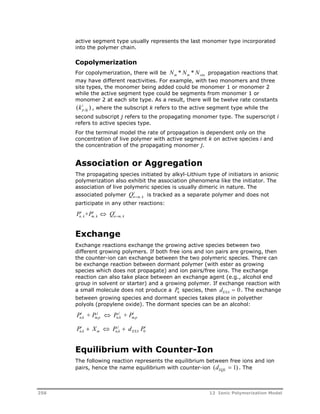
  • 526.
    calculator block 376 design-spec block 377 distillation models 296, 301 Dupl block 296–98 equilibrium reactor models 304 Flash2 block 298 Flash3 block 298 fractionation models 296 FSplit block 299 Heater block 299 incorporating spreadsheets 376 kinetic reactor models 304–35 mass-balance reactor models 302–4 Mixer block 299 model configuration tools 376– 78 Mult block 299 optimization 377 Pipe block 300 polymer process 293 process studies 376–78 Pump block 300 RadFrac block 301 RBatch block 327–35 RCSTR block 304–17 reactor models 296, 302 REquil block 304 RGibbs block 304 RPlug block 317–27 RStoic block 302 RYield block 303 sensitivity study 377 Sep block 301 Sep2 block 301 setting fixed variables 377 steady-state 291–94 stream manipulators 295 unit operation models 295–338 variables 378–80 variables for data regression 378–80 Fortran arguments 445 linking 383 monitors 360 templates 383 utilities 360, 445 Fortran blocks in data regression 347 to enforce assumptions 347 to manipulate process variables 348 to scale paramters 357 Fortran utilities component handling 360 stream handling 360 Fractionation models 296 Free-radical iniators decomposition rate parameters 431–33 Free-radical polymerization accessing model 193 adding reactions 194 applications 163 beta-scission reactions 183 bifunctonal initiator decomposition reaction 174, 175 branching 192 built-in reaction listing 194 bulk 164 bulk polymer chain length moment equation 187 calculation method 185 catalyzed initiation reaction 173 chain transfer reactions 178 dyads 187 editing reactions 195 gel effect 170 gel effect 188–89 induced initiation reaction 173 industrial processes 164 initiation reactions 171 initiator decomposition reaction 172 input language 467–77 kinetics 165–83 kinetics nomenclature 166 kinetics scheme (figure) 165 live polymer chain length moment equation 186 model 163–98 model assumptions 185–90 model features 185–90 modifying the rate expression 170 moment-property relationship equation 191 parameters 190–93 514 Index
  • 527.
    pendent double bond polymerization 184 phase equilibrium 188 propagation reactions 176 properties calculated 190–93 quasi-steady-state approximation 188 rate constant 170 reactions 165 solution 164 specifying calculation options 196 specifying gel-effect 196 specifying model 193 specifying reacting species 194 specifying reactions 195 specifying user profiles 197 structural properties 192 termination reactions 178–79 user profile properties 192 Frequency function 58–59 FSplit about 299 attribute handling 336 Functional group databank 11 G Gas-phase process 227 Gear integrator 323, 332 Gel effect built-in correlations 189 free-radical 170 free-radical polymerization 188– 89 specifying 196, 222 user specified correlations 189 user subroutine arguments 189 Gel effect subroutine free-radical 170 Gel permeation chromatography 67 Generation of radicals 61 Glycol recovery 91 GPC 67 H HDPE See High density polyethylene Heat exchangers 307 Heater about 299 attribute handling 337 help desk 3 Heterogeneous catalysts 226 High density polyethylene about 225 processes 227 High impact polypropylene 229 HIPP See High impact polypropylene Hold-up in RCSTR 305 Homogeneous catalysts 226 Homogeneous nucleation particle formation 201 process 204–6 rate of particle formation 206 Homopolymers 15 I INCL-COMPS 154 Induced initiation reaction 173 Industrial applications polymer production steps 291– 93 polymer production steps (figure) 291 Industrial processes emulsion polymerization 200 free-radical polymerization 164 ionic polymerization 250 model uses 375 segment-based reaction model 266 step-growth polymerization 90 Ziegler-Natta polymerization 226 Inhibited sites 231 Inhibition catalyst sites 45, 240 Initators for ionic polymerization 254 Initialization hybrid option 315 integration option 314 options for RCSTR 314 solver option 314 Initiation activated 211 catalyzed 171 decomposition rate 171 free-radical 172, 174, 175 free-radical polymerization 171 induced 171 ionic 45, 251 Index 515
  • 528.
    reaction for catalyzed173 reaction for decomposition 172 reaction for induced 173 redox 212 INITIATOR databank about 26 Initiators databank 26 free-radical 431–33 ionic 24 Injection ports 322 Input language attribute scaling factors 453 catalysts 448–51 component attributes 451–53 components 447–51 conventional component attributes 451 distribution calculations 454 emulsion 477–84 end-use properties 454–56 for Aspen Polymers 447–504 free-radical 467–77 ionic 494–501 oligomers 448–51 physical properties 456–60 polymers 448–51 property data 458 property methods 456 property parameter estimation 459 prop-set 454–56 segment-based reactions 501–5 step-growth 460–67 streams 451 Ziegler-Natta 484–93 Input variables Flash2 347 Flash3 347 MultiFrac 347 RadFrac 347 RBatch 346 RCSTR 346 RPlug 347 standard deviations 351 Installing Aspen Polymers 382 Instantaneous number-average 63 properties 58, 60–64, 65 weight chain length 63–64 Interfacial processes 84 Intermolecular reactions 103 Intramolecular reactions 103 Intrinsic viscosity 77 Ionic initiator 24 Ionic initiators component attributes 33 properties tracked 45 Ionic polymerization accessing model 260 active species formation 254 adding reactions 261 aggregation 256 applications 249 assigning rate constants 262 association 256 built-in reaction listing 261 chain initiation 255 chain termination 257 chain transfer 257 comparison to other addition processes 250 copolymerization steps 254, 256 coupling 258 editing reactions 261 equilibrium with counter-ion 256 exchange 256 industrial processes 250 initiator attributes 251 initiator types 254 input language 494–501 kinetics scheme 250–58 kinetics scheme (figure) 252 model 249–63 model assumptions 258–59 model features 258–59 nomenclature 253 phase equilibria 258 polymers tracked 251 propagation 255 properties calculated 259–60 rate calculations 258 rate constants 254 reactions 252 specifying model 260 specifying reacting species 260 516 Index
  • 529.
    K Kinetic models RBatch 327–35 RCSTR 304–17 RPlug 317–27 Kinetics data fitting 339–40 decomposition rate parameters 431–33 defining polymerization 13 emulsion (input language) 477– 84 emulsion polymerization 200– 215, 211 free-radical (input language) 467–77 free-radical polymerization 165– 83 ionic (input language) 494–501 ionic polymerization 250–58 mechanisms 10 melt polycarbonate 122–24 multi-site 65, 66 nylon reactions 111–22 parameter influence on 342 polyester reactions 105–11 polymerization 81 rate constant parameters 431– 44 reactor models 304–35 segment-based reaction model 270 single-site 65, 66 specifying emulsion 219–23 specifying free-radical 193–97 specifying ionic 260–62 specifying step-growth 51–53 specifying step-growth (input language) 460–67 specifying Ziegler-Natta 244–47 step-growth polymerization 101– 24 user fortran arguments 445 user models 365–69 user subroutine (example) 366 user subroutines 149 Ziegler-Natta (input language) 484–93 Ziegler-Natta polymerization 230–42 L Latex definition 202 number of particles per liter 203 reactions 207 Linear condensation polymers 57 Linear low density polyethylene about 225 processes 227, 228 Linking fortran 383 Liquid enthalpy user subroutine (example) 371 Liquid process 228 Live polymer chain 169 polymer chain length moment equation 186 Live polymer 34, 35 LLDPE See Linear low density polyethylene Local work arrays 155, 284 Low density polyethylene 164 Low molecular weight polymer 57 M Mass balance 311 Mass-balance models RStoic 302 RYield 303 Material streams 46 MB-LOOP 311 Melt index 8, 78 Melt index ratio 79 Melt polycarbonate rate constants 123 reaction components 122 reaction kinetics 122–24 step-growth reactions 123 Melt-phase nylon-6,6 processes 122 polymerization 100 processes 84 Metallocene catalysts 226 Method of instantaneous properties 58, 60–64, 65 Method of moments 58, 185 Methylmethacrylate 199 Micellar nucleation 201–4 MIXED substream variables 380 Mixer Index 517
  • 530.
    about 299 attributehandling 337 Mixing non-ideal in RCSTR 306 non-ideal in RPlug 320 Modeling applications 89, 163, 199, 225, 249, 265 data fitting 294, 339–40 enforcing assumptions 347 features 294 nylon 96–100 nylon-6,6 116 polycarbonates 100–101 polyesters 90–96 polymer phase change 303 polymer processes 293 steady-state 291–94 tools 294 unit operations 294, 295–338 Models accessing variables 378–80 analysis tools 376–78 application tools 375–80 base case 345 calculations for user models 360–65 defining 12 developing 340, 343 parameter fitting 342–43 possible uses 375 process studies 376–78 refining 341, 344 structure for user models 359 trend analysis 341, 343 unit operation 11 user 359–73 USER2 routine 362 Molecular structure SEGMENT databank 392–429 Molecular weight as component attribute 33 distribution 8, 58 number-average 78 weight-average 35, 78 Moment equations bulk polymer 187 general 186 live polymer 186 relationship to properties 191 Moments of chain length distribution first 39, 47 Monomers corresponding segment formulas 127 definition 15 functional groups 129 partitioning 215–16 purification 292 synthesis 292–93, 292 Most-probable distribution 57, 114, 120, 131 Mult about 299 attribute handling 336 MultiFrac attribute handling 337 input variables 347 results variables 347 Multimodal distributions 56 N Newton solver 311 Nomenclature for emulsion model 208 for free-radical model 166 for ionic model 253 for segment-based reaction model 271 for step-growth model 103 for Ziegler-Natta model 234 POLYMER databank 388–91 SEGMENT databank 391 Nucleation homogeneous 201, 204–6 micellar 201–4 period 202 time 202 time (equation) 203 Nucleophilic reactions about 101 nomenclature 103 Number average chain length distribution 63 degree of polymerization 57 Number-average degree of polymerization 35 Nylon 518 Index
  • 531.
    aqueous salt solutions98 melt-phase polymerization 100 production process 96–100 salt preparation 98 Nylon-6 production process 96 rate constants 113 reaction components 112 reaction kinetics 111 step-growth reactions 112 user-specified reactions 113 Nylon-6,6 melt-phase polymerization 122 modeling approaches 116 production process 98 rate constants 118, 119 reaction components 116 reaction kinetics 115 step-growth reactions 117 user-specified reactions 119 O Occupied sites 45 Oligomers as components 23 definition 15 fractionation 131 segments 24 specifying 30 Optimization 377 Orienticity 35 P Packed vectors 155, 284 Parameters data fitting 339–40 decomposition rate 431–33 estimating property 459 fitting 340, 342–43 for free-radical polymerization 190–93 influence of kinetics 342 integer 154, 284 kinetic rate constant 431–44 POLYMER property 387 real 154, 284 scaling 356 SEGMENT property 391 to manipulate process variables 348 tuning for data regression 354 Particle growth in emulsion polymerization 206 specifying parameters 223 PBT See Polybutylene terephthalate PC-SAFT databank 26 PC-SAFT databank about 26 PEN See Polyethylene naphthalate Pendent double bond polymerization 184 PET See Polyethylene terephthalate Phase equilibria ionic polymerization 258 step-growth polymerization 126 Ziegler-Natta polymerization 243 Phase equilibrium free-radical polymerization 188 Phase partitioning specifying 222 Physical properties calculations in user models 364 fitting parameters 342–43 input language 456–60 user models 370–73 user subroutine (example) 371 Pipe 300 Plant data fitting 339–40 Plot distribution data 70 PMMA See Polymethyl methacrylate Point data about 345 entering 349 Polyamides 90 Polybutadiene 249 Polybutene 249 Polybutylene terephthalate 95 Polycarbonates aliphatic 89 aromatic 89 production process 100–101 reaction kinetics 122–24 Polydispersity index 63 Polyesters assigning rate constants 109 polyester technology package 95 production process 90–96 reaction components 106 reaction kinetics 105–11 Index 519
  • 532.
    side reactions 109 step-growth reactions 108 user-specified reactions 110 Polyethylene chlorinated 265 low density 164 Polyethylene naphthalate 95 Polyethylene terephthalate batch processes 93–95 continuous step-growth polymerization 90–93 solid-state models 96 Polyisobutylene 249, 265 Polymer chain bulk 169 dead 169 definition 169 live 169 POLYMER databank about 11, 27, 387 components 388–91 nomenclature 388–91 Polymerization addition 81 bulk 85 chain-growth 82, 83 condensation 81 condensation polymerization 126 continuous 92 degree of 33 emulsion 85, 199–223 free-radical 163–98 interfacial 84 ionic 249–63 kinetics 10, 13, 81 manufacturing step 293 melt phase 84 precipitation 85 process overview 6–7 process types 84 reaction types 81 reactions 81 solid-state 84 solution 84, 85 step-growth 82, 83, 89–162 suspension 85 Ziegler-Natta 225–47 Polymers acrylic acid 199 addition 57 aggregate 34, 35 aliphatic polycarbonates 89 amorphous 16 aromatic polycarbonates 89 as components 23 average properties and moments 58–59 branched 16 bulk polymer chain length moment equation 187 butadiene 199 butyl acrylate 199 butyl methacrylate 199 by chemical structure 18 by physical structure 16 by property 18 chain-growth 84 characterizing 19 chlorinated polyethylene 265 chloroprene 199 component attribute sets 35–36 component attributes 33, 35 component characterization 10 crystalline 16 data fitting procedure 340–44 data regression procedure 345– 58 dead 35 definition 6 elastomers 16 emulsion properties calculated 218 end-use properties 73–79 ethylene-propylene 226 free-radical properties calculated 190–93 high density polyethylene 225 high-impact polystyrene 163 ionic properties calculated 259– 60 ladder 16 linear 16 linear condensation 57 linear low density polyethylene 225 live 34, 35 live polymer chain length moment equation 186 low density polyethylene 164 low molecular weight 57 520 Index
  • 533.
    mass 124, 273 method of instantaneous properties 58, 60, 65 method of moments 58 methylmethacrylate 199 mole fraction 272 monomer purification 292 monomer synthesis 292–93, 292 network 16 nomenclature 388–91 phase change 303 polyamides 90 polybutadiene 249 polybutene 249 polyesters 90 polyisobutylene 249, 265 polymerization step 293 polymethyl methacrylate 164, 265 polyoxides 249 polypropylene 226 polystyrene 163, 164, 249 polyurethanes 90 polyvinyl acetate 163 polyvinyl alcohol 164, 265 polyvinyl chloride 163 processing 6–7 processing step 293 production rate 63 production steps 291–93 properties 19 properties tracked 35 property distributions 55–72 property parameters 387 prop-sets 74 purification 292–93 reacting 266 recovery 9, 293 segment-based properties calculated 273 segments 24, 391 separation 9, 293 specifying 29 star 16 step-growth 83 structural properties 23 structure 15 structure of 15–19 styrene 199 synthesis 293 tetrafluroethylene 199 thermoplastics 16 thermosets 16 tracking structural properties 33 vinyl chloride 199 vinylacetate 199 Ziegler-Natta properties calculated 243 Polymethyl methacrylate 164, 265 Polyoxides 249 POLYPCSF databank 26 POLYPCSF databank about 26 Polypropylene about 226 process types 228 Polypropylene terephthalate 95 Polystyrene 163, 164, 249 Polyurethanes 90 Polyvinyl acetate 163 Polyvinyl alcohol 164, 265 Polyvinyl chloride 163 Population balance equation for emulsion polymerization 217 equation for free-radical polymerization 185 Potential sites 44 Power-law reaction model See Segment-based reaction model:about PPT See Polyproylene terephthalate Precipitation polymerization 85 Pressure drop 305, 319 in RBatch 328 in RCSTR 305 in RPlug 319 Process modeling data fitting 294 dynamic 10, 13 features 294 flowsheets for polymer processes 293 issues for polymers 7–9 steady-state 10, 13, 291–94 tools 294 unit operations 294 Processing polymers 293 Profile data about 345 data sets 350 entering 350 RBatch 350 Index 521
  • 534.
    RPlug 350 Propagation depolymerization 269 free-radical polymerization 176 ionic polymerization 255 segment-based reaction model 270 sites 231 Ziegler-Natta polymerization 238 Properties average polymer 58–59 branching 23 chain size 55 composition 8 copolymer composition 23, 55 copolymerization 64 crystallinity/density 8 degree of branching 55 degree of polymerization 23 density of copolymer 78 end-use 73–79 estimating parameters 459 for polymers 58 input language 456–60 intrinsic viscosity 77 melt index 8, 78 melt index ratio 79 method of instantaneous 60 molecular structure 23 molecular weight 23 molecular weight 8 moments of molecular weight distribution 23 particle size 55 polymer structural 33, 55 prop-set 73 segment composition 23 specifying data 458 viscosity 8 zero-shear viscosity 77 Property distributions bimodal 56 bivariate 55 most-probable 57 multimodal 56 Schulz-Flory 56 Stockmayer bivariate 58 structural 55–72 types 55 unimodal 56 Property methods input language 456 Property parameter databanks 11 Property set See also Prop-Sets Prop-Sets adding 79 custom 76 defining 74 for data regression 347 for polymers 74 properties 73 uses 73 Propylene processes 228, 229 Pseudocondensation reactions 103 Pump 300 Pure components databank 25, 387 Purification monomer 292 process step 292–93 PVA See Polyvinyl alcohol Q QSSA See Quasi-steady-state approximation Quasi-steady-state approximation 188 R RadFrac about 301 attribute handling 337 input variables 347 results variables 347 Radiation initiation reaction 173 Radicals absorption 210 balance 207–11 consumption of 61–62 depletion 208 desorption 210 generation 208 generation of 61 rate of production 208 termination 210 Random scission 104 Rate constant parameters data-fitting 294 522 Index
  • 535.
    Rate constants assigningto emulsion reactions 221 assigning to ionic reactions 262 assigning to step-growth reactions 158, 159 assigning to Ziegler-Natta reactions 246 data fitting 339 emulsion 214 for melt polycarbonate 123 for model generated reactions 135 for nylon-6 113 for nylon-6,6 118, 119 for polyesters 109 for user-specified reactions 139, 288 free-radical 170 ionic 254 kinetic parameters 431–44 segment-based 270 specifying for segment-based power-law reactions 288 specifying for step-growth user reactions 159 step-growth 153 user subroutines 144, 279 Ziegler-Natta 236 Rate expression step-growth 133, 138 RBatch about 327–35 attribute handling 337 batch reactors 330 common problems 335 cycle time 331 duty 327 dynamic scaling 332 hybrid scaling options 333 input variables 346 pressure 328 profile data 350 residence time 329 results variables 346 scaling options 332 semi-batch reactors 330 solver method 334 specifying user profiles 197 static scaling options 332 step size 334 streams 330 temperature 327 troubleshooting convergence 331–35 volume 329 RCSTR about 304–17 algorithm 308 attribute handling 337 calculation loops 309 calculation table 309 common problems 316 component scaling 313 condensed phases 305 convergence 308 duty 305 effective hold-up 305 external heat exchanger 307 horizontal partition 306 hybrid initialization 315 initialization options 314 input variables 346 integration initialization 314 multiphase 305 non-ideal mixing 306 pressure 305 residence time 305 results variables 346 scaling options 313 single-phases 305 solver initialization 314 substream scaling 313 temperature 305 troubleshooting convergence 315–17 vertical partition 307 with dead zone 308 Reacting phase specifying for segment-based power-law model 286 specifying for step-growth 160 Reacting polymers 266 Reaction models Aspen Plus 86, 359–65 available 359–65 basic unit operation 295 built-in 85 custom 86 distillation 296, 301 Dupl 296–98 equilibrium 304 Flash2 298 Flash3 298 fractionation 296 FSplit 299 Index 523
  • 536.
    generic 86 Heater299 kinetic 304–35 mass-balance 302–4 Mixer 299 Mult 299 Pipe 300 Pump 300 RadFrac 301 RBatch 327–35 RCSTR 304–17 reactor 296, 302 REquil 304 RGibbs 304 RPlug 317–27 RStoic 302 RYield 303 Sep 301 Sep2 301 stream manipulators 295 treatment of component attributes 335–37 Reactions active species 254 adding emulsion 221 adding free-radical 194 adding ionic 261 adding segment-based 287 adding user 159 adding Ziegler-Natta 246 addition 103 aggregation 256 assigning emulsion rate constants 221 assigning ionic rate constants 262 assigning step-growth rate constants 158 assigning user rate constants 159 assigning Ziegler-Natta rate constants 246 association 256 backbone 269 beta-scission 183 bifunctional initiator decomposition 174, 175 branching (segment-based) 270 branching (Ziegler-Natta) 240 catalyst preactivation 237 catalyst site activation 237 catalyzed initiation 171, 173 chain initiation (free-radical 171 chain initiation (ionic) 255 chain initiation (Ziegler-Natta) 237 chain scission 269 chain termination (free-radical) 178–79 chain termination (ionic) 257 chain transfer (free-radical) 178 chain transfer (ionic) 257 chain transfer (Ziegler-Natta) 239 chain-growth 83 classifying 81 cocatalyst poisoning 240 combination 104, 270 condensation 103 conventional species 268 coupling 258 cross linking 270 cyclodepolymerization 104 depolymerization 269 editing emulsion 221 editing free-radical 195 editing ionic 261 editing segment-based 287 editing user 159 editing Ziegler-Natta 246 electrophilic 101 emulsion polymerization 204 end group reformation 104 equilibrium with counter-ion 256 exchange 256 for step-growth polymerization 126 free-radical polymerization 165 homogeneous nucleation 204 including user 158 induced initiation 171, 173 Inhibition 181 initiator decomposition 171, 172 intermolecular 103 intramolecular 103 ionic polymerization 252 latex 207 melt polycarbonate kinetics 122– 24 micellar nucleation 201 524 Index
  • 537.
    micellar nucleation (figure)202 modification See Segment-based reaction model nucleophilic 101 nylon-6 kinetics 111 nylon-6,6 kinetics 115 particle growth 206 polyester kinetics 105–11 polymerization 81 propagation (free-radical) 176 propagation (ionic) 255 propagation (segment-based) 270 propagation (Ziegler-Natta) 238 pseudocondensation 103 radiation initiation 173 radical balance 207 rearrangement 104 reverse condensation 103 ring addition 104 ring closing 104 ring opening 104 side group 269 site deactivation 239 site inhibition 240 specifying segment-based 285– 89 specifying user rate constants 159 spontaneous initiation 173 step-growth 83 step-growth functional groups 128 step-growth polymerization 104 step-growth rate constants 157– 58 supplied by emulsion model 215– 18 supplied by free-radical model 185–90 supplied by ionic model 258 supplied by segment-based model 273 supplied by step-growth model 133–37 supplied by Ziegler-Natta model 243 terminal double bond 240 termination (free-radical) 178– 79 termination (ionic) 257 thermal initiation 173 types affecting catalyst states 230 user-specified step-growth 138– 40 viewing emulsion 220 viewing free-radical 194 viewing ionic 261 viewing segment-based 287 viewing step-growth 157 viewing Ziegler-Natta 245 Ziegler-Natta polymerization 232 Reactor models about 302 available 296 data sets 350 equilibrium 304 input variables 346 kinetic 304–35 mass-balance 302–4 results variables 346 Reactors condensed phase RCSTR 305 convergence problems for RBatch 331–35 convergence problems for RCSTR 315–17 convergence problems for RPlug 323–27 displaying distribution data 70 distribution 65 horizontal partition 306 multiphase RCSTR 305 multiphase RPlug 320 RCSTR algorithm 308 single-phase RCSTR 305 vertical partition 307 with dead zones 308, 321 with external heat exchanger 307 with injection ports 322 Rearrangement reactions 104 Recovery/separation 9, 293 Redox initiation 212 Regression See Data regression Reports for user models 365 step-growth options 160 REquil about 304 attribute handling 337 Residence time RBatch 329 RCSTR 305 Index 525
  • 538.
    RPlug 319 Resultsvariables Flash2 347 Flash3 347 MultiFrac 347 RadFrac 347 RBatch 346 RCSTR 346 RPlug 347 standard deviations 351 Reverse condensation reactions 103 Rgibbs about 304 RGibbs attribute handling 337 Ring addition reactions 104 Ring closing reactions 104 Ring opening reactions 104 Routines USER2 362 RPlug about 317–27 attribute handling 337 common problems 326 duty 318 dynamic scaling 323 hybrid scaling 325 input variables 347 multiphase 320 non-ideal mixing 320 pressure 319 profile data 350 residence time 319 results variables 347 scaling options 323 solver method 325 specifying user profiles 197 static scaling options 323 step size 325 temperature 318 troubleshooting convergence 323–27 with dead zone 321 with injection ports 322 Rstoic about 302 RStoic attribute handling 337 Ryield about 303 RYield attribute handling 337 S Salt aqueous solutions 98 preparation 98 Scale factors about 50 specifying 53 Scaling factors 453 Scaling factors component (RCSTR) 313 dynamic (RBatch) 332 dynamic (RPlug) 323 hybrid (RBatch) 333 hybrid (RPlug) 325 RBatch 332 RCSTR 313 RPlug 323 static (RBatch) 332 static (RPlug) 323 substream (RCSTR) 313 Schulz-Flory distribution 56 Scission 104, 269 Secondary esterification 91 Seed process 206 Segment approach 27 SEGMENT databank about 11, 26, 391 components 392–429 nomenclature 391 Segment flow 35 Segment fraction 35 Segment-based model assigning rate constants 288 including user rate constant subroutine 289 Segment-based power-law model specifying reacting phase 286 user subroutines 274–84 Segment-based reaction model about 265–90 accessing 285 adding reaction schemes 287 adding reactions 287 applications 265 526 Index
  • 539.
    assumptions 272 backbonemodifications 269 branch formation 270 chain scission 269 combination 270 conventional species 268 cross linking 270 depolymerization 269 editing reactions 287 features 272 including user basis subroutine 289 industrial processes 266 input language 501–5 kinetics 270 mole fraction conversion 272 nomenclature 271 propagation 270 properties calculated 273 rate calculations 273 rate constants 270 reaction categories 267–72 reactions allowed 267–72 side group modifications 269 specifying model 285 specifying pre-exponential units 288 specifying rate constants 288 specifying reaction settings 285 Segments composition 15, 33 copolymers 16 definition 24 homopolymers 15 methodology in Aspen Polymers 27 mole fraction 272 molecular structure 392–429 nomenclature 391 property parameters 391 sequence 15 specifying 29 structure 15 types 24 Semi-batch reactors 330 Semi-crystalline copolymer density 78 Sensitivity blocks 377 Sep about 301 attribute handling 336 Sep2 about 301 attribute handling 336 Separation/recovery 9, 293 Side group modifications 269 Simulations dynamic 10 templates 382 Site activation 237 Site deactivation 239 Site inhibition 240 Site-based components about 24 attributes 44 specifying 30 Slurry process 227, 228 Smith-Ewart theory 211 Solid-state models 96 Solid-state processes 84 Solution polymerization 85, 164 Solution process 227 Solution processes 84 Solver methods RBatch 334 RPlug 325 Specifying additional simulation options 13 Aspen Polymers options 381–82 attribute scaling factors (input language) 453 catalysts 448–51 component attributes 51–53 component attributes (input language) 451–53 component attributes in blocks 52 component attributes in streams 52 component names 447 components 12, 28 components (input language) 447–51 conventional component attributes 52, 451 data fit 340–44 data regression 345–58 databanks 28 distribution calculations 69–71 distribution calculations (input language) 454 distribution characteristics 69 emulsion calculation options 222 emulsion kinetics 219–23 emulsion kinetics (input language) 477–84 Index 527
  • 540.
    emulsion model 219 emulsion rate constants 221 emulsion reacting species 220 end-use properties 79 end-use properties (input language) 454–56 feed streams 13 fixed process variables 377 flowsheet options 12 free-radical calculation options 196 free-radical kinetics 193–97 free-radical kinetics (input language) 467–77 free-radical model 193 free-radical reacting species 194 gel-effect 196, 222 global simulation options 12 ionic kinetics 260–62 ionic kinetics (input language) 494–501 ionic model 260 ionic rate constants 262 ionic reacting species 260 oligomers 30, 448–51 particle growth parameters 223 phase partitioning 222 physical properties (input language) 456–60 point data 349 polymerization kinetics 13 polymers 29, 448–51 pre-exponential units 160, 288 profile data 350 property data 458 property models 13 reacting phase 286 regression cases 351 scale factors 53 segment-based reaction model 285 segment-based reaction rate constants 288 segment-based reaction scheme 287 segment-based reaction settings 285 segment-based reactions 285–89 segment-based reactions (input language) 501–5 segments 29 site-based components 30 standard deviations 351 step-growth components 156 step-growth kinetics 51–53 step-growth kinetics (input language) 460–67 step-growth model 156 step-growth rate constants 157– 58, 158, 159 step-growth reacting phase 160 step-growth report options 160 stream attributes 451 UOS model operating conditions 13 user models 359–73 user profiles 197 user step-growth reactions 158 Ziegler-Natta kinetics 244–47 Ziegler-Natta kinetics (input language) 484–93 Ziegler-Natta model 244 Ziegler-Natta rate constants 246 Ziegler-Natta reacting species 245 Spontaneous initiation reaction 173 Spreadsheets incorporating in flowsheets 376 SSplit attribute handling 336 Standard deviations 351 Starting Aspen Polymers 381–82 Startup files 382 Steady-state models data fitting 294 features 294 flowsheeting 291–94 tools 294 unit operation 295–338 unit operations 294 Step-growth polymerization accessing model 155 adding user reactions 159 addition processes 266 applications 89 Aspen PolyQuest 96 assigning rate constants 135, 139, 158, 159 batch PET 93–95 528 Index
  • 541.
    built-in reaction listing157 commercial polymers 83 comparison to chain-growth 82 continuous PET 90–93 editing user reactions 159 electrophilic reactions 101 functional groups 128, 129 including user basis subroutine 161 including user kinetic subroutine 161 including user rate constant subroutine 161 including user reactions 158 industrial processes 90 input language 460–67 interfacial 84 kinetics 101–24 melt phase 84 melt polycarbonate reaction kinetics 122–24 model 89–162 model features 124–27 model predictions 124 model structure 127–55 model-generated reactions 133– 37 nomenclature 103 nucleophilic reactions 101 nylon 96–100 nylon-6 reaction kinetics 111 nylon-6,6 reaction kinetics 115 oligomer fractionation 131 overview 83 PBT 95 PEN 95 phase equilibria 126 polycarbonates 100–101 polyester reaction kinetics 105– 11 polyester technology package 95 polyesters 90–96 PPT 95 rate constants 122, 133, 153 rate constants example 153 rate expression 133, 138 reacting groups 127 reacting species 127, 130 reaction mechanism 126 reaction stoichiometry 132 reactions 104 solid-state 84 solid-state models 96 solution 84 specifying components 156 specifying model 156 specifying pre-exponential units 160 specifying rate constants 157– 58, 159 specifying reacting phase 160 specifying report options 160 specifying subroutines 161 user reactions 138 user subroutines 140–55 Stockmayer bivariate distribution 58 Stoichiometry step-growth 132 Streams continuous batch charge 330 defining feed 13 displaying distribution data 70 distributions 67 initializing attributes 451 manipulating 295 MIXED variables 380 processing in user models 361 RBatch 330 time-averaged continuous reactor product 331 time-averaged continuous vent product 331 time-varying continuous feed 330 variables for data regression 346 Structure of components 22 of monomers 15 of oligomers 15, 23 of polymers 15–19, 19, 23 of segments 15, 24 property–end-use relationship 75 Styrene 199 Subroutines fortran arguments 445 including user basis 161, 289 including user kinetic 161 including user rate constant 161, 289 local work arrays 155, 284 updating component list 154 user 140–55, 274–84 user basis 140, 272, 275 user forms 156 user gel effect 189 Index 529
  • 542.
    user kinetic (example)366 user kinetics 149 user property (example) 371 user rate constant 144, 279 support, technical 3 Suspension polymerization 85 Synthesis monomer 292 polymer 293 T tacticity 35 TDB See Terminal double bond technical support 3 Temperature in RBatch 327 in RCSTR 305 in RPlug 318 Templates custom 382 fortran 383 simulation 382 Terminal double bond reactions 240 terminal double bonds 35 Terminal models free-radical 169 Ziegler-Natta 236 Terminal monomer loss 104 Termination between chain radicals 181 bimolecular 181 by combination 180 disproportionation 180 free-radical polymerization 178– 79 inhibition 181 Tetrafluroethylene 199 Thermal initiation reaction 173 Thermoplastics 16 Thermosets 16 Tips configuration 382 data regression 353–55 Transesterification 92 Trommsdorff effect 188 Troubleshooting Aspen Polymers 383–86 convergence (RBatch) 331–35 convergence (RCSTR) 315–17 convergence (RPlug) 323–27 data regression convergence 353–55 diagnostic messages 365 RBatch common problems 335 RCSTR common problems 316 RPlug common problems 326 simulation engine 385 user interface 383 U Unimodal distributions 56 Unit operation models 11 Unit operations Aspen Plus models 359–65 available models 359–65 basic models 295 calculations 364 diagnostics 365 distillation models 296, 301 Dupl 296–98 equilibrium reactor models 304 features 294 Flash2 298 Flash3 298 fractionation models 296 FSplit 299 Heater 299 input variables 346 kinetic reactor models 304–35 mass-balance reactor models 302–4 Mixer 299 Mult 299 Pipe 300 property calculations 364 Pump 300 RadFrac 301 RBatch 327–35 RCSTR 304–17 reactor models 296, 302 reports 365 REquil 304 results variables 346 RGibbs 304 RPlug 317–27 RStoic 302 RYield 303 530 Index
  • 543.
    Sep 301 Sep2301 steady-state models 295–338 stream processing 361 treatment of component attributes 335–37 user model calculations 360–65 user model structure 359 user models 359–65 variables for data regression 346 USER 359, 365 User attributes properties tracked 45 User fortran arguments 445 linking 383 templates 383 User models about 359–73 calculations 360–65 component list 154 diagnostics calculations 365 integer parameters 154, 284 kinetic 365–69 packed vectors 155, 284 physical property 370–73 property calculations 364 real parameters 154, 284 reports 365 stream processing 361 structure 359 unit operation 359–65 unit operation calculations 364 USER block 359 USER2 block 359 User profiles for emulsion polymerization 218 specifying 197 User prop-sets 76 User reactions adding step-growth 159 assigning rate constants for step-growth 159 editing step-growth 159 for polyesters 110 nylon-6 113 nylon-6,6 119 specifying rate constants for step-growth 159 specifying step-growth 158 step-growth polymerization 138– 40 User routines fortran linking 383 User subroutines segment-based power-law model 274–84 step-growth polymerization 140– 55 USER2 about 359 model routine 362 V Vacant sites 44, 231 Variables accessing flowsheet 378–80 indirect manipulation 347 input 346, 349, 350 results 346, 349, 350 standard deviations 351 Vectors packed 155, 284 Viewing emulsion reactions 220 flowsheet variables 378–80 free-radical reactions 194 ionic reactions 261 segment-based reactions 287 step-growth reactions 157 Ziegler-Natta reactions 245 Vinyl chloride 199 Vinylacetate 199 Viscosity as polymer property 8 intrinsic 77 zero-shear 77 Volume in RBatch 329 W web site, technical support 3 Weight average chain length 63 degree of polymerization 57 Z Z-average degree of polymerization 57 Z-average degree of polymerization 35 Zero-shear viscosity 77 Ziegler-Natta component attributes 44 Index 531
  • 544.
    Ziegler-Natta catalysts about24 attributes 44 component attributes 33 dead sites 45 inhibited sites 45 occupied sites 45 potential sites 44 properties tracked 44 specifying 24 vacant sites 44 Ziegler-Natta polymerization accessing model 244 adding reactions 246 applications 225 assigning rate constants 246 built-in reaction listing 245 catalyst preactivation 237 catalyst reactions 230 catalyst site activation 237 catalyst states 230 catalyst types 226 chain initiation 237 chain transfer to small molecules 239 cocatalyst poisoning 240 copolymerization steps 236 editing reactions 246 ethylene processes 227 gas-phase process 227, 228 industrial processes 226 input language 484–93 kinetics scheme 230–42 kinetics scheme (figure) 232 liquid process 228 model 225–47 model assumptions 243 model features 243 nomenclature 234 phase equilibria 243 polyethylene processes 227 polypropylene process types 228 propagation 238 properties calculated 243 propylene processes 228, 229 rate calculations 243 rate constants 236 rate expressions 236 reactions 232 site deactivation 239 site inhibition 240 site types 231 slurry process 227, 228 solution process 227 specifying model 244 specifying reacting species 245 steps 235 terminal double bond 240 532 Index