EVALUATION PART 6
“WHAT HAVE YOU LEARNT ABOUT
TECHNOLOGIES FROM THE PROCESS OF
CONSTRUCTING THIS PRODUCT?”
PHOTOSHOP
I used this program for most of the construction of my product. It was used as the
basis for the actual pages, and as the main method of image manipulation. I chose
to use this program as it is the best available at college in order to create the best
possible outcome. It is also a very familiar application to me as I use it frequently in
my graphic design course. This means that my understanding of its features is
proficient and I was able to use these skills in the production of my magazine.
TOOLBAR
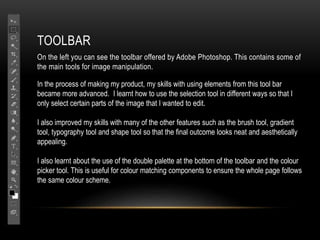
On the left you can see the toolbar offered by Adobe Photoshop. This contains some of
the main tools for image manipulation.
In the process of making my product, my skills with using elements from this tool bar
became more advanced. I learnt how to use the selection tool in different ways so that I
only select certain parts of the image that I wanted to edit.
I also improved my skills with many of the other features such as the brush tool, gradient
tool, typography tool and shape tool so that the final outcome looks neat and aesthetically
appealing.
I also learnt about the use of the double palette at the bottom of the toolbar and the colour
picker tool. This is useful for colour matching components to ensure the whole page follows
the same colour scheme.
LAYERS
The use of these were essential when
assembling my components in order to
organise elements into the right places.
They also allowed for the creation of depth,
as seen in most existing products. Layers
allowed me to edit single components and
move them in front of/ behind other
components.
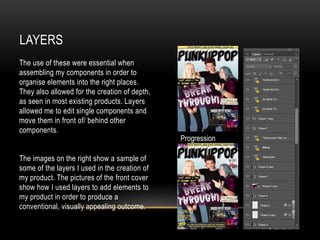
The images on the right show a sample of
some of the layers I used in the creation of
my product. The pictures of the front cover
show how I used layers to add elements to
my product in order to produce a
conventional, visually appealing outcome.
Progression
EDITING
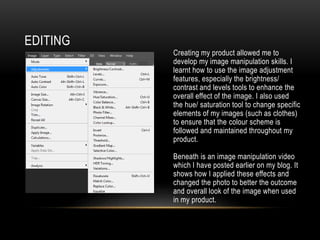
Creating my product allowed me to
develop my image manipulation skills. I
learnt how to use the image adjustment
features, especially the brightness/
contrast and levels tools to enhance the
overall effect of the image. I also used
the hue/ saturation tool to change specific
elements of my images (such as clothes)
to ensure that the colour scheme is
followed and maintained throughout my
product.
Beneath is an image manipulation video
which I have posted earlier on my blog. It
shows how I applied these effects and
changed the photo to better the outcome
and overall look of the image when used
in my product.
DIFFICULTIES
However, I did encounter some issues when using Photoshop; The application
repeatedly crashed when I was using it on my laptop. This is recorded in my image
manipulation video. To solve this problem, I took my laptop to the ICT department of the
college library where they were able to amend the applications extremely large CPU
usage to prevent the application crashing and work being lost in future. From this point
onwards my experience with the application was profound and enjoyable.
CAMERA AND TRIPOD
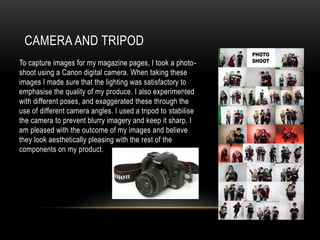
To capture images for my magazine pages, I took a photo-
shoot using a Canon digital camera. When taking these
images I made sure that the lighting was satisfactory to
emphasise the quality of my produce. I also experimented
with different poses, and exaggerated these through the
use of different camera angles. I used a tripod to stabilise
the camera to prevent blurry imagery and keep it sharp. I
am pleased with the outcome of my images and believe
they look aesthetically pleasing with the rest of the
components on my product.
BLOGGER
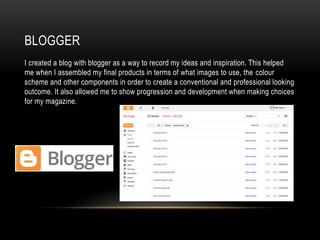
I created a blog with blogger as a way to record my ideas and inspiration. This helped
me when I assembled my final products in terms of what images to use, the colour
scheme and other components in order to create a conventional and professional looking
outcome. It also allowed me to show progression and development when making choices
for my magazine.
PREZI AND EMAZE
These are online programs that I used as presentation software. They are far more
interesting in terms of publishing software and the features available than the standard,
common programs such as PowerPoint, producing a far more interactive outcome. I
found out about Prezi and Emaze from my peers and learnt how to use these throughout
this project.

AS Media Evaluation Q6

  • 1.
    EVALUATION PART 6 “WHATHAVE YOU LEARNT ABOUT TECHNOLOGIES FROM THE PROCESS OF CONSTRUCTING THIS PRODUCT?”
  • 2.
    PHOTOSHOP I used thisprogram for most of the construction of my product. It was used as the basis for the actual pages, and as the main method of image manipulation. I chose to use this program as it is the best available at college in order to create the best possible outcome. It is also a very familiar application to me as I use it frequently in my graphic design course. This means that my understanding of its features is proficient and I was able to use these skills in the production of my magazine.
  • 3.
    TOOLBAR On the leftyou can see the toolbar offered by Adobe Photoshop. This contains some of the main tools for image manipulation. In the process of making my product, my skills with using elements from this tool bar became more advanced. I learnt how to use the selection tool in different ways so that I only select certain parts of the image that I wanted to edit. I also improved my skills with many of the other features such as the brush tool, gradient tool, typography tool and shape tool so that the final outcome looks neat and aesthetically appealing. I also learnt about the use of the double palette at the bottom of the toolbar and the colour picker tool. This is useful for colour matching components to ensure the whole page follows the same colour scheme.
  • 4.
    LAYERS The use ofthese were essential when assembling my components in order to organise elements into the right places. They also allowed for the creation of depth, as seen in most existing products. Layers allowed me to edit single components and move them in front of/ behind other components. The images on the right show a sample of some of the layers I used in the creation of my product. The pictures of the front cover show how I used layers to add elements to my product in order to produce a conventional, visually appealing outcome. Progression
  • 5.
    EDITING Creating my productallowed me to develop my image manipulation skills. I learnt how to use the image adjustment features, especially the brightness/ contrast and levels tools to enhance the overall effect of the image. I also used the hue/ saturation tool to change specific elements of my images (such as clothes) to ensure that the colour scheme is followed and maintained throughout my product. Beneath is an image manipulation video which I have posted earlier on my blog. It shows how I applied these effects and changed the photo to better the outcome and overall look of the image when used in my product.
  • 6.
    DIFFICULTIES However, I didencounter some issues when using Photoshop; The application repeatedly crashed when I was using it on my laptop. This is recorded in my image manipulation video. To solve this problem, I took my laptop to the ICT department of the college library where they were able to amend the applications extremely large CPU usage to prevent the application crashing and work being lost in future. From this point onwards my experience with the application was profound and enjoyable.
  • 7.
    CAMERA AND TRIPOD Tocapture images for my magazine pages, I took a photo- shoot using a Canon digital camera. When taking these images I made sure that the lighting was satisfactory to emphasise the quality of my produce. I also experimented with different poses, and exaggerated these through the use of different camera angles. I used a tripod to stabilise the camera to prevent blurry imagery and keep it sharp. I am pleased with the outcome of my images and believe they look aesthetically pleasing with the rest of the components on my product.
  • 8.
    BLOGGER I created ablog with blogger as a way to record my ideas and inspiration. This helped me when I assembled my final products in terms of what images to use, the colour scheme and other components in order to create a conventional and professional looking outcome. It also allowed me to show progression and development when making choices for my magazine.
  • 9.
    PREZI AND EMAZE Theseare online programs that I used as presentation software. They are far more interesting in terms of publishing software and the features available than the standard, common programs such as PowerPoint, producing a far more interactive outcome. I found out about Prezi and Emaze from my peers and learnt how to use these throughout this project.