PRESENTED BY:
AKSHAY WADALKAR
   An array is a collection of elements of similar
    datatype.

   Contiguous memory allocation takes place.

   An array is a DS in which we can access every
    element directly using position variable .

   It is rather an organizational concept.

   Array elements can be accessed individually.

   Syntax: datatype nameofarray [dimension];
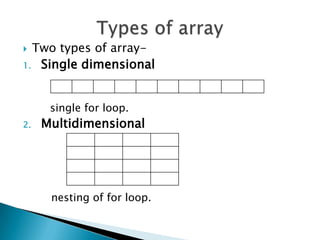
 Two types of array-
1. Single dimensional


      single for loop.
2.   Multidimensional


      nesting of for loop.
   Array can be of integer ,character and string.

   Integer and character array can be
    implemented by same logic

   Implementation of string array is quiet
    different from the two.

   We can study the array implementation using
    integer array.
Creation of integer array
                 int
 7   a[0] i=0     a[10]={7,1,32,58,0,5,8,16,9,23}
14   a[1] i=1     ;

32   a[2] i=2    Integer array “a”.
58   a[3] i=3
                    It is of dimension 10 (from 0
 0   a[4] i=4       to 9).
 5   a[5] i=5      Take positing variable i.
 8   a[6] i=6
                   Its storage will be continuous
16   a[7] i=7       20 bytes(2 bytes each).
 9   a[8] i=8
23   a[9] i=9
1.   DECLARATION
     N     SIZE
2.   OPERATION
     Repeat for i= 0 to (size-1)
     arr[i]= num
     end repeat
3.   OUTPUT
     RETURN(arr[i])
 DECLARATION
i   rows
j   coloumn
 OPERATION
    ◦ Repeat for i=0 to (rows-1)
      Repeat for j=0 to (coloumn-1)
        Array[i][j]=num
      End repeat
    ◦ End repeat
   OUTPUT
    Return(Array[i][j])
   No need to declare large number of variables
    individually.

   Variables are not scattered in memory , they
    are stored in contiguous memory.

   Ease the handling of large no of variables of
    same datatype.
   Rigid structure.

   Can be hard to add/remove elements.

   Cannot be dynamically resized in most
    languages.

   Memory loss.
AS A DATA STRUCTURE
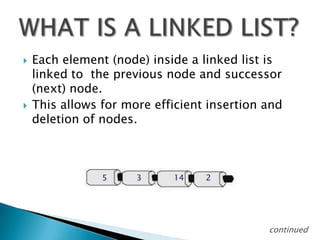
   Each element (node) inside a linked list is
    linked to the previous node and successor
    (next) node.
   This allows for more efficient insertion and
    deletion of nodes.


                5     3     14    2


                                             continued
   Each item has a data part (one or more data
    members), and a link that points to the next item.

   One natural way to implement the link is as a
    pointer; that is, the link is the address of the next
    item in the list.

   It makes good sense to view each item as an object,
    that is, as an instance of a class.

   We call that class: Node

   The last item does not point to anything. We set its
    link member to NULL. This is denoted graphically by
    a self-loop
   Insert a new item
    ◦ At the head of the list, or
    ◦ At the tail of the list, or
    ◦ Inside the list, in some designated position
   Search for an item in the list
    ◦ The item can be specified by position, or by some
      value
   Delete an item from the list
    ◦ Search for and locate the item, then remove the
      item, and finally adjust the surrounding pointers
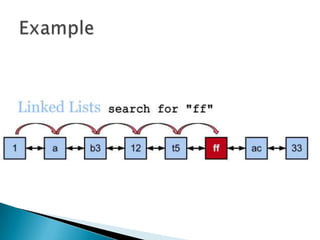
   Suppose you want to find the item whose data
    value is A

   You have to search sequentially starting from the
    head item rightward until the first item whose data
    member is equal to A is found.

   At each item searched, a comparison between the
    data member and A is performed.
LOGIC FOR SEARCHING A LINKED
              LIST

•Since nodes in a linked list have no names, we use two
pointers, pre (for previous) and cur (for current).

•At the beginning of the search, the pre pointer is null and
the cur pointer points to the first node.

•The search algorithm moves the two pointers together
towards the end of the list.
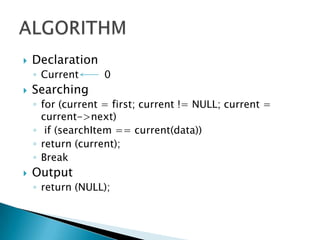
   Declaration
    ◦ Current     0
   Searching
    ◦ for (current = first; current != NULL; current =
      current->next)
    ◦ if (searchItem == current(data))
    ◦ return (current);
    ◦ Break
   Output
    ◦ return (NULL);
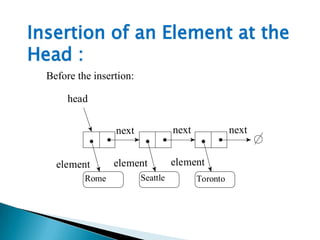
Insertion of an Element at the
Head :
  Before the insertion:

       head


                  next              next             next


    element       element           element
           Rome           Seattle          Toronto
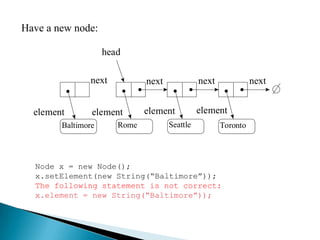
Have a new node:

                    head

               next           next             next             next


  element       element       element          element
        Baltimore      Rome          Seattle          Toronto


  Node x = new Node();
  x.setElement(new String(“Baltimore”));
  The following statement is not correct:
  x.element = new String(“Baltimore”));
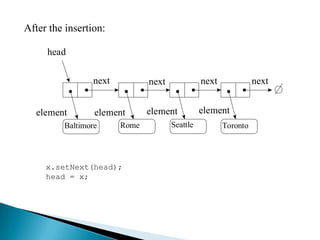
After the insertion:

     head

                 next          next             next             next


  element        element       element          element
         Baltimore      Rome          Seattle          Toronto


     x.setNext(head);
     head = x;
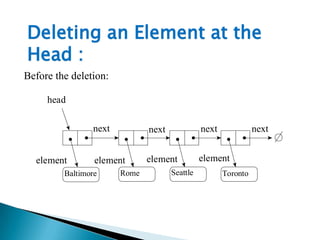
Deleting an Element at the
Head :
Before the deletion:

     head

                next          next             next             next


  element        element      element          element
         Baltimore     Rome          Seattle          Toronto
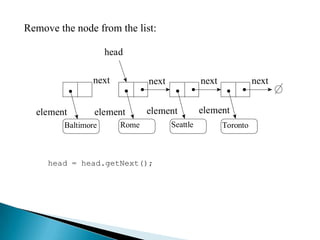
Remove the node from the list:

                     head

                next           next             next             next


  element        element       element          element
         Baltimore      Rome          Seattle          Toronto


     head = head.getNext();
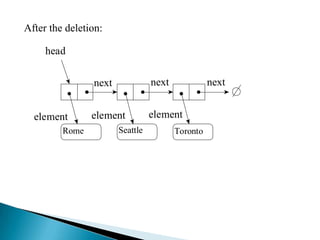
After the deletion:

     head

                next             next             next


  element       element          element
         Rome          Seattle          Toronto
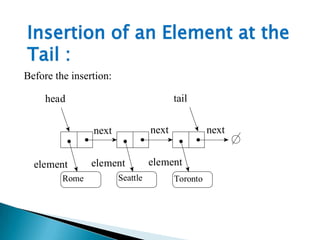
Insertion of an Element at the
Tail :
Before the insertion:

     head                                tail


                next              next             next


  element       element           element
         Rome           Seattle          Toronto
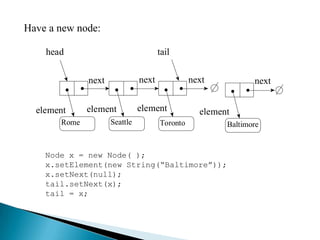
Have a new node:

    head                              tail


              next             next             next           next


  element     element          element            element
       Rome          Seattle          Toronto           Baltimore


    Node x = new Node( );
    x.setElement(new String(“Baltimore”));
    x.setNext(null);
    tail.setNext(x);
    tail = x;
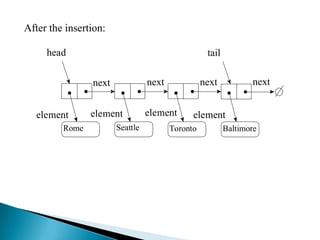
After the insertion:

     head                                          tail

                next             next             next           next


   element      element          element      element
         Rome          Seattle          Toronto           Baltimore
Deleting an Element at the
Tail :
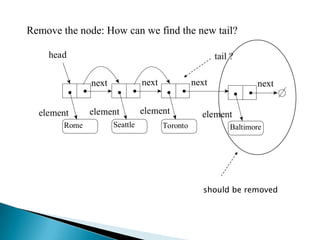
Deletion of an element at the tail of a singly linked list takes
more effort.

The difficulty is related with the fact that the last node does not
have a link to the previous node which will become the new
tail of the list.
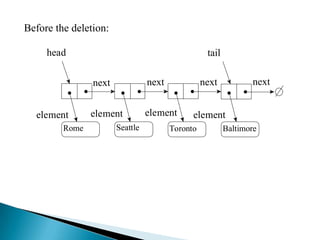
Before the deletion:

     head                                          tail

                next             next             next           next


  element       element          element      element
         Rome          Seattle          Toronto           Baltimore
Remove the node: How can we find the new tail?

    head                                                tail ?

               next             next             next              next


  element      element          element            element
        Rome          Seattle          Toronto              Baltimore


                                                    should be removed
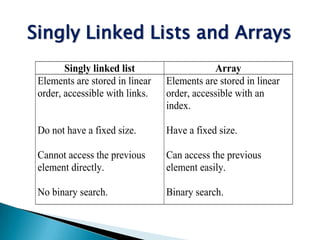
Singly Linked Lists and Arrays
        Singly linked list                   Array
 Elements are stored in linear   Elements are stored in linear
 order, accessible with links.   order, accessible with an
                                 index.

 Do not have a fixed size.       Have a fixed size.

 Cannot access the previous      Can access the previous
 element directly.               element easily.

 No binary search.               Binary search.
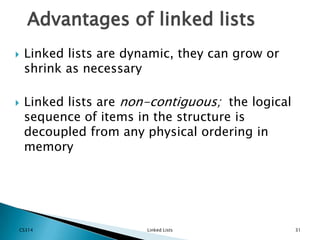
Advantages of linked lists
   Linked lists are dynamic, they can grow or
    shrink as necessary

   Linked lists are non-contiguous; the logical
    sequence of items in the structure is
    decoupled from any physical ordering in
    memory


CS314                   Linked Lists               31
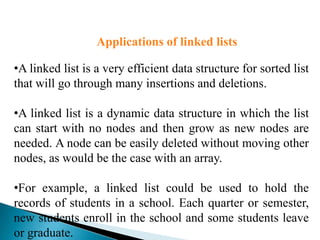
Applications of linked lists

•A linked list is a very efficient data structure for sorted list
that will go through many insertions and deletions.

•A linked list is a dynamic data structure in which the list
can start with no nodes and then grow as new nodes are
needed. A node can be easily deleted without moving other
nodes, as would be the case with an array.

•For example, a linked list could be used to hold the
records of students in a school. Each quarter or semester,
new students enroll in the school and some students leave
or graduate.
Array implementation and linked list as datat structure

Array implementation and linked list as datat structure

  • 1.
  • 2.
    An array is a collection of elements of similar datatype.  Contiguous memory allocation takes place.  An array is a DS in which we can access every element directly using position variable .  It is rather an organizational concept.  Array elements can be accessed individually.  Syntax: datatype nameofarray [dimension];
  • 3.
     Two typesof array- 1. Single dimensional single for loop. 2. Multidimensional nesting of for loop.
  • 4.
    Array can be of integer ,character and string.  Integer and character array can be implemented by same logic  Implementation of string array is quiet different from the two.  We can study the array implementation using integer array.
  • 5.
    Creation of integerarray  int 7 a[0] i=0 a[10]={7,1,32,58,0,5,8,16,9,23} 14 a[1] i=1 ; 32 a[2] i=2  Integer array “a”. 58 a[3] i=3  It is of dimension 10 (from 0 0 a[4] i=4 to 9). 5 a[5] i=5  Take positing variable i. 8 a[6] i=6  Its storage will be continuous 16 a[7] i=7 20 bytes(2 bytes each). 9 a[8] i=8 23 a[9] i=9
  • 6.
    1. DECLARATION N SIZE 2. OPERATION Repeat for i= 0 to (size-1) arr[i]= num end repeat 3. OUTPUT RETURN(arr[i])
  • 7.
     DECLARATION i rows j coloumn  OPERATION ◦ Repeat for i=0 to (rows-1)  Repeat for j=0 to (coloumn-1)  Array[i][j]=num  End repeat ◦ End repeat  OUTPUT Return(Array[i][j])
  • 8.
    No need to declare large number of variables individually.  Variables are not scattered in memory , they are stored in contiguous memory.  Ease the handling of large no of variables of same datatype.
  • 9.
    Rigid structure.  Can be hard to add/remove elements.  Cannot be dynamically resized in most languages.  Memory loss.
  • 10.
    AS A DATASTRUCTURE
  • 11.
    Each element (node) inside a linked list is linked to the previous node and successor (next) node.  This allows for more efficient insertion and deletion of nodes. 5 3 14 2 continued
  • 12.
    Each item has a data part (one or more data members), and a link that points to the next item.  One natural way to implement the link is as a pointer; that is, the link is the address of the next item in the list.  It makes good sense to view each item as an object, that is, as an instance of a class.  We call that class: Node  The last item does not point to anything. We set its link member to NULL. This is denoted graphically by a self-loop
  • 13.
    Insert a new item ◦ At the head of the list, or ◦ At the tail of the list, or ◦ Inside the list, in some designated position  Search for an item in the list ◦ The item can be specified by position, or by some value  Delete an item from the list ◦ Search for and locate the item, then remove the item, and finally adjust the surrounding pointers
  • 14.
    Suppose you want to find the item whose data value is A  You have to search sequentially starting from the head item rightward until the first item whose data member is equal to A is found.  At each item searched, a comparison between the data member and A is performed.
  • 15.
    LOGIC FOR SEARCHINGA LINKED LIST •Since nodes in a linked list have no names, we use two pointers, pre (for previous) and cur (for current). •At the beginning of the search, the pre pointer is null and the cur pointer points to the first node. •The search algorithm moves the two pointers together towards the end of the list.
  • 16.
    Declaration ◦ Current 0  Searching ◦ for (current = first; current != NULL; current = current->next) ◦ if (searchItem == current(data)) ◦ return (current); ◦ Break  Output ◦ return (NULL);
  • 18.
    Insertion of anElement at the Head : Before the insertion: head next next next element element element Rome Seattle Toronto
  • 19.
    Have a newnode: head next next next next element element element element Baltimore Rome Seattle Toronto Node x = new Node(); x.setElement(new String(“Baltimore”)); The following statement is not correct: x.element = new String(“Baltimore”));
  • 20.
    After the insertion: head next next next next element element element element Baltimore Rome Seattle Toronto x.setNext(head); head = x;
  • 21.
    Deleting an Elementat the Head : Before the deletion: head next next next next element element element element Baltimore Rome Seattle Toronto
  • 22.
    Remove the nodefrom the list: head next next next next element element element element Baltimore Rome Seattle Toronto head = head.getNext();
  • 23.
    After the deletion: head next next next element element element Rome Seattle Toronto
  • 24.
    Insertion of anElement at the Tail : Before the insertion: head tail next next next element element element Rome Seattle Toronto
  • 25.
    Have a newnode: head tail next next next next element element element element Rome Seattle Toronto Baltimore Node x = new Node( ); x.setElement(new String(“Baltimore”)); x.setNext(null); tail.setNext(x); tail = x;
  • 26.
    After the insertion: head tail next next next next element element element element Rome Seattle Toronto Baltimore
  • 27.
    Deleting an Elementat the Tail : Deletion of an element at the tail of a singly linked list takes more effort. The difficulty is related with the fact that the last node does not have a link to the previous node which will become the new tail of the list.
  • 28.
    Before the deletion: head tail next next next next element element element element Rome Seattle Toronto Baltimore
  • 29.
    Remove the node:How can we find the new tail? head tail ? next next next next element element element element Rome Seattle Toronto Baltimore should be removed
  • 30.
    Singly Linked Listsand Arrays Singly linked list Array Elements are stored in linear Elements are stored in linear order, accessible with links. order, accessible with an index. Do not have a fixed size. Have a fixed size. Cannot access the previous Can access the previous element directly. element easily. No binary search. Binary search.
  • 31.
    Advantages of linkedlists  Linked lists are dynamic, they can grow or shrink as necessary  Linked lists are non-contiguous; the logical sequence of items in the structure is decoupled from any physical ordering in memory CS314 Linked Lists 31
  • 32.
    Applications of linkedlists •A linked list is a very efficient data structure for sorted list that will go through many insertions and deletions. •A linked list is a dynamic data structure in which the list can start with no nodes and then grow as new nodes are needed. A node can be easily deleted without moving other nodes, as would be the case with an array. •For example, a linked list could be used to hold the records of students in a school. Each quarter or semester, new students enroll in the school and some students leave or graduate.