2
What is aData Structure?
A data structure is a collection of data organized in
some fashion. A data structure not only stores data,
but also supports the operations for manipulating
data in the structure. For example, an array is a data
structure that holds a collection of data in sequential
order. You can find the size of the array, store,
retrieve, and modify data in the array.
Array is simple and easy to use, but it has two
limitations:
3.
3
Limitations of arrays
Once an array is created, its size cannot
be altered.
Array provides inadequate support for
inserting, deleting, sorting, and searching
operations.
4.
4
Object-Oriented Data Structure
Inobject-oriented thinking, a data structure is an object that stores
other objects, referred to as data or elements.
So some people refer a data structure as a container object or a
collection object. To define a data structure is essentially to declare a
class.
The class for a data structure should use data fields to store data and
provide methods to support operations such as insertion and deletion. To
create a data structure is therefore to create an instance from the class.
You can then apply the methods on the instance to manipulate the data
structure such as inserting an element to the data structure or deleting an
element from the data structure.
5.
5
Four Classic DataStructures
Four classic dynamic data structures to be introduced in this
chapter are lists, stacks, queues, and priority queues.
–A list is a collection of data stored sequentially. It supports insertion
and deletion anywhere in the list.
–A stack can be perceived as a special type of the list where insertions
and deletions take place only at the one end, referred to as the top of a
stack.
–A queue represents a waiting list, where insertions take place at the
back (also referred to as the tail of) of a queue and deletions take place
from the front (also referred to as the head of) of a queue.
–In a priority queue, elements are assigned with priorities. When
accessing elements, the element with the highest priority is removed
first.
6.
6
Lists
A list isa popular data structure to store data in sequential
order. For example, a list of students, a list of available
rooms, a list of cities, and a list of books, etc. can be stored
using lists. The common operations on a list are usually the
following:
· Retrieve an element from this list.
· Insert a new element to this list.
· Delete an element from this list.
· Find how many elements are in this list.
· Find if an element is in this list.
· Find if this list is empty.
7.
Linked List
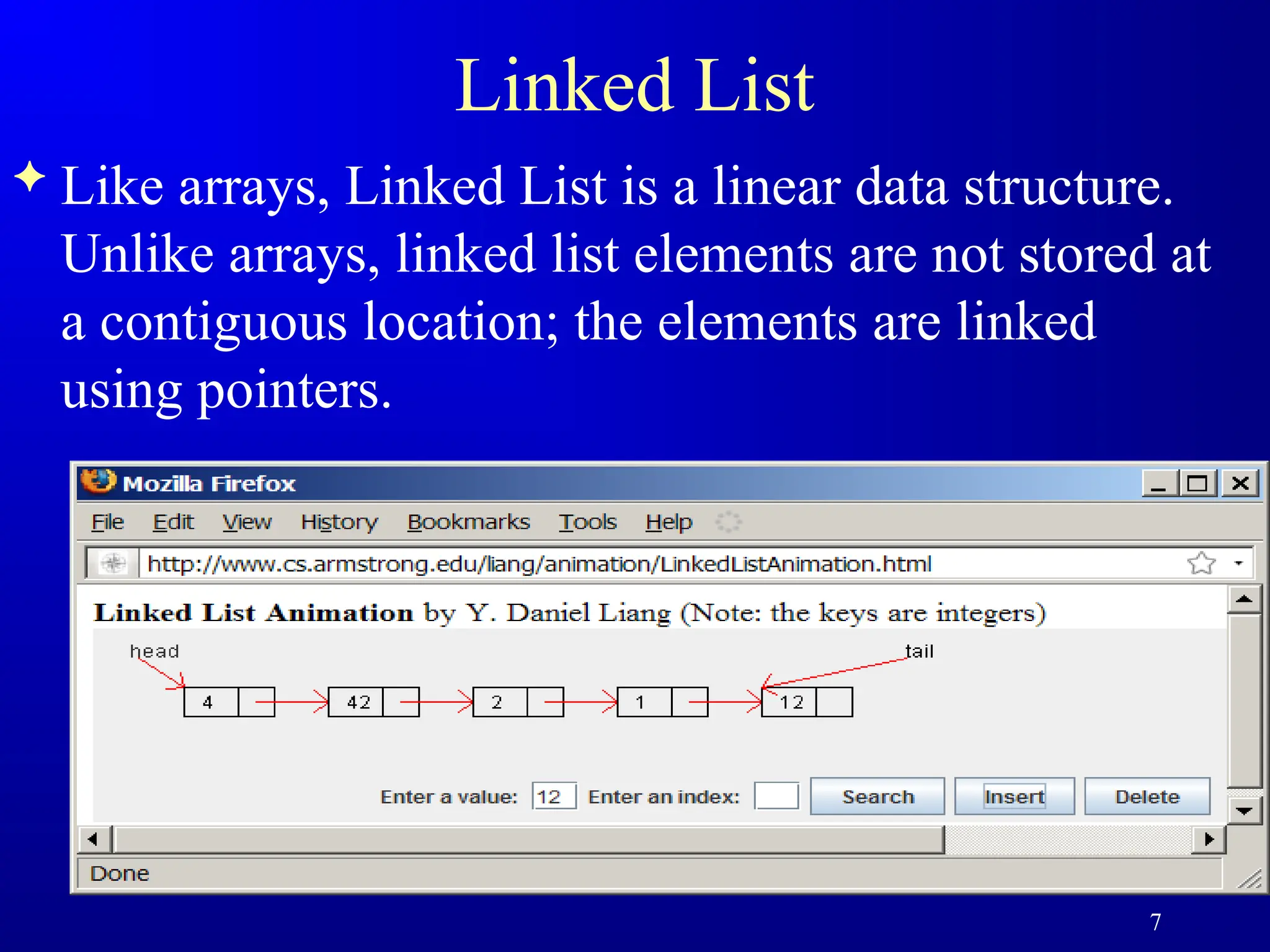
Likearrays, Linked List is a linear data structure.
Unlike arrays, linked list elements are not stored at
a contiguous location; the elements are linked
using pointers.
7
8.
8
Why Linked List?
Arrayscan be used to store linear data of similar types, but arrays have
the following limitations.
1) The size of the arrays is fixed: So we must know the upper limit on the number of
elements in advance. Also, generally, the allocated memory is equal to the upper limit
irrespective of the usage.
2) Inserting a new element in an array of elements is expensive because the room has to
be created for the new elements and to create room existing elements have to be
shifted.
For example, in a system, if we maintain a sorted list of IDs in an array id[].
id[] = [1000, 1010, 1050, 2000, 2040].
And if we want to insert a new ID 1005, then to maintain the sorted order, we have to
move all the elements after 1000 (excluding 1000).
Deletion is also expensive with arrays until unless some special techniques are used.
For example, to delete 1010 in id[], everything after 1010 has to be moved.
Advantages over arrays
9.
Draw backs: LinkedList
1) Random access is not allowed. We have to access
elements sequentially starting from the first node.
So we cannot do binary search with linked lists
efficiently with its default implementation.
2) Extra memory space for a pointer is required with
each element of the list.
3) Not cache friendly. Since array elements are
contiguous locations, there is locality of reference
which is not there in case of linked lists.
9
10.
Representation: : LinkedList
A linked list is represented by a pointer to the first node of the linked list.
The first node is called the head. If the linked list is empty, then the value
of the head is NULL.
Each node in a list consists of at least two parts:
1)data
2)Pointer (Or Reference) to the next node
Note
In C, we can represent a node using structures. Below is an example of a
linked list node with integer data.
In Java or C#, LinkedList can be represented as a class and a Node as a
separate class. The LinkedList class contains a reference of Node class
type.
10
11.
11
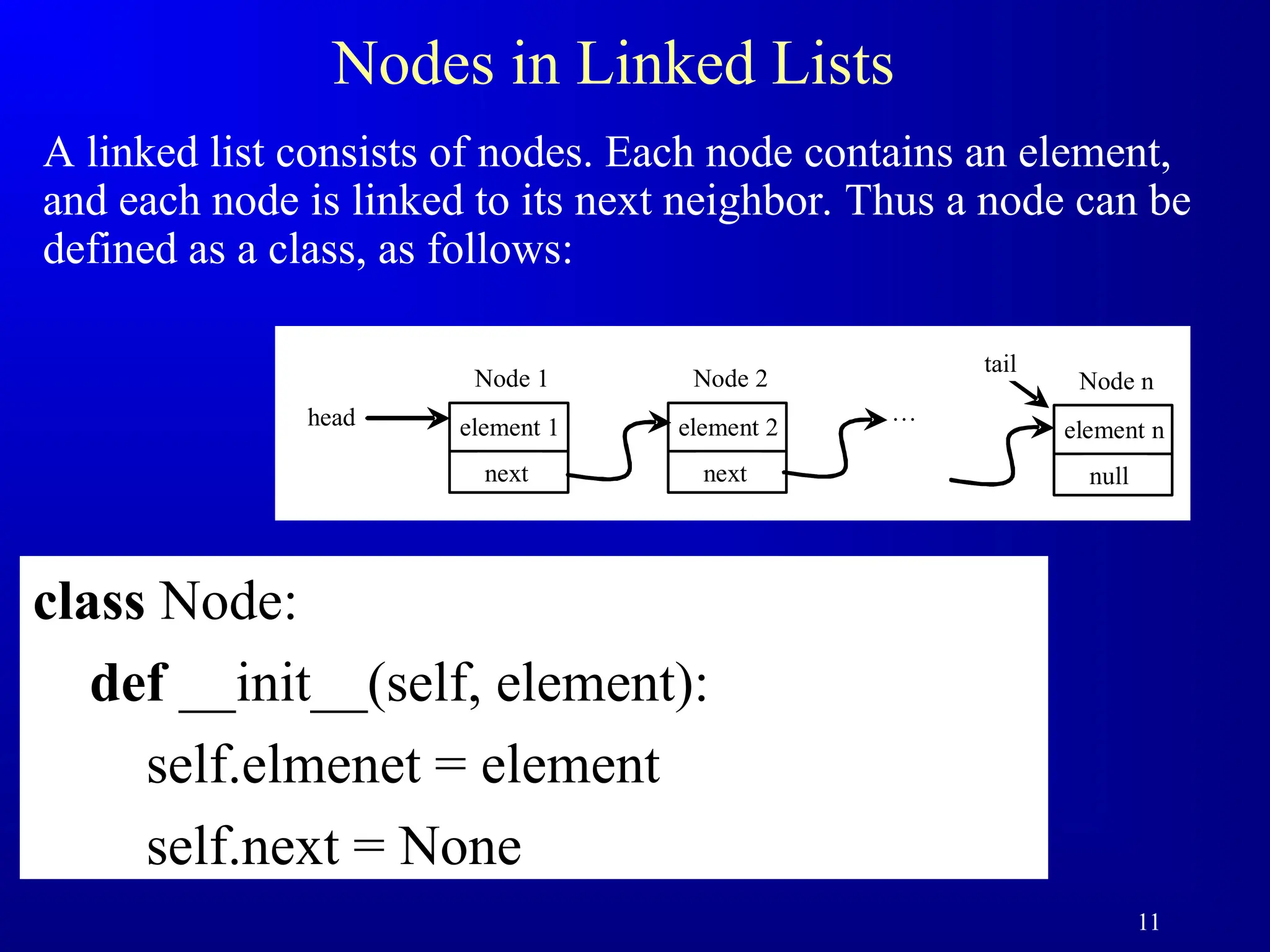
Nodes in LinkedLists
A linked list consists of nodes. Each node contains an element,
and each node is linked to its next neighbor. Thus a node can be
defined as a class, as follows:
class Node:
def __init__(self, element):
self.elmenet = element
self.next = None
element 1
head
next
Node 1
element 2
next
Node 2
…
element n
null
Node n
tail
12.
12
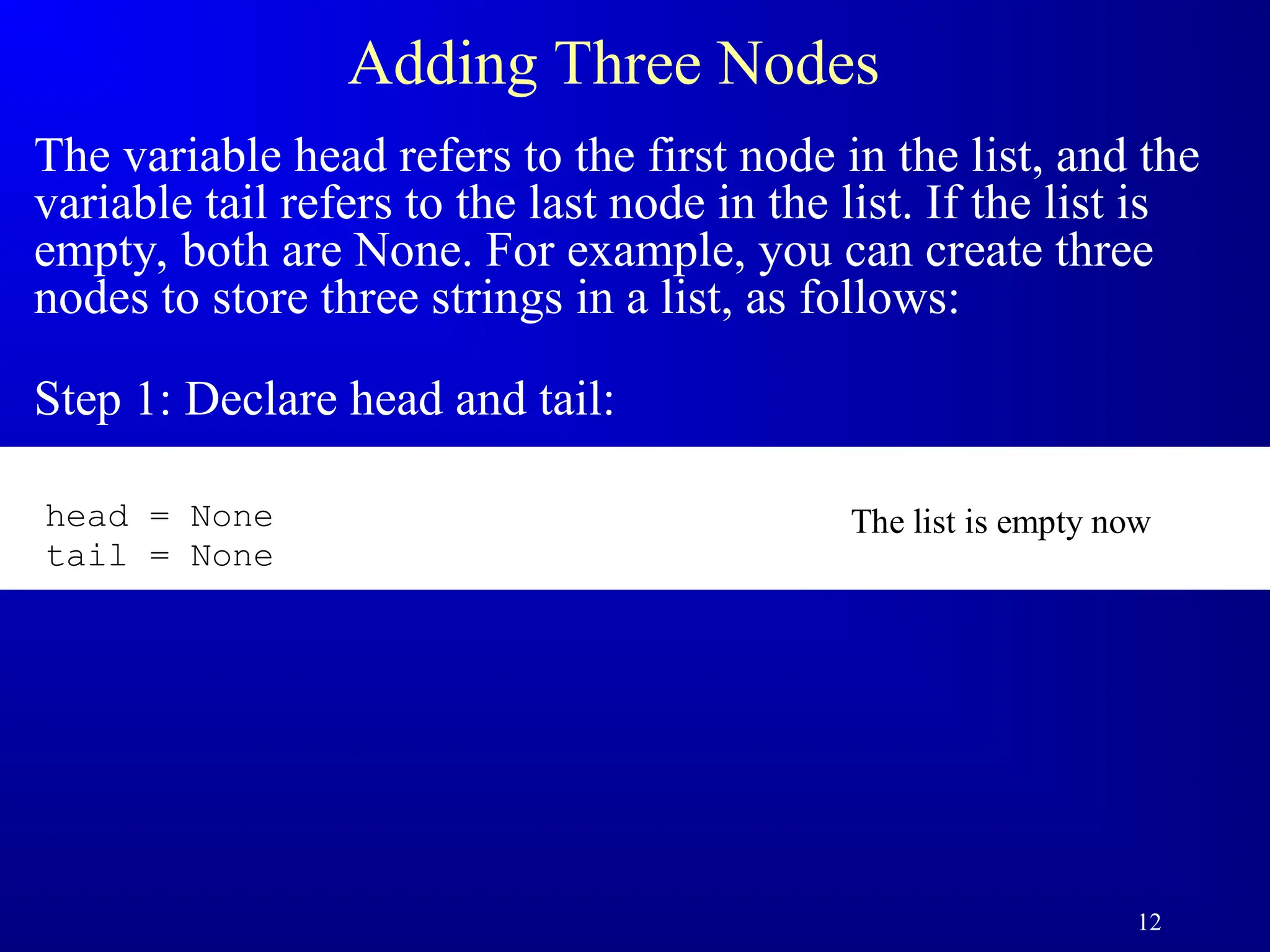
Adding Three Nodes
Thevariable head refers to the first node in the list, and the
variable tail refers to the last node in the list. If the list is
empty, both are None. For example, you can create three
nodes to store three strings in a list, as follows:
Step 1: Declare head and tail:
The list is empty now
head = None
tail = None
13.
13
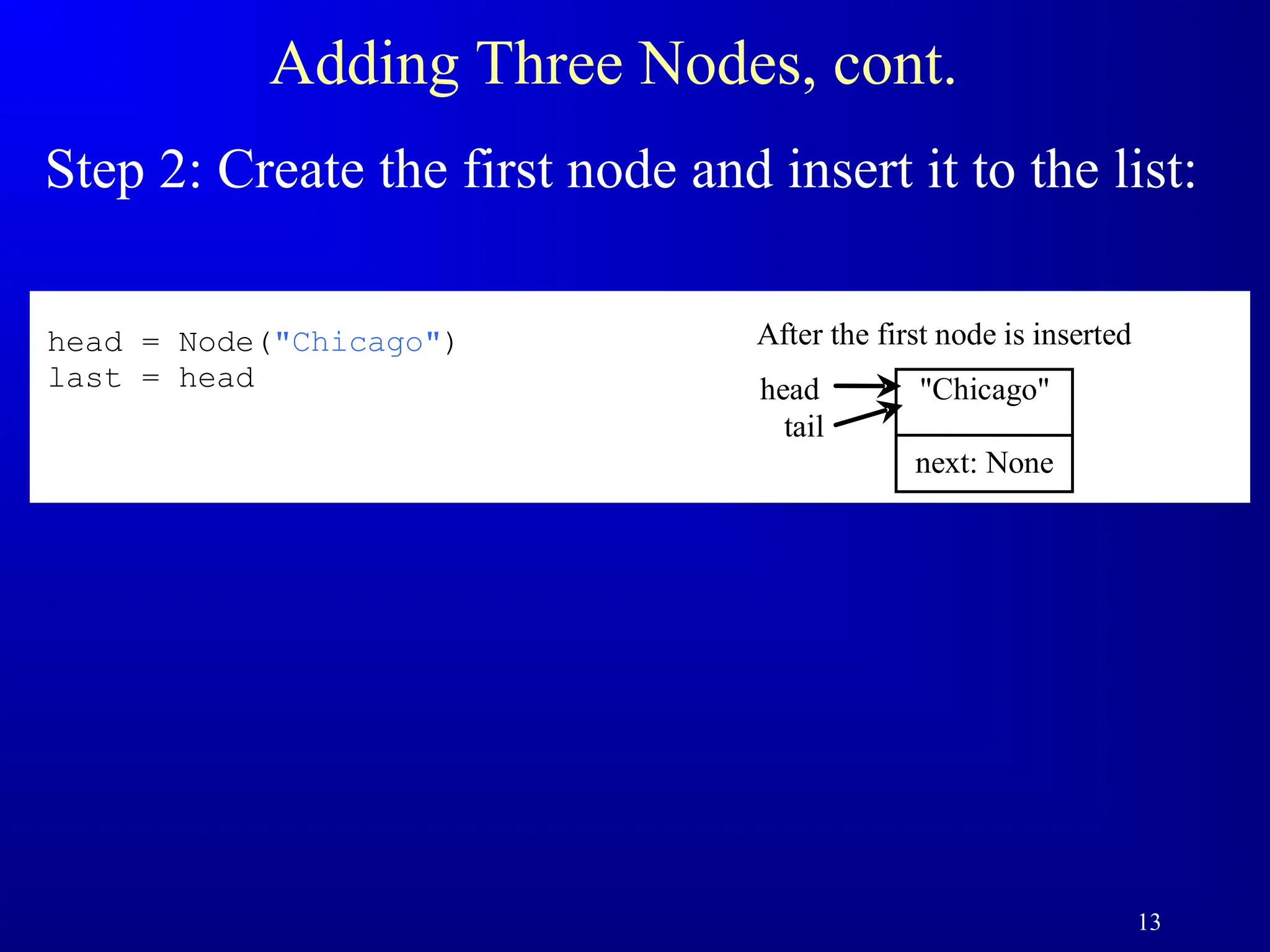
Adding Three Nodes,cont.
Step 2: Create the first node and insert it to the list:
head
tail
"Chicago"
next: None
After the first node is inserted
inserted
head = Node("Chicago")
last = head
14.
14
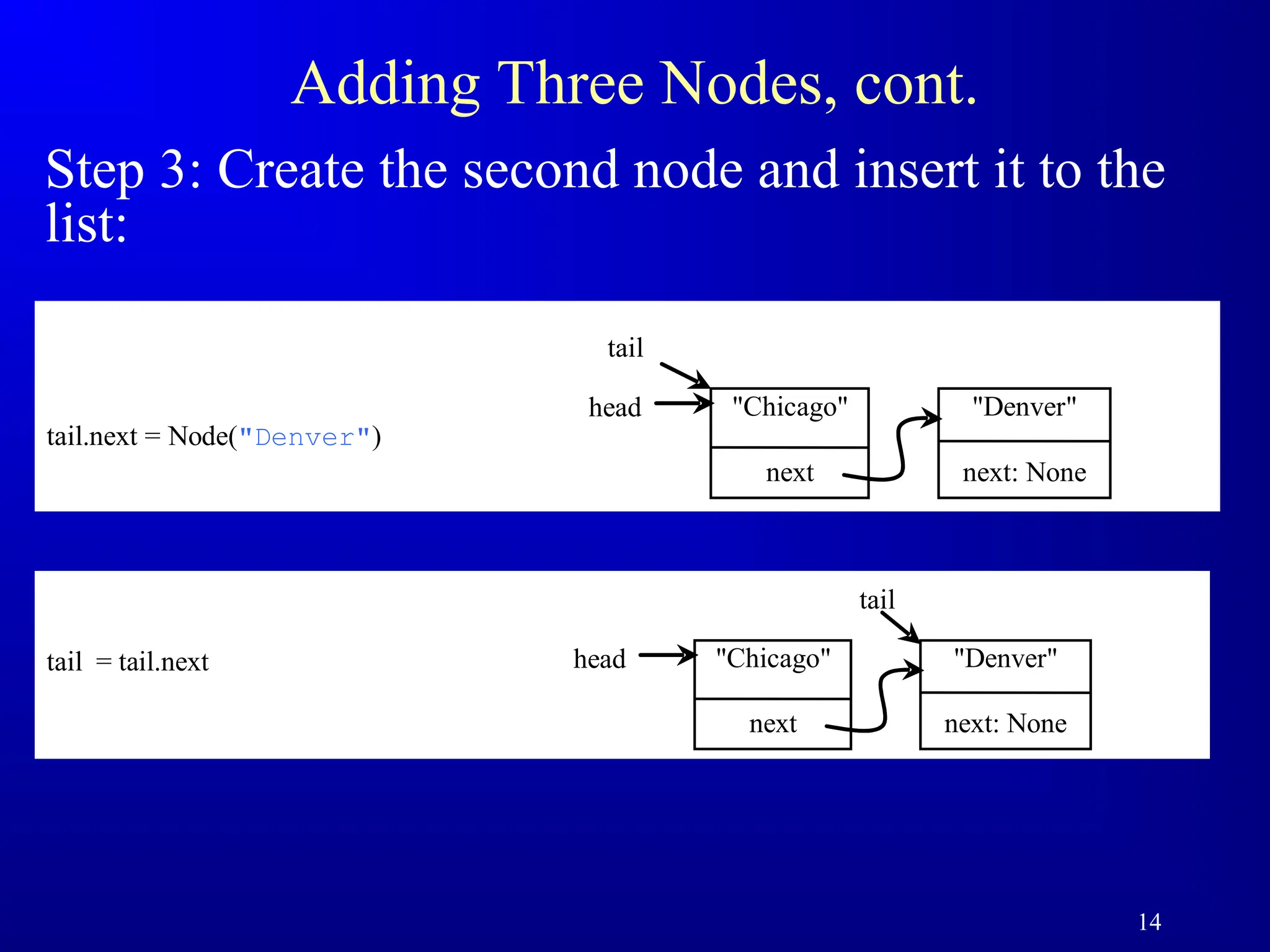
Adding Three Nodes,cont.
Step 3: Create the second node and insert it to the
list:
tail.next = Node("Denver")
head "Chicago"
next
"Denver"
next: None
tail
tail = tail.next head "Chicago"
next
"Denver"
next: None
tail
15.
15
Adding Three Nodes,cont.
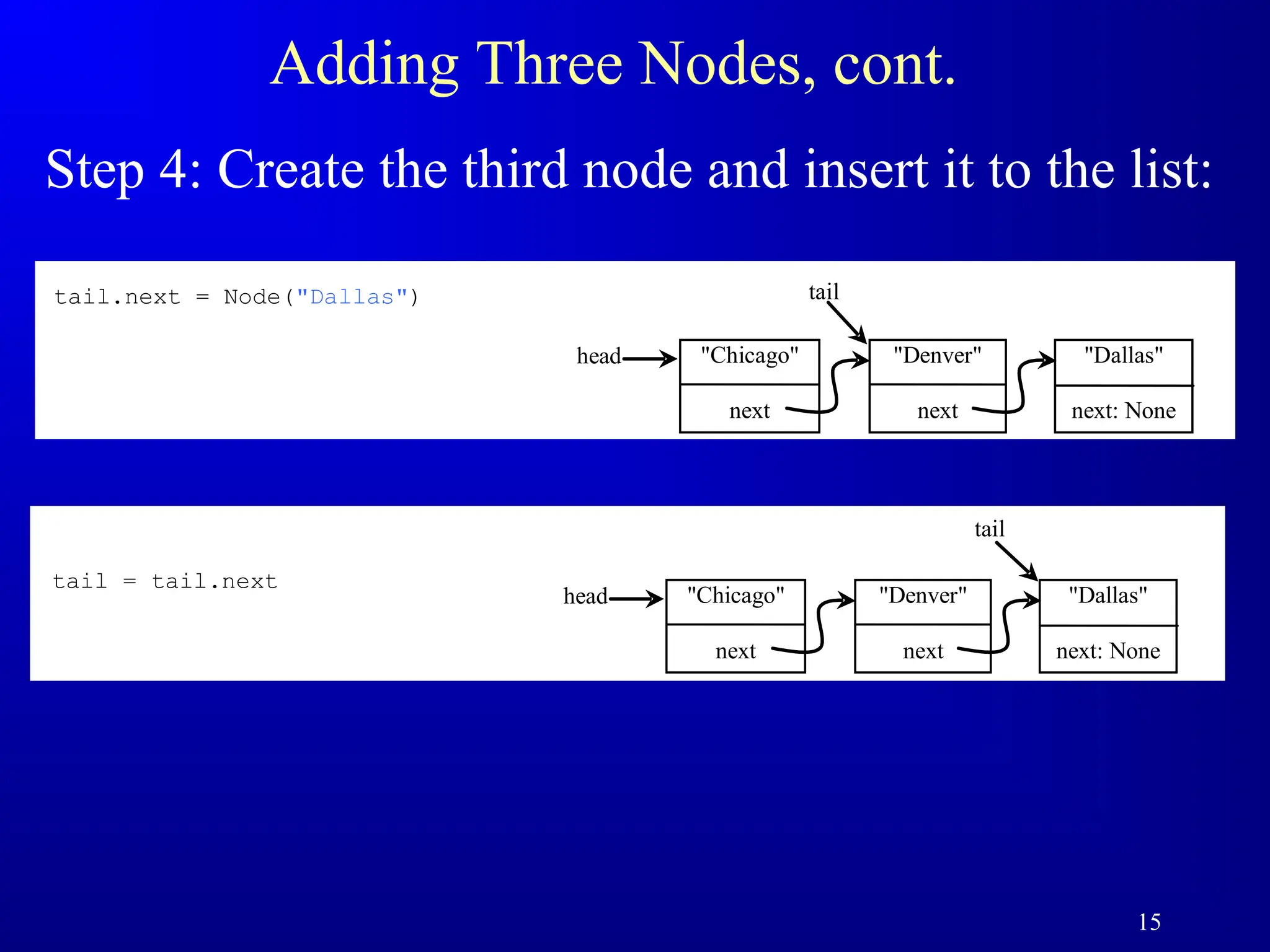
Step 4: Create the third node and insert it to the list:
head "Chicago"
next
"Dallas"
next: None
tail
"Denver"
next
tail.next = Node("Dallas")
head "Chicago"
next
"Dallas"
next: None
tail
"Denver"
next
tail = tail.next
16.
16
Traversing All Elementsin the List
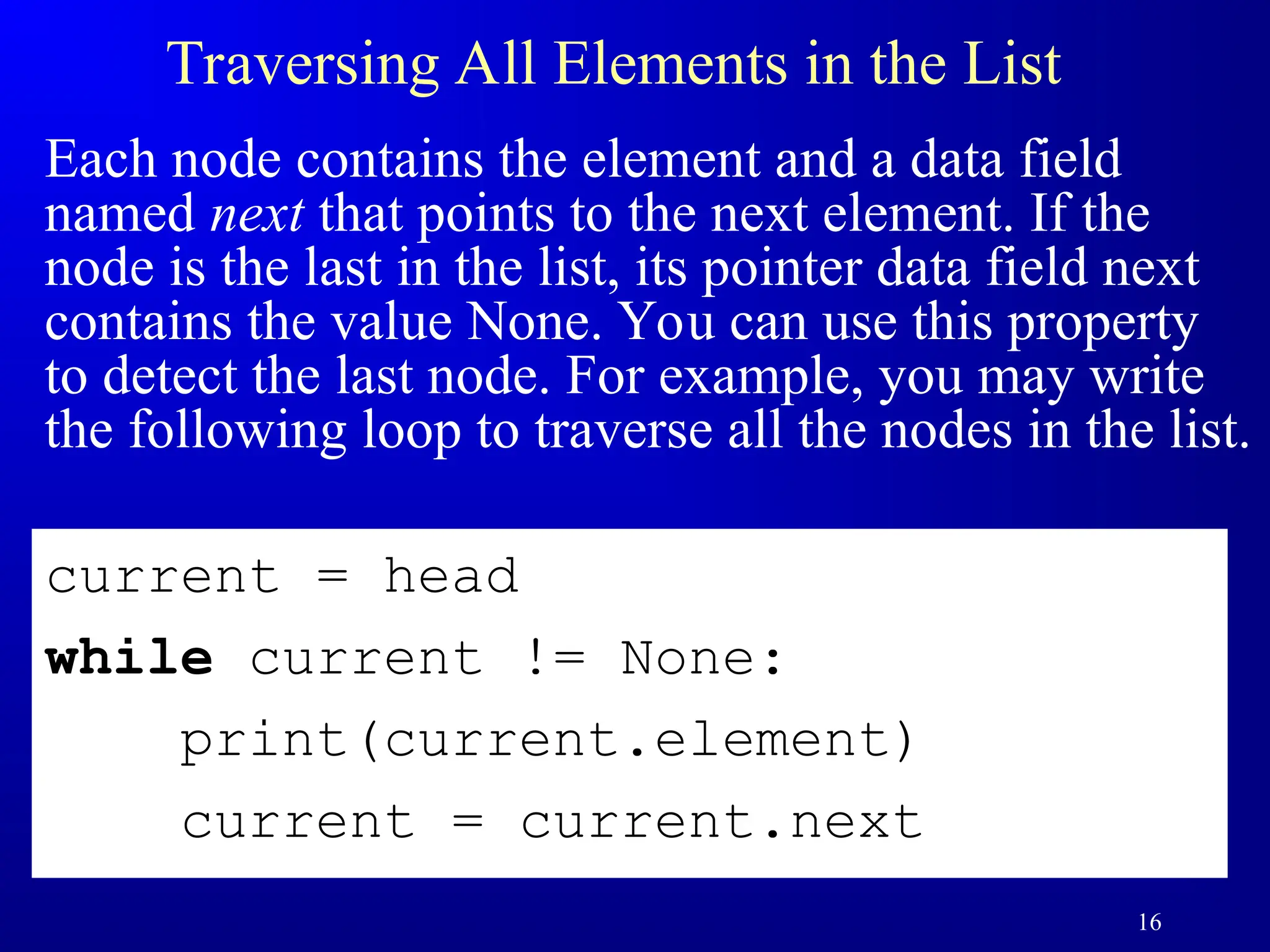
Each node contains the element and a data field
named next that points to the next element. If the
node is the last in the list, its pointer data field next
contains the value None. You can use this property
to detect the last node. For example, you may write
the following loop to traverse all the nodes in the list.
current = head
while current != None:
print(current.element)
current = current.next
17.
17
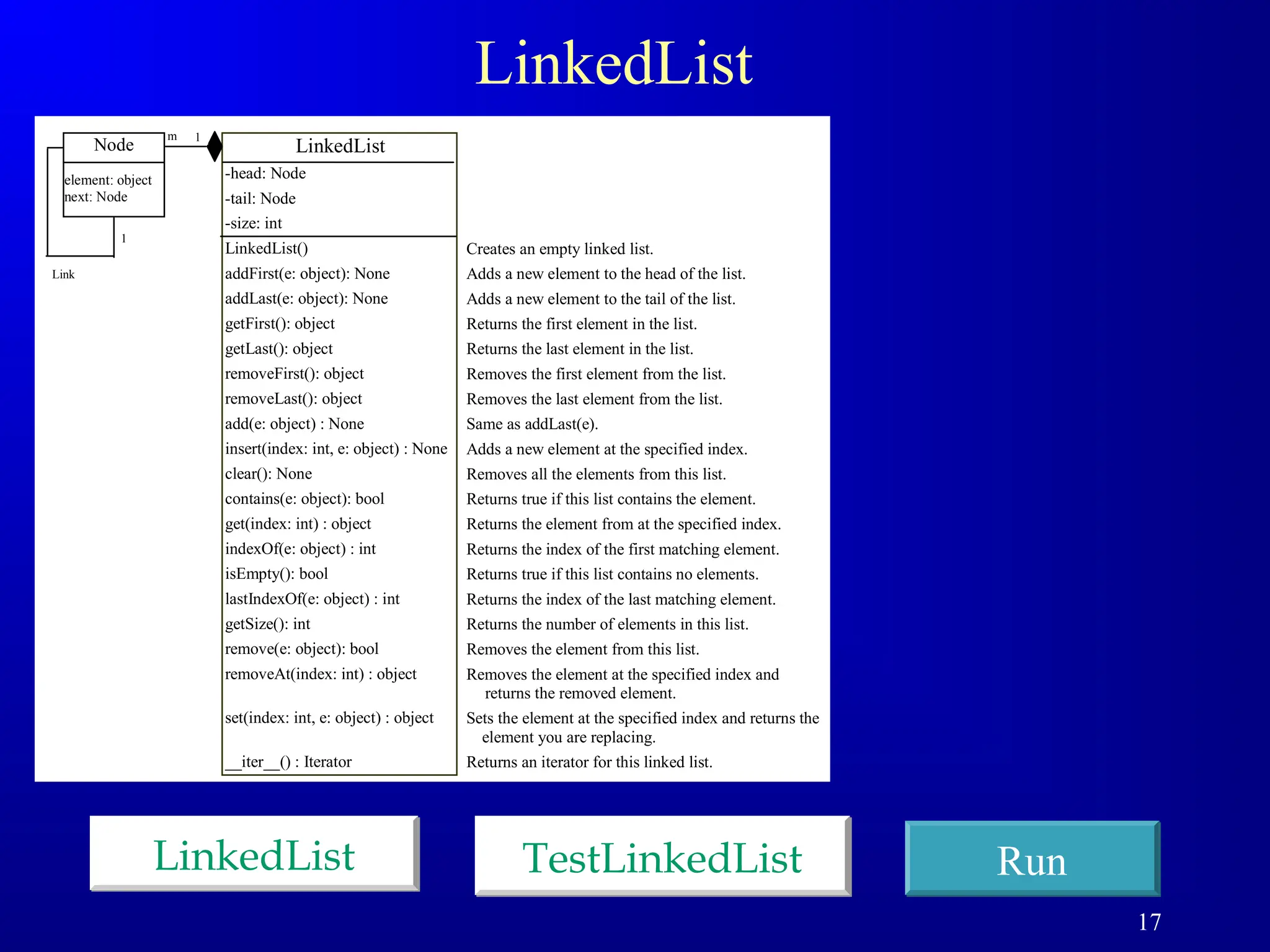
LinkedList
LinkedList Run
TestLinkedList
LinkedList
-head: Node
-tail:Node
-size: int
LinkedList()
addFirst(e: object): None
addLast(e: object): None
getFirst(): object
getLast(): object
removeFirst(): object
removeLast(): object
add(e: object) : None
insert(index: int, e: object) : None
clear(): None
contains(e: object): bool
get(index: int) : object
indexOf(e: object) : int
isEmpty(): bool
lastIndexOf(e: object) : int
getSize(): int
remove(e: object): bool
removeAt(index: int) : object
set(index: int, e: object) : object
__iter__() : Iterator
1
m
Node
element: object
next: Node
Link
1
Creates an empty linked list.
Adds a new element to the head of the list.
Adds a new element to the tail of the list.
Returns the first element in the list.
Returns the last element in the list.
Removes the first element from the list.
Removes the last element from the list.
Same as addLast(e).
Adds a new element at the specified index.
Removes all the elements from this list.
Returns true if this list contains the element.
Returns the element from at the specified index.
Returns the index of the first matching element.
Returns true if this list contains no elements.
Returns the index of the last matching element.
Returns the number of elements in this list.
Removes the element from this list.
Removes the element at the specified index and
returns the removed element.
Sets the element at the specified index and returns the
element you are replacing.
Returns an iterator for this linked list.
18.
18
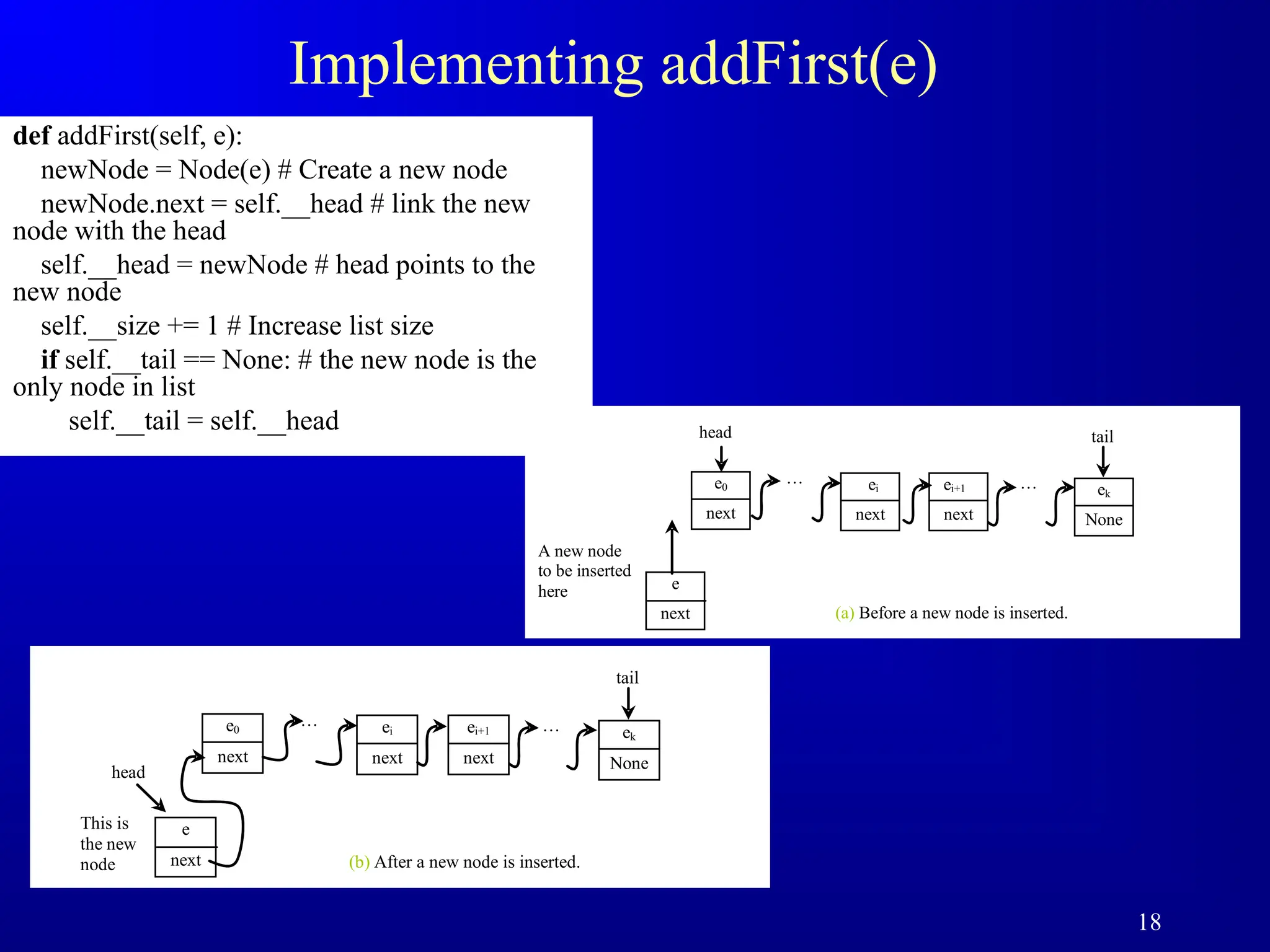
Implementing addFirst(e)
def addFirst(self,e):
newNode = Node(e) # Create a new node
newNode.next = self.__head # link the new
node with the head
self.__head = newNode # head points to the
new node
self.__size += 1 # Increase list size
if self.__tail == None: # the new node is the
only node in list
self.__tail = self.__head head
e0
next
…
A new node
to be inserted
here
ei
next
ei+1
next
tail
… ek
None
e
next (a) Before a new node is inserted.
e0
next
… ei
next
ei+1
next
tail
… ek
None
e
next
This is
the new
node (b) After a new node is inserted.
head
19.
19
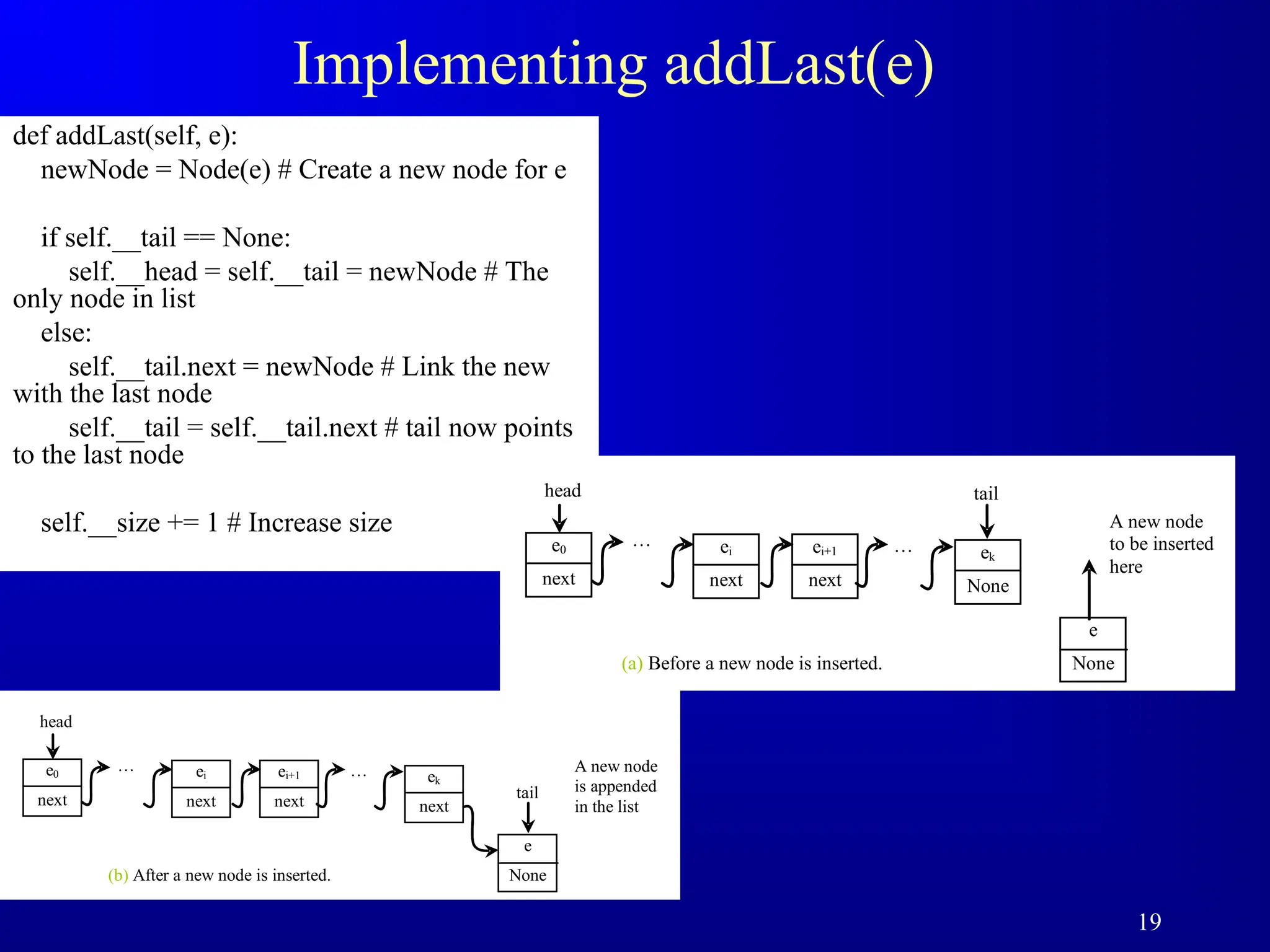
Implementing addLast(e)
def addLast(self,e):
newNode = Node(e) # Create a new node for e
if self.__tail == None:
self.__head = self.__tail = newNode # The
only node in list
else:
self.__tail.next = newNode # Link the new
with the last node
self.__tail = self.__tail.next # tail now points
to the last node
self.__size += 1 # Increase size
head
e0
next
… ei
next
ei+1
next
tail
… ek
None
(a) Before a new node is inserted.
A new node
to be inserted
here
e
None
head
e0
next
… ei
next
ei+1
next tail
… ek
next
(b) After a new node is inserted.
A new node
is appended
in the list
e
None
20.
20
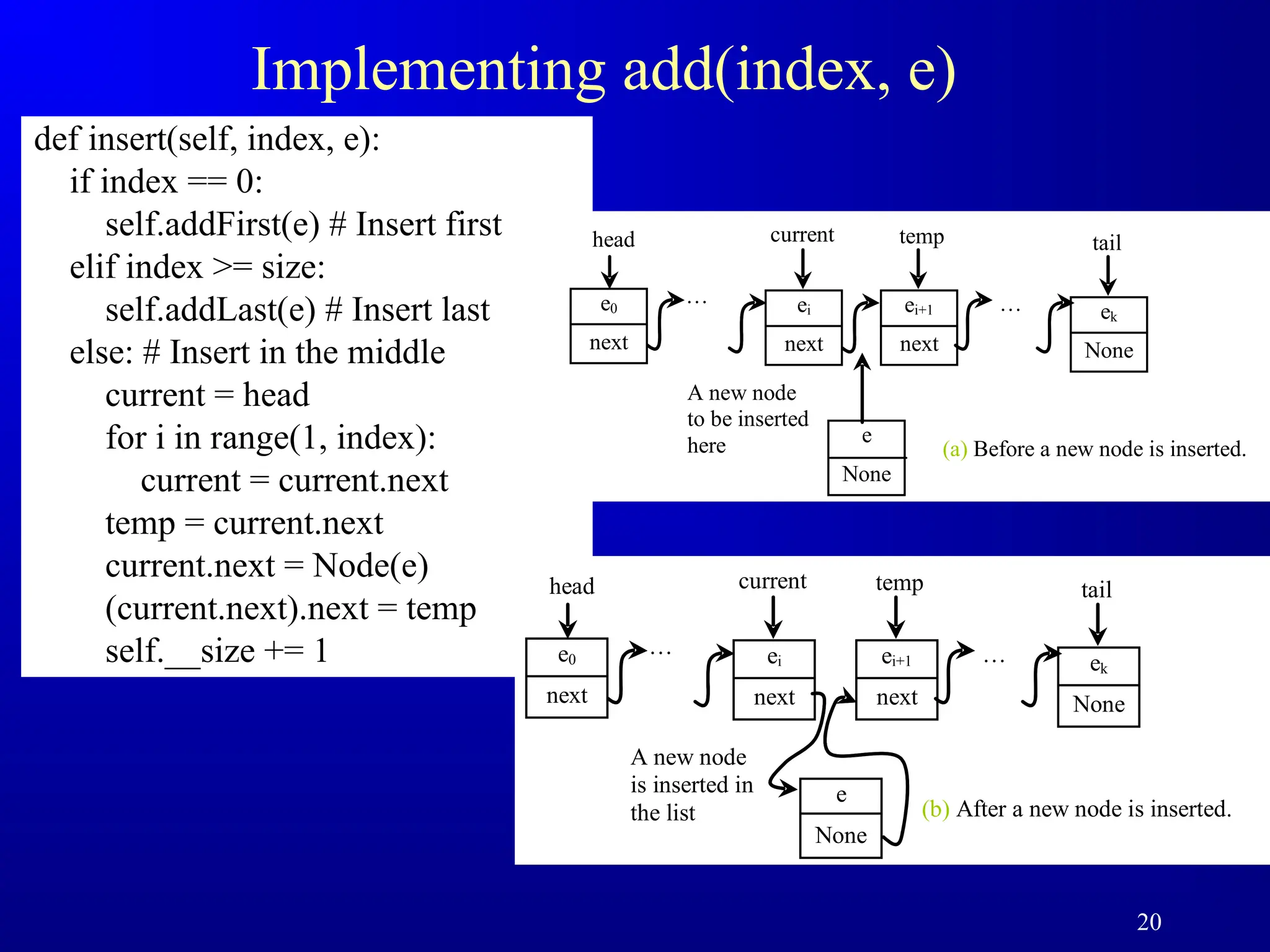
Implementing add(index, e)
definsert(self, index, e):
if index == 0:
self.addFirst(e) # Insert first
elif index >= size:
self.addLast(e) # Insert last
else: # Insert in the middle
current = head
for i in range(1, index):
current = current.next
temp = current.next
current.next = Node(e)
(current.next).next = temp
self.__size += 1
current
head
e0
next
…
A new node
to be inserted
here
ei
next
temp
ei+1
next
tail
… ek
None
e
None
(a) Before a new node is inserted.
current
head
e0
next
…
A new node
is inserted in
the list
ei
next
temp
ei+1
next
tail
… ek
None
e
None
(b) After a new node is inserted.
21.
21
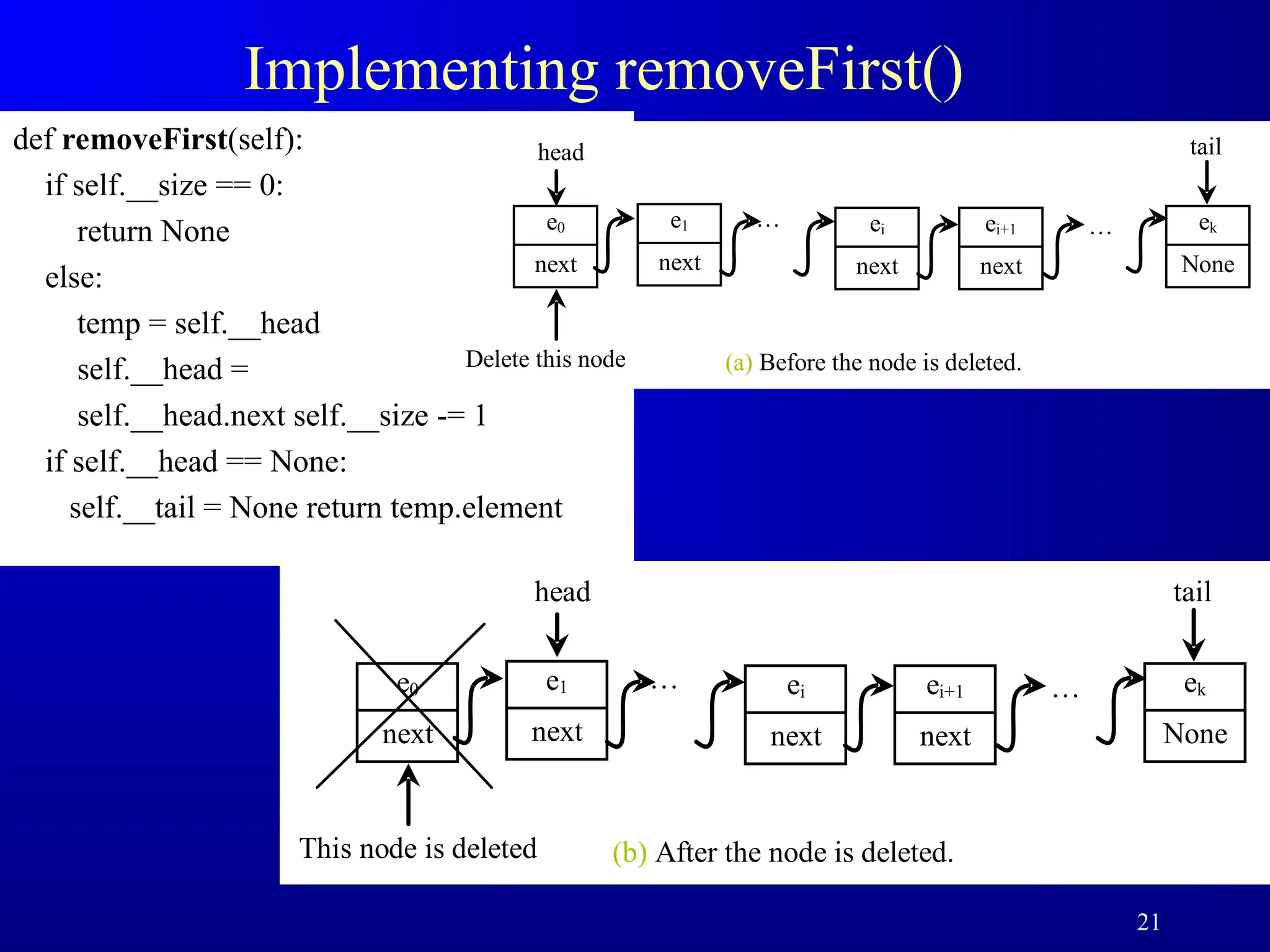
Implementing removeFirst()
def removeFirst(self):
ifself.__size == 0:
return None
else:
temp = self.__head
self.__head =
self.__head.next self.__size -= 1
if self.__head == None:
self.__tail = None return temp.element
head
e0
next
…
Delete this node
ei
next
ei+1
next
tail
… ek
None
(a) Before the node is deleted.
e1
next
head
e0
next
…
This node is deleted
ei
next
ei+1
next
tail
… ek
None
(b) After the node is deleted.
e1
next
22.
22
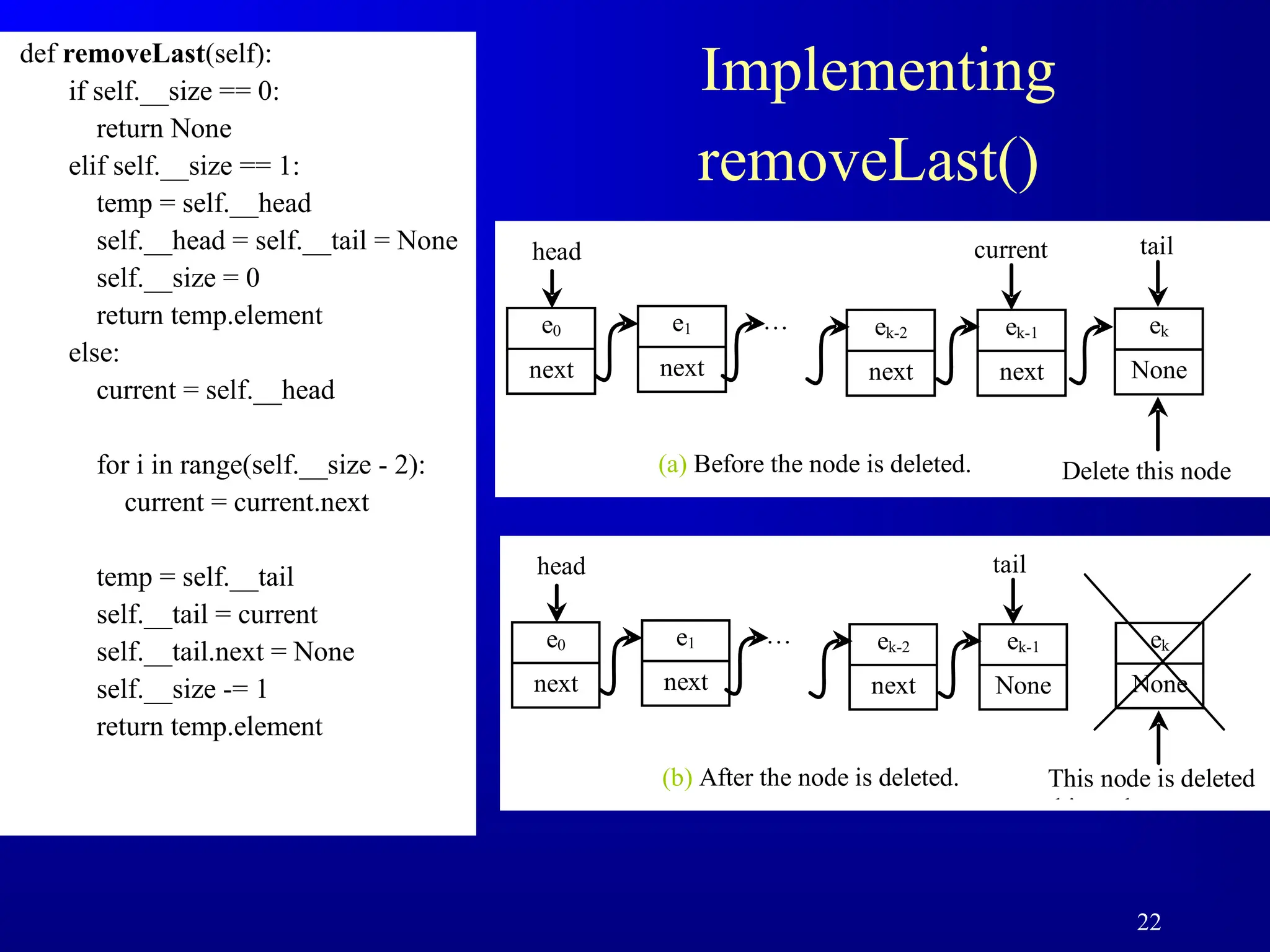
Implementing
removeLast()
def removeLast(self):
if self.__size== 0:
return None
elif self.__size == 1:
temp = self.__head
self.__head = self.__tail = None
self.__size = 0
return temp.element
else:
current = self.__head
for i in range(self.__size - 2):
current = current.next
temp = self.__tail
self.__tail = current
self.__tail.next = None
self.__size -= 1
return temp.element
head
e0
next
…
Delete this node
ek-2
next
ek-1
next
tail
ek
None
(a) Before the node is deleted.
e1
next
current
head
e0
next
…
This node is deleted
this node
ek-2
next
ek-1
None
ek
None
(b) After the node is deleted.
e1
next
tail
23.
23
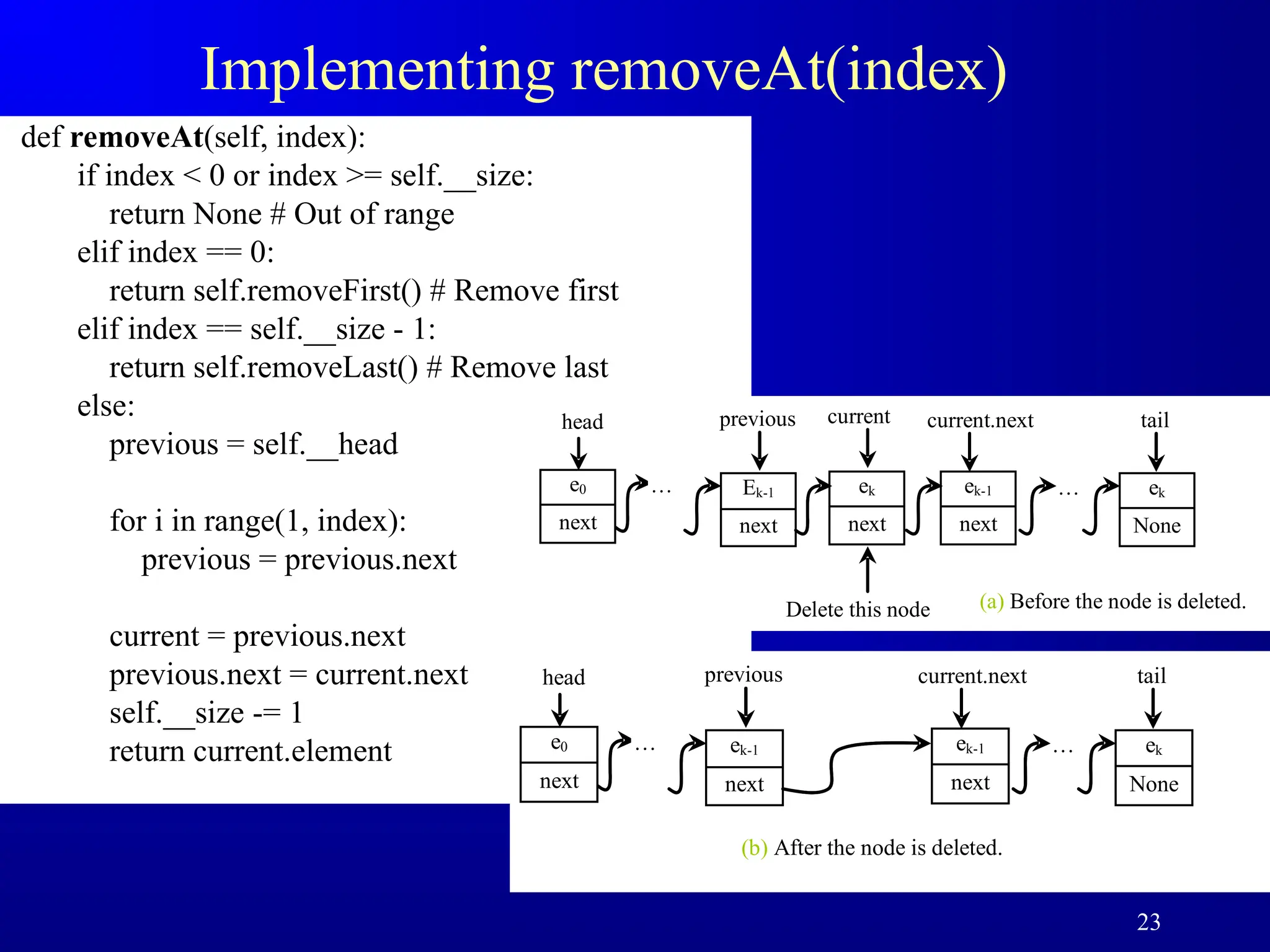
Implementing removeAt(index)
def removeAt(self,index):
if index < 0 or index >= self.__size:
return None # Out of range
elif index == 0:
return self.removeFirst() # Remove first
elif index == self.__size - 1:
return self.removeLast() # Remove last
else:
previous = self.__head
for i in range(1, index):
previous = previous.next
current = previous.next
previous.next = current.next
self.__size -= 1
return current.element
head
e0
next
…
Delete this node
ek
next
ek-1
next
tail
ek
None
(a) Before the node is deleted.
Ek-1
next
current.next
…
previous current
head
e0
next
…
ek-1
next
tail
ek
None
(b) After the node is deleted.
ek-1
next
current.next
…
previous
24.
24
Time Complexity forlist and LinkedList
Methods for list/Complexity Methods for LinkedList/Complexity
append(e: E) )
1
(
O add(e: E) )
1
(
O
insert(index: int, e: E) )
(n
O insert(index: int, e: E) )
(n
O
N/A clear() )
1
(
O
e in myList )
(n
O contains(e: E) )
(n
O
list[index] )
1
(
O get(index: int) )
(n
O
index(e: E) )
(n
O indexOf(e: E) )
(n
O
len(x) == 0? )
1
(
O isEmpty() )
1
(
O
N/A lastIndexOf(e: E) )
(n
O
remove(e: E) )
(n
O remove(e: E) )
(n
O
len(x) )
1
(
O getSize() )
1
(
O
del x[index] )
(n
O removeAt(index: int) )
(n
O
x[index] = e )
(n
O set(index: int, e: E) )
(n
O
insert(0, e) )
(n
O addFirst(e: E) )
1
(
O
del x[0] )
(n
O removeFirst() )
1
(
O
26
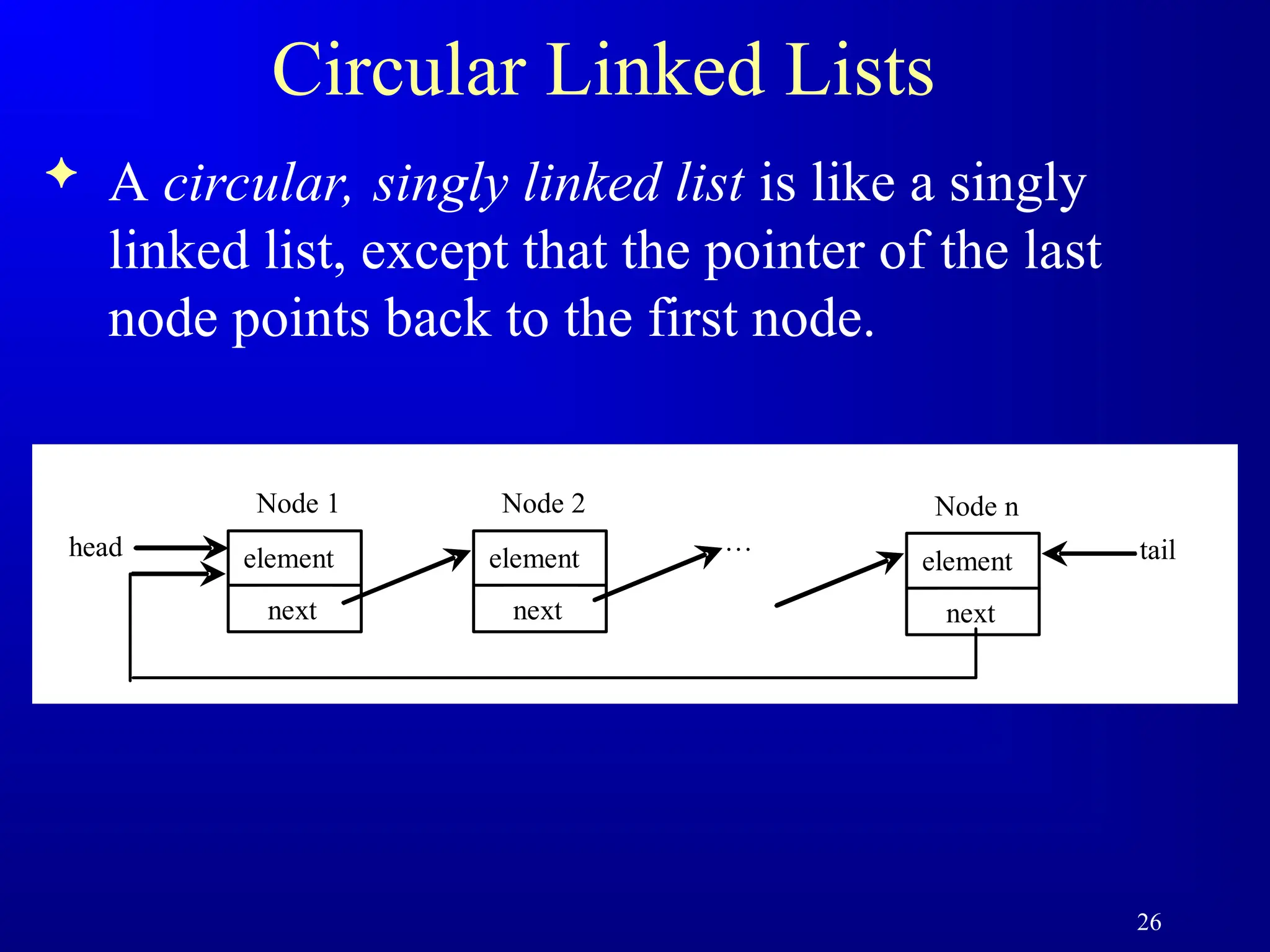
Circular Linked Lists
A circular, singly linked list is like a singly
linked list, except that the pointer of the last
node points back to the first node.
element
head
next
Node 1
element
next
Node 2
…
element
next
Node n
tail
27.
27
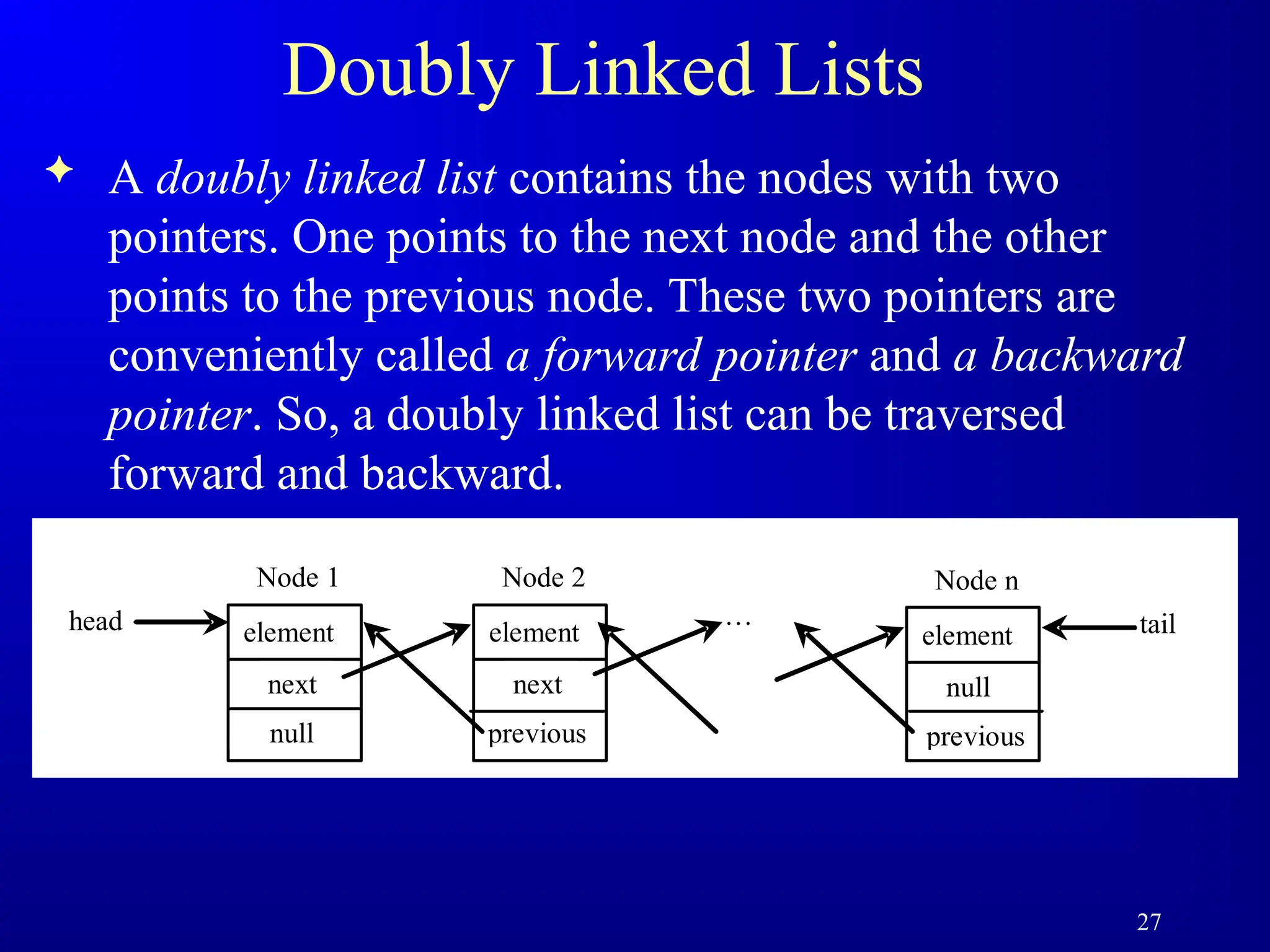
Doubly Linked Lists
A doubly linked list contains the nodes with two
pointers. One points to the next node and the other
points to the previous node. These two pointers are
conveniently called a forward pointer and a backward
pointer. So, a doubly linked list can be traversed
forward and backward.
element
head
next
Node 1
element
next
Node 2
…
element
null
Node n
tail
null previous previous
28.
28
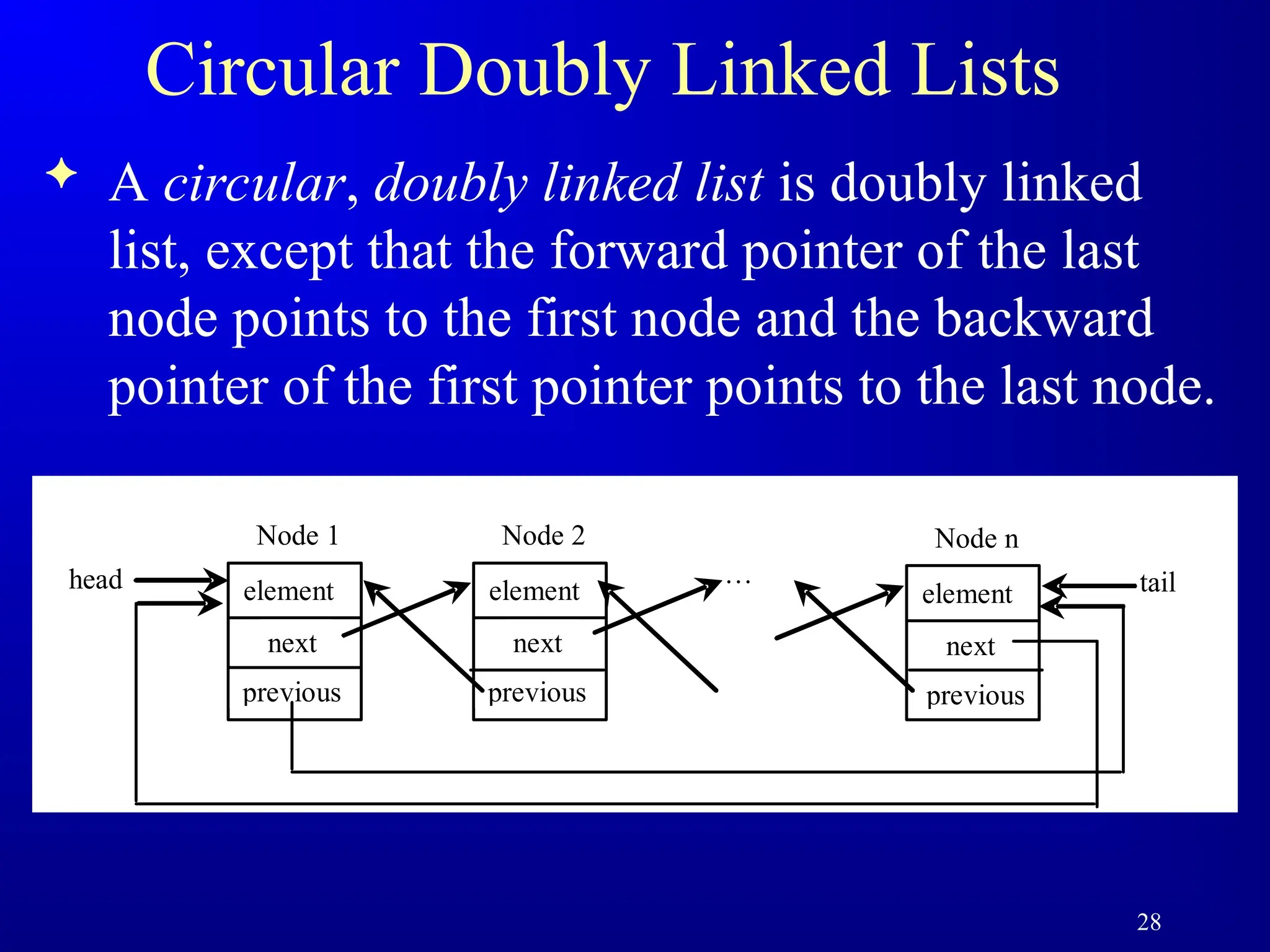
Circular Doubly LinkedLists
A circular, doubly linked list is doubly linked
list, except that the forward pointer of the last
node points to the first node and the backward
pointer of the first pointer points to the last node.
element
head
next
Node 1
element
next
Node 2
…
element
next
Node n
tail
previous previous previous
29.
29
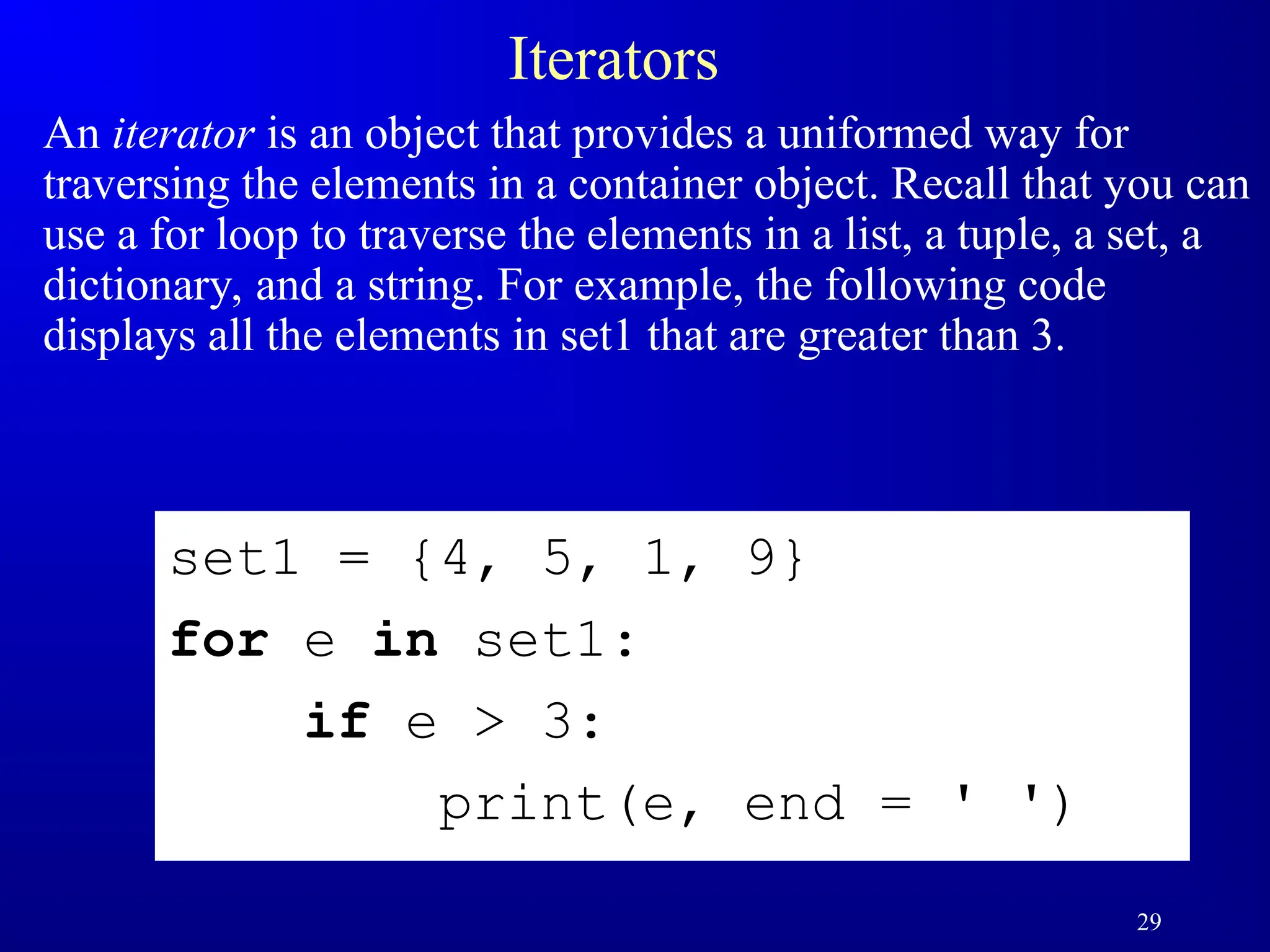
Iterators
An iterator isan object that provides a uniformed way for
traversing the elements in a container object. Recall that you can
use a for loop to traverse the elements in a list, a tuple, a set, a
dictionary, and a string. For example, the following code
displays all the elements in set1 that are greater than 3.
set1 = {4, 5, 1, 9}
for e in set1:
if e > 3:
print(e, end = ' ')
30.
30
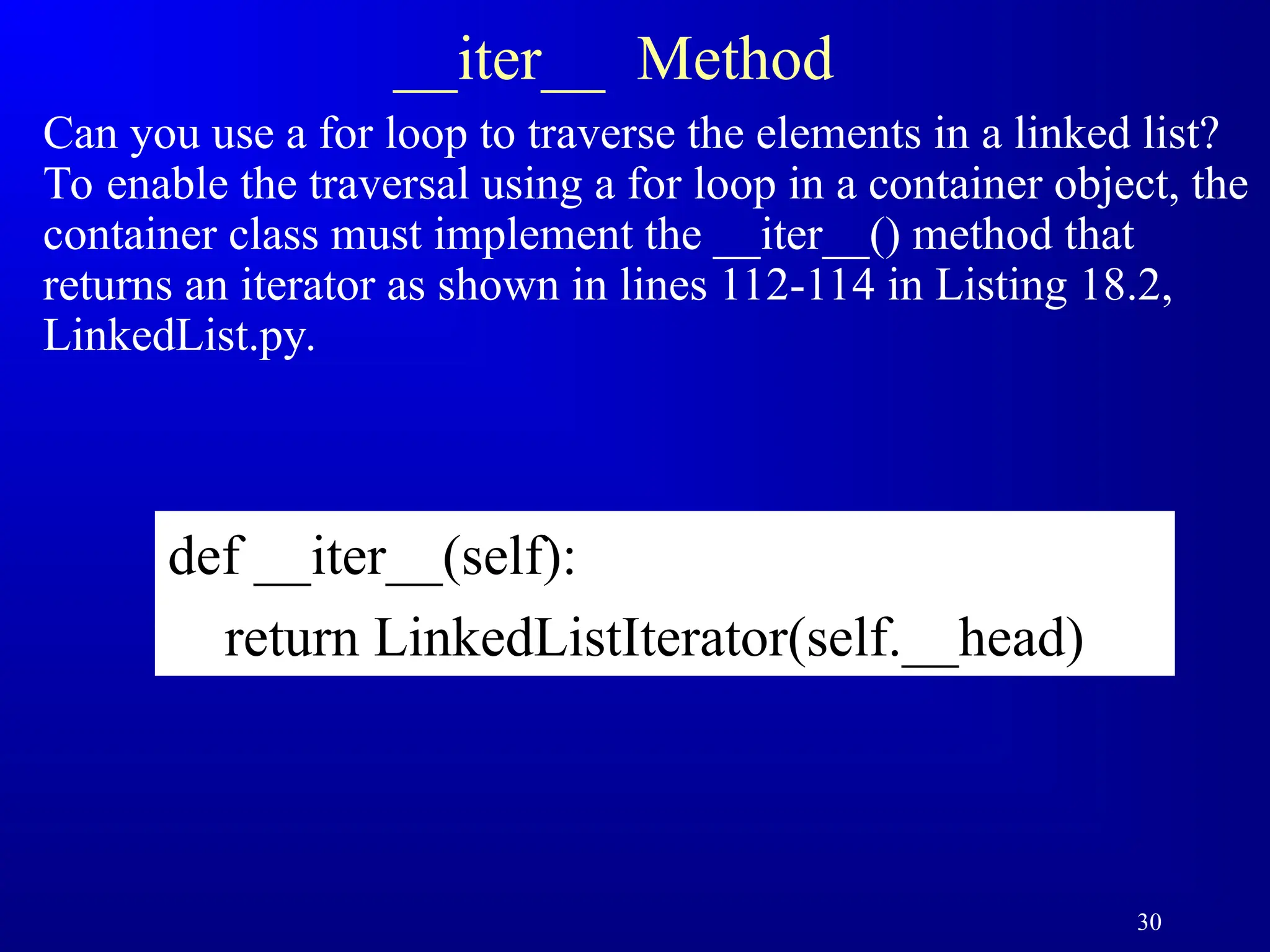
__iter__ Method
Can youuse a for loop to traverse the elements in a linked list?
To enable the traversal using a for loop in a container object, the
container class must implement the __iter__() method that
returns an iterator as shown in lines 112-114 in Listing 18.2,
LinkedList.py.
def __iter__(self):
return LinkedListIterator(self.__head)
31.
31
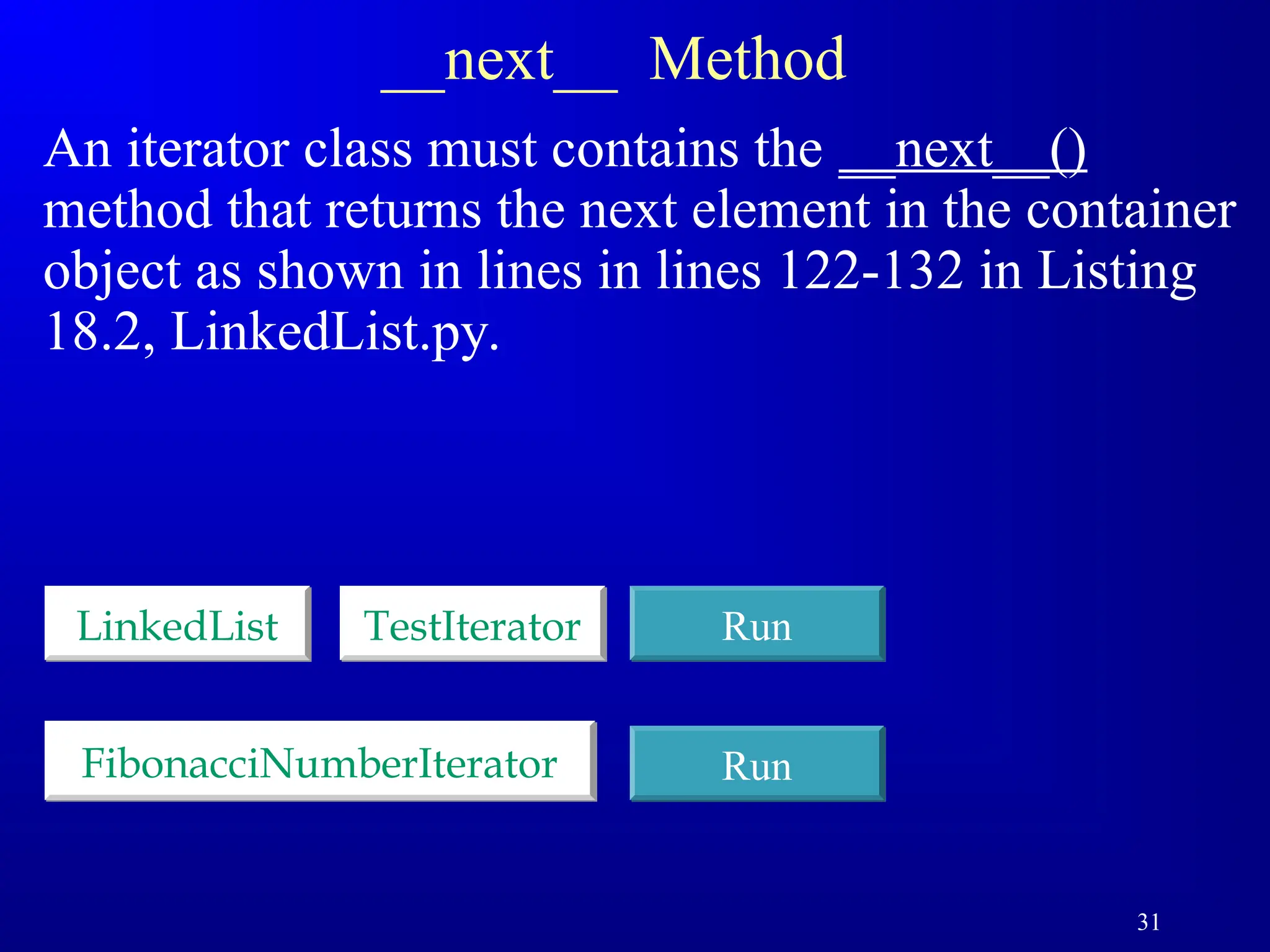
__next__ Method
An iteratorclass must contains the __next__()
method that returns the next element in the container
object as shown in lines in lines 122-132 in Listing
18.2, LinkedList.py.
LinkedList TestIterator Run
FibonacciNumberIterator Run
32.
32
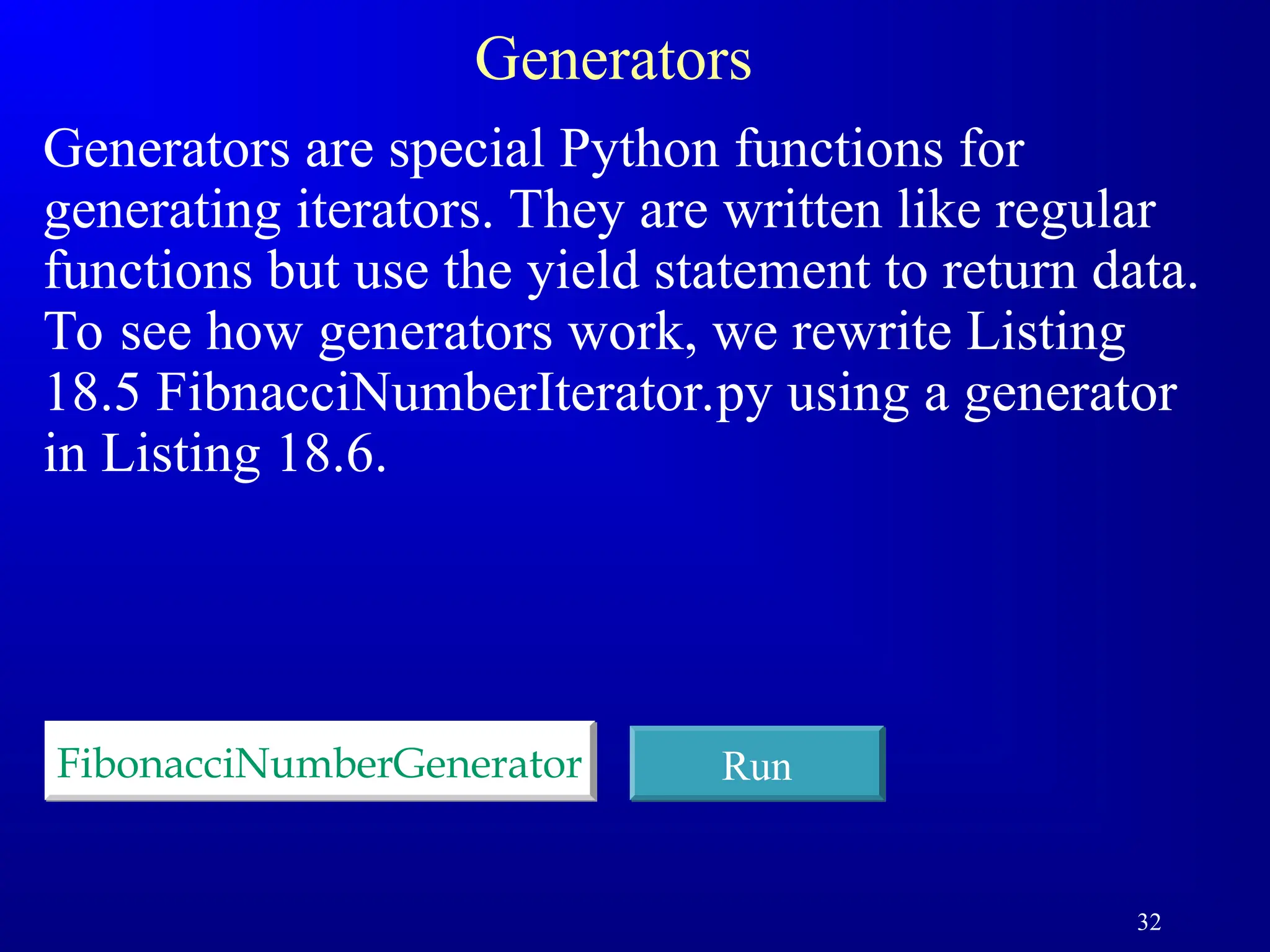
Generators
Generators are specialPython functions for
generating iterators. They are written like regular
functions but use the yield statement to return data.
To see how generators work, we rewrite Listing
18.5 FibnacciNumberIterator.py using a generator
in Listing 18.6.
FibonacciNumberGenerator Run
33.
33
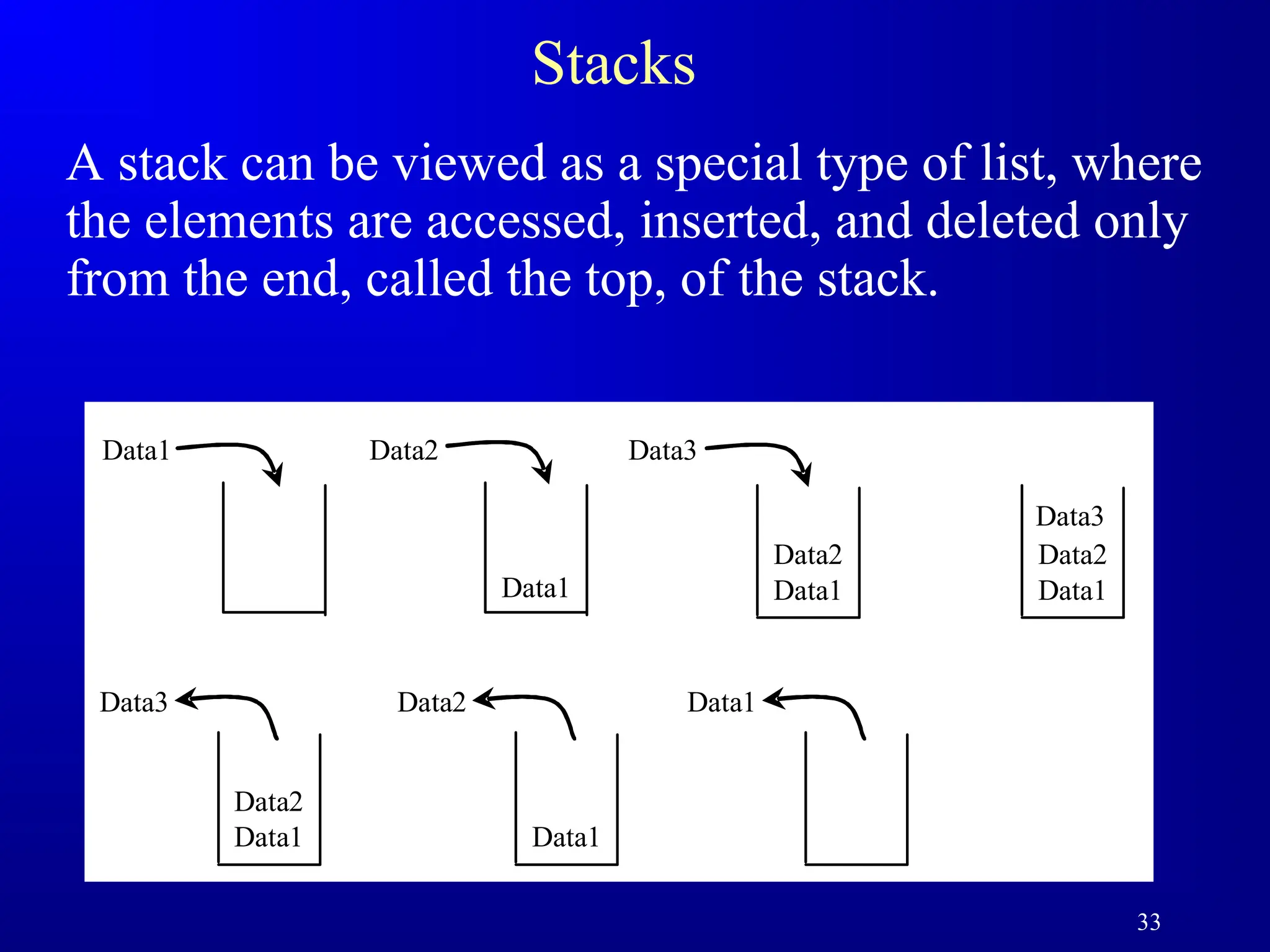
Stacks
A stack canbe viewed as a special type of list, where
the elements are accessed, inserted, and deleted only
from the end, called the top, of the stack.
Data1
Data2
Data1 Data1
Data2
Data3
Data1 Data2 Data3
Data1
Data2
Data3
Data1
Data2 Data1
35
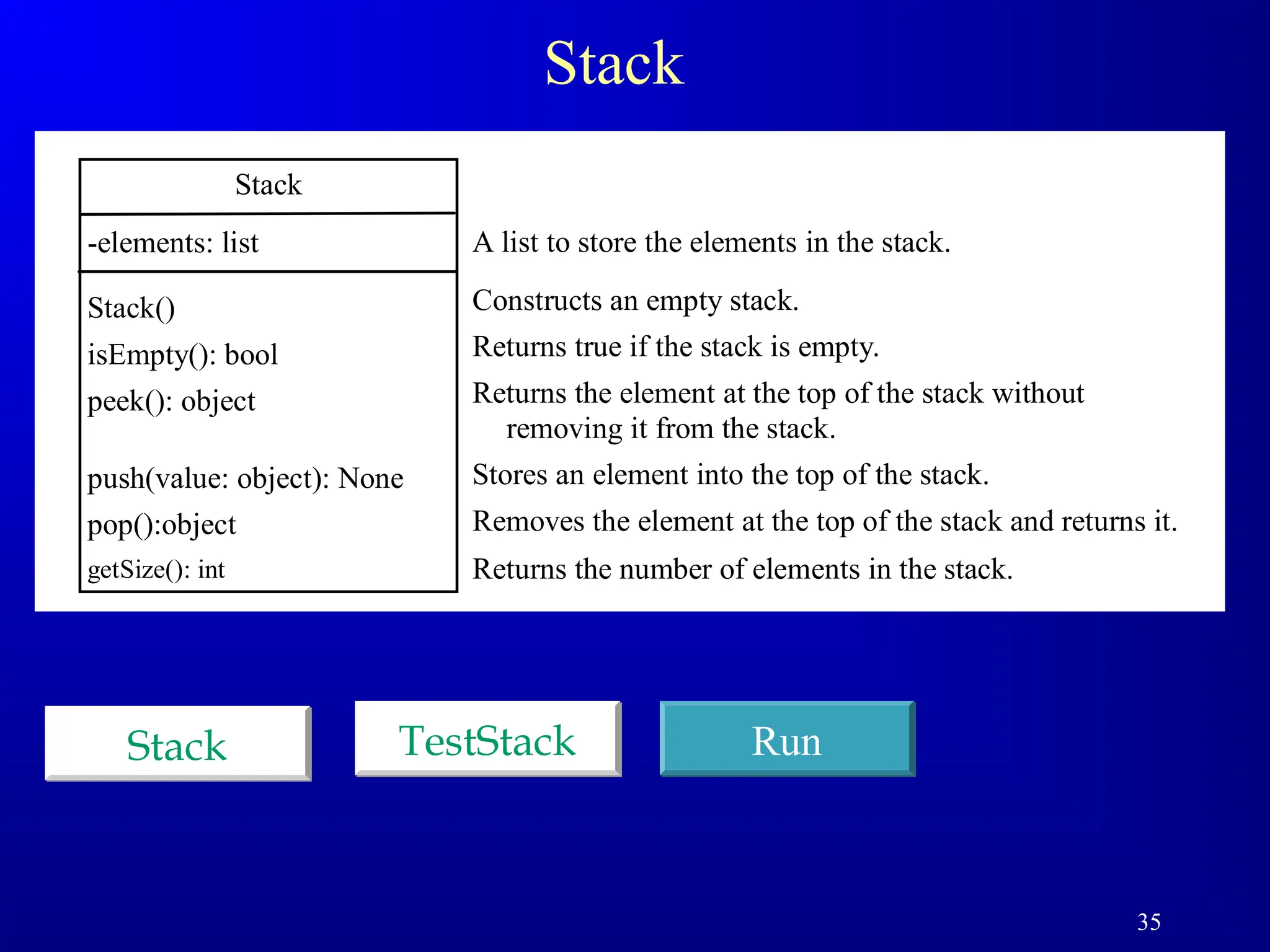
Stack
Stack
-elements: list
Stack()
isEmpty(): bool
peek():object
push(value: object): None
pop():object
getSize(): int
A list to store the elements in the stack.
Constructs an empty stack.
Returns true if the stack is empty.
Returns the element at the top of the stack without
removing it from the stack.
Stores an element into the top of the stack.
Removes the element at the top of the stack and returns it.
Returns the number of elements in the stack.
Stack Run
TestStack
36.
36
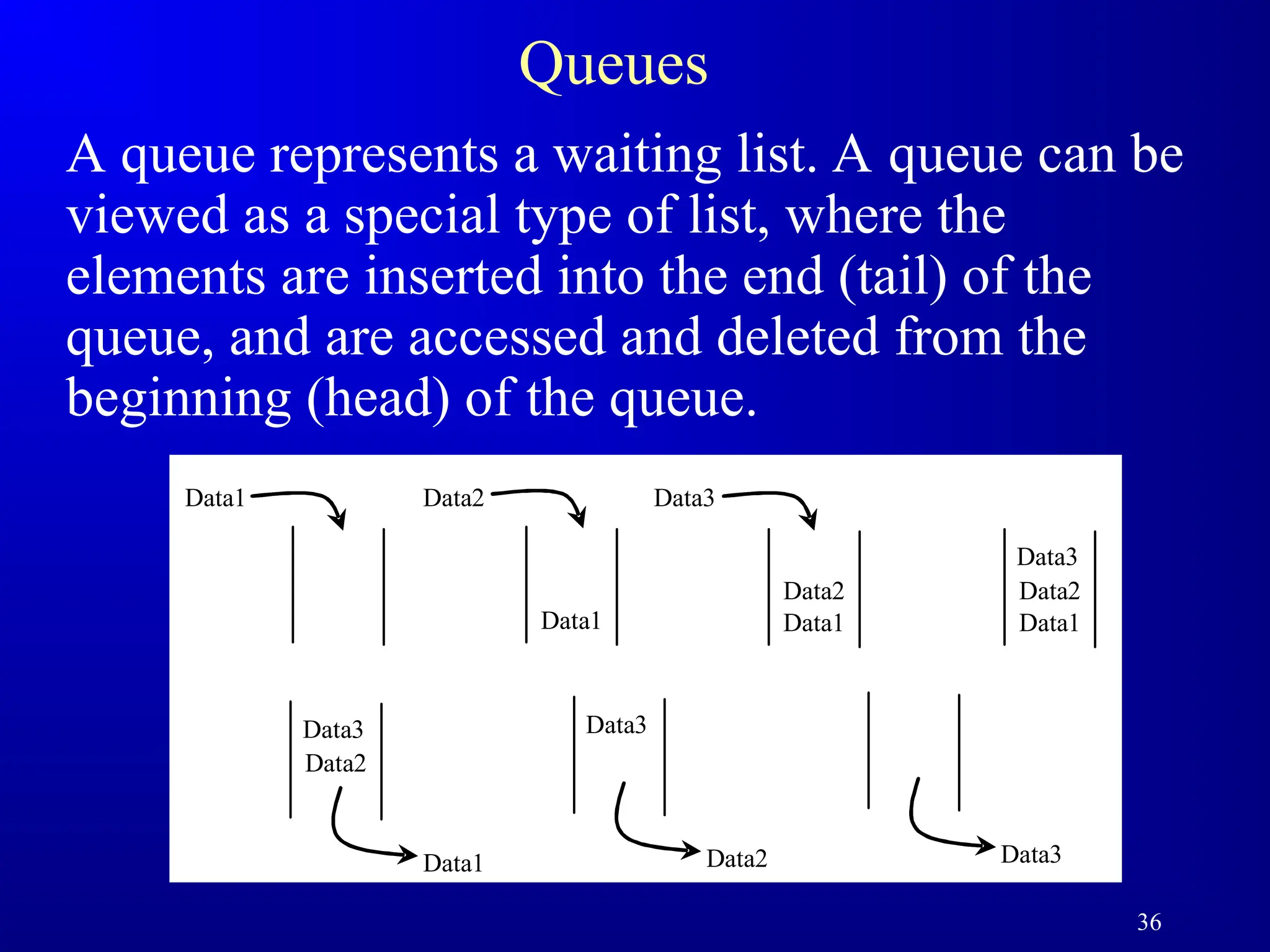
Queues
A queue representsa waiting list. A queue can be
viewed as a special type of list, where the
elements are inserted into the end (tail) of the
queue, and are accessed and deleted from the
beginning (head) of the queue.
Data1
Data2
Data1 Data1
Data2
Data3
Data1 Data2 Data3
Data2
Data3
Data1
Data3
Data2 Data3
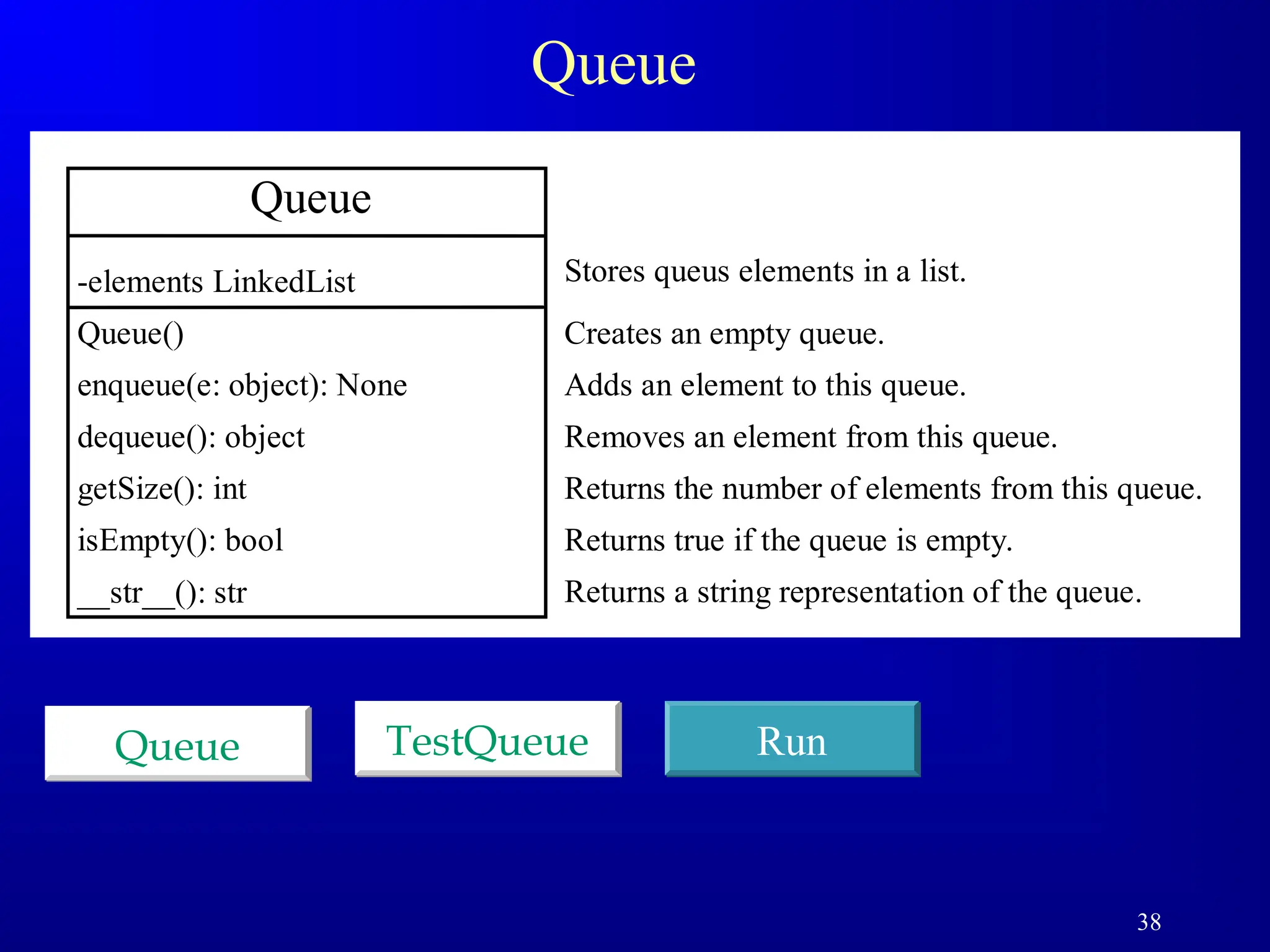
38
Queue
Queue Run
TestQueue
Queue
-elements LinkedList
Queue()
enqueue(e:object): None
dequeue(): object
getSize(): int
isEmpty(): bool
__str__(): str
Creates an empty queue.
Adds an element to this queue.
Removes an element from this queue.
Returns the number of elements from this queue.
Returns true if the queue is empty.
Returns a string representation of the queue.
Stores queus elements in a list.
39.
39
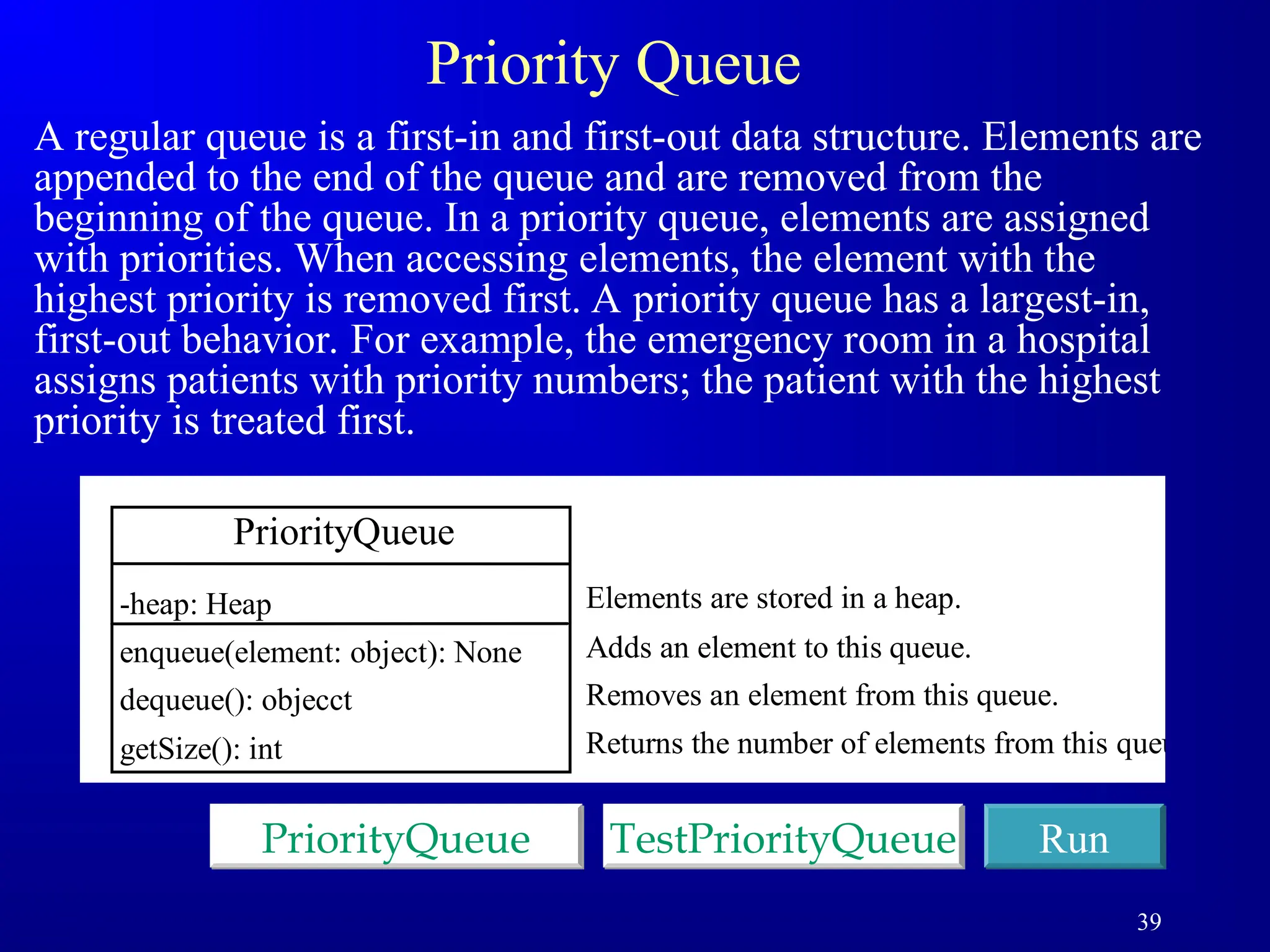
Priority Queue
A regularqueue is a first-in and first-out data structure. Elements are
appended to the end of the queue and are removed from the
beginning of the queue. In a priority queue, elements are assigned
with priorities. When accessing elements, the element with the
highest priority is removed first. A priority queue has a largest-in,
first-out behavior. For example, the emergency room in a hospital
assigns patients with priority numbers; the patient with the highest
priority is treated first.
PriorityQueue Run
TestPriorityQueue
PriorityQueue
-heap: Heap
enqueue(element: object): None
dequeue(): objecct
getSize(): int
Adds an element to this queue.
Removes an element from this queue.
Returns the number of elements from this queue.
Elements are stored in a heap.
![8
Why Linked List?
Arrays can be used to store linear data of similar types, but arrays have
the following limitations.
1) The size of the arrays is fixed: So we must know the upper limit on the number of
elements in advance. Also, generally, the allocated memory is equal to the upper limit
irrespective of the usage.
2) Inserting a new element in an array of elements is expensive because the room has to
be created for the new elements and to create room existing elements have to be
shifted.
For example, in a system, if we maintain a sorted list of IDs in an array id[].
id[] = [1000, 1010, 1050, 2000, 2040].
And if we want to insert a new ID 1005, then to maintain the sorted order, we have to
move all the elements after 1000 (excluding 1000).
Deletion is also expensive with arrays until unless some special techniques are used.
For example, to delete 1010 in id[], everything after 1010 has to be moved.
Advantages over arrays](https://image.slidesharecdn.com/linkedlistukl1-2-250403200426-9511a17e/75/LINKEDb2bb22bb3b3b3b3n3_LIST_UKL_1-2-ppt-8-2048.jpg)
![24
Time Complexity for list and LinkedList
Methods for list/Complexity Methods for LinkedList/Complexity
append(e: E) )
1
(
O add(e: E) )
1
(
O
insert(index: int, e: E) )
(n
O insert(index: int, e: E) )
(n
O
N/A clear() )
1
(
O
e in myList )
(n
O contains(e: E) )
(n
O
list[index] )
1
(
O get(index: int) )
(n
O
index(e: E) )
(n
O indexOf(e: E) )
(n
O
len(x) == 0? )
1
(
O isEmpty() )
1
(
O
N/A lastIndexOf(e: E) )
(n
O
remove(e: E) )
(n
O remove(e: E) )
(n
O
len(x) )
1
(
O getSize() )
1
(
O
del x[index] )
(n
O removeAt(index: int) )
(n
O
x[index] = e )
(n
O set(index: int, e: E) )
(n
O
insert(0, e) )
(n
O addFirst(e: E) )
1
(
O
del x[0] )
(n
O removeFirst() )
1
(
O](https://image.slidesharecdn.com/linkedlistukl1-2-250403200426-9511a17e/75/LINKEDb2bb22bb3b3b3b3n3_LIST_UKL_1-2-ppt-24-2048.jpg)