Augmente
d Human
Lab Flowsxr
Quick Prototyping with Unity & CoPilot
ICE 2025
Prasanth Sasikumar
Augmente
d Human
Lab flowsxr.com
Contents
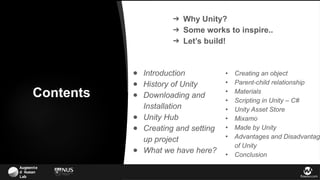
● Creating an object
● Parent-child relationship
● Materials
● Scripting in Unity – C#
● Unity Asset Store
● Mixamo
● Made by Unity
● Advantages and Disadvantage
of Unity
● Conclusion
● Introduction
● History of Unity
● Downloading and
Installation
● Unity Hub
● Creating and setting
up project
● What we have here?
➔ Why Unity?
➔ Some works to inspire..
➔ Let’s build!
Augmente
d Human
Lab flowsxr.com
Unity is a powerful platform whose capabilities extend to a
wide range of interactive and graphic-intensive projects.
Unity can be used to build:
● Interactive art installations
● Unique user interfaces, even for things like car
dashboards
● Web, desktop, and mobile applications & VR/AR
experiences
Because of its robust tools and cross-platform support, Unity
is a go-to for creators looking to bring their ideas to life.
Why Unity?
But it's true that games are where Unity really shines.
Augmente
d Human
Lab Flowsxr
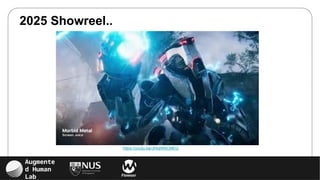
2025 Showreel..
https://youtu.be/JhfqtW9CMEQ
Augmente
d Human
Lab Flowsxr
Some of our recent work….
Augmente
d Human
Lab flowsxr.com
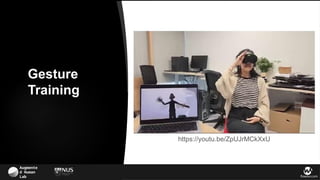
https://youtu.be/ZpUJrMCkXxU
Gesture
Training
Augmente
d Human
Lab flowsxr.com
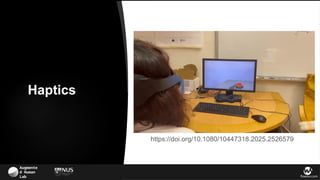
https://doi.org/10.1080/10447318.2025.2526579
Haptics
Augmente
d Human
Lab flowsxr.com
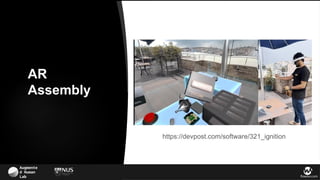
https://devpost.com/software/321_ignition
AR
Assembly
Augmente
d Human
Lab flowsxr.com
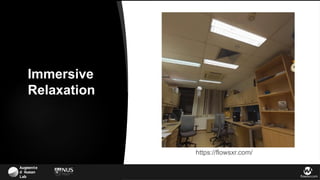
https://flowsxr.com/
Immersive
Relaxation
Augmente
d Human
Lab flowsxr.com
https://flowsxr.com/
Immersive
Relaxation
Augmente
d Human
Lab flowsxr.com
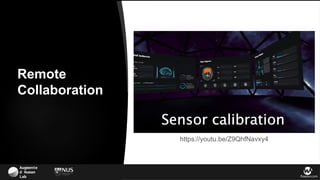
https://youtu.be/Z9QhfNavxy4
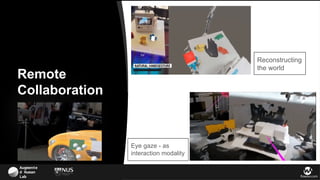
Remote
Collaboration
Augmente
d Human
Lab flowsxr.com
Eye gaze - as
interaction modality
Remote
Collaboration
Reconstructing
the world
Augmente
d Human
Lab flowsxr.com
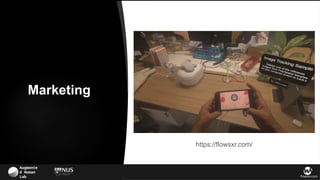
https://flowsxr.com/
Marketing
Augmente
d Human
Lab flowsxr.com
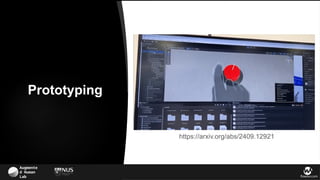
https://arxiv.org/abs/2409.12921
Prototyping
Augmente
d Human
Lab Flowsxr
Let’s build(really fast) !
Augmente
d Human
Lab Flowsxr
Augmente
d Human
Lab
Download the slides at https://ice2025.com/
Skipping due to time constraints
Introduction to Unity Editor..
18
Introduction
• Unity is a cross-platform game engine developed by Unity Technologies.
• First announced and released in June 2005 at Apple Inc.'s Worldwide Developers
Conference as a Mac OS X-exclusive game engine.
• As of 2025, the engine had been extended to support more than 20 platforms.
• The engine can be used to create three-dimensional, two-dimensional, virtual
reality, and augmented reality games, as well as simulations and other
experiences.
• The engine has been adopted by industries outside video gaming, such as film,
automotive, architecture, engineering and construction.
Introduction
19
History of Unity
• Founded in a small Copenhagen apartment in 2004 by Nicholas Francis, Joachim Ante,
and David Helgason.
• But the company, which was recently valued around $6 billion and could be headed
toward an IPO, is becoming much more than that.
• “Unity wants to be the 3D operating system of the world”, says Sylvio Drouin, VP of
the Unity Labs R&D team.
• Nearly half of the world’s games are built with Unity, which is particularly popular among
mobile game developers.
• And in the fourteen years since Unity’s engine launched, the size of the global gaming
market has exploded from $27 billion to $135 billion.
20
Downloading and Installation
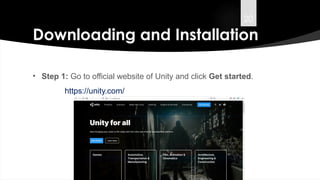
• Step 1: Go to official website of Unity and click Get started.
https://unity.com/
21
Downloading and Installation (Cont.)
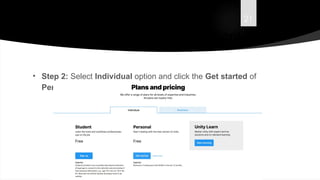
• Step 2: Select Individual option and click the Get started of
Personal.
22
Downloading and Installation (Cont.)
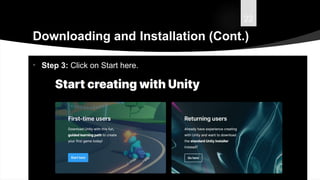
• Step 3: Click on Start here.
23
Downloading and Installation (Cont.)
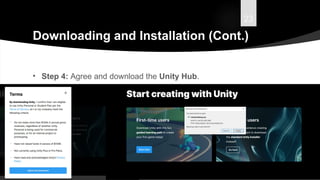
• Step 4: Agree and download the Unity Hub.
24
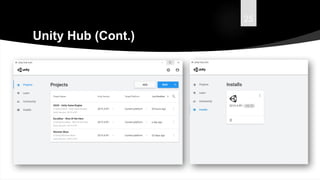
Unity Hub
• The Unity Hub is a management tool that you can use to manage
all of your Unity Projects and installations.
• Use the Hub to manage multiple installations of the Unity Editor
along with their associated components, create new Projects, and
open existing Projects.
• It can be downloaded and installed from the official unity website.
https://unity.com/
25
Unity Hub (Cont.)
26
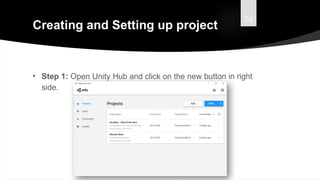
Creating and Setting up project
• Step 1: Open Unity Hub and click on the new button in right
side.
27
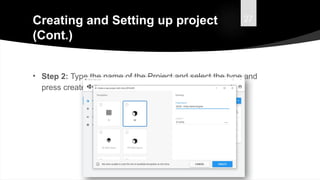
Creating and Setting up project
(Cont.)
• Step 2: Type the name of the Project and select the type and
press create.
28
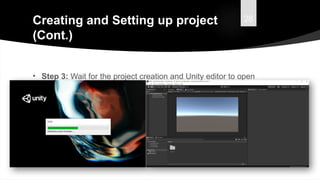
Creating and Setting up project
(Cont.)
• Step 3: Wait for the project creation and Unity editor to open
up.
Augmente
d Human
Lab Flowsxr
30
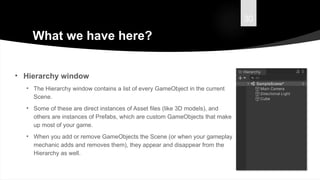
What we have here?
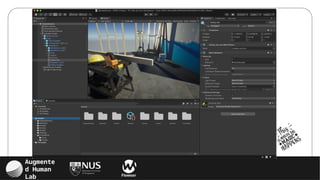
• Hierarchy window
• The Hierarchy window contains a list of every GameObject in the current
Scene.
• Some of these are direct instances of Asset files (like 3D models), and
others are instances of Prefabs, which are custom GameObjects that make
up most of your game.
• When you add or remove GameObjects the Scene (or when your gameplay
mechanic adds and removes them), they appear and disappear from the
Hierarchy as well.
31
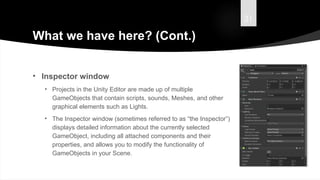
What we have here? (Cont.)
• Inspector window
• Projects in the Unity Editor are made up of multiple
GameObjects that contain scripts, sounds, Meshes, and other
graphical elements such as Lights.
• The Inspector window (sometimes referred to as “the Inspector”)
displays detailed information about the currently selected
GameObject, including all attached components and their
properties, and allows you to modify the functionality of
GameObjects in your Scene.
32
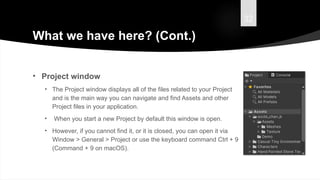
What we have here? (Cont.)
• Project window
• The Project window displays all of the files related to your Project
and is the main way you can navigate and find Assets and other
Project files in your application.
• When you start a new Project by default this window is open.
• However, if you cannot find it, or it is closed, you can open it via
Window > General > Project or use the keyboard command Ctrl + 9
(Command + 9 on macOS).
33
What we have here? (Cont.)
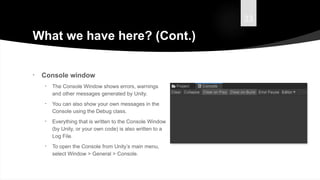
• Console window
• The Console Window shows errors, warnings
and other messages generated by Unity.
• You can also show your own messages in the
Console using the Debug class.
• Everything that is written to the Console Window
(by Unity, or your own code) is also written to a
Log File.
• To open the Console from Unity’s main menu,
select Window > General > Console.
34
What we have here? (Cont.)
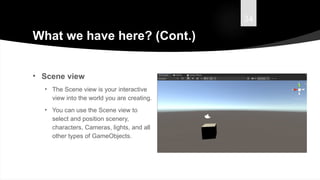
• Scene view
• The Scene view is your interactive
view into the world you are creating.
• You can use the Scene view to
select and position scenery,
characters, Cameras, lights, and all
other types of GameObjects.
35
What we have here? (Cont.)
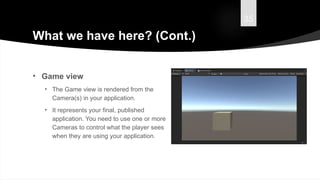
• Game view
• The Game view is rendered from the
Camera(s) in your application.
• It represents your final, published
application. You need to use one or more
Cameras to control what the player sees
when they are using your application.
36
What we have here? (Cont.)
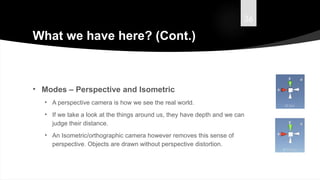
• Modes – Perspective and Isometric
• A perspective camera is how we see the real world.
• If we take a look at the things around us, they have depth and we can
judge their distance.
• An Isometric/orthographic camera however removes this sense of
perspective. Objects are drawn without perspective distortion.
37
What we have here? (Cont.)
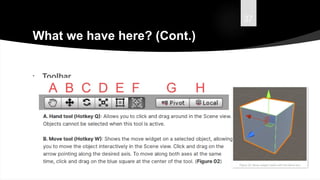
• Toolbar
38
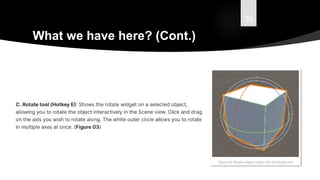
What we have here? (Cont.)
39
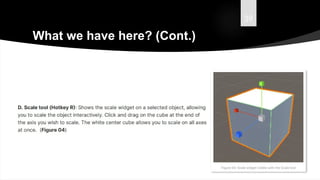
What we have here? (Cont.)
40
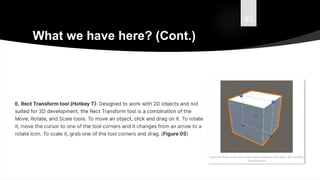
What we have here? (Cont.)
41
What we have here? (Cont.)
42
What we have here? (Cont.)
43
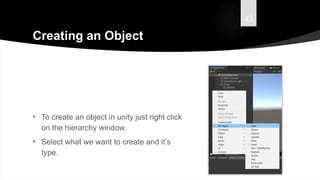
Creating an Object
• To create an object in unity just right click
on the hierarchy window.
• Select what we want to create and it’s
type.
44
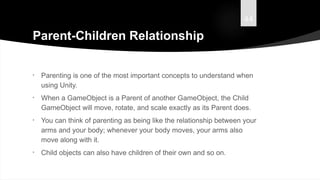
Parent-Children Relationship
• Parenting is one of the most important concepts to understand when
using Unity.
• When a GameObject is a Parent of another GameObject, the Child
GameObject will move, rotate, and scale exactly as its Parent does.
• You can think of parenting as being like the relationship between your
arms and your body; whenever your body moves, your arms also
move along with it.
• Child objects can also have children of their own and so on.
45
Parent-Children Relationship (Cont.)
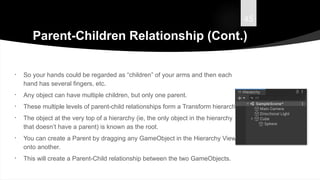
• So your hands could be regarded as “children” of your arms and then each
hand has several fingers, etc.
• Any object can have multiple children, but only one parent.
• These multiple levels of parent-child relationships form a Transform hierarchy.
• The object at the very top of a hierarchy (ie, the only object in the hierarchy
that doesn’t have a parent) is known as the root.
• You can create a Parent by dragging any GameObject in the Hierarchy View
onto another.
• This will create a Parent-Child relationship between the two GameObjects.
46
Materials
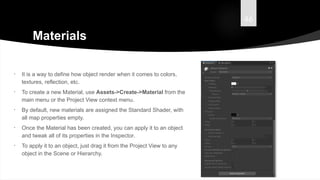
• It is a way to define how object render when it comes to colors,
textures, reflection, etc.
• To create a new Material, use Assets->Create->Material from the
main menu or the Project View context menu.
• By default, new materials are assigned the Standard Shader, with
all map properties empty.
• Once the Material has been created, you can apply it to an object
and tweak all of its properties in the Inspector.
• To apply it to an object, just drag it from the Project View to any
object in the Scene or Hierarchy.
47
Scripting in Unity – C#
• Scripting tells our GameObjects how to behave.
• It is the scripting and components attached to the GameObjects,
and how they interact with each other, that creates your gameplay.
• Unity uses C#(C sharp) as it’s scripting language.
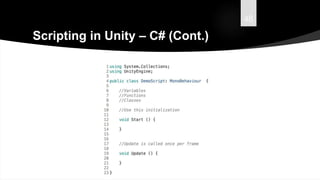
• Like any language, scripting language have syntax, or parts of
speech and the primary parts are called variables, functions, and
classes.
48
Scripting in Unity – C# (Cont.)
49
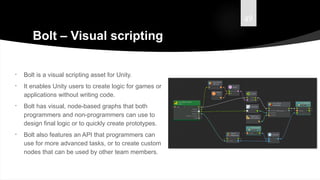
Bolt – Visual scripting
• Bolt is a visual scripting asset for Unity.
• It enables Unity users to create logic for games or
applications without writing code.
• Bolt has visual, node-based graphs that both
programmers and non-programmers can use to
design final logic or to quickly create prototypes.
• Bolt also features an API that programmers can
use for more advanced tasks, or to create custom
nodes that can be used by other team members.
50
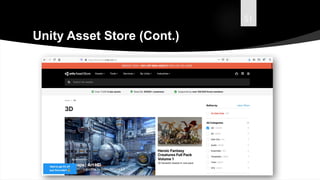
Unity Asset Store
• It is a growing library of Assets.
• Both Unity Technologies and members of the community
create these Assets and publish them to the store.
• There is a mix of free and affordable commercial Assets that
you can download directly into your Unity Project.
51
Unity Asset Store (Cont.)
52
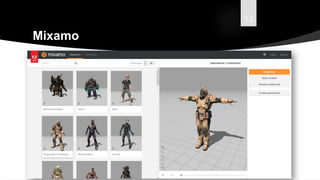
Mixamo
• Mixamo is a 3D computer graphics technology company.
• Based in San Francisco, the company develops and sells web-based services for
3D character animation.
• Mixamo's technologies use machine learning methods to automate the steps of the
character animation process, including 3D modeling to rigging and 3D animation.
• Mixamo is spun-off of Stanford University and has raised over $11 million from
investors Granite Ventures, Keynote Ventures, Stanford University and AMD
Ventures.
• Mixamo was acquired by Adobe Systems on June 1, 2015.
53
Mixamo
54
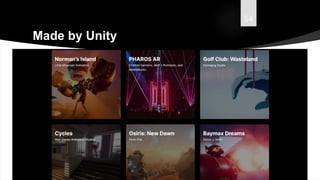
Made by Unity
55
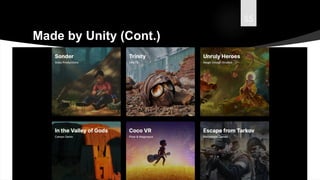
Made by Unity (Cont.)
56
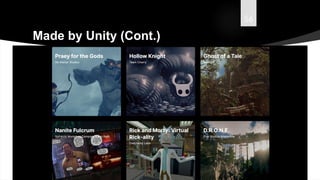
Made by Unity (Cont.)
57
Advantages of Unity
• Platform support: The engine is highly preferred for its extended support to 27
platforms.
• IDE: The integrated development editor support JavaScript and C# for scripting, and
also offers notable features that are ideal for the game development.
• Graphics: The high quality audio and visual effects are supported by the engine that
eases the game development.
• Documentation: The detailed documentation includes the explanation of every
small topic.
• Debugging: The debugging and tweaking is amazingly easier with Unity game
development because all the game variables are displayed during gameplay, which
in turn allow the developers to debug the process at runtime.
58
Disadvantages of Unity
• Tools: It does not offer an array of tools to create stupendous graphics as opposed to
other game development engines.
• Physics: In Unity 5 engine, the built-in support for the PhysX physics engine has
some performance issues and lacks some important functionalities which need to be
added to craft the excellent game app.
• License cost: The developers need to have licenses for the best graphics,
deployment and performance improvements.
• Source code: Unavailability of the source code makes finding, addressing and fixing
the performance issues difficult.
• Memory hogging: The game developed leveraging Unity engine consumes more
memory, which in turn creates OOM errors and debugging issues in the apps.
59
Conclusion
• Unity is the world’s leading engine with most market share
• Low barrier when to enter Game Development world
• Quickest and easiest
• 2D and 3D capable
• C# scripting
• Tons of platform support
• Can be used by both Beginners & Experts
• AAA Quality
Augmente
d Human
Lab Flowsxr
Let’s build (with AI)
Augmente
d Human
Lab flowsxr.com
Connecting Unity
with Copilot
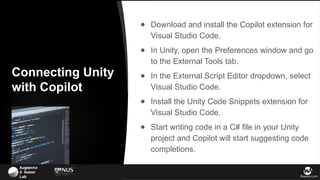
● Download and install the Copilot extension for
Visual Studio Code.
● In Unity, open the Preferences window and go
to the External Tools tab.
● In the External Script Editor dropdown, select
Visual Studio Code.
● Install the Unity Code Snippets extension for
Visual Studio Code.
● Start writing code in a C# file in your Unity
project and Copilot will start suggesting code
completions.
Augmente
d Human
Lab flowsxr.com
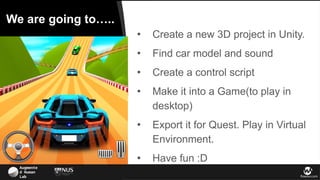
We are going to…..
● Create a new 3D project in Unity.
● Find car model and sound
● Create a control script
● Make it into a Game(to play in
desktop)
● Export it for Quest. Play in Virtual
Environment.
● Have fun :D
Augmente
d Human
Lab Flowsxr
Hands on!
Augmente
d Human
Lab Flowsxr
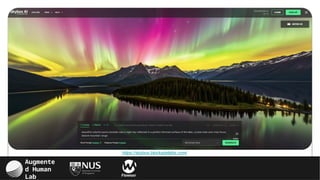
https://skybox.blockadelabs.com/
Augmente
d Human
Lab flowsxr.com
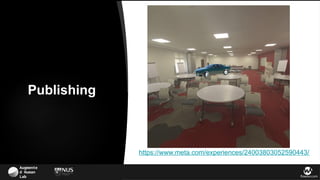
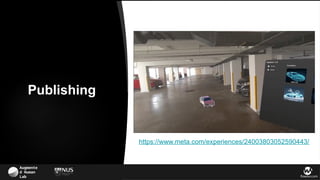
https://www.meta.com/experiences/24003803052590443/
Publishing
Augmente
d Human
Lab flowsxr.com
https://www.meta.com/experiences/24003803052590443/
Publishing
Augmente
d Human
Lab Flowsxr
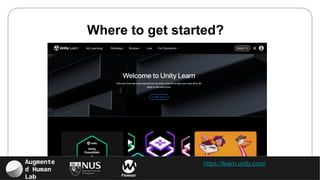
https://learn.unity.com/
Where to get started?
Augmente
d Human
Lab flowsxr.com
Questions?
Prasanth Sasikumar
Download the slides
at https://ice2025.com/
Augmente
d Human
Lab flowsxr.com
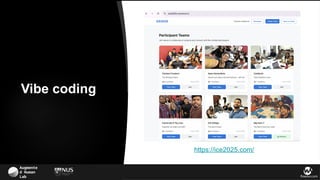
https://ice2025.com/
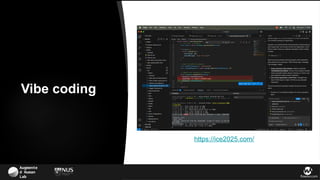
Vibe coding
Augmente
d Human
Lab flowsxr.com
https://ice2025.com/
Vibe coding
Augmente
d Human
Lab flowsxr.com
Good Luck
Prasanth Sasikumar
Download the slides
at https://ice2025.com/
& Happy Prototyping!

[ICE 2025] Quick Prototyping with Unity & CoPilot.pptx

  • 1.
    Augmente d Human Lab Flowsxr QuickPrototyping with Unity & CoPilot ICE 2025 Prasanth Sasikumar
  • 2.
    Augmente d Human Lab flowsxr.com Contents ●Creating an object ● Parent-child relationship ● Materials ● Scripting in Unity – C# ● Unity Asset Store ● Mixamo ● Made by Unity ● Advantages and Disadvantage of Unity ● Conclusion ● Introduction ● History of Unity ● Downloading and Installation ● Unity Hub ● Creating and setting up project ● What we have here? ➔ Why Unity? ➔ Some works to inspire.. ➔ Let’s build!
  • 3.
    Augmente d Human Lab flowsxr.com Unityis a powerful platform whose capabilities extend to a wide range of interactive and graphic-intensive projects. Unity can be used to build: ● Interactive art installations ● Unique user interfaces, even for things like car dashboards ● Web, desktop, and mobile applications & VR/AR experiences Because of its robust tools and cross-platform support, Unity is a go-to for creators looking to bring their ideas to life. Why Unity? But it's true that games are where Unity really shines.
  • 4.
    Augmente d Human Lab Flowsxr 2025Showreel.. https://youtu.be/JhfqtW9CMEQ
  • 5.
    Augmente d Human Lab Flowsxr Someof our recent work….
  • 6.
  • 7.
  • 8.
  • 9.
  • 10.
  • 11.
  • 12.
    Augmente d Human Lab flowsxr.com Eyegaze - as interaction modality Remote Collaboration Reconstructing the world
  • 13.
  • 14.
  • 15.
  • 16.
  • 17.
    Augmente d Human Lab Download theslides at https://ice2025.com/ Skipping due to time constraints Introduction to Unity Editor..
  • 18.
    18 Introduction • Unity isa cross-platform game engine developed by Unity Technologies. • First announced and released in June 2005 at Apple Inc.'s Worldwide Developers Conference as a Mac OS X-exclusive game engine. • As of 2025, the engine had been extended to support more than 20 platforms. • The engine can be used to create three-dimensional, two-dimensional, virtual reality, and augmented reality games, as well as simulations and other experiences. • The engine has been adopted by industries outside video gaming, such as film, automotive, architecture, engineering and construction. Introduction
  • 19.
    19 History of Unity •Founded in a small Copenhagen apartment in 2004 by Nicholas Francis, Joachim Ante, and David Helgason. • But the company, which was recently valued around $6 billion and could be headed toward an IPO, is becoming much more than that. • “Unity wants to be the 3D operating system of the world”, says Sylvio Drouin, VP of the Unity Labs R&D team. • Nearly half of the world’s games are built with Unity, which is particularly popular among mobile game developers. • And in the fourteen years since Unity’s engine launched, the size of the global gaming market has exploded from $27 billion to $135 billion.
  • 20.
    20 Downloading and Installation •Step 1: Go to official website of Unity and click Get started. https://unity.com/
  • 21.
    21 Downloading and Installation(Cont.) • Step 2: Select Individual option and click the Get started of Personal.
  • 22.
    22 Downloading and Installation(Cont.) • Step 3: Click on Start here.
  • 23.
    23 Downloading and Installation(Cont.) • Step 4: Agree and download the Unity Hub.
  • 24.
    24 Unity Hub • TheUnity Hub is a management tool that you can use to manage all of your Unity Projects and installations. • Use the Hub to manage multiple installations of the Unity Editor along with their associated components, create new Projects, and open existing Projects. • It can be downloaded and installed from the official unity website. https://unity.com/
  • 25.
  • 26.
    26 Creating and Settingup project • Step 1: Open Unity Hub and click on the new button in right side.
  • 27.
    27 Creating and Settingup project (Cont.) • Step 2: Type the name of the Project and select the type and press create.
  • 28.
    28 Creating and Settingup project (Cont.) • Step 3: Wait for the project creation and Unity editor to open up.
  • 29.
  • 30.
    30 What we havehere? • Hierarchy window • The Hierarchy window contains a list of every GameObject in the current Scene. • Some of these are direct instances of Asset files (like 3D models), and others are instances of Prefabs, which are custom GameObjects that make up most of your game. • When you add or remove GameObjects the Scene (or when your gameplay mechanic adds and removes them), they appear and disappear from the Hierarchy as well.
  • 31.
    31 What we havehere? (Cont.) • Inspector window • Projects in the Unity Editor are made up of multiple GameObjects that contain scripts, sounds, Meshes, and other graphical elements such as Lights. • The Inspector window (sometimes referred to as “the Inspector”) displays detailed information about the currently selected GameObject, including all attached components and their properties, and allows you to modify the functionality of GameObjects in your Scene.
  • 32.
    32 What we havehere? (Cont.) • Project window • The Project window displays all of the files related to your Project and is the main way you can navigate and find Assets and other Project files in your application. • When you start a new Project by default this window is open. • However, if you cannot find it, or it is closed, you can open it via Window > General > Project or use the keyboard command Ctrl + 9 (Command + 9 on macOS).
  • 33.
    33 What we havehere? (Cont.) • Console window • The Console Window shows errors, warnings and other messages generated by Unity. • You can also show your own messages in the Console using the Debug class. • Everything that is written to the Console Window (by Unity, or your own code) is also written to a Log File. • To open the Console from Unity’s main menu, select Window > General > Console.
  • 34.
    34 What we havehere? (Cont.) • Scene view • The Scene view is your interactive view into the world you are creating. • You can use the Scene view to select and position scenery, characters, Cameras, lights, and all other types of GameObjects.
  • 35.
    35 What we havehere? (Cont.) • Game view • The Game view is rendered from the Camera(s) in your application. • It represents your final, published application. You need to use one or more Cameras to control what the player sees when they are using your application.
  • 36.
    36 What we havehere? (Cont.) • Modes – Perspective and Isometric • A perspective camera is how we see the real world. • If we take a look at the things around us, they have depth and we can judge their distance. • An Isometric/orthographic camera however removes this sense of perspective. Objects are drawn without perspective distortion.
  • 37.
    37 What we havehere? (Cont.) • Toolbar
  • 38.
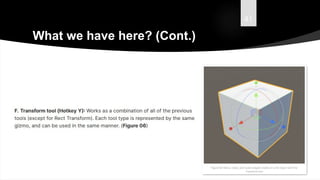
    38 What we havehere? (Cont.)
  • 39.
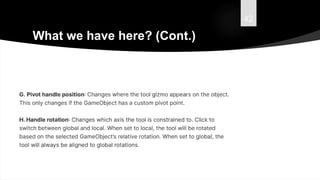
    39 What we havehere? (Cont.)
  • 40.
    40 What we havehere? (Cont.)
  • 41.
    41 What we havehere? (Cont.)
  • 42.
    42 What we havehere? (Cont.)
  • 43.
    43 Creating an Object •To create an object in unity just right click on the hierarchy window. • Select what we want to create and it’s type.
  • 44.
    44 Parent-Children Relationship • Parentingis one of the most important concepts to understand when using Unity. • When a GameObject is a Parent of another GameObject, the Child GameObject will move, rotate, and scale exactly as its Parent does. • You can think of parenting as being like the relationship between your arms and your body; whenever your body moves, your arms also move along with it. • Child objects can also have children of their own and so on.
  • 45.
    45 Parent-Children Relationship (Cont.) •So your hands could be regarded as “children” of your arms and then each hand has several fingers, etc. • Any object can have multiple children, but only one parent. • These multiple levels of parent-child relationships form a Transform hierarchy. • The object at the very top of a hierarchy (ie, the only object in the hierarchy that doesn’t have a parent) is known as the root. • You can create a Parent by dragging any GameObject in the Hierarchy View onto another. • This will create a Parent-Child relationship between the two GameObjects.
  • 46.
    46 Materials • It isa way to define how object render when it comes to colors, textures, reflection, etc. • To create a new Material, use Assets->Create->Material from the main menu or the Project View context menu. • By default, new materials are assigned the Standard Shader, with all map properties empty. • Once the Material has been created, you can apply it to an object and tweak all of its properties in the Inspector. • To apply it to an object, just drag it from the Project View to any object in the Scene or Hierarchy.
  • 47.
    47 Scripting in Unity– C# • Scripting tells our GameObjects how to behave. • It is the scripting and components attached to the GameObjects, and how they interact with each other, that creates your gameplay. • Unity uses C#(C sharp) as it’s scripting language. • Like any language, scripting language have syntax, or parts of speech and the primary parts are called variables, functions, and classes.
  • 48.
    48 Scripting in Unity– C# (Cont.)
  • 49.
    49 Bolt – Visualscripting • Bolt is a visual scripting asset for Unity. • It enables Unity users to create logic for games or applications without writing code. • Bolt has visual, node-based graphs that both programmers and non-programmers can use to design final logic or to quickly create prototypes. • Bolt also features an API that programmers can use for more advanced tasks, or to create custom nodes that can be used by other team members.
  • 50.
    50 Unity Asset Store •It is a growing library of Assets. • Both Unity Technologies and members of the community create these Assets and publish them to the store. • There is a mix of free and affordable commercial Assets that you can download directly into your Unity Project.
  • 51.
  • 52.
    52 Mixamo • Mixamo isa 3D computer graphics technology company. • Based in San Francisco, the company develops and sells web-based services for 3D character animation. • Mixamo's technologies use machine learning methods to automate the steps of the character animation process, including 3D modeling to rigging and 3D animation. • Mixamo is spun-off of Stanford University and has raised over $11 million from investors Granite Ventures, Keynote Ventures, Stanford University and AMD Ventures. • Mixamo was acquired by Adobe Systems on June 1, 2015.
  • 53.
  • 54.
  • 55.
  • 56.
  • 57.
    57 Advantages of Unity •Platform support: The engine is highly preferred for its extended support to 27 platforms. • IDE: The integrated development editor support JavaScript and C# for scripting, and also offers notable features that are ideal for the game development. • Graphics: The high quality audio and visual effects are supported by the engine that eases the game development. • Documentation: The detailed documentation includes the explanation of every small topic. • Debugging: The debugging and tweaking is amazingly easier with Unity game development because all the game variables are displayed during gameplay, which in turn allow the developers to debug the process at runtime.
  • 58.
    58 Disadvantages of Unity •Tools: It does not offer an array of tools to create stupendous graphics as opposed to other game development engines. • Physics: In Unity 5 engine, the built-in support for the PhysX physics engine has some performance issues and lacks some important functionalities which need to be added to craft the excellent game app. • License cost: The developers need to have licenses for the best graphics, deployment and performance improvements. • Source code: Unavailability of the source code makes finding, addressing and fixing the performance issues difficult. • Memory hogging: The game developed leveraging Unity engine consumes more memory, which in turn creates OOM errors and debugging issues in the apps.
  • 59.
    59 Conclusion • Unity isthe world’s leading engine with most market share • Low barrier when to enter Game Development world • Quickest and easiest • 2D and 3D capable • C# scripting • Tons of platform support • Can be used by both Beginners & Experts • AAA Quality
  • 60.
  • 61.
    Augmente d Human Lab flowsxr.com ConnectingUnity with Copilot ● Download and install the Copilot extension for Visual Studio Code. ● In Unity, open the Preferences window and go to the External Tools tab. ● In the External Script Editor dropdown, select Visual Studio Code. ● Install the Unity Code Snippets extension for Visual Studio Code. ● Start writing code in a C# file in your Unity project and Copilot will start suggesting code completions.
  • 62.
    Augmente d Human Lab flowsxr.com Weare going to….. ● Create a new 3D project in Unity. ● Find car model and sound ● Create a control script ● Make it into a Game(to play in desktop) ● Export it for Quest. Play in Virtual Environment. ● Have fun :D
  • 63.
  • 64.
  • 65.
  • 66.
  • 67.
  • 68.
    Augmente d Human Lab flowsxr.com Questions? PrasanthSasikumar Download the slides at https://ice2025.com/
  • 69.
  • 70.
  • 71.
    Augmente d Human Lab flowsxr.com GoodLuck Prasanth Sasikumar Download the slides at https://ice2025.com/ & Happy Prototyping!

Editor's Notes

  • #3 Unity is a powerful platform that goes far beyond just games. While it's best known for creating immersive game experiences, its capabilities extend to a wide range of interactive and graphic-intensive projects. Unity can be used to build: Interactive art installations Unique user interfaces, even for things like car dashboards Web, desktop, and mobile applications & VR/AR experiences Because of its robust tools and cross-platform support, Unity is a go-to for creators looking to bring their ideas to life. But it's true that games are where Unity really shines. To see what's possible, let's take a look at this 30-second showreel.
  • #4 Replace with shorter version