SDLC - 1
Systems Development Life Cycle
(SDLC)
Minder Chen, Ph.D.
Professor of MIS
Martin V. Smith School of Business and Economics
CSU Channel Islands
minder.chen@csuci.edu
SDLC - 2
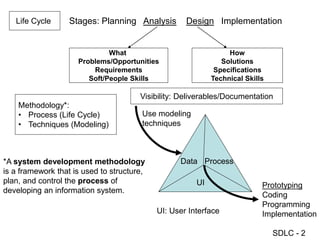
Life Cycle Stages: Planning Analysis Design Implementation
What
Problems/Opportunities
Requirements
Soft/People Skills
How
Solutions
Specifications
Technical Skills
Visibility: Deliverables/Documentation
Methodology*:
• Process (Life Cycle)
• Techniques (Modeling)
Data Process
UI Prototyping
Coding
Programming
Implementation
UI: User Interface
*A system development methodology
is a framework that is used to structure,
plan, and control the process of
developing an information system.
Use modeling
techniques
SDLC - 3
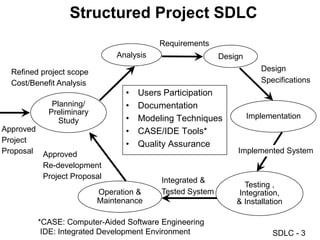
Structured Project SDLC
Planning/
Preliminary
Study
Analysis Design
Implementation
Testing ,
Integration,
& Installation
Operation &
Maintenance
• Users Participation
• Documentation
• Modeling Techniques
• CASE/IDE Tools*
• Quality Assurance
Approved
Project
Proposal
Refined project scope
Cost/Benefit Analysis
Approved
Re-development
Project Proposal
Requirements
Design
Specifications
Implemented System
Integrated &
Tested System
*CASE: Computer-Aided Software Engineering
IDE: Integrated Development Environment
SDLC - 4
SDLC Waterfall Model
• Programming
• Testing
• Training
• Installation
Requirements
AS-IS vs. TO-BE
Logical and physical
Design specification
Identify & prioritize IS
development projects
Bug fix and Upgrades
IT Service Management (ITIL standard)
Planning
Analysis
Design
Implementation
Operation
SDLC - 5
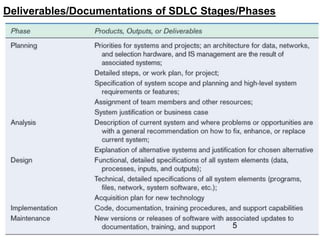
Deliverables/Documentations of SDLC Stages/Phases
5
SDLC - 6
Spiral Model and Prototyping
http://en.wikipedia.org/wiki/Spiral_model
http://www.reliablesoftware.com/weblog/uploaded_images/spiral-712085.bmp
6
SDLC - 7
Requirements Elicitation
SDLC - 8
Managing User Interviews
SDLC - 9
Stakeholder Perspectives
SDLC - 10
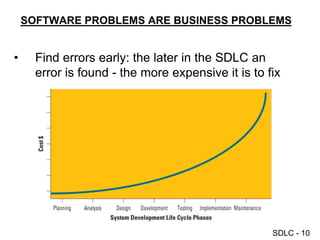
SOFTWARE PROBLEMS ARE BUSINESS PROBLEMS
• Find errors early: the later in the SDLC an
error is found - the more expensive it is to fix
SDLC - 11
Balancing The Triple Constraints in Projects
SDLC - 12
The Mythical Man-Month
http://www.cs.drexel.edu/~yfcai/CS451/RequiredReadings/MythicalManMonth.pdf
SDLC - 13
The Mythical Man-Month
SDLC - 14
Team Productivity
SDLC - 15
Adding More People
• Brook's Law:
• Adding developers to a late project will make it later.
SDLC - 16
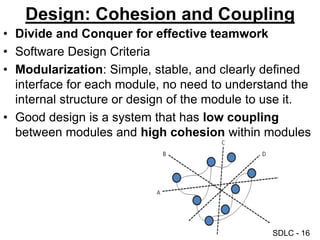
Design: Cohesion and Coupling
• Divide and Conquer for effective teamwork
• Software Design Criteria
• Modularization: Simple, stable, and clearly defined
interface for each module, no need to understand the
internal structure or design of the module to use it.
• Good design is a system that has low coupling
between modules and high cohesion within modules
SDLC - 17
Stubs and Drivers
Driver
Module 1 Module 2
Module M
Stub Module 2
• Stubs are non-functional components that provide the class, property, or method
definition used by the other component. Stubs are a kind of outline of the code you
will create later.
• To test two components that need to work together through a third component that
has not been written yet, you create a driver. Drivers are simply test components that
make sure two or more components work together. Later in the project, testing
performed by the driver can be performed by the actual component.
The most common build problem occurs when one component tries to use
another component that has not yet been written. This occurs with modular
design because the components are often created out of sequence.
SDLC - 18
General Systems Theory: Abstract Thinking
Source: http://cimru.nuigalway.ie/david/pdf/SE/Slides/Theory.PDF
SDLC - 19
Source:
Developing Web Applications with Microsoft
Visual Basic .NET and Microsoft Visual C# .NET
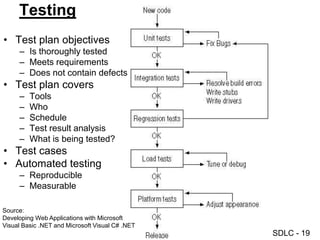
Testing
• Test plan objectives
– Is thoroughly tested
– Meets requirements
– Does not contain defects
• Test plan covers
– Tools
– Who
– Schedule
– Test result analysis
– What is being tested?
• Test cases
• Automated testing
– Reproducible
– Measurable
SDLC - 20
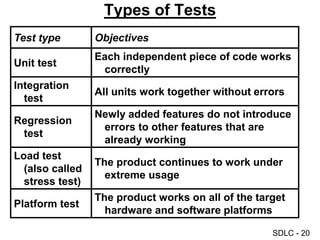
Test type Objectives
Unit test
Each independent piece of code works
correctly
Integration
test
All units work together without errors
Regression
test
Newly added features do not introduce
errors to other features that are
already working
Load test
(also called
stress test)
The product continues to work under
extreme usage
Platform test
The product works on all of the target
hardware and software platforms
Types of Tests
SDLC - 21
Regression and Regression Test
• Regression testing is the process of validating
modified parts of the software and ensuring that no
new errors are introduced into previously tested code.
• Unit and integration tests form the basis of regression
testing. As each test is written and passed, it gets
checked into the test library for a regularly scheduled
testing run. If a new component or a change to an
existing component breaks one of the existing unit or
integration tests, the error is called a regression.
SDLC - 22
Reasons for Project Failures
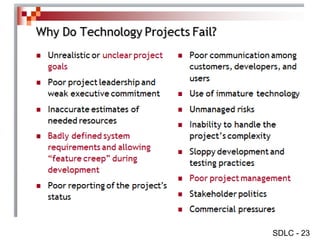
Primary reasons for project failure include
• Unclear or missing business requirements
• Skipping SDLC phases
• Failure to manage project scope
– Scope creep – occurs when the scope increases
– Feature creep – occurs when extra features are added
• Failure to manage project plan
• Changing technology
SDLC - 23
SDLC - 24
Successful Principles for
Software Development
Primary principles for successful agile software
development include:
• Slash the budget
• If it doesn’t work, kill it
• Keep requirements to a minimum
• Test and deliver frequently
• Assign non-IT executives to software projects
SDLC - 25
The End
SDLC - 26
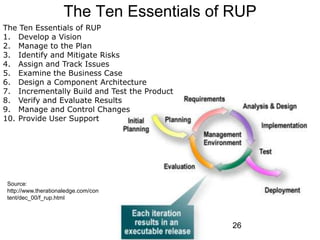
The Ten Essentials of RUP
1. Develop a Vision
2. Manage to the Plan
3. Identify and Mitigate Risks
4. Assign and Track Issues
5. Examine the Business Case
6. Design a Component Architecture
7. Incrementally Build and Test the Product
8. Verify and Evaluate Results
9. Manage and Control Changes
10. Provide User Support
Source:
http://www.therationaledge.com/con
tent/dec_00/f_rup.html
26
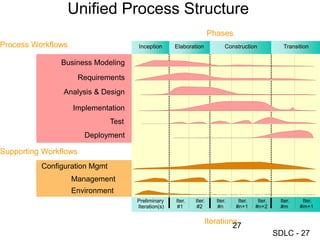
SDLC - 27
Unified Process Structure
Management
Environment
Business Modeling
Implementation
Test
Analysis & Design
Preliminary
Iteration(s)
Iter.
#1
Phases
Process Workflows
Iterations
Supporting Workflows
Iter.
#2
Iter.
#n
Iter.
#n+1
Iter.
#n+2
Iter.
#m
Iter.
#m+1
Deployment
Configuration Mgmt
Requirements
Elaboration Transition
Inception Construction
27
SDLC - 28
28
SDLC - 29
29
SDLC - 30
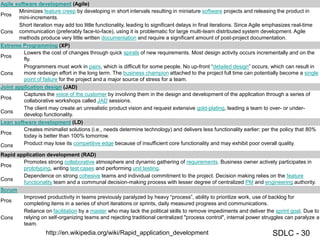
Agile software development (Agile)
Pros
Minimizes feature creep by developing in short intervals resulting in miniature software projects and releasing the product in
mini-increments.
Cons
Short iteration may add too little functionality, leading to significant delays in final iterations. Since Agile emphasizes real-time
communication (preferably face-to-face), using it is problematic for large multi-team distributed system development. Agile
methods produce very little written documentation and require a significant amount of post-project documentation.
Extreme Programming (XP)
Pros
Lowers the cost of changes through quick spirals of new requirements. Most design activity occurs incrementally and on the
fly.
Cons
Programmers must work in pairs, which is difficult for some people. No up-front “detailed design” occurs, which can result in
more redesign effort in the long term. The business champion attached to the project full time can potentially become a single
point of failure for the project and a major source of stress for a team.
Joint application design (JAD)
Pros
Captures the voice of the customer by involving them in the design and development of the application through a series of
collaborative workshops called JAD sessions.
Cons
The client may create an unrealistic product vision and request extensive gold-plating, leading a team to over- or under-
develop functionality.
Lean software development (LD)
Pros
Creates minimalist solutions (i.e., needs determine technology) and delivers less functionality earlier; per the policy that 80%
today is better than 100% tomorrow.
Cons Product may lose its competitive edge because of insufficient core functionality and may exhibit poor overall quality.
Rapid application development (RAD)
Pros
Promotes strong collaborative atmosphere and dynamic gathering of requirements. Business owner actively participates in
prototyping, writing test cases and performing unit testing.
Cons
Dependence on strong cohesive teams and individual commitment to the project. Decision making relies on the feature
functionality team and a communal decision-making process with lesser degree of centralized PM and engineering authority.
Scrum
Pros
Improved productivity in teams previously paralyzed by heavy “process”, ability to prioritize work, use of backlog for
completing items in a series of short iterations or sprints, daily measured progress and communications.
Cons
Reliance on facilitation by a master who may lack the political skills to remove impediments and deliver the sprint goal. Due to
relying on self-organizing teams and rejecting traditional centralized "process control", internal power struggles can paralyze a
team.
http://en.wikipedia.org/wiki/Rapid_application_development
SDLC - 31
31
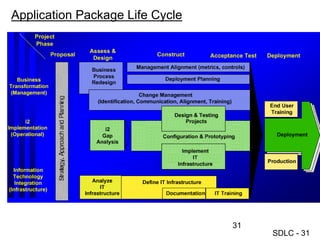
Application Package Life Cycle
SDLC - 32

System Development Life Cycle Overview.ppt

  • 1.
    SDLC - 1 SystemsDevelopment Life Cycle (SDLC) Minder Chen, Ph.D. Professor of MIS Martin V. Smith School of Business and Economics CSU Channel Islands minder.chen@csuci.edu
  • 2.
    SDLC - 2 LifeCycle Stages: Planning Analysis Design Implementation What Problems/Opportunities Requirements Soft/People Skills How Solutions Specifications Technical Skills Visibility: Deliverables/Documentation Methodology*: • Process (Life Cycle) • Techniques (Modeling) Data Process UI Prototyping Coding Programming Implementation UI: User Interface *A system development methodology is a framework that is used to structure, plan, and control the process of developing an information system. Use modeling techniques
  • 3.
    SDLC - 3 StructuredProject SDLC Planning/ Preliminary Study Analysis Design Implementation Testing , Integration, & Installation Operation & Maintenance • Users Participation • Documentation • Modeling Techniques • CASE/IDE Tools* • Quality Assurance Approved Project Proposal Refined project scope Cost/Benefit Analysis Approved Re-development Project Proposal Requirements Design Specifications Implemented System Integrated & Tested System *CASE: Computer-Aided Software Engineering IDE: Integrated Development Environment
  • 4.
    SDLC - 4 SDLCWaterfall Model • Programming • Testing • Training • Installation Requirements AS-IS vs. TO-BE Logical and physical Design specification Identify & prioritize IS development projects Bug fix and Upgrades IT Service Management (ITIL standard) Planning Analysis Design Implementation Operation
  • 5.
    SDLC - 5 Deliverables/Documentationsof SDLC Stages/Phases 5
  • 6.
    SDLC - 6 SpiralModel and Prototyping http://en.wikipedia.org/wiki/Spiral_model http://www.reliablesoftware.com/weblog/uploaded_images/spiral-712085.bmp 6
  • 7.
  • 8.
    SDLC - 8 ManagingUser Interviews
  • 9.
  • 10.
    SDLC - 10 SOFTWAREPROBLEMS ARE BUSINESS PROBLEMS • Find errors early: the later in the SDLC an error is found - the more expensive it is to fix
  • 11.
    SDLC - 11 BalancingThe Triple Constraints in Projects
  • 12.
    SDLC - 12 TheMythical Man-Month http://www.cs.drexel.edu/~yfcai/CS451/RequiredReadings/MythicalManMonth.pdf
  • 13.
    SDLC - 13 TheMythical Man-Month
  • 14.
    SDLC - 14 TeamProductivity
  • 15.
    SDLC - 15 AddingMore People • Brook's Law: • Adding developers to a late project will make it later.
  • 16.
    SDLC - 16 Design:Cohesion and Coupling • Divide and Conquer for effective teamwork • Software Design Criteria • Modularization: Simple, stable, and clearly defined interface for each module, no need to understand the internal structure or design of the module to use it. • Good design is a system that has low coupling between modules and high cohesion within modules
  • 17.
    SDLC - 17 Stubsand Drivers Driver Module 1 Module 2 Module M Stub Module 2 • Stubs are non-functional components that provide the class, property, or method definition used by the other component. Stubs are a kind of outline of the code you will create later. • To test two components that need to work together through a third component that has not been written yet, you create a driver. Drivers are simply test components that make sure two or more components work together. Later in the project, testing performed by the driver can be performed by the actual component. The most common build problem occurs when one component tries to use another component that has not yet been written. This occurs with modular design because the components are often created out of sequence.
  • 18.
    SDLC - 18 GeneralSystems Theory: Abstract Thinking Source: http://cimru.nuigalway.ie/david/pdf/SE/Slides/Theory.PDF
  • 19.
    SDLC - 19 Source: DevelopingWeb Applications with Microsoft Visual Basic .NET and Microsoft Visual C# .NET Testing • Test plan objectives – Is thoroughly tested – Meets requirements – Does not contain defects • Test plan covers – Tools – Who – Schedule – Test result analysis – What is being tested? • Test cases • Automated testing – Reproducible – Measurable
  • 20.
    SDLC - 20 Testtype Objectives Unit test Each independent piece of code works correctly Integration test All units work together without errors Regression test Newly added features do not introduce errors to other features that are already working Load test (also called stress test) The product continues to work under extreme usage Platform test The product works on all of the target hardware and software platforms Types of Tests
  • 21.
    SDLC - 21 Regressionand Regression Test • Regression testing is the process of validating modified parts of the software and ensuring that no new errors are introduced into previously tested code. • Unit and integration tests form the basis of regression testing. As each test is written and passed, it gets checked into the test library for a regularly scheduled testing run. If a new component or a change to an existing component breaks one of the existing unit or integration tests, the error is called a regression.
  • 22.
    SDLC - 22 Reasonsfor Project Failures Primary reasons for project failure include • Unclear or missing business requirements • Skipping SDLC phases • Failure to manage project scope – Scope creep – occurs when the scope increases – Feature creep – occurs when extra features are added • Failure to manage project plan • Changing technology
  • 23.
  • 24.
    SDLC - 24 SuccessfulPrinciples for Software Development Primary principles for successful agile software development include: • Slash the budget • If it doesn’t work, kill it • Keep requirements to a minimum • Test and deliver frequently • Assign non-IT executives to software projects
  • 25.
  • 26.
    SDLC - 26 TheTen Essentials of RUP The Ten Essentials of RUP 1. Develop a Vision 2. Manage to the Plan 3. Identify and Mitigate Risks 4. Assign and Track Issues 5. Examine the Business Case 6. Design a Component Architecture 7. Incrementally Build and Test the Product 8. Verify and Evaluate Results 9. Manage and Control Changes 10. Provide User Support Source: http://www.therationaledge.com/con tent/dec_00/f_rup.html 26
  • 27.
    SDLC - 27 UnifiedProcess Structure Management Environment Business Modeling Implementation Test Analysis & Design Preliminary Iteration(s) Iter. #1 Phases Process Workflows Iterations Supporting Workflows Iter. #2 Iter. #n Iter. #n+1 Iter. #n+2 Iter. #m Iter. #m+1 Deployment Configuration Mgmt Requirements Elaboration Transition Inception Construction 27
  • 28.
  • 29.
  • 30.
    SDLC - 30 Agilesoftware development (Agile) Pros Minimizes feature creep by developing in short intervals resulting in miniature software projects and releasing the product in mini-increments. Cons Short iteration may add too little functionality, leading to significant delays in final iterations. Since Agile emphasizes real-time communication (preferably face-to-face), using it is problematic for large multi-team distributed system development. Agile methods produce very little written documentation and require a significant amount of post-project documentation. Extreme Programming (XP) Pros Lowers the cost of changes through quick spirals of new requirements. Most design activity occurs incrementally and on the fly. Cons Programmers must work in pairs, which is difficult for some people. No up-front “detailed design” occurs, which can result in more redesign effort in the long term. The business champion attached to the project full time can potentially become a single point of failure for the project and a major source of stress for a team. Joint application design (JAD) Pros Captures the voice of the customer by involving them in the design and development of the application through a series of collaborative workshops called JAD sessions. Cons The client may create an unrealistic product vision and request extensive gold-plating, leading a team to over- or under- develop functionality. Lean software development (LD) Pros Creates minimalist solutions (i.e., needs determine technology) and delivers less functionality earlier; per the policy that 80% today is better than 100% tomorrow. Cons Product may lose its competitive edge because of insufficient core functionality and may exhibit poor overall quality. Rapid application development (RAD) Pros Promotes strong collaborative atmosphere and dynamic gathering of requirements. Business owner actively participates in prototyping, writing test cases and performing unit testing. Cons Dependence on strong cohesive teams and individual commitment to the project. Decision making relies on the feature functionality team and a communal decision-making process with lesser degree of centralized PM and engineering authority. Scrum Pros Improved productivity in teams previously paralyzed by heavy “process”, ability to prioritize work, use of backlog for completing items in a series of short iterations or sprints, daily measured progress and communications. Cons Reliance on facilitation by a master who may lack the political skills to remove impediments and deliver the sprint goal. Due to relying on self-organizing teams and rejecting traditional centralized "process control", internal power struggles can paralyze a team. http://en.wikipedia.org/wiki/Rapid_application_development
  • 31.
    SDLC - 31 31 ApplicationPackage Life Cycle
  • 32.