Flow
Nick Spencer
Salesforce Consultant
nick.spencer@ciber.com
@CiberSpencer
An introduction and demonstration of the most powerful Admin tool
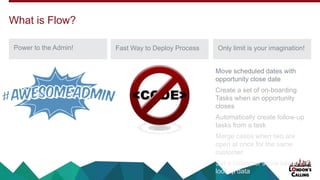
Power to the Admin! Fast Way to Deploy Process Only limit is your imagination!
What is Flow?
Move scheduled dates with
opportunity close date
Create a set of on-boarding
Tasks when an opportunity
closes
Automatically create follow-up
tasks from a task
Merge cases when two are
open at once for the same
customer
Set a customer score based on
lookup data
A Brief History
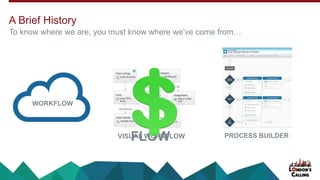
To know where we are, you must know where we’ve come from…
WORKFLOW
VISUAL WORKFLOWFLOW PROCESS BUILDER
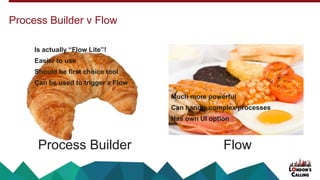
Process Builder v Flow
Process Builder Flow
Is actually “Flow Lite”!
Easier to use
Should be first choice tool
Can be used to trigger a Flow
Much more powerful
Can handle complex processes
Has own UI option
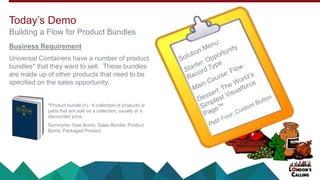
Business Requirement
Universal Containers have a number of product
bundles* that they want to sell. These bundles
are made up of other products that need to be
specified on the sales opportunity.
Today’s Demo
Building a Flow for Product Bundles
*Product bundle (n). A collection of products or
parts that are sold as a collection, usually at a
discounted price.
Synonyms: Sale Bomb; Sales Bundle; Product
Bomb; Packaged Product
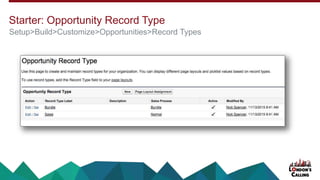
Starter: Opportunity Record Type
Setup>Build>Customize>Opportunities>Record Types
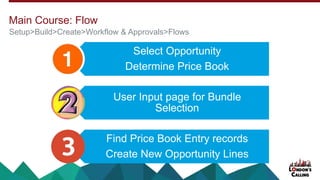
Select Opportunity
Determine Price Book
User Input page for Bundle
Selection
Find Price Book Entry records
Create New Opportunity Lines
Setup>Build>Create>Workflow & Approvals>Flows
Main Course: Flow
🕙 DEMO TIME 🕚
What could possibly go wrong?...
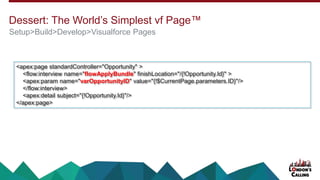
Dessert: The World’s Simplest vf Page™
Setup>Build>Develop>Visualforce Pages
<apex:page standardController="Opportunity" >
<flow:interview name="flowApplyBundle" finishLocation="/{!Opportunity.Id}" >
<apex:param name="varOpportunityID" value="{!$CurrentPage.parameters.ID}"/>
</flow:interview>
<apex:detail subject="{!Opportunity.Id}"/>
</apex:page>
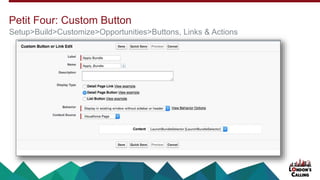
Petit Four: Custom Button
Setup>Build>Customize>Opportunities>Buttons, Links & Actions
Governance Limits
• Products on a bundle
Autolaunched Flows
• Can be set to run on Create or Edit, but not Delete or Undelete
Lightning and SF1
Further Improvements
• Allow for products missing from a price book
• Add a price book selector page
Considerations & Limitations
Rule 1: Keep it SIMPLE
Rule 2: Define the process first
Rule 3: Consider all routes
Rule 4: There is NO rule 4
Rule 5: Test all flows thoroughly in a sandbox before deploying
Rule 6: Test all flows thoroughly in a sandbox before deploying
Nick’s Rules for a happy life in Flow
Flow Best Practices
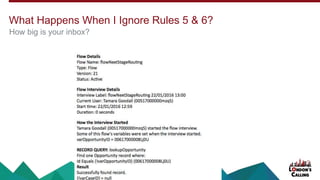
What Happens When I Ignore Rules 5 & 6?
How big is your inbox?
Blog post: http://wp.me/p6YD6Q-2
Salesforce Cloud Flow Designer Workbook:
https://resources.docs.salesforce.com/sfdc/pdf/workbook_flow.pdf
Since Flow is relatively new and developing with each release, take note of the posted date of any
material you may find.
Where To Find Out More
Q & A
Nick Spencer
Salesforce Consultant
nick.spencer@ciber.com
@CiberSpencer
Thank You
Nick Spencer
Salesforce Consultant
nick.spencer@ciber.com
@CiberSpencer
Remember to tell us what you think in the event survey
www.LondonsCalling.net/survey/

Flow Presentation vFINAL

  • 1.
    Flow Nick Spencer Salesforce Consultant nick.spencer@ciber.com @CiberSpencer Anintroduction and demonstration of the most powerful Admin tool
  • 2.
    Power to theAdmin! Fast Way to Deploy Process Only limit is your imagination! What is Flow? Move scheduled dates with opportunity close date Create a set of on-boarding Tasks when an opportunity closes Automatically create follow-up tasks from a task Merge cases when two are open at once for the same customer Set a customer score based on lookup data
  • 3.
    A Brief History Toknow where we are, you must know where we’ve come from… WORKFLOW VISUAL WORKFLOWFLOW PROCESS BUILDER
  • 4.
    Process Builder vFlow Process Builder Flow Is actually “Flow Lite”! Easier to use Should be first choice tool Can be used to trigger a Flow Much more powerful Can handle complex processes Has own UI option
  • 5.
    Business Requirement Universal Containershave a number of product bundles* that they want to sell. These bundles are made up of other products that need to be specified on the sales opportunity. Today’s Demo Building a Flow for Product Bundles *Product bundle (n). A collection of products or parts that are sold as a collection, usually at a discounted price. Synonyms: Sale Bomb; Sales Bundle; Product Bomb; Packaged Product
  • 7.
    Starter: Opportunity RecordType Setup>Build>Customize>Opportunities>Record Types
  • 8.
    Select Opportunity Determine PriceBook User Input page for Bundle Selection Find Price Book Entry records Create New Opportunity Lines Setup>Build>Create>Workflow & Approvals>Flows Main Course: Flow
  • 9.
    🕙 DEMO TIME🕚 What could possibly go wrong?...
  • 10.
    Dessert: The World’sSimplest vf Page™ Setup>Build>Develop>Visualforce Pages <apex:page standardController="Opportunity" > <flow:interview name="flowApplyBundle" finishLocation="/{!Opportunity.Id}" > <apex:param name="varOpportunityID" value="{!$CurrentPage.parameters.ID}"/> </flow:interview> <apex:detail subject="{!Opportunity.Id}"/> </apex:page>
  • 11.
    Petit Four: CustomButton Setup>Build>Customize>Opportunities>Buttons, Links & Actions
  • 12.
    Governance Limits • Productson a bundle Autolaunched Flows • Can be set to run on Create or Edit, but not Delete or Undelete Lightning and SF1 Further Improvements • Allow for products missing from a price book • Add a price book selector page Considerations & Limitations
  • 13.
    Rule 1: Keepit SIMPLE Rule 2: Define the process first Rule 3: Consider all routes Rule 4: There is NO rule 4 Rule 5: Test all flows thoroughly in a sandbox before deploying Rule 6: Test all flows thoroughly in a sandbox before deploying Nick’s Rules for a happy life in Flow Flow Best Practices
  • 14.
    What Happens WhenI Ignore Rules 5 & 6? How big is your inbox?
  • 15.
    Blog post: http://wp.me/p6YD6Q-2 SalesforceCloud Flow Designer Workbook: https://resources.docs.salesforce.com/sfdc/pdf/workbook_flow.pdf Since Flow is relatively new and developing with each release, take note of the posted date of any material you may find. Where To Find Out More
  • 16.
    Q & A NickSpencer Salesforce Consultant nick.spencer@ciber.com @CiberSpencer
  • 17.
    Thank You Nick Spencer SalesforceConsultant nick.spencer@ciber.com @CiberSpencer Remember to tell us what you think in the event survey www.LondonsCalling.net/survey/

Editor's Notes

  • #2 Hi. Welcome to London’s Calling! My name is Nick Spencer. I’m a Salesforce Consultant who has been clicking away as an Admin for 10 years. This session is going to be a voyage around the fantastic tool that is Flow. The best way of doing this is to walk through a real-life example of how a Flow can be used to manage a business process that previously required buying an App from the AppExchange or writing a lot of code.
  • #3 So why Flow? For most of that time, an Admin’s life was quite confined. As soon as the business asked for automated record creation or a mass update on related records, we had to run off – cap in hand – to a Developer. Don’t get me wrong, Developers are lovely people, but I always prefer a click solution to a code solution. Flow is a game-changer for admins. For the first time, we can create our own processes from scratch.
  • #4 Workflow has been with us for a long time and will always be there. It’s great. It’s simple and it’s very reliable. In 2009, Salesforce bought Informavores – a company that had built a package that allowed process flows to be created (using software – boo!) and imported into Salesforce. This was quickly re-branded to “Visual Workflow”, then the software element was built into Salesforce and it became ”Flow”. You’ll still see “Visual Workflow” It is worth remembering that Flow originated as an external package – that will make it easier to understand some of the nuances of flow. The power of Flow was too much for many when it first came out. So Salesforce went on to develop the Process Builder – a cut-down version of Flow which is faster to deploy and more intuitive.
  • #5 So when do I use the Process Builder and when Flow? If you can do what you need to do using the Process Builder, then do it! Where you’ll not be able to use Process Builder is when: You have secondary branches in your flow You want to update, create or delete a number of records in one go You want to be able to continue beyond the first ‘True’ You want to incorporate some user input within the process Some housekeeping points: Flow uses Flash (works well with Chrome). There are 2 types of Flow – “Autolaunched” and “Manual Launch”. Autolanched flows run in the background (like workflows), whereas manual launch flows require a user to launch them or are launched in a vf page. These tend to be flows that make use of the Flow UI. Flow (like all the best Salesforce toys) is only available in Enterprise Edition and above.
  • #6 So here’s what I will be showing you. Anyone who has sat a Salesforce Exam will be familiar with Universal Containers. Well, here they are again asking us to come up with a solution to another of their requirements. They want to sell product bundles, whereby a sales exec can apply a ‘product bomb’ to an opportunity and all the products within that bomb will be added to the opportunity. The solution I’ve devised works by taking an existing opportunity that is the ‘bomb’ (or template) and copying the products, quantity and prices over to the sales opportunity.
  • #8 Please excuse me for glossing over this bit. If you're not familiar with Record Types, they're incredibly useful in so many ways, but I've not got time here to go through how to set them up. There's plenty of documentation out there if you need help with this. So just to say that I've created two Opportunity Record Types on this org already - one called "Sales" and the other "Bundle".
  • #9 So our Flow is going to be using the Opportunity Line information from one Opportunity (the “Bundle” opportunity) to create Opportunity Line records on a different Opportunity (the “Sale” opportunity). From the Sales Opportunity, we’re going to give the user a list of available bundles using the Flow UI. When they pick the bundle, it will add all the products to the Opportunity as Opportunity Line records. To create an Opportunity Line record, you need a minimum of 4 pieces of data: The Opportunity ID Quantity Unit Price Price Book Entry ID Let’s dive in…
  • #10 [DON'T CLICK ADVANCE!] So now I'm going to flick into the Salesforce Dev Org where I've built this solution to show you how the Flow looks in real life. The flow uses a number of different elements and should give you a good flavour of what's possible.
  • #11 Here it is! This is all the code we need to do this whole thing. Please don’t write it down – it is available on my blog, where I go into a bit more detail about what it does. But I’ve highlighted here where we tell the page which Flow to run and what variables to set in the Flow.
  • #12 Once you’ve created your button, don’t forget to add it to the Opportunity page layout! Now we have all the elements in place, let's see it in action! [SWITCH BACK TO SALESFORCE]
  • #13 With Flow, you have to have consider some things that an Admin normally never has to consider – Governance Limits. These are limits put in place by Salesforce to make sure that no single user can mess it up for everyone else (remember that Salesforce is a shared platform). For Flow, the most commonly hit issue if SOQL query limit. These are really easy to hit if your flow tries to be too complex or has to cycle through too many records in a collection. Just be weary – these things tend to bite after you’ve gone live! In Lightning and Salesforce1, anything that uses the Flow UI will push the user into Salesforce Classic. For the Flow I’ve written here, there are a few improvements that I should make: This Dev Org I’m using does not have multi-currency activated. If you’re copying this onto an org that DOES have multi-currency, then you’ll need to take that into account. If a product in the bundle is not included in the price book (and currency) of the opportunity, then expect an error! To get around that, we should add a decision loop to handle situations where the lookup to the Price Book Entry record returns a blank. A further improvement would be to add a page to let the user select a price book if one has not yet been specified on the Opportunity.
  • #14 Rule 1 is universal for life. Please keep it simple! Rule 2 will resonate with any other consultants in the room. Please get a good idea of the business requirements are before starting. Don't politely nod and say "yes" - if you don't understand something, speak up! Rule 3 - pick the best tool for the job Rule 4 - a small homage to Monty Python Rules 5 & 6 - For pity's sake, please test. If you can test in a full copy sandbox, all the better.
  • #15 Each time the flow hits an error, your user will receive a message saying that an unhandled error happened. You (as the Flow’s creator) will get an email listing out everything that the flow tried to do and showing where it failed. If you don’t test your flow thoroughly, expect a lot of these emails.
  • #16 My blog is somewhat embryonic at present - there are only 2 posts, both linked to what you've seen today. But I plan on adding more soon. The Salesforce documentation is good and more and more Flow materials are getting out there, but please always have a quick look to see when the material was published/last updated. Flow is still changing with each release.
  • #17 Over to you guys!
  • #18 Thank you all for your time and interest. If you want to ask me anything Flow or Salesforce later, please grab me if you see me. I'll be around all day. Please fill in the event survey - it's important to us.