Universal Design for Learning
(UDL)
Jeannine Lowe
Walden University
Dr. Jacqueline Derby
Reaching and Engaging All Learners Through Technology, EDUC 6714I-2
November 25, 2010
What is UDL?
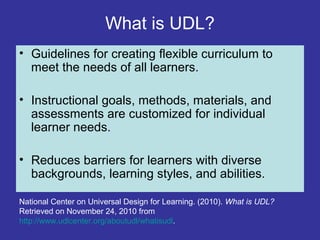
• Guidelines for creating flexible curriculum to
meet the needs of all learners.
• Instructional goals, methods, materials, and
assessments are customized for individual
learner needs.
• Reduces barriers for learners with diverse
backgrounds, learning styles, and abilities.
National Center on Universal Design for Learning. (2010). What is UDL?
Retrieved on November 24, 2010 from
http://www.udlcenter.org/aboutudl/whatisudl.
Inspiration for UDL
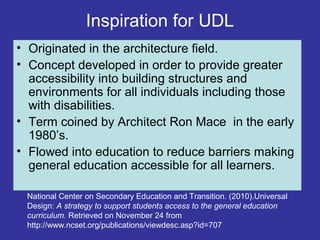
• Originated in the architecture field.
• Concept developed in order to provide greater
accessibility into building structures and
environments for all individuals including those
with disabilities.
• Term coined by Architect Ron Mace in the early
1980’s.
• Flowed into education to reduce barriers making
general education accessible for all learners.
National Center on Secondary Education and Transition. (2010).Universal
Design: A strategy to support students access to the general education
curriculum. Retrieved on November 24 from
http://www.ncset.org/publications/viewdesc.asp?id=707
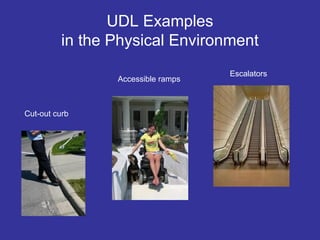
UDL Examples
in the Physical Environment
Cut-out curb
Escalators
Accessible ramps
Three Principles of UDL
I. Provide Multiple Means of Representation
--The “What” of Learning
II. Provide Multiple Means of Action and Expression
--The “How” of Learning
III. Provide Multiple Means of Engagement
--The “Why” of Learning
National Center on Universal Design for Learning. (2010). UDL Guidelines?
Retrieved on November 24, 2010 from
http://www.udlcenter.org/aboutudl/whatisudl.
Examples for UDL Principles
I. Provide Multiple Means of Representation
--Provide same information through different modalities
(vision, hearing, and touch)
--Lectures, Audio Recordings, Graphics & Text
II. Provide Multiple Means of Action and Expression
--Provide student options (oral, written, action)
--Written Reports, Voicethreads, Skits
III. Provide Multiple Means of Engagement
--Provide students alternatives to challenge and motivate
--Allow student topic choices, provide technologies such
as wikis, blogs, or electronic portfolios
National Center on Universal Design for Learning. (2010). UDL Guidelines?
Retrieved on November 24, 2010 from
http://www.udlcenter.org/aboutudl/whatisudl.
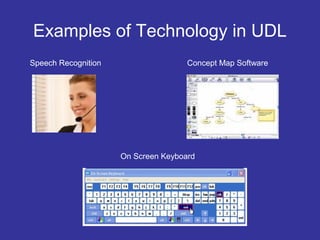
Examples of Technology in UDL
On Screen Keyboard
Speech Recognition Concept Map Software
Central Role of Technology in UDL
• Teachers have access to multiple digital
technologies to meet diverse learner modalities.
• Students have access to materials in multiple
formats that best fits their learning styles.
• Allows students flexibility in demonstrating
knowledge throughout the learning process.
Potential Impact of UDL
at McKenzie High School
• Decrease drop-out rate and increase
graduation rate.
• Increase student motivation and
engagement.
• Encourage students to become life long
self-directed learners.
• Promote a positive school attitude toward
learning.
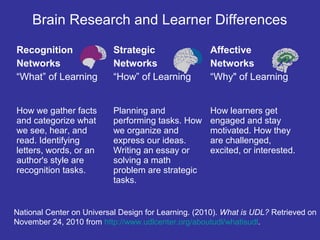
Brain Research and Learner Differences
Recognition
Networks
“What” of Learning
Strategic
Networks
“How” of Learning
Affective
Networks
“Why" of Learning
How we gather facts
and categorize what
we see, hear, and
read. Identifying
letters, words, or an
author's style are
recognition tasks.
Planning and
performing tasks. How
we organize and
express our ideas.
Writing an essay or
solving a math
problem are strategic
tasks.
How learners get
engaged and stay
motivated. How they
are challenged,
excited, or interested.
National Center on Universal Design for Learning. (2010). What is UDL? Retrieved on
November 24, 2010 from http://www.udlcenter.org/aboutudl/whatisudl.
Implications for Learner
Differences for Instruction/Learning
• The brain processes information differently to different
parts of the brain according to the type of task.
• Students are different in how they recognize and
organize information, and in how they engage with
information.
• Teachers should identify ways to address the strengths
and weaknesses of each students and provide
customized instruction to meet each student’s needs.
Laureate Education, Inc. (Executive Producer). (2009). Program 13. Universal
Learning by Design. [Motion Picture]. Reaching and Engaging All Learners
Through Technology. Baltimore: Dr. David Rose.
How does UDL Supports Diversity?
• Changes an inflexible curriculum into a
curriculum that is adaptive for each student.
• Provides authentic real life learning.
• Helps to remove barriers by providing flexible
and multiple tools (assistive technologies) to
support learners cultural, ethnic, linguistic, and
academic diversity.
UDL National Universal Design for Learning Taskforce. (2010). Universal
Design for Learning. Retrieved on November 25, 2010 from
http://www.advocacyinstitute.org/UDL/.
Expanded Explanation of Central
Role of Technology in UDL
• Incorporating digital technologies activates all
three types of brain networks (recognition,
strategic, and affective).
• Technology provides learners accommodations
based upon their preferred learning styles
(auditory, visual, kinesthetic, and tactile
modalities).
NDT Resource Center, (2010). Understanding different learning styles. Retrieved
November 24, 2010 from http://www.ndt-
ed.org/TeachingResources/ClassroomTips/Learning_Styles.htm
Three CAST Online Tools for MHS
1. UDL Goal Setter Tool—helps teachers set clear,
focused goals for all learners.
2. UDL Class Profile Maker—helps teachers understand
students strengths and weaknesses .
3. Curriculum Barriers Finder—a tutorial that teaches how
to find barriers in the curriculum. In addition, there is a
downloadable template to help analyze curriculum.
CAST Teaching Every Student. (2010). Tools and Activities.. Retrieved
November 24, 2010 from http://www.cast.org/teachingeverystudent/tools/
References
CAST Teaching Every Student. (2010). Tools and Activities. Retrieved November 24, 2010 from
http://www.cast.org/teachingeverystudent/tools/
Laureate Education, Inc. (Executive Producer). (2009). Program 13. Universal Learning by Design.
[Motion Picture]. Reaching and Engaging All Learners Through Technology. Baltimore: Dr. David
Rose.
National Center on Secondary Education and Transition. (2010).Universal Design: A strategy to
support students access to the general education curriculum. Retrieved on November 24 from
http://www.ncset.org/publications/viewdesc.asp?id=707
National Center on Universal Design for Learning. (2010). UDL Guidelines? Retrieved on November
24, 2010 from http://www.udlcenter.org/aboutudl/whatisudl
Baltimore: Dr. David Rose.
National Center on Universal Design for Learning. (2010). What is UDL? Retrieved on November 24,
2010 from http://www.udlcenter.org/aboutudl/whatisudl.
UDL National Universal Design for Learning Taskforce. (2010). Universal Design for Learning.
Retrieved on November 25, 2010 from http://www.advocacyinstitute.org/UDL/.

App4 lowej

  • 1.
    Universal Design forLearning (UDL) Jeannine Lowe Walden University Dr. Jacqueline Derby Reaching and Engaging All Learners Through Technology, EDUC 6714I-2 November 25, 2010
  • 2.
    What is UDL? •Guidelines for creating flexible curriculum to meet the needs of all learners. • Instructional goals, methods, materials, and assessments are customized for individual learner needs. • Reduces barriers for learners with diverse backgrounds, learning styles, and abilities. National Center on Universal Design for Learning. (2010). What is UDL? Retrieved on November 24, 2010 from http://www.udlcenter.org/aboutudl/whatisudl.
  • 3.
    Inspiration for UDL •Originated in the architecture field. • Concept developed in order to provide greater accessibility into building structures and environments for all individuals including those with disabilities. • Term coined by Architect Ron Mace in the early 1980’s. • Flowed into education to reduce barriers making general education accessible for all learners. National Center on Secondary Education and Transition. (2010).Universal Design: A strategy to support students access to the general education curriculum. Retrieved on November 24 from http://www.ncset.org/publications/viewdesc.asp?id=707
  • 4.
    UDL Examples in thePhysical Environment Cut-out curb Escalators Accessible ramps
  • 5.
    Three Principles ofUDL I. Provide Multiple Means of Representation --The “What” of Learning II. Provide Multiple Means of Action and Expression --The “How” of Learning III. Provide Multiple Means of Engagement --The “Why” of Learning National Center on Universal Design for Learning. (2010). UDL Guidelines? Retrieved on November 24, 2010 from http://www.udlcenter.org/aboutudl/whatisudl.
  • 6.
    Examples for UDLPrinciples I. Provide Multiple Means of Representation --Provide same information through different modalities (vision, hearing, and touch) --Lectures, Audio Recordings, Graphics & Text II. Provide Multiple Means of Action and Expression --Provide student options (oral, written, action) --Written Reports, Voicethreads, Skits III. Provide Multiple Means of Engagement --Provide students alternatives to challenge and motivate --Allow student topic choices, provide technologies such as wikis, blogs, or electronic portfolios National Center on Universal Design for Learning. (2010). UDL Guidelines? Retrieved on November 24, 2010 from http://www.udlcenter.org/aboutudl/whatisudl.
  • 7.
    Examples of Technologyin UDL On Screen Keyboard Speech Recognition Concept Map Software
  • 8.
    Central Role ofTechnology in UDL • Teachers have access to multiple digital technologies to meet diverse learner modalities. • Students have access to materials in multiple formats that best fits their learning styles. • Allows students flexibility in demonstrating knowledge throughout the learning process.
  • 9.
    Potential Impact ofUDL at McKenzie High School • Decrease drop-out rate and increase graduation rate. • Increase student motivation and engagement. • Encourage students to become life long self-directed learners. • Promote a positive school attitude toward learning.
  • 10.
    Brain Research andLearner Differences Recognition Networks “What” of Learning Strategic Networks “How” of Learning Affective Networks “Why" of Learning How we gather facts and categorize what we see, hear, and read. Identifying letters, words, or an author's style are recognition tasks. Planning and performing tasks. How we organize and express our ideas. Writing an essay or solving a math problem are strategic tasks. How learners get engaged and stay motivated. How they are challenged, excited, or interested. National Center on Universal Design for Learning. (2010). What is UDL? Retrieved on November 24, 2010 from http://www.udlcenter.org/aboutudl/whatisudl.
  • 11.
    Implications for Learner Differencesfor Instruction/Learning • The brain processes information differently to different parts of the brain according to the type of task. • Students are different in how they recognize and organize information, and in how they engage with information. • Teachers should identify ways to address the strengths and weaknesses of each students and provide customized instruction to meet each student’s needs. Laureate Education, Inc. (Executive Producer). (2009). Program 13. Universal Learning by Design. [Motion Picture]. Reaching and Engaging All Learners Through Technology. Baltimore: Dr. David Rose.
  • 12.
    How does UDLSupports Diversity? • Changes an inflexible curriculum into a curriculum that is adaptive for each student. • Provides authentic real life learning. • Helps to remove barriers by providing flexible and multiple tools (assistive technologies) to support learners cultural, ethnic, linguistic, and academic diversity. UDL National Universal Design for Learning Taskforce. (2010). Universal Design for Learning. Retrieved on November 25, 2010 from http://www.advocacyinstitute.org/UDL/.
  • 13.
    Expanded Explanation ofCentral Role of Technology in UDL • Incorporating digital technologies activates all three types of brain networks (recognition, strategic, and affective). • Technology provides learners accommodations based upon their preferred learning styles (auditory, visual, kinesthetic, and tactile modalities). NDT Resource Center, (2010). Understanding different learning styles. Retrieved November 24, 2010 from http://www.ndt- ed.org/TeachingResources/ClassroomTips/Learning_Styles.htm
  • 14.
    Three CAST OnlineTools for MHS 1. UDL Goal Setter Tool—helps teachers set clear, focused goals for all learners. 2. UDL Class Profile Maker—helps teachers understand students strengths and weaknesses . 3. Curriculum Barriers Finder—a tutorial that teaches how to find barriers in the curriculum. In addition, there is a downloadable template to help analyze curriculum. CAST Teaching Every Student. (2010). Tools and Activities.. Retrieved November 24, 2010 from http://www.cast.org/teachingeverystudent/tools/
  • 15.
    References CAST Teaching EveryStudent. (2010). Tools and Activities. Retrieved November 24, 2010 from http://www.cast.org/teachingeverystudent/tools/ Laureate Education, Inc. (Executive Producer). (2009). Program 13. Universal Learning by Design. [Motion Picture]. Reaching and Engaging All Learners Through Technology. Baltimore: Dr. David Rose. National Center on Secondary Education and Transition. (2010).Universal Design: A strategy to support students access to the general education curriculum. Retrieved on November 24 from http://www.ncset.org/publications/viewdesc.asp?id=707 National Center on Universal Design for Learning. (2010). UDL Guidelines? Retrieved on November 24, 2010 from http://www.udlcenter.org/aboutudl/whatisudl Baltimore: Dr. David Rose. National Center on Universal Design for Learning. (2010). What is UDL? Retrieved on November 24, 2010 from http://www.udlcenter.org/aboutudl/whatisudl. UDL National Universal Design for Learning Taskforce. (2010). Universal Design for Learning. Retrieved on November 25, 2010 from http://www.advocacyinstitute.org/UDL/.