API Versioning 1.0.501
With Docker and Nginx
using every tool in the box
1
2
3
Dockerize The Project
1. Divide The Project
2. Base Images
3. Docker
Compose
We divided the project into several
different services.
[Web Server (nginx), PHP (php-fpm),
Redis, Mysql (for local development)]
We established an internal repository
of base images using Ansible (and
Ansible Container).
We used Docker compose to do the
final configurations and put them all
together.
1
2
3
CI and Deployment
1. Ant Scripts
2. Multiple
Environments
3. Bitbucket
Pipelines
We used Apache Ant to automate
running tests, run metrics on the
code, and build and push images.
We used multiple build.xml files. One
for each environment (development,
Staging, Production).
We used Bitbucket Pipelines to call
the Ant scripts and deploy.
Amazon has an extensive
set of tools and portals to
organise your deployments
ECS
A container
management
service that
supports Docker
 containers
CloudWatch
a monitoring
service for
AWS cloud
resources 
ELB
Automatically
distributes incoming
application traffic
EC2
Secure and
resizable
compute capacity
in the cloud.
The Amazon Tools
Amazon has an extensive
set of tools and portals to
organise your deployments
Task Definitions
A set of rules and
configurations for
container instances
AWS CLI
A unified tool to
manage your
AWS services
ECR
A fully-managed 
Docker container
registry
Clusters
a logical grouping
of container
instances
Elastic Container Service (ECS)
Step 1 Step 2 Step 3 Step 4
The Flow
New code is
pushed to
Bitbucket.
The pipeline runs the Ant scripts
to build, tag, and push the docker
images. It also updates the task
definition for the cluster.
Amazon ECS spins
up a new cluster
based on the new
task definition.
New users are sent
to the new cluster.
The old cluster falls
away once existing
users finish.
Let’s Build An App
“We will need to version
the API at some point”
“OMG !!
We need the it versioned NOW!”
Version the URI
http://somesite.com/api/v3/user
A Custom Header
HTTP_API_VERSION: version=3
Content Negotiation
HTTP_ACCEPT: vnd.some-api.v3
Versioning Methods (for the client)
Version in the code
Copy the code
Docker images
based on git tags
Versioning Methods (for the code)
Constantly adding conditionals in the code.
Duplicate code Duplication.
Every version exists in the one code base.
Versioning In The Code
Possible to accidentally change an old version.
Ever-increasing code size
Duplicate code Duplication.
Copy The Entire Code Base
Possible to accidentally change an old version.
Ever-increasing code size
The repo deals with only one version at a time
Other versions exist in the history.
Versioning With Docker And Git Tags
Much less likely to change an old version.
Git is great. Tags are good!
Images are stand alone.
We have decided to use Content Negotiation
and multiple Docker images, but how do we
translate the the Accept header to the proper
Docker version?
OK. But How?
Configuring Nginx
The Server Block
server {
listen 80;
access_log /var/logs/access.log;
error_log /var/logs/error.log;
root /var/www/public_html;
location / {
index index.html index.htm index.php;
}
}
Configuring Nginx
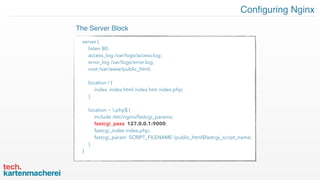
server {
listen 80;
access_log /var/logs/access.log;
error_log /var/logs/error.log;
root /var/www/public_html;
location / {
index index.html index.htm index.php;
}
location ~ .php$ {
include /etc/nginx/fastcgi_params;
fastcgi_pass 127.0.0.1:9000;
fastcgi_index index.php;
fastcgi_param SCRIPT_FILENAME /public_html$fastcgi_script_name;
}
}
The Server Block
Configuring Nginx
upstream php {
server unix:/run/php-fpm/php-fpm.sock;
}
server {
listen 80;
…
location ~ .php$ {
include /etc/nginx/fastcgi_params;
fastcgi_pass php;
fastcgi_index index.php;
fastcgi_param SCRIPT_FILENAME /public_html$fastcgi_script_name;
}
}
The Upstream Block
Configuring Nginx
server {
listen 80;
…
location ~ .php$ {
include /etc/nginx/fastcgi_params;
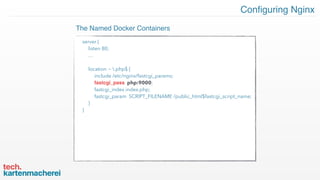
fastcgi_pass php:9000;
fastcgi_index index.php;
fastcgi_param SCRIPT_FILENAME /public_html$fastcgi_script_name;
}
}
The Named Docker Containers
Configuring Nginx
map $accept_header $backend {
default ‘php_v1’;
‘vnd.some-site.v2’ ‘php_v2’;
‘vnd.some-site.v2’ ‘php_v3’;
}
server {
listen 80;
…
location ~ .php$ {
include /etc/nginx/fastcgi_params;
fastcgi_pass $backend;
fastcgi_index index.php;
fastcgi_param SCRIPT_FILENAME /public_html$fastcgi_script_name;
}
}
The Map Directive
Configuring Nginx
map $accept_header $backend {
default ‘php_v1’;
include /var/version_maps/*
}
server {
listen 80;
…
location ~ .php$ {
include /etc/nginx/fastcgi_params;
fastcgi_pass $backend;
fastcgi_index index.php;
fastcgi_param SCRIPT_FILENAME /public_html$fastcgi_script_name;
}
}
The Map Directive (with include)
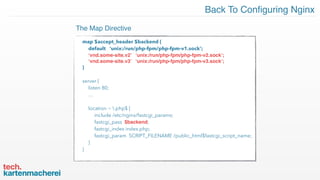
Back To Configuring Nginx
map $accept_header $backend {
default ‘unix:/run/php-fpm/php-fpm-v1.sock’;
‘vnd.some-site.v2’ ‘unix:/run/php-fpm/php-fpm-v2.sock’;
‘vnd.some-site.v3’ ‘unix:/run/php-fpm/php-fpm-v3.sock’;
}
server {
listen 80;
…
location ~ .php$ {
include /etc/nginx/fastcgi_params;
fastcgi_pass $backend;
fastcgi_index index.php;
fastcgi_param SCRIPT_FILENAME /public_html$fastcgi_script_name;
}
}
The Map Directive
Each release gets a version tag in Git. (And
ideally its own branch matching the minor
version.
Update The Ant Build Scripts to pull the Git
tags, loop through them, match major
versions to the LATEST minor/patch version,
and create map files based on this.
Update the php-fpm config to version the
socket.
Git Tags And Ant Scripts
Update the task definition with the new
tagged image version, and version the
shared socket volume
Step 1 Step 2 Step 3 Step 4
Put It All Together
Tag the code in
Git for release
Ant dynamically builds the
version map files, updates
the task definition and
pushes necessary images.
Amazon ECS spins up a
new Cluster based on the
updated task definition
and tagged images.
nginx uses the Accept
header to map the
proper php-fpm
version container.
Atomic! It either all works, or it fails. There
are many pieces to the Amazon ECS puzzle.
Piecing it all together can sometimes be
confusing. And it is easy to forget something
- especially in the beginning.
Solution: Sadly, trial and error. And the
CloudWatch logs.
Other Concerns - ECS Is Atomic
When we spin up a new “Cluster” the source
volume already exists! This causes a failure!
Solution: dynamically update the shared
volume on each task definition version.
Other Concerns - The Shared Socket Volume
The Docker images are basically small and
manageable, but each one takes a good bit
of memory. What happens when the EC2
instance runs out.
Solution: Amazon has Auto-Scaling
definition. If properly configured, it will
automagically spin up a new instance.
Other Concerns - Memory Limit
Since we did not have versioning in the
beginning, we had to use the default (nginx
map) as the version 1. So how do we know if
the request is actually for version 1, or if it
asking for a version that does not exist.
Solution: The dreaded IF statements in
nginx.
Other Concerns - The Default Map Version
Conclusion - It’s Almost Like A Dream
Docker
Docker-Compose
Ansible
Ansible Container
Ant
Git
Bitbucket Pipelines
Amazon EC2
Amazon Load Balancer
Amazon ECS
Amazon Auto-Scaling
Amazon CloudWatch
Nginx
Php (fpm)
Docker
Docker-Compose
Ansible
Ansible Container
Ant
Git
Bitbucket Pipelines
Amazon EC2
Amazon Load Balancer
Amazon ECS
Amazon Auto-Scaling
Amazon CloudWatch
Nginx
Php (fpm)
Special Thanks Goes To:
Thank You
Lee Wilkins
Cool guy: coding,
cooking, carousing

Api Versioning with Docker and Nginx

  • 1.
    API Versioning 1.0.501 WithDocker and Nginx using every tool in the box
  • 2.
    1 2 3 Dockerize The Project 1.Divide The Project 2. Base Images 3. Docker Compose We divided the project into several different services. [Web Server (nginx), PHP (php-fpm), Redis, Mysql (for local development)] We established an internal repository of base images using Ansible (and Ansible Container). We used Docker compose to do the final configurations and put them all together.
  • 3.
    1 2 3 CI and Deployment 1.Ant Scripts 2. Multiple Environments 3. Bitbucket Pipelines We used Apache Ant to automate running tests, run metrics on the code, and build and push images. We used multiple build.xml files. One for each environment (development, Staging, Production). We used Bitbucket Pipelines to call the Ant scripts and deploy.
  • 4.
    Amazon has anextensive set of tools and portals to organise your deployments ECS A container management service that supports Docker  containers CloudWatch a monitoring service for AWS cloud resources  ELB Automatically distributes incoming application traffic EC2 Secure and resizable compute capacity in the cloud. The Amazon Tools
  • 5.
    Amazon has anextensive set of tools and portals to organise your deployments Task Definitions A set of rules and configurations for container instances AWS CLI A unified tool to manage your AWS services ECR A fully-managed  Docker container registry Clusters a logical grouping of container instances Elastic Container Service (ECS)
  • 6.
    Step 1 Step2 Step 3 Step 4 The Flow New code is pushed to Bitbucket. The pipeline runs the Ant scripts to build, tag, and push the docker images. It also updates the task definition for the cluster. Amazon ECS spins up a new cluster based on the new task definition. New users are sent to the new cluster. The old cluster falls away once existing users finish.
  • 7.
  • 8.
    “We will needto version the API at some point”
  • 9.
    “OMG !! We needthe it versioned NOW!”
  • 10.
    Version the URI http://somesite.com/api/v3/user ACustom Header HTTP_API_VERSION: version=3 Content Negotiation HTTP_ACCEPT: vnd.some-api.v3 Versioning Methods (for the client)
  • 11.
    Version in thecode Copy the code Docker images based on git tags Versioning Methods (for the code)
  • 12.
    Constantly adding conditionalsin the code. Duplicate code Duplication. Every version exists in the one code base. Versioning In The Code Possible to accidentally change an old version. Ever-increasing code size
  • 13.
    Duplicate code Duplication. CopyThe Entire Code Base Possible to accidentally change an old version. Ever-increasing code size
  • 14.
    The repo dealswith only one version at a time Other versions exist in the history. Versioning With Docker And Git Tags Much less likely to change an old version. Git is great. Tags are good! Images are stand alone.
  • 15.
    We have decidedto use Content Negotiation and multiple Docker images, but how do we translate the the Accept header to the proper Docker version? OK. But How?
  • 16.
    Configuring Nginx The ServerBlock server { listen 80; access_log /var/logs/access.log; error_log /var/logs/error.log; root /var/www/public_html; location / { index index.html index.htm index.php; } }
  • 17.
    Configuring Nginx server { listen80; access_log /var/logs/access.log; error_log /var/logs/error.log; root /var/www/public_html; location / { index index.html index.htm index.php; } location ~ .php$ { include /etc/nginx/fastcgi_params; fastcgi_pass 127.0.0.1:9000; fastcgi_index index.php; fastcgi_param SCRIPT_FILENAME /public_html$fastcgi_script_name; } } The Server Block
  • 18.
    Configuring Nginx upstream php{ server unix:/run/php-fpm/php-fpm.sock; } server { listen 80; … location ~ .php$ { include /etc/nginx/fastcgi_params; fastcgi_pass php; fastcgi_index index.php; fastcgi_param SCRIPT_FILENAME /public_html$fastcgi_script_name; } } The Upstream Block
  • 19.
    Configuring Nginx server { listen80; … location ~ .php$ { include /etc/nginx/fastcgi_params; fastcgi_pass php:9000; fastcgi_index index.php; fastcgi_param SCRIPT_FILENAME /public_html$fastcgi_script_name; } } The Named Docker Containers
  • 20.
    Configuring Nginx map $accept_header$backend { default ‘php_v1’; ‘vnd.some-site.v2’ ‘php_v2’; ‘vnd.some-site.v2’ ‘php_v3’; } server { listen 80; … location ~ .php$ { include /etc/nginx/fastcgi_params; fastcgi_pass $backend; fastcgi_index index.php; fastcgi_param SCRIPT_FILENAME /public_html$fastcgi_script_name; } } The Map Directive
  • 21.
    Configuring Nginx map $accept_header$backend { default ‘php_v1’; include /var/version_maps/* } server { listen 80; … location ~ .php$ { include /etc/nginx/fastcgi_params; fastcgi_pass $backend; fastcgi_index index.php; fastcgi_param SCRIPT_FILENAME /public_html$fastcgi_script_name; } } The Map Directive (with include)
  • 22.
    Back To ConfiguringNginx map $accept_header $backend { default ‘unix:/run/php-fpm/php-fpm-v1.sock’; ‘vnd.some-site.v2’ ‘unix:/run/php-fpm/php-fpm-v2.sock’; ‘vnd.some-site.v3’ ‘unix:/run/php-fpm/php-fpm-v3.sock’; } server { listen 80; … location ~ .php$ { include /etc/nginx/fastcgi_params; fastcgi_pass $backend; fastcgi_index index.php; fastcgi_param SCRIPT_FILENAME /public_html$fastcgi_script_name; } } The Map Directive
  • 23.
    Each release getsa version tag in Git. (And ideally its own branch matching the minor version. Update The Ant Build Scripts to pull the Git tags, loop through them, match major versions to the LATEST minor/patch version, and create map files based on this. Update the php-fpm config to version the socket. Git Tags And Ant Scripts Update the task definition with the new tagged image version, and version the shared socket volume
  • 24.
    Step 1 Step2 Step 3 Step 4 Put It All Together Tag the code in Git for release Ant dynamically builds the version map files, updates the task definition and pushes necessary images. Amazon ECS spins up a new Cluster based on the updated task definition and tagged images. nginx uses the Accept header to map the proper php-fpm version container.
  • 25.
    Atomic! It eitherall works, or it fails. There are many pieces to the Amazon ECS puzzle. Piecing it all together can sometimes be confusing. And it is easy to forget something - especially in the beginning. Solution: Sadly, trial and error. And the CloudWatch logs. Other Concerns - ECS Is Atomic
  • 26.
    When we spinup a new “Cluster” the source volume already exists! This causes a failure! Solution: dynamically update the shared volume on each task definition version. Other Concerns - The Shared Socket Volume
  • 27.
    The Docker imagesare basically small and manageable, but each one takes a good bit of memory. What happens when the EC2 instance runs out. Solution: Amazon has Auto-Scaling definition. If properly configured, it will automagically spin up a new instance. Other Concerns - Memory Limit
  • 28.
    Since we didnot have versioning in the beginning, we had to use the default (nginx map) as the version 1. So how do we know if the request is actually for version 1, or if it asking for a version that does not exist. Solution: The dreaded IF statements in nginx. Other Concerns - The Default Map Version
  • 29.
    Conclusion - It’sAlmost Like A Dream
  • 30.
    Docker Docker-Compose Ansible Ansible Container Ant Git Bitbucket Pipelines AmazonEC2 Amazon Load Balancer Amazon ECS Amazon Auto-Scaling Amazon CloudWatch Nginx Php (fpm) Docker Docker-Compose Ansible Ansible Container Ant Git Bitbucket Pipelines Amazon EC2 Amazon Load Balancer Amazon ECS Amazon Auto-Scaling Amazon CloudWatch Nginx Php (fpm) Special Thanks Goes To:
  • 31.
  • 32.
    Lee Wilkins Cool guy:coding, cooking, carousing