

Apache Spark
Workshop
Samos, 02/04/2016
HELLO!
I am Euangelos Linardos
Data Scientist at Pollfish
Outline
› Part I: Setup Environment
› Ubuntu / Mac / Windows
› Part II: Introduction to Spark
› History / Features / Examples
› Part III: Hands-On Training
› Core / SQL / MLlib
Part I:
Setup Environment
(...in seven easy steps!)
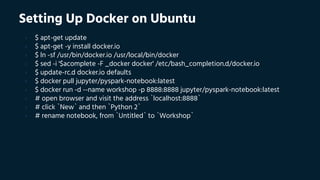
Setting Up Docker on Ubuntu
› $ apt-get update
› $ apt-get -y install docker.io
› $ ln -sf /usr/bin/docker.io /usr/local/bin/docker
› $ sed -i '$acomplete -F _docker docker' /etc/bash_completion.d/docker.io
› $ update-rc.d docker.io defaults
› $ docker pull jupyter/pyspark-notebook:latest
› $ docker run -d --name workshop -p 8888:8888 jupyter/pyspark-notebook:latest
› # open browser and visit the address `localhost:8888`
› # click `New` and then `Python 2`
› # rename notebook, from `Untitled` to `Workshop`
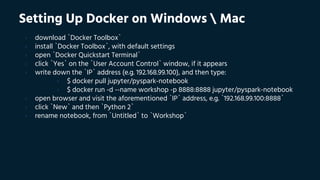
Setting Up Docker on Windows  Mac
› download `Docker Toolbox`
› install `Docker Toolbox`, with default settings
› open `Docker Quickstart Terminal`
› click `Yes` on the `User Account Control` window, if it appears
› write down the `IP` address (e.g. 192.168.99.100), and then type:
› $ docker pull jupyter/pyspark-notebook
› $ docker run -d --name workshop -p 8888:8888 jupyter/pyspark-notebook
› open browser and visit the aforementioned `IP` address, e.g. `192.168.99.100:8888`
› click `New` and then `Python 2`
› rename notebook, from `Untitled` to `Workshop`
Validate Setup
# import required libraries
from pyspark import SparkConf, SparkContext
# create spark context
sc = SparkContext(conf=(SparkConf().setMaster("local[*]")))
# print spark context
print(sc)
# print spark configuration
print(sc._conf.getAll())
Useful Links
› install Docker on other platforms:
› Ubuntu: https://www.youtube.com/watch?v=V9AKvZZCWLc
› Mac: https://www.youtube.com/watch?v=lNkVxDSRo7M
› Windows: https://www.youtube.com/watch?v=S7NVloq0EBc
› download the course material:
› datasets: http://bit.ly/23hdtq9
› notebooks: http://bit.ly/23hdsCO
› presenations: http://bit.ly/1TFttfE
› complete the course survey:
› http://bit.ly/1MC4xUF
› read the Apache Spark documentation:
› http://bit.ly/1UQBgrP
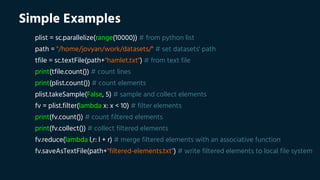
Simple Examples
plist = sc.parallelize(range(10000)) # from python list
path = "/home/jovyan/work/datasets/" # set datasets' path
tfile = sc.textFile(path+"hamlet.txt") # from text file
print(tfile.count()) # count lines
print(plist.count()) # count elements
plist.takeSample(False, 5) # sample and collect elements
fv = plist.filter(lambda x: x < 10) # filter elements
print(fv.count()) # count filtered elements
print(fv.collect()) # collect filtered elements
fv.reduce(lambda l,r: l + r) # merge filtered elements with an associative function
fv.saveAsTextFile(path+"filtered-elements.txt") # write filtered elements to local file system
Part II:
Introduction to Spark
(section 1: get to know spark)
Spark in a Nutshell
› general cluster computing platform:
› distributed in-memory computational framework
› SQL, Machine Learning, Stream Processing, etc.
› easy to use, powerful, high-level API:
› Scala, Java, Python and R
Limitations of MapReduce
› MapReduce use cases showed two major limitations:
› difficulty of programming directly in MapReduce
› performance bottlenecks, or batch not fitting the use cases
› in short, MR doesn’t compose well for large applications
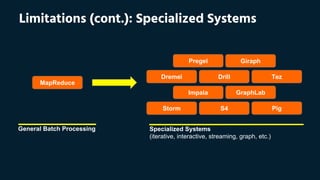
› therefore, people built specialized systems as workarounds
MapReduce
Giraph
Tez
Pregel
S4 Pig
GraphLabImpala
Dremel Drill
Storm
General Batch Processing Specialized Systems
(iterative, interactive, streaming, graph, etc.)
Limitations (cont.): Specialized Systems
Advantages of Spark
› handles batch, interactive, and real-time within a single framework
› native integration with Java, Python, Scala, R
› programming at a higher level of abstraction
› more general: map/reduce is just one set of supported constructs
Advantages (cont.): Generalized MapReduce
› unlike the various specialized systems, Spark’s goal was to generalize MapReduce to
support new apps within same engine
› two reasonably small additions are enough to express the previous models:
› fast data sharing
› general DAGs
› this allows for an approach which is more efficient for the engine, and much simpler
for the end users
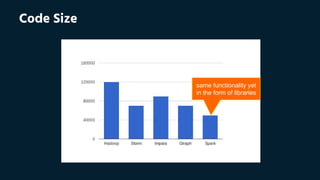
Code Size
same functionality yet
in the form of libraries
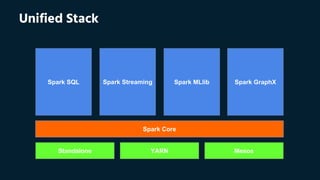
Standalone YARN Mesos
Spark Core
Spark SQL Spark GraphXSpark MLlibSpark Streaming
Unified Stack
High Performance
› in-memory cluster computing
› ideal for iterative algorithms
› faster than Hadoop:
› 10x on disk
› 100x in memory
Brief History
› originally developed in 2009, UC Berkeley AMP Lab
› open-sourced in 2010
› as of 2014, Spark is a top-level Apache project
› fastest open-source engine for sorting 100 TB:
› won the 2014 Daytona GraySort contest
› throughput: 4.27 TB/min
End Users
› Data Scientists:
› analyze and model data
› data transformations and prototyping
› statistics and machine learning
› Data Engineers:
› implement production data processing systems
› require a reasonable API for distributed processing
› reliable, high performance, easy to monitor platform
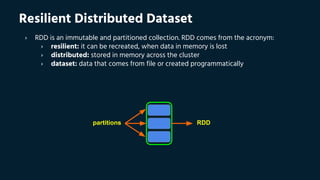
partitions
Resilient Distributed Dataset
› RDD is an immutable and partitioned collection. RDD comes from the acronym:
› resilient: it can be recreated, when data in memory is lost
› distributed: stored in memory across the cluster
› dataset: data that comes from file or created programmatically
RDD
Resilient Distributed Dataset (cont.)
› RDD feels like coding using typical Scala collections; RDD can be build:
› directly from a datasource (e.g., text file, HDFS, etc.),
› or by applying a transformation to another RDDs
› main features:
› RDDs are computed lazily
› automatically rebuild on failure
› persistence for reuse (RAM and/or disk)
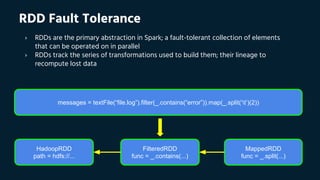
MappedRDD
func = _.split(...)
FilteredRDD
func = _.contains(...)
HadoopRDD
path = hdfs://...
messages = textFile(“file.log”).filter(_.contains(“error”)).map(_.split(‘t’)(2))
RDD Fault Tolerance
› RDDs are the primary abstraction in Spark; a fault-tolerant collection of elements
that can be operated on in parallel
› RDDs track the series of transformations used to build them; their lineage to
recompute lost data
Loading and Saving RDDs
› File Systems: Local FS, Amazon S3 and HDFS
› Supported formats: Text files, JSON, Hadoop sequence files, parquet files, protocol
buffers and object files
› Structured data with Spark SQL: Hive, JSON, JDBC, Cassandra, HBase and
ElasticSearch
Part II:
Introduction to Spark
(section 2: spark under the hood)
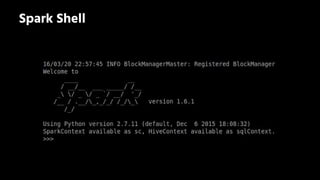
Spark Shell
The Spark Context
› first thing that a Spark program does is create a SparkContext object, which tells
Spark how to access a cluster
› in the shell for either Scala or Python, this is the sc variable, which is created
automatically
› other programs must use a constructor to instantiate a new SparkContext
› then in turn SparkContext gets used to create other variables
master description
local
run Spark locally with one worker thread (i.
e. no parallelism at all)
local[*]
run Spark locally with as many worker
threads as logical cores on your machine
spark://HOST:PORT
connect to the given Spark standalone
cluster master (port 7077 by default)
mesos://HOST:PORT
connect to the given Mesos cluster
(port 5050 by default)
yarn
connect to a YARN cluster in client or
cluster mode (YARN_CONF_DIR variable)
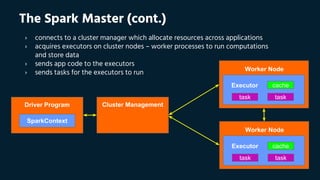
The Spark Master
› the master parameter for a SparkContext determines which cluster to use:
SparkContext
cacheExecutor
tasktask
Worker Node
cacheExecutor
tasktask
Worker Node
Driver Program Cluster Management
The Spark Master (cont.)
› connects to a cluster manager which allocate resources across applications
› acquires executors on cluster nodes – worker processes to run computations
and store data
› sends app code to the executors
› sends tasks for the executors to run
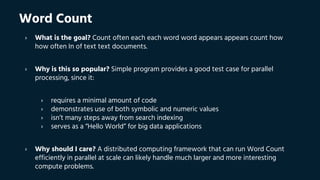
Word Count
› What is the goal? Count often each each word word appears appears count how
how often In of text text documents.
› Why is this so popular? Simple program provides a good test case for parallel
processing, since it:
› requires a minimal amount of code
› demonstrates use of both symbolic and numeric values
› isn’t many steps away from search indexing
› serves as a “Hello World” for big data applications
› Why should I care? A distributed computing framework that can run Word Count
efficiently in parallel at scale can likely handle much larger and more interesting
compute problems.
Word Count (cont.)
# calculate word frequencies
counts = (tfile.
flatMap(lambda x: x.split(' ')).
filter(lambda x: len(x) > 0).
map(lambda x: (x, 1)).
reduceByKey(lambda l,r: l + r).
sortBy(lambda x: x[1], ascending=False))
# print (word,count) sample
print(counts.take(5))
Mining Logs
# base RDD
logRDD = sc.textFile(path+"logs.txt")
# transformed RDDs
filteredRDD = logRDD.filter(lambda x: u' "GET ' in x)
splittedRDD = filteredRDD.map(lambda x: x.split(u' "GET ')).map(lambda x: x[1])
# count requests based on status code
print('with status “200”: %d' % splittedRDD.filter(lambda x: u'" 200 ' in x).count())
print('without status “200”: %d' % splittedRDD.filter(lambda x: u'" 200 ' not in x).count())
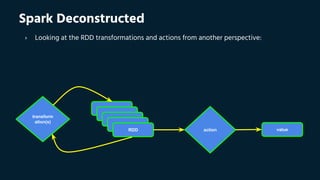
transform
ation(s)
action valueRDD
Spark Deconstructed
› Looking at the RDD transformations and actions from another perspective:
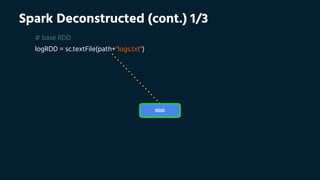
Spark Deconstructed (cont.) 1/3
# base RDD
logRDD = sc.textFile(path+"logs.txt")
RDD
Spark Deconstructed (cont.) 2/3
# transformed RDDs
filteredRDD = logRDD.filter(lambda x: u' "GET ' in x)
splittedRDD = filteredRDD.map(lambda x: x.split(u' "GET ')).map(lambda x: x[1])
transform
ation(s)
RDD
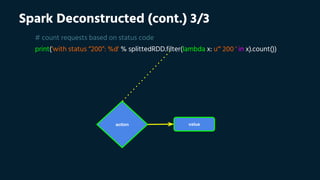
Spark Deconstructed (cont.) 3/3
# count requests based on status code
print('with status “200”: %d' % splittedRDD.filter(lambda x: u'" 200 ' in x).count())
action value
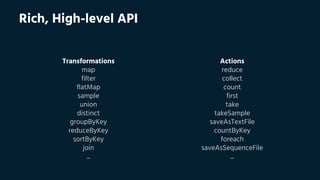
Rich, High-level API
Transformations
map
filter
flatMap
sample
union
distinct
groupByKey
reduceByKey
sortByKey
join
...
Actions
reduce
collect
count
first
take
takeSample
saveAsTextFile
countByKey
foreach
saveAsSequenceFile
...
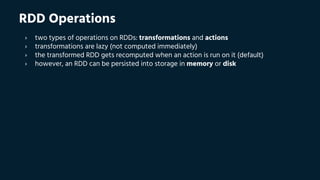
RDD Operations
› two types of operations on RDDs: transformations and actions
› transformations are lazy (not computed immediately)
› the transformed RDD gets recomputed when an action is run on it (default)
› however, an RDD can be persisted into storage in memory or disk
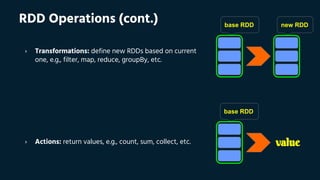
base RDD new RDD
value
RDD Operations (cont.)
› Transformations: define new RDDs based on current
one, e.g., filter, map, reduce, groupBy, etc.
base RDD
› Actions: return values, e.g., count, sum, collect, etc.
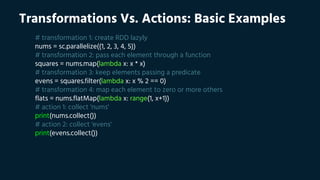
Transformations Vs. Actions: Basic Examples
# transformation 1: create RDD lazyly
nums = sc.parallelize((1, 2, 3, 4, 5))
# transformation 2: pass each element through a function
squares = nums.map(lambda x: x * x)
# transformation 3: keep elements passing a predicate
evens = squares.filter(lambda x: x % 2 == 0)
# transformation 4: map each element to zero or more others
flats = nums.flatMap(lambda x: range(1, x+1))
# action 1: collect 'nums'
print(nums.collect())
# action 2: collect 'evens'
print(evens.collect())
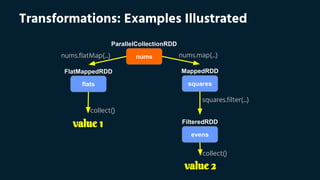
Transformations: Examples Illustrated
nums
flats
evens
squares
ParallelCollectionRDD
FlatMappedRDD MappedRDD
FilteredRDD
value 2
value 1
nums.flatMap(...) nums.map(...)
squares.filter(...)
collect()
collect()
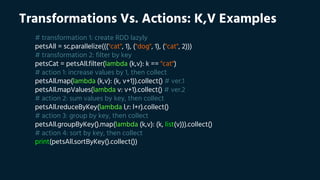
Transformations Vs. Actions: K,V Examples
# transformation 1: create RDD lazyly
petsAll = sc.parallelize((("cat", 1), ("dog", 1), ("cat", 2)))
# transformation 2: filter by key
petsCat = petsAll.filter(lambda (k,v): k == "cat")
# action 1: increase values by 1, then collect
petsAll.map(lambda (k,v): (k, v+1)).collect() # ver.1
petsAll.mapValues(lambda v: v+1).collect() # ver.2
# action 2: sum values by key, then collect
petsAll.reduceByKey(lambda l,r: l+r).collect()
# action 3: group by key, then collect
petsAll.groupByKey().map(lambda (k,v): (k, list(v))).collect()
# action 4: sort by key, then collect
print(petsAll.sortByKey().collect())
Transformations Vs. Actions: Join Examples
# transformation 1: RDD[(date, user, clicks)]
clk = sc.textFile(path+"clk.tsv").map(lambda x: x.split("t"))
# transformation 2: RDD[(date, user, id, lat, lon)]
reg = sc.textFile(path+"reg.tsv").map(lambda x: x.split("t"))
# transformation 3: RDD[(user, (date, clicks))]
clk_reordered = clk.map(lambda (date, user, clicks): (user, (date, clicks)))
# transformation 4: RDD[(user, (date, id, lat, lon))]
reg_reordered = reg.map(lambda (date, user, id, lat, lon): (user, (date, id, lat, lon)))
# transformation 5: RDD[(user, ((date, clicks), (date, id, lat, lon)))]
joined = clk_reordered.join(reg_reordered)
print(joined.count()) # action 1: print total number of successful joins
print(joined.first()) # action 2: print first element of newly-joined RDD
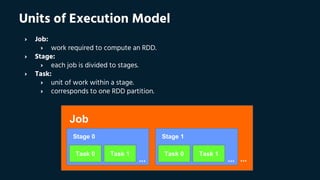
Units of Execution Model
› Job:
› work required to compute an RDD.
› Stage:
› each job is divided to stages.
› Task:
› unit of work within a stage.
› corresponds to one RDD partition.
Job
Stage 0
Task 0 Task 1
...
Stage 1
Task 0 Task 1
... ...
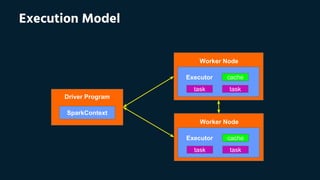
Execution Model
SparkContext
cacheExecutor
tasktask
Worker Node
cacheExecutor
tasktask
Worker Node
Driver Program
Lineage Graph
# calculate word frequencies
counts = (sc.textFile(path+"hamlet.txt"). # MappedRDD[1], HadoopRDD[0]
flatMap(lambda x: x.split(' ')). # FlatMappedRDD[2]
map(lambda x: (x, 1)). # MappedRDD[3]
reduceByKey(lambda l,r: l + r)) # ShuffledRDD[4]
# print lineage graph representation
print(counts.toDebugString())
[0] [1] [2] [3] [4]
HadoopRDD MappedRDD FlatMappedRDD MappedRDD ShuffledRDD
Lineage Graph (cont.)
# calculate word frequencies
counts = (sc.textFile(path+"hamlet.txt"). # MappedRDD[1], HadoopRDD[0]
flatMap(lambda x: x.split(' ')). # FlatMappedRDD[2]
map(lambda x: (x, 1)). # MappedRDD[3]
reduceByKey(lambda l,r: l + r)) # ShuffledRDD[4]
# print lineage graph representation
print(counts.toDebugString())
[0] [1] [2] [3] [4]
HadoopRDD MappedRDD FlatMappedRDD MappedRDD ShuffledRDD
[0] [1] [2] [3] [4]
Execution Plan
# calculate word frequencies
counts = (sc.textFile(path+"hamlet.txt"). # MappedRDD[1], HadoopRDD[0]
flatMap(lambda x: x.split(' ')). # FlatMappedRDD[2]
map(lambda x: (x, 1)). # MappedRDD[3]
reduceByKey(lambda l,r: l + r)) # ShuffledRDD[4]
# print lineage graph representation
print(counts.toDebugString())
[0] [1] [2] [3] [4]
HadoopRDD MappedRDD FlatMappedRDD MappedRDD ShuffledRDD
[0] [1] [2] [3] [4]
Stage 1 Stage 2
Part II:
Introduction to Spark
(section 3: advanced features)
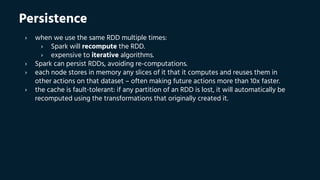
Persistence
› when we use the same RDD multiple times:
› Spark will recompute the RDD.
› expensive to iterative algorithms.
› Spark can persist RDDs, avoiding re-computations.
› each node stores in memory any slices of it that it computes and reuses them in
other actions on that dataset – often making future actions more than 10x faster.
› the cache is fault-tolerant: if any partition of an RDD is lost, it will automatically be
recomputed using the transformations that originally created it.
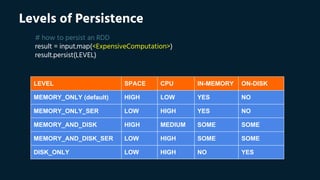
Levels of Persistence
# how to persist an RDD
result = input.map(<ExpensiveComputation>)
result.persist(LEVEL)
LEVEL SPACE CPU IN-MEMORY ON-DISK
MEMORY_ONLY (default) HIGH LOW YES NO
MEMORY_ONLY_SER LOW HIGH YES NO
MEMORY_AND_DISK HIGH MEDIUM SOME SOME
MEMORY_AND_DISK_SER LOW HIGH SOME SOME
DISK_ONLY LOW HIGH NO YES
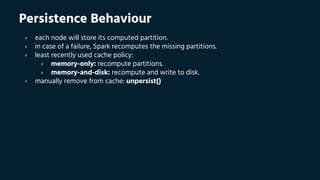
Persistence Behaviour
› each node will store its computed partition.
› in case of a failure, Spark recomputes the missing partitions.
› least recently used cache policy:
› memory-only: recompute partitions.
› memory-and-disk: recompute and write to disk.
› manually remove from cache: unpersist()
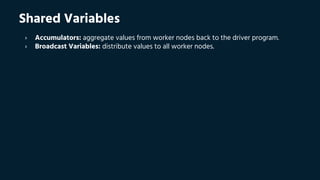
Shared Variables
› Accumulators: aggregate values from worker nodes back to the driver program.
› Broadcast Variables: distribute values to all worker nodes.
Broadcast Variables
› closures and the variables they use are send separately to each task. we may want
to share some variable (e.g., a map) across tasks/operations. this can efficiently done
with broadcast variables:
› broadcast variables let programmer keep a read-only variable cached on each
machine rather than shipping a copy of it with tasks.
› for example, to give every node a copy of a large input dataset efficiently.
› Spark also attempts to distribute broadcast variables using efficient broadcast
algorithms to reduce communication cost.
Example Without Broadcast Variables
# dict(user: (date, id, lat, lon))
regDict = dict(reg_reordered.collect())
# CAUTION: regDict is sent along with every task!
joined = clk_reordered.
map(lambda (user, (date, clicks)): (user, ((date, clicks), regDict[user])))
# let's have a look on the output, transformed dataset
print(joined.first())
print(joined.count())
Example With Broadcast Variables
# dict(user: (date, id, lat, lon))
regDict = dict(reg_reordered.collect())
bcDict = sc.broadcast(regDict)
# bcDict is a read-only variable, cached on each machine
joined = clk_reordered.
map(lambda (user, (date, clicks)): (user, ((date, clicks), bcDict.value[user])))
# let's have a look on the output, transformed dataset
print(joined.first())
print(joined.count())
Accumulators
› accumulators are variables that can only be “added” to through an associative
operation.
› used to implement counters and sums, efficiently in parallel.
› Spark natively supports accumulators of numeric value types and standard
mutable collections, and programmers can extend for new types.
› only the driver program can read an accumulator’s value, not the tasks.
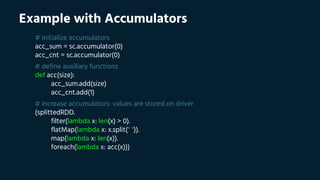
Example with Accumulators
# initialize accumulators
acc_sum = sc.accumulator(0)
acc_cnt = sc.accumulator(0)
# define auxiliary functions
def acc(size):
acc_sum.add(size)
acc_cnt.add(1)
# increase accumulators: values are stored on driver
(splittedRDD.
filter(lambda x: len(x) > 0).
flatMap(lambda x: x.split(" ")).
map(lambda x: len(x)).
foreach(lambda x: acc(x)))
Accumulators and Fault Tolerance
› Safe: Updates inside actions will only applied once.
› Unsafe: Updates inside transformation may applied more than once!!!
Part III:
Hands-On Training
(present Core, SQL and MLlib APIs)
Basic Summary Statistics
# define auxiliary functions
def computeStats(column):
return [round(column.count(),0),
round(column.sum(),3),
round(column.max(),3),
round(column.min(),3),
round(column.mean(),3),
round(computeMedian(column),3),
round(column.stdev(),3),
round(column.variance(),3)]
Basic Summary Statistics (cont.)
# print stats about the dump columns
dat = []
idx = []
for i,h in enumerate(header):
dat.append(computeStats(dump.map(lambda r: r[i])))
idx.append(h)
col = ["count", "sum", "max", "min", "mean", "median", "stdev", "variance"]
Correlation Between Series
# import required libraries
from pyspark.mllib.stat import Statistics
# simple example #1
ts_a = sc.parallelize([0, 1, 2, 3, 4, 5, 6, 7, 8, 9])
ts_b = sc.parallelize([0, 1, 2, 3, 4, 5, 6, 7, 8, 9])
corr = Statistics.corr(ts_a, ts_b, "pearson")
print("correlation between 'a' and 'b' is: %f" % corr)
# simple example #2
ts_a = sc.parallelize([0, 1, 2, 3, 4, 5, 6, 7, 8, 9])
ts_b = sc.parallelize([9, 8, 7, 6, 5, 4, 3, 2, 1, 0])
corr = Statistics.corr(ts_a, ts_b, "pearson")
print("correlation between 'a' and 'b' is: %f" % corr)
Correlation Between Series (cont.)
# advanced example
dat = zeros((len(header), len(header)))
for ((index1, header1), (index2, header2)) in combinations(enumerate(header), 2):
(property1, property2) =
(dump.map(lambda v: v[index1]), dump.map(lambda v: v[index2]))
dat[index1][index2] = Statistics.corr(property1, property2, "pearson")
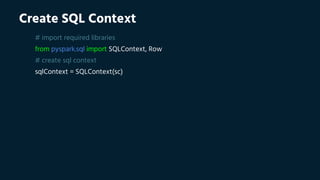
Create SQL Context
# import required libraries
from pyspark.sql import SQLContext, Row
# create sql context
sqlContext = SQLContext(sc)
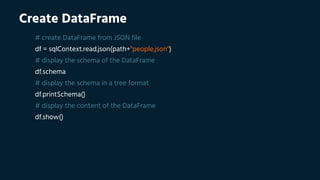
Create DataFrame
# create DataFrame from JSON file
df = sqlContext.read.json(path+"people.json")
# display the schema of the DataFrame
df.schema
# display the schema in a tree format
df.printSchema()
# display the content of the DataFrame
df.show()
DataFrame Operations
# # select only the "name" column
df.select("name").show()
# select everybody but increment the age by 1
df.select(df['name'], df['age'] + 1).show()
# select people older than 21
df.filter(df['age'] > 21).show()
# count people by age
df.groupBy("age").count().show()
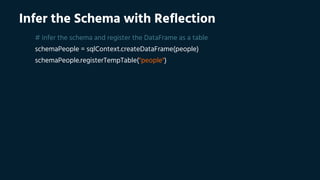
Infer the Schema with Reflection
# infer the schema and register the DataFrame as a table
schemaPeople = sqlContext.createDataFrame(people)
schemaPeople.registerTempTable("people")
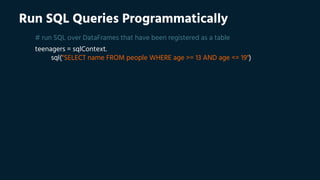
Run SQL Queries Programmatically
# run SQL over DataFrames that have been registered as a table
teenagers = sqlContext.
sql("SELECT name FROM people WHERE age >= 13 AND age <= 19")
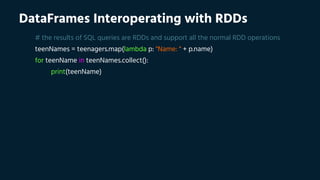
DataFrames Interoperating with RDDs
# the results of SQL queries are RDDs and support all the normal RDD operations
teenNames = teenagers.map(lambda p: "Name: " + p.name)
for teenName in teenNames.collect():
print(teenName)
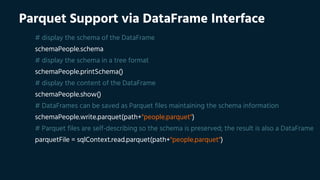
Parquet Support via DataFrame Interface
# display the schema of the DataFrame
schemaPeople.schema
# display the schema in a tree format
schemaPeople.printSchema()
# display the content of the DataFrame
schemaPeople.show()
# DataFrames can be saved as Parquet files maintaining the schema information
schemaPeople.write.parquet(path+"people.parquet")
# Parquet files are self-describing so the schema is preserved; the result is also a DataFrame
parquetFile = sqlContext.read.parquet(path+"people.parquet")
Regression
from pyspark.mllib.linalg import Vectors
from pyspark.mllib.regression import LabeledPoint
from pyspark.mllib.regression import LinearRegressionWithSGD
def prepareDump(row):
return LabeledPoint(row[0],Vectors.dense((row[1],row[2],...,row[10],row[11])))
# dummy split into train and test set
trainSet = dump.filter(lambda x: x.features[9] <= 4000)
testSet = dump.filter(lambda x: x.features[9] > 4000)
# build regression model: without such a small step size, the algorithm would diverge
model = LinearRegressionWithSGD.train(data=trainSet, iterations=100, step=0.000000001)
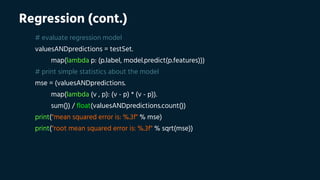
Regression (cont.)
# evaluate regression model
valuesANDpredictions = testSet.
map(lambda p: (p.label, model.predict(p.features)))
# print simple statistics about the model
mse = (valuesANDpredictions.
map(lambda (v , p): (v - p) * (v - p)).
sum()) / float(valuesANDpredictions.count())
print("mean squared error is: %.3f" % mse)
print("root mean squared error is: %.3f" % sqrt(mse))
Classification
# import required libraries
from pyspark.mllib.regression import LabeledPoint
from pyspark.mllib.linalg import Vectors
from pyspark.mllib.tree import DecisionTree
# prepare dump
dump = (dump.
map(lambda line: prepareDump(line)).
map(lambda line: LabeledPoint(line[0],Vectors.dense(line[1]))))
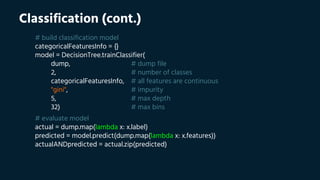
Classification (cont.)
# build classification model
categoricalFeaturesInfo = {}
model = DecisionTree.trainClassifier(
dump, # dump file
2, # number of classes
categoricalFeaturesInfo, # all features are continuous
"gini", # impurity
5, # max depth
32) # max bins
# evaluate model
actual = dump.map(lambda x: x.label)
predicted = model.predict(dump.map(lambda x: x.features))
actualANDpredicted = actual.zip(predicted)
Clustering
# import required libraries
from pyspark.mllib.linalg import Vectors
from pyspark.mllib.clustering import KMeans
# convert original data points into dence format
dump = dump.map(lambda line: Vectors.dense(line))
clusters = 2
iterations = 20
model = KMeans.train(dump, clusters, maxIterations=iterations)
# get the centers of the 2 clusters
_2_centers = [tuple(c) for c in model.clusterCenters]
Recommendations
# import required libraries
from pyspark.mllib.recommendation import Rating, ALS
# dummy split into three sets, namely train, validation and test
train = (ratings.map(lambda x: parseRatings1(x)).
filter(lambda x: (((x[3] % 10) < 6))).
map(lambda x: parseRatings2(x)))
validation = (ratings.map(lambda x: parseRatings1(x)).
filter(lambda x: (((x[3] % 10) >= 6) and ((x[3] % 10) < 8))).
map(lambda x: parseRatings2(x)))
test = (ratings.map(lambda x: parseRatings1(x)).
filter(lambda x: (((x[3] % 10) >= 8))).
map(lambda x: parseRatings2(x)))
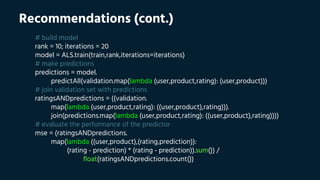
Recommendations (cont.)
# build model
rank = 10; iterations = 20
model = ALS.train(train,rank,iterations=iterations)
# make predictions
predictions = model.
predictAll(validation.map(lambda (user,product,rating): (user,product)))
# join validation set with predictions
ratingsANDpredictions = ((validation.
map(lambda (user,product,rating): ((user,product),rating))).
join(predictions.map(lambda (user,product,rating): ((user,product),rating))))
# evaluate the performance of the predictor
mse = (ratingsANDpredictions.
map(lambda ((user,product),(rating,prediction)):
(rating - prediction) * (rating - prediction)).sum()) /
float(ratingsANDpredictions.count())
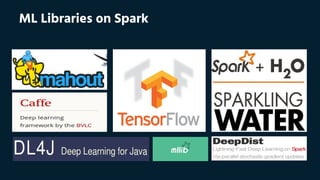
ML Libraries on Spark
› user@spark.apache.org
› usage questions, help, announcements.
› dev@spark.apache.org
› for people who want to contribute code!
Get Help and Contribute
› Introduction to Spark (edX), Apr. 14, 2016
› Big Data Analysis with Spark (edX), May 19, 2016
› Distributed Machine Learning with Spark (edX), Jun. 2016
› Adv. Distributed Machine Learning with Spark (edX), Aug. 2016
› Adv. Spark for Data Science & Data Engineering (edX), Oct. 2016
› Data Science & Engineering with Spark (edX), TBA
Courses and Certifications
Books and Tutorials
THANKS!
Any questions?
You can find me at: @eualin

Apache Spark Workshop, Apr. 2016, Euangelos Linardos

  • 1.
  • 2.
    HELLO! I am EuangelosLinardos Data Scientist at Pollfish
  • 3.
    Outline › Part I:Setup Environment › Ubuntu / Mac / Windows › Part II: Introduction to Spark › History / Features / Examples › Part III: Hands-On Training › Core / SQL / MLlib
  • 4.
  • 5.
    Setting Up Dockeron Ubuntu › $ apt-get update › $ apt-get -y install docker.io › $ ln -sf /usr/bin/docker.io /usr/local/bin/docker › $ sed -i '$acomplete -F _docker docker' /etc/bash_completion.d/docker.io › $ update-rc.d docker.io defaults › $ docker pull jupyter/pyspark-notebook:latest › $ docker run -d --name workshop -p 8888:8888 jupyter/pyspark-notebook:latest › # open browser and visit the address `localhost:8888` › # click `New` and then `Python 2` › # rename notebook, from `Untitled` to `Workshop`
  • 6.
    Setting Up Dockeron Windows Mac › download `Docker Toolbox` › install `Docker Toolbox`, with default settings › open `Docker Quickstart Terminal` › click `Yes` on the `User Account Control` window, if it appears › write down the `IP` address (e.g. 192.168.99.100), and then type: › $ docker pull jupyter/pyspark-notebook › $ docker run -d --name workshop -p 8888:8888 jupyter/pyspark-notebook › open browser and visit the aforementioned `IP` address, e.g. `192.168.99.100:8888` › click `New` and then `Python 2` › rename notebook, from `Untitled` to `Workshop`
  • 7.
    Validate Setup # importrequired libraries from pyspark import SparkConf, SparkContext # create spark context sc = SparkContext(conf=(SparkConf().setMaster("local[*]"))) # print spark context print(sc) # print spark configuration print(sc._conf.getAll())
  • 8.
    Useful Links › installDocker on other platforms: › Ubuntu: https://www.youtube.com/watch?v=V9AKvZZCWLc › Mac: https://www.youtube.com/watch?v=lNkVxDSRo7M › Windows: https://www.youtube.com/watch?v=S7NVloq0EBc › download the course material: › datasets: http://bit.ly/23hdtq9 › notebooks: http://bit.ly/23hdsCO › presenations: http://bit.ly/1TFttfE › complete the course survey: › http://bit.ly/1MC4xUF › read the Apache Spark documentation: › http://bit.ly/1UQBgrP
  • 9.
    Simple Examples plist =sc.parallelize(range(10000)) # from python list path = "/home/jovyan/work/datasets/" # set datasets' path tfile = sc.textFile(path+"hamlet.txt") # from text file print(tfile.count()) # count lines print(plist.count()) # count elements plist.takeSample(False, 5) # sample and collect elements fv = plist.filter(lambda x: x < 10) # filter elements print(fv.count()) # count filtered elements print(fv.collect()) # collect filtered elements fv.reduce(lambda l,r: l + r) # merge filtered elements with an associative function fv.saveAsTextFile(path+"filtered-elements.txt") # write filtered elements to local file system
  • 10.
    Part II: Introduction toSpark (section 1: get to know spark)
  • 11.
    Spark in aNutshell › general cluster computing platform: › distributed in-memory computational framework › SQL, Machine Learning, Stream Processing, etc. › easy to use, powerful, high-level API: › Scala, Java, Python and R
  • 12.
    Limitations of MapReduce ›MapReduce use cases showed two major limitations: › difficulty of programming directly in MapReduce › performance bottlenecks, or batch not fitting the use cases › in short, MR doesn’t compose well for large applications › therefore, people built specialized systems as workarounds
  • 13.
    MapReduce Giraph Tez Pregel S4 Pig GraphLabImpala Dremel Drill Storm GeneralBatch Processing Specialized Systems (iterative, interactive, streaming, graph, etc.) Limitations (cont.): Specialized Systems
  • 14.
    Advantages of Spark ›handles batch, interactive, and real-time within a single framework › native integration with Java, Python, Scala, R › programming at a higher level of abstraction › more general: map/reduce is just one set of supported constructs
  • 15.
    Advantages (cont.): GeneralizedMapReduce › unlike the various specialized systems, Spark’s goal was to generalize MapReduce to support new apps within same engine › two reasonably small additions are enough to express the previous models: › fast data sharing › general DAGs › this allows for an approach which is more efficient for the engine, and much simpler for the end users
  • 16.
    Code Size same functionalityyet in the form of libraries
  • 17.
    Standalone YARN Mesos SparkCore Spark SQL Spark GraphXSpark MLlibSpark Streaming Unified Stack
  • 18.
    High Performance › in-memorycluster computing › ideal for iterative algorithms › faster than Hadoop: › 10x on disk › 100x in memory
  • 19.
    Brief History › originallydeveloped in 2009, UC Berkeley AMP Lab › open-sourced in 2010 › as of 2014, Spark is a top-level Apache project › fastest open-source engine for sorting 100 TB: › won the 2014 Daytona GraySort contest › throughput: 4.27 TB/min
  • 20.
    End Users › DataScientists: › analyze and model data › data transformations and prototyping › statistics and machine learning › Data Engineers: › implement production data processing systems › require a reasonable API for distributed processing › reliable, high performance, easy to monitor platform
  • 21.
    partitions Resilient Distributed Dataset ›RDD is an immutable and partitioned collection. RDD comes from the acronym: › resilient: it can be recreated, when data in memory is lost › distributed: stored in memory across the cluster › dataset: data that comes from file or created programmatically RDD
  • 22.
    Resilient Distributed Dataset(cont.) › RDD feels like coding using typical Scala collections; RDD can be build: › directly from a datasource (e.g., text file, HDFS, etc.), › or by applying a transformation to another RDDs › main features: › RDDs are computed lazily › automatically rebuild on failure › persistence for reuse (RAM and/or disk)
  • 23.
    MappedRDD func = _.split(...) FilteredRDD func= _.contains(...) HadoopRDD path = hdfs://... messages = textFile(“file.log”).filter(_.contains(“error”)).map(_.split(‘t’)(2)) RDD Fault Tolerance › RDDs are the primary abstraction in Spark; a fault-tolerant collection of elements that can be operated on in parallel › RDDs track the series of transformations used to build them; their lineage to recompute lost data
  • 24.
    Loading and SavingRDDs › File Systems: Local FS, Amazon S3 and HDFS › Supported formats: Text files, JSON, Hadoop sequence files, parquet files, protocol buffers and object files › Structured data with Spark SQL: Hive, JSON, JDBC, Cassandra, HBase and ElasticSearch
  • 25.
    Part II: Introduction toSpark (section 2: spark under the hood)
  • 26.
  • 27.
    The Spark Context ›first thing that a Spark program does is create a SparkContext object, which tells Spark how to access a cluster › in the shell for either Scala or Python, this is the sc variable, which is created automatically › other programs must use a constructor to instantiate a new SparkContext › then in turn SparkContext gets used to create other variables
  • 28.
    master description local run Sparklocally with one worker thread (i. e. no parallelism at all) local[*] run Spark locally with as many worker threads as logical cores on your machine spark://HOST:PORT connect to the given Spark standalone cluster master (port 7077 by default) mesos://HOST:PORT connect to the given Mesos cluster (port 5050 by default) yarn connect to a YARN cluster in client or cluster mode (YARN_CONF_DIR variable) The Spark Master › the master parameter for a SparkContext determines which cluster to use:
  • 29.
    SparkContext cacheExecutor tasktask Worker Node cacheExecutor tasktask Worker Node DriverProgram Cluster Management The Spark Master (cont.) › connects to a cluster manager which allocate resources across applications › acquires executors on cluster nodes – worker processes to run computations and store data › sends app code to the executors › sends tasks for the executors to run
  • 30.
    Word Count › Whatis the goal? Count often each each word word appears appears count how how often In of text text documents. › Why is this so popular? Simple program provides a good test case for parallel processing, since it: › requires a minimal amount of code › demonstrates use of both symbolic and numeric values › isn’t many steps away from search indexing › serves as a “Hello World” for big data applications › Why should I care? A distributed computing framework that can run Word Count efficiently in parallel at scale can likely handle much larger and more interesting compute problems.
  • 31.
    Word Count (cont.) #calculate word frequencies counts = (tfile. flatMap(lambda x: x.split(' ')). filter(lambda x: len(x) > 0). map(lambda x: (x, 1)). reduceByKey(lambda l,r: l + r). sortBy(lambda x: x[1], ascending=False)) # print (word,count) sample print(counts.take(5))
  • 32.
    Mining Logs # baseRDD logRDD = sc.textFile(path+"logs.txt") # transformed RDDs filteredRDD = logRDD.filter(lambda x: u' "GET ' in x) splittedRDD = filteredRDD.map(lambda x: x.split(u' "GET ')).map(lambda x: x[1]) # count requests based on status code print('with status “200”: %d' % splittedRDD.filter(lambda x: u'" 200 ' in x).count()) print('without status “200”: %d' % splittedRDD.filter(lambda x: u'" 200 ' not in x).count())
  • 33.
    transform ation(s) action valueRDD Spark Deconstructed ›Looking at the RDD transformations and actions from another perspective:
  • 34.
    Spark Deconstructed (cont.)1/3 # base RDD logRDD = sc.textFile(path+"logs.txt") RDD
  • 35.
    Spark Deconstructed (cont.)2/3 # transformed RDDs filteredRDD = logRDD.filter(lambda x: u' "GET ' in x) splittedRDD = filteredRDD.map(lambda x: x.split(u' "GET ')).map(lambda x: x[1]) transform ation(s) RDD
  • 36.
    Spark Deconstructed (cont.)3/3 # count requests based on status code print('with status “200”: %d' % splittedRDD.filter(lambda x: u'" 200 ' in x).count()) action value
  • 37.
  • 38.
    RDD Operations › twotypes of operations on RDDs: transformations and actions › transformations are lazy (not computed immediately) › the transformed RDD gets recomputed when an action is run on it (default) › however, an RDD can be persisted into storage in memory or disk
  • 39.
    base RDD newRDD value RDD Operations (cont.) › Transformations: define new RDDs based on current one, e.g., filter, map, reduce, groupBy, etc. base RDD › Actions: return values, e.g., count, sum, collect, etc.
  • 40.
    Transformations Vs. Actions:Basic Examples # transformation 1: create RDD lazyly nums = sc.parallelize((1, 2, 3, 4, 5)) # transformation 2: pass each element through a function squares = nums.map(lambda x: x * x) # transformation 3: keep elements passing a predicate evens = squares.filter(lambda x: x % 2 == 0) # transformation 4: map each element to zero or more others flats = nums.flatMap(lambda x: range(1, x+1)) # action 1: collect 'nums' print(nums.collect()) # action 2: collect 'evens' print(evens.collect())
  • 41.
    Transformations: Examples Illustrated nums flats evens squares ParallelCollectionRDD FlatMappedRDDMappedRDD FilteredRDD value 2 value 1 nums.flatMap(...) nums.map(...) squares.filter(...) collect() collect()
  • 42.
    Transformations Vs. Actions:K,V Examples # transformation 1: create RDD lazyly petsAll = sc.parallelize((("cat", 1), ("dog", 1), ("cat", 2))) # transformation 2: filter by key petsCat = petsAll.filter(lambda (k,v): k == "cat") # action 1: increase values by 1, then collect petsAll.map(lambda (k,v): (k, v+1)).collect() # ver.1 petsAll.mapValues(lambda v: v+1).collect() # ver.2 # action 2: sum values by key, then collect petsAll.reduceByKey(lambda l,r: l+r).collect() # action 3: group by key, then collect petsAll.groupByKey().map(lambda (k,v): (k, list(v))).collect() # action 4: sort by key, then collect print(petsAll.sortByKey().collect())
  • 43.
    Transformations Vs. Actions:Join Examples # transformation 1: RDD[(date, user, clicks)] clk = sc.textFile(path+"clk.tsv").map(lambda x: x.split("t")) # transformation 2: RDD[(date, user, id, lat, lon)] reg = sc.textFile(path+"reg.tsv").map(lambda x: x.split("t")) # transformation 3: RDD[(user, (date, clicks))] clk_reordered = clk.map(lambda (date, user, clicks): (user, (date, clicks))) # transformation 4: RDD[(user, (date, id, lat, lon))] reg_reordered = reg.map(lambda (date, user, id, lat, lon): (user, (date, id, lat, lon))) # transformation 5: RDD[(user, ((date, clicks), (date, id, lat, lon)))] joined = clk_reordered.join(reg_reordered) print(joined.count()) # action 1: print total number of successful joins print(joined.first()) # action 2: print first element of newly-joined RDD
  • 44.
    Units of ExecutionModel › Job: › work required to compute an RDD. › Stage: › each job is divided to stages. › Task: › unit of work within a stage. › corresponds to one RDD partition. Job Stage 0 Task 0 Task 1 ... Stage 1 Task 0 Task 1 ... ...
  • 45.
  • 46.
    Lineage Graph # calculateword frequencies counts = (sc.textFile(path+"hamlet.txt"). # MappedRDD[1], HadoopRDD[0] flatMap(lambda x: x.split(' ')). # FlatMappedRDD[2] map(lambda x: (x, 1)). # MappedRDD[3] reduceByKey(lambda l,r: l + r)) # ShuffledRDD[4] # print lineage graph representation print(counts.toDebugString()) [0] [1] [2] [3] [4] HadoopRDD MappedRDD FlatMappedRDD MappedRDD ShuffledRDD
  • 47.
    Lineage Graph (cont.) #calculate word frequencies counts = (sc.textFile(path+"hamlet.txt"). # MappedRDD[1], HadoopRDD[0] flatMap(lambda x: x.split(' ')). # FlatMappedRDD[2] map(lambda x: (x, 1)). # MappedRDD[3] reduceByKey(lambda l,r: l + r)) # ShuffledRDD[4] # print lineage graph representation print(counts.toDebugString()) [0] [1] [2] [3] [4] HadoopRDD MappedRDD FlatMappedRDD MappedRDD ShuffledRDD [0] [1] [2] [3] [4]
  • 48.
    Execution Plan # calculateword frequencies counts = (sc.textFile(path+"hamlet.txt"). # MappedRDD[1], HadoopRDD[0] flatMap(lambda x: x.split(' ')). # FlatMappedRDD[2] map(lambda x: (x, 1)). # MappedRDD[3] reduceByKey(lambda l,r: l + r)) # ShuffledRDD[4] # print lineage graph representation print(counts.toDebugString()) [0] [1] [2] [3] [4] HadoopRDD MappedRDD FlatMappedRDD MappedRDD ShuffledRDD [0] [1] [2] [3] [4] Stage 1 Stage 2
  • 49.
    Part II: Introduction toSpark (section 3: advanced features)
  • 50.
    Persistence › when weuse the same RDD multiple times: › Spark will recompute the RDD. › expensive to iterative algorithms. › Spark can persist RDDs, avoiding re-computations. › each node stores in memory any slices of it that it computes and reuses them in other actions on that dataset – often making future actions more than 10x faster. › the cache is fault-tolerant: if any partition of an RDD is lost, it will automatically be recomputed using the transformations that originally created it.
  • 51.
    Levels of Persistence #how to persist an RDD result = input.map(<ExpensiveComputation>) result.persist(LEVEL) LEVEL SPACE CPU IN-MEMORY ON-DISK MEMORY_ONLY (default) HIGH LOW YES NO MEMORY_ONLY_SER LOW HIGH YES NO MEMORY_AND_DISK HIGH MEDIUM SOME SOME MEMORY_AND_DISK_SER LOW HIGH SOME SOME DISK_ONLY LOW HIGH NO YES
  • 52.
    Persistence Behaviour › eachnode will store its computed partition. › in case of a failure, Spark recomputes the missing partitions. › least recently used cache policy: › memory-only: recompute partitions. › memory-and-disk: recompute and write to disk. › manually remove from cache: unpersist()
  • 53.
    Shared Variables › Accumulators:aggregate values from worker nodes back to the driver program. › Broadcast Variables: distribute values to all worker nodes.
  • 54.
    Broadcast Variables › closuresand the variables they use are send separately to each task. we may want to share some variable (e.g., a map) across tasks/operations. this can efficiently done with broadcast variables: › broadcast variables let programmer keep a read-only variable cached on each machine rather than shipping a copy of it with tasks. › for example, to give every node a copy of a large input dataset efficiently. › Spark also attempts to distribute broadcast variables using efficient broadcast algorithms to reduce communication cost.
  • 55.
    Example Without BroadcastVariables # dict(user: (date, id, lat, lon)) regDict = dict(reg_reordered.collect()) # CAUTION: regDict is sent along with every task! joined = clk_reordered. map(lambda (user, (date, clicks)): (user, ((date, clicks), regDict[user]))) # let's have a look on the output, transformed dataset print(joined.first()) print(joined.count())
  • 56.
    Example With BroadcastVariables # dict(user: (date, id, lat, lon)) regDict = dict(reg_reordered.collect()) bcDict = sc.broadcast(regDict) # bcDict is a read-only variable, cached on each machine joined = clk_reordered. map(lambda (user, (date, clicks)): (user, ((date, clicks), bcDict.value[user]))) # let's have a look on the output, transformed dataset print(joined.first()) print(joined.count())
  • 57.
    Accumulators › accumulators arevariables that can only be “added” to through an associative operation. › used to implement counters and sums, efficiently in parallel. › Spark natively supports accumulators of numeric value types and standard mutable collections, and programmers can extend for new types. › only the driver program can read an accumulator’s value, not the tasks.
  • 58.
    Example with Accumulators #initialize accumulators acc_sum = sc.accumulator(0) acc_cnt = sc.accumulator(0) # define auxiliary functions def acc(size): acc_sum.add(size) acc_cnt.add(1) # increase accumulators: values are stored on driver (splittedRDD. filter(lambda x: len(x) > 0). flatMap(lambda x: x.split(" ")). map(lambda x: len(x)). foreach(lambda x: acc(x)))
  • 59.
    Accumulators and FaultTolerance › Safe: Updates inside actions will only applied once. › Unsafe: Updates inside transformation may applied more than once!!!
  • 60.
    Part III: Hands-On Training (presentCore, SQL and MLlib APIs)
  • 61.
    Basic Summary Statistics #define auxiliary functions def computeStats(column): return [round(column.count(),0), round(column.sum(),3), round(column.max(),3), round(column.min(),3), round(column.mean(),3), round(computeMedian(column),3), round(column.stdev(),3), round(column.variance(),3)]
  • 62.
    Basic Summary Statistics(cont.) # print stats about the dump columns dat = [] idx = [] for i,h in enumerate(header): dat.append(computeStats(dump.map(lambda r: r[i]))) idx.append(h) col = ["count", "sum", "max", "min", "mean", "median", "stdev", "variance"]
  • 63.
    Correlation Between Series #import required libraries from pyspark.mllib.stat import Statistics # simple example #1 ts_a = sc.parallelize([0, 1, 2, 3, 4, 5, 6, 7, 8, 9]) ts_b = sc.parallelize([0, 1, 2, 3, 4, 5, 6, 7, 8, 9]) corr = Statistics.corr(ts_a, ts_b, "pearson") print("correlation between 'a' and 'b' is: %f" % corr) # simple example #2 ts_a = sc.parallelize([0, 1, 2, 3, 4, 5, 6, 7, 8, 9]) ts_b = sc.parallelize([9, 8, 7, 6, 5, 4, 3, 2, 1, 0]) corr = Statistics.corr(ts_a, ts_b, "pearson") print("correlation between 'a' and 'b' is: %f" % corr)
  • 64.
    Correlation Between Series(cont.) # advanced example dat = zeros((len(header), len(header))) for ((index1, header1), (index2, header2)) in combinations(enumerate(header), 2): (property1, property2) = (dump.map(lambda v: v[index1]), dump.map(lambda v: v[index2])) dat[index1][index2] = Statistics.corr(property1, property2, "pearson")
  • 65.
    Create SQL Context #import required libraries from pyspark.sql import SQLContext, Row # create sql context sqlContext = SQLContext(sc)
  • 66.
    Create DataFrame # createDataFrame from JSON file df = sqlContext.read.json(path+"people.json") # display the schema of the DataFrame df.schema # display the schema in a tree format df.printSchema() # display the content of the DataFrame df.show()
  • 67.
    DataFrame Operations # #select only the "name" column df.select("name").show() # select everybody but increment the age by 1 df.select(df['name'], df['age'] + 1).show() # select people older than 21 df.filter(df['age'] > 21).show() # count people by age df.groupBy("age").count().show()
  • 68.
    Infer the Schemawith Reflection # infer the schema and register the DataFrame as a table schemaPeople = sqlContext.createDataFrame(people) schemaPeople.registerTempTable("people")
  • 69.
    Run SQL QueriesProgrammatically # run SQL over DataFrames that have been registered as a table teenagers = sqlContext. sql("SELECT name FROM people WHERE age >= 13 AND age <= 19")
  • 70.
    DataFrames Interoperating withRDDs # the results of SQL queries are RDDs and support all the normal RDD operations teenNames = teenagers.map(lambda p: "Name: " + p.name) for teenName in teenNames.collect(): print(teenName)
  • 71.
    Parquet Support viaDataFrame Interface # display the schema of the DataFrame schemaPeople.schema # display the schema in a tree format schemaPeople.printSchema() # display the content of the DataFrame schemaPeople.show() # DataFrames can be saved as Parquet files maintaining the schema information schemaPeople.write.parquet(path+"people.parquet") # Parquet files are self-describing so the schema is preserved; the result is also a DataFrame parquetFile = sqlContext.read.parquet(path+"people.parquet")
  • 72.
    Regression from pyspark.mllib.linalg importVectors from pyspark.mllib.regression import LabeledPoint from pyspark.mllib.regression import LinearRegressionWithSGD def prepareDump(row): return LabeledPoint(row[0],Vectors.dense((row[1],row[2],...,row[10],row[11]))) # dummy split into train and test set trainSet = dump.filter(lambda x: x.features[9] <= 4000) testSet = dump.filter(lambda x: x.features[9] > 4000) # build regression model: without such a small step size, the algorithm would diverge model = LinearRegressionWithSGD.train(data=trainSet, iterations=100, step=0.000000001)
  • 73.
    Regression (cont.) # evaluateregression model valuesANDpredictions = testSet. map(lambda p: (p.label, model.predict(p.features))) # print simple statistics about the model mse = (valuesANDpredictions. map(lambda (v , p): (v - p) * (v - p)). sum()) / float(valuesANDpredictions.count()) print("mean squared error is: %.3f" % mse) print("root mean squared error is: %.3f" % sqrt(mse))
  • 74.
    Classification # import requiredlibraries from pyspark.mllib.regression import LabeledPoint from pyspark.mllib.linalg import Vectors from pyspark.mllib.tree import DecisionTree # prepare dump dump = (dump. map(lambda line: prepareDump(line)). map(lambda line: LabeledPoint(line[0],Vectors.dense(line[1]))))
  • 75.
    Classification (cont.) # buildclassification model categoricalFeaturesInfo = {} model = DecisionTree.trainClassifier( dump, # dump file 2, # number of classes categoricalFeaturesInfo, # all features are continuous "gini", # impurity 5, # max depth 32) # max bins # evaluate model actual = dump.map(lambda x: x.label) predicted = model.predict(dump.map(lambda x: x.features)) actualANDpredicted = actual.zip(predicted)
  • 76.
    Clustering # import requiredlibraries from pyspark.mllib.linalg import Vectors from pyspark.mllib.clustering import KMeans # convert original data points into dence format dump = dump.map(lambda line: Vectors.dense(line)) clusters = 2 iterations = 20 model = KMeans.train(dump, clusters, maxIterations=iterations) # get the centers of the 2 clusters _2_centers = [tuple(c) for c in model.clusterCenters]
  • 77.
    Recommendations # import requiredlibraries from pyspark.mllib.recommendation import Rating, ALS # dummy split into three sets, namely train, validation and test train = (ratings.map(lambda x: parseRatings1(x)). filter(lambda x: (((x[3] % 10) < 6))). map(lambda x: parseRatings2(x))) validation = (ratings.map(lambda x: parseRatings1(x)). filter(lambda x: (((x[3] % 10) >= 6) and ((x[3] % 10) < 8))). map(lambda x: parseRatings2(x))) test = (ratings.map(lambda x: parseRatings1(x)). filter(lambda x: (((x[3] % 10) >= 8))). map(lambda x: parseRatings2(x)))
  • 78.
    Recommendations (cont.) # buildmodel rank = 10; iterations = 20 model = ALS.train(train,rank,iterations=iterations) # make predictions predictions = model. predictAll(validation.map(lambda (user,product,rating): (user,product))) # join validation set with predictions ratingsANDpredictions = ((validation. map(lambda (user,product,rating): ((user,product),rating))). join(predictions.map(lambda (user,product,rating): ((user,product),rating)))) # evaluate the performance of the predictor mse = (ratingsANDpredictions. map(lambda ((user,product),(rating,prediction)): (rating - prediction) * (rating - prediction)).sum()) / float(ratingsANDpredictions.count())
  • 79.
  • 80.
    › user@spark.apache.org › usagequestions, help, announcements. › dev@spark.apache.org › for people who want to contribute code! Get Help and Contribute
  • 81.
    › Introduction toSpark (edX), Apr. 14, 2016 › Big Data Analysis with Spark (edX), May 19, 2016 › Distributed Machine Learning with Spark (edX), Jun. 2016 › Adv. Distributed Machine Learning with Spark (edX), Aug. 2016 › Adv. Spark for Data Science & Data Engineering (edX), Oct. 2016 › Data Science & Engineering with Spark (edX), TBA Courses and Certifications
  • 82.
  • 83.
    THANKS! Any questions? You canfind me at: @eualin