1 © Hortonworks Inc. 2011 – 2017. All Rights Reserved
Apache Ambari - HDP
Cluster Upgrades
Operational Deep Dive and Troubleshooting
DATAWORKS Summit, Munich
April 5, 2017
2 © Hortonworks Inc. 2011 – 2017. All Rights Reserved
Presenters
• Venkatraman Poornalingam (vpoornalingam@hortonworks.com)
• Principal Automation Engineer, Technical Support Team Hortonworks
• Part of Ambari and Upgrades SME team
• Vivek Sharma (vsharma@hortonworks.com)
• Staff Software Engineer, Ambari Quality Engineering Team
• Specializing on Ambari Upgrades and Views
3 © Hortonworks Inc. 2011 – 2017. All Rights Reserved
Agenda
• Use Case
• Prerequisites for upgrade
• Upgrades Deep Dive
• Express Vs Rolling
• Internals
• Troubleshooting
• Ambari 2.5 Upgrades new Feature
• Best Practices
4 © Hortonworks Inc. 2011 – 2017. All Rights Reserved
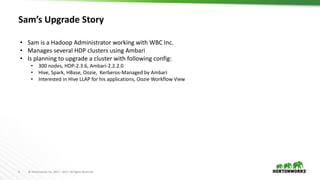
Sam’s Upgrade Story
• Sam is a Hadoop Administrator working with WBC Inc.
• Manages several HDP clusters using Ambari
• Is planning to upgrade a cluster with following config:
• 300 nodes, HDP-2.3.6, Ambari-2.2.2.0
• Hive, Spark, HBase, Oozie, Kerberos-Managed by Ambari
• Interested in Hive LLAP for his applications, Oozie Workflow View
5 © Hortonworks Inc. 2011 – 2017. All Rights Reserved
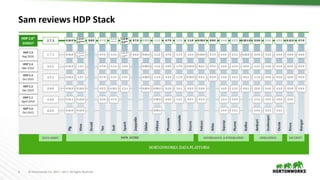
Sam reviews HDP Stack
6 © Hortonworks Inc. 2011 – 2017. All Rights Reserved
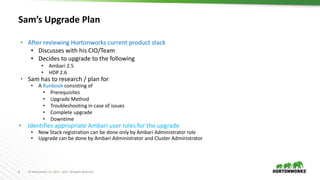
Sam’s Upgrade Plan
• After reviewing Hortonworks current product stack
• Discusses with his CIO/Team
• Decides to upgrade to the following
• Ambari 2.5
• HDP 2.6
• Sam has to research / plan for
• A Runbook consisting of
• Prerequisites
• Upgrade Method
• Troubleshooting in case of issues
• Complete upgrade
• Downtime
• Identifies appropriate Ambari user roles for the upgrade
• New Stack registration can be done only by Ambari Administrator role
• Upgrade can be done by Ambari Administrator and Cluster Administrator
7 © Hortonworks Inc. 2011 – 2017. All Rights Reserved
Sam in Research mode …
8 © Hortonworks Inc. 2011 – 2017. All Rights Reserved
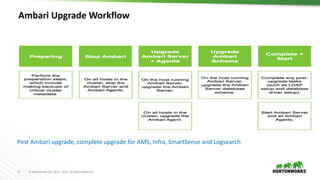
Ambari Upgrade Workflow
Post Ambari upgrade, complete upgrade for AMS, Infra, SmartSense and Logsearch
9 © Hortonworks Inc. 2011 – 2017. All Rights Reserved
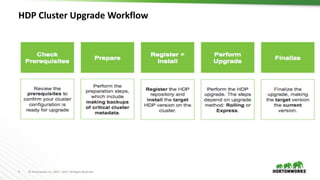
HDP Cluster Upgrade Workflow
10 © Hortonworks Inc. 2011 – 2017. All Rights Reserved
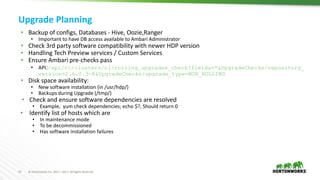
Upgrade Planning
• Backup of configs, Databases - Hive, Oozie,Ranger
• Important to have DB access available to Ambari Administrator
• Check 3rd party software compatibility with newer HDP version
• Handling Tech Preview services / Custom Services
• Ensure Ambari pre-checks pass
• API:/api/v1/clusters/c1/rolling_upgrades_check?fields=*&UpgradeChecks/repository_
version=2.6.0.3-8&UpgradeChecks/upgrade_type=NON_ROLLING
• Disk space availability:
• New software installation (in /usr/hdp/)
• Backups during Upgrade (/tmp/)
• Check and ensure software dependencies are resolved
• Example, yum check dependencies; echo $?, Should return 0
• Identify list of hosts which are
• In maintenance mode
• To be decommissioned
• Has software installation failures
11 © Hortonworks Inc. 2011 – 2017. All Rights Reserved
Sam decides to Deep Dive
12 © Hortonworks Inc. 2011 – 2017. All Rights Reserved
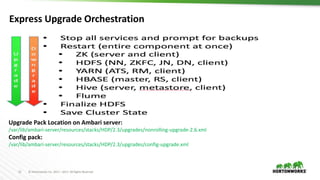
Express Upgrade Orchestration
Upgrade Pack Location on Ambari server:
/var/lib/ambari-server/resources/stacks/HDP/2.3/upgrades/nonrolling-upgrade-2.6.xml
Config pack:
/var/lib/ambari-server/resources/stacks/HDP/2.3/upgrades/config-upgrade.xml
13 © Hortonworks Inc. 2011 – 2017. All Rights Reserved
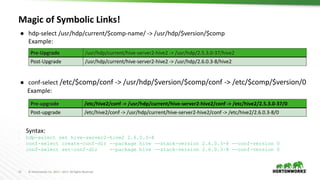
Magic of Symbolic Links!
● hdp-select /usr/hdp/current/$comp-name/ -> /usr/hdp/$version/$comp
Example:
● conf-select /etc/$comp/conf -> /usr/hdp/$version/$comp/conf -> /etc/$comp/$version/0
Example:
– Syntax:
– hdp-select set hive-server2-hive2 2.6.0.3-8
– conf-select create-conf-dir --package hive --stack-version 2.6.0.3-8 --conf-version 0
– conf-select set-conf-dir --package hive --stack-version 2.6.0.3-8 --conf-version 0
Pre-Upgrade /usr/hdp/current/hive-server2-hive2 -> /usr/hdp/2.5.3.0-37/hive2
Post-Upgrade /usr/hdp/current/hive-server2-hive2 -> /usr/hdp/2.6.0.3-8/hive2
Pre-upgrade /etc/hive2/conf -> /usr/hdp/current/hive-server2-hive2/conf -> /etc/hive2/2.5.3.0-37/0
Post-upgrade /etc/hive2/conf -> /usr/hdp/current/hive-server2-hive2/conf -> /etc/hive2/2.6.0.3-8/0
14 © Hortonworks Inc. 2011 – 2017. All Rights Reserved
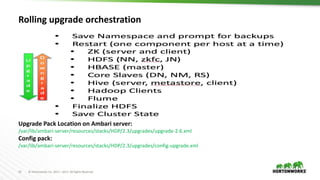
Rolling upgrade orchestration
Upgrade Pack Location on Ambari server:
/var/lib/ambari-server/resources/stacks/HDP/2.3/upgrades/upgrade-2.6.xml
Config pack:
/var/lib/ambari-server/resources/stacks/HDP/2.3/upgrades/config-upgrade.xml
15 © Hortonworks Inc. 2011 – 2017. All Rights Reserved
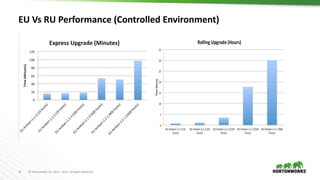
EU Vs RU Performance (Controlled Environment)
16 © Hortonworks Inc. 2011 – 2017. All Rights Reserved
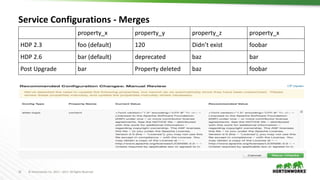
Service Configurations - Merges
property_x property_y property_z property_x
HDP 2.3 foo (default) 120 Didn’t exist foobar
HDP 2.6 bar (default) deprecated baz bar
Post Upgrade bar Property deleted baz foobar
17 © Hortonworks Inc. 2011 – 2017. All Rights Reserved
Sam decides to upgrade Dev
Cluster
18 © Hortonworks Inc. 2011 – 2017. All Rights Reserved
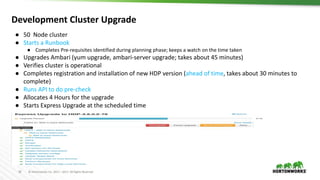
Development Cluster Upgrade
● 50 Node cluster
● Starts a Runbook
● Completes Pre-requisites identified during planning phase; keeps a watch on the time taken
● Upgrades Ambari (yum upgrade, ambari-server upgrade; takes about 45 minutes)
● Verifies cluster is operational
● Completes registration and installation of new HDP version (ahead of time, takes about 30 minutes to
complete)
● Runs API to do pre-check
● Allocates 4 Hours for the upgrade
● Starts Express Upgrade at the scheduled time
19 © Hortonworks Inc. 2011 – 2017. All Rights Reserved
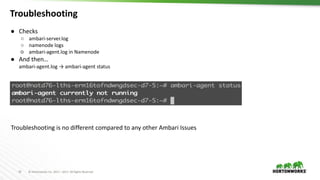
Troubleshooting
● Checks
○ ambari-server.log
○ namenode logs
○ ambari-agent.log in Namenode
● And then…
ambari-agent.log → ambari-agent status
Troubleshooting is no different compared to any other Ambari Issues
20 © Hortonworks Inc. 2011 – 2017. All Rights Reserved
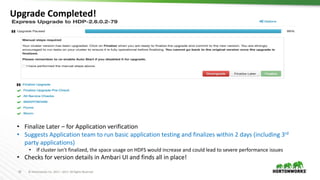
Upgrade Completed!
• Finalize Later – for Application verification
• Suggests Application team to run basic application testing and finalizes within 2 days (including 3rd
party applications)
• If cluster isn’t finalized, the space usage on HDFS would increase and could lead to severe performance issues
• Checks for version details in Ambari UI and finds all in place!
21 © Hortonworks Inc. 2011 – 2017. All Rights Reserved
Sam in Research mode…
22 © Hortonworks Inc. 2011 – 2017. All Rights Reserved
Fine Tuning Upgrade parameters
• Support for auto-retry of tasks
• Fault tolerance options at the start and during Upgrade - skip service check failures, skip slave failures
• Batch size during package installation is controlled via a config in ambari.properties
• agent.package.parallel.commands.limit=100
• In the Express upgrade packs, the batch size can be modified from the default value:
<parallel-scheduler>
<max-degree-of-parallelism>100</max-degree-of-parallelism>
</parallel-scheduler>
23 © Hortonworks Inc. 2011 – 2017. All Rights Reserved
Ambari Upgrade – Failure due to DB inconsistencies
23
• Ambari upgrade - constraint violation
• Review Ambari logs
• Identify table reporting the violation
• Restore Ambari DB
• Fix the violation
• Restart Ambari Upgrade
• DB Consistency check introduced from Ambari 2.4
• Verify if DB consistency is being skipped while starting Ambari
• In Previous versions, this could happen due to
• Failed installation / deletion using API’s
24 © Hortonworks Inc. 2011 – 2017. All Rights Reserved
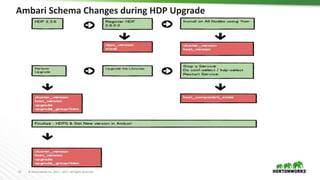
Ambari Schema Changes during HDP Upgrade
25 © Hortonworks Inc. 2011 – 2017. All Rights Reserved
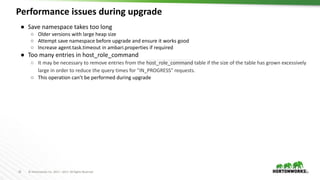
Performance issues during upgrade
25
● Save namespace takes too long
○ Older versions with large heap size
○ Attempt save namespace before upgrade and ensure it works good
○ Increase agent.task.timeout in ambari.properties if required
● Too many entries in host_role_command
○ It may be necessary to remove entries from the host_role_command table if the size of the table has grown excessively
large in order to reduce the query times for "IN_PROGRESS" requests.
○ This operation can’t be performed during upgrade
26 © Hortonworks Inc. 2011 – 2017. All Rights Reserved
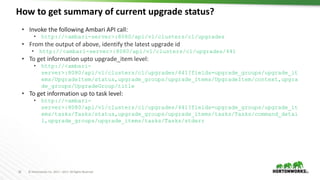
How to get summary of current upgrade status?
26
• Invoke the following Ambari API call:
• http://<ambari-server>:8080/api/v1/clusters/c1/upgrades
• From the output of above, identify the latest upgrade id
• http://<ambari-server>:8080/api/v1/clusters/c1/upgrades/441
• To get information upto upgrade_item level:
• http://<ambari-
server>:8080/api/v1/clusters/c1/upgrades/441?fields=upgrade_groups/upgrade_it
ems/UpgradeItem/status,upgrade_groups/upgrade_items/UpgradeItem/context,upgra
de_groups/UpgradeGroup/title
• To get information up to task level:
• http://<ambari-
server>:8080/api/v1/clusters/c1/upgrades/441?fields=upgrade_groups/upgrade_it
ems/tasks/Tasks/status,upgrade_groups/upgrade_items/tasks/Tasks/command_detai
l,upgrade_groups/upgrade_items/tasks/Tasks/stderr
27 © Hortonworks Inc. 2011 – 2017. All Rights Reserved
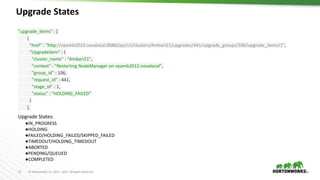
Upgrade States
27
"upgrade_items" : [
{
"href" : "http://vpamb2010.novalocal:8080/api/v1/clusters/Ambari21/upgrades/441/upgrade_groups/106/upgrade_items/1",
"UpgradeItem" : {
"cluster_name" : "Ambari21",
"context" : "Restarting NodeManager on vpamb2012.novalocal",
"group_id" : 106,
"request_id" : 441,
"stage_id" : 1,
"status" : "HOLDING_FAILED"
}
},
Upgrade States:
●IN_PROGRESS
●HOLDING
●FAILED/HOLDING_FAILED/SKIPPED_FAILED
●TIMEDOUT/HOLDING_TIMEDOUT
●ABORTED
●PENDING/QUEUED
●COMPLETED
28 © Hortonworks Inc. 2011 – 2017. All Rights Reserved
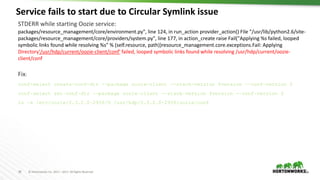
Service fails to start due to Circular Symlink issue
28
STDERR while starting Oozie service:
packages/resource_management/core/environment.py", line 124, in run_action provider_action() File "/usr/lib/python2.6/site-
packages/resource_management/core/providers/system.py", line 177, in action_create raise Fail("Applying %s failed, looped
symbolic links found while resolving %s" % (self.resource, path))resource_management.core.exceptions.Fail: Applying
Directory'/usr/hdp/current/oozie-client/conf' failed, looped symbolic links found while resolving /usr/hdp/current/oozie-
client/conf
Fix:
conf-select create-conf-dir --package oozie-client --stack-version $version --conf-version 0
conf-select set-conf-dir --package oozie-client --stack-version $version --conf-version 0
ln -s /etc/oozie/2.3.2.0-2950/0 /usr/hdp/2.3.2.0-2950/oozie/conf
29 © Hortonworks Inc. 2011 – 2017. All Rights Reserved
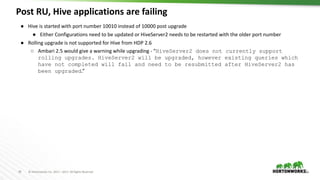
Post RU, Hive applications are failing
29
● Hive is started with port number 10010 instead of 10000 post upgrade
● Either Configurations need to be updated or HiveServer2 needs to be restarted with the older port number
● Rolling upgrade is not supported for Hive from HDP 2.6
○ Ambari 2.5 would give a warning while upgrading - “HiveServer2 does not currently support
rolling upgrades. HiveServer2 will be upgraded, however existing queries which
have not completed will fail and need to be resubmitted after HiveServer2 has
been upgraded.”
30 © Hortonworks Inc. 2011 – 2017. All Rights Reserved
What’s new in Ambari 2.5 for upgrades?
30
● Auto Start of services
● Delete older version of the Software
● AMBARI-18435 Releases space used by older versions post upgrade. Previously this had to be done
manually. For eg,
curl 'http://c6401.ambari.apache.org:8080/api/v1/clusters/cl1/requests' -u admin:admin -H "X-Requested-By: ambari" -X POST -
d'{"RequestInfo":{"context":"remove_previous_stacks", "action" : "remove_previous_stacks", "parameters" : {"version":"2.5.0.0-
1245"}}, "Requests/resource_filters": [{"hosts":"c6403.ambari.apache.org, c6402.ambari.apache.org"}]}'
● Upgrade history
● Pulls all data about upgrades/downgrades from Ambari DB and displays in UI
31 © Hortonworks Inc. 2011 – 2017. All Rights Reserved
Sam’s Runbook for Cluster
upgrade at WBC
32 © Hortonworks Inc. 2011 – 2017. All Rights Reserved
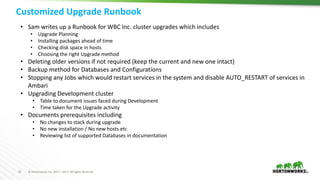
Customized Upgrade Runbook
32
• Sam writes up a Runbook for WBC Inc. cluster upgrades which includes
• Upgrade Planning
• Installing packages ahead of time
• Checking disk space in hosts
• Choosing the right Upgrade method
• Deleting older versions if not required (keep the current and new one intact)
• Backup method for Databases and Configurations
• Stopping any Jobs which would restart services in the system and disable AUTO_RESTART of services in
Ambari
• Upgrading Development cluster
• Table to document issues faced during Development
• Time taken for the Upgrade activity
• Documents prerequisites including
• No changes to stack during upgrade
• No new installation / No new hosts etc
• Reviewing list of supported Databases in documentation
33 © Hortonworks Inc. 2011 – 2017. All Rights Reserved
Thanks
Q & A

Apache Ambari - HDP Cluster Upgrades Operational Deep Dive and Troubleshooting

  • 1.
    1 © HortonworksInc. 2011 – 2017. All Rights Reserved Apache Ambari - HDP Cluster Upgrades Operational Deep Dive and Troubleshooting DATAWORKS Summit, Munich April 5, 2017
  • 2.
    2 © HortonworksInc. 2011 – 2017. All Rights Reserved Presenters • Venkatraman Poornalingam (vpoornalingam@hortonworks.com) • Principal Automation Engineer, Technical Support Team Hortonworks • Part of Ambari and Upgrades SME team • Vivek Sharma (vsharma@hortonworks.com) • Staff Software Engineer, Ambari Quality Engineering Team • Specializing on Ambari Upgrades and Views
  • 3.
    3 © HortonworksInc. 2011 – 2017. All Rights Reserved Agenda • Use Case • Prerequisites for upgrade • Upgrades Deep Dive • Express Vs Rolling • Internals • Troubleshooting • Ambari 2.5 Upgrades new Feature • Best Practices
  • 4.
    4 © HortonworksInc. 2011 – 2017. All Rights Reserved Sam’s Upgrade Story • Sam is a Hadoop Administrator working with WBC Inc. • Manages several HDP clusters using Ambari • Is planning to upgrade a cluster with following config: • 300 nodes, HDP-2.3.6, Ambari-2.2.2.0 • Hive, Spark, HBase, Oozie, Kerberos-Managed by Ambari • Interested in Hive LLAP for his applications, Oozie Workflow View
  • 5.
    5 © HortonworksInc. 2011 – 2017. All Rights Reserved Sam reviews HDP Stack
  • 6.
    6 © HortonworksInc. 2011 – 2017. All Rights Reserved Sam’s Upgrade Plan • After reviewing Hortonworks current product stack • Discusses with his CIO/Team • Decides to upgrade to the following • Ambari 2.5 • HDP 2.6 • Sam has to research / plan for • A Runbook consisting of • Prerequisites • Upgrade Method • Troubleshooting in case of issues • Complete upgrade • Downtime • Identifies appropriate Ambari user roles for the upgrade • New Stack registration can be done only by Ambari Administrator role • Upgrade can be done by Ambari Administrator and Cluster Administrator
  • 7.
    7 © HortonworksInc. 2011 – 2017. All Rights Reserved Sam in Research mode …
  • 8.
    8 © HortonworksInc. 2011 – 2017. All Rights Reserved Ambari Upgrade Workflow Post Ambari upgrade, complete upgrade for AMS, Infra, SmartSense and Logsearch
  • 9.
    9 © HortonworksInc. 2011 – 2017. All Rights Reserved HDP Cluster Upgrade Workflow
  • 10.
    10 © HortonworksInc. 2011 – 2017. All Rights Reserved Upgrade Planning • Backup of configs, Databases - Hive, Oozie,Ranger • Important to have DB access available to Ambari Administrator • Check 3rd party software compatibility with newer HDP version • Handling Tech Preview services / Custom Services • Ensure Ambari pre-checks pass • API:/api/v1/clusters/c1/rolling_upgrades_check?fields=*&UpgradeChecks/repository_ version=2.6.0.3-8&UpgradeChecks/upgrade_type=NON_ROLLING • Disk space availability: • New software installation (in /usr/hdp/) • Backups during Upgrade (/tmp/) • Check and ensure software dependencies are resolved • Example, yum check dependencies; echo $?, Should return 0 • Identify list of hosts which are • In maintenance mode • To be decommissioned • Has software installation failures
  • 11.
    11 © HortonworksInc. 2011 – 2017. All Rights Reserved Sam decides to Deep Dive
  • 12.
    12 © HortonworksInc. 2011 – 2017. All Rights Reserved Express Upgrade Orchestration Upgrade Pack Location on Ambari server: /var/lib/ambari-server/resources/stacks/HDP/2.3/upgrades/nonrolling-upgrade-2.6.xml Config pack: /var/lib/ambari-server/resources/stacks/HDP/2.3/upgrades/config-upgrade.xml
  • 13.
    13 © HortonworksInc. 2011 – 2017. All Rights Reserved Magic of Symbolic Links! ● hdp-select /usr/hdp/current/$comp-name/ -> /usr/hdp/$version/$comp Example: ● conf-select /etc/$comp/conf -> /usr/hdp/$version/$comp/conf -> /etc/$comp/$version/0 Example: – Syntax: – hdp-select set hive-server2-hive2 2.6.0.3-8 – conf-select create-conf-dir --package hive --stack-version 2.6.0.3-8 --conf-version 0 – conf-select set-conf-dir --package hive --stack-version 2.6.0.3-8 --conf-version 0 Pre-Upgrade /usr/hdp/current/hive-server2-hive2 -> /usr/hdp/2.5.3.0-37/hive2 Post-Upgrade /usr/hdp/current/hive-server2-hive2 -> /usr/hdp/2.6.0.3-8/hive2 Pre-upgrade /etc/hive2/conf -> /usr/hdp/current/hive-server2-hive2/conf -> /etc/hive2/2.5.3.0-37/0 Post-upgrade /etc/hive2/conf -> /usr/hdp/current/hive-server2-hive2/conf -> /etc/hive2/2.6.0.3-8/0
  • 14.
    14 © HortonworksInc. 2011 – 2017. All Rights Reserved Rolling upgrade orchestration Upgrade Pack Location on Ambari server: /var/lib/ambari-server/resources/stacks/HDP/2.3/upgrades/upgrade-2.6.xml Config pack: /var/lib/ambari-server/resources/stacks/HDP/2.3/upgrades/config-upgrade.xml
  • 15.
    15 © HortonworksInc. 2011 – 2017. All Rights Reserved EU Vs RU Performance (Controlled Environment)
  • 16.
    16 © HortonworksInc. 2011 – 2017. All Rights Reserved Service Configurations - Merges property_x property_y property_z property_x HDP 2.3 foo (default) 120 Didn’t exist foobar HDP 2.6 bar (default) deprecated baz bar Post Upgrade bar Property deleted baz foobar
  • 17.
    17 © HortonworksInc. 2011 – 2017. All Rights Reserved Sam decides to upgrade Dev Cluster
  • 18.
    18 © HortonworksInc. 2011 – 2017. All Rights Reserved Development Cluster Upgrade ● 50 Node cluster ● Starts a Runbook ● Completes Pre-requisites identified during planning phase; keeps a watch on the time taken ● Upgrades Ambari (yum upgrade, ambari-server upgrade; takes about 45 minutes) ● Verifies cluster is operational ● Completes registration and installation of new HDP version (ahead of time, takes about 30 minutes to complete) ● Runs API to do pre-check ● Allocates 4 Hours for the upgrade ● Starts Express Upgrade at the scheduled time
  • 19.
    19 © HortonworksInc. 2011 – 2017. All Rights Reserved Troubleshooting ● Checks ○ ambari-server.log ○ namenode logs ○ ambari-agent.log in Namenode ● And then… ambari-agent.log → ambari-agent status Troubleshooting is no different compared to any other Ambari Issues
  • 20.
    20 © HortonworksInc. 2011 – 2017. All Rights Reserved Upgrade Completed! • Finalize Later – for Application verification • Suggests Application team to run basic application testing and finalizes within 2 days (including 3rd party applications) • If cluster isn’t finalized, the space usage on HDFS would increase and could lead to severe performance issues • Checks for version details in Ambari UI and finds all in place!
  • 21.
    21 © HortonworksInc. 2011 – 2017. All Rights Reserved Sam in Research mode…
  • 22.
    22 © HortonworksInc. 2011 – 2017. All Rights Reserved Fine Tuning Upgrade parameters • Support for auto-retry of tasks • Fault tolerance options at the start and during Upgrade - skip service check failures, skip slave failures • Batch size during package installation is controlled via a config in ambari.properties • agent.package.parallel.commands.limit=100 • In the Express upgrade packs, the batch size can be modified from the default value: <parallel-scheduler> <max-degree-of-parallelism>100</max-degree-of-parallelism> </parallel-scheduler>
  • 23.
    23 © HortonworksInc. 2011 – 2017. All Rights Reserved Ambari Upgrade – Failure due to DB inconsistencies 23 • Ambari upgrade - constraint violation • Review Ambari logs • Identify table reporting the violation • Restore Ambari DB • Fix the violation • Restart Ambari Upgrade • DB Consistency check introduced from Ambari 2.4 • Verify if DB consistency is being skipped while starting Ambari • In Previous versions, this could happen due to • Failed installation / deletion using API’s
  • 24.
    24 © HortonworksInc. 2011 – 2017. All Rights Reserved Ambari Schema Changes during HDP Upgrade
  • 25.
    25 © HortonworksInc. 2011 – 2017. All Rights Reserved Performance issues during upgrade 25 ● Save namespace takes too long ○ Older versions with large heap size ○ Attempt save namespace before upgrade and ensure it works good ○ Increase agent.task.timeout in ambari.properties if required ● Too many entries in host_role_command ○ It may be necessary to remove entries from the host_role_command table if the size of the table has grown excessively large in order to reduce the query times for "IN_PROGRESS" requests. ○ This operation can’t be performed during upgrade
  • 26.
    26 © HortonworksInc. 2011 – 2017. All Rights Reserved How to get summary of current upgrade status? 26 • Invoke the following Ambari API call: • http://<ambari-server>:8080/api/v1/clusters/c1/upgrades • From the output of above, identify the latest upgrade id • http://<ambari-server>:8080/api/v1/clusters/c1/upgrades/441 • To get information upto upgrade_item level: • http://<ambari- server>:8080/api/v1/clusters/c1/upgrades/441?fields=upgrade_groups/upgrade_it ems/UpgradeItem/status,upgrade_groups/upgrade_items/UpgradeItem/context,upgra de_groups/UpgradeGroup/title • To get information up to task level: • http://<ambari- server>:8080/api/v1/clusters/c1/upgrades/441?fields=upgrade_groups/upgrade_it ems/tasks/Tasks/status,upgrade_groups/upgrade_items/tasks/Tasks/command_detai l,upgrade_groups/upgrade_items/tasks/Tasks/stderr
  • 27.
    27 © HortonworksInc. 2011 – 2017. All Rights Reserved Upgrade States 27 "upgrade_items" : [ { "href" : "http://vpamb2010.novalocal:8080/api/v1/clusters/Ambari21/upgrades/441/upgrade_groups/106/upgrade_items/1", "UpgradeItem" : { "cluster_name" : "Ambari21", "context" : "Restarting NodeManager on vpamb2012.novalocal", "group_id" : 106, "request_id" : 441, "stage_id" : 1, "status" : "HOLDING_FAILED" } }, Upgrade States: ●IN_PROGRESS ●HOLDING ●FAILED/HOLDING_FAILED/SKIPPED_FAILED ●TIMEDOUT/HOLDING_TIMEDOUT ●ABORTED ●PENDING/QUEUED ●COMPLETED
  • 28.
    28 © HortonworksInc. 2011 – 2017. All Rights Reserved Service fails to start due to Circular Symlink issue 28 STDERR while starting Oozie service: packages/resource_management/core/environment.py", line 124, in run_action provider_action() File "/usr/lib/python2.6/site- packages/resource_management/core/providers/system.py", line 177, in action_create raise Fail("Applying %s failed, looped symbolic links found while resolving %s" % (self.resource, path))resource_management.core.exceptions.Fail: Applying Directory'/usr/hdp/current/oozie-client/conf' failed, looped symbolic links found while resolving /usr/hdp/current/oozie- client/conf Fix: conf-select create-conf-dir --package oozie-client --stack-version $version --conf-version 0 conf-select set-conf-dir --package oozie-client --stack-version $version --conf-version 0 ln -s /etc/oozie/2.3.2.0-2950/0 /usr/hdp/2.3.2.0-2950/oozie/conf
  • 29.
    29 © HortonworksInc. 2011 – 2017. All Rights Reserved Post RU, Hive applications are failing 29 ● Hive is started with port number 10010 instead of 10000 post upgrade ● Either Configurations need to be updated or HiveServer2 needs to be restarted with the older port number ● Rolling upgrade is not supported for Hive from HDP 2.6 ○ Ambari 2.5 would give a warning while upgrading - “HiveServer2 does not currently support rolling upgrades. HiveServer2 will be upgraded, however existing queries which have not completed will fail and need to be resubmitted after HiveServer2 has been upgraded.”
  • 30.
    30 © HortonworksInc. 2011 – 2017. All Rights Reserved What’s new in Ambari 2.5 for upgrades? 30 ● Auto Start of services ● Delete older version of the Software ● AMBARI-18435 Releases space used by older versions post upgrade. Previously this had to be done manually. For eg, curl 'http://c6401.ambari.apache.org:8080/api/v1/clusters/cl1/requests' -u admin:admin -H "X-Requested-By: ambari" -X POST - d'{"RequestInfo":{"context":"remove_previous_stacks", "action" : "remove_previous_stacks", "parameters" : {"version":"2.5.0.0- 1245"}}, "Requests/resource_filters": [{"hosts":"c6403.ambari.apache.org, c6402.ambari.apache.org"}]}' ● Upgrade history ● Pulls all data about upgrades/downgrades from Ambari DB and displays in UI
  • 31.
    31 © HortonworksInc. 2011 – 2017. All Rights Reserved Sam’s Runbook for Cluster upgrade at WBC
  • 32.
    32 © HortonworksInc. 2011 – 2017. All Rights Reserved Customized Upgrade Runbook 32 • Sam writes up a Runbook for WBC Inc. cluster upgrades which includes • Upgrade Planning • Installing packages ahead of time • Checking disk space in hosts • Choosing the right Upgrade method • Deleting older versions if not required (keep the current and new one intact) • Backup method for Databases and Configurations • Stopping any Jobs which would restart services in the system and disable AUTO_RESTART of services in Ambari • Upgrading Development cluster • Table to document issues faced during Development • Time taken for the Upgrade activity • Documents prerequisites including • No changes to stack during upgrade • No new installation / No new hosts etc • Reviewing list of supported Databases in documentation
  • 33.
    33 © HortonworksInc. 2011 – 2017. All Rights Reserved Thanks Q & A

Editor's Notes

  • #14 hdp-select set hive-server2-hive2 <version> conf-select create-conf-dir --package hive --stack-version 2.6.0.3 --conf-version 0 conf-select set-conf-dir --package hive --stack-version 2.6.0.3 --conf-version 0
  • #23 stack.upgrade.auto.retry.timeout.mins : Number of mins to retry for. Ideally, this would be between 15-20 mins. Default is 0 since this feature is turned off. stack.upgrade.auto.retry.check.interval.secs : Thread sleep interval in seconds, defaults to 20 secs. stack.upgrade.auto.retry.command.names.to.ignore : Don't auto-retry commands whose names are in this list. Default value is each name enclosed in quotes and separated by commas, "ComponentVersionCheckAction","FinalizeUpgradeAction" stack.upgrade.auto.retry.command.details.to.ignore : Don't auto-retry commands whose details are in this list. Default value is each name enclosed in quotes and separated by commas, "Execute HDFS Finalize"
  • #26 Based on the example above, to change the status from “HOLDING_FAILED” to “PENDING”, “Retry” button can be used. Or the following API can be used: PUT http://vpamb2010.novalocal:8080/api/v1/clusters/Ambari21/upgrades/441/upgrade_groups/106/upgrade_items/1 {"UpgradeItem": { "status" : "PENDING" } } And then refresh the Ambari server page to continue the upgrade / downgrade.
  • #28 Based on the example above, to change the status from “HOLDING_FAILED” to “PENDING”, “Retry” button can be used. Or the following API can be used: PUT http://vpamb2010.novalocal:8080/api/v1/clusters/Ambari21/upgrades/441/upgrade_groups/106/upgrade_items/1 {"UpgradeItem": { "status" : "PENDING" } } And then refresh the Ambari server page to continue the upgrade / downgrade. /** * Not queued for a host. */ PENDING, /** * Queued for a host, or has already been sent to host, but host did not answer yet. */ QUEUED, /** * Host reported it is working, received an IN_PROGRESS command status from host. */ IN_PROGRESS, /** * Task is holding, waiting for command to proceed to completion. */ HOLDING, /** * Host reported success */ COMPLETED, /** * Failed */ FAILED, /** * Task is holding after a failure, waiting for command to skip or retry. */ HOLDING_FAILED, /** * Host did not respond in time */ TIMEDOUT, /** * Task is holding after a time-out, waiting for command to skip or retry. */ HOLDING_TIMEDOUT, /** * Operation was abandoned */ ABORTED, /** * The operation failed and was automatically skipped. */ SKIPPED_FAILED;
  • #29 Based on the example above, to change the status from “HOLDING_FAILED” to “PENDING”, “Retry” button can be used. Or the following API can be used: PUT http://vpamb2010.novalocal:8080/api/v1/clusters/Ambari21/upgrades/441/upgrade_groups/106/upgrade_items/1 {"UpgradeItem": { "status" : "PENDING" } } And then refresh the Ambari server page to continue the upgrade / downgrade.
  • #30 Based on the example above, to change the status from “HOLDING_FAILED” to “PENDING”, “Retry” button can be used. Or the following API can be used: PUT http://vpamb2010.novalocal:8080/api/v1/clusters/Ambari21/upgrades/441/upgrade_groups/106/upgrade_items/1 {"UpgradeItem": { "status" : "PENDING" } } And then refresh the Ambari server page to continue the upgrade / downgrade.
  • #31 Based on the example above, to change the status from “HOLDING_FAILED” to “PENDING”, “Retry” button can be used. Or the following API can be used: PUT http://vpamb2010.novalocal:8080/api/v1/clusters/Ambari21/upgrades/441/upgrade_groups/106/upgrade_items/1 {"UpgradeItem": { "status" : "PENDING" } } And then refresh the Ambari server page to continue the upgrade / downgrade.