Page1 © Hortonworks Inc. 2011 – 2015. All Rights Reserved
Apache Ambari 2.2
December 2015
What’s New
Page2 © Hortonworks Inc. 2011 – 2015. All Rights Reserved
What is Ambari?
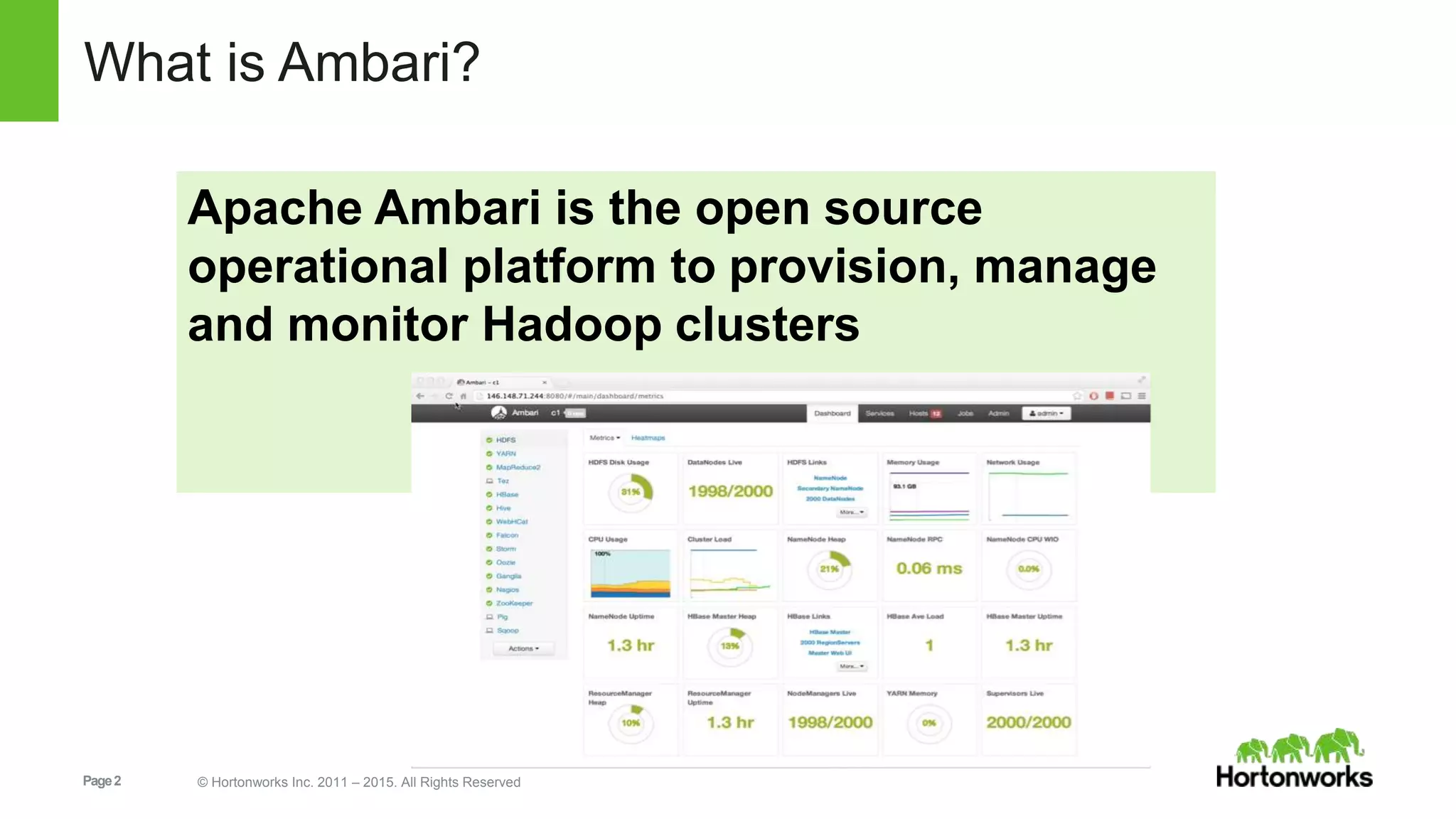
Apache Ambari is the open source
operational platform to provision, manage
and monitor Hadoop clusters
Page3 © Hortonworks Inc. 2011 – 2015. All Rights Reserved
What’s New in Ambari 2.2
Core Features
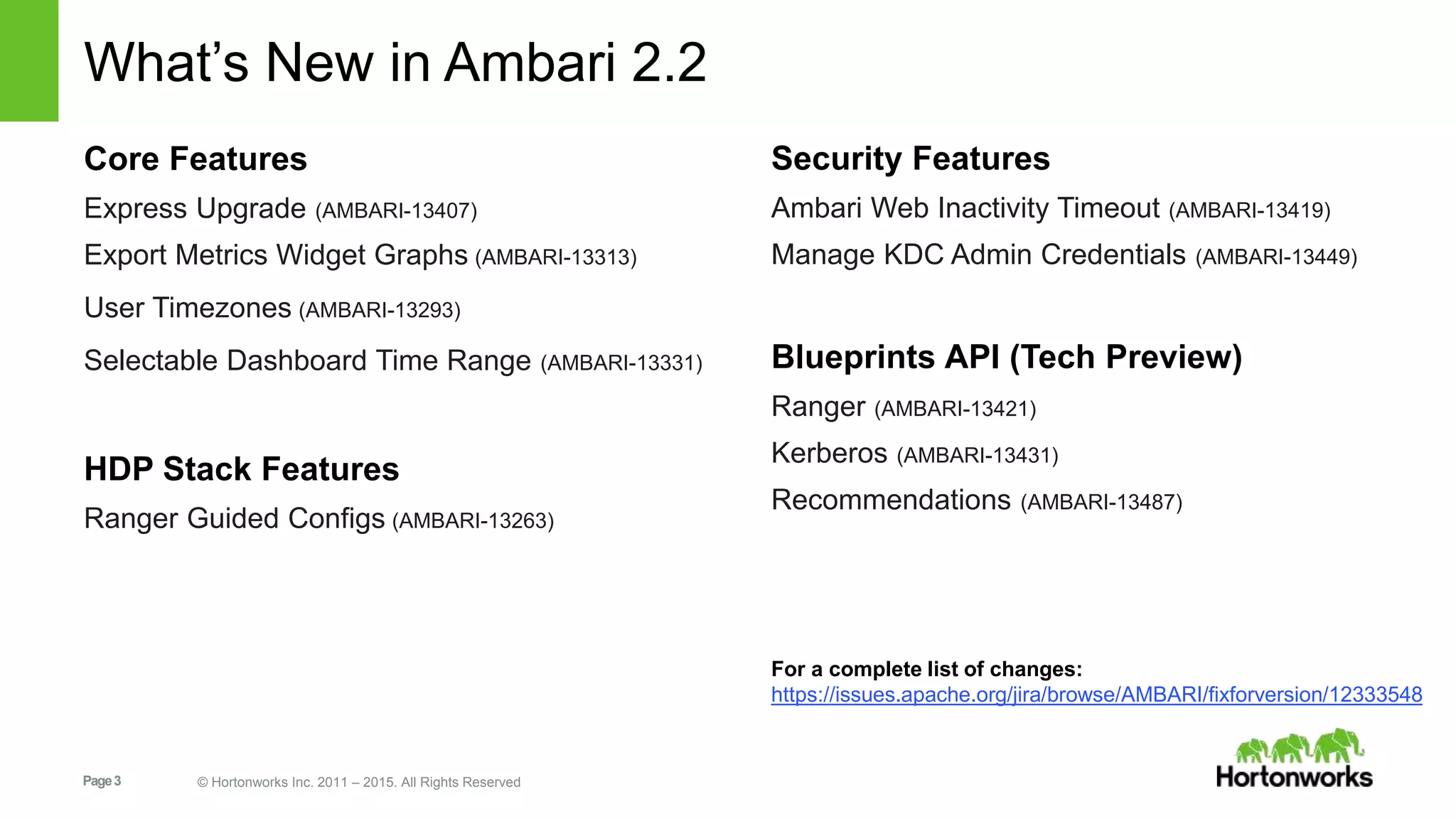
Express Upgrade (AMBARI-13407)
Export Metrics Widget Graphs (AMBARI-13313)
User Timezones (AMBARI-13293)
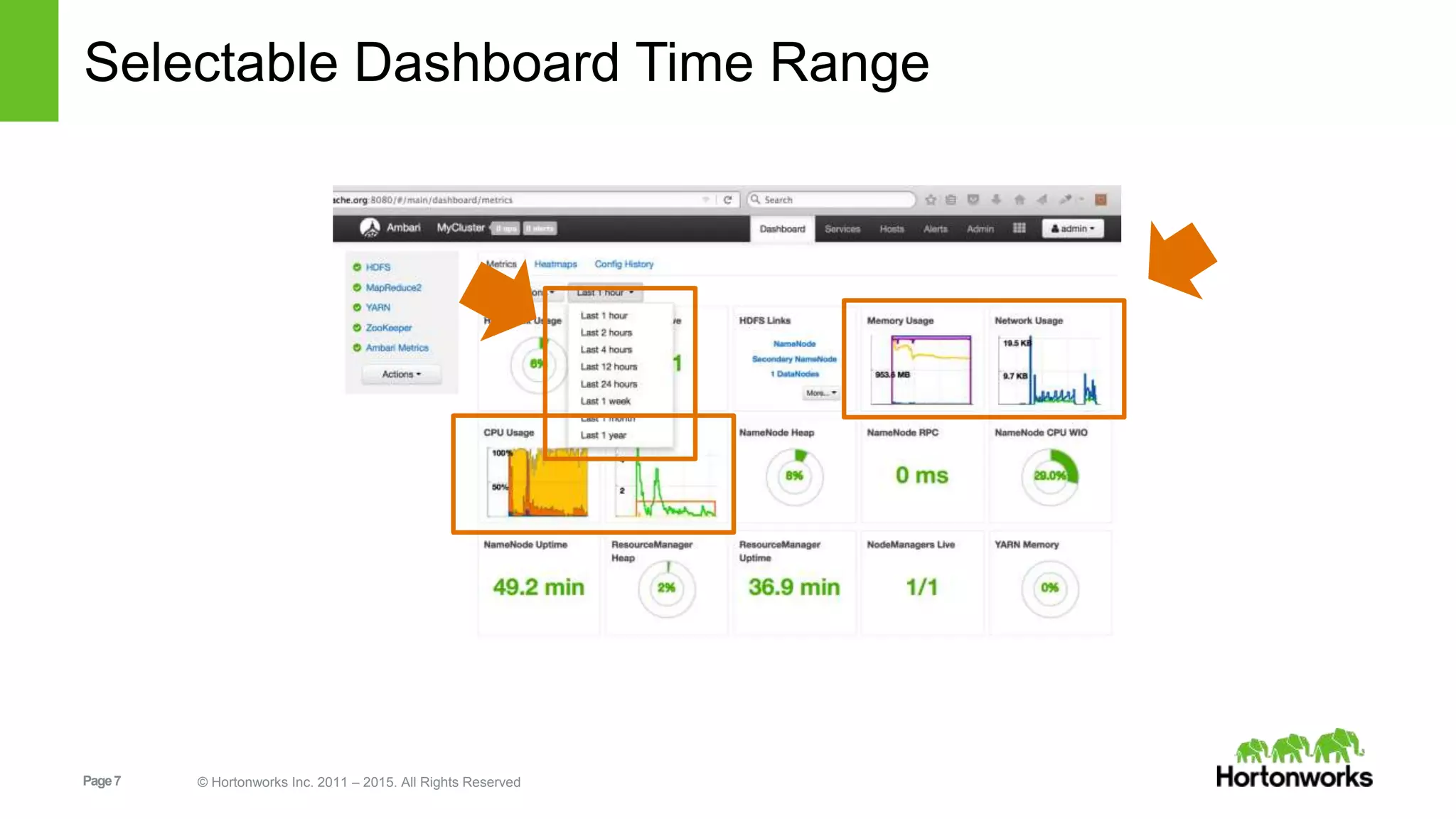
Selectable Dashboard Time Range (AMBARI-13331)
HDP Stack Features
Ranger Guided Configs (AMBARI-13263)
Security Features
Ambari Web Inactivity Timeout (AMBARI-13419)
Manage KDC Admin Credentials (AMBARI-13449)
Blueprints API (Tech Preview)
Ranger (AMBARI-13421)
Kerberos (AMBARI-13431)
Recommendations (AMBARI-13487)
For a complete list of changes:
https://issues.apache.org/jira/browse/AMBARI/fixforversion/12333548
Page4 © Hortonworks Inc. 2011 – 2015. All Rights Reserved
Core Features
Page5 © Hortonworks Inc. 2011 – 2015. All Rights Reserved
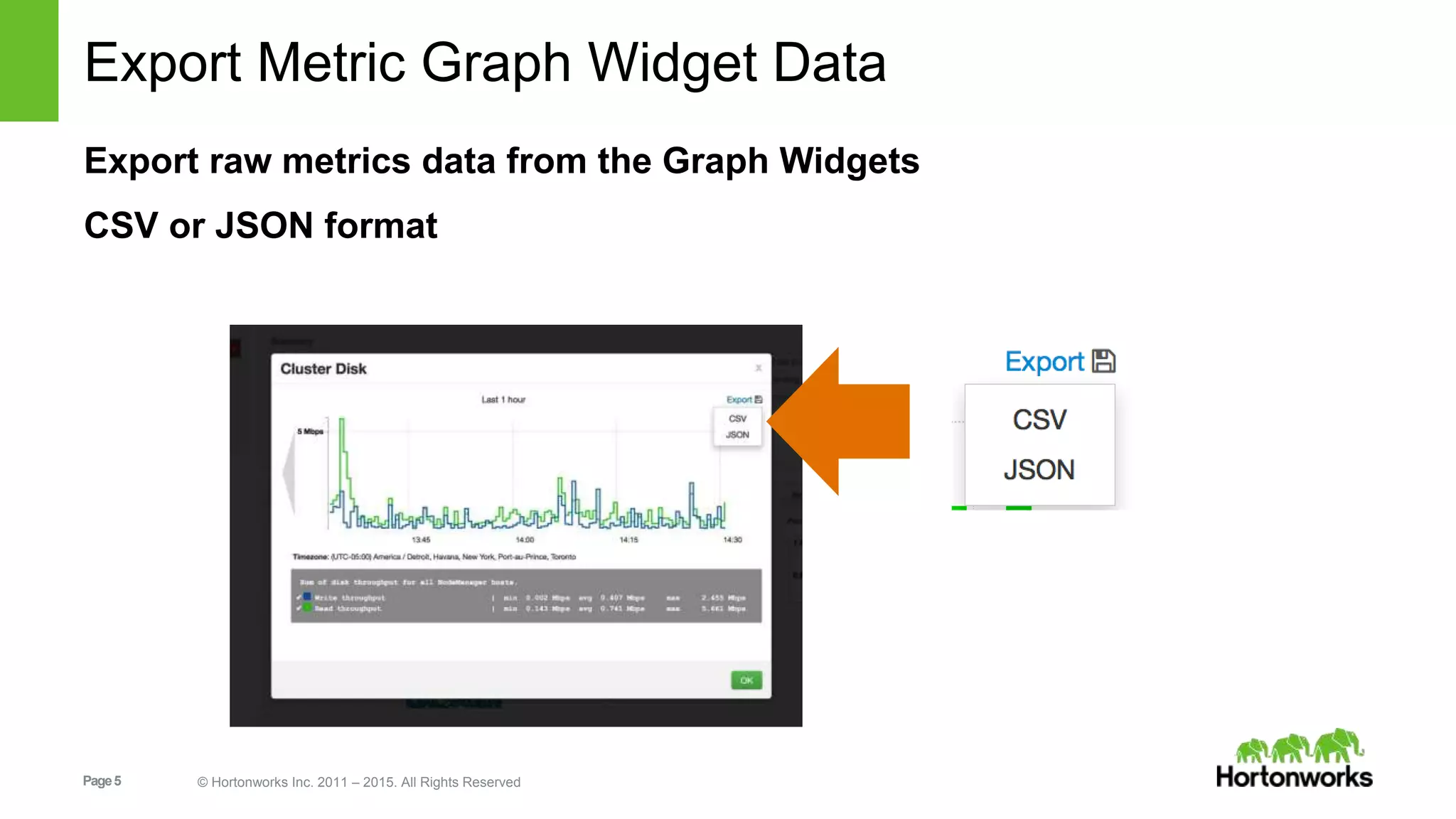
Export Metric Graph Widget Data
Export raw metrics data from the Graph Widgets
CSV or JSON format
Page6 © Hortonworks Inc. 2011 – 2015. All Rights Reserved
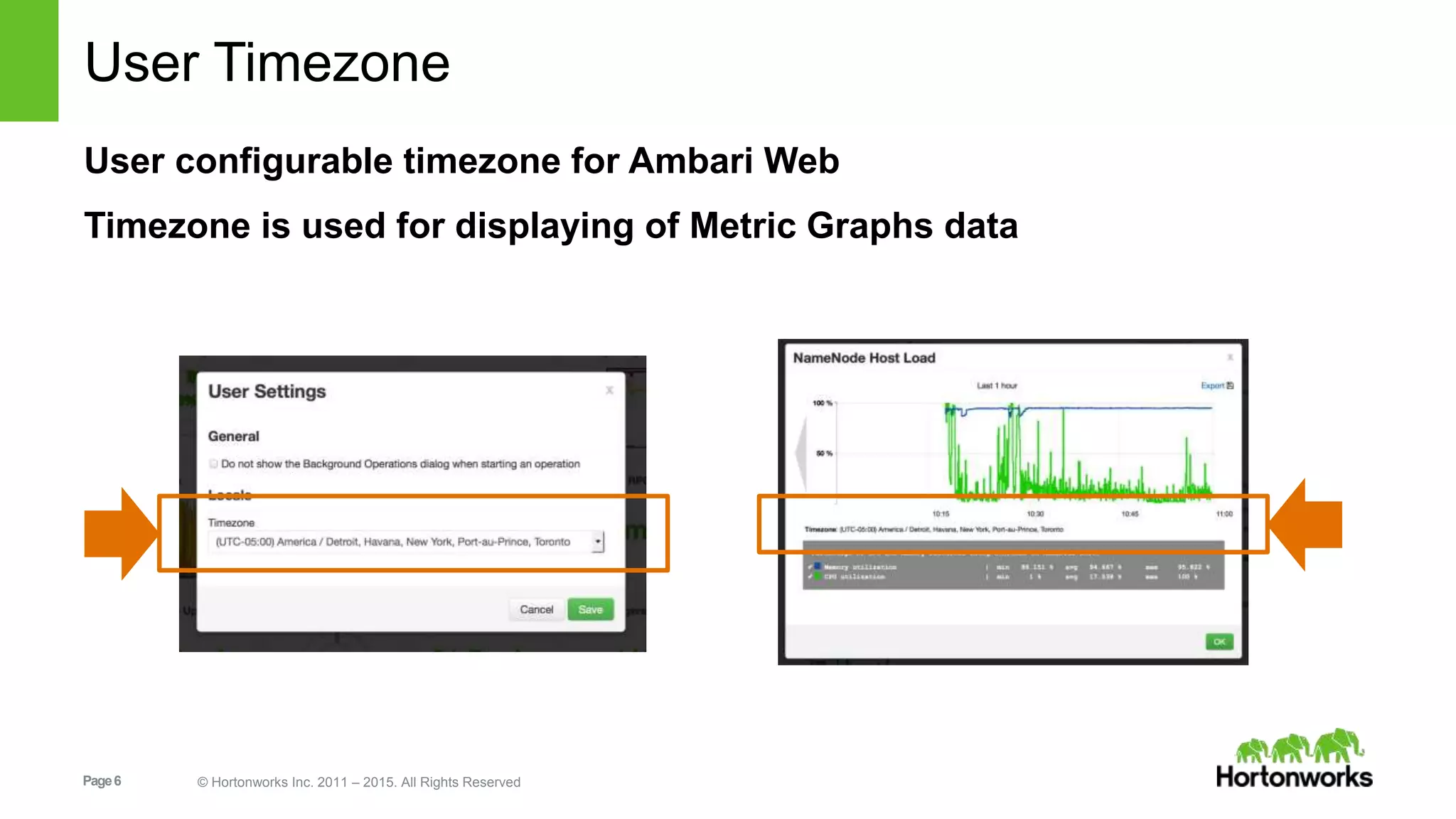
User Timezone
User configurable timezone for Ambari Web
Timezone is used for displaying of Metric Graphs data
Page7 © Hortonworks Inc. 2011 – 2015. All Rights Reserved
Selectable Dashboard Time Range
Page8 © Hortonworks Inc. 2011 – 2015. All Rights Reserved
Security Features
Page9 © Hortonworks Inc. 2011 – 2015. All Rights Reserved
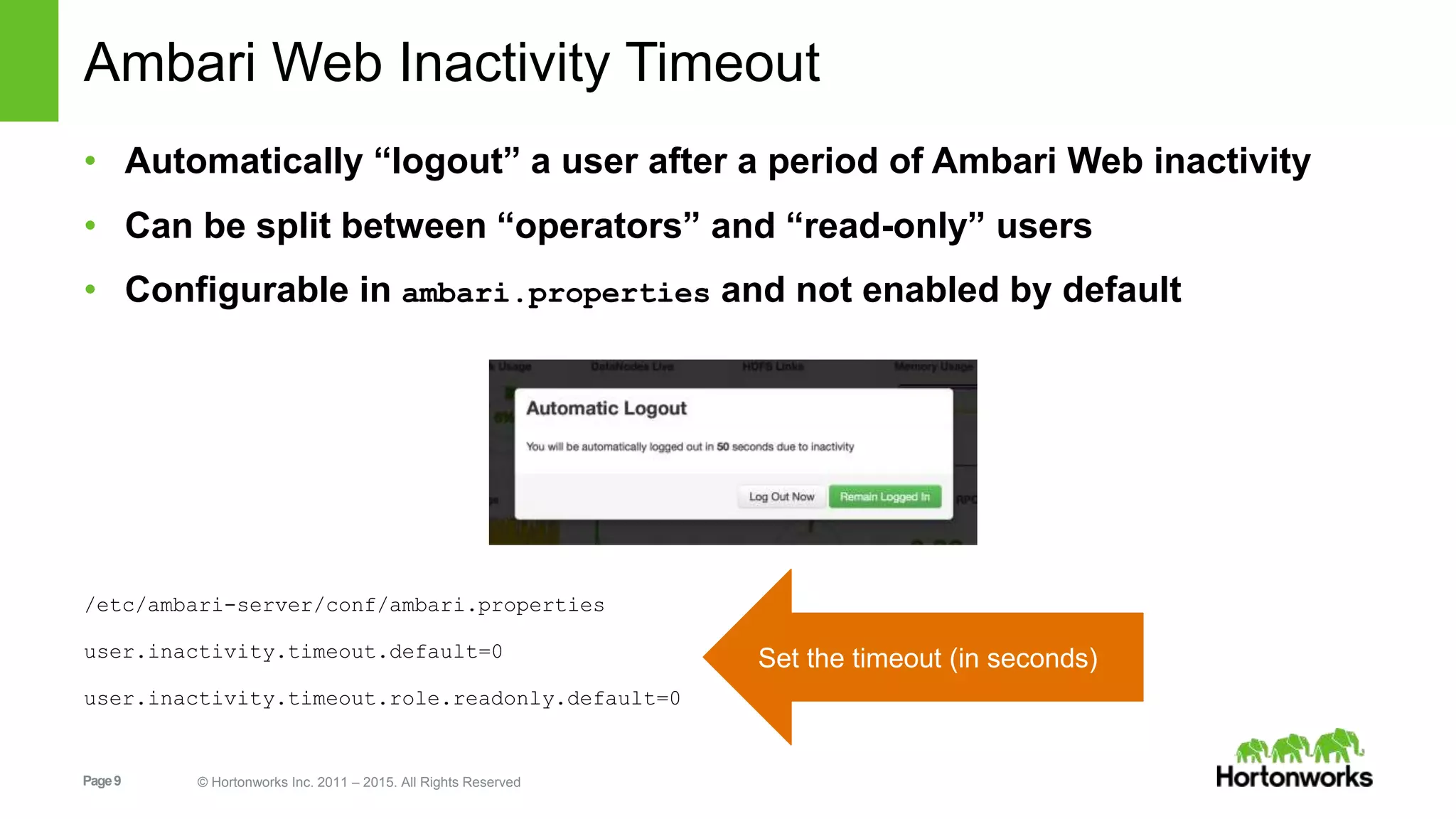
Ambari Web Inactivity Timeout
• Automatically “logout” a user after a period of Ambari Web inactivity
• Can be split between “operators” and “read-only” users
• Configurable in ambari.properties and not enabled by default
/etc/ambari-server/conf/ambari.properties
user.inactivity.timeout.default=0
user.inactivity.timeout.role.readonly.default=0
Set the timeout (in seconds)
Page10 © Hortonworks Inc. 2011 – 2015. All Rights Reserved
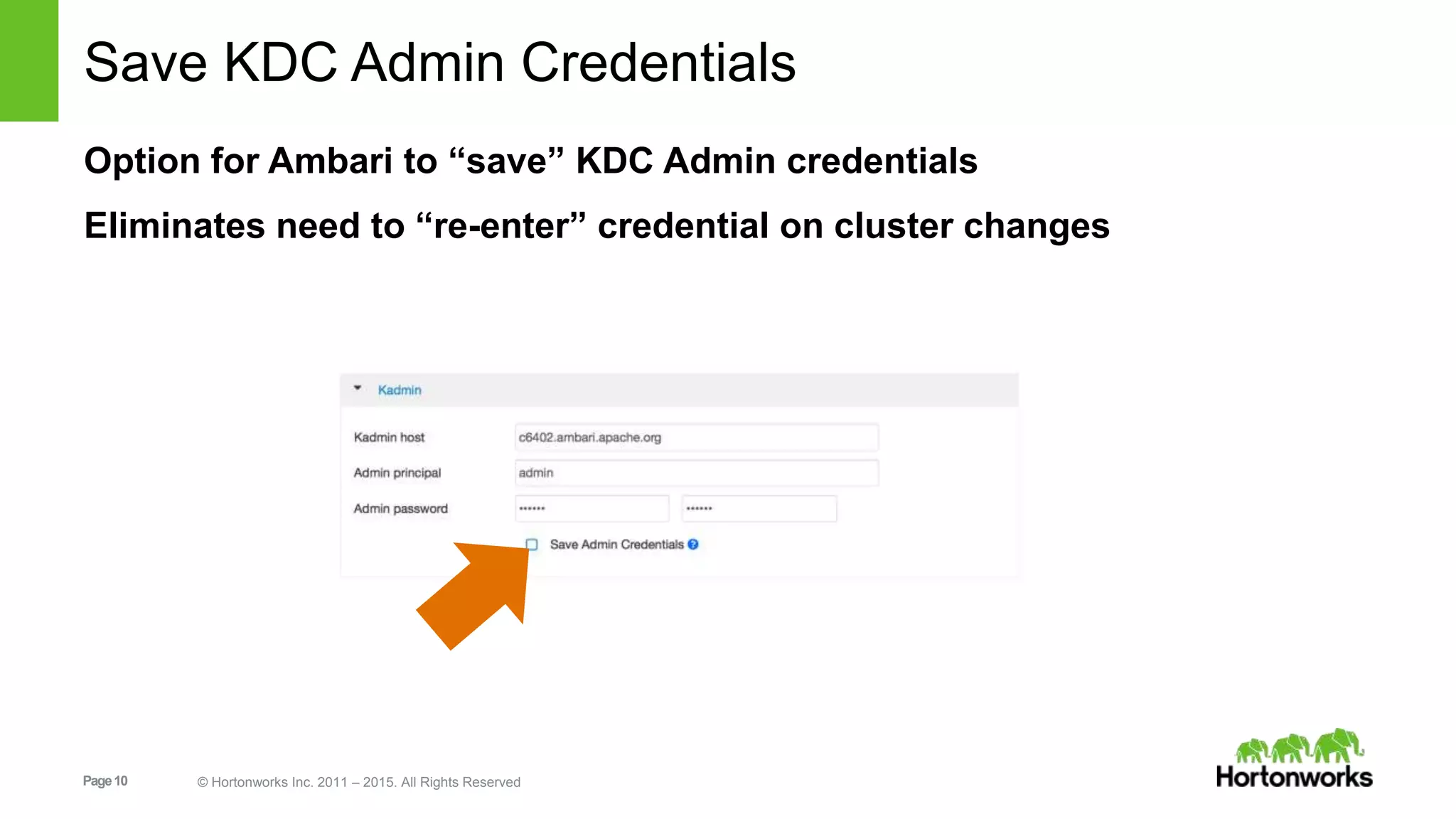
Save KDC Admin Credentials
Option for Ambari to “save” KDC Admin credentials
Eliminates need to “re-enter” credential on cluster changes
Page11 © Hortonworks Inc. 2011 – 2015. All Rights Reserved
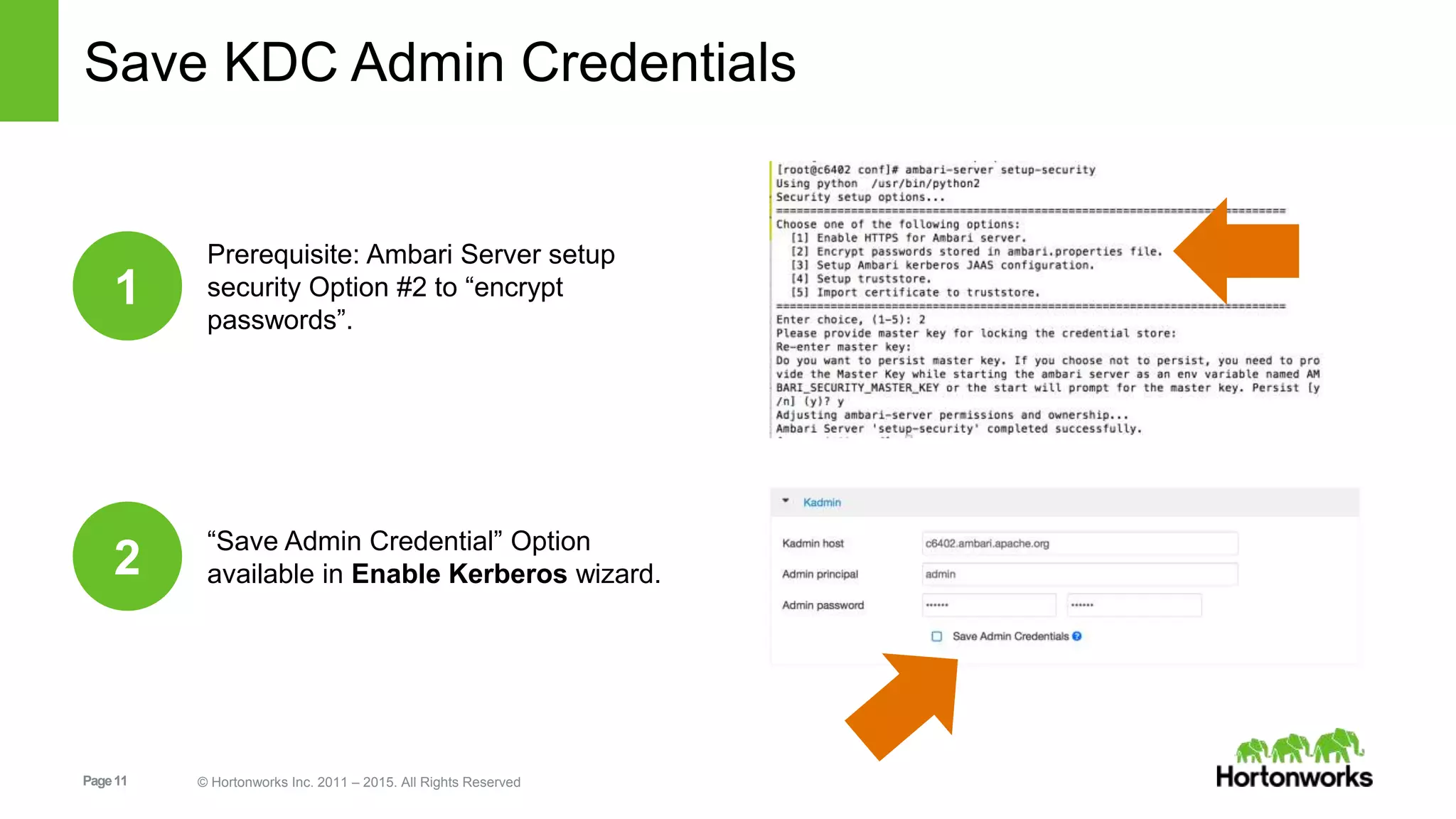
Save KDC Admin Credentials
Prerequisite: Ambari Server setup
security Option #2 to “encrypt
passwords”.
1
“Save Admin Credential” Option
available in Enable Kerberos wizard.2
Page12 © Hortonworks Inc. 2011 – 2015. All Rights Reserved
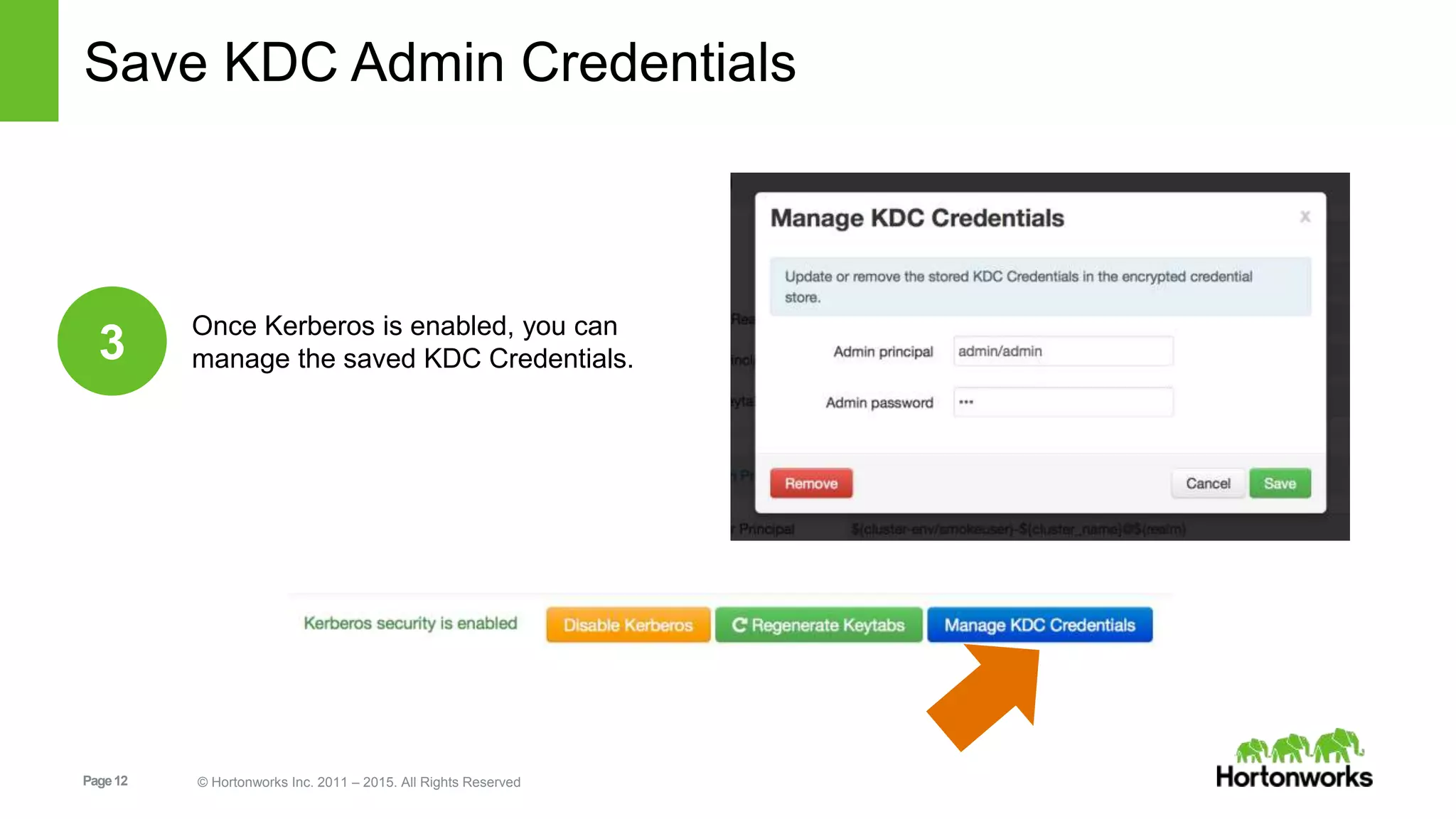
Save KDC Admin Credentials
Once Kerberos is enabled, you can
manage the saved KDC Credentials.3
Page13 © Hortonworks Inc. 2011 – 2015. All Rights Reserved
HDP Express Upgrade
Page14 © Hortonworks Inc. 2011 – 2015. All Rights Reserved
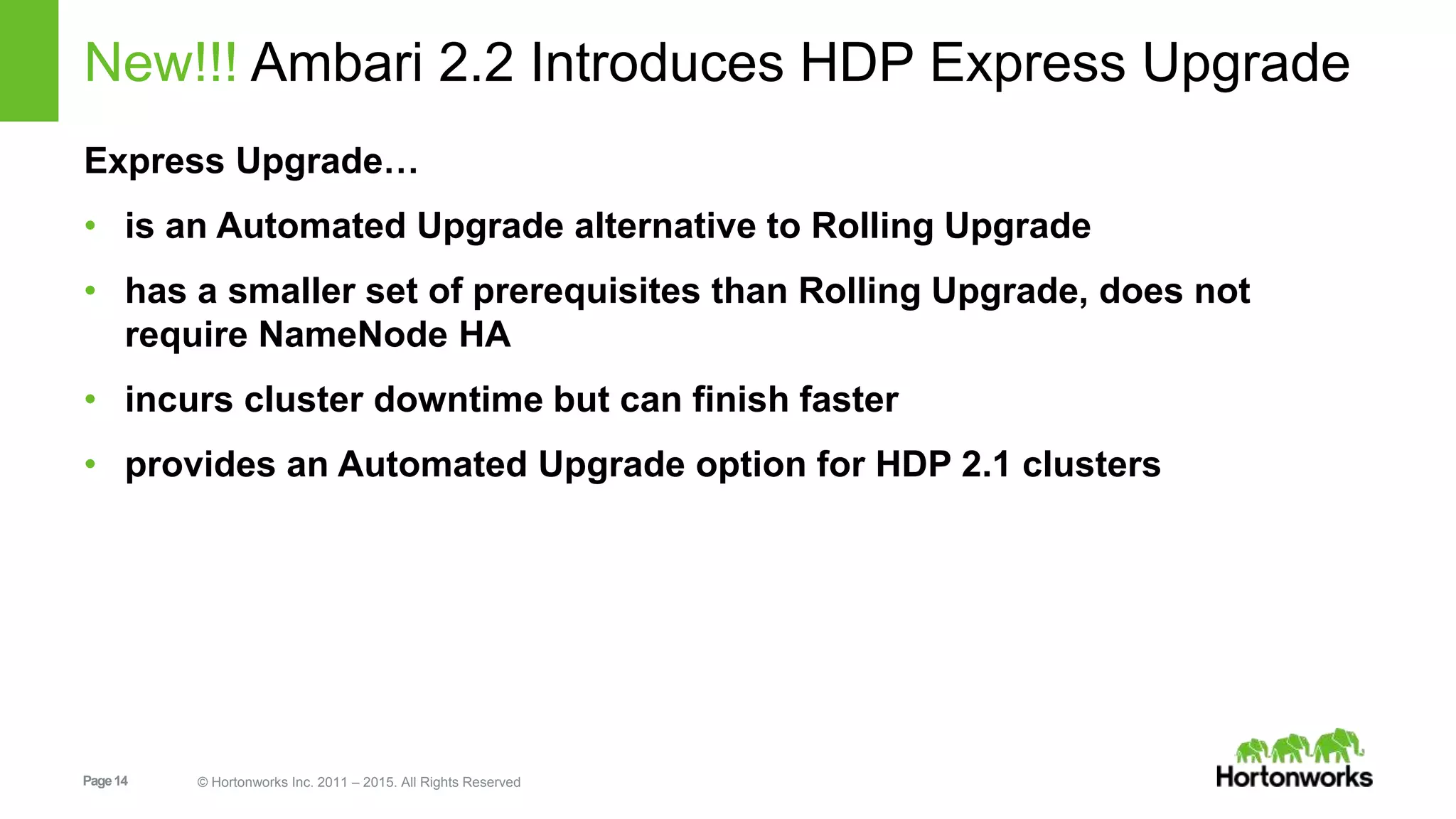
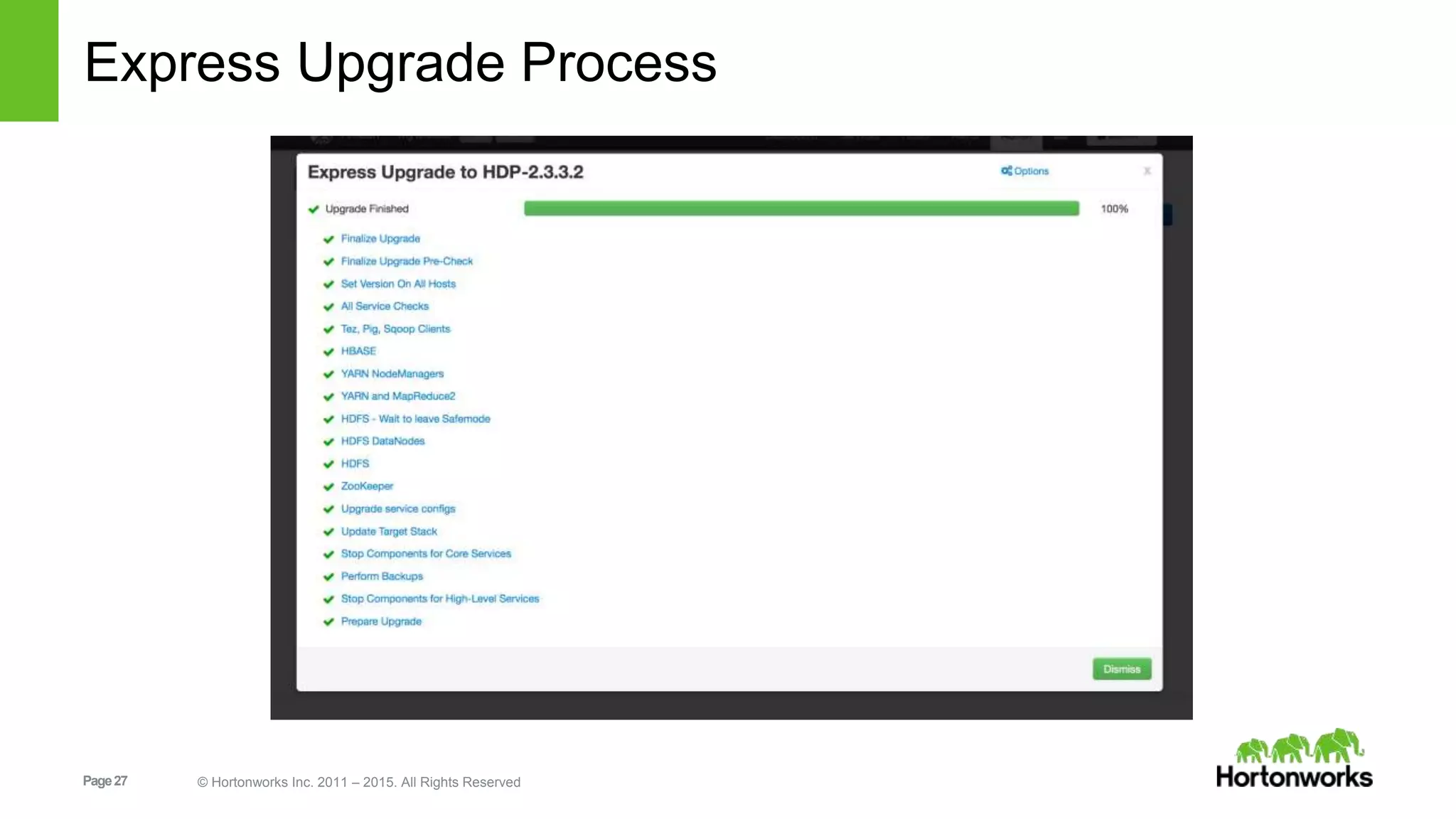
New!!! Ambari 2.2 Introduces HDP Express Upgrade
Express Upgrade…
• is an Automated Upgrade alternative to Rolling Upgrade
• has a smaller set of prerequisites than Rolling Upgrade, does not
require NameNode HA
• incurs cluster downtime but can finish faster
• provides an Automated Upgrade option for HDP 2.1 clusters
Page15 © Hortonworks Inc. 2011 – 2015. All Rights Reserved
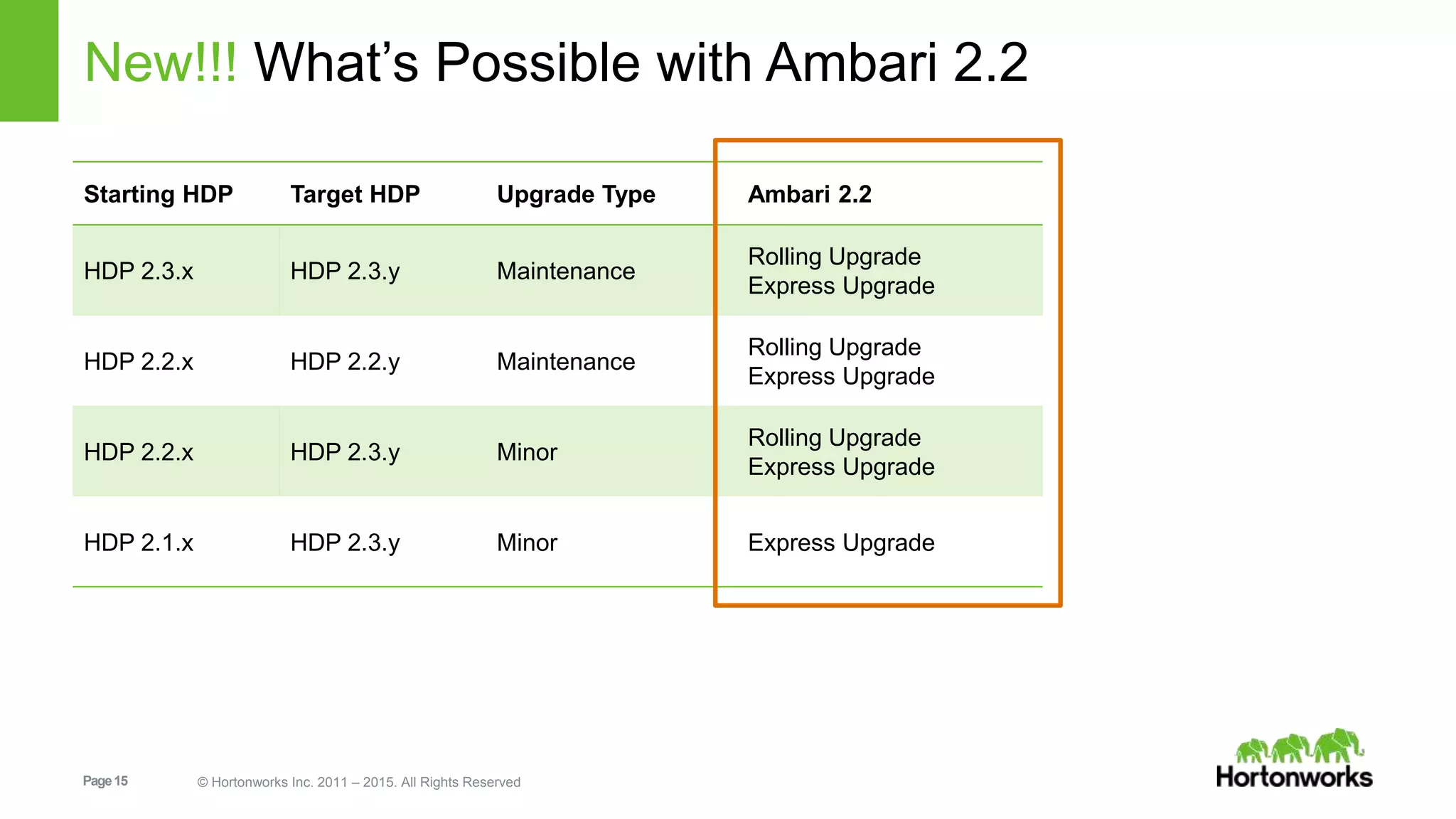
New!!! What’s Possible with Ambari 2.2
Starting HDP Target HDP Upgrade Type Ambari 2.2
HDP 2.3.x HDP 2.3.y Maintenance
Rolling Upgrade
Express Upgrade
HDP 2.2.x HDP 2.2.y Maintenance
Rolling Upgrade
Express Upgrade
HDP 2.2.x HDP 2.3.y Minor
Rolling Upgrade
Express Upgrade
HDP 2.1.x HDP 2.3.y Minor Express Upgrade
Page16 © Hortonworks Inc. 2011 – 2015. All Rights Reserved
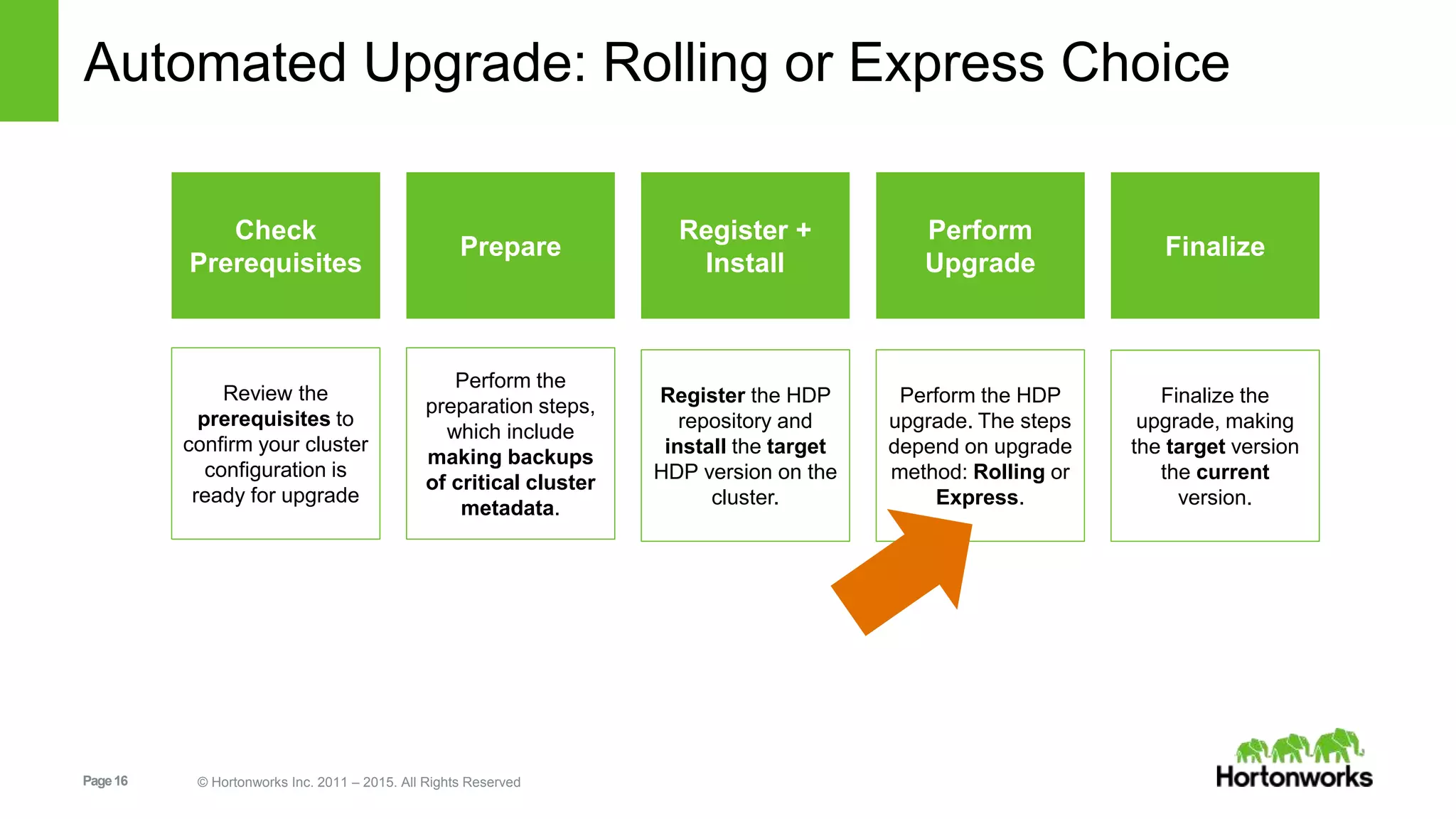
Automated Upgrade: Rolling or Express Choice
Check
Prerequisites
Prepare
Register +
Install
Perform
Upgrade
Perform the HDP
upgrade. The steps
depend on upgrade
method: Rolling or
Express.
Finalize
Finalize the
upgrade, making
the target version
the current
version.
Perform the
preparation steps,
which include
making backups
of critical cluster
metadata.
Review the
prerequisites to
confirm your cluster
configuration is
ready for upgrade
Register the HDP
repository and
install the target
HDP version on the
cluster.
Page17 © Hortonworks Inc. 2011 – 2015. All Rights Reserved
Automated Upgrade: Rolling or Express Choice
Page18 © Hortonworks Inc. 2011 – 2015. All Rights Reserved
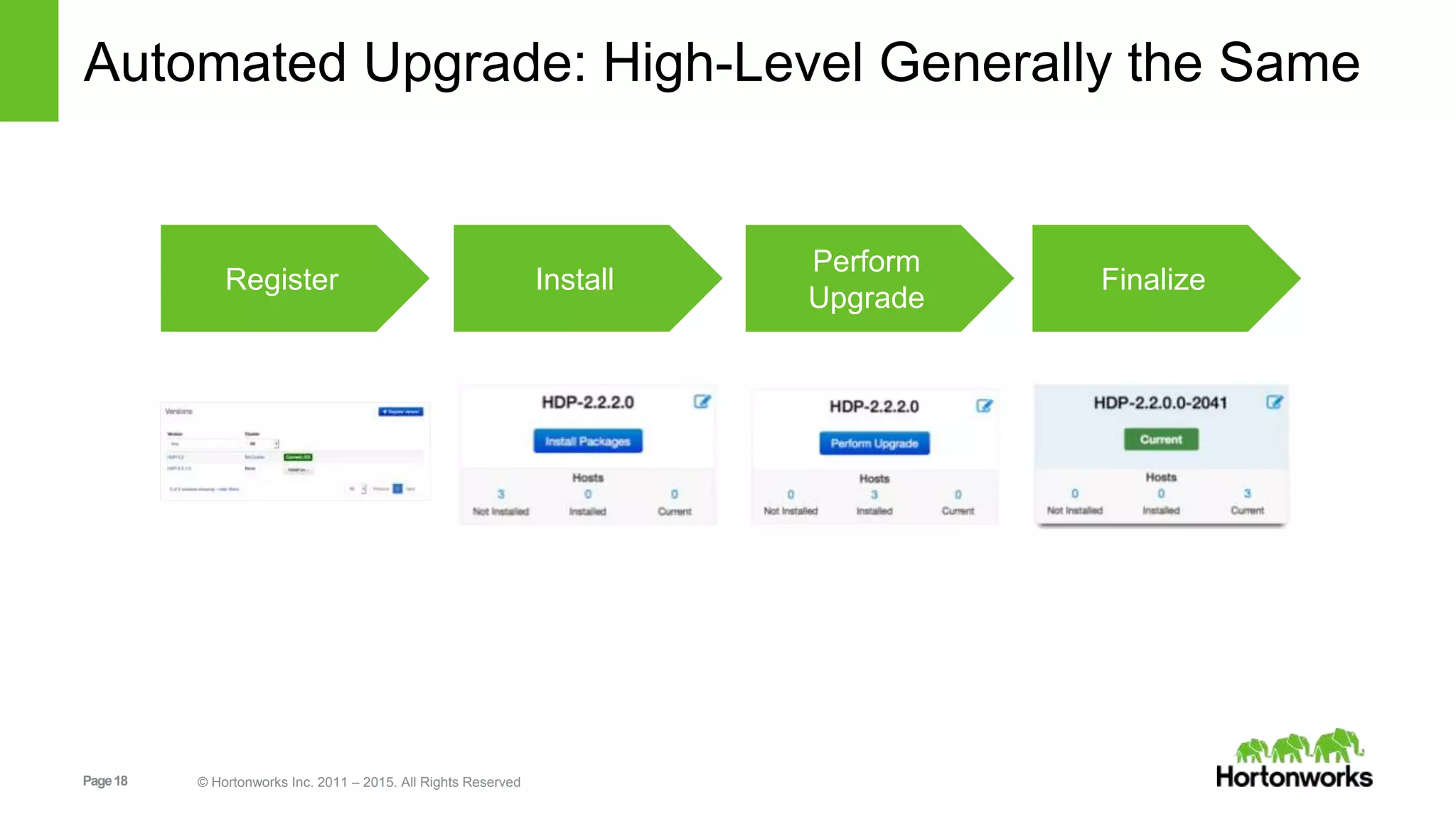
Automated Upgrade: High-Level Generally the Same
Register Install
Perform
Upgrade
Finalize
Page19 © Hortonworks Inc. 2011 – 2015. All Rights Reserved
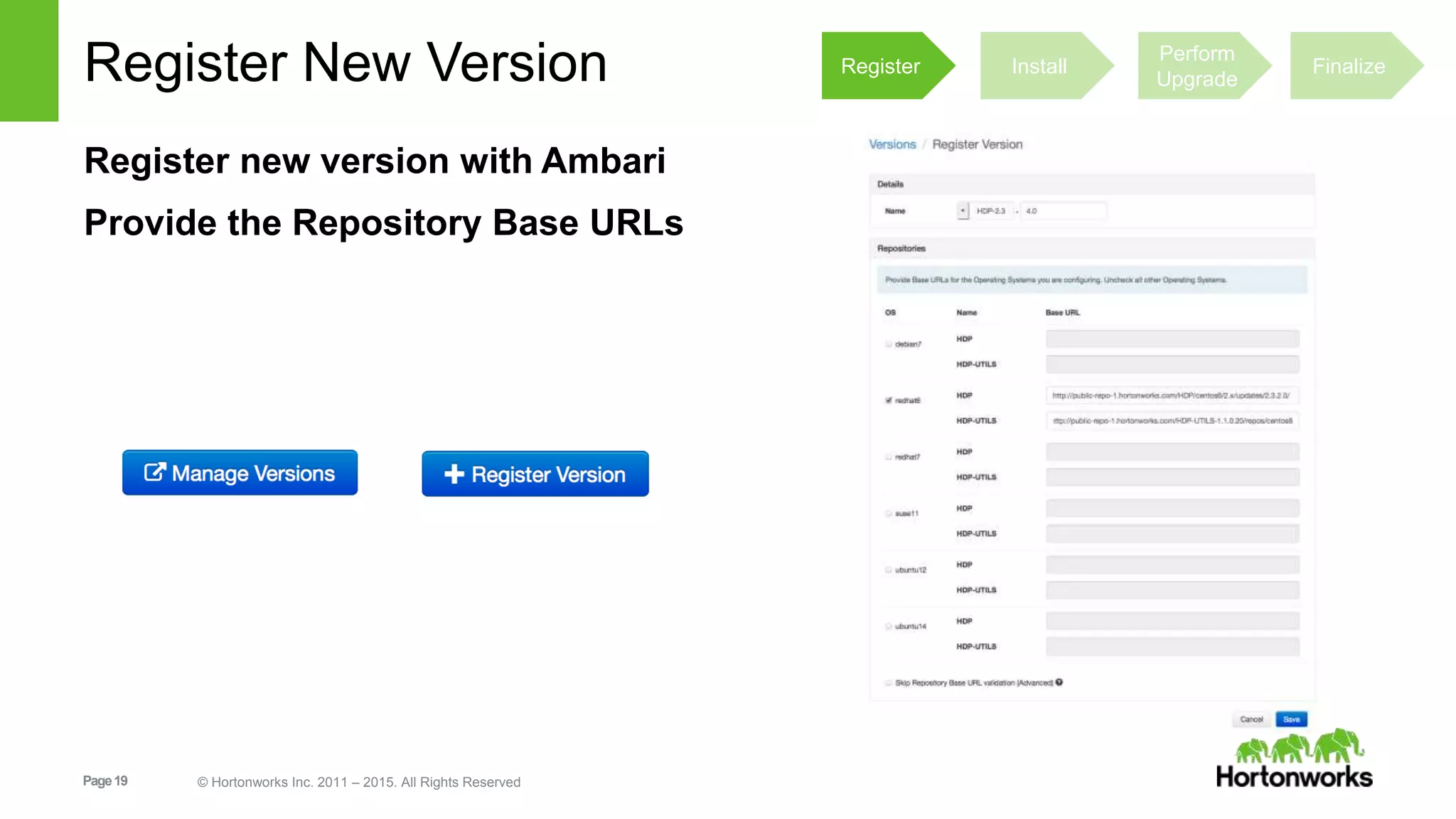
Register New Version
Register new version with Ambari
Provide the Repository Base URLs
Register Install
Perform
Upgrade
Finalize
Page20 © Hortonworks Inc. 2011 – 2015. All Rights Reserved
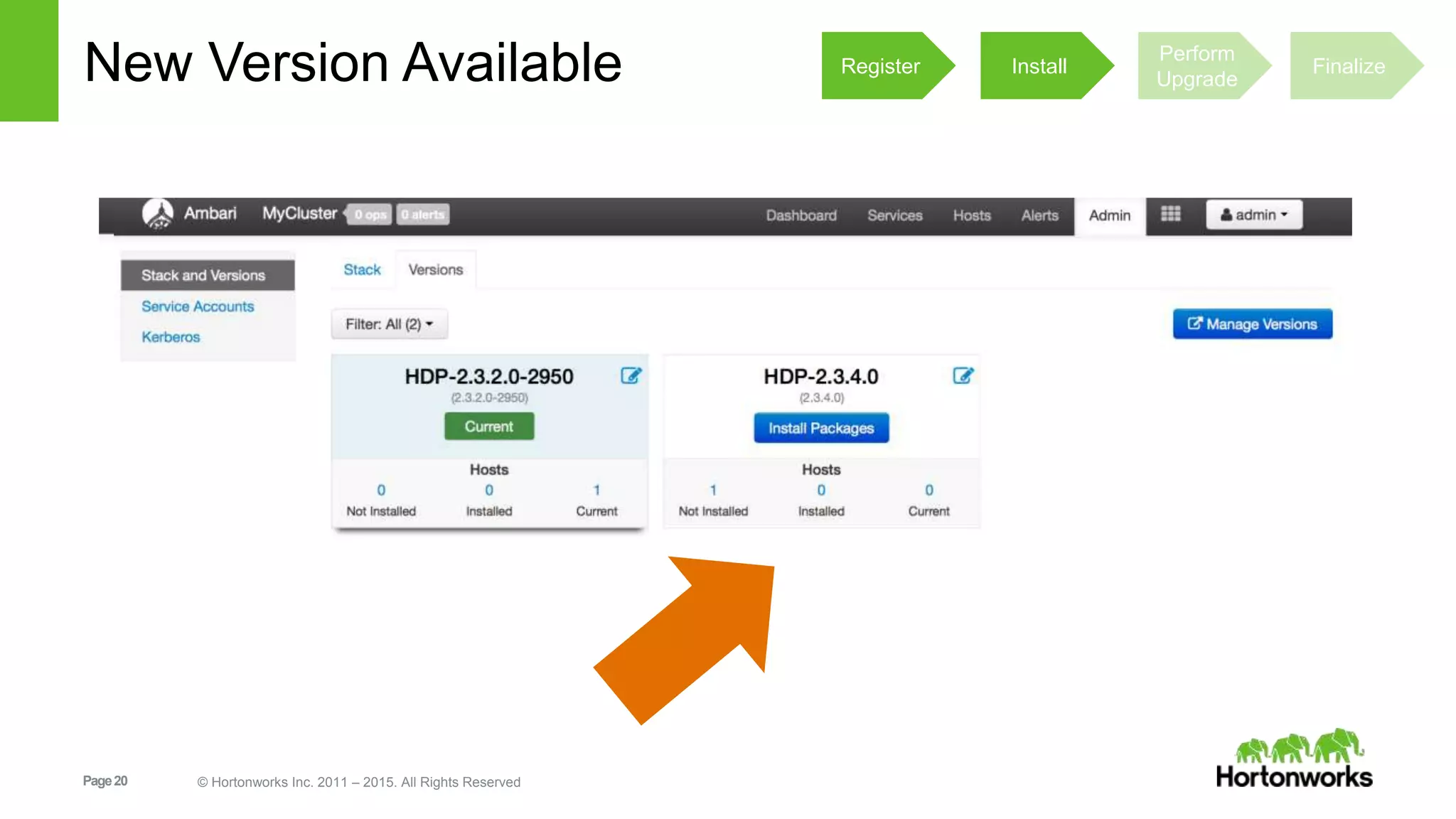
New Version Available Register Install
Perform
Upgrade
Finalize
Page21 © Hortonworks Inc. 2011 – 2015. All Rights Reserved
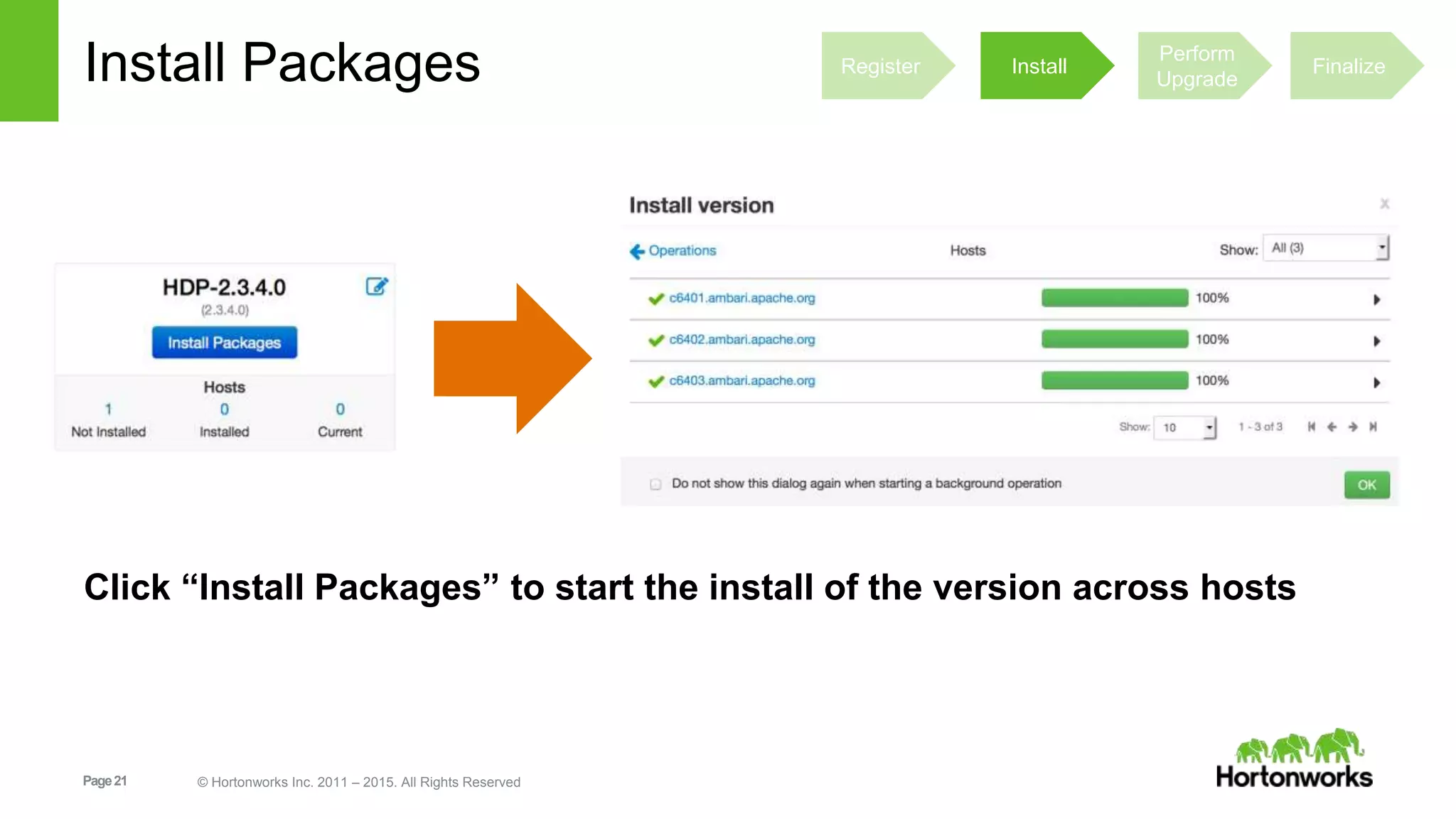
Install Packages
Click “Install Packages” to start the install of the version across hosts
Register Install
Perform
Upgrade
Finalize
Page22 © Hortonworks Inc. 2011 – 2015. All Rights Reserved
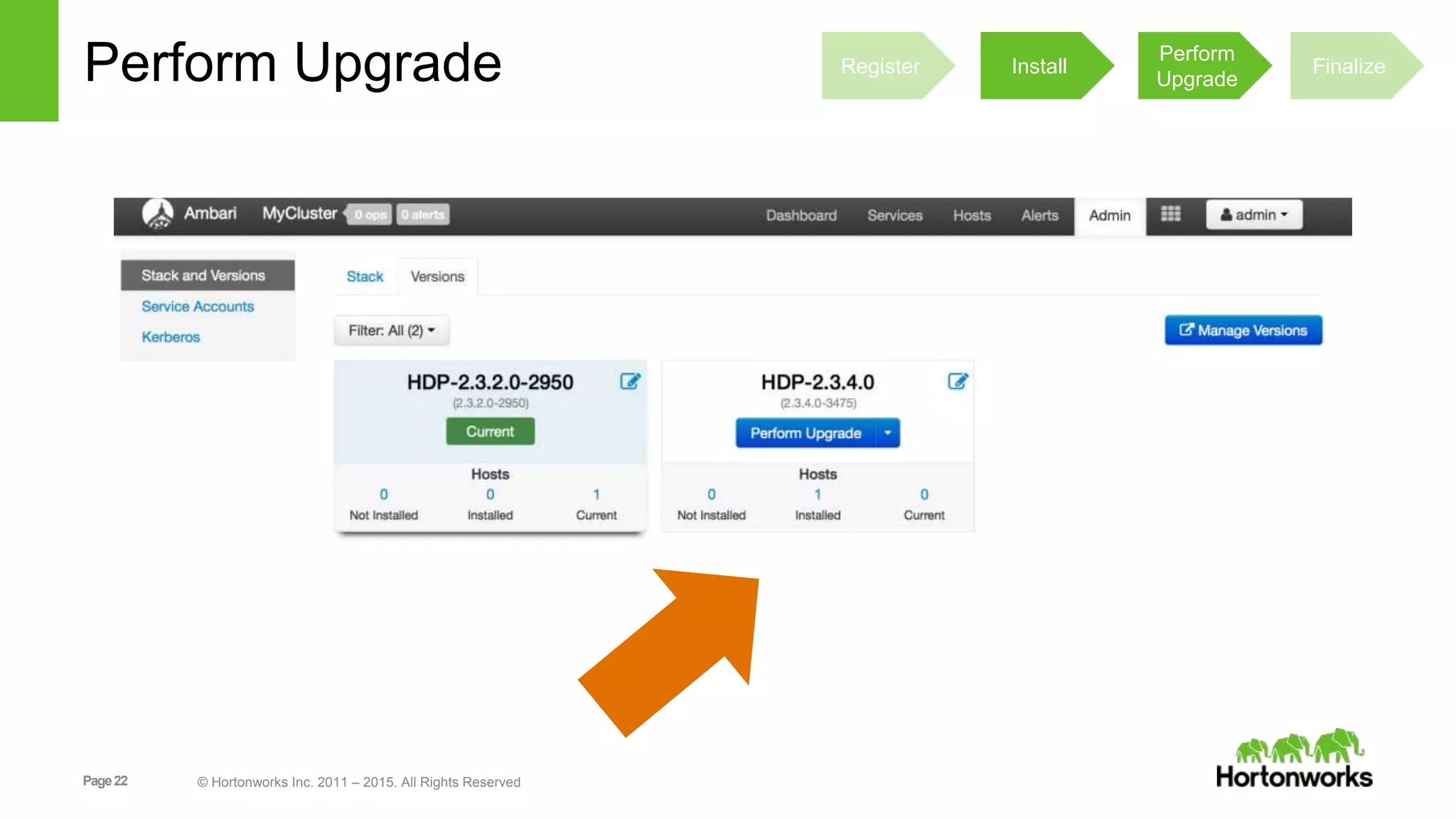
Perform Upgrade Register Install
Perform
Upgrade
Finalize
Page23 © Hortonworks Inc. 2011 – 2015. All Rights Reserved
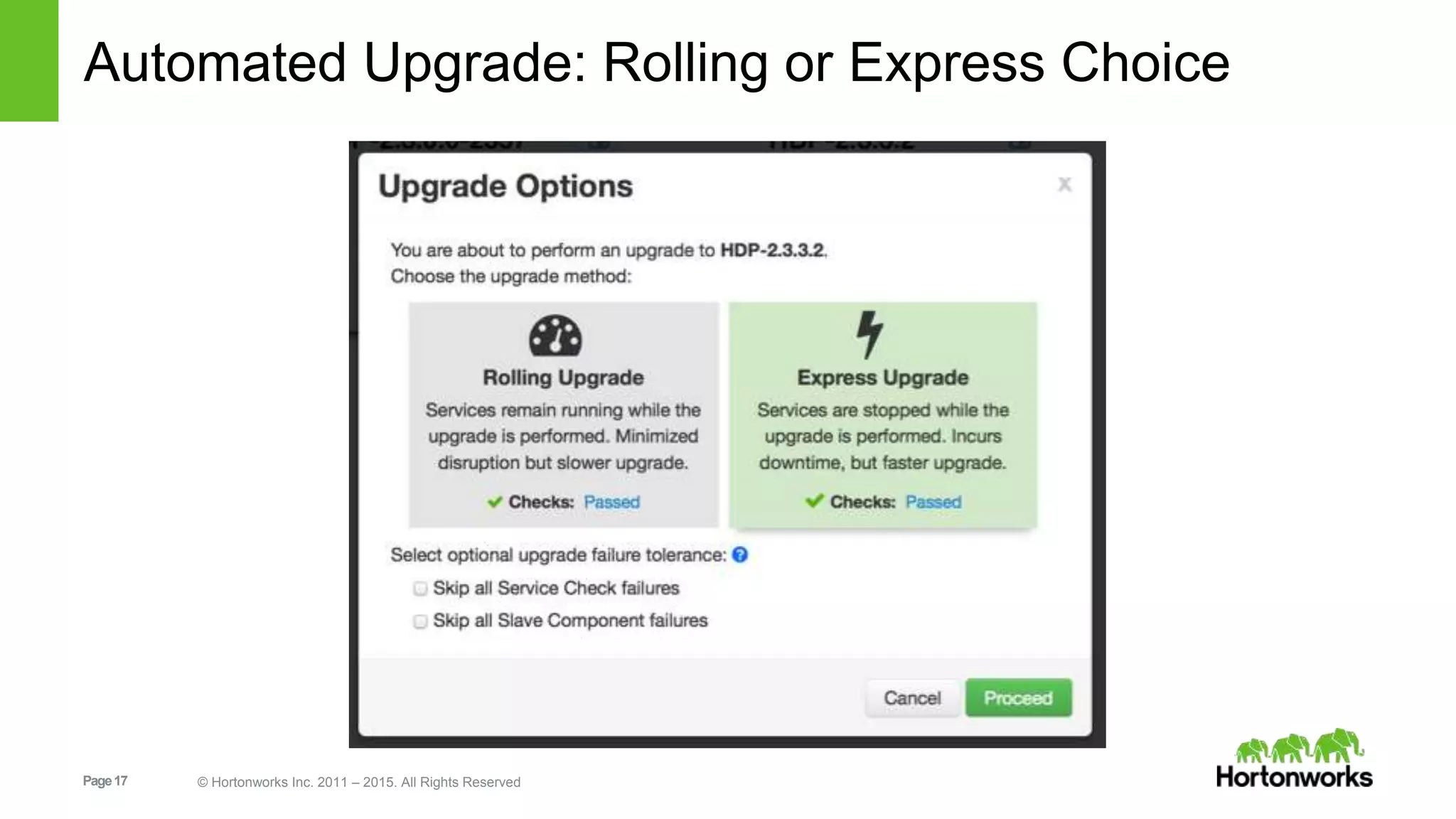
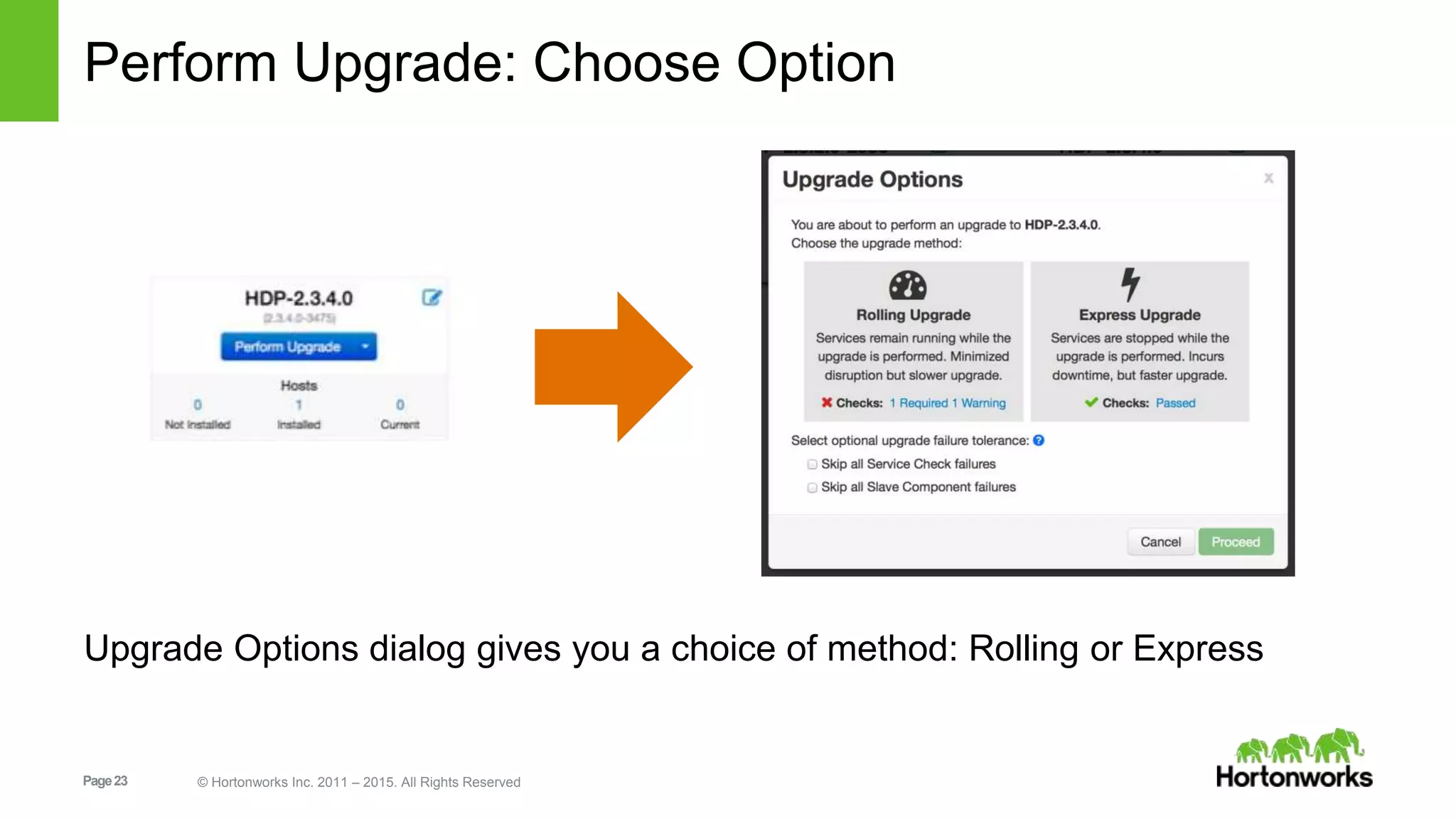
Perform Upgrade: Choose Option
Upgrade Options dialog gives you a choice of method: Rolling or Express
Page24 © Hortonworks Inc. 2011 – 2015. All Rights Reserved
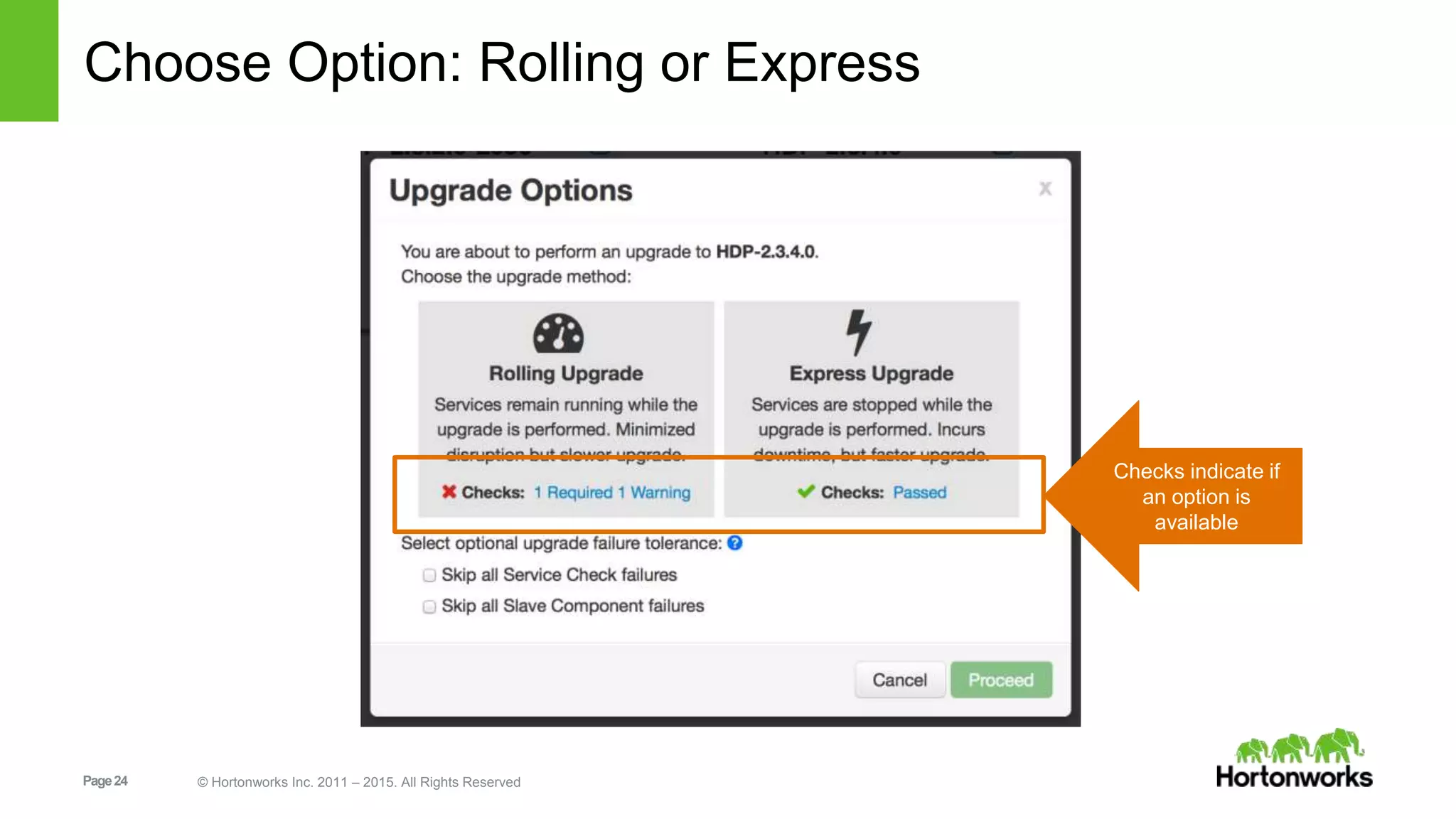
Choose Option: Rolling or Express
Checks indicate if
an option is
available
Page25 © Hortonworks Inc. 2011 – 2015. All Rights Reserved
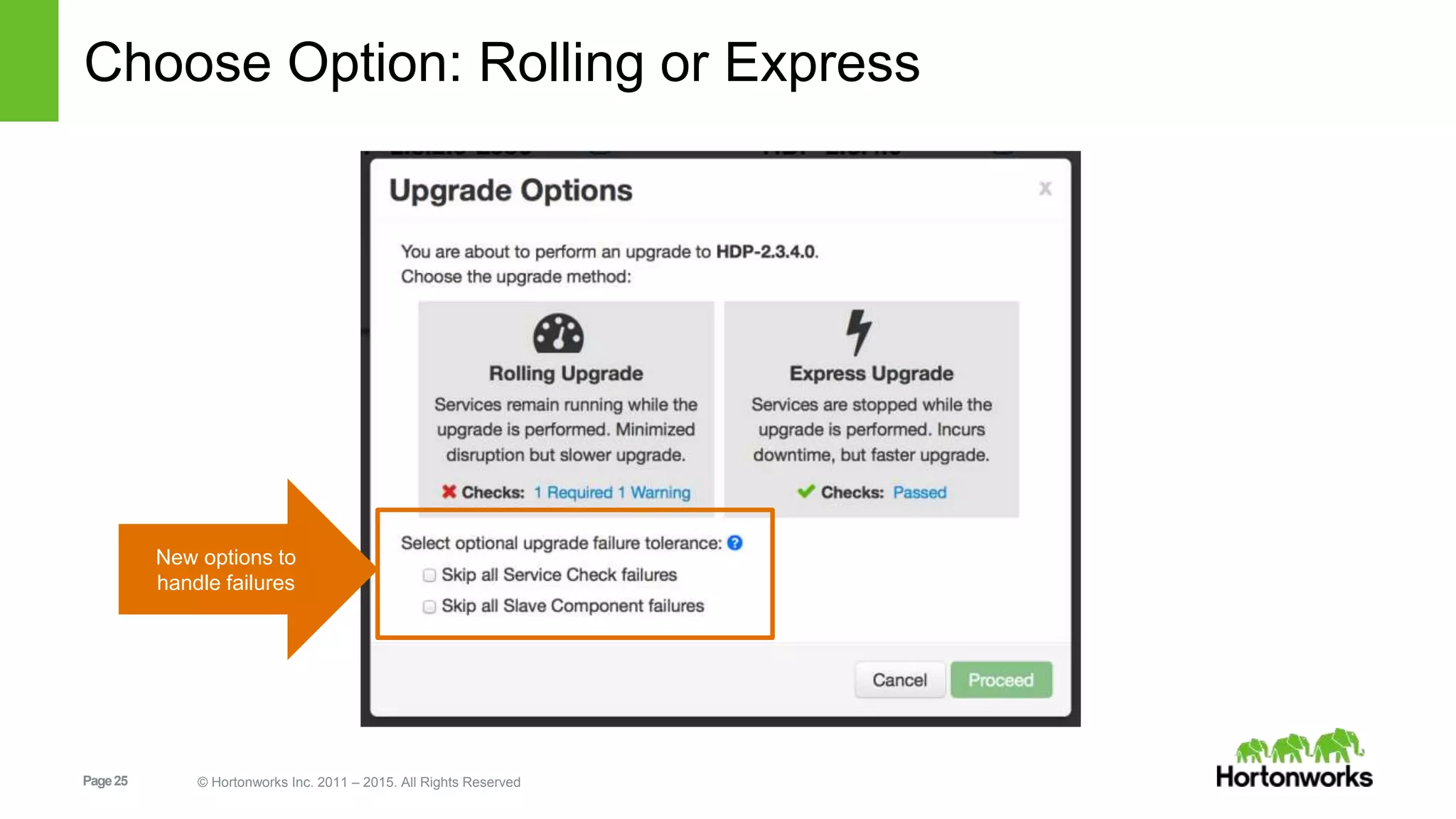
Choose Option: Rolling or Express
New options to
handle failures
Page26 © Hortonworks Inc. 2011 – 2015. All Rights Reserved
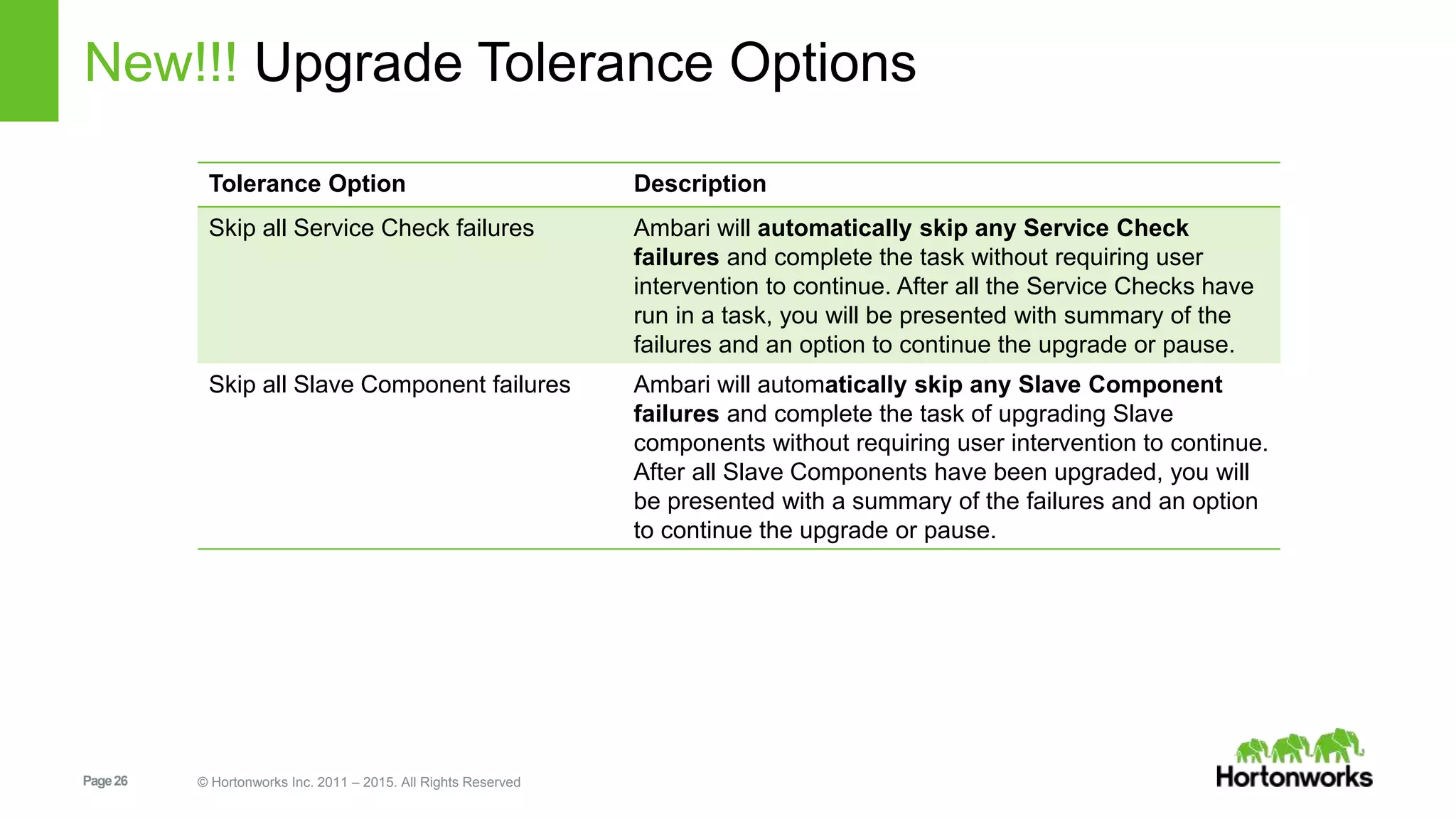
New!!! Upgrade Tolerance Options
Tolerance Option Description
Skip all Service Check failures Ambari will automatically skip any Service Check
failures and complete the task without requiring user
intervention to continue. After all the Service Checks have
run in a task, you will be presented with summary of the
failures and an option to continue the upgrade or pause.
Skip all Slave Component failures Ambari will automatically skip any Slave Component
failures and complete the task of upgrading Slave
components without requiring user intervention to continue.
After all Slave Components have been upgraded, you will
be presented with a summary of the failures and an option
to continue the upgrade or pause.
Page27 © Hortonworks Inc. 2011 – 2015. All Rights Reserved
Express Upgrade Process
Page28 © Hortonworks Inc. 2011 – 2015. All Rights Reserved
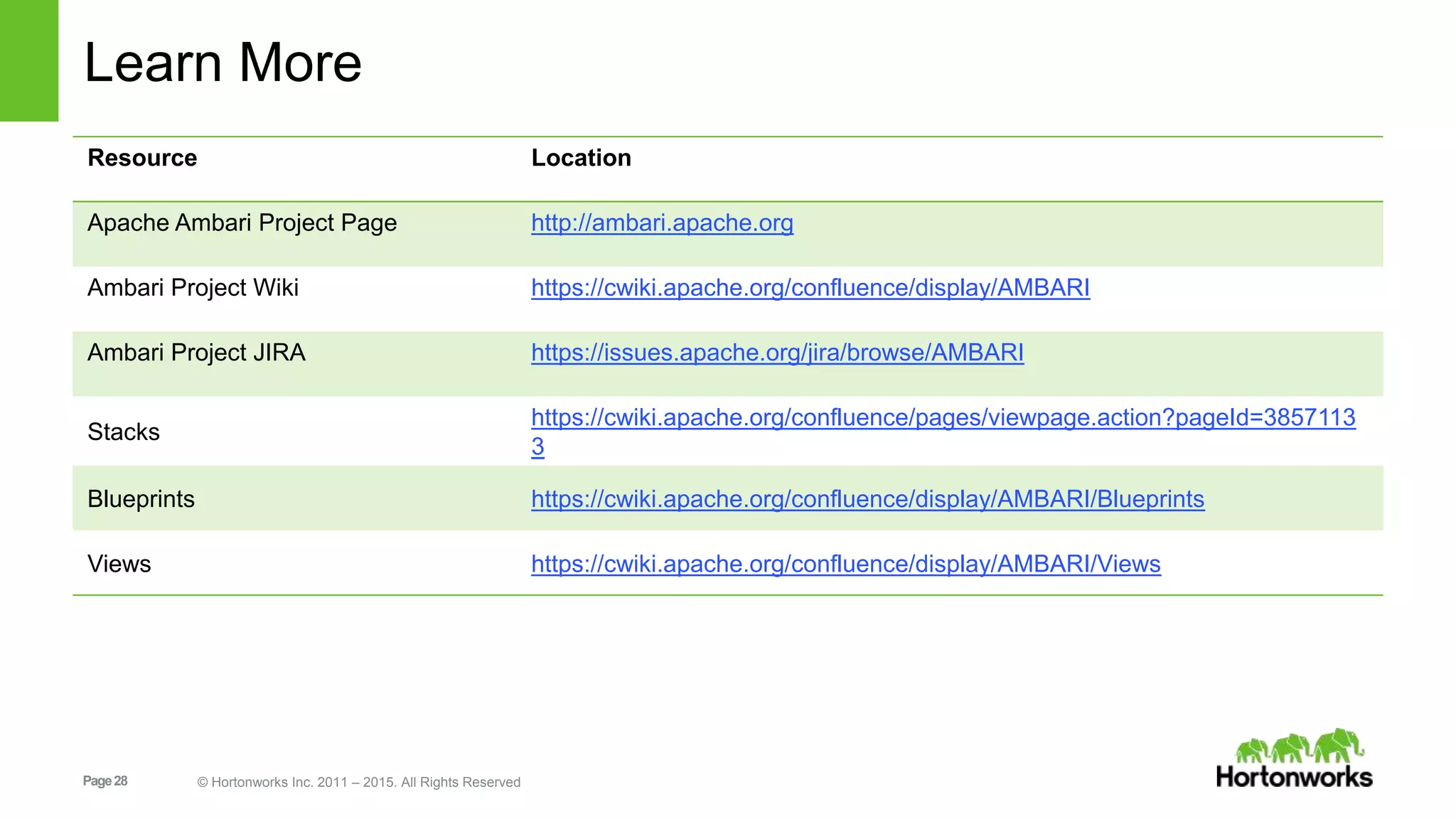
Learn More
Resource Location
Apache Ambari Project Page http://ambari.apache.org
Ambari Project Wiki https://cwiki.apache.org/confluence/display/AMBARI
Ambari Project JIRA https://issues.apache.org/jira/browse/AMBARI
Stacks
https://cwiki.apache.org/confluence/pages/viewpage.action?pageId=3857113
3
Blueprints https://cwiki.apache.org/confluence/display/AMBARI/Blueprints
Views https://cwiki.apache.org/confluence/display/AMBARI/Views

Apache Ambari - What's New in 2.2

  • 1.
    Page1 © HortonworksInc. 2011 – 2015. All Rights Reserved Apache Ambari 2.2 December 2015 What’s New
  • 2.
    Page2 © HortonworksInc. 2011 – 2015. All Rights Reserved What is Ambari? Apache Ambari is the open source operational platform to provision, manage and monitor Hadoop clusters
  • 3.
    Page3 © HortonworksInc. 2011 – 2015. All Rights Reserved What’s New in Ambari 2.2 Core Features Express Upgrade (AMBARI-13407) Export Metrics Widget Graphs (AMBARI-13313) User Timezones (AMBARI-13293) Selectable Dashboard Time Range (AMBARI-13331) HDP Stack Features Ranger Guided Configs (AMBARI-13263) Security Features Ambari Web Inactivity Timeout (AMBARI-13419) Manage KDC Admin Credentials (AMBARI-13449) Blueprints API (Tech Preview) Ranger (AMBARI-13421) Kerberos (AMBARI-13431) Recommendations (AMBARI-13487) For a complete list of changes: https://issues.apache.org/jira/browse/AMBARI/fixforversion/12333548
  • 4.
    Page4 © HortonworksInc. 2011 – 2015. All Rights Reserved Core Features
  • 5.
    Page5 © HortonworksInc. 2011 – 2015. All Rights Reserved Export Metric Graph Widget Data Export raw metrics data from the Graph Widgets CSV or JSON format
  • 6.
    Page6 © HortonworksInc. 2011 – 2015. All Rights Reserved User Timezone User configurable timezone for Ambari Web Timezone is used for displaying of Metric Graphs data
  • 7.
    Page7 © HortonworksInc. 2011 – 2015. All Rights Reserved Selectable Dashboard Time Range
  • 8.
    Page8 © HortonworksInc. 2011 – 2015. All Rights Reserved Security Features
  • 9.
    Page9 © HortonworksInc. 2011 – 2015. All Rights Reserved Ambari Web Inactivity Timeout • Automatically “logout” a user after a period of Ambari Web inactivity • Can be split between “operators” and “read-only” users • Configurable in ambari.properties and not enabled by default /etc/ambari-server/conf/ambari.properties user.inactivity.timeout.default=0 user.inactivity.timeout.role.readonly.default=0 Set the timeout (in seconds)
  • 10.
    Page10 © HortonworksInc. 2011 – 2015. All Rights Reserved Save KDC Admin Credentials Option for Ambari to “save” KDC Admin credentials Eliminates need to “re-enter” credential on cluster changes
  • 11.
    Page11 © HortonworksInc. 2011 – 2015. All Rights Reserved Save KDC Admin Credentials Prerequisite: Ambari Server setup security Option #2 to “encrypt passwords”. 1 “Save Admin Credential” Option available in Enable Kerberos wizard.2
  • 12.
    Page12 © HortonworksInc. 2011 – 2015. All Rights Reserved Save KDC Admin Credentials Once Kerberos is enabled, you can manage the saved KDC Credentials.3
  • 13.
    Page13 © HortonworksInc. 2011 – 2015. All Rights Reserved HDP Express Upgrade
  • 14.
    Page14 © HortonworksInc. 2011 – 2015. All Rights Reserved New!!! Ambari 2.2 Introduces HDP Express Upgrade Express Upgrade… • is an Automated Upgrade alternative to Rolling Upgrade • has a smaller set of prerequisites than Rolling Upgrade, does not require NameNode HA • incurs cluster downtime but can finish faster • provides an Automated Upgrade option for HDP 2.1 clusters
  • 15.
    Page15 © HortonworksInc. 2011 – 2015. All Rights Reserved New!!! What’s Possible with Ambari 2.2 Starting HDP Target HDP Upgrade Type Ambari 2.2 HDP 2.3.x HDP 2.3.y Maintenance Rolling Upgrade Express Upgrade HDP 2.2.x HDP 2.2.y Maintenance Rolling Upgrade Express Upgrade HDP 2.2.x HDP 2.3.y Minor Rolling Upgrade Express Upgrade HDP 2.1.x HDP 2.3.y Minor Express Upgrade
  • 16.
    Page16 © HortonworksInc. 2011 – 2015. All Rights Reserved Automated Upgrade: Rolling or Express Choice Check Prerequisites Prepare Register + Install Perform Upgrade Perform the HDP upgrade. The steps depend on upgrade method: Rolling or Express. Finalize Finalize the upgrade, making the target version the current version. Perform the preparation steps, which include making backups of critical cluster metadata. Review the prerequisites to confirm your cluster configuration is ready for upgrade Register the HDP repository and install the target HDP version on the cluster.
  • 17.
    Page17 © HortonworksInc. 2011 – 2015. All Rights Reserved Automated Upgrade: Rolling or Express Choice
  • 18.
    Page18 © HortonworksInc. 2011 – 2015. All Rights Reserved Automated Upgrade: High-Level Generally the Same Register Install Perform Upgrade Finalize
  • 19.
    Page19 © HortonworksInc. 2011 – 2015. All Rights Reserved Register New Version Register new version with Ambari Provide the Repository Base URLs Register Install Perform Upgrade Finalize
  • 20.
    Page20 © HortonworksInc. 2011 – 2015. All Rights Reserved New Version Available Register Install Perform Upgrade Finalize
  • 21.
    Page21 © HortonworksInc. 2011 – 2015. All Rights Reserved Install Packages Click “Install Packages” to start the install of the version across hosts Register Install Perform Upgrade Finalize
  • 22.
    Page22 © HortonworksInc. 2011 – 2015. All Rights Reserved Perform Upgrade Register Install Perform Upgrade Finalize
  • 23.
    Page23 © HortonworksInc. 2011 – 2015. All Rights Reserved Perform Upgrade: Choose Option Upgrade Options dialog gives you a choice of method: Rolling or Express
  • 24.
    Page24 © HortonworksInc. 2011 – 2015. All Rights Reserved Choose Option: Rolling or Express Checks indicate if an option is available
  • 25.
    Page25 © HortonworksInc. 2011 – 2015. All Rights Reserved Choose Option: Rolling or Express New options to handle failures
  • 26.
    Page26 © HortonworksInc. 2011 – 2015. All Rights Reserved New!!! Upgrade Tolerance Options Tolerance Option Description Skip all Service Check failures Ambari will automatically skip any Service Check failures and complete the task without requiring user intervention to continue. After all the Service Checks have run in a task, you will be presented with summary of the failures and an option to continue the upgrade or pause. Skip all Slave Component failures Ambari will automatically skip any Slave Component failures and complete the task of upgrading Slave components without requiring user intervention to continue. After all Slave Components have been upgraded, you will be presented with a summary of the failures and an option to continue the upgrade or pause.
  • 27.
    Page27 © HortonworksInc. 2011 – 2015. All Rights Reserved Express Upgrade Process
  • 28.
    Page28 © HortonworksInc. 2011 – 2015. All Rights Reserved Learn More Resource Location Apache Ambari Project Page http://ambari.apache.org Ambari Project Wiki https://cwiki.apache.org/confluence/display/AMBARI Ambari Project JIRA https://issues.apache.org/jira/browse/AMBARI Stacks https://cwiki.apache.org/confluence/pages/viewpage.action?pageId=3857113 3 Blueprints https://cwiki.apache.org/confluence/display/AMBARI/Blueprints Views https://cwiki.apache.org/confluence/display/AMBARI/Views