• Virtual Digital Assistant on yourWrist.
Introduction
Today users are moving towards a Multi Screen world where they have access to
different form factors like that of notebooks, tablets and smart phones catering to
their different needs.Wearable Devices are set to add a new dimension to this
Multi Screen World
Key Success Factors for
Wearable devices
Number of sensors it supports
Number of Applications available on it
AndroidWear is a customized AndroidVersion for wearable devices like smart watches
AndroidWear devices are powerful in terms of features and are also small enough to
replace regular wristwatches
It provides contextual information based on users current environment and captures
users behavior. Users can also view notifications and take action against each notification
from their wearable devices
AndroidWear relies heavily on Google, aVirtual Digital Assistant available on all
Android mobile devices
AndroidWear devices have huge market potential as they support many in built health
related sensors compared to other competitors
Google has released the AndroidWear SDK in the recent Google I/O event and is open for
developers to start building applications for Wearable device
Leading Android Wear in
Market.
You can access the following frequently used
features on smart watches
•Read and Reply to SMS
•Read Notifications
•Set Alarm/Reminder
Phone Functions
What You can do with
Android Wear.
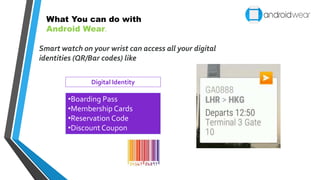
Smart watch on your wrist can access all your digital
identities (QR/Bar codes) like
•Boarding Pass
•Membership Cards
•Reservation Code
•Discount Coupon
Digital Identity
What You can do with
Android Wear.
In-built sensors of AndroidWear will provide information on
different fitness tracking parameters like
•Calories Burned
•Distance Walked
•Blood Pressure
•Heart Rate
•Step Count etc.
FitnessTracking
What You can do with
Android Wear.
Home Automation
•Open the garage door using your
voice command
•Start any appliance by just
giving voice command
Smart watch on your wrist can be used to
Automate your Home
What You can do with
Android Wear.
ANDROID WEAR APP DEVELOPMENT
Developing Application for AndroidWear requires additional SDKs as its form factor
differs from Android smart phones and voice is the primary input by the end user.
Wearable SDK
AndroidWear SDK comes with a set of tools and APIs forWear Application
development. It includes the following:
 Android Wear Emulator – Helps to run applications and its services
 Users can view Android device notifications as cards on the connected Wearable devices
as well on the connectedWear Emulator
 Developers can use new notification APIs to extend the features of their existing
application using voice replies or notification pages
 Allows developing custom application and User Interfaces
 Suggest (Context Stream) –This is a vertical list of
Google Now cards that can show information based on
current time and user location. Only one card can be
displayed at a time. However user can swipe vertically
to view other cards
 Demand (Cue Card) – This is a list of actions, which
are triggered by user’s voice command. Developer can
match these commands with their applications, when
multiple applications are mapped to the same action
Key Features/APIs
 User Interface: It is imperative for the developers to design great User Interfaces for their
Apps considering small form factor of wearable devices.
AndroidWear supports two types of UI formats:
Stream vs. Cue Card
ANDROID WEAR APP DEVELOPMENT
 Notifications: It appear as cards and they are a core part of the AndroidWear
experience. Notification can be designed in a different way to include some of the below
items based on notification type, priority etc.
 Images
• Card can have background images to provide contextual glanceability
• Landscape images are more suitable as these images move horizontally with swipe
 Pages :When the core message is longer than what can fit within a single primary
card, then you can add pages/cards which are placed to the right of the primary card. It is
always recommended not to have more than 3 pages when your notification contains
actions.
 Actions : Applications need to add actions to the content when users need to act on
information shown on screen. Actions are shown on the right side of content and most
used actions need to be added first for easy access. Actions consist of an icon and a text
caption.
ANDROID WEAR APP DEVELOPMENT
 Application Icon : By default the application launcher icon is placed on
the cards, however developers have option to hide it on need basis.
Stacked notifications :You can consider this option if your
application can produce multiple notifications concurrently.
Voice Replies : Messaging applications generally make use of hands-
free dictation to create short messages/reply.You can provide up to five
suggested replies for users to choose from.
ANDROID WEAR APP DEVELOPMENT
BEYOND
WEARABLES
The emergence of wearable devices has led to the rise of different vertical specific platforms for these
devices. Google has already announced its much anticipated health platform, Google Fit in Google I/O
2014 which will collect health data and make it accessible via cloud. Its main goal is to standardize
health and fitness data which is used on Android platforms (including Google Glass and AndroidWear).
Google Fit will provide a collection of APIs for developers to aggregate health and fitness data. It will
allow developers to easily plug these APIs to add health and fitness features in their Android
applications.
In future, BYOD will be extended to wearable devices, which will bring new challenges as well as
opportunities.There will be a need for enterprises to manageWearable devices also and it will in turn
create more opportunities for MDM vendors.
Into the Future.
Keep track of fitness during
exercise/games
Get Real time notifications
Real-time Search
Voice Recording
Quick Reply
Future
Presentation
Begins.
• Virtual Digital Assistant on yourWrist.
Grab a
Popcorn
LOADING
ThankYou !
#msk

Android wear

  • 1.
    • Virtual DigitalAssistant on yourWrist.
  • 2.
    Introduction Today users aremoving towards a Multi Screen world where they have access to different form factors like that of notebooks, tablets and smart phones catering to their different needs.Wearable Devices are set to add a new dimension to this Multi Screen World Key Success Factors for Wearable devices Number of sensors it supports Number of Applications available on it
  • 3.
    AndroidWear is acustomized AndroidVersion for wearable devices like smart watches AndroidWear devices are powerful in terms of features and are also small enough to replace regular wristwatches It provides contextual information based on users current environment and captures users behavior. Users can also view notifications and take action against each notification from their wearable devices AndroidWear relies heavily on Google, aVirtual Digital Assistant available on all Android mobile devices AndroidWear devices have huge market potential as they support many in built health related sensors compared to other competitors Google has released the AndroidWear SDK in the recent Google I/O event and is open for developers to start building applications for Wearable device
  • 4.
  • 5.
    You can accessthe following frequently used features on smart watches •Read and Reply to SMS •Read Notifications •Set Alarm/Reminder Phone Functions What You can do with Android Wear.
  • 6.
    Smart watch onyour wrist can access all your digital identities (QR/Bar codes) like •Boarding Pass •Membership Cards •Reservation Code •Discount Coupon Digital Identity What You can do with Android Wear.
  • 7.
    In-built sensors ofAndroidWear will provide information on different fitness tracking parameters like •Calories Burned •Distance Walked •Blood Pressure •Heart Rate •Step Count etc. FitnessTracking What You can do with Android Wear.
  • 8.
    Home Automation •Open thegarage door using your voice command •Start any appliance by just giving voice command Smart watch on your wrist can be used to Automate your Home What You can do with Android Wear.
  • 9.
    ANDROID WEAR APPDEVELOPMENT Developing Application for AndroidWear requires additional SDKs as its form factor differs from Android smart phones and voice is the primary input by the end user. Wearable SDK AndroidWear SDK comes with a set of tools and APIs forWear Application development. It includes the following:  Android Wear Emulator – Helps to run applications and its services  Users can view Android device notifications as cards on the connected Wearable devices as well on the connectedWear Emulator  Developers can use new notification APIs to extend the features of their existing application using voice replies or notification pages  Allows developing custom application and User Interfaces
  • 10.
     Suggest (ContextStream) –This is a vertical list of Google Now cards that can show information based on current time and user location. Only one card can be displayed at a time. However user can swipe vertically to view other cards  Demand (Cue Card) – This is a list of actions, which are triggered by user’s voice command. Developer can match these commands with their applications, when multiple applications are mapped to the same action Key Features/APIs  User Interface: It is imperative for the developers to design great User Interfaces for their Apps considering small form factor of wearable devices. AndroidWear supports two types of UI formats: Stream vs. Cue Card ANDROID WEAR APP DEVELOPMENT
  • 11.
     Notifications: Itappear as cards and they are a core part of the AndroidWear experience. Notification can be designed in a different way to include some of the below items based on notification type, priority etc.  Images • Card can have background images to provide contextual glanceability • Landscape images are more suitable as these images move horizontally with swipe  Pages :When the core message is longer than what can fit within a single primary card, then you can add pages/cards which are placed to the right of the primary card. It is always recommended not to have more than 3 pages when your notification contains actions.  Actions : Applications need to add actions to the content when users need to act on information shown on screen. Actions are shown on the right side of content and most used actions need to be added first for easy access. Actions consist of an icon and a text caption. ANDROID WEAR APP DEVELOPMENT
  • 12.
     Application Icon: By default the application launcher icon is placed on the cards, however developers have option to hide it on need basis. Stacked notifications :You can consider this option if your application can produce multiple notifications concurrently. Voice Replies : Messaging applications generally make use of hands- free dictation to create short messages/reply.You can provide up to five suggested replies for users to choose from. ANDROID WEAR APP DEVELOPMENT
  • 13.
    BEYOND WEARABLES The emergence ofwearable devices has led to the rise of different vertical specific platforms for these devices. Google has already announced its much anticipated health platform, Google Fit in Google I/O 2014 which will collect health data and make it accessible via cloud. Its main goal is to standardize health and fitness data which is used on Android platforms (including Google Glass and AndroidWear). Google Fit will provide a collection of APIs for developers to aggregate health and fitness data. It will allow developers to easily plug these APIs to add health and fitness features in their Android applications. In future, BYOD will be extended to wearable devices, which will bring new challenges as well as opportunities.There will be a need for enterprises to manageWearable devices also and it will in turn create more opportunities for MDM vendors.
  • 14.
    Into the Future. Keeptrack of fitness during exercise/games Get Real time notifications Real-time Search Voice Recording Quick Reply
  • 15.
    Future Presentation Begins. • Virtual DigitalAssistant on yourWrist. Grab a Popcorn LOADING
  • 17.