Discover Android Wear
BuildYour First Android App
for the Google Play Store
• Two all day sessions, Saturday May 10th and
17th	

• Build a full app piece by piece	

• All source code yours to keep	

• meetup.com/South-Bay-Mobile-User-
Group/events/172991712/
Come join us Saturday May 10th and 17th and learn to build an complete android app.
Please Rate this Talk
spkr8.com/t/30861
Android Wear
• Announced March 18th	

• Google is partnering with:	

• Hardware makers	

• Chip makers	

• Fashion houses	

• Still needs software from you
Manufacturers: LG, HTC, ASUS, Motorola, and Samsung
Chip makers: Intel, Broadcom, Qualcomm, Mediatek, Mips
Fashion House: Fossil
Fossil is probably the most significant name on the list since they make inexpensive fashion watches now. Perhaps the “dork” factor can be removed from
smart watches
Me
• Mobile/Mobile Web Developer	

• 30+ years of programming experience	

• My blog: therockncoder.blogspot.com	

• Twitter: @therockncoder	

• GitHub: github.com/Rockncoder	

• GMail: rockncoder@gmail.com
Please follow me on twitter. I tweet my next talks, latest blog posts & github uploads + info on hackathons, contests, and freebies
If you have question, please feel free to tweet or email me. I typically answer tweets quicker.
Agenda
• Why is it cool?	

• The competition	

• Installing the preview SDK	

• Troubleshooting	

• Programming Android Wear	

• Summary and Questions
Why is it Cool?
• Google isn’t trying to put a phone in a
watch	

• The watch is a 2nd screen for phone	

• The watch is an extra input device for
phone	

• Programming just like regular Android apps	

• Should allow for reasonably priced watches
The Competition
• Pebble Smartwatch	

• Qualcomm Toq	

• Samsung Gear	

• Sony Smartwatch
Google isn’t the first manufacturer in this space. Besides constant rumors of an iWatch, others have products currently in the market.
Pebble Smartwatch
• Funded by Kickstarter
on May 18th, 2012	

• Compatible with
Android and iOS	

• Requires two SDKs:
device’s and Pebble’s	

• JavaScript based
programming model
Most successful campaign on Kickstarter. Goal of $100,000 raised $10,266,845. Owns the market right now. No touch screen. No fitness functions.
Qualcomm Toq
• Introduced at Uplinq on
Sept. 4, 2013	

• Uses Qualcomm’s
Mirasol display	

• Only Android phones	

• Requires 2 SDKs:Toq
and Android	

• Java based programming
model
A surprising entry. Qualcomm doesn’t normally build hardware. High priced at $349 when introduced, now about $250 on Amazon. Good battery life, poor
UI.
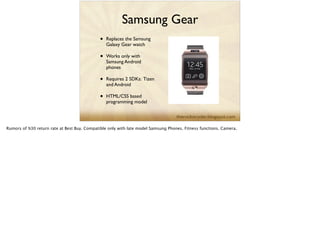
Samsung Gear
• Replaces the Samsung
Galaxy Gear watch	

• Works only with
Samsung Android
phones	

• Requires 2 SDKs: Tizen
and Android	

• HTML/CSS based
programming model
Rumors of %30 return rate at Best Buy. Compatible only with late model Samsung Phones. Fitness functions. Camera.
Samsung Gear App
Challenge!
• Begins May 8th	

• $1,250,000 in prize
money	

• developer.samsung.com/
wearables/main/
Sony SmartWatch 2
• Replaces the Sony
SmartWatch	

• Android phones on 4.0+	

• Android SDK + Sony
add-on SDK	

• Java based programming
model
Installing the Preview
SDK
• Get the Preview SDK	

• Install the Android SDK	

• UpdateYour IDE	

• Wearable Preview Support library
Get the Preview SDK
• You must have a GMail
or other Google
account	

• developer.android.com/
wear/index.html	

• You ask to join	

• If accepted you will
receive an email from
Google
I haven’t heard of anyone being rejected. The acceptance seem more gear to putting people on Android Wear’s beta group, so you can get the app.
Two things a link to the Android Wear app and the preview SDK zip file
Install the Android SDK
• Assuming you already this installed	

• developer.android.com	

• therockncoder.blogspot.com/2014/03/
installing-best-android-dev-
environment.html
Please go to developer.android.com for more instruction on how to install the Android SDK. I also have a very detailed instructions on how to install my
Android development environment.
UpdateYour IDE
• Android developer are use to updating
their dev tools almost weekly	

• update the Eclipse ADT to version 22.6.1+	

• update Android Studio to version 0.5.1+
BTW: At this point Android Studio is very stable and it is the future of Android development. I would recommend that newbies use it instead of Eclipse.
Set up the Android
Wear Emulator
• Launch the AndroidVirtual Device Manager	

• Device = Android Wear Square or Android
Wear Round.	

• Target = Android 4.4.2 - API Level 19 	

• CPU = Android Wear ARM (armeabi-v7a).	

• Skin = AndroidWearSquare or
AndroidWearRound
Set up the Android
Wear App
• Available only to approved beta testers	

• If you aren’t a developer the app is not
useful	

• You must have an Android 4.3 or higher
device to pair to emulator
Open the Android Wear Preview app. You should see a notice that the app is currently not enabled as a notification listener. Tap the message to open the
system settings, then select Android Wear Preview to grant it notification access.
!
Connect your device to your development machine over USB. Be sure that no other Android devices are connected to the machine.
!
Ensure that the Android Wear emulator (created in the previous section) is running. The emulator should show the time and an icon that indicates no
device is connected.
!
Open a command line terminal, navigate to your Android SDK's platform-tools/ directory, then execute:
!
adb -d forward tcp:5601 tcp:5601
!
Note: You must execute this command each time you connect your device over USB.
Return to the Android Wear Preview app. It should now indicate that it is connected to the emulator. The Android Wear emulator should now show the 'g'
orb icon, indicating that is is connected to your device.
!
Now, notifications from your device also appear in the Android Wear emulator.
Install the Preview SDK
• Unzip the Preview SDK	

• Place it with your other Android SDKs
Wearable Preview
Support library
• Even without it, notifications will appear on
watch	

• Library includes several API’s to optimize
your app’s notifications	

• Add the library’s jar to app’s lib folder
Demonstrate adding the wearable-preview-support library
Troubleshooting
• The order of steps is important	

• If they are not followed your device and
emulator won’t connect	

• If this happens, kill emulator and re-do
steps
Demo: Ping Me
• Ping Me is a demo app for notification	

• It works even though not written for
Android Wear
The Preview Sample
Apps
• Wearable Notifications Sample	

• Eliza Chat	

• Recipe Assistant
Demo each app in turn
Programming Android
Wear
• The Heart of Android Wear: Notifications	

• Sending Notification	

• Receiving Inputs
Show the code. Convert the code
Be a Good Citizen
• Don’t berate user with notifications	

• Keep notifications contextual	

• Consider using geofencing or activity
detection	

• Use notification priority
Just because you send user a notification doesn’t necessarily mean you should.
The Future of Android
Wear
• This is only a Preview SDK	

• Voice via Google Now is coming later	

• You can't distribute apps built with it	

• Expect more information at Google I/O
June 25-26
Summary
• Android Wear is built on top of Android’s
Notification system	

• It is easy to add support for Android Wear
to any Android app
Please Rate this Talk
spkr8.com/t/30861
Resources
SDKs
• https://developer.getpebble.com/	

• https://developer.qualcomm.com/mobile-
development/create-connected-
experiences/smartwatch-toq-sdk	

• developer.samsung.com/home.do	

• developer.sonymobile.com/knowledge-base/
sony-add-on-sdk/
Android Wear
• developer.android.com/wear/index.html	

• developer.android.com/wear/preview/
start.html	

• android-developers.blogspot.com/2014/03/
android-wear-developer-preview.html
More Info
• arstechnica.com/gadgets/2014/03/in-depth-
with-android-wear-googles-quantum-leap-
of-a-smartwatch-os/	

• www.youtube.com/watch?
v=HpY8O5Zer78

Discover Android Wear

  • 1.
  • 2.
    BuildYour First AndroidApp for the Google Play Store • Two all day sessions, Saturday May 10th and 17th • Build a full app piece by piece • All source code yours to keep • meetup.com/South-Bay-Mobile-User- Group/events/172991712/ Come join us Saturday May 10th and 17th and learn to build an complete android app.
  • 3.
    Please Rate thisTalk spkr8.com/t/30861
  • 4.
    Android Wear • AnnouncedMarch 18th • Google is partnering with: • Hardware makers • Chip makers • Fashion houses • Still needs software from you Manufacturers: LG, HTC, ASUS, Motorola, and Samsung Chip makers: Intel, Broadcom, Qualcomm, Mediatek, Mips Fashion House: Fossil Fossil is probably the most significant name on the list since they make inexpensive fashion watches now. Perhaps the “dork” factor can be removed from smart watches
  • 5.
    Me • Mobile/Mobile WebDeveloper • 30+ years of programming experience • My blog: therockncoder.blogspot.com • Twitter: @therockncoder • GitHub: github.com/Rockncoder • GMail: rockncoder@gmail.com Please follow me on twitter. I tweet my next talks, latest blog posts & github uploads + info on hackathons, contests, and freebies If you have question, please feel free to tweet or email me. I typically answer tweets quicker.
  • 6.
    Agenda • Why isit cool? • The competition • Installing the preview SDK • Troubleshooting • Programming Android Wear • Summary and Questions
  • 7.
    Why is itCool? • Google isn’t trying to put a phone in a watch • The watch is a 2nd screen for phone • The watch is an extra input device for phone • Programming just like regular Android apps • Should allow for reasonably priced watches
  • 8.
    The Competition • PebbleSmartwatch • Qualcomm Toq • Samsung Gear • Sony Smartwatch Google isn’t the first manufacturer in this space. Besides constant rumors of an iWatch, others have products currently in the market.
  • 9.
    Pebble Smartwatch • Fundedby Kickstarter on May 18th, 2012 • Compatible with Android and iOS • Requires two SDKs: device’s and Pebble’s • JavaScript based programming model Most successful campaign on Kickstarter. Goal of $100,000 raised $10,266,845. Owns the market right now. No touch screen. No fitness functions.
  • 10.
    Qualcomm Toq • Introducedat Uplinq on Sept. 4, 2013 • Uses Qualcomm’s Mirasol display • Only Android phones • Requires 2 SDKs:Toq and Android • Java based programming model A surprising entry. Qualcomm doesn’t normally build hardware. High priced at $349 when introduced, now about $250 on Amazon. Good battery life, poor UI.
  • 11.
    Samsung Gear • Replacesthe Samsung Galaxy Gear watch • Works only with Samsung Android phones • Requires 2 SDKs: Tizen and Android • HTML/CSS based programming model Rumors of %30 return rate at Best Buy. Compatible only with late model Samsung Phones. Fitness functions. Camera.
  • 12.
    Samsung Gear App Challenge! •Begins May 8th • $1,250,000 in prize money • developer.samsung.com/ wearables/main/
  • 13.
    Sony SmartWatch 2 •Replaces the Sony SmartWatch • Android phones on 4.0+ • Android SDK + Sony add-on SDK • Java based programming model
  • 14.
    Installing the Preview SDK •Get the Preview SDK • Install the Android SDK • UpdateYour IDE • Wearable Preview Support library
  • 15.
    Get the PreviewSDK • You must have a GMail or other Google account • developer.android.com/ wear/index.html • You ask to join • If accepted you will receive an email from Google I haven’t heard of anyone being rejected. The acceptance seem more gear to putting people on Android Wear’s beta group, so you can get the app. Two things a link to the Android Wear app and the preview SDK zip file
  • 16.
    Install the AndroidSDK • Assuming you already this installed • developer.android.com • therockncoder.blogspot.com/2014/03/ installing-best-android-dev- environment.html Please go to developer.android.com for more instruction on how to install the Android SDK. I also have a very detailed instructions on how to install my Android development environment.
  • 17.
    UpdateYour IDE • Androiddeveloper are use to updating their dev tools almost weekly • update the Eclipse ADT to version 22.6.1+ • update Android Studio to version 0.5.1+ BTW: At this point Android Studio is very stable and it is the future of Android development. I would recommend that newbies use it instead of Eclipse.
  • 18.
    Set up theAndroid Wear Emulator • Launch the AndroidVirtual Device Manager • Device = Android Wear Square or Android Wear Round. • Target = Android 4.4.2 - API Level 19 • CPU = Android Wear ARM (armeabi-v7a). • Skin = AndroidWearSquare or AndroidWearRound
  • 19.
    Set up theAndroid Wear App • Available only to approved beta testers • If you aren’t a developer the app is not useful • You must have an Android 4.3 or higher device to pair to emulator Open the Android Wear Preview app. You should see a notice that the app is currently not enabled as a notification listener. Tap the message to open the system settings, then select Android Wear Preview to grant it notification access. ! Connect your device to your development machine over USB. Be sure that no other Android devices are connected to the machine. ! Ensure that the Android Wear emulator (created in the previous section) is running. The emulator should show the time and an icon that indicates no device is connected. ! Open a command line terminal, navigate to your Android SDK's platform-tools/ directory, then execute: ! adb -d forward tcp:5601 tcp:5601 ! Note: You must execute this command each time you connect your device over USB. Return to the Android Wear Preview app. It should now indicate that it is connected to the emulator. The Android Wear emulator should now show the 'g' orb icon, indicating that is is connected to your device. ! Now, notifications from your device also appear in the Android Wear emulator.
  • 20.
    Install the PreviewSDK • Unzip the Preview SDK • Place it with your other Android SDKs
  • 21.
    Wearable Preview Support library •Even without it, notifications will appear on watch • Library includes several API’s to optimize your app’s notifications • Add the library’s jar to app’s lib folder Demonstrate adding the wearable-preview-support library
  • 22.
    Troubleshooting • The orderof steps is important • If they are not followed your device and emulator won’t connect • If this happens, kill emulator and re-do steps
  • 23.
    Demo: Ping Me •Ping Me is a demo app for notification • It works even though not written for Android Wear
  • 24.
    The Preview Sample Apps •Wearable Notifications Sample • Eliza Chat • Recipe Assistant Demo each app in turn
  • 25.
    Programming Android Wear • TheHeart of Android Wear: Notifications • Sending Notification • Receiving Inputs Show the code. Convert the code
  • 26.
    Be a GoodCitizen • Don’t berate user with notifications • Keep notifications contextual • Consider using geofencing or activity detection • Use notification priority Just because you send user a notification doesn’t necessarily mean you should.
  • 27.
    The Future ofAndroid Wear • This is only a Preview SDK • Voice via Google Now is coming later • You can't distribute apps built with it • Expect more information at Google I/O June 25-26
  • 28.
    Summary • Android Wearis built on top of Android’s Notification system • It is easy to add support for Android Wear to any Android app
  • 29.
    Please Rate thisTalk spkr8.com/t/30861
  • 30.
  • 31.
  • 32.
    Android Wear • developer.android.com/wear/index.html •developer.android.com/wear/preview/ start.html • android-developers.blogspot.com/2014/03/ android-wear-developer-preview.html
  • 33.