
Developing for Android
Wear
Can Elmas
@can_elmas
Software Development Manager at Monitise MEA (formerly
Pozitron)
Backend and front-end roles in mobile projects since 2007
Currently leading Monitise MEA Android team
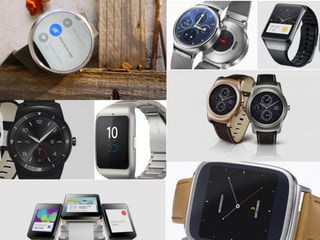
2014 - 2015, exciting years for wearable tech
Android Wear, Apple Watch, Nike FuelBand, Pebble,
Jawbone, Fitbit and more
Over 720,000 Android Wear devices shipped in 2014
957,000 Apple Watches on the first day of pre-sales
More than 1 million Pebble sold since 2013
Big players; Motorola, LG, Samsung, Sony, Asus, Tag Heuer
1201 android-wear tagged questions on StackOverflow; 517
for apple-watch*
* data gathered on May the 9th
Numbers
The market is still young
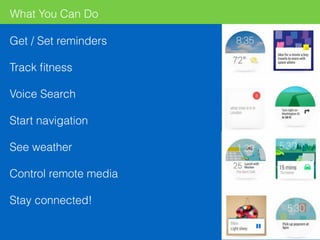
What You Can Do
Get / Set reminders
Track fitness
Voice Search
Start navigation
See weather
Control remote media
Stay connected!
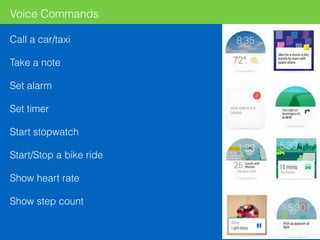
Call a car/taxi
Take a note
Set alarm
Set timer
Start stopwatch
Start/Stop a bike ride
Show heart rate
Show step count
Voice Commands
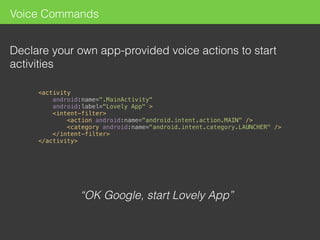
Voice Commands
Declare your own app-provided voice actions to start
activities
“OK Google, start Lovely App”


<activity

android:name=".MainActivity"

android:label="Lovely App" >

<intent-filter>

<action android:name="android.intent.action.MAIN" />

<category android:name="android.intent.category.LAUNCHER" />

</intent-filter>

</activity>

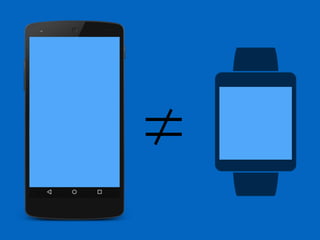
≠
Do not port a small version of your
handheld app
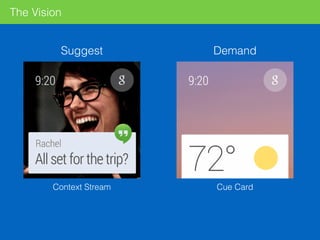
The Vision
Suggest Demand
Context Stream Cue Card
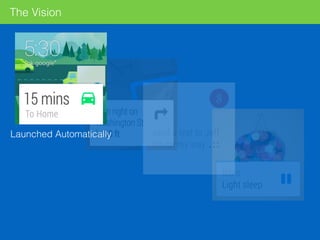
The Vision
Launched Automatically
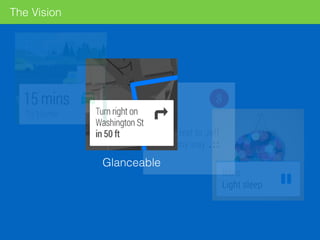
The Vision
Glanceable
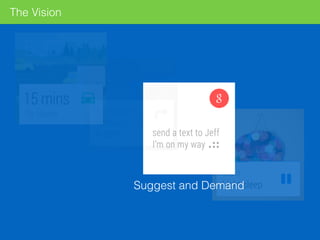
The Vision
Suggest and Demand
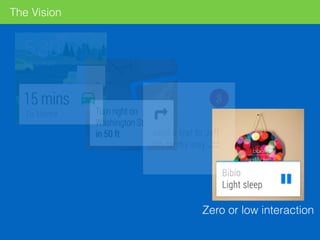
The Vision
Zero or low interaction
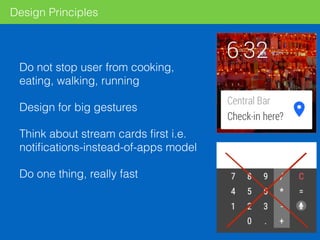
Design Principles
Do not stop user from cooking,
eating, walking, running
Design for big gestures
Think about stream cards first i.e.
notifications-instead-of-apps model
Do one thing, really fast
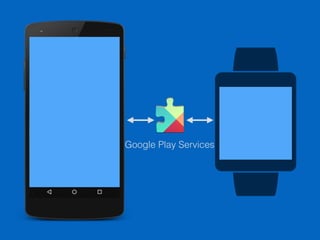
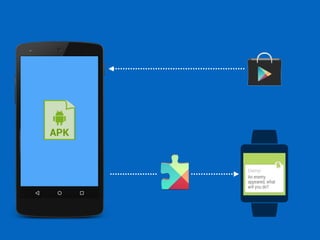
Google Play Services
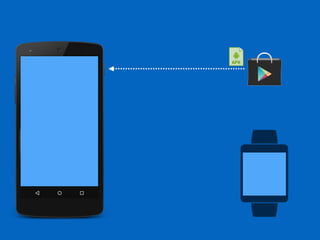
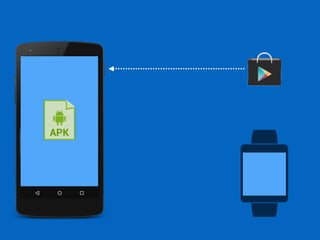
No Play Store
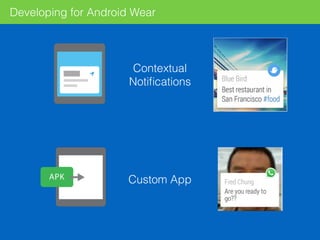
Contextual
Notifications
Custom App
Developing for Android Wear
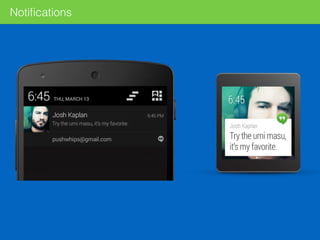
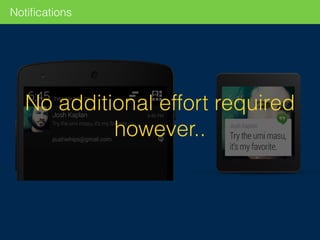
Notifications
Notifications
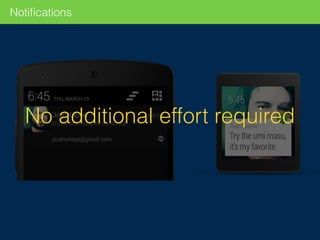
No additional effort required
Notifications
No additional effort required
however..
Extending Notifications with Wearable Functionality
For a better user experience
Wearable Only Actions
Voice Capabilities
Extra Pages
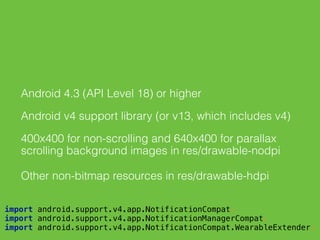
Android 4.3 (API Level 18) or higher
Android v4 support library (or v13, which includes v4)
400x400 for non-scrolling and 640x400 for parallax
scrolling background images in res/drawable-nodpi
Other non-bitmap resources in res/drawable-hdpi


import android.support.v4.app.NotificationCompat;

import android.support.v4.app.NotificationManagerCompat;

import android.support.v4.app.NotificationCompat.WearableExtender;

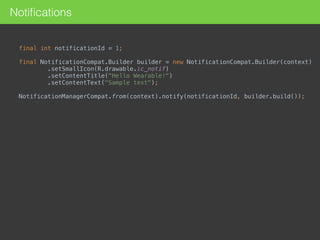
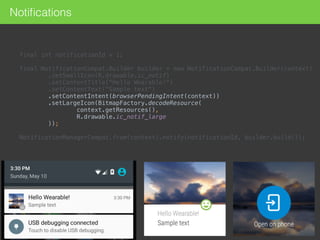
Notifications
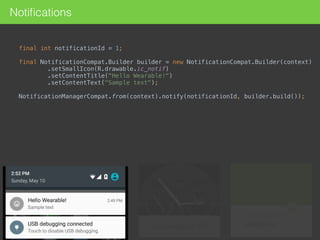
final int notificationId = 1;

final NotificationCompat.Builder builder = new NotificationCompat.Builder(context)

.setSmallIcon(R.drawable.ic_notif)

.setContentTitle("Hello Wearable!")

.setContentText("Sample text");

NotificationManagerCompat.from(context).notify(notificationId, builder.build());

Notifications
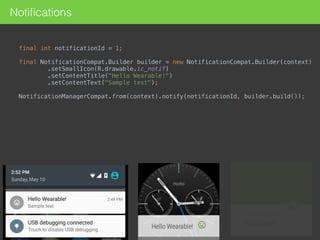
final int notificationId = 1;

final NotificationCompat.Builder builder = new NotificationCompat.Builder(context)

.setSmallIcon(R.drawable.ic_notif)

.setContentTitle("Hello Wearable!")

.setContentText("Sample text");

NotificationManagerCompat.from(context).notify(notificationId, builder.build());

Notifications
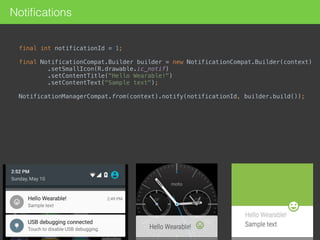
final int notificationId = 1;

final NotificationCompat.Builder builder = new NotificationCompat.Builder(context)

.setSmallIcon(R.drawable.ic_notif)

.setContentTitle("Hello Wearable!")

.setContentText("Sample text");

NotificationManagerCompat.from(context).notify(notificationId, builder.build());

Notifications
final int notificationId = 1;

final NotificationCompat.Builder builder = new NotificationCompat.Builder(context)

.setSmallIcon(R.drawable.ic_notif)

.setContentTitle("Hello Wearable!")

.setContentText("Sample text");

NotificationManagerCompat.from(context).notify(notificationId, builder.build());

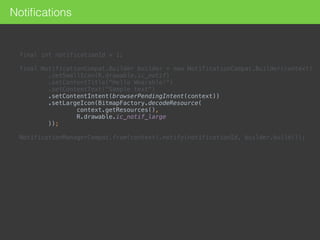
final int notificationId = 1;


final NotificationCompat.Builder builder = new NotificationCompat.Builder(context)

.setSmallIcon(R.drawable.ic_notif)

.setContentTitle("Hello Wearable!")

.setContentText("Sample text")

.setContentIntent(browserPendingIntent(context))

.setLargeIcon(BitmapFactory.decodeResource(

context.getResources(),

R.drawable.ic_notif_large

));


NotificationManagerCompat.from(context).notify(notificationId, builder.build());
Notifications
final int notificationId = 1;


final NotificationCompat.Builder builder = new NotificationCompat.Builder(context)

.setSmallIcon(R.drawable.ic_notif)

.setContentTitle("Hello Wearable!")

.setContentText("Sample text")

.setContentIntent(browserPendingIntent(context))

.setLargeIcon(BitmapFactory.decodeResource(

context.getResources(),

R.drawable.ic_notif_large

));


NotificationManagerCompat.from(context).notify(notificationId, builder.build());
Notifications
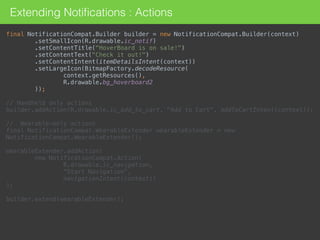
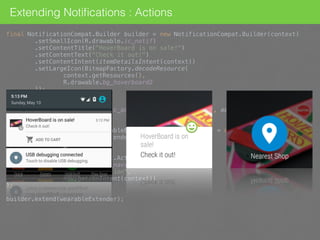
Extending Notifications : Actions
final NotificationCompat.Builder builder = new NotificationCompat.Builder(context)

.setSmallIcon(R.drawable.ic_notif)

.setContentTitle("HoverBoard is on sale!")

.setContentText("Check it out!")

.setContentIntent(itemDetailsIntent(context))

.setLargeIcon(BitmapFactory.decodeResource(

context.getResources(),

R.drawable.bg_hoverboard2

));


// Handheld only actions

builder.addAction(R.drawable.ic_add_to_cart, "Add to Cart", addToCartIntent(context));


// Wearable-only actions

final NotificationCompat.WearableExtender wearableExtender = new
NotificationCompat.WearableExtender();


wearableExtender.addAction(

new NotificationCompat.Action(

R.drawable.ic_navigation, 

"Start Navigation", 

navigationIntent(context))

);


builder.extend(wearableExtender);
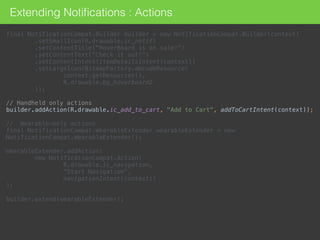
Extending Notifications : Actions
final NotificationCompat.Builder builder = new NotificationCompat.Builder(context)

.setSmallIcon(R.drawable.ic_notif)

.setContentTitle("HoverBoard is on sale!")

.setContentText("Check it out!")

.setContentIntent(itemDetailsIntent(context))

.setLargeIcon(BitmapFactory.decodeResource(

context.getResources(),

R.drawable.bg_hoverboard2

));


// Handheld only actions

builder.addAction(R.drawable.ic_add_to_cart, "Add to Cart", addToCartIntent(context));


// Wearable-only actions

final NotificationCompat.WearableExtender wearableExtender = new
NotificationCompat.WearableExtender();


wearableExtender.addAction(

new NotificationCompat.Action(

R.drawable.ic_navigation, 

"Start Navigation", 

navigationIntent(context))

);


builder.extend(wearableExtender);
Extending Notifications : Actions
final NotificationCompat.Builder builder = new NotificationCompat.Builder(context)

.setSmallIcon(R.drawable.ic_notif)

.setContentTitle("HoverBoard is on sale!")

.setContentText("Check it out!")

.setContentIntent(itemDetailsIntent(context))

.setLargeIcon(BitmapFactory.decodeResource(

context.getResources(),

R.drawable.bg_hoverboard2

));


// Handheld only actions

builder.addAction(R.drawable.ic_add_to_cart, "Add to Cart", addToCartIntent(context));


// Wearable-only actions

final NotificationCompat.WearableExtender wearableExtender = new
NotificationCompat.WearableExtender();


wearableExtender.addAction(

new NotificationCompat.Action(

R.drawable.ic_navigation,

“Nearest Shop",

navigationIntent(context))

);


builder.extend(wearableExtender);
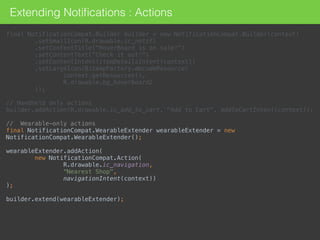
Extending Notifications : Actions
final NotificationCompat.Builder builder = new NotificationCompat.Builder(context)

.setSmallIcon(R.drawable.ic_notif)

.setContentTitle("HoverBoard is on sale!")

.setContentText("Check it out!")

.setContentIntent(itemDetailsIntent(context))

.setLargeIcon(BitmapFactory.decodeResource(

context.getResources(),

R.drawable.bg_hoverboard2

));


// Handheld only actions

builder.addAction(R.drawable.ic_add_to_cart, "Add to Cart", addToCartIntent(context));


// Wearable-only actions

final NotificationCompat.WearableExtender wearableExtender = new
NotificationCompat.WearableExtender();


wearableExtender.addAction(

new NotificationCompat.Action(

R.drawable.ic_navigation,

"Start Navigation",

navigationIntent(context))

);


builder.extend(wearableExtender);
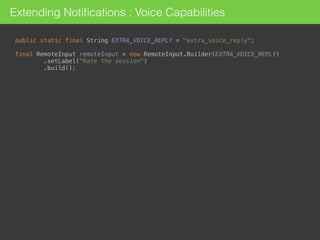
Extending Notifications : Voice Capabilities
public static final String EXTRA_VOICE_REPLY = "extra_voice_reply";


final RemoteInput remoteInput = new RemoteInput.Builder(EXTRA_VOICE_REPLY)

.setLabel("Rate the session")

.build();
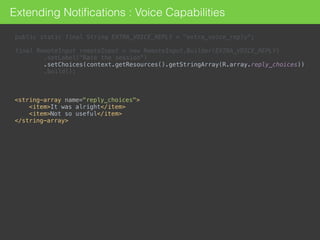
public static final String EXTRA_VOICE_REPLY = "extra_voice_reply";


final RemoteInput remoteInput = new RemoteInput.Builder(EXTRA_VOICE_REPLY)

.setLabel("Rate the session")

.setChoices(context.getResources().getStringArray(R.array.reply_choices))

.build();
<string-array name="reply_choices">

<item>It was alright</item>

<item>Not so useful</item>

</string-array>
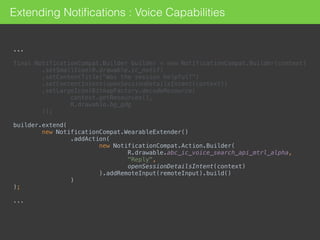
Extending Notifications : Voice Capabilities
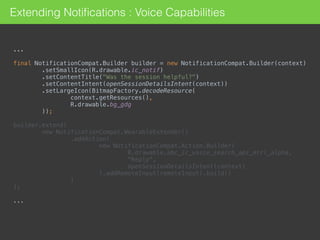
...
final NotificationCompat.Builder builder = new NotificationCompat.Builder(context)

.setSmallIcon(R.drawable.ic_notif)

.setContentTitle("Was the session helpful?")

.setContentIntent(openSessionDetailsIntent(context))

.setLargeIcon(BitmapFactory.decodeResource(

context.getResources(),

R.drawable.bg_gdg

));


builder.extend(

new NotificationCompat.WearableExtender()

.addAction(

new NotificationCompat.Action.Builder(

R.drawable.abc_ic_voice_search_api_mtrl_alpha,

"Reply",

openSessionDetailsIntent(context)

).addRemoteInput(remoteInput).build()

)
);
...
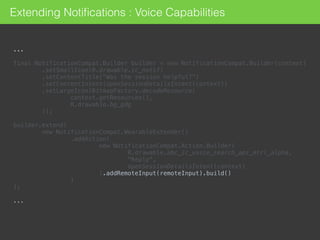
Extending Notifications : Voice Capabilities
...
final NotificationCompat.Builder builder = new NotificationCompat.Builder(context)

.setSmallIcon(R.drawable.ic_notif)

.setContentTitle("Was the session helpful?")

.setContentIntent(openSessionDetailsIntent(context))

.setLargeIcon(BitmapFactory.decodeResource(

context.getResources(),

R.drawable.bg_gdg

));


builder.extend(

new NotificationCompat.WearableExtender()

.addAction(

new NotificationCompat.Action.Builder(

R.drawable.abc_ic_voice_search_api_mtrl_alpha,

"Reply",

openSessionDetailsIntent(context)

).addRemoteInput(remoteInput).build()

)
);
...
Extending Notifications : Voice Capabilities
...
final NotificationCompat.Builder builder = new NotificationCompat.Builder(context)

.setSmallIcon(R.drawable.ic_notif)

.setContentTitle("Was the session helpful?")

.setContentIntent(openSessionDetailsIntent(context))

.setLargeIcon(BitmapFactory.decodeResource(

context.getResources(),

R.drawable.bg_gdg

));


builder.extend(

new NotificationCompat.WearableExtender()

.addAction(

new NotificationCompat.Action.Builder(

R.drawable.abc_ic_voice_search_api_mtrl_alpha,

"Reply",

openSessionDetailsIntent(context)

).addRemoteInput(remoteInput).build()

)
);
...
Extending Notifications : Voice Capabilities
…
final NotificationCompat.Builder builder = new NotificationCompat.Builder(context)

.setSmallIcon(R.drawable.ic_notif)

.setContentTitle("Was the session helpful?")

.setContentIntent(openSessionDetailsIntent(context))

.setLargeIcon(BitmapFactory.decodeResource(

context.getResources(),

R.drawable.bg_gdg

));


builder.extend(

new NotificationCompat.WearableExtender()

.addAction(

new NotificationCompat.Action.Builder(

R.drawable.abc_ic_voice_search_api_mtrl_alpha,

"Reply",

openSessionDetailsIntent(context)

).addRemoteInput(remoteInput).build()

)

);
….
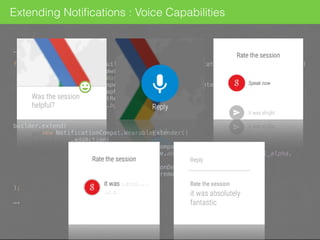
Extending Notifications : Voice Capabilities
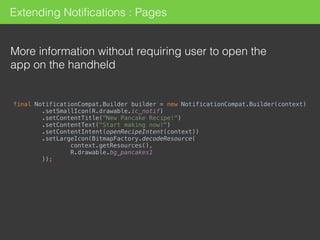
Extending Notifications : Pages
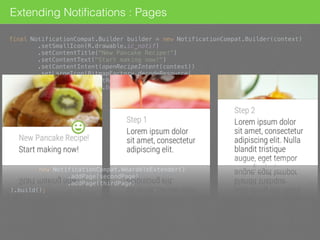
More information without requiring user to open the
app on the handheld
final NotificationCompat.Builder builder = new NotificationCompat.Builder(context)

.setSmallIcon(R.drawable.ic_notif)

.setContentTitle("New Pancake Recipe!")

.setContentText("Start making now!")

.setContentIntent(openRecipeIntent(context))

.setLargeIcon(BitmapFactory.decodeResource(

context.getResources(),

R.drawable.bg_pancakes1

));
Extending Notifications : Pages
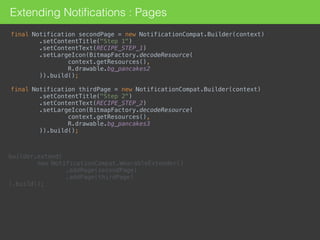
final Notification secondPage = new NotificationCompat.Builder(context)

.setContentTitle("Step 1")

.setContentText(RECIPE_STEP_1)

.setLargeIcon(BitmapFactory.decodeResource(

context.getResources(),

R.drawable.bg_pancakes2

)).build();


final Notification thirdPage = new NotificationCompat.Builder(context)

.setContentTitle("Step 2")

.setContentText(RECIPE_STEP_2)

.setLargeIcon(BitmapFactory.decodeResource(

context.getResources(),

R.drawable.bg_pancakes3

)).build();
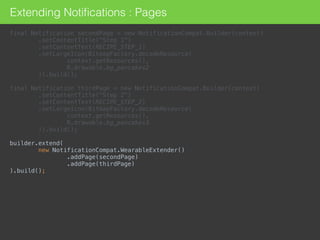
builder.extend(

new NotificationCompat.WearableExtender()

.addPage(secondPage)

.addPage(thirdPage)

).build();
Extending Notifications : Pages
final Notification secondPage = new NotificationCompat.Builder(context)

.setContentTitle("Step 1")

.setContentText(RECIPE_STEP_1)

.setLargeIcon(BitmapFactory.decodeResource(

context.getResources(),

R.drawable.bg_pancakes2

)).build();


final Notification thirdPage = new NotificationCompat.Builder(context)

.setContentTitle("Step 2")

.setContentText(RECIPE_STEP_2)

.setLargeIcon(BitmapFactory.decodeResource(

context.getResources(),

R.drawable.bg_pancakes3

)).build();


builder.extend(

new NotificationCompat.WearableExtender()

.addPage(secondPage)

.addPage(thirdPage)

).build();
Extending Notifications : Pages
builder.extend(

new NotificationCompat.WearableExtender()

.addPage(secondPage)

.addPage(thirdPage)

).build();
final NotificationCompat.Builder builder = new NotificationCompat.Builder(context)

.setSmallIcon(R.drawable.ic_notif)

.setContentTitle("New Pancake Recipe!")

.setContentText("Start making now!")

.setContentIntent(openRecipeIntent(context))

.setLargeIcon(BitmapFactory.decodeResource(

context.getResources(),

R.drawable.bg_pancakes1

));
. // second page
...
...
. // third page
...
Sometimes notifications are not
enough
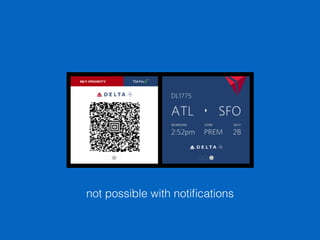
not possible with notifications
Custom Wearable Apps
Run directly on the device
Fundamentally same as apps built for handheld but
differ greatly in design and usability
Basically activities with custom layouts
Access to sensors and GPU
Small in size and functionality
Custom Wearable Apps
Different code base, no shared resources, different
applications
Custom notifications issued on the wearable are not synced
with handheld
When the device goes to sleep, activity gets destroyed
No back or home button to exit the app
Swiping from the left edge or Long press on the app
Custom Wearable Apps : Unsupported APIs
android.webkit
android.print
android.app.backup
android.appwidget
android.hardware.usb


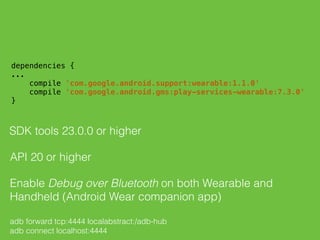
dependencies {

...

compile 'com.google.android.support:wearable:1.1.0'

compile 'com.google.android.gms:play-services-wearable:7.3.0'

}

SDK tools 23.0.0 or higher
API 20 or higher
Enable Debug over Bluetooth on both Wearable and
Handheld (Android Wear companion app)
adb forward tcp:4444 localabstract:/adb-hub
adb connect localhost:4444
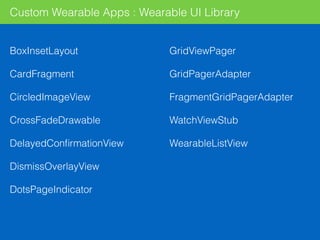
Custom Wearable Apps : Wearable UI Library
BoxInsetLayout
CardFragment
CircledImageView
CrossFadeDrawable
DelayedConfirmationView
DismissOverlayView
DotsPageIndicator
GridViewPager
GridPagerAdapter
FragmentGridPagerAdapter
WatchViewStub
WearableListView
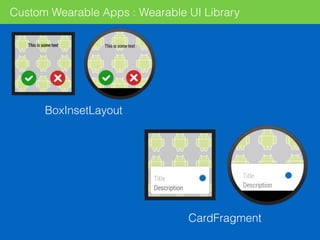
Custom Wearable Apps : Wearable UI Library
CardFragment
BoxInsetLayout
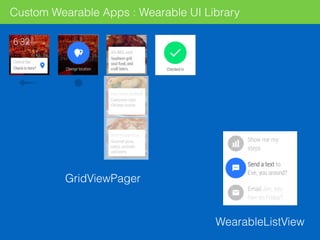
Custom Wearable Apps : Wearable UI Library
GridViewPager
WearableListView
Sending and Syncing Data
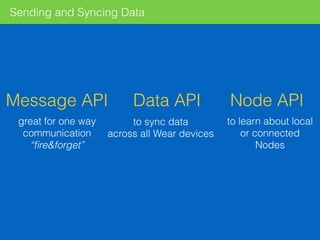
Message API Data API Node API
to sync data
across all Wear devices
great for one way
communication
“fire&forget”
to learn about local
or connected
Nodes
Sending and Syncing Data
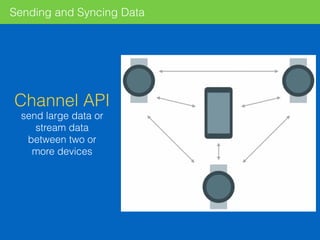
Channel API
send large data or
stream data
between two or
more devices
Sending and Syncing Data
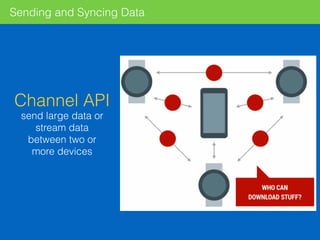
Channel API
send large data or
stream data
between two or
more devices
Sending and Syncing Data
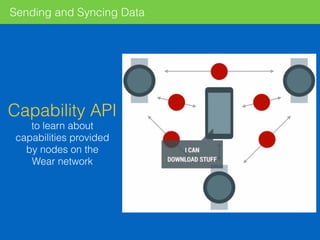
Capability API
to learn about
capabilities provided
by nodes on the
Wear network
Sending and Syncing Data : Handheld
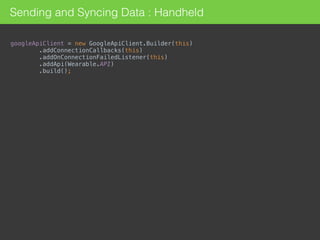
googleApiClient = new GoogleApiClient.Builder(this)

.addConnectionCallbacks(this)

.addOnConnectionFailedListener(this)

.addApi(Wearable.API)

.build();
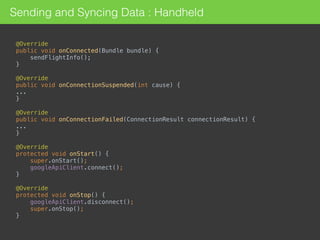
@Override

public void onConnected(Bundle bundle) {
sendFlightInfo();

}


@Override

public void onConnectionSuspended(int cause) {

...

}


@Override

public void onConnectionFailed(ConnectionResult connectionResult) {

...

}
@Override

protected void onStart() {

super.onStart();

googleApiClient.connect();

}


@Override

protected void onStop() {

googleApiClient.disconnect();

super.onStop();

}
Sending and Syncing Data : Handheld
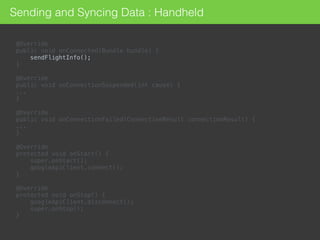
@Override

public void onConnected(Bundle bundle) {
sendFlightInfo();

}


@Override

public void onConnectionSuspended(int cause) {

...

}


@Override

public void onConnectionFailed(ConnectionResult connectionResult) {

...

}
@Override

protected void onStart() {

super.onStart();

googleApiClient.connect();

}


@Override

protected void onStop() {

googleApiClient.disconnect();

super.onStop();

}
Sending and Syncing Data : Handheld
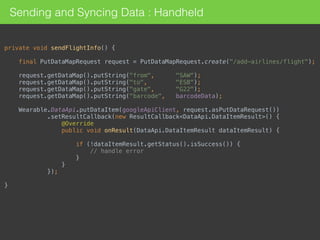
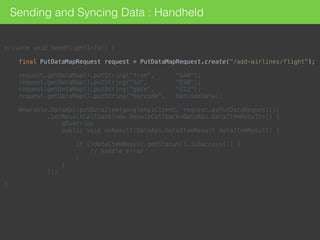
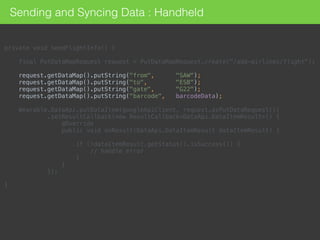
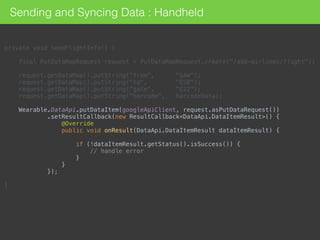
private void sendFlightInfo() {


final PutDataMapRequest request = PutDataMapRequest.create("/add-airlines/flight");


request.getDataMap().putString("from", "SAW");

request.getDataMap().putString("to", "ESB");

request.getDataMap().putString("gate", "G22");

request.getDataMap().putString("barcode", barcodeData);


Wearable.DataApi.putDataItem(googleApiClient, request.asPutDataRequest())

.setResultCallback(new ResultCallback<DataApi.DataItemResult>() {

@Override

public void onResult(DataApi.DataItemResult dataItemResult) {


if (!dataItemResult.getStatus().isSuccess()) {

// handle error

}

}

});


}
Sending and Syncing Data : Handheld
private void sendFlightInfo() {


final PutDataMapRequest request = PutDataMapRequest.create("/add-airlines/flight");


request.getDataMap().putString("from", "SAW");

request.getDataMap().putString("to", "ESB");

request.getDataMap().putString("gate", "G22");

request.getDataMap().putString("barcode", barcodeData);


Wearable.DataApi.putDataItem(googleApiClient, request.asPutDataRequest())

.setResultCallback(new ResultCallback<DataApi.DataItemResult>() {

@Override

public void onResult(DataApi.DataItemResult dataItemResult) {


if (!dataItemResult.getStatus().isSuccess()) {

// handle error

}

}

});


}
Sending and Syncing Data : Handheld
private void sendFlightInfo() {


final PutDataMapRequest request = PutDataMapRequest.create("/add-airlines/flight");


request.getDataMap().putString("from", "SAW");

request.getDataMap().putString("to", "ESB");

request.getDataMap().putString("gate", "G22");

request.getDataMap().putString("barcode", barcodeData);


Wearable.DataApi.putDataItem(googleApiClient, request.asPutDataRequest())

.setResultCallback(new ResultCallback<DataApi.DataItemResult>() {

@Override

public void onResult(DataApi.DataItemResult dataItemResult) {


if (!dataItemResult.getStatus().isSuccess()) {

// handle error

}

}

});


}
Sending and Syncing Data : Handheld
private void sendFlightInfo() {


final PutDataMapRequest request = PutDataMapRequest.create("/add-airlines/flight");


request.getDataMap().putString("from", "SAW");

request.getDataMap().putString("to", "ESB");

request.getDataMap().putString("gate", "G22");

request.getDataMap().putString("barcode", barcodeData);


Wearable.DataApi.putDataItem(googleApiClient, request.asPutDataRequest())

.setResultCallback(new ResultCallback<DataApi.DataItemResult>() {

@Override

public void onResult(DataApi.DataItemResult dataItemResult) {


if (!dataItemResult.getStatus().isSuccess()) {

// handle error

}

}

});


}
Sending and Syncing Data : Handheld
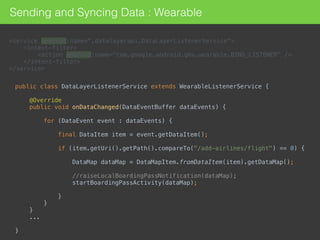
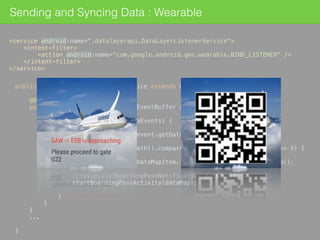
Sending and Syncing Data : Wearable
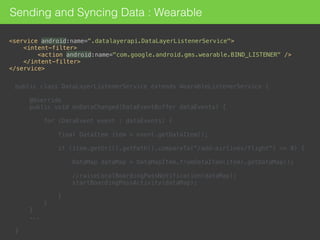
<service android:name=".datalayerapi.DataLayerListenerService">

<intent-filter>

<action android:name="com.google.android.gms.wearable.BIND_LISTENER" />

</intent-filter>

</service>
public class DataLayerListenerService extends WearableListenerService {


@Override

public void onDataChanged(DataEventBuffer dataEvents) {


for (DataEvent event : dataEvents) {


final DataItem item = event.getDataItem();


if (item.getUri().getPath().compareTo("/add-airlines/flight") == 0) {


DataMap dataMap = DataMapItem.fromDataItem(item).getDataMap();


//raiseLocalBoardingPassNotification(dataMap);

startBoardingPassActivity(dataMap);


}

}

}
...


}

Sending and Syncing Data : Wearable
<service android:name=".datalayerapi.DataLayerListenerService">

<intent-filter>

<action android:name="com.google.android.gms.wearable.BIND_LISTENER" />

</intent-filter>

</service>
public class DataLayerListenerService extends WearableListenerService {


@Override

public void onDataChanged(DataEventBuffer dataEvents) {


for (DataEvent event : dataEvents) {


final DataItem item = event.getDataItem();


if (item.getUri().getPath().compareTo("/add-airlines/flight") == 0) {


DataMap dataMap = DataMapItem.fromDataItem(item).getDataMap();


//raiseLocalBoardingPassNotification(dataMap);

startBoardingPassActivity(dataMap);


}

}

}
...


}

Sending and Syncing Data : Wearable
<service android:name=".datalayerapi.DataLayerListenerService">

<intent-filter>

<action android:name="com.google.android.gms.wearable.BIND_LISTENER" />

</intent-filter>

</service>
public class DataLayerListenerService extends WearableListenerService {


@Override

public void onDataChanged(DataEventBuffer dataEvents) {


for (DataEvent event : dataEvents) {


final DataItem item = event.getDataItem();


if (item.getUri().getPath().compareTo("/add-airlines/flight") == 0) {


DataMap dataMap = DataMapItem.fromDataItem(item).getDataMap();


//raiseLocalBoardingPassNotification(dataMap);

startBoardingPassActivity(dataMap);


}

}

}
...


}

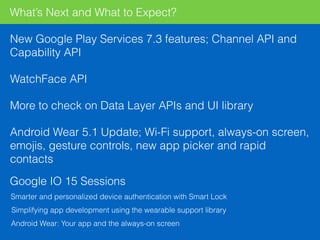
What’s Next and What to Expect?
New Google Play Services 7.3 features; Channel API and
Capability API
WatchFace API
More to check on Data Layer APIs and UI library
Android Wear 5.1 Update; Wi-Fi support, always-on screen,
emojis, gesture controls, new app picker and rapid
contacts
Google IO 15 Sessions
Smarter and personalized device authentication with Smart Lock
Simplifying app development using the wearable support library
Android Wear: Your app and the always-on screen
Resources
https://developer.android.com/training/building-wearables.html
https://www.youtube.com/playlist?list=PLWz5rJ2EKKc-kIrPiq098QH9dOle-fLef
Building Apps for Wearables
DevBytes: Android Wear
Thank You!
@can_elmas
speakerdeck.com/canelmas
github.com/canelmas

Developing for Android Wear

  • 1.
  • 2.
    @can_elmas Software Development Managerat Monitise MEA (formerly Pozitron) Backend and front-end roles in mobile projects since 2007 Currently leading Monitise MEA Android team
  • 3.
    2014 - 2015,exciting years for wearable tech Android Wear, Apple Watch, Nike FuelBand, Pebble, Jawbone, Fitbit and more Over 720,000 Android Wear devices shipped in 2014 957,000 Apple Watches on the first day of pre-sales More than 1 million Pebble sold since 2013 Big players; Motorola, LG, Samsung, Sony, Asus, Tag Heuer 1201 android-wear tagged questions on StackOverflow; 517 for apple-watch* * data gathered on May the 9th Numbers
  • 4.
    The market isstill young
  • 6.
    What You CanDo Get / Set reminders Track fitness Voice Search Start navigation See weather Control remote media Stay connected!
  • 7.
    Call a car/taxi Takea note Set alarm Set timer Start stopwatch Start/Stop a bike ride Show heart rate Show step count Voice Commands
  • 8.
    Voice Commands Declare yourown app-provided voice actions to start activities “OK Google, start Lovely App” 
 <activity
 android:name=".MainActivity"
 android:label="Lovely App" >
 <intent-filter>
 <action android:name="android.intent.action.MAIN" />
 <category android:name="android.intent.category.LAUNCHER" />
 </intent-filter>
 </activity>

  • 9.
  • 10.
    Do not porta small version of your handheld app
  • 11.
  • 12.
  • 13.
  • 14.
  • 15.
    The Vision Zero orlow interaction
  • 16.
    Design Principles Do notstop user from cooking, eating, walking, running Design for big gestures Think about stream cards first i.e. notifications-instead-of-apps model Do one thing, really fast
  • 17.
  • 18.
  • 22.
  • 23.
  • 24.
  • 25.
  • 26.
    Extending Notifications withWearable Functionality For a better user experience Wearable Only Actions Voice Capabilities Extra Pages
  • 27.
    Android 4.3 (APILevel 18) or higher Android v4 support library (or v13, which includes v4) 400x400 for non-scrolling and 640x400 for parallax scrolling background images in res/drawable-nodpi Other non-bitmap resources in res/drawable-hdpi 
 import android.support.v4.app.NotificationCompat;
 import android.support.v4.app.NotificationManagerCompat;
 import android.support.v4.app.NotificationCompat.WearableExtender;

  • 28.
    Notifications final int notificationId= 1;
 final NotificationCompat.Builder builder = new NotificationCompat.Builder(context)
 .setSmallIcon(R.drawable.ic_notif)
 .setContentTitle("Hello Wearable!")
 .setContentText("Sample text");
 NotificationManagerCompat.from(context).notify(notificationId, builder.build());

  • 29.
    Notifications final int notificationId= 1;
 final NotificationCompat.Builder builder = new NotificationCompat.Builder(context)
 .setSmallIcon(R.drawable.ic_notif)
 .setContentTitle("Hello Wearable!")
 .setContentText("Sample text");
 NotificationManagerCompat.from(context).notify(notificationId, builder.build());

  • 30.
    Notifications final int notificationId= 1;
 final NotificationCompat.Builder builder = new NotificationCompat.Builder(context)
 .setSmallIcon(R.drawable.ic_notif)
 .setContentTitle("Hello Wearable!")
 .setContentText("Sample text");
 NotificationManagerCompat.from(context).notify(notificationId, builder.build());

  • 31.
    Notifications final int notificationId= 1;
 final NotificationCompat.Builder builder = new NotificationCompat.Builder(context)
 .setSmallIcon(R.drawable.ic_notif)
 .setContentTitle("Hello Wearable!")
 .setContentText("Sample text");
 NotificationManagerCompat.from(context).notify(notificationId, builder.build());

  • 32.
    final int notificationId= 1;
 
 final NotificationCompat.Builder builder = new NotificationCompat.Builder(context)
 .setSmallIcon(R.drawable.ic_notif)
 .setContentTitle("Hello Wearable!")
 .setContentText("Sample text")
 .setContentIntent(browserPendingIntent(context))
 .setLargeIcon(BitmapFactory.decodeResource(
 context.getResources(),
 R.drawable.ic_notif_large
 ));
 
 NotificationManagerCompat.from(context).notify(notificationId, builder.build()); Notifications
  • 33.
    final int notificationId= 1;
 
 final NotificationCompat.Builder builder = new NotificationCompat.Builder(context)
 .setSmallIcon(R.drawable.ic_notif)
 .setContentTitle("Hello Wearable!")
 .setContentText("Sample text")
 .setContentIntent(browserPendingIntent(context))
 .setLargeIcon(BitmapFactory.decodeResource(
 context.getResources(),
 R.drawable.ic_notif_large
 ));
 
 NotificationManagerCompat.from(context).notify(notificationId, builder.build()); Notifications
  • 34.
    Extending Notifications :Actions final NotificationCompat.Builder builder = new NotificationCompat.Builder(context)
 .setSmallIcon(R.drawable.ic_notif)
 .setContentTitle("HoverBoard is on sale!")
 .setContentText("Check it out!")
 .setContentIntent(itemDetailsIntent(context))
 .setLargeIcon(BitmapFactory.decodeResource(
 context.getResources(),
 R.drawable.bg_hoverboard2
 ));
 
 // Handheld only actions
 builder.addAction(R.drawable.ic_add_to_cart, "Add to Cart", addToCartIntent(context));
 
 // Wearable-only actions
 final NotificationCompat.WearableExtender wearableExtender = new NotificationCompat.WearableExtender();
 
 wearableExtender.addAction(
 new NotificationCompat.Action(
 R.drawable.ic_navigation, 
 "Start Navigation", 
 navigationIntent(context))
 );
 
 builder.extend(wearableExtender);
  • 35.
    Extending Notifications :Actions final NotificationCompat.Builder builder = new NotificationCompat.Builder(context)
 .setSmallIcon(R.drawable.ic_notif)
 .setContentTitle("HoverBoard is on sale!")
 .setContentText("Check it out!")
 .setContentIntent(itemDetailsIntent(context))
 .setLargeIcon(BitmapFactory.decodeResource(
 context.getResources(),
 R.drawable.bg_hoverboard2
 ));
 
 // Handheld only actions
 builder.addAction(R.drawable.ic_add_to_cart, "Add to Cart", addToCartIntent(context));
 
 // Wearable-only actions
 final NotificationCompat.WearableExtender wearableExtender = new NotificationCompat.WearableExtender();
 
 wearableExtender.addAction(
 new NotificationCompat.Action(
 R.drawable.ic_navigation, 
 "Start Navigation", 
 navigationIntent(context))
 );
 
 builder.extend(wearableExtender);
  • 36.
    Extending Notifications :Actions final NotificationCompat.Builder builder = new NotificationCompat.Builder(context)
 .setSmallIcon(R.drawable.ic_notif)
 .setContentTitle("HoverBoard is on sale!")
 .setContentText("Check it out!")
 .setContentIntent(itemDetailsIntent(context))
 .setLargeIcon(BitmapFactory.decodeResource(
 context.getResources(),
 R.drawable.bg_hoverboard2
 ));
 
 // Handheld only actions
 builder.addAction(R.drawable.ic_add_to_cart, "Add to Cart", addToCartIntent(context));
 
 // Wearable-only actions
 final NotificationCompat.WearableExtender wearableExtender = new NotificationCompat.WearableExtender();
 
 wearableExtender.addAction(
 new NotificationCompat.Action(
 R.drawable.ic_navigation,
 “Nearest Shop",
 navigationIntent(context))
 );
 
 builder.extend(wearableExtender);
  • 37.
    Extending Notifications :Actions final NotificationCompat.Builder builder = new NotificationCompat.Builder(context)
 .setSmallIcon(R.drawable.ic_notif)
 .setContentTitle("HoverBoard is on sale!")
 .setContentText("Check it out!")
 .setContentIntent(itemDetailsIntent(context))
 .setLargeIcon(BitmapFactory.decodeResource(
 context.getResources(),
 R.drawable.bg_hoverboard2
 ));
 
 // Handheld only actions
 builder.addAction(R.drawable.ic_add_to_cart, "Add to Cart", addToCartIntent(context));
 
 // Wearable-only actions
 final NotificationCompat.WearableExtender wearableExtender = new NotificationCompat.WearableExtender();
 
 wearableExtender.addAction(
 new NotificationCompat.Action(
 R.drawable.ic_navigation,
 "Start Navigation",
 navigationIntent(context))
 );
 
 builder.extend(wearableExtender);
  • 38.
    Extending Notifications :Voice Capabilities public static final String EXTRA_VOICE_REPLY = "extra_voice_reply";
 
 final RemoteInput remoteInput = new RemoteInput.Builder(EXTRA_VOICE_REPLY)
 .setLabel("Rate the session")
 .build();
  • 39.
    public static finalString EXTRA_VOICE_REPLY = "extra_voice_reply";
 
 final RemoteInput remoteInput = new RemoteInput.Builder(EXTRA_VOICE_REPLY)
 .setLabel("Rate the session")
 .setChoices(context.getResources().getStringArray(R.array.reply_choices))
 .build(); <string-array name="reply_choices">
 <item>It was alright</item>
 <item>Not so useful</item>
 </string-array> Extending Notifications : Voice Capabilities
  • 40.
    ... final NotificationCompat.Builder builder= new NotificationCompat.Builder(context)
 .setSmallIcon(R.drawable.ic_notif)
 .setContentTitle("Was the session helpful?")
 .setContentIntent(openSessionDetailsIntent(context))
 .setLargeIcon(BitmapFactory.decodeResource(
 context.getResources(),
 R.drawable.bg_gdg
 ));
 
 builder.extend(
 new NotificationCompat.WearableExtender()
 .addAction(
 new NotificationCompat.Action.Builder(
 R.drawable.abc_ic_voice_search_api_mtrl_alpha,
 "Reply",
 openSessionDetailsIntent(context)
 ).addRemoteInput(remoteInput).build()
 ) ); ... Extending Notifications : Voice Capabilities
  • 41.
    ... final NotificationCompat.Builder builder= new NotificationCompat.Builder(context)
 .setSmallIcon(R.drawable.ic_notif)
 .setContentTitle("Was the session helpful?")
 .setContentIntent(openSessionDetailsIntent(context))
 .setLargeIcon(BitmapFactory.decodeResource(
 context.getResources(),
 R.drawable.bg_gdg
 ));
 
 builder.extend(
 new NotificationCompat.WearableExtender()
 .addAction(
 new NotificationCompat.Action.Builder(
 R.drawable.abc_ic_voice_search_api_mtrl_alpha,
 "Reply",
 openSessionDetailsIntent(context)
 ).addRemoteInput(remoteInput).build()
 ) ); ... Extending Notifications : Voice Capabilities
  • 42.
    ... final NotificationCompat.Builder builder= new NotificationCompat.Builder(context)
 .setSmallIcon(R.drawable.ic_notif)
 .setContentTitle("Was the session helpful?")
 .setContentIntent(openSessionDetailsIntent(context))
 .setLargeIcon(BitmapFactory.decodeResource(
 context.getResources(),
 R.drawable.bg_gdg
 ));
 
 builder.extend(
 new NotificationCompat.WearableExtender()
 .addAction(
 new NotificationCompat.Action.Builder(
 R.drawable.abc_ic_voice_search_api_mtrl_alpha,
 "Reply",
 openSessionDetailsIntent(context)
 ).addRemoteInput(remoteInput).build()
 ) ); ... Extending Notifications : Voice Capabilities
  • 43.
    … final NotificationCompat.Builder builder= new NotificationCompat.Builder(context)
 .setSmallIcon(R.drawable.ic_notif)
 .setContentTitle("Was the session helpful?")
 .setContentIntent(openSessionDetailsIntent(context))
 .setLargeIcon(BitmapFactory.decodeResource(
 context.getResources(),
 R.drawable.bg_gdg
 ));
 
 builder.extend(
 new NotificationCompat.WearableExtender()
 .addAction(
 new NotificationCompat.Action.Builder(
 R.drawable.abc_ic_voice_search_api_mtrl_alpha,
 "Reply",
 openSessionDetailsIntent(context)
 ).addRemoteInput(remoteInput).build()
 )
 ); …. Extending Notifications : Voice Capabilities
  • 44.
    Extending Notifications :Pages More information without requiring user to open the app on the handheld final NotificationCompat.Builder builder = new NotificationCompat.Builder(context)
 .setSmallIcon(R.drawable.ic_notif)
 .setContentTitle("New Pancake Recipe!")
 .setContentText("Start making now!")
 .setContentIntent(openRecipeIntent(context))
 .setLargeIcon(BitmapFactory.decodeResource(
 context.getResources(),
 R.drawable.bg_pancakes1
 ));
  • 45.
    Extending Notifications :Pages final Notification secondPage = new NotificationCompat.Builder(context)
 .setContentTitle("Step 1")
 .setContentText(RECIPE_STEP_1)
 .setLargeIcon(BitmapFactory.decodeResource(
 context.getResources(),
 R.drawable.bg_pancakes2
 )).build();
 
 final Notification thirdPage = new NotificationCompat.Builder(context)
 .setContentTitle("Step 2")
 .setContentText(RECIPE_STEP_2)
 .setLargeIcon(BitmapFactory.decodeResource(
 context.getResources(),
 R.drawable.bg_pancakes3
 )).build(); builder.extend(
 new NotificationCompat.WearableExtender()
 .addPage(secondPage)
 .addPage(thirdPage)
 ).build();
  • 46.
    Extending Notifications :Pages final Notification secondPage = new NotificationCompat.Builder(context)
 .setContentTitle("Step 1")
 .setContentText(RECIPE_STEP_1)
 .setLargeIcon(BitmapFactory.decodeResource(
 context.getResources(),
 R.drawable.bg_pancakes2
 )).build();
 
 final Notification thirdPage = new NotificationCompat.Builder(context)
 .setContentTitle("Step 2")
 .setContentText(RECIPE_STEP_2)
 .setLargeIcon(BitmapFactory.decodeResource(
 context.getResources(),
 R.drawable.bg_pancakes3
 )).build();
 
 builder.extend(
 new NotificationCompat.WearableExtender()
 .addPage(secondPage)
 .addPage(thirdPage)
 ).build();
  • 47.
    Extending Notifications :Pages builder.extend(
 new NotificationCompat.WearableExtender()
 .addPage(secondPage)
 .addPage(thirdPage)
 ).build(); final NotificationCompat.Builder builder = new NotificationCompat.Builder(context)
 .setSmallIcon(R.drawable.ic_notif)
 .setContentTitle("New Pancake Recipe!")
 .setContentText("Start making now!")
 .setContentIntent(openRecipeIntent(context))
 .setLargeIcon(BitmapFactory.decodeResource(
 context.getResources(),
 R.drawable.bg_pancakes1
 )); . // second page ... ... . // third page ...
  • 48.
  • 49.
    not possible withnotifications
  • 50.
    Custom Wearable Apps Rundirectly on the device Fundamentally same as apps built for handheld but differ greatly in design and usability Basically activities with custom layouts Access to sensors and GPU Small in size and functionality
  • 51.
    Custom Wearable Apps Differentcode base, no shared resources, different applications Custom notifications issued on the wearable are not synced with handheld When the device goes to sleep, activity gets destroyed No back or home button to exit the app Swiping from the left edge or Long press on the app
  • 52.
    Custom Wearable Apps: Unsupported APIs android.webkit android.print android.app.backup android.appwidget android.hardware.usb
  • 53.
    
 dependencies {
 ...
 compile 'com.google.android.support:wearable:1.1.0'
 compile'com.google.android.gms:play-services-wearable:7.3.0'
 }
 SDK tools 23.0.0 or higher API 20 or higher Enable Debug over Bluetooth on both Wearable and Handheld (Android Wear companion app) adb forward tcp:4444 localabstract:/adb-hub adb connect localhost:4444
  • 54.
    Custom Wearable Apps: Wearable UI Library BoxInsetLayout CardFragment CircledImageView CrossFadeDrawable DelayedConfirmationView DismissOverlayView DotsPageIndicator GridViewPager GridPagerAdapter FragmentGridPagerAdapter WatchViewStub WearableListView
  • 55.
    Custom Wearable Apps: Wearable UI Library CardFragment BoxInsetLayout
  • 56.
    Custom Wearable Apps: Wearable UI Library GridViewPager WearableListView
  • 57.
    Sending and SyncingData Message API Data API Node API to sync data across all Wear devices great for one way communication “fire&forget” to learn about local or connected Nodes
  • 58.
    Sending and SyncingData Channel API send large data or stream data between two or more devices
  • 59.
    Sending and SyncingData Channel API send large data or stream data between two or more devices
  • 60.
    Sending and SyncingData Capability API to learn about capabilities provided by nodes on the Wear network
  • 61.
    Sending and SyncingData : Handheld googleApiClient = new GoogleApiClient.Builder(this)
 .addConnectionCallbacks(this)
 .addOnConnectionFailedListener(this)
 .addApi(Wearable.API)
 .build();
  • 62.
    @Override
 public void onConnected(Bundlebundle) { sendFlightInfo();
 }
 
 @Override
 public void onConnectionSuspended(int cause) {
 ...
 }
 
 @Override
 public void onConnectionFailed(ConnectionResult connectionResult) {
 ...
 } @Override
 protected void onStart() {
 super.onStart();
 googleApiClient.connect();
 }
 
 @Override
 protected void onStop() {
 googleApiClient.disconnect();
 super.onStop();
 } Sending and Syncing Data : Handheld
  • 63.
    @Override
 public void onConnected(Bundlebundle) { sendFlightInfo();
 }
 
 @Override
 public void onConnectionSuspended(int cause) {
 ...
 }
 
 @Override
 public void onConnectionFailed(ConnectionResult connectionResult) {
 ...
 } @Override
 protected void onStart() {
 super.onStart();
 googleApiClient.connect();
 }
 
 @Override
 protected void onStop() {
 googleApiClient.disconnect();
 super.onStop();
 } Sending and Syncing Data : Handheld
  • 64.
    private void sendFlightInfo(){
 
 final PutDataMapRequest request = PutDataMapRequest.create("/add-airlines/flight");
 
 request.getDataMap().putString("from", "SAW");
 request.getDataMap().putString("to", "ESB");
 request.getDataMap().putString("gate", "G22");
 request.getDataMap().putString("barcode", barcodeData);
 
 Wearable.DataApi.putDataItem(googleApiClient, request.asPutDataRequest())
 .setResultCallback(new ResultCallback<DataApi.DataItemResult>() {
 @Override
 public void onResult(DataApi.DataItemResult dataItemResult) {
 
 if (!dataItemResult.getStatus().isSuccess()) {
 // handle error
 }
 }
 });
 
 } Sending and Syncing Data : Handheld
  • 65.
    private void sendFlightInfo(){
 
 final PutDataMapRequest request = PutDataMapRequest.create("/add-airlines/flight");
 
 request.getDataMap().putString("from", "SAW");
 request.getDataMap().putString("to", "ESB");
 request.getDataMap().putString("gate", "G22");
 request.getDataMap().putString("barcode", barcodeData);
 
 Wearable.DataApi.putDataItem(googleApiClient, request.asPutDataRequest())
 .setResultCallback(new ResultCallback<DataApi.DataItemResult>() {
 @Override
 public void onResult(DataApi.DataItemResult dataItemResult) {
 
 if (!dataItemResult.getStatus().isSuccess()) {
 // handle error
 }
 }
 });
 
 } Sending and Syncing Data : Handheld
  • 66.
    private void sendFlightInfo(){
 
 final PutDataMapRequest request = PutDataMapRequest.create("/add-airlines/flight");
 
 request.getDataMap().putString("from", "SAW");
 request.getDataMap().putString("to", "ESB");
 request.getDataMap().putString("gate", "G22");
 request.getDataMap().putString("barcode", barcodeData);
 
 Wearable.DataApi.putDataItem(googleApiClient, request.asPutDataRequest())
 .setResultCallback(new ResultCallback<DataApi.DataItemResult>() {
 @Override
 public void onResult(DataApi.DataItemResult dataItemResult) {
 
 if (!dataItemResult.getStatus().isSuccess()) {
 // handle error
 }
 }
 });
 
 } Sending and Syncing Data : Handheld
  • 67.
    private void sendFlightInfo(){
 
 final PutDataMapRequest request = PutDataMapRequest.create("/add-airlines/flight");
 
 request.getDataMap().putString("from", "SAW");
 request.getDataMap().putString("to", "ESB");
 request.getDataMap().putString("gate", "G22");
 request.getDataMap().putString("barcode", barcodeData);
 
 Wearable.DataApi.putDataItem(googleApiClient, request.asPutDataRequest())
 .setResultCallback(new ResultCallback<DataApi.DataItemResult>() {
 @Override
 public void onResult(DataApi.DataItemResult dataItemResult) {
 
 if (!dataItemResult.getStatus().isSuccess()) {
 // handle error
 }
 }
 });
 
 } Sending and Syncing Data : Handheld
  • 68.
    Sending and SyncingData : Wearable <service android:name=".datalayerapi.DataLayerListenerService">
 <intent-filter>
 <action android:name="com.google.android.gms.wearable.BIND_LISTENER" />
 </intent-filter>
 </service> public class DataLayerListenerService extends WearableListenerService {
 
 @Override
 public void onDataChanged(DataEventBuffer dataEvents) {
 
 for (DataEvent event : dataEvents) {
 
 final DataItem item = event.getDataItem();
 
 if (item.getUri().getPath().compareTo("/add-airlines/flight") == 0) {
 
 DataMap dataMap = DataMapItem.fromDataItem(item).getDataMap();
 
 //raiseLocalBoardingPassNotification(dataMap);
 startBoardingPassActivity(dataMap);
 
 }
 }
 } ...
 
 }

  • 69.
    Sending and SyncingData : Wearable <service android:name=".datalayerapi.DataLayerListenerService">
 <intent-filter>
 <action android:name="com.google.android.gms.wearable.BIND_LISTENER" />
 </intent-filter>
 </service> public class DataLayerListenerService extends WearableListenerService {
 
 @Override
 public void onDataChanged(DataEventBuffer dataEvents) {
 
 for (DataEvent event : dataEvents) {
 
 final DataItem item = event.getDataItem();
 
 if (item.getUri().getPath().compareTo("/add-airlines/flight") == 0) {
 
 DataMap dataMap = DataMapItem.fromDataItem(item).getDataMap();
 
 //raiseLocalBoardingPassNotification(dataMap);
 startBoardingPassActivity(dataMap);
 
 }
 }
 } ...
 
 }

  • 70.
    Sending and SyncingData : Wearable <service android:name=".datalayerapi.DataLayerListenerService">
 <intent-filter>
 <action android:name="com.google.android.gms.wearable.BIND_LISTENER" />
 </intent-filter>
 </service> public class DataLayerListenerService extends WearableListenerService {
 
 @Override
 public void onDataChanged(DataEventBuffer dataEvents) {
 
 for (DataEvent event : dataEvents) {
 
 final DataItem item = event.getDataItem();
 
 if (item.getUri().getPath().compareTo("/add-airlines/flight") == 0) {
 
 DataMap dataMap = DataMapItem.fromDataItem(item).getDataMap();
 
 //raiseLocalBoardingPassNotification(dataMap);
 startBoardingPassActivity(dataMap);
 
 }
 }
 } ...
 
 }

  • 71.
    What’s Next andWhat to Expect? New Google Play Services 7.3 features; Channel API and Capability API WatchFace API More to check on Data Layer APIs and UI library Android Wear 5.1 Update; Wi-Fi support, always-on screen, emojis, gesture controls, new app picker and rapid contacts Google IO 15 Sessions Smarter and personalized device authentication with Smart Lock Simplifying app development using the wearable support library Android Wear: Your app and the always-on screen
  • 72.
  • 73.