Jesse Anderson
 Operating System for Mobile Devices
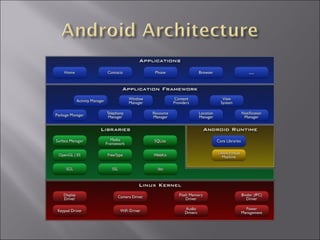
 Based on modified Linux kernel
 Middleware
 Set of Applications
 E-mail client
 Browser
 Released under Apache License
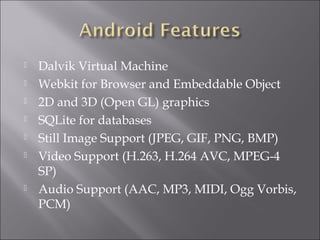
 Dalvik Virtual Machine
 Webkit for Browser and Embeddable Object
 2D and 3D (Open GL) graphics
 SQLite for databases
 Still Image Support (JPEG, GIF, PNG, BMP)
 Video Support (H.263, H.264 AVC, MPEG-4
SP)
 Audio Support (AAC, MP3, MIDI, Ogg Vorbis,
PCM)
 Bluetooth
 EDGE and 3G
 WIFI (802.11 b/g/n)
 WiMAX
 Camera
 GPS
 Compass
 Accelerometer
 Optimized for low memory
 Register Based not Stack Based
 Multiple VM instances at once
 Compiled into dex files and apk package
 JIT Compilation added in Android 2.2
 No Java ME, AWT or Swing classes
Android iPhone SDK
Programming
Languages
Java, C, C++, App
Inventor, Mono,
Interpreted
Objective C
App Market Wild West Gilded Cage
App Submission Immediate Reviewed (HIG, legal)
Device Makers Many Apple
SDK Free/OSS ($25 listing) $100
Development Platforms Windows, Mac, Linux Mac OSX
Distribution Restrictions None Provisioned
Market Share 13% 24.4%
UI Framework Android Cocoa Touch
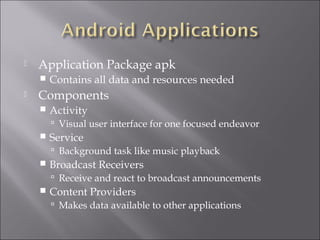
 Application Package apk
 Contains all data and resources needed
 Components
 Activity
 Visual user interface for one focused endeavor
 Service
 Background task like music playback
 Broadcast Receivers
 Receive and react to broadcast announcements
 Content Providers
 Makes data available to other applications
 Activates Activities, Services, or Broadcast
Receivers
 Move between Activities in program
 Initiate a phone call
 Send an E-mail
 Get broadcasts when battery is low
 Programmatically
 Using POJO (Plain Old Java Objects)
 Using XML (Preferred)
 Layouts
 Menus
 Values
 Resource Arrays
 Colors
 Dimensions
 Strings
 Styles
 Download and install Eclipse
 Download and install Android SDK
 Download Android Platforms and
Components
 Install ADT plug-in for Eclipse
 http://developer.android.com/sdk/eclipse-adt.html
 Hello World as a POJO example
 R Class
 Provides constants for accessing resources in
strings.xml, colors.xml, layouts, etc
 Generated code
 Automatically handled on Eclipse using Android plug-
in
 Manually using Android tools
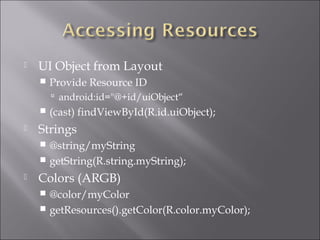
 UI Object from Layout
 Provide Resource ID
 android:id="@+id/uiObject“
 (cast) findViewById(R.id.uiObject);
 Strings
 @string/myString
 getString(R.string.myString);
 Colors (ARGB)
 @color/myColor
 getResources().getColor(R.color.myColor);
 Hello World Using XML
 Hello World Using XML and Resources
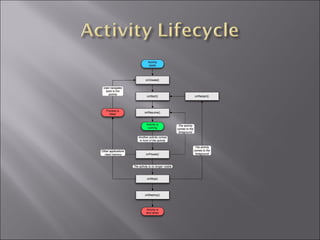
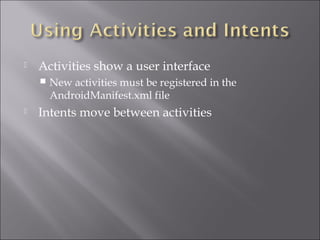
 Activities show a user interface
 New activities must be registered in the
AndroidManifest.xml file
 Intents move between activities
 Hello World Using Intents and new Activities
 Android Developer Documentation
 http://developer.android.com
 Hello Android by Ed Burnette
 Beginning Android by Mark L. Murphy
 Google I/O Videos
 http://developer.android.com/videos
 http://code.google.com/events/io/2010/sessions.html

Introduction to Android

  • 1.
  • 2.
     Operating Systemfor Mobile Devices  Based on modified Linux kernel  Middleware  Set of Applications  E-mail client  Browser  Released under Apache License
  • 4.
     Dalvik VirtualMachine  Webkit for Browser and Embeddable Object  2D and 3D (Open GL) graphics  SQLite for databases  Still Image Support (JPEG, GIF, PNG, BMP)  Video Support (H.263, H.264 AVC, MPEG-4 SP)  Audio Support (AAC, MP3, MIDI, Ogg Vorbis, PCM)
  • 5.
     Bluetooth  EDGEand 3G  WIFI (802.11 b/g/n)  WiMAX  Camera  GPS  Compass  Accelerometer
  • 6.
     Optimized forlow memory  Register Based not Stack Based  Multiple VM instances at once  Compiled into dex files and apk package  JIT Compilation added in Android 2.2  No Java ME, AWT or Swing classes
  • 7.
    Android iPhone SDK Programming Languages Java,C, C++, App Inventor, Mono, Interpreted Objective C App Market Wild West Gilded Cage App Submission Immediate Reviewed (HIG, legal) Device Makers Many Apple SDK Free/OSS ($25 listing) $100 Development Platforms Windows, Mac, Linux Mac OSX Distribution Restrictions None Provisioned Market Share 13% 24.4% UI Framework Android Cocoa Touch
  • 8.
     Application Packageapk  Contains all data and resources needed  Components  Activity  Visual user interface for one focused endeavor  Service  Background task like music playback  Broadcast Receivers  Receive and react to broadcast announcements  Content Providers  Makes data available to other applications
  • 9.
     Activates Activities,Services, or Broadcast Receivers  Move between Activities in program  Initiate a phone call  Send an E-mail  Get broadcasts when battery is low
  • 11.
     Programmatically  UsingPOJO (Plain Old Java Objects)  Using XML (Preferred)  Layouts  Menus  Values  Resource Arrays  Colors  Dimensions  Strings  Styles
  • 12.
     Download andinstall Eclipse  Download and install Android SDK  Download Android Platforms and Components  Install ADT plug-in for Eclipse  http://developer.android.com/sdk/eclipse-adt.html
  • 13.
     Hello Worldas a POJO example
  • 14.
     R Class Provides constants for accessing resources in strings.xml, colors.xml, layouts, etc  Generated code  Automatically handled on Eclipse using Android plug- in  Manually using Android tools
  • 15.
     UI Objectfrom Layout  Provide Resource ID  android:id="@+id/uiObject“  (cast) findViewById(R.id.uiObject);  Strings  @string/myString  getString(R.string.myString);  Colors (ARGB)  @color/myColor  getResources().getColor(R.color.myColor);
  • 16.
     Hello WorldUsing XML  Hello World Using XML and Resources
  • 17.
     Activities showa user interface  New activities must be registered in the AndroidManifest.xml file  Intents move between activities
  • 18.
     Hello WorldUsing Intents and new Activities
  • 19.
     Android DeveloperDocumentation  http://developer.android.com  Hello Android by Ed Burnette  Beginning Android by Mark L. Murphy  Google I/O Videos  http://developer.android.com/videos  http://code.google.com/events/io/2010/sessions.html