Analog-to-Digital Conversion
Terminology
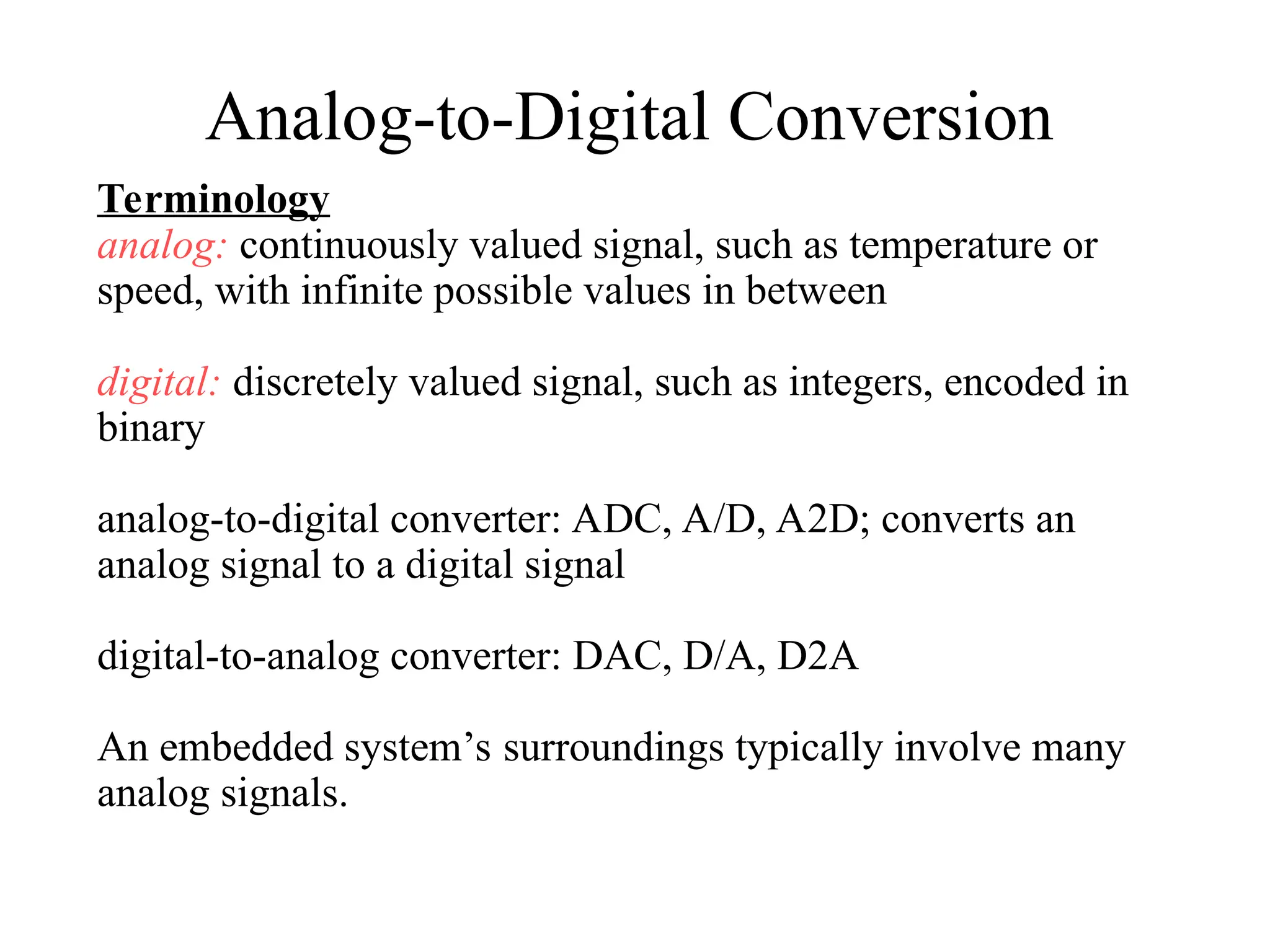
analog: continuously valued signal, such as temperature or
speed, with infinite possible values in between
digital: discretely valued signal, such as integers, encoded in
binary
analog-to-digital converter: ADC, A/D, A2D; converts an
analog signal to a digital signal
digital-to-analog converter: DAC, D/A, D2A
An embedded system’s surroundings typically involve many
analog signals.
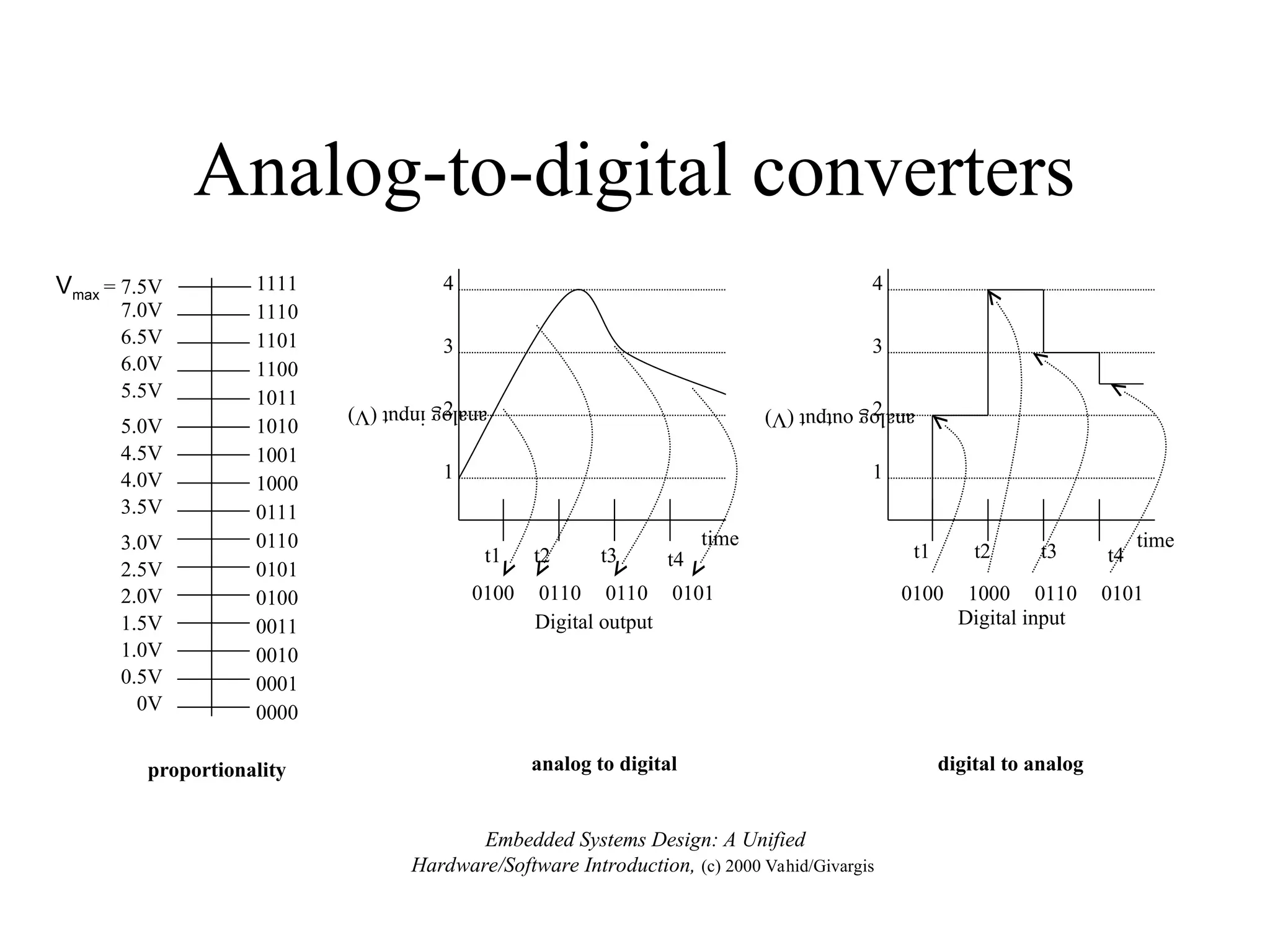
Analog-to-digital converters
proportionality
Vmax = 7.5V
0V
1111
1110
0000
0010
0100
0110
1000
1010
1100
0001
0011
0101
0111
1001
1011
1101
0.5V
1.0V
1.5V
2.0V
2.5V
3.0V
3.5V
4.0V
4.5V
5.0V
5.5V
6.0V
6.5V
7.0V
analog to digital
4
3
2
1
t1 t2 t3 t4
0100 0110 0110 0101
time
analog
input
(V)
Digital output
digital to analog
4
3
2
1
0100 1000 0110 0101
t1 t2 t3 t4
time
analog
output
(V)
Digital input
Embedded Systems Design: A Unified
Hardware/Software Introduction, (c) 2000 Vahid/Givargis
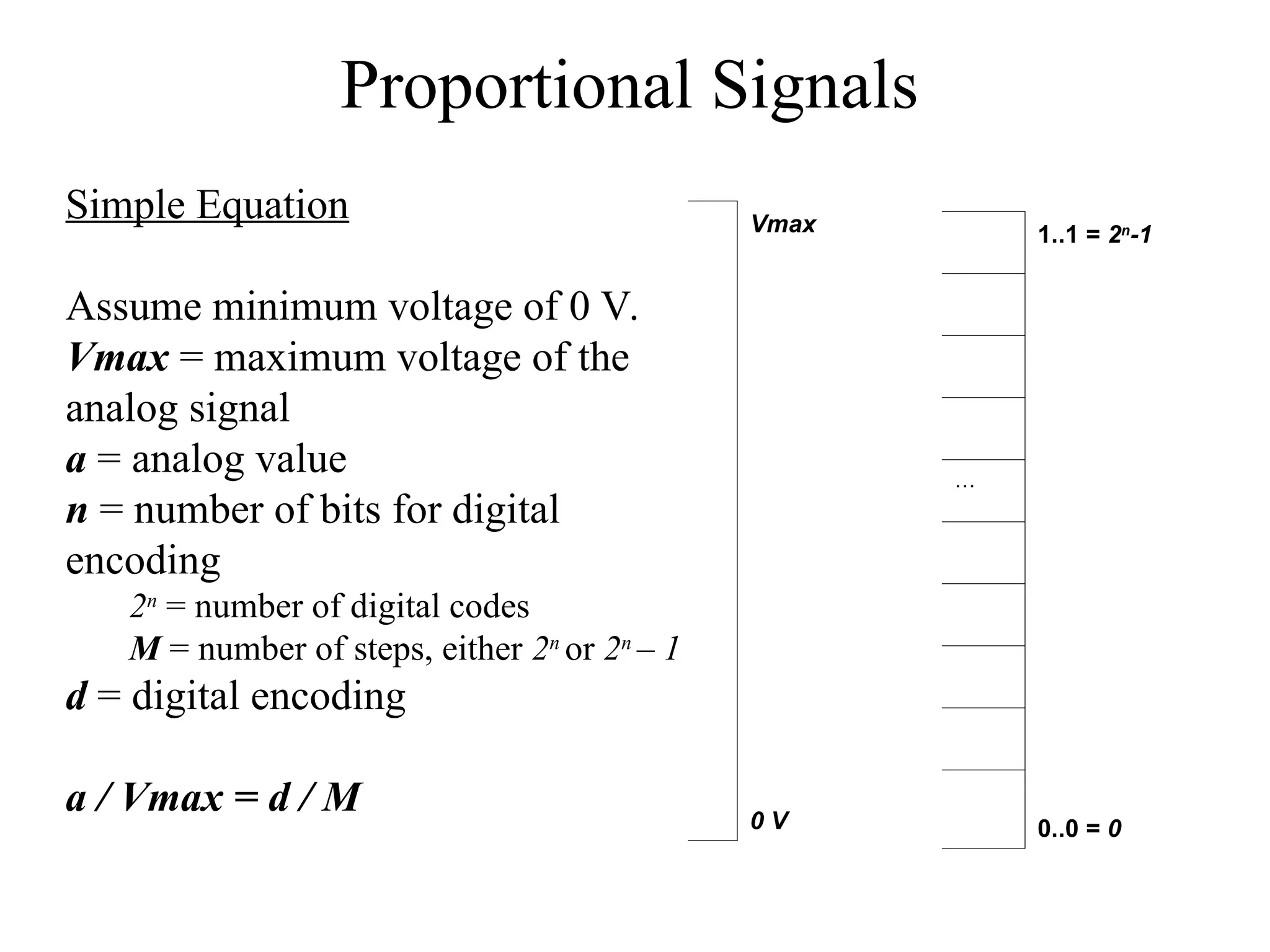
Proportional Signals
Simple Equation
Assume minimum voltage of 0 V.
Vmax = maximum voltage of the
analog signal
a = analog value
n = number of bits for digital
encoding
2n
= number of digital codes
M = number of steps, either 2n
or 2n
– 1
d = digital encoding
a / Vmax = d / M
Vmax
0 V
1..1 = 2n
-1
…
0..0 = 0
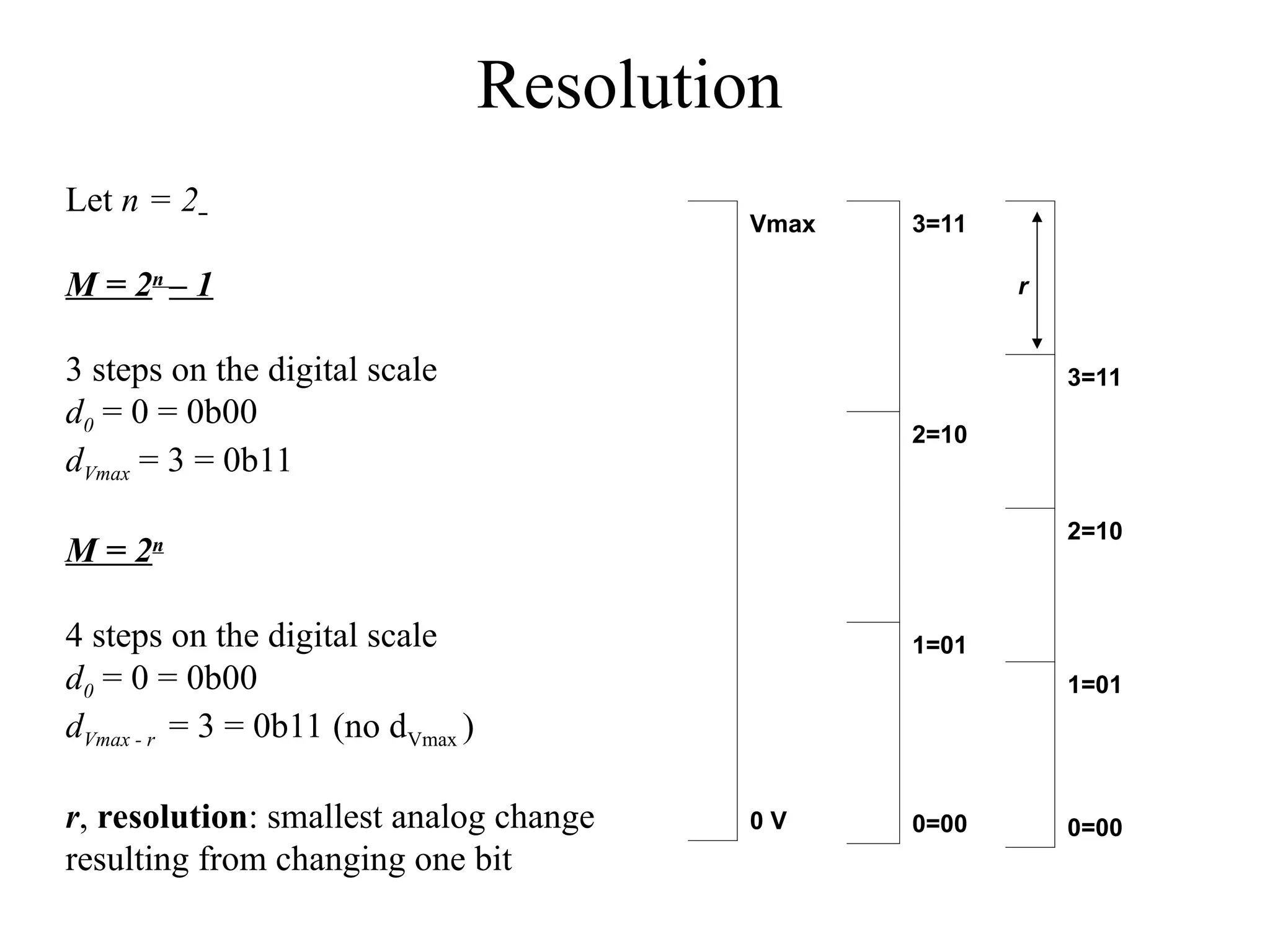
Resolution
Let n = 2
M = 2n
– 1
3 steps on the digital scale
d0 = 0 = 0b00
dVmax = 3 = 0b11
M = 2n
4 steps on the digital scale
d0 = 0 = 0b00
dVmax - r = 3 = 0b11 (no dVmax )
r, resolution: smallest analog change
resulting from changing one bit
Vmax
0 V
3=11
2=10
1=01
0=00
r
3=11
2=10
1=01
0=00
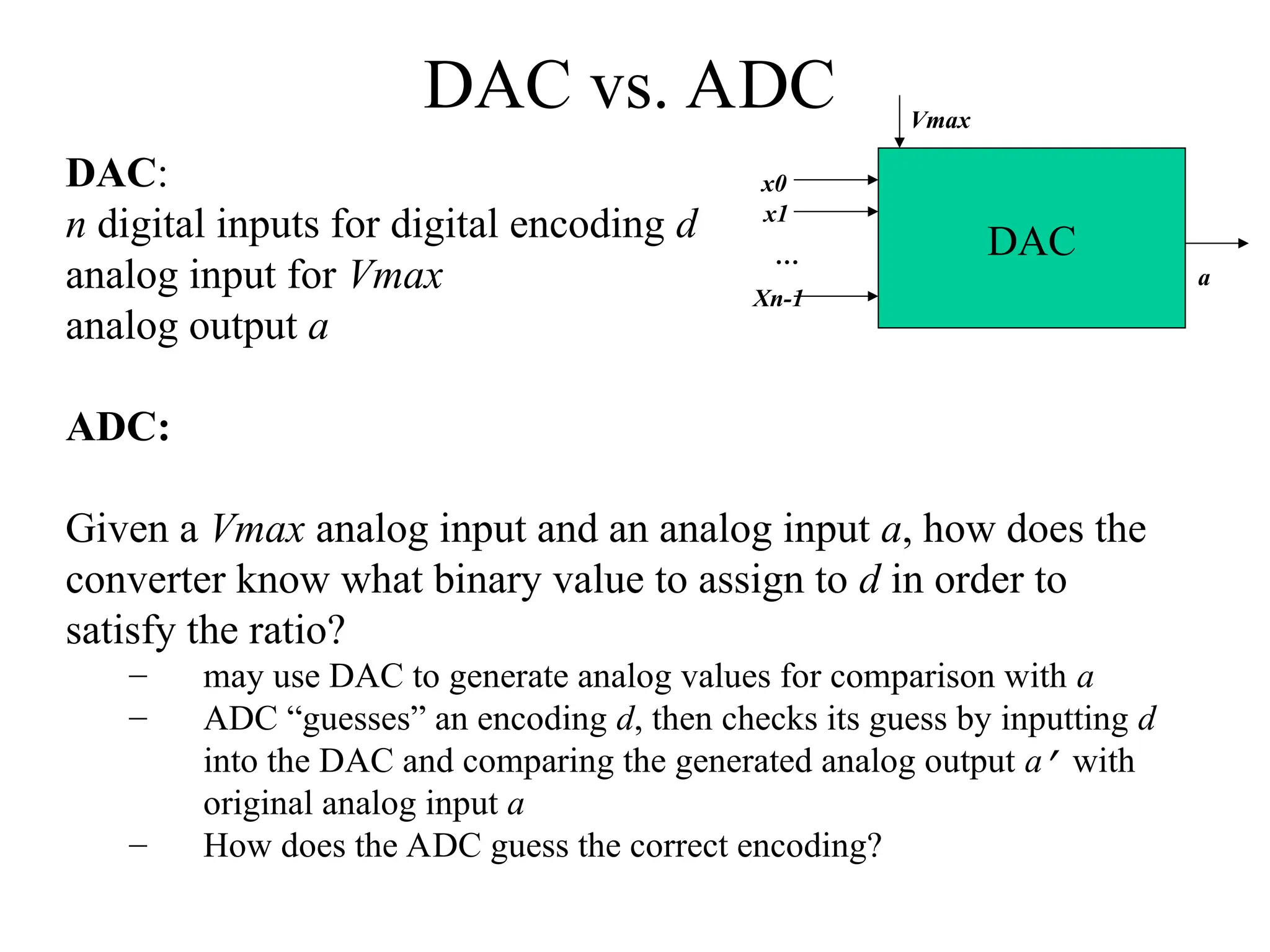
DAC vs. ADC
DAC:
n digital inputs for digital encoding d
analog input for Vmax
analog output a
ADC:
Given a Vmax analog input and an analog input a, how does the
converter know what binary value to assign to d in order to
satisfy the ratio?
– may use DAC to generate analog values for comparison with a
– ADC “guesses” an encoding d, then checks its guess by inputting d
into the DAC and comparing the generated analog output a’ with
original analog input a
– How does the ADC guess the correct encoding?
DAC
Vmax
x0
x1
Xn-1
…
a
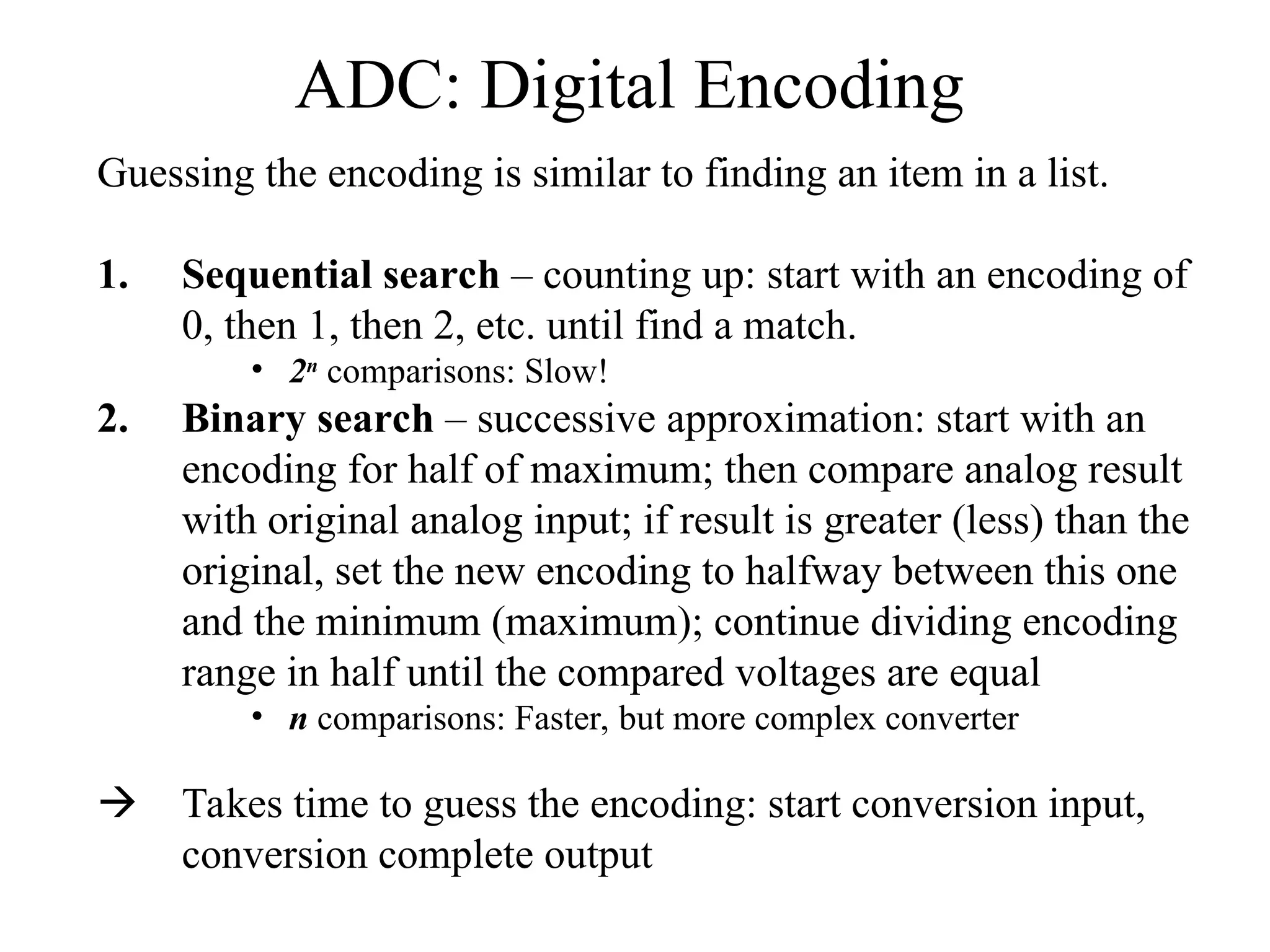
ADC: Digital Encoding
Guessing the encoding is similar to finding an item in a list.
1. Sequential search – counting up: start with an encoding of
0, then 1, then 2, etc. until find a match.
• 2n
comparisons: Slow!
2. Binary search – successive approximation: start with an
encoding for half of maximum; then compare analog result
with original analog input; if result is greater (less) than the
original, set the new encoding to halfway between this one
and the minimum (maximum); continue dividing encoding
range in half until the compared voltages are equal
• n comparisons: Faster, but more complex converter
 Takes time to guess the encoding: start conversion input,
conversion complete output
ADC using successive
approximation
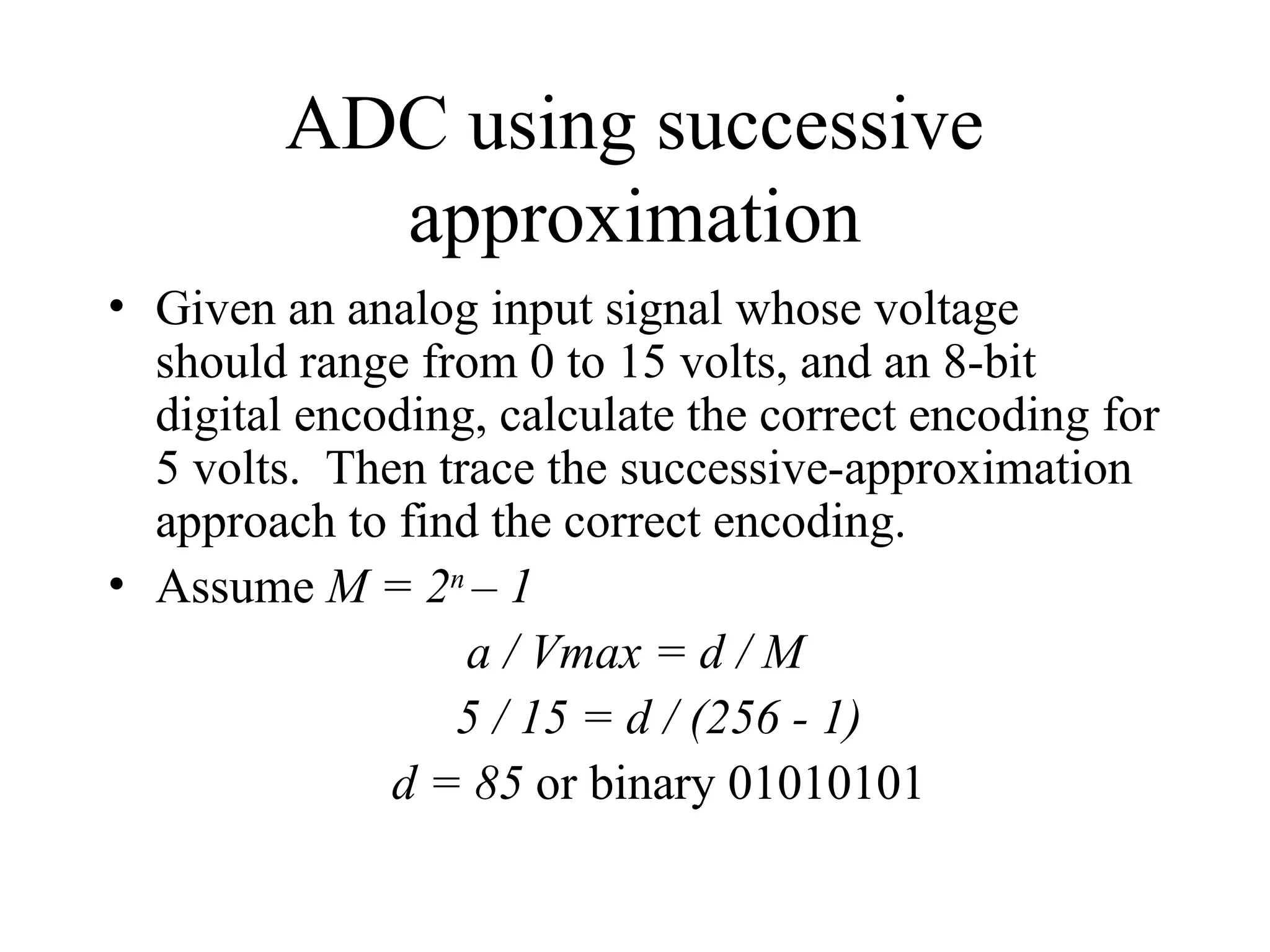
• Given an analog input signal whose voltage
should range from 0 to 15 volts, and an 8-bit
digital encoding, calculate the correct encoding for
5 volts. Then trace the successive-approximation
approach to find the correct encoding.
• Assume M = 2n
– 1
a / Vmax = d / M
5 / 15 = d / (256 - 1)
d = 85 or binary 01010101
ADC using successive
approximation
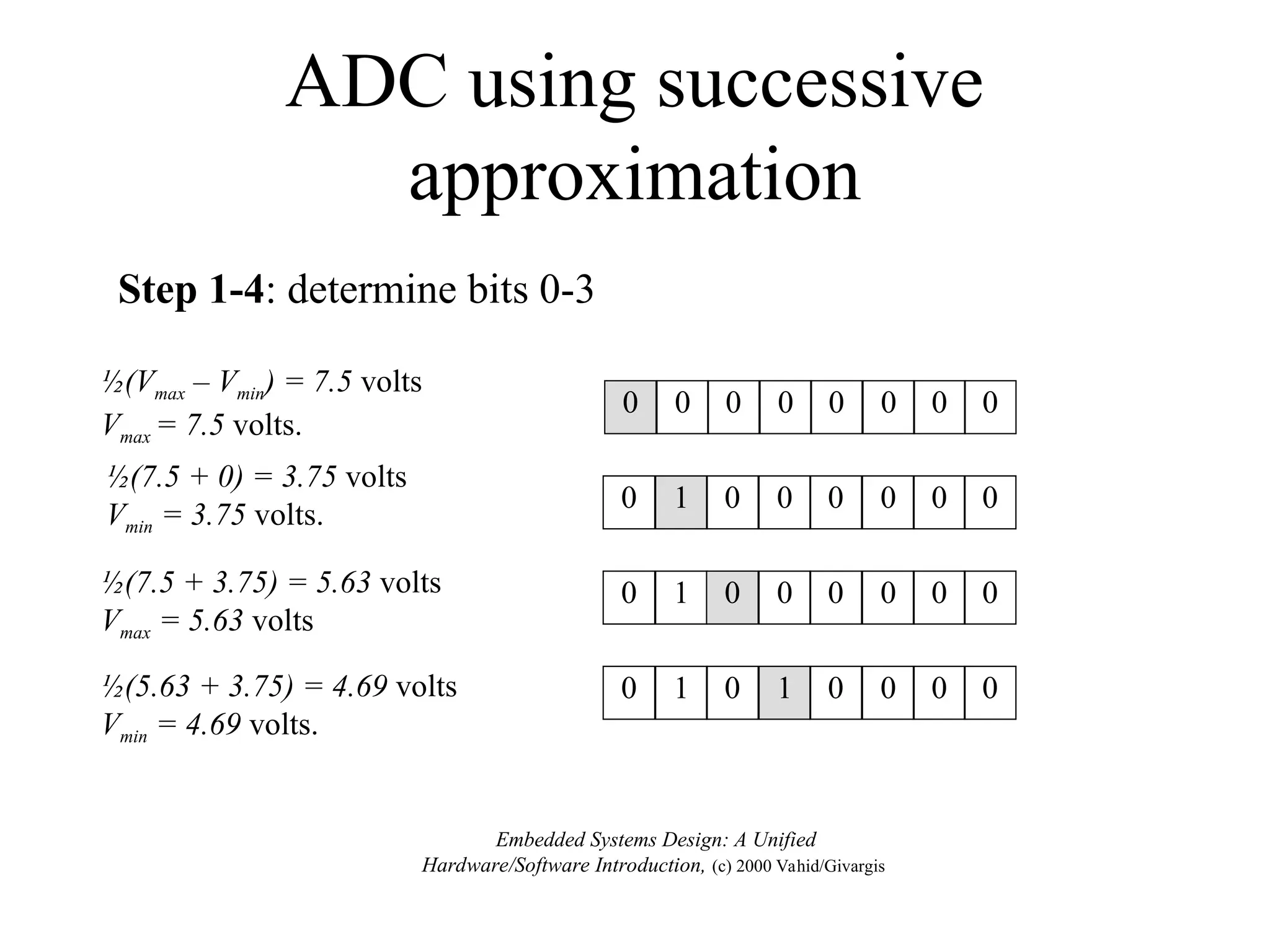
0 1 0 0 0 0 0 0
½(Vmax – Vmin) = 7.5 volts
Vmax = 7.5 volts.
½(7.5 + 0) = 3.75 volts
Vmin = 3.75 volts.
0 0 0 0 0 0 0 0
0 1 0 0 0 0 0 0
½(7.5 + 3.75) = 5.63 volts
Vmax = 5.63 volts
½(5.63 + 3.75) = 4.69 volts
Vmin = 4.69 volts.
0 1 0 1 0 0 0 0
Embedded Systems Design: A Unified
Hardware/Software Introduction, (c) 2000 Vahid/Givargis
Step 1-4: determine bits 0-3
ADC using successive
approximation
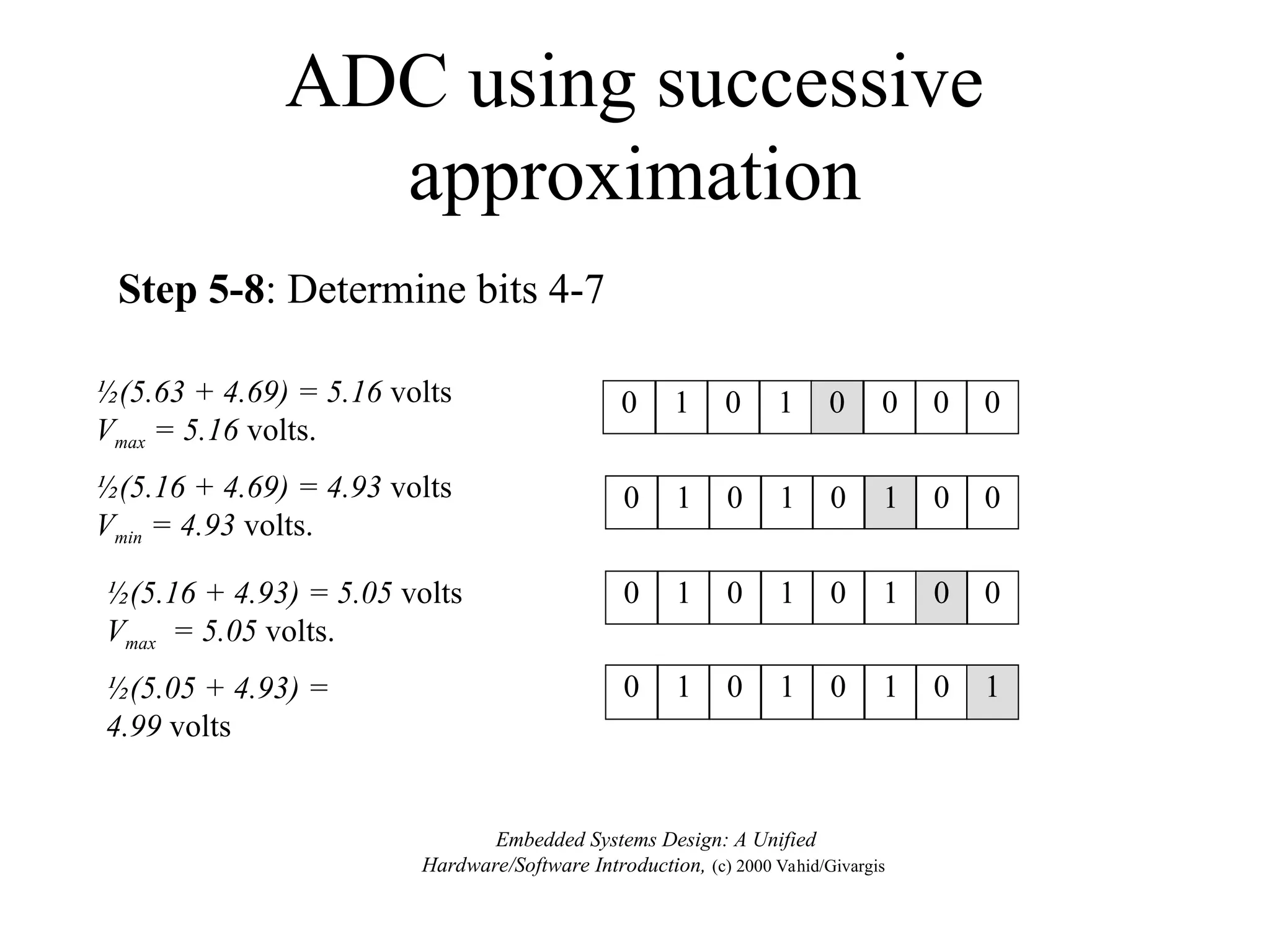
½(5.63 + 4.69) = 5.16 volts
Vmax = 5.16 volts.
0 1 0 1 0 0 0 0
½(5.16 + 4.69) = 4.93 volts
Vmin = 4.93 volts.
0 1 0 1 0 1 0 0
½(5.16 + 4.93) = 5.05 volts
Vmax = 5.05 volts.
0 1 0 1 0 1 0 0
½(5.05 + 4.93) =
4.99 volts
0 1 0 1 0 1 0 1
Embedded Systems Design: A Unified
Hardware/Software Introduction, (c) 2000 Vahid/Givargis
Step 5-8: Determine bits 4-7
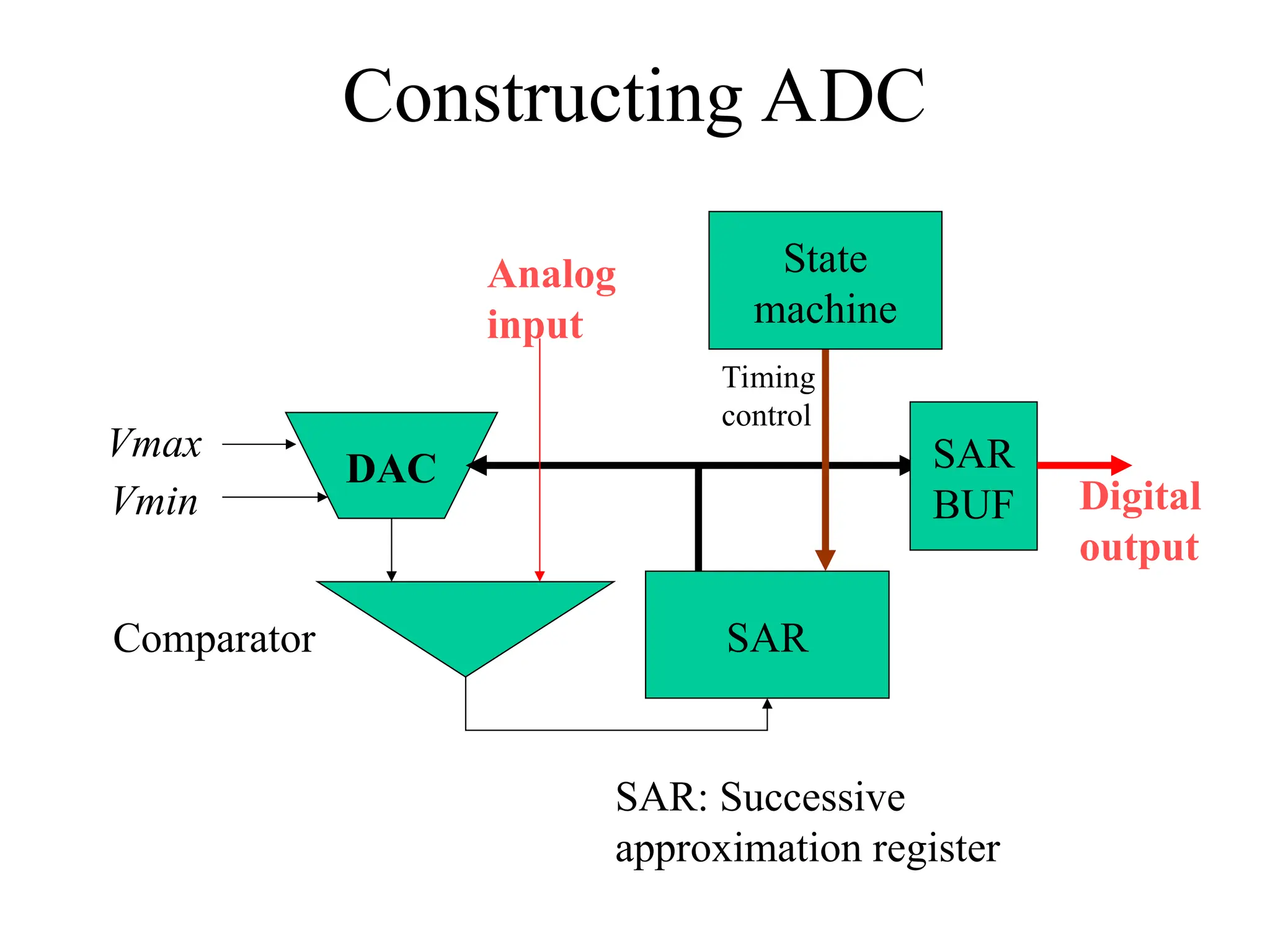
Constructing ADC
SAR
Comparator
DAC
Vmax
Vmin
Analog
input
SAR
BUF Digital
output
State
machine
SAR: Successive
approximation register
Timing
control
Bit Weight
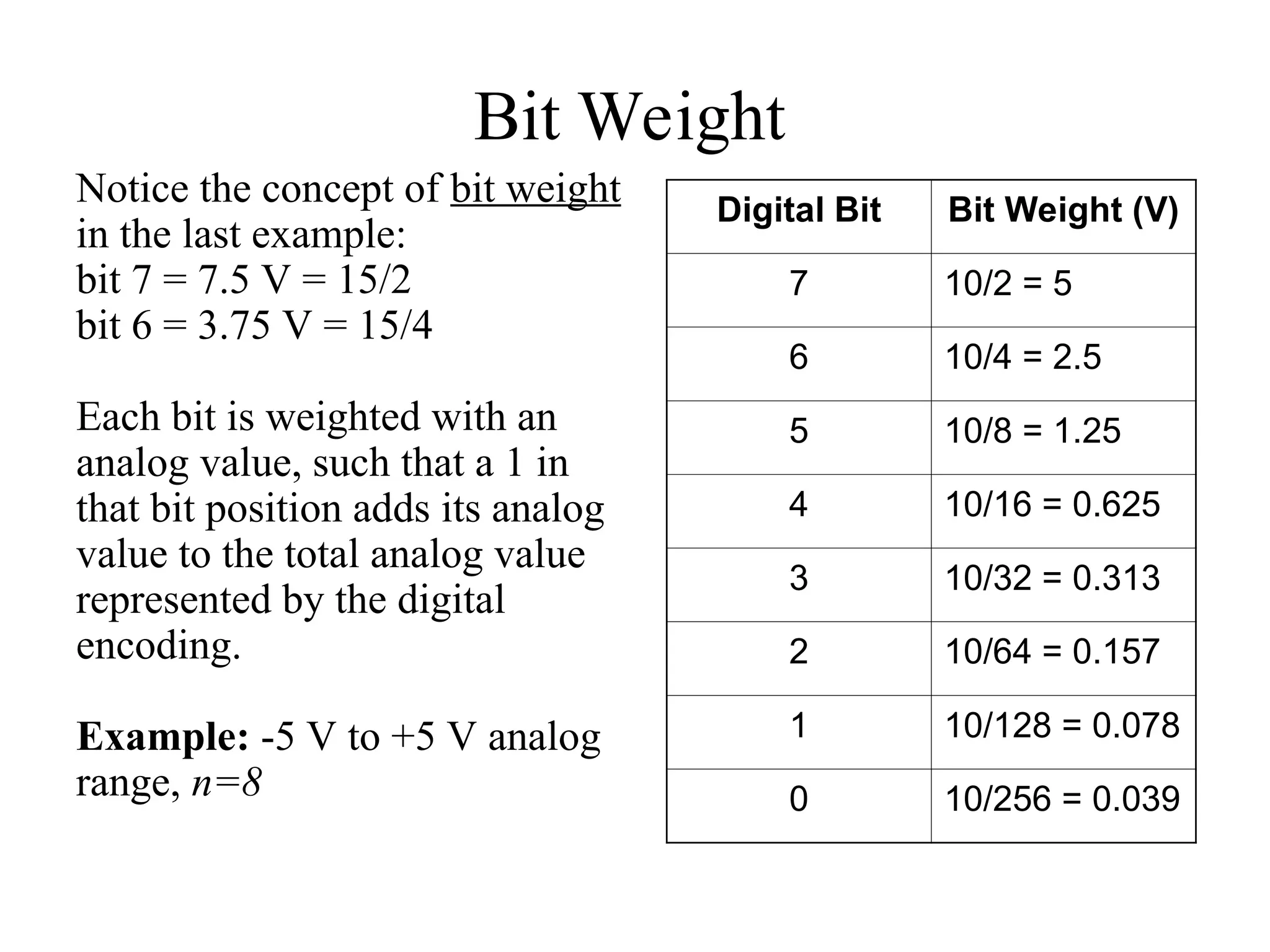
Notice the concept of bit weight
in the last example:
bit 7 = 7.5 V = 15/2
bit 6 = 3.75 V = 15/4
Each bit is weighted with an
analog value, such that a 1 in
that bit position adds its analog
value to the total analog value
represented by the digital
encoding.
Example: -5 V to +5 V analog
range, n=8
Digital Bit Bit Weight (V)
7 10/2 = 5
6 10/4 = 2.5
5 10/8 = 1.25
4 10/16 = 0.625
3 10/32 = 0.313
2 10/64 = 0.157
1 10/128 = 0.078
0 10/256 = 0.039
Bit Weight
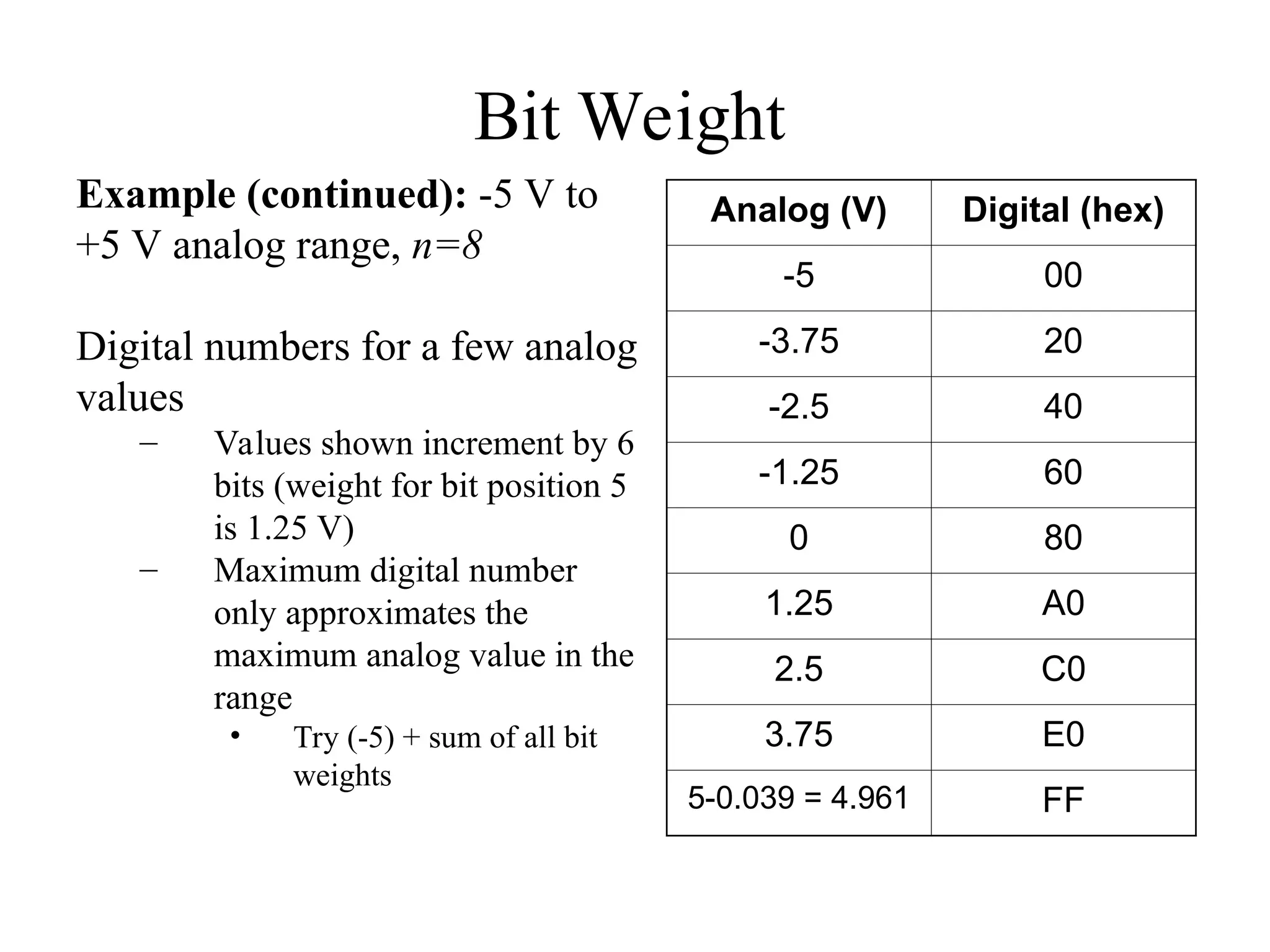
Example (continued): -5 V to
+5 V analog range, n=8
Digital numbers for a few analog
values
– Values shown increment by 6
bits (weight for bit position 5
is 1.25 V)
– Maximum digital number
only approximates the
maximum analog value in the
range
• Try (-5) + sum of all bit
weights
Analog (V) Digital (hex)
-5 00
-3.75 20
-2.5 40
-1.25 60
0 80
1.25 A0
2.5 C0
3.75 E0
5-0.039 = 4.961 FF
Terms & Equations
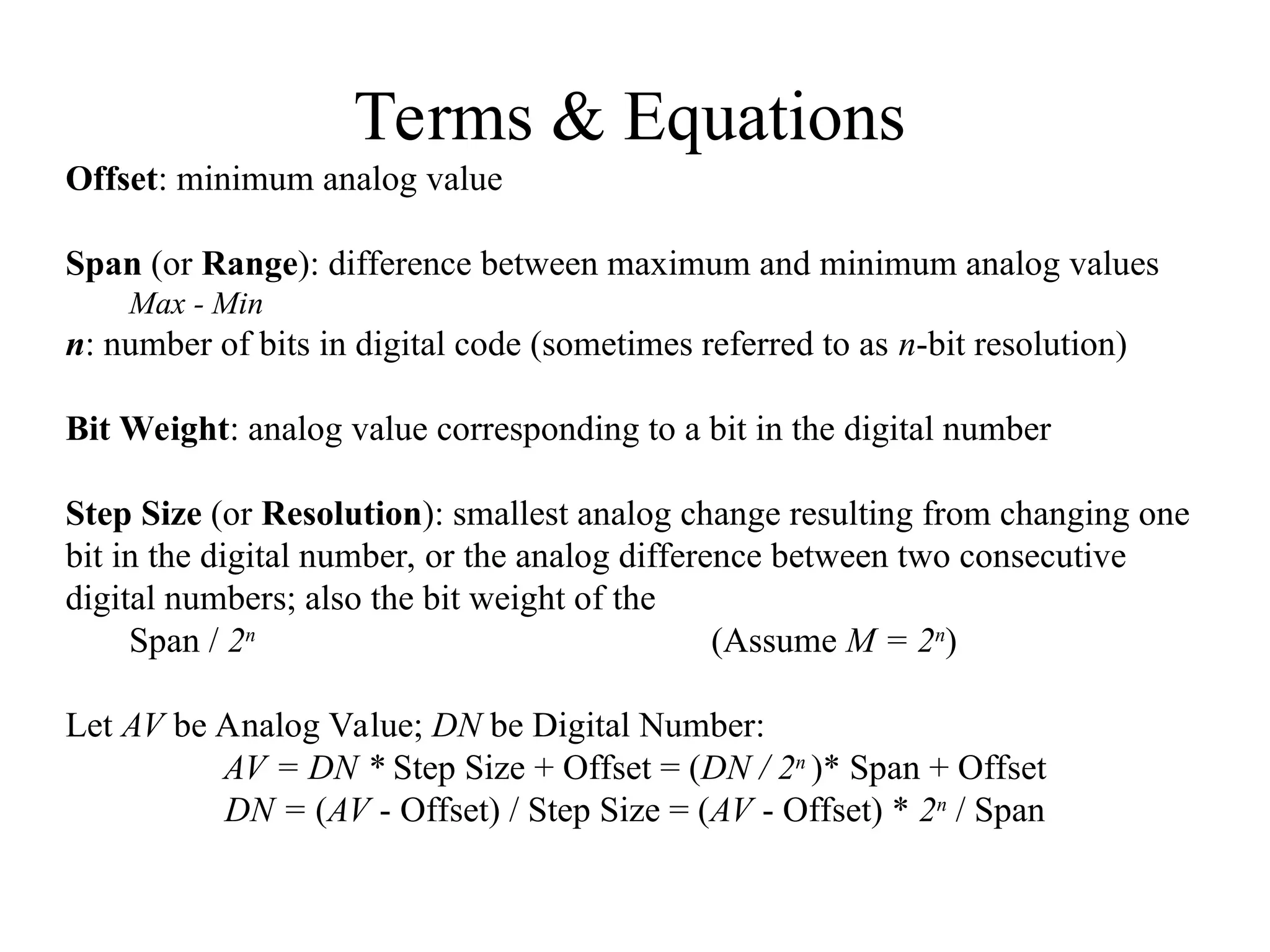
Offset: minimum analog value
Span (or Range): difference between maximum and minimum analog values
Max - Min
n: number of bits in digital code (sometimes referred to as n-bit resolution)
Bit Weight: analog value corresponding to a bit in the digital number
Step Size (or Resolution): smallest analog change resulting from changing one
bit in the digital number, or the analog difference between two consecutive
digital numbers; also the bit weight of the
Span / 2n
(Assume M = 2n
)
Let AV be Analog Value; DN be Digital Number:
AV = DN * Step Size + Offset = (DN / 2n
)* Span + Offset
DN = (AV - Offset) / Step Size = (AV - Offset) * 2n
/ Span
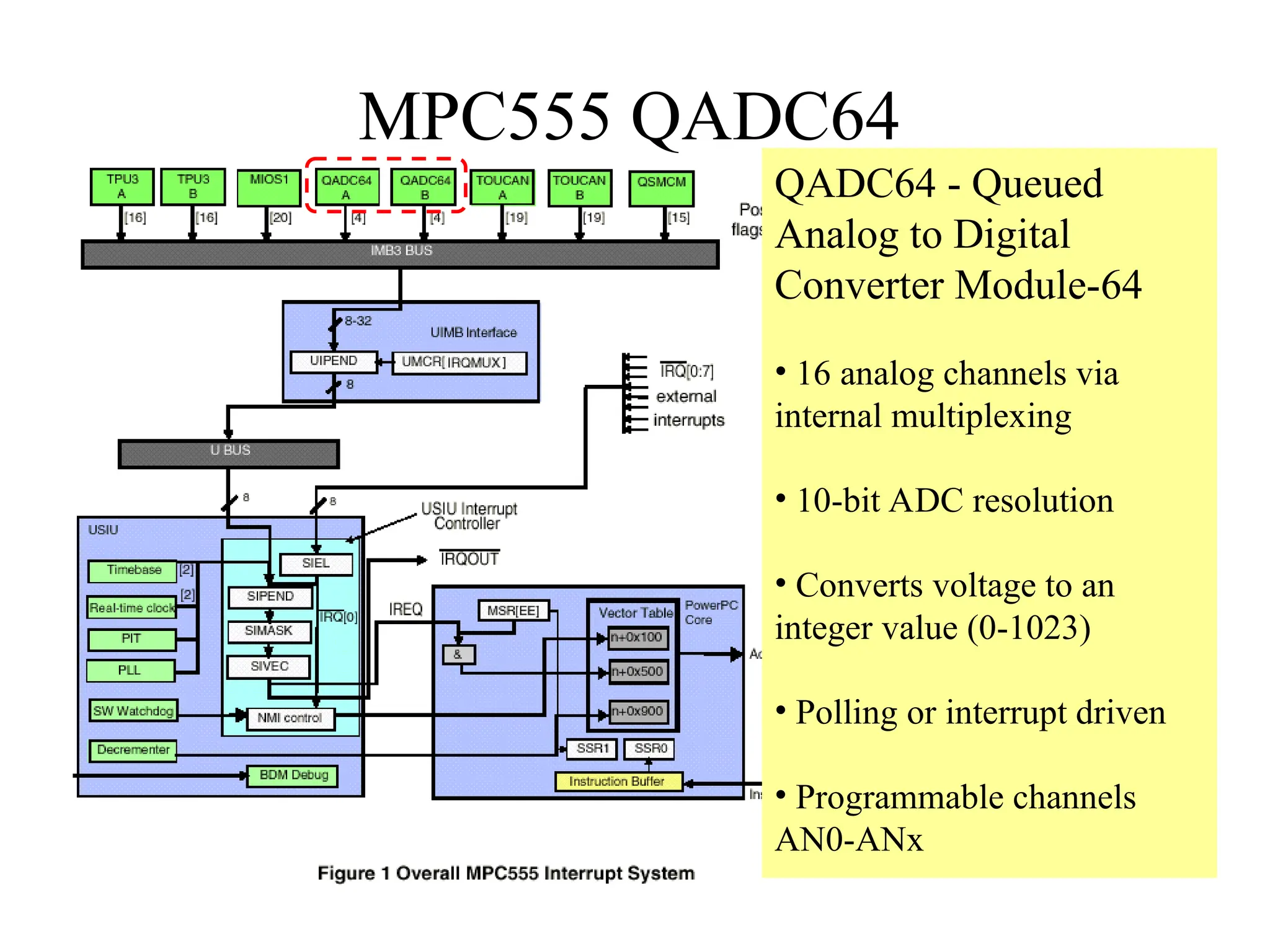
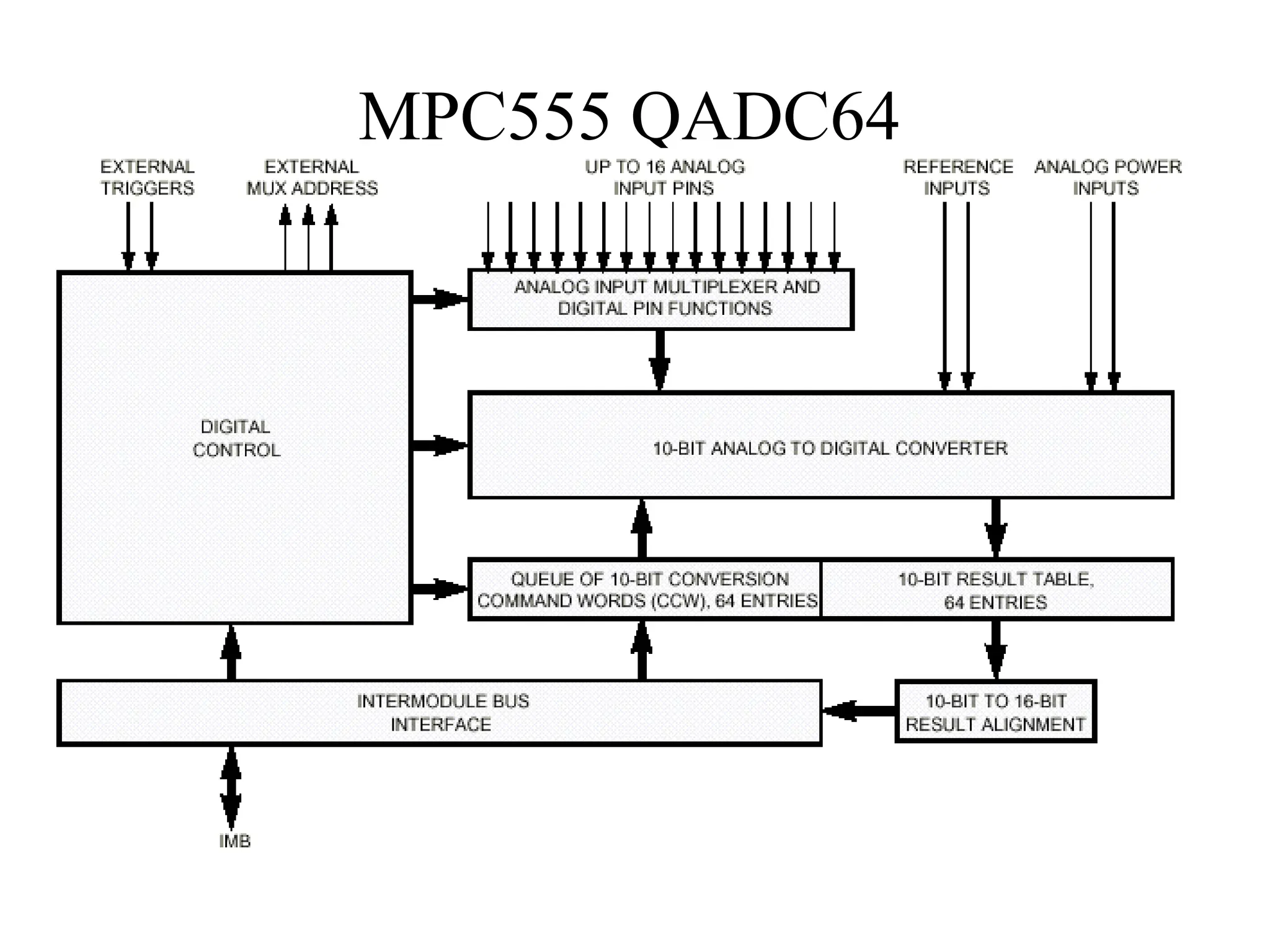
MPC555 QADC64
QADC64 - Queued
Analog to Digital
Converter Module-64
• 16 analog channels via
internal multiplexing
• 10-bit ADC resolution
• Converts voltage to an
integer value (0-1023)
• Polling or interrupt driven
• Programmable channels
AN0-ANx
MPC555 QADC64
MPC555 QADC64
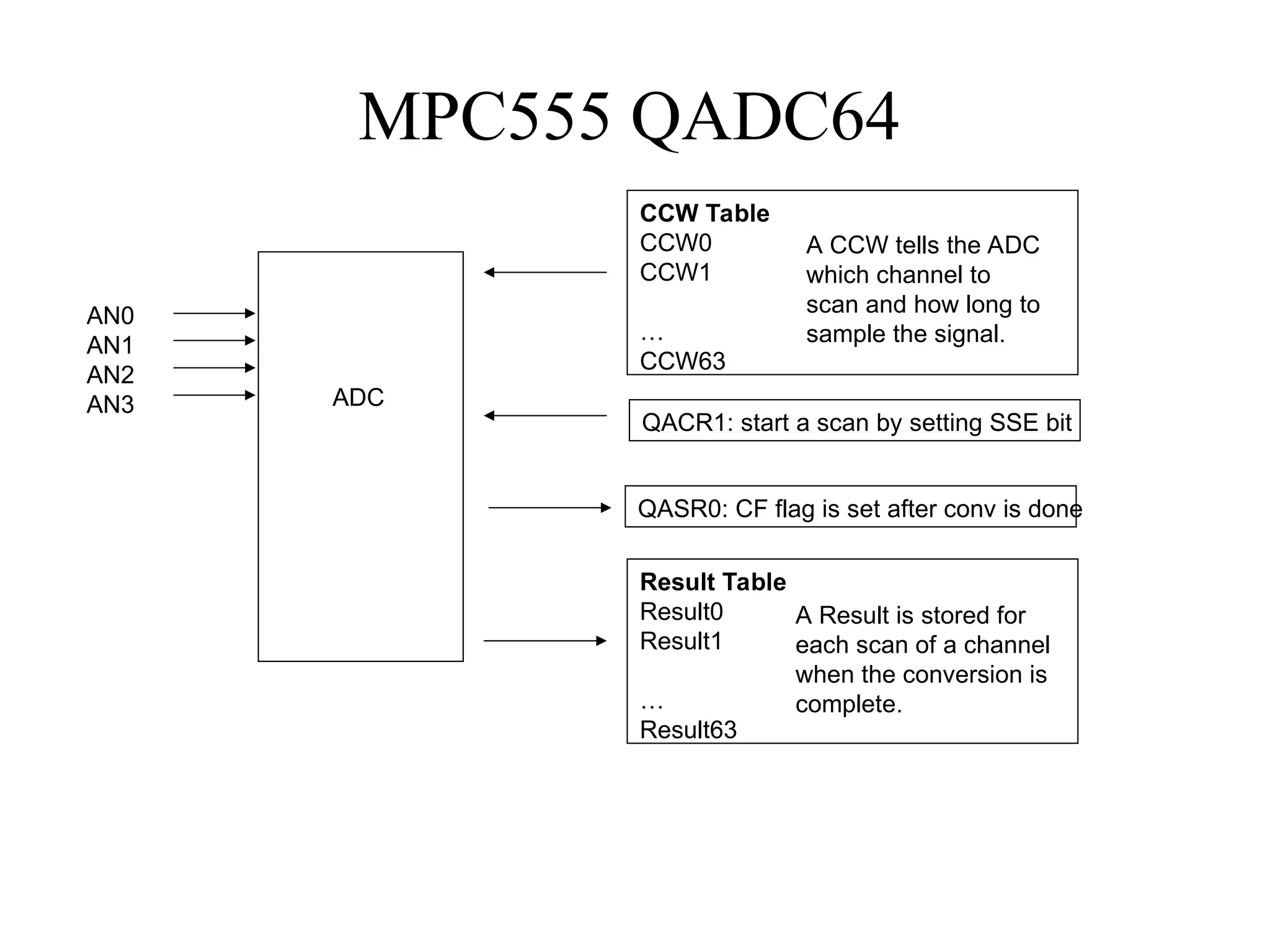
AN0
AN1
AN2
AN3 ADC
CCW Table
CCW0
CCW1
…
CCW63
A CCW tells the ADC
which channel to
scan and how long to
sample the signal.
Result Table
Result0
Result1
…
Result63
A Result is stored for
each scan of a channel
when the conversion is
complete.
QACR1: start a scan by setting SSE bit
QASR0: CF flag is set after conv is done
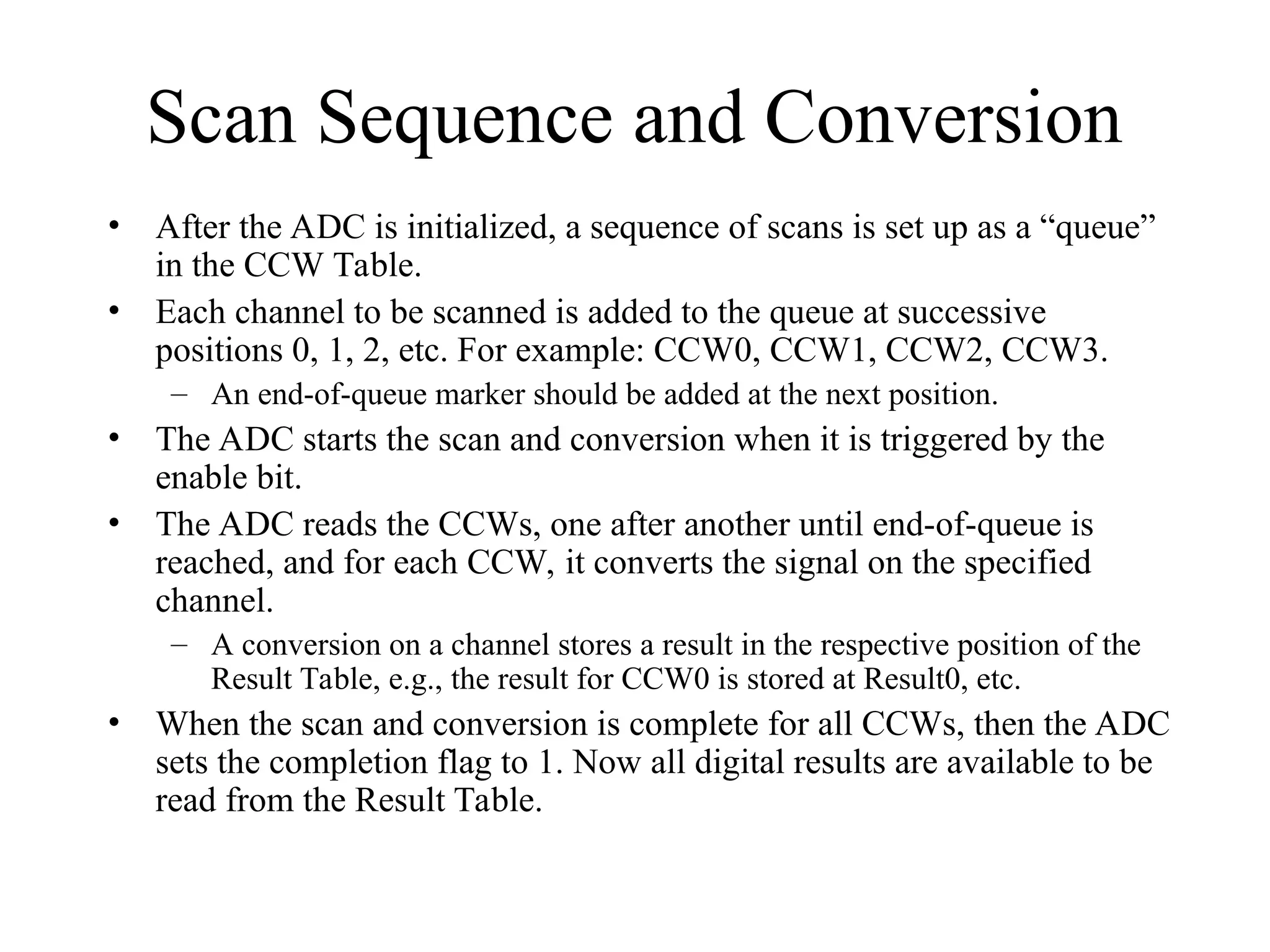
Scan Sequence and Conversion
• After the ADC is initialized, a sequence of scans is set up as a “queue”
in the CCW Table.
• Each channel to be scanned is added to the queue at successive
positions 0, 1, 2, etc. For example: CCW0, CCW1, CCW2, CCW3.
– An end-of-queue marker should be added at the next position.
• The ADC starts the scan and conversion when it is triggered by the
enable bit.
• The ADC reads the CCWs, one after another until end-of-queue is
reached, and for each CCW, it converts the signal on the specified
channel.
– A conversion on a channel stores a result in the respective position of the
Result Table, e.g., the result for CCW0 is stored at Result0, etc.
• When the scan and conversion is complete for all CCWs, then the ADC
sets the completion flag to 1. Now all digital results are available to be
read from the Result Table.
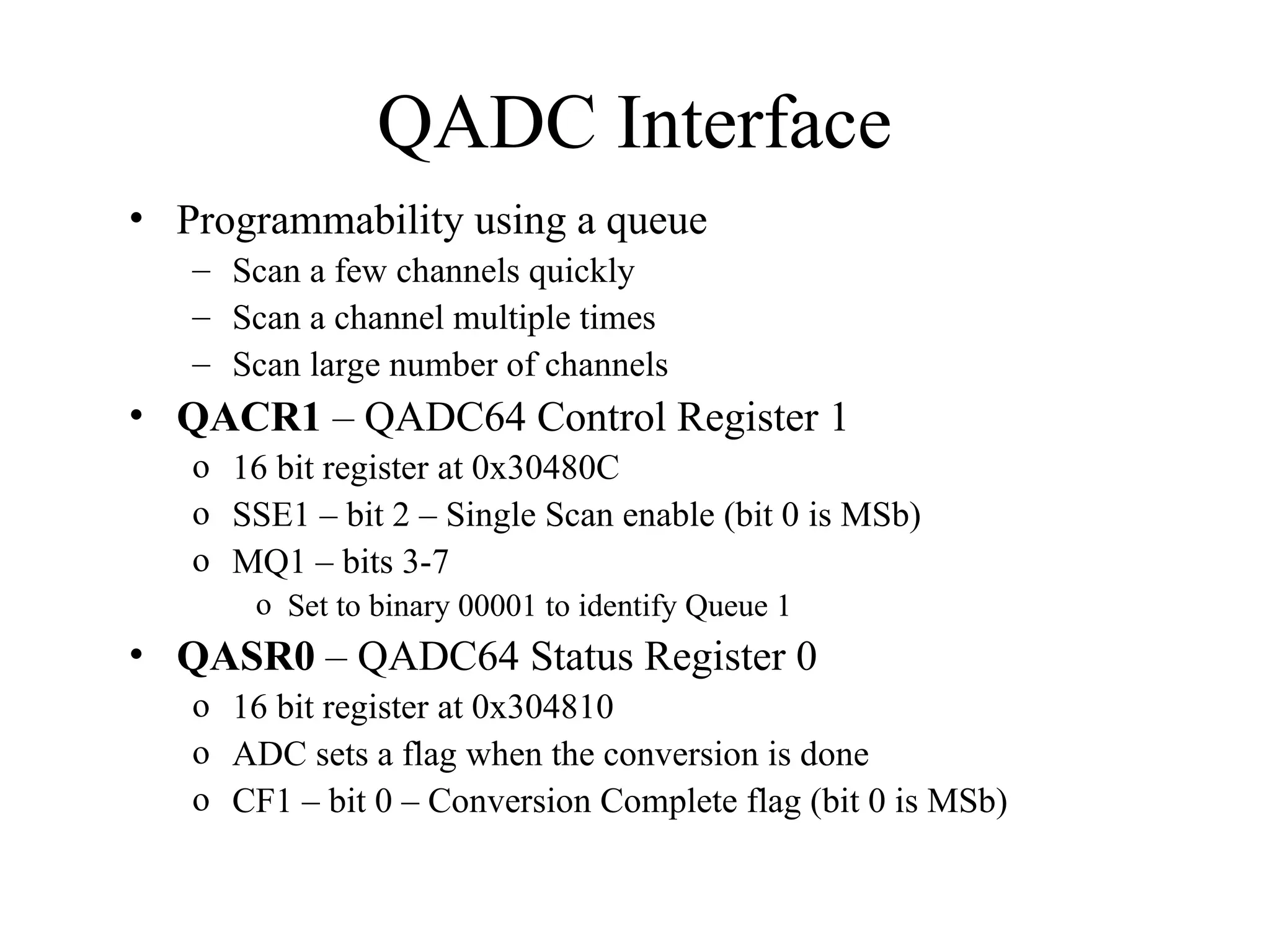
QADC Interface
• Programmability using a queue
– Scan a few channels quickly
– Scan a channel multiple times
– Scan large number of channels
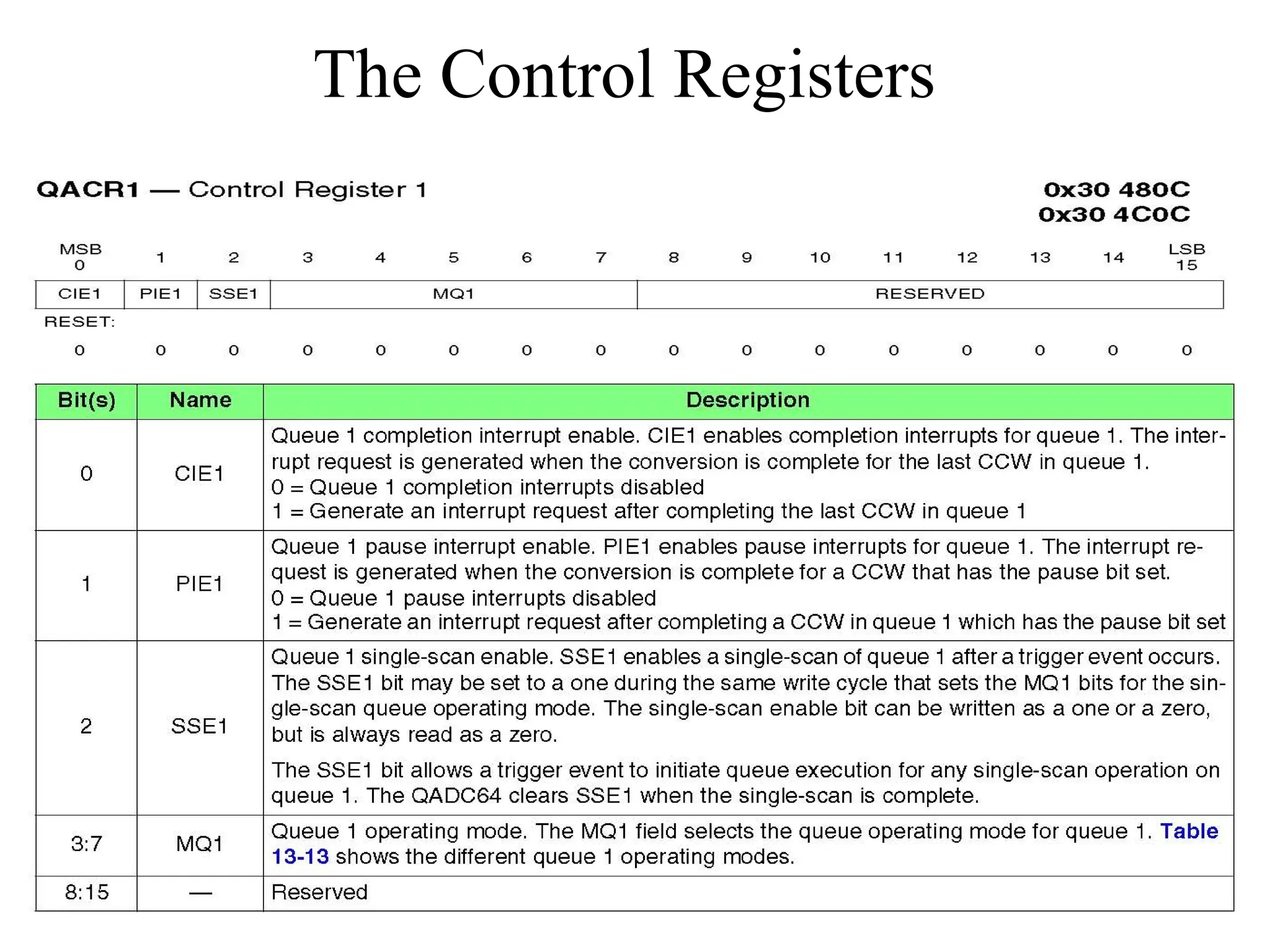
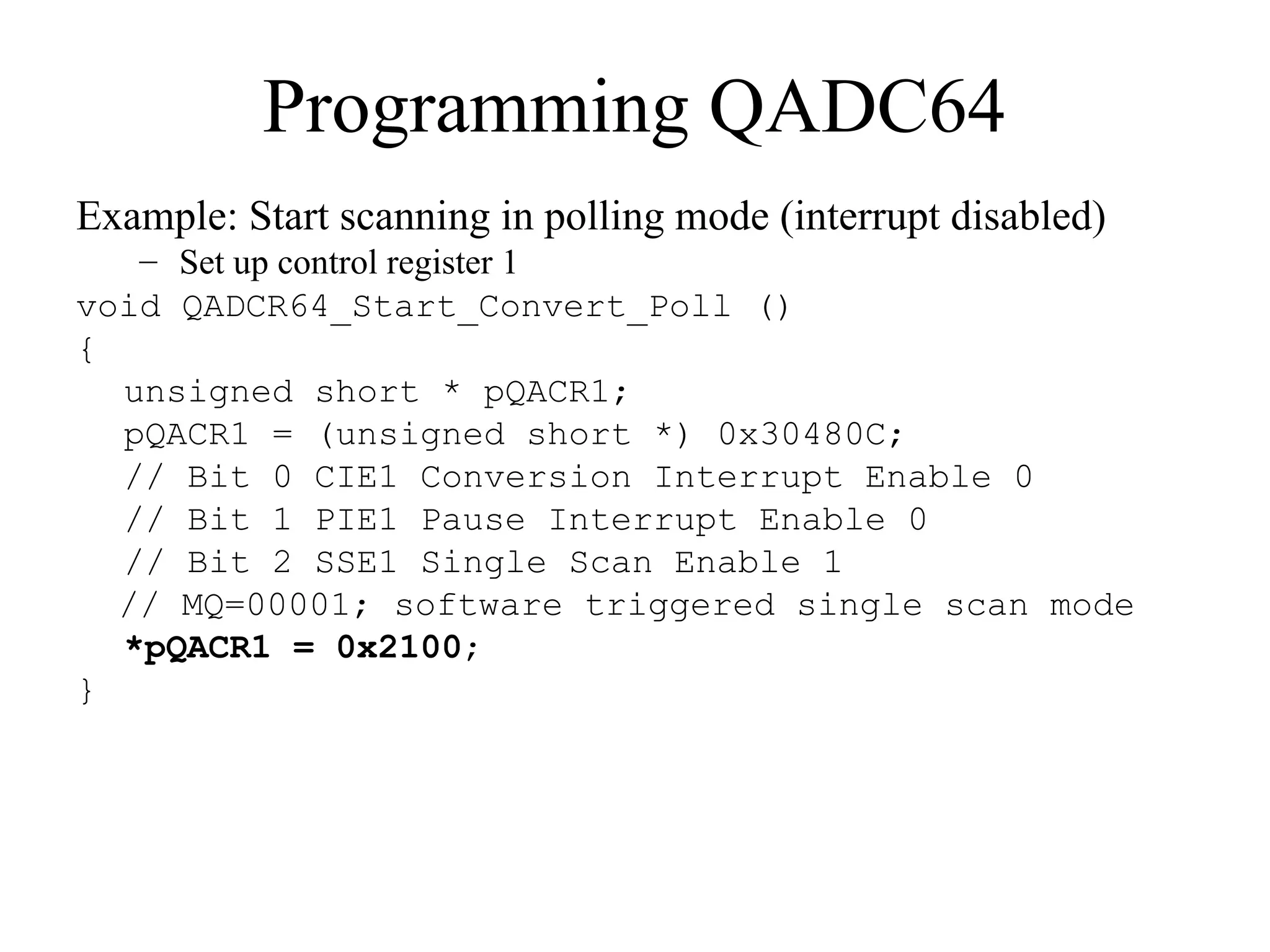
• QACR1 – QADC64 Control Register 1
o 16 bit register at 0x30480C
o SSE1 – bit 2 – Single Scan enable (bit 0 is MSb)
o MQ1 – bits 3-7
o Set to binary 00001 to identify Queue 1
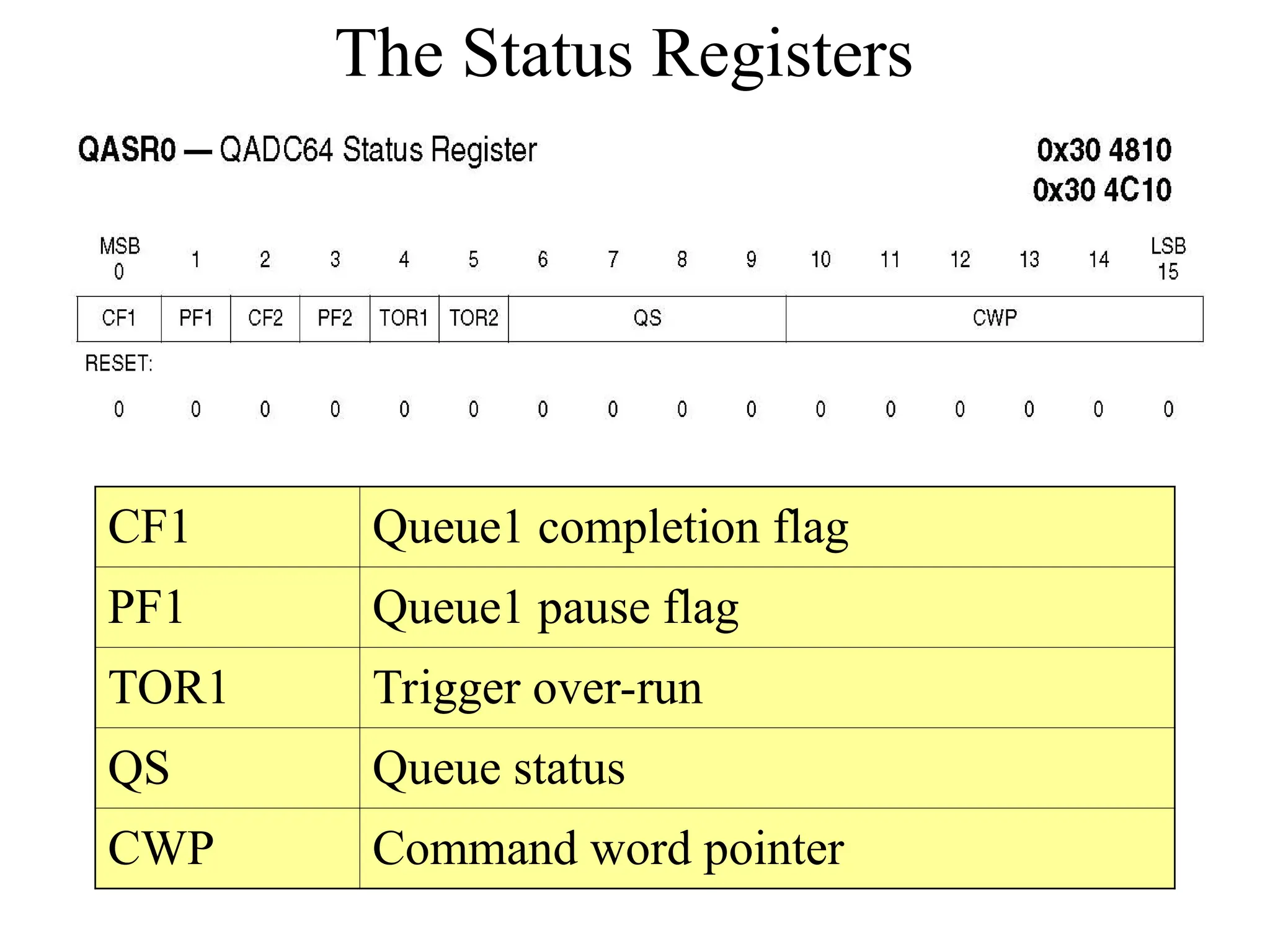
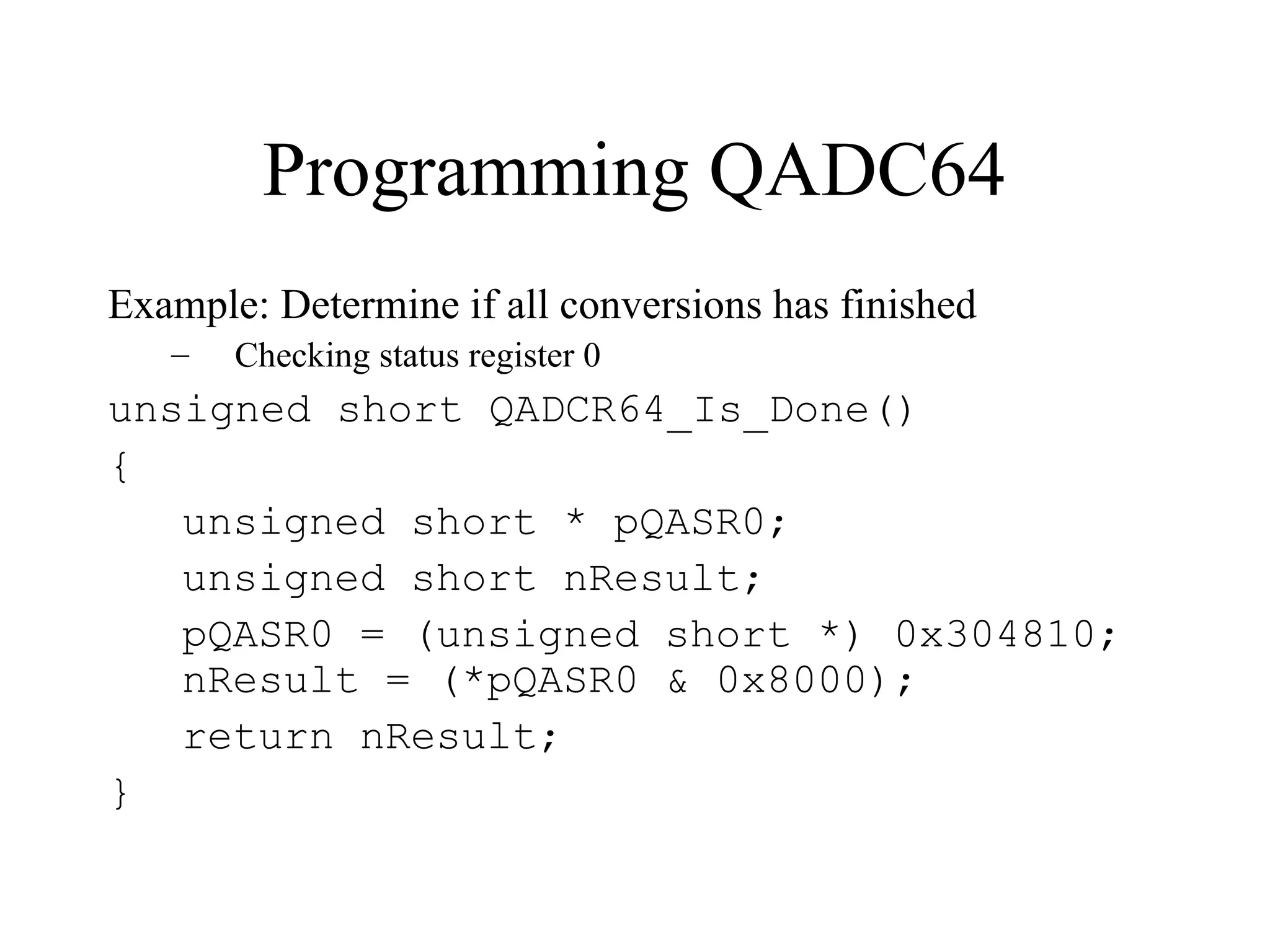
• QASR0 – QADC64 Status Register 0
o 16 bit register at 0x304810
o ADC sets a flag when the conversion is done
o CF1 – bit 0 – Conversion Complete flag (bit 0 is MSb)
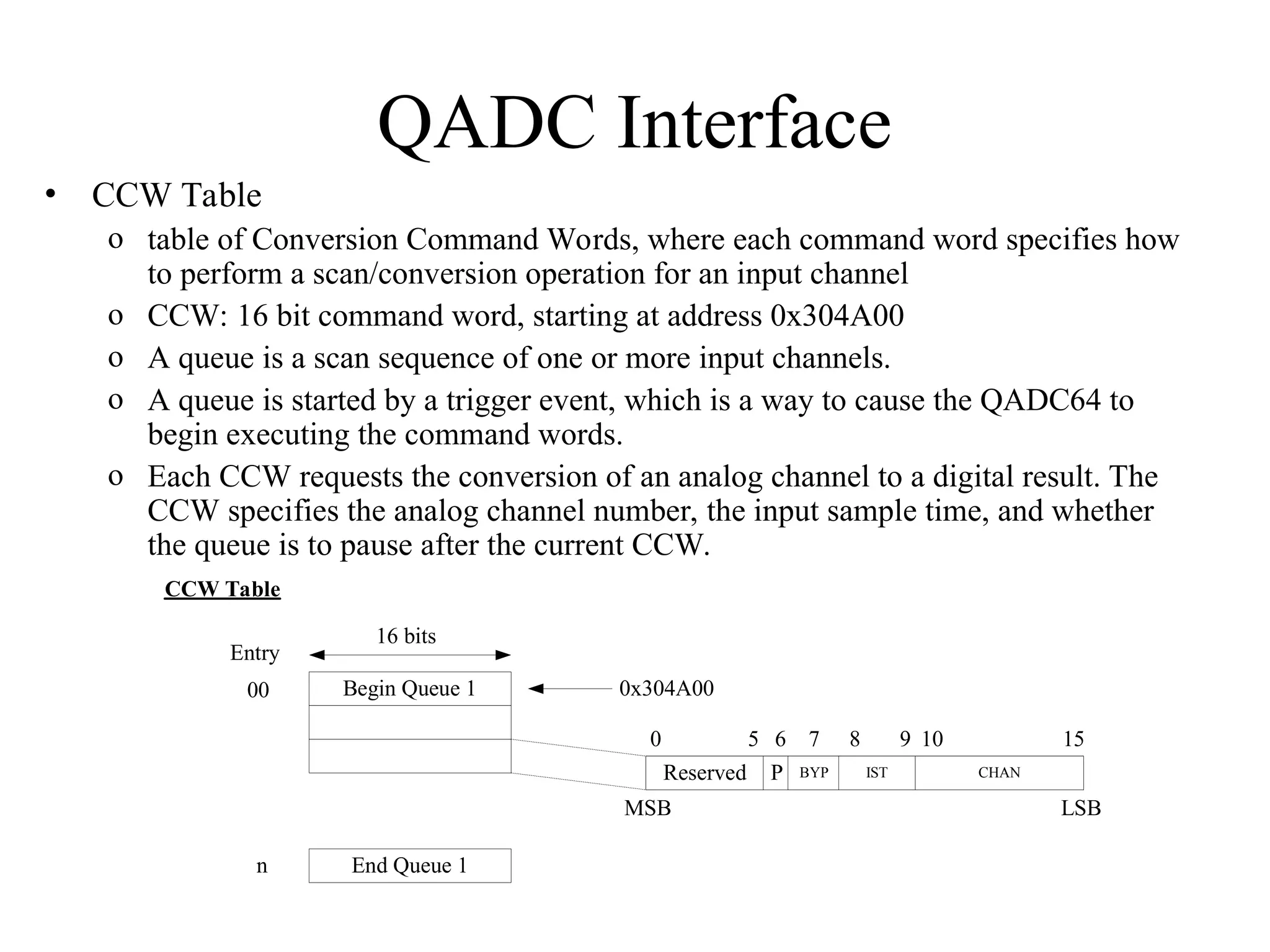
QADC Interface
• CCW Table
o table of Conversion Command Words, where each command word specifies how
to perform a scan/conversion operation for an input channel
o CCW: 16 bit command word, starting at address 0x304A00
o A queue is a scan sequence of one or more input channels.
o A queue is started by a trigger event, which is a way to cause the QADC64 to
begin executing the command words.
o Each CCW requests the conversion of an analog channel to a digital result. The
CCW specifies the analog channel number, the input sample time, and whether
the queue is to pause after the current CCW.
Begin Queue 1
16 bits
Entry
00
End Queue 1
n
0x304A00
CCW Table
0
Reserved
5 6
P BYP
7
IST
8 9
CHAN
10 15
MSB LSB
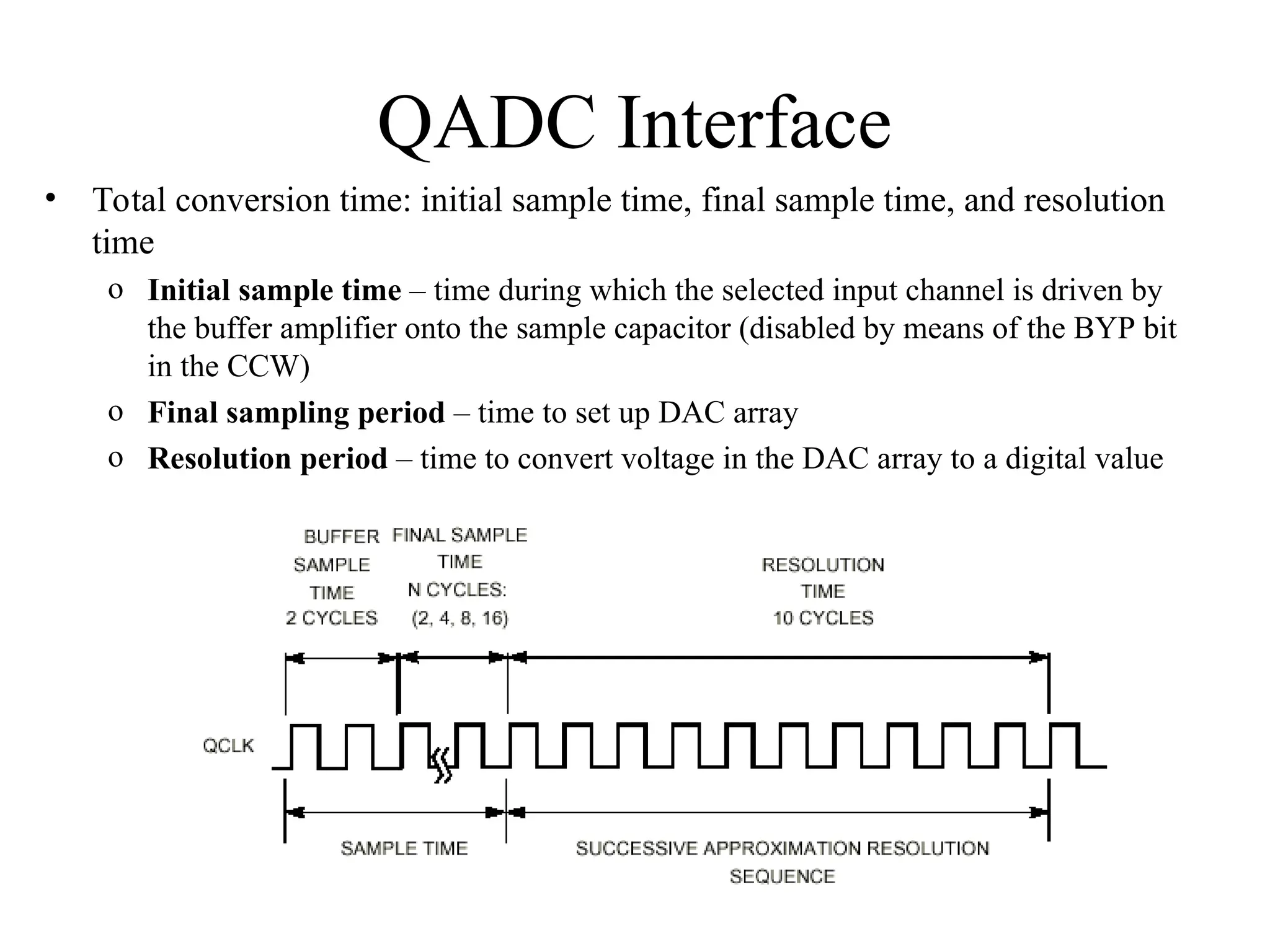
QADC Interface
• Total conversion time: initial sample time, final sample time, and resolution
time
o Initial sample time – time during which the selected input channel is driven by
the buffer amplifier onto the sample capacitor (disabled by means of the BYP bit
in the CCW)
o Final sampling period – time to set up DAC array
o Resolution period – time to convert voltage in the DAC array to a digital value
QADC Interface
• Result Word Table
o table of Result Words, where each result word is the digital result of a
conversion
o Results from a sequence of conversions are placed in the Result Word
Table.
o RW: 16 bit result word, starting at address 0x304A80
• Programming the QADC:
– Reset the ADC queue
– Add (to the queue) each analog input channel to be scanned; e.g., four
channels, 0 through 3 (AN0-AN3)
– Add an end-of-queue marker to terminate the scan sequence
– Start a conversion on the ADC, which begins reading each analog
input and converting it to a digital value
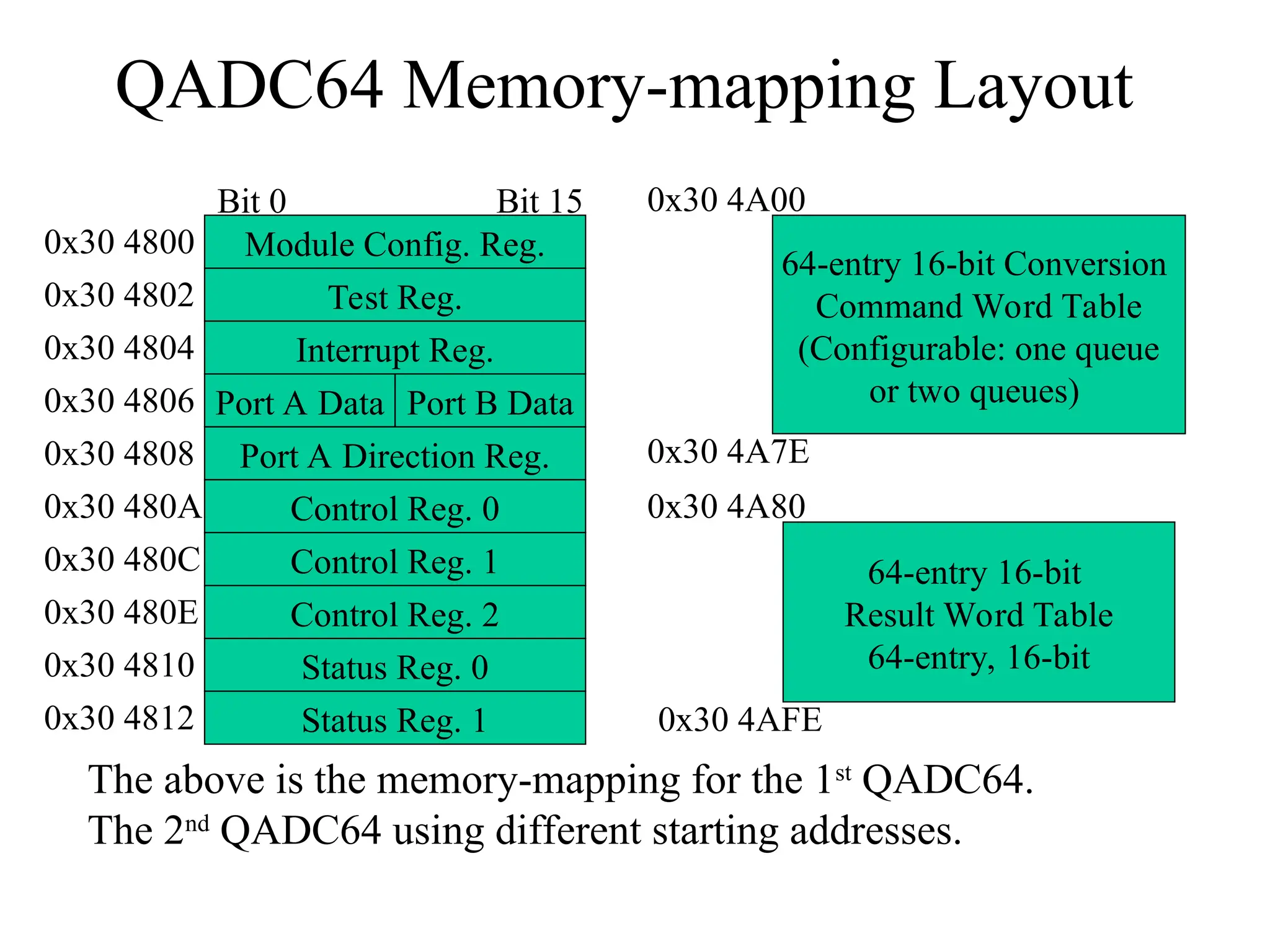
QADC64 Memory-mapping Layout
Module Config. Reg.
Port A Data
Port A Direction Reg.
Control Reg. 0
Control Reg. 1
Control Reg. 2
Status Reg. 0
Status Reg. 1
Port B Data
Test Reg.
Interrupt Reg.
0x30 4800
Bit 0 Bit 15
0x30 4802
0x30 4804
0x30 4806
0x30 4808
0x30 480A
0x30 480C
0x30 480E
0x30 4810
0x30 4812
64-entry 16-bit Conversion
Command Word Table
(Configurable: one queue
or two queues)
0x30 4A00
0x30 4A7E
64-entry 16-bit
Result Word Table
64-entry, 16-bit
0x30 4A80
0x30 4AFE
The above is the memory-mapping for the 1st
QADC64.
The 2nd
QADC64 using different starting addresses.
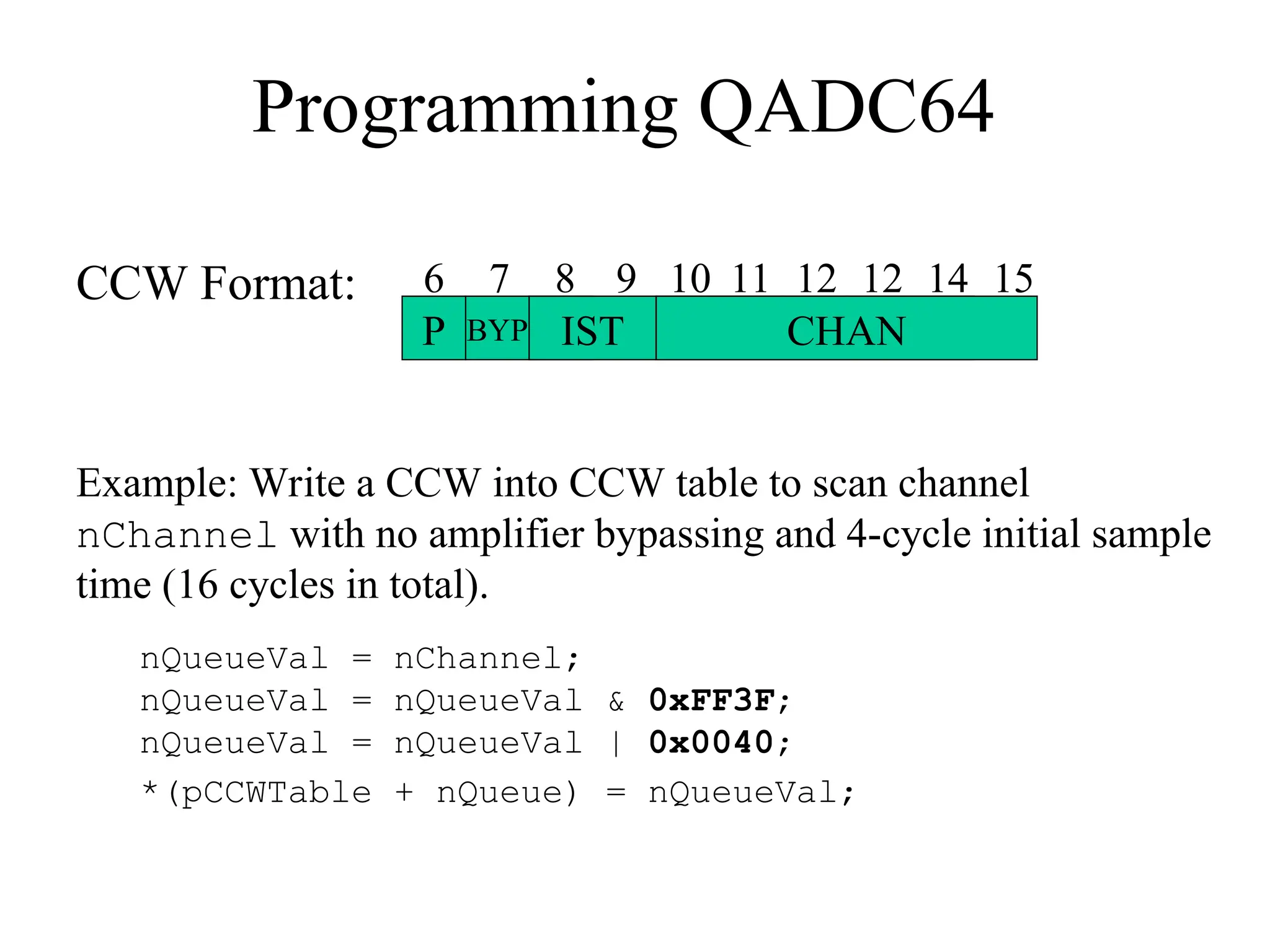
Programming QADC64
CCW Format:
P BYP IST CHAN
6 7 8 9 10 11 12 12 14 15
Example: Write a CCW into CCW table to scan channel
nChannel with no amplifier bypassing and 4-cycle initial sample
time (16 cycles in total).
nQueueVal = nChannel;
nQueueVal = nQueueVal & 0xFF3F;
nQueueVal = nQueueVal | 0x0040;
*(pCCWTable + nQueue) = nQueueVal;
The Control Registers
The Status Registers
CF1 Queue1 completion flag
PF1 Queue1 pause flag
TOR1 Trigger over-run
QS Queue status
CWP Command word pointer
Programming the ADC
• Initialize the QADC: reset queue to be
empty; set up interrupt driven mode,
interrupt levels, clock rate.
• Write into the command word queue (a
sequence of A to D conversion commands).
• In software triggered mode, initiate the
conversion by writing into QACR[SSE] bit.
• Monitor the conversion finished flag (CF).
• Read the results, and reset CF and PF flags.
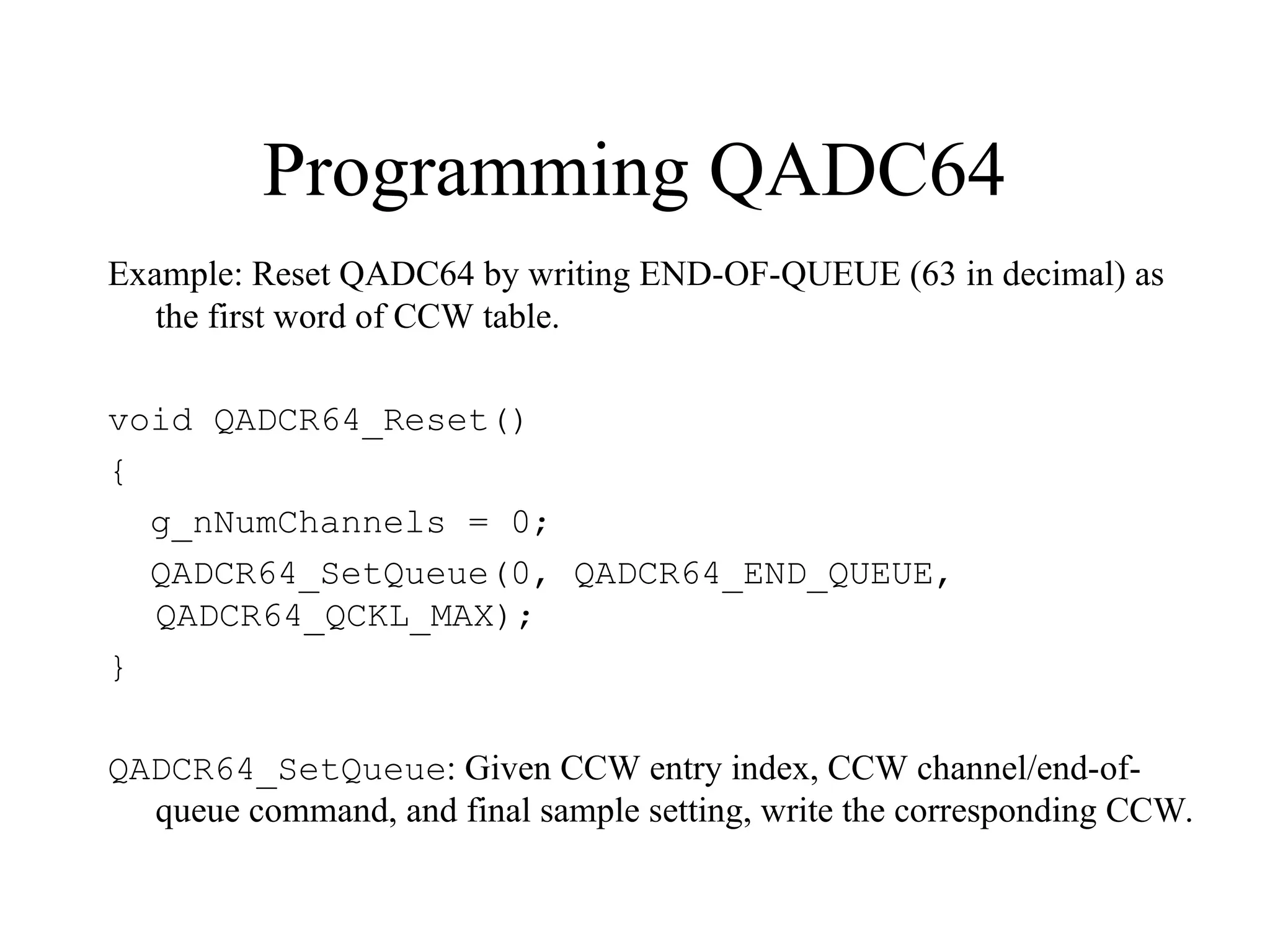
Programming QADC64
Example: Reset QADC64 by writing END-OF-QUEUE (63 in decimal) as
the first word of CCW table.
void QADCR64_Reset()
{
g_nNumChannels = 0;
QADCR64_SetQueue(0, QADCR64_END_QUEUE,
QADCR64_QCKL_MAX);
}
QADCR64_SetQueue: Given CCW entry index, CCW channel/end-of-
queue command, and final sample setting, write the corresponding CCW.
Programming QADC64
Example: Start scanning in polling mode (interrupt disabled)
– Set up control register 1
void QADCR64_Start_Convert_Poll ()
{
unsigned short * pQACR1;
pQACR1 = (unsigned short *) 0x30480C;
// Bit 0 CIE1 Conversion Interrupt Enable 0
// Bit 1 PIE1 Pause Interrupt Enable 0
// Bit 2 SSE1 Single Scan Enable 1
// MQ=00001; software triggered single scan mode
*pQACR1 = 0x2100;
}
Programming QADC64
Example: Determine if all conversions has finished
– Checking status register 0
unsigned short QADCR64_Is_Done()
{
unsigned short * pQASR0;
unsigned short nResult;
pQASR0 = (unsigned short *) 0x304810;
nResult = (*pQASR0 & 0x8000);
return nResult;
}
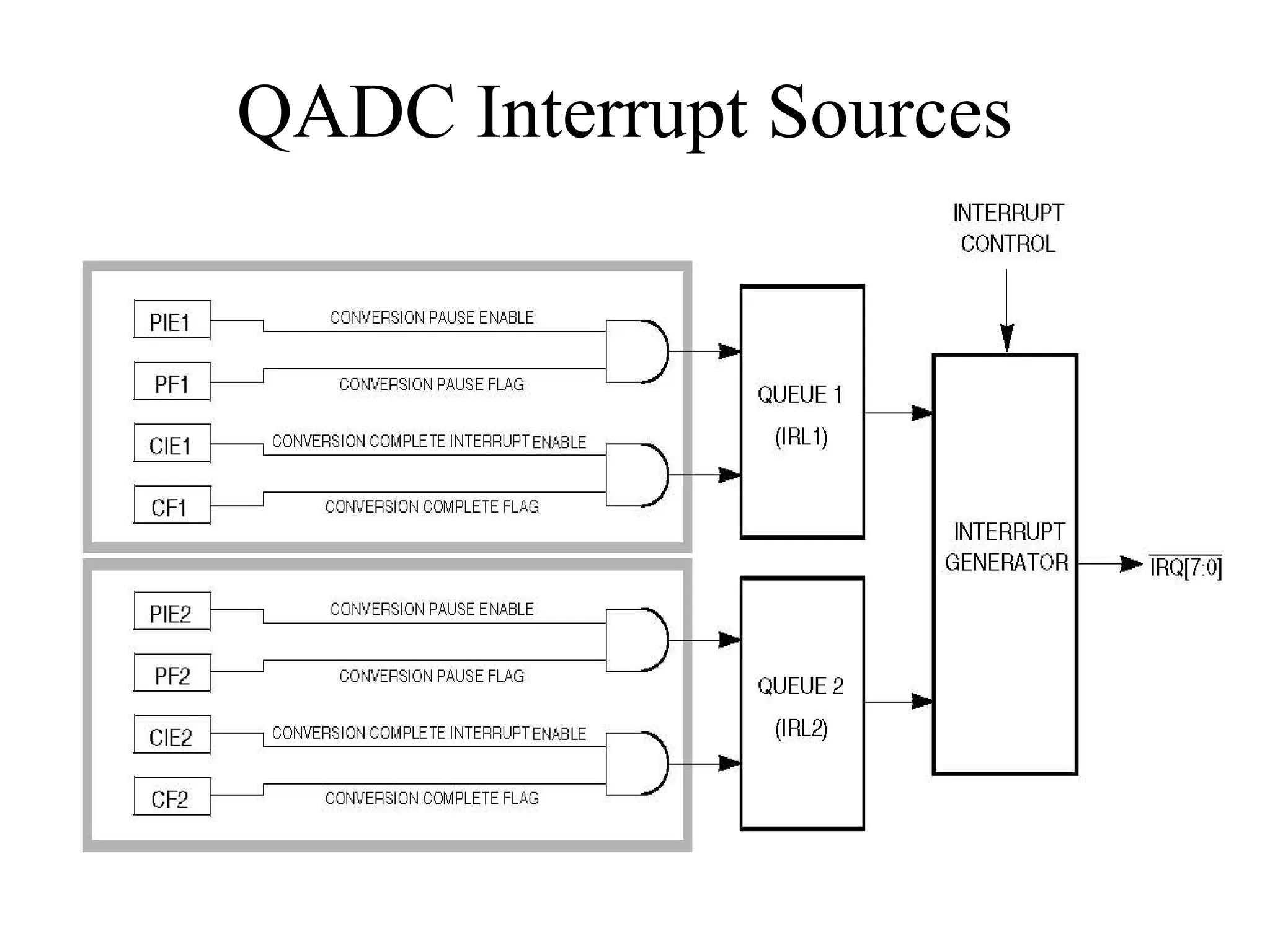
QADC Interrupt Sources
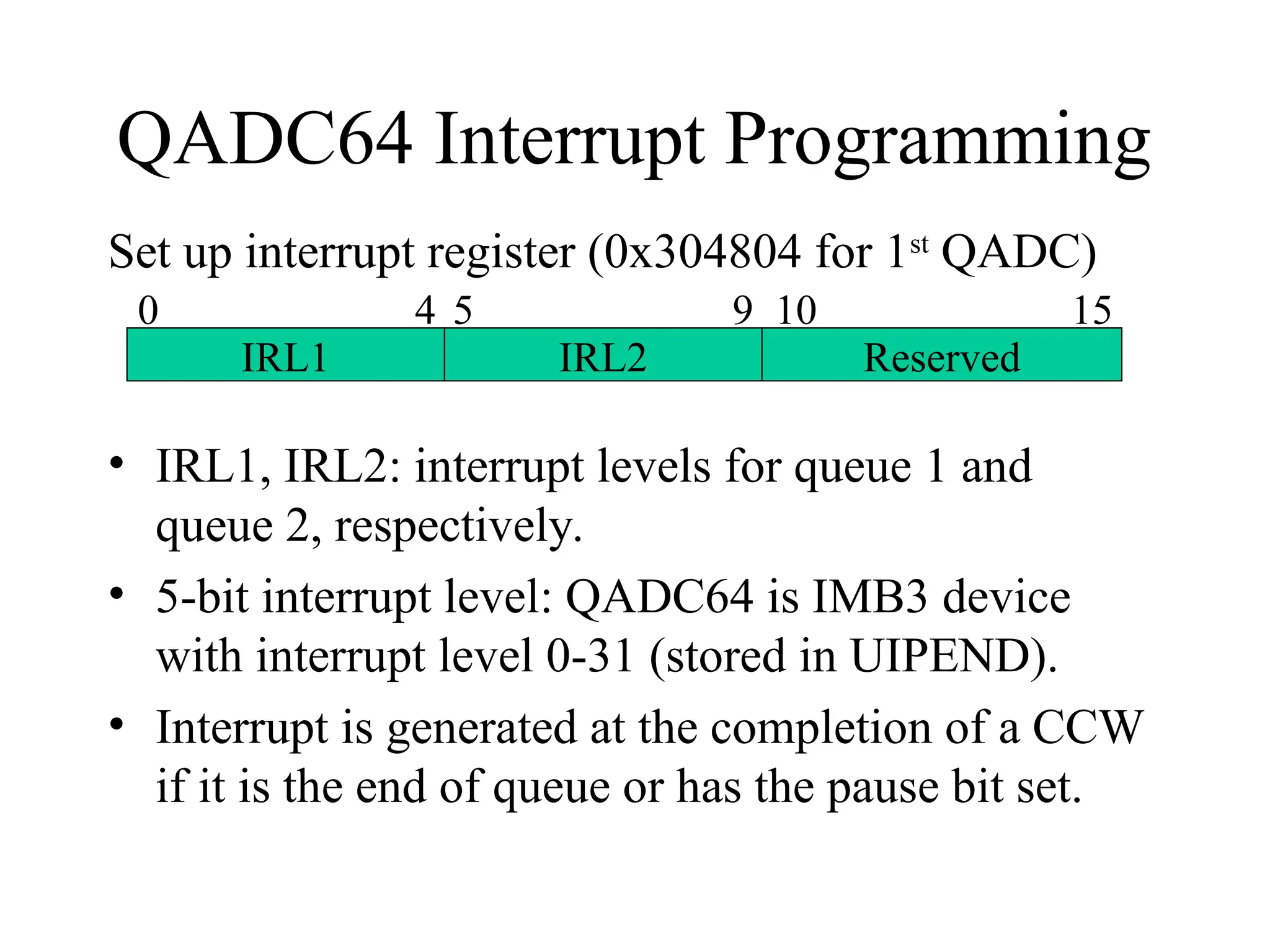
QADC64 Interrupt Programming
Set up interrupt register (0x304804 for 1st
QADC)
• IRL1, IRL2: interrupt levels for queue 1 and
queue 2, respectively.
• 5-bit interrupt level: QADC64 is IMB3 device
with interrupt level 0-31 (stored in UIPEND).
• Interrupt is generated at the completion of a CCW
if it is the end of queue or has the pause bit set.
IRL1 IRL2 Reserved
0 4 5 9 10 15
analog to digital conversion FOR ELC.ppt

  • 1.
    Analog-to-Digital Conversion Terminology analog: continuouslyvalued signal, such as temperature or speed, with infinite possible values in between digital: discretely valued signal, such as integers, encoded in binary analog-to-digital converter: ADC, A/D, A2D; converts an analog signal to a digital signal digital-to-analog converter: DAC, D/A, D2A An embedded system’s surroundings typically involve many analog signals.
  • 2.
    Analog-to-digital converters proportionality Vmax =7.5V 0V 1111 1110 0000 0010 0100 0110 1000 1010 1100 0001 0011 0101 0111 1001 1011 1101 0.5V 1.0V 1.5V 2.0V 2.5V 3.0V 3.5V 4.0V 4.5V 5.0V 5.5V 6.0V 6.5V 7.0V analog to digital 4 3 2 1 t1 t2 t3 t4 0100 0110 0110 0101 time analog input (V) Digital output digital to analog 4 3 2 1 0100 1000 0110 0101 t1 t2 t3 t4 time analog output (V) Digital input Embedded Systems Design: A Unified Hardware/Software Introduction, (c) 2000 Vahid/Givargis
  • 3.
    Proportional Signals Simple Equation Assumeminimum voltage of 0 V. Vmax = maximum voltage of the analog signal a = analog value n = number of bits for digital encoding 2n = number of digital codes M = number of steps, either 2n or 2n – 1 d = digital encoding a / Vmax = d / M Vmax 0 V 1..1 = 2n -1 … 0..0 = 0
  • 4.
    Resolution Let n =2 M = 2n – 1 3 steps on the digital scale d0 = 0 = 0b00 dVmax = 3 = 0b11 M = 2n 4 steps on the digital scale d0 = 0 = 0b00 dVmax - r = 3 = 0b11 (no dVmax ) r, resolution: smallest analog change resulting from changing one bit Vmax 0 V 3=11 2=10 1=01 0=00 r 3=11 2=10 1=01 0=00
  • 5.
    DAC vs. ADC DAC: ndigital inputs for digital encoding d analog input for Vmax analog output a ADC: Given a Vmax analog input and an analog input a, how does the converter know what binary value to assign to d in order to satisfy the ratio? – may use DAC to generate analog values for comparison with a – ADC “guesses” an encoding d, then checks its guess by inputting d into the DAC and comparing the generated analog output a’ with original analog input a – How does the ADC guess the correct encoding? DAC Vmax x0 x1 Xn-1 … a
  • 6.
    ADC: Digital Encoding Guessingthe encoding is similar to finding an item in a list. 1. Sequential search – counting up: start with an encoding of 0, then 1, then 2, etc. until find a match. • 2n comparisons: Slow! 2. Binary search – successive approximation: start with an encoding for half of maximum; then compare analog result with original analog input; if result is greater (less) than the original, set the new encoding to halfway between this one and the minimum (maximum); continue dividing encoding range in half until the compared voltages are equal • n comparisons: Faster, but more complex converter  Takes time to guess the encoding: start conversion input, conversion complete output
  • 7.
    ADC using successive approximation •Given an analog input signal whose voltage should range from 0 to 15 volts, and an 8-bit digital encoding, calculate the correct encoding for 5 volts. Then trace the successive-approximation approach to find the correct encoding. • Assume M = 2n – 1 a / Vmax = d / M 5 / 15 = d / (256 - 1) d = 85 or binary 01010101
  • 8.
    ADC using successive approximation 01 0 0 0 0 0 0 ½(Vmax – Vmin) = 7.5 volts Vmax = 7.5 volts. ½(7.5 + 0) = 3.75 volts Vmin = 3.75 volts. 0 0 0 0 0 0 0 0 0 1 0 0 0 0 0 0 ½(7.5 + 3.75) = 5.63 volts Vmax = 5.63 volts ½(5.63 + 3.75) = 4.69 volts Vmin = 4.69 volts. 0 1 0 1 0 0 0 0 Embedded Systems Design: A Unified Hardware/Software Introduction, (c) 2000 Vahid/Givargis Step 1-4: determine bits 0-3
  • 9.
    ADC using successive approximation ½(5.63+ 4.69) = 5.16 volts Vmax = 5.16 volts. 0 1 0 1 0 0 0 0 ½(5.16 + 4.69) = 4.93 volts Vmin = 4.93 volts. 0 1 0 1 0 1 0 0 ½(5.16 + 4.93) = 5.05 volts Vmax = 5.05 volts. 0 1 0 1 0 1 0 0 ½(5.05 + 4.93) = 4.99 volts 0 1 0 1 0 1 0 1 Embedded Systems Design: A Unified Hardware/Software Introduction, (c) 2000 Vahid/Givargis Step 5-8: Determine bits 4-7
  • 10.
  • 11.
    Bit Weight Notice theconcept of bit weight in the last example: bit 7 = 7.5 V = 15/2 bit 6 = 3.75 V = 15/4 Each bit is weighted with an analog value, such that a 1 in that bit position adds its analog value to the total analog value represented by the digital encoding. Example: -5 V to +5 V analog range, n=8 Digital Bit Bit Weight (V) 7 10/2 = 5 6 10/4 = 2.5 5 10/8 = 1.25 4 10/16 = 0.625 3 10/32 = 0.313 2 10/64 = 0.157 1 10/128 = 0.078 0 10/256 = 0.039
  • 12.
    Bit Weight Example (continued):-5 V to +5 V analog range, n=8 Digital numbers for a few analog values – Values shown increment by 6 bits (weight for bit position 5 is 1.25 V) – Maximum digital number only approximates the maximum analog value in the range • Try (-5) + sum of all bit weights Analog (V) Digital (hex) -5 00 -3.75 20 -2.5 40 -1.25 60 0 80 1.25 A0 2.5 C0 3.75 E0 5-0.039 = 4.961 FF
  • 13.
    Terms & Equations Offset:minimum analog value Span (or Range): difference between maximum and minimum analog values Max - Min n: number of bits in digital code (sometimes referred to as n-bit resolution) Bit Weight: analog value corresponding to a bit in the digital number Step Size (or Resolution): smallest analog change resulting from changing one bit in the digital number, or the analog difference between two consecutive digital numbers; also the bit weight of the Span / 2n (Assume M = 2n ) Let AV be Analog Value; DN be Digital Number: AV = DN * Step Size + Offset = (DN / 2n )* Span + Offset DN = (AV - Offset) / Step Size = (AV - Offset) * 2n / Span
  • 14.
    MPC555 QADC64 QADC64 -Queued Analog to Digital Converter Module-64 • 16 analog channels via internal multiplexing • 10-bit ADC resolution • Converts voltage to an integer value (0-1023) • Polling or interrupt driven • Programmable channels AN0-ANx
  • 15.
  • 16.
    MPC555 QADC64 AN0 AN1 AN2 AN3 ADC CCWTable CCW0 CCW1 … CCW63 A CCW tells the ADC which channel to scan and how long to sample the signal. Result Table Result0 Result1 … Result63 A Result is stored for each scan of a channel when the conversion is complete. QACR1: start a scan by setting SSE bit QASR0: CF flag is set after conv is done
  • 17.
    Scan Sequence andConversion • After the ADC is initialized, a sequence of scans is set up as a “queue” in the CCW Table. • Each channel to be scanned is added to the queue at successive positions 0, 1, 2, etc. For example: CCW0, CCW1, CCW2, CCW3. – An end-of-queue marker should be added at the next position. • The ADC starts the scan and conversion when it is triggered by the enable bit. • The ADC reads the CCWs, one after another until end-of-queue is reached, and for each CCW, it converts the signal on the specified channel. – A conversion on a channel stores a result in the respective position of the Result Table, e.g., the result for CCW0 is stored at Result0, etc. • When the scan and conversion is complete for all CCWs, then the ADC sets the completion flag to 1. Now all digital results are available to be read from the Result Table.
  • 18.
    QADC Interface • Programmabilityusing a queue – Scan a few channels quickly – Scan a channel multiple times – Scan large number of channels • QACR1 – QADC64 Control Register 1 o 16 bit register at 0x30480C o SSE1 – bit 2 – Single Scan enable (bit 0 is MSb) o MQ1 – bits 3-7 o Set to binary 00001 to identify Queue 1 • QASR0 – QADC64 Status Register 0 o 16 bit register at 0x304810 o ADC sets a flag when the conversion is done o CF1 – bit 0 – Conversion Complete flag (bit 0 is MSb)
  • 19.
    QADC Interface • CCWTable o table of Conversion Command Words, where each command word specifies how to perform a scan/conversion operation for an input channel o CCW: 16 bit command word, starting at address 0x304A00 o A queue is a scan sequence of one or more input channels. o A queue is started by a trigger event, which is a way to cause the QADC64 to begin executing the command words. o Each CCW requests the conversion of an analog channel to a digital result. The CCW specifies the analog channel number, the input sample time, and whether the queue is to pause after the current CCW. Begin Queue 1 16 bits Entry 00 End Queue 1 n 0x304A00 CCW Table 0 Reserved 5 6 P BYP 7 IST 8 9 CHAN 10 15 MSB LSB
  • 20.
    QADC Interface • Totalconversion time: initial sample time, final sample time, and resolution time o Initial sample time – time during which the selected input channel is driven by the buffer amplifier onto the sample capacitor (disabled by means of the BYP bit in the CCW) o Final sampling period – time to set up DAC array o Resolution period – time to convert voltage in the DAC array to a digital value
  • 21.
    QADC Interface • ResultWord Table o table of Result Words, where each result word is the digital result of a conversion o Results from a sequence of conversions are placed in the Result Word Table. o RW: 16 bit result word, starting at address 0x304A80 • Programming the QADC: – Reset the ADC queue – Add (to the queue) each analog input channel to be scanned; e.g., four channels, 0 through 3 (AN0-AN3) – Add an end-of-queue marker to terminate the scan sequence – Start a conversion on the ADC, which begins reading each analog input and converting it to a digital value
  • 22.
    QADC64 Memory-mapping Layout ModuleConfig. Reg. Port A Data Port A Direction Reg. Control Reg. 0 Control Reg. 1 Control Reg. 2 Status Reg. 0 Status Reg. 1 Port B Data Test Reg. Interrupt Reg. 0x30 4800 Bit 0 Bit 15 0x30 4802 0x30 4804 0x30 4806 0x30 4808 0x30 480A 0x30 480C 0x30 480E 0x30 4810 0x30 4812 64-entry 16-bit Conversion Command Word Table (Configurable: one queue or two queues) 0x30 4A00 0x30 4A7E 64-entry 16-bit Result Word Table 64-entry, 16-bit 0x30 4A80 0x30 4AFE The above is the memory-mapping for the 1st QADC64. The 2nd QADC64 using different starting addresses.
  • 23.
    Programming QADC64 CCW Format: PBYP IST CHAN 6 7 8 9 10 11 12 12 14 15 Example: Write a CCW into CCW table to scan channel nChannel with no amplifier bypassing and 4-cycle initial sample time (16 cycles in total). nQueueVal = nChannel; nQueueVal = nQueueVal & 0xFF3F; nQueueVal = nQueueVal | 0x0040; *(pCCWTable + nQueue) = nQueueVal;
  • 24.
  • 25.
    The Status Registers CF1Queue1 completion flag PF1 Queue1 pause flag TOR1 Trigger over-run QS Queue status CWP Command word pointer
  • 26.
    Programming the ADC •Initialize the QADC: reset queue to be empty; set up interrupt driven mode, interrupt levels, clock rate. • Write into the command word queue (a sequence of A to D conversion commands). • In software triggered mode, initiate the conversion by writing into QACR[SSE] bit. • Monitor the conversion finished flag (CF). • Read the results, and reset CF and PF flags.
  • 27.
    Programming QADC64 Example: ResetQADC64 by writing END-OF-QUEUE (63 in decimal) as the first word of CCW table. void QADCR64_Reset() { g_nNumChannels = 0; QADCR64_SetQueue(0, QADCR64_END_QUEUE, QADCR64_QCKL_MAX); } QADCR64_SetQueue: Given CCW entry index, CCW channel/end-of- queue command, and final sample setting, write the corresponding CCW.
  • 28.
    Programming QADC64 Example: Startscanning in polling mode (interrupt disabled) – Set up control register 1 void QADCR64_Start_Convert_Poll () { unsigned short * pQACR1; pQACR1 = (unsigned short *) 0x30480C; // Bit 0 CIE1 Conversion Interrupt Enable 0 // Bit 1 PIE1 Pause Interrupt Enable 0 // Bit 2 SSE1 Single Scan Enable 1 // MQ=00001; software triggered single scan mode *pQACR1 = 0x2100; }
  • 29.
    Programming QADC64 Example: Determineif all conversions has finished – Checking status register 0 unsigned short QADCR64_Is_Done() { unsigned short * pQASR0; unsigned short nResult; pQASR0 = (unsigned short *) 0x304810; nResult = (*pQASR0 & 0x8000); return nResult; }
  • 30.
  • 31.
    QADC64 Interrupt Programming Setup interrupt register (0x304804 for 1st QADC) • IRL1, IRL2: interrupt levels for queue 1 and queue 2, respectively. • 5-bit interrupt level: QADC64 is IMB3 device with interrupt level 0-31 (stored in UIPEND). • Interrupt is generated at the completion of a CCW if it is the end of queue or has the pause bit set. IRL1 IRL2 Reserved 0 4 5 9 10 15