An easy, small but powerful WebLog analyzer – WebLog Expert Albert Guo [email_address]
Agenda WebLog Expert Introduction WebLog Expert Features Demo – Take CMCS for example Comparison – Professional, Standard, Lite
WebLog Expert Introduction
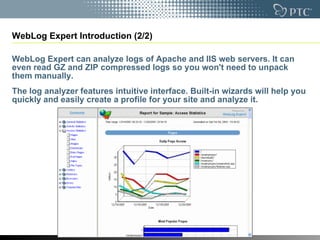
WebLog Expert Introduction (1/2) http://www.weblogexpert.com/index.htm   WebLog Expert is a fast and powerful access log analyzer. It will give you information about your site's visitors: activity statistics, accessed files, paths through the site, information about referring pages, search engines, browsers, operating systems, and more.  The program produces easy-to-read HTML reports that include both text information (tables) and charts.  View the WebLog Expert sample report ( http://www.weblogexpert.com/sample/index.htm  ) to get the general idea of the variety of information about your site's usage it can provide.
WebLog Expert Introduction (2/2) WebLog Expert can analyze logs of Apache and IIS web servers. It can even read GZ and ZIP compressed logs so you won't need to unpack them manually. The log analyzer features intuitive interface. Built-in wizards will help you quickly and easily create a profile for your site and analyze it.
WebLog Expert Features
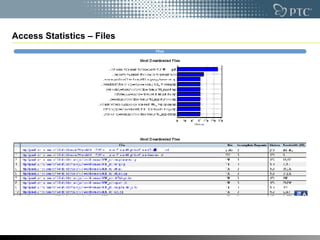
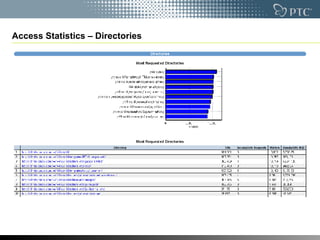
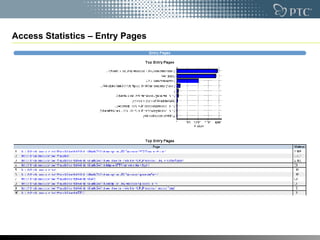
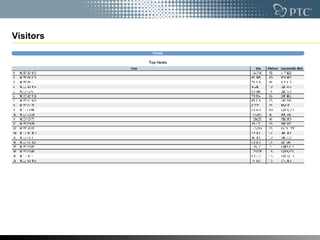
WebLog Expert Features (1/4) Reports General statistics  Activity statistics: daily, by hours of the day, by days of the week and by months  Access statistics: statistics for pages, files, images, directories, entry pages, exit pages, paths through the site and file types  Information about visitors: hosts, top-level domains, countries, states, cities, organizations, authenticated users  Referrers: referring sites, URLs, search engines (including information about search phrases and keywords)  Browsers, operating systems and spiders statistics  Information about errors: error types, detailed 404 error information  Tracked files statistics (activity and referrers)
WebLog Expert Features (2/4) Filters Hit (log entry) filters: host, requested file, query, referrer, status code, method, authenticated user, OS, browser, spider, country, day of the week, hour of the day, virtual domain  Visitor filters: visitors who accessed a specific file, visitors who came from a specific referring URL, visitors with a specified entry page, visitors with a specified exit page
WebLog Expert Features (3/4) Other Works under Windows 95/98/Me/NT/2000/XP/2003/Vista operating system  Supports Apache (Combined and Common) and IIS 4/5/6 logs  Automatically detects the log format  Can read GZ and ZIP compressed logs  Can download logs via FTP and HTTP  Log cache for downloaded log files  Can create HTML (sample), PDF (sample) and CSV (sample) reports  Reports in multiple languages  Can upload reports via FTP and send via e-mail (SMTP or MAPI)  Built-in scheduler
WebLog Expert Features (4/4) IP to country mapping database  Additional city, state and organization databases  Supports date macros  Multithreaded DNS lookup  Supports command line mode
Demo – Take CMCS for example
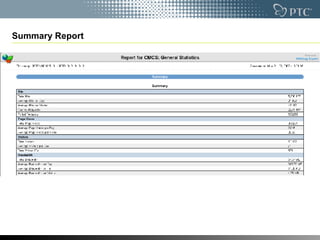
Summary Report
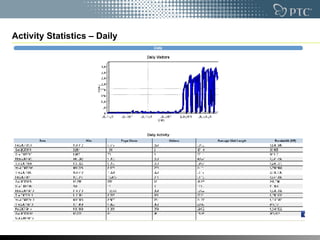
Activity Statistics – Daily
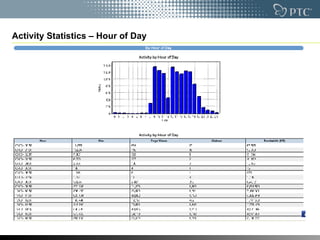
Activity Statistics – Hour of Day
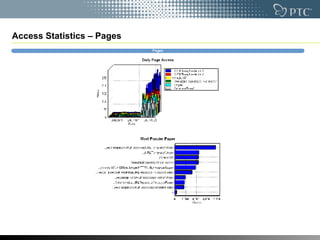
Access Statistics – Pages
Access Statistics – Files
Access Statistics – Directories
Access Statistics – Entry Pages
Visitors
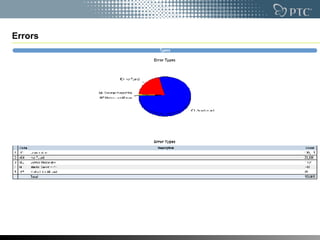
Errors
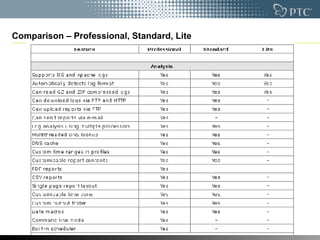
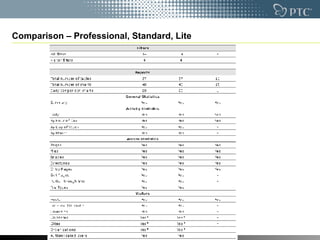
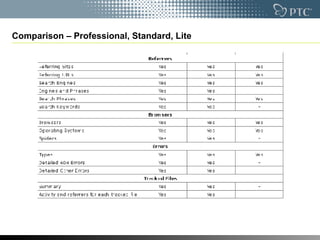
Comparison – Professional, Standard, Lite

An Easy, Small But Powerful Web Log Analyzer Web Log Expert

  • 1.
    An easy, smallbut powerful WebLog analyzer – WebLog Expert Albert Guo [email_address]
  • 2.
    Agenda WebLog ExpertIntroduction WebLog Expert Features Demo – Take CMCS for example Comparison – Professional, Standard, Lite
  • 3.
  • 4.
    WebLog Expert Introduction(1/2) http://www.weblogexpert.com/index.htm WebLog Expert is a fast and powerful access log analyzer. It will give you information about your site's visitors: activity statistics, accessed files, paths through the site, information about referring pages, search engines, browsers, operating systems, and more. The program produces easy-to-read HTML reports that include both text information (tables) and charts. View the WebLog Expert sample report ( http://www.weblogexpert.com/sample/index.htm ) to get the general idea of the variety of information about your site's usage it can provide.
  • 5.
    WebLog Expert Introduction(2/2) WebLog Expert can analyze logs of Apache and IIS web servers. It can even read GZ and ZIP compressed logs so you won't need to unpack them manually. The log analyzer features intuitive interface. Built-in wizards will help you quickly and easily create a profile for your site and analyze it.
  • 6.
  • 7.
    WebLog Expert Features(1/4) Reports General statistics Activity statistics: daily, by hours of the day, by days of the week and by months Access statistics: statistics for pages, files, images, directories, entry pages, exit pages, paths through the site and file types Information about visitors: hosts, top-level domains, countries, states, cities, organizations, authenticated users Referrers: referring sites, URLs, search engines (including information about search phrases and keywords) Browsers, operating systems and spiders statistics Information about errors: error types, detailed 404 error information Tracked files statistics (activity and referrers)
  • 8.
    WebLog Expert Features(2/4) Filters Hit (log entry) filters: host, requested file, query, referrer, status code, method, authenticated user, OS, browser, spider, country, day of the week, hour of the day, virtual domain Visitor filters: visitors who accessed a specific file, visitors who came from a specific referring URL, visitors with a specified entry page, visitors with a specified exit page
  • 9.
    WebLog Expert Features(3/4) Other Works under Windows 95/98/Me/NT/2000/XP/2003/Vista operating system Supports Apache (Combined and Common) and IIS 4/5/6 logs Automatically detects the log format Can read GZ and ZIP compressed logs Can download logs via FTP and HTTP Log cache for downloaded log files Can create HTML (sample), PDF (sample) and CSV (sample) reports Reports in multiple languages Can upload reports via FTP and send via e-mail (SMTP or MAPI) Built-in scheduler
  • 10.
    WebLog Expert Features(4/4) IP to country mapping database Additional city, state and organization databases Supports date macros Multithreaded DNS lookup Supports command line mode
  • 11.
    Demo – TakeCMCS for example
  • 12.
  • 13.
  • 14.
  • 15.
  • 16.
  • 17.
  • 18.
  • 19.
  • 20.
  • 21.
  • 22.
  • 23.
  • 24.