COLOR SENSOR
BEGINNER
PROGRAMMING
LESSON
Lesson Objectives
1. Learn how to use the Color Sensor
2. Learn about Coast and Brake
© EV3LESSONS.COM, 2016, (LAST EDIT: 7/04/2016) 2
What is a sensor?
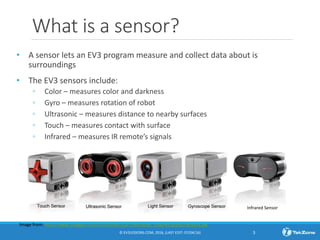
• A sensor lets an EV3 program measure and collect data about is
surroundings
• The EV3 sensors include:
◦ Color – measures color and darkness
◦ Gyro – measures rotation of robot
◦ Ultrasonic – measures distance to nearby surfaces
◦ Touch – measures contact with surface
◦ Infrared – measures IR remote’s signals
© EV3LESSONS.COM, 2016, (LAST EDIT: 07/04/16) 3
Image from: http://www.ucalgary.ca/IOSTEM/files/IOSTEM/media_crop/44/public/sensors.jpg
Infrared Sensor
What is the color sensor?
• What are they? Sensors that detect the intensity of light that enters it
• Three modes: Color, Reflected Light Intensity and Ambient Light Intensity
◦ Color Mode: Recognizes 7 colors (black, brown, blue, green, yellow, red, white)
and No Color
◦ Reflected Light: Measures the intensity of the light reflected back from a lamp
that emits a red light. (0=very dark and 100=very light)
◦ Ambient Light: Measures the strength of the light that enters the sensor from
the environment. (0=very dark and 100=very light)
• USES:
◦ Move until a line, Follow a line, Find a color
◦ Play a game using the color sensor
© EV3LESSONS.COM, 2016, (LAST EDIT: 7/04/2016) 4
reflected light mode…
R shines a light on the mat and reads the reflected
ensity) level, i.e. dark or bright, to help the robot
and through programming take action.
es from 0-100%
We will use COLOR MODE in this Lesson
ANOTHER MOVE STEERING TIP:
COAST or Brake?
• Something more about the Move Steering Block
• You will notice you have an option to COAST or
BRAKE
• Coast will make the motors keep moving. Brake
makes the motors stop immediately.
• Which do you use to stop EXACTLY on a colored line?
© EV3LESSONS.COM, 2016, (LAST EDIT: 7/04/2016) 5
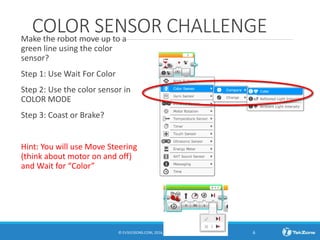
COLOR SENSOR CHALLENGEMake the robot move up to a
green line using the color
sensor?
Step 1: Use Wait For Color
Step 2: Use the color sensor in
COLOR MODE
Step 3: Coast or Brake?
Hint: You will use Move Steering
(think about motor on and off)
and Wait for “Color”
© EV3LESSONS.COM, 2016, (LAST EDIT: 7/04/2016) 6
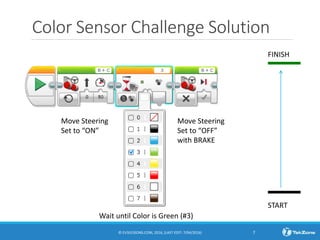
Color Sensor Challenge Solution
© EV3LESSONS.COM, 2016, (LAST EDIT: 7/04/2016) 7
FINISH
START
Move Steering
Set to “OFF”
with BRAKE
Move Steering
Set to “ON”
Wait until Color is Green (#3)
DISCUSSION GUIDE
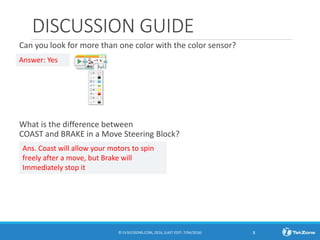
Can you look for more than one color with the color sensor?
What is the difference between
COAST and BRAKE in a Move Steering Block?
© EV3LESSONS.COM, 2016, (LAST EDIT: 7/04/2016) 8
Answer: Yes
Ans. Coast will allow your motors to spin
freely after a move, but Brake will
Immediately stop it
End of the lesson
9
reflected
he robot

An color Sensor - Beginner

  • 1.
  • 2.
    Lesson Objectives 1. Learnhow to use the Color Sensor 2. Learn about Coast and Brake © EV3LESSONS.COM, 2016, (LAST EDIT: 7/04/2016) 2
  • 3.
    What is asensor? • A sensor lets an EV3 program measure and collect data about is surroundings • The EV3 sensors include: ◦ Color – measures color and darkness ◦ Gyro – measures rotation of robot ◦ Ultrasonic – measures distance to nearby surfaces ◦ Touch – measures contact with surface ◦ Infrared – measures IR remote’s signals © EV3LESSONS.COM, 2016, (LAST EDIT: 07/04/16) 3 Image from: http://www.ucalgary.ca/IOSTEM/files/IOSTEM/media_crop/44/public/sensors.jpg Infrared Sensor
  • 4.
    What is thecolor sensor? • What are they? Sensors that detect the intensity of light that enters it • Three modes: Color, Reflected Light Intensity and Ambient Light Intensity ◦ Color Mode: Recognizes 7 colors (black, brown, blue, green, yellow, red, white) and No Color ◦ Reflected Light: Measures the intensity of the light reflected back from a lamp that emits a red light. (0=very dark and 100=very light) ◦ Ambient Light: Measures the strength of the light that enters the sensor from the environment. (0=very dark and 100=very light) • USES: ◦ Move until a line, Follow a line, Find a color ◦ Play a game using the color sensor © EV3LESSONS.COM, 2016, (LAST EDIT: 7/04/2016) 4 reflected light mode… R shines a light on the mat and reads the reflected ensity) level, i.e. dark or bright, to help the robot and through programming take action. es from 0-100% We will use COLOR MODE in this Lesson
  • 5.
    ANOTHER MOVE STEERINGTIP: COAST or Brake? • Something more about the Move Steering Block • You will notice you have an option to COAST or BRAKE • Coast will make the motors keep moving. Brake makes the motors stop immediately. • Which do you use to stop EXACTLY on a colored line? © EV3LESSONS.COM, 2016, (LAST EDIT: 7/04/2016) 5
  • 6.
    COLOR SENSOR CHALLENGEMakethe robot move up to a green line using the color sensor? Step 1: Use Wait For Color Step 2: Use the color sensor in COLOR MODE Step 3: Coast or Brake? Hint: You will use Move Steering (think about motor on and off) and Wait for “Color” © EV3LESSONS.COM, 2016, (LAST EDIT: 7/04/2016) 6
  • 7.
    Color Sensor ChallengeSolution © EV3LESSONS.COM, 2016, (LAST EDIT: 7/04/2016) 7 FINISH START Move Steering Set to “OFF” with BRAKE Move Steering Set to “ON” Wait until Color is Green (#3)
  • 8.
    DISCUSSION GUIDE Can youlook for more than one color with the color sensor? What is the difference between COAST and BRAKE in a Move Steering Block? © EV3LESSONS.COM, 2016, (LAST EDIT: 7/04/2016) 8 Answer: Yes Ans. Coast will allow your motors to spin freely after a move, but Brake will Immediately stop it
  • 9.
    End of thelesson 9 reflected he robot