TOUCH SENSOR
BEGINNER
PROGRAMMING
LESSON
Lesson Objectives
1. Learn how to use the Touch Sensor
2. Learn how to use the Wait For Block
3. Learn the difference between the Wait For Block and the Sensor Blocks
4. Learn when to use Move Block’s “On” mode
© EV3LESSONS.COM, 2016, (LAST EDIT: 07/04/16) 2
What is a sensor?
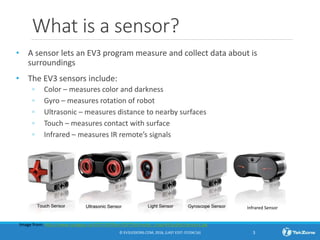
• A sensor lets an EV3 program measure and collect data about is
surroundings
• The EV3 sensors include:
◦ Color – measures color and darkness
◦ Gyro – measures rotation of robot
◦ Ultrasonic – measures distance to nearby surfaces
◦ Touch – measures contact with surface
◦ Infrared – measures IR remote’s signals
© EV3LESSONS.COM, 2016, (LAST EDIT: 07/04/16) 3
Image from: http://www.ucalgary.ca/IOSTEM/files/IOSTEM/media_crop/44/public/sensors.jpg
Infrared Sensor
WHAT IS A TOUCH SENSOR?
• Touch Sensor can detect when the sensor’s red button has
been pressed or released
• With this information, you can program an action when the
sensor is:
Currently Pressed
Currently Released
Pressed and Released Just Before (Bumped)
• When might you use this sensor?
◦ Useful for programming “moving until touch sensor is
pressed/released/bumped”
◦ For example, if you put a touch sensor on the front the robot,
you can have it stop moving if it runs into something.
◦ You can also have your program start or stop when a touch
sensor is pressed.
© EV3LESSONS.COM, 2016, (LAST EDIT: 07/04/16) 4
What Does “Bumped” Mean?*
Time Action Pressed Released Bumped
1 Button starts released False True False
2 Button is pressed in True False False
3 Button is released, and program reads sensor False True True
4 Button is still released, and the program tests the
Touch Sensor again
False True False
5 Button is pressed a second time True False False
6 Button is released, but the program does not read
the sensor
200 secs
later…
Program reads sensor False True True
201 Button is still released, and the program tests the
Touch Sensor again
False True False
© EV3LESSONS.COM, 2016, (LAST EDIT: 07/04/16) 5
The sensor basically is like a True/False switch
“Bumped” can be tricky. What conditions must be there for the sensor to read True
for Bumped?
* Based on the Lego EV3 help screen
HOW Do you program with the Touch
Sensor?
Yellow Sensor Tab:
Sensor Blocks
• Used to Read and
Compare Sensor
Values
© EV3LESSONS.COM, 2016, (LAST EDIT: 07/04/16) 6
Orange Flow Tab:
Wait for Block
• Used to wait
for a sensor
reading (or
time)
There is a Touch Sensor Block in the Yellow Tab, but there is a Wait for
Touch in the Orange Tab. What is the difference!!????!
Move on and OFF
© EV3LESSONS.COM, 2016, (LAST EDIT: 07/04/16) 7
Rookie Tip: Motor On needs to
be followed by another block
(e.g. Wait Block)
What would happen if you placed a Move Steering
Block and left the motor “On”?
Would the robot…
1) Move?
2) Move for a little while?
3) Not move at all?
ANS. Not move at all.
What does Motor Off do?
CHALLENGE 1
Program your robot to move
straight until you tap the
sensor with your hand.
© EV3LESSONS.COM, 2016, (LAST EDIT: 07/04/16) 8
T
0 = released
1 = pressed
2 = bumped
Hint: You will combine: Move
Steering + Wait Block
B
C
Challenge 1 Solution
Add screenshot
© EV3LESSONS.COM, 2016, (LAST EDIT: 07/04/16) 9
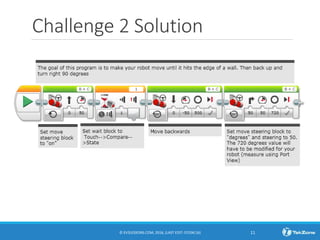
CHALLENGE 2
Program your robot to move
until it hits the edge of a wall.
Then back up and turn right
90 degrees.
© EV3LESSONS.COM, 2016, (LAST EDIT: 07/04/16) 10
T
0 = released
1 = pressed
2 = bumped
Hint: You will combine Move
Steering + Turning + Wait Block
B
C
Challenge 2 Solution
© EV3LESSONS.COM, 2016, (LAST EDIT: 07/04/16) 11
DISCUSSION
Why did you use MOTOR ON for these challenges?
You want to read the sensor while the motor is on.
Why do we use the WAIT FOR BLOCK in these challenges?
We need to program to wait for the correct reading
What is the difference between PRESSED, RELEASED and BUMPED?
PRESSED = pushed in, RELEASED = not pushed,
BUMPED = pressed and released recently
What are some situations you might want to use each of these for?
PRESSED = running into a wall, BUMPED = tapped by hand
RELEASED = no longer touching a wall
© EV3LESSONS.COM, 2016, (LAST EDIT: 07/04/16) 12
End of the lesson
13
B
C

Al touch2 - Beginner

  • 1.
  • 2.
    Lesson Objectives 1. Learnhow to use the Touch Sensor 2. Learn how to use the Wait For Block 3. Learn the difference between the Wait For Block and the Sensor Blocks 4. Learn when to use Move Block’s “On” mode © EV3LESSONS.COM, 2016, (LAST EDIT: 07/04/16) 2
  • 3.
    What is asensor? • A sensor lets an EV3 program measure and collect data about is surroundings • The EV3 sensors include: ◦ Color – measures color and darkness ◦ Gyro – measures rotation of robot ◦ Ultrasonic – measures distance to nearby surfaces ◦ Touch – measures contact with surface ◦ Infrared – measures IR remote’s signals © EV3LESSONS.COM, 2016, (LAST EDIT: 07/04/16) 3 Image from: http://www.ucalgary.ca/IOSTEM/files/IOSTEM/media_crop/44/public/sensors.jpg Infrared Sensor
  • 4.
    WHAT IS ATOUCH SENSOR? • Touch Sensor can detect when the sensor’s red button has been pressed or released • With this information, you can program an action when the sensor is: Currently Pressed Currently Released Pressed and Released Just Before (Bumped) • When might you use this sensor? ◦ Useful for programming “moving until touch sensor is pressed/released/bumped” ◦ For example, if you put a touch sensor on the front the robot, you can have it stop moving if it runs into something. ◦ You can also have your program start or stop when a touch sensor is pressed. © EV3LESSONS.COM, 2016, (LAST EDIT: 07/04/16) 4
  • 5.
    What Does “Bumped”Mean?* Time Action Pressed Released Bumped 1 Button starts released False True False 2 Button is pressed in True False False 3 Button is released, and program reads sensor False True True 4 Button is still released, and the program tests the Touch Sensor again False True False 5 Button is pressed a second time True False False 6 Button is released, but the program does not read the sensor 200 secs later… Program reads sensor False True True 201 Button is still released, and the program tests the Touch Sensor again False True False © EV3LESSONS.COM, 2016, (LAST EDIT: 07/04/16) 5 The sensor basically is like a True/False switch “Bumped” can be tricky. What conditions must be there for the sensor to read True for Bumped? * Based on the Lego EV3 help screen
  • 6.
    HOW Do youprogram with the Touch Sensor? Yellow Sensor Tab: Sensor Blocks • Used to Read and Compare Sensor Values © EV3LESSONS.COM, 2016, (LAST EDIT: 07/04/16) 6 Orange Flow Tab: Wait for Block • Used to wait for a sensor reading (or time) There is a Touch Sensor Block in the Yellow Tab, but there is a Wait for Touch in the Orange Tab. What is the difference!!????!
  • 7.
    Move on andOFF © EV3LESSONS.COM, 2016, (LAST EDIT: 07/04/16) 7 Rookie Tip: Motor On needs to be followed by another block (e.g. Wait Block) What would happen if you placed a Move Steering Block and left the motor “On”? Would the robot… 1) Move? 2) Move for a little while? 3) Not move at all? ANS. Not move at all. What does Motor Off do?
  • 8.
    CHALLENGE 1 Program yourrobot to move straight until you tap the sensor with your hand. © EV3LESSONS.COM, 2016, (LAST EDIT: 07/04/16) 8 T 0 = released 1 = pressed 2 = bumped Hint: You will combine: Move Steering + Wait Block B C
  • 9.
    Challenge 1 Solution Addscreenshot © EV3LESSONS.COM, 2016, (LAST EDIT: 07/04/16) 9
  • 10.
    CHALLENGE 2 Program yourrobot to move until it hits the edge of a wall. Then back up and turn right 90 degrees. © EV3LESSONS.COM, 2016, (LAST EDIT: 07/04/16) 10 T 0 = released 1 = pressed 2 = bumped Hint: You will combine Move Steering + Turning + Wait Block B C
  • 11.
    Challenge 2 Solution ©EV3LESSONS.COM, 2016, (LAST EDIT: 07/04/16) 11
  • 12.
    DISCUSSION Why did youuse MOTOR ON for these challenges? You want to read the sensor while the motor is on. Why do we use the WAIT FOR BLOCK in these challenges? We need to program to wait for the correct reading What is the difference between PRESSED, RELEASED and BUMPED? PRESSED = pushed in, RELEASED = not pushed, BUMPED = pressed and released recently What are some situations you might want to use each of these for? PRESSED = running into a wall, BUMPED = tapped by hand RELEASED = no longer touching a wall © EV3LESSONS.COM, 2016, (LAST EDIT: 07/04/16) 12
  • 13.
    End of thelesson 13 B C