
Information Design
                           implications for
   Americans with
Disabilities Act (ADA)
Agenda

› ADA Background
› Designing ADA complaint
  Instructional Messages
› Examples
› Summary
› Next Steps
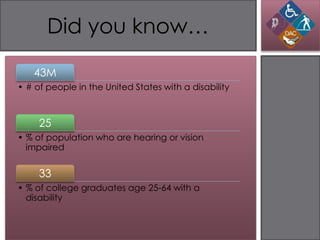
Did you know…

   43M
• # of people in the United States with a disability


     25
• % of population who are hearing or vision
  impaired


     33
• % of college graduates age 25-64 with a
  disability
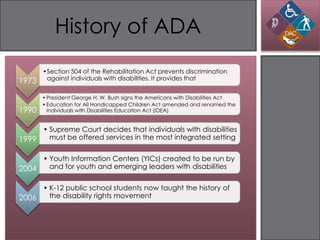
History of ADA
       •Section 504 of the Rehabilitation Act prevents discrimination
1973    against individuals with disabilities. It provides that


       • President George H. W. Bush signs the Americans with Disabilities Act
       • Education for All Handicapped Children Act amended and renamed the
1990     Individuals with Disabilities Education Act (IDEA)


     • Supreme Court decides that individuals with disabilities
1999   must be offered services in the most integrated setting


     • Youth Information Centers (YICs) created to be run by
2004   and for youth and emerging leaders with disabilities


     • K-12 public school students now taught the history of
2006   the disability rights movement
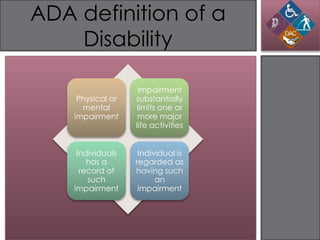
ADA definition of a
    Disability

                    Impairment
     Physical or   substantially
      mental       limits one or
    impairment      more major
                   life activities


     Individuals    Individual is
        has a      regarded as
      record of    having such
        such             an
    impairment      impairment
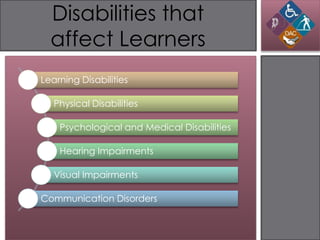
Disabilities that
  affect Learners
Learning Disabilities

   Physical Disabilities

    Psychological and Medical Disabilities

    Hearing Impairments

   Visual Impairments

Communication Disorders
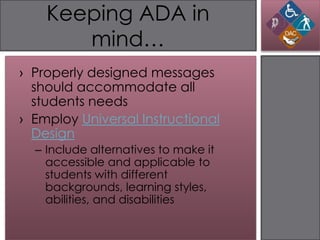
Keeping ADA in
       mind…
› Properly designed messages
  should accommodate all
  students needs
› Employ Universal Instructional
  Design
  – Include alternatives to make it
    accessible and applicable to
    students with different
    backgrounds, learning styles,
    abilities, and disabilities
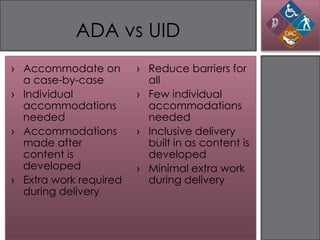
ADA vs UID
› Accommodate on        › Reduce barriers for
  a case-by-case          all
› Individual            › Few individual
  accommodations          accommodations
  needed                  needed
› Accommodations        › Inclusive delivery
  made after              built in as content is
  content is              developed
  developed             › Minimal extra work
› Extra work required     during delivery
  during delivery
Design Considerations
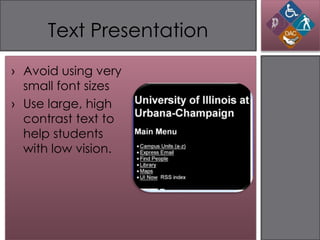
Text Presentation
› Avoid using very
  small font sizes
› Use large, high
  contrast text to
  help students
  with low vision.
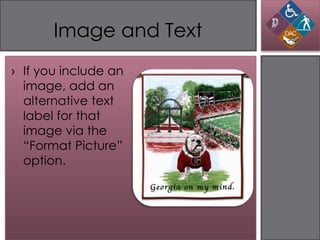
Image and Text
› If you include an
  image, add an
  alternative text
  label for that
  image via the
  “Format Picture”
  option.
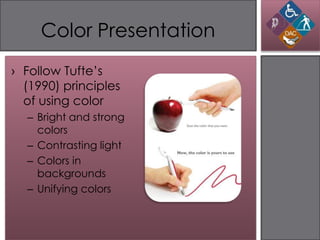
Color Presentation
› Follow Tufte’s
  (1990) principles
  of using color
  – Bright and strong
    colors
  – Contrasting light
  – Colors in
    backgrounds
  – Unifying colors
Content and
      Organization
› Use text for hyperlinks that
  make sense when read out of
  context; avoid "click here"
› Accommodate students with
  learning disabilities by
  organizing information
  – Blocks of texts
  – Headings
Example

› Imagine conducting a
  workshop on the importance
  of ADA compliance in the
  workplace and you show a
  video...
Violations of ADA

› Background images are not
  properly organized
› Text is not consistent and
  sometimes too small
› It does not have an audio
  component
Summary

› To accommodate learners
  who are visually impaired:
  – Enhanced verbal descriptions
  – Presentation outlines include
    text
  – Video presentations include
    audio
External Resources

› Designing Instructional
  Messages
  – ADA and classroom instruction
  – UCONN ADA Fact Sheet
  – ADA Official Website

› Blackboard’s self-paced
  accessibility course
  – Universal Design and Accessibility

Americans with Disabilities Act (ADA): Implications for Information Design

  • 1.
    Information Design implications for Americans with Disabilities Act (ADA)
  • 2.
    Agenda › ADA Background ›Designing ADA complaint Instructional Messages › Examples › Summary › Next Steps
  • 3.
    Did you know… 43M • # of people in the United States with a disability 25 • % of population who are hearing or vision impaired 33 • % of college graduates age 25-64 with a disability
  • 4.
    History of ADA •Section 504 of the Rehabilitation Act prevents discrimination 1973 against individuals with disabilities. It provides that • President George H. W. Bush signs the Americans with Disabilities Act • Education for All Handicapped Children Act amended and renamed the 1990 Individuals with Disabilities Education Act (IDEA) • Supreme Court decides that individuals with disabilities 1999 must be offered services in the most integrated setting • Youth Information Centers (YICs) created to be run by 2004 and for youth and emerging leaders with disabilities • K-12 public school students now taught the history of 2006 the disability rights movement
  • 5.
    ADA definition ofa Disability Impairment Physical or substantially mental limits one or impairment more major life activities Individuals Individual is has a regarded as record of having such such an impairment impairment
  • 6.
    Disabilities that affect Learners Learning Disabilities Physical Disabilities Psychological and Medical Disabilities Hearing Impairments Visual Impairments Communication Disorders
  • 7.
    Keeping ADA in mind… › Properly designed messages should accommodate all students needs › Employ Universal Instructional Design – Include alternatives to make it accessible and applicable to students with different backgrounds, learning styles, abilities, and disabilities
  • 8.
    ADA vs UID ›Accommodate on › Reduce barriers for a case-by-case all › Individual › Few individual accommodations accommodations needed needed › Accommodations › Inclusive delivery made after built in as content is content is developed developed › Minimal extra work › Extra work required during delivery during delivery
  • 9.
  • 10.
    Text Presentation › Avoidusing very small font sizes › Use large, high contrast text to help students with low vision.
  • 11.
    Image and Text ›If you include an image, add an alternative text label for that image via the “Format Picture” option.
  • 12.
    Color Presentation › FollowTufte’s (1990) principles of using color – Bright and strong colors – Contrasting light – Colors in backgrounds – Unifying colors
  • 13.
    Content and Organization › Use text for hyperlinks that make sense when read out of context; avoid "click here" › Accommodate students with learning disabilities by organizing information – Blocks of texts – Headings
  • 14.
    Example › Imagine conductinga workshop on the importance of ADA compliance in the workplace and you show a video...
  • 15.
    Violations of ADA ›Background images are not properly organized › Text is not consistent and sometimes too small › It does not have an audio component
  • 16.
    Summary › To accommodatelearners who are visually impaired: – Enhanced verbal descriptions – Presentation outlines include text – Video presentations include audio
  • 17.
    External Resources › DesigningInstructional Messages – ADA and classroom instruction – UCONN ADA Fact Sheet – ADA Official Website › Blackboard’s self-paced accessibility course – Universal Design and Accessibility