November 15, 2016
The OWASP Foundation
http://www.owasp.org
Copyright © The OWASP Foundation
Permission is granted to copy, distribute and/or modify this document under the terms of the OWASP License.
Security Scanning
using OWASP ZAP
in a CI pipeline
Simon Bennetts
OWASP ZAP Project Lead
Mozilla Cloud Security Team
psiinon@gmail.com
AllDayDevOps.com
2016
The Plan
• Who is this for?
• What are we trying to solve?
• What can you get out of this?
• Introduction to ZAP
• Where to start
• Where to go from there
3
Who is this for?
• Developers
• QA
• Operations
• Security
• Consultants
• (Managers)
• Whoever is involved in automation ;)
4
What are we trying to solve?
• Find security issues as early as possible
• Integration into the devops pipeline
• Finding all of the possible vulnerabilities
• Putting pentesters out of a job :P
5
What are we not trying to solve?
What can you get out of this?
• A way to quickly evaluate your apps
• Options for more thorough scanning
• An introduction to the ZAP API
6
7
ZAP Introduction
• An easy to use webapp pentest tool
• Completely free and open source
• OWASP Flagship project
• Ideal for beginners
• But also used by professionals
• Ideal for devs, esp. for automated security tests
• Included in all major security distributions
• ToolsWatch.org Top Security Tool of 2015
• Not a silver bullet!
8
ZAP Features
• Swing based UI for desktop mode
• Comprehensive API for daemon mode
• Plugin architecture (add-ons)
• Online ‘marketplace’ (all free:)
• Release, beta and alpha quality add-ons
• Traditional and ajax spiders
• Passive and active scanning
• Highly configurable, eg scan policies
• Highly scriptable
Some ZAP use cases
• Point and shoot – the Quick Start tab
• Proxying via ZAP, and then scanning
• Manual pentesting
• Automated security regression tests
• Debugging
• Part of a larger security program
9
ZAP Install Options
• Windows .exe
• Linux .tar.gz
• Mac OS .dmg
• Docker Images
• owasp/zap2docker-stable
• owasp/zap2docker-weekly
• Distros like Kali
10
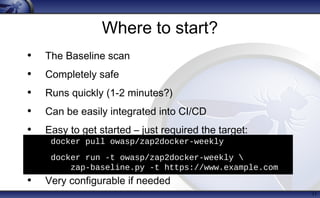
Where to start?
• The Baseline scan
• Completely safe
• Runs quickly (1-2 minutes?)
• Can be easily integrated into CI/CD
• Easy to get started – just required the target:
• Very configurable if needed
11
• docker pull owasp/zap2docker-weekly
• docker run -t owasp/zap2docker-weekly 
zap-baseline.py -t https://www.example.com
Baseline scan
• Uses docker (the only dependency)
• Time limited spider of target (default 1 min)
• Just passive scanning
• By default warns on all issues
• Can change to ignore, info or fail
• Can include any ZAP cmdline option
• Can ignore any url regex for any rule
12
Baseline scan - issues
• All release and beta passive scan rules, eg
• Missing / incorrect security headers
• Cookie problems
• Information / error disclosure
• Missing CSRF tokens
•...
• Can optionally include alpha pscan rules
13
Baseline scan – usage
14
Usage: zap-baseline.py -t <target> [options]
-t target target URL including the protocol, eg https://www
Options:
-c config_file config file to use to INFO, IGNORE or FAIL warnin
-u config_url URL of config file to use to INFO, IGNORE or FAIL
-g gen_file generate default config file (all rules set to WA
-m mins the number of minutes to spider for (default 1)
-r report_html file to write the full ZAP HTML report
-w report_md file to write the full ZAP Wiki (Markdown) report
-x report_xml file to write the full ZAP XML report
-a include the alpha passive scan rules as well
-d show debug messages
-i default rules not in the config file to INFO
-j use the Ajax spider in addition to the traditiona
-l level minimum level to show: PASS, IGNORE, INFO, WARN o
-s short output format - dont show PASSes or example
-z zap_options ZAP command line options e.g. -z "-config aaa=bbb
Baseline scan – output
16
./zap-baseline.py -t https://www.example.com
3 URLs
PASS: Cookie No HttpOnly Flag [10010]
PASS: Cookie Without Secure Flag [10011]
PASS: Password Autocomplete in Browser [10012]
<snip>
WARN: Incomplete or No Cache-control and Pragma HTTP Header Set [10015]
https://www.example.com
WARN: Web Browser XSS Protection Not Enabled [10016] x 3
https://www.example.com
https://www.example.com/robots.txt
https://www.example.com/sitemap.xml
WARN: X-Frame-Options Header Not Set [10020] x 1
https://www.example.com
WARN: X-Content-Type-Options Header Missing [10021] x 1
https://www.example.com
FAIL: 0 WARN: 4 INFO: 0 IGNORE: 0 PASS: 22
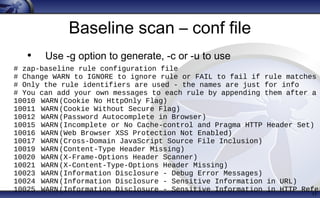
Baseline scan – conf file
• Use -g option to generate, -c or -u to use
17
# zap-baseline rule configuration file
# Change WARN to IGNORE to ignore rule or FAIL to fail if rule matches
# Only the rule identifiers are used - the names are just for info
# You can add your own messages to each rule by appending them after a
10010 WARN(Cookie No HttpOnly Flag)
10011 WARN(Cookie Without Secure Flag)
10012 WARN(Password Autocomplete in Browser)
10015 WARN(Incomplete or No Cache-control and Pragma HTTP Header Set)
10016 WARN(Web Browser XSS Protection Not Enabled)
10017 WARN(Cross-Domain JavaScript Source File Inclusion)
10019 WARN(Content-Type Header Missing)
10020 WARN(X-Frame-Options Header Scanner)
10021 WARN(X-Content-Type-Options Header Missing)
10023 WARN(Information Disclosure - Debug Error Messages)
10024 WARN(Information Disclosure - Sensitive Information in URL)
10025 WARN(Information Disclosure - Sensitive Information in HTTP Refer
Where next?
• Mass Baseline scan
• Provides a simple dashboard
• Shows the detailed results
• Shows the per service history
18
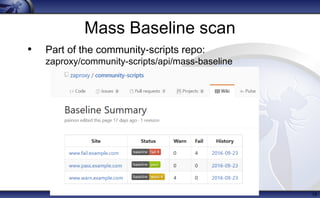
Mass Baseline scan
• Part of the community-scripts repo:
zaproxy/community-scripts/api/mass-baseline
19
Full Scans
• Packaged options:
• Cmdline quick scan
• Jenkins plugin
• Sdlc-integration scripts
• Daemon mode + API
• (ZAP as a Service – in development)
20
Cmdline Quick Scan
21
./zap.sh -cmd -quickurl 
http://example.com/ -quickprogress
• Spidering
• Active scanning
• [====================] 100%
• Attack complete
• <?xml version="1.0"?><OWASPZAPReport
version="2.5.0" generated="Tue, 4 Oct 2016
09:31:53">
• <site name="http://example.com" ...
Old Jenkins plugin
• https://github.com/jenkinsci/zaproxy-plugin
• Developed by 3rd
party
• No longer maintained
• Doesn’t work well with latest versions of ZAP
22
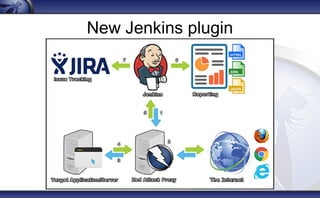
New Jenkins plugin
New Jenkins plugin
• Fork and rewrite of the old plugin
• Maintained by the ZAP core team
• Supports authentication, scan policies, Jira integration
• To be released very soon - hopefully next week!)
• Will be at https://github.com/jenkinsci/zap-plugin
• Will be featured on the ZAP blog zaproxy.blogspot.com
• Will work best with weekly releases
(until ZAP 2.6.0 is released)
24
Sdlc integration scripts
• Part of the community-scripts repo:
zaproxy/community-scripts/api/sdlc-integration
• Spidering, passive and active scanning
• Supports authentication
• Supports JIRA integration
• Linux only, requires some file editing
25
Useful cmdline options
• Turn off db recovery (speeds things up)
-config database.recoverylog=false
• Update all add-ons
-addonupdate
• Install a non default add-on
-addoninstall addonname
• Setting the API key
-config api.key=j8WdOEq8dhwWE24VGDsreP
• Disable API key in a safe environment
-config api.disablekey=true
26
Using the ZAP API
• Intro to the API
• Exploring
• Scanning
• Reporting
• Authenticating
• Tuning
27
Intro to the API
• RESTish – ok, only uses GET requests
http(s)://zap/<format>/<component>/
<operation>/<op name>[/?<params>]
• Maps closely to the UI / code
• Theres a v basic (but complete) web UI for it
• And clients in various langs:
Java, Python, Node JS, .Net, PHP, Go …
• Clients are generated from the code
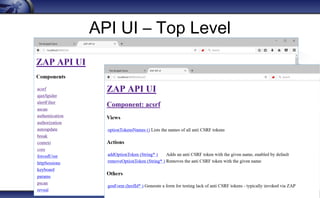
28
API UI – Top Level
API Pro Tips
1. Experiment with the Desktop UI
2. Export configs from the UI (contexts, scan policies..)
3. Then reproduce using the API UI
4. Finally convert to a script
30
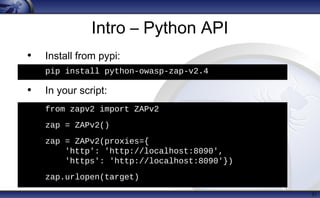
Intro – Python API
• Install from pypi:
pip install python-owasp-zap-v2.4
• In your script:
from zapv2 import ZAPv2
zap = ZAPv2()
zap = ZAPv2(proxies={
'http': 'http://localhost:8080',
'https': 'http://localhost:8090'})
31
h
from zapv2 import ZAPv2
zap = ZAPv2()
zap = ZAPv2(proxies={
'http': 'http://localhost:8090',
'https': 'http://localhost:8090'})
• zap.urlopen(target)
• pip install python-owasp-zap-v2.4
Exploring
• Proxy Regression / Unit tests
• Traditional Spider (crawler)
• Ajax Spider (browsers)
• Spider SOAP definition (via alpha add-on)
• Import ModSecurity2 logs (via alpha add-on)
32
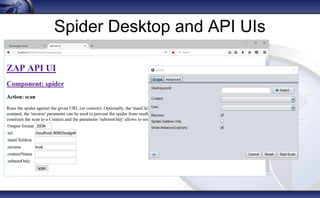
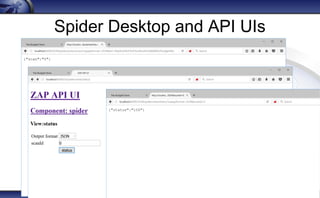
Spider Desktop and API UIs
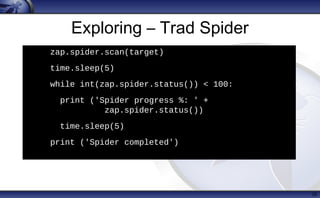
Exploring – Trad Spider
35
h
zap.spider.scan(target)
• time.sleep(5)
• while int(zap.spider.status()) < 100:
• print ('Spider progress %: ' +
zap.spider.status())
• time.sleep(5)
• print ('Spider completed')
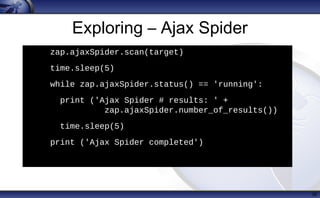
Exploring – Ajax Spider
36
h
zap.ajaxSpider.scan(target)
• time.sleep(5)
• while zap.ajaxSpider.status() == 'running':
• print ('Ajax Spider # results: ' +
zap.ajaxSpider.number_of_results())
• time.sleep(5)
• print ('Ajax Spider completed')
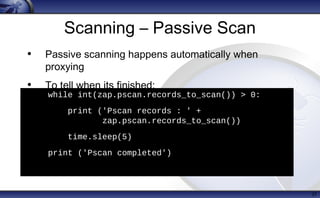
Scanning – Passive Scan
37
while int(zap.pscan.records_to_scan()) > 0:
• print ('Pscan records : ' +
zap.pscan.records_to_scan())
• time.sleep(5)
• print ('Pscan completed')
h
• Passive scanning happens automatically when
proxying
• To tell when its finished:
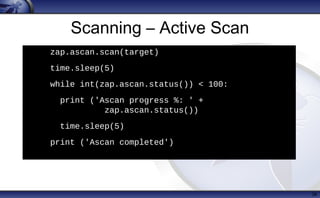
Scanning – Active Scan
38
h
zap.ascan.scan(target)
• time.sleep(5)
• while int(zap.ascan.status()) < 100:
• print ('Ascan progress %: ' +
zap.ascan.status())
• time.sleep(5)
• print ('Ascan completed')
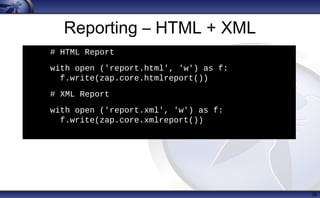
Reporting – HTML + XML
39
h
# HTML Report
• with open ('report.html', 'w') as f:
f.write(zap.core.htmlreport())
# XML Report
• with open ('report.xml', 'w') as f:
f.write(zap.core.xmlreport())
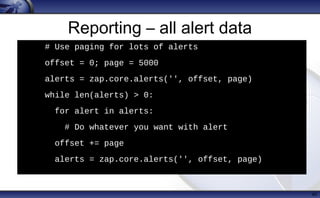
Reporting – all alert data
40
h
# Use paging for lots of alerts
• offset = 0; page = 5000
• alerts = zap.core.alerts('', offset, page)
• while len(alerts) > 0:
• for alert in alerts:
• # Do whatever you want with alert
• offset += page
• alerts = zap.core.alerts('', offset, page)
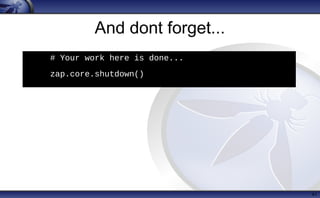
And dont forget...
41
h
# Your work here is done...
• zap.core.shutdown()
Authenticating
• Authentication can be hard :(
• Simple form based auth should be ok
• Authentication scripts should be able to handle anything
• But if you have complex SSO or equiv you may want a
simpler option in your test env
• Pro Top: use the UI to set authentication up!
42
Tuning - speed
• Spider time limits
• Data driven content
• Technology
• Active scan
• Scan rules
• Input vectors
• Attack strength
43
Tuning - feedback
• Active scan stats
• Response stats
• Authentication stats (alpha add-on)
• Statsd support
44
Tuning - accuracy
• Attack thresholds
• Rule configuration (post 2.5.0)
– Forms that dont need CSRF tokens
– Increase timing attacks from 5 seconds
45
And if you need help...
• ZAP Getting Started Guide
• ZAP User Guide
• ZAP User Group
• ZAP Developer Group
• ZAP wiki, includes links to videos
• irc.mozilla.com #websectools
46
Talk Summary
• Use the baseline scan for a quick security overview
• Use the mass baseline to create a dashboard
• Use the new Jenkins plugin for more depth
• Use the ZAP API for even more control
• If you need help, just ask :)
47
November 15, 2016
November 15, 2016

AllDayDevOps ZAP automation in CI

  • 1.
  • 2.
    The OWASP Foundation http://www.owasp.org Copyright© The OWASP Foundation Permission is granted to copy, distribute and/or modify this document under the terms of the OWASP License. Security Scanning using OWASP ZAP in a CI pipeline Simon Bennetts OWASP ZAP Project Lead Mozilla Cloud Security Team psiinon@gmail.com AllDayDevOps.com 2016
  • 3.
    The Plan • Whois this for? • What are we trying to solve? • What can you get out of this? • Introduction to ZAP • Where to start • Where to go from there 3
  • 4.
    Who is thisfor? • Developers • QA • Operations • Security • Consultants • (Managers) • Whoever is involved in automation ;) 4
  • 5.
    What are wetrying to solve? • Find security issues as early as possible • Integration into the devops pipeline • Finding all of the possible vulnerabilities • Putting pentesters out of a job :P 5 What are we not trying to solve?
  • 6.
    What can youget out of this? • A way to quickly evaluate your apps • Options for more thorough scanning • An introduction to the ZAP API 6
  • 7.
    7 ZAP Introduction • Aneasy to use webapp pentest tool • Completely free and open source • OWASP Flagship project • Ideal for beginners • But also used by professionals • Ideal for devs, esp. for automated security tests • Included in all major security distributions • ToolsWatch.org Top Security Tool of 2015 • Not a silver bullet!
  • 8.
    8 ZAP Features • Swingbased UI for desktop mode • Comprehensive API for daemon mode • Plugin architecture (add-ons) • Online ‘marketplace’ (all free:) • Release, beta and alpha quality add-ons • Traditional and ajax spiders • Passive and active scanning • Highly configurable, eg scan policies • Highly scriptable
  • 9.
    Some ZAP usecases • Point and shoot – the Quick Start tab • Proxying via ZAP, and then scanning • Manual pentesting • Automated security regression tests • Debugging • Part of a larger security program 9
  • 10.
    ZAP Install Options •Windows .exe • Linux .tar.gz • Mac OS .dmg • Docker Images • owasp/zap2docker-stable • owasp/zap2docker-weekly • Distros like Kali 10
  • 11.
    Where to start? •The Baseline scan • Completely safe • Runs quickly (1-2 minutes?) • Can be easily integrated into CI/CD • Easy to get started – just required the target: • Very configurable if needed 11 • docker pull owasp/zap2docker-weekly • docker run -t owasp/zap2docker-weekly zap-baseline.py -t https://www.example.com
  • 12.
    Baseline scan • Usesdocker (the only dependency) • Time limited spider of target (default 1 min) • Just passive scanning • By default warns on all issues • Can change to ignore, info or fail • Can include any ZAP cmdline option • Can ignore any url regex for any rule 12
  • 13.
    Baseline scan -issues • All release and beta passive scan rules, eg • Missing / incorrect security headers • Cookie problems • Information / error disclosure • Missing CSRF tokens •... • Can optionally include alpha pscan rules 13
  • 14.
    Baseline scan –usage 14 Usage: zap-baseline.py -t <target> [options] -t target target URL including the protocol, eg https://www Options: -c config_file config file to use to INFO, IGNORE or FAIL warnin -u config_url URL of config file to use to INFO, IGNORE or FAIL -g gen_file generate default config file (all rules set to WA -m mins the number of minutes to spider for (default 1) -r report_html file to write the full ZAP HTML report -w report_md file to write the full ZAP Wiki (Markdown) report -x report_xml file to write the full ZAP XML report -a include the alpha passive scan rules as well -d show debug messages -i default rules not in the config file to INFO -j use the Ajax spider in addition to the traditiona -l level minimum level to show: PASS, IGNORE, INFO, WARN o -s short output format - dont show PASSes or example -z zap_options ZAP command line options e.g. -z "-config aaa=bbb
  • 15.
    Baseline scan –output 16 ./zap-baseline.py -t https://www.example.com 3 URLs PASS: Cookie No HttpOnly Flag [10010] PASS: Cookie Without Secure Flag [10011] PASS: Password Autocomplete in Browser [10012] <snip> WARN: Incomplete or No Cache-control and Pragma HTTP Header Set [10015] https://www.example.com WARN: Web Browser XSS Protection Not Enabled [10016] x 3 https://www.example.com https://www.example.com/robots.txt https://www.example.com/sitemap.xml WARN: X-Frame-Options Header Not Set [10020] x 1 https://www.example.com WARN: X-Content-Type-Options Header Missing [10021] x 1 https://www.example.com FAIL: 0 WARN: 4 INFO: 0 IGNORE: 0 PASS: 22
  • 16.
    Baseline scan –conf file • Use -g option to generate, -c or -u to use 17 # zap-baseline rule configuration file # Change WARN to IGNORE to ignore rule or FAIL to fail if rule matches # Only the rule identifiers are used - the names are just for info # You can add your own messages to each rule by appending them after a 10010 WARN(Cookie No HttpOnly Flag) 10011 WARN(Cookie Without Secure Flag) 10012 WARN(Password Autocomplete in Browser) 10015 WARN(Incomplete or No Cache-control and Pragma HTTP Header Set) 10016 WARN(Web Browser XSS Protection Not Enabled) 10017 WARN(Cross-Domain JavaScript Source File Inclusion) 10019 WARN(Content-Type Header Missing) 10020 WARN(X-Frame-Options Header Scanner) 10021 WARN(X-Content-Type-Options Header Missing) 10023 WARN(Information Disclosure - Debug Error Messages) 10024 WARN(Information Disclosure - Sensitive Information in URL) 10025 WARN(Information Disclosure - Sensitive Information in HTTP Refer
  • 17.
    Where next? • MassBaseline scan • Provides a simple dashboard • Shows the detailed results • Shows the per service history 18
  • 18.
    Mass Baseline scan •Part of the community-scripts repo: zaproxy/community-scripts/api/mass-baseline 19
  • 19.
    Full Scans • Packagedoptions: • Cmdline quick scan • Jenkins plugin • Sdlc-integration scripts • Daemon mode + API • (ZAP as a Service – in development) 20
  • 20.
    Cmdline Quick Scan 21 ./zap.sh-cmd -quickurl http://example.com/ -quickprogress • Spidering • Active scanning • [====================] 100% • Attack complete • <?xml version="1.0"?><OWASPZAPReport version="2.5.0" generated="Tue, 4 Oct 2016 09:31:53"> • <site name="http://example.com" ...
  • 21.
    Old Jenkins plugin •https://github.com/jenkinsci/zaproxy-plugin • Developed by 3rd party • No longer maintained • Doesn’t work well with latest versions of ZAP 22
  • 22.
  • 23.
    New Jenkins plugin •Fork and rewrite of the old plugin • Maintained by the ZAP core team • Supports authentication, scan policies, Jira integration • To be released very soon - hopefully next week!) • Will be at https://github.com/jenkinsci/zap-plugin • Will be featured on the ZAP blog zaproxy.blogspot.com • Will work best with weekly releases (until ZAP 2.6.0 is released) 24
  • 24.
    Sdlc integration scripts •Part of the community-scripts repo: zaproxy/community-scripts/api/sdlc-integration • Spidering, passive and active scanning • Supports authentication • Supports JIRA integration • Linux only, requires some file editing 25
  • 25.
    Useful cmdline options •Turn off db recovery (speeds things up) -config database.recoverylog=false • Update all add-ons -addonupdate • Install a non default add-on -addoninstall addonname • Setting the API key -config api.key=j8WdOEq8dhwWE24VGDsreP • Disable API key in a safe environment -config api.disablekey=true 26
  • 26.
    Using the ZAPAPI • Intro to the API • Exploring • Scanning • Reporting • Authenticating • Tuning 27
  • 27.
    Intro to theAPI • RESTish – ok, only uses GET requests http(s)://zap/<format>/<component>/ <operation>/<op name>[/?<params>] • Maps closely to the UI / code • Theres a v basic (but complete) web UI for it • And clients in various langs: Java, Python, Node JS, .Net, PHP, Go … • Clients are generated from the code 28
  • 28.
    API UI –Top Level
  • 29.
    API Pro Tips 1.Experiment with the Desktop UI 2. Export configs from the UI (contexts, scan policies..) 3. Then reproduce using the API UI 4. Finally convert to a script 30
  • 30.
    Intro – PythonAPI • Install from pypi: pip install python-owasp-zap-v2.4 • In your script: from zapv2 import ZAPv2 zap = ZAPv2() zap = ZAPv2(proxies={ 'http': 'http://localhost:8080', 'https': 'http://localhost:8090'}) 31 h from zapv2 import ZAPv2 zap = ZAPv2() zap = ZAPv2(proxies={ 'http': 'http://localhost:8090', 'https': 'http://localhost:8090'}) • zap.urlopen(target) • pip install python-owasp-zap-v2.4
  • 31.
    Exploring • Proxy Regression/ Unit tests • Traditional Spider (crawler) • Ajax Spider (browsers) • Spider SOAP definition (via alpha add-on) • Import ModSecurity2 logs (via alpha add-on) 32
  • 32.
  • 33.
  • 34.
    Exploring – TradSpider 35 h zap.spider.scan(target) • time.sleep(5) • while int(zap.spider.status()) < 100: • print ('Spider progress %: ' + zap.spider.status()) • time.sleep(5) • print ('Spider completed')
  • 35.
    Exploring – AjaxSpider 36 h zap.ajaxSpider.scan(target) • time.sleep(5) • while zap.ajaxSpider.status() == 'running': • print ('Ajax Spider # results: ' + zap.ajaxSpider.number_of_results()) • time.sleep(5) • print ('Ajax Spider completed')
  • 36.
    Scanning – PassiveScan 37 while int(zap.pscan.records_to_scan()) > 0: • print ('Pscan records : ' + zap.pscan.records_to_scan()) • time.sleep(5) • print ('Pscan completed') h • Passive scanning happens automatically when proxying • To tell when its finished:
  • 37.
    Scanning – ActiveScan 38 h zap.ascan.scan(target) • time.sleep(5) • while int(zap.ascan.status()) < 100: • print ('Ascan progress %: ' + zap.ascan.status()) • time.sleep(5) • print ('Ascan completed')
  • 38.
    Reporting – HTML+ XML 39 h # HTML Report • with open ('report.html', 'w') as f: f.write(zap.core.htmlreport()) # XML Report • with open ('report.xml', 'w') as f: f.write(zap.core.xmlreport())
  • 39.
    Reporting – allalert data 40 h # Use paging for lots of alerts • offset = 0; page = 5000 • alerts = zap.core.alerts('', offset, page) • while len(alerts) > 0: • for alert in alerts: • # Do whatever you want with alert • offset += page • alerts = zap.core.alerts('', offset, page)
  • 40.
    And dont forget... 41 h #Your work here is done... • zap.core.shutdown()
  • 41.
    Authenticating • Authentication canbe hard :( • Simple form based auth should be ok • Authentication scripts should be able to handle anything • But if you have complex SSO or equiv you may want a simpler option in your test env • Pro Top: use the UI to set authentication up! 42
  • 42.
    Tuning - speed •Spider time limits • Data driven content • Technology • Active scan • Scan rules • Input vectors • Attack strength 43
  • 43.
    Tuning - feedback •Active scan stats • Response stats • Authentication stats (alpha add-on) • Statsd support 44
  • 44.
    Tuning - accuracy •Attack thresholds • Rule configuration (post 2.5.0) – Forms that dont need CSRF tokens – Increase timing attacks from 5 seconds 45
  • 45.
    And if youneed help... • ZAP Getting Started Guide • ZAP User Guide • ZAP User Group • ZAP Developer Group • ZAP wiki, includes links to videos • irc.mozilla.com #websectools 46
  • 46.
    Talk Summary • Usethe baseline scan for a quick security overview • Use the mass baseline to create a dashboard • Use the new Jenkins plugin for more depth • Use the ZAP API for even more control • If you need help, just ask :) 47
  • 47.
  • 48.