6
Copyright © Oracle Corporation, 2001. All rights reserved.
Subqueries
6-2 Copyright © Oracle Corporation, 2001. All rights reserved.
Objectives
After completing this lesson, you should be able to
do the following:
• Describe the types of problem that subqueries can
solve
• Define subqueries
• List the types of subqueries
• Write single-row and multiple-row subqueries
6-3 Copyright © Oracle Corporation, 2001. All rights reserved.
Using a Subquery
to Solve a Problem
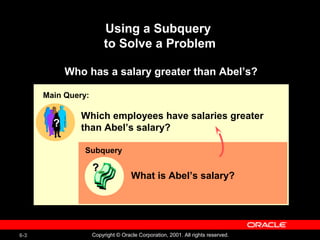
Who has a salary greater than Abel’s?
Which employees have salaries greater
than Abel’s salary?
Main Query:
??
What is Abel’s salary?
??
Subquery
6-4 Copyright © Oracle Corporation, 2001. All rights reserved.
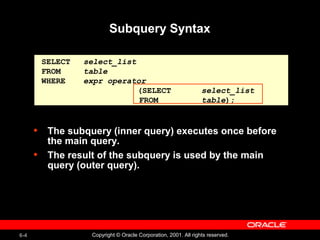
Subquery Syntax
• The subquery (inner query) executes once before
the main query.
• The result of the subquery is used by the main
query (outer query).
SELECT select_list
FROM table
WHERE expr operator
(SELECT select_list
FROM table);
6-5 Copyright © Oracle Corporation, 2001. All rights reserved.
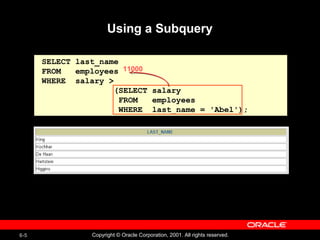
SELECT last_name
FROM employees
WHERE salary >
(SELECT salary
FROM employees
WHERE last_name = 'Abel');
Using a Subquery
11000
6-6 Copyright © Oracle Corporation, 2001. All rights reserved.
Guidelines for Using Subqueries
• Enclose subqueries in parentheses.
• Place subqueries on the right side of the
comparison condition.
• The ORDER BY clause in the subquery is not
needed unless you are performing Top-N analysis.
• Use single-row operators with single-row
subqueries and use multiple-row operators with
multiple-row subqueries.
6-7 Copyright © Oracle Corporation, 2001. All rights reserved.
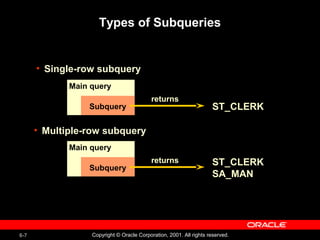
Types of Subqueries
Main query
Subquery
returns
ST_CLERK
• Multiple-row subquery
ST_CLERK
SA_MAN
Main query
Subquery
returns
• Single-row subquery
6-8 Copyright © Oracle Corporation, 2001. All rights reserved.
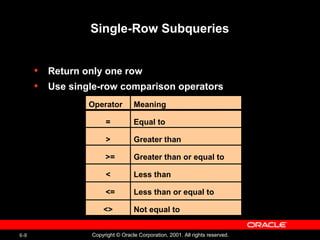
Single-Row Subqueries
• Return only one row
• Use single-row comparison operators
Operator
=
>
>=
<
<=
<>
Meaning
Equal to
Greater than
Greater than or equal to
Less than
Less than or equal to
Not equal to
6-9 Copyright © Oracle Corporation, 2001. All rights reserved.
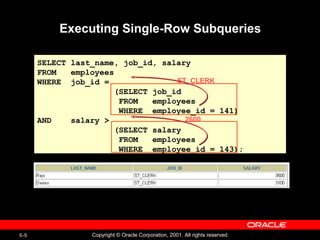
SELECT last_name, job_id, salary
FROM employees
WHERE job_id =
(SELECT job_id
FROM employees
WHERE employee_id = 141)
AND salary >
(SELECT salary
FROM employees
WHERE employee_id = 143);
Executing Single-Row Subqueries
ST_CLERK
2600
6-10 Copyright © Oracle Corporation, 2001. All rights reserved.
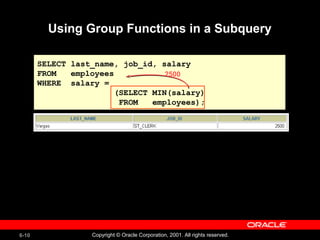
SELECT last_name, job_id, salary
FROM employees
WHERE salary =
(SELECT MIN(salary)
FROM employees);
Using Group Functions in a Subquery
2500
6-11 Copyright © Oracle Corporation, 2001. All rights reserved.
The HAVING Clause with Subqueries
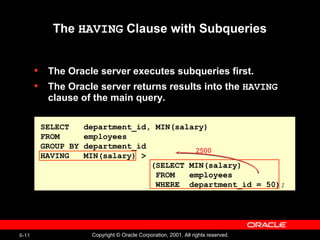
• The Oracle server executes subqueries first.
• The Oracle server returns results into the HAVING
clause of the main query.
SELECT department_id, MIN(salary)
FROM employees
GROUP BY department_id
HAVING MIN(salary) >
(SELECT MIN(salary)
FROM employees
WHERE department_id = 50);
2500
6-12 Copyright © Oracle Corporation, 2001. All rights reserved.
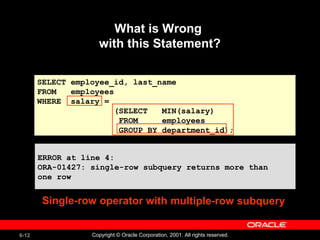
SELECT employee_id, last_name
FROM employees
WHERE salary =
(SELECT MIN(salary)
FROM employees
GROUP BY department_id);
What is Wrong
with this Statement?
ERROR at line 4:
ORA-01427: single-row subquery returns more than
one row
ERROR at line 4:
ORA-01427: single-row subquery returns more than
one row
Single-row operator with multiple-row subquery
6-13 Copyright © Oracle Corporation, 2001. All rights reserved.
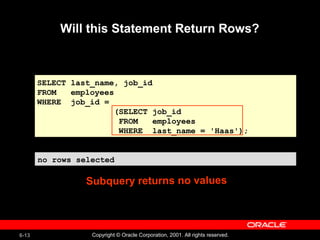
Will this Statement Return Rows?
no rows selectedno rows selected
SELECT last_name, job_id
FROM employees
WHERE job_id =
(SELECT job_id
FROM employees
WHERE last_name = 'Haas');
Subquery returns no values
6-14 Copyright © Oracle Corporation, 2001. All rights reserved.
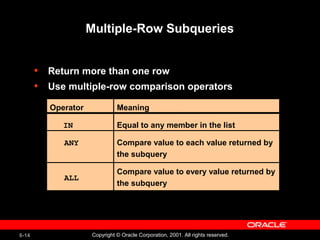
Multiple-Row Subqueries
• Return more than one row
• Use multiple-row comparison operators
Operator
IN
ANY
ALL
Meaning
Equal to any member in the list
Compare value to each value returned by
the subquery
Compare value to every value returned by
the subquery
6-15 Copyright © Oracle Corporation, 2001. All rights reserved.
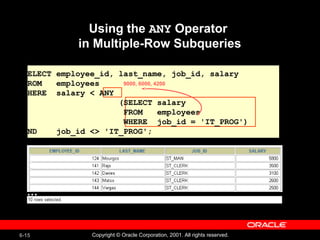
Using the ANY Operator
in Multiple-Row Subqueries
9000, 6000, 4200
SELECT employee_id, last_name, job_id, salary
FROM employees
WHERE salary < ANY
(SELECT salary
FROM employees
WHERE job_id = 'IT_PROG')
AND job_id <> 'IT_PROG';
…
6-16 Copyright © Oracle Corporation, 2001. All rights reserved.
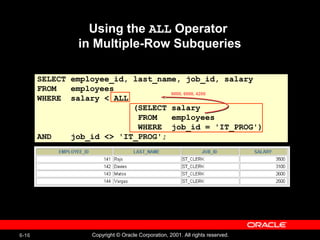
SELECT employee_id, last_name, job_id, salary
FROM employees
WHERE salary < ALL
(SELECT salary
FROM employees
WHERE job_id = 'IT_PROG')
AND job_id <> 'IT_PROG';
Using the ALL Operator
in Multiple-Row Subqueries
9000, 6000, 4200
6-17 Copyright © Oracle Corporation, 2001. All rights reserved.
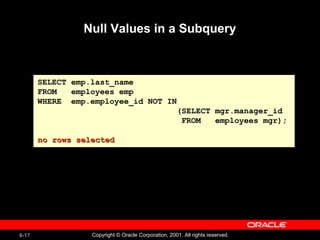
Null Values in a Subquery
SELECT emp.last_name
FROM employees emp
WHERE emp.employee_id NOT IN
(SELECT mgr.manager_id
FROM employees mgr);
no rows selectedno rows selected
6-18 Copyright © Oracle Corporation, 2001. All rights reserved.
Summary
In this lesson, you should have learned how to:
• Identify when a subquery can help solve a
question
• Write subqueries when a query is based on
unknown values
SELECT select_list
FROM table
WHERE expr operator
(SELECT select_list
FROM table);
6-19 Copyright © Oracle Corporation, 2001. All rights reserved.
Practice 6 Overview
This practice covers the following topics:
• Creating subqueries to query values based on
unknown criteria
• Using subqueries to find out which values exist in
one set of data and not in another

Subqueries -Oracle DataBase

  • 1.
    6 Copyright © OracleCorporation, 2001. All rights reserved. Subqueries
  • 2.
    6-2 Copyright ©Oracle Corporation, 2001. All rights reserved. Objectives After completing this lesson, you should be able to do the following: • Describe the types of problem that subqueries can solve • Define subqueries • List the types of subqueries • Write single-row and multiple-row subqueries
  • 3.
    6-3 Copyright ©Oracle Corporation, 2001. All rights reserved. Using a Subquery to Solve a Problem Who has a salary greater than Abel’s? Which employees have salaries greater than Abel’s salary? Main Query: ?? What is Abel’s salary? ?? Subquery
  • 4.
    6-4 Copyright ©Oracle Corporation, 2001. All rights reserved. Subquery Syntax • The subquery (inner query) executes once before the main query. • The result of the subquery is used by the main query (outer query). SELECT select_list FROM table WHERE expr operator (SELECT select_list FROM table);
  • 5.
    6-5 Copyright ©Oracle Corporation, 2001. All rights reserved. SELECT last_name FROM employees WHERE salary > (SELECT salary FROM employees WHERE last_name = 'Abel'); Using a Subquery 11000
  • 6.
    6-6 Copyright ©Oracle Corporation, 2001. All rights reserved. Guidelines for Using Subqueries • Enclose subqueries in parentheses. • Place subqueries on the right side of the comparison condition. • The ORDER BY clause in the subquery is not needed unless you are performing Top-N analysis. • Use single-row operators with single-row subqueries and use multiple-row operators with multiple-row subqueries.
  • 7.
    6-7 Copyright ©Oracle Corporation, 2001. All rights reserved. Types of Subqueries Main query Subquery returns ST_CLERK • Multiple-row subquery ST_CLERK SA_MAN Main query Subquery returns • Single-row subquery
  • 8.
    6-8 Copyright ©Oracle Corporation, 2001. All rights reserved. Single-Row Subqueries • Return only one row • Use single-row comparison operators Operator = > >= < <= <> Meaning Equal to Greater than Greater than or equal to Less than Less than or equal to Not equal to
  • 9.
    6-9 Copyright ©Oracle Corporation, 2001. All rights reserved. SELECT last_name, job_id, salary FROM employees WHERE job_id = (SELECT job_id FROM employees WHERE employee_id = 141) AND salary > (SELECT salary FROM employees WHERE employee_id = 143); Executing Single-Row Subqueries ST_CLERK 2600
  • 10.
    6-10 Copyright ©Oracle Corporation, 2001. All rights reserved. SELECT last_name, job_id, salary FROM employees WHERE salary = (SELECT MIN(salary) FROM employees); Using Group Functions in a Subquery 2500
  • 11.
    6-11 Copyright ©Oracle Corporation, 2001. All rights reserved. The HAVING Clause with Subqueries • The Oracle server executes subqueries first. • The Oracle server returns results into the HAVING clause of the main query. SELECT department_id, MIN(salary) FROM employees GROUP BY department_id HAVING MIN(salary) > (SELECT MIN(salary) FROM employees WHERE department_id = 50); 2500
  • 12.
    6-12 Copyright ©Oracle Corporation, 2001. All rights reserved. SELECT employee_id, last_name FROM employees WHERE salary = (SELECT MIN(salary) FROM employees GROUP BY department_id); What is Wrong with this Statement? ERROR at line 4: ORA-01427: single-row subquery returns more than one row ERROR at line 4: ORA-01427: single-row subquery returns more than one row Single-row operator with multiple-row subquery
  • 13.
    6-13 Copyright ©Oracle Corporation, 2001. All rights reserved. Will this Statement Return Rows? no rows selectedno rows selected SELECT last_name, job_id FROM employees WHERE job_id = (SELECT job_id FROM employees WHERE last_name = 'Haas'); Subquery returns no values
  • 14.
    6-14 Copyright ©Oracle Corporation, 2001. All rights reserved. Multiple-Row Subqueries • Return more than one row • Use multiple-row comparison operators Operator IN ANY ALL Meaning Equal to any member in the list Compare value to each value returned by the subquery Compare value to every value returned by the subquery
  • 15.
    6-15 Copyright ©Oracle Corporation, 2001. All rights reserved. Using the ANY Operator in Multiple-Row Subqueries 9000, 6000, 4200 SELECT employee_id, last_name, job_id, salary FROM employees WHERE salary < ANY (SELECT salary FROM employees WHERE job_id = 'IT_PROG') AND job_id <> 'IT_PROG'; …
  • 16.
    6-16 Copyright ©Oracle Corporation, 2001. All rights reserved. SELECT employee_id, last_name, job_id, salary FROM employees WHERE salary < ALL (SELECT salary FROM employees WHERE job_id = 'IT_PROG') AND job_id <> 'IT_PROG'; Using the ALL Operator in Multiple-Row Subqueries 9000, 6000, 4200
  • 17.
    6-17 Copyright ©Oracle Corporation, 2001. All rights reserved. Null Values in a Subquery SELECT emp.last_name FROM employees emp WHERE emp.employee_id NOT IN (SELECT mgr.manager_id FROM employees mgr); no rows selectedno rows selected
  • 18.
    6-18 Copyright ©Oracle Corporation, 2001. All rights reserved. Summary In this lesson, you should have learned how to: • Identify when a subquery can help solve a question • Write subqueries when a query is based on unknown values SELECT select_list FROM table WHERE expr operator (SELECT select_list FROM table);
  • 19.
    6-19 Copyright ©Oracle Corporation, 2001. All rights reserved. Practice 6 Overview This practice covers the following topics: • Creating subqueries to query values based on unknown criteria • Using subqueries to find out which values exist in one set of data and not in another

Editor's Notes

  • #2 Schedule:TimingTopic 25 minutesLecture 30 minutesPractice 55 minutesTotal
  • #3 Lesson Aim In this lesson, you learn about more advanced features of the SELECT statement. You can write subqueries in the WHERE clause of another SQL statement to obtain values based on an unknown conditional value. This lesson covers single-row subqueries and multiple-row subqueries.
  • #4 Using a Subquery to Solve a Problem Suppose you want to write a query to find out who earns a salary greater than Abel’s salary. To solve this problem, you need two queries: one to find what Abel earns, and a second query to find who earns more than that amount. You can solve this problem by combining the two queries, placing one query inside the other query. The inner query or the subquery returns a value that is used by the outer query or the main query. Using a subquery is equivalent to performing two sequential queries and using the result of the first query as the search value in the second query. Instructor Note This lesson concentrates on noncorrelated subqueries.
  • #5 Subqueries A subquery is a SELECT statement that is embedded in a clause of another SELECT statement. You can build powerful statements out of simple ones by using subqueries. They can be very useful when you need to select rows from a table with a condition that depends on the data in the table itself. You can place the subquery in a number of SQL clauses, including: The WHERE clause The HAVING clause The FROM clause In the syntax: operator includes a comparison condition such as &amp;gt;, =, or IN Note: Comparison conditions fall into two classes: single-row operators (&amp;gt;, =, &amp;gt;=, &amp;lt;, &amp;lt;&amp;gt;, &amp;lt;=) and multiple-row operators (IN, ANY, ALL). The subquery is often referred to as a nested SELECT, sub-SELECT, or inner SELECT statement. The subquery generally executes first, and its output is used to complete the query condition for the main or outer query. Instructor Note Additionally, subqueries can be placed in the CREATE VIEW statement, CREATE TABLE statement, UPDATE statement, INTO clause of an INSERT statement, and SET clause of an UPDATE statement.
  • #6 Using a Subquery In the slide, the inner query determines the salary of employee Abel. The outer query takes the result of the inner query and uses this result to display all the employees who earn more than this amount. Instructor Note Execute the subquery (inner query) on its own first to show the value that the subquery returns. Then execute the outer query using the result returned by the inner query. Finally, execute the entire query (containing the subquery), and show that the result is the same.
  • #7 Guidelines for Using Subqueries A subquery must be enclosed in parentheses. Place the subquery on the right side of the comparison condition for readability. Prior to release Oracle8i, subqueries could not contain an ORDER BY clause. Only one ORDER BY clause can be used for a SELECT statement, and if specified it must be the last clause in the main SELECT statement. Starting with release Oracle8i, an ORDER BY clause can be used and is required in the subquery to perform Top-N analysis. Two classes of comparison conditions are used in subqueries: single-row operators and multiple-row operators. Instructor Note A subquery can execute multiple times in correlated subqueries. Students may ask how many subqueries can be written. The Oracle server imposes no limit on the number of subqueries; the limit is related to the buffer size that the query uses.
  • #8 Types of Subqueries Single-row subqueries: Queries that return only one row from the inner SELECT statement Multiple-row subqueries: Queries that return more than one row from the inner SELECT statement Note: There are also multiple-column subqueries: Queries that return more than one column from the inner SELECT statement. Instructor Note Multiple column subqueries are also available.
  • #9 Single-Row Subqueries A single-row subquery is one that returns one row from the inner SELECT statement. This type of subquery uses a single-row operator. The slide gives a list of single-row operators. Example Display the employees whose job ID is the same as that of employee 141. SELECT last_name, job_id FROM employees WHERE job_id = (SELECT job_id FROM employees WHERE employee_id = 141);
  • #10 Executing Single-Row Subqueries A SELECT statement can be considered as a query block. The example on the slide displays employees whose job ID is the same as that of employee 141 and whose salary is greater than that of employee 143. The example consists of three query blocks: the outer query and two inner queries. The inner query blocks are executed first, producing the query results ST_CLERK and 2600, respectively. The outer query block is then processed and uses the values returned by the inner queries to complete its search conditions. Both inner queries return single values (ST_CLERK and 2600, respectively), so this SQL statement is called a single-row subquery. Note: The outer and inner queries can get data from different tables.
  • #11 Using Group Functions in a Subquery You can display data from a main query by using a group function in a subquery to return a single row. The subquery is in parentheses and is placed after the comparison condition. The example on the slide displays the employee last name, job ID, and salary of all employees whose salary is equal to the minimum salary. The MIN group function returns a single value (2500) to the outer query.
  • #12 The HAVING Clause with Subqueries You can use subqueries not only in the WHERE clause, but also in the HAVING clause. The Oracle server executes the subquery, and the results are returned into the HAVING clause of the main query. The SQL statement on the slide displays all the departments that have a minimum salary greater than that of department 50. Example Find the job with the lowest average salary. SELECT job_id, AVG(salary) FROM employees GROUP BY job_id HAVING AVG(salary) = (SELECT MIN(AVG(salary)) FROM employees GROUP BY job_id);
  • #13 Errors with Subqueries One common error with subqueries is more than one row returned for a single-row subquery. In the SQL statement on the slide, the subquery contains a GROUP BY clause, which implies that the subquery will return multiple rows, one for each group it finds. In this case, the result of the subquery will be 4400, 6000, 2500, 4200, 7000, 17000, and 8300. The outer query takes the results of the subquery (4400, 6000, 2500, 4200, 7000, 17000, 8300) and uses these results in its WHERE clause. The WHERE clause contains an equal (=) operator, a single-row comparison operator expecting only one value. The = operator cannot accept more than one value from the subquery and therefore generates the error. To correct this error, change the = operator to IN.
  • #14 Problems with Subqueries A common problem with subqueries is no rows being returned by the inner query. In the SQL statement on the slide, the subquery contains a WHERE clause. Presumably, the intention is to find the employee whose name is Haas. The statement is correct but selects no rows when executed. There is no employee named Haas. So the subquery returns no rows. The outer query takes the results of the subquery (null) and uses these results in its WHERE clause. The outer query finds no employee with a job ID equal to null, and so returns no rows. If a job existed with a value of null, the row is not returned because comparison of two null values yields a null, therefore the WHERE condition is not true.
  • #15 Multiple-Row Subqueries Subqueries that return more than one row are called multiple-row subqueries. You use a multiple-row operator, instead of a single-row operator, with a multiple-row subquery. The multiple-row operator expects one or more values. SELECT last_name, salary, department_id FROM employees WHERE salary IN (SELECT MIN(salary) FROM employees GROUP BY department_id); Example Find the employees who earn the same salary as the minimum salary for each department. The inner query is executed first, producing a query result. The main query block is then processed and uses the values returned by the inner query to complete its search condition. In fact, the main query would appear to the Oracle server as follows: SELECT last_name, salary, department_id FROM employees WHERE salary IN (2500, 4200, 4400, 6000, 7000, 8300, 8600, 17000);
  • #16 Multiple-Row Subqueries (continued) The ANY operator (and its synonym, the SOME operator) compares a value to each value returned by a subquery. The slide example displays employees who are not IT programmers and whose salary is less than that of any IT programmer. The maximum salary that a programmer earns is $9,000. &amp;lt;ANY means less than the maximum. &amp;gt;ANY means more than the minimum. =ANY is equivalent to IN. &amp;lt;ALL means less than the maximum. &amp;gt;ALL means more than the minimum. Instructor Note When using SOME or ANY, you often use the DISTINCT keyword to prevent rows from being selected several times.
  • #17 Multiple-Row Subqueries (continued) The ALL operator compares a value to every value returned by a subquery. The slide example displays employees whose salary is less than the salary of all employees with a job ID of IT_PROG and whose job is not IT_PROG. &amp;gt;ALL means more than the maximum, and &amp;lt;ALL means less than the minimum. The NOT operator can be used with IN, ANY, and ALL operators.
  • #18 Returning Nulls in the Resulting Set of a Subquery The SQL statement on the slide attempts to display all the employees who do not have any subordinates. Logically, this SQL statement should have returned 12 rows. However, the SQL statement does not return any rows. One of the values returned by the inner query is a null value, and hence the entire query returns no rows. The reason is that all conditions that compare a null value result in a null. So whenever null values are likely to be part of the results set of a subquery, do not use the NOT IN operator. The NOT IN operator is equivalent to &amp;lt;&amp;gt; ALL. Notice that the null value as part of the results set of a subquery is not a problem if you use the IN operator. The IN operator is equivalent to =ANY. For example, to display the employees who have subordinates, use the following SQL statement: SELECT emp.last_name FROM employees emp WHERE emp.employee_id IN (SELECT mgr.manager_id FROM employees mgr); Alternatively, a WHERE clause can be included in the subquery to display all employees who do not have any subordinates: SELECT last_name FROM employees WHERE employee_id NOT IN (SELECT manager_id FROM employees WHERE manager_id IS NOT NULL);
  • #19 Summary In this lesson, you should have learned how to use subqueries. A subquery is a SELECT statement that is embedded in a clause of another SQL statement. Subqueries are useful when a query is based on a search criteria with unknown intermediate values. Subqueries have the following characteristics: Can pass one row of data to a main statement that contains a single-row operator, such as =, &amp;lt;&amp;gt;, &amp;gt;, &amp;gt;=, &amp;lt;, or &amp;lt;= Can pass multiple rows of data to a main statement that contains a multiple-row operator, such as IN Are processed first by the Oracle server, and the WHERE or HAVING clause uses the results Can contain group functions
  • #20 Practice 6 Overview In this practice, you write complex queries using nested SELECT statements. Paper-Based Questions You may want to create the inner query first for these questions. Make sure that it runs and produces the data that you anticipate before coding the outer query.
  • #21 Practice 6 1.Write a query to display the last name and hire date of any employee in the samedepartment as Zlotkey. Exclude Zlotkey. 2.Create a query to display the employee numbers and last names of all employees who earn more than the average salary. Sort the results in ascending order of salary. 3. Write a query that displays the employee numbers and last names of all employees who work in a department with any employee whose last name contains a u. Place your SQL statement in a text file named lab6_3.sql. Run your query.
  • #22 Practice 6 (continued) 4.Display the last name, department number, and job ID of all employees whosedepartment location ID is 1700. 5.Display the last name and salary of every employee who reports to King. 6.Display the department number, last name, and job ID for every employee in the Executive department. If you have time, complete the following exercises: 7.Modify the query in lab6_3.sql to display the employee numbers, last names, and salaries of all employees who earn more than the average salary and who work in a department with any employee with a u in their name. Resave lab6_3.sql to lab6_7.sql. Run the statement in lab6_7.sql.