September 1, 2016 Advanced Webpage Design and Development
Compiled By: Maregu Assefa 1
PHP Programming
September 01, 2016
September 1, 2016 Advanced Webpage Design and Development
Compiled By: Maregu Assefa 2
Contents Pages
Chapter One ..............................................................................................................................4
Static vs. Dynamic Websites...............................................................................................................4
A Static Website ............................................................................................................................................4
A Dynamic Website.......................................................................................................................................4
Open Source Technologies ............................................................................................................................4
What is PHP?.................................................................................................................................................5
PHP Features .............................................................................................................................................5
Install PHP.................................................................................................................................................6
What is MYSQL? ..........................................................................................................................................6
What is: Apache.............................................................................................................................................7
What is a Web Server?...................................................................................................................................7
Chapter Two..............................................................................................................................8
PHP Fundamentals..............................................................................................................................8
PHP Introduction ...........................................................................................................................................8
History of PHP...............................................................................................................................................8
Why PHP? .....................................................................................................................................................8
PHP Basic ....................................................................................................................................................10
PHP Variables .........................................................................................................................................11
PHP Constants.........................................................................................................................................12
PHP Data Types ......................................................................................................................................13
PHP Operators.........................................................................................................................................14
PHP Comments .......................................................................................................................................15
PHP Control Statement............................................................................................................................16
PHP Functions.........................................................................................................................................26
PHP Arrays..............................................................................................................................................32
PHP Strings .............................................................................................................................................41
Chapter Three .........................................................................................................................46
PHP Math Functions................................................................................................................................49
PHP Form Handling.....................................................................................................................................50
PHP Get Form..............................................................................................................................................50
PHP Post Form.............................................................................................................................................50
PHP Include File..........................................................................................................................................52
PHP State Management ....................................................................................................................53
PHP Cookie..................................................................................................................................................53
PHP Session.................................................................................................................................................55
PHP File Handling.......................................................................................................................................57
PHP File Upload and Download..................................................................................................................65
PHP Mail Reference ....................................................................................................................................68
PHP MySQLi Database Connection............................................................................................................70
Chapter Four...........................................................................................................................77
Object Oriented Concepts..............................................................................................................77
Defining PHP Classes..................................................................................................................................78
Creating Objects in PHP ..............................................................................................................................79
Calling Member Functions ..........................................................................................................................79
Constructor Functions..................................................................................................................................80
Destructor ....................................................................................................................................................81
September 1, 2016 Advanced Webpage Design and Development
Compiled By: Maregu Assefa 3
Inheritance ...................................................................................................................................................81
Function Overriding.....................................................................................................................................82
Public Members.......................................................................................................................................82
Private members ......................................................................................................................................82
Protected members ..................................................................................................................................83
Interfaces......................................................................................................................................................84
Constants......................................................................................................................................................84
Abstract Classes...........................................................................................................................................84
Static Keyword ........................................................................................................................................85
Final Keyword.........................................................................................................................................85
Calling parent constructors......................................................................................................................86
Glossary...................................................................................................................................88
PHP 5 MySQLi Functions ................................................................................................................88
PHP Date and Time Functions..........................................................................................................91
PHP Calendar Functions...................................................................................................................93
September 1, 2016 Advanced Webpage Design and Development
Compiled By: Maregu Assefa 4
Chapter One
Static vs. Dynamic Websites
Websites that only use HTML and CSS are called static websites, and websites with scripting are
called dynamic websites. When thinking about making your website, it’s important to identify which
type of site you want. To help you decide, here’s an explanation on static vs. dynamic websites.
A Static Website
A static website is the simplest kind of website you can build. Static websites are written in HTML
and CSS only, with no scripting. The only form of interactivity on a static website is hyperlinks.
If you intend your website to be a small one (3 pages or less), then a static website might be
the easiest way to go. But if you want to share elements between pages (such as logos or
menus), you’ll have to duplicate the HTML on each page.
Static websites are easier to make than dynamic websites, because they require less coding
and technical knowledge. However, fully static websites are very uncommon these days,
since there is so much that scripting can do.
A Dynamic Website
A dynamic website is a website that not only uses HTML and CSS, but includes website
scripting as well. There are two main reasons why you’d want to use website scripting on
your site:
1. you want an interactive web app that people can use, not just read
2. You want to be able to share HTML code between your pages.
Open Source Technologies
In general, open source refers to any program whose source code is made available for use or
modification as users or other developers see fit. Open source software is usually developed
as a public collaboration and made freely available. Open Source is a certification mark
owned by the Open Source Initiative (OSI). Developers of software that is intended to be
freely shared and possibly improved and redistributed by others can use the Open Source
trademark if their distribution terms conform to the OSI's Open Source Definition. To
summarize, the Definition model of distribution terms require that:
 The software being distributed must be redistributed to anyone else without any
restriction.
 The source code must be made available (so that the receiving party will be able to
improve or modify it).
 The license can require improved versions of the software to carry a different name or
version from the original software.
September 1, 2016 Advanced Webpage Design and Development
Compiled By: Maregu Assefa 5
What is PHP?
PHP is a server-side scripting language designed primarily for web development but is also
used as a general-purpose programming language. Originally created by Rasmus Lerdorf in
1994, the PHP reference implementation is now produced by The PHP Development Team.
PHP is an open source, interpreted and object-oriented scripting language i.e. executed at
server side. It is used to develop web applications (an application i.e. executed at server side
and generates dynamic page).
Short........!
o PHP is a server side scripting language.
o PHP is an interpreted language, i.e. there is no need for compilation.
o PHP is an object-oriented language.
o PHP is an open-source scripting language.
o PHP is simple and easy to learn language.
PHP Features
There are given many features of PHP.
o Performance: Script written in PHP executes much faster then those scripts written in
other languages such as JSP & ASP.
o Open Source Software: PHP source code is free available on the web, you can
developed all the version of PHP according to your requirement without paying any
cost.
o Platform Independent: PHP are available for WINDOWS, MAC, LINUX & UNIX
operating system. A PHP application developed in one OS can be easily executed in
other OS also.
o Compatibility: PHP is compatible with almost all local servers used today like
Apache, IIS etc.
o Embedded: PHP code can be easily embedded within HTML tags and script.
September 1, 2016 Advanced Webpage Design and Development
Compiled By: Maregu Assefa 6
Install PHP
To install PHP, suggest you to install AMP (Apache, MySQL, PHP) software stack. It is available for all
operating systems. There are many AMP options available in the market that are given below:
o WAMP for Windows
o LAMP for Linux
o MAMP for Mac
o SAMP for Solaris
o FAMP for FreeBSD
o XAMPP (Cross, Apache, MySQL, PHP, Perl) for Cross Platform: It includes some other components
too such as FileZilla, OpenSSL, Webalizer, Mercury Mail etc.
What is MYSQL?
MySQL is a freely available open source Relational Database Management System (RDBMS) that
uses Structured Query Language (SQL).
SQL is the most popular language for adding, accessing and managing content in a database. It is
most noted for its quick processing, proven reliability, ease and flexibility of use. MySQL is an
essential part of almost every open source PHP application. Good examples for PHP/MySQL-based
scripts are phpBB, osCommerce and Joomla.
September 1, 2016 Advanced Webpage Design and Development
Compiled By: Maregu Assefa 7
What is: Apache
Apache is the most widely used web server software. Developed and maintained by Apache Software
Foundation, Apache is an open source software available for free. It runs on 67% of all web servers in
the world. It is fast, reliable, and secure. It can be highly customized to meet the needs of many
different environments by using extensions and modules. Most WordPress hosting providers use
Apache as their web server software. However, WordPress can run on other web server software as
well.
What is a Web Server?
Wondering what the heck is a web server? Well a web server is like a restaurant host. When you
arrive in a restaurant, the host greets you, checks your booking information and takes you to your
table. Similar to the restaurant host, the web server checks for the web page you have requested and
fetch it for your viewing pleasure. However, A web server is not just your host but also your server.
Once it has found the web page you requested, it also serves you the web page. A web server like
Apache, is also the Maitre D’ of the restaurant. It handles your communications with the website (the
kitchen), handles your requests, and makes sure that other staffs (modules) are ready to serve you. It is
also the bus boy, as it cleans the tables (memory, cache, modules) and clears them for new customers.
So basically a web server is the software that receives your request to access a web page. It runs a few
security checks on your HTTP request and takes you to the web page. Depending on the page you
have requested, the page may ask the server to run a few extra modules while generating the
document to serve you. It then serves you the document you requested. Pretty awesome isn’t it?
September 1, 2016 Advanced Webpage Design and Development
Compiled By: Maregu Assefa 8
Chapter Two
PHP Fundamentals
PHP Introduction
PHP Three letters that together constitutes the name of one of the world’s most popular programming
languages for Web development, the PHP Hypertext Pre-processor.
While you might chuckle at the greenness of the recursive acronym, statistics indicate that PHP is not
be taken lightly: the language is today in use on over twenty million Web sites and more than a third
of the world’s Web servers-no small feat, especially when you consider that the language has been
developed entirely by a worldwide community of volunteers and is freely available on the Internet at
no cost whatsoever!
Over the last few years, PHP has become the de facto choice for the development of data-driven Web
applications, notably on account of its scalability, ease of use, and widespread support for different
databases and data formats.
This first chapter will gently introduce you to the world of PHP, by taking you on a whirlwind tour of
PHP’s history and features, and then guiding you through writing and executing your first PHP
program So flip the page, and let’s get Started.
History of PHP
PHP was originally created by a developer named Rasmus Lerdorf in 1995.
Why PHP?
Unique Features
If you are familiar with other server side language like ASP.NET or JSP you might be wondering
what makes PHP so special or so different from these competing alternatives well, here are some
reasons:
1. Performance
2. Portability(Platform Independent)
3. Ease Of Use
4. Open Source
5. Third-Party Application Support
6. Community Support
Performance
Scripts written in PHP executives faster than those written in other scripting language, with
numerous independent benchmarks, putting the language ahead of competing alternatives like
JSP, ASP.NET and PERL. The PHP 5.0 engine was completely redesigned with an optimized
September 1, 2016 Advanced Webpage Design and Development
Compiled By: Maregu Assefa 9
memory manager to improve performance, and is noticeable faster than previous versions. In
addition, third party accelerators are available to further improve performance and response time.
Portability
PHP is available for UNIX, MICROSOFT WINDOWS, MAC OS, and OS/2.PHP Programs are
portable between platforms. As a result, a PHP application developed on, say, Windows will
typically run on UNIX without any significant issues. This ability to easily undertake cross-
platform development is a valuable one, especially when operating in a multi platform corporate
environment or when trying to address multiple market segments.
Ease of Use
“Simplicity is the ultimate sophistication”, Said Leonardo da Vinci, and by that measure, PHP is
an extremely sophisticated programming language. Its syntax is clear and consistent, and it comes
with exhaustive documentation for the 5000+ functions included with the core distributions. This
significantly reduces the learning curve for both novice and experienced programmers, and it’s
one of the reasons that PHP is favoured as a rapid prototyping tool for Web-based applications.
Open Source
PHP is an open source project – the language is developed by a worldwide team of volunteers
who make its source code freely available on the Web, and it may be used without payment of
licensing fees or investments in expensive hardware or software .This reduces software
development costs without affecting either flexibility or reliability The open-source nature of the
code further means that any developer, anywhere , can inspect the code tree, spit errors, and
suggest possible fixes, this produces a stable, robust product wherein bugs, once discovered, are
rapidly resolved – sometimes within a few hours of discovery !.
Third-Party Application Support
One of PHP’s Strengths has historically been its support for a wide range of different databases,
including MySQL, PostgreSQL, Oracle, and Microsoft SQL Server. PHP 5.3 Supports more than
fifteen different database engines and it includes a common API for database access. XML
support makes it easy to read and write XML documents though they were native PHP data
structures, access XML node collections using Xpath, and transform XML into other formats
with XSLT style sheets.
September 1, 2016 Advanced Webpage Design and Development
Compiled By: Maregu Assefa 10
Community Support
One of the nice things about a community-supported language like PHP is the access it offers to
the creativity and imagination of hundreds of developers across the world. Within the PHP
community, the fruits of this creativity may be found in PEAR, the PHP Extension and
Application Repository and PECL, the PHP Extension Community Library, which contains
hundreds of ready-, made widgets and extensions that developers can use to painlessly and new
functionality to PHP. Using these widgets is often a more time-and cost-efficient alternative to
rolling your own code.
PHP Basic
PHP Echo
PHP echo is a language constructs not a function, so you don't need to use parenthesis with it. But if you want to
use more than one parameters, it is required to use parenthesis.
The syntax of PHP echo is given below:
void echo ( string $arg1 [, string $... ] )
PHP echo statement can be used to print string, multi line strings, escaping characters, variable, array etc.
PHP echo: printing string
File: echo1.php
<?php
echo "Hello by PHP echo";
?>
Output:
Hello by PHP echo
PHP Print
Like PHP echo, PHP print is a language construct, so you don't need to use parenthesis with the argument list.
Unlike echo, it always returns 1.
The syntax of PHP print is given below:
int print(string $arg)
PHP print statement can be used to print string, multi line strings, escaping characters, variable, array etc.
PHP print: printing string
September 1, 2016 Advanced Webpage Design and Development
Compiled By: Maregu Assefa 11
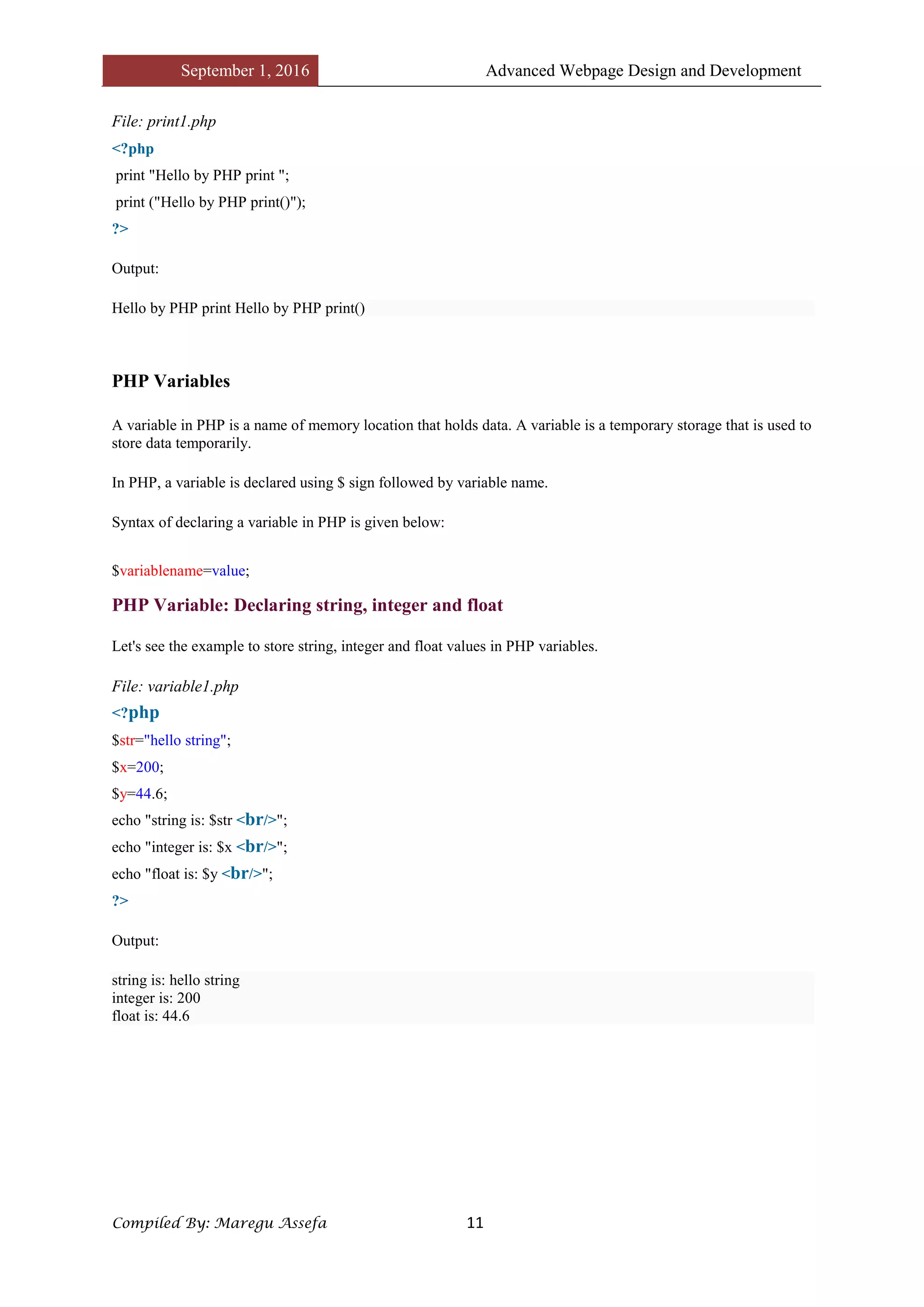
File: print1.php
<?php
print "Hello by PHP print ";
print ("Hello by PHP print()");
?>
Output:
Hello by PHP print Hello by PHP print()
PHP Variables
A variable in PHP is a name of memory location that holds data. A variable is a temporary storage that is used to
store data temporarily.
In PHP, a variable is declared using $ sign followed by variable name.
Syntax of declaring a variable in PHP is given below:
$variablename=value;
PHP Variable: Declaring string, integer and float
Let's see the example to store string, integer and float values in PHP variables.
File: variable1.php
<?php
$str="hello string";
$x=200;
$y=44.6;
echo "string is: $str <br/>";
echo "integer is: $x <br/>";
echo "float is: $y <br/>";
?>
Output:
string is: hello string
integer is: 200
float is: 44.6
September 1, 2016 Advanced Webpage Design and Development
Compiled By: Maregu Assefa 12
PHP Constants
PHP constants are name or identifier that can't be changed during the execution of the script. PHP constants can
be defined by 2 ways:
1. Using define() function
2. Using const keyword
PHP constants follow the same PHP variable rules. For example, it can be started with letter or underscore only.
Conventionally, PHP constants should be defined in uppercase letters.
PHP constant: define()
Let's see the syntax of define() function in PHP.
1. define(name, value, case-insensitive)
1. name: specifies the constant name
2. value: specifies the constant value
3. case-insensitive: Default value is false. It means it is case sensitive by default.
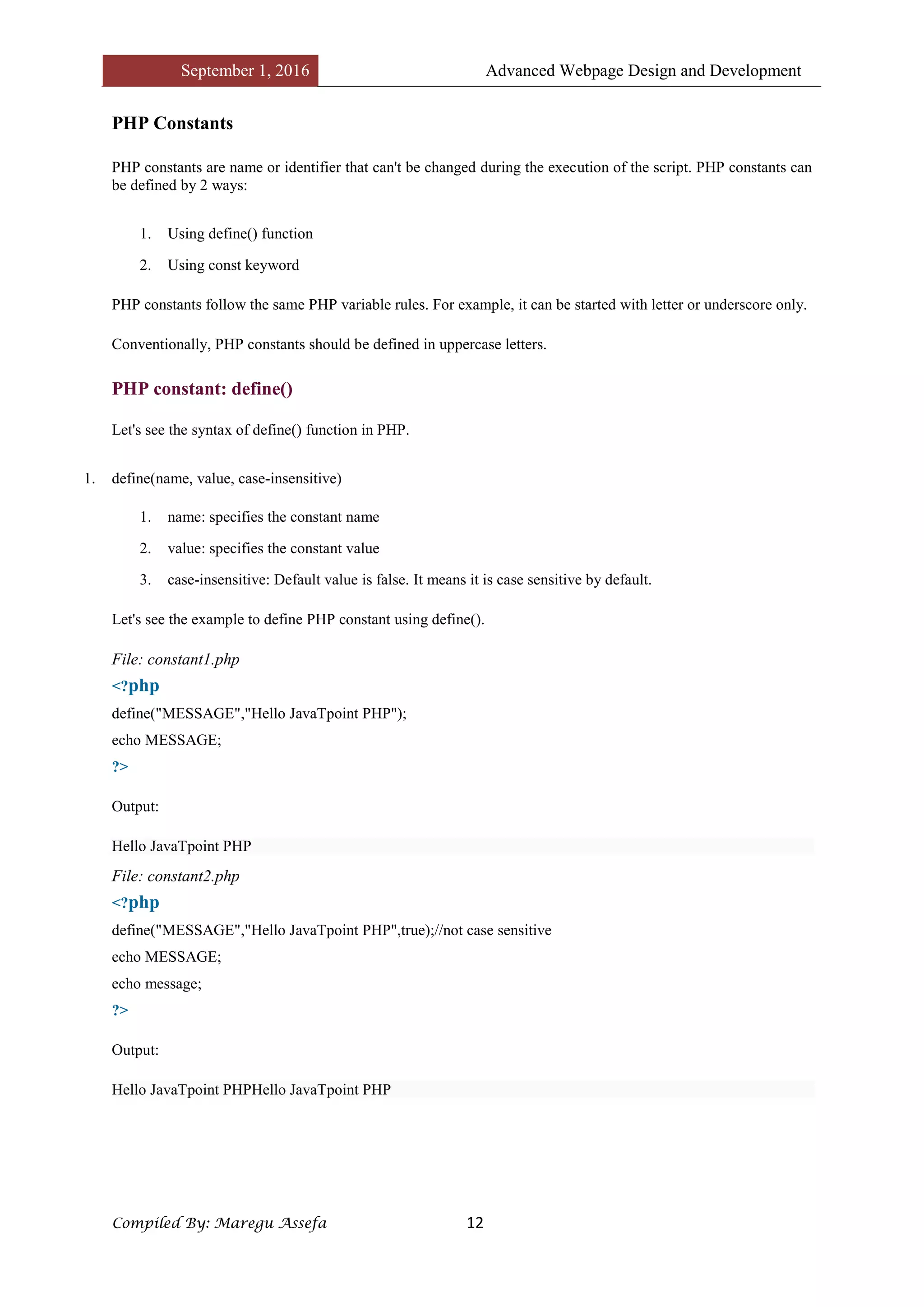
Let's see the example to define PHP constant using define().
File: constant1.php
<?php
define("MESSAGE","Hello JavaTpoint PHP");
echo MESSAGE;
?>
Output:
Hello JavaTpoint PHP
File: constant2.php
<?php
define("MESSAGE","Hello JavaTpoint PHP",true);//not case sensitive
echo MESSAGE;
echo message;
?>
Output:
Hello JavaTpoint PHPHello JavaTpoint PHP
September 1, 2016 Advanced Webpage Design and Development
Compiled By: Maregu Assefa 13
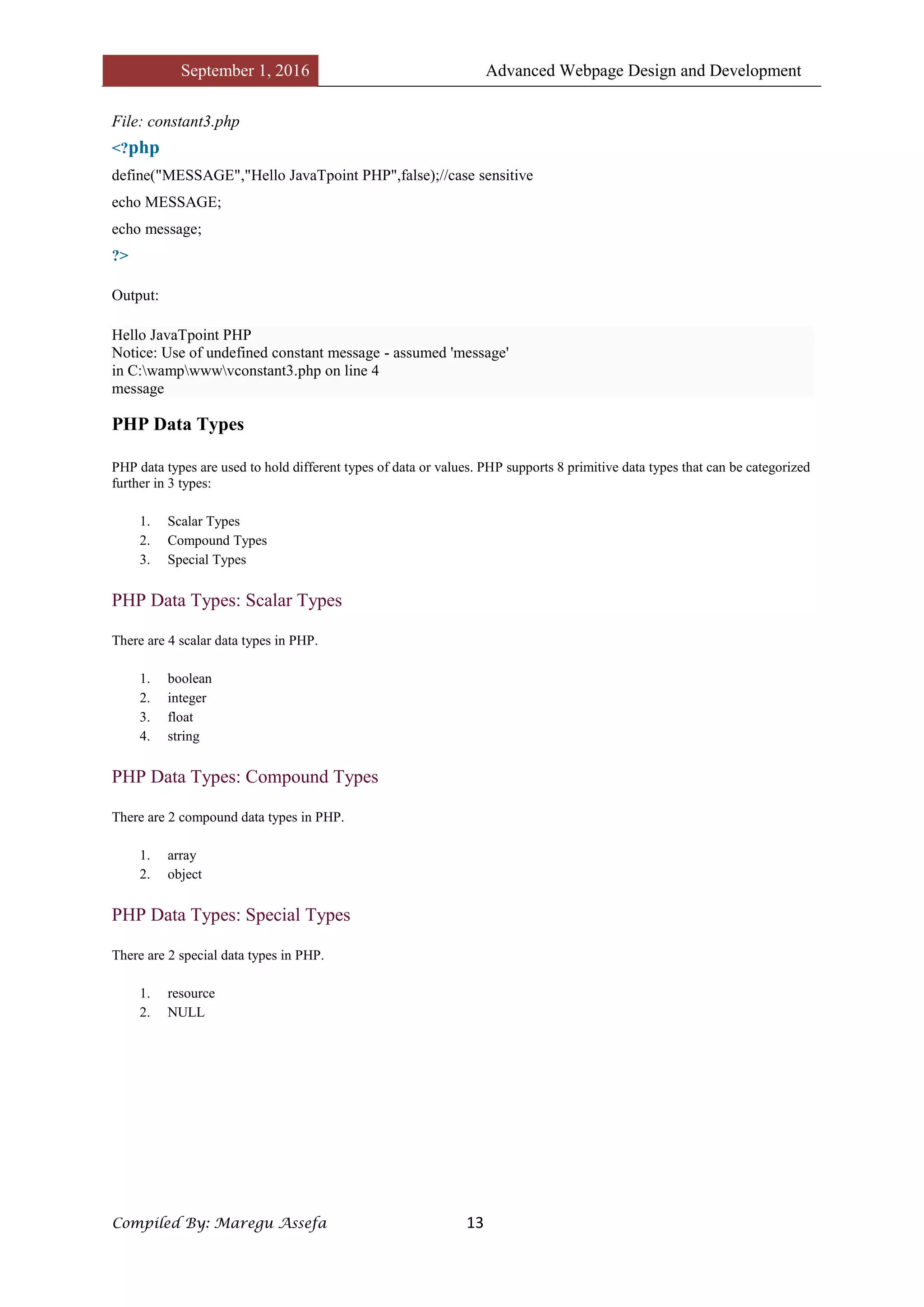
File: constant3.php
<?php
define("MESSAGE","Hello JavaTpoint PHP",false);//case sensitive
echo MESSAGE;
echo message;
?>
Output:
Hello JavaTpoint PHP
Notice: Use of undefined constant message - assumed 'message'
in C:wampwwwvconstant3.php on line 4
message
PHP Data Types
PHP data types are used to hold different types of data or values. PHP supports 8 primitive data types that can be categorized
further in 3 types:
1. Scalar Types
2. Compound Types
3. Special Types
PHP Data Types: Scalar Types
There are 4 scalar data types in PHP.
1. boolean
2. integer
3. float
4. string
PHP Data Types: Compound Types
There are 2 compound data types in PHP.
1. array
2. object
PHP Data Types: Special Types
There are 2 special data types in PHP.
1. resource
2. NULL
September 1, 2016 Advanced Webpage Design and Development
Compiled By: Maregu Assefa 14
PHP Operators
PHP Operator is a symbol i.e used to perform operations on operands. For example:
1. $num=10+20;//+ is the operator and 10,20 are operands
In the above example, + is the binary + operator, 10 and 20 are operands and $num is variable.
PHP Operators can be categorized in following forms:
o Arithmetic Operators
o Comparison Operators
o Bitwise Operators
o Logical Operators
o String Operators
o Incrementing/Decrementing Operators
o Array Operators
o Type Operators
o Execution Operators
o Error Control Operators
o Assignment Operators
We can also categorize operators on behalf of operands. They can be categorized in 3 forms:
o Unary Operators: works on single operands such as ++, -- etc.
o Binary Operators: works on two operands such as binary +, -, *, / etc.
o Ternary Operators: works on three operands such as "?:".
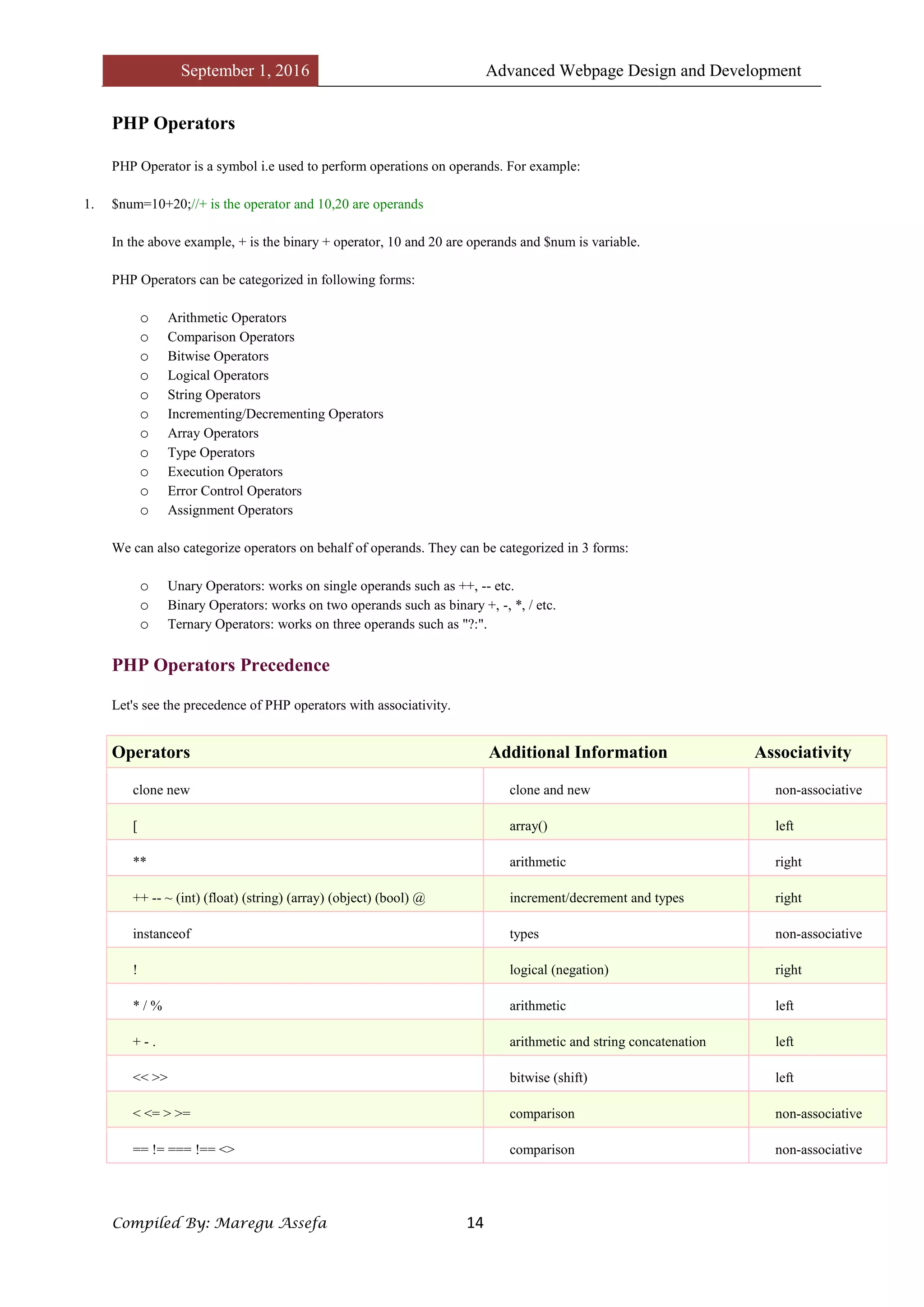
PHP Operators Precedence
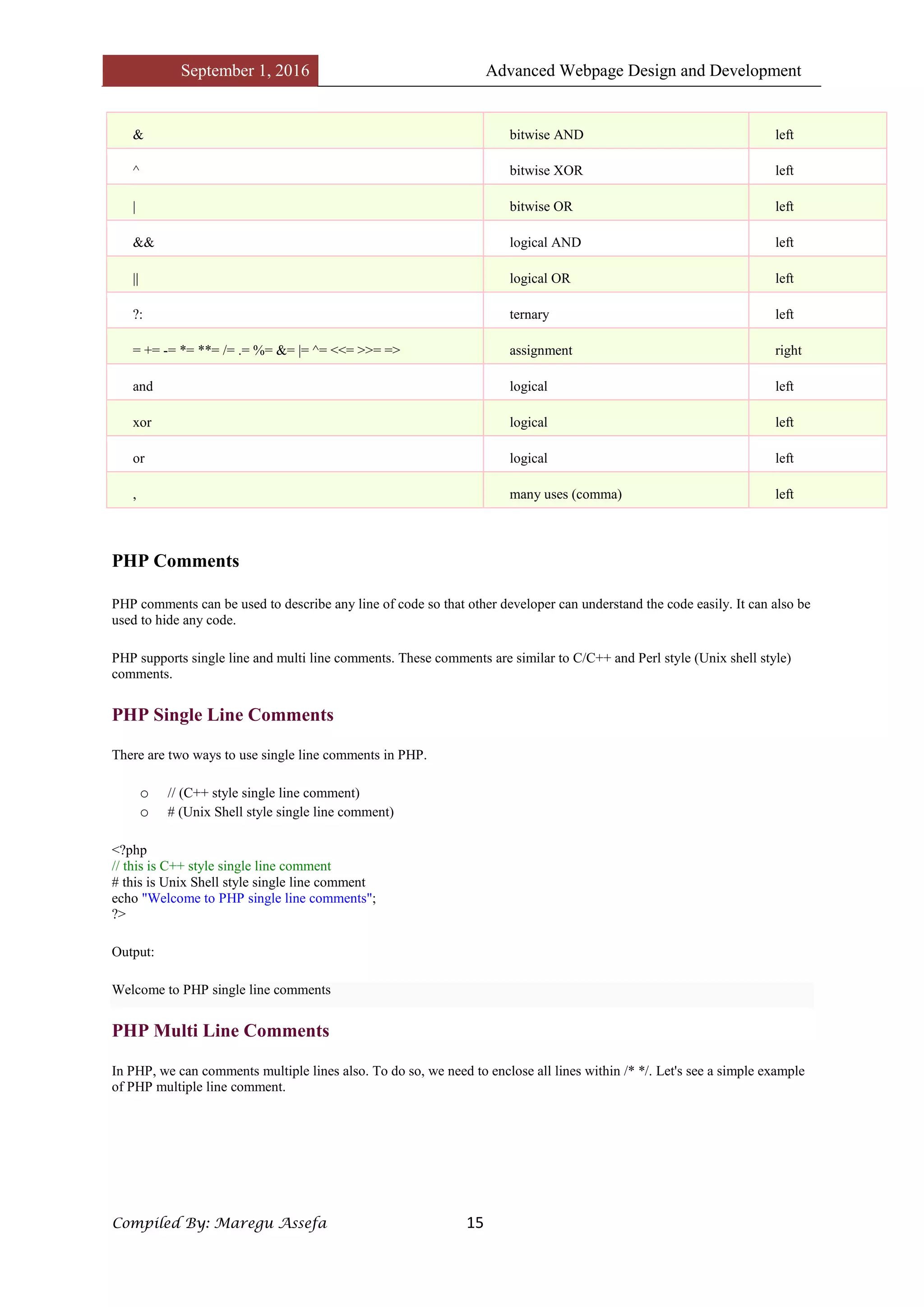
Let's see the precedence of PHP operators with associativity.
Operators Additional Information Associativity
clone new clone and new non-associative
[ array() left
** arithmetic right
++ -- ~ (int) (float) (string) (array) (object) (bool) @ increment/decrement and types right
instanceof types non-associative
! logical (negation) right
* / % arithmetic left
+ - . arithmetic and string concatenation left
<< >> bitwise (shift) left
< <= > >= comparison non-associative
== != === !== <> comparison non-associative
September 1, 2016 Advanced Webpage Design and Development
Compiled By: Maregu Assefa 15
& bitwise AND left
^ bitwise XOR left
| bitwise OR left
&& logical AND left
|| logical OR left
?: ternary left
= += -= *= **= /= .= %= &= |= ^= <<= >>= => assignment right
and logical left
xor logical left
or logical left
, many uses (comma) left
PHP Comments
PHP comments can be used to describe any line of code so that other developer can understand the code easily. It can also be
used to hide any code.
PHP supports single line and multi line comments. These comments are similar to C/C++ and Perl style (Unix shell style)
comments.
PHP Single Line Comments
There are two ways to use single line comments in PHP.
o // (C++ style single line comment)
o # (Unix Shell style single line comment)
<?php
// this is C++ style single line comment
# this is Unix Shell style single line comment
echo "Welcome to PHP single line comments";
?>
Output:
Welcome to PHP single line comments
PHP Multi Line Comments
In PHP, we can comments multiple lines also. To do so, we need to enclose all lines within /* */. Let's see a simple example
of PHP multiple line comment.
September 1, 2016 Advanced Webpage Design and Development
Compiled By: Maregu Assefa 16
<?php
/*
Anything placed
within comment
will not be displayed
on the browser;
*/
echo "Welcome to PHP multi line comment";
?>
Output:
Welcome to PHP multi line comment
PHP Control Statement
PHP If Else
PHP if else statement is used to test condition. There are various ways to use if statement in PHP.
o if
o if-else
o if-else-if
o nested if
PHP If Statement
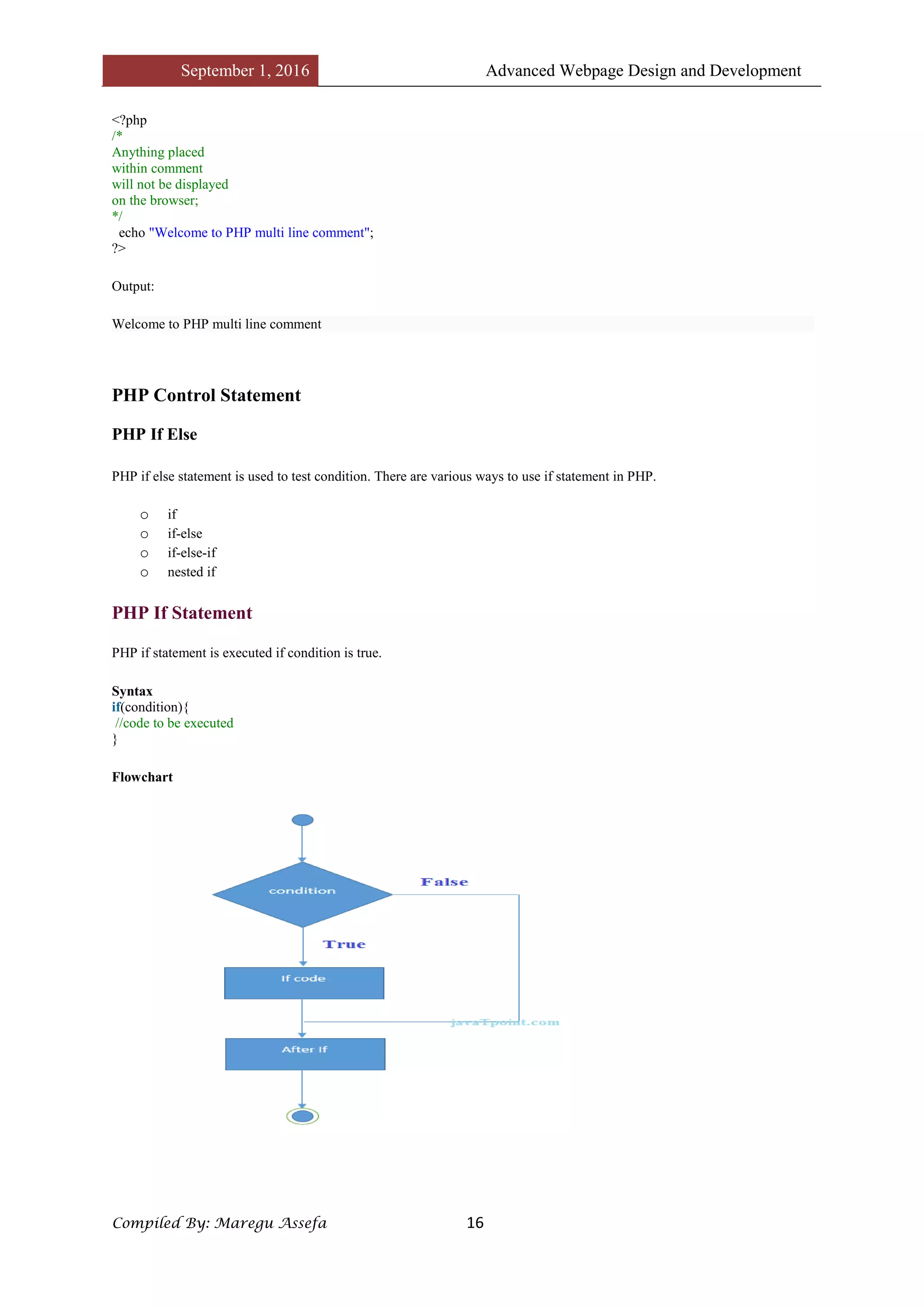
PHP if statement is executed if condition is true.
Syntax
if(condition){
//code to be executed
}
Flowchart
September 1, 2016 Advanced Webpage Design and Development
Compiled By: Maregu Assefa 17
Example
<?php
$num=12;
if($num<100){
echo "$num is less than 100";
}
?>
Output:
12 is less than 100
PHP If-else Statement
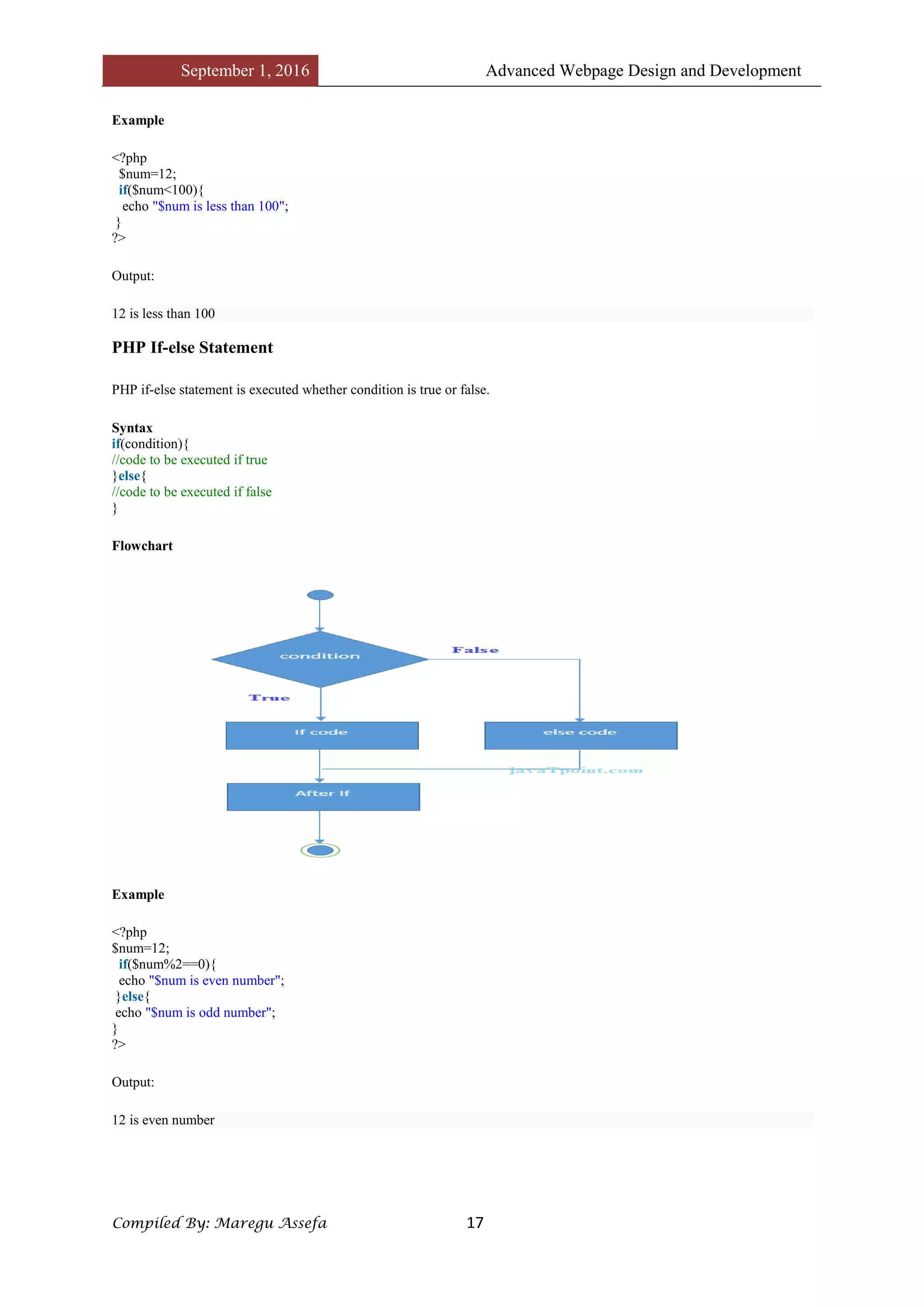
PHP if-else statement is executed whether condition is true or false.
Syntax
if(condition){
//code to be executed if true
}else{
//code to be executed if false
}
Flowchart
Example
<?php
$num=12;
if($num%2==0){
echo "$num is even number";
}else{
echo "$num is odd number";
}
?>
Output:
12 is even number
September 1, 2016 Advanced Webpage Design and Development
Compiled By: Maregu Assefa 18
PHP Switch
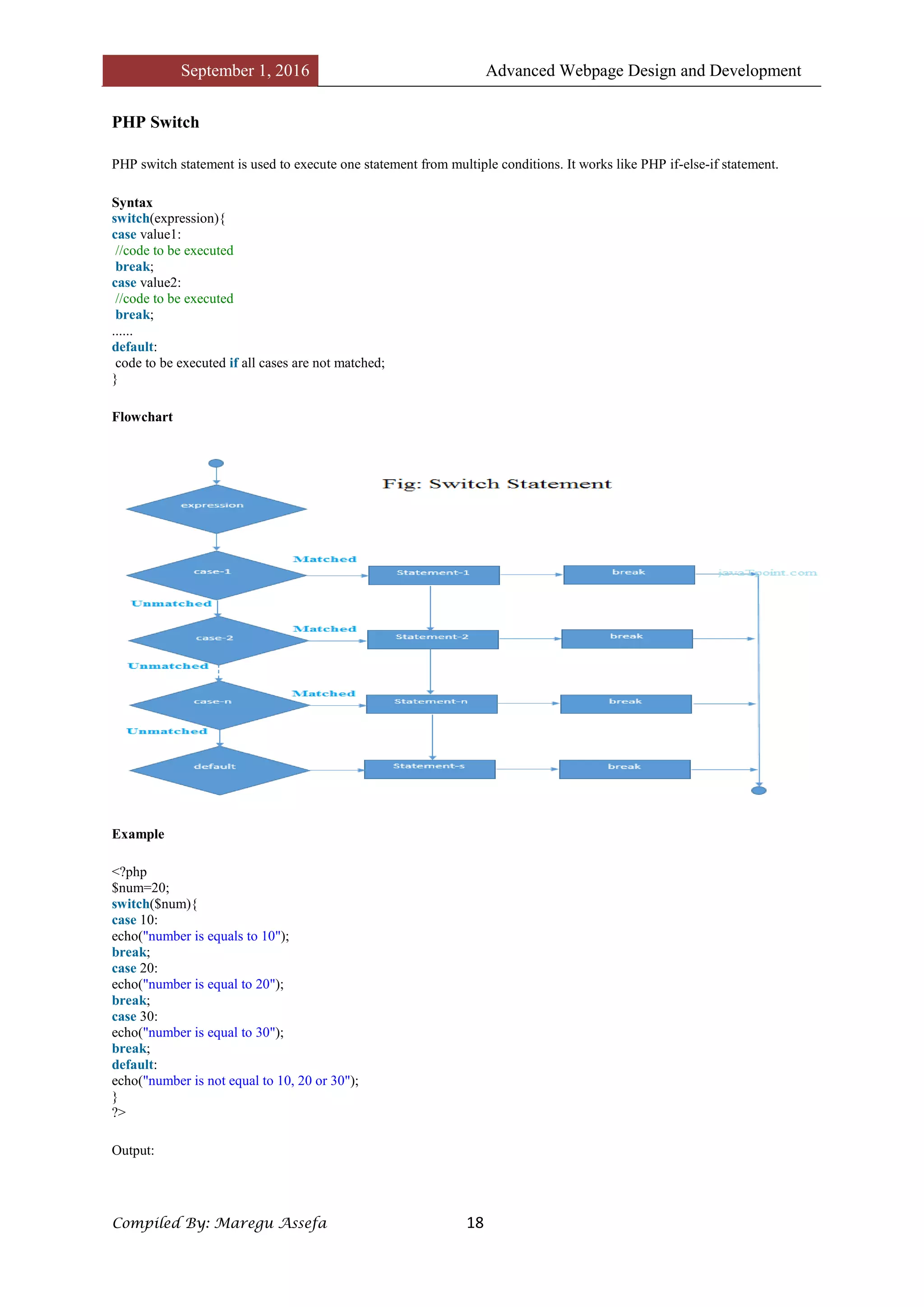
PHP switch statement is used to execute one statement from multiple conditions. It works like PHP if-else-if statement.
Syntax
switch(expression){
case value1:
//code to be executed
break;
case value2:
//code to be executed
break;
......
default:
code to be executed if all cases are not matched;
}
Flowchart
Example
<?php
$num=20;
switch($num){
case 10:
echo("number is equals to 10");
break;
case 20:
echo("number is equal to 20");
break;
case 30:
echo("number is equal to 30");
break;
default:
echo("number is not equal to 10, 20 or 30");
}
?>
Output:
September 1, 2016 Advanced Webpage Design and Development
Compiled By: Maregu Assefa 19
number is equal to 20
PHP For Loop
PHP for loop can be used to traverse set of code for the specified number of times.
It should be used if number of iteration is known otherwise use while loop.
Syntax
for(initialization; condition; increment/decrement){
//code to be executed
}
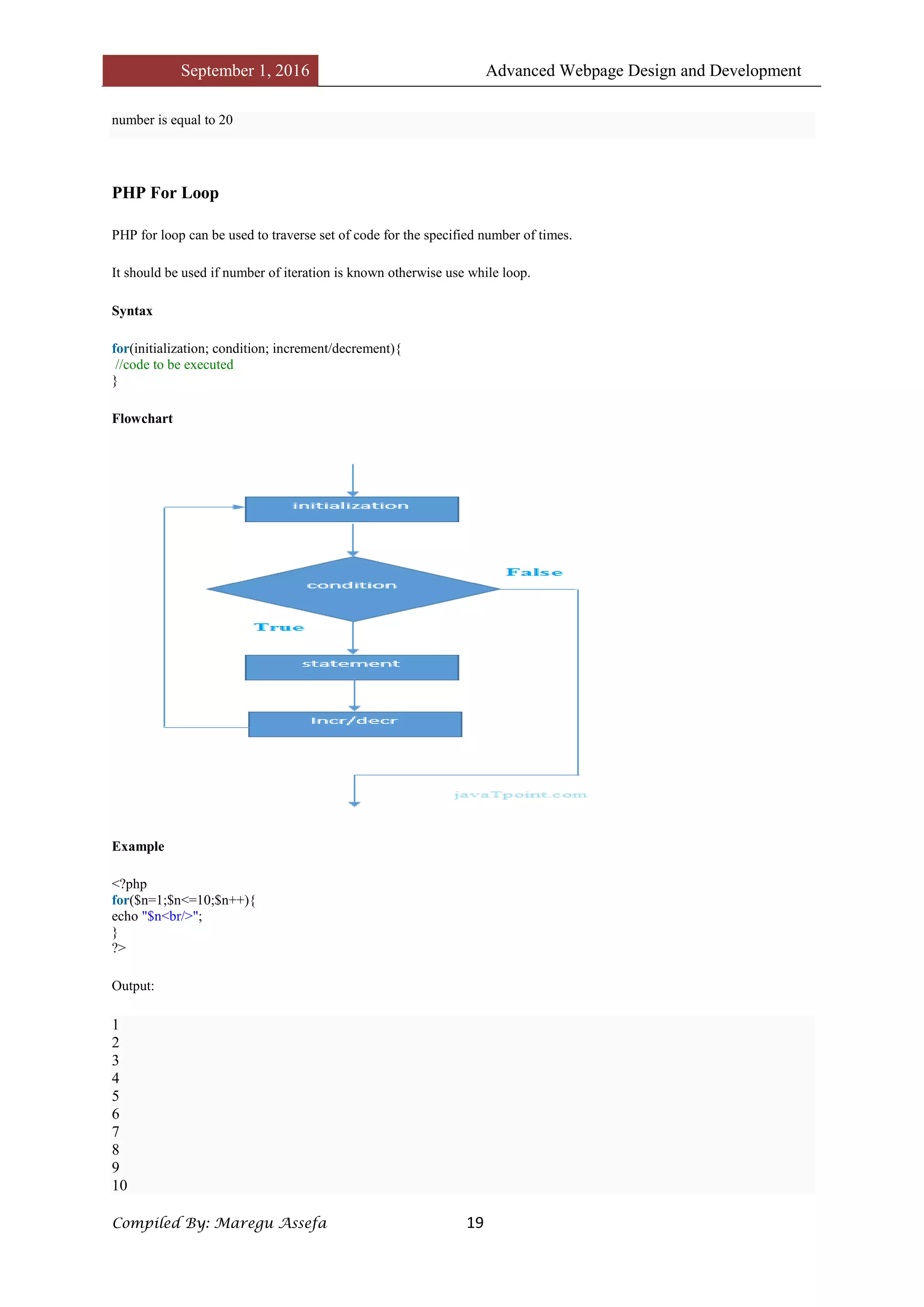
Flowchart
Example
<?php
for($n=1;$n<=10;$n++){
echo "$n<br/>";
}
?>
Output:
1
2
3
4
5
6
7
8
9
10
September 1, 2016 Advanced Webpage Design and Development
Compiled By: Maregu Assefa 20
PHP Nested For Loop
We can use for loop inside for loop in PHP, it is known as nested for loop.
In case of inner or nested for loop, nested for loop is executed fully for one outer for loop. If outer for loop is to be executed
for 3 times and inner for loop for 3 times, inner for loop will be executed 9 times (3 times for 1st outer loop, 3 times for 2nd
outer loop and 3 times for 3rd outer loop).
Example
<?php
for($i=1;$i<=3;$i++){
for($j=1;$j<=3;$j++){
echo "$i $j<br/>";
}
}
?>
Output:
1 1
1 2
1 3
2 1
2 2
2 3
3 1
3 2
3 3
PHP For Each Loop
PHP for each loop is used to traverse array elements.
Syntax
foreach( $array as $var ){
//code to be executed
}
?>
Example
<?php
$season=array("summer","winter","spring","autumn");
foreach( $season as $arr ){
echo "Season is: $arr<br />";
}
?>
Output:
Season is: summer
Season is: winter
Season is: spring
Season is: autumn
September 1, 2016 Advanced Webpage Design and Development
Compiled By: Maregu Assefa 21
PHP While Loop
PHP while loop can be used to traverse set of code like for loop.
It should be used if number of iteration is not known.
Syntax
while(condition){
//code to be executed
}
Alternative Syntax
while(condition):
//code to be executed
endwhile;
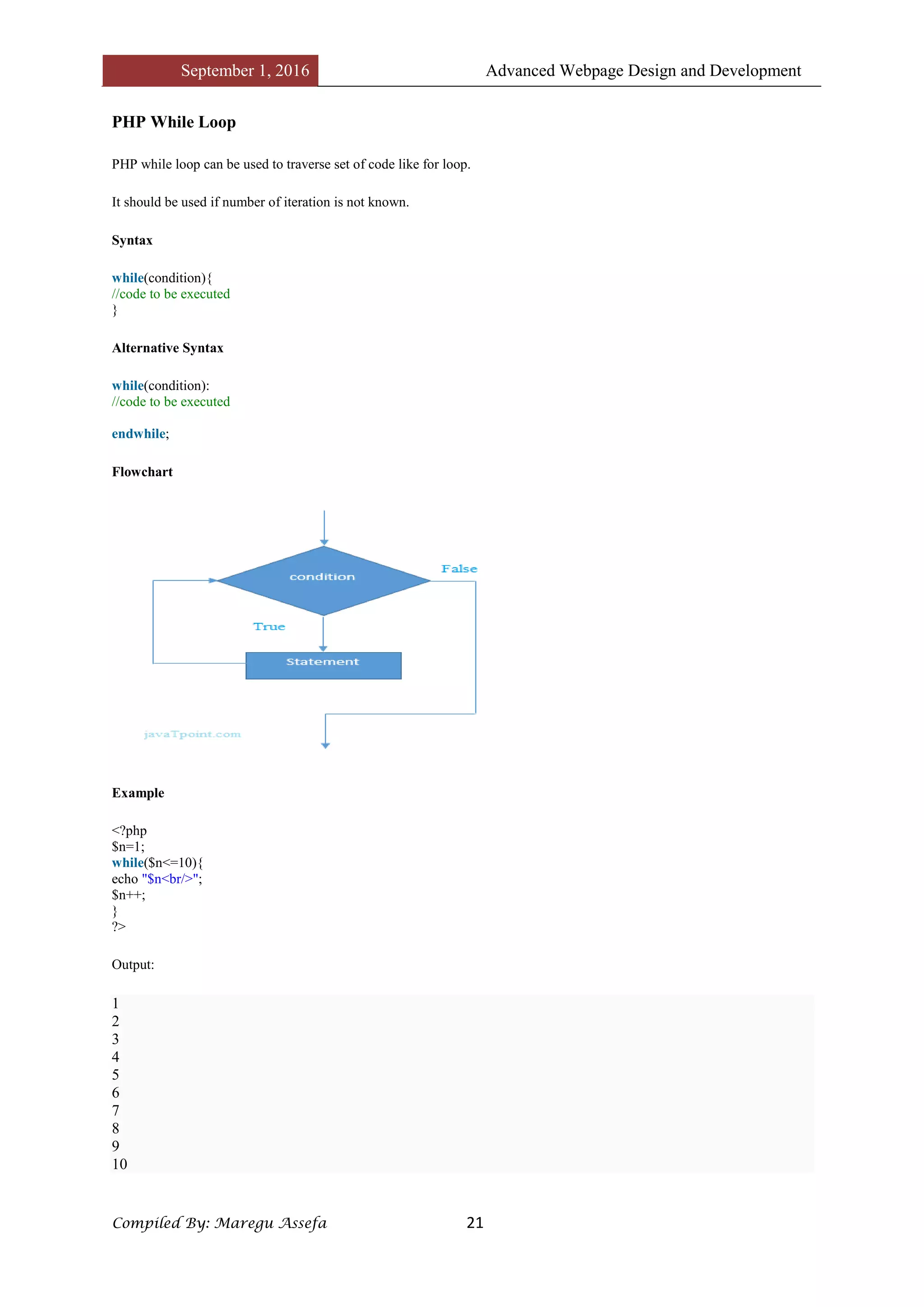
Flowchart
Example
<?php
$n=1;
while($n<=10){
echo "$n<br/>";
$n++;
}
?>
Output:
1
2
3
4
5
6
7
8
9
10
September 1, 2016 Advanced Webpage Design and Development
Compiled By: Maregu Assefa 22
Alternative Example
<?php
$n=1;
while($n<=10):
echo "$n<br/>";
$n++;
endwhile;
?>
Output:
1
2
3
4
5
6
7
8
9
10
PHP Nested While Loop
We can use while loop inside another while loop in PHP, it is known as nested while loop.
In case of inner or nested while loop, nested while loop is executed fully for one outer while loop. If outer while loop is to be
executed for 3 times and nested while loop for 3 times, nested while loop will be executed 9 times (3 times for 1st outer
loop, 3 times for 2nd outer loop and 3 times for 3rd outer loop).
Example
<?php
$i=1;
while($i<=3){
$j=1;
while($j<=3){
echo "$i $j<br/>";
$j++;
}
$i++;
}
?>
Output:
1 1
1 2
1 3
2 1
2 2
2 3
3 1
3 2
3 3
September 1, 2016 Advanced Webpage Design and Development
Compiled By: Maregu Assefa 23
PHP do while loop
PHP do while loop can be used to traverse set of code like php while loop. The PHP do-while loop is guaranteed to run at
least once.
It executes the code at least one time always because condition is checked after executing the code.
Syntax
do{
//code to be executed
}while(condition);
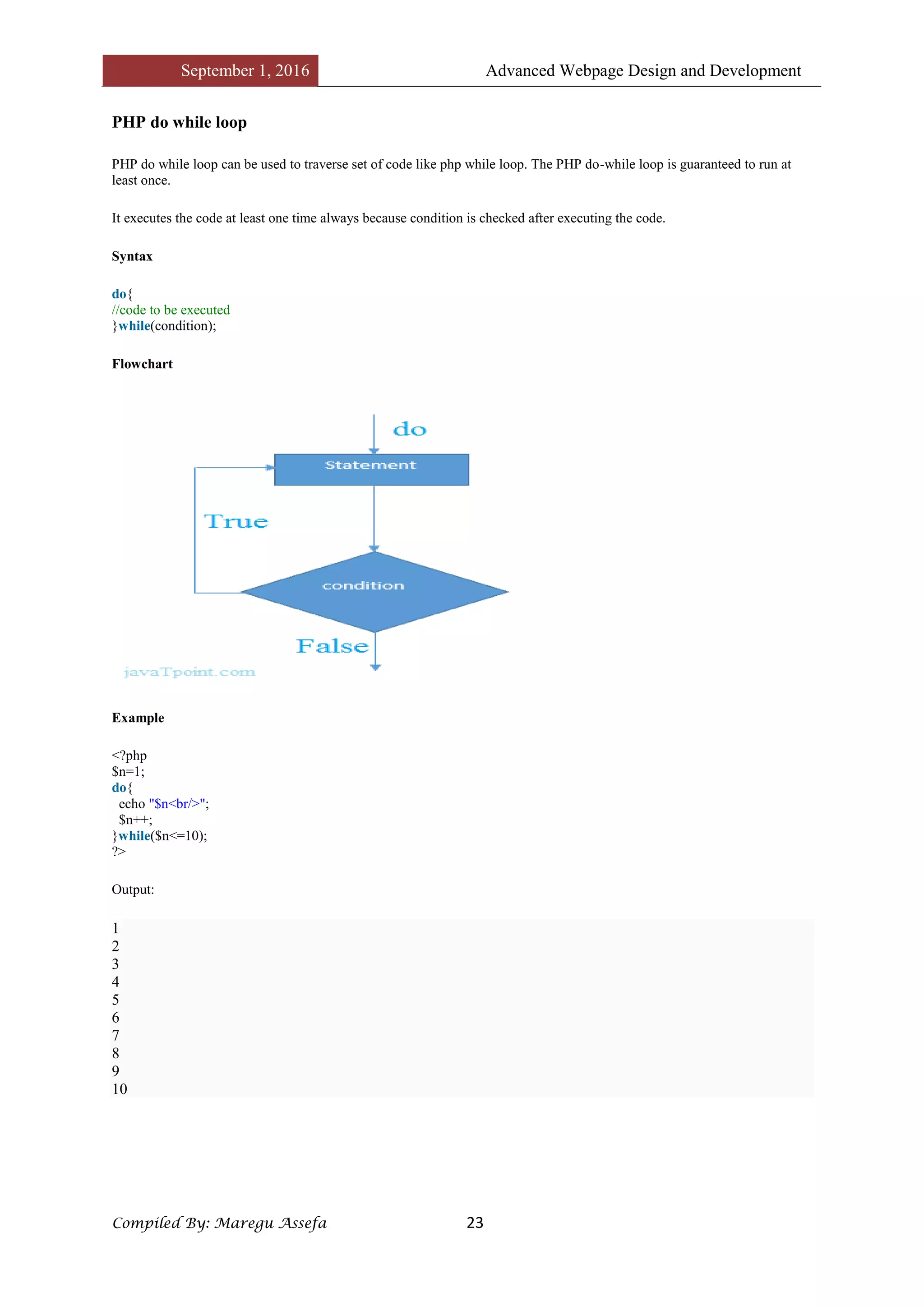
Flowchart
Example
<?php
$n=1;
do{
echo "$n<br/>";
$n++;
}while($n<=10);
?>
Output:
1
2
3
4
5
6
7
8
9
10
September 1, 2016 Advanced Webpage Design and Development
Compiled By: Maregu Assefa 24
PHP Break
PHP break statement breaks the execution of current for, while, do-while, switch and for-each loop. If you use break inside
inner loop, it breaks the execution of inner loop only.
Syntax
1. jump statement;
2. break;
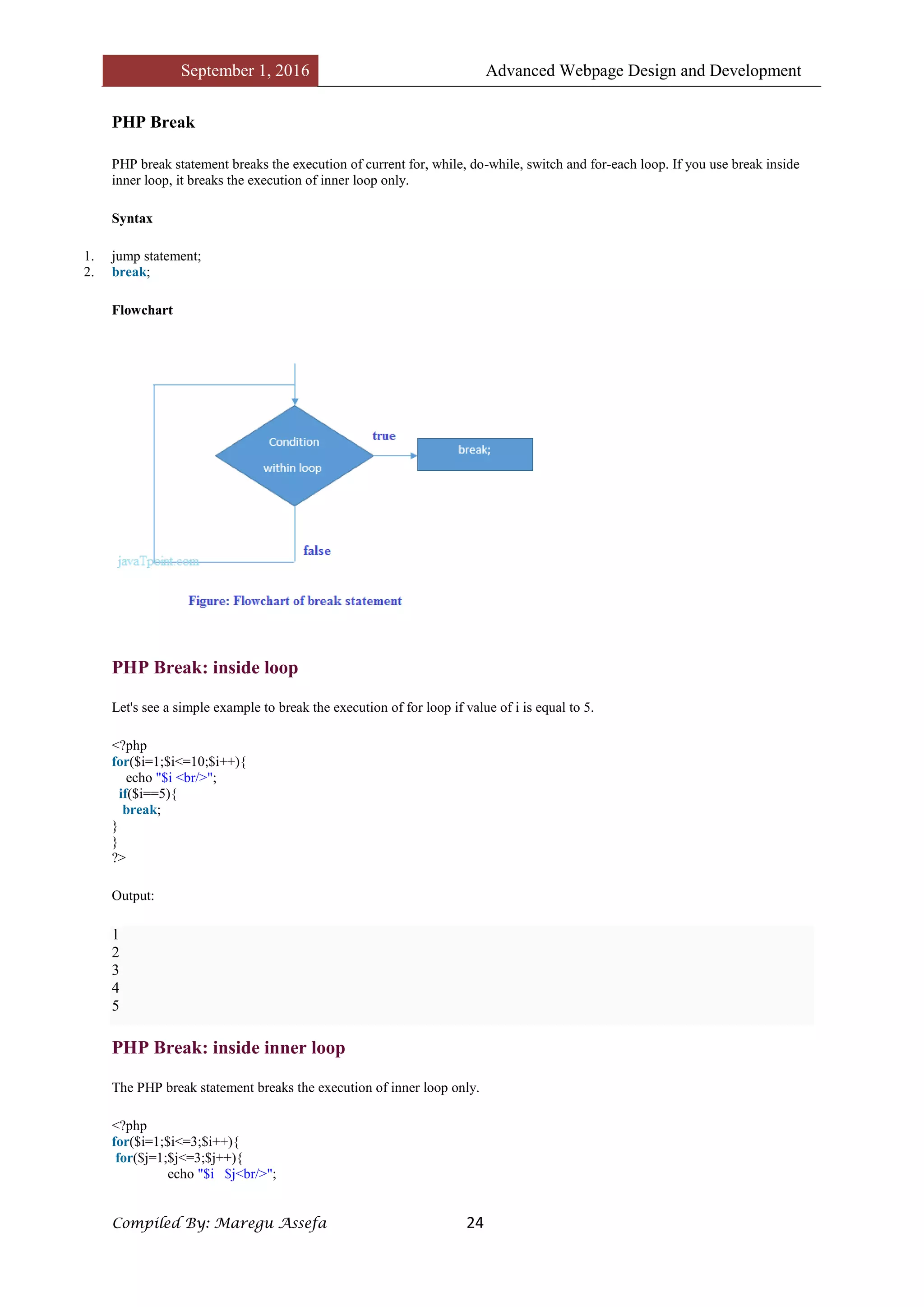
Flowchart
PHP Break: inside loop
Let's see a simple example to break the execution of for loop if value of i is equal to 5.
<?php
for($i=1;$i<=10;$i++){
echo "$i <br/>";
if($i==5){
break;
}
}
?>
Output:
1
2
3
4
5
PHP Break: inside inner loop
The PHP break statement breaks the execution of inner loop only.
<?php
for($i=1;$i<=3;$i++){
for($j=1;$j<=3;$j++){
echo "$i $j<br/>";
September 1, 2016 Advanced Webpage Design and Development
Compiled By: Maregu Assefa 25
if($i==2 && $j==2){
break;
}
}
}
?>
Output:
1 1
1 2
1 3
2 1
2 2
3 1
3 2
3 3
PHP Break: inside switch statement
The PHP break statement breaks the flow of switch case also.
<?php
$num=200;
switch($num){
case 100:
echo("number is equals to 100");
break;
case 200:
echo("number is equal to 200");
break;
case 50:
echo("number is equal to 300");
break;
default:
echo("number is not equal to 100, 200 or 500");
}
?>
Output:
number is equal to 200
September 1, 2016 Advanced Webpage Design and Development
Compiled By: Maregu Assefa 26
PHP Functions
PHP function is a piece of code that can be reused many times. It can take input as argument list and return value. There are
thousands of built-in functions in PHP.
In PHP, we can define Conditional function, Function within Function and Recursive function also.
Advantage of PHP Functions
Code Reusability: PHP functions are defined only once and can be invoked many times, like in other programming
languages.
Less Code: It saves a lot of code because you don't need to write the logic many times. By the use of function, you can write
the logic only once and reuse it.
Easy to understand: PHP functions separate the programming logic. So it is easier to understand the flow of the application
because every logic is divided in the form of functions.
PHP User-defined Functions
We can declare and call user-defined functions easily. Let's see the syntax to declare user-defined functions.
Syntax
function functionname(){
//code to be executed
}
Note: Function name must be start with letter and underscore only like other labels in PHP. It can't be start
with numbers or special symbols.
Example
File: function1.php
<?php
function sayHello(){
echo "Hello PHP Function";
}
sayHello();//calling function
?>
Output:
Hello PHP Function
PHP Function Arguments
We can pass the information in PHP function through arguments which is separated by comma.
PHP supports Call by Value (default), Call by Reference, Default argument values and Variable-length argument list.
September 1, 2016 Advanced Webpage Design and Development
Compiled By: Maregu Assefa 27
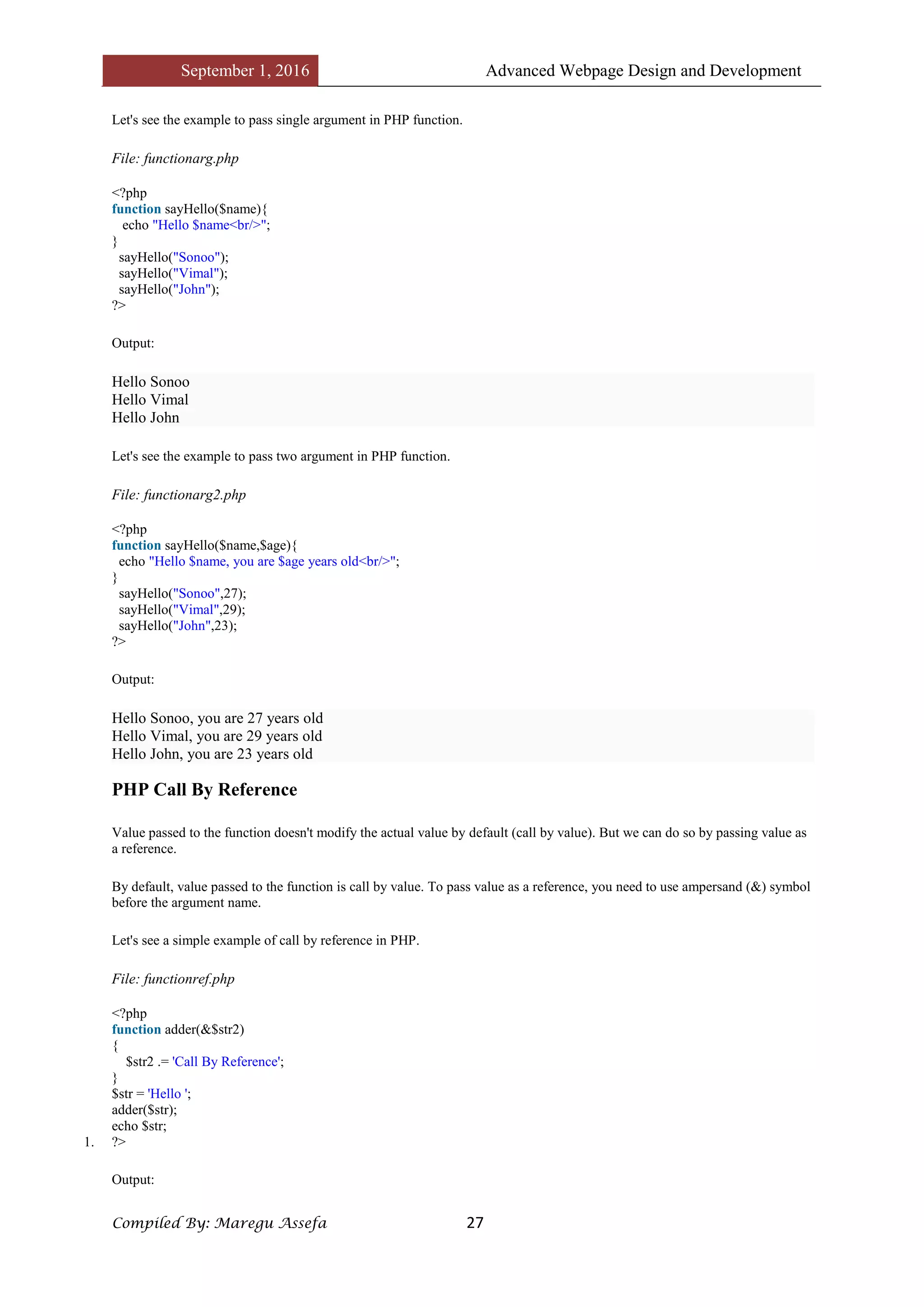
Let's see the example to pass single argument in PHP function.
File: functionarg.php
<?php
function sayHello($name){
echo "Hello $name<br/>";
}
sayHello("Sonoo");
sayHello("Vimal");
sayHello("John");
?>
Output:
Hello Sonoo
Hello Vimal
Hello John
Let's see the example to pass two argument in PHP function.
File: functionarg2.php
<?php
function sayHello($name,$age){
echo "Hello $name, you are $age years old<br/>";
}
sayHello("Sonoo",27);
sayHello("Vimal",29);
sayHello("John",23);
?>
Output:
Hello Sonoo, you are 27 years old
Hello Vimal, you are 29 years old
Hello John, you are 23 years old
PHP Call By Reference
Value passed to the function doesn't modify the actual value by default (call by value). But we can do so by passing value as
a reference.
By default, value passed to the function is call by value. To pass value as a reference, you need to use ampersand (&) symbol
before the argument name.
Let's see a simple example of call by reference in PHP.
File: functionref.php
<?php
function adder(&$str2)
{
$str2 .= 'Call By Reference';
}
$str = 'Hello ';
adder($str);
echo $str;
1. ?>
Output:
September 1, 2016 Advanced Webpage Design and Development
Compiled By: Maregu Assefa 28
Hello Call By Reference
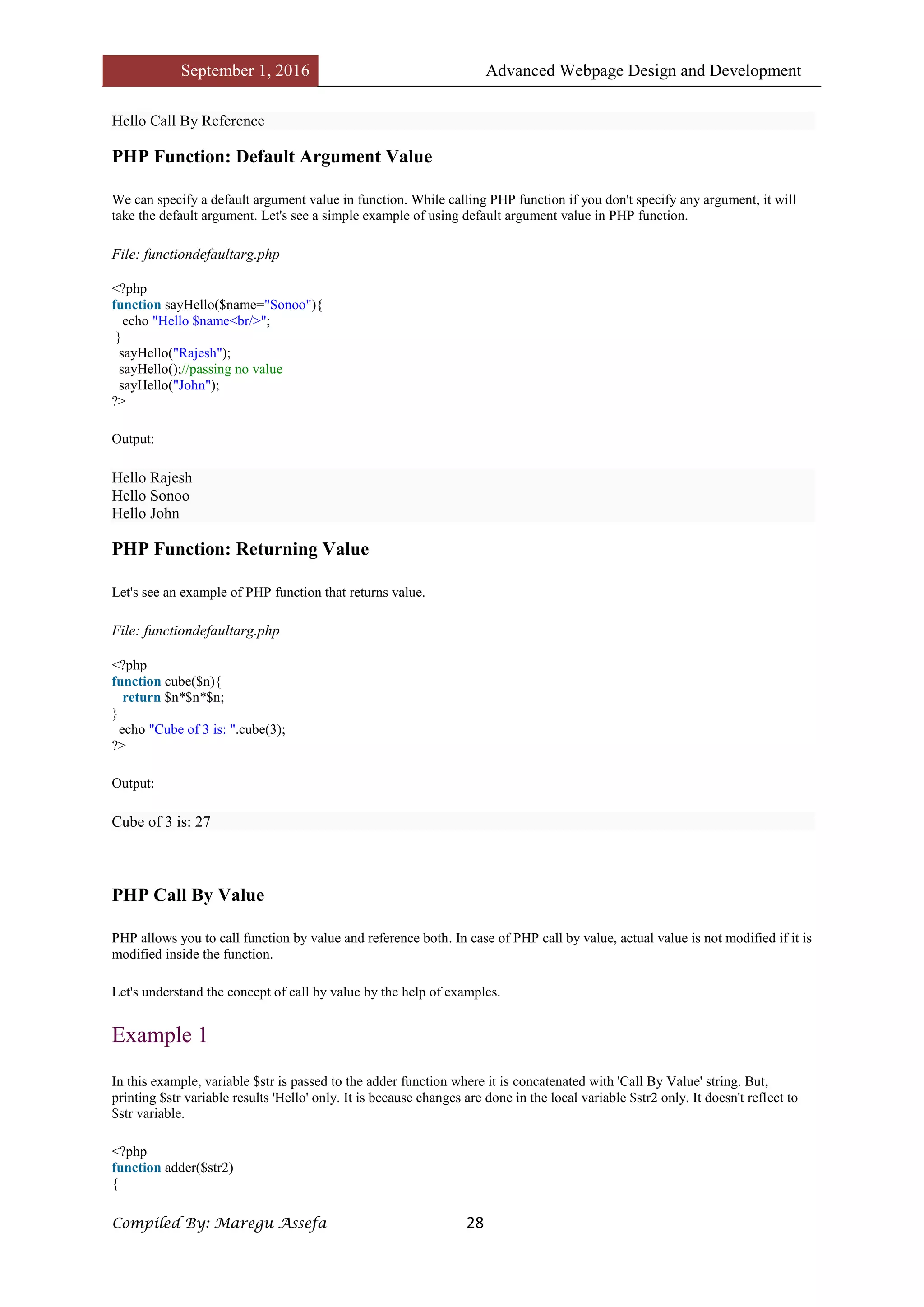
PHP Function: Default Argument Value
We can specify a default argument value in function. While calling PHP function if you don't specify any argument, it will
take the default argument. Let's see a simple example of using default argument value in PHP function.
File: functiondefaultarg.php
<?php
function sayHello($name="Sonoo"){
echo "Hello $name<br/>";
}
sayHello("Rajesh");
sayHello();//passing no value
sayHello("John");
?>
Output:
Hello Rajesh
Hello Sonoo
Hello John
PHP Function: Returning Value
Let's see an example of PHP function that returns value.
File: functiondefaultarg.php
<?php
function cube($n){
return $n*$n*$n;
}
echo "Cube of 3 is: ".cube(3);
?>
Output:
Cube of 3 is: 27
PHP Call By Value
PHP allows you to call function by value and reference both. In case of PHP call by value, actual value is not modified if it is
modified inside the function.
Let's understand the concept of call by value by the help of examples.
Example 1
In this example, variable $str is passed to the adder function where it is concatenated with 'Call By Value' string. But,
printing $str variable results 'Hello' only. It is because changes are done in the local variable $str2 only. It doesn't reflect to
$str variable.
<?php
function adder($str2)
{
September 1, 2016 Advanced Webpage Design and Development
Compiled By: Maregu Assefa 29
$str2 .= 'Call By Value';
}
$str = 'Hello ';
adder($str);
echo $str;
?>
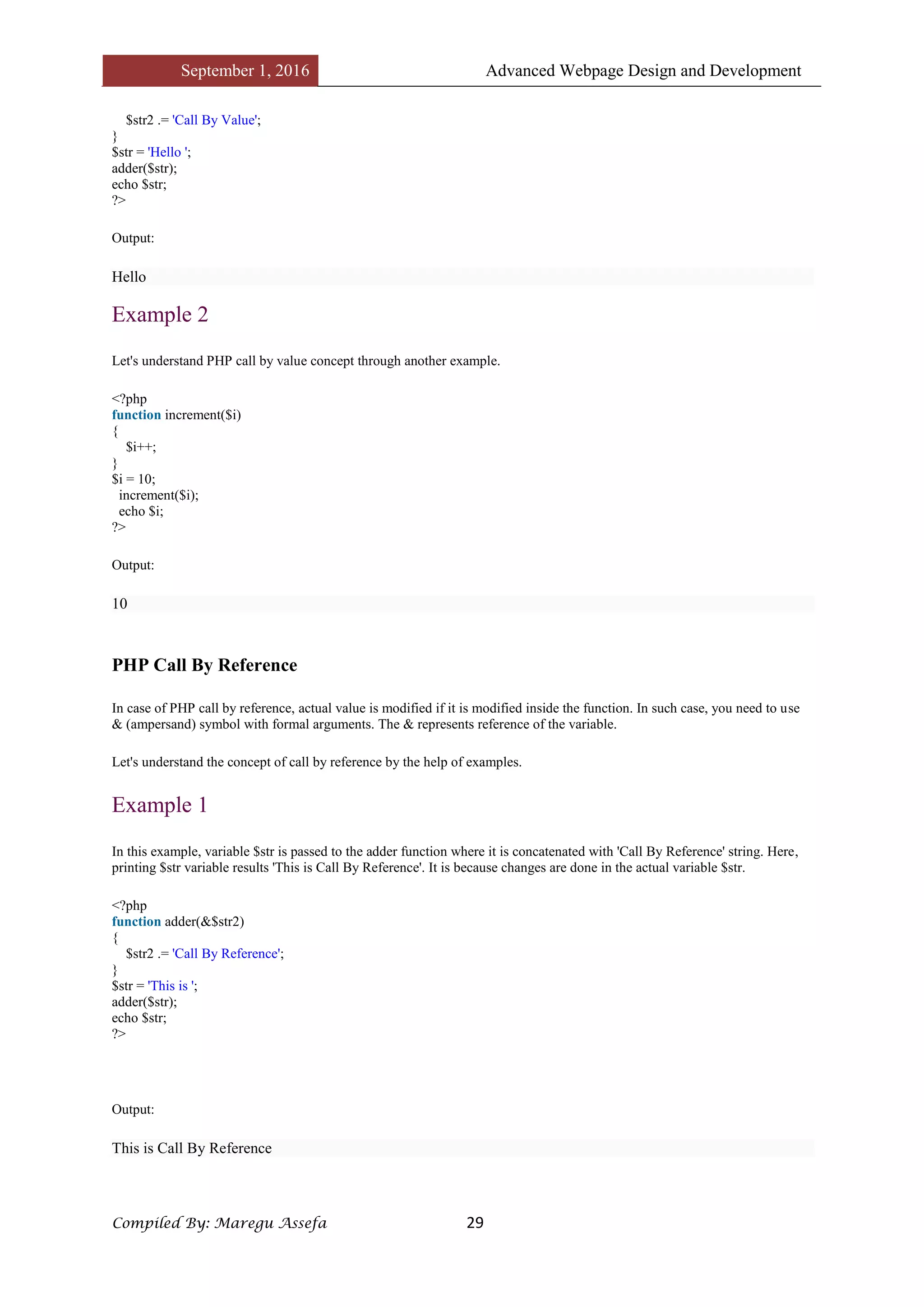
Output:
Hello
Example 2
Let's understand PHP call by value concept through another example.
<?php
function increment($i)
{
$i++;
}
$i = 10;
increment($i);
echo $i;
?>
Output:
10
PHP Call By Reference
In case of PHP call by reference, actual value is modified if it is modified inside the function. In such case, you need to use
& (ampersand) symbol with formal arguments. The & represents reference of the variable.
Let's understand the concept of call by reference by the help of examples.
Example 1
In this example, variable $str is passed to the adder function where it is concatenated with 'Call By Reference' string. Here,
printing $str variable results 'This is Call By Reference'. It is because changes are done in the actual variable $str.
<?php
function adder(&$str2)
{
$str2 .= 'Call By Reference';
}
$str = 'This is ';
adder($str);
echo $str;
?>
Output:
This is Call By Reference
September 1, 2016 Advanced Webpage Design and Development
Compiled By: Maregu Assefa 30
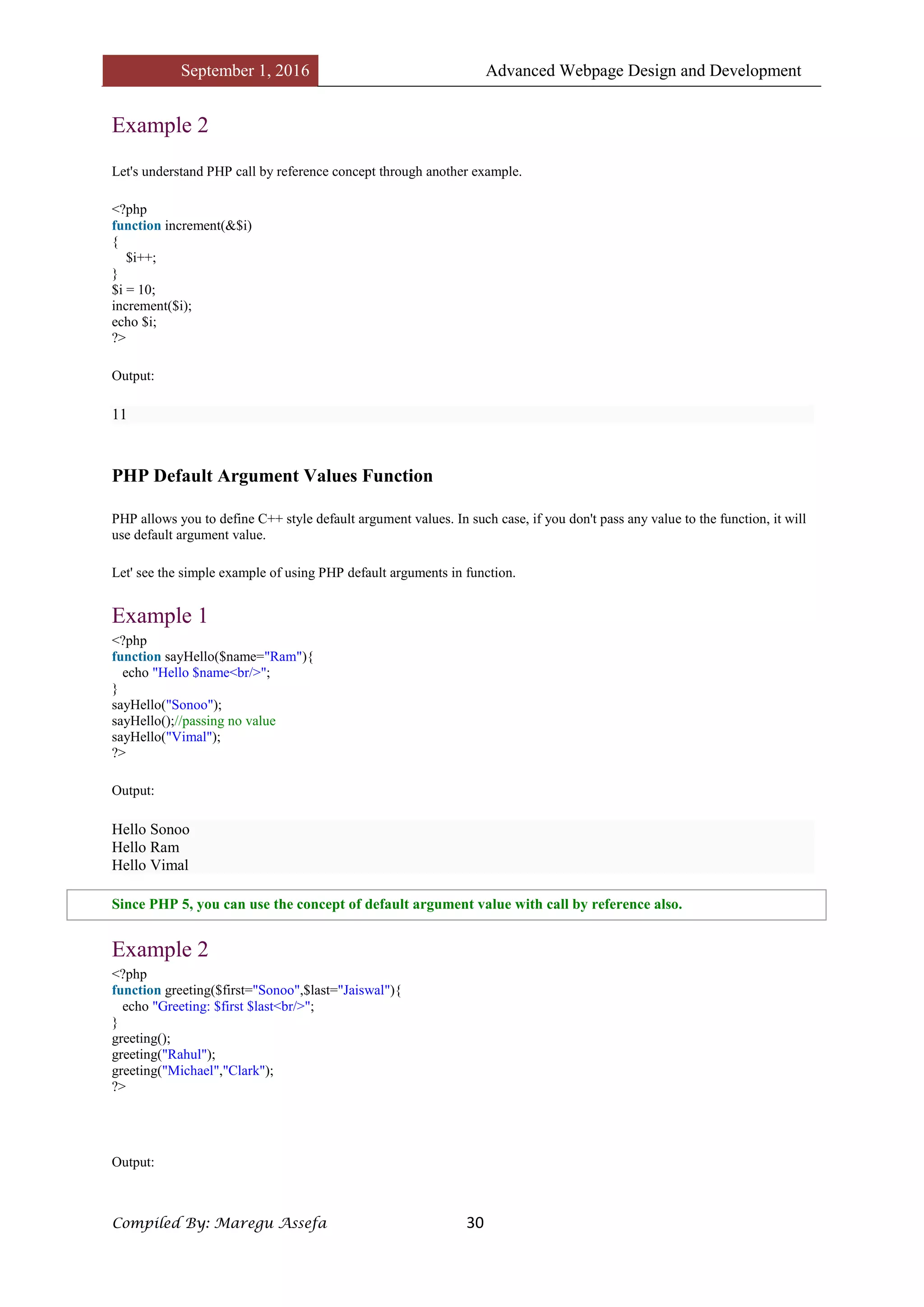
Example 2
Let's understand PHP call by reference concept through another example.
<?php
function increment(&$i)
{
$i++;
}
$i = 10;
increment($i);
echo $i;
?>
Output:
11
PHP Default Argument Values Function
PHP allows you to define C++ style default argument values. In such case, if you don't pass any value to the function, it will
use default argument value.
Let' see the simple example of using PHP default arguments in function.
Example 1
<?php
function sayHello($name="Ram"){
echo "Hello $name<br/>";
}
sayHello("Sonoo");
sayHello();//passing no value
sayHello("Vimal");
?>
Output:
Hello Sonoo
Hello Ram
Hello Vimal
Since PHP 5, you can use the concept of default argument value with call by reference also.
Example 2
<?php
function greeting($first="Sonoo",$last="Jaiswal"){
echo "Greeting: $first $last<br/>";
}
greeting();
greeting("Rahul");
greeting("Michael","Clark");
?>
Output:
September 1, 2016 Advanced Webpage Design and Development
Compiled By: Maregu Assefa 31
Greeting: Sonoo Jaiswal
Greeting: Rahul Jaiswal
Greeting: Michael Clark
Example 3
<?php
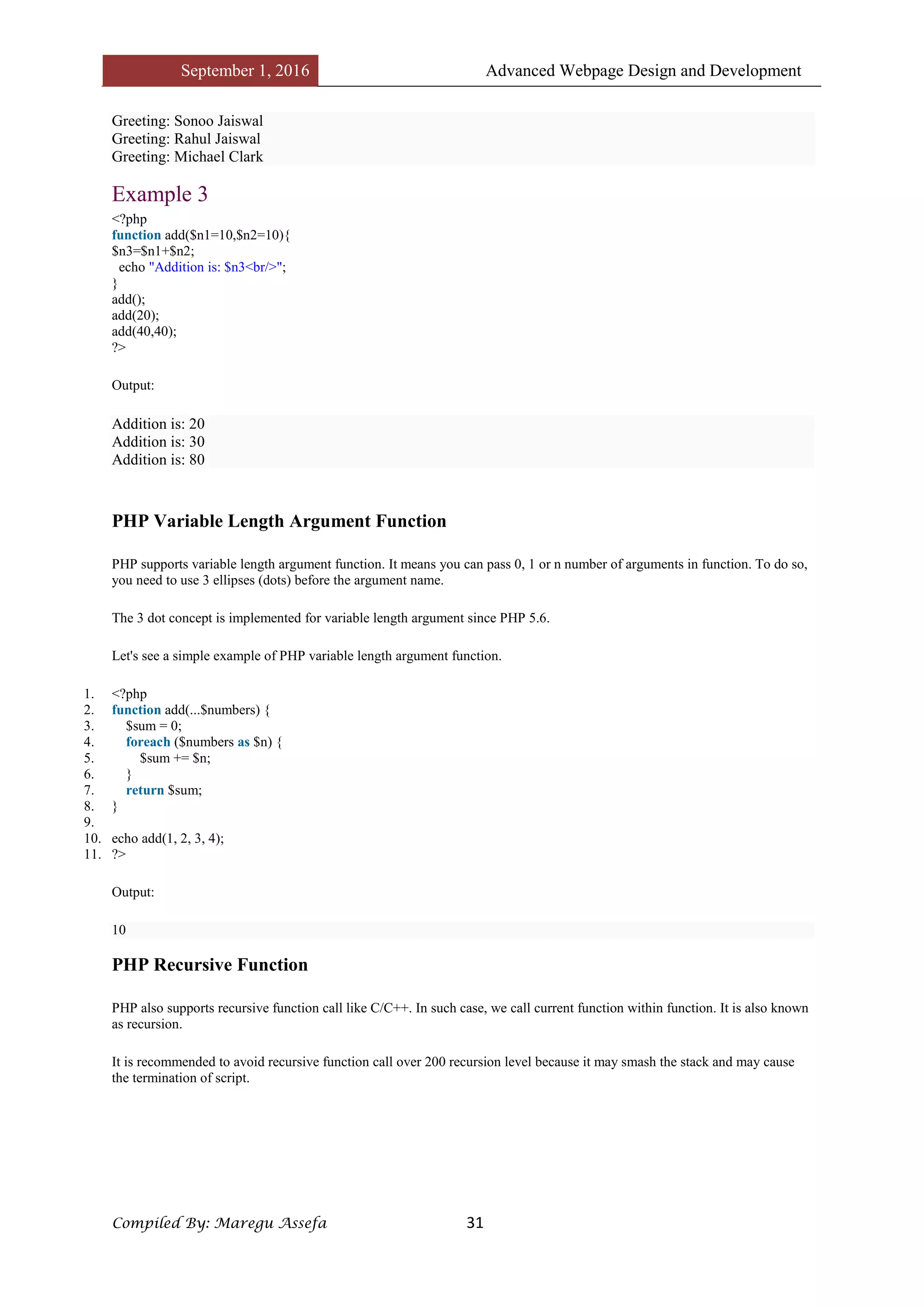
function add($n1=10,$n2=10){
$n3=$n1+$n2;
echo "Addition is: $n3<br/>";
}
add();
add(20);
add(40,40);
?>
Output:
Addition is: 20
Addition is: 30
Addition is: 80
PHP Variable Length Argument Function
PHP supports variable length argument function. It means you can pass 0, 1 or n number of arguments in function. To do so,
you need to use 3 ellipses (dots) before the argument name.
The 3 dot concept is implemented for variable length argument since PHP 5.6.
Let's see a simple example of PHP variable length argument function.
1. <?php
2. function add(...$numbers) {
3. $sum = 0;
4. foreach ($numbers as $n) {
5. $sum += $n;
6. }
7. return $sum;
8. }
9.
10. echo add(1, 2, 3, 4);
11. ?>
Output:
10
PHP Recursive Function
PHP also supports recursive function call like C/C++. In such case, we call current function within function. It is also known
as recursion.
It is recommended to avoid recursive function call over 200 recursion level because it may smash the stack and may cause
the termination of script.
September 1, 2016 Advanced Webpage Design and Development
Compiled By: Maregu Assefa 32
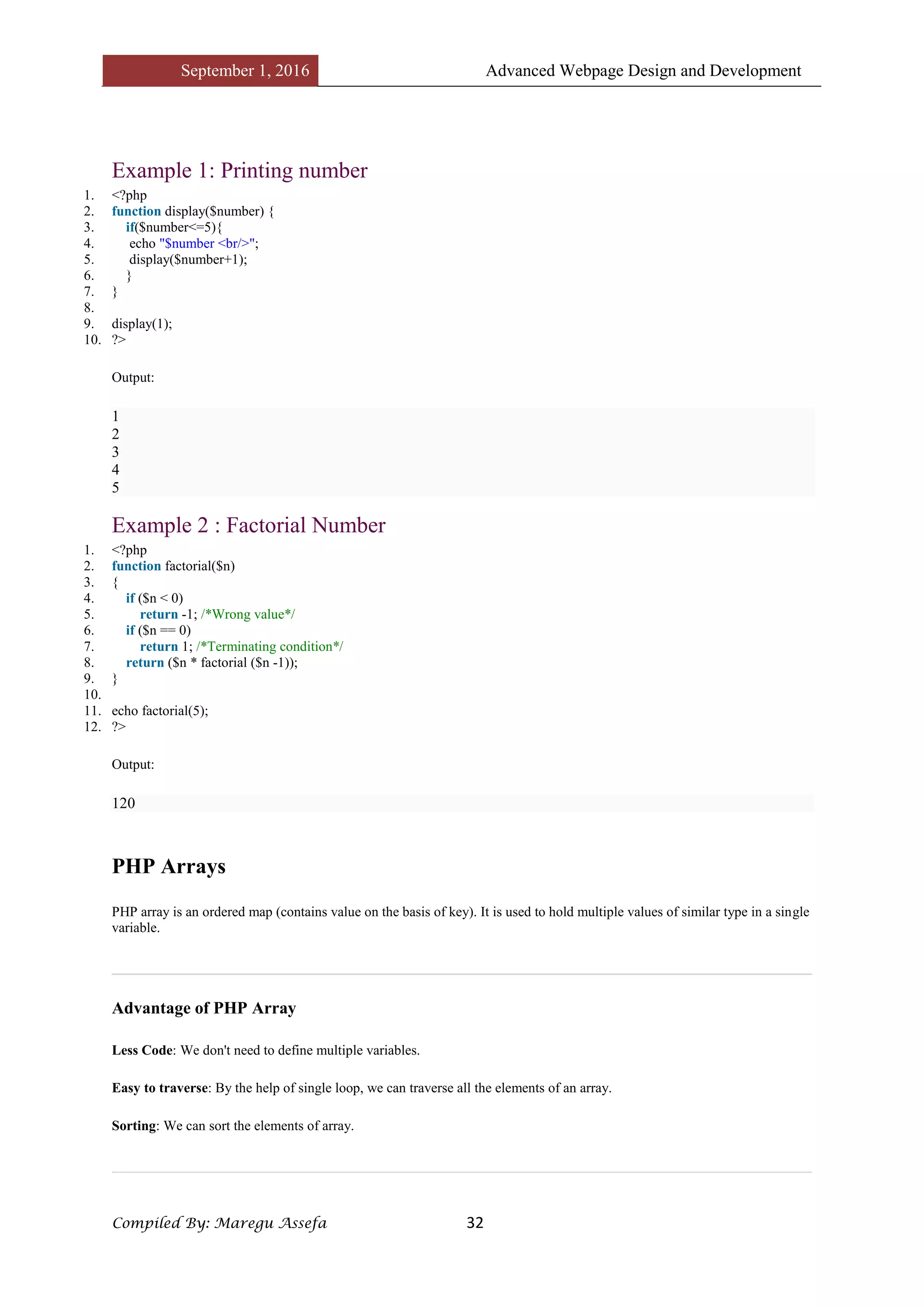
Example 1: Printing number
1. <?php
2. function display($number) {
3. if($number<=5){
4. echo "$number <br/>";
5. display($number+1);
6. }
7. }
8.
9. display(1);
10. ?>
Output:
1
2
3
4
5
Example 2 : Factorial Number
1. <?php
2. function factorial($n)
3. {
4. if ($n < 0)
5. return -1; /*Wrong value*/
6. if ($n == 0)
7. return 1; /*Terminating condition*/
8. return ($n * factorial ($n -1));
9. }
10.
11. echo factorial(5);
12. ?>
Output:
120
PHP Arrays
PHP array is an ordered map (contains value on the basis of key). It is used to hold multiple values of similar type in a single
variable.
Advantage of PHP Array
Less Code: We don't need to define multiple variables.
Easy to traverse: By the help of single loop, we can traverse all the elements of an array.
Sorting: We can sort the elements of array.
September 1, 2016 Advanced Webpage Design and Development
Compiled By: Maregu Assefa 33
PHP Array Types
There are 3 types of array in PHP.
1. Indexed Array
2. Associative Array
3. Multidimensional Array
PHP Indexed Array
PHP index is represented by number which starts from 0. We can store number, string and object in the PHP array. All PHP
array elements are assigned to an index number by default.
There are two ways to define indexed array:
1st way:
1. $season=array("summer","winter","spring","autumn");
2nd way:
1. $season[0]="summer";
2. $season[1]="winter";
3. $season[2]="spring";
4. $season[3]="autumn";
Example
File: array1.php
1. <?php
2. $season=array("summer","winter","spring","autumn");
3. echo "Season are: $season[0], $season[1], $season[2] and $season[3]";
4. ?>
Output:
Season are: summer, winter, spring and autumn
File: array2.php
1. <?php
2. $season[0]="summer";
3. $season[1]="winter";
4. $season[2]="spring";
5. $season[3]="autumn";
6. echo "Season are: $season[0], $season[1], $season[2] and $season[3]";
7. ?>
Output:
Season are: summer, winter, spring and autumn
September 1, 2016 Advanced Webpage Design and Development
Compiled By: Maregu Assefa 34
PHP Associative Array
We can associate name with each array elements in PHP using => symbol.
There are two ways to define associative array:
1st way:
1. $salary=array("Sonoo"=>"350000","John"=>"450000","Kartik"=>"200000");
2nd way:
1. $salary["Sonoo"]="350000";
2. $salary["John"]="450000";
3. $salary["Kartik"]="200000";
Example
File: arrayassociative1.php
1. <?php
2. $salary=array("Sonoo"=>"350000","John"=>"450000","Kartik"=>"200000");
3. echo "Sonoo salary: ".$salary["Sonoo"]."<br/>";
4. echo "John salary: ".$salary["John"]."<br/>";
5. echo "Kartik salary: ".$salary["Kartik"]."<br/>";
6. ?>
Output:
Sonoo salary: 350000
John salary: 450000
Kartik salary: 200000
File: arrayassociative2.php
1. <?php
2. $salary["Sonoo"]="350000";
3. $salary["John"]="450000";
4. $salary["Kartik"]="200000";
5. echo "Sonoo salary: ".$salary["Sonoo"]."<br/>";
6. echo "John salary: ".$salary["John"]."<br/>";
7. echo "Kartik salary: ".$salary["Kartik"]."<br/>";
8. ?>
Output:
Sonoo salary: 350000
John salary: 450000
Kartik salary: 200000
PHP Indexed Array
PHP indexed array is an array which is represented by an index number by default. All elements of array are represented by
an index number which starts from 0.
PHP indexed array can store numbers, strings or any object. PHP indexed array is also known as numeric array.
Definition
September 1, 2016 Advanced Webpage Design and Development
Compiled By: Maregu Assefa 35
There are two ways to define indexed array:
1st way:
1. $size=array("Big","Medium","Short");
2nd way:
1. $size[0]="Big";
2. $size[1]="Medium";
3. $size[2]="Short";
Example
File: array1.php
1. <?php
2. $size=array("Big","Medium","Short");
3. echo "Size: $size[0], $size[1] and $size[2]";
4. ?>
Output:
Size: Big, Medium and Short
File: array2.php
1. <?php
2. $size[0]="Big";
3. $size[1]="Medium";
4. $size[2]="Short";
5. echo "Size: $size[0], $size[1] and $size[2]";
6. ?>
Output:
Size: Big, Medium and Short
Traversing PHP Indexed Array
We can easily traverse array in PHP using foreach loop. Let's see a simple example to traverse all the elements of PHP array.
File: array3.php
1. <?php
2. $size=array("Big","Medium","Short");
3. foreach( $size as $s )
4. {
5. echo "Size is: $s<br />";
6. }
7. ?>
Output:
Size is: Big
Size is: Medium
Size is: Short
Count Length of PHP Indexed Array
PHP provides count() function which returns length of an array.
1.
September 1, 2016 Advanced Webpage Design and Development
Compiled By: Maregu Assefa 36
2. <?php
3. $size=array("Big","Medium","Short");
4. echo count($size);
5. ?>
Output:
3
PHP Associative Array
PHP allows you to associate name/label with each array elements in PHP using => symbol. Such way, you can easily
remember the element because each element is represented by label than an incremented number.
Definition
There are two ways to define associative array:
1st way:
1. $salary=array("Sonoo"=>"550000","Vimal"=>"250000","Ratan"=>"200000");
2nd way:
1. $salary["Sonoo"]="550000";
2. $salary["Vimal"]="250000";
3. $salary["Ratan"]="200000";
Example
File: arrayassociative1.php
1. <?php
2. $salary=array("Sonoo"=>"550000","Vimal"=>"250000","Ratan"=>"200000");
3. echo "Sonoo salary: ".$salary["Sonoo"]."<br/>";
4. echo "Vimal salary: ".$salary["Vimal"]."<br/>";
5. echo "Ratan salary: ".$salary["Ratan"]."<br/>";
6. ?>
Output:
Sonoo salary: 550000
Vimal salary: 250000
Ratan salary: 200000
File: arrayassociative2.php
1. <?php
2. $salary["Sonoo"]="550000";
3. $salary["Vimal"]="250000";
4. $salary["Ratan"]="200000";
5. echo "Sonoo salary: ".$salary["Sonoo"]."<br/>";
6. echo "Vimal salary: ".$salary["Vimal"]."<br/>";
7. echo "Ratan salary: ".$salary["Ratan"]."<br/>";
8. ?>
Output:
Sonoo salary: 550000
Vimal salary: 250000
Ratan salary: 200000
September 1, 2016 Advanced Webpage Design and Development
Compiled By: Maregu Assefa 37
Traversing PHP Associative Array
By the help of PHP for each loop, we can easily traverse the elements of PHP associative array.
1. <?php
2. $salary=array("Sonoo"=>"550000","Vimal"=>"250000","Ratan"=>"200000");
3. foreach($salary as $k => $v) {
4. echo "Key: ".$k." Value: ".$v."<br/>";
5. }
6. ?>
Output:
Key: Sonoo Value: 550000
Key: Vimal Value: 250000
Key: Ratan Value: 200000
PHP Multidimensional Array
PHP multidimensional array is also known as array of arrays. It allows you to store tabular data in an array. PHP
multidimensional array can be represented in the form of matrix which is represented by row * column.
Definition
1. $emp = array
2. (
3. array(1,"sonoo",400000),
4. array(2,"john",500000),
5. array(3,"rahul",300000)
6. );
Example
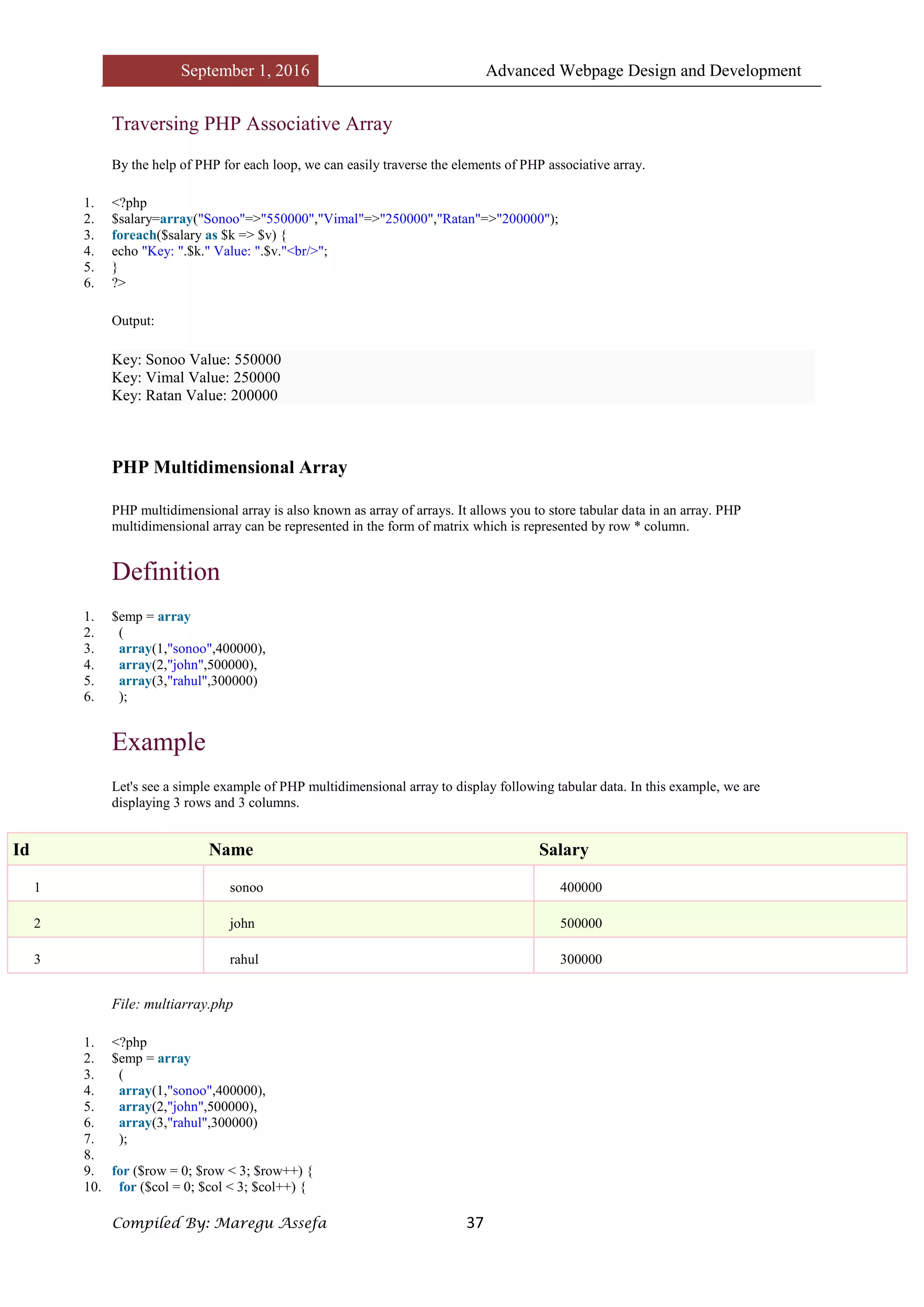
Let's see a simple example of PHP multidimensional array to display following tabular data. In this example, we are
displaying 3 rows and 3 columns.
Id Name Salary
1 sonoo 400000
2 john 500000
3 rahul 300000
File: multiarray.php
1. <?php
2. $emp = array
3. (
4. array(1,"sonoo",400000),
5. array(2,"john",500000),
6. array(3,"rahul",300000)
7. );
8.
9. for ($row = 0; $row < 3; $row++) {
10. for ($col = 0; $col < 3; $col++) {
September 1, 2016 Advanced Webpage Design and Development
Compiled By: Maregu Assefa 38
11. echo $emp[$row][$col]." ";
12. }
13. echo "<br/>";
14. }
15. ?>
Output:
1 sonoo 400000
2 john 500000
3 rahul 300000
PHP Array Functions
PHP provides various array functions to access and manipulate the elements of array. The important PHP array functions are
given below.
1) PHP array() function
PHP array() function creates and returns an array. It allows you to create indexed, associative and multidimensional arrays.
Syntax
1. array array ([ mixed $... ] )
Example
1. <?php
2. $season=array("summer","winter","spring","autumn");
3. echo "Season are: $season[0], $season[1], $season[2] and $season[3]";
4. ?>
Output:
Season are: summer, winter, spring and autumn
2) PHP array_change_key_case() function
PHP array_change_key_case() function changes the case of all key of an array.
Note: It changes case of key only.
Syntax
1. array array_change_key_case ( array $array [, int $case = CASE_LOWER ] )
Example
1. <?php
2. $salary=array("Sonoo"=>"550000","Vimal"=>"250000","Ratan"=>"200000");
3. print_r(array_change_key_case($salary,CASE_UPPER));
4. ?>
Output:
Array ( [SONOO] => 550000 [VIMAL] => 250000 [RATAN] => 200000 )
September 1, 2016 Advanced Webpage Design and Development
Compiled By: Maregu Assefa 39
Example
1. <?php
2. $salary=array("Sonoo"=>"550000","Vimal"=>"250000","Ratan"=>"200000");
3. print_r(array_change_key_case($salary,CASE_LOWER));
4. ?>
Output:
Array ( [sonoo] => 550000 [vimal] => 250000 [ratan] => 200000 )
3) PHP array_chunk() function
PHP array_chunk() function splits array into chunks. By using array_chunk() method, you can divide array into many parts.
Syntax
1. array array_chunk ( array $array , int $size [, bool $preserve_keys = false ] )
Example
1. <?php
2. $salary=array("Sonoo"=>"550000","Vimal"=>"250000","Ratan"=>"200000");
3. print_r(array_chunk($salary,2));
4. ?>
Output:
Array (
[0] => Array ( [0] => 550000 [1] => 250000 )
[1] => Array ( [0] => 200000 )
)
4) PHP count() function
PHP count() function counts all elements in an array.
Syntax
1. int count ( mixed $array_or_countable [, int $mode = COUNT_NORMAL ] )
Example
1. <?php
2. $season=array("summer","winter","spring","autumn");
3. echo count($season);
4. ?>
Output:
4
5) PHP sort() function
PHP sort() function sorts all the elements in an array.
Syntax
September 1, 2016 Advanced Webpage Design and Development
Compiled By: Maregu Assefa 40
1. bool sort ( array &$array [, int $sort_flags = SORT_REGULAR ] )
Example
1. <?php
2. $season=array("summer","winter","spring","autumn");
3. sort($season);
4. foreach( $season as $s )
5. {
6. echo "$s<br />";
7. }
8. ?>
Output:
autumn
spring
summer
winter
6) PHP array_reverse() function
PHP array_reverse() function returns an array containing elements in reversed order.
Syntax
1. array array_reverse ( array $array [, bool $preserve_keys = false ] )
Example
1. <?php
2. $season=array("summer","winter","spring","autumn");
3. $reverseseason=array_reverse($season);
4. foreach( $reverseseason as $s )
5. {
6. echo "$s<br />";
7. }
8. ?>
Output:
autumn
spring
winter
summer
7) PHP array_search() function
PHP array_search() function searches the specified value in an array. It returns key if search is successful.
Syntax
1. mixed array_search ( mixed $needle , array $haystack [, bool $strict = false ] )
Example
1. <?php
2. $season=array("summer","winter","spring","autumn");
3. $key=array_search("spring",$season);
September 1, 2016 Advanced Webpage Design and Development
Compiled By: Maregu Assefa 41
4. echo $key;
5. ?>
Output:
2
8) PHP array_intersect() function
PHP array_intersect() function returns the intersection of two array. In other words, it returns the matching elements of two
array.
Syntax
1. array array_intersect ( array $array1 , array $array2 [, array $... ] )
Example
1. <?php
2. $name1=array("sonoo","john","vivek","smith");
3. $name2=array("umesh","sonoo","kartik","smith");
4. $name3=array_intersect($name1,$name2);
5. foreach( $name3 as $n )
6. {
7. echo "$n<br />";
8. }
9. ?>
Output:
sonoo
smith
PHP Strings
A PHP string is a sequence of characters i.e. used to store and manipulate text. There are 4 ways to specify string in PHP.
o single quoted
o double quoted
o heredoc syntax
o newdoc syntax (since PHP 5.3)
Single Quoted PHP String
We can create a string in PHP by enclosing text in a single quote. It is the easiest way to specify string in PHP.
1. <?php
2. $str='Hello text within single quote';
3. echo $str;
4. ?>
Output:
Hello text within single quote
We can store multiple line text, special characters and escape sequences in a single quoted PHP string.
September 1, 2016 Advanced Webpage Design and Development
Compiled By: Maregu Assefa 42
1. <?php
2. $str1='Hello text
3. multiple line
4. text within single quoted string';
5. $str2='Using double "quote" directly inside single quoted string';
6. $str3='Using escape sequences n in single quoted string';
7. echo "$str1 <br/> $str2 <br/> $str3";
8. ?>
Output:
Hello text multiple line text within single quoted string
Using double "quote" directly inside single quoted string
Using escape sequences n in single quoted string
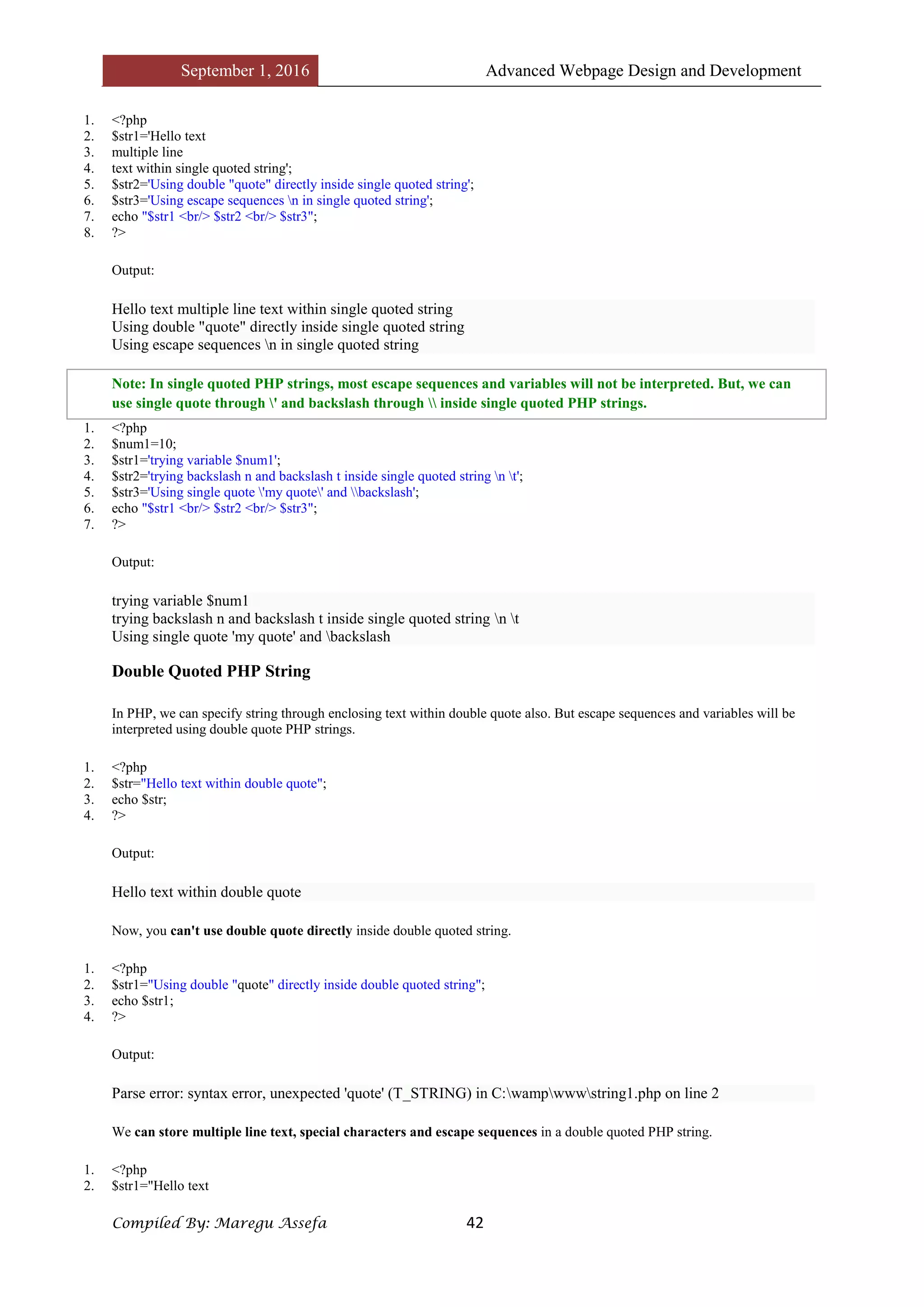
Note: In single quoted PHP strings, most escape sequences and variables will not be interpreted. But, we can
use single quote through ' and backslash through  inside single quoted PHP strings.
1. <?php
2. $num1=10;
3. $str1='trying variable $num1';
4. $str2='trying backslash n and backslash t inside single quoted string n t';
5. $str3='Using single quote 'my quote' and backslash';
6. echo "$str1 <br/> $str2 <br/> $str3";
7. ?>
Output:
trying variable $num1
trying backslash n and backslash t inside single quoted string n t
Using single quote 'my quote' and backslash
Double Quoted PHP String
In PHP, we can specify string through enclosing text within double quote also. But escape sequences and variables will be
interpreted using double quote PHP strings.
1. <?php
2. $str="Hello text within double quote";
3. echo $str;
4. ?>
Output:
Hello text within double quote
Now, you can't use double quote directly inside double quoted string.
1. <?php
2. $str1="Using double "quote" directly inside double quoted string";
3. echo $str1;
4. ?>
Output:
Parse error: syntax error, unexpected 'quote' (T_STRING) in C:wampwwwstring1.php on line 2
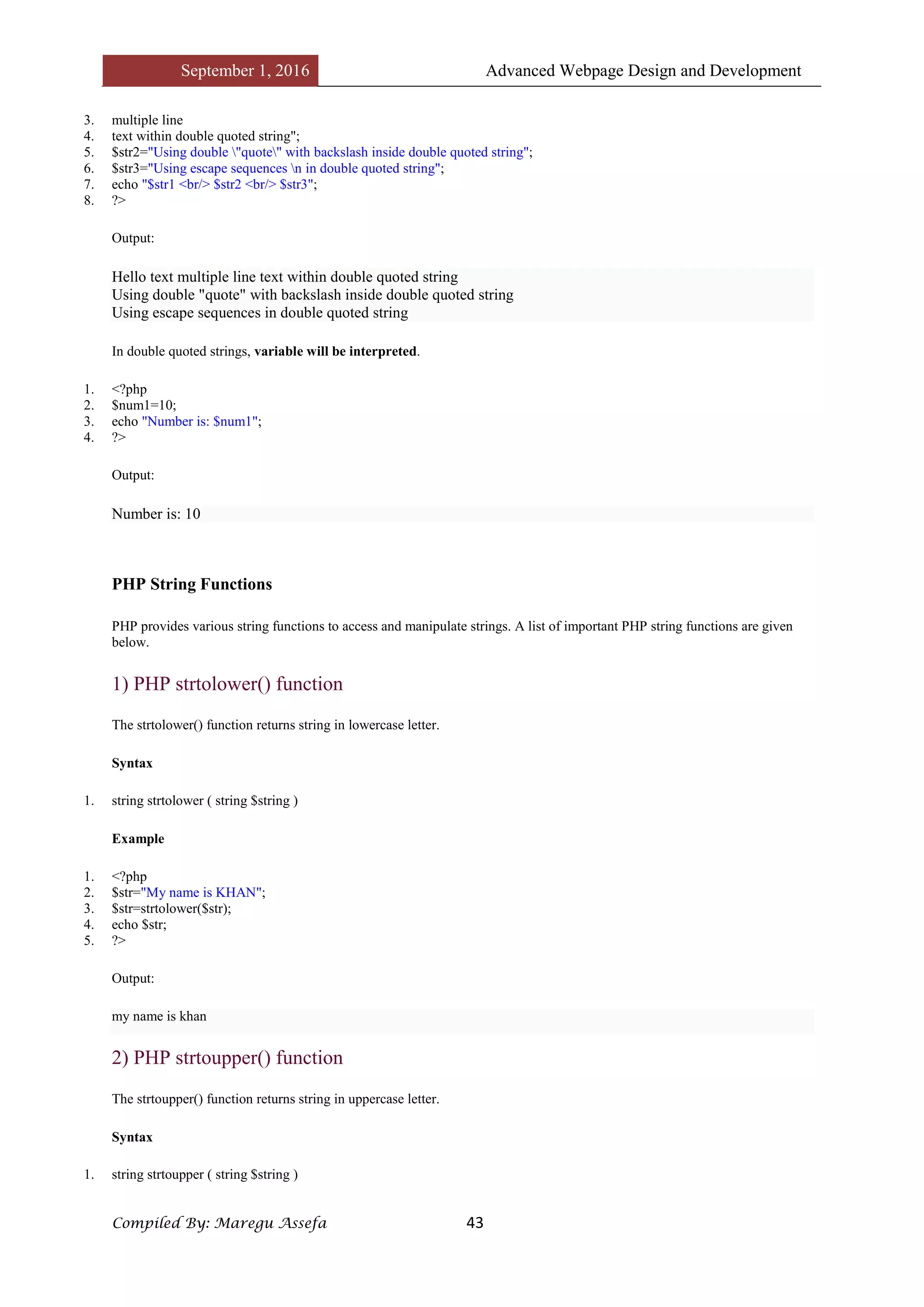
We can store multiple line text, special characters and escape sequences in a double quoted PHP string.
1. <?php
2. $str1="Hello text
September 1, 2016 Advanced Webpage Design and Development
Compiled By: Maregu Assefa 43
3. multiple line
4. text within double quoted string";
5. $str2="Using double "quote" with backslash inside double quoted string";
6. $str3="Using escape sequences n in double quoted string";
7. echo "$str1 <br/> $str2 <br/> $str3";
8. ?>
Output:
Hello text multiple line text within double quoted string
Using double "quote" with backslash inside double quoted string
Using escape sequences in double quoted string
In double quoted strings, variable will be interpreted.
1. <?php
2. $num1=10;
3. echo "Number is: $num1";
4. ?>
Output:
Number is: 10
PHP String Functions
PHP provides various string functions to access and manipulate strings. A list of important PHP string functions are given
below.
1) PHP strtolower() function
The strtolower() function returns string in lowercase letter.
Syntax
1. string strtolower ( string $string )
Example
1. <?php
2. $str="My name is KHAN";
3. $str=strtolower($str);
4. echo $str;
5. ?>
Output:
my name is khan
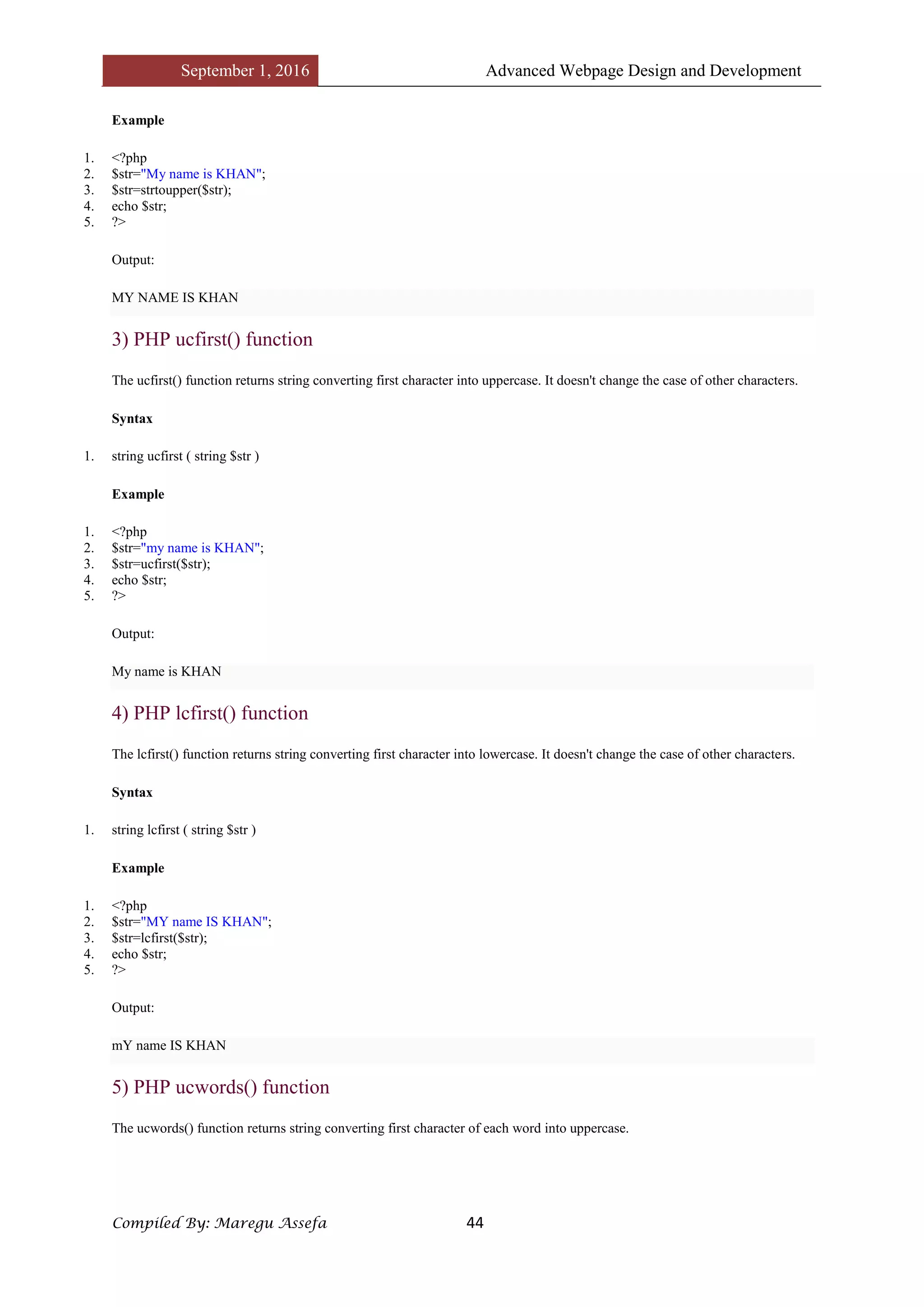
2) PHP strtoupper() function
The strtoupper() function returns string in uppercase letter.
Syntax
1. string strtoupper ( string $string )
September 1, 2016 Advanced Webpage Design and Development
Compiled By: Maregu Assefa 44
Example
1. <?php
2. $str="My name is KHAN";
3. $str=strtoupper($str);
4. echo $str;
5. ?>
Output:
MY NAME IS KHAN
3) PHP ucfirst() function
The ucfirst() function returns string converting first character into uppercase. It doesn't change the case of other characters.
Syntax
1. string ucfirst ( string $str )
Example
1. <?php
2. $str="my name is KHAN";
3. $str=ucfirst($str);
4. echo $str;
5. ?>
Output:
My name is KHAN
4) PHP lcfirst() function
The lcfirst() function returns string converting first character into lowercase. It doesn't change the case of other characters.
Syntax
1. string lcfirst ( string $str )
Example
1. <?php
2. $str="MY name IS KHAN";
3. $str=lcfirst($str);
4. echo $str;
5. ?>
Output:
mY name IS KHAN
5) PHP ucwords() function
The ucwords() function returns string converting first character of each word into uppercase.
September 1, 2016 Advanced Webpage Design and Development
Compiled By: Maregu Assefa 45
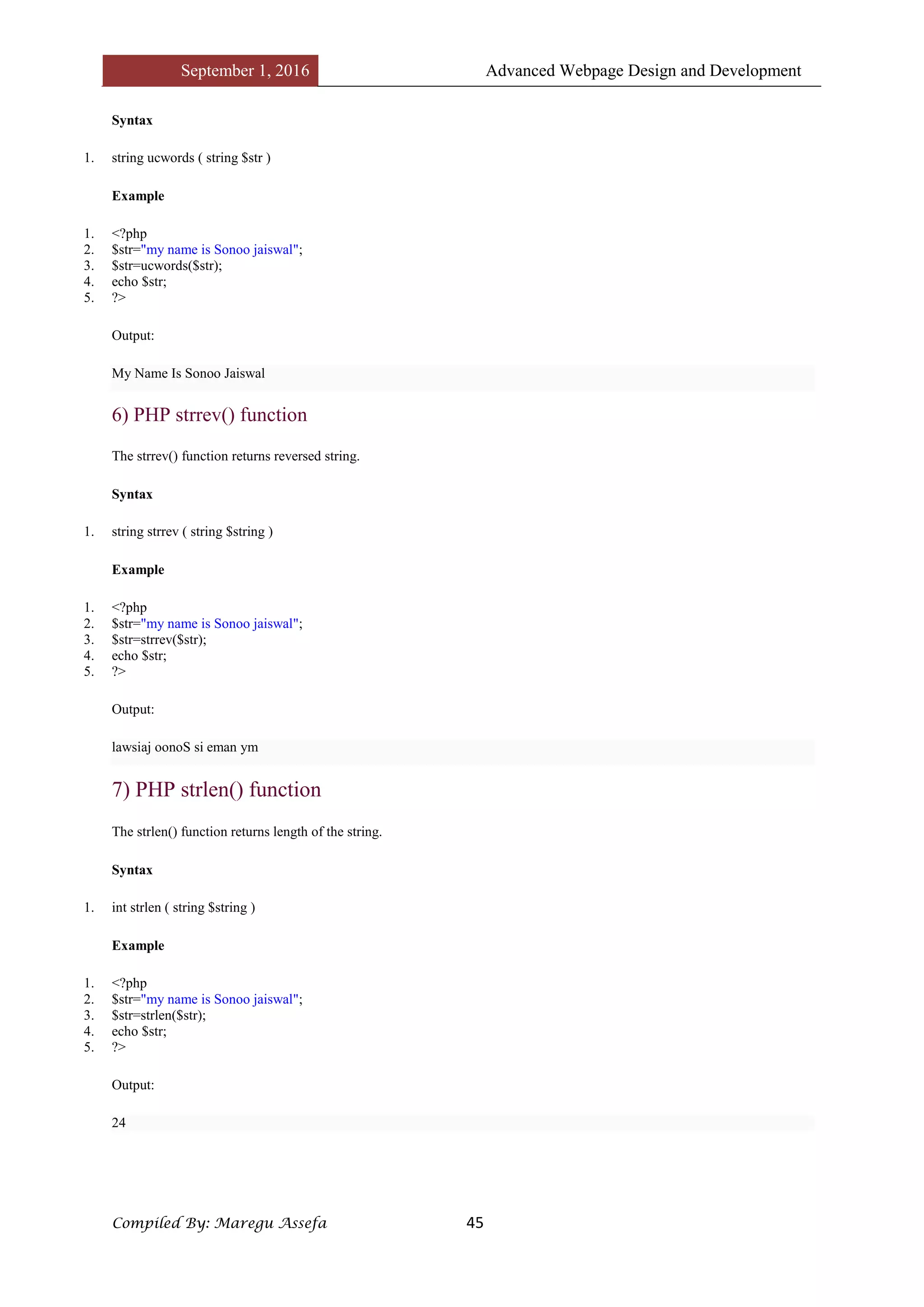
Syntax
1. string ucwords ( string $str )
Example
1. <?php
2. $str="my name is Sonoo jaiswal";
3. $str=ucwords($str);
4. echo $str;
5. ?>
Output:
My Name Is Sonoo Jaiswal
6) PHP strrev() function
The strrev() function returns reversed string.
Syntax
1. string strrev ( string $string )
Example
1. <?php
2. $str="my name is Sonoo jaiswal";
3. $str=strrev($str);
4. echo $str;
5. ?>
Output:
lawsiaj oonoS si eman ym
7) PHP strlen() function
The strlen() function returns length of the string.
Syntax
1. int strlen ( string $string )
Example
1. <?php
2. $str="my name is Sonoo jaiswal";
3. $str=strlen($str);
4. echo $str;
5. ?>
Output:
24
September 1, 2016 Advanced Webpage Design and Development
Compiled By: Maregu Assefa 46
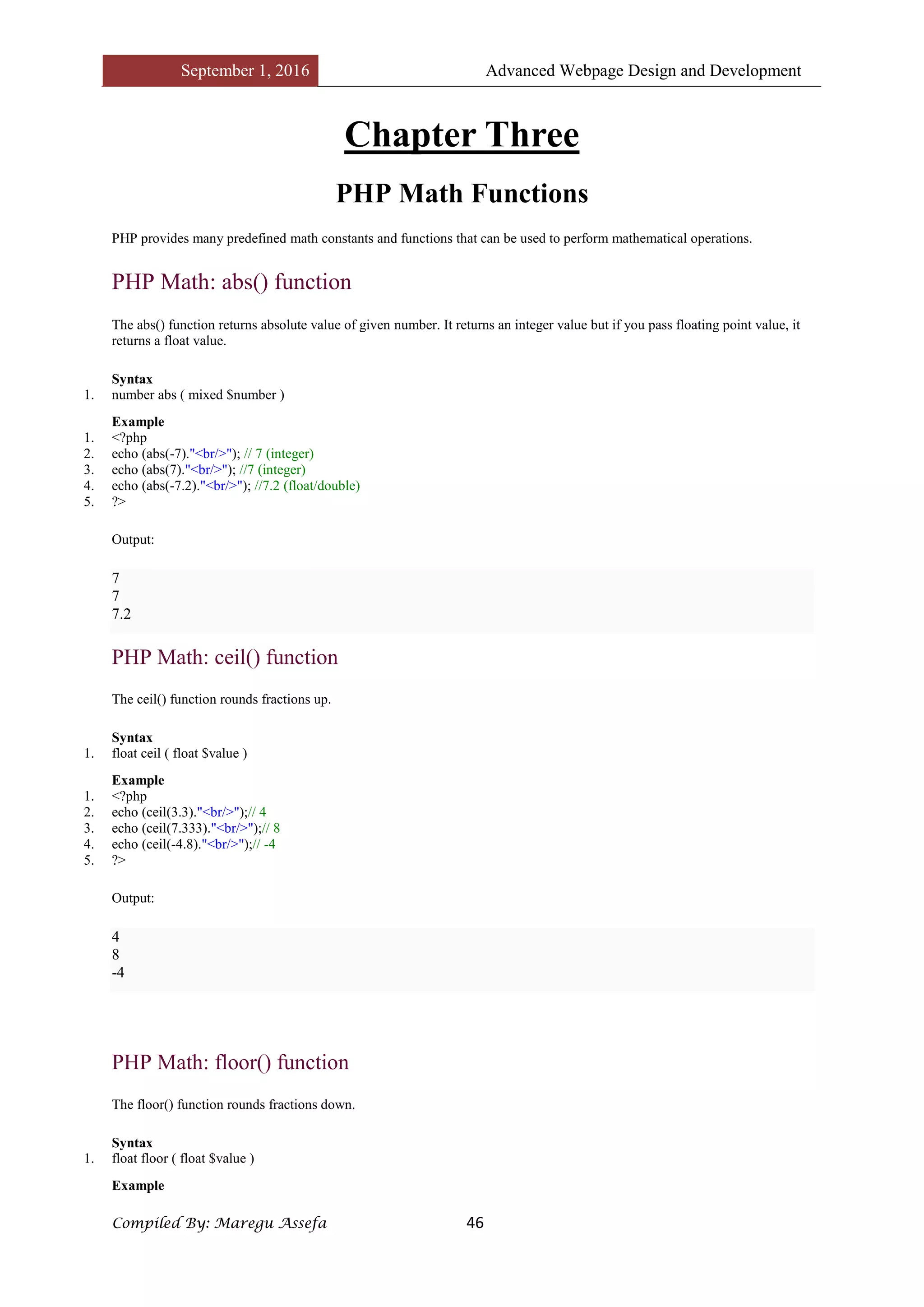
Chapter Three
PHP Math Functions
PHP provides many predefined math constants and functions that can be used to perform mathematical operations.
PHP Math: abs() function
The abs() function returns absolute value of given number. It returns an integer value but if you pass floating point value, it
returns a float value.
Syntax
1. number abs ( mixed $number )
Example
1. <?php
2. echo (abs(-7)."<br/>"); // 7 (integer)
3. echo (abs(7)."<br/>"); //7 (integer)
4. echo (abs(-7.2)."<br/>"); //7.2 (float/double)
5. ?>
Output:
7
7
7.2
PHP Math: ceil() function
The ceil() function rounds fractions up.
Syntax
1. float ceil ( float $value )
Example
1. <?php
2. echo (ceil(3.3)."<br/>");// 4
3. echo (ceil(7.333)."<br/>");// 8
4. echo (ceil(-4.8)."<br/>");// -4
5. ?>
Output:
4
8
-4
PHP Math: floor() function
The floor() function rounds fractions down.
Syntax
1. float floor ( float $value )
Example
September 1, 2016 Advanced Webpage Design and Development
Compiled By: Maregu Assefa 47
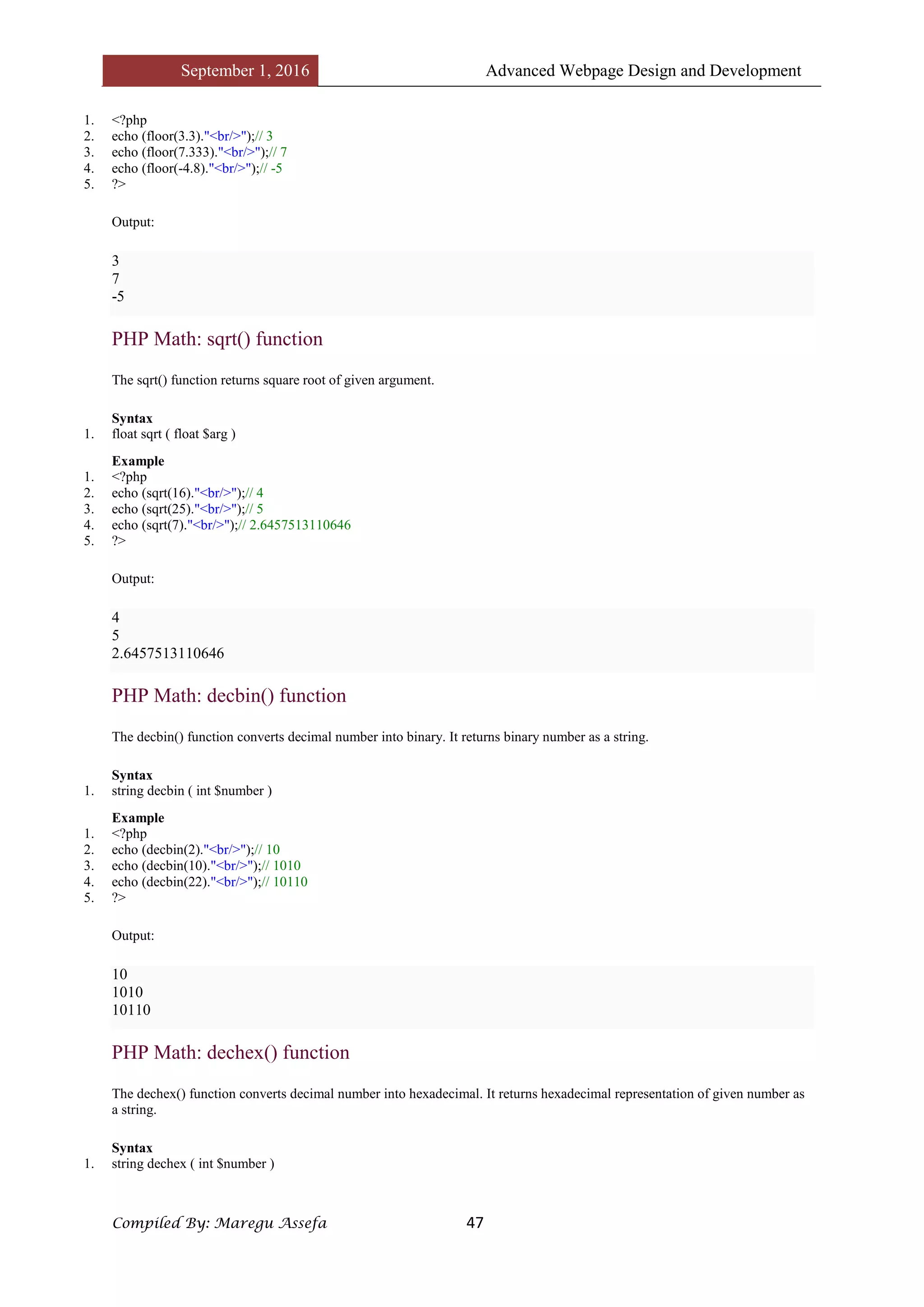
1. <?php
2. echo (floor(3.3)."<br/>");// 3
3. echo (floor(7.333)."<br/>");// 7
4. echo (floor(-4.8)."<br/>");// -5
5. ?>
Output:
3
7
-5
PHP Math: sqrt() function
The sqrt() function returns square root of given argument.
Syntax
1. float sqrt ( float $arg )
Example
1. <?php
2. echo (sqrt(16)."<br/>");// 4
3. echo (sqrt(25)."<br/>");// 5
4. echo (sqrt(7)."<br/>");// 2.6457513110646
5. ?>
Output:
4
5
2.6457513110646
PHP Math: decbin() function
The decbin() function converts decimal number into binary. It returns binary number as a string.
Syntax
1. string decbin ( int $number )
Example
1. <?php
2. echo (decbin(2)."<br/>");// 10
3. echo (decbin(10)."<br/>");// 1010
4. echo (decbin(22)."<br/>");// 10110
5. ?>
Output:
10
1010
10110
PHP Math: dechex() function
The dechex() function converts decimal number into hexadecimal. It returns hexadecimal representation of given number as
a string.
Syntax
1. string dechex ( int $number )
September 1, 2016 Advanced Webpage Design and Development
Compiled By: Maregu Assefa 48
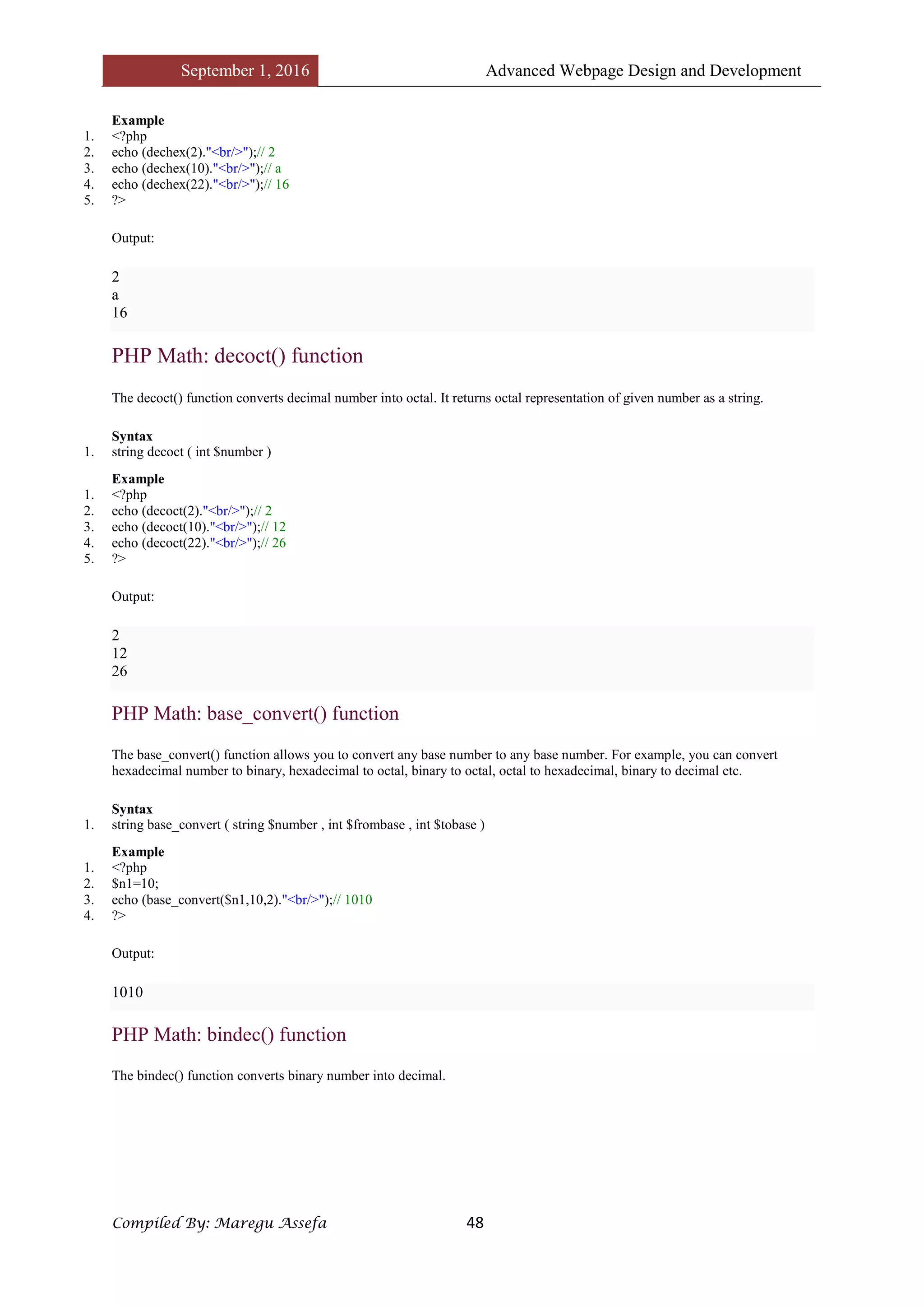
Example
1. <?php
2. echo (dechex(2)."<br/>");// 2
3. echo (dechex(10)."<br/>");// a
4. echo (dechex(22)."<br/>");// 16
5. ?>
Output:
2
a
16
PHP Math: decoct() function
The decoct() function converts decimal number into octal. It returns octal representation of given number as a string.
Syntax
1. string decoct ( int $number )
Example
1. <?php
2. echo (decoct(2)."<br/>");// 2
3. echo (decoct(10)."<br/>");// 12
4. echo (decoct(22)."<br/>");// 26
5. ?>
Output:
2
12
26
PHP Math: base_convert() function
The base_convert() function allows you to convert any base number to any base number. For example, you can convert
hexadecimal number to binary, hexadecimal to octal, binary to octal, octal to hexadecimal, binary to decimal etc.
Syntax
1. string base_convert ( string $number , int $frombase , int $tobase )
Example
1. <?php
2. $n1=10;
3. echo (base_convert($n1,10,2)."<br/>");// 1010
4. ?>
Output:
1010
PHP Math: bindec() function
The bindec() function converts binary number into decimal.
September 1, 2016 Advanced Webpage Design and Development
Compiled By: Maregu Assefa 49
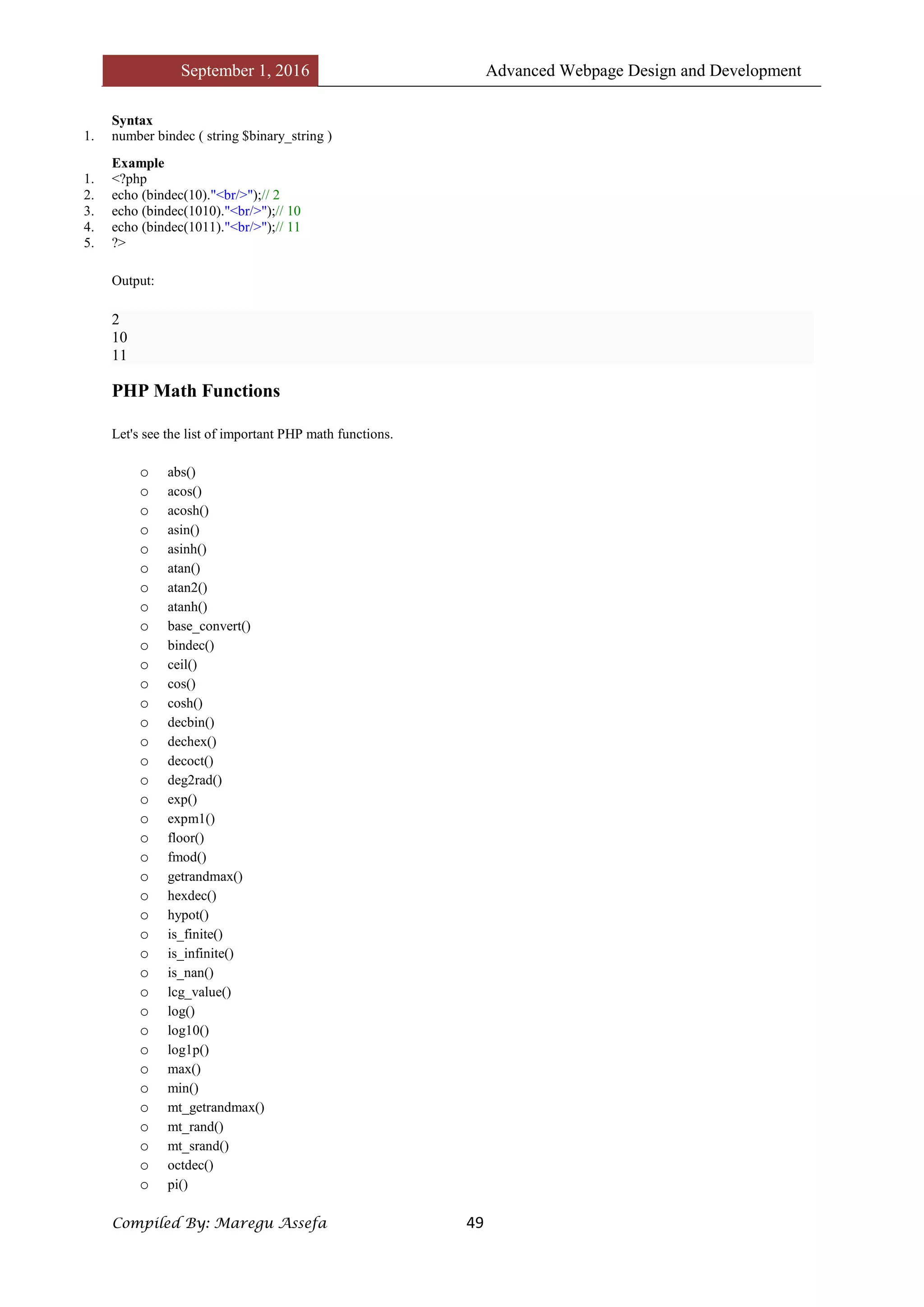
Syntax
1. number bindec ( string $binary_string )
Example
1. <?php
2. echo (bindec(10)."<br/>");// 2
3. echo (bindec(1010)."<br/>");// 10
4. echo (bindec(1011)."<br/>");// 11
5. ?>
Output:
2
10
11
PHP Math Functions
Let's see the list of important PHP math functions.
o abs()
o acos()
o acosh()
o asin()
o asinh()
o atan()
o atan2()
o atanh()
o base_convert()
o bindec()
o ceil()
o cos()
o cosh()
o decbin()
o dechex()
o decoct()
o deg2rad()
o exp()
o expm1()
o floor()
o fmod()
o getrandmax()
o hexdec()
o hypot()
o is_finite()
o is_infinite()
o is_nan()
o lcg_value()
o log()
o log10()
o log1p()
o max()
o min()
o mt_getrandmax()
o mt_rand()
o mt_srand()
o octdec()
o pi()
September 1, 2016 Advanced Webpage Design and Development
Compiled By: Maregu Assefa 50
o pow()
o rad2deg()
o rand()
o round()
o sin()
o sinh()
o sqrt()
o srand()
o tan()
o tanh()
PHP Form
PHP Form Handling
We can create and use forms in PHP. To get form data, we need to use PHP superglobals $_GET and $_POST.
The form request may be get or post. To retrieve data from get request, we need to use $_GET, for post request $_POST.
PHP Get Form
Get request is the default form request. The data passed through get request is visible on the URL browser so it is not
secured. You can send limited amount of data through get request.
Let's see a simple example to receive data from get request in PHP.
File: form1.html
1. <form action="welcome.php" method="get">
2. Name: <input type="text" name="name"/>
3. <input type="submit" value="visit"/>
4. </form>
File: welcome.php
1. <?php
2. $name=$_GET["name"];//receiving name field value in $name variable
3. echo "Welcome, $name";
4. ?>
PHP Post Form
Post request is widely used to submit form that have large amount of data such as file upload, image upload, login form,
registration form etc.
The data passed through post request is not visible on the URL browser so it is secured. You can send large amount of data
through post request.
Let's see a simple example to receive data from post request in PHP.
File: form1.html
1. <form action="login.php" method="post">
2. <table>
3. <tr><td>Name:</td><td> <input type="text" name="name"/></td></tr>
4. <tr><td>Password:</td><td> <input type="password" name="password"/></td></tr>
5. <tr><td colspan="2"><input type="submit" value="login"/> </td></tr>
6. </table>
7. </form>
September 1, 2016 Advanced Webpage Design and Development
Compiled By: Maregu Assefa 51
File: login.php
1. <?php
2. $name=$_POST["name"];//receiving name field value in $name variable
3. $password=$_POST["password"];//receiving password field value in $password variable
4.
5. echo "Welcome: $name, your password is: $password";
6. ?>
Output:
September 1, 2016 Advanced Webpage Design and Development
Compiled By: Maregu Assefa 52
PHP Includes
PHP Include File
PHP allows you to include file so that a page content can be reused many times. There are two ways to include file in PHP.
1. include
2. require
Advantage
Code Reusability: By the help of include and require construct, we can reuse HTML code or PHP script in many PHP
scripts.
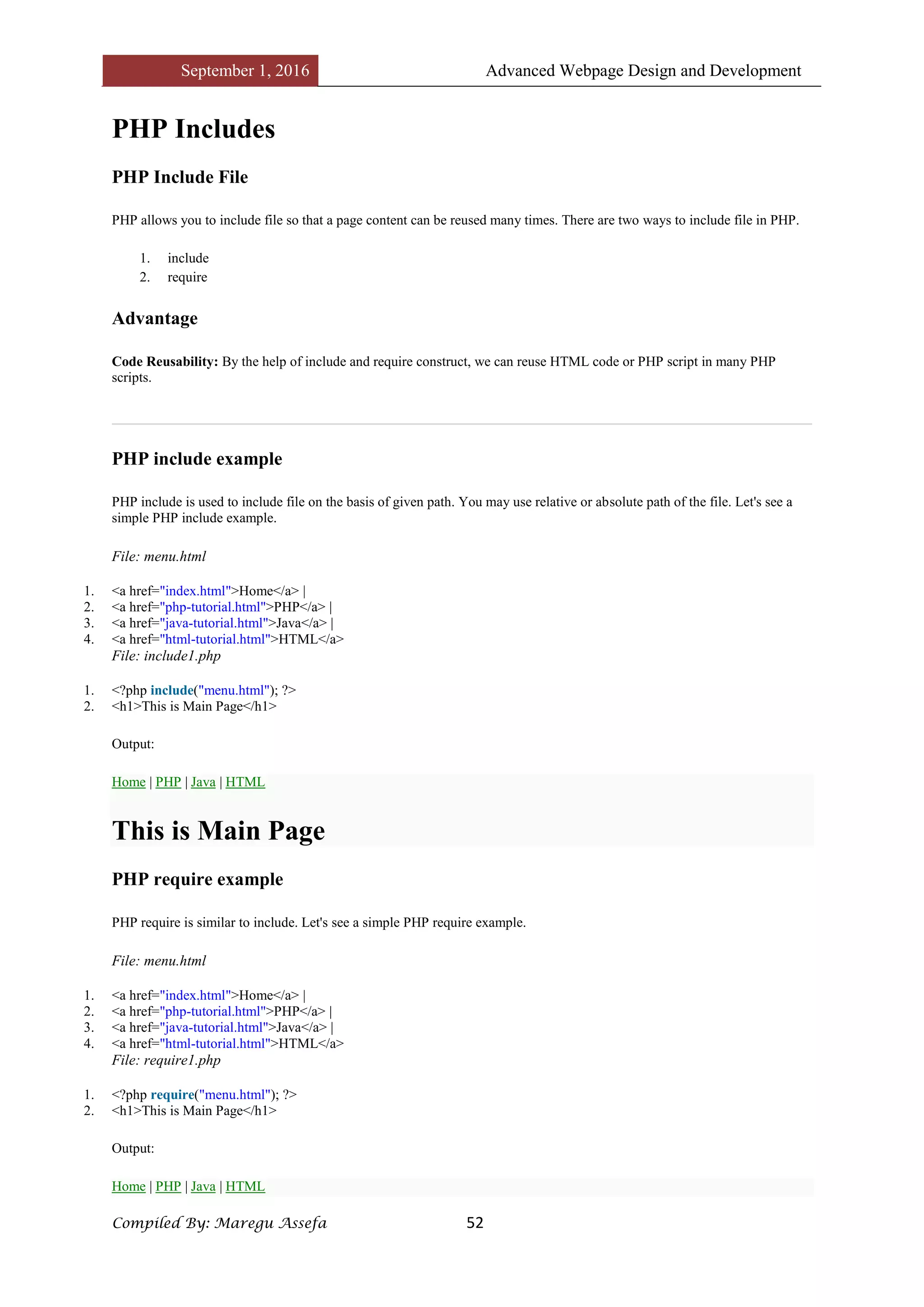
PHP include example
PHP include is used to include file on the basis of given path. You may use relative or absolute path of the file. Let's see a
simple PHP include example.
File: menu.html
1. <a href="index.html">Home</a> |
2. <a href="php-tutorial.html">PHP</a> |
3. <a href="java-tutorial.html">Java</a> |
4. <a href="html-tutorial.html">HTML</a>
File: include1.php
1. <?php include("menu.html"); ?>
2. <h1>This is Main Page</h1>
Output:
Home | PHP | Java | HTML
This is Main Page
PHP require example
PHP require is similar to include. Let's see a simple PHP require example.
File: menu.html
1. <a href="index.html">Home</a> |
2. <a href="php-tutorial.html">PHP</a> |
3. <a href="java-tutorial.html">Java</a> |
4. <a href="html-tutorial.html">HTML</a>
File: require1.php
1. <?php require("menu.html"); ?>
2. <h1>This is Main Page</h1>
Output:
Home | PHP | Java | HTML
September 1, 2016 Advanced Webpage Design and Development
Compiled By: Maregu Assefa 53
This is Main Page
PHP include vs PHP require
If file is missing or inclusion fails, include allows the script to continue but require halts the script producing a fatal
E_COMPILE_ERROR level error.
PHP State Management
PHP Cookie
PHP cookie is a small piece of information which is stored at client browser. It is used to recognize the user.
Cookie is created at server side and saved to client browser. Each time when client sends request to the server, cookie is
embedded with request. Such way, cookie can be received at the server side.
In short, cookie can be created, sent and received at server end.
Note: PHP Cookie must be used before <html> tag.
PHP setcookie() function
PHP setcookie() function is used to set cookie with HTTP response. Once cookie is set, you can access it by $_COOKIE
superglobal variable.
Syntax
1. bool setcookie ( string $name [, string $value [, int $expire = 0 [, string $path
2. [, string $domain [, bool $secure = false [, bool $httponly = false ]]]]]] )
Example
1. setcookie("CookieName", "CookieValue");/* defining name and value only*/
2. setcookie("CookieName", "CookieValue", time()+1*60*60);//using expiry in 1 hour(1*60*60 seconds or 3600 seconds)
3. setcookie("CookieName", "CookieValue", time()+1*60*60, "/mypath/", "mydomain.com", 1);
PHP $_COOKIE
PHP $_COOKIE superglobal variable is used to get cookie.
September 1, 2016 Advanced Webpage Design and Development
Compiled By: Maregu Assefa 54
Example
1. $value=$_COOKIE["CookieName"];//returns cookie value
PHP Cookie Example
File: cookie1.php
1. <?php
2. setcookie("user", "Sonoo");
3. ?>
4. <html>
5. <body>
6. <?php
7. if(!isset($_COOKIE["user"])) {
8. echo "Sorry, cookie is not found!";
9. } else {
10. echo "<br/>Cookie Value: " . $_COOKIE["user"];
11. }
12. ?>
13. </body>
14.
15. <!-- Mirrored from www.javatpoint.com/php-
cookie by HTTrack Website Copier/3.x [XR&CO'2014], Tue, 30 Jun 2015 00:52:10 GMT -->
16. </html>
Output:
Sorry, cookie is not found!
Firstly cookie is not set. But, if you refresh the page, you will see cookie is set now.
Output:
Cookie Value: Sonoo
PHP Delete Cookie
If you set the expiration date in past, cookie will be deleted.
File: cookie1.php
1. <?php
2. setcookie ("CookieName", "", time() - 3600);// set the expiration date to one hour ago
3. ?>
September 1, 2016 Advanced Webpage Design and Development
Compiled By: Maregu Assefa 55
PHP Session
PHP session is used to store and pass information from one page to another temporarily (until user close the website).
PHP session technique is widely used in shopping websites where we need to store and pass cart information e.g. username,
product code, product name, product price etc from one page to another.
PHP session creates unique user id for each browser to recognize the user and avoid conflict between multiple browsers.
PHP session_start() function
PHP session_start() function is used to start the session. It starts a new or resumes existing session. It returns existing session
if session is created already. If session is not available, it creates and returns new session.
Syntax
1. bool session_start ( void )
Example
1. session_start();
PHP $_SESSION
PHP $_SESSION is an associative array that contains all session variables. It is used to set and get session variable values.
Example: Store information
1. $_SESSION["user"] = "Sachin";
Example: Get information
1. echo $_SESSION["user"];
PHP Session Example
File: session1.php
1. <?php
2. session_start();
3. ?>
4. <html>
September 1, 2016 Advanced Webpage Design and Development
Compiled By: Maregu Assefa 56
5. <body>
6. <?php
7. $_SESSION["user"] = "Sachin";
8. echo "Session information are set successfully.<br/>";
9. ?>
10. <a href="session2.html">Visit next page</a>
11. </body>
12.
13. <!-- Mirrored from www.javatpoint.com/php-
session by HTTrack Website Copier/3.x [XR&CO'2014], Tue, 30 Jun 2015 00:52:10 GMT -->
14. </html>
File: session2.php
1. <?php
2. session_start();
3. ?>
4. <html>
5. <body>
6. <?php
7. echo "User is: ".$_SESSION["user"];
8. ?>
9. </body>
10. </html>
PHP Session Counter Example
File: sessioncounter.php
1. <?php
2. session_start();
3.
4. if (!isset($_SESSION['counter'])) {
5. $_SESSION['counter'] = 1;
6. } else {
7. $_SESSION['counter']++;
8. }
9. echo ("Page Views: ".$_SESSION['counter']);
10. ?>
PHP Destroying Session
PHP session_destroy() function is used to destroy all session variables completely.
File: session3.php
1. <?php
2. session_start();
3. session_destroy();
4. ?>
September 1, 2016 Advanced Webpage Design and Development
Compiled By: Maregu Assefa 57
PHP File Handling
PHP File System allows us to create file, read file line by line, read file character by character, write file, append file, delete
file and close file.
PHP Open File - fopen()
The PHP fopen() function is used to open a file.
Syntax
1. resource fopen ( string $filename , string $mode [, bool $use_include_path = false [, resource $context ]] )
Example
1. <?php
2. $handle = fopen("c:folderfile.txt", "r");
3. ?>
PHP Close File - fclose()
The PHP fclose() function is used to close an open file pointer.
Syntax
1. ool fclose ( resource $handle )
Example
1. <?php
2. fclose($handle);
3. ?>
PHP Read File - fread()
The PHP fread() function is used to read the content of the file. It accepts two arguments: resource and file size.
Syntax
1. string fread ( resource $handle , int $length )
Example
1. <?php
2. $filename = "c:myfile.txt";
3. $handle = fopen($filename, "r");//open file in read mode
4.
5. $contents = fread($handle, filesize($filename));//read file
6.
7. echo $contents;//printing data of file
8. fclose($handle);//close file
9. ?>
Output
hello php file
September 1, 2016 Advanced Webpage Design and Development
Compiled By: Maregu Assefa 58
PHP Write File - fwrite()
The PHP fwrite() function is used to write content of the string into file.
Syntax
1. int fwrite ( resource $handle , string $string [, int $length ] )
Example
1. <?php
2. $fp = fopen('data.html', 'w');//open file in write mode
3. fwrite($fp, 'hello ');
4. fwrite($fp, 'php file');
5. fclose($fp);
6.
7. echo "File written successfully";
8. ?>
Output
File written successfully
PHP Delete File - unlink()
The PHP unlink() function is used to delete file.
Syntax
1. bool unlink ( string $filename [, resource $context ] )
Example
1. <?php
2. unlink('data.html');
3.
4. echo "File deleted successfully";
5. ?>
September 1, 2016 Advanced Webpage Design and Development
Compiled By: Maregu Assefa 59
PHP Open File
PHP fopen() function is used to open file or URL and returns resource. The fopen() function accepts two arguments:
$filename and $mode. The $filename represents the file to be opended and $mode represents the file mode for example read-
only, read-write, write-only etc.
Syntax
1. resource fopen ( string $filename , string $mode [, bool $use_include_path = false [, resource $context ]] )
PHP Open File Mode
Mode Description
r Opens file in read-only mode. It places the file pointer at the beginning of the file.
r+ Opens file in read-write mode. It places the file pointer at the beginning of the file.
w Opens file in write-only mode. It places the file pointer to the beginning of the file and truncates the file to zero length. If file is not found, it
creates a new file.
w+ Opens file in read-write mode. It places the file pointer to the beginning of the file and truncates the file to zero length. If file is not found, it
creates a new file.
a Opens file in write-only mode. It places the file pointer to the end of the file. If file is not found, it creates a new file.
a+ Opens file in read-write mode. It places the file pointer to the end of the file. If file is not found, it creates a new file.
x Creates and opens file in write-only mode. It places the file pointer at the beginning of the file. If file is found, fopen() function returns FALSE.
x+ It is same as x but it creates and opens file in read-write mode.
c Opens file in write-only mode. If the file does not exist, it is created. If it exists, it is neither truncated (as opposed to 'w'), nor the call to this
function fails (as is the case with 'x'). The file pointer is positioned on the beginning of the file
c+ It is same as c but it opens file in read-write mode.
PHP Open File Example
1. <?php
2. $handle = fopen("c:folderfile.txt", "r");
3. ?>
September 1, 2016 Advanced Webpage Design and Development
Compiled By: Maregu Assefa 60
PHP Read File
PHP provides various functions to read data from file. There are different functions that allow you to read all file data, read
data line by line and read data character by character.
The available PHP file read functions are given below.
o fread()
o fgets()
o fgetc()
PHP Read File - fread()
The PHP fread() function is used to read data of the file. It requires two arguments: file resource and file size.
Syntax
1. string fread (resource $handle , int $length )
$handle represents file pointer that is created by fopen() function.
$length represents length of byte to be read.
Example
1. <?php
2. $filename = "c:file1.txt";
3. $fp = fopen($filename, "r");//open file in read mode
4.
5. $contents = fread($fp, filesize($filename));//read file
6.
7. echo "<pre>$contents</pre>";//printing data of file
8. fclose($fp);//close file
9. ?>
Output
this is first line
this is another line
this is third line
PHP Read File - fgets()
The PHP fgets() function is used to read single line from the file.
Syntax
1. string fgets ( resource $handle [, int $length ] )
Example
1. <?php
2. $fp = fopen("c:file1.txt", "r");//open file in read mode
3. echo fgets($fp);
4. fclose($fp);
September 1, 2016 Advanced Webpage Design and Development
Compiled By: Maregu Assefa 61
5. ?>
Output
this is first line
PHP Read File - fgetc()
The PHP fgetc() function is used to read single character from the file. To get all data using fgetc() function, use !feof()
function inside the while loop.
Syntax
1. string fgetc ( resource $handle )
Example
1. <?php
2. $fp = fopen("c:file1.txt", "r");//open file in read mode
3. while(!feof($fp)) {
4. echo fgetc($fp);
5. }
6. fclose($fp);
7. ?>
Output
this is first line this is another line this is third line
September 1, 2016 Advanced Webpage Design and Development
Compiled By: Maregu Assefa 62
PHP Write File
PHP fwrite() and fputs() functions are used to write data into file. To write data into file, you need to use w, r+, w+, x, x+, c
or c+ mode.
PHP Write File - fwrite()
The PHP fwrite() function is used to write content of the string into file.
Syntax
1. int fwrite ( resource $handle , string $string [, int $length ] )
Example
1. <?php
2. $fp = fopen('data.html', 'w');//opens file in write-only mode
3. fwrite($fp, 'welcome ');
4. fwrite($fp, 'to php file write');
5. fclose($fp);
6.
7. echo "File written successfully";
8. ?>
Output: data.txt
welcome to php file write
PHP Overwriting File
If you run the above code again, it will erase the previous data of the file and writes the new data. Let's see the code that
writes only new data into data.txt file.
1. <?php
2. $fp = fopen('data.html', 'w');//opens file in write-only mode
3. fwrite($fp, 'hello');
4. fclose($fp);
5.
6. echo "File written successfully";
7. ?>
Output: data.txt
hello
PHP Append to File
If you use a mode, it will not erase the data of the file. It will write the data at the end of the file. Visit the next page to see
the example of appending data into file.
September 1, 2016 Advanced Webpage Design and Development
Compiled By: Maregu Assefa 63
PHP Append to File
You can append data into file by using a or a+ mode in fopen() function. Let's see a simple example that appends data into
data.txt file.
Let's see the data of file first.
data.txt
welcome to php file write
PHP Append to File - fwrite()
The PHP fwrite() function is used to write and append data into file.
Example
1. <?php
2. $fp = fopen('data.html', 'a');//opens file in append mode
3. fwrite($fp, ' this is additional text ');
4. fwrite($fp, 'appending data');
5. fclose($fp);
6.
7. echo "File appended successfully";
8. ?>
Output: data.txt
welcome to php file write this is additional text appending data
September 1, 2016 Advanced Webpage Design and Development
Compiled By: Maregu Assefa 64
PHP Delete File
In PHP, we can delete any file using unlink() function. The unlink() function accepts one argument only: file name. It is
similar to UNIX C unlink() function.
PHP unlink() generates E_WARNING level error if file is not deleted. It returns TRUE if file is deleted successfully
otherwise FALSE.
Syntax
1. bool unlink ( string $filename [, resource $context ] )
$filename represents the name of the file to be deleted.
PHP Delete File Example
1. <?php
2. $status=unlink('data.html');
3. if($status){
4. echo "File deleted successfully";
5. }else{
6. echo "Sorry!";
7. }
8. ?>
Output
File deleted successfully
September 1, 2016 Advanced Webpage Design and Development
Compiled By: Maregu Assefa 65
PHP File Upload and Download
PHP File Upload
PHP allows you to upload single and multiple files through few lines of code only.
PHP file upload features allow you to upload binary and text files both. Moreover, you can have the full control over the file
to be uploaded through PHP authentication and file operation functions.
PHP $_FILES
The PHP global $_FILES contains all the information of file. By the help of $_FILES global, we can get file name, file type,
file size, temp file name and errors associated with file.
Here, we are assuming that file name is filename.
$_FILES['filename']['name']
returns file name.
$_FILES['filename']['type']
returns MIME type of the file.
$_FILES['filename']['size']
returns size of the file (in bytes).
$_FILES['filename']['tmp_name']
returns temporary file name of the file which was stored on the server.
$_FILES['filename']['error']
returns error code associated with this file.
move_uploaded_file() function
The move_uploaded_file() function moves the uploaded file to a new location. The move_uploaded_file() function checks
internally if the file is uploaded thorough the POST request. It moves the file if it is uploaded through the POST request.
Syntax
1. bool move_uploaded_file ( string $filename , string $destination )
PHP File Upload Example
File: uploadform.html
September 1, 2016 Advanced Webpage Design and Development
Compiled By: Maregu Assefa 66
1. <form action="http://www.javatpoint.com/uploader.php" method="post" enctype="multipart/form-data">
2. Select File:
3. <input type="file" name="fileToUpload"/>
4. <input type="submit" value="Upload Image" name="submit"/>
5. </form>
File: uploader.php
1. <?php
2. $target_path = "e:/";
3. $target_path = $target_path.basename( $_FILES['fileToUpload']['name']);
4.
5. if(move_uploaded_file($_FILES['fileToUpload']['tmp_name'], $target_path)) {
6. echo "File uploaded successfully!";
7. } else{
8. echo "Sorry, file not uploaded, please try again!";
9. }
10. ?>
September 1, 2016 Advanced Webpage Design and Development
Compiled By: Maregu Assefa 67
PHP Download File
PHP enables you to download file easily using built-in readfile() function. The readfile() function reads a file and writes it to
the output buffer.
PHP readfile() function
Syntax
1. int readfile ( string $filename [, bool $use_include_path = false [, resource $context ]] )
$filename: represents the file name
$use_include_path: it is the optional parameter. It is by default false. You can set it to true to the search the file in the
included_path.
$context: represents the context stream resource.
int: it returns the number of bytes read from the file.
PHP Download File Example: Text File
File: download1.php
1. <?php
2. $file_url = 'f.txt';
3. header('Content-Type: application/octet-stream');
4. header("Content-Transfer-Encoding: utf-8");
5. header("Content-disposition: attachment; filename="" . basename($file_url) . """);
6. readfile($file_url);
7. ?>
PHP Download File Example: Binary File
File: download2.php
1. <?php
2. $file_url = 'http://www.myremoteserver.com/file.exe';
3. header('Content-Type: application/octet-stream');
4. header("Content-Transfer-Encoding: Binary");
5. header("Content-disposition: attachment; filename="" . basename($file_url) . """);
6. readfile($file_url);
7. ?>
September 1, 2016 Advanced Webpage Design and Development
Compiled By: Maregu Assefa 68
PHP Mail Reference
PHP mail() function is used to send email in PHP. You can send text message, html message and attachment with message
using PHP mail() function.
PHP mail() function
Syntax
1. bool mail ( string $to , string $subject , string $message [, string $additional_headers [, string $additional_parameters ]] )
$to: specifies receiver or receivers of the mail. The receiver must be specified one of the following forms.
o user@example.com
o user@example.com, anotheruser@example.com
o User <user@example.com>
o User <user@example.com>, Another User <anotheruser@example.com>
$subject: represents subject of the mail.
$message: represents message of the mail to be sent.
Note: Each line of the message should be separated with a CRLF ( rn ) and lines should not be larger than 70
characters.
$additional_headers (optional): specifies the additional headers such as From, CC, BCC etc. Extra additional headers
should also be separated with CRLF ( rn ).
PHP Mail Example
File: mailer.php
1. <?php
2. $to = "sonoojaiswal1987@gmail.com";//change receiver address
3. $subject = "This is subject";
4. $message = "This is simple text message.";
5. $header = "From:sonoojaiswal@javatpoint.com rn";
6. $result = mail ($to,$subject,$message,$header);
7.
8. if( $result == true ){
9. echo "Message sent successfully...";
10. }else{
11. echo "Sorry, unable to send mail...";
12. }
13. ?>
If you run this code on the live server, it will send an email to the specified receiver.
PHP Mail: Send HTML Message
To send HTML message, you need to mention Content-type text/html in the message header.
September 1, 2016 Advanced Webpage Design and Development
Compiled By: Maregu Assefa 69
1. <?php
2. $to = "abc@example.com";//change receiver address
3. $subject = "This is subject";
4. $message = "<h1>This is HTML heading</h1>";
5.
6. $header = "From:xyz@example.com rn";
7. $header .= "MIME-Version: 1.0 rn";
8. $header .= "Content-type: text/html;charset=UTF-8 rn";
9.
10. $result = mail ($to,$subject,$message,$header);
11.
12. if( $result == true ){
13. echo "Message sent successfully...";
14. }else{
15. echo "Sorry, unable to send mail...";
16. }
17. ?>
PHP Mail: Send Mail with Attachment
To send message with attachment, you need to mention many header information which is used in the example given below.
1. <?php
2. $to = "abc@example.com";
3. $subject = "This is subject";
4. $message = "This is a text message.";
5. # Open a file
6. $file = fopen("tmp/test.html", "r" );//change your file location
7. if( $file == false )
8. {
9. echo "Error in opening file";
10. exit();
11. }
12. # Read the file into a variable
13. $size = filesize("tmp/test.html");
14. $content = fread( $file, $size);
15.
16. # encode the data for safe transit
17. # and insert rn after every 76 chars.
18. $encoded_content = chunk_split( base64_encode($content));
19.
20. # Get a random 32 bit number using time() as seed.
21. $num = md5( time() );
22.
23. # Define the main headers.
24. $header = "From:xyz@example.comrn";
25. $header .= "MIME-Version: 1.0rn";
26. $header .= "Content-Type: multipart/mixed; ";
27. $header .= "boundary=$numrn";
28. $header .= "--$numrn";
29.
30. # Define the message section
31. $header .= "Content-Type: text/plainrn";
32. $header .= "Content-Transfer-Encoding:8bitrnn";
33. $header .= "$messagern";
34. $header .= "--$numrn";
35.
36. # Define the attachment section
37. $header .= "Content-Type: multipart/mixed; ";
38. $header .= "name="test.txt"rn";
39. $header .= "Content-Transfer-Encoding:base64rn";
40. $header .= "Content-Disposition:attachment; ";
41. $header .= "filename="test.txt"rnn";
42. $header .= "$encoded_contentrn";
September 1, 2016 Advanced Webpage Design and Development
Compiled By: Maregu Assefa 70
43. $header .= "--$num--";
44.
45. # Send email now
46. $result = mail ( $to, $subject, "", $header );
47. if( $result == true ){
48. echo "Message sent successfully...";
49. }else{
50. echo "Sorry, unable to send mail...";
51. }
52. ?>
PHP MySQLi Database Connection
PHP MySQL Connect
Since PHP 5.5, mysql_connect() extension is deprecated. Now it is recommended to use one of the 2 alternatives.
o mysqli_connect()
o PDO::__construct()
PHP mysqli_connect()
PHP mysqli_connect() function is used to connect with MySQL database. It returns resource if connection is established
or null.
Syntax
1. resource mysqli_connect (server, username, password)
PHP mysqli_close()
PHP mysqli_close() function is used to disconnect with MySQL database. It returns true if connection is closed or false.
Syntax
1. bool mysqli_close(resource $resource_link)
PHP MySQL Connect Example
Example
1. <?php
2. $host = 'localhost:3306';
3. $user = '';
4. $pass = '';
5. $conn = mysqli_connect($host, $user, $pass);
6. if(! $conn )
7. {
8. die('Could not connect: ' . mysqli_error());
9. }
10. echo 'Connected successfully';
11. mysqli_close($conn);
12. ?>
Output:
Connected successfully
September 1, 2016 Advanced Webpage Design and Development
Compiled By: Maregu Assefa 71
PHP MySQL Create Database
Since PHP 4.3, mysql_create_db() function is deprecated. Now it is recommended to use one of the 2 alternatives.
o mysqli_query()
o PDO::__query()
PHP MySQLi Create Database Example
Example
1. <?php
2. $host = 'localhost:3306';
3. $user = '';
4. $pass = '';
5. $conn = mysqli_connect($host, $user, $pass);
6. if(! $conn )
7. {
8. die('Could not connect: ' . mysqli_connect_error());
9. }
10. echo 'Connected successfully<br/>';
11.
12. $sql = 'CREATE Database mydb';
13. if(mysqli_query( $conn,$sql)){
14. echo "Database mydb created successfully.";
15. }else{
16. echo "Sorry, database creation failed ".mysqli_error($conn);
17. }
18. mysqli_close($conn);
19. ?>
Output:
Connected successfully
Database mydb created successfully.
September 1, 2016 Advanced Webpage Design and Development
Compiled By: Maregu Assefa 72
PHP MySQL Create Table
PHP mysql_query() function is used to create table. Since PHP 5.5, mysql_query() function is deprecated. Now it is
recommended to use one of the 2 alternatives.
o mysqli_query()
o PDO::__query()
PHP MySQLi Create Table Example
Example
1. <?php
2. $host = 'localhost:3306';
3. $user = '';
4. $pass = '';
5. $dbname = 'test';
6.
7. $conn = mysqli_connect($host, $user, $pass,$dbname);
8. if(!$conn){
9. die('Could not connect: '.mysqli_connect_error());
10. }
11. echo 'Connected successfully<br/>';
12.
13. $sql = "create table emp5(id INT AUTO_INCREMENT,name VARCHAR(20) NOT NULL,
14. emp_salary INT NOT NULL,primary key (id))";
15. if(mysqli_query($conn, $sql)){
16. echo "Table emp5 created successfully";
17. }else{
18. echo "Could not create table: ". mysqli_error($conn);
19. }
20.
21. mysqli_close($conn);
22. ?>
Output:
Connected successfully
Table emp5 created successfully
September 1, 2016 Advanced Webpage Design and Development
Compiled By: Maregu Assefa 73
PHP MySQL Update Record
PHP mysql_query() function is used to update record in a table. Since PHP 5.5, mysql_query() function is deprecated. Now
it is recommended to use one of the 2 alternatives.
o mysqli_query()
o PDO::__query()
PHP MySQLi Update Record Example
Example
1. <?php
2. $host = 'localhost:3306';
3. $user = '';
4. $pass = '';
5. $dbname = 'test';
6.
7. $conn = mysqli_connect($host, $user, $pass,$dbname);
8. if(!$conn){
9. die('Could not connect: '.mysqli_connect_error());
10. }
11. echo 'Connected successfully<br/>';
12.
13. $id=2;
14. $name="Rahul";
15. $salary=80000;
16. $sql = "update emp4 set name="$name", salary=$salary where id=$id";
17. if(mysqli_query($conn, $sql)){
18. echo "Record updated successfully";
19. }else{
20. echo "Could not update record: ". mysqli_error($conn);
21. }
22.
23. mysqli_close($conn);
24. ?>
Output:
Connected successfully
Record updated successfully
September 1, 2016 Advanced Webpage Design and Development
Compiled By: Maregu Assefa 74
PHP MySQL Delete Record
PHP mysql_query() function is used to delete record in a table. Since PHP 5.5, mysql_query() function is deprecated. Now
it is recommended to use one of the 2 alternatives.
o mysqli_query()
o PDO::__query()
PHP MySQLi Delete Record Example
Example
1. <?php
2. $host = 'localhost:3306';
3. $user = '';
4. $pass = '';
5. $dbname = 'test';
6.
7. $conn = mysqli_connect($host, $user, $pass,$dbname);
8. if(!$conn){
9. die('Could not connect: '.mysqli_connect_error());
10. }
11. echo 'Connected successfully<br/>';
12.
13. $id=2;
14. $sql = "delete from emp4 where id=$id";
15. if(mysqli_query($conn, $sql)){
16. echo "Record deleted successfully";
17. }else{
18. echo "Could not deleted record: ". mysqli_error($conn);
19. }
20.
21. mysqli_close($conn);
22. ?>
Output:
Connected successfully
Record deleted successfully
September 1, 2016 Advanced Webpage Design and Development
Compiled By: Maregu Assefa 75
PHP MySQL Order By
PHP mysql_query() function is used to execute select query with order by clause. Since PHP 5.5, mysql_query() function
is deprecated. Now it is recommended to use one of the 2 alternatives.
o mysqli_query()
o PDO::__query()
The order by clause is used to fetch data in ascending order or descending order on the basis of column.
Let's see the query to select data from emp4 table in ascending order on the basis of name column.
1. SELECT * FROM emp4 order by name
Let's see the query to select data from emp4 table in descending order on the basis of name column.
1. SELECT * FROM emp4 order by name desc
PHP MySQLi Order by Example
Example
1. <?php
2. $host = 'localhost:3306';
3. $user = '';
4. $pass = '';
5. $dbname = 'test';
6. $conn = mysqli_connect($host, $user, $pass,$dbname);
7. if(!$conn){
8. die('Could not connect: '.mysqli_connect_error());
9. }
10. echo 'Connected successfully<br/>';
11.
12. $sql = 'SELECT * FROM emp4 order by name';
13. $retval=mysqli_query($conn, $sql);
14.
15. if(mysqli_num_rows($retval) > 0){
16. while($row = mysqli_fetch_assoc($retval)){
17. echo "EMP ID :{$row['id']} <br> ".
18. "EMP NAME : {$row['name']} <br> ".
19. "EMP SALARY : {$row['salary']} <br> ".
20. "--------------------------------<br>";
21. } //end of while
22. }else{
23. echo "0 results";
24. }
25. mysqli_close($conn);
26. ?>
Output:
Connected successfully
EMP ID :3
EMP NAME : jai
EMP SALARY : 90000
--------------------------------
EMP ID :2
EMP NAME : karan
EMP SALARY : 40000
--------------------------------
EMP ID :1
September 1, 2016 Advanced Webpage Design and Development
Compiled By: Maregu Assefa 76
EMP NAME : ratan
EMP SALARY : 9000
--------------------------------
We can imagine our universe made of different objects like sun, earth, moon etc. Similarly we can
imagine our car made of different objects like wheel, steering, gear etc. Same way there is object
oriented programming concepts which assume everything as an object and implement a software
using different objects.
September 1, 2016 Advanced Webpage Design and Development
Compiled By: Maregu Assefa 77
Chapter Four
Object Oriented Concepts
Before we go in detail, lets define important terms related to Object Oriented Programming.
 Class − This is a programmer-defined data type, which includes local functions as well as local data. You
can think of a class as a template for making many instances of the same kind (or class) of object.
 Object − An individual instance of the data structure defined by a class. You define a class once and then
make many objects that belong to it. Objects are also known as instance.
 Member Variable − These are the variables defined inside a class. This data will be invisible to the outside
of the class and can be accessed via member functions. These variables are called attribute of the object
once an object is created.
 Member function − These are the function defined inside a class and are used to access object data.
 Inheritance − When a class is defined by inheriting existing function of a parent class then it is called
inheritance. Here child class will inherit all or few member functions and variables of a parent class.
 Parent class − A class that is inherited from by another class. This is also called a base class or super class.
 Child Class − A class that inherits from another class. This is also called a subclass or derived class.
 Polymorphism − This is an object oriented concept where same function can be used for different
purposes. For example function name will remain same but it make take different number of arguments and
can do different task.
 Overloading − a type of polymorphism in which some or all of operators have different implementations
depending on the types of their arguments. Similarly functions can also be overloaded with different
implementation.
 Data Abstraction − Any representation of data in which the implementation details are hidden (abstracted).
 Encapsulation − refers to a concept where we encapsulate all the data and member functions together to
form an object.
 Constructor − refers to a special type of function which will be called automatically whenever there is an
object formation from a class.
 Destructor − refers to a special type of function which will be called automatically whenever an object is
deleted or goes out of scope.
September 1, 2016 Advanced Webpage Design and Development
Compiled By: Maregu Assefa 78
Defining PHP Classes
The general form for defining a new class in PHP is as follows −
<?php
class phpClass {
var $var1;
var $var2 = "constant string";
function myfunc ($arg1, $arg2) {
[..]
}
[..]
}
?>
Here is the description of each line −
 The special form class, followed by the name of the class that you want to define.
 A set of braces enclosing any number of variable declarations and function definitions.
 Variable declarations start with the special form var, which is followed by a conventional $ variable name;
they may also have an initial assignment to a constant value.
 Function definitions look much like standalone PHP functions but are local to the class and will be used to
set and access object data.
Example
Here is an example which defines a class of Books type −
<?php
class Books {
/* Member variables */
var $price;
var $title;
/* Member functions */
function setPrice($par){
$this->price = $par;
}
function getPrice(){
echo $this->price ."<br/>";
September 1, 2016 Advanced Webpage Design and Development
Compiled By: Maregu Assefa 79
}
function setTitle($par){
$this->title = $par;
}
function getTitle(){
echo $this->title ." <br/>";
}
}
?>
The variable $this is a special variable and it refers to the same object ie. itself.
Creating Objects in PHP
Once you defined your class, then you can create as many objects as you like of that class
type. Following is an example of how to create object using newoperator.
$physics = new Books;
$maths = new Books;
$chemistry = new Books;
Here we have created three objects and these objects are independent of each other and they
will have their existence separately. Next we will see how to access member function and
process member variables.
Calling Member Functions
After creating your objects, you will be able to call member functions related to that object.
One member function will be able to process member variable of related object only.
Following example shows how to set title and prices for the three books by calling member
functions.
$physics->setTitle( "Physics for High School" );
$chemistry->setTitle( "Advanced Chemistry" );
$maths->setTitle( "Algebra" );
$physics->setPrice( 10 );
$chemistry->setPrice( 15 );
$maths->setPrice( 7 );
Now you call another member functions to get the values set by in above example −
$physics->getTitle();
$chemistry->getTitle();
September 1, 2016 Advanced Webpage Design and Development
Compiled By: Maregu Assefa 80
$maths->getTitle();
$physics->getPrice();
$chemistry->getPrice();
$maths->getPrice();
This will produce the following result −
Physics for High School
Advanced Chemistry
Algebra
10
15
7
Constructor Functions
Constructor Functions are special type of functions which are called automatically whenever
an object is created. So we take full advantage of this behaviour, by initializing many things
through constructor functions.
PHP provides a special function called __construct() to define a constructor. You can pass
as many as arguments you like into the constructor function.
Following example will create one constructor for Books class and it will initialize price and
title for the book at the time of object creation.
function __construct( $par1, $par2 ) {
$this->title = $par1;
$this->price = $par2;
}
Now we don't need to call set function separately to set price and title. We can initialize
these two member variables at the time of object creation only. Check following example
below −
$physics = new Books( "Physics for High School", 10 );
$maths = new Books ( "Advanced Chemistry", 15 );
$chemistry = new Books ("Algebra", 7 );
/* Get those set values */
$physics->getTitle();
$chemistry->getTitle();
$maths->getTitle();
$physics->getPrice();
$chemistry->getPrice();
$maths->getPrice();
This will produce the following result −
September 1, 2016 Advanced Webpage Design and Development
Compiled By: Maregu Assefa 81
Physics for High School
Advanced Chemistry
Algebra
10
15
7
Destructor
Like a constructor function you can define a destructor function using function __destruct().
You can release all the resources with-in a destructor.
Inheritance
PHP class definitions can optionally inherit from a parent class definition by using the
extends clause. The syntax is as follows −
class Child extends Parent {
<definition body>
}
The effect of inheritance is that the child class (or subclass or derived class) has the
following characteristics −
 Automatically has all the member variable declarations of the parent class.
 Automatically has all the same member functions as the parent, which (by default) will work the same way
as those functions do in the parent.
Following example inherit Books class and adds more functionality based on the
requirement.
class Novel extends Books {
var $publisher;
function setPublisher($par){
$this->publisher = $par;
}
function getPublisher(){
echo $this->publisher. "<br />";
}
}
Now apart from inherited functions, class Novel keeps two additional member functions.
September 1, 2016 Advanced Webpage Design and Development
Compiled By: Maregu Assefa 82
Function Overriding
Function definitions in child classes override definitions with the same name in parent
classes. In a child class, we can modify the definition of a function inherited from parent
class.
In the following example getPrice and getTitle functions are overridden to return some
values.
function getPrice() {
echo $this->price . "<br/>";
return $this->price;
}
function getTitle(){
echo $this->title . "<br/>";
return $this->title;
}
Public Members
Unless you specify otherwise, properties and methods of a class are public. That is to say,
they may be accessed in three possible situations −
 From outside the class in which it is declared
 From within the class in which it is declared
 From within another class that implements the class in which it is declared
Till now we have seen all members as public members. If you wish to limit the accessibility
of the members of a class then you define class members as private or protected.
Private members
By designating a member private, you limit its accessibility to the class in which it is
declared. The private member cannot be referred to from classes that inherit the class in
which it is declared and cannot be accessed from outside the class.
A class member can be made private by using private keyword infront of the member.
class MyClass {
private $car = "skoda";
$driver = "SRK";
function __construct($par) {
// Statements here run every time
September 1, 2016 Advanced Webpage Design and Development
Compiled By: Maregu Assefa 83
// an instance of the class
// is created.
}
function myPublicFunction() {
return("I'm visible!");
}
private function myPrivateFunction() {
return("I'm not visible outside!");
}
}
When MyClass class is inherited by another class using extends, myPublicFunction() will be
visible, as will $driver. The extending class will not have any awareness of or access to
myPrivateFunction and $car, because they are declared private.
Protected members
A protected property or method is accessible in the class in which it is declared, as well as in
classes that extend that class. Protected members are not available outside of those two kinds
of classes. A class member can be made protected by using protected keyword in front of
the member.
Here is different version of MyClass −
class MyClass {
protected $car = "skoda";
$driver = "SRK";
function __construct($par) {
// Statements here run every time
// an instance of the class
// is created.
}
function myPublicFunction() {
return("I'm visible!");
}
protected function myPrivateFunction() {
return("I'm visible in child class!");
September 1, 2016 Advanced Webpage Design and Development
Compiled By: Maregu Assefa 84
}
}
Interfaces
Interfaces are defined to provide a common function names to the implementers. Different
implementors can implement those interfaces according to their requirements. You can say,
interfaces are skeletons which are implemented by developers.
As of PHP5, it is possible to define an interface, like this −
interface Mail {
public function sendMail();
}
Then, if another class implemented that interface, like this −
class Report implements Mail {
// sendMail() Definition goes here
}
Constants
A constant is somewhat like a variable, in that it holds a value, but is really more like a
function because a constant is immutable. Once you declare a constant, it does not change.
Declaring one constant is easy, as is done in this version of MyClass −
class MyClass {
const requiredMargin = 1.7;
function __construct($incomingValue) {
// Statements here run every time
// an instance of the class
// is created.
}
}
In this class, requiredMargin is a constant. It is declared with the keyword const, and under
no circumstances can it be changed to anything other than 1.7. Note that the constant's name
does not have a leading $, as variable names do.
Abstract Classes
An abstract class is one that cannot be instantiated, only inherited. You declare an abstract
class with the keyword abstract, like this −
September 1, 2016 Advanced Webpage Design and Development
Compiled By: Maregu Assefa 85
When inheriting from an abstract class, all methods marked abstract in the parent's class
declaration must be defined by the child; additionally, these methods must be defined with
the same visibility.
abstract class MyAbstractClass {
abstract function myAbstractFunction() {
}
}
Note that function definitions inside an abstract class must also be preceded by the keyword
abstract. It is not legal to have abstract function definitions inside a non-abstract class.
Static Keyword
Declaring class members or methods as static makes them accessible without needing an
instantiation of the class. A member declared as static can not be accessed with an
instantiated class object (though a static method can).
Try out following example −
<?php
class Foo {
public static $my_static = 'foo';
public function staticValue() {
return self::$my_static;
}
}
print Foo::$my_static . "n";
$foo = new Foo();
print $foo->staticValue() . "n";
?>
Final Keyword
PHP 5 introduces the final keyword, which prevents child classes from overriding a method
by prefixing the definition with final. If the class itself is being defined final then it cannot
be extended.
Following example results in Fatal error: Cannot override final method
BaseClass::moreTesting()
<?php
September 1, 2016 Advanced Webpage Design and Development
Compiled By: Maregu Assefa 86
class BaseClass {
public function test() {
echo "BaseClass::test() called<br>";
}
final public function moreTesting() {
echo "BaseClass::moreTesting() called<br>";
}
}
class ChildClass extends BaseClass {
public function moreTesting() {
echo "ChildClass::moreTesting() called<br>";
}
}
?>
Calling parent constructors
Instead of writing an entirely new constructor for the subclass, let's write it by calling the
parent's constructor explicitly and then doing whatever is necessary in addition for
instantiation of the subclass. Here's a simple example −
class Name {
var $_firstName;
var $_lastName;
function Name($first_name, $last_name) {
$this->_firstName = $first_name;
$this->_lastName = $last_name;
}
function toString() {
return($this->_lastName .", " .$this->_firstName);
}
}
class NameSub1 extends Name {
var $_middleInitial;
function NameSub1($first_name, $middle_initial, $last_name) {
September 1, 2016 Advanced Webpage Design and Development
Compiled By: Maregu Assefa 87
Name::Name($first_name, $last_name);
$this->_middleInitial = $middle_initial;
}
function toString() {
return(Name::toString() . " " . $this->_middleInitial);
}
}
In this example, we have a parent class (Name), which has a two-argument constructor, and
a subclass (NameSub1), which has a three-argument constructor. The constructor of
NameSub1 functions by calling its parent constructor explicitly using the :: syntax (passing
two of its arguments along) and then setting an additional field. Similarly, NameSub1
defines its non constructor toString() function in terms of the parent function that it
overrides.
NOTE − A constructor can be defined with the same name as the name of a class. It is
defined in above example.
September 1, 2016 Advanced Webpage Design and Development
Compiled By: Maregu Assefa 88
Glossary
PHP 5 MySQLi Functions
The mysqli functions are designed to communicate with MySQL 4.1 or later.
Using the mysqli functions you can take advantage of all the latest and advanced features of MySQL, which you may not be
able to do with the earlier MySQL functions. However the MySQLi functions are available only with PHP 5 or later.
Function Description
mysqli_affected_rows() Returns the number of affected rows in the previous
MySQL operation
mysqli_autocommit() Turns on or off auto-committing database
modifications
mysqli_change_user() Changes the user of the specified database connection
mysqli_character_set_name() Returns the default character set for the database
connection
mysqli_close() Closes a previously opened database connection
mysqli_commit() Commits the current transaction
mysqli_connect_errno() Returns the error code from the last connect call
mysqli_connect_error() Returns the error description from the last connection
error
mysqli_connect() Opens a new connection to the MySQL server
mysqli_data_seek() Adjusts the result pointer to an arbitrary row in the
result-set
mysqli_debug() Performs debugging operations
mysqli_dump_debug_info() Dump debugging information into the log
mysqli_errno() Returns the error code for the most recent function call
mysqli_error_list() Returns a array of errors for the most recent MySQLi
function call
mysqli_error() Returns the last error message for the most recent
MySQLi function call
mysqli_fetch_all() Fetches all result rows as an associative array, a
numeric array, or both
mysqli_fetch_array() Fetches a result row as an associative, a numeric array,
or both
mysqli_fetch_assoc() Fetches a result row as an associative array
mysqli_fetch_field_direct() Fetch meta-data for a single field as an object
mysqli_fetch_field() Returns the next field in the result set, as an object
September 1, 2016 Advanced Webpage Design and Development
Compiled By: Maregu Assefa 89
Function Description
mysqli_fetch_fields() Returns an array of objects representing the fields in a
result set
mysqli_fetch_lengths() Returns the lengths of the columns of the current row
in the result set
mysqli_fetch_object() Returns the current row of a result set as an object
mysqli_fetch_row() Fetches one row of data from the result set and returns
it as an enumerated array
mysqli_field_count() Returns the number of columns for the most recent
query
mysqli_field_seek() Sets the result pointer to a specified field offset
mysqli_field_tell() Returns the position of the field cursor used for the
last mysqli_fetch_field() call
mysqli_free_result() Frees the memory associated with a result
mysqli_get_charset() Returns a character set object
mysqli_get_client_info() Returns the MySQL client version as a string
mysqli_get_client_stats() Returns client per-process statistics.
mysqli_get_client_version() Returns the MySQL client version as an integer
mysqli_get_connection_stats() Returns client connection statistics.
mysqli_get_host_info() Returns a string representing the type of connection
used including the MySQL server hostname
mysqli_get_proto_info() Returns the version of the MySQL protocol used
mysqli_get_server_info() Returns the version of the MySQL server
mysqli_get_server_version() Returns the version of the MySQL server as an integer
mysqli_info() Returns information about the last query executed
mysqli_init() Initializes MySQLi and returns a resource for use
with mysqli_real_connect()
mysqli_insert_id() Returns the auto-generated id used in the last query
mysqli_kill() Asks the server to kill a MySQL thread
mysqli_more_results() Check if there are any more query results from a multi
query
mysqli_multi_query() Performs one or multiple queries on the database
mysqli_next_result() Prepares the next result set from mysqli_multi_query()
mysqli_num_fields() Returns the number of fields in a result set
mysqli_num_rows() Returns the number of rows in a result set
September 1, 2016 Advanced Webpage Design and Development
Compiled By: Maregu Assefa 90
Function Description
mysqli_options() Sets extra connect options and affect behavior for a
connection
mysqli_ping() Pings a server connection, or tries to reconnect if the
connection has gone down
mysqli_prepare() Prepares an SQL statement for execution
mysqli_query() Performs a query on the database
mysqli_real_connect() Opens a connection to a mysql server
mysqli_real_escape_string() Escapes special characters in a string for use in an SQL
statement
mysqli_real_query() Executes an SQL query
mysqli_refresh() Refreshes tables or caches, or resets the replication
server information
mysqli_rollback() Rollbacks the current transaction for the database
mysqli_select_db() Selects the default database for database queries
mysqli_set_charset() Sets the default client character set
mysqli_set_local_infile_default() Unsets user defined handler for load local infile
command
mysqli_set_local_infile_handler() Set callback function for LOAD DATA LOCAL
INFILE command
mysqli_sqlstate() Returns the SQLSTATE error code from the previous
MySQL operation
mysqli_ssl_set() Used to establish secure connections using SSL
mysqli_stat() Returns the current system status
mysqli_stmt_init() Initializes a statement and returns an object for use
with mysqli_stmt_prepare()
mysqli_store_result() Transfers a result set from the last query
mysqli_thread_id() Returns the thread ID for the current connection
mysqli_thread_safe() Returns whether the client library is compiled as
thread-safe
mysqli_use_result() Initiates the retrieval of a result set from the last query
executed using the mysqli_real_query()
mysqli_warning_count() Returns the number of warnings from the last query in
the connection
September 1, 2016 Advanced Webpage Design and Development
Compiled By: Maregu Assefa 91
PHP Date and Time Functions
The following date and time functions are the part of the PHP core so you can use these functions within your script without
any further installation.
Function Description
checkdate() Validates a Gregorian date
date_add() Adds an amount of days, months, years, hours, minutes
and seconds to a date
date_create_from_format() Returns a new DateTime object formatted according to
the specified format
date_create() Returns new DateTime object
date_date_set() Sets a new date
date_default_timezone_get() Returns the default timezone used by all date/time
functions in a script
date_default_timezone_set() Sets the default timezone used by all date/time
functions in a script
date_diff() Returns the difference between two dates
date_format() Returns a date formatted according to a specified
format
date_get_last_errors() Returns the warnings and errors found while parsing a
date/time string
date_interval_create_from_date_string() Sets up a DateInterval from the relative parts of the
string
date_interval_format() Formats the interval
date_isodate_set() Set a date according to the ISO 8601 standard
date_modify() Modifies the timestamp
date_offset_get() Returns the timezone offset
date_parse_from_format() Returns an associative array with detailed info about
given date formatted according to the specified format
date_parse() Returns associative array with detailed info about a
specified date
date_sub() Subtracts an amount of days, months, years, hours,
minutes and seconds from a date
date_sun_info() Returns an array with information about sunset/sunrise
and twilight begin/end for a specified day and location
September 1, 2016 Advanced Webpage Design and Development
Compiled By: Maregu Assefa 92
Function Description
date_sunrise() Returns time of sunrise for a given day and location
date_sunset() Returns time of sunset for a given day and location
date_time_set() Sets the time
date_timestamp_get() Returns the Unix timestamp representing the date
date_timestamp_set() Sets the date and time based on an Unix timestamp
date_timezone_get() Return time zone relative to given DateTime
date_timezone_set() Sets the time zone for the DateTime object
date() Formats a local date and time
getdate() Returns date/time information of the timestamp or the
current local date/time
gettimeofday() Returns the current time
gmdate() Formats a GMT/UTC date and time
gmmktime() Get Unix timestamp for a GMT date
gmstrftime() Formats a GMT/UTC date and time according to locale
settings
idate() Formats a local time/date as integer
localtime() Returns the local time
microtime() Return the current Unix timestamp with microseconds
mktime() Returns the Unix timestamp for a date
strftime() Formats a local time/date according to locale settings
strptime() Parses a time/date generated with strftime()
strtotime() Parses an English textual datetime into a Unix
timestamp
time() Returns the current time as a Unix timestamp
timezone_abbreviations_list() Returns associative array containing dst, offset and the
timezone name
timezone_identifiers_list() Returns an indexed array containing all defined
timezone identifiers
timezone_location_get() Returns the location information for a specified
timezone
timezone_name_from_abbr() Returns the timezone name from abbreviation
timezone_name_get() Returns the name of the timezone
timezone_offset_get() Returns the timezone offset from GMT
September 1, 2016 Advanced Webpage Design and Development
Compiled By: Maregu Assefa 93
Function Description
timezone_open() Creates new DateTimeZone object
timezone_transitions_get() Returns all transitions for the timezone
timezone_version_get() Returns the current version of the timezonedb
PHP Calendar Functions
The following calendar functions are the part of the PHP core so you can use these functions within your script without any
further installation.
Function Description
cal_days_in_month() Returns the number of days in a month for a specified year and
calendar
cal_from_jd() Converts a Julian Day Count into a date of the specified calendar
cal_info() Returns information about a specified calendar
cal_to_jd() Converts a date in a specified calendar to Julian Day Count
easter_date() Returns the Unix timestamp for midnight on Easter of the given year
easter_days() Returns the number of days after March 21 on which Easter falls for a
given year
frenchtojd() Converts a date from the French Republican Calendar to a Julian Day
Count
gregoriantojd() Converts a Gregorian date to a Julian Day Count
jddayofweek() Returns the day of the week
jdmonthname() Returns a month name
jdtofrench() Converts a Julian Day Count to a French Republican date
jdtogregorian() Converts Julian Day Count to Gregorian date
jdtojewish() Converts a Julian day count to a Jewish calendar date
jdtojulian() Converts a Julian Day Count to a Julian Calendar Date
jdtounix() Convert Julian Day to Unix timestamp
jewishtojd() Converts a date in the Jewish Calendar to Julian Day Count

Advanced Webpage Compiled Note1.pdf

  • 1.
    September 1, 2016Advanced Webpage Design and Development Compiled By: Maregu Assefa 1 PHP Programming September 01, 2016
  • 2.
    September 1, 2016Advanced Webpage Design and Development Compiled By: Maregu Assefa 2 Contents Pages Chapter One ..............................................................................................................................4 Static vs. Dynamic Websites...............................................................................................................4 A Static Website ............................................................................................................................................4 A Dynamic Website.......................................................................................................................................4 Open Source Technologies ............................................................................................................................4 What is PHP?.................................................................................................................................................5 PHP Features .............................................................................................................................................5 Install PHP.................................................................................................................................................6 What is MYSQL? ..........................................................................................................................................6 What is: Apache.............................................................................................................................................7 What is a Web Server?...................................................................................................................................7 Chapter Two..............................................................................................................................8 PHP Fundamentals..............................................................................................................................8 PHP Introduction ...........................................................................................................................................8 History of PHP...............................................................................................................................................8 Why PHP? .....................................................................................................................................................8 PHP Basic ....................................................................................................................................................10 PHP Variables .........................................................................................................................................11 PHP Constants.........................................................................................................................................12 PHP Data Types ......................................................................................................................................13 PHP Operators.........................................................................................................................................14 PHP Comments .......................................................................................................................................15 PHP Control Statement............................................................................................................................16 PHP Functions.........................................................................................................................................26 PHP Arrays..............................................................................................................................................32 PHP Strings .............................................................................................................................................41 Chapter Three .........................................................................................................................46 PHP Math Functions................................................................................................................................49 PHP Form Handling.....................................................................................................................................50 PHP Get Form..............................................................................................................................................50 PHP Post Form.............................................................................................................................................50 PHP Include File..........................................................................................................................................52 PHP State Management ....................................................................................................................53 PHP Cookie..................................................................................................................................................53 PHP Session.................................................................................................................................................55 PHP File Handling.......................................................................................................................................57 PHP File Upload and Download..................................................................................................................65 PHP Mail Reference ....................................................................................................................................68 PHP MySQLi Database Connection............................................................................................................70 Chapter Four...........................................................................................................................77 Object Oriented Concepts..............................................................................................................77 Defining PHP Classes..................................................................................................................................78 Creating Objects in PHP ..............................................................................................................................79 Calling Member Functions ..........................................................................................................................79 Constructor Functions..................................................................................................................................80 Destructor ....................................................................................................................................................81
  • 3.
    September 1, 2016Advanced Webpage Design and Development Compiled By: Maregu Assefa 3 Inheritance ...................................................................................................................................................81 Function Overriding.....................................................................................................................................82 Public Members.......................................................................................................................................82 Private members ......................................................................................................................................82 Protected members ..................................................................................................................................83 Interfaces......................................................................................................................................................84 Constants......................................................................................................................................................84 Abstract Classes...........................................................................................................................................84 Static Keyword ........................................................................................................................................85 Final Keyword.........................................................................................................................................85 Calling parent constructors......................................................................................................................86 Glossary...................................................................................................................................88 PHP 5 MySQLi Functions ................................................................................................................88 PHP Date and Time Functions..........................................................................................................91 PHP Calendar Functions...................................................................................................................93
  • 4.
    September 1, 2016Advanced Webpage Design and Development Compiled By: Maregu Assefa 4 Chapter One Static vs. Dynamic Websites Websites that only use HTML and CSS are called static websites, and websites with scripting are called dynamic websites. When thinking about making your website, it’s important to identify which type of site you want. To help you decide, here’s an explanation on static vs. dynamic websites. A Static Website A static website is the simplest kind of website you can build. Static websites are written in HTML and CSS only, with no scripting. The only form of interactivity on a static website is hyperlinks. If you intend your website to be a small one (3 pages or less), then a static website might be the easiest way to go. But if you want to share elements between pages (such as logos or menus), you’ll have to duplicate the HTML on each page. Static websites are easier to make than dynamic websites, because they require less coding and technical knowledge. However, fully static websites are very uncommon these days, since there is so much that scripting can do. A Dynamic Website A dynamic website is a website that not only uses HTML and CSS, but includes website scripting as well. There are two main reasons why you’d want to use website scripting on your site: 1. you want an interactive web app that people can use, not just read 2. You want to be able to share HTML code between your pages. Open Source Technologies In general, open source refers to any program whose source code is made available for use or modification as users or other developers see fit. Open source software is usually developed as a public collaboration and made freely available. Open Source is a certification mark owned by the Open Source Initiative (OSI). Developers of software that is intended to be freely shared and possibly improved and redistributed by others can use the Open Source trademark if their distribution terms conform to the OSI's Open Source Definition. To summarize, the Definition model of distribution terms require that:  The software being distributed must be redistributed to anyone else without any restriction.  The source code must be made available (so that the receiving party will be able to improve or modify it).  The license can require improved versions of the software to carry a different name or version from the original software.
  • 5.
    September 1, 2016Advanced Webpage Design and Development Compiled By: Maregu Assefa 5 What is PHP? PHP is a server-side scripting language designed primarily for web development but is also used as a general-purpose programming language. Originally created by Rasmus Lerdorf in 1994, the PHP reference implementation is now produced by The PHP Development Team. PHP is an open source, interpreted and object-oriented scripting language i.e. executed at server side. It is used to develop web applications (an application i.e. executed at server side and generates dynamic page). Short........! o PHP is a server side scripting language. o PHP is an interpreted language, i.e. there is no need for compilation. o PHP is an object-oriented language. o PHP is an open-source scripting language. o PHP is simple and easy to learn language. PHP Features There are given many features of PHP. o Performance: Script written in PHP executes much faster then those scripts written in other languages such as JSP & ASP. o Open Source Software: PHP source code is free available on the web, you can developed all the version of PHP according to your requirement without paying any cost. o Platform Independent: PHP are available for WINDOWS, MAC, LINUX & UNIX operating system. A PHP application developed in one OS can be easily executed in other OS also. o Compatibility: PHP is compatible with almost all local servers used today like Apache, IIS etc. o Embedded: PHP code can be easily embedded within HTML tags and script.
  • 6.
    September 1, 2016Advanced Webpage Design and Development Compiled By: Maregu Assefa 6 Install PHP To install PHP, suggest you to install AMP (Apache, MySQL, PHP) software stack. It is available for all operating systems. There are many AMP options available in the market that are given below: o WAMP for Windows o LAMP for Linux o MAMP for Mac o SAMP for Solaris o FAMP for FreeBSD o XAMPP (Cross, Apache, MySQL, PHP, Perl) for Cross Platform: It includes some other components too such as FileZilla, OpenSSL, Webalizer, Mercury Mail etc. What is MYSQL? MySQL is a freely available open source Relational Database Management System (RDBMS) that uses Structured Query Language (SQL). SQL is the most popular language for adding, accessing and managing content in a database. It is most noted for its quick processing, proven reliability, ease and flexibility of use. MySQL is an essential part of almost every open source PHP application. Good examples for PHP/MySQL-based scripts are phpBB, osCommerce and Joomla.
  • 7.
    September 1, 2016Advanced Webpage Design and Development Compiled By: Maregu Assefa 7 What is: Apache Apache is the most widely used web server software. Developed and maintained by Apache Software Foundation, Apache is an open source software available for free. It runs on 67% of all web servers in the world. It is fast, reliable, and secure. It can be highly customized to meet the needs of many different environments by using extensions and modules. Most WordPress hosting providers use Apache as their web server software. However, WordPress can run on other web server software as well. What is a Web Server? Wondering what the heck is a web server? Well a web server is like a restaurant host. When you arrive in a restaurant, the host greets you, checks your booking information and takes you to your table. Similar to the restaurant host, the web server checks for the web page you have requested and fetch it for your viewing pleasure. However, A web server is not just your host but also your server. Once it has found the web page you requested, it also serves you the web page. A web server like Apache, is also the Maitre D’ of the restaurant. It handles your communications with the website (the kitchen), handles your requests, and makes sure that other staffs (modules) are ready to serve you. It is also the bus boy, as it cleans the tables (memory, cache, modules) and clears them for new customers. So basically a web server is the software that receives your request to access a web page. It runs a few security checks on your HTTP request and takes you to the web page. Depending on the page you have requested, the page may ask the server to run a few extra modules while generating the document to serve you. It then serves you the document you requested. Pretty awesome isn’t it?
  • 8.
    September 1, 2016Advanced Webpage Design and Development Compiled By: Maregu Assefa 8 Chapter Two PHP Fundamentals PHP Introduction PHP Three letters that together constitutes the name of one of the world’s most popular programming languages for Web development, the PHP Hypertext Pre-processor. While you might chuckle at the greenness of the recursive acronym, statistics indicate that PHP is not be taken lightly: the language is today in use on over twenty million Web sites and more than a third of the world’s Web servers-no small feat, especially when you consider that the language has been developed entirely by a worldwide community of volunteers and is freely available on the Internet at no cost whatsoever! Over the last few years, PHP has become the de facto choice for the development of data-driven Web applications, notably on account of its scalability, ease of use, and widespread support for different databases and data formats. This first chapter will gently introduce you to the world of PHP, by taking you on a whirlwind tour of PHP’s history and features, and then guiding you through writing and executing your first PHP program So flip the page, and let’s get Started. History of PHP PHP was originally created by a developer named Rasmus Lerdorf in 1995. Why PHP? Unique Features If you are familiar with other server side language like ASP.NET or JSP you might be wondering what makes PHP so special or so different from these competing alternatives well, here are some reasons: 1. Performance 2. Portability(Platform Independent) 3. Ease Of Use 4. Open Source 5. Third-Party Application Support 6. Community Support Performance Scripts written in PHP executives faster than those written in other scripting language, with numerous independent benchmarks, putting the language ahead of competing alternatives like JSP, ASP.NET and PERL. The PHP 5.0 engine was completely redesigned with an optimized
  • 9.
    September 1, 2016Advanced Webpage Design and Development Compiled By: Maregu Assefa 9 memory manager to improve performance, and is noticeable faster than previous versions. In addition, third party accelerators are available to further improve performance and response time. Portability PHP is available for UNIX, MICROSOFT WINDOWS, MAC OS, and OS/2.PHP Programs are portable between platforms. As a result, a PHP application developed on, say, Windows will typically run on UNIX without any significant issues. This ability to easily undertake cross- platform development is a valuable one, especially when operating in a multi platform corporate environment or when trying to address multiple market segments. Ease of Use “Simplicity is the ultimate sophistication”, Said Leonardo da Vinci, and by that measure, PHP is an extremely sophisticated programming language. Its syntax is clear and consistent, and it comes with exhaustive documentation for the 5000+ functions included with the core distributions. This significantly reduces the learning curve for both novice and experienced programmers, and it’s one of the reasons that PHP is favoured as a rapid prototyping tool for Web-based applications. Open Source PHP is an open source project – the language is developed by a worldwide team of volunteers who make its source code freely available on the Web, and it may be used without payment of licensing fees or investments in expensive hardware or software .This reduces software development costs without affecting either flexibility or reliability The open-source nature of the code further means that any developer, anywhere , can inspect the code tree, spit errors, and suggest possible fixes, this produces a stable, robust product wherein bugs, once discovered, are rapidly resolved – sometimes within a few hours of discovery !. Third-Party Application Support One of PHP’s Strengths has historically been its support for a wide range of different databases, including MySQL, PostgreSQL, Oracle, and Microsoft SQL Server. PHP 5.3 Supports more than fifteen different database engines and it includes a common API for database access. XML support makes it easy to read and write XML documents though they were native PHP data structures, access XML node collections using Xpath, and transform XML into other formats with XSLT style sheets.
  • 10.
    September 1, 2016Advanced Webpage Design and Development Compiled By: Maregu Assefa 10 Community Support One of the nice things about a community-supported language like PHP is the access it offers to the creativity and imagination of hundreds of developers across the world. Within the PHP community, the fruits of this creativity may be found in PEAR, the PHP Extension and Application Repository and PECL, the PHP Extension Community Library, which contains hundreds of ready-, made widgets and extensions that developers can use to painlessly and new functionality to PHP. Using these widgets is often a more time-and cost-efficient alternative to rolling your own code. PHP Basic PHP Echo PHP echo is a language constructs not a function, so you don't need to use parenthesis with it. But if you want to use more than one parameters, it is required to use parenthesis. The syntax of PHP echo is given below: void echo ( string $arg1 [, string $... ] ) PHP echo statement can be used to print string, multi line strings, escaping characters, variable, array etc. PHP echo: printing string File: echo1.php <?php echo "Hello by PHP echo"; ?> Output: Hello by PHP echo PHP Print Like PHP echo, PHP print is a language construct, so you don't need to use parenthesis with the argument list. Unlike echo, it always returns 1. The syntax of PHP print is given below: int print(string $arg) PHP print statement can be used to print string, multi line strings, escaping characters, variable, array etc. PHP print: printing string
  • 11.
    September 1, 2016Advanced Webpage Design and Development Compiled By: Maregu Assefa 11 File: print1.php <?php print "Hello by PHP print "; print ("Hello by PHP print()"); ?> Output: Hello by PHP print Hello by PHP print() PHP Variables A variable in PHP is a name of memory location that holds data. A variable is a temporary storage that is used to store data temporarily. In PHP, a variable is declared using $ sign followed by variable name. Syntax of declaring a variable in PHP is given below: $variablename=value; PHP Variable: Declaring string, integer and float Let's see the example to store string, integer and float values in PHP variables. File: variable1.php <?php $str="hello string"; $x=200; $y=44.6; echo "string is: $str <br/>"; echo "integer is: $x <br/>"; echo "float is: $y <br/>"; ?> Output: string is: hello string integer is: 200 float is: 44.6
  • 12.
    September 1, 2016Advanced Webpage Design and Development Compiled By: Maregu Assefa 12 PHP Constants PHP constants are name or identifier that can't be changed during the execution of the script. PHP constants can be defined by 2 ways: 1. Using define() function 2. Using const keyword PHP constants follow the same PHP variable rules. For example, it can be started with letter or underscore only. Conventionally, PHP constants should be defined in uppercase letters. PHP constant: define() Let's see the syntax of define() function in PHP. 1. define(name, value, case-insensitive) 1. name: specifies the constant name 2. value: specifies the constant value 3. case-insensitive: Default value is false. It means it is case sensitive by default. Let's see the example to define PHP constant using define(). File: constant1.php <?php define("MESSAGE","Hello JavaTpoint PHP"); echo MESSAGE; ?> Output: Hello JavaTpoint PHP File: constant2.php <?php define("MESSAGE","Hello JavaTpoint PHP",true);//not case sensitive echo MESSAGE; echo message; ?> Output: Hello JavaTpoint PHPHello JavaTpoint PHP
  • 13.
    September 1, 2016Advanced Webpage Design and Development Compiled By: Maregu Assefa 13 File: constant3.php <?php define("MESSAGE","Hello JavaTpoint PHP",false);//case sensitive echo MESSAGE; echo message; ?> Output: Hello JavaTpoint PHP Notice: Use of undefined constant message - assumed 'message' in C:wampwwwvconstant3.php on line 4 message PHP Data Types PHP data types are used to hold different types of data or values. PHP supports 8 primitive data types that can be categorized further in 3 types: 1. Scalar Types 2. Compound Types 3. Special Types PHP Data Types: Scalar Types There are 4 scalar data types in PHP. 1. boolean 2. integer 3. float 4. string PHP Data Types: Compound Types There are 2 compound data types in PHP. 1. array 2. object PHP Data Types: Special Types There are 2 special data types in PHP. 1. resource 2. NULL
  • 14.
    September 1, 2016Advanced Webpage Design and Development Compiled By: Maregu Assefa 14 PHP Operators PHP Operator is a symbol i.e used to perform operations on operands. For example: 1. $num=10+20;//+ is the operator and 10,20 are operands In the above example, + is the binary + operator, 10 and 20 are operands and $num is variable. PHP Operators can be categorized in following forms: o Arithmetic Operators o Comparison Operators o Bitwise Operators o Logical Operators o String Operators o Incrementing/Decrementing Operators o Array Operators o Type Operators o Execution Operators o Error Control Operators o Assignment Operators We can also categorize operators on behalf of operands. They can be categorized in 3 forms: o Unary Operators: works on single operands such as ++, -- etc. o Binary Operators: works on two operands such as binary +, -, *, / etc. o Ternary Operators: works on three operands such as "?:". PHP Operators Precedence Let's see the precedence of PHP operators with associativity. Operators Additional Information Associativity clone new clone and new non-associative [ array() left ** arithmetic right ++ -- ~ (int) (float) (string) (array) (object) (bool) @ increment/decrement and types right instanceof types non-associative ! logical (negation) right * / % arithmetic left + - . arithmetic and string concatenation left << >> bitwise (shift) left < <= > >= comparison non-associative == != === !== <> comparison non-associative
  • 15.
    September 1, 2016Advanced Webpage Design and Development Compiled By: Maregu Assefa 15 & bitwise AND left ^ bitwise XOR left | bitwise OR left && logical AND left || logical OR left ?: ternary left = += -= *= **= /= .= %= &= |= ^= <<= >>= => assignment right and logical left xor logical left or logical left , many uses (comma) left PHP Comments PHP comments can be used to describe any line of code so that other developer can understand the code easily. It can also be used to hide any code. PHP supports single line and multi line comments. These comments are similar to C/C++ and Perl style (Unix shell style) comments. PHP Single Line Comments There are two ways to use single line comments in PHP. o // (C++ style single line comment) o # (Unix Shell style single line comment) <?php // this is C++ style single line comment # this is Unix Shell style single line comment echo "Welcome to PHP single line comments"; ?> Output: Welcome to PHP single line comments PHP Multi Line Comments In PHP, we can comments multiple lines also. To do so, we need to enclose all lines within /* */. Let's see a simple example of PHP multiple line comment.
  • 16.
    September 1, 2016Advanced Webpage Design and Development Compiled By: Maregu Assefa 16 <?php /* Anything placed within comment will not be displayed on the browser; */ echo "Welcome to PHP multi line comment"; ?> Output: Welcome to PHP multi line comment PHP Control Statement PHP If Else PHP if else statement is used to test condition. There are various ways to use if statement in PHP. o if o if-else o if-else-if o nested if PHP If Statement PHP if statement is executed if condition is true. Syntax if(condition){ //code to be executed } Flowchart
  • 17.
    September 1, 2016Advanced Webpage Design and Development Compiled By: Maregu Assefa 17 Example <?php $num=12; if($num<100){ echo "$num is less than 100"; } ?> Output: 12 is less than 100 PHP If-else Statement PHP if-else statement is executed whether condition is true or false. Syntax if(condition){ //code to be executed if true }else{ //code to be executed if false } Flowchart Example <?php $num=12; if($num%2==0){ echo "$num is even number"; }else{ echo "$num is odd number"; } ?> Output: 12 is even number
  • 18.
    September 1, 2016Advanced Webpage Design and Development Compiled By: Maregu Assefa 18 PHP Switch PHP switch statement is used to execute one statement from multiple conditions. It works like PHP if-else-if statement. Syntax switch(expression){ case value1: //code to be executed break; case value2: //code to be executed break; ...... default: code to be executed if all cases are not matched; } Flowchart Example <?php $num=20; switch($num){ case 10: echo("number is equals to 10"); break; case 20: echo("number is equal to 20"); break; case 30: echo("number is equal to 30"); break; default: echo("number is not equal to 10, 20 or 30"); } ?> Output:
  • 19.
    September 1, 2016Advanced Webpage Design and Development Compiled By: Maregu Assefa 19 number is equal to 20 PHP For Loop PHP for loop can be used to traverse set of code for the specified number of times. It should be used if number of iteration is known otherwise use while loop. Syntax for(initialization; condition; increment/decrement){ //code to be executed } Flowchart Example <?php for($n=1;$n<=10;$n++){ echo "$n<br/>"; } ?> Output: 1 2 3 4 5 6 7 8 9 10
  • 20.
    September 1, 2016Advanced Webpage Design and Development Compiled By: Maregu Assefa 20 PHP Nested For Loop We can use for loop inside for loop in PHP, it is known as nested for loop. In case of inner or nested for loop, nested for loop is executed fully for one outer for loop. If outer for loop is to be executed for 3 times and inner for loop for 3 times, inner for loop will be executed 9 times (3 times for 1st outer loop, 3 times for 2nd outer loop and 3 times for 3rd outer loop). Example <?php for($i=1;$i<=3;$i++){ for($j=1;$j<=3;$j++){ echo "$i $j<br/>"; } } ?> Output: 1 1 1 2 1 3 2 1 2 2 2 3 3 1 3 2 3 3 PHP For Each Loop PHP for each loop is used to traverse array elements. Syntax foreach( $array as $var ){ //code to be executed } ?> Example <?php $season=array("summer","winter","spring","autumn"); foreach( $season as $arr ){ echo "Season is: $arr<br />"; } ?> Output: Season is: summer Season is: winter Season is: spring Season is: autumn
  • 21.
    September 1, 2016Advanced Webpage Design and Development Compiled By: Maregu Assefa 21 PHP While Loop PHP while loop can be used to traverse set of code like for loop. It should be used if number of iteration is not known. Syntax while(condition){ //code to be executed } Alternative Syntax while(condition): //code to be executed endwhile; Flowchart Example <?php $n=1; while($n<=10){ echo "$n<br/>"; $n++; } ?> Output: 1 2 3 4 5 6 7 8 9 10
  • 22.
    September 1, 2016Advanced Webpage Design and Development Compiled By: Maregu Assefa 22 Alternative Example <?php $n=1; while($n<=10): echo "$n<br/>"; $n++; endwhile; ?> Output: 1 2 3 4 5 6 7 8 9 10 PHP Nested While Loop We can use while loop inside another while loop in PHP, it is known as nested while loop. In case of inner or nested while loop, nested while loop is executed fully for one outer while loop. If outer while loop is to be executed for 3 times and nested while loop for 3 times, nested while loop will be executed 9 times (3 times for 1st outer loop, 3 times for 2nd outer loop and 3 times for 3rd outer loop). Example <?php $i=1; while($i<=3){ $j=1; while($j<=3){ echo "$i $j<br/>"; $j++; } $i++; } ?> Output: 1 1 1 2 1 3 2 1 2 2 2 3 3 1 3 2 3 3
  • 23.
    September 1, 2016Advanced Webpage Design and Development Compiled By: Maregu Assefa 23 PHP do while loop PHP do while loop can be used to traverse set of code like php while loop. The PHP do-while loop is guaranteed to run at least once. It executes the code at least one time always because condition is checked after executing the code. Syntax do{ //code to be executed }while(condition); Flowchart Example <?php $n=1; do{ echo "$n<br/>"; $n++; }while($n<=10); ?> Output: 1 2 3 4 5 6 7 8 9 10
  • 24.
    September 1, 2016Advanced Webpage Design and Development Compiled By: Maregu Assefa 24 PHP Break PHP break statement breaks the execution of current for, while, do-while, switch and for-each loop. If you use break inside inner loop, it breaks the execution of inner loop only. Syntax 1. jump statement; 2. break; Flowchart PHP Break: inside loop Let's see a simple example to break the execution of for loop if value of i is equal to 5. <?php for($i=1;$i<=10;$i++){ echo "$i <br/>"; if($i==5){ break; } } ?> Output: 1 2 3 4 5 PHP Break: inside inner loop The PHP break statement breaks the execution of inner loop only. <?php for($i=1;$i<=3;$i++){ for($j=1;$j<=3;$j++){ echo "$i $j<br/>";
  • 25.
    September 1, 2016Advanced Webpage Design and Development Compiled By: Maregu Assefa 25 if($i==2 && $j==2){ break; } } } ?> Output: 1 1 1 2 1 3 2 1 2 2 3 1 3 2 3 3 PHP Break: inside switch statement The PHP break statement breaks the flow of switch case also. <?php $num=200; switch($num){ case 100: echo("number is equals to 100"); break; case 200: echo("number is equal to 200"); break; case 50: echo("number is equal to 300"); break; default: echo("number is not equal to 100, 200 or 500"); } ?> Output: number is equal to 200
  • 26.
    September 1, 2016Advanced Webpage Design and Development Compiled By: Maregu Assefa 26 PHP Functions PHP function is a piece of code that can be reused many times. It can take input as argument list and return value. There are thousands of built-in functions in PHP. In PHP, we can define Conditional function, Function within Function and Recursive function also. Advantage of PHP Functions Code Reusability: PHP functions are defined only once and can be invoked many times, like in other programming languages. Less Code: It saves a lot of code because you don't need to write the logic many times. By the use of function, you can write the logic only once and reuse it. Easy to understand: PHP functions separate the programming logic. So it is easier to understand the flow of the application because every logic is divided in the form of functions. PHP User-defined Functions We can declare and call user-defined functions easily. Let's see the syntax to declare user-defined functions. Syntax function functionname(){ //code to be executed } Note: Function name must be start with letter and underscore only like other labels in PHP. It can't be start with numbers or special symbols. Example File: function1.php <?php function sayHello(){ echo "Hello PHP Function"; } sayHello();//calling function ?> Output: Hello PHP Function PHP Function Arguments We can pass the information in PHP function through arguments which is separated by comma. PHP supports Call by Value (default), Call by Reference, Default argument values and Variable-length argument list.
  • 27.
    September 1, 2016Advanced Webpage Design and Development Compiled By: Maregu Assefa 27 Let's see the example to pass single argument in PHP function. File: functionarg.php <?php function sayHello($name){ echo "Hello $name<br/>"; } sayHello("Sonoo"); sayHello("Vimal"); sayHello("John"); ?> Output: Hello Sonoo Hello Vimal Hello John Let's see the example to pass two argument in PHP function. File: functionarg2.php <?php function sayHello($name,$age){ echo "Hello $name, you are $age years old<br/>"; } sayHello("Sonoo",27); sayHello("Vimal",29); sayHello("John",23); ?> Output: Hello Sonoo, you are 27 years old Hello Vimal, you are 29 years old Hello John, you are 23 years old PHP Call By Reference Value passed to the function doesn't modify the actual value by default (call by value). But we can do so by passing value as a reference. By default, value passed to the function is call by value. To pass value as a reference, you need to use ampersand (&) symbol before the argument name. Let's see a simple example of call by reference in PHP. File: functionref.php <?php function adder(&$str2) { $str2 .= 'Call By Reference'; } $str = 'Hello '; adder($str); echo $str; 1. ?> Output:
  • 28.
    September 1, 2016Advanced Webpage Design and Development Compiled By: Maregu Assefa 28 Hello Call By Reference PHP Function: Default Argument Value We can specify a default argument value in function. While calling PHP function if you don't specify any argument, it will take the default argument. Let's see a simple example of using default argument value in PHP function. File: functiondefaultarg.php <?php function sayHello($name="Sonoo"){ echo "Hello $name<br/>"; } sayHello("Rajesh"); sayHello();//passing no value sayHello("John"); ?> Output: Hello Rajesh Hello Sonoo Hello John PHP Function: Returning Value Let's see an example of PHP function that returns value. File: functiondefaultarg.php <?php function cube($n){ return $n*$n*$n; } echo "Cube of 3 is: ".cube(3); ?> Output: Cube of 3 is: 27 PHP Call By Value PHP allows you to call function by value and reference both. In case of PHP call by value, actual value is not modified if it is modified inside the function. Let's understand the concept of call by value by the help of examples. Example 1 In this example, variable $str is passed to the adder function where it is concatenated with 'Call By Value' string. But, printing $str variable results 'Hello' only. It is because changes are done in the local variable $str2 only. It doesn't reflect to $str variable. <?php function adder($str2) {
  • 29.
    September 1, 2016Advanced Webpage Design and Development Compiled By: Maregu Assefa 29 $str2 .= 'Call By Value'; } $str = 'Hello '; adder($str); echo $str; ?> Output: Hello Example 2 Let's understand PHP call by value concept through another example. <?php function increment($i) { $i++; } $i = 10; increment($i); echo $i; ?> Output: 10 PHP Call By Reference In case of PHP call by reference, actual value is modified if it is modified inside the function. In such case, you need to use & (ampersand) symbol with formal arguments. The & represents reference of the variable. Let's understand the concept of call by reference by the help of examples. Example 1 In this example, variable $str is passed to the adder function where it is concatenated with 'Call By Reference' string. Here, printing $str variable results 'This is Call By Reference'. It is because changes are done in the actual variable $str. <?php function adder(&$str2) { $str2 .= 'Call By Reference'; } $str = 'This is '; adder($str); echo $str; ?> Output: This is Call By Reference
  • 30.
    September 1, 2016Advanced Webpage Design and Development Compiled By: Maregu Assefa 30 Example 2 Let's understand PHP call by reference concept through another example. <?php function increment(&$i) { $i++; } $i = 10; increment($i); echo $i; ?> Output: 11 PHP Default Argument Values Function PHP allows you to define C++ style default argument values. In such case, if you don't pass any value to the function, it will use default argument value. Let' see the simple example of using PHP default arguments in function. Example 1 <?php function sayHello($name="Ram"){ echo "Hello $name<br/>"; } sayHello("Sonoo"); sayHello();//passing no value sayHello("Vimal"); ?> Output: Hello Sonoo Hello Ram Hello Vimal Since PHP 5, you can use the concept of default argument value with call by reference also. Example 2 <?php function greeting($first="Sonoo",$last="Jaiswal"){ echo "Greeting: $first $last<br/>"; } greeting(); greeting("Rahul"); greeting("Michael","Clark"); ?> Output:
  • 31.
    September 1, 2016Advanced Webpage Design and Development Compiled By: Maregu Assefa 31 Greeting: Sonoo Jaiswal Greeting: Rahul Jaiswal Greeting: Michael Clark Example 3 <?php function add($n1=10,$n2=10){ $n3=$n1+$n2; echo "Addition is: $n3<br/>"; } add(); add(20); add(40,40); ?> Output: Addition is: 20 Addition is: 30 Addition is: 80 PHP Variable Length Argument Function PHP supports variable length argument function. It means you can pass 0, 1 or n number of arguments in function. To do so, you need to use 3 ellipses (dots) before the argument name. The 3 dot concept is implemented for variable length argument since PHP 5.6. Let's see a simple example of PHP variable length argument function. 1. <?php 2. function add(...$numbers) { 3. $sum = 0; 4. foreach ($numbers as $n) { 5. $sum += $n; 6. } 7. return $sum; 8. } 9. 10. echo add(1, 2, 3, 4); 11. ?> Output: 10 PHP Recursive Function PHP also supports recursive function call like C/C++. In such case, we call current function within function. It is also known as recursion. It is recommended to avoid recursive function call over 200 recursion level because it may smash the stack and may cause the termination of script.
  • 32.
    September 1, 2016Advanced Webpage Design and Development Compiled By: Maregu Assefa 32 Example 1: Printing number 1. <?php 2. function display($number) { 3. if($number<=5){ 4. echo "$number <br/>"; 5. display($number+1); 6. } 7. } 8. 9. display(1); 10. ?> Output: 1 2 3 4 5 Example 2 : Factorial Number 1. <?php 2. function factorial($n) 3. { 4. if ($n < 0) 5. return -1; /*Wrong value*/ 6. if ($n == 0) 7. return 1; /*Terminating condition*/ 8. return ($n * factorial ($n -1)); 9. } 10. 11. echo factorial(5); 12. ?> Output: 120 PHP Arrays PHP array is an ordered map (contains value on the basis of key). It is used to hold multiple values of similar type in a single variable. Advantage of PHP Array Less Code: We don't need to define multiple variables. Easy to traverse: By the help of single loop, we can traverse all the elements of an array. Sorting: We can sort the elements of array.
  • 33.
    September 1, 2016Advanced Webpage Design and Development Compiled By: Maregu Assefa 33 PHP Array Types There are 3 types of array in PHP. 1. Indexed Array 2. Associative Array 3. Multidimensional Array PHP Indexed Array PHP index is represented by number which starts from 0. We can store number, string and object in the PHP array. All PHP array elements are assigned to an index number by default. There are two ways to define indexed array: 1st way: 1. $season=array("summer","winter","spring","autumn"); 2nd way: 1. $season[0]="summer"; 2. $season[1]="winter"; 3. $season[2]="spring"; 4. $season[3]="autumn"; Example File: array1.php 1. <?php 2. $season=array("summer","winter","spring","autumn"); 3. echo "Season are: $season[0], $season[1], $season[2] and $season[3]"; 4. ?> Output: Season are: summer, winter, spring and autumn File: array2.php 1. <?php 2. $season[0]="summer"; 3. $season[1]="winter"; 4. $season[2]="spring"; 5. $season[3]="autumn"; 6. echo "Season are: $season[0], $season[1], $season[2] and $season[3]"; 7. ?> Output: Season are: summer, winter, spring and autumn
  • 34.
    September 1, 2016Advanced Webpage Design and Development Compiled By: Maregu Assefa 34 PHP Associative Array We can associate name with each array elements in PHP using => symbol. There are two ways to define associative array: 1st way: 1. $salary=array("Sonoo"=>"350000","John"=>"450000","Kartik"=>"200000"); 2nd way: 1. $salary["Sonoo"]="350000"; 2. $salary["John"]="450000"; 3. $salary["Kartik"]="200000"; Example File: arrayassociative1.php 1. <?php 2. $salary=array("Sonoo"=>"350000","John"=>"450000","Kartik"=>"200000"); 3. echo "Sonoo salary: ".$salary["Sonoo"]."<br/>"; 4. echo "John salary: ".$salary["John"]."<br/>"; 5. echo "Kartik salary: ".$salary["Kartik"]."<br/>"; 6. ?> Output: Sonoo salary: 350000 John salary: 450000 Kartik salary: 200000 File: arrayassociative2.php 1. <?php 2. $salary["Sonoo"]="350000"; 3. $salary["John"]="450000"; 4. $salary["Kartik"]="200000"; 5. echo "Sonoo salary: ".$salary["Sonoo"]."<br/>"; 6. echo "John salary: ".$salary["John"]."<br/>"; 7. echo "Kartik salary: ".$salary["Kartik"]."<br/>"; 8. ?> Output: Sonoo salary: 350000 John salary: 450000 Kartik salary: 200000 PHP Indexed Array PHP indexed array is an array which is represented by an index number by default. All elements of array are represented by an index number which starts from 0. PHP indexed array can store numbers, strings or any object. PHP indexed array is also known as numeric array. Definition
  • 35.
    September 1, 2016Advanced Webpage Design and Development Compiled By: Maregu Assefa 35 There are two ways to define indexed array: 1st way: 1. $size=array("Big","Medium","Short"); 2nd way: 1. $size[0]="Big"; 2. $size[1]="Medium"; 3. $size[2]="Short"; Example File: array1.php 1. <?php 2. $size=array("Big","Medium","Short"); 3. echo "Size: $size[0], $size[1] and $size[2]"; 4. ?> Output: Size: Big, Medium and Short File: array2.php 1. <?php 2. $size[0]="Big"; 3. $size[1]="Medium"; 4. $size[2]="Short"; 5. echo "Size: $size[0], $size[1] and $size[2]"; 6. ?> Output: Size: Big, Medium and Short Traversing PHP Indexed Array We can easily traverse array in PHP using foreach loop. Let's see a simple example to traverse all the elements of PHP array. File: array3.php 1. <?php 2. $size=array("Big","Medium","Short"); 3. foreach( $size as $s ) 4. { 5. echo "Size is: $s<br />"; 6. } 7. ?> Output: Size is: Big Size is: Medium Size is: Short Count Length of PHP Indexed Array PHP provides count() function which returns length of an array. 1.
  • 36.
    September 1, 2016Advanced Webpage Design and Development Compiled By: Maregu Assefa 36 2. <?php 3. $size=array("Big","Medium","Short"); 4. echo count($size); 5. ?> Output: 3 PHP Associative Array PHP allows you to associate name/label with each array elements in PHP using => symbol. Such way, you can easily remember the element because each element is represented by label than an incremented number. Definition There are two ways to define associative array: 1st way: 1. $salary=array("Sonoo"=>"550000","Vimal"=>"250000","Ratan"=>"200000"); 2nd way: 1. $salary["Sonoo"]="550000"; 2. $salary["Vimal"]="250000"; 3. $salary["Ratan"]="200000"; Example File: arrayassociative1.php 1. <?php 2. $salary=array("Sonoo"=>"550000","Vimal"=>"250000","Ratan"=>"200000"); 3. echo "Sonoo salary: ".$salary["Sonoo"]."<br/>"; 4. echo "Vimal salary: ".$salary["Vimal"]."<br/>"; 5. echo "Ratan salary: ".$salary["Ratan"]."<br/>"; 6. ?> Output: Sonoo salary: 550000 Vimal salary: 250000 Ratan salary: 200000 File: arrayassociative2.php 1. <?php 2. $salary["Sonoo"]="550000"; 3. $salary["Vimal"]="250000"; 4. $salary["Ratan"]="200000"; 5. echo "Sonoo salary: ".$salary["Sonoo"]."<br/>"; 6. echo "Vimal salary: ".$salary["Vimal"]."<br/>"; 7. echo "Ratan salary: ".$salary["Ratan"]."<br/>"; 8. ?> Output: Sonoo salary: 550000 Vimal salary: 250000 Ratan salary: 200000
  • 37.
    September 1, 2016Advanced Webpage Design and Development Compiled By: Maregu Assefa 37 Traversing PHP Associative Array By the help of PHP for each loop, we can easily traverse the elements of PHP associative array. 1. <?php 2. $salary=array("Sonoo"=>"550000","Vimal"=>"250000","Ratan"=>"200000"); 3. foreach($salary as $k => $v) { 4. echo "Key: ".$k." Value: ".$v."<br/>"; 5. } 6. ?> Output: Key: Sonoo Value: 550000 Key: Vimal Value: 250000 Key: Ratan Value: 200000 PHP Multidimensional Array PHP multidimensional array is also known as array of arrays. It allows you to store tabular data in an array. PHP multidimensional array can be represented in the form of matrix which is represented by row * column. Definition 1. $emp = array 2. ( 3. array(1,"sonoo",400000), 4. array(2,"john",500000), 5. array(3,"rahul",300000) 6. ); Example Let's see a simple example of PHP multidimensional array to display following tabular data. In this example, we are displaying 3 rows and 3 columns. Id Name Salary 1 sonoo 400000 2 john 500000 3 rahul 300000 File: multiarray.php 1. <?php 2. $emp = array 3. ( 4. array(1,"sonoo",400000), 5. array(2,"john",500000), 6. array(3,"rahul",300000) 7. ); 8. 9. for ($row = 0; $row < 3; $row++) { 10. for ($col = 0; $col < 3; $col++) {
  • 38.
    September 1, 2016Advanced Webpage Design and Development Compiled By: Maregu Assefa 38 11. echo $emp[$row][$col]." "; 12. } 13. echo "<br/>"; 14. } 15. ?> Output: 1 sonoo 400000 2 john 500000 3 rahul 300000 PHP Array Functions PHP provides various array functions to access and manipulate the elements of array. The important PHP array functions are given below. 1) PHP array() function PHP array() function creates and returns an array. It allows you to create indexed, associative and multidimensional arrays. Syntax 1. array array ([ mixed $... ] ) Example 1. <?php 2. $season=array("summer","winter","spring","autumn"); 3. echo "Season are: $season[0], $season[1], $season[2] and $season[3]"; 4. ?> Output: Season are: summer, winter, spring and autumn 2) PHP array_change_key_case() function PHP array_change_key_case() function changes the case of all key of an array. Note: It changes case of key only. Syntax 1. array array_change_key_case ( array $array [, int $case = CASE_LOWER ] ) Example 1. <?php 2. $salary=array("Sonoo"=>"550000","Vimal"=>"250000","Ratan"=>"200000"); 3. print_r(array_change_key_case($salary,CASE_UPPER)); 4. ?> Output: Array ( [SONOO] => 550000 [VIMAL] => 250000 [RATAN] => 200000 )
  • 39.
    September 1, 2016Advanced Webpage Design and Development Compiled By: Maregu Assefa 39 Example 1. <?php 2. $salary=array("Sonoo"=>"550000","Vimal"=>"250000","Ratan"=>"200000"); 3. print_r(array_change_key_case($salary,CASE_LOWER)); 4. ?> Output: Array ( [sonoo] => 550000 [vimal] => 250000 [ratan] => 200000 ) 3) PHP array_chunk() function PHP array_chunk() function splits array into chunks. By using array_chunk() method, you can divide array into many parts. Syntax 1. array array_chunk ( array $array , int $size [, bool $preserve_keys = false ] ) Example 1. <?php 2. $salary=array("Sonoo"=>"550000","Vimal"=>"250000","Ratan"=>"200000"); 3. print_r(array_chunk($salary,2)); 4. ?> Output: Array ( [0] => Array ( [0] => 550000 [1] => 250000 ) [1] => Array ( [0] => 200000 ) ) 4) PHP count() function PHP count() function counts all elements in an array. Syntax 1. int count ( mixed $array_or_countable [, int $mode = COUNT_NORMAL ] ) Example 1. <?php 2. $season=array("summer","winter","spring","autumn"); 3. echo count($season); 4. ?> Output: 4 5) PHP sort() function PHP sort() function sorts all the elements in an array. Syntax
  • 40.
    September 1, 2016Advanced Webpage Design and Development Compiled By: Maregu Assefa 40 1. bool sort ( array &$array [, int $sort_flags = SORT_REGULAR ] ) Example 1. <?php 2. $season=array("summer","winter","spring","autumn"); 3. sort($season); 4. foreach( $season as $s ) 5. { 6. echo "$s<br />"; 7. } 8. ?> Output: autumn spring summer winter 6) PHP array_reverse() function PHP array_reverse() function returns an array containing elements in reversed order. Syntax 1. array array_reverse ( array $array [, bool $preserve_keys = false ] ) Example 1. <?php 2. $season=array("summer","winter","spring","autumn"); 3. $reverseseason=array_reverse($season); 4. foreach( $reverseseason as $s ) 5. { 6. echo "$s<br />"; 7. } 8. ?> Output: autumn spring winter summer 7) PHP array_search() function PHP array_search() function searches the specified value in an array. It returns key if search is successful. Syntax 1. mixed array_search ( mixed $needle , array $haystack [, bool $strict = false ] ) Example 1. <?php 2. $season=array("summer","winter","spring","autumn"); 3. $key=array_search("spring",$season);
  • 41.
    September 1, 2016Advanced Webpage Design and Development Compiled By: Maregu Assefa 41 4. echo $key; 5. ?> Output: 2 8) PHP array_intersect() function PHP array_intersect() function returns the intersection of two array. In other words, it returns the matching elements of two array. Syntax 1. array array_intersect ( array $array1 , array $array2 [, array $... ] ) Example 1. <?php 2. $name1=array("sonoo","john","vivek","smith"); 3. $name2=array("umesh","sonoo","kartik","smith"); 4. $name3=array_intersect($name1,$name2); 5. foreach( $name3 as $n ) 6. { 7. echo "$n<br />"; 8. } 9. ?> Output: sonoo smith PHP Strings A PHP string is a sequence of characters i.e. used to store and manipulate text. There are 4 ways to specify string in PHP. o single quoted o double quoted o heredoc syntax o newdoc syntax (since PHP 5.3) Single Quoted PHP String We can create a string in PHP by enclosing text in a single quote. It is the easiest way to specify string in PHP. 1. <?php 2. $str='Hello text within single quote'; 3. echo $str; 4. ?> Output: Hello text within single quote We can store multiple line text, special characters and escape sequences in a single quoted PHP string.
  • 42.
    September 1, 2016Advanced Webpage Design and Development Compiled By: Maregu Assefa 42 1. <?php 2. $str1='Hello text 3. multiple line 4. text within single quoted string'; 5. $str2='Using double "quote" directly inside single quoted string'; 6. $str3='Using escape sequences n in single quoted string'; 7. echo "$str1 <br/> $str2 <br/> $str3"; 8. ?> Output: Hello text multiple line text within single quoted string Using double "quote" directly inside single quoted string Using escape sequences n in single quoted string Note: In single quoted PHP strings, most escape sequences and variables will not be interpreted. But, we can use single quote through ' and backslash through inside single quoted PHP strings. 1. <?php 2. $num1=10; 3. $str1='trying variable $num1'; 4. $str2='trying backslash n and backslash t inside single quoted string n t'; 5. $str3='Using single quote 'my quote' and backslash'; 6. echo "$str1 <br/> $str2 <br/> $str3"; 7. ?> Output: trying variable $num1 trying backslash n and backslash t inside single quoted string n t Using single quote 'my quote' and backslash Double Quoted PHP String In PHP, we can specify string through enclosing text within double quote also. But escape sequences and variables will be interpreted using double quote PHP strings. 1. <?php 2. $str="Hello text within double quote"; 3. echo $str; 4. ?> Output: Hello text within double quote Now, you can't use double quote directly inside double quoted string. 1. <?php 2. $str1="Using double "quote" directly inside double quoted string"; 3. echo $str1; 4. ?> Output: Parse error: syntax error, unexpected 'quote' (T_STRING) in C:wampwwwstring1.php on line 2 We can store multiple line text, special characters and escape sequences in a double quoted PHP string. 1. <?php 2. $str1="Hello text
  • 43.
    September 1, 2016Advanced Webpage Design and Development Compiled By: Maregu Assefa 43 3. multiple line 4. text within double quoted string"; 5. $str2="Using double "quote" with backslash inside double quoted string"; 6. $str3="Using escape sequences n in double quoted string"; 7. echo "$str1 <br/> $str2 <br/> $str3"; 8. ?> Output: Hello text multiple line text within double quoted string Using double "quote" with backslash inside double quoted string Using escape sequences in double quoted string In double quoted strings, variable will be interpreted. 1. <?php 2. $num1=10; 3. echo "Number is: $num1"; 4. ?> Output: Number is: 10 PHP String Functions PHP provides various string functions to access and manipulate strings. A list of important PHP string functions are given below. 1) PHP strtolower() function The strtolower() function returns string in lowercase letter. Syntax 1. string strtolower ( string $string ) Example 1. <?php 2. $str="My name is KHAN"; 3. $str=strtolower($str); 4. echo $str; 5. ?> Output: my name is khan 2) PHP strtoupper() function The strtoupper() function returns string in uppercase letter. Syntax 1. string strtoupper ( string $string )
  • 44.
    September 1, 2016Advanced Webpage Design and Development Compiled By: Maregu Assefa 44 Example 1. <?php 2. $str="My name is KHAN"; 3. $str=strtoupper($str); 4. echo $str; 5. ?> Output: MY NAME IS KHAN 3) PHP ucfirst() function The ucfirst() function returns string converting first character into uppercase. It doesn't change the case of other characters. Syntax 1. string ucfirst ( string $str ) Example 1. <?php 2. $str="my name is KHAN"; 3. $str=ucfirst($str); 4. echo $str; 5. ?> Output: My name is KHAN 4) PHP lcfirst() function The lcfirst() function returns string converting first character into lowercase. It doesn't change the case of other characters. Syntax 1. string lcfirst ( string $str ) Example 1. <?php 2. $str="MY name IS KHAN"; 3. $str=lcfirst($str); 4. echo $str; 5. ?> Output: mY name IS KHAN 5) PHP ucwords() function The ucwords() function returns string converting first character of each word into uppercase.
  • 45.
    September 1, 2016Advanced Webpage Design and Development Compiled By: Maregu Assefa 45 Syntax 1. string ucwords ( string $str ) Example 1. <?php 2. $str="my name is Sonoo jaiswal"; 3. $str=ucwords($str); 4. echo $str; 5. ?> Output: My Name Is Sonoo Jaiswal 6) PHP strrev() function The strrev() function returns reversed string. Syntax 1. string strrev ( string $string ) Example 1. <?php 2. $str="my name is Sonoo jaiswal"; 3. $str=strrev($str); 4. echo $str; 5. ?> Output: lawsiaj oonoS si eman ym 7) PHP strlen() function The strlen() function returns length of the string. Syntax 1. int strlen ( string $string ) Example 1. <?php 2. $str="my name is Sonoo jaiswal"; 3. $str=strlen($str); 4. echo $str; 5. ?> Output: 24
  • 46.
    September 1, 2016Advanced Webpage Design and Development Compiled By: Maregu Assefa 46 Chapter Three PHP Math Functions PHP provides many predefined math constants and functions that can be used to perform mathematical operations. PHP Math: abs() function The abs() function returns absolute value of given number. It returns an integer value but if you pass floating point value, it returns a float value. Syntax 1. number abs ( mixed $number ) Example 1. <?php 2. echo (abs(-7)."<br/>"); // 7 (integer) 3. echo (abs(7)."<br/>"); //7 (integer) 4. echo (abs(-7.2)."<br/>"); //7.2 (float/double) 5. ?> Output: 7 7 7.2 PHP Math: ceil() function The ceil() function rounds fractions up. Syntax 1. float ceil ( float $value ) Example 1. <?php 2. echo (ceil(3.3)."<br/>");// 4 3. echo (ceil(7.333)."<br/>");// 8 4. echo (ceil(-4.8)."<br/>");// -4 5. ?> Output: 4 8 -4 PHP Math: floor() function The floor() function rounds fractions down. Syntax 1. float floor ( float $value ) Example
  • 47.
    September 1, 2016Advanced Webpage Design and Development Compiled By: Maregu Assefa 47 1. <?php 2. echo (floor(3.3)."<br/>");// 3 3. echo (floor(7.333)."<br/>");// 7 4. echo (floor(-4.8)."<br/>");// -5 5. ?> Output: 3 7 -5 PHP Math: sqrt() function The sqrt() function returns square root of given argument. Syntax 1. float sqrt ( float $arg ) Example 1. <?php 2. echo (sqrt(16)."<br/>");// 4 3. echo (sqrt(25)."<br/>");// 5 4. echo (sqrt(7)."<br/>");// 2.6457513110646 5. ?> Output: 4 5 2.6457513110646 PHP Math: decbin() function The decbin() function converts decimal number into binary. It returns binary number as a string. Syntax 1. string decbin ( int $number ) Example 1. <?php 2. echo (decbin(2)."<br/>");// 10 3. echo (decbin(10)."<br/>");// 1010 4. echo (decbin(22)."<br/>");// 10110 5. ?> Output: 10 1010 10110 PHP Math: dechex() function The dechex() function converts decimal number into hexadecimal. It returns hexadecimal representation of given number as a string. Syntax 1. string dechex ( int $number )
  • 48.
    September 1, 2016Advanced Webpage Design and Development Compiled By: Maregu Assefa 48 Example 1. <?php 2. echo (dechex(2)."<br/>");// 2 3. echo (dechex(10)."<br/>");// a 4. echo (dechex(22)."<br/>");// 16 5. ?> Output: 2 a 16 PHP Math: decoct() function The decoct() function converts decimal number into octal. It returns octal representation of given number as a string. Syntax 1. string decoct ( int $number ) Example 1. <?php 2. echo (decoct(2)."<br/>");// 2 3. echo (decoct(10)."<br/>");// 12 4. echo (decoct(22)."<br/>");// 26 5. ?> Output: 2 12 26 PHP Math: base_convert() function The base_convert() function allows you to convert any base number to any base number. For example, you can convert hexadecimal number to binary, hexadecimal to octal, binary to octal, octal to hexadecimal, binary to decimal etc. Syntax 1. string base_convert ( string $number , int $frombase , int $tobase ) Example 1. <?php 2. $n1=10; 3. echo (base_convert($n1,10,2)."<br/>");// 1010 4. ?> Output: 1010 PHP Math: bindec() function The bindec() function converts binary number into decimal.
  • 49.
    September 1, 2016Advanced Webpage Design and Development Compiled By: Maregu Assefa 49 Syntax 1. number bindec ( string $binary_string ) Example 1. <?php 2. echo (bindec(10)."<br/>");// 2 3. echo (bindec(1010)."<br/>");// 10 4. echo (bindec(1011)."<br/>");// 11 5. ?> Output: 2 10 11 PHP Math Functions Let's see the list of important PHP math functions. o abs() o acos() o acosh() o asin() o asinh() o atan() o atan2() o atanh() o base_convert() o bindec() o ceil() o cos() o cosh() o decbin() o dechex() o decoct() o deg2rad() o exp() o expm1() o floor() o fmod() o getrandmax() o hexdec() o hypot() o is_finite() o is_infinite() o is_nan() o lcg_value() o log() o log10() o log1p() o max() o min() o mt_getrandmax() o mt_rand() o mt_srand() o octdec() o pi()
  • 50.
    September 1, 2016Advanced Webpage Design and Development Compiled By: Maregu Assefa 50 o pow() o rad2deg() o rand() o round() o sin() o sinh() o sqrt() o srand() o tan() o tanh() PHP Form PHP Form Handling We can create and use forms in PHP. To get form data, we need to use PHP superglobals $_GET and $_POST. The form request may be get or post. To retrieve data from get request, we need to use $_GET, for post request $_POST. PHP Get Form Get request is the default form request. The data passed through get request is visible on the URL browser so it is not secured. You can send limited amount of data through get request. Let's see a simple example to receive data from get request in PHP. File: form1.html 1. <form action="welcome.php" method="get"> 2. Name: <input type="text" name="name"/> 3. <input type="submit" value="visit"/> 4. </form> File: welcome.php 1. <?php 2. $name=$_GET["name"];//receiving name field value in $name variable 3. echo "Welcome, $name"; 4. ?> PHP Post Form Post request is widely used to submit form that have large amount of data such as file upload, image upload, login form, registration form etc. The data passed through post request is not visible on the URL browser so it is secured. You can send large amount of data through post request. Let's see a simple example to receive data from post request in PHP. File: form1.html 1. <form action="login.php" method="post"> 2. <table> 3. <tr><td>Name:</td><td> <input type="text" name="name"/></td></tr> 4. <tr><td>Password:</td><td> <input type="password" name="password"/></td></tr> 5. <tr><td colspan="2"><input type="submit" value="login"/> </td></tr> 6. </table> 7. </form>
  • 51.
    September 1, 2016Advanced Webpage Design and Development Compiled By: Maregu Assefa 51 File: login.php 1. <?php 2. $name=$_POST["name"];//receiving name field value in $name variable 3. $password=$_POST["password"];//receiving password field value in $password variable 4. 5. echo "Welcome: $name, your password is: $password"; 6. ?> Output:
  • 52.
    September 1, 2016Advanced Webpage Design and Development Compiled By: Maregu Assefa 52 PHP Includes PHP Include File PHP allows you to include file so that a page content can be reused many times. There are two ways to include file in PHP. 1. include 2. require Advantage Code Reusability: By the help of include and require construct, we can reuse HTML code or PHP script in many PHP scripts. PHP include example PHP include is used to include file on the basis of given path. You may use relative or absolute path of the file. Let's see a simple PHP include example. File: menu.html 1. <a href="index.html">Home</a> | 2. <a href="php-tutorial.html">PHP</a> | 3. <a href="java-tutorial.html">Java</a> | 4. <a href="html-tutorial.html">HTML</a> File: include1.php 1. <?php include("menu.html"); ?> 2. <h1>This is Main Page</h1> Output: Home | PHP | Java | HTML This is Main Page PHP require example PHP require is similar to include. Let's see a simple PHP require example. File: menu.html 1. <a href="index.html">Home</a> | 2. <a href="php-tutorial.html">PHP</a> | 3. <a href="java-tutorial.html">Java</a> | 4. <a href="html-tutorial.html">HTML</a> File: require1.php 1. <?php require("menu.html"); ?> 2. <h1>This is Main Page</h1> Output: Home | PHP | Java | HTML
  • 53.
    September 1, 2016Advanced Webpage Design and Development Compiled By: Maregu Assefa 53 This is Main Page PHP include vs PHP require If file is missing or inclusion fails, include allows the script to continue but require halts the script producing a fatal E_COMPILE_ERROR level error. PHP State Management PHP Cookie PHP cookie is a small piece of information which is stored at client browser. It is used to recognize the user. Cookie is created at server side and saved to client browser. Each time when client sends request to the server, cookie is embedded with request. Such way, cookie can be received at the server side. In short, cookie can be created, sent and received at server end. Note: PHP Cookie must be used before <html> tag. PHP setcookie() function PHP setcookie() function is used to set cookie with HTTP response. Once cookie is set, you can access it by $_COOKIE superglobal variable. Syntax 1. bool setcookie ( string $name [, string $value [, int $expire = 0 [, string $path 2. [, string $domain [, bool $secure = false [, bool $httponly = false ]]]]]] ) Example 1. setcookie("CookieName", "CookieValue");/* defining name and value only*/ 2. setcookie("CookieName", "CookieValue", time()+1*60*60);//using expiry in 1 hour(1*60*60 seconds or 3600 seconds) 3. setcookie("CookieName", "CookieValue", time()+1*60*60, "/mypath/", "mydomain.com", 1); PHP $_COOKIE PHP $_COOKIE superglobal variable is used to get cookie.
  • 54.
    September 1, 2016Advanced Webpage Design and Development Compiled By: Maregu Assefa 54 Example 1. $value=$_COOKIE["CookieName"];//returns cookie value PHP Cookie Example File: cookie1.php 1. <?php 2. setcookie("user", "Sonoo"); 3. ?> 4. <html> 5. <body> 6. <?php 7. if(!isset($_COOKIE["user"])) { 8. echo "Sorry, cookie is not found!"; 9. } else { 10. echo "<br/>Cookie Value: " . $_COOKIE["user"]; 11. } 12. ?> 13. </body> 14. 15. <!-- Mirrored from www.javatpoint.com/php- cookie by HTTrack Website Copier/3.x [XR&CO'2014], Tue, 30 Jun 2015 00:52:10 GMT --> 16. </html> Output: Sorry, cookie is not found! Firstly cookie is not set. But, if you refresh the page, you will see cookie is set now. Output: Cookie Value: Sonoo PHP Delete Cookie If you set the expiration date in past, cookie will be deleted. File: cookie1.php 1. <?php 2. setcookie ("CookieName", "", time() - 3600);// set the expiration date to one hour ago 3. ?>
  • 55.
    September 1, 2016Advanced Webpage Design and Development Compiled By: Maregu Assefa 55 PHP Session PHP session is used to store and pass information from one page to another temporarily (until user close the website). PHP session technique is widely used in shopping websites where we need to store and pass cart information e.g. username, product code, product name, product price etc from one page to another. PHP session creates unique user id for each browser to recognize the user and avoid conflict between multiple browsers. PHP session_start() function PHP session_start() function is used to start the session. It starts a new or resumes existing session. It returns existing session if session is created already. If session is not available, it creates and returns new session. Syntax 1. bool session_start ( void ) Example 1. session_start(); PHP $_SESSION PHP $_SESSION is an associative array that contains all session variables. It is used to set and get session variable values. Example: Store information 1. $_SESSION["user"] = "Sachin"; Example: Get information 1. echo $_SESSION["user"]; PHP Session Example File: session1.php 1. <?php 2. session_start(); 3. ?> 4. <html>
  • 56.
    September 1, 2016Advanced Webpage Design and Development Compiled By: Maregu Assefa 56 5. <body> 6. <?php 7. $_SESSION["user"] = "Sachin"; 8. echo "Session information are set successfully.<br/>"; 9. ?> 10. <a href="session2.html">Visit next page</a> 11. </body> 12. 13. <!-- Mirrored from www.javatpoint.com/php- session by HTTrack Website Copier/3.x [XR&CO'2014], Tue, 30 Jun 2015 00:52:10 GMT --> 14. </html> File: session2.php 1. <?php 2. session_start(); 3. ?> 4. <html> 5. <body> 6. <?php 7. echo "User is: ".$_SESSION["user"]; 8. ?> 9. </body> 10. </html> PHP Session Counter Example File: sessioncounter.php 1. <?php 2. session_start(); 3. 4. if (!isset($_SESSION['counter'])) { 5. $_SESSION['counter'] = 1; 6. } else { 7. $_SESSION['counter']++; 8. } 9. echo ("Page Views: ".$_SESSION['counter']); 10. ?> PHP Destroying Session PHP session_destroy() function is used to destroy all session variables completely. File: session3.php 1. <?php 2. session_start(); 3. session_destroy(); 4. ?>
  • 57.
    September 1, 2016Advanced Webpage Design and Development Compiled By: Maregu Assefa 57 PHP File Handling PHP File System allows us to create file, read file line by line, read file character by character, write file, append file, delete file and close file. PHP Open File - fopen() The PHP fopen() function is used to open a file. Syntax 1. resource fopen ( string $filename , string $mode [, bool $use_include_path = false [, resource $context ]] ) Example 1. <?php 2. $handle = fopen("c:folderfile.txt", "r"); 3. ?> PHP Close File - fclose() The PHP fclose() function is used to close an open file pointer. Syntax 1. ool fclose ( resource $handle ) Example 1. <?php 2. fclose($handle); 3. ?> PHP Read File - fread() The PHP fread() function is used to read the content of the file. It accepts two arguments: resource and file size. Syntax 1. string fread ( resource $handle , int $length ) Example 1. <?php 2. $filename = "c:myfile.txt"; 3. $handle = fopen($filename, "r");//open file in read mode 4. 5. $contents = fread($handle, filesize($filename));//read file 6. 7. echo $contents;//printing data of file 8. fclose($handle);//close file 9. ?> Output hello php file
  • 58.
    September 1, 2016Advanced Webpage Design and Development Compiled By: Maregu Assefa 58 PHP Write File - fwrite() The PHP fwrite() function is used to write content of the string into file. Syntax 1. int fwrite ( resource $handle , string $string [, int $length ] ) Example 1. <?php 2. $fp = fopen('data.html', 'w');//open file in write mode 3. fwrite($fp, 'hello '); 4. fwrite($fp, 'php file'); 5. fclose($fp); 6. 7. echo "File written successfully"; 8. ?> Output File written successfully PHP Delete File - unlink() The PHP unlink() function is used to delete file. Syntax 1. bool unlink ( string $filename [, resource $context ] ) Example 1. <?php 2. unlink('data.html'); 3. 4. echo "File deleted successfully"; 5. ?>
  • 59.
    September 1, 2016Advanced Webpage Design and Development Compiled By: Maregu Assefa 59 PHP Open File PHP fopen() function is used to open file or URL and returns resource. The fopen() function accepts two arguments: $filename and $mode. The $filename represents the file to be opended and $mode represents the file mode for example read- only, read-write, write-only etc. Syntax 1. resource fopen ( string $filename , string $mode [, bool $use_include_path = false [, resource $context ]] ) PHP Open File Mode Mode Description r Opens file in read-only mode. It places the file pointer at the beginning of the file. r+ Opens file in read-write mode. It places the file pointer at the beginning of the file. w Opens file in write-only mode. It places the file pointer to the beginning of the file and truncates the file to zero length. If file is not found, it creates a new file. w+ Opens file in read-write mode. It places the file pointer to the beginning of the file and truncates the file to zero length. If file is not found, it creates a new file. a Opens file in write-only mode. It places the file pointer to the end of the file. If file is not found, it creates a new file. a+ Opens file in read-write mode. It places the file pointer to the end of the file. If file is not found, it creates a new file. x Creates and opens file in write-only mode. It places the file pointer at the beginning of the file. If file is found, fopen() function returns FALSE. x+ It is same as x but it creates and opens file in read-write mode. c Opens file in write-only mode. If the file does not exist, it is created. If it exists, it is neither truncated (as opposed to 'w'), nor the call to this function fails (as is the case with 'x'). The file pointer is positioned on the beginning of the file c+ It is same as c but it opens file in read-write mode. PHP Open File Example 1. <?php 2. $handle = fopen("c:folderfile.txt", "r"); 3. ?>
  • 60.
    September 1, 2016Advanced Webpage Design and Development Compiled By: Maregu Assefa 60 PHP Read File PHP provides various functions to read data from file. There are different functions that allow you to read all file data, read data line by line and read data character by character. The available PHP file read functions are given below. o fread() o fgets() o fgetc() PHP Read File - fread() The PHP fread() function is used to read data of the file. It requires two arguments: file resource and file size. Syntax 1. string fread (resource $handle , int $length ) $handle represents file pointer that is created by fopen() function. $length represents length of byte to be read. Example 1. <?php 2. $filename = "c:file1.txt"; 3. $fp = fopen($filename, "r");//open file in read mode 4. 5. $contents = fread($fp, filesize($filename));//read file 6. 7. echo "<pre>$contents</pre>";//printing data of file 8. fclose($fp);//close file 9. ?> Output this is first line this is another line this is third line PHP Read File - fgets() The PHP fgets() function is used to read single line from the file. Syntax 1. string fgets ( resource $handle [, int $length ] ) Example 1. <?php 2. $fp = fopen("c:file1.txt", "r");//open file in read mode 3. echo fgets($fp); 4. fclose($fp);
  • 61.
    September 1, 2016Advanced Webpage Design and Development Compiled By: Maregu Assefa 61 5. ?> Output this is first line PHP Read File - fgetc() The PHP fgetc() function is used to read single character from the file. To get all data using fgetc() function, use !feof() function inside the while loop. Syntax 1. string fgetc ( resource $handle ) Example 1. <?php 2. $fp = fopen("c:file1.txt", "r");//open file in read mode 3. while(!feof($fp)) { 4. echo fgetc($fp); 5. } 6. fclose($fp); 7. ?> Output this is first line this is another line this is third line
  • 62.
    September 1, 2016Advanced Webpage Design and Development Compiled By: Maregu Assefa 62 PHP Write File PHP fwrite() and fputs() functions are used to write data into file. To write data into file, you need to use w, r+, w+, x, x+, c or c+ mode. PHP Write File - fwrite() The PHP fwrite() function is used to write content of the string into file. Syntax 1. int fwrite ( resource $handle , string $string [, int $length ] ) Example 1. <?php 2. $fp = fopen('data.html', 'w');//opens file in write-only mode 3. fwrite($fp, 'welcome '); 4. fwrite($fp, 'to php file write'); 5. fclose($fp); 6. 7. echo "File written successfully"; 8. ?> Output: data.txt welcome to php file write PHP Overwriting File If you run the above code again, it will erase the previous data of the file and writes the new data. Let's see the code that writes only new data into data.txt file. 1. <?php 2. $fp = fopen('data.html', 'w');//opens file in write-only mode 3. fwrite($fp, 'hello'); 4. fclose($fp); 5. 6. echo "File written successfully"; 7. ?> Output: data.txt hello PHP Append to File If you use a mode, it will not erase the data of the file. It will write the data at the end of the file. Visit the next page to see the example of appending data into file.
  • 63.
    September 1, 2016Advanced Webpage Design and Development Compiled By: Maregu Assefa 63 PHP Append to File You can append data into file by using a or a+ mode in fopen() function. Let's see a simple example that appends data into data.txt file. Let's see the data of file first. data.txt welcome to php file write PHP Append to File - fwrite() The PHP fwrite() function is used to write and append data into file. Example 1. <?php 2. $fp = fopen('data.html', 'a');//opens file in append mode 3. fwrite($fp, ' this is additional text '); 4. fwrite($fp, 'appending data'); 5. fclose($fp); 6. 7. echo "File appended successfully"; 8. ?> Output: data.txt welcome to php file write this is additional text appending data
  • 64.
    September 1, 2016Advanced Webpage Design and Development Compiled By: Maregu Assefa 64 PHP Delete File In PHP, we can delete any file using unlink() function. The unlink() function accepts one argument only: file name. It is similar to UNIX C unlink() function. PHP unlink() generates E_WARNING level error if file is not deleted. It returns TRUE if file is deleted successfully otherwise FALSE. Syntax 1. bool unlink ( string $filename [, resource $context ] ) $filename represents the name of the file to be deleted. PHP Delete File Example 1. <?php 2. $status=unlink('data.html'); 3. if($status){ 4. echo "File deleted successfully"; 5. }else{ 6. echo "Sorry!"; 7. } 8. ?> Output File deleted successfully
  • 65.
    September 1, 2016Advanced Webpage Design and Development Compiled By: Maregu Assefa 65 PHP File Upload and Download PHP File Upload PHP allows you to upload single and multiple files through few lines of code only. PHP file upload features allow you to upload binary and text files both. Moreover, you can have the full control over the file to be uploaded through PHP authentication and file operation functions. PHP $_FILES The PHP global $_FILES contains all the information of file. By the help of $_FILES global, we can get file name, file type, file size, temp file name and errors associated with file. Here, we are assuming that file name is filename. $_FILES['filename']['name'] returns file name. $_FILES['filename']['type'] returns MIME type of the file. $_FILES['filename']['size'] returns size of the file (in bytes). $_FILES['filename']['tmp_name'] returns temporary file name of the file which was stored on the server. $_FILES['filename']['error'] returns error code associated with this file. move_uploaded_file() function The move_uploaded_file() function moves the uploaded file to a new location. The move_uploaded_file() function checks internally if the file is uploaded thorough the POST request. It moves the file if it is uploaded through the POST request. Syntax 1. bool move_uploaded_file ( string $filename , string $destination ) PHP File Upload Example File: uploadform.html
  • 66.
    September 1, 2016Advanced Webpage Design and Development Compiled By: Maregu Assefa 66 1. <form action="http://www.javatpoint.com/uploader.php" method="post" enctype="multipart/form-data"> 2. Select File: 3. <input type="file" name="fileToUpload"/> 4. <input type="submit" value="Upload Image" name="submit"/> 5. </form> File: uploader.php 1. <?php 2. $target_path = "e:/"; 3. $target_path = $target_path.basename( $_FILES['fileToUpload']['name']); 4. 5. if(move_uploaded_file($_FILES['fileToUpload']['tmp_name'], $target_path)) { 6. echo "File uploaded successfully!"; 7. } else{ 8. echo "Sorry, file not uploaded, please try again!"; 9. } 10. ?>
  • 67.
    September 1, 2016Advanced Webpage Design and Development Compiled By: Maregu Assefa 67 PHP Download File PHP enables you to download file easily using built-in readfile() function. The readfile() function reads a file and writes it to the output buffer. PHP readfile() function Syntax 1. int readfile ( string $filename [, bool $use_include_path = false [, resource $context ]] ) $filename: represents the file name $use_include_path: it is the optional parameter. It is by default false. You can set it to true to the search the file in the included_path. $context: represents the context stream resource. int: it returns the number of bytes read from the file. PHP Download File Example: Text File File: download1.php 1. <?php 2. $file_url = 'f.txt'; 3. header('Content-Type: application/octet-stream'); 4. header("Content-Transfer-Encoding: utf-8"); 5. header("Content-disposition: attachment; filename="" . basename($file_url) . """); 6. readfile($file_url); 7. ?> PHP Download File Example: Binary File File: download2.php 1. <?php 2. $file_url = 'http://www.myremoteserver.com/file.exe'; 3. header('Content-Type: application/octet-stream'); 4. header("Content-Transfer-Encoding: Binary"); 5. header("Content-disposition: attachment; filename="" . basename($file_url) . """); 6. readfile($file_url); 7. ?>
  • 68.
    September 1, 2016Advanced Webpage Design and Development Compiled By: Maregu Assefa 68 PHP Mail Reference PHP mail() function is used to send email in PHP. You can send text message, html message and attachment with message using PHP mail() function. PHP mail() function Syntax 1. bool mail ( string $to , string $subject , string $message [, string $additional_headers [, string $additional_parameters ]] ) $to: specifies receiver or receivers of the mail. The receiver must be specified one of the following forms. o user@example.com o user@example.com, anotheruser@example.com o User <user@example.com> o User <user@example.com>, Another User <anotheruser@example.com> $subject: represents subject of the mail. $message: represents message of the mail to be sent. Note: Each line of the message should be separated with a CRLF ( rn ) and lines should not be larger than 70 characters. $additional_headers (optional): specifies the additional headers such as From, CC, BCC etc. Extra additional headers should also be separated with CRLF ( rn ). PHP Mail Example File: mailer.php 1. <?php 2. $to = "sonoojaiswal1987@gmail.com";//change receiver address 3. $subject = "This is subject"; 4. $message = "This is simple text message."; 5. $header = "From:sonoojaiswal@javatpoint.com rn"; 6. $result = mail ($to,$subject,$message,$header); 7. 8. if( $result == true ){ 9. echo "Message sent successfully..."; 10. }else{ 11. echo "Sorry, unable to send mail..."; 12. } 13. ?> If you run this code on the live server, it will send an email to the specified receiver. PHP Mail: Send HTML Message To send HTML message, you need to mention Content-type text/html in the message header.
  • 69.
    September 1, 2016Advanced Webpage Design and Development Compiled By: Maregu Assefa 69 1. <?php 2. $to = "abc@example.com";//change receiver address 3. $subject = "This is subject"; 4. $message = "<h1>This is HTML heading</h1>"; 5. 6. $header = "From:xyz@example.com rn"; 7. $header .= "MIME-Version: 1.0 rn"; 8. $header .= "Content-type: text/html;charset=UTF-8 rn"; 9. 10. $result = mail ($to,$subject,$message,$header); 11. 12. if( $result == true ){ 13. echo "Message sent successfully..."; 14. }else{ 15. echo "Sorry, unable to send mail..."; 16. } 17. ?> PHP Mail: Send Mail with Attachment To send message with attachment, you need to mention many header information which is used in the example given below. 1. <?php 2. $to = "abc@example.com"; 3. $subject = "This is subject"; 4. $message = "This is a text message."; 5. # Open a file 6. $file = fopen("tmp/test.html", "r" );//change your file location 7. if( $file == false ) 8. { 9. echo "Error in opening file"; 10. exit(); 11. } 12. # Read the file into a variable 13. $size = filesize("tmp/test.html"); 14. $content = fread( $file, $size); 15. 16. # encode the data for safe transit 17. # and insert rn after every 76 chars. 18. $encoded_content = chunk_split( base64_encode($content)); 19. 20. # Get a random 32 bit number using time() as seed. 21. $num = md5( time() ); 22. 23. # Define the main headers. 24. $header = "From:xyz@example.comrn"; 25. $header .= "MIME-Version: 1.0rn"; 26. $header .= "Content-Type: multipart/mixed; "; 27. $header .= "boundary=$numrn"; 28. $header .= "--$numrn"; 29. 30. # Define the message section 31. $header .= "Content-Type: text/plainrn"; 32. $header .= "Content-Transfer-Encoding:8bitrnn"; 33. $header .= "$messagern"; 34. $header .= "--$numrn"; 35. 36. # Define the attachment section 37. $header .= "Content-Type: multipart/mixed; "; 38. $header .= "name="test.txt"rn"; 39. $header .= "Content-Transfer-Encoding:base64rn"; 40. $header .= "Content-Disposition:attachment; "; 41. $header .= "filename="test.txt"rnn"; 42. $header .= "$encoded_contentrn";
  • 70.
    September 1, 2016Advanced Webpage Design and Development Compiled By: Maregu Assefa 70 43. $header .= "--$num--"; 44. 45. # Send email now 46. $result = mail ( $to, $subject, "", $header ); 47. if( $result == true ){ 48. echo "Message sent successfully..."; 49. }else{ 50. echo "Sorry, unable to send mail..."; 51. } 52. ?> PHP MySQLi Database Connection PHP MySQL Connect Since PHP 5.5, mysql_connect() extension is deprecated. Now it is recommended to use one of the 2 alternatives. o mysqli_connect() o PDO::__construct() PHP mysqli_connect() PHP mysqli_connect() function is used to connect with MySQL database. It returns resource if connection is established or null. Syntax 1. resource mysqli_connect (server, username, password) PHP mysqli_close() PHP mysqli_close() function is used to disconnect with MySQL database. It returns true if connection is closed or false. Syntax 1. bool mysqli_close(resource $resource_link) PHP MySQL Connect Example Example 1. <?php 2. $host = 'localhost:3306'; 3. $user = ''; 4. $pass = ''; 5. $conn = mysqli_connect($host, $user, $pass); 6. if(! $conn ) 7. { 8. die('Could not connect: ' . mysqli_error()); 9. } 10. echo 'Connected successfully'; 11. mysqli_close($conn); 12. ?> Output: Connected successfully
  • 71.
    September 1, 2016Advanced Webpage Design and Development Compiled By: Maregu Assefa 71 PHP MySQL Create Database Since PHP 4.3, mysql_create_db() function is deprecated. Now it is recommended to use one of the 2 alternatives. o mysqli_query() o PDO::__query() PHP MySQLi Create Database Example Example 1. <?php 2. $host = 'localhost:3306'; 3. $user = ''; 4. $pass = ''; 5. $conn = mysqli_connect($host, $user, $pass); 6. if(! $conn ) 7. { 8. die('Could not connect: ' . mysqli_connect_error()); 9. } 10. echo 'Connected successfully<br/>'; 11. 12. $sql = 'CREATE Database mydb'; 13. if(mysqli_query( $conn,$sql)){ 14. echo "Database mydb created successfully."; 15. }else{ 16. echo "Sorry, database creation failed ".mysqli_error($conn); 17. } 18. mysqli_close($conn); 19. ?> Output: Connected successfully Database mydb created successfully.
  • 72.
    September 1, 2016Advanced Webpage Design and Development Compiled By: Maregu Assefa 72 PHP MySQL Create Table PHP mysql_query() function is used to create table. Since PHP 5.5, mysql_query() function is deprecated. Now it is recommended to use one of the 2 alternatives. o mysqli_query() o PDO::__query() PHP MySQLi Create Table Example Example 1. <?php 2. $host = 'localhost:3306'; 3. $user = ''; 4. $pass = ''; 5. $dbname = 'test'; 6. 7. $conn = mysqli_connect($host, $user, $pass,$dbname); 8. if(!$conn){ 9. die('Could not connect: '.mysqli_connect_error()); 10. } 11. echo 'Connected successfully<br/>'; 12. 13. $sql = "create table emp5(id INT AUTO_INCREMENT,name VARCHAR(20) NOT NULL, 14. emp_salary INT NOT NULL,primary key (id))"; 15. if(mysqli_query($conn, $sql)){ 16. echo "Table emp5 created successfully"; 17. }else{ 18. echo "Could not create table: ". mysqli_error($conn); 19. } 20. 21. mysqli_close($conn); 22. ?> Output: Connected successfully Table emp5 created successfully
  • 73.
    September 1, 2016Advanced Webpage Design and Development Compiled By: Maregu Assefa 73 PHP MySQL Update Record PHP mysql_query() function is used to update record in a table. Since PHP 5.5, mysql_query() function is deprecated. Now it is recommended to use one of the 2 alternatives. o mysqli_query() o PDO::__query() PHP MySQLi Update Record Example Example 1. <?php 2. $host = 'localhost:3306'; 3. $user = ''; 4. $pass = ''; 5. $dbname = 'test'; 6. 7. $conn = mysqli_connect($host, $user, $pass,$dbname); 8. if(!$conn){ 9. die('Could not connect: '.mysqli_connect_error()); 10. } 11. echo 'Connected successfully<br/>'; 12. 13. $id=2; 14. $name="Rahul"; 15. $salary=80000; 16. $sql = "update emp4 set name="$name", salary=$salary where id=$id"; 17. if(mysqli_query($conn, $sql)){ 18. echo "Record updated successfully"; 19. }else{ 20. echo "Could not update record: ". mysqli_error($conn); 21. } 22. 23. mysqli_close($conn); 24. ?> Output: Connected successfully Record updated successfully
  • 74.
    September 1, 2016Advanced Webpage Design and Development Compiled By: Maregu Assefa 74 PHP MySQL Delete Record PHP mysql_query() function is used to delete record in a table. Since PHP 5.5, mysql_query() function is deprecated. Now it is recommended to use one of the 2 alternatives. o mysqli_query() o PDO::__query() PHP MySQLi Delete Record Example Example 1. <?php 2. $host = 'localhost:3306'; 3. $user = ''; 4. $pass = ''; 5. $dbname = 'test'; 6. 7. $conn = mysqli_connect($host, $user, $pass,$dbname); 8. if(!$conn){ 9. die('Could not connect: '.mysqli_connect_error()); 10. } 11. echo 'Connected successfully<br/>'; 12. 13. $id=2; 14. $sql = "delete from emp4 where id=$id"; 15. if(mysqli_query($conn, $sql)){ 16. echo "Record deleted successfully"; 17. }else{ 18. echo "Could not deleted record: ". mysqli_error($conn); 19. } 20. 21. mysqli_close($conn); 22. ?> Output: Connected successfully Record deleted successfully
  • 75.
    September 1, 2016Advanced Webpage Design and Development Compiled By: Maregu Assefa 75 PHP MySQL Order By PHP mysql_query() function is used to execute select query with order by clause. Since PHP 5.5, mysql_query() function is deprecated. Now it is recommended to use one of the 2 alternatives. o mysqli_query() o PDO::__query() The order by clause is used to fetch data in ascending order or descending order on the basis of column. Let's see the query to select data from emp4 table in ascending order on the basis of name column. 1. SELECT * FROM emp4 order by name Let's see the query to select data from emp4 table in descending order on the basis of name column. 1. SELECT * FROM emp4 order by name desc PHP MySQLi Order by Example Example 1. <?php 2. $host = 'localhost:3306'; 3. $user = ''; 4. $pass = ''; 5. $dbname = 'test'; 6. $conn = mysqli_connect($host, $user, $pass,$dbname); 7. if(!$conn){ 8. die('Could not connect: '.mysqli_connect_error()); 9. } 10. echo 'Connected successfully<br/>'; 11. 12. $sql = 'SELECT * FROM emp4 order by name'; 13. $retval=mysqli_query($conn, $sql); 14. 15. if(mysqli_num_rows($retval) > 0){ 16. while($row = mysqli_fetch_assoc($retval)){ 17. echo "EMP ID :{$row['id']} <br> ". 18. "EMP NAME : {$row['name']} <br> ". 19. "EMP SALARY : {$row['salary']} <br> ". 20. "--------------------------------<br>"; 21. } //end of while 22. }else{ 23. echo "0 results"; 24. } 25. mysqli_close($conn); 26. ?> Output: Connected successfully EMP ID :3 EMP NAME : jai EMP SALARY : 90000 -------------------------------- EMP ID :2 EMP NAME : karan EMP SALARY : 40000 -------------------------------- EMP ID :1
  • 76.
    September 1, 2016Advanced Webpage Design and Development Compiled By: Maregu Assefa 76 EMP NAME : ratan EMP SALARY : 9000 -------------------------------- We can imagine our universe made of different objects like sun, earth, moon etc. Similarly we can imagine our car made of different objects like wheel, steering, gear etc. Same way there is object oriented programming concepts which assume everything as an object and implement a software using different objects.
  • 77.
    September 1, 2016Advanced Webpage Design and Development Compiled By: Maregu Assefa 77 Chapter Four Object Oriented Concepts Before we go in detail, lets define important terms related to Object Oriented Programming.  Class − This is a programmer-defined data type, which includes local functions as well as local data. You can think of a class as a template for making many instances of the same kind (or class) of object.  Object − An individual instance of the data structure defined by a class. You define a class once and then make many objects that belong to it. Objects are also known as instance.  Member Variable − These are the variables defined inside a class. This data will be invisible to the outside of the class and can be accessed via member functions. These variables are called attribute of the object once an object is created.  Member function − These are the function defined inside a class and are used to access object data.  Inheritance − When a class is defined by inheriting existing function of a parent class then it is called inheritance. Here child class will inherit all or few member functions and variables of a parent class.  Parent class − A class that is inherited from by another class. This is also called a base class or super class.  Child Class − A class that inherits from another class. This is also called a subclass or derived class.  Polymorphism − This is an object oriented concept where same function can be used for different purposes. For example function name will remain same but it make take different number of arguments and can do different task.  Overloading − a type of polymorphism in which some or all of operators have different implementations depending on the types of their arguments. Similarly functions can also be overloaded with different implementation.  Data Abstraction − Any representation of data in which the implementation details are hidden (abstracted).  Encapsulation − refers to a concept where we encapsulate all the data and member functions together to form an object.  Constructor − refers to a special type of function which will be called automatically whenever there is an object formation from a class.  Destructor − refers to a special type of function which will be called automatically whenever an object is deleted or goes out of scope.
  • 78.
    September 1, 2016Advanced Webpage Design and Development Compiled By: Maregu Assefa 78 Defining PHP Classes The general form for defining a new class in PHP is as follows − <?php class phpClass { var $var1; var $var2 = "constant string"; function myfunc ($arg1, $arg2) { [..] } [..] } ?> Here is the description of each line −  The special form class, followed by the name of the class that you want to define.  A set of braces enclosing any number of variable declarations and function definitions.  Variable declarations start with the special form var, which is followed by a conventional $ variable name; they may also have an initial assignment to a constant value.  Function definitions look much like standalone PHP functions but are local to the class and will be used to set and access object data. Example Here is an example which defines a class of Books type − <?php class Books { /* Member variables */ var $price; var $title; /* Member functions */ function setPrice($par){ $this->price = $par; } function getPrice(){ echo $this->price ."<br/>";
  • 79.
    September 1, 2016Advanced Webpage Design and Development Compiled By: Maregu Assefa 79 } function setTitle($par){ $this->title = $par; } function getTitle(){ echo $this->title ." <br/>"; } } ?> The variable $this is a special variable and it refers to the same object ie. itself. Creating Objects in PHP Once you defined your class, then you can create as many objects as you like of that class type. Following is an example of how to create object using newoperator. $physics = new Books; $maths = new Books; $chemistry = new Books; Here we have created three objects and these objects are independent of each other and they will have their existence separately. Next we will see how to access member function and process member variables. Calling Member Functions After creating your objects, you will be able to call member functions related to that object. One member function will be able to process member variable of related object only. Following example shows how to set title and prices for the three books by calling member functions. $physics->setTitle( "Physics for High School" ); $chemistry->setTitle( "Advanced Chemistry" ); $maths->setTitle( "Algebra" ); $physics->setPrice( 10 ); $chemistry->setPrice( 15 ); $maths->setPrice( 7 ); Now you call another member functions to get the values set by in above example − $physics->getTitle(); $chemistry->getTitle();
  • 80.
    September 1, 2016Advanced Webpage Design and Development Compiled By: Maregu Assefa 80 $maths->getTitle(); $physics->getPrice(); $chemistry->getPrice(); $maths->getPrice(); This will produce the following result − Physics for High School Advanced Chemistry Algebra 10 15 7 Constructor Functions Constructor Functions are special type of functions which are called automatically whenever an object is created. So we take full advantage of this behaviour, by initializing many things through constructor functions. PHP provides a special function called __construct() to define a constructor. You can pass as many as arguments you like into the constructor function. Following example will create one constructor for Books class and it will initialize price and title for the book at the time of object creation. function __construct( $par1, $par2 ) { $this->title = $par1; $this->price = $par2; } Now we don't need to call set function separately to set price and title. We can initialize these two member variables at the time of object creation only. Check following example below − $physics = new Books( "Physics for High School", 10 ); $maths = new Books ( "Advanced Chemistry", 15 ); $chemistry = new Books ("Algebra", 7 ); /* Get those set values */ $physics->getTitle(); $chemistry->getTitle(); $maths->getTitle(); $physics->getPrice(); $chemistry->getPrice(); $maths->getPrice(); This will produce the following result −
  • 81.
    September 1, 2016Advanced Webpage Design and Development Compiled By: Maregu Assefa 81 Physics for High School Advanced Chemistry Algebra 10 15 7 Destructor Like a constructor function you can define a destructor function using function __destruct(). You can release all the resources with-in a destructor. Inheritance PHP class definitions can optionally inherit from a parent class definition by using the extends clause. The syntax is as follows − class Child extends Parent { <definition body> } The effect of inheritance is that the child class (or subclass or derived class) has the following characteristics −  Automatically has all the member variable declarations of the parent class.  Automatically has all the same member functions as the parent, which (by default) will work the same way as those functions do in the parent. Following example inherit Books class and adds more functionality based on the requirement. class Novel extends Books { var $publisher; function setPublisher($par){ $this->publisher = $par; } function getPublisher(){ echo $this->publisher. "<br />"; } } Now apart from inherited functions, class Novel keeps two additional member functions.
  • 82.
    September 1, 2016Advanced Webpage Design and Development Compiled By: Maregu Assefa 82 Function Overriding Function definitions in child classes override definitions with the same name in parent classes. In a child class, we can modify the definition of a function inherited from parent class. In the following example getPrice and getTitle functions are overridden to return some values. function getPrice() { echo $this->price . "<br/>"; return $this->price; } function getTitle(){ echo $this->title . "<br/>"; return $this->title; } Public Members Unless you specify otherwise, properties and methods of a class are public. That is to say, they may be accessed in three possible situations −  From outside the class in which it is declared  From within the class in which it is declared  From within another class that implements the class in which it is declared Till now we have seen all members as public members. If you wish to limit the accessibility of the members of a class then you define class members as private or protected. Private members By designating a member private, you limit its accessibility to the class in which it is declared. The private member cannot be referred to from classes that inherit the class in which it is declared and cannot be accessed from outside the class. A class member can be made private by using private keyword infront of the member. class MyClass { private $car = "skoda"; $driver = "SRK"; function __construct($par) { // Statements here run every time
  • 83.
    September 1, 2016Advanced Webpage Design and Development Compiled By: Maregu Assefa 83 // an instance of the class // is created. } function myPublicFunction() { return("I'm visible!"); } private function myPrivateFunction() { return("I'm not visible outside!"); } } When MyClass class is inherited by another class using extends, myPublicFunction() will be visible, as will $driver. The extending class will not have any awareness of or access to myPrivateFunction and $car, because they are declared private. Protected members A protected property or method is accessible in the class in which it is declared, as well as in classes that extend that class. Protected members are not available outside of those two kinds of classes. A class member can be made protected by using protected keyword in front of the member. Here is different version of MyClass − class MyClass { protected $car = "skoda"; $driver = "SRK"; function __construct($par) { // Statements here run every time // an instance of the class // is created. } function myPublicFunction() { return("I'm visible!"); } protected function myPrivateFunction() { return("I'm visible in child class!");
  • 84.
    September 1, 2016Advanced Webpage Design and Development Compiled By: Maregu Assefa 84 } } Interfaces Interfaces are defined to provide a common function names to the implementers. Different implementors can implement those interfaces according to their requirements. You can say, interfaces are skeletons which are implemented by developers. As of PHP5, it is possible to define an interface, like this − interface Mail { public function sendMail(); } Then, if another class implemented that interface, like this − class Report implements Mail { // sendMail() Definition goes here } Constants A constant is somewhat like a variable, in that it holds a value, but is really more like a function because a constant is immutable. Once you declare a constant, it does not change. Declaring one constant is easy, as is done in this version of MyClass − class MyClass { const requiredMargin = 1.7; function __construct($incomingValue) { // Statements here run every time // an instance of the class // is created. } } In this class, requiredMargin is a constant. It is declared with the keyword const, and under no circumstances can it be changed to anything other than 1.7. Note that the constant's name does not have a leading $, as variable names do. Abstract Classes An abstract class is one that cannot be instantiated, only inherited. You declare an abstract class with the keyword abstract, like this −
  • 85.
    September 1, 2016Advanced Webpage Design and Development Compiled By: Maregu Assefa 85 When inheriting from an abstract class, all methods marked abstract in the parent's class declaration must be defined by the child; additionally, these methods must be defined with the same visibility. abstract class MyAbstractClass { abstract function myAbstractFunction() { } } Note that function definitions inside an abstract class must also be preceded by the keyword abstract. It is not legal to have abstract function definitions inside a non-abstract class. Static Keyword Declaring class members or methods as static makes them accessible without needing an instantiation of the class. A member declared as static can not be accessed with an instantiated class object (though a static method can). Try out following example − <?php class Foo { public static $my_static = 'foo'; public function staticValue() { return self::$my_static; } } print Foo::$my_static . "n"; $foo = new Foo(); print $foo->staticValue() . "n"; ?> Final Keyword PHP 5 introduces the final keyword, which prevents child classes from overriding a method by prefixing the definition with final. If the class itself is being defined final then it cannot be extended. Following example results in Fatal error: Cannot override final method BaseClass::moreTesting() <?php
  • 86.
    September 1, 2016Advanced Webpage Design and Development Compiled By: Maregu Assefa 86 class BaseClass { public function test() { echo "BaseClass::test() called<br>"; } final public function moreTesting() { echo "BaseClass::moreTesting() called<br>"; } } class ChildClass extends BaseClass { public function moreTesting() { echo "ChildClass::moreTesting() called<br>"; } } ?> Calling parent constructors Instead of writing an entirely new constructor for the subclass, let's write it by calling the parent's constructor explicitly and then doing whatever is necessary in addition for instantiation of the subclass. Here's a simple example − class Name { var $_firstName; var $_lastName; function Name($first_name, $last_name) { $this->_firstName = $first_name; $this->_lastName = $last_name; } function toString() { return($this->_lastName .", " .$this->_firstName); } } class NameSub1 extends Name { var $_middleInitial; function NameSub1($first_name, $middle_initial, $last_name) {
  • 87.
    September 1, 2016Advanced Webpage Design and Development Compiled By: Maregu Assefa 87 Name::Name($first_name, $last_name); $this->_middleInitial = $middle_initial; } function toString() { return(Name::toString() . " " . $this->_middleInitial); } } In this example, we have a parent class (Name), which has a two-argument constructor, and a subclass (NameSub1), which has a three-argument constructor. The constructor of NameSub1 functions by calling its parent constructor explicitly using the :: syntax (passing two of its arguments along) and then setting an additional field. Similarly, NameSub1 defines its non constructor toString() function in terms of the parent function that it overrides. NOTE − A constructor can be defined with the same name as the name of a class. It is defined in above example.
  • 88.
    September 1, 2016Advanced Webpage Design and Development Compiled By: Maregu Assefa 88 Glossary PHP 5 MySQLi Functions The mysqli functions are designed to communicate with MySQL 4.1 or later. Using the mysqli functions you can take advantage of all the latest and advanced features of MySQL, which you may not be able to do with the earlier MySQL functions. However the MySQLi functions are available only with PHP 5 or later. Function Description mysqli_affected_rows() Returns the number of affected rows in the previous MySQL operation mysqli_autocommit() Turns on or off auto-committing database modifications mysqli_change_user() Changes the user of the specified database connection mysqli_character_set_name() Returns the default character set for the database connection mysqli_close() Closes a previously opened database connection mysqli_commit() Commits the current transaction mysqli_connect_errno() Returns the error code from the last connect call mysqli_connect_error() Returns the error description from the last connection error mysqli_connect() Opens a new connection to the MySQL server mysqli_data_seek() Adjusts the result pointer to an arbitrary row in the result-set mysqli_debug() Performs debugging operations mysqli_dump_debug_info() Dump debugging information into the log mysqli_errno() Returns the error code for the most recent function call mysqli_error_list() Returns a array of errors for the most recent MySQLi function call mysqli_error() Returns the last error message for the most recent MySQLi function call mysqli_fetch_all() Fetches all result rows as an associative array, a numeric array, or both mysqli_fetch_array() Fetches a result row as an associative, a numeric array, or both mysqli_fetch_assoc() Fetches a result row as an associative array mysqli_fetch_field_direct() Fetch meta-data for a single field as an object mysqli_fetch_field() Returns the next field in the result set, as an object
  • 89.
    September 1, 2016Advanced Webpage Design and Development Compiled By: Maregu Assefa 89 Function Description mysqli_fetch_fields() Returns an array of objects representing the fields in a result set mysqli_fetch_lengths() Returns the lengths of the columns of the current row in the result set mysqli_fetch_object() Returns the current row of a result set as an object mysqli_fetch_row() Fetches one row of data from the result set and returns it as an enumerated array mysqli_field_count() Returns the number of columns for the most recent query mysqli_field_seek() Sets the result pointer to a specified field offset mysqli_field_tell() Returns the position of the field cursor used for the last mysqli_fetch_field() call mysqli_free_result() Frees the memory associated with a result mysqli_get_charset() Returns a character set object mysqli_get_client_info() Returns the MySQL client version as a string mysqli_get_client_stats() Returns client per-process statistics. mysqli_get_client_version() Returns the MySQL client version as an integer mysqli_get_connection_stats() Returns client connection statistics. mysqli_get_host_info() Returns a string representing the type of connection used including the MySQL server hostname mysqli_get_proto_info() Returns the version of the MySQL protocol used mysqli_get_server_info() Returns the version of the MySQL server mysqli_get_server_version() Returns the version of the MySQL server as an integer mysqli_info() Returns information about the last query executed mysqli_init() Initializes MySQLi and returns a resource for use with mysqli_real_connect() mysqli_insert_id() Returns the auto-generated id used in the last query mysqli_kill() Asks the server to kill a MySQL thread mysqli_more_results() Check if there are any more query results from a multi query mysqli_multi_query() Performs one or multiple queries on the database mysqli_next_result() Prepares the next result set from mysqli_multi_query() mysqli_num_fields() Returns the number of fields in a result set mysqli_num_rows() Returns the number of rows in a result set
  • 90.
    September 1, 2016Advanced Webpage Design and Development Compiled By: Maregu Assefa 90 Function Description mysqli_options() Sets extra connect options and affect behavior for a connection mysqli_ping() Pings a server connection, or tries to reconnect if the connection has gone down mysqli_prepare() Prepares an SQL statement for execution mysqli_query() Performs a query on the database mysqli_real_connect() Opens a connection to a mysql server mysqli_real_escape_string() Escapes special characters in a string for use in an SQL statement mysqli_real_query() Executes an SQL query mysqli_refresh() Refreshes tables or caches, or resets the replication server information mysqli_rollback() Rollbacks the current transaction for the database mysqli_select_db() Selects the default database for database queries mysqli_set_charset() Sets the default client character set mysqli_set_local_infile_default() Unsets user defined handler for load local infile command mysqli_set_local_infile_handler() Set callback function for LOAD DATA LOCAL INFILE command mysqli_sqlstate() Returns the SQLSTATE error code from the previous MySQL operation mysqli_ssl_set() Used to establish secure connections using SSL mysqli_stat() Returns the current system status mysqli_stmt_init() Initializes a statement and returns an object for use with mysqli_stmt_prepare() mysqli_store_result() Transfers a result set from the last query mysqli_thread_id() Returns the thread ID for the current connection mysqli_thread_safe() Returns whether the client library is compiled as thread-safe mysqli_use_result() Initiates the retrieval of a result set from the last query executed using the mysqli_real_query() mysqli_warning_count() Returns the number of warnings from the last query in the connection
  • 91.
    September 1, 2016Advanced Webpage Design and Development Compiled By: Maregu Assefa 91 PHP Date and Time Functions The following date and time functions are the part of the PHP core so you can use these functions within your script without any further installation. Function Description checkdate() Validates a Gregorian date date_add() Adds an amount of days, months, years, hours, minutes and seconds to a date date_create_from_format() Returns a new DateTime object formatted according to the specified format date_create() Returns new DateTime object date_date_set() Sets a new date date_default_timezone_get() Returns the default timezone used by all date/time functions in a script date_default_timezone_set() Sets the default timezone used by all date/time functions in a script date_diff() Returns the difference between two dates date_format() Returns a date formatted according to a specified format date_get_last_errors() Returns the warnings and errors found while parsing a date/time string date_interval_create_from_date_string() Sets up a DateInterval from the relative parts of the string date_interval_format() Formats the interval date_isodate_set() Set a date according to the ISO 8601 standard date_modify() Modifies the timestamp date_offset_get() Returns the timezone offset date_parse_from_format() Returns an associative array with detailed info about given date formatted according to the specified format date_parse() Returns associative array with detailed info about a specified date date_sub() Subtracts an amount of days, months, years, hours, minutes and seconds from a date date_sun_info() Returns an array with information about sunset/sunrise and twilight begin/end for a specified day and location
  • 92.
    September 1, 2016Advanced Webpage Design and Development Compiled By: Maregu Assefa 92 Function Description date_sunrise() Returns time of sunrise for a given day and location date_sunset() Returns time of sunset for a given day and location date_time_set() Sets the time date_timestamp_get() Returns the Unix timestamp representing the date date_timestamp_set() Sets the date and time based on an Unix timestamp date_timezone_get() Return time zone relative to given DateTime date_timezone_set() Sets the time zone for the DateTime object date() Formats a local date and time getdate() Returns date/time information of the timestamp or the current local date/time gettimeofday() Returns the current time gmdate() Formats a GMT/UTC date and time gmmktime() Get Unix timestamp for a GMT date gmstrftime() Formats a GMT/UTC date and time according to locale settings idate() Formats a local time/date as integer localtime() Returns the local time microtime() Return the current Unix timestamp with microseconds mktime() Returns the Unix timestamp for a date strftime() Formats a local time/date according to locale settings strptime() Parses a time/date generated with strftime() strtotime() Parses an English textual datetime into a Unix timestamp time() Returns the current time as a Unix timestamp timezone_abbreviations_list() Returns associative array containing dst, offset and the timezone name timezone_identifiers_list() Returns an indexed array containing all defined timezone identifiers timezone_location_get() Returns the location information for a specified timezone timezone_name_from_abbr() Returns the timezone name from abbreviation timezone_name_get() Returns the name of the timezone timezone_offset_get() Returns the timezone offset from GMT
  • 93.
    September 1, 2016Advanced Webpage Design and Development Compiled By: Maregu Assefa 93 Function Description timezone_open() Creates new DateTimeZone object timezone_transitions_get() Returns all transitions for the timezone timezone_version_get() Returns the current version of the timezonedb PHP Calendar Functions The following calendar functions are the part of the PHP core so you can use these functions within your script without any further installation. Function Description cal_days_in_month() Returns the number of days in a month for a specified year and calendar cal_from_jd() Converts a Julian Day Count into a date of the specified calendar cal_info() Returns information about a specified calendar cal_to_jd() Converts a date in a specified calendar to Julian Day Count easter_date() Returns the Unix timestamp for midnight on Easter of the given year easter_days() Returns the number of days after March 21 on which Easter falls for a given year frenchtojd() Converts a date from the French Republican Calendar to a Julian Day Count gregoriantojd() Converts a Gregorian date to a Julian Day Count jddayofweek() Returns the day of the week jdmonthname() Returns a month name jdtofrench() Converts a Julian Day Count to a French Republican date jdtogregorian() Converts Julian Day Count to Gregorian date jdtojewish() Converts a Julian day count to a Jewish calendar date jdtojulian() Converts a Julian Day Count to a Julian Calendar Date jdtounix() Convert Julian Day to Unix timestamp jewishtojd() Converts a date in the Jewish Calendar to Julian Day Count