DAT402: Advanced ADO.NET Michael Pizzo Software Architect WebData Team Microsoft Corporation
 
Agenda Common Techniques Optimizing Performance Security Considerations Questions
Agenda Common Techniques Updating from a DataSet Server Cursors and ADO.NET Using the DataSet as a Cache Controlling how XML is generated Working with Identity Columns Handling Large ResultSets Join Queries against a DataSet Recordset  Dataset Optimizing Performance Security Considerations
Updating From A DataSet Use a DataAdapter Typically one per table to be updated Specify Insert, Update, Delete commands Use CommandBuilder for AdHoc queries Designers, tools Call Update(), passing in DataSet/DataTable to be updated No persistent connection between DataAdapter and DataSet Can use different DataAdapters for Fill and Update Use ExtendedProperties to pass datasource information
Specifying Update Commands Associate parameters with DataSet Columns Specify SourceColumn property Parameter values will be set using values from the Dataset  for each Insert, Update, or Delete 'Specify Delete Command Dim delete As New SqlCommand("DeleteOrder", cnn) delete.CommandType = CommandType.StoredProcedure 'Create a Parameter and associate it with Dataset column Dim param As New SqlParameter("@OrderID", SqlDbType.Int) param.SourceColumn = "OrderID" delete.Parameters.Add(param) 'Set as the Delete Command adapter.DeleteCommand = delete
Updating Example Dim adapter As New SqlDataAdapter() Dim delete As New SqlCommand("DeleteOrder", cnn) delete.CommandType = CommandType.StoredProcedure delete.Parameters.Add("@OrderID", SqlDbType.Int).SourceColumn = "OrderID" adapter.DeleteCommand = delete Dim insert As New SqlCommand("AddOrder", cnn) insert.CommandType = CommandType.StoredProcedure insert.Parameters.Add("@OrderID", SqlDbType.Int).SourceColumn = "OrderID" insert.Parameters.Add("@CustD", SqlDbType.Int).SourceColumn = "CustomerID" insert.Parameters.Add("@Date", SqlDbType.DateTime).Value = DateTime.Now adapter.InsertCommand = insert Dim update As New SqlCommand("UpdateOrder", cnn) update.CommandType = CommandType.StoredProcedure update.Parameters.Add("@OrderID",SqlDbType.Int).SourceColumn="OrderID" update.Parameters.Add("@CustD",SqlDbType.Int).SourceColumn="CustomerID" adapter.UpdateCommand = update adapter.Update(ordersTable)
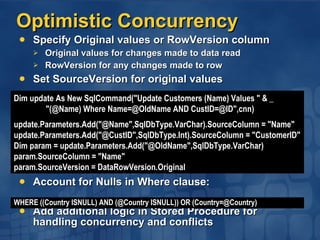
Optimistic Concurrency Specify Original values or RowVersion column Original values for changes made to data read RowVersion for any changes made to row Set SourceVersion for original values Account for Nulls in Where clause: Add additional logic in Stored Procedure for handling concurrency and conflicts WHERE ((Country ISNULL) AND (@Country ISNULL)) OR (Country=@Country) Dim update As New SqlCommand("Update Customers (Name) Values " & _  "(@Name) Where Name=@OldName AND CustID=@ID",cnn) update.Parameters.Add("@Name",SqlDbType.VarChar).SourceColumn = "Name" update.Parameters.Add("@CustID",SqlDbType.Int).SourceColumn = "CustomerID" Dim param = update.Parameters.Add("@OldName",SqlDbType.VarChar) param.SourceColumn = "Name" param.SourceVersion = DataRowVersion.Original
Server Cursors And ADO.NET DataReader versus DataSet DataReader is a Forward Only/Read Only "Server Cursor" Requests Data from Server as read on Client Buffered in packets at network level Holds state on the Server until closed Pessimistic Concurrency Locking records when read ensures updates don't fail due to concurrency violations Kills scalability of application Supported in ADO.NET through transactions Scrollable Server Cursors Holds State on Server Round-trip per fetch/update Generally better handled in DataSet or Stored Procedure Supported in ADO.NET through Cursor DML commands
Pessimistic Concurrency 'Start a transaction and set on Select command Dim connect = adapter.SelectCommand.Connection connect.Open() Dim tran = connect.BeginTransaction(IsolationLevel.Serializable) adapter.SelectCommand.Transaction = tran 'Fill DataSet and make changes adapter.Fill(ds, "Employees") Dim employee As DataRow For Each employee In ds.Tables("Employees").Rows employee("Salary") = employee("Salary") * 1.1 Next 'Set the connection and transaction for the update command adapter.UpdateCommand.Connection = connect adapter.UpdateCommand.Transaction = tran adapter.Update(ds,"Employees") tran.Commit() connect.Close()
Scrollable Server Cursors ' Declare and open cursor Dim cmd As New SqlCommand(Nothing, conn) cmd.CommandText = “DECLARE mycursor SCROLLABLE CURSOR FOR select * from Customers” cmd.ExecuteNonQuery() cmd.CommandText = “OPEN mycursor” cmd.ExecuteNonQuery() ' Read from cursor Dim dr As SqlDataReader cmd.CommandText = “FETCH NEXT FROM mycursor” While(True) dr =cmd.ExecuteReader() if (dr.Read() = false) Then Exit While Console.WriteLine("CompanyName is " & dr("CompanyName")) dr.Close() End While ' Update fifth row cmd.CommandText = “FETCH ABSOLUTE 5 FROM mycursor” cmd.ExecuteNonQuery() cmd.CommandText = “UPDATE Customers set FirstName = ‘Bill’ WHERE CURRENT OF mycursor” cmd.ExecuteNonQuery() ' Close the cursor cmd.CommandText = “CLOSE mycursor; DEALLOCATE mycursor” cmd.ExecuteNonQuery()
Using The Dataset As A Cache DataSet optimized for multi-threaded read access Can put in ASP.NET cache Doesn't take locks Need to synchronize writes Clone, Update, and replace Function GetCategories() As DataSet 'See if DataSet exists in Cache Dim categories As DataSet = Cache("CategoriesDS") if (categories Is Nothing)  ' not in cache 'Create DataAdapter and Load DataSet Dim adapter As new SqlDataAdapter(  _ "Select CategoryName from Categories",cnn) adapter.Fill(categories) 'Put Categories Dataset into Cache Cache("CategoriesDS")=categories End If return categories End Function
Controlling How The XML Is Generated DataSet lets you control how XML is generated Name, Namespace properties on DataSet, DataTable, DataColumn MappingType property on DataColumn defines how data is written Element, Attribute, SimpleType, Hidden Nested Property on DataRelation controls how children are written ' Write out CustomerID, OrderID as Attributes ds.Tables(&quot;Customers&quot;).Columns(&quot;CustomerID&quot;).ColumnMapping = MappingType.Attribute ds.Tables(&quot;Orders&quot;).Columns(&quot;OrderID&quot;).ColumnMapping = MappingType.Attribute ' Write out Orders as children of Customers ds.Relations(&quot;cust_orders&quot;).Nested = True <?xml version=&quot;1.0&quot; standalone=&quot;yes&quot;?> <CustomerOrders> <Customers CustomerID=&quot;GROSR&quot;> <ContactName>Manuel Pereira</ContactName> <Orders OrderID=&quot;10268&quot;> <CustomerID>GROSR</CustomerID> <OrderDate>1996-07-30</OrderDate> </Orders> </Customers> </CustomerOrders>
Working With Identity Columns Issue: Primary Keys must be unique across consumers in order to merge back to database Solution #1: Use a GUID as the Primary Key where possible Can be generated on the Client or Server Guaranteed to be unique Doesn’t change when updated to the Server No fixup required for child rows
Issue: Primary Keys must be unique across consumers in order to merge back to database Solution #2: If you are stuck with an AutoIncrement Primary Key… First, make sure Client value doesn't conflict with Server value Set AutoIncrement Seed, Step to -1 on DataSet To update values in Dataset, select back the ID in your InsertCommand Update the inserted row with the new value Insert Parent rows before Child Rows Use UpdateRule.Cascade If you are merging with the original DataSet, prevent AcceptChanges from being called on Inserted row Specify SkipCurrentRow in OnRowUpdated Eventhandler Working With Identity Columns
Inserting AutoIncrement Values Sub UpdateData(table As DataTable)  ' Set InsertCommand  with returned Identity Dim insert As New SqlCommand(  _ &quot;Insert into Orders(OrderID,Date) values @OrderID, @Date)&quot; _ & &quot;;Select SCOPE_IDENTITY() as OrderID &quot;,cnn) insert.Parameters.Add(&quot;@OrderID&quot;,SqlDbType.Int).SourceColumn=&quot;OrderID&quot; insert.Parameters.Add(&quot;@Date&quot;,SqlDbType.DateTime).Value = DateTime.Now adapter.InsertCommand = insert ' Set UpdateRowSource and Register RowUpdatedEventHandler insert.UpdatedRowSource = UpdateRowSource.FirstReturnedRecord AddHandler adapter.RowUpdated, _ New SqlRowUpdatedEventHandler(AddressOf myHandler) DataAdapter.Update(table) End Sub Shared Sub myHandler(adapter as Object, e As SqlRowUpdatedEventArgs)  ' Don't call AcceptChanges e.Status = UpdateStatus.SkipCurrentRow End Sub
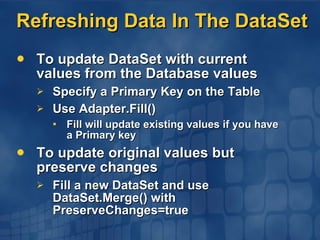
Refreshing Data In The DataSet To update DataSet with current values from the Database values Specify a Primary Key on the Table Use Adapter.Fill() Fill will update existing values if you have a Primary key To update original values but preserve changes Fill a new DataSet and use DataSet.Merge() with PreserveChanges=true
Handling Large ResultSets Select just the data the user needs User rarely wants to scroll through >100 records Call Cancel() on command to dispose of data  beyond what is read Page through large results Use TOP n in SQL Server Use MaxRows for other databases Paging by Ordinal range (i.e., records 91-100) Paging by value range (i.e., M-N) Parameterized Where clause SELECT TOP 10 * FROM  (SELECT TOP 100 ProductName, UnitPrice FROM Products ORDER BY UnitPrice ASC) AS Products ORDER BY UnitPrice DESC SELECT TOP 10 ProductName, UnitPrice FROM Products  WHERE ProductName > @PreviousName ORDER BY ProductName ASC AS Products
Join Queries Against DataSet Use Relations to navigate from parent to child Restriction:  Can’t limit parent based on child values Use XmlDataDocument X/Path queries can be hierarchical Can get DataRows corresponding to returned Elements Dim nodeslist = xmlData.SelectNodes(&quot;//Customers/Orders[@State=WA]&quot;) Dim customer, order As DataRow For Each customer in CustomerTable.Select(&quot;State='WA'&quot;) Console.WriteLine(&quot;Customer: &quot; & customer(&quot;ContactName&quot;)) For Each order in customer.GetChildRows(&quot;custord&quot;) Console.WriteLine(&quot;Order Amount = &quot; & order(&quot;Amount&quot;)) Next Next Dim node As XmlNode Dim customer as DataRow For Each node in nodelist customer = xmlData.GetRowFromElement(node) Next
RecordSet   DataSet Getting Data From a RecordSet Use the OleDbDataAdapter.Fill() method Persist the RecordSet as XML and load into the DataSet Use an XSL/T for best results Getting Data From a DataSet to a RecordSet Write an XSL Transform to do the conversion We hope to provide one of these in the future Walk through the DataSet and generate the XDR description then write out the XML in attribute-centric format Sample coming soon… Dim rs As New ADODB.Recordset()  rs.Open(&quot;Select * from Orders&quot;, &quot;Data Source=localhost;Integrated Security=true&quot;) Dim adapter As New OleDbDataAdapter() adapter.Fill(ds, rs, &quot;Orders&quot;)   Dim ds As New DataSet() ds.ReadXml(&quot;rsOrders.xml)
Agenda Common Techniques Optimizing Performance Optimizing Data Retrieval Using Schema at Design Time Using Batches Looking Up Values in the DataSet Provider specific Optimizations Security Considerations Questions
Optimizing Data Retrieval Use ExecuteNonQuery if no results to be returned DDL commands,Inserts, Updates, Deletes Non-result returning Stored Procedures (parameters ok) Return single set of values using Output Parameters Dim numRowsAffected As Integer = cmd.ExecuteNonQuery() cmd.CommandText = _ &quot;Select @ContactName = ContactName From Customers where CustomerID = 'GROSR'&quot; Dim param = cmd.Parameters.Add(&quot;@ContactName&quot;,SqlDbType.VarChar,25) param.Direction = ParameterDirection.Output cmd.ExecuteNonQuery() Console.WriteLine(&quot;Contact Name = &quot;& param.Value)
Efficiently Retrieving BLOBs Use CommandBehavior.SequentialAccess Must retrieve columns in order No buffering of column values Dim cmd As New SqlCommand( &quot;Select * from Employees&quot;, cnn) Dim results = cmd.ExecuteReader(CommandBehavior.SequentialAccess) Dim i As Integer While(results.Read())  For i=0 to results.FieldCount Console.Write(&quot;\t &quot;& results(i)) Console.WriteLine() Next End While
Use Metadata At Design Time  DataReader Strongly Typed Ordinal accessors Dim name As String = dr.GetString(0) DataSet Load, don't infer, schema Data Adapter Don’t use CommandBuilder Specify insert,update,delete commands when known Don’t use CommandBuilder.DeriveParameters() Specify Parameter information when known Don’t use MissingSchemaAction.AddWithKey Specify Primary Key information when known custTable.PrimaryKey = custTable.Columns(&quot;CustomerID&quot;) Don’t add Primary Key if not necessary Necessary when Updating,Refreshing,Merging values
Retrieving Multiple Results Specify Batch statement or stored procedure Use NextResult() to move to next set of results Dim fMoreResults As Boolean = true Dim field As Integer While(fMoreResults)  For field = 0 To dr.FieldCount  Console.Write(&quot;/t&quot;+dr.GetName(field))  Next Console.WriteLine() While(dr.Read()) For field = 0 to dr.FieldCount Console.Write(&quot;/t&quot;+dr(field)) Next Console.WriteLine() End While fMoreResults = dr.NextResult() End While
Populating Multiple DataTables Retrieve multiple results in a single call Execute Batch statement or stored procdure Map results to appropriate tables using tablemappings Use ExecuteXmlReader to retrieve hierarchical results Load with ReadXml using XmlReadMode.Fragment Submit updates in batches Sample batch update example available soon… Or save as DiffGram and send to SqlXml Dim adapter  As New SqlDataAdapter( _ &quot;SELECT * FROM customers; SELECT * FROM orders&quot;,cnn) adapter.TableMappings.Add(&quot;Table1&quot;,&quot;Customer&quot;) adapter.TableMappings.Add(&quot;Table2&quot;,&quot;Orders&quot;) adapter.Fill(myDataSet)
Looking Up Values In The Dataset Searching for Results within a DataSet DataTable.Find() for searching on PK values DataView.Select() for repeated non-PK queries Sort DataView by search fields DataView builds an index for sorted columns Pass Table, filter, sort, RowState to constructor Dim customer = customerTable.Rows.Find(&quot;GROSR&quot;) Dim customerView As New DataView(customerTable) customerView.Sort = &quot;State&quot; Dim customers = customerView.FindRows(&quot;CA&quot;) Dim view As New DataView(  _ customerTable, _ &quot;Country=USA&quot;, _ &quot;Region&quot;, _ DataViewRowState.CurrentRows )
Coding To Different Providers Use Activator to create root class (DbConnection) Code to Interfaces Use CreateCommand() to get IDbCommand Take into account provider differences SqlClient named parameters versus OLE DB positional parameters CommandBuilder classes
Provider Specific Optimizations SqlClient .NET Data Provider Use CommandType.StoredProcedure to execute stored procs More efficient than executing command call{} or Exec syntax Set max connection lifetime for load balancing Times out valid connections in order to balance across back-ends OLE DB .NET Data Provider Use specific provider where available For example, the SqlClient .NET Data Provider… Specify type, size, precision, and scale of parameters Otherwise we rebind w/each execute Connection.State is expensive Round-trip to check state Better to listen to change event to track state
Agenda Common Techniques Optimizing Performance Security Considerations Use Integrated Security Avoid String Concatenation Use Stored Procedures Set Privileges Appropriately Questions
Use Integrated Security Don’t use sa account! (especially w/no password) connect.ConnectionString = &quot;server=localhost;uid=sa;password=&quot; Don’t embed password in connection string connect.ConnectionString = &quot;server=localhost;uid=sa;password=pwd&quot; Don’t concatenate UID/Password from user into connection string (without validating input) connect.ConnectionString = &quot;server=localhost;uid=sa;password=&quot;&pwd pwd may be “pwd;Default Database = ‘master’” Use Integrated Security connect.ConnectionString = &quot;server=localhost;Integrated Security=SSPI&quot;
Avoid String Concatenation Don’t concatenate user strings into command text cmd.CommandText = &quot;Select * from Customers where CustomerID = &quot;&custID user may set custID = ‘“GROSR’; Drop Table Customers;” Instead Have user select string from an enumeration, rather than enter free text Better yet; pass strings as Parameters: cmd.CommandText = &quot;Select * from Customers Where CustomerID = @CustID&quot; cmd.Parameters.Add(&quot;@CustID&quot;,custID)
Use Stored Procedures Controls what data user accesses  and how Allows privileges to be set on  Stored Procedure Can enforce additional business logic Added protection from malicious  string concatenation Values passed as parameters Validate strings passed to Stored Procedure
Set Privileges Appropriately Create user appropriate to client role Don’t just use “sa” for everything! Set Privileges on resources accessed Stored Procedures Tables Columns
Additional Information Whitepapers: ADO.NET for the ADO Programmer: http://msdn.microsoft.com/library/en-us/dndotnet/html/ADONETProg.asp ADO.NET Best Practices (coming soon): http://msdn.microsoft.com/library/en-us/dndotnet/html/ADONETBest.asp ADO.NET On-Line Chat Transcript http://msdn.microsoft.com/chats/vstudio/vstudio_012402.asp The .NET Show: ADO.NET: http://msdn.microsoft.com/theshow/Episode017/default.asp
Questions?
MSDN Architecture FastTrack FastTrack sessions and reading list http://www.mymsevents.com/MyMSEvents/Content.aspx?p=fast.htm Comments on the FastTrack? Please write on back of your review form Contact bda.net@microsoft.com Related content on http://msdn.microsoft.com/BDAdotNET
© 2002 Microsoft Corporation. All rights reserved. This presentation is for informational purposes only. Microsoft makes no warranties, express or implied, in this summary.

Advanced dot net

  • 1.
    DAT402: Advanced ADO.NETMichael Pizzo Software Architect WebData Team Microsoft Corporation
  • 2.
  • 3.
    Agenda Common TechniquesOptimizing Performance Security Considerations Questions
  • 4.
    Agenda Common TechniquesUpdating from a DataSet Server Cursors and ADO.NET Using the DataSet as a Cache Controlling how XML is generated Working with Identity Columns Handling Large ResultSets Join Queries against a DataSet Recordset  Dataset Optimizing Performance Security Considerations
  • 5.
    Updating From ADataSet Use a DataAdapter Typically one per table to be updated Specify Insert, Update, Delete commands Use CommandBuilder for AdHoc queries Designers, tools Call Update(), passing in DataSet/DataTable to be updated No persistent connection between DataAdapter and DataSet Can use different DataAdapters for Fill and Update Use ExtendedProperties to pass datasource information
  • 6.
    Specifying Update CommandsAssociate parameters with DataSet Columns Specify SourceColumn property Parameter values will be set using values from the Dataset for each Insert, Update, or Delete 'Specify Delete Command Dim delete As New SqlCommand(&quot;DeleteOrder&quot;, cnn) delete.CommandType = CommandType.StoredProcedure 'Create a Parameter and associate it with Dataset column Dim param As New SqlParameter(&quot;@OrderID&quot;, SqlDbType.Int) param.SourceColumn = &quot;OrderID&quot; delete.Parameters.Add(param) 'Set as the Delete Command adapter.DeleteCommand = delete
  • 7.
    Updating Example Dimadapter As New SqlDataAdapter() Dim delete As New SqlCommand(&quot;DeleteOrder&quot;, cnn) delete.CommandType = CommandType.StoredProcedure delete.Parameters.Add(&quot;@OrderID&quot;, SqlDbType.Int).SourceColumn = &quot;OrderID&quot; adapter.DeleteCommand = delete Dim insert As New SqlCommand(&quot;AddOrder&quot;, cnn) insert.CommandType = CommandType.StoredProcedure insert.Parameters.Add(&quot;@OrderID&quot;, SqlDbType.Int).SourceColumn = &quot;OrderID&quot; insert.Parameters.Add(&quot;@CustD&quot;, SqlDbType.Int).SourceColumn = &quot;CustomerID&quot; insert.Parameters.Add(&quot;@Date&quot;, SqlDbType.DateTime).Value = DateTime.Now adapter.InsertCommand = insert Dim update As New SqlCommand(&quot;UpdateOrder&quot;, cnn) update.CommandType = CommandType.StoredProcedure update.Parameters.Add(&quot;@OrderID&quot;,SqlDbType.Int).SourceColumn=&quot;OrderID&quot; update.Parameters.Add(&quot;@CustD&quot;,SqlDbType.Int).SourceColumn=&quot;CustomerID&quot; adapter.UpdateCommand = update adapter.Update(ordersTable)
  • 8.
    Optimistic Concurrency SpecifyOriginal values or RowVersion column Original values for changes made to data read RowVersion for any changes made to row Set SourceVersion for original values Account for Nulls in Where clause: Add additional logic in Stored Procedure for handling concurrency and conflicts WHERE ((Country ISNULL) AND (@Country ISNULL)) OR (Country=@Country) Dim update As New SqlCommand(&quot;Update Customers (Name) Values &quot; & _ &quot;(@Name) Where Name=@OldName AND CustID=@ID&quot;,cnn) update.Parameters.Add(&quot;@Name&quot;,SqlDbType.VarChar).SourceColumn = &quot;Name&quot; update.Parameters.Add(&quot;@CustID&quot;,SqlDbType.Int).SourceColumn = &quot;CustomerID&quot; Dim param = update.Parameters.Add(&quot;@OldName&quot;,SqlDbType.VarChar) param.SourceColumn = &quot;Name&quot; param.SourceVersion = DataRowVersion.Original
  • 9.
    Server Cursors AndADO.NET DataReader versus DataSet DataReader is a Forward Only/Read Only &quot;Server Cursor&quot; Requests Data from Server as read on Client Buffered in packets at network level Holds state on the Server until closed Pessimistic Concurrency Locking records when read ensures updates don't fail due to concurrency violations Kills scalability of application Supported in ADO.NET through transactions Scrollable Server Cursors Holds State on Server Round-trip per fetch/update Generally better handled in DataSet or Stored Procedure Supported in ADO.NET through Cursor DML commands
  • 10.
    Pessimistic Concurrency 'Starta transaction and set on Select command Dim connect = adapter.SelectCommand.Connection connect.Open() Dim tran = connect.BeginTransaction(IsolationLevel.Serializable) adapter.SelectCommand.Transaction = tran 'Fill DataSet and make changes adapter.Fill(ds, &quot;Employees&quot;) Dim employee As DataRow For Each employee In ds.Tables(&quot;Employees&quot;).Rows employee(&quot;Salary&quot;) = employee(&quot;Salary&quot;) * 1.1 Next 'Set the connection and transaction for the update command adapter.UpdateCommand.Connection = connect adapter.UpdateCommand.Transaction = tran adapter.Update(ds,&quot;Employees&quot;) tran.Commit() connect.Close()
  • 11.
    Scrollable Server Cursors' Declare and open cursor Dim cmd As New SqlCommand(Nothing, conn) cmd.CommandText = “DECLARE mycursor SCROLLABLE CURSOR FOR select * from Customers” cmd.ExecuteNonQuery() cmd.CommandText = “OPEN mycursor” cmd.ExecuteNonQuery() ' Read from cursor Dim dr As SqlDataReader cmd.CommandText = “FETCH NEXT FROM mycursor” While(True) dr =cmd.ExecuteReader() if (dr.Read() = false) Then Exit While Console.WriteLine(&quot;CompanyName is &quot; & dr(&quot;CompanyName&quot;)) dr.Close() End While ' Update fifth row cmd.CommandText = “FETCH ABSOLUTE 5 FROM mycursor” cmd.ExecuteNonQuery() cmd.CommandText = “UPDATE Customers set FirstName = ‘Bill’ WHERE CURRENT OF mycursor” cmd.ExecuteNonQuery() ' Close the cursor cmd.CommandText = “CLOSE mycursor; DEALLOCATE mycursor” cmd.ExecuteNonQuery()
  • 12.
    Using The DatasetAs A Cache DataSet optimized for multi-threaded read access Can put in ASP.NET cache Doesn't take locks Need to synchronize writes Clone, Update, and replace Function GetCategories() As DataSet 'See if DataSet exists in Cache Dim categories As DataSet = Cache(&quot;CategoriesDS&quot;) if (categories Is Nothing) ' not in cache 'Create DataAdapter and Load DataSet Dim adapter As new SqlDataAdapter( _ &quot;Select CategoryName from Categories&quot;,cnn) adapter.Fill(categories) 'Put Categories Dataset into Cache Cache(&quot;CategoriesDS&quot;)=categories End If return categories End Function
  • 13.
    Controlling How TheXML Is Generated DataSet lets you control how XML is generated Name, Namespace properties on DataSet, DataTable, DataColumn MappingType property on DataColumn defines how data is written Element, Attribute, SimpleType, Hidden Nested Property on DataRelation controls how children are written ' Write out CustomerID, OrderID as Attributes ds.Tables(&quot;Customers&quot;).Columns(&quot;CustomerID&quot;).ColumnMapping = MappingType.Attribute ds.Tables(&quot;Orders&quot;).Columns(&quot;OrderID&quot;).ColumnMapping = MappingType.Attribute ' Write out Orders as children of Customers ds.Relations(&quot;cust_orders&quot;).Nested = True <?xml version=&quot;1.0&quot; standalone=&quot;yes&quot;?> <CustomerOrders> <Customers CustomerID=&quot;GROSR&quot;> <ContactName>Manuel Pereira</ContactName> <Orders OrderID=&quot;10268&quot;> <CustomerID>GROSR</CustomerID> <OrderDate>1996-07-30</OrderDate> </Orders> </Customers> </CustomerOrders>
  • 14.
    Working With IdentityColumns Issue: Primary Keys must be unique across consumers in order to merge back to database Solution #1: Use a GUID as the Primary Key where possible Can be generated on the Client or Server Guaranteed to be unique Doesn’t change when updated to the Server No fixup required for child rows
  • 15.
    Issue: Primary Keysmust be unique across consumers in order to merge back to database Solution #2: If you are stuck with an AutoIncrement Primary Key… First, make sure Client value doesn't conflict with Server value Set AutoIncrement Seed, Step to -1 on DataSet To update values in Dataset, select back the ID in your InsertCommand Update the inserted row with the new value Insert Parent rows before Child Rows Use UpdateRule.Cascade If you are merging with the original DataSet, prevent AcceptChanges from being called on Inserted row Specify SkipCurrentRow in OnRowUpdated Eventhandler Working With Identity Columns
  • 16.
    Inserting AutoIncrement ValuesSub UpdateData(table As DataTable) ' Set InsertCommand with returned Identity Dim insert As New SqlCommand( _ &quot;Insert into Orders(OrderID,Date) values @OrderID, @Date)&quot; _ & &quot;;Select SCOPE_IDENTITY() as OrderID &quot;,cnn) insert.Parameters.Add(&quot;@OrderID&quot;,SqlDbType.Int).SourceColumn=&quot;OrderID&quot; insert.Parameters.Add(&quot;@Date&quot;,SqlDbType.DateTime).Value = DateTime.Now adapter.InsertCommand = insert ' Set UpdateRowSource and Register RowUpdatedEventHandler insert.UpdatedRowSource = UpdateRowSource.FirstReturnedRecord AddHandler adapter.RowUpdated, _ New SqlRowUpdatedEventHandler(AddressOf myHandler) DataAdapter.Update(table) End Sub Shared Sub myHandler(adapter as Object, e As SqlRowUpdatedEventArgs) ' Don't call AcceptChanges e.Status = UpdateStatus.SkipCurrentRow End Sub
  • 17.
    Refreshing Data InThe DataSet To update DataSet with current values from the Database values Specify a Primary Key on the Table Use Adapter.Fill() Fill will update existing values if you have a Primary key To update original values but preserve changes Fill a new DataSet and use DataSet.Merge() with PreserveChanges=true
  • 18.
    Handling Large ResultSetsSelect just the data the user needs User rarely wants to scroll through >100 records Call Cancel() on command to dispose of data beyond what is read Page through large results Use TOP n in SQL Server Use MaxRows for other databases Paging by Ordinal range (i.e., records 91-100) Paging by value range (i.e., M-N) Parameterized Where clause SELECT TOP 10 * FROM (SELECT TOP 100 ProductName, UnitPrice FROM Products ORDER BY UnitPrice ASC) AS Products ORDER BY UnitPrice DESC SELECT TOP 10 ProductName, UnitPrice FROM Products WHERE ProductName > @PreviousName ORDER BY ProductName ASC AS Products
  • 19.
    Join Queries AgainstDataSet Use Relations to navigate from parent to child Restriction: Can’t limit parent based on child values Use XmlDataDocument X/Path queries can be hierarchical Can get DataRows corresponding to returned Elements Dim nodeslist = xmlData.SelectNodes(&quot;//Customers/Orders[@State=WA]&quot;) Dim customer, order As DataRow For Each customer in CustomerTable.Select(&quot;State='WA'&quot;) Console.WriteLine(&quot;Customer: &quot; & customer(&quot;ContactName&quot;)) For Each order in customer.GetChildRows(&quot;custord&quot;) Console.WriteLine(&quot;Order Amount = &quot; & order(&quot;Amount&quot;)) Next Next Dim node As XmlNode Dim customer as DataRow For Each node in nodelist customer = xmlData.GetRowFromElement(node) Next
  • 20.
    RecordSet DataSet Getting Data From a RecordSet Use the OleDbDataAdapter.Fill() method Persist the RecordSet as XML and load into the DataSet Use an XSL/T for best results Getting Data From a DataSet to a RecordSet Write an XSL Transform to do the conversion We hope to provide one of these in the future Walk through the DataSet and generate the XDR description then write out the XML in attribute-centric format Sample coming soon… Dim rs As New ADODB.Recordset() rs.Open(&quot;Select * from Orders&quot;, &quot;Data Source=localhost;Integrated Security=true&quot;) Dim adapter As New OleDbDataAdapter() adapter.Fill(ds, rs, &quot;Orders&quot;) Dim ds As New DataSet() ds.ReadXml(&quot;rsOrders.xml)
  • 21.
    Agenda Common TechniquesOptimizing Performance Optimizing Data Retrieval Using Schema at Design Time Using Batches Looking Up Values in the DataSet Provider specific Optimizations Security Considerations Questions
  • 22.
    Optimizing Data RetrievalUse ExecuteNonQuery if no results to be returned DDL commands,Inserts, Updates, Deletes Non-result returning Stored Procedures (parameters ok) Return single set of values using Output Parameters Dim numRowsAffected As Integer = cmd.ExecuteNonQuery() cmd.CommandText = _ &quot;Select @ContactName = ContactName From Customers where CustomerID = 'GROSR'&quot; Dim param = cmd.Parameters.Add(&quot;@ContactName&quot;,SqlDbType.VarChar,25) param.Direction = ParameterDirection.Output cmd.ExecuteNonQuery() Console.WriteLine(&quot;Contact Name = &quot;& param.Value)
  • 23.
    Efficiently Retrieving BLOBsUse CommandBehavior.SequentialAccess Must retrieve columns in order No buffering of column values Dim cmd As New SqlCommand( &quot;Select * from Employees&quot;, cnn) Dim results = cmd.ExecuteReader(CommandBehavior.SequentialAccess) Dim i As Integer While(results.Read()) For i=0 to results.FieldCount Console.Write(&quot;\t &quot;& results(i)) Console.WriteLine() Next End While
  • 24.
    Use Metadata AtDesign Time DataReader Strongly Typed Ordinal accessors Dim name As String = dr.GetString(0) DataSet Load, don't infer, schema Data Adapter Don’t use CommandBuilder Specify insert,update,delete commands when known Don’t use CommandBuilder.DeriveParameters() Specify Parameter information when known Don’t use MissingSchemaAction.AddWithKey Specify Primary Key information when known custTable.PrimaryKey = custTable.Columns(&quot;CustomerID&quot;) Don’t add Primary Key if not necessary Necessary when Updating,Refreshing,Merging values
  • 25.
    Retrieving Multiple ResultsSpecify Batch statement or stored procedure Use NextResult() to move to next set of results Dim fMoreResults As Boolean = true Dim field As Integer While(fMoreResults) For field = 0 To dr.FieldCount Console.Write(&quot;/t&quot;+dr.GetName(field)) Next Console.WriteLine() While(dr.Read()) For field = 0 to dr.FieldCount Console.Write(&quot;/t&quot;+dr(field)) Next Console.WriteLine() End While fMoreResults = dr.NextResult() End While
  • 26.
    Populating Multiple DataTablesRetrieve multiple results in a single call Execute Batch statement or stored procdure Map results to appropriate tables using tablemappings Use ExecuteXmlReader to retrieve hierarchical results Load with ReadXml using XmlReadMode.Fragment Submit updates in batches Sample batch update example available soon… Or save as DiffGram and send to SqlXml Dim adapter As New SqlDataAdapter( _ &quot;SELECT * FROM customers; SELECT * FROM orders&quot;,cnn) adapter.TableMappings.Add(&quot;Table1&quot;,&quot;Customer&quot;) adapter.TableMappings.Add(&quot;Table2&quot;,&quot;Orders&quot;) adapter.Fill(myDataSet)
  • 27.
    Looking Up ValuesIn The Dataset Searching for Results within a DataSet DataTable.Find() for searching on PK values DataView.Select() for repeated non-PK queries Sort DataView by search fields DataView builds an index for sorted columns Pass Table, filter, sort, RowState to constructor Dim customer = customerTable.Rows.Find(&quot;GROSR&quot;) Dim customerView As New DataView(customerTable) customerView.Sort = &quot;State&quot; Dim customers = customerView.FindRows(&quot;CA&quot;) Dim view As New DataView( _ customerTable, _ &quot;Country=USA&quot;, _ &quot;Region&quot;, _ DataViewRowState.CurrentRows )
  • 28.
    Coding To DifferentProviders Use Activator to create root class (DbConnection) Code to Interfaces Use CreateCommand() to get IDbCommand Take into account provider differences SqlClient named parameters versus OLE DB positional parameters CommandBuilder classes
  • 29.
    Provider Specific OptimizationsSqlClient .NET Data Provider Use CommandType.StoredProcedure to execute stored procs More efficient than executing command call{} or Exec syntax Set max connection lifetime for load balancing Times out valid connections in order to balance across back-ends OLE DB .NET Data Provider Use specific provider where available For example, the SqlClient .NET Data Provider… Specify type, size, precision, and scale of parameters Otherwise we rebind w/each execute Connection.State is expensive Round-trip to check state Better to listen to change event to track state
  • 30.
    Agenda Common TechniquesOptimizing Performance Security Considerations Use Integrated Security Avoid String Concatenation Use Stored Procedures Set Privileges Appropriately Questions
  • 31.
    Use Integrated SecurityDon’t use sa account! (especially w/no password) connect.ConnectionString = &quot;server=localhost;uid=sa;password=&quot; Don’t embed password in connection string connect.ConnectionString = &quot;server=localhost;uid=sa;password=pwd&quot; Don’t concatenate UID/Password from user into connection string (without validating input) connect.ConnectionString = &quot;server=localhost;uid=sa;password=&quot;&pwd pwd may be “pwd;Default Database = ‘master’” Use Integrated Security connect.ConnectionString = &quot;server=localhost;Integrated Security=SSPI&quot;
  • 32.
    Avoid String ConcatenationDon’t concatenate user strings into command text cmd.CommandText = &quot;Select * from Customers where CustomerID = &quot;&custID user may set custID = ‘“GROSR’; Drop Table Customers;” Instead Have user select string from an enumeration, rather than enter free text Better yet; pass strings as Parameters: cmd.CommandText = &quot;Select * from Customers Where CustomerID = @CustID&quot; cmd.Parameters.Add(&quot;@CustID&quot;,custID)
  • 33.
    Use Stored ProceduresControls what data user accesses and how Allows privileges to be set on Stored Procedure Can enforce additional business logic Added protection from malicious string concatenation Values passed as parameters Validate strings passed to Stored Procedure
  • 34.
    Set Privileges AppropriatelyCreate user appropriate to client role Don’t just use “sa” for everything! Set Privileges on resources accessed Stored Procedures Tables Columns
  • 35.
    Additional Information Whitepapers:ADO.NET for the ADO Programmer: http://msdn.microsoft.com/library/en-us/dndotnet/html/ADONETProg.asp ADO.NET Best Practices (coming soon): http://msdn.microsoft.com/library/en-us/dndotnet/html/ADONETBest.asp ADO.NET On-Line Chat Transcript http://msdn.microsoft.com/chats/vstudio/vstudio_012402.asp The .NET Show: ADO.NET: http://msdn.microsoft.com/theshow/Episode017/default.asp
  • 36.
  • 37.
    MSDN Architecture FastTrackFastTrack sessions and reading list http://www.mymsevents.com/MyMSEvents/Content.aspx?p=fast.htm Comments on the FastTrack? Please write on back of your review form Contact bda.net@microsoft.com Related content on http://msdn.microsoft.com/BDAdotNET
  • 38.
    © 2002 MicrosoftCorporation. All rights reserved. This presentation is for informational purposes only. Microsoft makes no warranties, express or implied, in this summary.