Advance Database Systems
Overview of Data Modeling
Contents
• Data Modeling/Database Design
• Conceptual Data Modeling (Business Rules and ERD)
Data Modeling/Database Design
Data Modeling
• Database Modeling follows the analysis phase. Documenting rules
and policies of an organization that govern data and implementing
them into a design which is an Entity Relationship Diagram(ERD).
• 1.BusinessRule
• 2.ConceptualDataModeling
Database Design/Data Modeling
• The Data Modeling basically stores the Conceptual Model of the
database and the relationships between data that should be stored to
meet the user’s requirements in the form of an Entity Relationship
Diagram(ERD) and must be read as per business rules.
• The Database Design is stored in the Relational Schema
Diagram(skeleton structure of the entire transformed ERD), which is
in turn stored in the Data Dictionary(Collection of descriptions of the
data objects or items in a data model for the benefit of programmers
and others who need to refer to them).
Top-Down Approach
• Design by Analysis:
• Only Database Administrator’s can firstly design the structure of the
database(makes an ERD in Conceptual Data Modeling Phase) and than
transforms it into Relations in Logical Data Modeling Phase and than
afterwards code that structure of transformed ERD in Implementation
Phase using a DBMS(My SQL in XAMPP) making a Database System, This
approach is termed as Design by Analysis. A good design must reduces
duplication of data, reduces anomalies in data, we must make it in 3rd
Normal Form(3-NF) for commercial applications.
• In Physical Design phase, It requires a knowledge of the specific DBMS that
will be used to implement the database(data types, triggers, indexes etc).
Bottom-Up Approach
• Design by Synthesis:
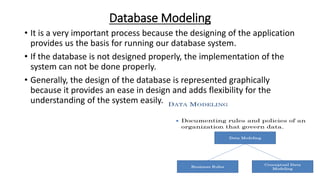
Database Modeling
• It is a very important process because the designing of the application
provides us the basis for running our database system.
• If the database is not designed properly, the implementation of the
system can not be done properly.
• Generally, the design of the database is represented graphically
because it provides an ease in design and adds flexibility for the
understanding of the system easily.
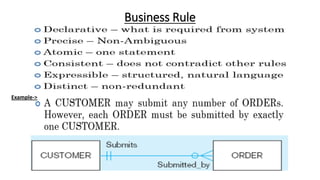
Business Rule
Example->
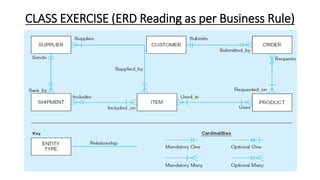
CLASS EXERCISE (ERD Reading as per Business Rule)
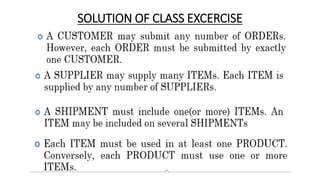
SOLUTION OF CLASS EXCERCISE
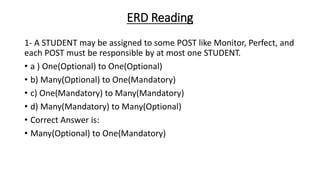
ERD Reading
1- A STUDENT may be assigned to some POST like Monitor, Perfect, and
each POST must be responsible by at most one STUDENT.
• a ) One(Optional) to One(Optional)
• b) Many(Optional) to One(Mandatory)
• c) One(Mandatory) to Many(Mandatory)
• d) Many(Mandatory) to Many(Optional)
• Correct Answer is:
• Many(Optional) to One(Mandatory)
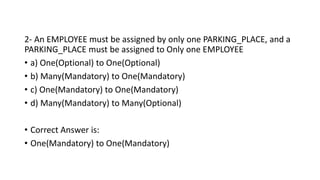
2- An EMPLOYEE must be assigned by only one PARKING_PLACE, and a
PARKING_PLACE must be assigned to Only one EMPLOYEE
• a) One(Optional) to One(Optional)
• b) Many(Mandatory) to One(Mandatory)
• c) One(Mandatory) to One(Mandatory)
• d) Many(Mandatory) to Many(Optional)
• Correct Answer is:
• One(Mandatory) to One(Mandatory)
Conceptual Data Modeling (Business Rules and
ERD)
Standard used for Database System Designing
• Standards are used for describing the design process on some pre defined rules.
• If there is no standard available for designing a specific systems Then everyone
will have to use its own design notation, and a notation used by one designer
may not be understandable to the another one.
• This misunderstanding can be more drastic if both the designers are working for
the development of the same system.
• Tools/Simulator can also help the designer and the user to mutually agree on a
specific design.
• Peter Chen developed ERDs in 1976 and introduces standard to design database
ERD Model.
• We will be using Information Engineering Style and Crow’s Foot Notation
throughout this course.
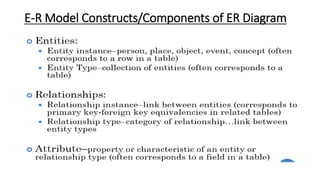
E-R Model Constructs/Components of ER Diagram
The Entity
• Entity is basic building block of the ER data model.
• The term entity is used in three different meanings or for three different
terms and that are:
• 1.Entity Type
• 2.Entity Instance
• 3.Entity Set
Entity Type
• Anything that receives or generates data from or to the system is an entity.
• Entity Type is transformed into a Table in any DBMS engine.
• They are typically singular nouns, e.g. customer, supervisor, location or
promotion.
• Entity type is name assigned to a collection of properties of different things
existing in an environment.
• Generally, the entity types and their properties are established by
nature by very existence of the things.
• For example, a bulb is an electric accessory, a cricket bat is a sports
item, a computer is an electronic device, a shirt is a clothing item etc.
Classification Of Entity Types
• Entity types(ETs) can be classified into regular Ets or weak ETs.
• Regular Ets are also called strong or independent ETs, whereas weak
Ets are also called dependent ETs.
1- Weak Entity Types
2- Strong Entity Types
Weak Entity Types
• It depend on some other entity type and have no meaning in the diagram
without depending on another entity.
• Example: Course (Course cannot be taught without teacher)
• An entity type whose instances can not exist without being linked with
instances of some other entity type, i.e. they can not exist independently.
• For example, in an organization we want to maintain data about the
vehicles owned by the employees.
• Now, a particular vehicle can exist in this organization only if the owner
already exists there as employee.
• Similarly, if employee leaves the job and the organization decides to delete
the record of the employee then the record of the vehicle will also be
deleted.
• Since, Entity can not exist without being linked to an instance of employee.
This type of entity is called as weak entity or dependent entity.
Strong Entity Types
• An entity type whose instances can exist independently, that is,
without being linked to the instances of any other entity type is called
strong or regular entity type.
• A major property of the strong entity types is that they have their
own identification, which is not always the case with weak entity
types.
• For example, employee in the previous example is an independent or
strong entity type, since its instances can exist independently.
Entity Instance
• Each entity instance possesses certain values against the properties
with the entity type to which it belongs.
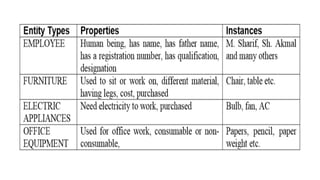
• For example, In the given table on next slide; we have identified that
entity type EMPLOYEE has name, father name, registration number,
qualification, designation.
• Now, an instance of this entity type will have values against each of
these properties, like(M. Sajjad, Abdul Rehman, EN 14289, BCS, and
Programmer) may be one instance of entity type EMPLOYEE. There
could be many others.
• Entity Instance is termed as Rows/ Tuples or Records in any DBMS
engine.
• The entity instance can be defined as a name/label assigned to
items/objects that exist in an environment and that have similar
properties.
Entity Set
• A group of entity instances of a particular entity type is called an entity set.
• For example, all employees of an organization form an entity set. Like all
students, all courses, all of them form entity set of different entity types.
Naming Entity Types
• Following are some recommendations for naming entity types.
• Good Designs usually follow these practices:
• 1.Singular Noun Recommended
• 2.Organization specific names, like CUSTOMER, CLIENT
• 3.Write in Capitals
• 4.Abbreviations can be used, be consistent. Avoid using confusing
abbreviations.
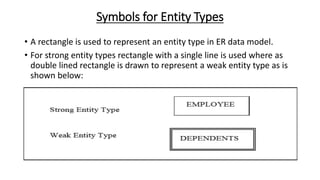
Symbols for Entity Types
• A rectangle is used to represent an entity type in ER data model.
• For strong entity types rectangle with a single line is used where as
double lined rectangle is drawn to represent a weak entity type as is
shown below:
Attribute
• Attributes are characteristics of an entity in a relationship.
• Attributes are termed as a Columns/Fields in any DBMS engine.
• An attribute of an entity is a defining property of that entity type.
• Entity instances of entity type STUDENT have attributes like std Reg No, std
Name etc.
• However, values of these attributes may be same or different. For example,
all instances of the entity type STUDENT may have the attributes std Name,
std Father Name, std Age; but the values against each of these attributes
for each instance must be different in most of the cases.
• An attribute is identified by a name allocated to it and that has to be
unique with respect to that entity type. It means one entity type cannot
have two attributes with the same name.
• However, different entity types may have attributes with the same
name.
Standard of writing Attributes is
• The notation that has been adopted in this course as a Standard is
that attribute name generally consists of two parts. The name is
started in lower case, and usually consists of abbreviation of the
entity types to which the attribute belongs.
• Second part of the attribute name describes the purpose of attribute
and only first letter is capital.
• For example employee Name means name attribute of entity type
EMPLOYEE.
Domain of an Attribute
• As every Attribute has got a name.
• Next thing is that a domain is also associated with an attribute. These two
things, name and the domain, are important part of an attribute.
• Domain is a form of a check on attribute that it cannot have a value outside
of this set.
• Domain is known as Data Type in Physical Design(DS).
• Associating domain with an attribute helps in maintaining the integrity of
the database, Since only legal values could be assigned to an attribute.
• Legal values mean the values that an attribute can have in an environment
or system. For example, if we define a salary attribute of EMPLOYEE entity
type to hold the salary of employees, the value assigned to this attribute
should be numeric, it should not be assigned a value like date‘ 10/10/2004’,
because they are not legal salary values. But, It must be numeric.
• Not only specify that the value of salary will be numeric but also
associated with a range, a lower and upper limit. It reduces the
chances of mistake.
• Domain is normally defined in form of data type and some additional
constraints like the range constraint.
• Data type is defined as a set of values along with the operations that
can be performed on those values. Some common data types are
Integer, Float, Auto Number, Date/Time, Currency etc.
• Another important thing is that once we associate a domain to an
attribute, all the attributes in all entity instances of that entity type
will have the values from the same domain.
• All attribute will have values from same domain, values may be
different or same, whatever, but the domain will be the same.
Types of Attributes
Attributes may be of different types. They
may be:
1. Simple or Composite
2. Single Valued or Multi-Valued
3. Stored or Derived
4. Key or Non-Key
5. Required or Optional
1. Simple or Composite
• An attribute that is a single whole is a simple attribute.
• The value of a simple attribute is considered as a whole, not as
comprising of other attributes or components. For example,
attributes stId of an entity type STUDENT are example of simple
attribute.
• On the other hand if an attribute consists of collection of other simple
attributes then it is called a composite attributes. For example,
stAdres attribute may comprise of house No, street No, area Code,
city etc. In this case stAdres will be a composite attribute.
2. Single Valued or Multi-Valued Attributes
• Some attribute have single value at a time, where as some others may
have multiple values.
• For example, hobby attribute of STUDENT or skills attribute of
EMPLOYEE, since a student may have multiple hobbies, like wise an
employee may have multiple skills so they are multi-valued attributes.
• On the other hand, name, father name, designation are generally
single valued attributes.
3. Stored or Derived Attributes
• Normally attributes are stored attributes, that is, their values are
stored and accessed from the database.
• However, sometimes attributes values are not stored, rather they are
computed or derived based on some other value. For example, we
may store the name, father name, address of employees, but age can
be computed from date of birth.
• The advantage of declaring age as derived attribute is that whenever
we will access the age, we will get the accurate, currentage of
employee since it will be computed right at the time when it is being
accessed.
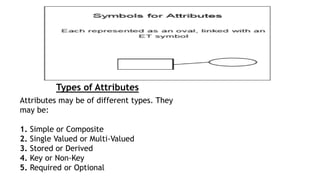
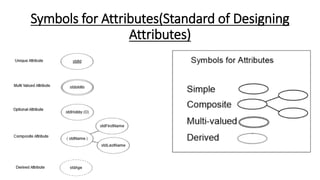
Symbols for Attributes(Standard of Designing
Attributes)
Relationships
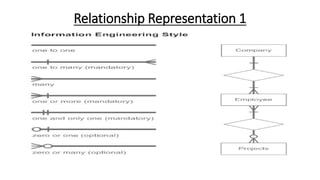
• Relationships, which represent the link between different entities.
• Each relationship has a Name.
• Each relationship has a Cardinality(Optional or Mandatory)
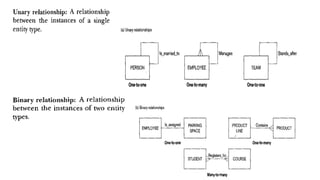
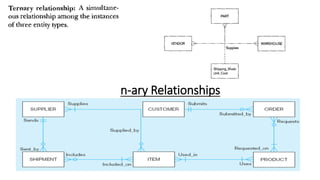
• Each relationship has a Degree(how many entity types which are
participating in a relationship for example Unary, Binary and ternary)
• Each relationship has a type(One-to-One, One-to-Many and Many-to-
Many).
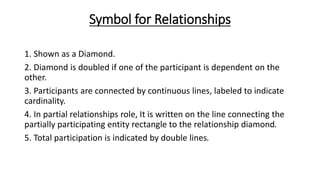
Symbol for Relationships
1. Shown as a Diamond.
2. Diamond is doubled if one of the participant is dependent on the
other.
3. Participants are connected by continuous lines, labeled to indicate
cardinality.
4. In partial relationships role, It is written on the line connecting the
partially participating entity rectangle to the relationship diamond.
5. Total participation is indicated by double lines.
Relationship Representation 1
Crow’s Foot ERD-Relationship Representation 2
Relationships Instances
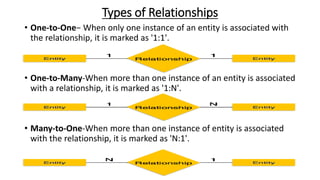
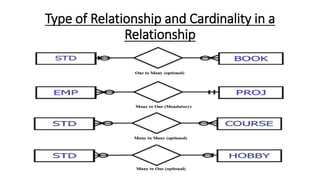
Types of Relationships
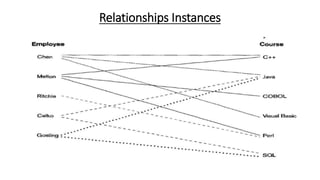
• One-to-One− When only one instance of an entity is associated with
the relationship, it is marked as '1:1'.
• One-to-Many-When more than one instance of an entity is associated
with a relationship, it is marked as '1:N'.
• Many-to-One-When more than one instance of entity is associated
with the relationship, it is marked as 'N:1'.
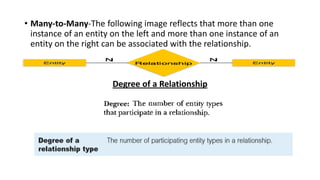
• Many-to-Many-The following image reflects that more than one
instance of an entity on the left and more than one instance of an
entity on the right can be associated with the relationship.
Degree of a Relationship
n-ary Relationships
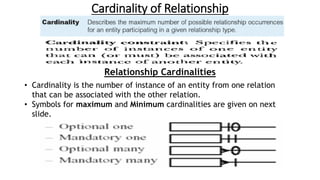
Cardinality of Relationship
Relationship Cardinalities
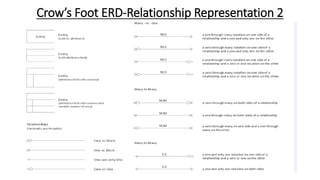
• Cardinality is the number of instance of an entity from one relation
that can be associated with the other relation.
• Symbols for maximum and Minimum cardinalities are given on next
slide.
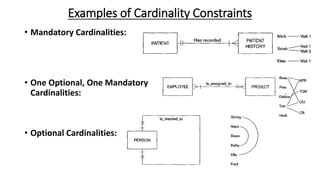
Examples of Cardinality Constraints
• Mandatory Cardinalities:
• One Optional, One Mandatory
Cardinalities:
• Optional Cardinalities:
Type of Relationship and Cardinality in a
Relationship
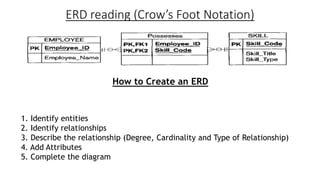
ERD reading (Crow’s Foot Notation)
How to Create an ERD
1. Identify entities
2. Identify relationships
3. Describe the relationship (Degree, Cardinality and Type of Relationship)
4. Add Attributes
5. Complete the diagram
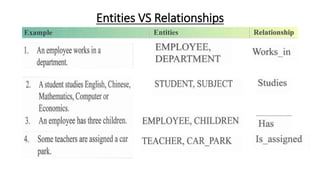
Entities VS Relationships
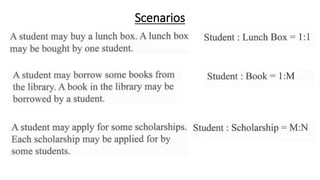
Scenarios

Advance database system(part 4)

  • 1.
  • 2.
    Contents • Data Modeling/DatabaseDesign • Conceptual Data Modeling (Business Rules and ERD)
  • 3.
    Data Modeling/Database Design DataModeling • Database Modeling follows the analysis phase. Documenting rules and policies of an organization that govern data and implementing them into a design which is an Entity Relationship Diagram(ERD). • 1.BusinessRule • 2.ConceptualDataModeling
  • 4.
    Database Design/Data Modeling •The Data Modeling basically stores the Conceptual Model of the database and the relationships between data that should be stored to meet the user’s requirements in the form of an Entity Relationship Diagram(ERD) and must be read as per business rules. • The Database Design is stored in the Relational Schema Diagram(skeleton structure of the entire transformed ERD), which is in turn stored in the Data Dictionary(Collection of descriptions of the data objects or items in a data model for the benefit of programmers and others who need to refer to them).
  • 5.
    Top-Down Approach • Designby Analysis: • Only Database Administrator’s can firstly design the structure of the database(makes an ERD in Conceptual Data Modeling Phase) and than transforms it into Relations in Logical Data Modeling Phase and than afterwards code that structure of transformed ERD in Implementation Phase using a DBMS(My SQL in XAMPP) making a Database System, This approach is termed as Design by Analysis. A good design must reduces duplication of data, reduces anomalies in data, we must make it in 3rd Normal Form(3-NF) for commercial applications. • In Physical Design phase, It requires a knowledge of the specific DBMS that will be used to implement the database(data types, triggers, indexes etc). Bottom-Up Approach • Design by Synthesis:
  • 6.
    Database Modeling • Itis a very important process because the designing of the application provides us the basis for running our database system. • If the database is not designed properly, the implementation of the system can not be done properly. • Generally, the design of the database is represented graphically because it provides an ease in design and adds flexibility for the understanding of the system easily.
  • 7.
  • 8.
    CLASS EXERCISE (ERDReading as per Business Rule)
  • 9.
  • 10.
    ERD Reading 1- ASTUDENT may be assigned to some POST like Monitor, Perfect, and each POST must be responsible by at most one STUDENT. • a ) One(Optional) to One(Optional) • b) Many(Optional) to One(Mandatory) • c) One(Mandatory) to Many(Mandatory) • d) Many(Mandatory) to Many(Optional) • Correct Answer is: • Many(Optional) to One(Mandatory)
  • 11.
    2- An EMPLOYEEmust be assigned by only one PARKING_PLACE, and a PARKING_PLACE must be assigned to Only one EMPLOYEE • a) One(Optional) to One(Optional) • b) Many(Mandatory) to One(Mandatory) • c) One(Mandatory) to One(Mandatory) • d) Many(Mandatory) to Many(Optional) • Correct Answer is: • One(Mandatory) to One(Mandatory)
  • 12.
    Conceptual Data Modeling(Business Rules and ERD) Standard used for Database System Designing • Standards are used for describing the design process on some pre defined rules. • If there is no standard available for designing a specific systems Then everyone will have to use its own design notation, and a notation used by one designer may not be understandable to the another one. • This misunderstanding can be more drastic if both the designers are working for the development of the same system. • Tools/Simulator can also help the designer and the user to mutually agree on a specific design. • Peter Chen developed ERDs in 1976 and introduces standard to design database ERD Model. • We will be using Information Engineering Style and Crow’s Foot Notation throughout this course.
  • 13.
  • 14.
    The Entity • Entityis basic building block of the ER data model. • The term entity is used in three different meanings or for three different terms and that are: • 1.Entity Type • 2.Entity Instance • 3.Entity Set Entity Type • Anything that receives or generates data from or to the system is an entity. • Entity Type is transformed into a Table in any DBMS engine. • They are typically singular nouns, e.g. customer, supervisor, location or promotion. • Entity type is name assigned to a collection of properties of different things existing in an environment.
  • 15.
    • Generally, theentity types and their properties are established by nature by very existence of the things. • For example, a bulb is an electric accessory, a cricket bat is a sports item, a computer is an electronic device, a shirt is a clothing item etc. Classification Of Entity Types • Entity types(ETs) can be classified into regular Ets or weak ETs. • Regular Ets are also called strong or independent ETs, whereas weak Ets are also called dependent ETs. 1- Weak Entity Types 2- Strong Entity Types
  • 16.
    Weak Entity Types •It depend on some other entity type and have no meaning in the diagram without depending on another entity. • Example: Course (Course cannot be taught without teacher) • An entity type whose instances can not exist without being linked with instances of some other entity type, i.e. they can not exist independently. • For example, in an organization we want to maintain data about the vehicles owned by the employees. • Now, a particular vehicle can exist in this organization only if the owner already exists there as employee. • Similarly, if employee leaves the job and the organization decides to delete the record of the employee then the record of the vehicle will also be deleted. • Since, Entity can not exist without being linked to an instance of employee. This type of entity is called as weak entity or dependent entity.
  • 17.
    Strong Entity Types •An entity type whose instances can exist independently, that is, without being linked to the instances of any other entity type is called strong or regular entity type. • A major property of the strong entity types is that they have their own identification, which is not always the case with weak entity types. • For example, employee in the previous example is an independent or strong entity type, since its instances can exist independently.
  • 18.
    Entity Instance • Eachentity instance possesses certain values against the properties with the entity type to which it belongs. • For example, In the given table on next slide; we have identified that entity type EMPLOYEE has name, father name, registration number, qualification, designation. • Now, an instance of this entity type will have values against each of these properties, like(M. Sajjad, Abdul Rehman, EN 14289, BCS, and Programmer) may be one instance of entity type EMPLOYEE. There could be many others. • Entity Instance is termed as Rows/ Tuples or Records in any DBMS engine. • The entity instance can be defined as a name/label assigned to items/objects that exist in an environment and that have similar properties.
  • 20.
    Entity Set • Agroup of entity instances of a particular entity type is called an entity set. • For example, all employees of an organization form an entity set. Like all students, all courses, all of them form entity set of different entity types. Naming Entity Types • Following are some recommendations for naming entity types. • Good Designs usually follow these practices: • 1.Singular Noun Recommended • 2.Organization specific names, like CUSTOMER, CLIENT • 3.Write in Capitals • 4.Abbreviations can be used, be consistent. Avoid using confusing abbreviations.
  • 21.
    Symbols for EntityTypes • A rectangle is used to represent an entity type in ER data model. • For strong entity types rectangle with a single line is used where as double lined rectangle is drawn to represent a weak entity type as is shown below:
  • 22.
    Attribute • Attributes arecharacteristics of an entity in a relationship. • Attributes are termed as a Columns/Fields in any DBMS engine. • An attribute of an entity is a defining property of that entity type. • Entity instances of entity type STUDENT have attributes like std Reg No, std Name etc. • However, values of these attributes may be same or different. For example, all instances of the entity type STUDENT may have the attributes std Name, std Father Name, std Age; but the values against each of these attributes for each instance must be different in most of the cases. • An attribute is identified by a name allocated to it and that has to be unique with respect to that entity type. It means one entity type cannot have two attributes with the same name.
  • 23.
    • However, differententity types may have attributes with the same name. Standard of writing Attributes is • The notation that has been adopted in this course as a Standard is that attribute name generally consists of two parts. The name is started in lower case, and usually consists of abbreviation of the entity types to which the attribute belongs. • Second part of the attribute name describes the purpose of attribute and only first letter is capital. • For example employee Name means name attribute of entity type EMPLOYEE.
  • 24.
    Domain of anAttribute • As every Attribute has got a name. • Next thing is that a domain is also associated with an attribute. These two things, name and the domain, are important part of an attribute. • Domain is a form of a check on attribute that it cannot have a value outside of this set. • Domain is known as Data Type in Physical Design(DS). • Associating domain with an attribute helps in maintaining the integrity of the database, Since only legal values could be assigned to an attribute. • Legal values mean the values that an attribute can have in an environment or system. For example, if we define a salary attribute of EMPLOYEE entity type to hold the salary of employees, the value assigned to this attribute should be numeric, it should not be assigned a value like date‘ 10/10/2004’, because they are not legal salary values. But, It must be numeric.
  • 25.
    • Not onlyspecify that the value of salary will be numeric but also associated with a range, a lower and upper limit. It reduces the chances of mistake. • Domain is normally defined in form of data type and some additional constraints like the range constraint. • Data type is defined as a set of values along with the operations that can be performed on those values. Some common data types are Integer, Float, Auto Number, Date/Time, Currency etc. • Another important thing is that once we associate a domain to an attribute, all the attributes in all entity instances of that entity type will have the values from the same domain. • All attribute will have values from same domain, values may be different or same, whatever, but the domain will be the same.
  • 26.
    Types of Attributes Attributesmay be of different types. They may be: 1. Simple or Composite 2. Single Valued or Multi-Valued 3. Stored or Derived 4. Key or Non-Key 5. Required or Optional
  • 27.
    1. Simple orComposite • An attribute that is a single whole is a simple attribute. • The value of a simple attribute is considered as a whole, not as comprising of other attributes or components. For example, attributes stId of an entity type STUDENT are example of simple attribute. • On the other hand if an attribute consists of collection of other simple attributes then it is called a composite attributes. For example, stAdres attribute may comprise of house No, street No, area Code, city etc. In this case stAdres will be a composite attribute.
  • 28.
    2. Single Valuedor Multi-Valued Attributes • Some attribute have single value at a time, where as some others may have multiple values. • For example, hobby attribute of STUDENT or skills attribute of EMPLOYEE, since a student may have multiple hobbies, like wise an employee may have multiple skills so they are multi-valued attributes. • On the other hand, name, father name, designation are generally single valued attributes.
  • 29.
    3. Stored orDerived Attributes • Normally attributes are stored attributes, that is, their values are stored and accessed from the database. • However, sometimes attributes values are not stored, rather they are computed or derived based on some other value. For example, we may store the name, father name, address of employees, but age can be computed from date of birth. • The advantage of declaring age as derived attribute is that whenever we will access the age, we will get the accurate, currentage of employee since it will be computed right at the time when it is being accessed.
  • 30.
    Symbols for Attributes(Standardof Designing Attributes)
  • 31.
    Relationships • Relationships, whichrepresent the link between different entities. • Each relationship has a Name. • Each relationship has a Cardinality(Optional or Mandatory) • Each relationship has a Degree(how many entity types which are participating in a relationship for example Unary, Binary and ternary) • Each relationship has a type(One-to-One, One-to-Many and Many-to- Many).
  • 32.
    Symbol for Relationships 1.Shown as a Diamond. 2. Diamond is doubled if one of the participant is dependent on the other. 3. Participants are connected by continuous lines, labeled to indicate cardinality. 4. In partial relationships role, It is written on the line connecting the partially participating entity rectangle to the relationship diamond. 5. Total participation is indicated by double lines.
  • 33.
  • 34.
  • 35.
  • 36.
    Types of Relationships •One-to-One− When only one instance of an entity is associated with the relationship, it is marked as '1:1'. • One-to-Many-When more than one instance of an entity is associated with a relationship, it is marked as '1:N'. • Many-to-One-When more than one instance of entity is associated with the relationship, it is marked as 'N:1'.
  • 37.
    • Many-to-Many-The followingimage reflects that more than one instance of an entity on the left and more than one instance of an entity on the right can be associated with the relationship. Degree of a Relationship
  • 39.
  • 40.
    Cardinality of Relationship RelationshipCardinalities • Cardinality is the number of instance of an entity from one relation that can be associated with the other relation. • Symbols for maximum and Minimum cardinalities are given on next slide.
  • 41.
    Examples of CardinalityConstraints • Mandatory Cardinalities: • One Optional, One Mandatory Cardinalities: • Optional Cardinalities:
  • 42.
    Type of Relationshipand Cardinality in a Relationship
  • 43.
    ERD reading (Crow’sFoot Notation) How to Create an ERD 1. Identify entities 2. Identify relationships 3. Describe the relationship (Degree, Cardinality and Type of Relationship) 4. Add Attributes 5. Complete the diagram
  • 44.
  • 45.